Best Practices for Using Amazon EMR
Amazon has made working with big data a lot easier. You can launch an EMR cluster in minutes for big data processing, machine learning, and real-time stream processing with the Apache Hadoop ecosystem. You can use the Management Console, the command line, or infrastructure-as-code tools like CloudFormation and Terraform to start several nodes with ease.
EMR pricing uses pay-per-second billing, which results in lower costs and you no longer have to worry about the hourly boundary.
EMR makes a whole bunch of the latest versions of open source software available to you. Currently, EMR supports over 20 open source projects including Apache Spark, Hive, HBase, Flink, Presto, Trino, Hudi, Iceberg, and Delta Lake, with new releases made every 4 to 6 weeks. This is very useful, especially for rapidly evolving open source projects such as Apache Spark where each release contains critical bug fixes and features. However, you are not forced to upgrade; a new release is made available if you choose to use it. Each EMR release now gets 24 months of standard support. With EMR, you can spin up a bunch of instances and process massive volumes of data residing on S3 at a reasonable cost.
EMR Deployment Options
Amazon EMR provides multiple deployment options to match your operational requirements:
- EMR on EC2 – Traditional cluster-based deployment with full control over cluster configuration, including instance types and custom AMIs. Best for workloads requiring advanced configurations and persistent clusters.
- EMR Serverless – Run applications without managing clusters. Resources automatically scale up and down based on your workload. Best for data analysts and engineers who want to focus on application logic without cluster management overhead.
- EMR on EKS – Run EMR workloads on Amazon Elastic Kubernetes Service. Compute resources can be shared between Spark applications and other Kubernetes applications. Resources are allocated and removed on demand. Best for organizations already using Kubernetes for container orchestration.
Supported Applications and Frameworks
A variety of cluster management options are supported, including YARN. You can run the following:
- HBase
- Trino (formerly PrestoSQL – high-performance distributed SQL engine)
- Presto (legacy; AWS recommends Trino going forward)
- Spark (including Spark 4.0 with VARIANT data type, Spark Connect, and ANSI SQL compliance)
- Apache Flink (stream processing)
- Apache Hive
- Tez
- Apache Hudi, Apache Iceberg, Delta Lake (open table formats with ACID transactions)
- Zeppelin
- JupyterHub
- Notebooks (EMR Studio Workspaces)
- SQL editors
Apache Spark 4.0 on EMR (GA 2026)
Apache Spark 4.0 is now generally available on Amazon EMR across all deployment options (EMR Serverless, EMR on EC2, and EMR on EKS). Key features include:
- VARIANT data type – Native semi-structured data handling for JSON without the need for complex parsing logic
- Spark Connect – Bridges interactive development and production-scale execution, enabling thin client connectivity
- ANSI SQL compliance – Build data pipelines using standard SQL without learning Spark-specific syntax
- Enhanced streaming (transformWithState API) – Build stateful streaming applications with improved state management
- Apache Iceberg v3 support – Default column values, deletion vectors, multi-argument transforms, and row lineage tracking
- EMR Optimized Runtime – Runs Spark workloads up to 4.5× faster than open-source Apache Spark
AWS Connectors
Additionally, connectors to different AWS services are available; for example, you can use Spark to load Redshift (using the Redshift connector, which uses Redshift commands under the hood to get good throughput). You can access DynamoDB for analytics applications, use connectors for relational data, and integrate with Amazon S3 Tables and SageMaker Lakehouse.
AWS Glue
One particularly important integration is AWS Glue. AWS Glue (now at version 5.1) comprises several main components:
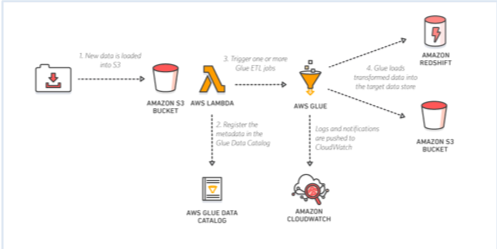
- AWS Glue ETL: Serverless ETL service supporting Apache Spark, with native fine-grained access control via AWS Lake Formation (table, column, row, and cell-level permissions). Glue 5.0+ adds support for SageMaker Lakehouse to unify data across S3 data lakes and Amazon Redshift data warehouses.
- AWS Glue Data Catalog: A fully managed Hive metastore-compliant service. You have an intelligent metastore—you don’t have to write DDL to create a table; you can just make Glue crawl your data, infer what the schema is, and create those tables for you. It supports Apache Iceberg, Apache Hudi, and Delta Lake table formats, and automatically handles partition management. It also supports a variety of complex data types.
- Crawlers: The crawlers crawl your data to infer the schema and automatically add partitions.
- AWS Glue Data Quality: Provides rule-based data quality validation with rule labeling for organizing and analyzing data quality results.
AWS Glue is a managed service, so you spend less time monitoring. As a fully managed service, it is also responsible for infrastructure management and auto-scaling. Enabling security options in AWS Glue is straightforward, supporting IAM policies and AWS Lake Formation for fine-grained access control.
Open Table Formats
EMR now has first-class support for open table formats that enable ACID transactions, schema evolution, and time travel on data lakes:
- Apache Iceberg – Supports v3 format with deletion vectors, materialized views, and merge-on-read. Recommended for most new data lake implementations.
- Apache Hudi – Supports incremental data processing with upserts and deletes.
- Delta Lake – Supports UniForm for cross-format compatibility with Iceberg clients.
All three formats are supported with AWS Lake Formation fine-grained access control (table, row, column, and cell-level filtering) across EMR on EC2, EMR Serverless, and EMR on EKS.
Common EMR Use Cases
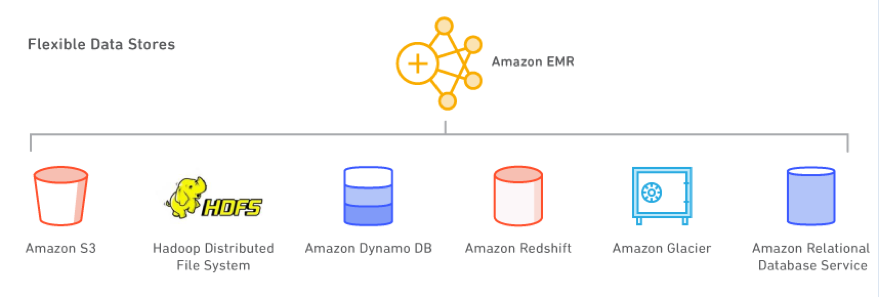
HBase at massive scale: Using HBase with S3 for HFiles storage can save 50% or higher on storage costs compared to HDFS. Instead of sizing the cluster for HDFS, you size it for the processing power required for the HBase Region Servers. The S3 option also supports Read Replica HBase clusters in another AZ for load balancing and disaster recovery.
Real-time and batch processing: Use Amazon Kinesis Data Streams for pushing data to Spark. Use Spark Streaming or Apache Flink for real-time analytics or processing data on-the-fly and then dump that data into S3. If you don’t have real-time processing use cases, then Amazon Data Firehose (formerly Kinesis Data Firehose) is a great alternative. The data can be cataloged in the Glue Data Catalog and then accessed via a variety of analytical engines. EMR supports several analytical engines including Hive, Tez, Spark, and Trino. Once the data is in the Data Catalog on S3, you can use Athena (serverless SQL queries), Glue ETL (serverless ETL), and Redshift Spectrum.
Data exploration: Use Spark with EMR Studio (Jupyter-based notebooks), Zeppelin, or JupyterHub to arm data scientists with a way to explore large amounts of data. EMR Studio supports real-time collaboration and Git-based version control. Amazon SageMaker Unified Studio Notebooks also support EMR Serverless with Spark Connect for interactive analytics.
Ad hoc SQL queries: There is a big rise in the use of Trino (formerly PrestoSQL) for ad hoc SQL queries (in combination with Athena). Trino gives you advanced configurations and a way to build exactly what you need for your use case but requires cluster management, versus Athena where you just write SQL without infrastructure. Many BI tools support Trino for low latency dashboards. EMR 6.15+ runs Trino queries 2.7× faster than previous versions.
Deep learning with GPU instances: You can launch GPU hardware for EMR. TensorFlow is fully supported. Note that Apache MXNet has reached end-of-life and the project is archived—use PyTorch or TensorFlow instead for deep learning workloads on EMR.
Machine learning pipelines: Typical ML projects implement a multi-step process including ETL, feature engineering, model training, model evaluation, model deployment, and model scoring. Using Apache Spark for implementing ML pipelines is popular as it supports each step, scales for small and large jobs, has good ML libraries (MLlib), and has an active user base. Amazon SageMaker integrates with EMR for data preparation at scale.
EMR Deployment Best Practices
There are several options for deploying Spark on AWS:
- EMR Serverless – No infrastructure to manage. Applications function as cluster templates that instantiate when jobs are submitted and can process multiple jobs. Automatic capacity management. Best for intermittent or variable workloads.
- EMR on EC2 – Full control over instance types, cluster configurations, and custom AMIs. Supports batch and streaming, integrates with tooling. Best for persistent clusters with specific configuration requirements.
- EMR on EKS – Run Spark on existing Kubernetes clusters. Share compute resources between Spark and other applications. Best for organizations standardized on Kubernetes.
- EC2 (self-managed) – Maximum flexibility but places a huge management burden. Not recommended unless you have very specific requirements not met by managed options.
Lowering EMR Costs
If you are paying for Hadoop nodes that are not doing anything, then you are just burning money. Key cost optimization strategies:
- Use EMR Serverless – Pay only for resources consumed during job execution. No idle cluster costs.
- Use Graviton instances – AWS Graviton-based instances provide up to 40% better price-performance compared to equivalent x86 instances. EMR fully supports Graviton2 and Graviton3 instance types.
- Use Spot Instances for task nodes – Achieve up to 60-90% cost savings on compute. Use Instance Fleets with diversified instance types across multiple Availability Zones for better Spot capacity.
- Use Instance Fleets with allocation strategies – EMR supports prioritized and capacity-optimized-prioritized allocation strategies for better instance provisioning reliability and cost optimization.
- Enable Managed Scaling – EMR evaluates cluster metrics every 5-10 seconds and makes optimized scaling decisions. Supports Advanced Scaling with configurable optimization index (cost vs. performance).
- Batch workloads and shut down clusters – Take an inventory of jobs, batch them, and shut down clusters in-between. Use transient clusters for batch processing.
- Separate clusters by workload – Instead of one large always-on cluster, use auto-scaling separate clusters optimized for each workload type.
- Use Amazon Linux AMI with preinstalled customizations – Faster cluster creation with custom AMIs.
- Use On-Demand Capacity Reservations (ODCRs) – For predictable, steady-state workloads to ensure capacity availability.
- Right-size instances – Use AWS Compute Optimizer recommendations to match instance types to actual resource demands.
EMR Security Best Practices
- Use v2 managed IAM policies – AWS is deprecating v1 managed policies (AmazonElasticMapReduceFullAccess). Migrate to the new v2 policies with least-privilege access.
- Enable encryption – Use at-rest and in-transit encryption for data processed by EMR clusters.
- Use Lake Formation – Apply fine-grained access control (table, row, column, cell-level) on open table formats across all EMR deployment options.
- Use security groups – Restrict network access to EMR clusters and manage port access.
EMR Studio
Amazon EMR Studio is a managed IDE environment for developing, visualizing, and debugging applications written in R, Python, Scala, and PySpark using Jupyter notebooks. Key features:
- Built-in real-time collaboration with peers
- Git repository integration for version control
- Workspaces that connect to EMR on EC2 clusters or EMR Serverless applications
- Integration with SageMaker Unified Studio for AI/ML workflows
- Support for Spark Connect (Spark 4.0) for interactive workloads
Amazon SageMaker Lakehouse Integration
Amazon SageMaker Lakehouse unifies all your data across Amazon S3 data lakes, Amazon S3 Tables, and Amazon Redshift data warehouses. With this integration:
- Access and query unified data from EMR using Spark
- Apply consistent governance through Lake Formation permissions
- Capture data lineage of EMR Spark jobs into SageMaker Unified Studio
- Use SageMaker Unified Studio for end-to-end analytics and AI/ML on a single platform