Table of Contents
hide
Google Cloud Firestore
- Google Cloud Firestore provides a fully managed, scalable, and serverless document database.
- Firestore stores the data in the form of documents and collections
- Firestore provides horizontal autoscaling, strong consistency with support for ACID transactions
- Firestore database can be regional or multi-regional
- Firestore multi-region instances provide five-nines (99.999%) availability SLA and regional instances with four-nines (99.99%) availability SLA
- Firestore supports multiple databases per project, enabling isolation of production/testing environments, customer data separation, and data regionalization.
Firestore Editions (2024+)
- Firestore is now available in two editions: Enterprise and Standard.
- Enterprise Edition
- Provides the most advanced Firestore capabilities with an advanced query engine featuring over 180 stages and operators
- Supports aggregations, arithmetic, arrays, sets, type conversions, and joining data (relational-style joins through correlated subqueries)
- Indexes are optional — queries can run with or without indexes
- Supports advanced index types: unique, dense, and sparse indexes
- Up to 5x improved performance over Standard edition, especially at tail latencies
- Can handle bursty network traffic at a rate up to 8x higher than Standard edition
- Supports Firestore with MongoDB compatibility API (16 MiB document size limit with MongoDB compatibility)
- SSD-based storage
- Text search and Geospatial search (Preview)
- Pricing based on tranches of bytes read/written, storage consumed, and network egress
- Committed Use Discounts: 20% for 1 year; 40% for 3 years
- Standard Edition
- Provides core Firestore capabilities with a standard query engine
- All queries require covered indexes
- Automatic, basic indexing on all document fields
- 1 MiB document size limit
- Hybrid storage (SSD & HDD)
- Pricing based on documents read/written, storage consumed, and network egress
- Committed Use Discounts: 20% for 1 year; 40% for 3 years
- Both editions support real-time synchronization, offline queries, Firebase SDKs, CMEK, scheduled backups, PITR, and Cloud Monitoring
- You can create both Enterprise and Standard edition databases in the same project
- Data is compatible between editions; migration from Standard to Enterprise is supported
Data Model
- Firestore is schemaless
- Document & Collections
- Unit of storage is the document in Firestore
- Each document contains a set of key-value pairs
- stores the data in documents organized into collections.
- is optimized for storing large collections of small documents.
- supports a variety of data types for values: boolean, number, string, geo point, binary blob, and timestamp.
- Documents can contain subcollections, arrays, or nested objects, which can include primitive fields like strings or complex objects like lists.
- Documents within a collection are unique and can be identified using your own keys, such as user IDs, or Firestore generated random IDs.
- Document size limit is 1 MiB (Standard edition and Native mode) or 16 MiB (Enterprise edition with MongoDB compatibility)
- Indexes
- Firestore guarantees high query performance by using indexes for all queries (Standard edition requires indexes; Enterprise edition makes them optional).
- Standard Edition supports two types of indexes:
- Single-field
- automatically maintains single-field indexes for each field in a document and each subfield in a map.
- Single-field index exemption can be used to exempt a field from automatic indexing settings
- Single-field index exemption for a map field is inherited by the map’s subfields
- Composite
- A composite index stores a sorted mapping of all the documents in a collection, based on an ordered list of fields to index.
- does not automatically create composite indexes but helps identify fields based on the query pattern
- Single-field
- Enterprise Edition supports fully customizable indexing with advanced index types including unique, dense, and sparse indexes
Query Engine & Pipeline Operations (Enterprise Edition)
- Firestore Enterprise edition features an advanced query engine that introduces Pipeline operations.
- Pipeline operations provide a new query interface with over 180 stages and operators.
- Key capabilities include:
- Aggregations (min, max, sum, avg, count, array_agg, first, last)
- Arithmetic and type conversion operations
- Array and set operations
- String functions (substring, regex_match)
- Relational-style joins through correlated subqueries
- Explicit “stage” ordering for complex query composition
- No index requirement — indexes are fully optional for pipeline queries
- Pipeline operations are available only in Firestore Enterprise edition (Preview stage as of 2025).
- Standard edition uses Core operations with basic comparisons and matches, requiring covered indexes.
Data Contention
- Data Contention occurs when two or more operations compete to control the same document.
- Mobile/Web SDKs
- uses optimistic concurrency controls to resolve data contention
- resolves data contention by delaying or failing one of the operations
- client libraries automatically retry transactions that fail due to data contention. After a finite number of retries, the transaction operation fails and returns an error message
- Server Client Libraries
- use pessimistic concurrency controls to resolve data contention.
- Pessimistic transactions use database locks to prevent other operations from modifying data.
- Transactions place locks on the documents they read. A transaction’s lock on a document blocks other transactions, batched writes, and non-transactional writes from changing that document.
- A transaction releases its document locks at commit time. It also releases its locks if it times out or fails for any reason.
Firestore Security
- Firestore automatically encrypts all data before it is written to disk using Google-owned and Google-managed encryption keys.
- Customer-Managed Encryption Keys (CMEK) — allows you to manage your own encryption keys via Cloud KMS for compliance and regulatory requirements. Available for both Enterprise and Standard editions.
- Server-side encryption can be used in combination with client-side encryption, where data is encrypted by the client as well as server i.e double encryption
- Firestore uses Transport Layer Security (TLS) to protect the data as it travels over the Internet during read and write operations.
- Supports VPC Service Controls for network-level security isolation.
- Firestore Security Rules — for mobile and web clients, provides declarative security rules to control access at the document and field level.
Vector Search
- Firestore supports vector embeddings for performing K-Nearest Neighbor (KNN) similarity search directly on Firestore data.
- Enables AI-powered experiences such as semantic search, recommendation engines, and RAG (Retrieval-Augmented Generation) pipelines.
- Firestore does not generate embeddings — use services like Vertex AI to create vector values (e.g., text embeddings) and store them back in Firestore documents.
- Supports multiple distance measures for similarity search.
- Eliminates the need to copy data to a separate vector search solution, maintaining operational simplicity.
Firestore with MongoDB Compatibility
- Available as part of Firestore Enterprise edition.
- Provides a MongoDB-compatible API allowing use of existing MongoDB application code, drivers, tools, and the open-source MongoDB ecosystem integrations.
- Key capabilities:
- MongoDB wire-compatible API on Firestore’s serverless database service
- Pay-per-use serverless pricing model with no up-front commitments
- Document size limit increased to 16 MiB
- Automatic scaling without capacity planning
- Full-text search and expressive queries
- Supports migration from MongoDB to Firestore using Datastream connection profiles.
- Free tier: 50,000 reads, 40,000 writes, and 1 GB storage free per day.
Generative AI & Agentic AI Integration
- Firestore provides native integrations for building AI-powered applications:
- LangChain Integration — official LangChain packages for using Firestore as a Vector Store, Document Loader, Document Saver, and Chat Memory (available in Python, Go, Java, and JavaScript).
- MCP (Model Context Protocol) Server — Firestore remote MCP server allows AI agents and tools (Gemini CLI, Claude, Cursor, VS Code Copilot, etc.) to interact with Firestore documents directly.
- MCP Toolbox for Databases — open-source MCP server enabling gen AI agents to connect to enterprise data in Firestore.
- Vector Search — enables RAG pipelines by storing and querying vector embeddings directly in Firestore.
- Enables use cases: personalized recommendations, question answering, document search & synthesis, customer service automation, and AI chatbots.
Data Protection & Disaster Recovery
- Scheduled Backups — create backup schedules to automatically protect data. Supported in both Enterprise and Standard editions.
- Point-in-Time Recovery (PITR) — restore data to any point in time within the past 7 days. PITR data is retained for 7 days in the PITR window. Does not affect read/write performance.
- In-Place Restore — perform restores directly on an existing database.
- TTL (Time-to-Live) Policies — designate a field as the expiration time for documents to automatically clean up obsolete data. Data is typically deleted within 24 hours after expiration, helping reduce storage costs.
Event-Driven Architecture
- Eventarc Integration (GA) — create event-driven architectures triggered by Firestore document changes.
- Supports both Native mode and Datastore mode
- Register multiple Cloud Functions in different regions against a multi-regional database for increased reliability
- Auth Context extension for CloudEvents
- Trigger types: document created, updated, deleted, written
- BigQuery Integration — replicate Firestore data to BigQuery for analytics.
- Dataflow Connector — process Firestore data in bulk with Apache Beam/Dataflow.
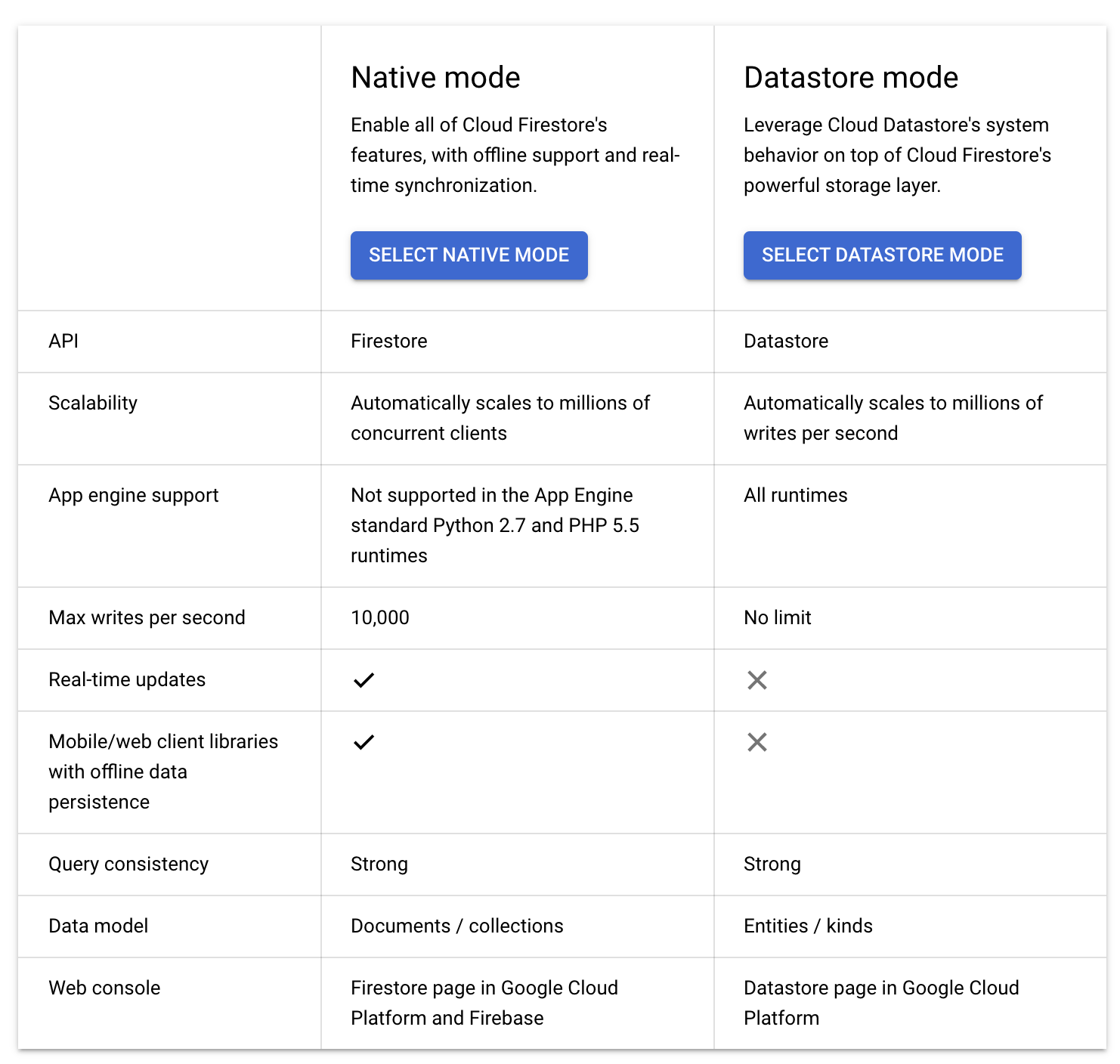
Firestore Native vs Datastore Mode
Firestore in Native mode
- Strongly consistent storage layer
- Collection and document data model
- Real-time updates
- Mobile and Web client libraries
- Firestore is backward compatible with Datastore, but the new data model, real-time updates, and mobile and web client library features are not.
- Native mode can automatically scale to millions of concurrent clients.
- Native mode is recommended for Mobile and Web apps
- Available in both Enterprise and Standard editions
Firestore in Datastore mode
- Datastore mode is fully supported and recommended for applications with a dependency on the Datastore API.
- Native mode and Datastore mode share an underlying storage layer with the same availability, consistency, and scaling capabilities.
- Datastore mode uses Datastore system behavior but accesses Firestore’s storage layer, removing the following Datastore limitations:
- No more eventual consistency. Is a strongly consistent database
- No more entity group limits on writes per second. Writes to an entity group are no longer limited to 1 per second. Transactions are no longer limited to 25 entity groups.
- Transactions can be as complex as you want to design them.
- No more cross-entity group transaction limits. Transactions can span documents and be as complex as your app requires. Queries in transactions are no longer required to be ancestor queries.
- Datastore mode disables Firestore features that are not compatible with Datastore:
- accepts only Datastore API requests and denies Firestore API requests.
- uses Datastore indexes instead of Firestore indexes.
- do not support Firestore client libraries, but only Datastore client libraries
- do not support Firestore real-time capabilities
- Datastore mode can automatically scale to millions of writes per second.
- Datastore mode is available only in the Standard edition.
- Note: Google has transparently migrated all original Datastore databases (stored in Megastore) to Firestore databases (stored in Spanner) as the underlying storage layer.
GCP Certification Exam Practice Questions
- Questions are collected from Internet and the answers are marked as per my knowledge and understanding (which might differ with yours).
- GCP services are updated everyday and both the answers and questions might be outdated soon, so research accordingly.
- GCP exam questions are not updated to keep up the pace with GCP updates, so even if the underlying feature has changed the question might not be updated
- Open to further feedback, discussion and correction.
- Your existing application keeps user state information in a single MySQL database. This state information is very user-specific and depends heavily on how long a user has been using an application. The MySQL database is causing challenges to maintain and enhance the schema for various users. Which storage option should you choose?
- Cloud SQL
- Cloud Storage
- Cloud Spanner
- Cloud Firestore
- A company needs to build a recommendation engine that performs similarity search on product embeddings stored alongside product documents. They want a serverless solution that avoids data synchronization between systems. Which Firestore feature should they use?
- Composite indexes with range filters
- Vector search with vector embeddings
- Pipeline operations with joins
- Full-text search with geospatial queries
- A team is migrating an existing MongoDB application to Google Cloud. They want to reuse their existing MongoDB drivers and application code without major rewrites while benefiting from serverless scaling. Which option should they choose?
- Firestore in Datastore mode
- Firestore Standard edition in Native mode
- Firestore Enterprise edition with MongoDB compatibility
- Cloud SQL for PostgreSQL with MongoDB-compatible extension
- An organization requires complex analytical queries with joins, aggregations, and arithmetic operations on their Firestore data without creating indexes. Which Firestore capability should they use?
- Core operations with composite indexes
- BigQuery integration for analytics
- Pipeline operations in Enterprise edition
- Dataflow connector with Apache Beam
- A company needs to automatically delete user session documents after 30 days to reduce storage costs. Which Firestore feature addresses this requirement?
- Scheduled Cloud Functions to delete expired documents
- Firestore Security Rules with time-based conditions
- TTL (Time-to-Live) policies
- Point-in-time recovery with data expiration