Spanner vs Firestore vs Cloud SQL – GCP Databases

📋 Post Overview

This comprehensive comparison covers Google Cloud’s three primary database services — Cloud Spanner, Firestore, and Cloud SQL — analyzing their data models, scaling capabilities, consistency guarantees, pricing, availability, global distribution, and transaction support to help you choose the right database for your workload.

Last updated: June 2026

Overview

  • Cloud Spanner is a fully managed, globally distributed, horizontally scalable relational database with strong (external) consistency, designed for mission-critical OLTP workloads requiring unlimited scale.
  • Firestore is a fully managed, serverless NoSQL document database with real-time synchronization, offline support, and automatic scaling — ideal for mobile/web apps and rapid development.
  • Cloud SQL is a fully managed relational database service supporting MySQL, PostgreSQL, and SQL Server — best suited for traditional applications needing familiar RDBMS capabilities within a single region.

Data Model

Cloud Spanner

  • Relational data model with schemas, tables, rows, and columns
  • Supports both GoogleSQL and PostgreSQL interface (dialect)
  • Multi-model support (2024-2025): relational, graph (Spanner Graph), key-value, vector search (ANN with ScaNN), and full-text search in a single database
  • Interleaved tables for parent-child relationships with data co-location
  • Secondary indexes, JSON columns, and JSON indexing
  • Maximum row size: 100 MB; maximum database size: virtually unlimited

Firestore

  • NoSQL document-oriented data model with collections and documents
  • Schema-flexible: documents contain fields with various data types (strings, numbers, booleans, arrays, maps, references, timestamps, geopoints)
  • Hierarchical data with subcollections and nested documents
  • Two modes: Native mode (document DB with real-time) and Datastore mode (backward compatible)
  • MongoDB compatibility mode (2025-2026) with support for documents up to 16 MiB
  • Enterprise edition adds pipeline queries, full-text search, JOINs via subqueries, and geospatial queries (2025-2026)

Cloud SQL

  • Traditional relational data model (tables, rows, columns, foreign keys)
  • Supports MySQL (up to 8.4), PostgreSQL (up to 17), and SQL Server (up to 2025)
  • Full SQL support including JOINs, stored procedures, triggers, views
  • Maximum storage: 64 TB per instance
  • Enterprise edition (up to 96 vCPUs, 624 GB RAM) and Enterprise Plus edition (up to 128 vCPUs, 864 GB RAM)

Scaling

Cloud Spanner

  • Horizontal scaling — add nodes/processing units to scale reads and writes linearly
  • Compute measured in processing units (PUs): 1 node = 1000 PUs; minimum 100 PUs
  • Automatic sharding (splits) distributes data across nodes; manual split points available for anticipated traffic spikes
  • Managed autoscaler (GA 2025) scales nodes automatically based on load, including independent read-only replica scaling
  • Handles 6+ billion queries per second at peak (Google internal)
  • No practical upper limit on database size or throughput

Firestore

  • Automatic serverless scaling — scales to zero during inactivity and up elastically during spikes
  • No capacity planning or provisioning required
  • Scales to millions of concurrent connections
  • Write throughput: up to 10,000 writes/second per database (can be increased)
  • Read throughput: virtually unlimited with proper data modeling
  • Sub-second provisioning for new databases

Cloud SQL

  • Vertical scaling — scale up by increasing vCPUs, memory, and storage
  • Read scaling via up to 20 read replicas (cross-region supported)
  • No automatic horizontal write scaling — single primary instance handles all writes
  • Maximum: 128 vCPUs, 864 GB RAM (Enterprise Plus)
  • Storage auto-resize available
  • Fast clone operations (GA 2026) for creating copies within the same zone

Consistency Model

Cloud Spanner

  • External consistency (strongest possible) — stronger than serializable isolation
  • All reads see the latest committed data, globally
  • Bounded staleness and exact staleness reads available for reduced latency
  • Repeatable read isolation (Preview 2025) for workloads with low read-write contention
  • Read leases improve read latency in multi-region configs by trading off some write performance

Firestore

  • Strong consistency for all reads (Native mode, since 2021 upgrade)
  • All queries return the most recent data at the time of the query
  • Real-time listeners receive updates with strong consistency
  • Search indexes are strongly consistent with transactional data (unlike eventual consistency in separate search systems)
  • Multi-region deployments maintain strong consistency

Cloud SQL

  • Strong consistency on the primary instance (standard RDBMS guarantees)
  • Read replicas use asynchronous replication — eventual consistency with slight lag
  • Consistency level depends on the underlying database engine (MySQL, PostgreSQL, SQL Server)
  • Synchronous replication available within a region for HA configurations

Pricing Model

Cloud Spanner

  • Provisioned capacity pricing — pay per node/processing unit per hour
  • Three editions: Standard, Enterprise, Enterprise Plus (different capabilities and prices)
  • Compute: starts at ~$0.90/hour per node (regional, varies by edition and region)
  • Storage: per GB/month (SSD); tiered storage offers HDD at ~80% less for cold data
  • Minimum cost: ~$65/month for a production-ready 100 PU instance
  • Free 90-day trial instance available
  • Committed Use Discounts: 20% (1-year), 40% (3-year)
  • Data Boost for analytics charged separately per GB processed

Firestore

  • Pay-per-use (serverless) pricing — pay only for operations performed
  • Document reads, writes, and deletes each have per-operation costs
  • Storage: per GB/month
  • Free tier: 50,000 reads, 20,000 writes, 20,000 deletes, 1 GB storage per day
  • Enterprise edition: additional pricing for advanced features (pipelines, full-text search)
  • Network egress charges for data transfer
  • Scales to zero cost during inactivity

Cloud SQL

  • Instance-based pricing — pay per vCPU-hour + memory-hour + storage
  • Two editions: Enterprise (~$0.0413/vCPU-hour) and Enterprise Plus (higher cost, better performance)
  • Storage: per GB/month (SSD or HDD)
  • Backup storage: per GB/month
  • Network egress charges apply
  • Committed Use Discounts available
  • Shared-core instances available for dev/test (f1-micro, g1-small) at lower cost
  • No free tier (use $300 free trial credits)

Availability & SLA

Cloud Spanner

  • Regional: 99.99% SLA (Standard and Enterprise editions)
  • Multi-region: 99.999% SLA (Enterprise Plus edition)
  • Automatic failover with zero downtime
  • No planned maintenance downtime
  • Drop protection for schema objects (2025) prevents accidental deletions
  • Default backup schedules ensure data protection from day one

Firestore

  • Multi-region: 99.999% SLA
  • Regional: 99.99% SLA
  • Automatic replication across zones/regions
  • Offline support for mobile/web — apps continue working without network
  • Zero operational overhead — fully serverless

Cloud SQL

  • Enterprise Plus with HA: 99.99% SLA (includes maintenance)
  • Enterprise with HA: 99.95% SLA
  • Regional availability only (no multi-region active-active)
  • High Availability via regional persistent disk and automatic failover
  • Planned maintenance windows required for updates
  • Cross-region read replicas for disaster recovery

Global Distribution

Cloud Spanner

  • Native multi-region support with synchronous replication across continents
  • Pre-defined multi-region configurations (nam6, eur6, nam-eur-asia1, etc.)
  • Custom configurations with read-only replicas in additional regions
  • Spanner Omni (2026 Preview): run Spanner on-premises, across clouds (AWS EKS, etc.), or on a laptop
  • Geo-partitioning to keep data in specific regions for compliance
  • Consistent reads globally with TrueTime technology

Firestore

  • Multi-region locations available (e.g., nam5, eur3)
  • Data automatically replicated across multiple zones within the chosen configuration
  • Cannot selectively place data in specific regions (entire database in one location config)
  • Real-time sync to global clients via SDKs
  • No active-active multi-region write support

Cloud SQL

  • Single region only for primary instance
  • Cross-region read replicas for read distribution
  • Cross-region replica promotion for disaster recovery (manual)
  • No native multi-region write capability
  • Available in 35+ Google Cloud regions

Transactions

Cloud Spanner

  • Full ACID transactions across rows, tables, and even across regions
  • Distributed transactions with external consistency
  • Read-write and read-only transaction types
  • Partitioned DML for large-scale data changes
  • No practical limit on transaction scope — can span the entire database globally

Firestore

  • ACID transactions within a single database
  • Supports up to 500 documents per transaction
  • Batched writes for atomic operations on multiple documents
  • Optimistic concurrency control
  • Transactions limited to 60 seconds
  • Cannot span multiple databases

Cloud SQL

  • Full ACID transactions per database engine capabilities
  • Standard SQL transaction isolation levels (READ COMMITTED, REPEATABLE READ, SERIALIZABLE)
  • Transactions limited to a single instance
  • No distributed transactions across instances
  • Supports savepoints, nested transactions (where engine supports)

Comparison Table

Feature Cloud Spanner Firestore Cloud SQL
Type Distributed Relational NoSQL Document Managed Relational (MySQL/PostgreSQL/SQL Server)
Data Model Relational + Graph + Vector + Full-text Document (Collections/Documents) Relational (Tables/Rows/Columns)
Query Language GoogleSQL, PostgreSQL interface Client SDKs, Pipeline queries, MongoDB-compatible queries MySQL/PostgreSQL/T-SQL (native)
Scaling Horizontal (virtually unlimited) Automatic serverless Vertical (up to 128 vCPUs)
Max Storage Unlimited (10 TB per node) Unlimited (1 MB/doc, 16 MiB MongoDB mode) 64 TB per instance
Consistency External (strongest) Strong Strong (primary), Eventual (replicas)
Availability SLA 99.99% (regional) / 99.999% (multi-region) 99.99% (regional) / 99.999% (multi-region) 99.99% (Enterprise Plus HA)
Global Distribution Multi-region with synchronous replication Multi-region (pre-defined configs) Single region (cross-region read replicas)
Transactions Distributed ACID (global scope) ACID (up to 500 documents) ACID (single instance)
Pricing Model Provisioned (per node-hour + storage) Pay-per-use (per operation + storage) Instance-based (per vCPU-hour + memory + storage)
Minimum Cost ~$65/month (100 PUs) Free tier available (scales to zero) ~$7/month (shared-core f1-micro)
Schema Schema-required (with flexible JSON support) Schema-flexible Schema-required
Real-time Sync No (use Change Streams) Yes (built-in real-time listeners) No
Offline Support No Yes (mobile/web SDKs) No
Maintenance Downtime None None Required (maintenance windows)
AI/ML Integration Built-in (ML.PREDICT, Vertex AI, Vector Search, Graph) Vector search, AI Studio integration, MCP support pgvector (PostgreSQL), AlloyDB integration
Multi-cloud / On-prem Yes (Spanner Omni, 2026 Preview) No (Google Cloud only) No (Google Cloud only)

When to Choose Each

Choose Cloud Spanner When:

  • You need globally distributed transactions with strong consistency
  • Your workload requires horizontal scaling beyond a single node’s capacity (>100,000 reads/writes per second)
  • You need 99.999% availability for mission-critical applications
  • Your application serves users across multiple continents with low-latency requirements
  • You’re running financial services, gaming, or supply chain workloads requiring both relational structure and massive scale
  • You need multi-model capabilities (graph, vector, full-text search) in a single transactional database
  • You’re migrating from Cassandra or sharded MySQL and want to eliminate operational complexity

Choose Firestore When:

  • You’re building mobile or web applications requiring real-time data synchronization
  • You need offline support for mobile apps
  • Your data model is hierarchical or document-oriented (user profiles, product catalogs, content management)
  • You want serverless scaling to zero with no capacity planning
  • You’re in the rapid prototyping / MVP phase and need schema flexibility
  • Your budget requires pay-per-use pricing with a free tier
  • You’re building with Firebase ecosystem (Authentication, Cloud Functions, Hosting)
  • You need agentic AI application backends with AI Studio integration

Choose Cloud SQL When:

  • You have existing applications using MySQL, PostgreSQL, or SQL Server and want managed infrastructure
  • Your workload fits within a single region and a single instance’s capacity (up to 128 vCPUs)
  • You need full SQL compatibility including stored procedures, triggers, and complex JOINs
  • You’re performing a lift-and-shift migration from on-premises RDBMS
  • Your application requires specific database engine features (e.g., PostGIS, MySQL full-text, SQL Server CLR)
  • Budget is constrained and workload is predictable — instance-based pricing is cost-effective
  • You need third-party tool compatibility (ORMs, admin tools, connectors) without modification

Key Differences Summary

  • Scale direction: Spanner scales horizontally (add nodes), Cloud SQL scales vertically (bigger instance), Firestore scales automatically (serverless)
  • Cost at low scale: Firestore is cheapest (free tier, pay-per-use); Cloud SQL moderate (small instances from ~$7/month); Spanner highest minimum (~$65/month)
  • Cost at high scale: Spanner provides best price-performance for high-throughput global workloads; Cloud SQL becomes expensive when hitting vertical limits; Firestore operation costs can grow with high read volumes
  • Global writes: Only Spanner supports consistent multi-region writes natively
  • Developer experience: Firestore offers the fastest path from idea to production with real-time SDKs; Cloud SQL offers familiar tooling; Spanner requires understanding distributed database concepts
  • Migration path: Cloud SQL → Spanner is natural when outgrowing regional limits; Firestore is a different paradigm (NoSQL) and typically chosen at project start

GCP Certification Exam Tips

  • If the question mentions “global,” “multi-region,” “horizontal scale,” and “relational” → Cloud Spanner
  • If the question mentions “mobile app,” “real-time sync,” “offline,” “document,” or “serverless database” → Firestore
  • If the question mentions “MySQL,” “PostgreSQL,” “lift-and-shift,” “existing application,” or “single region” → Cloud SQL
  • If the question mentions “99.999% availability” with relational data → Cloud Spanner (multi-region)
  • If the question mentions “schema flexibility” with automatic scaling → Firestore
  • Cloud Spanner is NOT a good fit for small, single-region workloads where Cloud SQL suffices (over-engineering)
  • Firestore is NOT a good fit for complex relational queries with multiple JOINs or strict schemas

Practice Questions

Question 1

A global e-commerce company needs a database to manage inventory across 5 regions. The application requires strongly consistent reads after writes, support for complex SQL queries, and the ability to handle 500,000 transactions per second during peak sales events. Which Google Cloud database service should they use?

  1. Cloud SQL with read replicas in each region
  2. Cloud Spanner with a multi-region configuration
  3. Firestore in Native mode with multi-region location
  4. Cloud SQL Enterprise Plus with cross-region failover
Show Answer

Answer: B –

Explanation: Cloud Spanner is the only Google Cloud database that provides globally distributed, strongly consistent relational transactions with horizontal scaling to handle 500,000+ TPS. Cloud SQL cannot scale horizontally and is limited to a single region for writes. Firestore is NoSQL and doesn’t support complex SQL queries natively. Spanner’s multi-region configuration (Enterprise Plus) provides 99.999% availability with synchronous replication across regions.

Question 2

A startup is building a mobile application that needs to sync user data in real-time across devices, work offline when connectivity is poor, and scale automatically during viral growth — all while minimizing operational costs during the early stages. Which database should they choose?

  1. Cloud Spanner with managed autoscaler
  2. Cloud SQL for PostgreSQL with pgpool
  3. Firestore in Native mode
  4. Cloud Bigtable with single-cluster routing
Show Answer

Answer: C –

Explanation: Firestore in Native mode provides built-in real-time synchronization, offline support for mobile SDKs, automatic serverless scaling (including scaling to zero), and a generous free tier — making it ideal for startups with unpredictable growth. Cloud Spanner’s minimum cost (~$65/month) and Cloud SQL’s always-on instances are overkill for early-stage apps. Bigtable doesn’t provide real-time sync or offline support.

Question 3

A company is migrating an on-premises PostgreSQL application to Google Cloud. The application uses stored procedures, triggers, PostGIS extensions, and serves a single-region user base with predictable traffic of about 5,000 queries per second. They need minimal code changes. Which service is most appropriate?

  1. Cloud Spanner with PostgreSQL interface
  2. Cloud SQL for PostgreSQL
  3. Firestore in Datastore mode
  4. AlloyDB for PostgreSQL
Show Answer

Answer: B –

Explanation: Cloud SQL for PostgreSQL provides full compatibility with PostgreSQL including stored procedures, triggers, and extensions like PostGIS. It’s ideal for lift-and-shift migrations with minimal code changes. Cloud Spanner’s PostgreSQL interface is a compatibility layer that doesn’t support all PostgreSQL features (no stored procedures, limited extensions). Firestore is NoSQL and incompatible. AlloyDB could work but isn’t the most straightforward lift-and-shift for a standard workload already within Cloud SQL’s capacity limits.

Question 4

An organization needs to choose a database for a new application with the following requirements: schema-flexible data model, ACID transactions across multiple documents, 99.999% availability, built-in full-text search, and integration with AI development tools. Which combination of service and edition meets ALL requirements?

  1. Cloud Spanner Enterprise Plus edition
  2. Firestore Enterprise edition in a multi-region location
  3. Cloud SQL Enterprise Plus with Cloud Search integration
  4. Cloud Spanner Enterprise edition with managed autoscaler
Show Answer

Answer: B –

Explanation: Firestore Enterprise edition in a multi-region location satisfies all requirements: schema-flexible document model, ACID transactions (up to 500 documents), 99.999% SLA for multi-region deployments, built-in full-text search (GA 2026), and native integration with AI Studio and MCP tools. Cloud Spanner requires schemas. Cloud SQL doesn’t offer 99.999% availability or built-in full-text search as a managed feature. Spanner Enterprise edition is regional only (99.99%).

Question 5

A financial services company currently uses Cloud SQL for PostgreSQL but is experiencing issues with write throughput during peak trading hours and needs to expand to serve users in Asia-Pacific while maintaining ACID compliance and strong consistency for all transactions globally. What is the recommended migration path?

  1. Add more read replicas in Asia-Pacific regions
  2. Migrate to Cloud Spanner with a multi-region instance configuration
  3. Migrate to Firestore for automatic scaling
  4. Upgrade to Cloud SQL Enterprise Plus and increase vCPUs
Show Answer

Answer: B –

Explanation: Cloud Spanner is the appropriate choice for scaling beyond Cloud SQL’s single-region write limits while maintaining ACID transactions and strong consistency globally. Read replicas (A) only help with read scaling and don’t provide strong consistency or solve write throughput issues. Firestore (C) is NoSQL and unsuitable for financial transaction processing requiring complex SQL and strict relational integrity. Upgrading Cloud SQL (D) has a vertical scaling ceiling and doesn’t solve multi-region write requirements.

Frequently Asked Questions

What is the difference between Cloud Spanner and Firestore?

Cloud Spanner is a horizontally-scalable relational database with SQL, strong consistency, and global distribution for mission-critical transactional workloads. Firestore is a serverless document database optimized for mobile/web apps with offline sync, real-time listeners, and automatic scaling.

When should I use Cloud SQL instead of Spanner?

Use Cloud SQL for traditional relational workloads under 64TB that don’t need horizontal scaling or global distribution. Cloud SQL costs significantly less for small-to-medium databases and supports MySQL, PostgreSQL, and SQL Server with minimal migration effort.

Is Cloud Spanner expensive?

Spanner starts at ~$0.90/node-hour (approximately $657/month per node minimum). It’s cost-effective for large-scale global workloads but expensive for small databases. For workloads under 10GB, Firestore or Cloud SQL are significantly cheaper options.

References

App Engine vs Cloud Run vs GKE – Compute Compared

App Engine vs Cloud Run vs GKE – Google Cloud Compute Services Compared

📅 Published June 2026: Covers Cloud Run GPU support (GA), Cloud Run multi-container sidecars, GKE Autopilot Flex CUD pricing (Jan 2026), Cloud Functions rebranding to Cloud Run functions, GKE KEDA scale-to-zero support, and updated Google Cloud certification exam guidance.

Overview

Google Cloud offers multiple compute platforms for running applications, each with different levels of abstraction, control, and operational overhead. App Engine, Cloud Run, and Google Kubernetes Engine (GKE) represent three distinct approaches to application hosting — from fully managed PaaS to container-native serverless to full Kubernetes orchestration.

This guide provides a comprehensive comparison to help you choose the right compute platform based on your application requirements, team expertise, and operational preferences.

Service Overview

App Engine

  • App Engine is Google Cloud’s original Platform-as-a-Service (PaaS), launched in 2008.
  • Designed for web applications and mobile backends with minimal infrastructure management.
  • Offers two environments:
    • Standard Environment — sandboxed runtime with specific language versions, scales to zero, free daily quotas.
    • Flexible Environment — runs on Compute Engine VMs, supports custom runtimes via Docker, minimum 1 instance always running.
  • Supports Python, Java, Node.js, Go, PHP, Ruby (Standard); any language via custom Docker images (Flexible).
  • Provides built-in services: Memcache, Task Queues, Cron, Identity-Aware Proxy.
  • One application per project with multiple services and versions for traffic splitting.
  • Google recommends Cloud Run for new serverless workloads; App Engine remains fully supported.

Cloud Run

  • Cloud Run is a fully managed serverless platform for running stateless containers.
  • Accepts any container image that listens for HTTP requests or processes events (via Eventarc).
  • Scales automatically from zero to thousands of instances based on incoming traffic.
  • Supports any programming language, library, or binary that can be containerized.
  • 2025-2026 Key Features:
    • GPU support (GA) — NVIDIA L4 GPUs with 24 GB vRAM, scale-to-zero for GPU instances.
    • Multi-container sidecars — deploy helper containers alongside your main application container.
    • Cloud Run functions — Cloud Functions (2nd gen) is now Cloud Run functions, unified on Cloud Run infrastructure.
    • Always-on CPU allocation — option for background processing outside of request handling.
    • Cloud Run Jobs — run containers to completion without serving requests.
    • Direct VPC egress — connect to VPC resources without a Serverless VPC Access connector.
    • Volume mounts — Cloud Storage FUSE and NFS support.
  • Pay only for resources consumed during request processing (or always-on CPU mode).

Google Kubernetes Engine (GKE)

  • GKE is a managed Kubernetes service for deploying, managing, and scaling containerized applications.
  • Provides full Kubernetes API access with Google-managed control plane.
  • Offers two modes of operation:
    • Autopilot — Google manages nodes, scaling, security; billed per pod resource request.
    • Standard — you manage node pools, scaling policies; billed per node VM.
  • 2025-2026 Key Features:
    • GKE Enterprise tier — multi-cluster management, service mesh, advanced security.
    • KEDA support — event-driven autoscaling including scale-to-zero for workloads.
    • Flex CUD pricing (Jan 2026) — spend-based committed use discounts: 28% on 1-year, 46% on 3-year.
    • Multi-instance GPUs — partition a single GPU into up to 7 slices for multiple containers.
    • SCTP support — direct SCTP communication for Pod-to-Pod and Pod-to-Service traffic.
    • AI/ML optimizations — powering AI workloads for top 50 Google Cloud customers.
  • Supports stateful workloads, custom networking, service mesh, and complex multi-service architectures.

Detailed Comparison Table

Feature App Engine Standard App Engine Flexible Cloud Run GKE
Type PaaS (Serverless) PaaS (VM-based) CaaS (Serverless) CaaS (Managed Kubernetes)
Abstraction Level Highest — code only High — code + custom runtimes High — container images Low — full Kubernetes control
Container Support No — predefined runtimes only Yes — custom Docker images Yes — any OCI container Yes — any OCI container + pods
Scale to Zero Yes No — minimum 1 instance Yes With KEDA (not native)
Autoscaling Automatic (request-based) Automatic (CPU-based) Automatic (request/CPU/memory) HPA, VPA, Cluster Autoscaler, KEDA
Cold Starts Yes — seconds (sandboxed runtime init) Yes — minutes (VM provisioning) Yes — sub-second to seconds Minimal — pods always running
Max Request Timeout 10 minutes 60 minutes 60 minutes (services), 24h (jobs) No limit
GPU Support No No Yes — NVIDIA L4 (24 GB vRAM) Yes — NVIDIA T4, L4, A100, H100
Stateful Workloads No Limited No (stateless by design) Yes — StatefulSets, PersistentVolumes
Networking Shared VPC, firewall rules VPC-native, custom network VPC connector, Direct VPC egress, Internal Load Balancer Full VPC-native, Network Policies, Service Mesh, Ingress/Gateway API
Multi-Region Yes — multiple services Yes Yes — deploy to multiple regions Yes — multi-cluster with GKE Enterprise
CI/CD Integration gcloud app deploy gcloud app deploy gcloud run deploy, Cloud Build, source deploy kubectl, Cloud Deploy, Helm, ArgoCD
Traffic Splitting Yes — version-based Yes — version-based Yes — revision-based Yes — Istio/Gateway API
WebSockets Standard: No, Flexible: Yes Yes Yes Yes
Operational Overhead Minimal Low Minimal Medium (Autopilot) to High (Standard)

Architecture Comparison

App Engine Architecture

  • Application-centric model: one App Engine application per Google Cloud project.
  • Applications consist of services (microservices), each with multiple versions.
  • Standard: runs in Google’s sandboxed infrastructure with language-specific runtimes.
  • Flexible: runs on Compute Engine VMs in Docker containers managed by Google.
  • Built-in services (Memcache, Task Queues) tightly integrated but create vendor lock-in.
  • Automatic load balancing across instances within a service.

Cloud Run Architecture

  • Container-centric model: each service runs one or more container instances.
  • Built on Knative — an open-source Kubernetes-based serverless platform.
  • Fully stateless: each request can be served by any instance.
  • Supports multi-container pods (sidecars) for logging agents, proxies, or helper services.
  • Instances are ephemeral — no persistent local storage between requests (unless always-on CPU).
  • Supports both HTTP services (request-driven) and Cloud Run Jobs (task-driven, run to completion).
  • Integrated with Eventarc for event-driven architectures (Pub/Sub, Cloud Storage, Firestore triggers).

GKE Architecture

  • Cluster-centric model: control plane (Google-managed) + worker nodes (your VMs or Autopilot-managed).
  • Full Kubernetes primitives: Pods, Deployments, Services, Ingress, ConfigMaps, Secrets, StatefulSets.
  • Supports complex multi-service architectures with service discovery and internal networking.
  • Autopilot mode: Google provisions and manages nodes per-pod; no node management overhead.
  • Standard mode: you manage node pools, machine types, and scaling policies.
  • Supports service mesh (Istio/Anthos Service Mesh) for observability, traffic management, and security.
  • Native support for stateful workloads via PersistentVolumes and StatefulSets.

Scaling Comparison

Scale-to-Zero

Service Scale-to-Zero Details
App Engine Standard ✅ Yes (default) Scales to 0 instances when no traffic. Configurable via min_instances in app.yaml.
App Engine Flexible ❌ No Minimum 1 instance always running (default minimum is 2 for redundancy).
Cloud Run ✅ Yes (default) Scales to 0 automatically. Set min-instances > 0 to keep warm instances.
GKE ⚠️ With KEDA Not native. Use KEDA (event-driven autoscaler) to scale pods to zero. Cluster Autoscaler can scale node pools to zero.

Autoscaling Behavior

  • App Engine Standard: scales based on request rate. Automatic scaling uses target CPU utilization, max concurrent requests, and target throughput. Supports basic and manual scaling types.
  • App Engine Flexible: scales based on CPU utilization (default 60%). Slower scaling due to VM provisioning.
  • Cloud Run: scales based on concurrent requests per instance (default 80), CPU utilization, or memory. Can scale from 0 to 1000+ instances. Scaling speed is fast (seconds).
  • GKE: multi-layered autoscaling:
    • HPA (Horizontal Pod Autoscaler) — scales pods based on CPU, memory, or custom metrics.
    • VPA (Vertical Pod Autoscaler) — adjusts pod resource requests/limits.
    • Cluster Autoscaler — adds/removes nodes based on pending pod requests.
    • KEDA — event-driven autoscaling from external sources (Pub/Sub, database queues, HTTP).

Cold Start Comparison

  • App Engine Standard: cold starts range from 1-10 seconds depending on runtime and application size. Mitigate with min_idle_instances (warm instances at extra cost).
  • App Engine Flexible: cold starts can take 1-3 minutes (VM provisioning). Keep minimum instances to avoid.
  • Cloud Run: cold starts typically sub-second to 5 seconds. Depends on container image size and startup time. Mitigate with minimum instances, startup CPU boost, or smaller container images.
  • GKE: minimal cold starts for always-running pods. New pod scheduling: seconds (if node capacity exists) to minutes (if new node provisioning needed). Autopilot may have slightly higher pod scheduling latency.

Pricing Comparison

Service Pricing Model Free Tier Key Cost Factors
App Engine Standard Instance hours (per instance class) Yes — 28 instance-hours/day (F1 class) Instance class (F1-F4_1G), instance hours, outgoing network
App Engine Flexible vCPU, memory, persistent disk per hour No vCPU-hours, GB-hours, persistent disk, always-on instances
Cloud Run Per-request (vCPU-second, GiB-second, requests) Yes — 2M requests, 360K vCPU-seconds, 180K GiB-seconds/month vCPU-seconds (~$0.000024/s), GiB-seconds (~$0.0000025/s), requests ($0.40/million)
GKE Autopilot Per-pod resource requests (vCPU, memory, ephemeral storage) $74.40/month cluster credit Pod vCPU/memory requests, cluster management fee ($0.10/hr), Flex CUDs available
GKE Standard Per-node VM (Compute Engine pricing) $74.40/month cluster credit (one free zonal cluster) Node VM costs, cluster management fee ($0.10/hr), you pay for full nodes regardless of utilization

Cost Optimization Tips

  • App Engine Standard: use scale-to-zero for low-traffic apps; leverage free tier quotas.
  • Cloud Run: use “CPU only allocated during request processing” for bursty traffic; switch to “CPU always allocated” (30% cheaper per vCPU-second) for steady traffic.
  • GKE Autopilot: right-size pod resource requests; use Flex CUDs for predictable workloads (28% savings on 1-year, 46% on 3-year).
  • GKE Standard: use Spot VMs for fault-tolerant workloads (60-91% discount); right-size node pools; enable Cluster Autoscaler.

Use Cases — When to Choose Each

Choose App Engine When:

  • Building simple web applications or mobile backends with minimal operational overhead.
  • You want built-in services (Memcache, Task Queues, Cron) without additional setup.
  • Your team prefers deploying code directly without containerization.
  • You need a free tier for development/low-traffic applications (Standard environment).
  • You have an existing App Engine application and the migration cost to Cloud Run is not justified.
  • You need version-based traffic splitting for A/B testing.

Choose Cloud Run When:

  • You want serverless simplicity with full container flexibility (any language, any library).
  • Your workload is stateless and request-driven (APIs, web apps, webhooks, event processing).
  • You need scale-to-zero to minimize costs during idle periods.
  • You want to avoid vendor lock-in — containers are portable to any platform.
  • You need GPU acceleration for AI/ML inference with cost-efficient scale-to-zero.
  • You’re building event-driven microservices with Pub/Sub, Cloud Storage, or Firestore triggers.
  • You want fast deployments without managing infrastructure or Kubernetes clusters.
  • You’re migrating from Cloud Functions or App Engine to a more flexible platform.

Choose GKE When:

  • You need full Kubernetes capabilities: StatefulSets, DaemonSets, custom operators, CRDs.
  • Your application requires complex networking: Network Policies, service mesh, custom ingress.
  • You’re running stateful workloads (databases, message queues, caches) alongside stateless services.
  • You need fine-grained control over resource allocation, scheduling, and placement.
  • Your team has Kubernetes expertise and needs multi-cluster management.
  • You’re running large-scale ML training workloads requiring multi-GPU nodes (A100, H100).
  • You need long-running processes, batch jobs, or background workers without request timeouts.
  • You require hybrid/multi-cloud deployment with consistent Kubernetes APIs (GKE Enterprise).

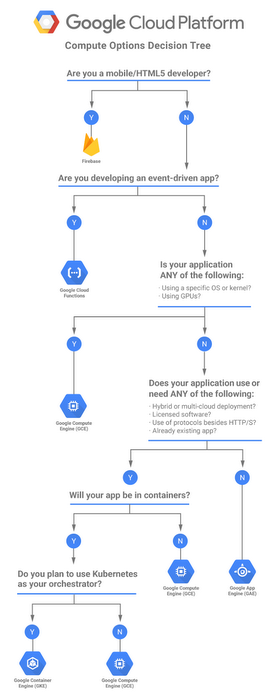
Decision Flowchart

Quick Decision Guide

  1. Do you need Kubernetes-specific features? (StatefulSets, DaemonSets, service mesh, custom operators) → GKE
  2. Is your workload stateless and request-driven? → Consider Cloud Run
  3. Do you need scale-to-zero with container flexibility?Cloud Run
  4. Do you prefer deploying code without containers?App Engine Standard
  5. Do you need GPUs with serverless scaling?Cloud Run (single L4) or GKE (multi-GPU)
  6. Do you need complex multi-service architectures with inter-service communication?GKE
  7. Do you want minimal operational overhead for a new project?Cloud Run (recommended for most new workloads)

Migration Paths

  • App Engine → Cloud Run: Google provides an official App Engine to Cloud Run migration guide. Cloud Run supports similar traffic splitting, custom domains, and IAM integration. Key difference: you need to containerize your application.
  • Cloud Run → GKE: Cloud Run is built on Knative. You can deploy the same container images to GKE with Knative serving, or use standard Kubernetes Deployments for more control.
  • GKE → Cloud Run: For stateless HTTP services, extract individual microservices from GKE and deploy as Cloud Run services. Reduces operational overhead for simple services.

Google Cloud Certification Exam Tips

🎯 Exam Relevance: App Engine vs Cloud Run vs GKE comparison is heavily tested on the Associate Cloud Engineer, Professional Cloud Architect, and Professional Cloud Developer exams. Key areas:

  • Selecting the right compute platform based on requirements (stateless vs stateful, scaling needs, team expertise).
  • Understanding scale-to-zero capabilities and cost implications.
  • Knowing the difference between App Engine Standard and Flexible environments.
  • GKE Autopilot vs Standard mode selection criteria.
  • Cloud Run’s container-based serverless model vs App Engine’s PaaS model.

Practice Questions

  1. A startup is building a REST API that receives sporadic traffic — zero requests for hours, then sudden bursts of thousands of requests. The team wants to minimize costs during idle periods while handling bursts without manual intervention. They use Python with custom native libraries. Which compute option is MOST cost-effective?

    1. App Engine Standard environment
    2. App Engine Flexible environment
    3. Cloud Run
    4. GKE Autopilot
    Show Answer

    Answer: C – Cloud Run scales to zero (no cost when idle), handles bursts automatically, supports any container (custom native libraries), and charges only per-request. App Engine Standard also scales to zero but may not support custom native libraries. GKE Autopilot still incurs cluster management fees even when idle.

  2. A company runs a large e-commerce platform with 50+ microservices, some stateful (Redis, PostgreSQL), requiring service mesh for inter-service mTLS, network policies for isolation, and custom Kubernetes operators for database failover. Which platform should they use?

    1. Cloud Run with multiple services
    2. App Engine Flexible with multiple services
    3. GKE Standard with Anthos Service Mesh
    4. Cloud Run with VPC connector
    Show Answer

    Answer: C – GKE Standard provides full Kubernetes capabilities including StatefulSets for databases, Network Policies for isolation, service mesh for mTLS, and custom operators. Cloud Run doesn’t support stateful workloads or custom operators.

  3. A data science team needs to deploy an ML inference model that receives 100-500 requests per day. The model requires GPU acceleration and the team wants to avoid paying for idle GPU resources. Which is the BEST option?

    1. GKE Standard with GPU node pool
    2. Cloud Run with GPU support
    3. App Engine Flexible with custom runtime
    4. GKE Autopilot with GPU pods
    Show Answer

    Answer: B – Cloud Run with GPU support (NVIDIA L4, 24 GB vRAM) provides scale-to-zero for GPU instances, eliminating idle GPU costs. For 100-500 requests/day, this is significantly cheaper than maintaining a GKE GPU node pool that runs 24/7.

  4. A developer is building a simple web application using a standard Python/Flask stack with no custom native dependencies. The application has low, consistent traffic and the developer wants the simplest deployment with minimal configuration. Which platform requires the LEAST operational effort?

    1. GKE Autopilot
    2. Cloud Run
    3. App Engine Standard environment
    4. App Engine Flexible environment
    Show Answer

    Answer: C – App Engine Standard requires the least effort: deploy with gcloud app deploy using an app.yaml file. No Dockerfile, no container registry, no Kubernetes manifests needed. Includes a free tier for low-traffic apps.

  5. A company wants to migrate their existing containerized microservices from on-premises Kubernetes to Google Cloud. They want to maintain Kubernetes compatibility for potential multi-cloud deployment while reducing operational overhead. They don’t need to manage node pools or OS patching. Which option is BEST?

    1. Cloud Run
    2. GKE Standard
    3. GKE Autopilot
    4. App Engine Flexible
    Show Answer

    Answer: C – GKE Autopilot provides full Kubernetes API compatibility (multi-cloud portability) while Google manages nodes, OS patching, and scaling. It reduces operational overhead compared to Standard mode while maintaining Kubernetes features the team already uses.

Frequently Asked Questions

What is the difference between App Engine and Cloud Run?

App Engine is a PaaS with opinionated runtimes and built-in versioning/traffic splitting. Cloud Run is a serverless container platform that runs any container image with per-request pricing and scale-to-zero. Cloud Run offers more flexibility while App Engine provides simpler deployment for supported languages.

Can GKE scale to zero?

Standard GKE cannot scale node pools to zero while maintaining the cluster. However, GKE Autopilot only provisions nodes when pods are scheduled, and Knative/Cloud Run for Anthos on GKE can scale individual services to zero pods.

Should I migrate from App Engine to Cloud Run?

Google recommends Cloud Run for new applications. Migration makes sense if you need custom containers, faster cold starts, more pricing flexibility, or GPU support. App Engine remains fully supported and is simpler for basic web apps in supported runtimes.

References

2025 Black Friday & Cyber Monday Deals

Udemy – Black Friday Sale (Upto 85% Off)- till 28th Nov


Braincert – till 27th Nov

Use Coupon Code – BLACK_FRIDAY

AWS Certifications

KodeKloud – Black Friday Sale – till 30th Nov


Coursera – till 28th Nov


Whizlabs – Black Friday Sale – till 27th Nov


GCP Professional Cloud DevOps Engineer Cert Path

Google Cloud Professional Cloud DevOps Engineer Certification

Google Cloud – Professional Cloud DevOps Engineer Certification Learning Path

📋 Last Updated: June 2026 — Updated with current exam guide (5 domains), Cloud Deploy, deprecated services (Cloud Debugger shutdown, Cloud Source Repositories end-of-sale, Container Registry shutdown), GKE Autopilot, Workload Identity Federation, Ops Agent, Managed Service for Prometheus, and OpenTelemetry.

Continuing on the Google Cloud Journey, glad to have passed the 8th certification with the Professional Cloud DevOps Engineer certification. Google Cloud – Professional Cloud DevOps Engineer certification exam focuses on almost all of the Google Cloud DevOps services with Cloud Developer tools, Operations Suite, and SRE concepts.

Google Cloud – Professional Cloud DevOps Engineer Certification Summary

  • Has 50-60 questions to be answered in 2 hours.
  • Certification is valid for 2 years from the date of passing.
  • Covers a wide range of Google Cloud services mainly focusing on DevOps toolset including Cloud Build, Cloud Deploy, Artifact Registry, Cloud Operations Suite with a focus on monitoring and logging, and SRE concepts.
  • The exam is heavily SRE-focused (~28% of the exam) — understanding SLI/SLO/error-budget design, toil reduction, and incident management is essential.
  • The exam covers 5 domains:
    • Applying site reliability engineering principles to a service (~28%)
    • Building and implementing CI/CD pipelines for a service (~24%)
    • Applying service monitoring strategies (~22%)
    • Optimizing service performance (~13%)
    • Managing service incidents (~13%)
  • The exam uses:
    • Cloud Operations (Cloud Monitoring & Logging) and does not refer to Stackdriver.
    • Artifact Registry instead of Container Registry (which was shut down in March 2025).
    • Cloud Deploy as the managed CD service — this is a key exam topic.
    • Ops Agent instead of legacy Monitoring/Logging agents.
  • There are no case studies for the exam.
  • GKE knowledge is essential — deployments, services, autoscaling, and Workload Identity Federation for GKE are all tested.
  • As mentioned for all the exams, Hands-on is a MUST. If you have not worked on GCP before, make sure you do lots of labs else you would be absolutely clueless about some of the questions and commands.

Google Cloud – Professional Cloud DevOps Engineer Certification Resources

Google Cloud – Professional Cloud DevOps Engineer Certification Topics

Developer Tools – CI/CD

  • Google Cloud Build
    • Cloud Build integrates with GitHub, GitLab, Bitbucket, and Cloud Source Repositories (legacy) and can be used for Continuous Integration and Deployments.
    • Cloud Build can import source code, execute build to the specifications, and produce artifacts such as Docker containers or Java archives.
    • Cloud Build can trigger builds on source commits using 2nd gen repository connections (GitHub, GitLab, Bitbucket) or legacy 1st gen triggers.
    • Cloud Build build config file specifies the instructions to perform, with steps defined for each task like the test, build, and deploy.
    • Cloud Build step specifies an action to be performed and is run in a Docker container.
    • Cloud Build supports custom images as well for the steps.
    • Cloud Build integrates with Pub/Sub to publish messages on build state changes.
    • Cloud Build Private Pools provide dedicated, customer-owned build infrastructure for builds requiring VPC connectivity or enhanced security.
    • Cloud Build generates SLSA Level 3 build provenance for artifacts stored in Artifact Registry, providing verifiable supply chain security metadata including image digests, source locations, and build arguments.
    • Cloud Build should use a Service Account with a Container Developer role to perform deployments on GKE.
    • Cloud Build uses a directory named /workspace as a working directory and the assets produced by one step can be passed to the next one via the persistence of the /workspace directory.
  • Google Cloud Deploy (Managed CD)
    • Cloud Deploy is a managed, opinionated Continuous Delivery service that automates delivery of applications to a series of target environments (dev → staging → production).
    • Cloud Deploy uses Skaffold for rendering and deploying Kubernetes manifests or Cloud Run services.
    • Cloud Deploy supports deployment to GKE, Cloud Run, and GKE Enterprise targets.
    • Cloud Deploy supports multiple deployment strategies: standard (rolling), canary, and blue/green deployments.
    • Cloud Deploy canary deployments allow progressive rollouts with configurable traffic percentages (e.g., 10% → 50% → 100%).
    • Cloud Deploy supports automated promotion between targets when a release succeeds in the previous environment.
    • Cloud Deploy supports deploy verification — automated tests that run after deployment to validate the release before promotion.
    • Cloud Deploy integrates with Cloud Build (CI triggers release creation) and Binary Authorization (policy enforcement).
    • Hint: For managed, structured delivery pipelines with progressive rollout to GKE/Cloud Run, choose Cloud Deploy over Spinnaker or custom scripts.
  • Binary Authorization and Software Supply Chain Security
    • Binary Authorization provides software supply-chain security for container-based applications. It enables you to configure a policy that the service enforces when an attempt is made to deploy a container image on one of the supported container-based platforms.
    • Binary Authorization uses attestations to verify that an image was built by a specific build system or continuous integration (CI) pipeline.
    • Binary Authorization integrates with Cloud Build’s SLSA provenance to verify build authenticity.
    • Artifact Analysis (formerly Container Analysis) helps scan images for vulnerabilities.
    • Hint: For security and compliance reasons if the image deployed needs to be trusted, use Binary Authorization with attestation-based policies.
  • Google Artifact Registry
    • Artifact Registry is the single registry service for all artifact types — container images, Maven, npm, Python, Go, Apt, Yum, and more.
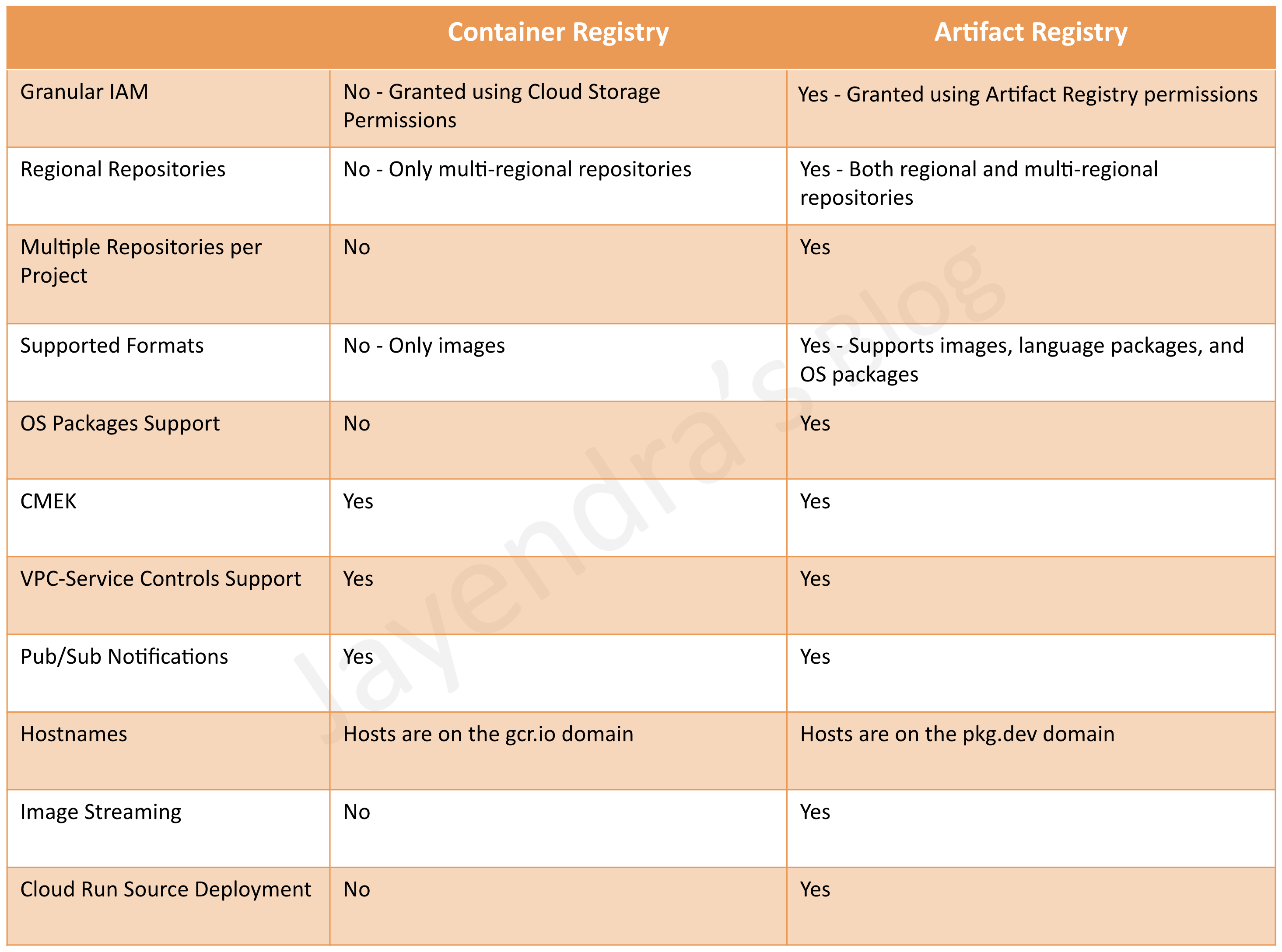
    • Container Registry was shut down on March 18, 2025. All container image storage must use Artifact Registry.
    • Artifact Registry supports both regional and multi-regional repositories.
    • Artifact Registry supports gcr.io domain routing for backward compatibility with Container Registry URLs.
    • Artifact Registry integrates with Artifact Analysis for vulnerability scanning and SBOM generation.
  • Google Cloud Source Repositories (Legacy)

    ⚠️ End of Sale: Cloud Source Repositories is not available to new customers as of June 17, 2024. Existing customers can continue to use it, but new projects should use Secure Source Manager or third-party repositories (GitHub, GitLab, Bitbucket).

    • Cloud Source Repositories are fully-featured, private Git repositories hosted on Google Cloud.
    • Secure Source Manager is the recommended replacement — a regionally deployed, single-tenant, managed source code repository on Google Cloud.
    • Cloud Build 2nd gen repository connections support direct integration with GitHub, GitLab, and Bitbucket without requiring Cloud Source Repositories.
    • Hint: If the code needs to be version controlled and needs collaboration with multiple members, choose Git-related options (GitHub/GitLab integration or Secure Source Manager).
  • Google Cloud Code
    • Cloud Code helps write, debug, and deploy the cloud-based applications for IntelliJ, VS Code, or in the browser.
  • Google Cloud Client Libraries
    • Google Cloud Client Libraries provide client libraries and SDKs in various languages for calling Google Cloud APIs.
    • If the language is not supported, Cloud REST APIs can be used.
  • Deployment Techniques
    • Recreate deployment – fully scale down the existing application version before you scale up the new application version.
    • Rolling update – update a subset of running application instances instead of simultaneously updating every application instance.
    • Blue/Green deployment – (also known as a red/black deployment), you perform two identical deployments of your application.
    • Canary deployment – progressively roll out a change, increasing traffic percentages to the new version.
    • GKE supports Rolling and Recreate deployments natively.
      • Rolling deployments support maxSurge (new pods created) and maxUnavailable (existing pods deleted).
    • Cloud Deploy supports canary and blue/green for GKE and Cloud Run targets.
    • Managed Instance Groups support Rolling deployments using maxSurge and maxUnavailable configurations.
  • Testing Strategies
    • Canary testing – partially roll out a change and then evaluate its performance against a baseline deployment.
    • A/B testing – test a hypothesis by using variant implementations. A/B testing is used to make business decisions (not only predictions) based on the results derived from data.
    • Cloud Deploy supports deploy verification to automatically validate releases after deployment.
  • Spinnaker
    • Spinnaker is an open-source, multi-cloud continuous delivery platform for releasing software changes.
    • Spinnaker supports Blue/Green rollouts by dynamically enabling and disabling traffic to a particular Kubernetes resource.
    • Spinnaker recommends comparing canary against an equivalent baseline, deployed at the same time instead of production deployment.
    • Note: For new GCP-native deployments, Google Cloud Deploy is the recommended managed alternative to self-hosted Spinnaker.

Cloud Operations Suite (Observability)

  • Google Cloud Observability (formerly Operations Suite) provides monitoring, alerting, error reporting, metrics, tracing, profiling, and logging.
  • Google Cloud Monitoring
    • Cloud Monitoring helps gain visibility into the performance, availability, and health of your applications and infrastructure.
    • Ops Agent is the recommended unified agent (replaces legacy Monitoring and Logging agents). It uses OpenTelemetry and Fluent Bit to collect metrics and logs from Compute Engine VMs.
    • Legacy Monitoring Agent and Logging Agent are still functional but should be migrated to Ops Agent for new deployments.
    • Cloud Monitoring supports SLO monitoring — define SLOs directly in Cloud Monitoring with burn-rate alerts based on error budget consumption.
    • Cloud Monitoring supports log exports where the logs can be sunk to Cloud Storage, Pub/Sub, BigQuery, or an external destination like Splunk.
    • Cloud Monitoring API supports push or export custom metrics.
    • Uptime checks help check if the resource responds. It can check the availability of any public service on VM, App Engine, URL, GKE, or AWS Load Balancer.
    • Process health checks can be used to check if any process is healthy.
  • Managed Service for Prometheus
    • Managed Service for Prometheus lets you globally monitor and alert on workloads using Prometheus and OpenTelemetry, without manually managing Prometheus at scale.
    • Supports both managed collection (Google manages the collector) and self-deployed collection (you run your own Prometheus or OpenTelemetry Collector).
    • Integrates natively with GKE for Kubernetes workload monitoring.
    • Supports PromQL for querying and alerting, compatible with existing Prometheus dashboards and rules.
    • Hint: For Prometheus-based monitoring on GKE at scale, use Managed Service for Prometheus instead of self-managed Prometheus.
  • OpenTelemetry Integration
    • Google Cloud supports OpenTelemetry Protocol (OTLP) for sending metrics, traces, and logs directly to Cloud Monitoring, Cloud Trace, and Cloud Logging.
    • OpenTelemetry Collector can be deployed as a sidecar or DaemonSet on GKE to collect and export telemetry data.
    • GKE supports Managed OpenTelemetry with an Instrumentation custom resource that automatically injects configuration into workloads.
  • Google Cloud Logging
    • Cloud Logging provides real-time log management and analysis.
    • Cloud Logging allows ingestion of custom log data from any source.
    • Logs can be exported by configuring log sinks to BigQuery, Cloud Storage, or Pub/Sub.
    • Log Analytics allows SQL-based querying of logs using BigQuery-integrated log buckets.
    • The Ops Agent collects application logs from VMs (replaces legacy Logging Agent which used fluentd).
    • VPC Flow Logs helps record network flows sent from and received by VM instances.
    • Cloud Logging Log-based metrics can be used to create alerts on logs.
    • Hint: If the logs from VM do not appear on Cloud Logging, check if the Ops Agent is installed and running and it has proper permissions to write the logs to Cloud Logging.
  • Cloud Error Reporting
    • Counts, analyzes, and aggregates the crashes in the running cloud services.
  • Cloud Profiler
    • Cloud Profiler allows continuous profiling of CPU and memory usage in production applications with minimal overhead.
    • Helps identify performance bottlenecks in code running on GCP and on-premises resources.
  • Cloud Trace
    • Is a distributed tracing system that collects latency data from the applications and displays it in the Google Cloud Console.
    • Supports OpenTelemetry-based instrumentation for automatic trace collection.
  • Cloud Debugger

    ⚠️ SHUT DOWN: Cloud Debugger was deprecated on May 16, 2022 and the service was shut down on May 31, 2023. It is no longer available and is not tested on the exam.

    • Cloud Debugger previously allowed inspecting the state of a running application in real-time.
    • For runtime debugging needs, use Cloud Logging with structured logs, Cloud Trace for latency analysis, or snapshot-based debugging tools.

Compute Services

  • Compute services like Google Compute Engine and Google Kubernetes Engine are tested from the DevOps, scaling, and security aspects.
  • Google Compute Engine
    • Google Compute Engine is the IaaS option for computing and provides fine-grained control.
    • Spot VMs (formerly Preemptible VMs) and their use cases. HINT – use for short-term, fault-tolerant workloads.
    • Committed Usage Discounts (CUDs) help provide cost benefits for long-term stable and predictable usage.
    • Managed Instance Groups can help scale VMs as per the demand. It also helps provide auto-healing and high availability with health checks, in case an application fails.
  • Google Kubernetes Engine
    • GKE Autopilot is the recommended and default mode of operation — Google fully manages nodes, scaling, security, and node configuration.
      • Autopilot provides a Pod-level SLA and eliminates node management overhead.
      • Supports burstable workloads, GPUs, and StatefulSets.
    • GKE Standard provides full control over node configuration for specialized workloads.
    • GKE can be scaled using:
      • Cluster Autoscaler to scale the cluster node pools.
      • Vertical Pod Autoscaler (VPA) to adjust pod resource requests/limits based on actual usage.
      • Horizontal Pod Autoscaler (HPA) to scale the number of pods based on CPU, memory, or custom/external metrics.
      • Multidimensional Pod Autoscaling — combines HPA (scale out on CPU) and VPA (scale up on memory) simultaneously.
    • Workload Identity Federation for GKE (formerly GKE Workload Identity) is the recommended way for GKE workloads to authenticate to Google Cloud APIs without service account keys.
      • Eliminates the need for service account key files in containers.
      • Pods authenticate with short-lived federated tokens tied to their Kubernetes ServiceAccount.
    • Kubernetes Secrets can be used to store secrets (although they are just base64 encoded values). For production, use Secret Manager integration.
    • Kubernetes supports rolling and recreate deployment strategies.

Security

  • Cloud Key Management Service – KMS
    • Cloud KMS can be used to manage cryptographic keys and encrypt data in Cloud Storage and other integrated services.
  • Secret Manager
    • Secret Manager stores, manages, and provides access to secrets (API keys, passwords, certificates) as binary blobs or text strings.
    • Supports automatic rotation, versioning, and fine-grained IAM access control.
    • Integrates with GKE via Workload Identity Federation for secure secret access from pods.

Site Reliability Engineering – SRE

  • SRE is a DevOps implementation and focuses on increasing reliability and observability, collaboration, and reducing toil using automation.
  • SRE is the largest domain (~28%) of the Professional Cloud DevOps Engineer exam.
  • SLOs help specify a target level for the reliability of your service using SLIs which provide actual measurements.
  • SLI Types:
    • Availability
    • Freshness
    • Latency
    • Quality
  • SLOs – Choosing the measurement method:
    • Synthetic clients to measure user experience
    • Client-side instrumentation
    • Application and infrastructure metrics
    • Logs processing
  • SLOs define Error Budget and Error Budget Policy which need to be aligned with all stakeholders and help plan releases to focus on features vs reliability.
    • Burn-rate alerts can be configured in Cloud Monitoring to alert when error budget is being consumed too quickly.
    • When error budget is exhausted, the team should prioritize reliability over new features (feature freeze).
  • SRE focuses on Reducing Toil – Identifying repetitive, manual, automatable tasks and eliminating them through automation.
  • Production Readiness Review – PRR
    • Applications should be performance tested for volumes before being deployed to production.
    • SLOs should not be modified/adjusted to facilitate production deployments. Teams should work to make the applications SLO compliant before they are deployed to production.
  • SRE Practices include:
    • Incident Management and Response
      • Priority should be to mitigate the issue, and then investigate and find the root cause. Mitigating would include:
        • Rolling back the release that caused the issue.
        • Routing traffic to a working site to restore user experience.
      • Incident Live State Document helps track the events and decision making which can be useful for postmortem.
      • Involves the following roles:
        • Incident Commander/Manager
          • Sets up a communication channel for all to collaborate.
          • Assigns and delegates roles. IC would assume any role, if not delegated.
          • Responsible for Incident Live State Document.
        • Communications Lead
          • Provides periodic updates to all the stakeholders and customers.
        • Operations Lead
          • Responds to the incident and should be the only group modifying the system during an incident.
    • Postmortem
      • Should contain the root cause.
      • Should be Blameless — focus on systems and processes, not individuals.
      • Should be shared with all for collaboration and feedback.
      • Should be shared with all the stakeholders.
      • Should have proper action items to prevent recurrence with an owner and collaborators, if required.
    • Chaos Engineering
      • Proactively testing system resilience by intentionally introducing failures.
      • Helps identify weaknesses before they cause real incidents.
      • Should be conducted in controlled environments with proper safeguards.

All the Best !!

Google Cloud Observability – Monitoring & Logging Suite

Google Cloud Observability (formerly Operations Suite)

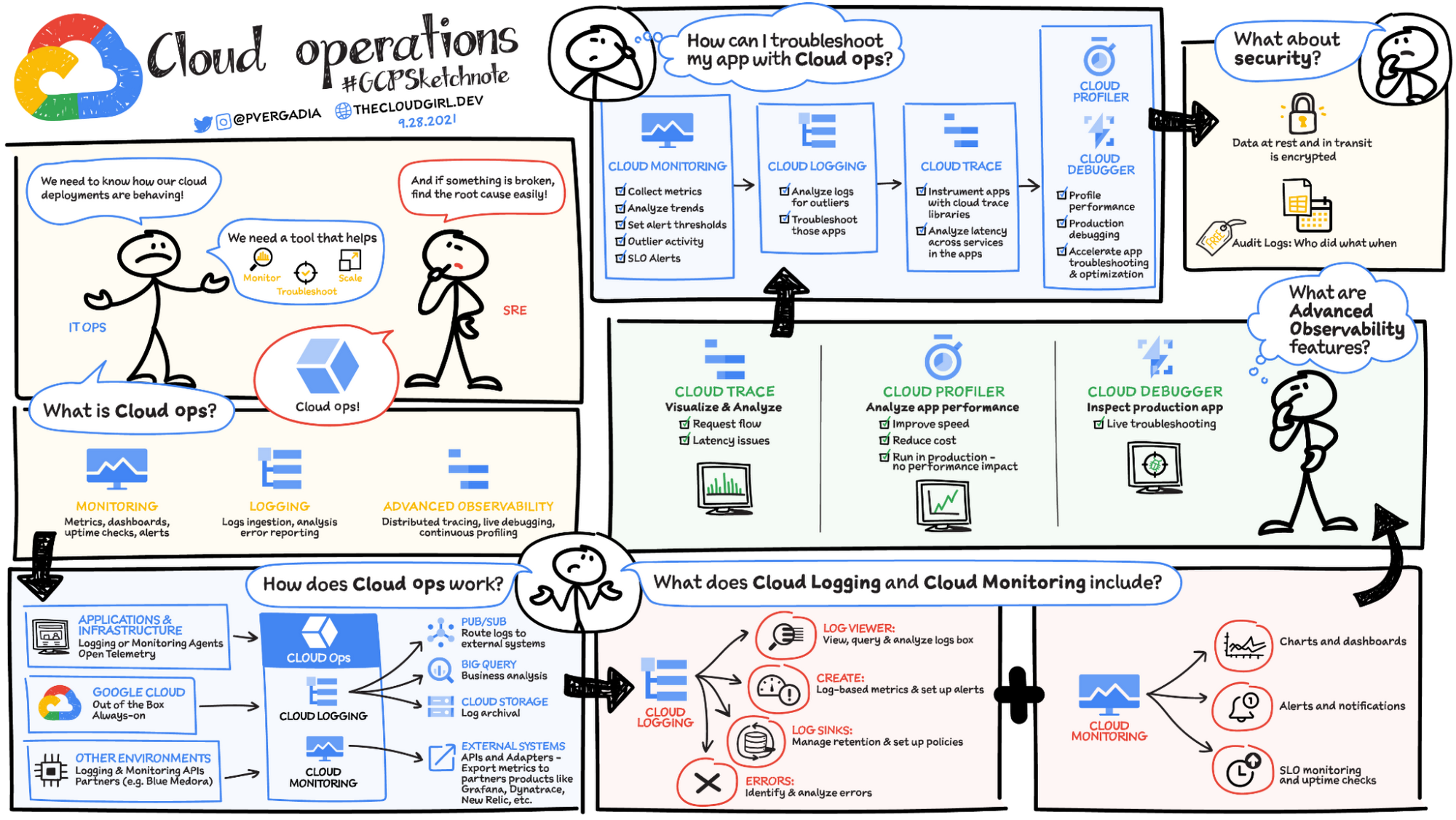
Google Cloud Observability (formerly known as Google Cloud Operations Suite) provides integrated monitoring, logging, and trace managed services for applications and systems running on Google Cloud and beyond. It is built on a “One Observability” foundation that unifies Cloud Logging, Cloud Monitoring, and Cloud Trace, providing a single pane of glass for the generation, collection, routing, storage, and consumption of telemetry at scale.

Google Cloud Observability Suite
Credit Priyanka Vergadia

Cloud Monitoring

  • Cloud Monitoring collects measurements of key aspects of the service and of the Google Cloud resources used.
  • Cloud Monitoring provides tools to visualize and monitor this data.
  • Cloud Monitoring helps gain visibility into the performance, availability, and health of the applications and infrastructure.
  • Cloud Monitoring collects metrics, events, and metadata from Google Cloud, AWS, hosted uptime probes, and application instrumentation.
  • Cloud Monitoring supports PromQL (Prometheus Query Language) for querying all metrics, including Google Cloud system metrics, Kubernetes metrics, custom metrics, and log-based metrics.
  • Cloud Monitoring supports SLO Monitoring to define Service Level Objectives, track error budgets, and create alerting policies based on budget burn rate.
  • Cloud Monitoring provides customizable observability dashboards available in GKE, Compute Engine, Cloud Run, Cloud Functions, Cloud Storage, and many other Google Cloud services.

Google Cloud Managed Service for Prometheus

  • Google Cloud Managed Service for Prometheus lets you globally monitor and alert on workloads using Prometheus and OpenTelemetry, without having to manually manage and operate Prometheus at scale.
  • It supports managed collection on GKE, Compute Engine, and Cloud Run.
  • Prometheus metrics can be used with dashboarding, alerting, and SLO monitoring features inside Cloud Monitoring.
  • It supports PromQL-based alerting policies alongside Cloud Monitoring metrics and dashboards.
  • Grafana dashboards work natively with Managed Prometheus for visualization.

Cloud Logging

  • Cloud Logging is a service for storing, viewing and interacting with logs.
  • Answers the questions “Who did what, where and when” within the GCP projects.
  • Maintains non-tamperable audit logs for each project and organization.
  • Logs buckets are a regional resource, which means the infrastructure that stores, indexes, and searches the logs are located in a specific geographical location.
  • Cloud Logging supports OTLP-formatted log ingestion using OpenTelemetry Collector and the Telemetry API.
  • Cloud Logging supports log-based alerting policies to notify when specific messages appear in logs.

Log Analytics

  • Log Analytics (GA since January 2023) brings capabilities to search, aggregate, or transform logs at query time directly within Cloud Logging.
  • Log Analytics is powered by BigQuery, allowing SQL queries on log data without separate exports.
  • Log Analytics supports pipe syntax (available since February 2025) for more intuitive querying.
  • It enables security log analytics for auditing cloud usage and detecting potential threats using Community Security Analytics (CSA) queries.
  • Log Analytics reduces costs and accelerates time to value compared to traditional BigQuery log exports.

Error Reporting

  • Error Reporting aggregates and displays errors produced in the running cloud services.
  • Error Reporting provides a centralized error management interface, to help find the application’s top or new errors so that they can be fixed faster.
  • Error Reporting can analyze log entries routed to log buckets in non-global regions, provided the log sink is in the same project as the log bucket.
  • Error Reporting supports Slack and webhook notifications for error alerts.

Cloud Profiler

  • Cloud Profiler helps with continuous CPU, heap, and other parameters profiling to improve performance and reduce costs.
  • Cloud Profiler is a continuous profiling tool that is designed for applications running on Google Cloud:
    • It’s a statistical, or sampling, profiler that has low overhead and is suitable for production environments.
    • It supports common languages and collects multiple profile types.
  • Cloud Profiler consists of the profiling agent, which collects the data, and a console interface on Google Cloud, which lets you view and analyze the data collected by the agent.
  • Cloud Profiler is supported for Compute Engine, App Engine, GKE, and applications running on on-premises as well.
  • Continuous profiling alleviates the need to develop accurate predictive load tests and benchmarks for the production environment.

Cloud Trace

  • Cloud Trace is a distributed tracing system that collects latency data from the applications and displays it in the Google Cloud Console.
  • Cloud Trace helps understand how long it takes the application to handle incoming requests from users or applications, and how long it takes to complete operations like RPC calls performed when handling the requests.
  • Cloud Trace can track how requests propagate through the application and receive detailed near real-time performance insights.
  • Cloud Trace automatically analyzes all of the application’s traces to generate in-depth latency reports to surface performance degradations and can capture traces from all the VMs, containers, or App Engines.
  • Cloud Trace supports OTLP span ingestion from applications instrumented with OpenTelemetry.
  • Trace data is stored in observability buckets with expanded regional support (40+ regions as of 2026).

Trace Explorer

  • The Trace Explorer provides an interactive span duration heatmap, span rate line chart, and span duration percentile chart.
  • It allows filtering by service, application, error state, and other properties.
  • The Grouped tab shows how many spans different services are generating with latency statistics per service and span name.
  • Trace Explorer supports App Hub annotations to identify registered services and workloads.
  • It provides a flyout view to explore span attributes, events, and associated log data.

OpenTelemetry Integration

  • Google Cloud Observability natively supports OpenTelemetry Protocol (OTLP) for metrics, traces, and logs ingestion.
  • The Google-Built OpenTelemetry Collector lets you send correlated OTLP traces, metrics, and logs to Google Cloud Observability from applications instrumented using OpenTelemetry SDKs.
  • The Telemetry API (telemetry.googleapis.com) implements the OpenTelemetry Line Protocol and supports http/protobuf, http/json, and gRPC protocols.
  • Applications can be instrumented once with OpenTelemetry and deployed on Compute Engine, GKE, or Cloud Run, querying and alerting on data together.
  • GKE offers a curated OpenTelemetry ingestion pipeline for simplified setup.

Application Monitoring

  • Application Monitoring provides an application-centric approach to monitoring integrated with App Hub.
  • It provides pre-curated dashboards with relevant metrics and logs mapped to user-defined applications in App Hub.
  • It incorporates best practices from Google SRE for optimized troubleshooting.
  • Application Monitoring creates dashboards for App Hub applications, services, and workloads.
  • It displays a topology view of the application showing resource interactions.
  • App Hub-specific labels let Google Cloud Observability construct the hierarchy of dashboards and filter telemetry data.

Cloud Debugger (Shut Down)

⚠️ SERVICE SHUT DOWN

Cloud Debugger was deprecated on May 16, 2022 and shut down on May 31, 2023.

This content is maintained for historical reference and may still appear on certification exams as a legacy question.

Replacement:

  • Snapshot Debugger (Open Source) – An open-source replacement that uses Firebase Realtime Database as the backend. It provides the same snapshot and logpoint functionality. Note: The repository was archived in July 2024.
  • Cloud Logging + Error Reporting – Use structured logging and error reporting for production debugging.
  • OpenTelemetry tracing – Use distributed tracing for understanding application behavior in production.
  • Cloud Debugger allowed inspecting the state of an application at any code location without stopping or slowing down the running app.
  • Cloud Debugger made it easier to view the application state without adding logging statements.
  • Cloud Debugger added less than 10ms to the request latency only when the application state was captured.
  • Cloud Debugger could be used with or without access to the app’s source code.
  • Cloud Debugger supported Cloud Source Repositories, GitHub, Bitbucket, or GitLab as the source code repository.

Debug Snapshots

  • Debug Snapshots captured local variables and the call stack at a specific line location in the app’s source code without stopping or slowing it down.
  • Certain conditions and locations could be specified to return a snapshot of the app’s data.
  • Debug Snapshots supported canarying wherein the debugger agent tested the snapshot on a subset of the instances.

Debug Logpoints

  • Debug Logpoints allowed injecting logging into running services without restarting or interfering with the normal function of the service.
  • Debug Logpoints were useful for debugging production issues without having to add log statements and redeploy.
  • Debug Logpoints remained active for 24 hours after creation, or until they were deleted or the service was redeployed.
  • If a logpoint was placed on a line that received lots of traffic, the Debugger throttled the logpoint to reduce its impact on the application.

GCP Certification Exam Practice Questions

  • Which service provides distributed tracing to help identify latency bottlenecks?
    • Cloud Trace
  • Which Google Cloud Observability feature allows you to query logs using SQL without exporting to BigQuery?
    • Log Analytics
  • What happened to Cloud Debugger?
    • It was deprecated in May 2022 and shut down in May 2023. The open-source Snapshot Debugger is the replacement.
  • Which service allows you to run Prometheus at scale without managing the backend infrastructure?
    • Google Cloud Managed Service for Prometheus
  • Which protocol does Google Cloud Observability natively support for vendor-agnostic telemetry ingestion?
    • OpenTelemetry Protocol (OTLP)

Related Posts

References

Google Cloud CI/CD – Build, Deploy & Artifact Registry

Google Cloud CI/CD

Google Cloud CI/CD provides various tools for continuous integration and deployment and also integrates seamlessly with third-party solutions.

📋 Key Updates (2024-2025)

  • Container Registry was shut down on March 18, 2025. Migrate to Artifact Registry.
  • Cloud Source Repositories reached end of sale on June 17, 2024. New customers should use Secure Source Manager or third-party repositories.
  • Cloud Build now supports 2nd gen repositories with direct GitHub, GitLab, and Bitbucket connections.
  • Cloud Deploy is now the recommended fully-managed continuous delivery service for GKE and Cloud Run.

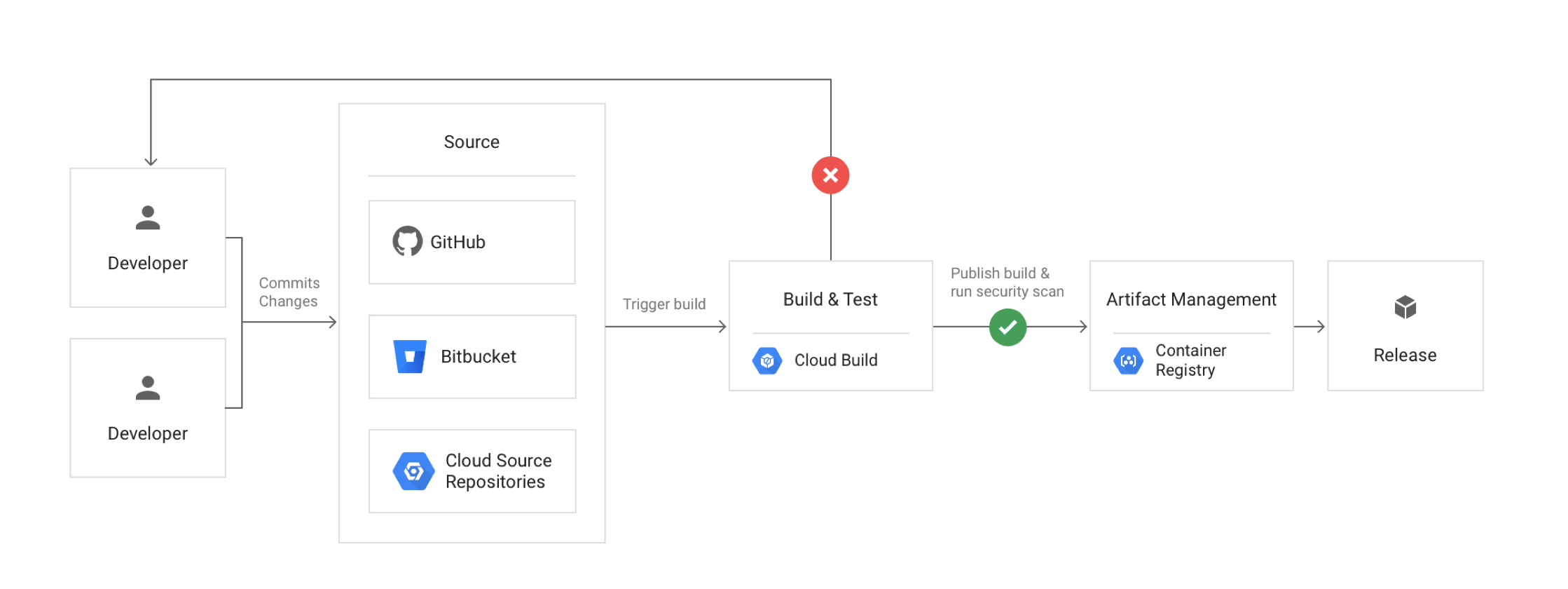
Google Cloud CI/CD - Continuous Integration Continuous Deployment

Google Cloud Source Repositories – CSR

⚠️ End of Sale (June 17, 2024): Cloud Source Repositories is no longer available to new customers. Existing customers who enabled the API before this date can continue to use the service. For new projects, use Secure Source Manager or connect third-party repositories (GitHub, GitLab, Bitbucket) directly via Cloud Build 2nd gen repositories.
  • Cloud Source Repositories are fully-featured, private Git repositories hosted on Google Cloud.
  • Cloud Source Repositories can be used for collaborative, version-controlled development of any app or service, including those that run on App Engine and Compute Engine.
  • Cloud Source Repositories can connect to an existing GitHub or Bitbucket repository. Connected repositories are synchronized with Cloud Source Repositories automatically.
  • Cloud Source Repositories automatically send logs on repository activity to Cloud Logging to help track and troubleshoot data access.
  • Cloud Source Repositories offer security key detection to block git push transactions that contain sensitive information which helps improve the security of the source code.
  • Cloud Source Repositories provide built-in integrations with other GCP tools like Cloud Build, Cloud Debugger, Cloud Operations, Cloud Logging, Cloud Functions, and others that let you automatically build, test, deploy, and debug code within minutes.
  • Cloud Source Repositories publishes messages about the repository to Pub/Sub topic.
  • Cloud Source Repositories provide a search feature to search for specific files or code snippets.
  • Cloud Source Repositories allow permissions to be controlled at the project (all projects) or at the repo level.

Secure Source Manager (Recommended Alternative)

  • Secure Source Manager is a regionally deployed, single-tenant, managed source code repository hosted on Google Cloud.
  • Supports Git version control and integrates with Cloud Build, Cloud Deploy, and Artifact Registry.
  • Provides IAM-based access control with fine-grained permissions at the instance, repository, and branch level.
  • Offers centralized governance, audit logging, and policy control for platform and security teams.
  • Supports standard Git tooling — developers can clone, fetch, and push code using familiar workflows.
  • Data residency compliance with regional deployment options.

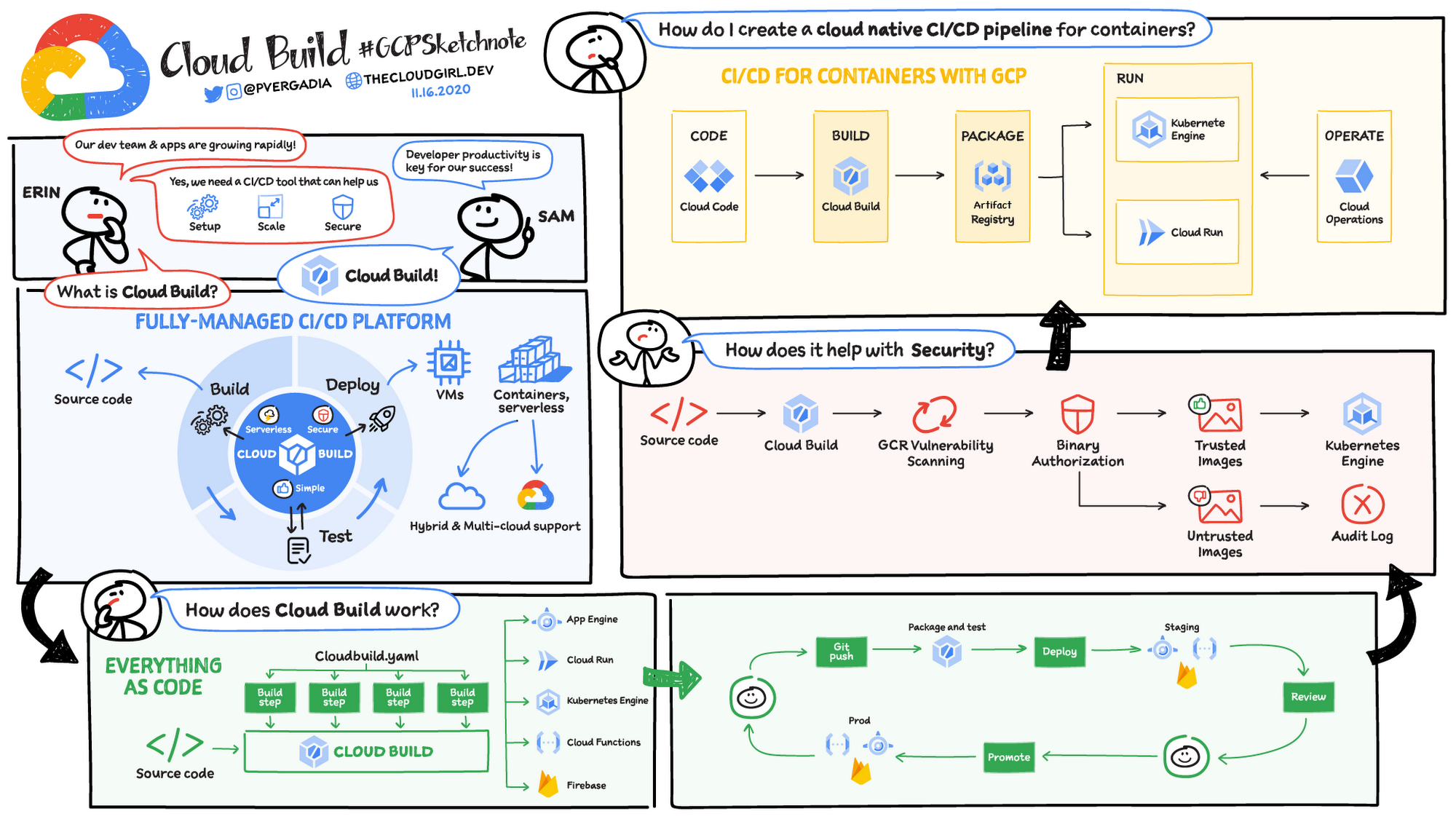
Cloud Build

  • Cloud Build is a fully-managed, serverless service that executes builds on Google Cloud Platform’s infrastructure.
  • Cloud Build can pull/import source code from a variety of repositories or cloud storage spaces, execute a build to produce containers or artifacts, and push them to the artifact registry.
  • Cloud Build executes the build as a series of build steps, where each build step specifies an action to be performed and is run in a Docker container.
  • Build steps can be provided by Cloud Build and the Cloud Build community or can be custom as well.
  • Build config file contains instructions for Cloud Build to perform tasks based on your specifications for e.g., the build config file can contain instructions to build, package, and push Docker images.
  • Builds can be started either manually or using build triggers.
  • Cloud Build uses build triggers to enable CI/CD automation.
  • Build triggers can listen for incoming events, such as when a new commit is pushed to a repository or when a pull request is initiated, and then automatically execute a build when new events come in.
  • Cloud Build publishes messages on a Pub/Sub topic called cloud-builds when the build’s state changes, such as when the build is created, when the build transitions to a working state, and when the build completes.
  • Cloud Build features meet the requirements of Supply chain Levels for Software Artifacts (SLSA) level 3, providing build provenance and security insights out-of-the-box.
  • Cloud Build supports uploading generic artifacts to generic repositories and downloading generic repositories as build dependencies.

Cloud Build Repositories (2nd Gen)

  • Cloud Build repositories (2nd gen) provide direct connections to source repositories in GitHub, GitLab, GitLab Enterprise, GitHub Enterprise, and Bitbucket.
  • Repository connections can be created and managed programmatically using Secret Manager secrets.
  • A single connection can be set up for a repository and reused across regions and projects.
  • Connections can be managed declaratively using Terraform.
  • 1st gen repositories are available as a legacy option but are superseded by 2nd gen.

Cloud Build Private Pools

  • Private pools are a set of worker instances that run in a Google Cloud project owned by Google, peered to your VPC network using VPC Network Peering.
  • Private pools allow builds to access resources in a private network (e.g., private GKE clusters, private Artifact Registry repositories).
  • Supports VPC Service Controls to guard against data exfiltration during builds.
  • Up to 10 private pools can be created per Google Cloud project per region.
  • Builds run in the region where the private pool is created, providing data residency control.

Software Supply Chain Security

  • Cloud Build provides build provenance — verifiable metadata including image digests, input source locations, build toolchain, build steps, and duration.
  • Cloud Build provides security insights panel in Artifact Registry showing supply chain security information for built artifacts.
  • Supports Binary Authorization integration to enforce deploy-time security policies based on build attestations.
  • Isolated and ephemeral build environments provide additional security guarantees.

Cloud Deploy

  • Cloud Deploy is a fully-managed continuous delivery service that automates the delivery of applications to GKE and Cloud Run.
  • Cloud Deploy defines delivery pipelines to deploy container images to targets in a predetermined sequence (e.g., dev → staging → production).
  • Supports advanced deployment strategies including canary deployments, blue-green deployments, and progressive rollouts.
  • Provides easy one-step promotion and rollback of releases via the web console, CLI, or API.
  • Pipeline automation enables continuous deployment with rules like promote-release (automatic promotion between targets) and advance-rollout (automatic phase advancement).
  • Supports parallel deployments to multiple targets simultaneously.
  • Supports deployment verification to validate that deployments are working correctly before proceeding.
  • Supports approval gates requiring manual approval before promoting to sensitive environments.
  • Integrates with Cloud Build for the CI portion and with Cloud Run Jobs for deployment tasks.
  • Automatically creates rollout resources that associate releases with target environments.

Container Registry

⚠️ SHUT DOWN — March 18, 2025

Container Registry was shut down on March 18, 2025. Writing images to Container Registry is no longer available. Starting June 3, 2025, GKE can no longer read images stored in Container Registry.

Migration: Use Artifact Registry as the replacement. Artifact Registry supports gcr.io repositories and provides an automatic migration tool that requires no downtime.

  • Container Registry was a private container image registry that supported Docker Image Manifest V2 and OCI image formats.
  • Container Registry provided a subset of Artifact Registry features.
  • Container Registry stored its tags and layer files for container images in a Cloud Storage bucket in the same project as the registry.
  • Access to the bucket was configured using Cloud Storage’s identity and access management (IAM) settings.
  • Container Registry integrated seamlessly with Google Cloud services including Cloud Build and third-party tools such as Jenkins.

Artifact Registry

  • Artifact Registry is a fully-managed service with support for both container images and non-container artifacts, extending the capabilities of the now-retired Container Registry.
  • Artifact Registry is the only recommended service for container image storage and management on Google Cloud (Container Registry is shut down).
  • Artifact Registry comes with fine-grained access control via Cloud IAM, enabling scoping permissions to specific regions or environments.
  • Artifact Registry supports the creation of regional and multi-regional repositories.
  • Supports multiple artifact formats: Docker containers, Maven, npm, Python (PyPI), Go, Apt, Yum, Helm, and generic artifacts.

Repository Modes

  • Standard repositories — store your own artifacts (the default mode).
  • Remote repositories — act as a pull-through cache for artifacts in public repositories such as Docker Hub, Maven Central, PyPI, or npm. Provides control over external dependencies and improves build performance.
  • Virtual repositories — act as a single access point for multiple upstream repositories (both remote and standard). Enables aggregating packages from different teams behind a single endpoint.

Vulnerability Scanning & SBOM

  • Artifact Analysis (formerly Container Analysis) provides automatic and on-demand vulnerability scanning for container images stored in Artifact Registry.
  • Scanning detects OS and language package vulnerabilities in containers.
  • Supports generating Software Bill of Materials (SBOM) for container images using the gcloud CLI.
  • Security insights panel provides a high-level overview of vulnerabilities, build provenance, and SBOM information.

Container Registry vs Artifact Registry

Google Cloud Container Registry Vs Artifact Registry

Google Cloud DevOps
Credit Priyanka Vergadia

GCP Certification Exam Practice Questions

  • Questions are collected from Internet and the answers are marked as per my knowledge and understanding (which might differ with yours).
  • GCP services are updated everyday and both the answers and questions might be outdated soon, so research accordingly.
  • GCP exam questions are not updated to keep up the pace with GCP updates, so even if the underlying feature has changed the question might not be updated
  • Open to further feedback, discussion and correction.

Question 1: Your team needs to store Docker container images and npm packages in a single managed service with fine-grained IAM controls. Which Google Cloud service should you use?

  1. Container Registry
  2. Artifact Registry
  3. Cloud Storage
  4. Cloud Source Repositories
Show Answer

Answer: B –
Artifact Registry supports multiple artifact formats including Docker containers and npm packages with fine-grained IAM. Container Registry only supports container images and has been shut down.

Question 2: You want to automate the deployment of container images to GKE with canary releases and automatic rollback capabilities. Which service should you use?

  1. Cloud Build
  2. Cloud Deploy
  3. Cloud Run
  4. Artifact Registry
Show Answer

Answer: B –
Cloud Deploy is a fully-managed continuous delivery service that supports canary deployments, progressive rollouts, and easy rollback for GKE and Cloud Run targets.

Question 3: Your organization requires builds to run within a VPC perimeter to prevent data exfiltration and access private GKE clusters. What Cloud Build feature should you use?

  1. Build triggers with VPC access
  2. Cloud Build private pools
  3. Cloud Build worker pools with Cloud NAT
  4. Cloud Build regional builds
Show Answer

Answer: B –
Cloud Build private pools are peered to your VPC network and support VPC Service Controls to guard against data exfiltration during builds.

Question 4: You need to connect Cloud Build directly to a GitLab repository for triggering builds on code changes. What should you use?

  1. Cloud Source Repositories mirroring
  2. Cloud Build repositories (1st gen)
  3. Cloud Build repositories (2nd gen)
  4. Manual webhook configuration
Show Answer

Answer: C –
Cloud Build repositories (2nd gen) support direct connections to GitLab, GitLab Enterprise, GitHub, GitHub Enterprise, and Bitbucket. 1st gen did not support GitLab.

Question 5: Your team wants to cache frequently used Maven Central dependencies locally to improve build performance and control external dependencies. Which Artifact Registry feature should you use?

  1. Standard repository
  2. Virtual repository
  3. Remote repository
  4. Multi-regional repository
Show Answer

Answer: C –
Remote repositories act as a pull-through cache for artifacts in public repositories like Maven Central, providing control over external dependencies and improving build performance.


Container Registry vs Artifact Registry – Differences & Migration

Container Registry vs Artifact Registry

⚠️ Container Registry SHUT DOWN

Google Cloud Container Registry was deprecated on May 15, 2023 and has been fully shut down.

  • March 18, 2025 – Writing images to Container Registry became unavailable.
  • May 20, 2025 – Reading images from Container Registry became unavailable.

All users must migrate to Artifact Registry, which is the recommended successor. Artifact Registry supports gcr.io repositories for backward compatibility.

Migration Guide: Transition from Container Registry to Artifact Registry

Google Cloud - Container Registry vs Artifact Registry

Container Registry (Shut Down)

  • Container Registry was a private container image registry that supported Docker Image Manifest V2 and OCI image formats.
  • provided a subset of Artifact Registry features.
  • stored its tags and layer files for container images in a Cloud Storage bucket in the same project as the registry.
  • did not support fine-grained IAM access control. Access to the bucket was configured using Cloud Storage’s permissions.
  • integrated with Google Cloud services and worked with continuous integration and continuous delivery systems including Cloud Build and third-party tools such as Jenkins.
  • was used to store only Docker images and did not support language packages or OS packages.
  • was only multi-regional and did not support regional repositories.
  • supported a single repository within a project and automatically created a repository in a multi-region.
  • used gcr.io hosts.
  • used gcloud container images commands.
  • supported CMEK (Customer-Managed Encryption Keys) to encrypt the storage buckets that contained the images.
  • supported several authentication methods for pushing and pulling images with a third-party client.
  • supported VPC Service Controls and could be added to a service perimeter.
  • published changes to the gcr Pub/Sub topic.
  • pricing was based on Cloud Storage usage, including storage and network egress.
  • did not provide audit logs for registry activity.
  • did not have a REST or RPC API.

Artifact Registry

  • Artifact Registry is the recommended and only supported service for container image storage and management on Google Cloud, replacing the shut-down Container Registry.
  • Artifact Registry is a fully-managed service with support for both container images and non-container artifacts, extending the capabilities of the former Container Registry.
  • comes with fine-grained access control via Cloud IAM using Artifact Registry roles, enabling permissions scoped to individual repositories e.g., to specific regions, teams, or environments.
  • supports conditional access with IAM and repository tags.
  • supports multi-regional or regional repositories.
  • uses pkg.dev hosts for native Artifact Registry repositories.
  • also supports gcr.io repositories for backward compatibility with former Container Registry workflows.
  • uses gcloud artifacts docker commands (commands don’t support shortened digests).
  • provides a REST and RPC API for managing repositories and artifacts.
  • supports CMEK (Customer-Managed Encryption Keys) to encrypt individual repositories.
  • supports multiple repositories within a project; repositories must be manually created before pushing images.
  • supports multiple artifact formats:
    • Container images (Docker, OCI)
    • Language packages – Maven (Java), npm (Node.js), Python (PyPI), Go modules, Ruby gems
    • OS packages – Apt (Debian), Yum/DNF (RPM)
    • Other formats – Helm charts, Kubeflow Pipelines (KFP), Generic artifacts
  • supports the same authentication methods as Container Registry.
  • supports VPC Service Controls and can be added to a service perimeter.
  • publishes changes to the gcr Pub/Sub topic for compatibility.
  • provides audit logging via Cloud Logging to track changes to repositories.
  • enforces organization policies, including CMEK encryption and location constraints.
  • pricing is based on storage and network data transfer.

Artifact Registry – Repository Modes

  • Artifact Registry supports three repository modes:
    • Standard repositories – Store your own private artifacts (container images, packages, etc.).
    • Remote repositories – Act as a caching proxy for upstream public sources (Docker Hub, Maven Central, npm registry, PyPI, etc.), reducing build latency and providing greater control over dependencies.
    • Virtual repositories – Provide a single endpoint that aggregates content from multiple upstream repositories (standard and remote), simplifying dependency resolution.
  • Remote and virtual repositories became GA (Generally Available) in late 2023.

Artifact Registry – Key Features (2024-2026)

  • Image Streaming – Stream container images to GKE and Managed Service for Apache Spark for faster autoscaling, faster pod startup, and reduced latency when pulling large images.
  • Image Prewarming – Manually prewarm specific images in Artifact Registry to reduce cold-start latency for GKE deployments. The Prewarm Artifact API lets you precache specific image versions with a configurable retention period.
  • Cleanup Policies – Define criteria for automatically deleting artifact versions that are no longer needed or retaining artifacts indefinitely, helping manage storage costs.
  • Vulnerability Scanning (Artifact Analysis) – Scans for OS and language package vulnerabilities with both on-demand and automatic scanning. Supports scanning images in Artifact Registry for supported operating systems and language packages.
  • Gemini Assistance – Learn about your container images with Gemini AI assistance directly in the Google Cloud Console.
  • Cloud Run Source Deployment – Deploy to Cloud Run directly from source code with a single gcloud command; the image is automatically built and stored in Artifact Registry.
  • Software Supply Chain Security – Integrates with Binary Authorization for deployment control, supports build provenance verification, and dependency management best practices.
  • gcr.io Repository Support – Artifact Registry can host gcr.io domain repositories, providing a seamless transition path from Container Registry without changing image URLs.

Container Registry vs Artifact Registry – Feature Comparison

Feature Container Registry (Shut Down) Artifact Registry
Supported Formats Container images only Container images, language packages (Maven, npm, Python, Go, Ruby), OS packages (Apt, RPM), Helm, KFP, Generic
Domain gcr.io pkg.dev (also supports gcr.io for backward compatibility)
Repository Modes N/A Standard, Remote (caching proxy), Virtual (aggregation)
Location Multi-regional only (4 hosts) Regional and multi-regional
Access Control Cloud Storage roles (bucket-level only) Artifact Registry IAM roles (repository-level); conditional access with tags
Repository Creation Auto-created on first push Must be explicitly created before pushing
CMEK Encryption Encrypts storage buckets Encrypts individual repositories
Vulnerability Scanning On-demand only; automatic scanning returned OS vulnerabilities only Both on-demand and automatic; scans OS and language package vulnerabilities
Image Streaming Not available Available for GKE and Managed Service for Apache Spark
Audit Logging Not available Cloud Logging integration
API No REST/RPC API REST and RPC API available
CLI Commands gcloud container images gcloud artifacts docker
Cloud Run Source Deploy Not available Supported
Cleanup Policies Not available Automatic deletion/retention policies

Migration from Container Registry to Artifact Registry

  • Google provides gcr.io repositories in Artifact Registry for backward compatibility, allowing existing gcr.io image URLs to work without changes.
  • Organizations that hadn’t previously used Container Registry had gcr.io repositories hosted on Artifact Registry by default starting January 8, 2024.
  • For projects with existing Container Registry usage, setting up gcr.io repositories in Artifact Registry redirects all gcr.io traffic to Artifact Registry.
  • Existing Pub/Sub configurations on the gcr topic continue to work automatically.
  • Google-owned images (e.g., Cloud Build official builder images) previously hosted on Container Registry are now hosted on Artifact Registry with the same gcr.io URLs.
  • mirror.gcr.io for cached Docker Hub images is now hosted on Artifact Registry.

GCP Certification Exam Practice Questions

  • Questions are collected from Internet and the answers are marked as per my knowledge and understanding (which might differ with yours).
  • GCP services are updated everyday and both the answers and questions might be outdated soon, so research accordingly.
  • GCP exam questions are not updated to keep up the pace with GCP updates, so even if the underlying feature has changed the question might not be updated
  • Open to further feedback, discussion and correction.
  • Note: Container Registry has been shut down as of May 2025. Exam questions may still reference it for comparison purposes, but all new implementations should use Artifact Registry.


Frequently Asked Questions

Is Google Container Registry deprecated?

Yes, Container Registry was shut down completely in 2025 (writes blocked March 18, reads blocked May 20). All users must migrate to Artifact Registry, which is the sole supported container and artifact registry on Google Cloud.

What is the difference between Container Registry and Artifact Registry?

Artifact Registry supports multiple formats (Docker, Maven, npm, Python, Go, Helm, etc.), offers regional/multi-region repositories, remote and virtual repositories, IAM-based access control, and vulnerability scanning. Container Registry only supported Docker images with GCS bucket-based storage.

Is Artifact Registry free?

Artifact Registry charges for storage (per GB/month) and network egress. There’s no per-image fee. Vulnerability scanning has a free tier for on-demand scans; continuous scanning requires the Container Security API.

Related Posts

References

Google Cloud Certified – Cloud Digital Leader Learning Path

Google Cloud Certified - Cloud Digital Leader Certificate

Google Cloud – Cloud Digital Leader Certification Learning Path

🆕 2026 Update: A new Cloud Digital Leader beta exam is open for registration through July 5, 2026 (~75 questions, 2 hours, $59). The standard exam remains available through July 29, 2026. The exam is now delivered via Pearson VUE (replacing Kryterion). Google also launched a new Generative AI Leader certification in May 2025 for non-technical professionals.

Continuing on the Google Cloud Journey, glad to have passed the seventh certification with the Professional Cloud Digital Leader certification. Google Cloud was missing the initial entry-level certification similar to AWS Cloud Practitioner certification, which was introduced as the Cloud Digital Leader certification. Cloud Digital Leader focuses on general Cloud knowledge, Google Cloud knowledge with its products and services.

Google Cloud – Cloud Digital Leader Certification Summary

  • Has 50-60 questions to be answered in 90 minutes (standard exam).
  • Registration fee is $99 USD (plus tax where applicable).
  • Covers a wide range of General Cloud and Google Cloud services and products knowledge.
  • This exam does not require much Hands-on and theoretical knowledge is good enough to clear the exam.
  • Certification validity is 3 years, with a renewal exam option (20 questions, 45 minutes, $60).
  • Exam is delivered online-proctored or at onsite test centers via Pearson VUE.

Google Cloud – Cloud Digital Leader Exam Domains (Current)

The current Cloud Digital Leader exam covers six domains:

  1. Digital Transformation with Google Cloud (~17%)
  2. Exploring Data Transformation with Google Cloud (~16%)
  3. Innovating with Google Cloud Artificial Intelligence (~16%)
  4. Modernizing Infrastructure and Applications with Google Cloud (~17%)
  5. Trust and Security with Google Cloud (~17%)
  6. Scaling with Google Cloud Operations (~17%)

Google Cloud – Cloud Digital Leader Certification Resources

Google Cloud – Cloud Digital Leader Certification Topics

General cloud knowledge

  1. Define basic cloud technologies. Considerations include:
    1. Differentiate between traditional infrastructure, public cloud, and private cloud
      1. Traditional infrastructure includes on-premises data centers
      2. Public cloud include Google Cloud, AWS, and Azure
      3. Private Cloud includes services like AWS Outpost
    2. Define cloud infrastructure ownership
    3. Shared Responsibility Model
      1. Security of the Cloud is Google Cloud’s responsibility
      2. Security on the Cloud depends on the services used and is shared between Google Cloud and the Customer
    4. Essential characteristics of cloud computing
      1. On-demand computing
      2. Pay-as-you-use
      3. Scalability and Elasticity
      4. High Availability and Resiliency
      5. Security
  2. Differentiate cloud service models. Considerations include:
    1. Infrastructure as a service (IaaS), platform as a service (PaaS), and software as a service (SaaS)
      1. IaaS – everything is done by you – more flexibility more management
      2. PaaS – most of the things are done by Cloud with few things done by you – moderate flexibility and management
      3. SaaS – everything is taken care of by the Cloud, you would just use it – no flexibility and management
    2. Describe the trade-offs between level of management versus flexibility when comparing cloud services
    3. Define the trade-offs between costs versus responsibility
    4. Appropriate implementation and alignment with given budget and resources
  3. Identify common cloud procurement financial concepts. Considerations include:
    1. Operating expenses (OpEx), capital expenditures (CapEx), and total cost of operations (TCO)
      1. On-premises has more of Capex and less OpEx
      2. Cloud has no to least Capex and more of OpEx
    2. Recognize the relationship between OpEx and CapEx related to networking and compute infrastructure
    3. Summarize the key cost differentiators between cloud and on-premises environments

General Google Cloud knowledge

  1. Recognize how Google Cloud meets common compliance requirements. Considerations include:
    1. Locating current Google Cloud compliance requirements
    2. Familiarity with Compliance Reports Manager
  2. Recognize the main elements of Google Cloud resource hierarchy. Considerations include:
    1. Describe the relationship between organization, folders, projects, and resources i.e. Organization -> Folder -> Folder or Projects -> Resources
  3. Describe controlling and optimizing Google Cloud costs. Considerations include:
    1. Google Cloud billing models and applicability to different service classes
    2. Define a consumption-based use model
    3. Application of discounts (e.g., flat-rate, committed-use discounts [CUD], sustained-use discounts [SUD])
      1. Sustained-use discounts [SUD] are automatic discounts for running specific resources for a significant portion of the billing month
      2. Committed use discounts [CUD] help with committed use contracts in return for deeply discounted prices for VM usage
  4. Describe Google Cloud’s geographical segmentation strategy. Considerations include:
    1. Regions are collections of zones. Zones have high-bandwidth, low-latency network connections to other zones in the same region. Regions help design fault-tolerant and highly available solutions.
    2. Zones are deployment areas within a region and provide the lowest latency usually less than 10ms
    3. Regional resources are accessible by any resources within the same region
    4. Zonal resources are hosted in a zone are called per-zone resources.
    5. Multiregional resources or Global resources are accessible by any resource in any zone within the same project.
  5. Define Google Cloud support options. Considerations include:
    1. Distinguish between billing support, technical support, role-based support, and enterprise support
      1. Role-Based Support provides more predictable rates and a flexible configuration. Although they are legacy, the exam does cover these.
      2. Enterprise Support provides the fastest case response times and a dedicated Technical Account Management (TAM) contact who helps you execute a Google Cloud strategy.
    2. Recognize a variety of Service Level Agreement (SLA) applications

Google Cloud products and services

  1. Describe the benefits of Google Cloud virtual machine (VM)-based compute options. Considerations include:
    1. Compute Engine provides virtual machines (VM) hosted on Google’s infrastructure.
    2. Google Cloud VMware Engine helps easy lift and shift VMware-based applications to Google Cloud without changes to the apps, tools, or processes
    3. Bare Metal lets businesses run specialized workloads such as Oracle databases close to Google Cloud while lowering overall costs and reducing risks associated with migration
    4. Custom versus standard sizing
    5. Free, premium, and custom service options
    6. Attached storage/disk options
    7. Spot VMs (formerly Preemptible VMs) are instances that can be created and run at a much lower price than standard instances. Google Cloud can reclaim them at any time when resources are needed. Spot VMs are the recommended replacement for Preemptible VMs.
      ⚠️ Note: Preemptible VMs have been superseded by Spot VMs. Google recommends using Spot VMs for fault-tolerant, batch, and stateless workloads. Spot VMs have no maximum 24-hour runtime limit unlike legacy Preemptible VMs.
  2. Identify and evaluate container-based compute options. Considerations include:
    1. Define the function of a container registry
      1. Artifact Registry is the recommended service to manage container images, perform vulnerability analysis, and manage access control. It supports Docker images, language packages, and OS packages.
        ⚠️ Note: Container Registry was shut down on March 18, 2025. All users must use Artifact Registry which provides all Container Registry functionality plus additional features including multi-format support and regional repositories.
    2. Distinguish between VMs, containers, and Google Kubernetes Engine
  3. Identify and evaluate serverless compute options. Considerations include:
    1. Define the function and use of App Engine, Cloud Functions, and Cloud Run
    2. Define rationale for versioning with serverless compute options
    3. Cost and performance tradeoffs of scale to zero
      1. Scale to zero helps provides cost efficiency by scaling down to zero when there is no load but comes with an issue with cold starts
      2. Serverless technologies like Cloud Functions, Cloud Run, App Engine Standard provide these capabilities
  4. Identify and evaluate multiple data management offerings. Considerations include:
    1. Describe the differences and benefits of Google Cloud’s relational and non-relational database offerings
      1. Cloud SQL provides fully managed, relational SQL databases and offers MySQL, PostgreSQL, MSSQL databases as a service
      2. Cloud Spanner provides fully managed, relational SQL databases with joins and secondary indexes
      3. AlloyDB for PostgreSQL is a fully managed, PostgreSQL-compatible database service designed for demanding enterprise workloads, offering up to 4x faster performance than standard PostgreSQL
      4. Cloud Bigtable provides a scalable, fully managed, non-relational NoSQL wide-column analytical big data database service suitable for low-latency single-point lookups and precalculated analytics
      5. Firestore is a fully managed, serverless NoSQL document database for mobile, web, and server development
      6. BigQuery provides fully managed, no-ops, OLAP, enterprise data warehouse (EDW) with SQL and fast ad-hoc queries.
    2. Describe Google Cloud’s database offerings and how they compare to commercial offerings
  5. Distinguish between ML/AI offerings. Considerations include:
    1. Describe the differences and benefits of Google Cloud’s AI and ML services
      1. Vertex AI is Google Cloud’s unified AI/ML platform for building, deploying, and scaling ML models and AI applications
      2. Gemini is Google’s multimodal large language model available through Vertex AI for generative AI use cases
    2. Identify when to train your own model, use a Google Cloud pre-trained model, or build on an existing model
      1. Vision AI provides out-of-the-box pre-trained models to extract data from images
      2. Vertex AI AutoML provides the ability to train custom models with minimal ML expertise
      3. BigQuery ML provides support for limited models and SQL interface
      4. Gemini and other foundation models allow fine-tuning for domain-specific tasks
    3. Understand generative AI concepts
      1. Large Language Models (LLMs), foundation models, and multimodal models
      2. Prompting, fine-tuning, and grounding
      3. Responsible AI principles
  6. Differentiate between data movement and data pipelines. Considerations include:
    1. Describe Google Cloud’s data pipeline offerings
      1. Cloud Pub/Sub provides reliable, many-to-many, asynchronous messaging between applications. By decoupling senders and receivers, Google Cloud Pub/Sub allows developers to communicate between independently written applications.
      2. Cloud Dataflow is a fully managed service for strongly consistent, parallel data-processing pipelines
      3. Cloud Data Fusion is a fully managed, cloud-native, enterprise data integration service for quickly building & managing data pipelines
      4. BigQuery Service is a fully managed, highly scalable data analysis service that enables businesses to analyze Big Data.
      5. Looker provides an enterprise platform for business intelligence, data applications, and embedded analytics.
      6. Data Studio (formerly known as Looker Studio) is a free, self-service data visualization and reporting tool for creating interactive dashboards.
    2. Define data ingestion options
  7. Apply use cases to a high-level Google Cloud architecture. Considerations include:
    1. Define Google Cloud’s offerings around the Software Development Life Cycle (SDLC)
    2. Describe Google Cloud’s platform visibility and alerting offerings covers Cloud Monitoring and Cloud Logging
  8. Describe solutions for migrating workloads to Google Cloud. Considerations include:
    1. Identify data migration options
      1. Storage Transfer Service for transferring data between cloud storage providers
      2. Transfer Appliance for large-scale offline data migration
      3. Database Migration Service for migrating databases to Cloud SQL and AlloyDB
    2. Differentiate when to use Migrate to Virtual Machines versus Migrate to Containers
      1. Migrate to Virtual Machines (formerly Migrate for Compute Engine) provides fast, flexible, and safe VM migration to Google Cloud
        ⚠️ Note: Migrate for Compute Engine was deprecated on April 30, 2024 and replaced by Migrate to Virtual Machines.
      2. Migrate to Containers (formerly Migrate for Anthos and GKE) makes it fast and easy to modernize traditional applications away from virtual machines and into native containers. This significantly reduces the cost and labor that would be required for a manual application modernization project.
    3. Distinguish between lift and shift versus application modernization
      1. Lift and shift involves migration with zero to minimal changes and is usually performed with time constraints
      2. Application modernization requires a redesign of infra and applications and takes time. It can include moving legacy monolithic architecture to microservices architecture, building CI/CD pipelines for automated builds and deployments, frequent releases with zero downtime, etc.
  9. Describe networking to on-premises locations. Considerations include:
    1. Define Software-Defined WAN (SD-WAN)
    2. Determine the best connectivity option based on networking and security requirements – covers Cloud VPN, Interconnect, and Peering.
    3. Private Google Access provides access from VM instances to Google services like Cloud Storage or third-party services without external IP addresses
  10. Define identity and access features. Considerations include:
    1. Cloud Identity & Access Management (Cloud IAM) provides administrators the ability to manage cloud resources centrally by controlling who can take what action on specific resources.
    2. Google Cloud Directory Sync enables administrators to synchronize users, groups, and other data from an Active Directory/LDAP service to their Google Cloud domain directory.

Related Google Cloud Certifications

After completing the Cloud Digital Leader certification, consider the following paths:

Google Cloud Compute Options – VMs, GKE & Cloud Run

Google Cloud Compute Options

📌 Updated June 2026: This post has been updated to reflect major Google Cloud compute changes including Cloud Functions rebranding to Cloud Run functions (Aug 2024), Cloud Run worker pools (GA 2026), GPU support on Cloud Run, GKE Autopilot as default mode, new Axion-based machine types, and App Engine legacy runtime deprecations.

Compute Engine

  • provides Infrastructure as a Service (IaaS) in the Google Cloud
  • offers scalable, high performance virtual machines (VMs) on Google’s infrastructure.
  • provides full control/flexibility on the choice of OS, resources like CPU and memory
  • supports a wide range of machine families:
    • General-purpose: E2, N2, N2D, N4, N4A (Axion/Arm-based), C4, C4A (Axion/Arm-based), C4D
    • Compute-optimized: C2, C2D, H3
    • Memory-optimized: M1, M2, M3
    • Accelerator-optimized: A2, A3, G2 (with NVIDIA GPUs)
  • New (2024-2026):
    • Google Axion Processors – custom Arm-based processors powering C4A and N4A instances, delivering up to 65% better price-performance and 60% greater energy efficiency than comparable x86 systems
    • C4 VMs – latest Intel-based general-purpose VMs with Google Titanium system offload
    • C4D VMs – AMD-based with confidential computing support, up to 384 vCPUs and 3TB DDR5 memory
    • N4A VMs – most cost-effective N-series VM, up to 2x better price-performance than comparable x86 VMs (GA 2025)
  • Usage patterns
    • lift and shift migrations of existing systems
    • existing VM images to move to the cloud
    • need low-level access to or fine-grained control of the operating system, network, and other operational characteristics
    • require custom kernel or arbitrary OS
    • software that can’t be easily containerized
    • using a third party licensed software
    • AI/ML training workloads requiring GPU accelerators
  • Usage anti-patterns
    • containerized applications – Choose GKE or Cloud Run
    • stateless event-driven applications – Choose Cloud Run functions
    • simple web applications – Choose App Engine or Cloud Run

App Engine

  • is a platform as a service (PaaS) for developing and hosting web applications.
  • helps build highly scalable web and mobile backend applications on a fully managed serverless platform
  • developers can focus on writing code without having to manage the underlying infrastructure.
  • offers two environments:
    • Standard environment – applications run in a sandbox, supports specific runtimes, faster scaling including scale to zero
    • Flexible environment – applications run in Docker containers on Compute Engine VMs, supports any runtime
  • Runtime Updates (2024-2026):
    • Legacy runtimes (Python 2.7, Java 8, Go 1.11, PHP 5.5) reached end of support on January 30, 2024 – existing apps continue to run but re-deployment may be blocked
    • Go 1.11 and PHP 5.5 runtimes deprecated on January 31, 2026
    • Migration to second-generation runtimes is recommended
    • Latest supported runtimes include Python 3.12+, Java 21+, Node.js 20+, Go 1.22+, PHP 8.3+, Ruby 3.3+
  • Usage patterns
    • Rapidly developing CRUD-heavy applications
    • HTTP/S based applications
    • Deploying complex APIs
    • Applications needing automatic scaling without container management
  • Usage anti-patterns
    • Stateful applications requiring lots of in-memory states to meet the performance or functional requirements
    • Systems that require protocols other than HTTP
    • Applications requiring container-level customization – Choose Cloud Run
  • Note: For new projects, Google recommends evaluating Cloud Run as a more flexible alternative to App Engine, with an official migration guide available.

Google Kubernetes Engine – GKE

  • provides a managed environment for deploying, managing, and scaling containerized applications using Google infrastructure.
  • available in two modes:
    • Autopilot (recommended, default since 2023) – fully managed, Google configures and manages nodes, node pools, and in-cluster policy. Pay per pod resource requests.
    • Standard – user manages nodes and node configuration. More flexibility but more operational overhead.
  • GKE Updates (2024-2026):
    • Autopilot is now default mode for new cluster creation (30% of active GKE clusters used Autopilot in 2024)
    • Autopilot compute classes now available for Standard clusters – turn on Autopilot per-workload basis (KubeCon EU 2026)
    • GKE Enterprise (formerly Anthos) – enterprise tier for governing, managing, and operating workloads at scale across hybrid/multi-cloud
    • AI/ML workload support – 66% of organizations rely on Kubernetes for generative AI apps and agents (2026)
    • Multi-agent AI workflows surged 327% in early 2026
  • Usage patterns
    • containerized applications or those that can be easily containerized
    • Hybrid or multi-cloud environments (with GKE Enterprise)
    • Systems leveraging stateful and stateless services
    • Strong CI/CD Pipelines
    • AI/ML workloads requiring GPU orchestration at scale
    • Microservices architectures requiring service mesh
  • Usage anti-patterns
    • non-containerized applications – Choose Compute Engine or App Engine
    • applications requiring very low-level access to the underlying hardware like custom kernel, networking, etc. – Choose Compute Engine
    • stateless event-driven applications – Choose Cloud Run functions
    • simple stateless containerized apps not requiring Kubernetes features – Choose Cloud Run

Cloud Run

  • is a fully managed application platform for running code, functions, or containers on Google’s highly scalable infrastructure.
  • allows developers to build applications in any programming language and deploy them in seconds.
  • abstracts away all infrastructure management allowing users to focus on building applications.
  • is built from Knative.
  • Three resource types (2024-2026):
    • Services – responds to HTTP requests using stateless instances that autoscale (including scale to zero). Also handles events and functions.
    • Jobs – executes parallelizable tasks manually or on a schedule that run to completion.
    • Worker Pools (GA 2026) – handles always-on background workloads such as pull-based workloads (e.g., Kafka consumers, Pub/Sub pull queues, RabbitMQ consumers). Does NOT have a load-balanced endpoint or autoscale automatically.
  • Key Features (2024-2026):
    • GPU support – on-demand access to NVIDIA L4 GPUs for AI inference workloads, instances start in 5 seconds and scale to zero
    • Cloud Run functions – Cloud Functions rebranded and merged into Cloud Run (August 2024), same event-driven model with Cloud Run’s configurability
    • Sidecars – multi-container deployments with independent sidecar containers alongside main container
    • Always-on CPU allocation – CPU available even between requests for background processing
    • Volume mounts – Cloud Storage, NFS, in-memory, CIFS/SMB, and Ephemeral Disk support
    • Manual scaling option – override automatic scaling for predictable workloads
    • WebSocket and gRPC support – full support for real-time communication
    • Source-based deployment – deploy directly from source code without building containers
    • AI/ML workloads – run LLM inference (Ollama, Gemma), AI agents (ADK, A2A), and MCP servers
  • Usage patterns
    • Stateless services that are easily containerized
    • Event-driven applications and systems
    • Applications that require custom system and language dependencies
    • AI inference workloads (with GPU support)
    • Background processing (worker pools for Kafka consumers, message queues)
    • Batch processing (jobs with parallelism)
    • Websites, APIs, and microservices
  • Usage anti-patterns
    • Applications requiring persistent VMs with custom kernels – Choose Compute Engine
    • Complex container orchestration requiring Kubernetes features – Choose GKE
    • Applications requiring strict low-level infrastructure control

Cloud Run Functions (formerly Cloud Functions)

⚠️ Rebranding Notice (August 2024): Google Cloud Functions has been renamed to Cloud Run functions and merged under the Cloud Run platform. The event-driven programming model remains the same, but functions now run on Cloud Run infrastructure with its full configurability. The gcloud functions CLI and APIs continue to work.
  • offers scalable pay-as-you-go Functions as a Service (FaaS) to run code with zero server management.
  • provides a serverless execution environment for building and connecting Cloud services.
  • provides serverless compute for event-driven apps.
  • developers can focus on writing code without having to manage the underlying infrastructure.
  • Two generations:
    • Cloud Run functions (formerly 2nd gen / Cloud Functions 2nd gen) – runs on Cloud Run infrastructure, supports longer timeouts (up to 60 min), larger instances (up to 32 GB RAM, 8 vCPUs), concurrency, traffic splitting, and Direct VPC egress
    • Cloud Run functions (1st gen) (formerly Cloud Functions 1st gen) – original version with limited event triggers and configurability, limited to 9 min timeout and 8 GB RAM
  • Usage patterns
    • ephemeral and event-driven applications and functions
    • fully managed environment
    • pay only for what you use
    • quick data transformations (ETL)
    • Webhooks and lightweight APIs
    • Responding to Cloud Storage, Pub/Sub, Firestore, or Firebase events
  • Usage anti-patterns
    • continuous stateful application – Choose Compute Engine, App Engine, or GKE
    • long-running background processing – Choose Cloud Run worker pools
    • applications requiring multiple containers or sidecars – Choose Cloud Run services

Google Cloud Compute Options Comparison

Feature Compute Engine GKE App Engine Cloud Run Cloud Run Functions
Type IaaS CaaS (Container) PaaS Serverless Containers FaaS
Abstraction Level VMs Containers/Pods Application Container/Source Function
Scaling Autoscaler (MIGs) Pod/Node Autoscaler Automatic Automatic (0 to N) Automatic (0 to N)
Scale to Zero No No (pods stay) Yes (Standard) Yes Yes
GPU Support Yes Yes No Yes (NVIDIA L4) No
Max Timeout Unlimited Unlimited 60 min 60 min (services) 60 min (2nd gen)
Pricing Per VM (sec) Per node + mgmt fee Per instance-hour Per request/instance Per invocation + time
Google Cloud Compute Options Comparison
Credit @ https://thecloudgirl.dev/

Google Cloud Compute Options Decision Tree

Google Cloud Compute Options Decision Tree

Key Decision Criteria

  • Need full VM control? → Compute Engine
  • Containerized app needing Kubernetes features (service mesh, complex networking, stateful sets)? → GKE
  • Simple containerized app, HTTP-driven? → Cloud Run (services)
  • Background pull-based processing (Kafka, queues)? → Cloud Run (worker pools)
  • Batch/parallel tasks running to completion? → Cloud Run (jobs)
  • Event-driven single-purpose functions? → Cloud Run functions
  • Quick PaaS web app without container knowledge? → App Engine
  • AI inference with serverless GPU? → Cloud Run with GPU
  • AI training at scale with GPU orchestration? → GKE or Compute Engine

GCP Certification Exam Practice Questions

  • Questions are collected from Internet and the answers are marked as per my knowledge and understanding (which might differ with yours).
  • GCP services are updated everyday and both the answers and questions might be outdated soon, so research accordingly.
  • GCP exam questions are not updated to keep up the pace with GCP updates, so even if the underlying feature has changed the question might not be updated
  • Open to further feedback, discussion and correction.
  1. Your organization is developing a new application. This application responds to events created by already running applications. The business goal for the new application is to scale to handle spikes in the flow of incoming events while minimizing administrative work for the team. Which Google Cloud product or feature should you choose?
    1. Cloud Run
    2. Cloud Run for Anthos (Note: Cloud Run for Anthos has been deprecated and archived. It is now referred to as Knative serving on GKE.)
    3. App Engine standard environment
    4. Compute Engine
  2. A company wants to build an application that stores images in a Cloud Storage bucket and wants to generate thumbnails as well as resize the images. They want to use managed service which will help them scale automatically from zero to scale and back to zero. Which GCP service satisfies the requirement?
    1. Google Compute Engine
    2. Google Kubernetes Engine
    3. Google App Engine
    4. Cloud Run functions (formerly Cloud Functions)
  3. A startup needs to deploy a containerized machine learning inference model that requires GPU access, should scale to zero when not in use, and needs to start serving requests within seconds. Which compute option is most suitable?
    1. Compute Engine with GPU attached
    2. GKE with GPU node pool
    3. Cloud Run with GPU (NVIDIA L4)
    4. App Engine flexible environment
  4. Your team has a Kafka consumer application that needs to continuously process messages from a topic. The application does not serve HTTP requests. You want to use a serverless managed platform. Which Cloud Run resource type should you use?
    1. Cloud Run service
    2. Cloud Run job
    3. Cloud Run worker pool
    4. Cloud Run functions
  5. A company is running multiple microservices across on-premises data centers and Google Cloud. They need a consistent container orchestration platform with centralized policy management across all environments. Which solution should they use?
    1. Cloud Run
    2. App Engine flexible
    3. GKE Enterprise (formerly Anthos)
    4. Compute Engine managed instance groups
  6. You are designing a new serverless application that processes files uploaded to Cloud Storage. The processing takes about 30 seconds per file and you want minimal operational overhead. Which option is most appropriate?
    1. Compute Engine with a cron job
    2. Cloud Run functions triggered by Cloud Storage event
    3. GKE CronJob
    4. App Engine Standard with task queue
  7. Your team needs to run a data migration script that processes 10,000 records in parallel and should complete execution. The script does not need to serve HTTP traffic. Which Cloud Run resource type is best suited?
    1. Cloud Run service with always-on CPU
    2. Cloud Run job with parallelism
    3. Cloud Run worker pool
    4. Cloud Run functions
  8. A company wants to use Google’s custom Arm-based processors for their web servers to optimize cost and energy efficiency. Which instance family should they choose?
    1. N2 instances
    2. C2 instances
    3. C4A instances (Google Axion)
    4. E2 instances

See also: Google Cloud Compute Services Cheat Sheet

Google Cloud Composer – Managed Apache Airflow

Google Cloud Composer – Managed Service for Apache Airflow

📢 Service Rebranding (2025): Google Cloud Composer is now officially called Managed Service for Apache Airflow. This name change reinforces Google Cloud’s commitment to the open-source ecosystem. The service functionality remains the same. Cloud Composer 3 became GA in March 2025 with support for Apache Airflow 3.
  • Cloud Composer (now Managed Service for Apache Airflow) is a fully managed workflow orchestration service, built on Apache Airflow, enabling workflow creation that spans across clouds and on-premises data centers.
  • Cloud Composer requires no installation or management overhead.
  • Cloud Composer integrates with Cloud Logging and Cloud Monitoring to provide a central place to view all Airflow service and workflow logs.
  • Cloud Composer supports Data Lineage integration for tracking data movement across pipelines.

Cloud Composer Versions

  • Cloud Composer 3 (Gen 3) – GA since March 2025
    • Simplified network setup with hidden infrastructure components
    • Supports Apache Airflow 2 and Airflow 3
    • Evergreen versioning – automatic infrastructure updates
    • Per-task CPU and memory control for fine-grained resource allocation
    • CeleryKubernetes Executor (hybrid of Celery and Kubernetes executors)
    • Environment cluster is NOT deployed into your project (Google manages it)
    • Simplified Private IP networking (can switch between Public/Private in existing environment)
    • Database retention policy support
    • DAG processors as a separate scalable component
  • Cloud Composer 2 (Gen 2)
    • Autopilot mode GKE cluster with automatic scaling
    • Supports Airflow 2
    • Uses Celery Executor
    • Note: Versions 2.0.x will reach EOL on September 15, 2026. Versions 2.1.x+ continue to be supported.
  • Cloud Composer 1 (Legacy Gen 1)⚠️ Post-maintenance mode since March 2024. EOL: September 15, 2026.
    • Manual environment scaling
    • Infrastructure deployed to your projects
    • No further updates, bugfixes, or security patches
    • Recommended: Migrate to Cloud Composer 3

Cloud Composer Components

  • Cloud Composer helps define a series of tasks as Workflows executed within an Environment
  • Workflows are created using DAGs or Directed Acyclic Graphs
  • A DAG is a collection of tasks that are scheduled and executed, organized in a way that reflects their relationships and dependencies.
  • DAGs are stored in Cloud Storage
  • Each Task can represent anything from ingestion, transform, filtering, monitoring, preparing, etc.
  • Environments are self-contained Airflow deployments that work with other Google Cloud services using connectors built into Airflow.
    • In Composer 1 & 2: based on Google Kubernetes Engine clusters deployed in your project
    • In Composer 3: cluster is hidden/managed by Google (not deployed to your project)
  • Cloud Composer environment components include: Web Server, Scheduler, Workers, Database, Cloud Storage bucket, and (in Composer 3) DAG Processors and Triggerers.

Cloud Composer 3 – Key Features

  • Simplified Networking – streamlined network configuration; can toggle between Public and Private IP on existing environments
  • Hidden Infrastructure – no GKE cluster visible in your project; Google manages security and infrastructure
  • Evergreen Versioning – environments receive infrastructure improvements automatically; you control Airflow version upgrades
  • Per-task Resource Control – configure CPU and memory at the individual task level
  • CeleryKubernetes Executor – combines benefits of Celery (fast scheduling) with Kubernetes (resource isolation)
  • Highly Resilient Environments – multi-zone deployment for high availability
  • Scheduled Snapshots – automated backup and recovery
  • Custom Environment Bucket – use your own Cloud Storage bucket
  • Composer Local Development CLI – test DAGs locally before deploying
  • Workforce Identity Federation – support for external identity providers
  • CMEK (Customer-Managed Encryption Keys) – encrypt environment data with your own keys
  • VPC Service Controls – supported for security perimeter enforcement

Apache Airflow 3 Support (GA in Cloud Composer 3)

  • Apache Airflow 3.0 became GA in April 2025; supported in Cloud Composer 3 (June 2025)
  • Cloud Composer was the first hyperscaler to offer Airflow 3.1 (November 2025)
  • Key Airflow 3 features supported in Cloud Composer 3:
    • DAG Versioning – track changes, manage versions, and rollback with confidence
    • Event-driven Scheduling – trigger DAGs based on external events (file arrivals, database changes) rather than time-based schedules only
    • New React-based UI – modernized user interface with improved usability
    • Scheduler-managed Backfills – reprocess historical data more simply and robustly
    • Assets – define and track data dependencies between DAGs
    • Inference Execution and Hyper-parameter Tuning – native ML/AI workflow support
    • airflowctl CLI tool – new command-line interface for environment management
  • Features not yet supported in Airflow 3 on Composer:
    • DAG Bundles (other than LocalDagBundle)
    • Edge Executor and tasks in other programming languages
    • In-place or snapshot-based upgrades from Airflow 2 to Airflow 3

Cloud Composer Use Cases

  • Multi-cloud and Hybrid Orchestration – orchestrate workflows across GCP, AWS, Azure, and on-premises
  • ETL/ELT Pipelines – coordinate data extraction, transformation, and loading
  • ML/AI Workflows (MLOps) – orchestrate model training, evaluation, and deployment pipelines
  • Data Warehouse Loading – schedule and manage BigQuery, Dataflow, and Dataproc jobs
  • Infrastructure Automation – trigger and manage cloud resource provisioning

GCP Certification Exam Practice Questions

  • Questions are collected from Internet and the answers are marked as per my knowledge and understanding (which might differ with yours).
  • GCP services are updated everyday and both the answers and questions might be outdated soon, so research accordingly.
  • GCP exam questions are not updated to keep up the pace with GCP updates, so even if the underlying feature has changed the question might not be updated
  • Open to further feedback, discussion and correction.
  1. Your company has a hybrid cloud initiative. You have a complex data pipeline that moves data between cloud provider services and leverages services from each of the cloud providers. Which cloud-native service should you use to orchestrate the entire pipeline?
    1. Cloud Dataflow
    2. Cloud Composer
    3. Cloud Dataprep
    4. Cloud Dataproc
  2. Your company is working on a multi-cloud initiative. The data processing pipelines require creating workflows that connect data, transfer data, processing, and using services across clouds. What cloud-native tool should be used for orchestration?
    1. Cloud Scheduler
    2. Cloud Dataflow
    3. Cloud Composer
    4. Cloud Dataproc
  3. Your team needs to orchestrate a machine learning pipeline that includes data preprocessing in Dataflow, model training on Vertex AI, and model deployment. The pipeline must support DAG versioning and event-driven triggers when new data arrives in Cloud Storage. Which solution meets these requirements?
    1. Use Cloud Scheduler with Pub/Sub triggers
    2. Use Workflows with Eventarc triggers
    3. Use Cloud Composer 3 with Apache Airflow 3 event-driven scheduling
    4. Use Cloud Functions chained with Cloud Tasks
  4. Your organization currently uses Cloud Composer 1 for orchestrating ETL pipelines. You receive a notification that the service will reach end of life. What is the recommended migration path?
    1. Migrate to Cloud Workflows
    2. Migrate to Cloud Scheduler with Cloud Functions
    3. Stay on Cloud Composer 1 with manual patches
    4. Migrate to Cloud Composer 3 (Managed Service for Apache Airflow Gen 3)
  5. You are designing a workflow orchestration system that requires fine-grained per-task resource allocation, automatic infrastructure management, and the ability to switch between public and private networking without recreating the environment. Which Cloud Composer version should you use?
    1. Cloud Composer 1
    2. Cloud Composer 2 with custom node pools
    3. Cloud Composer 3
    4. Self-managed Apache Airflow on GKE
  6. A data engineering team wants their Airflow environment to automatically receive security patches and infrastructure improvements without manual version upgrades. Which Cloud Composer feature addresses this requirement?
    1. Auto-upgrade node pools
    2. Continuous deployment pipelines
    3. Cloud Composer 3 Evergreen Versioning
    4. Cloud Composer 2 auto-scaling

References