AWS SageMaker AI
📝 Naming Update (December 2024): On December 3, 2024, Amazon SageMaker was renamed to Amazon SageMaker AI. The “SageMaker” brand now refers to the next-generation unified platform for data, analytics, and AI. SageMaker AI remains available as a standalone service for building, training, and deploying ML models at scale, and is also integrated within the broader next-generation SageMaker platform.
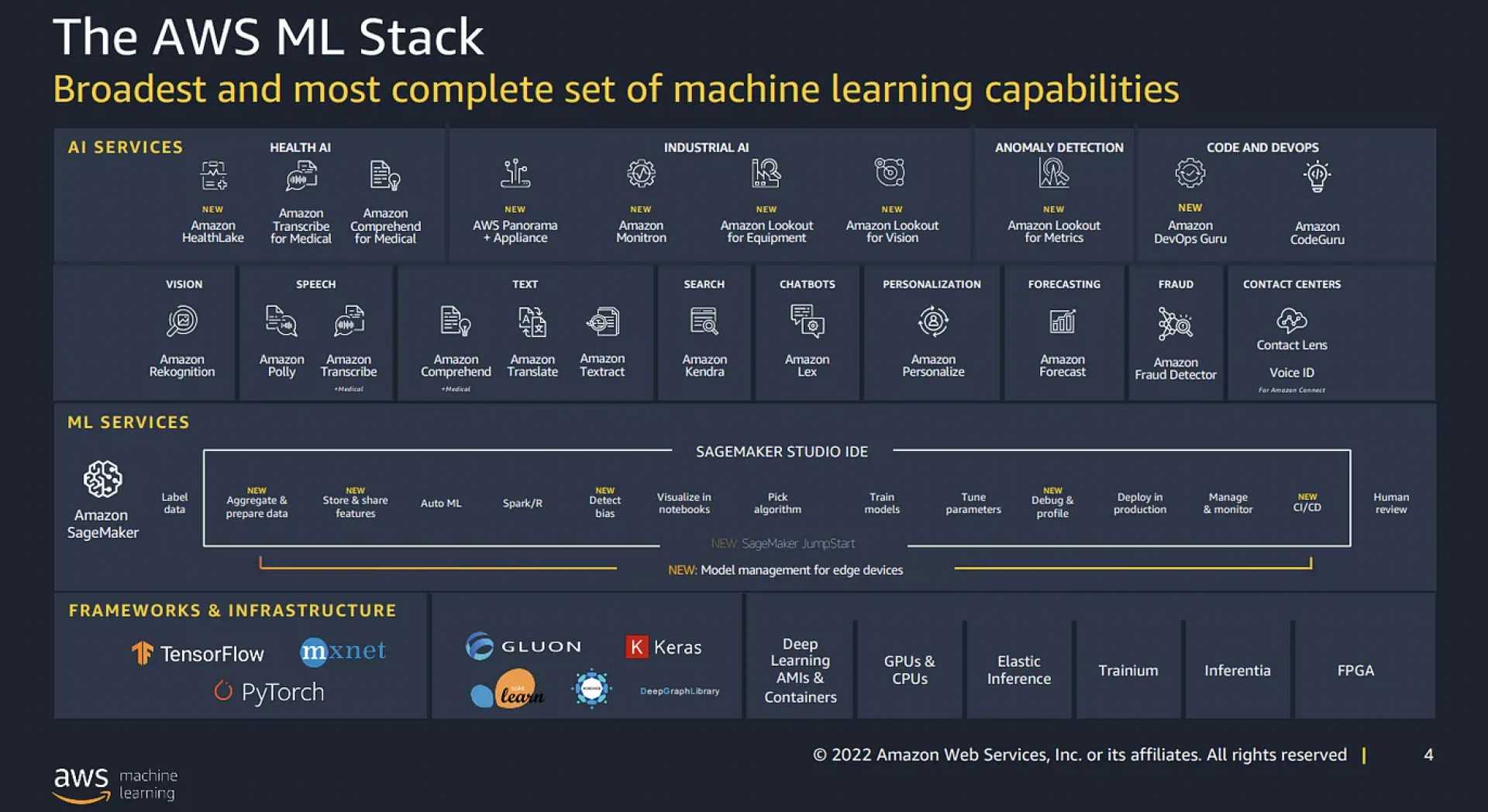
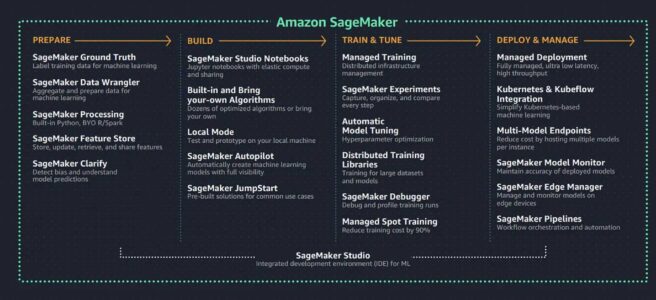
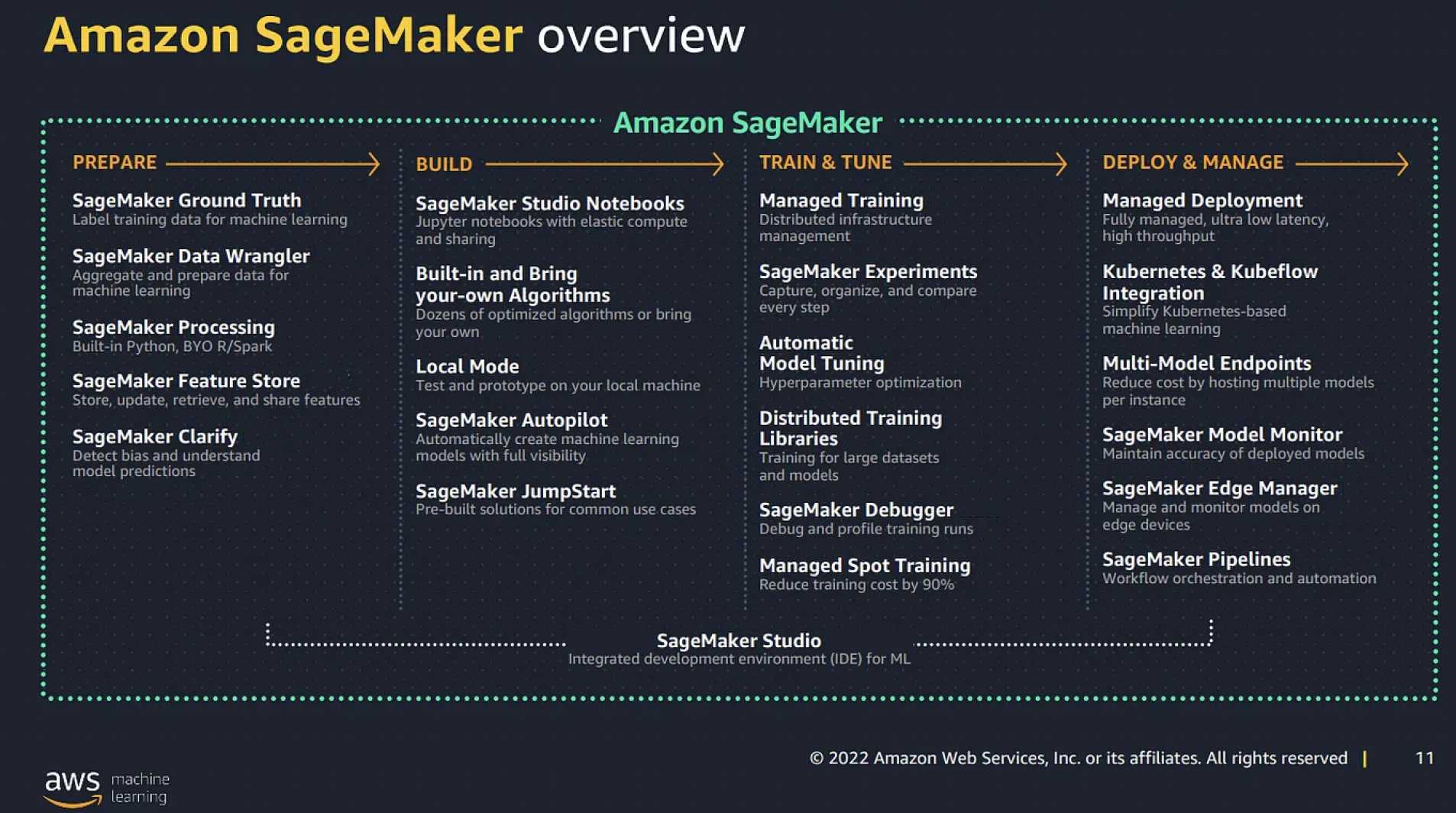
Amazon SageMaker AI is a fully managed machine learning service that enables data scientists and developers to build, train, and deploy machine learning models quickly and efficiently. This comprehensive platform simplifies the entire machine learning workflow while providing the flexibility to use your preferred tools and frameworks.
- SageMaker AI removes the heavy lifting from each step of the machine learning process to make it easier to develop high-quality models.
- It is designed for high availability with no maintenance windows or scheduled downtimes.
- APIs run in Amazon’s proven, high-availability data centers, with service stack replication configured across three facilities in each AWS region to provide fault tolerance in the event of a server failure or AZ outage.
- SageMaker AI provides a full end-to-end workflow, but users can continue to use their existing tools with SageMaker AI.
- It supports Jupyter notebooks through SageMaker Studio and SageMaker Notebook Instances.
- Users can select the number and type of instance used for hosted notebooks, training jobs, and model hosting to optimize for performance and cost.
Next-Generation Amazon SageMaker Platform (Dec 2024)
At AWS re:Invent 2024, AWS unveiled the next generation of Amazon SageMaker — a unified platform for data, analytics, and AI. This represents a major evolution from the original ML-focused service into a comprehensive data and AI platform.
Platform Components
- Amazon SageMaker Unified Studio: A single integrated development environment for data engineering, SQL analytics, ML model development, and generative AI application development. It brings together tools previously spread across multiple services (EMR, Glue, Redshift, Athena, SageMaker AI, Bedrock) into one workspace. Generally available as of March 2025.
- Amazon SageMaker Lakehouse: An open data architecture built on Apache Iceberg that unifies data across Amazon S3 data lakes (including S3 Tables), Amazon Redshift data warehouses, and third-party/federated data sources, enabling analytics and AI on a single copy of data.
- Amazon SageMaker Catalog: Enables secure discovery, governance, and collaboration for data and AI assets across structured/unstructured data, AI models, dashboards, and applications. Supports metadata forms, business glossaries, lineage tracking, and fine-grained access control.
- Amazon SageMaker AI: The original SageMaker capabilities for building, training, and deploying ML models (formerly just “Amazon SageMaker”). Includes HyperPod, JumpStart, MLOps, and all inference/training features.
Key Differentiators
- Unified access to data and tools with governance built in.
- Serverless notebooks combining SQL, Python, Spark, and natural language prompts.
- Integrated with Amazon Q Developer for AI-assisted development.
- Apache Iceberg-based open lakehouse architecture.
- Cross-account and cross-service collaboration capabilities.
What’s New in SageMaker AI (2024-2026)
AWS has significantly enhanced SageMaker AI with major new features and capabilities:
- Serverless Model Customization (2025): Automatically provisions compute resources for fine-tuning, supporting SFT, DPO, RLVR, and RLAIF techniques with integrated MLflow experiment tracking. Supports Amazon Nova, DeepSeek, Llama, Qwen models.
- Bidirectional Streaming (2025): Enables real-time, multi-modal inference with persistent connections where data flows simultaneously in both directions — powering voice agents, live transcription, and continuous conversations.
- Enhanced Observability (2025): Granular instance-level and container-level metrics for CPU, memory, GPU utilization, and invocation performance with configurable publishing frequencies.
- Inference Component Rolling Updates (2025): Deploy model updates in configurable batches with CloudWatch alarm-based automatic rollbacks, eliminating need for duplicate infrastructure.
- Flexible Training Plans: Reserve accelerated compute capacity (P4d, P5, P5e, P5en, Trn1, Trn2) up to 8 weeks in advance with instant start times. Now also supports inference endpoints.
- Container Caching (2026): Stores container images and model artifacts on running instances to reduce cold start latency for inference component scaling operations.
- SageMaker HyperPod Enhancements: EKS integration, flexible instance groups, continuous scaling, custom AMIs, CMK integration, and Karpenter auto-scaling support.
- Agent-Guided Model Customization (2025): AI-guided workflows that accelerate model fine-tuning by automating technique selection and experiment management.
- SageMaker Canvas: Now includes Data Wrangler capabilities with a natural language interface for data preparation, in addition to the visual no-code ML model building.
- SageMaker Model Cards: Documentation and tracking of model information throughout the ML lifecycle.
- SageMaker Role Manager: Simplified granting of least-privilege permissions for ML workloads.
Deprecated and Discontinued SageMaker Features
⚠️ Deprecated Services and Features
| Feature |
Status |
EOL Date |
Replacement |
| SageMaker Edge Manager |
End of Life |
April 26, 2024 |
SageMaker Neo + IoT Greengrass |
| SageMaker Studio Classic |
End of Maintenance |
December 31, 2024 |
SageMaker Studio (new experience) |
| Amazon Elastic Inference |
No longer available |
April 15, 2023 |
AWS Inferentia / Inferentia2 |
| SageMaker Training Compiler |
No new releases |
N/A (existing DLCs still usable) |
Neuron SDK / framework-native optimizations |
| Data Wrangler (standalone) |
Merged into Canvas |
N/A |
SageMaker Canvas Data Wrangler |
| JupyterLab 1 & 3 (Notebook Instances) |
End of Support |
June 30, 2025 |
JupyterLab 4 |
SageMaker AI Machine Learning Workflow
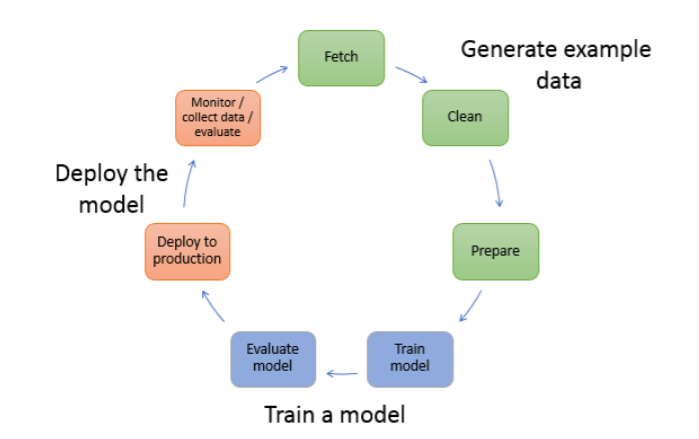
SageMaker AI supports the complete machine learning workflow, from data preparation to model deployment and monitoring. Each stage is designed to be flexible and interoperable with the others.
Data Preparation and Feature Engineering
Before training a model, data must be explored, cleaned, and transformed. SageMaker AI provides several tools to streamline this process:
- SageMaker Data Wrangler (via Canvas): Now integrated into SageMaker Canvas, Data Wrangler provides both a visual interface and a natural language interface to aggregate and prepare data, with automated data quality assessment and intelligent transformation recommendations.
- SageMaker Feature Store: Provides a centralized repository for storing, sharing, and managing features with real-time feature computation capabilities.
- SageMaker Processing: Enables running data processing workloads at scale with support for custom frameworks.
Data Preparation Best Practices
- Fetch the data: Import data from various sources including Amazon S3, Amazon Redshift, Amazon Athena, and more.
- Clean the data: Handle missing values, outliers, and inconsistencies with automated data quality assessment.
- Transform the data: Convert data into formats suitable for machine learning algorithms with intelligent transformation recommendations.
Model Training
SageMaker AI provides flexible options for training machine learning models, from using built-in algorithms to bringing your own code:
- Training the model: Select an algorithm and compute resources appropriate for your data and problem.
- Evaluating the model: Determine whether the accuracy and other metrics meet your requirements using enhanced evaluation tools.
Training Data Format Options
SageMaker AI supports multiple data storage locations and input modes for training:
- Storage options include Amazon S3, Amazon EFS, and Amazon FSx for Lustre.
- Input modes include:
- File mode: Downloads all data to the training instance before starting. Best for smaller datasets that fit in memory.
- Pipe mode: Streams data directly from S3, enabling faster start times and reduced storage requirements.
- Fast File mode: Combines the ease of File mode with the performance benefits of Pipe mode.
- Streaming mode: Supports continuous data streaming for online learning scenarios with real-time data.
- SageMaker AI natively supports all common data formats including CSV, JSON, Parquet, Arrow, and specialized formats for multi-modal data.
Model Building
SageMaker AI offers multiple approaches to building machine learning models:
- Built-in Algorithms: Optimized algorithms for various ML tasks, including specialized algorithms for multi-modal learning and time-series forecasting.
- Custom Training: Support for all major ML frameworks including TensorFlow, PyTorch, and emerging frameworks.
- Foundation Models: Access to pre-trained foundation models via SageMaker JumpStart with simplified fine-tuning workflows and parameter-efficient training methods (LoRA, QLoRA).
- AutoML: SageMaker AutoPilot with support for multi-modal data, time-series forecasting, and automated model selection.
- Serverless Model Customization: Automatically provisions compute for fine-tuning with SFT, DPO, RLVR, and RLAIF techniques.
Model Deployment and Inference
SageMaker AI provides multiple options for deploying models to production environments, each optimized for different use cases:
- Model deployment helps deploy ML code to make predictions, also known as Inference.
- SageMaker AI supports auto-scaling for hosted models to dynamically adjust the number of instances based on workload.
- Inference Components provide an abstraction layer for models with dedicated resource allocation and per-model scaling policies, enabling intelligent model packing for cost optimization.
- Multi-model endpoints provide a cost-effective solution for deploying large numbers of models using shared resources.
- High availability and reliability are achieved by deploying multiple instances across multiple Availability Zones.
Inference Options Comparison
| Inference Type |
Best For |
Payload Size |
Processing Time |
Key Features |
| Real-time |
Low-latency, high-throughput requirements |
Up to 6 MB |
Up to 60 seconds |
Persistent REST API endpoint, instance type of your choice |
| Serverless |
Intermittent or unpredictable traffic |
Up to 4 MB |
Up to 60 seconds |
No instance management, pay-per-use pricing |
| Batch Transform |
Offline processing of large datasets |
GB-scale |
Days |
No persistent endpoint, good for preprocessing |
| Asynchronous |
Large payloads, long processing times |
Up to 1 GB |
Up to one hour |
Request queuing, scale to zero when idle |
| Bidirectional Streaming |
Real-time multi-modal (voice, live transcription) |
Streaming |
Continuous |
Persistent WebSocket connection, simultaneous send/receive |
| Edge |
IoT and edge device deployment |
Device-dependent |
Device-dependent |
On-device inference, intermittent connectivity support |
SageMaker AI also supports Inference Pipelines, which allow you to chain multiple models and preprocessing/postprocessing steps in a sequence of containers.
Testing Model Variants
SageMaker AI supports testing multiple models or model versions behind the same endpoint using variants:
- Production Variants: Enable A/B or canary testing by allocating portions of traffic to different model versions.
- Shadow Variants: Test new models by sending them copies of production traffic without exposing their responses to users.
- Rolling Updates: Deploy model updates in configurable batches with integrated CloudWatch alarm monitoring and automatic rollbacks if issues are detected.
SageMaker AI Training Optimization
SageMaker AI provides several features to optimize the training process for cost, performance, and reliability:
- SageMaker Managed Spot Training: Uses EC2 Spot instances to reduce training costs by up to 90% compared to On-Demand instances.
- SageMaker Checkpoints: Saves model state during training to resume from the last checkpoint if interrupted.
- SageMaker Distributed Training: Optimizes training across multiple GPUs and instances for faster model convergence.
- SageMaker Inference Recommender: Helps select the optimal instance type and configuration for deploying models based on performance and cost requirements.
- Flexible Training Plans: Reserve accelerated compute capacity (P4d, P5, P5e, P5en, Trn1, Trn2 instances) up to 8 weeks in advance with instant start times (as soon as 30 minutes). Now also supports inference endpoints for GPU capacity reservation.
- SageMaker HyperPod Recipes: Pre-built fine-tuning workflows for popular models (DeepSeek-R1, Llama, etc.) that simplify model customization complexity.
Note: SageMaker Training Compiler is no longer receiving new releases or versions. Existing AWS Deep Learning Containers (DLCs) with Training Compiler remain usable. For newer optimizations, consider using the Neuron SDK for Trainium/Inferentia or framework-native compilation tools.
SageMaker AI Security and Governance
SageMaker AI provides comprehensive security features and governance tools to help you meet compliance requirements and maintain control over your ML workflows:
- ML model artifacts and other system artifacts are encrypted in transit and at rest.
- Support for encrypted S3 buckets and KMS keys for notebooks, training jobs, and endpoints.
- Secure API and console access over SSL connections.
- VPC interface endpoints powered by AWS PrivateLink for secure access without internet exposure, now with comprehensive regional support and IPv6 compatibility.
- SageMaker Role Manager: Simplifies creating least-privilege IAM roles for ML workflows.
- SageMaker Model Cards: Documents model information, intended uses, risk ratings, and evaluation results.
- SageMaker Catalog (Next-Gen): Provides unified governance across data and AI assets with fine-grained access control, metadata management, lineage tracking, and data quality monitoring.
Network Isolation
SageMaker Network Isolation provides additional security by:
- Preventing containers from making outbound network calls, even to other AWS services.
- Not exposing AWS credentials to the container runtime environment.
- Limiting network traffic to peers of each training container in multi-instance training jobs.
- Isolating S3 operations from the training or inference container.
SageMaker AI Development Environment
SageMaker Studio
SageMaker Studio is a comprehensive integrated development environment (IDE) for machine learning:
- Provides a unified interface for all ML development tasks.
- Supports collaborative development allowing team members to share notebooks and projects.
- Integrates MLOps capabilities for CI/CD pipelines and automated workflows.
- Offers intelligent code assistance and optimization suggestions via Amazon Q Developer.
- Enables cross-account collaboration while maintaining governance.
Note: SageMaker Studio Classic reached end of maintenance on December 31, 2024. No new Studio Classic applications can be created. Existing workloads should be migrated to the new Studio experience. For domains created after June 1, 2026, Amazon EFS is not created by default through quick setup.
SageMaker Unified Studio (Next-Gen Platform)
SageMaker Unified Studio is the development environment for the next-generation SageMaker platform (GA March 2025):
- Single environment for data engineering, SQL analytics, ML development, and generative AI.
- Serverless notebooks combining SQL queries, Python code, Apache Spark processing, and natural language prompts.
- Backed by Amazon Athena for Apache Spark, scaling from interactive exploration to petabyte-scale jobs.
- Integrated with Amazon Bedrock for generative AI application development with guardrails.
- Project-based collaboration with fine-grained access control via SageMaker Catalog.
- Accelerated by Amazon Q Developer for AI-assisted development.
SageMaker Canvas
SageMaker Canvas provides a visual interface that enables business analysts and developers to build ML models without writing code:
- Import data from various sources including Amazon S3, Redshift, and local files.
- Automatically clean and prepare data for model building.
- Data Wrangler Integration: Now includes full Data Wrangler capabilities with both visual and natural language interfaces for data preparation and transformation.
- Build models for common use cases like prediction, categorization, and time series forecasting.
- Evaluate models with easy-to-understand metrics and visualizations.
- Generate predictions on new data and share insights with stakeholders.
- Collaborate with data scientists using SageMaker Studio.
SageMaker Studio Lab
SageMaker Studio Lab provides free resources for learning machine learning:
- Access to CPU and GPU compute instances for educational purposes.
- Guided tutorials and courses for learning ML concepts and SageMaker AI capabilities.
- Community features for sharing notebooks and collaborating on projects.
- Upgraded to JupyterLab 4 as of August 8, 2025.
- Easy migration path to full SageMaker AI when ready for production.
SageMaker AI ML Components
SageMaker Feature Store
SageMaker Feature Store is a purpose-built repository for storing, sharing, and managing machine learning features:
- Centralized store for features and associated metadata for easy discovery and reuse.
- Reduces repetitive data processing by allowing features to be created once and used for both training and inference.
- Organizes features into FeatureGroups that describe Records.
- Supports both online and offline stores:
- Online store: For low-latency, real-time inference use cases, retaining only the latest feature values.
- Offline store: For training and batch inference, storing historical feature data in Parquet format for optimized storage and queries.

SageMaker JumpStart
SageMaker JumpStart provides pre-built solutions and foundation models to accelerate ML development:
- Access to hundreds of pre-trained, open-source models for various problem types.
- Support for foundation models including large language models (Llama, DeepSeek, Mistral, Falcon), text-to-image models, and embedding models.
- Ability to fine-tune models on your own data before deployment using parameter-efficient methods (LoRA, QLoRA).
- Integration with Amazon Bedrock — models hosted via JumpStart can be accessed through Bedrock’s managed API with advanced security controls and monitoring.
- Solution templates that set up infrastructure for common use cases.
- Executable example notebooks for learning SageMaker AI capabilities.
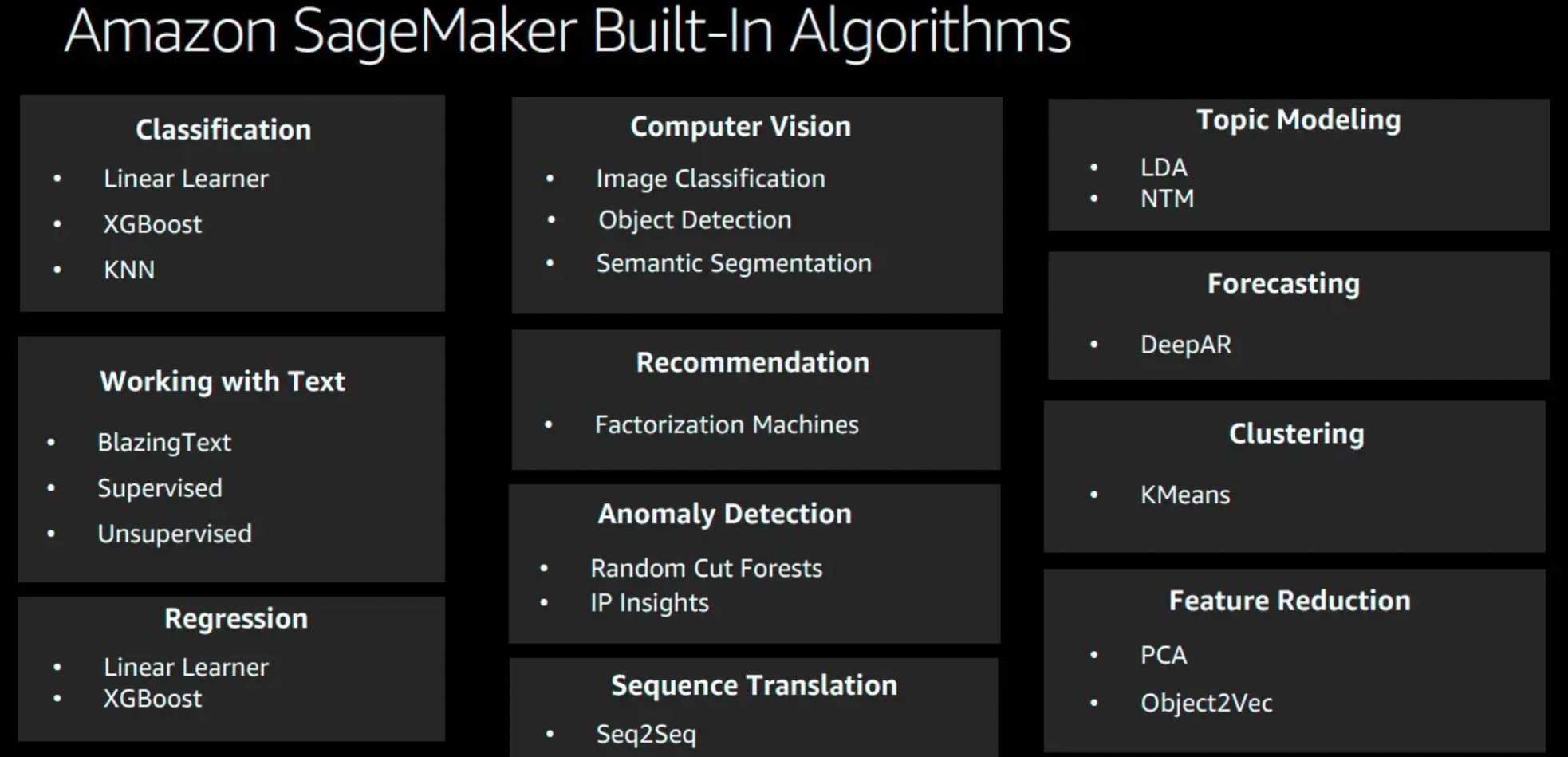
SageMaker Built-in Algorithms
SageMaker AI provides numerous built-in algorithms optimized for performance and scale, covering common machine learning tasks:
- Supervised learning algorithms for regression and classification.
- Unsupervised learning algorithms for clustering and anomaly detection.
- Computer vision algorithms for image and video analysis.
- Natural language processing algorithms for text analysis.
- Time series forecasting algorithms for predicting future values.
For a detailed list of available algorithms, please refer to SageMaker Built-in Algorithms.
SageMaker HyperPod
SageMaker HyperPod provides purpose-built infrastructure for training and inference of foundation models at scale, reducing training time by up to 40%:
- Designed for large-scale distributed training of foundation models with automatic best-configuration selection.
- Provides fault-tolerant infrastructure with automatic recovery from instance failures.
- Supports checkpointing to resume training from the last saved state.
- EKS Integration: Run HyperPod on Amazon EKS with continuous scaling, custom AMIs, and customer managed key (CMK) support.
- Flexible Instance Groups (2026): Specify multiple instance types and subnets within a single instance group, simplifying Karpenter auto-scaling configurations.
- Flexible Training Plans: Reserve compute capacity (P5, P5e, P5en, Trn1, Trn2) with instant start times.
- HyperPod Recipes: Pre-built fine-tuning workflows for popular models (DeepSeek-R1, Llama) to simplify customization.
- Optimized for popular ML frameworks like PyTorch and TensorFlow.
AWS ML Accelerators
AWS offers custom silicon designed specifically for machine learning workloads:
- AWS Inferentia2:
- Second-generation purpose-built chip for deep learning inference.
- Delivers 3x higher compute, 4x larger memory, up to 4x higher throughput, and up to 10x lower latency compared to first-gen Inferentia.
- Optimized for LLMs, latent diffusion models, and vision transformers.
- Available through Amazon EC2 Inf2 instances.
- AWS Trainium:
- Custom chips designed specifically for training deep learning models.
- Provides up to 50% cost savings over comparable GPU-based instances.
- Available through Amazon EC2 Trn1 instances.
- AWS Trainium2:
- Second-generation training chip — 4x faster, 4x more memory bandwidth, 3x more memory capacity than Trn1.
- Offers 30-40% better price performance than GPU-based P5e and P5en instances.
- Supports training and deploying models with hundreds of billions to trillion+ parameters.
- Available through Amazon EC2 Trn2 and Trn2 UltraServer instances (GA December 2024).
- AWS Trainium3:
- Third-generation chip announced at re:Invent 2025, built on TSMC 3nm.
- Delivers 2.52 PFLOPS per chip.
- Supports NVLink Fusion for hybrid GPU/Trainium clusters.
Note: Amazon Elastic Inference is no longer available to new customers (discontinued April 15, 2023). Customers should use AWS Inferentia2-based instances (Inf2) for cost-effective, high-performance ML inference. SageMaker Notebook Instances also support Trn1 and Inf2 instance types (November 2024).
Model Quality and Responsible AI
SageMaker Clarify
SageMaker Clarify helps improve ML models by detecting potential bias and helping to explain the predictions that the models make:
- Provides explainability for complex models including deep neural networks.
- Offers comprehensive fairness metrics with customizable thresholds.
- Includes techniques for detecting and mitigating bias in training data and model predictions.
- Integrates with Model Cards for automatic documentation of fairness and explainability insights.
- Supports automatic FM evaluation for accuracy, robustness, and toxicity metrics for generative AI.
- Helps meet regulatory compliance requirements with pre-built reports.
SageMaker Model Monitor
SageMaker Model Monitor monitors the quality of SageMaker AI machine learning models in production:
- Provides unified monitoring of data quality, model quality, bias, and explainability.
- Offers early warning system to detect potential issues before they impact model performance.
- Supports configurable automated responses to detected issues.
- Allows for custom domain-specific and business-oriented monitoring metrics.
- Includes specialized monitoring for foundation models, including prompt drift and output quality.
SageMaker Ground Truth
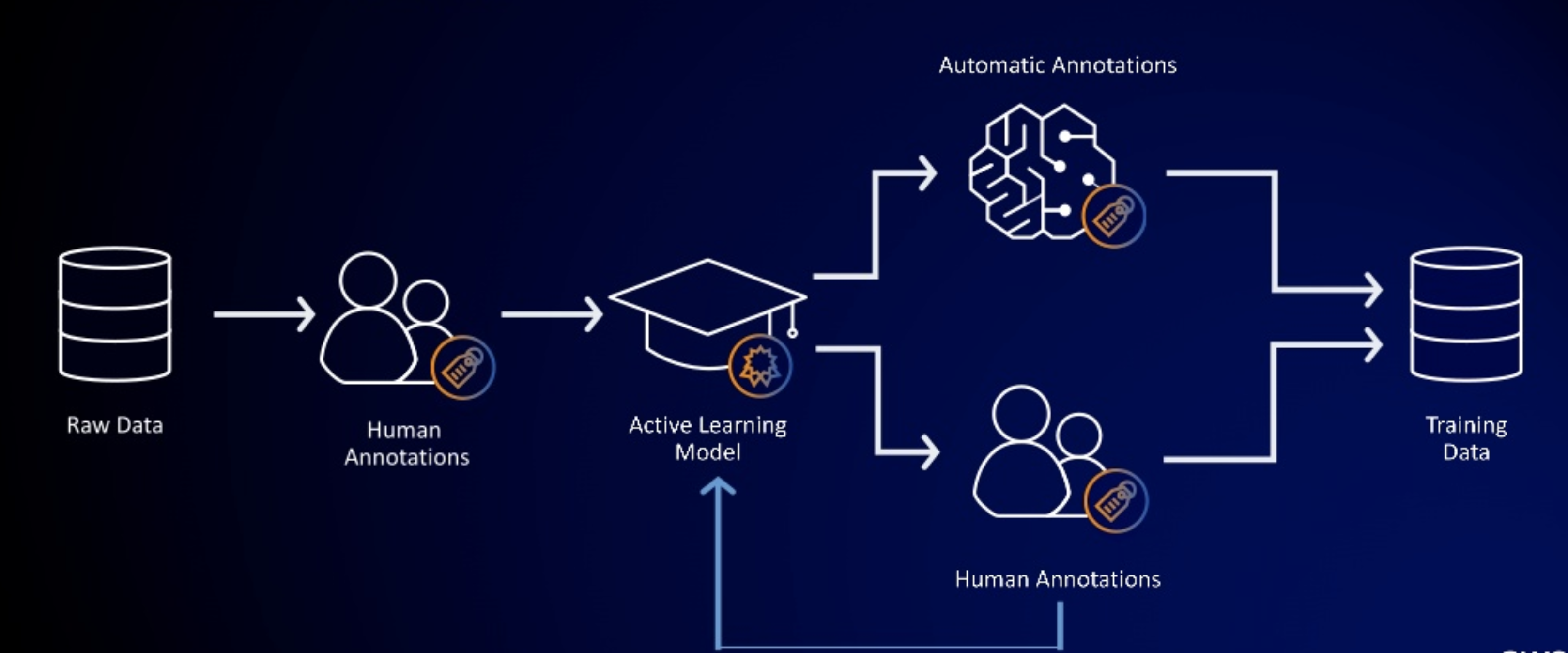
SageMaker Ground Truth provides automated data labeling using machine learning:
- Uses active learning to automate the labeling of input data for certain built-in task types.
- Supports labeling workflows for complex data types including video, audio, and multi-modal content.
- Offers quality control workflows with consensus labeling and expert review.
- Available as both a self-service offering and an AWS-managed offering (Ground Truth Plus).
- Helps lower labeling costs by up to 70% through automation.
Automation and Experimentation
SageMaker AutoPilot
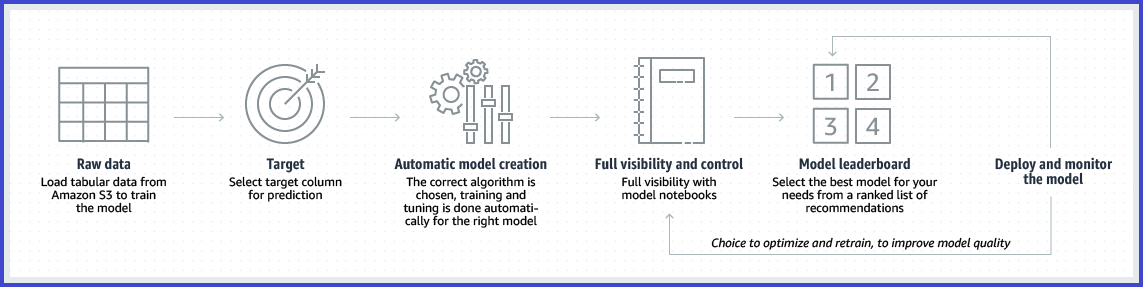
SageMaker AutoPilot automates the end-to-end machine learning process while maintaining transparency:
- Automatically analyzes data and selects appropriate algorithms.
- Preprocesses data and performs feature engineering.
- Trains and tunes multiple models to find the best performer.
- Generates notebooks with the code used for model creation, enabling customization.
- Provides explainability reports showing feature importance for model predictions.
SageMaker Automatic Model Tuning
SageMaker Automatic Model Tuning helps optimize hyperparameters to improve model performance:
- Uses Bayesian optimization to efficiently search the hyperparameter space.
- Supports random search and grid search strategies.
- Can leverage managed spot training to reduce costs.
- Provides warm start capability to use previous tuning jobs as starting points.
Best practices for hyperparameter tuning include:
- Limit the search space: Focus on fewer, more impactful hyperparameters.
- Choose appropriate ranges: Avoid overly broad ranges that waste computational resources.
- Use logarithmic scales for parameters that vary by orders of magnitude.
- Consider concurrent jobs carefully: While parallel jobs complete faster, sequential jobs often find better solutions.
- Design distributed training to target your specific objective metrics.
SageMaker Experiments
SageMaker Experiments helps track, organize, and compare machine learning iterations:
- Automatically captures inputs, parameters, configurations, and results for each run.
- Organizes related runs into experiments for easy comparison.
- Visualizes performance metrics across multiple runs to identify the best models.
- Integrates with SageMaker Studio for a unified experience.
- Serverless MLflow integration for automatic logging of metrics during model customization.
SageMaker Pipelines
SageMaker Pipelines provides a comprehensive MLOps solution:
- Enables creation and editing of ML workflows with visual tools.
- Offers pre-built templates for common ML workflows.
- Includes built-in testing frameworks for validating models before deployment.
- Provides comprehensive monitoring of pipeline execution.
- Supports ML workflows that span multiple AWS accounts for enhanced security.
SageMaker Debugger
SageMaker Debugger provides tools to debug training jobs and resolve problems:
- Automatically detects common training problems like overfitting, vanishing gradients, and exploding tensors.
- Captures metrics and tensors during training for real-time and post-training analysis.
- Sends alerts when anomalies are detected, enabling early intervention.
- Provides visualization tools to understand model behavior.
- Supports popular frameworks including TensorFlow, PyTorch, MXNet, and XGBoost.
Edge and Hybrid Deployment
⚠️ SageMaker Edge Manager – End of Life: SageMaker Edge Manager reached EOL on April 26, 2024. All references to edge packaging jobs, devices, and device fleets have been deleted. Resources created by Edge Manager (S3 packages, IoT things, IAM roles) continue to exist on their respective services. For edge deployment, use SageMaker Neo with AWS IoT Greengrass.
SageMaker Neo
SageMaker Neo enables machine learning models to train once and run anywhere in the cloud and at the edge:
- Optimizes models for a wide range of hardware platforms including CPUs, GPUs, and specialized ML accelerators.
- Provides specialized techniques for optimizing large language models and other foundation models.
- Includes advanced quantization techniques that preserve model accuracy while reducing size.
- Supports intelligent partitioning of models across multiple devices or between edge and cloud.
- Can be used with IoT Greengrass to perform machine learning inference locally on devices (recommended replacement for Edge Manager workflows).
SageMaker vs Amazon Bedrock
Understanding when to use SageMaker AI vs Amazon Bedrock for foundation models:
| Criteria |
SageMaker AI / JumpStart |
Amazon Bedrock |
| Best For |
Full control over training, fine-tuning, and deployment infrastructure |
Serverless API access to FMs without infrastructure management |
| Customization |
Full fine-tuning, PEFT (LoRA/QLoRA), DPO, RLVR, distillation |
Fine-tuning, continued pre-training, model distillation via API |
| Infrastructure |
Customer-managed instances (GPU, Trainium, Inferentia) |
Fully managed, no instance provisioning |
| Model Selection |
Open-source models (Llama, DeepSeek, Mistral, Falcon, etc.) |
Proprietary + open models (Claude, Titan, Llama, Mistral, etc.) |
| Integration |
JumpStart models can be imported into Bedrock via Custom Model Import |
Both accessible via SageMaker Unified Studio |
SageMaker AI Pricing
SageMaker AI follows a pay-as-you-go pricing model with no upfront commitments:
- Users pay only for the resources they use across the ML workflow.
- Costs are based on the instance types and duration of usage for notebooks, training, and inference.
- Storage costs apply for data stored in SageMaker Feature Store, model artifacts, and other components.
- Serverless options like SageMaker Serverless Inference charge based on duration and memory configuration.
- Serverless Model Customization uses pay-per-token pricing for both training and inference.
- Cost optimization features include:
- Managed Spot Training for reduced training costs (up to 90% savings)
- Multi-model endpoints for efficient hosting of multiple models
- Inference Components for intelligent model packing and per-model scaling
- Serverless Inference for pay-per-use model hosting
- Inference Recommender for optimal instance selection
- Auto-scaling to match resources with demand
- SageMaker Savings Plans for committed usage discounts
- Flexible Training Plans for reserved compute capacity at predictable pricing
- Trainium/Inferentia instances for up to 50-70% cost savings vs GPUs
AWS Certification Exam Practice Questions
- Questions are collected from various sources and answers reflect our understanding, which may differ from yours.
- AWS services are updated frequently, so some information may become outdated.
- AWS exam questions may not always reflect the latest service updates.
- We welcome feedback and corrections to improve accuracy.
- A company has built a deep learning model and now wants to deploy it using the SageMaker AI Hosting Services. For inference, they want a cost-effective option that guarantees low latency but still comes at a fraction of the cost of using a GPU instance for your endpoint. As a machine learning Specialist, what feature should be used?
- Inference Pipeline
- AWS Inferentia
- SageMaker Ground Truth
- SageMaker Neo
Answer: AWS Inferentia – AWS Inferentia (and Inferentia2) is designed specifically for high-performance, cost-effective ML inference, providing better performance at lower cost compared to general-purpose GPU instances. Note: Amazon Elastic Inference is no longer available and should not be selected.
- A trading company is experimenting with different datasets, algorithms, and hyperparameters to find the best combination for the machine learning problem. The company doesn’t want to limit the number of experiments the team can perform but wants to track the several hundred to over a thousand experiments throughout the modeling effort. Which Amazon SageMaker AI feature should they use to help manage your team’s experiments at scale?
- SageMaker Inference Pipeline
- SageMaker Experiments
- SageMaker Neo
- SageMaker model containers
Answer: SageMaker Experiments – SageMaker Experiments is designed specifically for tracking, organizing, and comparing machine learning iterations at scale.
- A Machine Learning Specialist needs to monitor Amazon SageMaker AI in a production environment for analyzing records of actions taken by a user, role, or an AWS service. Which service should the Specialist use to meet these needs?
- AWS CloudTrail
- Amazon CloudWatch
- AWS Systems Manager
- AWS Config
Answer: AWS CloudTrail – CloudTrail is the appropriate service for tracking API calls and user actions, while CloudWatch is better suited for performance monitoring and metrics.
- A company wants to train a large language model with hundreds of billions of parameters but is concerned about hardware failures interrupting multi-week training jobs. Which SageMaker AI feature is specifically designed to address this concern?
- SageMaker Managed Spot Training
- SageMaker HyperPod
- SageMaker Distributed Training
- SageMaker Neo
Answer: SageMaker HyperPod – HyperPod is specifically designed for training foundation models at scale with automatic recovery from instance failures and checkpointing capabilities, reducing training time by up to 40%.
- An organization wants to deploy ML models at the edge on IoT devices. They were previously using SageMaker Edge Manager. What is the recommended approach now that Edge Manager has reached end of life?
- Use SageMaker Batch Transform with scheduled jobs
- Use SageMaker Neo with AWS IoT Greengrass
- Use SageMaker Serverless Inference
- Use Amazon Elastic Inference
Answer: SageMaker Neo with AWS IoT Greengrass – SageMaker Neo optimizes models for edge hardware, and IoT Greengrass enables local inference on devices. This is the recommended replacement for Edge Manager (EOL April 2024). Note: Elastic Inference is also discontinued.
- A data science team needs to fine-tune a DeepSeek-R1 model for their specific use case but wants to avoid the complexity of managing infrastructure and selecting compute resources. Which SageMaker AI capability should they use?
- SageMaker Training with custom containers
- SageMaker Serverless Model Customization
- SageMaker Canvas
- SageMaker Studio Lab
Answer: SageMaker Serverless Model Customization – This capability automatically provisions the right compute resources based on model and data size, supports advanced techniques (SFT, DPO, RLVR, RLAIF), and uses pay-per-token pricing without infrastructure management.
- A company wants to deploy a voice agent that requires real-time, continuous interaction where the model needs to receive audio input and generate responses simultaneously. Which SageMaker AI inference option is best suited for this use case?
- Real-time inference
- Asynchronous inference
- Bidirectional streaming
- Batch transform
Answer: Bidirectional streaming – Introduced in 2025, bidirectional streaming enables real-time multi-modal applications by maintaining persistent WebSocket connections where data flows simultaneously in both directions, ideal for voice agents and live transcription.
- A company is deploying multiple foundation models and wants to optimize costs by efficiently sharing compute resources across models while maintaining individual scaling policies for each model. Which SageMaker AI feature should they use?
- Multi-model endpoints
- Inference Components
- Production Variants
- SageMaker Serverless Inference
Answer: Inference Components – Inference Components abstract ML models and enable assigning dedicated resources and specific scaling policies per model while optimizing resource utilization through intelligent model packing on shared infrastructure.
- An ML team wants to reduce cold start latency when scaling their inference endpoints during traffic spikes. They want new model copies to become available faster on already-provisioned instances. Which 2026 SageMaker AI feature addresses this?
- SageMaker Inference Recommender
- Container Caching
- SageMaker Neo compilation
- Flexible Training Plans
Answer: Container Caching – Container caching stores container images and model artifacts on already running instances, reducing cold start latency for scaling inference component operations that reuse existing instances.
- A company wants to use a unified platform where data engineers can process data with SQL and Spark, data scientists can train ML models, and AI developers can build generative AI applications — all using a single governed environment. Which AWS service provides this capability? (Select TWO)
- Amazon SageMaker Unified Studio
- Amazon SageMaker AI Studio
- Amazon SageMaker Lakehouse
- Amazon Bedrock
- AWS Glue Studio
Answer: A, C – SageMaker Unified Studio provides the single IDE for all data, analytics, and AI workloads, while SageMaker Lakehouse provides the unified data architecture built on Apache Iceberg. Together they form the next-generation SageMaker platform.
References
Amazon SageMaker AI Documentation
Amazon SageMaker FAQs
Amazon SageMaker Pricing
Next-Generation Amazon SageMaker Documentation
Amazon SageMaker Lakehouse
Amazon SageMaker Data and AI Governance
AWS Trainium
AWS Inferentia