S3 Event Notifications
- S3 notification feature enables notifications to be triggered when certain events happen in the bucket.
- Notifications are enabled at the Bucket level.
- Notifications can be configured to be filtered by the prefix and suffix of the key name of objects. However, filtering rules cannot be defined with overlapping prefixes, overlapping suffixes, or prefix and suffix overlapping.
- S3 event notifications are designed to be delivered at least once. Typically, event notifications are delivered in seconds but can sometimes take a minute or longer.
- Event notifications are not guaranteed to arrive in the same order that the events occurred. On rare occasions, S3’s retry mechanism might cause duplicate event notifications for the same object event.
Supported Event Types
- S3 can publish the following events:
- New Object Created events (
s3:ObjectCreated:*)- Can be enabled for
Put,Post,Copy, orCompleteMultipartUploadoperations - You will not receive event notifications from failed operations
- Can be enabled for
- Object Removal events (
s3:ObjectRemoved:*)- Can publish delete events for object deletion (
s3:ObjectRemoved:Delete) or insertion of delete marker (s3:ObjectRemoved:DeleteMarkerCreated) - You will not receive event notifications from automatic deletes from lifecycle configurations or from failed operations.
- Can publish delete events for object deletion (
- Restore Object events (
s3:ObjectRestore:*)- Restoration of objects archived to S3 Glacier Flexible Retrieval, S3 Glacier Deep Archive, S3 Intelligent-Tiering Archive Access tier, or Deep Archive Access tier
s3:ObjectRestore:Post– restoration initiateds3:ObjectRestore:Completed– restoration completeds3:ObjectRestore:Delete– temporary restored copy expired
- S3 Lifecycle Expiration events (
s3:LifecycleExpiration:*)s3:LifecycleExpiration:Delete– object in unversioned bucket is deleted or object version permanently deleted by lifecycles3:LifecycleExpiration:DeleteMarkerCreated– lifecycle creates a delete marker when a current version of an object in a versioned bucket is deleted
- S3 Lifecycle Transition events (
s3:LifecycleTransition)- Object transitioned to another S3 storage class by a lifecycle configuration
- S3 Intelligent-Tiering Automatic Archival events (
s3:IntelligentTiering)- Object within S3 Intelligent-Tiering moved to the Archive Access tier or Deep Archive Access tier
- Object Tagging events (
s3:ObjectTagging:*)s3:ObjectTagging:Put– tag added or updated on an objects3:ObjectTagging:Delete– tag removed from an object
- Object ACL PUT events (
s3:ObjectAcl:Put)- ACL is set on an object or existing ACL is changed
- An event is not generated when a request results in no change to an object’s ACL
- Object Annotation events (
s3:ObjectAnnotation:*) (New – 2025)s3:ObjectAnnotation:Put– annotation created or updated viaPutObjectAnnotations3:ObjectAnnotation:Delete– annotation deleted viaDeleteObjectAnnotationGetObjectAnnotationandListObjectAnnotationsdo not send event notifications
- Replication events (
s3:Replication:*)- For replication configurations with S3 Replication metrics or S3 Replication Time Control (S3 RTC) enabled
s3:Replication:OperationFailedReplication– object failed to replicates3:Replication:OperationMissedThreshold– replication exceeded 15-minute S3 RTC thresholds3:Replication:OperationReplicatedAfterThreshold– object replicated after 15-minute thresholds3:Replication:OperationNotTracked– object no longer tracked by replication metrics
- Reduced Redundancy Storage (RRS) object lost events (
s3:ReducedRedundancyLostObject)- Can be used to reproduce/recreate the Object
- Note: RRS is no longer recommended. Standard S3 is more cost-effective with higher durability (99.999999999% vs 99.99%). Consider migrating to S3 Standard or other storage classes.
- New Object Created events (
Supported Event Destinations
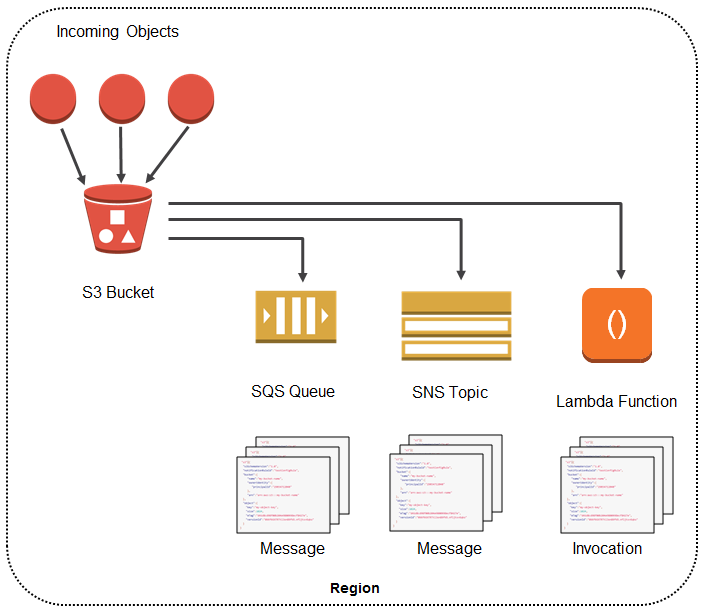
- S3 can publish events to the following destinations:
- SNS topic
- Only Standard SNS topics are supported (SNS FIFO is not allowed)
- SQS queue
- Only Standard SQS queues are supported (SQS FIFO queues are not supported as a direct S3 event notification destination)
- To send S3 events to SQS FIFO queues, use Amazon EventBridge as an intermediary
- AWS Lambda function
- Amazon EventBridge
- Unlike other destinations, enabling EventBridge sends all events (no need to select specific event types)
- EventBridge rules can then route events to over 20 targets including Lambda, Kinesis, Step Functions, SQS, SNS, etc.
- Supports advanced content-based filtering on event attributes (object size, time range, key prefix, etc.)
- SNS topic
- Only one destination type can be specified per event notification configuration (except EventBridge which receives all events when enabled).
- For S3 to be able to publish events to the destination, the S3 principal should be granted the necessary permissions.
Amazon EventBridge Integration
- Amazon EventBridge provides a more powerful event routing mechanism compared to traditional S3 event notifications.
- When EventBridge is enabled on a bucket, all events are sent to EventBridge automatically – no need to specify individual event types.
- EventBridge supports additional event types beyond SNS/SQS/Lambda:
- Object Storage Class Changed
- Object Access Tier Changed
- Object Restore Expired
- Object ACL Updated
- Object Tags Added/Deleted
- Object Annotation Created/Removed
- Key Advantages over SNS/SQS/Lambda destinations:
- Content-based filtering – filter by any attribute in the event (object size, key pattern, metadata)
- Multiple targets – single rule can route to multiple targets
- Over 20 supported targets including Lambda, Step Functions, SQS, SNS, Kinesis, ECS tasks, API destinations
- Archive and replay – ability to archive events and replay them later
- Schema discovery – auto-detect event schemas
- No need for separate notification configurations per event type
- EventBridge and traditional S3 event notifications (SNS/SQS/Lambda) can be configured simultaneously on the same bucket.
Event Notification Key Points
- Notification configuration is stored in the
notificationsubresource associated with the bucket. - If notifications write to the same bucket that triggers the notification, it could cause an execution loop. Use two buckets or configure the trigger with a specific prefix for incoming objects.
- Event notifications do not alert for automatic deletes from lifecycle policies (use
s3:LifecycleExpirationevents instead). - Failed operations do not generate event notifications.
AWS Certification Exam Practice Questions
- Questions are collected from Internet and the answers are marked as per my knowledge and understanding (which might differ with yours).
- AWS services are updated everyday and both the answers and questions might be outdated soon, so research accordingly.
- AWS exam questions are not updated to keep up the pace with AWS updates, so even if the underlying feature has changed the question might not be updated
- Open to further feedback, discussion and correction.
- A company uses S3 to store images. When an image is uploaded, a Lambda function must be triggered to generate thumbnails. What is the MOST efficient approach?
- Configure CloudWatch Events to monitor S3 uploads and trigger Lambda
- Configure S3 Event Notification with
s3:ObjectCreated:*event to invoke the Lambda function - Use a scheduled Lambda function to poll S3 for new objects
- Use S3 Batch Operations to process new images
Show Answer
Answer: b – S3 Event Notifications can directly invoke Lambda functions when objects are created. This is the most efficient event-driven approach.
- A development team needs to send S3 object creation events to an SQS FIFO queue for ordered processing. Which approach should they use?
- Configure S3 Event Notification directly to the SQS FIFO queue
- Enable Amazon EventBridge on the bucket and create a rule to route events to the SQS FIFO queue
- Use SNS FIFO topic as intermediary between S3 and SQS FIFO
- Configure S3 Event Notification to Lambda, which forwards to SQS FIFO
Show Answer
Answer: b – SQS FIFO queues are not supported as a direct S3 event notification destination. Amazon EventBridge can route S3 events to SQS FIFO queues. SNS FIFO is also not supported as S3 event destination.
- An application needs to be notified when objects are transitioned to Glacier by S3 Lifecycle rules, and separately when objects are deleted by lifecycle expiration. Which event types should be configured?
s3:ObjectRemoved:Deleteands3:ObjectRestore:Posts3:LifecycleTransitionands3:LifecycleExpiration:Deletes3:ObjectCreated:Copyands3:ObjectRemoved:*s3:IntelligentTieringands3:ObjectRemoved:Delete
Show Answer
Answer: b –
s3:LifecycleTransitionfires when lifecycle transitions objects to another storage class.s3:LifecycleExpiration:Deletefires when lifecycle deletes objects.s3:ObjectRemoved:Deletedoes NOT fire for lifecycle deletions. - A company wants to filter S3 events by object size and route them to different Lambda functions – small objects to one function and large objects to another. Which approach supports this?
- Configure two S3 Event Notification rules with different prefix filters
- Enable Amazon EventBridge and create content-based filtering rules
- Use SNS with message filtering policies
- Configure S3 Event Notification to SQS and use Lambda to filter
Show Answer
Answer: b – Amazon EventBridge supports content-based filtering on any event attribute including object size, time range, and metadata fields. S3 Event Notifications natively only support prefix and suffix filtering on key names.
- Which of the following are valid S3 event notification destinations? (Choose 3)
- Amazon SNS FIFO topic
- Amazon SQS Standard queue
- AWS Lambda function
- Amazon EventBridge
- Amazon SQS FIFO queue
Show Answer
Answer: b, c, d – S3 event notifications support SNS Standard topics, SQS Standard queues, Lambda functions, and Amazon EventBridge. SNS FIFO and SQS FIFO are not supported as direct S3 event notification destinations.