AWS Database Migration Service – DMS
- AWS Database Migration Service enables quick and secure data migration with minimal to zero downtime.
- Database Migration Service helps migration to AWS with virtually no downtime. The source database remains fully operational during the migration, minimizing downtime to applications that rely on the database.
- AWS DMS can migrate
- relational databases, data warehouses, NoSQL databases, and other types of data stores
- data to and from the most widely used commercial and open-source databases.
- DMS supports homogeneous migrations such as Oracle to Oracle, as well as heterogeneous migrations (using SCT/DMS Schema Conversion) between different database platforms, such as Oracle or Microsoft SQL Server to Aurora.
- AWS DMS Schema Conversion (formerly AWS Schema Conversion Tool) helps in heterogeneous database migrations by automatically converting the source database schema and a majority of the database code objects, including views, stored procedures, and functions, to a format compatible with the target database.
- DMS enables both one-time migration and continuous data replication with high availability and consolidates databases into a petabyte-scale data warehouse by streaming data to Redshift and S3.
- DMS continually monitors source and target databases, network connectivity, and the replication instance.
- DMS automatically manages all of the infrastructure that supports the migration server, including hardware and software, software patching, and error reporting.
- DMS is highly resilient and self–healing. If the primary replication server fails for any reason, a backup replication server can take over with little or no interruption of service.
- In case of interruption, DMS automatically restarts the process and continues the migration from where it was halted.
- AWS DMS supports the Multi-AZ option to provide high availability for database migration and continuous data replication by enabling redundant replication instances.
- AWS DMS ensures that the data migration is secure. Data at rest is encrypted with AWS KMS encryption. During migration, SSL can be used to encrypt the in-flight data as it travels from source to target.
- DMS integrates with AWS Secrets Manager for centralized storage and management of database credentials and other sensitive information.
- DMS supports data masking capabilities that can conceal sensitive data by modifying the contents of specified columns before loading them into the target database.
DMS Serverless
- AWS DMS Serverless (GA since June 2023) removes the need to provision, monitor, and scale replication instances manually.
- DMS Serverless automatically provisions, scales, and manages migration resources to the optimal capacity needed to meet demand.
- Eliminates infrastructure tasks like capacity estimation, provisioning, cost-optimization, and managing replication engine versions and patching.
- Supports several use cases including continuous data replication, database consolidation, and both heterogeneous and homogeneous migrations.
- DMS Serverless supports S3 as a source endpoint for migrating data in CSV or Parquet format to any supported target endpoint (GA Feb 2025).
- DMS Serverless provides automatic storage scaling (April 2025), removing the previous 100 GB default storage capacity limit for high transaction volumes.
- You only pay for the data migration capacity you use—no need to overprovision for peak demand.
Database Migration Service Components
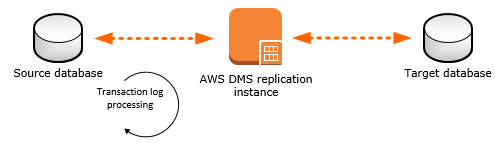
DMS Replication Instance
- A DMS replication instance performs the actual data migration between the source and the target.
- DMS replication instance is a managed EC2 instance that hosts one or more replication tasks.
- The replication instance also caches the transaction logs during the migration.
- CPU and memory capacity of the replication instance influences the overall time required for the migration.
- DMS can provide high availability and failover support using a Multi-AZ deployment.
- In a Multi-AZ deployment, DMS automatically provisions and maintains a standby replica of the replication instance in a different AZ
- Primary replication instance is synchronously replicated to the standby replica.
- If the primary replication instance fails or becomes unresponsive, the standby resumes any running tasks with minimal interruption.
- Because the primary is constantly replicating its state to the standby, Multi-AZ deployment does incur some performance overhead.
Endpoints
- AWS DMS uses an endpoint to access the source or target data store.
- DMS supports 20+ databases and data warehouses as source and target endpoints.
Replication tasks
- DMS replication task helps move a set of data from the source endpoint to the target endpoint.
- Replication task required Replication instance, source, and target endpoints
- Replication task supports following migration type options
- Full load (Migrate existing data) – Migrate the data from the source to the target database as a one-time migration.
- CDC only (Replicate data changes only) – Replicate only changes, while using native export tools for performing bulk data load.
- Full load + CDC (Migrate existing data and replicate ongoing changes) – Performs a full data load while capturing changes on the source. After the full load is complete, captured changes are applied to the target. Once the changes reach a steady state, the applications can be switched over to the target.
- LOB mode options
- Don’t include LOB columns – LOB columns are excluded
- Full LOB mode – Migrate complete LOBs regardless of size. AWS DMS migrates LOBs piecewise in chunks controlled by the Max LOB Size parameter. This mode is slower than using limited LOB mode.
- Limited LOB mode – Truncate LOBs to the value specified by the Max LOB Size parameter. This mode is faster than using full LOB mode.
- Data validation – validates data between source and target after migration.
- Data Resync (May 2025) – automatically corrects data inconsistencies identified during validation by retrieving current values from the source and applying them to the target.
DMS Homogeneous Data Migrations
- DMS Homogeneous Data Migrations use built-in native database tooling to provide simple and performant like-to-like migrations with minimal downtime.
- Homogeneous data migrations are serverless — DMS automatically provisions the resources required for migration without needing to manage replication instances.
- Supports migrating all data types, secondary objects (functions, stored procedures, triggers, indexes), and partitions.
- Supported source databases include:
- PostgreSQL (version 10.4–14.x)
- MySQL (version 5.7 and higher)
- MariaDB (version 10.2 and higher)
- MongoDB (version 4.x and higher)
- Supported targets include Amazon RDS, Amazon Aurora, and Amazon DocumentDB.
- Available via AWS Console, CLI, SDK, and API (October 2024).
- Supports a “1-Click Move to Managed” feature (November 2024) for auto-migration of EC2 self-managed databases to Amazon RDS or Aurora.
- Available in 29 AWS Regions (August 2024).
DMS Schema Conversion
- AWS DMS Schema Conversion (DMS SC) is a fully managed schema conversion capability integrated directly into the DMS console.
- Previously, you had to download the standalone AWS Schema Conversion Tool (AWS SCT). Now, DMS SC provides a fully managed experience from within the DMS console.
- DMS SC converts source database schema and a majority of database code objects, including views, stored procedures, and functions, to a format compatible with the target database.
- DMS SC supports heterogeneous migrations by automatically assessing, converting, and migrating database and code objects.
- DMS SC clearly marks any objects that cannot be automatically converted so that they can be manually converted.
- Provides automated assessment and conversion reports that analyze the entire source database with detailed conversion estimates for every schema object.
- Generative AI-Assisted Schema Conversion (December 2024):
- Uses large language models (LLMs) hosted on Amazon Bedrock combined with traditional rule-based conversion
- Automatically converts up to 90% of complex database objects including stored procedures, triggers, and functions
- Supports conversions from Oracle, SQL Server, MySQL, PostgreSQL, and Sybase ASE to Amazon Aurora PostgreSQL and RDS for PostgreSQL
- Available in 9+ additional regions (March 2026)
- Amazon Q Developer can scan Java application source code and convert embedded SQL from Oracle to Aurora PostgreSQL or RDS for PostgreSQL.
- The standalone AWS SCT tool is still available for download but AWS recommends using DMS Schema Conversion for new projects.
Database Migration Service Best Practices
- DMS Performance
- In full load, multiple tables are loaded in parallel and it is recommended to drop primary key indexes, secondary indexes, referential integrity constraints, and data manipulation language (DML) triggers.
- For a full load + CDC task, it is recommended to add secondary indexes before the CDC phase. Because AWS DMS uses logical replication, secondary indexes that support DML operations should be in-place to prevent full table scans.
- Replication task can be paused before the CDC phase to build indexes, create triggers, and create referential integrity constraints
- Use multiple tasks for a single migration to improve performance
- Disable backups and Multi-AZ on the target until ready to cut over.
- For homogeneous migrations, use DMS Homogeneous Data Migrations (native tools) for best performance.
- Consider DMS Serverless to eliminate capacity estimation overhead and allow automatic scaling.
- Migration LOBs
- DMS migrates LOBS in a two step process
- creates a new row in the target table and populates the row with all data except the associated LOB value.
- Update the row in the target table with the LOB data.
- All LOB columns on the target table must be nullable
- Limited LOB mode
- default for all migration tasks
- migrates all LOB values up to a user-specified size limit, default 32K
- LOB values larger than the size limit must be manually migrated. typically provides the best performance.
- Ensure that the Max LOB size parameter setting is set to the largest LOB size for all the tables.
- Full LOB mode
- migrates all LOB data in the tables, regardless of size.
- provides the convenience of moving all LOB data in the tables, but the process can have a significant impact on performance.
- DMS migrates LOBS in a two step process
- Migrating Large Tables
- Break the migration into more than one task.
- Using row filtering, use a key or a partition key to create multiple tasks
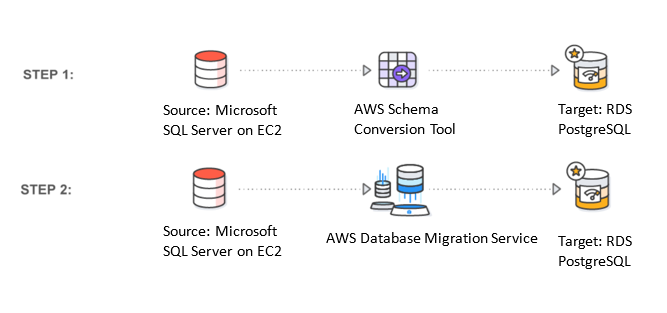
- Convert schema
- Use DMS Schema Conversion (DMS SC) or AWS SCT to convert the source objects, table, indexes, views, triggers, and other system objects into the target DDL format
- DMS doesn’t perform schema or code conversion
- Replication
- Enable Multi-AZ for ongoing replication (for high availability and failover support)
- DMS can read/write from/to encrypted DBs
- Data Validation
- Enable data validation to compare source and target data after migration
- Use Data Resync to automatically fix any identified inconsistencies
DMS Fleet Advisor
⚠️ DMS Fleet Advisor – End of Support (May 20, 2026)
AWS DMS Fleet Advisor will reach End of Support on May 20, 2026.
No new customers accepted since May 20, 2025. Existing customers can continue using Fleet Advisor until May 20, 2026.
Migration Recommendation: Migrate database assessment projects to AWS Migration Evaluator before May 20, 2026.
- AWS DMS Fleet Advisor is a free, fully managed capability of AWS DMS that automates migration planning and helps you migrate database and analytics fleets to the cloud at scale with minimal effort.
- DMS Fleet Advisor is intended for users looking to migrate a large number of database and analytics servers to AWS.
- AWS DMS Fleet Advisor helps discover and analyze the OLTP and OLAP database workloads and allows building a customized migration plan by determining the complexity of migrating the source databases to target services in AWS.
DMS Security
- DMS implements a comprehensive security framework using:
- IAM policies – Define specific permissions for users, groups, and roles for controlled access
- SSL/TLS encryption – Secures endpoint connections and data in transit
- AWS KMS – Encryption of data at rest with customer managed keys
- AWS Secrets Manager – Centralized storage and management of credentials
- VPC isolation – Replication instances created within a VPC for secure resource isolation
- Data masking – Conceal sensitive data by modifying column contents before loading into target
- Monitoring and visibility through Amazon SNS, CloudWatch, CloudTrail, and database logs.
AWS Certification Exam Practice Questions
- Questions are collected from Internet and the answers are marked as per my knowledge and understanding (which might differ with yours).
- AWS services are updated everyday and both the answers and questions might be outdated soon, so research accordingly.
- AWS exam questions are not updated to keep up the pace with AWS updates, so even if the underlying feature has changed the question might not be updated
- Open to further feedback, discussion and correction.
- Which AWS service would simplify the migration of a database to AWS?
- AWS Storage Gateway
- AWS Database Migration Service (AWS DMS)
- Amazon Elastic Compute Cloud (Amazon EC2)
- Amazon AppStream 2.0
- A company wants to migrate an on-premises Oracle database to Amazon Aurora PostgreSQL with minimal downtime. Which combination of services should be used? (Select TWO)
- AWS DMS for data migration
- AWS DataSync
- AWS DMS Schema Conversion for schema conversion
- AWS Transfer Family
- Amazon Kinesis Data Streams
- A company needs to migrate a self-managed MySQL database on EC2 to Amazon Aurora MySQL with the least operational overhead. Which DMS feature should they use?
- DMS Replication Instance with Full Load + CDC
- DMS Homogeneous Data Migrations
- AWS Schema Conversion Tool
- DMS Fleet Advisor
- A solutions architect needs to set up a database migration that automatically scales resources based on workload demand without manual capacity planning. Which option should be used?
- DMS Multi-AZ replication instance
- DMS Serverless
- DMS Fleet Advisor
- DMS Replication Instance with t3.large
- After completing a DMS full load migration, a company discovers data inconsistencies between the source and target databases. Which DMS feature can automatically resolve these discrepancies?
- DMS Data Validation only
- DMS CDC task
- DMS Data Resync
- DMS Full Load restart