Table of Contents
hide
AWS RDS Aurora
- AWS RDS Aurora is a relational database engine that combines the speed and reliability of high-end commercial databases with the simplicity and cost-effectiveness of open-source databases.
- is a fully managed, MySQL- and PostgreSQL-compatible, relational database engine i.e. applications developed with MySQL can switch to Aurora with little or no changes.
- delivers up to 6x the throughput of PostgreSQL and MySQL without requiring any changes to most applications
- is fully managed as RDS manages the databases, handling time-consuming tasks such as provisioning, patching, backup, recovery, failure detection, and repair.
- can scale storage automatically, based on the database usage, from 10GB to 128TiB (up to 256 TiB for Aurora MySQL and Aurora PostgreSQL as of July 2025) in 10GB increments with no impact on database performance
- supports Aurora MySQL version 3 (MySQL 8.0 compatible), Aurora MySQL version 4 (MySQL 8.4 compatible, GA May 2026), and Aurora PostgreSQL (up to PostgreSQL 18 as of June 2026)
- Aurora MySQL version 1 (MySQL 5.6 compatible) reached End of Life on Feb 28, 2023, and version 2 (MySQL 5.7 compatible) reached end of standard support on Oct 31, 2024 (Extended Support available)
Aurora DB Clusters
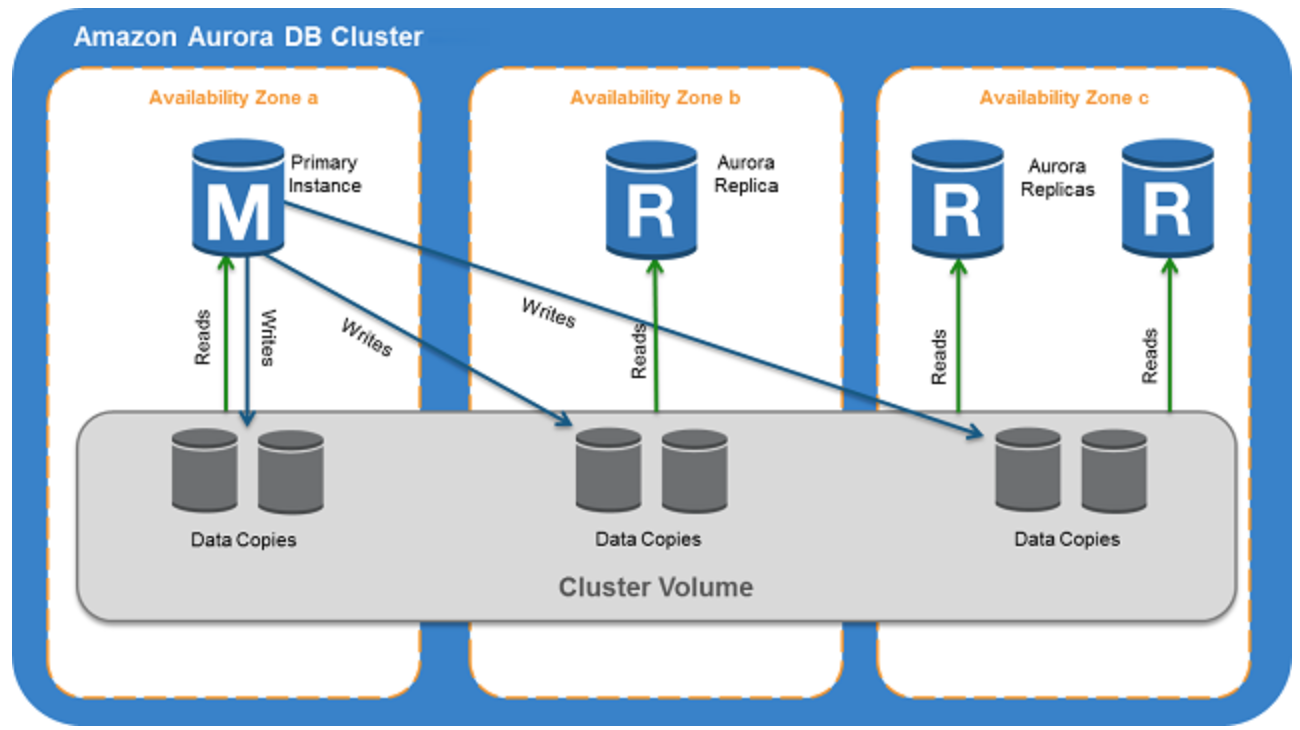
- Aurora DB cluster consists of one or more DB instances and a cluster volume that manages the data for those DB instances.
- A cluster volume is a virtual database storage volume that spans multiple AZs, with each AZ having a copy of the DB cluster data
- Two types of DB instances make up an Aurora DB cluster:
- Primary DB instance
- Supports read and write operations, and performs all data modifications to the cluster volume.
- Each DB cluster has one primary DB instance.
- Aurora Replica
- Connects to the same storage volume as the primary DB instance and supports only read operations.
- Each DB cluster can have up to 15 Aurora Replicas in addition to the primary DB instance.
- Provides high availability by locating Replicas in separate AZs
- Aurora automatically fails over to a Replica in case the primary DB instance becomes unavailable.
- Failover priority for Replicas can be specified.
- Replicas can also offload read workloads from the primary DB instance
- Primary DB instance
- Aurora Multi-Master is no longer available. It was only supported on Aurora MySQL 5.6, which reached End of Life. For multi-writer use cases, consider Aurora Global Database with write forwarding or Amazon Aurora DSQL.
Aurora Connection Endpoints
- Aurora involves a cluster of DB instances instead of a single instance
- Endpoint refers to an intermediate handler with the hostname and port specified to connect to the cluster
- Aurora uses the endpoint mechanism to abstract these connections
Cluster endpoint
- Cluster endpoint (or writer endpoint) for a DB cluster connects to the current primary DB instance for that DB cluster.
- Cluster endpoint is the only one that can perform write operations such as DDL statements as well as read operations
- Each DB cluster has one cluster endpoint and one primary DB instance
- Cluster endpoint provides failover support for read/write connections to the DB cluster. If a DB cluster’s current primary DB instance fails, Aurora automatically fails over to a new primary DB instance.
- During a failover, the DB cluster continues to serve connection requests to the cluster endpoint from the new primary DB instance, with minimal interruption of service.
Reader endpoint
- Reader endpoint for a DB cluster provides load-balancing support for read-only connections to the DB cluster.
- Use the reader endpoint for read operations, such as queries.
- Reader endpoint reduces the overhead on the primary instance by processing the statements on the read-only Replicas.
- Each DB cluster has one reader endpoint.
- If the cluster contains one or more Replicas, the reader endpoint load balances each connection request among the Replicas.
Custom endpoint
- Custom endpoint for a DB cluster represents a set of DB instances that you choose.
- Aurora performs load balancing and chooses one of the instances in the group to handle the connection.
- An Aurora DB cluster has no custom endpoints until one is created and up to five custom endpoints can be created for each provisioned cluster.
- Custom endpoints are supported on both provisioned and Aurora Serverless v2 clusters.
Instance endpoint
- An instance endpoint connects to a specific DB instance within a cluster and provides direct control over connections to the DB cluster.
- Each DB instance in a DB cluster has its own unique instance endpoint. So there is one instance endpoint for the current primary DB instance of the DB cluster, and there is one instance endpoint for each of the Replicas in the DB cluster.
High Availability and Replication
- Aurora is designed to offer greater than 99.99% availability
- provides data durability and reliability
- by replicating the database volume six ways across three Availability Zones in a single region
- backing up the data continuously to S3.
- transparently recovers from physical storage failures; instance failover typically takes less than 30 seconds.
- automatically fails over to a new primary DB instance, if the primary DB instance fails, by either promoting an existing Replica to a new primary DB instance or creating a new primary DB instance
- automatically divides the database volume into 10GB segments spread across many disks. Each 10GB chunk of the database volume is replicated six ways, across three Availability Zones
- is designed to transparently handle
- the loss of up to two copies of data without affecting database write availability and
- up to three copies without affecting read availability.
- provides self-healing storage. Data blocks and disks are continuously scanned for errors and repaired automatically.
- Replicas share the same underlying volume as the primary instance. Updates made by the primary are visible to all Replicas.
- As Replicas share the same data volume as the primary instance, there is virtually no replication lag.
- Any Replica can be promoted to become primary without any data loss and therefore can be used for enhancing fault tolerance in the event of a primary DB Instance failure.
- To increase database availability, 1 to 15 replicas can be created in any of 3 AZs, and RDS will automatically include them in failover primary selection in the event of a database outage.
Aurora Failovers
- Aurora automatically fails over, if the primary instance in a DB cluster fails, in the following order:
- If Aurora Read Replicas are available, promote an existing Read Replica to the new primary instance.
- If no Read Replicas are available, then create a new primary instance.
- If there are multiple Aurora Read Replicas, the criteria for promotion is based on the priority that is defined for the Read Replicas.
- Priority numbers can vary from 0 to 15 and can be modified at any time.
- Aurora promotes the Replica with the highest priority (lowest tier number) to the new primary instance.
- For Read Replicas with the same priority, Aurora promotes the replica that is largest in size or in an arbitrary manner.
- During the failover, AWS modifies the cluster endpoint to point to the newly created/promoted DB instance.
- Applications experience a minimal interruption of service if they connect using the cluster endpoint and implement connection retry logic.
Security
- Aurora uses SSL/TLS (AES-256) to secure the connection between the database instance and the application
- allows database encryption using keys managed through AWS Key Management Service (KMS).
- Starting February 2026, all new Aurora clusters are encrypted at rest by default using AWS-owned keys, with no cost or performance impact.
- Encryption and decryption are handled seamlessly.
- With encryption, data stored at rest in the underlying storage is encrypted, as are its automated backups, snapshots, and replicas in the same cluster.
- Encryption of existing unencrypted Aurora instances is not supported. Create a new encrypted Aurora instance and migrate the data
- Aurora supports IAM database authentication, allowing token-based authentication without passwords.
Backup and Restore
- Automated backups are always enabled on Aurora DB Instances.
- Backups do not impact database performance.
- Aurora also allows the creation of manual snapshots.
- Aurora automatically maintains 6 copies of the data across 3 AZs and will automatically attempt to recover the database in a healthy AZ with no data loss.
- If in any case, the data is unavailable within Aurora storage,
- DB Snapshot can be restored or
- the point-in-time restore operation can be performed to a new instance. The latest restorable time for a point-in-time restore operation can be up to 5 minutes in the past.
- Restoring a snapshot creates a new Aurora DB instance
- Deleting the database deletes all the automated backups (with an option to create a final snapshot), but would not remove the manual snapshots.
- Snapshots (including encrypted ones) can be shared with other AWS accounts
Aurora Parallel Query
- Aurora Parallel Query refers to the ability to push down and distribute the computational load of a single query across thousands of CPUs in Aurora’s storage layer.
- Without Parallel Query, a query issued against an Aurora database would be executed wholly within one instance of the database cluster; this would be similar to how most databases operate.
- Parallel Query is a good fit for analytical workloads requiring fresh data and good query performance, even on large tables.
- Parallel Query provides the following benefits
- Faster performance: Parallel Query can speed up analytical queries by up to 2 orders of magnitude.
- Operational simplicity and data freshness: you can issue a query directly over the current transactional data in your Aurora cluster.
- Transactional and analytical workloads on the same database: Parallel Query allows Aurora to maintain high transaction throughput alongside concurrent analytical queries.
- Parallel Query can be enabled and disabled dynamically at both the global and session level using the aurora_parallel_query parameter.
- Parallel Query is available for all current Aurora MySQL versions (MySQL 8.0 and 8.4 compatible).
Aurora Scaling
- Aurora storage scaling is built-in and will automatically grow, up to 128 TiB (up to 256 TiB for Aurora MySQL and PostgreSQL as of July 2025), in 10GB increments with no impact on database performance.
- There is no need to provision storage in advance
- Compute Scaling
- Instance scaling
- Vertical scaling of the master instance. Memory and CPU resources are modified by changing the DB Instance class.
- scaling the read replica and promoting it to master using forced failover which provides a minimal downtime
- Read scaling
- provides horizontal scaling with up to 15 read replicas
- Instance scaling
- Auto Scaling
- Scaling policies to add read replicas with min and max replica count based on scaling CloudWatch CPU or connections metrics condition
- Aurora Serverless v2
- Provides automatic scaling from 0 to 256 ACUs (512 GiB memory)
- Supports scale-to-zero for cost optimization during periods of inactivity (Nov 2024)
Aurora Backtrack
- Backtracking “rewinds” the DB cluster to the specified time
- Backtracking performs in-place restore and does not create a new instance. There is minimal downtime associated with it.
- Backtracking is available for Aurora with MySQL compatibility
- Backtracking is not a replacement for backing up the DB cluster so that you can restore it to a point in time.
- With backtracking, there is a target backtrack window and an actual backtrack window:
- Target backtrack window is the amount of time you WANT the DB cluster can be backtracked for e.g 24 hours. The limit for a backtrack window is 72 hours.
- Actual backtrack window is the actual amount of time you CAN backtrack the DB cluster, which can be smaller than the target backtrack window. The actual backtrack window is based on the workload and the storage available for storing information about database changes, called change records
- DB cluster with backtracking enabled generates change records.
- Aurora retains change records for the target backtrack window and charges an hourly rate for storing them.
- Both the target backtrack window and the workload on the DB cluster determine the number of change records stored.
- Workload is the number of changes made to the DB cluster in a given amount of time. If the workload is heavy, you store more change records in the backtrack window than you do if your workload is light.
- Backtracking affects the entire DB cluster and can’t selectively backtrack a single table or a single data update.
- Backtracking provides the following advantages over traditional backup and restore:
- Undo mistakes – revert destructive action, such as a DELETE without a WHERE clause
- Backtrack DB cluster quickly – Restoring a DB cluster to a point in time launches a new DB cluster and restores it from backup data or a DB cluster snapshot, which can take hours. Backtracking a DB cluster doesn’t require a new DB cluster and rewinds the DB cluster in minutes.
- Explore earlier data changes – repeatedly backtrack a DB cluster back and forth in time to help determine when a particular data change occurred
Aurora Serverless
⚠️ Aurora Serverless v1 reached End of Life on March 31, 2025. All v1 clusters have been automatically migrated to Aurora Serverless v2. The information below applies to Aurora Serverless v2.
- Amazon Aurora Serverless v2 is an on-demand, autoscaling configuration for the MySQL-compatible and PostgreSQL-compatible editions of Aurora.
- An Aurora Serverless v2 DB cluster automatically scales capacity up or down based on the application’s needs, measured in Aurora Capacity Units (ACUs).
- enables running database in the cloud without managing any database instances.
- provides a cost-effective option for variable, intermittent, or unpredictable workloads.
- Key features of Aurora Serverless v2:
- Scale to zero – supports scaling down to 0 ACUs, automatically pausing after a period of inactivity and resuming when a connection is requested (Nov 2024)
- Maximum capacity – scales up to 256 ACUs (512 GiB memory)
- Fine-grained scaling – adjusts capacity in 0.5 ACU increments
- Instant scaling – scales instantly to hundreds of thousands of transactions in a fraction of a second
- Mixed configurations – can be used alongside provisioned instances in the same cluster
- 30% better performance – latest platform version (v3, 2026) offers up to 30% performance improvement with enhanced workload-aware scaling
- use cases include
- Infrequently-Used Applications
- New Applications – where the needs and instance size are yet to be determined.
- Variable and Unpredictable Workloads – scale as per the needs
- Development and Test Databases
- Multi-tenant Applications
- AI/ML and Agentic Workloads
- Supports custom endpoints (unlike Serverless v1)
- Supports Aurora Global Database
- DB cluster can be accessed from within a VPC. Public access can be configured.
Aurora Global Database
- Aurora Global Database consists of one primary AWS Region where the data is mastered, and up to ten read-only, secondary AWS Regions (increased from five in May 2025).
- Aurora cluster in the primary AWS Region where your data is mastered performs both read and write operations. The clusters in the secondary Regions enable low-latency reads.
- Aurora replicates data to the secondary AWS Regions with a typical latency of under a second.
- Secondary clusters can be scaled independently by adding one or more DB instances (Aurora Replicas) to serve read-only workloads.
- Aurora Global Database uses dedicated infrastructure to replicate the data, leaving database resources available entirely to serve applications.
- Applications with a worldwide footprint can use reader instances in the secondary AWS Regions for low-latency reads.
- In case of a disaster or an outage, one of the clusters in a secondary AWS Region can be promoted to take full read/write workloads in under a minute.
- Write Forwarding – secondary region clusters can accept writes that are transparently forwarded to the primary region, simplifying global application architecture. Supported for both Aurora MySQL and Aurora PostgreSQL (version 16+).
- Global Database Writer Endpoint (Oct 2024) – a fully managed endpoint that automatically routes writes to the current primary region, eliminating application code changes after switchover or failover.
- Managed Switchover and Failover – supports planned cross-region switchover (typically under 30 seconds as of May 2025) and unplanned failover for disaster recovery.
Aurora I/O-Optimized
- Aurora I/O-Optimized is a cluster configuration that provides improved price performance for I/O-intensive workloads (launched May 2023).
- Provides up to 40% cost savings when I/O spend exceeds 25% of current Aurora database spend.
- Eliminates charges for read and write I/O operations – you pay only for instance and storage usage.
- Supported on both Aurora Serverless v2 and provisioned instances.
- Can switch existing clusters to I/O-Optimized once every 30 days; can switch back to Aurora Standard at any time.
- Available for both Aurora MySQL and Aurora PostgreSQL.
Aurora Optimized Reads
- Aurora Optimized Reads uses local NVMe-based SSD storage available on specific instance types (r6gd, r6id, r8gd, m8gd) to improve query performance.
- Provides two features:
- Tiered Cache – extends DB instance caching capacity by up to 5x the instance memory by caching pages evicted from the buffer pool on local NVMe storage, providing up to 8x better latency for data previously fetched from Aurora storage.
- Temporary Objects – stores temporary tables and sort data on local NVMe, reducing I/O to network-based storage.
- Especially beneficial for workloads with datasets exceeding instance memory, including vector search (pgvector) workloads.
- Available for Aurora PostgreSQL and Aurora MySQL.
Aurora Zero-ETL Integrations
- Aurora zero-ETL integration replicates data from an Aurora DB cluster to supported analytics destinations in near real time, eliminating the need for custom ETL pipelines.
- Supported targets include:
- Amazon Redshift – for analytics and BI workloads (GA for both Aurora MySQL and Aurora PostgreSQL, 2024)
- Amazon SageMaker Lakehouse – for ML and data lake workloads
- Within seconds of transactional data being written to Aurora, it is seamlessly available in the target data warehouse.
- Fully managed – no infrastructure to manage, no pipelines to build or maintain.
- Enables running analytics and ML on transactional data without impacting the production database.
Aurora PostgreSQL Limitless Database
- Aurora PostgreSQL Limitless Database provides automated horizontal scaling beyond the limits of a single Aurora instance (GA October 2024).
- Scales to handle millions of write transactions per second and petabytes of data within a single database.
- Automatically distributes workload across multiple Aurora writer instances using sharding, while maintaining the simplicity of a single database interface.
- Uses a router-shard architecture:
- Transaction routers – accept connections, route queries to appropriate shards
- Data access shards – store subsets of sharded tables, full copies of reference tables, and standard tables
- Maintains distributed ACID transactions across shards.
- No application changes required beyond specifying which tables to shard.
- Serverless – automatically scales based on workload demand.
Amazon Aurora DSQL
- Amazon Aurora DSQL is a serverless distributed SQL database designed for always-available applications (GA May 2025).
- PostgreSQL-compatible with an active-active distributed architecture.
- Designed for 99.99% availability in single-Region and 99.999% availability in multi-Region configurations.
- Key features:
- Offers the fastest distributed SQL reads and writes
- Zero infrastructure management and zero downtime maintenance
- Supports strong consistency for all reads and writes to any Regional endpoint
- Scales to meet any workload demand without database sharding or instance upgrades
- Supports up to 256 TiB of storage
- Ideal for globally distributed applications requiring strong consistency, such as financial transactions, gaming, and multi-region SaaS.
- Differs from Aurora Global Database: DSQL provides active-active multi-region writes with strong consistency, while Global Database uses asynchronous replication with a single primary writer region.
Aurora Clone
- Aurora cloning feature helps create Aurora cluster duplicates quickly and cost-effectively
- Creating a clone is faster and more space-efficient than physically copying the data using a different technique such as restoring a snapshot.
- Aurora cloning uses a copy-on-write protocol.
- Aurora clone requires only minimal additional space when first created. In the beginning, Aurora maintains a single copy of the data, which is used by both the original and new DB clusters.
- Aurora allocates new storage only when data changes, either on the source cluster or the cloned cluster.
RDS Extended Support
- Amazon RDS Extended Support allows running Aurora MySQL version 2 (MySQL 5.7 compatible) and Aurora PostgreSQL older versions beyond their standard support end dates.
- Provides critical security patches after community end of life.
- Charged at an additional hourly rate per vCPU.
- Databases are automatically enrolled into Extended Support after their standard support end date.
- Intended as a bridge during migration to newer major versions (Aurora MySQL 8.0/8.4, Aurora PostgreSQL 16/17/18).
AWS Certification Exam Practice Questions
- Questions are collected from Internet and the answers are marked as per my knowledge and understanding (which might differ with yours).
- AWS services are updated everyday and both the answers and questions might be outdated soon, so research accordingly.
- AWS exam questions are not updated to keep up the pace with AWS updates, so even if the underlying feature has changed the question might not be updated
- Open to further feedback, discussion and correction.
- Company wants to use MySQL compatible relational database with greater performance. Which AWS service can be used?
- Aurora
- RDS
- SimpleDB
- DynamoDB
- An application requires a highly available relational database with an initial storage capacity of 8 TB. The database will grow by 8 GB every day. To support expected traffic, at least eight read replicas will be required to handle database reads. Which option will meet these requirements?
- DynamoDB
- Amazon S3
- Amazon Aurora
- Amazon Redshift
- A company is migrating their on-premise 10TB MySQL database to AWS. As a compliance requirement, the company wants to have the data replicated across three availability zones. Which Amazon RDS engine meets the above business requirement?
- Use Multi-AZ RDS
- Use RDS
- Use Aurora
- Use DynamoDB
- A company has an application that requires a globally distributed database with multi-region read access and sub-second replication latency. The application must continue operating if an entire AWS Region becomes unavailable. Which solution meets these requirements?
- Deploy Aurora with Multi-AZ enabled
- Deploy RDS MySQL with cross-region read replicas
- Deploy Aurora Global Database with secondary clusters in multiple regions
- Deploy DynamoDB global tables
- A startup is building a new application and needs a cost-effective database solution that can automatically scale compute capacity based on demand, including scaling to zero during periods of inactivity. The application uses PostgreSQL. Which is the MOST cost-effective solution?
- Aurora provisioned with a db.t3.small instance
- Aurora Serverless v2 with minimum capacity set to 0 ACUs
- RDS PostgreSQL with a Reserved Instance
- Aurora provisioned with Auto Scaling read replicas
- A company runs an I/O-intensive OLTP workload on Aurora PostgreSQL. The database I/O costs account for 40% of the total Aurora spend. Which Aurora configuration would provide the best cost optimization? [Select TWO]
- Switch to Aurora I/O-Optimized cluster configuration
- Enable Aurora Parallel Query
- Use Aurora Optimized Reads with r6gd instances for read-heavy replicas
- Migrate to Aurora Serverless v1
- Use Aurora Standard with provisioned IOPS
- A company needs to run near real-time analytics on their Aurora MySQL transactional data in Amazon Redshift without building custom ETL pipelines. Which feature should they use?
- Aurora Parallel Query
- AWS Glue ETL jobs
- Aurora zero-ETL integration with Amazon Redshift
- Amazon Kinesis Data Firehose
- A company needs a PostgreSQL-compatible database that can automatically scale write throughput horizontally to handle millions of transactions per second without manual sharding. Which solution should they use?
- Aurora Global Database with write forwarding
- Aurora provisioned with multiple read replicas
- Aurora PostgreSQL Limitless Database
- Amazon RDS PostgreSQL Multi-AZ
📖 Related: AWS RDS Backup, Snapshots & Restore – Complete Guide
Very Informative. Nice!
Hello Jayendra,
Appreciate if you could you add notes on Aurora ReplicaLag
sure, will check.
Keep up the good work!!!
thanks Hitesh for the feedback