Aurora Serverless
⚠️ AURORA SERVERLESS v1 – END OF LIFE
Amazon Aurora Serverless v1 reached End of Life (EOL) on March 31, 2025.
Aurora Serverless v1 is no longer supported. All remaining v1 clusters were automatically upgraded to Aurora Serverless v2 (now renamed “Aurora serverless”) during scheduled maintenance windows.
Key Changes:
- Aurora Serverless v2 was renamed to Aurora serverless in April 2026
- Aurora serverless now supports scaling to 0 ACUs (scale to zero), addressing the v1 feature gap
- Scaling is near-instant (sub-second) vs. v1’s cold-start delays
- Supports Multi-AZ, Global Database, Read Replicas, and Data API
For migration guidance, refer to: Aurora Serverless v1 to v2 Migration Guide
- Amazon Aurora Serverless is an on-demand, autoscaling configuration for the MySQL-compatible and PostgreSQL-compatible editions of Aurora.
- An Aurora Serverless DB cluster automatically starts up, shuts down, and scales capacity up or down based on the application’s needs.
- enables running database in the cloud without managing any database instances.
- provides a relatively simple, cost-effective option for infrequent, intermittent, or unpredictable workloads.
- Aurora serverless is especially well-suited for agentic AI applications, which have bursts of activity, long idle windows, and unpredictable patterns.
- use Cases include
- Infrequently-Used Applications
- New Applications – where the needs and instance size is yet to be determined.
- Variable and Unpredictable Workloads – scale as per the needs
- Development and Test Databases
- Multi-tenant Applications
- Agentic AI Applications – databases that scale with AI agent activity
- SaaS Applications – multi-tenant workloads with variable per-tenant demand
- can be accessed from within a VPC based on the VPC service, and also supports public accessibility.
Aurora Serverless Architecture
- Aurora Serverless separates Storage and Compute, so it can scale down to zero processing and you pay only for storage.
- A database endpoint is created without specifying the DB instance class size.
- Minimum and maximum capacity is set in terms of Aurora Capacity Units (ACUs). Each ACU is a combination of approximately 2 GiB of memory with corresponding CPU and networking.
- Database storage automatically scales from 10 GiB to 128 TiB, the same as storage in a standard Aurora DB cluster.
- ACU scaling range is from 0 ACU (pause) to 256 ACUs (512 GiB memory).
- Minimum ACU of 0 enables automatic pause and resume (scale to zero).
- Minimum ACU of 0.5 or greater disables automatic pause.
- Maximum ACU increased from 128 ACUs (256 GiB) to 256 ACUs (512 GiB) in October 2024.
- Aurora Serverless scales capacity in fine-grained increments of 0.5 ACU, near-instantly (sub-second), closely following the workload.
- Scaling is rapid because Aurora serverless is architected from the ground up for instant scalability, with no cold-start penalty.
- Aurora Serverless manages connections automatically and supports Amazon RDS Proxy for connection pooling.
- Per-second billing for ACUs consumed, with a minimum of 1 minute of usage.
Automatic Pause and Resume (Scale to Zero)
- Available when minimum capacity is set to 0 ACUs (launched November 2024).
- Aurora pauses an instance if it doesn’t have connections initiated by user activity within the specified time period.
- Configurable inactivity timeout between 300 seconds (5 minutes) and 86,400 seconds (24 hours).
- When paused, compute charges drop to zero; only storage is billed.
- Automatic resume takes less than 15 seconds when a new connection is requested.
- After resuming, the instance scales up based on workload demand (does not resume at previous ACU level).
- Reader instances with failover priority 0 and 1 follow the pause/resume behavior of the writer instance.
- An instance does NOT automatically pause if:
- User-initiated connections are open
- Logical replication (PostgreSQL) or binlog replication (MySQL) is enabled on the writer
- An associated RDS Proxy maintains open connections
- The cluster is the primary in an Aurora Global Database (writer instance)
- The cluster is the secondary in a Global Database (reader instances)
- Instances are part of a zero-ETL integration to Amazon Redshift
Aurora Serverless Key Features
- Multi-AZ Deployments – supports Multi-AZ for high availability with automatic failover.
- Aurora Read Replicas – supports up to 15 read replicas for read scalability.
- Aurora Global Database – supports cross-region replication with low-latency global reads.
- RDS Proxy – supports Amazon RDS Proxy for connection pooling and improved application resilience.
- Data API – supports the RDS Data API for HTTPS-based SQL access without managing persistent connections.
- IAM Database Authentication – supports IAM-based authentication for database access.
- Performance Insights – supports Amazon RDS Performance Insights for monitoring and troubleshooting.
- Logical Replication – supports logical replication for both MySQL and PostgreSQL.
- Mixed-Configuration Clusters – Aurora Serverless instances can coexist with provisioned instances in the same cluster.
- ARC Region Switch Scaling – AWS Application Recovery Controller (ARC) supports an Aurora Serverless Scaling execution block (June 2026) that automatically calculates and applies correct ACU capacity to a destination cluster during Region failover, based on the source cluster’s actual usage over the last 24 hours.
Aurora Serverless and Failover
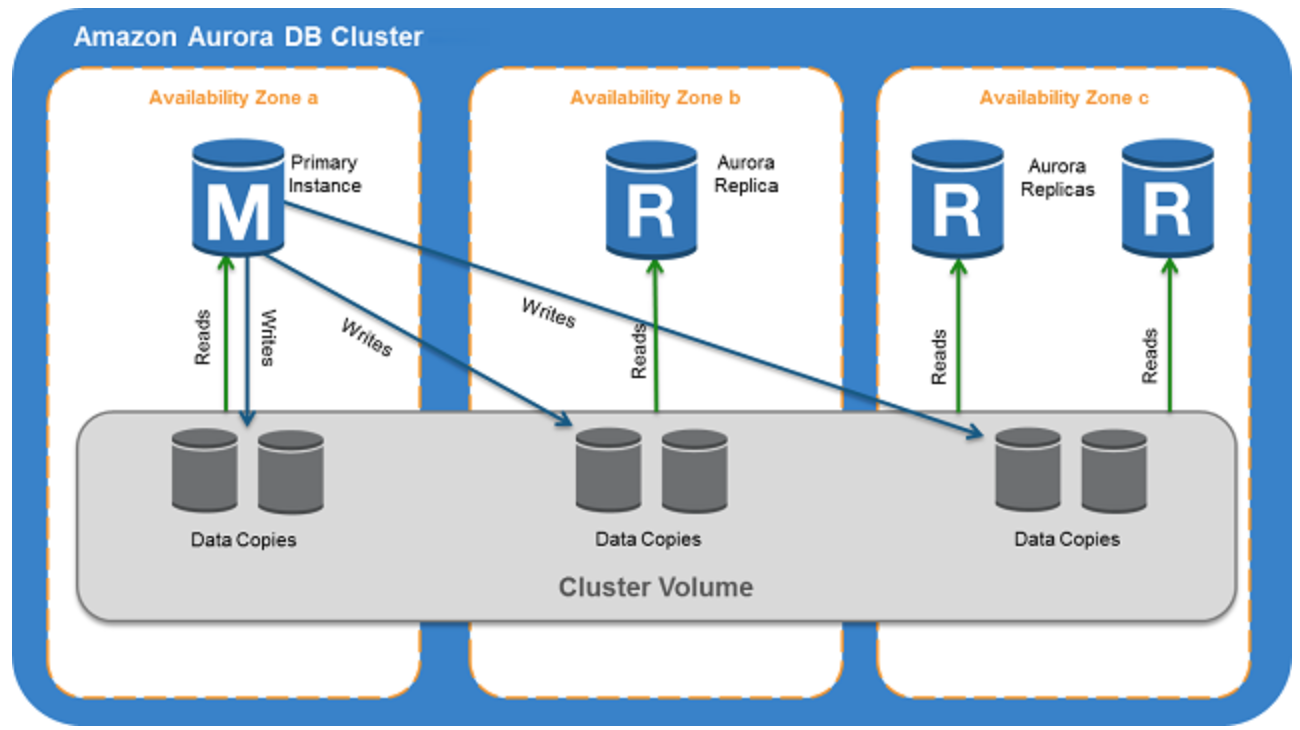
- Aurora Serverless supports Multi-AZ deployments with both writer and reader instances across Availability Zones.
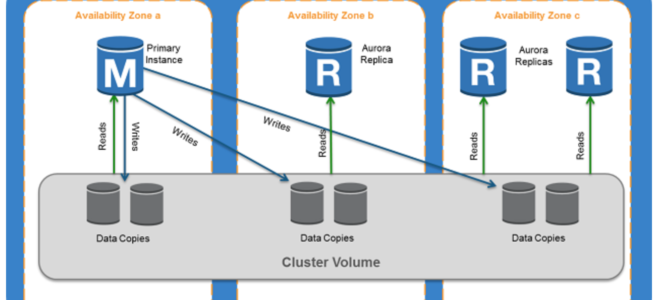
- Storage volume for the cluster is spread across three AZs. The data remains available even if outages affect the DB instance or the associated AZ.
- supports automatic multi-AZ failover where if the writer DB instance becomes unavailable, Aurora automatically fails over to a reader instance.
- Failover time is significantly improved compared to Aurora Serverless v1 due to the always-warm architecture.
- Reader instances with failover priority 0 or 1 follow the capacity of the writer, ensuring they are ready for failover.
- Provisioned instances can be used for failover priority 0 or 1 to ensure the instance is never paused and always available for failover.
Aurora Serverless Auto Scaling
- Aurora Serverless automatically scales based on CPU, memory, and connection utilization in fine-grained 0.5 ACU increments.
- Scaling happens in under a second (sub-second), far faster than v1’s scaling which required finding a scaling point.
- Does not require finding a “scaling point” like v1 – scales without disrupting active connections or transactions.
- No cooldown period for scaling – scales up and down continuously based on demand.
Platform Versions and Performance
- Aurora serverless uses platform versions to indicate performance and scaling baselines.
- Platform Version 4 (April 2026) – delivers up to 30% better performance compared to platform version 3, with enhanced scaling algorithms.
- Platform Version 3 (August 2025) – introduced initial performance improvements.
- Platform version 4 scales up to 45% faster (0.5 ACU to 256 ACU in 22 minutes vs 40 minutes previously).
- Enhanced scaling algorithm takes additional metrics as signals, intelligently responding to resource competition among concurrent tasks.
- All new clusters launch on the latest platform version. Existing clusters can upgrade via pending maintenance, stop/start, or blue/green deployments.
Aurora Serverless v1 vs Aurora Serverless (formerly v2)
| Feature | v1 (Deprecated) | Aurora Serverless (Current) |
|---|---|---|
| Scaling Speed | Seconds to minutes (needs scaling point) | Sub-second, instant |
| ACU Granularity | Doubles (1, 2, 4, 8…) | 0.5 ACU increments |
| Max ACUs | 256 ACUs | 256 ACUs (512 GiB) |
| Scale to Zero | Yes (5 min default) | Yes (configurable 5 min – 24 hours) |
| Resume Time | 25-30+ seconds | Less than 15 seconds |
| Multi-AZ | No (single AZ compute) | Yes |
| Read Replicas | No | Up to 15 |
| Global Database | No | Yes |
| Data API | Yes | Yes |
| Mixed with Provisioned | No | Yes |
| RDS Proxy | No | Yes |
Amazon Aurora DSQL
- Amazon Aurora DSQL is a serverless distributed SQL database launched in May 2025 (GA) for applications requiring multi-region strong consistency.
- Offers the fastest distributed SQL reads and writes with active-active high availability.
- PostgreSQL-compatible with a subset of PostgreSQL features.
- Designed for 99.99% availability in a single Region and 99.999% availability across multiple Regions.
- True active-active: all Regional endpoints handle both reads and writes with strong consistency.
- Fully serverless with zero infrastructure management and zero downtime maintenance.
- Ideal for global-scale financial transactions, gaming, and applications requiring the highest availability.
- Unlike Aurora Serverless (which is a configuration of Aurora), Aurora DSQL is a separate distributed database engine.
- Change Data Capture (CDC) – Aurora DSQL supports streaming database changes in near real-time to Amazon Kinesis Data Streams (public preview, June 2026).
- Region Availability – Available in 13 Regions as of May 2026: US East (N. Virginia, Ohio), US West (Oregon), Asia Pacific (Hong Kong, Mumbai, Osaka, Singapore, Tokyo), Europe (Ireland, London, Paris, Stockholm), and South America (São Paulo).
- Aurora DSQL Playground – Interactive browser-based environment (Feb 2026) for experimenting with Aurora DSQL without an AWS account.
- Language Connectors – Native connectors available for .NET (Npgsql), Rust (SQLx), PHP (PDO_PGSQL), Java, Python, and Node.js with automatic IAM authentication.
- Learn More: Amazon Aurora DSQL
AWS Certification Exam Practice Questions
- Questions are collected from Internet and the answers are marked as per my knowledge and understanding (which might differ with yours).
- AWS services are updated everyday and both the answers and questions might be outdated soon, so research accordingly.
- AWS exam questions are not updated to keep up the pace with AWS updates, so even if the underlying feature has changed the question might not be updated
- Open to further feedback, discussion and correction.
- A company runs a development and testing environment with Aurora Serverless. The database is idle most of the day but has unpredictable bursts during testing cycles. What configuration minimizes costs while allowing instant availability?
- Set minimum ACU to 0.5 and maximum to 128 ACUs
- Set minimum ACU to 0 and maximum to 64 ACUs with a 5-minute inactivity timeout
- Use a provisioned Aurora cluster with Auto Scaling
- Set minimum ACU to 2 and maximum to 256 ACUs
Answer: b – Setting minimum to 0 ACU enables automatic pause (scale to zero) so costs are zero during idle periods. The 5-minute timeout is the minimum allowed.
- A company needs to run Aurora Serverless for a production application that requires high availability and cannot tolerate a 15-second resume delay. Which deployment pattern should they use?
- Single-AZ Aurora Serverless with minimum 0 ACU
- Multi-AZ Aurora Serverless with minimum 0.5 ACU
- Multi-AZ Aurora Serverless with minimum 0 ACU and a provisioned reader at failover priority 0
- Aurora Global Database with Aurora Serverless instances
Answer: b – Setting minimum to 0.5 ACU disables automatic pause, ensuring the database is always active. Multi-AZ provides high availability. Setting to 0 ACU with provisioned reader (c) is also valid but option b is simpler and addresses the requirement directly.
- Which of the following features are supported by Aurora Serverless (current version) but were NOT available in Aurora Serverless v1? (Select THREE)
- Aurora Read Replicas
- Data API
- Aurora Global Database
- Multi-AZ deployments
- Automatic pause and resume
- MySQL compatibility
Answer: a, c, d – Aurora Serverless v2/current supports Read Replicas, Global Database, and Multi-AZ which were not available in v1. Data API, pause/resume, and MySQL compatibility were available in v1.
- An Aurora Serverless cluster has minimum ACU set to 0 and the writer instance is paused. A connection is made to the reader endpoint. What happens?
- Only the reader instance resumes
- The writer instance and all reader instances resume
- The writer instance, the connected reader instance, and readers with failover tier 0 and 1 resume
- The connection fails because the cluster is paused
Answer: c – When connecting to a paused reader, the writer, the connected reader, and other readers with failover tier 0 and 1 are also resumed.
- A company wants to use Aurora Serverless for a variable workload that requires more than 256 GiB of memory during peak hours. What maximum ACU configuration should they set?
- 128 ACUs
- 192 ACUs
- 256 ACUs
- 512 ACUs
Answer: c – The maximum capacity for Aurora Serverless is 256 ACUs, which provides 512 GiB of memory. 128 ACUs only provides 256 GiB.
- Which statement about Aurora DSQL is correct?
- Aurora DSQL is a configuration option of Aurora Serverless
- Aurora DSQL supports active-active writes across multiple Regions with strong consistency
- Aurora DSQL is MySQL-compatible
- Aurora DSQL requires provisioned instances
Answer: b – Aurora DSQL is a separate distributed SQL database (not a configuration of Aurora) that supports active-active writes with strong consistency across Regions. It is PostgreSQL-compatible (not MySQL) and is fully serverless.
- A company uses Aurora Global Database with a Serverless cluster in the standby Region running at minimum ACUs to save costs. During a disaster recovery event, they need the standby cluster to automatically scale to handle production traffic. What AWS service can automate this?
- AWS Auto Scaling with custom CloudWatch alarms
- AWS Application Recovery Controller (ARC) Region switch with Aurora Serverless Scaling execution block
- AWS Lambda triggered by Route 53 health check failures
- Amazon EventBridge with RDS API targets
Answer: b – ARC Region switch includes an Aurora Serverless Scaling execution block (launched June 2026) that automatically calculates the correct ACU capacity based on the source cluster’s actual usage over the last 24 hours and applies it to the destination cluster during failover.
References
- Amazon Aurora Serverless
- Using Aurora Serverless – Documentation
- Scaling to 0 Capacity with Aurora Serverless
- Scaling up to 256 ACUs
- Aurora Serverless Performance Improvements (2026)
- Upgrading from v1 to v2
- ARC Aurora Serverless Scaling Execution Block
- Amazon Aurora DSQL
- Aurora DSQL Change Data Capture (CDC)