AWS Database Services Cheat Sheet – RDS, DynamoDB, Aurora

AWS Database Services Cheat Sheet

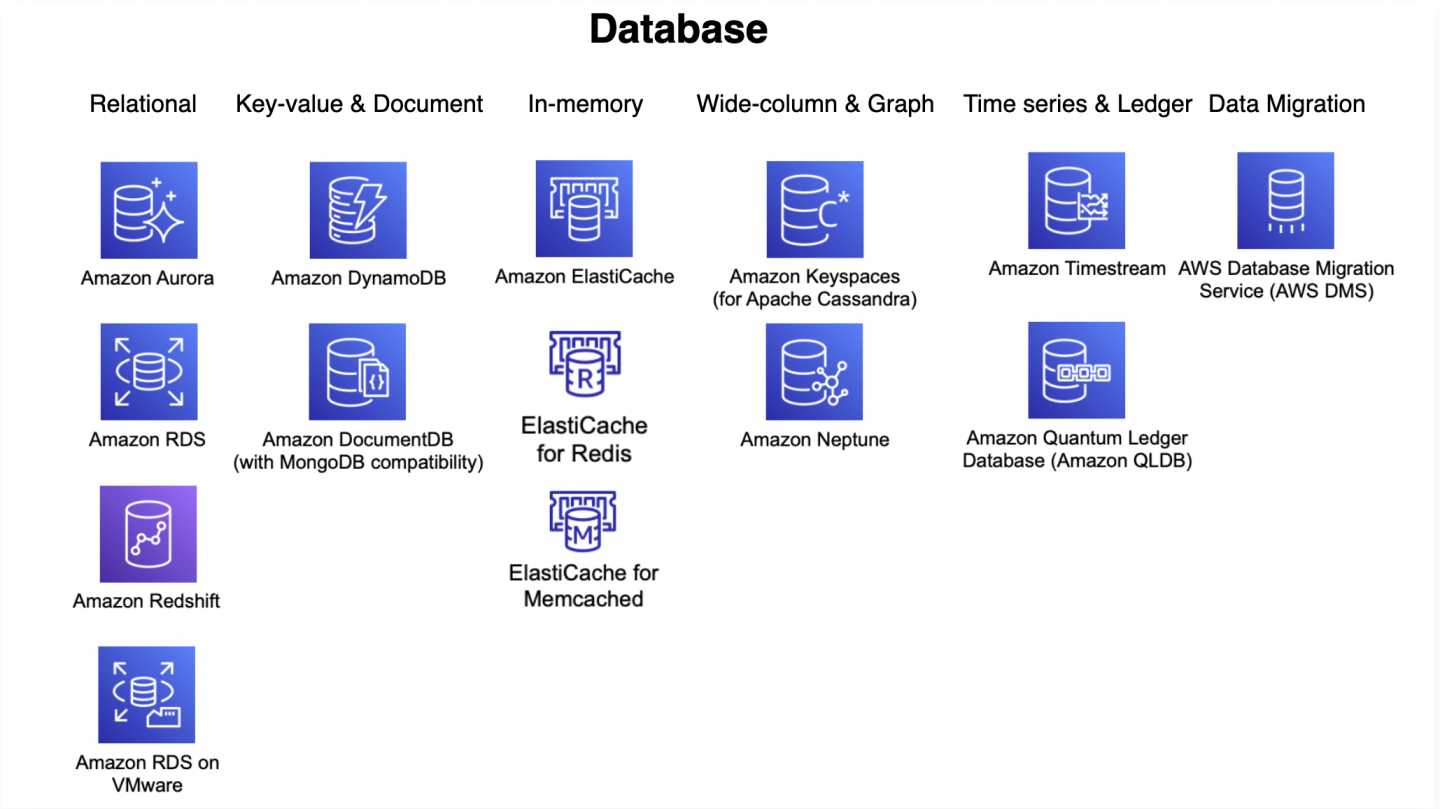
AWS Database Services

📋 Last Updated: June 2026

This cheat sheet has been updated to include Aurora DSQL, Aurora storage increase to 256 TiB, ElastiCache for Valkey, ElastiCache Serverless, Redshift Multi-AZ and Serverless, DynamoDB multi-Region strong consistency, zero-ETL integrations, RDS Multi-AZ DB Clusters with readable standbys, and RDS Extended Support.

Relational Database Service – RDS

  • provides Relational Database service
  • supports MySQL, MariaDB, PostgreSQL, Oracle, Microsoft SQL Server, Amazon Aurora, and IBM Db2 (added in 2023) DB engines
  • as it is a managed service, shell (root ssh) access is not provided
  • manages backups, software patching, automatic failure detection, and recovery
  • supports use initiated manual backups and snapshots
  • daily automated backups with database transaction logs enables Point in Time recovery up to the last five minutes of database usage
  • snapshots are user-initiated storage volume snapshot of DB instance, backing up the entire DB instance and not just individual databases that can be restored as a independent RDS instance
  • RDS Security
    • support encryption at rest using KMS as well as encryption in transit using SSL endpoints
    • supports IAM database authentication, which prevents the need to store static user credentials in the database, because authentication is managed externally using IAM.
    • supports Encryption only during creation of an RDS DB instance
    • existing unencrypted DB cannot be encrypted and you need to create a snapshot, create an encrypted copy of the snapshot and restore as encrypted DB
    • supports Secrets Manager for storing and rotating secrets
    • for encrypted database
      • logs, snapshots, backups, read replicas are all encrypted as well
      • cross region replicas and snapshots are supported for encrypted instances
  • Multi-AZ deployment
    • provides high availability and automatic failover support and is NOT a scaling solution
    • maintains a synchronous standby replica in a different AZ
    • transaction success is returned only if the commit is successful both on the primary and the standby DB
    • Oracle, PostgreSQL, MySQL, and MariaDB DB instances use Amazon technology, while SQL Server DB instances use SQL Server Always On Availability Groups
    • snapshots and backups are taken from standby & eliminate I/O freezes
    • during automatic failover, its seamless and RDS switches to the standby instance and updates the DNS record to point to standby
    • failover can be forced with the Reboot with failover option
  • Multi-AZ DB Cluster (Readable Standbys)
    • provides a primary DB instance and two readable standby DB instances in different AZs
    • standby instances can serve read traffic, providing additional read capacity
    • uses semi-synchronous replication with transaction log-based replication
    • provides faster failover (typically under 35 seconds) compared to Multi-AZ instance deployment
    • supports MySQL and PostgreSQL engines
    • offers lower write latency compared to Multi-AZ instance deployments
  • Read Replicas
    • uses the PostgreSQL, MySQL, and MariaDB DB engines’ built-in replication functionality to create a separate Read Only instance
    • updates are asynchronously copied to the Read Replica, and data might be stale
    • can help scale applications and reduce read only load
    • requires automatic backups enabled
    • replicates all databases in the source DB instance
    • for disaster recovery, can be promoted to a full fledged database
    • can be created in a different region for disaster recovery, migration and low latency across regions
    • can’t create encrypted read replicas from unencrypted DB or read replica
  • RDS does not support all the features of underlying databases, and if required the database instance can be launched on an EC2 instance
  • RDS Components
    • DB parameter groups contains engine configuration values that can be applied to one or more DB instances of the same instance type for e.g. SSL, max connections etc.
    • Default DB parameter group cannot be modified, create a custom one and attach to the DB
    • Supports static and dynamic parameters
      • changes to dynamic parameters are applied immediately (irrespective of apply immediately setting)
      • changes to static parameters are NOT applied immediately and require a manual reboot.
  • RDS Monitoring & Notification
    • integrates with CloudWatch and CloudTrail
    • CloudWatch provides metrics about CPU utilization from the hypervisor for a DB instance, and Enhanced Monitoring gathers its metrics from an agent on the instance
    • Performance Insights is a database performance tuning and monitoring feature that helps illustrate the database’s performance and help analyze any issues that affect it
    • supports RDS Event Notification which uses the SNS to provide notification when an RDS event like creation, deletion or snapshot creation etc occurs
  • RDS Blue/Green Deployments
    • creates a staging (green) environment that mirrors the production (blue) environment
    • enables safer database updates, major version upgrades, and schema changes with minimal downtime (under 5 seconds)
    • supports Aurora MySQL, Aurora PostgreSQL, RDS for MySQL, RDS for MariaDB, and RDS for PostgreSQL
    • now supports Aurora Global Database (2025)
  • RDS Extended Support
    • allows running databases on a major engine version up to 3 years past its RDS end of standard support date at an additional cost
    • provides critical security and bug fixes after the community ends support for a major version
    • databases are automatically enrolled if not upgraded before the end of standard support date
  • Zero-ETL Integrations
    • RDS for MySQL and Aurora support zero-ETL integration with Amazon Redshift
    • enables near real-time analytics on transactional data without building ETL pipelines
    • data is automatically replicated to Amazon Redshift within seconds of being written

⚠️ RDS Custom for Oracle – End of Support (March 31, 2027)

AWS will end support for Amazon RDS Custom for Oracle on March 31, 2027. After this date, you will no longer be able to access the RDS Custom for Oracle console or resources.

Migration Options: Migrate to Amazon RDS for Oracle (standard) or run Oracle on Amazon EC2 bare metal instances.

Aurora

  • is a relational database engine that combines the speed and reliability of high-end commercial databases with the simplicity and cost-effectiveness of open source databases
  • is a managed service and handles time-consuming tasks such as provisioning, patching, backup, recovery, failure detection and repair
  • is a proprietary technology from AWS (not open sourced)
  • provides PostgreSQL and MySQL compatibility
  • is “AWS cloud optimized” and claims 5x performance improvement over MySQL on RDS, over 3x the performance of PostgreSQL on RDS
  • scales storage automatically in increments of 10GB, up to 256 TiB (increased from 128 TiB in July 2025) with no impact to database performance. Storage is striped across 100s of volumes.
  • no need to provision storage in advance.
  • provides self-healing storage. Data blocks and disks are continuously scanned for errors and repaired automatically.
  • provides instantaneous failover
  • replicates each chunk of the database volume six ways across three Availability Zones i.e. 6 copies of the data across 3 AZ
    • requires 4 copies out of 6 needed for writes
    • requires 3 copies out of 6 need for reads
  • costs more than RDS (20% more) – but is more efficient
  • Read Replicas
    • can have 15 replicas while MySQL has 5, and the replication process is faster (sub 10 ms replica lag)
    • share the same data volume as the primary instance in the same AWS Region, there is virtually no replication lag
    • supports Automated failover for master in less than 30 seconds
    • supports Cross Region Replication using either physical or logical replication.
  • Security
    • supports Encryption at rest using KMS
    • supports Encryption in flight using SSL (same process as MySQL or Postgres)
    • Automated backups, snapshots and replicas are also encrypted
    • Possibility to authenticate using IAM token (same method as RDS)
    • supports protecting the instance with security groups
    • does not support SSH access to the underlying servers
  • Aurora I/O-Optimized
    • a cluster configuration that provides predictable pricing with no charges for I/O operations
    • ideal for I/O-intensive applications such as e-commerce, payment processing, and SaaS applications
    • can deliver up to 40% cost savings for I/O-intensive workloads
    • supports both Aurora Serverless and provisioned instances
    • can switch between I/O-Optimized and Standard configurations (once every 30 days to I/O-Optimized, back to Standard anytime)
  • Aurora Serverless
    • provides automated database instantiation and on-demand autoscaling based on actual usage
    • provides a relatively simple, cost-effective option for infrequent, intermittent, or unpredictable workloads
    • automatically starts up, shuts down, and scales capacity up or down based on the application’s needs. No capacity planning needed
    • Pay per second, can be more cost-effective
    • Aurora Serverless v1 reached end of life on March 31, 2025 – all clusters have been migrated to Aurora Serverless v2 (now simply called “Aurora Serverless”)
    • Aurora Serverless (v2) supports features like read replicas, Multi-AZ, Global Database, and logical replication that v1 did not
    • supports scale to zero capability and up to 30% better performance with smarter scaling (2026 enhancement)
  • Aurora Global Database
    • allows a single Aurora database to span multiple AWS regions.
    • provides Physical replication, which uses dedicated infrastructure that leaves the databases entirely available to serve the application
    • supports 1 Primary Region (read / write)
    • replicates across up to 5 secondary (read-only) regions, replication lag is less than 1 second
    • supports up to 16 Read Replicas per secondary region
    • recommended for low-latency global reads and disaster recovery with an RTO of < 1 minute
    • supports managed failover (Global Database Failover) which automates the cross-Region failover process, reducing operational overhead (introduced August 2023)
    • supports Blue/Green Deployments for Global Database (2025) for safer major version upgrades across all regions
    • supports a global writer endpoint for simplified application connectivity
  • Aurora Backtrack
    • Backtracking “rewinds” the DB cluster to the specified time
    • Backtracking performs in place restore and does not create a new instance. There is a minimal downtime associated with it.
  • Aurora Clone feature allows quick and cost-effective creation of Aurora Cluster duplicates
  • supports parallel or distributed query using Aurora Parallel Query, which refers to the ability to push down and distribute the computational load of a single query across thousands of CPUs in Aurora’s storage layer.
  • Aurora Optimized Reads
    • delivers up to 8x improved query latency for applications with datasets exceeding instance memory
    • uses local NVMe-based storage on Graviton-based instances to extend caching capacity
    • available for both PostgreSQL and MySQL compatible editions

Amazon Aurora DSQL (New – GA May 2025)

  • a serverless, distributed SQL database optimized for transaction processing
  • the fastest serverless distributed SQL database with active-active high availability
  • provides PostgreSQL compatibility (subset of features)
  • designed for 99.99% availability in single-Region and 99.999% availability in multi-Region configurations
  • delivers strong consistency for all reads and writes to any Regional endpoint
  • provides virtually unlimited scalability with zero infrastructure management and zero downtime maintenance
  • offers the fastest distributed SQL reads and writes with 4x faster reads and writes compared to other popular distributed SQL databases
  • employs an active-active deployment model where all database resources function as peers capable of handling both read and write traffic
  • supports up to 256 TiB of storage per database cluster
  • ideal for globally distributed applications requiring strong consistency, such as financial transactions, gaming, and SaaS applications

DynamoDB

  • fully managed NoSQL database service
  • synchronously replicates data across three facilities in an AWS Region, giving high availability and data durability
  • runs exclusively on SSDs to provide high I/O performance
  • provides provisioned table reads and writes
  • automatically partitions, reallocates, and re-partitions the data and provisions additional server capacity as data or throughput changes
  • creates and maintains indexes for the primary key attributes for efficient access to data in the table
  • DynamoDB Table classes currently support
    • DynamoDB Standard table class is the default and is recommended for the vast majority of workloads.
    • DynamoDB Standard-Infrequent Access (DynamoDB Standard-IA) table class which is optimized for tables where storage is the dominant cost.
  • supports Secondary Indexes
    • allows querying attributes other than the primary key attributes without impacting performance.
    • are automatically maintained as sparse objects
  • Local secondary index vs Global secondary index
    • shares partition key + different sort key vs different partition + sort key
    • search limited to partition vs across all partition
    • unique attributes vs non-unique attributes
    • linked to the base table vs independent separate index
    • only created during the base table creation vs can be created later
    • cannot be deleted after creation vs can be deleted
    • consumes provisioned throughput capacity of the base table vs independent throughput
    • returns all attributes for item vs only projected attributes
    • Eventually or Strongly vs Only Eventually consistent reads
    • size limited to 10Gb per partition vs unlimited
  • DynamoDB Consistency
    • provides Eventually consistent (by default) or Strongly Consistent option to be specified during a read operation
    • supports Strongly consistent reads for a few operations like Query, GetItem, and BatchGetItem using the ConsistentRead parameter
  • DynamoDB Throughput Capacity
    • supports On-demand and Provisioned read/write capacity modes
    • Provisioned mode requires the number of reads and writes per second as required by the application to be specified
    • On-demand mode provides flexible billing option capable of serving thousands of requests per second without capacity planning
    • On-demand pricing reduced by 50% in November 2024
    • supports switching from provisioned to on-demand up to 4 times in a rolling 24-hour period (2025 improvement)
  • DynamoDB Auto Scaling helps dynamically adjust provisioned throughput capacity on your behalf, in response to actual traffic patterns.
  • DynamoDB Adaptive capacity is a feature that enables DynamoDB to run imbalanced workloads indefinitely.
  • DynamoDB Global Tables
    • provide multi-active, cross-region replication capability of DynamoDB to support data access locality and regional fault tolerance for database workloads.
    • provide up to 99.999% availability
    • Multi-Region Strong Consistency (MRSC) – GA June 2025
      • enables applications to always read the latest version of data from any Region in a global table
      • provides zero RPO (Recovery Point Objective) for the highest application resilience
      • removes the need to manage consistency across multiple Regions manually
      • slightly higher write latencies compared to eventually consistent (MREC) mode
    • Global tables pricing reduced by up to 67% in November 2024
  • DynamoDB Streams provides a time-ordered sequence of item-level changes made to data in a table
  • DynamoDB Time to Live (TTL)
    • enables a per-item timestamp to determine when an item expiry
    • expired items are deleted from the table without consuming any write throughput.
  • DynamoDB Accelerator (DAX) is a fully managed, highly available, in-memory cache for DynamoDB that delivers up to a 10x performance improvement – from milliseconds to microseconds – even at millions of requests per second.
  • DynamoDB Triggers (just like database triggers) are a feature that allows the execution of custom actions based on item-level updates on a table.
  • VPC Gateway Endpoints provide private access to DynamoDB from within a VPC without the need for an internet gateway or NAT gateway.
  • DynamoDB Zero-ETL Integrations
    • Zero-ETL with Amazon Redshift (GA October 2024) – automatically replicates DynamoDB tables into Redshift for SQL analytics without building ETL pipelines
    • Zero-ETL with Amazon OpenSearch Service – provides seamless, code-free data replication for vector search and near real-time analytics
    • enables analytics on DynamoDB data without impacting production workload performance

ElastiCache

  • managed web service that provides in-memory caching to deploy and run Valkey, Redis OSS, or Memcached protocol-compliant cache clusters
  • ElastiCache for Valkey (Recommended – default since October 2024)
    • Valkey is an open-source fork of Redis OSS 7.2, maintained by the Linux Foundation with contributions from AWS, Google, Microsoft, and others
    • is a drop-in replacement for Redis OSS – supports the same data structures, commands, and protocols
    • all features available with Redis OSS 7.2 are available in Valkey 7.2 and above
    • AWS recommends Valkey for new deployments and offers migration paths from existing Redis OSS clusters
    • like Redis OSS, supports Multi-AZ, Read Replicas and Snapshots
    • supports cluster mode for horizontal scaling
  • ElastiCache with Redis OSS
    • available up to version 7.1 (the last BSD-licensed release); now a maintenance track with no active new feature development from AWS
    • Redis 8.0+ is licensed under AGPLv3, which is not supported by ElastiCache
    • Standard support for versions 4 and 5 ends January 31, 2026; clusters will be enrolled in Extended Support after that date
    • like RDS, supports Multi-AZ, Read Replicas and Snapshots
    • Read Replicas are created across AZ within same region using Redis’s asynchronous replication technology
    • Multi-AZ differs from RDS as there is no standby, but if the primary goes down a Read Replica is promoted as primary
    • allows snapshots for backup and restore
    • AOF can be enabled for recovery scenarios, to recover the data in case the node fails or service crashes. But it does not help in case the underlying hardware fails
    • Enabling Redis Multi-AZ as a Better Approach to Fault Tolerance
  • ElastiCache with Memcached
    • can be scaled up by increasing size and scaled out by adding nodes
    • nodes can span across multiple AZs within the same region
    • cached data is spread across the nodes, and a node failure will always result in some data loss from the cluster
    • supports auto discovery
    • every node should be homogenous and of same instance type
  • ElastiCache Valkey/Redis vs Memcached
    • complex data objects vs simple key value storage
    • persistent vs non persistent, pure caching
    • automatic failover with Multi-AZ vs Multi-AZ not supported
    • scaling using Read Replicas vs using multiple nodes
    • backup & restore supported vs not supported
  • ElastiCache Serverless (launched November 2023)
    • creates a cache in under a minute with zero capacity planning
    • instantly scales capacity based on application traffic patterns
    • provides zero infrastructure management and zero downtime maintenance
    • supports Valkey 7.2+, Redis OSS 7.0+, and Memcached 1.6+
    • pay-per-use pricing based on data stored and requests executed
    • automatically provisions resources across multiple AZs for high availability
  • can be used for state management to keep the web application stateless

Redshift

  • fully managed, fast and powerful, petabyte scale data warehouse service
  • uses replication and continuous backups to enhance availability and improve data durability and can automatically recover from node and component failures
  • provides Massive Parallel Processing (MPP) by distributing & parallelizing queries across multiple physical resources
  • columnar data storage improving query performance and allowing advance compression techniques
  • now supports Multi-AZ deployments for RA3 clusters (GA 2024), running the data warehouse in two AZs simultaneously with 99.99% SLA
  • spot instances are NOT an option
  • Redshift Serverless
    • enables running and scaling analytics without provisioning or managing clusters
    • automatically scales compute up or down based on workload demands
    • AI-driven scaling and optimization (default for new workgroups since April 2026) uses machine learning to predict compute needs and automatically adjust resources
    • offers minimum capacity as low as 4 RPUs for cost-effective development workloads
    • supports Serverless Reservations (2025) for discounted pricing and cost predictability
    • pay-as-you-go pricing based on compute used
  • Zero-ETL Integrations
    • supports zero-ETL from Aurora MySQL, Aurora PostgreSQL, RDS for MySQL, DynamoDB, and self-managed databases
    • automatically replicates data from source to Redshift without building ETL pipelines
    • enables near real-time analytics on transactional data
  • Enhanced Security Defaults (2025)
    • new clusters default to public accessibility disabled, encryption enabled, and secure connections enforced
AWS RDS Aurora Serverless

Aurora Serverless

⚠️ AURORA SERVERLESS v1 – END OF LIFE

Amazon Aurora Serverless v1 reached End of Life (EOL) on March 31, 2025.

Aurora Serverless v1 is no longer supported. All remaining v1 clusters were automatically upgraded to Aurora Serverless v2 (now renamed “Aurora serverless”) during scheduled maintenance windows.

Key Changes:

  • Aurora Serverless v2 was renamed to Aurora serverless in April 2026
  • Aurora serverless now supports scaling to 0 ACUs (scale to zero), addressing the v1 feature gap
  • Scaling is near-instant (sub-second) vs. v1’s cold-start delays
  • Supports Multi-AZ, Global Database, Read Replicas, and Data API

For migration guidance, refer to: Aurora Serverless v1 to v2 Migration Guide

  • Amazon Aurora Serverless is an on-demand, autoscaling configuration for the MySQL-compatible and PostgreSQL-compatible editions of Aurora.
  • An Aurora Serverless DB cluster automatically starts up, shuts down, and scales capacity up or down based on the application’s needs.
  • enables running database in the cloud without managing any database instances.
  • provides a relatively simple, cost-effective option for infrequent, intermittent, or unpredictable workloads.
  • Aurora serverless is especially well-suited for agentic AI applications, which have bursts of activity, long idle windows, and unpredictable patterns.
  • use Cases include
    • Infrequently-Used Applications
    • New Applications – where the needs and instance size is yet to be determined.
    • Variable and Unpredictable Workloads – scale as per the needs
    • Development and Test Databases
    • Multi-tenant Applications
    • Agentic AI Applications – databases that scale with AI agent activity
    • SaaS Applications – multi-tenant workloads with variable per-tenant demand
  • can be accessed from within a VPC based on the VPC service, and also supports public accessibility.

Aurora Serverless Architecture

  • Aurora Serverless separates Storage and Compute, so it can scale down to zero processing and you pay only for storage.
  • A database endpoint is created without specifying the DB instance class size.
  • Minimum and maximum capacity is set in terms of Aurora Capacity Units (ACUs). Each ACU is a combination of approximately 2 GiB of memory with corresponding CPU and networking.
  • Database storage automatically scales from 10 GiB to 128 TiB, the same as storage in a standard Aurora DB cluster.
  • ACU scaling range is from 0 ACU (pause) to 256 ACUs (512 GiB memory).
    • Minimum ACU of 0 enables automatic pause and resume (scale to zero).
    • Minimum ACU of 0.5 or greater disables automatic pause.
    • Maximum ACU increased from 128 ACUs (256 GiB) to 256 ACUs (512 GiB) in October 2024.
  • Aurora Serverless scales capacity in fine-grained increments of 0.5 ACU, near-instantly (sub-second), closely following the workload.
  • Scaling is rapid because Aurora serverless is architected from the ground up for instant scalability, with no cold-start penalty.
  • Aurora Serverless manages connections automatically and supports Amazon RDS Proxy for connection pooling.
  • Per-second billing for ACUs consumed, with a minimum of 1 minute of usage.

Automatic Pause and Resume (Scale to Zero)

  • Available when minimum capacity is set to 0 ACUs (launched November 2024).
  • Aurora pauses an instance if it doesn’t have connections initiated by user activity within the specified time period.
  • Configurable inactivity timeout between 300 seconds (5 minutes) and 86,400 seconds (24 hours).
  • When paused, compute charges drop to zero; only storage is billed.
  • Automatic resume takes less than 15 seconds when a new connection is requested.
  • After resuming, the instance scales up based on workload demand (does not resume at previous ACU level).
  • Reader instances with failover priority 0 and 1 follow the pause/resume behavior of the writer instance.
  • An instance does NOT automatically pause if:
    • User-initiated connections are open
    • Logical replication (PostgreSQL) or binlog replication (MySQL) is enabled on the writer
    • An associated RDS Proxy maintains open connections
    • The cluster is the primary in an Aurora Global Database (writer instance)
    • The cluster is the secondary in a Global Database (reader instances)
    • Instances are part of a zero-ETL integration to Amazon Redshift

Aurora Serverless Key Features

  • Multi-AZ Deployments – supports Multi-AZ for high availability with automatic failover.
  • Aurora Read Replicas – supports up to 15 read replicas for read scalability.
  • Aurora Global Database – supports cross-region replication with low-latency global reads.
  • RDS Proxy – supports Amazon RDS Proxy for connection pooling and improved application resilience.
  • Data API – supports the RDS Data API for HTTPS-based SQL access without managing persistent connections.
  • IAM Database Authentication – supports IAM-based authentication for database access.
  • Performance Insights – supports Amazon RDS Performance Insights for monitoring and troubleshooting.
  • Logical Replication – supports logical replication for both MySQL and PostgreSQL.
  • Mixed-Configuration Clusters – Aurora Serverless instances can coexist with provisioned instances in the same cluster.
  • ARC Region Switch Scaling – AWS Application Recovery Controller (ARC) supports an Aurora Serverless Scaling execution block (June 2026) that automatically calculates and applies correct ACU capacity to a destination cluster during Region failover, based on the source cluster’s actual usage over the last 24 hours.

Aurora Serverless and Failover

  • Aurora Serverless supports Multi-AZ deployments with both writer and reader instances across Availability Zones.
  • Storage volume for the cluster is spread across three AZs. The data remains available even if outages affect the DB instance or the associated AZ.
  • supports automatic multi-AZ failover where if the writer DB instance becomes unavailable, Aurora automatically fails over to a reader instance.
  • Failover time is significantly improved compared to Aurora Serverless v1 due to the always-warm architecture.
  • Reader instances with failover priority 0 or 1 follow the capacity of the writer, ensuring they are ready for failover.
  • Provisioned instances can be used for failover priority 0 or 1 to ensure the instance is never paused and always available for failover.

Aurora Serverless Auto Scaling

  • Aurora Serverless automatically scales based on CPU, memory, and connection utilization in fine-grained 0.5 ACU increments.
  • Scaling happens in under a second (sub-second), far faster than v1’s scaling which required finding a scaling point.
  • Does not require finding a “scaling point” like v1 – scales without disrupting active connections or transactions.
  • No cooldown period for scaling – scales up and down continuously based on demand.

Platform Versions and Performance

  • Aurora serverless uses platform versions to indicate performance and scaling baselines.
  • Platform Version 4 (April 2026) – delivers up to 30% better performance compared to platform version 3, with enhanced scaling algorithms.
  • Platform Version 3 (August 2025) – introduced initial performance improvements.
  • Platform version 4 scales up to 45% faster (0.5 ACU to 256 ACU in 22 minutes vs 40 minutes previously).
  • Enhanced scaling algorithm takes additional metrics as signals, intelligently responding to resource competition among concurrent tasks.
  • All new clusters launch on the latest platform version. Existing clusters can upgrade via pending maintenance, stop/start, or blue/green deployments.

Aurora Serverless v1 vs Aurora Serverless (formerly v2)

Feature v1 (Deprecated) Aurora Serverless (Current)
Scaling Speed Seconds to minutes (needs scaling point) Sub-second, instant
ACU Granularity Doubles (1, 2, 4, 8…) 0.5 ACU increments
Max ACUs 256 ACUs 256 ACUs (512 GiB)
Scale to Zero Yes (5 min default) Yes (configurable 5 min – 24 hours)
Resume Time 25-30+ seconds Less than 15 seconds
Multi-AZ No (single AZ compute) Yes
Read Replicas No Up to 15
Global Database No Yes
Data API Yes Yes
Mixed with Provisioned No Yes
RDS Proxy No Yes

Amazon Aurora DSQL

  • Amazon Aurora DSQL is a serverless distributed SQL database launched in May 2025 (GA) for applications requiring multi-region strong consistency.
  • Offers the fastest distributed SQL reads and writes with active-active high availability.
  • PostgreSQL-compatible with a subset of PostgreSQL features.
  • Designed for 99.99% availability in a single Region and 99.999% availability across multiple Regions.
  • True active-active: all Regional endpoints handle both reads and writes with strong consistency.
  • Fully serverless with zero infrastructure management and zero downtime maintenance.
  • Ideal for global-scale financial transactions, gaming, and applications requiring the highest availability.
  • Unlike Aurora Serverless (which is a configuration of Aurora), Aurora DSQL is a separate distributed database engine.
  • Change Data Capture (CDC) – Aurora DSQL supports streaming database changes in near real-time to Amazon Kinesis Data Streams (public preview, June 2026).
  • Region Availability – Available in 13 Regions as of May 2026: US East (N. Virginia, Ohio), US West (Oregon), Asia Pacific (Hong Kong, Mumbai, Osaka, Singapore, Tokyo), Europe (Ireland, London, Paris, Stockholm), and South America (São Paulo).
  • Aurora DSQL Playground – Interactive browser-based environment (Feb 2026) for experimenting with Aurora DSQL without an AWS account.
  • Language Connectors – Native connectors available for .NET (Npgsql), Rust (SQLx), PHP (PDO_PGSQL), Java, Python, and Node.js with automatic IAM authentication.
  • Learn More: Amazon Aurora DSQL

AWS Certification Exam Practice Questions

  • Questions are collected from Internet and the answers are marked as per my knowledge and understanding (which might differ with yours).
  • AWS services are updated everyday and both the answers and questions might be outdated soon, so research accordingly.
  • AWS exam questions are not updated to keep up the pace with AWS updates, so even if the underlying feature has changed the question might not be updated
  • Open to further feedback, discussion and correction.
  1. A company runs a development and testing environment with Aurora Serverless. The database is idle most of the day but has unpredictable bursts during testing cycles. What configuration minimizes costs while allowing instant availability?
    1. Set minimum ACU to 0.5 and maximum to 128 ACUs
    2. Set minimum ACU to 0 and maximum to 64 ACUs with a 5-minute inactivity timeout
    3. Use a provisioned Aurora cluster with Auto Scaling
    4. Set minimum ACU to 2 and maximum to 256 ACUs

    Answer: b – Setting minimum to 0 ACU enables automatic pause (scale to zero) so costs are zero during idle periods. The 5-minute timeout is the minimum allowed.

  2. A company needs to run Aurora Serverless for a production application that requires high availability and cannot tolerate a 15-second resume delay. Which deployment pattern should they use?
    1. Single-AZ Aurora Serverless with minimum 0 ACU
    2. Multi-AZ Aurora Serverless with minimum 0.5 ACU
    3. Multi-AZ Aurora Serverless with minimum 0 ACU and a provisioned reader at failover priority 0
    4. Aurora Global Database with Aurora Serverless instances

    Answer: b – Setting minimum to 0.5 ACU disables automatic pause, ensuring the database is always active. Multi-AZ provides high availability. Setting to 0 ACU with provisioned reader (c) is also valid but option b is simpler and addresses the requirement directly.

  3. Which of the following features are supported by Aurora Serverless (current version) but were NOT available in Aurora Serverless v1? (Select THREE)
    1. Aurora Read Replicas
    2. Data API
    3. Aurora Global Database
    4. Multi-AZ deployments
    5. Automatic pause and resume
    6. MySQL compatibility

    Answer: a, c, d – Aurora Serverless v2/current supports Read Replicas, Global Database, and Multi-AZ which were not available in v1. Data API, pause/resume, and MySQL compatibility were available in v1.

  4. An Aurora Serverless cluster has minimum ACU set to 0 and the writer instance is paused. A connection is made to the reader endpoint. What happens?
    1. Only the reader instance resumes
    2. The writer instance and all reader instances resume
    3. The writer instance, the connected reader instance, and readers with failover tier 0 and 1 resume
    4. The connection fails because the cluster is paused

    Answer: c – When connecting to a paused reader, the writer, the connected reader, and other readers with failover tier 0 and 1 are also resumed.

  5. A company wants to use Aurora Serverless for a variable workload that requires more than 256 GiB of memory during peak hours. What maximum ACU configuration should they set?
    1. 128 ACUs
    2. 192 ACUs
    3. 256 ACUs
    4. 512 ACUs

    Answer: c – The maximum capacity for Aurora Serverless is 256 ACUs, which provides 512 GiB of memory. 128 ACUs only provides 256 GiB.

  6. Which statement about Aurora DSQL is correct?
    1. Aurora DSQL is a configuration option of Aurora Serverless
    2. Aurora DSQL supports active-active writes across multiple Regions with strong consistency
    3. Aurora DSQL is MySQL-compatible
    4. Aurora DSQL requires provisioned instances

    Answer: b – Aurora DSQL is a separate distributed SQL database (not a configuration of Aurora) that supports active-active writes with strong consistency across Regions. It is PostgreSQL-compatible (not MySQL) and is fully serverless.

  7. A company uses Aurora Global Database with a Serverless cluster in the standby Region running at minimum ACUs to save costs. During a disaster recovery event, they need the standby cluster to automatically scale to handle production traffic. What AWS service can automate this?
    1. AWS Auto Scaling with custom CloudWatch alarms
    2. AWS Application Recovery Controller (ARC) Region switch with Aurora Serverless Scaling execution block
    3. AWS Lambda triggered by Route 53 health check failures
    4. Amazon EventBridge with RDS API targets

    Answer: b – ARC Region switch includes an Aurora Serverless Scaling execution block (launched June 2026) that automatically calculates the correct ACU capacity based on the source cluster’s actual usage over the last 24 hours and applies it to the destination cluster during failover.

References

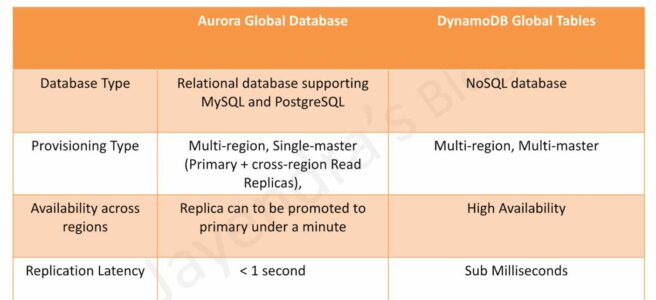
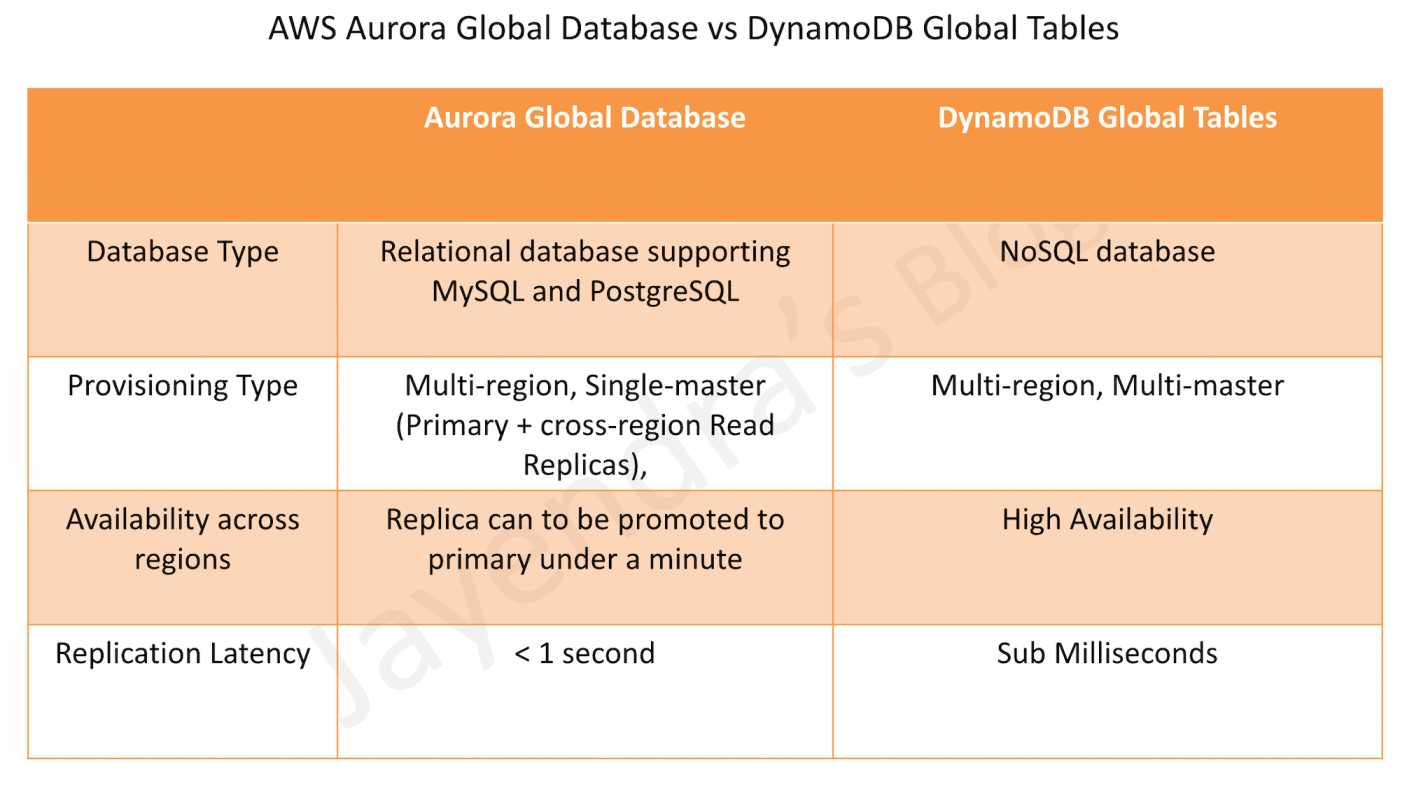
Aurora Global vs DynamoDB Global Tables

AWS Aurora Global Database vs DynamoDB Global Tables

AWS Aurora Global Database vs. DynamoDB Global Tables vs. Aurora DSQL

Aurora Global Database

  • Aurora Global Database provides a relational database supporting MySQL and PostgreSQL.
  • Aurora Global Database consists of one primary AWS Region where the data is mastered, and up to five read-only, secondary AWS Regions.
  • Aurora cluster in the primary AWS Region performs both read and write operations. The clusters in the secondary Regions enable low-latency reads.
  • Aurora replicates data to the secondary AWS Regions with a typical latency of under a second.
  • Secondary clusters can be scaled independently by adding one or more DB instances (Aurora Replicas) to serve read-only workloads.
  • Aurora Global Database uses dedicated infrastructure to replicate the data, leaving database resources available entirely to serve applications.
  • Applications with a worldwide footprint can use reader instances in the secondary AWS Regions for low-latency reads.
  • Typical cross-region replication takes less than 1 second.
  • In case of a disaster or an outage, one of the clusters in a secondary AWS Region can be promoted to take full read/write workloads in under a minute.
  • However, the process is not automatic. If the primary region becomes unavailable, you must manually remove a secondary region from an Aurora Global Database and promote it to take full reads and writes. You will also need to point the application to the newly promoted region.
  • Architecture: Single-master, multi-reader (one primary region for writes, multiple secondary regions for reads).
  • Consistency: Eventual consistency for cross-region reads.
  • ARC Integration (June 2026): Amazon Application Recovery Controller (ARC) Region switch now supports Aurora serverless scaling and provisioned scaling execution blocks, automating database scaling during multi-Region failover orchestration.

DynamoDB Global Tables

  • DynamoDB Global tables provide NoSQL database.
  • DynamoDB Global tables provide a fully managed, multi-Region, and multi-active database that delivers fast, local, read and write performance for massively scaled, global applications.
  • Global tables replicate the DynamoDB tables automatically across the choice of AWS Regions and enable reads and writes on all instances.
  • DynamoDB global table consists of multiple replica tables (one per AWS Region). Every replica has the same table name and the same primary key schema. When an application writes data to a replica table in one Region, DynamoDB propagates the write to the other replica tables in the other AWS Regions automatically.
  • Global tables enable the read and write of data locally providing single-digit-millisecond latency for the globally distributed application at any scale.
  • DynamoDB Global tables are designed for 99.999% availability.
  • DynamoDB Global tables enable the applications to stay highly available even in the unlikely event of isolation or degradation of an entire Region. Applications can redirect to a different Region and perform reads and writes against a different replica table.
  • Cross-Account Replication (February 2026): DynamoDB Global Tables now support replication across multiple AWS accounts, providing account-level isolation for stronger governance, security, and blast-radius control. Currently supported for MREC tables only.

DynamoDB Global Tables Consistency Modes

  • DynamoDB Global Tables support two consistency modes:

Multi-Region Eventual Consistency (MREC) – Default

  • Provides asynchronous replication with approximately 1-second replication latency for tables between two or more Regions.
  • Multi-active: All replicas accept reads and writes.
  • Conflict Resolution: Last Write Wins based on internal timestamp.
  • RPO: Approximately 1 second (replication delay).
  • Best for applications that can tolerate eventual consistency.
  • Supports multi-account global tables for account-level isolation (February 2026).

Multi-Region Strong Consistency (MRSC) – January 2025

  • Announced at AWS re:Invent 2024 and generally available in January 2025.
  • Provides synchronous replication across Regions.
  • Strongly consistent reads always return the latest version of an item, irrespective of the Region.
  • Zero RPO: Enables Recovery Point Objective of zero.
  • Item changes are synchronously replicated to at least one other Region before write returns success.
  • Deployment: Must be deployed in exactly three Regions (3 replicas OR 2 replicas + 1 witness).
  • Regional Availability: Three Region sets (US, EU, AP) – cannot span Region sets.
  • Trade-off: Higher write latency compared to MREC due to synchronous replication.
  • Best for applications requiring global strong consistency and zero data loss.
  • AWS FIS Integration (January 2026): MRSC global tables now support application resiliency testing with AWS Fault Injection Service (FIS), enabling controlled fault injection experiments to validate failover behavior and regional resilience.
  • Does not support multi-account model (cross-account replication is MREC only).

Amazon Aurora DSQL (GA May 2025)

  • Amazon Aurora DSQL is a serverless distributed SQL database with active-active high availability, announced at re:Invent 2024 and generally available since May 27, 2025.
  • Provides PostgreSQL-compatible (based on PostgreSQL 16) distributed SQL with multi-Region strong consistency.
  • Active-active architecture: All database resources are peers capable of handling both read and write traffic, within a Region and across Regions. No leader, no failover lag.
  • Strong consistency: All reads and writes to any Regional endpoint are strongly consistent and durable — not eventually consistent.
  • Zero RPO: Synchronous data replication with automated zero data loss failover.
  • Serverless: No servers to provision, patch, or manage. Scales to zero when idle. Provisions in under 60 seconds.
  • Designed for 99.99% single-Region and 99.999% multi-Region availability.
  • Multi-Region deployment: Supports linked multi-Region clusters (currently two Regions).
  • Automatic failover: No manual intervention required. Applications use DNS-based routing (Route 53) for automatic Region redirection.
  • Independently scales reads, writes, compute, and storage with no manual intervention.
  • Supports SQL including secondary indexes, joins, and transactions — unlike DynamoDB’s NoSQL model.
  • Limitations: Based on PostgreSQL 16 but does not support all PostgreSQL features. Subset of commonly used queries and features supported.
  • Fills the gap between DynamoDB’s serverless economics and Aurora PostgreSQL’s SQL power with global consistency.

Comparison Table

Feature Aurora Global Database DynamoDB Global Tables (MREC) DynamoDB Global Tables (MRSC) Aurora DSQL
Database Type Relational (MySQL, PostgreSQL) NoSQL (Key-Value, Document) NoSQL (Key-Value, Document) Relational (PostgreSQL-compatible)
Architecture Single-master, multi-reader Multi-active (all replicas read/write) Multi-active (all replicas read/write) Active-active (all peers read/write)
Max Regions 1 primary + 5 secondary (6 total) Unlimited (any Region with DynamoDB) Exactly 3 Regions 2 linked Regions (multi-Region cluster)
Replication Type Asynchronous Asynchronous Synchronous Synchronous
Replication Latency < 1 second ~1 second Synchronous (no delay) Synchronous (no delay)
Cross-Region Writes No (primary region only) Yes (all replicas) Yes (all replicas) Yes (all peers)
Consistency Eventual (cross-region reads) Eventual (cross-region reads) Strong (all reads) Strong (all reads and writes)
RPO ~1 second ~1 second Zero (0) Zero (0)
RTO < 1 minute (manual failover) Seconds (automatic) Seconds (automatic) Automatic (no manual intervention)
Failover Manual promotion required Automatic (redirect to another replica) Automatic (redirect to another replica) Automatic (DNS-based routing)
Availability SLA 99.99% 99.999% 99.999% 99.999% (multi-Region)
Serverless No (instance-based, Serverless v2 option) Yes (on-demand or provisioned) Yes (on-demand or provisioned) Yes (fully serverless, scales to zero)
SQL Support Full SQL (MySQL/PostgreSQL) NoSQL API only NoSQL API only PostgreSQL-compatible SQL (subset)
Cross-Account No Yes (February 2026) No No
Use Cases Complex queries, joins, transactions, relational data High-scale, low-latency, eventual consistency acceptable Global strong consistency, zero data loss, financial apps Global SQL transactions, serverless, strong consistency

When to Choose Aurora Global Database

  • Relational Data Model: Need full SQL, complex queries, joins, and transactions.
  • MySQL/PostgreSQL Compatibility: Existing applications using these databases with full feature support.
  • Single-Master Writes: Write operations centralized in one region is acceptable.
  • Read-Heavy Workloads: Global read replicas for low-latency reads worldwide.
  • Complex Analytics: Need advanced SQL features and reporting.
  • More Than 2 Regions: Need up to 6 regions (vs. Aurora DSQL’s 2-region limit).
  • Disaster Recovery: Can tolerate manual failover process (under 1 minute).

When to Choose DynamoDB Global Tables (MREC)

  • NoSQL Data Model: Key-value or document data structure.
  • Multi-Active Writes: Need to write to multiple regions simultaneously.
  • Massive Scale: Require unlimited scalability with single-digit millisecond latency.
  • High Availability: Need 99.999% availability with automatic failover.
  • Eventual Consistency Acceptable: Can tolerate ~1 second replication delay.
  • Cross-Account Isolation: Need multi-account replication for governance and security.
  • Unlimited Regions: Need replication across many regions globally.

When to Choose DynamoDB Global Tables (MRSC)

  • Zero RPO Required: Cannot tolerate any data loss.
  • Global Strong Consistency: Need latest data across all regions immediately.
  • NoSQL Data Model: Key-value/document data with strong consistency needs.
  • Financial Applications: Banking, payments, trading systems.
  • Inventory Management: Global inventory with strict consistency.
  • Compliance Requirements: Regulations requiring zero data loss.
  • Three-Region Deployment: Can deploy in exactly three regions within same region set (US, EU, or AP).

When to Choose Aurora DSQL

  • Global SQL with Strong Consistency: Need SQL (joins, indexes, transactions) with multi-region strong consistency.
  • Active-Active SQL Writes: Need both regions to accept writes — unlike Aurora Global Database’s single-master.
  • Serverless with Scale-to-Zero: Want to avoid instance management entirely with pay-per-use pricing.
  • Zero RPO + SQL: Need zero data loss with relational database capabilities.
  • Financial Transactions: Global-scale financial apps requiring strong consistency and SQL.
  • Automatic Failover: Need automated zero-intervention failover (unlike Aurora Global Database’s manual process).
  • Two-Region Deployment: Workload fits within a two-region active-active topology.
  • Note: Does not support full PostgreSQL feature set — evaluate supported features for your use case.

AWS Aurora Global Database vs DynamoDB Global Tables

AWS Certification Exam Practice Questions

  • Questions are collected from Internet and the answers are marked as per my knowledge and understanding (which might differ with yours).
  • AWS services are updated everyday and both the answers and questions might be outdated soon, so research accordingly.
  • AWS exam questions are not updated to keep up the pace with AWS updates, so even if the underlying feature has changed the question might not be updated
  • Open to further feedback, discussion and correction.
  1. A company needs to implement a relational database with a multi-region disaster recovery Recovery Point Objective (RPO) of 1 second and a Recovery Time Objective (RTO) of 1 minute. Which AWS solution can achieve this?
    1. Amazon Aurora Global Database
    2. Amazon DynamoDB global tables
    3. Amazon RDS for MySQL with Multi-AZ enabled
    4. Amazon RDS for MySQL with a cross-Region snapshot copy
  2. A financial services company requires a globally distributed database with zero data loss (RPO = 0) and strong consistency across all regions. Which solution should they choose?
    1. Amazon Aurora Global Database
    2. Amazon DynamoDB Global Tables with MREC
    3. Amazon DynamoDB Global Tables with MRSC
    4. Amazon RDS with cross-region read replicas
  3. A company needs a multi-region database that supports writes in all regions simultaneously with automatic failover. Which solution provides this capability?
    1. Amazon Aurora Global Database
    2. Amazon DynamoDB Global Tables
    3. Amazon RDS Multi-AZ
    4. Amazon Aurora with read replicas
  4. What is the primary difference between Aurora Global Database and DynamoDB Global Tables in terms of write operations?
    1. Aurora supports writes in all regions, DynamoDB only in primary region
    2. Aurora supports writes only in primary region, DynamoDB supports writes in all regions
    3. Both support writes in all regions
    4. Both support writes only in primary region
  5. A company needs to deploy a DynamoDB Global Table with MRSC. How many regions must they deploy in?
    1. Minimum 2 regions
    2. Exactly 3 regions
    3. Up to 5 regions
    4. Unlimited regions
  6. Which of the following statements about Aurora Global Database and DynamoDB Global Tables are correct? (Select TWO)
    1. Aurora Global Database requires manual failover, DynamoDB Global Tables support automatic failover
    2. Aurora Global Database supports NoSQL, DynamoDB supports SQL
    3. DynamoDB Global Tables offer 99.999% availability, Aurora offers 99.99%
    4. Aurora Global Database supports multi-active writes
    5. DynamoDB MRSC has higher replication latency than Aurora
  7. A company needs a globally distributed relational database with active-active writes, serverless operations, and strong consistency. They require SQL support including joins and transactions. Which AWS service best meets these requirements?
    1. Amazon Aurora Global Database
    2. Amazon DynamoDB Global Tables with MRSC
    3. Amazon Aurora DSQL
    4. Amazon RDS with read replicas
  8. A company operates DynamoDB Global Tables and needs to replicate data across multiple AWS accounts for security isolation and governance. Which consistency mode supports this?
    1. Multi-Region Eventual Consistency (MREC)
    2. Multi-Region Strong Consistency (MRSC)
    3. Both MREC and MRSC
    4. Neither — cross-account replication is not supported
  9. Which of the following AWS database solutions provides BOTH zero RPO and active-active multi-region writes with SQL support? (Select TWO)
    1. Amazon Aurora Global Database
    2. Amazon DynamoDB Global Tables with MRSC
    3. Amazon Aurora DSQL
    4. Amazon RDS Multi-AZ
    5. Amazon ElastiCache Global Datastore

References

AWS RDS Aurora

AWS Aurora Architecture

AWS RDS Aurora

  • AWS RDS Aurora is a relational database engine that combines the speed and reliability of high-end commercial databases with the simplicity and cost-effectiveness of open-source databases.
  • is a fully managed, MySQL- and PostgreSQL-compatible, relational database engine i.e. applications developed with MySQL can switch to Aurora with little or no changes.
  • delivers up to 6x the throughput of PostgreSQL and MySQL without requiring any changes to most applications
  • is fully managed as RDS manages the databases, handling time-consuming tasks such as provisioning, patching, backup, recovery, failure detection, and repair.
  • can scale storage automatically, based on the database usage, from 10GB to 128TiB (up to 256 TiB for Aurora MySQL and Aurora PostgreSQL as of July 2025) in 10GB increments with no impact on database performance
  • supports Aurora MySQL version 3 (MySQL 8.0 compatible), Aurora MySQL version 4 (MySQL 8.4 compatible, GA May 2026), and Aurora PostgreSQL (up to PostgreSQL 18 as of June 2026)
  • Aurora MySQL version 1 (MySQL 5.6 compatible) reached End of Life on Feb 28, 2023, and version 2 (MySQL 5.7 compatible) reached end of standard support on Oct 31, 2024 (Extended Support available)

Aurora DB Clusters

AWS Aurora Architecture

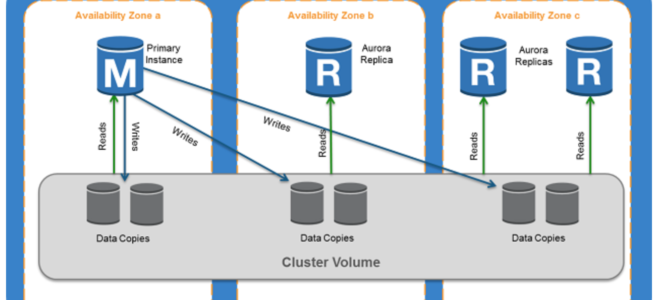
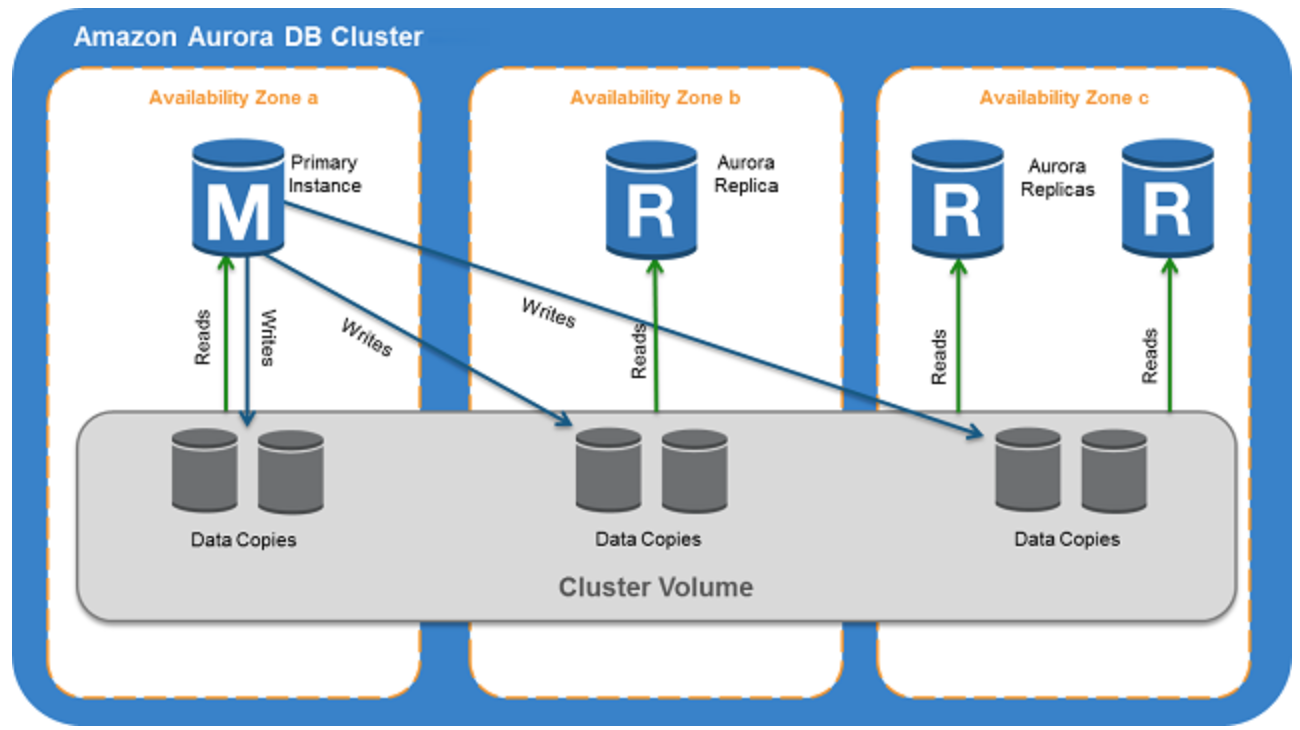
  • Aurora DB cluster consists of one or more DB instances and a cluster volume that manages the data for those DB instances.
  • A cluster volume is a virtual database storage volume that spans multiple AZs, with each AZ having a copy of the DB cluster data
  • Two types of DB instances make up an Aurora DB cluster:
    • Primary DB instance
      • Supports read and write operations, and performs all data modifications to the cluster volume.
      • Each DB cluster has one primary DB instance.
    • Aurora Replica
      • Connects to the same storage volume as the primary DB instance and supports only read operations.
      • Each DB cluster can have up to 15 Aurora Replicas in addition to the primary DB instance.
      • Provides high availability by locating Replicas in separate AZs
      • Aurora automatically fails over to a Replica in case the primary DB instance becomes unavailable.
      • Failover priority for Replicas can be specified.
      • Replicas can also offload read workloads from the primary DB instance
  • Aurora Multi-Master is no longer available. It was only supported on Aurora MySQL 5.6, which reached End of Life. For multi-writer use cases, consider Aurora Global Database with write forwarding or Amazon Aurora DSQL.

Aurora Connection Endpoints

  • Aurora involves a cluster of DB instances instead of a single instance
  • Endpoint refers to an intermediate handler with the hostname and port specified to connect to the cluster
  • Aurora uses the endpoint mechanism to abstract these connections

Cluster endpoint

  • Cluster endpoint (or writer endpoint) for a DB cluster connects to the current primary DB instance for that DB cluster.
  • Cluster endpoint is the only one that can perform write operations such as DDL statements as well as read operations
  • Each DB cluster has one cluster endpoint and one primary DB instance
  • Cluster endpoint provides failover support for read/write connections to the DB cluster. If a DB cluster’s current primary DB instance fails, Aurora automatically fails over to a new primary DB instance.
  • During a failover, the DB cluster continues to serve connection requests to the cluster endpoint from the new primary DB instance, with minimal interruption of service.

Reader endpoint

  • Reader endpoint for a DB cluster provides load-balancing support for read-only connections to the DB cluster.
  • Use the reader endpoint for read operations, such as queries.
  • Reader endpoint reduces the overhead on the primary instance by processing the statements on the read-only Replicas.
  • Each DB cluster has one reader endpoint.
  • If the cluster contains one or more Replicas, the reader endpoint load balances each connection request among the Replicas.

Custom endpoint

  • Custom endpoint for a DB cluster represents a set of DB instances that you choose.
  • Aurora performs load balancing and chooses one of the instances in the group to handle the connection.
  • An Aurora DB cluster has no custom endpoints until one is created and up to five custom endpoints can be created for each provisioned cluster.
  • Custom endpoints are supported on both provisioned and Aurora Serverless v2 clusters.

Instance endpoint

  • An instance endpoint connects to a specific DB instance within a cluster and provides direct control over connections to the DB cluster.
  • Each DB instance in a DB cluster has its own unique instance endpoint. So there is one instance endpoint for the current primary DB instance of the DB cluster, and there is one instance endpoint for each of the Replicas in the DB cluster.

High Availability and Replication

  • Aurora is designed to offer greater than 99.99% availability
  • provides data durability and reliability
    • by replicating the database volume six ways across three Availability Zones in a single region
    • backing up the data continuously to S3.
  • transparently recovers from physical storage failures; instance failover typically takes less than 30 seconds.
  • automatically fails over to a new primary DB instance, if the primary DB instance fails, by either promoting an existing Replica to a new primary DB instance or creating a new primary DB instance
  • automatically divides the database volume into 10GB segments spread across many disks. Each 10GB chunk of the database volume is replicated six ways, across three Availability Zones
  • is designed to transparently handle
    • the loss of up to two copies of data without affecting database write availability and
    • up to three copies without affecting read availability.
  • provides self-healing storage. Data blocks and disks are continuously scanned for errors and repaired automatically.
  • Replicas share the same underlying volume as the primary instance. Updates made by the primary are visible to all Replicas.
  • As Replicas share the same data volume as the primary instance, there is virtually no replication lag.
  • Any Replica can be promoted to become primary without any data loss and therefore can be used for enhancing fault tolerance in the event of a primary DB Instance failure.
  • To increase database availability, 1 to 15 replicas can be created in any of 3 AZs, and RDS will automatically include them in failover primary selection in the event of a database outage.

Aurora Failovers

  • Aurora automatically fails over, if the primary instance in a DB cluster fails, in the following order:
    • If Aurora Read Replicas are available, promote an existing Read Replica to the new primary instance.
    • If no Read Replicas are available, then create a new primary instance.
  • If there are multiple Aurora Read Replicas, the criteria for promotion is based on the priority that is defined for the Read Replicas.
    • Priority numbers can vary from 0 to 15 and can be modified at any time.
    • Aurora promotes the Replica with the highest priority (lowest tier number) to the new primary instance.
    • For Read Replicas with the same priority, Aurora promotes the replica that is largest in size or in an arbitrary manner.
  • During the failover, AWS modifies the cluster endpoint to point to the newly created/promoted DB instance.
  • Applications experience a minimal interruption of service if they connect using the cluster endpoint and implement connection retry logic.

Security

  • Aurora uses SSL/TLS (AES-256) to secure the connection between the database instance and the application
  • allows database encryption using keys managed through AWS Key Management Service (KMS).
  • Starting February 2026, all new Aurora clusters are encrypted at rest by default using AWS-owned keys, with no cost or performance impact.
  • Encryption and decryption are handled seamlessly.
  • With encryption, data stored at rest in the underlying storage is encrypted, as are its automated backups, snapshots, and replicas in the same cluster.
  • Encryption of existing unencrypted Aurora instances is not supported. Create a new encrypted Aurora instance and migrate the data
  • Aurora supports IAM database authentication, allowing token-based authentication without passwords.

Backup and Restore

  • Automated backups are always enabled on Aurora DB Instances.
  • Backups do not impact database performance.
  • Aurora also allows the creation of manual snapshots.
  • Aurora automatically maintains 6 copies of the data across 3 AZs and will automatically attempt to recover the database in a healthy AZ with no data loss.
  • If in any case, the data is unavailable within Aurora storage,
    • DB Snapshot can be restored or
    • the point-in-time restore operation can be performed to a new instance. The latest restorable time for a point-in-time restore operation can be up to 5 minutes in the past.
  • Restoring a snapshot creates a new Aurora DB instance
  • Deleting the database deletes all the automated backups (with an option to create a final snapshot), but would not remove the manual snapshots.
  • Snapshots (including encrypted ones) can be shared with other AWS accounts

Aurora Parallel Query

  • Aurora Parallel Query refers to the ability to push down and distribute the computational load of a single query across thousands of CPUs in Aurora’s storage layer.
  • Without Parallel Query, a query issued against an Aurora database would be executed wholly within one instance of the database cluster; this would be similar to how most databases operate.
  • Parallel Query is a good fit for analytical workloads requiring fresh data and good query performance, even on large tables.
  • Parallel Query provides the following benefits
    • Faster performance: Parallel Query can speed up analytical queries by up to 2 orders of magnitude.
    • Operational simplicity and data freshness: you can issue a query directly over the current transactional data in your Aurora cluster.
    • Transactional and analytical workloads on the same database: Parallel Query allows Aurora to maintain high transaction throughput alongside concurrent analytical queries.
  • Parallel Query can be enabled and disabled dynamically at both the global and session level using the aurora_parallel_query parameter.
  • Parallel Query is available for all current Aurora MySQL versions (MySQL 8.0 and 8.4 compatible).

Aurora Scaling

  • Aurora storage scaling is built-in and will automatically grow, up to 128 TiB (up to 256 TiB for Aurora MySQL and PostgreSQL as of July 2025), in 10GB increments with no impact on database performance.
  • There is no need to provision storage in advance
  • Compute Scaling
    • Instance scaling
      • Vertical scaling of the master instance. Memory and CPU resources are modified by changing the DB Instance class.
      • scaling the read replica and promoting it to master using forced failover which provides a minimal downtime
    • Read scaling
      • provides horizontal scaling with up to 15 read replicas
  • Auto Scaling
    • Scaling policies to add read replicas with min and max replica count based on scaling CloudWatch CPU or connections metrics condition
  • Aurora Serverless v2
    • Provides automatic scaling from 0 to 256 ACUs (512 GiB memory)
    • Supports scale-to-zero for cost optimization during periods of inactivity (Nov 2024)

Aurora Backtrack

  • Backtracking “rewinds” the DB cluster to the specified time
  • Backtracking performs in-place restore and does not create a new instance. There is minimal downtime associated with it.
  • Backtracking is available for Aurora with MySQL compatibility
  • Backtracking is not a replacement for backing up the DB cluster so that you can restore it to a point in time.
  • With backtracking, there is a target backtrack window and an actual backtrack window:
    • Target backtrack window is the amount of time you WANT the DB cluster can be backtracked for e.g 24 hours. The limit for a backtrack window is 72 hours.
    • Actual backtrack window is the actual amount of time you CAN backtrack the DB cluster, which can be smaller than the target backtrack window. The actual backtrack window is based on the workload and the storage available for storing information about database changes, called change records
  • DB cluster with backtracking enabled generates change records.
  • Aurora retains change records for the target backtrack window and charges an hourly rate for storing them.
  • Both the target backtrack window and the workload on the DB cluster determine the number of change records stored.
  • Workload is the number of changes made to the DB cluster in a given amount of time. If the workload is heavy, you store more change records in the backtrack window than you do if your workload is light.
  • Backtracking affects the entire DB cluster and can’t selectively backtrack a single table or a single data update.
  • Backtracking provides the following advantages over traditional backup and restore:
    • Undo mistakes – revert destructive action, such as a DELETE without a WHERE clause
    • Backtrack DB cluster quickly – Restoring a DB cluster to a point in time launches a new DB cluster and restores it from backup data or a DB cluster snapshot, which can take hours. Backtracking a DB cluster doesn’t require a new DB cluster and rewinds the DB cluster in minutes.
    • Explore earlier data changes – repeatedly backtrack a DB cluster back and forth in time to help determine when a particular data change occurred

Aurora Serverless

⚠️ Aurora Serverless v1 reached End of Life on March 31, 2025. All v1 clusters have been automatically migrated to Aurora Serverless v2. The information below applies to Aurora Serverless v2.

  • Amazon Aurora Serverless v2 is an on-demand, autoscaling configuration for the MySQL-compatible and PostgreSQL-compatible editions of Aurora.
  • An Aurora Serverless v2 DB cluster automatically scales capacity up or down based on the application’s needs, measured in Aurora Capacity Units (ACUs).
  • enables running database in the cloud without managing any database instances.
  • provides a cost-effective option for variable, intermittent, or unpredictable workloads.
  • Key features of Aurora Serverless v2:
    • Scale to zero – supports scaling down to 0 ACUs, automatically pausing after a period of inactivity and resuming when a connection is requested (Nov 2024)
    • Maximum capacity – scales up to 256 ACUs (512 GiB memory)
    • Fine-grained scaling – adjusts capacity in 0.5 ACU increments
    • Instant scaling – scales instantly to hundreds of thousands of transactions in a fraction of a second
    • Mixed configurations – can be used alongside provisioned instances in the same cluster
    • 30% better performance – latest platform version (v3, 2026) offers up to 30% performance improvement with enhanced workload-aware scaling
  • use cases include
    • Infrequently-Used Applications
    • New Applications – where the needs and instance size are yet to be determined.
    • Variable and Unpredictable Workloads – scale as per the needs
    • Development and Test Databases
    • Multi-tenant Applications
    • AI/ML and Agentic Workloads
  • Supports custom endpoints (unlike Serverless v1)
  • Supports Aurora Global Database
  • DB cluster can be accessed from within a VPC. Public access can be configured.

Aurora Global Database

  • Aurora Global Database consists of one primary AWS Region where the data is mastered, and up to ten read-only, secondary AWS Regions (increased from five in May 2025).
  • Aurora cluster in the primary AWS Region where your data is mastered performs both read and write operations. The clusters in the secondary Regions enable low-latency reads.
  • Aurora replicates data to the secondary AWS Regions with a typical latency of under a second.
  • Secondary clusters can be scaled independently by adding one or more DB instances (Aurora Replicas) to serve read-only workloads.
  • Aurora Global Database uses dedicated infrastructure to replicate the data, leaving database resources available entirely to serve applications.
  • Applications with a worldwide footprint can use reader instances in the secondary AWS Regions for low-latency reads.
  • In case of a disaster or an outage, one of the clusters in a secondary AWS Region can be promoted to take full read/write workloads in under a minute.
  • Write Forwarding – secondary region clusters can accept writes that are transparently forwarded to the primary region, simplifying global application architecture. Supported for both Aurora MySQL and Aurora PostgreSQL (version 16+).
  • Global Database Writer Endpoint (Oct 2024) – a fully managed endpoint that automatically routes writes to the current primary region, eliminating application code changes after switchover or failover.
  • Managed Switchover and Failover – supports planned cross-region switchover (typically under 30 seconds as of May 2025) and unplanned failover for disaster recovery.

Aurora I/O-Optimized

  • Aurora I/O-Optimized is a cluster configuration that provides improved price performance for I/O-intensive workloads (launched May 2023).
  • Provides up to 40% cost savings when I/O spend exceeds 25% of current Aurora database spend.
  • Eliminates charges for read and write I/O operations – you pay only for instance and storage usage.
  • Supported on both Aurora Serverless v2 and provisioned instances.
  • Can switch existing clusters to I/O-Optimized once every 30 days; can switch back to Aurora Standard at any time.
  • Available for both Aurora MySQL and Aurora PostgreSQL.

Aurora Optimized Reads

  • Aurora Optimized Reads uses local NVMe-based SSD storage available on specific instance types (r6gd, r6id, r8gd, m8gd) to improve query performance.
  • Provides two features:
    • Tiered Cache – extends DB instance caching capacity by up to 5x the instance memory by caching pages evicted from the buffer pool on local NVMe storage, providing up to 8x better latency for data previously fetched from Aurora storage.
    • Temporary Objects – stores temporary tables and sort data on local NVMe, reducing I/O to network-based storage.
  • Especially beneficial for workloads with datasets exceeding instance memory, including vector search (pgvector) workloads.
  • Available for Aurora PostgreSQL and Aurora MySQL.

Aurora Zero-ETL Integrations

  • Aurora zero-ETL integration replicates data from an Aurora DB cluster to supported analytics destinations in near real time, eliminating the need for custom ETL pipelines.
  • Supported targets include:
    • Amazon Redshift – for analytics and BI workloads (GA for both Aurora MySQL and Aurora PostgreSQL, 2024)
    • Amazon SageMaker Lakehouse – for ML and data lake workloads
  • Within seconds of transactional data being written to Aurora, it is seamlessly available in the target data warehouse.
  • Fully managed – no infrastructure to manage, no pipelines to build or maintain.
  • Enables running analytics and ML on transactional data without impacting the production database.

Aurora PostgreSQL Limitless Database

  • Aurora PostgreSQL Limitless Database provides automated horizontal scaling beyond the limits of a single Aurora instance (GA October 2024).
  • Scales to handle millions of write transactions per second and petabytes of data within a single database.
  • Automatically distributes workload across multiple Aurora writer instances using sharding, while maintaining the simplicity of a single database interface.
  • Uses a router-shard architecture:
    • Transaction routers – accept connections, route queries to appropriate shards
    • Data access shards – store subsets of sharded tables, full copies of reference tables, and standard tables
  • Maintains distributed ACID transactions across shards.
  • No application changes required beyond specifying which tables to shard.
  • Serverless – automatically scales based on workload demand.

Amazon Aurora DSQL

  • Amazon Aurora DSQL is a serverless distributed SQL database designed for always-available applications (GA May 2025).
  • PostgreSQL-compatible with an active-active distributed architecture.
  • Designed for 99.99% availability in single-Region and 99.999% availability in multi-Region configurations.
  • Key features:
    • Offers the fastest distributed SQL reads and writes
    • Zero infrastructure management and zero downtime maintenance
    • Supports strong consistency for all reads and writes to any Regional endpoint
    • Scales to meet any workload demand without database sharding or instance upgrades
    • Supports up to 256 TiB of storage
  • Ideal for globally distributed applications requiring strong consistency, such as financial transactions, gaming, and multi-region SaaS.
  • Differs from Aurora Global Database: DSQL provides active-active multi-region writes with strong consistency, while Global Database uses asynchronous replication with a single primary writer region.

Aurora Clone

  • Aurora cloning feature helps create Aurora cluster duplicates quickly and cost-effectively
  • Creating a clone is faster and more space-efficient than physically copying the data using a different technique such as restoring a snapshot.
  • Aurora cloning uses a copy-on-write protocol.
  • Aurora clone requires only minimal additional space when first created. In the beginning, Aurora maintains a single copy of the data, which is used by both the original and new DB clusters.
  • Aurora allocates new storage only when data changes, either on the source cluster or the cloned cluster.

RDS Extended Support

  • Amazon RDS Extended Support allows running Aurora MySQL version 2 (MySQL 5.7 compatible) and Aurora PostgreSQL older versions beyond their standard support end dates.
  • Provides critical security patches after community end of life.
  • Charged at an additional hourly rate per vCPU.
  • Databases are automatically enrolled into Extended Support after their standard support end date.
  • Intended as a bridge during migration to newer major versions (Aurora MySQL 8.0/8.4, Aurora PostgreSQL 16/17/18).

AWS Certification Exam Practice Questions

  • Questions are collected from Internet and the answers are marked as per my knowledge and understanding (which might differ with yours).
  • AWS services are updated everyday and both the answers and questions might be outdated soon, so research accordingly.
  • AWS exam questions are not updated to keep up the pace with AWS updates, so even if the underlying feature has changed the question might not be updated
  • Open to further feedback, discussion and correction.
  1. Company wants to use MySQL compatible relational database with greater performance. Which AWS service can be used?
    1. Aurora
    2. RDS
    3. SimpleDB
    4. DynamoDB
  2. An application requires a highly available relational database with an initial storage capacity of 8 TB. The database will grow by 8 GB every day. To support expected traffic, at least eight read replicas will be required to handle database reads. Which option will meet these requirements?
    1. DynamoDB
    2. Amazon S3
    3. Amazon Aurora
    4. Amazon Redshift
  3. A company is migrating their on-premise 10TB MySQL database to AWS. As a compliance requirement, the company wants to have the data replicated across three availability zones. Which Amazon RDS engine meets the above business requirement?
    1. Use Multi-AZ RDS
    2. Use RDS
    3. Use Aurora
    4. Use DynamoDB
  4. A company has an application that requires a globally distributed database with multi-region read access and sub-second replication latency. The application must continue operating if an entire AWS Region becomes unavailable. Which solution meets these requirements?
    1. Deploy Aurora with Multi-AZ enabled
    2. Deploy RDS MySQL with cross-region read replicas
    3. Deploy Aurora Global Database with secondary clusters in multiple regions
    4. Deploy DynamoDB global tables
  5. A startup is building a new application and needs a cost-effective database solution that can automatically scale compute capacity based on demand, including scaling to zero during periods of inactivity. The application uses PostgreSQL. Which is the MOST cost-effective solution?
    1. Aurora provisioned with a db.t3.small instance
    2. Aurora Serverless v2 with minimum capacity set to 0 ACUs
    3. RDS PostgreSQL with a Reserved Instance
    4. Aurora provisioned with Auto Scaling read replicas
  6. A company runs an I/O-intensive OLTP workload on Aurora PostgreSQL. The database I/O costs account for 40% of the total Aurora spend. Which Aurora configuration would provide the best cost optimization? [Select TWO]
    1. Switch to Aurora I/O-Optimized cluster configuration
    2. Enable Aurora Parallel Query
    3. Use Aurora Optimized Reads with r6gd instances for read-heavy replicas
    4. Migrate to Aurora Serverless v1
    5. Use Aurora Standard with provisioned IOPS
  7. A company needs to run near real-time analytics on their Aurora MySQL transactional data in Amazon Redshift without building custom ETL pipelines. Which feature should they use?
    1. Aurora Parallel Query
    2. AWS Glue ETL jobs
    3. Aurora zero-ETL integration with Amazon Redshift
    4. Amazon Kinesis Data Firehose
  8. A company needs a PostgreSQL-compatible database that can automatically scale write throughput horizontally to handle millions of transactions per second without manual sharding. Which solution should they use?
    1. Aurora Global Database with write forwarding
    2. Aurora provisioned with multiple read replicas
    3. Aurora PostgreSQL Limitless Database
    4. Amazon RDS PostgreSQL Multi-AZ

📖 Related: AWS RDS Backup, Snapshots & Restore – Complete Guide

References