AWS Network Firewall vs Gateway Load Balancer
AWS Network Firewall
- AWS Network Firewall is a stateful, fully managed, network firewall and intrusion detection and prevention service (IDS/IPS) for VPCs.
- Network Firewall scales automatically with the network traffic, without the need for deploying and managing any infrastructure.
- Network Firewall supports up to 100 Gbps of network traffic per firewall endpoint.
- Network Firewall provides Layer 3-7 filtering with deep packet inspection (DPI), domain name filtering, and intrusion prevention capabilities compatible with Suricata rules.
- Network Firewall supports native attachment to AWS Transit Gateway, eliminating the need for a separate inspection VPC and enabling capabilities such as flexible cost allocation through Transit Gateway metering policies.
- AWS Network Firewall cost covers
- an hourly rate for each firewall endpoint,
- the amount of traffic and data processing charges, billed by the gigabyte, processed by the firewall endpoint,
- an additional hourly rate per region and Availability Zone for Advanced Inspection (TLS inspection) with no additional data processing charges for Advanced Inspection traffic beyond standard processing charges,
- standard AWS data transfer charges for all data transferred via the AWS Network Firewall,
- hourly and data processing discounts on NAT Gateways that are service-chained with Network Firewall secondary endpoints.
- Key features include:
- TLS Inspection – decrypts and inspects encrypted outbound HTTPS traffic with SNI session holding for deeper visibility.
- Flow Management – Flow Capture provides point-in-time snapshots of active flows for monitoring, and Flow Flush enables selective termination of specific connections.
- Session State Replication – replicates flow state across firewall endpoints for high availability, ensuring seamless failover without session loss.
- Transit Gateway Native Attachment – attaches directly to Transit Gateway, eliminating the inspection VPC and simplifying centralized architecture.
- Managed Rules from AWS Marketplace – supports expanded managed rule groups from partners with up to 10 million domain name indicators and up to 1 million IP addresses per rule group.
- Enhanced Console & Monitoring – includes PrivateLink Endpoint analysis, improved filtering for IP addresses and protocols, simplified policy management with point-and-click rule priority adjustment, and pre-configured fields for rule creation.
AWS Gateway Load Balancer
- Gateway Load Balancer helps deploy, scale, and manage virtual appliances, such as firewalls, intrusion detection and prevention systems (IDS/IPS), and deep packet inspection systems.
- is architected to handle millions of requests/second, volatile traffic patterns, and introduces extremely low latency.
- Gateway Load Balancer operates at Layer 3 (Network Layer) of the OSI model and acts as a transparent network gateway (single entry and exit point for all traffic).
- GWLB uses either a 2-tuple, 3-tuple, or 5-tuple hash to define a flow and routes all packets of a flow to one of its backend targets (flow stickiness).
- Gateway Load Balancer endpoints (GWLBE) support maximum bandwidth of up to 100 Gbps per endpoint.
- AWS Gateway Load Balancer cost covers
- charges for each hour or partial hour that a GWLB is running,
- the number of Gateway Load Balancer Capacity Units (GLCU) used by Gateway Load Balancer per hour.
- GWLB uses Gateway Load Balancer Endpoint (GWLBE) to simplify how applications can securely exchange traffic with GWLB across VPC boundaries. GWLBE is priced and billed separately.
- cost of running the third-party virtual appliances (EC2 instances) behind GWLB.
- Key features include:
- Configurable TCP Idle Timeout – allows configuring TCP idle timeout from 60 seconds to 6000 seconds (default 350 seconds), preventing interruption of long-lived traffic flows.
- Target Failover – supports rebalancing existing flows to healthy targets when a target fails or deregisters, reducing failover time and enabling graceful appliance patching.
- LCU Reservation – allows proactively setting a minimum bandwidth capacity for the load balancer, complementing auto-scaling for predictable traffic patterns.
- Cross-Zone Load Balancing – by default, each GWLB in an AZ distributes traffic within the same AZ only. Enabling cross-zone distributes traffic across all registered healthy targets in all enabled AZs.
- Health Check Improvements – configurable health check intervals, HTTP response codes for target health determination, and consecutive response thresholds.
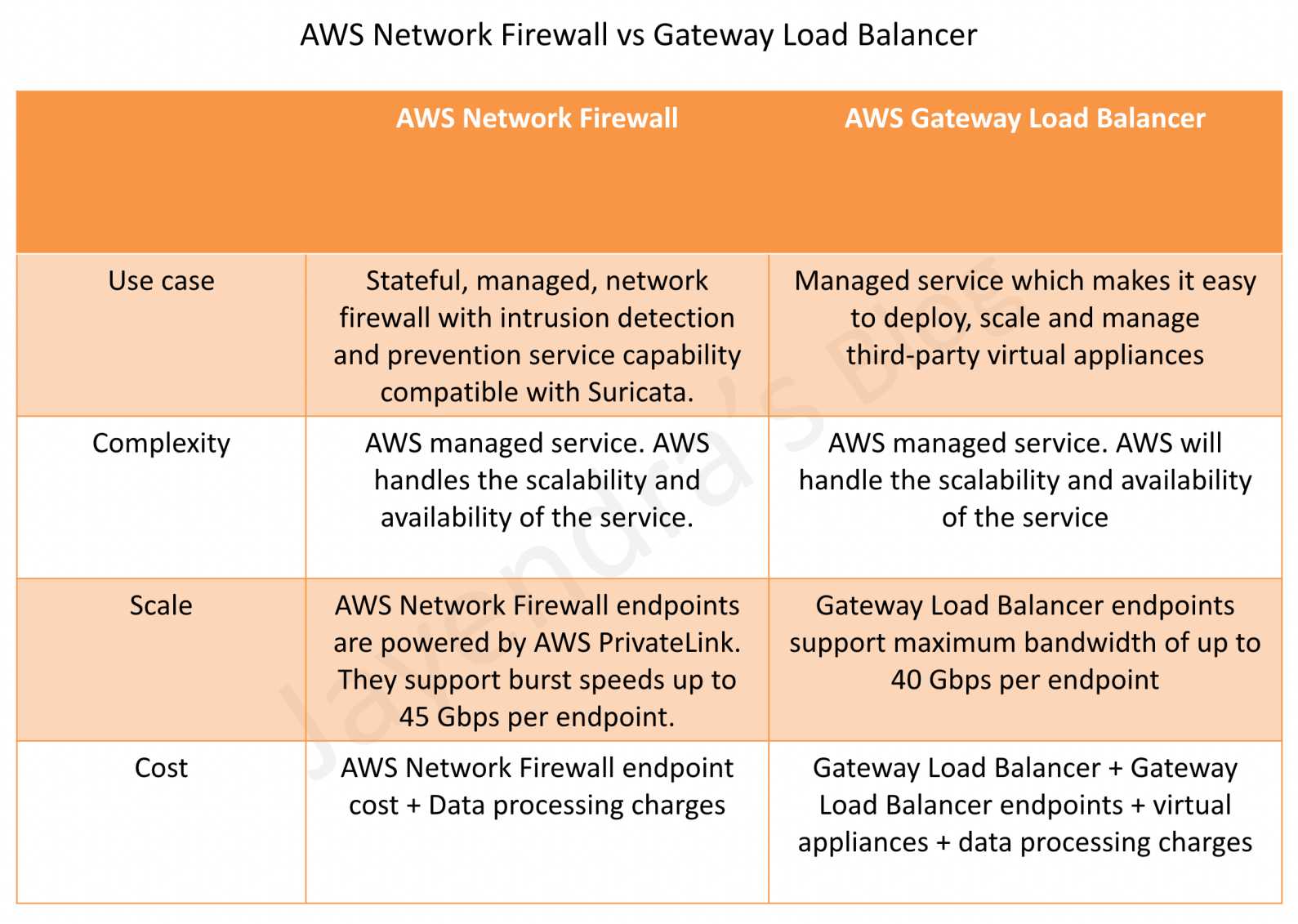
AWS Network Firewall vs. Gateway Load Balancer – Key Differences
| Criteria | AWS Network Firewall | Gateway Load Balancer |
|---|---|---|
| Use Case | Stateful, managed, network firewall with IDS/IPS compatible with Suricata | Managed service for deploying, scaling and managing third-party virtual appliances |
| Complexity | Fully AWS managed – handles scalability, availability, and patching | AWS manages GWLB scalability and availability; customer manages virtual appliance scaling and availability |
| Scale | Supports up to 100 Gbps per firewall endpoint (powered by AWS PrivateLink) | Supports up to 100 Gbps per endpoint |
| Cost | Firewall endpoint hourly rate + data processing charges | GWLB hourly rate + GLCU charges + GWLBE charges + virtual appliance costs |
| Appliance Choice | AWS-managed only (Suricata-based rules engine) | Any third-party appliance (Palo Alto, Fortinet, Check Point, etc.) |
| Rules/Policies | Suricata-compatible rules, domain lists, IP sets, managed rule groups | Depends on chosen third-party appliance capabilities |
| TLS Inspection | Native TLS inspection with SNI session holding (built-in) | Depends on third-party appliance capabilities |
| Transit Gateway Integration | Native Transit Gateway attachment (no inspection VPC needed) | Requires inspection VPC with GWLBE and TGW attachment with appliance mode enabled |
| High Availability | Built-in session state replication across endpoints | Customer configures target failover and appliance HA |
When to Choose AWS Network Firewall
- Want a fully managed solution without managing virtual appliances
- Suricata-compatible rules meet security requirements
- Need native TLS inspection for outbound HTTPS traffic
- Want simplified centralized inspection with native Transit Gateway attachment
- Prefer lower operational complexity and no EC2 instance management
- Need built-in managed threat intelligence rules from AWS and Marketplace partners
When to Choose Gateway Load Balancer
- Need specific third-party firewall capabilities (e.g., Palo Alto NGFW, Fortinet, Check Point)
- Have existing investment in third-party security appliance policies and expertise
- Require advanced features beyond what Suricata rules provide
- Need to integrate multiple types of virtual appliances (IDS/IPS + DPI + custom inspection)
- Want consistent security policies across cloud and on-premises using the same vendor
Key Architectural Considerations
- Appliance mode should be enabled on Transit Gateway when doing east-west (VPC-to-VPC) inspection with either solution.
- For multi-Region deployment, set up separate inspection in respective local Regions to avoid inter-Region dependencies and reduce data transfer costs.
- Both solutions can be combined – use Network Firewall for standard north-south traffic and GWLB with third-party appliances for specialized deep inspection.
- If GWLB cross-zone load balancing is enabled and all targets across all AZs are unhealthy, GWLB fails open (passes traffic without inspection).
- Network Firewall with Transit Gateway native attachment eliminates the need for a separate inspection VPC, reducing cost and complexity.
AWS Certification Exam Practice Questions
- Questions are collected from Internet and the answers are marked as per my knowledge and understanding (which might differ with yours).
- AWS services are updated everyday and both the answers and questions might be outdated soon, so research accordingly.
- AWS exam questions are not updated to keep up the pace with AWS updates, so even if the underlying feature has changed the question might not be updated
- Open to further feedback, discussion and correction.
- A company needs to inspect all east-west traffic between VPCs in a multi-VPC architecture. They want a fully managed solution with minimal operational overhead and no need to manage EC2 instances. Which solution should they use?
- Deploy third-party firewalls on EC2 instances in each VPC
- Use AWS Network Firewall with native Transit Gateway attachment
- Deploy Gateway Load Balancer with third-party appliances in an inspection VPC
- Use VPC security groups and NACLs for all traffic filtering
Answer: b – AWS Network Firewall with native Transit Gateway attachment provides fully managed east-west inspection without requiring a separate inspection VPC or managing virtual appliance instances.
- A company has an existing Palo Alto Networks firewall deployment on-premises and wants to maintain consistent security policies across their hybrid environment in AWS. Which solution is most appropriate?
- AWS Network Firewall with Suricata rules
- AWS WAF with custom rules
- Gateway Load Balancer with Palo Alto VM-Series instances
- VPC Network Access Analyzer
Answer: c – GWLB enables deployment of the same third-party appliances used on-premises, maintaining consistent security policies across hybrid environments.
- A security team needs to inspect encrypted outbound HTTPS traffic from their VPCs to detect data exfiltration attempts. They want a managed service approach. Which feature should they use?
- Gateway Load Balancer with SSL termination
- AWS Network Firewall TLS Inspection with SNI session holding
- AWS WAF with HTTPS rules
- VPC Flow Logs with CloudWatch analysis
Answer: b – AWS Network Firewall provides native TLS inspection that decrypts and re-encrypts outbound HTTPS traffic, with SNI session holding for deeper visibility into encrypted connections.
- A company uses Gateway Load Balancer with third-party firewall appliances. During maintenance, they need to patch the appliances without dropping existing connections. Which GWLB feature helps?
- Cross-zone load balancing
- Target Failover with Rebalance mode
- Configurable TCP idle timeout
- LCU Reservation
Answer: b – Target Failover with Rebalance mode rehashes existing flows and sends them to healthy targets when a target is deregistered, enabling graceful appliance patching during maintenance.
- A network engineer needs to troubleshoot a suspected malicious connection that may be traversing their AWS Network Firewall. They want to view active flows without disrupting traffic. Which feature should they use?
- VPC Flow Logs
- AWS Network Firewall Flow Capture
- AWS Network Firewall Flow Flush
- CloudWatch Network Monitor
Answer: b – Flow Capture provides point-in-time snapshots of active flows in the firewall’s state table for monitoring and troubleshooting without affecting traffic.
- An organization is evaluating the total cost of running network security inspection in AWS. They need both IDS/IPS and domain filtering capabilities. They don’t require third-party appliances. Which option is most cost-effective? (Select TWO considerations)
- AWS Network Firewall has lower total cost since it doesn’t require managing EC2 instances
- Gateway Load Balancer is cheaper because it only charges for GLCU usage
- AWS Network Firewall removed additional data processing charges for TLS inspection in 2026
- Gateway Load Balancer cost includes the virtual appliance EC2 instances and licensing
- Network Firewall charges for cross-zone data transfer
Answer: a, c – Network Firewall avoids EC2 and third-party licensing costs. The 2026 pricing update removed additional data processing charges for Advanced Inspection (TLS), making it more cost-effective for inspection workloads.
References
- Key Considerations for using AWS Network Firewall and Gateway Load Balancer
- AWS Network Firewall Features
- AWS Network Firewall Pricing
- AWS Gateway Load Balancer
- Migrate to Transit Gateway-attached AWS Network Firewall
- Enhanced Network Security Control: Flow Management with AWS Network Firewall
- Configurable TCP Idle Timeout for Gateway Load Balancer
- Best Practices for Deploying Gateway Load Balancer