AWS Network Firewall vs Gateway Load Balancer

AWS Network Firewall vs Gateway Load Balancer
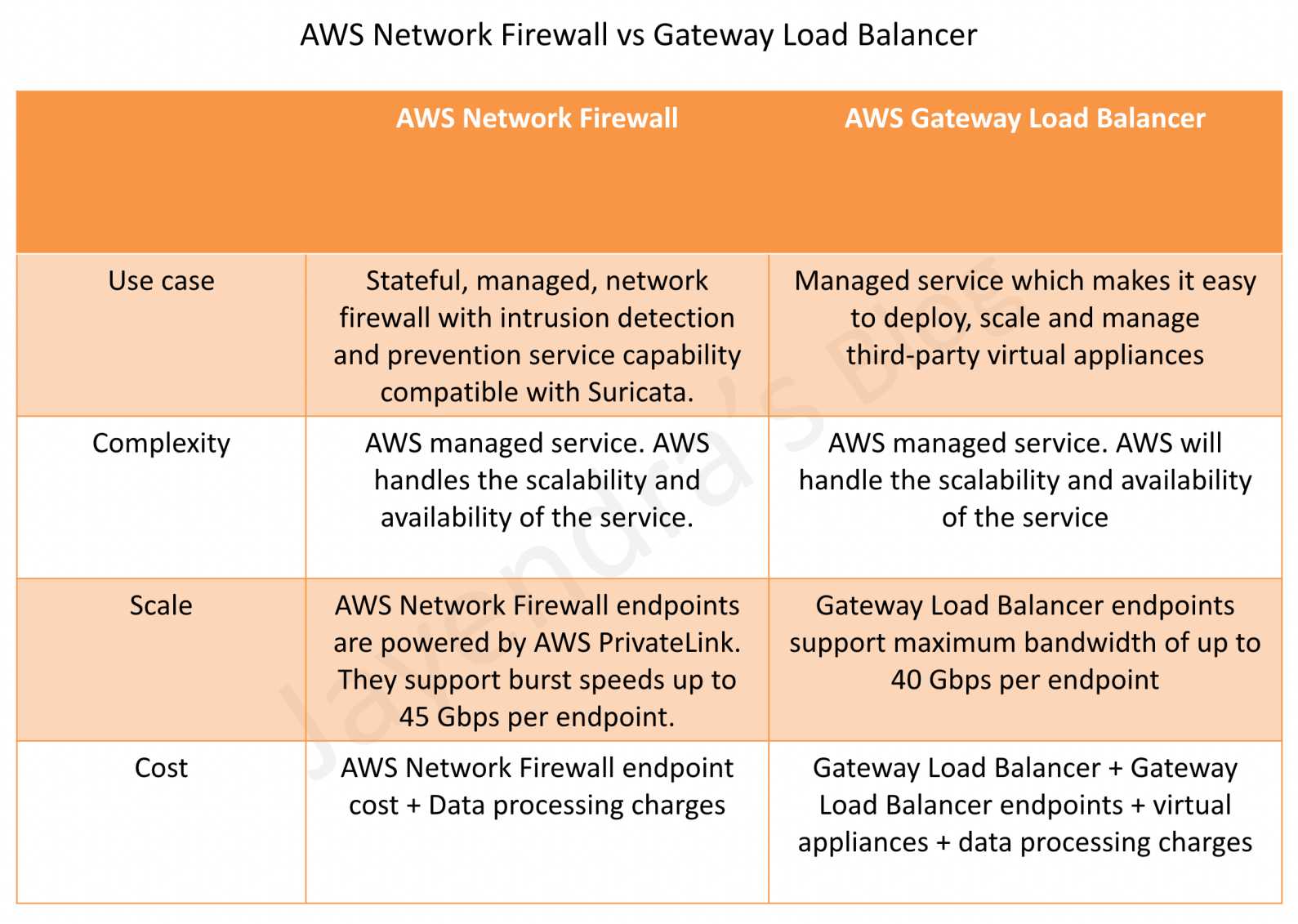
AWS Network Firewall vs Gateway Load Balancer

AWS Network Firewall vs Gateway Load Balancer

AWS Network Firewall

  • AWS Network Firewall is a stateful, fully managed, network firewall and intrusion detection and prevention service (IDS/IPS) for VPCs.
  • Network Firewall scales automatically with the network traffic, without the need for deploying and managing any infrastructure.
  • Network Firewall supports up to 100 Gbps of network traffic per firewall endpoint.
  • Network Firewall provides Layer 3-7 filtering with deep packet inspection (DPI), domain name filtering, and intrusion prevention capabilities compatible with Suricata rules.
  • Network Firewall supports native attachment to AWS Transit Gateway, eliminating the need for a separate inspection VPC and enabling capabilities such as flexible cost allocation through Transit Gateway metering policies.
  • AWS Network Firewall cost covers
    • an hourly rate for each firewall endpoint,
    • the amount of traffic and data processing charges, billed by the gigabyte, processed by the firewall endpoint,
    • an additional hourly rate per region and Availability Zone for Advanced Inspection (TLS inspection) with no additional data processing charges for Advanced Inspection traffic beyond standard processing charges,
    • standard AWS data transfer charges for all data transferred via the AWS Network Firewall,
    • hourly and data processing discounts on NAT Gateways that are service-chained with Network Firewall secondary endpoints.
  • Key features include:
    • TLS Inspection – decrypts and inspects encrypted outbound HTTPS traffic with SNI session holding for deeper visibility.
    • Flow Management – Flow Capture provides point-in-time snapshots of active flows for monitoring, and Flow Flush enables selective termination of specific connections.
    • Session State Replication – replicates flow state across firewall endpoints for high availability, ensuring seamless failover without session loss.
    • Transit Gateway Native Attachment – attaches directly to Transit Gateway, eliminating the inspection VPC and simplifying centralized architecture.
    • Managed Rules from AWS Marketplace – supports expanded managed rule groups from partners with up to 10 million domain name indicators and up to 1 million IP addresses per rule group.
    • Enhanced Console & Monitoring – includes PrivateLink Endpoint analysis, improved filtering for IP addresses and protocols, simplified policy management with point-and-click rule priority adjustment, and pre-configured fields for rule creation.

AWS Gateway Load Balancer

  • Gateway Load Balancer helps deploy, scale, and manage virtual appliances, such as firewalls, intrusion detection and prevention systems (IDS/IPS), and deep packet inspection systems.
  • is architected to handle millions of requests/second, volatile traffic patterns, and introduces extremely low latency.
  • Gateway Load Balancer operates at Layer 3 (Network Layer) of the OSI model and acts as a transparent network gateway (single entry and exit point for all traffic).
  • GWLB uses either a 2-tuple, 3-tuple, or 5-tuple hash to define a flow and routes all packets of a flow to one of its backend targets (flow stickiness).
  • Gateway Load Balancer endpoints (GWLBE) support maximum bandwidth of up to 100 Gbps per endpoint.
  • AWS Gateway Load Balancer cost covers
    • charges for each hour or partial hour that a GWLB is running,
    • the number of Gateway Load Balancer Capacity Units (GLCU) used by Gateway Load Balancer per hour.
    • GWLB uses Gateway Load Balancer Endpoint (GWLBE) to simplify how applications can securely exchange traffic with GWLB across VPC boundaries. GWLBE is priced and billed separately.
    • cost of running the third-party virtual appliances (EC2 instances) behind GWLB.
  • Key features include:
    • Configurable TCP Idle Timeout – allows configuring TCP idle timeout from 60 seconds to 6000 seconds (default 350 seconds), preventing interruption of long-lived traffic flows.
    • Target Failover – supports rebalancing existing flows to healthy targets when a target fails or deregisters, reducing failover time and enabling graceful appliance patching.
    • LCU Reservation – allows proactively setting a minimum bandwidth capacity for the load balancer, complementing auto-scaling for predictable traffic patterns.
    • Cross-Zone Load Balancing – by default, each GWLB in an AZ distributes traffic within the same AZ only. Enabling cross-zone distributes traffic across all registered healthy targets in all enabled AZs.
    • Health Check Improvements – configurable health check intervals, HTTP response codes for target health determination, and consecutive response thresholds.

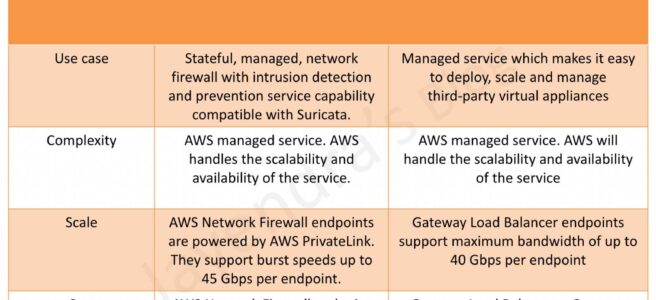
AWS Network Firewall vs. Gateway Load Balancer – Key Differences

Criteria AWS Network Firewall Gateway Load Balancer
Use Case Stateful, managed, network firewall with IDS/IPS compatible with Suricata Managed service for deploying, scaling and managing third-party virtual appliances
Complexity Fully AWS managed – handles scalability, availability, and patching AWS manages GWLB scalability and availability; customer manages virtual appliance scaling and availability
Scale Supports up to 100 Gbps per firewall endpoint (powered by AWS PrivateLink) Supports up to 100 Gbps per endpoint
Cost Firewall endpoint hourly rate + data processing charges GWLB hourly rate + GLCU charges + GWLBE charges + virtual appliance costs
Appliance Choice AWS-managed only (Suricata-based rules engine) Any third-party appliance (Palo Alto, Fortinet, Check Point, etc.)
Rules/Policies Suricata-compatible rules, domain lists, IP sets, managed rule groups Depends on chosen third-party appliance capabilities
TLS Inspection Native TLS inspection with SNI session holding (built-in) Depends on third-party appliance capabilities
Transit Gateway Integration Native Transit Gateway attachment (no inspection VPC needed) Requires inspection VPC with GWLBE and TGW attachment with appliance mode enabled
High Availability Built-in session state replication across endpoints Customer configures target failover and appliance HA

When to Choose AWS Network Firewall

  • Want a fully managed solution without managing virtual appliances
  • Suricata-compatible rules meet security requirements
  • Need native TLS inspection for outbound HTTPS traffic
  • Want simplified centralized inspection with native Transit Gateway attachment
  • Prefer lower operational complexity and no EC2 instance management
  • Need built-in managed threat intelligence rules from AWS and Marketplace partners

When to Choose Gateway Load Balancer

  • Need specific third-party firewall capabilities (e.g., Palo Alto NGFW, Fortinet, Check Point)
  • Have existing investment in third-party security appliance policies and expertise
  • Require advanced features beyond what Suricata rules provide
  • Need to integrate multiple types of virtual appliances (IDS/IPS + DPI + custom inspection)
  • Want consistent security policies across cloud and on-premises using the same vendor

Key Architectural Considerations

  • Appliance mode should be enabled on Transit Gateway when doing east-west (VPC-to-VPC) inspection with either solution.
  • For multi-Region deployment, set up separate inspection in respective local Regions to avoid inter-Region dependencies and reduce data transfer costs.
  • Both solutions can be combined – use Network Firewall for standard north-south traffic and GWLB with third-party appliances for specialized deep inspection.
  • If GWLB cross-zone load balancing is enabled and all targets across all AZs are unhealthy, GWLB fails open (passes traffic without inspection).
  • Network Firewall with Transit Gateway native attachment eliminates the need for a separate inspection VPC, reducing cost and complexity.

AWS Certification Exam Practice Questions

  • Questions are collected from Internet and the answers are marked as per my knowledge and understanding (which might differ with yours).
  • AWS services are updated everyday and both the answers and questions might be outdated soon, so research accordingly.
  • AWS exam questions are not updated to keep up the pace with AWS updates, so even if the underlying feature has changed the question might not be updated
  • Open to further feedback, discussion and correction.
  1. A company needs to inspect all east-west traffic between VPCs in a multi-VPC architecture. They want a fully managed solution with minimal operational overhead and no need to manage EC2 instances. Which solution should they use?
    1. Deploy third-party firewalls on EC2 instances in each VPC
    2. Use AWS Network Firewall with native Transit Gateway attachment
    3. Deploy Gateway Load Balancer with third-party appliances in an inspection VPC
    4. Use VPC security groups and NACLs for all traffic filtering

    Answer: b – AWS Network Firewall with native Transit Gateway attachment provides fully managed east-west inspection without requiring a separate inspection VPC or managing virtual appliance instances.

  2. A company has an existing Palo Alto Networks firewall deployment on-premises and wants to maintain consistent security policies across their hybrid environment in AWS. Which solution is most appropriate?
    1. AWS Network Firewall with Suricata rules
    2. AWS WAF with custom rules
    3. Gateway Load Balancer with Palo Alto VM-Series instances
    4. VPC Network Access Analyzer

    Answer: c – GWLB enables deployment of the same third-party appliances used on-premises, maintaining consistent security policies across hybrid environments.

  3. A security team needs to inspect encrypted outbound HTTPS traffic from their VPCs to detect data exfiltration attempts. They want a managed service approach. Which feature should they use?
    1. Gateway Load Balancer with SSL termination
    2. AWS Network Firewall TLS Inspection with SNI session holding
    3. AWS WAF with HTTPS rules
    4. VPC Flow Logs with CloudWatch analysis

    Answer: b – AWS Network Firewall provides native TLS inspection that decrypts and re-encrypts outbound HTTPS traffic, with SNI session holding for deeper visibility into encrypted connections.

  4. A company uses Gateway Load Balancer with third-party firewall appliances. During maintenance, they need to patch the appliances without dropping existing connections. Which GWLB feature helps?
    1. Cross-zone load balancing
    2. Target Failover with Rebalance mode
    3. Configurable TCP idle timeout
    4. LCU Reservation

    Answer: b – Target Failover with Rebalance mode rehashes existing flows and sends them to healthy targets when a target is deregistered, enabling graceful appliance patching during maintenance.

  5. A network engineer needs to troubleshoot a suspected malicious connection that may be traversing their AWS Network Firewall. They want to view active flows without disrupting traffic. Which feature should they use?
    1. VPC Flow Logs
    2. AWS Network Firewall Flow Capture
    3. AWS Network Firewall Flow Flush
    4. CloudWatch Network Monitor

    Answer: b – Flow Capture provides point-in-time snapshots of active flows in the firewall’s state table for monitoring and troubleshooting without affecting traffic.

  6. An organization is evaluating the total cost of running network security inspection in AWS. They need both IDS/IPS and domain filtering capabilities. They don’t require third-party appliances. Which option is most cost-effective? (Select TWO considerations)
    1. AWS Network Firewall has lower total cost since it doesn’t require managing EC2 instances
    2. Gateway Load Balancer is cheaper because it only charges for GLCU usage
    3. AWS Network Firewall removed additional data processing charges for TLS inspection in 2026
    4. Gateway Load Balancer cost includes the virtual appliance EC2 instances and licensing
    5. Network Firewall charges for cross-zone data transfer

    Answer: a, c – Network Firewall avoids EC2 and third-party licensing costs. The 2026 pricing update removed additional data processing charges for Advanced Inspection (TLS), making it more cost-effective for inspection workloads.

References

AWS Gateway Load Balancer – GWLB for Appliances

AWS Gateway Load Balancer GWLB

AWS Gateway Load Balancer – GWLB

  • Gateway Load Balancer helps deploy, scale, and manage virtual appliances, such as firewalls, intrusion detection and prevention systems (IDS/IPS), and deep packet inspection systems.
  • GWLB and its registered virtual appliance instances exchange application traffic using the GENEVE (Generic Network Virtualization Encapsulation) protocol on port 6081.
  • operates at Layer 3 of the OSI model, the network layer.
  • transparently passes all Layer 3 traffic through third-party virtual appliances, and is invisible to the source and destination of the traffic.
  • combines a transparent network gateway (that is, a single entry and exit point for all traffic) and distributes traffic while scaling the virtual appliances with the demand.
  • listens for all IP packets across all ports and forwards traffic to the target group that’s specified in the listener rule.
  • runs within one AZ and is recommended to be deployed in multiple AZs for greater availability. If all appliances fail in one AZ, scripts can be used to either add new appliances or direct traffic to a GWLB in a different AZ.
  • subnets cannot be removed after the load balancer is created. To remove a subnet, you must create a new load balancer.
  • is architected to handle millions of requests/second, volatile traffic patterns, and introduces extremely low latency.
  • does not perform TLS termination and does not maintain any application state. These functions are performed by the third-party virtual appliances it directs traffic to and receives traffic from.
  • maintains stickiness of flows to a specific target appliance using 5-tuple (default), 3-tuple, or 2-tuple.
    • 5-tuple (default) – source IP, destination IP, protocol, source port, destination port
    • 3-tuple – source IP, destination IP, transport protocol
    • 2-tuple – source IP, destination IP
  • supports a maximum transmission unit (MTU) size of 8500 bytes. GENEVE encapsulation adds 68 bytes, so appliances must support at least 8,568 bytes MTU.
  • does not support IP fragmentation and does not generate ICMP “Destination Unreachable: fragmentation needed and DF set” messages, so Path MTU Discovery (PMTUD) is not supported.
  • supports cross-zone load balancing, which is disabled by default. You pay charges for inter-AZ data transfer if enabled.
  • supports both IPv4 and dual-stack (IPv4 and IPv6) IP address types. In dual-stack mode, GWLB encapsulates both IPv4 and IPv6 client traffic with an IPv4 GENEVE header.
  • supports asymmetric flows when the load balancer processes the initial flow packet and the response flow packet is not routed through the load balancer. Asymmetric routing is not recommended as it can reduce network performance.

Gateway Load Balancer TCP Idle Timeout

  • GWLB creates a flow entry in its flow table when it sees the first packet of a flow and maintains traffic symmetry by coupling each flow entry to one backend target appliance.
  • When packets for a flow stop, the flow is considered idle and the idle timer starts. GWLB removes the flow entry after the idle time expires.
  • TCP idle timeout is configurable from 60 seconds to 6000 seconds (default: 350 seconds). (Launched September 2024)
  • Configuring the timeout helps align GWLB with firewall appliances (e.g., Palo Alto, Fortinet, Cisco, Check Point) that often default to 3600 seconds, preventing traffic disruptions for long-lived idle flows.
  • TCP idle timeout can only be updated when using 5-tuple stickiness. When using 3-tuple or 2-tuple stickiness, the default 350-second timeout is used.
  • UDP idle timeout is fixed at 120 seconds and cannot be changed.
  • TCP keepalive packets reset the idle timeout timer.
  • Existing flows are not impacted when the timeout value is changed; the new value applies only to new flow entries.
  • CloudWatch metrics RejectedFlowCount and RejectedFlowCount_TCP help monitor when flows are rejected due to flow table exhaustion.

Gateway Load Balancer Target Failover

  • Target Failover allows GWLB to rebalance existing flows to a healthy target when the original target fails or is deregistered. (Launched October 2022)
  • By default, GWLB continues to send existing flows to failed or drained targets (no failover).
  • When enabled, reduces failover time when a target becomes unhealthy and allows graceful patching or upgrading of appliances during maintenance windows.
  • Can be configured per target group via the target group attributes.

Gateway Load Balancer Health Checks

  • GWLB supports configurable health check parameters for target groups. (Enhanced February 2023)
  • HealthCheckIntervalSeconds – configurable from 5 to 300 seconds (default: 10 seconds).
  • UnhealthyThresholdCount – defaults to 2, meaning GWLB takes a target out of the target group after 2 missed health checks, reducing target failure detection time.
  • Supports configuring HTTP response codes that determine target health.
  • Supports HTTP, HTTPS, and TCP health check protocols.

Gateway Load Balancer Endpoint – GWLBE

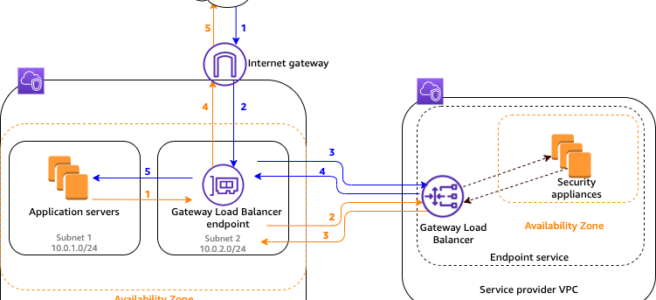
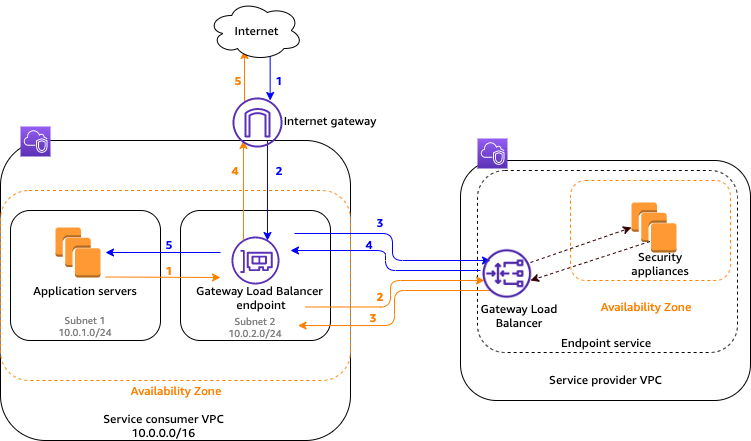
  • GWLB uses Gateway Load Balancer endpoints – GWLBE to exchange traffic across VPC boundaries securely.
  • A Gateway Load Balancer endpoint is a VPC endpoint that provides private connectivity between virtual appliances in the service provider VPC and application servers in the service consumer VPC.
  • One GWLB can be connected to many GWLBEs.
  • GWLB is deployed in the same VPC as the virtual appliances.
  • Virtual appliances are registered with a target group for the GWLB.
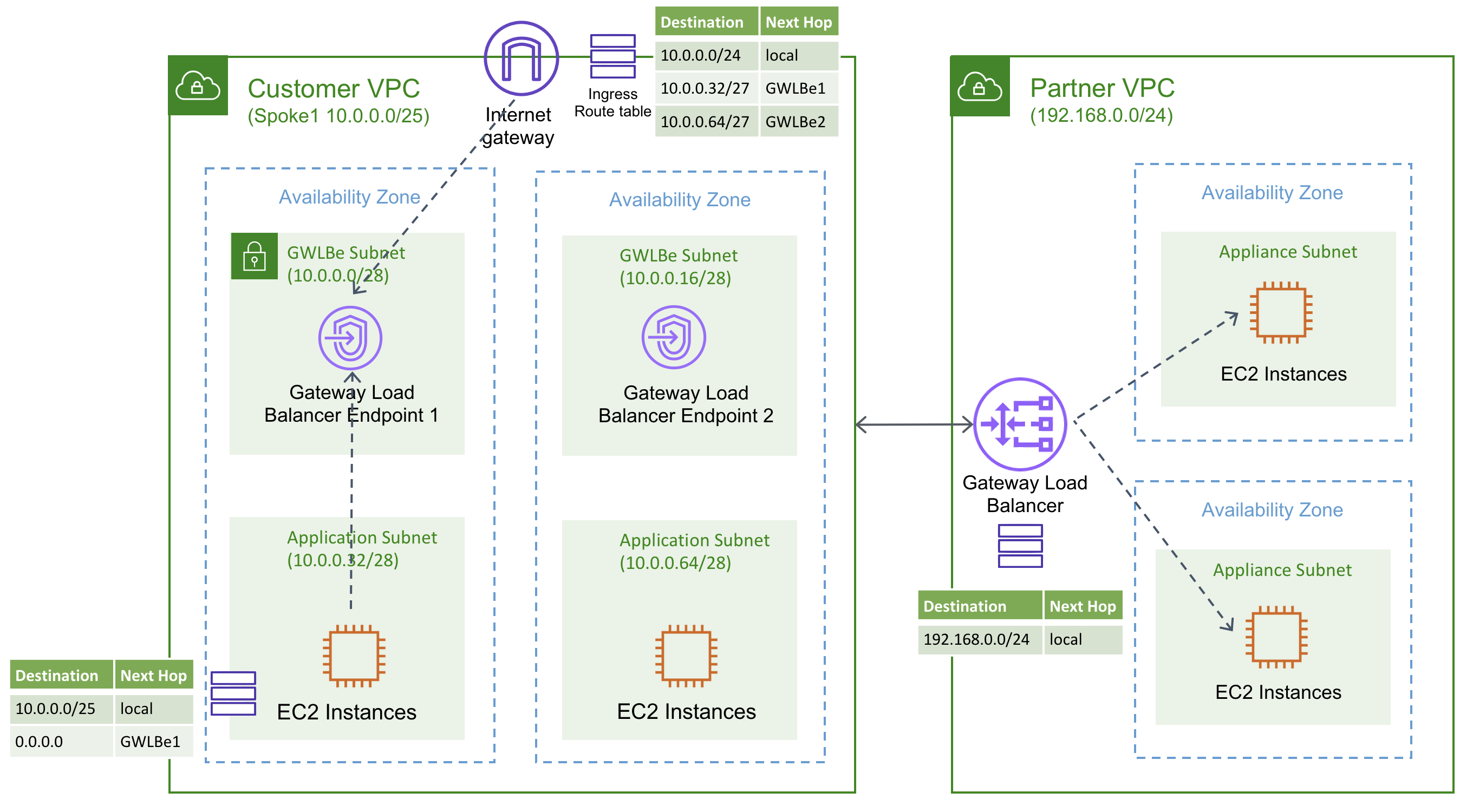
  • Traffic to and from a GWLBE is configured using route tables.
  • Traffic flows from the service consumer VPC over the GWLBE to the GWLB in the service provider VPC, and then returns to the service consumer VPC.
  • GWLBE and the application servers must be created in different subnets. This enables you to configure the GWLBE as the next hop in the route table for the application subnet.
  • GWLBE supports both IPv4 and IPv6 traffic end-to-end. (Launched December 2022)
  • GWLBE can be specified as the next-hop in the Virtual Private Gateway (VGW) route table, enabling inspection of traffic entering a VPC from on-premises via VPN or Direct Connect without Transit Gateway overhead. (Launched August 2023)
  • GWLBE can be used as a VPC Traffic Mirroring target, enabling centralized traffic monitoring appliances deployed behind GWLB. (Launched May 2022)

Gateway Load Balancer Flow

AWS Gateway Load Balancer GWLB

Traffic from the internet to the application (blue arrows)

  • Traffic enters the service consumer VPC through the internet gateway.
  • Traffic is sent to the GWLBE, as a result of VPC ingress routing.
  • Traffic is sent to the GWLB for inspection through the security appliance.
  • Traffic is sent back to the GWLBE after inspection.
  • Traffic is sent to the application servers (destination subnet).

Traffic from the application to the internet (orange arrows):

  • Traffic is sent to the Gateway Load Balancer endpoint due to the default route configured on the application server subnet.
  • Traffic is sent to the GWLB for inspection through the security appliance.
  • Traffic is sent back to the GWLBE after inspection.
  • Traffic is sent to the internet gateway based on the route table configuration.
  • Traffic is routed back to the internet.

Gateway Load Balancer High Availability

AWS Gateway Load Balancer HA

Gateway Load Balancer LCU Reservations

  • Load Balancer Capacity Unit (LCU) Reservation allows proactively setting a minimum bandwidth capacity for the GWLB, complementing its existing ability to auto-scale based on traffic patterns. (Launched April 2025)
  • Useful for preparing for sharp traffic increases due to planned events such as traffic migrations or product launches.
  • Capacity is reserved at the regional level and is evenly distributed across availability zones.
  • Ensure enough evenly distributed targets in each AZ before enabling LCU reservation.
  • CloudWatch metrics PeakBytesPerSecond and ReservedLCUs can be used to monitor utilization.

Gateway Load Balancer Deployment Architectures

  • Distributed model – GWLB and GWLBE in same VPC as applications; inspection happens locally per VPC.
  • Centralized model with Transit Gateway – GWLB deployed in a shared security VPC; spoke VPCs route traffic through Transit Gateway to the inspection VPC. Requires Transit Gateway appliance mode to ensure flow symmetry.
  • Centralized model with AWS Cloud WAN Service Insertion – AWS Cloud WAN service insertion (launched June 2024) simplifies integrating GWLB-backed security appliances into global networks without static routes, supporting both same-segment and cross-segment traffic inspection.
  • VGW Ingress Routing model – Direct steering of on-premises ingress traffic (via VPN/Direct Connect) through GWLBE for inspection without requiring Transit Gateway.

Amazon VPC Route Server Integration

  • Amazon VPC Route Server (GA April 2025) enables dynamic routing within VPC using BGP, providing an alternative to static route table management for appliance-based architectures.
  • Virtual appliances (firewalls) behind GWLB can peer with VPC Route Server via BGP, enabling dynamic route propagation and automatic active/standby failover using AS-path prepending.
  • Reduces manual route management overhead and enables faster failover compared to static routing approaches.

AWS Gateway Load Balancer vs Network Firewall

AWS Network Firewall vs Gateway Load Balancer

AWS Certification Exam Practice Questions

  • Questions are collected from Internet and the answers are marked as per my knowledge and understanding (which might differ with yours).
  • AWS services are updated everyday and both the answers and questions might be outdated soon, so research accordingly.
  • AWS exam questions are not updated to keep up the pace with AWS updates, so even if the underlying feature has changed the question might not be updated
  • Open to further feedback, discussion and correction.
  1. A company uses third-party firewall appliances for traffic inspection across multiple VPCs. The firewalls are deployed in a centralized security VPC. The company needs to automatically scale the firewall fleet based on traffic demand while maintaining flow symmetry to the same appliance. Which AWS service should the company use?
    1. AWS Network Firewall
    2. Network Load Balancer with UDP listener
    3. AWS Gateway Load Balancer
    4. Application Load Balancer with IP targets

    Answer: 3. GWLB is designed specifically to deploy, scale, and manage third-party virtual appliances while maintaining flow stickiness.

  2. A security team has deployed firewall appliances behind a Gateway Load Balancer. The firewalls have a TCP idle timeout of 3600 seconds. Users report intermittent connectivity issues for long-running database connections that go idle. What should the team do to resolve this issue?
    1. Enable cross-zone load balancing on the GWLB
    2. Configure the GWLB TCP idle timeout to a value higher than the firewall’s timeout (e.g., 3700 seconds)
    3. Switch from 5-tuple to 2-tuple flow stickiness
    4. Enable Target Failover on the GWLB target group

    Answer: 2. The configurable TCP idle timeout (60-6000 seconds) allows alignment with the firewall’s timeout to prevent flows from being rerouted to different targets.

  3. A company wants to inspect traffic entering their VPC from on-premises networks via AWS Direct Connect. They want to use third-party firewall appliances behind a Gateway Load Balancer without using Transit Gateway. What feature enables this?
    1. VPC Peering with GWLBE as route target
    2. Virtual Private Gateway ingress routing to GWLBE
    3. AWS PrivateLink with GWLBE
    4. VPC Flow Logs with GWLB integration

    Answer: 2. VGW ingress routing support (August 2023) allows specifying GWLBE as the next-hop in the VGW route table.

  4. An organization needs to perform maintenance on firewall appliances registered as Gateway Load Balancer targets. They want existing connections to be gracefully moved to healthy targets when an appliance is deregistered. Which feature should they enable?
    1. Connection Draining
    2. Target Failover
    3. Cross-zone load balancing
    4. Deregistration Delay

    Answer: 2. Target Failover allows GWLB to rebalance existing flows to healthy targets when the original target fails or is deregistered.

  5. A company wants to centralize network traffic monitoring using third-party tools deployed behind a Gateway Load Balancer. They need to mirror traffic from EC2 instances in spoke VPCs to the monitoring appliances. What is the recommended approach?
    1. Configure VPC Flow Logs to the GWLB target group
    2. Use VPC Traffic Mirroring with GWLBE as the mirror target
    3. Enable packet capture on the GWLB listener
    4. Configure Transit Gateway flow logs to the monitoring VPC

    Answer: 2. GWLBE can be used as a VPC Traffic Mirroring target, enabling centralized traffic monitoring behind GWLB.

  6. A company expects a significant traffic spike next week due to a planned migration event. They want to ensure their Gateway Load Balancer can handle the increased load immediately without waiting for auto-scaling. What should they do?
    1. Increase the number of registered targets
    2. Enable cross-zone load balancing
    3. Configure LCU Reservations on the GWLB
    4. Create additional GWLB endpoints in more AZs

    Answer: 3. LCU Reservations (April 2025) allow proactively setting a minimum bandwidth capacity for the GWLB to prepare for planned traffic increases.

  7. Which of the following are valid flow stickiness options for AWS Gateway Load Balancer? (Select TWO)
    1. 5-tuple (source IP, destination IP, protocol, source port, destination port)
    2. 4-tuple (source IP, destination IP, source port, destination port)
    3. 2-tuple (source IP, destination IP)
    4. 1-tuple (source IP only)
    5. 6-tuple (includes VLAN ID)

    Answer: 1, 3. GWLB supports 5-tuple (default), 3-tuple, and 2-tuple flow stickiness.

References

AWS Classic Load Balancer vs Application Load Balancer vs Network Load Balancer

AWS Classic Load Balancer vs Application Load Balancer vs Network Load Balancer

📌 Post Updated: June 2026 — Added Gateway Load Balancer (GWLB), NLB Security Groups support, ALB Mutual TLS, NLB QUIC protocol, ALB JWT verification, ALB Target Optimizer, LCU Reservation, Post-Quantum TLS, and updated EC2-Classic retirement status.

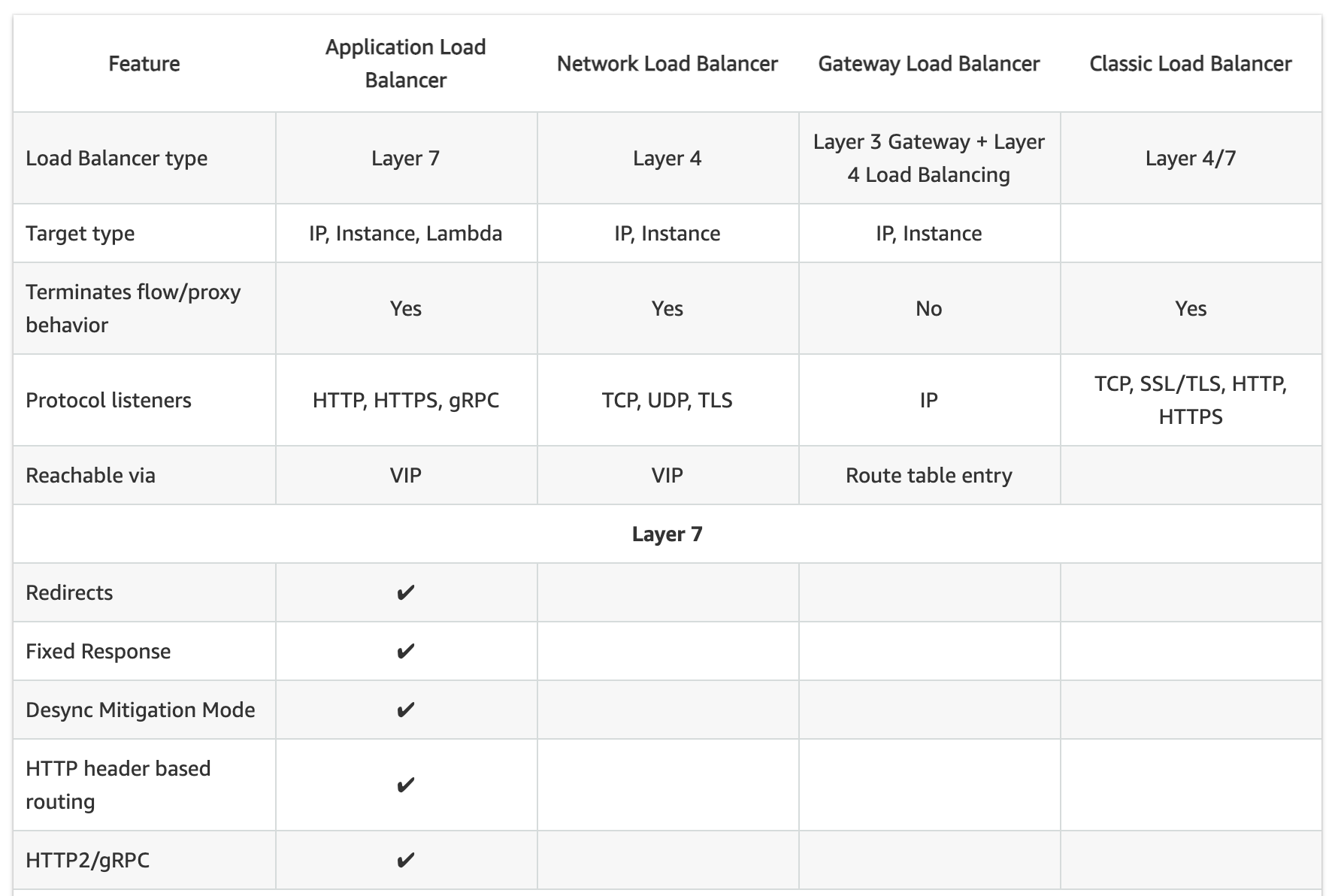
  • Elastic Load Balancing supports four types of load balancers:
    • Classic Load Balancer – CLB (Previous Generation)
    • Application Load Balancer – ALB
    • Network Load Balancer – NLB
    • Gateway Load Balancer – GWLB
  • While there is some overlap in the features, AWS does not maintain feature parity between the different types of load balancers.

⚠️ Classic Load Balancer – Previous Generation

Classic Load Balancer is the previous generation load balancer. AWS recommends using Application Load Balancer for Layer 7 and Network Load Balancer for Layer 4. CLB was originally designed for the EC2-Classic network, which was fully retired in August 2023. While CLB continues to function in VPC, no new features are being added to it.

Migration: Use the AWS Migration Wizard to migrate existing CLBs to ALB or NLB. See Migrate your Classic Load Balancer.

CLB vs ALB vs NLB General

Usage Patterns

  • Classic Load Balancer (Previous Generation)
    • provides basic load balancing across multiple EC2 instances and operates at both the request level and connection level.
    • is intended for applications that were built within the EC2-Classic network. EC2-Classic was fully retired in August 2023.
    • is ideal for simple load balancing of traffic across multiple EC2 instances.
    • AWS recommends migrating to ALB or NLB for all new workloads.
  • Application Load Balancer
    • is ideal for microservices or container-based architectures where there is a need to route traffic to multiple services or load balance across multiple ports on the same EC2 instance.
    • operates at the request level (layer 7), routing traffic to targets – EC2 instances, containers, IP addresses, and Lambda functions based on the content of the request.
    • is ideal for advanced load balancing of HTTP and HTTPS traffic, and provides advanced request routing targeted at delivery of modern application architectures, including microservices and container-based applications.
    • simplifies and improves the security of the application, by ensuring that the latest SSL/TLS ciphers and protocols are used at all times.
    • supports Mutual TLS (mTLS) authentication to verify client certificate-based identities.
    • supports native JWT (JSON Web Token) verification for secure service-to-service authentication.
  • Network Load Balancer
    • operates at the connection level (Layer 4), routing connections to targets – EC2 instances, microservices, and containers – within VPC based on IP protocol data.
    • is ideal for load balancing of TCP, UDP, TLS, and QUIC traffic.
    • is capable of handling millions of requests per second while maintaining ultra-low latencies.
    • is optimized to handle sudden and volatile traffic patterns while using a single static IP address per AZ
    • is integrated with other popular AWS services such as Auto Scaling, ECS, CloudFormation, and AWS Certificate Manager (ACM).
    • now supports security groups (since August 2023) for centralized access control.
    • supports QUIC protocol in passthrough mode (since November 2025) for low-latency mobile and real-time applications.
  • Gateway Load Balancer
    • operates at Layer 3 (network layer), providing a transparent network gateway and distributing traffic to virtual appliances.
    • is ideal for deploying, scaling, and managing third-party virtual appliances such as firewalls, intrusion detection/prevention systems (IDS/IPS), and deep packet inspection systems.
    • combines a transparent network gateway (single entry and exit point for all traffic) with load balancing of virtual appliances.
    • uses the GENEVE protocol on port 6081 to exchange traffic with registered virtual appliance instances.
    • maintains flow stickiness using 5-tuple (default), 3-tuple, or 2-tuple.
  • AWS recommends using Application Load Balancer for Layer 7 and Network Load Balancer for Layer 4 when using VPC.

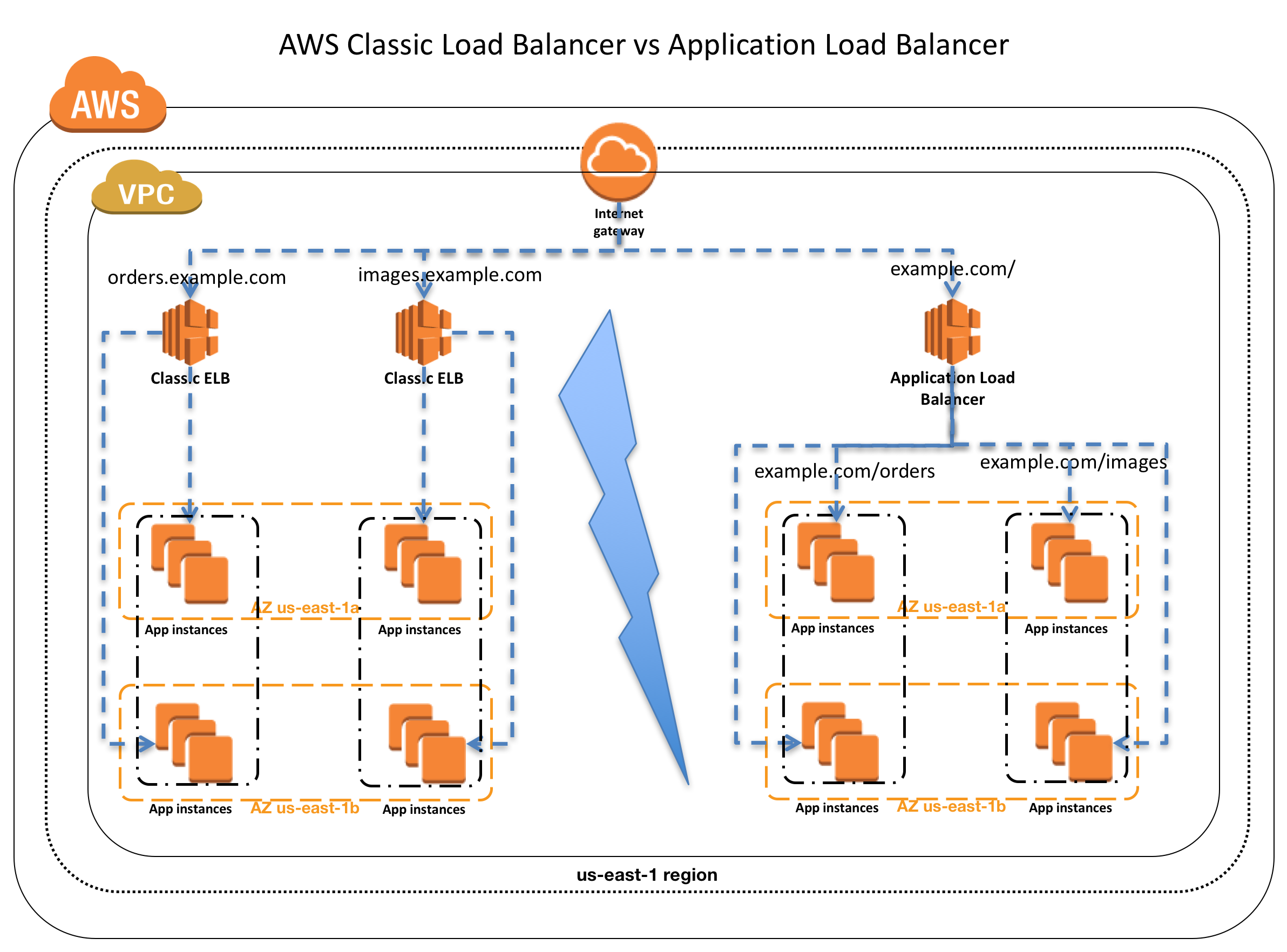
AWS ELB Classic Load Balancer vs Application Load Balancer
Supported Protocols

  • Classic ELB operates at layer 4 and supports HTTP, HTTPS, TCP, SSL
  • ALB operates at layer 7 and supports HTTP, HTTPS, HTTP/2, gRPC, WebSockets
  • NLB operates at the connection level (Layer 4) and supports TCP, UDP, TLS, QUIC, TCP_QUIC
  • GWLB operates at Layer 3 and listens for all IP packets across all ports

Load Balancing to Multiple Ports on the same instance

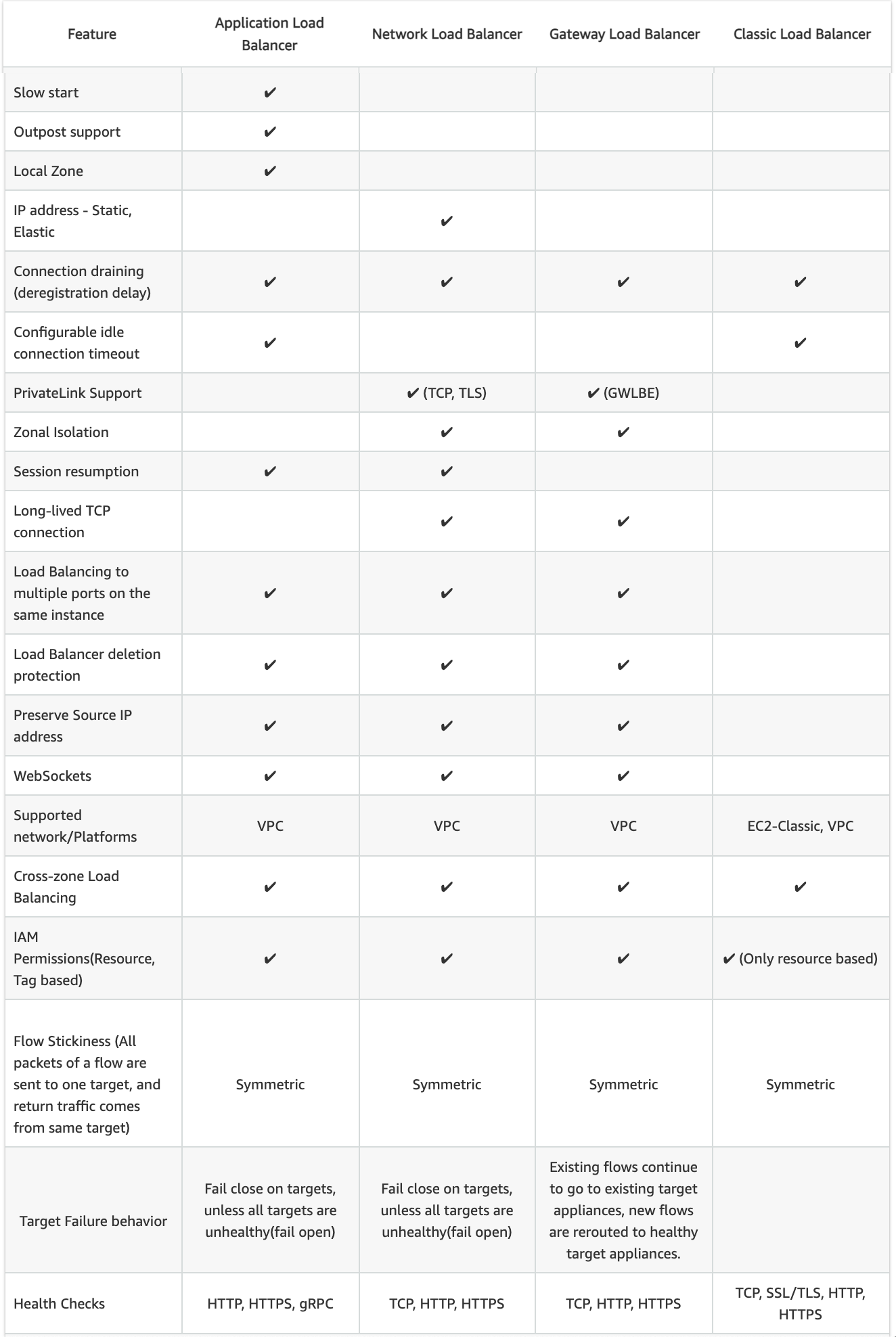
  • ALB, NLB, and GWLB support Load Balancing to multiple ports on the same instance
  • CLB does not support load balancing to multiple ports on the same instance

Host-based Routing & Path-based Routing

  • Host-based routing use host conditions to define rules that forward requests to different target groups based on the hostname in the host header. This enables ALB to support multiple domains using a single load balancer.
  • Path-based routing use path conditions to define rules that forward requests to different target groups based on the URL in the request. Each path condition has one path pattern. If the URL in a request matches the path pattern in a listener rule exactly, the request is routed using that rule.
  • Only ALB supports Host-based & Path-based routing.

URL and Host Header Rewrite (ALB – New 2025)

  • ALB now supports URL and Host Header rewrite capabilities (October 2025).
  • Enables modification of request URLs and Host Headers using regex-based pattern matching before routing requests to targets.
  • Useful for URL normalization, path rewriting, and host header transformation without application code changes.
  • Only ALB supports URL and Host Header Rewrite.

CLB vs ALB vs NLB Common configurations and Features

Slow Start

  • By default, a target starts to receive its full share of requests as soon as it is registered with a target group and passes an initial health check.
  • Using slow start mode gives targets time to warm up before the load balancer sends them a full share of requests.
  • Only ALB supports slow start mode

Target Optimizer (ALB – New 2025)

  • ALB Target Optimizer (November 2025) allows you to enforce a maximum number of concurrent requests on a target.
  • Uses an agent installed on each target that tracks concurrent requests and signals the ALB when capacity is available.
  • Enables high-efficiency load balanced applications while maintaining low latency and high availability.
  • Returns 503 errors during overload rather than overwhelming targets.
  • Only ALB supports Target Optimizer.

Static IP and Elastic IP Address

  • NLB automatically provides a static IP per AZ (subnet) that can be used by applications as the front-end IP of the load balancer.
  • NLB also allows the option to assign an Elastic IP per AZ (subnet) thereby providing your own fixed IP.
  • Classic ELB, ALB, and GWLB do not support Static and Elastic IP address

Connection Draining OR Deregistration Delay

  • Connection draining enables the load balancer to complete in-flight requests made to instances that are de-registering or unhealthy.
  • All Load Balancer types (CLB, ALB, NLB, GWLB) support connection draining/deregistration delay.

Idle Connection Timeout

  • Idle Connection Timeout helps specify a time period, which ELB uses to close the connection if no data has been sent or received by the time that the idle timeout period elapses
  • Can be configured for CLB & ALB (default 60 seconds)
  • Cannot be configured for NLB (350 secs for TCP, 120 secs for UDP)
  • GWLB supports configurable TCP idle timeout (60 to 6000 seconds, since September 2024)
  • It is recommended to enable HTTP keep-alive in the web server settings for the EC2 instances, thus making the ELB reuse the backend connections until the keep-alive timeout expires.

PrivateLink Support

  • CLB and ALB do not support PrivateLink
  • NLB supports PrivateLink (TCP, TLS, UDP)
  • GWLB supports PrivateLink via Gateway Load Balancer Endpoints (GWLBE)

Zonal Isolation

  • NLB and GWLB support Zonal Isolation which supports application architectures in a single zone. It automatically fails over to other healthy AZs, if something fails in an AZ
  • CLB and ALB do not support Zonal Isolation.
  • NLB supports Zonal DNS Affinity (since October 2023), allowing clients to resolve the load balancer DNS to an IP in their same AZ.

Deletion Protection

  • ALB, NLB, and GWLB support Deletion Protection, wherein a load balancer can’t be deleted if deletion protection is enabled
  • CLB does not support deletion protection.

Preserve Source IP address

  • As the ELB intercepts the traffic between the client and the back-end servers, the back-end server does not know the IP address, Protocol, and the Port used between the Client and the Load balancer.
  • Classic ELB (HTTP/HTTPS) and ALB do not preserve the client-side source IP. It needs to be retrieved using X-Forward-XXX.
    • X-Forwarded-For request header to help back-end servers identify the IP address of a client when you use an HTTP or HTTPS load balancer.
    • X-Forwarded-Proto request header to help back-end servers identify the protocol (HTTP/S) that a client used to connect to the server
    • X-Forwarded-Port request header to help back-end servers identify the port that an HTTP or HTTPS load balancer uses to connect to the client.
  • CLB (SSL/TLS) uses Proxy Protocol Version 1 and NLB uses Proxy Protocol Version 2 to provide the information.
  • NLB preserves the client-side source IP or needs Proxy Protocol allowing the back-end to see the IP address of the client.
    • If targets are registered by instance ID or ECS tasks, the source IP addresses of the clients are preserved and provided to the applications.
    • If targets are registered by IP address
      • for TCP & TLS, the source IP addresses are the private IP addresses of the load balancer nodes. Use Proxy Protocol.
      • for UDP & TCP_UDP, it is enabled by default and the source IP addresses of the clients are preserved.
  • GWLB preserves the source IP address as it operates as a transparent bump-in-the-wire.

Health Checks

  • All Load Balancer types support Health checks to determine if the instance is healthy or unhealthy
  • ALB provides health check improvements that allow detailed error codes from 200-399 to be configured
  • ALB supports HTTP, HTTPS, and gRPC health checks
  • NLB and GWLB support TCP, HTTP, and HTTPS health checks
  • CLB supports TCP, SSL/TLS, HTTP, and HTTPS health checks

Security Groups

  • ALB, NLB, and CLB support security groups
  • NLB added security group support in August 2023, enabling centralized access control and inbound rule enforcement
  • GWLB does not support security groups
  • Note: NLB security groups must be associated at creation time; they cannot be added to an existing NLB that was created without them.

Supported Platforms

  • Classic ELB supports both EC2-Classic and EC2-VPC — EC2-Classic was fully retired in August 2023. All load balancers now operate in VPC only.
  • ALB, NLB, and GWLB support only EC2-VPC.
  • CLB now effectively operates only in VPC (EC2-Classic no longer exists).

WebSockets

  • CLB does not support WebSockets
  • ALB, NLB, and GWLB support WebSockets

Cross-zone Load Balancing

  • By default, Load Balancer will distribute requests evenly across its enabled AZs, irrespective of the instances it hosts.
  • Cross-zone Load Balancing help distribute incoming requests evenly across all instances in its enabled AZs.
  • CLB → Cross Zone load balancing is disabled, by default, and can be enabled and free of charge.
  • ALB → Cross Zone load balancing is always enabled at the load balancer level, but can be turned off at the target group level (since November 2022). Free of charge.
  • NLB → Cross Zone load balancing is disabled, by default, and can be enabled but is charged for inter-az data transfer.
  • GWLB → Cross Zone load balancing is disabled, by default, and can be enabled.
  • Zonal Shift & Autoshift: Both ALB and NLB (with cross-zone enabled) now support zonal shift and zonal autoshift (2024) to move traffic away from an impaired AZ.

Sticky Sessions (Cookies)

  • Sticky Sessions (Session Affinity) enables the load balancer to bind a user’s session to a specific instance, which ensures that all requests from the user during the session are sent to the same instance
  • CLB, ALB, and NLB support sticky sessions to maintain session affinity
  • CLB and ALB maintain session stickiness using cookies.
  • NLB supports sticky sessions using a built-in 5-tuple hash table to maintain stickiness across backend servers.
  • NLB idle timeout for TCP connections is 350 seconds. Once the timeout is reached or the session is terminated, the NLB will forget the stickiness and incoming packets will be considered as a new flow and could be load balanced to a new target.
  • NLB QUIC protocol uses QUIC Connection IDs for session stickiness, which is resilient to client IP/NAT changes.

CLB vs ALB vs NLB Security

SSL Termination/Offloading

  • SSL Termination helps decrypt requests from clients before sending them to targets and hence reducing the load. SSL certificate must be installed on the load balancer.
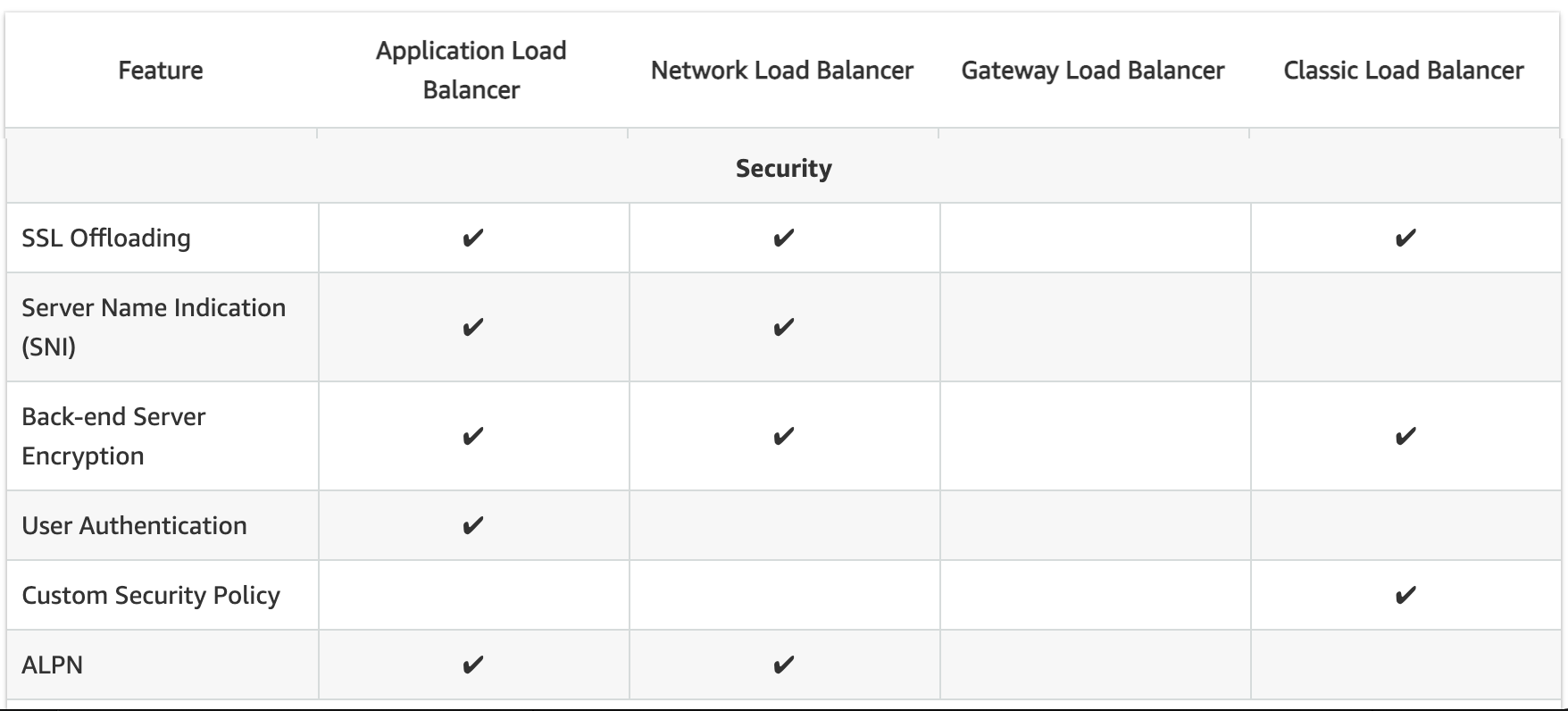
  • CLB, ALB, and NLB support SSL Termination.
  • GWLB does not support SSL offloading (operates at Layer 3).
  • ALB and NLB now support Post-Quantum Key Exchange for TLS (November 2025), using hybrid post-quantum key agreement with ML-KEM algorithm for quantum-resistant encryption.

Mutual TLS (mTLS) Authentication (ALB – New 2023)

  • Mutual TLS extends standard TLS by requiring clients to present X.509 certificates for authentication.
  • ALB can authenticate client certificates from third-party Certificate Authorities or AWS Private Certificate Authority (PCA).
  • Supports certificate revocation checks to restrict access for compromised certificates.
  • Offloads client authentication to the load balancer, eliminating the need for custom authentication in applications.
  • Only ALB supports Mutual TLS authentication.

JWT Verification (ALB – New 2025)

  • ALB now supports native JSON Web Token (JWT) verification (November 2025) for secure service-to-service (S2S) or machine-to-machine (M2M) communications.
  • Validates token signatures, expiration times, and claims without requiring application code changes.
  • Useful for OAuth 2.0 client credentials flow.
  • Only ALB supports native JWT verification.

Server Name Indication

  • CLB only supports a single certificate and does not support SNI
  • ALB and NLB support multiple certificates and use SNI to serve multiple secure websites using a single TLS listener.
    • If the hostname provided by a client matches a single certificate in the certificate list, the load balancer selects this certificate.
    • If a hostname provided by a client matches multiple certificates in the certificate list, the load balancer selects the best certificate that the client can support.

Back-end Server Authentication

  • Back-end Server Authentication enables authentication of the instances.
  • Load balancer communicates with an instance only if the public key that the instance presents to the load balancer matches a public key in the authentication policy for the load balancer.
  • Classic Load Balancer supports Back-end Server Authentication
  • ALB does not support Back-end Server Authentication

Capacity Unit Reservation (New 2024)

  • ALB and NLB support Load Balancer Capacity Unit (LCU) Reservation (November 2024).
  • Allows proactively setting a minimum capacity for the load balancer to prepare for planned traffic spikes.
  • Complements existing auto-scaling, useful for product launches, sales events, or traffic migrations.
  • GWLB added LCU Reservation support in April 2025.
  • ALB, NLB, and GWLB support LCU Reservation.
  • CLB does not support LCU Reservation.

Weighted Target Groups (NLB – New 2025)

  • NLB now supports weighted target groups (November 2025).
  • Allows distributing traffic across multiple target groups with configurable static weights.
  • Enables blue/green and canary deployment strategies with zero downtime without needing multiple load balancers.
  • ALB has long supported weighted target groups via listener rules; NLB now supports this natively.

CloudWatch Metrics

  • All Load Balancer types integrate with CloudWatch to provide metrics, with ALB providing additional metrics
  • ALB and CLB report request counts, error counts, error types, and request latency
  • NLB and GWLB report Active Flow Count, New Flow Count, and Processed Bytes

Access Logs

  • Access logs capture detailed information about requests sent to the load balancer. Each log contains information such as request received time, client’s IP address, latencies, request paths, and server responses
  • All Load Balancer types provide access logs, with ALB providing additional attributes

Gateway Load Balancer (GWLB)

  • Operates at Layer 3 (network layer) as a transparent network gateway combined with load balancing.
  • Designed for deploying, scaling, and managing third-party virtual appliances (firewalls, IDS/IPS, deep packet inspection).
  • Provides a single entry and exit point for all traffic, distributing it to virtual appliances while scaling based on demand.
  • Uses GENEVE encapsulation protocol on port 6081.
  • Supports 5-tuple (default), 3-tuple, or 2-tuple flow stickiness.
  • Accessible via VPC route table entries (not via VIP like ALB/NLB).
  • Target types: IP and Instance.
  • Supports cross-zone load balancing, deletion protection, and connection draining.
  • Supports configurable TCP idle timeout (60–6000 seconds) since September 2024.
  • Supports LCU Reservation since April 2025.
  • Does not support: SSL offloading, security groups, SNI, static/elastic IP, or slow start.

AWS Certification Exam Practice Questions

  • Questions are collected from Internet and the answers are marked as per my knowledge and understanding (which might differ with yours).
  • AWS services are updated everyday and both the answers and questions might be outdated soon, so research accordingly.
  • AWS exam questions are not updated to keep up the pace with AWS updates, so even if the underlying feature has changed the question might not be updated
  • Open to further feedback, discussion and correction.
  1. A company wants to use load balancer for their application. However, the company wants to forward the requests without any header modification. What service should the company use?
    1. Classic Load Balancer
    2. Network Load Balancer
    3. Application Load Balancer
    4. Use Route 53
  2. A Solutions Architect is building an Amazon ECS-based web application that requires that headers are not modified when being forwarded to Amazon ECS. Which load balancer should the Architect use?
    1. Application Load Balancer
    2. Network Load Balancer
    3. A virtual load balancer appliance from AWS marketplace
    4. Classic Load Balancer
  3. An application tier currently hosts two web services on the same set of instances, listening on different ports. Which AWS service should a solutions architect use to route traffic to the service based on the incoming request?
    1. AWS Application Load Balancer
    2. Amazon CloudFront
    3. Amazon Route 53
    4. AWS Classic Load Balancer
  4. A Solutions Architect needs to deploy an HTTP/HTTPS service on Amazon EC2 instances with support for WebSockets using load balancers. How can the Architect meet these requirements?
    1. Configure a Network Load balancer.
    2. Configure an Application Load Balancer.
    3. Configure a Classic Load Balancer.
    4. Configure a Layer-4 Load Balancer.
  5. A company is hosting an application in AWS for third party access. The third party needs to whitelist the application based on the IP. Which AWS service can the company use in the whitelisting of the IP address?
    1. AWS Application Load Balancer
    2. AWS Classic Load balancer
    3. AWS Network Load Balancer
    4. AWS Route 53
  6. A company needs to deploy inline virtual firewall appliances to inspect all traffic entering and leaving their VPC. The solution must scale automatically with traffic. Which load balancer type should they use?
    1. Application Load Balancer
    2. Network Load Balancer
    3. Classic Load Balancer
    4. Gateway Load Balancer
  7. A solutions architect needs to implement mutual TLS authentication for an application behind a load balancer to verify client certificates. Which load balancer supports this natively?
    1. Application Load Balancer
    2. Network Load Balancer
    3. Classic Load Balancer
    4. Gateway Load Balancer
  8. A company wants to perform blue/green deployments with their Network Load Balancer by gradually shifting traffic between two target groups. Which NLB feature enables this?
    1. Path-based routing
    2. Slow start mode
    3. Weighted target groups
    4. Cross-zone load balancing
  9. An organization wants to prepare their Network Load Balancer for a planned marketing event that will cause a sudden spike in traffic. Which feature should they use?
    1. Cross-zone load balancing
    2. Load Balancer Capacity Unit (LCU) Reservation
    3. Target group health configuration
    4. Slow start mode
  10. A company running a mobile gaming application needs ultra-low latency load balancing with session stickiness that survives client IP changes due to mobile network roaming. Which protocol and load balancer combination best meets this need?
    1. ALB with cookie-based stickiness
    2. NLB with TCP 5-tuple stickiness
    3. NLB with QUIC protocol using Connection ID stickiness
    4. CLB with session cookies

Related Posts

References