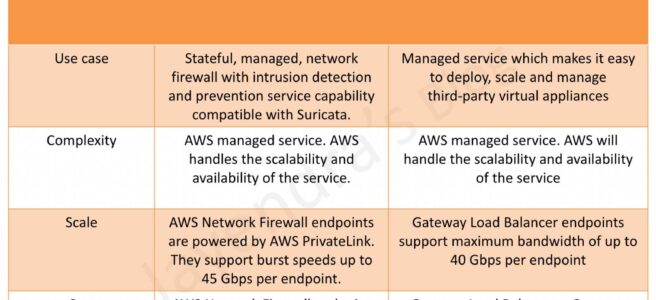
AWS Network Firewall vs Gateway Load Balancer

AWS Network Firewall vs Gateway Load Balancer
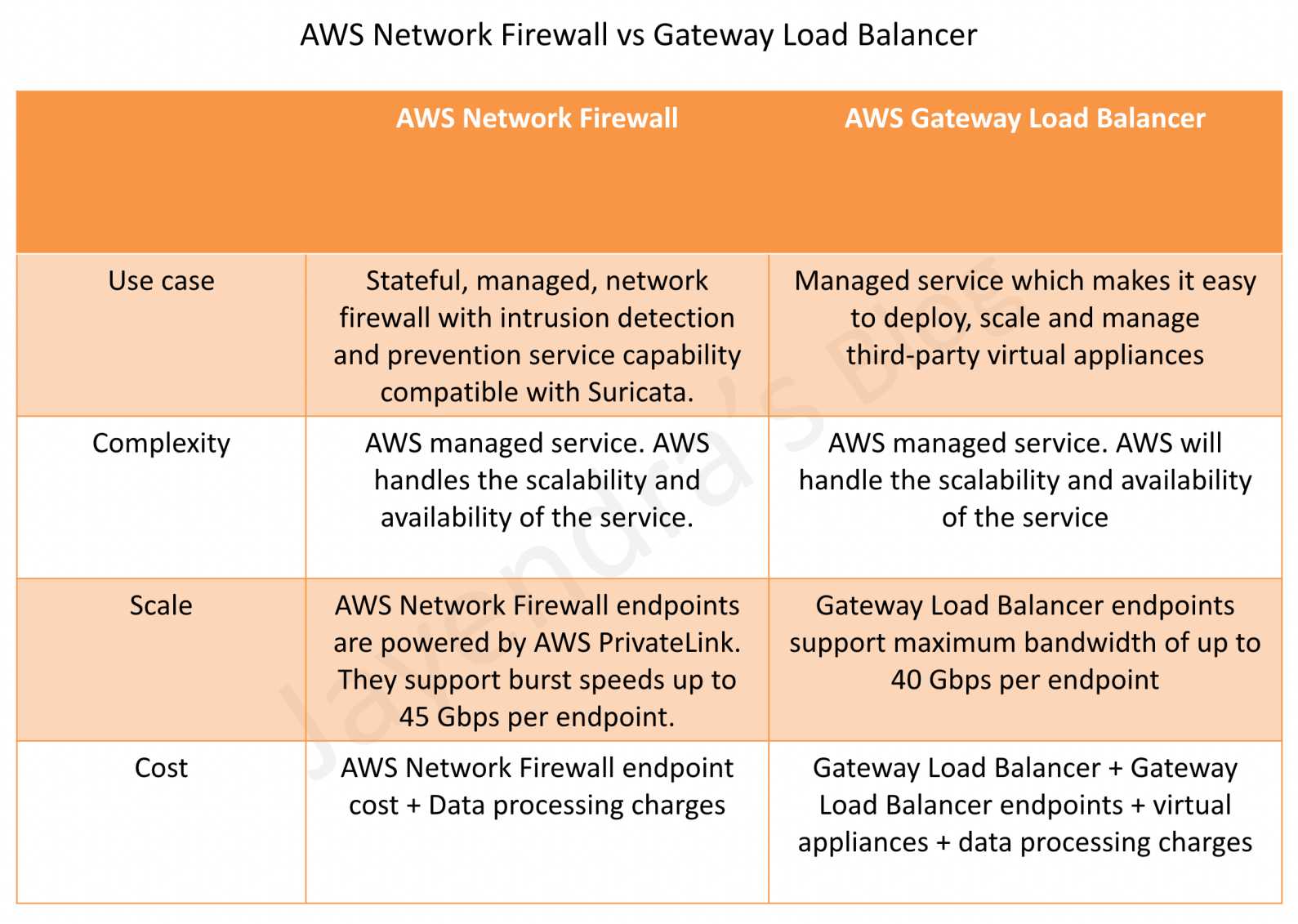
AWS Network Firewall vs Gateway Load Balancer

AWS Network Firewall vs Gateway Load Balancer

AWS Network Firewall

  • AWS Network Firewall is a stateful, fully managed, network firewall and intrusion detection and prevention service (IDS/IPS) for VPCs.
  • Network Firewall scales automatically with the network traffic, without the need for deploying and managing any infrastructure.
  • Network Firewall supports up to 100 Gbps of network traffic per firewall endpoint.
  • Network Firewall provides Layer 3-7 filtering with deep packet inspection (DPI), domain name filtering, and intrusion prevention capabilities compatible with Suricata rules.
  • Network Firewall supports native attachment to AWS Transit Gateway, eliminating the need for a separate inspection VPC and enabling capabilities such as flexible cost allocation through Transit Gateway metering policies.
  • AWS Network Firewall cost covers
    • an hourly rate for each firewall endpoint,
    • the amount of traffic and data processing charges, billed by the gigabyte, processed by the firewall endpoint,
    • an additional hourly rate per region and Availability Zone for Advanced Inspection (TLS inspection) with no additional data processing charges for Advanced Inspection traffic beyond standard processing charges,
    • standard AWS data transfer charges for all data transferred via the AWS Network Firewall,
    • hourly and data processing discounts on NAT Gateways that are service-chained with Network Firewall secondary endpoints.
  • Key features include:
    • TLS Inspection – decrypts and inspects encrypted outbound HTTPS traffic with SNI session holding for deeper visibility.
    • Flow Management – Flow Capture provides point-in-time snapshots of active flows for monitoring, and Flow Flush enables selective termination of specific connections.
    • Session State Replication – replicates flow state across firewall endpoints for high availability, ensuring seamless failover without session loss.
    • Transit Gateway Native Attachment – attaches directly to Transit Gateway, eliminating the inspection VPC and simplifying centralized architecture.
    • Managed Rules from AWS Marketplace – supports expanded managed rule groups from partners with up to 10 million domain name indicators and up to 1 million IP addresses per rule group.
    • Enhanced Console & Monitoring – includes PrivateLink Endpoint analysis, improved filtering for IP addresses and protocols, simplified policy management with point-and-click rule priority adjustment, and pre-configured fields for rule creation.

AWS Gateway Load Balancer

  • Gateway Load Balancer helps deploy, scale, and manage virtual appliances, such as firewalls, intrusion detection and prevention systems (IDS/IPS), and deep packet inspection systems.
  • is architected to handle millions of requests/second, volatile traffic patterns, and introduces extremely low latency.
  • Gateway Load Balancer operates at Layer 3 (Network Layer) of the OSI model and acts as a transparent network gateway (single entry and exit point for all traffic).
  • GWLB uses either a 2-tuple, 3-tuple, or 5-tuple hash to define a flow and routes all packets of a flow to one of its backend targets (flow stickiness).
  • Gateway Load Balancer endpoints (GWLBE) support maximum bandwidth of up to 100 Gbps per endpoint.
  • AWS Gateway Load Balancer cost covers
    • charges for each hour or partial hour that a GWLB is running,
    • the number of Gateway Load Balancer Capacity Units (GLCU) used by Gateway Load Balancer per hour.
    • GWLB uses Gateway Load Balancer Endpoint (GWLBE) to simplify how applications can securely exchange traffic with GWLB across VPC boundaries. GWLBE is priced and billed separately.
    • cost of running the third-party virtual appliances (EC2 instances) behind GWLB.
  • Key features include:
    • Configurable TCP Idle Timeout – allows configuring TCP idle timeout from 60 seconds to 6000 seconds (default 350 seconds), preventing interruption of long-lived traffic flows.
    • Target Failover – supports rebalancing existing flows to healthy targets when a target fails or deregisters, reducing failover time and enabling graceful appliance patching.
    • LCU Reservation – allows proactively setting a minimum bandwidth capacity for the load balancer, complementing auto-scaling for predictable traffic patterns.
    • Cross-Zone Load Balancing – by default, each GWLB in an AZ distributes traffic within the same AZ only. Enabling cross-zone distributes traffic across all registered healthy targets in all enabled AZs.
    • Health Check Improvements – configurable health check intervals, HTTP response codes for target health determination, and consecutive response thresholds.

AWS Network Firewall vs. Gateway Load Balancer – Key Differences

Criteria AWS Network Firewall Gateway Load Balancer
Use Case Stateful, managed, network firewall with IDS/IPS compatible with Suricata Managed service for deploying, scaling and managing third-party virtual appliances
Complexity Fully AWS managed – handles scalability, availability, and patching AWS manages GWLB scalability and availability; customer manages virtual appliance scaling and availability
Scale Supports up to 100 Gbps per firewall endpoint (powered by AWS PrivateLink) Supports up to 100 Gbps per endpoint
Cost Firewall endpoint hourly rate + data processing charges GWLB hourly rate + GLCU charges + GWLBE charges + virtual appliance costs
Appliance Choice AWS-managed only (Suricata-based rules engine) Any third-party appliance (Palo Alto, Fortinet, Check Point, etc.)
Rules/Policies Suricata-compatible rules, domain lists, IP sets, managed rule groups Depends on chosen third-party appliance capabilities
TLS Inspection Native TLS inspection with SNI session holding (built-in) Depends on third-party appliance capabilities
Transit Gateway Integration Native Transit Gateway attachment (no inspection VPC needed) Requires inspection VPC with GWLBE and TGW attachment with appliance mode enabled
High Availability Built-in session state replication across endpoints Customer configures target failover and appliance HA

When to Choose AWS Network Firewall

  • Want a fully managed solution without managing virtual appliances
  • Suricata-compatible rules meet security requirements
  • Need native TLS inspection for outbound HTTPS traffic
  • Want simplified centralized inspection with native Transit Gateway attachment
  • Prefer lower operational complexity and no EC2 instance management
  • Need built-in managed threat intelligence rules from AWS and Marketplace partners

When to Choose Gateway Load Balancer

  • Need specific third-party firewall capabilities (e.g., Palo Alto NGFW, Fortinet, Check Point)
  • Have existing investment in third-party security appliance policies and expertise
  • Require advanced features beyond what Suricata rules provide
  • Need to integrate multiple types of virtual appliances (IDS/IPS + DPI + custom inspection)
  • Want consistent security policies across cloud and on-premises using the same vendor

Key Architectural Considerations

  • Appliance mode should be enabled on Transit Gateway when doing east-west (VPC-to-VPC) inspection with either solution.
  • For multi-Region deployment, set up separate inspection in respective local Regions to avoid inter-Region dependencies and reduce data transfer costs.
  • Both solutions can be combined – use Network Firewall for standard north-south traffic and GWLB with third-party appliances for specialized deep inspection.
  • If GWLB cross-zone load balancing is enabled and all targets across all AZs are unhealthy, GWLB fails open (passes traffic without inspection).
  • Network Firewall with Transit Gateway native attachment eliminates the need for a separate inspection VPC, reducing cost and complexity.

AWS Certification Exam Practice Questions

  • Questions are collected from Internet and the answers are marked as per my knowledge and understanding (which might differ with yours).
  • AWS services are updated everyday and both the answers and questions might be outdated soon, so research accordingly.
  • AWS exam questions are not updated to keep up the pace with AWS updates, so even if the underlying feature has changed the question might not be updated
  • Open to further feedback, discussion and correction.
  1. A company needs to inspect all east-west traffic between VPCs in a multi-VPC architecture. They want a fully managed solution with minimal operational overhead and no need to manage EC2 instances. Which solution should they use?
    1. Deploy third-party firewalls on EC2 instances in each VPC
    2. Use AWS Network Firewall with native Transit Gateway attachment
    3. Deploy Gateway Load Balancer with third-party appliances in an inspection VPC
    4. Use VPC security groups and NACLs for all traffic filtering

    Answer: b – AWS Network Firewall with native Transit Gateway attachment provides fully managed east-west inspection without requiring a separate inspection VPC or managing virtual appliance instances.

  2. A company has an existing Palo Alto Networks firewall deployment on-premises and wants to maintain consistent security policies across their hybrid environment in AWS. Which solution is most appropriate?
    1. AWS Network Firewall with Suricata rules
    2. AWS WAF with custom rules
    3. Gateway Load Balancer with Palo Alto VM-Series instances
    4. VPC Network Access Analyzer

    Answer: c – GWLB enables deployment of the same third-party appliances used on-premises, maintaining consistent security policies across hybrid environments.

  3. A security team needs to inspect encrypted outbound HTTPS traffic from their VPCs to detect data exfiltration attempts. They want a managed service approach. Which feature should they use?
    1. Gateway Load Balancer with SSL termination
    2. AWS Network Firewall TLS Inspection with SNI session holding
    3. AWS WAF with HTTPS rules
    4. VPC Flow Logs with CloudWatch analysis

    Answer: b – AWS Network Firewall provides native TLS inspection that decrypts and re-encrypts outbound HTTPS traffic, with SNI session holding for deeper visibility into encrypted connections.

  4. A company uses Gateway Load Balancer with third-party firewall appliances. During maintenance, they need to patch the appliances without dropping existing connections. Which GWLB feature helps?
    1. Cross-zone load balancing
    2. Target Failover with Rebalance mode
    3. Configurable TCP idle timeout
    4. LCU Reservation

    Answer: b – Target Failover with Rebalance mode rehashes existing flows and sends them to healthy targets when a target is deregistered, enabling graceful appliance patching during maintenance.

  5. A network engineer needs to troubleshoot a suspected malicious connection that may be traversing their AWS Network Firewall. They want to view active flows without disrupting traffic. Which feature should they use?
    1. VPC Flow Logs
    2. AWS Network Firewall Flow Capture
    3. AWS Network Firewall Flow Flush
    4. CloudWatch Network Monitor

    Answer: b – Flow Capture provides point-in-time snapshots of active flows in the firewall’s state table for monitoring and troubleshooting without affecting traffic.

  6. An organization is evaluating the total cost of running network security inspection in AWS. They need both IDS/IPS and domain filtering capabilities. They don’t require third-party appliances. Which option is most cost-effective? (Select TWO considerations)
    1. AWS Network Firewall has lower total cost since it doesn’t require managing EC2 instances
    2. Gateway Load Balancer is cheaper because it only charges for GLCU usage
    3. AWS Network Firewall removed additional data processing charges for TLS inspection in 2026
    4. Gateway Load Balancer cost includes the virtual appliance EC2 instances and licensing
    5. Network Firewall charges for cross-zone data transfer

    Answer: a, c – Network Firewall avoids EC2 and third-party licensing costs. The 2026 pricing update removed additional data processing charges for Advanced Inspection (TLS), making it more cost-effective for inspection workloads.

References

AWS Network Firewall

AWS Network Firewall

AWS Network Firewall

  • AWS Network Firewall is stateful, fully managed, network firewall and intrusion detection and prevention service (IDS/IPS) for VPCs.
  • Network Firewall scales automatically with the network traffic, without the need for deploying and managing any infrastructure.
  • AWS Network Firewall
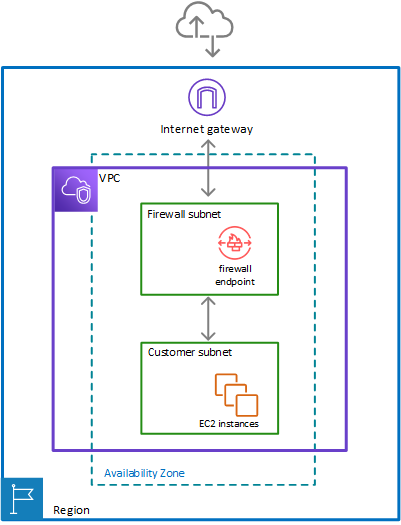
    • can filter traffic at the perimeter of the VPC. This includes filtering traffic going to and coming from an internet gateway, NAT gateway, or over VPN or AWS Direct Connect.
    • protects the subnets within the VPC by filtering traffic going between the subnets and locations outside of the VPC
    • flexible rules engine allows defining firewall rules that give fine-grained control over network traffic, such as blocking outbound Server Message Block (SMB) requests to prevent the spread of malicious activity.
    • supports importing rules already written in common open source rule formats as well as enables integrations with managed intelligence feeds sourced by AWS partners.
    • works together with AWS Firewall Manager to build policies based on AWS Network Firewall rules and then centrally apply those policies across the VPCs and accounts.
    • helps provide protection from common network threats.
    • can incorporate context from traffic flows, like tracking connections and protocol identification, to enforce policies such as preventing the VPCs from accessing domains using an unauthorized protocol.
    • supports intrusion prevention system (IPS) to provide active traffic flow inspection to help identify and block vulnerability exploits using signature-based detection.
    • uses the open source intrusion prevention system (IPS), Suricata, for stateful inspection and supports Suricata compatible rules.
    • supports web filtering that can stop traffic to known bad URLs and monitor fully qualified domain names.

AWS Network Firewall

AWS Network Firewall Latest Features (2024-2026)

TLS Inspection (Advanced Inspection)

  • AWS Network Firewall now supports TLS inspection capabilities through Advanced Inspection feature.
  • Enables decryption and re-encryption of HTTPS traffic for deep packet inspection of encrypted data.
  • Helps mitigate filter bypass attempts and identify security risks in encrypted traffic.
  • Supports both inbound and outbound TLS inspection configurations.
  • Requires ACM certificates for inbound traffic and ACM Private CA for outbound traffic.
  • Pricing Update (February 2026): AWS removed additional data processing charges for Advanced Inspection, making TLS inspection more cost-effective.

Web Category-Based Filtering (January 2026)

  • New capability for URL and Domain Category filtering using predefined content categories.
  • Enables identification and control of access to:
    • Generative AI (GenAI) services
    • Social media platforms
    • Streaming sites
    • Other web categories
  • Simplifies governance and compliance by allowing category-based rules instead of maintaining extensive URL lists.
  • Works with Suricata compatible rule strings and standard Network Firewall stateful rule groups.
  • When combined with TLS inspection, provides granular control over full URL path inspection.

Enhanced Integration with VPC Lattice

  • AWS Network Firewall now works in combination with Amazon VPC Lattice for comprehensive security architecture.
  • VPC Lattice provides identity-based access controls for HTTP/HTTPS service-to-service communication.
  • Combined approach allows:
    • Deep packet inspection via Network Firewall for traffic requiring malware detection and IPS/IDS
    • Identity-based routing via VPC Lattice for HTTP/HTTPS communications
    • Cost optimization by reducing Network Firewall processing for non-critical traffic

Pricing Improvements (February 2026)

  • NAT Gateway Discounts Extended: Hourly and data processing discounts now apply to both primary and secondary Network Firewall endpoints when service-chained with NAT Gateways.
  • Advanced Inspection Cost Reduction: Removed additional data processing charges ($0.001/GB to $0.009/GB) for TLS inspection in 13 AWS regions.
  • Multiple VPC Endpoint Support: Connect up to 50 VPCs per Availability Zone to a single Network Firewall, reducing operational complexity and costs.

AWS Network Firewall Components

  • Rule Group
    • Holds a reusable collection of criteria for inspecting traffic and for handling packets and traffic flows that match the inspection criteria.
    • Rule groups are either stateless or stateful.
    • Rules configuration includes 5-tuple and domain name filtering.
    • Enhanced with URL Category Filtering: Now supports predefined web categories for simplified governance.
  • Firewall policy
    • Defines a reusable set of stateless and stateful rule groups, along with some policy-level behaviour settings.
    • Firewall policy provides the network traffic filtering behaviour for a firewall.
    • A single firewall policy can be used in multiple firewalls.
    • TLS Inspection Configuration: Can include Advanced Inspection settings for encrypted traffic analysis.
  • Firewall
    • Connects the inspection rules in the firewall policy to the VPC that the rules protect.
    • Each firewall requires one firewall policy.
    • The firewall additionally defines settings like how to log information about the network traffic and the firewall’s stateful traffic filtering.
    • Multiple VPC Endpoints: Supports connecting multiple VPCs (up to 50 per AZ) to a single firewall instance.

Stateless and Stateful Rules Engines

AWS Network Firewall Stateless & Stateful Rules Engine

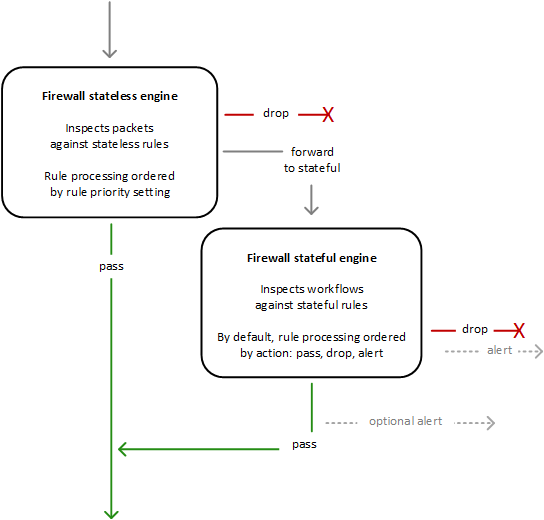
  • AWS Network Firewall uses two rules engines to inspect packets according to the rules that you provide in your firewall policy.
  • Stateless Rules Engine
    • First, the Stateless engine inspects the packet against the configured stateless rules.
    • Each packet inspection happens in isolation, without regard to factors such as the direction of traffic, or whether the packet is part of an existing, approved connection.
    • This engine prioritizes the speed of evaluation and it takes rules with standard 5-tuple connection criteria.
    • The engine processes the rules in the defined priority order and stops processing when it finds a match.
    • Network Firewall stateless rules are similar in behaviour and use to VPC network access control lists (ACLs).
    • Depending on the packet settings, the stateless inspection criteria, and the firewall policy settings, the stateless engine might
      • drop a packet,
      • pass it through to its destination, or
      • forward it to the stateful rules engine.
  • Stateful Rules Engine
    • Stateful engine inspects packets in the context of their traffic flow, using the configured stateful rules.
    • Packets are inspected in the context of their traffic flow.
    • Stateful rules consider traffic direction. The stateful rules engine might delay packet delivery in order to group packets for inspection.
    • By default, the stateful rules engine processes the rules in the order of their action setting, with pass rules processed first, then drop, and then alert. The engine stops processing when it finds a match.
    • The stateful engine either
      • drops packets or
      • passes them to their destination.
    • Stateful engine activities send flow and alert logs to the firewall’s logs if logging is configured.
    • Stateful engine sends alerts for dropped packets and can optionally send them for passed packets.
    • Stateful rules are similar in behaviour and use to VPC security groups.
    • By default, the stateful rules engine allows traffic to pass, while the security groups default is to deny traffic.
    • Enhanced with TLS Inspection: Can now decrypt and inspect encrypted traffic when Advanced Inspection is enabled.
    • URL Category Support: Supports filtering based on predefined web categories for improved governance.

AWS Network Firewall Use Cases and Best Practices

Modern Deployment Patterns

  • Hybrid Security Architecture: Combine Network Firewall with VPC Lattice for optimal security and cost efficiency.
  • Centralized Inspection: Use for traffic requiring deep packet inspection, malware detection, and IPS/IDS capabilities.
  • GenAI Governance: Implement category-based filtering to control access to AI services and ensure compliance.
  • Educational Institutions: Web filtering with TLS inspection for comprehensive content control.
  • Multi-VPC Architectures: Leverage multiple VPC endpoint capability to protect up to 50 VPCs per AZ cost-effectively.

Integration with AWS Services

  • AWS Transit Gateway: Simplified integration for centralized inspection architectures.
  • AWS Cloud WAN: Service insertion capabilities for global security inspection.
  • AWS Firewall Manager: Centralized policy management across multiple accounts and VPCs.
  • Amazon VPC Lattice: Combined approach for service-to-service communication security.

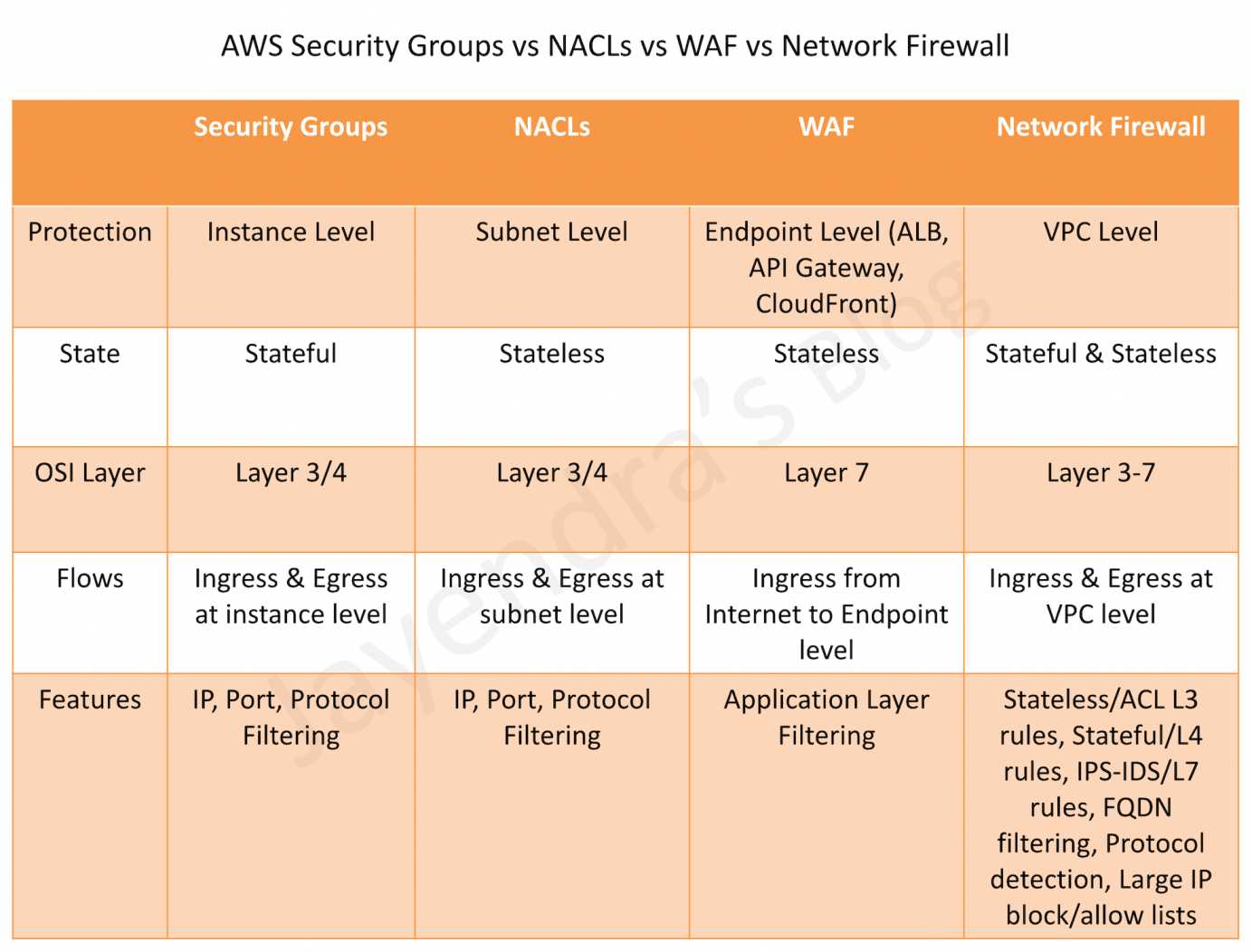
AWS Network Firewall vs WAF vs Security Groups vs NACLs

AWS Security Groups vs NACLs vs WAF vs Network Firewall

AWS Network Firewall vs Gateway Load Balancer

AWS Network Firewall vs Gateway Load Balancer

AWS Certification Exam Practice Questions

  • Questions are collected from Internet and the answers are marked as per my knowledge and understanding (which might differ with yours).
  • AWS services are updated everyday and both the answers and questions might be outdated soon, so research accordingly.
  • AWS exam questions are not updated to keep up the pace with AWS updates, so even if the underlying feature has changed the question might not be updated
  • Open to further feedback, discussion and correction.
  1. A company needs to inspect encrypted HTTPS traffic for malware detection in their VPC. Which AWS Network Firewall feature should they implement?
    • A. Stateful rule groups with domain filtering
    • B. Advanced Inspection with TLS inspection
    • C. Stateless rules with 5-tuple matching
    • D. URL category filtering

    Answer: B
    Advanced Inspection with TLS inspection enables decryption and re-encryption of HTTPS traffic for deep packet inspection of encrypted data, allowing malware detection in encrypted traffic.

  2. An organization wants to block access to social media and streaming platforms across their AWS environment. Which Network Firewall feature provides the most efficient solution?
    • A. Creating individual domain-based stateful rules for each platform
    • B. Using URL category-based filtering with predefined categories
    • C. Implementing custom Suricata rules for each service
    • D. Configuring stateless rules with IP address ranges

    Answer: B
    URL category-based filtering allows blocking entire categories like social media and streaming platforms using predefined categories, which is more efficient than maintaining individual rules.

  3. A company has 40 VPCs that need firewall protection. What is the most cost-effective approach using AWS Network Firewall?
    • A. Deploy a separate Network Firewall in each VPC
    • B. Use a single Network Firewall with multiple VPC endpoints (up to 50 per AZ)
    • C. Implement AWS WAF for all VPCs
    • D. Use VPC security groups only

    Answer: B
    Network Firewall supports connecting up to 50 VPCs per Availability Zone to a single firewall instance, reducing operational complexity and costs compared to individual firewalls.

  4. Which combination provides the most comprehensive and cost-effective security architecture for service-to-service communication?
    • A. AWS Network Firewall only for all traffic
    • B. Amazon VPC Lattice only for all communications
    • C. AWS Network Firewall for deep packet inspection and VPC Lattice for HTTP/HTTPS identity-based controls
    • D. AWS WAF and Application Load Balancer

    Answer: C
    The combined approach uses Network Firewall for traffic requiring deep packet inspection and VPC Lattice for HTTP/HTTPS service communications with identity-based controls, optimizing both security and cost.

  5. A financial institution needs to control access to GenAI services while maintaining compliance. Which AWS Network Firewall feature is most appropriate?
    • A. Stateless rules with port-based filtering
    • B. Traditional domain-based stateful rules
    • C. URL category filtering with GenAI category controls
    • D. IPS/IDS signature-based detection only

    Answer: C
    URL category filtering includes predefined GenAI categories, allowing institutions to easily control access to AI services while meeting compliance requirements.

References