AWS SQS Standard Queue
- SQS offers standard as the default queue type.
- Standard queues support at-least-once message delivery. However, occasionally (because of the highly distributed architecture that allows nearly unlimited throughput), more than one copy of a message might be delivered out of order.
- Standard queues support a nearly unlimited number of API calls per second, per API action (
SendMessage,ReceiveMessage, orDeleteMessage). - Standard queues provide best-effort ordering which ensures that messages are generally delivered in the same order as they’re sent.
- SQS processes over 100 million messages per second at peak times, making it a fundamental building block for microservices, distributed systems, and serverless applications.
- All SQS queues are encrypted at rest by default using SQS-owned encryption keys (SSE-SQS) since September 2022.
SQS Standard Queue Features
Redundant infrastructure
- offers reliable and scalable hosted queues for storing messages
- is engineered to always be available and deliver messages
- provides the ability to store messages in a fail safe queue
- highly concurrent access to messages
At-Least-Once delivery
- ensures delivery of each message at least once
- stores copies of the messages on multiple servers for redundancy and high availability
- might deliver duplicate copy of messages, if the servers storing a copy of a message is unavailable when you receive or delete the message and the copy of the message is not deleted on that unavailable server
- Applications should be designed to be idempotent with the ability to handle duplicate messages and not be adversely affected if it processes the same message more than once
Message Attributes
- SQS messages can contain up to 10 metadata attributes.
- take the form of name-type-value triples
- can be used to separate the body of a message from the metadata that describes it.
- helps process and store information with greater speed and efficiency because the applications don’t have to inspect an entire message before understanding how to process it
Message Sampling
- behavior of retrieving messages from the queue depends on whether short (standard) polling, the default behavior, or long polling is used
- With short polling,
- samples only a subset of the servers (based on a weighted random distribution) and returns messages from just those servers.
- A receive request might not return all the messages in the queue. But a subsequent receive request would return the message
- With Long polling,
- request persists for the time specified and returns as soon as the message is available thereby reducing costs and time the message has to dwell in the queue
- long polling doesn’t return a response until a message arrives in the message queue, or the long poll times out.
- makes it inexpensive to retrieve messages from the SQS queue as soon as the messages are available.
- might help reduce the cost of using SQS, as the number of empty receives are reduced
Batching
- SQS allows send, receive and delete batching, which helps club up to 10 messages in a single batch while charging price for a single message
- helps lower cost and also increases the throughput
Configurable settings per queue
- All queues don’t have to be alike
Order
- makes a best effort to preserve order in messages does not guarantee first in, first out delivery of messages
- can be handled by placing sequencing information within the message and performing the ordering on the client side
Loose coupling
- removes tight coupling between components
- provides the ability to move data between distributed components of the applications that perform different tasks without losing messages or requiring each component to be always available
Multiple writers and readers
- supports multiple readers and writers interacting with the same queue as the same time
- locks the message during processing, using Visibility Timeout, preventing it to be processed by any other consumer
Variable message size
- supports message in any format up to 256KB of text.
- messages larger than 256 KB can be managed using the S3 or DynamoDB, with SQS holding a pointer to the S3 object
Access Control
- Access can be controlled for who can produce and consume messages to each queue
- Supports Attribute-Based Access Control (ABAC) using queue tags for flexible and scalable permissions management
- ABAC allows defining fine-grained permissions based on resource tags reflecting organizational structures (e.g., department, environment, team)
Delay Queues
- Delay queue allows the user to set a default delay on a queue such that delivery of all messages enqueued is postponed for that time duration
Dead Letter Queues
- Dead letter queue is a queue for messages that were not able to be processed after a maximum number of attempts
- useful to isolate messages that can’t be processed for later analysis.
- DLQ Redrive allows moving messages from a DLQ back to the source queue or a custom destination queue for reprocessing
- DLQ Redrive can be managed programmatically using APIs:
StartMessageMoveTask,ListMessageMoveTasks, andCancelMessageMoveTask - DLQ Redrive is supported for both standard and FIFO queues
Server-Side Encryption
- All SQS queues are encrypted at rest by default using SQS-owned encryption keys (SSE-SQS) with AES-256 encryption
- Optionally, queues can use AWS KMS keys (SSE-KMS) for encryption with customer-managed keys
- For SSE-KMS queues, only
kms:GenerateDataKeypermission is required forSendMessage(kms:Decrypt no longer needed for sending) kms:Decryptpermission is still required forReceiveMessage- SSE-SQS encryption is provided at no additional charge
PCI Compliance
- supports the processing, storage, and transmission of credit card data by a merchant or service provider, and has been validated as being PCI-DSS (Payment Card Industry – Data Security Standard) compliant
SQS Fair Queues (Standard Queues)
- Fair Queues is a feature of standard queues that automatically mitigates noisy-neighbor impact in multi-tenant queues (launched July 2025)
- Addresses scenarios where one tenant creates a message backlog that increases dwell time for all other tenants
- SQS detects noisy neighbors by monitoring message distribution among tenants during processing (in-flight state)
- When a tenant has disproportionately large number of in-flight messages, SQS identifies it as a noisy neighbor and prioritizes message delivery for other tenants
- Does not limit the consumption rate per tenant — allows consumers to receive messages from noisy neighbor tenants when there is spare consumer capacity
- Supports virtually unlimited throughput with no limits on the number of tenants
How to Use Fair Queues
- Message producers set a
MessageGroupIdon outgoing messages as a tenant identifier - Fairness is applied automatically to all standard queues for messages with the
MessageGroupIdproperty - Does NOT require any consumer code changes
- No impact on API latency and no throughput limitations
- Note:
MessageGroupIdon standard queues (for fair queues) does NOT enforce message ordering like it does on FIFO queues — it is used only as a tenant identifier
When to Use Fair Queues
- The queue is multi-tenant (carries messages for multiple logical entities)
- The queue is high-throughput (at low throughput, bursts rarely create backlogs)
- Dwell time is part of the application’s quality of service
Fair Queues CloudWatch Metrics
- Provides additional CloudWatch metrics for monitoring noisy-neighbor mitigation
ApproximateNumberOfMessagesVisibleInQuietGroups— shows backlog for non-noisy tenants- Allows comparing quiet group metrics with standard queue-level metrics to identify impact isolation
SQS Performance and Networking
JSON Protocol
- SQS supports the AWS JSON protocol for API requests (available since November 2023)
- Reduces end-to-end message processing latency by up to 23% compared to the legacy query protocol
- Reduces application client-side CPU and memory usage
- Enabled automatically by updating to supported AWS SDK versions
Dual-Stack (IPv4 and IPv6) Endpoints
- SQS supports dual-stack endpoints allowing queues to be accessed via both IPv4 and IPv6 (launched April 2025)
- Enables applications on IPv6-only networks to interact with SQS
- Also available on VPC endpoints (July 2025) for gradual IPv4 to IPv6 transitions
- Dual-stack endpoint format:
sqs.{region}.amazonaws.com
CloudTrail Integration
- CloudTrail integration is available for all Amazon SQS APIs (January 2025)
- Provides comprehensive audit logging for all SQS operations
SQS Integration with AWS Lambda
- SQS queues can trigger Lambda functions using Event Source Mappings (ESM)
- Lambda polls the queue and invokes the function with batches of messages
- Provisioned Mode for SQS ESM (launched November 2025):
- Provides dedicated event polling resources for the SQS event source mapping
- Offers 3x faster scaling — up to 1000 event pollers per concurrent executions per minute
- Provides up to 16x higher concurrency — up to 20,000 concurrent processing capacity
- Allows defining minimum and maximum limits for provisioned event pollers
- Handles sudden traffic spikes more effectively through responsive autoscaling
- The Lambda function and the SQS queue must be in the same AWS Region (can be in different accounts)
SQS Security Features
- Encryption at Rest: All queues encrypted by default with SSE-SQS (AES-256); optional SSE-KMS for customer-managed keys
- Encryption in Transit: All API requests use HTTPS (TLS)
- IAM Policies: Identity-based and resource-based policies for access control
- ABAC: Attribute-based access control using queue tags
- VPC Endpoints: Access SQS from within a VPC without traversing the internet; supports VPC endpoint policies
- SQSUnlockQueuePolicy: AWS-managed policy to unlock a queue with a misconfigured policy that denies all principals (November 2024)
- AWS X-Ray: Troubleshoot messages passing through queues using trace headers
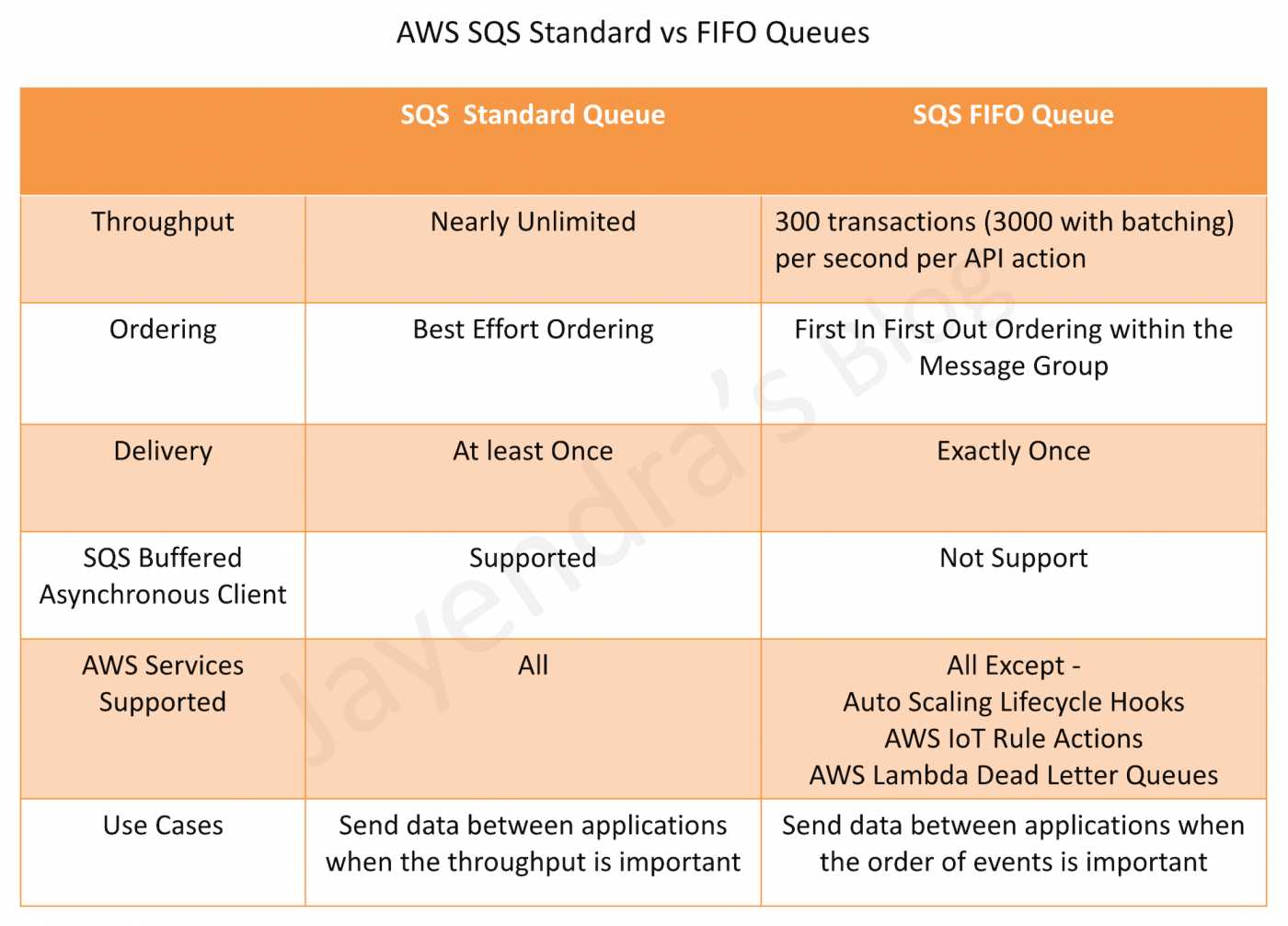
SQS Standard Queues vs SQS FIFO Queues
AWS Certification Exam Practice Questions
- Questions are collected from Internet and the answers are marked as per my knowledge and understanding (which might differ with yours).
- AWS services are updated everyday and both the answers and questions might be outdated soon, so research accordingly.
- AWS exam questions are not updated to keep up the pace with AWS updates, so even if the underlying feature has changed the question might not be updated
- Open to further feedback, discussion and correction.
- A company has a multi-tenant SaaS application where multiple customers send messages to a shared SQS standard queue. During peak hours, one customer generates significantly more messages than others, causing increased message dwell time for all customers. Which SQS feature should the architect recommend to mitigate this issue?
- Use FIFO queues with message group IDs
- Enable fair queues with MessageGroupId as tenant identifier
- Create separate queues for each customer
- Increase the visibility timeout
Show Answer
Answer: b – SQS Fair Queues automatically mitigate noisy-neighbor impact by monitoring message distribution and prioritizing delivery for quiet tenants when a noisy neighbor is detected.
- A developer needs to reduce SQS message processing latency without changing the application architecture. Which approach provides up to 23% latency reduction?
- Switch from standard to FIFO queue
- Enable long polling with maximum wait time
- Update the AWS SDK to use the JSON protocol for SQS
- Increase the batch size to 10 messages
Show Answer
Answer: c – The AWS JSON protocol for SQS reduces end-to-end message processing latency by up to 23% and reduces client-side CPU and memory usage.
- A team is using Lambda to process messages from an SQS queue. They experience delays during sudden traffic spikes because Lambda’s event pollers take time to scale up. Which feature addresses this?
- Increase Lambda reserved concurrency
- Enable provisioned mode for the SQS event source mapping
- Reduce the batch size
- Use multiple Lambda functions polling the same queue
Show Answer
Answer: b – Provisioned mode for SQS ESM provides dedicated polling resources with 3x faster scaling and up to 16x higher concurrency to handle sudden traffic spikes.
- A solutions architect is configuring an SQS queue with SSE-KMS encryption. Which IAM permissions are required for a producer to send messages to the queue?
- kms:Encrypt and kms:Decrypt
- kms:GenerateDataKey only
- kms:GenerateDataKey and kms:Decrypt
- kms:Encrypt only
Show Answer
Answer: b – Since July 2024, SQS no longer requires kms:Decrypt for SendMessage. Only kms:GenerateDataKey is needed for sending; kms:Decrypt is still required for ReceiveMessage.
- An application architect needs to programmatically move messages from a dead-letter queue back to the source queue for reprocessing. Which SQS API should be used?
- MoveMessage
- RedriveMessage
- StartMessageMoveTask
- SendMessage with the source queue URL
Show Answer
Answer: c – The StartMessageMoveTask API starts an asynchronous task to move messages from a DLQ to a specified destination queue. ListMessageMoveTasks and CancelMessageMoveTask are also available.
- Which statement about SQS fair queues MessageGroupId on standard queues is correct?
- It enforces strict FIFO ordering within the group
- It is used only as a tenant identifier and does not enforce message ordering
- It limits throughput to 300 messages per second per group
- It requires consumer code changes to process grouped messages
Show Answer
Answer: b – On standard queues, MessageGroupId is used only as a tenant identifier for fair queues and does not enforce message ordering (unlike FIFO queues).
One thought on “AWS SQS Standard Queue”
Comments are closed.