Google Cloud KMS Key Management Service
- Google Cloud KMS – Key Management Service provides a centralized, scalable, fast cloud key management service to manage encryption keys
- KMS helps apply hardware security modules (HSMs) effortlessly to the most sensitive data by just a toggle between software- and hardware-protected encryption keys with the press of a button.
- KMS provides support for external keys using Cloud External Key Manager to protect the data in Google Cloud and separate the data from the key
- Cloud KMS supports multiple protection levels:
- SOFTWARE – keys protected by software
- HSM – keys protected by Cloud HSM hardware security modules
- EXTERNAL – keys managed in an external key manager via Cloud EKM over the internet
- EXTERNAL_VPC – keys managed in an external key manager via Cloud EKM over a VPC network
- Cloud KMS now supports post-quantum cryptography (PQC) algorithms to help protect against future quantum computing threats (see Post-Quantum Cryptography section below)
Cloud KMS Keys, Keys Versions, and Key Rings
- A Cloud KMS key is a named object containing one or more key versions, along with metadata for the key.
- A key exists on exactly one key ring tied to a specific location.
- After creation, a key cannot be moved to another location or exported.
- As of March 2026, keys and key versions can now be deleted (previously only key versions could be destroyed, not deleted). Deleted key names cannot be reused.
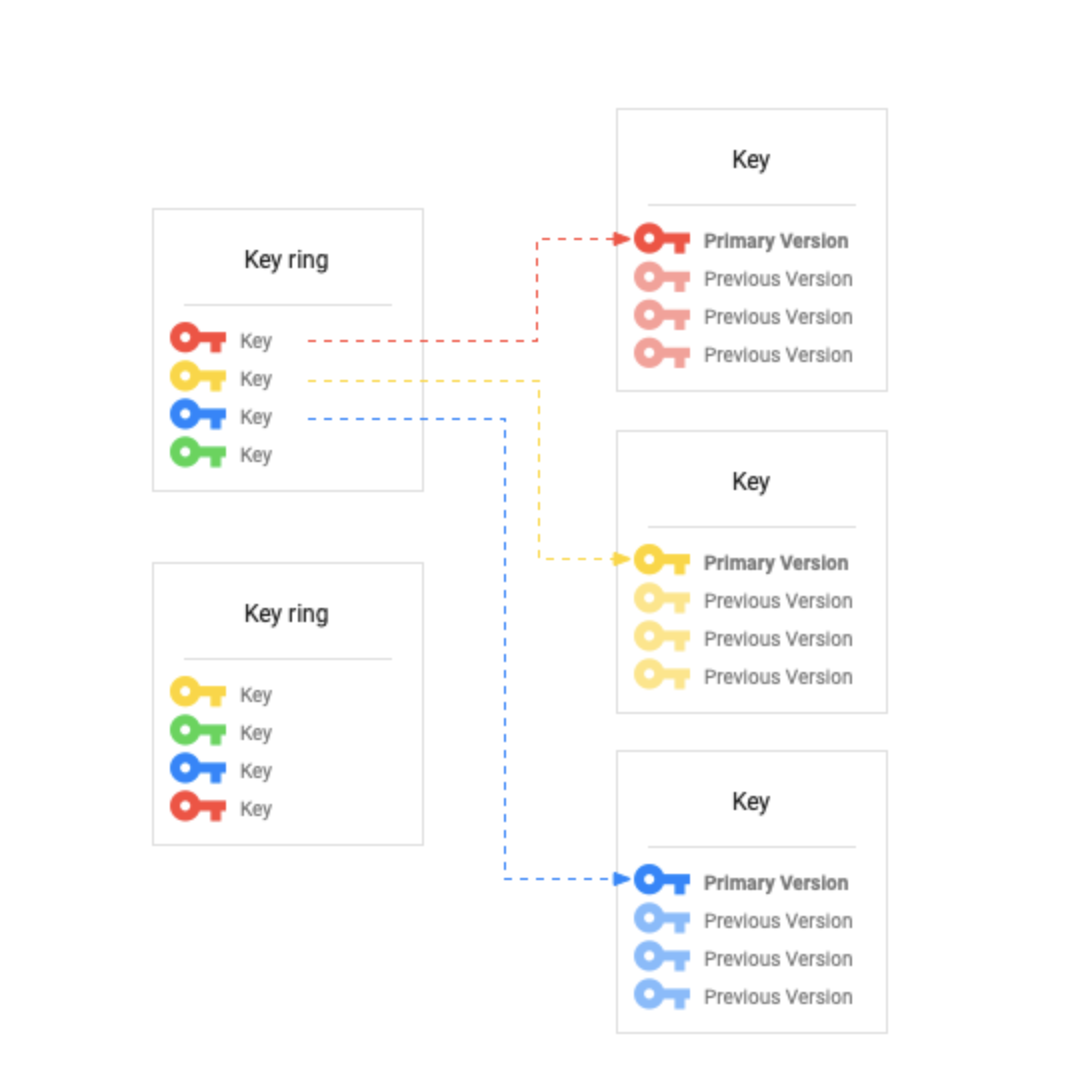 Key
Key
- A named object representing a cryptographic key that is used for a specific purpose. The key material – the actual bits used for cryptographic operations – can change over time as new key versions are created
- Key is the most important object for understanding KMS usage.
- Key purpose and other attributes of the key are connected with and managed using the key.
- IAM permissions and roles can be used to allow and deny access to keys
- Cloud KMS supports both asymmetric keys and symmetric keys.
- Symmetric key
- is used for symmetric encryption to protect some corpus of data for e.g., using AES-256 to encrypt a block of plaintext.
- Asymmetric key
- consists of a public and private key.
- can be used for asymmetric encryption, or for creating digital signatures.
- supports ECDSA on Curve25519 in PureEdDSA mode (added April 2024)
- Symmetric key
- Cloud KMS also supports:
- MAC signing keys – for creating and validating MAC digital signatures
- Key Encapsulation Mechanism (KEM) keys – for post-quantum safe key encapsulation (Preview, Sept 2025)
- Key’s type (symmetric or asymmetric) can’t be changed after key creation
- Cloud KMS supports algorithms including AES-256, RSA 2048/3072/4096, EC P256, EC P384, Ed25519, and post-quantum algorithms (ML-DSA-65, SLH-DSA-SHA2-128S, ML-KEM-768, ML-KEM-1024, KEM-XWING)
Key Ring
- A grouping of keys for organizational purposes.
- Key ring belongs to Google Cloud project and resides in a specific location
- Keys inherit IAM policies from the Key Ring that contains them.
- Grouping keys with related permissions in a key ring allows you to grant, revoke, or modify permissions to those keys at the key ring level without needing to act on each key individually.
- Key rings provide convenience and categorization
- To prevent resource name collisions, a key ring cannot be deleted.
- Key rings and keys do not have billable costs or quota limitations, so their continued existence does not affect costs or production limits.
Key Metadata
- Includes resource names, properties of KMS resources such as IAM policies, key type, key size, key state, and any other derived data
- Key metadata can be managed differently than the key material.
Key Version
- Represents the key material associated with a key at some point in time.
- Key version is the resource that contains the actual key material.
- Granting access to a key also grants access to all of its enabled versions. Access to a key version cannot be managed.
- A key version can be disabled or destroyed without affecting other versions
- Disabling or destroying a key also disables or destroys each key version.
- Versions are numbered sequentially, beginning with version 1.
- When a key is rotated, a new key version is created with new key material.
- The same logical key can have multiple versions over time, thus limiting the use of any single version.
- Symmetric keys will always have a primary version. This version is used for encrypting by default, if no version is specified
- Asymmetric keys do not have primary versions, and a version must be specified when using the key.
- When Cloud KMS performs decryption using symmetric keys, it identifies automatically which key version is needed to perform the decryption.
- Key versions can now be deleted (GA March 2026) in addition to being destroyed. Deleted key versions must meet specific deletion criteria.
Key States
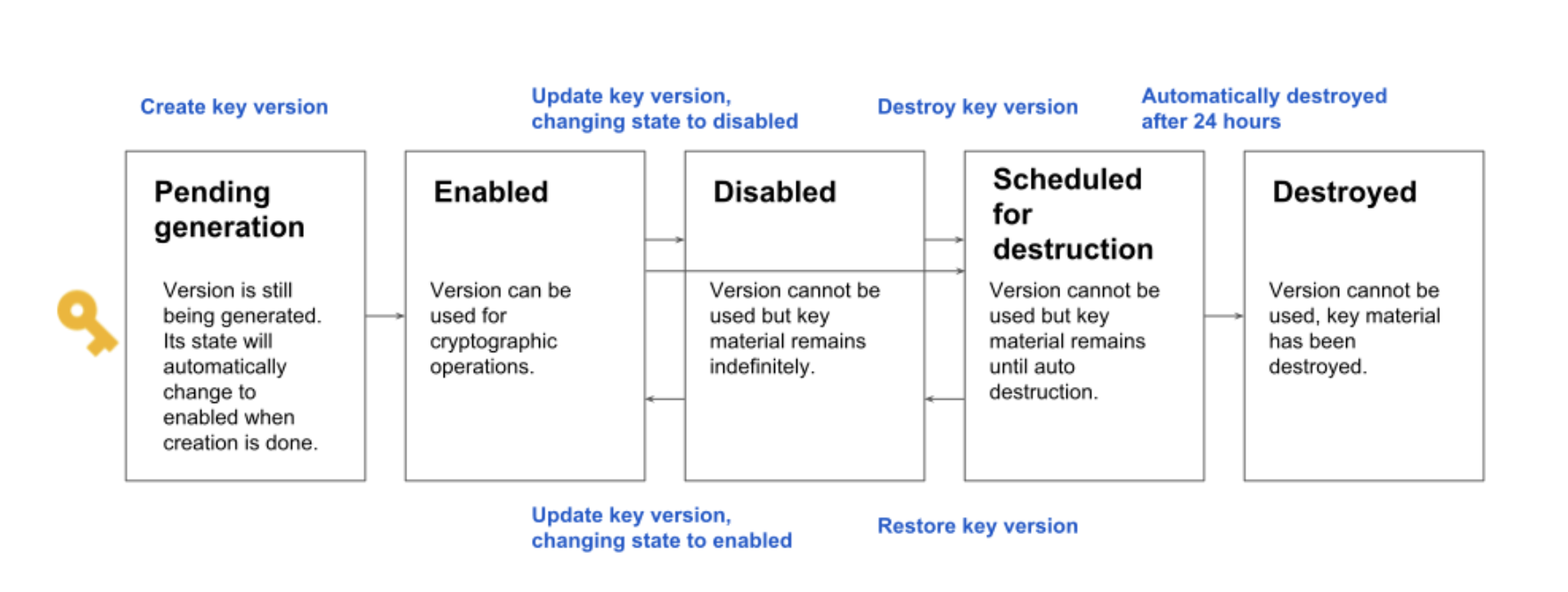
- A key version’s state is always one of the following:
- Pending generation (PENDING_GENERATION)
- Applies to asymmetric keys only
- is still being generated and can’t be used, enabled, disabled, or destroyed yet.
- KMS will automatically change the state to enabled as soon as the version is ready.
- Pending import (PENDING_IMPORT)
- Applies to imported keys
- Key material is being imported and can’t be used yet.
- KMS will automatically change the state to enabled once import completes.
- Enabled (ENABLED)
- is ready for use.
- Disabled (DISABLED)
- may not be used, but the key material is still available, and the version can be placed back into the enabled state.
- Scheduled for destruction (DESTROY_SCHEDULED):
- is scheduled for destruction, and will be destroyed soon.
- can be placed back into the disabled state.
- Default scheduled destruction duration is 30 days (changed from 24 hours as of June 2024). Custom durations can be configured between 24 hours and 120 days.
- Destroyed (DESTROYED)
- is destroyed, and the key material is no longer stored in Cloud KMS.
- If the key version was used
- for asymmetric or symmetric encryption, any ciphertext encrypted with this version is not recoverable.
- for digital signing, new signatures cannot be created.
- may not leave the destroyed state once entered, except when re-imported (supported since Sept 2021).
- It takes 45 days from destruction time for key material to be deleted from all Google active and backup systems.
- Import failed (IMPORT_FAILED)
- Key import was attempted but failed.
- The import can be retried.
- Pending generation (PENDING_GENERATION)
- A key version can only be used when it is enabled.
- Organization policy constraints can require a key version to be disabled before it can be scheduled for destruction (
constraints/cloudkms.disableBeforeDestroy)
Key Rotation
- For symmetric encryption, periodically and automatically rotating keys is a recommended security practice
- Cloud KMS does not support automatic rotation of asymmetric keys and has to be done manually
- With key rotation, data encrypted with previous key versions is not automatically re-encrypted with the new key version.
- Rotating keys provides several benefits:
- Limiting the number of messages encrypted with the same key version helps prevent brute-force attacks enabled by cryptanalysis.
- In the event that a key is compromised, regular rotation limits the number of actual messages vulnerable to compromise.
- If you suspect that a key version is compromised, disable it and revoke access to it as soon as possible.
- Regular key rotation helps validate the key rotation procedures before a real-life security incident occurs.
- Regular key rotation ensures that the system is resilient to manual rotation, whether due to a security breach or the need to migrate your application to a stronger cryptographic algorithm.
Key Hierarchy
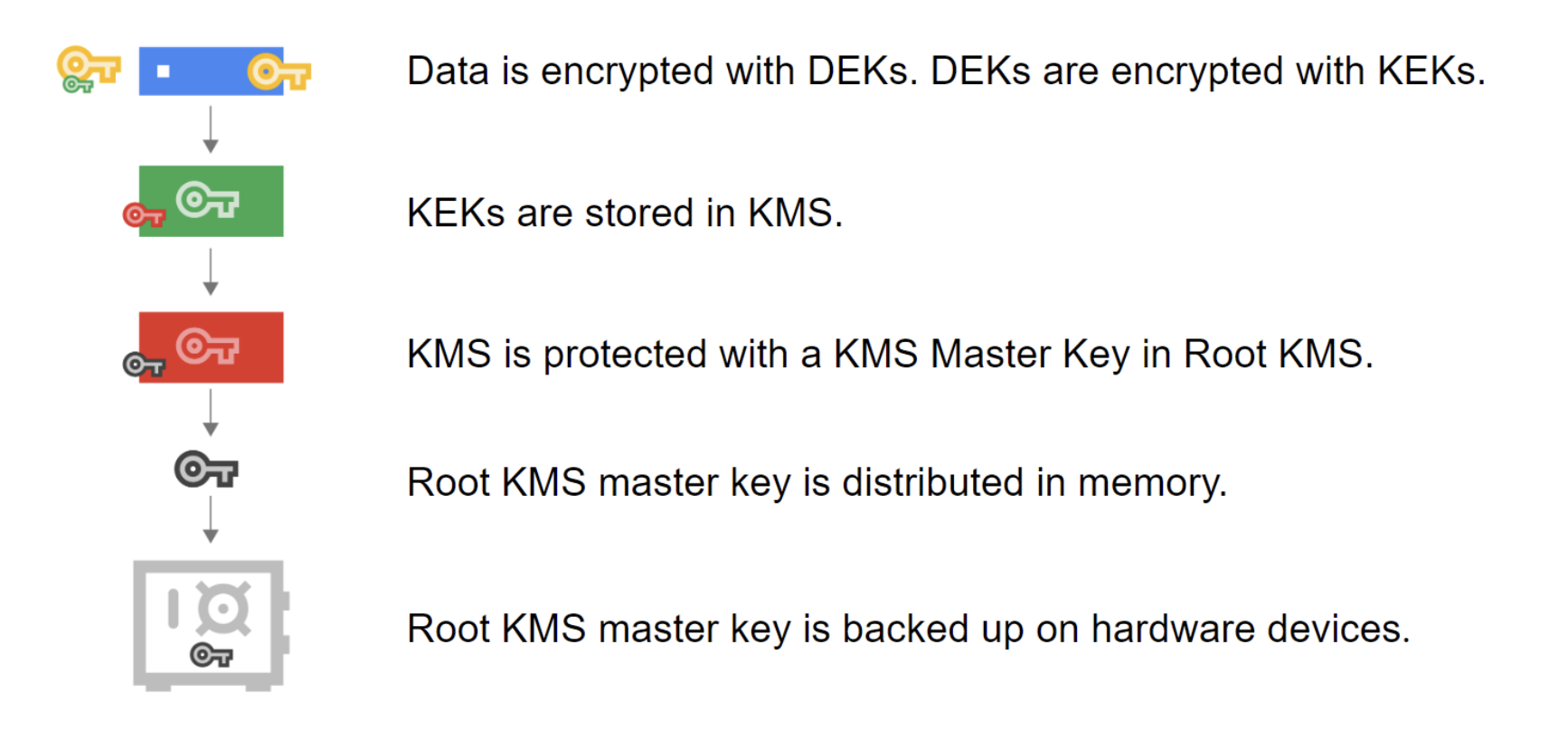
- Data Encryption Key (DEK)
- A key used to encrypt data.
- Key Encryption Key (KEK)
- A key used to encrypt, or wrap, a DEK.
- All Cloud KMS platform options (software, hardware, and external backends) allow you to control KEK.
- KMS Master Key
- The key used to encrypt the KEK.
- This key is distributed in memory.
- KMS Master Key is backed up on hardware devices.
- Root KMS
- Google’s internal key management service.
Cloud KMS Autokey
- Cloud KMS Autokey (GA September 2024) simplifies creating and using customer-managed encryption keys (CMEKs) by automating provisioning and assignment.
- With Autokey, key rings, keys, and service accounts don’t need to be planned and provisioned before they’re needed. Instead, Autokey generates keys on demand as resources are created.
- Keys created by Autokey use HSM protection level by default and follow recommended practices for:
- Separation of duties
- Key rotation
- Location matching
- Key specificity
- Supported services include Cloud Storage, Compute Engine, BigQuery, Secret Manager, Cloud SQL, and Spanner.
- Autokey supports two key management models:
- Centralized key management – keys are created in a dedicated key project for all resources in a folder
- Delegated key management (Autokey for Projects) – keys are created in the same project as the resources they protect (Public Preview, Feb 2026)
- Autokey has a free tier (since April 2025):
- 100 free active key versions monthly
- 10,000 free cryptographic operations monthly
- Uses a KeyHandle resource model: creating a KeyHandle triggers Autokey to provision a CryptoKey automatically.
Post-Quantum Cryptography (PQC)
- Cloud KMS supports post-quantum cryptography algorithms to protect against threats from future quantum computers (“harvest now, decrypt later” attacks).
- PQC Digital Signatures (Public Preview, February 2025):
- ML-DSA-65 (FIPS 204) – Module-lattice-based digital signature algorithm
- SLH-DSA-SHA2-128S (FIPS 205) – Stateless hash-based digital signature algorithm
- These are NIST-approved post-quantum safe algorithms
- Key Encapsulation Mechanisms (KEMs) (Preview, September 2025):
- ML-KEM-768 – NIST-standardized lattice-based KEM
- ML-KEM-1024 – Higher-security variant of ML-KEM
- KEM-XWING – Hybrid KEM combining classical and post-quantum algorithms
- KEMs enable sharing secrets resistant to quantum attacks
- Uses a new key purpose: KEY_ENCAPSULATION
- Google Cloud network encryption already uses ML-KEM for cryptographic key exchange by default, protecting all customer workloads.
Single-tenant Cloud HSM
- Single-tenant Cloud HSM (GA December 2025) provides dedicated single-tenant HSM instances for customers requiring the highest level of isolation.
- Each instance is a cluster of partitions on HSMs in a single Cloud KMS region.
- Google manages the physical HSMs, but customers have administrative control over their instance.
- Available in: us-central1, us-east4, europe-west1, europe-west4
- Creating and managing an instance requires quorum approval with two-factor authentication using keys created and secured outside of Google Cloud.
- Single-tenant Cloud HSM incurs additional costs beyond standard Cloud HSM pricing.
- This differs from standard (multi-tenant) Cloud HSM where Google manages shared HSM infrastructure.
Cloud KMS Locations
- Within a project, Cloud KMS resources can be created in one of many locations.
- A key’s location impacts the performance of applications using the key
- Regional
- data centers exist in a specific geographical place
- Dual-regional
- data centers exist in two specific geographical places.
- Multi-regional
- data centers are spread across a general geographical area
- Global
- special multi-region with its data centers spread throughout the world
- Reading and writing resources or associated metadata in dual-regional or multi-regional locations, including the
globallocation may be slower than reading or writing from a single region. - Cloud KMS is available in 35+ regions worldwide, including recent additions: asia-southeast3 (Jan 2026), europe-north2 (Mar 2025), northamerica-south1 (Nov 2024), and africa-south1 (Jan 2024)
Cloud External Key Manager (Cloud EKM)
- Cloud EKM lets you use encryption keys managed within a supported external key management system to protect data within Google Cloud.
- Supports two connectivity options:
- Cloud EKM over the internet – communicates with external key manager over the internet
- Cloud EKM over a VPC – communicates via a Virtual Private Cloud network (private endpoint)
- Coordinated external keys (since March 2023) – allows creating and managing keys in a compatible external key management system directly from Cloud KMS over a VPC network
- Partner-managed EKM – arrangement where your EKM is managed by a trusted partner
- Supported EKM partners include Thales CipherTrust, Fortanix, and others
- Integrates with Key Access Justifications – provides visibility into reasons for each key access request, enabling fine-grained access control based on justification codes
Encryption Metrics and Key Tracking
- Encryption Metrics Dashboard (GA May 2026) provides visibility into key usage across CMEK integrations.
- Shows summaries and details of keys used in CMEK integrations and the resources they protect.
- Supports both centralized and delegated key management models.
- Project-level key tracking allows viewing which resources are protected by which keys.
- Available via Google Cloud Console under Security > Key Management.
Organization Policy Constraints
- Cloud KMS supports several organization policy constraints for governance:
- constraints/gcp.restrictNonCmekServices – requires CMEK protection for specified services
- constraints/gcp.restrictCmekCryptoKeyProjects – limits which KMS keys can be used for CMEK
- constraints/cloudkms.disableBeforeDestroy – requires key version to be disabled before destruction
- constraints/cloudkms.allowedProtectionLevels – controls which protection levels can be used (e.g., only EXTERNAL or EXTERNAL_VPC)
- Custom organization policy constraints (Oct 2024) provide more granular control over specific fields for Cloud KMS resources.
GCP Certification Exam Practice Questions
- Questions are collected from Internet and the answers are marked as per my knowledge and understanding (which might differ with yours).
- GCP services are updated everyday and both the answers and questions might be outdated soon, so research accordingly.
- GCP exam questions are not updated to keep up the pace with GCP updates, so even if the underlying feature has changed the question might not be updated
- Open to further feedback, discussion and correction.
Question 1: Your organization requires that all encryption keys used to protect Cloud Storage data are automatically provisioned with HSM protection and follow best practices for key management. Which Cloud KMS feature should you use?
- Cloud EKM with VPC
- Cloud KMS Autokey
- Manual CMEK creation with HSM protection level
- Google-managed encryption keys (GMEK)
Show Answer
Answer: 2 – Cloud KMS Autokey automatically provisions CMEK keys with HSM protection level, following best practices for separation of duties, rotation, and key specificity.
Question 2: Your security team is concerned about “harvest now, decrypt later” attacks where encrypted data is captured today and decrypted by future quantum computers. Which Cloud KMS capability helps mitigate this threat?
- Symmetric AES-256 encryption
- Cloud HSM with FIPS 140-2 Level 3
- Post-quantum cryptography (PQC) digital signatures and KEMs
- Key rotation every 90 days
Show Answer
Answer: 3 – Cloud KMS supports post-quantum safe algorithms including ML-DSA-65, SLH-DSA-SHA2-128S for digital signatures, and ML-KEM-768/1024 and KEM-XWING for key encapsulation, designed to resist quantum computer attacks.
Question 3: What is the default scheduled destruction duration for Cloud KMS key versions?
- 24 hours
- 7 days
- 30 days
- 90 days
Show Answer
Answer: 3 – As of June 2024, the default scheduled destruction duration is 30 days (changed from the previous 24-hour default). Custom durations between 24 hours and 120 days can be configured.
Question 4: Your company needs dedicated HSM hardware with administrative control, where creating instances requires quorum approval with two-factor authentication. Which Cloud KMS offering meets this requirement?
- Multi-tenant Cloud HSM
- Single-tenant Cloud HSM
- Cloud EKM with VPC
- Bare Metal HSM
Show Answer
Answer: 2 – Single-tenant Cloud HSM (GA Dec 2025) provides dedicated single-tenant instances with customer administrative control, requiring quorum approval with 2FA for management operations.
Question 5: Which statements about Cloud KMS key deletion are correct? (Choose 2)
- Key rings can be deleted
- Keys and key versions can be deleted if they meet deletion criteria
- Names of deleted keys can be reused
- Keys must meet deletion criteria before they can be deleted
- Deleted keys are immediately removed from all systems
Show Answer
Answer: 2, 4 – As of March 2026, keys and key versions can be deleted (GA), but they must meet specific deletion criteria. Key rings cannot be deleted, and names of deleted keys cannot be reused.
See also: Google Cloud Security Services Cheat Sheet