Google Cloud – Compute Engine Instance Groups
- An instance group is a collection of virtual machine (VM) instances that can be managed as a single entity.
- Compute Engine offers two kinds of VM instance groups
- Managed instance groups (MIGs)
- allows app creation with multiple identical VMs.
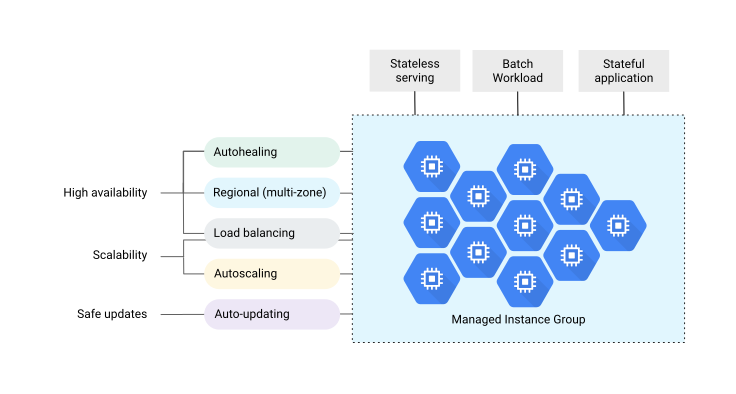
- workloads can be made scalable and highly available by taking advantage of automated MIG services, including: autoscaling, autohealing, regional (multiple zones) deployment, and automatic updating
- Unmanaged instance groups
- allows load balance across a fleet of self managed nonidentical VMs
- Managed instance groups (MIGs)
Managed instance groups (MIGs)
- A MIG creates each of its managed instances based on the instance template and specified optional stateful configuration
- Managed instance group (MIG) is ideal for scenarios
- Stateless serving workloads, such as a website frontend
- Stateless batch, high-performance, or high-throughput compute workloads, such as image processing from a queue
- Stateful applications, such as databases, legacy applications, and long-running batch computations with check pointing
Health Checking
- Managed instance group health checks proactively signal to delete and recreate instances that become
UNHEALTHY. - Load balancing health checks help direct traffic away from non-responsive instances and toward healthy instances; these health checks do not cause Compute Engine to recreate instances.
- Health checks used to monitor MIGs are similar to the health checks used for load balancing, with some differences in behavior.
High Availability & Autohealing
- Managed instance groups maintain high availability of the applications by proactively maintaining the number of instances and keeping the instances available, which means in
RUNNINGstate. - Application-based autohealing improves application availability by relying on a health checking signal that detects application-specific issues such as freezing, crashing, or overloading.
- If a health check determines that an application has failed on a VM, the MIG automatically recreates that VM instance.
- A MIG automatically recreates an instance that is not
RUNNING. However, relying only on VM state may not be sufficient and should include check for application freezes, crashes, or runs out of memory. - MIGs support repair in alternate zone, allowing a VM to be recreated in a different zone if the original zone is experiencing issues.
Regional or Zonal groups
- Zonal MIG,
- deploys instances to a single zone.
- Regional MIG
- deploys instances to multiple zones across the same region
- provides higher availability by spreading application load across multiple zones,
- protects the workload against zonal failure
- offer more capacity, with a maximum of 2,000 instances per regional group.
Target Distribution Shape (Regional MIGs)
- Regional MIGs support configurable target distribution shapes to control how instances are distributed across zones:
- EVEN (default) – maintains the same number of VMs across zones (differs by at most 1). Recommended for highly available serving workloads.
- BALANCED – prioritizes creating VMs where resources are available while distributing as evenly as possible. Recommended for highly available serving or batch workloads.
- ANY – picks zones to maximize resource acquisition and utilization of unused reservations. Recommended for batch workloads.
- ANY_SINGLE_ZONE – creates all VMs within a single zone chosen based on hardware support, reservations, and resource availability. Recommended with compact placement policies for workloads requiring extensive VM-to-VM communication.
- Proactive instance redistribution (enabled by default with EVEN shape) automatically rebalances VMs across zones when capacity becomes available.
Load Balancing
- MIGs work with load balancing services to distribute traffic across all of the instances in the group.
- Google Cloud load balancing can use instance groups to serve traffic by adding instance groups to a target pool or to a backend service.
Scalability & Autoscaling
- MIGs provides scalability and supports autoscaling that dynamically adds or removes instances in response to increases or decreases in load.
- Autoscaling policy determines how the group would scale which includes scaling based on CPU utilization, Cloud Monitoring metrics, load balancing capacity, or, for zonal MIGs, by using a queue-based workload like Pub/Sub
- Autoscaler continuously collects usage information based on the selected utilization metric, compares actual utilization to the desired target utilization, and uses this information to determine whether the group needs to remove instances (scale in) or add instances (scale out).
- Cool down period
- is known as the application initialization period
- Stabilization period
- For scaling in, the autoscaler calculates the group’s recommended target size based on peak load over the last 10 minutes which is called the Stabilization period
- Using the stabilization period, the autoscaler ensures that the recommended size for the managed instance group is always sufficient to serve the peak load observed during the previous 10 minutes.
- Predictive autoscaling
- helps to optimize your MIG for availability,
- the autoscaler forecasts future load based on historical data and scales out a MIG in advance of predicted load, so that new instances are ready to serve when the load arrives.
- Schedule-based autoscaling
- allows setting minimum required capacity for recurring time windows (e.g., business hours, weekends).
- supports cron-like schedules to proactively scale up before anticipated load increases.
- can be combined with other autoscaling signals (CPU, load balancing, monitoring metrics) — the autoscaler uses the signal that results in the largest number of VMs.
- Scale-in controls
- allow limiting the rate at which autoscaler removes VMs to prevent sudden capacity drops.
- configured as a maximum number of VMs or a percentage of group size that can be removed within a specified time window.
- helps prevent overly aggressive scale-in during temporary load drops.
- Autoscaler mode
- ON – autoscaler scales both out and in based on recommended size.
- ONLY_SCALE_OUT – autoscaler only increases group size, never reduces it automatically.
Automatic Updating
- MIG automatic updater supports a flexible range of rollout scenarios to deploy new versions of the software to instances in the MIG such as rolling updates and canary updates.
- Speed and scope of deployment can be controlled as well as the level of disruption to the service.
- All-instances configuration (AIC) allows overriding instance template properties (like metadata or labels) across all VMs without changing the template itself.
- One-click OS image upgrades simplify the process of updating VM images across the group.
Stateful Workloads Support
- MIGs can be used for building highly available deployments and automating operation of applications with stateful data or configuration, such as databases, DNS servers, legacy monolith applications, or long-running batch computations with checkpointing.
- Uptime and resiliency of such applications can be improved with autohealing, controlled updates, and multi-zone deployments, while preserving each instance’s unique state, including customizable instance name, persistent disks, and metadata.
- Stateful MIGs preserve each instance’s unique state (instance name, attached persistent disks, metadata, and IP addresses) on machine restart, recreation, auto-healing, and update events.
- Stateful IP addresses – allows preserving internal and/or external IP addresses across VM lifecycle events.
Spot VM Instance Groups
- MIG supports Spot VMs (the recommended replacement for preemptible VMs), which provide significant discounts of up to 60-91% off on-demand pricing.
- Unlike legacy preemptible VMs, Spot VMs have no maximum 24-hour runtime limit unless specifically configured.
- Spot VMs can be preempted (stopped or deleted) at any time when Compute Engine needs the resources, but there is no fixed expiration time.
- When Spot VMs in a MIG are preempted, the group repeatedly tries to recreate those VMs using the specified instance template when resources become available.
- When using instance flexibility (multiple machine types in a MIG), the MIG automatically selects machine types with the lowest observed preemption rates.
- Termination action can be set to STOP (default) or DELETE for each Spot VM.
📝 Note: Preemptible VMs are still supported but Google recommends using Spot VMs instead. Spot VMs are the latest version of preemptible VMs with no 24-hour maximum runtime. Legacy preemptible VMs may still appear in certification exams.
Instance Flexibility
- Instance flexibility allows specifying multiple machine types suitable for a workload in a single MIG.
- Compute Engine automatically selects and provisions VMs using any of the specified machine types based on current capacity and quota availability.
- Helps improve the likelihood of getting resources, especially for Spot VMs or specialized hardware.
- For Spot VMs, the MIG automatically selects machine types with the lowest observed preemption rates to minimize disruption.
Standby Pool (Suspended and Stopped VMs)
- MIGs support a standby pool that allows VMs to be suspended or stopped while remaining part of the group.
- Suspended/stopped VMs are pre-initialized and can be quickly resumed during scale-out, reducing cold-start latency.
- Helps reduce costs when pausing applications during off-peak hours while maintaining quick scale-out capability.
- VMs can be manually suspended or stopped, or automated as part of MIG lifecycle policies.
Resize Requests
- Resize requests provide all-or-nothing capacity provisioning for MIGs, particularly useful for GPU workloads.
- Ensures that either all requested VMs are created successfully or none are, preventing partial deployments.
- Useful for ML/AI training workloads that require a specific number of accelerator VMs to start together.
Containers
- MIG supports the deployment of containers to container-optimized OS that includes docker, if the instance template used specifies a container image.
Network and Subnet
- Instance template, used with MIG, defines the VPC network and subnet that member instances use.
- For auto mode VPC networks, the subnet can be omitted ; this instructs GCP to select the automatically-created subnet in the region specified in the template.
- If VPC network is omitted, GCP attempts to use the VPC network named
default.
Unmanaged instance groups
- Unmanaged instance groups can contain heterogeneous instances that can be arbitrarily added and removed from the group.
- Unmanaged instance groups do not offer autoscaling, autohealing, rolling update support, multi-zone support, or the use of instance templates and are not a good fit for deploying highly available and scalable workloads.
- Use unmanaged instance groups, if load balancing needs to be added to groups of heterogeneous instances, or needs self managed instances
GCP Certification Exam Practice Questions
- Questions are collected from Internet and the answers are marked as per my knowledge and understanding (which might differ with yours).
- GCP services are updated everyday and both the answers and questions might be outdated soon, so research accordingly.
- GCP exam questions are not updated to keep up the pace with GCP updates, so even if the underlying feature has changed the question might not be updated
- Open to further feedback, discussion and correction.
- Your company’s test suite is a custom C++ application that runs tests throughout each day on Linux virtual machines. The full
test suite takes several hours to complete, running on a limited number of on-premises servers reserved for testing. Your company
wants to move the testing infrastructure to the cloud, to reduce the amount of time it takes to fully test a change to the system,
while changing the tests as little as possible. Which cloud infrastructure should you recommend?- Google Compute Engine unmanaged instance groups and Network Load Balancer.
- Google Compute Engine managed instance groups with auto-scaling.
- Google Cloud Dataproc to run Apache Hadoop jobs to process each test.
- Google App Engine with Google Stackdriver for logging.
- Your company has a set of compute engine instances that would be hosting production-based applications. These applications
would be running 24×7 throughout the year. You need to implement the cost-effective, scalable and high availability solution even
if a zone fails. How would you design the solution?- Use Managed instance groups with Spot VMs across multiple zones
- Use Managed instance groups across multiple zones
- Use managed instance groups with instances in a single zone
- Use Unmanaged instance groups across multiple zones
- A company runs a batch processing workload using a MIG. The workload is fault-tolerant and can withstand VM preemption. They want to minimize costs. Which configuration should they use?
- Regional MIG with EVEN distribution and standard VMs
- Zonal MIG with standard VMs and autoscaling
- Regional MIG with ANY distribution shape and Spot VMs
- Regional MIG with BALANCED distribution and preemptible VMs
- You are designing a highly available web application that needs to survive a zone failure without degraded performance. The application serves traffic across multiple zones. Which MIG configuration is most appropriate?
- Regional MIG with ANY_SINGLE_ZONE target distribution shape
- Regional MIG with EVEN target distribution shape and overprovisioned capacity
- Zonal MIG with autoscaling enabled
- Regional MIG with ANY target distribution shape
- Your team wants to ensure that the autoscaler does not aggressively remove VMs when there is a temporary drop in traffic, to avoid affecting long-running user sessions. What should you configure?
- Increase the stabilization period to 30 minutes
- Set the autoscaler mode to ONLY_SCALE_OUT
- Configure scale-in controls to limit the rate of VM removal
- Use predictive autoscaling with schedule-based scaling
- A company needs to run a large ML training job that requires exactly 8 GPU VMs to start simultaneously. They cannot proceed with partial provisioning. Which MIG feature should they use?
- Autoscaling with minimum instances set to 8
- Schedule-based autoscaling
- Resize requests for all-or-nothing provisioning
- Instance flexibility with multiple machine types