Table of Contents
hide
Google Cloud Bigtable
- Cloud Bigtable is a fully managed, scalable, wide-column NoSQL database service with up to 99.999% availability.
- Bigtable is ideal for applications that need very high throughput and scalability for key/value data, where each value is max. of 10 MB.
- Bigtable supports high read and write throughput at low latency and provides consistent sub-10ms latency – handle millions of requests/second
- Bigtable is a sparsely populated table that can scale to billions of rows and thousands of columns,
- Bigtable supports storage of terabytes or even petabytes of data
- Bigtable is not a relational database. It does not support joins or multi-row transactions. However, as of April 2025, Bigtable supports GoogleSQL for read queries (SELECT statements only — no INSERT, UPDATE, DELETE, or DDL).
- Fully Managed
- Bigtable handles upgrades and restarts transparently, and it automatically maintains high data durability.
- Data replication can be performed by simply adding a second cluster to the instance, and replication starts automatically.
- Scalability
- Bigtable scales linearly in direct proportion to the number of machines in the cluster
- Bigtable throughput can be scaled dynamically by adding or removing cluster nodes without restarting
- Bigtable supports Autoscaling (GA since Dec 2021), which automatically adds or removes nodes based on CPU utilization, storage utilization, and throughput targets.
- Bigtable integrates easily with big data tools like Hadoop, Dataflow, Dataproc and supports HBase APIs.
- Bigtable Editions (GA April 2026)
- Bigtable now offers Enterprise and Enterprise Plus editions with advanced features.
- Enterprise Plus includes Data Boost for SQL queries, in-memory tier, tiered storage (up to 64 TB/node), and extended backup retention (up to 365 days).
Bigtable Architecture
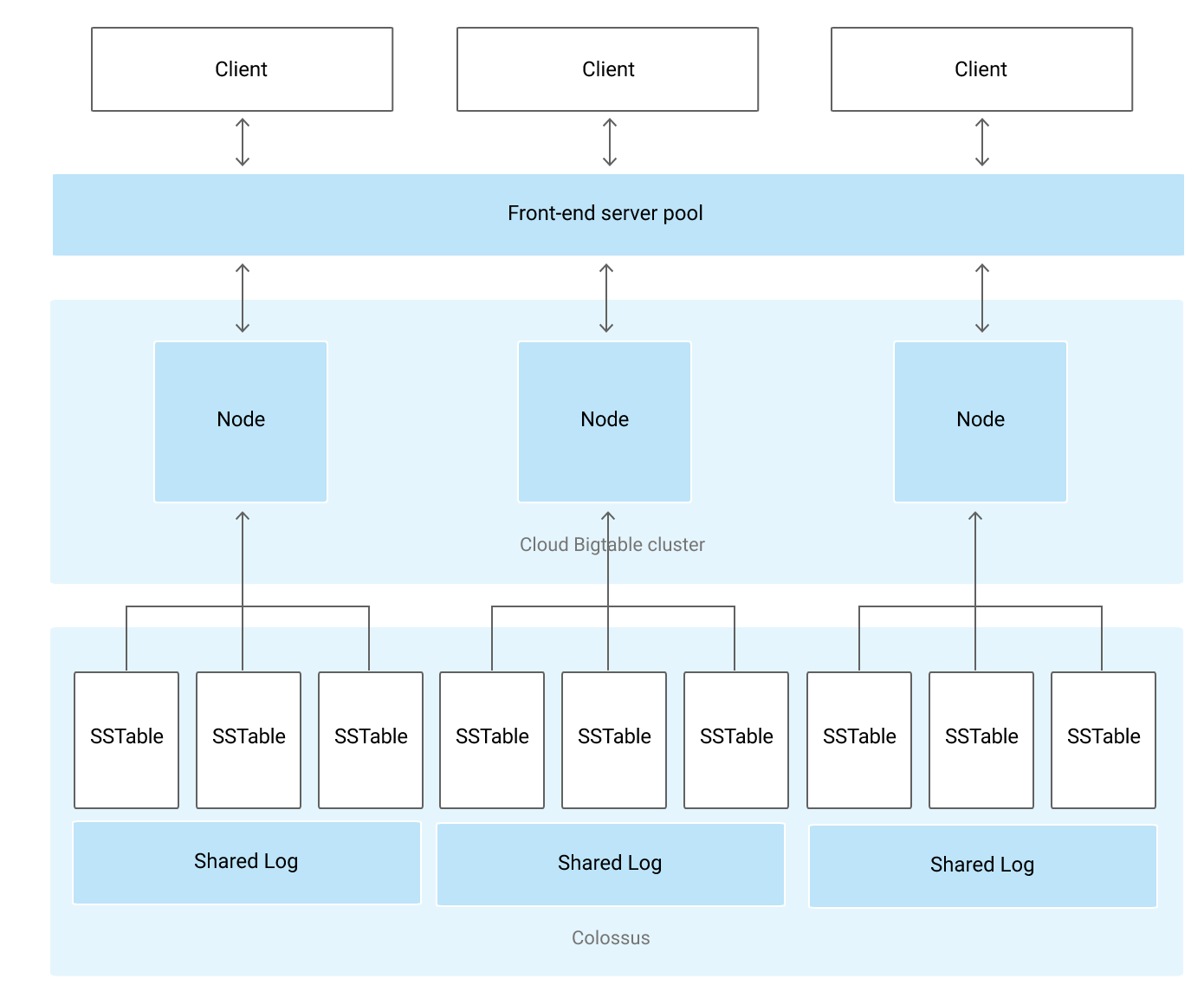
- Bigtable Instance is a container for Cluster where Nodes are organized.
- Bigtable stores data in Colossus, Google’s file system.
- Instance
- A Bigtable instance is a container for data.
- Instances have one or more clusters, located in a different zone and different region (Different region adds to latency)
- An instance can have clusters in up to 8 regions, with as many clusters in each region as there are zones.
- Each cluster has at least 1 node
- A Table belongs to an instance and not to the cluster or node.
- An instance also consists of the following properties
- Storage Type – SSD or HDD
- Application Profiles – primarily for instances using replication
- Instance Type
- Development – Single node cluster with no replication or SLA
- Production – 1+ clusters which 1+ nodes per cluster (minimum of 1 node per cluster)
- Free Trial (GA April 2026) – 1-node SSD cluster with up to 500 GB storage for 90 days at no cost
- Storage Type
- Storage Type dictates where the data is stored i.e. SSD or HDD
- Choice of SSD or HDD storage for the instance is permanent
- SSD storage is the most efficient and cost-effective choice for most use cases.
- HDD storage is sometimes appropriate for very large data sets (>10 TB) that are not latency-sensitive or are infrequently accessed.
- Tiered Storage (Preview, Oct 2025) — automatically moves older, infrequently accessed data to a less expensive storage tier while keeping it queryable. Supports up to 64 TB per node (Enterprise Plus).
- Application Profile
- An application profile, or app profile, stores settings indicate Bigtable on how to handle incoming requests from an application
- Application profile helps define custom application-specific settings for handling incoming connections
- Supports Request Priorities (GA April 2024) to prioritize certain workload data requests over others
- Supports Row-Affinity Routing (GA Dec 2024) to automatically ensure single-row requests for a given row are routed to the same cluster
- Supports Data Boost app profiles for serverless analytical compute
- Cluster
- Clusters handle the requests sent to a single Bigtable instance
- Each cluster belongs to a single Bigtable instance, and an instance can have clusters in up to 8 regions
- Each cluster is located in a single-zone
- Bigtable instances with only 1 cluster do not use replication
- An Instances with multiple clusters replicate the data, which
- improves data availability and durability
- improves scalability by routing different types of traffic to different clusters
- provides failover capability, if another cluster becomes unavailable
- If multiple clusters within an instance, Bigtable automatically starts replicating the data by keeping separate copies of the data in each of the clusters’ zones and synchronizing updates between the copies
- 2x Node Scaling (GA Dec 2024) — treats two standard nodes as a larger, single compute node for improved performance stability at higher utilization rates
- Nodes
- Each cluster in an instance has 1 or more nodes, which are the compute resources that Bigtable uses to manage the data.
- Each node in the cluster handles a subset of the requests to the cluster
- All client requests go through a front-end server before they are sent to a Bigtable node.
- Bigtable separates the Compute from the Storage. Data is never stored in nodes themselves; each node has pointers to a set of tablets that are stored on Colossus. This helps as
- Rebalancing tablets from one node to another is very fast, as the actual data is not copied. Only pointers for each node are updated
- Recovery from the failure of a Bigtable node is very fast as only the metadata needs to be migrated to the replacement node.
- When a Bigtable node fails, no data is lost.
- A Bigtable cluster can be scaled by adding nodes which would increase
- the number of simultaneous requests that the cluster can handle
- the maximum throughput of the cluster.
- Each node is responsible for:
- Keeping track of specific tablets on disk.
- Handling incoming reads and writes for its tablets.
- Performing maintenance tasks on its tablets, such as periodic compactions
- Bigtable nodes are also referred to as tablet servers
- Tables
- Bigtable stores data in massively scalable tables, each of which is a sorted key/value map.
- A Table belongs to an instance and not to the cluster or node.
- A Bigtable table is sharded into blocks of contiguous rows, called tablets, to help balance the workload of queries.
- Bigtable splits all of the data in a table into separate tablets.
- Tablets are stored on the disk, separate from the nodes but in the same zone as the nodes.
- Each tablet is associated with a specific Bigtable node.
- Tablets are stored in SSTable format which provides a persistent, ordered immutable map from keys to values, where both keys and values are arbitrary byte strings.
- In addition to the SSTable files, all writes are stored in Colossus’s shared log as soon as they are acknowledged by Bigtable, providing increased durability.
- Tables support deletion protection (GA Dec 2022) to prevent accidental deletion.
Bigtable Storage Model
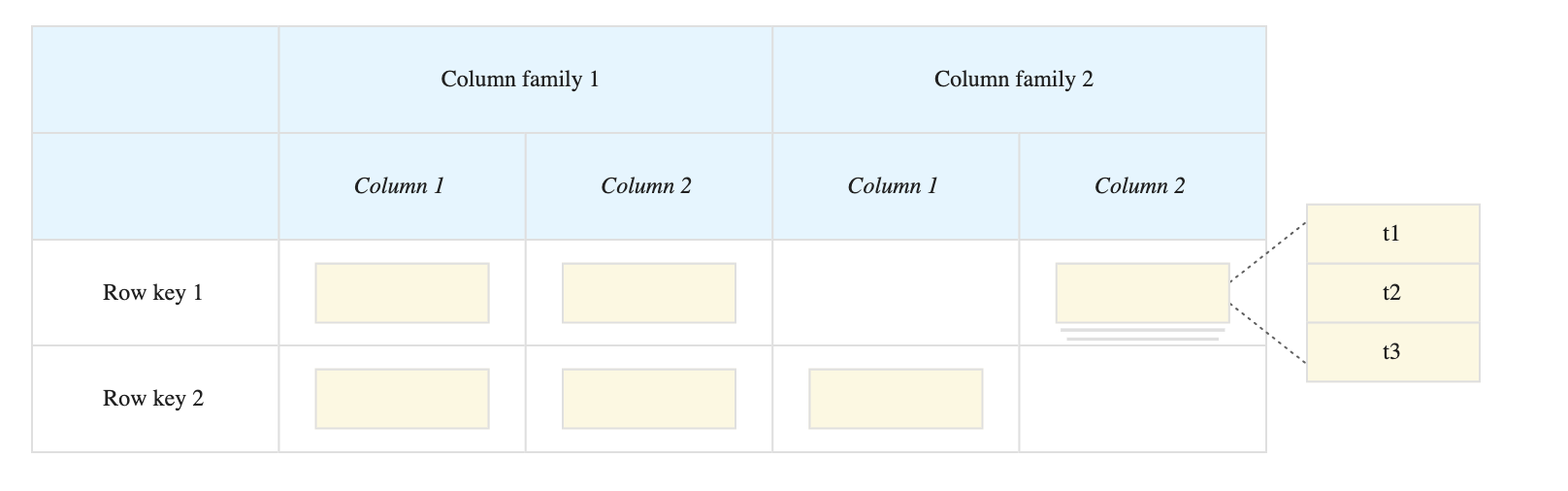
- Bigtable stores data in tables, each of which is a sorted key/value map.
- A Table is composed of rows, each of which typically describes a single entity, and columns, which contain individual values for each row.
- Each row is indexed by a single row key, and columns that are related to one another are typically grouped together into a column family.
- Each column is identified by a combination of the column family and a column qualifier, which is a unique name within the column family.
- Each row/column intersection can contain multiple cells.
- Each cell contains a unique timestamped version of the data for that row and column.
- Storing multiple cells in a column provides a record of how the stored data for that row and column has changed over time.
- Bigtable tables are sparse; if a column is not used in a particular row, it does not take up any space.
- Aggregate Columns (GA Aug 2024) — special column families that support write-time aggregation using SUM, MIN, MAX, and HyperLogLog (HLL). Enables distributed counters without read-modify-write cycles.
Bigtable Schema Design
- Bigtable schema is a blueprint or model of a table that includes Row Keys, Column Families, and Columns
- Bigtable is a key/value store, not a relational store. It does not support joins, and transactions are supported only within a single row.
- Each table has only one index, the row key. There are no secondary indices natively, but Continuous Materialized Views (GA April 2026) can serve as asynchronous secondary indexes.
- Rows are sorted lexicographically by row key, from the lowest to the highest byte string. Row keys are sorted in big-endian byte order, the binary equivalent of alphabetical order.
- Column families are not stored in any specific order.
- Columns are grouped by column family and sorted in lexicographic order within the column family.
- Intersection of a row and column can contain multiple timestamped cells. Each cell contains a unique, timestamped version of the data for that row and column.
- All operations are atomic at the row level. This means that an operation affects either an entire row or none of the row.
- Bigtable tables are sparse. A column doesn’t take up any space in a row that doesn’t use the column.
Bigtable Replication
- Bigtable Replication helps increase the availability and durability of the data by copying it across multiple zones in a region or multiple regions.
- Replication helps isolate workloads by routing different types of requests to different clusters using application profiles.
- Bigtable replication can be implemented by
- creating a new instance with more than 1 cluster or
- adding clusters to an existing instance.
- Bigtable synchronizes the data between the clusters, creating a separate, independent copy of the data in each zone with the instance cluster.
- Replicated clusters in different regions typically have higher replication latency than replicated clusters in the same region.
- Bigtable replicates any changes to the data automatically, including all of the following types of changes:
- Updates to the data in existing tables
- New and deleted tables
- Added and removed column families
- Changes to a column family’s garbage collection policy
- Bigtable treats each cluster in the instance as a primary cluster, so reads and writes can be performed in each cluster.
- Application profiles can be created so that the requests from different types of applications are routed to different clusters.
- Consistency Model
- Eventual Consistency
- Replication for Bigtable is eventually consistent, by default.
- Read-your-writes Consistency
- Bigtable can also provide read-your-writes consistency when replication is enabled, which ensures that an application will never read data that is older than its most recent writes.
- To gain read-your-writes consistency for a group of applications, each application in the group must use an app profile that is configured for single-cluster routing, and all of the app profiles must route requests to the same cluster.
- You can use the instance’s additional clusters at the same time for other purposes.
- Strong Consistency
- For some replication use cases, Bigtable can also provide strong consistency, which ensures that all of the applications see the data in the same state.
- To gain strong consistency, you use the single-cluster routing app-profile configuration for read-your-writes consistency, but you must not use the instance’s additional clusters unless you need to failover to a different cluster.
- Eventual Consistency
- Use cases
- Isolate real-time serving applications from batch reads
- Improve availability
- Provide near-real-time backup
- Ensure your data has a global presence
Bigtable Best Practices
- Store datasets with similar schemas in the same table, rather than in separate tables as in SQL.
- Bigtable has a limit of 1,000 tables per instance
- Creating many small tables is a Bigtable anti-pattern.
- Put related columns in the same column family
- Create up to about 100 column families per table. A higher number would lead to performance degradation.
- Choose short but meaningful names for your column families
- Put columns that have different data retention needs in different column families to limit storage cost.
- Create as many columns as you need in the table. Bigtable tables are sparse, and there is no space penalty for a column that is not used in a row
- Don’t store more than 100 MB of data in a single row as a higher number would impact performance
- Don’t store more than 10 MB of data in a single cell.
- Design the row key based on the queries used to retrieve the data
- Following queries provide the most efficient performance
- Row key
- Row key prefix
- Range of rows defined by starting and ending row keys
- Other types of queries trigger a full table scan, which is much less efficient.
- Store multiple delimited values in each row key. Multiple identifiers can be included in the row key.
- Use human-readable string values in your row keys whenever possible. Makes it easier to use the Key Visualizer tool.
- Row keys anti-pattern
- Row keys that start with a timestamp, as it causes sequential writes to a single node
- Row keys that cause related data to not be grouped together, which would degrade the read performance
- Sequential numeric IDs
- Frequently updated identifiers
- Hashed values as hashing a row key removes the ability to take advantage of Bigtable’s natural sorting order, making it impossible to store rows in a way that are optimal for querying
- Values expressed as raw bytes rather than human-readable strings
- Domain names, instead use the reverse domain name as the row key as related data can be clubbed.
Bigtable Load Balancing
- Each Bigtable zone is managed by a primary process, which balances workload and data volume within clusters.
- This process redistributes the data between nodes as needed as it
- splits busier/larger tablets in half and
- merges less-accessed/smaller tablets together
- Bigtable automatically manages all of the splitting, merging, and rebalancing, saving users the effort of manually administering the tablets
- Bigtable write performance can be improved by distributed writes as evenly as possible across nodes with proper row key design.
Bigtable Consistency
- Single-cluster instances provide strong consistency.
- Multi-cluster instances, by default, provide eventual consistency but can be configured to provide read-over-write consistency or strong consistency, depending on the workload and app profile settings
Bigtable Security
- Access to the tables is controlled by your Google Cloud project and the Identity and Access Management (IAM) roles assigned to the users.
- All data stored within Google Cloud, including the data in Bigtable tables, is encrypted at rest using Google’s default encryption.
- Bigtable supports using customer-managed encryption keys (CMEK) for data encryption, including multi-region CMEK and Cloud EKM with Key Access Justification.
- Authorized Views (GA April 2024) — control access to data at a sub-table level, enabling fine-grained data sharing without keeping multiple copies of data.
- Logical Views (GA July 2025) — save a SQL query as a specific, shareable view of your data and control who has permission to see the results.
- Bigtable supports IAM Conditions for conditional access control at instance, cluster, and table levels.
- Bigtable supports tags for allow/deny security policies on instances.
Bigtable SQL Support (GA April 2025)
- Bigtable supports GoogleSQL for read queries, the same SQL dialect used by BigQuery and Spanner.
- SQL support is read-only — DML (INSERT, UPDATE, DELETE) and DDL (CREATE, ALTER, DROP) are not supported.
- SQL queries can be run via the Bigtable Studio query editor, client libraries, JDBC driver (GA April 2026), or the Data API.
- Supports window functions (GA April 2026), geography/geospatial functions (GA April 2026), and pipe syntax (GA April 2026).
- The UNPACK table function lets you read time series data in a tabular format.
- SQL queries do not support subqueries, JOINs, UNIONs, UNNEST, or CTEs.
- Gemini in Bigtable Studio can help write GoogleSQL queries (Preview).
Bigtable Data Boost (GA February 2025)
- Data Boost is a serverless compute service for high-throughput read jobs and queries without impacting operational cluster performance.
- Provides isolated analytical processing on transactional data — eliminates the need to maintain multiple copies of data.
- Supports a requester-pays model, billing data consumers directly for their usage.
- Can be used with BigQuery external tables, Spark applications, and GoogleSQL queries.
- Available in the Enterprise Plus edition (GA for SQL queries and tiered storage reads as of April 2026).
Bigtable Change Streams (GA July 2023)
- A change stream captures data changes to a Bigtable table as the changes happen.
- Changes can be streamed for processing or analysis via Dataflow.
- Dataflow templates are available to stream change records to BigQuery or Pub/Sub.
- Pub/Sub Bigtable Subscriptions (Preview April 2026) — stream Pub/Sub messages directly to a Bigtable table without needing Dataflow.
- Use cases: event-driven architectures, real-time analytics, data synchronization, and audit trails.
Bigtable Continuous Materialized Views (GA April 2026)
- Continuous materialized views are precomputed tables that Bigtable automatically keeps in sync with source data.
- Defined using a continuously running SQL query that incrementally updates the view as data changes arrive.
- Can serve as asynchronous secondary indexes — enabling fast lookups on non-row-key columns.
- Support aggregation functions (SUM, COUNT, MIN, MAX, HLL) for real-time metrics and dashboards.
- Supports up to 5 continuous materialized views per table.
- No impact on write and read performance of the source table; scales automatically with traffic.
Bigtable In-Memory Tier (Preview, April 2026)
- Part of the Enterprise Plus edition’s hybrid storage architecture.
- Provides sub-millisecond read latency and up to 120,000 queries per second per row (hotspot resistance).
- Supports independent vertical scaling to handle traffic surges without adding nodes.
- Eliminates the need for a separate caching layer for latency-sensitive workloads.
- Works seamlessly with Bigtable autoscaling.
Bigtable Backups
- Bigtable backups let you save a copy of a table’s schema and data and restore it to a new table later.
- Maximum backup retention period is 90 days (or up to 365 days with Enterprise Plus edition).
- Hot Backups (GA Oct 2024) — optimized backups that restore data to production performance more efficiently.
- Automated Backup (GA Feb 2025) — create daily backups automatically with configurable retention periods.
- Cross-project restore (GA Dec 2022) — restore a backup to a different project.
- Copy Backup (GA Aug 2023) — copy a backup and store it in any project or region.
- When you undelete a table, deletion protection is automatically enabled for that table.
Bigtable Vector Search (GA April 2025)
- Bigtable supports K-nearest neighbors (KNN) similarity vector search.
- Enables building recommendation systems, semantic search, and ML feature stores directly in Bigtable.
- Uses GoogleSQL for vector search queries.
Bigtable Integrations
- BigQuery Federation (GA Aug 2022) — query Bigtable data directly from BigQuery using external tables.
- Spark Connector (GA May 2024) — read/write data using Spark SQL and DataFrames.
- LangChain (Preview April 2024, Vector/KV Store GA Oct 2025) — build LLM-powered applications with Bigtable as vector and key-value store.
- Cassandra-Bigtable Proxy Adapter (GA Oct 2025) — connect Apache Cassandra-based applications directly to Bigtable.
- Kafka Sink Connector (GA April 2025) — directly connect Apache Kafka to Bigtable.
- MCP Servers (GA April 2026) — interact with Bigtable from LLMs and AI applications via Model Context Protocol.
- Agent Development Kit (ADK) (GA March 2026) — build AI agents that query Bigtable metadata and execute SQL.
- JDBC Driver (GA April 2026) — connect from Java applications and reporting tools via generic JDBC adapter.
GCP Certification Exam Practice Questions
- Questions are collected from Internet and the answers are marked as per my knowledge and understanding (which might differ with yours).
- GCP services are updated everyday and both the answers and questions might be outdated soon, so research accordingly.
- GCP exam questions are not updated to keep up the pace with GCP updates, so even if the underlying feature has changed the question might not be updated
- Open to further feedback, discussion and correction.
- Your company processes high volumes of IoT data that are time-stamped. The total data volume can be several petabytes. The data needs to be written and changed at a high speed. You want to use the most performant storage option for your data. Which product should you use?
- Cloud Datastore
- Cloud Storage
- Cloud Bigtable
- BigQuery
- You want to optimize the performance of an accurate, real-time, weather-charting application. The data comes from 50,000 sensors sending 10 readings a second, in the format of a timestamp and sensor reading. Where should you store the data?
- Google BigQuery
- Google Cloud SQL
- Google Cloud Bigtable
- Google Cloud Storage
- Your team is working on designing an IoT solution. There are thousands of devices that need to send periodic time series data for
processing. Which services should be used to ingest and store the data?- Pub/Sub, Datastore
- Pub/Sub, Dataproc
- Dataproc, Bigtable
- Pub/Sub, Bigtable
- A company needs to run real-time analytics on operational data stored in Bigtable without impacting the performance of their production workloads. Which Bigtable feature should they use?
- Change Streams
- Data Boost
- Continuous Materialized Views
- BigQuery Federation
- You need to implement a real-time distributed counter system that can handle millions of increments per second across a globally distributed application. Which Bigtable feature is best suited for this?
- Read-modify-write operations
- Aggregate column families with SUM
- Continuous Materialized Views
- Change Streams to BigQuery
- Your application requires fast lookups on a non-row-key column in Bigtable. The lookups need to reflect changes in near real-time. What is the recommended approach?
- Create a second table with a different row key design
- Use GoogleSQL full table scans with filters
- Create a Continuous Materialized View as an asynchronous secondary index
- Export data to BigQuery for querying
- A financial services company needs sub-millisecond read latency for their high-frequency trading application stored in Bigtable, with resistance to hotspots on frequently accessed rows. Which Bigtable configuration should they use?
- SSD storage with autoscaling enabled
- Multi-cluster replication with row-affinity routing
- Enterprise Plus edition with In-Memory Tier
- Data Boost with single-cluster routing