Table of Contents
hide
GCP Cloud SQL
- Cloud SQL provides a cloud-based alternative to local MySQL, PostgreSQL, and Microsoft SQL Server databases
- Cloud SQL is a managed solution that helps handle backups, replication, high availability and failover, data encryption, monitoring, and logging.
- Cloud SQL is ideal for lift and shift migration from existing on-premises relational databases
- Cloud SQL supports MySQL 5.6, 5.7, 8.0, 8.4, PostgreSQL (multiple versions), and SQL Server 2019, 2022, 2025
Cloud SQL Editions
- Cloud SQL offers two editions: Cloud SQL Enterprise Plus and Cloud SQL Enterprise
- Cloud SQL Enterprise Plus edition
- Provides the best performance, availability, and observability for business-critical applications
- Delivers up to 4x improved read performance using Data Cache (local SSD)
- Delivers up to 3x higher write throughput and up to 98% lower write latency with Optimized Writes
- Offers 99.99% availability SLA (inclusive of maintenance)
- Provides near-zero downtime (<1 second) for planned maintenance and operations
- Supports up to 128 vCPUs and 864 GB RAM (N2 machine series)
- Supports Advanced Disaster Recovery with cross-region replication, switchover, and failover
- Supports Read Pools with autoscaling for operational simplicity
- Supports Managed Connection Pooling
- Supports up to 35 days PITR log retention
- Provides AI-assisted troubleshooting, enhanced Query Insights (30-day retention), and Index Advisor
- Supports MySQL 8.0, 8.4 (MySQL 8.4 defaults to Enterprise Plus)
- Cloud SQL Enterprise edition
- Provides all core capabilities of Cloud SQL at a lower cost
- Suitable for applications with less stringent availability and performance requirements
- Offers 99.95% availability SLA (excludes maintenance)
- Maintenance downtime of <60 seconds
- Supports up to 7 days PITR log retention
- Supports MySQL 5.6, 5.7, 8.0, 8.4
- All existing Cloud SQL instances created before July 12, 2023 were automatically updated to Cloud SQL Enterprise edition
- You can upgrade to Enterprise Plus edition using in-place upgrade with near-zero downtime
Cloud SQL High Availability
- Cloud SQL instance HA configuration provides data redundancy and failover capability with minimal downtime, when a zone or instance becomes unavailable due to a zonal outage, or an instance corruption
- HA configuration is also called a regional instance or cluster
- With HA, the data continues to be available to client applications.
- HA is made up of a primary and a standby instance and is located in a primary and secondary zone within the configured region
- If an HA-configured instance becomes unresponsive, Cloud SQL automatically switches to serving data from the standby instance.
- Data is synchronously replicated to each zone’s persistent disk, all writes made to the primary instance are replicated to disks in both zones before a transaction is reported as committed.
- In the event of an instance or zone failure, the persistent disk is attached to the standby instance, and it becomes the new primary instance.
- After a failover, the instance that received the failover continues to be the primary instance, even after the original instance comes back online.
- Once the zone or instance that experienced an outage becomes available again, the original primary instance is destroyed and recreated and It becomes the new standby instance.
- If a failover occurs in the future, the new primary will failover to the original instance in the original zone.
- Cloud SQL Standby instance does not increase scalability and cannot be used for read queries
- To see if failover has occurred, check the operation log’s failover history.
- Write Endpoint (Enterprise Plus) – provides a DNS name that automatically resolves to the current primary instance IP, so applications don’t need to update connection strings after failover.
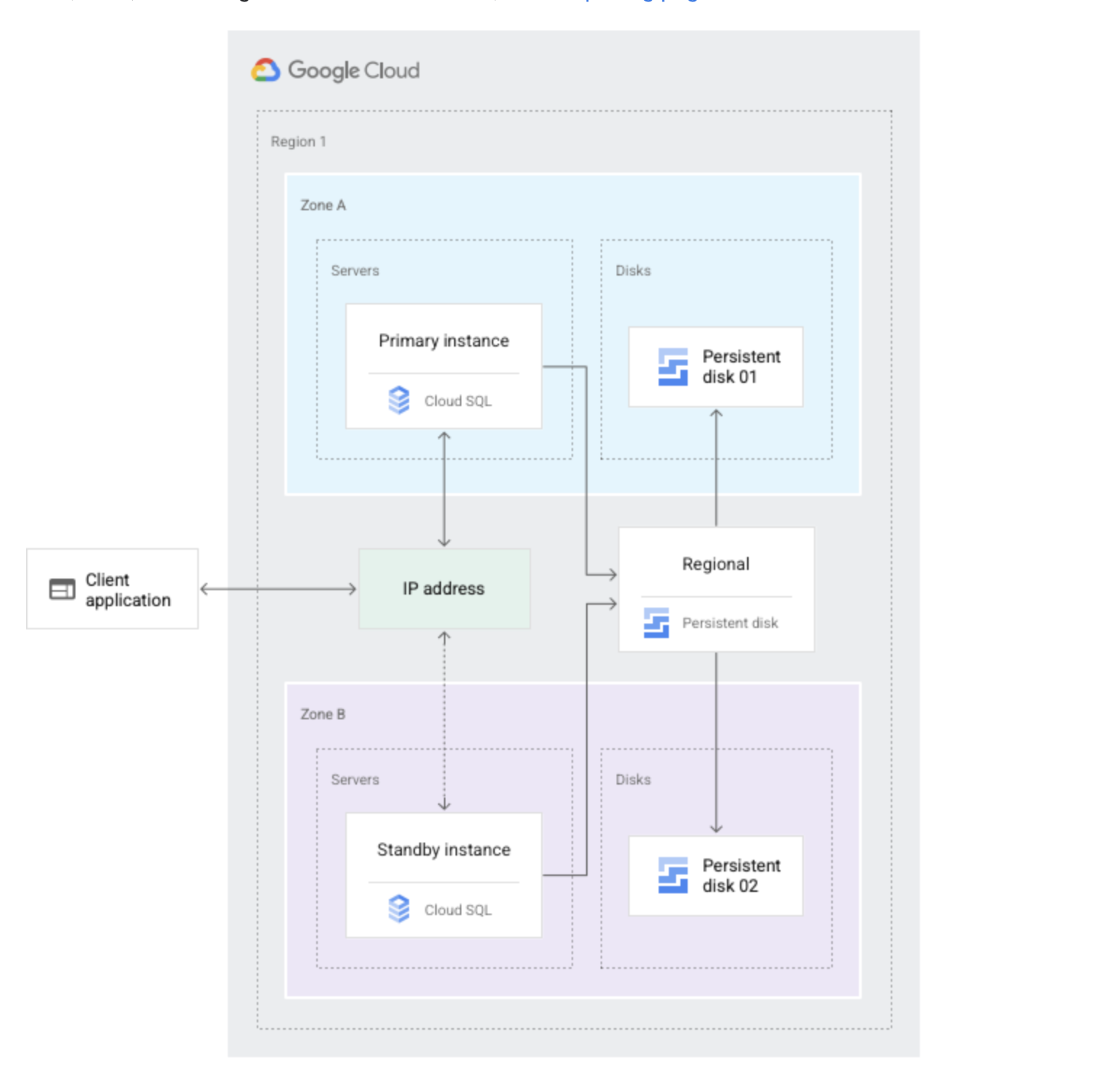
Cloud SQL Failover Process
- Each second, the primary instance writes to a system database as a heartbeat signal.
- Primary instance or zone fails.
- If multiple heartbeats aren’t detected, failover is initiated. This occurs if the primary instance is unresponsive for approximately 60 seconds or the zone containing the primary instance experiences an outage.
- Standby instance now serves data upon reconnection.
- Through a shared static IP address with the primary instance, the standby instance now serves data from the secondary zone.
- Users are then automatically rerouted to the new primary.
Cloud SQL Advanced Disaster Recovery
- Advanced Disaster Recovery (DR) is available exclusively on Cloud SQL Enterprise Plus edition
- Allows configuring cross-regional replication with a designated DR replica
- Provides Replica Failover — promotes the DR replica immediately in the event of a regional failure
- Provides Switchover — reverses the roles of the primary instance and a DR replica with zero data loss
- Switchover can be used to restore a deployment to its original state after replica failover, or to test DR readiness
- The DR replica is a cross-region read replica designated for disaster recovery
- Uses a write endpoint to automatically redirect application traffic to the new primary after failover or switchover
- Reduces RTO (Recovery Time Objective) significantly compared to manual promotion of cross-region replicas
Cloud SQL Read Replica
- Read replicas help scale horizontally the use of data in a database without degrading performance
- Read replica is an exact copy of the primary instance. Data and other changes on the primary instance are updated in almost real time on the read replica.
- Read replica can be promoted if the original instance becomes corrupted.
- Primary instance and read replicas all reside in Cloud SQL
- Read replicas are read-only; you cannot write to them
- Read replicas do not provide failover capability (use HA or Advanced DR instead)
- Read replicas can now be configured with high availability for increased resilience
- Google recommends limiting direct read replicas to 10 or fewer per primary instance. For additional replicas, use cascading read replicas.
- During a zonal outage, traffic to read replicas in that zone stops.
- Once the zone becomes available again, any read replicas in the zone will resume replication from the primary instance.
- If read replicas are in a zone that is not in an outage, they are connected to the standby instance when it becomes the primary instance.
- GCP recommends putting read replicas in a different zone from the primary and standby instances. for e.g., if you have a primary instance in zone A and a standby instance in zone B, put the read replicas in zone C. This practice ensures that read replicas continue to operate even if the zone for the primary instance goes down.
- Client application needs to be configured to send reads to the primary instance when read replicas are unavailable.
- Cloud SQL supports Cross-region replication that lets you create a read replica in a different region from the primary instance.
- Cloud SQL supports External read replicas that are external MySQL instances which replicate from a Cloud SQL primary instance
- Read replicas can have different vCPUs and memory from the primary instance but must have at least as much storage capacity.
Cascading Read Replicas
- Cascading replication lets you create a read replica under another read replica in the same or a different region
- Supports up to 4 levels of replicas in the hierarchy (including the primary instance)
- A cascading replica can have up to 8 siblings (replicas from the same parent)
- Use cases:
- Disaster Recovery — cascading replicas in another region retain their own replicas when promoted
- Performance — offloads replication work from the primary instance
- Cost Reduction — only one cross-region replication incurs network egress; sub-replicas use free in-region transfer
- Scale Reads — more replicas to share read load without burdening the primary
- When a cascading replica is promoted, all its sub-replicas continue to replicate from it
- You cannot delete a replica that has replicas under it; must start with leaf replicas
Read Pools (Enterprise Plus)
- Read Pools provide a simplified, fully managed way to scale reads using multiple read replicas behind a single read endpoint
- Available exclusively on Cloud SQL Enterprise Plus edition for MySQL and PostgreSQL
- A read pool contains between 1 and 20 read pool nodes
- Provides a single load balancer (read endpoint) that dispatches queries to nodes in round-robin fashion
- Supports autoscaling — automatically adds or removes read pool nodes based on workload
- You can add and remove replicas without making application changes
- Simplifies connection management for read-heavy applications
Cloud SQL Point In Time Recovery
- Point-in-time recovery (PITR) helps recover a Cloud SQL instance to a specific point in time
- PITR uses write-ahead logs (for PostgreSQL) or binary logs (for MySQL)
- PITR requires backups to be enabled for the instance
- Point-in-time recovery is enabled by default when a new Cloud SQL instance is created
- Log retention:
- Cloud SQL Enterprise Plus edition: up to 35 days
- Cloud SQL Enterprise edition: up to 7 days
- Transaction logs are stored in the same region as the instance at no additional cost
- PITR logs are stored in Cloud Storage (no longer on instance storage), eliminating storage impact on the instance
Cloud SQL Auth Proxy
- Cloud SQL Auth Proxy (formerly known as Cloud SQL Proxy) provides secure access to instances without the need for Authorized networks or for configuring SSL.
- Secure connections: Automatically encrypts traffic to and from the database using TLS 1.3 with a 256-bit AES cipher; SSL certificates are used to verify client and server identities.
- Easier connection management: Handles authentication via IAM, removing the need to provide static IP addresses or manage SSL certificates.
- IAM-based authorization: Uses IAM permissions to control which identities can connect to an instance.
- Cloud SQL Auth Proxy does not provide a new connectivity path; it relies on existing IP connectivity. To connect to a Cloud SQL instance using private IP, the Cloud SQL Auth Proxy must be on a resource with access to the same VPC network as the instance.
- Cloud SQL Auth Proxy works by having a local client running in the local environment. The application communicates with the Cloud SQL Auth Proxy with the standard database protocol used by the database.
- Cloud SQL Auth Proxy uses a secure tunnel to communicate with its companion process running on the server.
- While the proxy can listen on any port, it only creates outgoing connections to the Cloud SQL instance on port 3307.
- For GKE deployments, the recommended pattern is running the Auth Proxy as a sidecar container in the same pod as the application.
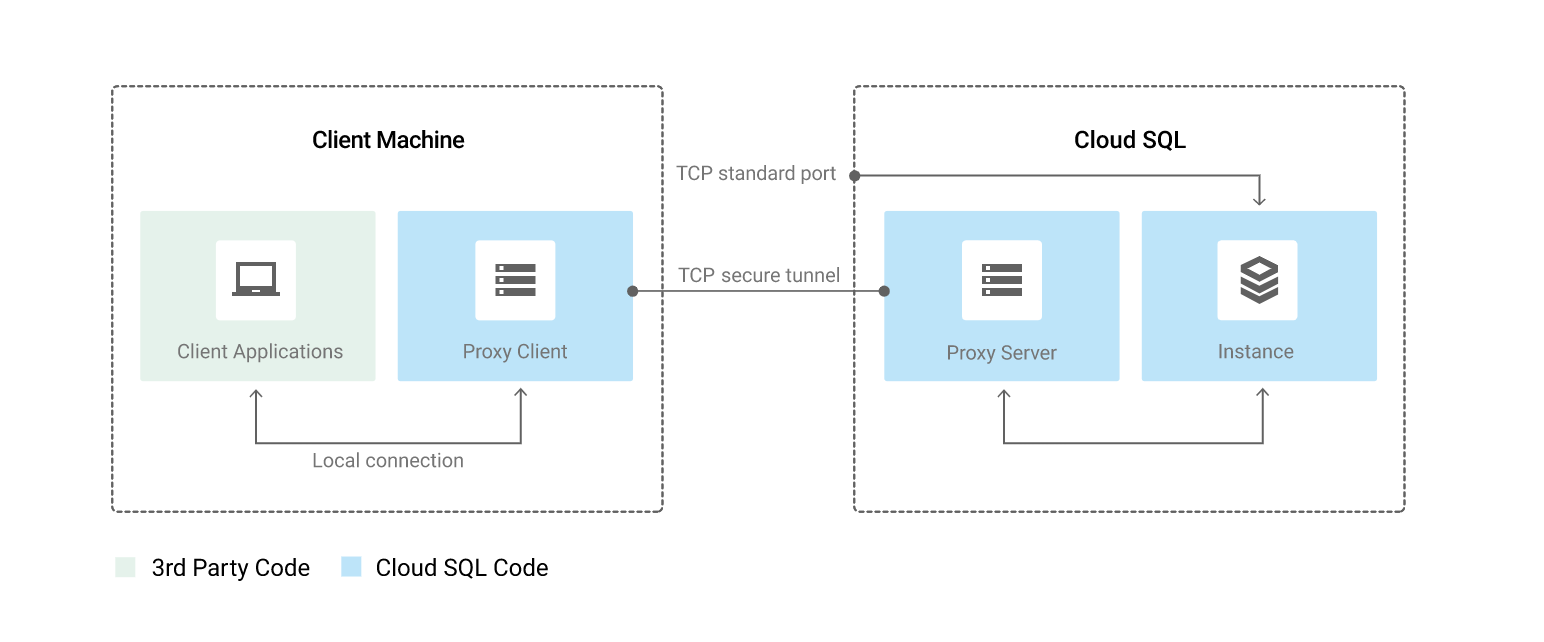
Cloud SQL Connectivity Options
- Public IP — connect over the internet with authorized networks or Cloud SQL Auth Proxy
- Private IP (Private Services Access) — connect using an internal IP address via VPC peering
- Private Service Connect (PSC) — connect to Cloud SQL from multiple VPC networks across different projects, teams, or organizations without VPC peering
- PSC provides a service attachment endpoint with a dedicated private IP
- Works with both primary instances and read replicas
- Can be combined with Private Services Access on the same instance
- PSC Automation (Preview) simplifies deployment of PSC endpoints at scale
- Cloud SQL Auth Proxy — IAM-authenticated, encrypted connections without managing SSL certificates or IP allowlists
- Cloud SQL Language Connectors — open-source libraries for Java, Python, Go, and Node.js for simplified and secure connectivity
- Managed Connection Pooling (Enterprise Plus) — built-in connection pooling to optimize database connection management
Cloud SQL AI and Vector Search
- Cloud SQL integrates with Vertex AI to bring AI capabilities directly to your database
- Supports generating vector embeddings using simple SQL functions (no external pipeline needed)
- Supports vector storage and similarity search for MySQL and PostgreSQL, enabling gen AI use cases without a specialized vector database
- Can invoke Vertex AI models (including Gemini) directly from SQL for online predictions
- Supports building LLM-powered applications using LangChain integration
- Supports Model Endpoint Management — register, invoke, and manage AI models from within Cloud SQL
- Enables RAG (Retrieval-Augmented Generation) workflows with vector search capabilities
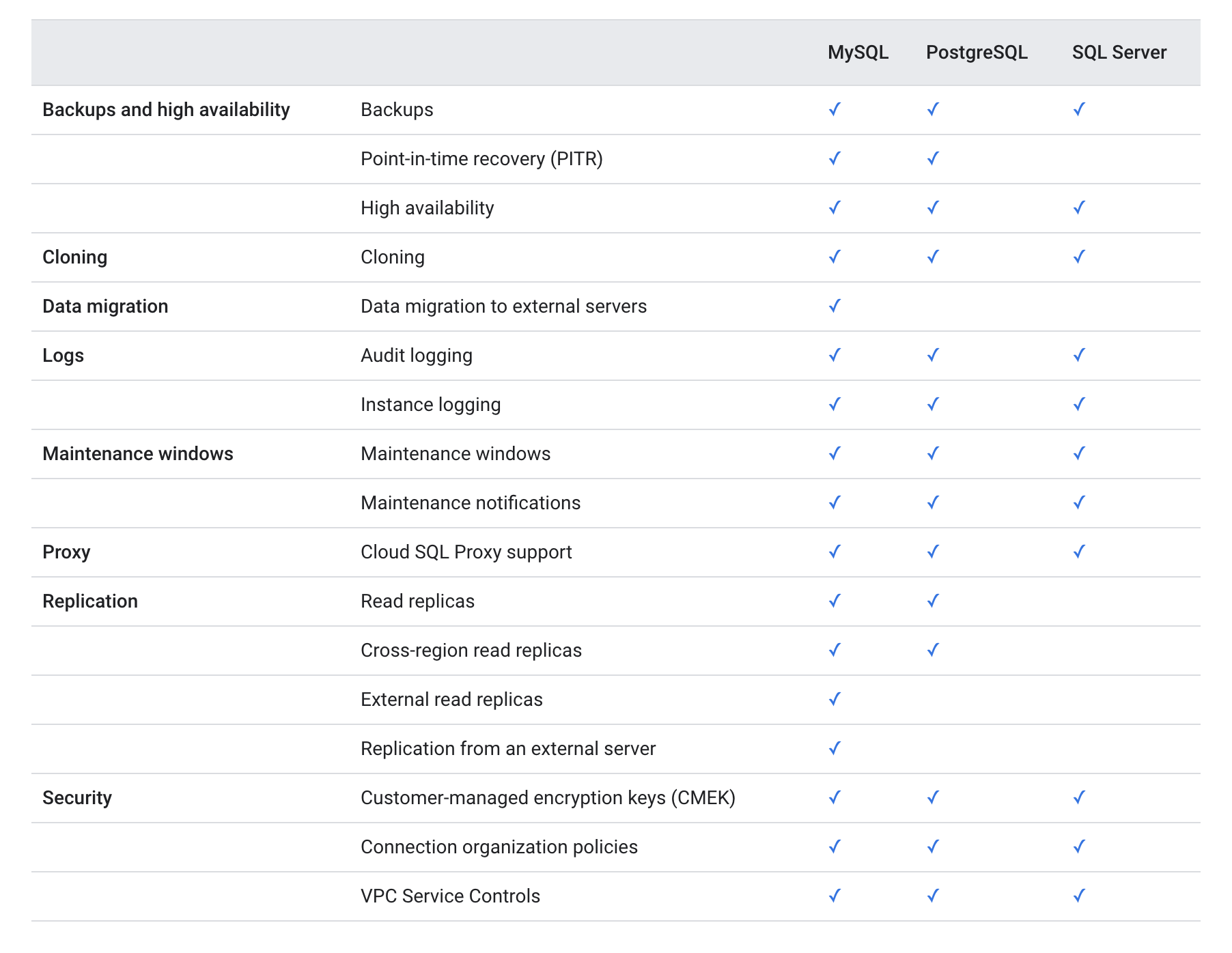
Cloud SQL Features Comparison
GCP Certification Exam Practice Questions
- Questions are collected from Internet and the answers are marked as per my knowledge and understanding (which might differ with yours).
- GCP services are updated everyday and both the answers and questions might be outdated soon, so research accordingly.
- GCP exam questions are not updated to keep up the pace with GCP updates, so even if the underlying feature has changed the question might not be updated
- Open to further feedback, discussion and correction.
- You work for a mid-sized enterprise that needs to move its operational system transaction data from an on-premises database to GCP. The database is about 20 TB in size. Which database should you choose?
- Cloud SQL
- Cloud Bigtable
- Cloud Spanner
- Cloud Datastore
- An application that relies on Cloud SQL to read infrequently changing data is predicted to grow dramatically. How can you increase capacity for more read-only clients?
- Configure high availability on the master node
- Establish an external replica in the customer’s data center
- Use backups so you can restore if there’s an outage
- Configure read replicas.
- A Company is using Cloud SQL to host critical data. They want to enable high availability in case a complete zone goes down. How should you configure the same?
- Create a Read replica in the same region different zone
- Create a Read replica in the different region different zone
- Create a Failover replica in the same region different zone
- Create a Failover replica in the different region different zone
- A Company is using Cloud SQL to host critical data. They want to enable Point In Time recovery (PIT) to be able to recover the instance to a specific point in time. How should you configure the same?
- Create a Read replica for the instance
- Switch to Spanner 3 node cluster
- Create a Failover replica for the instance
- Enable Binary logging and backups for the instance
- A company needs a Cloud SQL deployment that provides 99.99% availability SLA inclusive of maintenance window downtime. Which configuration should they choose?
- Cloud SQL Enterprise edition with HA enabled
- Cloud SQL Enterprise edition with read replicas in multiple zones
- Cloud SQL Enterprise Plus edition with HA enabled
- Cloud SQL Enterprise Plus edition with read replicas only
- A company wants to set up cross-region disaster recovery for their Cloud SQL database with the ability to perform switchover drills with zero data loss. What should they use?
- Cross-region read replicas with manual promotion
- Cloud SQL Enterprise Plus edition with Advanced Disaster Recovery
- Cloud SQL Enterprise edition with automated backups in another region
- Cloud Spanner with multi-region configuration
- A company wants to scale read traffic for their Cloud SQL MySQL database by adding multiple read replicas that can be accessed via a single endpoint and auto-scaled based on demand. What feature should they use?
- Cross-region read replicas with DNS load balancing
- Cascading read replicas in the same region
- Cloud SQL Read Pools (Enterprise Plus)
- External read replicas with a custom load balancer
- An organization wants to connect to a Cloud SQL instance from multiple VPCs across different projects without using VPC peering. Which connectivity option should they choose?
- Cloud SQL Auth Proxy with public IP
- Private Services Access with shared VPC
- Private Service Connect (PSC)
- Authorized networks with IP allowlisting
See also: Google Cloud Storage Services Cheat Sheet
References
- Google Cloud SQL Documentation
- Cloud SQL Editions Overview
- Cloud SQL Replication
- Cloud SQL Advanced Disaster Recovery
- Cloud SQL High Availability
- Cloud SQL Auth Proxy
- Cloud SQL Private Service Connect