Container Registry vs Artifact Registry
⚠️ Container Registry SHUT DOWN
Google Cloud Container Registry was deprecated on May 15, 2023 and has been fully shut down.
- March 18, 2025 – Writing images to Container Registry became unavailable.
- May 20, 2025 – Reading images from Container Registry became unavailable.
All users must migrate to Artifact Registry, which is the recommended successor. Artifact Registry supports gcr.io repositories for backward compatibility.
Migration Guide: Transition from Container Registry to Artifact Registry
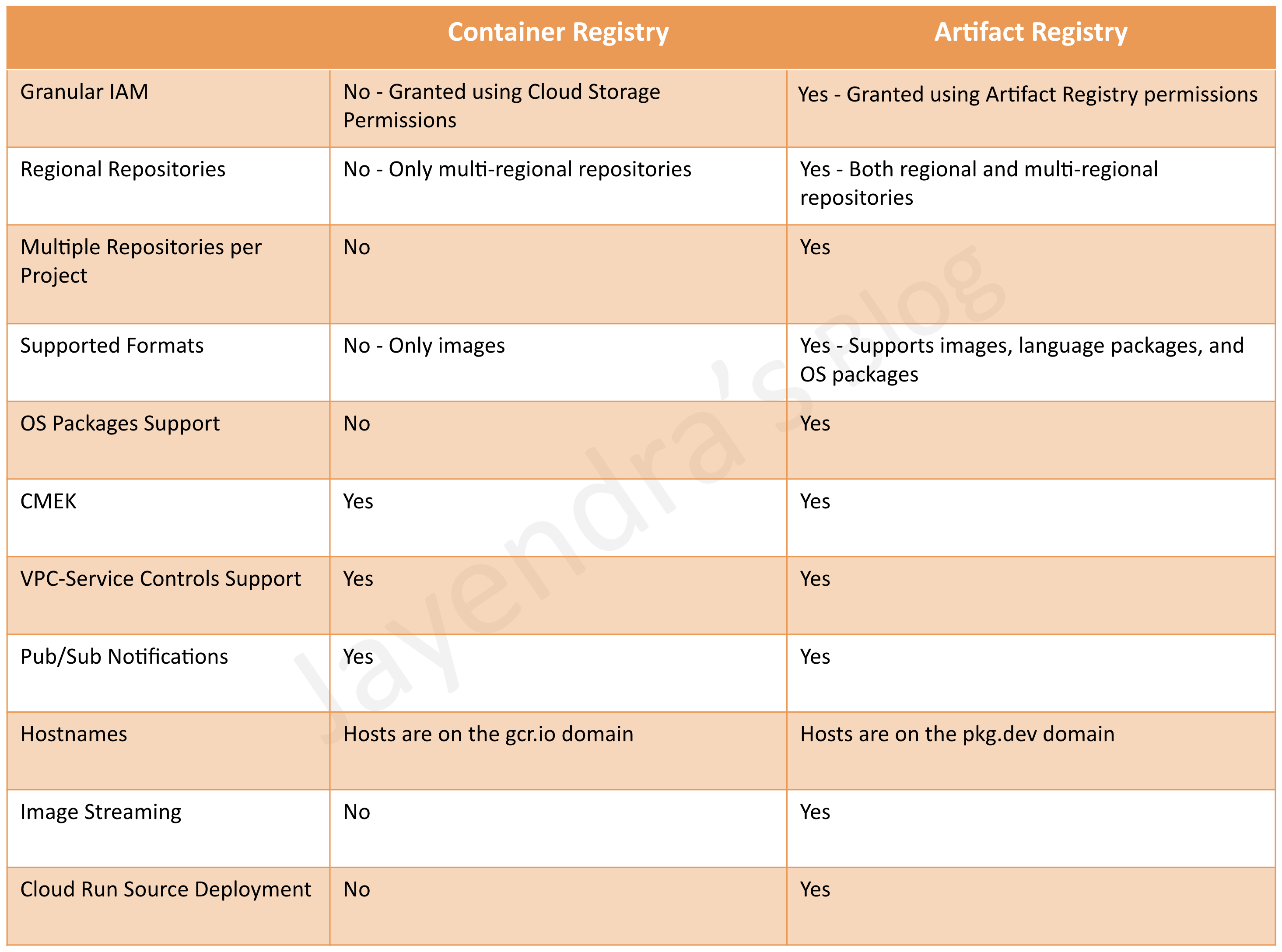
Container Registry (Shut Down)
- Container Registry was a private container image registry that supported Docker Image Manifest V2 and OCI image formats.
- provided a subset of Artifact Registry features.
- stored its tags and layer files for container images in a Cloud Storage bucket in the same project as the registry.
- did not support fine-grained IAM access control. Access to the bucket was configured using Cloud Storage’s permissions.
- integrated with Google Cloud services and worked with continuous integration and continuous delivery systems including Cloud Build and third-party tools such as Jenkins.
- was used to store only Docker images and did not support language packages or OS packages.
- was only multi-regional and did not support regional repositories.
- supported a single repository within a project and automatically created a repository in a multi-region.
- used
gcr.iohosts. - used
gcloud container imagescommands. - supported CMEK (Customer-Managed Encryption Keys) to encrypt the storage buckets that contained the images.
- supported several authentication methods for pushing and pulling images with a third-party client.
- supported VPC Service Controls and could be added to a service perimeter.
- published changes to the
gcrPub/Sub topic. - pricing was based on Cloud Storage usage, including storage and network egress.
- did not provide audit logs for registry activity.
- did not have a REST or RPC API.
Artifact Registry
- Artifact Registry is the recommended and only supported service for container image storage and management on Google Cloud, replacing the shut-down Container Registry.
- Artifact Registry is a fully-managed service with support for both container images and non-container artifacts, extending the capabilities of the former Container Registry.
- comes with fine-grained access control via Cloud IAM using Artifact Registry roles, enabling permissions scoped to individual repositories e.g., to specific regions, teams, or environments.
- supports conditional access with IAM and repository tags.
- supports multi-regional or regional repositories.
- uses
pkg.devhosts for native Artifact Registry repositories. - also supports
gcr.iorepositories for backward compatibility with former Container Registry workflows. - uses
gcloud artifacts dockercommands (commands don’t support shortened digests). - provides a REST and RPC API for managing repositories and artifacts.
- supports CMEK (Customer-Managed Encryption Keys) to encrypt individual repositories.
- supports multiple repositories within a project; repositories must be manually created before pushing images.
- supports multiple artifact formats:
- Container images (Docker, OCI)
- Language packages – Maven (Java), npm (Node.js), Python (PyPI), Go modules, Ruby gems
- OS packages – Apt (Debian), Yum/DNF (RPM)
- Other formats – Helm charts, Kubeflow Pipelines (KFP), Generic artifacts
- supports the same authentication methods as Container Registry.
- supports VPC Service Controls and can be added to a service perimeter.
- publishes changes to the
gcrPub/Sub topic for compatibility. - provides audit logging via Cloud Logging to track changes to repositories.
- enforces organization policies, including CMEK encryption and location constraints.
- pricing is based on storage and network data transfer.
Artifact Registry – Repository Modes
- Artifact Registry supports three repository modes:
- Standard repositories – Store your own private artifacts (container images, packages, etc.).
- Remote repositories – Act as a caching proxy for upstream public sources (Docker Hub, Maven Central, npm registry, PyPI, etc.), reducing build latency and providing greater control over dependencies.
- Virtual repositories – Provide a single endpoint that aggregates content from multiple upstream repositories (standard and remote), simplifying dependency resolution.
- Remote and virtual repositories became GA (Generally Available) in late 2023.
Artifact Registry – Key Features (2024-2026)
- Image Streaming – Stream container images to GKE and Managed Service for Apache Spark for faster autoscaling, faster pod startup, and reduced latency when pulling large images.
- Image Prewarming – Manually prewarm specific images in Artifact Registry to reduce cold-start latency for GKE deployments. The Prewarm Artifact API lets you precache specific image versions with a configurable retention period.
- Cleanup Policies – Define criteria for automatically deleting artifact versions that are no longer needed or retaining artifacts indefinitely, helping manage storage costs.
- Vulnerability Scanning (Artifact Analysis) – Scans for OS and language package vulnerabilities with both on-demand and automatic scanning. Supports scanning images in Artifact Registry for supported operating systems and language packages.
- Gemini Assistance – Learn about your container images with Gemini AI assistance directly in the Google Cloud Console.
- Cloud Run Source Deployment – Deploy to Cloud Run directly from source code with a single
gcloudcommand; the image is automatically built and stored in Artifact Registry. - Software Supply Chain Security – Integrates with Binary Authorization for deployment control, supports build provenance verification, and dependency management best practices.
- gcr.io Repository Support – Artifact Registry can host
gcr.iodomain repositories, providing a seamless transition path from Container Registry without changing image URLs.
Container Registry vs Artifact Registry – Feature Comparison
| Feature | Container Registry (Shut Down) | Artifact Registry |
|---|---|---|
| Supported Formats | Container images only | Container images, language packages (Maven, npm, Python, Go, Ruby), OS packages (Apt, RPM), Helm, KFP, Generic |
| Domain | gcr.io |
pkg.dev (also supports gcr.io for backward compatibility) |
| Repository Modes | N/A | Standard, Remote (caching proxy), Virtual (aggregation) |
| Location | Multi-regional only (4 hosts) | Regional and multi-regional |
| Access Control | Cloud Storage roles (bucket-level only) | Artifact Registry IAM roles (repository-level); conditional access with tags |
| Repository Creation | Auto-created on first push | Must be explicitly created before pushing |
| CMEK Encryption | Encrypts storage buckets | Encrypts individual repositories |
| Vulnerability Scanning | On-demand only; automatic scanning returned OS vulnerabilities only | Both on-demand and automatic; scans OS and language package vulnerabilities |
| Image Streaming | Not available | Available for GKE and Managed Service for Apache Spark |
| Audit Logging | Not available | Cloud Logging integration |
| API | No REST/RPC API | REST and RPC API available |
| CLI Commands | gcloud container images |
gcloud artifacts docker |
| Cloud Run Source Deploy | Not available | Supported |
| Cleanup Policies | Not available | Automatic deletion/retention policies |
Migration from Container Registry to Artifact Registry
- Google provides
gcr.iorepositories in Artifact Registry for backward compatibility, allowing existinggcr.ioimage URLs to work without changes. - Organizations that hadn’t previously used Container Registry had
gcr.iorepositories hosted on Artifact Registry by default starting January 8, 2024. - For projects with existing Container Registry usage, setting up
gcr.iorepositories in Artifact Registry redirects allgcr.iotraffic to Artifact Registry. - Existing Pub/Sub configurations on the
gcrtopic continue to work automatically. - Google-owned images (e.g., Cloud Build official builder images) previously hosted on Container Registry are now hosted on Artifact Registry with the same
gcr.ioURLs. mirror.gcr.iofor cached Docker Hub images is now hosted on Artifact Registry.
GCP Certification Exam Practice Questions
- Questions are collected from Internet and the answers are marked as per my knowledge and understanding (which might differ with yours).
- GCP services are updated everyday and both the answers and questions might be outdated soon, so research accordingly.
- GCP exam questions are not updated to keep up the pace with GCP updates, so even if the underlying feature has changed the question might not be updated
- Open to further feedback, discussion and correction.
- Note: Container Registry has been shut down as of May 2025. Exam questions may still reference it for comparison purposes, but all new implementations should use Artifact Registry.
Frequently Asked Questions
Is Google Container Registry deprecated?
Yes, Container Registry was shut down completely in 2025 (writes blocked March 18, reads blocked May 20). All users must migrate to Artifact Registry, which is the sole supported container and artifact registry on Google Cloud.
What is the difference between Container Registry and Artifact Registry?
Artifact Registry supports multiple formats (Docker, Maven, npm, Python, Go, Helm, etc.), offers regional/multi-region repositories, remote and virtual repositories, IAM-based access control, and vulnerability scanning. Container Registry only supported Docker images with GCS bucket-based storage.
Is Artifact Registry free?
Artifact Registry charges for storage (per GB/month) and network egress. There’s no per-image fee. Vulnerability scanning has a free tier for on-demand scans; continuous scanning requires the Container Security API.
Related Posts
- Google Cloud VPC Peering – Setup, Limits & Best Practices
- Google Cloud Storage Classes – Standard, Nearline, Coldline & Archive
- Google Cloud VPN – HA VPN, Classic VPN & Routing Options
- App Engine Standard vs Flexible – Differences & When to Use
- Cloud Interconnect – Dedicated vs Partner, Setup & Pricing
- GCE Storage Options – Persistent Disk vs Local SSD vs Hyperdisk
- Google Cloud Identity – SSO, Directory & Federation Guide
- Google Cloud Logging – Setup, Queries & Best Practices [2026]
- Google Cloud Load Balancing Types Compared [2026 Guide]
References