Table of Contents
hide
Google Cloud VPC Peering
- Google Cloud VPC Network Peering allows internal IP address or private connectivity across two VPC networks regardless of whether they belong to the same project or the same organization.
- VPC Network Peering enables VPC networks connection, so that workloads in different VPC networks can communicate internally.
- VPC Network Peering provides internal IPv4 and IPv6 connectivity between pairs of VPC networks.
- Traffic stays within Google’s network and doesn’t traverse public internet.
- Peering supports connectivity between networks having any combination of IPv4-only, dual-stack, and IPv6-only subnets.
- VPC Network Peering provides following advantages over using external IP addresses or VPNs to connect networks, including:
- Network Latency – connectivity uses only internal addresses and provides lower latency than connectivity that uses external addresses
- Network Security – service owners do not need to have their services exposed to the public Internet and deal with its associated risks.
- Network Cost – Google Cloud charges egress bandwidth or outbound traffic for networks using external IPs to communicate even if the traffic is within the same zone. However, for peered networks as they use internal IPs to communicate and save on those egress costs.
- VPC Network Peering is useful in these environments:
- SaaS (Software-as-a-Service) ecosystems in Google Cloud, which can be made available privately across different VPC networks within and across organizations.
- Organizations that have several network administrative domains that need to communicate using internal IP addresses.
VPC Peering Properties
- VPC Network Peering works with Compute Engine, GKE, and App Engine flexible environment.
- VPC Network Peering supports VPC-native GKE clusters by exchanging subnet routes.
- VPC Network Peering supports routes-based GKE clusters when configured to exchange static routes.
- Peered VPC networks remain administratively separate. Routes, firewalls, VPNs, and other traffic management tools are administered and applied separately in each of the VPC networks.
- Each side of a peering association is set up independently. Peering will be active only when the configuration from both sides matches. Either side can choose to delete the peering association at any time (in independent mode).
- VPC peers always exchange subnet routes that don’t use privately used public IP addresses. Networks must explicitly export privately used public IP subnet routes for other networks to use them and must explicitly import privately used public IP subnet routes to receive them from other networks.
- Subnet and static routes are global. Dynamic routes can be regional or global, depending on the VPC network’s dynamic routing mode.
- A VPC network can peer with multiple VPC networks (default quota of 25 peerings per network).
- IAM permissions for creating and deleting VPC Network Peering are included as part of the Compute Network Admin role (
roles/compute.networkAdmin). - Peering traffic (traffic flowing between peered networks) has the same latency, throughput, and availability as private traffic in the same network.
- Billing policy for peering traffic is the same as the billing policy for private traffic in the same network.
- Peering is allowed with Shared VPC.
- An organization policy administrator can use an organization policy to constrain which VPC networks can peer with VPC networks in the organization. Peering connections to particular VPC networks or to VPC networks in a particular folder or organization can be denied.
VPC Peering Connection Modes
- VPC Network Peering supports two connection modes that determine how a peering connection is administered:
- Independent Mode (default) – Either network can update or delete the peering connection at any time unilaterally.
- Consensus Mode – Requires agreement from both networks to update or delete the peering connection. Prevents accidental, unilateral changes to network behavior.
- When creating a peering connection, both peering configurations must specify the same connection mode.
- An existing connection can be changed from independent to consensus mode (both sides must update), but changing from consensus to independent is NOT supported.
- Consensus mode is recommended for critical services where accidental deletion of the peering connection would cause a service outage.
- In consensus mode:
- Update requests require complementary changes from both sides (e.g., if one side exports custom routes, the peer must import them).
- Deletion requires both sides to submit a deletion request.
- Pending update or deletion requests do not cause downtime—the connection remains active.
IPv6 Support in VPC Peering
- VPC Network Peering provides internal IPv4 and IPv6 connectivity between pairs of VPC networks.
- Peering supports connectivity between networks having any combination of IPv4-only, dual-stack, and IPv6-only subnets.
- To exchange IPv6 routes (both internal and external IPv6 subnet ranges), the peering stack type must be set to
IPV4_IPV6using the--stack-type=IPV4_IPV6flag. - IPv6 static and dynamic routes exchange also requires
--stack-type=IPV4_IPV6in addition to the--export-custom-routes/--import-custom-routesflags. - VPC Network Peering also provides certain external IPv6 connectivity to destination external IPv6 address ranges of dual-stack/IPv6-only VM instances, external protocol forwarding rules, and external passthrough Network Load Balancer forwarding rules.
- IPv6 subnet routes are unique by definition — no two VPC networks can use the same internal or external IPv6 subnet ranges.
- IPv6 functionality is available only in Premium Tier.
Route Exchange Options
- When a VPC network shares local routes with a peered VPC network, it exports the routes. The peered VPC network can then import the routes.
- Subnet routes (using private IPv4 ranges) are always exchanged and cannot be disabled.
- Subnet routes using privately used public IPv4 addresses – exported by default, not imported by default. Controlled via
--export-subnet-routes-with-public-ipand--import-subnet-routes-with-public-ipflags. - IPv6 subnet routes (internal and external) – not exchanged by default. Enabled by setting
--stack-type=IPV4_IPV6. - Static and dynamic IPv4 routes – not exchanged by default. Controlled via
--export-custom-routesand--import-custom-routesflags. - IPv6 static/dynamic routes – require both
--export-custom-routes/--import-custom-routesAND--stack-type=IPV4_IPV6. - Static routes with network tags or using the default internet gateway as next hop can NEVER be exported or imported.
- Policy-based routes are NOT supported for exchange via VPC Network Peering.
- Route exchange options can be updated before peering is established or while peering is active.
VPC Peering Restrictions
- A subnet CIDR range in one peered VPC network cannot overlap with a static route in another peered network. This rule covers both subnet routes and static routes.
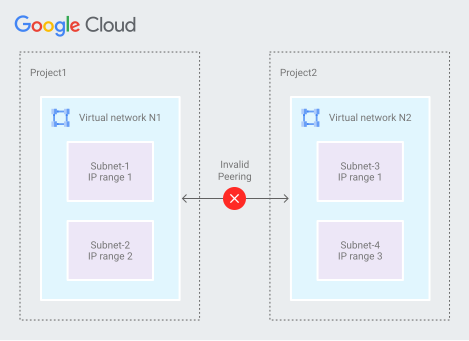
- A dynamic route can overlap with a subnet route in a peer network. For dynamic routes, the destination ranges that overlap with a subnet route from the peer network are silently dropped. Google Cloud uses the subnet route.
- Only VPC networks are supported for VPC Network Peering. Peering is NOT supported for legacy networks.
- Two auto mode VPC networks cannot be peered because each auto mode VPC uses subnet IP ranges that fit within
10.128.0.0/9. A custom mode VPC can be peered with an auto mode VPC as long as the custom mode VPC doesn’t have subnets within10.128.0.0/9. - Subnet route exchange can’t be disabled or subnet routes that can be exchanged cannot be selected. After peering is established, all resources within subnet IP addresses are accessible across directly peered networks.
- VPC Network Peering doesn’t provide granular route controls to filter out which subnet CIDR ranges are reachable across peered networks. It needs to be done using firewall rules.
- Transitive peering is NOT supported. For transitive connectivity, use Network Connectivity Center with VPC spokes.
- Network tags or service accounts from one peered network in the other peered network CANNOT be used in VPC firewall rules.
- However, secure Tags (different from network tags) used in network firewall policies CAN identify sources in peered VPC networks connected to the VPC network to which the Tag is scoped.
- Compute Engine internal DNS names created in a network are NOT accessible to peered networks. Use Cloud DNS peering zones or authorize the managed private zone to all peered VPC networks instead.
- By default, VPC Network Peering with GKE is supported when used with IP aliases (VPC-native clusters). If you don’t use IP aliases (routes-based clusters), custom routes can be exported so that GKE containers are reachable from peered networks.
Peering Group and Quotas
- VPC peering quotas depend on a concept called a peering group.
- Each VPC network has its own peering group consisting of itself and all other VPC networks connected to it using VPC Network Peering.
- Quotas such as internal forwarding rules, subnet ranges, and instances are evaluated across the entire peering group, not per individual network.
- Default quota for VPC peerings within a single VPC is 25 (can be increased via quota request).
- Google Cloud allows only one peering operation at a time across peered networks.
Network Connectivity Center (NCC) vs VPC Peering
- Network Connectivity Center (NCC) is an alternative to VPC Network Peering for connecting multiple VPC networks, providing a hub-and-spoke model.
- Transitivity: NCC provides full bandwidth and transitivity between workload VPCs (VPC spokes). VPC Peering does NOT provide transitivity.
- Scale: NCC supports up to 250 VPC spokes per hub. VPC Peering is limited to 25 peerings per VPC by default.
- When to use VPC Peering: Simple point-to-point connectivity between two VPCs without transitive requirements.
- When to use NCC: Hub-and-spoke topologies, transitive routing across multiple VPCs, enterprise-scale connectivity, or when centralizing network management.
- A VPC that is a VPC spoke in NCC can still use VPC Network Peering, provided the peered VPC network isn’t a VPC spoke itself.
- NCC VPC spokes support IPv4 and IPv6 subnet route connectivity and IPv4 dynamic route connectivity using hybrid spokes.
Internal Load Balancer Support
- Clients in a local VPC network can access internal load balancers in a peer VPC network.
- Supported internal load balancers:
- Internal passthrough Network Load Balancers
- Internal proxy Network Load Balancers
- Internal Application Load Balancers
- Peered networks can exchange static routes that use internal passthrough Network Load Balancers as next hops.
DNS Support in Peered Networks
- Resources in a peered VPC network cannot use Compute Engine internal DNS names created by a local VPC network.
- To make DNS names available to resources in a peered VPC network, use one of the following:
- Cloud DNS peering zones – Recommended approach for cross-network DNS resolution.
- Authorize the managed private zone to all peered VPC networks.
GCP Certification Exam Practice Questions
- Questions are collected from Internet and the answers are marked as per my knowledge and understanding (which might differ with yours).
- GCP services are updated everyday and both the answers and questions might be outdated soon, so research accordingly.
- GCP exam questions are not updated to keep up the pace with GCP updates, so even if the underlying feature has changed the question might not be updated
- Open to further feedback, discussion and correction.
- Your company is working with a partner to provide a solution for a customer. Both your company and the partner organization are using GCP. There are applications in the partner’s network that need access to some resources in your company’s VPC. There is no CIDR overlap between the VPCs. Which two solutions can you implement to achieve the desired results without compromising security?
- VPC peering
- Shared VPC
- Dedicated Interconnect
- Cloud NAT
- Your organization is deploying a single project for 3 separate departments. Two of these departments require network connectivity between each other, but the third department should remain in isolation. Your design should create separate network administrative domains between these departments. You want to minimize operational overhead. How should you design the topology?
- Create a Shared VPC Host Project and the respective Service Projects for each of the 3 separate departments.
- Create 3 separate VPCs, and use Cloud VPN to establish connectivity between the two appropriate VPCs.
- Create 3 separate VPCs, and use VPC peering to establish connectivity between the two appropriate VPCs.
- Create a single project, and deploy specific firewall rules. Use network tags to isolate access between the departments.
- Your organization has 15 VPC networks that all need to communicate with each other. You need full-mesh transitive connectivity with centralized management. What should you use?
- VPC Network Peering between all 15 networks
- Network Connectivity Center with VPC spokes
- Cloud VPN tunnels between all networks
- Shared VPC with service projects
- You have two VPC networks peered together. A critical production service runs across the peering connection. You want to prevent accidental deletion of the peering connection by either network administrator. What should you configure?
- IAM deny policies on the peering resource
- Organization policy constraints
- Consensus mode for the peering connection
- Read-only access for both network administrators
- You have peered two VPC networks and need to enable IPv6 communication between resources in both networks. What must you configure on the peering connection?
- Enable the
--export-custom-routesflag - Create IPv6 firewall rules only
- Set the peering stack type to IPV4_IPV6
- Enable Private Google Access for IPv6
- Enable the
- You want to use network firewall policy rules to identify traffic sources from peered VPC networks. Which identifier can be used to match sources across peered networks?
- Network tags
- Service accounts
- Secure Tags (resource manager tags)
- IP ranges only