Amazon CloudWatch Logs

Amazon CloudWatch Logs

  • CloudWatch Logs can be used to monitor, store, and access log files from EC2 instances, CloudTrail, Route 53, Lambda, ECS, EKS, and other sources.
  • CloudWatch Logs uses the log data for monitoring with no code changes required.
  • CloudWatch Logs require CloudWatch Unified Agent (formerly CloudWatch logs agent) to be installed on the EC2 instances and on-premises servers.
  • CloudWatch Logs agent makes it easy to quickly send both rotated and non-rotated log data off of a host and into the log service.
  • A VPC endpoint can be configured to keep traffic between VPC and CloudWatch Logs from leaving the Amazon network. It doesn’t require an IGW, NAT, VPN connection, or Direct Connect connection
  • CloudWatch Logs allows exporting log data from the log groups to an S3 bucket, which can then be used for custom processing and analysis, or to load onto other systems.
  • Log data is encrypted while in transit and while it is at rest
  • Log data can be encrypted using AWS KMS customer managed keys (CMK).

CloudWatch Logs Concepts

Log Events

  • A log event is a record of some activity recorded by the application or resource being monitored.
  • Log event record contains two properties: the timestamp of when the event occurred, and the raw event message

Log Streams

  • A log stream is a sequence of log events that share the same source for e.g. logs events from an Apache access log on a specific host.

Log Groups

  • Log groups define groups of log streams that share the same retention, monitoring, and access control settings for e.g. Apache access logs from each host grouped through log streams into a single log group
  • Each log stream has to belong to one log group
  • There is no limit on the number of log streams that can belong to one log group.

Log Classes

  • CloudWatch Logs supports two log classes: Standard and Infrequent Access
  • Standard Log Class – full-featured option for logs that require real-time monitoring with all CloudWatch Logs features including Live Tail, Metric Filters, Subscription Filters, Logs Insights, and Contributor Insights.
  • Infrequent Access Log Class – cost-optimized log class for infrequently accessed logs with 50% lower ingestion costs. Ideal for ad-hoc querying and forensic analysis.
  • Infrequent Access class has limitations: no subscription filters, no Live Tail, no Contributor Insights, and can only be queried using CloudWatch Logs Insights.
  • Log class can be specified when creating a log group and can be changed later.

Metric Filters

  • Metric filters can be used to extract metric observations from ingested events and transform them to data points in a CloudWatch metric.
  • Metric filters are assigned to log groups, and all of the filters assigned to a log group are applied to their log streams.

Retention Settings

  • Retention settings can be used to specify how long log events are kept in CloudWatch Logs.
  • Expired log events get deleted automatically.
  • Retention settings are assigned to log groups, and the retention assigned to a log group is applied to their log streams.
  • Retention periods range from 1 day to 10 years, or indefinite retention.

Account Policies

  • Account policies help apply configurations across all log groups in an AWS account or specific log groups matching a selection criteria.
  • Supports data protection policies to automatically mask sensitive data like credit card numbers, social security numbers, and email addresses.
  • Supports subscription filter policies to centrally manage log forwarding to destinations like Kinesis, Lambda, or OpenSearch.

CloudWatch Logs Use cases

Monitor Logs from EC2 Instances in Real-time

  • can help monitor applications and systems using log data
  • can help track number of errors for e.g. 404, 500, for even specific literal terms “NullReferenceException”, occurring in the applications, which can then be matched to a threshold to send notification

Monitor AWS CloudTrail Logged Events

  • can be used to monitor particular API activity as captured by CloudTrail by creating alarms in CloudWatch and receive notifications

Archive Log Data

  • can help store the log data in highly durable storage, an alternative to S3
  • log retention setting can be modified, so that any log events older than this setting are automatically deleted.

Log Route 53 DNS Queries

  • can help log information about the DNS queries that Route 53 receives.

Real-time Processing of Log Data with Subscriptions

  • Subscriptions can help get access to real-time feed of logs events from CloudWatch logs and have it delivered to other services such as Kinesis Data Streams, Kinesis Data Firehose, or AWS Lambda for custom processing, analysis, or loading to other systems
  • A subscription filter defines the filter pattern to use for filtering which log events get delivered to the AWS resource, as well as information about where to send matching log events to.
  • CloudWatch Logs log group can also be configured to stream data to Amazon OpenSearch Service cluster in near real-time

Searching and Filtering

  • CloudWatch Logs allows searching and filtering the log data by creating one or more metric filters.
  • Metric filters define the terms and patterns to look for in log data as it is sent to CloudWatch Logs.
  • CloudWatch Logs uses these metric filters to turn log data into numerical CloudWatch metrics that can be put as graph or set an alarm on.

CloudWatch Logs Advanced Features

CloudWatch Logs Insights

  • CloudWatch Logs Insights enables interactive log analytics with a purpose-built query language.
  • Supports three query languages: CloudWatch Logs Insights query syntax, OpenSearch SQL, and OpenSearch Piped Processing Language (PPL).
  • OpenSearch SQL – allows using familiar SQL syntax to query logs, including JOIN operations to correlate logs across multiple log groups.
  • OpenSearch PPL – uses pipe-delimited commands for easier composition of complex queries.
  • Supports pattern analysis to automatically identify patterns in log data and group similar log entries.
  • Supports anomaly detection command to identify unusual patterns or behaviors in logs.
  • Can query multiple log groups simultaneously and visualize results with time-series graphs.

CloudWatch Logs Live Tail

  • Live Tail enables real-time streaming of log events as they are ingested into CloudWatch Logs.
  • Useful for troubleshooting and debugging applications in real-time without waiting for log aggregation.
  • Can filter log events in real-time using filter patterns.
  • Supports tailing multiple log groups and log streams simultaneously.
  • Available through AWS Console, AWS CLI, and AWS SDKs.
  • Charged on a per-minute basis during active sessions.

CloudWatch Logs Anomaly Detection

  • Anomaly detection uses machine learning and pattern recognition to automatically identify anomalies in log data.
  • Establishes baselines of typical log content and alerts when deviations occur.
  • Can create up to 500 log anomaly detectors per account (increased from 10).
  • Anomaly detectors continuously scan log events ingested into log groups.
  • Can configure CloudWatch alarms to notify when anomalies are detected.
  • Helps reduce time to identify and resolve operational issues.

Data Protection and Masking

  • Data protection policies automatically discover and mask sensitive data in log events.
  • Supports detection of sensitive data types including credit card numbers, social security numbers, email addresses, IP addresses, and custom patterns.
  • Can audit sensitive data by sending findings to CloudWatch Logs or S3.
  • Can mask sensitive data by replacing it with a hash or redacting it entirely.
  • Policies can be applied at log group level or account level.

AWS Certification Exam Practice Questions

  • Questions are collected from Internet and the answers are marked as per my knowledge and understanding (which might differ with yours).
  • AWS services are updated everyday and both the answers and questions might be outdated soon, so research accordingly.
  • AWS exam questions are not updated to keep up the pace with AWS updates, so even if the underlying feature has changed the question might not be updated
  • Open to further feedback, discussion and correction.
  1. Once we have our logs in CloudWatch, we can do a number of things such as: Choose 3. Choose the 3 correct answers:[CDOP]
    1. Send the log data to AWS Lambda for custom processing or to load into other systems
    2. Stream the log data to Amazon Kinesis
    3. Stream the log data into Amazon OpenSearch Service in near real-time with CloudWatch Logs subscriptions.
    4. Record API calls for your AWS account and delivers log files containing API calls to your Amazon S3 bucket
  2. You have decided to set the threshold for errors on your application to a certain number and once that threshold is reached you need to alert the Senior DevOps engineer. What is the best way to do this? Choose 3. Choose the 3 correct answers: [CDOP]
    1. Set the threshold your application can tolerate in a CloudWatch Logs group and link a CloudWatch alarm on that threshold.
    2. Use CloudWatch Logs agent to send log data from the app to CloudWatch Logs from Amazon EC2 instances
    3. Pipe data from EC2 to the application logs using AWS Data Pipeline and CloudWatch
    4. Once a CloudWatch alarm is triggered, use SNS to notify the Senior DevOps Engineer.
  3. You are hired as the new head of operations for a SaaS company. Your CTO has asked you to make debugging any part of your entire operation simpler and as fast as possible. She complains that she has no idea what is going on in the complex, service-oriented architecture, because the developers just log to disk, and it’s very hard to find errors in logs on so many services. How can you best meet this requirement and satisfy your CTO? [CDOP]
    1. Copy all log files into AWS S3 using a cron job on each instance. Use an S3 Notification Configuration on the PutBucket event and publish events to AWS Lambda. Use the Lambda to analyze logs as soon as they come in and flag issues. (is not fast in search and introduces delay)
    2. Begin using CloudWatch Logs on every service. Stream all Log Groups into S3 objects. Use AWS EMR cluster jobs to perform adhoc MapReduce analysis and write new queries when needed. (is not fast in search and introduces delay)
    3. Copy all log files into AWS S3 using a cron job on each instance. Use an S3 Notification Configuration on the PutBucket event and publish events to AWS Kinesis. Use Apache Spark on AWS EMR to perform at-scale stream processing queries on the log chunks and flag issues. (is not fast in search and introduces delay)
    4. Begin using CloudWatch Logs on every service. Stream all Log Groups into an Amazon OpenSearch Service Domain and perform log analysis on a search cluster. (OpenSearch stack is designed specifically for real-time, ad-hoc log analysis and aggregation)
  4. You use Amazon CloudWatch as your primary monitoring system for your web application. After a recent software deployment, your users are getting Intermittent 500 Internal Server Errors when using the web application. You want to create a CloudWatch alarm, and notify an on-call engineer when these occur. How can you accomplish this using AWS services? (Choose three.) [CDOP]
    1. Deploy your web application as an AWS Elastic Beanstalk application. Use the default Elastic Beanstalk CloudWatch metrics to capture 500 Internal Server Errors. Set a CloudWatch alarm on that metric.
    2. Install a CloudWatch Logs Agent on your servers to stream web application logs to CloudWatch.
    3. Use Amazon Simple Email Service to notify an on-call engineer when a CloudWatch alarm is triggered.
    4. Create a CloudWatch Logs group and define metric filters that capture 500 Internal Server Errors. Set a CloudWatch alarm on that metric.
    5. Use Amazon Simple Notification Service to notify an on-call engineer when a CloudWatch alarm is triggered.
    6. Use AWS Data Pipeline to stream web application logs from your servers to CloudWatch.

References

AWS CloudWatch Logs User Guide

AWS OpsWorks Deployment Strategies – Certification

AWS OpsWorks Deployment Strategies

NOTE: Advanced Topic required for DevOps Professional Exam Only

All at Once Deployment

  • OpsWorks Stacks does not automatically deploy updated code to online instances, and needs to be done manually
  • Deploy command (for apps) or Update Custom Cookbooks command (for cookbooks) helps deploy the update to every instance concurrently
  • Approach is simple and fast, but leads to a downtime incase of error
  • OpsWorks allows rollback to restore previously deployed app version
  • By default, AWS OpsWorks Stacks stores the five most recent deployments, which allows you to roll back up to four versions

Rolling Deployment

  • A rolling deployment updates an application on a stack’s online application server instances in multiple phases.
  • With each phase, a subset of the online instances can be updated and verified to be successful before starting the next phase.
  • In case of any issues, the instances running the old app version can continue to handle incoming traffic until the issues are resolved.
  • Steps to perform Rolling deployment
    • Deploy the app on a single application server instance.
    • The instance can be deregistered from the load balancer, to prevent it from serving traffic
    • Verify the app is working fine
    • Deploy the update on the remainder of instances

Blue Green Deployment

  • Blue Green deployment can be achieved using separate stack for each phase of the application’s lifecycle.
  • Different stacks are sometimes referred to as environments like development, staging, production etc.
    • Blue environment is the production stack, which hosts the current application.
    • Green environment is the staging stack, which hosts the updated application.
  • Development and testing can be performed on stacks, which are not publicly accessible, and when ready the traffic can be switched.
  • Steps for Blue Green deployment with OpsWorks Stacks stacks, in conjunction with Route 53 and a pool of ELB load balancers
    • Attach unused ELB from the pool to the green stack’s application server layer
    • After all of the green stack’s instances have passed the ELB health check, the weights in Route 53 can be changed to route traffic gradually from Blue to Green stack.
    • Once the Green stack works fines and is ready to handle all traffic
    • Detach the load balancer from the old blue stack’s application server layer and return it to the pool
    • Blue stack can be retained for some time, so that if any issues the update can be rolled back by reversing the procedure to direct incoming traffic back to the old blue stack
OpsWorks Blue Green Deployment

AWS Certification Exam Practice Questions

  • Questions are collected from Internet and the answers are marked as per my knowledge and understanding (which might differ with yours).
  • AWS services are updated everyday and both the answers and questions might be outdated soon, so research accordingly.
  • AWS exam questions are not updated to keep up the pace with AWS updates, so even if the underlying feature has changed the question might not be updated
  • Open to further feedback, discussion and correction.
  1. You company runs a complex customer relations management system that consists of around 10 different software components all backed by the same Amazon Relational Database (RDS) database. You adopted AWS OpsWorks to simplify management and deployment of that application and created an AWS OpsWorks stack with layers for each of the individual components. An internal security policy requires that all instances should run on the latest Amazon Linux AMI and that instances must be replaced within one month after the latest Amazon Linux AMI has been released. AMI replacements should be done without incurring application downtime or capacity problems. You decide to write a script to be run as soon as a new Amazon Linux AMI is released. Which solutions support the security policy and meet your requirements? Choose 2 answers
    1. Assign a custom recipe to each layer, which replaces the underlying AMI. Use AWS OpsWorks life-cycle events to incrementally execute this custom recipe and update the instances with the new AMI. (AMI cannot be updated using recipes)
    2. Create a new stack and layers with identical configuration, add instances with the latest Amazon Linux AMI specified as a custom AMI to the new layer, switch DNS to the new stack, and tear down the old stack. (Blue-Green Deployment)
    3. Identify all Amazon Elastic Compute Cloud (EC2) instances of your AWS OpsWorks stack, stop each instance, replace the AMI ID property with the ID of the latest Amazon Linux AMI ID, and restart the instance. To avoid downtime, make sure not more than one instance is stopped at the same time. (Instances cannot be updated by updating the AMI id and needs to be launched anew)
    4. Specify the latest Amazon Linux AMI as a custom AMI at the stack level, terminate instances of the stack and let AWS OpsWorks launch new instances with the new AMI. (Would result in downtime)
    5. Add new instances with the latest Amazon Linux AMI specified as a custom AMI to all AWS OpsWorks layers of your stack, and terminate the old ones. (Disposable Rolling deployment)
  2. A company has developed a Ruby on Rails content management platform. Currently, OpsWorks with several stacks for dev, staging, and production is being used to deploy and manage the application. Now the company wants to start using Python instead of Ruby. How should the company manage the new deployment?
    1. Update the existing stack with Python application code and deploy the application using the deploy life-cycle action to implement the application code.
    2. Create a new stack that contains a new layer with the Python code. To cut over to the new stack the company should consider using Blue/Green deployment
    3. Create a new stack that contains the Python application code and manage separate deployments of the application via the secondary stack using the deploy lifecycle action to implement the application code.
    4. Create a new stack that contains the Python application code and manages separate deployments of the application via the secondary stack

References

OpsWorks Deployment Best Practices

AWS Certified Cloud Practitioner (CLF-C01) Exam Learning Path

AWS Certified Cloud Practitioner Exam (CLF-C01) Learning Path

  • AWS Certified Cloud Practitioner Exam is mainly a high-level introduction to Cloud Computing, AWS Cloud, its advantages, its services, pricing, and support plans.
  • AWS Certified Cloud Practitioner exam is a good exam to start your AWS journey with and also provides non-technical professionals to know what AWS has to offer.
  • AWS Certified Cloud Practitioner Exam has 65 questions to be answered in 100 minutes.
  • AWS Certified Cloud Practitioner Exam is the only exam currently that can be taken online, without having to visit a test center.
  • Be sure to have a good internet connection, comfortable seating, id cards ready and you should be good to go.

AWS Certified Cloud Practitioner exam basically validates the following

  • Define what the AWS Cloud is and the basic global infrastructure
  • Describe basic AWS Cloud architectural principles
  • Describe the AWS Cloud value proposition
  • Describe key services on the AWS platform and their common use cases (for example, compute and analytics)
  • Describe basic security and compliance aspects of the AWS platform and the shared security model
  • Define the billing, account management, and pricing models;
  • Identify sources of documentation or technical assistance (for example, white papers or support tickets); and
  • Describe basic/core characteristics of deploying and operating in the AWS Cloud.

Refer to the AWS Certified Cloud Practitioner Exam guide
AWS Certified Cloud Practitioner (CLF-C01) Exam Domains

AWS Certified Cloud Practitioner Exam Resources

AWS Cloud Computing Whitepapers

AWS Certified Cloud Practitioner Exam Contents

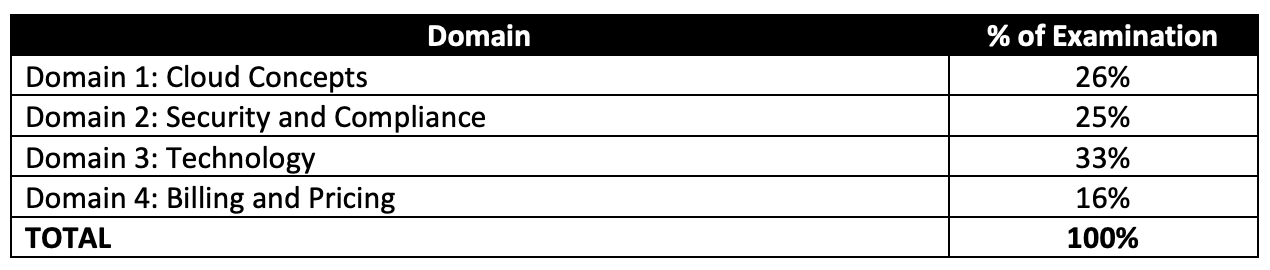
Domain 1: Cloud Concepts

  • 1.1 Define the AWS Cloud and its value proposition
    • Agility – Speed, Experimentation, Innovation
    • Elasticity – Scale on demand, Eliminate wasted capacity
    • Availability – Spread across multiple zones
    • Flexibility – Broad set of products, Low to no cost to entry
    • Security – Compliant many compliance certifications, Shared responsibility model
  • 1.2 Identify aspects of AWS Cloud economics
    • Advantages of Cloud Computing
      • Trade capital expense for variable expense
      • Benefit from massive economies of scale
      • Stop guessing about capacity
      • Increase speed and agility
      • Stop spending money running and maintaining data centers
      • Go global in minutes
    • AWS Well-Architected Framework
      • Features include agility, security, reliability, performance efficiency, cost optimization, and operational excellence.
  • 1.3 List the different cloud architecture design principles

Domain 2: Security

  • 2.1 Define the AWS Shared Responsibility model
    • includes having a clear understanding of what AWS and Customer responsibilities are 
  • 2.2 Define AWS Cloud security and compliance concepts
  • 2.3 Identify AWS access management capabilities
    • includes services like IAM
  • 2.4 Identify resources for security support

Domain 3: Technology

  • 3.1 Define methods of deploying and operating in the AWS Cloud
  • 3.2 Define the AWS global infrastructure
    • includes AWS concepts of regions, AZs and edge locations
  • 3.3 Identify the core AWS services
    • Includes AWS Services Overview and focuses on high level knowledge of (but surely not deep enough)
      • Compute Services
      • Storage Services –
        • S3 – object storage, static website hosting. Know S3 subresources esp. versioning, server access logging
        • EBS
        • EFS – shared file storage that can be shared between on-premises and AWS resources
        • Glacier – archival long term storage
      • Security, Identity, and Compliance –
        • IAM – 
        • Organizations,
        • WAF
        • AWS Inspector – automated application security assessment 
        • AWS GuardDuty – threat detection service that continuously monitors for malicious activity and unauthorized behavior to protect the AWS accounts and workloads
        • AWS Artifact – On-demand access to AWS’ compliance reports
      • Databases –
      • Migration – Database Migration Service
      • Networking and Content Delivery
        • VPC
        • CloudFront – caching and helps improve performance and reduce latency
        • Route 53 – dns and domain registration. Also understand different routing policies esp. latency for Global traffic
        • VPN & Direct Connect – provides connectivity between on-premises and AWS Cloud
        • ELB – helps distribute load across multiple resources
        • AWS Global Accelerator – Improve application availability and performance
      • Management Tools
      • Messaging – SQS, SNS
  • 3.4 Identify resources for technology support
    • includes AWS Support Models and the key features and benefits the model provides to the customers
      • know only Enterprise support plan provides
        • dedicated TAM (Technical Account Manager)
        • Well-Architected Review delivered by AWS Solution Architects
        • Account Assistance by Assigned Support Concierge
        • SLA of < 15 mins for business critical events
      • know only Business and above support plan provides
        • 24×7 access to Cloud Support Engineers via email, chat & phone
        • Full Access to Trusted Advisor checks

Domain 4: Billing and Pricing

  • 4.1 Compare and contrast the various pricing models for AWS
    • includes AWS Pricing
      • know EC2 pricing models esp. Spot and Reserved
      • know Lambda pricing which is based on invocations and time
  • 4.2 Recognize the various account structures in relation to AWS billing and pricing
  • 4.3 Identify resources available for billing support
    • includes tools like TCO Calculator which helps compare cost of running applications in an on-premises or colocation environment to AWS
    • includes Cost Explorer allows you to view and analyze costs (hint – Spend forecasting)

AWS Services Overview – Whitepaper – Certification

AWS Services Overview

AWS consists of many cloud services that can be use in combinations tailored to meet business or organizational needs. This section introduces the major AWS services by category.


NOTE – This post provides a brief overview of AWS services. Its is good introduction to start all certifications. However, It is more relevant and most important for AWS Cloud Practitioner Certification Exam.


Common Features

  • Almost the features can be access control through AWS Identity Access Management – IAM
  • Services managed by AWS are all made Scalable and Highly Available, without any changes needed from the user

AWS Access

AWS allows accessing its services through unified tools using

  • AWS Management Console – a simple and intuitive user interface
  • AWS Command Line Interface (CLI) – programatic access through scripts
  • AWS Software Development Kits (SDKs) – programatic access through Application Program Interface (API) tailored for programming language (Java, .NET, Node.js, PHP, Python, Ruby, Go, C++, AWS Mobile SDK) or platform (Android, Browser, iOS)

Security, Identity, and Compliance

Amazon Cloud Directory

  • enables building flexible, cloud-native directories for organizing hierarchies of data along multiple dimensions, whereas traditional directory solutions limit to a single directory
  • helps create directories for a variety of use cases, such as organizational charts, course catalogs, and device registries.

AWS Identity and Access Management

  • enables you to securely control access to AWS services and resources for the users.
  • allows creation of AWS users, groups and roles, and use permissions to allow and deny their access to AWS resources
  • helps manage IAM users and their access with individual security credentials like access keys, passwords, and multi-factor authentication devices, or request temporary security credentials to provide users
  • helps role creation & manage permissions to control which operations can be performed by the which entity, or AWS service, that assumes the role
  • enables identity federation to allow existing identities (users, groups, and roles) in the enterprise to access AWS Management Console, call AWS APIs, access resources, without the need to create an IAM user for each identity.

Amazon Inspector

  • is an automated security assessment service that helps improve the security and compliance of applications deployed on AWS.
  • automatically assesses applications for vulnerabilities or deviations from best practices
  • produces a detailed list of security findings prioritized by level of severity.

AWS Certificate Manager

  • helps provision, manage, and deploy Secure Sockets Layer/Transport Layer Security (SSL/TLS) certificates for use with AWS services like ELB
  • removes the time-consuming manual process of purchasing, uploading, and renewing SSL/TLS certificates.

AWS CloudHSM

  • helps meet corporate, contractual, and regulatory compliance requirements for data security by using dedicated Hardware Security Module (HSM) appliances within the AWS Cloud.
  • allows protection of encryption keys within HSMs, designed and validated to government standards for secure key management.
  • helps comply with strict key management requirements without sacrificing application performance.

AWS Directory Service

  • provides Microsoft Active Directory (Enterprise Edition), also known as AWS Microsoft AD, that enables directory-aware workloads and AWS resources to use managed Active Directory in the AWS Cloud.

AWS Key Management Service

  • is a managed service that makes it easy to create and control the encryption keys used to encrypt your data.
  • uses HSMs to protect the security of your keys.

AWS Organizations

  • allows creation of AWS accounts groups, to more easily manage security and automation settings collectively
  • helps centrally manage multiple accounts to help scale.
  • helps to control which AWS services are available to individual accounts, automate new account creation, and simplify billing.

AWS Shield

  • is a managed Distributed Denial of Service (DDoS) protection service that safeguards web applications running on AWS.
  • provides always-on detection and automatic inline mitigations that minimize application downtime and latency, so there is no need to engage AWS Support to benefit from DDoS protection.
  • provides two tiers of AWS Shield: Standard and Advanced.

AWS WAF

  • is a web application firewall that helps protect web applications from common web exploits that could affect application availability, compromise security, or consume excessive resources.
  • gives complete control over which traffic to allow or block to web application by defining customizable web security rules.

AWS Compute Services

Amazon Elastic Compute Cloud (EC2)

  • provides secure, resizable compute capacity
  • provide complete control of the computing resources (root access, ability to start, stop, terminate instances etc.)
  • reduces the time required to obtain and boot new instances to minutes
  • allows quick scaling of capacity, both up and down, as the computing requirements changes
  • provides developers and sysadmins tools to build failure resilient applications and isolate themselves from common failure scenarios.
  • Benefits
    • Elastic Web-Scale Computing
      • enables scaling to increase or decrease capacity within minutes, not hours or days.
    • Flexible Cloud Hosting Services
      • flexibility to choose from multiple instance types, operating systems, and software packages.
      • selection of memory configuration, CPU, instance storage, and boot partition size
    • Reliable
      • offers a highly reliable environment where replacement instances can be rapidly and predictably commissioned.
      • runs within AWS’s proven network infrastructure and data centers.
      • EC2 Service Level Agreement (SLA) commitment is 99.95% availability for each Region.
    • Secure
      • works in conjunction with VPC to provide security and robust networking functionality for your compute resources.
      • allows control of IP address, exposure to Internet (using subnets), inbound and outbound access (using Security groups and NACLs)
      • existing IT infrastructure can be connected to the resources in the VPC using industry-standard encrypted IPsec virtual private network (VPN) connections
    • Inexpensive – pay only for the capacity actually used
  • EC2 Purchasing Options and Types
    • On-Demand Instances
      • pay for compute capacity by the hour with no long-term commitments
      • enables to increase or decrease compute capacity depending on the demands and only pay the specified hourly rate for used instances
      • frees from the costs and complexities of planning, purchasing, and maintaining hardware and transforms what are commonly large fixed costs into much smaller variable costs.
      • also helps remove the need to buy “safety net” capacity to handle periodic traffic spikes.
    • Reserved Instances
      • provides significant discount (up to 75%) compared to On-Demand instance pricing.
      • provides flexibility to change families, operating system types, and tenancies with Convertible Reserved Instances.
    • Spot Instances
      • allow you to bid on spare EC2 computing capacity.
      • are often available at a discount compared to On-Demand pricing, helping reduce the application cost, grow it’s compute capacity and throughput for the same budget
    • Dedicated Instances – that run on hardware dedicated to a single customer for additional isolation.
    • Dedicated Hosts
      • are physical servers with EC2 instance capacity fully dedicated to your use.
      • can help you address compliance requirements and reduce costs by allowing you to use your existing server-bound software licenses.

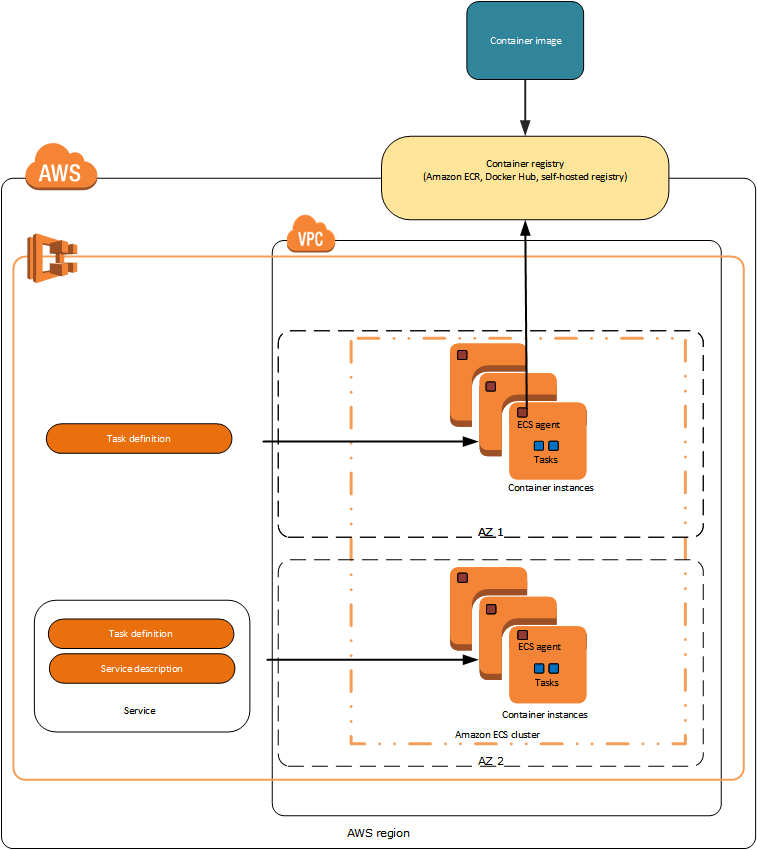
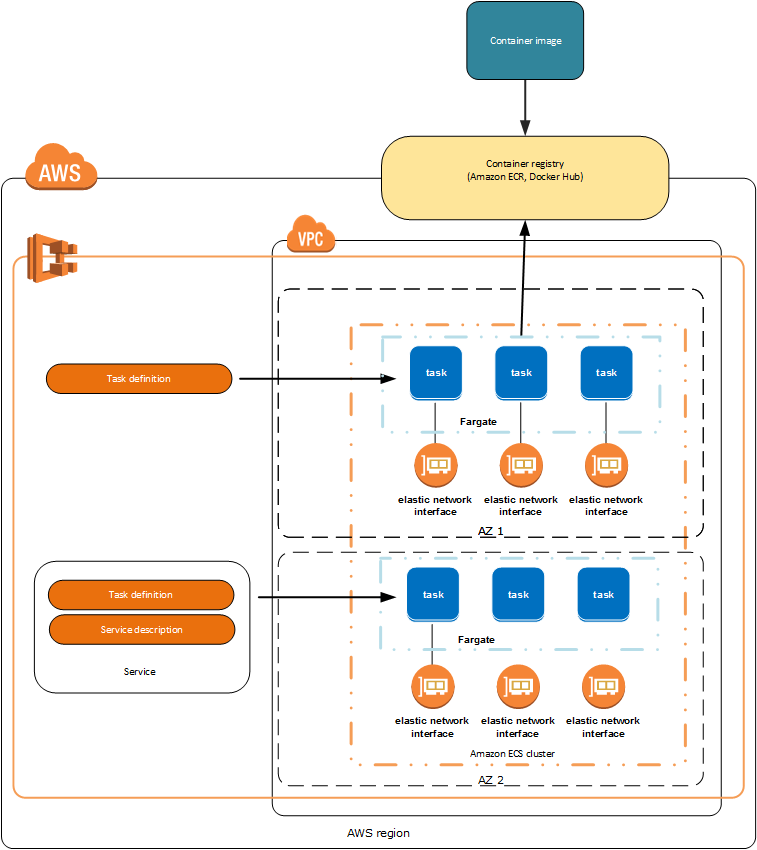
Amazon EC2 Container Service

  • is a highly scalable, high-performance container management service that supports Docker containers.
  • allows running applications on a managed cluster of EC2 instances
  • eliminates the need to install, operate, and scale cluster management infrastructure.
  • can use to schedule the placement of containers across the cluster based on the resource needs and availability requirements.
  • custom scheduler or third-party schedulers can be integrated to meet business or application-specific requirements.

Amazon EC2 Container Registry

  • is a fully-managed Docker container registry that makes it easy for developers to store, manage, and deploy Docker container images.
  • is integrated with Amazon EC2 Container Service (ECS), simplifying development to production workflow.
  • eliminates the need to operate container repositories or worry about scaling the underlying infrastructure.
  • hosts images in a highly available and scalable architecture
  • pay only for the amount of data stored and data transferred to the Internet.

Amazon Lightsail

  • is designed to be the easiest way to launch and manage a virtual private server with AWS.
  • plans include everything needed to jumpstart a project – a virtual machine, SSD-based storage, data transfer, DNS management, and a static IP address- for a low, predictable price.

AWS Batch

  • enables developers, scientists, and engineers to easily and efficiently run hundreds of thousands of batch computing jobs on AWS.
  • dynamically provisions the optimal quantity and type of compute resources (e.g., CPU or memory-optimized instances) based on the volume and specific resource requirements of the batch jobs submitted.
  • plans, schedules, and executes the batch computing workloads across the full range of AWS compute services and features

AWS Elastic Beanstalk

  • is an easy-to-use service for deploying and scaling web applications and services developed with Java, .NET, PHP, Node.js, Python, Ruby, Go, and Docker on familiar servers such as Apache, Nginx, Passenger, and Internet Information Services (IIS)
  • automatically handles the deployment, from capacity provisioning, load balancing, and auto scaling to application health monitoring.
  • provides full control over the AWS resources with access to the underlying resources at any time.

AWS Lambda

  • enables running code without zero administration, provisioning or managing servers, and scaling for high availability
  • pay only for the compute time consumed – there is no charge when the code is not running
  • can be setup to be automatically triggered from other AWS services, or called it directly from any web or mobile app.

Auto Scaling

  • helps maintain application availability
  • allows scaling EC2 capacity up or down automatically according to defined conditions or demand spikes to reduce cost
  • helps ensure desired number of EC2 instances are running always
  • well suited both to applications that have stable demand patterns and applications that experience hourly, daily, or weekly variability in usage.

Storage

Simple Storage Service

  • is object storage with a simple web service interface to store and retrieve any amount of data from anywhere on the web.
  • S3 Features
    • Durable
      • designed for durability of 99.999999999% of objects
      • data is redundantly stored across multiple facilities and multiple devices in each facility.
    • Available – designed for up to 99.99% availability (standard) of objects over a given year and is backed by the S3 Service Level Agreement
    • Scalable – can help store virtually unlimited data
    • Secure
      • supports data in motion over SSL and data at rest encryption
      • bucket policies and IAM can help manage object permissions and control access to the data
    • Low Cost
      • provides storage at a very low cost.
      • using lifecycle policies, the data can be automatically tiered into lower cost, longer-term cloud storage classes like S3 Standard – Infrequent Access and Glacier for archiving.

Elastic Block Store (EBS)

  • provides persistent block storage volumes for use with EC2 instance
  • offers the consistent and low-latency performance needed to run workloads.
  • allows scaling up or down within minutes – all while paying a low price for only what is provisioned
  • EBS Features
    • High Performance Volumes – Choose between SSD backed or HDD backed volumes to deliver the performance needed
    • Availability
      • is designed for 99.999% availability
      • automatically replicates within its Availability Zone to protect from component failure, offering high availability and durability.
    • Encryption – provides seamless support for data-at-rest and data-in-transit between EC2 instances and EBS volumes.
    • Snapshots – protect data by creating point-in-time snapshots of EBS volumes, which are backed up to S3 for long-term durability.

Elastic File System (EFS)

  • provides simple, scalable file storage for use with EC2 instances
  • storage capacity is elastic, growing and shrinking automatically as files are added and removed
  • provides a standard file system interface and file system access semantics, when mounted on EC2 instances
  • works in shared mode, where multiple EC2 instances can access an EFS file system at the same time, allowing EFS to provide a common data
    source for workloads and applications running on more than one EC2 instance.
  • can be mounted on on-premises data center servers when connected to the VPC with AWS Direct Connect.
  • can be mounted on on-premises servers to migrate data sets to EFS, enable cloud bursting scenarios, or backup on-premises data to EFS.
  • is designed for high availability and durability, and provides performance for a broad spectrum of workloads and applications, including big data and analytics, media processing workflows, content management, web serving, and home directories.

Glacier

  • provides secure, durable, and extremely low-cost storage service for data archiving and long-term backup
  • To keep costs low yet suitable for varying retrieval needs, Glacier provides three options for access to archives, from a few minutes to several hours.

AWS Storage Gateway

  • seamlessly enables hybrid storage between on-premises storage environments and the AWS Cloud
  • combines a multi-protocol storage appliance with highly efficient network connectivity to AWS cloud storage services, delivering local
    performance with virtually unlimited scale.
  • use it in remote offices and data centers for hybrid cloud workloads involving migration, bursting, and storage tiering

Databases

Aurora

  • is a MySQL and PostgreSQL compatible relational database engine
  • provides the speed and availability of high-end commercial databases with the simplicity and cost-effectiveness of open source databases.
  • Benefits
    • Highly Secure
      • provides multiple levels of security, including
        • network isolation using VPC
        • encryption at rest using keys created and controlled through AWS Key Management Service (KMS), and
        • encryption of data in transit using SSL.
      • with an an encrypted Aurora instance, automated backups, snapshots, and replicas are also encrypted
    • Highly Scalable – automatically grows storage as needed
    • High Availability and Durability
      • designed to offer greater than 99.99% availability
      • recovery from physical storage failures is transparent, and instance failover typically requires less than 30 seconds
      • is fault-tolerant and self-healing. Six copies of the data are replicated across three AZs and continuously backed up to S3.
      • automatically and continuously monitors and backs up your database to S3, enabling granular point-in-time recovery.
    • Fully Managed – is a fully managed database service, and database management tasks such as hardware provisioning, software patching, setup, configuration, monitoring, or backups is taken care of

Relational Database Service (RDS)

  • makes it easy to set up, operate, and scale a relational database
  • provides cost-efficient and resizable capacity while managing time-consuming database administration tasks
  • supports various, including Amazon Aurora, PostgreSQL, MySQL, MariaDB, Oracle, and Microsoft SQL Server
  • Benefits
    • Fast and Easy to Administer – No need for infrastructure provisioning, and no need for installing and maintaining database software.
    • Highly Scalable
      • allows quick and easy scaling of database’s compute and storage resources, often with no downtime.
      • allows offloading read traffic from primary database using Read Replicas, for few RDS engine types
    • Available and Durable
      • runs on the same highly reliable infrastructure
      • allows Multi-AZ DB instance, where RDS synchronously replicates the data to a standby instance in a different Availability Zone (AZ).
      • enhances reliability for critical production databases, by enabling automated backups, database snapshots, and automatic host replacement.
    • Secure
      • provides multiple levels of security, including
        • network isolation using VPC
        • connect to on-premises existing IT infrastructure through an industry-standard encrypted IPsec VPN
        • encryption at rest using keys created and controlled through AWS Key Management Service (KMS), and
        • offer encryption at rest and encryption in transit.
      • with an an encrypted instance, automated backups, snapshots, and replicas are also encrypted
    • Inexpensive – pay very low rates and only for the consumed resources, while taking advantage of on-demand and reserved instance types

DynamoDB

  • fully managed, fast and flexible NoSQL database service for applications that need consistent, single-digit millisecond latency at any scale.
  • supports both document and key-value data models.
  • flexible data model and reliable performance make it a great fit for mobile, web, gaming, ad-tech, Internet of Things (IoT), and other applications
  • Benefits
    • Fast, Consistent Performance
      • designed to deliver consistent, fast performance at any scale
      • uses automatic partitioning and SSD technologies to meet throughput requirements and deliver low latencies at any scale.
    • Highly Scalable – it manages all the scaling to achieve the specified throughput capacity requirements
    • Event-Driven Programming – integrates with AWS Lambda to provide Triggers that enable architecting applications that automatically react to data changes.

ElastiCache

  • is a web service that makes it easy to deploy, operate, and scale an in-memory cache in the cloud.
  • helps improves the performance of web applications by caching results and allowing to retrieve information from fast, managed, in-memory caches, instead of relying entirely on slower disk-based databases.
  • supports two open-source in-memory caching engines: Redis and Memcached

Migration

AWS Application Discovery Service

  • helps systems integrators quickly and reliably plan application migration projects by automatically identifying applications running in on-premises
    data centers, their associated dependencies, and performance profiles
  • automatically collects configuration and usage data from servers, storage, and networking equipment to develop a list of applications, how they
    perform, and how they are interdependent
  • information is retained in encrypted format in an AWS Application Discovery Service database, which you can export as a CSV or XML file into your preferred visualization tool or cloud migration solution to help reduce the complexity and time in planning your cloud migration.

AWS Database Migration Service

  • helps migrate databases to AWS easily and securely
  • source database remains fully operational during the migration, minimizing downtime to applications that rely on the database.
  • supports homogenous migrations such as Oracle to Oracle, as well as heterogeneous migrations between different database platforms, such as Oracle to Amazon Aurora or Microsoft SQL Server to MySQL.
  • allows streaming of data to Redshift from any of the supported sources including Aurora, PostgreSQL, MySQL, MariaDB, Oracle, SAP ASE, and SQL Server, enabling consolidation and easy analysis of data in the petabyte-scale data warehouse
  • can also be used for continuous data replication with high availability.

AWS Server Migration Service

  • is an agentless service which makes it easier and faster to migrate thousands of on-premises workloads to AWS

Snowball

  • is a petabyte-scale data transport solution that uses secure appliances to transfer large amounts of data into and out of AWS.
  • addresses common challenges with large-scale data transfers including high network costs, long transfer times, and security concerns.
  • uses multiple layers of security designed to protect the data including tamper resistant enclosures, 256-bit encryption, and an industry-standard Trusted Platform Module (TPM) designed to ensure both security and full chain of custody of your data.
  • performs a software erasure of the Snowball appliance, once the data transfer job has been processed

Snowball Edge

  • is a 100 TB data transfer device with on-board storage and compute capabilities.
  • can be used to move large amounts of data into and out of AWS, as a temporary storage tier for large local datasets, or to support local workloads in remote or offline locations.
  • multiple devices can be clustered together to form a local storage tier and process the data on-premises, helping ensure the applications continue to run even when they are not able to access the cloud

Snowmobile

  • is an exabyte-scale data transfer service used to move extremely large amounts of data to AWS.
  • provides secure, fast, and cost effective transfer of data
  • data cane be imported into S3 or Glacier, once data loaded
  • uses multiple layers of security designed to protect the data including dedicated security personnel, GPS tracking, alarm monitoring, 24/7 video surveillance, and an optional escort security vehicle while in transit.
  • all data is encrypted with 256-bit encryption keys managed through KMS and designed to ensure both security and full chain of custody of the data

Networking and Content Delivery

Virtual Private Cloud (VPC)

  • helps provision a logically isolated section of the AWS Cloud where AWS resources can be launched in a virtual network that you define
  • provides complete control over the virtual networking environment, including selection of IP address range, creation of subnets (public and private), and configuration of route tables and network gateways.
  • allows use of both IPv4 and IPv6 for secure and easy access to resources and applications
  • allows multiple layers of security, including security groups and network access control lists, to help control access resources
  • allows creation of a hardware virtual private network (VPN) connection between the corporate data center and VPC and leverage the AWS Cloud as an extension of corporate data center.

CloudFront

  • is a global content delivery network (CDN) service that accelerates delivery of websites, APIs, video content, or other web assets.
  • can be used to deliver entire website, including dynamic, static, streaming, and interactive content using a global network of edge locations.
  • allows requests for the content to be automatically routed to the nearest edge location, so content is delivered with the best possible performance.
  • is optimized to work with other services in AWS, such as S3, EC2, ELB, and Route 53 as well as with any non-AWS origin server that stores the original, definitive versions of your files.

Route 53

  • is a highly available and scalable Domain Name System (DNS) web service
  • effectively connects user requests to infrastructure running in AWS – such as EC2 instances, ELB, or S3 buckets—and can also be used to route users to infrastructure outside of AWS.
  • helps configure DNS health checks to route traffic to healthy endpoints or to independently monitor the health of your application and its endpoints.
  • allows traffic management globally through a variety of routing types, including latency-based routing, Geo DNS, and weighted round robin – all of which can be combined with DNS Failover in order to enable a variety of low-latency, fault-tolerant architectures.
  • is fully compliant with IPv6 as well
  • offers Domain Name Registration service

Direct Connect

  • makes it easy to establish a dedicated network connection with on- premises to AWS
  • helps establish private connectivity between AWS and data center, office, or co-location environment,
  • helps increase bandwidth throughput, reduce network costs, , and provide a more consistent network experience than Internet-based connections

Elastic Load Balancing (ELB)

  • automatically distributes incoming application traffic across multiple EC2 instances
  • enables achieve greater levels of fault tolerance by seamlessly providing the required amount of load balancing capacity needed to distribute application traffic.
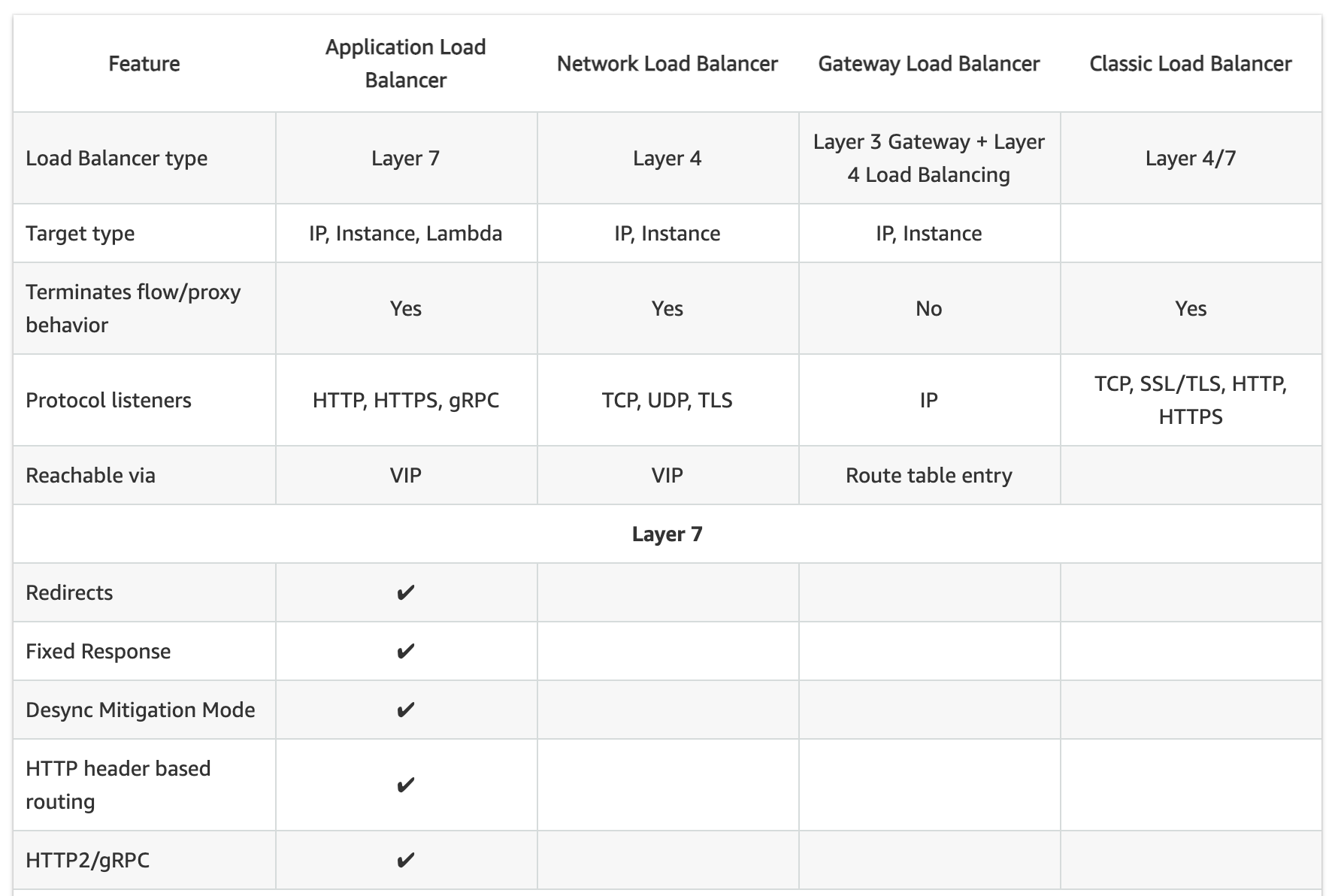
  • offers two types of load balancers that both feature high availability, automatic scaling, and robust security.
    • Classic Load Balancer
      • routes traffic based on either application or network level information
      • ideal for simple load balancing of traffic across multiple EC2 instances
    • Application Load Balancer
      • routes traffic based on advanced application-level information that includes the content of the request
      • ideal for applications needing advanced routing capabilities, microservices, and container-based architectures.
      • offers the ability to route traffic to multiple services or load balance
        across multiple ports on the same EC2 instance.

Management Tools

AWS CloudWatch

  • is a monitoring and logging service for AWS Cloud resources and the applications running on AWS.
  • can be used to collect and track metrics, collect and monitor log files, set alarms, and automatically react to changes in the AWS resources.

AWS CloudFormation

  • allows developers and systems administrators to implement “Infrastructure as Code”
  • provides an easy way to create and manage a collection of related AWS resources, provisioning and updating them in an orderly and predictable fashion
  • handles the order for provisioning AWS services or the subtleties of making those dependencies work.
  • allows applying version control to the AWS infrastructure the same way its done with software

AWS CloudTrail

  • helps records AWS API calls for the account and delivers log files
  • including API calls made using the AWS Management Console, AWS SDKs, command line tools, and higher-level AWS services (such as AWS CloudFormation),
  • recorded information includes the identity of the API caller, the time of the API call, the source IP address of the API caller, the request parameters, and the response elements returned by the AWS service.
  • enables security analysis, resource change tracking, compliance auditing

AWS Config

  • provides an AWS resource inventory, configuration history, and configuration change notifications to enable security and governance
  • provides Config Rules feature, that enables rules creation that automatically check the configuration of AWS resources
  • helps discover existing and deleted AWS resources, determine overall compliance against rules, and dive into configuration details of a resource at any point in time.
  • enables compliance auditing, security analysis, resource change tracking, and troubleshooting.

AWS OpsWorks

  • configuration management service that uses Chef, an automation platform that treats server configurations as code.
  • uses Chef to automate how servers are configured, deployed, and managed across the EC2 instances or on-premises compute environments.
  • has two offerings, OpsWorks for Chef Automate and OpsWorks Stacks

AWS Service Catalog

  • allows organizations to create and manage catalogs of IT services that are approved for use on AWS.
  • helps centrally manage commonly deployed IT services and helps to achieve consistent governance and meet compliance requirements, while enabling users to quickly deploy only approved IT services they need
  • can include everything from virtual machine images, servers, software, and databases to complete multi-tier application architectures.

AWS Trusted Advisor

  • is an online resource to help reduce cost, increase performance, and improve security by optimizing the AWS environment.
  • provides real-time guidance to help provision the resources following AWS best practices.

AWS Personal Health Dashboard

  • provides alerts and remediation guidance when AWS is experiencing events that might affect you.
  • displays relevant and timely information to help you manage events in progress, and provides proactive notification to help you plan for scheduled activities.
  • alerts are automatically triggered by changes in the health of AWS resources, providing event visibility and guidance to help quickly diagnose and resolve issues.
  • provides a personalized view into the performance and availability of the AWS services underlying the AWS resources.
  • Service Health Dashboard displays the general status of AWS services,

AWS Managed Services

  • provides ongoing management of the AWS infrastructure so the focus can be on applications.
  • helps reduce the operational overhead and risk, by implementing best practices to maintain the infrastructure
  • automates common activities such as change requests, monitoring, patch management, security, and backup services, and provides full-lifecycle services to provision, run, and support the infrastructure.
  • improves agility, reduces cost, and unburdens from infrastructure operations

Developer Tools

AWS CodeCommit

  • is a fully managed source control service that makes to host secure and highly scalable private Git repositories

AWS CodeBuild

  • is a fully managed build service that compiles source code, runs tests, and produces software packages that are ready to deploy
  • also helps provision, manage, and scale the build servers.
  • scales continuously and processes multiple builds concurrently, so the builds are not left waiting in a queue.

AWS CodeDeploy

  • is a service that automates code deployments to any instance, including EC2 instances and instances running on premises.
  • helps to rapidly release new features, avoid downtime during application deployment, and handles the complexity of updating the applications.

AWS CodePipeline

  • is a continuous integration and continuous delivery service for fast and reliable application and infrastructure updates.
  • builds, tests, and deploys the code every time there is a code change, based on the defined release process models

AWS X-Ray

  • helps developers analyze and debug distributed applications in production or development, such as those built using a microservices architecture
  • provides an end-to-end view of requests as they travel through the application, and shows a map of its underlying components.
  • helps understand how the application and its underlying services are performing, to identify and troubleshoot the root cause of performance issues and errors.

Messaging

Amazon SQS

  • is a fast, reliable, scalable, fully managed message queuing service.
  • makes it simple and cost-effective to decouple the components of a cloud application.
  • includes standard queues with high throughput and at-least-once processing, and FIFO queues
  • provides FIFO (first-in, first-out) delivery and exactly-once processing.

Amazon SNS

  • fast, flexible, fully managed push notification service to send individual messages or to fan-out messages to large numbers of recipients.
  • makes it simple and cost effective to send push notifications to mobile device users, email recipients or even send messages to other distributed services
  • notifications can be sent to Apple, Google, Fire OS, and Windows devices, as well as to Android devices in China with Baidu Cloud Push.
  • can also deliver messages to SQS, Lambda functions, or HTTP endpoint

Amazon SES

  • is a cost-effective email service built on the reliable and scalable infrastructure that Amazon.com developed to serve its own customer
  • can send transactional email, marketing messages, or any other type of high-quality content to the customers.
  • can receive messages and deliver them to an S3 bucket, call your custom code via an AWS Lambda function, or publish notifications to SNS.

Analytics

Amazon Athena

  • is an interactive query service that helps to analyze data in S3 using standard SQL.
  • is serverless, so there is no infrastructure to manage, and you pay only for the queries that you run.
  • removes the need for complex extract, transform, and load (ETL) jobs

Amazon EMR

  • provides a managed Hadoop framework that makes it easy, fast, and costeffective to process vast amounts of data across dynamically scalable EC2 instances.
  • enables you to run other popular distributed frameworks such as Apache Spark, HBase, Presto, and Flink, and interact with data in other AWS data stores such as S3 and DynamoDB.
  • securely and reliably handles a broad set of big data use cases, including log analysis, web indexing, data transformations (ETL), machine learning, financial analysis, scientific simulation, and bioinformatics.

Amazon CloudSearch

  • is a managed service and makes it simple and costeffective to set up, manage, and scale a search solution for website or application.
  • supports 34 languages and popular search features such as highlighting, autocomplete, and geospatial search.

Amazon Elasticsearch Service

  • makes it easy to deploy, operate, and scale Elasticsearch for log analytics, full text search, application monitoring, and more.
  • is a fully managed service that delivers Elasticsearch’s easy-to-use APIs and real-time capabilities along with the availability, scalability, and security required by production workloads.

Amazon Kinesis

  • is a platform for streaming data on AWS, offering powerful services to make it easy to load and analyze streaming data,
  • provides the ability to build custom streaming data applications for specialized needs.
  • offers three services:
    • Amazon Kinesis Firehose,
      • helps load streaming data into AWS.
      • can capture, transform, and load streaming data into Amazon Kinesis Analytics, S3, Redshift, and Elasticsearch Service, enabling near real-time analytics with existing business intelligence tools and dashboards
      • helps batch, compress, and encrypt the data before loading it, minimizing the amount of storage used at the destination and increasing security.
    • Amazon Kinesis Analytics
      • helps process streaming data in real time with standard SQL
    • Amazon Kinesis Streams
      • enables you to build custom applications that process or analyze streaming data for specialized needs.

Amazon Redshift

  • provides a fast, fully managed, petabyte-scale data warehouse that makes it simple and cost-effective to analyze all your data using your existing business intelligence tools.
  • has a massively parallel processing (MPP) data warehouse architecture, parallelizing and distributing SQL operations to take advantage of all available resources.
  • provides underlying hardware designed for high performance data processing, using local attached storage to maximize throughput between the CPUs and drives, and a 10GigE mesh network to maximize throughput between nodes.

Amazon QuickSight

  • provides fast, cloud-powered business analytics service that makes it easy to build visualizations, perform ad-hoc analysis, and quickly get business insights from your data.

AWS Data Pipeline

  • helps reliably process and move data between different AWS compute and storage services, as well as on-premises data sources, at specified intervals
  • can regularly access your data where it’s stored, transform and process it at scale, and efficiently transfer the results to AWS services such as S3, RDS, DynamoDB, and EMR.
  • helps create complex data processing workloads that are fault tolerant, repeatable, and highly available.
  • also allows you to move and process data that was previously locked up in on-premises data silos.

AWS Glue

  • is a fully managed ETL service that makes it easy to move data between data stores.
  • helps simplifies and automates the difficult and time-consuming tasks of data discovery, conversion, mapping, and job scheduling.
  • helps schedules ETL jobs and provisions and scales all the infrastructure
  • required so that ETL jobs run quickly and efficiently at any scale.

Application Services

AWS Step Functions

  • makes it easy to coordinate the components of distributed applications and microservices using visual workflows.
  • automatically triggers and tracks each step, and retries when there are errors, so the application executes in order and as expected.

Amazon API Gateway

  • is a fully managed service that makes it easy for developers to create, publish, maintain, monitor, and secure APIs at any scale.
  • handles all the tasks involved in accepting and processing up to hundreds of thousands of concurrent API calls, including traffic management, authorization and access control, monitoring, and API version management.

Amazon Elastic Transcoder

  • is media transcoding in the cloud
  • is designed to be a highly scalable, easy-to-use, and cost-effective way for developers and businesses to convert (or transcode) media files from their source format into versions that will play back on devices like smartphones, tablets, and PCs.

Amazon SWF

  • helps developers build, run, and scale background jobs that have parallel or sequential steps.
  • is a fully-managed state tracker and task coordinator in the cloud.

AWS Certification Exam Practice Questions

  • Questions are collected from Internet and the answers are marked as per my knowledge and understanding (which might differ with yours).
  • AWS services are updated everyday and both the answers and questions might be outdated soon, so research accordingly.
  • AWS exam questions are not updated to keep up the pace with AWS updates, so even if the underlying feature has changed the question might not be updated
  • Open to further feedback, discussion and correction.
  1. Which AWS services belong to the Compute services? Choose 2 answers
    1. Lambda
    2. EC2
    3. S3
    4. EMR
    5. CloudFront
  2. Which AWS service provides low cost storage option for archival and long-term backup?
    1. Glacier
    2. S3
    3. EBS
    4. CloudFront
  3. Which AWS services belong to the Storage services? Choose 2 answers
    1. EFS
    2. IAM
    3. EMR
    4. S3
    5. CloudFront
  4. A Company allows users to upload videos on its platform. They want to convert the videos to multiple formats supported on multiple devices and platforms. Which AWS service can they leverage for the requirement?
    1. AWS SWF
    2. AWS Video Converter
    3. AWS Elastic Transcoder
    4. AWS Data Pipeline
  5. Which analytic service helps analyze data in S3 using standard SQL?
    1. Athena
    2. EMR
    3. Elasticsearch
    4. Kinesis
  6. What features does AWS’s Route 53 service provide? Choose the 2 correct answers:
    1. Content Caching
    2. Domain Name System (DNS) service
    3. Database Management
    4. Domain Registration
  7. You are trying to organize and import (to AWS) gigabytes of data that are currently structured in JSON-like, name-value documents. What AWS service would best fit your needs?
    1. Lambda
    2. DynamoDB
    3. RDS
    4. Aurora
  8. What AWS database is primarily used to analyze data using standard SQL formatting with compatibility for your existing business intelligence tools? Choose the correct answer:
    1. Redshift
    2. RDS
    3. DynamoDB
    4. ElastiCache
  9. A company wants their application to use pre-configured machine image with software installed and configured. which AWS feature can help for the same?
    1. Amazon Machine Image
    2. AWS CloudFormation
    3. AWS Lambda
    4. AWS Lightsail
  10. What AWS service can be used for track API event calls for security analysis, resource change tracking?
    1. AWS CloudWatch
    2. AWS CloudFormation
    3. AWS CloudTrail
    4. AWS OpsWorks
  11. Which AWS service can help Offload the read traffic from your database in order to reduce latency caused by read-heavy workload?
    1. ElastiCache
    2. DynamoDB
    3. S3
    4. EFS
  12. What service allows system administrators to run “Infrastructure as code”?
    1. CloudFormation
    2. CloudWatch
    3. CloudTrail
    4. CodeDeploy

References

AWS_Overview_Whitepaper

AWS Support Plans

AWS Support Plans

AWS provides 4 AWS support plans with additional features with extra costs. The plans are in order of features and the features for lower support plans are available for higher one and not repeated.

NOTE – This post is more relevant for AWS Cloud Practitioner Certification

Basic

Developer

  • Business hours access to Cloud Support Associates via email
  • One primary contact can open Unlimited cases
  • Case Severity/Response times SLA (is in business hours)
    • General guidance < 24 business hours
    • System impaired < 12 business hours
  • General Guidance on Architecture support

Business

  • 24×7 access to Cloud Support Engineers via email, chat & phone
  • Access to Personal Health Dashboard Health API
  • Access to full set of Trusted Advisor checks
  • Allows Unlimited contacts/Unlimited cases (IAM supported) to open cases
  • Case Severity/Response times SLA (is in hours)
    • General guidance < 24 hours
    • System impaired < 12 hours
    • Production system impaired < 4 hours
    • Production system down < 1 hour

Enterprise

  • 24×7 access to Sr. Cloud Support Engineers via email, chat & phone
  • Architecture support with Consultative review and guidance based on your applications
  • Access to a Well-Architected Review delivered by AWS Solution Architects
  • Operations Support for Operational reviews, recommendations, and reporting
  • Access to online self-paced labs
  • Account Assistance by Assigned Support Concierge
  • Proactive Guidance by Designated Technical Account Manager
  • Case Severity/Response times SLA
    • Business-critical system down < 15 minutes

AWS Certification Exam Practice Questions

  • Questions are collected from Internet and the answers are marked as per my knowledge and understanding (which might differ with yours).
  • AWS services are updated everyday and both the answers and questions might be outdated soon, so research accordingly.
  • AWS exam questions are not updated to keep up the pace with AWS updates, so even if the underlying feature has changed the question might not be updated
  • Open to further feedback, discussion and correction.
  1. Which AWS support plan has a dedicated technical account manager assigned for proactive guidance?
    1. AWS Basic support plan
    2. AWS Developer support plan
    3. AWS Business support plan
    4. AWS Enterprise support plan
  2. Which feature is available for all the AWS support plans?
    1. Technical Account Manager
    2. Assigned Support Concierge
    3. 24×7 access to customer service
    4. Access to Cloud Support resources

References

AWS_Support_Plans

Architecting for the Cloud – AWS Best Practices – Whitepaper – Certification

Architecting for the Cloud – AWS Best Practices

Architecting for the Cloud – AWS Best Practices whitepaper provides architectural patterns and advice on how to design systems that are secure, reliable, high performing, and cost efficient

AWS Design Principles

Scalability

  • While AWS provides virtually unlimited on-demand capacity, the architecture should be designed to take advantage of those resources
  • There are two ways to scale an IT architecture
    • Vertical Scaling
      • takes place through increasing specifications of an individual resource for e.g. updating EC2 instance type with increasing RAM, CPU, IOPS, or networking capabilities
      • will eventually hit a limit, and is not always a cost effective or highly available approach
    • Horizontal Scaling
      • takes place through increasing number of resources for e.g. adding more EC2 instances or EBS volumes
      • can help leverage the elasticity of cloud computing
      • not all the architectures can be designed to distribute their workload to multiple resources
      • applications designed should be stateless,
        • that needs no knowledge of previous interactions and stores no session information
        • capacity can be increased and decreased, after running tasks have been drained
      • State, if needed, can be implemented using
        • Low latency external store, for e.g. DynamoDB, Redis, to maintain state information
        • Session affinity, for e.g. ELB sticky sessions, to bind all the transactions of a session to a specific compute resource. However, it cannot be guaranteed or take advantage of newly added resources for existing sessions
      • Load can be distributed across multiple resources using
        • Push model, for e.g. through ELB where it distributes the load across multiple EC2 instances
        • Pull model, for e.g. through SQS or Kinesis where multiple consumers subscribe and consume
      • Distributed processing, for e.g. using EMR or Kinesis, helps process large amounts of data by dividing task and its data into many small fragments of works

Disposable Resources Instead of Fixed Servers

  • Resources need to be treated as temporary disposable resources rather than fixed permanent on-premises resources before
  • AWS focuses on the concept of Immutable infrastructure
    • servers once launched, is never updated throughout its lifetime.
    • updates can be performed on a new server with latest configurations,
    • this ensures resources are always in a consistent (and tested) state and easier rollbacks
  • AWS provides multiple ways to instantiate compute resources in an automated and repeatable way
    • Bootstraping
      • scripts to configure and setup for e.g. using data scripts and cloud-init to install software or copy resources and code
    • Golden Images
      • a snapshot of a particular state of that resource,
      • faster start times and removes dependencies to configuration services or third-party repositories
    • Containers
      • AWS support for docker images through Elastic Beanstalk and ECS
      • Docker allows packaging a piece of software in a Docker Image, which is a standardized unit for software development, containing everything the software needs to run: code, runtime, system tools, system libraries, etc
  • Infrastructure as Code
    • AWS assets are programmable, techniques, practices, and tools from software development can be applied to make the whole infrastructure reusable, maintainable, extensible, and testable.
    • AWS provides services like CloudFormation, OpsWorks for deployment

Automation

  • AWS provides various automation tools and services which help improve system’s stability, efficiency and time to market.
    • Elastic Beanstalk
      • a PaaS that allows quick application deployment while handling resource provisioning, load balancing, auto scaling, monitoring etc
    • EC2 Auto Recovery
      • creates CloudWatch alarm that monitors an EC2 instance and automatically recovers it if it becomes impaired.
      • A recovered instance is identical to the original instance, including the instance ID, private & Elastic IP addresses, and all instance metadata.
      • Instance is migrated through reboot, in memory contents are lost.
    • Auto Scaling
      • allows maintain application availability and scale the capacity up or down automatically as per defined conditions
    • CloudWatch Alarms
      • allows SNS triggers to be configured when a particular metric goes beyond a specified threshold for a specified number of periods
    • CloudWatch Events
      • allows real-time stream of system events that describe changes in AWS resources
    • OpsWorks
      • allows continuous configuration through lifecycle events that automatically update the instances’ configuration to adapt to environment changes.
      • Events can be used to trigger Chef recipes on each instance to perform specific configuration tasks
    • Lambda Scheduled Events
      • allows Lambda function creation and direct AWS Lambda to execute it on a regular schedule.

Loose Coupling

  • AWS helps loose coupled architecture that reduces interdependencies, a change or failure in a component does not cascade to other components
    • Asynchronous Integration
      • does not involve direct point-to-point interaction but usually through an intermediate durable storage layer for e.g. SQS, Kinesis
      • decouples the components and introduces additional resiliency
      • suitable for any interaction that doesn’t need an immediate response and an ack that a request has been registered will suffice
    • Service Discovery
      • allows new resources to be launched or terminated at any point in time and discovered as well for e.g. using ELB as a single point of contact with hiding the underlying instance details or Route 53 zones to abstract load balancer’s endpoint
    • Well-Defined Interfaces
      • allows various components to interact with each other through specific, technology agnostic interfaces for e.g. RESTful apis with API Gateway 

Services, Not Servers

Databases

  • AWS provides different categories of database technologies
    • Relational Databases (RDS)
      • normalizes data into well-defined tabular structures known as tables, which consist of rows and columns
      • provide a powerful query language, flexible indexing capabilities, strong integrity controls, and the ability to combine data from multiple tables in a fast and efficient manner
      • allows vertical scalability by increasing resources and horizontal scalability using Read Replicas for read capacity and sharding or data partitioning for write capacity
      • provides High Availability using Multi-AZ deployment, where data is synchronously replicated
    • NoSQL Databases (DynamoDB)
      • provides databases that trade some of the query and transaction capabilities of relational databases for a more flexible data model that seamlessly scales horizontally
      • perform data partitioning and replication to scale both the reads and writes in a horizontal fashion
      • DynamoDB service synchronously replicates data across three facilities in an AWS region to provide fault tolerance in the event of a server failure or Availability Zone disruption
    • Data Warehouse (Redshift)
      • Specialized type of relational database, optimized for analysis and reporting of large amounts of data
      • Redshift achieves efficient storage and optimum query performance through a combination of massively parallel processing (MPP), columnar data storage, and targeted data compression encoding schemes
      • Redshift MPP architecture enables increasing performance by increasing the number of nodes in the data warehouse cluster
  • For more details refer to AWS Storage Options Whitepaper

Removing Single Points of Failure

  • AWS provides ways to implement redundancy, automate recovery and reduce disruption at every layer of the architecture
  • AWS supports redundancy in the following ways
    • Standby Redundancy
      • When a resource fails, functionality is recovered on a secondary resource using a process called failover.
      • Failover will typically require some time before it completes, and during that period the resource remains unavailable.
      • Secondary resource can either be launched automatically only when needed (to reduce cost), or it can be already running idle (to accelerate failover and minimize disruption).
      • Standby redundancy is often used for stateful components such as relational databases.
    • Active Redundancy
      • requests are distributed to multiple redundant compute resources, if one fails, the rest can simply absorb a larger share of the workload.
      • Compared to standby redundancy, it can achieve better utilization and affect a smaller population when there is a failure.
  • AWS supports replication
    • Synchronous replication
      • acknowledges a transaction after it has been durably stored in both the primary location and its replicas.
      • protects data integrity from the event of a primary node failure
      • used to scale read capacity for queries that require the most up-to-date data (strong consistency).
      • compromises performance and availability
    • Asynchronous replication
      • decouples the primary node from its replicas at the expense of introducing replication lag
      • used to horizontally scale the system’s read capacity for queries that can tolerate that replication lag.
    • Quorum-based replication
      • combines synchronous and asynchronous replication to overcome the challenges of large-scale distributed database systems
      • Replication to multiple nodes can be managed by defining a minimum number of nodes that must participate in a successful write operation
  • AWS provide services to reduce or remove single point of failure
    • Regions, Availability Zones with multiple data centers
    • ELB or Route 53 to configure health checks and mask failure by routing traffic to healthy endpoints
    • Auto Scaling to automatically replace unhealthy nodes
    • EC2 auto-recovery to recover unhealthy impaired nodes
    • S3, DynamoDB with data redundantly stored across multiple facilities
    • Multi-AZ RDS and Read Replicas
    • ElastiCache Redis engine supports replication with automatic failover
  • For more details refer to AWS Disaster Recovery Whitepaper

Optimize for Cost

  • AWS can help organizations reduce capital expenses and drive savings as a result of the AWS economies of scale
  • AWS provides different options which should be utilized as per use case –
    • EC2 instance types – On Demand, Reserved and Spot
    • Trusted Advisor or EC2 usage reports to identify the compute resources and their usage
    • S3 storage class – Standard, Reduced Redundancy, and Standard-Infrequent Access
    • EBS volumes – Magnetic, General Purpose SSD, Provisioned IOPS SSD
    • Cost Allocation tags to identify costs based on tags
    • Auto Scaling to horizontally scale the capacity up or down based on demand
    • Lambda based architectures to never pay for idle or redundant resources
    • Utilize managed services where scaling is handled by AWS for e.g. ELB, CloudFront, Kinesis, SQS, CloudSearch etc.

Caching

  • Caching improves application performance and increases the cost efficiency of an implementation
    • Application Data Caching
      • provides services thats helps store and retrieve information from fast, managed, in-memory caches
      • ElastiCache is a web service that makes it easy to deploy, operate, and scale an in-memory cache in the cloud and supports two open-source in-memory caching engines: Memcached and Redis
    • Edge Caching
      • allows content to be served by infrastructure that is closer to viewers, lowering latency and giving high, sustained data transfer rates needed to deliver large popular objects to end users at scale.
      • CloudFront is Content Delivery Network (CDN) consisting of multiple edge locations, that allows copies of static and dynamic content to be cached

Security

  • AWS works on shared security responsibility model
    • AWS is responsible for the security of the underlying cloud infrastructure
    • you are responsible for securing the workloads you deploy in AWS
  • AWS also provides ample security features
    • IAM to define a granular set of policies and assign them to users, groups, and AWS resources
    • IAM roles to assign short term credentials to resources, which are automatically distributed and rotated
    • Amazon Cognito, for mobile applications, which allows client devices to get controlled access to AWS resources via temporary tokens.
    • VPC to isolate parts of infrastructure through the use of subnets, security groups, and routing controls
    • WAF to help protect web applications from SQL injection and other vulnerabilities in the application code
    • CloudWatch logs to collect logs centrally as the servers are temporary
    • CloudTrail for auditing AWS API calls, which delivers a log file to S3 bucket. Logs can then be stored in an immutable manner and automatically processed to either notify or even take action on your behalf, protecting your organization from non-compliance
    • AWS Config, Amazon Inspector, and AWS Trusted Advisor to continually monitor for compliance or vulnerabilities giving a clear overview of which IT resources are in compliance, and which are not
  • For more details refer to AWS Security Whitepaper

References

Architecting for the Cloud: AWS Best Practices – Whitepaper


AWS Pricing – Whitepaper – Certification

AWS Pricing Whitepaper Overview

AWS pricing features include

  • Pay as you go
    • No minimum contracts/commitments or long-term contracts required
    • Pay only for services you use that can be stopped when not needed
    • Each service is charged independently, providing flexibility to choose services as needed
  • Pay less when you reserve
    • some services like EC2 provide reserved capacity, which provide significantly discounted rate and increase in overall savings
  • Pay even less by using more
    • some services like storage and data services, the more the usage the less you pay per gigabyte
    • consolidated billing to consolidate multiple accounts and get tiering benefits
  • Pay even less as AWS grows
    • AWS works continuously to reduce costs by reducing data center hardware costs, improving operational efficiencies, lowering power consumption, and generally lowering the cost of doing business
  • Free services
    • AWS offers lot of services free like AWS VPC, Elastic Beanstalk, CloudFormation, IAM, Auto Scaling, OpsWorks, Consolidated Billing
  • Other features
    • AWS Free Tier for new customers, which offer free usage of services within permissible limits

AWS Pricing Resources

  • AWS Simple Monthly Calculator tool to effectively estimate the costs, which provides per service cost breakdown, as well as an aggregate monthly estimate.
  • AWS Economic Center provides access to information, tools, and resources to compare the costs of AWS services with IT infrastructure alternatives.
  • AWS Account Activity to view current charges and account activity, itemized by service and by usage type. Previous months’ billing statements are also available.
  • AWS Usage Reports provides usage reports, specifying usage types, timeframe, service operations, and more can customize reports.

AWS Pricing Fundamental Characteristics

  • AWS basically charges for
    • Compute,
    • Storage and
    • Data Transfer Out – aggregated across EC2, S3, RDS, SimpleDB, SQS, SNS, and VPC and then charged at the outbound data transfer rate
  • AWS does not charge
    • Inbound data transfer across all AWS Services in all regions
    • Outbound data transfer charges between AWS Services within the same region

AWS Elastic Cloud Compute – EC2

EC2 provides resizable compute capacity in cloud and the cost depends on –

  • Clock Hours of Server Time
    • Resources are charged for the time they are running
    • AWS updated the EC2 billing from hourly basis to Per Second Billing (Circa Oct. 2017). It takes cost of unused minutes and seconds in an hour off of the bill, so the focus is on improving the applications instead of maximizing usage to the hour
  • Machine Configuration
    • Depends on the physical capacity and Instance pricing varies with the AWS region, OS, number of cores, and memory
  • Machine Purchase Type
    • On Demand instances – pay for compute capacity with no required minimum commitments
    • Reserved Instances – option to make a low one-time payment – or no payment at all – for each reserved instance and in turn receive a significant discount on the usage
    • Spot Instances – bid for unused EC2 capacity
  • Auto Scaling & Number of Instances
    • Auto Scaling automatically adjusts the number of EC2 instances
  • Load Balancing
    • ELB can be used to distribute traffic among EC2 instances.
    • Number of hours the ELB runs and the amount of data it processes contribute to the monthly cost.
  • CloudWatch Detailed Monitoring
    • Basic monitoring is enabled and available at no additional cost
    • Detailed monitoring, which includes seven preselected metrics recorded once a minute, can be availed for a fixed monthly rate
    • Partial months are charged on an hourly pro rata basis, at a per instance-hour rate
  • Elastic IP Addresses
    • Elastic IP addresses are charged only when are not associated with an instance
  • Operating Systems and Software Packages
    • OS prices are included in the instance prices. There are no additional licensing costs to run the following commercial OS: RHEL, SUSE Enterprise Linux,  Windows Server and Oracle Enterprise Linux
    • For unsupported commercial software packages, license needs to be obtained

AWS Lambda

AWS Lambda lets running code without provisioning or managing servers and the cost depends on

  • Number of requests for the functions and the time for the code to execute
    • Lambda registers a request each time it starts executing in response to an event notification or invoke call, including test invokes from the console.
    • Charges are for the total number of requests across all the functions.
    • Duration is calculated from the time the code begins executing until it returns or otherwise terminates, rounded up to the nearest 100 milliseconds.
    • Price depends on the amount of memory allocated to the function.

AWS Simple Storage Service – S3

S3 provides object storage and the cost depends on

  • Storage Class
    • Each storage class has different rates and provide different capabilities
    • Standard Storage is designed to provide 99.999999999% durability and 99.99% availability.
    • Standard – Infrequent Access (SIA) is a storage option within S3 that you can use to reduce your costs by storing  than Amazon S3’s standard storage.
    • Standard – Infrequent Access for storing less frequently accessed data at slightly lower levels of redundancy, is designed to provide the same 99.999999999% durability as S3 with 99.9% availability in a given year.
  • Storage
    • Number and size of objects stored in the S3 buckets as well as type of storage.
  • Requests
    • Number and type of requests. GET requests incur charges at different rates than other requests, such as PUT and COPY requests.
  • Data Transfer Out
    • Amount of data transferred out of the S3 region.

AWS Elastic Block Store – EBS

EBS provides block level storage volumes and the cost depends on

  • Volumes
    • EBS provides three volume types: General Purpose (SSD), Provisioned IOPS (SSD), and Magnetic, charged by the amount provisioned in GB per month, until its released
  • Input Output Operations per Second (IOPS)
    • With General Purpose (SSD) volumes, I/O is included in the price
    • With EBS Magnetic volumes, I/O is charged by the number of requests made to the volume
    • With Provisioned IOPS (SSD) volumes, I/O is charged by the amount of provisioned, multiplied by the % of days provisioned for the month
  • Data Transfer Out
    • Amount of data transferred out of the application and outbound data transfer charges are tiered.
  • Snapshot
    • Snapshots of data to S3 are created for durable recovery. If opted for EBS snapshots, the added cost is per GB-month of data stored.

AWS Relational Database Service – RDS

RDS provides an easy to set up, operate, and scale a relational database in the cloud and the cost depends on

  • Clock Hours of Server Time
    • Resources are charged for the time they are running, from the time a DB instance is launched until terminated
  • Database Characteristics
    • Depends on the physical capacity and Instance pricing varies with the database engine, size, and memory class.
  • Database Purchase Type
    • On Demand instances – pay for compute capacity for each hour the DB Instance runs with no required minimum commitments
    • Reserved Instances – option to make a low, one-time, up-front payment for each DB Instance to reserve for a 1-year or 3-year term and in turn receive a significant discount on the usage
  • Number of Database Instances
    • multiple DB instances can be provisioned to handle peak loads
  • Provisioned Storage
    • Backup storage of up to 100% of a provisioned database storage for an active DB Instance is not charged
    • After the DB Instance is terminated, backup storage is billed per gigabyte per month.
  • Additional Storage
    • Amount of backup storage in addition to the provisioned storage amount is billed per gigabyte per month.
  • Requests
    • Number of input and output requests to the database.
  • Deployment Type
    • Storage and I/O charges vary, depending on the number of AZs the RDS is deployed – Single AZ or Multi-AZ
  • Data Transfer Out
    • Outbound data transfer costs are tiered.
    • Inbound data transfer is free

AWS CloudFront

CloudFront is a web service for content delivery and an easy way to distribute content to end users with low latency, high data transfer speeds, and no required minimum commitments.

  • Traffic Distribution
    • Data transfer and request pricing vary across geographic regions, and pricing is based on edge location through which the content is served
  • Requests
    • Number and type of requests (HTTP or HTTPS) made and the geographic region in which the requests are made.
  • Data Transfer Out
    • Amount of data transferred out of the CloudFront edge locations

AWS Certification Exam Practice Questions

  • Questions are collected from Internet and the answers are marked as per my knowledge and understanding (which might differ with yours).
  • AWS services are updated everyday and both the answers and questions might be outdated soon, so research accordingly.
  • AWS exam questions are not updated to keep up the pace with AWS updates, so even if the underlying feature has changed the question might not be updated
  • Open to further feedback, discussion and correction.
  1. How does AWS charge for AWS Lambda?
    1. Users bid on the maximum price they are willing to pay per hour.
    2. Users choose a 1-, 3- or 5-year upfront payment term.
    3. Users pay for the required permanent storage on a file system or in a database.
    4. Users pay based on the number of requests and consumed compute resources.

References

AWS Pricing Whitepaper – 2016
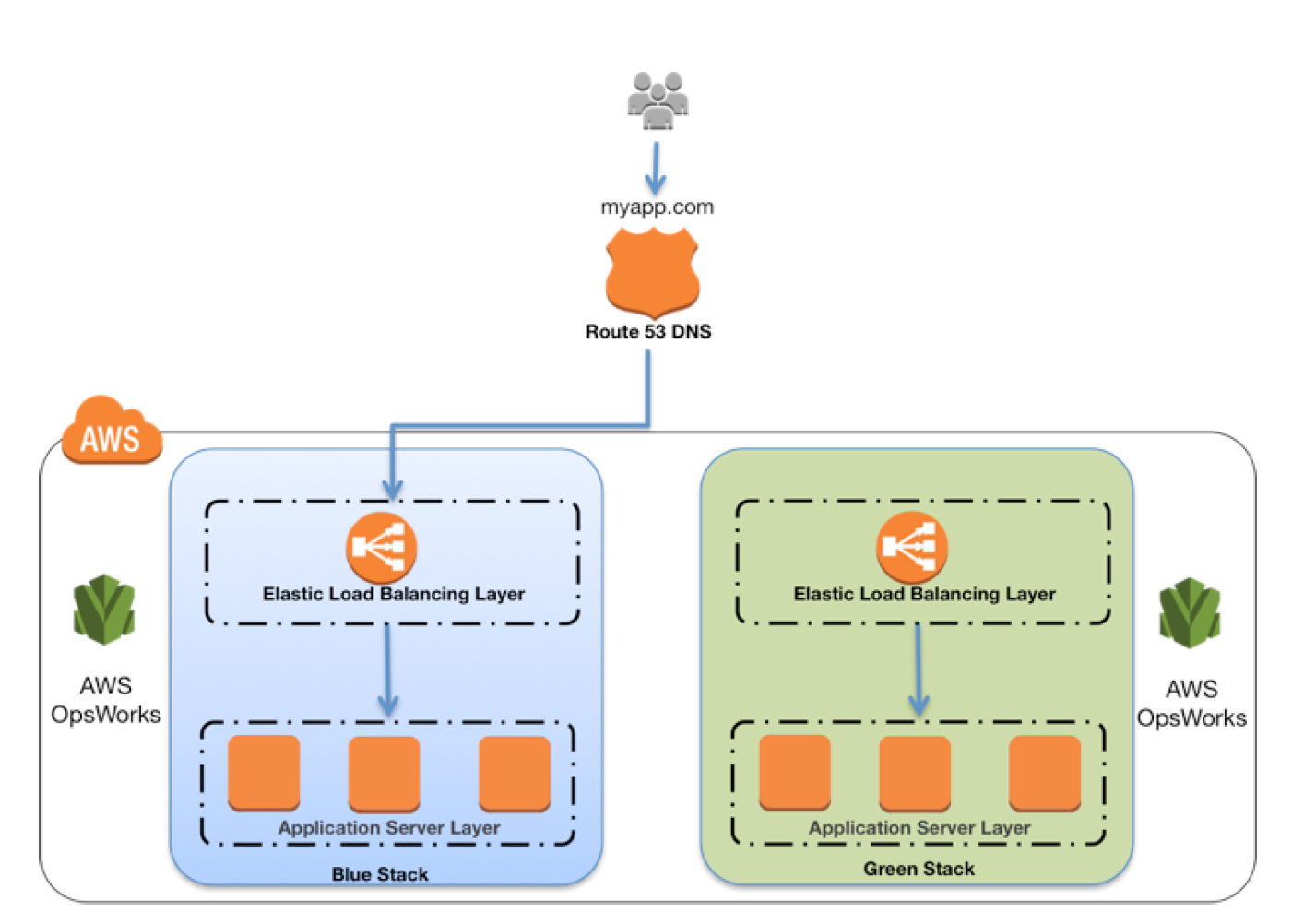


AWS EC2 Container Service – ECS

AWS ECS – Elastic Container Service

  • AWS Elastic Container Service (ECS) is a fully managed, highly scalable container orchestration service that supports Docker containers and allows running applications on a managed cluster of EC2 instances, serverless with AWS Fargate, or on-premises with ECS Anywhere.
  • ECS
    • is a regional service that simplifies running application containers in a highly available manner across multiple AZs within a region.
    • eliminates the need to install, operate, and scale the cluster management infrastructure.
    • helps schedule the placement of containers across the cluster based on the resource needs and availability requirements.
    • allows the integration of your own custom scheduler or third-party schedulers to meet business or application specific requirements.
    • provides a serverless option with AWS Fargate.
    • provides a fully managed EC2 option with ECS Managed Instances (launched Sept 2025).
    • supports running containers on on-premises infrastructure with ECS Anywhere.
    • integrates with Service Connect for simplified service-to-service communication.

ECS Launch Types & Capacity Providers

  • ECS supports four launch types/capacity providers: EC2, Fargate, ECS Managed Instances, and External (ECS Anywhere).

EC2 Launch Type

  • EC2 launch type – Configure and deploy EC2 instances in your cluster to run your containers.
  • Provides full control over instance types, placement, scaling, and patching.
  • EC2 launch type is suitable for the following workloads:
    • Workloads that require consistently high CPU core and memory usage
    • Large workloads that need to be optimized for price
    • Applications need to access persistent storage
    • You must directly manage your infrastructure
    • Workloads requiring GPU or specialized instance types
  • Uses Capacity Providers with Auto Scaling Groups for automatic scaling.
  • Supports managed instance draining (2024) to safely drain tasks from EC2 instances being terminated.

ECS Overview Standard

AWS Fargate Launch Type

  • AWS Fargate is a technology that provides a serverless pay-as-you-go option with Amazon ECS to run containers without having to manage servers or clusters of Amazon EC2 instances.
  • With AWS Fargate, there is no need to provision, configure, or scale clusters of virtual machines to run containers and also removes the need to choose server types, decide when to scale the clusters or optimize cluster packing.
  • Fargate now supports up to 32 vCPUs and 244 GiB of memory per task (June 2026), significantly expanding from the previous 16 vCPU limit.
  • Supports ephemeral storage up to 200 GiB per task (20 GiB free by default).
  • Supports Amazon EBS volume attachments for high-throughput and data-intensive workloads (2024).
  • Supports ARM-based AWS Graviton processors for better price-performance.
  • Fargate launch type is suitable for the following workloads:
    • Large workloads that need to be optimized for low overhead
    • Small workloads that have an occasional burst
    • Tiny workloads
    • Batch workloads
    • Workloads where you want zero infrastructure management
  • Fargate Platform Version 1.3.0 retired as of June 15, 2026. New tasks cannot use this version. Platform version 1.4.0 or LATEST should be used.
  • Supports weekly event windows to schedule task retirements during non-peak hours (Dec 2025).

ECS Overview

ECS Managed Instances (New – Sept 2025)

  • ECS Managed Instances is a fully managed compute option that combines the operational simplicity of Fargate with the flexibility and control of Amazon EC2.
  • ECS provisions, patches, and replaces instances automatically while providing visibility and control over instance type selection.
  • Key features:
    • Fully managed: AWS handles provisioning, patching, and replacement of EC2 instances.
    • Instance type flexibility: Choose specific instance types or let ECS select optimal types.
    • Visibility: Instances are visible in your AWS account.
    • Cost optimization: Pay for the entire instance plus a management fee (can be more cost-effective than Fargate for steady workloads).
    • Supports EC2 Spot Instances for up to 90% discount (Dec 2025).
    • Supports AWS Trainium and Inferentia accelerators for AI/ML workloads (June 2026).
  • Suitable for workloads that:
    • Need GPU or specialized hardware not available on Fargate
    • Require privileged containers
    • Need more than Fargate’s memory ceiling
    • Want managed infrastructure but need EC2-level flexibility

External Launch Type (ECS Anywhere)

  • ECS Anywhere allows running and managing containers on on-premises servers or virtual machines using the same ECS APIs and tooling.
  • Register external instances to your ECS cluster using AWS Systems Manager (SSM).
  • Uses the EXTERNAL launch type for tasks and services.
  • Suitable for:
    • Hybrid cloud deployments
    • Workloads with data residency requirements
    • Edge computing and latency-sensitive applications
    • Consistent container management across cloud and on-premises

ECS Express Mode (New – Nov 2025)

  • ECS Express Mode enables developers to rapidly launch containerized applications with minimal configuration.
  • Automates infrastructure setup including domains, networking, load balancing, and auto scaling using AWS best practices.
  • Requires only three inputs: a container image, a task execution role, and an infrastructure role.
  • Automatically consolidates up to 25 services behind a single Application Load Balancer using intelligent rule-based routing.
  • All provisioned resources remain fully accessible in your account for complete control and flexibility.
  • No additional charge for using Express Mode (only pay for underlying AWS resources).
  • Available in AWS GovCloud (US) Regions (June 2026).

ECS Components

Containers and Images

  • Applications deployed on ECS must be architected to run in Docker containers, which is a standardized unit of software development, containing everything that the software application needs to run: code, runtime, system tools, system libraries, etc.
  • Containers are created from a read-only template called an image.
  • Images are typically built from a Dockerfile and stored in a registry from which they can be downloaded and run on the container instances.
  • ECS can be configured to access a private Docker image registry within a VPC, Docker Hub, or is integrated with Amazon Elastic Container Registry (ECR).
  • ECR supports up to 100,000 images per repository and 100,000 repositories per region.
  • ECR supports pull through cache to automatically sync images from upstream registries (Docker Hub, GitHub, etc.).
  • ECR supports automatic repository creation on push (Dec 2025).

Clusters

  • An ECS cluster is a logical grouping of tasks and services, and the infrastructure capacity (EC2 instances, Fargate, Managed Instances, or External instances).
  • ECS downloads the container images from the specified registry and runs those images within your cluster.
  • A cluster can use a mix of capacity providers (e.g., Fargate for some services, Managed Instances for others).

Task Definitions

  • Task definition is a description of an application that contains one or more docker containers.
  • Task definition is needed to prepare an application to run on ECS.
  • Task definition is a text file in JSON format that describes one or more containers that form your application.
  • Task definitions specify various parameters for the application, such as containers to use, their repositories, ports to be opened, and data volumes.
  • Task Execution Role is used by the ECS agent and container runtime to prepare the containers to run (e.g., pull images from ECR, manage logs). It is not used by the task itself.
  • Task Role grants additional AWS permissions that are assumed by the containers running in the task.
  • Network mode specifies the Docker networking mode: none, bridge, awsvpc, and host.
    • awsvpc mode is required for Fargate and gives each task its own ENI and private IP.
  • Task definitions support specifying Amazon EBS volumes for persistent, high-performance block storage.
  • Task definitions support specifying Amazon EFS volumes for shared, scalable file storage across tasks.

Tasks and Scheduling

  • A task is the instantiation of a task definition on a container instance within the cluster.
  • After a task definition is created for the application within ECS, you can specify the number of tasks that will run on the cluster.
  • ECS task scheduler is responsible for placing tasks on container instances, with several different scheduling options available.

Services

  • ECS Service helps to run and maintain a specified number of instances of a task definition simultaneously.
  • Service can optionally be configured to use Elastic Load Balancing to distribute traffic evenly across the tasks in the service.
  • EC2 Launch Type supports ALB, NLB, and Classic Load Balancer.
  • Fargate Launch Type supports ALB and NLB.
  • ALBs are recommended as they offer several features:
    • Each service can serve traffic from multiple load balancers and expose multiple load-balanced ports by specifying multiple target groups.
    • Supported by tasks hosted on both Fargate and EC2 instances.
    • Allow containers to use dynamic host port mapping (so that multiple tasks from the same service are allowed per container instance).
    • Support path-based routing and priority rules (so that multiple services can use the same listener port on a single ALB).

ECS Deployment Strategies

  • ECS supports four deployment strategies:
    • Rolling Update (default) – New tasks are created as old ones are stopped, keeping capacity roughly constant.
    • Blue/Green Deployment – Runs two full sets of tasks in parallel. Production traffic is shifted to the new (green) revision after validation.
    • Canary Deployment (Oct 2025) – Routes a small percentage of traffic (typically 5-10%) to the new revision with a bake time for monitoring before shifting remaining traffic.
    • Linear Deployment (Oct 2025) – Shifts traffic in equal increments with a bake time between each shift.
  • Blue/green, canary, and linear strategies require ALB, NLB, or Service Connect.
  • Built-in canary and linear deployments achieve feature parity with AWS CodeDeploy, eliminating the need for an external deployment controller.

ECS Service Connect

  • Service Connect provides simplified service-to-service communication with built-in service discovery and service mesh capabilities.
  • Uses a managed Envoy sidecar proxy automatically injected into ECS tasks.
  • Proxies handle routing decisions, retries, and metrics collection, while AWS Cloud Map provides the service registry backend.
  • Allows services to use short names and standard ports to connect across clusters and VPCs in the same Region.
  • Provides standardized metrics and logs for all service-to-service traffic without code changes.
  • Integrates with blue/green, linear, and canary deployment strategies for traffic management during deployments.

Container Agent

  • Container agent runs on each EC2 instance within an ECS cluster.
  • Container Agent sends information about the instance’s current running tasks and resource utilization to ECS, and starts and stops tasks whenever it receives a request from ECS.
  • Not required for Fargate tasks (managed by AWS).

ECS Security

  • GuardDuty Runtime Monitoring – Uses a lightweight security agent to monitor ECS workloads for unauthorized activity, process execution, and network connections.
  • GuardDuty Extended Threat Detection (Dec 2025) – Analyzes multiple security signals across network, runtime behavior, and API activity to detect sophisticated attack patterns for EC2 and ECS.
  • ECS Exec – Allows interactive shell access to running containers for debugging (uses AWS Systems Manager Session Manager).
  • Task-level IAM roles – Each task can have its own IAM role following least privilege principles.
  • Secrets management – Integration with AWS Secrets Manager and SSM Parameter Store for injecting secrets into containers.

ECS Auto Scaling

  • Service Auto Scaling – Automatically adjusts the desired task count based on CloudWatch metrics (target tracking, step scaling).
  • Predictive Scaling (2024) – Uses machine learning to predict future traffic and pre-scales tasks before demand increases.
  • Cluster Auto Scaling – Automatically manages EC2 instance capacity using capacity providers.
  • Supports updating capacity provider configuration for existing services without recreating them (May 2025).

ECS Storage Options

  • Ephemeral Storage – Up to 200 GiB per Fargate task (20 GiB free). Non-persistent, deleted when task stops.
  • Amazon EBS Volumes (2024) – Attach EBS volumes to ECS tasks for high-throughput, data-intensive workloads. One volume per task, configurable size/type/IOPS. Supports creating from snapshots.
  • Amazon EFS Volumes – Shared, persistent file storage accessible by multiple tasks simultaneously. Supports encryption in transit and at rest.
  • Bind Mounts – Share data between containers within the same task.
  • Docker Volumes – EC2 launch type supports Docker volume drivers for third-party storage plugins.

ECS vs Elastic Beanstalk

  • ECS helps in having a more fine-grained control for custom application architectures.
  • Elastic Beanstalk is ideal to leverage the benefits of containers but just want the simplicity of deploying applications from development to production by uploading a container image.
  • Elastic Beanstalk is more of an application management platform that helps customers easily deploy and scale web applications and services.
  • With Elastic Beanstalk, specify container images to be deployed, with the CPU & memory requirements, port mappings and container links.
  • Elastic Beanstalk abstracts the finer details and automatically handles all the details such as provisioning an ECS cluster, balancing load, auto-scaling, monitoring, and placing the containers across the cluster.

ECS vs Lambda

  • ECS is a fully managed container orchestration service that allows running and managing distributed applications in Docker containers with multiple compute options (Fargate, EC2, Managed Instances).
  • AWS Lambda is an event-driven task compute service that runs code (Lambda functions) in response to “events” from event sources like SES, SNS, DynamoDB & Kinesis Streams, CloudWatch etc.
  • ECS is better suited for long-running applications, microservices with consistent traffic, and workloads requiring more than 15 minutes execution time.
  • Lambda is better for short-lived, event-driven workloads with unpredictable traffic patterns.

ECS vs EKS

  • Both ECS and EKS are container orchestration services, but use different orchestration engines.
  • ECS uses AWS-native orchestration, making it simpler to operate with deep AWS integration.
  • EKS uses Kubernetes, providing portability across cloud providers and on-premises environments.
  • Both support Fargate as a serverless compute option.
  • Choose ECS for simpler AWS-native workloads; choose EKS for Kubernetes ecosystem compatibility or multi-cloud portability.

AWS Certification Exam Practice Questions

  • Questions are collected from Internet and the answers are marked as per my knowledge and understanding (which might differ with yours).
  • AWS services are updated everyday and both the answers and questions might be outdated soon, so research accordingly.
  • AWS exam questions are not updated to keep up the pace with AWS updates, so even if the underlying feature has changed the question might not be updated
  • Open to further feedback, discussion and correction.
  1. You need a solution to distribute traffic evenly across all of the containers for a task running on Amazon ECS. Your task definitions define dynamic host port mapping for your containers. What AWS feature provides this functionality?
    1. Application Load Balancers support dynamic host port mapping.
    2. CloudFront custom origins support dynamic host port mapping.
    3. All Elastic Load Balancing instances support dynamic host port mapping.
    4. Classic Load Balancers support dynamic host port mapping.
  2. Your security team requires each Amazon ECS task to have an IAM policy that limits the task’s privileges to only those required for its use of AWS services. How can you achieve this?
    1. Use IAM roles for Amazon ECS tasks to associate a specific IAM role with each ECS task definition
    2. Use IAM roles on the Amazon ECS container instances to associate IAM role with each ECS task on that instance
    3. Connect to each running amazon ECS container instance and add discrete credentials
    4. Reboot each Amazon ECS task programmatically to generate new instance metadata for each task
  3. A company wants to run containers on AWS without managing servers but needs to select specific instance types for GPU workloads. Which ECS compute option provides fully managed infrastructure with instance type selection?
    1. EC2 Launch Type with Auto Scaling
    2. AWS Fargate
    3. ECS Managed Instances
    4. ECS Anywhere
  4. A development team wants to deploy a containerized web application on ECS with minimal configuration. They only want to provide a container image and have AWS handle networking, load balancing, and auto scaling. Which ECS feature should they use?
    1. ECS Service with Fargate
    2. ECS Express Mode
    3. ECS Managed Instances
    4. AWS App Runner
  5. A company is deploying a critical microservices update on ECS and wants to route only 5% of traffic to the new version initially, monitor it, then shift remaining traffic. Which deployment strategy should they use?
    1. Rolling update
    2. Blue/Green deployment
    3. Canary deployment
    4. Linear deployment
  6. An organization needs to run ECS tasks on their on-premises servers while managing them from the AWS console. Which ECS feature supports this? [Select TWO]
    1. ECS Anywhere
    2. AWS Fargate
    3. ECS Managed Instances
    4. External launch type
    5. EC2 launch type
  7. A data engineering team needs to attach high-performance block storage to their ECS Fargate tasks for an ETL workload that processes large datasets. Which storage option should they choose?
    1. Increase ephemeral storage to 200 GiB
    2. Attach Amazon EBS volumes to ECS tasks
    3. Use Amazon EFS volumes
    4. Use Docker volumes with a storage plugin
  8. Which ECS feature provides service-to-service communication with built-in service discovery, traffic management during deployments, and standardized metrics without code changes?
    1. AWS Cloud Map
    2. Application Load Balancer
    3. ECS Service Connect
    4. AWS App Mesh

References

AWS Classic Load Balancer vs Application Load Balancer vs Network Load Balancer

AWS Classic Load Balancer vs Application Load Balancer vs Network Load Balancer

📌 Post Updated: June 2026 — Added Gateway Load Balancer (GWLB), NLB Security Groups support, ALB Mutual TLS, NLB QUIC protocol, ALB JWT verification, ALB Target Optimizer, LCU Reservation, Post-Quantum TLS, and updated EC2-Classic retirement status.

  • Elastic Load Balancing supports four types of load balancers:
    • Classic Load Balancer – CLB (Previous Generation)
    • Application Load Balancer – ALB
    • Network Load Balancer – NLB
    • Gateway Load Balancer – GWLB
  • While there is some overlap in the features, AWS does not maintain feature parity between the different types of load balancers.

⚠️ Classic Load Balancer – Previous Generation

Classic Load Balancer is the previous generation load balancer. AWS recommends using Application Load Balancer for Layer 7 and Network Load Balancer for Layer 4. CLB was originally designed for the EC2-Classic network, which was fully retired in August 2023. While CLB continues to function in VPC, no new features are being added to it.

Migration: Use the AWS Migration Wizard to migrate existing CLBs to ALB or NLB. See Migrate your Classic Load Balancer.

CLB vs ALB vs NLB General

Usage Patterns

  • Classic Load Balancer (Previous Generation)
    • provides basic load balancing across multiple EC2 instances and operates at both the request level and connection level.
    • is intended for applications that were built within the EC2-Classic network. EC2-Classic was fully retired in August 2023.
    • is ideal for simple load balancing of traffic across multiple EC2 instances.
    • AWS recommends migrating to ALB or NLB for all new workloads.
  • Application Load Balancer
    • is ideal for microservices or container-based architectures where there is a need to route traffic to multiple services or load balance across multiple ports on the same EC2 instance.
    • operates at the request level (layer 7), routing traffic to targets – EC2 instances, containers, IP addresses, and Lambda functions based on the content of the request.
    • is ideal for advanced load balancing of HTTP and HTTPS traffic, and provides advanced request routing targeted at delivery of modern application architectures, including microservices and container-based applications.
    • simplifies and improves the security of the application, by ensuring that the latest SSL/TLS ciphers and protocols are used at all times.
    • supports Mutual TLS (mTLS) authentication to verify client certificate-based identities.
    • supports native JWT (JSON Web Token) verification for secure service-to-service authentication.
  • Network Load Balancer
    • operates at the connection level (Layer 4), routing connections to targets – EC2 instances, microservices, and containers – within VPC based on IP protocol data.
    • is ideal for load balancing of TCP, UDP, TLS, and QUIC traffic.
    • is capable of handling millions of requests per second while maintaining ultra-low latencies.
    • is optimized to handle sudden and volatile traffic patterns while using a single static IP address per AZ
    • is integrated with other popular AWS services such as Auto Scaling, ECS, CloudFormation, and AWS Certificate Manager (ACM).
    • now supports security groups (since August 2023) for centralized access control.
    • supports QUIC protocol in passthrough mode (since November 2025) for low-latency mobile and real-time applications.
  • Gateway Load Balancer
    • operates at Layer 3 (network layer), providing a transparent network gateway and distributing traffic to virtual appliances.
    • is ideal for deploying, scaling, and managing third-party virtual appliances such as firewalls, intrusion detection/prevention systems (IDS/IPS), and deep packet inspection systems.
    • combines a transparent network gateway (single entry and exit point for all traffic) with load balancing of virtual appliances.
    • uses the GENEVE protocol on port 6081 to exchange traffic with registered virtual appliance instances.
    • maintains flow stickiness using 5-tuple (default), 3-tuple, or 2-tuple.
  • AWS recommends using Application Load Balancer for Layer 7 and Network Load Balancer for Layer 4 when using VPC.

AWS ELB Classic Load Balancer vs Application Load Balancer
Supported Protocols

  • Classic ELB operates at layer 4 and supports HTTP, HTTPS, TCP, SSL
  • ALB operates at layer 7 and supports HTTP, HTTPS, HTTP/2, gRPC, WebSockets
  • NLB operates at the connection level (Layer 4) and supports TCP, UDP, TLS, QUIC, TCP_QUIC
  • GWLB operates at Layer 3 and listens for all IP packets across all ports

Load Balancing to Multiple Ports on the same instance

  • ALB, NLB, and GWLB support Load Balancing to multiple ports on the same instance
  • CLB does not support load balancing to multiple ports on the same instance

Host-based Routing & Path-based Routing

  • Host-based routing use host conditions to define rules that forward requests to different target groups based on the hostname in the host header. This enables ALB to support multiple domains using a single load balancer.
  • Path-based routing use path conditions to define rules that forward requests to different target groups based on the URL in the request. Each path condition has one path pattern. If the URL in a request matches the path pattern in a listener rule exactly, the request is routed using that rule.
  • Only ALB supports Host-based & Path-based routing.

URL and Host Header Rewrite (ALB – New 2025)

  • ALB now supports URL and Host Header rewrite capabilities (October 2025).
  • Enables modification of request URLs and Host Headers using regex-based pattern matching before routing requests to targets.
  • Useful for URL normalization, path rewriting, and host header transformation without application code changes.
  • Only ALB supports URL and Host Header Rewrite.

CLB vs ALB vs NLB Common configurations and Features

Slow Start

  • By default, a target starts to receive its full share of requests as soon as it is registered with a target group and passes an initial health check.
  • Using slow start mode gives targets time to warm up before the load balancer sends them a full share of requests.
  • Only ALB supports slow start mode

Target Optimizer (ALB – New 2025)

  • ALB Target Optimizer (November 2025) allows you to enforce a maximum number of concurrent requests on a target.
  • Uses an agent installed on each target that tracks concurrent requests and signals the ALB when capacity is available.
  • Enables high-efficiency load balanced applications while maintaining low latency and high availability.
  • Returns 503 errors during overload rather than overwhelming targets.
  • Only ALB supports Target Optimizer.

Static IP and Elastic IP Address

  • NLB automatically provides a static IP per AZ (subnet) that can be used by applications as the front-end IP of the load balancer.
  • NLB also allows the option to assign an Elastic IP per AZ (subnet) thereby providing your own fixed IP.
  • Classic ELB, ALB, and GWLB do not support Static and Elastic IP address

Connection Draining OR Deregistration Delay

  • Connection draining enables the load balancer to complete in-flight requests made to instances that are de-registering or unhealthy.
  • All Load Balancer types (CLB, ALB, NLB, GWLB) support connection draining/deregistration delay.

Idle Connection Timeout

  • Idle Connection Timeout helps specify a time period, which ELB uses to close the connection if no data has been sent or received by the time that the idle timeout period elapses
  • Can be configured for CLB & ALB (default 60 seconds)
  • Cannot be configured for NLB (350 secs for TCP, 120 secs for UDP)
  • GWLB supports configurable TCP idle timeout (60 to 6000 seconds, since September 2024)
  • It is recommended to enable HTTP keep-alive in the web server settings for the EC2 instances, thus making the ELB reuse the backend connections until the keep-alive timeout expires.

PrivateLink Support

  • CLB and ALB do not support PrivateLink
  • NLB supports PrivateLink (TCP, TLS, UDP)
  • GWLB supports PrivateLink via Gateway Load Balancer Endpoints (GWLBE)

Zonal Isolation

  • NLB and GWLB support Zonal Isolation which supports application architectures in a single zone. It automatically fails over to other healthy AZs, if something fails in an AZ
  • CLB and ALB do not support Zonal Isolation.
  • NLB supports Zonal DNS Affinity (since October 2023), allowing clients to resolve the load balancer DNS to an IP in their same AZ.

Deletion Protection

  • ALB, NLB, and GWLB support Deletion Protection, wherein a load balancer can’t be deleted if deletion protection is enabled
  • CLB does not support deletion protection.

Preserve Source IP address

  • As the ELB intercepts the traffic between the client and the back-end servers, the back-end server does not know the IP address, Protocol, and the Port used between the Client and the Load balancer.
  • Classic ELB (HTTP/HTTPS) and ALB do not preserve the client-side source IP. It needs to be retrieved using X-Forward-XXX.
    • X-Forwarded-For request header to help back-end servers identify the IP address of a client when you use an HTTP or HTTPS load balancer.
    • X-Forwarded-Proto request header to help back-end servers identify the protocol (HTTP/S) that a client used to connect to the server
    • X-Forwarded-Port request header to help back-end servers identify the port that an HTTP or HTTPS load balancer uses to connect to the client.
  • CLB (SSL/TLS) uses Proxy Protocol Version 1 and NLB uses Proxy Protocol Version 2 to provide the information.
  • NLB preserves the client-side source IP or needs Proxy Protocol allowing the back-end to see the IP address of the client.
    • If targets are registered by instance ID or ECS tasks, the source IP addresses of the clients are preserved and provided to the applications.
    • If targets are registered by IP address
      • for TCP & TLS, the source IP addresses are the private IP addresses of the load balancer nodes. Use Proxy Protocol.
      • for UDP & TCP_UDP, it is enabled by default and the source IP addresses of the clients are preserved.
  • GWLB preserves the source IP address as it operates as a transparent bump-in-the-wire.

Health Checks

  • All Load Balancer types support Health checks to determine if the instance is healthy or unhealthy
  • ALB provides health check improvements that allow detailed error codes from 200-399 to be configured
  • ALB supports HTTP, HTTPS, and gRPC health checks
  • NLB and GWLB support TCP, HTTP, and HTTPS health checks
  • CLB supports TCP, SSL/TLS, HTTP, and HTTPS health checks

Security Groups

  • ALB, NLB, and CLB support security groups
  • NLB added security group support in August 2023, enabling centralized access control and inbound rule enforcement
  • GWLB does not support security groups
  • Note: NLB security groups must be associated at creation time; they cannot be added to an existing NLB that was created without them.

Supported Platforms

  • Classic ELB supports both EC2-Classic and EC2-VPC — EC2-Classic was fully retired in August 2023. All load balancers now operate in VPC only.
  • ALB, NLB, and GWLB support only EC2-VPC.
  • CLB now effectively operates only in VPC (EC2-Classic no longer exists).

WebSockets

  • CLB does not support WebSockets
  • ALB, NLB, and GWLB support WebSockets

Cross-zone Load Balancing

  • By default, Load Balancer will distribute requests evenly across its enabled AZs, irrespective of the instances it hosts.
  • Cross-zone Load Balancing help distribute incoming requests evenly across all instances in its enabled AZs.
  • CLB → Cross Zone load balancing is disabled, by default, and can be enabled and free of charge.
  • ALB → Cross Zone load balancing is always enabled at the load balancer level, but can be turned off at the target group level (since November 2022). Free of charge.
  • NLB → Cross Zone load balancing is disabled, by default, and can be enabled but is charged for inter-az data transfer.
  • GWLB → Cross Zone load balancing is disabled, by default, and can be enabled.
  • Zonal Shift & Autoshift: Both ALB and NLB (with cross-zone enabled) now support zonal shift and zonal autoshift (2024) to move traffic away from an impaired AZ.

Sticky Sessions (Cookies)

  • Sticky Sessions (Session Affinity) enables the load balancer to bind a user’s session to a specific instance, which ensures that all requests from the user during the session are sent to the same instance
  • CLB, ALB, and NLB support sticky sessions to maintain session affinity
  • CLB and ALB maintain session stickiness using cookies.
  • NLB supports sticky sessions using a built-in 5-tuple hash table to maintain stickiness across backend servers.
  • NLB idle timeout for TCP connections is 350 seconds. Once the timeout is reached or the session is terminated, the NLB will forget the stickiness and incoming packets will be considered as a new flow and could be load balanced to a new target.
  • NLB QUIC protocol uses QUIC Connection IDs for session stickiness, which is resilient to client IP/NAT changes.

CLB vs ALB vs NLB Security

SSL Termination/Offloading

  • SSL Termination helps decrypt requests from clients before sending them to targets and hence reducing the load. SSL certificate must be installed on the load balancer.
  • CLB, ALB, and NLB support SSL Termination.
  • GWLB does not support SSL offloading (operates at Layer 3).
  • ALB and NLB now support Post-Quantum Key Exchange for TLS (November 2025), using hybrid post-quantum key agreement with ML-KEM algorithm for quantum-resistant encryption.

Mutual TLS (mTLS) Authentication (ALB – New 2023)

  • Mutual TLS extends standard TLS by requiring clients to present X.509 certificates for authentication.
  • ALB can authenticate client certificates from third-party Certificate Authorities or AWS Private Certificate Authority (PCA).
  • Supports certificate revocation checks to restrict access for compromised certificates.
  • Offloads client authentication to the load balancer, eliminating the need for custom authentication in applications.
  • Only ALB supports Mutual TLS authentication.

JWT Verification (ALB – New 2025)

  • ALB now supports native JSON Web Token (JWT) verification (November 2025) for secure service-to-service (S2S) or machine-to-machine (M2M) communications.
  • Validates token signatures, expiration times, and claims without requiring application code changes.
  • Useful for OAuth 2.0 client credentials flow.
  • Only ALB supports native JWT verification.

Server Name Indication

  • CLB only supports a single certificate and does not support SNI
  • ALB and NLB support multiple certificates and use SNI to serve multiple secure websites using a single TLS listener.
    • If the hostname provided by a client matches a single certificate in the certificate list, the load balancer selects this certificate.
    • If a hostname provided by a client matches multiple certificates in the certificate list, the load balancer selects the best certificate that the client can support.

Back-end Server Authentication

  • Back-end Server Authentication enables authentication of the instances.
  • Load balancer communicates with an instance only if the public key that the instance presents to the load balancer matches a public key in the authentication policy for the load balancer.
  • Classic Load Balancer supports Back-end Server Authentication
  • ALB does not support Back-end Server Authentication

Capacity Unit Reservation (New 2024)

  • ALB and NLB support Load Balancer Capacity Unit (LCU) Reservation (November 2024).
  • Allows proactively setting a minimum capacity for the load balancer to prepare for planned traffic spikes.
  • Complements existing auto-scaling, useful for product launches, sales events, or traffic migrations.
  • GWLB added LCU Reservation support in April 2025.
  • ALB, NLB, and GWLB support LCU Reservation.
  • CLB does not support LCU Reservation.

Weighted Target Groups (NLB – New 2025)

  • NLB now supports weighted target groups (November 2025).
  • Allows distributing traffic across multiple target groups with configurable static weights.
  • Enables blue/green and canary deployment strategies with zero downtime without needing multiple load balancers.
  • ALB has long supported weighted target groups via listener rules; NLB now supports this natively.

CloudWatch Metrics

  • All Load Balancer types integrate with CloudWatch to provide metrics, with ALB providing additional metrics
  • ALB and CLB report request counts, error counts, error types, and request latency
  • NLB and GWLB report Active Flow Count, New Flow Count, and Processed Bytes

Access Logs

  • Access logs capture detailed information about requests sent to the load balancer. Each log contains information such as request received time, client’s IP address, latencies, request paths, and server responses
  • All Load Balancer types provide access logs, with ALB providing additional attributes

Gateway Load Balancer (GWLB)

  • Operates at Layer 3 (network layer) as a transparent network gateway combined with load balancing.
  • Designed for deploying, scaling, and managing third-party virtual appliances (firewalls, IDS/IPS, deep packet inspection).
  • Provides a single entry and exit point for all traffic, distributing it to virtual appliances while scaling based on demand.
  • Uses GENEVE encapsulation protocol on port 6081.
  • Supports 5-tuple (default), 3-tuple, or 2-tuple flow stickiness.
  • Accessible via VPC route table entries (not via VIP like ALB/NLB).
  • Target types: IP and Instance.
  • Supports cross-zone load balancing, deletion protection, and connection draining.
  • Supports configurable TCP idle timeout (60–6000 seconds) since September 2024.
  • Supports LCU Reservation since April 2025.
  • Does not support: SSL offloading, security groups, SNI, static/elastic IP, or slow start.

AWS Certification Exam Practice Questions

  • Questions are collected from Internet and the answers are marked as per my knowledge and understanding (which might differ with yours).
  • AWS services are updated everyday and both the answers and questions might be outdated soon, so research accordingly.
  • AWS exam questions are not updated to keep up the pace with AWS updates, so even if the underlying feature has changed the question might not be updated
  • Open to further feedback, discussion and correction.
  1. A company wants to use load balancer for their application. However, the company wants to forward the requests without any header modification. What service should the company use?
    1. Classic Load Balancer
    2. Network Load Balancer
    3. Application Load Balancer
    4. Use Route 53
  2. A Solutions Architect is building an Amazon ECS-based web application that requires that headers are not modified when being forwarded to Amazon ECS. Which load balancer should the Architect use?
    1. Application Load Balancer
    2. Network Load Balancer
    3. A virtual load balancer appliance from AWS marketplace
    4. Classic Load Balancer
  3. An application tier currently hosts two web services on the same set of instances, listening on different ports. Which AWS service should a solutions architect use to route traffic to the service based on the incoming request?
    1. AWS Application Load Balancer
    2. Amazon CloudFront
    3. Amazon Route 53
    4. AWS Classic Load Balancer
  4. A Solutions Architect needs to deploy an HTTP/HTTPS service on Amazon EC2 instances with support for WebSockets using load balancers. How can the Architect meet these requirements?
    1. Configure a Network Load balancer.
    2. Configure an Application Load Balancer.
    3. Configure a Classic Load Balancer.
    4. Configure a Layer-4 Load Balancer.
  5. A company is hosting an application in AWS for third party access. The third party needs to whitelist the application based on the IP. Which AWS service can the company use in the whitelisting of the IP address?
    1. AWS Application Load Balancer
    2. AWS Classic Load balancer
    3. AWS Network Load Balancer
    4. AWS Route 53
  6. A company needs to deploy inline virtual firewall appliances to inspect all traffic entering and leaving their VPC. The solution must scale automatically with traffic. Which load balancer type should they use?
    1. Application Load Balancer
    2. Network Load Balancer
    3. Classic Load Balancer
    4. Gateway Load Balancer
  7. A solutions architect needs to implement mutual TLS authentication for an application behind a load balancer to verify client certificates. Which load balancer supports this natively?
    1. Application Load Balancer
    2. Network Load Balancer
    3. Classic Load Balancer
    4. Gateway Load Balancer
  8. A company wants to perform blue/green deployments with their Network Load Balancer by gradually shifting traffic between two target groups. Which NLB feature enables this?
    1. Path-based routing
    2. Slow start mode
    3. Weighted target groups
    4. Cross-zone load balancing
  9. An organization wants to prepare their Network Load Balancer for a planned marketing event that will cause a sudden spike in traffic. Which feature should they use?
    1. Cross-zone load balancing
    2. Load Balancer Capacity Unit (LCU) Reservation
    3. Target group health configuration
    4. Slow start mode
  10. A company running a mobile gaming application needs ultra-low latency load balancing with session stickiness that survives client IP changes due to mobile network roaming. Which protocol and load balancer combination best meets this need?
    1. ALB with cookie-based stickiness
    2. NLB with TCP 5-tuple stickiness
    3. NLB with QUIC protocol using Connection ID stickiness
    4. CLB with session cookies

References

AWS API Gateway

AWS API Gateway

  • AWS API Gateway is a fully managed service that makes it easy for developers to publish, maintain, monitor, and secure APIs at any scale.
  • API Gateway handles all of the tasks involved in accepting and processing up to hundreds of thousands of concurrent API calls, including traffic management, authorization and access control, monitoring, and API version management.
  • API Gateway has no minimum fees or startup costs and charges only for the API calls received and the amount of data transferred out.
  • API Gateway acts as a proxy to the configured backend operations.
  • API Gateway scales automatically to handle the amount of traffic the API receives.
  • API Gateway exposes HTTPS endpoints only for all the APIs created. It does not support unencrypted (HTTP) endpoints.
  • APIs built on API Gateway can accept any payloads sent over HTTP with typical data formats including JSON, XML, query string parameters, and request headers.
  • API Gateway supports three types of APIs:
    • REST APIs – Full-featured API management with request/response transformation, caching, usage plans, and API keys.
    • HTTP APIs – Optimized for serverless workloads with up to 71% cost savings and 60% lower latency compared to REST APIs.
    • WebSocket APIs – For real-time, bidirectional communication between clients and backend services.
  • API Gateway can communicate to multiple backends
    • Lambda functions
    • AWS Step Functions state machines
    • HTTP endpoints exposed through Elastic Beanstalk, ELB or EC2 servers
    • Non AWS hosted HTTP based operations accessible via public Internet
    • Amazon Bedrock AgentCore Gateway (for AI agent tool interactions via MCP)
  • API Gateway endpoints can be public or private:
    • Edge-optimized and Regional endpoints are public to the Internet.
    • Private endpoints can only be accessed from within a VPC using interface VPC endpoints.

AWS API Gateway

API Gateway helps with several aspects of creating and managing APIs

  • Metering
    • automatically meters traffic to the APIs and lets you extract utilization data for each API key.
    • define plans that meter, restrict third-party developer access, configure throttling, and quota limits on a per API key basis
  • Security
    • helps remove authorization concerns from the backend code
    • allows leveraging of AWS administration and security tools, such as IAM and Cognito, to authorize access to APIs
    • can verify signed API calls on your behalf using the same methodology AWS uses for its own APIs.
    • supports custom authorizers written as Lambda functions and verify incoming bearer tokens.
    • supports mutual TLS (mTLS) authentication for REST and HTTP APIs for enhanced client-server identity verification.
    • supports Signature Version 4A (SigV4a) for REST APIs, enabling multi-region request signing for seamless routing and failover between regions.
    • automatically protects the backend systems from distributed denial-of-service (DDoS) attacks, whether attacked with counterfeit requests (Layer 7) or SYN floods (Layer 3).
  • Resiliency
    • helps manage traffic with throttling so that backend operations can withstand traffic spikes.
    • helps improve the performance of the APIs and the latency end users experience by caching the output of API calls to avoid calling the backend every time.
  • Operations Monitoring
    • integrates with CloudWatch and provides a metrics dashboard to monitor calls to API services
    • integrates with CloudWatch Logs to receive errors, access or debug logs
    • provides backend performance metrics covering API calls, latency data and error rates.
    • provides enhanced observability variables in access logs for granular troubleshooting of request errors and latency issues.
  • Lifecycle Management
    • allows multiple API versions and multiple stages (development, staging, production etc.) for each version simultaneously so that existing applications can continue to call previous versions after new API versions are published.
    • saves the history of the deployments, which allows rollback of a stage to a previous deployment at any point, using APIs or console.
  • Designed for Developers
    • allows specifying a mapping template to generate static content to be returned, helping you mock APIs before the backend is ready
    • helps reduce cross-team development effort and time-to-market for applications and allows dependent teams to begin development while backend processes are still built.

API Gateway API Types

REST APIs

  • Full-featured API management with the broadest set of capabilities.
  • Supports request/response transformation using Velocity Template Language (VTL).
  • API keys and usage plans for metering and throttling third-party access.
  • Request validation, API caching, and resource policies.
  • Private API endpoints accessible only from within a VPC.
  • Integration with AWS WAF for web exploit protection.
  • Canary release deployments for safe rollouts.
  • Supports response streaming (November 2025) – progressively streams response payloads to clients without buffering the entire response.
  • Supports private integration with Application Load Balancer directly (November 2025), eliminating the need for an intermediate NLB.
  • Pricing: $3.50 per million requests (first 333M), reducing at scale.

HTTP APIs

  • Optimized for serverless workloads and HTTP backends.
  • Up to 71% cost savings and 60% latency reduction compared to REST APIs.
  • Native JWT authorizer support and OpenID Connect/OAuth 2.0 integration.
  • Simplified configuration with automatic deployments.
  • Supports private integrations with ALB, NLB, and AWS Cloud Map via VPC links.
  • Supports mutual TLS (mTLS) authentication.
  • Does NOT support: API caching, request/response transformation, API keys/usage plans, resource policies, or private API endpoints.
  • Pricing: $1.00 per million requests (first 300M), then $0.90 per million.

WebSocket APIs

  • Supports real-time, bidirectional communication between clients and backend services.
  • Manages persistent connections and message routing based on message content.
  • Supports IAM and Lambda authorization, custom domains, and stage variables.
  • Ideal for chat applications, real-time dashboards, and gaming.
  • Available in most AWS Regions (expanded to 7 additional regions in 2024).
  • Pricing: $1.00 per million messages + $0.25 per million connection minutes.

API Gateway Features

  • Support for stateful (WebSocket) and stateless (HTTP and REST) APIs.
  • Powerful, flexible authentication mechanisms, such as AWS IAM policies, Lambda authorizer functions, and Amazon Cognito user pools.
  • Mutual TLS (mTLS) authentication for client certificate-based identity verification.
  • Signature Version 4A (SigV4a) support for multi-region API access patterns.
  • API Gateway Portals – fully managed developer portals for API discovery, documentation, and governance (November 2025).
  • Canary release deployments for safely rolling out changes.
  • CloudTrail logging and monitoring of API usage and API changes.
  • CloudWatch access logging and execution logging, including the ability to set alarms.
  • Ability to use AWS CloudFormation templates to enable API creation.
  • Support for custom domain names.
  • Integration with AWS WAF for protecting your APIs against common web exploits.
  • Integration with AWS X-Ray for understanding and triaging performance latencies.
  • Response streaming for REST APIs – progressively stream response payloads to clients as they become available (November 2025).
  • Dynamic routing rules for custom domain names based on HTTP headers and/or URL paths (June 2025).
  • Dual-stack (IPv4 and IPv6) endpoint support for REST, HTTP, and WebSocket APIs (March 2025).
  • Private integration with Application Load Balancer for REST APIs without requiring an intermediate NLB (November 2025).
  • Amazon Bedrock AgentCore Gateway integration for exposing REST APIs to AI agents via MCP (December 2025).

API Gateway Throttling and Caching

API Gateway Throttling and Caching

  • Throttling
    • API Gateway provides throttling at multiple levels including global and by service calls and limits can be set for standard rates and bursts.
    • It tracks the number of requests per second. Any requests over the limit will receive a 429 HTTP response.
    • Throttling ensures that API traffic is controlled to help the backend services maintain performance and availability.
  • Caching
    • API Gateway provides API result caching by provisioning an API Gateway cache and specifying its size in gigabytes.
    • Caching helps improve performance and reduces the traffic sent to the back end.
    • Caching is available only for REST APIs (not HTTP APIs or WebSocket APIs).
    • API Gateway handles the request in the following manner
      • If caching is not enabled and throttling limits have not been applied, then all requests pass through to the backend service until the account level throttling limits are reached.
      • With throttling limits defined, the API Gateway will shed necessary amount of requests and send only the defined limit to the back-end
      • If a cache is configured, the API Gateway will return a cached response for duplicate requests for a customizable time, but only if under configured throttling limits. It caches responses from the endpoint for a specified time-to-live (TTL) period, in seconds
  • API Gateway does not arbitrarily limit or throttle invocations to the backend operations and all requests that are not intercepted by throttling and caching settings are sent to your backend operations.

API Gateway Response Streaming

  • API Gateway REST APIs support response streaming, progressively sending response payloads to clients as they become available (November 2025).
  • Eliminates the need to buffer complete responses before transmission, improving API responsiveness.
  • Responses can be streamed for up to 15 minutes.
  • Ideal for streaming LLM (Large Language Model) responses from services like Amazon Bedrock.
  • Works with proxy integrations (Lambda proxy and HTTP proxy).
  • Reduces time-to-first-byte (TTFB) for large responses.

API Gateway Routing Rules

  • Dynamic routing rules enable routing API requests based on HTTP header values, URL base paths, or a combination of both (June 2025).
  • Routing rules are associated with custom domain names.
  • Each rule has conditions, actions, and a priority:
    • Conditions: Up to two header conditions and one base path condition per rule (evaluated with AND logic).
    • Actions: Route to any stage of any REST API within the same account and region.
    • Priority: Numerical value (1 to 1,000,000); lower number = higher priority.
  • Supports wildcard matching in header values for prefix, suffix, and contains patterns.
  • Three routing modes:
    • API mappings only – default mode, base path mappings only.
    • Routing rules then API mappings – rules take precedence, unmatched requests fall back to base path mappings.
    • Routing rules only – recommended mode for new domains.
  • Use cases: API versioning, A/B testing, canary deployments, cell-based architecture routing, tenant-based routing.
  • No additional charges for using routing rules on REST APIs.

API Gateway Endpoint Types

Edge-optimized API Endpoints

  • An edge-optimized API endpoint is best for geographically distributed clients and is the default endpoint type for API Gateway REST APIs.
  • API requests are routed to the nearest CloudFront Point of Presence (POP).
  • Edge-optimized APIs capitalize the names of HTTP headers (for example, Cookie).
  • CloudFront sorts HTTP cookies in natural order by cookie name before forwarding the request to your origin.
  • Any custom domain name used for an edge-optimized API applies across all regions.

Regional API Endpoints

  • A regional API endpoint is intended for clients in the same region.
  • When a client running on an EC2 instance calls an API in the same region, or when an API is intended to serve a small number of clients with high demands, a regional API reduces connection overhead.
  • For a regional API, any custom domain name used is specific to the region where the API is deployed. If you deploy a regional API in multiple regions, it can have the same custom domain name in all regions.
  • Regional API endpoints pass all header names through as-is.

Private API Endpoints

  • A private API endpoint is an API endpoint that can only be accessed from VPC using an interface VPC endpoint.
  • Private API endpoints pass all header names through as-is.
  • Private APIs can only have a dualstack (IPv4 and IPv6) IP address type.

API Gateway Dual-Stack (IPv6) Support

  • API Gateway supports dual-stack (IPv4 and IPv6) endpoints for REST, HTTP, and WebSocket APIs, and custom domain names (March 2025).
  • Available in all commercial and AWS GovCloud (US) Regions.
  • Default IP address type:
    • Regional and edge-optimized APIs: IPv4 (can be changed to dualstack).
    • Private APIs: dualstack only.
  • Custom domain names can also be configured for dualstack operation.
  • Ensures compliance with IPv6 adoption mandates and supports modern network environments.

API Gateway Private Integrations

  • Private integrations allow API Gateway to route requests to backend resources in a VPC without exposing them to the public Internet.
  • Uses VPC links to encapsulate connections between API Gateway and VPC resources.
  • REST APIs – support private integration with:
    • Network Load Balancers (NLB) via VPC links.
    • Application Load Balancers (ALB) directly (November 2025) – eliminates the need for an intermediate NLB, reducing hops and simplifying architecture.
  • HTTP APIs – support private integration with:
    • Application Load Balancers (ALB)
    • Network Load Balancers (NLB)
    • AWS Cloud Map for service discovery
  • VPC links are shared across different routes and APIs.

API Gateway Portals

  • API Gateway Portals is a fully managed developer portal feature (November 2025).
  • Provides a centralized hub for API discovery, documentation, and governance.
  • Eliminates the need for static websites, open source solutions, or third-party portal offerings.
  • Enables businesses to create AWS-native developer portals.
  • Supports publishing APIs as portal products for customer consumption.
  • Simplifies API lifecycle management and reduces fragmentation.

API Gateway and AI/MCP Integration

  • API Gateway REST APIs can be added as targets for Amazon Bedrock AgentCore Gateway (December 2025).
  • Enables AI agents to interact with existing REST APIs using the Model Context Protocol (MCP).
  • AgentCore Gateway translates MCP requests into RESTful requests to API Gateway.
  • Provides built-in security and observability for AI agent tool interactions.
  • Enables intelligent tool discovery through semantic search.
  • Allows organizations to expose both new and existing API endpoints to agentic applications without code changes.

API Gateway Security

  • Authentication & Authorization
    • IAM Authorization – Use IAM policies with SigV4 or SigV4a signed requests.
    • Lambda Authorizers – Custom authorization logic in Lambda functions; supports token-based and request parameter-based authorizers.
    • Cognito User Pools – JWT token validation with Amazon Cognito.
    • JWT Authorizers (HTTP APIs only) – Native support for any OIDC-compliant identity provider.
    • Mutual TLS (mTLS) – Client certificate-based authentication for REST and HTTP APIs.
    • Resource Policies (REST APIs only) – JSON-based policies to control access by source IP, VPC, or AWS account.
  • TLS Security
    • Minimum TLS 1.2 enforced on all API endpoints (completed February 2024).
    • Enhanced TLS security policies available for REST APIs and custom domain names (November 2025).
    • Header remapping feature removed (June 2023) to improve security posture.
  • Integration with AWS WAF – Configurable rules to allow, block, or monitor web requests; protects against common web exploits like SQL injection and cross-site scripting.

AWS Certification Exam Practice Questions

  • Questions are collected from Internet and the answers are marked as per my knowledge and understanding (which might differ with yours).
  • AWS services are updated everyday and both the answers and questions might be outdated soon, so research accordingly.
  • AWS exam questions are not updated to keep up the pace with AWS updates, so even if the underlying feature has changed the question might not be updated
  • Open to further feedback, discussion and correction.
  1. You are running a mobile media application and are considering API Gateway for the client entry point. What benefits would this provide? Choose 2 answers
    1. Caching API responses
    2. IP blacklisting
    3. Intrusion prevention
    4. Load balancing
    5. Throttling traffic
  2. A company is building a serverless application and needs to choose between API Gateway REST API and HTTP API. The application requires request validation, response caching, and API key management. Which API type should they use?
    1. REST API, because it supports request validation, caching, and API keys/usage plans that HTTP APIs do not offer.
    2. HTTP API, because it is cheaper and supports all features.
    3. Either API type, as they both support the same features.
    4. WebSocket API, as it supports all REST features.
  3. A company wants to allow API consumers to access their REST API from IPv6-only clients. What should they configure?
    1. Create a CloudFront distribution in front of the API.
    2. Configure the API Gateway REST API endpoint to use the dualstack IP address type.
    3. Deploy a Network Load Balancer with IPv6 enabled.
    4. Use an HTTP API instead, as only HTTP APIs support IPv6.
  4. A development team needs to route API traffic to different backend versions based on a custom HTTP header value without changing URL paths. Which API Gateway feature should they use?
    1. Stage variables
    2. Canary deployments
    3. Base path mappings
    4. Routing rules for custom domain names
  5. A company wants to stream responses from their generative AI backend through API Gateway REST API to reduce time-to-first-byte for end users. Which feature enables this?
    1. WebSocket API with callback URL
    2. API Gateway caching with low TTL
    3. Response streaming with proxy integration
    4. Asynchronous Lambda invocation
  6. An organization wants to expose their existing REST APIs to AI agents that use the Model Context Protocol (MCP). Which integration enables this?
    1. Direct Lambda integration with MCP libraries
    2. API Gateway WebSocket API
    3. Amazon Bedrock AgentCore Gateway with API Gateway as a target
    4. Amazon EventBridge API destinations
  7. A company has REST APIs that need to integrate with backend services running on an ALB in a private VPC. Previously this required an intermediate NLB. Which new feature simplifies this?
    1. HTTP API with ALB private integration
    2. REST API direct private integration with Application Load Balancer
    3. VPC Lattice service network
    4. AWS PrivateLink endpoint service

References