AWS Systems Manager
📢 Major Update (November 2024): AWS introduced a new unified Systems Manager experience with centralized cross-account, cross-Region node management, Amazon Q Developer integration for natural language queries, and one-click SSM Agent troubleshooting. The new experience is available at no extra cost.
- Systems Manager provides visibility and control of the infrastructure on AWS.
- helps to view operational data from multiple AWS services and automates operational tasks across AWS resources.
- A managed instance is an EC2 instance or on-premises machine in your hybrid environment that has been configured for Systems Manager.
- works with managed instances (now referred to as managed nodes), which are configured for use with Systems Manager.
- helps configure and maintain managed nodes.
- helps maintain security and compliance by scanning the managed nodes and reporting on (or taking corrective action on) any policy violations it detects.
- supported machine types include EC2 instances, on-premises servers, virtual machines (VMs) including VMs in other cloud environments, containers, and edge IoT devices.
- supported operating system types include Windows Server, multiple distributions of Linux (including Ubuntu 23.04, Debian 12, RHEL, SUSE SP5), macOS 14 (Sonoma), and Raspbian.
New Systems Manager Experience (2024)
- Launched in November 2024, the new experience provides a unified console for centralized cross-account, cross-Region node management.
- Provides centralized visibility of all managed nodes including EC2 instances, containers, VMs on other cloud providers, on-premises servers, and edge IoT devices.
- Integrates with AWS Organizations allowing a delegated administrator to centrally manage nodes across the entire organization.
- Integrates with Amazon Q Developer to query node metadata using natural language for rapid insights.
- Provides Explore Nodes page with options to group and filter results across the organization.
- Provides Review Node Insights dashboard with interactive charts for managed/unmanaged node visibility.
- Enables one-click SSM Agent diagnosis and automated remediation for unmanaged nodes using recommended runbooks.
- Uses Default Host Management Configuration (DHMC) to grant EC2 instances permissions to connect to Systems Manager without attaching IAM instance profiles to each instance.
- Available at no extra cost by navigating to the Systems Manager console.
Default Host Management Configuration (DHMC)
- Allows Systems Manager to manage EC2 instances automatically as managed nodes without attaching IAM instance profiles to each instance.
- Uses the
default-ec2-instance-management-roleservice setting. - Requires EC2 instances to use Instance Metadata Service Version 2 (IMDSv2).
- Can be enabled organization-wide using Quick Setup in just a few clicks.
- Simplifies the onboarding process for large-scale EC2 fleets.
- Replaces the previous approach of manually attaching IAM instance profiles for Systems Manager access.
Operations Management
Capabilities that help manage the AWS resources
- Trusted Advisor is an online tool that provides real-time guidance to help you provision the resources following AWS best practices.
- AWS Health Dashboard (previously Personal Health Dashboard) provides information about AWS Health events that can affect your account
- OpsCenter provides a central location where operations engineers and IT professionals can view, investigate, and resolve operational work items (OpsItems) related to AWS resources. OpsCenter is now the recommended alternative to Incident Manager for similar capabilities.
⚠️ Incident Manager: Incident Manager is no longer open to new customers starting November 7, 2025. Existing customers can continue to use the service. For capabilities similar to Incident Manager, explore AWS Systems Manager OpsCenter.
⚠️ Change Manager: Change Manager is no longer open to new customers starting November 7, 2025. Existing customers can continue to use the service.
⚠️ CloudWatch Dashboard in Systems Manager: The AWS Systems Manager CloudWatch Dashboard will no longer be available after April 30, 2026. Customers should use Amazon CloudWatch console directly to view, create, and manage CloudWatch dashboards.
Application Management
AppConfig
- AWS AppConfig, a feature of Systems Manager, helps quickly and safely configure, validate, and deploy feature flags and application configuration.
- Supports feature flags for enabling/disabling features and configuring different characteristics using flag attributes.
- Supports advanced targeting (July 2024) with targets, variants, and splits for fine-grained, high-cardinality user segments.
- Supports enhanced targeting during rollout (March 2026) to target feature flag values to specific segments during gradual roll-outs.
- Provides syntactic and semantic validation in the pre-deployment phase.
- Supports monitoring and automatic rollback if a configured alarm is triggered.
- AWS recommends using Secrets Manager for secrets, Parameter Store for simple key-value pairs, and AppConfig for feature flags and advanced dynamic configuration.
SSM Parameter Store
- SSM Parameter Store provides secure, scalable, centralized, hierarchical storage for configuration data and secret management.
- can store data such as passwords, database strings, AMI IDs and license codes as parameter values.
- supports values as plain text or encrypted data using the
SecureStringparameter. - uses AWS KMS to encrypt the parameter value.
- parameters can be referenced by using the unique name specified during parameter creation.
- supports versioning of configuration/secrets.
- provides high availability as Parameter Store is hosted in multiple AZs in an AWS Region.
- can be configured for change notifications and invoke automated actions for both parameters and parameter policies
- is integrated with Secrets Manager and can be used to retrieve Secrets Manager secrets when using other AWS services that already support references to Parameter Store parameters
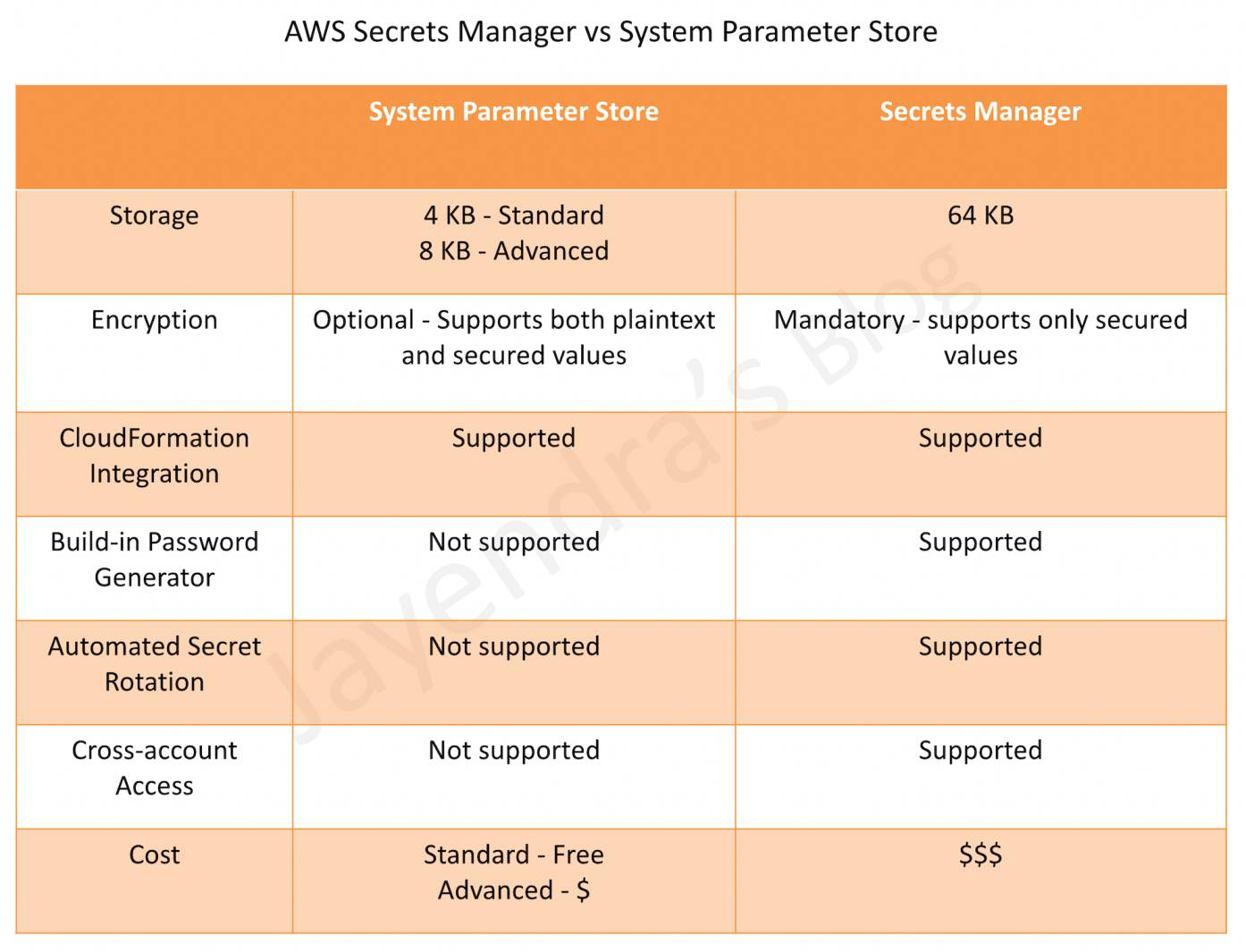
- does not support password rotation, use Secrets Manager instead.
- offers two tiers:
- Standard – up to 10,000 parameters per account/Region, max 4 KB parameter size, no charge.
- Advanced – up to 100,000 parameters per account/Region, max 8 KB parameter size, parameter policies support, charges apply.
SSM Parameter Store vs Secrets Manager
Change Management
Capabilities for taking action against or changing the AWS resources
Systems Manager Automation
- helps automate common maintenance and deployment tasks for e.g. create and update AMIs, apply driver and agent updates, reset passwords on Windows instances, reset SSH keys on Linux instances, and apply OS patches or application updates.
- supports re-execution of runbooks directly from the Automation console with pre-populated parameters (August 2025).
- supports automatic retry of throttled API calls during high-concurrency scenarios to improve execution reliability (August 2025).
💰 Automation Pricing Update (August 2025): The existing free tier for Automation (100,000 steps and 5,000 seconds of script duration per month) is no longer available for new customers and ended on December 31, 2025 for existing customers. Automation is now a paid service.
Maintenance Windows
- helps set up recurring schedules for managed instances to run administrative tasks like installing patches and updates without interrupting business-critical operations.
Node Management
Capabilities for managing the EC2 instances, on-premises servers and virtual machines (VMs) in the hybrid environment, and other types of AWS resources (nodes)
Systems Manager Configuration Compliance
- helps scan fleet of managed instances for patch compliance and configuration inconsistencies.
- helps collect and aggregate data from multiple AWS accounts and Regions, and then drill down into specific resources that aren’t compliant.
- provides, by default, displays compliance data about Patch Manager patching and State Manager associations, but can be customized
Session Manager
- helps manage EC2 instances through an interactive one-click browser-based shell or through the AWS CLI.
- provides secure and auditable instance management without the need to open inbound ports, maintain bastion hosts, or manage SSH keys.
- helps comply with corporate policies that require controlled access to instances, strict security practices, and fully auditable logs with instance access details, while still providing end users with simple one-click cross-platform access to the EC2 instances.
- supports port forwarding to remote hosts, enabling access to private resources (e.g., RDS databases, Redis clusters) through a managed node without publicly exposing ports.
- supports SSH tunneling for secure connections to instances without opening SSH ports.
- supports RDP connections through Fleet Manager for browser-based Windows instance access.
- requires SSM Agent version 3.0.222.0 or later for port forwarding and SSH sessions.
Systems Manager Run Command
- Run Command allows you to automate common administrative tasks and perform one-time configuration changes at scale.
- helps to remotely and securely manage the configuration of the managed instances at scale.
- helps perform on-demand changes like updating applications or running Linux shell scripts and Windows PowerShell commands on a target set of dozens or hundreds of instances.
Patch Manager
- helps automate the process of patching managed instances with both security-related and other types of updates.
- helps apply patches for both operating systems and applications. (On Windows Server, application support is limited to updates for Microsoft applications.)
- enables scanning of instances for missing patches and applies them individually or to a large group of instances by using EC2 instance tags.
- provides options to scan the instances and report compliance on a schedule, install available patches on a schedule, and patch or scan instances on-demand as needed.
- supports patching across multiple AWS accounts and Regions using the unified console.
- Patch baselines
- defines which patches should and shouldn’t be installed
- can include rules for auto-approving patches within days of their release, as well as a list of approved and rejected patches
- helps install security patches on a regular basis by scheduling patching to run as a Systems Manager maintenance window task.
- Patch group
- helps associate a set of instances with a specific patch baseline
- requires instances to be tagged with a tag key
Patch Group - an instance can only be part of one Patch Group
- a patch group can be registered with only one patch baseline
Systems Manager Inventory
- provides visibility into the EC2 and on-premises computing environment
- collect metadata from the managed instances about applications, files, components, patches, and more on the managed instances
- collects only metadata from the managed instances and doesn’t access proprietary information or data.
- supports custom metadata in addition to the pre-configured metadata
- supports inventory data collection from multiple regions and AWS Accounts
- supports inventory data storage in a single centralized location like S3 which can then be queried using Athena.
Systems Manager Distributor
- helps create and deploy software packages to managed nodes.
- supports AWS-provided agent software packages (e.g., AmazonCloudWatchAgent) and custom packages.
- supports multiple operating systems including Windows, Ubuntu Server, Debian Server, and Red Hat Enterprise Linux.
- integrates with State Manager and Maintenance Windows for automated package deployment.
Fleet Manager
- provides a console-based experience to view and administer fleets of managed nodes from a single location.
- supports OS-agnostic management without needing SSH or RDP connections.
- provides browser-based RDP access to Windows instances without publicly exposing RDP ports.
- displays health and performance status of the entire server fleet from one console.
Systems Manager State Manager
- is a secure and scalable configuration management service that helps automate the process of keeping the managed instances in a defined state.
- helps ensure that the instances are bootstrapped with specific software at startup, joined to a Windows domain (Windows instances only), or patched with specific software updates.
- A State Manager association is a configuration that is assigned to the managed instances which defines the state that you want to maintain on the instances.
Capabilities for managing and configuring the AWS resources
Systems Manager Document (SSM document)
- SSM document defines the actions that the Systems Manager performs.
- SSM document types include
- Command documents, which are used by State Manager and Run Command, and
- Automation documents (runbooks), which are used by Systems Manager Automation.
- SSM Document can be defined in JSON or YAML and define parameters and actions.
Systems Manager Agent
- is software that can be installed and configured on an EC2 instance, an on-premises server, or a virtual machine (VM)
- makes it possible for the Systems Manager to update, manage, and configure these resources
- must be installed on each instance to use with Systems Manager
- usually comes preinstalled with a lot of Amazon Machine Images (AMIs), while it must be installed manually on other AMIs, and on on-premises servers and virtual machines for the hybrid environment
- the new Systems Manager experience can automatically diagnose and remediate SSM Agent issues such as networking misconfigurations and outdated software using recommended runbooks
- scheduled diagnosis can be set up on a recurring basis to proactively identify and fix SSM Agent connectivity issues
Instance Tiers for Hybrid Environments
- Standard-instances tier
- allows registering up to 1,000 hybrid-activated machines per AWS account per Region
- no additional cost for on-premises instances
- Advanced-instances tier
- required for more than 1,000 hybrid-activated machines per account per Region
- required to use Patch Manager for Microsoft-released applications on non-EC2 nodes
- required to connect to non-EC2 nodes using Session Manager
- available on a per-use (pay-per-use) basis
AWS Certification Exam Practice Questions
- Questions are collected from Internet and the answers are marked as per my knowledge and understanding (which might differ with yours).
- AWS services are updated everyday and both the answers and questions might be outdated soon, so research accordingly.
- AWS exam questions are not updated to keep up the pace with AWS updates, so even if the underlying feature has changed the question might not be updated
- Open to further feedback, discussion and correction.
- Which of the following tools from AWS allows the automatic collection of software inventory from EC2 instances and helps apply OS patches?
- AWS Code Deploy
- Systems Manager
- EC2 AMI’s
- AWS Code Pipeline
- A Developer is writing several Lambda functions that each access data in a common RDS DB instance. They must share a connection string that contains the database credentials, which are a secret. A company policy requires that all secrets be stored encrypted. Which solution will minimize the amount of code the Developer must write?
- Use common DynamoDB table to store settings
- Use AWS Lambda environment variables
- Use Systems Manager Parameter Store secure strings
- Use a table in a separate RDS database
- A company has a fleet of EC2 instances and needs to remotely execute scripts for all of the instances. Which Amazon EC2 systems Manager feature allows this?
- Systems Manager Automation
- Systems Manager Run Command
- Systems Manager Parameter Store
- Systems Manager Inventory
- As a part of compliance check it was found that EC2 instances launched by the deployment team were not in compliance to latest security patches. The team had all tagged the resources. Which AWS service can help make the instances complaint?
- AWS Inspector
- AWS GuardDuty
- AWS Systems Manager
- AWS Shield
- A company wants to manage EC2 instances in multiple AWS accounts centrally without logging into each instance. They need to apply security patches, run operational commands, and gain visibility into the fleet status. Which solution requires the LEAST operational effort?
- Set up SSH bastion hosts in each account and use SSH to manage instances
- Use AWS Config rules to detect non-compliant instances and manually patch them
- Enable the new Systems Manager unified console with AWS Organizations and use Default Host Management Configuration
- Deploy a third-party configuration management tool across all accounts
- A company needs to securely access an RDS database in a private subnet from a developer’s laptop without exposing any ports to the internet. Which Systems Manager feature enables this?
- Systems Manager Run Command
- Systems Manager Automation
- Session Manager port forwarding to remote host
- Systems Manager Parameter Store
- A DevOps team wants to enable AWS Systems Manager on all new EC2 instances automatically without manually configuring IAM instance profiles. Which feature should they use?
- Systems Manager Quick Setup with Patch Manager
- Systems Manager State Manager associations
- Default Host Management Configuration (DHMC)
- Systems Manager Hybrid Activations
- A company uses feature flags to control the gradual rollout of new features to specific user segments. Which AWS service should they use for advanced targeting with variants and splits?
- AWS Lambda environment variables
- Systems Manager Parameter Store
- Amazon CloudWatch Evidently
- AWS AppConfig feature flags