AWS Cloud Migration
📋 Updated June 2025: This post has been updated to reflect the current AWS migration framework including the 7 Rs migration strategies (added Relocate), the 3-phase migration process (Assess, Mobilize, Migrate & Modernize), deprecation of AWS Server Migration Service (replaced by AWS Transform MGN), and the launch of AWS Transform – an AI-driven migration and modernization service.
Some of the key drivers to moving to cloud are:
- Operational Costs – Key components of operational costs are unit price of infrastructure, the ability to match supply and demand, finding a pathway to optionality, employing an elastic cost base, and transparency
- Workforce Productivity – Getting up and ready in seconds and various service availability
- Cost Avoidance – Eliminating the need for hardware refresh programs and constant maintenance programs
- Operational Resilience – Increases resilience and thereby reduces organization’s risk profile
- Business Agility – React to market conditions more quickly
- Sustainability – Leverage shared infrastructure and optimized resource utilization to reduce carbon footprint
Cloud Stages of Adoption
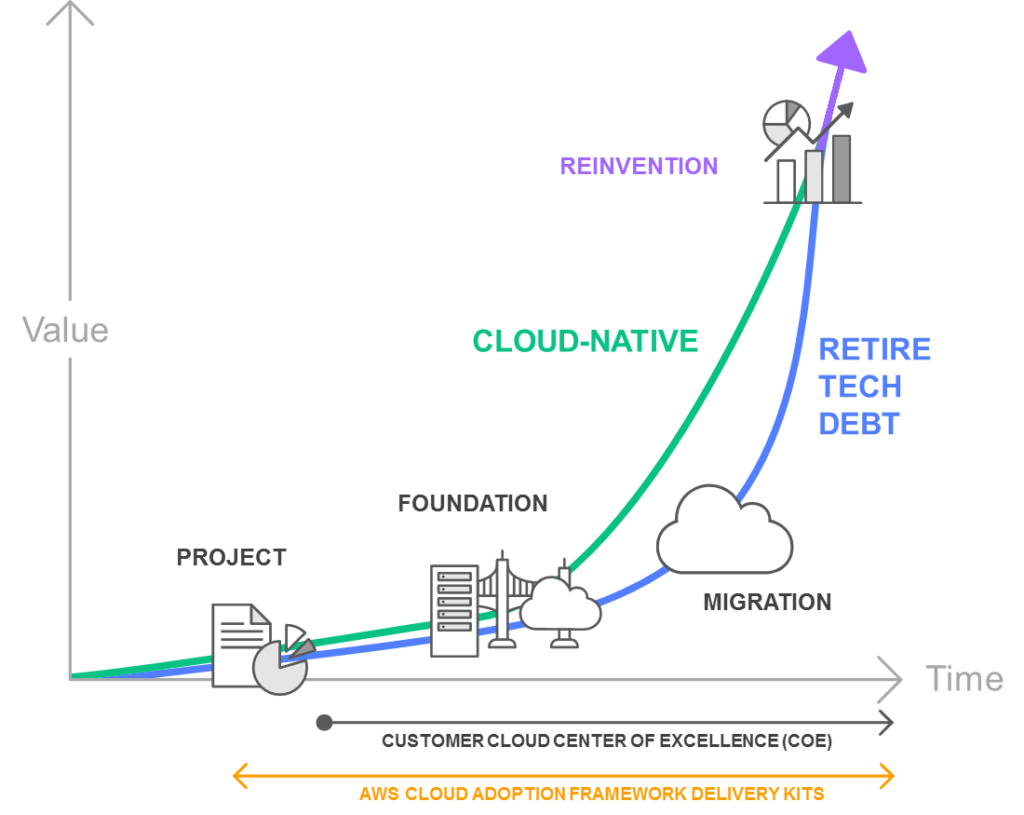
PROJECT
- In the project phase, execute projects to get familiar with and experience benefits from the cloud.
FOUNDATION
- After experiencing the benefits of cloud, build the foundation to scale the cloud adoption.
- This includes creating a landing zone (a pre-configured, secure, multi-account AWS environment), Cloud Center of Excellence (CCoE), operations model, as well as assuring security and compliance readiness.
- AWS Control Tower helps set up and govern a secure, multi-account AWS environment (landing zone) based on best practices.
MIGRATION
- Migrate existing applications including mission-critical applications or entire data centers to the cloud as you scale your adoption across a growing portion of the IT portfolio.
REINVENTION
- Now that the operations are in the cloud, focus on reinvention by taking advantage of the flexibility and capabilities of AWS to transform business by speeding time to market and increasing the attention on innovation.
Migration Process
AWS recommends performing the migration process in three phases: Assess, Mobilize, and Migrate & Modernize.
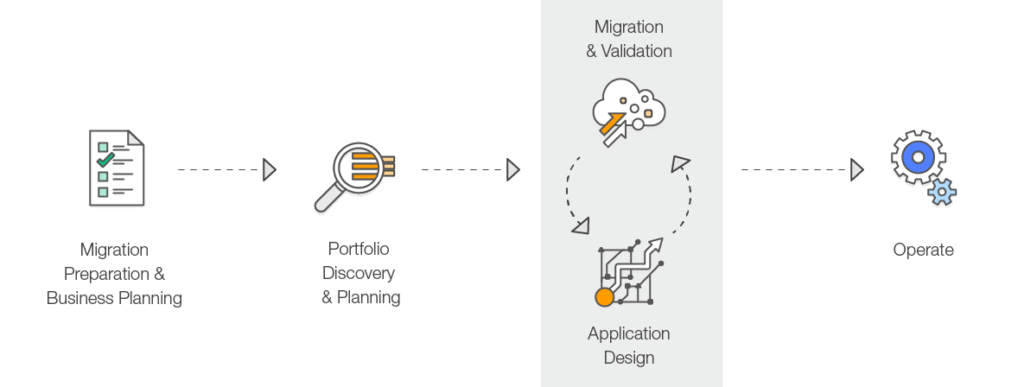
Phase 1: Assess
- Determine the right objectives and develop a preliminary business case for a migration.
- Understand the current environment, application portfolio, interdependencies, and identify what is suitable for migration.
- Use discovery tools like AWS Transform for automated application discovery, dependency mapping, and migration planning.
- Build a directional business case by taking objectives into account along with the age and architecture of the existing applications, and their constraints.
Phase 2: Mobilize
- Create a migration plan and refine the business case built in the Assess phase.
- Address gaps in organizational readiness identified in the Assess phase.
- Build the foundational landing zone, establish security guardrails, and set up operational tooling.
- Perform pilot migrations to test processes, tools, and build team expertise.
- Define the migration patterns, processes, and tools that will be used at scale.
Phase 3: Migrate & Modernize
- Execute the migration using the patterns and tools validated during the Mobilize phase.
- Each application is designed, migrated, and validated according to one of the seven common application strategies (“The 7 R’s”).
- Focus on speed and scale – implement a migration factory approach for high-volume migrations.
- Iterate on the foundation, turn off old systems, and modernize applications post-migration.
- AWS provides migration services including:
- AWS Transform MGN (formerly AWS Application Migration Service) – for lift-and-shift server migrations
- AWS Database Migration Service (DMS) – for database migrations
- AWS Transform – AI-driven end-to-end migration and modernization
⚠️ Deprecated Service Notice
AWS Server Migration Service (SMS) was discontinued on March 31, 2022. AWS recommends AWS Transform MGN (formerly AWS Application Migration Service) as the replacement for lift-and-shift migrations.
AWS Migration Hub is no longer open to new customers as of November 7, 2025. For similar capabilities, use AWS Transform.
Application Migration Strategies – The 7 R’s
Migration strategies depend upon what is in your environment and what is suitable for the portfolio, taking into account the business and technical requirements.
Below are the seven common migration strategies (expanded from the original “5 R’s” that Gartner outlined in 2011 to the current “7 R’s”).
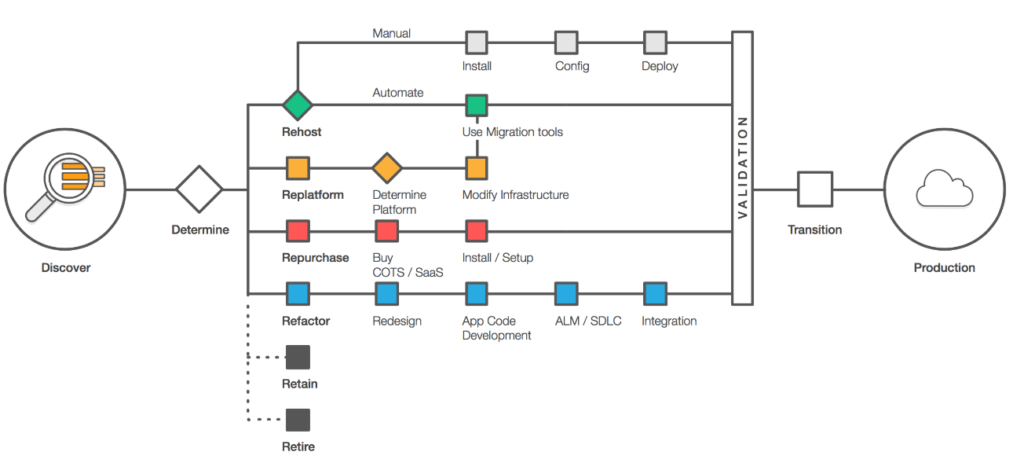
1. Rehost (“lift and shift”)
- Moving your application as is to the Cloud without making any changes.
- Helps to quickly implement the migration and scale to meet a business case.
- Provides better opportunity to re-architect the applications once they are already running in cloud, with the organization having already developed cloud skills.
- Rehosting can be automated with tools such as AWS Transform MGN (formerly AWS Application Migration Service), or can be done manually.
- AWS Transform MGN continuously replicates source servers to AWS, enabling non-disruptive testing and cutover.
2. Replatform (“lift, tinker and shift”)
- Moving your application to the Cloud with optimizations, without any major changes.
- Replatform helps achieve some tangible benefit without changing the core architecture of the application. For e.g., using RDS for database, Elastic Beanstalk for applications, or using AWS Graviton processors for cost optimization.
- Can involve moving to managed services, upgrading OS versions, or migrating to containers without code changes.
3. Repurchase (“drop and shop”)
- Dropping the application and moving to a completely new solution.
- More of a Buy in a Build vs Buy model; might be expensive in short term but faster time to market.
- Move to a different product, typically from a traditional license to a SaaS model (e.g., migrating CRM to Salesforce, or HR system to Workday).
4. Refactor / Re-architect
- Moving the application to Cloud, with major changes to take advantage of cloud-native features.
- More of a Build in a Build vs Buy model, and would take time.
- Driven by a strong business need to add features, scale, or performance with agility and improvement in business continuity that would otherwise be difficult to achieve in the application’s existing environment.
- May involve moving to microservices, serverless architecture, or event-driven design.
5. Retire
- Decommission the applications that are no longer needed.
- Identifying IT assets that are no longer useful and can be turned off will help boost your business case and direct your attention towards maintaining the resources that are widely used.
- Includes decommissioning zombie applications (avg CPU/memory below 5%) and idle applications (5-20% usage over 90 days).
6. Retain
- Keep the applications as is in the current environment.
- Retain portions of the IT portfolio that have tight dependencies, are difficult or not in priority, or are not ready for migration.
- May include applications with unresolved compliance requirements, recent upgrades, or dependencies on specialized hardware.
7. Relocate (hypervisor-level lift and shift)
- Transfer infrastructure to the cloud without purchasing new hardware, rewriting applications, or modifying existing operations.
- Enables moving a large number of servers at a given time from on-premises to a cloud version of the platform.
- During relocation, the application continues to serve users, minimizing disruption and downtime.
- Relocate is the quickest way to migrate and operate workloads in the cloud because it does not impact the overall architecture.
- Example: Moving VMware workloads to AWS using AWS Transform for VMware.
AWS Migration Services and Tools
AWS Transform (Launched May 2025)
- AI-driven service that uses agentic AI to accelerate and simplify migration and modernization of infrastructure, applications, and code.
- Automates the full migration lifecycle: discovery, dependency mapping, migration planning, network conversion, and EC2 instance optimization.
- Brings together 20 years of migration experience with specialized AI agents, human teams, and partner workflows.
- Capabilities include:
- AWS Transform for VMware – Automated VMware workload migration
- AWS Transform for Mainframe – Mainframe modernization with AI agents
- AWS Transform for .NET – Automated .NET framework modernization
- AWS Transform for Windows – Full-stack Windows modernization
- AWS Transform MGN – Rehosting (lift-and-shift) with continuous replication
- Learn more: AWS Transform
AWS Transform MGN (formerly Application Migration Service)
- Dedicated rehosting capability that automates the conversion of source servers (physical, virtual, or cloud) into native Amazon EC2 instances.
- Continuously replicates block-level volumes from source servers to AWS.
- Enables non-disruptive testing prior to cutover.
- Supports a wide range of applications without changes to architecture or migrated servers.
- Learn more: AWS Transform MGN
AWS Database Migration Service (DMS)
- Supports homogeneous (e.g., Oracle to Oracle) and heterogeneous (e.g., Oracle to Aurora) database migrations.
- DMS Serverless provides automatic scaling and storage management.
- DMS Schema Conversion with GenAI accelerates heterogeneous database migrations using AI.
- Supports continuous data replication for minimal downtime migrations.
- Learn more: AWS DMS
AWS Migration Acceleration Program (MAP)
- Comprehensive program based on thousands of enterprise customer migrations.
- Uses a three-phased framework: Assess, Mobilize, and Migrate & Modernize.
- Provides migration credits, technical guidance, and best-practice methodologies.
- Includes support for VMware migrations, AI workloads, and mainframe modernization.
- Learn more: AWS MAP
AWS Certification Exam Practice Questions
- Questions are collected from Internet and the answers are marked as per my knowledge and understanding (which might differ with yours).
- AWS services are updated everyday and both the answers and questions might be outdated soon, so research accordingly.
- AWS exam questions are not updated to keep up the pace with AWS updates, so even if the underlying feature has changed the question might not be updated
- Open to further feedback, discussion and correction.
- A company is planning the migration of several lab environments used for software testing. An assortment of custom tooling is used to manage the test runs for each lab. The labs use immutable infrastructure for the software test runs, and the results are stored in a highly available SQL database cluster. Although completely rewriting the custom tooling is out of scope for the migration project, the company would like to optimize workloads during the migration. Which application migration strategy meets this requirement?
- Re-host
- Re-platform
- Re-factor/re-architect
- Retire
- A company wants to migrate its on-premises VMware infrastructure to AWS with minimal changes to the applications. The company wants the fastest migration path that does not require purchasing new hardware or modifying existing operations. Which migration strategy should the company use?
- Rehost
- Replatform
- Relocate
- Refactor
- A company is migrating its data center to AWS. It needs to automatically replicate source servers to AWS and perform non-disruptive testing before cutover. Which AWS service should the company use?
- AWS Server Migration Service
- AWS Transform MGN
- AWS DataSync
- AWS Snowball
- An organization wants to use AI-powered tools to automate application discovery, dependency mapping, and migration planning for its large-scale migration to AWS. Which service provides these capabilities?
- AWS Migration Hub
- AWS Application Discovery Service
- AWS Transform
- AWS Server Migration Service
- A company is evaluating its application portfolio for migration to AWS. Several applications have average CPU and memory usage below 5%. What migration strategy is most appropriate for these applications?
- Rehost
- Retain
- Retire
- Replatform
- A company wants to migrate its Oracle database to Amazon Aurora PostgreSQL to reduce licensing costs and take advantage of cloud-native features. Which migration strategy does this represent?
- Rehost
- Replatform
- Refactor/Re-architect
- Repurchase
References
- AWS documentation – Cloud Migration
- AWS Prescriptive Guidance – 7 Rs Migration Strategies
- AWS Transform – AWS Transform Service
- AWS Transform MGN – Application Migration Service
- AWS Migration Acceleration Program – MAP
- AWS Cloud Adoption Framework – AWS CAF
Hi,Jayendra
Have you ever attended the 2 days training of “migrating to AWS”?Thanks
Hi Sable, haven’t attended the migrating to AWS training. Anything specific you are looking for ?
Hi,Jayendra
I just have a quick view on the AWS Document-Cloud Migration page, and I guess maybe AWS updates their migration methodology recently, for example they are talking about a common strategy of 7 R’s now:)
So I just wonder if they have or will update related training course;
Hi Sable, haven’t seen the latest Cloud Migration page. Updates happen slowly to the exams, so it might not reflect.
Why is the answer replay form if they are looking to optimize during migration?