Table of Contents
hide
Google Cloud BigQuery Security
BigQuery Encryption
- BigQuery automatically encrypts all data before it is written to disk.
- Each BigQuery object’s data and metadata is encrypted using the Advanced Encryption Standard (AES).
- By default, Google uses Google default encryption at rest and manages the key encryption keys used for data protection.
- BigQuery supports Customer-Managed Encryption Keys (CMEK) using Cloud KMS, allowing you to control the encryption keys for datasets, tables, and query results.
- CMEK can be set as a default for a dataset, ensuring any tables created in future use the specified CMEK.
- BigQuery does NOT support Customer-Supplied Encryption Keys (CSEK).
- BigQuery supports Column-level encryption with Cloud KMS using AEAD encryption SQL functions, providing a second layer of protection at the column level.
- AEAD encryption functions allow you to create keysets for encrypting and decrypting individual values in a table.
- Provides “double access control” — users need both BigQuery access and Cloud KMS key access to decrypt data.
- Supports deterministic encryption and decryption interoperable with Sensitive Data Protection.
- BigQuery uses TLS for data in transit encryption.
- Sensitive Data Protection (formerly Cloud Data Loss Prevention / Cloud DLP) can be used to scan BigQuery tables and to protect sensitive data and meet compliance requirements.
BigQuery IAM Roles
- BigQuery supports access control of datasets and tables using IAM.
- Basic Roles (formerly called “Primitive Roles”)
- Basic roles act at the project level.
- By default, granting access to a project also grants access to datasets within it unless overridden.
- Are not limited to BigQuery resources only.
- Can separate data access permissions from job-running permissions.
- Viewer
- View all datasets
- Run Jobs/Queries
- View and update all jobs that they started
- Editor
- All Viewer access
- Modify or delete all tables
- Create new datasets
- Owner
- All Editor access
- List, modify, or delete all datasets
- View all jobs
- Predefined Roles
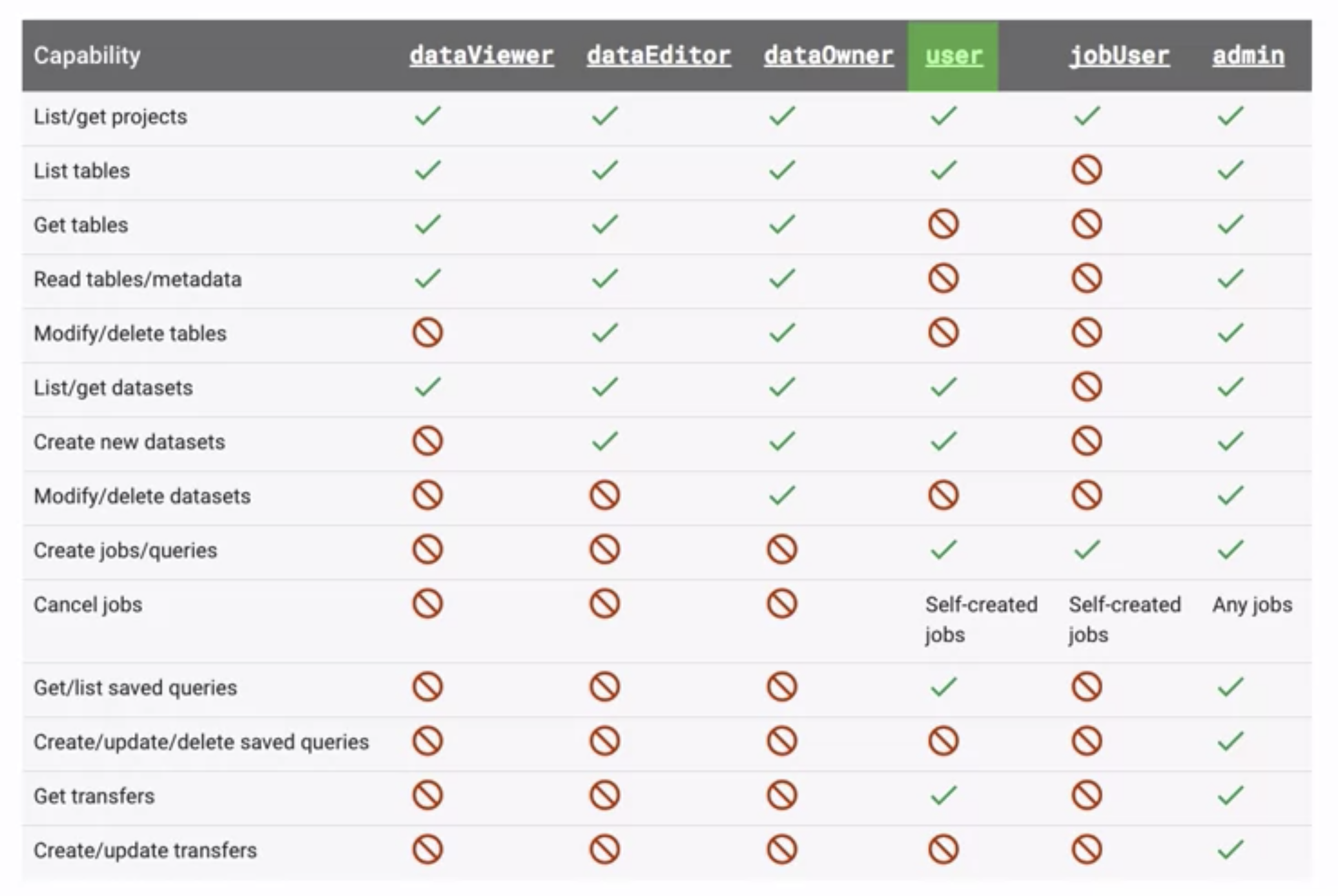
dataViewer,dataEditor, anddataOwnerroles- are similar to the basic roles except
- can be assigned for individual datasets
- don’t give users permission to run jobs or queries
- are similar to the basic roles except
user,jobUserroles- give users permission to run jobs or queries
- A
jobUsercan only start jobs and cancel jobs, but cannot list datasets or tables - A
user, on the other hand, can perform a variety of other tasks, such as listing or creating datasets - User or group granted the
userrole at the project level can create datasets and can run query jobs against tables in those datasets. userrole does not give permission to query data, view table data, or view table schema details for datasets the user did not create. Need to have thedataViewerrole for the same.
bigquery.adminrole — provides permissions to manage all resources within the project, manage all data, and cancel jobs from other users.
BigQuery Access Control Levels
- BigQuery supports access controls at multiple levels:
- Organization level — policies applied across all projects
- Project level — IAM policies on the project resource
- Dataset level — IAM policies on individual datasets
- Table/View level — IAM policies on individual tables or views
- Column level — policy tags for column-level access control
- Row level — row access policies for row-level security
- Access control can also be managed using IAM Conditions for attribute-based access control and Tags for tag-based access control.
Authorized Views
- Authorized views help provide view access to a dataset.
- Use authorized views to restrict access at a lower resource level such as the table, column, row, or cell.
- An authorized view allows sharing query results with particular users and groups without giving them access to the underlying tables.
- Authorized View’s SQL query can be used to restrict the columns (fields) the users are able to query.
- Authorized views HAVE to be created in a separate dataset from the source dataset. As access controls can be assigned only at the dataset level, if the view is created in the same dataset as the source data, the users would have access to both the view and the data.
- Authorized View creation process
- Create a separate dataset to store the view.
- Create the view in the new dataset.
- Give the group read access to the dataset containing the view.
- Authorize the view to access the source dataset.
- Give the group
bigquery.userrole to run jobs, including query jobs within the project.
- Project-level
bigquery.userrole does not give the users the ability to view or query table data in the dataset containing the tables queried by the view. They need READER access to the dataset containing the view.
Authorized Datasets
- An authorized dataset lets you authorize all of the views in a specified dataset to access the data in a second dataset.
- Simplifies management over individual authorized views — instead of authorizing each view separately, the entire dataset is authorized.
- Any new views added to the authorized dataset automatically gain access to the source dataset.
- Useful when you have many views that need access to the same source data.
Authorized Routines
- Authorized routines let you share query results with specific users or groups without giving them access to the underlying tables that generated the results.
- For UDFs and table functions, you can authorize the function to access source dataset resources on the caller’s behalf.
- Authorized routines must be created in a separate dataset from the source data.
- Useful for sharing data transformations while protecting raw data access.
Fine-Grained Access Control
- BigQuery provides fine-grained access to sensitive columns using policy tags, or type-based classification of data.
- Policy tags are managed in a hierarchical taxonomy in Dataplex Universal Catalog (formerly Data Catalog, which was deprecated Feb 2025 and discontinued Jan 30, 2026).
- Using BigQuery column-level security, you can create policies that check, at query time, whether a user has proper access.
- Users with the Data Catalog Fine-Grained Reader role on a policy tag can access unmasked column data.
- Row-level security extends the principle of least privilege by enabling fine-grained access control to a subset of data in a BigQuery table, by means of row-level access policies.
- Row access policies use a filter expression (e.g.,
FILTER USING (region = "US")). - One table can have multiple row-level access policies.
- Row-level access policies can coexist with column-level security as well as dataset-level, table-level, and project-level access controls.
- Row access policies use a filter expression (e.g.,
Dynamic Data Masking
- BigQuery supports dynamic data masking at the column level, allowing you to selectively obscure column data for user groups while still allowing them access to the column.
- Data masking is built on top of column-level access control and uses policy tags and data policies.
- Unlike column-level access control alone, masked users don’t get “permission denied” — they see obscured data instead.
- Existing queries automatically mask column data based on the roles the user has been granted.
- Data Masking Rules available:
- Nullify — returns NULL instead of the column value (highest security)
- Default masking value — returns a type-appropriate default (e.g., “” for STRING, 0 for INTEGER)
- Hash (SHA-256) — returns deterministic hash of the value (supports JOINs)
- Random Hash — uses per-query random salt for stronger security (supports JOINs within same query only)
- Email mask — replaces username with XXXXX (e.g.,
XXXXX@gmail.com) - First four characters — shows only first 4 chars, rest replaced with XXXXX
- Last four characters — shows only last 4 chars, rest replaced with XXXXX
- Date year mask — truncates dates to year only (e.g.,
2030-07-17→2030-01-01) - Custom masking routine — applies a user-defined function (UDF) for custom masking logic
- Key Roles:
- BigQuery Masked Reader — can see masked (obscured) column data
- Data Catalog Fine-Grained Reader — can see unmasked (original) column data
- Users with neither role get permission denied
- Up to nine data policies can be configured per policy tag.
Differential Privacy
- BigQuery supports differential privacy, an anonymization technique that limits the personal information revealed by query outputs.
- Allows statistical queries on datasets while preventing identification of individual records.
- Uses a privacy budget (epsilon) to limit how much information can be extracted from the data.
- Supports differential privacy analysis rules that can be applied to shared datasets, particularly in data clean rooms.
- Can be extended to multi-cloud data sources and external differential privacy libraries.
VPC Service Controls for BigQuery
- VPC Service Controls create a security perimeter around BigQuery resources to prevent data exfiltration.
- Controls data export from BigQuery to Cloud Storage or other targets.
- Prevents data from being copied to unauthorized resources outside the perimeter using service operations.
- Restricts resource access to allowed IP addresses, identities, and trusted client devices.
- BigQuery supports regional endpoints to ensure data stays within a specific region.
Data Governance with Dataplex Universal Catalog
- BigQuery’s data governance capabilities are powered by Dataplex Universal Catalog (also known as Knowledge Catalog), which replaced Data Catalog (deprecated Feb 2025, discontinued Jan 30, 2026).
- Provides unified, AI-powered data cataloging integrating discovery, security, and metastore capabilities.
- Policy tags and policy tag taxonomies used for column-level access control in BigQuery are NOT deprecated — they continue to work with Knowledge Catalog.
- Supports column-level lineage for BigQuery data at no extra cost.
- Sensitive Data Protection (formerly Cloud DLP) integrates with Dataplex for automated discovery and classification of sensitive data across BigQuery datasets.
GCP Certification Exam Practice Questions
- Questions are collected from Internet and the answers are marked as per my knowledge and understanding (which might differ with yours).
- GCP services are updated everyday and both the answers and questions might be outdated soon, so research accordingly.
- GCP exam questions are not updated to keep up the pace with GCP updates, so even if the underlying feature has changed the question might not be updated
- Open to further feedback, discussion and correction.
- You have multiple Data Analysts who work with the dataset hosted in BigQuery within the same project. As a BigQuery Administrator, you are required to grant the data analyst only the privilege to create jobs/queries and the ability to cancel self-submitted jobs. Which role should assign to the user?
- User
- Jobuser
- Owner
- Viewer
- Your analytics system executes queries against a BigQuery dataset. The SQL query is executed in batch and passes the contents of a SQL file to the BigQuery CLI. Then it redirects the BigQuery CLI output to another process. However, you are getting a permission error from the BigQuery CLI when the queries are executed. You want to resolve the issue. What should you do?
- Grant the service account BigQuery Data Viewer and BigQuery Job User roles.
- Grant the service account BigQuery Data Editor and BigQuery Data Viewer roles.
- Create a view in BigQuery from the SQL query and
SELECT *from the view in the CLI. - Create a new dataset in BigQuery, and copy the source table to the new dataset. Query the new dataset and table from the CLI.
- You are responsible for the security and access control to a BigQuery dataset hosted within a project. Multiple users from multiple teams need to have access to the different tables within the dataset. How can access be controlled?
- Create Authorized views for tables in a separate project and grant access to the teams
- Create Authorized views for tables in the same project and grant access to the teams
- Create Materialized views for tables in a separate project and grant access to the teams
- Create Materialized views for tables in the same project and grant access to the teams
- Your organization stores sensitive PII data in BigQuery. The security team wants different user groups to see different levels of data: the accounting team should see full SSN values, the analytics team should see hashed values for joining purposes, and general users should not see the data at all. What BigQuery feature should you use?
- Row-level security policies
- Authorized views with different SQL queries per team
- Dynamic data masking with policy tags and multiple data policies
- Column-level encryption with CMEK
- You need to prevent BigQuery data from being copied to unauthorized projects outside your organization while still allowing legitimate cross-project queries within your organization. What should you implement?
- Row-level access policies
- Column-level security with policy tags
- Authorized datasets
- VPC Service Controls with a service perimeter
- Your company wants to share a BigQuery dataset with a partner organization for analytics while ensuring that individual records cannot be identified. The privacy team requires mathematical guarantees of privacy protection. Which feature should you use?
- Dynamic data masking with SHA-256 hash
- Column-level security with authorized views
- Differential privacy with analysis rules in a data clean room
- Row-level security to filter out sensitive records
References
- Google Cloud BigQuery Data Governance
- BigQuery Column-Level Access Control
- BigQuery Dynamic Data Masking
- BigQuery Row-Level Security
- BigQuery IAM Roles and Permissions
- BigQuery Customer-Managed Encryption Keys
- BigQuery Column-Level Encryption with Cloud KMS
- VPC Service Controls for BigQuery
- BigQuery Differential Privacy