AWS FSx for Windows

AWS FSx for Windows File Server

  • Amazon FSx for Windows File Server provides fully managed, highly reliable, and scalable file storage that is accessible over the industry-standard Server Message Block (SMB) protocol.
  • FSx for Windows is built on Windows Server, delivering a wide range of administrative features such as user quotas, end-user file restore, File Server Resource Manager (FSRM), ACLs, and Microsoft Active Directory (AD) integration.
  • FSx for Windows provides high levels of throughput and IOPS and consistent sub-millisecond latencies.
  • FSx for Windows supports up to 12 GBps throughput capacity and up to 400,000 IOPS.
  • FSx for Windows offers single-AZ and multi-AZ deployment options, fully managed backups, and encryption of data at rest and in transit.
  • FSx for Windows File Server backups are file-system-consistent, highly durable, and incremental.
  • Amazon FSx is accessible from Windows, Linux, and MacOS compute instances and devices.
  • Amazon FSx provides concurrent access to the file system to thousands of compute instances and devices.
  • Amazon FSx can connect the file system to EC2, VMware Cloud on AWS, Amazon WorkSpaces, Amazon AppStream 2.0, and Amazon ECS instances.
  • Integrated with CloudWatch to monitor storage capacity and file system activity.
  • Integrated with CloudTrail to monitor all Amazon FSx API calls.
  • Amazon FSx was designed for use cases that require Windows shared file storage, like CRM, ERP, custom or .NET applications, home directories, data analytics, media, and entertainment workflows, web serving and content management, software build environments, and Microsoft SQL Server.
  • FSx file system is accessible from the on-premises environment using an AWS Direct Connect or AWS VPN connection.
  • FSx is accessible from multiple VPCs, AWS accounts, and AWS Regions using VPC Peering connections or AWS Transit Gateway.
  • FSx provides consistent sub-millisecond latencies with SSD storage and single-digit millisecond latencies with HDD storage.
  • FSx supports Microsoft’s Distributed File System (DFS) to organize shares into a single folder structure up to hundreds of PB in size.
  • FSx supports DNS aliases to access file systems using custom DNS names (up to 50 aliases per file system), enabling seamless migration from on-premises file servers.
  • FSx supports two network type options: IPv4-only and dual-stack (for both IPv4 and IPv6), allowing access from IPv6 clients without complex address translation.

FSx for Windows Performance

  • FSx for Windows supports up to 12 GBps of throughput capacity per file system.
  • Maximum IOPS levels up to 400,000 for file systems with 12 GBps throughput capacity.
  • SSD IOPS can be provisioned independently of storage capacity, up to 400,000 IOPS.
  • Throughput capacity and storage capacity can be increased or decreased independently at any time.
  • Storage type can be updated from HDD to SSD without creating a new file system.
  • Each file system can be provisioned up to 64 TB in size.
  • Data deduplication helps reduce storage consumption by identifying and removing duplicate data.

FSx for Windows Security

  • FSx works with Microsoft Active Directory (AD) to integrate with existing Windows environments, which can either be an AWS Managed Microsoft AD or self-managed Microsoft AD.
  • FSx integrates with AWS Secrets Manager for enhanced management of Active Directory credentials for domain join operations.
  • FSx provides standard Windows permissions (full support for Windows Access Controls ACLs) for files and folders.
  • FSx for Windows File Server supports encryption at rest for the file system and backups using KMS managed keys.
  • FSx encrypts data-in-transit using SMB Kerberos session keys when accessing the file system from clients that support SMB 3.0.
  • FSx supports file-level or folder-level restores to previous versions by supporting Windows shadow copies, which are point-in-time snapshots of the file system.
  • FSx supports Windows shadow copies to enable the end-users to easily undo file changes and compare file versions by restoring files to previous versions, and backups to support the backup retention and compliance needs.
  • FSx complies with ISO, PCI-DSS, and SOC certifications, and is HIPAA eligible.
  • FSx supports AWS PrivateLink interface VPC endpoints (including dual-stack endpoints) to access the FSx API from within a VPC without sending traffic over the internet.

FSx for Windows File Access Auditing

  • FSx supports file access auditing to log end-user accesses on files, folders, and file shares.
  • File access auditing helps meet security and compliance requirements by tracking who accessed, modified, or changed permissions on files.
  • Audit event logs can be sent to Amazon CloudWatch Logs or streamed to Amazon Kinesis Data Firehose.
  • Supports configuring audit levels independently for file/folder accesses and file share accesses.
  • Audit log levels include: SUCCESS_ONLY, FAILURE_ONLY, SUCCESS_AND_FAILURE, and DISABLED.
  • File access auditing is supported on file systems with a throughput capacity of 32 MBps or greater.

FSx for Windows File Server Resource Manager (FSRM)

  • Amazon FSx supports File Server Resource Manager (FSRM), a Windows Server feature that provides capabilities to manage, govern, and monitor file data.
  • FSRM enables:
    • File Classification – Automatically classify and identify sensitive data (e.g., PII).
    • File Screening – Block unauthorized file types from being saved to business folders.
    • Folder-level Quotas – Set storage limits to prevent users from consuming excessive storage.
    • Storage Reports – Generate detailed reports about storage usage patterns.
    • Retention Policies – Create data retention and lifecycle policies.
  • FSRM events can be published to Amazon CloudWatch Logs or Amazon Kinesis Data Firehose for monitoring and automation.
  • FSRM events can trigger AWS Lambda functions to take reactive actions based on file events.
  • FSRM is supported on file systems with SSD storage and a throughput capacity of 128 MB/s or greater.

FSx for Windows Availability and Durability

  • FSx for Windows automatically replicates the data within an Availability Zone (AZ) to protect it from component failure.
  • FSx continuously monitors for hardware failures and automatically replaces infrastructure components in the event of a failure.
  • FSx supports Multi-AZ deployment
    • automatically provisions and maintains a standby file server in a different Availability Zone.
    • any changes written to disk in the file system are synchronously replicated across AZs to standby.
    • helps enhance availability during planned system maintenance.
    • helps protect the data against instance failure and AZ disruption.
    • In the event of planned file system maintenance or unplanned service disruption, FSx automatically fails over to the secondary file server, allowing data accessibility without manual intervention.
  • Multi-AZ file systems automatically failover from the preferred file server to the standby file server if
    • An Availability Zone outage occurs.
    • Preferred file server becomes unavailable.
    • Preferred file server undergoes planned maintenance.
  • FSx supports automatic daily backups of the file systems, which incrementally store only the changes after the most recent backup.
  • FSx stores backups in S3.
  • FSx supports copying backups cross-region (to another AWS Region) and in-region for disaster recovery and compliance.
  • FSx is integrated with AWS Backup for centralized backup management, cross-account backup, and cross-region backup copy.

FSx for Windows and FSx File Gateway

  • Note: Amazon FSx File Gateway is no longer available to new customers as of October 28, 2024. Existing customers can continue using the service.
  • FSx File Gateway previously provided low-latency, on-premises access to fully managed file shares in the cloud by caching frequently accessed data locally.
  • For on-premises access, AWS now recommends accessing FSx for Windows File Server directly using AWS Direct Connect or AWS VPN connections.

AWS Certification Exam Practice Questions

  • Questions are collected from Internet and the answers are marked as per my knowledge and understanding (which might differ with yours).
  • AWS services are updated everyday and both the answers and questions might be outdated soon, so research accordingly.
  • AWS exam questions are not updated to keep up the pace with AWS updates, so even if the underlying feature has changed the question might not be updated
  • Open to further feedback, discussion and correction.
  1. A data processing facility wants to move a group of Microsoft Windows servers to the AWS Cloud. These servers require access to a shared file system that can integrate with the facility’s existing Active Directory (AD) infrastructure for file and folder permissions. The solution needs to provide seamless support for shared files with AWS and on-premises servers and allow the environment to be highly available. The chosen solution should provide added security by supporting encryption at rest and in transit. The solution should also be cost-effective to implement and manage. Which storage solution would meet these requirements?
    1. An AWS Storage Gateway file gateway joined to the existing AD domain
    2. An Amazon FSx for Windows File Server file system joined to the existing AD domain
    3. An Amazon Elastic File System (Amazon EFS) file system joined to an AWS managed AD domain
    4. An Amazon S3 bucket mounted on Amazon EC2 instances in multiple Availability Zones running Windows Server and joined to an AWS managed AD domain.
  2. A company needs to audit file access patterns on its Amazon FSx for Windows File Server file system to meet compliance requirements. The security team needs to track who accessed, modified, or changed permissions on files and folders. Which feature should the solutions architect configure?
    1. Enable CloudTrail logging for FSx API calls
    2. Enable file access auditing with audit logs sent to CloudWatch Logs
    3. Configure Windows Event Viewer on the file server
    4. Enable VPC Flow Logs on the FSx file system’s network interfaces
  3. A solutions architect needs to manage storage costs for Amazon FSx for Windows File Server. The organization requires the ability to classify sensitive data, block unauthorized file types, set storage limits per department folder, and generate storage usage reports. Which feature should the architect use?
    1. Configure data deduplication on the file system
    2. Use Amazon Macie to classify data on FSx
    3. Enable File Server Resource Manager (FSRM) on the file system
    4. Use AWS Config rules to monitor storage usage
  4. A company is deploying Amazon FSx for Windows File Server and requires the file system to be accessible from both IPv4 and IPv6 clients within their VPC and on-premises network. Which configuration should the solutions architect choose?
    1. Create a file system with IPv4-only network type and use a NAT64 gateway
    2. Create a file system with dual-stack network type
    3. Create two file systems, one for IPv4 and one for IPv6 clients
    4. Deploy an Application Load Balancer with dualstack in front of the file system
  5. A company is migrating from on-premises Windows file servers to Amazon FSx for Windows File Server. They want to ensure end users can continue accessing file shares using the same DNS names without any client-side configuration changes. Which approach should the solutions architect recommend?
    1. Update the on-premises DNS to point to the FSx file system’s default DNS name
    2. Associate DNS aliases with the FSx file system matching the existing on-premises file server DNS names
    3. Create a Route 53 private hosted zone with CNAME records
    4. Configure AWS Global Accelerator with the FSx file system as an endpoint

References

AWS S3 vs EBS vs EFS – Storage Comparison Guide

S3 vs EBS vs EFS

EFS, EBS, and S3 are AWS’ three different storage types that are applicable for different types of workload needs.

🆕 Major Updates (2024-2026)

  • Amazon S3 Files (April 2026) – S3 buckets can now be mounted as NFS file systems, blurring the line between S3 and EFS.
  • Amazon S3 Tables – Native Apache Iceberg table storage in S3 for analytics workloads (GA 2024).
  • Amazon S3 Vectors (GA Dec 2025) – Native vector storage and similarity search in S3 for AI/ML workloads.
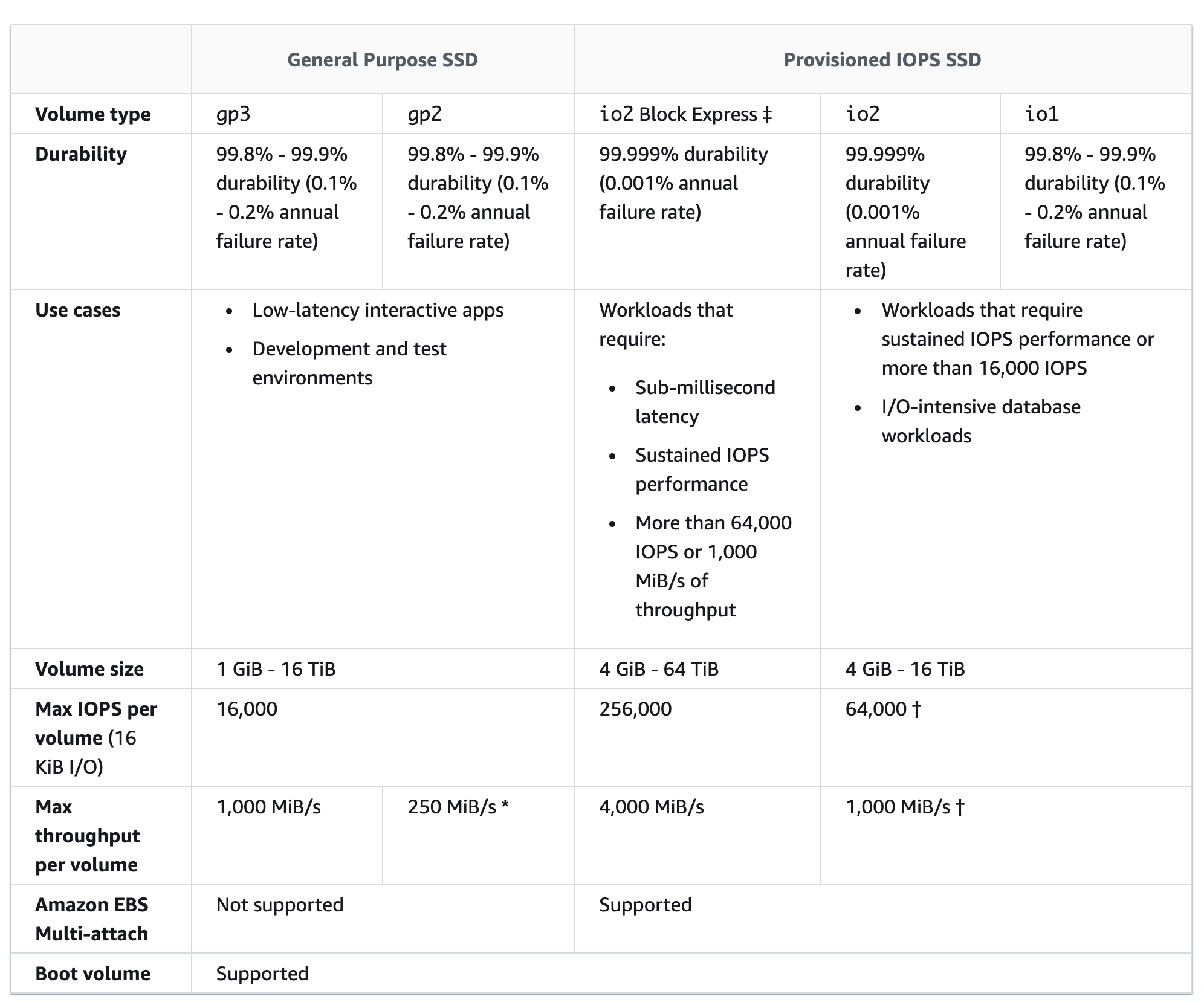
  • EBS gp3 Enhanced (Sept 2025) – gp3 volumes now support up to 64 TiB size, 80,000 IOPS, and 2,000 MiB/s throughput.
  • EFS Performance (2024) – Up to 60 GiB/s read throughput, 2.5 million IOPS per file system, and 10,000 access points per file system.
  • EFS Archive Storage Class (Nov 2023) – Up to 50% lower cost than EFS IA for rarely accessed data.

S3 vs EBS vs EFS Comparison

S3 vs EBS vs EFS

Simple Storage Service – S3

  • is an object store with a simple key, value store design, and good at storing vast numbers of backups or user files.
  • offers pay for the storage you actually use. Offers cost-saving storage classes ideal for infrequently accessed data or for data archival.
  • provides unlimited storage – as of March 2026, S3 stores more than 500 trillion objects across hundreds of exabytes of data.
  • provides durability as the data is replicated and stored across at least three geographically dispersed AZs with a maximum of 99.999999999% (11 9’s).
  • provides high availability with a maximum of 99.99%.
  • provides security with a range of access control mechanisms and abilities to encrypt data at rest and in transit. SSE-C is now disabled by default on new buckets (April 2026).
  • data can be accessed programmatically or directly from services such as AWS CloudFront.
  • provides backup capability using versioning and cross-region replication.
  • offers multiple storage classes: S3 Standard, S3 Intelligent-Tiering, S3 Standard-IA, S3 One Zone-IA, S3 Express One Zone, S3 Glacier Instant Retrieval, S3 Glacier Flexible Retrieval, and S3 Glacier Deep Archive.
  • S3 Express One Zone provides up to 10x faster data access and 50% lower request costs than S3 Standard for latency-sensitive workloads.
  • 🆕 S3 Files (April 2026) – provides native NFS v4.2 file system access to S3 buckets, enabling EC2 instances, Lambda, EKS, and ECS to mount S3 as a file system with ~1ms latencies and full POSIX semantics. Data never leaves S3.
  • 🆕 S3 Tables – provides native Apache Iceberg table support with automatic compaction, snapshot management, and Intelligent-Tiering for analytics workloads.
  • 🆕 S3 Vectors (GA Dec 2025) – first cloud object storage with native vector support, enabling storage and similarity search of up to 2 billion vectors per index at up to 90% lower cost than specialized vector databases.

Elastic Block Storage – EBS

  • delivers high-availability block-level storage volumes for EC2 instances.
  • offers pay for the provisioned storage, even if you do not use it.
  • provides limited storage capability – gp3 volumes now support up to 64 TiB (previously 16 TiB), io2 Block Express supports up to 64 TiB.
  • stores data on a file system which can be retained after the EC2 instance is shut down.
  • provides durability by replicating data across multiple servers in an AZ to prevent the loss of data from the failure of any single component.
  • designed for 99.999% availability.
  • provides low-latency performance – io2 Block Express volumes deliver sub-millisecond (under 500 microseconds) average latency for 16KiB I/O operations. gp3 volumes now deliver up to 80,000 IOPS and 2,000 MiB/s throughput (Sept 2025 update).
  • provides secure storage with access control and providing data at rest and in transit encryption.
  • is only accessible from EC2 instances in the particular AWS region and AZ.
  • provides Multi-Attach option to share io1/io2 volumes across up to 16 Nitro-based EC2 instances within the same AZ. io2 volumes also support NVMe Reservations for I/O fencing.
  • provides backup capability using backups and snapshots.
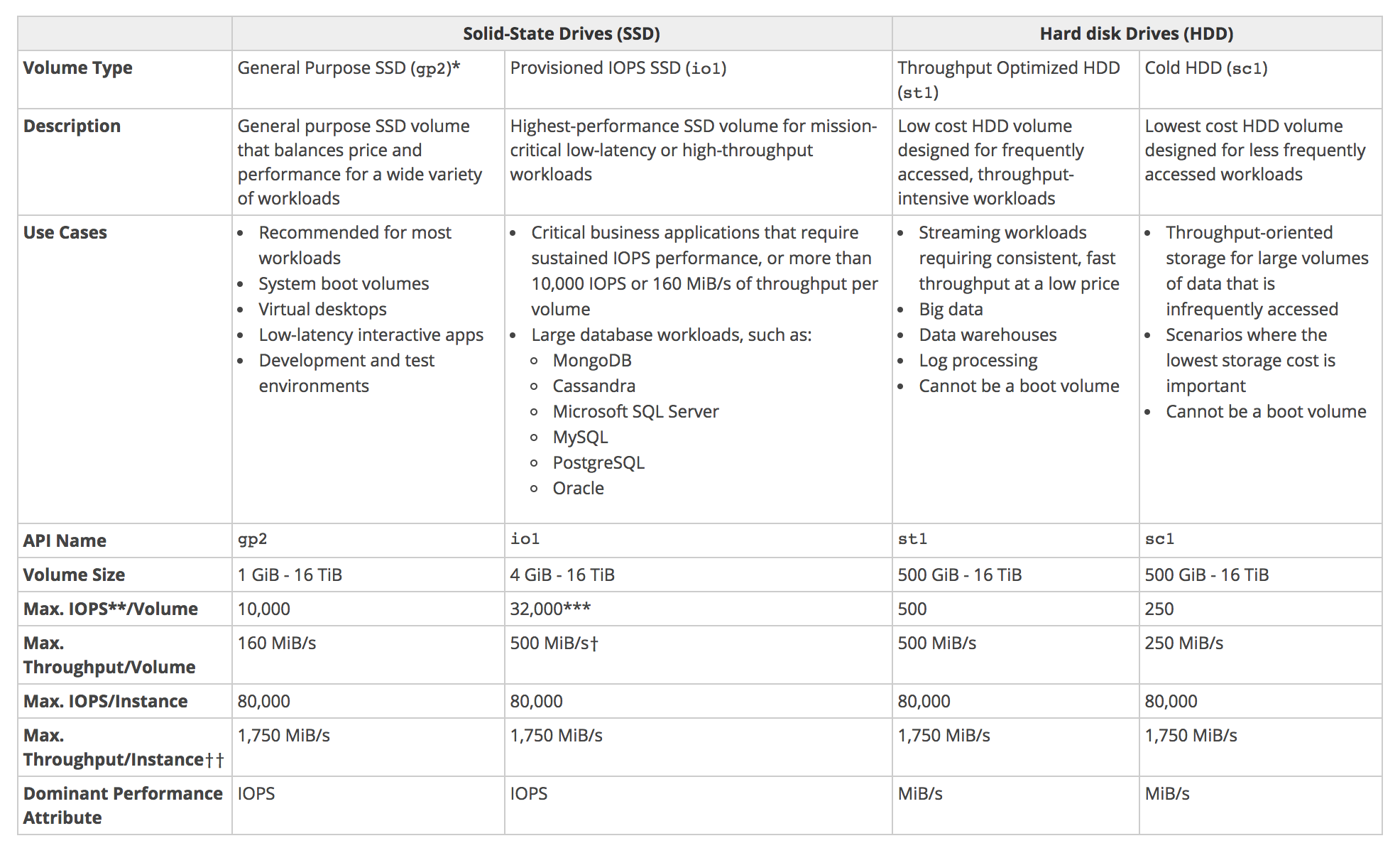
  • provides six volume types: Provisioned IOPS SSD (io2 Block Express and io1), General Purpose SSD (gp3 and gp2), Throughput Optimized HDD (st1), and Cold HDD (sc1).
  • 🆕 Elastic Volumes Enhanced (Jan 2026) – the 6-hour cooldown period after modifications has been eliminated; now supports up to 4 modifications per volume within a rolling 24-hour window.
  • 🆕 Higher EBS-Optimized Performance (2026) – C8gn, M8gn, R8gn instances support up to 120 Gbps EBS bandwidth and 480,000 IOPS (doubled from previous generation).

Elastic File Storage – EFS

  • scalable file storage, also optimized for EC2.
  • offers pay for the storage you actually use. There’s no advance provisioning, up-front fees, or commitments.
  • multiple instances can be configured to mount the file system.
  • allows mounting the file system across multiple regions and instances.
  • is designed to be highly durable and highly available. Data is redundantly stored across multiple AZs for Regional file systems.
  • provides elasticity – scales up and down automatically, even to meet the most abrupt workload spikes.
  • provides performance that scales to support any workload: EFS now supports up to 2.5 million read IOPS, 500,000 write IOPS (10x increase, Nov 2024), and up to 60 GiB/s read throughput (Oct 2024).
  • provides accessible file storage, which can be accessed by on-premises servers and EC2 instances concurrently.
  • provides security and compliance – access to the file system can be secured using IAM, VPC, or POSIX permissions.
  • provides data encryption in transit or at rest.
  • allows EC2 instances to access EFS file systems located in other AWS regions through VPC peering.
  • a file system can be accessed concurrently from all AZs in the region where it is located, which means the application can be architected to failover from one AZ to other AZs in the region in order to ensure the highest level of application availability.
  • used as a common data source for any application or workload that runs on numerous instances.
  • offers two file system types: Regional (Multi-AZ, recommended) and One Zone (single AZ, lower cost).
  • provides three storage classes: EFS Standard (sub-millisecond latency), EFS Infrequent Access (IA), and EFS Archive (up to 50% lower cost than IA, at $0.008/GB-month for rarely accessed data).
  • 🆕 Supports up to 10,000 access points per file system (10x increase from previous 1,000 limit, Feb 2025).

S3 Files vs EFS – Key Differences

With the launch of Amazon S3 Files in April 2026, S3 now offers NFS file system access similar to EFS. Here are the key differences:

  • Data Location: S3 Files keeps data in S3 (object storage pricing at ~$0.023/GB-month); EFS stores data natively as files (~$0.30/GB-month for Standard).
  • Performance: EFS offers sub-millisecond latency for hot data; S3 Files offers ~1ms latency for small files with high-performance caching.
  • Use Case: S3 Files is ideal when data already lives in S3 and you need file system access without migration; EFS is purpose-built for shared file storage with full POSIX compliance.
  • Connections: S3 Files supports up to 25,000 simultaneous connections; EFS supports thousands of concurrent connections.
  • Protocol: Both support NFS v4. S3 Files uses NFS v4.2; EFS uses NFS v4.0/v4.1.
  • Pricing: S3 Files access charges match EFS pricing ($0.30/GB storage for file operations, $0.03/GB reads, $0.06/GB writes), but underlying S3 storage is cheaper.

AWS Certification Exam Practice Questions

  • Questions are collected from Internet and the answers are marked as per my knowledge and understanding (which might differ with yours).
  • AWS services are updated everyday and both the answers and questions might be outdated soon, so research accordingly.
  • AWS exam questions are not updated to keep up the pace with AWS updates, so even if the underlying feature has changed the question might not be updated
  • Open to further feedback, discussion and correction.
  1. A company runs an application on a group of Amazon Linux EC2 instances. The application writes log files using standard API calls. For compliance reasons, all log files must be retained indefinitely and will be analyzed by a reporting tool that must access all files concurrently. Which storage service should a solutions architect use to provide the MOST cost-effective solution?
    1. Amazon EBS
    2. Amazon EFS
    3. Amazon EC2 instance store
    4. Amazon S3
  2. A new application is being deployed on Amazon EC2. The Application needs to read write up to 3 TB of data to an external data store and requires read-after-write consistency across all AWS regions for writing new objects into this data store.
    1. Amazon EBS
    2. Amazon S3 Glacier Flexible Retrieval
    3. Amazon EFS
    4. Amazon S3
  3. To meet the requirements of an application, an organization needs to save a constantly increasing volume of files on a cloud storage system with the following features and abilities. What below AWS service will meet these requirements?
      1. Pay only for the storage used
      2. Create different security policies for different groups of files
      3. Allow access to the public
      4. Retrieve the files at any time
      5. Store an unlimited number of files
    1. Amazon EBS
    2. Amazon S3
    3. Amazon S3 Glacier Flexible Retrieval
    4. Amazon EFS
  4. An administrator runs a highly available application in AWS. A file storage layer is needed that can share between instances and scale the platform more easily. The storage should also be POSIX compliant. Which AWS service can perform this action?
    1. Amazon EBS
    2. Amazon S3
    3. Amazon EFS
    4. Amazon EC2 Instance store
  5. A company needs to store and query AI vector embeddings for a recommendation engine. They want the lowest cost solution with high durability and the ability to scale to billions of vectors. Which AWS service should they use?
    1. Amazon OpenSearch Service
    2. Amazon EFS
    3. Amazon RDS with pgvector
    4. Amazon S3 Vectors
  6. A data engineering team has petabytes of data stored in Amazon S3 and needs to run interactive analytics queries directly on this data using Apache Iceberg table format. Which S3 feature provides native, managed Iceberg table support with automatic compaction?
    1. S3 Select
    2. S3 Object Lambda
    3. S3 Tables
    4. S3 Glacier Instant Retrieval
  7. A company has an existing application that reads and writes files using standard POSIX file operations. The application data is currently stored in Amazon S3. The team wants to avoid code changes while accessing S3 data as files with low latency. Which solution meets these requirements?
    1. Amazon EFS with DataSync to S3
    2. AWS Storage Gateway File Gateway
    3. Mountpoint for Amazon S3
    4. Amazon S3 Files
  8. A solutions architect needs to select block storage for an I/O-intensive database that requires consistent sub-millisecond latency and up to 80,000 IOPS. The storage must be cost-effective. Which EBS volume type should they choose?
    1. gp2
    2. gp3
    3. io2 Block Express
    4. st1

References

AWS Elastic Load Balancing – ALB, NLB, GWLB Overview

AWS Elastic Load Balancer – ELB

📌 Post Updated: June 2026 — Added LCU Capacity Reservation (replaces pre-warming), TLS 1.3 support, NLB Security Groups, ALB Mutual TLS (mTLS), ALB Automatic Target Weights, NLB QUIC protocol, Post-Quantum TLS, Zonal Shift support, NLB Weighted Target Groups, and updated EC2-Classic retirement status.

  • Elastic Load Balancer allows the incoming traffic to be distributed automatically across multiple healthy EC2 instances.
  • ELB serves as a single point of contact for the client.
  • ELB helps to be transparent and increases the application availability by allowing the addition or removal of multiple EC2 instances across one or more AZs, without disrupting the overall flow of information.
  • ELB benefits
    • is a distributed system that is fault-tolerant and actively monitored
    • abstracts out the complexity of managing, maintaining, and scaling load balancers
    • serves as the first line of defence against attacks on the network
    • can offload the work of encryption and decryption (SSL termination) so that the EC2 instances can focus on their main work
    • offers integration with Auto Scaling, which ensures enough back-end capacity available to meet varying traffic levels
    • are engineered to not be a single point of failure
  • Elastic Load Balancer, by default, routes each request independently to the registered instance with the smallest load.
  • ELB automatically reroutes the traffic to the remaining running healthy EC2 instances, if an EC2 instance fails. If a failed EC2 instance is restored, ELB restores the traffic to that instance.
  • Load Balancers are regional and only work across AZs within a region
  • Elastic Load Balancing supports four types of load balancers:
    • Application Load Balancer (ALB) – Layer 7, HTTP/HTTPS
    • Network Load Balancer (NLB) – Layer 4, TCP/UDP/TLS
    • Gateway Load Balancer (GWLB) – Layer 3, third-party virtual appliances
    • Classic Load Balancer (CLB) – Previous generation (Layer 4/7)

Elastic Load Balancer basic architecture

Application Load Balancer – ALB

Refer to Blog Post @ Application Load Balancer

Network Load Balancer – NLB

Refer to Blog Post @ Network Load Balancer

Gateway Load Balancer – GWLB

Refer to Blog Post @ Gateway Load Balancer

Classic Load Balancer vs Application Load Balancer vs Network Load Balancer

Refer Blog Post @ Classic Load Balancer vs Application Load Balancer vs Network Load Balancer

⚠️ Classic Load Balancer – Previous Generation

EC2-Classic was fully retired in August 2023. Classic Load Balancer now operates only in VPC mode. AWS strongly recommends migrating all CLB workloads to Application Load Balancer (Layer 7) or Network Load Balancer (Layer 4).

AWS provides a CLB migration wizard to help migrate to ALB or NLB.

Elastic Load Balancer Features

Following ELB key concepts apply to all the Elastic Load Balancer types

Scaling ELB

  • Each ELB is allocated and configured with a default capacity.
  • ELB Controller is the service that stores all the configurations and also monitors the load balancer and manages the capacity that is used to handle the client requests.
  • As the traffic profile changes, the controller service scales the load balancers to handle more requests, scaling equally in all AZs.
  • ELB increases its capacity by utilizing either larger resources (scale up – resources with higher performance characteristics) or more individual resources (scale-out).
  • AWS handles the scaling of the ELB capacity and this scaling is different to the scaling of the EC2 instances to which the ELB routes its request, which is dealt with by Auto Scaling.
  • Time required for Elastic Load Balancing to scale can range from 1 to 7 minutes, depending on the changes in the traffic profile
  • When an Availability Zone is enabled for the load balancer, Elastic Load Balancing creates a load balancer node in the Availability Zone.
  • By default, each load balancer node distributes traffic across the registered targets in its Availability Zone only.

Load Balancer Capacity Unit (LCU) Reservation (New – Nov 2024)

  • LCU Reservation replaces the previous “pre-warming” concept and allows you to proactively set a minimum capacity for your load balancer.
  • Supported on ALB, NLB, and GWLB.
  • Ideal for scenarios with sharp traffic increases such as product launches, flash sales, or traffic migrations where auto-scaling alone may not respond quickly enough.
  • Capacity is reserved at the regional level and is evenly distributed across availability zones.
  • You pay only for the reserved LCUs and any additional usage above the reservation.
  • Can be configured through the ELB console, CLI, or API.
  • LCU reservation is not supported on NLBs using TLS listeners.

Pre-Warming ELB (Deprecated – replaced by LCU Reservation)

  • ELB works best with a gradual increase in traffic
  • AWS is able to scale automatically and handle a vast majority of use cases
  • However, in certain scenarios, if there is a flash traffic spike expected or a load test cannot be configured to gradually increase traffic, recommended contacting AWS support to have the load balancer “pre-warmed”
  • AWS would help Pre-warming the ELB, by configuring the load balancer to have the appropriate level of capacity based on the expected traffic
  • Note: Pre-warming via AWS Support is no longer documented. Use LCU Reservation instead for planned traffic spikes.

DNS Resolution

  • ELB is scaled automatically depending on the traffic profile.
  • When scaled, the Elastic Load Balancing service will update the Domain Name System (DNS) record of the load balancer so that the new resources have their respective IP addresses registered in DNS.
  • DNS record created includes a Time-to-Live (TTL) setting of 60 seconds
  • By default, ELB will return multiple IP addresses when clients perform a DNS resolution, with the records being randomly ordered on each DNS resolution request.
  • It is recommended that clients will re-lookup the DNS at least every 60 seconds to take advantage of the increased capacity

Load Balancer Types

  • Internet Load Balancer
    • An Internet-facing load balancer takes requests from clients over the Internet and distributes them across the EC2 instances that are registered with the load balancer.
  • Internal Load Balancer
    • An Internal load balancer routes traffic to EC2 instances in private subnets.

Availability Zones/Subnets

  • Elastic Load Balancer should have at least one subnet attached.
  • Elastic Load Balancing allows subnets to be added and creates a load balancer node in each of the Availability Zone where the subnet resides.
  • Only one subnet per AZ can be attached to the ELB. Attaching a subnet with an AZ already attached replaces the existing subnet
  • Each Subnet must have a CIDR block with at least a /27 bitmask and has at least 8 free IP addresses, which ELB uses to establish connections with the back-end instances.
  • For High Availability, it is recommended to attach one subnet per AZ for at least two AZs, even if the instances are in a single subnet.
  • Subnets can be attached or detached from the ELB and it would start or stop sending requests to the instances in the subnet accordingly

Security Groups & NACL

  • Security groups & NACLs should allow Inbound traffic, on the load balancer listener port, from the Client for an Internet ELB or VPC CIDR for an Internal ELB
  • Security groups & NACLs should allow Outbound traffic to the back-end instances on both the instance listener port and the health check port
  • NACLs, in addition, should allow responses on the ephemeral ports
  • All EC2 instances should allow incoming traffic from ELB
  • ALB – requires security groups (always required)
  • NLB – now supports security groups (New – Aug 2023). Security groups can be associated when the NLB is created. If created without security groups, they cannot be added later.
  • CLB – requires security groups

SSL/TLS Negotiation Configuration

  • For HTTPS load balancers, Elastic Load Balancing uses a Secure Socket Layer (SSL) negotiation configuration, known as a security policy, to negotiate SSL connections between a client and the load balancer.
  • A security policy is a combination of SSL protocols, SSL ciphers, and the Server Order Preference option
    • Elastic Load Balancing supports TLS 1.3 (NLB since Oct 2021, ALB since March 2023), TLS 1.2, TLS 1.1, TLS 1.0, SSL 3.0 (deprecated), SSL 2.0 (deprecated)
    • SSL ciphers are encryption algorithms that use encryption keys to create a coded message.
    • Elastic Load Balancing supports the Server Order Preference option for negotiating connections between a client and a load balancer.
    • During the SSL connection negotiation process, this allows the load balancer to control and select the first cipher in its list that is in the client’s list of ciphers instead of the default behaviour of checking to match the first cipher in the client’s list with the server’s list.
  • Elastic Load Balancer allows using Predefined Security Policies or creating a Custom Security Policy for specific needs. If none is specified, ELB selects the latest Predefined Security Policy.
  • ALB and NLB support FIPS 140-3 TLS policies (New – Nov 2023) for workloads requiring FIPS-validated cryptographic modules.
  • Elastic Load Balancer supports multiple certificates using Server Name Indication (SNI)
    • If the hostname provided by a client matches a single certificate in the certificate list, the load balancer selects this certificate.
    • If a hostname provided by a client matches multiple certificates in the certificate list, the load balancer selects the best certificate that the client can support.
  • Classic Load Balancer does not support multiple certificates
  • ALB and NLB support multiple certificates

Mutual TLS (mTLS) Authentication (New – Nov 2023)

  • ALB now supports mutual TLS authentication, allowing client certificate-based authentication directly at the load balancer.
  • With mTLS, the ALB verifies X.509 client certificates against a Trust Store, ensuring only trusted clients communicate with backend applications.
  • Two modes are supported:
    • Verify mode – ALB validates the client certificate and passes certificate metadata to targets via headers.
    • Passthrough mode – ALB sends the entire client certificate to targets for application-level validation.
  • Trust Stores hold Certificate Authority (CA) certificates and optional Certificate Revocation Lists (CRLs).
  • ALB can advertise CA subject names to simplify client certificate selection (Nov 2024).
  • Note: This addresses the previous limitation where ELB HTTPS listeners did not support client-side SSL certificates. ALB mTLS now provides this capability natively.

Post-Quantum TLS (New – Nov 2025)

  • ALB and NLB support post-quantum hybrid key exchange for TLS connections.
  • Uses ML-KEM (Module-Lattice Key Encapsulation Mechanism) combined with classical key exchange (X25519) in a hybrid configuration.
  • Protects against “Harvest Now, Decrypt Later” (HNDL) attacks where adversaries collect encrypted data today intending to decrypt it with future quantum computers.
  • Configured via post-quantum TLS security policies.

Health Checks

  • Load balancer performs health checks on all registered instances, whether the instance is in a healthy state or an unhealthy state.
  • Load balancer performs health checks to discover the availability of the EC2 instances and periodically sends pings, attempts connections, or sends requests to health check the EC2 instances.
  • Health check is InService for the status of healthy instances and OutOfService for unhealthy ones.
  • Load balancer sends a request to each registered instance at the Ping Protocol, Ping Port and Ping Path every HealthCheck Interval seconds. It waits for the instance to respond within the Response Timeout period. If the health checks exceed the Unhealthy Threshold for consecutive failed responses, the load balancer takes the instance out of service. When the health checks exceed the Healthy Threshold for consecutive successful responses, the load balancer puts the instance back in service.
  • Load balancer only sends requests to the healthy EC2 instances and stops routing requests to the unhealthy instances
  • All ELB types support health checks

Listeners

  • Listeners are the process that checks for connection requests from client
  • Listeners are configured with a protocol and a port for front-end (client to load balancer) connections, and a protocol and a port for back-end (load balancer to back-end instance) connections.
  • Listeners support HTTP, HTTPS, TCP, UDP, TCP_UDP, TLS, and QUIC protocols (varies by load balancer type)
  • An X.509 certificate is required for HTTPS or TLS connections and the load balancer uses the certificate to terminate the connection and then decrypt requests from clients before sending them to the back-end instances.
  • If you want to use SSL, but don’t want to terminate the connection on the load balancer, use TCP for connections from the client to the load balancer, use the SSL protocol for connections from the load balancer to the back-end application, and deploy certificates on the back-end instances handling requests.
  • If you use an HTTPS/SSL connection for the back end, you can enable authentication on the back-end instance. This authentication can be used to ensure that back-end instances accept only encrypted communication, and to ensure that the back-end instance has the correct certificates.
  • ELB HTTPS listener does not support Client-Side SSL certificatesALB now supports mTLS with client certificates (Nov 2023)
  • Load balancers can listen on any port in the range 1-65535.

Idle Connection Timeout

  • For each request that a client makes through a load balancer, it maintains two connections, for each client request, one connection is with the client, and the other connection is to the back-end instance.
  • For each connection, the load balancer manages an idle timeout that is triggered when no data is sent over the connection for a specified time period. If no data has been sent or received, it closes the connection after the idle timeout period (defaults to 60 seconds) has elapsed
  • For lengthy operations, such as file uploads, the idle timeout setting for the connections should be adjusted to ensure that lengthy operations have time to complete.

X-Forwarded Headers & Proxy Protocol Support

  • As the Elastic Load Balancer intercepts the traffic between the client and the back-end servers, the back-end server does not know the IP address, Protocol, and the Port used between the Client and the Load balancer.
  • ELB provides X-Forwarded headers support to help back-end servers track the same when using the HTTP protocol
    • X-Forwarded-For request header to help back-end servers identify the IP address of a client when you use an HTTP or HTTPS load balancer.
    • X-Forwarded-Proto request header to help back-end servers identify the protocol (HTTP/S) that a client used to connect to the server
    • X-Forwarded-Port request header to help back-end servers identify the port that an HTTP or HTTPS load balancer uses to connect to the client.
  • ELB provides Proxy Protocol support to help back-end servers track the same when using non-HTTP protocol or when using HTTPS and not terminating the SSL connection on the load balancer.
    • Proxy Protocol is an Internet protocol used to carry connection information from the source requesting the connection to the destination for which the connection was requested.
    • Elastic Load Balancing uses Proxy Protocol version 1 (CLB) and version 2 (NLB), which carries connection information such as the source IP address, destination IP address, and port numbers
    • If the ELB is already behind a Proxy with the Proxy protocol enabled, enabling the Proxy Protocol on ELB would add the header twice
  • ALB Header Modification (New – Nov 2024) — ALB supports renaming ALB-generated headers, inserting custom response headers, and disabling server response headers for enhanced security and compatibility.

Cross-Zone Load Balancing

  • By default, the load balancer distributes incoming requests evenly across its enabled Availability Zones for e.g. If AZ-a has 5 instances and AZ-b has 2 instances, the load will still be distributed 50% across each of the AZs
  • Enabling Cross-Zone load balancing allows the ELB to distribute incoming requests evenly across all the back-end instances, regardless of the AZ
  • Elastic Load Balancing creates a load balancer node in the AZ. By default, each load balancer node distributes traffic across the registered targets in its AZ only. If you enable cross-zone load balancing, each load balancer node distributes traffic across the registered targets in all enabled AZs.
  • Cross-zone load balancer reduces the need to maintain equivalent numbers of back-end instances in each AZ and improves the application’s ability to handle the loss of one or more back-end instances.
  • It is still recommended to maintain approximately equivalent numbers of instances in each Availability Zone for higher fault tolerance.
  • ALB → Cross Zone load balancing is enabled by default and free
  • CLB → Cross Zone load balancing is disabled by default, can be enabled, and is free
  • NLB → Cross Zone load balancing is disabled by default, can be enabled at the load balancer level or per target group level, and is charged for inter-AZ data transfer.

Zonal Shift & Zonal Autoshift (New – Oct/Nov 2024)

  • Zonal shift allows you to quickly shift traffic away from an impaired Availability Zone to recover from events such as bad deployments and gray failures.
  • Zonal autoshift automatically shifts traffic away from an AZ when AWS identifies potential impact to it.
  • Supported on both NLB (Oct 2024) and ALB (Nov 2024), with or without cross-zone load balancing enabled.
  • Integrated with AWS Application Recovery Controller (ARC).
  • Zonal shift is disabled by default and must be explicitly enabled on each load balancer.

Connection Draining (Deregistration Delay)

  • By default, if a registered EC2 instance with the ELB is deregistered or becomes unhealthy, the load balancer immediately closes the connection
  • Connection draining can help the load balancer to complete the in-flight requests made while keeping the existing connections open, and preventing any new requests from being sent to the instances that are de-registering or unhealthy.
  • Connection draining helps perform maintenance such as deploying software upgrades or replacing back-end instances without affecting customers’ experience
  • Connection draining allows you to specify a maximum time (between 1 and 3,600 seconds and default 300 seconds) to keep the connections alive before reporting the instance as de-registered. The maximum timeout limit does not apply to connections to unhealthy instances.
  • If the instances are part of an Auto Scaling group and connection draining is enabled for your load balancer, Auto Scaling waits for the in-flight requests to complete, or for the maximum timeout to expire, before terminating instances due to a scaling event or health check replacement.

Sticky Sessions (Session Affinity)

  • ELB can be configured to use Sticky Session feature (also called session affinity) which enables it to bind a user’s session to an instance and ensures all requests are sent to the same instance.
  • ALB — supports duration-based (load balancer generated cookie AWSALB) and application-based stickiness
  • CLB — supports duration-based (cookie AWSELB) and application-controlled stickiness
  • NLB — supports sticky sessions using source IP affinity. Stickiness is configured at the target group level.
  • Sticky sessions for CLB and ALB are disabled by default.

Requirements (ALB/CLB)

  • An HTTP/HTTPS load balancer.
  • SSL traffic should be terminated on the ELB.
  • ELB does session stickiness on an HTTP/HTTPS listener by utilizing an HTTP cookie. ELB has no visibility into the HTTP headers if the SSL traffic is not terminated on the ELB and is terminated on the back-end instance.
  • At least one healthy instance in each Availability Zone.
  • Sticky sessions are not supported if cross-zone load balancing is disabled (ALB).

Duration-Based Session Stickiness

  • Duration-Based Session Stickiness is maintained by ELB using a special cookie created to track the instance for each request to each listener.
  • When the load balancer receives a request,
    • it first checks to see if this cookie is present in the request. If so, the request is sent to the instance specified in the cookie.
    • If there is no cookie, the ELB chooses an instance based on the existing load balancing algorithm and a cookie is inserted into the response for binding subsequent requests from the same user to that instance.
  • Stickiness policy configuration defines a cookie expiration, which establishes the duration of validity for each cookie.
  • Cookie is automatically updated after its duration expires.

Application-Controlled Session Stickiness

  • Load balancer uses a special cookie only to associate the session with the instance that handled the initial request, but follows the lifetime of the application cookie specified in the policy configuration.
  • Load balancer only inserts a new stickiness cookie if the application response includes a new application cookie. The load balancer stickiness cookie does not update with each request.
  • If the application cookie is explicitly removed or expires, the session stops being sticky until a new application cookie is issued.
  • If an instance fails or becomes unhealthy, the load balancer stops routing request to that instance, instead chooses a new healthy instance based on the existing load balancing algorithm.
  • The load balancer treats the session as now “stuck” to the new healthy instance, and continues routing requests to that instance even if the failed instance comes back.

ALB Automatic Target Weights (ATW) (New – Nov 2023)

  • ATW uses a routing algorithm that optimizes the amount of traffic sent to each target based on health information available to the load balancer.
  • Anomaly detection — automatically enabled on HTTP/HTTPS target groups with at least three healthy targets. Analyzes HTTP status codes and TCP/TLS errors to identify targets with disproportionate error rates.
  • Anomaly mitigation — when anomalous targets are detected, ATW reduces traffic to under-performing targets and sends more traffic to healthy targets.
  • Helps protect against “gray failures” where targets pass health checks but perform poorly.

ALB Target Optimizer (New – Nov 2025)

  • Allows precise control over how many concurrent requests an application instance receives.
  • Enables high-efficiency load balanced applications while maintaining low latency and high availability.
  • Particularly useful for compute-intensive workloads like AI/ML inference.
  • Returns HTTP 503 when targets are at capacity, providing backpressure to clients.

ALB URL and Host Header Rewrite (New – Oct 2025)

  • ALB can now modify request URLs and Host Headers using regex-based pattern matching before routing requests to targets.
  • Supports rewriting and removing path segments from incoming requests.
  • Eliminates the need for third-party proxies (NGINX, Envoy) for URL manipulation.
  • Useful for microservices, multi-domain APIs, versioned APIs, and legacy migrations.

NLB QUIC Protocol Support (New – Nov 2025)

  • NLB supports QUIC protocol in passthrough mode, forwarding QUIC/UDP traffic directly to targets.
  • Uses QUIC Connection IDs for session stickiness, resilient to client IP/NAT changes.
  • Ideal for mobile-first applications requiring low-latency, high-performance networking.
  • TLS remains end-to-end as NLB does not terminate QUIC connections.

NLB Weighted Target Groups (New – Nov 2025)

  • NLB now supports registering multiple target groups with configurable weights (0-999).
  • Enables blue/green deployments, canary deployments, A/B testing, and application migration with zero downtime.
  • Previously only available on ALB (since 2019).

Load Balancer Deletion

  • Deleting a load balancer does not affect the instances registered with the load balancer and they would continue to run

ELB with Autoscaling

Refer Blog Post @ ELB with Autoscaling

AWS Certification Exam Practice Questions

  • Questions are collected from Internet and the answers are marked as per my knowledge and understanding (which might differ with yours).
  • AWS services are updated everyday and both the answers and questions might be outdated soon, so research accordingly.
  • AWS exam questions are not updated to keep up the pace with AWS updates, so even if the underlying feature has changed the question might not be updated
  • Open to further feedback, discussion and correction.
  1. A user has configured an HTTPS listener on an ELB. The user has not configured any security policy which can help to negotiate SSL between the client and ELB. What will ELB do in this scenario?
    1. By default ELB will select the first version of the security policy
    2. By default ELB will select the latest version of the policy
    3. ELB creation will fail without a security policy
    4. It is not required to have a security policy since SSL is already installed
  2. A user has configured ELB with SSL using a security policy for secure negotiation between the client and load balancer. The ELB security policy supports various ciphers. Which of the below mentioned options helps identify the matching cipher at the client side to the ELB cipher list when client is requesting ELB DNS over SSL
    1. Cipher Protocol
    2. Client Configuration Preference
    3. Server Order Preference
    4. Load Balancer Preference
  3. A user has configured ELB with SSL using a security policy for secure negotiation between the client and load balancer. Which of the below mentioned security policies is supported by ELB?
    1. Dynamic Security Policy
    2. All the other options
    3. Predefined Security Policy
    4. Default Security Policy
  4. A user has configured ELB with SSL using a security policy for secure negotiation between the client and load balancer. Which of the below mentioned SSL protocols is not supported by the security policy?
    1. TLS 1.3 Note: TLS 1.3 is now supported on ALB (March 2023) and NLB (Oct 2021). This question is outdated.
    2. TLS 1.2
    3. SSL 2.0
    4. SSL 3.0
  5. A user has configured ELB with a TCP listener at ELB as well as on the back-end instances. The user wants to enable a proxy protocol to capture the source and destination IP information in the header. Which of the below mentioned statements helps the user understand a proxy protocol with TCP configuration?
    1. If the end user is requesting behind a proxy server then the user should not enable a proxy protocol on ELB
    2. ELB does not support a proxy protocol when it is listening on both the load balancer and the back-end instances
    3. Whether the end user is requesting from a proxy server or directly, it does not make a difference for the proxy protocol
    4. If the end user is requesting behind the proxy then the user should add the “isproxy” flag to the ELB Configuration
  6. A user has enabled session stickiness with ELB. The user does not want ELB to manage the cookie; instead he wants the application to manage the cookie. What will happen when the server instance, which is bound to a cookie, crashes?
    1. The response will have a cookie but stickiness will be deleted
    2. The session will not be sticky until a new cookie is inserted
    3. ELB will throw an error due to cookie unavailability
    4. The session will be sticky and ELB will route requests to another server as ELB keeps replicating the Cookie
  7. A user has created an ELB with Auto Scaling. Which of the below mentioned offerings from ELB helps the user to stop sending new requests traffic from the load balancer to the EC2 instance when the instance is being deregistered while continuing in-flight requests?
    1. ELB sticky session
    2. ELB deregistration check
    3. ELB connection draining
    4. ELB auto registration Off
  8. When using an Elastic Load Balancer to serve traffic to web servers, which one of the following is true?
    1. Web servers must be publicly accessible
    2. The same security group must be applied to both the ELB and EC2 instances
    3. ELB and EC2 instance must be in the same subnet
    4. ELB and EC2 instances must be in the same VPC
  9. A user has configured Elastic Load Balancing by enabling a Secure Socket Layer (SSL) negotiation configuration known as a Security Policy. Which of the below mentioned options is not part of this secure policy while negotiating the SSL connection between the user and the client?
    1. SSL Protocols
    2. Client Order Preference
    3. SSL Ciphers
    4. Server Order Preference
  10. A user has created an ELB with the availability zone us-east-1. The user wants to add more zones to ELB to achieve High Availability. How can the user add more zones to the existing ELB?
    1. It is not possible to add more zones to the existing ELB
    2. Only option is to launch instances in different zones and add to ELB
    3. The user should stop the ELB and add zones and instances as required
    4. The user can add zones on the fly from the AWS console
  11. A user has launched an ELB which has 5 instances registered with it. The user deletes the ELB by mistake. What will happen to the instances?
    1. ELB will ask the user whether to delete the instances or not
    2. Instances will be terminated
    3. ELB cannot be deleted if it has running instances registered with it
    4. Instances will keep running
  12. A Sys-admin has created a shopping cart application and hosted it on EC2. The EC2 instances are running behind ELB. The admin wants to ensure that the end user request will always go to the EC2 instance where the user session has been created. How can the admin configure this?
    1. Enable ELB cross zone load balancing
    2. Enable ELB cookie setup
    3. Enable ELB sticky session
    4. Enable ELB connection draining
  13. A user has setup connection draining with ELB to allow in-flight requests to continue while the instance is being deregistered through Auto Scaling. If the user has not specified the draining time, how long will ELB allow inflight requests traffic to continue?
    1. 600 seconds
    2. 3600 seconds
    3. 300 seconds
    4. 0 seconds
  14. A customer has a web application that uses cookie Based sessions to track logged in users. It is deployed on AWS using ELB and Auto Scaling. The customer observes that when load increases Auto Scaling launches new Instances but the load on the existing Instances does not decrease, causing all existing users to have a sluggish experience. Which two answer choices independently describe a behavior that could be the cause of the sluggish user experience?
    1. ELB’s normal behavior sends requests from the same user to the same backend instance (its not by default)
    2. ELB’s behavior when sticky sessions are enabled causes ELB to send requests in the same session to the same backend
    3. A faulty browser is not honoring the TTL of the ELB DNS name (DNS TTL would only impact the ELB instances if scaled and not the EC2 instances to which the traffic is routed)
    4. The web application uses long polling such as comet or websockets. Thereby keeping a connection open to a web server for a long time
  15. A customer has an online store that uses the cookie-based sessions to track logged-in customers. It is deployed on AWS using ELB and autoscaling. When the load increases, Auto scaling automatically launches new web servers, but the load on the web servers do not decrease. This causes the customers a poor experience. What could be causing the issue?
    1. ELB DNS records Time to Live is set too high (DNS TTL would only impact the ELB instances if scaled and not the EC2 instances to which the traffic is routed)
    2. ELB is configured to send requests with previously established sessions
    3. Website uses CloudFront which is keeping sessions alive
    4. New Instances are not being added to the ELB during the Auto Scaling cool down period
  16. You are designing a multi-platform web application for AWS. The application will run on EC2 instances and will be accessed from PCs, tablets and smart phones. Supported accessing platforms are Windows, MACOS, IOS and Android. Separate sticky session and SSL certificate setups are required for different platform types. Which of the following describes the most cost effective and performance efficient architecture setup?
    1. Setup a hybrid architecture to handle session state and SSL certificates on-prem and separate EC2 Instance groups running web applications for different platform types running in a VPC.
    2. Set up one ELB for all platforms to distribute load among multiple instance under it. Each EC2 instance implements all functionality for a particular platform.
    3. Set up two ELBs. The first ELB handles SSL certificates for all platforms and the second ELB handles session stickiness for all platforms for each ELB run separate EC2 instance groups to handle the web application for each platform.
    4. Assign multiple ELBs to an EC2 instance or group of EC2 instances running the common components of the web application, one ELB for each platform type. Session stickiness and SSL termination are done at the ELBs. (Session stickiness requires HTTPS listener with SSL termination on the ELB and ELB does not support multiple SSL certs so one is required for each cert. Note: ALB now supports SNI with multiple certs, but the question was designed for CLB.)
  17. You are migrating a legacy client-server application to AWS. The application responds to a specific DNS domain (e.g. www.example.com) and has a 2-tier architecture, with multiple application servers and a database server. Remote clients use TCP to connect to the application servers. The application servers need to know the IP address of the clients in order to function properly and are currently taking that information from the TCP socket. A Multi-AZ RDS MySQL instance will be used for the database. During the migration you can change the application code but you have to file a change request. How would you implement the architecture on AWS in order to maximize scalability and high availability?
    1. File a change request to implement Proxy Protocol support in the application. Use an ELB with a TCP Listener and Proxy Protocol enabled to distribute load on two application servers in different AZs. (ELB with TCP listener and proxy protocol will allow IP to be passed)
    2. File a change request to implement Cross-Zone support in the application. Use an ELB with a TCP Listener and Cross-Zone Load Balancing enabled, two application servers in different AZs.
    3. File a change request to implement Latency Based Routing support in the application. Use Route 53 with Latency Based Routing enabled to distribute load on two application servers in different AZs.
    4. File a change request to implement Alias Resource support in the application Use Route 53 Alias Resource Record to distribute load on two application servers in different AZs.
  18. A user has created an ELB with three instances. How many security groups will ELB create by default?
    1. 3
    2. 5
    3. 2 (One for ELB to allow inbound and Outbound to listener and health check port of instances and One for the Instances to allow inbound from ELB)
    4. 1
  19. You have a web-style application with a stateless but CPU and memory-intensive web tier running on a cc2 8xlarge EC2 instance inside of a VPC The instance when under load is having problems returning requests within the SLA as defined by your business The application maintains its state in a DynamoDB table, but the data tier is properly provisioned and responses are consistently fast. How can you best resolve the issue of the application responses not meeting your SLA?
    1. Add another cc2 8xlarge application instance, and put both behind an Elastic Load Balancer
    2. Move the cc2 8xlarge to the same Availability Zone as the DynamoDB table (Does not improve the response time and performance)
    3. Cache the database responses in ElastiCache for more rapid access (Data tier is responding fast)
    4. Move the database from DynamoDB to RDS MySQL in scale-out read-replica configuration (Data tier is responding fast)
  20. An organization has configured a VPC with an Internet Gateway (IGW). pairs of public and private subnets (each with one subnet per Availability Zone), and an Elastic Load Balancer (ELB) configured to use the public subnets. The applications web tier leverages the ELB, Auto Scaling and a Multi-AZ RDS database instance. The organization would like to eliminate any potential single points of failure in this design. What step should you take to achieve this organization’s objective?
    1. Nothing, there are no single points of failure in this architecture.
    2. Create and attach a second IGW to provide redundant internet connectivity. (VPC can be attached only 1 IGW)
    3. Create and configure a second Elastic Load Balancer to provide a redundant load balancer. (ELB scales by itself with multiple availability zones configured with it)
    4. Create a second multi-AZ RDS instance in another Availability Zone and configure replication to provide a redundant database. (Multi AZ requires 2 different AZ for setup and already has a standby)
  21. Your application currently leverages AWS Auto Scaling to grow and shrink as load increases/decreases and has been performing well. Your marketing team expects a steady ramp up in traffic to follow an upcoming campaign that will result in a 20x growth in traffic over 4 weeks. Your forecast for the approximate number of Amazon EC2 instances necessary to meet the peak demand is 175. What should you do to avoid potential service disruptions during the ramp up in traffic?
    1. Ensure that you have pre-allocated 175 Elastic IP addresses so that each server will be able to obtain one as it launches (max limit 5 EIP and a service request needs to be submitted)
    2. Check the service limits in Trusted Advisor and adjust as necessary so the forecasted count remains within limits.
    3. Change your Auto Scaling configuration to set a desired capacity of 175 prior to the launch of the marketing campaign (Will cause 175 instances to be launched and running but not gradually scale)
    4. Pre-warm your Elastic Load Balancer to match the requests per second anticipated during peak demand (Does not need pre warming as the load is increasing steadily. Note: Pre-warming is no longer available; use LCU Reservation for sharp spikes.)
  22. Which of the following features ensures even distribution of traffic to Amazon EC2 instances in multiple Availability Zones registered with a load balancer?
    1. Elastic Load Balancing request routing
    2. An Amazon Route 53 weighted routing policy (does not control traffic to EC2 instance)
    3. Elastic Load Balancing cross-zone load balancing
    4. An Amazon Route 53 latency routing policy (does not control traffic to EC2 instance)
  23. Your web application front end consists of multiple EC2 instances behind an Elastic Load Balancer. You configured ELB to perform health checks on these EC2 instances, if an instance fails to pass health checks, which statement will be true?
    1. The instance gets terminated automatically by the ELB (it is done by Autoscaling)
    2. The instance gets quarantined by the ELB for root cause analysis.
    3. The instance is replaced automatically by the ELB. (it is done by Autoscaling)
    4. The ELB stops sending traffic to the instance that failed its health check
  24. You have a web application running on six Amazon EC2 instances, consuming about 45% of resources on each instance. You are using auto-scaling to make sure that six instances are running at all times. The number of requests this application processes is consistent and does not experience spikes. The application is critical to your business and you want high availability at all times. You want the load to be distributed evenly between all instances. You also want to use the same Amazon Machine Image (AMI) for all instances. Which of the following architectural choices should you make?
    1. Deploy 6 EC2 instances in one availability zone and use Amazon Elastic Load Balancer. (Single AZ will not provide High Availability)
    2. Deploy 3 EC2 instances in one region and 3 in another region and use Amazon Elastic Load Balancer. (Different region, AMI would not be available unless copied)
    3. Deploy 3 EC2 instances in one availability zone and 3 in another availability zone and use Amazon Elastic Load Balancer.
    4. Deploy 2 EC2 instances in three regions and use Amazon Elastic Load Balancer. (Different region, AMI would not be available unless copied)
  25. You are designing an SSL/TLS solution that requires HTTPS clients to be authenticated by the Web server using client certificate authentication. The solution must be resilient. Which of the following options would you consider for configuring the web server infrastructure? (Choose 2 answers)
    1. Configure ELB with TCP listeners on TCP/443. And place the Web servers behind it. (terminate SSL on the instance using client-side certificate)
    2. Configure your Web servers with EIPs. Place the Web servers in a Route53 Record Set and configure health checks against all Web servers. (Remove ELB and use Web Servers directly with Route 53)
    3. Configure ELB with HTTPS listeners, and place the Web servers behind it. (ELB with HTTPS does not support Client-Side certificates — Note: ALB now supports mTLS (Nov 2023) making this option valid for ALB, but this question predates that feature.)
    4. Configure your web servers as the origins for a CloudFront distribution. Use custom SSL certificates on your CloudFront distribution (CloudFront does not support Client-Side SSL certificates)
  26. You are designing an application that contains protected health information. Security and compliance requirements for your application mandate that all protected health information in the application use encryption at rest and in transit. The application uses a three-tier architecture where data flows through the load balancer and is stored on Amazon EBS volumes for processing, and the results are stored in Amazon S3 using the AWS SDK. Which of the following two options satisfy the security requirements? Choose 2 answers
    1. Use SSL termination on the load balancer, Amazon EBS encryption on Amazon EC2 instances, and Amazon S3 with server-side encryption. (connection between ELB and EC2 not encrypted)
    2. Use SSL termination with a SAN SSL certificate on the load balancer, Amazon EC2 with all Amazon EBS volumes using Amazon EBS encryption, and Amazon S3 with server-side encryption with customer-managed keys.
    3. Use TCP load balancing on the load balancer, SSL termination on the Amazon EC2 instances, OS-level disk encryption on the Amazon EBS volumes, and Amazon S3 with server-side encryption.
    4. Use TCP load balancing on the load balancer, SSL termination on the Amazon EC2 instances, and Amazon S3 with server-side encryption. (Does not mention EBS encryption)
    5. Use SSL termination on the load balancer, an SSL listener on the Amazon EC2 instances, Amazon EBS encryption on EBS volumes containing PHI, and Amazon S3 with server-side encryption.
  27. A startup deploys its photo-sharing site in a VPC. An elastic load balancer distributes web traffic across two subnets. The load balancer session stickiness is configured to use the AWS-generated session cookie, with a session TTL of 5 minutes. The web server Auto Scaling group is configured as min-size=4, max-size=4. The startup is preparing for a public launch, by running load-testing software installed on a single Amazon EC2 instance running in us-west-2a. After 60 minutes of load-testing, the web server logs show the following: webserver #1 (us-west-2a): 19,210 requests from load-tester | webserver #2 (us-west-2a): 21,790 requests from load-tester | webserver #3 (us-west-2b): 0 requests from load-tester | webserver #4 (us-west-2b): 0 requests from load-tester. Which recommendations can help ensure that load-testing HTTP requests are evenly distributed across the four web servers? Choose 2 answers
    1. Launch and run the load-tester Amazon EC2 instance from us-east-1 instead.
    2. Configure Elastic Load Balancing session stickiness to use the app-specific session cookie.
    3. Re-configure the load-testing software to re-resolve DNS for each web request.
    4. Configure Elastic Load Balancing and Auto Scaling to distribute across us-west-2a and us-west-2b.
    5. Use a third-party load-testing service which offers globally distributed test clients.
  28. To serve Web traffic for a popular product your chief financial officer and IT director have purchased 10 m1.large heavy utilization Reserved Instances (RIs) evenly spread across two availability zones. Route 53 is used to deliver the traffic to an Elastic Load Balancer (ELB). After several months, the product grows even more popular and you need additional capacity. As a result, your company purchases two c3.2xlarge medium utilization RIs. You register the two c3.2xlarge instances with your ELB and quickly find that the m1.large instances are at 100% of capacity and the c3.2xlarge instances have significant capacity that’s unused. Which option is the most cost effective and uses EC2 capacity most effectively?
    1. Use a separate ELB for each instance type and distribute load to ELBs with Route 53 weighted round robin
    2. Configure Autoscaling group and Launch Configuration with ELB to add up to 10 more on-demand m1.large instances when triggered by CloudWatch shut off c3.2xlarge instances (increase cost as you still pay for the RI)
    3. Route traffic to EC2 m1.large and c3.2xlarge instances directly using Route 53 latency based routing and health checks shut off ELB (will not still use the capacity effectively)
    4. Configure ELB with two c3.2xlarge Instances and use on-demand Autoscaling group for up to two additional c3.2xlarge instances. Shut off m1.large instances (Increases cost, as you still pay for the 10 m1.large RI)
  29. Which header received at the EC2 instance identifies the port used by the client while requesting ELB?
    1. X-Forwarded-Proto
    2. X-Requested-Proto
    3. X-Forwarded-Port
    4. X-Requested-Port
  30. A user has configured ELB with two instances running in separate AZs of the same region? Which of the below mentioned statements is true?
    1. Multi AZ instances will provide HA with ELB (ELB provides HA to route traffic to healthy instances only it does not provide scalability)
    2. Multi AZ instances are not possible with a single ELB
    3. Multi AZ instances will provide scalability with ELB
    4. The user can achieve both HA and scalability with ELB
  31. A user is configuring the HTTPS protocol on a front end ELB and the SSL protocol for the back-end listener in ELB. What will ELB do?
    1. It will allow you to create the configuration, but the instance will not pass the health check
    2. Receives requests on HTTPS and sends it to the back end instance on SSL
    3. It will not allow you to create this configuration (Will give error “Load Balancer protocol is an application layer protocol, but instance protocol is not. Both the Load Balancer protocol and the instance protocol should be at the same layer. Please fix.”)
    4. It will allow you to create the configuration, but ELB will not work as expected
  32. An ELB is diverting traffic across 5 instances. One of the instances was unhealthy only for 20 minutes. What will happen after 20 minutes when the instance becomes healthy?
    1. ELB will never divert traffic back to the same instance
    2. ELB will not automatically send traffic to the same instance. However, the user can configure to start sending traffic to the same instance
    3. ELB starts sending traffic to the instance once it is healthy
    4. ELB terminates the instance once it is unhealthy. Thus, the instance cannot be healthy after 10 minutes
  33. A user has hosted a website on AWS and uses ELB to load balance the multiple instances. The user application does not have any cookie management. How can the user bind the session of the requestor with a particular instance?
    1. Bind the IP address with a sticky cookie
    2. Create a cookie at the application level to set at ELB
    3. Use session synchronization with ELB
    4. Let ELB generate a cookie for a specified duration
  34. A user has configured a website and launched it using the Apache web server on port 80. The user is using ELB with the EC2 instances for Load Balancing. What should the user do to ensure that the EC2 instances accept requests only from ELB?
    1. Open the port for an ELB static IP in the EC2 security group
    2. Configure the security group of EC2, which allows access to the ELB source security group
    3. Configure the EC2 instance so that it only listens on the ELB port
    4. Configure the security group of EC2, which allows access only to the ELB listener
  35. AWS Elastic Load Balancer supports SSL termination.
    1. For specific availability zones only
    2. False
    3. For specific regions only
    4. For all regions
  36. User has launched five instances with ELB. How can the user add the sixth EC2 instance to ELB?
    1. The user can add the sixth instance on the fly.
    2. The user must stop the ELB and add the sixth instance.
    3. The user can add the instance and change the ELB config file.
    4. The ELB can only have a maximum of five instances.

References

AWS Certified Big Data -Speciality (BDS-C00) Exam Learning Path

⚠️ CERTIFICATION RETIRED

AWS Certified Big Data – Specialty (BDS-C00) was retired on July 1, 2020.

It was replaced by AWS Certified Data Analytics – Specialty (DAS-C01), which was itself retired on April 9, 2024.

The current replacement certification is:

This content is maintained for historical reference only. For current exam preparation, see the AWS Certified Data Engineer – Associate Exam Learning Path.

Clearing the AWS Certified Big Data – Speciality (BDS-C00) was a great feeling. This was my third Speciality certification and in terms of the difficulty level (compared to Network and Security Speciality exams), I would rate it between Network (being the toughest) Security (being the simpler one).

Big Data in itself is a very vast topic and with AWS services, there is lots to cover and know for the exam. If you have worked on Big Data technologies including a bit of Visualization and Machine learning, it would be a great asset to pass this exam.

AWS Certified Big Data – Speciality (BDS-C00) exam basically validates

  • Implement core AWS Big Data services according to basic architectural best practices
  • Design and maintain Big Data
  • Leverage tools to automate Data Analysis

Refer AWS Certified Big Data – Speciality Exam Guide for details

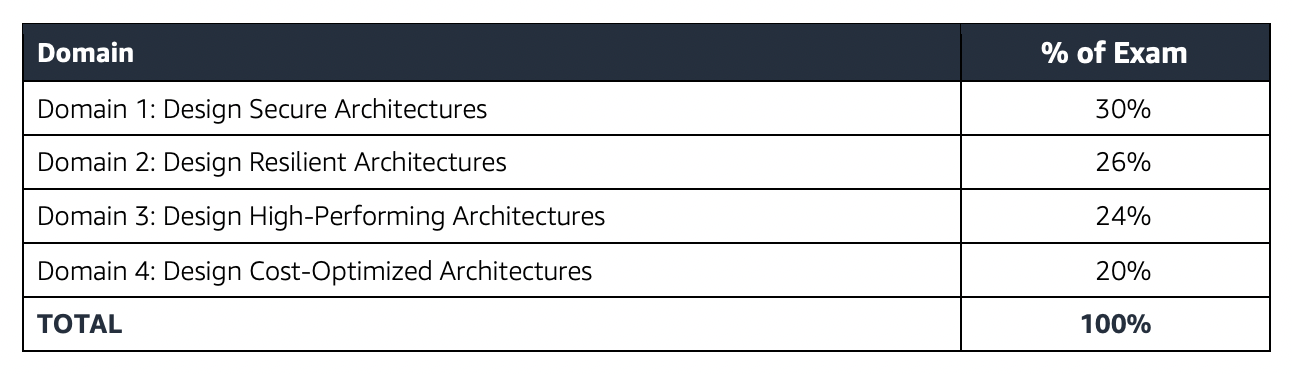
AWS Certified Big Data – Speciality Domains

AWS Certified Big Data – Speciality (BDS-C00) Exam Summary

  • AWS Certified Big Data – Speciality exam, as its name suggests, covers a lot of Big Data concepts right from data transfer and collection techniques, storage, pre and post processing, analytics, visualization with the added concepts for data security at each layer.
  • One of the key tactic I followed when solving any AWS Certification exam is to read the question and use paper and pencil to draw a rough architecture and focus on the areas that you need to improve. Trust me, you will be able to eliminate 2 answers for sure and then need to focus on only the other two. Read the other 2 answers to check the difference area and that would help you reach to the right answer or atleast have a 50% chance of getting it right.
  • Be sure to cover the following topics
    • Whitepapers and articles
    • Analytics
      • Make sure you know and cover all the services in depth, as 80% of the exam is focused on these topics
      • Elastic Map Reduce
        • Understand EMR in depth
        • Understand EMRFS (Note: EMRFS Consistent View reached end of support on June 1, 2023. Since December 2020, Amazon S3 provides strong read-after-write consistency natively, making Consistent View unnecessary.)
        • Know EMR Best Practices (hint: start with many small nodes instead on few large nodes)
        • Know Hive can be externally hosted using RDS, Aurora and AWS Glue Data Catalog
        • Know also different technologies
          • Presto is a fast SQL query engine designed for interactive analytic queries over large datasets from multiple sources
          • D3.js is a JavaScript library for manipulating documents based on data. D3 helps you bring data to life using HTML, SVG, and CSS
          • Spark is a distributed processing framework and programming model that helps do machine learning, stream processing, or graph analytics using Amazon EMR clusters
          • Zeppelin/Jupyter as a notebook for interactive data exploration and provides open-source web application that can be used to create and share documents that contain live code, equations, visualizations, and narrative text
          • Phoenix is used for OLTP and operational analytics, allowing you to use standard SQL queries and JDBC APIs to work with an Apache HBase backing store
      • Kinesis
        • Understand Kinesis Data Streams and Kinesis Data Firehose in depth
        • Know Kinesis Data Streams vs Kinesis Firehose
          • Know Kinesis Data Streams is open ended on both producer and consumer. It supports KCL and works with Spark.
          • Know Kineses Firehose is open ended for producer only. Data is stored in S3, Redshift and OpenSearch Service (formerly Elasticsearch).
          • Kinesis Firehose works in batches with minimum 60secs interval.
        • Understand Kinesis Encryption (hint: use server side encryption or encrypt in producer for data streams)
        • Know difference between KPL vs SDK (hint: PutRecords are synchronously, while KPL supports batching)
        • Kinesis Best Practices (hint: increase performance increasing the shards)
      • Know Amazon OpenSearch Service (formerly Elasticsearch Service) is a search and analytics service which supports indexing, full text search, faceting, vector search, and log analytics.
      • Redshift
        • Understand Redshift in depth
        • Understand Redshift Advance topics like Workload Management, Distribution Style, Sort key
        • Know Redshift Best Practices w.r.t selection of Distribution style, Sort key, COPY command which allows parallelism
        • Know Redshift views to control access to data.
      • Amazon Machine Learning
      • Know Data Pipeline for data transfer (Note: AWS Data Pipeline is in maintenance mode and closed to new customers as of July 25, 2024. Alternatives include AWS Glue, AWS Step Functions, and Amazon MWAA (Managed Workflows for Apache Airflow).)
      • QuickSight
      • Know Glue as the ETL tool (AWS Glue is now at version 5.1 with Apache Spark 3.5.4, Python 3.11, and native integration with Apache Iceberg, Hudi, and Delta Lake.)
    • Security, Identity & Compliance
    • Management & Governance Tools
      • Understand AWS CloudWatch for Logs and Metrics. Also, CloudWatch Events more real time alerts as compared to CloudTrail
    • Storage
    • Compute
      • Know EC2 access to services using IAM Role and Lambda using Execution role.
      • Lambda esp. how to improve performance batching, breaking functions etc.

AWS Certified Big Data – Speciality (BDS-C00) Exam Resources

⚠️ Note: The resources below were relevant for the retired BDS-C00 exam. For current Data Engineer certification preparation, see:

Current Replacement: AWS Certified Data Engineer – Associate (DEA-C01)

The AWS Certified Data Engineer – Associate (DEA-C01) is the current certification that covers data and analytics topics on AWS. It validates skills across four domains:

  • Domain 1: Data Ingestion and Transformation (34%) – Kinesis, MSK, DMS, Glue, EMR, Step Functions
  • Domain 2: Data Store Management (26%) – S3, Redshift, DynamoDB, RDS, Lake Formation, Data Catalog
  • Domain 3: Data Operations and Support (22%) – Pipeline orchestration, monitoring, troubleshooting, MWAA
  • Domain 4: Data Security and Governance (18%) – Encryption, access control, data privacy, Lake Formation permissions

Key differences from BDS-C00:

  • Associate-level (not Specialty) – requires 1-2 years hands-on AWS experience
  • Stronger focus on modern services: AWS Glue, Lake Formation, Step Functions, Amazon MWAA
  • Includes Apache Iceberg, Hudi, and Delta Lake open table formats
  • No longer covers deprecated services (Data Pipeline, Amazon ML classic)
  • Includes Amazon OpenSearch Service (replaced Elasticsearch Service)
  • Covers Amazon SageMaker AI for ML integration in data pipelines

For the full learning path, see AWS Certified Data Engineer – Associate (DEA-C01) Exam Learning Path.

AWS Data Transfer Services

AWS Data Transfer Services

📋 Last Updated: June 2026. Major changes include AWS Snowcone discontinuation (Nov 2024), AWS Snowmobile retirement (March 2024), Snowball Edge restricted to existing customers (Nov 2025), and the launch of AWS Data Transfer Terminal (Dec 2024).
  • AWS provides a suite of data transfer services that includes many methods to migrate data more effectively.
  • Data Transfer services work both Online and Offline and the usage depends on several factors like the amount of data, the time required, frequency, available bandwidth, and cost.
  • Online data transfer and hybrid cloud storage
    • A network link to the VPC, transfer data to AWS or use S3 for hybrid cloud storage with existing on-premises applications.
    • Helps both to lift and shift large datasets once, as well as help integrate existing process flows like backup and recovery or continuous data streams directly with cloud storage.
  • Offline/Physical data migration to S3.
    • Use shippable, ruggedized devices or visit AWS Data Transfer Terminals for moving large archives, data lakes, or in situations where bandwidth and data volumes cannot pass over your networks within your desired time frame.

Online Data Transfer

VPN

  • Connect securely between data centers and AWS
  • Quick to set up and cost-efficient
  • Ideal for small data transfers and connectivity
  • Not reliable as still uses shared Internet connection

Direct Connect

  • Provides a dedicated physical connection to accelerate network transfers between data centers and AWS
  • Provides reliable data transfer with consistent low latency
  • Ideal for regular large data transfer
  • Needs time to setup
  • Is not a cost-efficient solution for small workloads
  • Can be secured using VPN over Direct Connect or MACsec encryption
  • Supports dedicated connections at 1 Gbps, 10 Gbps, 100 Gbps, and 400 Gbps speeds
  • Supports hosted connections from 50 Mbps up to 25 Gbps via AWS Direct Connect Partners
  • MACsec (IEEE 802.1AE) – provides native, near line-rate, point-to-point Layer 2 encryption on 10 Gbps, 100 Gbps, and 400 Gbps dedicated connections at select locations
  • SiteLink – enables sending data between Direct Connect locations over the AWS global backbone, bypassing AWS Regions, for private site-to-site network connectivity

AWS S3 Transfer Acceleration

  • Makes public Internet transfers to S3 faster by up to 50-500% for long-distance transfers of larger objects.
  • Helps maximize the available bandwidth regardless of distance or varying Internet weather, and there are no special clients or proprietary network protocols. Simply change the endpoint you use with your S3 bucket and acceleration is automatically applied.
  • Uses globally distributed CloudFront edge locations (over 50 locations worldwide) for data transport.
  • Ideal for recurring jobs that travel across the globe, such as media uploads, backups, and local data processing tasks that are regularly sent to a central location.

AWS DataSync

  • Automates moving data between on-premises storage and Amazon S3, Amazon EFS, Amazon FSx, and other AWS storage services.
  • Automatically handles many of the tasks related to data transfers that can slow down migrations, including encryption, managing scripts, network optimization, and data integrity validation.
  • Helps transfer data at speeds up to 10 times faster than open-source tools.
  • Uses AWS Direct Connect or internet links to AWS and is ideal for one-time data migrations, recurring data processing workflows, and automated replication for data protection and recovery.
  • Enhanced Mode (2024-2025) – provides higher performance, scalability, and observability for transfers between S3 locations with virtually unlimited numbers of objects.
  • Cross-Cloud Transfers (May 2025) – supports direct data transfers between other clouds (Google Cloud Storage, Microsoft Azure Blob Storage, Oracle Cloud Object Storage) and Amazon S3 without deploying DataSync agents.
  • On-Premises Enhanced Mode (Dec 2025) – Enhanced mode now supports transfers between on-premises file servers and Amazon S3 with higher performance.
  • Supports AWS Secrets Manager for credential management across all location types including HDFS, FSx for Windows, and FSx for NetApp ONTAP.

AWS Transfer Family

  • Provides fully managed support for file transfers directly into and out of Amazon S3 and Amazon EFS using SFTP, FTPS, FTP, and AS2 protocols.
  • Eliminates the need to manage file transfer infrastructure and helps migrate file transfer workflows to AWS seamlessly.
  • SFTP Connectors – fully managed, low-code capability to copy files between remote SFTP servers and Amazon S3, supporting up to 150 GB files at 100 files/second throughput.
  • VPC-Based Connectivity (2025) – SFTP connectors can connect to remote servers through your VPC for private transfers.
  • Web Apps – browser-based interface for data transfers to/from S3, with VPC hosted endpoint support.
  • Supports quantum-resistant ML-KEM key exchange for SFTP connections.
  • Ideal for B2B file exchanges, data distribution, and supply chain management.

Physical/Offline Data Transfer

AWS Data Transfer Terminal

🆕 NEW (December 2024) – AWS recommends Data Transfer Terminal for new customers requiring physical data transfer.
  • AWS Data Transfer Terminal provides secure, upload-ready, physical locations where you can bring your own storage devices and connect them to the AWS network for high-speed data transfer.
  • Supports upload to any AWS endpoint including Amazon S3, Amazon EFS, and others using a high-throughput connection.
  • Each Terminal includes at least two 100 Gigabit Ethernet (100 GbE) ports.
  • You can reserve a date and time to visit, connect your storage device, initiate transfer, and validate completion.
  • Available at multiple locations globally (including Los Angeles, New York, San Francisco Bay Area, Munich, and more).
  • Pricing is based on port hours (number of 100 GbE ports actively used during your reservation).
  • Ideal for media production teams, large-scale data migrations, and data center shutdowns where you bring your own storage devices.

AWS Snowball Edge

⚠️ Notice: Effective November 7, 2025, AWS Snowball Edge devices are only available to existing customers. New customers should use AWS DataSync for online transfers or AWS Data Transfer Terminal for physical transfers.
  • AWS Snowball Edge is a data migration and edge computing device.
  • Latest Generation Devices (available to existing customers only):
    • Storage Optimized 210TB
      • 210 terabytes of NVMe storage with up to 1.5 GB/s data transfer speed.
      • Connectivity options: 10GBASE-T, SFP48, and QSFP28.
      • Well-suited for petabyte-scale data migrations.
    • Compute Optimized
      • 104 vCPUs, 416 GB of memory, and 28 TB of dedicated NVMe SSD for compute instances.
      • 42 TB of usable block or object storage plus 7.68 TB of dedicated NVMe SSD for instances.
      • Well-suited for advanced machine learning, full-motion video analysis, and edge computing in disconnected environments.
  • Data is encrypted at rest and in transit for security during physical transport.
  • Five to ten devices can be clustered for local compute jobs, data durability, and to grow/shrink storage on demand.
  • Customers can use these for data collection, machine learning and processing, and storage in environments with intermittent connectivity (manufacturing, industrial, transportation) or extremely remote locations (military or maritime operations).
  • Supports running Lambda functions and EC2 instances locally on the device.
  • Managed using AWS OpsHub (graphical interface).

AWS Snowcone (Discontinued)

⚠️ DISCONTINUED – AWS Snowcone was discontinued effective November 12, 2024. Support for existing customers ended November 12, 2025. Use AWS DataSync for online transfers or AWS Data Transfer Terminal for physical transfers.
  • AWS Snowcone was a portable, rugged, and secure edge computing and data transfer device.
  • Snowcone could collect, process, and move data to AWS, either offline by shipping the device or online with AWS DataSync.
  • Snowcone devices were small and weighed 4.5 lbs. (2.1 kg) for IoT, vehicular, or drone use cases.

Previous Generation Snowball Devices (Discontinued)

⚠️ DISCONTINUED – Previous generation Snowball Edge devices (80TB Storage Optimized, 52 vCPU Compute Optimized, and Compute Optimized with GPU) were discontinued effective November 12, 2024. Support for existing customers ended November 12, 2025.
  • Snowball Edge Storage Optimized (previous gen) provided 40 vCPUs with 80 terabytes of usable block or S3-compatible object storage.
  • Snowball Edge Compute Optimized (previous gen) provided 52 vCPUs, 42 terabytes of usable storage.

AWS Snowmobile (Retired)

⚠️ SERVICE RETIRED – AWS Snowmobile was retired in March 2024. The service is no longer available. For exabyte-scale migrations, AWS recommends using multiple Snowball Edge devices or AWS Data Transfer Terminal combined with AWS DataSync.
  • AWS Snowmobile moved up to 100 PB of data in a 45-foot long ruggedized shipping container for multi-petabyte or Exabyte-scale digital media migrations and data center shutdowns.
  • A Snowmobile arrived at the customer site and appeared as a network-attached data store for high-speed data transfer.
  • After data was transferred to Snowmobile, it was driven back to an AWS Region where the data was loaded into S3.

Data Transfer Decision Guide

Scenario Recommended Service Notes
Regular ongoing transfers with reliable bandwidth AWS Direct Connect + DataSync Dedicated connection, consistent performance
One-time large migration (limited bandwidth) AWS Data Transfer Terminal Bring your own devices, 100 GbE speeds
Edge computing + data transfer (existing customer) AWS Snowball Edge Only available to existing customers
Cross-globe S3 uploads S3 Transfer Acceleration 50-500% faster for long-distance transfers
Multi-cloud data migration AWS DataSync (Enhanced Mode) Agentless cross-cloud transfers to S3
B2B file transfers (SFTP/FTPS/AS2) AWS Transfer Family Managed file transfer protocols
Quick, low-cost secure connectivity VPN Uses shared internet, unpredictable performance

Data Transfer Chart – Bandwidth vs Time

Data Migration Speeds

AWS Certification Exam Practice Questions

  • Questions are collected from Internet and the answers are marked as per my knowledge and understanding (which might differ with yours).
  • AWS services are updated everyday and both the answers and questions might be outdated soon, so research accordingly.
  • AWS exam questions are not updated to keep up the pace with AWS updates, so even if the underlying feature has changed the question might not be updated
  • Open to further feedback, discussion and correction.
  1. An organization is moving non-business-critical applications to AWS while maintaining a mission critical application in an on-premises data center. An on-premises application must share limited confidential information with the applications in AWS. The Internet performance is unpredictable. Which configuration will ensure continued connectivity between sites MOST securely?
    1. VPN and a cached storage gateway
    2. AWS Snowball Edge
    3. VPN Gateway over AWS Direct Connect
    4. AWS Direct Connect
  2. A company wants to transfer petabyte-scale of data to AWS for their analytics, however are constrained on their internet connectivity? Which AWS service can help them transfer the data quickly?
    1. S3 enhanced uploader
    2. Snowmobile
    3. Snowball
    4. Direct Connect
  3. A company wants to transfer its video library data, which runs in exabytes, to AWS. Which AWS service can help the company transfer the data? [Note: Snowmobile was retired in March 2024. For current exabyte-scale migrations, multiple Snowball Edge devices or AWS Data Transfer Terminal would be recommended.]
    1. Snowmobile
    2. Snowball
    3. S3 upload
    4. S3 enhanced uploader
  4. You are working with a customer who has 100 TB of archival data that they want to migrate to Amazon Glacier. The customer has a 1-Gbps connection to the Internet. Which service or feature provides the fastest method of getting the data into Amazon Glacier?
    1. Amazon Glacier multipart upload
    2. AWS Storage Gateway
    3. VM Import/Export
    4. AWS Snowball
  5. A media company needs to transfer 500 TB of video content from their on-premises data center to Amazon S3. They have a 10 Gbps Direct Connect link but need the transfer completed within 1 week. Which approach is MOST appropriate?
    1. Use S3 Transfer Acceleration over the internet
    2. Use AWS DataSync over the Direct Connect link
    3. Use multiple AWS Snowball Edge devices
    4. Upload directly using the AWS CLI
  6. A company needs to regularly transfer files from a partner’s SFTP server to Amazon S3 for processing. Which AWS service provides a fully managed solution for this requirement?
    1. AWS DataSync
    2. Amazon S3 Transfer Acceleration
    3. AWS Transfer Family SFTP Connectors
    4. AWS Direct Connect
  7. A company is migrating data from Google Cloud Storage to Amazon S3. They want a managed solution that does not require deploying agents. Which AWS service and feature should they use?
    1. AWS DataSync Basic mode with an agent
    2. AWS S3 Batch Operations
    3. AWS DataSync Enhanced mode (cross-cloud transfers)
    4. AWS Transfer Family
  8. A film production company has 200 TB of raw footage on portable NAS devices after a remote shoot. They need to upload it to S3 as quickly as possible. They are near an AWS Data Transfer Terminal location. What is the FASTEST approach?
    1. Ship an AWS Snowball Edge device and transfer offline
    2. Use AWS DataSync over the internet
    3. Visit the AWS Data Transfer Terminal with their storage devices
    4. Use S3 Transfer Acceleration for parallel uploads

References

AWS Redshift Best Practices

AWS Redshift Best Practices

📌 Last Updated: June 2026. Covers RG instances (Graviton-powered), Multidimensional Data Layouts (MDDL), Zero-ETL integrations, Auto-copy, Streaming Ingestion, AI-driven scaling for Serverless, and concurrency scaling for COPY commands.

Designing Tables

Distribution Style Selection

  • Distribute the fact table and one dimension table on their common columns.
    • A fact table can have only one distribution key. Any tables that join on another key aren’t collocated with the fact table.
    • Choose one dimension to collocate based on how frequently it is joined and the size of the joining rows.
    • Designate both the dimension table’s primary key and the fact table’s corresponding foreign key as the DISTKEY.
  • Choose the largest dimension based on the size of the filtered dataset.
    • Only the rows that are used in the join need to be distributed, so consider the size of the dataset after filtering, not the size of the table.
  • Choose a column with high cardinality in the filtered result set.
    • If you distribute a sales table on a date column, for e.g, you should probably get fairly even data distribution, unless most of the sales are seasonal
    • However, if you commonly use a range-restricted predicate to filter for a narrow date period, most of the filtered rows occur on a limited set of slices and the query workload is skewed.
  • Change some dimension tables to use ALL distribution.
    • If a dimension table cannot be collocated with the fact table or other important joining tables, query performance can be improved significantly by distributing the entire table to all of the nodes.
    • Using ALL distribution multiplies storage space requirements and increases load times and maintenance operations.
  • Use AUTO distribution for tables where optimal distribution is unclear.
    • With AUTO distribution (the default), Redshift assigns an optimal distribution style based on the table size — using ALL for small tables and EVEN for larger tables, then adjusting automatically.
    • Combined with Automatic Table Optimization (ATO), Redshift can monitor workloads and automatically apply optimal distribution keys without manual intervention.

Sort Key Selection

  • Redshift stores the data on disk in sorted order according to the sort key, which helps query optimizer to determine optimal query plans.
  • If recent data is queried most frequently, specify the timestamp column as the leading column for the sort key.
    • Queries are more efficient because they can skip entire blocks that fall outside the time range.
  • If you do frequent range filtering or equality filtering on one column, specify that column as the sort key.
    • Redshift can skip reading entire blocks of data for that column.
    • Redshift tracks the minimum and maximum column values stored on each block and can skip blocks that don’t apply to the predicate range.
  • If you frequently join a table, specify the join column as both the sort key and the distribution key.
    • Doing this enables the query optimizer to choose a sort merge join instead of a slower hash join.
    • As the data is already sorted on the join key, the query optimizer can bypass the sort phase of the sort merge join.
  • Use AUTO sort key or Multidimensional Data Layouts (MDDL) for complex workloads.
    • When you set SORTKEY AUTO, Redshift’s Automatic Table Optimization (ATO) analyzes your query history and automatically selects either a single-column sort key or Multidimensional Data Layouts based on which is better for your workload.
    • Multidimensional Data Layouts (MDDL) — GA since September 2025 — dynamically sort data based on actual query filter patterns rather than a single column, accelerating performance for workloads with multiple filter predicates.
    • MDDL constructs a multidimensional virtual sort key that co-locates rows typically accessed by the same queries, enabling data block skipping across multiple predicate columns.

Automatic Table Optimization (ATO)

  • ATO is a self-tuning capability that automatically optimizes table design by applying sort and distribution keys without administrator intervention.
  • ATO monitors cluster workload and table metadata, runs AI algorithms over observations, and implements sort and distribution keys online in the background without interrupting running queries.
  • When ATO is enabled, you don’t need to manually choose sort keys or distribution styles — Redshift will determine optimal settings based on actual query patterns.
  • To enable ATO on an existing table: ALTER TABLE tablename ALTER SORTKEY AUTO; ALTER TABLE tablename ALTER DISTSTYLE AUTO;
  • Best practice for new tables: use AUTO distribution and AUTO sort key unless you have specific, well-understood access patterns.

Other Practices

  • Automatic compression produces the best results
  • COPY command analyzes the data and applies compression encodings to an empty table automatically as part of the load operation
  • Define primary key and foreign key constraints between tables wherever appropriate. Even though they are informational only, the query optimizer uses those constraints to generate more efficient query plans.
  • Don’t use the maximum column size for convenience.
  • Use RA3 or RG instances with Redshift Managed Storage (RMS) to decouple compute from storage and enable independent scaling.

Loading Data

  • You can load data into the tables using the following methods:
    • Using Multi-Row INSERT
    • Using Bulk INSERT
    • Using COPY command
    • Staging tables
    • Auto-copy from S3 (continuous automatic ingestion)
    • Streaming Ingestion (from Kinesis Data Streams or Amazon MSK)
    • Zero-ETL integrations (from Aurora, DynamoDB, RDS, and SaaS applications)
  • Copy Command
    • COPY command loads data in parallel from S3, EMR, DynamoDB, or multiple data sources on remote hosts.
    • COPY loads large amounts of data much more efficiently than using INSERT statements, and stores the data more effectively as well.
    • Use a Single COPY Command to Load from Multiple Files
    • DON’T use multiple concurrent COPY commands to load one table from multiple files as Redshift is forced to perform a serialized load, which is much slower.
    • Concurrency Scaling for COPY (May 2026): Redshift now extends concurrency scaling to support high-volume data ingestion workloads, automatically scaling for COPY queries in Parquet and ORC formats from S3. Data pipelines no longer need to choose between ingestion speed and query performance during peak demand.
  • Split the Load Data into Multiple Files
    • Divide the data in multiple files with equal size (between 1MB and 1GB)
    • Number of files should be a multiple of the number of slices in the cluster
    • Helps to distribute workload uniformly in the cluster.
  • Use a Manifest File
    • S3 provides eventual consistency for some operationsNote: Since December 2020, Amazon S3 provides strong read-after-write consistency for all operations. Redshift COPY, UNLOAD, and Spectrum operations benefit from this consistency automatically.
    • Manifest files are still recommended to explicitly specify the exact list of files to load, preventing accidental inclusion/exclusion of files.
    • Manifest file helps specify different S3 locations in a more efficient way than with the use of S3 prefixes.
  • Compress Data Files
    • Individually compress the load files using gzip, lzop, bzip2, or Zstandard for large datasets
    • Avoid using compression, if small amount of data because the benefit of compression would be outweighed by the processing cost of decompression
    • If the priority is to reduce the time spent by COPY commands use LZO compression. If the priority is to reduce the size of the files in S3 and the network bandwidth use GZIP or Zstandard (ZSTD) compression.
  • Load Data in Sort Key Order
    • Load the data in sort key order to avoid needing to vacuum.
    • As long as each batch of new data follows the existing rows in the table, the data will be properly stored in sort order, and you will not need to run a vacuum.
    • Presorting rows is not needed in each load because COPY sorts each batch of incoming data as it loads.
  • Load Data using IAM role
    • Attach an IAM role to the cluster rather than embedding credentials in the COPY command.

Auto-copy from S3

  • Auto-copy enables continuous, automatic file ingestion from Amazon S3 into Redshift tables without additional tools or custom solutions.
  • Set up ingestion rules using COPY JOB to track S3 paths and automatically load new files as they arrive.
  • Auto-copy uses S3 event notifications to detect new files and trigger loads automatically.
  • Concurrency scaling for auto-copy (March 2026): Auto-copy now supports concurrency scaling, ensuring ingestion performance doesn’t degrade during peak query workloads.
  • Best suited for continuous batch data arriving in S3 (e.g., log files, IoT data, CDC exports).

Streaming Ingestion

  • Streaming Ingestion enables near real-time analytics by creating materialized views directly on top of data streams from Amazon Kinesis Data Streams or Amazon MSK (Managed Streaming for Apache Kafka).
  • Eliminates the need to stage data in S3 before loading — data flows directly from streams to Redshift.
  • Use CREATE MATERIALIZED VIEW with stream source to define ingestion, then REFRESH MATERIALIZED VIEW to consume latest data.
  • Supports JSON, CSV, and other formats directly from streams.
  • Available on both provisioned clusters and Redshift Serverless.

Zero-ETL Integrations

  • Zero-ETL integrations provide fully managed, near real-time data replication from operational databases and SaaS applications to Redshift without building ETL pipelines.
  • Supported sources:
    • Amazon Aurora (MySQL-compatible and PostgreSQL-compatible)
    • Amazon RDS (MySQL and PostgreSQL — PostgreSQL GA July 2025)
    • Amazon DynamoDB (GA October 2024)
    • Self-managed databases (MySQL, PostgreSQL)
    • SaaS applications — Salesforce, SAP, ServiceNow, Zendesk, and others (via Amazon SageMaker Lakehouse)
  • History mode (April 2025) preserves complete history of data changes for auditing and trend analysis without maintaining duplicate copies.
  • Concurrency scaling support for zero-ETL (March 2026) ensures replication performance during high query loads.
  • Available on RA3, RG instances and Redshift Serverless workgroups.

Designing Queries

  • Avoid using select *. Include only the columns you specifically need.
  • Use a CASE Expression to perform complex aggregations instead of selecting from the same table multiple times.
  • Don’t use cross-joins unless absolutely necessary
  • Use subqueries in cases where one table in the query is used only for predicate conditions and the subquery returns a small number of rows (less than about 200).
  • Use predicates to restrict the dataset as much as possible.
  • In the predicate, use the least expensive operators that you can.
  • Avoid using functions in query predicates.
  • If possible, use a WHERE clause to restrict the dataset.
  • Add predicates to filter tables that participate in joins, even if the predicates apply the same filters.
  • Use materialized views for frequently executed queries to pre-compute results and reduce query latency.
  • Leverage data sharing to share live data across multiple Redshift clusters/workgroups without copying, enabling workload isolation.

Cluster Configuration Best Practices

Instance Types

  • RG Instances (GA May 2026): New Graviton-powered nodes delivering up to 2.2x faster for data warehouse workloads and up to 2.4x faster for data lake workloads at 30% lower price per vCPU compared to RA3. Recommended for new provisioned deployments.
  • RA3 Instances: Previous generation with Redshift Managed Storage (RMS) that separates compute and storage. Still fully supported.
  • DC2/DS2 Instances: Legacy instance types. Migrate to RA3 or RG for better price-performance and managed storage benefits.
  • Both RG and RA3 use Redshift Managed Storage — data is automatically stored in S3 with intelligent caching on local SSDs.

Multi-AZ Deployments

  • Redshift supports Multi-AZ deployments for RG and RA3 clusters, providing high availability across two Availability Zones.
  • All nodes in both AZs are used for read and write workloads during normal operation.
  • If one AZ experiences an outage, the cluster continues operating in the other AZ.
  • Can convert existing Single-AZ clusters to Multi-AZ or restore from snapshot into Multi-AZ configuration.

Redshift Serverless

  • Redshift Serverless automatically provisions and scales data warehouse capacity without cluster management.
  • Capacity measured in RPUs (Redshift Processing Units). Range: 4 RPUs to 512 RPUs (4 RPU minimum available since June 2025, starting at $1.50/hour).
  • AI-driven scaling and optimization (default for new workgroups since April 2026) uses ML to predict compute needs and automatically adjust resources before queries queue, supporting 8–512 RPU base range.
  • Pay only for compute consumed when the warehouse is active — ideal for intermittent or unpredictable workloads.
  • Supports all the same features as provisioned: data sharing, streaming ingestion, zero-ETL, auto-copy.

UDF Best Practices

  • ⚠️ Python UDFs Deprecated: Amazon Redshift no longer supports creation of new Python UDFs (since November 1, 2025). Existing Python UDFs will reach end of support after June 30, 2026.
  • Use Lambda UDFs as the recommended replacement — they provide Python 3 support, access to external services, better scalability, and enhanced security.
  • SQL UDFs remain fully supported for simple transformations.
  • Migrate existing Python UDFs to Lambda UDFs before the end-of-support date.

AWS Certification Exam Practice Questions

  • Questions are collected from Internet and the answers are marked as per my knowledge and understanding (which might differ with yours).
  • AWS services are updated everyday and both the answers and questions might be outdated soon, so research accordingly.
  • AWS exam questions are not updated to keep up the pace with AWS updates, so even if the underlying feature has changed the question might not be updated
  • Open to further feedback, discussion and correction.
  1. An administrator needs to design a strategy for the schema in a Redshift cluster. The administrator needs to determine the optimal distribution style for the tables in the Redshift schema. In which two circumstances would choosing EVEN distribution be most appropriate? (Choose two.)
    1. When the tables are highly denormalized and do NOT participate in frequent joins.
    2. When data must be grouped based on a specific key on a defined slice.
    3. When data transfer between nodes must be eliminated.
    4. When a new table has been loaded and it is unclear how it will be joined to dimension.
  2. An administrator has a 500-GB file in Amazon S3. The administrator runs a nightly COPY command into a 10-node Amazon Redshift cluster. The administrator wants to prepare the data to optimize performance of the COPY command. How should the administrator prepare the data?
    1. Compress the file using gz compression.
    2. Split the file into 500 smaller files.
    3. Convert the file format to AVRO.
    4. Split the file into 10 files of equal size.
  3. A company needs to load data from multiple operational databases into Amazon Redshift in near real-time for analytics without building ETL pipelines. Which feature should they use?
    1. Redshift Streaming Ingestion
    2. Amazon Kinesis Data Firehose
    3. Zero-ETL integrations
    4. AWS Database Migration Service (DMS)
  4. An organization wants to optimize Redshift sort key selection for a workload that filters on multiple columns across different queries. The current single-column sort key only benefits a subset of queries. What should they use?
    1. Create compound sort keys with all filter columns
    2. Switch to interleaved sort keys
    3. Enable Automatic Table Optimization with SORTKEY AUTO to leverage Multidimensional Data Layouts (MDDL)
    4. Create multiple copies of the table with different sort keys
  5. A data engineering team needs to continuously ingest new files arriving in S3 into Redshift without managing external schedulers or custom Lambda triggers. Which Redshift feature addresses this requirement?
    1. Redshift Spectrum
    2. Auto-copy (COPY JOB)
    3. Streaming Ingestion from Kinesis
    4. Zero-ETL integration with S3
  6. A company is deploying a new Redshift provisioned cluster and wants the best price-performance. They need both data warehouse and data lake query capabilities. Which instance type should they select? (June 2026)
    1. DC2 instances
    2. DS2 instances
    3. RA3 instances
    4. RG instances (Graviton-powered)
  7. A team wants to enable near real-time analytics on streaming data from Amazon MSK without staging data in S3. Which approach should they use?
    1. Use AWS Glue streaming ETL job to load into Redshift
    2. Create a streaming materialized view in Redshift that reads directly from the MSK topic
    3. Use Kinesis Data Firehose to deliver to Redshift
    4. Use Lambda to consume MSK events and INSERT into Redshift

References

AWS Systems Manager

AWS Systems Manager

📢 Major Update (November 2024): AWS introduced a new unified Systems Manager experience with centralized cross-account, cross-Region node management, Amazon Q Developer integration for natural language queries, and one-click SSM Agent troubleshooting. The new experience is available at no extra cost.

  • Systems Manager provides visibility and control of the infrastructure on AWS.
  • helps to view operational data from multiple AWS services and automates operational tasks across AWS resources.
  • A managed instance is an EC2 instance or on-premises machine in your hybrid environment that has been configured for Systems Manager.
  • works with managed instances (now referred to as managed nodes), which are configured for use with Systems Manager.
  • helps configure and maintain managed nodes.
  • helps maintain security and compliance by scanning the managed nodes and reporting on (or taking corrective action on) any policy violations it detects.
  • supported machine types include EC2 instances, on-premises servers, virtual machines (VMs) including VMs in other cloud environments, containers, and edge IoT devices.
  • supported operating system types include Windows Server, multiple distributions of Linux (including Ubuntu 23.04, Debian 12, RHEL, SUSE SP5), macOS 14 (Sonoma), and Raspbian.

New Systems Manager Experience (2024)

  • Launched in November 2024, the new experience provides a unified console for centralized cross-account, cross-Region node management.
  • Provides centralized visibility of all managed nodes including EC2 instances, containers, VMs on other cloud providers, on-premises servers, and edge IoT devices.
  • Integrates with AWS Organizations allowing a delegated administrator to centrally manage nodes across the entire organization.
  • Integrates with Amazon Q Developer to query node metadata using natural language for rapid insights.
  • Provides Explore Nodes page with options to group and filter results across the organization.
  • Provides Review Node Insights dashboard with interactive charts for managed/unmanaged node visibility.
  • Enables one-click SSM Agent diagnosis and automated remediation for unmanaged nodes using recommended runbooks.
  • Uses Default Host Management Configuration (DHMC) to grant EC2 instances permissions to connect to Systems Manager without attaching IAM instance profiles to each instance.
  • Available at no extra cost by navigating to the Systems Manager console.

Default Host Management Configuration (DHMC)

  • Allows Systems Manager to manage EC2 instances automatically as managed nodes without attaching IAM instance profiles to each instance.
  • Uses the default-ec2-instance-management-role service setting.
  • Requires EC2 instances to use Instance Metadata Service Version 2 (IMDSv2).
  • Can be enabled organization-wide using Quick Setup in just a few clicks.
  • Simplifies the onboarding process for large-scale EC2 fleets.
  • Replaces the previous approach of manually attaching IAM instance profiles for Systems Manager access.

Operations Management

Capabilities that help manage the AWS resources

  • Trusted Advisor is an online tool that provides real-time guidance to help you provision the resources following AWS best practices.
  • AWS Health Dashboard (previously Personal Health Dashboard) provides information about AWS Health events that can affect your account
  • OpsCenter provides a central location where operations engineers and IT professionals can view, investigate, and resolve operational work items (OpsItems) related to AWS resources. OpsCenter is now the recommended alternative to Incident Manager for similar capabilities.

⚠️ Incident Manager: Incident Manager is no longer open to new customers starting November 7, 2025. Existing customers can continue to use the service. For capabilities similar to Incident Manager, explore AWS Systems Manager OpsCenter.

⚠️ Change Manager: Change Manager is no longer open to new customers starting November 7, 2025. Existing customers can continue to use the service.

⚠️ CloudWatch Dashboard in Systems Manager: The AWS Systems Manager CloudWatch Dashboard will no longer be available after April 30, 2026. Customers should use Amazon CloudWatch console directly to view, create, and manage CloudWatch dashboards.

Application Management

AppConfig

  • AWS AppConfig, a feature of Systems Manager, helps quickly and safely configure, validate, and deploy feature flags and application configuration.
  • Supports feature flags for enabling/disabling features and configuring different characteristics using flag attributes.
  • Supports advanced targeting (July 2024) with targets, variants, and splits for fine-grained, high-cardinality user segments.
  • Supports enhanced targeting during rollout (March 2026) to target feature flag values to specific segments during gradual roll-outs.
  • Provides syntactic and semantic validation in the pre-deployment phase.
  • Supports monitoring and automatic rollback if a configured alarm is triggered.
  • AWS recommends using Secrets Manager for secrets, Parameter Store for simple key-value pairs, and AppConfig for feature flags and advanced dynamic configuration.

SSM Parameter Store

  • SSM Parameter Store provides secure, scalable, centralized, hierarchical storage for configuration data and secret management.
  • can store data such as passwords, database strings, AMI IDs and license codes as parameter values.
  • supports values as plain text or encrypted data using the SecureString parameter.
  • uses AWS KMS to encrypt the parameter value.
  • parameters can be referenced by using the unique name specified during parameter creation.
  • supports versioning of configuration/secrets.
  • provides high availability as Parameter Store is hosted in multiple AZs in an AWS Region.
  • can be configured for change notifications and invoke automated actions for both parameters and parameter policies
  • is integrated with Secrets Manager and can be used to retrieve Secrets Manager secrets when using other AWS services that already support references to Parameter Store parameters
  • does not support password rotation, use Secrets Manager instead.
  • offers two tiers:
    • Standard – up to 10,000 parameters per account/Region, max 4 KB parameter size, no charge.
    • Advanced – up to 100,000 parameters per account/Region, max 8 KB parameter size, parameter policies support, charges apply.

SSM Parameter Store vs Secrets Manager

AWS Secrets Manager vs Systems Parameter Store

Change Management

Capabilities for taking action against or changing the AWS resources

Systems Manager Automation

  • helps automate common maintenance and deployment tasks for e.g. create and update AMIs, apply driver and agent updates, reset passwords on Windows instances, reset SSH keys on Linux instances, and apply OS patches or application updates.
  • supports re-execution of runbooks directly from the Automation console with pre-populated parameters (August 2025).
  • supports automatic retry of throttled API calls during high-concurrency scenarios to improve execution reliability (August 2025).

💰 Automation Pricing Update (August 2025): The existing free tier for Automation (100,000 steps and 5,000 seconds of script duration per month) is no longer available for new customers and ended on December 31, 2025 for existing customers. Automation is now a paid service.

Maintenance Windows

  • helps set up recurring schedules for managed instances to run administrative tasks like installing patches and updates without interrupting business-critical operations.

Node Management

Capabilities for managing the EC2 instances, on-premises servers and virtual machines (VMs) in the hybrid environment, and other types of AWS resources (nodes)

Systems Manager Configuration Compliance

  • helps scan fleet of managed instances for patch compliance and configuration inconsistencies.
  • helps collect and aggregate data from multiple AWS accounts and Regions, and then drill down into specific resources that aren’t compliant.
  • provides, by default, displays compliance data about Patch Manager patching and State Manager associations, but can be customized

Session Manager

  • helps manage EC2 instances through an interactive one-click browser-based shell or through the AWS CLI.
  • provides secure and auditable instance management without the need to open inbound ports, maintain bastion hosts, or manage SSH keys.
  • helps comply with corporate policies that require controlled access to instances, strict security practices, and fully auditable logs with instance access details, while still providing end users with simple one-click cross-platform access to the EC2 instances.
  • supports port forwarding to remote hosts, enabling access to private resources (e.g., RDS databases, Redis clusters) through a managed node without publicly exposing ports.
  • supports SSH tunneling for secure connections to instances without opening SSH ports.
  • supports RDP connections through Fleet Manager for browser-based Windows instance access.
  • requires SSM Agent version 3.0.222.0 or later for port forwarding and SSH sessions.

Systems Manager Run Command

  • Run Command allows you to automate common administrative tasks and perform one-time configuration changes at scale.
  • helps to remotely and securely manage the configuration of the managed instances at scale.
  • helps perform on-demand changes like updating applications or running Linux shell scripts and Windows PowerShell commands on a target set of dozens or hundreds of instances.

Patch Manager

  • helps automate the process of patching managed instances with both security-related and other types of updates.
  • helps apply patches for both operating systems and applications. (On Windows Server, application support is limited to updates for Microsoft applications.)
  • enables scanning of instances for missing patches and applies them individually or to a large group of instances by using EC2 instance tags.
  • provides options to scan the instances and report compliance on a schedule, install available patches on a schedule, and patch or scan instances on-demand as needed.
  • supports patching across multiple AWS accounts and Regions using the unified console.
  • Patch baselines
    • defines which patches should and shouldn’t be installed
    • can include rules for auto-approving patches within days of their release, as well as a list of approved and rejected patches
    • helps install security patches on a regular basis by scheduling patching to run as a Systems Manager maintenance window task.
  • Patch group
    • helps associate a set of instances with a specific patch baseline
    • requires instances to be tagged with a tag key Patch Group
    • an instance can only be part of one Patch Group
    • a patch group can be registered with only one patch baseline

Systems Manager Inventory

  • provides visibility into the EC2 and on-premises computing environment
  • collect metadata from the managed instances about applications, files, components, patches, and more on the managed instances
  • collects only metadata from the managed instances and doesn’t access proprietary information or data.
  • supports custom metadata in addition to the pre-configured metadata
  • supports inventory data collection from multiple regions and AWS Accounts
  • supports inventory data storage in a single centralized location like S3 which can then be queried using Athena.

Systems Manager Distributor

  • helps create and deploy software packages to managed nodes.
  • supports AWS-provided agent software packages (e.g., AmazonCloudWatchAgent) and custom packages.
  • supports multiple operating systems including Windows, Ubuntu Server, Debian Server, and Red Hat Enterprise Linux.
  • integrates with State Manager and Maintenance Windows for automated package deployment.

Fleet Manager

  • provides a console-based experience to view and administer fleets of managed nodes from a single location.
  • supports OS-agnostic management without needing SSH or RDP connections.
  • provides browser-based RDP access to Windows instances without publicly exposing RDP ports.
  • displays health and performance status of the entire server fleet from one console.

Systems Manager State Manager

  • is a secure and scalable configuration management service that helps automate the process of keeping the managed instances in a defined state.
  • helps ensure that the instances are bootstrapped with specific software at startup, joined to a Windows domain (Windows instances only), or patched with specific software updates.
  • A State Manager association is a configuration that is assigned to the managed instances which defines the state that you want to maintain on the instances.

Shared Resources

Capabilities for managing and configuring the AWS resources

Systems Manager Document (SSM document)

  • SSM document defines the actions that the Systems Manager performs.
  • SSM document types include
    • Command documents, which are used by State Manager and Run Command, and
    • Automation documents (runbooks), which are used by Systems Manager Automation.
  • SSM Document can be defined in JSON or YAML and define parameters and actions.

Systems Manager Agent

  • is software that can be installed and configured on an EC2 instance, an on-premises server, or a virtual machine (VM)
  • makes it possible for the Systems Manager to update, manage, and configure these resources
  • must be installed on each instance to use with Systems Manager
  • usually comes preinstalled with a lot of Amazon Machine Images (AMIs), while it must be installed manually on other AMIs, and on on-premises servers and virtual machines for the hybrid environment
  • the new Systems Manager experience can automatically diagnose and remediate SSM Agent issues such as networking misconfigurations and outdated software using recommended runbooks
  • scheduled diagnosis can be set up on a recurring basis to proactively identify and fix SSM Agent connectivity issues

Instance Tiers for Hybrid Environments

  • Standard-instances tier
    • allows registering up to 1,000 hybrid-activated machines per AWS account per Region
    • no additional cost for on-premises instances
  • Advanced-instances tier
    • required for more than 1,000 hybrid-activated machines per account per Region
    • required to use Patch Manager for Microsoft-released applications on non-EC2 nodes
    • required to connect to non-EC2 nodes using Session Manager
    • available on a per-use (pay-per-use) basis

AWS Certification Exam Practice Questions

  • Questions are collected from Internet and the answers are marked as per my knowledge and understanding (which might differ with yours).
  • AWS services are updated everyday and both the answers and questions might be outdated soon, so research accordingly.
  • AWS exam questions are not updated to keep up the pace with AWS updates, so even if the underlying feature has changed the question might not be updated
  • Open to further feedback, discussion and correction.
  1. Which of the following tools from AWS allows the automatic collection of software inventory from EC2 instances and helps apply OS patches?
    1. AWS Code Deploy
    2. Systems Manager
    3. EC2 AMI’s
    4. AWS Code Pipeline
  2. A Developer is writing several Lambda functions that each access data in a common RDS DB instance. They must share a connection string that contains the database credentials, which are a secret. A company policy requires that all secrets be stored encrypted. Which solution will minimize the amount of code the Developer must write?
    1. Use common DynamoDB table to store settings
    2. Use AWS Lambda environment variables
    3. Use Systems Manager Parameter Store secure strings
    4. Use a table in a separate RDS database
  3. A company has a fleet of EC2 instances and needs to remotely execute scripts for all of the instances. Which Amazon EC2 systems Manager feature allows this?
    1. Systems Manager Automation
    2. Systems Manager Run Command
    3. Systems Manager Parameter Store
    4. Systems Manager Inventory
  4. As a part of compliance check it was found that EC2 instances launched by the deployment team were not in compliance to latest security patches. The team had all tagged the resources. Which AWS service can help make the instances complaint?
    1. AWS Inspector
    2. AWS GuardDuty
    3. AWS Systems Manager
    4. AWS Shield
  5. A company wants to manage EC2 instances in multiple AWS accounts centrally without logging into each instance. They need to apply security patches, run operational commands, and gain visibility into the fleet status. Which solution requires the LEAST operational effort?
    1. Set up SSH bastion hosts in each account and use SSH to manage instances
    2. Use AWS Config rules to detect non-compliant instances and manually patch them
    3. Enable the new Systems Manager unified console with AWS Organizations and use Default Host Management Configuration
    4. Deploy a third-party configuration management tool across all accounts
  6. A company needs to securely access an RDS database in a private subnet from a developer’s laptop without exposing any ports to the internet. Which Systems Manager feature enables this?
    1. Systems Manager Run Command
    2. Systems Manager Automation
    3. Session Manager port forwarding to remote host
    4. Systems Manager Parameter Store
  7. A DevOps team wants to enable AWS Systems Manager on all new EC2 instances automatically without manually configuring IAM instance profiles. Which feature should they use?
    1. Systems Manager Quick Setup with Patch Manager
    2. Systems Manager State Manager associations
    3. Default Host Management Configuration (DHMC)
    4. Systems Manager Hybrid Activations
  8. A company uses feature flags to control the gradual rollout of new features to specific user segments. Which AWS service should they use for advanced targeting with variants and splits?
    1. AWS Lambda environment variables
    2. Systems Manager Parameter Store
    3. Amazon CloudWatch Evidently
    4. AWS AppConfig feature flags

References

AWS Cloud Migration

AWS Cloud Migration

📋 Updated June 2025: This post has been updated to reflect the current AWS migration framework including the 7 Rs migration strategies (added Relocate), the 3-phase migration process (Assess, Mobilize, Migrate & Modernize), deprecation of AWS Server Migration Service (replaced by AWS Transform MGN), and the launch of AWS Transform – an AI-driven migration and modernization service.

Some of the key drivers to moving to cloud are:

  • Operational Costs – Key components of operational costs are unit price of infrastructure, the ability to match supply and demand, finding a pathway to optionality, employing an elastic cost base, and transparency
  • Workforce Productivity – Getting up and ready in seconds and various service availability
  • Cost Avoidance – Eliminating the need for hardware refresh programs and constant maintenance programs
  • Operational Resilience – Increases resilience and thereby reduces organization’s risk profile
  • Business Agility – React to market conditions more quickly
  • Sustainability – Leverage shared infrastructure and optimized resource utilization to reduce carbon footprint

Cloud Stages of Adoption

Cloud Stages of Adoption

PROJECT

  • In the project phase, execute projects to get familiar with and experience benefits from the cloud.

FOUNDATION

  • After experiencing the benefits of cloud, build the foundation to scale the cloud adoption.
  • This includes creating a landing zone (a pre-configured, secure, multi-account AWS environment), Cloud Center of Excellence (CCoE), operations model, as well as assuring security and compliance readiness.
  • AWS Control Tower helps set up and govern a secure, multi-account AWS environment (landing zone) based on best practices.

MIGRATION

  • Migrate existing applications including mission-critical applications or entire data centers to the cloud as you scale your adoption across a growing portion of the IT portfolio.

REINVENTION

  • Now that the operations are in the cloud, focus on reinvention by taking advantage of the flexibility and capabilities of AWS to transform business by speeding time to market and increasing the attention on innovation.

Migration Process

AWS recommends performing the migration process in three phases: Assess, Mobilize, and Migrate & Modernize.

Migration Process

Phase 1: Assess

  • Determine the right objectives and develop a preliminary business case for a migration.
  • Understand the current environment, application portfolio, interdependencies, and identify what is suitable for migration.
  • Use discovery tools like AWS Transform for automated application discovery, dependency mapping, and migration planning.
  • Build a directional business case by taking objectives into account along with the age and architecture of the existing applications, and their constraints.

Phase 2: Mobilize

  • Create a migration plan and refine the business case built in the Assess phase.
  • Address gaps in organizational readiness identified in the Assess phase.
  • Build the foundational landing zone, establish security guardrails, and set up operational tooling.
  • Perform pilot migrations to test processes, tools, and build team expertise.
  • Define the migration patterns, processes, and tools that will be used at scale.

Phase 3: Migrate & Modernize

  • Execute the migration using the patterns and tools validated during the Mobilize phase.
  • Each application is designed, migrated, and validated according to one of the seven common application strategies (“The 7 R’s”).
  • Focus on speed and scale – implement a migration factory approach for high-volume migrations.
  • Iterate on the foundation, turn off old systems, and modernize applications post-migration.
  • AWS provides migration services including:

⚠️ Deprecated Service Notice

AWS Server Migration Service (SMS) was discontinued on March 31, 2022. AWS recommends AWS Transform MGN (formerly AWS Application Migration Service) as the replacement for lift-and-shift migrations.

AWS Migration Hub is no longer open to new customers as of November 7, 2025. For similar capabilities, use AWS Transform.

Application Migration Strategies – The 7 R’s

Migration strategies depend upon what is in your environment and what is suitable for the portfolio, taking into account the business and technical requirements.

Below are the seven common migration strategies (expanded from the original “5 R’s” that Gartner outlined in 2011 to the current “7 R’s”).

Application Migration Strategies

1. Rehost (“lift and shift”)

  • Moving your application as is to the Cloud without making any changes.
  • Helps to quickly implement the migration and scale to meet a business case.
  • Provides better opportunity to re-architect the applications once they are already running in cloud, with the organization having already developed cloud skills.
  • Rehosting can be automated with tools such as AWS Transform MGN (formerly AWS Application Migration Service), or can be done manually.
  • AWS Transform MGN continuously replicates source servers to AWS, enabling non-disruptive testing and cutover.

2. Replatform (“lift, tinker and shift”)

  • Moving your application to the Cloud with optimizations, without any major changes.
  • Replatform helps achieve some tangible benefit without changing the core architecture of the application. For e.g., using RDS for database, Elastic Beanstalk for applications, or using AWS Graviton processors for cost optimization.
  • Can involve moving to managed services, upgrading OS versions, or migrating to containers without code changes.

3. Repurchase (“drop and shop”)

  • Dropping the application and moving to a completely new solution.
  • More of a Buy in a Build vs Buy model; might be expensive in short term but faster time to market.
  • Move to a different product, typically from a traditional license to a SaaS model (e.g., migrating CRM to Salesforce, or HR system to Workday).

4. Refactor / Re-architect

  • Moving the application to Cloud, with major changes to take advantage of cloud-native features.
  • More of a Build in a Build vs Buy model, and would take time.
  • Driven by a strong business need to add features, scale, or performance with agility and improvement in business continuity that would otherwise be difficult to achieve in the application’s existing environment.
  • May involve moving to microservices, serverless architecture, or event-driven design.

5. Retire

  • Decommission the applications that are no longer needed.
  • Identifying IT assets that are no longer useful and can be turned off will help boost your business case and direct your attention towards maintaining the resources that are widely used.
  • Includes decommissioning zombie applications (avg CPU/memory below 5%) and idle applications (5-20% usage over 90 days).

6. Retain

  • Keep the applications as is in the current environment.
  • Retain portions of the IT portfolio that have tight dependencies, are difficult or not in priority, or are not ready for migration.
  • May include applications with unresolved compliance requirements, recent upgrades, or dependencies on specialized hardware.

7. Relocate (hypervisor-level lift and shift)

  • Transfer infrastructure to the cloud without purchasing new hardware, rewriting applications, or modifying existing operations.
  • Enables moving a large number of servers at a given time from on-premises to a cloud version of the platform.
  • During relocation, the application continues to serve users, minimizing disruption and downtime.
  • Relocate is the quickest way to migrate and operate workloads in the cloud because it does not impact the overall architecture.
  • Example: Moving VMware workloads to AWS using AWS Transform for VMware.

AWS Migration Services and Tools

AWS Transform (Launched May 2025)

  • AI-driven service that uses agentic AI to accelerate and simplify migration and modernization of infrastructure, applications, and code.
  • Automates the full migration lifecycle: discovery, dependency mapping, migration planning, network conversion, and EC2 instance optimization.
  • Brings together 20 years of migration experience with specialized AI agents, human teams, and partner workflows.
  • Capabilities include:
    • AWS Transform for VMware – Automated VMware workload migration
    • AWS Transform for Mainframe – Mainframe modernization with AI agents
    • AWS Transform for .NET – Automated .NET framework modernization
    • AWS Transform for Windows – Full-stack Windows modernization
    • AWS Transform MGN – Rehosting (lift-and-shift) with continuous replication
  • Learn more: AWS Transform

AWS Transform MGN (formerly Application Migration Service)

  • Dedicated rehosting capability that automates the conversion of source servers (physical, virtual, or cloud) into native Amazon EC2 instances.
  • Continuously replicates block-level volumes from source servers to AWS.
  • Enables non-disruptive testing prior to cutover.
  • Supports a wide range of applications without changes to architecture or migrated servers.
  • Learn more: AWS Transform MGN

AWS Database Migration Service (DMS)

  • Supports homogeneous (e.g., Oracle to Oracle) and heterogeneous (e.g., Oracle to Aurora) database migrations.
  • DMS Serverless provides automatic scaling and storage management.
  • DMS Schema Conversion with GenAI accelerates heterogeneous database migrations using AI.
  • Supports continuous data replication for minimal downtime migrations.
  • Learn more: AWS DMS

AWS Migration Acceleration Program (MAP)

  • Comprehensive program based on thousands of enterprise customer migrations.
  • Uses a three-phased framework: Assess, Mobilize, and Migrate & Modernize.
  • Provides migration credits, technical guidance, and best-practice methodologies.
  • Includes support for VMware migrations, AI workloads, and mainframe modernization.
  • Learn more: AWS MAP

AWS Certification Exam Practice Questions

  • Questions are collected from Internet and the answers are marked as per my knowledge and understanding (which might differ with yours).
  • AWS services are updated everyday and both the answers and questions might be outdated soon, so research accordingly.
  • AWS exam questions are not updated to keep up the pace with AWS updates, so even if the underlying feature has changed the question might not be updated
  • Open to further feedback, discussion and correction.
  1. A company is planning the migration of several lab environments used for software testing. An assortment of custom tooling is used to manage the test runs for each lab. The labs use immutable infrastructure for the software test runs, and the results are stored in a highly available SQL database cluster. Although completely rewriting the custom tooling is out of scope for the migration project, the company would like to optimize workloads during the migration. Which application migration strategy meets this requirement?
    1. Re-host
    2. Re-platform
    3. Re-factor/re-architect
    4. Retire
  2. A company wants to migrate its on-premises VMware infrastructure to AWS with minimal changes to the applications. The company wants the fastest migration path that does not require purchasing new hardware or modifying existing operations. Which migration strategy should the company use?
    1. Rehost
    2. Replatform
    3. Relocate
    4. Refactor
  3. A company is migrating its data center to AWS. It needs to automatically replicate source servers to AWS and perform non-disruptive testing before cutover. Which AWS service should the company use?
    1. AWS Server Migration Service
    2. AWS Transform MGN
    3. AWS DataSync
    4. AWS Snowball
  4. An organization wants to use AI-powered tools to automate application discovery, dependency mapping, and migration planning for its large-scale migration to AWS. Which service provides these capabilities?
    1. AWS Migration Hub
    2. AWS Application Discovery Service
    3. AWS Transform
    4. AWS Server Migration Service
  5. A company is evaluating its application portfolio for migration to AWS. Several applications have average CPU and memory usage below 5%. What migration strategy is most appropriate for these applications?
    1. Rehost
    2. Retain
    3. Retire
    4. Replatform
  6. A company wants to migrate its Oracle database to Amazon Aurora PostgreSQL to reduce licensing costs and take advantage of cloud-native features. Which migration strategy does this represent?
    1. Rehost
    2. Replatform
    3. Refactor/Re-architect
    4. Repurchase

References

AWS Certified DevOps Engineer – Professional (DOP-C01) Exam Learning Path

AWS Certified DevOps Engineer - Professional (DOP-C01) Certificate

AWS Certified DevOps Engineer – Professional (DOP-C01) Exam Learning Path

⚠️ EXAM RETIRED – DOP-C01 No Longer Available

AWS Certified DevOps Engineer – Professional (DOP-C01) was retired on March 6, 2023.

This content is maintained for historical reference only. The DOP-C01 exam can no longer be taken.

Current Exam Version:

Key Changes in DOP-C02:

  • Updated domain structure with 6 domains (previously 5)
  • Greater emphasis on CI/CD automation, IaC, and container/serverless deployments
  • New coverage of AWS CDK, Step Functions, EventBridge, and modern observability
  • 75 questions in 180 minutes (previously 170 minutes)

AWS Certified DevOps Engineer – Professional (DOP-C01) exam was the upgraded pattern of the DevOps Engineer – Professional exam which was released in 2018. AWS replaced it with DOP-C02 on March 7, 2023.

AWS Certified DevOps Engineer – Professional (DOP-C01) exam validated

  • Implement and manage continuous delivery systems and methodologies on AWS
  • Implement and automate security controls, governance processes, and compliance validation
  • Define and deploy monitoring, metrics, and logging systems on AWS
  • Implement systems that are highly available, scalable, and self-healing on the AWS platform
  • Design, manage, and maintain tools to automate operational processes

AWS Certified DevOps Engineer – Professional (DOP-C01) Exam Summary

AWS Certified DevOps Engineer – Professional – Current Exam Resources (DOP-C02)

Note: The resources below have been updated for the current DOP-C02 exam. For the complete DOP-C02 learning path, visit the DOP-C02 Exam Learning Path.

DOP-C02 Exam Domain Overview

The current DOP-C02 exam has 6 domains (compared to 5 in DOP-C01):

  • Domain 1: SDLC Automation (22%) – CI/CD pipelines, testing, deployment strategies
  • Domain 2: Configuration Management and IaC (17%) – CloudFormation, CDK, Systems Manager
  • Domain 3: Resilient Cloud Solutions (15%) – HA, scalability, disaster recovery
  • Domain 4: Monitoring and Logging (15%) – CloudWatch, X-Ray, observability
  • Domain 5: Incident and Event Response (14%) – EventBridge, automation, remediation
  • Domain 6: Security and Compliance (17%) – IAM, secrets management, compliance automation

For the complete DOP-C02 preparation guide, refer to the AWS Certified DevOps Engineer – Professional (DOP-C02) Exam Learning Path.

AWS Certified Advanced Networking – Speciality (ANS-C00) Exam Learning Path

AWS Certified Advanced Networking – Specialty (ANS-C01) Exam Learning Path

⚠️ EXAM RETIREMENT NOTICE

AWS Certified Advanced Networking – Specialty (ANS-C01) is being retired. The last day to take the exam is August 25, 2026.

Certifications earned prior to retirement will remain active for the standard three-year period. New AWS Certified Advanced Networking – Specialty certifications will not be issued after the retirement date.

Note: The original ANS-C00 version was retired in July 2022 and replaced by ANS-C01. This page has been updated to reflect the current ANS-C01 exam content.

I recently cleared the AWS Certified Advanced Networking – Specialty (ANS-C01), which was my first, en route my path to the AWS Specialty certifications. Frankly, I feel the time I gave for preparation was still not enough, but I just about managed to get through. So a word of caution, this exam is inline or tougher than the professional exam especially for the reason that the Networking concepts it covers are not something you can get your hands dirty with easily.

AWS Certified Advanced Networking – Specialty (ANS-C01) exam focuses on AWS Networking concepts. It validates the ability to

  • Design, implement, manage, and secure AWS and hybrid network architectures at scale
  • Design and maintain network architecture for all AWS services
  • Leverage tools to automate AWS networking tasks
  • Implement network security, compliance, and governance controls

ANS-C01 Exam Domains

The ANS-C01 exam is structured into four domains (compared to six in the retired ANS-C00):

  • Domain 1: Network Design (30%) — Design solutions incorporating edge networking, DNS, load balancing, routing, and connectivity
  • Domain 2: Network Implementation (26%) — Implement routing, connectivity, multi-Region/multi-account solutions
  • Domain 3: Network Management and Operation (20%) — Maintain, monitor, and troubleshoot network solutions
  • Domain 4: Network Security, Compliance, and Governance (24%) — Implement and maintain network security controls

Refer to AWS Certified Advanced Networking – Specialty (ANS-C01) Exam Guide

AWS Certified Advanced Networking – Specialty (ANS-C01) Exam Resources

AWS Certified Advanced Networking – Specialty (ANS-C01) Exam Summary

  • AWS Certified Advanced Networking – Specialty exam covers extensive Networking concepts like VPC, VPN, Direct Connect, Transit Gateway, Route 53, ALB, NLB, Gateway Load Balancer, AWS Network Firewall, VPC Lattice, and Cloud WAN.
  • One of the key tactics when solving questions is to read the question and use paper and pencil to draw a rough architecture and focus on the areas that you need to improve. You will be able to eliminate 2 answers for sure and then need to focus on only the other two.
  • Be sure to cover the following topics
    • Networking & Content Delivery
      • You should know everything in Networking.
      • Understand VPC in depth
      • AWS Transit Gateway
        • Understand Transit Gateway as the primary hub-and-spoke architecture for connecting VPCs and on-premises networks (replaces Transit VPC pattern)
        • Know Transit Gateway route tables, associations, propagations, and peering across Regions
        • Understand Transit Gateway Connect attachments for SD-WAN integration using GRE tunnels and BGP
        • Know Transit Gateway Network Manager for global network visibility
      • AWS Cloud WAN
        • Know AWS Cloud WAN for building and managing global WANs using a central dashboard and network policies
        • Understand Core Network, segments, attachments, and policies
        • Know when to use Cloud WAN vs Transit Gateway (Cloud WAN for multi-Region global networks; Transit Gateway for single-Region hub-and-spoke)
        • Understand Service Insertion for centralized inspection architectures
      • Amazon VPC Lattice
        • Know Amazon VPC Lattice as an application-layer networking service for service-to-service connectivity
        • Understand service networks, services, target groups, and listeners
        • Know that VPC Lattice works across VPCs and accounts without requiring VPC peering or Transit Gateway
        • Understand the difference: VPC Lattice (Layer 7 application networking) vs Transit Gateway (Layer 3 network connectivity)
      • AWS VPC IPAM
        • Know VPC IP Address Manager (IPAM) for planning, tracking, and monitoring IP addresses at scale
        • Understand IPAM pools, scopes, and allocations across multi-account environments
      • Virtual Private Network to establish connectivity between on-premises data center and AWS VPC
        • Understand Site-to-Site VPN, accelerated VPN (using Global Accelerator), and VPN over Direct Connect
        • Know CloudHub for connecting multiple VPN sites
      • Direct Connect to establish connectivity between on-premises data center and AWS VPC and Public Services
        • Make sure you understand Direct Connect in detail — without this you cannot clear the exam
        • Understand Direct Connect connections – Dedicated (1, 10, 100, 400 Gbps) and Hosted connections
        • Understand how to create a Direct Connect connection (hint: LOA-CFA provides the details for partner to connect to AWS Direct Connect location)
        • Understand virtual interfaces options – Private VIF for VPC resources, Public VIF for public resources, and Transit VIF for Transit Gateway
        • Understand Route Propagation, propagation priority, BGP connectivity, and BFD (Bidirectional Forwarding Detection)
        • Understand High Availability options: Second Direct Connect connection, VPN as backup, or LAG (Link Aggregation Group)
        • Understand Direct Connect Gateway – provides connectivity to multiple VPCs across Regions from on-premises using a single DX connection
        • Know Direct Connect SiteLink – enables sending data between Direct Connect locations bypassing AWS Regions (site-to-site connectivity)
        • Understand Direct Connect + Cloud WAN integration (direct gateway association with Core Network)
        • Understand MACsec encryption for Direct Connect (Layer 2 encryption for dedicated connections)
      • Route 53
        • Understand Route 53 and Routing Policies and their use cases. Focus on Weighted, Latency, Geolocation, and Geoproximity routing policies
        • Understand Route 53 Split View DNS for same DNS to access a site externally and internally
        • Understand Route 53 Resolver – inbound/outbound endpoints for hybrid DNS resolution between on-premises and AWS
        • Know Route 53 Resolver DNS Firewall – filters outbound DNS queries, blocks malicious domains, prevents DNS tunneling and DGA attacks
        • Know Route 53 Resolver DNS Firewall Advanced (launched Nov 2024) – provides intelligent protection with real-time threat detection
      • Understand CloudFront and use cases including Origin Shield and real-time logs
      • AWS Global Accelerator
        • Know Global Accelerator for improving global application availability and performance using the AWS global network
        • Understand the difference between CloudFront (content caching/CDN) and Global Accelerator (network-layer acceleration with static anycast IPs)
        • Know dual-stack support for NLB endpoints
      • Load Balancer
        • Understand ALB, NLB, and Gateway Load Balancer (GWLB)
        • Understand the difference: ALB (Layer 7 – content, host, path-based routing), NLB (Layer 4 – static IP, ultra-low latency, TLS passthrough), GWLB (Layer 3 – transparent network gateway for third-party appliances)
        • Know Gateway Load Balancer for deploying, scaling, and managing third-party virtual appliances (firewalls, IDS/IPS) with GENEVE encapsulation
        • Know how to design VPC CIDR block with NLB (Hint – minimum number of IPs required are 8)
        • Know how to pass original Client IP to the backend instances (Hint – X-Forwarded-For for ALB, Proxy Protocol for NLB, and client IP preservation for GWLB)
      • Know WorkSpaces requirements and setup
    • Security
      • AWS Network Firewall
        • Know AWS Network Firewall as a managed stateful network firewall and IDS/IPS for VPCs
        • Understand rule groups (stateless and stateful), firewall policies, and deployment models (centralized, distributed)
        • Know integration with Gateway Load Balancer for centralized inspection architectures
      • AWS Verified Access
        • Know AWS Verified Access for secure application access without VPN using Zero Trust principles
        • Evaluates each request based on user identity and device health rather than network location
        • Now supports non-HTTP(S) protocols (announced re:Invent 2024)
      • Know AWS GuardDuty as managed threat detection service
      • Know AWS Shield esp. Shield Advanced and features (DDoS cost protection, SRT access, advanced mitigation)
      • Know WAF as Web Traffic Firewall — (Hint – WAF can be attached to CloudFront, ALB, API Gateway, AppSync, and Cognito User Pools)
      • Know AWS Firewall Manager for centrally managing firewall rules across accounts and resources in AWS Organizations

Key Differences: ANS-C01 vs ANS-C00

  • Structure: ANS-C01 has 4 domains (vs 6 in ANS-C00) — more streamlined and focused
  • New Services: Transit Gateway, Cloud WAN, VPC Lattice, IPAM, Network Firewall, Gateway Load Balancer, Global Accelerator, Verified Access, Route 53 Resolver endpoints
  • Deprecated Patterns: Transit VPC pattern replaced by Transit Gateway; complex VPN hub-and-spoke designs replaced by Transit Gateway with Cloud WAN
  • Emphasis Changes: Greater focus on multi-account/multi-Region networking, Zero Trust architecture, network automation, and centralized security
  • Direct Connect: Transit VIF, SiteLink, MACsec encryption, 400 Gbps connections, and Cloud WAN integration are new topics