AWS EFS – Elastic File System & Performance Modes

Elastic File System – EFS

  • Amazon Elastic File System (EFS) provides a simple, fully managed, easy to set up, scalable, serverless, and cost-optimized file storage for use with AWS Cloud and on-premises resources.
  • can automatically scale from gigabytes to petabytes of data without needing to provision storage.
  • provides managed NFS (network file system) that can be mounted on and accessed by multiple EC2 instances in multiple AZs simultaneously.
  • offers highly durable, highly scalable, and highly available storage.
    • stores data redundantly across multiple AZs in the same region (Regional file systems) or within a single AZ (One Zone file systems)
    • grows and shrinks automatically as files are added and removed, so there is no need to manage storage procurement or provisioning.
  • supports the Network File System version 4 (NFSv4.1 and NFSv4.0) protocol
  • provides file system access semantics, such as strong data consistency and file locking
  • is compatible with all Linux-based AMIs for EC2, POSIX file system (~Linux) that has a standard file API
  • is a shared POSIX system for Linux systems and does not work for Windows
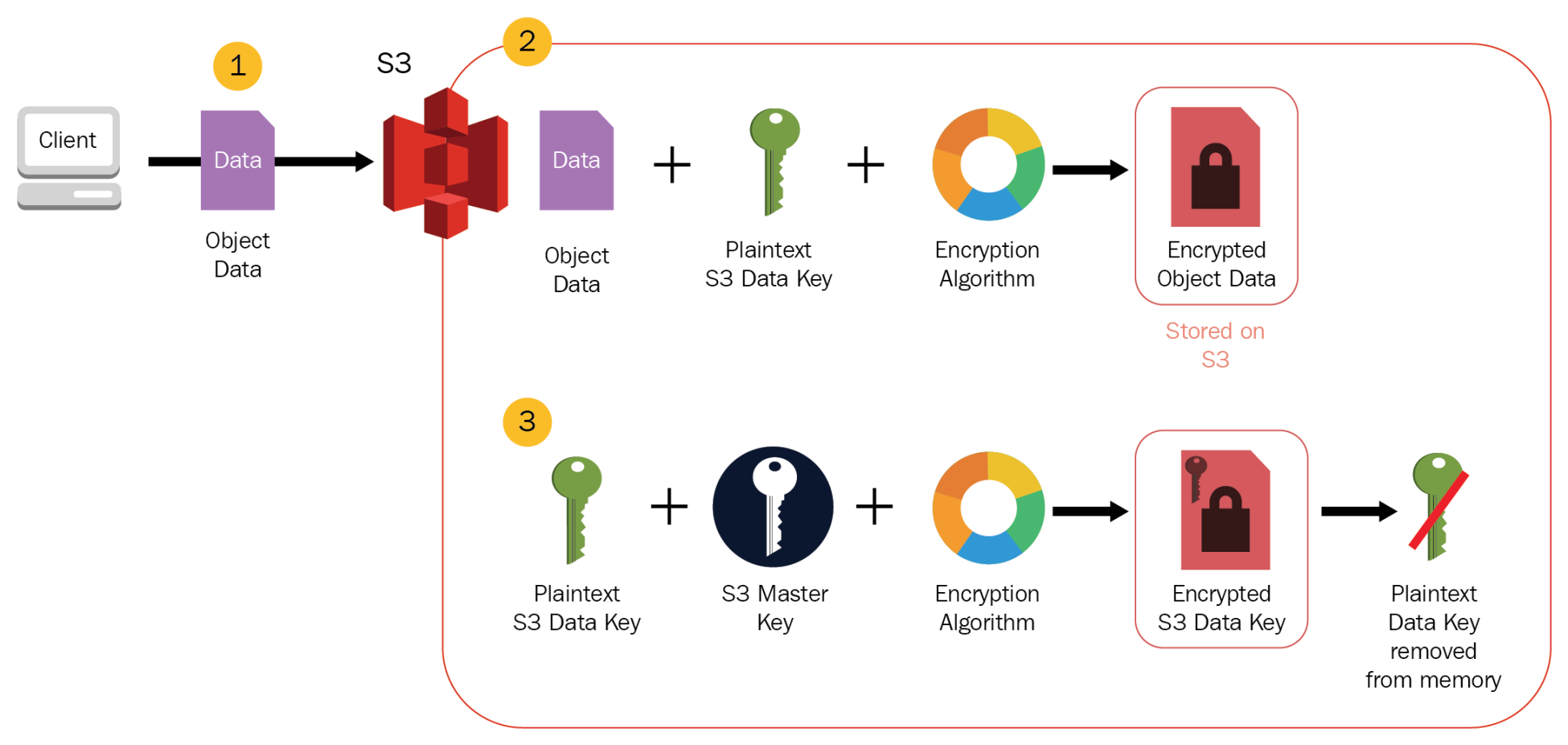
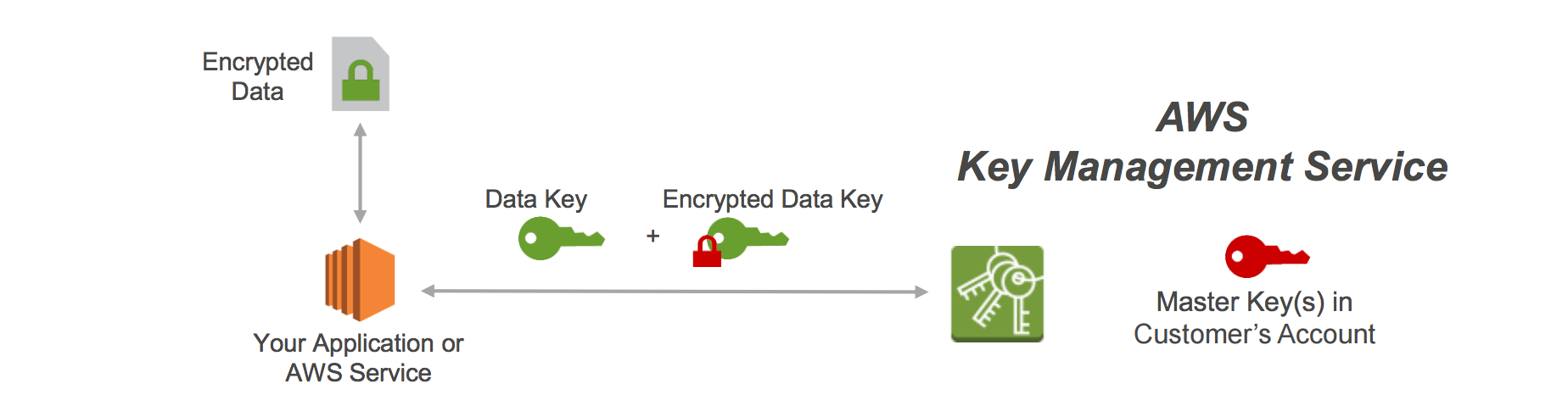
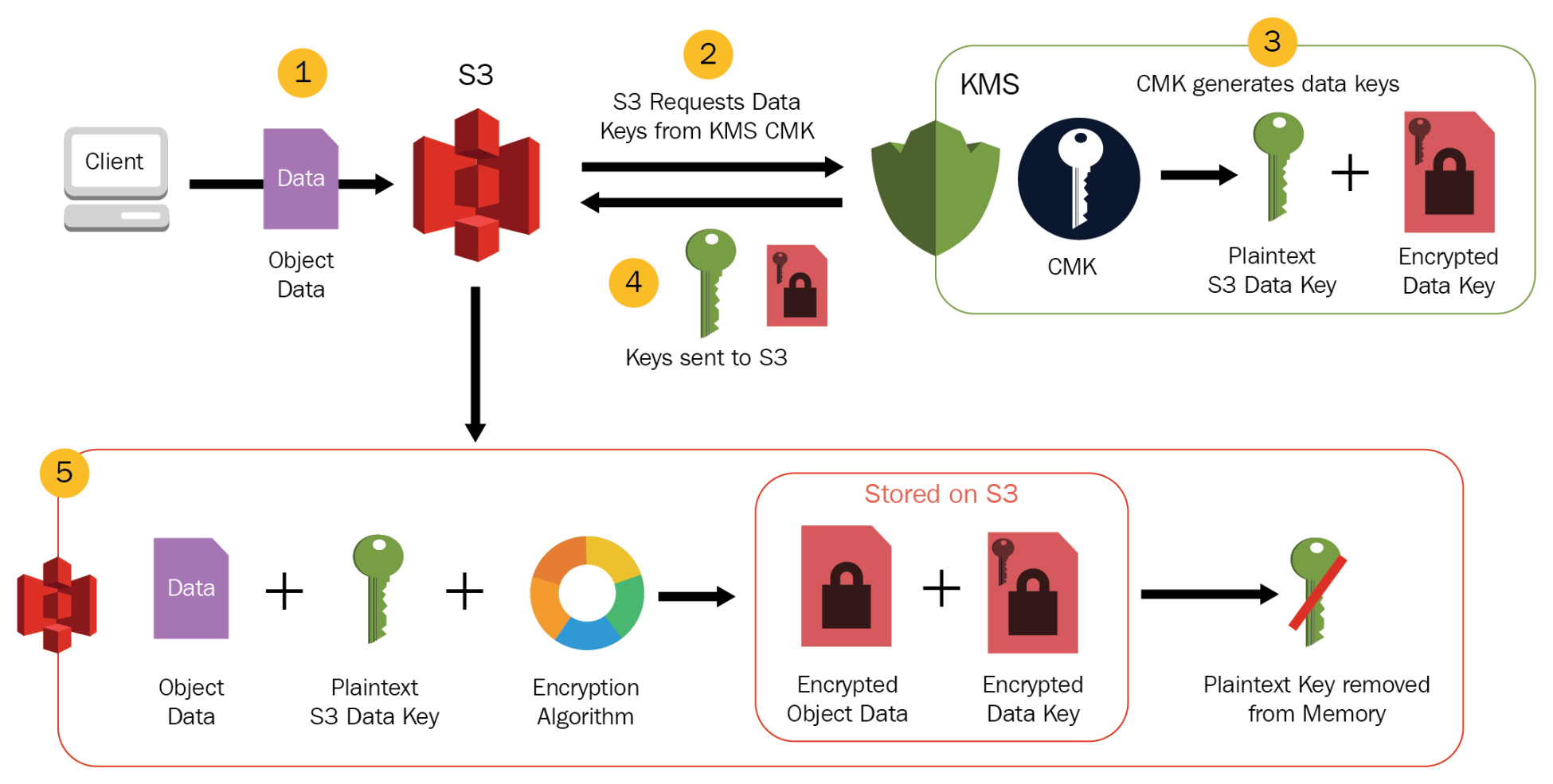
  • offers the ability to encrypt data at rest using KMS and in transit.
  • can be accessed from on-premises using an AWS Direct Connect or AWS VPN connection between the on-premises datacenter and VPC.
  • can be accessed concurrently from servers in the on-premises data center as well as EC2 instances in the VPC
  • supports IPv6 on EFS Service APIs and mount targets (added June 2025)
  • supports integration with AWS Lambda, Amazon ECS, Amazon EKS (including Fargate), and other containerized/serverless compute services.

EFS File System Types

  • Regional (Recommended)
    • stores data redundantly across multiple Availability Zones in an AWS Region
    • offers the highest levels of durability and availability
    • supports all performance and throughput modes
  • One Zone
    • stores data within a single Availability Zone
    • offers lower cost with additional savings
    • does not support Max I/O performance mode

EFS Storage Classes

EFS Storage Classes

Standard storage classes

  • EFS Standard and Standard-Infrequent Access (Standard-IA), offer multi-AZ resilience and the highest levels of durability and availability.
  • For file systems using Standard storage classes, a mount target can be created in each Availability Zone in the AWS Region.
  • Standard
    • regional storage class for frequently accessed data.
    • offers the highest levels of availability and durability by storing file system data redundantly across multiple AZs in an AWS Region.
    • uses SSD storage to deliver the lowest levels of latency (~1 ms read, ~2.7 ms write)
    • ideal for active file system workloads and you pay only for the file system storage you use per month
  • Standard-Infrequent Access (Standard-IA)
    • regional, low-cost storage class that’s cost-optimized for files infrequently accessed i.e. not accessed every day
    • offers the highest levels of availability and durability by storing file system data redundantly across multiple AZs in an AWS Region
    • cost to retrieve files, lower price to store
    • provides first-byte latencies of tens of milliseconds

EFS Regional

One Zone storage classes

  • EFS One Zone and One Zone-Infrequent Access (One Zone-IA) offer additional savings by saving the data in a single AZ.
  • For file systems using One Zone storage classes, only a single mount target that is in the same Availability Zone as the file system needs to be created.
  • EFS One Zone
    • For frequently accessed files stored redundantly within a single AZ in an AWS Region.
  • EFS One Zone-IA (One Zone-IA)
    • A lower-cost storage class for infrequently accessed files stored redundantly within a single AZ in an AWS Region.

EFS Zonal

EFS Archive Storage Class

  • EFS Archive is a storage class designed for rarely accessed data, launched in November 2023.
  • delivers storage prices up to 50% lower compared to EFS Infrequent Access (IA) and up to 97% lower compared to EFS Standard.
  • costs only $0.008/GB-month.
  • supports the same intelligent tiering experience as existing EFS storage classes.
  • provides first-byte latencies of tens of milliseconds (same as IA).
  • ideal for storing compliance data, historical records, and rarely accessed datasets that still need to be in a shared file system.
  • by default, files not accessed in Standard storage for 90 days are transitioned into the Archive storage class.
  • available only for Regional file systems.

EFS Lifecycle Management

  • EFS lifecycle management automatically manages cost-effective file storage for the file systems.
  • When enabled, lifecycle management migrates files that haven’t been accessed for a set period of time to an infrequent access storage class, Standard-IA or One Zone-IA.
  • Lifecycle Management automatically moves the data to the EFS IA storage class according to the lifecycle policy. for e.g., you can move files automatically into EFS IA fourteen days after not being accessed.
  • Lifecycle management uses an internal timer to track when a file was last accessed and not the POSIX file system attribute that is publicly viewable.
  • Whenever a file in Standard or One Zone storage is accessed, the lifecycle management timer is reset.
  • After lifecycle management moves a file into one of the IA storage classes, the file remains there indefinitely if EFS Intelligent-Tiering is not enabled.
  • Supported lifecycle transition periods: 1, 7, 14, 30, 60, 90, 180, 270, or 365 days after last access.
  • Files can also be automatically transitioned from IA to Archive storage (default 90 days after last access in Standard).

EFS Intelligent-Tiering

  • EFS Intelligent-Tiering delivers automatic cost savings for workloads with changing access patterns.
  • automatically moves files between storage classes based on access patterns:
    • Moves infrequently accessed files from Standard to IA (or from One Zone to One Zone-IA)
    • Moves files back to Standard (or One Zone) storage on first access if “Transition into Standard” policy is set to “On first access”
    • Moves rarely accessed files from IA to Archive
  • eliminates the risk of unbounded access charges while providing consistent low latencies for active data.
  • EFS transparently serves files across all storage classes from a common file system namespace.

EFS Performance Modes

General Purpose (Default, Recommended)

  • lowest per-operation latency (~1 ms read, ~2.7 ms write for Regional)
  • ideal for web serving environments, content management systems, home directories, and general file serving
  • supports up to 2.5 million read IOPS and 500,000 write IOPS per file system with Elastic Throughput (as of Nov 2024, a 10x increase over previous limits)
  • recommended for ALL file systems; AWS recommends always using General Purpose performance mode
  • One Zone file systems always use General Purpose performance mode

Max I/O (Previous Generation)

  • can scale to higher levels of aggregate throughput and operations per second
  • with a tradeoff of slightly higher latencies for file metadata operations
  • designed for highly parallelized applications and workloads, such as big data analysis, media processing, and genomic analysis
  • is NOT available for file systems using One Zone storage classes or Elastic throughput mode
  • AWS now recommends using General Purpose performance mode instead; with Elastic throughput, General Purpose now provides up to 2.5 million IOPS, surpassing Max I/O for most use cases
  • performance mode cannot be changed after file system creation; a new file system must be created to switch modes

EFS Throughput Modes

Elastic Throughput (Default, Recommended)

  • automatically scales throughput performance up or down to meet workload activity needs
  • recommended for most use cases, especially spiky or unpredictable workloads
  • ideal for applications that drive throughput at an average-to-peak ratio of 5% or less
  • pay only for the amount of data read or written; no burst credits consumed
  • supports up to 60 GiBps read throughput and 5 GiBps write throughput per file system (region-dependent)
  • supports up to 1,500 MiBps per-client throughput (with EFS client v2.0+ or EFS CSI Driver)
  • supports up to 2.5 million read IOPS and 500,000 write IOPS (with quota increase, up to 10x)
  • not compatible with Max I/O performance mode

Provisioned Throughput

  • throughput of the file system (in MiB/s) can be instantly provisioned independent of the amount of data stored
  • use when workload performance requirements are known and average-to-peak ratio is 5% or more
  • supports up to 10 GiBps read and 3.33 GiBps write throughput
  • supports up to 55,000 read IOPS and 25,000 write IOPS

Bursting Throughput

  • throughput on EFS scales as the size of the file system in the EFS Standard or One Zone storage class grows
  • base throughput of 50 KiBps per GiB of Standard storage
  • can burst up to 100 MiBps per TiB when burst credits are available
  • supports up to 35,000 read IOPS and 7,000 write IOPS
  • if throughput-constrained, consider switching to Elastic or Provisioned throughput

EFS Replication

  • EFS Replication enables automatic replication of file system data to another AWS Region or Availability Zone.
  • supports cross-Region replication for disaster recovery and compliance use cases.
  • supports cross-account replication (added November 2024), allowing replication between different AWS accounts.
  • all replication traffic stays on the AWS global backbone network.
  • most changes are replicated within a minute, with an overall Recovery Point Objective (RPO) of 15 minutes for most file systems.
  • replication does not consume burst credits and does not count against provisioned throughput.
  • available in all AWS Regions where Amazon EFS is available.
  • useful for business continuity, localized data access, and test/development environments.

EFS Security

  • EFS supports authentication, authorization, and encryption capabilities to help meet security and compliance requirements.
  • EFS supports two forms of encryption for file systems,
    • Encryption in transit
      • Encryption in Transit can be enabled when you mount the file system using TLS.
    • Encryption at rest.
      • encrypts all the data and metadata
      • can be enabled only when creating an EFS file system.
      • to encrypt an existing unencrypted EFS file system, create a new encrypted EFS file system, and migrate the data using AWS DataSync.
  • NFS client access to EFS is controlled by both AWS IAM policies and network security policies like security groups.

EFS Access Points

  • EFS access points are application-specific entry points into an EFS file system that make it easier to manage application access to shared datasets.
  • Access points can enforce a user identity, including the user’s POSIX groups, for all file system requests that are made through the access point.
  • Access points can enforce a different root directory for the file system so that clients can only access data in the specified directory or its subdirectories.
  • AWS IAM policies can be used to enforce that specific applications use a specific access point.
  • IAM policies with access points provide secure access to specific datasets for the applications.
  • A single file system supports up to 10,000 access points (increased from 1,000 in February 2025).

EFS Integration with Compute Services

  • Amazon EC2 – Mount EFS file systems on Linux-based EC2 instances across multiple AZs.
  • AWS Lambda – Mount EFS as shared file storage for Lambda functions within a VPC for sharing data across invocations.
  • Amazon ECS / AWS Fargate – Use EFS as persistent storage for containerized workloads via task definitions.
  • Amazon EKS – Mount EFS via the EFS CSI Driver as persistent volumes for Kubernetes pods, including Fargate pods.
  • Amazon SageMaker – Use EFS for ML training data and shared notebooks.
  • EFS is NOT supported on Windows instances. Use Amazon FSx for Windows File Server for Windows workloads.

EFS vs EBS vs S3

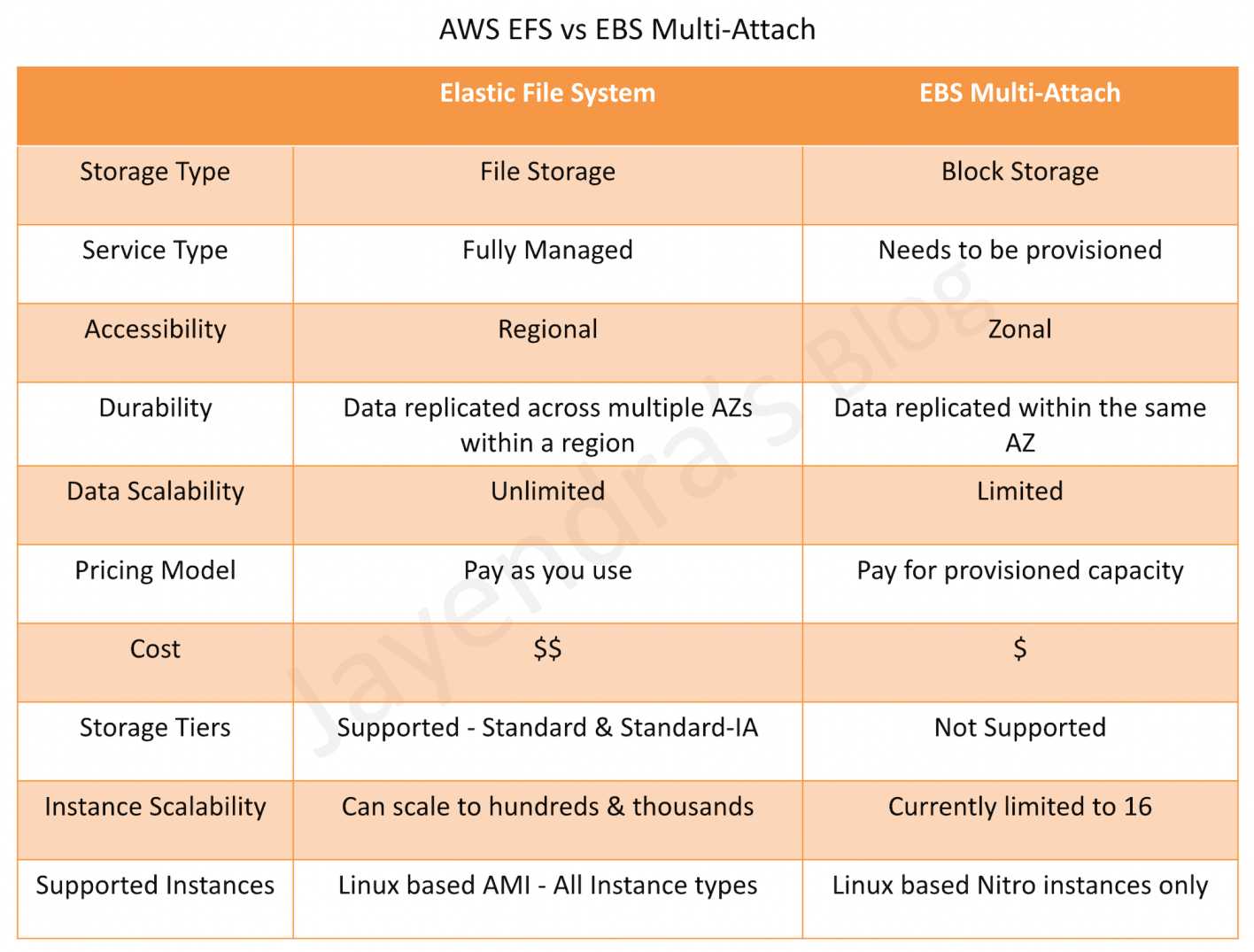
  • EFS – Shared file storage (NFS), multiple instances/AZs, Linux only, auto-scaling, POSIX compliant
  • EBS – Block storage, single instance (except multi-attach io1/io2), single AZ, fixed provisioned size
  • S3 – Object storage, unlimited scale, not a file system, accessed via API/SDK

AWS Certification Exam Practice Questions

  • Questions are collected from Internet and the answers are marked as per my knowledge and understanding (which might differ with yours).
  • AWS services are updated everyday and both the answers and questions might be outdated soon, so research accordingly.
  • AWS exam questions are not updated to keep up the pace with AWS updates, so even if the underlying feature has changed the question might not be updated
  • Open to further feedback, discussion and correction.
  1. An administrator runs a highly available application in AWS. A file storage layer is needed that can share between instances and scale the platform more easily. The storage should also be POSIX compliant. Which AWS service can perform this action?
    1. Amazon EBS
    2. Amazon S3
    3. Amazon EFS
    4. Amazon EC2 Instance store
  2. A company has a data analytics workload that processes large datasets. Files are actively used for the first 30 days, occasionally accessed for the next 60 days, and rarely accessed after that. The company wants to minimize storage costs while keeping all data in a single file system. Which EFS configuration best meets these requirements?
    1. Use EFS Standard with Provisioned Throughput
    2. Use EFS with Intelligent-Tiering enabled, with lifecycle policies to transition to IA after 30 days and Archive after 90 days
    3. Use EFS One Zone-IA for all data
    4. Use EFS Standard with Bursting Throughput and manual data migration
  3. A machine learning team needs a shared file system that can handle highly parallel read-heavy workloads with millions of IOPS. They want the file system to automatically scale throughput without pre-provisioning. Which EFS configuration should they choose?
    1. General Purpose performance mode with Bursting Throughput
    2. Max I/O performance mode with Provisioned Throughput
    3. General Purpose performance mode with Elastic Throughput
    4. One Zone file system with Elastic Throughput
  4. A company needs to maintain a disaster recovery copy of their EFS file system in a different AWS Region and a different AWS account for compliance purposes. Which approach meets these requirements with the LEAST operational overhead?
    1. Use AWS DataSync to schedule periodic cross-region, cross-account transfers
    2. Configure EFS cross-account, cross-Region replication
    3. Use AWS Backup with cross-account, cross-region copy rules
    4. Create a custom Lambda function to sync files between accounts and regions
  5. A containerized application running on Amazon EKS with Fargate needs persistent shared storage accessible across multiple pods in different Availability Zones. Which storage solution is most appropriate?
    1. Amazon EBS with multi-attach
    2. Amazon EFS with the EFS CSI Driver
    3. Amazon S3 mounted via s3fs
    4. Amazon FSx for Lustre

References

AWS Partnerships That Have Upgraded the Way Businesses Collaborate

AWS Partnerships That Have Upgraded the Way Businesses Collaborate

📝 Updated June 2026: This post has been updated to reflect the latest AWS Partner Network developments, company rebranding (Infostretch → Apexon), current APN statistics (140,000+ partners across 200+ countries), and the latest AWS innovations including Graviton5 processors and Aurora Serverless v2 enhancements.
Credit: Unsplash

Through the AWS Partner Network (APN), brands have been able to reach customers and help improve businesses across the globe. With more than 140,000 partners from over 200 countries and territories, the APN has grown into one of the largest cloud partner ecosystems in the world. According to the 2025 AWS Partner Ecosystem Multiplier (PEM) study by Omdia, AWS Partners can achieve up to $7.13 in services revenue for every $1 of AWS technology sold, demonstrating the significant value creation potential within the network.

AWS continues to invest in partner success with new programs including the Partner Profitability Framework, stronger incentives, simplified benefits, and AI-powered agentic capabilities that help partners get from registered to ready-to-sell in days.

Here are some notable AWS partnerships that have upgraded the way businesses collaborate:

AllCloud

Having been an AWS Premier Consulting Partner and AWS Managed Services Provider since 2008, AllCloud is at the forefront of AWS partnerships. In November 2025, AllCloud signed a new multi-year Strategic Collaboration Agreement (SCA) with AWS to accelerate AI and industry-specific solutions. Now positioning itself as an “AI-first global cloud professional and managed services company,” AllCloud has achieved the AWS Agentic AI Specialization and was named a winner of both the 2024 and 2025 AWS Partner Awards. AllCloud is also a launch partner for the AWS European Sovereign Cloud, deploying TrustStack Security Solutions for European customers requiring data sovereignty.

Altium

Altium is a leading provider of electronics designing software that aims to streamline the process for both beginning and experienced engineers. Their cloud-based Altium 365 platform, hosted on AWS, creates seamless collaboration points across the electronics development process. In September 2024, Altium 365 apps became available in AWS Marketplace, allowing customers to access a growing suite of applications for ECAD connectivity, supply chain management, and data security directly through their AWS accounts. Altium also launched Altium 365 GovCloud, operating in the AWS GovCloud region to support organizations requiring compliance with US government security regulations such as ITAR and EAR.

Deloitte

Professional services network Deloitte continues to expand its collaboration with AWS through the Smart Factory Fabric — a pre-configured suite of cloud-based applications that help industrial enterprises transition to Industry 4.0. Deloitte and AWS have expanded this partnership with The Smart Factory @ Wichita, an immersive Industry 4.0 experience center where AWS serves as a founding sponsor and cloud provider. The Smart Factory Fabric empowers smart factory transformations at both the plant and enterprise level, improving operational performance, reducing costs, and increasing visibility through IoT, AI, and cloud technologies. Deloitte’s global Smart Factory network now spans multiple locations worldwide.

Apexon (formerly Infostretch)

Note: Infostretch merged with Apexon in April 2022 and now operates under the Apexon brand.

Now an AWS Advanced Tier Services Partner with Life Sciences and Migration Competencies, Apexon (formerly Infostretch) continues to enable enterprise clients to accelerate their digital initiatives through AI-first engineering, DevSecOps, IoT, and data analytics services. In June 2026, Apexon signed a Strategic Collaboration Agreement with AWS to deliver Agentic AI solutions for Healthcare and Life Sciences. The company maintains its focus on helping clients through their digital maturity journey — from strategy and planning through migration and execution to AI-powered automation.

Lemongrass

Specializing in providing SAP solutions for enterprises on AWS, Lemongrass remains one of the leading AWS partners for SAP workloads. Now an AWS Premier Consulting Partner and the second company globally to achieve AWS SAP Competency status, Lemongrass has migrated over 8,000 enterprise SAP systems to the cloud. In 2024, Lemongrass was awarded a 2024 Geography and Global AWS Partner Award and partnered with Radisson Hotel Group on a major cloud transformation initiative. The company continues to leverage AWS infrastructure for its highly automated migration and managed services offerings.

What’s Next for AWS and the Partner Ecosystem

The AWS Partner Network continues to evolve rapidly. Key developments shaping the future of AWS partnerships include:

  • AWS Graviton5 Processors (2026): The latest generation custom silicon, offering up to 25% faster performance than Graviton4, with 192 cores and 33% lower inter-core latency — designed specifically for agentic AI workloads. This follows Graviton4 (2024), which delivered up to 40% improvement over Graviton3.
  • Aurora Serverless v2 Enhancements: Now supports scaling down to 0 ACUs (zero cost when idle), scaling up to 256 ACUs, and delivers up to 30% better performance — enabling cost-efficient database solutions for partners and customers alike.
  • AI-Powered Partner Tools: AWS has introduced agentic capabilities in Partner Central that automate seller account setup, marketplace listing optimization, and FTR validation, helping partners get to market faster.
  • Outcome-Based Models: According to a 2026 AWS Market Study, 80% of customers are moving toward outcome-based commercial models, driving partners to evolve their service offerings.
  • 120+ Partner Specializations: AWS now offers specializations across industries including healthcare, automotive, life sciences, and financial services, with new AI categories including Agentic AI.

AWS remains a game-changer for many businesses. With a robust operations hub like AWS Systems Manager, businesses have great control over operational tasks, troubleshooting, and resource and application management. The APN’s growth to 140,000+ partners across 200+ countries demonstrates the enduring value of the AWS partner ecosystem for end-to-end solutions and cloud-native application development.

AWS Certified Alexa Skill Builder – Specialty (AXS-C01) Exam Learning Path

AWS Certified Alexa Skill Builder - Specialty Certificate

⚠️ CERTIFICATION RETIRED

AWS Certified Alexa Skill Builder – Specialty (AXS-C01) was retired on March 23, 2021.

The last day to take this exam was March 22, 2021. Certifications earned prior to retirement remained active for the standard three-year period but have now all expired.

This content is maintained for historical reference and for those interested in Alexa skill development concepts.

Recommended Current AWS Certifications:

📢 Alexa Ecosystem Update (2024-2026)

  • Alexa+ – Amazon launched its next-generation AI-powered assistant (Alexa+) in February 2026, free for Prime members. It represents a major shift from the traditional skills-based model to conversational AI.
  • Developer Program Changes – Amazon ended the Alexa Developer Rewards Program and AWS Promotional Credits for Alexa in June 2024.
  • Deprecated Features – Multiple Alexa features have been deprecated including A/B testing (Aug 2025), Alexa Routines Kit (May 2026), and EventDetectionSensor (Feb 2023).
  • The Alexa Skills Kit remains available for developers, but the ecosystem focus has shifted significantly toward generative AI capabilities.

Finally All Down for AWS (for now) …

Continuing on my AWS journey with the last AWS certification, I took another step by clearing the AWS Certified Alexa Skill Builder – Specialty (AXS-C01) certification. It is amazing to know and learn how Voice first experiences are making an impact and changing how we think about technology and use cases.

AWS Certified Alexa Skill Builder – Specialty (AXS-C01) exam basically validates your ability to build, test, publish and certify Alexa skills.

AWS Certified Alexa Skill Builder – Specialty (AXS-C01) Exam Summary

  • AWS Certified Alexa Skill Builder – Specialty exam focuses only on Alexa and how to build skills.
  • AWS Certified Alexa Skill Builder – Specialty exam has 65 questions with a time limit of 170 minutes
  • Compared to the other professional and specialty exams, the question and answers are not long and similar to associate exams. So if you are prepared well, it should not need the 170 minutes.
  • As the exam was online from home, there was no access to paper and pen but the trick remains the same, read the question and draw a rough architecture and focus on the areas that you need to improve. Trust me, you will be able to eliminate 2 answers for sure and then need to focus on only the other two. Read the other 2 answers to check the difference area and that would help you reach to the right answer or atleast have a 50% chance of getting it right.

AWS Certified Alexa Skill Builder – Specialty (AXS-C01) Exam Topic Summary

Refer AWS Alexa Cheat Sheet

Domain 1: Voice-First Design Practices and Capabilities

1.1 Describe how users interact with skills

1.2 Map features and capabilities to use cases

  • Alexa supports display cards to display text (Simple card) and text with image (Standard card)
  • Alexa Alexa Skill Kits supports APIs
    • Alexa Settings APIs allow developers to retrieve customer preferences for the settings like time zone, distance measuring unit, and temperature measurement unit
    • Device services – a skill can request the customer’s permission to their address information, which is a static data filled by customer and includes the country/region, postal code and full address
    • Customer Profile services – a skill can request the customer’s permission to their contact information, which includes name, email address and phone number
    • With Location services, a skill can ask a user’s permission to obtain the real-time location of their Alexa-enabled device, specifically at the time of the user’s request to Alexa, so that the skill can provide enhanced services.
  • Alexa Skill Kit APIs need apiAccessToken and deviceId to access the ASK APIs
  • Progressive Response API allows you to keep the user engaged while the skill prepares a full response to the user’s request.
  • Personalization can be provided using userId and state persistence

Domain 2: Skill Design

2.1 Design and develop an interaction model

  • Alexa interaction model includes skill, Invocation name, utterances, slots, Intents
  • A skill is ‘an app for Alexa’, however they are not downloadable but just need to be enabled.
  • Wakeword – Amazon offers a choice of wakewords like ‘Alexa’, ‘Amazon’, ‘Echo’, ‘skill’, ‘app’ or ‘Computer’, with the default being ‘Alexa’.
  • Launch phrases include “run,” “start,” “play,” “resume,” “use,” “launch,” “ask,” “open,” “tell,” “load,” “begin,” and “enable.”
  • Connecting words include “to,” “from,” “in,” “using,” “with,” “about,” “for,” “that,” “by,” “if,” “and,” “whether.”
  • Invocation name
    • is the word or phrase used to trigger the skill for custom skills and the invocation name should adhere to the requirements
    • must not infringe upon the intellectual property rights of an entity or person
    • must be compound of two or more works.
    • One-word invocation names are allowed only for brand/intellectual property.
    • must not include names of people or places
    • if two-word invocation names, one of the words cannot be a definite article (“the”), indefinite article (“a”, “an”) or preposition (“for”, “to”, “of,” “about,” “up,” “by,” “at,” “off,” “with”).
    • must not contain any of the Alexa skill launch phrases, connecting words and wake words
    • must contain only lower-case alphabetic characters, spaces between words, and possessive apostrophes
    • must spell characters like numbers for e.g., twenty one
    • can have periods in the invocation names containing acronyms or abbreviations that are pronounced as a series of individual letters, for e.g. NASA as n. a. s. a.
    • cannot spell out phonemes for e.g., a skill titled “AWS Facts” would need “AWS” represented as “a. w. s. ” and NOT “ay double u ess.”
    • must not create confusion with existing Alexa features.
    • must be written in each supported language
  • An intent is what a user is trying to accomplish.
    • Amazon provides standard built-in intents which can be extended
    • Intents need to have a unique utterance
  • Utterances are the specific phrases that people will use when making a request to Alexa.
  • A slot is a variable that relates to an intent allowing Alexa to understand information about the request
    • Amazon provides standard built-in slots which can be extended
  • Entity resolution improves the way Alexa matches possible slot values in a user’s utterance with the slots defined in your interaction model

2.2 Design a multi-turn conversation

  • Alexa Dialog management model identifies the prompts and utterances to collect, validate, and confirm the slot values and intents.
  • Alexa supports
    • Auto Delegation where Alexa completes all of the dialog steps based on the dialog model.
    • Manual delegation using Dialog.Delegate where Alexa sends the skill an IntentRequest for each turn of the conversation and provides more flexibility.
  • AMAZON.FallbackIntent will not be triggered in the middle of a dialog

2.3 Use built-in intents and slots

  • Standard built-in intents cannot include any slots. If slots are needed, create a custom intent and write your own sample utterances.
  • Alexa recommends using and extending standard built-in intents like Alexa.HelpIntent, Alexa.YesIntent with additional utterances as per the skill requirements
  • Alexa provides Alexa.FallbackIntent for handling any unmatched utterances and can be used to improve the interaction model accuracy.
  • Standard built-in intents cannot include any slots. If slots are needed, create a custom intent and write your own sample utterances.
  • Alexa provides slot which helps capture variables and can be either be a Amazon predefined slot such as dates, numbers, durations, time, etc. or a custom one specific to the skill
  • Predefined slots can be extended to add additional values

2.4 Handle unexpected conversational requests or responses

  • Alexa provides Alexa.FallbackIntent for handling any unmatched utterances and can be used to improve the interaction model accuracy.
  • Alexa also provides Intent History which provides a consolidate view with aggregated, anonymized frequent utterances and the resolved intents. These can be used to map the utterances to correct intents

2.5 Design multi-modal skills using one or more service interfaces (for example, audio, video, and gadgets)

  • Alexa enabled devices with a screen handles Page and Scroll intents. Do not handle Next and Previous.
  • Alexa skill with AudioPlayer interface
    • must handle AMAZON.ResumeIntent and AMAZON.PauseIntent
    • PlaybackController events to track AudioPlayer status changes initiated from the device buttons

Domain 3: Skill Architecture

3.1 Identify AWS services for extending Alexa skill functionality (Amazon CloudFront, Amazon S3, Amazon CloudWatch, and Amazon DynamoDB)

  • Focus on standard skill architecture using Lambda for backend, DynamoDB for persistence, S3 for severing static assets, and CloudWatch for monitoring and logs.
  • Lambda provide serverless handling for the Alexa requests, but remember the following limits
    • default concurrency soft limit of 1000 can be increased by raising a support request
    • default timeout of 3 secs, and should be increased to atleast 7 secs to be inline with Alexa timeout of 8 secs
    • default memory of 128mb, increase to improve performance
  • S3 performance can be improved by exposing it through CloudFront esp. for images, audio and video files

3.2 Use AWS Lambda to build Alexa skills

  • Lambda integrates with CloudWatch to provide logs and should be the first thing to check in case of any issues or errors.
  • Alexa allows any http endpoint to act as a backend, but needs to meet following requirements
    • must be accessible over the internet.
    • must accept HTTP requests on port 443.
    • must support HTTP over SSL/TLS, using an Amazon-trusted certificate.

3.3 Follow AWS and Alexa security and privacy best practices

  • Alexa requires the backend to verify that incoming requests come from Alexa using Skill ID verification
  • Child-directed skills cannot use personal and location information
  • Skills cannot be used to capture health information
  • Alexa Skills Kit uses the OAuth 2.0 authentication framework for Account linking, which defines a means by which the service can allow Alexa, with the user’s permission, to access information from the account that the user has set up with you.
  • Alexa smart home skills must have OAuth authorization code grant implementation while custom skills can have authorization code grant or impact grant implementation.

Domain 4: Skill Development

4.1 Implement in-skill purchasing and Amazon Pay for Alexa Skills

  • In-skill purchasing enables selling premium content such as game features and interactive stories in skills with a custom interaction model.
  • In-skill purchasing is handled by Alexa when the skill sends a Upsell directive. As the skill session ends when a Upsell directive is sent, be sure to save any relevant user data in a persistent data store so that the skill can continue where the user left off after the purchase flow is completed and the endpoint is back in control of the user experience.
  • Skill can handle the Connections.Response request that indicates the result of a purchase flow and resume the skill

4.2 Use Speech Synthesis Markup Language (SSML) for expression and MP3 audio

  • SSML is a markup language that provides a standard way to mark up text for the generation of synthetic speech.
  • Alexa supports a subset of SSML tags including
    • say-as to interpret text as telephone, date, time etc.
    • phonemeprovides a phonemic/phonetic pronunciation
    • prosody modifies the volume, pitch, and rate of the tagged speech.
    • audioallows playing MP3 player while rendering a response
      • must be in valid MP3 file (MPEG version 2) format
      • must be hosted at an Internet-accessible HTTPS endpoint.
      • For speech response, the audio file cannot be longer than 240 seconds.
        • combined total time for all audio files in the outputSpeech property of the response cannot be more than 240 seconds.
        • combined total time for all audio files in the reprompt property of the response cannot be more than 90 seconds.
      • bit rate must be 48 kbps.
      • sample rate must be 22050Hz, 24000Hz, or 16000Hz.

4.3 Implement state management

  • Alexa Skill state persistence can be handled using session attributes during the session and externally using services like DynamoDB, RDS across sessions.

4.4 Implement Alexa service interfaces (audio player, video player, and screens)

4.5 Parse Alexa JSON requests and provide responses

  • All requests include the session (optional), context, and request objects at the top level.
    • session object provides additional context associated with the request.
      • session attributes can be used to store data
      • user containing userId to uniquely define an user and accessToken to access other services.
      • system object provides apiAccessToken and device object provides deviceId to access ASK APIs
      • application provide applicationId
      • device object provides supportedInterfaces to list each interface that the device supports
      • user containing userId to uniquely define an user and accessToken to access other services.
    • A request object that provides the details of the user’s request.
  • Response includes
    • outputSpeech contains the speech to render to the user.
    • reprompt contains the outputSpeech to use if a re-prompt is necessary.
    • shouldEndSession provides a boolean value that indicates what should happen after Alexa speaks the response.

Domain 5: Test, Validate, and Troubleshoot

5.1 Debug and troubleshoot using Amazon CloudWatch or other tools

  • Lambda integrates with CloudWatch for metric and logs and can be check for any errors and metrics.

5.2 Use the Alexa developer testing tools

  • Utterance profiles – test utterances to know what intent they resolve to
  • Alexa Skill simulator
    • provides an ability to Interact with Alexa with either your voice or text, without an actual device.
    • maintains the skill session, so the interaction model and dialog flow can be tested.
    • supports multiple languages testing by selecting locale
    • has limitations in testing audio, video, Alexa settings and Device API
  • Manual Json
    • enter a JSON request directly and see the skill returned JSON response
    • does not maintain the skill session and is similar to testing a JSON request in the Lambda console.
  • Voice & Tone – enter plain text or SSML and hear how Alexa speaks the text in a selected language
  • Alexa device – test with an Alexa-enabled device.
  • Alexa app – test the skill with the Alexa app for Android/iOS
  • Lambda Test console – to test Lambda functions

5.3 Perform beta testing

  • Skill beta testing tool can be used to test the Alexa skill in beta before releasing it to production
  • Beat testing allows testing changes to an existing skill, while still keeping the currently live version of the skill available for the general public.
  • Members can be invited using their Alexa email address. Alexa device used by the beta tester must be associated with the email address in the tester’s invitation.

5.4 Troubleshoot errors in the interaction model

Domain 6: Publishing, Operations, and Lifecycle Management

6.1 Describe the skill publishing process

  • Alexa skill needs to go through certification process before the Skill is live and made available to the users
  • Alexa creates an in development version of the skill, once the skill becomes live
  • Alexa Skill live version cannot be edited, and it is recommended to edit the in development skill, test and then re-certify for publishing.
  • Backend changes like changes in Lambda functions or response output from the function, however, can be made on live version and do not require re-certification. However, it is recommended to use Lambda versioning or alias to do such changes.
  • Alexa for Business allows skill to be made private and available to select users within the company

6.2 Add and remove users in the developer console

  • Alexa Skill Developer console access can be shared across multiple users for collaboration
  • Administrator and Analyst roles will also have access to the Earnings and Payments sections.
  • Administrator and Marketer roles will also have access to edit the content associated with apps (i.e. Descriptions, Images & Multimedia) and IAPs
  • Administrator and Developer roles will have access to create, modify and delete Alexa skills using ASK CLI and SMAPI.
  • Administrator, Analyst and Marketer roles have access to sales report

6.3 Perform analysis of skill analytics in the developer console

  • Intent History – View aggregated, anonymized frequent utterances and the resolved intents. You cannot track the user intent history as they are anonymized.
  • Actions – Unique customers per action, total actions, and total utterances per action.
  • Customers – Total number of unique customers who accessed the skill.
  • Intents – Unique customers per intent, total utterances per intent, total intents, and failed intents.
  • Interaction Path – Paths users take when interacting with the skill.
  • Plays Total number of times that a user played the skill content.
  • Retention (live skills only) Usage of the skill over time by groups of customers or cohorts. View the number or percentage of customers who returned to your skill over a 12-week period.
  • Sessions Total sessions, successful session types (sessions that didn’t end due to an error), average sessions per customer. Includes a breakdown of successful, failed, and no-response sessions as a percentage of total sessions. Custom
  • Utterances Metrics for utterances depend on the skill category.

6.4 Differentiate among the statuses/versions of skills (for example, In Development, In Certification, and Live)

  • In Development – skill available for development, testing
  • In Review – A certification review is in progress and the skill cannot be edited
  • Certified – Skill passed certification review, and is not yet available to users
  • Live – skill has been published and is available to users. You cannot edit the configuration for live skills
  • Hidden – skill was previously published, but has since been hidden. Existing users can access the skill. New users cannot discover the skill.
  • Removed – skill was previously published, but has since been removed. Users cannot enable or use the skill.

AWS Certified Alexa Skill Builder – Specialty (AXS-C01) Exam Resources

Recommended Current AWS Certifications

Since the Alexa Skill Builder certification has been retired, consider these current AWS certifications that cover related domains:

Certification Focus Area Relevance
AWS Certified AI Practitioner (AIF-C01) AI/ML fundamentals, Generative AI Covers AI services including Amazon Lex (conversational interfaces)
AWS Certified ML Engineer – Associate ML model building and deployment NLP, speech processing, conversational AI models
AWS Certified Developer – Associate (DVA-C02) Application development on AWS Lambda, DynamoDB, API Gateway – same services used in Alexa skills
AWS Certified Generative AI Developer – Professional Building generative AI applications Next-gen conversational AI, Amazon Bedrock, LLM-powered apps

Alexa Development Resources (Current)

While the certification is retired, Alexa skill development continues. Here are current resources:

AWS DynamoDB Best Practices

AWS DynamoDB Best Practices

Primary Key Design

  • Primary key uniquely identifies each item in a DynamoDB table and can be simple (a partition key only) or composite (a partition key combined with a sort key).
  • Partition key portion of a table’s primary key determines the logical partitions in which a table’s data is stored, which in turn affects the underlying physical partitions.
  • Partition key should have many unique values.
  • Distribute reads / writes uniformly across partitions to avoid hot partitions
  • Store hot and cold data in separate tables
  • Consider all possible query patterns to eliminate the use of scans and filters.
  • Choose a sort key depending on the application’s needs.
  • Avoid hot keys and hot partitions – a partition key design that doesn’t distribute I/O requests evenly can create “hot” partitions that result in throttling and use the provisioned I/O capacity inefficiently.
  • Use composite keys for access patterns – compose partition and sort keys by concatenating multiple attributes (e.g., {Type}#{ID}) to enable efficient queries without scans, especially in single-table designs.
  • Write sharding for high-volume keys – for items with high write volumes on the same partition key, add a random suffix or calculated suffix to distribute writes across multiple partitions.

Secondary Indexes

  • Use indexes based on the application’s query patterns.
  • Local Secondary Indexes – LSIs
    • Use primary key or LSIs when strong consistency is desired
    • Watch for expanding item collections (10 GB size limit!)
  • Global Secondary Indexes – GSIs
    • Use GSIs for finer control over throughput or when your application needs to query using a different partition key.
    • Can be used for eventually consistent read replicas – set up a global secondary index that has the same key schema as the parent table, with some or all of the non-key attributes projected into it.
    • Overloaded GSIs – use a single GSI with generic attribute names (e.g., GSI1PK, GSI1SK) to support multiple access patterns in single-table designs, reducing the total number of indexes needed.
  • Project fewer attributes – As secondary indexes consume storage and provisioned throughput, keep the index size as small as possible by projecting only required attributes as it would provide greater performance
  • Keep the number of indexes to a minimum – don’t create secondary indexes on attributes that aren’t queried often. Indexes that are seldom used contribute to increased storage and I/O costs without improving application performance.
  • Sparse indexes – DynamoDB indexes are Sparse and it writes a corresponding index entry only if the index sort key value is present in the item. If the sort key doesn’t appear in every table item, the index will not contain the item.

Large Items and Attributes

  • DynamoDB currently limits the size of each item (400 KB) that is stored in a table, which includes both attribute names and values binary length.
  • Use shorter (yet intuitive!) attribute names
  • Keep item size small.
  • Use compression (GZIP or LZO).
  • Split large attributes across multiple items (vertical partitioning).
  • Store metadata in DynamoDB and large BLOBs or attributes in S3.
  • Vertical partitioning – split items into multiple items using a sort key to distinguish parts, allowing you to exceed the 400 KB limit while maintaining efficient access to individual attribute groups.

Querying and Scanning Data

  • Avoid scans and filters – Scan operations are less efficient than other operations in DynamoDB. A Scan operation always scans the entire table or secondary index. It then filters out values to provide the result, essentially adding the extra step of removing data from the result set.
  • Use eventual consistency for reads.
  • Use parallel scans cautiously – parallel scans can improve throughput for large tables but consume significant read capacity. Use them only for infrequent, large-scale data processing tasks.

Time Series Data

  • Use a table per day, week, month, etc for storing time series data – create one table per period, provisioned with the required read and write capacity and the required indexes.
  • Before the end of each period, prebuild the table for the next period. Just as the current period ends, direct event traffic to the new table. Assign names to the tables that specify the periods they have recorded.
  • As soon as a table is no longer being written to, reduce its provisioned write capacity to a lower value (for example, 1 WCU), and provision whatever read capacity is appropriate. Reduce the provisioned read capacity of earlier tables as they age.
  • Archive or drop the tables whose contents are rarely or never needed.
  • Dropping tables is the fastest, simplest and cost-effective method if all the items are to be deleted from the table, without spending time in scanning and deleting each item.
  • Use TTL for automatic expiry – leverage Time to Live (TTL) to automatically delete expired items without consuming write throughput, ideal for session data, temporary records, and event logs.
  • Use DynamoDB Standard-IA table class – for older time series tables with infrequent access, switch to the Standard-Infrequent Access table class to save up to 60% on storage costs.

Capacity and Throughput Management

  • On-demand mode (recommended default) – on-demand mode is the default and recommended throughput option that eliminates capacity planning. DynamoDB instantly accommodates workloads as they ramp up or down. With the November 2024 pricing reduction (50% off), on-demand is now significantly more cost-effective.
  • Configurable maximum throughput – for on-demand tables, optionally set maximum read/write throughput limits to control costs and protect downstream services from accidental traffic surges (launched May 2024).
  • Warm throughput – provides visibility into the read and write operations your table can immediately support. Pre-warm tables proactively to meet anticipated traffic demands without throttling during sudden spikes (launched November 2024).
  • Burst Capacity reserves a portion of unused capacity (5 mins.) for later bursts of throughput to handle usage spikes.
  • Adaptive capacity helps run imbalanced workloads indefinitely. It minimizes throttling due to throughput exceptions and reduces cost by enabling you to provision only the needed throughput capacity.
  • Provisioned mode with Auto Scaling – for predictable workloads, provisioned mode with auto scaling can be more cost-effective than on-demand. Use scheduled scaling for known traffic patterns.
  • Reserved capacity – for steady-state workloads on provisioned tables, purchase 1-year or 3-year reserved capacity for significant savings. AWS Cost Explorer now provides purchase recommendations for DynamoDB reserved capacity.

Cost Optimization Best Practices

  • Choose the right capacity mode – on-demand mode pricing was reduced by 50% (November 2024). Evaluate whether on-demand or provisioned with auto scaling better suits your workload pattern.
  • DynamoDB Standard-IA table class – use for tables where storage cost exceeds 50% of throughput cost. Saves up to 60% on storage while keeping the same performance. Ideal for infrequently accessed data, logs, and historical records.
  • Use TTL to expire data – TTL deletes expired items without consuming write capacity, reducing both storage costs and manual cleanup effort.
  • Monitor with AWS Compute Optimizer – AWS Compute Optimizer now identifies idle DynamoDB provisioned tables (launched June 2026), helping detect unused resources and potential cost savings.
  • Global tables pricing – global table replicated write costs were reduced by up to 67% (November 2024). Evaluate global tables for multi-Region active-active architectures.

Security Best Practices

  • Resource-based policies (launched March 2024) – attach policies directly to DynamoDB tables, indexes, and streams to simplify cross-account access control. Integrates with IAM Access Analyzer and Block Public Access capabilities.
  • Attribute-Based Access Control (ABAC) – use tag-based conditions in IAM policies to grant access based on tags attached to users, roles, and DynamoDB resources (GA November 2024). ABAC automatically applies permissions as organizations grow without rewriting policies.
  • AWS PrivateLink (launched March 2024) – connect to DynamoDB over a private network without public IP addresses, eliminating the need for internet gateways or firewall rules.
  • Encryption at rest – all DynamoDB tables are encrypted at rest using AWS owned keys by default. Use AWS KMS customer managed keys (CMK) for additional control.
  • Deletion protection can keep the tables from being accidentally deleted.
  • FIPS 140-3 endpoints – FIPS-compliant interface VPC and Streams endpoints available in US, Canada, and GovCloud Regions (launched December 2024).

Global Tables Best Practices

  • Multi-Region strong consistency (GA June 2025) – global tables now support multi-Region strong consistency (MRSC), enabling zero RPO and ensuring applications can read the latest data from any Region. Ideal for user profiles, inventory tracking, and financial transactions.
  • Choose the right consistency mode – MRSC provides strongly consistent reads across Regions with slightly higher write latencies. Choose between MRSC and multi-Region eventually consistent (MREC) based on application needs.
  • Test with AWS FIS – use the AWS Fault Injection Service (FIS) action to pause global table replication and test application resilience during Regional interruptions (launched April 2024).
  • Pricing optimization – global table replicated write costs reduced by up to 67% for on-demand and 33% for provisioned (November 2024).

Zero-ETL Integrations

  • Amazon Redshift integration (GA October 2024) – zero-ETL integration with Amazon Redshift enables high-performance analytics on DynamoDB data without impacting production workloads or building ETL pipelines. Data becomes immediately available in Redshift as it is written to DynamoDB.
  • Amazon SageMaker Lakehouse integration (December 2024) – automates data synchronization between DynamoDB and SageMaker Lakehouse using Apache Iceberg format. Enables analytics and ML workloads with ACID transaction support.
  • Use zero-ETL for analytics – instead of running complex Scan operations for reporting, leverage zero-ETL integrations to offload analytics workloads to purpose-built analytics services.

Other Best Practices

  • Single-table design – for applications with multiple entity types and well-defined access patterns, consider single-table design with composite keys and overloaded GSIs to reduce costs and improve performance.
  • Multi-table design – for applications with simple access patterns or when teams need independent management of entities, multi-table design offers simpler maintenance and clearer data boundaries.
  • DynamoDB Accelerator (DAX) – use DAX for read-heavy workloads requiring microsecond response times. DAX provides up to 10x performance improvement for eventually consistent reads.
  • DynamoDB Streams – use streams for event-driven architectures, cross-Region replication, and real-time data processing. Now supported as a source in Amazon Managed Service for Apache Flink (November 2024).
  • Import from S3 – bulk import supports up to 50,000 S3 objects in a single import operation (increased March 2024), simplifying initial data loading.

AWS Certification Exam Tips

  • Understand partition key design and how to avoid hot partitions – a fundamental topic across all AWS certification exams.
  • Know the difference between on-demand and provisioned capacity modes and when to use each.
  • Understand global tables multi-Region strong consistency vs. eventual consistency trade-offs.
  • Know resource-based policies vs. identity-based policies for cross-account DynamoDB access.
  • Understand TTL for cost optimization and data lifecycle management.
  • Know DynamoDB Standard vs. Standard-IA table class selection criteria.
  • Understand zero-ETL integrations as the recommended approach for analytics on DynamoDB data.
  • Know warm throughput and configurable maximum throughput for performance management.

Reference

AWS Content Delivery – Cheat Sheet

CloudFront

  • provides low latency and high data transfer speeds for distribution of static, dynamic web or streaming content to web users
  • delivers the content through a worldwide network of data centers called Edge Locations — over 600+ Points of Presence (PoPs) and 13 regional edge caches in 100+ cities across 50+ countries
  • supports Embedded POPs deployed directly within ISP/telco networks for highly scaled capacity during peak traffic events
  • keeps persistent connections with the origin servers so that the files can be fetched from the origin servers as quickly as possible.
  • dramatically reduces the number of network hops that users’ requests must pass through
  • supports multiple origin server options, like AWS hosted service for e.g. S3, EC2, ELB or an on premise server, which stores the original, definitive version of the objects
  • single distribution can have multiple origins and Path pattern in a cache behavior determines which requests are routed to the origin
  • supports Web distribution only (RTMP Streaming distribution was deprecated on Dec 31, 2020)
    • Web distribution supports static, dynamic web content, on demand using progressive download & HLS and live streaming video content
    • RTMP distribution was discontinued on December 31, 2020. Use HTTP-based streaming protocols (HLS, DASH) instead.
  • supports HTTP/1.0, HTTP/1.1, HTTP/2, and HTTP/3 (QUIC)
    • HTTP/3 uses QUIC, a UDP-based, stream-multiplexed, secure transport protocol that improves upon TCP and TLS
    • HTTP/2 and HTTP/3 can be enabled per distribution
  • supports gRPC delivery (launched Nov 2024) for lightweight, high-performance remote procedure calls over HTTP/2, ideal for microservices architectures
  • supports WebSocket connections automatically with any distribution, including through VPC origins (May 2026)
  • supports HTTPS using either
    • dedicated IP address, which is expensive as dedicated IP address is assigned to each CloudFront edge location
    • Server Name Indication (SNI), which is free but supported by modern browsers only with the domain name available in the request header
  • For E2E HTTPS connection,
    • Viewers -> CloudFront needs either self signed certificate, or certificate issued by CA or ACM
    • CloudFront -> Origin needs certificate issued by ACM for ELB and by CA for other origins
  • Security
    • Origin Access Control (OAC) is the recommended way to restrict S3 origin content to be accessible from CloudFront only
      • OAC supports SigV4, SSE-KMS, POST method in all regions, and granular policy configurations
      • OAC replaced the legacy Origin Access Identity (OAI) which is deprecated — new distributions since March 2026 can only use OAC
      • Migration from OAI to OAC is recommended for all existing distributions
    • VPC Origins (launched Nov 2024) allow CloudFront to point directly to ALBs, NLBs, or EC2 instances in private subnets, eliminating the need for public internet exposure
      • Supports cross-account VPC origins (Nov 2025)
      • CloudFront becomes the single entry point, enhancing security posture
    • supports Geo restriction (Geo-Blocking) to whitelist or blacklist countries that can access the content
    • Signed URLs
      • to restrict access to individual files, for e.g., an installation download for your application.
      • users using a client, for e.g. a custom HTTP client, that doesn’t support cookies
    • Signed Cookies
      • provide access to multiple restricted files, for e.g., video part files in HLS format or all of the files in the subscribers’ area of a website.
      • don’t want to change the current URLs
    • integrates with AWS WAF, a web application firewall that helps protect web applications from attacks by allowing rules configured based on IP addresses, HTTP headers, and custom URI strings
    • Security Dashboard (launched Nov 2023) provides a unified CDN and security experience with one-click WAF protections against common web threats (OWASP Top 10, IP reputation, scanners/probes)
    • integrates with AWS Shield Standard automatically for DDoS protection at no extra cost
  • supports GET, HEAD, OPTIONS, PUT, POST, PATCH, DELETE to get object & object headers, add, update, and delete objects
    • only caches responses to GET and HEAD requests and, optionally, OPTIONS requests
    • does not cache responses to PUT, POST, PATCH, DELETE request methods and these requests are proxied back to the origin
  • object removal from cache
    • would be removed upon expiry (TTL) from the cache, by default 24 hrs
    • can be invalidated explicitly, but has a cost associated, however might continue to see the old version until it expires from those caches
    • change object name, versioning, to serve different version
  • Cache Policies and Origin Request Policies
    • Cache Policies control what is included in the cache key (headers, cookies, query strings) and TTL settings
    • Origin Request Policies specify what information to forward to the origin (independent of cache key)
    • Managed policies are provided for common use cases (CachingOptimized, CachingDisabled, etc.)
    • Managed cache policies for web applications added July 2024
  • Response Headers Policies
    • Add HTTP headers (security, CORS, custom) to responses without modifying origin
    • Managed policies include security headers (Strict-Transport-Security, X-Frame-Options, Content-Security-Policy) and CORS configurations
  • supports adding or modifying custom headers before the request is sent to origin which can be used to
    • validate if user is accessing the content from CDN
    • identifying CDN from which the request was forwarded from, in case of multiple CloudFront distribution
    • for viewers not supporting CORS to return the Access-Control-Allow-Origin header for every request
  • supports Partial GET requests using range header to download object in smaller units improving the efficiency of partial downloads and recovery from partially failed transfers
  • supports compression to compress and serve compressed files when viewer requests include Accept-Encoding: gzip in the request header
  • supports different price class to include all regions, to include only least expensive regions and other regions to exclude most expensive regions
  • Flat-rate pricing plans (launched Nov 2025) combine CloudFront CDN, WAF, DDoS protection, bot management, Route 53 DNS, CloudWatch Logs, serverless edge compute, and S3 storage credits into a single monthly price with no overage charges
  • Origin Shield
    • additional centralized caching layer between regional edge caches and the origin
    • helps increase cache hit ratio by collapsing requests across regions into a single origin request per object
    • reduces origin load and operating costs, particularly beneficial for multi-CDN deployments
  • Edge Compute — CloudFront Functions and Lambda@Edge
    • CloudFront Functions — lightweight JavaScript functions running at edge locations for viewer request/response manipulation (URL rewrites, header manipulation, redirects, JWT validation)
      • Sub-millisecond startup, millions of requests/second
      • KeyValueStore (launched Nov 2023) — globally distributed, low-latency data store for CloudFront Functions enabling dynamic routing, feature flags, A/B testing, and tenant routing without code redeployment
    • Lambda@Edge — Node.js/Python functions running at regional edge caches for more complex processing (origin request/response events, network calls, larger compute)
  • Continuous Deployment
    • Test and validate configuration changes with a staging distribution using a percentage of live production traffic (up to 15%)
    • Supports header-based or weight-based traffic routing for safe blue/green deployments
    • Promote changes to primary distribution when validated
  • Access Logs
    • Standard logs (v2) — delivered via CloudWatch vended logs to S3, CloudWatch Logs, or Data Firehose (Nov 2024)
    • Real-time logs — delivered within seconds to Amazon Kinesis Data Streams for real-time monitoring
    • Legacy standard logs delivered to S3 with up to several minutes delay

AWS IoT Core – Device Connectivity & MQTT

AWS IoT

AWS IoT Core

  • AWS IoT Core is a managed cloud platform that lets connected devices easily and securely interact with cloud applications and other devices.
  • AWS IoT Core can support billions of devices and trillions of messages, and can process and route those messages to AWS endpoints and to other devices reliably and securely.
  • AWS IoT Core allows the applications to keep track of and communicate with all the devices, all the time, even when they aren’t connected.
  • AWS IoT Core offers
    • Connectivity between devices and the AWS cloud.
      • AWS IoT Core allows communication with connected devices securely, with low latency and with low overhead.
      • Communication can scale to as many devices as needed.
      • AWS IoT Core supports standard communication protocols including HTTP, MQTT (v3.1.1 and v5), and WebSockets.
      • Communication is secured using TLS.
    • Processing data sent from connected devices.
      • AWS IoT Core can continuously ingest, filter, transform, and route the data streamed from connected devices.
      • Actions can be taken based on the data and route it for further processing and analytics.
    • Application interaction with connected devices.
      • AWS IoT Core accelerates IoT application development.
      • It serves as an easy to use interface for applications running in the cloud and on mobile devices to access data sent from connected devices, and send data and commands back to the devices.

AWS IoT

AWS IoT Core Works

  • Connected devices, such as sensors, actuators, embedded devices, smart appliances, and wearable devices, connect to AWS IoT Core over HTTPS, WebSockets, or secure MQTT.
  • Communication with AWS IoT Core is secure.
    • HTTPS and WebSockets requests sent to AWS IoT Core are authenticated using AWS IAM or AWS Cognito, both of which support the AWS SigV4 authentication.
    • HTTPS requests can also be authenticated using X.509 certificates.
    • MQTT messages to AWS IoT Core are authenticated using X.509 certificates.
    • AWS IoT Core allows using AWS IoT Core generated certificates, as well as those signed by your preferred Certificate Authority (CA).
  • AWS IoT Core also offers fine-grained authorization to isolate and secure communication among authenticated clients.

MQTT Protocol Support

  • AWS IoT Core supports both MQTT v3.1.1 and MQTT v5 protocols, enabling heterogeneous deployments with a mix of MQTT connectivity specifications.
  • MQTT 5 features include:
    • Shared Subscriptions – enables load balancing across multiple subscribing MQTT sessions or consumers, sending a published message to only one subscriber in a random manner.
    • Message Queuing for Shared Subscriptions (2025) – maintains message delivery reliability during network disruptions for shared subscription groups.
    • User Properties – allows attaching custom key-value pairs to MQTT messages for additional metadata.
    • Request/Response Pattern – includes response topic and correlation data for request-response communication patterns.
    • Message Expiry – sets a time-to-live on messages after which undelivered messages expire.
    • Topic Aliases – reduces the size of published packets by using short numeric aliases instead of full topic names.
    • Reason Codes – provides enhanced error handling with reason codes on acknowledgments.
  • AWS IoT Core supports cross MQTT version (MQTT 3 and MQTT 5) communication.

Direct Messaging (2026)

  • Direct Messaging enables sending point-to-point messages to any connected device by its MQTT client ID, without requiring the device to subscribe to a topic.
  • Uses the SendDirectMessage HTTP API to deliver messages from a sender to a single receiver.
  • Provides delivery confirmation – when enabled, the API delivers the message at QoS 1 and waits for a PUBACK from the receiving client before returning a successful response.
  • Supports response topic for request-response flows.
  • Provides better visibility into message delivery and lower messaging costs compared to pub/sub for point-to-point communication.

MQTT Connection Management APIs (2026)

  • AWS IoT Core provides GetConnection and ListSubscriptions APIs for MQTT connection management.
  • GetConnection – retrieves connection information for a specific MQTT client.
  • ListSubscriptions – lists active MQTT topic subscriptions for connected devices.
  • Enables easy access to client connection and subscription information for monitoring and troubleshooting.

Device Gateway

  • Device Gateway forms the backbone of communication between connected devices and the cloud capabilities such as the Rules Engine, Device Shadow, and other AWS and 3rd-party services.
  • Device Gateway allows secure, low-latency, low-overhead, bi-directional communication between connected devices, cloud and mobile applications.
  • Device Gateway supports the pub/sub messaging pattern, which involves clients publishing messages on logical communication channels called ‘topics’ and clients subscribing to topics to receive messages.
  • Device gateway enables communication between publishers and subscribers.
  • Device Gateway scales automatically as per the demand, without any operational overhead.
  • Supports custom domains – allows configuring custom domain names, using own server certificates stored in AWS Certificate Manager, and attaching custom authorizers.

Rules Engine

  • Rules Engine enables continuous processing of data sent by connected devices.
  • Rules can be configured to filter and transform the data using an intuitive, SQL-like syntax.
  • Rules can be configured to route the data to other AWS services such as DynamoDB, Kinesis, Lambda, SNS, SQS, CloudWatch, Amazon OpenSearch Service, Amazon Timestream, Amazon S3, AWS IoT SiteWise, as well as to non-AWS services via Lambda or HTTP actions for further processing, storage, or analytics.
  • Supports Basic Ingest to reduce messaging costs by bypassing the IoT message broker and routing telemetry directly to IoT Rule actions.

Registry

  • Registry allows registering devices and keeping track of devices connected to AWS IoT Core, or devices that may connect in the future.
  • Supports fleet indexing to search and aggregate device data across the fleet.

Device Shadow

  • Device Shadow enables cloud and mobile applications to query data sent from devices and send commands to devices, using a simple REST API, while letting AWS IoT Core handle the underlying communication with the devices.
  • Device Shadow accelerates application development by providing
    • a uniform interface to devices, even when they use one of the several IoT communication and security protocols with which the applications may not be compatible.
    • an always available interface to devices even when the connected devices are constrained by intermittent connectivity, limited bandwidth, limited computing ability or limited power.
  • Supports Named Shadows – allows creating multiple named shadows for a single device, enabling different applications or services to manage their own shadow independently.

Device and its Device Shadow Lifecycle

  • A device (such as a light bulb) is registered in the Registry.
  • Connected device is programmed to publish a set of its property values or ‘state (“I am ON and my color is RED”) to the AWS IoT Core service.
  • Device Shadow also stores the last reported state in AWS IoT Core.
  • An application (such as a mobile app controlling the light bulb) uses a RESTful API to query AWS IoT Core for the last reported state of the light bulb, without the complexity of communicating directly with the light bulb.
  • When a user wants to change the state (such as turning the light bulb from ON to OFF), the application uses a RESTful API to request an update, i.e. sets a ‘desired’ state for the device in AWS IoT Core. AWS IoT Core takes care of synchronizing the desired state to the device.
  • Application gets notified when the connected device updates its state to the desired state.

AWS IoT Core Device Location

  • AWS IoT Core Device Location enables devices to retrieve and report their current location without relying on GPS hardware.
  • Supports multiple location resolution methods:
    • Wi-Fi scan – uses nearby Wi-Fi access points to determine location.
    • Cellular scan – uses cell tower information for location resolution.
    • GNSS scan – uses Global Navigation Satellite System data.
    • Reverse IP look-up – determines approximate location from IP address.
  • Supports both MQTT and HTTP protocols for submitting location data.
  • Supports Confidence Level Configuration and Measurement Type for greater control over location resolution (2026).
  • Use cases include map visualization, historical route tracking, and geofencing.

AWS IoT Device Management Commands

  • Commands feature (GA November 2024) enables sending remote commands to IoT devices at scale for remote monitoring, control, and diagnostics.
  • Devices subscribe to MQTT topics to receive user-defined payloads from the cloud.
  • Supports creating reusable command templates with static or dynamic payloads.
  • Enables tracking command execution status (CREATED, IN_PROGRESS, SUCCEEDED, FAILED, TIMED_OUT, REJECTED).
  • Use cases include turning devices on/off, adjusting settings, retrieving data, or uploading logs without being physically present.

Related AWS IoT Services

  • AWS IoT Greengrass (V2) – enables local processing, messaging, data management, and ML inference at the edge. Provides prebuilt components for accelerated development. (Note: Greengrass V1 reaches end of support on October 7, 2026 – migrate to V2.)
  • AWS IoT Device Defender – audits device configurations, monitors connected devices for anomalous behavior, and mitigates security risks.
  • AWS IoT SiteWise – collects, stores, organizes, and monitors industrial equipment data at scale.

⚠️ Deprecated/EOL Related IoT Services

  • AWS IoT Analytics – End of support December 15, 2025. Migrate to AWS IoT Core Rules Engine with Amazon Kinesis Data Firehose and Amazon S3/Athena for IoT analytics workflows.
  • AWS IoT Events – End of support May 20, 2026. Migrate detector model logic to AWS IoT Core Rules Engine with AWS Lambda or AWS Step Functions.
  • AWS IoT 1-Click – Reached EOL December 16, 2024. Use AWS IoT Core directly for button/device triggers.
  • AWS IoT Device Management Fleet Hub – EOL October 18, 2025. Use AWS IoT Device Management console or custom dashboards.
  • AWS IoT FleetWise – No longer accepting new customers as of April 30, 2026. Existing customers can continue using the service.
  • AWS IoT Greengrass V1 – End of support October 7, 2026. Migrate to AWS IoT Greengrass V2.

AWS Certification Exam Practice Questions

  • Questions are collected from Internet and the answers are marked as per my knowledge and understanding (which might differ with yours).
  • AWS services are updated everyday and both the answers and questions might be outdated soon, so research accordingly.
  • AWS exam questions are not updated to keep up the pace with AWS updates, so even if the underlying feature has changed the question might not be updated
  • Open to further feedback, discussion and correction.
  1. You need to filter and transform incoming messages coming from a smart sensor you have connected with AWS. Once messages are received, you need to store them as time series data in DynamoDB. Which AWS service can you use?
    1. IoT Device Shadow Service (maintains device state)
    2. Redshift
    3. Kinesis (While Kinesis could technically be used as an intermediary between different sources, it isn’t a great way to get data into DynamoDB from an IoT device.)
    4. IoT Rules Engine
  2. A company has thousands of IoT sensors deployed in the field. The sensors publish telemetry data via MQTT and the company needs to load balance message processing across multiple backend consumers. Which AWS IoT Core feature should they use?
    1. Device Shadow
    2. Basic Ingest
    3. MQTT Shared Subscriptions
    4. IoT Rules Engine
  3. A company needs to determine the location of its IoT devices deployed in warehouses where GPS signals are unavailable. Which AWS IoT Core feature enables location resolution without GPS hardware?
    1. Device Shadow
    2. Fleet Indexing
    3. AWS IoT Core Device Location
    4. AWS IoT SiteWise
  4. An application needs to send a command to a specific connected IoT device and receive confirmation that the message was delivered. Which AWS IoT Core feature provides point-to-point messaging with delivery acknowledgment? (Choose the BEST answer)
    1. Device Shadow desired state
    2. IoT Rules Engine with Lambda
    3. MQTT topic publish with QoS 1
    4. Direct Messaging with SendDirectMessage API
  5. A company is currently using AWS IoT Analytics to process IoT telemetry data. Given the service’s end of support, which combination of services should they migrate to? (Select TWO)
    1. AWS IoT Core Rules Engine
    2. AWS IoT Events
    3. Amazon Kinesis Data Firehose with Amazon S3
    4. AWS IoT 1-Click
    5. Amazon Redshift Spectrum

AWS Certified Solutions Architect – Associate SAA-C02 Exam Learning Path

SAA-C02 Certification

⚠️ EXAM RETIRED – SAA-C02 No Longer Available

AWS Solutions Architect – Associate SAA-C02 exam was retired on August 29, 2022 and has been replaced by the SAA-C03 exam.

This content is maintained for historical reference only. If you are preparing for the AWS Solutions Architect – Associate certification, please refer to the current exam version.

👉 AWS Certified Solutions Architect – Associate SAA-C03 Exam Learning Path

Key differences in SAA-C03:

  • Reorganized into 4 domains: Secure Architectures (30%), Resilient Architectures (26%), High-Performing Architectures (24%), Cost-Optimized Architectures (20%)
  • Increased emphasis on security (now the highest-weighted domain)
  • Added modern services: AWS Transfer Family, AWS DataSync, Amazon EventBridge, AWS Transit Gateway, AWS Network Firewall, Amazon EKS/Fargate
  • Greater focus on serverless, containers, and multi-account architectures
  • Sustainability considerations added

AWS Certified Solutions Architect – Associate SAA-C02 Exam Learning Path

[HISTORICAL REFERENCE – Exam Retired August 29, 2022]

AWS Solutions Architect – Associate SAA-C02 exam was the AWS certification exam that replaced the previous SAA-C01 and was itself replaced by the current SAA-C03 exam on August 30, 2022. It validated the ability to effectively demonstrate knowledge of how to architect and deploy secure and robust applications on AWS technologies.

  • Define a solution using architectural design principles based on customer requirements.
  • Provide implementation guidance based on best practices to the organization throughout the life cycle of the project.

AWS Solutions Architect – Associate SAA-C02 Exam Summary

  • SAA-C02 exam consisted of 65 questions in 130 minutes.
  • SAA-C02 Exam covered the architecture aspects in deep, focusing on how to visualize the architecture and how different services relate.
  • AWS updated the exam concepts from the focus being on individual services to more building of scalable, highly available, cost-effective, performant, resilient architectures.
  • If you had been preparing for the SAA-C01 –
    • SAA-C02 was pretty much similar to SAA-C01 except the operational effective architecture domain was dropped
    • Most of the services and concepts covered by the SAA-C01 were the same. There were few new additions like Aurora Serverless, AWS Global Accelerator, FSx for Windows, FSx for Lustre

AWS Solutions Architect – Associate SAA-C02 Exam Resources

Note: These resources are outdated. For current SAA-C03 preparation resources, visit the SAA-C03 Exam Learning Path.

AWS Solutions Architect – Associate SAA-C02 Exam Topics

Note: These topics are for the retired SAA-C02 exam. For current exam topics, refer to the SAA-C03 Exam Learning Path.

Networking

  • Be sure to create VPC from scratch. This is mandatory.
    • Create VPC and understand whats a CIDR and addressing patterns
    • Create public and private subnets, configure proper routes, security groups, NACLs. (hint: Subnets are public or private depending on whether they can route traffic directly through Internet gateway)
    • Create Bastion for communication with instances
    • Create NAT Gateway or Instances for instances in private subnets to interact with internet
    • Create two tier architecture with application in public and database in private subnets
    • Create three tier architecture with web servers in public, application and database servers in private. (hint: focus on security group configuration with least privilege)
    • Make sure to understand how the communication happens between Internet, Public subnets, Private subnets, NAT, Bastion etc.
  • Understand difference between Security Groups and NACLs (hint: Security Groups are Stateful vs NACLs are stateless. Also only NACLs provide an ability to deny or block IPs)
  • Understand VPC endpoints and what services it can help interact (hint: VPC Endpoints routes traffic internally without Internet)
    • VPC Gateway Endpoints supports S3 and DynamoDB.
    • VPC Interface Endpoints OR Private Links supports others
  • Understand difference between NAT Gateway and NAT Instance (hint: NAT Gateway is AWS managed and is scalable and highly available)
  • Understand how NAT high availability can be achieved (hint: provision NAT in each AZ and route traffic from subnets within that AZ through that NAT Gateway)
  • Understand VPN and Direct Connect for on-premises to AWS connectivity
    • VPN provides quick connectivity, cost-effective, secure channel, however routes through internet and does not provide consistent throughput
    • Direct Connect provides consistent dedicated throughput without Internet, however requires time to setup and is not cost-effective
  • Understand Data Migration techniques
    • Choose Snowball vs Snowmobile vs Direct Connect vs VPN depending on the bandwidth available, data transfer needed, time available, encryption requirement, one-time or continuous requirement
    • Snowball, SnowMobile are for one-time data, cost-effective, quick and ideal for huge data transfer
    • Direct Connect, VPN are ideal for continuous or frequent data transfers
  • Understand CloudFront as CDN and the static and dynamic caching it provides, what can be its origin (hint: CloudFront can point to on-premises sources and its usecases with S3 to reduce load and cost)
  • Understand Route 53 for routing
    • Understand Route 53 health checks and failover routing
    • Understand Route 53 Routing Policies it provides and their use cases mainly for high availability (hint: focus on weighted, latency, geolocation, failover routing)
  • Be sure to cover ELB concepts in deep.
    • SAA-C02 focuses on ALB and NLB and does not cover CLB
    • Understand differences between CLB vs ALB vs NLB
      • ALB is layer 7 while NLB is layer 4
      • ALB provides content based, host based, path based routing
      • ALB provides dynamic port mapping which allows same tasks to be hosted on ECS node
      • NLB provides low latency and ability to scale
      • NLB provides static IP address

Security

  • Understand IAM as a whole
    • Focus on IAM role (hint: can be used for EC2 application access and Cross-account access)
    • Understand IAM identity providers and federation and use cases
    • Understand MFA and how would implement two factor authentication for an application
    • Understand IAM Policies (hint: expect couple of questions with policies defined and you need to select correct statements)
  • Understand encryption services
  • AWS WAF integrates with CloudFront to provide protection against Cross-site scripting (XSS) attacks. It also provides IP blocking and geo-protection.
  • AWS Shield integrates with CloudFront to provide protection against DDoS.
  • Refer Disaster Recovery whitepaper, be sure you know the different recovery types with impact on RTO/RPO.

Storage

  • Understand various storage options S3, EBS, Instance store, EFS, Glacier, FSx and what are the use cases and anti patterns for each
  • Instance Store
    • Understand Instance Store (hint: it is physically attached to the EC2 instance and provides the lowest latency and highest IOPS)
  • Elastic Block Storage – EBS
    • Understand various EBS volume types and their use cases in terms of IOPS and throughput. SSD for IOPS and HDD for throughput
    • Understand Burst performance and I/O credits to handle occasional peaks
    • Understand EBS Snapshots (hint: backups are automated, snapshots are manual)
  • Simple Storage Service – S3
    • Cover S3 in depth
    • Understand S3 storage classes with lifecycle policies
      • Understand the difference between S3 Standard vs S3 IA vs S3 IA One Zone in terms of cost and durability
    • Understand S3 Data Protection (hint: S3 Client side encryption encrypts data before storing it in S3)
    • Understand S3 features including
      • S3 provides a cost effective static website hosting
      • S3 versioning provides protection against accidental overwrites and deletions
      • S3 Pre-Signed URLs for both upload and download provides access without needing AWS credentials
      • S3 CORS allows cross domain calls
      • S3 Transfer Acceleration enables fast, easy, and secure transfers of files over long distances between your client and an S3 bucket.
    • Understand Glacier as an archival storage with various retrieval patterns
    • Glacier Expedited retrieval allows object retrieval within mins
  • Understand Storage gateway and its different types.
    • Cached Volume Gateway provides access to frequently accessed data, while using AWS as the actual storage
    • Stored Volume gateway uses AWS as a backup, while the data is being stored on-premises as well
    • File Gateway supports SMB protocol
  • Understand FSx easy and cost effective to launch and run popular file systems.
  • Understand the difference between EBS vs S3 vs EFS
    • EFS provides shared volume across multiple EC2 instances, while EBS can be attached to a single volume within the same AZ.
  • Understand the difference between EBS vs Instance Store
  • Would recommend referring Storage Options whitepaper, although a bit dated 90% still holds right

Compute

  • Understand Elastic Cloud Compute – EC2
  • Understand Auto Scaling and ELB, how they work together to provide High Available and Scalable solution. (hint: Span both ELB and Auto Scaling across Multi-AZs to provide High Availability)
  • Understand EC2 Instance Purchase Types – Reserved, Scheduled Reserved, On-demand and Spot and their use cases
    • Choose Reserved Instances for continuous persistent load
    • Choose Scheduled Reserved Instances for load with fixed scheduled and time interval
    • Choose Spot instances for fault tolerant and Spiky loads
    • Reserved instances provides cost benefits for long terms requirements over On-demand instances
    • Spot instances provides cost benefits for temporary fault tolerant spiky load
  • Understand EC2 Placement Groups (hint: Cluster placement groups provide low latency and high throughput communication, while Spread placement group provides high availability)
  • Understand Lambda and serverless architecture, its features and use cases. (hint: Lambda integrated with API Gateway to provide a serverless, highly scalable, cost-effective architecture)
  • Understand ECS with its ability to deploy containers and micro services architecture.
    • ECS role for tasks can be provided through taskRoleArn
    • ALB provides dynamic port mapping to allow multiple same tasks on the same node
  • Know Elastic Beanstalk at a high level, what it provides and its ability to get an application running quickly.

Databases

  • Understand relational and NoSQL data storage options which include RDS, DynamoDB, Aurora and their use cases
  • RDS
    • Understand RDS features – Read Replicas vs Multi-AZ
      • Read Replicas for scalability, Multi-AZ for High Availability
      • Multi-AZ are regional only
      • Read Replicas can span across regions and can be used for disaster recovery
    • Understand Automated Backups, underlying volume types
  • Aurora
    • Understand Aurora
      • provides multiple read replicas and replicates 6 copies of data across AZs
    • Understand Aurora Serverless provides a highly scalable cost-effective database solution
  • DynamoDB
    • Understand DynamoDB with its low latency performance, key-value store (hint: DynamoDB is not a relational database)
    • DynamoDB DAX provides caching for DynamoDB
    • Understand DynamoDB provisioned throughput for Read/Writes
  • Know ElastiCache use cases, mainly for caching performance

Integration Tools

  • Understand SQS as message queuing service and SNS as pub/sub notification service
  • Understand SQS features like visibility, long poll vs short poll
  • Focus on SQS as a decoupling service
  • Understand SQS Standard vs SQS FIFO difference (hint: FIFO provides exactly once delivery but low throughput)

Analytics

  • Know Redshift as a business intelligence tool
  • Know Kinesis for real time data capture and analytics
  • Know what AWS Glue does, so you can eliminate the answer

Management Tools

  • Understand CloudWatch monitoring to provide operational transparency
  • Know which EC2 metrics it can track. Remember, it cannot track memory and disk space/swap utilization
  • Understand CloudWatch is extendable with custom metrics
  • Understand CloudTrail for Audit
  • Have a basic understanding of CloudFormation, OpsWorks

AWS Whitepapers & Cheat sheets

AWS Solutions Architect – Associate SAA-C02 Exam Domains

Note: SAA-C03 has reorganized these into 4 domains with different weightings. See the SAA-C03 Exam Learning Path for current domains.

Domain 1: Design Resilient Architectures

  1. Design a multi-tier architecture solution
  2. Design highly available and/or fault-tolerant architectures
  3. Design decoupling mechanisms using AWS services
  4. Choose appropriate resilient storage

Domain 2: Define High-Performing Architectures

  1. Identify elastic and scalable compute solutions for a workload
  2. Select high-performing and scalable storage solutions for a workload
  3. Select high-performing networking solutions for a workload
  4. Choose high-performing database solutions for a workload

Domain 3: Specify Secure Applications and Architectures

  1. Design secure access to AWS resources
  2. Design secure application tiers
  3. Select appropriate data security options

Domain 4: Design Cost-Optimized Architectures

  1. Determine how to design cost-optimized storage.
  2. Determine how to design cost-optimized compute.

AWS FSx for Lustre – High Performance File System

AWS FSx for Lustre

  • FSx for Lustre is a fully managed service that makes it easy and cost-effective to launch and run the world’s most popular high-performance Lustre file system.
  • FSx for Lustre is built on the open-source Lustre file system designed for applications that require fast storage, where the storage needs to keep up with the compute.
  • handles the traditional complexity of setting up and managing high-performance Lustre file systems.
  • is POSIX-compliant and can be used with existing Linux-based applications without having to make any changes.
  • provides a native file system interface and works as any file system does with the Linux operating system.
  • provides read-after-write consistency and supports file locking.
  • is compatible with the most popular Linux-based AMIs, including Amazon Linux, Amazon Linux 2, Amazon Linux 2023, Red Hat Enterprise Linux (RHEL), CentOS, SUSE Linux, and Ubuntu.
  • is accessible from compute workloads running on EC2 instances and containers running on Amazon EKS, and from on-premises servers.
  • can be accessed from a Linux instance by installing the open-source Lustre client and mounting the file system using standard Linux commands.
  • is ideal for use cases where speed matters, such as machine learning, high-performance computing (HPC), video processing, financial modelling, genome sequencing, electronic design automation (EDA), and AI/ML training workloads.
  • delivers the fastest storage performance for GPU instances in the cloud with up to 1,200 Gbps per-client throughput using Elastic Fabric Adapter (EFA) and NVIDIA GPUDirect Storage (GDS).
  • delivers virtually unlimited storage capacity, millions of IOPS, up to terabytes per second of throughput, and sub-millisecond latencies.
  • supports Lustre LTS versions 2.10, 2.12, and 2.15, with in-place version upgrades supported.

FSx for Lustre Deployment Options

  • FSx for Lustre provides two file system deployment options: Scratch and Persistent.

Scratch file systems

  • designed for temporary storage and short-term processing of data.
  • provide high burst throughput of up to six times the baseline throughput of 200 MBps per TiB of storage capacity.
  • data is not replicated and does not persist if a file server fails.
  • ideal for cost-optimized storage for short-term, processing-heavy workloads.

Persistent file systems

  • designed for long-term storage and workloads.
  • is highly available, and data is automatically replicated within the AZ that is associated with the file system.
  • data volumes attached to the file servers are replicated independently from the file servers to which they are attached.
  • if a file server becomes unavailable, it is replaced automatically within minutes of failure.
  • continuously monitored for hardware failures, and automatically replaces infrastructure components in the event of a failure.
  • ideal for workloads that run for extended periods or indefinitely, and that might be sensitive to disruptions in availability.
  • Persistent-2 file systems are the latest generation, built on AWS Graviton processors, providing higher throughput per TiB (up to 1 GB/s per TiB) and lower cost of throughput compared to previous generation file systems.

FSx for Lustre - Scratch vs Persistence

FSx for Lustre Storage Classes

  • FSx for Lustre provides three storage classes: SSD, Intelligent-Tiering, and HDD.

SSD Storage Class

  • delivers consistent sub-millisecond latencies for the entire dataset.
  • ideal for latency-sensitive workloads that require all-flash performance.
  • available with both scratch and persistent deployment types.

Intelligent-Tiering Storage Class (New – 2025)

  • launched in May 2025, delivers virtually unlimited scalability, fully elastic Lustre file storage, and the lowest-cost Lustre file storage in the cloud.
  • automatically scales storage up and down based on access patterns — pay only for what you use.
  • automatically tiers data between three access tiers:
    • Frequent Access tier for actively used data.
    • Infrequent Access tier for less frequently accessed data.
    • Archive Instant Access tier for rarely accessed data.
  • offers an optional SSD read cache that delivers SSD-level performance at HDD pricing for latency-sensitive workloads.
  • delivers up to 34% better price-performance compared to on-premises HDD file storage.
  • delivers up to 70% better price-performance compared to other cloud-based Lustre storage.
  • starting at less than $0.005 per GB-month.
  • optimized for HDD-based or mixed HDD/SSD workloads with a mix of hot and cold data.
  • ideal for workloads like weather forecasting, seismic imaging, genomic analysis, and ADAS training.

HDD Storage Class

  • provides lower-cost storage for throughput-oriented workloads that don’t require sub-millisecond latencies.
  • suitable for workloads with large sequential I/O patterns.

FSx for Lustre Performance

  • FSx for Lustre file systems scale to terabytes per second of throughput and millions of IOPS.
  • supports concurrent access to the same file or directory from thousands of compute instances.
  • provides consistent, sub-millisecond latencies for file operations.

Elastic Fabric Adapter (EFA) and GPUDirect Storage (GDS) Support (2024)

  • launched in November 2024, provides the fastest storage performance for GPU instances in the cloud.
  • delivers up to 12x higher throughput per client instance (up to 1,200 Gbps) compared to previous FSx for Lustre systems.
  • NVIDIA GPUDirect Storage (GDS) creates a direct data path between storage and GPU memory, bypassing CPU and system memory.
  • supported on Nitro v4 (or higher) EC2 instances with EFA support (e.g., P5 GPU instances).
  • accelerates machine learning training jobs and reduces workload costs.
  • also supports ENA Express for enhanced networking.

Scalable Metadata Performance (2024)

  • increased maximum metadata IOPS by 15x (launched June 2024).
  • allows provisioning metadata IOPS independently of file system storage capacity.
  • supports up to 192,000 metadata IOPS per file system.
  • metadata IOPS can be configured in AUTOMATIC mode (scales with storage capacity) or USER_PROVISIONED mode.
  • available on Persistent-2 file systems.
  • up to 5x faster directory listing performance (launched November 2025).

Data Compression

  • uses the LZ4 compression algorithm optimized to deliver high levels of compression without adversely impacting performance.
  • newly written files are automatically compressed before writing to disk and uncompressed when read.
  • reduces storage consumption of both file system storage and backups.

FSx for Lustre with S3

  • FSx for Lustre integrates natively with S3, making it easy to process cloud data sets with the Lustre high-performance file system.
  • FSx for Lustre file system transparently presents S3 objects as files and allows writing changed data back to S3.
  • supports Data Repository Associations (DRAs) — links between a directory on the file system and an S3 bucket or prefix.
  • supports up to 8 DRAs per file system, enabling links to multiple S3 buckets or prefixes.
  • provides full bi-directional synchronization including deleted files and objects.
  • S3 objects are lazy-loaded by default:
    • FSx automatically loads the corresponding objects from S3 only when first accessed by applications.
    • Subsequent reads are served directly from the file system with low, consistent latencies.
    • FSx for Lustre file system can optionally be batch hydrated.
  • FSx for Lustre uses parallel data transfer techniques to transfer data from S3 at up to hundreds of GBs/s.
  • Files from the file system can be exported back to the S3 bucket.
  • supports automatic import and export policies to keep file system and S3 synchronized.
  • DRAs are supported on Lustre 2.12 and newer file systems (excluding scratch_1 deployment type).
  • supports cross-account S3 access for sharing data across AWS accounts.

FSx for Lustre Security

  • FSx for Lustre provides encryption at rest for the file system and the backups, by default, using KMS.
  • FSx encrypts data-in-transit when accessed from supported EC2 instances.
  • complies with PCI DSS, ISO 9001, 27001, 27017, and 27018, and SOC 1, 2, and 3.
  • is HIPAA eligible.
  • file systems are accessed from endpoints in a VPC, enabling network isolation.
  • integrated with AWS IAM for resource-level permissions.
  • supports storage quotas for monitoring and controlling user- and group-level storage consumption.

FSx for Lustre Availability and Durability

  • On a scratch file system, file servers are not replaced if they fail and data is not replicated.
  • On a persistent file system, if a file server becomes unavailable it is replaced automatically and within minutes.
  • FSx for Lustre provides a parallel file system, where data is stored across multiple network file servers to maximize performance and reduce bottlenecks, and each server has multiple disks.
  • FSx takes daily automatic incremental backups of the file systems, and allows manual backups at any point.
  • Backups are stored in Amazon S3 with 99.999999999% (11 9’s) of durability.
  • Backups are highly durable and file-system-consistent.
  • Supports cross-region and cross-account backup copies using AWS Backup for disaster recovery.
  • Supports copying backups across AWS opt-in Regions (launched April 2026).

FSx for Lustre Lustre Version Management

  • Supports Lustre LTS versions 2.10, 2.12, and 2.15.
  • In-place Lustre version upgrades supported (launched February 2025) — upgrade file systems to newer versions within minutes using the console or CLI/SDK.
  • Newer versions provide performance enhancements, new features, and support for the latest Linux kernel versions.
  • No downtime required for version upgrades.

FSx for Lustre Monitoring

  • Provides enhanced monitoring dashboard with performance insights and recommendations (launched September 2024).
  • Provides additional performance metrics for improved visibility into file system activity.
  • Integrates with Amazon CloudWatch for file system metrics.
  • Provides performance warnings and recommendations when metrics exceed thresholds.

FSx for Lustre Integration with Compute Services

  • Accessible from Amazon EC2 instances, containers on Amazon EKS, and on-premises servers.
  • Integrates with Amazon SageMaker as an input data source for ML training jobs.
  • Integrates with AWS Batch through EC2 Launch Templates for batch scheduling.
  • Integrates with AWS ParallelCluster for HPC cluster deployments.
  • Supports Lustre client on Amazon Linux, Amazon Linux 2, Amazon Linux 2023, RHEL, CentOS, SUSE Linux, and Ubuntu (including Ubuntu 24.04 with Kernel 6.14).

AWS Certification Exam Practice Questions

  • Questions are collected from Internet and the answers are marked as per my knowledge and understanding (which might differ with yours).
  • AWS services are updated everyday and both the answers and questions might be outdated soon, so research accordingly.
  • AWS exam questions are not updated to keep up the pace with AWS updates, so even if the underlying feature has changed the question might not be updated
  • Open to further feedback, discussion and correction.
  1. A solutions architect is designing storage for a high performance computing (HPC) environment based on Amazon Linux. The workload stores and processes a large amount of engineering drawings that require shared storage and heavy computing. Which storage option would be the optimal solution?
    1. Amazon Elastic File System (Amazon EFS)
    2. Amazon FSx for Lustre
    3. Amazon EC2 instance store
    4. Amazon EBS Provisioned IOPS SSD (io1)
  2. A company is planning to deploy a High Performance Computing (HPC) cluster in its VPC that requires a scalable, high performance file system. The storage service must be optimized for efficient workload processing, and the data must be accessible via a fast and scalable file system interface. It should also work natively with Amazon S3 that enables you to easily process your S3 data with a high-performance POSIX interface. Which of the following is the MOST suitable service that you should use for this scenario?
    1. Amazon Elastic File System (Amazon EFS)
    2. Amazon FSx for Lustre
    3. Amazon Elastic Block Store
    4. Amazon EBS Provisioned IOPS SSD (io1)
  3. A machine learning team needs to train large language models using GPU instances and requires the fastest possible storage throughput to keep GPUs fully utilized. The training data is stored in S3 and the team wants sub-millisecond latency access. Which FSx for Lustre feature should they enable for maximum GPU throughput?
    1. HDD storage class with burst throughput
    2. Scratch file system with increased storage capacity
    3. EFA-enabled file system with NVIDIA GPUDirect Storage (GDS)
    4. Persistent file system with data compression enabled
  4. A company runs large-scale genomics workloads with petabytes of data that has a mix of frequently and infrequently accessed files. They want the lowest-cost Lustre storage that automatically scales with their data and eliminates the need to provision capacity upfront. Which FSx for Lustre configuration best meets these requirements?
    1. Persistent SSD file system with data compression
    2. Scratch file system with HDD storage
    3. Intelligent-Tiering storage class with SSD read cache
    4. Persistent-2 file system with maximum throughput per TiB
  5. A company needs to link their FSx for Lustre file system to data in multiple S3 buckets for different teams. How many Data Repository Associations (DRAs) can be configured on a single FSx for Lustre file system?
    1. 1
    2. 4
    3. 8
    4. 16
  6. An organization is running metadata-intensive workloads on FSx for Lustre and needs to increase the number of file creation and listing operations. Which feature allows them to scale metadata performance independently of storage capacity?
    1. Increasing storage capacity
    2. Enabling data compression
    3. User-provisioned metadata IOPS on Persistent-2 file systems
    4. Switching to scratch file system deployment

References