AWS CloudFront Security

CloudFront Security

  • CloudFront Security has multiple features, including
    • Support for Encryption at Rest and Transit.
    • Prevent users in specific geographic locations from accessing content
    • Configure HTTPS connections.
    • Use signed URLs or cookies to restrict access for selected users.
    • Restrict access to content in S3 buckets using Origin Access Control (OAC), to prevent users from using the direct URL of the file.
    • Set up field-level encryption for specific content fields
    • Use AWS WAF web ACLs to create a web access control list (web ACL) to restrict access to your content.
    • Use geo-restriction, also known as geoblocking, to prevent users in specific geographic locations from accessing content served through a CloudFront distribution.
    • Integration with AWS Shield to protect from DDoS attacks.
    • Support for Mutual TLS (mTLS) authentication for both viewer and origin connections.
    • VPC Origins to deliver content from applications in private subnets without exposing them to the public internet.

Data Protection

  • CloudFront supports both Encryption at Rest and in Transit.
  • CloudFront provides Encryption in Transit and can be configured
    • to require viewers to use HTTPS to request the files so that connections are encrypted when CloudFront communicates with viewers.
    • to use HTTPS to get files from the origin, so that connections are encrypted when CloudFront communicates with the origin.
    • HTTPS can be enforced using the Viewer Protocol Policy and Origin Protocol Policy.
  • CloudFront supports TLS 1.3 for origin connections (launched November 2025), providing stronger encryption algorithms, reduced handshake latency (up to 30% improvement), and better security posture for data transmission between edge locations and origin servers. TLS 1.3 is automatically enabled for all origin types including custom origins, S3, and ALBs.
  • CloudFront supports Post-Quantum TLS (launched September 2025) with the TLS1.3_2025 security policy, providing quantum-resistant key exchange to protect against “harvest now, decrypt later” threats.
  • CloudFront provides Encryption at Rest
    • using SSDs which are encrypted for edge location points of presence (POPs), and encrypted EBS volumes for Regional Edge Caches (RECs).
    • Function code and configuration are always stored in an encrypted format on the encrypted SSDs on the edge location POPs, and in other storage locations used by CloudFront.

Mutual TLS (mTLS) Authentication

  • Mutual TLS (mTLS) extends standard TLS by requiring bidirectional certificate-based authentication, where both client and server must prove their identity before establishing a secure connection.
  • CloudFront supports mTLS in two configurations:
    • Viewer mTLS (launched November 2025) – Authenticates end users/clients connecting to CloudFront using client certificates. Requires HTTPS connections.
    • Origin mTLS (launched January 2026) – CloudFront authenticates itself to origin servers using client certificates, ensuring only authorized CloudFront distributions can connect to application servers.
  • Together, viewer and origin mTLS enable true end-to-end zero-trust authentication from viewers through CloudFront to origin servers.
  • Origin mTLS supports per-origin configuration, allowing different client certificates for different origins within the same distribution.
  • mTLS Passthrough mode (launched May 2026) allows CloudFront to forward client certificates to the origin without verifying them at CloudFront, enabling custom validation at the origin.
  • mTLS is available at no additional cost and can be configured via Console, CLI, SDK, CDK, and CloudFormation.

Restrict Viewer Access

Serving Private Content

  • To securely serve private content using CloudFront
    • Require the users to access the private content by using special CloudFront signed URLs or signed cookies with the following restrictions
      • end date and time, after which the URL is no longer valid
      • start date-time, when the URL becomes valid
      • IP address or range of addresses to access the URLs
    • Require that users access the S3 content only using CloudFront URLs, not S3 URLs. Requiring CloudFront URLs isn’t required, but recommended to prevent users from bypassing the restrictions specified in signed URLs or signed cookies.
  • Signed URLs or Signed Cookies can be used with CloudFront using an HTTP server as an origin. It requires the content to be publicly accessible and care should be taken to not share the direct URL of the content
  • Restriction for Origin can be applied by
    • For S3, using Origin Access Control (OAC) to grant only CloudFront access to the content and removing any other access permissions. (OAI is legacy; see OAC section below)
    • For a Load balancer OR HTTP server, custom headers can be added by CloudFront which can be used at Origin to verify the request has come from CloudFront.
    • Custom origins can also be configured to allow traffic from CloudFront IPs only. CloudFront managed prefix list can be used to allow inbound traffic to the origin only from CloudFront’s origin-facing servers, preventing any non-CloudFront traffic from reaching your origin
    • For origins in private subnets, VPC Origins can be used to restrict access so that only CloudFront can reach the ALB, NLB, or EC2 instances directly.
  • Trusted Key Groups (Recommended)
    • AWS recommends using trusted key groups instead of trusted signers (CloudFront key pairs) for creating signed URLs and signed cookies.
    • Trusted key groups use public keys that you manage in CloudFront, associated with IAM-managed key pairs.
    • Benefits over legacy trusted signers:
      • No need for the AWS account root user to manage CloudFront key pairs.
      • Can use IAM policies and API to manage keys.
      • Can have more key groups per distribution (not limited to 5 trusted signers).
      • Supports key rotation without disrupting viewers.
    • A key group contains one or more public keys that CloudFront uses to verify signed URLs or signed cookies.
  • Trusted Signer (Legacy)
    • To create signed URLs or signed cookies, at least one AWS account (trusted signer) is needed that has an active CloudFront key pair
    • Once the AWS account is added as a trusted signer to the distribution, CloudFront starts to require that users use signed URLs or signed cookies to access the objects.
    • Private key from the trusted signer’s key pair to sign a portion of the URL or the cookie. When someone requests a restricted object, CloudFront compares the signed portion of the URL or cookie with the unsigned portion to verify that the URL or cookie hasn’t been tampered with. CloudFront also validates the URL or cookie is valid for e.g, that the expiration date and time hasn’t passed.
    • Each Trusted signer AWS account used to create CloudFront signed URLs or signed cookies must have its own active CloudFront key pair, which should be frequently rotated
    • A maximum of 5 trusted signers can be assigned for each cache behavior
    • Note: AWS recommends migrating to trusted key groups for better security and management flexibility.

Signed URLs vs Signed Cookies

  • CloudFront signed URLs and signed cookies help to secure the content and provide control to decide who can access the content.
  • Use signed URLs in the following cases:
    • to restrict access to individual files, for e.g., an installation download for the application.
    • users using a client, for e.g. a custom HTTP client, that doesn’t support cookies
  • Use signed cookies in the following cases:
    • provide access to multiple restricted files, e.g., all of the video files in HLS format or all of the files in the subscribers’ area of a website.
    • don’t want to change the current URLs.
  • Signed URLs take precedence over signed cookies, if both signed URLs and signed cookies are used to control access to the same files and a viewer uses a signed URL to request a file, CloudFront determines whether to return the file to the viewer based only on the signed URL.

Canned Policy vs Custom Policy

  • Canned policy or a custom policy is a policy statement, used by the Signed URLs, that helps define the restrictions for e.g. expiration date and timeCloudFront Signed URLs - Canned vs Custom Policy
  • CloudFront validates the expiration time at the start of the event.
  • If the user is downloading a large object, and the URL expires the download would still continue.
  • However, if the user is using range GET requests, or while streaming video skips to another position which might trigger another event, the request would fail.

Origin Access Control (OAC)

✅ OAC is the recommended method for restricting origin access. AWS deprecated Origin Access Identity (OAI) creation in 2024, and as of March 2026, new distributions can only use OAC. Existing OAI configurations continue to work but should be migrated to OAC.

CloudFront S3 Origin Access Control - OAC

  • Origin Access Control (OAC) restricts access so that only designated CloudFront distributions can access your origin.
  • OAC uses AWS Signature Version 4 (SigV4) to sign requests to the origin, providing enhanced security over legacy OAI.
  • OAC supports multiple origin types:
    • Amazon S3 bucket origins – primary use case for restricting S3 access
    • AWS Lambda function URL origins (April 2024) – secure Lambda function URLs
    • AWS Elemental MediaPackage v2 origins (April 2024) – secure media streaming
    • AWS Elemental MediaStore origins – secure media storage
  • OAC advantages over legacy OAI:
    • Supports all AWS regions including opt-in regions
    • Supports SSE-KMS encrypted S3 objects
    • Supports HTTP and HTTPS requests using POST method in all regions
    • Supports granular policy configurations with IAM resource policies
    • Supports S3 Object Ownership set to bucket owner enforced (default for new buckets)
  • For S3 origins, OAC works with bucket policies to allow only the CloudFront service principal (cloudfront.amazonaws.com) access, scoped to the specific distribution ID.
  • Users accessing S3 objects directly would
    • bypass the controls provided by CloudFront signed URLs or signed cookies
    • make CloudFront access logs less useful because they’re incomplete.

Migrating from OAI to OAC

  • Existing OAI configurations continue to work but should be migrated to OAC.
  • Migration steps:
    • Create an OAC in the CloudFront console or via API
    • Update the S3 bucket policy to allow the CloudFront service principal
    • Update the distribution origin to use OAC instead of OAI
    • Remove the OAI from the bucket policy after verifying OAC works
  • Both OAI and OAC can coexist during migration to avoid downtime.

Legacy: Origin Access Identity (OAI)

⚠️ OAI is legacy. AWS deprecated new OAI creation in 2024 and recommends migrating to Origin Access Control (OAC). As of March 2026, OAI cannot be attached to new distributions.

  • Origin Access Identity (OAI) was the original method to prevent users from directly accessing objects from S3.
  • OAI is a special CloudFront user that can be created and associated with the distribution.
  • S3 bucket/object permissions are configured to only provide access to the OAI.
  • OAI limitations (addressed by OAC):
    • Does not support SSE-KMS
    • Does not support POST method in regions requiring SigV4
    • Limited to S3 origins only
    • Does not support granular IAM policies

VPC Origins

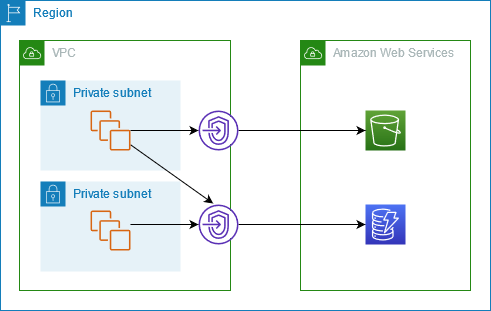
  • CloudFront VPC Origins (launched November 2024) allows delivering content from applications hosted in VPC private subnets, preventing direct public internet access to origins.
  • Supported origin types within private subnets:
    • Application Load Balancers (ALB)
    • Network Load Balancers (NLB)
    • EC2 Instances
  • Key benefits:
    • Origins remain completely private – accessible only through CloudFront
    • No need for public IPs, NAT gateways, or complex security group rules
    • Eliminates the need for custom header verification or IP allowlisting for origin protection
    • Available at no additional cost
  • Cross-account support (November 2025) allows CloudFront distributions in one account to access VPC origins in another account.
  • WebSocket support (May 2026) enables real-time applications hosted in private subnets to use WebSockets through CloudFront VPC origins.
  • VPC Origins is the recommended approach for securing non-S3 custom origins, replacing the legacy pattern of custom headers or IP allowlisting.

Custom Headers

  • Custom headers can be added by CloudFront which can be used at Origin to verify the request has come from CloudFront.

CloudFront Security - Custom headers

  • A viewer accesses the website or application and requests one or more files, such as an image file and an HTML file.
  • DNS routes the request to the CloudFront edge location that can best serve the request – typically the nearest edge location in terms of latency.
  • At the edge location, AWS WAF inspects the incoming request according to configured web ACL rules.
  • At the edge location, CloudFront checks its cache for the requested content.
    • If the content is in the cache, CloudFront returns it to the user.
    • If the content isn’t in the cache, CloudFront adds the custom header, X-Origin-Verify , with the value of the secret from Secrets Manager, and forwards the request to the origin.
  • At the origin ALB, ALB rules or AWS WAF inspects the incoming request header, X-Origin-Verify, and allows the request if the string value is valid. If the header isn’t valid, AWS WAF blocks the request.
  • At the configured interval, Secrets Manager automatically rotates the custom header value and updates the origin AWS WAF and CloudFront configurations.
  • Note: For stronger origin protection, consider using VPC Origins (for ALB/NLB/EC2) or Origin mTLS instead of shared secret headers, as these provide cryptographic authentication rather than shared secrets.

CloudFront Security Dashboard

  • CloudFront Security Dashboard (launched November 2023) provides a unified CDN and security experience within the CloudFront console.
  • Key features:
    • One-click WAF protection – creates an AWS WAF web ACL, configures rules to protect against common web threats (OWASP Top 10, known threat IPs, scanner detection), and attaches it to the distribution automatically.
    • Security metrics – displays allowed/blocked requests, challenge and CAPTCHA requests, top attack types, and traffic ratios over time.
    • Geo-restriction management – block countries directly from the dashboard with metrics visibility.
    • Built-in pricing calculators – estimate WAF and CloudWatch costs when enabling protections.
  • Standard pricing for AWS WAF and Amazon CloudWatch apply when security protections are enabled.

Geo-Restriction – Geoblocking

  • Geo restriction can help allow or prevent users in selected countries from accessing the content.
  • CloudFront distribution can be configured either to allow users in
    • an allowlist of specified countries to access the content or to
    • deny users in a denylist of specified countries to access the content
  • Geo restriction can be used to restrict access to all of the files that are
    associated with distribution and to restrict access at the country level.
  • CloudFront responds to a request from a viewer in a restricted country with an HTTP status code 403 (Forbidden).
  • Use a third-party geolocation service, if access is to be restricted to a subset of the files that are associated with a distribution or to restrict access at a finer granularity than the country level.
  • CloudFront geographic restrictions are provided for free, but metrics for blocked country requests are only visible through AWS WAF geographic restrictions in the security dashboard.
  • Geo-restriction is also critical for reducing attack surface by limiting traffic to expected geographic regions.

Field Level Encryption Config

  • CloudFront can enforce secure end-to-end connections to origin servers by using HTTPS.
  • Field-level encryption adds an additional layer of security that helps protect specific data throughout system processing so that only certain applications can see it.
  • Field-level encryption can be used to securely upload user-submitted sensitive information. The sensitive information provided by the clients is encrypted at the edge closer to the user and remains encrypted throughout the entire application stack, ensuring that only applications that need the data – and have the credentials to decrypt it – are able to do so.
  • Up to 10 data fields can be encrypted in a request.
  • Uses asymmetric encryption (public key at edge, private key at application) for protection.

AWS Certification Exam Practice Questions

  • Questions are collected from Internet and the answers are marked as per my knowledge and understanding (which might differ with yours).
  • AWS services are updated everyday and both the answers and questions might be outdated soon, so research accordingly.
  • AWS exam questions are not updated to keep up the pace with AWS updates, so even if the underlying feature has changed the question might not be updated
  • Open to further feedback, discussion and correction.
  1. You are building a system to distribute confidential training videos to employees. Using CloudFront, what method could be used to serve content that is stored in S3, but not publically accessible from S3 directly?
    1. Create an Origin Access Control (OAC) for CloudFront and grant access to the objects in your S3 bucket to that OAC. (Note: OAI is legacy; OAC is the current recommended approach)
    2. Add the CloudFront account security group “amazon-cf/amazon-cf-sg” to the appropriate S3 bucket policy.
    3. Create an Identity and Access Management (IAM) User for CloudFront and grant access to the objects in your S3 bucket to that IAM User.
    4. Create a S3 bucket policy that lists the CloudFront distribution ID as the Principal and the target bucket as the Amazon Resource Name (ARN).
  2. A media production company wants to deliver high-definition raw video for preproduction and dubbing to customer all around the world. They would like to use Amazon CloudFront for their scenario, and they require the ability to limit downloads per customer and video file to a configurable number. A CloudFront download distribution with TTL=0 was already setup to make sure all client HTTP requests hit an authentication backend on Amazon Elastic Compute Cloud (EC2)/Amazon RDS first, which is responsible for restricting the number of downloads. Content is stored in S3 and configured to be accessible only via CloudFront. What else needs to be done to achieve an architecture that meets the requirements? Choose 2 answers
    1. Enable URL parameter forwarding, let the authentication backend count the number of downloads per customer in RDS, and return the content S3 URL unless the download limit is reached.
    2. Enable CloudFront logging into an S3 bucket, leverage EMR to analyze CloudFront logs to determine the number of downloads per customer, and return the content S3 URL unless the download limit is reached. (CloudFront logs are logged periodically and EMR not being real time, hence not suitable)
    3. Enable URL parameter forwarding, let the authentication backend count the number of downloads per customer in RDS, and invalidate the CloudFront distribution as soon as the download limit is reached. (Distribution are not invalidated but Objects)
    4. Enable CloudFront logging into the S3 bucket, let the authentication backend determine the number of downloads per customer by parsing those logs, and return the content S3 URL unless the download limit is reached. (CloudFront logs are logged periodically and EMR not being real time, hence not suitable)
    5. Configure a list of trusted signers, let the authentication backend count the number of download requests per customer in RDS, and return a dynamically signed URL unless the download limit is reached.
  3. To enable end-to-end HTTPS connections from the user’s browser to the origin via CloudFront, which of the following options are valid? Choose 2 answers
    1. Use self-signed certificate in the origin and CloudFront default certificate in CloudFront. (Origin cannot be self-signed)
    2. Use the CloudFront default certificate in both origin and CloudFront (CloudFront cert cannot be applied to origin)
    3. Use a 3rd-party CA certificate in the origin and CloudFront default certificate in CloudFront
    4. Use 3rd-party CA certificate in both origin and CloudFront
    5. Use a self-signed certificate in both the origin and CloudFront (Origin cannot be self-signed)
  4. A company needs to ensure that only authenticated IoT devices can access their API through CloudFront. The devices have client certificates issued by the company’s internal CA. Which CloudFront feature should they use?
    1. CloudFront signed URLs with trusted key groups
    2. CloudFront viewer mutual TLS (mTLS) authentication
    3. CloudFront Origin Access Control (OAC)
    4. CloudFront field-level encryption
  5. An organization wants to ensure that requests reaching their origin servers are exclusively from their authorized CloudFront distributions, using cryptographic identity verification rather than shared secrets. Which approach provides the strongest origin protection?
    1. Custom headers with X-Origin-Verify and Secrets Manager rotation
    2. CloudFront managed prefix list with security group rules
    3. CloudFront Origin mTLS authentication with client certificates
    4. Origin Access Control (OAC) with S3 bucket policies
  6. A company wants to serve their web application through CloudFront, but their backend ALB must not be accessible from the public internet. The ALB is in a private subnet. Which CloudFront feature enables this?
    1. Origin Access Control (OAC) with ALB
    2. Custom headers with Secrets Manager rotation
    3. CloudFront VPC Origins
    4. CloudFront managed prefix list with security groups
  7. A company is currently using Origin Access Identity (OAI) to restrict S3 access through CloudFront. They need to serve SSE-KMS encrypted objects. What should they do?
    1. Add the OAI to the KMS key policy
    2. Migrate from OAI to Origin Access Control (OAC), which supports SSE-KMS
    3. Use CloudFront field-level encryption instead of SSE-KMS
    4. Create a Lambda@Edge function to decrypt the objects

References

AWS CloudFront with S3 – Origin Access & Caching

CloudFront S3 Origin Access Identity - OAI

AWS CloudFront with S3

  • CloudFront can be used to distribute the content from an S3 bucket.
  • For an RTMP distribution, the S3 bucket is the only supported origin, and custom origins cannot be used
  • Using CloudFront over S3 has the following benefits
    • can be more cost-effective if the objects are frequently accessed as at higher usage, and the price for CloudFront data transfer is much lower than the price for S3 data transfer.
    • downloads are faster with CloudFront than with S3 alone because the objects are stored closer to the users
  • CloudFront provides two ways to send authenticated requests to an S3 origin: Origin Access Control (OAC) and Origin Access Identity (OAI).
  • OAC is the recommended and preferred method. OAI is legacy and deprecated — new CloudFront distributions (as of March 2026) can only use OAC.
  • When using S3 as the origin for distribution and the bucket is moved to a different region, CloudFront can take up to an hour to update its records to include the change of region when both of the following are true:
    • Origin Access Control (OAC) or Origin Access Identity (OAI) are used to restrict access to the bucket.
    • Bucket is moved to an S3 region that requires Signature Version 4 for authentication
  • CloudFront does not currently support S3 directory buckets (S3 Express One Zone) as origins directly.

Origin Access Control – OAC

CloudFront Origin Access Control - OAC

  • Origin Access Control (OAC) is the recommended method to restrict direct S3 access and should be used for all new distributions.
  • OAC supports:
    • Enhanced security practices like short-term credentials, frequent credential rotations, and resource-based policies
    • All S3 buckets in all AWS Regions, including opt-in Regions launched after December 2022
    • S3 server-side encryption with AWS KMS (SSE-KMS)
    • Dynamic requests (PUT, POST, DELETE) to Amazon S3
    • Comprehensive HTTP methods support — OAC supports GET, PUT, POST, PATCH, DELETE, OPTIONS, and HEAD.
  • OAC is based on IAM service principals to authenticate with S3 origins using AWS Signature Version 4 (SigV4).
  • CloudFront OAC needs to be set up with permissions to access the S3 bucket origin using an S3 bucket policy that grants the CloudFront service principal (cloudfront.amazonaws.com) access, scoped to the specific distribution ARN.
  • For buckets with objects encrypted using server-side encryption with AWS Key Management Service (SSE-KMS), the OAC must be provided with permission to use the AWS KMS key via the KMS key policy.
  • When using CloudFront OAC with Amazon S3 bucket origins, Amazon S3 Object Ownership must be set to Bucket owner enforced (the default for new S3 buckets). If ACLs are required, use the Bucket owner preferred setting.
  • OAC does not work with S3 buckets configured as website endpoints — these must be set up as custom origins.
  • OAC Signing Behavior options:
    • Always sign requests (recommended) — CloudFront always signs requests to the S3 origin.
    • Never sign requests — Turns off OAC; bucket must be publicly accessible.
    • Do not override authorization header — CloudFront signs only when the viewer request doesn’t include an Authorization header.

OAC Extended Origin Support (2024)

  • CloudFront OAC is not limited to S3 origins. It now also supports:
    • AWS Lambda function URL origins (April 2024) — Secures Lambda function URLs by permitting access only from designated CloudFront distributions using SigV4.
    • AWS Elemental MediaPackage v2 origins — Restricts access to MediaPackage v2 channel endpoints.
    • AWS Elemental MediaStore origins — Restricts access to MediaStore container endpoints.

Migrating from OAI to OAC

  • To migrate, first update the S3 bucket policy to allow both the OAI and the distribution with OAC enabled to access the bucket’s content.
  • This ensures CloudFront never loses access during the transition.
  • After the distribution is fully deployed with OAC, remove the OAI statement from the bucket policy.

Origin Access Identity – OAI (Legacy, Not Recommended)

⚠️ OAI DEPRECATED

Origin Access Identity (OAI) is a legacy feature. AWS deprecated OAI creation in 2024. As of March 2026, new CloudFront distributions can only use Origin Access Control (OAC). Existing OAI-based distributions continue to function but cannot be attached to new distributions.

Action Required: Migrate to Origin Access Control (OAC) for enhanced security and feature support.

CloudFront S3 Origin Access Identity - OAI

  • OAI doesn’t support:
    • Amazon S3 buckets in opt-in Regions (launched after January 2023)
    • Amazon S3 server-side encryption with AWS KMS (SSE-KMS)
    • Dynamic requests (PUT, POST, or DELETE) to Amazon S3
  • S3 origin objects must be granted public read permissions and hence the objects are accessible from both S3 as well as CloudFront.
  • Even though CloudFront does not expose the underlying S3 URL, it can be known to the user if shared directly or used by applications.
  • For using CloudFront signed URLs or signed cookies to provide access to the objects, it would be necessary to prevent users from having direct access to the S3 objects.
  • Users accessing S3 objects directly would
    • bypass the controls provided by CloudFront signed URLs or signed cookies, for e.g., control over the date-time that a user can no longer access the content and the IP addresses can be used to access content
    • CloudFront access logs are less useful because they’re incomplete.
  • Origin Access Identity (OAI) can be used to prevent users from directly accessing objects from S3.
  • Origin access identity, which is a special CloudFront user, can be created and associated with the distribution.
  • S3 bucket/object permissions need to be configured to only provide access to the Origin Access Identity.
  • When users access the object from CloudFront, it uses the OAI to fetch the content on the user’s behalf, while the S3 object’s direct access is restricted

CloudFront with S3 Objects

  • CloudFront can be configured to include custom headers or modify existing headers whenever it forwards a request to the origin, to
    • validate the user is not accessing the origin directly, bypassing CDN
    • identify the CDN from which the request was forwarded, if more than one CloudFront distribution is configured to use the same origin
    • if users use viewers that don’t support CORS, configure CloudFront to forward the Origin header to the origin. That will cause the origin to return the Access-Control-Allow-Origin header for every request

Adding & Updating Objects

  • Objects just need to be added to the Origin and CloudFront would start distributing them when accessed.
  • For objects served by CloudFront, the Origin can be updated either by
    • Overwriting the original object
    • Create a different version and update the links exposed to the user.
  • For updating objects, it is recommended to use versioning e.g. have files or the entire folders with versions, so links can be changed when the objects are updated forcing a refresh.
  • With versioning,
    • there is no wait time for an object to expire before CloudFront begins to serve a new version of it.
    • there is no difference in consistency in the object served from the edge
    • no cost is involved to pay for object invalidation.

Removing/Invalidating Objects

  • Objects, by default, would be removed upon expiry (TTL) and the latest object would be fetched from the Origin
  • Objects can also be removed from the edge cache before it expires
    • File or Object Versioning to serve a different version of the object that has a different name.
    • Invalidate the object from edge caches. For the next request, CloudFront returns to the Origin to fetch the object
  • Object or File Versioning is recommended over Invalidating objects
    • if the objects need to be updated frequently.
    • enables to control which object a request returns even when the user has a version cached either locally or behind a corporate caching proxy.
    • makes it easier to analyze the results of object changes as CloudFront access logs include the names of the objects
    • provides a way to serve different versions to different users.
    • simplifies rolling forward & back between object revisions.
    • is less expensive, as no charges for invalidating objects.
    • for e.g. change header-v1.jpg to header-v2.jpg
  • Invalidating objects from the cache
    • objects in the cache can be invalidated explicitly before they expire to force a refresh
    • allows to invalidate selected objects
    • allows to invalidate multiple objects for e.g. objects in a directory or all of the objects whose names begin with the same characters, you can include the * wildcard at the end of the invalidation path.
    • the user might continue to see the old version until it expires from those caches.
    • A specified number of invalidation paths can be submitted each month for free. Any invalidation requests more than the allotted no. per month, a fee is charged for each submitted invalidation path
    • The First 1,000 invalidation paths requests submitted per month are free; charges apply for each invalidation path over 1,000 in a month.
    • Invalidation path can be for a single object for e.g. /js/ab.js or for multiple objects for e.g. /js/* and is counted as a single request even if the * wildcard request may invalidate thousands of objects.
  • For RTMP distribution, objects served cannot be invalidated

Invalidation by Cache Tag (2026)

  • CloudFront now supports tag-based cache invalidation (announced April 2026), enabling invalidation of cached objects based on semantic tags rather than URL paths.
  • How it works:
    • Configure a CacheTagConfig on the distribution specifying the HTTP header name for cache tags.
    • The origin returns a cache tag header (e.g., x-amz-meta-cache-tag) with comma-separated tag values in HTTP responses.
    • Use the CreateInvalidation API with a # prefix to invalidate all objects matching a tag (e.g., #product:electronics).
  • For S3 origins, cache tags can be attached as S3 object metadata. A metadata key of cache-tag is returned by S3 as an x-amz-meta-cache-tag header.
  • Alternatively, a Lambda@Edge origin response function can add cache tag headers.
  • Tag format requirements:
    • ASCII visible characters (33–126), no spaces or commas
    • Case-insensitive, maximum 256 characters per tag
    • Maximum 50 tags per object
  • Path and tag invalidations can be mixed in a single request.
  • Tag invalidation is opt-in — distributions without CacheTagConfig ignore cache tag headers.
  • Backward compatible — existing path and wildcard invalidations continue to work unchanged.

Partial Requests (Range GETs)

  • Partial requests using Range headers in a GET request help to download the object in smaller units, improving the efficiency of partial downloads and the recovery from partially failed transfers.
  • For a partial GET range request, CloudFront
    • checks the cache in the edge location for the requested range or the entire object and if exists, serves it immediately
    • if the requested range does not exist, it forwards the request to the origin and may request a larger range than the client requested to optimize performance
    • if the origin supports range header, it returns the requested object range and CloudFront returns the same to the viewer
    • if the origin does not support range header, it returns the complete object and CloudFront serves the entire object and caches it for future.
    • CloudFront uses the cached entire object to serve any future range GET header requests

CloudFront VPC Origins (2024)

  • CloudFront VPC Origins (launched November 2024) allows CloudFront to deliver content from applications hosted in VPC private subnets.
  • Eliminates the need for applications to be exposed on the public internet by restricting access solely through CloudFront distributions.
  • Supports Application Load Balancers (ALBs), Network Load Balancers (NLBs), or EC2 instances in private subnets as origins.
  • For S3 origins, OAC remains the managed solution. VPC Origins is designed for compute-based origins (ALB, NLB, EC2).
  • Origin servers remain hidden from the internet, reducing the attack surface.
  • VPC Origin modification via CloudFront Functions is also supported (April 2025).

CloudFront Origin Modification via CloudFront Functions (2024)

  • CloudFront supports origin modification within CloudFront Functions (announced November 2024), enabling conditional origin changes on each request.
  • Allows dynamically routing requests to different S3 buckets or other origins based on request attributes (headers, path, query strings).
  • Use cases include A/B testing, failover, geographic routing, and multi-tenant architectures.
  • Additional capabilities added (November 2025): edge location and Regional Edge Cache (REC) metadata, raw query string retrieval, and advanced origin overrides.

CloudFront Mutual TLS for Origins (2026)

  • CloudFront now supports mutual TLS (mTLS) authentication for origins (announced January 2026), enabling end-to-end certificate-based authentication from viewers to origins.
  • Ensures that only authorized CloudFront distributions can establish connections with origin servers.
  • Supports per-origin configuration with different client certificates for different origins within the same distribution.
  • Stronger than custom headers or IP allowlists for origin authentication.
  • Works with AWS, on-premises, and third-party backends.
  • CloudFront also supports mTLS Passthrough Mode for viewers (May 2026), forwarding client certificates to the origin without verification at CloudFront.

AWS Certification Exam Practice Questions

  • Questions are collected from Internet and the answers are marked as per my knowledge and understanding (which might differ with yours).
  • AWS services are updated everyday and both the answers and questions might be outdated soon, so research accordingly.
  • AWS exam questions are not updated to keep up the pace with AWS updates, so even if the underlying feature has changed the question might not be updated
  • Open to further feedback, discussion and correction.
  1. You are building a system to distribute confidential training videos to employees. Using CloudFront, what method could be used to serve content that is stored in S3, but not publically accessible from S3 directly?
    1. Create an Origin Access Identity (OAI) for CloudFront and grant access to the objects in your S3 bucket to that OAI. [Note: While this answer remains technically correct for the question, OAI is now legacy. The recommended approach for new implementations is Origin Access Control (OAC).]
    2. Add the CloudFront account security group “amazon-cf/amazon-cf-sg” to the appropriate S3 bucket policy.
    3. Create an Identity and Access Management (IAM) User for CloudFront and grant access to the objects in your S3 bucket to that IAM User.
    4. Create an S3 bucket policy that lists the CloudFront distribution ID as the Principal and the target bucket as the Amazon Resource Name (ARN).
  2. A company wants to restrict access to its S3 bucket origin so that content is only accessible through their CloudFront distribution. They also need to support uploading files via CloudFront and use SSE-KMS encryption. Which approach should they use?
    1. Configure Origin Access Identity (OAI) with a bucket policy granting s3:GetObject and s3:PutObject.
    2. Configure Origin Access Control (OAC) with a bucket policy granting the CloudFront service principal s3:GetObject and s3:PutObject, and update the KMS key policy to allow CloudFront.
    3. Make the S3 bucket public and use CloudFront signed URLs to restrict viewer access.
    4. Use a Lambda@Edge function to sign all requests to S3 using IAM credentials.
  3. A development team needs to invalidate all cached product images across their CloudFront distribution whenever a product category is updated, regardless of URL path structure. What is the most efficient approach?
    1. Create a wildcard invalidation for /* to clear all cached content.
    2. Maintain a list of all product image URLs and submit individual invalidation paths.
    3. Configure cache tag invalidation on the distribution and tag objects with category metadata, then invalidate by cache tag.
    4. Reduce the TTL to 0 for all product images so they are never cached.
  4. An organization uses CloudFront to serve a web application from an ALB in a private subnet. They want to ensure the ALB is never directly accessible from the internet. Which CloudFront feature should they use?
    1. Origin Access Control (OAC)
    2. AWS WAF with IP restriction rules
    3. CloudFront VPC Origins
    4. CloudFront signed URLs with a custom policy
  5. A company needs to verify that requests to their origin server come exclusively from their authorized CloudFront distribution, using certificate-based authentication instead of shared secrets or IP allowlists. Which feature should they implement?
    1. CloudFront Origin Access Control (OAC)
    2. Custom origin headers with a shared secret value
    3. AWS WAF with CloudFront managed prefix list
    4. CloudFront mutual TLS (mTLS) for origins

References

AWS Client VPN

AWS Client VPN

  • AWS Client VPN is a managed client-based VPN service that enables secure access to AWS resources and resources in the on-premises network
  • Client VPN allows accessing the resources from any location using an OpenVPN-based VPN client.
  • Client VPN establishes a secure TLS connection from any location using the OpenVPN client.
  • Client VPN automatically scales to the number of users connecting to the AWS resources and on-premises resources.
  • Client VPN supports client authentication using Active Directory, federated authentication, and certificate-based authentication.
  • Client VPN provides manageability with the ability to manage active client connections, with the ability to terminate active client connections and to view connection logs, which provide details on client connection attempts
  • Client VPN supports IPv4, IPv6, and dual-stack (both IPv4 and IPv6) connectivity for modern networking requirements.
  • Client VPN supports native integration with AWS Transit Gateway, enabling centralized remote access to multiple VPCs and on-premises networks without requiring an intermediate VPC.

AWS Client VPN

Client VPN Components

  • Client VPN endpoint
    • is the resource that is created and configured to enable and manage client VPN sessions.
    • is the resource where all client VPN sessions are terminated.
    • supports Quickstart setup (Jan 2026) with pre-defined default configurations requiring only three inputs: IPv4 CIDR, server certificate ARN, and subnet selection.
  • Target network
    • is the network associated with a Client VPN endpoint.
    • is a subnet from a VPC that enables establishing VPN sessions.
    • Multiple subnets can be associated with the Client VPN endpoint, however, each subnet must belong to a different Availability Zone.
    • For IPv6 or dual-stack traffic, the associated subnets must have IPv6 or dual-stack CIDR ranges.
  • Route
    • describes the available destination network routes.
    • Each route in the route table specifies the path for traffic to specific resources or networks.
  • Authorization rules
    • restrict the users who can access a network.
    • helps configure the AD or IdP group that is allowed access. Only users belonging to this group can access the specified network.
  • Client
    • end-user connecting to the Client VPN endpoint to establish a VPN session.
    • need to download an OpenVPN client and use the Client VPN configuration file to establish a VPN session.

Client VPN Authentication & Authorization

  • Client VPN provides authentication and authorization capabilities.
  • Authentication determines whether clients are allowed to connect to the Client VPN endpoint
  • Client VPN offers the following types of client authentication:
    • Active Directory authentication (user-based)
    • Mutual authentication (certificate-based)
    • Single sign-on (SAML-based federated authentication) (user-based)
  • Client VPN supports two types of authorization:
    • Security groups and
    • Network-based authorization (using authorization rules)
      • allows mapping of the Active Directory group or the SAML-based IdP group to the network they can have access to.

Client VPN Split Tunnel

  • Client VPN endpoint, by default, routes all traffic over the VPN tunnel.
  • Split-tunnel Client VPN endpoint helps when you do not want all user traffic to route through the Client VPN endpoint.
  • Split tunnel ensures only traffic with a destination to the network matching a route from the Client VPN endpoint route table is routed over the Client VPN tunnel.
  • Split-tunnel offers the following benefits:
    • Optimized routing of traffic from clients by having only the AWS destined traffic traverse the VPN tunnel.
    • Reduced volume of outgoing traffic from AWS, therefore reducing the data transfer cost.

Client VPN IPv6 Support

  • Client VPN now supports native IPv6 connectivity alongside existing IPv4 capabilities (announced Aug 2025).
  • Supports three endpoint types: IPv4-only, IPv6-only, or dual-stack (both IPv4 and IPv6).
  • Two key configuration parameters:
    • Endpoint IP address type – defines the endpoint management IP type (outer VPN tunnel traffic between OpenVPN client and server over the public internet).
    • Traffic IP address type – defines the type of traffic that flows through the VPN tunnel (inner encrypted traffic), client CIDR ranges, subnet association, routes, and rules per endpoint.
  • For IPv6 client CIDR, you do not need to specify a CIDR block — Amazon automatically assigns CIDR ranges for IPv6 clients.
  • Auto-assignment enables no-SNATing for IPv6 tunnel traffic, providing enhanced visibility into the connected user’s IPv6 address.
  • For IPv6 traffic, Client VPN does not perform Network Address Translation (NAT).
  • Endpoint type (IPv4, IPv6, dual-stack) and traffic type cannot be modified after creation.
  • Client-to-client communication is not supported for IPv6 clients.

Client VPN Transit Gateway Integration

  • Client VPN now supports native integration with AWS Transit Gateway (announced Apr 2026).
  • Native Transit Gateway attachment eliminates the need for an intermediate VPC, allowing centralized remote access to multiple VPCs and on-premises networks directly from the Client VPN endpoint.
  • Previously, connecting Client VPN to multiple VPCs required provisioning and managing an intermediate VPC, adding operational complexity.
  • A Client VPN attachment is automatically created when you associate a Client VPN endpoint with a transit gateway.
  • Key benefits:
    • End-to-end source IP visibility – client source IPs are preserved, enabling authorization rules based on actual client IPs and tracing traffic back to specific users.
    • No intermediate VPC required – reduces operational complexity and eliminates additional resource management.
    • Transit Gateway flow logs – capture connection-level details tied to preserved source IPs for improved troubleshooting and compliance audits.
    • Simplified security and compliance – enables easier security monitoring and audit workflows.
  • Available in all AWS Regions where AWS Client VPN is available with no additional charges beyond standard Client VPN and Transit Gateway pricing.

Client Route Enforcement

  • Client Route Enforcement (CRE) is a security feature that monitors device networking routes, prevents VPN traffic leaks, and strengthens remote access security (announced Apr 2025).
  • The feature continuously tracks users’ device routing tables to ensure outbound traffic flows through the VPN tunnel according to configured settings.
  • If the feature detects any VPN routing policy modifications on the connected device, it automatically forces an update to the route table, reverting it back to the expected route configurations.
  • Helps improve security posture by ensuring that network traffic originating from a connected client is not inadvertently sent outside the VPN tunnel.
  • Prevents end users from overriding or bypassing VPN-pushed routes on their local devices.
  • Can be enabled during endpoint creation or modified on existing endpoints.

Client VPN Session Management

  • Default maximum VPN session duration is 24 hours.
  • Configurable maximum VPN session duration can be set to meet security and compliance requirements.
  • Disconnect on Session Timeout (announced Jan 2025):
    • When enabled, users are prompted to reconnect when maximum session duration is reached.
    • When disabled, client VPN attempts to reconnect automatically (default behavior with cached credentials).
  • Client Login Banner – enables a text banner on AWS-provided Client VPN desktop applications when a VPN session is established, useful for regulatory and compliance needs.
  • Client Connect Handler – enables running custom logic (Lambda function) that authorizes new connections.
  • Self-service Portal – enables a portal for clients to download their configuration and the AWS-provided VPN client.

Client VPN Limitations

  • Client CIDR ranges cannot overlap with the local CIDR of the VPC in which the associated subnet is located, or any routes manually added to the Client VPN endpoint’s route table.
  • Client CIDR ranges must have a block size between /22 and /12.
  • Client CIDR range cannot be changed after Client VPN endpoint creation.
  • Subnets associated with a Client VPN endpoint must be in the same VPC.
  • Multiple subnets from the same AZ cannot be associated with a Client VPN endpoint.
  • A Client VPN endpoint does not support subnet associations in a dedicated tenancy VPC.
  • Client VPN is not Federal Information Processing Standards (FIPS) compliant.
  • As Client VPN is a managed service and the IP address to which the DNS name resolves might change. Hence, it is not recommended to connect to the Client VPN endpoint by using IP addresses. Use DNS instead.
  • IP forwarding is not supported when using the AWS Client VPN desktop application. IP forwarding is supported from other clients.
  • Client VPN does not support multi-Region replication in AWS Managed Microsoft AD. The Client VPN endpoint must be in the same Region as the AWS Managed Microsoft AD resource.
  • Cannot establish a VPN connection from a computer if there are multiple users logged into the operating system.
  • Client-to-client communication is not supported for IPv6 clients.
  • IPv6 and dual-stack endpoints require that user devices and ISPs support the corresponding IP configuration.
  • Endpoint type (IPv4, IPv6, dual-stack) and traffic type cannot be modified after creation.
  • Each user connection has a maximum baseline bandwidth of 50 Mbps.

Client VPN Quotas

  • Authorization rules per Client VPN endpoint – 200 (increased from 50 in Dec 2024, then to 200 in Mar 2025). Adjustable.
  • Routes per Client VPN target network association – 100 (increased from 10 in Dec 2024). Adjustable.
  • Client VPN endpoints per Region – 5. Adjustable.
  • Concurrent client connections per Client VPN endpoint – depends on number of subnet associations:
    • 1 subnet – 7,000
    • 2 subnets – 36,500
    • 3 subnets – 66,500
    • 4 subnets – 96,500
    • 5 subnets – 126,000
  • Concurrent operations per Client VPN endpoint – 10. Not adjustable.
  • Entries in a client certificate revocation list – 20,000. Not adjustable.
  • For dual-stack endpoints, authorization rules and connection limits are shared between IPv4 and IPv6.

AWS Certification Exam Practice Questions

  • Questions are collected from Internet and the answers are marked as per my knowledge and understanding (which might differ with yours).
  • AWS services are updated everyday and both the answers and questions might be outdated soon, so research accordingly.
  • AWS exam questions are not updated to keep up the pace with AWS updates, so even if the underlying feature has changed the question might not be updated
  • Open to further feedback, discussion and correction.
  1. A company is developing an application on AWS. For analysis, the application transmits log files to an Amazon OpenSearch Service cluster. Each piece of data must be contained inside a VPC. A number of the company’s developers work remotely. Other developers are based at three distinct business locations. The developers must connect to OpenSearch Service directly from their local development computers in order to study and display logs. Which solution will satisfy these criteria?
    1. Configure and set up an AWS Client VPN endpoint. Associate the Client VPN endpoint with a subnet in the VPC. Configure a Client VPN self-service portal. Instruct the developers to connect by using the client for Client VPN.
    2. Create a transit gateway, and connect it to the VPC. Create an AWS Site-to-Site VPN. Create an attachment to the transit gateway. Instruct the developers to connect by using an OpenVPN client.
    3. Create a transit gateway, and connect it to the VPC. Order an AWS Direct Connect connection. Set up a public VIF on the Direct Connect connection. Associate the public VIF with the transit gateway. Instruct the developers to connect to the Direct Connect connection.
    4. Create and configure a bastion host in a public subnet of the VPC. Configure the bastion host security group to allow SSH access from the company CIDR ranges. Instruct the developers to connect by using SSH.
  2. A company needs to provide secure remote access for 500 employees across 10 VPCs. The solution should minimize operational overhead and allow centralized management. Which approach is most appropriate?
    1. Create a Client VPN endpoint in each VPC and have users connect to the appropriate endpoint.
    2. Create a Client VPN endpoint with a native Transit Gateway attachment, connecting the Transit Gateway to all 10 VPCs.
    3. Create a Site-to-Site VPN to each employee’s home network.
    4. Deploy a bastion host in a shared services VPC and peer it with all other VPCs.
  3. A security team requires that all remote user VPN traffic must flow through the VPN tunnel and that users cannot modify their local routing tables to bypass the VPN. Which Client VPN feature should be enabled?
    1. Split tunnel mode
    2. Authorization rules with deny policies
    3. Client Route Enforcement
    4. Client connect handler with Lambda validation
  4. A company is migrating to an IPv6 network and needs its remote workers to securely access IPv6 resources in their VPC. Which Client VPN configuration supports this requirement?
    1. Create an IPv4-only Client VPN endpoint and use NAT64 for IPv6 resources.
    2. Client VPN does not support IPv6 traffic.
    3. Create a dual-stack or IPv6-only Client VPN endpoint with associated subnets that have IPv6 CIDR ranges.
    4. Use AWS Site-to-Site VPN instead, as Client VPN only supports IPv4.
  5. A company wants to enforce re-authentication of VPN users when their session expires, rather than allowing automatic reconnection. Which feature should be configured?
    1. Set the maximum session timeout to 1 hour
    2. Enable client connect handler
    3. Enable disconnect on session timeout
    4. Configure MFA with Active Directory

References

AWS Transit VPC

AWS Transit VPC

⚠️ RECOMMENDATION: Use AWS Transit Gateway Instead

AWS Transit Gateway is the recommended solution for hub-and-spoke network architectures.

Transit Gateway offers the same advantages as Transit VPC, but it is a fully managed service that scales elastically in a highly available architecture. Transit Gateway eliminates the need to manage EC2 instances, provides higher bandwidth (up to 100 Gbps per attachment), and reduces operational overhead.

Recent developments further reduce Transit VPC use cases:

  • Transit Gateway-attached AWS Network Firewall (May 2026) – Network Firewall now attaches directly to Transit Gateway, eliminating the need for a dedicated inspection VPC. This provides native AWS security inspection without third-party EC2 appliances.
  • AWS Client VPN native Transit Gateway attachment (April 2026) – Client VPN now attaches directly to Transit Gateway, removing the need for a dedicated VPN VPC.
  • AWS Global Transit Network Solution removed – The original Transit VPC CloudFormation solution is no longer available from AWS.

When to still consider Transit VPC:

  • Specific requirement for third-party vendor appliances (e.g., Palo Alto, Fortinet) not replaceable by AWS Network Firewall
  • Connectivity between AWS GovCloud and Commercial Regions

For most use cases, use AWS Transit Gateway instead.

  • Transit VPC helps connect multiple, geographically disperse VPCs and remote networks in order to create a global network transit center.
  • Transit VPC can solve some of the shortcomings of VPC peering by introducing a hub and spoke design for inter-VPC connectivity.
  • A transit VPC simplifies network management and minimizes the number of connections required to connect multiple VPCs and remote networks.
  • Transit VPC allows an easy way to implement shared services or packet inspection/replication in a VPC.
  • Transit VPC can be used to support important use cases
    • Private Networking – build a private network that spans two or more AWS Regions.
    • Shared Connectivity – Multiple VPCs can share connections to data centers, partner networks, and other clouds.
    • Cross-Account AWS Usage – The VPCs and the AWS resources within them can reside in multiple AWS accounts.
  • Transit VPC design helps implement more complex routing rules, such as network address translation between overlapping network ranges, or to add additional network-level packet filtering or inspection

Transit VPC Configuration

  • Transit VPC network consists of a central VPC (the hub VPC) connecting with every other VPC (spoke VPC) through a VPN connection typically leveraging BGP over IPsec.
  • Central VPC contains EC2 instances running software appliances that route incoming traffic to their destinations using the VPN overlay.

Transit VPC Advantages & Disadvantages

Advantages

  • supports Transitive routing using the overlay VPN network — allowing for a simpler hub and spoke design. Can be used to provide shared services for VPC Endpoints, Direct Connect connection, etc.
  • supports network address translation between overlapping network ranges.
  • supports vendor functionality around advanced security (layer 7 firewall/Intrusion Prevention System (IPS)/Intrusion Detection System (IDS) ) using third-party software on EC2
  • enables connectivity between AWS GovCloud and Commercial Regions or between Transit Gateway and Transit VPC for inter-region connectivity

Disadvantages

  • leverages instance-based routing that increases costs while lowering availability and limiting the bandwidth.
  • Customers are responsible for managing the HA and redundancy of EC2 instances running the third-party vendor virtual appliances
  • Limited throughput per VPN connection (up to 1.25 Gbps per VPN tunnel)
  • Additional configuration, management, and resiliency overhead
  • Higher costs for running third-party vendor virtual appliances on EC2

Transit Gateway-Attached Network Firewall (2026 Update)

  • AWS Network Firewall now supports native attachment to Transit Gateway (announced May 2026), eliminating the need for a dedicated inspection VPC.
  • Previously, centralized traffic inspection required creating a separate inspection VPC with firewall subnets and managing complex routing to direct traffic through the firewall.
  • With native attachment, Network Firewall attaches directly to Transit Gateway as a “network function attachment” — AWS manages the firewall endpoints in an AWS-managed VPC on your behalf.
  • Key benefits over Transit VPC for security inspection:
    • No inspection VPC to manage – eliminates VPC, subnets, and route table management
    • Flexible cost allocation – Transit Gateway metering policies enable per-account chargeback for firewall traffic
    • Fully managed – AWS manages firewall endpoint deployment and scaling
    • Native integration – appears as a Transit Gateway attachment, simplifying routing configuration
  • Impact on Transit VPC: This significantly reduces the use case for Transit VPC. Organizations using Transit VPC primarily for centralized security inspection can now achieve the same with Transit Gateway + Network Firewall natively attached.
  • Transit VPC remains relevant only when specific third-party vendor appliances (Palo Alto, Fortinet, Check Point) are required that cannot be replaced by AWS Network Firewall.

Transit VPC High Availability

Transit VPC High Availability

VPC Connectivity Options Comparison

VPC Peering vs Transit VPC vs Transit Gateway

When to Use Each Solution

  • VPC Peering
    • Best for: Simple, direct connections between a small number of VPCs (typically less than 10)
    • Advantages: Lowest latency, no additional cost for connection, simple setup
    • Limitations: Full mesh complexity at scale, no transitive routing, limited to 125 peers per VPC
  • Transit VPC
    • Best for: Specific third-party vendor appliance requirements not replaceable by AWS Network Firewall, GovCloud to Commercial connectivity
    • Advantages: Vendor-specific functionality (Palo Alto, Fortinet, Check Point), advanced features beyond AWS Network Firewall
    • Limitations: Customer-managed HA, limited bandwidth (1.25 Gbps per tunnel), higher operational overhead, AWS solution template removed
  • AWS Transit Gateway
    • Best for: Hub-and-spoke architecture with many VPCs (10+), centralized routing, hybrid connectivity
    • Advantages: Fully managed, supports transitive routing, scales to 5000 attachments, up to 100 Gbps bandwidth, native Network Firewall attachment, native Client VPN attachment
    • Limitations: Additional cost per attachment and data processing, additional hop adds latency
  • AWS PrivateLink
    • Best for: Service-to-service connectivity, exposing services to multiple consumers
    • Advantages: Unidirectional access, no CIDR overlap issues, enhanced security
    • Limitations: Provider/consumer model, no full VPC-to-VPC connectivity
  • AWS Cloud WAN
    • Best for: Global, multi-region network management with centralized policy control
    • Advantages: Global scope, policy-based segmentation, multi-region attachments
    • Limitations: More complex setup, higher cost for global deployments
  • AWS VPC Lattice
    • Best for: Application-to-application connectivity, microservices architectures
    • Advantages: Service-centric networking, simplified service discovery, built-in security policies
    • Limitations: Application-level connectivity only, not for full VPC-to-VPC routing

AWS Certification Exam Practice Questions

  • Questions are collected from Internet and the answers are marked as per my knowledge and understanding (which might differ with yours).
  • AWS services are updated everyday and both the answers and questions might be outdated soon, so research accordingly.
  • AWS exam questions are not updated to keep up the pace with AWS updates, so even if the underlying feature has changed the question might not be updated
  • Open to further feedback, discussion and correction.
  1. Under increased cyber security concerns, a company is deploying a near real-time intrusion detection system (IDS) solution. A system must be put in place as soon as possible. The architecture consists of many AWS accounts, and all results must be delivered to a central location. Which solution will meet this requirement, while minimizing downtime and costs?
    1. Deploy a third-party vendor solution to perform deep packet inspection in a transit VPC.
    2. Enable VPC Flow Logs on each VPC. Set up a stream of the flow logs to a central Amazon Elasticsearch cluster.
    3. Enable Amazon Macie on each AWS account and configure central reporting.
    4. Enable Amazon GuardDuty on each account as members of a central account.
  2. Your company has set up a VPN connection between their on-premises infrastructure and AWS. They have multiple VPCs defined. They also need to ensure that all traffic flows through a security VPC from their on-premise infrastructure. How would you architect the solution? (Select TWO)
    1. Create a VPN connection between the On-premise environment and the Security VPC (Transit VPC pattern)
    2. Create a VPN connection between the On-premise environment to all other VPC’s
    3. Create a VPN connection between the Security VPC to all other VPC’s (Transit VPC pattern)
    4. Create a VPC peering connection between the Security VPC and all other VPC’s
  3. A company needs to connect 20 VPCs across multiple AWS accounts with centralized routing and management. They do not require advanced third-party security appliances. Which solution is most appropriate?
    1. Deploy Transit VPC with EC2-based virtual appliances
    2. Use AWS Transit Gateway with a hub-and-spoke architecture
    3. Create VPC peering connections between all VPCs
    4. Use AWS PrivateLink for all connections
  4. A company currently uses a Transit VPC with EC2-based firewall appliances for centralized traffic inspection across 50 VPCs. They want to reduce operational overhead while maintaining centralized security inspection. They do not require vendor-specific firewall features. Which migration approach is recommended?
    1. Continue using Transit VPC but add more EC2 instances for redundancy
    2. Replace Transit VPC with VPC Peering and deploy Network Firewall in each VPC
    3. Migrate to AWS Transit Gateway with a Transit Gateway-attached AWS Network Firewall
    4. Replace Transit VPC with AWS Cloud WAN and deploy third-party appliances

References

AWS Transit VPC Solution

AWS Transit Gateway

Transit Gateway-Attached AWS Network Firewall (May 2026)

Transit Gateway Integration with Client VPN

Let’s Talk About…

Let’s Talk About Cloud Security

Guest post by Dustin Albertson – Manager of Cloud & Applications, Product Management -Veeam.

I want to discuss something that’s important to me, security. Far too often I have discussions with customers and other engineers where they’re discussing an architecture or problem they are running into, and I spot issues with the design or holes in the thought process. One of the best things about the cloud model is also one of its worst traits: it’s “easy.” What I mean by this is that it’s easy to log into AWS and set up an EC2 instance, connect it to the internet and configure basic settings. This usually leads to issues down the road because the basic security or architectural best practices were not followed. Therefore, I want to talk about a few things that everyone should be aware of.

The Well-Architected Framework

AWS Well-Architected Framework

AWS has done a great job at creating a framework for its customer to adhere to when planning and deploying workloads in AWS.    This framework is called the AWS Well-Architected Framework.   The framework has 6 pillars that helps you learn architectural best practices for designing and operating secure, reliable, efficient, cost-effective, and sustainable workloads in the AWS Cloud.   The pillars are :

  • Operational Excellence: The ability to support the development and run workloads effectively, gain insight into their operations, and continuously improve supporting processes and procedures to deliver business value.
  • Security: The security pillar describes how to take advantage of cloud technologies to protect data, systems, and assets in a way that can improve your security posture.
  • Reliability: The reliability pillar encompasses the ability of a workload to perform its intended function correctly and consistently when it’s expected to. This includes the ability to operate and test the workload through its total lifecycle. This paper provides in-depth, best practice guidance for implementing reliable workloads on AWS.
  • Performance Efficiency: The ability to use computing resources efficiently to meet system requirements, and to maintain that efficiency as demand changes and technologies evolve.
  • Cost Optimization: The ability to run systems to deliver business value at the lowest price point.
  • Sustainability: The ability to continually improve sustainability impacts by reducing energy consumption and increasing efficiency across all components of a workload by maximizing the benefits from the provisioned resources and minimizing the total resources required.

This framework is important to read and understand for not only a customer but a software vendor or a services provider as well. As a company that provides software in the AWS marketplace, Veeam must go through a few processes prior to listing in the marketplace. Those processes are what’s called a W.A.R (Well-Architected Review) and a T.F.R (Technical Foundation Review).   A W.A.R. is a deep dive into the product and APIs to make sure that the best practices are being used in the way the products not only interact with the APIs in AWS but also how the software is deployed and the architecture it uses.    The T.F.R. is a review to validate that all the appropriate documentation and help guides are in place so that a customer can easily find out how to deploy, protect, secure, and obtain support when using a product deployed via the AWS Marketplace. This can give customers peace of mind when deploying software from the marketplace because they’ll know that it has been rigorously tested and validated.

I have mostly been talking at a high level here and want to break this down into a real-world example. Veeam has a product in the AWS Marketplace called Veeam Backup for AWS. One of the best practices for this product is to deploy it into a separate AWS account than your production account.

Veeam Data Protection

The reason for this is that the software will reach into the production account and back up the instances you wish to protect into an isolated protection account where you can limit the number of people who have access.    It’s also a best practice to have your backup data stored away from production data.    Now here is where the story gets interesting, a lot of people like to use encryption on their EBS volumes.   But since it’s so easy to enable encryption, most people just turn it on and move on.    The root of the issue is that AWS has made it easy to encrypt a volume since they have a default key that you choose when creating an instance.

They have also made it easy to set a policy that every new volume is encrypted and the default choice is the default key.

This is where the problem begins. Now, this may be fine for now or for a lot of users, but what this does is create issues later down the road.    Default encryption keys cannot be shared outside of the account that the key resides in. This means that you would not be able to back that instance up to another account, you can’t rotate the keys, you can’t delete the keys, you can’t audit the keys, and more. Customer managed keys (CMK) give you the ability to create, rotate, disable, enable and audit the encryption key used to protect the data.   I don’t want to go too deep here but this is an example that I run into a lot and people don’t realize the impact of this setting until it’s too late. To change from a default key to a CMK requires downtime of the instance and is a very manual process, although it can be scripted out, it still can be a very cumbersome task if we are talking about hundreds to thousands of instances.

Don’t just take my word for it, Trend Micro also lists this as a Medium Risk.

Aqua Vulnerability Database also lists this as a threat.

Conclusion

I’ am not trying to scare people or shame people for not knowing this information. A lot of the time in the field, we are so busy and just get things working and move on.   My goal here is to try to get you to stop for a second and think about if the choices you are making are the best ones for your security.   Take advantage of the resources and help that companies like AWS and Veeam are offering and learn about data protection and security best practices.   Take a step back from time to time and evaluate the architecture or design that you are implementing.   Get a second set of eyes on the project.   It may sound complicated or confusing, but I promise it’s not that hard and the best bet is to just ask others. Also, don’t forget to check the “Choose Your Cloud Adventure” interactive e-book to learn how to manage your AWS data like a hero.

Thank you for reading.

AWS KMS – Key Management Service & Encryption

AWS KMS - Owned vs Managed vs Customer Managed Keys

AWS Key Management Service – KMS

  • AWS Key Management Service – KMS is a managed encryption service that allows the creation and control of encryption keys to enable data encryption.
  • provides a highly available key storage, management, and auditing solution to encrypt the data across AWS services & within applications.
  • uses hardware security modules (HSMs) to protect and validate the keys, certified under FIPS 140-3 Security Level 3 by NIST (upgraded from FIPS 140-2 in 2023).
  • seamlessly integrates with several AWS services to make encrypting data in those services easy.
  • is integrated with AWS CloudTrail to provide encryption key usage logs to help meet auditing, regulatory, and compliance needs.
  • is regional and keys are only stored and used in the region in which they are created. They cannot be transferred to another region.
  • enforces usage and management policies, to control which IAM user, role from the account, or other accounts can manage and use keys.
  • can create and manage keys by
    • Create, edit, and view symmetric and asymmetric keys, including HMAC keys.
    • Control access to the keys by using key policies, IAM policies, and grants. Policies can be further refined using condition keys.
    • Supports attribute-based access control (ABAC).
    • Create, delete, list, and update aliases for the keys.
    • Tag the keys for identification, automation, and cost tracking.
    • Enable and disable keys.
    • Enable and disable automatic rotation of the cryptographic material in keys.
    • Delete keys to complete the key lifecycle.
  • supports the following cryptographic operations
    • Encrypt, decrypt, and re-encrypt data with symmetric or asymmetric keys.
    • Sign and verify messages with asymmetric keys.
    • Generate exportable symmetric data keys and asymmetric data key pairs.
    • Generate and verify HMAC codes.
    • Generate random numbers suitable for cryptographic applications
    • Derive shared secrets using Elliptic Curve Diffie-Hellman (ECDH) key agreement. (Added June 2024)
  • supports multi-region keys, which act like copies of the same KMS key in different AWS Regions that can be used interchangeably – as though you had the same key in multiple Regions.
  • supports VPC private endpoint to connect KMS privately from a VPC.
  • supports keys in a CloudHSM key store backed by the CloudHSM cluster.
  • supports post-quantum cryptography including ML-DSA digital signatures and hybrid post-quantum TLS with ML-KEM for protection against future quantum computing threats.

Envelope encryption

  • AWS cloud services integrated with AWS KMS use a method called envelope encryption to protect the data.
  • Envelope encryption is an optimized method for encrypting data that uses two different keys (Master key and Data key)
  • With Envelop encryption
    • A data key is generated and used by the AWS service to encrypt each piece of data or resource.
    • Data key is encrypted under a defined master key.
    • Encrypted data key is then stored by the AWS service.
    • For data decryption by the AWS service, the encrypted data key is passed to KMS and decrypted under the master key that was originally encrypted so the service can then decrypt the data.
  • When the data is encrypted directly with KMS it must be transferred over the network.
  • Envelope encryption can offer significant performance benefits as KMS only supports sending data less than 4 KB to be encrypted.
  • Envelope encryption reduces the network load for the application or AWS cloud service as only the request and fulfillment of the data key must go over the network.

KMS Service Concepts

KMS Usage

KMS Keys OR Customer Master Keys (CMKs)

  • AWS KMS key is a logical representation of a cryptographic key.
  • KMS Keys can be used to create symmetric or asymmetric keys for encryption or signing OR HMAC keys to generate and verify HMAC tags.
  • Symmetric keys and the private keys of asymmetric keys never leave AWS KMS unencrypted.
  • A KMS key contains metadata, such as the key ID, key spec, key usage, creation date, description, key state, and a reference to the key material that is used to run cryptographic operations with the KMS key.
  • Symmetric keys are 256-bit AES keys that are not exportable.
  • KMS keys can be used to generate, encrypt, and decrypt the data keys, used outside of AWS KMS to encrypt the data [Envelope Encryption]
  • Key material for symmetric keys and the private keys of asymmetric key never leaves AWS KMS unencrypted.
  • Supported key specs include:
    • Symmetric: SYMMETRIC_DEFAULT (256-bit AES-GCM)
    • Asymmetric (RSA): RSA_2048, RSA_3072, RSA_4096
    • Asymmetric (ECC): ECC_NIST_P256, ECC_NIST_P384, ECC_NIST_P521, ECC_SECG_P256K1
    • Asymmetric (EdDSA): ECC_NIST_EDWARDS25519 (Ed25519) – Added November 2025
    • Post-Quantum: ML_DSA_44, ML_DSA_65, ML_DSA_87 – Added June 2025
    • HMAC: HMAC_224, HMAC_256, HMAC_384, HMAC_512
  • Supported key usage types: ENCRYPT_DECRYPT, SIGN_VERIFY, GENERATE_VERIFY_MAC, KEY_AGREEMENT.

Customer Keys and AWS Keys

AWS KMS - Owned vs Managed vs Customer Managed Keys

AWS Managed Keys

  • AWS Managed keys are created, managed, and used on your behalf by AWS services in your AWS account.
  • keys are automatically rotated every year (~365 days) and the rotation schedule cannot be changed.
  • have permission to view the AWS managed keys in your account, view their key policies, and audit their use in CloudTrail logs.
  • cannot manage or rotate these keys, change their key policies, or use them in cryptographic operations directly; the service that creates them uses them on your behalf.

Customer managed keys

  • Customer managed keys are created by you to encrypt your service resources in your account.
  • Automatic rotation is optional. When enabled, the rotation period is configurable from 90 days to 7 years (2560 days), with a default of 365 days. (Updated April 2024 — previously fixed at 1 year.)
  • Supports on-demand rotation via the RotateKeyOnDemand API, allowing immediate rotation at any time (maximum 10 on-demand rotations per key). (Added April 2024)
  • provides full control over these keys, including establishing and maintaining their key policies, IAM policies, and grants, enabling and disabling them, rotating their cryptographic material, adding tags, creating aliases refering the KMS keys, and scheduling the KMS keys for deletion.

AWS Owned Keys

  • AWS owned keys are a collection of KMS keys that an AWS service owns and manages for use in multiple AWS accounts.
  • AWS owned keys are not in your AWS account, however, an AWS service can use the associated AWS owned keys to protect the resources in your account.
  • cannot view, use, track, or audit them

Key Material

  • KMS keys contain a reference to the key material used to encrypt and decrypt data.
  • By default, AWS KMS generates the key material for a newly created key.
  • KMS key can be created without key material and then your own key material can be imported or created in the AWS CloudHSM cluster associated with an AWS KMS custom key store.
  • Key material cannot be extracted, exported, viewed, or managed.
  • Key material cannot be deleted; you must delete the KMS key.

Key Material Origin

  • Key material origin is a KMS key property that identifies the source of the key material in the KMS key.
  • Symmetric encryption KMS keys can have one of the following key material origin values.
    • AWS_KMS
      • AWS KMS creates and manages the key material for the KMS key in AWS KMS.
    • EXTERNAL
      • Key has imported key material.
      • Management and security of the key are the customer’s responsibility.
      • Only symmetric keys are supported.
      • Automatic rotation is not supported.
      • Supports on-demand rotation (June 2025) — enables rotating imported key material without changing the key ARN or key ID.
    • AWS_CLOUDHSM
      • AWS KMS created the key material for the KMS key in the AWS CloudHSM cluster associated with the custom key store.
    • EXTERNAL_KEY_STORE
      • Key material is a cryptographic key in an external key manager outside of AWS.
      • This origin is supported only for KMS keys in an external key store.

Data Keys

  • Data keys are encryption keys that you can use to encrypt data, including large amounts of data and other data encryption keys.
  • KMS does not store, manage, or track your data keys.
  • Data keys must be used by services outside of KMS.

Encryption Context

  • Encryption context provides an optional set of key–value pairs that can contain additional contextual information about the data.
  • AWS KMS uses the encryption context as additional authenticated data (AAD) to support authenticated encryption.
  • Encryption context is not secret and not encrypted and appears in plaintext in CloudTrail Logs so you can use it to identify and categorize your cryptographic operations.
  • Encryption context should not include sensitive information.
  • Encryption context usage
    • When an encryption context is included in an encryption request, it is cryptographically bound to the ciphertext such that the same encryption context is required to decrypt the data.
    • If the encryption context provided in the decryption request is not an exact, case-sensitive match, the decrypt request fails.
  • Only the order of the key-value pairs in the encryption context can vary.

Key Policies

  • help determine who can use and manage those keys.
  • can add, remove, or change permissions at any time for a customer-managed key.
  • cannot edit the key policy for AWS owned or managed keys.

Grants

  • provides permissions, an alternative to the key policy and IAM policy, that allows AWS principals to use the KMS keys.
  • are often used for temporary permissions because you can create one, use its permissions, and delete it without changing the key policies or IAM policies.
  • permissions specified in the grant might not take effect immediately due to eventual consistency.
  • supports grants for AWS service principals using the GranteeServicePrincipal and RetiringServicePrincipal parameters. (Added March 2026)
  • supports a SourceArn grant constraint to restrict grant permissions to requests made on behalf of a specific AWS resource, preventing confused deputy scenarios. (Added March 2026)
  • Three condition keys available for CreateGrant: kms:GranteeServicePrincipal, kms:RetiringServicePrincipal, and kms:GrantConstraintSourceArn.

Grant Tokens

  • help mitigate the potential delay with grants.
  • use the grant token received in the response to CreateGrant API request to make the permissions in the grant take effect immediately.

Alias

  • Alias helps provide a friendly name for a KMS key.
  • can be used to refer to different KMS keys in each AWS Region.
  • can be used to point to different keys without changing the code.
  • can allow and deny access to KMS keys based on their aliases without editing policies or managing grants.
  • aliases are independent resources, not properties of a KMS key, and can be added, changed, and deleted without affecting the associated KMS key.

Encryption & Decryption Process

  • Use KMS to get encrypted and plaintext data keys using CMK.
  • Use the plaintext data key to encrypt the data and store the encrypted data key with the data.
  • Use KMS decrypt to get the plaintext data key and decrypt the data.
  • Remove the plaintext data key from memory, once the operation is completed.

KMS Working

  • KMS centrally manages and securely stores the keys.
  • Keys can be generated or imported from the key management infrastructure (KMI).
  • Keys can be used from within the applications and supported AWS services to protect the data, but the key never leaves KMS.
  • Data is submitted to KMS to be encrypted, or decrypted, under keys that you control.
  • Usage policies on these keys can be set that determines which users can use them to encrypt and decrypt data.

KMS Access Control

  • Primary way to manage access to AWS KMS keys is with policies.
  • KMS keys access can be controlled using
    • Key Policies
      • are resource-based policies
      • every KMS key has a key policy
      • is a primary mechanism for controlling access to a key.
      • can be used alone to control access to the keys.
    • IAM policies
      • use IAM policies in combination with the key policy to control access to keys.
      • helps manage all of the permissions for your IAM identities in IAM.
    • Grants
      • Use grants in combination with the key policy and IAM policies to allow access to keys.
      • helps allow access to the keys in the key policy, and to allow users to delegate their access to others.
  • To allow access to a KMS CMK, a key policy MUST be used, either alone or in combination with IAM policies or grants.
  • IAM policies by themselves are not sufficient to allow access to keys, though they can be used in combination with a key policy.
  • IAM user who creates a KMS key is not considered to be the key owner and they don’t automatically have permission to use or manage the KMS key that they created.

Rotating KMS or Customer Master Keys

  • Key rotation changes only the key material, which is the cryptographic secret that is used in encryption operations.
  • KMS keys can be enabled for automatic key rotation, where KMS generates new cryptographic material for the key at a configurable interval.
  • KMS saves all previous versions of the cryptographic material in perpetuity so it can decrypt any data encrypted with that key.
  • KMS does not delete any rotated key material until you delete the KMS key.
  • All new encryption requests against a key are encrypted under the newest version of the key.
  • Rotation can be tracked in CloudWatch and CloudTrail.
  • Rotation history can be viewed for any KMS key, showing all previous rotations with timestamps. (Added April 2024)

Automatic Key Rotation

  • Automatic key rotation has the following benefits
    • properties of the KMS key like ID, ARN, region, policies, and permissions do not change.
    • applications or aliases refering the key do not need to change
    • Rotating key material does not affect the use of the KMS key in any AWS service.
  • Automatic key rotation is supported only on symmetric encryption KMS keys with key material that KMS generates i.e. Origin = AWS_KMS.
  • Automatic key rotation is not supported for
    • asymmetric keys,
    • HMAC keys,
    • keys in custom key stores, and
    • keys with imported key material.
  • AWS managed keys
    • automatically rotated every 1 year (approximately 365 days)
    • rotation cannot be enabled or disabled
  • Customer Managed keys
    • automatic key rotation is supported but is optional.
    • automatic key rotation is disabled, by default, and needs to be enabled.
    • Rotation period is configurable from 90 days to 7 years (2560 days), with a default of 365 days. (Updated April 2024 — previously fixed at 1 year.)
  • CMKs with imported key material or keys generated in a CloudHSM cluster using the KMS custom key store feature
    • do not support automatic key rotation.
    • provide flexibility to manually rotate keys as required.
    • Imported keys now support on-demand rotation (June 2025) — new key material can be imported and rotated without changing key ARN.

On-Demand Key Rotation

  • On-demand rotation allows immediate rotation of key material at any time using the RotateKeyOnDemand API. (Launched April 2024)
  • Supported for symmetric encryption KMS keys (both AWS_KMS and EXTERNAL origin as of June 2025).
  • Also supported for symmetric-encryption multi-region keys with imported key material. (Added November 2025)
  • Maximum of 10 on-demand rotations per KMS key.
  • On-demand rotations do not change existing automatic rotation schedules.
  • Cannot perform on-demand rotation on AWS managed keys, asymmetric keys, HMAC keys, or keys in custom key stores.
  • Useful for immediate compliance requirements or security incident response without waiting for the next scheduled rotation.

Manual Key Rotation

  • Manual key rotation can be performed by creating a KMS key and updating the applications or aliases to point to the new key.
  • does not retain the ID, ARN, and policies of the key.
  • can help control the rotation frequency esp. if the frequency required is less than 90 days.
  • is also a good solution for KMS keys that are not eligible for automatic or on-demand key rotation, such as asymmetric keys, HMAC keys, and keys in custom key stores.
  • For manually rotated keys, data has to be re-encrypted depending on the application’s configuration.

Rotation Pricing

  • First and second rotation of a key adds $1/month (prorated hourly) in cost.
  • Price increase is capped at the second rotation — subsequent rotations incur no additional cost (maximum $3/month per key).

KMS Deletion

  • KMS key deletion deletes the key material and all metadata associated with the key and is irreversible.
  • Data encrypted by the deleted key cannot be recovered, once the key is deleted.
  • AWS recommends disabling the key before deleting it.
  • AWS Managed and Owned keys cannot be deleted. Only Customer managed keys can be scheduled for deletion.
  • KMS never deletes the keys unless you explicitly schedule them for deletion and the mandatory waiting period expires.
  • KMS requires setting a waiting period of 7-30 days for key deletion. During the waiting period, the KMS key status and key state is Pending deletion.
    • Key pending deletion cannot be used in any cryptographic operations.
    • Key material of keys that are pending deletion is not rotated.
  • Use the GetKeyLastUsage API to verify a key has not been recently used before scheduling deletion. (Added April 2026)
  • Use the kms:TrailingDaysWithoutKeyUsage condition key to create policies that prevent accidental deletion of recently used keys.

KMS Key Usage Tracking

  • AWS KMS tracks the last usage of all KMS keys for cryptographic operations. (Launched April 2026)
  • The GetKeyLastUsage API returns the timestamp, operation type, and associated CloudTrail event ID of the last cryptographic operation performed with a key.
  • Helps identify unused keys for cleanup and cost optimization.
  • The kms:TrailingDaysWithoutKeyUsage condition key enables policy-based protection against accidental deletion of recently used keys.
  • Key-level filtering for AWS KMS API usage is available in Amazon CloudWatch metrics for enhanced operational visibility. (Launched March 2025)

KMS Multi-Region Keys

  • AWS KMS supports multi-region keys, which are AWS KMS keys in different AWS Regions that can be used interchangeably – as though you had the same key in multiple Regions.
  • Multi-Region keys have the same key material and key ID, so data can be encrypted in one AWS Region and decrypted in a different AWS Region without re-encrypting or making a cross-Region call to AWS KMS.
  • Multi-Region keys never leave AWS KMS unencrypted.
  • Multi-Region keys are not global and each multi-region key needs to be replicated and managed independently.

Post-Quantum Cryptography Support

  • AWS KMS supports post-quantum cryptographic algorithms to help organizations prepare for future quantum computing threats.
  • ML-DSA (Module-Lattice Digital Signature Algorithm)Added June 2025
    • Supports FIPS 204 standard for quantum-resistant digital signatures.
    • Available key specs: ML_DSA_44, ML_DSA_65, ML_DSA_87 (varying security levels).
    • Keys are generated and used within FIPS 140-3 Level 3 certified HSMs.
    • Use cases include signing firmware, operating systems, applications, and other artifacts.
  • Hybrid Post-Quantum TLS (ML-KEM)Added 2025
    • AWS KMS endpoints support Module-Lattice-Based Key-Encapsulation Mechanism (ML-KEM) for hybrid post-quantum key agreement.
    • Combines classical key exchange (X25519) with post-quantum algorithms (ML-KEM) for defense-in-depth.
    • Protects against “harvest now, decrypt later” attacks where adversaries store encrypted data for future quantum decryption.
    • Available on non-FIPS endpoints in all AWS Regions in the aws partition.
  • EdDSA (Edwards-curve Digital Signature Algorithm)Added November 2025
    • Supports Ed25519 via the ECC_NIST_EDWARDS25519 key spec.
    • Provides 128-bit security level equivalent to NIST P-256.
    • Offers faster signing performance and smaller signature/public key sizes (64 bytes / 32 bytes).
  • ECDH Key Agreement (DeriveSharedSecret)Added June 2024
    • Supports Elliptic Curve Diffie-Hellman (ECDH) key agreement using the DeriveSharedSecret API.
    • Enables two parties to establish a shared secret for secure communication using ECC KMS keys with KEY_AGREEMENT key usage.
    • Supported on NIST-recommended ECC curves (P-256, P-384, P-521) and SM2 (China Regions).
    • Use cases include hybrid encryption, seeding secrets in remote devices, and secure key exchange with AWS Nitro Enclaves.

KMS Features

  • Create keys with a unique alias and description
  • Import your own keys
  • Control which IAM users and roles can manage keys
  • Control which IAM users and roles can use keys to encrypt & decrypt data
  • Choose to have AWS KMS automatically rotate keys with configurable rotation periods (90 days to 7 years)
  • Perform on-demand key rotation at any time
  • Temporarily disable keys so they cannot be used by anyone
  • Re-enable disabled keys
  • Delete keys that you no longer use
  • Audit use of keys by inspecting logs in AWS CloudTrail
  • Track last usage of keys with the GetKeyLastUsage API
  • Monitor key usage with key-level CloudWatch metrics

KMS with VPC Interface Endpoint

  • AWS KMS can be connected through a private interface endpoint in the Virtual Private Cloud (VPC).
  • Interface VPC endpoint ensures the communication between the VPC and AWS KMS is conducted entirely within the AWS network.
  • Interface VPC endpoint connects the VPC directly to KMS without an internet gateway, NAT device, VPN, or Direct Connect connection.
  • Instances in the VPC do not need public IP addresses to communicate with AWS KMS.
  • AWS KMS supports dual-stack endpoints (IPv4 and IPv6). (Added June 2025)

KMS vs CloudHSM

AWS KMS vs CloudHSM

AWS Certification Exam Practice Questions

  • Questions are collected from Internet and the answers are marked as per my knowledge and understanding (which might differ with yours).
  • AWS services are updated everyday and both the answers and questions might be outdated soon, so research accordingly.
  • AWS exam questions are not updated to keep up the pace with AWS updates, so even if the underlying feature has changed the question might not be updated
  • Open to further feedback, discussion and correction.
  • Questions are collected from Internet and the answers are marked as per my knowledge and understanding (which might differ with yours).
  • AWS services are updated everyday and both the answers and questions might be outdated soon, so research accordingly.
  • AWS exam questions are not updated to keep up the pace with AWS updates, so even if the underlying feature has changed the question might not be updated
  • Open to further feedback, discussion and correction.
  1. You are designing a personal document-archiving solution for your global enterprise with thousands of employee. Each employee has potentially gigabytes of data to be backed up in this archiving solution. The solution will be exposed to he employees as an application, where they can just drag and drop their files to the archiving system. Employees can retrieve their archives through a web interface. The corporate network has high bandwidth AWS DirectConnect connectivity to AWS. You have regulatory requirements that all data needs to be encrypted before being uploaded to the cloud. How do you implement this in a highly available and cost efficient way?
    1. Manage encryption keys on-premise in an encrypted relational database. Set up an on-premises server with sufficient storage to temporarily store files and then upload them to Amazon S3, providing a client-side master key. (Storing temporary increases cost and not a high availability option)
    2. Manage encryption keys in a Hardware Security Module (HSM) appliance on-premise server with sufficient storage to temporarily store, encrypt, and upload files directly into amazon Glacier. (Not cost effective)
    3. Manage encryption keys in amazon Key Management Service (KMS), upload to amazon simple storage service (s3) with client-side encryption using a KMS customer master key ID and configure Amazon S3 lifecycle policies to store each object using the amazon glacier storage tier. (With CSE-KMS the encryption happens at client side before the object is upload to S3 and KMS is cost effective as well)
    4. Manage encryption keys in an AWS CloudHSM appliance. Encrypt files prior to uploading on the employee desktop and then upload directly into amazon glacier (Not cost effective)
  2. An AWS customer is deploying an application that is composed of an Auto Scaling group of EC2 Instances. The customers security policy requires that every outbound connection from these instances to any other service within the customers Virtual Private Cloud must be authenticated using a unique x 509 certificate that contains the specific instance-id. In addition an x 509 certificates must be designed by the customer’s Key management service in order to be trusted for authentication.
    Which of the following configurations will support these requirements?
    1. Configure an IAM Role that grants access to an Amazon S3 object containing a signed certificate and configure the Auto Scaling group to launch instances with this role. Have the instances bootstrap get the certificate from Amazon S3 upon first boot.
    2. Embed a certificate into the Amazon Machine Image that is used by the Auto Scaling group Have the launched instances generate a certificate signature request with the instance’s assigned instance-id to the Key management service for signature.
    3. Configure the Auto Scaling group to send an SNS notification of the launch of a new instance to the trusted key management service. Have the Key management service generate a signed certificate and send it directly to the newly launched instance.
    4. Configure the launched instances to generate a new certificate upon first boot. Have the Key management service poll the AutoScaling group for associated instances and send new instances a certificate signature that contains the specific instance-id.
  3. A company has a customer master key (CMK) with imported key materials. Company policy requires that all encryption keys must be rotated every year. What can be done to implement the above policy?
    1. Enable automatic key rotation annually for the CMK.
    2. Use AWS Command Line interface to create an AWS Lambda function to rotate the existing CMK annually.
    3. Import new key material to the existing CMK and manually rotate the CMK.
    4. Create a new CMK, import new key material to it, and point the key alias to the new CMK. (NOTE: As of June 2025, on-demand rotation is now supported for imported keys, allowing rotation without changing the key ARN. However, this answer remains valid for the exam context.)
  4. An organization policy states that all encryption keys must be automatically rotated every 12 months. Which AWS Key Management Service (KMS) key type should be used to meet this requirement? (Select TWO)
    1. AWS managed Customer Master Key (CMK) (Automatically rotated every year.)
    2. Customer managed CMK with AWS generated key material (Supports configurable automatic rotation from 90 days to 7 years.)
    3. Customer managed CMK with imported key material
    4. AWS managed data key
  5. A security team needs to rotate a customer managed KMS key immediately due to a potential security incident. The key uses AWS-generated key material. What is the MOST efficient approach? [New Question – 2024 Feature]
    1. Create a new KMS key and update all aliases to point to the new key.
    2. Disable automatic rotation and manually reimport the key material.
    3. Use the RotateKeyOnDemand API to immediately rotate the key material. (On-demand rotation immediately generates new key material while preserving key ID, ARN, and policies.)
    4. Schedule the key for deletion and create a replacement key.
  6. An organization wants to configure KMS key rotation to occur every 180 days to meet a compliance requirement. Which configuration is correct? [New Question – 2024 Feature]
    1. Enable automatic rotation with the default settings, as KMS rotates keys every 180 days.
    2. Enable automatic rotation and set the rotation period to 180 days using the EnableKeyRotation API with the RotationPeriodInDays parameter. (Since April 2024, rotation period is configurable between 90-2560 days.)
    3. Automatic rotation does not support custom intervals; use manual rotation instead.
    4. Contact AWS support to configure a custom rotation schedule.
  7. A company wants to protect its digital signatures against future quantum computing threats. Which AWS KMS key spec should be used? [New Question – 2025 Feature]
    1. RSA_4096
    2. ECC_NIST_P521
    3. ML_DSA_65 (ML-DSA is a post-quantum digital signature algorithm (FIPS 204) supported in KMS since June 2025, designed to resist quantum computing attacks.)
    4. HMAC_512

Frequently Asked Questions

What is the difference between ALB and NLB?

ALB operates at Layer 7 (HTTP/HTTPS) with content-based routing, path/host rules, and WebSocket support. NLB operates at Layer 4 (TCP/UDP) with ultra-low latency, static IPs, and millions of requests per second capacity.

When should I use Gateway Load Balancer?

Use GWLB when you need to deploy third-party virtual appliances like firewalls, IDS/IPS, or deep packet inspection tools transparently in the traffic path using GENEVE encapsulation.

Is Classic Load Balancer deprecated?

Yes, AWS recommends migrating from Classic Load Balancer to ALB or NLB. CLB lacks advanced features like target groups, WebSocket support, and HTTP/2. New applications should always use ALB, NLB, or GWLB.

References

IAM Identity Providers & Federation – SAML, OIDC

IAM Role – Identity Providers and Federation

  • Identity Provider can be used to grant external user identity permissions to AWS resources without having to be created within your AWS account.
  • External user identities can be authenticated either through the organization’s authentication system or through a well-known identity provider such as Amazon, Google, etc.
  • Identity providers help keep the AWS account secure without having the need to distribute or embed long-term in the application
  • To use an IdP, an IAM identity provider entity can be created to establish a trust relationship between the AWS account and the IdP.
  • IAM supports IdPs that are compatible with OpenID Connect (OIDC) or SAML 2.0 (Security Assertion Markup Language 2.0)

Web Identity Federation without Cognito

IAM Web Identity Federation

  1. Mobile or Web Application needs to be configured with the IdP which gives each application a unique ID or client ID (also called audience)
  2. Create an Identity Provider entity for OIDC compatible IdP in IAM.
  3. Create an IAM role and define the
    1. Trust policy – specify the IdP (like Amazon) as the Principal (the trusted entity), and include a Condition that matches the IdP assigned app ID
    2. Permission policy – specify the permissions the application can assume
  4. Application calls the sign-in interface for the IdP to login
  5. IdP authenticates the user and returns an authentication token (OAuth access token or OIDC ID token) with information about the user to the application
  6. Application then makes an unsigned call to the STS service with the AssumeRoleWithWebIdentity action to request temporary security credentials.
  7. Application passes the IdP’s authentication token along with the Amazon Resource Name (ARN) for the IAM role created for that IdP.
  8. AWS verifies that the token is trusted and valid and if so, returns temporary security credentials (access key, secret access key, session token, expiry time) to the application that has the permissions for the role that you name in the request.
  9. STS response also includes metadata about the user from the IdP, such as the unique user ID that the IdP associates with the user.
  10. Application makes signed requests to AWS using the Temporary credentials
  11. User ID information from the identity provider can distinguish users in the app for e.g., objects can be put into S3 folders that include the user ID as prefixes or suffixes. This lets you create access control policies that lock the folder so only the user with that ID can access it.
  12. Application can cache the temporary security credentials and refresh them before their expiry accordingly. Temporary credentials, by default, are good for an hour.

Interactive Website provides a very good way to understand the flow

Mobile or Web Identity Federation with Cognito

  • Amazon Cognito as the identity broker is a recommended for almost all web identity federation scenarios
  • Cognito is easy to use and provides additional capabilities like anonymous (unauthenticated) access
  • Cognito supports anonymous users, MFA and also helps synchronizing user data across devices and providers

Web Identify Federation using Cognito

SAML 2.0-based Federation

  • AWS supports identity federation with SAML 2.0 (Security Assertion Markup Language 2.0), an open standard used by many identity providers (IdPs).
  • SAML 2.0 based federation feature enables federated single sign-on (SSO),  so users can log into the AWS Management Console or call the AWS APIs without having to create an IAM user for everyone in the organization
  • SAML helps simplify the process of configuring federation with AWS by using the IdP’s service instead of writing custom identity proxy code.
  • This is useful in organizations that have integrated their identity systems (such as Windows Active Directory or OpenLDAP) with software that can produce SAML assertions to provide information about user identity and permissions (such as Active Directory Federation Services or Shibboleth)

SAML based Federation

  1. Create a SAML provider entity in AWS using the SAML metadata document provided by the Organizations IdP to establish a “trust” between your AWS account and the IdP
  2. SAML metadata document includes the issuer name, a creation date, an expiration date, and keys that AWS can use to validate authentication responses (assertions) from your organization.
  3. Create IAM roles which define
    1. Trust policy with the SAML provider as the principal, which establishes a trust relationship between the organization and AWS
    2. Permission policy establishes what users from the organization are allowed to do in AWS
  4. SAML trust is completed by configuring the Organization’s IdP with information about AWS and the role(s) that you want the federated users to use. This is referred to as configuring relying party trust between your IdP and AWS
  5. Application calls the sign-in interface for the Organization IdP to login
  6. IdP authenticates the user and generates a SAML authentication response which includes assertions that identify the user and include attributes about the user
  7. Application then makes an unsigned call to the STS service with the AssumeRoleWithSAML action to request temporary security credentials.
  8. Application passes the ARN of the SAML provider, the ARN of the role to assume, the SAML assertion about the current user returned by IdP, and the time for which the credentials should be valid. An optional IAM Policy parameter can be provided to further restrict the permissions to the user
  9. AWS verifies that the SAML assertion is trusted and valid and if so, returns temporary security credentials (access key, secret access key, session token, expiry time) to the application that has the permissions for the role named in the request.
  10. STS response also includes metadata about the user from the IdP, such as the unique user ID that the IdP associates with the user.
  11. Using the Temporary credentials, the application makes signed requests to AWS to access the services
  12. Application can cache the temporary security credentials and refresh them before their expiry accordingly. Temporary credentials, by default, are good for an hour.

AWS SSO with SAML

  • SAML 2.0 based federation can also be used to grant access to the federated users to the AWS Management console.
  • This requires the use of the AWS SSO endpoint instead of directly calling the AssumeRoleWithSAML API.
  • The endpoint calls the API for the user and returns a URL that automatically redirects the user’s browser to the AWS Management Console.

SAML based SSO to AWS Console

  1. User browses the organization’s portal and selects the option to go to the AWS Management Console.
  2. Portal performs the function of the identity provider (IdP) that handles the exchange of trust between the organization and AWS.
  3. Portal verifies the user’s identity in the organization.
  4. Portal generates a SAML authentication response that includes assertions that identify the user and include attributes about the user.
  5. Portal sends this response to the client browser.
  6. Client browser is redirected to the AWS SSO endpoint and posts the SAML assertion.
  7. AWS SSO endpoint handles the call for the AssumeRoleWithSAML API action on the user’s behalf and requests temporary security credentials from STS and creates a console sign-in URL that uses those credentials.
  8. AWS sends the sign-in URL back to the client as a redirect.
  9. Client browser is redirected to the AWS Management Console. If the SAML authentication response includes attributes that map to multiple IAM roles, the user is first prompted to select the role to use for access to the console.

Custom Identity Broker Federation

Custom Identity broker Federation

  • If the Organization doesn’t support SAML-compatible IdP, a Custom Identity Broker can be used to provide the access.
  • Custom Identity Broker should perform the following steps
    • Verify that the user is authenticated by the local identity system.
    • Call the AWS STS AssumeRole (recommended) or GetFederationToken (by default, has an expiration period of 36 hours) APIs to obtain temporary security credentials for the user.
    • Temporary credentials limit the permissions a user has to the AWS resource
    • Call an AWS federation endpoint and supply the temporary security credentials to get a sign-in token.
    • Construct a URL for the console that includes the token.
    • URL that the federation endpoint provides is valid for 15 minutes after it is created.
    • Give the URL to the user or invoke the URL on the user’s behalf.

AWS Certification Exam Practice Questions

  • Questions are collected from Internet and the answers are marked as per my knowledge and understanding (which might differ with yours).
  • AWS services are updated everyday and both the answers and questions might be outdated soon, so research accordingly.
  • AWS exam questions are not updated to keep up the pace with AWS updates, so even if the underlying feature has changed the question might not be updated
  • Open to further feedback, discussion and correction.
  1. A photo-sharing service stores pictures in Amazon Simple Storage Service (S3) and allows application sign-in using an OpenID Connect-compatible identity provider. Which AWS Security Token Service approach to temporary access should you use for the Amazon S3 operations?
    1. SAML-based Identity Federation
    2. Cross-Account Access
    3. AWS IAM users
    4. Web Identity Federation
  2. Which technique can be used to integrate AWS IAM (Identity and Access Management) with an on-premise LDAP (Lightweight Directory Access Protocol) directory service?
    1. Use an IAM policy that references the LDAP account identifiers and the AWS credentials.
    2. Use SAML (Security Assertion Markup Language) to enable single sign-on between AWS and LDAP
    3. Use AWS Security Token Service from an identity broker to issue short-lived AWS credentials. (Refer Link)
    4. Use IAM roles to automatically rotate the IAM credentials when LDAP credentials are updated.
    5. Use the LDAP credentials to restrict a group of users from launching specific EC2 instance types.
  3. You are designing a photo sharing mobile app the application will store all pictures in a single Amazon S3 bucket. Users will upload pictures from their mobile device directly to Amazon S3 and will be able to view and download their own pictures directly from Amazon S3. You want to configure security to handle potentially millions of users in the most secure manner possible. What should your server-side application do when a new user registers on the photo-sharing mobile application? [PROFESSIONAL]
    1. Create a set of long-term credentials using AWS Security Token Service with appropriate permissions Store these credentials in the mobile app and use them to access Amazon S3.
    2. Record the user’s Information in Amazon RDS and create a role in IAM with appropriate permissions. When the user uses their mobile app create temporary credentials using the AWS Security Token Service ‘AssumeRole’ function. Store these credentials in the mobile app’s memory and use them to access Amazon S3. Generate new credentials the next time the user runs the mobile app.
    3. Record the user’s Information in Amazon DynamoDB. When the user uses their mobile app create temporary credentials using AWS Security Token Service with appropriate permissions. Store these credentials in the mobile app’s memory and use them to access Amazon S3 Generate new credentials the next time the user runs the mobile app.
    4. Create IAM user. Assign appropriate permissions to the IAM user Generate an access key and secret key for the IAM user, store them in the mobile app and use these credentials to access Amazon S3.
    5. Create an IAM user. Update the bucket policy with appropriate permissions for the IAM user Generate an access Key and secret Key for the IAM user, store them In the mobile app and use these credentials to access Amazon S3.
  4. Your company has recently extended its datacenter into a VPC on AWS to add burst computing capacity as needed Members of your Network Operations Center need to be able to go to the AWS Management Console and administer Amazon EC2 instances as necessary. You don’t want to create new IAM users for each NOC member and make those users sign in again to the AWS Management Console. Which option below will meet the needs for your NOC members? [PROFESSIONAL]
    1. Use OAuth 2.0 to retrieve temporary AWS security credentials to enable your NOC members to sign in to the AWS Management Console.
    2. Use Web Identity Federation to retrieve AWS temporary security credentials to enable your NOC members to sign in to the AWS Management Console.
    3. Use your on-premises SAML 2.O-compliant identity provider (IDP) to grant the NOC members federated access to the AWS Management Console via the AWS single sign-on (SSO) endpoint.
    4. Use your on-premises SAML 2.0-compliant identity provider (IDP) to retrieve temporary security credentials to enable NOC members to sign in to the AWS Management Console
  5. A corporate web application is deployed within an Amazon Virtual Private Cloud (VPC) and is connected to the corporate data center via an iPsec VPN. The application must authenticate against the on-premises LDAP server. After authentication, each logged-in user can only access an Amazon Simple Storage Space (S3) keyspace specific to that user. Which two approaches can satisfy these objectives? (Choose 2 answers) [PROFESSIONAL]
    1. Develop an identity broker that authenticates against IAM security Token service to assume a IAM role in order to get temporary AWS security credentials. The application calls the identity broker to get AWS temporary security credentials with access to the appropriate S3 bucket. (Needs to authenticate against LDAP and not IAM)
    2. The application authenticates against LDAP and retrieves the name of an IAM role associated with the user. The application then calls the IAM Security Token Service to assume that IAM role. The application can use the temporary credentials to access the appropriate S3 bucket. (Authenticates with LDAP and calls the AssumeRole)
    3. Develop an identity broker that authenticates against LDAP and then calls IAM Security Token Service to get IAM federated user credentials The application calls the identity broker to get IAM federated user credentials with access to the appropriate S3 bucket. (Custom Identity broker implementation, with authentication with LDAP and using federated token)
    4. The application authenticates against LDAP the application then calls the AWS identity and Access Management (IAM) Security Token service to log in to IAM using the LDAP credentials the application can use the IAM temporary credentials to access the appropriate S3 bucket. (Can’t login to IAM using LDAP credentials)
    5. The application authenticates against IAM Security Token Service using the LDAP credentials the application uses those temporary AWS security credentials to access the appropriate S3 bucket. (Need to authenticate with LDAP)
  6. Company B is launching a new game app for mobile devices. Users will log into the game using their existing social media account to streamline data capture. Company B would like to directly save player data and scoring information from the mobile app to a DynamoDB table named Score Data When a user saves their game the progress data will be stored to the Game state S3 bucket. what is the best approach for storing data to DynamoDB and S3? [PROFESSIONAL]
    1. Use an EC2 Instance that is launched with an EC2 role providing access to the Score Data DynamoDB table and the GameState S3 bucket that communicates with the mobile app via web services.
    2. Use temporary security credentials that assume a role providing access to the Score Data DynamoDB table and the Game State S3 bucket using web identity federation
    3. Use Login with Amazon allowing users to sign in with an Amazon account providing the mobile app with access to the Score Data DynamoDB table and the Game State S3 bucket.
    4. Use an IAM user with access credentials assigned a role providing access to the Score Data DynamoDB table and the Game State S3 bucket for distribution with the mobile app.
  7. A user has created a mobile application which makes calls to DynamoDB to fetch certain data. The application is using the DynamoDB SDK and root account access/secret access key to connect to DynamoDB from mobile. Which of the below mentioned statements is true with respect to the best practice for security in this scenario?
    1. User should create a separate IAM user for each mobile application and provide DynamoDB access with it
    2. User should create an IAM role with DynamoDB and EC2 access. Attach the role with EC2 and route all calls from the mobile through EC2
    3. The application should use an IAM role with web identity federation which validates calls to DynamoDB with identity providers, such as Google, Amazon, and Facebook
    4. Create an IAM Role with DynamoDB access and attach it with the mobile application
  8. You are managing the AWS account of a big organization. The organization has more than 1000+ employees and they want to provide access to the various services to most of the employees. Which of the below mentioned options is the best possible solution in this case?
    1. The user should create a separate IAM user for each employee and provide access to them as per the policy
    2. The user should create an IAM role and attach STS with the role. The user should attach that role to the EC2 instance and setup AWS authentication on that server
    3. The user should create IAM groups as per the organization’s departments and add each user to the group for better access control
    4. Attach an IAM role with the organization’s authentication service to authorize each user for various AWS services
  9. Your fortune 500 company has under taken a TCO analysis evaluating the use of Amazon S3 versus acquiring more hardware The outcome was that all employees would be granted access to use Amazon S3 for storage of their personal documents. Which of the following will you need to consider so you can set up a solution that incorporates single sign-on from your corporate AD or LDAP directory and restricts access for each user to a designated user folder in a bucket? (Choose 3 Answers) [PROFESSIONAL]
    1. Setting up a federation proxy or identity provider
    2. Using AWS Security Token Service to generate temporary tokens
    3. Tagging each folder in the bucket
    4. Configuring IAM role
    5. Setting up a matching IAM user for every user in your corporate directory that needs access to a folder in the bucket
  10. An AWS customer is deploying a web application that is composed of a front-end running on Amazon EC2 and of confidential data that is stored on Amazon S3. The customer security policy that all access operations to this sensitive data must be authenticated and authorized by a centralized access management system that is operated by a separate security team. In addition, the web application team that owns and administers the EC2 web front-end instances is prohibited from having any ability to access the data that circumvents this centralized access management system. Which of the following configurations will support these requirements? [PROFESSIONAL]
    1. Encrypt the data on Amazon S3 using a CloudHSM that is operated by the separate security team. Configure the web application to integrate with the CloudHSM for decrypting approved data access operations for trusted end-users. (S3 doesn’t integrate directly with CloudHSM, also there is no centralized access management system control)
    2. Configure the web application to authenticate end-users against the centralized access management system. Have the web application provision trusted users STS tokens entitling the download of approved data directly from Amazon S3 (Controlled access and admins cannot access the data as it needs authentication)
    3. Have the separate security team create and IAM role that is entitled to access the data on Amazon S3. Have the web application team provision their instances with this role while denying their IAM users access to the data on Amazon S3 (Web team would have access to the data)
    4. Configure the web application to authenticate end-users against the centralized access management system using SAML. Have the end-users authenticate to IAM using their SAML token and download the approved data directly from S3. (not the way SAML auth works and not sure if the centralized access management system is SAML complaint)
  11. What is web identity federation?
    1. Use of an identity provider like Google or Facebook to become an AWS IAM User.
    2. Use of an identity provider like Google or Facebook to exchange for temporary AWS security credentials.
    3. Use of AWS IAM User tokens to log in as a Google or Facebook user.
    4. Use of AWS STS Tokens to log in as a Google or Facebook user.
  12. Games-R-Us is launching a new game app for mobile devices. Users will log into the game using their existing Facebook account and the game will record player data and scoring information directly to a DynamoDB table. What is the most secure approach for signing requests to the DynamoDB API?
    1. Create an IAM user with access credentials that are distributed with the mobile app to sign the requests
    2. Distribute the AWS root account access credentials with the mobile app to sign the requests
    3. Request temporary security credentials using web identity federation to sign the requests
    4. Establish cross account access between the mobile app and the DynamoDB table to sign the requests
  13. You are building a mobile app for consumers to post cat pictures online. You will be storing the images in AWS S3. You want to run the system very cheaply and simply. Which one of these options allows you to build a photo sharing application without needing to worry about scaling expensive uploads processes, authentication/authorization and so forth?
    1. Build the application out using AWS Cognito and web identity federation to allow users to log in using Facebook or Google Accounts. Once they are logged in, the secret token passed to that user is used to directly access resources on AWS, like AWS S3. (Amazon Cognito is a superset of the functionality provided by web identity federation. Refer link)
    2. Use JWT or SAML compliant systems to build authorization policies. Users log in with a username and password, and are given a token they can use indefinitely to make calls against the photo infrastructure.
    3. Use AWS API Gateway with a constantly rotating API Key to allow access from the client-side. Construct a custom build of the SDK and include S3 access in it.
    4. Create an AWS oAuth Service Domain ad grant public signup and access to the domain. During setup, add at least one major social media site as a trusted Identity Provider for users.
  14. The Marketing Director in your company asked you to create a mobile app that lets users post sightings of good deeds known as random acts of kindness in 80-character summaries. You decided to write the application in JavaScript so that it would run on the broadest range of phones, browsers, and tablets. Your application should provide access to Amazon DynamoDB to store the good deed summaries. Initial testing of a prototype shows that there aren’t large spikes in usage. Which option provides the most cost-effective and scalable architecture for this application? [PROFESSIONAL]
    1. Provide the JavaScript client with temporary credentials from the Security Token Service using a Token Vending Machine (TVM) on an EC2 instance to provide signed credentials mapped to an Amazon Identity and Access Management (IAM) user allowing DynamoDB puts and S3 gets. You serve your mobile application out of an S3 bucket enabled as a web site. Your client updates DynamoDB. (Single EC2 instance not a scalable architecture)
    2. Register the application with a Web Identity Provider like Amazon, Google, or Facebook, create an IAM role for that provider, and set up permissions for the IAM role to allow S3 gets and DynamoDB puts. You serve your mobile application out of an S3 bucket enabled as a web site. Your client updates DynamoDB. (Can work with JavaScript SDK, is scalable and cost effective)
    3. Provide the JavaScript client with temporary credentials from the Security Token Service using a Token Vending Machine (TVM) to provide signed credentials mapped to an IAM user allowing DynamoDB puts. You serve your mobile application out of Apache EC2 instances that are load-balanced and autoscaled. Your EC2 instances are configured with an IAM role that allows DynamoDB puts. Your server updates DynamoDB. (Is Scalable but Not cost effective)
    4. Register the JavaScript application with a Web Identity Provider like Amazon, Google, or Facebook, create an IAM role for that provider, and set up permissions for the IAM role to allow DynamoDB puts. You serve your mobile application out of Apache EC2 instances that are load-balanced and autoscaled. Your EC2 instances are configured with an IAM role that allows DynamoDB puts. Your server updates DynamoDB. (Is Scalable but Not cost effective)

References

AWS IAM User Guide – Id Role Providers

AWS Snow Family

⚠️ MAJOR SERVICE CHANGES – IMPORTANT NOTICE

The AWS Snow Family has undergone significant changes in 2024-2025:

  • AWS Snowcone – Discontinued effective November 12, 2024. Support for existing customers ended November 12, 2025.
  • AWS Snowmobile – Retired in March 2024. Service is no longer available.
  • Previous Generation Snowball Devices (80TB Storage Optimized, 52 vCPU Compute Optimized, Compute Optimized with GPU) – Discontinued November 12, 2024.
  • AWS Snowball Edge – Only available to existing customers as of November 7, 2025. New customers cannot order Snowball Edge devices.

Recommended Alternatives:

  • AWS DataSync – For online data transfers and migrations
  • AWS Data Transfer Terminal – For secure physical data transfers at AWS locations
  • AWS Outposts – For edge computing workloads
  • AWS Partner Solutions – For specialized data transfer and edge needs

For details, refer to: AWS Snow Device Updates

AWS Snow Family

  • AWS Snow Family helps physically transport up to exabytes of data into and out of AWS.
  • AWS Snow Family helps customers that need to run operations in austere, non-data center environments, and in locations where there’s a lack of consistent network connectivity.
  • Snow Family devices are AWS owned & managed and integrate with AWS security, monitoring, storage management, and computing capabilities.
  • AWS Snow Family originally comprised of AWS Snowcone, AWS Snowball, and AWS Snowmobile. As of 2025, only AWS Snowball Edge (latest generation) remains available, and only to existing customers.
  • As of November 2025, the Snow Family is effectively being wound down in favor of online data transfer services (AWS DataSync), physical transfer locations (AWS Data Transfer Terminal), and dedicated edge infrastructure (AWS Outposts).

AWS Snowcone (Discontinued – November 2024)

⚠️ Discontinued: AWS Snowcone was discontinued on November 12, 2024. Support for existing customers ended November 12, 2025.
  • AWS Snowcone was a portable, rugged, and secure device that provided edge computing and data transfer capabilities.
  • Snowcone could be used to collect, process, and move data to AWS, either offline by shipping the device, or online with AWS DataSync.
  • AWS Snowcone stored data securely in edge locations, and could run edge computing workloads that use AWS IoT Greengrass or EC2 instances.
  • Snowcone devices were small and weigh 4.5 lbs. (2.1 kg), so they could be carried in a backpack or fit in tight spaces for IoT, vehicular, or drone use cases.
  • Snowcone was available in two versions: Snowcone HDD (8TB) and Snowcone SSD (14TB).
  • Alternatives: For portable edge computing, consider AWS Outposts (1U/2U servers). For data transfer, use AWS DataSync.

AWS Snowball Edge (Existing Customers Only – November 2025)

⚠️ Limited Availability: As of November 7, 2025, AWS Snowball Edge is only available to existing customers. New customers should use AWS DataSync, AWS Data Transfer Terminal, or AWS Outposts.
  • AWS Snowball Edge is a data migration and edge computing device that comes in two latest-generation device options:
    • Storage Optimized 210TB
      • Provides 210 TB of high-performance NVMe storage capacity.
      • Ability to transfer up to 1.5 gigabytes of data per second.
      • Supports two pricing options: less than 100TB, and from 100TB to 210TB.
      • Connectivity: 10GBASE-T, SFP28, and QSFP28 ports.
      • Enables migration of 2PB of data per month, doubling the velocity of large migrations.
      • Well-suited for multi-petabyte data migration from on-premises to AWS.
    • Compute Optimized 104 vCPU
      • Provides 104 vCPUs and 416 GB of RAM.
      • Fully SSD with 28 TB of NVMe storage.
      • Supports Amazon EC2, Amazon EBS, Amazon S3, AWS IoT Greengrass, AWS Lambda, and AWS IAM at the edge.
      • Ideal for dense compute workloads such as machine learning inference or video analytics at the rugged, mobile edge.
  • Customers can use these devices for data collection, machine learning and processing, and storage in environments with intermittent connectivity (such as manufacturing, industrial, and transportation) or in extremely remote locations (such as military or maritime operations) before shipping back to AWS.
  • Snowball devices may also be rack mounted and clustered together to build larger, temporary installations.

Previous Generation Devices (Discontinued – November 2024)

  • Snowball Edge Storage Optimized 80TB – Discontinued. Replaced by Storage Optimized 210TB.
  • Snowball Edge Compute Optimized 52 vCPU – Discontinued. Replaced by Compute Optimized 104 vCPU.
  • Snowball Edge Compute Optimized with GPU – Discontinued. No direct replacement in Snow family.

AWS Snowmobile (Retired – March 2024)

⚠️ Retired: AWS Snowmobile was retired in March 2024. The service is no longer available.
  • AWS Snowmobile was a 45-foot long ruggedized shipping container that could move up to 100 PB of data and was designed for multi-petabyte or exabyte-scale digital media migrations and data center shutdowns.
  • A Snowmobile would arrive at the customer site and appear as a network-attached data store for secure, high-speed data transfer.
  • After data was transferred to Snowmobile, it was driven back to an AWS Region where the data was loaded into S3.
  • Snowmobile was tamper-resistant, waterproof, and temperature controlled with multiple layers of logical and physical security – including encryption, fire suppression, dedicated security personnel, GPS tracking, alarm monitoring, 24/7 video surveillance, and an escort security vehicle during transit.
  • Alternatives: For exabyte-scale migrations, AWS recommends using multiple Snowball Edge 210TB devices, AWS DataSync over AWS Direct Connect, or AWS Data Transfer Terminal.

AWS Data Transfer Terminal (Recommended Alternative)

  • AWS Data Transfer Terminal is a secure, upload-ready, physical location where customers can bring their own storage devices to transfer data to or from AWS using a high-throughput connection.
  • Each terminal includes at least two 100 Gigabit Ethernet (100 GbE) ports.
  • Supports upload to any AWS endpoint including Amazon S3, Amazon EFS, and other AWS services.
  • Customers can reserve date and time to visit a terminal location through the AWS Management Console.
  • Pricing is based on the number of ports actively used during the reservation (charged per port-hour).
  • Available in multiple locations globally (expanding to new cities including Munich, San Francisco Bay Area, and others).
  • Use cases include media production data ingestion, large-scale data migrations, and autonomous vehicle data processing.
  • Unlike Snow devices, customers use their own storage hardware and transfer data on-site at AWS locations.
  • For details, refer to: AWS Data Transfer Terminal

AWS DataSync (Recommended for Online Transfers)

  • AWS DataSync is an online data movement service that simplifies and accelerates data migrations to AWS.
  • Moves data quickly and securely between on-premises storage, edge locations, other cloud providers, and AWS Storage services.
  • Automates scheduling, monitoring, encryption, and data verification.
  • Supports transfer between on-premises NFS, SMB, HDFS, self-managed object storage, AWS Snow, S3, EFS, FSx, and other cloud providers (Google Cloud Storage, Azure Files).
  • Enhanced mode (launched May 2025) simplifies cross-cloud transfers by removing the need for a DataSync agent.
  • Compresses data before transit, identifies only changed objects, and automatically recovers from network interruptions.
  • Integrates with Amazon CloudWatch and Amazon EventBridge for monitoring.
  • For details, refer to: AWS DataSync

Migration Decision Guide

  • Online transfer with sufficient bandwidth: Use AWS DataSync (preferred approach for most workloads).
  • Large data volume with limited bandwidth (existing Snow customers): Use Snowball Edge Storage Optimized 210TB.
  • Physical transfer with own hardware: Use AWS Data Transfer Terminal.
  • High-bandwidth dedicated connection: Use AWS DataSync over AWS Direct Connect.
  • Edge computing needs: Use AWS Outposts (1U/2U servers or 42U racks).
  • Specialized requirements: Explore AWS Partner solutions.

AWS Snow Family Feature Comparison (Historical)

Feature Snowcone (Discontinued) Snowball Edge Storage Optimized 210TB Snowball Edge Compute Optimized 104 vCPU Snowmobile (Retired)
Status Discontinued (Nov 2024) Existing customers only (Nov 2025) Existing customers only (Nov 2025) Retired (March 2024)
Storage Capacity 8TB HDD / 14TB SSD 210 TB NVMe 28 TB NVMe SSD Up to 100 PB
Compute 2 vCPUs, 4 GB RAM 40 vCPUs, 80 GB RAM 104 vCPUs, 416 GB RAM N/A
Transfer Speed Up to 10 Gbps Up to 1.5 GB/s (100 GbE) Up to 100 Gbps Up to 1 Tbps
Use Case IoT, remote data collection Multi-PB data migration ML inference, video analytics Exabyte-scale migration

AWS Certification Exam Practice Questions

  • Questions are collected from Internet and the answers are marked as per my knowledge and understanding (which might differ with yours).
  • AWS services are updated everyday and both the answers and questions might be outdated soon, so research accordingly.
  • AWS exam questions are not updated to keep up the pace with AWS updates, so even if the underlying feature has changed the question might not be updated
  • Open to further feedback, discussion and correction.
  1. A company wants to transfer petabyte-scale of data to AWS for their analytics, however are constrained on their internet connectivity? Which AWS service can help them transfer the data quickly?
    1. S3 enhanced uploader
    2. Snowmobile
    3. Snowball
    4. Direct Connect

    Note: While Snowball Edge is now limited to existing customers (Nov 2025), this question tests the concept of offline physical data transfer. For new customers, AWS Data Transfer Terminal is the recommended physical transfer alternative.

  2. A company wants to transfer its video library data, which runs in exabytes, to AWS. Which AWS service can help the company transfer the data?
    1. Snowmobile
    2. Snowball
    3. S3 upload
    4. S3 enhanced uploader

    Note: Snowmobile was retired in March 2024. For exabyte-scale transfers today, AWS recommends using multiple Snowball Edge 210TB devices (for existing customers) or AWS Data Transfer Terminal combined with AWS DataSync over Direct Connect.

  3. A company needs to migrate 500 TB of data to AWS but has limited internet bandwidth. They are a new AWS customer as of 2025. Which approach should they use? (Select TWO)
    1. Order AWS Snowball Edge devices
    2. Use AWS Data Transfer Terminal
    3. Use AWS Snowcone
    4. Use AWS DataSync over AWS Direct Connect
    5. Use AWS Snowmobile
  4. A media company captures large volumes of video data at remote locations and needs to transfer it to AWS for processing. They have minimal internet connectivity. Which current AWS service provides a physical location for high-speed data upload?
    1. AWS Snowcone
    2. AWS Snowball
    3. AWS Direct Connect
    4. AWS Data Transfer Terminal
  5. A company requires edge computing capabilities at a remote site with no internet connectivity and needs to run ML inference workloads. Which AWS service should they consider as of 2025?
    1. AWS Snowcone
    2. AWS Outposts
    3. AWS Snowmobile
    4. AWS Data Transfer Terminal

    Note: For edge computing, AWS recommends Outposts (1U/2U servers or 42U racks) as the long-term solution. Snowball Edge Compute Optimized is still available to existing customers but is not open to new customers.

References

Using AWS in a Hybrid Environment

Using AWS in a Hybrid Environment

As the adoption of the public cloud grows, more and more organizations are adopting a hybrid cloud model. This adoption is driven by business requirements including data residency, latency sensitivity, regulatory compliance, and phased migration strategies. When you start to look closely at what makes a hybrid cloud, it’s clear why AWS has invested heavily in services designed specifically for hybrid architectures.

With a hybrid cloud model consisting of on-premises infrastructure, private cloud services, and public cloud offerings, organizations can orchestrate workloads across these environments based on specific requirements like performance, compliance, or cost optimization.

AWS Hybrid Cloud Services

AWS provides a comprehensive suite of services specifically designed for hybrid cloud architectures. These services span compute, networking, storage, and data transfer categories.

Hybrid Compute

  • AWS Outposts – Fully managed service that extends AWS infrastructure, services, APIs, and tools to on-premises facilities. Available as Outposts Racks (full 42U rack) or Outposts Servers (1U/2U form factor). Second-generation Outposts Racks launched in April 2025 with up to 40% better performance (C7i, M7i, R7i instances) and accelerated networking for ultra-low latency workloads. EC2 C8i, M8i, and R8i instances added in February 2026.
  • AWS Local Zones – Places AWS infrastructure in metro areas close to users for single-digit millisecond latency. Supports compute, storage, networking, databases, and AI/ML inference. Expanding continuously with new locations (Athens, Hanoi in 2026).
  • AWS Dedicated Local Zones – Fully managed, single-tenant Local Zones for digital sovereignty and data residency requirements. Expanded services announced in 2025 for security-sensitive workloads.
  • AWS Wavelength – Embeds AWS compute and storage at the edge of 5G networks for ultra-low latency mobile and connected device applications.

Hybrid Networking & Connectivity

  • AWS Direct Connect – Dedicated private network connection from on-premises to AWS, bypassing the public internet. Supports 1 Gbps, 10 Gbps, and 100 Gbps connections. Can be combined with AWS Cloud WAN for simplified global hybrid connectivity (Direct Connect gateway attachments supported since late 2024).
  • AWS Site-to-Site VPN – Encrypted IPSec tunnels between on-premises networks and AWS VPCs. Supports accelerated VPN using AWS Global Accelerator for improved performance. Provides high availability with two tunnels across multiple Availability Zones.
  • AWS Transit Gateway – Central hub connecting VPCs and on-premises networks. Acts as a cloud router simplifying complex network topologies. Supports multicast, inter-region peering, and integration with Direct Connect.
  • AWS Cloud WAN – Global wide area network service to build, manage, and monitor unified networks across AWS Regions and on-premises locations. Features centralized dashboard, network segmentation, and Routing Policy (launched November 2025) for fine-grained traffic control. Now available in AWS GovCloud (2026).

Hybrid Storage

  • AWS Storage Gateway – Provides on-premises access to virtually unlimited cloud storage using standard protocols (iSCSI, SMB, NFS). Available as S3 File Gateway, Volume Gateway, and Tape Gateway. Note: FSx File Gateway is no longer available to new customers as of October 2024.
  • AWS DataSync – Online data transfer service for moving data between on-premises storage, edge locations, other clouds, and AWS. Enhanced mode (2025) provides higher performance, scalability, and cross-cloud transfers without requiring an agent.
  • AWS Snow Family – Physical devices for edge computing and data transfer. Note: As of November 2025, Snowball Edge devices are only available to existing customers. New customers should use AWS DataSync for online transfers or AWS Data Transfer Terminal for physical transfers.

Key Considerations for Hybrid Cloud Implementation

When implementing a hybrid cloud architecture with AWS, several key areas must be addressed:

  • Networking & Connectivity – Choose between Direct Connect (dedicated, consistent performance) and Site-to-Site VPN (encrypted, quick setup). Use Transit Gateway or Cloud WAN for complex multi-VPC and multi-Region topologies.
  • Identity & Access – Extend on-premises Active Directory to AWS using AWS Directory Service or federate identities using AWS IAM Identity Center (formerly AWS SSO).
  • Security – Implement consistent security policies across environments. Use AWS Security Hub for centralized security posture management.
  • Data Residency & Compliance – Use Outposts, Local Zones, or Dedicated Local Zones to keep data within specific geographic boundaries while leveraging AWS services.
  • Monitoring & Operations – Use AWS Systems Manager for unified operations management across hybrid environments. CloudWatch provides monitoring for both cloud and on-premises resources with the CloudWatch agent.

Data Protection in Hybrid Environments

Protecting and migrating workloads across hybrid platforms is a critical consideration. AWS provides native services like AWS Backup for centralized backup management, and third-party solutions like Veeam provide comprehensive cross-platform data protection.

AWS Native Options:

  • AWS Backup – Centralized backup service supporting EC2, EBS, RDS, DynamoDB, EFS, FSx, and Storage Gateway volumes.
  • AWS Elastic Disaster Recovery (DRS) – Minimizes downtime and data loss with affordable storage and minimal compute, supporting on-premises to cloud recovery.

Third-Party Solutions:

Solutions like Veeam Backup for AWS (currently at v9) provide cross-platform workload protection and migration. Veeam supports backup of EC2, RDS, DynamoDB, Redshift, Redshift Serverless, EFS, and FSx, with the ability to move workloads between AWS, on-premises VMware/Hyper-V environments, and other clouds.

Using AWS in a Hybrid Environment - Veeam

Summary

AWS provides a comprehensive set of services for hybrid cloud architectures, from extending full AWS infrastructure on-premises with Outposts to connecting environments via Direct Connect and Cloud WAN. Key decisions involve choosing the right connectivity option based on latency, bandwidth, and cost requirements, selecting appropriate compute placement (Region, Local Zone, Outposts, or Wavelength), and implementing consistent security and operations across all environments.

The hybrid cloud model continues to evolve with AWS investing in second-generation hardware (Outposts Racks 2025), simplified global networking (Cloud WAN Routing Policy), and AI/ML capabilities at the edge. Organizations should evaluate their specific requirements around latency, data residency, compliance, and workload characteristics to choose the optimal hybrid architecture pattern.

AWS Certification – Hybrid Cloud Topics

Hybrid cloud architecture is covered across multiple AWS certifications:

  • Solutions Architect Associate (SAA-C03) – Direct Connect, Site-to-Site VPN, Storage Gateway, Outposts, Transit Gateway
  • Solutions Architect Professional (SAP-C02) – Cloud WAN, complex hybrid networking, migration strategies
  • Advanced Networking Specialty (ANS-C01) – Deep dive into Direct Connect, Transit Gateway, Cloud WAN, routing

References

AWS EFS – Elastic File System & Performance Modes

Elastic File System – EFS

  • Amazon Elastic File System (EFS) provides a simple, fully managed, easy to set up, scalable, serverless, and cost-optimized file storage for use with AWS Cloud and on-premises resources.
  • can automatically scale from gigabytes to petabytes of data without needing to provision storage.
  • provides managed NFS (network file system) that can be mounted on and accessed by multiple EC2 instances in multiple AZs simultaneously.
  • offers highly durable, highly scalable, and highly available storage.
    • stores data redundantly across multiple AZs in the same region (Regional file systems) or within a single AZ (One Zone file systems)
    • grows and shrinks automatically as files are added and removed, so there is no need to manage storage procurement or provisioning.
  • supports the Network File System version 4 (NFSv4.1 and NFSv4.0) protocol
  • provides file system access semantics, such as strong data consistency and file locking
  • is compatible with all Linux-based AMIs for EC2, POSIX file system (~Linux) that has a standard file API
  • is a shared POSIX system for Linux systems and does not work for Windows
  • offers the ability to encrypt data at rest using KMS and in transit.
  • can be accessed from on-premises using an AWS Direct Connect or AWS VPN connection between the on-premises datacenter and VPC.
  • can be accessed concurrently from servers in the on-premises data center as well as EC2 instances in the VPC
  • supports IPv6 on EFS Service APIs and mount targets (added June 2025)
  • supports integration with AWS Lambda, Amazon ECS, Amazon EKS (including Fargate), and other containerized/serverless compute services.

EFS File System Types

  • Regional (Recommended)
    • stores data redundantly across multiple Availability Zones in an AWS Region
    • offers the highest levels of durability and availability
    • supports all performance and throughput modes
  • One Zone
    • stores data within a single Availability Zone
    • offers lower cost with additional savings
    • does not support Max I/O performance mode

EFS Storage Classes

EFS Storage Classes

Standard storage classes

  • EFS Standard and Standard-Infrequent Access (Standard-IA), offer multi-AZ resilience and the highest levels of durability and availability.
  • For file systems using Standard storage classes, a mount target can be created in each Availability Zone in the AWS Region.
  • Standard
    • regional storage class for frequently accessed data.
    • offers the highest levels of availability and durability by storing file system data redundantly across multiple AZs in an AWS Region.
    • uses SSD storage to deliver the lowest levels of latency (~1 ms read, ~2.7 ms write)
    • ideal for active file system workloads and you pay only for the file system storage you use per month
  • Standard-Infrequent Access (Standard-IA)
    • regional, low-cost storage class that’s cost-optimized for files infrequently accessed i.e. not accessed every day
    • offers the highest levels of availability and durability by storing file system data redundantly across multiple AZs in an AWS Region
    • cost to retrieve files, lower price to store
    • provides first-byte latencies of tens of milliseconds

EFS Regional

One Zone storage classes

  • EFS One Zone and One Zone-Infrequent Access (One Zone-IA) offer additional savings by saving the data in a single AZ.
  • For file systems using One Zone storage classes, only a single mount target that is in the same Availability Zone as the file system needs to be created.
  • EFS One Zone
    • For frequently accessed files stored redundantly within a single AZ in an AWS Region.
  • EFS One Zone-IA (One Zone-IA)
    • A lower-cost storage class for infrequently accessed files stored redundantly within a single AZ in an AWS Region.

EFS Zonal

EFS Archive Storage Class

  • EFS Archive is a storage class designed for rarely accessed data, launched in November 2023.
  • delivers storage prices up to 50% lower compared to EFS Infrequent Access (IA) and up to 97% lower compared to EFS Standard.
  • costs only $0.008/GB-month.
  • supports the same intelligent tiering experience as existing EFS storage classes.
  • provides first-byte latencies of tens of milliseconds (same as IA).
  • ideal for storing compliance data, historical records, and rarely accessed datasets that still need to be in a shared file system.
  • by default, files not accessed in Standard storage for 90 days are transitioned into the Archive storage class.
  • available only for Regional file systems.

EFS Lifecycle Management

  • EFS lifecycle management automatically manages cost-effective file storage for the file systems.
  • When enabled, lifecycle management migrates files that haven’t been accessed for a set period of time to an infrequent access storage class, Standard-IA or One Zone-IA.
  • Lifecycle Management automatically moves the data to the EFS IA storage class according to the lifecycle policy. for e.g., you can move files automatically into EFS IA fourteen days after not being accessed.
  • Lifecycle management uses an internal timer to track when a file was last accessed and not the POSIX file system attribute that is publicly viewable.
  • Whenever a file in Standard or One Zone storage is accessed, the lifecycle management timer is reset.
  • After lifecycle management moves a file into one of the IA storage classes, the file remains there indefinitely if EFS Intelligent-Tiering is not enabled.
  • Supported lifecycle transition periods: 1, 7, 14, 30, 60, 90, 180, 270, or 365 days after last access.
  • Files can also be automatically transitioned from IA to Archive storage (default 90 days after last access in Standard).

EFS Intelligent-Tiering

  • EFS Intelligent-Tiering delivers automatic cost savings for workloads with changing access patterns.
  • automatically moves files between storage classes based on access patterns:
    • Moves infrequently accessed files from Standard to IA (or from One Zone to One Zone-IA)
    • Moves files back to Standard (or One Zone) storage on first access if “Transition into Standard” policy is set to “On first access”
    • Moves rarely accessed files from IA to Archive
  • eliminates the risk of unbounded access charges while providing consistent low latencies for active data.
  • EFS transparently serves files across all storage classes from a common file system namespace.

EFS Performance Modes

General Purpose (Default, Recommended)

  • lowest per-operation latency (~1 ms read, ~2.7 ms write for Regional)
  • ideal for web serving environments, content management systems, home directories, and general file serving
  • supports up to 2.5 million read IOPS and 500,000 write IOPS per file system with Elastic Throughput (as of Nov 2024, a 10x increase over previous limits)
  • recommended for ALL file systems; AWS recommends always using General Purpose performance mode
  • One Zone file systems always use General Purpose performance mode

Max I/O (Previous Generation)

  • can scale to higher levels of aggregate throughput and operations per second
  • with a tradeoff of slightly higher latencies for file metadata operations
  • designed for highly parallelized applications and workloads, such as big data analysis, media processing, and genomic analysis
  • is NOT available for file systems using One Zone storage classes or Elastic throughput mode
  • AWS now recommends using General Purpose performance mode instead; with Elastic throughput, General Purpose now provides up to 2.5 million IOPS, surpassing Max I/O for most use cases
  • performance mode cannot be changed after file system creation; a new file system must be created to switch modes

EFS Throughput Modes

Elastic Throughput (Default, Recommended)

  • automatically scales throughput performance up or down to meet workload activity needs
  • recommended for most use cases, especially spiky or unpredictable workloads
  • ideal for applications that drive throughput at an average-to-peak ratio of 5% or less
  • pay only for the amount of data read or written; no burst credits consumed
  • supports up to 60 GiBps read throughput and 5 GiBps write throughput per file system (region-dependent)
  • supports up to 1,500 MiBps per-client throughput (with EFS client v2.0+ or EFS CSI Driver)
  • supports up to 2.5 million read IOPS and 500,000 write IOPS (with quota increase, up to 10x)
  • not compatible with Max I/O performance mode

Provisioned Throughput

  • throughput of the file system (in MiB/s) can be instantly provisioned independent of the amount of data stored
  • use when workload performance requirements are known and average-to-peak ratio is 5% or more
  • supports up to 10 GiBps read and 3.33 GiBps write throughput
  • supports up to 55,000 read IOPS and 25,000 write IOPS

Bursting Throughput

  • throughput on EFS scales as the size of the file system in the EFS Standard or One Zone storage class grows
  • base throughput of 50 KiBps per GiB of Standard storage
  • can burst up to 100 MiBps per TiB when burst credits are available
  • supports up to 35,000 read IOPS and 7,000 write IOPS
  • if throughput-constrained, consider switching to Elastic or Provisioned throughput

EFS Replication

  • EFS Replication enables automatic replication of file system data to another AWS Region or Availability Zone.
  • supports cross-Region replication for disaster recovery and compliance use cases.
  • supports cross-account replication (added November 2024), allowing replication between different AWS accounts.
  • all replication traffic stays on the AWS global backbone network.
  • most changes are replicated within a minute, with an overall Recovery Point Objective (RPO) of 15 minutes for most file systems.
  • replication does not consume burst credits and does not count against provisioned throughput.
  • available in all AWS Regions where Amazon EFS is available.
  • useful for business continuity, localized data access, and test/development environments.

EFS Security

  • EFS supports authentication, authorization, and encryption capabilities to help meet security and compliance requirements.
  • EFS supports two forms of encryption for file systems,
    • Encryption in transit
      • Encryption in Transit can be enabled when you mount the file system using TLS.
    • Encryption at rest.
      • encrypts all the data and metadata
      • can be enabled only when creating an EFS file system.
      • to encrypt an existing unencrypted EFS file system, create a new encrypted EFS file system, and migrate the data using AWS DataSync.
  • NFS client access to EFS is controlled by both AWS IAM policies and network security policies like security groups.

EFS Access Points

  • EFS access points are application-specific entry points into an EFS file system that make it easier to manage application access to shared datasets.
  • Access points can enforce a user identity, including the user’s POSIX groups, for all file system requests that are made through the access point.
  • Access points can enforce a different root directory for the file system so that clients can only access data in the specified directory or its subdirectories.
  • AWS IAM policies can be used to enforce that specific applications use a specific access point.
  • IAM policies with access points provide secure access to specific datasets for the applications.
  • A single file system supports up to 10,000 access points (increased from 1,000 in February 2025).

EFS Integration with Compute Services

  • Amazon EC2 – Mount EFS file systems on Linux-based EC2 instances across multiple AZs.
  • AWS Lambda – Mount EFS as shared file storage for Lambda functions within a VPC for sharing data across invocations.
  • Amazon ECS / AWS Fargate – Use EFS as persistent storage for containerized workloads via task definitions.
  • Amazon EKS – Mount EFS via the EFS CSI Driver as persistent volumes for Kubernetes pods, including Fargate pods.
  • Amazon SageMaker – Use EFS for ML training data and shared notebooks.
  • EFS is NOT supported on Windows instances. Use Amazon FSx for Windows File Server for Windows workloads.

EFS vs EBS vs S3

  • EFS – Shared file storage (NFS), multiple instances/AZs, Linux only, auto-scaling, POSIX compliant
  • EBS – Block storage, single instance (except multi-attach io1/io2), single AZ, fixed provisioned size
  • S3 – Object storage, unlimited scale, not a file system, accessed via API/SDK

AWS Certification Exam Practice Questions

  • Questions are collected from Internet and the answers are marked as per my knowledge and understanding (which might differ with yours).
  • AWS services are updated everyday and both the answers and questions might be outdated soon, so research accordingly.
  • AWS exam questions are not updated to keep up the pace with AWS updates, so even if the underlying feature has changed the question might not be updated
  • Open to further feedback, discussion and correction.
  1. An administrator runs a highly available application in AWS. A file storage layer is needed that can share between instances and scale the platform more easily. The storage should also be POSIX compliant. Which AWS service can perform this action?
    1. Amazon EBS
    2. Amazon S3
    3. Amazon EFS
    4. Amazon EC2 Instance store
  2. A company has a data analytics workload that processes large datasets. Files are actively used for the first 30 days, occasionally accessed for the next 60 days, and rarely accessed after that. The company wants to minimize storage costs while keeping all data in a single file system. Which EFS configuration best meets these requirements?
    1. Use EFS Standard with Provisioned Throughput
    2. Use EFS with Intelligent-Tiering enabled, with lifecycle policies to transition to IA after 30 days and Archive after 90 days
    3. Use EFS One Zone-IA for all data
    4. Use EFS Standard with Bursting Throughput and manual data migration
  3. A machine learning team needs a shared file system that can handle highly parallel read-heavy workloads with millions of IOPS. They want the file system to automatically scale throughput without pre-provisioning. Which EFS configuration should they choose?
    1. General Purpose performance mode with Bursting Throughput
    2. Max I/O performance mode with Provisioned Throughput
    3. General Purpose performance mode with Elastic Throughput
    4. One Zone file system with Elastic Throughput
  4. A company needs to maintain a disaster recovery copy of their EFS file system in a different AWS Region and a different AWS account for compliance purposes. Which approach meets these requirements with the LEAST operational overhead?
    1. Use AWS DataSync to schedule periodic cross-region, cross-account transfers
    2. Configure EFS cross-account, cross-Region replication
    3. Use AWS Backup with cross-account, cross-region copy rules
    4. Create a custom Lambda function to sync files between accounts and regions
  5. A containerized application running on Amazon EKS with Fargate needs persistent shared storage accessible across multiple pods in different Availability Zones. Which storage solution is most appropriate?
    1. Amazon EBS with multi-attach
    2. Amazon EFS with the EFS CSI Driver
    3. Amazon S3 mounted via s3fs
    4. Amazon FSx for Lustre

References