RDS Multi-AZ DB Cluster
- RDS Multi-AZ DB cluster deployment is a high-availability deployment mode of RDS with two readable standby DB instances.
- RDS Multi-AZ DB cluster has a writer DB instance and two reader DB instances in three separate AZs in the same AWS Region.
- Multi-AZ DB clusters provide high availability, increased capacity for read workloads, and lower write latency when compared to Multi-AZ DB instance deployments.
- Multi-AZ DB clusters aren’t the same as Aurora DB clusters.
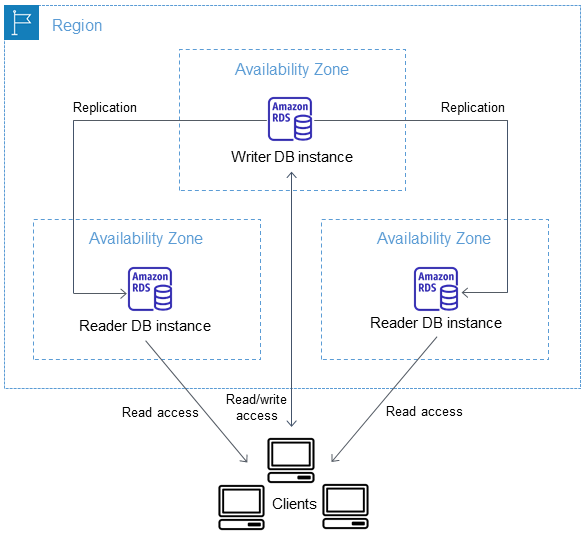
- With a Multi-AZ DB cluster, RDS replicates data from the writer DB instance to both of the reader DB instances using the DB engine’s native replication capabilities.
- When a change is made on the writer DB instance, it’s sent to each reader DB instance. Acknowledgment from at least one reader DB instance is required for a change to be committed.
- Reader DB instances act as automatic failover targets and also serve read traffic to increase application read throughput.
- If an outage occurs on the writer DB instance, RDS manages failover to one of the reader DB instances. RDS does this based on which reader DB instance has the most recent change record.
- Multi-AZ DB clusters typically have lower write latency when compared to Multi-AZ DB instance deployments.
- They also allow read-only workloads to run on reader DB instances.
- Multi-AZ DB clusters support both Provisioned IOPS (io1/io2) and General Purpose gp3 storage volumes, providing flexibility to choose based on performance needs and cost.
- Supports three types of endpoints:
- Cluster (Writer) endpoint – connects to the writer DB instance of the DB cluster, which supports both read and write operations.
- Reader endpoint – connects to either of the two reader DB instances, which support only read operations.
- Instance endpoint – connects to a specific DB instance within a Multi-AZ DB cluster.
Multi-AZ DB Cluster Key Features
- IAM Database Authentication (added Oct 2024) – Multi-AZ DB clusters now support AWS IAM database authentication, allowing centralized access management without storing password-based credentials in the database.
- gp3 Storage Support (added Feb 2024) – Multi-AZ DB clusters support General Purpose gp3 storage volumes with baseline performance of 3,000 IOPS included and ability to scale up to 64,000 IOPS independently of storage capacity.
- Security Certificate Rotation (added Mar 2024) – Multi-AZ DB clusters support database security certificate rotation for SSL/TLS certificate management.
- Near-Zero Downtime Minor Version Upgrades (added Nov 2023) – Minor version upgrades and system maintenance updates can be performed with typically 35 seconds or less of downtime, and as low as 1 second when combined with Amazon RDS Proxy.
- Read Replicas – You can create DB instance read replicas from a Multi-AZ DB cluster. One of the reader instances is always the source of replication, not the writer instance.
Migrating to a Multi-AZ DB Cluster
- You can migrate from a Single-AZ DB instance or Multi-AZ DB instance deployment to a Multi-AZ DB cluster using a read replica.
- Create a Multi-AZ DB cluster read replica from your existing DB instance, then promote it to a standalone Multi-AZ DB cluster.
- This approach minimizes downtime and ensures continuous operation during migration.
- The Multi-AZ DB cluster read replica must be on the same major version as its source, and the same or higher minor version.
- You cannot directly upgrade/convert a Single-AZ or Multi-AZ DB instance deployment into a Multi-AZ DB cluster in-place.
Multi-AZ DB Cluster Limitations
- Multi-AZ DB clusters are supported only for the MySQL and PostgreSQL DB engines.
- Multi-AZ DB clusters don’t support modifications at the DB instance level because all modifications are done at the DB cluster level.
- The DB instances in a Multi-AZ DB cluster can’t be added to an active-active cluster.
- Multi-AZ DB clusters don’t support the following features:
- IPv6 connections (dual-stack mode)
- Cross-Region automated backups
- Kerberos authentication
- Modifying the port (workaround: restore to a point in time and specify a different port)
- Option groups
- Point-in-time-recovery (PITR) for deleted clusters
- Storage autoscaling by setting the maximum allocated storage (workaround: manually scale storage)
- Stopping and starting the Multi-AZ DB cluster natively (workaround: delete and restore from snapshot)
- Copying a snapshot of a Multi-AZ DB cluster
- Encrypting an unencrypted Multi-AZ DB cluster
- RDS for PostgreSQL Multi-AZ DB clusters don’t support the
aws_s3andpg_transportextensions. - You can’t create a Multi-AZ DB cluster read replica from an existing Multi-AZ DB cluster.
RDS Multi-AZ DB Cluster Failover
- RDS automatically fails over to a reader DB instance in a different AZ in case of a planned or unplanned outage of the writer DB instance, as quickly as possible without administrative intervention.
- Failover time taken depends on the database activity and other conditions when the writer DB instance becomes unavailable and is typically under 35 seconds.
- Failover completes when both reader DB instances have applied outstanding transactions from the failed writer.
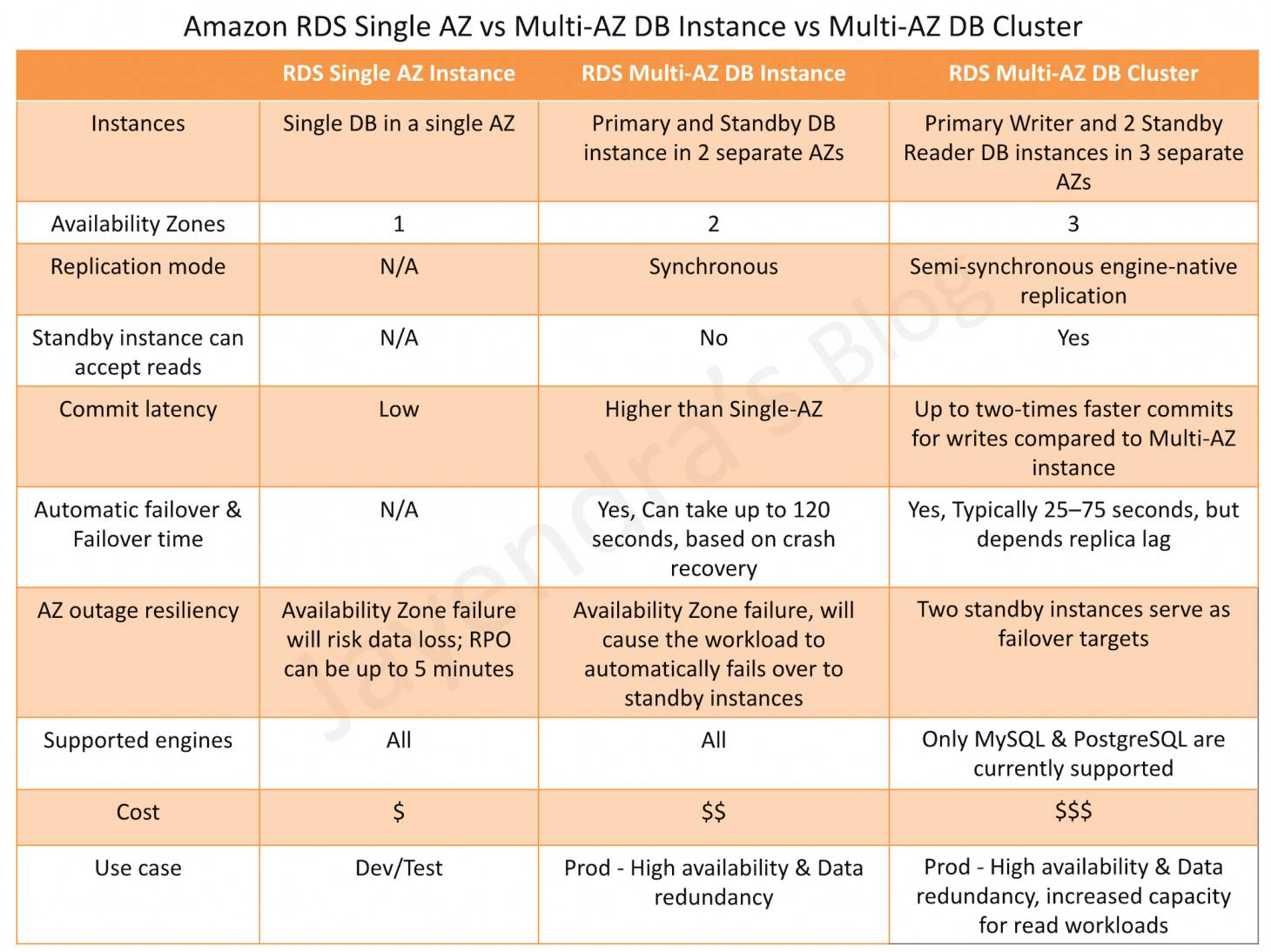
Multi-AZ DB Instance vs Multi-AZ DB Cluster
AWS Certification Exam Practice Questions
- Questions are collected from Internet and the answers are marked as per my knowledge and understanding (which might differ with yours).
- AWS services are updated everyday and both the answers and questions might be outdated soon, so research accordingly.
- AWS exam questions are not updated to keep up the pace with AWS updates, so even if the underlying feature has changed the question might not be updated
- Open to further feedback, discussion and correction.
- A company uses Amazon RDS for PostgreSQL in a Multi-AZ DB instance deployment. The database team needs to reduce write latency and also requires read replicas for reporting workloads. Which approach meets these requirements with the LEAST operational overhead?
- Create an Aurora PostgreSQL cluster with read replicas
- Migrate to a Multi-AZ DB cluster deployment using a read replica, then promote it
- Create cross-region read replicas from the existing Multi-AZ DB instance
- Enable Enhanced Monitoring to reduce latency
Show Answer
Answer: b – Multi-AZ DB clusters provide up to 2x lower write latency and built-in readable standby instances. Migration via read replica promotion minimizes downtime.
- A solutions architect is designing a highly available database solution using RDS Multi-AZ DB cluster. The application team wants to use IAM-based authentication instead of database passwords. Which statement is correct?
- Multi-AZ DB clusters do not support IAM database authentication
- Multi-AZ DB clusters support IAM database authentication for centralized access management
- IAM authentication is only supported with Aurora DB clusters
- IAM authentication requires Kerberos to be enabled on the cluster
Show Answer
Answer: b – As of October 2024, RDS Multi-AZ DB clusters support IAM database authentication.
- A company wants to deploy an RDS Multi-AZ DB cluster with cost-effective storage while maintaining good performance for a medium-sized workload. Which storage option should they choose?
- General Purpose gp2 storage
- Provisioned IOPS io1 storage
- General Purpose gp3 storage
- Magnetic storage
Show Answer
Answer: c – Since February 2024, Multi-AZ DB clusters support gp3 storage which provides baseline 3,000 IOPS included with the storage price, and allows scaling up to 64,000 IOPS independently of capacity.
- A DevOps engineer needs to perform a minor version upgrade on an RDS Multi-AZ DB cluster in production with minimal downtime. What is the expected downtime? (Select TWO)
- Typically under 35 seconds without a connection proxy
- Typically 1 second or less when combined with Amazon RDS Proxy
- Zero downtime guaranteed
- Several minutes similar to single-AZ deployments
- Requires manual failover to minimize downtime
Show Answer
Answer: a, b – Multi-AZ DB clusters support minor version upgrades with typically 35 seconds or less of downtime, further reduced to 1 second or less when used with RDS Proxy.
- Which of the following features are NOT supported by RDS Multi-AZ DB clusters? (Select THREE)
- IAM database authentication
- IPv6 connections (dual-stack mode)
- General Purpose gp3 storage
- Kerberos authentication
- Stopping and starting the cluster
- Security certificate rotation
Show Answer
Answer: b, d, e – Multi-AZ DB clusters still do not support dual-stack mode, Kerberos authentication, or native stop/start. IAM authentication (Oct 2024), gp3 storage (Feb 2024), and certificate rotation (Mar 2024) are now supported.
📖 Related: AWS RDS Backup, Snapshots & Restore – Complete Guide
One thought on “AWS RDS Multi-AZ DB Cluster”
Comments are closed.