Amazon RDS Blue/Green Deployments
- Amazon RDS Blue/Green Deployments help make and test database changes before implementing them in a production environment.
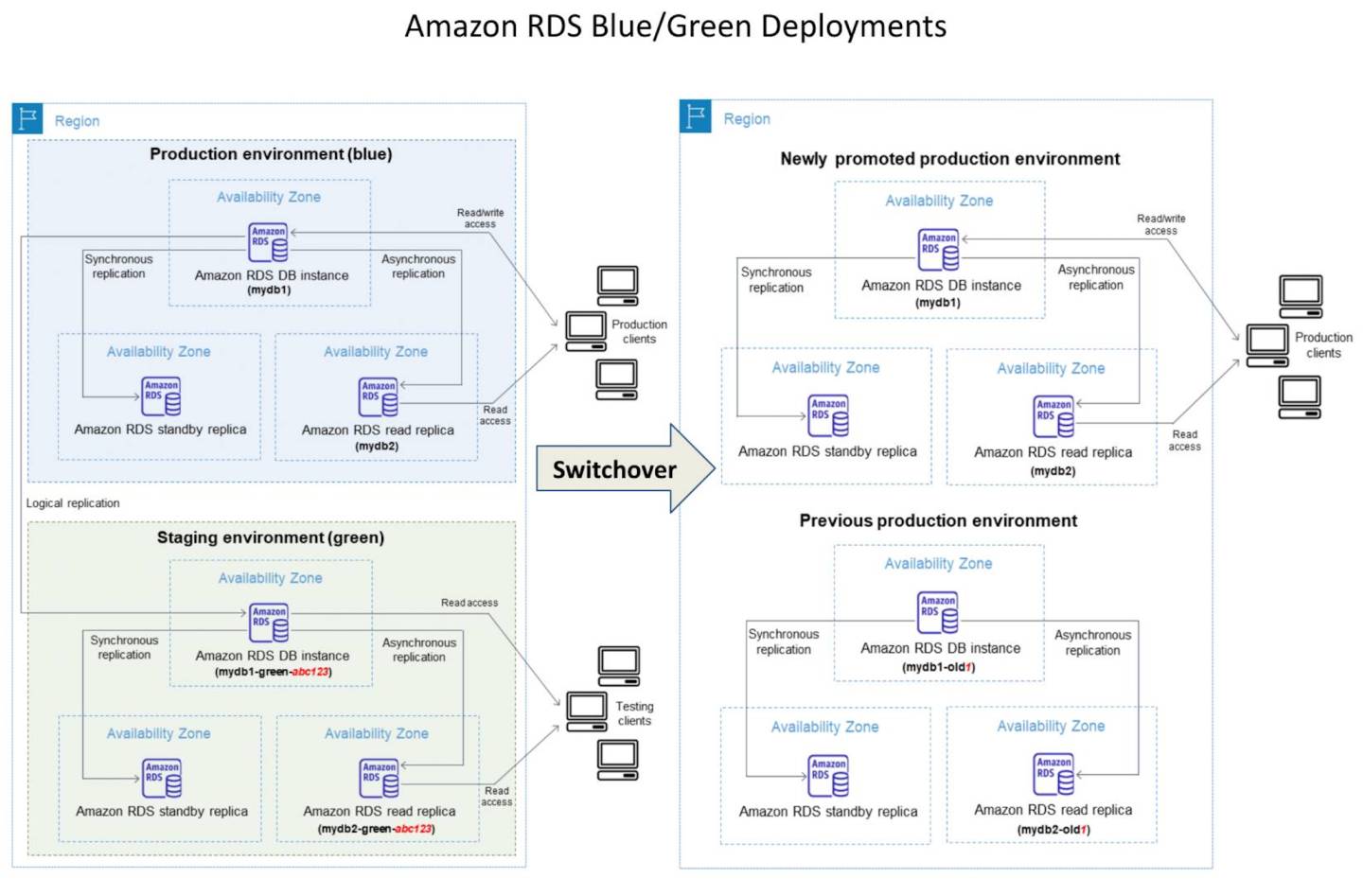
- RDS Blue/Green Deployment has the blue environment as the current production environment and the green environment as the staging environment.
- RDS Blue/Green Deployment creates a staging or green environment that exactly copies the production environment.
- Green environment is a copy of the topology of the production environment and includes the features used by the DB instance including the Multi-AZ deployment, read replicas, the storage configuration, DB snapshots, automated backups, Performance Insights, and Enhanced Monitoring.
- Green environment or the staging environment always stays in sync with the current production environment using logical replication (for major version upgrades) or physical replication (for minor version upgrades in PostgreSQL).
- RDS DB instances in the green environment can be changed without affecting production workloads. Changes can include the upgrade of major or minor DB engine versions, upgrade of underlying file system configuration, or change of database parameters in the staging environment.
- Changes can be thoroughly tested in the green environment and when ready, the environments can be switched over to promote the green environment to be the new production environment.
- Switchover typically takes under five seconds for single-Region configurations with no data loss and no need for application changes. Applications using the AWS Advanced JDBC Driver typically see two seconds or lower downtime.
- Blue/Green Deployments are supported for RDS for MariaDB, RDS for MySQL, and RDS for PostgreSQL.
- For Amazon Aurora, Blue/Green Deployments are supported for Aurora MySQL, Aurora PostgreSQL, and Aurora Global Database.
RDS Blue/Green Deployments Benefits
- Easily create a production-ready staging environment.
- Automatically replicate database changes from the production environment to the staging environment.
- Test database changes in a safe staging environment without affecting the production environment.
- Stay current with database patches and system updates.
- Implement and test newer database features.
- Switch over your staging environment to be the new production environment without changes to your application.
- Safely switch over through the use of built-in switchover guardrails.
- Eliminate data loss during switchover.
- Switch over quickly, typically under five seconds for single-Region configurations.
RDS Blue/Green Deployment Switchover
- A switchover transitions the green environment to be the new production environment.
- Before switchover, production traffic is routed to the blue environment. After switchover, production traffic is routed to the green environment.
- RDS renames the DB instances in the green environment to match the corresponding blue environment names, and renames the blue environment instances by appending
-oldNto the current name. - Endpoints in the green environment are renamed to match the blue environment so no application changes are required.
- A switchover timeout period can be specified between 30 seconds and 3,600 seconds (one hour). Default is 300 seconds (five minutes). If switchover takes longer, changes are rolled back.
Switchover Actions
- Runs guardrail checks to verify both environments are ready for switchover.
- Stops new write operations on the primary DB instance in both environments.
- Drops connections to the DB instances in both environments and disallows new connections.
- Waits for replication to catch up in the green environment so it is in sync with the blue environment.
- Renames DB instances in both environments (green gets production names, blue gets
-oldNsuffix). - Allows connections to databases in both environments.
- Allows write operations on the primary DB instance in the new production environment.
Switchover Guardrails
- Amazon RDS runs guardrail checks to test the readiness of both environments before switchover.
- Green environment checks:
- Replication health – Checks if green primary DB instance replication status is healthy.
- Replication lag – Checks if the replica lag is within allowable limits based on the specified timeout period.
- Active writes – Makes sure there are no active writes on the green primary DB instance.
- Blue environment checks:
- External replication – Makes sure the blue environment isn’t a self-managed logical source or replica.
- Long-running active writes – Makes sure there are no long-running active writes on the blue primary DB instance.
- Long-running DDL statements – Makes sure there are no long-running DDL statements on the blue primary DB instance.
- Unsupported PostgreSQL changes (logical replication) – Makes sure no DDL changes or large object modifications have been performed.
- If guardrails fail, the switchover is blocked and environments remain unchanged.
After Switchover
- DB instances in the previous blue environment are retained (standard costs apply).
- Replication between blue and green environments stops.
- The old blue environment DB instances are read-only until the
read_onlyparameter (MySQL) ordefault_transaction_read_onlyparameter (PostgreSQL) is set to0. - Resource IDs don’t change during switchover, but names do. Update resource IDs used in IAM policies, Performance Insights, CloudTrail, and AWS Backup.
RDS Proxy with Blue/Green Deployments
- (New – April 2026) Amazon RDS Blue/Green Deployments now supports Amazon RDS Proxy, enabling faster application recovery during switchover by eliminating DNS propagation delays.
- During switchover, RDS Proxy actively monitors database instances and detects when the Green environment becomes the new production environment.
- RDS Proxy quickly redirects connections to the Green environment, enabling faster application recovery without driver modifications or application changes.
- During the transitional period, the Blue database enters read-only mode before Green environment is promoted. RDS Proxy continues routing connections to the blue database during this period.
- Once switchover is detected, the proxy automatically routes traffic to the newly promoted green environment.
- When the Green environment is promoted, existing connections to the proxy are dropped and applications must re-establish connections.
- Available for Aurora MySQL, Aurora PostgreSQL, RDS for MySQL, RDS for PostgreSQL, and RDS for MariaDB in all commercial AWS Regions where RDS Proxy is available.
- Limitation: RDS Proxy with Blue/Green Deployments is not supported for Aurora Global Databases.
- Note: The blue cluster must be registered with the proxy before creating a blue/green deployment. If a deployment already exists for a given blue cluster, registering it to RDS Proxy will be blocked.
AWS Advanced JDBC Driver with Blue/Green Deployments
- (New – January/February 2026) Blue/Green Deployments support the AWS Advanced JDBC Driver (for PostgreSQL) as a smart driver alternative for faster switchover.
- The AWS Advanced JDBC Driver detects topology changes and redirects connections to the new production environment without waiting for DNS propagation.
- Applications using the AWS Advanced JDBC Driver typically see two seconds or lower downtime during switchover.
- The blue/green deployment plugin in the driver provides automatic connection management during database switchovers.
- Note: The AWS JDBC Driver for MySQL is NOT supported for blue/green deployments.
PostgreSQL Replication Methods
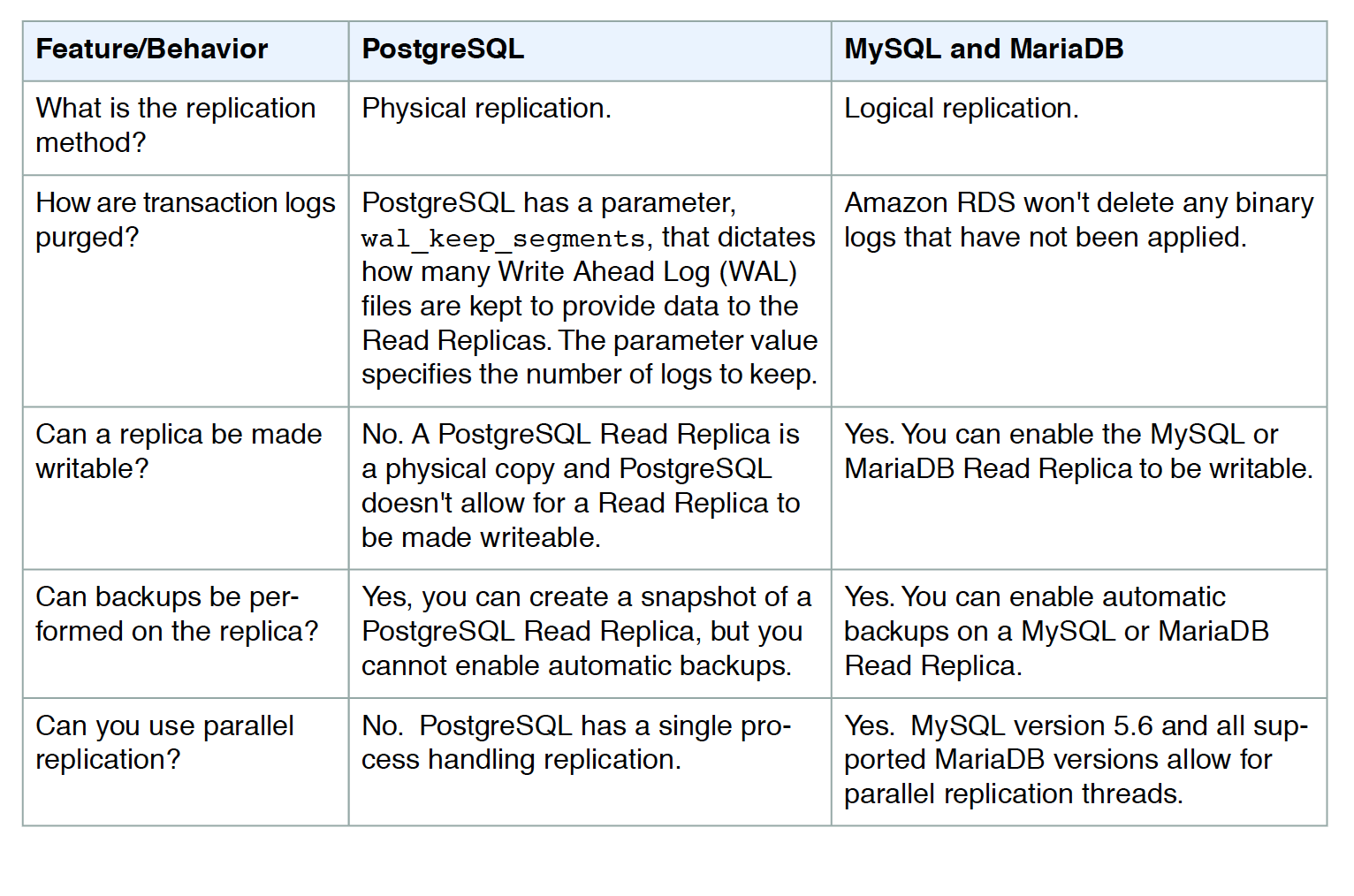
- (Updated – November 2024) RDS for PostgreSQL Blue/Green Deployments now use physical replication by default for minor version upgrades.
- Physical replication is used when no major version upgrade is specified at creation time.
- Logical replication is used when a major version upgrade is specified during blue/green deployment creation.
- Physical replication benefits:
- Overcomes most limitations of logical replication.
- Well-suited for minor version upgrades, schema changes (DDL) in the blue environment, and storage adjustments.
- Does not support table modifications on the green instance (green is strictly read-only).
- Logical replication limitations:
- DDL statements (CREATE TABLE, CREATE SCHEMA) are not replicated from blue to green.
- DCL statements (GRANT, REVOKE) are not replicated.
- Large objects in the blue environment are not replicated to the green environment.
- Unlogged tables are not replicated.
- Materialized views are not automatically refreshed in the green environment.
- UPDATE and DELETE operations require tables to have a primary key.
- The apply process is single-threaded, which may cause lag with high write throughput.
Aurora Global Database Support
- (New – November 2025) RDS Blue/Green Deployments now supports Aurora Global Database for safer, simpler, and faster updates.
- Blue/Green Deployments for Aurora Global Database creates a staging (green) environment that mirrors the production (blue) Aurora Global Database, including primary and all secondary regions.
- Eliminates complex cross-Region orchestration and manual endpoint coordination that was previously required for self-managed multi-Region blue/green deployments.
- Switchover safely using built-in switchover guardrails with downtime typically under one minute for global configurations.
- Available for Aurora MySQL and Aurora PostgreSQL Global Database configurations.
RDS Blue/Green Deployments Limitations
- Blue/Green Deployments are supported only for RDS for MariaDB, RDS for MySQL, and RDS for PostgreSQL (not supported for RDS for Oracle or RDS for SQL Server).
- Blue/Green Deployments don’t support managing master user passwords with AWS Secrets Manager.
- If dedicated log volume (DLV) is enabled on the blue database, it must be enabled on all DB instances, including read replicas.
- During switchover, zero-ETL integrations with Amazon Redshift must be deleted first, then recreated after switchover.
- The Event Scheduler (event_scheduler parameter) must be disabled on the green environment when creating a deployment.
- Cannot change an unencrypted DB instance into an encrypted one (or vice versa).
- Cannot change a blue DB instance to a higher engine version than its corresponding green DB instance.
- Not supported for:
- Cascading read replicas
- Cross-Region read replicas
- CloudFormation
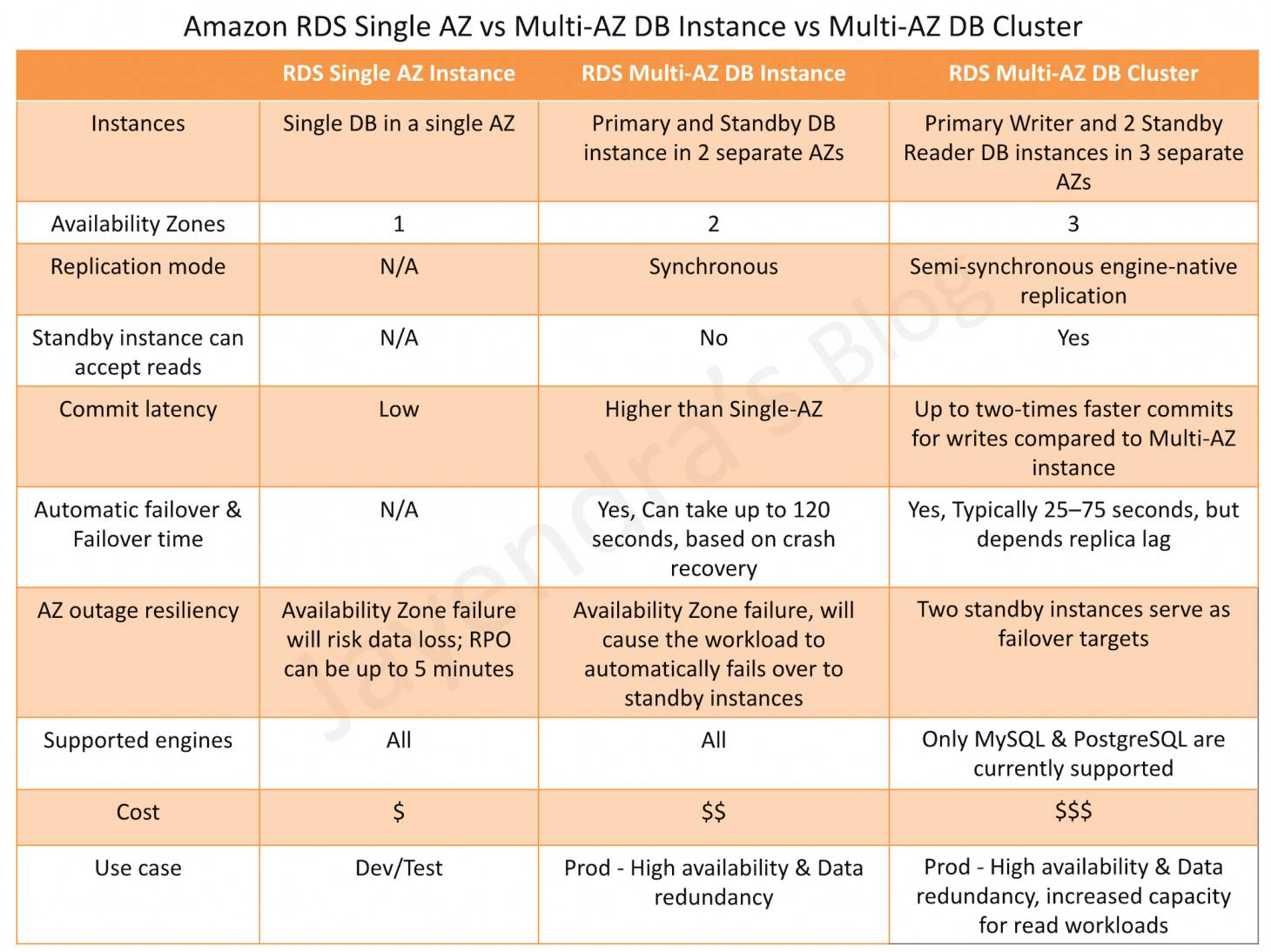
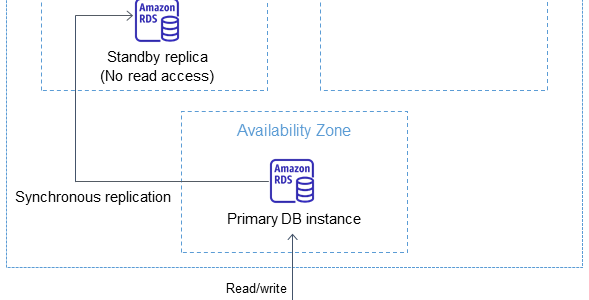
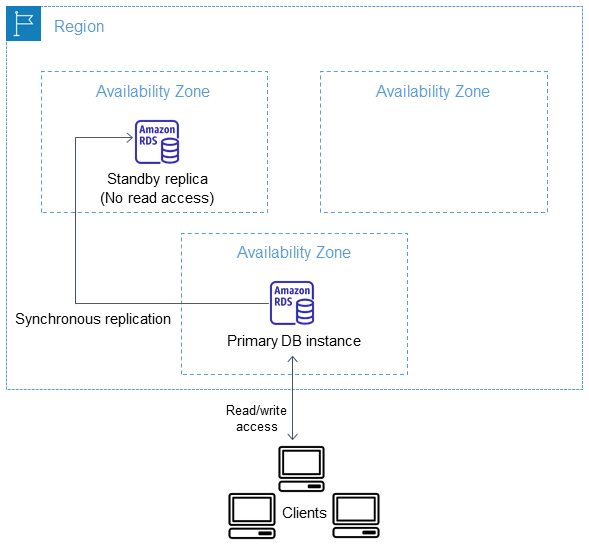
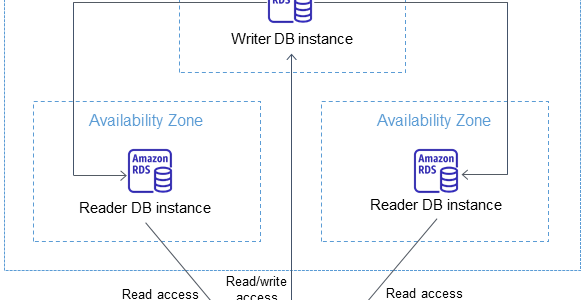
- Multi-AZ DB cluster deployments (supported for Multi-AZ DB instance deployments)
- After switchover, AWS DMS replication tasks can’t resume because the checkpoint from the blue environment is invalid in the green environment. You must recreate the DMS task.
RDS Blue/Green Deployments Best Practices
- Thoroughly test resources in the green environment before switchover.
- Monitor relevant CloudWatch metrics (DatabaseConnections, ReplicaLag) before switchover.
- Schedule switchover during lowest traffic periods.
- Ensure replica lag is close to zero before initiating switchover.
- Ensure network and client DNS cache TTL is not set beyond five seconds.
- Ensure data loading is complete before switchover (lazy loading/storage initialization).
- For PostgreSQL with logical replication, run ANALYZE operation to refresh pg_statistics before switchover.
- Reduce active connections to minimum necessary before switchover for faster completion.
- Verify that the application does not override the
default_transaction_read_onlyparameter at the session level (for PostgreSQL).
AWS Certification Exam Practice Questions
- Questions are collected from Internet and the answers are marked as per my knowledge and understanding (which might differ with yours).
- AWS services are updated everyday and both the answers and questions might be outdated soon, so research accordingly.
- AWS exam questions are not updated to keep up the pace with AWS updates, so even if the underlying feature has changed the question might not be updated
- Open to further feedback, discussion and correction.
- A company runs a critical production database on Amazon RDS for PostgreSQL with Multi-AZ deployment. They need to perform a major version upgrade with minimal downtime and no data loss. The application connects directly to the database endpoint. Which approach provides the LOWEST downtime for this upgrade?
- Create a read replica, promote it, and point the application to the new instance
- Use RDS Blue/Green Deployments to create a staging environment, test the upgrade, and switchover
- Take a snapshot, restore it with the new engine version, and update the application endpoint
- Perform an in-place major version upgrade during a maintenance window
Answer: b. RDS Blue/Green Deployments create a staging environment with the upgraded version, keep it in sync via replication, and perform switchover with typically under 5 seconds downtime for single-Region configurations.
- A database administrator is planning to use Amazon RDS Blue/Green Deployments for a minor version upgrade on an RDS for PostgreSQL instance. Which type of replication does RDS use to keep the green environment in sync with the blue environment for this scenario?
- Logical replication
- Physical replication
- AWS Database Migration Service
- Snapshot-based synchronization
Answer: b. Since November 2024, RDS Blue/Green Deployments for PostgreSQL minor version upgrades use physical replication by default. Logical replication is used when a major version upgrade is specified.
- A company wants to minimize application downtime during an RDS Blue/Green Deployment switchover. Their application uses connection pooling. Which TWO approaches reduce switchover downtime? (Select TWO)
- Use Amazon RDS Proxy with the blue/green deployment
- Increase the switchover timeout to maximum
- Use the AWS Advanced JDBC Driver with the blue/green deployment plugin
- Enable Multi-AZ on the green environment
- Increase the DNS TTL to 300 seconds
Answer: a, c. RDS Proxy and the AWS Advanced JDBC Driver both detect topology changes during switchover and redirect connections without waiting for DNS propagation, reducing downtime. RDS Proxy provides sub-5-second recovery, while the JDBC Driver provides ~2-second recovery.
- A company uses Amazon RDS Blue/Green Deployments with RDS for MySQL. During the switchover, which actions does Amazon RDS perform? (Select THREE)
- Runs guardrail checks to verify both environments are ready
- Stops new write operations on the primary DB instance in both environments
- Creates a new snapshot of the blue environment
- Deletes the blue environment instances
- Waits for replication to catch up in the green environment
- Upgrades the engine version automatically
Answer: a, b, e. During switchover, RDS runs guardrail checks, stops writes on both environments, drops connections, waits for replication to catch up, renames instances, and then allows connections and writes on the new production environment. The blue environment is NOT deleted – it is retained with -oldN suffix.
- Which of the following are limitations of Amazon RDS Blue/Green Deployments? (Select THREE)
- Not supported for RDS for Oracle
- Not supported for Multi-AZ DB instance deployments
- Not supported for cross-Region read replicas
- Cannot change an unencrypted DB instance to an encrypted one
- Not supported for RDS for PostgreSQL
- Not supported for Multi-AZ DB cluster deployments
Answer: a, c, d. Blue/Green Deployments don’t support RDS for Oracle (or SQL Server), cross-Region read replicas, or changing encryption status. They DO support Multi-AZ DB instance deployments (not cluster deployments) and RDS for PostgreSQL.
- An organization uses Amazon Aurora Global Database for their multi-Region application. They need to perform an engine version upgrade. How can they use Blue/Green Deployments for this scenario?
- Blue/Green Deployments don’t support Aurora Global Database
- Create separate Blue/Green Deployments in each Region and coordinate switchover manually
- Use fully managed Blue/Green Deployments for Aurora Global Database which mirrors primary and all secondary regions
- Convert to single-Region Aurora, perform Blue/Green Deployment, then recreate Global Database
Answer: c. Since November 2025, RDS Blue/Green Deployments supports Aurora Global Database. It creates a staging (green) environment that mirrors the production (blue) Aurora Global Database, including primary and all secondary regions, with built-in switchover guardrails.
References
- Amazon RDS Blue/Green Deployments Overview
- Switching a Blue/Green Deployment
- Limitations and Considerations for Blue/Green Deployments
- Creating a Blue/Green Deployment
- Amazon Aurora Blue/Green Deployments Overview
- Blue/Green Deployments for Aurora Global Database
- Using RDS Proxy with Blue/Green Deployments