Table of Contents
hide
RDS Multi-AZ DB Instance vs DB Cluster
- RDS Multi-AZ deployments provide high availability and automatic failover support for DB instances
- Multi-AZ helps improve the durability and availability of a critical system, enhancing availability during planned system maintenance, DB instance failure, and Availability Zone disruption.
- A Multi-AZ DB instance deployment has one standby DB instance that provides failover support but doesn’t serve read traffic.
- A Multi-AZ DB cluster deployment has two standby DB instances that provide failover support and can also serve read traffic.
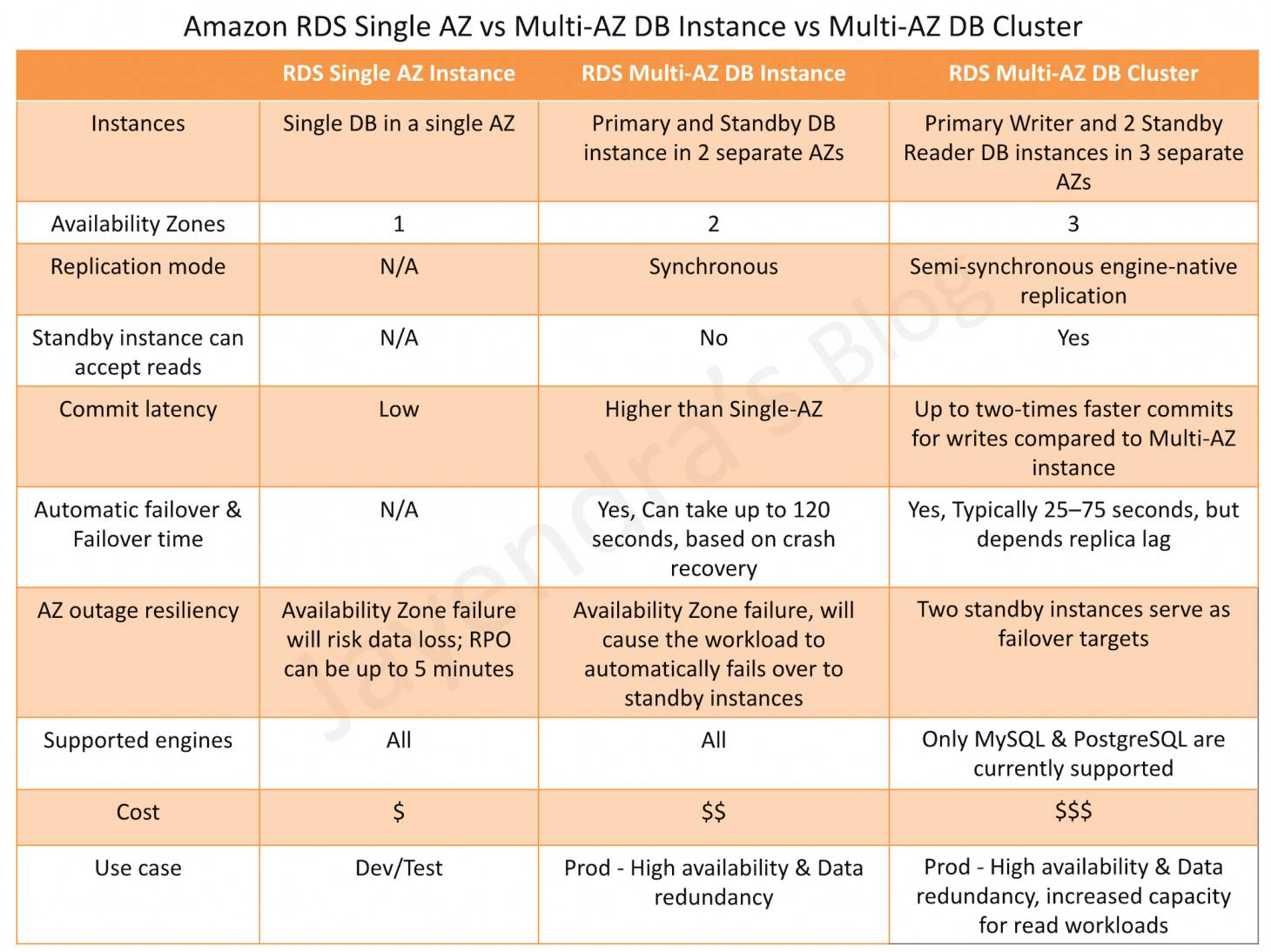
Instances & Availability Zones
- A Single AZ instance creates a single DB instance in any specified AZ.
- A Multi-AZ DB Instance deployment creates a Primary and a Standby instance in two different AZs
- A Multi-AZ DB Cluster deployment creates a Primary Writer and two Readable Standby instances in three different AZs
Replication Mode
- Multi-AZ DB instance deployment synchronously replicates the data from the primary DB instance to a standby instance in a different AZ.
- Multi-AZ DB cluster deployment semi-synchronously replicates data from the writer DB instance to both reader DB instances using the DB engine’s native replication capabilities.
Standby Instance can Accept Reads
- Multi-AZ DB instance deployment is a high-availability solution and the standby instance does not support requests.
- Multi-AZ DB cluster deployment provides readable standby instances to increase application read-throughput.
Commit Latency
- Single AZ instance has the lowest commit latency.
- Multi-AZ DB instance deployment has a high commit latency as compared to the Single AZ instance as the data needs to be synchronously replicated to the standby instance.
- Multi-AZ DB cluster deployment provides up to 2x faster transaction commit latency compared to Multi-AZ DB instance as it performs semi-synchronous replication.
Automatic Failover & Failover Time
- Single AZ instances do not support automatic failover and failure would result in data loss. Use point-in-time recovery with backups to restore the database.
- Multi-AZ DB instance deployment performs an automatic failover to the standby instance, and the failover time can be up to 120 seconds based on the crash recovery.
- Multi-AZ DB cluster deployment performs an automatic failover to a reader DB instance in a different AZ, and the failover time is typically under 35 seconds.
- Using RDS Proxy with Multi-AZ DB cluster can further reduce failover time by bypassing DNS propagation delays.
Maintenance & Upgrades
- Multi-AZ DB instance deployment requires longer downtime for minor version upgrades as the primary instance must be upgraded.
- Multi-AZ DB cluster deployment supports minor version upgrades and system maintenance updates with typically 35 seconds or less of write downtime.
- When combined with RDS Proxy, Multi-AZ DB cluster can achieve minor version upgrades with typically 1 second or less of downtime.
Storage Options
- Single AZ and Multi-AZ DB instance deployments support General Purpose SSD (gp2, gp3), Provisioned IOPS (io1, io2), and magnetic storage (deprecated April 2026).
- Multi-AZ DB clusters now support three storage types:
- General Purpose gp3 (added Feb 2024) – Cost-effective option with up to 64,000 IOPS, suitable for a broad range of workloads.
- Provisioned IOPS io1 – Up to 256,000 IOPS with consistent single-digit millisecond latency.
- Provisioned IOPS io2 Block Express (added Mar 2024) – Sub-millisecond latency, 99.999% durability, up to 256,000 IOPS. Best for latency-sensitive mission-critical workloads.
Supported Engines
- Single AZ and Multi-AZ DB instance deployments support all DB engines
- Multi-AZ DB clusters are supported only for the MySQL and PostgreSQL DB engines.
Performance Optimizations (Multi-AZ DB Cluster)
- RDS Optimized Writes – Delivers up to 2x improvement in write transaction throughput by writing only once to the database (bypasses the double-write buffer).
- RDS Optimized Reads – Provides up to 2x faster complex query processing by using local NVMe-based instance storage for temporary tables.
- These optimizations are available for Multi-AZ DB cluster deployments with supported instance classes.
Additional Features (Multi-AZ DB Cluster)
- IAM Database Authentication (Oct 2024) – Centrally manage database access using AWS IAM instead of password-based credentials.
- Security Certificate Rotation (Mar 2024) – Supports rotation of database security certificates for enhanced security.
- Stop and Start (Aug 2024) – Multi-AZ DB clusters can be stopped and started, useful for reducing costs in non-production environments.
- RDS Proxy Support – Enables connection pooling, faster failover, and reduced downtime during maintenance.
Cost
- Single AZ is the most cost-effective option.
- Multi-AZ DB Instance deployment costs more than a Single AZ as it maintains a synchronous standby instance.
- Multi-AZ DB Cluster creates 3 instances. However, with the addition of gp3 storage support (Feb 2024), it is now more cost-effective for workloads that previously required io1 volumes.
- Multi-AZ DB Cluster can replace a Multi-AZ DB instance plus a separate read replica, potentially reducing total cost while improving performance.
Use Cases
- Single AZ deployments are suitable for non-critical dev, test environments.
- Multi-AZ DB instance deployments are suitable for production workloads requiring high availability with simple failover.
- Multi-AZ DB cluster deployments are suitable for critical production environments requiring high availability, low write latency, read scalability, fast failover (under 35 seconds), and minimal maintenance downtime.
AWS Certification Exam Practice Questions
- Questions are collected from Internet and the answers are marked as per my knowledge and understanding (which might differ with yours).
- AWS services are updated everyday and both the answers and questions might be outdated soon, so research accordingly.
- AWS exam questions are not updated to keep up the pace with AWS updates, so even if the underlying feature has changed the question might not be updated
- Open to further feedback, discussion and correction.
- A company runs a critical production database on Amazon RDS for MySQL. They need high availability with the fastest possible failover time and also require read scalability. Which deployment option best meets these requirements?
- Single-AZ DB instance with Read Replicas
- Multi-AZ DB instance deployment
- Multi-AZ DB cluster deployment
- Amazon Aurora with Read Replicas
Show Answer
Answer: c – Multi-AZ DB cluster provides failover typically under 35 seconds and readable standby instances for read scaling.
- A company uses an RDS Multi-AZ DB cluster and wants to minimize downtime during minor version upgrades. What should they do to achieve less than 1 second of downtime?
- Convert to Aurora
- Use RDS Proxy in front of the Multi-AZ DB cluster
- Use Blue/Green deployments
- Take a manual snapshot before upgrade
Show Answer
Answer: b – RDS Proxy with Multi-AZ DB cluster reduces minor version upgrade downtime to typically 1 second or less.
- Which storage types are supported for RDS Multi-AZ DB cluster deployments? (Select THREE)
- General Purpose SSD (gp2)
- General Purpose SSD (gp3)
- Provisioned IOPS (io1)
- Provisioned IOPS (io2 Block Express)
- Magnetic storage
Show Answer
Answer: b, c, d – Multi-AZ DB clusters support gp3, io1, and io2 Block Express storage volumes.
- What is the typical failover time for an RDS Multi-AZ DB cluster deployment?
- Under 120 seconds
- Under 75 seconds
- Under 35 seconds
- Under 10 seconds
Show Answer
Answer: c – Multi-AZ DB cluster failover is typically under 35 seconds.