Elastic File System – EFS
- Amazon Elastic File System (EFS) provides a simple, fully managed, easy to set up, scalable, serverless, and cost-optimized file storage for use with AWS Cloud and on-premises resources.
- can automatically scale from gigabytes to petabytes of data without needing to provision storage.
- provides managed NFS (network file system) that can be mounted on and accessed by multiple EC2 instances in multiple AZs simultaneously.
- offers highly durable, highly scalable, and highly available storage.
- stores data redundantly across multiple AZs in the same region (Regional file systems) or within a single AZ (One Zone file systems)
- grows and shrinks automatically as files are added and removed, so there is no need to manage storage procurement or provisioning.
- supports the Network File System version 4 (NFSv4.1 and NFSv4.0) protocol
- provides file system access semantics, such as strong data consistency and file locking
- is compatible with all Linux-based AMIs for EC2, POSIX file system (~Linux) that has a standard file API
- is a shared POSIX system for Linux systems and does not work for Windows
- offers the ability to encrypt data at rest using KMS and in transit.
- can be accessed from on-premises using an AWS Direct Connect or AWS VPN connection between the on-premises datacenter and VPC.
- can be accessed concurrently from servers in the on-premises data center as well as EC2 instances in the VPC
- supports IPv6 on EFS Service APIs and mount targets (added June 2025)
- supports integration with AWS Lambda, Amazon ECS, Amazon EKS (including Fargate), and other containerized/serverless compute services.
EFS File System Types
- Regional (Recommended)
- stores data redundantly across multiple Availability Zones in an AWS Region
- offers the highest levels of durability and availability
- supports all performance and throughput modes
- One Zone
- stores data within a single Availability Zone
- offers lower cost with additional savings
- does not support Max I/O performance mode
EFS Storage Classes
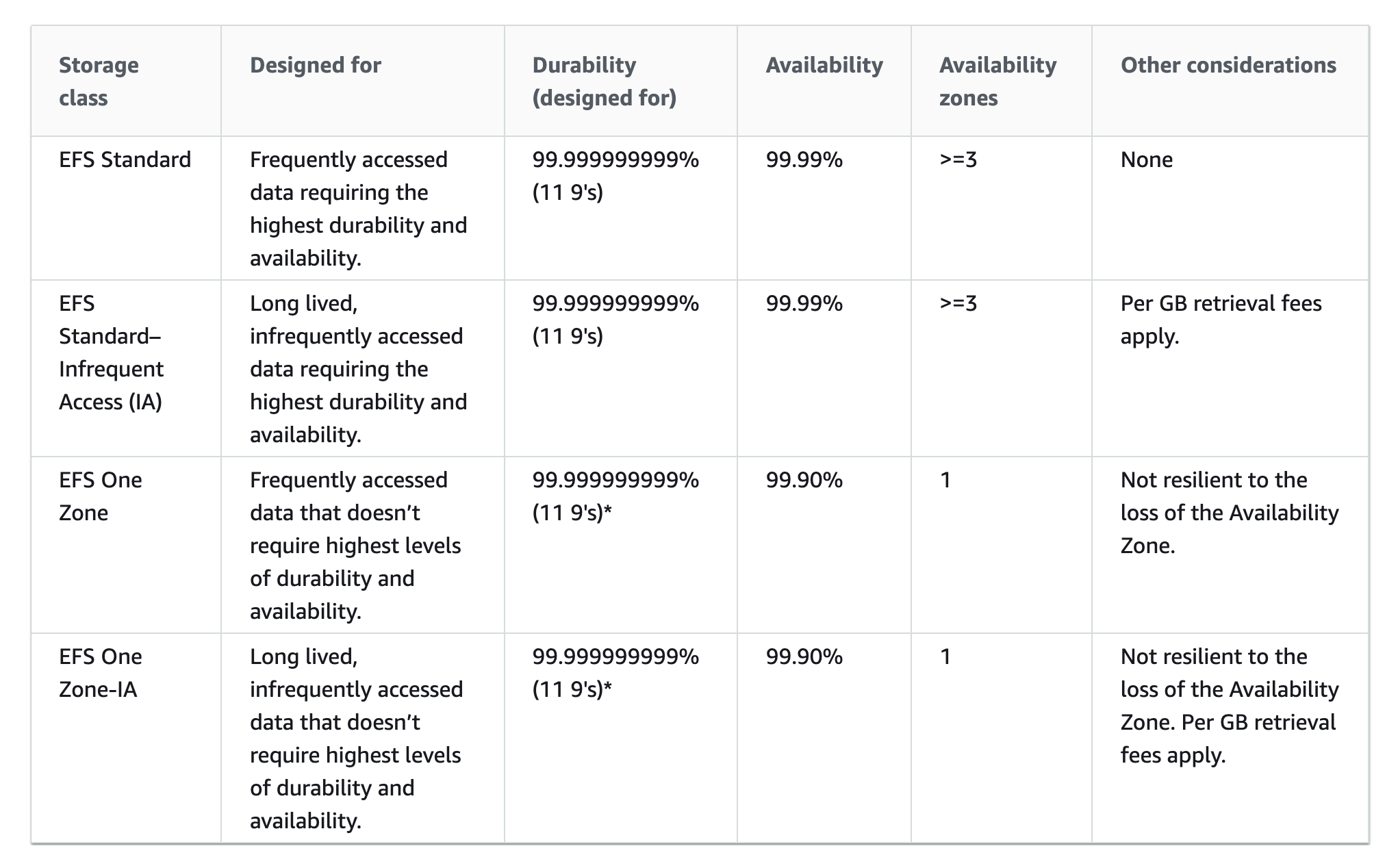
Standard storage classes
- EFS Standard and Standard-Infrequent Access (Standard-IA), offer multi-AZ resilience and the highest levels of durability and availability.
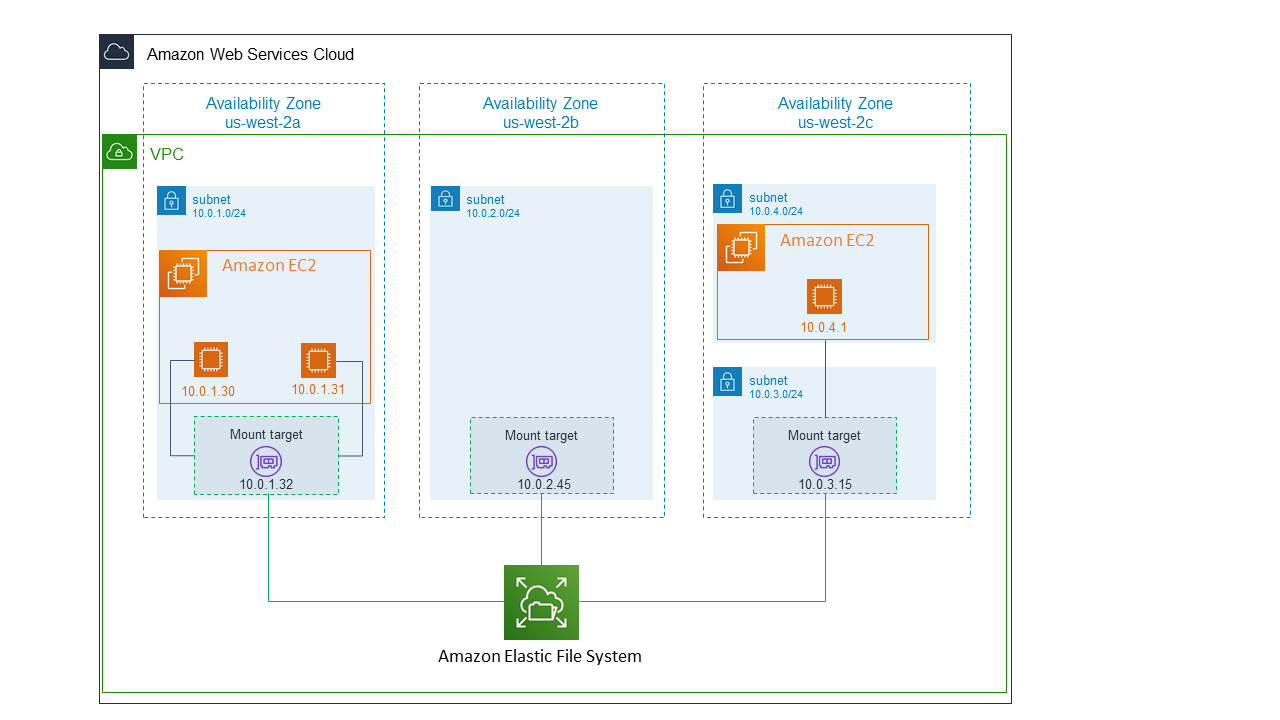
- For file systems using Standard storage classes, a mount target can be created in each Availability Zone in the AWS Region.
- Standard
- regional storage class for frequently accessed data.
- offers the highest levels of availability and durability by storing file system data redundantly across multiple AZs in an AWS Region.
- uses SSD storage to deliver the lowest levels of latency (~1 ms read, ~2.7 ms write)
- ideal for active file system workloads and you pay only for the file system storage you use per month
- Standard-Infrequent Access (Standard-IA)
- regional, low-cost storage class that’s cost-optimized for files infrequently accessed i.e. not accessed every day
- offers the highest levels of availability and durability by storing file system data redundantly across multiple AZs in an AWS Region
- cost to retrieve files, lower price to store
- provides first-byte latencies of tens of milliseconds
One Zone storage classes
- EFS One Zone and One Zone-Infrequent Access (One Zone-IA) offer additional savings by saving the data in a single AZ.
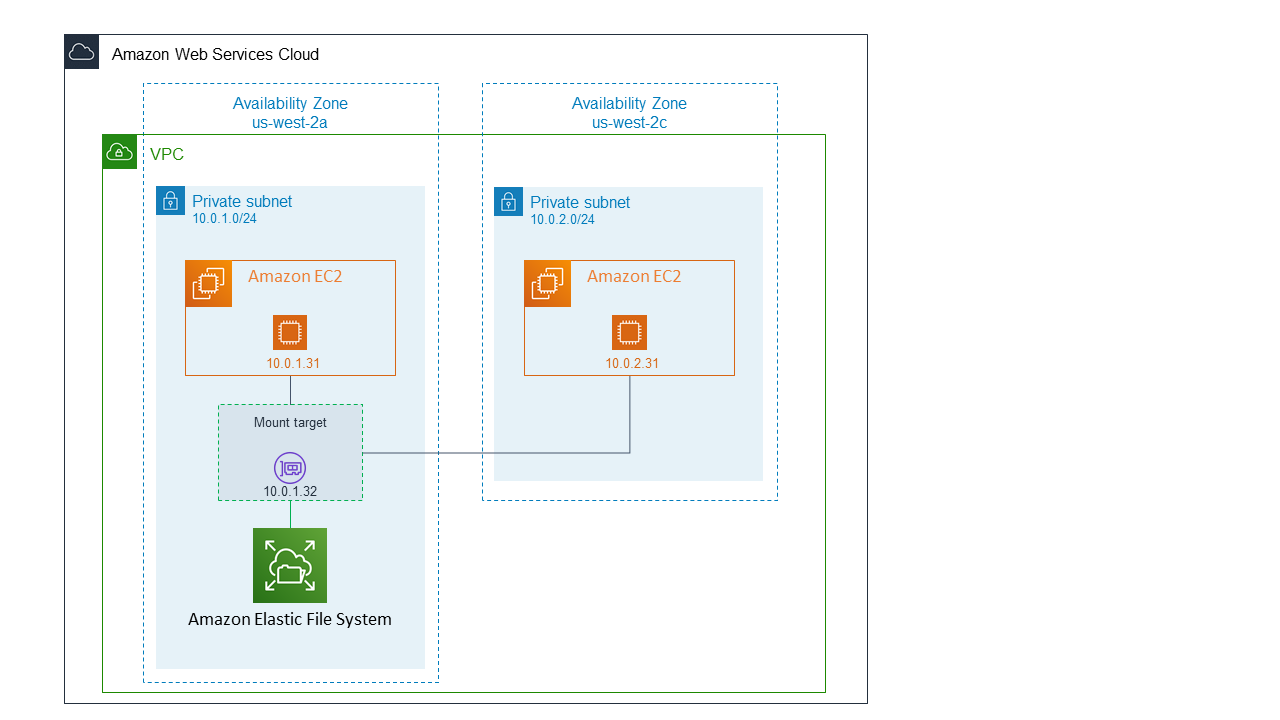
- For file systems using One Zone storage classes, only a single mount target that is in the same Availability Zone as the file system needs to be created.
- EFS One Zone
- For frequently accessed files stored redundantly within a single AZ in an AWS Region.
- EFS One Zone-IA (One Zone-IA)
- A lower-cost storage class for infrequently accessed files stored redundantly within a single AZ in an AWS Region.
EFS Archive Storage Class
- EFS Archive is a storage class designed for rarely accessed data, launched in November 2023.
- delivers storage prices up to 50% lower compared to EFS Infrequent Access (IA) and up to 97% lower compared to EFS Standard.
- costs only $0.008/GB-month.
- supports the same intelligent tiering experience as existing EFS storage classes.
- provides first-byte latencies of tens of milliseconds (same as IA).
- ideal for storing compliance data, historical records, and rarely accessed datasets that still need to be in a shared file system.
- by default, files not accessed in Standard storage for 90 days are transitioned into the Archive storage class.
- available only for Regional file systems.
EFS Lifecycle Management
- EFS lifecycle management automatically manages cost-effective file storage for the file systems.
- When enabled, lifecycle management migrates files that haven’t been accessed for a set period of time to an infrequent access storage class, Standard-IA or One Zone-IA.
- Lifecycle Management automatically moves the data to the EFS IA storage class according to the lifecycle policy. for e.g., you can move files automatically into EFS IA fourteen days after not being accessed.
- Lifecycle management uses an internal timer to track when a file was last accessed and not the POSIX file system attribute that is publicly viewable.
- Whenever a file in Standard or One Zone storage is accessed, the lifecycle management timer is reset.
- After lifecycle management moves a file into one of the IA storage classes, the file remains there indefinitely if EFS Intelligent-Tiering is not enabled.
- Supported lifecycle transition periods: 1, 7, 14, 30, 60, 90, 180, 270, or 365 days after last access.
- Files can also be automatically transitioned from IA to Archive storage (default 90 days after last access in Standard).
EFS Intelligent-Tiering
- EFS Intelligent-Tiering delivers automatic cost savings for workloads with changing access patterns.
- automatically moves files between storage classes based on access patterns:
- Moves infrequently accessed files from Standard to IA (or from One Zone to One Zone-IA)
- Moves files back to Standard (or One Zone) storage on first access if “Transition into Standard” policy is set to “On first access”
- Moves rarely accessed files from IA to Archive
- eliminates the risk of unbounded access charges while providing consistent low latencies for active data.
- EFS transparently serves files across all storage classes from a common file system namespace.
EFS Performance Modes
General Purpose (Default, Recommended)
- lowest per-operation latency (~1 ms read, ~2.7 ms write for Regional)
- ideal for web serving environments, content management systems, home directories, and general file serving
- supports up to 2.5 million read IOPS and 500,000 write IOPS per file system with Elastic Throughput (as of Nov 2024, a 10x increase over previous limits)
- recommended for ALL file systems; AWS recommends always using General Purpose performance mode
- One Zone file systems always use General Purpose performance mode
Max I/O (Previous Generation)
- can scale to higher levels of aggregate throughput and operations per second
- with a tradeoff of slightly higher latencies for file metadata operations
- designed for highly parallelized applications and workloads, such as big data analysis, media processing, and genomic analysis
- is NOT available for file systems using One Zone storage classes or Elastic throughput mode
- AWS now recommends using General Purpose performance mode instead; with Elastic throughput, General Purpose now provides up to 2.5 million IOPS, surpassing Max I/O for most use cases
- performance mode cannot be changed after file system creation; a new file system must be created to switch modes
EFS Throughput Modes
Elastic Throughput (Default, Recommended)
- automatically scales throughput performance up or down to meet workload activity needs
- recommended for most use cases, especially spiky or unpredictable workloads
- ideal for applications that drive throughput at an average-to-peak ratio of 5% or less
- pay only for the amount of data read or written; no burst credits consumed
- supports up to 60 GiBps read throughput and 5 GiBps write throughput per file system (region-dependent)
- supports up to 1,500 MiBps per-client throughput (with EFS client v2.0+ or EFS CSI Driver)
- supports up to 2.5 million read IOPS and 500,000 write IOPS (with quota increase, up to 10x)
- not compatible with Max I/O performance mode
Provisioned Throughput
- throughput of the file system (in MiB/s) can be instantly provisioned independent of the amount of data stored
- use when workload performance requirements are known and average-to-peak ratio is 5% or more
- supports up to 10 GiBps read and 3.33 GiBps write throughput
- supports up to 55,000 read IOPS and 25,000 write IOPS
Bursting Throughput
- throughput on EFS scales as the size of the file system in the EFS Standard or One Zone storage class grows
- base throughput of 50 KiBps per GiB of Standard storage
- can burst up to 100 MiBps per TiB when burst credits are available
- supports up to 35,000 read IOPS and 7,000 write IOPS
- if throughput-constrained, consider switching to Elastic or Provisioned throughput
EFS Replication
- EFS Replication enables automatic replication of file system data to another AWS Region or Availability Zone.
- supports cross-Region replication for disaster recovery and compliance use cases.
- supports cross-account replication (added November 2024), allowing replication between different AWS accounts.
- all replication traffic stays on the AWS global backbone network.
- most changes are replicated within a minute, with an overall Recovery Point Objective (RPO) of 15 minutes for most file systems.
- replication does not consume burst credits and does not count against provisioned throughput.
- available in all AWS Regions where Amazon EFS is available.
- useful for business continuity, localized data access, and test/development environments.
EFS Security
- EFS supports authentication, authorization, and encryption capabilities to help meet security and compliance requirements.
- EFS supports two forms of encryption for file systems,
- Encryption in transit
- Encryption in Transit can be enabled when you mount the file system using TLS.
- Encryption at rest.
- encrypts all the data and metadata
- can be enabled only when creating an EFS file system.
- to encrypt an existing unencrypted EFS file system, create a new encrypted EFS file system, and migrate the data using AWS DataSync.
- Encryption in transit
- NFS client access to EFS is controlled by both AWS IAM policies and network security policies like security groups.
EFS Access Points
- EFS access points are application-specific entry points into an EFS file system that make it easier to manage application access to shared datasets.
- Access points can enforce a user identity, including the user’s POSIX groups, for all file system requests that are made through the access point.
- Access points can enforce a different root directory for the file system so that clients can only access data in the specified directory or its subdirectories.
- AWS IAM policies can be used to enforce that specific applications use a specific access point.
- IAM policies with access points provide secure access to specific datasets for the applications.
- A single file system supports up to 10,000 access points (increased from 1,000 in February 2025).
EFS Integration with Compute Services
- Amazon EC2 – Mount EFS file systems on Linux-based EC2 instances across multiple AZs.
- AWS Lambda – Mount EFS as shared file storage for Lambda functions within a VPC for sharing data across invocations.
- Amazon ECS / AWS Fargate – Use EFS as persistent storage for containerized workloads via task definitions.
- Amazon EKS – Mount EFS via the EFS CSI Driver as persistent volumes for Kubernetes pods, including Fargate pods.
- Amazon SageMaker – Use EFS for ML training data and shared notebooks.
- EFS is NOT supported on Windows instances. Use Amazon FSx for Windows File Server for Windows workloads.
EFS vs EBS vs S3
- EFS – Shared file storage (NFS), multiple instances/AZs, Linux only, auto-scaling, POSIX compliant
- EBS – Block storage, single instance (except multi-attach io1/io2), single AZ, fixed provisioned size
- S3 – Object storage, unlimited scale, not a file system, accessed via API/SDK
AWS Certification Exam Practice Questions
- Questions are collected from Internet and the answers are marked as per my knowledge and understanding (which might differ with yours).
- AWS services are updated everyday and both the answers and questions might be outdated soon, so research accordingly.
- AWS exam questions are not updated to keep up the pace with AWS updates, so even if the underlying feature has changed the question might not be updated
- Open to further feedback, discussion and correction.
- An administrator runs a highly available application in AWS. A file storage layer is needed that can share between instances and scale the platform more easily. The storage should also be POSIX compliant. Which AWS service can perform this action?
- Amazon EBS
- Amazon S3
- Amazon EFS
- Amazon EC2 Instance store
- A company has a data analytics workload that processes large datasets. Files are actively used for the first 30 days, occasionally accessed for the next 60 days, and rarely accessed after that. The company wants to minimize storage costs while keeping all data in a single file system. Which EFS configuration best meets these requirements?
- Use EFS Standard with Provisioned Throughput
- Use EFS with Intelligent-Tiering enabled, with lifecycle policies to transition to IA after 30 days and Archive after 90 days
- Use EFS One Zone-IA for all data
- Use EFS Standard with Bursting Throughput and manual data migration
- A machine learning team needs a shared file system that can handle highly parallel read-heavy workloads with millions of IOPS. They want the file system to automatically scale throughput without pre-provisioning. Which EFS configuration should they choose?
- General Purpose performance mode with Bursting Throughput
- Max I/O performance mode with Provisioned Throughput
- General Purpose performance mode with Elastic Throughput
- One Zone file system with Elastic Throughput
- A company needs to maintain a disaster recovery copy of their EFS file system in a different AWS Region and a different AWS account for compliance purposes. Which approach meets these requirements with the LEAST operational overhead?
- Use AWS DataSync to schedule periodic cross-region, cross-account transfers
- Configure EFS cross-account, cross-Region replication
- Use AWS Backup with cross-account, cross-region copy rules
- Create a custom Lambda function to sync files between accounts and regions
- A containerized application running on Amazon EKS with Fargate needs persistent shared storage accessible across multiple pods in different Availability Zones. Which storage solution is most appropriate?
- Amazon EBS with multi-attach
- Amazon EFS with the EFS CSI Driver
- Amazon S3 mounted via s3fs
- Amazon FSx for Lustre