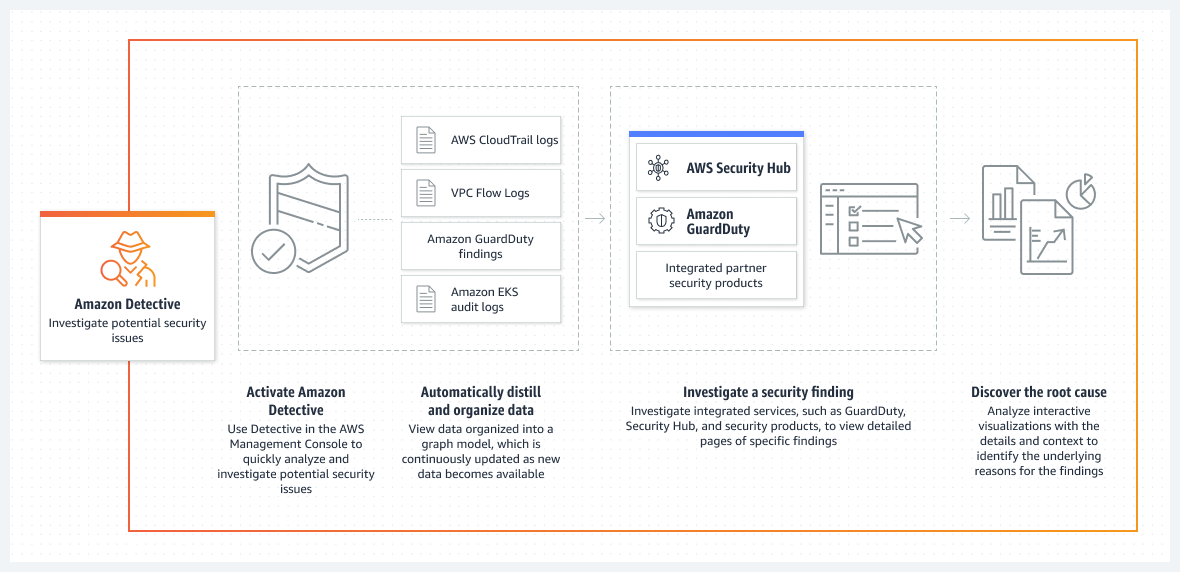
Amazon Detective makes it easy to analyze, investigate, and quickly identify the root cause of potential security issues or suspicious activities.
automatically collects log data from the AWS resources and uses machine learning, statistical analysis, and graph theory to build a linked set of data to easily conduct faster and more efficient security investigations.
provides detailed summaries, analysis, and visualizations of the behaviors and interactions amongst your AWS accounts, EC2 instances, AWS users, roles, and IP addresses.
maintains up to a year of aggregated data and makes it easily available through a set of visualizations that shows changes in the type and volume of activity over a selected time window, and links those changes to security findings.
is a Regional service and needs to be enabled on a region-by-region basis. This ensures all data analyzed is regionally based and doesn’t cross AWS regional boundaries.
does not require Amazon GuardDuty to be enabled. As of Feb 2024, the requirement to have GuardDuty enabled for 48 hours before enabling Detective has been removed.
is a multi-account service that aggregates data from monitored member accounts under a single administrative account within the same region.
Multi-account monitoring deployments can be configured in the same way it is configured for administrative and member accounts in Amazon GuardDuty and AWS Security Hub.
is integrated with AWS Organizations. The organization management account designates a Detective administrator account for the organization.
has no impact on the performance or availability of the AWS infrastructure since it retrieves the log data and findings directly from the AWS services.
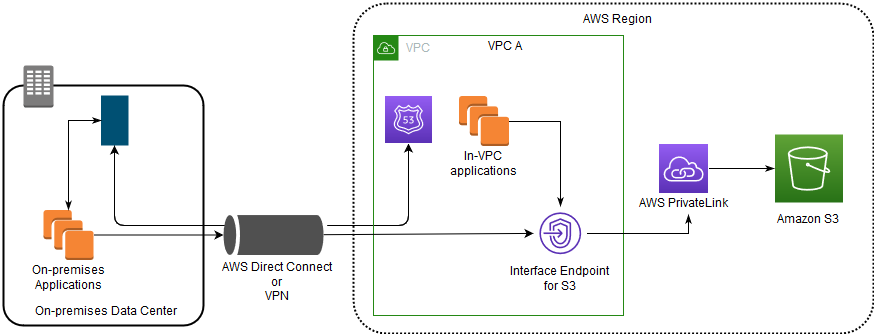
supports VPC endpoints via AWS PrivateLink, enabling secure API calls to Detective from within a VPC without requiring internet traversal.
Amazon Detective Data Sources
AWS CloudTrail logs – management events capturing API activity across your AWS accounts.
Amazon VPC Flow Logs – network traffic data for IP traffic going to and from network interfaces.
Amazon EKS Audit Logs – Kubernetes audit logs from EKS clusters for container security investigations.
Amazon GuardDuty findings – threat detection findings including runtime monitoring, malware protection, and extended threat detection.
AWS Security Hub findings – security posture findings from Security Hub and integrated services.
Other integrated AWS security services – including Amazon Inspector vulnerability findings.
Amazon Detective Finding Groups
Finding Groups automatically consolidate multiple related security findings into a single security event.
Detective detects patterns or relationships among multiple findings that suggest they are related to the same potential security incident.
Grouping helps in managing and investigating related findings more efficiently by reducing noise and prioritizing findings that present true risk.
Includes findings from GuardDuty, Security Hub, and Amazon Inspector vulnerability findings.
Provides interactive visualizations including radial layout and timeline layout views.
Supports severity-based filtering for findings to help prioritize critical issues.
Timeline layout includes play button functionality to understand event progression.
Finding Group Summaries (Generative AI)
Detective automatically generates finding group summaries powered by generative AI.
Analyzes relationships between findings and affected resources, and summarizes potential threats in natural language.
Provides a plain language title based on the analysis of the finding group with relevant summarized insights.
Describes the activity that initiated the event and its impact.
Accelerates security investigations by providing instant context without manual correlation.
Amazon Detective Investigations
Detective Investigations is a one-click investigation feature that automatically investigates IAM users and IAM roles for indicators of compromise (IoC).
Uses machine learning models and threat intelligence to analyze resources for potential security incidents.
Determines if IAM principals have potentially been compromised or involved in known tactics, techniques, and procedures (TTPs) from the MITRE ATT&CK framework.
Investigates attack tactics, impossible travel, flagged IP addresses, and finding groups.
Generates an investigation report highlighting anomalous behavior that indicates potential compromise.
Can generate up to 500 investigations per month in each AWS Region.
Detective recommends resources to investigate based on activity in findings and finding groups.
Amazon Detective and Security Lake Integration
Detective integrates with Amazon Security Lake to query and retrieve raw log data stored in Security Lake.
Enables deeper analysis with access to more detailed parameters as original evidence.
Supports log collection from CloudTrail management events, Amazon VPC Flow Logs, and Amazon EKS Audit Logs.
Supports both OCSF source version 1 (1.0.0-rc.2) and source version 2 (OCSF 1.1.0).
Allows querying log sources without having to craft queries or leave the Detective console.
Amazon Detective vs GuardDuty
Amazon GuardDuty is a threat detection service that continuously monitors malicious activity and unauthorized behavior to protect AWS accounts and workloads.
Amazon Detective simplifies the process of investigating security findings and identifying the root cause. It automatically creates a graph model and provides a unified, interactive view of your resources, users, and the interactions between them over time.
GuardDuty detects threats; Detective investigates those threats to determine root cause and scope.
Detective supports GuardDuty findings including Runtime Monitoring (ECS, EKS, EC2), Malware Protection for S3, Lambda Protection, RDS Protection, and Extended Threat Detection (attack sequences).
Amazon Detective Key Features
Graph Model – constructs a behavior graph using ML, statistical analysis, and graph theory to link security-related data for investigations.
Interactive Visualizations – provides geolocation-based login attempt views, API call volume analysis, and VPC flow volume tracking.
Seamless Integration – integrated with GuardDuty, Security Hub, Amazon Inspector, Amazon Security Lake, and AWS Partner security products.
AWS PrivateLink – supports VPC endpoints for private API access without internet traversal (added Sept 2025).
Simple Deployment – no software to deploy, agents to install, or data sources to enable manually.
Entity Profiles – provides profiles for AWS accounts, IAM users, IAM roles, EC2 instances, S3 buckets, EKS clusters, IP addresses, container images, and Kubernetes pods.
CSV Export – supports exporting data from Summary page and search results in CSV format.
Source: Amazon
AWS Certification Exam Practice Questions
Questions are collected from Internet and the answers are marked as per my knowledge and understanding (which might differ with yours).
AWS services are updated everyday and both the answers and questions might be outdated soon, so research accordingly.
AWS exam questions are not updated to keep up the pace with AWS updates, so even if the underlying feature has changed the question might not be updated
Open to further feedback, discussion and correction.
A security team needs to investigate a potential security incident across multiple AWS accounts. They want a service that automatically correlates security findings and provides visualizations of related entities. Which AWS service should they use?
Amazon GuardDuty
AWS Security Hub
Amazon Detective
AWS CloudTrail
Answer: 3. Amazon Detective automatically creates a graph model that correlates findings across accounts and provides interactive visualizations for security investigations.
Which data sources does Amazon Detective automatically ingest? (Select THREE)
AWS CloudTrail logs
Amazon VPC Flow Logs
Amazon S3 access logs
Amazon EKS audit logs
AWS Config rules evaluations
Answer: 1, 2, 4. Amazon Detective automatically ingests CloudTrail logs, VPC Flow Logs, and EKS audit logs, along with GuardDuty and Security Hub findings.
A company uses Amazon Detective and wants to investigate whether an IAM role has been compromised. Which Detective feature provides automated investigation of IAM entities for indicators of compromise?
Finding Groups
Detective Investigations
Behavior Graph
Security Lake Integration
Answer: 2. Detective Investigations is a one-click feature that automatically investigates IAM users and roles for indicators of compromise (IoC) using the MITRE ATT&CK framework.
What is the purpose of Amazon Detective Finding Groups?
To group AWS accounts for multi-account monitoring
To consolidate related security findings that may belong to the same security incident
To organize VPC Flow Logs by security groups
To categorize CloudTrail events by service
Answer: 2. Finding Groups automatically consolidate multiple related security findings into a single security event, reducing noise and helping prioritize findings that present true risk.
Which statement about Amazon Detective is correct? (Select TWO)
It requires Amazon GuardDuty to be enabled for at least 48 hours before activation
It is a Regional service that does not cross AWS regional boundaries
It can maintain up to 5 years of aggregated data
It provides finding group summaries powered by generative AI
It requires manual configuration of data sources
Answer: 2, 4. Detective is regional and provides GenAI-powered finding group summaries. As of Feb 2024, GuardDuty is no longer required. Detective maintains up to 1 year (not 5) of data. No manual data source configuration is needed.
A security analyst wants to access raw log data during an investigation without leaving the Amazon Detective console. Which integration enables this capability?
AWS CloudTrail Lake
Amazon Security Lake
Amazon S3 Select
Amazon Athena
Answer: 2. Detective integrates with Amazon Security Lake, enabling analysts to query and retrieve raw log data stored in Security Lake directly from the Detective console.
I just cleared the AWS Solutions Architect – Associate SAA-C03 exam with a score of 914/1000.
AWS Solutions Architect – Associate SAA-C03 exam is the latest AWS exam released on 30th August 2022 and has replaced the previous AWS Solutions Architect – SAA-C02 certification exam.
The SAA-C03 exam continues to be the current version as of June 2026, with enhanced focus on modern AWS services, sustainability considerations, and advanced networking capabilities. Note: AWS announced the SAA-C04 revision rolling out in Q2-Q3 2026 with increased emphasis on resilient architecture design and cost optimization. Both SAA-C03 and SAA-C04 versions remain available until September 30, 2026 (grace period).
It basically validates the ability to effectively demonstrate knowledge of how to design, architect, and deploy secure, cost-effective, and robust applications on AWS technologies
The exam also validates a candidate’s ability to complete the following tasks:
Design solutions that incorporate AWS services to meet current business requirements and future projected needs
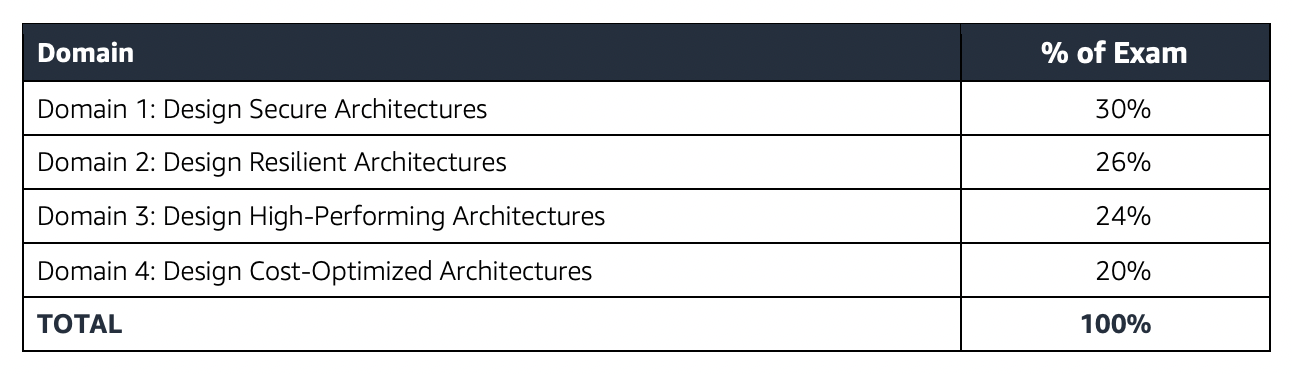
Design architectures that are secure, resilient, high-performing, and cost-optimized
Review existing solutions and determine improvements
SAA-C03 exam consists of 65 questions in 130 minutes, and the time is more than sufficient if you are well-prepared.
SAA-C03 exam includes two types of questions, multiple-choice and multiple-response.
SAA-C03 has a scaled score between 100 and 1,000. The scaled score needed to pass the exam is 720.
Associate exams currently cost $ 150 + tax.
The exam includes 50 scored questions and 15 unscored questions (total 65 questions). The unscored questions are used by AWS to evaluate future exam content.
You can get an additional 30 minutes if English is your second language by requesting Exam Accommodations. It might not be needed for Associate exams but is helpful for Professional and Specialty ones.
AWS exams can be taken either remotely or online, I prefer to take them online as it provides a lot of flexibility. Just make sure you have a proper place to take the exam with no disturbance and nothing around you.
Also, if you are taking the AWS Online exam for the first time try to join at least 30 minutes before the actual time as I have had issues with both PSI and Pearson with long wait times.
🆕 SAA-C04 Exam Update (Announced April 2026)
AWS announced the SAA-C04 revision rolling out Q2-Q3 2026 with the following changes:
Increased emphasis on resilient architecture design (now 30% of exam content)
Enhanced cost optimization strategies coverage
AI/GenAI awareness – Generative AI competency embedded at Professional level; Associate remains focused on core architectural skills
Grace period: Both SAA-C03 and SAA-C04 versions active until September 30, 2026
Exam delivery updates (April 2026):
AI-assisted identity verification for remote proctoring
Score reporting reduced to under 24 hours (from 1-5 business days)
ESL exam duration extensions now automatically applied (no separate accommodation request needed in the US)
Signed up with AWS for the Free Tier account which provides a lot of Services to be tried for free with certain limits which are more than enough to get things going. Be sure to decommission services beyond the free limits, preventing any surprises 🙂
Also, use QwikLabs for introductory courses which are free
Read the FAQs at least for the important topics, as they cover important points and are good for quick review
SAA-C03 Exam covers the design and architecture aspects in deep, so you must be able to visualize the architecture, even draw them out or prepare a mental picture just to understand how it would work and how different services relate.
SAA-C03 exam concepts cover solutions that fall within AWS Well-Architected framework to cover scalable, highly available, cost-effective, performant, and resilient pillars.
If you had been preparing for the SAA-C02, SAA-C03 is pretty much similar to SAA-C02 except for the addition of some new services Aurora Serverless, AWS Global Accelerator, FSx for Windows, and FSx for Lustre.
New services and features added to exam scope include VPC Lattice, VPC IP Address Manager (IPAM), AWS Network Firewall, Amazon Verified Permissions, and enhanced focus on sustainability and cost optimization.
Create a VPC from scratch with public, private, and dedicated subnets with proper route tables, security groups, and NACLs.
Understand what a CIDR is and address patterns.
Subnets are public or private depending on whether they can route traffic directly through an Internet gateway
Understand how communication happens between the Internet, Public subnets, Private subnets, NAT, Bastion, etc.
Bastion (also referred to as a Jump server) can be used to securely access instances in the private subnets.
Create two-tier architecture with application in public and database in private subnets
Create three-tier architecture with web servers in public, application, and database servers in private. (hint: focus on security group configuration with least privilege)
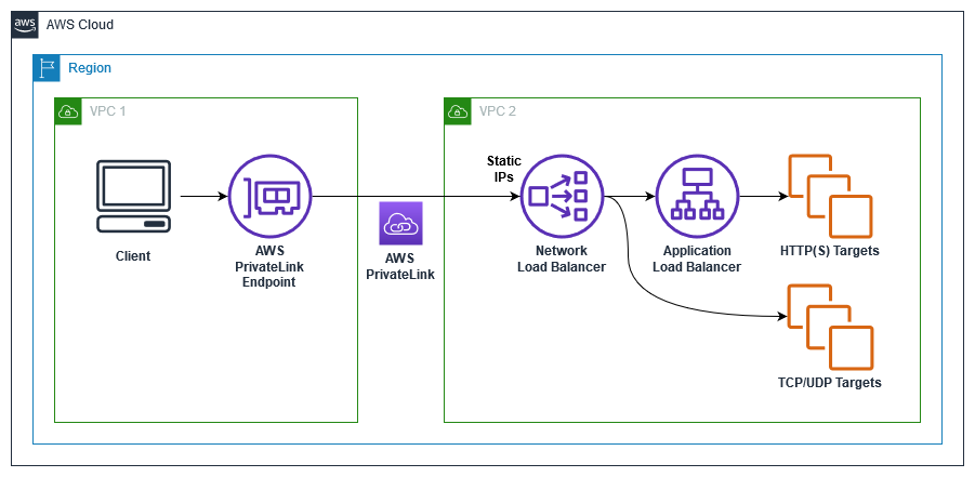
enable the creation of a private connection between VPC to supported AWS services and VPC endpoint services powered by PrivateLink using its private IP address without needing an Internet or NAT Gateway.
VPC Gateway Endpoints supports S3 and DynamoDB.
VPC Interface Endpoints OR Private Links supports others
Multi-Attach EBS feature allows attaching an EBS volume to multiple instances within the same AZ only.
EBS fast snapshot restore feature helps ensure that the EBS volumes created from a snapshot are fully-initialized at creation and instantly deliver all of their provisioned performance.
S3 Client-side encryption encrypts data before storing it in S3
S3 features including
S3 provides cost-effective static website hosting. However, it does not support HTTPS endpoint. Can be integrated with CloudFront for HTTPS, caching, performance, and low-latency access.
S3 versioning provides protection against accidental overwrites and deletions. Used with MFA Delete feature.
S3 Pre-Signed URLs for both upload and download provide access without needing AWS credentials.
Replication that supports the same and cross-region replication required versioning to be enabled.
Integrates with Athena to analyze data in S3 using standard SQL.
⚠️ NOTE: Amazon S3 Glacier (standalone vault-based API) has been superseded by S3 Glacier storage classes. Use S3 Glacier Instant Retrieval, S3 Glacier Flexible Retrieval, or S3 Glacier Deep Archive with S3 lifecycle policies for archival storage.
simple, fully managed, scalable, serverless, and cost-optimized file storage for use with AWS Cloud and on-premises resources.
provides shared volume across multiple EC2 instances, while EBS can be attached to a single instance within the same AZ or EBS Multi-Attach can be attached to multiple instances within the same AZ
supports the NFS protocol, and is compatible with Linux-based AMIs
supports cross-region replication, storage classes for cost.
Read Replicas for scalability, Multi-AZ for High Availability
Multi-AZ are regional only
Read Replicas can span across regions and can be used for disaster recovery
Understand Automated Backups, underlying volume types (which are the same as EBS volume types)
RDS Custom for Oracle – ⚠️ Entering sunset (end of support March 31, 2027). RDS Custom for SQL Server remains available. For Oracle with OS-level access, consider self-managed EC2 or standard RDS for Oracle.
fully managed service that provides AWS resource inventory, configuration history, and configuration change notifications to enable security, compliance, and governance.
AWS Systems Manager enhanced with better patch management and automation capabilities
NEW 2025: Sustainability and Cost Optimization
AWS Sustainability: Understanding the AWS commitment to net-zero carbon by 2040
Carbon footprint tracking and optimization
Sustainable architecture patterns
Right-sizing resources for environmental impact
Enhanced Cost Optimization:
AWS Cost Explorer and Cost Anomaly Detection
Savings Plans vs Reserved Instances comparison
Spot Instance best practices and interruption handling
Resource tagging strategies for cost allocation
NEW 2025: Practice Questions for Updated Services
VPC Lattice Questions:
Q: A company needs to connect microservices across multiple VPCs and AWS accounts with centralized security policies. Which service should they use?
A) VPC Peering
B) Transit Gateway
C) Amazon VPC Lattice ✓
D) AWS PrivateLink
Network Firewall Questions:
Q: Which AWS service provides stateful firewall capabilities with deep packet inspection for VPC traffic?
A) Security Groups
B) Network ACLs
C) AWS WAF
D) AWS Network Firewall ✓
IPAM Questions:
Q: A large enterprise needs to manage IP address allocation across 50+ AWS accounts. Which service provides centralized IP address management?
A) VPC DHCP Options
B) Amazon VPC IP Address Manager (IPAM) ✓
C) Route 53 Resolver
D) AWS Config
Verified Permissions Questions:
Q: Which service provides fine-grained authorization using Cedar policy language?
A) AWS IAM
B) Amazon Cognito
C) Amazon Verified Permissions ✓
D) AWS Directory Service
Deprecated Services Questions:
Q: AWS App Mesh reached end-of-life in September 2026. What is the recommended migration path?
A) AWS Service Mesh
B) Amazon VPC Lattice ✓
C) Application Load Balancer
D) AWS Transit Gateway
Q: A company is using AWS App Runner to deploy containerized web applications. Given that App Runner moved to maintenance mode in April 2026, which service provides the most similar fully-managed container deployment experience?
Use S3 Glacier Instant Retrieval for frequent access
Use S3 Glacier Flexible Retrieval for standard archival
Use S3 Glacier Deep Archive for long-term archival
✅ AWS CodeCommit: Returned to full General Availability (November 2025) after being temporarily de-emphasized. Git LFS support coming Q1 2026, regional expansions Q3 2026.
Sustainability considerations in architecture decisions
Migration strategies for deprecated services (App Mesh, App Runner, RDS Custom for Oracle)
Resilient architecture design (increased to 30% in SAA-C04)
Finally, All the Best 🙂
June 2026 Update Summary
This post has been updated to reflect the latest AWS certification and service changes. Key additions include: the SAA-C04 exam revision announcement (Q2-Q3 2026 rollout with grace period until Sept 30, 2026), AWS CodeCommit’s return to General Availability (Nov 2025), new service deprecations (App Runner maintenance mode, RDS Custom for Oracle sunset, CloudTrail Lake maintenance mode), and updated exam delivery improvements. The post continues to cover VPC Lattice, IPAM, Network Firewall, Verified Permissions, and essential migration guidance for deprecated services.
Status monitoring helps quickly determine whether EC2 has detected any problems that might prevent instances from running applications.
EC2 performs automated checks on every running EC2 instance to identify hardware and software issues.
Status checks are performed every minute and each returns a pass or a fail status.
If all checks pass, the overall status of the instance is OK.
If one or more checks fail, the overall status is Impaired.
Status checks are built into EC2, so they cannot be disabled or deleted.
There are three types of status checks:
System status checks
Instance status checks
Attached EBS status checks
Status checks data augments the information that EC2 already provides about the intended state of each instance (such as pending, running, and stopping) as well as the utilization metrics that CloudWatch monitors (CPU utilization, network traffic, and disk activity).
Alarms can be created or deleted, that are triggered based on the result of the status checks. for e.g., an alarm can be created to warn if status checks fail on a specific instance.
System Status Checks
monitor the AWS systems, required to use the instance, to ensure they are working properly.
detect problems with the instance that require AWS involvement to repair.
System status checks failure might due to
Loss of network connectivity
Loss of system power
Software issues on the physical host
Hardware issues on the physical host
When a system status check fails, one can either
check AWS Health Dashboard for any scheduled critical maintenance by AWS to the instance’s host.
wait for AWS to fix the issue
or resolve it by stopping and restarting or terminating and replacing an instance
Instance Status Checks
monitor the software and network configuration of the individual instance
checks to detect problems that require involvement to repair.
Instance status checks failure might be due to
Failed system status checks
Misconfigured networking or startup configuration
Exhausted memory
Corrupted file system
Incompatible kernel
When an instance status check fails, it can be resolved by either rebooting the instance or by making modifications to the operating system
Attached EBS Status Checks
monitor whether the EBS volumes attached to an instance are reachable and able to complete I/O operations.
available for Nitro-based instances only.
helps detect issues where the instance cannot communicate with one or more attached EBS volumes.
Attached EBS status check failure might be due to
Hardware or software issues on the storage subsystem underlying the EBS volume
Hardware issues on the physical host impacting reachability to EBS
The metric StatusCheckFailed_AttachedEBS is available at a 1-minute frequency at no additional charge.
Can be used with CloudWatch alarms and Auto Scaling health checks to replace instances with impaired EBS volumes.
EC2 Instance Recovery
Simplified Automatic Recovery
enabled by default during instance launch on supported instances.
automatically moves the instance from the impaired host to a different host when a system status check failure is detected.
recovered instance is identical to the original (instance ID, private IP, Elastic IP, metadata, placement group).
does not require a CloudWatch alarm to be configured.
works only for system status check failures, not for instance status check failures.
available for over 90% of deployed EC2 instances.
CloudWatch Action Based Recovery
can be configured optionally after instance launch using CloudWatch alarms.
provides the ability to set a recovery action on a CloudWatch alarm monitoring the StatusCheckFailed_System metric.
provides more granular control over recovery conditions and notification.
CloudWatch Monitoring
CloudWatch helps monitor EC2 instances, which collects and processes
raw data from EC2 into readable, near real-time metrics.
Statistics are recorded for a period of two weeks so that historical information can be accessed and used to gain a better perspective on how
the application or service is performing.
By default, Basic monitoring is enabled and EC2 metric data is sent to CloudWatch in 5-minute periods automatically
Detailed monitoring can be enabled on the EC2 instance, which sends data to CloudWatch in 1-minute periods.
CloudWatch Ingestion enablement rules can automatically enable detailed monitoring for both existing and newly launched EC2 instances matching the rule scope.
Ensures consistent 1-minute metrics collection across EC2 instances at the organization or account level.
Aggregating Statistics Across Instances/ASG/AMI ID
Aggregate statistics are available for the instances that have detailed monitoring (at an additional charge) enabled, which provides data in 1-minute periods
Instances that use basic monitoring are not included in the aggregates.
CloudWatch does not aggregate data across Regions. Therefore, metrics are completely separate between regions.
CloudWatch returns statistics for all dimensions in the AWS/EC2 namespace if no dimension is specified
The technique for retrieving all dimensions across an AWS namespace does not work for custom namespaces published to CloudWatch.
Statistics include Sum, Average, Minimum, Maximum, Data Samples
With custom namespaces, the complete set of dimensions that are associated with any given data point to retrieve statistics that include the data point must be specified
CloudWatch alarms
can be created to monitor any one of the EC2 instance’s metrics.
can be configured to automatically send you a notification when the metric reaches a specified threshold.
can automatically stop, terminate, reboot, or recover EC2 instances
can automatically recover an EC2 instance when the instance becomes impaired due to an underlying hardware failure or a problem that requires AWS involvement to repair
can automatically stop or terminate the instances to save costs (EC2 instances that use an EBS volume as the root device can be stopped
or terminated, whereas instances that use the instance store as the root device can only be terminated)
can use EC2ActionsAccess IAM role, which enables AWS to perform stop, terminate, or reboot actions on EC2 instances
If you have read/write permissions for CloudWatch but not for EC2, alarms can still be created but the stop or terminate actions won’t be performed on the EC2 instance
Composite Alarms can combine multiple metric alarms into a single alarm for aggregated health, but cannot perform EC2 actions directly.
CloudWatch Agent
The unified CloudWatch agent collects system-level metrics and logs from EC2 instances that are not available through the default hypervisor-level metrics.
Key OS-level metrics collected by the agent include:
Memory utilization (mem_used_percent)
Disk usage (disk_used_percent)
Swap usage
Process-level metrics (procstat)
EC2 does NOT provide memory or disk usage metrics by default — these require the CloudWatch agent.
Can be installed and managed via AWS Systems Manager (SSM).
Configuration is stored in a JSON file or as an SSM Parameter Store parameter.
Metrics collected by the CloudWatch agent are billed as custom metrics.
In-Console Agent Management (2025/2026)
CloudWatch provides visibility into agent status across the EC2 fleet directly in the console.
Automatic detection of supported workloads and recommended monitoring configurations.
Visual configuration editor for the agent eliminates the need to hand-edit JSON (April 2026).
EC2 Monitoring Metrics
Instance Metrics
CPUUtilization
% of physical CPU time that EC2 uses to run the instance, including time spent running both user code and EC2 code.
At a very high level, CPUUtilization is the sum of guest CPUUtilization and hypervisor CPUUtilization.
DiskReadOps
Completed read operations from all instance store volumes available to the instance in a specified period of time.
If there are no instance store volumes, the value is 0 or the metric is not reported.
DiskWriteOps
Completed write operations to all instance store volumes available to the instance in a specified period of time.
If there are no instance store volumes, the value is 0 or the metric is not reported.
DiskReadBytes
Bytes read from all instance store volumes available to the instance.
This metric is used to determine the volume of the data the application reads from the hard disk of the instance.
DiskWriteBytes
Bytes written to all instance store volumes available to the instance.
This metric is used to determine the volume of the data the application writes onto the hard disk of the instance.
MetadataNoToken
The number of times the Instance Metadata Service (IMDS) was successfully accessed using a method that does not use a token (IMDSv1).
Used to determine if there are any processes accessing instance metadata using IMDSv1, which is less secure than IMDSv2.
If all requests use token-backed sessions (IMDSv2), the value is 0.
MetadataNoTokenRejected
The number of times an IMDSv1 call was attempted after IMDSv1 was disabled on the instance.
Indicates that software on the instance still attempts IMDSv1 calls and needs updating.
NetworkIn
The number of bytes received on all network interfaces by the instance. This metric identifies the volume of incoming network traffic to an application on a single instance.
NetworkOut
The number of bytes sent out on all network interfaces by the instance. This metric identifies the volume of outgoing network traffic from a single instance.
NetworkPacketsIn
The number of packets received on all network interfaces by the instance.
This metric is available for basic monitoring only (5-minute periods).
NetworkPacketsOut
The number of packets sent out on all network interfaces by the instance.
This metric is available for basic monitoring only (5-minute periods).
CPU Credit Metrics (Burstable Performance Instances)
Applicable to all burstable performance instances (T2, T3, T3a, T4g) — not just T2.
CPU Credit metrics are available at a 5-minute frequency only.
CPUCreditUsage
The number of CPU credits spent by the instance for CPU utilization.
One CPU credit equals one vCPU running at 100% utilization for one minute.
CPUCreditBalance
The number of earned CPU credits that an instance has accrued since it was launched or started.
For T2 Standard, also includes the number of launch credits accrued.
When a T3/T3a instance stops, the CPUCreditBalance persists for seven days. When a T2 instance stops, credits are lost.
Used to determine how long an instance can burst beyond its baseline performance level.
CPUSurplusCreditBalance (Unlimited mode only)
The number of surplus credits spent when the CPUCreditBalance is zero.
Surplus credits are paid down by earned CPU credits.
If surplus credits exceed the maximum earnable in a 24-hour period, additional charges apply.
CPUSurplusCreditsCharged (Unlimited mode only)
The number of surplus credits that are not paid down and incur an additional charge.
Charged when surplus credits exceed 24-hour maximum, instance is stopped/terminated, or switched from unlimited to standard mode.
Amazon EBS Metrics for Nitro-based Instances
Available for EBS volumes attached to Nitro-based instances (non-bare-metal).
EBSReadOps / EBSWriteOps – Completed read/write operations from all attached EBS volumes.
EBSReadBytes / EBSWriteBytes – Bytes read from/written to all attached EBS volumes.
EBSIOBalance%
Percentage of I/O credits remaining in the burst bucket.
Available for basic monitoring only.
Available for some *.4xlarge and smaller instance sizes that burst to maximum performance for 30 minutes every 24 hours.
EBSByteBalance%
Percentage of throughput credits remaining in the burst bucket.
Available for basic monitoring only.
Available for some *.4xlarge and smaller instance sizes that burst to maximum performance for 30 minutes every 24 hours.
InstanceEBSIOPSExceededCheck
Reports whether the application attempted to drive IOPS exceeding the maximum EBS IOPS limits for the instance.
Values: 0 (not exceeded) or 1 (exceeded).
InstanceEBSThroughputExceededCheck
Reports whether the application attempted to drive throughput exceeding the maximum EBS throughput limits for the instance.
Values: 0 (not exceeded) or 1 (exceeded).
Status Check Metrics
Available at a 1-minute frequency at no charge by default.
StatusCheckFailed
Reports if either of the status checks has failed.
Values: 0 (passed) or 1 (failed).
StatusCheckFailed_Instance
Reports whether the instance has passed the EC2 instance status check in the last minute.
Values: 0 (passed) or 1 (failed).
StatusCheckFailed_System
Reports whether the instance has passed the EC2 system status check in the last minute.
Values: 0 (passed) or 1 (failed).
StatusCheckFailed_AttachedEBS
Reports whether the instance has passed the attached EBS status check in the last minute.
Values: 0 (passed) or 1 (failed).
Available for Nitro-based instances only.
Accelerator Metrics
GPUPowerUtilization
Active power usage as a percentage of maximum active power.
Available for supported accelerated computing instances only.
CloudWatch Network Flow Monitor
Launched at re:Invent 2024 as part of CloudWatch Network Monitoring.
Provides near real-time visibility into network performance (packet loss and latency) for traffic between EC2 instances, EKS workloads, and AWS services (S3, DynamoDB).
Uses fully-managed agents installed on EC2 instances to collect TCP-based performance metrics.
Agents send aggregated metrics to the backend approximately every 30 seconds.
Top contributors feature identifies network flows with the highest retransmissions or latency to help pinpoint impairments.
Supports multi-account monitoring via AWS Organizations integration.
EC2 Metric Dimensions
InstanceId – Filters data for a specific instance.
InstanceType – Filters data for all instances of a specific type (requires Detailed Monitoring).
ImageId (AMI ID) – Filters data for all instances running a specific AMI (requires Detailed Monitoring).
AutoScalingGroupName – Filters data for all instances in a specified Auto Scaling group.
AWS Certification Exam Practice Questions
Questions are collected from Internet and the answers are marked as per my knowledge and understanding (which might differ with yours).
AWS services are updated everyday and both the answers and questions might be outdated soon, so research accordingly.
AWS exam questions are not updated to keep up the pace with AWS updates, so even if the underlying feature has changed the question might not be updated
Open to further feedback, discussion and correction.
In the basic monitoring package for EC2, Amazon CloudWatch provides the following metrics:
Web server visible metrics such as number failed transaction requests
Operating system visible metrics such as memory utilization
Database visible metrics such as number of connections
Hypervisor visible metrics such as CPU utilization
Which of the following requires a custom CloudWatch metric to monitor?
Memory Utilization of an EC2 instance
CPU Utilization of an EC2 instance
Disk usage activity of an EC2 instance
Data transfer of an EC2 instance
A user has configured CloudWatch monitoring on an EBS backed EC2 instance. If the user has not attached any additional device, which of the below mentioned metrics will always show a 0 value?
DiskReadBytes
NetworkIn
NetworkOut
CPUUtilization
A user is running a batch process on EBS backed EC2 instances. The batch process starts a few instances to process Hadoop Map reduce jobs, which can run between 50 – 600 minutes or sometimes for more time. The user wants to configure that the instance gets terminated only when the process is completed. How can the user configure this with CloudWatch?
Setup the CloudWatch action to terminate the instance when the CPU utilization is less than 5%
Setup the CloudWatch with Auto Scaling to terminate all the instances
Setup a job which terminates all instances after 600 minutes
It is not possible to terminate instances automatically
An AWS account owner has setup multiple IAM users. One IAM user only has CloudWatch access. He has setup the alarm action, which stops the EC2 instances when the CPU utilization is below the threshold limit. What will happen in this case?
It is not possible to stop the instance using the CloudWatch alarm
CloudWatch will stop the instance when the action is executed
The user cannot set an alarm on EC2 since he does not have the permission
The user can setup the action but it will not be executed if the user does not have EC2 rights
A user has launched 10 instances from the same AMI ID using Auto Scaling. The user is trying to see the average CPU utilization across all instances of the last 2 weeks under the CloudWatch console. How can the user achieve this?
Aggregate the data over the instance AMI ID (Works but needs detailed monitoring enabled)
The user has to use the CloudWatch analyser to find the average data across instances
It is not possible to see the average CPU utilization of the same AMI ID since the instance ID is different
Which EC2 status check type monitors whether the EBS volumes attached to a Nitro-based instance are reachable?
System status check
Instance status check
Attached EBS status check
Volume status check
An organization wants to monitor memory utilization of their EC2 instances. Which approach should they use?
Enable detailed monitoring on the instances
Install the unified CloudWatch agent and configure memory metrics
Use the default CloudWatch EC2 metrics
Enable enhanced monitoring on the instances
Which CloudWatch metric can help identify if an EC2 instance is still using the less secure IMDSv1 to access instance metadata?
StatusCheckFailed_Instance
MetadataNoToken
CPUCreditBalance
NetworkPacketsIn
A company wants to ensure all EC2 instances across their AWS Organization have detailed monitoring enabled. What is the most efficient approach? [Select 2]
Manually enable detailed monitoring on each instance
Create CloudWatch Ingestion enablement rules scoped to the organization
Use enablement rules to automatically enable detailed monitoring for existing and new instances
SES is a fully managed, cloud-based email service that provides an easy, cost-effective way to send and receive email using your own email addresses and domains.
can be used to send both transactional and marketing emails securely, and globally at scale.
processes over a trillion emails each year for customers worldwide across various industries.
acts as an outbound email server and eliminates the need to support its own software or applications to do the heavy lifting of email transport.
acts as an inbound email server to receive emails that can help develop software solutions such as email autoresponders, email unsubscribe systems, and applications that generate customer support tickets from incoming emails.
existing email server can also be configured to send outgoing emails through SES with no change in any settings in the email clients.
Maximum message size including attachments is 40 MB per message (after base64 encoding) when using the SESv2 API or SMTP.
integrated with CloudWatch, CloudTrail, Amazon EventBridge, and Amazon SNS for monitoring and notifications.
available in 24 AWS Regions, including AWS GovCloud (US) Regions.
SES Key Features
Compatible with SMTP
Applications can send email using the SES API (v2 recommended), AWS SDKs in many supported languages (Java, .NET, PHP, Python, Ruby, Go, JavaScript), or the AWS CLI.
Optimized for the highest levels of uptime, availability, and scales as per the demand.
provides statistics on email deliveries, bounces, feedback loop results, emails opened, clicks, etc.
supports DomainKeys Identified Mail (DKIM), Sender Policy Framework (SPF), and Domain-based Message Authentication, Reporting and Conformance (DMARC).
supports flexible deployment: shared, dedicated, and managed dedicated IPs (M-DIPs).
supports attachments with many popular content formats, including documents, images, audio, and video, and scans every attachment for viruses and malware.
integrates with KMS to provide the ability to encrypt the mail that it writes to the S3 bucket.
uses client-side encryption to encrypt the mail before it sends the email to S3.
supports inline email templates directly within API requests, eliminating the need to manage template resources separately.
supports HTTPS custom tracking domains for open and click tracking.
supports configurable maximum delivery time for time-sensitive messages.
enables customers to connect an SES SMTP endpoint to a VPC through a VPC endpoint powered by AWS PrivateLink.
SES v2 API
AWS recommends using the SESv2 API for all new implementations.
While SESv1 API continues to be supported, all new features and capabilities are only available through the SESv2 API.
SESv2 API supports email size of up to 40 MB for both inbound and outbound emails by default.
Migrating to SESv2 API provides access to features like Virtual Deliverability Manager, Mail Manager, Tenants, and Global Endpoints.
Virtual Deliverability Manager (VDM)
VDM is an SES feature that helps enhance email deliverability by providing insights into sending and delivery data.
provides three core components:
Deliverability Insights – view at-a-glance reports on sending and delivery data (bounce rates, opens, clicks) broken down by ISP, sender identity, and configuration set.
Recommendations – notifies senders of deliverability issues and provides actionable recommendations (e.g., DKIM, DMARC configuration issues, BIMI gap detection).
Automatic Implementation – option to allow SES to automatically implement email deliverability improvements like optimizing delivery patterns.
includes automated complaint rate insights as an early warning system to protect sender reputation.
tracks every email’s journey, uncovering opportunities to improve delivery and engagement rates.
Mail Manager
Mail Manager (launched May 2024) provides comprehensive tools to simplify managing large volumes of email communications.
acts as a centralized email gateway for routing, filtering, archiving, and compliance across inbound, outbound, and internal email.
Key capabilities include:
Ingress Endpoints – dedicated email ingress points with IP filtering, TLS, and mutual TLS (mTLS) authentication support.
Rules Engine – powerful rule-based email processing with conditions and actions for routing, archiving, and security enforcement.
SMTP Relay – relay emails to Google Workspace, Microsoft 365, or other email destinations.
Email Archiving – flexible archiving features to meet compliance and record-keeping requirements.
Full Lifecycle Logging – end-to-end logging to CloudWatch, S3, and Firehose.
integrates with Amazon Q Business for email indexing and queries.
supports email journaling and echo spoofing prevention.
available in 17+ AWS Regions including AWS GovCloud (US).
supports Lambda function invocation and Bounce actions directly in rules (added April 2026).
Global Endpoints
Global Endpoints (launched December 2024) provides multi-region resilience for email sending.
allows customers to add a secondary Region, dividing workloads equally in a load-balanced state.
if either Region suffers an outage, traffic automatically shifts to the healthy Region with no customer intervention.
both Regions develop warmed-up IPs in parallel, ensuring both are ready to support 100% of workload at any time.
synchronizes critical parameters between chosen Regions automatically.
compatible with Virtual Deliverability Manager (VDM) and Dedicated IPs (DIPs/M-DIPs).
Tenant Management
SES Tenant Management (launched August 2025) enables isolation and reputation management at the individual tenant level.
allows creation of up to 10,000 isolated tenants within a single AWS account (increasable to 300,000 on request).
each tenant can have its own email identities, configuration sets, templates, and independent reputation metrics.
addresses the challenge where one tenant’s poor email practices could previously pause an entire SES account.
includes automated pause mechanism to limit damage from problematic senders.
enables organizations to manage multiple email streams independently while maintaining centralized oversight.
Dedicated IPs
SES supports three types of IP deployment:
Shared IPs – default, cost-effective option; reputation determined by all emails sent from the shared pool.
Dedicated IPs (Standard) – customer leases dedicated IPs for sole sending reputation control; requires manual warm-up.
Dedicated IPs (Managed / M-DIPs) – AWS automates provisioning, warming up, and scaling of dedicated IPs; pool automatically scales based on usage and ISP policies.
Managed Dedicated IPs eliminate manual support cases and handle IP warmup per ISP individually.
Email Authentication & Bulk Sender Requirements
Gmail and Yahoo implemented new requirements for bulk senders (5,000+ messages/day) effective February 2024, with Microsoft following in May 2025.
Requirements include:
Domain Authentication – SPF, DKIM passing; DMARC record with at least p=none.
One-Click Unsubscribe – RFC 8058 List-Unsubscribe and List-Unsubscribe-Post headers required for bulk/marketing mail.
Low Complaint Rates – spam complaint rates must stay under 0.3% threshold.
SES supports one-click unsubscribe through the subscription management feature and List-Unsubscribe headers.
SES supports BIMI (Brand Indicators for Message Identification) with VDM gap detection.
Event Publishing & Monitoring
SES can publish email sending events to multiple destinations:
Amazon CloudWatch
Amazon Data Firehose
Amazon SNS
Amazon EventBridge (added June 2024) – enables routing events to any EventBridge-supported service.
VDM Advisor recommendations are also published to EventBridge.
supports custom values in feedback headers for better tracking transparency.
TLS version auto-tagging for outgoing messages provides visibility into connection security.
Sending Limits
Production SES has a set of sending limits which include:
Sending Quota – max number of emails in a 24-hour period.
Maximum Send Rate – max number of emails per second.
SES automatically adjusts the limits upward as long as emails are of high quality and they are sent in a controlled manner, as any spike in the email sent might be considered to be spam.
Limits can also be raised by submitting a Quota increase request.
Email Receiving
SES provides complete control over which emails are accepted and what to do with them.
Accept or reject mail based on email address, IP address, or domain of the sender.
After accepting email, actions include:
Store in an Amazon S3 bucket
Execute custom code using AWS Lambda
Publish notifications to Amazon SNS
Route through Mail Manager rules for advanced processing
Mail Manager extends receiving capabilities with SMTP relay to Google Workspace, Microsoft 365, or Amazon Connect.
SES Best Practices
Send high-quality and real production content that the recipients want.
Only send to those who have signed up for the mail.
Implement one-click unsubscribe (RFC 8058) for bulk/marketing emails to comply with Gmail/Yahoo/Microsoft requirements.
Unsubscribe recipients who have not interacted with the business recently.
Have low bounce and complaint rates and remove bounced or complained addresses, using SNS or EventBridge to monitor bounces and complaints, treating them as an opt-out.
Implement SPF, DKIM, and DMARC authentication for all sending domains.
Monitor the sending activity using VDM dashboards and reputation metrics.
Keep spam complaint rates below 0.3%.
Use Global Endpoints for multi-region resilience for critical email workloads.
Use Tenant Management to isolate reputation for multi-tenant email platforms.
Amazon Pinpoint Migration Note
Amazon Pinpoint will reach end of support on October 30, 2026 (no new customers accepted since May 20, 2025).
For email capabilities, customers should migrate to Amazon SES with:
SES for transactional and bulk email sending
SES Tenant Management for multi-tenant isolation
SES Mail Manager for routing and compliance
AWS End User Messaging for SMS/push notification channels
AWS Certification Exam Practice Questions
Questions are collected from Internet and the answers are marked as per my knowledge and understanding (which might differ with yours).
AWS services are updated everyday and both the answers and questions might be outdated soon, so research accordingly.
AWS exam questions are not updated to keep up the pace with AWS updates, so even if the underlying feature has changed the question might not be updated
Open to further feedback, discussion and correction.
What does Amazon SES stand for?
Simple Elastic Server
Simple Email Service
Software Email Solution
Software Enabled Server
Your startup wants to implement an order fulfillment process for selling a personalized gadget that needs an average of 3-4 days to produce with some orders taking up to 6 months you expect 10 orders per day on your first day. 1000 orders per day after 6 months and 10,000 orders after 12 months. Orders coming in are checked for consistency then dispatched to your manufacturing plant for production quality control packaging shipment and payment processing. If the product does not meet the quality standards at any stage of the process employees may force the process to repeat a step. Customers are notified via email about order status and any critical issues with their orders such as payment failure. Your case architecture includes AWS Elastic Beanstalk for your website with an RDS MySQL instance for customer data and orders. How can you implement the order fulfillment process while making sure that the emails are delivered reliably? [PROFESSIONAL]
Add a business process management application to your Elastic Beanstalk app servers and re-use the RDS database for tracking order status use one of the Elastic Beanstalk instances to send emails to customers.
Use SWF with an Auto Scaling group of activity workers and a decider instance in another Auto Scaling group with min/max=1 Use the decider instance to send emails to customers.
Use SWF with an Auto Scaling group of activity workers and a decider instance in another Auto Scaling group with min/max=1 use SES to send emails to customers.
Use an SQS queue to manage all process tasks Use an Auto Scaling group of EC2 Instances that poll the tasks and execute them. Use SES to send emails to customers.
A company sends millions of marketing emails daily using Amazon SES. They need to ensure emails continue to be delivered even if one AWS Region experiences an outage. What SES feature should they use?
Virtual Deliverability Manager with automatic recommendations
Dedicated IPs (Managed) with automatic warmup
Global Endpoints with a primary and secondary Region configuration
Mail Manager with SMTP relay to multiple regions
A SaaS company uses Amazon SES to send emails on behalf of hundreds of customers. They want to ensure that one customer’s poor email practices do not affect the sending reputation of other customers. What is the MOST appropriate solution?
Create separate AWS accounts for each customer
Use separate configuration sets for each customer
Use dedicated IPs for each customer
Use SES Tenant Management to create isolated tenants with independent reputation metrics
A company needs to process incoming emails, archive them for compliance, apply security filtering, and route them to different internal systems based on recipient addresses. Which Amazon SES feature provides this capability?
SES receipt rules with S3 actions
Virtual Deliverability Manager
SES Mail Manager with ingress endpoints, traffic policies, and rules engine
SES event publishing with EventBridge
A company sending bulk marketing emails through Amazon SES notices that their inbox placement rate has dropped. They want SES to automatically optimize email delivery patterns without manual intervention. Which feature should they enable?
Dedicated IPs (Managed)
Mail Manager traffic policies
Virtual Deliverability Manager with automatic implementation enabled
Global Endpoints with load balancing
Which of the following are requirements that Gmail and Yahoo enforce for bulk email senders since February 2024? (Select THREE)
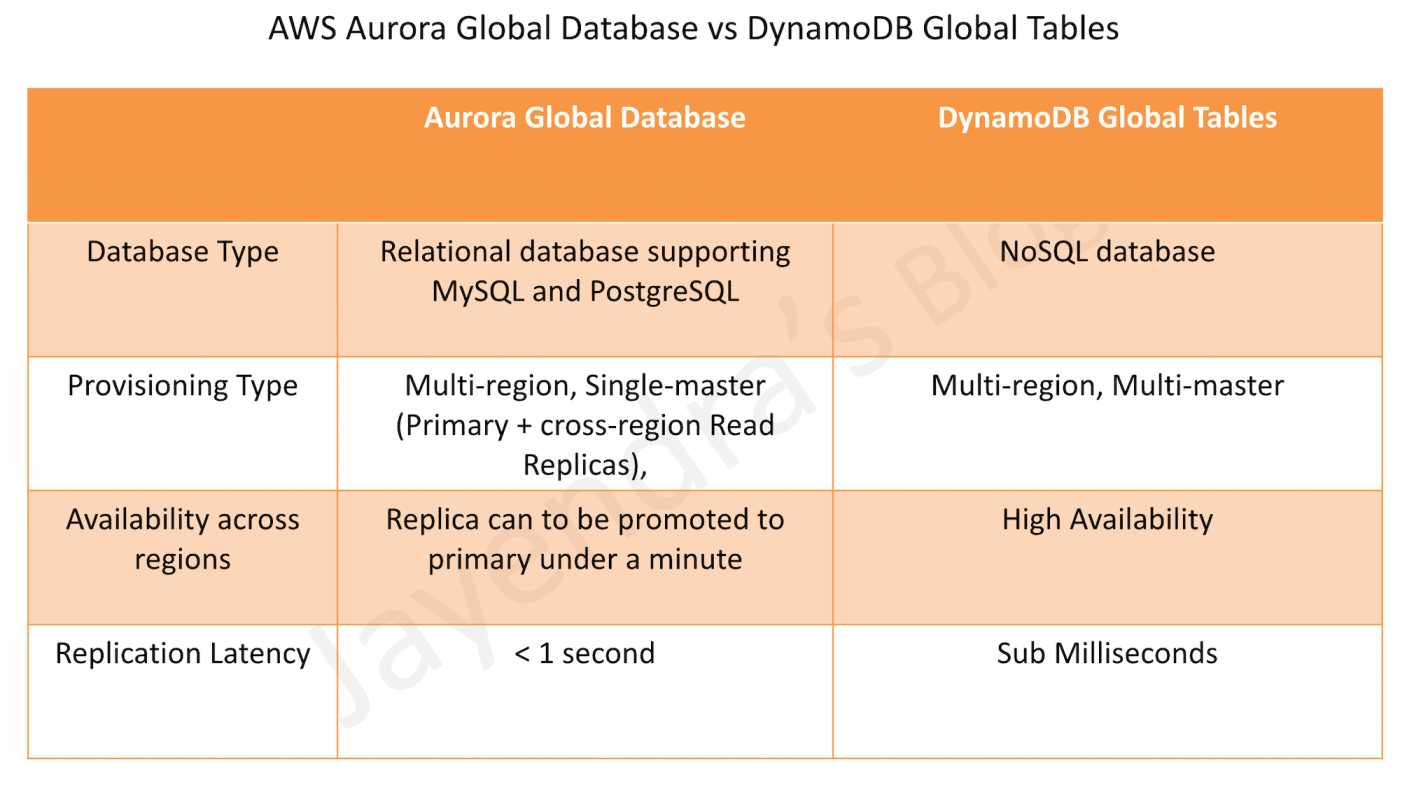
Aurora Global Database provides a relational database supporting MySQL and PostgreSQL.
Aurora Global Database consists of one primary AWS Region where the data is mastered, and up to five read-only, secondary AWS Regions.
Aurora cluster in the primary AWS Region performs both read and write operations. The clusters in the secondary Regions enable low-latency reads.
Aurora replicates data to the secondary AWS Regions with a typical latency of under a second.
Secondary clusters can be scaled independently by adding one or more DB instances (Aurora Replicas) to serve read-only workloads.
Aurora Global Database uses dedicated infrastructure to replicate the data, leaving database resources available entirely to serve applications.
Applications with a worldwide footprint can use reader instances in the secondary AWS Regions for low-latency reads.
Typical cross-region replication takes less than 1 second.
In case of a disaster or an outage, one of the clusters in a secondary AWS Region can be promoted to take full read/write workloads in under a minute.
However, the process is not automatic. If the primary region becomes unavailable, you must manually remove a secondary region from an Aurora Global Database and promote it to take full reads and writes. You will also need to point the application to the newly promoted region.
Architecture: Single-master, multi-reader (one primary region for writes, multiple secondary regions for reads).
Consistency: Eventual consistency for cross-region reads.
ARC Integration (June 2026): Amazon Application Recovery Controller (ARC) Region switch now supports Aurora serverless scaling and provisioned scaling execution blocks, automating database scaling during multi-Region failover orchestration.
DynamoDB Global tables provide a fully managed, multi-Region, and multi-active database that delivers fast, local, read and write performance for massively scaled, global applications.
Global tables replicate the DynamoDB tables automatically across the choice of AWS Regions and enable reads and writes on all instances.
DynamoDB global table consists of multiple replica tables (one per AWS Region). Every replica has the same table name and the same primary key schema. When an application writes data to a replica table in one Region, DynamoDB propagates the write to the other replica tables in the other AWS Regions automatically.
Global tables enable the read and write of data locally providing single-digit-millisecond latency for the globally distributed application at any scale.
DynamoDB Global tables are designed for 99.999% availability.
DynamoDB Global tables enable the applications to stay highly available even in the unlikely event of isolation or degradation of an entire Region. Applications can redirect to a different Region and perform reads and writes against a different replica table.
Cross-Account Replication (February 2026): DynamoDB Global Tables now support replication across multiple AWS accounts, providing account-level isolation for stronger governance, security, and blast-radius control. Currently supported for MREC tables only.
DynamoDB Global Tables Consistency Modes
DynamoDB Global Tables support two consistency modes:
Provides asynchronous replication with approximately 1-second replication latency for tables between two or more Regions.
Multi-active: All replicas accept reads and writes.
Conflict Resolution: Last Write Wins based on internal timestamp.
RPO: Approximately 1 second (replication delay).
Best for applications that can tolerate eventual consistency.
Supports multi-account global tables for account-level isolation (February 2026).
Multi-Region Strong Consistency (MRSC) – January 2025
Announced at AWS re:Invent 2024 and generally available in January 2025.
Provides synchronous replication across Regions.
Strongly consistent reads always return the latest version of an item, irrespective of the Region.
Zero RPO: Enables Recovery Point Objective of zero.
Item changes are synchronously replicated to at least one other Region before write returns success.
Deployment: Must be deployed in exactly three Regions (3 replicas OR 2 replicas + 1 witness).
Regional Availability: Three Region sets (US, EU, AP) – cannot span Region sets.
Trade-off: Higher write latency compared to MREC due to synchronous replication.
Best for applications requiring global strong consistency and zero data loss.
AWS FIS Integration (January 2026): MRSC global tables now support application resiliency testing with AWS Fault Injection Service (FIS), enabling controlled fault injection experiments to validate failover behavior and regional resilience.
Does not support multi-account model (cross-account replication is MREC only).
Amazon Aurora DSQL (GA May 2025)
Amazon Aurora DSQL is a serverless distributed SQL database with active-active high availability, announced at re:Invent 2024 and generally available since May 27, 2025.
Provides PostgreSQL-compatible (based on PostgreSQL 16) distributed SQL with multi-Region strong consistency.
Active-active architecture: All database resources are peers capable of handling both read and write traffic, within a Region and across Regions. No leader, no failover lag.
Strong consistency: All reads and writes to any Regional endpoint are strongly consistent and durable — not eventually consistent.
Zero RPO: Synchronous data replication with automated zero data loss failover.
Serverless: No servers to provision, patch, or manage. Scales to zero when idle. Provisions in under 60 seconds.
Designed for 99.99% single-Region and 99.999% multi-Region availability.
Multi-Region deployment: Supports linked multi-Region clusters (currently two Regions).
Automatic failover: No manual intervention required. Applications use DNS-based routing (Route 53) for automatic Region redirection.
Independently scales reads, writes, compute, and storage with no manual intervention.
Supports SQL including secondary indexes, joins, and transactions — unlike DynamoDB’s NoSQL model.
Limitations: Based on PostgreSQL 16 but does not support all PostgreSQL features. Subset of commonly used queries and features supported.
Fills the gap between DynamoDB’s serverless economics and Aurora PostgreSQL’s SQL power with global consistency.
Comparison Table
Feature
Aurora Global Database
DynamoDB Global Tables (MREC)
DynamoDB Global Tables (MRSC)
Aurora DSQL
Database Type
Relational (MySQL, PostgreSQL)
NoSQL (Key-Value, Document)
NoSQL (Key-Value, Document)
Relational (PostgreSQL-compatible)
Architecture
Single-master, multi-reader
Multi-active (all replicas read/write)
Multi-active (all replicas read/write)
Active-active (all peers read/write)
Max Regions
1 primary + 5 secondary (6 total)
Unlimited (any Region with DynamoDB)
Exactly 3 Regions
2 linked Regions (multi-Region cluster)
Replication Type
Asynchronous
Asynchronous
Synchronous
Synchronous
Replication Latency
< 1 second
~1 second
Synchronous (no delay)
Synchronous (no delay)
Cross-Region Writes
No (primary region only)
Yes (all replicas)
Yes (all replicas)
Yes (all peers)
Consistency
Eventual (cross-region reads)
Eventual (cross-region reads)
Strong (all reads)
Strong (all reads and writes)
RPO
~1 second
~1 second
Zero (0)
Zero (0)
RTO
< 1 minute (manual failover)
Seconds (automatic)
Seconds (automatic)
Automatic (no manual intervention)
Failover
Manual promotion required
Automatic (redirect to another replica)
Automatic (redirect to another replica)
Automatic (DNS-based routing)
Availability SLA
99.99%
99.999%
99.999%
99.999% (multi-Region)
Serverless
No (instance-based, Serverless v2 option)
Yes (on-demand or provisioned)
Yes (on-demand or provisioned)
Yes (fully serverless, scales to zero)
SQL Support
Full SQL (MySQL/PostgreSQL)
NoSQL API only
NoSQL API only
PostgreSQL-compatible SQL (subset)
Cross-Account
No
Yes (February 2026)
No
No
Use Cases
Complex queries, joins, transactions, relational data
Inventory Management: Global inventory with strict consistency.
Compliance Requirements: Regulations requiring zero data loss.
Three-Region Deployment: Can deploy in exactly three regions within same region set (US, EU, or AP).
When to Choose Aurora DSQL
Global SQL with Strong Consistency: Need SQL (joins, indexes, transactions) with multi-region strong consistency.
Active-Active SQL Writes: Need both regions to accept writes — unlike Aurora Global Database’s single-master.
Serverless with Scale-to-Zero: Want to avoid instance management entirely with pay-per-use pricing.
Zero RPO + SQL: Need zero data loss with relational database capabilities.
Financial Transactions: Global-scale financial apps requiring strong consistency and SQL.
Automatic Failover: Need automated zero-intervention failover (unlike Aurora Global Database’s manual process).
Two-Region Deployment: Workload fits within a two-region active-active topology.
Note: Does not support full PostgreSQL feature set — evaluate supported features for your use case.
AWS Certification Exam Practice Questions
Questions are collected from Internet and the answers are marked as per my knowledge and understanding (which might differ with yours).
AWS services are updated everyday and both the answers and questions might be outdated soon, so research accordingly.
AWS exam questions are not updated to keep up the pace with AWS updates, so even if the underlying feature has changed the question might not be updated
Open to further feedback, discussion and correction.
A company needs to implement a relational database with a multi-region disaster recovery Recovery Point Objective (RPO) of 1 second and a Recovery Time Objective (RTO) of 1 minute. Which AWS solution can achieve this?
Amazon Aurora Global Database
Amazon DynamoDB global tables
Amazon RDS for MySQL with Multi-AZ enabled
Amazon RDS for MySQL with a cross-Region snapshot copy
A financial services company requires a globally distributed database with zero data loss (RPO = 0) and strong consistency across all regions. Which solution should they choose?
Amazon Aurora Global Database
Amazon DynamoDB Global Tables with MREC
Amazon DynamoDB Global Tables with MRSC
Amazon RDS with cross-region read replicas
A company needs a multi-region database that supports writes in all regions simultaneously with automatic failover. Which solution provides this capability?
Amazon Aurora Global Database
Amazon DynamoDB Global Tables
Amazon RDS Multi-AZ
Amazon Aurora with read replicas
What is the primary difference between Aurora Global Database and DynamoDB Global Tables in terms of write operations?
Aurora supports writes in all regions, DynamoDB only in primary region
Aurora supports writes only in primary region, DynamoDB supports writes in all regions
Both support writes in all regions
Both support writes only in primary region
A company needs to deploy a DynamoDB Global Table with MRSC. How many regions must they deploy in?
Minimum 2 regions
Exactly 3 regions
Up to 5 regions
Unlimited regions
Which of the following statements about Aurora Global Database and DynamoDB Global Tables are correct? (Select TWO)
Aurora Global Database requires manual failover, DynamoDB Global Tables support automatic failover
Aurora Global Database supports NoSQL, DynamoDB supports SQL
DynamoDB Global Tables offer 99.999% availability, Aurora offers 99.99%
Aurora Global Database supports multi-active writes
DynamoDB MRSC has higher replication latency than Aurora
A company needs a globally distributed relational database with active-active writes, serverless operations, and strong consistency. They require SQL support including joins and transactions. Which AWS service best meets these requirements?
Amazon Aurora Global Database
Amazon DynamoDB Global Tables with MRSC
Amazon Aurora DSQL
Amazon RDS with read replicas
A company operates DynamoDB Global Tables and needs to replicate data across multiple AWS accounts for security isolation and governance. Which consistency mode supports this?
Multi-Region Eventual Consistency (MREC)
Multi-Region Strong Consistency (MRSC)
Both MREC and MRSC
Neither — cross-account replication is not supported
Which of the following AWS database solutions provides BOTH zero RPO and active-active multi-region writes with SQL support? (Select TWO)
AWS RDS Aurora is a relational database engine that combines the speed and reliability of high-end commercial databases with the simplicity and cost-effectiveness of open-source databases.
is a fully managed, MySQL- and PostgreSQL-compatible, relational database engine i.e. applications developed with MySQL can switch to Aurora with little or no changes.
delivers up to 6x the throughput of PostgreSQL and MySQL without requiring any changes to most applications
is fully managed as RDS manages the databases, handling time-consuming tasks such as provisioning, patching, backup, recovery, failure detection, and repair.
can scale storage automatically, based on the database usage, from 10GB to 128TiB (up to 256 TiB for Aurora MySQL and Aurora PostgreSQL as of July 2025) in 10GB increments with no impact on database performance
supports Aurora MySQL version 3 (MySQL 8.0 compatible), Aurora MySQL version 4 (MySQL 8.4 compatible, GA May 2026), and Aurora PostgreSQL (up to PostgreSQL 18 as of June 2026)
Aurora MySQL version 1 (MySQL 5.6 compatible) reached End of Life on Feb 28, 2023, and version 2 (MySQL 5.7 compatible) reached end of standard support on Oct 31, 2024 (Extended Support available)
Aurora DB Clusters
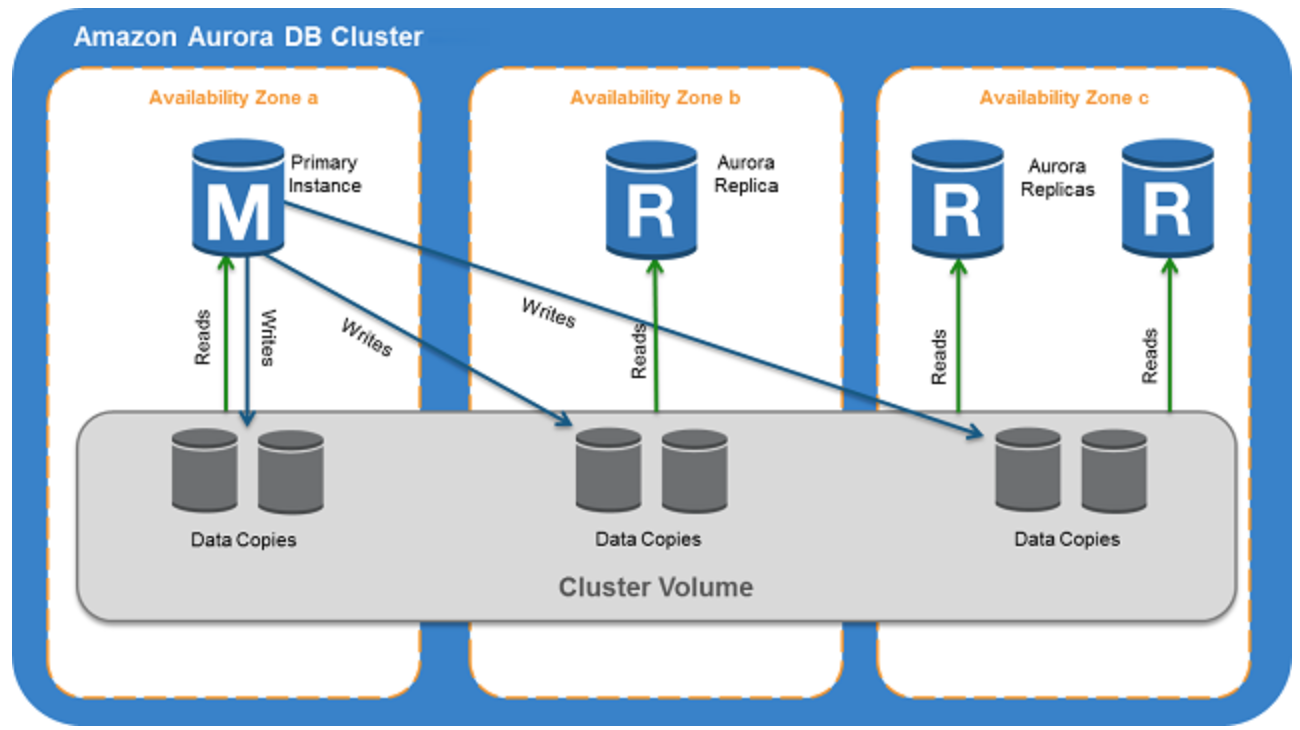
Aurora DB cluster consists of one or more DB instances and a cluster volume that manages the data for those DB instances.
A cluster volume is a virtual database storage volume that spans multiple AZs, with each AZ having a copy of the DB cluster data
Two types of DB instances make up an Aurora DB cluster:
Primary DB instance
Supports read and write operations, and performs all data modifications to the cluster volume.
Each DB cluster has one primary DB instance.
Aurora Replica
Connects to the same storage volume as the primary DB instance and supports only read operations.
Each DB cluster can have up to 15 Aurora Replicas in addition to the primary DB instance.
Provides high availability by locating Replicas in separate AZs
Aurora automatically fails over to a Replica in case the primary DB instance becomes unavailable.
Failover priority for Replicas can be specified.
Replicas can also offload read workloads from the primary DB instance
Aurora Multi-Master is no longer available. It was only supported on Aurora MySQL 5.6, which reached End of Life. For multi-writer use cases, consider Aurora Global Database with write forwarding or Amazon Aurora DSQL.
Aurora Connection Endpoints
Aurora involves a cluster of DB instances instead of a single instance
Endpoint refers to an intermediate handler with the hostname and port specified to connect to the cluster
Aurora uses the endpoint mechanism to abstract these connections
Cluster endpoint
Cluster endpoint (or writer endpoint) for a DB cluster connects to the current primary DB instance for that DB cluster.
Cluster endpoint is the only one that can perform write operations such as DDL statements as well as read operations
Each DB cluster has one cluster endpoint and one primary DB instance
Cluster endpoint provides failover support for read/write connections to the DB cluster. If a DB cluster’s current primary DB instance fails, Aurora automatically fails over to a new primary DB instance.
During a failover, the DB cluster continues to serve connection requests to the cluster endpoint from the new primary DB instance, with minimal interruption of service.
Reader endpoint
Reader endpoint for a DB cluster provides load-balancing support for read-only connections to the DB cluster.
Use the reader endpoint for read operations, such as queries.
Reader endpoint reduces the overhead on the primary instance by processing the statements on the read-only Replicas.
Each DB cluster has one reader endpoint.
If the cluster contains one or more Replicas, the reader endpoint load balances each connection request among the Replicas.
Custom endpoint
Custom endpoint for a DB cluster represents a set of DB instances that you choose.
Aurora performs load balancing and chooses one of the instances in the group to handle the connection.
An Aurora DB cluster has no custom endpoints until one is created and up to five custom endpoints can be created for each provisioned cluster.
Custom endpoints are supported on both provisioned and Aurora Serverless v2 clusters.
Instance endpoint
An instance endpoint connects to a specific DB instance within a cluster and provides direct control over connections to the DB cluster.
Each DB instance in a DB cluster has its own unique instance endpoint. So there is one instance endpoint for the current primary DB instance of the DB cluster, and there is one instance endpoint for each of the Replicas in the DB cluster.
High Availability and Replication
Aurora is designed to offer greater than 99.99% availability
provides data durability and reliability
by replicating the database volume six ways across three Availability Zones in a single region
backing up the data continuously to S3.
transparently recovers from physical storage failures; instance failover typically takes less than 30 seconds.
automatically fails over to a new primary DB instance, if the primary DB instance fails, by either promoting an existing Replica to a new primary DB instance or creating a new primary DB instance
automatically divides the database volume into 10GB segments spread across many disks. Each 10GB chunk of the database volume is replicated six ways, across three Availability Zones
is designed to transparently handle
the loss of up to two copies of data without affecting database write availability and
up to three copies without affecting read availability.
provides self-healing storage. Data blocks and disks are continuously scanned for errors and repaired automatically.
Replicas share the same underlying volume as the primary instance. Updates made by the primary are visible to all Replicas.
As Replicas share the same data volume as the primary instance, there is virtually no replication lag.
Any Replica can be promoted to become primary without any data loss and therefore can be used for enhancing fault tolerance in the event of a primary DB Instance failure.
To increase database availability, 1 to 15 replicas can be created in any of 3 AZs, and RDS will automatically include them in failover primary selection in the event of a database outage.
Aurora Failovers
Aurora automatically fails over, if the primary instance in a DB cluster fails, in the following order:
If Aurora Read Replicas are available, promote an existing Read Replica to the new primary instance.
If no Read Replicas are available, then create a new primary instance.
If there are multiple Aurora Read Replicas, the criteria for promotion is based on the priority that is defined for the Read Replicas.
Priority numbers can vary from 0 to 15 and can be modified at any time.
Aurora promotes the Replica with the highest priority (lowest tier number) to the new primary instance.
For Read Replicas with the same priority, Aurora promotes the replica that is largest in size or in an arbitrary manner.
During the failover, AWS modifies the cluster endpoint to point to the newly created/promoted DB instance.
Applications experience a minimal interruption of service if they connect using the cluster endpoint and implement connection retry logic.
Security
Aurora uses SSL/TLS (AES-256) to secure the connection between the database instance and the application
Starting February 2026, all new Aurora clusters are encrypted at rest by default using AWS-owned keys, with no cost or performance impact.
Encryption and decryption are handled seamlessly.
With encryption, data stored at rest in the underlying storage is encrypted, as are its automated backups, snapshots, and replicas in the same cluster.
Encryption of existing unencrypted Aurora instances is not supported. Create a new encrypted Aurora instance and migrate the data
Aurora supports IAM database authentication, allowing token-based authentication without passwords.
Backup and Restore
Automated backups are always enabled on Aurora DB Instances.
Backups do not impact database performance.
Aurora also allows the creation of manual snapshots.
Aurora automatically maintains 6 copies of the data across 3 AZs and will automatically attempt to recover the database in a healthy AZ with no data loss.
If in any case, the data is unavailable within Aurora storage,
DB Snapshot can be restored or
the point-in-time restore operation can be performed to a new instance. The latest restorable time for a point-in-time restore operation can be up to 5 minutes in the past.
Restoring a snapshot creates a new Aurora DB instance
Deleting the database deletes all the automated backups (with an option to create a final snapshot), but would not remove the manual snapshots.
Snapshots (including encrypted ones) can be shared with other AWS accounts
Aurora Parallel Query
Aurora Parallel Query refers to the ability to push down and distribute the computational load of a single query across thousands of CPUs in Aurora’s storage layer.
Without Parallel Query, a query issued against an Aurora database would be executed wholly within one instance of the database cluster; this would be similar to how most databases operate.
Parallel Query is a good fit for analytical workloads requiring fresh data and good query performance, even on large tables.
Parallel Query provides the following benefits
Faster performance: Parallel Query can speed up analytical queries by up to 2 orders of magnitude.
Operational simplicity and data freshness: you can issue a query directly over the current transactional data in your Aurora cluster.
Transactional and analytical workloads on the same database: Parallel Query allows Aurora to maintain high transaction throughput alongside concurrent analytical queries.
Parallel Query can be enabled and disabled dynamically at both the global and session level using the aurora_parallel_query parameter.
Parallel Query is available for all current Aurora MySQL versions (MySQL 8.0 and 8.4 compatible).
Aurora Scaling
Aurora storage scaling is built-in and will automatically grow, up to 128 TiB (up to 256 TiB for Aurora MySQL and PostgreSQL as of July 2025), in 10GB increments with no impact on database performance.
There is no need to provision storage in advance
Compute Scaling
Instance scaling
Vertical scaling of the master instance. Memory and CPU resources are modified by changing the DB Instance class.
scaling the read replica and promoting it to master using forced failover which provides a minimal downtime
Read scaling
provides horizontal scaling with up to 15 read replicas
Auto Scaling
Scaling policies to add read replicas with min and max replica count based on scaling CloudWatch CPU or connections metrics condition
Aurora Serverless v2
Provides automatic scaling from 0 to 256 ACUs (512 GiB memory)
Supports scale-to-zero for cost optimization during periods of inactivity (Nov 2024)
Aurora Backtrack
Backtracking “rewinds” the DB cluster to the specified time
Backtracking performs in-place restore and does not create a new instance. There is minimal downtime associated with it.
Backtracking is available for Aurora with MySQL compatibility
Backtracking is not a replacement for backing up the DB cluster so that you can restore it to a point in time.
With backtracking, there is a target backtrack window and an actual backtrack window:
Target backtrack window is the amount of time you WANT the DB cluster can be backtracked for e.g 24 hours. The limit for a backtrack window is 72 hours.
Actual backtrack window is the actual amount of time you CAN backtrack the DB cluster, which can be smaller than the target backtrack window. The actual backtrack window is based on the workload and the storage available for storing information about database changes, called change records
DB cluster with backtracking enabled generates change records.
Aurora retains change records for the target backtrack window and charges an hourly rate for storing them.
Both the target backtrack window and the workload on the DB cluster determine the number of change records stored.
Workload is the number of changes made to the DB cluster in a given amount of time. If the workload is heavy, you store more change records in the backtrack window than you do if your workload is light.
Backtracking affects the entire DB cluster and can’t selectively backtrack a single table or a single data update.
Backtracking provides the following advantages over traditional backup and restore:
Undo mistakes – revert destructive action, such as a DELETE without a WHERE clause
Backtrack DB cluster quickly – Restoring a DB cluster to a point in time launches a new DB cluster and restores it from backup data or a DB cluster snapshot, which can take hours. Backtracking a DB cluster doesn’t require a new DB cluster and rewinds the DB cluster in minutes.
Explore earlier data changes – repeatedly backtrack a DB cluster back and forth in time to help determine when a particular data change occurred
⚠️ Aurora Serverless v1 reached End of Life on March 31, 2025. All v1 clusters have been automatically migrated to Aurora Serverless v2. The information below applies to Aurora Serverless v2.
Amazon Aurora Serverless v2 is an on-demand, autoscaling configuration for the MySQL-compatible and PostgreSQL-compatible editions of Aurora.
An Aurora Serverless v2 DB cluster automatically scales capacity up or down based on the application’s needs, measured in Aurora Capacity Units (ACUs).
enables running database in the cloud without managing any database instances.
provides a cost-effective option for variable, intermittent, or unpredictable workloads.
Key features of Aurora Serverless v2:
Scale to zero – supports scaling down to 0 ACUs, automatically pausing after a period of inactivity and resuming when a connection is requested (Nov 2024)
Maximum capacity – scales up to 256 ACUs (512 GiB memory)
Fine-grained scaling – adjusts capacity in 0.5 ACU increments
Instant scaling – scales instantly to hundreds of thousands of transactions in a fraction of a second
Mixed configurations – can be used alongside provisioned instances in the same cluster
30% better performance – latest platform version (v3, 2026) offers up to 30% performance improvement with enhanced workload-aware scaling
use cases include
Infrequently-Used Applications
New Applications – where the needs and instance size are yet to be determined.
Variable and Unpredictable Workloads – scale as per the needs
Development and Test Databases
Multi-tenant Applications
AI/ML and Agentic Workloads
Supports custom endpoints (unlike Serverless v1)
Supports Aurora Global Database
DB cluster can be accessed from within a VPC. Public access can be configured.
Aurora Global Database
Aurora Global Database consists of one primary AWS Region where the data is mastered, and up to ten read-only, secondary AWS Regions (increased from five in May 2025).
Aurora cluster in the primary AWS Region where your data is mastered performs both read and write operations. The clusters in the secondary Regions enable low-latency reads.
Aurora replicates data to the secondary AWS Regions with a typical latency of under a second.
Secondary clusters can be scaled independently by adding one or more DB instances (Aurora Replicas) to serve read-only workloads.
Aurora Global Database uses dedicated infrastructure to replicate the data, leaving database resources available entirely to serve applications.
Applications with a worldwide footprint can use reader instances in the secondary AWS Regions for low-latency reads.
In case of a disaster or an outage, one of the clusters in a secondary AWS Region can be promoted to take full read/write workloads in under a minute.
Write Forwarding – secondary region clusters can accept writes that are transparently forwarded to the primary region, simplifying global application architecture. Supported for both Aurora MySQL and Aurora PostgreSQL (version 16+).
Global Database Writer Endpoint (Oct 2024) – a fully managed endpoint that automatically routes writes to the current primary region, eliminating application code changes after switchover or failover.
Managed Switchover and Failover – supports planned cross-region switchover (typically under 30 seconds as of May 2025) and unplanned failover for disaster recovery.
Aurora I/O-Optimized
Aurora I/O-Optimized is a cluster configuration that provides improved price performance for I/O-intensive workloads (launched May 2023).
Provides up to 40% cost savings when I/O spend exceeds 25% of current Aurora database spend.
Eliminates charges for read and write I/O operations – you pay only for instance and storage usage.
Supported on both Aurora Serverless v2 and provisioned instances.
Can switch existing clusters to I/O-Optimized once every 30 days; can switch back to Aurora Standard at any time.
Available for both Aurora MySQL and Aurora PostgreSQL.
Aurora Optimized Reads
Aurora Optimized Reads uses local NVMe-based SSD storage available on specific instance types (r6gd, r6id, r8gd, m8gd) to improve query performance.
Provides two features:
Tiered Cache – extends DB instance caching capacity by up to 5x the instance memory by caching pages evicted from the buffer pool on local NVMe storage, providing up to 8x better latency for data previously fetched from Aurora storage.
Temporary Objects – stores temporary tables and sort data on local NVMe, reducing I/O to network-based storage.
Especially beneficial for workloads with datasets exceeding instance memory, including vector search (pgvector) workloads.
Available for Aurora PostgreSQL and Aurora MySQL.
Aurora Zero-ETL Integrations
Aurora zero-ETL integration replicates data from an Aurora DB cluster to supported analytics destinations in near real time, eliminating the need for custom ETL pipelines.
Supported targets include:
Amazon Redshift – for analytics and BI workloads (GA for both Aurora MySQL and Aurora PostgreSQL, 2024)
Amazon SageMaker Lakehouse – for ML and data lake workloads
Within seconds of transactional data being written to Aurora, it is seamlessly available in the target data warehouse.
Fully managed – no infrastructure to manage, no pipelines to build or maintain.
Enables running analytics and ML on transactional data without impacting the production database.
Aurora PostgreSQL Limitless Database
Aurora PostgreSQL Limitless Database provides automated horizontal scaling beyond the limits of a single Aurora instance (GA October 2024).
Scales to handle millions of write transactions per second and petabytes of data within a single database.
Automatically distributes workload across multiple Aurora writer instances using sharding, while maintaining the simplicity of a single database interface.
Uses a router-shard architecture:
Transaction routers – accept connections, route queries to appropriate shards
Data access shards – store subsets of sharded tables, full copies of reference tables, and standard tables
Maintains distributed ACID transactions across shards.
No application changes required beyond specifying which tables to shard.
Serverless – automatically scales based on workload demand.
Amazon Aurora DSQL
Amazon Aurora DSQL is a serverless distributed SQL database designed for always-available applications (GA May 2025).
PostgreSQL-compatible with an active-active distributed architecture.
Designed for 99.99% availability in single-Region and 99.999% availability in multi-Region configurations.
Key features:
Offers the fastest distributed SQL reads and writes
Zero infrastructure management and zero downtime maintenance
Supports strong consistency for all reads and writes to any Regional endpoint
Scales to meet any workload demand without database sharding or instance upgrades
Supports up to 256 TiB of storage
Ideal for globally distributed applications requiring strong consistency, such as financial transactions, gaming, and multi-region SaaS.
Differs from Aurora Global Database: DSQL provides active-active multi-region writes with strong consistency, while Global Database uses asynchronous replication with a single primary writer region.
Creating a clone is faster and more space-efficient than physically copying the data using a different technique such as restoring a snapshot.
Aurora cloning uses a copy-on-write protocol.
Aurora clone requires only minimal additional space when first created. In the beginning, Aurora maintains a single copy of the data, which is used by both the original and new DB clusters.
Aurora allocates new storage only when data changes, either on the source cluster or the cloned cluster.
RDS Extended Support
Amazon RDS Extended Support allows running Aurora MySQL version 2 (MySQL 5.7 compatible) and Aurora PostgreSQL older versions beyond their standard support end dates.
Provides critical security patches after community end of life.
Charged at an additional hourly rate per vCPU.
Databases are automatically enrolled into Extended Support after their standard support end date.
Intended as a bridge during migration to newer major versions (Aurora MySQL 8.0/8.4, Aurora PostgreSQL 16/17/18).
AWS Certification Exam Practice Questions
Questions are collected from Internet and the answers are marked as per my knowledge and understanding (which might differ with yours).
AWS services are updated everyday and both the answers and questions might be outdated soon, so research accordingly.
AWS exam questions are not updated to keep up the pace with AWS updates, so even if the underlying feature has changed the question might not be updated
Open to further feedback, discussion and correction.
Company wants to use MySQL compatible relational database with greater performance. Which AWS service can be used?
Aurora
RDS
SimpleDB
DynamoDB
An application requires a highly available relational database with an initial storage capacity of 8 TB. The database will grow by 8 GB every day. To support expected traffic, at least eight read replicas will be required to handle database reads. Which option will meet these requirements?
DynamoDB
Amazon S3
Amazon Aurora
Amazon Redshift
A company is migrating their on-premise 10TB MySQL database to AWS. As a compliance requirement, the company wants to have the data replicated across three availability zones. Which Amazon RDS engine meets the above business requirement?
Use Multi-AZ RDS
Use RDS
Use Aurora
Use DynamoDB
A company has an application that requires a globally distributed database with multi-region read access and sub-second replication latency. The application must continue operating if an entire AWS Region becomes unavailable. Which solution meets these requirements?
Deploy Aurora with Multi-AZ enabled
Deploy RDS MySQL with cross-region read replicas
Deploy Aurora Global Database with secondary clusters in multiple regions
Deploy DynamoDB global tables
A startup is building a new application and needs a cost-effective database solution that can automatically scale compute capacity based on demand, including scaling to zero during periods of inactivity. The application uses PostgreSQL. Which is the MOST cost-effective solution?
Aurora provisioned with a db.t3.small instance
Aurora Serverless v2 with minimum capacity set to 0 ACUs
RDS PostgreSQL with a Reserved Instance
Aurora provisioned with Auto Scaling read replicas
A company runs an I/O-intensive OLTP workload on Aurora PostgreSQL. The database I/O costs account for 40% of the total Aurora spend. Which Aurora configuration would provide the best cost optimization? [Select TWO]
Switch to Aurora I/O-Optimized cluster configuration
Enable Aurora Parallel Query
Use Aurora Optimized Reads with r6gd instances for read-heavy replicas
Migrate to Aurora Serverless v1
Use Aurora Standard with provisioned IOPS
A company needs to run near real-time analytics on their Aurora MySQL transactional data in Amazon Redshift without building custom ETL pipelines. Which feature should they use?
Aurora Parallel Query
AWS Glue ETL jobs
Aurora zero-ETL integration with Amazon Redshift
Amazon Kinesis Data Firehose
A company needs a PostgreSQL-compatible database that can automatically scale write throughput horizontally to handle millions of transactions per second without manual sharding. Which solution should they use?
AWS Network Firewall is a stateful, fully managed, network firewall and intrusion detection and prevention service (IDS/IPS) for VPCs.
Network Firewall scales automatically with the network traffic, without the need for deploying and managing any infrastructure.
Network Firewall supports up to 100 Gbps of network traffic per firewall endpoint.
Network Firewall provides Layer 3-7 filtering with deep packet inspection (DPI), domain name filtering, and intrusion prevention capabilities compatible with Suricata rules.
Network Firewall supports native attachment to AWS Transit Gateway, eliminating the need for a separate inspection VPC and enabling capabilities such as flexible cost allocation through Transit Gateway metering policies.
AWS Network Firewall cost covers
an hourly rate for each firewall endpoint,
the amount of traffic and data processing charges, billed by the gigabyte, processed by the firewall endpoint,
an additional hourly rate per region and Availability Zone for Advanced Inspection (TLS inspection) with no additional data processing charges for Advanced Inspection traffic beyond standard processing charges,
standard AWS data transfer charges for all data transferred via the AWS Network Firewall,
hourly and data processing discounts on NAT Gateways that are service-chained with Network Firewall secondary endpoints.
Key features include:
TLS Inspection – decrypts and inspects encrypted outbound HTTPS traffic with SNI session holding for deeper visibility.
Flow Management – Flow Capture provides point-in-time snapshots of active flows for monitoring, and Flow Flush enables selective termination of specific connections.
Session State Replication – replicates flow state across firewall endpoints for high availability, ensuring seamless failover without session loss.
Transit Gateway Native Attachment – attaches directly to Transit Gateway, eliminating the inspection VPC and simplifying centralized architecture.
Managed Rules from AWS Marketplace – supports expanded managed rule groups from partners with up to 10 million domain name indicators and up to 1 million IP addresses per rule group.
Enhanced Console & Monitoring – includes PrivateLink Endpoint analysis, improved filtering for IP addresses and protocols, simplified policy management with point-and-click rule priority adjustment, and pre-configured fields for rule creation.
Gateway Load Balancer helps deploy, scale, and manage virtual appliances, such as firewalls, intrusion detection and prevention systems (IDS/IPS), and deep packet inspection systems.
is architected to handle millions of requests/second, volatile traffic patterns, and introduces extremely low latency.
Gateway Load Balancer operates at Layer 3 (Network Layer) of the OSI model and acts as a transparent network gateway (single entry and exit point for all traffic).
GWLB uses either a 2-tuple, 3-tuple, or 5-tuple hash to define a flow and routes all packets of a flow to one of its backend targets (flow stickiness).
Gateway Load Balancer endpoints (GWLBE) support maximum bandwidth of up to 100 Gbps per endpoint.
AWS Gateway Load Balancer cost covers
charges for each hour or partial hour that a GWLB is running,
the number of Gateway Load Balancer Capacity Units (GLCU) used by Gateway Load Balancer per hour.
GWLB uses Gateway Load Balancer Endpoint (GWLBE) to simplify how applications can securely exchange traffic with GWLB across VPC boundaries. GWLBE is priced and billed separately.
cost of running the third-party virtual appliances (EC2 instances) behind GWLB.
Key features include:
Configurable TCP Idle Timeout – allows configuring TCP idle timeout from 60 seconds to 6000 seconds (default 350 seconds), preventing interruption of long-lived traffic flows.
Target Failover – supports rebalancing existing flows to healthy targets when a target fails or deregisters, reducing failover time and enabling graceful appliance patching.
LCU Reservation – allows proactively setting a minimum bandwidth capacity for the load balancer, complementing auto-scaling for predictable traffic patterns.
Cross-Zone Load Balancing – by default, each GWLB in an AZ distributes traffic within the same AZ only. Enabling cross-zone distributes traffic across all registered healthy targets in all enabled AZs.
Health Check Improvements – configurable health check intervals, HTTP response codes for target health determination, and consecutive response thresholds.
AWS Network Firewall vs. Gateway Load Balancer – Key Differences
Criteria
AWS Network Firewall
Gateway Load Balancer
Use Case
Stateful, managed, network firewall with IDS/IPS compatible with Suricata
Managed service for deploying, scaling and managing third-party virtual appliances
Complexity
Fully AWS managed – handles scalability, availability, and patching
AWS manages GWLB scalability and availability; customer manages virtual appliance scaling and availability
Scale
Supports up to 100 Gbps per firewall endpoint (powered by AWS PrivateLink)
Supports up to 100 Gbps per endpoint
Cost
Firewall endpoint hourly rate + data processing charges
Need native TLS inspection for outbound HTTPS traffic
Want simplified centralized inspection with native Transit Gateway attachment
Prefer lower operational complexity and no EC2 instance management
Need built-in managed threat intelligence rules from AWS and Marketplace partners
When to Choose Gateway Load Balancer
Need specific third-party firewall capabilities (e.g., Palo Alto NGFW, Fortinet, Check Point)
Have existing investment in third-party security appliance policies and expertise
Require advanced features beyond what Suricata rules provide
Need to integrate multiple types of virtual appliances (IDS/IPS + DPI + custom inspection)
Want consistent security policies across cloud and on-premises using the same vendor
Key Architectural Considerations
Appliance mode should be enabled on Transit Gateway when doing east-west (VPC-to-VPC) inspection with either solution.
For multi-Region deployment, set up separate inspection in respective local Regions to avoid inter-Region dependencies and reduce data transfer costs.
Both solutions can be combined – use Network Firewall for standard north-south traffic and GWLB with third-party appliances for specialized deep inspection.
If GWLB cross-zone load balancing is enabled and all targets across all AZs are unhealthy, GWLB fails open (passes traffic without inspection).
Network Firewall with Transit Gateway native attachment eliminates the need for a separate inspection VPC, reducing cost and complexity.
AWS Certification Exam Practice Questions
Questions are collected from Internet and the answers are marked as per my knowledge and understanding (which might differ with yours).
AWS services are updated everyday and both the answers and questions might be outdated soon, so research accordingly.
AWS exam questions are not updated to keep up the pace with AWS updates, so even if the underlying feature has changed the question might not be updated
Open to further feedback, discussion and correction.
A company needs to inspect all east-west traffic between VPCs in a multi-VPC architecture. They want a fully managed solution with minimal operational overhead and no need to manage EC2 instances. Which solution should they use?
Deploy third-party firewalls on EC2 instances in each VPC
Use AWS Network Firewall with native Transit Gateway attachment
Deploy Gateway Load Balancer with third-party appliances in an inspection VPC
Use VPC security groups and NACLs for all traffic filtering
Answer: b – AWS Network Firewall with native Transit Gateway attachment provides fully managed east-west inspection without requiring a separate inspection VPC or managing virtual appliance instances.
A company has an existing Palo Alto Networks firewall deployment on-premises and wants to maintain consistent security policies across their hybrid environment in AWS. Which solution is most appropriate?
AWS Network Firewall with Suricata rules
AWS WAF with custom rules
Gateway Load Balancer with Palo Alto VM-Series instances
VPC Network Access Analyzer
Answer: c – GWLB enables deployment of the same third-party appliances used on-premises, maintaining consistent security policies across hybrid environments.
A security team needs to inspect encrypted outbound HTTPS traffic from their VPCs to detect data exfiltration attempts. They want a managed service approach. Which feature should they use?
Gateway Load Balancer with SSL termination
AWS Network Firewall TLS Inspection with SNI session holding
AWS WAF with HTTPS rules
VPC Flow Logs with CloudWatch analysis
Answer: b – AWS Network Firewall provides native TLS inspection that decrypts and re-encrypts outbound HTTPS traffic, with SNI session holding for deeper visibility into encrypted connections.
A company uses Gateway Load Balancer with third-party firewall appliances. During maintenance, they need to patch the appliances without dropping existing connections. Which GWLB feature helps?
Cross-zone load balancing
Target Failover with Rebalance mode
Configurable TCP idle timeout
LCU Reservation
Answer: b – Target Failover with Rebalance mode rehashes existing flows and sends them to healthy targets when a target is deregistered, enabling graceful appliance patching during maintenance.
A network engineer needs to troubleshoot a suspected malicious connection that may be traversing their AWS Network Firewall. They want to view active flows without disrupting traffic. Which feature should they use?
VPC Flow Logs
AWS Network Firewall Flow Capture
AWS Network Firewall Flow Flush
CloudWatch Network Monitor
Answer: b – Flow Capture provides point-in-time snapshots of active flows in the firewall’s state table for monitoring and troubleshooting without affecting traffic.
An organization is evaluating the total cost of running network security inspection in AWS. They need both IDS/IPS and domain filtering capabilities. They don’t require third-party appliances. Which option is most cost-effective? (Select TWO considerations)
AWS Network Firewall has lower total cost since it doesn’t require managing EC2 instances
Gateway Load Balancer is cheaper because it only charges for GLCU usage
AWS Network Firewall removed additional data processing charges for TLS inspection in 2026
Gateway Load Balancer cost includes the virtual appliance EC2 instances and licensing
Network Firewall charges for cross-zone data transfer
Answer: a, c – Network Firewall avoids EC2 and third-party licensing costs. The 2026 pricing update removed additional data processing charges for Advanced Inspection (TLS), making it more cost-effective for inspection workloads.
The AWS Certified Advanced Networking – Specialty (ANS-C01) exam is being retired. The last day to take the exam is August 25, 2026.
Certifications earned prior to the retirement will remain active for the standard three-year period. New AWS Certified Advanced Networking – Specialty certifications will not be issued after the retirement date.
If you plan to take this exam, schedule it before August 25, 2026.
I recently certified/recertified for the AWS Certified Advanced Networking – Specialty (ANS-C01). Frankly, Networking is something that I am still diving deep into and I just about managed to get through. So a word of caution, this exam is inline or tougher than the professional exams, especially for the reason that some of the Networking concepts covered are not something you can get your hands dirty with easily.
Specialty exams are tough, lengthy, and tiresome. Most of the questions and answers options have a lot of prose and a lot of reading that needs to be done, so be sure you are prepared and manage your time well.
ANS-C01 exam has 65 questions to be solved in 170 minutes which gives you roughly 2 1/2 minutes to attempt each question. 65 questions consists of 50 scored and 15 unscored questions.
ANS-C01 exam includes two types of questions, multiple-choice and multiple-response.
ANS-C01 has a scaled score between 100 and 1,000. The scaled score needed to pass the exam is 750.
Each question mainly touches multiple AWS services.
Specialty exams currently cost $ 300 + tax.
You can get an additional 30 minutes if English is your second language by requesting Exam Accommodations. It might not be needed for Associate exams but is helpful for Professional and Specialty ones.
As always, mark the questions for review and move on and come back to them after you are done with all.
As always, having a rough architecture or mental picture of the setup helps focus on the areas that you need to improve. Trust me, you will be able to eliminate 2 answers for sure and then need to focus on only the other two. Read the other 2 answers to check the difference area and that would help you reach the right answer or at least have a 50% chance of getting it right.
AWS exams can be taken either remotely or online, I prefer to take them online as it provides a lot of flexibility. Just make sure you have a proper place to take the exam with no disturbance and nothing around you.
Also, if you are taking the AWS Online exam for the first time try to join at least 30 minutes before the actual time as I have had issues with both PSI and Pearson with long wait times.
AWS Certified Networking – Specialty (ANS-C01) exam focuses a lot on Networking concepts involving Hybrid Connectivity with Direct Connect, VPN, Transit Gateway, Direct Connect Gateway, and a bit of VPC, Route 53, ALB, NLB & CloudFront.
help capture information about the IP traffic going to and from network interfaces in the VPC and can help in monitoring the traffic or troubleshooting any connectivity issues
NACLs are stateless and how it is reflected in VPC Flow Logs
If ACCEPT followed by REJECT, inbound was accepted by Security Groups and ACLs. However, rejected by NACLs outbound
If REJECT, inbound was either rejected by Security Groups OR NACLs.
Use pkt-dstaddr instead of dstaddr to track the destination address as dstaddr refers to the primary ENI address always and not the secondary addresses.
(New – Jun 2026) VPC Flow Logs now supports EC2 resource tags and next-hop interface metadata, simplifying network monitoring by eliminating the need to manually correlate flow log data with resource metadata.
DHCP Option Sets esp. how to resolve DNS from both on-premises data center and AWS.
VPC Gateway Endpoints for connectivity with S3 & DynamoDB i.e. VPC -> VPC Gateway Endpoints -> S3/DynamoDB.
VPC Interface Endpoints or Private Links for other AWS services and custom hosted services i.e. VPC -> VPC Interface Endpoint OR Private Link -> S3/Kinesis/SQS/CloudWatch/Any custom endpoint.
S3 gateway endpoints cannot be accessed through VPC Peering, VPN, or Direct Connect. Need HTTP proxy to route traffic.
S3 Private Link can be accessed through VPC Peering, VPN, or Direct Connect. Need to use an endpoint-specific DNS name.
VPC endpoint policy can be configured to control which S3 buckets can be accessed and the S3 Bucket policy can be used to control which VPC (includes all VPC Endpoints) or VPC Endpoint can access it.
(New – Nov 2025) Cross-Region PrivateLink — AWS PrivateLink now supports cross-region connectivity, allowing interface VPC endpoints to connect to AWS services in other Regions within the same partition without needing inter-region peering or Transit Gateway.
Private Link Patterns
Private links allow connectivity for overlapping CIDRs which VPC peering would not.
Connections can be initiated in only one direction i.e. consumer to provider
Provides fine-grained access control and only the endpoint is shared and nothing else.
helps consolidate the AWS VPC routing configuration for a region with a hub-and-spoke architecture.
Appliance Mode ensures that network flows are symmetrically routed to the same AZ and network appliance
Transit Gateway Connect attachment can be used to connect SD-WAN to AWS Cloud. This supports GRE.
Transit Gateways are regional and Peering can connect Transit Gateways across regions.
Transit Gateway Network Manager includes events and metrics to monitor the quality of the global network, both in AWS and on-premises.
Transit Gateway Flow Logs — enables capturing detailed information such as source/destination IPs, ports, protocol, traffic counters, timestamps, and metadata for all network flows traversing through the Transit Gateway. Can be published to CloudWatch Logs and S3.
(New – Nov 2024) Transit Gateway now supports Path MTU Discovery (PMTUD) for both IPv4 and IPv6 protocols, improving performance for large packet workloads.
provides a central dashboard to create a global wide-area network connecting resources across your cloud and on-premises environments.
uses a central network policy to define network management and security policies in one location.
now supports direct integration with AWS Direct Connect gateways, enabling routes to be advertised directly between Cloud WAN segments and on-premises environments.
supports Service Insertion for routing traffic through middlebox appliances (firewalls, IDS/IPS).
for organizations with complex multi-region networking needs, Cloud WAN simplifies what would otherwise require multiple Transit Gateways with peering.
for HA, Scalable, Outgoing traffic. Does not support Security Groups or ICMP pings.
times out the connection if it is idle for 350 seconds or more. To prevent the connection from being dropped, initiate more traffic over the connection or enable TCP keepalive on the instance with a value of less than 350 seconds.
supports Private NAT Gateways for internal communication.
(New – Nov 2025) Regional NAT Gateway — a single NAT Gateway that automatically expands and contracts across availability zones based on workload presence, maintaining high availability without needing to deploy one per AZ. Supports Amazon-provided IPs and BYOIP.
LOA-CFA provides the details for partners to connect to the AWS Direct Connect location
Virtual interfaces options – Private Virtual Interface for VPC resources and Public Virtual Interface for Public Resources
Private VIF is for resources within a VPC
Public VIF is for AWS public resources
Transit VIF is for connecting to Transit Gateways via Direct Connect Gateway
Private VIF has a limit of 100 routes and Public VIF of 1000 routes. Summarize the routes if you need to configure more.
(New – Jun 2026) VIF Rate Limiters — allows setting a maximum bandwidth allocation for up to 10 VIFs on a dedicated connection, with capacity increments from 50 Mbps to 1.6 Tbps (when using LAG). Rate limiting applies to traffic both ingressing and egressing the AWS network, helping prevent network congestion on shared connections.
(New – Mar 2025) CloudWatch VIF Metrics — new metrics for VirtualInterfaceBgpStatus, VirtualInterfaceBgpPrefixesAccepted, and VirtualInterfaceBgpPrefixesAdvertised for monitoring BGP health and prefix counts.
it provides a way to connect to multiple VPCs from an on-premises data center using the same Direct Connect connection.
can connect to VGW or TGW.
(New – Nov 2024) Direct Connect Gateway can now be attached directly to AWS Cloud WAN core networks, enabling routes to be advertised between Cloud WAN segments and on-premises.
supports MACsec which delivers native, near line-rate, point-to-point encryption ensuring that data communications between AWS and the data center, office, or colocation facility remain protected.
BGP prefers the shortest AS PATH to get to the destination. Traffic from the VPC to on-premises uses the primary router. This is because the secondary router advertises a longer AS-PATH.
AS PATH prepending doesn’t work when the Direct Connect connections are in different AWS Regions than the VPC.
AS PATH works from AWS to on-premises and Local Pref from on-premises to AWS
Use Local Preference BGP community tags to configure Active/Passive when the connections are from different regions. The higher tag has a higher preference for 7224:7300 > 7224:7100
NO_EXPORT works only for Public VIFs
7224:9100, 7224:9200, and 7224:9300 apply only to public prefixes. Usually used to restrict traffic to regions. Can help control if routes should propagate to the local Region only, all Regions within a continent, or all public Regions.
7224:9100 — Local AWS Region
7224:9200 — All AWS Regions for a continent, North America–wide, Asia Pacific, Europe, the Middle East and Africa
7224:9300 — Global (all public AWS Regions)
7224:8100 — Routes that originate from the same AWS Region in which the AWS Direct Connect point of presence is associated.
7224:8200 — Routes that originate from the same continent with which the AWS Direct Connect point of presence is associated.
provides a highly available and scalable DNS web service.
Routing Policies and their use cases Focus on Weighted, Latency, and Failover routing policies.
supports Alias resource record sets, which enables routing of queries to a CloudFront distribution, Elastic Beanstalk, ELB, an S3 bucket configured as a static website, or another Route 53 resource record set.
ALB provides Content, Host, and Path-based Routing while NLB provides the ability to have a static IP address
Maintain original Client IP to the backend instances using X-Forwarded-for and Proxy Protocol
(Updated – Nov 2023) ALB now supports Mutual TLS (mTLS) — ALB can authenticate clients using X.509 certificates, offloading client certificate verification to the load balancer. Uses Trust Stores to manage CA certificates. Supports both verify mode (validates and passes headers) and passthrough mode.
For NLB with mTLS requirements, still use NLB with TCP listener on port 443 and terminate TLS on the instances.
(New – Nov 2025) Post-Quantum TLS — Both ALB and NLB now support post-quantum key exchange options (ML-KEM) for TLS, providing protection against future quantum computing threats.
NLB
also provides local zonal endpoints to keep the traffic within AZ
can front Private Link endpoints and provide static IPs.
ALB supports Forward Secrecy, through Security Policies, that provide additional safeguards against the eavesdropping of encrypted data, through the use of a unique random session key.
Supports sticky session feature (session affinity) to enable the LB to bind a user’s session to a specific target. This ensures that all requests from the user during the session are sent to the same target. Sticky Sessions is configured on the target groups.
(New – May 2024) Dual-Stack ALB without public IPv4 — internet-facing ALBs can now be provisioned without public IPv4 addresses, enabling IPv6-only client connectivity.
AWS Shield Advanced provides 24×7 access to the AWS Shield Response Team (SRT), protection against DDoS-related spike, and DDoS cost protection to safeguard against scaling charges.
(New – May 2026) AWS Shield Advanced now supports DDoS attack flow logs for enhanced visibility into attack traffic patterns.
helps protect web applications from attacks by allowing rules configuration that allow, block, or monitor (count) web requests based on defined conditions.
integrates with CloudFront, ALB, API Gateway to dynamically detect and prevent attacks
provides secure, VPN-less access to corporate applications using zero trust principles.
evaluates each request based on user identity and device security posture rather than network location.
uses Cedar policy language for fine-grained access policies.
(Feb 2025) now supports non-HTTP(S) protocols (SSH, RDP) — eliminates need for separate VPN solutions for all application types.
achieved FedRAMP High and Moderate authorization (Mar 2025).
alternative to traditional VPN for remote workforce access scenarios.
Monitoring & Management Tools
Understand AWS CloudFormation esp. in terms of Network creation.
Custom resources can be used to handle activities not supported by AWS
While configuring VPN connections use depends_on on route tables to define a dependency on other resources as the VPN gateway route propagation depends on a VPC-gateway attachment when you have a VPN gateway.
fully managed service that provides AWS resource inventory, configuration history, and configuration change notifications to enable security, compliance, and governance.
can be used to monitor resource changes e.g. Security Groups and invoke Systems Manager Automation scripts for remediation.
📋 Last Updated: June 2026. Includes Cross-Region PrivateLink (Nov 2025), NAT Gateway Regional Availability Mode (Nov 2025), Direct Connect VIF Rate Limiters (June 2026), Transit Gateway Flow Logs & Flexible Cost Allocation, AWS Cloud WAN Direct Connect integration, and VPC Lattice Resource Gateway updates.
On-premises -> S3 Private Link -> S3 (Without Internet Gateway or S3 Gateway Endpoint)
Interface endpoints in the VPC can route both in-VPC applications and on-premises applications to S3 over the Amazon network.
On-premises network uses Direct Connect or AWS VPN to connect to VPC.
On-premises applications in VPC A use endpoint-specific DNS names to access S3 through the S3 interface endpoint.
On-premises applications send data to the interface endpoint in the VPC through AWS Direct Connect (or AWS VPN). AWS PrivateLink moves the data from the interface endpoint to S3 over the AWS network.
VPC applications can also send traffic to the interface endpoint. AWS PrivateLink moves the data from the interface endpoint to S3 over the AWS network.
(New – Nov 2025) With Cross-Region PrivateLink, interface VPC endpoints can now connect to S3 (and other AWS services) in other AWS Regions within the same partition, removing the previous “VPC endpoints are regional” limitation.
(New – Nov 2025) S3 gateway and interface VPC endpoints now support IPv6, enabling dual-stack connectivity at no additional cost.
On-premises -> Proxy -> Gateway Endpoint -> S3
VPC endpoints are only accessible from EC2 instances inside a VPC, a local instance must proxy all remote requests before they can utilize a VPC endpoint connection.
Proxy farm proxies S3 traffic to the VPC endpoint. Configure an Auto Scaling group to manage the proxy servers and automatically grow or shrink the number of required instances based on proxy server load.
Note: With the availability of AWS PrivateLink for S3 (interface endpoints), this proxy-based pattern is largely superseded. Interface endpoints are directly accessible from on-premises over Direct Connect or VPN without requiring a proxy.
Direct Connect Gateway + Transit Gateway
AWS Direct Connect Gateway does not support transitive routing and has limits on the number of VGWs that can be connected.
AWS Direct Connect Gateway can be combined with AWS Transit Gateway using transit VIF attachment which enables your network to connect up to three regional centralized routers over a private dedicated connection.
DX Gateway + TGW simplifies the management of connections between a VPC and the on-premises networks over a private connection that can reduce network costs, increase bandwidth throughput, and provide a more consistent network experience than internet-based connections.
With AWS Transit Gateway connected to VPCs, full or partial mesh connectivity can be achieved between the VPCs.
(New – Nov 2024) AWS Cloud WAN now supports direct integration with Direct Connect Gateway, eliminating the need for an intermediary Transit Gateway for global hybrid connectivity.
(New – Nov 2024) Transit Gateway and Cloud WAN now support Path MTU Discovery (PMTUD) for both IPv4 and IPv6, improving performance for large packet workloads.
AWS Direct Connect with VPN as Backup
Be sure that you use the same virtual private gateway for both Direct Connect and the VPN connection to the VPC.
If you are configuring a Border Gateway Protocol (BGP) VPN, advertise the same prefix for Direct Connect and the VPN.
If you are configuring a static VPN, add the same static prefixes to the VPN connection that you are announcing with the Direct Connect virtual interface.
If you are advertising the same routes toward the AWS VPC, the Direct Connect path is always preferred, regardless of AS path prepending.
AWS Direct Connect + VPN
AWS Direct Connect + VPN combines the benefits of the end-to-end secure IPSec connection with low latency and increased bandwidth of the AWS Direct Connect to provide a more consistent network experience than internet-based VPN connections.
AWS Direct Connect public VIF establishes a dedicated network connection between the on-premises network to public AWS resources, such as an Amazon virtual private gateway IPsec endpoint.
A BGP connection is established between the AWS Direct Connect and your router on the public VIF.
Another BGP session or a static router will be established between the virtual private gateway and your router on the IPSec VPN tunnel.
AWS Direct Connect VIF Rate Limiters
(New – June 2026) AWS Direct Connect now supports Virtual Interface (VIF) Rate Limiters on dedicated connections to help prevent network congestion caused by unexpected traffic spikes.
VIF Rate Limiters allow you to set a maximum bandwidth allocation for up to 10 VIFs on a dedicated connection.
Capacity increments range from 50 Mbps to 1.6 Tbps when using a Link Aggregation Group (LAG).
Rate limiting applies to traffic both ingressing and egressing the AWS network.
If traffic exceeds the configured capacity, excess packets are dropped, protecting other VIFs sharing the same connection.
Prevents a single VIF from consuming all available bandwidth, impacting workloads on other VIFs on the same connection.
AWS Direct Connect SiteLink
AWS Direct Connect SiteLink enables direct data transfer between Direct Connect locations, bypassing AWS Regions.
SiteLink interconnects locations worldwide and offers built-in redundancy and resiliency.
Ensures uninterrupted connectivity even during public internet outages or high-traffic periods.
Useful for site-to-site traffic that doesn’t need to traverse an AWS Region (e.g., on-premises to on-premises via AWS backbone).
SiteLink is enabled on a per-VIF basis and charges apply for data transferred between SiteLink-enabled VIFs.
AWS Private Link -> NLB -> ALB
AWS PrivateLink for ALB allows customers to utilize PrivateLink on NLB and route this traffic to a target ALB to utilize the layer 7 benefits.
Static NLB IP Addresses for ALB – with one static IP per AZ on NLB allows full control over the IP addresses and enables various use cases as follows:
Allow listing of IP addresses for firewall rules.
Pointing a DNS Zone apex to an application fronted by an ALB. Utilizing ALB as a target of NLB, a DNS A-record type can be used to resolve your zone apex to the NLB static IP addresses.
When legacy clients cannot utilize DNS resulting in a need for hard-coded IP addresses.
(New – Oct 2024) AWS PrivateLink now supports UDP protocol on NLB over IPv4 and IPv6, and dual-stack NLB UDP support for real-time gaming, VoIP, and media streaming workloads.
(New – Nov 2025) NLB now supports weighted target groups, allowing users to configure static weights among multiple target groups for canary and blue/green deployments.
Alternative: API Gateway Direct ALB Integration (Nov 2025)
Amazon API Gateway REST APIs now support direct private integration with ALB without requiring an intermediate NLB.
This removes the NLB hop for API Gateway use cases, reducing latency and simplifying architecture.
Enables inter-VPC connectivity to internal ALBs using VPC Link V2.
For PrivateLink endpoint services, NLB (or Gateway Load Balancer) is still required as the front end.
Amazon VPC Lattice Resource Configurations and Resource Gateways (GA at re:Invent 2024) enable access to resources like RDS instances, domain names, or IP targets across VPCs and accounts without needing an NLB.
VPC Lattice provides application-layer routing, service discovery, authentication, and observability without complex network configurations.
Supports TCP, TLS, HTTP, and HTTPS protocols.
Resource owners can share resources directly using AWS RAM without deploying Network Load Balancers.
A separate egress VPC in the network services account can be created to route all egress traffic from the spoke VPCs via a NAT gateway sitting in this VPC using Transit Gateway.
As the NAT gateway has an hourly charge, deploying a NAT gateway in every spoke VPC can become cost prohibitive and centralizing NAT can provide cost benefits.
In some edge cases when huge amounts of data is sent through the NAT gateway from a VPC, keeping the NAT local in the VPC to avoid the Transit Gateway data processing charge might be a more cost-effective option.
Two NAT gateways (one in each AZ) provide High Availability.
NAT Gateway Regional Availability Mode (Nov 2025)
(New – Nov 2025) AWS NAT Gateway now supports regional availability mode that automatically expands and contracts across availability zones following your workload footprint.
A single regional NAT Gateway replaces the need for one NAT Gateway per AZ, simplifying setup and management.
Automatically maintains high availability without manual multi-AZ deployment.
Supports both Amazon-provided IP addresses and BYOIP (Bring Your Own IP).
Simplifies centralized egress architectures by reducing the number of NAT Gateways needed.
Can be combined with Amazon VPC IPAM policies for centralized public IPv4 address allocation across organizations.
AWS Cloud WAN + Direct Connect (Alternative to TGW)
(New – Nov 2024) AWS Cloud WAN now supports built-in Direct Connect gateway attachments without requiring intermediary Transit Gateways.
Cloud WAN is a fully managed WAN service that simplifies building, managing, and monitoring global networks connecting resources across AWS Regions and on-premises environments.
Think of Cloud WAN as a managed collection of Transit Gateways working behind the scenes with policy-based network management.
Provides greater flexibility in configuring global hybrid networks with simplified operations.
Supports traffic segmentation across multiple Regions using network segments (similar to TGW route tables).
Ideal for multi-Region environments where managing multiple Transit Gateways and peering becomes complex.
(New – Nov 2024) Amazon VPC Block Public Access (BPA) is a single declarative control that authoritatively blocks internet traffic to and from VPCs.
BPA supersedes any existing VPC settings (including routing tables, security groups, NACLs) to block traffic through Internet Gateways and Egress-only Internet Gateways.
Modes: Bidirectional (blocks all ingress and egress) or Ingress-only (blocks only inbound from internet).
Supports exclusions for specific VPCs or subnets that require internet access.
Available in all commercial AWS Regions including GovCloud and China Regions.
Enables compliance enforcement across multiple accounts and VPCs with AWS Organizations integration.
Useful in centralized egress architectures where only the egress VPC should have internet access.
Transit Gateway Flow Logs enable visibility and insights into network traffic traversing Transit Gateways.
Captures detailed information including source/destination IPs, ports, protocol, traffic counters, timestamps, and metadata.
Supports publishing to Amazon S3 and CloudWatch Logs.
Enables proactive detection of unroutable traffic and network connectivity issues.
Available in all commercial Regions.
Flexible Cost Allocation (Nov 2025)
(New – Nov 2025) Transit Gateway Flexible Cost Allocation (FCA) provides granular control over how data processing costs are allocated across AWS accounts.
Previously, Transit Gateway only used a sender-pay model where the source attachment account owner paid all data usage costs.
FCA enables centralized metering policy with more versatile cost allocation options.
Works with AWS Organizations for cross-account cost distribution.
Direct Connect with High Resiliency – 99.9%
For critical production workloads that require high resiliency, it is recommended to have one connection at multiple locations.
Ensures resilience to connectivity failure due to a fiber cut or a device failure as well as a complete location failure. You can use AWS Direct Connect gateway to access any AWS Region (except AWS Regions in China) from any AWS Direct Connect location.
Direct Connect with Maximum Resiliency – 99.99%
Maximum resilience is achieved by separate connections terminating on separate devices in more than one location.
Ensures resilience to device failure, connectivity failure, and complete location failure.
Use VIF Rate Limiters (June 2026) on each connection to prevent bandwidth contention across VIFs sharing the same dedicated connection.
Key Network Architecture Decision Points
Use Case
Recommended Pattern
When to Use
Private access to S3 from on-premises
PrivateLink (Interface Endpoint)
Direct Connect/VPN connectivity available
Cross-region private service access
Cross-Region PrivateLink
Service consumers in different Region from provider
Multi-VPC hub-and-spoke (single Region)
Transit Gateway
Regional connectivity with route isolation
Global multi-Region WAN
AWS Cloud WAN
Multi-Region with policy-based management
Service-to-service (Layer 7)
VPC Lattice
Application-level routing, auth, and observability
Centralized egress (simplified)
Regional NAT Gateway + TGW
Cost optimization with automatic multi-AZ HA
Block internet access
VPC Block Public Access
Compliance enforcement across organization
Site-to-site via AWS backbone
Direct Connect SiteLink
On-premises to on-premises without traversing a Region
EC2 Spot instances allow access to spare EC2 computing capacity at up to 90% off the On-Demand price.
Spot Instance prices are set by Amazon EC2 and adjust gradually based on long-term trends in supply and demand for Spot Instance capacity, but never exceed On-Demand prices.
Spot Instances can be interrupted by EC2 when EC2 needs the capacity back with a two-minute notification.
Spot instances are a cost-effective choice and can bring the EC2 costs down significantly.
Spot instances can be used for applications flexible in the timing when they can run and also able to handle interruption by storing the state externally for e.g. they are well-suited for data analysis, batch jobs, background processing, and optional tasks
The only difference between an On-Demand Instance and a Spot Instance is that a Spot Instance can be interrupted by Amazon EC2, with two minutes of notice, when EC2 needs the capacity back.
Usual strategy involves using Spot instances with On-Demand or Reserved Instances, which provide a minimum level of guaranteed compute resources, while spot instances provide an additional computation boost.
Spot instances can also be launched with a required duration (also known as Spot blocks), which are not interrupted due to changes in the Spot price.
Spot Blocks (Defined Duration) have been discontinued. Spot Blocks were not available to new customers from July 1, 2021, and support ended entirely on December 31, 2022.
EC2 provides a data feed, sent to an S3 bucket specified during subscription, that describes the Spot instance usage and pricing.
Spot Instances are not suitable for workloads that are inflexible, stateful, fault-intolerant, or tightly coupled between instance nodes.
Well Suited for
Ideal for various stateless, fault-tolerant, or flexible applications such as big data, containerized workloads, CI/CD, high-performance computing (HPC), stateless web servers, image and media rendering, machine learning, and other test & development workloads
Applications that have flexible start and end times
Applications that are only feasible at very low compute prices
Users with urgent computing needs for large amounts of additional capacity
Spot Concepts
Spot capacity pool – A set of unused EC2 instances with the same instance type (for example, m5.large), operating system, Availability Zone, and network platform.
Spot price – Current price of a Spot Instance per hour, set by Amazon EC2 and adjusting gradually based on long-term trends in supply and demand. Spot prices never exceed On-Demand prices.
Spot Instance request
Provides the maximum price per hour that you are willing to pay for a Spot Instance. If unspecified, it defaults to the On-Demand price.
EC2 fulfils the request when the maximum price per hour for the request exceeds the Spot price and if capacity is available.
A Spot Instance request is either one-time or persistent.
EC2 automatically resubmits a persistent Spot request after the Spot Instance associated with the request is terminated.
Spot Instance interruption – EC2 terminates, stops, or hibernates the Spot Instance when capacity is no longer available. EC2 provides a Spot Instance interruption notice, which gives the instance a two-minute warning before it is interrupted.
EC2 Instance Rebalance Recommendation is a signal that notifies when a Spot Instance is at elevated risk of interruption. The signal provides an opportunity to proactively manage the Spot Instance in advance of the two-minute Spot Instance interruption notice.
Spot placement score – indicates how likely it is that a Spot request will succeed in a Region or Availability Zone, scored on a scale from 1 to 10.
Spot Pricing Model
ℹ️ Important: Since 2017, AWS uses a simplified Spot pricing model. Spot prices adjust gradually based on long-term supply and demand trends, not on a real-time bidding/auction system. You no longer need to analyze historical prices or determine bidding strategies. Typical savings are 70-90% over On-Demand prices.
Spot Instance prices are set by Amazon EC2 and adjust gradually based on long-term trends in supply and demand for Spot Instance capacity.
Spot prices never exceed On-Demand prices.
You can specify a maximum price when requesting Spot Instances. If unspecified, it defaults to the On-Demand price.
EC2 fulfils the request when the maximum price per hour exceeds the Spot price and capacity is available.
Everyone pays the same Spot price for the period irrespective of the maximum price specified, given the maximum price is more than the Spot price.
EC2 can interrupt the Spot Instance when the demand for Spot instances rises or when the supply of Spot instances decreases.
When EC2 interrupts a Spot Instance, it provides a two-minute warning before interruption.
Applications on Spot Instances should poll for the termination notice at 5-second intervals or use EventBridge for event-driven handling.
EBS-backed Spot Instance can be stopped, started, rebooted, or terminated.
Spot Instance Billing
Spot Instances use per-second billing (with a minimum of 60 seconds) for Linux and Windows instances.
If Amazon EC2 interrupts the Spot Instance in the first hour, you are not charged for the usage.
If Amazon EC2 interrupts the Spot Instance after the first hour, you are charged for the seconds used.
If you stop or terminate the Spot Instance, you are charged for the seconds used (even in the first hour).
While an interrupted Spot Instance is stopped, you are charged only for the EBS volumes, which are preserved.
Spot Instances Requests
A Spot Instance request is either
One-time
A one-time request remains active until EC2 launches the Spot Instance, the request expires, or you cancel the request.
Persistent
EC2 automatically resubmits a persistent Spot request after the Spot Instance associated with the request is terminated.
A persistent Spot Instance request remains active until it expires or you cancel it, even if the request is fulfilled.
Cancelling spot instance requests does not terminate the instances.
Be sure to cancel the spot request before you terminate the instances, else they would be launched again.
Spot Fleet and EC2 Fleet
⚠️ Spot Fleet is Legacy: AWS strongly discourages using Spot Fleet because it uses a legacy API with no planned investment. Use EC2 Fleet or EC2 Auto Scaling groups instead.
EC2 Fleet (Recommended)
Creates a fleet of both On-Demand Instances and Spot Instances in a single request.
Supports multiple launch specifications that vary by instance type, AMI, Availability Zone, or subnet.
EC2 Fleet types:
instant – Places a synchronous one-time request. Returns launched instances immediately. Recommended when you don’t need auto scaling.
request – Places an asynchronous one-time request. Does not attempt to replenish interrupted capacity.
maintain – Places an asynchronous request and maintains capacity by automatically replenishing interrupted Spot Instances.
Spot Fleet (Legacy – Not Recommended)
Collection of Spot Instances and optionally On-Demand Instances.
Attempts to launch the number of instances to meet the specified target capacity.
Uses a legacy API with no planned investment.
Allocation Strategies
priceCapacityOptimized (Recommended)
Requests Spot Instances from the pools that have the lowest chance of interruption AND the lowest possible price.
Best choice for most Spot workloads: containerized applications, microservices, web applications, data analytics, batch processing.
AWS recommended default strategy.
capacityOptimized
From the pools with optimal capacity for the number of instances launching.
Lowest risk of interruption.
capacityOptimizedPrioritized
Optimizes for capacity first, but honors instance type priorities on a best-effort basis.
Set priority for each instance type using the Priority parameter.
diversified
Distributed across all specified pools.
Good for high availability, long workloads.
lowestPrice (Not Recommended)
From the pool with the lowest price.
AWS does not recommend this strategy because it has the highest risk of interruption for Spot Instances.
Spot Instances Interruption
EC2 Instance Rebalance Recommendations and Spot Instance interruption notices can be used to gracefully handle Spot Instance interruptions.
EC2 Instance Rebalance Recommendation
Signal that notifies when a Spot Instance is at elevated risk of interruption.
Provides an opportunity to proactively manage the Spot Instance in advance of the two-minute interruption notice.
Can be monitored via Amazon EventBridge events.
Capacity Rebalancing feature in Auto Scaling groups and EC2 Fleet automatically acts on these signals.
Spot Instance Interruption Notice
Warning issued two minutes before EC2 interrupts a Spot Instance (except for hibernation, which begins immediately).
Available as an EventBridge event and in instance metadata.
Interruption Behavior – You can specify what happens when a Spot Instance is interrupted:
Terminate (default) – Instance is terminated.
Stop – Instance is stopped and can be restarted when capacity is available. You are charged only for EBS volumes while stopped.
Hibernate – Instance memory (RAM) is saved to EBS root volume. Instance resumes from where it left off when capacity is available. Hibernation begins immediately (no two-minute warning period).
Initiate a Spot Instance Interruption
You can test your application’s fault tolerance by initiating Spot Instance interruptions using AWS Fault Injection Service (AWS FIS).
Available directly from the Amazon EC2 console: Spot Request → Actions → Initiate interruption.
FIS-injected interruptions behave identically to real interruptions (including notifications and configured behaviors).
Spot Placement Score
Indicates how likely it is that a Spot request will succeed in a Region or Availability Zone.
Scored on a scale from 1 to 10 (10 = highly likely to succeed, 1 = not likely to succeed).
Recommends optimal Regions or Availability Zones based on capacity requirements and instance type specifications.
A point-in-time recommendation — capacity can vary over time. It does not guarantee available capacity or predict interruption risk.
Best for workloads that are flexible about instance types and Region/AZ.
Available via Amazon EC2 console, AWS CLI, or SDKs.
Attribute-Based Instance Type Selection
Specify instance attributes (vCPUs, memory, storage, network throughput) rather than specific instance types.
EC2 Auto Scaling or EC2 Fleet automatically identifies and launches matching instances.
Automatically uses newly released instance types as they become available.
Removes the effort of manually selecting specific instance types.
Provides access to an increasingly broad range of Spot Instance capacity, reducing interruption risk.
Ideal for workloads that can be flexible about instance types: HPC, big data, containerized workloads.
Which is the Best Spot Request Method?
CreateAutoScalingGroup (Recommended)
Use when you need multiple instances and want automated lifecycle management.
Supports horizontal scaling between specified minimum and maximum limits.
Best for most workloads that need Spot Instances.
CreateFleet (EC2 Fleet) (Recommended)
Use when you need multiple instances but want to self-manage instance lifecycle.
Creates both On-Demand and Spot Instances in a single request.
Use instant mode if you don’t need auto scaling.
RunInstances
Use if already using RunInstances for On-Demand and want to switch to Spot.
Does not allow mixed instance types in a single request.
RequestSpotFleet – Legacy. DO NOT USE. No planned investment.
RequestSpotInstances – Legacy. DO NOT USE. No planned investment.
Spot Instances vs On-Demand Instances
Spot Instances Best Practices
Be flexible about instance types and Availability Zones
Be flexible across at least 10 instance types for each workload.
Include larger instance types (for vertical scaling) and older generation types (less demand from On-Demand customers).
Ensure all Availability Zones are configured for use in your VPC.
Use attribute-based instance type selection
Specify attributes (vCPUs, memory) instead of specific instance types.
Automatically uses new instance types as they become available.
Use Spot placement scores
Identify optimal Regions and Availability Zones before launching.
Use EC2 Auto Scaling groups or EC2 Fleet to manage aggregate capacity
Think in terms of aggregate capacity (vCPUs, memory, throughput) rather than individual instances.
These services automatically request resources to replace interrupted instances.
Use the price-capacity-optimized allocation strategy
Automatically provisions instances from pools that are least likely to be interrupted AND have the lowest price.
Recommended strategy for most Spot workloads.
Prepare individual instances for interruptions
Make applications fault-tolerant. Store important data externally (S3, EBS, DynamoDB).
Use EventBridge rules to capture rebalance recommendations and interruption notices.
Configure Spot Instances to stop or hibernate instead of terminate if workload is time-flexible.
Use Proactive Capacity Rebalancing
Proactively augments fleet with new Spot Instances before a running instance receives the two-minute interruption notice.
Auto Scaling or EC2 Fleet replaces instances that have received a rebalance recommendation.
Complements the capacity-optimized allocation strategy and mixed instances policy.
Test interruption handling with AWS FIS
Use AWS Fault Injection Service to simulate Spot interruptions.
Amazon EMR, Amazon ECS, AWS Batch, Amazon EKS, Amazon SageMaker, AWS Elastic Beanstalk, Amazon GameLift Servers all integrate with Spot.
AWS Certification Exam Practice Questions
Questions are collected from Internet and the answers are marked as per my knowledge and understanding (which might differ with yours).
AWS services are updated everyday and both the answers and questions might be outdated soon, so research accordingly.
AWS exam questions are not updated to keep up the pace with AWS updates, so even if the underlying feature has changed the question might not be updated
Open to further feedback, discussion and correction.
You have a video transcoding application running on Amazon EC2. Each instance polls a queue to find out which video should be transcoded, and then runs a transcoding process. If this process is interrupted, the video will be transcoded by another instance based on the queuing system. You have a large backlog of videos, which need to be transcoded, and would like to reduce this backlog by adding more instances. You will need these instances only until the backlog is reduced. Which type of Amazon EC2 instances should you use to reduce the backlog in the most cost efficient way?
Reserved instances
Spot instances
Dedicated instances
On-demand instances
You have a distributed application that periodically processes large volumes of data across multiple Amazon EC2 Instances. The application is designed to recover gracefully from Amazon EC2 instance failures. You are required to accomplish this task in the most cost-effective way. Which of the following will meet your requirements?
Spot Instances
Reserved instances
Dedicated instances
On-Demand instances
A company runs a fault-tolerant batch processing workload on EC2 instances. The workload can be interrupted and resumed. Which allocation strategy should be used with EC2 Fleet to minimize cost while reducing interruptions?
lowestPrice
capacityOptimized
priceCapacityOptimized
diversified
A company wants to run Spot Instances for a containerized workload. They need to identify which AWS Region is most likely to have available Spot capacity for their required instance types. Which feature should they use?
Spot Instance Advisor
Spot placement score
EC2 Fleet instant mode
Capacity Reservations
A company uses Spot Instances for a stateless web application. They want to be notified before interruption so they can gracefully drain connections. Which TWO signals can they use? (Choose 2)