Amazon Inspector

Amazon Inspector

Amazon Inspector

⚠️ Amazon Inspector Classic – End of Support

Amazon Inspector Classic reached End of Life (EOL) on May 20, 2026. The Inspector Classic console and all Classic resources are no longer accessible.

Migration: Use Amazon Inspector (v2) which provides automated, continuous scanning with significantly expanded capabilities including Lambda scanning, agentless EC2 scanning, CI/CD integration, and code security scanning.

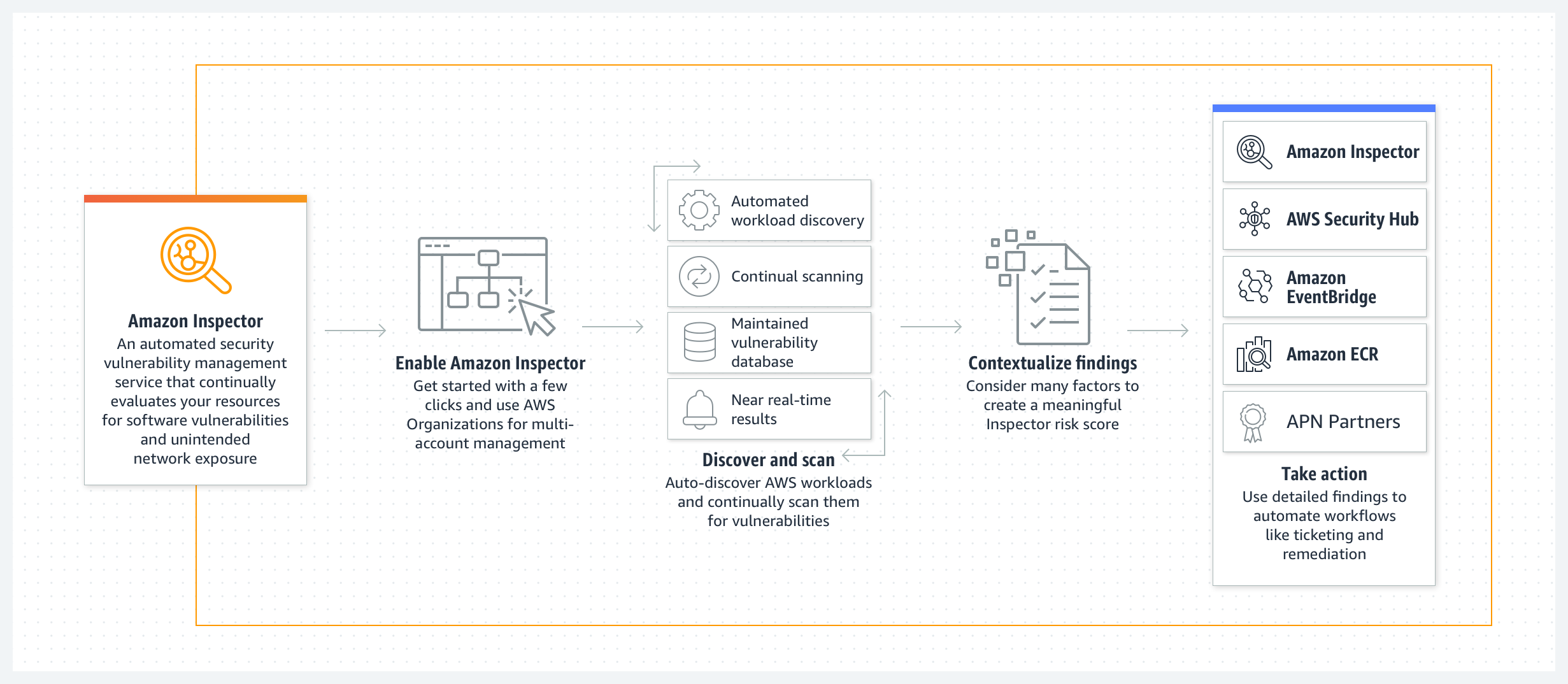
  • Amazon Inspector is an automated vulnerability management service that continuously scans AWS workloads for software vulnerabilities and unintended network exposure.
  • automatically discovers and scans EC2 instances, container images in Amazon ECR and within CI/CD tools, AWS Lambda functions, and code repositories for software vulnerabilities and unintended network exposure.
  • creates a finding when a software vulnerability or network issue is discovered, that describes the vulnerability, rates its severity, identifies the affected resource, and provides remediation guidance.
  • calculates a highly contextualized Inspector risk score for each finding by correlating CVE information with factors such as network access and exploitability to prioritize the most critical vulnerabilities.
  • is a Regional service and configurations need to be repeated across each region.
  • supports both agent-based and agentless scanning for EC2 instances.
  • uses the Systems Manager (SSM) agent for agent-based scanning to collect software inventory and configurations.
  • offers agentless scanning using EBS volume snapshots for instances without SSM Agent installed or configured.
  • SSM agents can be set up as VPC Interface endpoints to avoid sending any information over the internet.
  • uses an IAM AWSServiceRoleForAmazonInspector2 service-linked-role linked directly to Inspector with all the permissions required to call other AWS services on your behalf.
  • has multi-account management through AWS Organizations integration, which allows delegating an administrator account for the organization.
  • supports organization-wide management through AWS Organizations policies to centrally configure and manage scan types across all accounts, selected OUs, or individual accounts.
  • integrates with AWS Security Hub which collects and centralizes the security data from across the AWS accounts, services, and other supported products.
  • is available both as a standalone service and as a core capability within AWS Security Hub.

Amazon Inspector

AWS Inspector Features

  • Continuously scan environments for vulnerabilities and network exposure
    • automatically discovers and begins scanning eligible resources without the need to manually schedule or configure assessment scans.
    • all resources are continually rescanned when new CVEs are published or when changes occur, including new software installation on an EC2 instance or updates to code repositories.
  • Assess vulnerabilities accurately with the Inspector Risk score
    • Inspector calculates a highly contextualized risk score by correlating CVE information with environmental factors such as network reachability and exploitability data.
    • helps prioritize the most critical findings and vulnerable resources.
  • Identify high-impact findings with the Inspector dashboard
    • offers a high-level view of findings from across your environment.
  • Manage findings using customizable views
    • Inspector console offers a Findings view.
    • users can use filters and suppression rules to generate customized finding reports.
    • suppression rules allow suppression of findings based on criteria defined by the organization for acceptable risks.
  • Automatic closure of remediated findings
    • automatically detects if a vulnerability has been patched or remediated and changes the state of the finding to “Closed” without manual intervention.
  • Monitor and process findings with other services and systems
    • publishes findings to
      • Amazon EventBridge, which can then be monitored and processed in near-real time as part of the existing security and compliance workflows or routed to SNS, Lambda, etc.
      • AWS Security Hub.
      • Amazon ECR for container image vulnerabilities, enabling resource owners to view and remediate.
  • Detailed coverage monitoring
    • provides a comprehensive, near real-time overview of organization-wide environment coverage.
    • highlights resources not being actively monitored and provides guidance on how to include them.

Inspector Scanning Types

Amazon EC2 Scanning

  • scans EC2 instances for common vulnerabilities and exposures (CVEs), network exposure issues, and operating system and programming language package vulnerabilities.
  • performs network reachability scans once every 12 hours and package vulnerability scans on a variable cadence depending on the scan method.
  • supports two scanning methods:
    • Agent-based scanning – uses the SSM Agent to collect software inventory from running instances.
    • Agentless scanning – takes snapshots of EBS volumes to extract data without installing an agent. GA since April 2024.
  • Enhanced EC2 Scanning (VM Scanner) – uses the Amazon Inspector VM Scanner (replacing the older SSM plugin) for more granular package collection with fewer compute resources. Installed and updated via SSM associations.
  • supports expanded agentless scanning including Windows OS vulnerability scanning without requiring an agent (March 2026).
  • Deep inspection for Linux-based instances automatically scans for programming language package vulnerabilities (Python, Java, Node.js, Go, etc.) beyond OS-level packages.

Amazon ECR Container Image Scanning

  • scans container images in Amazon ECR for software vulnerabilities.
  • supports scratch, distroless, and Chainguard images for minimal and security-focused container base images.
  • maps ECR images to their deployment footprint across Amazon ECS tasks and Amazon EKS pods.
  • provides insights on deployment scope – when images were last used, how many tasks or pods are using them, and which clusters are running the image.
  • helps prioritize remediation based on actual image usage and deployment status.

AWS Lambda Function Scanning

  • scans Lambda functions for software vulnerabilities in their application packages and dependencies.
  • Lambda code scanning scans custom proprietary application code for code security vulnerabilities such as injection flaws, data leaks, weak cryptography, or missing encryption based on AWS security best practices.
  • upon detecting code vulnerabilities, generates actionable security findings with detector name, impacted code snippets, and remediation suggestions.
  • uses generative AI and automated reasoning to provide in-context code patches for multiple classes of vulnerabilities.
  • can scan both Lambda functions and layers; by addressing vulnerabilities at foundational layers, it improves security of all downstream Lambda functions.
  • does not support scanning Lambda functions encrypted with customer managed keys.

CI/CD Pipeline Scanning

  • integrates with developer tools like Jenkins and TeamCity for container image assessments within CI/CD pipelines.
  • pushes security earlier in the software development lifecycle (shift-left).
  • findings are available in the CI/CD tool’s dashboard, allowing automated actions like blocking builds or image pushes to registries.
  • CI/CD tools can be hosted anywhere – in AWS, on-premises, or hybrid clouds.
  • uses the Amazon Inspector SBOM Generator (Sbomgen) to produce a Software Bill of Materials and the Inspector Scan API to scan for vulnerabilities.
  • supports custom CI/CD integrations via the SBOM Generator and Scan API combination.

Code Security Scanning (June 2025)

  • expands vulnerability management to application source code through native integration with GitHub and GitLab (SCM tools).
  • delivers three core capabilities:
    • Static Application Security Testing (SAST) – analyzes application source code for security vulnerabilities.
    • Software Composition Analysis (SCA) – evaluates third-party dependencies for known vulnerabilities.
    • Infrastructure as Code (IaC) scanning – validates infrastructure definitions for misconfigurations.
  • findings are surfaced both in the Inspector console for an aggregated view across the organization and within the SCM platform as fast feedback for developers.
  • enables consistent vulnerability management from code to compute resources running on AWS.

CIS Benchmark Assessments

  • supports the Center for Internet Security (CIS) Benchmarks for on-demand and targeted assessments against OS-level CIS configuration benchmarks for EC2 instances.
  • supports both Level 1 and Level 2 configuration benchmark checks.
  • supported operating systems include Amazon Linux 2, Windows Server 2019, and Windows Server 2022.
  • CIS scans can be run across AWS Organization accounts.
  • launched January 2024.

Inspector Finding Types

  • Package Vulnerability
    • identifies software packages exposed to common vulnerabilities and exposures (CVEs).
    • generated for EC2 instances, ECR container images, and Lambda functions.
    • supports Java Gradle inventory and scanning (January 2026), plus MySQL, MariaDB, PHP, Jenkins-core, 7zip (Windows), Elasticsearch, and Curl/LibCurl.
  • Network Reachability
    • indicates allowed network paths to EC2 instances in the environment.
    • generated only for EC2 resources.
  • Code Vulnerability
    • identifies code security vulnerabilities in Lambda functions and code repositories.
    • includes missing encryption, data leaks, injection flaws, and weak cryptography.
    • provides code snippets and AI-powered remediation suggestions.

SBOM (Software Bill of Materials)

  • offers automated and centralized management of SBOM exports.
  • enables easy export of a consolidated SBOM for all monitored resources to a pre-configured S3 bucket.
  • supports industry standard formats (CycloneDX).
  • SBOM artifacts can be used with Amazon Athena queries or Amazon QuickSight dashboards for insights and trend visualization.
  • Amazon Inspector SBOM Generator (Sbomgen) is used behind the scenes for ECR scanning, Lambda scanning, and agentless EC2 scanning.

Multi-Account Management

  • supports simplified one-click onboarding and integration with AWS Organizations.
  • allows assigning an Inspector Delegated Administrator (DA) account that can start and configure all member accounts and consolidate findings.
  • supports organization-wide management through AWS Organizations policies (November 2025) to centrally configure scan types – EC2 scanning, ECR scanning, Lambda Standard and Code Scanning, and Code Security – across all accounts, selected OUs, or individual accounts.
  • new accounts are automatically onboarded when Inspector policies are configured.

AWS Certification Exam Practice Questions

  • Questions are collected from Internet and the answers are marked as per my knowledge and understanding (which might differ with yours).
  • AWS services are updated everyday and both the answers and questions might be outdated soon, so research accordingly.
  • AWS exam questions are not updated to keep up the pace with AWS updates, so even if the underlying feature has changed the question might not be updated
  • Open to further feedback, discussion and correction.
  1. Which of the following services allows you to analyze EC2 Instances against pre-defined security templates to check for vulnerabilities?
    1. AWS Trusted Advisor
    2. AWS Inspector
    3. AWS WAF
    4. AWS Shield
  2. Your company has a set of AWS resources which consists of EC2 Instances. The Security departments need to run vulnerability analysis on these machines to ensure that the Instances comply with the latest security standards. Which of the following would you implement for this requirement?
    1. AWS WAF
    2. AWS Snowball
    3. AWS CloudFront
    4. AWS Inspector
  3. A company wants to scan its EC2 instances for software vulnerabilities without installing any additional software or agents on the instances. Which Amazon Inspector feature should they use?
    1. Agent-based scanning with SSM Agent
    2. Agentless scanning
    3. CIS Benchmark assessments
    4. Network reachability analysis
  4. A development team wants to detect vulnerabilities in their container images before deploying to production. They use Jenkins as their CI/CD tool. Which Amazon Inspector capability should they use?
    1. Amazon ECR Enhanced Scanning
    2. Amazon Inspector CI/CD pipeline integration with Jenkins plugin
    3. Amazon Inspector Lambda code scanning
    4. Amazon Inspector network reachability scan
  5. Which Amazon Inspector finding type identifies code security issues such as injection flaws, data leaks, and missing encryption in Lambda functions?
    1. Package Vulnerability
    2. Network Reachability
    3. Code Vulnerability
    4. Configuration Vulnerability
  6. A security team wants to centrally manage Amazon Inspector scan types across all accounts in their AWS Organization without manual configuration for each account. Which feature should they use?
    1. Inspector Delegated Administrator
    2. AWS Config rules
    3. Amazon Inspector policies through AWS Organizations
    4. AWS Security Hub standards
  7. Which of the following scan types does Amazon Inspector Code Security provide? (Choose THREE)
    1. Static Application Security Testing (SAST)
    2. Dynamic Application Security Testing (DAST)
    3. Software Composition Analysis (SCA)
    4. Infrastructure as Code (IaC) scanning
    5. Penetration testing

References

CloudFront Functions vs Lambda@Edge

CloudFront Functions vs Lambda@Edge

CloudFront Functions vs Lambda@Edge

CloudFront Functions vs Lambda@Edge

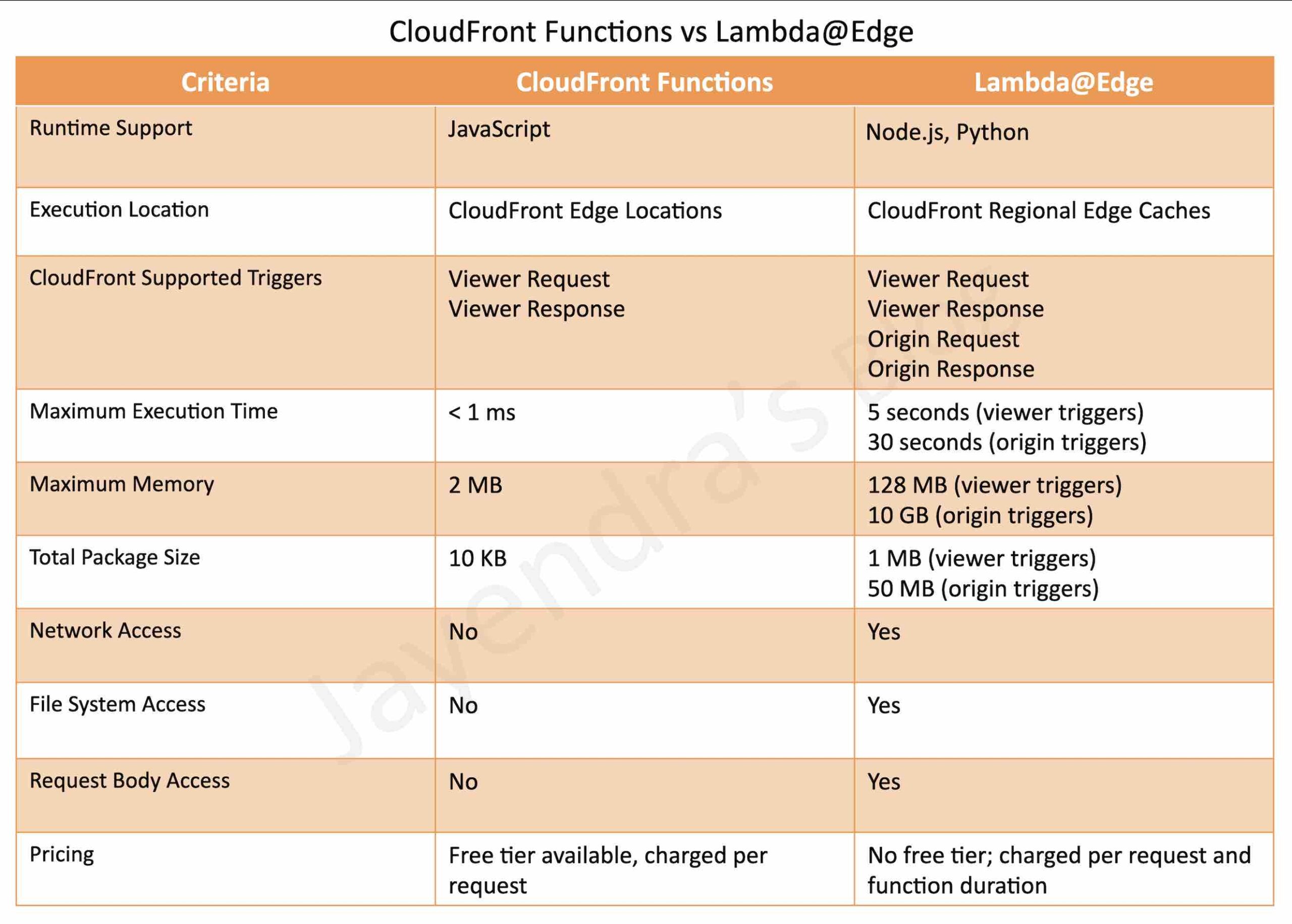
CloudFront Functions

  • is a CloudFront native feature (code is managed entirely within CloudFront) and visible only on the CloudFront dashboard.
  • supports lightweight functions written only in JavaScript language
  • supports two JavaScript runtimes:
    • Runtime 1.0 – ECMAScript 5.1 compliant with some ES 6-9 features
    • Runtime 2.0 – Adds async/await, Promises, ES modules, WebCrypto, Buffer module, and ES 6-12 features. Required for KeyValueStore and origin modification.
  • runs in 700+ Edge Locations (closer to viewers than Lambda@Edge)
  • has process-based isolation
  • supports Viewer Request, Viewer Response trigger events only
    • Viewer Request: after CloudFront receives the request from the Viewer
    • Viewer Response: before CloudFront forwards the response to the Viewer
  • supports sub-millisecond execution time
  • maximum function code size: 10 KB
  • maximum function memory: 2 MB
  • scales to millions of requests/second
  • pricing: $0.10 per million invocations (1/6th the cost of Lambda@Edge)
  • as they are built to be more scalable, performant, and cost-effective, they have the following limitations
    • no network access
    • no file system access
    • no access to environment variables (use KeyValueStore instead)
    • no dynamic code evaluation (eval() not supported)
    • no timers (setTimeout, setImmediate not supported)
  • cannot access the request body
  • supports Amazon CloudFront KeyValueStore for low-latency data lookups at the edge without network calls (requires Runtime 2.0)
  • supports origin modification (Nov 2024) – dynamically change or update origin servers on each request from the viewer request event, previously only possible via Lambda@Edge
  • supports access to geolocation and device data headers
  • can be built and tested entirely within CloudFront console
  • ideal use cases:
    • Cache-key manipulations and normalization
    • URL rewrites and redirects
    • HTTP header manipulation
    • Request authorization (JWT validation via hashed tokens)
    • Dynamic origin selection and modification
    • A/B testing and feature flags (using KeyValueStore)

CloudFront Functions – Origin Modification (Nov 2024)

  • allows conditionally changing or updating origin servers on each request from the viewer request event.
  • previously, origin modification was only possible using Lambda@Edge on the origin request event.
  • supports updating all existing origin capabilities such as setting custom headers, adjusting timeouts, setting Origin Shield, or changing the primary origin in origin groups.
  • uses helper methods: updateRequestOrigin(), selectRequestOriginById(), and createRequestOriginGroup().
  • VPC Origin modification support added in April 2025, enabling routing to private VPC origins.
  • requires JavaScript runtime 2.0.

CloudFront Functions – New Capabilities (Nov 2025)

  • Edge Location Metadata – Access the three-letter airport code of the serving edge location and expected Regional Edge Cache (REC). Enables geo-specific content routing or compliance requirements.
  • Raw Query String Retrieval – Access the complete, unprocessed query string as received from the viewer, preserving special characters and encoding.
  • Advanced Origin Overrides – Customize SSL/TLS handshake parameters including Server Name Indication (SNI), useful for multi-tenant setups. Parameters include hostHeader, sni, allowedCertificateNames, and originOverrides.

Lambda@Edge

  • are Lambda functions and visible on the Lambda dashboard.
  • supports Node.js and Python languages (currently supports Node.js 18, 20, 22, 24 and Python 3.9-3.13)
  • runs in Regional Edge Caches (13 locations globally)
  • has VM-based isolation
  • supports Viewer Request, Viewer Response, Origin Request, and Origin Response trigger events.
    • Viewer Request: after CloudFront receives the request from the Viewer
    • Viewer Response: before CloudFront forwards the response to the Viewer
    • Origin Request: before CloudFront forwards the request to the Origin
    • Origin Response: after CloudFront receives the response from the Origin
  • supports longer execution time, 5 seconds for viewer triggers and 30 seconds for origin triggers
  • maximum memory: 128 MB for viewer triggers, 10,240 MB (10 GB) for origin triggers
  • maximum function code size: 50 MB (including libraries)
  • scales to 10,000 requests/second per Region
  • pricing: $0.60 per million invocations + duration charges (no free tier)
  • has network and file system access
  • can access the request body
  • does NOT support CloudFront KeyValueStore (use CloudFront Functions instead)
  • geolocation and device data available only on origin request/response triggers (not viewer triggers)
  • ideal use cases:
    • Functions that take several milliseconds or more to complete
    • Functions that require adjustable CPU or memory
    • Functions that depend on third-party libraries (including the AWS SDK)
    • Functions that require network access to use external services for processing
    • Functions that require file system access or access to the body of HTTP requests
    • Complex authentication and authorization (OAuth, SAML)
    • Dynamic content generation and image transformation
  • Limitations
    • must use a numbered version of the Lambda function, not $LATEST or aliases
    • Lambda function must be in the US East (N. Virginia) Region
    • no free tier – Lambda@Edge requests are not covered by the standard Lambda free tier
    • does not support Lambda layers, VPC access, provisioned concurrency, environment variables, or X-Ray tracing

Lambda@Edge – Advanced Logging Controls (Apr 2025)

  • JSON Structured Logs – Function logs can now be output in structured JSON format, making it easier to search, filter, and analyze log entries without custom logging libraries.
  • Log Level Granularity – Switch log levels (ERROR, DEBUG, INFO) instantly without code changes.
  • Custom CloudWatch Log Group Selection – Choose which CloudWatch log group Lambda@Edge sends logs to, simplifying log aggregation and management at scale.

CloudFront Functions vs Lambda@Edge – Comparison

Feature CloudFront Functions Lambda@Edge
Programming Language JavaScript (ECMAScript 5.1+) Node.js and Python
Event Triggers Viewer Request, Viewer Response Viewer Request, Viewer Response, Origin Request, Origin Response
Execution Location 700+ Edge Locations 13 Regional Edge Caches
Execution Duration Sub-millisecond 5 sec (viewer) / 30 sec (origin)
Memory 2 MB 128 MB (viewer) / 10 GB (origin)
Code Size 10 KB 50 MB
Scale Millions of requests/sec 10,000 requests/sec per Region
Network Access No Yes
File System Access No Yes
Request Body Access No Yes
KeyValueStore Support Yes (Runtime 2.0) No
Origin Modification Yes (Nov 2024, viewer request) Yes (origin request)
Geolocation/Device Data Yes Origin triggers only
Build & Test in CloudFront Yes No
Pricing $0.10 per 1M invocations $0.60 per 1M invocations + duration
Isolation Model Process-based VM-based (microVM)

When to Use Which

  • Start with CloudFront Functions when:
    • Tasks are lightweight (header manipulation, URL rewrites, cache key normalization)
    • Sub-millisecond latency is required
    • High scale (millions of req/sec) is needed
    • Origin selection can be done based on headers/query strings (no body access needed)
    • Cost optimization is a priority
  • Use Lambda@Edge when:
    • You need access to the request body
    • Functions require network calls (external APIs, databases)
    • Third-party libraries or AWS SDK are needed
    • Complex logic requiring more than sub-millisecond execution
    • Origin request/response event manipulation is needed (and CloudFront Functions origin modification doesn’t suffice)

AWS Certification Exam Practice Questions

  • Questions are collected from Internet and the answers are marked as per my knowledge and understanding (which might differ with yours).
  • AWS services are updated everyday and both the answers and questions might be outdated soon, so research accordingly.
  • AWS exam questions are not updated to keep up the pace with AWS updates, so even if the underlying feature has changed the question might not be updated
  • Open to further feedback, discussion and correction.
  1. You’ve been given the requirement to customize the content which is distributed to users via a CloudFront Distribution. The content origin is an S3 bucket and the customization attribute exists in the request body. How could you achieve this?
    1. Add an event to the S3 bucket. Make the event invoke a Lambda function to customize the content before rendering
    2. Use CloudFront Functions
    3. Use Lambda@Edge
    4. Use a separate application on an EC2 Instance for this purpose.
  2. A company uses CloudFront to serve a multi-region application. They need to route users to the nearest origin based on the viewer’s geographic location with sub-millisecond latency impact. Which approach should they use?
    1. Use Lambda@Edge with origin request trigger
    2. Use CloudFront Functions with origin modification helper methods
    3. Use Route 53 latency-based routing
    4. Use CloudFront geographic restrictions
  3. A SaaS company wants to dynamically route tenant requests to different backend servers based on a tenant ID in the request header. The routing table changes frequently. Which solution provides the lowest latency?
    1. Use Lambda@Edge to query DynamoDB for the routing table
    2. Use CloudFront Functions with hard-coded routing logic
    3. Use CloudFront Functions with KeyValueStore to look up the tenant routing
    4. Use an Application Load Balancer with path-based routing
  4. An application requires JWT token validation at the edge and, if valid, needs to call an external authorization service to check permissions before serving content. Which combination should be used?
    1. Use CloudFront Functions for both JWT validation and the external call
    2. Use Lambda@Edge for both JWT validation and the external call
    3. Use CloudFront Functions for JWT validation on viewer request, and Lambda@Edge on origin request for the external authorization call
    4. Use API Gateway with a Lambda authorizer
  5. Which of the following is NOT a limitation of CloudFront Functions compared to Lambda@Edge? (Select TWO)
    1. Cannot access the request body
    2. Cannot modify the origin
    3. Cannot make network calls
    4. Cannot access geolocation data
    5. Cannot use KeyValueStore
    Show Answer

    Answer: B and E are NOT limitations (they are incorrect statements). CloudFront Functions CAN modify origins (since Nov 2024) and CAN use KeyValueStore –

References

AWS Direct Connect Gateway – Multi-VPC Access

AWS Direct Connect Gateway

📌 2024-2026 Updates

  • VGW limit increased from 10 to 20 per Direct Connect Gateway
  • Transit VIF limit increased from 1 to 4 per Dedicated Connection
  • Transit Gateway limit: Up to 6 Transit Gateways per Direct Connect Gateway
  • Prefix limit increased to 200 for Transit Gateway associations
  • AWS Cloud WAN Direct Connect attachment (Nov 2024): Attach DX Gateway directly to Cloud WAN core network
  • VIF Rate Limiters (June 2026): Set maximum bandwidth allocation per VIF on dedicated connections
  • 400 Gbps Dedicated Connections with MACsec encryption support
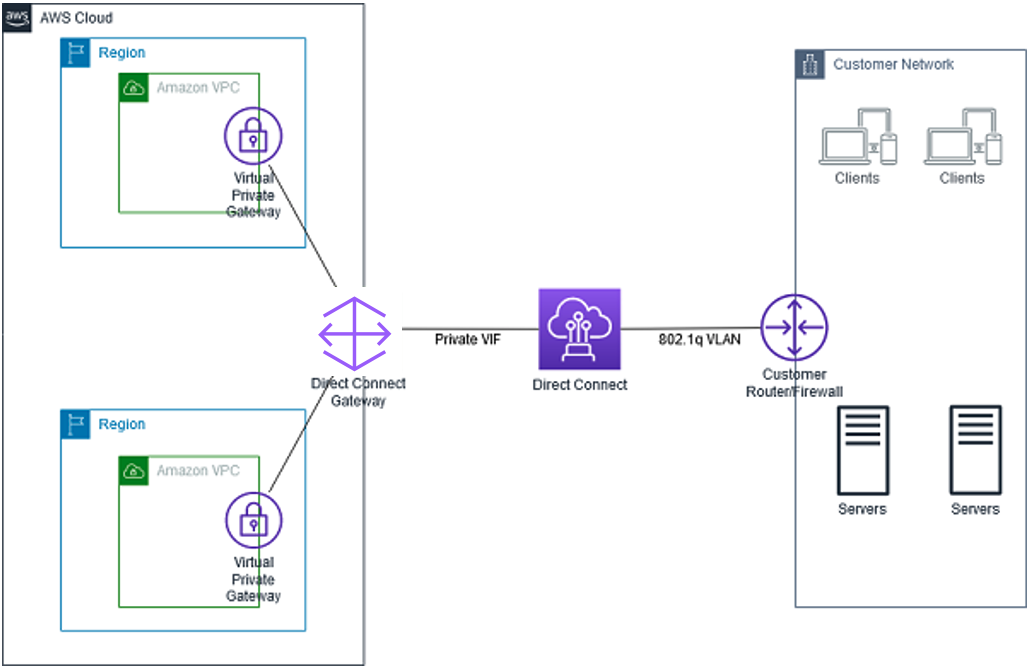
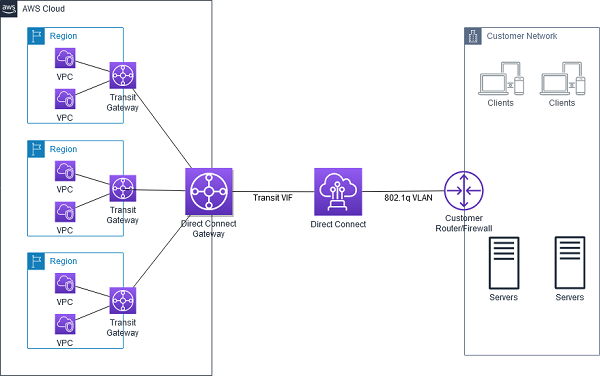
  • Direct Connect Gateway is a global network device that helps establish connectivity that spans multiple VPCs spread across multiple AWS Regions.
  • is a globally available resource that can be created in any Region and accessed from all other Regions.
  • is a virtual component of Direct Connect designed to act as a distributed set of BGP route reflectors. Because it operates outside the data traffic path, it avoids creating a single point of failure or introducing dependencies on specific AWS Regions.
  • supports Private VIF and Transit VIF. Does not support Public VIF.
  • DX Gateway and Private VIF should be in the same AWS account, whereas the connected VPCs can be in different AWS accounts and regions.
  • can be associated with
  • allows scaling a Direct Connection to 1000 VPCs as
    • a single Direct Connection supports 50 VIFs
    • a single private VIF can connect to a single Direct Connect Gateway
    • a single Direct Connect Gateway can connect to 20 VGWs
  • High availability is inherently built into its design, eliminating the need for multiple Direct Connect gateways.

AWS Direct Connect Gateway

Direct Connect Gateway Limitations

  • supports 20 VGWs (VPC) connections per Direct Connect Gateway. (increased from 10)
  • supports up to 6 Transit Gateways per Direct Connect Gateway.
  • supports up to 4 Transit VIFs per Direct Connect Dedicated Connection. (increased from 1)
  • supports a maximum of 30 virtual interfaces (private or transit) per Direct Connect Gateway.
  • does not support overlapping CIDRs.
  • does not support transitive routing i.e. does not allow gateway associations to send traffic to each other (for example, a VGW to another VGW or VPC to VPC)
  • allows a maximum of 200 prefixes (combined IPv4 and IPv6) per Transit Gateway association. (increased from 100)
  • Only one core network can be associated with a Direct Connect Gateway (for Cloud WAN).

Direct Connect Gateway + Transit Gateway

AWS Direct Connect Gateway + Transit Gateway

  • AWS Direct Connect Gateway does not support transitive routing and has limits on the number of VGWs that can be connected.
  • AWS DX Gateway can be combined with AWS Transit Gateway using transit VIF attachment which enables your network to connect up to six regional centralized routers over a private dedicated connection. (increased from 3 to 6 Transit Gateways)
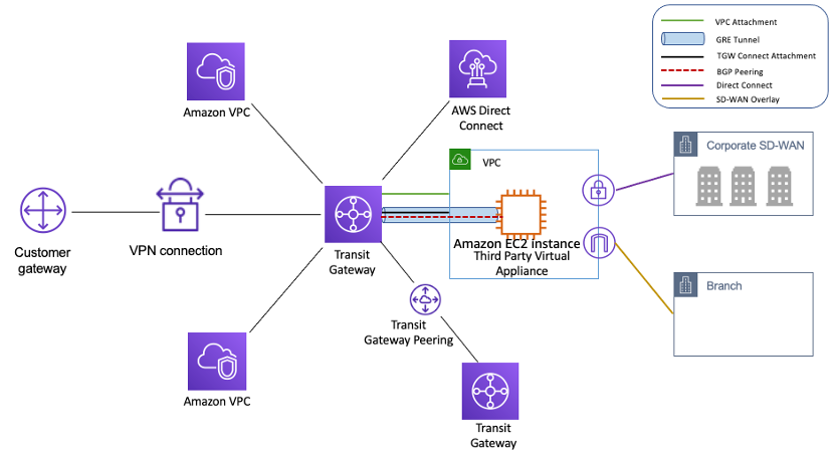
  • Each AWS Transit Gateway is a regional resource and acts as a network transit hub to interconnect VPCs in the same region, consolidating VPC routing configuration in one place.
  • This solution simplifies the management of connections between a VPC and the on-premises networks over a private connection that can reduce network costs, increase bandwidth throughput, and provide a more consistent network experience than internet-based connections.
  • With AWS Transit Gateway connected to VPCs, full or partial mesh connectivity can be achieved between the VPCs.
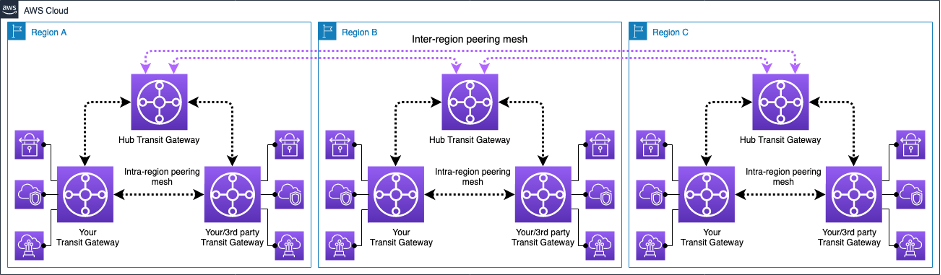
  • Cross-VPC and Cross-Region VPC communication facilitated by AWS Transit Gateway peering.

Direct Connect Gateway + AWS Cloud WAN

  • As of November 2024, AWS Direct Connect Gateway can be directly attached to an AWS Cloud WAN core network without requiring a Transit Gateway as an intermediary.
  • The Cloud WAN Direct Connect attachment supports:
    • Automatic route propagation between AWS and on-premises networks using BGP
    • Central policy-based management through Cloud WAN
    • Segmentation for advanced security configurations
    • Region-specific and segment-specific routing behaviors
    • Tag-based attachment automation
  • The maximum number of advertised route prefixes from a Cloud WAN core network DX Gateway attachment to on-premises is 5,000.
  • Only one core network can be associated with a Direct Connect Gateway.
  • The association is created, deleted, and managed from the Cloud WAN Console in Network Manager.

Direct Connect SiteLink

  • AWS Direct Connect SiteLink enables sending data from one Direct Connect location to another, bypassing AWS Regions.
  • Data travels over the shortest path between Direct Connect locations using the AWS global network backbone.
  • SiteLink is enabled per VIF and creates private, end-to-end network connections between offices, data centers, and colocation facilities.
  • SiteLink is off by default and can be turned on or off at any time.
  • All VIFs with SiteLink enabled must be attached to the same Direct Connect Gateway.
  • SiteLink prefix limit: 100 (can be increased by contacting AWS support).
  • Provides built-in redundancy and resiliency, ensuring uninterrupted connectivity even during public internet outages.

VIF Rate Limiters (New – June 2026)

  • VIF Rate Limiters help prevent network congestion caused by unexpected traffic spikes on a VIF which can consume all available bandwidth, impacting workloads on other VIFs on the same connection.
  • Allows setting a maximum bandwidth allocation for up to 10 VIFs per dedicated connection.
  • Available capacity increments from 50 Mbps to 1.6 Tbps when using a Link Aggregation Group (LAG).
  • Rate limiting applies to traffic both ingressing and egressing the AWS network.
  • Quota: 10 Rate Limiters per Dedicated connection.

AWS Certification Exam Practice Questions

  • Questions are collected from Internet and the answers are marked as per my knowledge and understanding (which might differ with yours).
  • AWS services are updated everyday and both the answers and questions might be outdated soon, so research accordingly.
  • AWS exam questions are not updated to keep up the pace with AWS updates, so even if the underlying feature has changed the question might not be updated
  • Open to further feedback, discussion and correction.
  1. Your company currently has set up an AWS Direct Connect connection between their on-premise data center and a VPC in the us-east-1 region. They now want to connect their data center to a VPC in the us-west-1 region. They need to ensure latency is low and maximum bandwidth for the connection. How could they accomplish this in a cost-effective manner?
    1. Create an AWS Direct Connect connection between the VPC in the us-west-1 region and the on-premise data center
    2. Setup an AWS Direct Connect Gateway
    3. Create an AWS VPN managed connection between the VPC in the us-west-1 region and the on-premise data center
    4. Use VPC peering
  2. A company needs to connect its on-premises data center to VPCs across 15 different AWS accounts in multiple regions using Direct Connect. They want to minimize the number of connections while maintaining dedicated bandwidth. What architecture should they use?
    1. Create 15 separate Direct Connect connections, one for each account
    2. Use a single Direct Connect with 15 private VIFs
    3. Use a Direct Connect Gateway with Virtual Private Gateways in each VPC
    4. Use AWS VPN connections for each VPC
  3. A company wants to connect their on-premises network to multiple VPCs in the same region and enable inter-VPC communication. Which combination of services should they use with Direct Connect?
    1. Direct Connect Gateway with Virtual Private Gateways
    2. Direct Connect Gateway with Transit Gateway
    3. Multiple Direct Connect connections with private VIFs
    4. Direct Connect with VPC peering
  4. An organization needs to route traffic directly between two on-premises data centers connected to AWS Direct Connect in different locations, using the shortest network path without passing through an AWS Region. Which feature should they enable?
    1. Transit Gateway peering
    2. Direct Connect Gateway with Transit VIF
    3. AWS Direct Connect SiteLink
    4. AWS Cloud WAN
  5. A company wants to simplify their hybrid network architecture by connecting their on-premises locations to VPCs across multiple regions with centralized routing policy management. They also need segment-based isolation. Which architecture should they choose? (Select TWO)
    1. AWS Cloud WAN with Direct Connect Gateway attachment
    2. Direct Connect Gateway with multiple Transit Gateways
    3. Direct Connect with VPC peering
    4. Cloud WAN core network with segment-based routing policies
    5. Multiple Direct Connect Gateways with SiteLink

References

AWS Direct Connect vs VPN – Hybrid Connectivity

AWS Direct Connect vs VPN

AWS Direct Connect vs VPN

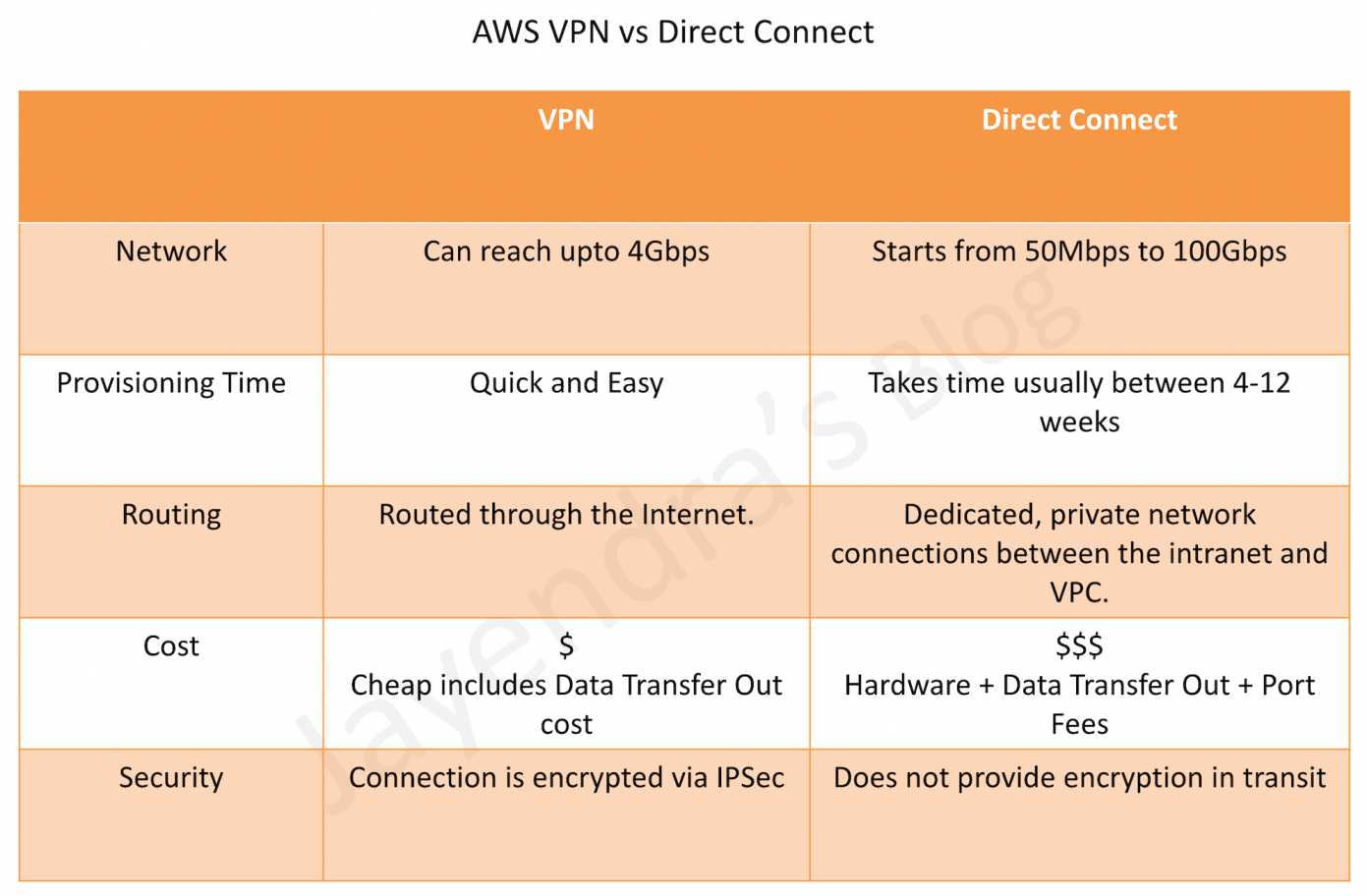
  • AWS VPN Connection utilizes IPSec to establish encrypted network connectivity between the intranet and VPC over the Internet.
  • AWS Direct Connect provides dedicated, private network connections between the intranet and VPC.
  • Setup time
    • VPN Connections can be configured in minutes and are a good solution for immediate needs, have low to modest bandwidth requirements, and can tolerate the inherent variability in Internet-based connectivity.
    • Direct Connect can take anywhere from 4 to 12 weeks
  • Routing
    • VPN traffic is still routed through the Internet.
    • Direct Connect does not involve the Internet; instead, it uses dedicated, private network connections between the intranet and VPC. The network traffic remains on the AWS global network and never touches the public internet. This reduces the chance of hitting bottlenecks or unexpected increases in latency
  • Bandwidth
    • VPN connections support up to 1.25 Gbps per tunnel (standard) or 5 Gbps per tunnel (large bandwidth tunnels, launched Nov 2025). With ECMP on Transit Gateway, multiple tunnels can be aggregated for higher throughput.
    • Direct Connect supports dedicated connections at 1 Gbps, 10 Gbps, 100 Gbps, or 400 Gbps (native 400 Gbps launched Jul 2024 at select locations). Hosted connections are available from 50 Mbps up to 25 Gbps via AWS Direct Connect Partners.
  • Cost
    • VPN connections are relatively inexpensive — standard 1.25 Gbps connections cost $0.05/hr (~$36/month) per connection. The 5 Gbps large bandwidth tunnels cost $0.60/hr (~$432/month). Additional charges apply for data transfer out and Transit Gateway attachments.
    • Direct Connect requires actual hardware and infrastructure — port-hour charges vary by speed (e.g., 1 Gbps, 10 Gbps, 100 Gbps, 400 Gbps) plus data transfer charges. Total costs can run into thousands per month depending on port speed and data volumes.
  • Encryption in Transit
    • VPN connections encrypt the data in transit using IPSec.
    • Direct Connect data transfer can be encrypted using:
      • MACsec (IEEE 802.1AE) — Layer 2 encryption on dedicated connections (1 Gbps, 10 Gbps, 100 Gbps, 400 Gbps) and supported partner interconnects (extended Jul 2025).
      • Private IP VPN — IPSec encryption over Direct Connect transit VIFs, providing end-to-end encryption without using public VIFs or public IP addresses.
  • Resiliency
    • VPN provides built-in high availability with two tunnels per connection across multiple Availability Zones. Accelerated VPN uses AWS Global Accelerator for optimized routing.
    • Direct Connect offers the Resiliency Toolkit with connection wizard supporting Maximum Resiliency, High Resiliency, and Development/Test models. SiteLink enables direct data transfer between Direct Connect locations bypassing AWS Regions.

Direct Connect vs VPN Comparison

AWS Direct Connect vs VPN

AWS VPN Connection Types (Updated 2025)

As of November 2025, AWS Site-to-Site VPN offers five distinct connection options:

  • Standard 1.25 Gbps VPN — Up to 1.25 Gbps per tunnel; terminates on Virtual Private Gateway (VGW) or Transit Gateway. Supports ECMP for higher aggregate bandwidth when used with Transit Gateway.
  • 5 Gbps Large Bandwidth VPN (Nov 2025) — Up to 5 Gbps per tunnel; terminates on Transit Gateway only. Ideal for bandwidth-intensive hybrid applications, big data migrations, and disaster recovery. Existing tunnels can be upgraded in-place (May 2026) without changing IP addresses or configuration.
  • Accelerated VPN — Uses AWS Global Accelerator to route traffic from on-premises to the nearest AWS edge location, reducing internet path variability. Available for both 1.25 Gbps connections.
  • VPN Concentrator (Nov 2025) — Simplifies multi-site connectivity for 25+ remote sites (each under 100 Mbps). Single Transit Gateway attachment for all sites with 5 Gbps aggregate bandwidth. Cost-effective for distributed enterprises (retail, hospitality, healthcare).
  • Private IP VPN — IPSec VPN over Direct Connect transit VIFs using private IP addresses. Provides encryption on dedicated connections without traversing the public internet.

AWS Direct Connect + VPN

AWS Direct Connect + VPN

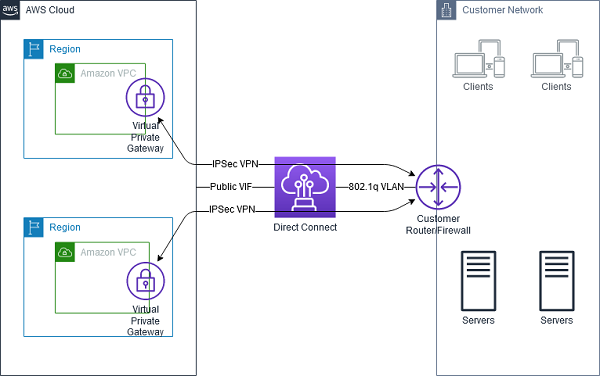
  • AWS Direct Connect + VPN combines the benefits of the end-to-end secure IPSec connection with low latency and increased bandwidth of the AWS Direct Connect to provide a more consistent network experience than internet-based VPN connections.
  • Two approaches are available:
    • Public VIF approach (legacy) — Direct Connect public VIF establishes a dedicated network connection between the on-premises network to public AWS resources, such as an Amazon virtual private gateway IPsec endpoint. A BGP connection is established on the public VIF, and another BGP session or static route is established on the IPSec VPN tunnel.
    • Private IP VPN (recommended) — Uses Direct Connect transit VIFs with private IP addresses to establish IPSec connections to Transit Gateway. This eliminates the need for public IP addresses and keeps all traffic private end-to-end.

Direct Connect + VPN as Backup

Direct Connect with VPN as Backup

  • VPN can be selected to provide a quick and cost-effective, backup hybrid network connection to an AWS Direct Connect. However, it provides a lower level of reliability and indeterministic performance over the internet.
  • Be sure that you use the same virtual private gateway for both Direct Connect and the VPN connection to the VPC.
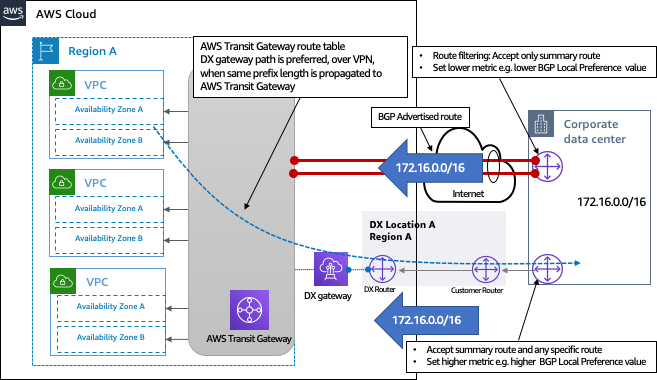
  • If you are configuring a Border Gateway Protocol (BGP) VPN, advertise the same prefix for Direct Connect and the VPN.
  • If you are configuring a static VPN, add the same static prefixes to the VPN connection that you are announcing with the Direct Connect virtual interface.
  • If you are advertising the same routes toward the AWS VPC, the Direct Connect path is always preferred, regardless of AS path prepending.
  • For Transit Gateway architectures, both Direct Connect (via Direct Connect Gateway) and VPN can attach to the same Transit Gateway with route table preferences configured appropriately.

AWS Direct Connect SiteLink

  • SiteLink enables sending data from one Direct Connect location to another, bypassing AWS Regions entirely.
  • Useful for building a private, low-latency global backbone between on-premises data centers using the AWS global network.
  • Traffic flows between Direct Connect locations over the shortest available path on the AWS backbone without being routed through any AWS Region.
  • Enabled per virtual interface — only SiteLink-enabled VIFs can communicate with each other.
  • Combined with MACsec encryption, provides a secure and private global WAN over AWS infrastructure.

AWS Certification Exam Practice Questions

  • Questions are collected from Internet and the answers are marked as per my knowledge and understanding (which might differ with yours).
  • AWS services are updated everyday and both the answers and questions might be outdated soon, so research accordingly.
  • AWS exam questions are not updated to keep up the pace with AWS updates, so even if the underlying feature has changed the question might not be updated
  • Open to further feedback, discussion and correction.
  1. You work as an AWS Architect for a company that has an on-premise data center. They want to connect their on-premise infra to the AWS Cloud. Note that this connection must have the maximum throughput and be dedicated to the company. How can this be achieved?
    1. Use AWS Express Route
    2. Use AWS Direct Connect
    3. Use AWS VPC Peering
    4. Use AWS VPN
  2. A company wants to set up a hybrid connection between their AWS VPC and their on-premise network. They need to have high bandwidth and less latency because they need to transfer their current database workloads to AWS. Which of the following would you use for this purpose?
    1. AWS Managed software VPN
    2. AWS Managed hardware VPN
    3. AWS Direct Connect
    4. AWS VPC Peering
  3. An organization has established an Internet-based VPN connection between their on-premises data center and AWS. They are considering migrating from VPN to AWS Direct Connect. Which operational concern should drive an organization to consider switching from an Internet-based VPN connection to AWS Direct Connect?
    1. AWS Direct Connect provides greater redundancy than an Internet-based VPN connection.
    2. AWS Direct Connect provides greater resiliency than an Internet-based VPN connection.
    3. AWS Direct Connect provides greater bandwidth than an Internet-based VPN connection.
    4. AWS Direct Connect provides greater control of network provider selection than an Internet-based VPN connection.
  4. A company needs to encrypt data in transit over their existing AWS Direct Connect connection. They want to use private IP addresses and avoid routing traffic over the public internet. Which solution should they implement?
    1. Configure MACsec encryption on the Direct Connect connection.
    2. Create a VPN connection over a Direct Connect public VIF.
    3. Create a Private IP VPN connection over a Direct Connect transit VIF.
    4. Use AWS CloudHSM to encrypt data before transmission.
  5. A retail company has 200 store locations across the country, each requiring under 50 Mbps bandwidth to access centralized applications in AWS. They want to minimize the number of Transit Gateway attachments and reduce costs. Which VPN solution is most appropriate?
    1. Create 200 individual Site-to-Site VPN connections to Transit Gateway.
    2. Use AWS Client VPN for each store location.
    3. Use AWS Site-to-Site VPN Concentrator to connect all sites through a single Transit Gateway attachment.
    4. Set up AWS Direct Connect for each store location.
  6. A company requires a single encrypted VPN connection with bandwidth exceeding 2 Gbps for disaster recovery replication to AWS. They want the simplest architecture with the fewest connections. Which solution meets these requirements?
    1. Create two standard 1.25 Gbps VPN connections with ECMP enabled.
    2. Use AWS Direct Connect with MACsec encryption.
    3. Create a 5 Gbps Site-to-Site VPN connection to Transit Gateway.
    4. Create four standard VPN connections with load balancing.
  7. A company uses AWS Direct Connect as their primary connection and Site-to-Site VPN as backup. Both connections advertise the same routes. Which path will AWS prefer for traffic from the VPC to on-premises?
    1. The path with the shortest AS path length.
    2. The VPN connection because it is encrypted.
    3. The Direct Connect path is always preferred, regardless of AS path prepending.
    4. Traffic is load balanced between both connections.

Network Firewall vs WAF vs Security Groups vs NACLs

AWS Network Firewall vs WAF vs Security Groups vs NACLs

📅 Updated June 2026: Added AWS WAF Classic EOL notice, Network Firewall Transit Gateway attachment, Web Category-based filtering, WAF AI Bot Control dashboard, Security Group VPC Associations, and AWS Shield Network Security Director.

⚠️ AWS WAF Classic Deprecated

AWS WAF Classic reached End of Life (EOL) on September 30, 2025.

All references to WAF in this post refer to the current AWS WAF (formerly “AWS WAFv2”). If you are still using WAF Classic, you must migrate immediately.

Migration: Use the AWS WAF Classic migration guide and the CreateWebACLMigrationStack API to migrate your web ACLs.

Overview

  • AWS Network Firewall is a stateful, fully managed network firewall and intrusion detection and prevention service (IDS/IPS) for VPCs.
  • AWS WAF is a web application firewall that helps protect web applications from attacks by allowing rules configuration that allow, block, or monitor (count) web requests based on defined conditions.
  • Security groups act as a virtual firewall for associated instances, controlling both inbound and outbound traffic at the instance level.
  • Network access control lists (NACLs) act as a firewall for associated subnets, controlling both inbound and outbound traffic at the subnet level.
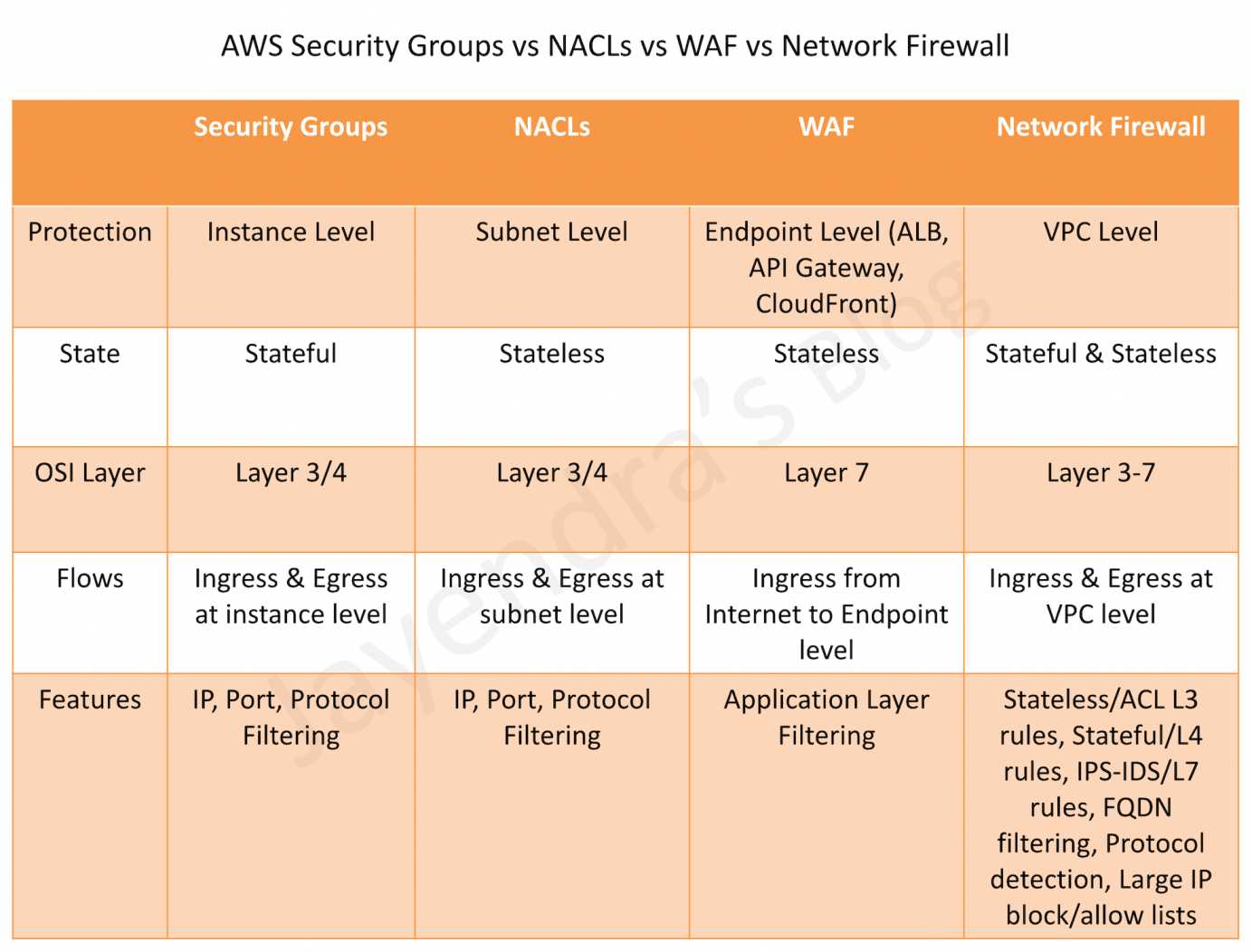
AWS Security Groups vs NACLs vs WAF vs Network Firewall

Comparison Table

Feature Security Groups NACLs AWS WAF AWS Network Firewall
Scope Instance/ENI level Subnet level Application level (Layer 7) VPC level (Layers 3-7)
State Stateful Stateless Stateful Stateful & Stateless
Rules Allow rules only Allow and Deny rules Allow, Block, Count, CAPTCHA, Challenge Allow, Drop, Reject, Alert
Rule Processing All rules evaluated Rules processed in order (lowest number first) Rules processed by priority Rules processed by priority with strict/action order
Traffic Inspection IP, Port, Protocol IP, Port, Protocol HTTP/HTTPS headers, body, URI, query strings IP, Port, Protocol, Domain, HTTP/TLS, IDS/IPS signatures
IDS/IPS No No No (application-level only) Yes (Suricata-compatible)
TLS Inspection No No No (inspects after decryption at ALB/CloudFront) Yes (decrypts and re-encrypts HTTPS traffic)
Domain Filtering No No No Yes (FQDN, SNI, URL categories)
Bot Control No No Yes (650+ bots including AI crawlers) No (use WAF for bot control)
Cost Free Free Pay per web ACL, rule, and requests Pay per endpoint hour and data processed

Security Groups

  • Act as a virtual firewall at the instance/ENI level
  • Stateful – return traffic is automatically allowed regardless of rules
  • Support allow rules only – cannot create deny rules
  • All rules are evaluated before deciding whether to allow traffic
  • Can reference other security groups as sources/destinations (including cross-account)
  • Applied to ENIs – an instance can have multiple security groups
  • Default security group allows all outbound and denies all inbound (except from same group)

Security Group Updates (2024-2026)

  • Security Group VPC Associations (Oct 2024) – Associate a security group with multiple VPCs in the same account and Region, eliminating the need to duplicate security groups across VPCs
  • Shared Security Groups – In shared VPCs, security groups can now be shared with participant accounts using AWS RAM
  • Cross-VPC Security Group Referencing (AWS Cloud WAN) – Create inbound rules referencing security groups in other VPCs attached to AWS Cloud WAN within the same Region

Network Access Control Lists (NACLs)

  • Act as a firewall at the subnet level
  • Stateless – return traffic must be explicitly allowed by rules
  • Support both allow and deny rules
  • Rules are processed in number order (lowest first); processing stops at first match
  • Default NACL allows all inbound and outbound traffic
  • Custom NACLs deny all traffic by default until rules are added
  • Applied automatically to all instances in the associated subnet
  • Provide broad subnet-level protection as a first line of defense

AWS WAF (Web Application Firewall)

  • Operates at Layer 7 (Application Layer) – inspects HTTP/HTTPS requests
  • Protects against common web exploits: SQL injection, XSS, CSRF
  • Deployed on CloudFront, ALB, API Gateway, AppSync, Cognito, App Runner, and Verified Access
  • Rules based on IP addresses, HTTP headers, HTTP body, URI strings, query strings, and geo-location
  • Supports rate-based rules for DDoS mitigation at application layer
  • Managed rule groups from AWS and AWS Marketplace partners
  • Centrally managed using AWS Firewall Manager across accounts

AWS WAF Updates (2024-2026)

  • New Console Experience (June 2025) – Pre-configured protection packs for specific workloads (e-commerce, APIs, transaction processing), automated security recommendations, and a unified dashboard
  • AI Activity Dashboard (Feb 2026) – Bot Control detection catalog covers 650+ unique bots including AI search engine crawlers, AI data collectors, AI assistants, and LLM training crawlers
  • Dynamic Label Interpolation (May 2026) – Forward WAF classification signals to origin and embed context in responses with a single rule
  • Protection Packs – Pre-configured Web ACLs tailored to specific workload types with expert-curated rules that are continuously updated

AWS Network Firewall

  • Operates at Layers 3-7 – provides network-level and application-level filtering
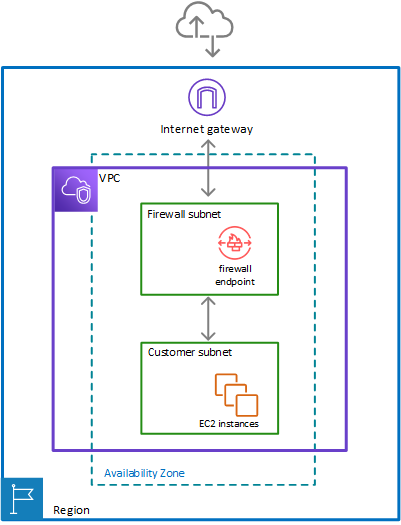
  • Deployed within a VPC using firewall endpoints in dedicated firewall subnets
  • Supports both stateful and stateless rule groups
  • Intrusion Detection and Prevention (IDS/IPS) using Suricata-compatible rules
  • Domain name filtering – Allow/deny based on FQDN or SNI for encrypted traffic
  • TLS Inspection – Decrypts and re-encrypts HTTPS traffic for deep packet inspection
  • Supports AWS Managed Rule Groups for active threat defense (malware, botnets, C2 channels)
  • Auto-scales based on traffic load
  • Centrally managed using AWS Firewall Manager
  • Can be shared across accounts using AWS RAM

AWS Network Firewall Updates (2024-2026)

  • Transit Gateway Native Attachment (2026) – Attach Network Firewall directly to Transit Gateway, eliminating the need for a dedicated inspection VPC. Simplifies architecture and enables flexible cost allocation across accounts.
  • Web Category-based Filtering (Jan 2026) – Pre-defined URL categories to control access to GenAI services, social media, streaming sites, and other web categories directly in firewall rules
  • Enhanced Managed Rules from Marketplace Partners (Apr 2026) – Support for up to 10 million domain name indicators and 1 million IP addresses in managed rule groups
  • Price Reductions (Feb 2026) – Hourly and data processing discounts on NAT Gateways service-chained with Network Firewall secondary endpoints
  • Enhanced Console & Monitoring (Sep 2025) – Expanded monitoring insights, advanced TLS inspection features, PrivateLink endpoint analysis, and improved filtering
  • Application Layer Traffic Controls (Sep 2025) – Enhanced default rules for handling TLS client hellos and HTTP requests split across multiple packets

When to Use Each Service

Use Case Recommended Service
Control traffic to/from specific instances Security Groups
Block specific IPs at the subnet level NACLs
Protect web apps from SQL injection, XSS AWS WAF
Block/manage bot traffic and AI crawlers AWS WAF (Bot Control)
Rate limiting at application layer AWS WAF
IDS/IPS for VPC traffic AWS Network Firewall
Domain/FQDN-based egress filtering AWS Network Firewall
TLS traffic inspection (decrypt/re-encrypt) AWS Network Firewall
Block access to GenAI/social media categories AWS Network Firewall (Web Category Filtering)
Centralized inspection across multiple VPCs AWS Network Firewall + Transit Gateway
Centralized policy management across accounts AWS Firewall Manager
Identify misconfigured network security AWS Shield Network Security Director

AWS Shield Network Security Director (Preview)

  • Launched June 2025 as a capability of AWS Shield
  • Discovers compute, networking, and network security resources across your AWS accounts
  • Identifies missing or misconfigured network security services (WAF, Security Groups, NACLs)
  • Provides actionable remediation recommendations based on AWS best practices and threat intelligence
  • Supports multi-account analysis with AWS Organizations integration (Dec 2025)
  • Findings available in AWS Security Hub (Mar 2026)
  • Visualizes network topology and security configuration issues

AWS Firewall Manager

  • Centrally configure and manage firewall rules across multiple accounts and resources in an AWS Organization
  • Manages policies for AWS WAF, AWS Network Firewall, Security Groups, NACLs, and Shield Advanced
  • Automatically applies protections to new accounts and resources as they are added
  • Supports retrofitting – application teams can customize rules in Firewall Manager-managed Web ACLs using console or IaC tools
  • Requires AWS Organizations and a designated Firewall Manager administrator account

Defense in Depth Architecture

AWS recommends a layered security approach combining all four services:

  1. NACLs – First line of defense at subnet boundary; block known malicious IPs
  2. Security Groups – Instance-level access control; allow only required ports/protocols
  3. AWS Network Firewall – VPC-level IDS/IPS, domain filtering, and deep packet inspection
  4. AWS WAF – Application-level protection against web exploits and bot traffic

Use AWS Firewall Manager for centralized policy management and AWS Shield Network Security Director to identify gaps in your security posture.

AWS Certification Exam Practice Questions

Question 1:

A company needs to inspect all egress traffic from their VPC and block access to known malicious domains. They also need IDS/IPS capabilities. Which service should they use?

  1. AWS WAF
  2. Network ACLs
  3. AWS Network Firewall
  4. Security Groups
Show Answer

Answer: C – AWS Network Firewall provides domain-based filtering, IDS/IPS with Suricata-compatible rules, and can inspect all VPC egress traffic. WAF only inspects HTTP/HTTPS at the application layer and requires a load balancer or CloudFront.

Question 2:

A solutions architect needs to protect a web application from SQL injection and cross-site scripting attacks. The application is behind an Application Load Balancer. Which is the MOST appropriate service?

  1. AWS Network Firewall
  2. AWS WAF
  3. Network ACLs
  4. Security Groups
Show Answer

Answer: B – AWS WAF is specifically designed to protect web applications from common exploits like SQL injection and XSS. It integrates directly with ALB to inspect HTTP/HTTPS requests.

Question 3:

A company wants to block a specific IP address from accessing any resources in a subnet. Which service provides the ability to explicitly DENY traffic?

  1. Security Groups
  2. AWS WAF
  3. Network ACLs
  4. AWS Network Firewall
Show Answer

Answer: C – NACLs support both allow and deny rules at the subnet level. Security Groups only support allow rules. While WAF and Network Firewall can also block traffic, NACLs are the most appropriate for simple IP-based subnet-level blocking.

Question 4:

An organization needs to control access to generative AI services from their corporate VPC. They want to block employees from accessing specific AI platforms while allowing approved ones. Which feature should they use?

  1. AWS WAF Bot Control
  2. Security Group rules
  3. AWS Network Firewall with Web Category-based filtering
  4. NACLs with deny rules
Show Answer

Answer: C – AWS Network Firewall’s Web Category-based filtering (launched Jan 2026) enables controlling access to GenAI services using pre-defined URL categories without maintaining individual domain lists.

Question 5:

A company wants to detect and manage AI crawlers and LLM training bots accessing their web application. Which AWS service provides this capability?

  1. AWS Network Firewall
  2. AWS WAF with Bot Control
  3. Security Groups
  4. AWS Shield Advanced
Show Answer

Answer: B – AWS WAF Bot Control’s detection catalog covers 650+ unique bots including AI search engine crawlers, AI data collectors, AI assistants, and LLM training crawlers. The AI Activity Dashboard provides visibility into AI bot traffic patterns.

Question 6:

A company operates multiple VPCs connected via Transit Gateway and wants to centrally inspect all inter-VPC traffic. What is the SIMPLEST architecture using AWS Network Firewall?

  1. Deploy Network Firewall in each VPC
  2. Create a dedicated inspection VPC with firewall endpoints
  3. Attach Network Firewall directly to Transit Gateway
  4. Use Gateway Load Balancer with third-party appliances
Show Answer

Answer: C – AWS Network Firewall now supports native Transit Gateway attachment, eliminating the need for a dedicated inspection VPC. This simplifies architecture by directly attaching the firewall to the Transit Gateway.

Question 7:

Which statement correctly describes the difference between Security Groups and NACLs? (Select TWO)

  1. Security Groups are stateless; NACLs are stateful
  2. Security Groups operate at instance level; NACLs operate at subnet level
  3. Security Groups evaluate all rules; NACLs process rules in order
  4. NACLs support allow rules only; Security Groups support allow and deny
  5. Both Security Groups and NACLs can reference other security groups
Show Answer

Answer: B, C – Security Groups operate at the instance/ENI level and evaluate all rules before making a decision. NACLs operate at the subnet level and process rules in numerical order, stopping at the first match. Security Groups are stateful (not stateless), and NACLs support both allow and deny rules.

Question 8:

A security team needs to identify which AWS resources have misconfigured network security services across their multi-account environment. Which service should they use?

  1. AWS Config
  2. AWS Shield Network Security Director
  3. Amazon Inspector
  4. AWS Firewall Manager
Show Answer

Answer: B – AWS Shield Network Security Director discovers resources across accounts, identifies missing or misconfigured network security services (WAF, Security Groups, NACLs), and provides remediation recommendations. It integrates with AWS Organizations for multi-account analysis.

References
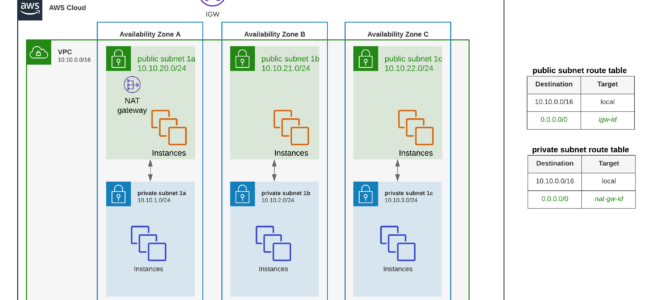
AWS Network Firewall

AWS Network Firewall

AWS Network Firewall

  • AWS Network Firewall is stateful, fully managed, network firewall and intrusion detection and prevention service (IDS/IPS) for VPCs.
  • Network Firewall scales automatically with the network traffic, without the need for deploying and managing any infrastructure.
  • AWS Network Firewall
    • can filter traffic at the perimeter of the VPC. This includes filtering traffic going to and coming from an internet gateway, NAT gateway, or over VPN or AWS Direct Connect.
    • protects the subnets within the VPC by filtering traffic going between the subnets and locations outside of the VPC
    • flexible rules engine allows defining firewall rules that give fine-grained control over network traffic, such as blocking outbound Server Message Block (SMB) requests to prevent the spread of malicious activity.
    • supports importing rules already written in common open source rule formats as well as enables integrations with managed intelligence feeds sourced by AWS partners.
    • works together with AWS Firewall Manager to build policies based on AWS Network Firewall rules and then centrally apply those policies across the VPCs and accounts.
    • helps provide protection from common network threats.
    • can incorporate context from traffic flows, like tracking connections and protocol identification, to enforce policies such as preventing the VPCs from accessing domains using an unauthorized protocol.
    • supports intrusion prevention system (IPS) to provide active traffic flow inspection to help identify and block vulnerability exploits using signature-based detection.
    • uses the open source intrusion prevention system (IPS), Suricata, for stateful inspection and supports Suricata compatible rules.
    • supports web filtering that can stop traffic to known bad URLs and monitor fully qualified domain names.

AWS Network Firewall

AWS Network Firewall Latest Features (2024-2026)

Transit Gateway Native Attachment (May 2026)

  • AWS Network Firewall now supports native attachment to AWS Transit Gateway, eliminating the need for a dedicated inspection VPC.
  • Instead of creating an inspection VPC with firewall subnets and managing routing, the firewall attaches directly to Transit Gateway. AWS deploys firewall endpoints into an AWS-managed VPC on your behalf.
  • Benefits include:
    • Flexible cost allocation — Use Transit Gateway metering policies to charge back account owners for traffic sent through the centralized firewall.
    • Reduced architectural complexity — Eliminates the inspection VPC and its associated routing tables and subnets.
    • Simplified centralized deployment — Firewall appears as a Transit Gateway network function attachment for traffic routing.
  • Note: Transit Gateway encryption is not currently supported with native attachment.

TLS Inspection (Advanced Inspection)

  • AWS Network Firewall supports TLS inspection capabilities through the Advanced Inspection feature.
  • Enables decryption and re-encryption of HTTPS traffic for deep packet inspection of encrypted data.
  • Helps mitigate filter bypass attempts and identify security risks in encrypted traffic.
  • Supports both inbound and outbound TLS inspection configurations.
  • Requires ACM certificates for inbound traffic and ACM Private CA for outbound traffic.
  • Pricing Update (February 2026): AWS removed additional data processing charges for Advanced Inspection, making TLS inspection more cost-effective.

Web Category-Based Filtering (January 2026)

  • New capability for URL and Domain Category filtering using predefined content categories.
  • Enables identification and control of access to:
    • Generative AI (GenAI) services
    • Social media platforms
    • Streaming sites
    • Other web categories
  • Simplifies governance and compliance by allowing category-based rules instead of maintaining extensive URL lists.
  • Works with Suricata compatible rule strings and standard Network Firewall stateful rule groups.
  • When combined with TLS inspection, provides granular control over full URL path inspection.

Amazon EventBridge Integration (February 2026)

  • AWS Network Firewall integrates with Amazon EventBridge for real-time notifications on firewall state changes and configuration updates.
  • Monitors critical firewall operations including configuration updates and endpoint status modifications.
  • Provides visibility into changes affecting AWS Managed Rules, Partner Managed Rules, and firewall configurations.
  • Enables automated workflows such as:
    • Notifications through Amazon SNS
    • Ticket creation in ITSM systems
    • Integration with third-party SIEM solutions

Enhanced Managed Rules from AWS Marketplace Partners (April-June 2026)

  • Expanded managed rule group capabilities supporting up to 10 million domain name indicators and up to 1 million IP addresses per rule group.
  • Available from partners including Check Point, Fortinet, Infoblox, Lumen, Rapid7, ThreatSTOP, Trend Micro, and VisionHeight.
  • New rule groups (June 2026):
    • VisionHeight Zero-Day Threat Protection — Proactively blocks malicious IP infrastructure before it appears on public blocklists.
    • VisionHeight Tor and Scanner Protection — Blocks Tor exit nodes and high-volume scanners, reducing SOC alert volume and SIEM ingestion costs.
  • Partner enhancements (April 2026):
    • Infoblox — Expanded domain name indicators for critical/high-risk domains.
    • Lumen — New rule groups to stop command and control attacks.
    • ThreatSTOP — OFAC sanctions compliance plus EU, Japan, and UN sanction coverage.
  • Managed rules now available in 9 additional regions including Jakarta, Hyderabad, Melbourne, Malaysia, Calgary, Zurich, Spain, Tel Aviv, and Mexico Central.

Default Drop Action Update (June 2026)

  • New default stateful action for newly created firewall policies changed to “Application drop established (server-directed only)”.
  • Replaces previous default of “Application drop established (bidirectional)” which could silently drop legitimate server-to-client TCP packets (window updates, keep-alives, resets).
  • Resolves intermittent connection failures that were difficult to diagnose.
  • Existing firewalls are not affected — change applies only to newly created policies.
  • Note: If using post-quantum cryptography (PQC) fragmented TLS handshakes, consult documentation before switching existing policies.

Enhanced Integration with VPC Lattice

  • AWS Network Firewall works in combination with Amazon VPC Lattice for comprehensive security architecture.
  • VPC Lattice provides identity-based access controls for HTTP/HTTPS service-to-service communication.
  • Combined approach allows:
    • Deep packet inspection via Network Firewall for traffic requiring malware detection and IPS/IDS
    • Identity-based routing via VPC Lattice for HTTP/HTTPS communications
    • Cost optimization by reducing Network Firewall processing for non-critical traffic

Pricing Improvements (February 2026)

  • NAT Gateway Discounts Extended: Hourly and data processing discounts now apply to both primary and secondary Network Firewall endpoints when service-chained with NAT Gateways.
  • Advanced Inspection Cost Reduction: Removed additional data processing charges ($0.001/GB to $0.009/GB) for TLS inspection in 13 AWS regions.
  • Multiple VPC Endpoint Support: Connect up to 50 VPCs per Availability Zone to a single Network Firewall, reducing operational complexity and costs.

Regional Expansion

  • AWS European Sovereign Cloud (March 2026): Network Firewall now available for customers with strict EU data sovereignty requirements.
  • Ensures all data and operations remain within EU borders under EU-based control.

AWS Network Firewall Components

  • Rule Group
    • Holds a reusable collection of criteria for inspecting traffic and for handling packets and traffic flows that match the inspection criteria.
    • Rule groups are either stateless or stateful.
    • Rules configuration includes 5-tuple and domain name filtering.
    • Enhanced with URL Category Filtering: Now supports predefined web categories for simplified governance.
    • Managed Rule Groups: Available from AWS Marketplace partners with up to 10 million domain indicators and 1 million IP addresses per group.
  • Firewall policy
    • Defines a reusable set of stateless and stateful rule groups, along with some policy-level behaviour settings.
    • Firewall policy provides the network traffic filtering behaviour for a firewall.
    • A single firewall policy can be used in multiple firewalls.
    • TLS Inspection Configuration: Can include Advanced Inspection settings for encrypted traffic analysis.
    • Updated Default (June 2026): New policies use “Application drop established (server-directed only)” as default stateful action for improved connection reliability.
  • Firewall
    • Connects the inspection rules in the firewall policy to the VPC that the rules protect.
    • Each firewall requires one firewall policy.
    • The firewall additionally defines settings like how to log information about the network traffic and the firewall’s stateful traffic filtering.
    • Multiple VPC Endpoints: Supports connecting multiple VPCs (up to 50 per AZ) to a single firewall instance.
    • Transit Gateway Native Attachment: Can attach directly to Transit Gateway without requiring a dedicated inspection VPC.

Stateless and Stateful Rules Engines

AWS Network Firewall Stateless & Stateful Rules Engine

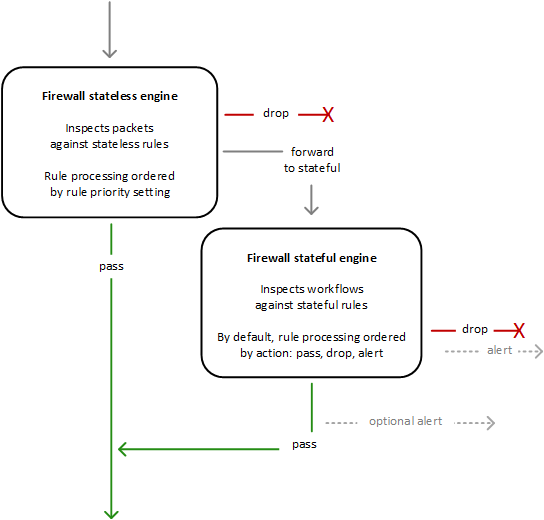
  • AWS Network Firewall uses two rules engines to inspect packets according to the rules that you provide in your firewall policy.
  • Stateless Rules Engine
    • First, the Stateless engine inspects the packet against the configured stateless rules.
    • Each packet inspection happens in isolation, without regard to factors such as the direction of traffic, or whether the packet is part of an existing, approved connection.
    • This engine prioritizes the speed of evaluation and it takes rules with standard 5-tuple connection criteria.
    • The engine processes the rules in the defined priority order and stops processing when it finds a match.
    • Network Firewall stateless rules are similar in behaviour and use to VPC network access control lists (ACLs).
    • Depending on the packet settings, the stateless inspection criteria, and the firewall policy settings, the stateless engine might
      • drop a packet,
      • pass it through to its destination, or
      • forward it to the stateful rules engine.
  • Stateful Rules Engine
    • Stateful engine inspects packets in the context of their traffic flow, using the configured stateful rules.
    • Packets are inspected in the context of their traffic flow.
    • Stateful rules consider traffic direction. The stateful rules engine might delay packet delivery in order to group packets for inspection.
    • By default, the stateful rules engine processes the rules in the order of their action setting, with pass rules processed first, then drop, and then alert. The engine stops processing when it finds a match.
    • The stateful engine either
      • drops packets or
      • passes them to their destination.
    • Stateful engine activities send flow and alert logs to the firewall’s logs if logging is configured.
    • Stateful engine sends alerts for dropped packets and can optionally send them for passed packets.
    • Stateful rules are similar in behaviour and use to VPC security groups.
    • By default, the stateful rules engine allows traffic to pass, while the security groups default is to deny traffic.
    • Enhanced with TLS Inspection: Can now decrypt and inspect encrypted traffic when Advanced Inspection is enabled.
    • URL Category Support: Supports filtering based on predefined web categories for improved governance.

AWS Network Firewall Deployment Models

Traditional Centralized Inspection VPC

  • Deploy Network Firewall in a dedicated inspection VPC with firewall subnets.
  • Route traffic from spoke VPCs through Transit Gateway to the inspection VPC.
  • Suitable for environments requiring Transit Gateway encryption.

Transit Gateway Native Attachment (Recommended for New Deployments)

  • Attach Network Firewall directly to Transit Gateway without an inspection VPC.
  • AWS manages the firewall endpoints in an AWS-managed VPC.
  • Enables flexible cost allocation through Transit Gateway metering policies.
  • Migration from traditional model is supported with minimal downtime during maintenance window.

Distributed Deployment

  • Deploy Network Firewall endpoints within individual VPCs for localized protection.
  • Use multiple VPC endpoint capability (up to 50 per AZ) for cost-effective distributed inspection.

AWS Network Firewall Use Cases and Best Practices

Modern Deployment Patterns

  • Hybrid Security Architecture: Combine Network Firewall with VPC Lattice for optimal security and cost efficiency.
  • Centralized Inspection: Use Transit Gateway native attachment for simplified centralized architecture.
  • GenAI Governance: Implement category-based filtering to control access to AI services and ensure compliance.
  • Compliance: Use ThreatSTOP managed rules for OFAC/EU/UN sanctions enforcement.
  • Multi-VPC Architectures: Leverage multiple VPC endpoint capability to protect up to 50 VPCs per AZ cost-effectively.

Integration with AWS Services

  • AWS Transit Gateway: Native attachment for centralized inspection without inspection VPC.
  • Amazon EventBridge: Real-time notifications on firewall state changes for automated incident response.
  • AWS Cloud WAN: Service insertion capabilities for global security inspection.
  • AWS Firewall Manager: Centralized policy management across multiple accounts and VPCs.
  • Amazon VPC Lattice: Combined approach for service-to-service communication security.

AWS Network Firewall vs WAF vs Security Groups vs NACLs

AWS Security Groups vs NACLs vs WAF vs Network Firewall

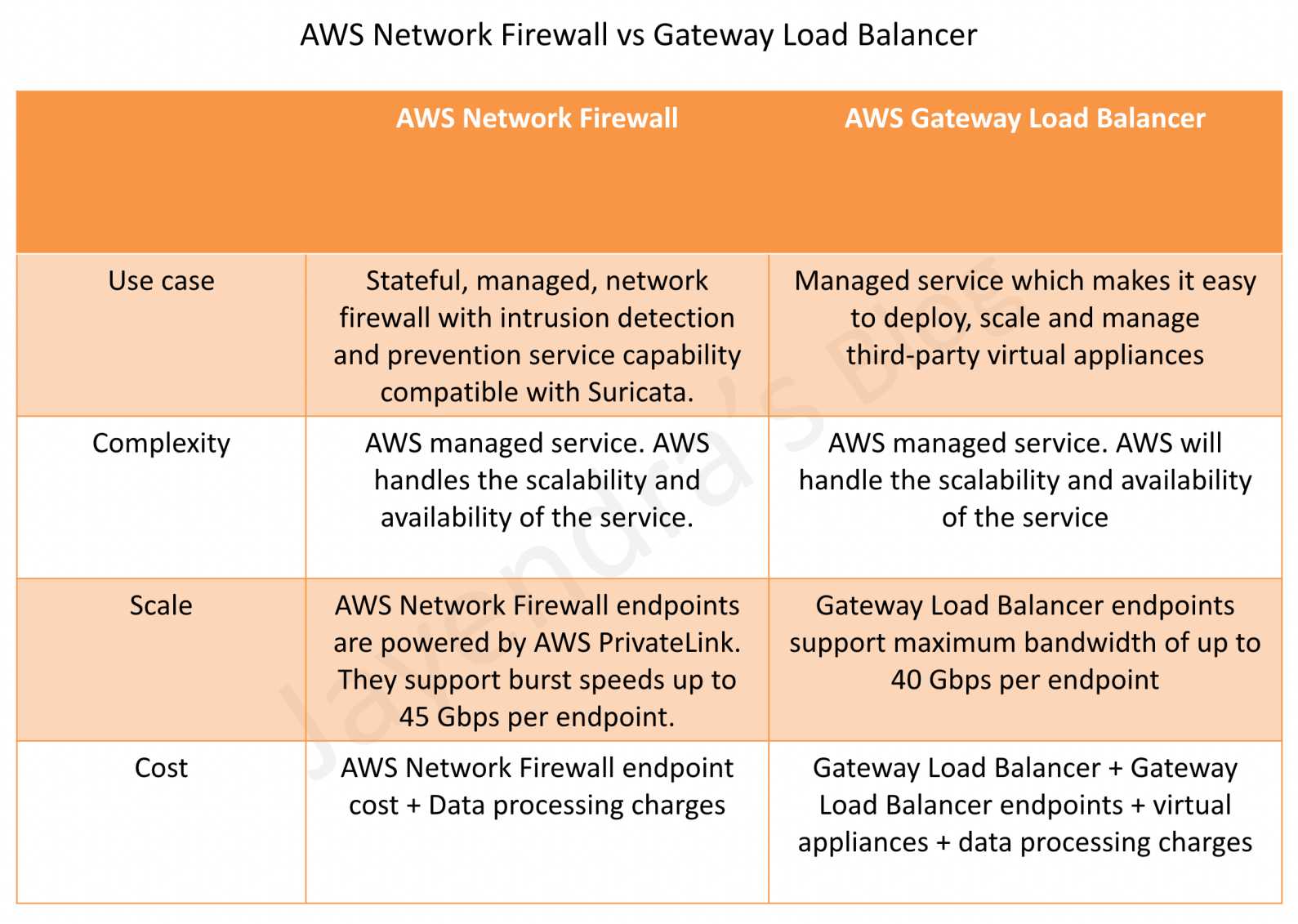
AWS Network Firewall vs Gateway Load Balancer

AWS Network Firewall vs Gateway Load Balancer

AWS Certification Exam Practice Questions

  • Questions are collected from Internet and the answers are marked as per my knowledge and understanding (which might differ with yours).
  • AWS services are updated everyday and both the answers and questions might be outdated soon, so research accordingly.
  • AWS exam questions are not updated to keep up the pace with AWS updates, so even if the underlying feature has changed the question might not be updated
  • Open to further feedback, discussion and correction.
  1. A company needs to inspect encrypted HTTPS traffic for malware detection in their VPC. Which AWS Network Firewall feature should they implement?
    • A. Stateful rule groups with domain filtering
    • B. Advanced Inspection with TLS inspection
    • C. Stateless rules with 5-tuple matching
    • D. URL category filtering
    Show Answer

    Answer: B – Advanced Inspection with TLS inspection enables decryption and re-encryption of HTTPS traffic for deep packet inspection of encrypted data, allowing malware detection in encrypted traffic.

  2. An organization wants to block access to social media and streaming platforms across their AWS environment. Which Network Firewall feature provides the most efficient solution?
    • A. Creating individual domain-based stateful rules for each platform
    • B. Using URL category-based filtering with predefined categories
    • C. Implementing custom Suricata rules for each service
    • D. Configuring stateless rules with IP address ranges
    Show Answer

    Answer: B – URL category-based filtering allows blocking entire categories like social media and streaming platforms using predefined categories, which is more efficient than maintaining individual rules.

  3. A company has 40 VPCs that need firewall protection. What is the most cost-effective approach using AWS Network Firewall?
    • A. Deploy a separate Network Firewall in each VPC
    • B. Use a single Network Firewall with multiple VPC endpoints (up to 50 per AZ)
    • C. Implement AWS WAF for all VPCs
    • D. Use VPC security groups only
    Show Answer

    Answer: B – Network Firewall supports connecting up to 50 VPCs per Availability Zone to a single firewall instance, reducing operational complexity and costs compared to individual firewalls.

  4. Which combination provides the most comprehensive and cost-effective security architecture for service-to-service communication?
    • A. AWS Network Firewall only for all traffic
    • B. Amazon VPC Lattice only for all communications
    • C. AWS Network Firewall for deep packet inspection and VPC Lattice for HTTP/HTTPS identity-based controls
    • D. AWS WAF and Application Load Balancer
    Show Answer

    Answer: C – The combined approach uses Network Firewall for traffic requiring deep packet inspection and VPC Lattice for HTTP/HTTPS service communications with identity-based controls, optimizing both security and cost.

  5. A financial institution needs to control access to GenAI services while maintaining compliance. Which AWS Network Firewall feature is most appropriate?
    • A. Stateless rules with port-based filtering
    • B. Traditional domain-based stateful rules
    • C. URL category filtering with GenAI category controls
    • D. IPS/IDS signature-based detection only
    Show Answer

    Answer: C – URL category filtering includes predefined GenAI categories, allowing institutions to easily control access to AI services while meeting compliance requirements.

  6. A company wants to simplify their centralized inspection architecture and enable cost allocation to individual teams. Which Network Firewall deployment option should they choose?
    • A. Deploy Network Firewall in a dedicated inspection VPC with Transit Gateway routing
    • B. Use Transit Gateway native attachment for Network Firewall
    • C. Deploy Network Firewall endpoints in each spoke VPC
    • D. Use AWS WAF with Transit Gateway
    Show Answer

    Answer: B – Transit Gateway native attachment eliminates the need for a dedicated inspection VPC and enables flexible cost allocation through Transit Gateway metering policies, allowing charge-back to account owners.

  7. A security team needs to be notified immediately when their Network Firewall configuration changes or endpoints go down. Which integration should they configure?
    • A. Amazon CloudWatch alarms on firewall metrics
    • B. Amazon EventBridge rules for Network Firewall state changes
    • C. AWS CloudTrail event monitoring
    • D. VPC Flow Logs analysis
    Show Answer

    Answer: B – Network Firewall integrates with Amazon EventBridge to provide real-time notifications for firewall state changes and configuration updates, enabling automated notification workflows.

  8. An organization experiences intermittent connection failures after deploying Network Firewall. Investigation shows legitimate TCP keep-alive and window update packets are being dropped. What is the most likely cause and solution?
    • A. Stateless rules are blocking TCP traffic — add pass rules for TCP control packets
    • B. The firewall policy uses “Application drop established (bidirectional)” — switch to “Application drop established (server-directed only)”
    • C. TLS inspection is dropping non-HTTPS traffic — disable Advanced Inspection
    • D. Suricata rules have incorrect protocol matching — update rule signatures
    Show Answer

    Answer: B – The bidirectional drop action can silently drop legitimate server-to-client TCP packets such as window updates, keep-alives, and resets. Switching to server-directed only (now the default for new policies since June 2026) resolves this issue.

References

AWS Certified Solutions Architect – Professional (SAP-C01) Exam Learning Path

AWS Certified Solutions Architect - Professional certificate

AWS Certified Solutions Architect – Professional (SAP-C01) Exam Learning Path

⚠️ EXAM RETIRED — SAP-C01 No Longer Available

AWS Certified Solutions Architect – Professional (SAP-C01) was retired on November 14, 2022.

This content is maintained for historical reference only. You can no longer register for or take the SAP-C01 exam.

Current Exam:

SAP-C02 Exam Domains:

  • Domain 1: Design Solutions for Organizational Complexity (26%)
  • Domain 2: Design for New Solutions (29%)
  • Domain 3: Continuous Improvement for Existing Solutions (25%)
  • Domain 4: Accelerate Workload Migration and Modernization (20%)
  • AWS Certified Solutions Architect – Professional (SAP-C01) exam was the upgraded pattern of the previous Solution Architect – Professional exam which was released in the year (2018) and was retired on November 14, 2022, replaced by SAP-C02.
  • I recently recertified the existing pattern and the difference is quite a lot between the previous pattern and the latest pattern. The amount of overlap between the associates and professional exams and even the Solutions Architect and DevOps has drastically reduced.

AWS Certified Solutions Architect – Professional (SAP-C01) exam basically validated

  • Design and deploy dynamically scalable, highly available, fault-tolerant, and reliable applications on AWS
  • Select appropriate AWS services to design and deploy an application based on given requirements
  • Migrate complex, multi-tier applications on AWS
  • Design and deploy enterprise-wide scalable operations on AWS
  • Implement cost-control strategies

Refer to AWS Certified Solutions Architect – Professional (SAP-C01) Exam Guide

AWS Certified Solutions Architect - Professional Exam Domains

AWS Certified Solutions Architect – Professional (SAP-C01) Exam Resources

AWS Certified Solutions Architect – Professional (SAP-C01) Exam Summary

  • AWS Certified Solutions Architect – Professional (SAP-C01) exam was for a total of 170 minutes and it had 75 questions.
  • AWS Certified Solutions Architect – Professional (SAP-C01) focused a lot on concepts and services related to Architecture & Design, Scalability, High Availability, Disaster Recovery, Migration, Security and Cost Control.
  • Each question mainly touches multiple AWS services.
  • Questions and answers options have a lot of prose and a lot of reading that needs to be done, so be sure you are prepared and manage your time well.
  • As always, mark the questions for review and move on and come back to them after you are done with all.
  • As always, having a rough architecture or mental picture of the setup helps focus on the areas that you need to improve. Trust me, you will be able to eliminate 2 answers for sure and then need to focus on only the other two. Read the other 2 answers to check the difference area and that would help you reach the right answer or at least have a 50% chance of getting it right.

📝 Note: The SAP-C02 exam has the same format (75 questions, 180 minutes) but with updated domains and coverage of newer AWS services including VPC Lattice, AWS Verified Access, AWS Network Firewall, Amazon Data Firehose, and EventBridge. See the SAP-C02 Learning Path for current exam preparation.

AWS Certified Solutions Architect – Professional (SAP-C01) Exam Topics

Storage

  • S3
    • S3 Permissions & S3 Data Protection
      • S3 bucket policies to control access to VPC Endpoints
    • S3 Storage Classes & Lifecycle policies
      • covers S3 Standard, Infrequent access, intelligent tier and Glacier for archival and object transitions & deletions for cost management.
    • S3 Transfer Acceleration can be used for fast, easy, and secure transfers of files over long distances between the client and an S3 bucket.
    • supports the same and cross-region replication for disaster recovery.
    • integrates with CloudFront for caching to improve performance
    • S3 supports Object Lock and Glacier supports Vault lock to prevent the deletion of objects, especially required for compliance requirements.
    • supports S3 Select feature to query selective data from a single object.
  • Elastic Block Store
    • EBS Backup using snapshots for HA and Disaster recovery
    • Data Lifecycle Manager can be used to automate the creation, retention, and deletion of snapshots taken to back up the EBS volumes.
  • Storage Gateway
  • Elastic File System
    • provides a fully managed, scalable, serverless, shared and cost-optimized file storage for use with AWS and on-premises resources.
    • supports cross-region replication for disaster recovery
    • supports storage classes like S3
  • AWS Transfer Family
    • provides a secure transfer service (FTP, SFTP, FTPs) that helps transfer files into and out of AWS storage services.
    • supports transferring data from or to S3 and EFS.
  • FSx for Lustre
    • managed, cost-effective service to launch and run the HPC high-performance Lustre file system.

Database

  • DynamoDB
    • DynamoDB Auto Scaling
    • DynamoDB Streams for tracking changes
    • TTL to expire objects automatically and cost-effectively.
    • Global tables for multi-master, active-active inter-region storage needs.
    • Global tables do not support strong global consistency
    • DynamoDB Accelerator – DAX for seamlessly caching to reduce the load on DynamoDB for read-heavy requirements.
  • RDS
    • supports cross-region read replicas ideal for disaster recovery with low RTO and RPO.
    • provides RDS proxy for effective database connection pooling
    • RDS Multi-AZ vs Read Replicas
  • Aurora
    • fully managed, MySQL- and PostgreSQL-compatible, relational database engine
    • supports Aurora Serverless to on-demand, autoscaling configuration
    • Aurora Global Database consists of one primary AWS Region where the data is mastered, and up to five read-only, secondary AWS Regions. It is a multi-master setup but can be used for disaster recovery.
  • DocumentDB as a replacement for MongoDB

Data Migration & Transfer

  • Cloud Migration Services
    • Cloud Migration (hint: make sure you understand the difference between rehost, replatform, and rearchitect)
    • ⚠️ AWS Server Migration Service (SMS) — Discontinued (March 2022). Replaced by AWS Application Migration Service, now rebranded as AWS Transform MGN (June 2026).
    • Database Migration Service
      • enables quick and secure data migration with minimal to zero downtime
      • supports Full and Change Data Capture – CDC migration to support continuous replication for zero downtime migration.
      • homogeneous migrations such as Oracle to Oracle, as well as heterogeneous migrations (using SCT) between different database platforms, such as Oracle or Microsoft SQL Server to Aurora.
      • Hint: Elasticsearch (now OpenSearch) is not supported as a target by DMS
    • Snow Family
      • Ideal for one-time big data transfers usually for use cases with limited bandwidth from on-premises to AWS.
  • Application Discovery Service
    • ⚠️ No longer accepting new customers (Nov 7, 2025). Replaced by AWS Transform.
    • Agent-based can be used for Hyper-V and physical servers
    • Agentless (Discovery Connector — deprecated Nov 17, 2025) can be used for VMware but does not track processes. Replaced by AWS Transform Discovery Tool.
  • Disaster Recovery
    • Disaster Recovery whitepaper, although outdated, make sure you understand the difference between each type esp. pilot light, warm standby w.r.t RTO and RPO.
    • Compute
      • Make components available in an alternate region,
      • either as AMIs that can be restored
      • CloudFormation to create infra as needed
      • partial which can be scaled once the failover happens
      • or fully running compute in active-active confirmation with health checks.
    • Storage
      • S3 and EFS support cross-region replication
      • DynamoDB supports Global tables for multi-master, active-active inter-region storage needs.
      • Aurora Global Database provides a multi-master setup but can be used for disaster recovery.
      • RDS supports cross-region read replicas which can be promoted to master in case of a disaster. This can be done using Route 53, CloudWatch and Lambda functions.
    • Network
      • Route 53 failover routing with health checks to failover across regions.

Networking & Content Delivery

  • VPC – Virtual Private Cloud
    • Understand Security Groups, NACLs (Hint: know NACLs are stateless and need to open ephemeral ports for response traffic )
    • Understand VPC Gateway Endpoints to provide access to S3 and DynamoDB (hint: know how to restrict access on S3 to specific VPC Endpoint)
    • Understand VPC Interface Endpoints or PrivateLink to provide access to a variety of services like SQS, Kinesis or Private APIs exposed through NLB.
    • Understand VPC Flow Logs
    • Understand VPC Peering to enable communication between VPCs within the same or different regions. (hint: VPC peering does not support transitive routing)
  • Route 53
    • Routing Policies
      • focus on Weighted, Latency and failover routing policies
      • failover routing provides active-passive configuration for disaster recovery while the others are active-active configuration.
    • Route 53 Resolver
      • Outbound endpoint for AWS -> On-premises DNS query resolution
      • Inbound endpoint for On-premises DNS query resolution
  • CloudFront
    • fully managed, fast CDN service that speeds up the distribution of static, dynamic web or streaming content to end-users.
    • supports multiple origins including S3, ALB etc.
    • does not support Auto Scaling as an origin
    • supports Geo-restriction
    • supports Lambda@Edge and CloudFront Functions to execute code closer to the user.
    • Lambda@Edge can be used for quick auth checks, and redirect users based on request data.
    • Security can be enhanced by whitelisting CloudFront IPs or adding custom header in CloudFront and verifying it in ALB.
  • API Gateway
    • supports throttling, caching and helps define usage plans with API keys to identify clients
    • provides regional and edge-optimized endpoint types
    • supports authentication mechanisms, such as AWS IAM policies, Lambda authorizer functions, and Amazon Cognito user pools.
  • Load Balancer – ELB, ALB and NLB
  • Global Accelerator
    • optimizes the path to applications to keep packet loss, jitter, and latency consistently low.
    • helps improve the performance of the applications by lowering first-byte latency
    • provides 2 static IP addresses
    • does not preserve the client’s IP address with NLB
  • Transit Gateway or Transit VPC
    • is a network transit hub that can be used to interconnect VPCs and on-premises networks via Direct Connect or VPN.
    • Transit Gateway is regional and Transit Gateway Peering needs to be configured to peer regional Transit gateways.
  • Placement Groups
    • Cluster placement group with Enhanced Networking for HPC
    • Spread placement group for fault tolerance and high availability.
  • Direct Connect & VPN
    • provide on-premises to AWS connectivity
    • know Direct Connect vs VPN
    • VPN can provide a cost-effective, quick failover for Direct Connect.
    • VPN over Direct Connect provides a secure dedicated connection and requires a public virtual interface.
    • Direct Connect Gateway is a global network device that helps establish connectivity that spans VPCs spread across multiple AWS Regions with a single Direct Connect connection.

Security, Identity & Compliance

  • AWS Identity and Access Management
  • AWS Shield & Shield Advanced
    • for DDoS protection and integrates with Route 53, CloudFront, ALB and Global Accelerator.
  • AWS WAF
    • protects from common attack techniques like SQL injection and Cross-Site Scripting (XSS), Conditions based include IP addresses, HTTP headers, HTTP body, and URI strings.
    • integrates with CloudFront, ALB, and API Gateway.
    • supports Web ACLs and can block traffic based on IPs, Rate limits, and specific countries as well.
  • ACM – AWS Certificate Manager
    • helps easily provision, manage, and deploy public and private SSL/TLS certificates
    • is regional and you need to request certificates in all regions and associate individually in all regions.
    • does not provide certificates for EC2 instances.
  • AWS KMS – Key Management Service
    • managed encryption service that allows the creation and control of encryption keys to enable data encryption.
    • KMS Multi-region keys
      • are AWS KMS keys in different AWS Regions that can be used interchangeably – as though having the same key in multiple Regions.
      • are not global and each multi-region key needs to be replicated and managed independently.
  • Secrets Manager
    • helps protect secrets needed to access applications, services, and IT resources.
    • Secrets Manager vs SSM Parameter Store.
      • Supports automatic rotation of secrets, which is not provided by SSM Parameter Store.
      • Costs more than SSM Parameter Store.

Compute

  • EC2
  • Auto Scaling
  • Elastic Beanstalk supports Blue/Green deployment using swap URLs.
  • Lambda
    • Lambda running in VPC requires NAT Gateway to communicate with external public services
    • Lambda CPU can be increased by increasing memory only.
    • helps define reserved concurrency limit to reduce the impact
    • Lambda Alias now supports canary deployments
  • ECS – Elastic Container Service
    • container management service that supports Docker containers
    • supports two launch types – EC2 and Fargate which provides the serverless capability
    • For least privilege, the role should be assigned to the Task.
    • awsvpc network mode gives ECS tasks the same networking properties as EC2 instances.

Management & Governance tools

  • AWS Organizations
  • Systems Manager
    • AWS Systems Manager and its various services like parameter store, patch manager
    • Parameter Store provides secure, scalable, centralized, hierarchical storage for configuration data and secret management. Does not support secrets rotation. Use Secrets Manager.
    • Session Manager helps manage EC2 instances through an interactive one-click browser-based shell or through the AWS CLI without opening ports or creating bastion hosts.
    • Patch Manager helps automate the process of patching managed instances with both security-related and other types of updates.
  • CloudWatch
  • CloudTrail
    • for audit and governance
    • With Organizations, the trail can be configured to log CloudTrail from all accounts to a central account.
  • CloudFormation
    • Handle disaster Recovery by automating the infra to replicate the environment across regions.
    • Deletion Policy to prevent, retain or backup RDS, EBS Volumes
    • Stack policy can prevent stack resources from being unintentionally updated or deleted during a stack update. Stack Policy only applies for Stack updates and not stack deletion.
    • StackSets helps to create, update, or delete stacks across multiple accounts and Regions with a single operation.
  • Control Tower
    • to setup, govern, and secure a multi-account environment
    • strongly recommended guardrails cover EBS encryption
  • Service Catalog
    • allows organizations to create and manage catalogues of IT services that are approved for use on AWS with minimal permissions.
  • Trusted Advisor
    • helps with cost optimization and service limits in addition to security, performance and fault tolerance.
  • Compute Optimizer recommends optimal AWS resources for the workloads to reduce costs and improve performance by using machine learning to analyze historical utilization metrics.
  • AWS Budgets to see usage-to-date and current estimated charges from AWS, set limits and provide alerts or notifications.
  • Cost Allocation Tags can be used to organize AWS resources, and cost allocation tags to track the AWS costs on a detailed level.
  • Cost Explorer helps visualize, understand, manage and forecast the AWS costs and usage over time.

Analytics

  • Kinesis
  • Amazon OpenSearch Service (formerly Amazon Elasticsearch Service, renamed Sept 2021) provides a managed search and analytics solution.
  • Transcribe for Voice to Text conversion

Integration Tools

  • SQS in terms of loose coupling and scaling.
    • Difference between SQS Standard and FIFO esp. with throughput and order
    • SQS supports dead letter queues
  • CloudWatch integration with SNS and Lambda for notifications.

Architecture & Design Flows

AWS ALB – Application Load Balancer Features & Routing Rules

AWS Application Load Balancer – ALB

📌 Last Updated: June 2026

This post has been updated to include the latest ALB features including Mutual TLS (mTLS) support, gRPC protocol support, HTTP/2 end-to-end, Built-in Authentication (OIDC/Cognito), JWT Verification, Automatic Target Weights (ATW), Target Optimizer, URL/Host Header Rewrite, HTTP Header Modification, LCU Capacity Reservation, and VPC IPAM integration.

  • Application Load Balancer operates at layer 7 (application layer) and allows defining routing rules based on content across multiple services or containers running on one or more EC2 instances.
  • scales the load balancer as traffic to the application changes over time.
  • can scale to the vast majority of workloads automatically.
  • supports health checks, used to monitor the health of registered targets so that the load balancer can send requests only to the healthy targets.
  • supports HTTP, HTTPS, and gRPC protocols for listeners.

Application Load Balancer Components

  • A load balancer
    • serves as the single point of contact for clients.
    • distributes incoming application traffic across multiple targets, such as EC2 instances, in multiple AZs, which increases the availability of the application.
    • one or more listeners can be added to the load balancer.
  • A listener
    • checks for connection requests from clients, using the configured protocol and port
    • rules defined determine, how the load balancer routes request to its registered targets.
    • each rule consists of a priority, one or more actions, and one or more conditions.
    • supported actions are
      • forward,
      • redirect,
      • fixed-response,
      • authenticate-oidc,
      • authenticate-cognito,
      • jwt-validation
    • supported rule conditions are
      • host-header
      • http-request-method
      • path-pattern
      • source-ip
      • http-header
      • query-string
    • when the conditions for a rule are met, its actions are performed.
    • a default rule for each listener must be defined, and optionally additional rules can be defined
  • Target group
    • routes requests to one or more registered targets, such as EC2 instances, using the specified protocol and port number
    • a target can be registered with multiple target groups.
    • health checks can be configured on a per target group basis.
    • health checks are performed on all targets registered to a target group that is specified in a listener rule for the load balancer.
    • target group supports the following target types:
      • EC2 instances (can be managed as a part of the ASG)
      • ECS tasks
      • Lambda functions
      • Private IP Addresses on AWS or On-premises over VPN or DX.
    • supports weighted target group routing
      • enables routing of the traffic forwarded by a rule to multiple target groups.
      • enables use cases like blue-green, canary and hybrid deployments without the need for multiple load balancers.
      • also enables zero-downtime migration between on-premises and cloud or between different compute types like EC2 and Lambda.
    • supports Slow Start Mode
      • allows newly registered targets to warm up before receiving their full share of traffic.
      • ALB linearly ramps up traffic over a configurable duration (30-900 seconds).
      • useful for applications that need time for caching, JIT compilation, or resource initialization.
  • When a load balancer receives a request, it evaluates the listener rules in priority order to determine which rule to apply and then selects a target from the target group for the rule action.
  • Listener rules can be configured to route requests to different target groups based on the content of the application traffic.
  • Routing is performed independently for each target group, even when a target is registered with multiple target groups.
  • Routing algorithm used can be configured at the target group level.
  • Supported routing algorithms:
    • Round Robin (default) – distributes requests evenly across targets
    • Least Outstanding Requests (LOR) – routes to the target with fewest pending requests
    • Weighted Random – used by Automatic Target Weights (ATW) for anomaly mitigation

Application Load Balancer Features

  • supports load balancing of applications using HTTP, HTTPS (Secure HTTP), and gRPC protocols
  • supports HTTP/2, which is enabled natively. Clients that support HTTP/2 can connect over TLS
  • supports end-to-end HTTP/2, enabling gRPC workloads between microservices or between gRPC-enabled clients and services (launched Oct 2020)
  • supports gRPC protocol natively
    • provides health checks that examine gRPC status codes
    • provides metrics for gRPC request count and access logs that differentiate gRPC requests
    • supports gRPC-specific response headers
    • requires HTTPS listener and gRPC protocol version for the target group
  • supports WebSockets and Secure WebSockets natively
  • supports Request tracing, by default.
    • request tracing can be used to track HTTP requests from clients to targets or other services.
    • Load balancer upon receiving a request from a client, adds or updates the X-Amzn-Trace-Id header before sending the request to the target
    • Any services or applications between the load balancer and the target can also add or update this header.
  • supports Sticky Sessions (Session Affinity) using load balancer generated cookies or application-based cookies, to route requests from the same client to the same target
  • supports SSL/TLS termination, to decrypt the request on ALB before sending it to the underlying targets.
    • an SSL certificate can be installed on the load balancer.
    • the load balancer uses this certificate to terminate the connection and then decrypt requests from clients before sending them to targets.
  • supports Mutual TLS (mTLS) authentication (launched Nov 2023)
    • enables mutual authentication between clients and the load balancer
    • ALB authenticates client X.509 certificates and performs revocation checks
    • supports certificates issued by third-party CAs or AWS Private Certificate Authority (ACM PCA)
    • simplifies authentication management and reduces the load on backend applications
    • available in all commercial AWS Regions and GovCloud (US) Regions
  • supports Built-in Authentication (OIDC and Cognito)
    • ALB can authenticate users before routing requests to backend targets
    • supports Amazon Cognito user pools for user management
    • supports any OpenID Connect (OIDC) compliant identity provider (Okta, Google, etc.)
    • handles the OAuth 2.0 flow, validates tokens, and forwards authenticated requests with user claims in HTTP headers
    • eliminates the need for authentication code in backend applications
  • supports JWT Verification (launched Nov 2025)
    • validates JSON Web Tokens (JWTs) included in request headers
    • validates token signatures, expiration times (‘exp’), issuer (‘iss’), and optional claims (‘nbf’, ‘iat’)
    • enables client credential flow without requiring application code modifications
    • configured as a listener rule action type (jwt-validation)
  • supports layer 7 specific features like X-Forwarded-For headers to help determine the actual client IP, port and protocol
  • automatically scales its request handling capacity in response to incoming application traffic.
  • supports hybrid load balancing,
    • If an application runs on targets distributed between a VPC and an on-premises location, they can be added to the same target group using their IP addresses
  • provides High Availability, by allowing you to specify more than one AZ and distribution of incoming traffic across multiple AZs.
  • integrates with ACM to provision and bind an SSL/TLS certificate to the load balancer thereby making the entire SSL offload process very easy
  • supports multiple certificates using Server Name Indication (SNI)
    • host multiple TLS secured applications behind a single ALB
    • ALB automatically selects the optimal TLS certificate for each client using a smart selection algorithm
  • supports IPv6 addressing, for an Internet-facing load balancer
  • supports Cross-zone load balancing, by default
  • supports Security Groups to control the traffic allowed to and from the load balancer.
  • provides Access Logs, to record all requests sent to the load balancer, and store the logs in S3 for later analysis in compressed format
  • provides Delete Protection, to prevent the ALB from accidental deletion
  • supports Connection Idle Timeout – ALB maintains two connections for each request one with the Client (front end) and one with the target instance (back end). If no data has been sent or received by the time that the idle timeout period elapses, ALB closes the front-end connection
  • integrates with CloudWatch to provide metrics, such as request counts, error counts, error types, and request latency
  • integrates with AWS WAF, a web application firewall that helps protect web applications from attacks by allowing rules configuration based on IP addresses, HTTP headers, and custom URI strings
  • integrates with CloudTrail to receive a history of ALB API calls made on the AWS account
  • supports Desync Mitigation Mode to protect applications from HTTP desync attacks
    • classifies requests based on threat level using the HTTP Desync Guardian library
    • modes: Defensive (default), Strictest, and Monitor
  • supports Outpost deployment for on-premises workloads
  • supports Local Zones for low-latency applications

Automatic Target Weights (ATW)

  • Launched November 2023 to detect and mitigate gray failures for targets behind ALB
  • A gray failure occurs when a target passes health checks but still returns errors to clients
  • ATW analyzes HTTP status codes and TCP/TLS error rates to identify anomalous targets
  • When underperforming targets are identified, ATW iteratively reduces traffic to the affected target
  • If the target recovers, ALB gradually increases traffic back to its original level
  • Uses the Weighted Random routing algorithm for anomaly mitigation
  • Configured at the target group level as a target group attribute
  • Complements active health checks by addressing partial failures that health checks cannot detect

Target Optimizer

  • Launched November 2025 to deliver optimal concurrency to each target
  • Allows you to enforce a maximum number of concurrent requests on a target
  • Ensures targets receive only the number of requests they can process
  • Achieves higher request success rate, better target utilization, and lower latency
  • Particularly useful for compute-intensive workloads (AI/ML inference, media processing)
  • Returns 503 errors when targets are at capacity rather than overloading them
  • Configured at the target group level

HTTP Header Modification

  • Launched November 2024 for enhanced traffic control and security
  • Provides three key capabilities:
    • Header Rename – rename ALB-generated TLS headers (mTLS and TLS headers) for seamless backend integration
    • Header Insertion – insert custom response headers including CORS and security headers like HSTS
    • Server Header Suppression – disable the ALB-generated “Server” header to reduce server-specific information exposure
  • Must be enabled on each listener individually

URL and Host Header Rewrite

  • Launched October 2025 for advanced request transformation
  • Enables modification of request URLs and Host Headers using regex-based pattern matching before routing to targets
  • Supports regex matches based on request parameters
  • Can rewrite both host headers and URL paths in a single rule
  • Eliminates the need for custom proxy layers or Lambda@Edge for URL transformations

VPC IPAM Integration

  • Launched March 2025 for predictable IP address management
  • Allows internet-facing ALBs to use IP addresses from Amazon VPC IPAM pools
  • Enables Bring Your Own IP (BYOIP) use cases for ALBs
  • ALB automatically switches to AWS-managed IP addresses when IPAM pool is depleted
  • Useful for organizations that need allowlisted or predictable IP addresses

LCU Capacity Reservation

  • Launched January 2025 to prepare for planned traffic spikes
  • Allows you to reserve a minimum capacity for your ALB proactively
  • Eliminates the need to open AWS support cases for pre-warming
  • Useful for planned events such as product launches, sales, or traffic migrations
  • Capacity is reserved at the regional level and distributed across AZs
  • Reserved capacity can be increased anytime; decreased up to two times per day
  • Charged per reserved LCU per minute, plus additional LCUs used beyond reservation

Resource Map

  • Launched March 2024 in the AWS Management Console
  • Displays all ALB resources and their relationships in a visual format on a single page
  • Provides clear understanding of ALB architecture (listeners, rules, target groups, targets)
  • Includes an Unhealthy Target Map view to display only unhealthy targets and associated resources
  • Useful for troubleshooting and architecture visualization

Classic Load Balancer vs Application Load Balancer vs Network Load Balancer

Refer Blog Post @ Classic Load Balancer vs Application Load Balancer vs Network Load Balancer

Application Load Balancer Benefits

  • Support for Path-based routing, where listener rules can be configured to forward requests based on the URL in the request. This enables structuring applications as smaller services (microservices), and route requests to the correct service based on the content of the URL.
  • Support for routing requests to multiple services on a single EC2 instance by registering the instance using multiple ports using Dynamic Port mapping.
  • Support for containerized applications. EC2 Container Service (ECS) can select an unused port when scheduling a task and register the task with a target group using this port, enabling efficient use of the clusters.
  • Support for monitoring the health of each service independently, as health checks are defined at the target group level and many CloudWatch metrics are reported at the target group level.
  • Attaching a target group to an Auto Scaling group enables scaling each service dynamically based on demand.
  • Support for built-in user authentication using OIDC or Amazon Cognito, eliminating custom authentication code.
  • Support for gRPC and end-to-end HTTP/2 workloads for modern microservice architectures.
  • Support for Mutual TLS (mTLS) for enhanced zero-trust security.

Application Load Balancer Listeners

  • A listener is a process that checks for connection requests, using the configured protocol and port
  • Listener supports HTTP & HTTPS protocol with Ports from 1-65535
  • ALB supports SSL Termination for HTTPS listeners, which helps to offload the work of encryption and decryption so that the targets can focus on their main work.
  • HTTPS listener must have at least one SSL server certificate on the listener
  • supports multiple TLS certificates using SNI (Server Name Indication) on a single HTTPS listener
  • WebSockets with both HTTP and HTTPS listeners (Secure WebSockets)
  • Supports HTTP/2 with HTTPS listeners
    • 128 requests can be sent in parallel using one HTTP/2 connection.
    • ALB can forward HTTP/2 end-to-end to targets (for gRPC) or convert to individual HTTP/1.1 requests
    • HTTP/2 uses front-end connections more efficiently resulting in fewer connections between clients and the load balancer.
    • Server-push feature of HTTP/2 is not supported
  • Each listener has a default rule, and can optionally define additional rules.
  • Each rule consists of a priority, one or more actions, one or more conditions, and optional transforms.
    • Priority – Rules are evaluated in priority order, from the lowest value to the highest value. The default rule has the lowest priority
    • Action – Supported action types: forward, redirect, fixed-response, authenticate-oidc, authenticate-cognito, jwt-validation
    • Condition – Supported conditions: host-header, path-pattern, http-request-method, source-ip, http-header, query-string
    • Transform – Supports URL rewrite and host header rewrite using regex patterns (launched Oct 2025)
  • Host Condition or Host-based routing
    • Host conditions can be used to define rules that forward requests to different target groups based on the hostname in the host header
    • This enables support for multiple domains using a single ALB for e.g. orders.example.com, images.example.com, registration.example.com
    • Each host condition has one hostname. If the hostname in
  • Path Condition or path-based routing
    • Path conditions can be used to define rules that forward requests to different target groups based on the URL in the request
    • Each path condition has one path pattern for e.g. example.com/orders, example.com/images, example.com/registration
    • If the URL in a request matches the path pattern in a listener rule exactly, the request is routed using that rule.

Advantages over Classic Load Balancer

  • Support for path-based routing, where rules can be configured for the listener to forward requests based on the content of the URL
  • Support for host-based routing, where rules can be configured for the listener to forward requests based on the host field in the HTTP header.
  • Support for routing based on fields in the request, such as standard and custom HTTP headers and methods, query parameters, and source IP address
  • Support for routing requests to multiple applications on a single EC2 instance. Each instance or IP address can be registered with the same target group using multiple ports
  • Support for registering targets by IP address, including targets outside the VPC for the load balancer.
  • Support for redirecting requests from one URL to another.
  • Support for returning a custom HTTP response.
  • Support for registering Lambda functions as targets.
  • Support for the load balancer to authenticate users of the applications through their corporate or social identities before routing requests.
  • Support containerized applications with ECS using Dynamic port mapping
  • Support monitoring the health of each service independently, as health checks and many CloudWatch metrics are defined at the target group level
  • Attaching the target group to an Auto Scaling group enables scaling of each service dynamically based on demand
  • Access logs contain additional information & stored in compressed format
  • Improved load balancer performance.
  • Support for SNI (multiple TLS certificates on a single listener)
  • Support for gRPC and end-to-end HTTP/2
  • Support for Mutual TLS (mTLS) authentication
  • Support for JWT verification at the load balancer
  • Support for URL and Host Header rewrite using regex

Application Load Balancer Pricing

  • charged for each hour or partial hour that an ALB is running and the number of Load Balancer Capacity Units (LCU) used per hour.
  • An LCU is a metric for determining ALB pricing
  • An LCU defines the maximum resource consumed in any one of the dimensions (new connections, active connections, bandwidth and rule evaluations) the Application Load Balancer processes the traffic.
  • With LCU Capacity Reservation, you are charged per reserved LCU per minute, plus additional LCUs used per minute beyond the reserved amount.

📖 Related: AWS Auto Scaling with ELB – Integration Guide

AWS Certification Exam Practice Questions

  • Questions are collected from Internet and the answers are marked as per my knowledge and understanding (which might differ with yours).
  • AWS services are updated everyday and both the answers and questions might be outdated soon, so research accordingly.
  • AWS exam questions are not updated to keep up the pace with AWS updates, so even if the underlying feature has changed the question might not be updated
  • Open to further feedback, discussion and correction.
  1. You are designing an application which requires websockets support, to exchange real-time messages with end-users without the end users having to request (or poll) the server for an update? Which ELB option should you choose?
    1. Use Application Load Balancer and enable comet support
    2. Use Classic Load Balancer which supports WebSockets
    3. Use Application Load Balancer which supports WebSockets
    4. Use Classic Load Balancer and enable comet support
  2. Which of the following Internet protocols does an AWS Application Load Balancer Support? Choose 2 answers
    A. ICMP
    B. UDP
    C. HTTP
    D. SNTP
    E. Websocket
  3. Your organization has configured an application behind ALB. However, Clients are complaining that they cannot connect to an Internet-facing load balancer. What cannot be the issue?
    1. Internet-facing load balancer is attached to a private subnet
    2. ALB Security Groups does not allow the traffic
    3. Subnet NACLs do not allow the traffic
    4. ALB was not assigned an EIP
  4. To protect your ALB from accidental deletion, you should
    1. enable Multi-Factor Authentication (MFA) protected access
    2. enable Delete Protection on the ALB
    3. enabled Termination Protection on the ALB
    4. ALB does not provide any feature to prevent accidental deletion
  5. Your organization is using ALB for servicing requests. One of the API request is facing consistent performance issues. Upon checking the flow, you find that the request flows through multiple services. How can you track the performance or timing issues in the application stack at the granularity of an individual request?
    1. Track the request using “X-Amzn-Trace-Id” HTTP header
    2. Track the request using “X-Amzn-Track-Id” HTTP header
    3. Track the request using “X-Aws-Track-Id” HTTP header
    4. Track the request using “X-Aws-Trace-Id” HTTP header
  6. A company wants to offload user authentication from their backend services. They want the ALB to handle authentication using their corporate identity provider which supports OpenID Connect. Which ALB action type should they configure?
    1. forward with custom headers
    2. authenticate-oidc
    3. redirect to identity provider
    4. fixed-response with authentication challenge
  7. An application team notices that one of their targets behind an ALB passes health checks but returns HTTP 500 errors for approximately 10% of requests. Which ALB feature helps mitigate this issue automatically?
    1. Weighted target group routing
    2. Least Outstanding Requests algorithm
    3. Automatic Target Weights (ATW)
    4. Slow Start Mode
  8. A company needs to ensure that only clients presenting valid X.509 certificates can access their application behind an ALB. Which ALB feature should they use?
    1. AWS WAF with custom rules
    2. Security group inbound rules
    3. Mutual TLS (mTLS) authentication
    4. OIDC authentication action
  9. A microservices team wants to route gRPC traffic between their services using ALB. What are the requirements? (Choose 2)
    1. Configure the listener protocol as HTTPS
    2. Configure the listener protocol as HTTP
    3. Set the target group protocol version to gRPC
    4. Enable WebSocket support on the listener
    5. Use an HTTP/1.1 target group
  10. Your application experiences sudden traffic spikes during planned product launches. You want to ensure ALB has sufficient capacity before the event. What should you do?
    1. Manually scale the backend targets
    2. Open an AWS support case for pre-warming
    3. Configure LCU Capacity Reservation for the ALB
    4. Deploy multiple ALBs behind Route 53

References

AWS Route 53

How Route 53 Routes Traffic

AWS Route 53

  • Route 53 is a highly available and scalable Domain Name System (DNS) web service.
  • Route 53 provides three main functions:
    • Domain registration
      • allows domain names registration
      • supports registration and management of 34+ new top-level domains (TLDs) including .app, .dev, .art, .forum, .health, and .realty
    • Domain Name System (DNS) service
      • translates friendly domains names like www.example.com into IP addresses like 192.0.2.1
      • responds to DNS queries using a global network of authoritative DNS servers, which reduces latency
      • can route Internet traffic to CloudFront, Elastic Beanstalk, ELB, or S3. There’s no charge for DNS queries to these resources
    • Health Checking
      • can monitor the health of resources such as web and email servers.
      • sends automated requests over the Internet to the application to verify that it’s reachable, available, and functional
      • CloudWatch alarms can be configured for the health checks to send notifications when a resource becomes unavailable.
      • can be configured to route Internet traffic away from resources that are unavailable
    • Security
      • supports both DNSSEC for domain registration and DNSSEC signing
      • supports AWS PrivateLink for API requests, allowing workloads to manage DNS infrastructure without using the public internet (announced Nov 2025)

How Route 53 Routes Traffic

Supported DNS Resource Record Types

  • A (Address) Format
    • is an IPv4 address in dotted decimal notation for e.g. 192.0.2.1
  • AAAA Format
    • is an IPv6 address in colon-separated hexadecimal format
  • CNAME Format
    • is the same format as a domain name
    • DNS protocol does not allow creation of a CNAME record for the top node of a DNS namespace, also known as the zone apex for e.g. the DNS name example.com registration, the zone apex is example.com, a CNAME record for example.com cannot be created, but CNAME records can be created for www.example.com, newproduct.example.com etc.
    • If a CNAME record is created for a subdomain, any other resource record sets for that subdomain cannot be created for e.g. if a CNAME created for www.example.com, no other resource record sets for which the value of the Name field is www.example.com can be created
  • MX (Mail Xchange) Format
    • contains a decimal number that represents the priority of the MX record, and the domain name of an email server
  • NS (Name Server) Format
    • An NS record identifies the name servers for the hosted zone. The value for an NS record is the domain name of a name server.
  • PTR Format
    • A PTR record Value element is the same format as a domain name.
  • SOA (Start of Authority) Format
    • SOA record provides information about a domain and the corresponding Amazon Route 53 hosted zone
  • SPF (Sender Policy Framework) Format
    • SPF records were formerly used to verify the identity of the sender of email messages, however is not recommended
    • Instead of an SPF record, a TXT record that contains the applicable value is recommended
  • SRV Format
    • An SRV record Value element consists of four space-separated values. The first three values are decimal numbers representing priority, weight, and port. The fourth value is a domain name for e.g. 10 5 80 hostname.example.com
  • TXT (Text) Format
    • A TXT record contains a space-separated list of double-quoted strings. A single string include a maximum of 255 characters. In addition to the characters that are permitted unescaped in domain names, space is allowed in TXT strings
  • HTTPS Format (New – Oct 2024)
    • HTTPS records are specific for use with the HTTP protocol and allow application owners to bind endpoint-specific information into the DNS reply.
    • Enables clients to discover the optimal HTTP protocol version (HTTP/2, HTTP/3) during the initial DNS resolution phase rather than in a subsequent connection step, reducing latency.
    • Supports two modes: AliasMode (aliases a DNS name to another DNS name) and ServiceMode (passes parameters like ALPN, port, ECH, and IP hints).
    • Supported for both public and private hosted zones.
  • SVCB (Service Binding) Format (New – Oct 2024)
    • SVCB records allow application owners to bind endpoint-specific information for any service, irrespective of protocol.
    • Similar to HTTPS records but the record name includes the port and protocol.
    • Supports AliasMode and ServiceMode with parameters like TLS ALPN, port number, ECH configuration, and IP hints.
    • Supported for both public and private hosted zones.
  • TLSA Format (New – Oct 2024)
    • TLSA records allow administrators to specify a public key fingerprint of the TLS certificate in DNS (DNS-based Authentication of Named Entities – DANE).
    • Enables a TLS client to verify using DNS that the certificate presented by a server is expected.
    • Helps prevent man-in-the-middle attacks and downgrade attacks, particularly useful for SMTP over TLS.
    • Requires DNSSEC to be enabled on the hosted zone.
    • Supported only for public hosted zones.
  • SSHFP (Secure Shell Fingerprint) Format (New – Oct 2024)
    • SSHFP records allow DNS servers to answer SSH client requests for SSH fingerprints with DNSSEC-signed records.
    • SSH client validates the fingerprint a server presents with those provided by the DNS server, mitigating man-in-the-middle attacks.
    • Requires DNSSEC to be enabled on the hosted zone and DNSSEC validation on the client.
    • Supported only for public hosted zones.

Alias Resource Record Sets

  • Route 53 supports alias resource record sets, which enables routing of queries to a CloudFront distribution, Elastic Beanstalk, ELB, an S3 bucket configured as a static website, or another Route 53 resource record set
  • Alias records are not standard for DNS RFC and are a Route 53 extension to DNS functionality
  • Alias record is similar to a CNAME record and is always of type A or AAAA
  • Alias record can be created both for the root domain or apex zone, such as example.com, and for subdomains, such as www.example.com. CNAME records can be used only for subdomains.
  • Route 53 automatically recognizes changes in the resource record sets that the alias resource record set refers to for e.g. for a site pointing to a load balancer, if the IP of the load balancer changes, it will reflect those changes automatically in the DNS answers without any changes to the hosted zone that contains resource record sets
  • Alias resource record set does not support TTL or Time to Live if it points to a CloudFront distribution, an ELB, or an S3 bucket. Underlying CloudFront, load balancer, or S3 TTLs are used.
  • Alias records are free to query and do not incur any charges.
  • Alias record supported targets
  • Alias records are not supported for
    • EC2 DNS
    • RDS endpoints.

Route 53 Alias vs CNAME

Refer to blog post @ Route 53 Alias vs CNAME

Route 53 CNAME vs Alias Records

Route 53 Hosted Zone

  • Hosted Zone is a container for records, which include information about how to route traffic for a domain (such as example.com) and all of its subdomains (such as www.example.com, retail.example.com, and seattle.accounting.example.com).
  • A hosted zone has the same name as the corresponding domain.
  • Routing Traffic to the Resources
    • Create a hosted zone with either a public hosted zone or a private hosted zone:
      • Public Hosted Zone – for routing internet traffic to the resources for a specific domain and its subdomains
      • Private hosted zone – for routing traffic within a VPC
    • Create records in the hosted zone
      • Records define where to route traffic for each domain name or subdomain name.
      • Name of each record in a hosted zone must end with the name of the hosted zone.
  • For public/private and private Hosted Zones that have overlapping namespaces, Route 53 Resolvers routes traffic to the most specific match.
  • IAM permissions apply only at the Hosted Zone level
  • Accelerated Recovery (New – Nov 2025)
    • Accelerated recovery for public hosted zones targets a 60-minute Recovery Time Objective (RTO) for DNS record changes during service disruptions in the US East (N. Virginia) Region.
    • Provides built-in failover of the Route 53 control plane to the Oregon Region (us-west-2).
    • When enabled, allows making changes to DNS records in public hosted zones even when the us-east-1 Region is unavailable.
    • Enhances business continuity for mission-critical applications that rely on DNS changes for failover.

Route 53 Health Checks

  • Route 53 health checks monitor the health and performance of the underlying resources.
  • Health check types
    • Health checks that monitor an endpoint, such as a web server.
      • Health checkers are located in locations around the world.
      • The health checker location and interval can be specified.
      • Health checker evaluates the health of the endpoint based
        • Response time
        • Specified failure threshold – Whether the endpoint responds to a number of consecutive health checks
      • The endpoint is considered healthy if more than 18% of health checkers report that an endpoint is healthy.
      • Health check is considered healthy if
        • HTTP and HTTPS health checks
          • TCP connection can be established within four seconds.
          • Returns 2xx or 3xx within two seconds after connecting.
        • TCP health checks
          • TCP connection can be established within ten seconds.
        • HTTP and HTTPS health checks with string matching
          • TCP connection can be established within four seconds.
          • Returns 2xx or 3xx within two seconds after connecting.
          • Route 53 searches the response body for the specified string which must appear entirely in the first 5,120 bytes of the response body or the endpoint fails the health check.
    • Calculated health checks – Health checks that monitor the status of other health checks.
      • Health check that does the monitoring is the parent health check, and the health checks that are monitored are child health checks.
      • One parent health check can monitor the health of up to 255 child health checks
    • Health checks that monitor the status of a CloudWatch alarm.
      • Route 53 monitors the data stream for the corresponding alarm instead of monitoring the alarm state.
  • Route 53 checks the health of an endpoint by sending an HTTP, HTTPS, or TCP request to the specified IP address and port.
  • For a health check to succeed, the router and firewall rules must allow inbound traffic from the IP addresses that the health checkers use.

Route 53 Routing Policies

Refer Blog post @ Route 53 Routing Policies

Route 53 Resolver

Refer Blog post @ Route 53 Resolver

Route 53 Global Resolver (New – GA March 2026)

  • Route 53 Global Resolver is an internet-reachable anycast DNS resolver that delivers easy, secure, and reliable DNS resolution for authorized clients from anywhere.
  • Provides DNS resolution for authenticated clients in on-premises data centers, branch offices, and remote locations through globally distributed anycast IP addresses.
  • Resolves both public internet domains and Route 53 private hosted zones, eliminating the need for separate split-DNS forwarding infrastructure.
  • Supports multiple DNS protocols including DNS over UDP (Do53), DNS-over-HTTPS (DoH), and DNS-over-TLS (DoT).
  • Includes built-in security controls:
    • DNS traffic filtering to block potentially malicious domains
    • Support for encrypted DNS queries
    • Centralized logging for auditing and compliance
    • Integration with Route 53 Resolver DNS Firewall rules (threat categories, content categories, and advanced DNS threat protection)
  • Anycast architecture automatically routes each query to the closest healthy AWS Region, providing built-in failover without client-side changes.
  • Deployed across multiple AWS Regions simultaneously (minimum two).
  • Supports adding and removing AWS Regions for flexible control over where DNS queries are resolved.
  • Available across 30+ AWS Regions with support for both IPv4 and IPv6 DNS query traffic.

Route 53 Profiles (New – April 2024)

  • Route 53 Profiles allows defining a standard DNS configuration and applying it to multiple VPCs in the same AWS Region.
  • A Profile can include:
    • Route 53 private hosted zone (PHZ) associations
    • Route 53 Resolver forwarding rules
    • Route 53 Resolver DNS Firewall rule groups
    • VPC endpoint associations
  • Profiles can be shared across AWS accounts using AWS Resource Access Manager (RAM).
  • Eliminates the need for per-VPC PHZ associations by allowing DNS configurations to be managed centrally.
  • Simplifies DNS management in multi-account environments by reducing operational complexity.
  • Supports consistent DNS Query Logging configuration at the Profile level with automatic propagation to all associated VPCs.
  • Supports granular IAM permissions for resource and VPC associations.
  • Supports AWS PrivateLink for private access to manage Profiles without going through the public internet.

Route 53 Split-view (Split-horizon) DNS

  • Route 53 Split-view (Split-horizon) DNS helps access an internal version of the website using the same domain name that is used publicly.
  • Both a private and public hosted zone can be maintained with the same domain name for split-view DNS.
  • Ensure that DNS resolution and DNS hostnames are enabled on the source VPC.
  • DNS queries will respond with answers based on the source of the request.
  • From within the VPC, answers will come from the private hosted zone, while public queries will return answers from the public hosted zone.

Route 53 DNSSEC

  • DNSSEC – Domain Name System Security Extensions, a protocol for securing DNS traffic, helps protect a domain from DNS spoofing man-in-the-middle attacks.
  • DNSSEC works only for public hosted zones.
  • Route 53 supports DNSSEC signing as well as DNSSEC for domain registration.
  • With DNSSEC enabled for a domain, the DNS resolver establishes a chain of trust for responses from intermediate resolvers.
  • The chain of trust begins with the TLD registry for the domain (your domain’s parent zone) and ends with the authoritative name servers at your DNS service provider.
  • With DNSSEC enabled, Route 53 creates a key-signing key (KSK) using customer managed key in AWS KMS that supports DNSSEC. The customer-managed key must meet the following requirements:
    • must be in the US East (N. Virginia) Region
    • must be an asymmetric customer managed key with an ECC_NIST_P256 key spec.

Route 53 Resolver DNS Firewall

  • Route 53 Resolver DNS Firewall provides protection for outbound DNS requests from the VPCs and can monitor and control the domains that the applications can query.
  • DNS Firewall can filter and regulate outbound DNS traffic for the VPC.
  • Reusable collections of filtering rules can be created in DNS Firewall rule groups and be associated with the VPC, with the activity monitored in DNS Firewall logs and metrics.
  • A primary use of DNS Firewall protections is to help prevent DNS exfiltration of the data. DNS exfiltration can happen when a bad actor compromises an application instance in the VPC and then uses DNS lookup to send data out of the VPC to a domain that they control.
  • DNS Firewall can be configured to
    • deny access to the domains that you know to be bad and allow all other queries to pass through OR
    • deny access to all domains except for the ones that you explicitly trust.
  • DNS Firewall is a feature of Route 53 Resolver and doesn’t require any additional Resolver setup to use.
  • Firewall Manager can be used to centrally configure and manage the DNS Firewall rule group associations for the VPCs across the accounts in an Organization. Firewall Manager automatically adds associations for VPCs that come into the scope of the Firewall Manager DNS Firewall policy.
  • DNS Firewall Advanced (New – Nov 2024)
    • DNS Firewall Advanced provides intelligent, real-time protection against advanced DNS threats.
    • Detects DNS tunneling attacks by inspecting DNS payload characteristics including request timestamps, frequency, query string length, and response sizes.
    • Identifies Domain Generation Algorithm (DGA) based threats, including dictionary-based DGAs used by attackers to evade detection in malware command-and-control communications.
    • Supports threat domain categories (e.g., Malware, Spam, Phishing) for DNS query blocking based on DNS threat types.
    • Supports content domain categories (e.g., Adult Content, Gambling, Not-safe-for-work domains) for granular content filtering.
    • Works alongside existing DNS Firewall domain list rules for comprehensive defense-in-depth.

Route 53 Application Recovery Controller (ARC)

  • Route 53 Application Recovery Controller helps manage and coordinate recovery for applications across AWS Regions and Availability Zones.
  • Zonal Shift
    • Zonal shift allows shifting traffic for a supported resource away from an impaired Availability Zone to healthy AZs in the same Region.
    • All zonal shifts are temporary and must be set initially to expire within three days (72 hours), but can be updated to set a new expiration.
  • Zonal Autoshift
    • Zonal autoshift allows AWS to automatically shift traffic away from an AZ when AWS detects a potential failure there.
    • Operates on the principle of static stability, where the application is pre-scaled across multiple AZs to handle the complete loss of capacity in any single zone.
    • Practice runs are initiated to ensure that shifting traffic during an autoshift is safe for the application.
  • Routing Control
    • Routing controls are simple on/off switches that allow failover of traffic from one replica to another.
    • Enables highly available data plane operations for multi-Region failover.

Route 53 Logging

  • DNS Query Logging
    • DNS Query logs contain information like
      • Domain or subdomain that was requested
      • Date and time of the request
      • DNS record type (such as A or AAAA)
      • Route 53 edge location that responded to the DNS query
      • DNS response code, such as NoError or ServFail
    • Route 53 will send DNS Query logs to CloudWatch Logs.
    • DNS Query Logging is only available for public hosted zones. Use Resolver Query logging for private hosted zones.
    • Query logs contain only the queries that DNS resolvers forward to Route 53 and do not include the entries cached by DNS resolvers.
  • Resolver Query Logging
    • Resolver Query logging logs the following queries
      • Queries that originate in specified VPCs, as well as the responses to those DNS queries.
      • Queries from on-premises resources that use an inbound Resolver endpoint.
      • Queries that use an outbound Resolver endpoint for recursive DNS resolution.
      • Queries that use Route 53 Resolver DNS Firewall rules to block, allow, or monitor domain lists.
    • Resolver query logging logs only unique queries, not queries that Resolver is able to respond to from the cache.
    • Resolver query logs include values such as the following:
      • AWS Region where the VPC was created
      • The ID of the VPC that the query originated from
      • The IP address of the instance that the query originated from
      • The instance ID of the resource that the query originated from
      • The date and time that the query was first made
      • The DNS name requested (such as prod.example.com)
      • The DNS record type (such as A or AAAA)
      • The DNS response code, such as NoError or ServFail
      • The DNS response data, such as the IP address that is returned in response to the DNS query
      • A response to a DNS Firewall rule action
    • Route 53 will send Resolver Query logs to

Route 53 Resolver Endpoints – DNS Delegation (New – June 2025)

  • Route 53 Resolver endpoints now support DNS delegation for private hosted zones.
  • Allows delegating the authority for a subdomain from on-premises infrastructure to the Route 53 Resolver cloud service and vice versa.
  • Uses standard name server (NS) records for delegation, eliminating the need for conditional forwarding rules across the organization.
  • Simplifies hybrid DNS management by providing a cloud-native experience across namespaces in AWS and on-premises infrastructure.
  • Supports Resolver endpoints with DNS64 on inbound endpoints and IPv6 forwarding through IGW on outbound endpoints for IPv4/IPv6 hybrid network management.

AWS Certification Exam Practice Questions

  • Questions are collected from Internet and the answers are marked as per my knowledge and understanding (which might differ with yours).
  • AWS services are updated everyday and both the answers and questions might be outdated soon, so research accordingly.
  • AWS exam questions are not updated to keep up the pace with AWS updates, so even if the underlying feature has changed the question might not be updated
  • Open to further feedback, discussion and correction.
  1. What does Amazon Route53 provide?
    1. A global Content Delivery Network.
    2. None of these.
    3. A scalable Domain Name System
    4. An SSH endpoint for Amazon EC2.
  2. Does Amazon Route 53 support NS Records?
    1. Yes, it supports Name Service records.
    2. No
    3. It supports only MX records.
    4. Yes, it supports Name Server records.
  3. Does Route 53 support MX Records?
    1. Yes
    2. It supports CNAME records, but not MX records.
    3. No
    4. Only Primary MX records. Secondary MX records are not supported.
  4. Which of the following statements are true about Amazon Route 53 resource records? Choose 2 answers
    1. An Alias record can map one DNS name to another Amazon Route 53 DNS name.
    2. A CNAME record can be created for your zone apex.
    3. An Amazon Route 53 CNAME record can point to any DNS record hosted anywhere.
    4. TTL can be set for an Alias record in Amazon Route 53.
    5. An Amazon Route 53 Alias record can point to any DNS record hosted anywhere.
  5. Which statements are true about Amazon Route 53? (Choose 2 answers)
    1. Amazon Route 53 is a region-level service
    2. You can register your domain name
    3. Amazon Route 53 can perform health checks and failovers to a backup site in the event of the primary site failure
    4. Amazon Route 53 only supports Latency-based routing
  6. A customer is hosting their company website on a cluster of web servers that are behind a public-facing load balancer. The customer also uses Amazon Route 53 to manage their public DNS. How should the customer configure the DNS zone apex record to point to the load balancer?
    1. Create an A record pointing to the IP address of the load balancer
    2. Create a CNAME record pointing to the load balancer DNS name.
    3. Create a CNAME record aliased to the load balancer DNS name.
    4. Create an A record aliased to the load balancer DNS name
  7. A user has configured ELB with three instances. The user wants to achieve High Availability as well as redundancy with ELB. Which of the below mentioned AWS services helps the user achieve this for ELB?
    1. Route 53
    2. AWS Mechanical Turk
    3. Auto Scaling
    4. AWS EMR
  8. How can the domain’s zone apex for example “myzoneapexdomain.com” be pointed towards an Elastic Load Balancer?
    1. By using an AAAA record
    2. By using an A record
    3. By using an Amazon Route 53 CNAME record
    4. By using an Amazon Route 53 Alias record
  9. You need to create a simple, holistic check for your system’s general availability and uptime. Your system presents itself as an HTTP-speaking API. What is the simplest tool on AWS to achieve this with?
    1. Route53 Health Checks (Refer link)
    2. CloudWatch Health Checks
    3. AWS ELB Health Checks
    4. EC2 Health Checks
  10. Your organization’s corporate website must be available on www.acme.com and acme.com. How should you configure Amazon Route 53 to meet this requirement?
    1. Configure acme.com with an ALIAS record targeting the ELB. www.acme.com with an ALIAS record targeting the ELB.
    2. Configure acme.com with an A record targeting the ELB. www.acme.com with a CNAME record targeting the acme.com record.
    3. Configure acme.com with a CNAME record targeting the ELB. www.acme.com with a CNAME record targeting the acme.com record.
    4. Configure acme.com using a second ALIAS record with the ELB target. www.acme.com using a PTR record with the acme.com record target.
  11. A company wants to prevent DNS exfiltration from their VPCs. They need to block DNS queries to known malicious domains and detect DNS tunneling attempts. Which Route 53 feature should they use? (New)
    1. Route 53 Health Checks with CloudWatch Alarms
    2. Route 53 Resolver DNS Firewall with DNS Firewall Advanced
    3. Route 53 DNSSEC Signing
    4. Route 53 Traffic Flow policies
  12. An organization manages DNS configurations across 200+ VPCs in multiple AWS accounts. They need to standardize private hosted zone associations, Resolver forwarding rules, and DNS Firewall rule groups across all VPCs. Which feature simplifies this? (New)
    1. Route 53 Traffic Flow
    2. AWS Organizations Service Control Policies
    3. Route 53 Profiles
    4. Route 53 Resolver Rules shared via RAM individually
  13. A company wants to improve the security of SMTP email between their mail servers. They need DNS to provide TLS certificate fingerprints so sending servers can verify the receiving server’s identity. Which DNS record type should they use? (New)
    1. SSHFP record
    2. HTTPS record
    3. SVCB record
    4. TLSA record
  14. A company has remote offices and on-premises data centers that need secure DNS resolution for both public internet domains and Route 53 private hosted zones without deploying Route 53 Resolver endpoints in each location. Which service should they use? (New)
    1. Route 53 Resolver with outbound endpoints in every Region
    2. A self-managed recursive DNS resolver
    3. Route 53 Global Resolver
    4. Route 53 Profiles with AWS PrivateLink
  15. A company wants to ensure they can continue making DNS record changes during a regional outage in us-east-1. Which Route 53 feature should they enable? (New)
    1. Route 53 Multi-Value Answer routing
    2. Route 53 Application Recovery Controller
    3. Route 53 Accelerated Recovery for public hosted zones
    4. Route 53 Health Checks with Failover routing

Further Reading

Amazon OpenSearch – Search, Analytics & Vector DB

Amazon OpenSearch

  • Amazon OpenSearch Service is a fully managed retrieval engine for search, analytics, observability, and AI-powered applications in the AWS Cloud.
  • is the successor to Elasticsearch Service and supports OpenSearch (versions 1.x, 2.x, and 3.x) and legacy Elasticsearch OSS (up to 7.10).
  • is a fully open-source search and analytics engine for use cases such as log analytics, real-time application monitoring, clickstream analysis, vector search, and Retrieval Augmented Generation (RAG) for generative AI.
  • OpenSearch provides
    • instance types with numerous configurations of CPU, memory, and storage capacity, including cost-effective Graviton instances
    • OpenSearch Optimized Instances (OR1) with up to 30% price-performance improvement and 11 nines of data durability using S3
    • Up to 3 PB of attached storage
    • Cost-effective UltraWarm and cold storage for read-only data
    • Multi-tier storage with writeable warm tier (OR1 instances) for cost-effective data management
    • Integration with AWS IAM, VPC, VPC Security Groups
    • Encryption at Rest and in Transit
    • Authentication with Cognito, HTTP basic, or SAML authentication for OpenSearch Dashboards
    • Index-level, document-level, and field-level security
    • Multi-AZ setup with node allocation across two or three AZs in the same AWS Region
    • Multi-AZ with Standby for 99.99% availability SLA
    • Dedicated master nodes to offload cluster management tasks
    • Automated snapshots to back up and restore OpenSearch Service domains
    • Integration with CloudWatch for monitoring, CloudTrail for auditing, S3, Kinesis, and DynamoDB for loading streaming data into OpenSearch Service.
    • Vector database capabilities with k-NN search for similarity-based retrieval, supporting RAG with Amazon Bedrock Knowledge Bases
    • Zero-ETL integrations with Amazon S3, DynamoDB, and Amazon Security Lake

OpenSearch Service Domain

  • An OpenSearch Service domain is synonymous with an OpenSearch cluster.
  • Domains are clusters with specified settings, instance types, instance counts, and storage resources.
  • Amazon OpenSearch Service supports OpenSearch versions 1.x through 3.x (latest supported: 3.5) and legacy Elasticsearch versions 1.5 to 7.10.
  • automates common administrative tasks, such as performing backups, monitoring instances and patching software once the domain is running.
  • uses a blue/green deployment process when updating domains. Blue/green typically refers to the practice of running two production environments, one live and one idle, and switching the two as software changes are made.
  • All domains configured for multiple AZs have zone awareness enabled to ensure shards are distributed across AZs.
  • supports up to 1,000-node clusters capable of handling 500,000 shards (OpenSearch 2.17+).

OpenSearch Optimized Instances (OR1)

  • OR1 is the OpenSearch-optimized instance family introduced in Nov 2023, delivering up to 30% price-performance improvement over existing memory-optimized instances.
  • uses local EBS storage for primary storage with data copied synchronously to Amazon S3 as it arrives, providing 11 nines (99.999999999%) of data durability.
  • provides zero-time Recovery Point Objective (RPO) due to synchronous S3 replication.
  • is ideally suited for heavy indexing use cases like log analytics and observability workloads.
  • supports a new multi-tier storage architecture with hot and writeable warm tiers (announced Dec 2025):
    • Hot tier handles frequently accessed data with high-performance local storage
    • Warm tier leverages S3 for cost-effective storage of less frequently accessed data while supporting write operations
    • Data rotation from hot to warm can be automated using Index State Management
  • requires OpenSearch version 2.15 or higher on existing domains.

OpenSearch Security

  • OpenSearch Service domains support encryption at rest through AWS Key Management Service (KMS), node-to-node encryption over TLS, and the ability to require clients to communicate with HTTPS.
  • supports only symmetric encryption KMS keys, not asymmetric ones.
  • encrypts all indices, log files, swap files, and automated snapshots.
  • does not encrypt Manual snapshots and slow & error logs.
  • can be configured to be accessible with an endpoint within the VPC or a public endpoint accessible to the internet.
  • Network access for VPC endpoints is controlled by security groups and for public endpoints, access can be granted or restricted by IP address.
  • supports integration with Cognito, to allow the end-users to log-in to OpenSearch dashboards through enterprise identity providers such as Microsoft Active Directory using SAML 2.0, Cognito User Pools, and more.
  • supports Fine-Grained Access Control (FGAC) providing role-based access control, index-level, document-level, and field-level security.
  • supports routing domain egress traffic through the customer’s VPC for enhanced network security (2026).

OpenSearch Storage Tiers

  • OpenSearch Service supports three integrated storage tiers: Hot, UltraWarm, and Cold.
  • Hot tier is powered by data nodes which are used for indexing, updating, and providing the fastest access to data.
  • UltraWarm nodes complement the hot tier by providing a fully managed, low-cost, read-only, warm storage tier for older and less-frequently accessed data.
  • UltraWarm uses S3 for storage and removes the need to configure a replica for the warm data.
  • UltraWarm now supports vector search capabilities for k-NN indexes (announced Mar 2025), enabling cost-effective vector similarity searches on warm-tier data.
  • Cold storage is a fully-managed lowest cost storage tier that makes it easy to securely store and analyze the historical logs on-demand.
  • Cold storage helps fully detach storage from compute when they are not actively performing analysis of their data and keep the data readily available at low cost.
  • OR1 instances offer an additional multi-tier architecture with a writeable warm tier (Dec 2025), allowing writes to warm storage unlike the traditional read-only UltraWarm.

OpenSearch Multi-AZ with Standby

  • Multi-AZ with Standby is a deployment option that offers 99.99% availability SLA, consistent performance for production workloads, and simplified domain configuration.
  • maintains standby nodes in a separate Availability Zone that are automatically promoted during infrastructure failures.
  • provides self-healing capabilities with 24/7 monitoring and automatic failover.
  • is available for OpenSearch version 1.3 and above, and requires regions with at least three Availability Zones.
  • is the recommended deployment for production workloads requiring high availability.

OpenSearch Vector Search & AI/ML

  • OpenSearch Service provides native vector database capabilities using the k-nearest neighbor (k-NN) plugin for similarity-based search.
  • supports multiple vector search algorithms: HNSW (Hierarchical Navigable Small World), IVF (Inverted File Index), and FAISS (Facebook AI Similarity Search).
  • supports hybrid search combining vector (semantic) and lexical (keyword) search for improved relevance.
  • provides AI/ML connectors (version 2.9+) that integrate with neural search to simplify vector embedding generation from models like Amazon Bedrock, SageMaker, and external APIs.
  • serves as a recommended vector store for Amazon Bedrock Knowledge Bases, enabling Retrieval Augmented Generation (RAG) for generative AI applications.
  • supports both managed clusters and serverless collections as vector stores for Bedrock Knowledge Bases (managed cluster support added Mar 2025).
  • supports binary vector embeddings for cost-effective RAG applications with reduced memory usage.
  • GPU-Accelerated Vector Indexing (Dec 2025, re:Invent): enables building billion-scale vector databases in under an hour, with up to 10x faster indexing at a quarter of the cost.
  • Auto-Optimized Vector Indexes (Dec 2025): automatically determines optimal configuration settings balancing search quality, speed, and cost.
  • Intel AVX-512 Acceleration (OpenSearch 2.18+): hardware-accelerated binary vector operations providing up to 48% throughput improvement on latest-generation Intel Xeon instances.
  • AI-Powered Forecasting (Aug 2025): available on OpenSearch 3.1+ domains for predictive analytics.

OpenSearch Serverless

  • Amazon OpenSearch Serverless is a serverless deployment option that eliminates the need to provision, configure, and tune OpenSearch clusters.
  • automatically scales compute capacity based on workload demands.
  • supports three collection types: Time-series, Search, and Vector.
  • Next-Generation OpenSearch Serverless (GA May 2026) — a complete architectural rebuild designed for agentic AI workloads:
    • Introduces complete decoupling of compute and storage through a new shared storage layer
    • Scales from zero to thousands of requests per second and back to zero when idle (scale-to-zero)
    • Auto-scales 20x faster than the previous generation, provisioning resources in seconds
    • Offers up to 60% cost savings compared to provisioned clusters at peak capacity
    • Provides pay-per-usage pricing model
    • Offers resource-based endpoints (collection level and regional) for simplified multi-VPC and on-premise connectivity
    • Native integrations with AI development platforms
    • Available collection types at GA: Search and Vector
  • Automatic Semantic Enrichment (Aug 2025): simplifies semantic search implementation by automatically boosting search relevance without complex manual configurations.
  • OpenSearch Serverless supports features like flat object data type, enhanced geospatial features (Oct 2024), and binary vector embeddings.

OpenSearch Ingestion

  • Amazon OpenSearch Ingestion is a fully managed, serverless data pipeline service that streams real-time logs, metrics, and trace data to OpenSearch Service domains and Serverless collections.
  • is powered by Data Prepper as the data engine and provisions pipelines consisting of a source, a buffer, zero or more processors, and one or more sinks.
  • scales automatically to meet demanding workloads without infrastructure management.
  • supports data from multiple sources including Amazon S3, Kinesis Data Streams, Amazon MSK, HTTP endpoints, and OTel collectors.
  • enables zero-ETL integration with DynamoDB (GA Nov 2023) for real-time search on DynamoDB data including vector search capabilities.
  • integrates with Amazon RDS and Amazon Aurora for real-time data synchronization with OpenSearch.
  • provides a visual interface for accelerated pipeline creation without code.
  • supports performance monitoring in CloudWatch and error logging in CloudWatch Logs.

OpenSearch Zero-ETL Integrations

  • OpenSearch Service supports zero-ETL integrations to reduce operational complexity by eliminating data duplication and enabling direct queries.
  • Zero-ETL with Amazon S3 (GA May 2024): enables direct querying of operational logs in S3 and S3-based data lakes using OpenSearch SQL and PPL without data movement. Requires OpenSearch 2.13+.
  • Zero-ETL with DynamoDB (GA Nov 2023): provides seamless, no-code data ingestion from DynamoDB into OpenSearch via OpenSearch Ingestion pipelines, supporting both text search and vector search on DynamoDB data.
  • Zero-ETL with Amazon Security Lake (Dec 2024): integrates with Security Lake for simplified security analytics, automatically creating serverless collections for query results.
  • Direct Query: enables querying data in Amazon CloudWatch Logs, S3, Security Lake, and Amazon Managed Service for Prometheus without building ingestion pipelines, using PromQL, PPL, or SQL.

OpenSearch Cross-Cluster Replication

  • Cross-cluster replication helps automate copying and synchronizing indices from one cluster to another at low latency in the same or different AWS Regions.
  • Domains participating in cross-cluster replication need to meet the following criteria:
    • Participating domains should be on OpenSearch 1.1 or later
    • Participating domains need to have encryption in transit enabled
    • Participating domains need to have Fine-Grained Access Control (FGAC) enabled
    • Participating domains versions should adhere to the same rules as rolling version upgrade
  • Current implementation of cross-cluster replication does not support Ultrawarm or Cold Storage.

OpenSearch Cross-Cluster Search

  • Cross-cluster search enables querying and visualizing data stored in multiple OpenSearch clusters from a single endpoint.
  • supports searching across domains in the same or different AWS Regions.
  • does not require data replication, enabling searches across distributed datasets without data movement.

AWS Certification Exam Practice Questions

  • Questions are collected from Internet and the answers are marked as per my knowledge and understanding (which might differ with yours).
  • AWS services are updated everyday and both the answers and questions might be outdated soon, so research accordingly.
  • AWS exam questions are not updated to keep up the pace with AWS updates, so even if the underlying feature has changed the question might not be updated
  • Open to further feedback, discussion and correction.
  1. A company needs to implement a full-text search solution for their e-commerce application. The search must support auto-complete, fuzzy matching, and faceted search. The data is stored in DynamoDB. Which approach provides the MOST operationally efficient solution?
    1. Use Amazon OpenSearch Service with DynamoDB Streams and Lambda to sync data
    2. Use Amazon OpenSearch Service with DynamoDB zero-ETL integration via OpenSearch Ingestion
    3. Use Amazon CloudSearch with a DynamoDB export pipeline
    4. Use Amazon Kendra with DynamoDB as a data source

    Answer: b. DynamoDB zero-ETL integration with OpenSearch Ingestion provides a fully managed, no-code solution for real-time data synchronization.

  2. A machine learning team needs a vector database to support their RAG (Retrieval Augmented Generation) application using Amazon Bedrock. They need to handle unpredictable traffic patterns with minimal cost during idle periods. Which solution is MOST cost-effective?
    1. Amazon OpenSearch Service managed cluster with OR1 instances
    2. Amazon OpenSearch Serverless with vector collection type (next-generation)
    3. Amazon OpenSearch Service with UltraWarm storage for vector indexes
    4. Self-managed OpenSearch on EC2 with GPU instances

    Answer: b. Next-generation OpenSearch Serverless scales to zero when idle and offers pay-per-usage pricing, making it most cost-effective for unpredictable workloads.

  3. A company requires a search solution with 99.99% availability for their mission-critical application. Which Amazon OpenSearch Service configuration meets this requirement?
    1. Single-AZ deployment with automated snapshots
    2. Multi-AZ deployment without standby across two AZs
    3. Multi-AZ with Standby deployment across three AZs
    4. Cross-cluster replication between two regions

    Answer: c. Multi-AZ with Standby is the only deployment option that provides a 99.99% availability SLA.

  4. A security team needs to analyze logs stored in Amazon Security Lake along with application logs in their OpenSearch cluster. They want a unified view without duplicating data. Which feature should they use?
    1. OpenSearch Ingestion pipeline from Security Lake to OpenSearch
    2. OpenSearch Service zero-ETL integration with Security Lake
    3. Amazon Athena federated queries to OpenSearch
    4. AWS Glue ETL job to load Security Lake data into OpenSearch

    Answer: b. Zero-ETL integration with Security Lake enables direct querying without data duplication or pipeline management.

  5. A company needs to build a billion-scale vector database for image similarity search. They want to minimize indexing time and cost. Which Amazon OpenSearch Service feature should they use?
    1. Standard k-NN indexing on R6g instances
    2. GPU-accelerated vector indexing
    3. UltraWarm vector search
    4. OpenSearch Serverless vector collection

    Answer: b. GPU-accelerated vector indexing can build billion-scale vector databases in under an hour with up to 10x faster indexing at a quarter of the cost.

  6. An organization wants to use OR1 instances for their log analytics workload. Which statements are true about OR1 instances? (Select TWO)
    1. OR1 instances store data only on local NVMe storage
    2. OR1 instances synchronously replicate data to S3 for 11 nines of durability
    3. OR1 instances provide zero-time Recovery Point Objective (RPO)
    4. OR1 instances require OpenSearch version 1.3 or higher
    5. OR1 instances are optimized for read-heavy workloads only

    Answer: b, c. OR1 instances use EBS with synchronous S3 replication for 11 nines of durability and zero-time RPO. They require OpenSearch 2.15+, not 1.3.

  7. A company wants to query operational logs stored in Amazon S3 using their existing OpenSearch dashboards without moving data. Which solution should they implement?
    1. Create an OpenSearch Ingestion pipeline from S3
    2. Use OpenSearch Service zero-ETL integration with Amazon S3
    3. Configure S3 Select with OpenSearch
    4. Use AWS Lake Formation with OpenSearch connector

    Answer: b. OpenSearch Service zero-ETL integration with S3 enables direct querying of S3 data using SQL and PPL without data movement.

References