ElastiCache Redis vs Memcached – Key Differences & Use Cases

AWS ElastiCache Redis vs Memcached

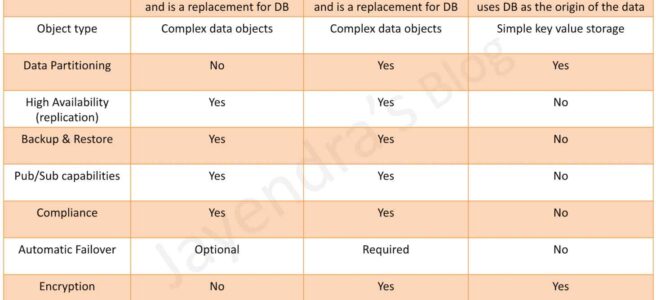
AWS ElastiCache Redis (Valkey) vs Memcached – When to Use Which

📅 Published June 2026: Covers Valkey 9.0 (full-text search, durability), Valkey 8.2 (vector search), ElastiCache Serverless pricing, Redis OSS Extended Support, and updated exam guidance for SAA-C03 and DVA-C02.

Overview

Amazon ElastiCache is a fully managed, in-memory caching service that supports three engines: Valkey, Redis OSS, and Memcached. While all three serve as high-performance key-value stores, they differ significantly in features, architecture, and use cases. This guide provides a comprehensive comparison to help you choose the right engine for your workload.

Engine Overview

Valkey (Recommended for New Workloads)

  • Valkey is an open-source, high-performance key-value datastore stewarded by the Linux Foundation.
  • Created in March 2024 as a community-driven fork of Redis OSS 7.2 after Redis Inc. changed its licensing to a non-open-source model.
  • Backed by 40+ companies including AWS, Google, Microsoft, Oracle, and Ericsson.
  • Drop-in replacement for Redis OSS — fully compatible with existing Redis clients and commands.
  • AWS actively recommends Valkey for all new workloads due to:
    • 33% lower Serverless pricing and 20% lower node-based pricing compared to Redis OSS/Memcached.
    • Active open-source development with rapid innovation (Bloom filters, vector search, full-text search, durability).
    • BSD license — no copyleft restrictions.
  • Supports all Redis OSS features plus: vector search (8.2+), Bloom filters (8.1+), full-text search (9.0+), durability via Multi-AZ transactional log (9.0+), and hash field expiration (9.0+).

Redis OSS (Maintenance Track)

  • Redis OSS 7.2 is the last fully open-source version of Redis supported on ElastiCache.
  • As of March 2025, Redis 8.0 is licensed under AGPLv3 — a copyleft license that many organizations cannot use.
  • ElastiCache versions 4 and 5 for Redis OSS reached end of standard support on January 31, 2026. Extended Support available (at 80-160% premium) through January 31, 2029.
  • Redis OSS 6 reaches End of Life on January 31, 2027.
  • AWS recommends migrating existing Redis OSS workloads to Valkey — zero-downtime, in-place upgrades are supported.
  • Supports complex data types (strings, hashes, lists, sets, sorted sets, bitmaps, HyperLogLog, geospatial, streams), persistence, replication, Pub/Sub, Lua scripting, and cluster mode.

Memcached

  • Memcached is a fully open-source (BSD licensed), high-performance, distributed memory object caching system.
  • Designed for simplicity — pure key-value caching with a multi-threaded architecture.
  • Ideal for simple caching use cases where advanced data structures, persistence, and replication are not needed.
  • Supports only simple data types (strings and objects up to 1 MB).
  • Multi-threaded — can utilize multiple CPU cores on a single node, unlike Valkey/Redis which are single-threaded (with I/O multithreading in Valkey).
  • No replication, no automatic failover, no persistence (node-based), no Pub/Sub.
  • Supports horizontal scaling by adding/removing nodes from the cluster.

Detailed Comparison Table

Feature Valkey / Redis OSS Memcached
Data Types Complex — strings, hashes, lists, sets, sorted sets, bitmaps, HyperLogLog, geospatial, streams, Bloom filters (Valkey 8.1+) Simple — strings and objects only
Persistence Yes — RDB snapshots + AOF. Valkey 9.0 adds durability via Multi-AZ transactional log No — data lost on node restart (node-based)
Replication Yes — up to 5 read replicas per shard No
Multi-AZ with Automatic Failover Yes — automatic failover to read replica No — requires application-level redundancy
Clustering / Data Partitioning Yes — cluster mode with up to 500 shards Yes — client-side sharding across nodes
Pub/Sub Yes — including Sharded Pub/Sub (7.2+) No
Lua Scripting Yes — Lua scripts and Functions (7.2+) No
Backup & Restore Yes — automated daily snapshots + manual snapshots Serverless only (not available for node-based clusters)
Encryption at Rest Yes (4.0.10+) No
Encryption in Transit (TLS) Yes (4.0.10+) Yes (1.6.12+)
Compliance (HIPAA, FedRAMP, PCI DSS) Yes Yes (1.6.12+ for HIPAA/FedRAMP)
Multi-threaded No (single-threaded with I/O multithreading in Valkey) Yes — utilizes multiple CPU cores
Geospatial Indexing Yes (4.0.10+, polygon queries in Valkey 9.0) No
Vector Search Yes (Valkey 8.2+) — microsecond latency, 95%+ recall No
Full-Text Search Yes (Valkey 9.0+) — hybrid text + vector search No
Sorted Sets / Leaderboards Yes No
Data Tiering (SSD) Yes (6.2+ with r6gd nodes) — 5x more storage, 60%+ cost savings No
Global Datastore (Cross-Region) Yes — fully managed cross-region replication No
Authentication AUTH token + RBAC (Role-Based Access Control, 6.0+) SASL authentication
Max Item Size 512 MB per key 1 MB per item (default)

ElastiCache Serverless

ElastiCache Serverless (GA November 2023) eliminates infrastructure management for all three engines. It automatically scales compute, memory, and network to match demand with no nodes to provision or manage.

Feature Serverless for Valkey Serverless for Redis OSS Serverless for Memcached
Availability SLA 99.99% 99.99% 99.99%
Multi-AZ Yes (default) Yes (default) Yes (default)
Backup & Restore Yes Yes Yes
Minimum Data Storage 100 MB (90% lower) 1 GB 1 GB
Max Throughput 5 million RPS (Valkey 8.0+) 5 million RPS 5 million RPS
Zero Downtime Maintenance Yes Yes Yes
IPv6 / Dual-Stack Yes Yes Yes
Create Time < 1 minute < 1 minute < 1 minute

Key Serverless Benefit: Memcached Serverless now includes backup & restore, which is NOT available for node-based Memcached clusters. This resolves one of Memcached’s traditional limitations.

Pricing Comparison (US East – N. Virginia)

ElastiCache Serverless Pricing

Dimension Valkey Redis OSS Memcached
ECPU (per million) $0.0023 $0.0034 $0.0034
Data Storage (per GB-hour) $0.084 $0.125 $0.125
Min Data Metered 100 MB 1 GB 1 GB
Savings vs Redis/Memcached 33% lower Baseline Baseline

Node-Based Pricing (On-Demand, cache.r7g.large)

Dimension Valkey Redis OSS Memcached
On-Demand (per hour) $0.1402 $0.1752 $0.218
Savings vs Redis OSS 20% lower Baseline
Reserved (1-yr, All Upfront) Up to 55% off On-Demand Up to 55% off On-Demand Up to 55% off On-Demand
Extended Support Premium N/A 80% (Yr 1-2), 160% (Yr 3) N/A

Cost Optimization Tips:

  • Migrate Redis OSS → Valkey for immediate 20-33% savings with zero-downtime, in-place upgrades.
  • Existing Redis OSS Reserved Instances automatically apply to Valkey nodes in the same instance family — you get 20% more value.
  • Use Database Savings Plans (1-year commitment) for additional savings on Serverless.
  • Use Data Tiering (r6gd nodes) for workloads accessing <20% of data frequently — 60%+ cost savings.
  • Backup storage: $0.085 per GiB/month for all engines.

Decision Guide – When to Use Which

Choose Valkey (Recommended Default) When:

  • Starting any new caching workload — Valkey is the default recommendation.
  • You need complex data structures (sorted sets, lists, hashes, streams).
  • You need persistence, backup/restore, or durability for data protection.
  • You need high availability with Multi-AZ automatic failover.
  • You need Pub/Sub for real-time messaging.
  • You need Lua scripting or server-side Functions for atomic operations.
  • You need leaderboards, ranking, or rate limiting.
  • You need session management with automatic expiration.
  • You need geospatial queries (nearby search, distance calculations).
  • You need vector similarity search for AI/ML recommendations (Valkey 8.2+).
  • You need full-text search within your cache layer (Valkey 9.0+).
  • You need cross-region replication (Global Datastore).
  • You want the lowest cost option (33% cheaper Serverless, 20% cheaper node-based).

Choose Memcached When:

  • You need the simplest possible caching model — just key-value GET/SET.
  • You need multi-threaded performance on large nodes with multiple cores.
  • You need horizontal scaling with simple add/remove node operations.
  • You are caching database query results or rendered HTML fragments.
  • You don’t need persistence — data can be easily regenerated from the source.
  • You don’t need replication or automatic failover (or use Serverless for HA).
  • Your objects are simple strings/blobs and you don’t need complex data operations.
  • You have an existing Memcached application and don’t want to change client code.

Common Use Case Mapping

Use Case Recommended Engine Why
Session store Valkey Persistence + TTL + replication prevent session loss
Gaming leaderboard Valkey Sorted sets with O(log N) ranking operations
Real-time chat / messaging Valkey Pub/Sub + Lists for message queues
AI recommendation engine Valkey 8.2+ Native vector search with microsecond latency
Database query caching Valkey or Memcached Both work; Valkey preferred for persistence
Simple object caching (HTML, API responses) Memcached Simple key-value with multi-threaded throughput
Rate limiting Valkey Atomic INCR with TTL expiration
Geospatial (nearby stores, riders) Valkey GEOADD, GEORADIUS, polygon queries (9.0)
Durable cache / primary datastore Valkey 9.0 Multi-AZ transactional log for zero data loss
Large-scale ephemeral caching Memcached Multi-threaded, simple horizontal scaling

DAX vs ElastiCache – When to Use Which

DynamoDB Accelerator (DAX) and ElastiCache are both in-memory caching solutions, but they serve different purposes:

Criteria DAX ElastiCache
Purpose Accelerate DynamoDB reads General-purpose in-memory cache for any data source
Data Source DynamoDB only Any (RDS, APIs, DynamoDB, files, etc.)
Code Changes Minimal — drop-in DynamoDB client replacement Requires cache-aside logic in application
Latency Microseconds (single-digit) Microseconds to sub-millisecond
Write Caching Write-through (automatic) Application-managed invalidation
Best For Read-heavy DynamoDB workloads with hot keys Aggregated results, computed data, session stores, leaderboards

Exam Tip: If the question mentions DynamoDB with read-heavy workloads and hot partitions, choose DAX. If the question involves caching from multiple sources, complex data structures, or Pub/Sub, choose ElastiCache.

AWS Certification Exam Relevance

  • SAA-C03 (Solutions Architect Associate): Frequently tests ElastiCache engine selection (Redis/Valkey vs Memcached), caching strategies (lazy loading, write-through), Multi-AZ failover, and DAX vs ElastiCache decision making.
  • DVA-C02 (Developer Associate): Tests session management with ElastiCache, caching patterns, TTL strategies, and integration with Lambda/API Gateway.
  • SAP-C02 (Solutions Architect Professional): Tests Global Datastore for cross-region caching, data tiering, and advanced caching architectures.
  • Key Exam Themes:
    • Memcached = simple, multi-threaded, no persistence, no replication.
    • Redis/Valkey = complex data types, persistence, replication, Multi-AZ, Pub/Sub, backup/restore.
    • DAX = DynamoDB-specific, microsecond reads, drop-in replacement, no code changes.
    • ElastiCache Serverless = no capacity planning, auto-scaling, pay-per-use.
    • Valkey = recommended for new workloads, lower cost, open-source.

AWS Certification Exam Practice Questions

  • Questions are collected from Internet and the answers are marked as per my knowledge and understanding (which might differ with yours).
  • AWS services are updated everyday and both the answers and questions might be outdated soon, so research accordingly.
  • AWS exam questions are not updated to keep up the pace with AWS updates, so even if the underlying feature has changed the question might not be updated
  • Open to further feedback, discussion and correction.
  1. A company is building a gaming application that needs a real-time leaderboard with millions of players. The leaderboard must support efficient ranking, score updates, and range queries. Which ElastiCache solution should a solutions architect recommend?
    1. ElastiCache for Memcached with client-side sorting
    2. ElastiCache for Valkey using Sorted Sets
    3. ElastiCache for Memcached with application-layer ranking
    4. ElastiCache for Redis OSS with simple key-value pairs
    Show Answer

    Answer: b. – Valkey/Redis Sorted Sets provide O(log N) ranking operations with ZADD, ZRANK, and ZRANGE commands, making them ideal for leaderboards. Memcached does not support sorted sets.

  2. A startup wants to deploy an in-memory cache with the lowest possible cost and no infrastructure management. They have unpredictable traffic patterns and their average dataset is 500 MB. Which option provides the MOST cost-effective solution?
    1. ElastiCache Serverless for Redis OSS
    2. ElastiCache node-based cluster for Valkey with reserved instances
    3. ElastiCache Serverless for Valkey
    4. ElastiCache Serverless for Memcached
    Show Answer

    Answer: c. – ElastiCache Serverless for Valkey offers 33% lower pricing than Redis OSS and Memcached Serverless, with a minimum metered storage of only 100 MB (vs 1 GB for others). For unpredictable traffic, Serverless auto-scales without overprovisioning.

  3. A company has a DynamoDB table experiencing hot partition reads. Read latency must be reduced to microseconds. Which caching solution requires the LEAST application code changes?
    1. ElastiCache for Valkey with cache-aside pattern
    2. ElastiCache for Memcached with lazy loading
    3. DynamoDB Accelerator (DAX)
    4. ElastiCache for Valkey with write-through caching
    Show Answer

    Answer: c. – DAX is a drop-in replacement for the DynamoDB client — it requires minimal code changes (just change the endpoint). ElastiCache requires implementing cache-aside or write-through logic in the application.

  4. A solutions architect needs to choose a caching engine for a web application. The requirements are: multi-threaded performance, simple key-value caching of database query results, no need for persistence, and the ability to horizontally scale by adding nodes. Which engine is MOST appropriate?
    1. ElastiCache for Valkey in cluster mode
    2. ElastiCache for Memcached
    3. ElastiCache for Redis OSS with read replicas
    4. DynamoDB Accelerator (DAX)
    Show Answer

    Answer: b. – Memcached matches all stated requirements: multi-threaded, simple key-value, no persistence needed, and horizontal scaling by adding/removing nodes. While Valkey could work, it adds complexity that isn’t needed here.

  5. A company is migrating from ElastiCache for Redis OSS version 5. They received an Extended Support notification with 80% premium charges. What is the MOST cost-effective long-term migration path?
    1. Pay for Extended Support to avoid migration effort
    2. Upgrade to Redis OSS 7.2
    3. Migrate to ElastiCache for Valkey using in-place upgrade
    4. Move to Amazon MemoryDB for Redis
    Show Answer

    Answer: c. – Migrating to Valkey provides 20% lower node-based pricing (or 33% lower Serverless), active development, and avoids Extended Support premiums (80-160%). In-place upgrades from Redis OSS to Valkey are zero-downtime.

  6. A development team needs an in-memory caching solution that supports: persistence for disaster recovery, Multi-AZ failover for high availability, encryption at rest and in transit for compliance, and Pub/Sub for real-time notifications. Which combination of ElastiCache features meets ALL requirements? (Select TWO)
    1. ElastiCache for Memcached with SASL authentication
    2. ElastiCache for Valkey with Multi-AZ enabled
    3. ElastiCache for Valkey with encryption at rest and in-transit enabled
    4. ElastiCache for Memcached with TLS encryption
    5. ElastiCache for Memcached with backup enabled
    Show Answer

    Answer: b, c – Only Valkey/Redis OSS supports persistence, Multi-AZ automatic failover, encryption at rest, AND Pub/Sub together. Memcached lacks persistence (node-based), replication, failover, encryption at rest, and Pub/Sub.

  7. An e-commerce application requires a cache that can serve as a durable primary datastore with microsecond read latency and zero data loss during failures. Which ElastiCache option should a solutions architect recommend?
    1. ElastiCache for Redis OSS 7.2 with AOF persistence
    2. ElastiCache for Valkey 8.0 with daily backups
    3. ElastiCache for Valkey 9.0 with synchronous durability
    4. ElastiCache for Memcached Serverless
    Show Answer

    Answer: c. – Valkey 9.0 introduces durability via a Multi-AZ transactional log with synchronous writes designed for zero data loss. Traditional RDB/AOF persistence can lose recent writes during failures.

Related Posts

References

AWS Transfer Family

AWS Transfer Family

  • AWS Transfer Family is a fully managed file transfer service that enables secure transfer of files into and out of AWS storage services.
  • AWS Transfer Family supports transferring data from or to Amazon S3 and Amazon EFS.
  • AWS Transfer Family supports transferring data over the following protocols:
    • Secure File Transfer Protocol (SFTP) – version 3
    • File Transfer Protocol Secure (FTPS)
    • File Transfer Protocol (FTP)
    • Applicability Statement 2 (AS2) – for B2B EDI document exchange
    • Browser-based transfers – via Transfer Family web apps
  • Transfer Family provides the following benefits:
    • A fully managed service that scales in real-time with elastic compute infrastructure and built-in autoscaling.
    • Compatible with existing applications with no need to modify them or run any file transfer protocol infrastructure.
    • A fully managed, serverless File Transfer Workflow service that makes it easy to set up, run, automate, and monitor the processing of files.
    • Supports connectors for outbound file transfers to remote SFTP and AS2 servers.
  • Transfer Family supports up to 3 AZs and is backed by an auto-scaling, redundant fleet for connection and transfer requests.
  • Transfer Family supports multiple identity provider options:
    • Service Managed – user identities stored within the service (supported for SFTP-only server endpoints).
    • Microsoft Active Directory – integration with AWS Directory Service.
    • LDAP – Lightweight Directory Access Protocol integration.
    • Custom Identity Providers – modular solution to integrate any identity provider with granular per-user controls, separating authentication logic from session configuration.
  • Transfer Family supports Amazon S3 Access Points for granular access to shared datasets.
  • For FTP and FTPS data connections, the port range used for the data channel is 8192–8200.

Endpoint Types

  • Transfer Family supports the following endpoint types:
    • Public – publicly accessible endpoint that listens for traffic over port 22 (SFTP only).
    • VPC – endpoint hosted within a VPC for greater control over access.
      • Can be configured as Internet Facing with Elastic IP addresses attached.
      • Can be configured as Internal for private access only within the VPC.
      • Supports Security Groups for source IP filtering.
      • Supports shared VPC environments.
      • Required for FTPS and FTP protocols.
  • FIPS-enabled endpoints are available for compliance requirements.

AS2 Protocol Support

  • Applicability Statement 2 (AS2) is a business-to-business (B2B) messaging protocol used to exchange Electronic Data Interchange (EDI) documents.
  • Transfer Family AS2 capabilities enable secure exchange of AS2 messages at scale while maintaining compliance and interoperability with trading partners.
  • AS2 provides data protection through encryption and peer authentication via digital certificates.
  • Key AS2 components:
    • Agreements – Bilateral trading partner agreements that define the relationship between two parties exchanging messages. Combines server, local profile, partner profile, and certificate information.
    • Profiles – Local and partner profiles that identify the sender and receiver.
    • Certificates – Used for encryption and signing of AS2 messages.
    • Connectors – Required for sending files to an externally hosted AS2 server.
  • AS2 messages are sent and received over HTTPS.
  • Integrates with AWS B2B Data Interchange for EDI document transformation and generation.

SFTP Connectors

  • SFTP connectors provide fully managed functionality to transfer files between remote SFTP servers and Amazon S3.
  • SFTP connectors can send files from Amazon S3 to an external partner-owned SFTP server and retrieve files from a partner’s SFTP server.
  • SFTP connectors authenticate to remote servers using credentials stored in AWS Secrets Manager.
  • SFTP connectors support two egress types:
    • Service Managed – uses AWS managed infrastructure for routing.
    • VPC (VPC_LATTICE) – routes traffic through your VPC using Amazon VPC Lattice, enabling connections to:
      • Private SFTP servers accessible only within a VPC.
      • Servers in shared VPCs.
      • On-premises systems connected over AWS Direct Connect.
      • Partner-hosted servers connected through VPN tunnels.
  • SFTP connectors support PGP encryption for encrypting/decrypting files before sending to remote partners.
  • SFTP connectors can list files stored on remote SFTP servers, enabling file retrieval workflows when file names are not known in advance.

Transfer Family Web Apps

  • Transfer Family web apps provide a no-code, fully managed browser-based experience for secure file transfers to and from Amazon S3.
  • Web apps enable authenticated users to perform file operations including listing, uploading, downloading, and deleting files through a web browser.
  • Web apps are integrated with AWS IAM Identity Center and Amazon S3 Access Grants, enabling fine-grained access controls that map corporate identities directly to S3 datasets.
  • Web apps are customizable to reflect company branding.
  • Supports HIPAA eligibility, PCI, and other compliance certifications.
  • One web app unit can provide up to 250 unique sessions per 5-minute period. Multiple units can be provisioned based on peak workload volumes.
  • Deployable with a few clicks in the Transfer Family console, generating a shareable URL.

Managed Workflows (MFTW)

  • Managed File Transfer Workflows (MFTW) is a fully managed, serverless workflow service that automates processing of uploaded files.
  • MFTW can automate processing steps such as:
    • Copying and tagging
    • Scanning and filtering
    • Compressing/decompressing
    • Encrypting/decrypting
    • Custom processing via Lambda functions
  • MFTW provides end-to-end visibility for tracking and auditability.
  • Workflows are triggered automatically in response to file uploads.
  • Supports both nominal (success) and exception handling steps.

Security and Encryption

  • Transfer Family supports encryption at rest using:
    • AWS KMS (Key Management Service) managed keys
    • Amazon S3 server-side encryption (SSE-S3)
    • Customer Managed Keys with Amazon EFS
  • Encryption in transit via SSH (SFTP), TLS (FTPS, AS2), and HTTPS (web apps).
  • Supports TLS 1.2 for secure communication.
  • IAM policies control access to S3 buckets and EFS file systems.
  • CloudTrail provides granular auditing of user and API activity.
  • Security Groups and Network ACLs control network-level access for VPC endpoints.

Monitoring and Logging

  • Transfer Family supports two logging mechanisms for CloudWatch:
    • JSON Structured Logging (Recommended) – provides comprehensive, queryable log format with detailed activity types (AUTH_FAILURE, CONNECTED, DISCONNECTED, ERROR, OPEN, CLOSE, DELETE, MKDIR, RENAME, etc.).
    • Logging via a Logging Role – legacy logging mechanism.
  • CloudWatch metrics track server performance and transfer activity.
  • CloudWatch alarms can trigger notifications or automated actions based on thresholds.
  • CloudTrail logging is available for Transfer Family web apps.

AWS Certification Exam Practice Questions

  • Questions are collected from Internet and the answers are marked as per my knowledge and understanding (which might differ with yours).
  • AWS services are updated everyday and both the answers and questions might be outdated soon, so research accordingly.
  • AWS exam questions are not updated to keep up the pace with AWS updates, so even if the underlying feature has changed the question might not be updated
  • Open to further feedback, discussion and correction.
  1. A solutions architect must provide a fully managed replacement for an on-premises solution that allows employees and partners to exchange files. The solution must be easily accessible to employees connecting from on-premises systems, remote employees, and external partners. Which solution meets these requirements?
    1. Use AWS Transfer Family for SFTP to transfer files into and out of Amazon S3.
    2. Use AWS Snowball Edge for local storage and large-scale data transfers.
    3. Use Amazon FSx to store and transfer files to make them available remotely.
    4. Use AWS Storage Gateway to create a volume gateway to store and transfer files to Amazon S3.
  2. A company exchanges EDI documents with multiple trading partners. The company needs a fully managed B2B file transfer solution that supports AS2 protocol, provides non-repudiation through message disposition notifications (MDNs), and stores transferred files in Amazon S3. Which AWS service meets these requirements?
    1. AWS DataSync with S3 as the destination
    2. AWS Transfer Family with AS2 protocol configured
    3. Amazon MQ with file transfer broker
    4. AWS Storage Gateway File Gateway
  3. A company needs to provide non-technical business users with a simple web interface to upload and download files from Amazon S3 without requiring SFTP clients or AWS Console access. The solution must integrate with the company’s existing corporate directory for authentication. Which approach should a solutions architect recommend?
    1. Create a custom web application using S3 pre-signed URLs
    2. Use Amazon WorkDocs for file sharing
    3. Deploy AWS Transfer Family web apps integrated with AWS IAM Identity Center and S3 Access Grants
    4. Use Amazon AppStream 2.0 to stream an S3 browser application
  4. A company needs to automate file transfers between a partner’s SFTP server (accessible only via VPN) and Amazon S3. The partner’s server is not accessible from the public internet. Which solution meets these requirements with the LEAST operational overhead?
    1. Deploy an EC2 instance with an SFTP client in the VPC and schedule cron jobs
    2. Use AWS DataSync with a private VIF over Direct Connect
    3. Use AWS Transfer Family SFTP connectors with VPC-based (VPC_LATTICE) egress type
    4. Set up an AWS Lambda function with VPC access to connect to the SFTP server
  5. A company uses AWS Transfer Family for SFTP file transfers. The security team requires detailed, queryable audit logs of all file operations including authentication failures, file opens, deletes, and disconnections. Which logging approach should be configured?
    1. Enable CloudTrail data events for the Transfer Family server
    2. Configure S3 server access logging on the destination bucket
    3. Enable JSON structured logging for the Transfer Family server in CloudWatch
    4. Set up VPC Flow Logs on the server endpoint’s network interface

References

AWS DataSync

AWS DataSync

  • AWS DataSync is an online data movement service that simplifies, automates, and accelerates moving data between on-premises storage, other cloud providers, and AWS Storage services.
  • DataSync provides end-to-end security, including encryption and integrity validation.
  • DataSync automates both the management of data-transfer processes and the infrastructure required for high-performance and secure data transfer.
  • DataSync uses a purpose-built network protocol and a parallel, multi-threaded architecture to accelerate the transfers.
  • A DataSync agent is a VM or EC2 instance that AWS DataSync uses to read from or write to a storage system. Agents are commonly used when copying data from on-premises storage to AWS.
  • For transfers between AWS storage services (same or cross-region), no agent is required — data remains within the AWS network.
  • DataSync transfer is described by a Task and a Task Execution is an individual run of a DataSync task.
  • A task can be configured for locations (source and destination), schedule and how it treats metadata, deleted files, and permissions.
  • Task scheduling automatically runs tasks on the configured schedule with hourly, daily, or weekly options.
  • Each time a task is started it performs an incremental copy, transferring only the changes from the source to the destination.
  • If a task is interrupted, for instance, if the network connection goes down or the agent is restarted, the next run of the task will transfer missing files, and the data will be complete and consistent at the end of this run.
  • AWS DataSync can be used with the Direct Connect link to access public service endpoints or private VPC endpoints.
  • The amount of network bandwidth that AWS DataSync will use can be controlled by configuring the built-in bandwidth throttle.
  • DataSync supports both IPv4 and IPv6 addresses for connecting with the service and for data transfers with supported data sources.

DataSync Task Modes

  • DataSync tasks run in one of two modes: Enhanced mode or Basic mode.
  • Enhanced mode
    • Transfers virtually unlimited numbers of files or objects with higher performance than Basic mode.
    • Optimizes the data transfer process by listing, preparing, transferring, and verifying data in parallel.
    • Supports transfers between Amazon S3 locations, cross-cloud transfers (Azure Blob, Google Cloud Storage, Oracle Cloud Object Storage) without an agent, and transfers between NFS/SMB file servers and Amazon S3 using an Enhanced mode agent.
    • Not subject to the same file/object count quotas as Basic mode.
  • Basic mode
    • Transfers files or objects between AWS storage and all other supported DataSync locations.
    • Subject to quotas on the number of files, objects, and directories in a dataset.
    • Sequentially prepares, transfers, and verifies data, making it slower than Enhanced mode for most workloads.

DataSync Supported Locations

  • Network File System (NFS) file servers
  • Server Message Block (SMB) file servers
  • Hadoop Distributed File System (HDFS)
  • Object storage systems
  • Amazon S3 (including S3 on Outposts)
  • Amazon EFS file systems
  • Amazon FSx for Windows File Server file systems
  • Amazon FSx for Lustre file systems
  • Amazon FSx for OpenZFS file systems
  • Amazon FSx for NetApp ONTAP file systems
  • Microsoft Azure Blob Storage
  • Google Cloud Storage
  • Oracle Cloud Object Storage
  • Other S3-compatible cloud storage (Wasabi, DigitalOcean Spaces, etc.)

⚠️ Note: AWS Snowcone devices were discontinued effective November 12, 2024. DataSync on Snowcone is no longer available for new orders. Existing customers had support until November 12, 2025. Use DataSync online transfers or AWS Data Transfer Terminal as alternatives.

Cross-Cloud Transfers

  • DataSync Enhanced mode supports agentless cross-cloud transfers, enabling direct data movement between other cloud providers and Amazon S3 without deploying a DataSync agent.
  • Supported cross-cloud sources include Microsoft Azure Blob Storage, Google Cloud Storage, Oracle Cloud Object Storage, and other S3-compatible storage services.
  • Cross-cloud transfers provide higher performance and scalability compared to agent-based Basic mode transfers.
  • Simplifies multi-cloud data migration and data pipeline workflows.

DataSync Manifests

  • DataSync supports manifests, enabling users to provide a definitive list of source files or objects to be transferred by a task.
  • Using manifests, task execution times can be decreased by specifying only the files or objects that need to be processed.
  • The maximum allowable size for a manifest file with Enhanced mode tasks is 20 GB.
  • Useful for scenarios with hundreds of millions of objects where only a specific subset needs to be transferred.

DataSync Task Reports

  • Task reports provide detailed JSON-formatted output files about what DataSync attempts to transfer, skip, verify, and delete during a task execution.
  • Reports include a summary and detailed reports for files transferred, skipped, verified, and deleted.
  • Task reports are generated after the completion of transfer tasks and stored in an Amazon S3 bucket.
  • Useful for tracking and auditing data transfers, monitoring chain of custody, and troubleshooting transfer errors.

DataSync Security Features

  • DataSync integrates with AWS Secrets Manager for credential management across all location types, including HDFS, Amazon FSx for Windows File Server, and Amazon FSx for NetApp ONTAP.
  • Supports VPC endpoint policies for fine-grained access control and FIPS-enabled VPC endpoints in FIPS-enabled AWS Regions.
  • Data is encrypted in transit using TLS.
  • Supports Kerberos authentication for enhanced SMB file transfer security.
  • Location configurations can be updated without recreating locations, simplifying credential rotation and maintenance.

DataSync Agents

  • An agent is required for transfers between on-premises storage and AWS.
  • No agent is needed for transfers between AWS storage services (same or cross-region) — data remains in the AWS network.
  • Enhanced mode supports agentless cross-cloud transfers (Azure Blob, Google Cloud Storage, Oracle Cloud Object Storage to Amazon S3).
  • Enhanced mode agents are available for on-premises NFS/SMB to Amazon S3 transfers with improved performance.
  • Version 1 DataSync agents were discontinued on December 7, 2023 — affected agents must be replaced.

ℹ️ Note: DataSync Discovery was discontinued on May 20, 2025 and is no longer available as a DataSync feature.

AWS Certification Exam Practice Questions

  • Questions are collected from Internet and the answers are marked as per my knowledge and understanding (which might differ with yours).
  • AWS services are updated everyday and both the answers and questions might be outdated soon, so research accordingly.
  • AWS exam questions are not updated to keep up the pace with AWS updates, so even if the underlying feature has changed the question might not be updated
  • Open to further feedback, discussion and correction.
  1. A company is migrating its applications to AWS. Currently, applications that run on-premises generate hundreds of terabytes of data that is stored on a shared file system. The company is running an analytics application in the cloud that runs hourly to generate insights from this data. The company needs a solution to handle the ongoing data transfer between the on-premises shared file system and Amazon S3. The solution also must be able to handle occasional interruptions in internet connectivity. Which solutions should the company use for the data transfer to meet these requirements?
    1. AWS DataSync
    2. AWS Migration Hub
    3. AWS Snowball Edge Storage Optimized
    4. AWS Transfer for SFTP
  2. A company needs to transfer 500 million objects from Google Cloud Storage to Amazon S3 with minimal operational overhead. The transfer should be completed as fast as possible without deploying any infrastructure. Which approach best meets these requirements?
    1. Deploy a DataSync agent on a Google Cloud VM and use Basic mode tasks
    2. Use DataSync Enhanced mode with agentless cross-cloud transfer directly from Google Cloud Storage to Amazon S3
    3. Use AWS Transfer Family with SFTP to pull data from Google Cloud Storage
    4. Use S3 Batch Operations to copy from Google Cloud Storage
  3. A company uses AWS DataSync to replicate data between Amazon S3 buckets in different AWS Regions. The dataset contains over 100 million objects and the company needs improved transfer performance and scalability. Which DataSync configuration should be used?
    1. Use Basic mode with multiple parallel tasks
    2. Deploy a DataSync agent in each Region
    3. Use Enhanced mode for the S3-to-S3 transfer task
    4. Enable S3 Transfer Acceleration on both buckets
  4. An organization needs to transfer only a specific set of 10,000 files from an on-premises NFS server containing millions of files to Amazon S3. They want to minimize the time spent scanning the source. Which DataSync feature should they use?
    1. Task filtering with include patterns
    2. DataSync manifests to specify the exact list of files to transfer
    3. Schedule the task during off-peak hours
    4. Use Enhanced mode with no manifest
  5. A security team requires detailed audit reports of all files transferred, skipped, and deleted during a DataSync task execution for compliance purposes. Which DataSync feature provides this capability?
    1. CloudWatch Logs integration
    2. AWS CloudTrail data events
    3. DataSync task reports
    4. Amazon S3 server access logs

References

CloudFront vs Global Accelerator – CDN vs Anycast

AWS CloudFront vs Global Accelerator

AWS CloudFront vs Global Accelerator

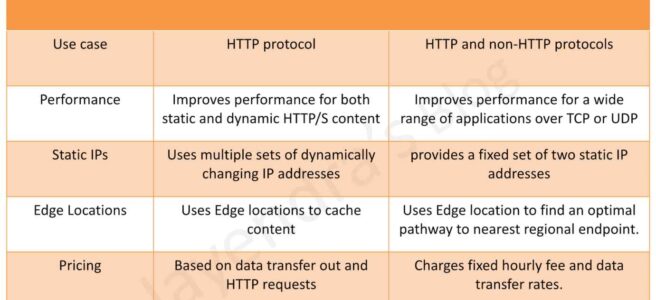
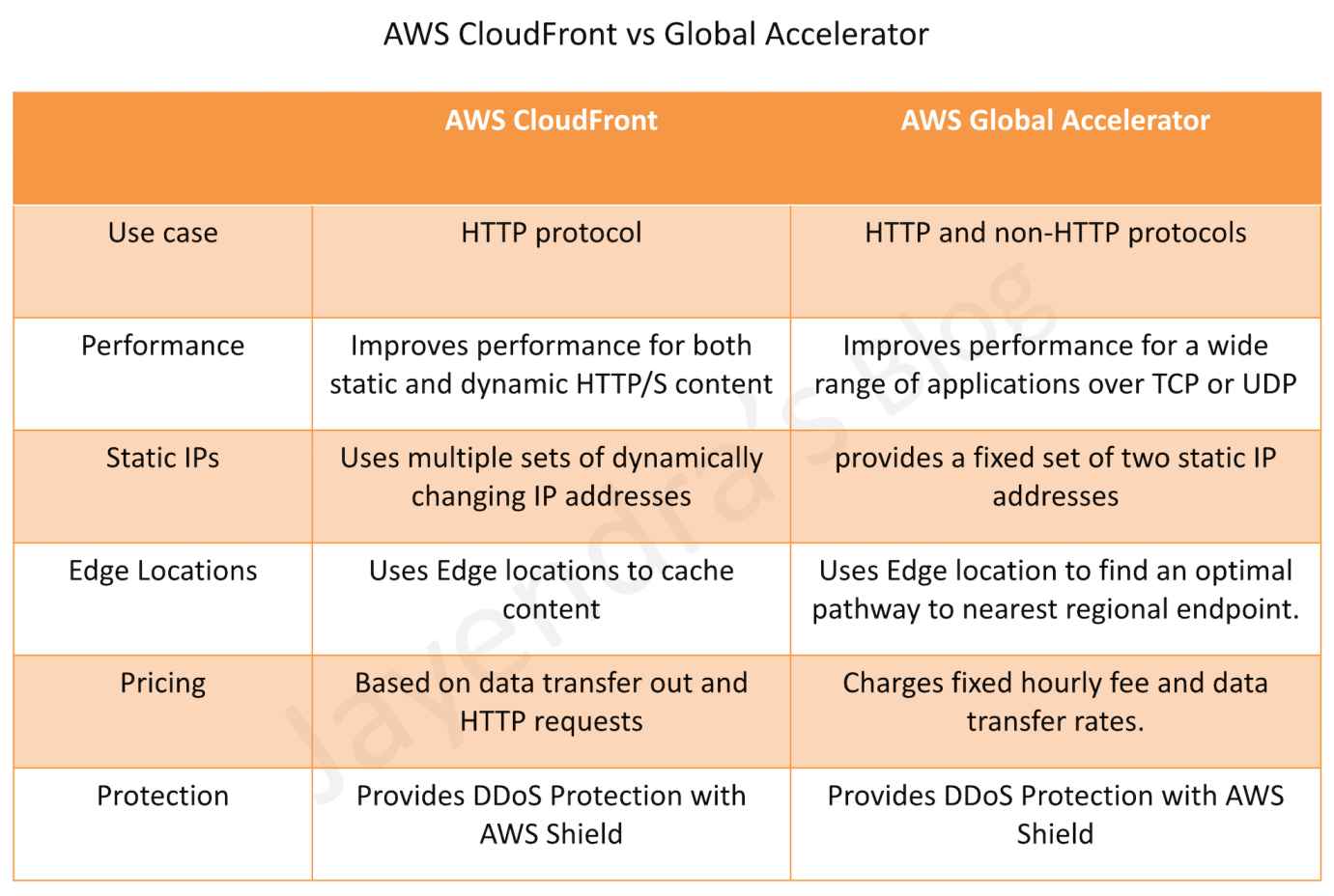
  • Global Accelerator and CloudFront both use the AWS global network and its edge locations around the world.
  • Both services integrate with AWS Shield for DDoS protection.
  • Both services operate from AWS edge locations (Points of Presence), but with different scale:
    • CloudFront uses 750+ PoPs in 100+ cities across 50+ countries, plus 1,140+ Embedded PoPs in 300+ cities.
    • Global Accelerator uses 130 PoPs in 95 cities across 53 countries.
  • Performance
    • CloudFront improves performance for both cacheable content (such as images and videos) and dynamic content (such as API acceleration and dynamic site delivery).
    • Global Accelerator improves performance for a wide range of applications over TCP or UDP by proxying packets at the edge to applications running in one or more AWS Regions.
  • Use Cases
    • CloudFront is a good fit for HTTP use cases, including web content delivery, API acceleration, video streaming, and serverless edge compute.
    • Global Accelerator is a good fit for non-HTTP use cases, such as gaming (UDP), IoT (MQTT), or VoIP, as well as for HTTP use cases that require static IP addresses or deterministic, fast regional failover.
  • Caching
    • CloudFront supports Edge caching with Regional Edge Caches (RECs) and Origin Shield for optimized cache-hit ratios.
    • Global Accelerator does not support Edge Caching. It routes traffic over the AWS backbone to the optimal regional endpoint.
  • Static IP Addresses
    • CloudFront now supports Anycast Static IPs (launched Nov 2024), providing a dedicated set of static IP addresses for allowlisting, zero-rating, and apex domain support.
    • Global Accelerator provides two static anycast IPv4 addresses (and optionally two IPv6 addresses with dual-stack) per accelerator, serviced by independent network zones for fault tolerance.
  • Protocol Support
    • CloudFront supports HTTP and HTTPS (with TLSv1.3), WebSocket, and gRPC.
    • Global Accelerator supports TCP and UDP at the transport layer, enabling broader protocol coverage including non-HTTP workloads.
  • Failover
    • CloudFront supports origin failover for GET and HEAD requests using origin groups with primary and secondary origins.
    • Global Accelerator provides instant, deterministic failover across AWS Regions based on continuous health monitoring (TCP, HTTP, HTTPS health checks).
  • Edge Compute
    • CloudFront offers edge compute via CloudFront Functions (lightweight, sub-millisecond execution at all edge locations) and Lambda@Edge (general-purpose serverless compute).
    • Global Accelerator does not provide edge compute capabilities.
  • IP Address Management
    • CloudFront supports Bring Your Own IP (BYOIP) through VPC IPAM integration for both IPv4 (/24) and IPv6 (/48) address ranges (launched Nov 2025).
    • Global Accelerator supports BYOIP allowing up to two /24 IPv4 address ranges per accelerator.
  • Security
    • CloudFront integrates with AWS WAF, AWS Shield (Standard and Advanced), and supports field-level encryption, signed URLs/cookies, and Origin Access Control (OAC).
    • Global Accelerator integrates with AWS Shield (Standard and Advanced) for DDoS protection but does not support WAF integration.

Key Feature Differences (Summary Table)

Feature CloudFront Global Accelerator
Type Content Delivery Network (CDN) Network layer traffic accelerator
Caching Yes (Edge + Regional Edge Caches + Origin Shield) No
Protocols HTTP, HTTPS, WebSocket, gRPC TCP, UDP
Static IPs Yes (Anycast Static IPs – Nov 2024) Yes (2 IPv4 + 2 IPv6 with dual-stack)
Edge Compute CloudFront Functions + Lambda@Edge No
WAF Integration Yes No
VPC Origins Yes (private ALB/NLB/EC2) No
Custom Routing No Yes (deterministic EC2 routing)
Health Checks Origin failover (GET/HEAD only) TCP, HTTP, HTTPS (instant regional failover)
Dual-Stack (IPv6) Yes Yes (dual-stack accelerators with NLB endpoints)
BYOIP Yes (via VPC IPAM, IPv4 + IPv6) Yes (up to two /24 IPv4 ranges)
Kubernetes Integration No native integration Yes (AWS Load Balancer Controller CRDs)

Recent Feature Updates (2024-2026)

CloudFront Updates

  • Anycast Static IPs (Nov 2024) – Dedicated static IP addresses for allowlisting, zero-rating traffic with ISPs, and apex domain support. IPv6 support added Nov 2025.
  • VPC Origins (Nov 2024) – Connect CloudFront directly to private ALBs, NLBs, or EC2 instances in private subnets without public internet exposure. Cross-account support added Nov 2025.
  • Embedded Points of Presence (Feb 2024) – PoPs deployed directly within ISP networks for large-scale video streaming and game downloads, with 1,140+ Embedded PoPs in 300+ cities.
  • Flat-Rate Pricing Plans (Nov 2025) – Bundled CDN, WAF, DDoS protection, bot management, Route 53, CloudWatch Logs, edge compute, and S3 storage into predictable monthly pricing with no overage charges.
  • Tag-Based Cache Invalidation (May 2026) – Native support to tag cached objects and invalidate by tag directly through the CloudFront API.
  • BYOIP via VPC IPAM (Nov 2025) – Bring your own IPv4 and IPv6 addresses to CloudFront using IPAM’s BYOIP for global services.
  • CloudFront KeyValueStore (Nov 2023) – Low-latency global data store for CloudFront Functions enabling dynamic edge decisions without code redeployment.
  • Simplified Console Experience (Jun 2025) – New user-friendly interface with automated certificate provisioning and DNS configuration.

Global Accelerator Updates

  • Kubernetes Integration (Jan 2026) – AWS Load Balancer Controller now supports Global Accelerator through declarative Kubernetes CRDs for managing accelerators, listeners, and endpoint groups.
  • Expanded Region Support – Now supports 33 AWS Regions including Mexico (Central), Asia Pacific (Malaysia, Thailand, Taipei) as of Oct 2025.
  • Dual-Stack NLB Endpoints (Nov 2023) – IPv6 traffic routing directly to dual-stack NLB endpoints for end-to-end IPv6 connectivity.
  • Client IP Preservation for NLB (Aug 2023) – Maintains source IP address for packets arriving at NLB endpoints configured behind Global Accelerator.
  • Dual-Stack NLB Support for Standard Accelerators (Mar 2024) – Adding dual-stack NLBs to standard accelerators.

When to Use Which

  • Choose CloudFront when:
    • Delivering cacheable web content (images, videos, static files)
    • Accelerating APIs and dynamic HTTP/HTTPS content
    • Needing edge compute (CloudFront Functions or Lambda@Edge)
    • Requiring WAF integration for application-layer security
    • Serving content from private origins via VPC Origins
    • Needing bundled security (WAF + Shield + CDN) with flat-rate pricing
  • Choose Global Accelerator when:
    • Running non-HTTP workloads (gaming/UDP, IoT/MQTT, VoIP)
    • Needing deterministic, instant multi-region failover
    • Requiring static IP addresses as fixed entry points (since its inception)
    • Using custom routing to deterministically route users to specific EC2 instances (e.g., multiplayer gaming matchmaking)
    • Needing Kubernetes-native management of global traffic acceleration
    • Running multi-region S3 workloads via S3 Multi-Region Access Points
  • Use both together when:
    • Needing CDN caching for web content AND fast failover for backend APIs
    • Building multi-tier applications with both HTTP and non-HTTP components

AWS CloudFront vs Global Accelerator

AWS Certification Exam Practice Questions

  • Questions are collected from Internet and the answers are marked as per my knowledge and understanding (which might differ with yours).
  • AWS services are updated everyday and both the answers and questions might be outdated soon, so research accordingly.
  • AWS exam questions are not updated to keep up the pace with AWS updates, so even if the underlying feature has changed the question might not be updated
  • Open to further feedback, discussion and correction.
  1. A company wants to improve the availability and performance of its stateless UDP-based workload. The workload is deployed on Amazon EC2 instances in multiple AWS Regions. What should a solutions architect recommend to accomplish this?
    1. Place the EC2 instances behind Network Load Balancers (NLBs) in each Region. Create an accelerator using AWS Global Accelerator. Use the NLBs as endpoints for the accelerator.
    2. Place the EC2 instances behind Application Load Balancers (ALBs) in each Region. Create an accelerator using AWS Global Accelerator. Use the ALBs as endpoints for the accelerator.
    3. Place the EC2 instances behind Network Load Balancers (NLBs) in each Region. Create a CloudFront distribution with an origin that uses Route 53 latency-based routing to route requests to the NLBs.
    4. Place the EC2 instances behind Application Load Balancers (ALBs) in each Region. Create a CloudFront distribution with an origin that uses Route 53 latency-based routing to route requests to the ALBs.
  2. A media company delivers live streaming video to millions of global viewers. They need to reduce buffering during peak events while keeping origin infrastructure costs low. Which AWS service is the best fit?
    1. AWS Global Accelerator with NLB endpoints in each Region
    2. Amazon CloudFront with Origin Shield enabled and Embedded Points of Presence for large-scale delivery
    3. Amazon CloudFront with Global Accelerator as the origin
    4. AWS Global Accelerator with custom routing to direct viewers to specific EC2 instances
  3. A gaming company wants to route players to specific EC2 game server instances based on matchmaking logic. The application uses UDP and players are distributed globally. Which solution provides the lowest latency and deterministic routing?
    1. Amazon CloudFront with Lambda@Edge for routing logic
    2. AWS Global Accelerator with standard routing and NLB endpoints
    3. AWS Global Accelerator with custom routing accelerator mapping ports to specific EC2 instances
    4. Amazon Route 53 latency-based routing with health checks
  4. A company requires its web application origin servers to remain in private subnets with no public internet access, while still serving global users with low latency. Which solution meets these requirements?
    1. AWS Global Accelerator with private NLB endpoints
    2. Amazon CloudFront with VPC Origins pointing to private ALB/NLB/EC2 instances
    3. Amazon CloudFront with an origin in a public subnet protected by Security Groups
    4. AWS Global Accelerator with EC2 instances using Elastic IP addresses
  5. A company needs static IP addresses for their content delivery to satisfy partner allowlisting requirements. Previously this was only available with Global Accelerator. Which CloudFront feature now addresses this requirement?
    1. CloudFront Origin Access Control (OAC)
    2. CloudFront Anycast Static IPs
    3. CloudFront Dedicated IP Custom SSL
    4. CloudFront BYOIP via VPC IPAM
  6. A company running a multi-region application on Kubernetes (EKS) wants to add global traffic acceleration with automatic failover. They prefer managing infrastructure declaratively through Kubernetes resources. Which approach is most operationally efficient?
    1. Create Global Accelerator manually via AWS Console and add EKS NLB endpoints
    2. Use the AWS Load Balancer Controller with Global Accelerator CRDs to declaratively manage accelerators through Kubernetes
    3. Use Amazon CloudFront with Route 53 failover routing
    4. Use Amazon Route 53 with latency-based routing and health checks

References

AWS Gateway Load Balancer – GWLB for Appliances

AWS Gateway Load Balancer GWLB

AWS Gateway Load Balancer – GWLB

  • Gateway Load Balancer helps deploy, scale, and manage virtual appliances, such as firewalls, intrusion detection and prevention systems (IDS/IPS), and deep packet inspection systems.
  • GWLB and its registered virtual appliance instances exchange application traffic using the GENEVE (Generic Network Virtualization Encapsulation) protocol on port 6081.
  • operates at Layer 3 of the OSI model, the network layer.
  • transparently passes all Layer 3 traffic through third-party virtual appliances, and is invisible to the source and destination of the traffic.
  • combines a transparent network gateway (that is, a single entry and exit point for all traffic) and distributes traffic while scaling the virtual appliances with the demand.
  • listens for all IP packets across all ports and forwards traffic to the target group that’s specified in the listener rule.
  • runs within one AZ and is recommended to be deployed in multiple AZs for greater availability. If all appliances fail in one AZ, scripts can be used to either add new appliances or direct traffic to a GWLB in a different AZ.
  • subnets cannot be removed after the load balancer is created. To remove a subnet, you must create a new load balancer.
  • is architected to handle millions of requests/second, volatile traffic patterns, and introduces extremely low latency.
  • does not perform TLS termination and does not maintain any application state. These functions are performed by the third-party virtual appliances it directs traffic to and receives traffic from.
  • maintains stickiness of flows to a specific target appliance using 5-tuple (default), 3-tuple, or 2-tuple.
    • 5-tuple (default) – source IP, destination IP, protocol, source port, destination port
    • 3-tuple – source IP, destination IP, transport protocol
    • 2-tuple – source IP, destination IP
  • supports a maximum transmission unit (MTU) size of 8500 bytes. GENEVE encapsulation adds 68 bytes, so appliances must support at least 8,568 bytes MTU.
  • does not support IP fragmentation and does not generate ICMP “Destination Unreachable: fragmentation needed and DF set” messages, so Path MTU Discovery (PMTUD) is not supported.
  • supports cross-zone load balancing, which is disabled by default. You pay charges for inter-AZ data transfer if enabled.
  • supports both IPv4 and dual-stack (IPv4 and IPv6) IP address types. In dual-stack mode, GWLB encapsulates both IPv4 and IPv6 client traffic with an IPv4 GENEVE header.
  • supports asymmetric flows when the load balancer processes the initial flow packet and the response flow packet is not routed through the load balancer. Asymmetric routing is not recommended as it can reduce network performance.

Gateway Load Balancer TCP Idle Timeout

  • GWLB creates a flow entry in its flow table when it sees the first packet of a flow and maintains traffic symmetry by coupling each flow entry to one backend target appliance.
  • When packets for a flow stop, the flow is considered idle and the idle timer starts. GWLB removes the flow entry after the idle time expires.
  • TCP idle timeout is configurable from 60 seconds to 6000 seconds (default: 350 seconds). (Launched September 2024)
  • Configuring the timeout helps align GWLB with firewall appliances (e.g., Palo Alto, Fortinet, Cisco, Check Point) that often default to 3600 seconds, preventing traffic disruptions for long-lived idle flows.
  • TCP idle timeout can only be updated when using 5-tuple stickiness. When using 3-tuple or 2-tuple stickiness, the default 350-second timeout is used.
  • UDP idle timeout is fixed at 120 seconds and cannot be changed.
  • TCP keepalive packets reset the idle timeout timer.
  • Existing flows are not impacted when the timeout value is changed; the new value applies only to new flow entries.
  • CloudWatch metrics RejectedFlowCount and RejectedFlowCount_TCP help monitor when flows are rejected due to flow table exhaustion.

Gateway Load Balancer Target Failover

  • Target Failover allows GWLB to rebalance existing flows to a healthy target when the original target fails or is deregistered. (Launched October 2022)
  • By default, GWLB continues to send existing flows to failed or drained targets (no failover).
  • When enabled, reduces failover time when a target becomes unhealthy and allows graceful patching or upgrading of appliances during maintenance windows.
  • Can be configured per target group via the target group attributes.

Gateway Load Balancer Health Checks

  • GWLB supports configurable health check parameters for target groups. (Enhanced February 2023)
  • HealthCheckIntervalSeconds – configurable from 5 to 300 seconds (default: 10 seconds).
  • UnhealthyThresholdCount – defaults to 2, meaning GWLB takes a target out of the target group after 2 missed health checks, reducing target failure detection time.
  • Supports configuring HTTP response codes that determine target health.
  • Supports HTTP, HTTPS, and TCP health check protocols.

Gateway Load Balancer Endpoint – GWLBE

  • GWLB uses Gateway Load Balancer endpoints – GWLBE to exchange traffic across VPC boundaries securely.
  • A Gateway Load Balancer endpoint is a VPC endpoint that provides private connectivity between virtual appliances in the service provider VPC and application servers in the service consumer VPC.
  • One GWLB can be connected to many GWLBEs.
  • GWLB is deployed in the same VPC as the virtual appliances.
  • Virtual appliances are registered with a target group for the GWLB.
  • Traffic to and from a GWLBE is configured using route tables.
  • Traffic flows from the service consumer VPC over the GWLBE to the GWLB in the service provider VPC, and then returns to the service consumer VPC.
  • GWLBE and the application servers must be created in different subnets. This enables you to configure the GWLBE as the next hop in the route table for the application subnet.
  • GWLBE supports both IPv4 and IPv6 traffic end-to-end. (Launched December 2022)
  • GWLBE can be specified as the next-hop in the Virtual Private Gateway (VGW) route table, enabling inspection of traffic entering a VPC from on-premises via VPN or Direct Connect without Transit Gateway overhead. (Launched August 2023)
  • GWLBE can be used as a VPC Traffic Mirroring target, enabling centralized traffic monitoring appliances deployed behind GWLB. (Launched May 2022)

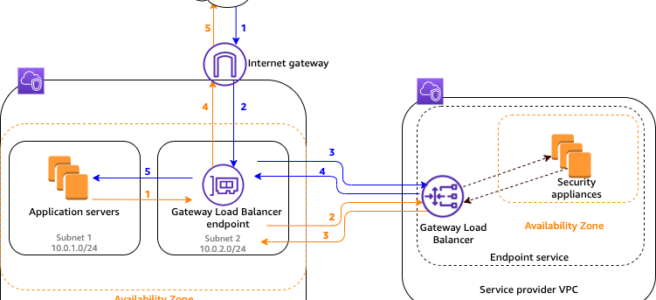
Gateway Load Balancer Flow

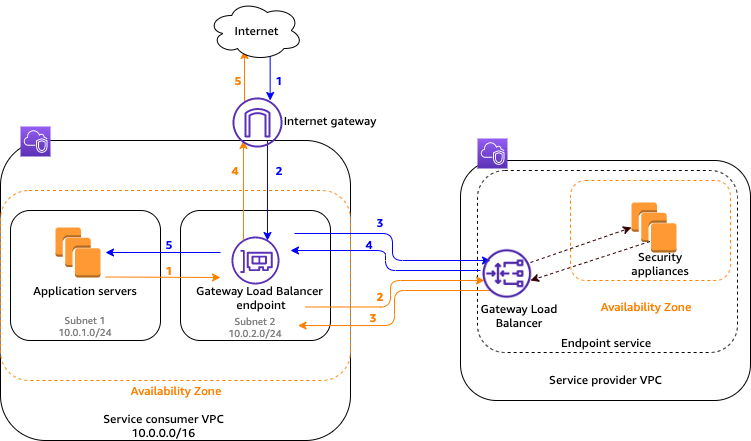
AWS Gateway Load Balancer GWLB

Traffic from the internet to the application (blue arrows)

  • Traffic enters the service consumer VPC through the internet gateway.
  • Traffic is sent to the GWLBE, as a result of VPC ingress routing.
  • Traffic is sent to the GWLB for inspection through the security appliance.
  • Traffic is sent back to the GWLBE after inspection.
  • Traffic is sent to the application servers (destination subnet).

Traffic from the application to the internet (orange arrows):

  • Traffic is sent to the Gateway Load Balancer endpoint due to the default route configured on the application server subnet.
  • Traffic is sent to the GWLB for inspection through the security appliance.
  • Traffic is sent back to the GWLBE after inspection.
  • Traffic is sent to the internet gateway based on the route table configuration.
  • Traffic is routed back to the internet.

Gateway Load Balancer High Availability

AWS Gateway Load Balancer HA

Gateway Load Balancer LCU Reservations

  • Load Balancer Capacity Unit (LCU) Reservation allows proactively setting a minimum bandwidth capacity for the GWLB, complementing its existing ability to auto-scale based on traffic patterns. (Launched April 2025)
  • Useful for preparing for sharp traffic increases due to planned events such as traffic migrations or product launches.
  • Capacity is reserved at the regional level and is evenly distributed across availability zones.
  • Ensure enough evenly distributed targets in each AZ before enabling LCU reservation.
  • CloudWatch metrics PeakBytesPerSecond and ReservedLCUs can be used to monitor utilization.

Gateway Load Balancer Deployment Architectures

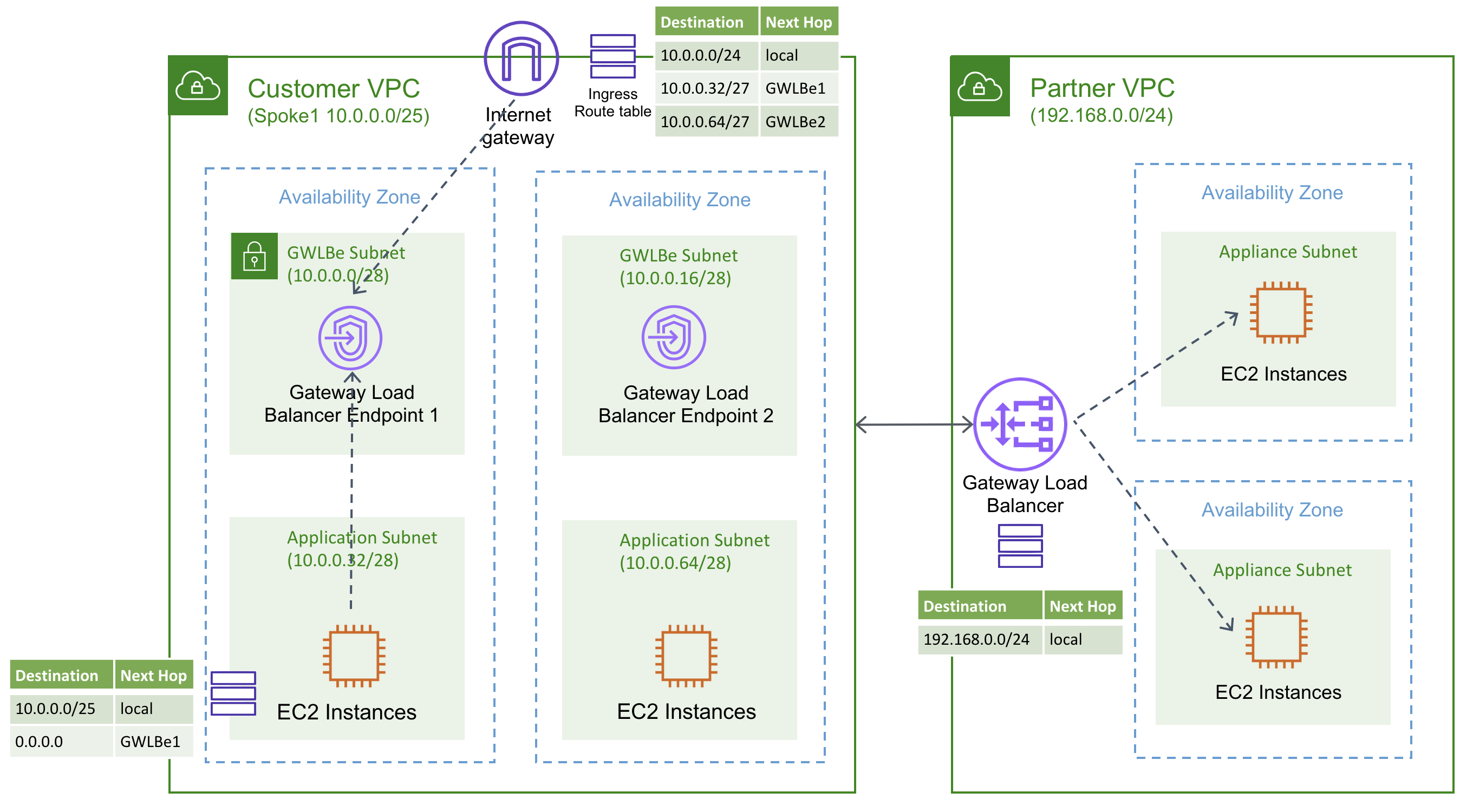
  • Distributed model – GWLB and GWLBE in same VPC as applications; inspection happens locally per VPC.
  • Centralized model with Transit Gateway – GWLB deployed in a shared security VPC; spoke VPCs route traffic through Transit Gateway to the inspection VPC. Requires Transit Gateway appliance mode to ensure flow symmetry.
  • Centralized model with AWS Cloud WAN Service Insertion – AWS Cloud WAN service insertion (launched June 2024) simplifies integrating GWLB-backed security appliances into global networks without static routes, supporting both same-segment and cross-segment traffic inspection.
  • VGW Ingress Routing model – Direct steering of on-premises ingress traffic (via VPN/Direct Connect) through GWLBE for inspection without requiring Transit Gateway.

Amazon VPC Route Server Integration

  • Amazon VPC Route Server (GA April 2025) enables dynamic routing within VPC using BGP, providing an alternative to static route table management for appliance-based architectures.
  • Virtual appliances (firewalls) behind GWLB can peer with VPC Route Server via BGP, enabling dynamic route propagation and automatic active/standby failover using AS-path prepending.
  • Reduces manual route management overhead and enables faster failover compared to static routing approaches.

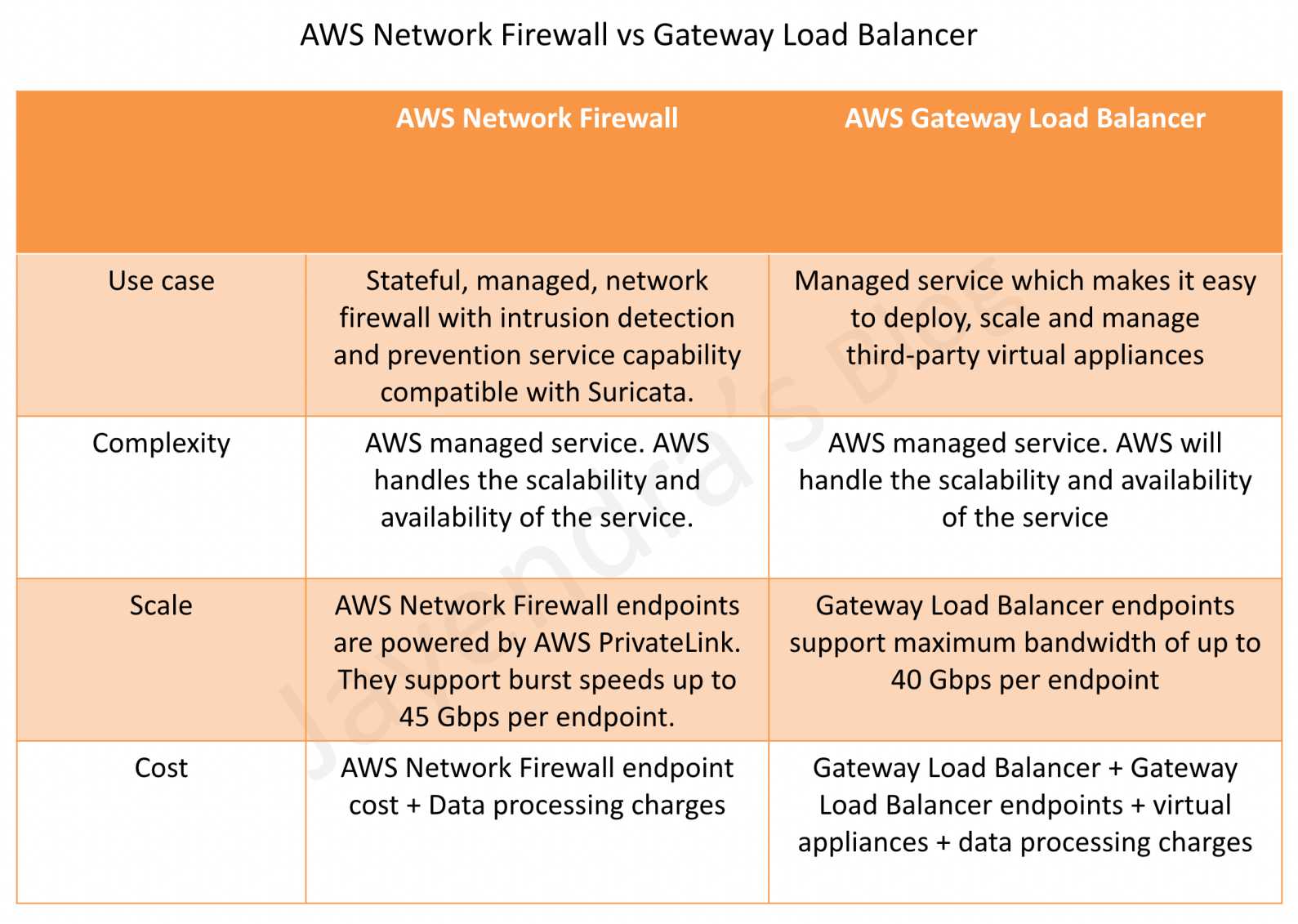
AWS Gateway Load Balancer vs Network Firewall

AWS Network Firewall vs Gateway Load Balancer

AWS Certification Exam Practice Questions

  • Questions are collected from Internet and the answers are marked as per my knowledge and understanding (which might differ with yours).
  • AWS services are updated everyday and both the answers and questions might be outdated soon, so research accordingly.
  • AWS exam questions are not updated to keep up the pace with AWS updates, so even if the underlying feature has changed the question might not be updated
  • Open to further feedback, discussion and correction.
  1. A company uses third-party firewall appliances for traffic inspection across multiple VPCs. The firewalls are deployed in a centralized security VPC. The company needs to automatically scale the firewall fleet based on traffic demand while maintaining flow symmetry to the same appliance. Which AWS service should the company use?
    1. AWS Network Firewall
    2. Network Load Balancer with UDP listener
    3. AWS Gateway Load Balancer
    4. Application Load Balancer with IP targets

    Answer: 3. GWLB is designed specifically to deploy, scale, and manage third-party virtual appliances while maintaining flow stickiness.

  2. A security team has deployed firewall appliances behind a Gateway Load Balancer. The firewalls have a TCP idle timeout of 3600 seconds. Users report intermittent connectivity issues for long-running database connections that go idle. What should the team do to resolve this issue?
    1. Enable cross-zone load balancing on the GWLB
    2. Configure the GWLB TCP idle timeout to a value higher than the firewall’s timeout (e.g., 3700 seconds)
    3. Switch from 5-tuple to 2-tuple flow stickiness
    4. Enable Target Failover on the GWLB target group

    Answer: 2. The configurable TCP idle timeout (60-6000 seconds) allows alignment with the firewall’s timeout to prevent flows from being rerouted to different targets.

  3. A company wants to inspect traffic entering their VPC from on-premises networks via AWS Direct Connect. They want to use third-party firewall appliances behind a Gateway Load Balancer without using Transit Gateway. What feature enables this?
    1. VPC Peering with GWLBE as route target
    2. Virtual Private Gateway ingress routing to GWLBE
    3. AWS PrivateLink with GWLBE
    4. VPC Flow Logs with GWLB integration

    Answer: 2. VGW ingress routing support (August 2023) allows specifying GWLBE as the next-hop in the VGW route table.

  4. An organization needs to perform maintenance on firewall appliances registered as Gateway Load Balancer targets. They want existing connections to be gracefully moved to healthy targets when an appliance is deregistered. Which feature should they enable?
    1. Connection Draining
    2. Target Failover
    3. Cross-zone load balancing
    4. Deregistration Delay

    Answer: 2. Target Failover allows GWLB to rebalance existing flows to healthy targets when the original target fails or is deregistered.

  5. A company wants to centralize network traffic monitoring using third-party tools deployed behind a Gateway Load Balancer. They need to mirror traffic from EC2 instances in spoke VPCs to the monitoring appliances. What is the recommended approach?
    1. Configure VPC Flow Logs to the GWLB target group
    2. Use VPC Traffic Mirroring with GWLBE as the mirror target
    3. Enable packet capture on the GWLB listener
    4. Configure Transit Gateway flow logs to the monitoring VPC

    Answer: 2. GWLBE can be used as a VPC Traffic Mirroring target, enabling centralized traffic monitoring behind GWLB.

  6. A company expects a significant traffic spike next week due to a planned migration event. They want to ensure their Gateway Load Balancer can handle the increased load immediately without waiting for auto-scaling. What should they do?
    1. Increase the number of registered targets
    2. Enable cross-zone load balancing
    3. Configure LCU Reservations on the GWLB
    4. Create additional GWLB endpoints in more AZs

    Answer: 3. LCU Reservations (April 2025) allow proactively setting a minimum bandwidth capacity for the GWLB to prepare for planned traffic increases.

  7. Which of the following are valid flow stickiness options for AWS Gateway Load Balancer? (Select TWO)
    1. 5-tuple (source IP, destination IP, protocol, source port, destination port)
    2. 4-tuple (source IP, destination IP, source port, destination port)
    3. 2-tuple (source IP, destination IP)
    4. 1-tuple (source IP only)
    5. 6-tuple (includes VLAN ID)

    Answer: 1, 3. GWLB supports 5-tuple (default), 3-tuple, and 2-tuple flow stickiness.

References

AWS Shield

AWS Shield

  • AWS Shield is a managed Distributed Denial of Service (DDoS) protection service that safeguards applications running on AWS.
  • AWS Shield provides always-on detection and automatic inline mitigations that minimize application downtime and latency.
  • AWS Shield now provides two key capabilities: AWS Shield network security director (preview) for proactive network posture analysis and AWS Shield Advanced for managed DDoS protection.
  • AWS Shield detects the following classes of attacks:
    • Network Volumetric Attacks (Layer 3)
      • This is a sub category of infrastructure layer attack vectors.
      • These vectors attempt to saturate the capacity of the targeted network or resource, to deny service to legitimate users.
    • Network Protocol Attacks (Layer 4)
      • This is a sub category of infrastructure layer attack vectors.
      • These vectors abuse a protocol to deny service to the targeted resource.
      • A common example of a network protocol attack is a TCP SYN flood, which can exhaust connection state on resources like servers, load balancers, or firewalls.
      • A network protocol attack can also be volumetric for e.g., a larger TCP SYN flood may intend to saturate the capacity of a network while also exhausting the state of the targeted resource or intermediate resources.
    • Application Layer Attacks (Layer 7)
      • This category of attack vector attempts to deny service to legitimate users by flooding an application with queries that are valid for the target, such as web request floods.

AWS Shield Tiers

AWS Shield Standard

  • provides automatic protections to all customers at no additional charge.
  • defends against the most common, frequently occurring network and transport layer DDoS attacks that target websites or applications.
  • with CloudFront and Route 53, comprehensive availability protection against all known infrastructure (Layer 3 and 4) attacks is provided.
  • uses techniques such as deterministic packet filtering and priority-based traffic shaping to automatically mitigate basic network layer attacks.
  • provides always-on network flow monitoring, which inspects incoming traffic to AWS services and applies a combination of traffic signatures, anomaly algorithms, and other analysis techniques to detect malicious traffic in real time.
  • sets static thresholds for each AWS resource type but does not provide customized protection for individual applications.

AWS Shield Advanced

  • is a managed service that helps protect the application against external threats, like DDoS attacks, volumetric bots, and vulnerability exploitation attempts.
  • provides additional detection and mitigation against large and sophisticated DDoS attacks, near real-time visibility into attacks.
  • protects resources including Amazon CloudFront distributions, Amazon Route 53 hosted zones, AWS Global Accelerator standard accelerators, Elastic IP addresses, Application Load Balancers, and Classic Load Balancers.
  • EC2 instances and Network Load Balancers can be protected by association with protected Elastic IP addresses.
  • allows up to 1,000 resources per resource type per AWS account.
  • provides integration with AWS WAF at no additional charge. Shield Advanced subscribers receive up to 50 billion AWS WAF requests per calendar month for WAF-protected resources.
  • also gives 24×7 access to the AWS Shield Response Team (SRT) and protection against DDoS related spikes in the EC2, ELB, CloudFront, AWS Global Accelerator and Route 53 charges.
  • provides DDoS cost protection to safeguard against scaling charges resulting from DDoS-related usage spikes on protected resources.
  • in addition to the network and transport layer attacks, it also detects application layer (Layer 7) attacks such as HTTP floods or DNS query floods by baselining traffic on the application and identifying anomalies.
  • is available globally on all CloudFront, Global Accelerator, and Route 53 edge locations.
  • includes centralized protection management using Firewall Manager (included at no extra cost with Shield Advanced subscription), that can automatically
    • configure policies covering multiple accounts and resources
    • audit accounts to find new or unprotected resources, and ensure that Shield Advanced and AWS WAF protections are universally applied.
  • provides complete visibility into DDoS attacks with near real-time notification through CloudWatch and detailed diagnostics on the AWS WAF and AWS Shield console or APIs.

Shield Advanced – Customized Detection

  • provides customized detection based on traffic patterns to protected Elastic IP addresses, ELB, CloudFront, Global Accelerator, and Route 53 resources.
  • uses additional monitoring techniques for individual regions and resources to detect smaller DDoS attacks and alert about them.
  • detects application layer DDoS attacks by baselining incoming traffic and identifying anomalies.

Shield Advanced – Health-Based Detection

  • uses health check data from Route 53 to improve responsiveness, detection accuracy, and mitigation speed.
  • associate a Route 53 health check with a Shield Advanced-protected resource through the console or API.
  • enables Shield Advanced to detect attacks faster using lower traffic thresholds, improving application DDoS resilience and preventing false alerts.
  • resource health status is also available to the SRT to help prioritize remediation of unhealthy applications.
  • can be used with all Shield Advanced-supported resource types.

Shield Advanced – Protection Groups

  • allows you to bundle resources into protection groups, treating multiple resources as a single unit for detection and mitigation.
  • grouping resources improves detection accuracy, reduces false positives, simplifies automatic protection of newly created resources, and accelerates mitigation.
  • for example, if an application has four CloudFront distributions, they can be added to one protection group for unified detection and protection.
  • reporting can be collected at the protection group level for a holistic view of overall application health.

Shield Advanced – Proactive Engagement

  • provides proactive engagement from the SRT after DDoS events are detected.
  • when enabled, if a Route 53 health check shows your protected resource as unhealthy during a DDoS attack, the SRT contacts you directly.
  • can be enabled for network and transport layer events on Elastic IP and Global Accelerator resources, and for application layer attacks on CloudFront distributions and Application Load Balancers.

Anti-DDoS Managed Rule Group (AMR) for AWS WAF

  • Launched in June 2025, the Anti-DDoS Managed Rule Group (AWSManagedRulesAntiDDoSRuleSet) is an AWS Managed Rule for AWS WAF that automatically detects and mitigates application layer (L7) DDoS events within seconds.
  • As of March 26, 2026, the Anti-DDoS AMR is the default solution for protection against HTTP request flood attacks, superseding the legacy Layer 7 Auto Mitigation (L7AM) feature.
  • Existing Shield Advanced customers can continue using the legacy L7AM but are encouraged to adopt the Anti-DDoS AMR for faster detection (seconds vs. minutes).
  • The AMR learns traffic patterns and establishes baselines for each protected resource within minutes of activation.
  • Uses machine learning models to identify traffic anomalies and assigns suspicion scores to requests for use in mitigations.
  • Supports resources behind Amazon CloudFront, Application Load Balancer (ALB), and API Gateway.
  • For Shield Advanced customers, the AMR is included in the subscription. It is also available as a pay-as-you-go alternative for non-Shield Advanced customers.
  • Provides configurable sensitivity settings and URI-path-specific protection.
  • When a DDoS event is detected, the AMR adds labels (event-detected, ddos-request) to requests for custom downstream handling.

DDoS Attack Flow Logs (2026)

  • Announced May 2026, AWS Shield Advanced now provides DDoS attack flow logs for forensic analysis and compliance.
  • Captures critical packet-level details during active attacks, including:
    • Source and destination IP addresses
    • Ports and protocols
    • Packet and byte counts
    • Source country information
  • Log data is automatically published to your chosen destination (Amazon S3, CloudWatch Logs, or Amazon Data Firehose) at 5-minute intervals during active attacks.
  • Enables you to pinpoint attack sources, verify mitigations, and feed existing analysis pipelines.
  • Helps organizations reconstruct attack patterns and verify mitigation effectiveness without additional infrastructure.

AWS Shield Network Security Director (Preview)

  • Announced June 2025, AWS Shield network security director is a new capability that provides proactive network security posture analysis.
  • Discovers resources across AWS accounts, identifies connectivity between resources, and determines which network security services and configurations are in place.
  • Key capabilities:
    • Network Topology Visualization – provides a complete view of your AWS environment with resource connectivity, security configurations, and potential security issues. Resources are grouped by tags and connectivity patterns.
    • Prioritized Findings Dashboard – assigns severity levels (NONE, INFORMATIONAL, LOW, MEDIUM, HIGH, CRITICAL) based on identified network security issues, considering network context, AWS best practices, and threat intelligence.
    • Remediation Recommendations – provides step-by-step instructions to fix identified misconfigurations in services like AWS WAF, VPC security groups, and VPC network ACLs.
    • Amazon Q Integration – analyze network security issues using natural language through Amazon Q Developer.
  • Supports multi-account analysis (added December 2025).
  • Findings are available in AWS Security Hub (added March 2026).
  • Does not require a Shield Advanced subscription.

AWS Certification Exam Practice Questions

  • Questions are collected from Internet and the answers are marked as per my knowledge and understanding (which might differ with yours).
  • AWS services are updated everyday and both the answers and questions might be outdated soon, so research accordingly.
  • AWS exam questions are not updated to keep up the pace with AWS updates, so even if the underlying feature has changed the question might not be updated
  • Open to further feedback, discussion and correction.
  1. Which AWS service has inbuilt DDoS protection?
    1. AWS Shield
    2. AWS CloudWatch
    3. AWS EC2
    4. AWS Inspector
  2. A media company has monetized their APIs to external third parties. During the last month, the platform has come under DDoS attacks multiple times leading to scaling of underlying instances and cost incurred. Which AWS service would help provide cost protection against such spikes, if such situations do occur in the future?
    1. AWS Systems Manager
    2. AWS WAF
    3. AWS Shield Advanced
    4. AWS Inspector
  3. A company is hosting an important revenue generating application. On the last few occasions, the application has come under large DDoS attacks. As a result of this, a lot of users were complaining about the slowness of the application. You need to now avoid these situations in the future and now require 24×7 support from AWS if such situations do occur in the future. Which of the following service can help in this regard?
    1. AWS Shield Advanced
    2. AWS Inspector
    3. AWS WAF
    4. AWS Systems Manager
  4. A company wants to automatically detect and mitigate Layer 7 DDoS attacks on their web application within seconds without manual rule configuration. Which solution provides the fastest automated response?
    1. AWS WAF rate-based rules
    2. AWS Shield Standard
    3. AWS WAF Anti-DDoS Managed Rule Group (AMR)
    4. AWS Network Firewall
  5. A security team needs packet-level visibility into DDoS attack traffic targeting their Shield Advanced-protected resources for forensic analysis. Which feature should they enable?
    1. VPC Flow Logs
    2. AWS CloudTrail
    3. Shield Advanced DDoS Attack Flow Logs
    4. AWS WAF logging
  6. An organization wants to proactively identify missing or misconfigured network security services across their AWS accounts and receive remediation guidance. Which AWS Shield capability should they use?
    1. Shield Advanced Protection Groups
    2. AWS Firewall Manager
    3. AWS Shield Network Security Director
    4. AWS Security Hub
  7. A company has multiple CloudFront distributions serving their e-commerce application and wants Shield Advanced to treat them as a single unit for DDoS detection and mitigation. What feature should they use?
    1. AWS WAF rule groups
    2. AWS Firewall Manager policies
    3. Shield Advanced Protection Groups
    4. CloudFront origin groups
  8. A company wants the AWS Shield Response Team (SRT) to automatically contact them when a DDoS event is detected and their application becomes unhealthy. What must they configure? (Choose 2)
    1. Enable Proactive Engagement in Shield Advanced
    2. Associate a Route 53 health check with the protected resource
    3. Configure AWS CloudWatch alarms
    4. Subscribe to AWS Business Support only

References

AWS ACM – Certificate Manager & SSL/TLS

AWS Certificate Manager

AWS Certificate Manager – ACM

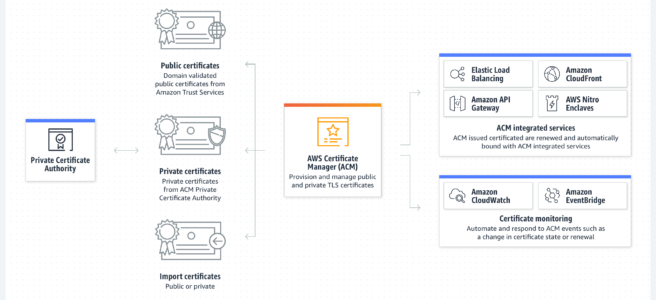
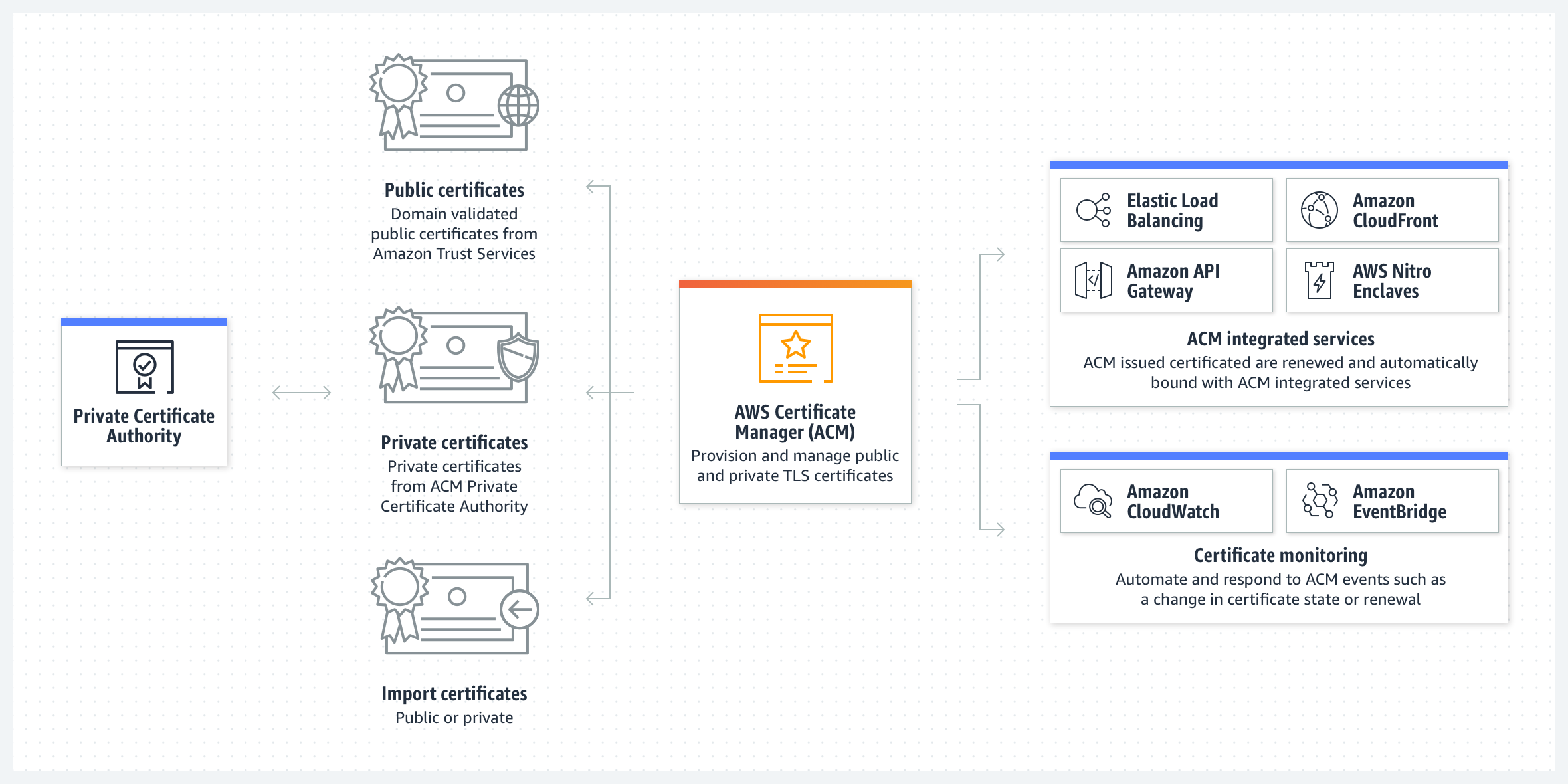
  • AWS Certificate Manager (ACM) helps easily provision, manage, and deploy public and private SSL/TLS certificates for use with AWS services and internal connected resources.
  • ACM removes the time-consuming manual process of purchasing, uploading, and renewing SSL/TLS certificates.
  • ACM can help quickly request a certificate, deploy it on ACM-integrated AWS resources, such as ELB, CloudFront distributions, APIs on API Gateway, and AWS App Runner, and handle certificate renewals.
  • ACM supports importing third-party certificates into the ACM management system.
  • ACM also supports the creation of private certificates for the internal resources and manages the certificate lifecycle centrally via AWS Private Certificate Authority (AWS Private CA), previously known as ACM Private CA.
  • ACM certificates are regional resources.
  • Public ACM certificates are now valid for 198 days (reduced from 395 days in Feb 2026) to comply with the CA/Browser Forum mandate.
  • ACM automatically renews managed certificates before expiry — no customer intervention is required.
  • ACM supports Certificate Transparency (CT) logging for public certificates, which helps detect misissued certificates.

AWS Certificate Manager

ACM Certificate Validity

  • As of February 2026, all new and renewed public ACM certificates have a default validity of 198 days (previously 395 days/13 months).
  • This change complies with the CA/Browser Forum mandate requiring certificates to be no longer than 200 days starting March 15, 2026.
  • Existing certificates with 395-day validity continue to be valid until they renew or expire.
  • ACM continues to auto-renew certificates before expiry — renewal is attempted 45 days before expiration.
  • The CA/Browser Forum has approved further reductions: 47-day certificate lifetimes will phase in by March 2029.
  • Exportable public certificates retain a 395-day validity period.

ACM Domain Validation Methods

  • DNS Validation — ACM uses CNAME records to validate domain ownership. Supports automatic renewal and is recommended for domains hosted in Route 53.
  • Email Validation — ACM sends validation emails to registered domain contacts. Requires manual action for each renewal.
  • HTTP Validation (Apr 2025) — Available for certificates used with CloudFront. Uses HTTP redirects to prove domain ownership and supports automatic renewal similar to DNS validation. Does not support wildcard certificates.

ACM Exportable Public Certificates

  • Launched in June 2025, ACM now supports exportable public SSL/TLS certificates that can be used on any workload — including EC2 instances, containers, on-premises hosts, and non-AWS environments.
  • You can export the certificate along with its private key for deployment anywhere.
  • Exportable public certificates are valid for 395 days.
  • ACM automatically renews exportable certificates 45 days before expiration.
  • Pricing: $15 per fully qualified domain name (FQDN), $149 per wildcard name.
  • Certificates created prior to June 17, 2025 cannot be exported.
  • This eliminates the previous limitation that ACM certificates could only be used with integrated AWS services.

AWS Workload Credentials Provider

  • Launched in June 2026, AWS Workload Credentials Provider is a lightweight client-side tool that automates the deployment of exported ACM certificates.
  • It periodically retrieves certificates and their private keys, writes them to configured paths, and optionally runs a command to reload dependent services (e.g., web servers).
  • Works across both AWS and non-AWS workloads.
  • Also supports local caching of secrets from AWS Secrets Manager.
  • Eliminates the need for manual certificate deployment after ACM renewal.

ACM Integrated Services

  • Elastic Load Balancing (ELB) — Deploy ACM certificates on Application, Network, and Classic Load Balancers.
  • Amazon CloudFront — Deploy ACM certificates on CloudFront distributions. Certificate must be requested/imported in US East (N. Virginia) region.
  • Amazon API Gateway — Use ACM certificates for custom domain names.
  • Amazon Elastic Kubernetes Service (EKS) — Use ACM with AWS Controllers for Kubernetes (ACK) to issue and export TLS certificates to Kubernetes workloads (Dec 2025).
  • Amazon Cognito — Use ACM certificates for custom domains.
  • AWS Elastic Beanstalk — Deploy ACM certificates on Elastic Beanstalk environments.
  • AWS Nitro Enclaves — Public ACM certificates can be installed on EC2 instances connected to Nitro Enclaves.
  • AWS CloudFormation — ACM certificates can be provisioned as CloudFormation template resources.
  • AWS Amplify — When connecting a custom domain, Amplify issues an ACM certificate automatically.
  • Amazon OpenSearch Service — Use ACM certificates with custom domain endpoints.
  • AWS Network Firewall — ACM certificates for TLS inspection (decryption and re-encryption).
  • AWS App Runner — Use ACM certificates for custom domains.

ACM Post-Quantum TLS Support

  • As of April 2025, ACM endpoints support ML-KEM (Module-Lattice-Based Key-Encapsulation Mechanism) for hybrid post-quantum key agreement.
  • This protects against “harvest now, decrypt later” attacks where encrypted traffic is stored for future decryption by quantum computers.
  • Hybrid post-quantum TLS combines ML-KEM with traditional key exchange methods for defense-in-depth.
  • AWS plans to deploy ML-KEM support to all AWS services with HTTPS endpoints over time.

ACM Certificate Authority Changes

  • Starting August 2024, public certificates issued from ACM terminate at the Starfield Services G2 root (previously cross-signed with Starfield Class 2).
  • This change aligns with AWS’s move to its own certificate authority infrastructure.
  • As of June 11, 2025, ACM no longer issues certificates with the “TLS Web Client Authentication” (clientAuth) Extended Key Usage (EKU) to align with Chrome Root Program requirements.
  • Customers using ACM certificates for mutual TLS (mTLS) client authentication should use AWS Private CA certificates instead.

ACM Limitations

  • Does not provide certificates for anything other than the SSL/TLS protocols.
  • Cannot use certificates for email encryption.
  • Cannot request certificates for Amazon-owned domain names such as those ending in amazonaws.com, cloudfront.net, or elasticbeanstalk.com.
  • Cannot download the private key for a non-exportable ACM certificate (certificates created before June 17, 2025).
  • Cannot directly install non-exportable certificates on EC2 instances (unless connected to Nitro Enclaves or using exportable certificates).
  • ACM certificates are regional resources — you cannot copy a certificate between regions. To use a certificate with ELB for the same FQDN in more than one region, you must request or import a certificate for each region.
  • With CloudFront, you must request or import the certificate in the US East (N. Virginia) region.
  • ACM no longer issues certificates with clientAuth EKU — use AWS Private CA for mTLS client certificates.
  • HTTP validation does not support wildcard certificates.

AWS Private Certificate Authority (AWS Private CA)

  • AWS Private CA (previously ACM Private Certificate Authority) is a managed private CA service for creating and maintaining internal PKI.
  • Enables issuance of private certificates for internal resources without the overhead of managing your own CA.
  • Secured with AWS-managed hardware security modules (HSMs).
  • Supports short-lived certificates, certificate revocation lists (CRLs), and OCSP.
  • Integrated with ACM for certificate lifecycle management.
  • Use AWS Private CA for mTLS client authentication, IoT device certificates, and internal service mesh communication.

AWS Certification Exam Practice Questions

  • Questions are collected from Internet and the answers are marked as per my knowledge and understanding (which might differ with yours).
  • AWS services are updated everyday and both the answers and questions might be outdated soon, so research accordingly.
  • AWS exam questions are not updated to keep up the pace with AWS updates, so even if the underlying feature has changed the question might not be updated
  • Open to further feedback, discussion and correction.
  1. A company hosts an online shopping portal in the AWS Cloud. The portal provides HTTPS security by using a TLS certificate on an ELB. Recently, the portal suffered an outage because the TLS certificate expired. A SysOps administrator must create a solution to automatically renew certificates to avoid this issue in the future. What is the MOST operationally efficient solution that meets these requirements?
    1. Request a public certificate by using AWS Certificate Manager. Associate the certificate from ACM with the ELB. Write a scheduled AWS Lambda function to renew the certificate every 18 months.
    2. Request a public certificate by using AWS Certificate Manager. Associate the certificate from ACM with the ELB. ACM will automatically manage the renewal of the certificate.
    3. Register a certificate with a third-party certificate authority (CA). Import this certificate into AWS Certificate Manager. Associate the certificate from ACM with the ELB. ACM will automatically manage the renewal of the certificate.
    4. Register a certificate with a third-party certificate authority (CA). Configure the ELB to import the certificate directly from the CA. Set the certificate refresh cycle on the ELB to refresh when the certificate is within 3 months of the expiration date.
  2. A company needs to deploy TLS certificates on multiple EC2 instances running web servers that are NOT behind a load balancer. The security team wants to use ACM to manage the certificates centrally. What is the recommended approach?
    1. Import third-party certificates into ACM and manually install them on EC2 instances.
    2. Use ACM certificates with Nitro Enclaves on each EC2 instance.
    3. Request exportable public certificates from ACM and use AWS Workload Credentials Provider to automate deployment.
    4. Install certificates directly from the ACM console onto EC2 instances.
  3. A company is migrating to shorter TLS certificate lifetimes. They currently use ACM-managed certificates with CloudFront and want to ensure zero downtime during certificate renewals. Which domain validation method should they choose? (Select TWO)
    1. DNS validation with CNAME records in Route 53
    2. Email validation with manual approval
    3. HTTP validation for CloudFront distributions
    4. Import certificates manually before expiration
    5. Use AWS Private CA for public-facing websites
  4. A company needs to secure internal microservices communication using mutual TLS (mTLS). They previously used ACM public certificates with the clientAuth EKU. After June 2025, this approach no longer works. What should they use instead?
    1. Import third-party certificates with clientAuth into ACM.
    2. Use AWS Private Certificate Authority (AWS Private CA) to issue private certificates with clientAuth EKU.
    3. Request exportable public certificates from ACM for mTLS.
    4. Use self-signed certificates on each service instance.
  5. A company runs Kubernetes workloads on Amazon EKS and needs to automate TLS certificate provisioning for pod-level encryption. Which ACM feature enables this?
    1. Associate ACM certificates directly with EKS pods using IAM roles.
    2. Use AWS App Mesh for automatic certificate injection.
    3. Use ACM with AWS Controllers for Kubernetes (ACK) to issue and export certificates to Kubernetes Secrets.
    4. Deploy Nitro Enclaves on EKS worker nodes.

References

AWS Secrets Manager

AWS Secrets Manager

AWS Secrets Manager

  • AWS Secrets Manager helps protect secrets needed to access applications, services, and IT resources.
  • enables you to easily rotate, manage, and retrieve database credentials, API keys, and other secrets throughout their lifecycle.
  • secure secrets by encrypting them with encryption keys managed using AWS KMS.
  • offers native secret rotation with built-in integration for RDS, Redshift, and DocumentDB.
  • supports Lambda functions to extend secret rotation to other types of secrets, including API keys and OAuth tokens.
  • supports IAM and resource-based policies for fine-grained access control to secrets and centralized secret rotation audit for resources in the AWS Cloud, third-party services, and on-premises.
  • enables secret replication in multiple AWS regions to support multi-region applications and disaster recovery scenarios.
  • supports private access using VPC Interface endpoints
  • supports dual-stack (IPv4 and IPv6) endpoints for all regions.
  • supports BatchGetSecretValue API to retrieve up to 20 secrets in a single API call, reducing latency and API call costs.
  • supports cost allocation tags to categorize and track secret costs by department, team, or application in AWS Cost Explorer.
  • supports hybrid post-quantum TLS using ML-KEM to protect secrets against future quantum computing threats.

AWS Secrets Manager

Secrets Manager with KMS

  • Encryption
    • encrypts a new version of the protected secret data by requesting AWS KMS to generate a new data key from the KMS key.
    • uses this data key for envelope encryption.
    • stores the encrypted data key with the protected secret data.
  • Decryption
    • requests AWS KMS to decrypt the encrypted data key
    • uses the plain text data key to decrypt the protected secret data.
    • never stores the data key in unencrypted form, and always disposes of the data key immediately after use.

Secrets Manager Rotation

  • AWS Secrets Manager enables database credential rotation on a schedule.
  • Supports rotation as frequently as every four hours, with configurable rotation windows using cron or rate expressions.
  • Rotation can be configured using:
    • Managed rotation – the service configures and manages rotation automatically without Lambda functions (supported for RDS, Aurora, Redshift, DocumentDB).
    • Lambda function rotation – for custom rotation logic using Lambda functions.
    • Managed external secrets rotation – for third-party credentials (e.g., Salesforce, MongoDB Atlas, Confluent Cloud) without Lambda functions.
  • Credentials rotation does not impact the already open connections as they are not re-authenticated. Authentication happens when a connection is established.
  • integrates with CloudWatch Events/EventBridge to send a notification when it rotates a secret.

Rotation Strategies

  • Single user rotation
    • Updates credentials for one user in one secret.
    • The user’s password is changed in both the secret and the database.
    • Recommended when cloned users don’t have the same permissions, or for ad hoc/interactive users.
    • Brief period of potential sign-in failure between rotation and propagation.
  • Alternating users rotation
    • Creates a clone user with identical privileges but different password.
    • Alternates between two users on each rotation.
    • Requires a separate secret with superuser credentials.
    • Provides higher availability as the old version remains valid until next rotation.

Managed External Secrets

  • Introduced in November 2025, managed external secrets extend managed rotation to third-party SaaS credentials.
  • Enables centralized management and automatic rotation of credentials for third-party software providers directly from Secrets Manager.
  • No Lambda functions required – rotation is fully managed by Secrets Manager.
  • Supports standardized formats and multiple rotation strategies per SaaS provider.
  • Supported providers include Salesforce, MongoDB Atlas, and Confluent Cloud (expanding).
  • Eliminates the need for provider-specific custom rotation logic.

Secrets Manager Agent & Workload Credentials Provider

  • Secrets Manager Agent (released July 2024)
    • Language-agnostic local HTTP service that pulls and caches secrets in compute environments.
    • Exposes a localhost endpoint (port 2773) for applications to retrieve secrets from in-memory cache.
    • Reduces API calls and improves application availability.
    • Default cache TTL of 300 seconds (configurable).
    • Open source and supports pre-fetching secrets at startup and IAM role assumption (May 2026).
    • Supports hybrid post-quantum TLS (ML-KEM) by default since version 2.0.
    • Works with EC2, ECS, EKS, Lambda, and on-premises/multi-cloud environments.
  • AWS Workload Credentials Provider (released June 2026)
    • Unified lightweight client-side provider that automates deployment of ACM certificates and caching of Secrets Manager secrets.
    • Maintains full backwards compatibility with Secrets Manager Agent.
    • Works across AWS and non-AWS workloads through a single unified provider.
    • Uses post-quantum ML-KEM key exchange by default.

Secrets Manager Security Features

  • Post-Quantum TLS
    • Supports hybrid post-quantum key exchange using ML-KEM (Module-Lattice-based Key-Encapsulation Mechanism) for TLS connections.
    • Combines traditional cryptography (X25519) with post-quantum algorithms to protect against “harvest now, decrypt later” threats.
    • Service-side support launched in 2025; client-side support extended in April 2026.
    • Secrets at rest are already quantum-safe (symmetric encryption via KMS).
  • API Rate Limits (March 2025)
    • GetSecretValue: up to 10,000 requests per second
    • DescribeSecret: up to 40,000 requests per second
  • Managed Policies
    • SecretsManagerReadWrite – full access including redshift-serverless permission (March 2024).
    • AWSSecretsManagerClientReadOnlyAccess – read-only access for client applications, includes BatchGetSecretValue and ListSecrets (November 2025, updated June 2026).

Client-Side Caching

  • Caching libraries available for Java, Python, .NET, Go, and Rust.
  • Improves speed, availability, and reduces costs by minimizing API calls.
  • Default cache refresh interval is one hour (configurable).
  • Does not include cache invalidation – if a secret rotates before TTL expires, stale values may be returned.
  • For containerized workloads, client-side caching allows credential rotation without restarting containers.

Secrets Manager vs Systems Manager Parameter Store

AWS Secrets Manager vs Systems Parameter Store

  • Key Differences:
    • Secrets Manager is designed specifically for secrets with built-in rotation; Parameter Store is a general-purpose configuration store.
    • Secrets Manager supports managed rotation (no Lambda needed for supported databases); Parameter Store requires custom Lambda for rotation.
    • Secrets Manager charges per secret ($0.40/month) and per API call ($0.05/10K calls); Parameter Store Standard tier is free.
    • Secrets Manager supports cross-region replication natively; Parameter Store does not.
    • Secrets Manager supports BatchGetSecretValue; Parameter Store supports GetParameters (up to 10).
  • AWS Recommendation (2025): Use Secrets Manager for secrets, Parameter Store for simple key-value configuration, and AWS AppConfig for feature flags and advanced dynamic configuration.

AWS Certification Exam Practice Questions

  • Questions are collected from Internet and the answers are marked as per my knowledge and understanding (which might differ with yours).
  • AWS services are updated everyday and both the answers and questions might be outdated soon, so research accordingly.
  • AWS exam questions are not updated to keep up the pace with AWS updates, so even if the underlying feature has changed the question might not be updated
  • Open to further feedback, discussion and correction.
  1. Which AWS service makes it easy for you to easily rotate, manage, and retrieve database credentials, API keys, and other secrets throughout their lifecycle?
    1. AWS WAF
    2. AWS Secrets Manager
    3. AWS Systems Manager
    4. AWS Shield
  2. A company uses Amazon RDS for PostgreSQL databases for its data tier. The company must implement password rotation for the databases. Which solution meets this requirement with the LEAST operational overhead?
    1. Store the password in AWS Secrets Manager. Enable automatic rotation on the secret.
    2. Store the password in AWS Systems Manager Parameter Store. Enable automatic rotation on the parameter.
    3. Store the password in AWS Systems Manager Parameter Store. Write an AWS Lambda function that rotates the password.
    4. Store the password in AWS Key Management Service (AWS KMS). Enable automatic rotation on the customer master key (CMK).
  3. A company has multiple applications that retrieve database credentials from AWS Secrets Manager at a high rate, causing throttling. Which approach should the company use to address this issue with MINIMAL code changes?
    1. Increase the Secrets Manager service quota for API calls.
    2. Implement client-side caching using the Secrets Manager caching library or deploy the Secrets Manager Agent for local caching.
    3. Store credentials in Systems Manager Parameter Store instead.
    4. Replicate the secrets to additional regions and distribute read traffic.
  4. A company needs to manage and rotate credentials for multiple third-party SaaS applications (Salesforce, MongoDB Atlas) with the LEAST operational overhead. Which approach should they use?
    1. Write custom Lambda rotation functions for each SaaS provider.
    2. Store credentials in Parameter Store and use EventBridge rules for rotation.
    3. Use AWS Secrets Manager managed external secrets for automated rotation without Lambda functions.
    4. Build a custom rotation service running on ECS.
  5. A company wants to protect its secrets in transit against future quantum computing threats. Which feature of AWS Secrets Manager addresses this requirement?
    1. Use customer-managed KMS keys for encryption at rest.
    2. Enable secret replication across multiple regions.
    3. Use hybrid post-quantum TLS with ML-KEM for Secrets Manager API connections.
    4. Enable automatic secret rotation every 4 hours.
  6. A company runs applications on-premises and in AWS. They need a language-agnostic way to retrieve secrets locally without modifying application code to use the AWS SDK. Which solution provides this capability?
    1. Use AWS Systems Manager Parameter Store with the SSM agent.
    2. Embed secrets in environment variables at deployment time.
    3. Deploy the AWS Secrets Manager Agent (or Workload Credentials Provider) for local HTTP-based secret retrieval with in-memory caching.
    4. Use AWS Lambda to periodically fetch and write secrets to a local file.

References

Envelope Encryption – KMS Data Key Encryption

Envelope Encryption

  • AWS KMS and Google Cloud KMS use a method called envelope encryption to protect the data.
  • Envelope encryption is an optimized method for encrypting data that uses two (or more) different keys — a Key Encryption Key (KEK) and a Data Encryption Key (DEK).
  • Master key is also known as Key Encryption Key – KEK and Data key is also known as Data Encryption Key – DEK.
  • Envelope encryption reduces the network load for the application or the cloud service as only the request and fulfillment of the much smaller data key through KMS must go over the network.
  • The data key is used locally by the encrypting service, avoiding the need to send the entire block of data to KMS and suffer network latency.
  • KMS can encrypt at most 4 KB of data directly. Envelope encryption allows encrypting arbitrarily large payloads by using locally generated data keys.
  • Envelope encryption can reduce KMS-related costs by up to 99% by minimizing the number of KMS API calls — only the data key wrapping/unwrapping goes through KMS, while encryption/decryption of actual data happens locally.

Envelope encryption key hierarchy

Root Key

  • A root key is an encryption key that is used to encrypt other encryption keys, such as data keys and key encryption keys. Unlike data keys and key encryption keys, root keys must be kept in plaintext so they can be used to decrypt the keys that they encrypted.
  • Key Management Service (KMS) generates and protects the root keys within FIPS 140-2 (AWS) or FIPS 140-3 (latest) validated Hardware Security Modules (HSMs).
  • In AWS KMS, root keys are referred to as KMS keys (previously called Customer Master Keys or CMKs — the CMK term was deprecated in August 2021).

Key Encryption Key – KEK

  • A key encryption key is an encryption key that is used to encrypt a data key or another key encryption key.
  • Key encryption key is encrypted (wrapped) by using a root key.
  • In Google Cloud KMS, the KEK is the Cloud KMS key used to wrap (encrypt) the DEK. The KEK never leaves Cloud KMS.

Data Encryption Key – DEK

  • A data key or data encryption key is an encryption key that is used to protect data.
  • Data keys differ from root keys and key encryption keys, which are typically used to encrypt other encryption keys.
  • Best practice is to use a strong algorithm such as 256-bit Advanced Encryption Standard (AES) in Galois Counter Mode (GCM) for DEKs.
  • A new DEK should be generated every time data is written — this eliminates the need to rotate DEKs separately.
  • DEKs should always be stored encrypted (wrapped by a KEK) and near the data they encrypt for easy access.

Envelope Encryption Process

  • Encryption
    • Create a KMS key (root/master key) in your KMS service.
    • Generate a data key using the KMS API (e.g., AWS KMS GenerateDataKey API).
    • KMS returns both the plaintext data key and the encrypted (ciphertext) data key.
    • Use the plaintext data key locally to encrypt the data.
    • Store the encrypted data key alongside the encrypted data.
    • Immediately discard the plaintext data key from memory.
  • Decryption
    • Retrieve the ciphertext data key and encrypted data from storage.
    • Call KMS Decrypt API to decrypt the ciphertext data key using the KMS key. The plaintext data key is returned.
    • Use the plaintext data key to decrypt the data locally.
    • Discard the plaintext data key from memory after use.
  • Encrypting the data key is more efficient than re-encrypting the data under the new key because it is quicker and produces a much smaller ciphertext.

Envelope Encryption Benefits

  • Protecting data keys
    • When you encrypt a data key, you don’t have to worry about storing the encrypted data key, because the data key is inherently protected by encryption. You can safely store the encrypted data key alongside the encrypted data.
  • Encrypting the same data under multiple keys
    • Encryption operations can be time-consuming, particularly when the data being encrypted are large objects.
    • Instead of re-encrypting raw data multiple times with different keys, you can re-encrypt only the data keys that protect the raw data.
  • Combining the strengths of multiple algorithms
    • In general, symmetric key algorithms are faster and produce smaller ciphertexts than public key algorithms.
    • But public key algorithms provide inherent separation of roles and easier key management.
    • Envelope encryption lets you combine the strengths of each strategy.
  • Performance and scalability
    • Only the small data key (typically 256 bits) needs to transit the network to KMS, not the large data payload.
    • Reduces latency since encryption/decryption of the actual data is performed locally.
    • Helps stay within KMS API request rate quotas for high-throughput workloads.
  • Overcoming the 4 KB KMS size limit
    • KMS keys can only directly encrypt data up to 4 KB. Envelope encryption removes this limitation by using locally generated data keys for the actual encryption.

AWS KMS Envelope Encryption APIs

  • GenerateDataKey — Returns a plaintext data key and a copy encrypted under the specified KMS key. Use this when you need to encrypt data immediately.
  • GenerateDataKeyWithoutPlaintext — Returns only the encrypted data key. Use this when you don’t need to encrypt data immediately but want to store a key for future use.
  • GenerateDataKeyPair — Returns an asymmetric data key pair (public key in plaintext, private key in plaintext and encrypted). Useful for client-side encryption where different parties encrypt/decrypt.
  • GenerateDataKeyPairWithoutPlaintext — Returns only the public key in plaintext and the private key encrypted.
  • Encrypt — Encrypts up to 4 KB of plaintext directly using a KMS key (not envelope encryption).
  • Decrypt — Decrypts a ciphertext that was encrypted by a KMS key, including encrypted data keys.

AWS Encryption SDK

  • The AWS Encryption SDK is a client-side encryption library that implements envelope encryption as a best-practice pattern.
  • It generates a unique symmetric data key for each encryption operation by default.
  • Supports multiple wrapping keys (KMS keys) — allowing the same data to be decryptable by multiple keys.
  • Includes key commitment — ensures the ciphertext can only be decrypted to a single plaintext (prevents ciphertext ambiguity attacks).
  • Data Key Caching — An optional feature that reuses data keys for multiple encryption operations to reduce KMS API calls and cost. Should be used cautiously with appropriate security thresholds (max age, max messages, max bytes).
  • Available for Java, Python, C, JavaScript, and .NET.

Key Rotation and Envelope Encryption

  • When a KMS key is rotated, only new data keys are encrypted with the new key material.
  • Previously encrypted data keys remain decryptable because AWS KMS retains all previous versions of the key material.
  • This means you do not need to re-encrypt all your data when rotating the KMS key — only the key wrapping changes for new operations.
  • AWS KMS Key Rotation Updates (April 2024):
    • Flexible automatic rotation periods — customizable between 90 days and 2,560 days (previously fixed at 365 days).
    • On-demand rotation — rotate key material immediately using RotateKeyOnDemand API, independent of the automatic rotation schedule.
    • Rotation visibility improvements — track rotation history and key material versions.
    • Cost capped at 2 rotations — $1/month is added for the first and second rotation; all subsequent rotations are free.
    • Imported key rotation (June 2025) — On-demand rotation is now supported for symmetric-encryption KMS keys with imported key material (EXTERNAL origin).

Post-Quantum Cryptography and Envelope Encryption

  • As quantum computing advances, organizations must prepare for potential threats to current cryptographic algorithms (store-now-harvest-later attacks).
  • AWS KMS Post-Quantum Support (2025):
    • ML-KEM (Module-Lattice Key Encapsulation Mechanism) — Post-quantum key exchange now supported in TLS connections to AWS KMS, ACM, and Secrets Manager (April 2025). Protects data in transit against future quantum threats.
    • ML-DSA (Module-Lattice Digital Signature Algorithm) — Post-quantum digital signatures supported in AWS KMS (June 2025). Enables quantum-resistant signing operations within FIPS 140-3 Level 3 certified HSMs.
  • Google Cloud KMS Post-Quantum Support (2025):
    • Announced support for quantum-safe Key Encapsulation Mechanisms (KEMs) in preview (June 2025).
    • Quantum-safe digital signatures available in Cloud KMS (February 2025).
  • While envelope encryption itself (symmetric AES-256-GCM for data) remains quantum-resistant, the key exchange and wrapping mechanisms need post-quantum upgrades.

KMS Key Storage Options

  • Standard KMS Key Store — Default option. Keys are stored and protected in multi-tenant FIPS-validated HSMs managed by AWS.
  • Custom Key Store (CloudHSM-backed) — Keys are stored in a dedicated AWS CloudHSM cluster you own and control. Provides single-tenant HSM with direct key control.
  • External Key Store (XKS) — Introduced November 2022. Keys are stored in an external key management system outside of AWS. Designed for regulated workloads requiring keys to remain outside AWS at all times. Key operations may have higher latency due to external dependencies.
  • Google Cloud EKM (External Key Manager) — Similar to AWS XKS, allows using keys managed by a supported external key manager with Google Cloud services.

Envelope Encryption in AWS Services

  • Amazon S3 — Uses envelope encryption for Server-Side Encryption with KMS (SSE-KMS). Each object is encrypted with a unique data key, which is wrapped by the KMS key.
  • Amazon EBS — Encrypts volumes using data keys wrapped by a KMS key. Supports default encryption for all new volumes.
  • Amazon RDS/Aurora — Uses envelope encryption for encryption at rest of databases, automated backups, snapshots, and read replicas.
  • Amazon DynamoDB — Encryption at rest uses envelope encryption with AWS managed or customer managed KMS keys.
  • AWS Secrets Manager — Encrypts secret values using envelope encryption with KMS keys.
  • Amazon EKS — Supports default envelope encryption for all Kubernetes API data (secrets). Uses KMS keys for encrypting data encryption keys at the Kubernetes layer.
  • Amazon MSK (Managed Streaming for Apache Kafka) — Supports envelope encryption with KMS for data at rest.

Google Cloud KMS Envelope Encryption

  • Google Cloud KMS uses a similar key hierarchy with DEKs and KEKs.
  • The Encrypt and Decrypt operations in Cloud KMS are limited to 64 KiB input size (vs 4 KB in AWS KMS).
  • For larger data, use envelope encryption with a local DEK wrapped by a Cloud KMS KEK.
  • Best practices for DEKs in Google Cloud:
    • Generate DEKs locally.
    • Always store DEKs encrypted at rest.
    • Store the DEK near the data it encrypts.
    • Generate a new DEK every time you write data.
    • Use AES-256-GCM cipher for data encryption.
  • Google Cloud offers client-side encryption with Tink library, which implements envelope encryption with Cloud KMS as the KEK provider.
  • Customer-Managed Encryption Keys (CMEK) — Allows control over encryption keys used by Google Cloud services, leveraging Cloud KMS for key management.
  • Customer-Supplied Encryption Keys (CSEK) — Available for Cloud Storage and Compute Engine; you supply your own AES-256 key as the KEK.

AWS Certification Exam Tips

  • Envelope encryption is a key topic for AWS Solutions Architect Associate (SAA-C03), AWS Security Specialty (SCS-C02), and AWS Developer Associate (DVA-C02) exams.
  • Understand the difference between direct KMS encryption (up to 4 KB) and envelope encryption (unlimited data size).
  • Know when to use GenerateDataKey vs Encrypt API — if data exceeds 4 KB, envelope encryption with GenerateDataKey is required.
  • Understand that the plaintext data key should be discarded from memory immediately after use.
  • Key rotation does not require re-encrypting existing data — old key material is retained for decryption.
  • Know the role of Encryption Context as additional authenticated data (AAD) that provides integrity and authenticity.

Practice Questions

  1. A company needs to encrypt files larger than 100 MB using AWS KMS. Which approach should they use?
    1. Use the KMS Encrypt API directly
    2. Split the file into 4 KB chunks and encrypt each with KMS
    3. Use envelope encryption with GenerateDataKey to create a data key, then encrypt the file locally
    4. Use AWS CloudHSM directly without KMS
    Show Answer

    Answer: c – KMS Encrypt can only handle up to 4 KB. Envelope encryption uses a locally generated data key for encrypting large files.

  2. In envelope encryption, what happens when the KMS key is rotated?
    1. All previously encrypted data must be re-encrypted
    2. All previously encrypted data keys must be re-wrapped
    3. Only new data keys are wrapped with the new key material; old data keys remain decryptable
    4. The rotation fails if there are existing encrypted data keys
    Show Answer

    Answer: c – AWS KMS retains all previous key material versions, so old data keys encrypted under older material can still be decrypted.

  3. Which AWS KMS API should be used to obtain a data key for envelope encryption when you need to encrypt data immediately?
    1. Encrypt
    2. GenerateDataKeyWithoutPlaintext
    3. GenerateDataKey
    4. CreateKey
    Show Answer

    Answer: c – GenerateDataKey returns both the plaintext and encrypted data key for immediate use. GenerateDataKeyWithoutPlaintext only returns the encrypted copy.

  4. What is the maximum data size that can be encrypted directly using the AWS KMS Encrypt API?
    1. 256 bytes
    2. 4 KB
    3. 64 KB
    4. 1 MB
    Show Answer

    Answer: b – The KMS Encrypt API can encrypt up to 4,096 bytes (4 KB) of plaintext directly.

  5. A developer wants to reduce AWS KMS API costs for an application that performs thousands of encryption operations per second. Which approach is recommended? (Select TWO)
    1. Use the AWS Encryption SDK with data key caching
    2. Call KMS Encrypt for each operation
    3. Implement envelope encryption to minimize KMS API calls
    4. Increase the KMS API request quota
    5. Use SSE-S3 instead of SSE-KMS
    Show Answer

    Answers: a, c – Data key caching reuses data keys to reduce KMS calls, and envelope encryption itself minimizes KMS interactions by using local encryption.

  6. Which statement about AWS KMS key rotation is correct as of 2024? (Select TWO)
    1. Automatic rotation can only occur every 365 days
    2. On-demand rotation is available via the RotateKeyOnDemand API
    3. Rotation periods can be customized between 90 and 2,560 days
    4. Key rotation requires re-encrypting all existing data
    5. Rotation is only supported for AWS managed keys
    Show Answer

    Answers: b, c – Since April 2024, AWS KMS supports flexible rotation periods (90-2,560 days) and on-demand rotation independent of automatic schedules.

References

AWS NLB – Network Load Balancer Features & Use Cases [2026]

AWS Network Load Balancer – NLB

  • Network Load Balancer – NLB operates at the connection level (Layer 4), routing connections to targets – EC2 instances, and containers based on IP protocol data.
  • NLB is suited for load balancing of TCP, UDP, TLS, and QUIC traffic.
  • NLB is capable of handling millions of requests per second while maintaining ultra-low latencies (~100 ms vs 400 ms for ALB)
  • NLB is optimized to handle sudden and volatile traffic patterns while using a single static IP address per Availability Zone.
  • NLB also supports TLS termination, preserves the source IP of the clients, and provides stable IP support and Zonal isolation.
  • NLB supports long-running connections that are very useful for WebSocket-type applications.
  • NLB is integrated with other AWS services such as Auto Scaling, EC2 Container Service (ECS), CloudFormation, and AWS Certificate Manager (ACM).
  • NLB supports connections from clients over VPC peering, AWS-managed VPN, Direct Connect, and third-party VPN solutions.
  • NLB now supports security groups (since Aug 2023), enabling filtering of traffic that NLB accepts and forwards to applications.
  • For TCP traffic,
    • the load balancer selects a target using a flow hash algorithm based on the protocol, source IP address, source port, destination IP address, destination port, and TCP sequence number.
    • TCP connections from a client having different source ports and sequence numbers and can be routed to different targets.
    • Each individual TCP connection is routed to a single target for the life of the connection.
  • For UDP traffic,
    • the load balancer selects a target using a flow hash algorithm based on the protocol, source IP address, source port, destination IP address, and destination port.
    • A UDP flow has the same source and destination, so it is consistently routed to a single target throughout its lifetime.
    • Different UDP flows have different source IP addresses and ports, so they can be routed to different targets.
  • For QUIC traffic,
    • NLB supports QUIC protocol in passthrough mode, forwarding QUIC traffic directly to targets without terminating sessions.
    • Session stickiness is maintained using QUIC Connection IDs, even when client IP addresses change during network roaming.
    • QUIC and TCP_QUIC listeners are not allowed on dualstack load balancers or load balancers with associated security groups.
  • back-end server authentication (MTLS) is not supported on NLB. mTLS is only supported on ALB.

Classic Load Balancer vs Application Load Balancer vs Network Load Balancer

Refer Blog Post @ Classic Load Balancer vs Application Load Balancer vs Network Load Balancer

Network Load Balancer Features

Connection-based Layer 4 Load Balancing

  • Allows load balancing of TCP, TLS, UDP, TCP_UDP, QUIC, and TCP_QUIC traffic, routing connections to targets – EC2 instances, microservices, and containers.

High Availability

  • is highly available.
  • accepts incoming traffic from clients and distributes this traffic across the targets within the same AZ (except for Cross-zone load balancing).
  • monitors the health of its registered targets and routes the traffic only to healthy targets
  • if a health check fails and an unhealthy target is detected, it stops routing traffic to that target and reroutes traffic to remaining healthy targets.
  • if configured with multiple AZs and if all the targets in a single AZ fail, it routes traffic to healthy targets in the other AZs

Availability Zones

  • can be used to route traffic across multiple Availability Zones.
  • However, AZ must be enabled before the traffic is routed to that AZ.
  • AZ can be enabled, even after the NLB creation.
  • AZ can now be disabled/removed (since Feb 2025) – you can remove one or more availability zones from NLB by updating the list of enabled subnets using the ELB API, CLI, or Console.
  • Cross-zone load balancing works only for AZs enabled with NLB.

High Throughput

  • is designed to handle traffic as it grows and can load balance millions of requests/sec.
  • can also handle sudden volatile traffic patterns.

Low Latency

  • offers extremely low latencies for latency-sensitive applications.

Security Groups

  • NLB now supports security groups (since August 2023), enabling you to filter the traffic that your NLB accepts and forwards to your application.
  • Security groups can be configured with rules to ensure that NLB only accepts traffic from trusted IP addresses and centrally enforces access control policies.
  • Security group inbound rules can be enforced even when the load balancer converts IPv6 traffic to IPv4 or when targets are in peered VPCs.
  • Security group association is optional – NLBs can still be created without security groups for backward compatibility.
  • QUIC and TCP_QUIC listeners are not supported on NLBs with associated security groups.

Cross Zone Load Balancing

  • enables cross-zone loading balancing only after creating the NLB
  • is disabled, by default, and charges apply for inter-az traffic.
  • only works for the AZs that are enabled on the NLB.
  • can also be configured at the target group level, allowing per-target-group cross-zone settings.

Sticky Sessions

  • Sticky sessions (source IP affinity) are a mechanism to route requests from the same client to the same target.
  • Stickiness is defined at the target group level.
  • For QUIC traffic, stickiness is maintained using QUIC Connection IDs.

Load Balancing using IP addresses as Targets

  • allows load balancing of any application hosted in AWS or on-premises using IP addresses of the application backends as targets.
  • allows load balancing to an application backend hosted on any IP address and any interface on an instance.
  • ability to load balance across AWS and on-premises resources help migrate-to-cloud, burst-to-cloud or failover-to-cloud.
  • applications hosted in on-premises locations can be used as targets over a Direct Connect connection.
  • supports registering targets using IPv6 addresses (since Oct 2023).

Preserve Source IP Address

  • preserves client-side source IP allowing the back-end to see the client IP address.
  • Target groups can be created with target type as instance ID or IP address.
    • If targets are registered by instance ID or ECS tasks, the source IP addresses of the clients are preserved and provided to the applications.
    • If targets are registered by IP address
      • for TCP & TLS, the source IP addresses are the private IP addresses of the load balancer nodes. Use Proxy Protocol.
      • for UDP & TCP_UDP, it is enabled by default and the source IP addresses of the clients are preserved.

Static IP support

  • automatically provides a static IP per Availability Zone (subnet) that can be used by applications as the front-end IP of the load balancer.
  • creates a network interface for each enabled AZ. Each load balancer node in the AZ uses this network interface to get a static IP address.
  • Internet-facing load balancer can optionally associate one Elastic IP address per subnet.

Elastic IP support

  • an Elastic IP per Availability Zone (subnet) can also be assigned, optionally, thereby providing a fixed IP.

Configurable TCP Idle Timeout

  • TCP idle timeout can now be configured to any value between 60-6000 seconds (since Sep 2024).
  • The default idle timeout for TCP flows is 350 seconds.
  • Previously, this was a fixed value of 350 seconds that could not be modified.
  • Configurable timeout helps reduce latency for long-lived traffic flows by maintaining target stickiness for the optimal duration.
  • The connection idle timeout for TLS listeners remains fixed at 350 seconds.
  • UDP connections have a fixed 120 second idle timeout.
  • Clients or targets can use TCP keepalive packets to restart the idle timeout.

Health Checks

  • supports both network and application target health checks using HTTP, HTTPS, and TCP.
  • Network-level health check
    • is based on the overall response of the underlying target (instance or a container) to normal traffic.
    • target is marked unavailable if it is slow or unable to respond to new connection requests
  • Application-level health check
    • is based on a specific URL on a given target to test the application health deeper
  • Target group health settings can be configured to define minimum healthy target count/percentage and actions when thresholds are not met (since Nov 2022).
  • Unhealthy target connection termination can be disabled, allowing active connections to persist even when targets fail health checks (since Oct 2023).

DNS Fail-over

  • integrates with Route 53
  • Route 53 will direct traffic to load balancer nodes in other AZs, if there are no healthy targets with NLB or if the NLB itself is unhealthy
  • if NLB is unresponsive, Route 53 will remove the unavailable load balancer IP address from service and direct traffic to an alternate Network Load Balancer in another region.

Zonal Shift and Autoshift (Route 53 ARC)

  • NLB integrates with Amazon Application Recovery Controller (ARC) for zonal shift capabilities.
  • Zonal Shift allows you to manually shift NLB traffic away from an impaired Availability Zone.
  • Zonal Autoshift allows AWS to automatically shift traffic away from an AZ when it detects a potential failure, reducing time to recovery.
  • Zonal shift is disabled by default and must be enabled on each NLB.
  • Works only when cross-zone load balancing is turned off (the default for NLB).
  • Provides automated recovery without manual intervention during AZ impairments.

Integration with AWS Services

Long-lived TCP Connections

  • supports long-lived TCP connections ideal for WebSocket-type of applications
  • with configurable idle timeout (60-6000 seconds), long-lived connections can be maintained optimally.

Central API Support

  • uses the same API as Application Load Balancer.
  • enables you to work with target groups, health checks, and load balance across multiple ports on the same EC2 instance to support containerized applications.

Robust Monitoring and Auditing

  • integrated with CloudWatch to report Network Load Balancer metrics.
  • CloudWatch provides metrics such as Active Flow count, Healthy Host Count, New Flow Count, Processed bytes, ZonalHealthStatus, and more.
  • integrated with CloudTrail to track API calls to the NLB
  • Resource Map (since Apr 2024) provides a visual representation of load balancer resources and their relationships in the console.

Enhanced Logging

  • NLB access logs capture information about TLS requests sent to the load balancer, stored in Amazon S3.
  • Flow Logs feature helps record all requests sent to the load balancer.
  • Flow Logs capture information about the IP traffic going to and from network interfaces in the VPC.
  • Flow log data is stored using CloudWatch Logs.

Zonal Isolation

  • is designed for application architectures in a single zone.
  • can be enabled in a single AZ to support architectures that require zonal isolation
  • automatically fails-over to other healthy AZs, if something fails in an AZ
  • it’s recommended to configure the load balancer and targets in multiple AZs for achieving high availability

Zonal DNS Name

  • supports DNS names for each of its nodes.
  • by default, resolving the Regional NLB DNS name returns the IP address for all NLB nodes in all enabled AZs.
  • can be used to determine the IP address of each node.
  • useful to minimize latency and inter-az data transfer costs.
  • Zonal DNS Affinity (since Oct 2023) allows clients resolving the load balancer DNS to receive an IP address in the same AZ they are in, supporting affinity levels of 100%, 85%, or 0%.

TLS Offloading

  • NLB supports client TLS session termination, allowing TLS termination tasks to be offloaded to the load balancer while preserving the source IP address for back-end applications.
  • Predefined security policies can be selected for TLS listeners to meet compliance and security standards.
  • Supports SNI (Server Name Indication) to serve multiple secure websites using a single TLS listener.
  • Supports RSA 3072-bit and ECDSA 256/384/521-bit certificates via ACM (since Jan 2024).
  • Supports FIPS 140-3 cryptographic modules for TLS termination (since Nov 2023).
  • Supports Post-Quantum TLS (PQ-TLS) key exchange using ML-KEM768 to protect against “Harvest Now, Decrypt Later” (HNDL) attacks (since Nov 2025).
  • ALPN (Application-Layer Protocol Negotiation) policies supported for TLS listeners.

IP Address Types

  • IPv4 – clients connect using IPv4 addresses only.
  • Dualstack – clients can connect using both IPv4 and IPv6 addresses.
  • UDP over IPv6 is supported for dualstack load balancers (since Oct 2024).
  • Internal dualstack NLB access through the internet gateway is blocked to prevent unintended internet access.

Weighted Target Groups

  • NLB supports weighted target groups (since Nov 2025), allowing multiple target groups per listener with configurable weights ranging from 0 to 999.
  • Enables blue/green deployments, canary deployments, application migration, and A/B testing with zero downtime.
  • Eliminates the need for multiple load balancers to perform traffic splitting.
  • Provides precise control over traffic distribution between target groups.

QUIC Protocol Support

  • NLB supports QUIC protocol in passthrough mode (since Nov 2025), forwarding QUIC traffic directly to targets without terminating sessions.
  • Maintains session stickiness using QUIC Connection IDs, even when client IP addresses change during network roaming.
  • Ideal for mobile-first applications where clients frequently switch between cellular and WiFi networks.
  • Reduces end-to-end application latency by 25-30% compared to traditional protocols.
  • TCP_QUIC listeners support HTTP/3 applications with automatic fallback to HTTPS on TCP 443.
  • Limitations: QUIC/TCP_QUIC listeners are not allowed on dualstack load balancers, load balancers with associated security groups, or NLBs with UDP/TCP_UDP listeners. Only one QUIC or TCP_QUIC listener allowed per NLB.

Secondary IPv4 Addresses

  • NLB supports configuring up to 7 additional (secondary) IPv4 addresses on its egress network interfaces (since Jul 2025).
  • Increases concurrent connections per target from 64K to 512K by overcoming the 64K TCP ephemeral port constraint.
  • Helps resolve port allocation errors in high-connection-count scenarios where source IP preservation cannot be used.
  • Configurable via the secondary_ips.auto_assigned.per_subnet attribute (valid range: 0-7).
  • Once set, this value cannot be decreased.

LCU Capacity Reservations

  • NLB supports Load Balancer Capacity Unit (LCU) Reservations (since Nov 2024) to reserve a static minimum capacity.
  • Ideal for planned events with sudden high traffic (product launches, sales, traffic migrations).
  • NLB continues to auto-scale based on traffic, but capacity won’t go below the configured minimum.
  • Each LCU equals 2.2 Mbps of processed bandwidth.
  • You pay for reserved LCUs and any additional usage above the reservation.

Advantages over Classic Load Balancer

  • Ability to handle volatile workloads and scale to millions of requests per second, without the need of pre-warming
  • Support for static IP/Elastic IP addresses for the load balancer
  • Support for registering targets by IP address, including targets outside the VPC (on-premises) for the load balancer.
  • Support for routing requests to multiple applications on a single EC2 instance. A single instance or IP address can be registered with the same target group using multiple ports.
  • Support for containerized applications. Using Dynamic port mapping, ECS can select an unused port when scheduling a task and register the task with a target group using this port.
  • Support for monitoring the health of each service independently, as health checks are defined at the target group level and many CloudWatch metrics are reported at the target group level. Attaching a target group to an Auto Scaling group enables scaling each service dynamically based on demand
  • Support for security groups, enabling centralized access control policies
  • Support for QUIC protocol for low-latency mobile-first applications
  • Support for weighted target groups enabling blue/green and canary deployments

Network Load Balancer Limitations

  • can’t associate Security Groups with NLBsNLB now supports security groups (since Aug 2023)
  • can’t disable/remove an AZ once you enable itNLB now supports removing AZs (since Feb 2025)
  • can’t modify ENIs created by NLB in each AZ
  • can’t change EIPs and Private IPs attached to the ENIs after NLB creation.
  • can’t register EC2 instances by instance ID for instances in another VPC even if VPC peering is done.
  • QUIC/TCP_QUIC listeners not allowed on dualstack NLBs or NLBs with security groups.
  • mTLS (Mutual TLS) is not supported – only available on ALB.
  • TLS listener idle timeout is fixed at 350 seconds and cannot be modified.

Network Load Balancer with AWS PrivateLink

  • Interface Endpoints can be used to create custom applications in VPC and configure them as an AWS PrivateLink-powered service (referred to as an endpoint service) exposed through a Network Load Balancer. The custom applications can be hosted within AWS or on-premises.

Network Load Balancer Pricing

  • charged for each hour or partial hour that an NLB is running and the number of Load Balancer Capacity Units (LCU) used per hour.
  • An LCU is a metric for determining NLB pricing
  • An LCU defines the maximum resource consumed in any one of the dimensions (new connections/flows, active connections/flows, bandwidth and rule evaluations) the Network Load Balancer processes your traffic.
  • If using LCU Capacity Reservations, you pay for reserved LCUs per minute plus any additional LCUs used beyond the reservation.

AWS Certification Exam Practice Questions

  • Questions are collected from Internet and the answers are marked as per my knowledge and understanding (which might differ with yours).
  • AWS services are updated everyday and both the answers and questions might be outdated soon, so research accordingly.
  • AWS exam questions are not updated to keep up the pace with AWS updates, so even if the underlying feature has changed the question might not be updated
  • Open to further feedback, discussion and correction.
  1. A company wants to use load balancer for their application. However, the company wants to forward the requests without any header modification. What service should the company use?
    1. Classic Load Balancer
    2. Network Load Balancer
    3. Application Load Balancer
    4. Use Route 53
  2. A company is hosting an application in AWS for third party access. The third party needs to whitelist the application based on the IP. Which AWS service can the company use in the whitelisting of the IP address?
    1. AWS Application Load Balancer
    2. AWS Classic Load balancer
    3. AWS Network Load Balancer
    4. AWS Route 53
  3. A company wants to restrict inbound traffic to their Network Load Balancer to only specific trusted IP ranges. What is the recommended approach?
    1. Use NACLs on the NLB subnet
    2. Configure WAF with NLB
    3. Associate a security group with the NLB and configure inbound rules
    4. Use Route 53 health checks to filter traffic
  4. A company needs to perform a blue/green deployment for a TCP-based application running behind a Network Load Balancer. They want to gradually shift traffic from the old version to the new version. What is the MOST operationally efficient approach?
    1. Create two NLBs and use Route 53 weighted routing
    2. Use AWS CodeDeploy with two target groups
    3. Configure weighted target groups on the NLB listener to distribute traffic between blue and green target groups
    4. Manually deregister targets from the existing target group and register new targets
  5. A mobile gaming company uses Network Load Balancer for their real-time game servers. Players frequently switch between WiFi and cellular networks, causing connection drops. Which NLB feature helps maintain session continuity during network changes?
    1. Source IP affinity sticky sessions
    2. TCP keepalive packets
    3. QUIC protocol support with Connection ID-based stickiness
    4. Cross-zone load balancing
  6. A company runs a high-throughput application behind an NLB with IP-type targets. They are experiencing TCP port allocation errors because they have over 64,000 concurrent connections to a single target. What should they do?
    1. Enable cross-zone load balancing to distribute traffic
    2. Switch to instance-type targets
    3. Configure secondary IPv4 addresses on the NLB egress interface
    4. Add more targets to the target group
  7. A company wants to ensure their NLB can handle a planned traffic spike during a product launch event without relying on auto-scaling warm-up time. What feature should they use?
    1. Pre-warming request to AWS Support
    2. Cross-zone load balancing
    3. Multiple target groups with higher weights
    4. LCU Capacity Reservations
  8. An organization wants to protect their TLS-terminated NLB traffic against future quantum computing threats. Which NLB feature addresses this concern?
    1. FIPS 140-3 security policies
    2. Post-Quantum TLS (PQ-TLS) security policies with ML-KEM768
    3. RSA 3072-bit certificates
    4. ECDSA 521-bit certificates

References

AWS Documentation – Network Load Balancer

AWS Documentation – Network Load Balancers

AWS Documentation – NLB Listeners

AWS Documentation – NLB Security Groups

AWS Documentation – Zonal Shift for NLB

AWS Documentation – NLB Capacity Reservations