AWS Single Sign-On SSO

AWS IAM Identity Center (formerly AWS Single Sign-On)

📢 Service Rebranded: AWS Single Sign-On (AWS SSO) was renamed to AWS IAM Identity Center in July 2022. All functionality remains the same. SDKs, CLI, and APIs retain the sso namespace for backward compatibility.

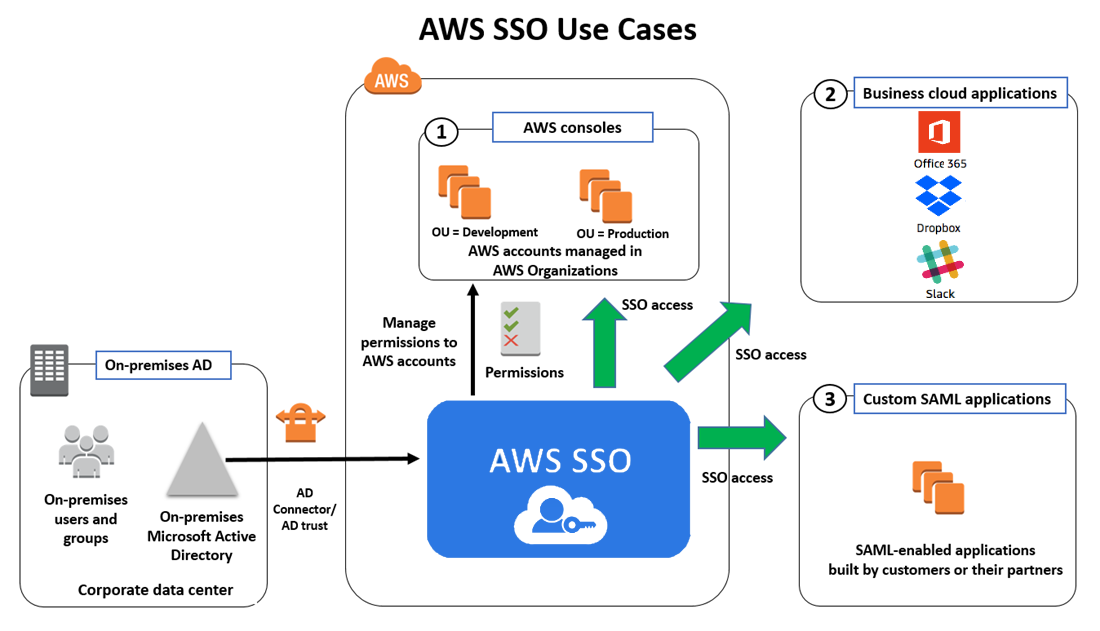
  • AWS IAM Identity Center is a cloud-based service that makes it easy to centrally manage single sign-on (SSO) access to all AWS accounts and cloud applications.
  • IAM Identity Center helps manage access and permissions to commonly used third-party software as a service (SaaS) applications, AWS managed applications, as well as custom applications that support SAML 2.0.
  • IAM Identity Center includes an AWS access portal where end-users can find and access all their assigned AWS accounts, cloud applications, and custom applications in one place.
  • IAM Identity Center is the recommended service for managing workforce access to AWS applications and multiple AWS accounts.
  • IAM Identity Center is available at no additional cost in all AWS commercial, GovCloud, and China Regions where it is supported.

IAM Identity Center Features

  • AWS Organizations Integration
    • Natively integrates with AWS Organizations and enumerates all the AWS accounts.
    • Configures and maintains all the necessary permissions for accounts automatically, without requiring any additional setup in individual accounts.
  • SSO access to AWS accounts and cloud applications
    • Helps manage Single Sign-On across all AWS accounts, cloud applications, AWS managed applications, and custom SAML 2.0–based applications, without custom scripts or third-party SSO solutions.
    • Supports pre-integrated business applications including Salesforce, Box, Microsoft 365, and hundreds of others.
  • Create and manage users and groups in IAM Identity Center
    • Provides a built-in identity store to create and manage users and groups directly.
    • Supports connecting to an existing AWS Managed Microsoft AD directory through AWS Directory Service.
    • Supports external identity providers (IdPs) via SAML 2.0 and SCIM 2.0 for automated user provisioning.
  • Leverage existing corporate identities
    • Integrates with Microsoft Active Directory through AWS Directory Service.
    • Supports external IdPs including Okta Universal Directory, Microsoft Entra ID (formerly Azure AD), Ping Identity, JumpCloud, and others.
  • Permission Sets
    • Permission sets are collections of one or more IAM policies that define the access for users/groups.
    • IAM Identity Center creates IAM roles based on permission sets and attaches the specified policies in each assigned account.
    • Multiple permission sets can be assigned to the same user.
    • Permissions can be based on common job functions or customized to meet specific security requirements.
  • Multi-factor Authentication (MFA)
    • Supports enforcement of MFA for all users, including requirement to set up MFA during sign-in.
    • Supports FIDO-enabled security keys (e.g., YubiKey), built-in biometric authenticators (Touch ID, facial recognition), and TOTP authenticator apps.
    • If using a supported SAML 2.0 IdP, MFA capabilities of the provider can be used.
  • Attribute-Based Access Control (ABAC)
    • Allows selecting user attributes (cost center, title, locale) from the identity source.
    • Attributes can be used for fine-grained access control across AWS without needing separate permission sets for each attribute combination.
  • Delegated Administration
    • Supports centralized administration and API access from an AWS Organizations delegated administrator account.
    • Reduces the need to use the management account for day-to-day operations.
  • Co-exists with existing IAM users, roles, and policies
    • Has no impact on the users, roles, or policies that are already managed in IAM.
  • No-cost identity management
    • Available at no additional cost.

IAM Identity Center Identity Sources

  • IAM Identity Center identity store (default)
    • Provides a built-in store to create and manage users and groups, and assign their level of access to AWS accounts and applications.
    • Users are created by configuring email address and name; IAM Identity Center sends an email for users to set their own password.
  • Active Directory
    • Supports self-managed Active Directory (AD) or AWS Managed Microsoft AD directory using AWS Directory Service.
    • Allows selecting user attributes from AD for ABAC.
  • External identity provider
    • Supports external IdPs via SAML 2.0, including Okta Universal Directory, Microsoft Entra ID (formerly Azure AD), Ping Identity, JumpCloud, and others.
    • Supports System for Cross-domain Identity Management (SCIM) 2.0 for automated user and group provisioning.
    • Multiple identity providers can be integrated using Okta as a hub.

IAM Identity Center Deployment Options

  • Organization Instance
    • Deployed in the management account of AWS Organizations.
    • Recommended best practice for multi-account production environments.
    • Provides single, central access control point for all AWS accounts and applications.
  • Account Instance
    • Limited-scope deployment for quickly evaluating a supported AWS application (e.g., Amazon Redshift).
    • Available to a narrow set of application users.
    • Organization instance administrators can control account instance creation through SCPs.

Trusted Identity Propagation

  • Trusted identity propagation is a feature built on the OAuth 2.0 Authorization Framework.
  • Enables applications to access data and other resources on behalf of a specific user, without sharing that user’s credentials.
  • Simplifies data access management, auditing, and improves the sign-in experience for analytics users.
  • Allows administrators to grant permissions based on user attributes such as user ID or group associations.
  • Auditing and security teams can trace access to data resources back to each individual user.
  • Supported AWS Services:
    • Amazon Redshift (Query Editor V2)
    • Amazon QuickSight
    • Amazon S3
    • Amazon EMR (EMR Studio, EMR Serverless)
    • AWS Lake Formation
    • Amazon SageMaker (Unified Studio)
    • Amazon Athena

Multi-Region Support (2025-2026)

  • IAM Identity Center can be replicated from the primary AWS Region to additional Regions.
  • Automatically replicates workforce identities, permission sets, user and group assignments, sessions, and metadata.
  • Provides active access portal endpoints in each replicated Region for reduced latency.
  • Improves resilience by maintaining account access with provisioned permissions during Regional disruptions.
  • Replication is asynchronous with eventual consistency.
  • Supports customer-managed AWS KMS keys for encryption (multi-Region KMS keys recommended).
  • Integrated with services like Amazon SageMaker Unified Studio and AWS Transfer Family across Regions.

Temporary Elevated Access

  • IAM Identity Center supports temporary elevated access through validated partner integrations.
  • Users without standing permissions can request access, receive approval, and perform operations during a specified time window.
  • Validated Partners:
    • CyberArk Secure Cloud Access – for sensitive operations demanding full auditability
    • Tenable Cloud Security – for multi-cloud environments with complex entitlements
    • Okta Access Requests – for organizations using multiple identity sources
  • Auditors can view a log of actions and approvals in the partner solution.

Customer-Managed KMS Keys (2025)

  • IAM Identity Center organization instances support customer-managed AWS KMS keys for encrypting workforce identity data at rest.
  • Encrypts user and group attributes using customer-managed keys.
  • Provides additional control over encryption key management and rotation.

AWS Access Portal

  • The AWS access portal (formerly user portal) is the web location where users sign in to IAM Identity Center.
  • Provides a single place to access all assigned AWS accounts, cloud applications, and custom applications.
  • Users authenticate once and can switch between accounts and applications without re-authentication.
  • Custom vanity domains can be configured for regional routing of access portals.

Integration with AWS Services

  • AWS Analytics Services – Amazon Redshift, QuickSight, EMR, Athena, Lake Formation
  • AWS Developer Tools – Amazon Q Developer (formerly CodeWhisperer)
  • AWS Management – AWS Systems Manager Change Manager
  • AWS AI/ML – Amazon SageMaker Unified Studio
  • AWS Storage – AWS Transfer Family web apps
  • Monitoring – AWS CloudTrail for auditing all administrative and access activity

AWS IAM Identity Center Use Cases

AWS Certification Exam Practice Questions

  • Questions are collected from Internet and the answers are marked as per my knowledge and understanding (which might differ with yours).
  • AWS services are updated everyday and both the answers and questions might be outdated soon, so research accordingly.
  • AWS exam questions are not updated to keep up the pace with AWS updates, so even if the underlying feature has changed the question might not be updated
  • Open to further feedback, discussion and correction.
  1. Which of the following can a customer use to enable single sign-on (SSO) to the AWS Console?
    1. Amazon Connect
    2. AWS IAM Identity Center (formerly AWS Single Sign-On)
    3. Amazon Pinpoint
    4. Amazon Rekognition
  2. A company uses AWS Organizations with multiple AWS accounts. The company needs to provide centralized access management for all accounts. Users should be able to sign in once and access multiple accounts based on their job function. What is the recommended approach?
    1. Create IAM users in each account and configure cross-account roles
    2. Use AWS IAM Identity Center with permission sets to manage multi-account access
    3. Use Amazon Cognito user pools for workforce identity federation
    4. Create a custom SAML identity provider in each account
  3. A company uses AWS Organizations and AWS IAM Identity Center. The company needs to restrict development teams to use only specific AWS Regions and specific AWS services. Which solution meets this requirement with the LEAST operational overhead?
    1. Use IAM Identity Center to set up service-linked roles with IAM policy conditions
    2. Deactivate AWS STS in Regions that developers are not allowed to use
    3. Create SCPs that include Condition, Resource, and NotAction elements to allow access to only specific Regions and services
    4. For each account, create tailored identity-based policies for IAM Identity Center
  4. A company wants to connect their existing Okta Universal Directory as the identity source for AWS IAM Identity Center. Which protocol does IAM Identity Center use for automatic provisioning of users and groups from Okta?
    1. OAuth 2.0
    2. OpenID Connect (OIDC)
    3. SCIM 2.0 (System for Cross-domain Identity Management)
    4. LDAP
  5. A company is using AWS IAM Identity Center and wants to grant fine-grained permissions to users based on their department and cost center attributes from their identity provider. Which IAM Identity Center feature should they use?
    1. Permission boundaries
    2. Service Control Policies (SCPs)
    3. Resource-based policies
    4. Attribute-Based Access Control (ABAC)
  6. An analytics team needs to access data across Amazon Redshift, Amazon S3 via Lake Formation, and Amazon QuickSight using their corporate identity without managing separate credentials for each service. Which IAM Identity Center feature enables this?
    1. Permission sets
    2. SAML federation
    3. Trusted identity propagation
    4. Cross-account roles

References

AWS Route 53 Routing Policies – Weighted, Latency

AWS Route 53 Routing Policy

AWS Route 53 routing policy determines how AWS would respond to the DNS queries and provides multiple routing policy options.

Simple Routing Policy

  • Simple routing policy is a simple round-robin policy and can be applied when there is a single resource doing the function for the domain e.g. web server that serves content for the website.
  • Simple routing helps configure standard DNS records, with no special Route 53 routing such as weighted or latency.
  • Route 53 responds to the DNS queries based on the values in the resource record set e.g. IP address in an A record.
  • Simple routing does not allow the creation of multiple records with the same name and type, but multiple values can be specified in the same record, such as multiple IP addresses.
  • Route 53 displays all the values to resolve it recursively in random order and the resolver displays the values for the client. The client then chooses a value and resends the query.
  • Simple routing policy does not support health checks, so the record would be returned to the client even if it is unhealthy.
  • With Alias record enabled, only one AWS resource or one record can be specified in the current hosted zone.
  • Simple routing can be used to create records in a private hosted zone.

Weighted Routing Policy

  • Weighted routing policy helps route traffic to different resources in specified proportions (weights) e.g., 75% to one server and 25% to the other during a pilot release
  • Weights can be assigned between any number from 0 to 255 inclusive.
  • Weighted routing policy can be applied when there are multiple resources that perform the same function e.g., webservers serving the same site
  • Weighted resource record sets allow associating multiple resources with a single DNS name.
  • Weighted routing policy use cases include
    • load balancing between regions
    • A/B testing and piloting new versions of software
  • To create a group of weighted resource record sets, two or more resource record sets can be created that has the same combination of DNS name and type, and each resource record set is assigned a unique identifier and a relative weight.
  • When processing a DNS query, Route 53 searches for a resource record set or a group of resource record sets that have the specified name and type.
  • Route 53 selects one from the group. The probability of any one resource record set being selected depends on its weight as a proportion of the total weight for all resource record sets in the group for e.g., suppose www.example.com has three resource record sets with weights of 1 (20%), 1 (20%), and 3 (60%)(sum = 5). On average, Route 53 selects each of the first two resource records sets one-fifth of the time and returns the third resource record set three-fifths of the time.
  • Weighted routing policy supports health checks.
  • Weighted routing can be used to create records in a private hosted zone.

Latency-based Routing (LBR) Policy

  • Latency-based Routing Policy helps respond to the DNS query based on which data center gives the user the lowest network latency.
  • Latency-based routing policy can be used when there are multiple resources performing the same function and Route 53 needs to be configured to respond to the DNS queries with the resources that provide the fastest response with the lowest latency.
  • A latency resource record set can be created for the EC2 resource in each region that hosts the application. When Route 53 receives a query for the corresponding domain, it selects the latency resource record set for the EC2 region that gives the user the lowest latency. Route 53 then responds with the value associated with that resource record set for e.g., you might have web servers for example.com in the EC2 data centers in Ireland and in Tokyo. When a user browses example.com from Singapore, Route 53 will pick up the data center (Tokyo) which has the lowest latency from the user’s location
  • Latency between hosts on the Internet can change over time as a result of changes in network connectivity and routing. Latency-based routing is based on latency measurements performed over a period of time, and the measurements reflect these changes for e.g. if the latency from the user in Singapore to Ireland improves, the user can be routed to Ireland
  • Latency-based routing cannot guarantee users from the same geographic will be served from the same location for any compliance reason
  • Latency resource record sets can be created using any record type that Route 53 supports except NS or SOA.
  • Latency-based routing policy supports health checks.
  • Latency-based routing can be used to create records in a private hosted zone.

Failover Routing Policy

  • Failover routing policy allows active-passive failover configuration, in which one resource (primary) takes all traffic when it’s healthy and the other resource (secondary) takes all traffic when the first isn’t healthy.
  • Route 53 health checking agents will monitor each location/endpoint of the application to determine its availability.
  • Failover routing policy is applicable for Public hosted zones only.
  • Failover routing can be used to create records in a private hosted zone.

Geolocation Routing Policy

  • Geolocation routing policy helps respond to DNS queries based on the geographic location of the users i.e. location from which the DNS queries originate.
  • Geolocation routing policy use cases include
    • localization of content and presenting some or all of the website in the user’s language
    • restrict distribution of content to only the locations in which you have distribution rights.
    • balancing load across endpoints in a predictable, easy-to-manage way, so that each user location is consistently routed to the same endpoint.
  • Geolocation routing policy allows geographic locations to be specified by continent, country, or by state (only in the US)
  • Geolocation record sets, if created, for overlapping geographic regions for e.g. continent, and then for the country within the same continent, priority goes to the smallest geographic region, which allows some queries for a continent to be routed to one resource and queries for selected countries on that continent to a different resource
  • Geolocation works by mapping IP addresses to locations, which might not be mapped to an exact geographic location.
  • A default resource record set can be created to handle these queries and also the ones which do not have an explicit record set created.
  • Route 53 returns a “no answer” response for queries from those locations if a default resource record set is not created.
  • Two geolocation resource record sets that specify the same geographic location cannot be created.
  • Route 53 supports the edns-client-subnet extension of EDNS0 (EDNS0 adds several optional extensions to the DNS protocol.) to improve the accuracy of geolocation routing.
  • Geolocation routing can be used to create records in a private hosted zone. For private hosted zones, Route 53 responds to DNS queries based on the AWS Region of the VPC that the query originated from.

Geoproximity Routing Policy

  • Geoproximity routing helps route traffic to the resources based on the geographic location of the users and the resources.
  • Geoproximity routing can be configured with a bias to optionally choose to route more traffic or less to a given resource. A bias expands or shrinks the size of the geographic region from which traffic is routed to a resource.
  • A positive bias (1 to 99) increases the size of the geographic region, routing more traffic to the resource. A negative bias (-1 to -99) shrinks the region.
  • Route 53 supports specifying the resource location using the AWS Region, AWS Local Zone group, or latitude and longitude coordinates.
  • Geoproximity routing is now available as a standard routing policy for DNS records in both public and private hosted zones (expanded in January 2024), in addition to being available through Route 53 Traffic Flow.
  • Route 53 Traffic flow supports geoproximity routing for AWS Local Zones (since October 2023), enabling reduced latency for end users connecting to applications in their nearest Local Zone.
  • Geoproximity routing supports health checks.

IP-based Routing Policy

  • IP-based routing (launched June 2022) allows fine-tuning DNS routing based on the source IP address of the DNS query, using user-IP-to-endpoint mappings.
  • IP-based routing gives granular control to optimize performance or reduce network costs by uploading data to Route 53 in the form of client IP to location mappings.
  • IP-based routing use cases include:
    • Routing end users from certain ISPs to specific endpoints to optimize network transit costs or performance.
    • Adding overrides to existing Route 53 routing types, such as geolocation routing, based on knowledge of clients’ physical locations.
  • IP ranges are managed using CIDR collections and CIDR locations:
    • CIDR block – An IP range in CIDR notation, e.g., 192.0.2.0/24 or 2001:DB8::/32
    • CIDR location – A named list of CIDR blocks, e.g., example-isp-seattle = [192.0.2.0/24, 203.0.113.0/22]
    • CIDR collection – A named collection of locations that can be reused across records
  • For IPv4, CIDR blocks between 1 and 24 bits are supported. For IPv6, CIDR blocks between 1 and 48 bits are supported.
  • For DNS queries with a CIDR longer than the one specified in the collection, Route 53 matches it to the shorter CIDR.
  • A default (“*”) location can be used to handle queries that don’t match any specified CIDR block.
  • IP-based routing cannot be used for records in a private hosted zone.
  • IP-based routing supports health checks.

Multivalue Routing Policy

  • Multivalue routing helps return multiple values, e.g. IP addresses for the web servers, in response to DNS queries.
  • Multivalue routing also helps check the health of each resource, so only the values for healthy resources are returned.
  • Route 53 responds to DNS queries with up to eight healthy records and gives different answers to different DNS resolvers.
  • Multivalue answer routing is not a substitute for a load balancer, but the ability to return multiple health-checkable IP addresses is a way to use DNS to improve availability and load balancing.
  • To route traffic approximately randomly to multiple resources, such as web servers, one multivalue answer record can be created for each resource and, optionally, associate a Route 53 health check with each record. If a web server becomes unavailable after the resolver caches a response, client software can try another IP address in the response.
  • Multivalue answer routing can be used to create records in a private hosted zone.

Route 53 Traffic Flow

  • Route 53 Traffic Flow helps easily manage traffic globally through a variety of routing types combined with DNS Failover in order to enable a variety of low-latency, fault-tolerant architectures.
  • Traffic Flow provides a visual editor to easily manage how the end-users are routed to the application’s endpoints – whether in a single AWS region or distributed around the globe.
  • Traffic Flow introduced a new enhanced visual editor (March 2025) with a clearer sidebar-based configuration, undo/redo functionality, and a built-in JSON text editor for directly editing traffic policy documents in the browser.
  • Traffic Flow routes traffic based on multiple criteria, such as endpoint health, geographic location, and latency.
  • Traffic Flow’s versioning feature maintains a history of changes to the traffic policies to allow easy rollback to the previous version.
  • Traffic Flow supports geoproximity routing for AWS Local Zones.

Route 53 Routing Policies in Private Hosted Zones

  • Route 53 supports the following routing policies in private hosted zones:
    • Simple routing
    • Failover routing
    • Multivalue answer routing
    • Weighted routing
    • Latency-based routing (supported since March 2022)
    • Geolocation routing (supported since March 2022; routes based on the AWS Region of the VPC the query originates from)
    • Geoproximity routing (supported since January 2024)
  • IP-based routing is not supported in private hosted zones.

Route 53 Complex Routing Policies

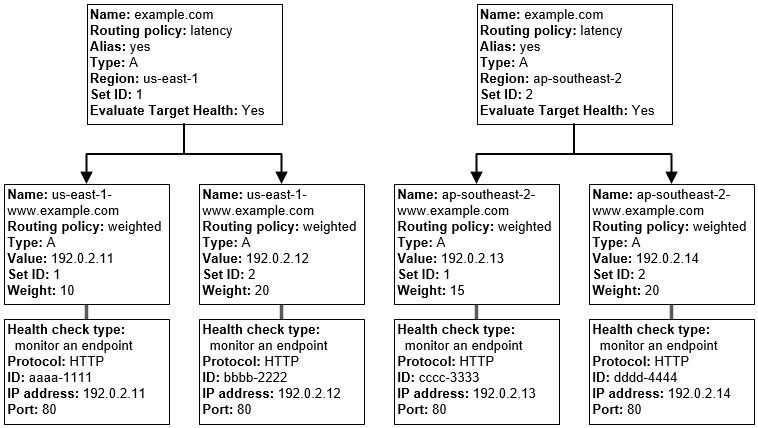
Route 53 Complex Routing Policies

  • Route 53 can be used to define more complex and nested routing policies
  • A combination of alias records (such as weighted alias and failover alias) and non-alias records can be used to build a decision tree that gives you greater control over how Route 53 responds to requests.
  • Resources would be created from the bottom of the tree

Route 53 Application Recovery Controller (ARC)

  • Route 53 Application Recovery Controller (ARC) helps prepare for and quickly mitigate impairments for applications on AWS.
  • ARC provides routing controls – simple on/off switches hosted on a highly available cluster – that can be used to control routing of client traffic in and out of application cells (regions or availability zones).
  • Routing controls support failover across any AWS service that has a DNS endpoint.
  • ARC supports:
    • Zonal Shift – Temporarily move traffic away from an impaired Availability Zone
    • Zonal Autoshift – Automatically shift traffic away from AZs with detected impairments
    • Routing Control – Manually control traffic routing across regions with extreme reliability
  • Safety rules can be configured to prevent simultaneous disabling of all routing controls, ensuring at least one region remains active.
  • ARC routing control health checks integrate with Route 53 failover records to enable instant DNS-based failover.

Route 53 Accelerated Recovery

  • Route 53 Accelerated Recovery (launched November 2025) provides a 60-minute recovery time objective (RTO) for regaining the ability to make DNS changes to public hosted zone records if AWS services in US East (N. Virginia) become unavailable.
  • When enabled, Route 53 achieves built-in failover of the control plane to the Oregon Region (us-west-2).
  • DNS resolution for existing records continues to function normally during any disruption; accelerated recovery specifically addresses the ability to make changes to DNS records.
  • Accelerated recovery must be explicitly enabled per public hosted zone.

Route 53 Global Resolver

  • Route 53 Global Resolver (GA March 2026) provides managed anycast DNS resolution for clients outside AWS VPCs, including on-premises data centers, branch offices, and remote locations.
  • Global Resolver uses anycast IP addresses that automatically route DNS queries to the nearest AWS Region for optimal latency and availability.
  • Key capabilities include:
    • Resolution of public internet domains and private domains associated with Route 53 private hosted zones from any location
    • DNS traffic filtering to prevent DNS-based data exfiltration
    • Encrypted queries via DNS-over-HTTPS (DoH) and DNS-over-TLS (DoT)
    • Centralized logging for compliance and security monitoring
    • Multi-region deployment with automatic failover
  • Available across 30+ AWS Regions with support for both IPv4 and IPv6 DNS query traffic.

AWS Certification Exam Practice Questions

  • Questions are collected from Internet and the answers are marked as per my knowledge and understanding (which might differ with yours).
  • AWS services are updated everyday and both the answers and questions might be outdated soon, so research accordingly.
  • AWS exam questions are not updated to keep up the pace with AWS updates, so even if the underlying feature has changed the question might not be updated
  • Open to further feedback, discussion and correction.
  1. You have deployed a web application targeting a global audience across multiple AWS Regions under the domain name example.com. You decide to use Route 53 Latency-Based Routing to serve web requests to users from the region closest to the user. To provide business continuity in the event of server downtime you configure weighted record sets associated with two web servers in separate Availability Zones per region. During a DR test you notice that when you disable all web servers in one of the regions Route 53 does not automatically direct all users to the other region. What could be happening? (Choose 2 answers)
    1. Latency resource record sets cannot be used in combination with weighted resource record sets.
    2. You did not setup an http health check for one or more of the weighted resource record sets associated with the disabled web servers
    3. The value of the weight associated with the latency alias resource record set in the region with the disabled servers is higher than the weight for the other region.
    4. One of the two working web servers in the other region did not pass its HTTP health check
    5. You did not set “Evaluate Target Health” to “Yes” on the latency alias resource record set associated with example.com in the region where you disabled the servers.
  2. The compliance department within your multi-national organization requires that all data for your customers that reside in the European Union (EU) must not leave the EU and also data for customers that reside in the US must not leave the US without explicit authorization. What must you do to comply with this requirement for a web based profile management application running on EC2?
    1. Run EC2 instances in multiple AWS Availability Zones in single Region and leverage an Elastic Load Balancer with session stickiness to route traffic to the appropriate zone to create their profile (should be in 2 different regions – US and Europe)
    2. Run EC2 instances in multiple Regions and leverage Route 53’s Latency Based Routing capabilities to route traffic to the appropriate region to create their profile (Latency based routing policy would not guarantee the compliance requirement)
    3. Run EC2 instances in multiple Regions and leverage a third party data provider to determine if a user needs to be redirect to the appropriate region to create their profile
    4. Run EC2 instances in multiple AWS Availability Zones in a single Region and leverage a third party data provider to determine if a user needs to be redirect to the appropriate zone to create their profile(should be in 2 different regions – US and Europe)
  3. A US-based company is expanding their web presence into Europe. The company wants to extend their AWS infrastructure from Northern Virginia (us-east-1) into the Dublin (eu-west-1) region. Which of the following options would enable an equivalent experience for users on both continents?
    1. Use a public-facing load balancer per region to load-balance web traffic, and enable HTTP health checks.
    2. Use a public-facing load balancer per region to load-balance web traffic, and enable sticky sessions.
    3. Use Amazon Route 53, and apply a geolocation routing policy to distribute traffic across both regions
    4. Use Amazon Route 53, and apply a weighted routing policy to distribute traffic across both regions.
  4. You have been asked to propose a multi-region deployment of a web-facing application where a controlled portion of your traffic is being processed by an alternate region. Which configuration would achieve that goal?
    1. Route 53 record sets with weighted routing policy
    2. Route 53 record sets with latency based routing policy
    3. Auto Scaling with scheduled scaling actions set
    4. Elastic Load Balancing with health checks enabled
  5. Your company is moving towards tracking web page users with a small tracking image loaded on each page. Currently you are serving this image out of us-east, but are starting to get concerned about the time it takes to load the image for users on the west coast. What are the two best ways to speed up serving this image? Choose 2 answers
    1. Use Route 53’s Latency Based Routing and serve the image out of us-west-2 as well as us-east-1
    2. Serve the image out through CloudFront
    3. Serve the image out of S3 so that it isn’t being served of your web application tier
    4. Use EBS PIOPs to serve the image faster out of your EC2 instances
  6. Your API requires the ability to stay online during AWS regional failures. Your API does not store any state, it only aggregates data from other sources – you do not have a database. What is a simple but effective way to achieve this uptime goal?
    1. Use a CloudFront distribution to serve up your API. Even if the region your API is in goes down, the edge locations CloudFront uses will be fine.
    2. Use an ELB and a cross-zone ELB deployment to create redundancy across datacenters. Even if a region fails, the other AZ will stay online.
    3. Create a Route53 Weighted Round Robin record, and if one region goes down, have that region redirect to the other region.
    4. Create a Route53 Latency Based Routing Record with Failover and point it to two identical deployments of your stateless API in two different regions. Make sure both regions use Auto Scaling Groups behind ELBs. (Refer link)
  7. A company needs to route DNS traffic for their application based on the IP addresses of their clients. They want to optimize costs by routing traffic from a specific ISP to a particular endpoint. Which Route 53 routing policy should they use?
    1. Geolocation routing policy
    2. Latency-based routing policy
    3. IP-based routing policy
    4. Weighted routing policy
  8. A company uses Route 53 to manage DNS for their multi-region application. They want to ensure that during a regional AWS outage, they can still make DNS changes to their public hosted zone within 60 minutes. Which Route 53 feature should they enable?
    1. Route 53 Application Recovery Controller
    2. Route 53 Failover routing policy
    3. Route 53 Accelerated Recovery for public hosted zones
    4. Route 53 Global Resolver
  9. A company wants to route traffic to the geographically nearest resource and also wants to shift more traffic to a newly launched region by expanding its geographic catchment area. Which Route 53 routing policy should they use?
    1. Geolocation routing policy with a default record
    2. Latency-based routing policy
    3. Weighted routing policy with regional endpoints
    4. Geoproximity routing policy with a positive bias for the new region
  10. An organization with branch offices needs secure DNS resolution for both public domains and Route 53 private hosted zones from their on-premises locations. They require encrypted DNS queries and centralized logging. Which Route 53 feature best meets these requirements?
    1. Route 53 Resolver inbound endpoints with VPN
    2. Route 53 Profiles shared via AWS RAM
    3. Route 53 Global Resolver with DoH/DoT
    4. Route 53 Traffic Flow with failover

References

AWS Route 53 Resolver – Hybrid DNS

AWS Route 53 Resolver – Hybrid DNS

  • Route 53 Resolver (also known as VPC Resolver) provides automatic DNS resolution within the VPC. It can help resolve DNS queries between VPCs and on-premises networks.
  • By default, Resolver answers DNS queries for VPC domain names such as domain names for EC2 instances or ELB load balancers.
  • Route 53 Resolver performs recursive lookups against public name servers for all other domain names.
  • However, on-premises instances cannot resolve Route 53 DNS entries and Route 53 cannot resolve on-premises DNS entries.
  • DNS resolution between VPC and on-premises network can be configured over a Direct Connect or VPN connection.
  • Route 53 Resolver is regional.
  • To use inbound or outbound forwarding, create a Resolver endpoint in the VPC.
  • As part of the definition of an endpoint, specify the IP addresses to forward inbound DNS queries to or the IP addresses that outbound queries originate from. For each IP address specified, Resolver automatically creates a VPC elastic network interface.
  • Resolver endpoints support DNS over UDP (Do53) and DNS-over-HTTPS (DoH) protocols for encrypted DNS queries.
  • Resolver endpoints support Server Name Indication (SNI) validation for DoH connections, enabling verification of the server’s identity.
  • Resolver rules and DNS Firewall rule groups can be shared across accounts using AWS Resource Access Manager (RAM).

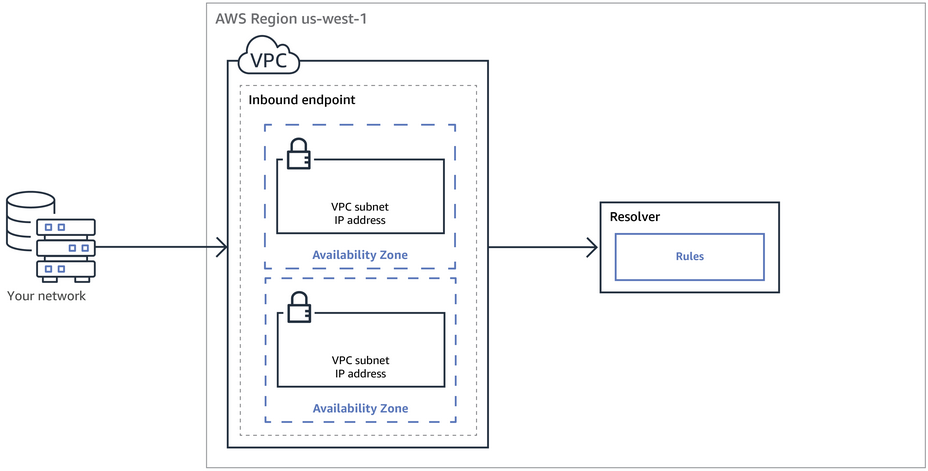
Inbound Endpoint – Forward DNS queries from resolvers on your network to AWS

Route 53 Resolver Inbound Endpoint
  • DNS resolvers on the on-premises networks can forward DNS queries to Resolver in a specified VPC.
  • This enables DNS resolvers to easily resolve domain names for AWS resources such as EC2 instances or records in a Route 53 private hosted zone.
  • Inbound endpoints support Do53 and DoH protocols.
  • Inbound endpoints can be used for DNS delegation, allowing subdomain authority to be delegated between on-premises and cloud infrastructure.

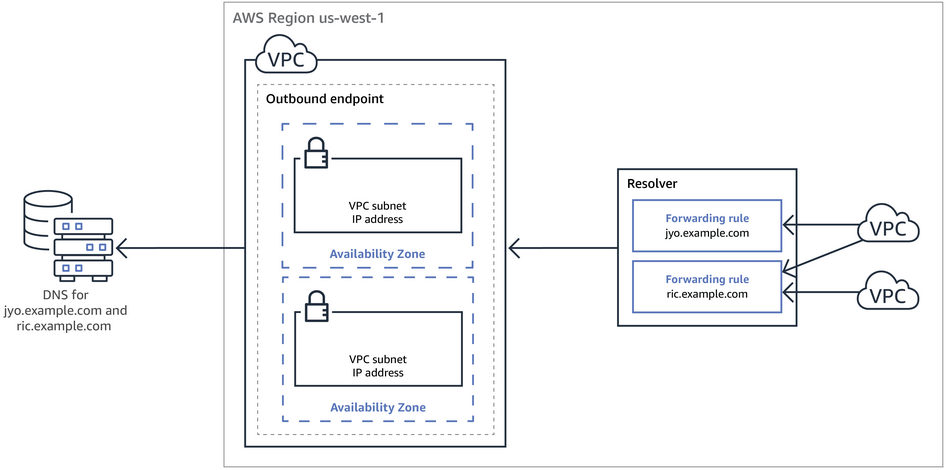
Outbound Endpoint – Conditionally forward queries from a VPC to resolvers on your network

Route 53 Resolver Outbound Endpoint
  • Route 53 Resolver can be configured to forward queries that it receives from EC2 instances in the VPCs to DNS resolvers on the on-premises networks.
  • To forward selected queries, Resolver rules can be created that specify the domain names for the DNS queries that you want to forward (such as example.com), and the IP addresses of the DNS resolvers on the on-premises network that you want to forward the queries to.
  • If a query matches multiple rules (example.com, acme.example.com), Resolver chooses the rule with the most specific match (acme.example.com) and forwards the query to the IP addresses that you specified in that rule.
  • Outbound endpoints support Do53 and DoH protocols for encrypting forwarded DNS traffic.

Resolver Rules

  • Resolver rules control which DNS queries are forwarded to on-premises resolvers and which are resolved locally.
  • Forward rules – Forward DNS queries for a specified domain name to the IP addresses of on-premises DNS resolvers.
  • System rules – Selectively override the behavior defined in a forward rule. A system rule causes Resolver to resolve the query locally (within the VPC).
  • Auto-defined system rules – Automatically created rules for AWS-specific domain names and reverse DNS queries.
  • If a “.” (dot) or “com” forward rule is created, it is recommended to also create a system rule for amazonaws.com to ensure AWS service resolution works correctly.
  • Resolver rules can be shared across AWS accounts using AWS RAM, enabling centralized DNS forwarding management.

Resolver Query Logging

  • Resolver query logging allows logging of all DNS queries made by resources within VPCs.
  • Logs can be sent to Amazon CloudWatch Logs, Amazon S3, or Amazon Data Firehose.
  • Query logs include information such as the domain name queried, source IP, response code, and the Route 53 Resolver endpoint or firewall rule that processed the query.
  • Query logging configurations can be shared across AWS accounts.
  • Only unique queries are logged; queries answered from the Resolver cache are not logged.

DNSSEC Validation

  • Route 53 Resolver supports DNSSEC validation, which verifies that DNS responses have not been tampered with in transit.
  • When DNSSEC validation is enabled, Resolver validates the authenticity and integrity of DNS responses from public nameservers for DNSSEC-signed domains.
  • DNSSEC validation provides protection against DNS spoofing and cache poisoning attacks.
  • DNSSEC validation can be enabled per VPC.

Resolver Endpoint Metrics

  • Route 53 Resolver provides detailed CloudWatch metrics for monitoring endpoint health and performance.
  • Capacity Utilization metric – Helps monitor whether the endpoint is approaching query capacity limits. (Launched June 2025)
  • Detailed metrics – Include P90 response latency, SERVFAIL/NXDOMAIN/REFUSED/FORMERR response tracking, and target name server availability for outbound endpoints. (Launched December 2025)
  • Metrics are available at the Resolver Network Interface and Target Name Server levels.

Route 53 Resolver DNS Firewall

  • Route 53 Resolver DNS Firewall lets you control access to sites and block DNS-level threats for DNS queries going out from your VPC through the Route 53 VPC Resolver.
  • DNS Firewall allows you to define domain name filtering rules in rule groups that you associate with your VPCs.
  • You can specify lists of domain names to allow or block, and customize responses for blocked queries (NXDOMAIN, NODATA, or specific DNS responses).
  • DNS Firewall only filters on the domain name; it does not resolve that name to an IP address to be blocked.
  • DNS Firewall filters DNS traffic only; it does not filter other application layer protocols (HTTPS, SSH, TLS, FTP, etc.).
  • DNS Firewall is a feature of Route 53 VPC Resolver and doesn’t require any additional Resolver setup.
  • DNS Firewall rule groups can be shared across accounts using AWS RAM, managed centrally with AWS Firewall Manager, and applied via Route 53 Profiles.

AWS Managed Domain Lists

  • AWS provides managed domain lists for known threats, including malware, botnet command and control, and newly registered domains.
  • Threat categories – malware, phishing, spam, botnets, spyware, command and control.
  • Content categories – adult/mature content, gambling, social media, gaming, and other web content types. (Added May 2026)

DNS Firewall Advanced

  • DNS Firewall Advanced provides intelligent, real-time protection against sophisticated DNS-based threats beyond static domain lists. (Launched November 2024)
  • DNS Tunneling Detection – Identifies and blocks attempts to use DNS as a covert channel for data exfiltration or command-and-control communication.
  • Domain Generation Algorithm (DGA) Detection – Identifies and blocks queries to domains created by DGAs commonly used by malware.
  • Dictionary-based DGA Detection – Detects sophisticated DGA variants that use dictionary words to create more legitimate-looking domains. (Added November 2025)
  • DNS Firewall Advanced works by inspecting DNS payload characteristics including timestamps, request frequency, query strings, and query length/type/size.
  • Palo Alto Networks Advanced DNS Security integration (Preview) – Enables enforcement of third-party threat intelligence categories including fast-flux protection, DNS tunneling, DNS rebinding, and DGA detection directly within DNS Firewall rules. (June 2026)

Route 53 Profiles

  • Route 53 Profiles allow you to define a standard DNS configuration and apply it to multiple VPCs in the same AWS Region. (Launched April 2024)
  • A Profile can include Route 53 private hosted zone (PHZ) associations, Resolver forwarding rules, and DNS Firewall rule groups.
  • When you update a Profile, its settings are propagated to all associated VPCs automatically.
  • Profiles can be shared across AWS accounts using AWS RAM for centralized DNS management.
  • Profiles simplify multi-account DNS management by eliminating the need to manage individual resource associations per VPC.
  • Route 53 Profiles is a regional service.

Route 53 Global Resolver

  • Route 53 Global Resolver is a managed anycast DNS resolver accessible from anywhere over the internet. (Preview November 2025, GA March 2026)
  • Provides DNS resolution for both public internet domains and Route 53 private hosted zones from on-premises, branch offices, and remote clients.
  • Uses globally distributed anycast IP addresses that route queries to the nearest available AWS Region.
  • Supports multiple DNS protocols: DNS over UDP (Do53), DNS-over-HTTPS (DoH), and DNS-over-TLS (DoT).
  • Requires client authentication via token-based authentication (DoH/DoT) or ACL-based IP/CIDR allowlisting (Do53/DoT/DoH).
  • Includes built-in DNS traffic filtering using the same DNS Firewall rule capabilities (managed domain lists, custom lists, and advanced protections).
  • Provides centralized query logging to CloudWatch, S3, or Data Firehose.
  • Supports DNSSEC validation for public domains.
  • Must be deployed in a minimum of two AWS Regions for high availability with automatic failover.
  • Allows adding and removing AWS Regions dynamically for flexible geographic coverage. (May 2026)
  • Available across 30 AWS Regions with IPv4 and IPv6 support.
  • Protected against DDoS threats using AWS Shield.

Global Resolver vs VPC Resolver

  • Global Resolver – Internet-reachable via anycast IPs, designed for on-premises/remote clients, supports Do53/DoH/DoT, requires client authentication.
  • VPC Resolver – Default VPC recursive resolver, accessible by VPC-hosted clients or via VPN/Direct Connect through Resolver endpoints, DNS encryption available only for hybrid queries over endpoints.

AWS Certification Exam Practice Questions

  • Questions are collected from Internet and the answers are marked as per my knowledge and understanding (which might differ with yours).
  • AWS services are updated everyday and both the answers and questions might be outdated soon, so research accordingly.
  • AWS exam questions are not updated to keep up the pace with AWS updates, so even if the underlying feature has changed the question might not be updated
  • Open to further feedback, discussion and correction.
  1. A company wants to install a new private intranet service using Amazon EC2 instances inside a Virtual Private Cloud (VPC). The VPC is connected to the company’s on-premises network using an AWS Site-to-Site VPN. The new service must communicate with the on-premises services already in place. On-premises services are accessed using company-owned hostnames. for instance, a DNS zone. This DNS zone is entirely on-premises and accessible only via the company’s private network. To connect the new service with current services, a solutions architect must guarantee that the new service can resolve hostnames on the company’s example domain. Which solution satisfies these criteria?
    1. Create an empty private zone in Route 53 for company.example. Add an additional NS record to the company’s on-premises company.example zone that points to the authoritative name servers for the new private zone in Route 53.
    2. Turn on DNS hostnames for the VPC. Configure a new outbound endpoint with Route 53 Resolver. Create a Resolver rule to forward requests for company.example to the on-premises name servers.
    3. Turn on DNS hostnames for the VPC. Configure a new inbound resolver endpoint with Route 53 Resolver. Configure the on-premises DNS server to forward requests for company.example to the new resolver.
    4. Use AWS Systems Manager to configure a run document that will install a hosts file that contains any required hostnames. Use an Amazon EventBridge rule to run the document when an instance is entering the running state.
  2. A company operates in a hybrid environment with multiple VPCs and on-premises data centers. The security team requires all DNS traffic from VPCs to be inspected for data exfiltration attempts and queries to known malicious domains must be blocked. Which solution provides the most comprehensive protection?
    1. Create Network ACLs to block DNS traffic to known malicious IP addresses.
    2. Configure security groups to restrict DNS traffic to specific DNS resolvers only.
    3. Configure Route 53 Resolver DNS Firewall with AWS managed domain lists for known threats and DNS Firewall Advanced rules for DNS tunneling and DGA detection, then associate the rule groups with all VPCs.
    4. Deploy third-party DNS security appliances in each VPC and route all DNS traffic through them.
  3. A multinational organization needs to provide secure DNS resolution for remote employees and branch offices accessing both public internet domains and internal applications hosted in AWS. The solution must encrypt DNS traffic and support centralized security policies. Which approach is most appropriate?
    1. Deploy Route 53 Resolver inbound endpoints in every AWS Region and configure on-premises DNS forwarders to send queries over VPN tunnels.
    2. Configure Route 53 Global Resolver with token-based authentication for remote clients and DNS Firewall rules to filter queries, using DoH or DoT for encryption.
    3. Set up a fleet of EC2 instances running BIND DNS servers with custom filtering and forward all client traffic through a VPN.
    4. Use Route 53 VPC Resolver with outbound endpoints and share Resolver rules across accounts using RAM.
  4. A company has 50 AWS accounts within an AWS Organization. They want to apply consistent DNS configurations—including private hosted zone associations, Resolver forwarding rules, and DNS Firewall rule groups—to all VPCs across accounts in the same Region. What is the most operationally efficient solution?
    1. Manually associate each private hosted zone, Resolver rule, and DNS Firewall rule group to each VPC individually.
    2. Use AWS RAM to share all DNS resources to each account and write automation scripts to associate them.
    3. Create a Route 53 Profile containing the DNS configuration, share it across accounts using AWS RAM, and associate it with all VPCs.
    4. Deploy CloudFormation StackSets to create identical DNS configurations in each account.
  5. A solutions architect wants to monitor the health and performance of Route 53 Resolver outbound endpoints that forward DNS queries to on-premises servers. They need to detect when target name servers become unavailable and when response latency increases. Which approach provides the required visibility?
    1. Enable VPC Flow Logs and filter for DNS traffic on port 53.
    2. Configure Resolver query logging and parse logs for timeout patterns.
    3. Enable detailed CloudWatch metrics for the Resolver endpoints to monitor P90 response latency, error responses (SERVFAIL, REFUSED), and target name server availability.
    4. Create a Lambda function that periodically sends test DNS queries and measures response times.

References

AWS Storage Options – EBS & Instance Store

AWS Storage Options – EBS & Instance Store

  • Elastic Block Store – EBS and Instance Store provide block-level storage options for EC2 instances.

Elastic Block Store (EBS) volume

  • EBS provides durable block-level storage for use with EC2 instances
  • EBS volumes are off-instance, network-attached storage (NAS) that persists independently from the running life of a single EC2 instance.
  • EBS volume is attached to an instance and can be used as a physical hard drive, typically by formatting it with the file system of your choice and using the file I/O interface provided by the instance operating system.
  • EBS volume can be used to boot an EC2 instance (EBS-root AMIs only), and multiple EBS volumes can be attached to a single EC2 instance.
  • EBS volume can be attached to a single EC2 instance only at any point in time.
  • EBS Multi-Attach volume can be attached to multiple EC2 instances (up to 16 Nitro-based instances in the same AZ). Multi-Attach is supported on io1 and io2 Block Express volumes.
  • EBS provides the ability to take point-in-time snapshots, which are persisted in S3. These snapshots can be used to instantiate new EBS volumes and to protect data for long-term durability
  • EBS snapshots can be copied across AWS regions as well, making it easier to leverage multiple AWS regions for geographical expansion, data center migration, and disaster recovery
  • All EBS volume types are designed for 99.999% availability.

EBS Volume Types

  • Amazon EBS provides six volume types divided into two major categories:
    • SSD-backed storage for transactional workloads (databases, virtual desktops, boot volumes)
    • HDD-backed storage for throughput-intensive workloads (MapReduce, log processing)
  • General Purpose SSD (gp3) — baseline 3,000 IOPS and 125 MiB/s at any size; scales up to 64 TiB, 80,000 IOPS, and 2,000 MiB/s (enhanced Sep 2025). Performance provisioned independently of capacity. 99.8%-99.9% durability.
  • General Purpose SSD (gp2) — burstable performance tied to volume size (3 IOPS/GiB, up to 16,000 IOPS). Being superseded by gp3 for new workloads.
  • Provisioned IOPS SSD (io2 Block Express) — highest performance block storage: up to 256,000 IOPS, 4,000 MiB/s throughput, 64 TiB capacity, sub-millisecond latency. 99.999% durability (100X more durable than gp3). Supports Multi-Attach and NVMe reservations for shared storage fencing.
  • Provisioned IOPS SSD (io1) — previous generation Provisioned IOPS; up to 64,000 IOPS and 1,000 MiB/s. 99.8%-99.9% durability.
  • Throughput Optimized HDD (st1) — low-cost HDD for frequently accessed, throughput-intensive workloads; up to 500 MiB/s. Cannot be a boot volume.
  • Cold HDD (sc1) — lowest cost HDD for less frequently accessed workloads; up to 250 MiB/s. Cannot be a boot volume.
  • Magnetic (standard) — previous generation volume type with lower performance. AWS recommends migrating to current generation volume types.

Ideal Usage Patterns

  • EBS is meant for data that changes relatively frequently and requires long-term persistence.
  • EBS volume provides access to raw block-level storage and is particularly well-suited for use as the primary storage for a database or file system
  • EBS Provisioned IOPS volumes (io2 Block Express) are particularly well-suited for use with databases applications that require a high and consistent rate of random disk reads and writes, such as Oracle, SAP HANA, Microsoft SQL Server, and SAS Analytics.
  • gp3 volumes are ideal for a wide variety of workloads including virtual desktops, medium-sized databases, development/test environments, and boot volumes.
  • st1 volumes are ideal for big data, data warehouses, and log processing.
  • sc1 volumes are ideal for infrequently accessed cold data requiring lowest storage cost.

Anti-Patterns

  • Temporary Storage
    • EBS volume persists independent of the attached EC2 life cycle.
    • For temporary storage such as caches, buffers, queues, etc it is better to use local instance store volumes, SQS, or ElastiCache
  • Highly-durable storage
    • For highly durable storage, use S3 or Glacier which provides 99.999999999% (11 9’s) annual durability per object. EBS io2 Block Express offers 99.999% durability, while gp3/gp2/io1 offer 99.8%-99.9% durability.
  • Static data or web content
    • For static web content, where data infrequently changes, EBS with EC2 would require a web server to serve the pages.
    • S3 may represent a more cost-effective and scalable solution for storing this fixed information and is served directly out of S3.

EBS Performance

  • EBS provides multiple volume types that differ in performance characteristics and pricing, allowing you to tailor storage performance and cost to application needs.
  • EBS Volumes can be attached and striped across multiple similarly-provisioned EBS volumes using RAID 0 or logical volume manager software, thus aggregating available IOPS, total volume throughput, and total volume size.
  • gp3 volumes offer cost-effective storage with independently configurable IOPS and throughput. Baseline: 3,000 IOPS and 125 MiB/s; scalable up to 80,000 IOPS and 2,000 MiB/s (as of Sep 2025).
  • io2 Block Express volumes deliver predictable, high performance for I/O intensive workloads: up to 256,000 IOPS, 4,000 MiB/s throughput, with sub-millisecond latency. Supports 1,000 IOPS per GB provisioned.
  • As EBS volumes are network-attached devices, other network I/O performed by the instance, as well as the total load on the shared network, can affect individual EBS volume performance.
  • EBS-optimized instances deliver dedicated throughput between EC2 and EBS. Latest Nitro-based instances (e.g., C8gn, M8gn, R8gn in 48xlarge/metal sizes) support up to 120 Gbps EBS bandwidth and 480,000 IOPS (as of Apr 2026).
  • Each separate EBS volume can be configured independently with its own type and performance settings.

EBS Durability & Availability

  • EBS volumes are designed to be highly available and reliable.
  • EBS volume data is replicated across multiple servers in a single AZ to prevent the loss of data from the failure of any single component.
  • All EBS volume types are designed for 99.999% availability.
  • io2 Block Express volumes provide 99.999% durability (0.001% annual failure rate) — 100X more durable than other volume types.
  • gp3, gp2, and io1 volumes provide 99.8%-99.9% durability (0.1%-0.2% annual failure rate).
  • EBS snapshots are incremental, point-in-time backups, containing only the data blocks changed since the last snapshot.
  • Frequent snapshots are recommended to maximize both the durability and availability of EBS data.
  • EBS snapshots provide an easy-to-use disk clone or disk image mechanism for backup, sharing, and disaster recovery.

EBS Snapshots Archive

  • EBS Snapshots Archive offers up to 75% lower snapshot storage costs for snapshots stored for 90 days or longer that are rarely accessed.
  • Snapshots in the standard tier are incremental; when archived, they are converted to full snapshots and moved to the archive tier.
  • Archived snapshots can be restored to the standard tier when needed (restoration takes 24-72 hours).
  • AWS Backup now supports EBS Snapshots Archive in backup policies for automated lifecycle management.
  • EBS now displays full snapshot size information in Console and via DescribeSnapshots API (full-snapshot-size-in-bytes field, Feb 2025).

EBS Elastic Volumes

  • Elastic Volumes allows you to dynamically increase capacity, tune performance, and change the type of live volumes with no downtime or performance impact.
  • EBS volumes can be resized dynamically (increased only, cannot be reduced in size).
  • As of Jan 2026, EBS supports up to 4 Elastic Volumes modifications per volume within a rolling 24-hour window (previously limited to 1 modification per 6 hours).
  • Modifications include: increasing size, changing volume type, and adjusting provisioned performance (IOPS/throughput).

EBS Cost Model

  • EBS pricing varies by volume type:
    • gp3: charged per GB-month of provisioned storage, plus separately for provisioned IOPS (above 3,000) and throughput (above 125 MiB/s)
    • gp2: charged per GB-month of provisioned storage (IOPS included based on size)
    • io2/io1: charged per GB-month of provisioned storage and per Provisioned IOPS-month
    • st1/sc1: charged per GB-month of provisioned storage
  • EBS snapshots are charged per GB-month of data stored. Snapshots are incremental and compressed, so storage used is generally much less than volume size.
  • EBS Snapshots Archive tier costs up to 75% less than standard snapshot storage (minimum 90-day retention).
  • EBS snapshot copy is charged for data transferred between regions, plus standard snapshot charges in the destination region.
  • EBS volume storage capacity is allocated at creation time, and you are charged for allocated storage even if not fully used.

EBS Scalability and Elasticity

  • EBS volumes can easily and rapidly be provisioned and released to scale in and out with changing storage demands.
  • EBS volumes can be resized dynamically using Elastic Volumes (increase only, cannot be reduced).
  • Volume type and performance can be changed without detaching the volume or stopping the instance.
  • Up to 4 modifications are allowed per 24-hour rolling window.

Interfaces

  • AWS offers management APIs for EBS through REST-based APIs, AWS CLI, and SDKs, which can be used to create, delete, describe, attach, and detach EBS volumes, as well as to create, delete, and describe snapshots and copy snapshots across regions.
  • Amazon also offers the same capabilities through the AWS Management Console.
  • EBS Direct APIs allow you to read and write data directly to/from EBS snapshots without needing to attach them to an instance — useful for backup, disaster recovery, and data migration.

Instance Store Volumes

  • Instance Store volumes are also referred to as Ephemeral Storage.
  • Instance Store volumes provide temporary block-level storage and consist of a preconfigured and pre-attached block of disk storage on the same physical server as the EC2 instance.
  • Instance storage amount depends on the Instance type; larger instances provide both more and larger instance store volumes.
  • Modern instance store volumes use NVMe SSD storage on Nitro-based instances, delivering high random I/O performance with low latency.
  • Latest generation storage-optimized instances (2025-2026):
    • C8gd, M8gd, R8gd (Graviton4): up to 11.4 TB of NVMe SSD local storage, 3X more than previous generation
    • C8id, M8id, R8id (Intel Xeon 6): up to 22.8 TB of NVMe SSD local storage, 3X more than 6th-gen instances
  • Instance store volumes, unlike EBS volumes, cannot be detached or attached to another instance.
  • Data on instance store volumes persists only during the life of the associated EC2 instance — data is lost when the instance stops, terminates, or the underlying hardware fails.

Ideal Usage Patterns

  • EC2 local instance store volumes are fast, free (included in the price of the EC2 instance) “scratch volumes” best suited for storing temporary data that is continually changing, such as buffers, caches, scratch data, or data that is replicated for durability.
  • NVMe SSD-backed instances are ideally suited for many high performance database workloads. e.g., NoSQL databases like Cassandra, MongoDB, and real-time analytics.
  • High storage instances support much higher storage density per EC2 instance and are ideally suited for applications that benefit from high sequential I/O performance across very large datasets. e.g., data warehouses, Hadoop/Spark storage nodes, distributed file systems.
  • Machine learning training workloads that need fast local scratch storage for datasets and checkpoints.

Anti-Patterns

  • Persistent storage
    • For persistent virtual disk storage similar to a physical disk drive for files or other data that must persist longer than the lifetime of a single EC2 instance, EBS volumes or S3 are more appropriate.
  • Relational database storage
    • In most cases, relational databases require storage that persists beyond the lifetime of a single EC2 instance, making EBS volumes the natural choice.
  • Shared storage
    • Instance store volumes are dedicated to a single EC2 instance, and cannot be shared with other systems or users.
    • If you need storage that can be detached from one instance and attached to a different instance, or if you need the ability to share data easily, EBS volumes, EFS, or S3 are better choices.
  • Snapshots
    • If you need the convenience, long-term durability, availability, and shareability of point-in-time disk snapshots, EBS volumes are a better choice.

Instance Store Performance

  • EC2 instance virtual machine and the local instance store volumes are located on the same physical server, providing very fast access with low latency, particularly for sequential access.
  • Because the bandwidth to the disks is not limited by the network, aggregate sequential throughput for multiple instance volumes can be higher than for the same number of EBS volumes.
  • NVMe SSD instance store volumes provide from tens of thousands to hundreds of thousands of low-latency, random 4 KB IOPS.
  • To further increase aggregate IOPS or improve sequential disk throughput, multiple instance store volumes can be grouped together using RAID 0 (disk striping) software.
  • High storage instances are capable of delivering multi-GB/sec sequential read and write performance.
  • AWS provides detailed NVMe statistics for instance store volumes to help optimize latency-sensitive workloads (available 2025).

Instance Store Durability and Availability

  • EC2 local instance store volumes are NOT intended to be used as durable disk storage.
  • Data persists only during the life of the associated EC2 instance.
  • Data is lost when: instance is stopped or terminated, underlying disk drive fails, or instance hibernates.
  • Always replicate important data to EBS, S3, or other durable storage.

Cost Model

  • Cost of the EC2 instance includes any local instance store volumes if the instance type provides them.
  • While there is no additional charge for data storage on local instance store volumes, data transferred to and from instance store volumes from other AZs or outside an EC2 region may incur data transfer charges.
  • Additional charges apply for any persistent storage used (S3, Glacier, EBS volumes, EBS snapshots).

Scalability and Elasticity

  • Local instance store volumes are tied to a particular EC2 instance and are fixed in number and size for a given EC2 instance type.
  • Scalability and elasticity of this storage are tied to the number of EC2 instances running.

Interfaces

  • Instance store volumes are specified using the block device mapping feature of the EC2 API and the AWS Management Console.
  • To the EC2 instance, an instance store volume appears just like a local disk drive. Use the native file system I/O interfaces of the chosen operating system to read and write data.
  • On Nitro-based instances, instance store volumes are exposed as NVMe block devices.

EBS vs Instance Store Comparison

Feature EBS Instance Store
Persistence Persists independently of instance Ephemeral — lost on stop/terminate
Network Network-attached Physically attached (local)
Snapshots Supported (incremental, cross-region) Not supported
Boot volume Yes No (legacy only)
Resize Yes (Elastic Volumes) Fixed per instance type
Max IOPS 256,000 (io2 Block Express) Millions (NVMe, instance-dependent)
Max size per volume 64 TiB Instance-type dependent (up to 22.8 TB)
Durability 99.999% (io2) / 99.8-99.9% (others) None — ephemeral
Multi-Attach Yes (io1/io2, up to 16 instances) No
Cost Pay per provisioned GB + IOPS/throughput Included in instance price

AWS Certification Exam Practice Questions

  • Questions are collected from Internet and the answers are marked as per my knowledge and understanding (which might differ with yours).
  • AWS services are updated everyday and both the answers and questions might be outdated soon, so research accordingly.
  • AWS exam questions are not updated to keep up the pace with AWS updates, so even if the underlying feature has changed the question might not be updated
  • Open to further feedback, discussion and correction.
  1. Which of the following provides the fastest storage medium?
    1. Amazon S3
    2. Amazon EBS using Provisioned IOPS (PIOPS)
    3. SSD Instance (ephemeral) store (SSD Instance Storage provides hundreds of thousands of IOPS on some instance types, much faster than any network-attached storage)
    4. AWS Storage Gateway
  2. A company needs a block storage volume with the highest durability for a mission-critical Oracle database. Which EBS volume type should they choose?
    1. gp3
    2. gp2
    3. io2 Block Express (io2 Block Express provides 99.999% durability — 100X more durable than other volume types, designed for mission-critical applications)
    4. io1
  3. An application requires a single EBS volume with 50,000 IOPS. Which volume type(s) can meet this requirement? (Choose TWO)
    1. gp3 (gp3 now supports up to 80,000 IOPS as of Sep 2025)
    2. gp2 (gp2 max is 16,000 IOPS)
    3. io2 Block Express (io2 Block Express supports up to 256,000 IOPS)
    4. st1 (st1 is HDD-backed and optimized for throughput, not IOPS)
  4. Which statements about EBS Elastic Volumes are correct? (Choose TWO)
    1. You can increase volume size without detaching or stopping the instance
    2. You can decrease volume size dynamically (Volume size can only be increased, not decreased)
    3. Up to 4 modifications are allowed per volume within a 24-hour rolling window
    4. Volume modifications require a reboot to take effect (No downtime or reboot required)
  5. A company wants to reduce costs for EBS snapshots that are retained for compliance for 2 years but rarely accessed. What should they use?
    1. S3 Glacier Deep Archive
    2. EBS Snapshots Archive (EBS Snapshots Archive provides up to 75% lower costs for snapshots stored 90+ days that are rarely accessed)
    3. Delete the snapshots and use AMIs instead
    4. Use sc1 volumes instead of snapshots
  6. Which of the following is true about EC2 Instance Store volumes? (Choose TWO)
    1. Data is lost when the instance is stopped or terminated
    2. Instance store volumes can be detached and attached to another instance (Instance store volumes cannot be detached)
    3. Instance store volumes provide lower latency than EBS because they are physically attached
    4. Instance store volumes support point-in-time snapshots (Snapshots are not supported for instance store)
  7. A company needs to attach a single high-performance EBS volume to 8 EC2 instances in the same AZ for a clustered application. Which solution is appropriate?
    1. Use gp3 with Multi-Attach (Multi-Attach is not supported on gp3)
    2. Use io2 Block Express with Multi-Attach (io2 Block Express supports Multi-Attach to up to 16 Nitro-based instances in the same AZ with NVMe reservations for I/O fencing)
    3. Use instance store volumes shared via NFS
    4. Use st1 with Multi-Attach (Multi-Attach is not supported on HDD volumes)

References

AWS Global Accelerator – Anycast IPs & Performance

AWS Global Accelerator

AWS Global Accelerator

  • AWS Global Accelerator is a networking service that helps improve the availability and performance of the applications to global users.
  • AWS Global Accelerator optimizes the path to applications to keep packet loss, jitter, and latency consistently low.
  • helps improve the performance of the applications by lowering first-byte latency (the round trip time for a packet to go from a client to your endpoint and back again) and jitter (the variation of latency), and increasing throughput (amount of data transferred in a second) as compared to the public internet.
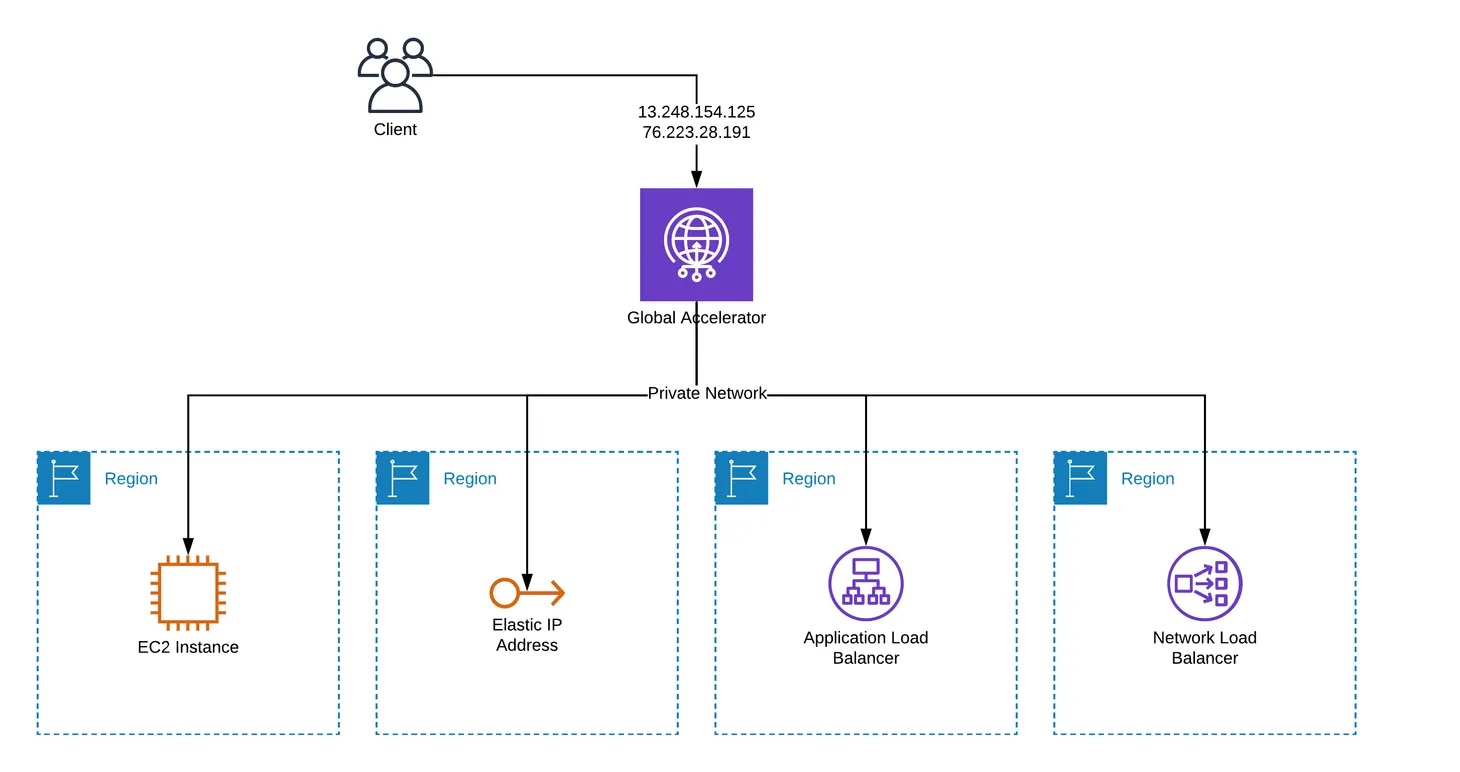
  • Global Accelerator uses the vast, well-monitored, congestion-free, redundant AWS global network to route TCP and UDP traffic to a healthy application endpoint in the closest AWS Region to the user.
  • is a global service that supports endpoints in multiple AWS Regions.
  • uses a global network of 130 Points of Presence in 95 cities across 53 countries.
  • supports AWS application endpoints, such as ALBs, NLBs, EC2 Instances, and Elastic IPs without making user-facing changes.
  • supports endpoints in 33 AWS Regions including recent additions like Mexico (Central), Asia Pacific (Malaysia), Asia Pacific (Thailand), and Asia Pacific (Taipei).
  • provides two global static public IPs that act as a fixed entry point to the application hosted in one or more AWS Regions, improving availability.
  • helps anycast the static IP addresses from the AWS edge network which serves as the frontend interface of the applications.
  • Using static IP addresses ensures you don’t need to make any client-facing changes or update DNS records as you modify or replace endpoints.
  • allows you to bring your own IP addresses (BYOIP) and use them as a fixed entry point to the application endpoints.
  • supports cross-account BYOIP, enabling the use of bring-your-own IP addresses across multiple AWS accounts.
  • Global Accelerator allocates two static IPv4 addresses serviced by independent network zones which are isolated units with their own set of physical infrastructure and service IP addresses from a unique IP subnet. If one IP address from a network zone becomes unavailable, due to network disruptions or IP address blocking by certain client networks, the client applications can retry using the healthy static IP address from the other isolated network zone.
  • supports both IPv4 and dual-stack (IPv4 + IPv6) accelerators. For dual-stack, Global Accelerator provides a total of four addresses: two static IPv4 addresses and two static IPv6 addresses.
  • dual-stack accelerators support routing IPv6 traffic to Application Load Balancers, Network Load Balancers, and EC2 instance endpoints.
  • continuously monitors the health of the application endpoints by using TCP, HTTP, and HTTPS health checks.
  • automatically re-routes the traffic to the nearest healthy available endpoint to mitigate endpoint failure.
  • terminates TCP connections from clients at AWS edge locations and, almost concurrently, establishes a new TCP connection with your endpoints. This gives clients faster response times (lower latency) and increased throughput. TCP termination at the edge is supported for both IPv4 and IPv6 traffic.
  • supports Client Affinity which helps build stateful applications.
  • supports Client IP address preservation for ALBs, EC2 instances, and NLBs (with security groups enabled). Client IP address preservation is not supported for Elastic IP address endpoints.
  • integrates with AWS Shield Standard, which minimizes application downtime and latency from DDoS attacks by using always-on network flow monitoring and automated in-line mitigation. AWS Shield Advanced can be enabled for enhanced DDoS detection and mitigation.
  • does not support on-premises endpoints. However, an NLB can be configured to address the on-premises endpoints while Global Accelerator points to the NLB.
  • supports cross-account attachments, allowing a single accelerator to route traffic to endpoints across multiple AWS accounts.
  • integrates with the AWS Load Balancer Controller for Kubernetes, enabling declarative management of accelerators, listeners, and endpoint groups using Kubernetes Custom Resource Definitions (CRDs).

AWS Global Accelerator

Global Accelerator Types

Standard Accelerator

  • Standard accelerators automatically route traffic to a healthy endpoint that is nearest to the user.
  • Designed to load balance traffic across endpoints and regions.
  • Supports weighted routing using traffic dials and endpoint weights.
  • Ideal for web applications, API acceleration, gaming (UDP), IoT (MQTT), VoIP, and HTTP use cases requiring static IP addresses or fast regional failover.

Custom Routing Accelerator

  • Custom routing accelerators allow using application logic to deterministically route users to a specific Amazon EC2 instance and port.
  • Maps each port on the accelerator to a specific destination (EC2 instance private IP address and port).
  • Users are still routed over the AWS global network for performance benefits.
  • Ideal for interactive applications such as multi-player gaming, EdTech, social media, video collaboration, and real-time communications (VoIP/SIP).
  • Integrates with matchmaking servers or session border controllers to deterministically send user traffic to specific EC2 destinations.
  • Client IP address preservation is always enabled for custom routing accelerator endpoints.

Cross-Account Support

  • Global Accelerator supports cross-account attachments that allow a single accelerator to route traffic to endpoints across multiple AWS accounts.
  • Resource owners create a cross-account attachment to authorize resources in their account to be added to an accelerator by another account.
  • Cross-account BYOIP support allows using bring-your-own IP addresses from shared CIDR blocks across accounts.
  • Simplifies multi-account architectures by enabling centralized traffic management through a single accelerator.

S3 Multi-Region Access Points

  • S3 Multi-Region Access Points use Global Accelerator transparently to provide a single global endpoint to access data sets replicated across multiple AWS Regions.
  • Based on AWS Global Accelerator, S3 Multi-Region Access Points consider factors like network congestion and the requesting application’s location to dynamically route requests to the lowest latency copy of data.
  • Enables building multi-region applications with the same architecture used in a single region.

Monitoring

  • Global Accelerator integrates with Amazon CloudWatch for monitoring.
  • CloudWatch metrics include:
    • ProcessedBytesIn / ProcessedBytesOut – traffic volume
    • NewFlowCount – new TCP/UDP flows per minute
    • HealthyEndpointCount / UnhealthyEndpointCount – endpoint health
    • ActiveFlowCount – active flows (added March 2024)
    • PacketsProcessed – total packets processed (added March 2024)
    • TCP_AGA_Reset_Count, TCP_Client_Reset_Count, TCP_Endpoint_Reset_Count – TCP reset metrics for troubleshooting (added March 2024)
  • Supports flow logs to capture information about IP traffic going to and from network interfaces in the accelerator (60-second capture window).

Global Accelerator vs CloudFront

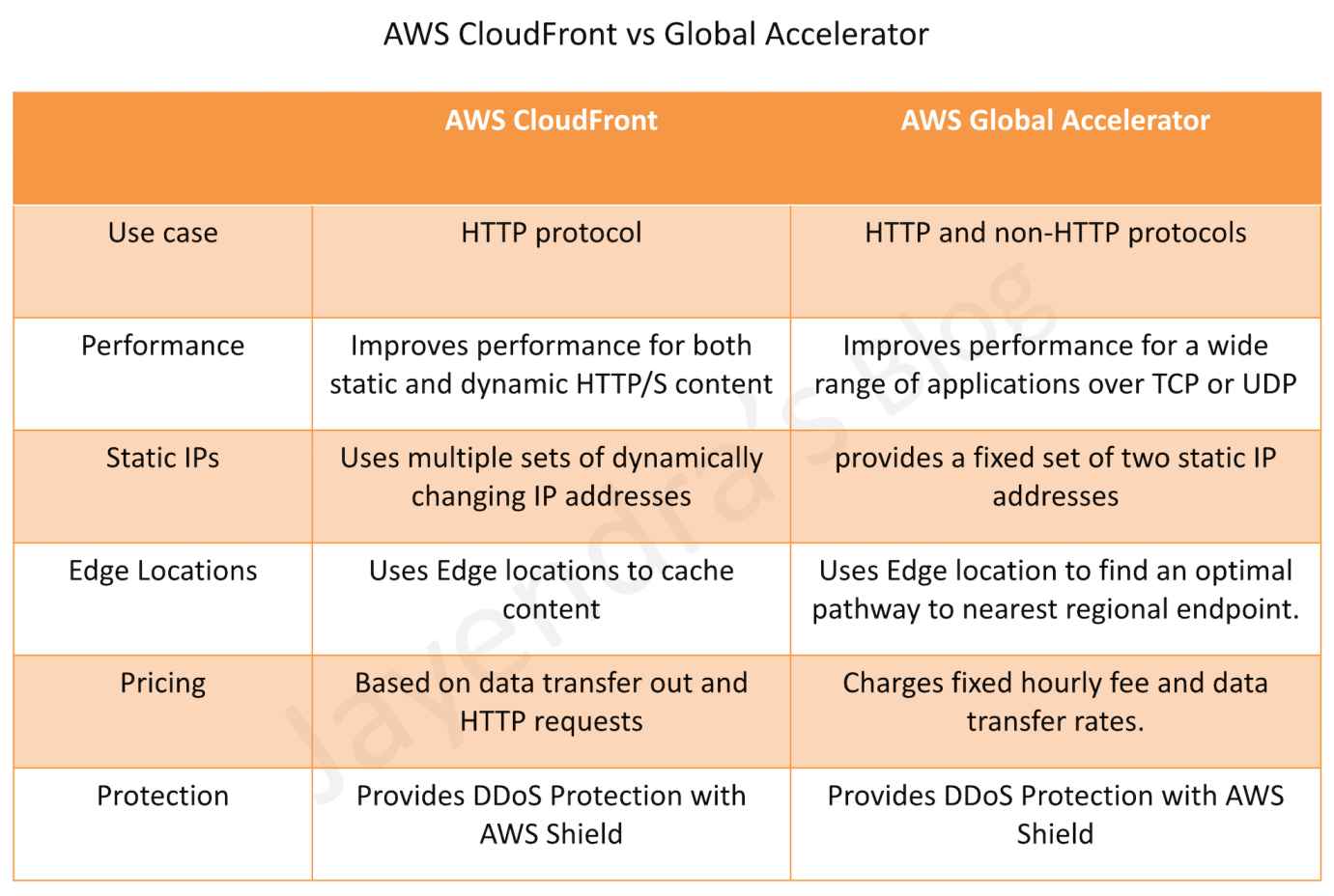
  • Global Accelerator and CloudFront both use the AWS global network and its edge locations around the world.
  • Both services integrate with AWS Shield for DDoS protection.
  • Performance
    • CloudFront improves performance for both cacheable content (such as images and videos) and dynamic content (such as API acceleration and dynamic site delivery).
    • Global Accelerator improves performance for a wide range of applications over TCP or UDP by proxying packets at the edge to applications running in one or more AWS Regions.
  • Use Cases
    • CloudFront is a good fit for HTTP use cases
    • Global Accelerator is a good fit for non-HTTP use cases, such as gaming (UDP), IoT (MQTT), or VoIP, as well as for HTTP use cases that require static IP addresses or deterministic, fast regional failover.
  • Caching
    • CloudFront supports Edge caching
    • Global Accelerator does not support Edge Caching.
  • IP Addresses
    • CloudFront uses dynamic IP addresses for edge locations.
    • Global Accelerator provides static anycast IP addresses as a fixed entry point.

AWS CloudFront vs Global Accelerator

AWS Certification Exam Practice Questions

  • Questions are collected from Internet and the answers are marked as per my knowledge and understanding (which might differ with yours).
  • AWS services are updated everyday and both the answers and questions might be outdated soon, so research accordingly.
  • AWS exam questions are not updated to keep up the pace with AWS updates, so even if the underlying feature has changed the question might not be updated
  • Open to further feedback, discussion and correction.
  1. What features does AWS Global Accelerator provide? (Select TWO)
    1. Improved security
    2. Improved durability
    3. Improved performance
    4. Improved cost optimization
    5. Improved availability
  2. A company that develops web applications has launched hundreds of Application Load Balancers (ALBs) in multiple Regions. The company wants to create an allow list for the IPs of all the load balancers on its firewall device. A solutions architect is looking for a one-time, highly available solution to address this request, which will also help reduce the number of IPs that need to be allowed by the firewall. What should the solutions architect recommend to meet these requirements?
    1. Create an AWS Lambda function to keep track of the IPs for all the ALBs in different Regions. Keep refreshing this list.
    2. Set up a Network Load Balancer (NLB) with Elastic IPs. Register the private IPs of all the ALBs as targets to this NLB.
    3. Launch AWS Global Accelerator and create endpoints for all the Regions. Register all the ALBs in different Regions to the corresponding endpoints.
    4. Set up an Amazon EC2 instance, assign an Elastic IP to this EC2 instance, and configure the instance as a proxy to forward traffic to all the ALBs.
  3. A company operates a multi-player online gaming platform with game servers deployed across multiple AWS Regions. The company needs to route players to specific game servers based on matchmaking logic while maintaining low latency. Which AWS service and accelerator type should the solutions architect use?
    1. AWS Global Accelerator with standard accelerator and endpoint weights
    2. AWS Global Accelerator with custom routing accelerator
    3. Amazon CloudFront with Lambda@Edge for routing logic
    4. Amazon Route 53 with latency-based routing
  4. A company has a multi-account AWS architecture and wants to route traffic through a single AWS Global Accelerator to endpoints in different AWS accounts. What feature should the solutions architect use?
    1. AWS Resource Access Manager (RAM) sharing
    2. VPC peering between accounts
    3. Global Accelerator cross-account attachments
    4. AWS Organizations service control policies
  5. A company requires both IPv4 and IPv6 connectivity for their global application. They want to use AWS Global Accelerator with static IP addresses for both protocols. What type of accelerator should they create?
    1. Standard accelerator with BYOIP addresses
    2. Dual-stack accelerator
    3. Custom routing accelerator with IPv6 enabled
    4. Standard accelerator with two separate configurations

References

Route 53 Alias vs CNAME – Differences & When to Use Each

Route 53 CNAME vs Alias Records

AWS Route 53 Alias vs CNAME

📅 Last Updated: June 2026 | Added: OpenSearch Service, AWS AppSync, VPC Lattice, App Runner alias targets; clarified record type support for alias-to-alias records.
  • Route 53 Alias records are similar to CNAME records, but there are some important differences.
  • Supported Resources
    • Alias records support selected AWS resources
      • Elastic Load Balancers (Application, Network, and Classic Load Balancers)
      • CloudFront distributions
      • Amazon API Gateway (custom regional and edge-optimized APIs)
      • Elastic Beanstalk environments
      • S3 Website (bucket configured as static website)
      • AWS Global Accelerator
      • VPC Interface Endpoints
      • Amazon OpenSearch Service custom domain endpoints (Added 2024)
      • AWS AppSync domain names
      • AWS App Runner services (Note: App Runner is no longer accepting new customers as of April 30, 2026)
      • Amazon VPC Lattice service domain endpoints (Added June 2025)
      • Route 53 record in the same hosted zone
    • Alias records do not support
      • EC2 DNS endpoint
      • RDS DNS endpoint
      • Non-AWS DNS endpoints
    • CNAME record can redirect DNS queries to any DNS record (AWS or non-AWS)
  • Zone Apex or Root domain like example.com
    • Alias record supports mapping Zone Apex records
    • CNAME record does not support Zone Apex records (per DNS RFC standards)
  • Charges
    • Route 53 doesn’t charge for alias queries to AWS resources
    • Route 53 charges for CNAME queries
    • Note: A CNAME record pointing to another Route 53 record incurs charges for both queries
  • Record Type
    • For AWS resource targets (ELB, CloudFront, S3, etc.), alias records support A (IPv4) or AAAA (IPv6) record types
    • For alias records pointing to another record in the same hosted zone, all record types are supported except NS and SOA
    • CNAME record redirects DNS queries for a record name regardless of the record type specified in the DNS query, such as A or AAAA
  • TTL (Time to Live)
    • When an alias record points to an AWS resource, you cannot set the TTL; Route 53 uses the default TTL for the resource
    • When an alias record points to another record in the same hosted zone, Route 53 uses the TTL of the target record
    • CNAME records allow custom TTL configuration
  • Health Checking
    • Alias records support “Evaluate Target Health” which integrates with the target resource’s health
    • For ELB and Elastic Beanstalk, Evaluate Target Health provides routing away from unhealthy resources
    • For highly available services (S3, API Gateway, Global Accelerator, OpenSearch, VPC Lattice), use Route 53 health checks instead

Route 53 Alias vs CNAME Comparison
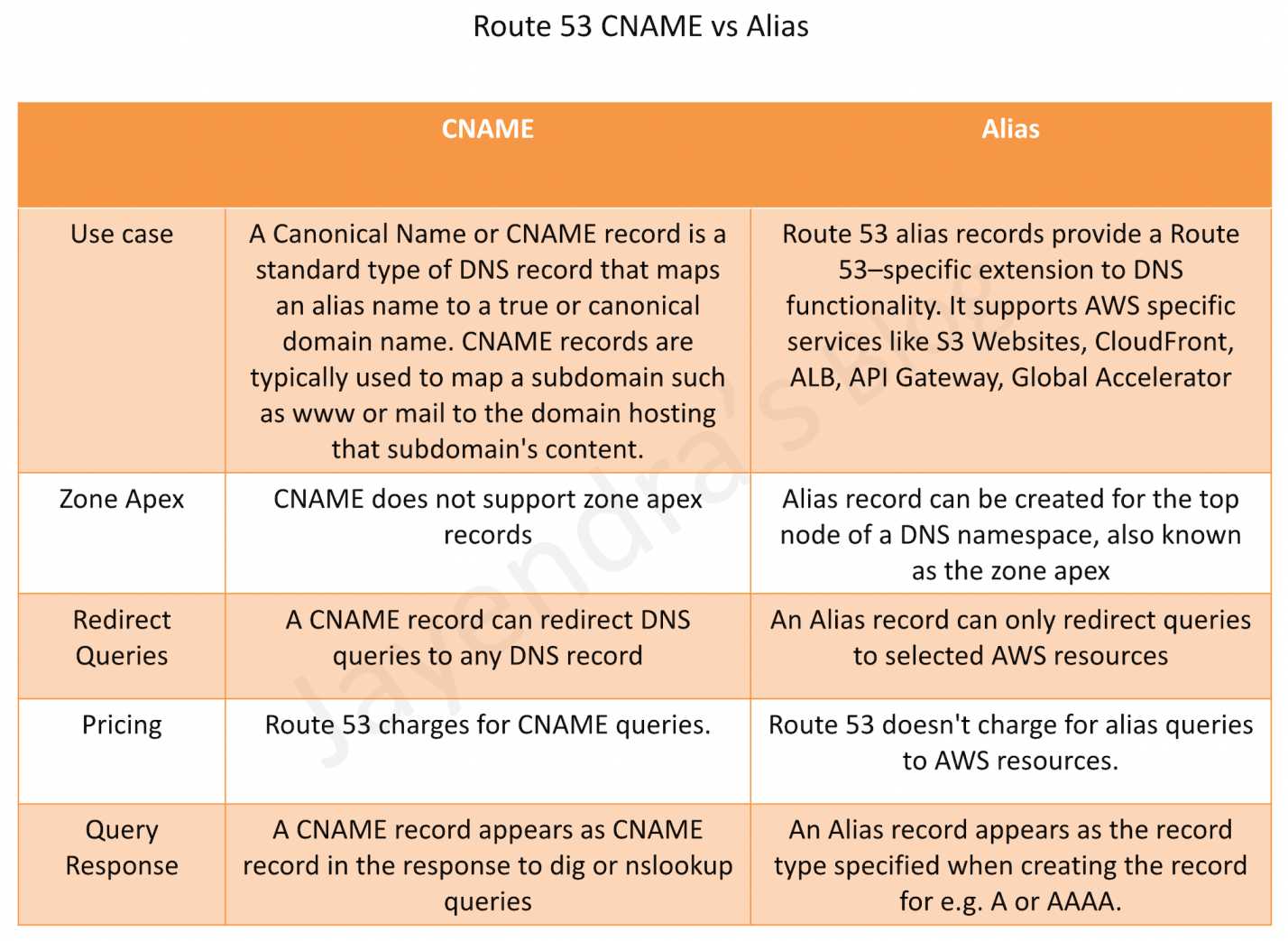
Route 53 CNAME vs Alias Records

Key Considerations for Alias Records

  • Automatic IP Resolution – Route 53 automatically recognizes changes in the resource’s IP addresses (e.g., when an ELB’s IP changes)
  • No Extra Hop – Unlike CNAME which requires an additional DNS lookup, alias records resolve directly to IP addresses
  • IPv6 Support – For CloudFront, ELB, and OpenSearch Service, create separate A (IPv4) and AAAA (IPv6) alias records
  • Cross-Account Support – Alias records can point to resources in different AWS accounts (e.g., a CloudFront distribution in another account)

AWS Certification Exam Practice Questions

  • Questions are collected from Internet and the answers are marked as per my knowledge and understanding (which might differ with yours).
  • AWS services are updated everyday and both the answers and questions might be outdated soon, so research accordingly.
  • AWS exam questions are not updated to keep up the pace with AWS updates, so even if the underlying feature has changed the question might not be updated
  • Open to further feedback, discussion and correction.
  1. Which of the following statements are true about Amazon Route 53 resource records? Choose 2 answers
    1. An Alias record can map one DNS name to another Amazon Route 53 DNS name.
    2. A CNAME record can be created for your zone apex.
    3. An Amazon Route 53 CNAME record can point to any DNS record hosted anywhere.
    4. TTL can be set for an Alias record in Amazon Route 53.
    5. An Amazon Route 53 Alias record can point to any DNS record hosted anywhere.
  2. How can the domain’s zone apex for example “myzoneapexdomain com” be pointed towards an Elastic Load Balancer?
    1. By using an AAAA record
    2. By using an A record
    3. By using an Amazon Route 53 CNAME record
    4. By using an Amazon Route 53 Alias record
  3. A company hosts its website using Amazon S3 static website hosting. They want to use their domain’s zone apex (example.com) to point to the S3 bucket. Which record type should they use?
    1. CNAME record pointing to the S3 website endpoint
    2. Alias record of type A pointing to the S3 website endpoint
    3. A record with the IP address of the S3 bucket
    4. MX record pointing to the S3 bucket
  4. Which of the following AWS resources can be targets for a Route 53 Alias record? (Choose 3)
    1. Application Load Balancer
    2. RDS database instance
    3. CloudFront distribution
    4. EC2 instance public DNS
    5. Amazon OpenSearch Service custom domain
  5. What is the primary advantage of using a Route 53 Alias record instead of a CNAME record when routing traffic to an AWS Elastic Load Balancer?
    1. Alias records support more record types than CNAME
    2. Alias records can point to non-AWS resources
    3. Alias records can be used at the zone apex and don’t incur query charges for AWS resources
    4. Alias records allow custom TTL values

References
CloudFront Functions vs Lambda@Edge – Comparison

AWS CloudFront Edge Functions

  • AWS CloudFront helps write your own code to customize how the CloudFront distributions process HTTP requests and responses.
  • The code runs close to the viewers (users) to minimize latency, and without having to manage servers or other infrastructure.
  • Custom code can manipulate the requests and responses that flow through CloudFront, perform basic authentication and authorization, generate HTTP responses at the edge, and more.
  • CloudFront Edge Functions currently supports three types
    • CloudFront Functions
    • Lambda@Edge
    • CloudFront Connection Functions (for mTLS validation)


Architectural diagram.

CloudFront Functions

  • is a CloudFront native feature (code is managed entirely within CloudFront) and visible only on the CloudFront dashboard.
  • supports lightweight functions written only in JavaScript language
  • supports two JavaScript runtimes:
    • Runtime 1.0 – ECMAScript 5.1 compliant with some ES 6-9 features
    • Runtime 2.0 – Adds async/await, Promises, ES modules (import/export), WebCrypto, Buffer module, Symbol, DataView, and ES 6-12 features
  • runs in 700+ Edge Locations (closer to viewers than Lambda@Edge)
  • has process-based isolation
  • supports Viewer Request, Viewer Response trigger events only
    • Viewer Request: after CloudFront receives the request from the Viewer
    • Viewer Response: before CloudFront forwards the response to the Viewer
  • supports sub-millisecond execution time
  • scales to millions of requests/second
  • as they are built to be more scalable, performant, and cost-effective, they have the following limitations
    • no network access
    • no file system access
    • no access to environment variables (use KeyValueStore instead)
    • no dynamic code evaluation (eval() not supported)
    • no timers (setTimeout, setImmediate not supported)
  • cannot access the request body
  • use-cases ideal for lightweight processing of web requests like
    • Cache-key manipulations and normalization
    • URL rewrites and redirects
    • HTTP header manipulation
    • Access authorization
    • Dynamic origin selection and modification (added Nov 2024)
    • A/B testing and feature flags (using KeyValueStore)

CloudFront Functions – Origin Modification (Nov 2024)

  • CloudFront Functions now supports origin modification, allowing you to conditionally change or update origin servers on each request from the viewer request event.
  • Previously, origin modification was only possible using Lambda@Edge on the origin request event.
  • Supports updating all existing origin capabilities such as setting custom headers, adjusting timeouts, setting Origin Shield, or changing the primary origin in origin groups.
  • Uses helper methods from the cloudfront module: updateRequestOrigin(), selectRequestOriginById(), and createRequestOriginGroup().
  • Requires JavaScript runtime 2.0.
  • In April 2025, VPC Origin modification was also added, enabling routing to private VPC origins from CloudFront Functions.
  • Available at no additional charge.

CloudFront Functions – New Capabilities (Nov 2025)

  • Edge Location Metadata – Access the three-letter airport code of the serving edge location and expected Regional Edge Cache (REC). Enables geo-specific content routing or compliance requirements (e.g., directing European users to GDPR-compliant origins).
  • Raw Query String Retrieval – Access the complete, unprocessed query string as received from the viewer, preserving special characters and encoding that may be altered during standard parsing.
  • Advanced Origin Overrides – Customize SSL/TLS handshake parameters including Server Name Indication (SNI). Useful for multi-tenant setups where CloudFront connects through CNAME chains resolving to servers with different certificate domains. Parameters include hostHeader, sni, allowedCertificateNames, and originOverrides.
  • Available at no additional charge in all CloudFront edge locations.

Amazon CloudFront KeyValueStore

  • is a low-latency, globally distributed datastore for CloudFront Functions (launched Nov 2023).
  • allows storing key-value pairs that can be read by CloudFront Functions at the edge without making a network call.
  • enables dynamic updates to configuration data without deploying code changes.
  • requires CloudFront Functions using JavaScript runtime 2.0.
  • eliminates the need for environment variables (which are not supported in CloudFront Functions).
  • use cases:
    • URL redirects and rewrites based on dynamic mappings
    • A/B testing configuration
    • Feature flags
    • Access control lists
    • SaaS tenant routing at the edge
    • Geo-based routing configuration
  • supports operations via CloudFront API using Signature Version 4A (SigV4A):
    • GetKey – retrieve a single key
    • PutKey – add or update a key
    • DeleteKey – remove a key
    • ListKeys – list all keys
  • data is eventually consistent across all edge locations.

Lambda@Edge

  • are Lambda functions and visible on the Lambda dashboard.
  • supports Node.js and Python languages (currently supports Node.js 18, 20, 22, 24 and Python 3.9-3.13)
  • runs in Regional Edge Caches (13 locations globally)
  • has VM-based isolation
  • supports Viewer Request, Viewer Response, Origin Request, and Origin Response trigger events.
    • Viewer Request: after CloudFront receives the request from the Viewer
    • Viewer Response: before CloudFront forwards the response to the Viewer
    • Origin Request: before CloudFront forwards the request to the Origin
    • Origin Response: after CloudFront receives the response from the Origin
  • supports longer execution time, 5 seconds for viewer triggers and 30 seconds for origin triggers
  • scales to 1000s of requests/second
  • has network and file system access
  • can access the request body
  • use-cases
    • Functions that take several milliseconds or more to complete.
    • Functions that require adjustable CPU or memory.
    • Functions that depend on third-party libraries (including the AWS SDK, for integration with other AWS services).
    • Functions that require network access to use external services for processing.
    • Functions that require file system access or access to the body of HTTP requests.
    • Complex authentication and authorization (JWT validation, OAuth).
  • Limitations
    • Numbered version of the Lambda function should be used, not $LATEST or aliases.
    • Lambda function must be in the US East (N. Virginia) Region.
    • No free tier – Lambda@Edge requests are not covered by the standard Lambda free tier.

Lambda@Edge – Advanced Logging Controls (Apr 2025)

  • JSON Structured Logs – Function logs can now be output in structured JSON format, making it easier to search, filter, and analyze large volumes of log entries without custom logging libraries.
  • Log Level Granularity – Switch log levels (ERROR, DEBUG, INFO) instantly without code changes, useful for real-time issue investigation.
  • Custom CloudWatch Log Group Selection – Choose which CloudWatch log group Lambda@Edge sends logs to, simplifying log aggregation and management at scale.
  • Configurable via Lambda APIs, Lambda console, AWS CLI, AWS SAM, and AWS CloudFormation.

CloudFront Connection Functions

  • is a newer type of edge function specifically designed for mutual TLS (mTLS) validation at the edge (launched 2025).
  • executes during the TLS handshake, before HTTP request processing begins.
  • allows custom certificate validation logic: device-specific authentication, certificate revocation, allow/deny decisions for TLS connections.
  • uses JavaScript runtime 2.0 (cloudfront-js-2.0).
  • can integrate with CloudFront KeyValueStore for real-time data lookups (e.g., certificate revocation lists).
  • use cases:
    • Custom certificate revocation checking
    • Device allowlist validation
    • Additional certificate attribute validation beyond standard mTLS
    • Logging connection-level metadata
  • runs at CloudFront edge locations worldwide.

CloudFront Functions vs Lambda@Edge

CloudFront Functions vs Lambda@Edge

Feature CloudFront Functions Lambda@Edge
Runtime JavaScript (runtime 1.0 or 2.0) Node.js, Python
Execution Location 700+ Edge Locations 13 Regional Edge Caches
Event Triggers Viewer Request, Viewer Response Viewer Request, Viewer Response, Origin Request, Origin Response
Execution Time Sub-millisecond 5 sec (viewer), 30 sec (origin)
Scale Millions of requests/sec Thousands of requests/sec
Network Access No Yes
File System Access No Yes
Request Body Access No Yes
Origin Modification Yes (via viewer request, Nov 2024) Yes (via origin request)
KeyValueStore Yes (runtime 2.0 required) No (use DynamoDB or external calls)
Pricing ~1/6th the price of Lambda@Edge Higher (no free tier for edge)

CloudFront Edge Functions Restrictions

  • Each event type (viewer request, origin request, origin response, and viewer response) can have only one edge function association.
  • CloudFront Functions and Lambda@Edge in viewer events (viewer request and viewer response) cannot be combined on the same cache behavior.
  • CloudFront does not invoke edge functions for viewer response events when the origin returns an HTTP status code 400 or higher.
  • Edge functions for viewer response events cannot modify the HTTP status code of the response, regardless of whether the response came from the origin or the CloudFront cache.
  • Lambda@Edge functions must be created in US East (N. Virginia) region and must use a numbered version (not $LATEST or aliases).
  • CloudFront Functions cannot access the request body, make network calls, or use timers.
  • Origin modification in CloudFront Functions runs on every request (viewer request event), whereas Lambda@Edge origin modification only runs on cache misses (origin request event).

AWS Certification Exam Practice Questions

  • Questions are collected from Internet and the answers are marked as per my knowledge and understanding (which might differ with yours).
  • AWS services are updated everyday and both the answers and questions might be outdated soon, so research accordingly.
  • AWS exam questions are not updated to keep up the pace with AWS updates, so even if the underlying feature has changed the question might not be updated
  • Open to further feedback, discussion and correction.
  1. You’ve been given the requirement to customize the content which is distributed to users via a CloudFront Distribution. The content origin is an S3 bucket. How could you achieve this?
    1. Add an event to the S3 bucket. Make the event invoke a Lambda function to customize the content before rendering
    2. Add a Step Function. Add a step with a Lambda function just before the content gets delivered to the users.
    3. Use Lambda@Edge
    4. Use a separate application on an EC2 Instance for this purpose.
  2. A company’s packaged application dynamically creates and returns single-use text files in response to user requests. The company is using Amazon CloudFront for distribution but wants to further reduce data transfer costs. The company cannot modify the application’s source code. What should a solutions architect do to reduce costs?
    1. Use Lambda@Edge to compress the files as they are sent to users.
    2. Enable Amazon S3 Transfer Acceleration to reduce the response times.
    3. Enable caching on the CloudFront distribution to store generated files at the edge.
    4. Use Amazon S3 multipart uploads to move the files to Amazon S3 before returning them to users.
  3. A company needs to dynamically route CloudFront requests to different origin servers based on the viewer’s geographic location with sub-millisecond latency. The routing configuration changes frequently. Which solution meets these requirements with the LEAST operational overhead?
    1. Use Lambda@Edge with a DynamoDB table for routing rules
    2. Use CloudFront Functions with KeyValueStore for routing configuration
    3. Use multiple CloudFront distributions with Route 53 geolocation routing
    4. Use CloudFront cache behaviors with path-based routing
  4. A development team needs to implement URL redirects for a website served through CloudFront. The redirect mappings change weekly and currently contain 500 entries. They need sub-millisecond performance. Which approach is MOST efficient?
    1. Use Lambda@Edge to query a database for redirect mappings
    2. Configure CloudFront cache behaviors for each redirect
    3. Use CloudFront Functions with KeyValueStore to store redirect mappings
    4. Use an Application Load Balancer with listener rules for redirects
  5. A company wants to dynamically route requests to different backend origins based on customer subscription tier. Requests include the tier as a header. The company wants this logic executed on every request with the lowest possible latency. Which edge function approach should they use?
    1. Lambda@Edge on origin request event
    2. Lambda@Edge on viewer request event
    3. CloudFront Functions with origin modification on viewer request event
    4. CloudFront Functions on viewer response event
  6. A solutions architect needs to implement custom mutual TLS certificate validation that checks client certificates against a revocation list at CloudFront edge locations. The revocation list is updated hourly. Which solution is MOST appropriate?
    1. Use Lambda@Edge to validate certificates on viewer request
    2. Use CloudFront Connection Functions with KeyValueStore for the revocation list
    3. Use CloudFront Functions to check certificate headers
    4. Configure CloudFront’s built-in certificate revocation checking

References

AWS CloudFront Security

CloudFront Security

  • CloudFront Security has multiple features, including
    • Support for Encryption at Rest and Transit.
    • Prevent users in specific geographic locations from accessing content
    • Configure HTTPS connections.
    • Use signed URLs or cookies to restrict access for selected users.
    • Restrict access to content in S3 buckets using Origin Access Control (OAC), to prevent users from using the direct URL of the file.
    • Set up field-level encryption for specific content fields
    • Use AWS WAF web ACLs to create a web access control list (web ACL) to restrict access to your content.
    • Use geo-restriction, also known as geoblocking, to prevent users in specific geographic locations from accessing content served through a CloudFront distribution.
    • Integration with AWS Shield to protect from DDoS attacks.
    • Support for Mutual TLS (mTLS) authentication for both viewer and origin connections.
    • VPC Origins to deliver content from applications in private subnets without exposing them to the public internet.

Data Protection

  • CloudFront supports both Encryption at Rest and in Transit.
  • CloudFront provides Encryption in Transit and can be configured
    • to require viewers to use HTTPS to request the files so that connections are encrypted when CloudFront communicates with viewers.
    • to use HTTPS to get files from the origin, so that connections are encrypted when CloudFront communicates with the origin.
    • HTTPS can be enforced using the Viewer Protocol Policy and Origin Protocol Policy.
  • CloudFront supports TLS 1.3 for origin connections (launched November 2025), providing stronger encryption algorithms, reduced handshake latency (up to 30% improvement), and better security posture for data transmission between edge locations and origin servers. TLS 1.3 is automatically enabled for all origin types including custom origins, S3, and ALBs.
  • CloudFront supports Post-Quantum TLS (launched September 2025) with the TLS1.3_2025 security policy, providing quantum-resistant key exchange to protect against “harvest now, decrypt later” threats.
  • CloudFront provides Encryption at Rest
    • using SSDs which are encrypted for edge location points of presence (POPs), and encrypted EBS volumes for Regional Edge Caches (RECs).
    • Function code and configuration are always stored in an encrypted format on the encrypted SSDs on the edge location POPs, and in other storage locations used by CloudFront.

Mutual TLS (mTLS) Authentication

  • Mutual TLS (mTLS) extends standard TLS by requiring bidirectional certificate-based authentication, where both client and server must prove their identity before establishing a secure connection.
  • CloudFront supports mTLS in two configurations:
    • Viewer mTLS (launched November 2025) – Authenticates end users/clients connecting to CloudFront using client certificates. Requires HTTPS connections.
    • Origin mTLS (launched January 2026) – CloudFront authenticates itself to origin servers using client certificates, ensuring only authorized CloudFront distributions can connect to application servers.
  • Together, viewer and origin mTLS enable true end-to-end zero-trust authentication from viewers through CloudFront to origin servers.
  • Origin mTLS supports per-origin configuration, allowing different client certificates for different origins within the same distribution.
  • mTLS Passthrough mode (launched May 2026) allows CloudFront to forward client certificates to the origin without verifying them at CloudFront, enabling custom validation at the origin.
  • mTLS is available at no additional cost and can be configured via Console, CLI, SDK, CDK, and CloudFormation.

Restrict Viewer Access

Serving Private Content

  • To securely serve private content using CloudFront
    • Require the users to access the private content by using special CloudFront signed URLs or signed cookies with the following restrictions
      • end date and time, after which the URL is no longer valid
      • start date-time, when the URL becomes valid
      • IP address or range of addresses to access the URLs
    • Require that users access the S3 content only using CloudFront URLs, not S3 URLs. Requiring CloudFront URLs isn’t required, but recommended to prevent users from bypassing the restrictions specified in signed URLs or signed cookies.
  • Signed URLs or Signed Cookies can be used with CloudFront using an HTTP server as an origin. It requires the content to be publicly accessible and care should be taken to not share the direct URL of the content
  • Restriction for Origin can be applied by
    • For S3, using Origin Access Control (OAC) to grant only CloudFront access to the content and removing any other access permissions. (OAI is legacy; see OAC section below)
    • For a Load balancer OR HTTP server, custom headers can be added by CloudFront which can be used at Origin to verify the request has come from CloudFront.
    • Custom origins can also be configured to allow traffic from CloudFront IPs only. CloudFront managed prefix list can be used to allow inbound traffic to the origin only from CloudFront’s origin-facing servers, preventing any non-CloudFront traffic from reaching your origin
    • For origins in private subnets, VPC Origins can be used to restrict access so that only CloudFront can reach the ALB, NLB, or EC2 instances directly.
  • Trusted Key Groups (Recommended)
    • AWS recommends using trusted key groups instead of trusted signers (CloudFront key pairs) for creating signed URLs and signed cookies.
    • Trusted key groups use public keys that you manage in CloudFront, associated with IAM-managed key pairs.
    • Benefits over legacy trusted signers:
      • No need for the AWS account root user to manage CloudFront key pairs.
      • Can use IAM policies and API to manage keys.
      • Can have more key groups per distribution (not limited to 5 trusted signers).
      • Supports key rotation without disrupting viewers.
    • A key group contains one or more public keys that CloudFront uses to verify signed URLs or signed cookies.
  • Trusted Signer (Legacy)
    • To create signed URLs or signed cookies, at least one AWS account (trusted signer) is needed that has an active CloudFront key pair
    • Once the AWS account is added as a trusted signer to the distribution, CloudFront starts to require that users use signed URLs or signed cookies to access the objects.
    • Private key from the trusted signer’s key pair to sign a portion of the URL or the cookie. When someone requests a restricted object, CloudFront compares the signed portion of the URL or cookie with the unsigned portion to verify that the URL or cookie hasn’t been tampered with. CloudFront also validates the URL or cookie is valid for e.g, that the expiration date and time hasn’t passed.
    • Each Trusted signer AWS account used to create CloudFront signed URLs or signed cookies must have its own active CloudFront key pair, which should be frequently rotated
    • A maximum of 5 trusted signers can be assigned for each cache behavior
    • Note: AWS recommends migrating to trusted key groups for better security and management flexibility.

Signed URLs vs Signed Cookies

  • CloudFront signed URLs and signed cookies help to secure the content and provide control to decide who can access the content.
  • Use signed URLs in the following cases:
    • to restrict access to individual files, for e.g., an installation download for the application.
    • users using a client, for e.g. a custom HTTP client, that doesn’t support cookies
  • Use signed cookies in the following cases:
    • provide access to multiple restricted files, e.g., all of the video files in HLS format or all of the files in the subscribers’ area of a website.
    • don’t want to change the current URLs.
  • Signed URLs take precedence over signed cookies, if both signed URLs and signed cookies are used to control access to the same files and a viewer uses a signed URL to request a file, CloudFront determines whether to return the file to the viewer based only on the signed URL.

Canned Policy vs Custom Policy

  • Canned policy or a custom policy is a policy statement, used by the Signed URLs, that helps define the restrictions for e.g. expiration date and timeCloudFront Signed URLs - Canned vs Custom Policy
  • CloudFront validates the expiration time at the start of the event.
  • If the user is downloading a large object, and the URL expires the download would still continue.
  • However, if the user is using range GET requests, or while streaming video skips to another position which might trigger another event, the request would fail.

Origin Access Control (OAC)

✅ OAC is the recommended method for restricting origin access. AWS deprecated Origin Access Identity (OAI) creation in 2024, and as of March 2026, new distributions can only use OAC. Existing OAI configurations continue to work but should be migrated to OAC.

CloudFront S3 Origin Access Control - OAC

  • Origin Access Control (OAC) restricts access so that only designated CloudFront distributions can access your origin.
  • OAC uses AWS Signature Version 4 (SigV4) to sign requests to the origin, providing enhanced security over legacy OAI.
  • OAC supports multiple origin types:
    • Amazon S3 bucket origins – primary use case for restricting S3 access
    • AWS Lambda function URL origins (April 2024) – secure Lambda function URLs
    • AWS Elemental MediaPackage v2 origins (April 2024) – secure media streaming
    • AWS Elemental MediaStore origins – secure media storage
  • OAC advantages over legacy OAI:
    • Supports all AWS regions including opt-in regions
    • Supports SSE-KMS encrypted S3 objects
    • Supports HTTP and HTTPS requests using POST method in all regions
    • Supports granular policy configurations with IAM resource policies
    • Supports S3 Object Ownership set to bucket owner enforced (default for new buckets)
  • For S3 origins, OAC works with bucket policies to allow only the CloudFront service principal (cloudfront.amazonaws.com) access, scoped to the specific distribution ID.
  • Users accessing S3 objects directly would
    • bypass the controls provided by CloudFront signed URLs or signed cookies
    • make CloudFront access logs less useful because they’re incomplete.

Migrating from OAI to OAC

  • Existing OAI configurations continue to work but should be migrated to OAC.
  • Migration steps:
    • Create an OAC in the CloudFront console or via API
    • Update the S3 bucket policy to allow the CloudFront service principal
    • Update the distribution origin to use OAC instead of OAI
    • Remove the OAI from the bucket policy after verifying OAC works
  • Both OAI and OAC can coexist during migration to avoid downtime.

Legacy: Origin Access Identity (OAI)

⚠️ OAI is legacy. AWS deprecated new OAI creation in 2024 and recommends migrating to Origin Access Control (OAC). As of March 2026, OAI cannot be attached to new distributions.

  • Origin Access Identity (OAI) was the original method to prevent users from directly accessing objects from S3.
  • OAI is a special CloudFront user that can be created and associated with the distribution.
  • S3 bucket/object permissions are configured to only provide access to the OAI.
  • OAI limitations (addressed by OAC):
    • Does not support SSE-KMS
    • Does not support POST method in regions requiring SigV4
    • Limited to S3 origins only
    • Does not support granular IAM policies

VPC Origins

  • CloudFront VPC Origins (launched November 2024) allows delivering content from applications hosted in VPC private subnets, preventing direct public internet access to origins.
  • Supported origin types within private subnets:
    • Application Load Balancers (ALB)
    • Network Load Balancers (NLB)
    • EC2 Instances
  • Key benefits:
    • Origins remain completely private – accessible only through CloudFront
    • No need for public IPs, NAT gateways, or complex security group rules
    • Eliminates the need for custom header verification or IP allowlisting for origin protection
    • Available at no additional cost
  • Cross-account support (November 2025) allows CloudFront distributions in one account to access VPC origins in another account.
  • WebSocket support (May 2026) enables real-time applications hosted in private subnets to use WebSockets through CloudFront VPC origins.
  • VPC Origins is the recommended approach for securing non-S3 custom origins, replacing the legacy pattern of custom headers or IP allowlisting.

Custom Headers

  • Custom headers can be added by CloudFront which can be used at Origin to verify the request has come from CloudFront.

CloudFront Security - Custom headers

  • A viewer accesses the website or application and requests one or more files, such as an image file and an HTML file.
  • DNS routes the request to the CloudFront edge location that can best serve the request – typically the nearest edge location in terms of latency.
  • At the edge location, AWS WAF inspects the incoming request according to configured web ACL rules.
  • At the edge location, CloudFront checks its cache for the requested content.
    • If the content is in the cache, CloudFront returns it to the user.
    • If the content isn’t in the cache, CloudFront adds the custom header, X-Origin-Verify , with the value of the secret from Secrets Manager, and forwards the request to the origin.
  • At the origin ALB, ALB rules or AWS WAF inspects the incoming request header, X-Origin-Verify, and allows the request if the string value is valid. If the header isn’t valid, AWS WAF blocks the request.
  • At the configured interval, Secrets Manager automatically rotates the custom header value and updates the origin AWS WAF and CloudFront configurations.
  • Note: For stronger origin protection, consider using VPC Origins (for ALB/NLB/EC2) or Origin mTLS instead of shared secret headers, as these provide cryptographic authentication rather than shared secrets.

CloudFront Security Dashboard

  • CloudFront Security Dashboard (launched November 2023) provides a unified CDN and security experience within the CloudFront console.
  • Key features:
    • One-click WAF protection – creates an AWS WAF web ACL, configures rules to protect against common web threats (OWASP Top 10, known threat IPs, scanner detection), and attaches it to the distribution automatically.
    • Security metrics – displays allowed/blocked requests, challenge and CAPTCHA requests, top attack types, and traffic ratios over time.
    • Geo-restriction management – block countries directly from the dashboard with metrics visibility.
    • Built-in pricing calculators – estimate WAF and CloudWatch costs when enabling protections.
  • Standard pricing for AWS WAF and Amazon CloudWatch apply when security protections are enabled.

Geo-Restriction – Geoblocking

  • Geo restriction can help allow or prevent users in selected countries from accessing the content.
  • CloudFront distribution can be configured either to allow users in
    • an allowlist of specified countries to access the content or to
    • deny users in a denylist of specified countries to access the content
  • Geo restriction can be used to restrict access to all of the files that are
    associated with distribution and to restrict access at the country level.
  • CloudFront responds to a request from a viewer in a restricted country with an HTTP status code 403 (Forbidden).
  • Use a third-party geolocation service, if access is to be restricted to a subset of the files that are associated with a distribution or to restrict access at a finer granularity than the country level.
  • CloudFront geographic restrictions are provided for free, but metrics for blocked country requests are only visible through AWS WAF geographic restrictions in the security dashboard.
  • Geo-restriction is also critical for reducing attack surface by limiting traffic to expected geographic regions.

Field Level Encryption Config

  • CloudFront can enforce secure end-to-end connections to origin servers by using HTTPS.
  • Field-level encryption adds an additional layer of security that helps protect specific data throughout system processing so that only certain applications can see it.
  • Field-level encryption can be used to securely upload user-submitted sensitive information. The sensitive information provided by the clients is encrypted at the edge closer to the user and remains encrypted throughout the entire application stack, ensuring that only applications that need the data – and have the credentials to decrypt it – are able to do so.
  • Up to 10 data fields can be encrypted in a request.
  • Uses asymmetric encryption (public key at edge, private key at application) for protection.

AWS Certification Exam Practice Questions

  • Questions are collected from Internet and the answers are marked as per my knowledge and understanding (which might differ with yours).
  • AWS services are updated everyday and both the answers and questions might be outdated soon, so research accordingly.
  • AWS exam questions are not updated to keep up the pace with AWS updates, so even if the underlying feature has changed the question might not be updated
  • Open to further feedback, discussion and correction.
  1. You are building a system to distribute confidential training videos to employees. Using CloudFront, what method could be used to serve content that is stored in S3, but not publically accessible from S3 directly?
    1. Create an Origin Access Control (OAC) for CloudFront and grant access to the objects in your S3 bucket to that OAC. (Note: OAI is legacy; OAC is the current recommended approach)
    2. Add the CloudFront account security group “amazon-cf/amazon-cf-sg” to the appropriate S3 bucket policy.
    3. Create an Identity and Access Management (IAM) User for CloudFront and grant access to the objects in your S3 bucket to that IAM User.
    4. Create a S3 bucket policy that lists the CloudFront distribution ID as the Principal and the target bucket as the Amazon Resource Name (ARN).
  2. A media production company wants to deliver high-definition raw video for preproduction and dubbing to customer all around the world. They would like to use Amazon CloudFront for their scenario, and they require the ability to limit downloads per customer and video file to a configurable number. A CloudFront download distribution with TTL=0 was already setup to make sure all client HTTP requests hit an authentication backend on Amazon Elastic Compute Cloud (EC2)/Amazon RDS first, which is responsible for restricting the number of downloads. Content is stored in S3 and configured to be accessible only via CloudFront. What else needs to be done to achieve an architecture that meets the requirements? Choose 2 answers
    1. Enable URL parameter forwarding, let the authentication backend count the number of downloads per customer in RDS, and return the content S3 URL unless the download limit is reached.
    2. Enable CloudFront logging into an S3 bucket, leverage EMR to analyze CloudFront logs to determine the number of downloads per customer, and return the content S3 URL unless the download limit is reached. (CloudFront logs are logged periodically and EMR not being real time, hence not suitable)
    3. Enable URL parameter forwarding, let the authentication backend count the number of downloads per customer in RDS, and invalidate the CloudFront distribution as soon as the download limit is reached. (Distribution are not invalidated but Objects)
    4. Enable CloudFront logging into the S3 bucket, let the authentication backend determine the number of downloads per customer by parsing those logs, and return the content S3 URL unless the download limit is reached. (CloudFront logs are logged periodically and EMR not being real time, hence not suitable)
    5. Configure a list of trusted signers, let the authentication backend count the number of download requests per customer in RDS, and return a dynamically signed URL unless the download limit is reached.
  3. To enable end-to-end HTTPS connections from the user’s browser to the origin via CloudFront, which of the following options are valid? Choose 2 answers
    1. Use self-signed certificate in the origin and CloudFront default certificate in CloudFront. (Origin cannot be self-signed)
    2. Use the CloudFront default certificate in both origin and CloudFront (CloudFront cert cannot be applied to origin)
    3. Use a 3rd-party CA certificate in the origin and CloudFront default certificate in CloudFront
    4. Use 3rd-party CA certificate in both origin and CloudFront
    5. Use a self-signed certificate in both the origin and CloudFront (Origin cannot be self-signed)
  4. A company needs to ensure that only authenticated IoT devices can access their API through CloudFront. The devices have client certificates issued by the company’s internal CA. Which CloudFront feature should they use?
    1. CloudFront signed URLs with trusted key groups
    2. CloudFront viewer mutual TLS (mTLS) authentication
    3. CloudFront Origin Access Control (OAC)
    4. CloudFront field-level encryption
  5. An organization wants to ensure that requests reaching their origin servers are exclusively from their authorized CloudFront distributions, using cryptographic identity verification rather than shared secrets. Which approach provides the strongest origin protection?
    1. Custom headers with X-Origin-Verify and Secrets Manager rotation
    2. CloudFront managed prefix list with security group rules
    3. CloudFront Origin mTLS authentication with client certificates
    4. Origin Access Control (OAC) with S3 bucket policies
  6. A company wants to serve their web application through CloudFront, but their backend ALB must not be accessible from the public internet. The ALB is in a private subnet. Which CloudFront feature enables this?
    1. Origin Access Control (OAC) with ALB
    2. Custom headers with Secrets Manager rotation
    3. CloudFront VPC Origins
    4. CloudFront managed prefix list with security groups
  7. A company is currently using Origin Access Identity (OAI) to restrict S3 access through CloudFront. They need to serve SSE-KMS encrypted objects. What should they do?
    1. Add the OAI to the KMS key policy
    2. Migrate from OAI to Origin Access Control (OAC), which supports SSE-KMS
    3. Use CloudFront field-level encryption instead of SSE-KMS
    4. Create a Lambda@Edge function to decrypt the objects

References

CloudFront with S3 – OAC, Origin Access & Caching Best Practices

CloudFront S3 Origin Access Identity - OAI

AWS CloudFront with S3

  • CloudFront can be used to distribute the content from an S3 bucket.
  • For an RTMP distribution, the S3 bucket is the only supported origin, and custom origins cannot be used
  • Using CloudFront over S3 has the following benefits
    • can be more cost-effective if the objects are frequently accessed as at higher usage, and the price for CloudFront data transfer is much lower than the price for S3 data transfer.
    • downloads are faster with CloudFront than with S3 alone because the objects are stored closer to the users
  • CloudFront provides two ways to send authenticated requests to an S3 origin: Origin Access Control (OAC) and Origin Access Identity (OAI).
  • OAC is the recommended and preferred method. OAI is legacy and deprecated — new CloudFront distributions (as of March 2026) can only use OAC.
  • When using S3 as the origin for distribution and the bucket is moved to a different region, CloudFront can take up to an hour to update its records to include the change of region when both of the following are true:
    • Origin Access Control (OAC) or Origin Access Identity (OAI) are used to restrict access to the bucket.
    • Bucket is moved to an S3 region that requires Signature Version 4 for authentication
  • CloudFront does not currently support S3 directory buckets (S3 Express One Zone) as origins directly.

Origin Access Control – OAC

CloudFront Origin Access Control - OAC

  • Origin Access Control (OAC) is the recommended method to restrict direct S3 access and should be used for all new distributions.
  • OAC supports:
    • Enhanced security practices like short-term credentials, frequent credential rotations, and resource-based policies
    • All S3 buckets in all AWS Regions, including opt-in Regions launched after December 2022
    • S3 server-side encryption with AWS KMS (SSE-KMS)
    • Dynamic requests (PUT, POST, DELETE) to Amazon S3
    • Comprehensive HTTP methods support — OAC supports GET, PUT, POST, PATCH, DELETE, OPTIONS, and HEAD.
  • OAC is based on IAM service principals to authenticate with S3 origins using AWS Signature Version 4 (SigV4).
  • CloudFront OAC needs to be set up with permissions to access the S3 bucket origin using an S3 bucket policy that grants the CloudFront service principal (cloudfront.amazonaws.com) access, scoped to the specific distribution ARN.
  • For buckets with objects encrypted using server-side encryption with AWS Key Management Service (SSE-KMS), the OAC must be provided with permission to use the AWS KMS key via the KMS key policy.
  • When using CloudFront OAC with Amazon S3 bucket origins, Amazon S3 Object Ownership must be set to Bucket owner enforced (the default for new S3 buckets). If ACLs are required, use the Bucket owner preferred setting.
  • OAC does not work with S3 buckets configured as website endpoints — these must be set up as custom origins.
  • OAC Signing Behavior options:
    • Always sign requests (recommended) — CloudFront always signs requests to the S3 origin.
    • Never sign requests — Turns off OAC; bucket must be publicly accessible.
    • Do not override authorization header — CloudFront signs only when the viewer request doesn’t include an Authorization header.

OAC Extended Origin Support (2024)

  • CloudFront OAC is not limited to S3 origins. It now also supports:
    • AWS Lambda function URL origins (April 2024) — Secures Lambda function URLs by permitting access only from designated CloudFront distributions using SigV4.
    • AWS Elemental MediaPackage v2 origins — Restricts access to MediaPackage v2 channel endpoints.
    • AWS Elemental MediaStore origins — Restricts access to MediaStore container endpoints.

Migrating from OAI to OAC

  • To migrate, first update the S3 bucket policy to allow both the OAI and the distribution with OAC enabled to access the bucket’s content.
  • This ensures CloudFront never loses access during the transition.
  • After the distribution is fully deployed with OAC, remove the OAI statement from the bucket policy.

Origin Access Identity – OAI (Legacy, Not Recommended)

⚠️ OAI DEPRECATED

Origin Access Identity (OAI) is a legacy feature. AWS deprecated OAI creation in 2024. As of March 2026, new CloudFront distributions can only use Origin Access Control (OAC). Existing OAI-based distributions continue to function but cannot be attached to new distributions.

Action Required: Migrate to Origin Access Control (OAC) for enhanced security and feature support.

CloudFront S3 Origin Access Identity - OAI

  • OAI doesn’t support:
    • Amazon S3 buckets in opt-in Regions (launched after January 2023)
    • Amazon S3 server-side encryption with AWS KMS (SSE-KMS)
    • Dynamic requests (PUT, POST, or DELETE) to Amazon S3
  • S3 origin objects must be granted public read permissions and hence the objects are accessible from both S3 as well as CloudFront.
  • Even though CloudFront does not expose the underlying S3 URL, it can be known to the user if shared directly or used by applications.
  • For using CloudFront signed URLs or signed cookies to provide access to the objects, it would be necessary to prevent users from having direct access to the S3 objects.
  • Users accessing S3 objects directly would
    • bypass the controls provided by CloudFront signed URLs or signed cookies, for e.g., control over the date-time that a user can no longer access the content and the IP addresses can be used to access content
    • CloudFront access logs are less useful because they’re incomplete.
  • Origin Access Identity (OAI) can be used to prevent users from directly accessing objects from S3.
  • Origin access identity, which is a special CloudFront user, can be created and associated with the distribution.
  • S3 bucket/object permissions need to be configured to only provide access to the Origin Access Identity.
  • When users access the object from CloudFront, it uses the OAI to fetch the content on the user’s behalf, while the S3 object’s direct access is restricted

CloudFront with S3 Objects

  • CloudFront can be configured to include custom headers or modify existing headers whenever it forwards a request to the origin, to
    • validate the user is not accessing the origin directly, bypassing CDN
    • identify the CDN from which the request was forwarded, if more than one CloudFront distribution is configured to use the same origin
    • if users use viewers that don’t support CORS, configure CloudFront to forward the Origin header to the origin. That will cause the origin to return the Access-Control-Allow-Origin header for every request

Adding & Updating Objects

  • Objects just need to be added to the Origin and CloudFront would start distributing them when accessed.
  • For objects served by CloudFront, the Origin can be updated either by
    • Overwriting the original object
    • Create a different version and update the links exposed to the user.
  • For updating objects, it is recommended to use versioning e.g. have files or the entire folders with versions, so links can be changed when the objects are updated forcing a refresh.
  • With versioning,
    • there is no wait time for an object to expire before CloudFront begins to serve a new version of it.
    • there is no difference in consistency in the object served from the edge
    • no cost is involved to pay for object invalidation.

Removing/Invalidating Objects

  • Objects, by default, would be removed upon expiry (TTL) and the latest object would be fetched from the Origin
  • Objects can also be removed from the edge cache before it expires
    • File or Object Versioning to serve a different version of the object that has a different name.
    • Invalidate the object from edge caches. For the next request, CloudFront returns to the Origin to fetch the object
  • Object or File Versioning is recommended over Invalidating objects
    • if the objects need to be updated frequently.
    • enables to control which object a request returns even when the user has a version cached either locally or behind a corporate caching proxy.
    • makes it easier to analyze the results of object changes as CloudFront access logs include the names of the objects
    • provides a way to serve different versions to different users.
    • simplifies rolling forward & back between object revisions.
    • is less expensive, as no charges for invalidating objects.
    • for e.g. change header-v1.jpg to header-v2.jpg
  • Invalidating objects from the cache
    • objects in the cache can be invalidated explicitly before they expire to force a refresh
    • allows to invalidate selected objects
    • allows to invalidate multiple objects for e.g. objects in a directory or all of the objects whose names begin with the same characters, you can include the * wildcard at the end of the invalidation path.
    • the user might continue to see the old version until it expires from those caches.
    • A specified number of invalidation paths can be submitted each month for free. Any invalidation requests more than the allotted no. per month, a fee is charged for each submitted invalidation path
    • The First 1,000 invalidation paths requests submitted per month are free; charges apply for each invalidation path over 1,000 in a month.
    • Invalidation path can be for a single object for e.g. /js/ab.js or for multiple objects for e.g. /js/* and is counted as a single request even if the * wildcard request may invalidate thousands of objects.
  • For RTMP distribution, objects served cannot be invalidated

Invalidation by Cache Tag (2026)

  • CloudFront now supports tag-based cache invalidation (announced April 2026), enabling invalidation of cached objects based on semantic tags rather than URL paths.
  • How it works:
    • Configure a CacheTagConfig on the distribution specifying the HTTP header name for cache tags.
    • The origin returns a cache tag header (e.g., x-amz-meta-cache-tag) with comma-separated tag values in HTTP responses.
    • Use the CreateInvalidation API with a # prefix to invalidate all objects matching a tag (e.g., #product:electronics).
  • For S3 origins, cache tags can be attached as S3 object metadata. A metadata key of cache-tag is returned by S3 as an x-amz-meta-cache-tag header.
  • Alternatively, a Lambda@Edge origin response function can add cache tag headers.
  • Tag format requirements:
    • ASCII visible characters (33–126), no spaces or commas
    • Case-insensitive, maximum 256 characters per tag
    • Maximum 50 tags per object
  • Path and tag invalidations can be mixed in a single request.
  • Tag invalidation is opt-in — distributions without CacheTagConfig ignore cache tag headers.
  • Backward compatible — existing path and wildcard invalidations continue to work unchanged.

Partial Requests (Range GETs)

  • Partial requests using Range headers in a GET request help to download the object in smaller units, improving the efficiency of partial downloads and the recovery from partially failed transfers.
  • For a partial GET range request, CloudFront
    • checks the cache in the edge location for the requested range or the entire object and if exists, serves it immediately
    • if the requested range does not exist, it forwards the request to the origin and may request a larger range than the client requested to optimize performance
    • if the origin supports range header, it returns the requested object range and CloudFront returns the same to the viewer
    • if the origin does not support range header, it returns the complete object and CloudFront serves the entire object and caches it for future.
    • CloudFront uses the cached entire object to serve any future range GET header requests

CloudFront VPC Origins (2024)

  • CloudFront VPC Origins (launched November 2024) allows CloudFront to deliver content from applications hosted in VPC private subnets.
  • Eliminates the need for applications to be exposed on the public internet by restricting access solely through CloudFront distributions.
  • Supports Application Load Balancers (ALBs), Network Load Balancers (NLBs), or EC2 instances in private subnets as origins.
  • For S3 origins, OAC remains the managed solution. VPC Origins is designed for compute-based origins (ALB, NLB, EC2).
  • Origin servers remain hidden from the internet, reducing the attack surface.
  • VPC Origin modification via CloudFront Functions is also supported (April 2025).

CloudFront Origin Modification via CloudFront Functions (2024)

  • CloudFront supports origin modification within CloudFront Functions (announced November 2024), enabling conditional origin changes on each request.
  • Allows dynamically routing requests to different S3 buckets or other origins based on request attributes (headers, path, query strings).
  • Use cases include A/B testing, failover, geographic routing, and multi-tenant architectures.
  • Additional capabilities added (November 2025): edge location and Regional Edge Cache (REC) metadata, raw query string retrieval, and advanced origin overrides.

CloudFront Mutual TLS for Origins (2026)

  • CloudFront now supports mutual TLS (mTLS) authentication for origins (announced January 2026), enabling end-to-end certificate-based authentication from viewers to origins.
  • Ensures that only authorized CloudFront distributions can establish connections with origin servers.
  • Supports per-origin configuration with different client certificates for different origins within the same distribution.
  • Stronger than custom headers or IP allowlists for origin authentication.
  • Works with AWS, on-premises, and third-party backends.
  • CloudFront also supports mTLS Passthrough Mode for viewers (May 2026), forwarding client certificates to the origin without verification at CloudFront.

AWS Certification Exam Practice Questions

  • Questions are collected from Internet and the answers are marked as per my knowledge and understanding (which might differ with yours).
  • AWS services are updated everyday and both the answers and questions might be outdated soon, so research accordingly.
  • AWS exam questions are not updated to keep up the pace with AWS updates, so even if the underlying feature has changed the question might not be updated
  • Open to further feedback, discussion and correction.
  1. You are building a system to distribute confidential training videos to employees. Using CloudFront, what method could be used to serve content that is stored in S3, but not publically accessible from S3 directly?
    1. Create an Origin Access Identity (OAI) for CloudFront and grant access to the objects in your S3 bucket to that OAI. [Note: While this answer remains technically correct for the question, OAI is now legacy. The recommended approach for new implementations is Origin Access Control (OAC).]
    2. Add the CloudFront account security group “amazon-cf/amazon-cf-sg” to the appropriate S3 bucket policy.
    3. Create an Identity and Access Management (IAM) User for CloudFront and grant access to the objects in your S3 bucket to that IAM User.
    4. Create an S3 bucket policy that lists the CloudFront distribution ID as the Principal and the target bucket as the Amazon Resource Name (ARN).
  2. A company wants to restrict access to its S3 bucket origin so that content is only accessible through their CloudFront distribution. They also need to support uploading files via CloudFront and use SSE-KMS encryption. Which approach should they use?
    1. Configure Origin Access Identity (OAI) with a bucket policy granting s3:GetObject and s3:PutObject.
    2. Configure Origin Access Control (OAC) with a bucket policy granting the CloudFront service principal s3:GetObject and s3:PutObject, and update the KMS key policy to allow CloudFront.
    3. Make the S3 bucket public and use CloudFront signed URLs to restrict viewer access.
    4. Use a Lambda@Edge function to sign all requests to S3 using IAM credentials.
  3. A development team needs to invalidate all cached product images across their CloudFront distribution whenever a product category is updated, regardless of URL path structure. What is the most efficient approach?
    1. Create a wildcard invalidation for /* to clear all cached content.
    2. Maintain a list of all product image URLs and submit individual invalidation paths.
    3. Configure cache tag invalidation on the distribution and tag objects with category metadata, then invalidate by cache tag.
    4. Reduce the TTL to 0 for all product images so they are never cached.
  4. An organization uses CloudFront to serve a web application from an ALB in a private subnet. They want to ensure the ALB is never directly accessible from the internet. Which CloudFront feature should they use?
    1. Origin Access Control (OAC)
    2. AWS WAF with IP restriction rules
    3. CloudFront VPC Origins
    4. CloudFront signed URLs with a custom policy
  5. A company needs to verify that requests to their origin server come exclusively from their authorized CloudFront distribution, using certificate-based authentication instead of shared secrets or IP allowlists. Which feature should they implement?
    1. CloudFront Origin Access Control (OAC)
    2. Custom origin headers with a shared secret value
    3. AWS WAF with CloudFront managed prefix list
    4. CloudFront mutual TLS (mTLS) for origins

References

AWS Client VPN

AWS Client VPN

  • AWS Client VPN is a managed client-based VPN service that enables secure access to AWS resources and resources in the on-premises network
  • Client VPN allows accessing the resources from any location using an OpenVPN-based VPN client.
  • Client VPN establishes a secure TLS connection from any location using the OpenVPN client.
  • Client VPN automatically scales to the number of users connecting to the AWS resources and on-premises resources.
  • Client VPN supports client authentication using Active Directory, federated authentication, and certificate-based authentication.
  • Client VPN provides manageability with the ability to manage active client connections, with the ability to terminate active client connections and to view connection logs, which provide details on client connection attempts
  • Client VPN supports IPv4, IPv6, and dual-stack (both IPv4 and IPv6) connectivity for modern networking requirements.
  • Client VPN supports native integration with AWS Transit Gateway, enabling centralized remote access to multiple VPCs and on-premises networks without requiring an intermediate VPC.

AWS Client VPN

Client VPN Components

  • Client VPN endpoint
    • is the resource that is created and configured to enable and manage client VPN sessions.
    • is the resource where all client VPN sessions are terminated.
    • supports Quickstart setup (Jan 2026) with pre-defined default configurations requiring only three inputs: IPv4 CIDR, server certificate ARN, and subnet selection.
  • Target network
    • is the network associated with a Client VPN endpoint.
    • is a subnet from a VPC that enables establishing VPN sessions.
    • Multiple subnets can be associated with the Client VPN endpoint, however, each subnet must belong to a different Availability Zone.
    • For IPv6 or dual-stack traffic, the associated subnets must have IPv6 or dual-stack CIDR ranges.
  • Route
    • describes the available destination network routes.
    • Each route in the route table specifies the path for traffic to specific resources or networks.
  • Authorization rules
    • restrict the users who can access a network.
    • helps configure the AD or IdP group that is allowed access. Only users belonging to this group can access the specified network.
  • Client
    • end-user connecting to the Client VPN endpoint to establish a VPN session.
    • need to download an OpenVPN client and use the Client VPN configuration file to establish a VPN session.

Client VPN Authentication & Authorization

  • Client VPN provides authentication and authorization capabilities.
  • Authentication determines whether clients are allowed to connect to the Client VPN endpoint
  • Client VPN offers the following types of client authentication:
    • Active Directory authentication (user-based)
    • Mutual authentication (certificate-based)
    • Single sign-on (SAML-based federated authentication) (user-based)
  • Client VPN supports two types of authorization:
    • Security groups and
    • Network-based authorization (using authorization rules)
      • allows mapping of the Active Directory group or the SAML-based IdP group to the network they can have access to.

Client VPN Split Tunnel

  • Client VPN endpoint, by default, routes all traffic over the VPN tunnel.
  • Split-tunnel Client VPN endpoint helps when you do not want all user traffic to route through the Client VPN endpoint.
  • Split tunnel ensures only traffic with a destination to the network matching a route from the Client VPN endpoint route table is routed over the Client VPN tunnel.
  • Split-tunnel offers the following benefits:
    • Optimized routing of traffic from clients by having only the AWS destined traffic traverse the VPN tunnel.
    • Reduced volume of outgoing traffic from AWS, therefore reducing the data transfer cost.

Client VPN IPv6 Support

  • Client VPN now supports native IPv6 connectivity alongside existing IPv4 capabilities (announced Aug 2025).
  • Supports three endpoint types: IPv4-only, IPv6-only, or dual-stack (both IPv4 and IPv6).
  • Two key configuration parameters:
    • Endpoint IP address type – defines the endpoint management IP type (outer VPN tunnel traffic between OpenVPN client and server over the public internet).
    • Traffic IP address type – defines the type of traffic that flows through the VPN tunnel (inner encrypted traffic), client CIDR ranges, subnet association, routes, and rules per endpoint.
  • For IPv6 client CIDR, you do not need to specify a CIDR block — Amazon automatically assigns CIDR ranges for IPv6 clients.
  • Auto-assignment enables no-SNATing for IPv6 tunnel traffic, providing enhanced visibility into the connected user’s IPv6 address.
  • For IPv6 traffic, Client VPN does not perform Network Address Translation (NAT).
  • Endpoint type (IPv4, IPv6, dual-stack) and traffic type cannot be modified after creation.
  • Client-to-client communication is not supported for IPv6 clients.

Client VPN Transit Gateway Integration

  • Client VPN now supports native integration with AWS Transit Gateway (announced Apr 2026).
  • Native Transit Gateway attachment eliminates the need for an intermediate VPC, allowing centralized remote access to multiple VPCs and on-premises networks directly from the Client VPN endpoint.
  • Previously, connecting Client VPN to multiple VPCs required provisioning and managing an intermediate VPC, adding operational complexity.
  • A Client VPN attachment is automatically created when you associate a Client VPN endpoint with a transit gateway.
  • Key benefits:
    • End-to-end source IP visibility – client source IPs are preserved, enabling authorization rules based on actual client IPs and tracing traffic back to specific users.
    • No intermediate VPC required – reduces operational complexity and eliminates additional resource management.
    • Transit Gateway flow logs – capture connection-level details tied to preserved source IPs for improved troubleshooting and compliance audits.
    • Simplified security and compliance – enables easier security monitoring and audit workflows.
  • Available in all AWS Regions where AWS Client VPN is available with no additional charges beyond standard Client VPN and Transit Gateway pricing.

Client Route Enforcement

  • Client Route Enforcement (CRE) is a security feature that monitors device networking routes, prevents VPN traffic leaks, and strengthens remote access security (announced Apr 2025).
  • The feature continuously tracks users’ device routing tables to ensure outbound traffic flows through the VPN tunnel according to configured settings.
  • If the feature detects any VPN routing policy modifications on the connected device, it automatically forces an update to the route table, reverting it back to the expected route configurations.
  • Helps improve security posture by ensuring that network traffic originating from a connected client is not inadvertently sent outside the VPN tunnel.
  • Prevents end users from overriding or bypassing VPN-pushed routes on their local devices.
  • Can be enabled during endpoint creation or modified on existing endpoints.

Client VPN Session Management

  • Default maximum VPN session duration is 24 hours.
  • Configurable maximum VPN session duration can be set to meet security and compliance requirements.
  • Disconnect on Session Timeout (announced Jan 2025):
    • When enabled, users are prompted to reconnect when maximum session duration is reached.
    • When disabled, client VPN attempts to reconnect automatically (default behavior with cached credentials).
  • Client Login Banner – enables a text banner on AWS-provided Client VPN desktop applications when a VPN session is established, useful for regulatory and compliance needs.
  • Client Connect Handler – enables running custom logic (Lambda function) that authorizes new connections.
  • Self-service Portal – enables a portal for clients to download their configuration and the AWS-provided VPN client.

Client VPN Limitations

  • Client CIDR ranges cannot overlap with the local CIDR of the VPC in which the associated subnet is located, or any routes manually added to the Client VPN endpoint’s route table.
  • Client CIDR ranges must have a block size between /22 and /12.
  • Client CIDR range cannot be changed after Client VPN endpoint creation.
  • Subnets associated with a Client VPN endpoint must be in the same VPC.
  • Multiple subnets from the same AZ cannot be associated with a Client VPN endpoint.
  • A Client VPN endpoint does not support subnet associations in a dedicated tenancy VPC.
  • Client VPN is not Federal Information Processing Standards (FIPS) compliant.
  • As Client VPN is a managed service and the IP address to which the DNS name resolves might change. Hence, it is not recommended to connect to the Client VPN endpoint by using IP addresses. Use DNS instead.
  • IP forwarding is not supported when using the AWS Client VPN desktop application. IP forwarding is supported from other clients.
  • Client VPN does not support multi-Region replication in AWS Managed Microsoft AD. The Client VPN endpoint must be in the same Region as the AWS Managed Microsoft AD resource.
  • Cannot establish a VPN connection from a computer if there are multiple users logged into the operating system.
  • Client-to-client communication is not supported for IPv6 clients.
  • IPv6 and dual-stack endpoints require that user devices and ISPs support the corresponding IP configuration.
  • Endpoint type (IPv4, IPv6, dual-stack) and traffic type cannot be modified after creation.
  • Each user connection has a maximum baseline bandwidth of 50 Mbps.

Client VPN Quotas

  • Authorization rules per Client VPN endpoint – 200 (increased from 50 in Dec 2024, then to 200 in Mar 2025). Adjustable.
  • Routes per Client VPN target network association – 100 (increased from 10 in Dec 2024). Adjustable.
  • Client VPN endpoints per Region – 5. Adjustable.
  • Concurrent client connections per Client VPN endpoint – depends on number of subnet associations:
    • 1 subnet – 7,000
    • 2 subnets – 36,500
    • 3 subnets – 66,500
    • 4 subnets – 96,500
    • 5 subnets – 126,000
  • Concurrent operations per Client VPN endpoint – 10. Not adjustable.
  • Entries in a client certificate revocation list – 20,000. Not adjustable.
  • For dual-stack endpoints, authorization rules and connection limits are shared between IPv4 and IPv6.

AWS Certification Exam Practice Questions

  • Questions are collected from Internet and the answers are marked as per my knowledge and understanding (which might differ with yours).
  • AWS services are updated everyday and both the answers and questions might be outdated soon, so research accordingly.
  • AWS exam questions are not updated to keep up the pace with AWS updates, so even if the underlying feature has changed the question might not be updated
  • Open to further feedback, discussion and correction.
  1. A company is developing an application on AWS. For analysis, the application transmits log files to an Amazon OpenSearch Service cluster. Each piece of data must be contained inside a VPC. A number of the company’s developers work remotely. Other developers are based at three distinct business locations. The developers must connect to OpenSearch Service directly from their local development computers in order to study and display logs. Which solution will satisfy these criteria?
    1. Configure and set up an AWS Client VPN endpoint. Associate the Client VPN endpoint with a subnet in the VPC. Configure a Client VPN self-service portal. Instruct the developers to connect by using the client for Client VPN.
    2. Create a transit gateway, and connect it to the VPC. Create an AWS Site-to-Site VPN. Create an attachment to the transit gateway. Instruct the developers to connect by using an OpenVPN client.
    3. Create a transit gateway, and connect it to the VPC. Order an AWS Direct Connect connection. Set up a public VIF on the Direct Connect connection. Associate the public VIF with the transit gateway. Instruct the developers to connect to the Direct Connect connection.
    4. Create and configure a bastion host in a public subnet of the VPC. Configure the bastion host security group to allow SSH access from the company CIDR ranges. Instruct the developers to connect by using SSH.
  2. A company needs to provide secure remote access for 500 employees across 10 VPCs. The solution should minimize operational overhead and allow centralized management. Which approach is most appropriate?
    1. Create a Client VPN endpoint in each VPC and have users connect to the appropriate endpoint.
    2. Create a Client VPN endpoint with a native Transit Gateway attachment, connecting the Transit Gateway to all 10 VPCs.
    3. Create a Site-to-Site VPN to each employee’s home network.
    4. Deploy a bastion host in a shared services VPC and peer it with all other VPCs.
  3. A security team requires that all remote user VPN traffic must flow through the VPN tunnel and that users cannot modify their local routing tables to bypass the VPN. Which Client VPN feature should be enabled?
    1. Split tunnel mode
    2. Authorization rules with deny policies
    3. Client Route Enforcement
    4. Client connect handler with Lambda validation
  4. A company is migrating to an IPv6 network and needs its remote workers to securely access IPv6 resources in their VPC. Which Client VPN configuration supports this requirement?
    1. Create an IPv4-only Client VPN endpoint and use NAT64 for IPv6 resources.
    2. Client VPN does not support IPv6 traffic.
    3. Create a dual-stack or IPv6-only Client VPN endpoint with associated subnets that have IPv6 CIDR ranges.
    4. Use AWS Site-to-Site VPN instead, as Client VPN only supports IPv4.
  5. A company wants to enforce re-authentication of VPN users when their session expires, rather than allowing automatic reconnection. Which feature should be configured?
    1. Set the maximum session timeout to 1 hour
    2. Enable client connect handler
    3. Enable disconnect on session timeout
    4. Configure MFA with Active Directory

References