Table of Contents
hide
AWS IAM Identity Center (formerly AWS Single Sign-On)
📢 Service Rebranded: AWS Single Sign-On (AWS SSO) was renamed to AWS IAM Identity Center in July 2022. All functionality remains the same. SDKs, CLI, and APIs retain the sso namespace for backward compatibility.
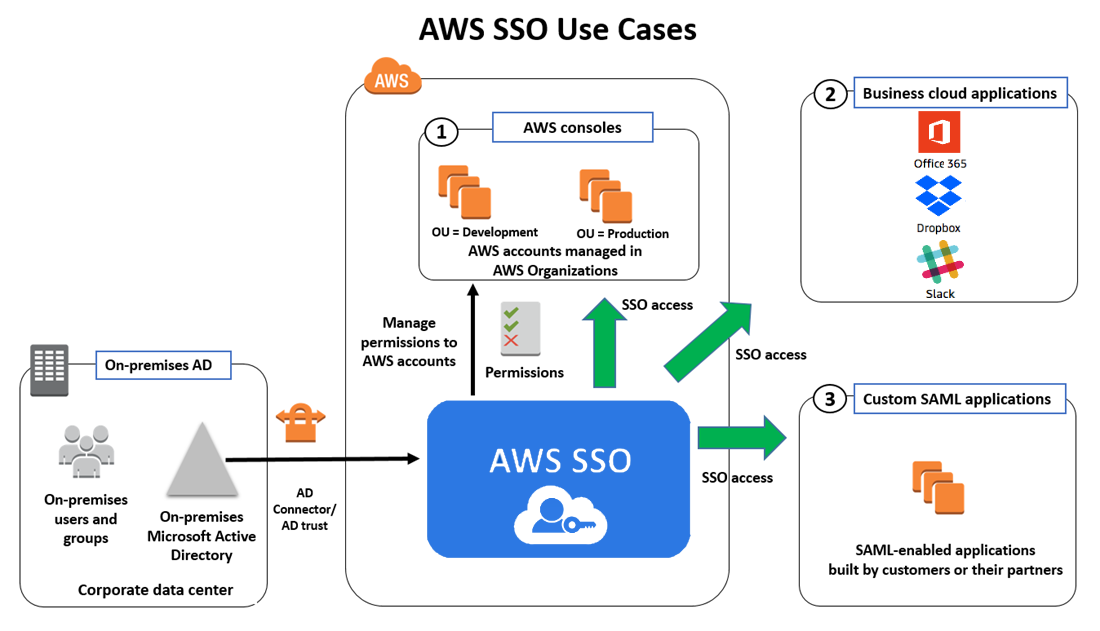
- AWS IAM Identity Center is a cloud-based service that makes it easy to centrally manage single sign-on (SSO) access to all AWS accounts and cloud applications.
- IAM Identity Center helps manage access and permissions to commonly used third-party software as a service (SaaS) applications, AWS managed applications, as well as custom applications that support SAML 2.0.
- IAM Identity Center includes an AWS access portal where end-users can find and access all their assigned AWS accounts, cloud applications, and custom applications in one place.
- IAM Identity Center is the recommended service for managing workforce access to AWS applications and multiple AWS accounts.
- IAM Identity Center is available at no additional cost in all AWS commercial, GovCloud, and China Regions where it is supported.
IAM Identity Center Features
- AWS Organizations Integration
- Natively integrates with AWS Organizations and enumerates all the AWS accounts.
- Configures and maintains all the necessary permissions for accounts automatically, without requiring any additional setup in individual accounts.
- SSO access to AWS accounts and cloud applications
- Helps manage Single Sign-On across all AWS accounts, cloud applications, AWS managed applications, and custom SAML 2.0–based applications, without custom scripts or third-party SSO solutions.
- Supports pre-integrated business applications including Salesforce, Box, Microsoft 365, and hundreds of others.
- Create and manage users and groups in IAM Identity Center
- Provides a built-in identity store to create and manage users and groups directly.
- Supports connecting to an existing AWS Managed Microsoft AD directory through AWS Directory Service.
- Supports external identity providers (IdPs) via SAML 2.0 and SCIM 2.0 for automated user provisioning.
- Leverage existing corporate identities
- Integrates with Microsoft Active Directory through AWS Directory Service.
- Supports external IdPs including Okta Universal Directory, Microsoft Entra ID (formerly Azure AD), Ping Identity, JumpCloud, and others.
- Permission Sets
- Permission sets are collections of one or more IAM policies that define the access for users/groups.
- IAM Identity Center creates IAM roles based on permission sets and attaches the specified policies in each assigned account.
- Multiple permission sets can be assigned to the same user.
- Permissions can be based on common job functions or customized to meet specific security requirements.
- Multi-factor Authentication (MFA)
- Supports enforcement of MFA for all users, including requirement to set up MFA during sign-in.
- Supports FIDO-enabled security keys (e.g., YubiKey), built-in biometric authenticators (Touch ID, facial recognition), and TOTP authenticator apps.
- If using a supported SAML 2.0 IdP, MFA capabilities of the provider can be used.
- Attribute-Based Access Control (ABAC)
- Allows selecting user attributes (cost center, title, locale) from the identity source.
- Attributes can be used for fine-grained access control across AWS without needing separate permission sets for each attribute combination.
- Delegated Administration
- Supports centralized administration and API access from an AWS Organizations delegated administrator account.
- Reduces the need to use the management account for day-to-day operations.
- Co-exists with existing IAM users, roles, and policies
- Has no impact on the users, roles, or policies that are already managed in IAM.
- No-cost identity management
- Available at no additional cost.
IAM Identity Center Identity Sources
- IAM Identity Center identity store (default)
- Provides a built-in store to create and manage users and groups, and assign their level of access to AWS accounts and applications.
- Users are created by configuring email address and name; IAM Identity Center sends an email for users to set their own password.
- Active Directory
- Supports self-managed Active Directory (AD) or AWS Managed Microsoft AD directory using AWS Directory Service.
- Allows selecting user attributes from AD for ABAC.
- External identity provider
- Supports external IdPs via SAML 2.0, including Okta Universal Directory, Microsoft Entra ID (formerly Azure AD), Ping Identity, JumpCloud, and others.
- Supports System for Cross-domain Identity Management (SCIM) 2.0 for automated user and group provisioning.
- Multiple identity providers can be integrated using Okta as a hub.
IAM Identity Center Deployment Options
- Organization Instance
- Deployed in the management account of AWS Organizations.
- Recommended best practice for multi-account production environments.
- Provides single, central access control point for all AWS accounts and applications.
- Account Instance
- Limited-scope deployment for quickly evaluating a supported AWS application (e.g., Amazon Redshift).
- Available to a narrow set of application users.
- Organization instance administrators can control account instance creation through SCPs.
Trusted Identity Propagation
- Trusted identity propagation is a feature built on the OAuth 2.0 Authorization Framework.
- Enables applications to access data and other resources on behalf of a specific user, without sharing that user’s credentials.
- Simplifies data access management, auditing, and improves the sign-in experience for analytics users.
- Allows administrators to grant permissions based on user attributes such as user ID or group associations.
- Auditing and security teams can trace access to data resources back to each individual user.
- Supported AWS Services:
- Amazon Redshift (Query Editor V2)
- Amazon QuickSight
- Amazon S3
- Amazon EMR (EMR Studio, EMR Serverless)
- AWS Lake Formation
- Amazon SageMaker (Unified Studio)
- Amazon Athena
Multi-Region Support (2025-2026)
- IAM Identity Center can be replicated from the primary AWS Region to additional Regions.
- Automatically replicates workforce identities, permission sets, user and group assignments, sessions, and metadata.
- Provides active access portal endpoints in each replicated Region for reduced latency.
- Improves resilience by maintaining account access with provisioned permissions during Regional disruptions.
- Replication is asynchronous with eventual consistency.
- Supports customer-managed AWS KMS keys for encryption (multi-Region KMS keys recommended).
- Integrated with services like Amazon SageMaker Unified Studio and AWS Transfer Family across Regions.
Temporary Elevated Access
- IAM Identity Center supports temporary elevated access through validated partner integrations.
- Users without standing permissions can request access, receive approval, and perform operations during a specified time window.
- Validated Partners:
- CyberArk Secure Cloud Access – for sensitive operations demanding full auditability
- Tenable Cloud Security – for multi-cloud environments with complex entitlements
- Okta Access Requests – for organizations using multiple identity sources
- Auditors can view a log of actions and approvals in the partner solution.
Customer-Managed KMS Keys (2025)
- IAM Identity Center organization instances support customer-managed AWS KMS keys for encrypting workforce identity data at rest.
- Encrypts user and group attributes using customer-managed keys.
- Provides additional control over encryption key management and rotation.
AWS Access Portal
- The AWS access portal (formerly user portal) is the web location where users sign in to IAM Identity Center.
- Provides a single place to access all assigned AWS accounts, cloud applications, and custom applications.
- Users authenticate once and can switch between accounts and applications without re-authentication.
- Custom vanity domains can be configured for regional routing of access portals.
Integration with AWS Services
- AWS Analytics Services – Amazon Redshift, QuickSight, EMR, Athena, Lake Formation
- AWS Developer Tools – Amazon Q Developer (formerly CodeWhisperer)
- AWS Management – AWS Systems Manager Change Manager
- AWS AI/ML – Amazon SageMaker Unified Studio
- AWS Storage – AWS Transfer Family web apps
- Monitoring – AWS CloudTrail for auditing all administrative and access activity
AWS Certification Exam Practice Questions
- Questions are collected from Internet and the answers are marked as per my knowledge and understanding (which might differ with yours).
- AWS services are updated everyday and both the answers and questions might be outdated soon, so research accordingly.
- AWS exam questions are not updated to keep up the pace with AWS updates, so even if the underlying feature has changed the question might not be updated
- Open to further feedback, discussion and correction.
- Which of the following can a customer use to enable single sign-on (SSO) to the AWS Console?
- Amazon Connect
- AWS IAM Identity Center (formerly AWS Single Sign-On)
- Amazon Pinpoint
- Amazon Rekognition
- A company uses AWS Organizations with multiple AWS accounts. The company needs to provide centralized access management for all accounts. Users should be able to sign in once and access multiple accounts based on their job function. What is the recommended approach?
- Create IAM users in each account and configure cross-account roles
- Use AWS IAM Identity Center with permission sets to manage multi-account access
- Use Amazon Cognito user pools for workforce identity federation
- Create a custom SAML identity provider in each account
- A company uses AWS Organizations and AWS IAM Identity Center. The company needs to restrict development teams to use only specific AWS Regions and specific AWS services. Which solution meets this requirement with the LEAST operational overhead?
- Use IAM Identity Center to set up service-linked roles with IAM policy conditions
- Deactivate AWS STS in Regions that developers are not allowed to use
- Create SCPs that include Condition, Resource, and NotAction elements to allow access to only specific Regions and services
- For each account, create tailored identity-based policies for IAM Identity Center
- A company wants to connect their existing Okta Universal Directory as the identity source for AWS IAM Identity Center. Which protocol does IAM Identity Center use for automatic provisioning of users and groups from Okta?
- OAuth 2.0
- OpenID Connect (OIDC)
- SCIM 2.0 (System for Cross-domain Identity Management)
- LDAP
- A company is using AWS IAM Identity Center and wants to grant fine-grained permissions to users based on their department and cost center attributes from their identity provider. Which IAM Identity Center feature should they use?
- Permission boundaries
- Service Control Policies (SCPs)
- Resource-based policies
- Attribute-Based Access Control (ABAC)
- An analytics team needs to access data across Amazon Redshift, Amazon S3 via Lake Formation, and Amazon QuickSight using their corporate identity without managing separate credentials for each service. Which IAM Identity Center feature enables this?
- Permission sets
- SAML federation
- Trusted identity propagation
- Cross-account roles