AWS Direct Connect – Dedicated, Hosted & VIF Types Explained

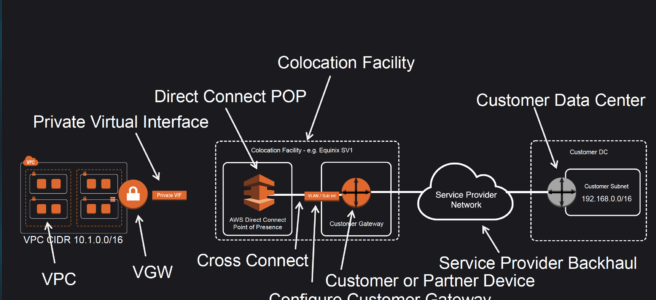
Direct Connect Anatomy

Direct Connect – DX

  • AWS Direct Connect is a network service that provides an alternative to using the Internet to utilize AWS cloud services
  • DX links your internal network to an AWS Direct Connect location over a standard Ethernet fiber-optic cable with one end of the cable connected to your router, the other to an AWS Direct Connect router.
  • Connections can be established with
    • Dedicated connections – 1 Gbps, 10 Gbps, 100 Gbps, and 400 Gbps capacity.
    • Hosted connection – Speeds of 50, 100, 200, 300, 400, and 500 Mbps can be ordered from any APN partners supporting AWS DX. Also, supports 1, 2, 5, 10 & 25 Gbps with selected partners.
  • Virtual interfaces can be created directly to public AWS services ( e.g. S3) or to VPC, bypassing internet service providers in the network path.
  • DX locations in public Regions or AWS GovCloud (US) can access public services in any other public Region.
  • Each AWS DX location enables connectivity to all AZs within the geographically nearest AWS region.
  • DX supports both the IPv4 and IPv6 communication protocols.
  • Direct Connect provides direct Layer 3 network connectivity to the AWS global network through connectivity provider partners. Partner offerings include various connectivity types at OSI Layer 1 through Layer 3, including dark fiber, wavelength, metro Ethernet, or MPLS.

Direct Connect Advantages

  • Reduced Bandwidth Costs
    • All data transferred over the dedicated connection is charged at the reduced data transfer rate rather than Internet data transfer rates.
    • Transferring data to and from AWS directly reduces the bandwidth commitment to the Internet service provider
  • Consistent Network Performance
    • provides a dedicated connection and a more consistent network performance experience than the Internet which can widely vary.
    • Network traffic remains on the AWS global network and never touches the public internet, reducing the chance of hitting bottlenecks or unexpected increases in latency.
  • AWS Services Compatibility
    • is a network service and works with all of the AWS services like S3, EC2, and VPC
  • Private Connectivity to AWS VPC
    • Using DX Private Virtual Interface a private, dedicated, high bandwidth network connection can be established between the network and VPC
  • Elastic
    • can be easily scaled to meet the needs by either using a higher bandwidth connection or by establishing multiple connections.

Direct Connect Anatomy

Direct Connect Anatomy

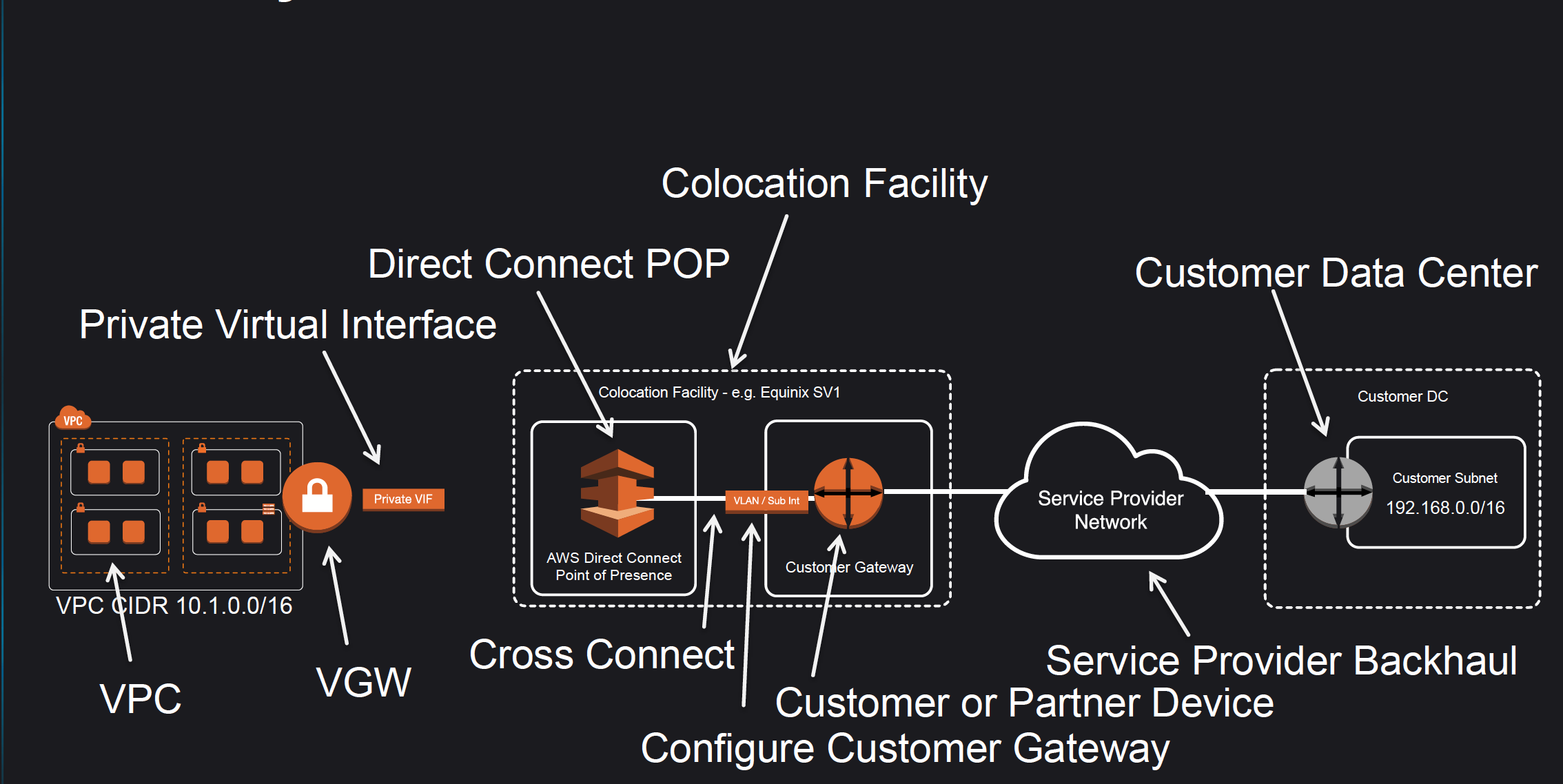
  • Amazon maintains AWS Direct Connect PoP across different locations (referred to as Colocation Facilities) which are different from AWS regions.
  • As a consumer, you can either purchase a rack space or use any of the AWS APN Partners which already have the infrastructure within the Colocation Facility and configure a Customer Gateway
  • Connection from the AWS Direct Connect PoP to the AWS regions is maintained by AWS itself.
  • Connection from the Customer Gateway to the Customer Data Center can be established using any Service Provider Network.
  • Connection between the PoP and the Customer gateway within the Colocation Facility is called Cross Connect.
  • Once a DX connection is created with AWS, an LOA-CFA (Letter Of Authority – Connecting Facility Assignment) would be received.
  • LOA-CFA can be handover to the Colocation Facility or the APN Partner to establish the Cross Connect
  • Once the Cross Connect and the connectivity between the CGW and Customer DataCenter are established, Virtual Interfaces can be created
  • AWS Direct Connect requires a VGW to access the AWS VPC.
  • Virtual Interfaces – VIF

    • Each connection requires a Virtual Interface
    • Each connection can be configured with one or more virtual interfaces.
    • Supports, Public, Private, and Transit Virtual Interface
    • Each VIF needs a VLAN ID, interface IP address, ASN, and BGP key.
  • To use the connection with another AWS account, a hosted virtual interface (Hosted VIF) can be created for that account. These hosted virtual interfaces work the same as standard virtual interfaces and can connect to public resources or a VPC.

Direct Connect Network Requirements

  • Single-mode fiber with
    • a 1000BASE-LX (1310 nm) transceiver for 1 gigabit Ethernet,
    • a 10GBASE-LR (1310 nm) transceiver for 10 gigabits,
    • a 100GBASE-LR4 for 100 gigabit Ethernet, or
    • a 400GBASE-LR4 for 400 gigabit Ethernet.
  • 802.1Q VLAN encapsulation must be supported
  • Auto-negotiation for a port must be disabled so that the speed and mode (half or full duplex) cannot be modified and should be manually configured
  • Border Gateway Protocol (BGP) and BGP MD5 authentication must be supported
  • Bidirectional Forwarding Detection (BFD) is optional and helps in quick failure detection.

Direct Connect Connections

  • Dedicated Connection
    • provides a physical Ethernet connection associated with a single customer
    • Customers can request a dedicated connection through the AWS Direct Connect console, the CLI, or the API.
    • support port speeds of 1 Gbps, 10 Gbps, 100 Gbps, and 400 Gbps.
    • Native 400 Gbps connections provide higher bandwidth without the operational overhead of managing multiple 100 Gbps connections in a link aggregation group (available at select locations since July 2024).
    • supports multiple virtual interfaces (current limit of 50)
  • Hosted Connection
    • A physical Ethernet connection that an AWS Direct Connect Partner provisions on behalf of a customer.
    • Customers request a hosted connection by contacting a partner in the AWS Direct Connect Partner Program, which provisions the connection
    • Support port speeds of 50 Mbps, 100 Mbps, 200 Mbps, 300 Mbps, 400 Mbps, 500 Mbps, 1 Gbps, 2 Gbps, 5 Gbps, 10 Gbps, and 25 Gbps
    • 25 Gbps hosted connections (announced April 2024) fill the gap between 10 Gbps and 100 Gbps options, enabling right-sized connectivity without compromising performance.
    • 1 Gbps, 2 Gbps, 5 Gbps, 10 Gbps, or 25 Gbps hosted connections are supported by selected partners.
    • supports a single virtual interface
    • AWS uses traffic policing on hosted connections and excess traffic is dropped.

Direct Connect Virtual Interfaces – VIF

  • Public Virtual Interface
    • enables connectivity to all the AWS Public IP addresses
    • helps connect to public resources e.g. SQS, S3, EC2, Glacier, etc which are reachable publicly only.
    • can be used to access all public resources across regions
    • allows a maximum of 1000 prefixes. You can summarize the prefixes into a larger range to reduce the number of prefixes.
    • does not support Jumbo frames.
  • Private Virtual Interface
    • helps connect to the VPC for e.g. instances with a private IP address
    • supports
      • Virtual Private Gateway
        • Allows connections only to a single specific VPC with the attached VGW in the same region
        • Private VIF and Virtual Private Gateway – VGW should be in the same region
      • Direct Connect Gateway
        • Allows connections to multiple VPCs in multiple regions.
    • allows a maximum of 100 prefixes. You can summarize the prefixes into a larger range to reduce the number of prefixes.
    • supports Jumbo frames with 9001 MTU
    • provides access to EC2 instances, Private IPs, and VPC Interface Endpoints.
    • does not provide access to VPC DNS resolver and VPC Gateway Endpoints
  • Transit Virtual Interface
    • helps access one or more VPC Transit Gateways associated with Direct Connect Gateways.
    • supports up to 4 Transit VIFs per dedicated connection.
    • supports a maximum of 200 prefixes per Transit Gateway association to a Direct Connect Gateway.
    • supports Jumbo frames with 8500 MTU

VIF Rate Limiters (New – June 2026)

  • VIF Rate Limiters allow you to set a maximum bandwidth allocation for individual VIFs on a dedicated connection.
  • Helps prevent network congestion caused by unexpected traffic spikes on a VIF (“noisy neighbor” problem) which can consume all available bandwidth and impact other VIFs.
  • Supported only on Dedicated connections (hosted connections are automatically rate-limited to purchased capacity).
  • Can be applied to VIFs of any type: private, public, and transit.
  • Each dedicated connection supports up to 10 rate limiters (increase via Service Quotas).
  • Rate limiting applies to traffic both ingressing and egressing the AWS network.
  • Bandwidth options range from 50 Mbps up to the connection’s capacity (up to 1.6 Tbps when using a LAG).
  • VIFs without a Rate Limiter are considered Unlimited and can use up to 100% of the connection capacity.
  • Oversubscription is supported – you can allocate bandwidth to VIFs in excess of the underlying connection’s capacity.
  • CloudWatch metrics for monitoring: VirtualInterfacePolicedPpsIngress, VirtualInterfacePolicedPpsEgress, VirtualInterfacePolicedBpsIngress, VirtualInterfacePolicedBpsEgress.

Direct Connect SiteLink

  • SiteLink is a feature of AWS Direct Connect that enables site-to-site connectivity between Direct Connect locations, bypassing AWS Regions.
  • Data travels over the shortest path on the AWS global network backbone between Direct Connect locations without entering any AWS Region.
  • Enables organizations to use the AWS global network as a private backbone to connect their distributed locations (offices, data centers).
  • The SiteLink feature is off by default and can be turned on or off at any time using the AWS Management Console, CLI, or APIs.
  • Requires connections at two or more AWS Direct Connect locations.
  • SiteLink interconnects locations worldwide and offers built-in redundancy and resiliency.
  • Provides uninterrupted connectivity even during public internet outages or high-traffic periods.
  • SiteLink-enabled VIFs incur additional SiteLink hourly and data transfer charges.

Direct Connect Redundancy

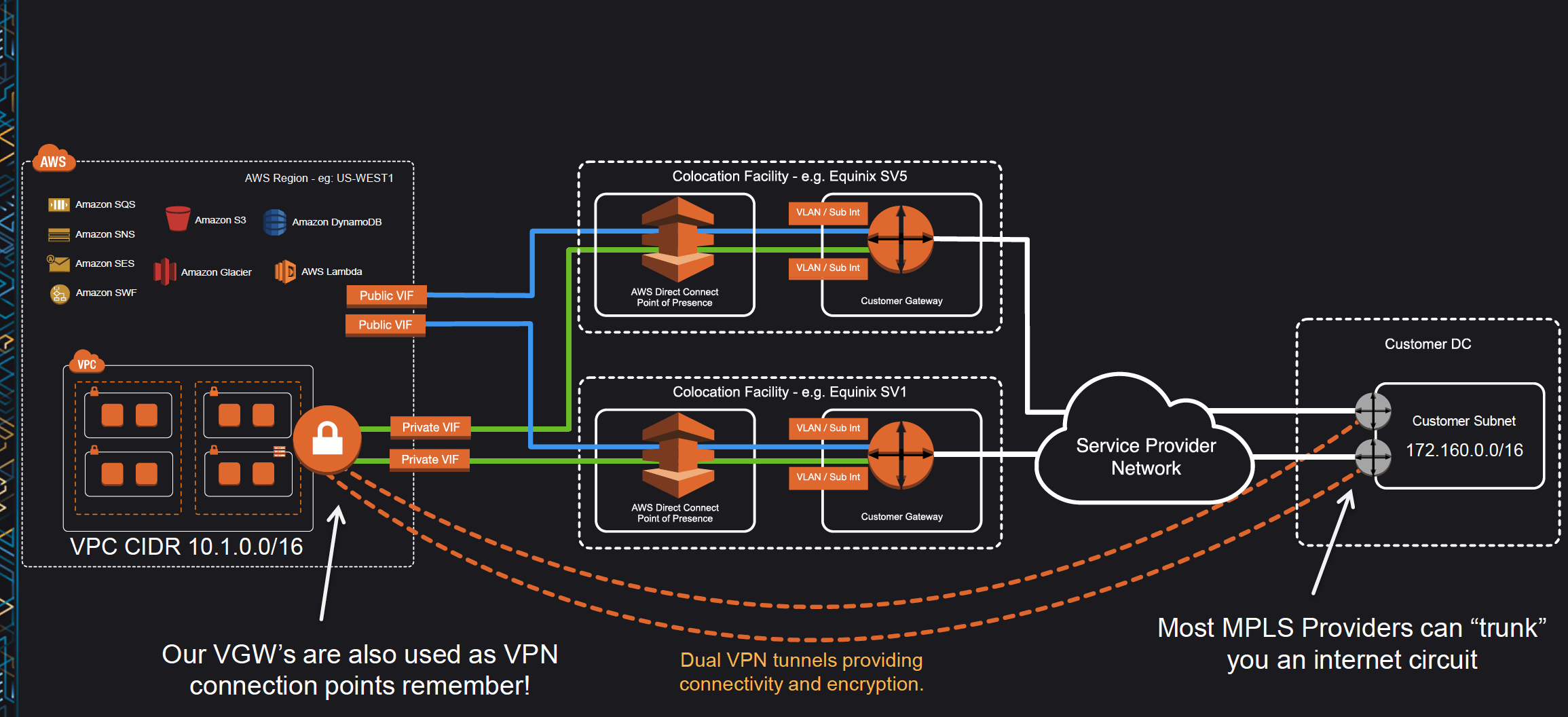
Redunant Direct Connect Architecture

  • Direct Connect connections do not provide redundancy and have multiple single points of failures w.r.t to the hardware devices as each connection consists of a single dedicated connection between ports on your router and an Amazon router.
  • Redundancy can be provided by
    • Establishing a second DX connection, preferably in a different Colocation Facility using a different router and AWS DX PoP.
    • IPsec VPN connection between the Customer DC to the VGW.
  • For Multiple ports requested in the same AWS Direct Connect location, Amazon itself makes sure they are provisioned on redundant Amazon routers to prevent impact from a hardware failure

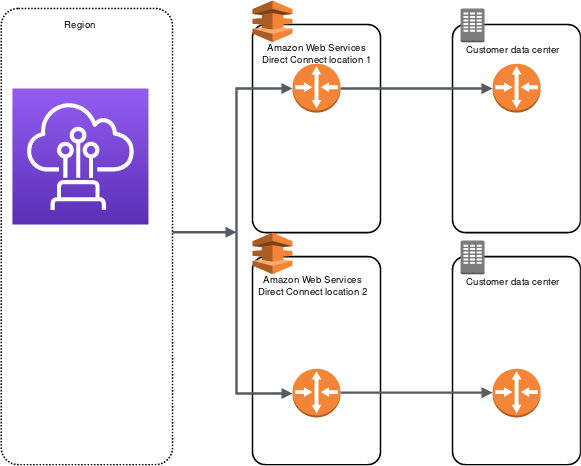
High Resiliency – 99.9%

Direct Connect High Resiliency

  • High resiliency for critical workloads can be achieved by using two single connections to multiple locations.
  • It provides resiliency against connectivity failures caused by a fiber cut or a device failure. It also helps prevent a complete location failure.

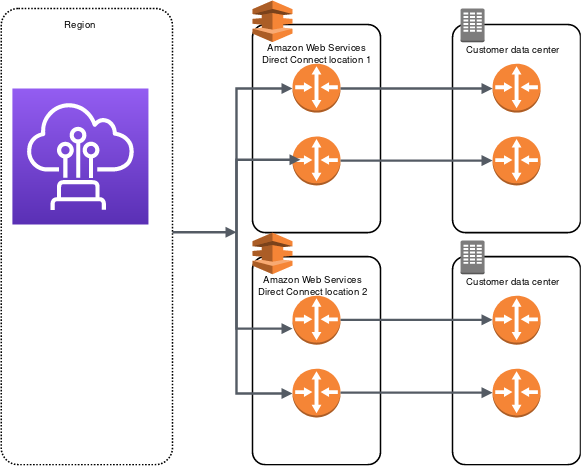
Maximum Resiliency – 99.99%

Direct Connect Max Resiliency

  • Maximum resiliency for critical workloads can be achieved using separate connections that terminate on separate devices in more than one location.
  • It provides resiliency against device, connectivity, and complete location failures.

Direct Connect LAG – Link Aggregation Group

Direct Connect LAG

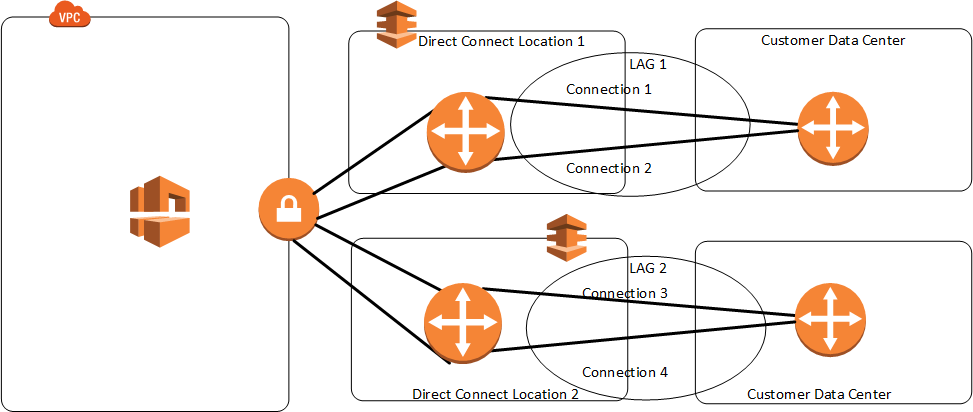
  • A LAG is a logical interface that uses the Link Aggregation Control Protocol (LACP) to aggregate multiple connections at a single AWS Direct Connect endpoint, treating them as a single, managed connection.
  • LAG can combine multiple connections to increase available bandwidth.
  • LAG can be created from existing or new connections.
  • Existing connections (whether standalone or part of another LAG) with the LAG can be associated after LAG creation.
  • LAG needs following rules
    • All connections must use the same bandwidth and port speed.
    • All connections must be dedicated connections.
    • Maximum of four connections in a LAG when port speed is 1 Gbps or 10 Gbps, or two connections when port speed is 100 Gbps or 400 Gbps.
    • Each connection in the LAG counts toward the overall connection limit for the Region.
    • All connections in the LAG must terminate at the same AWS Direct Connect endpoint.
  • Multi-chassis LAG (MLAG) is not supported by AWS.
  • LAG doesn’t make the connectivity to AWS more resilient.
  • LAG connections operate in Active/Active mode.
  • LAG supports attributes to define a minimum number of operational connections for the LAG function, with a default value of 0.
  • VIF Rate Limiters are fully supported on VIFs created on LAGs, with the feature being aware of the LAG’s combined capacity.

Direct Connect Failover

  • Bidirectional Forwarding Detection – BFD is a detection protocol that provides fast forwarding path failure detection times. These fast failure detection times facilitate faster routing reconvergence times.
  • When connecting to AWS services over DX connections it is recommended to enable BFD for fast failure detection and failover.
  • By default, BGP waits for three keep-alives to fail at a hold-down time of 90 seconds. Enabling BFD for the DX connection allows the BGP neighbor relationship to be quickly torn down.
  • Asynchronous BFD is automatically enabled for each DX virtual interface, but will not take effect until it’s configured on your router.
  • AWS has set the BFD liveness detection minimum interval to 300, and the BFD liveness detection multiplier to 3
  • It’s a best practice not to configure graceful restart and BFD at the same time to avoid failover or connection issues. For fast failover, configure BFD without graceful restart enabled.
  • BFD is supported for LAGs.

Direct Connect Monitoring

  • AWS Direct Connect supports Amazon CloudWatch for monitoring connections and virtual interfaces.
  • Connection-level Metrics: ConnectionState metric monitors connection health.
  • VIF-level Metrics: Includes throughput (bps), packet rate (pps) for both ingress and egress.
  • BGP Monitoring Metrics (New – March 2026):
    • VirtualInterfaceBgpStatus – Reports BGP session state (1 = up, 0 = down), enabling detection when sessions fail.
    • VirtualInterfaceBgpPrefixesAccepted – Tracks prefixes received from your on-premises network, allowing proactive alarms before reaching prefix limits that would cause BGP sessions to enter idle state.
    • VirtualInterfaceBgpPrefixesAdvertised – Tracks routes advertised from AWS to on-premises, helping detect silent route withdrawals.
  • These BGP metrics eliminate the need to poll the Direct Connect API, build custom Lambda functions, or rely solely on on-premises network management tools for BGP telemetry.

Direct Connect Security

  • Direct Connect does not encrypt the traffic that is in transit by default. To encrypt the data in transit that traverses DX, you must use the transit encryption options for that service.
  • DX connections can be secured
    • with IPSec VPN to provide secure, reliable connectivity.
    • with MACsec to encrypt the data from the corporate data center to the DX location.
  • MAC Security (MACsec)
    • is an IEEE standard that provides data confidentiality, data integrity, and data origin authenticity.
    • provides Layer 2 point-to-point encryption over the cross-connect to AWS, operating between two Layer 3 routers.
    • Supported on 10 Gbps, 100 Gbps, and 400 Gbps Dedicated Connections.
    • For 10 Gbps connections, supports both GCM-AES-256 and GCM-AES-XPN-256 cipher suites.
    • delivers native, near line-rate, point-to-point encryption ensuring that data communications between AWS and the data center, office, or colocation facility remain protected.
    • removes VPN limitation that required the aggregation of multiple IPsec VPN tunnels to work around the throughput limits of using a single VPN connection.
    • MACsec on Partner Interconnects (New – July 2025): MACsec encryption is now supported on partner-owned interconnects terminated on supported physical devices, extending encryption beyond customer-owned dedicated connections.

Direct Connect Gateway

Refer blog post @ Direct Connect Gateway

Direct Connect and AWS Cloud WAN Integration

  • AWS Cloud WAN now supports direct attachment of Direct Connect gateways to a Cloud WAN core network (announced November 2024).
  • Eliminates the need to deploy an intermediate Transit Gateway to interconnect Direct Connect-based networks with Cloud WAN.
  • Supports automatic route propagation between AWS and on-premises networks using BGP.
  • Simplifies global hybrid network connectivity and management.
  • Provides a unified global network policy framework, segmentation capabilities, dynamic route propagation, and monitoring through a centralized dashboard.

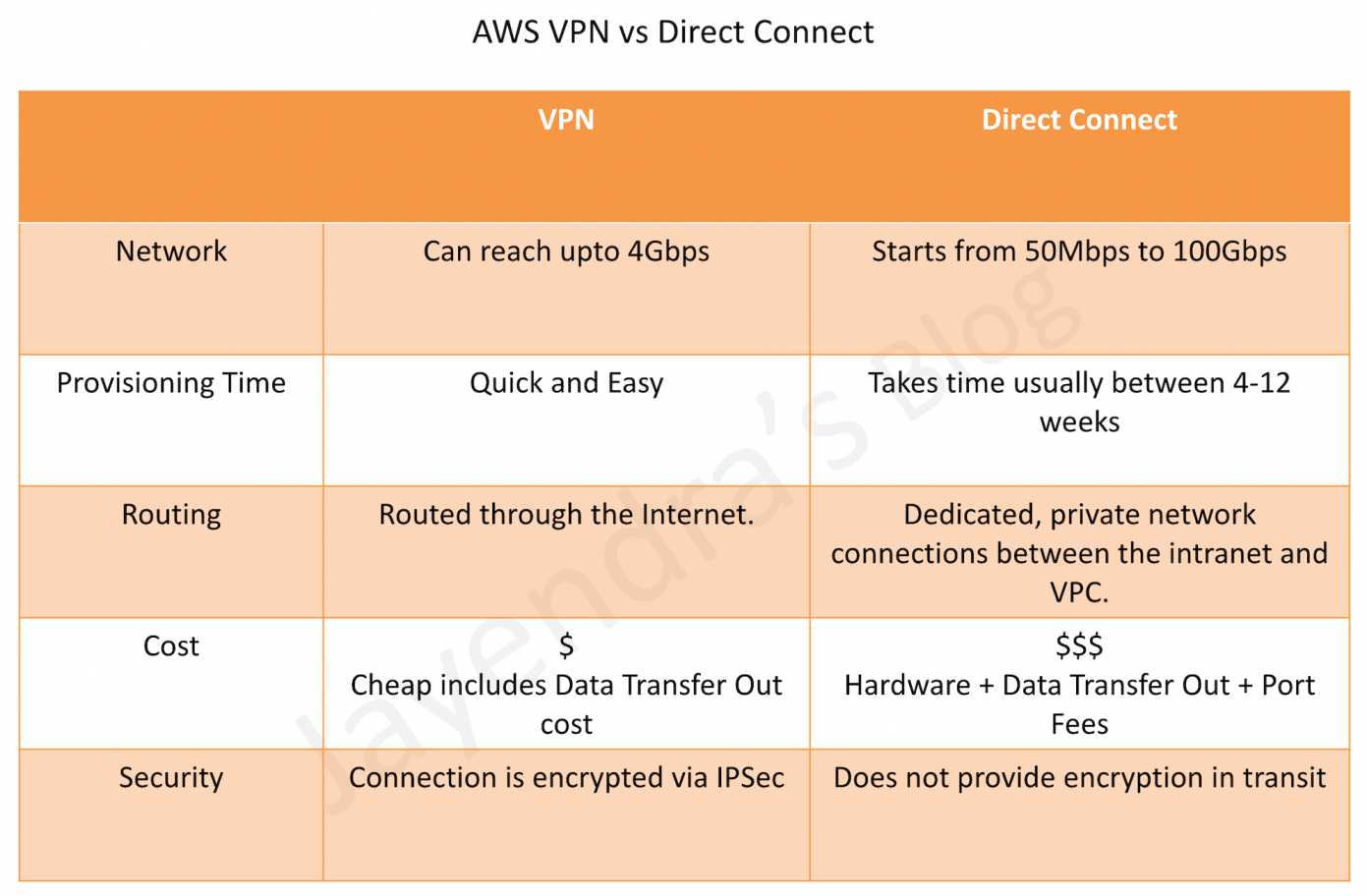
Direct Connect vs IPSec VPN Connections

AWS Direct Connect vs VPN

Refer blog post @ Direct Connect vs VPN

AWS Certification Exam Practice Questions

  • Questions are collected from Internet and the answers are marked as per my knowledge and understanding (which might differ with yours).
  • AWS services are updated everyday and both the answers and questions might be outdated soon, so research accordingly.
  • AWS exam questions are not updated to keep up the pace with AWS updates, so even if the underlying feature has changed the question might not be updated
  • Open to further feedback, discussion and correction.
  1. You are building a solution for a customer to extend their on-premises data center to AWS. The customer requires a 50-Mbps dedicated and private connection to their VPC. Which AWS product or feature satisfies this requirement?
    1. Amazon VPC peering
    2. Elastic IP Addresses
    3. AWS Direct Connect
    4. Amazon VPC virtual private gateway
  2. Is there any way to own a direct connection to Amazon Web Services?
    1. You can create an encrypted tunnel to VPC, but you don’t own the connection.
    2. Yes, it’s called Amazon Dedicated Connection.
    3. No, AWS only allows access from the public Internet.
    4. Yes, it’s called Direct Connect
  3. An organization has established an Internet-based VPN connection between their on-premises data center and AWS. They are considering migrating from VPN to AWS Direct Connect. Which operational concern should drive an organization to consider switching from an Internet-based VPN connection to AWS Direct Connect?
    1. AWS Direct Connect provides greater redundancy than an Internet-based VPN connection.
    2. AWS Direct Connect provides greater resiliency than an Internet-based VPN connection.
    3. AWS Direct Connect provides greater bandwidth than an Internet-based VPN connection.
    4. AWS Direct Connect provides greater control of network provider selection than an Internet-based VPN connection.
  4. Does AWS Direct Connect allow you access to all Availabilities Zones within a Region?
    1. Depends on the type of connection
    2. No
    3. Yes
    4. Only when there’s just one availability zone in a region. If there are more than one, only one availability zone can be accessed directly.
  5. A customer has established an AWS Direct Connect connection to AWS. The link is up and routes are being advertised from the customer’s end, however, the customer is unable to connect from EC2 instances inside its VPC to servers residing in its datacenter. Which of the following options provide a viable solution to remedy this situation? (Choose 2 answers)
    1. Add a route to the route table with an IPSec VPN connection as the target (deals with VPN)
    2. Enable route propagation to the Virtual Private Gateway (VGW)
    3. Enable route propagation to the customer gateway (CGW) (route propagation is enabled on VGW)
    4. Modify the route table of all Instances using the ‘route’ command. (no route command available)
    5. Modify the Instances VPC subnet route table by adding a route back to the customer’s on-premises environment.
  6. A company has configured and peered two VPCs: VPC-1 and VPC-2. VPC-1 contains only private subnets, and VPC-2 contains only public subnets. The company uses a single AWS Direct Connect connection and private virtual interface to connect their on-premises network with VPC-1. Which two methods increase the fault tolerance of the connection to VPC-1? Choose 2 answers
    1. Establish a hardware VPN over the internet between VPC-2 and the on-premises network. (Peered VPC does not support Edge to Edge Routing)
    2. Establish a hardware VPN over the internet between VPC-1 and the on-premises network
    3. Establish a new AWS Direct Connect connection and private virtual interface in the same region as VPC-2 (Peered VPC does not support Edge to Edge Routing)
    4. Establish a new AWS Direct Connect connection and private virtual interface in a different AWS region than VPC-1 (need to be in the same region as VPC-1)
    5. Establish a new AWS Direct Connect connection and private virtual interface in the same AWS region as VPC-1
  7. Your company previously configured a heavily used, dynamically routed VPN connection between your on-premises data center and AWS. You recently provisioned a Direct Connect connection and would like to start using the new connection. After configuring Direct Connect settings in the AWS Console, which of the following options will provide the most seamless transition for your users?
    1. Delete your existing VPN connection to avoid routing loops configure your Direct Connect router with the appropriate settings and verify network traffic is leveraging Direct Connect.
    2. Configure your Direct Connect router with a higher BGP priority than your VPN router, verify network traffic is leveraging Direct Connect, and then delete your existing VPN connection.
    3. Update your VPC route tables to point to the Direct Connect connection configure your Direct Connect router with the appropriate settings verify network traffic is leveraging Direct Connect and then delete the VPN connection.
    4. Configure your Direct Connect router, update your VPC route tables to point to the Direct Connect connection, configure your VPN connection with a higher BGP priority. And verify network traffic is leveraging the Direct Connect connection
  8. You are designing the network infrastructure for an application server in Amazon VPC. Users will access all the application instances from the Internet as well as from an on-premises network The on-premises network is connected to your VPC over an AWS Direct Connect link. How would you design routing to meet the above requirements?
    1. Configure a single routing table with a default route via the Internet gateway. Propagate a default route via BGP on the AWS Direct Connect customer router. Associate the routing table with all VPC subnets (propagating the default route would cause conflict)
    2. Configure a single routing table with a default route via the internet gateway. Propagate specific routes for the on-premises networks via BGP on the AWS Direct Connect customer router. Associate the routing table with all VPC subnets.
    3. Configure a single routing table with two default routes: one to the internet via an Internet gateway the other to the on-premises network via the VPN gateway use this routing table across all subnets in your VPC. (there cannot be 2 default routes)
    4. Configure two routing tables one that has a default route via the Internet gateway and another that has a default route via the VPN gateway Associate both routing tables with each VPC subnet. (as the instances have to be in the public subnet and should have a single routing table associated with them)
  9. You are implementing AWS Direct Connect. You intend to use AWS public service endpoints such as Amazon S3, across the AWS Direct Connect link. You want other Internet traffic to use your existing link to an Internet Service Provider. What is the correct way to configure AWS Direct Connect for access to services such as Amazon S3?
    1. Configure a public Interface on your AWS Direct Connect link. Configure a static route via your AWS Direct Connect link that points to Amazon S3. Advertise a default route to AWS using BGP.
    2. Create a private interface on your AWS Direct Connect link. Configure a static route via your AWS Direct Connect link that points to Amazon S3 Configure specific routes to your network in your VPC.
    3. Create a public interface on your AWS Direct Connect link. Redistribute BGP routes into your existing routing infrastructure advertise specific routes for your network to AWS
    4. Create a private interface on your AWS Direct connect link. Redistribute BGP routes into your existing routing infrastructure and advertise a default route to AWS.
  10. You have been asked to design network connectivity between your existing data centers and AWS. Your application’s EC2 instances must be able to connect to existing backend resources located in your data center. Network traffic between AWS and your data centers will start small, but ramp up to 10s of GB per second over the course of several months. The success of your application is dependent upon getting to market quickly. Which of the following design options will allow you to meet your objectives?
    1. Quickly create an internal ELB for your backend applications, submit a DirectConnect request to provision a 1 Gbps cross-connect between your data center and VPC, then increase the number or size of your DirectConnect connections as needed.
    2. Allocate EIPs and an Internet Gateway for your VPC instances to use for quick, temporary access to your backend applications, then provision a VPN connection between a VPC and existing on-premises equipment.
    3. Provision a VPN connection between a VPC and existing on-premises equipment, submit a DirectConnect partner request to provision cross connects between your data center and the DirectConnect location, then cut over from the VPN connection to one or more DirectConnect connections as needed.
    4. Quickly submit a DirectConnect request to provision a 1 Gbps cross connect between your data center and VPC, then increase the number or size of your DirectConnect connections as needed.
  11. You are tasked with moving a legacy application from a virtual machine running inside your datacenter to an Amazon VPC. Unfortunately, this app requires access to a number of on-premises services and no one who configured the app still works for your company. Even worse there’s no documentation for it. What will allow the application running inside the VPC to reach back and access its internal dependencies without being reconfigured? (Choose 3 answers)
    1. An AWS Direct Connect link between the VPC and the network housing the internal services (VPN or a DX for communication)
    2. An Internet Gateway to allow a VPN connection. (Virtual and Customer gateway is needed)
    3. An Elastic IP address on the VPC instance (Don’t need a EIP as private subnets can also interact with on-premises network)
    4. An IP address space that does not conflict with the one on-premises (IP address cannot conflict)
    5. Entries in Amazon Route 53 that allow the Instance to resolve its dependencies’ IP addresses (Route 53 is not required)
    6. A VM Import of the current virtual machine (VM Import to copy the VM to AWS as there is no documentation it can’t be configured from scratch)
  12. A company has multiple on-premises locations connected to AWS via Direct Connect. They need to enable direct communication between these locations using the AWS backbone without routing traffic through an AWS Region. Which feature should they use?
    1. Direct Connect Gateway
    2. Transit Gateway
    3. AWS Direct Connect SiteLink
    4. VPC Peering
  13. An organization is running multiple workloads over a single 10 Gbps Direct Connect dedicated connection using separate VIFs. One workload occasionally experiences traffic spikes that consume all available bandwidth, impacting other workloads. What feature can address this? (Choose 2 answers)
    1. Apply VIF Rate Limiters to the spike-prone VIF to cap its bandwidth consumption
    2. Create separate hosted connections for each workload
    3. Leave the critical workload’s VIF as Unlimited while applying Rate Limiters to non-critical VIFs
    4. Enable MACsec encryption on the connection
  14. A company needs to monitor BGP session status and prefix counts on their Direct Connect virtual interfaces without building custom Lambda functions. Which CloudWatch metrics should they use? (Choose 2 answers)
    1. ConnectionBpsIngress
    2. VirtualInterfaceBgpStatus
    3. VirtualInterfaceErrorCount
    4. VirtualInterfaceBgpPrefixesAccepted

References

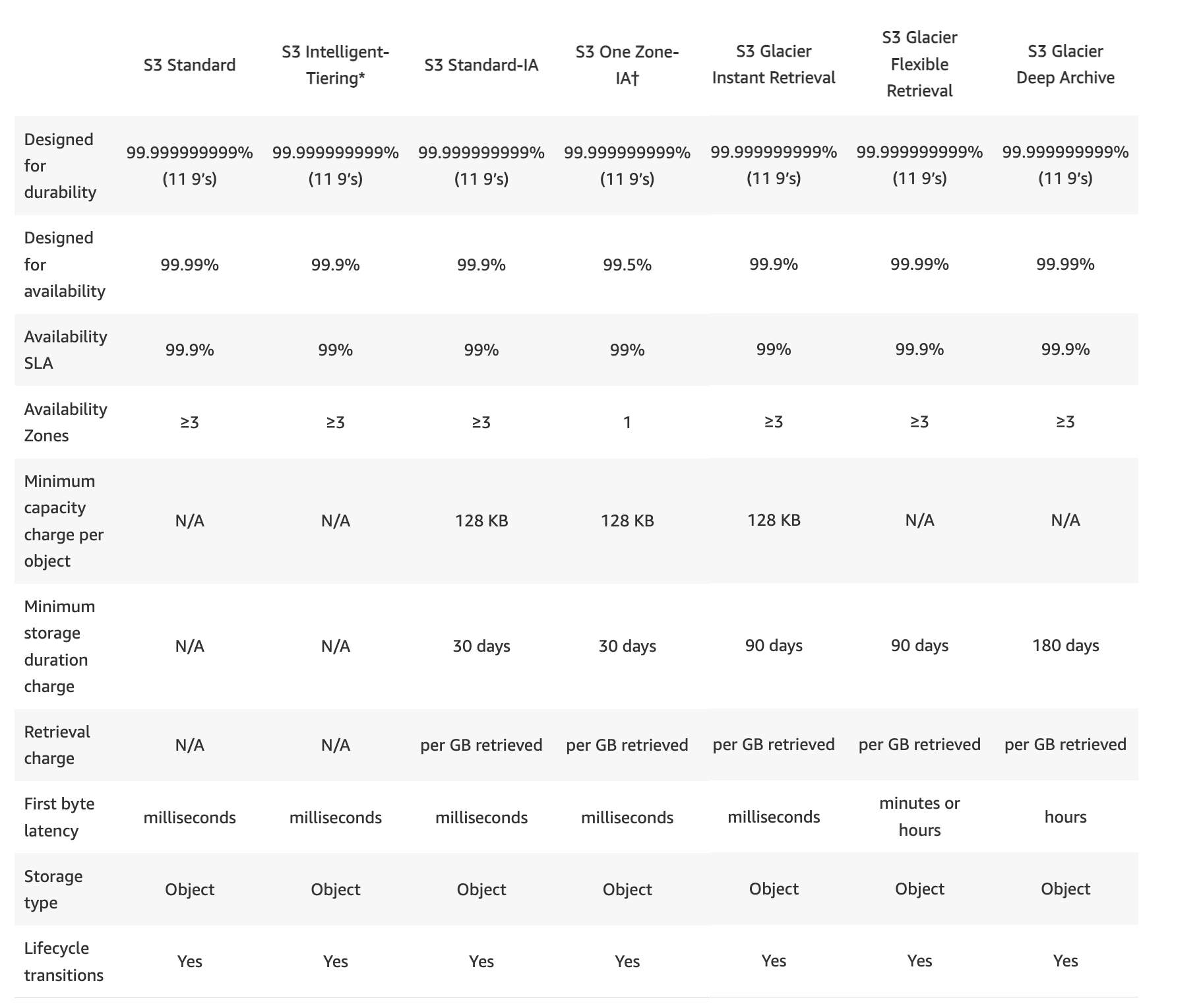
S3 Glacier – Instant, Flexible & Deep Archive Compared [2026]

AWS S3 Glacier Storage Classes

AWS S3 Glacier

⚠️ Important Update: Amazon Glacier (Vault-Based Service) No Longer Accepts New Customers

As of December 15, 2025, the original standalone vault-based Amazon Glacier service stopped accepting new customers. Existing customers can continue using it normally with no requirement to migrate data.

Amazon Glacier (vault-based) is distinct from the S3 Glacier storage classes. The S3 Glacier storage classes (Instant Retrieval, Flexible Retrieval, Deep Archive) accessed via the Amazon S3 API remain fully available and are the recommended approach for new archival workloads.

Migration Options for Vault-Based Glacier Users:

  • S3 Glacier is a storage service optimized for archival, infrequently used data, or “cold data.”
  • S3 Glacier is an extremely secure, durable, and low-cost storage service for data archiving and long-term backup.
  • provides average annual durability of 99.999999999% (11 9’s) for an archive.
  • redundantly stores data in multiple facilities and on multiple devices within each facility.
  • synchronously stores the data across multiple facilities before returning SUCCESS on uploading archives, to enhance durability.
  • performs regular, systematic data integrity checks and is built to be automatically self-healing.
  • enables customers to offload the administrative burdens of operating and scaling storage to AWS, without having to worry about capacity planning, hardware provisioning, data replication, hardware failure detection, recovery, or time-consuming hardware migrations.
  • offers a range of storage classes and patterns
    • S3 Glacier Instant Retrieval
      • Use for archiving data that is rarely accessed and requires milliseconds retrieval.
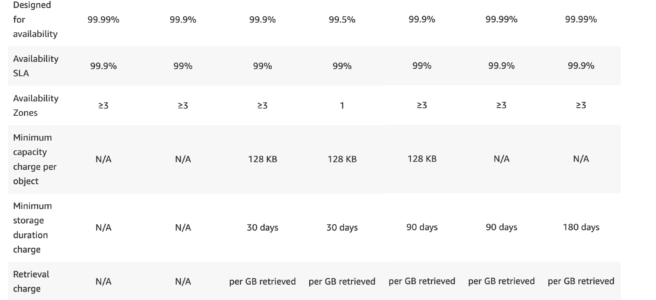
      • Minimum storage duration: 90 days
      • Designed for 99.9% availability
    • S3 Glacier Flexible Retrieval (formerly the S3 Glacier storage class)
      • Use for archives where portions of the data might need to be retrieved in minutes.
      • offers a range of data retrievals options where the retrieval time varies from minutes to hours.
        • Expedited retrieval: 1-5 mins
        • Standard retrieval: 3-5 hours
        • Bulk retrieval: 5-12 hours (free)
    • S3 Glacier Deep Archive
      • Use for archiving data that rarely needs to be accessed.
      • Retrieval options:
        • Standard retrieval: within 12 hours
        • Bulk retrieval: within 48 hours
    • S3 Glacier Flexible Retrieval and S3 Glacier Deep Archive objects are not available for real-time access.
  • is a great storage choice when low storage cost is paramount, with data rarely retrieved, and retrieval latency is acceptable. S3 should be used if applications require fast, frequent real-time access to the data.
  • can store virtually any kind of data in any format.
  • allows interaction through AWS Management Console, Command Line Interface CLI, and SDKs or REST-based APIs.
    • AWS Management console can only be used to create and delete vaults.
    • Rest of the operations to upload, download data, and create jobs for retrieval need CLI, SDK, or REST-based APIs.
  • Use cases include
    • Digital media archives
    • Data that must be retained for regulatory compliance
    • Financial and healthcare records
    • Raw genomic sequence data
    • Long-term database backups

S3 Glacier Storage Classes

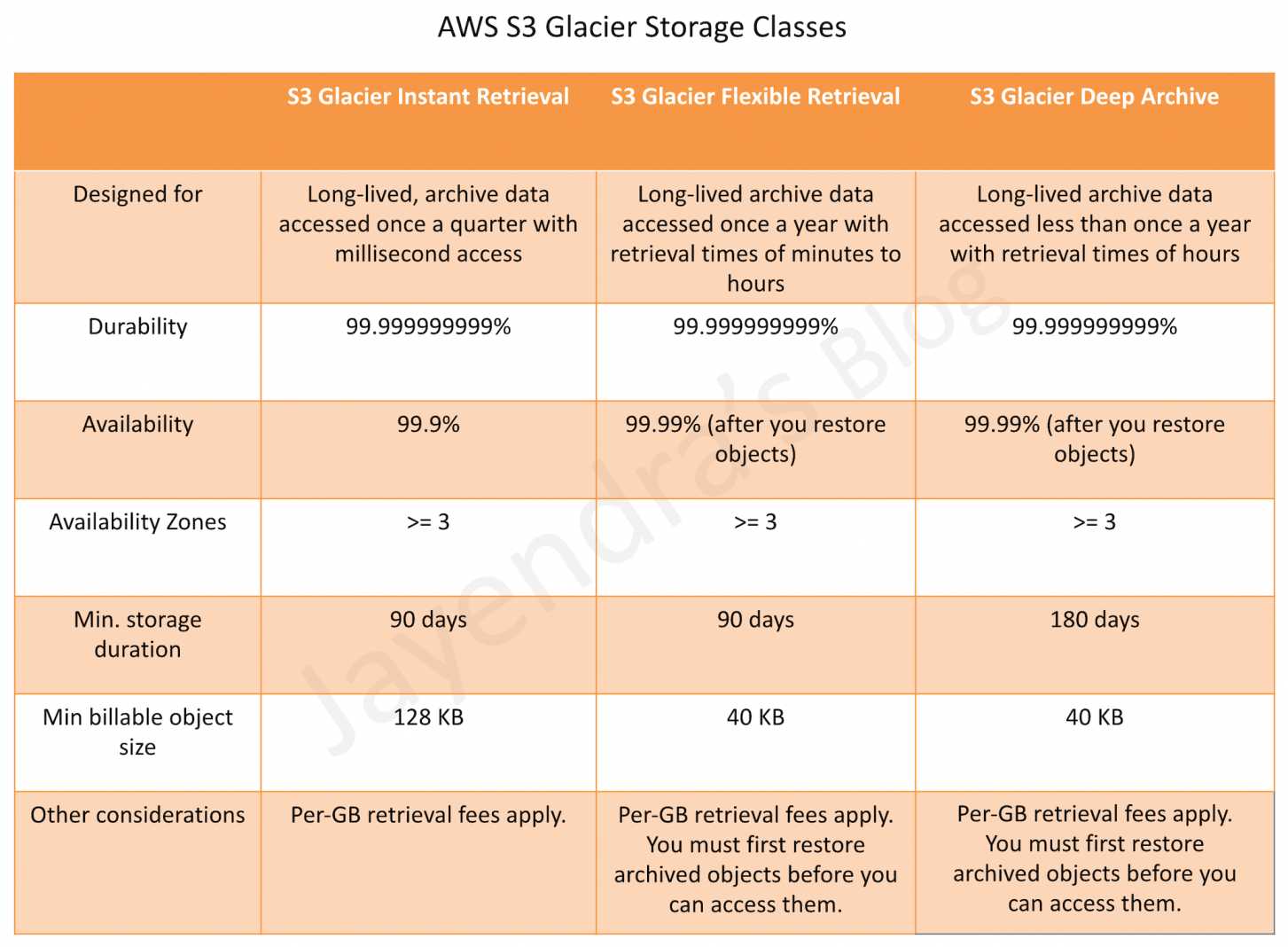
AWS S3 Glacier Storage Classes

S3 Glacier Instant Retrieval

  • Use for archiving data that is rarely accessed and requires milliseconds retrieval.
  • Delivers the same low latency and high throughput performance as the S3 Standard and S3 Standard-IA storage classes.
  • Data has a minimum storage duration period of 90 days.
  • Has a minimum object size of 128 KB.
  • Designed for 99.999999999% (11 nines) of data durability and 99.9% availability by redundantly storing data across multiple physically separated AWS Availability Zones.
  • Ideal for storing data like medical images, genomic sequences, satellite images, news media assets, and user-generated content that require milliseconds access but are accessed once per quarter.

S3 Glacier Flexible Retrieval (S3 Glacier Storage Class)

  • Use for archives where portions of the data might need to be retrieved in minutes.
  • Data has a minimum storage duration period of 90 days and can be accessed in as little as 1-5 minutes by using an expedited retrieval.
  • You can request free Bulk retrievals in 5-12 hours.
  • Requires 40 KB of additional metadata per object (32 KB charged at Glacier Flexible Retrieval rate + 8 KB charged at S3 Standard rate).
  • S3 supports restore requests at a rate of up to 1,000 transactions per second, per AWS account.
  • Faster Restores with S3 Batch Operations (2023): Standard tier retrievals using S3 Batch Operations are up to 85% faster at no additional cost. Restores begin returning objects within minutes.

S3 Glacier Deep Archive

  • Use for archiving data that rarely needs to be accessed.
  • S3 Glacier Deep Archive is the lowest cost storage option in AWS.
  • Data stored has a minimum storage duration period of 180 days.
  • Requires 40 KB of additional metadata per object (32 KB charged at Deep Archive rate + 8 KB charged at S3 Standard rate).
  • Retrieval options:
    • Standard retrieval: within 12 hours
    • Bulk retrieval: within 48 hours
  • Expedited retrieval is not available for Deep Archive.
  • S3 supports restore requests at a rate of up to 1,000 transactions per second, per AWS account.

S3 Glacier vs. S3 Intelligent-Tiering Archive Access

  • S3 Intelligent-Tiering includes optional Archive Access and Deep Archive Access tiers that provide automatic archival with no retrieval charges when data is accessed.
  • S3 Intelligent-Tiering Archive Access tier has the same performance as S3 Glacier Flexible Retrieval.
  • S3 Intelligent-Tiering Deep Archive Access tier has the same performance as S3 Glacier Deep Archive.
  • Use S3 Intelligent-Tiering if access patterns are unknown or changing; use S3 Glacier storage classes for known archival workloads with defined retention.

S3 Glacier Flexible Data Retrievals Options

Glacier provides three options for retrieving data with varying access times and costs: Expedited, Standard, and Bulk retrievals.

Expedited Retrievals

  • Expedited retrievals allow quick access to the data when occasional urgent requests for a subset of archives are required.
  • Data accessed are typically made available within 1-5 minutes.
  • There are two types of Expedited retrievals: On-Demand and Provisioned.
    • On-Demand requests are like EC2 On-Demand instances and are available the vast majority of the time.
    • Provisioned requests are guaranteed to be available when needed.
  • Available for S3 Glacier Flexible Retrieval only (not available for Deep Archive).

Standard Retrievals

  • Standard retrievals allow access to any of the archives within several hours.
  • Standard retrievals typically complete within 3-5 hours for S3 Glacier Flexible Retrieval.
  • Standard retrievals typically complete within 12 hours for S3 Glacier Deep Archive.

Bulk Retrievals

  • Bulk retrievals are Glacier’s lowest-cost retrieval option, enabling retrieval of large amounts, even petabytes, of data inexpensively in a day.
  • Bulk retrievals typically complete within 5-12 hours for S3 Glacier Flexible Retrieval (free of charge).
  • Bulk retrievals typically complete within 48 hours for S3 Glacier Deep Archive.

S3 Batch Operations for Glacier Restores

  • S3 Batch Operations can be used to restore large numbers of archived objects at scale with a few clicks in the S3 console or a single API request.
  • 85% faster Standard tier restores (2023): S3 Glacier Flexible Retrieval Standard tier restores using S3 Batch Operations are up to 85% faster at no additional cost. Objects begin to be returned within minutes.
  • S3 automatically optimizes Batch Operations restore jobs for fastest retrieval throughput (no need to manually optimize inventory reports with Athena as of July 2024).
  • Supports restoring billions of objects containing petabytes of data.
  • Supports on-demand manifest generation that filters objects based on prefix, suffix, and last modified date for targeted restores.
  • 10x throughput improvement (2022): S3 Glacier restores now support up to 1,000 MB/s throughput when retrieving large volumes of archived data at no additional cost.
  • Objects larger than 5 TB typically finish within 48 hours with up to 300 MB/s retrieval throughput.

S3 Glacier Data Model

  • Glacier data model core concepts include vaults and archives and also include job and notification configuration resources

Vault

  • A vault is a container for storing archives.
  • Each vault resource has a unique address, which comprises the region the vault was created and the unique vault name within the region and account for e.g. https://glacier.us-west-2.amazonaws.com/111122223333/vaults/examplevault
  • Vault allows the storage of an unlimited number of archives.
  • Glacier supports various vault operations which are region-specific.
  • An AWS account can create up to 1,000 vaults per region.
  • Note: The vault-based Glacier service stopped accepting new customers on December 15, 2025. For new workloads, use S3 Glacier storage classes via the S3 API.

Archive

  • An archive can be any data such as a photo, video, or document and is a base unit of storage in Glacier.
  • Each archive has a unique ID and an optional description, which can only be specified during the upload of an archive.
  • Glacier assigns the archive an ID, which is unique in the AWS region in which it is stored.
  • An archive can be uploaded in a single request. While for large archives, Glacier provides a multipart upload API that enables uploading an archive in parts.
  • An Archive can be up to 40TB.

Jobs

  • A Job is required to retrieve an Archive and vault inventory list
  • Data retrieval requests are asynchronous operations, are queued and some jobs can take about four hours to complete.
  • A job is first initiated and then the output of the job is downloaded after the job is completed.
  • Vault inventory jobs need the vault name.
  • Data retrieval jobs need both the vault name and the archive id, with an optional description
  • A vault can have multiple jobs in progress at any point in time and can be identified by Job ID, assigned when is it created for tracking
  • Glacier maintains job information such as job type, description, creation date, completion date, and job status and can be queried
  • After the job completes, the job output can be downloaded in full or partially by specifying a byte range.

Notification Configuration

  • As the jobs are asynchronous, Glacier supports a notification mechanism to an SNS topic when the job completes
  • SNS topic for notification can either be specified with each individual job request or with the vault
  • Glacier stores the notification configuration as a JSON document

Glacier Supported Operations

Vault Operations

  • Glacier provides operations to create and delete vaults.
  • A vault can be deleted only if there are no archives in the vault as of the last computed inventory and there have been no writes to the vault since the last inventory (as the inventory is prepared periodically)
  • Vault Inventory
    • Vault inventory helps retrieve a list of archives in a vault with information such as archive ID, creation date, and size for each archive
    • Inventory for each vault is prepared periodically, every 24 hours
    • Vault inventory is updated approximately once a day, starting on the day the first archive is uploaded to the vault.
    • When a vault inventory job is, Glacier returns the last inventory it generated, which is a point-in-time snapshot and not real-time data.
  • Vault Metadata or Description can also be obtained for a specific vault or for all vaults in a region, which provides information such as
    • creation date,
    • number of archives in the vault,
    • total size in bytes used by all the archives in the vault,
    • and the date the vault inventory was generated
  • S3 Glacier also provides operations to set, retrieve, and delete a notification configuration on the vault. Notifications can be used to identify vault events.

Archive Operations

  • S3 Glacier provides operations to upload, download and delete archives.
  • All archive operations must either be done using AWS CLI or SDK. It cannot be done using AWS Management Console.
  • An existing archive cannot be updated, it has to be deleted and uploaded.

Archive Upload

  • An archive can be uploaded in a single operation (1 byte to up to 4 GB in size) or in parts referred to as Multipart upload (40 TB)
  • Multipart Upload helps to
    • improve the upload experience for larger archives.
    • upload archives in parts, independently, parallelly and in any order
    • faster recovery by needing to upload only the part that failed upload and not the entire archive.
    • upload archives without even knowing the size
    • upload archives from 1 byte to about 40,000 GB (10,000 parts * 4 GB) in size
  • To upload existing data to Glacier, consider using the following options:
    • AWS DataSync – for online data transfers to AWS
    • AWS Data Transfer Terminal – secure physical locations where you can bring storage devices for high-speed upload (100 GbE connections) to AWS, replacing the deprecated AWS Snowball Edge service for new customers
    Note: AWS Snowball Edge is no longer available to new customers as of November 7, 2025. AWS Import/Export was the original predecessor service that was deprecated years ago.
  • Glacier returns a response that includes an archive ID that is unique in the region in which the archive is stored.
  • Glacier does not support any additional metadata information apart from an optional description. Any additional metadata information required should be maintained on the client side.
    ✅ New (June 2026): S3 Annotations — For objects stored in S3 using Glacier storage classes, S3 Annotations now allows attaching up to 1GB of rich, queryable metadata (JSON, XML, YAML) per object without retrieving the object. Annotations can be added, modified, and queried (via Amazon Athena) independently of the object’s storage class, eliminating the need for external metadata management.

Archive Download

  • Downloading an archive is an asynchronous operation and is the 2 step process
    • Initiate an archive retrieval job
      • When a Job is initiated, a job ID is returned as a part of the response.
      • Job is executed asynchronously and the output can be downloaded after the job completes.
      • A job can be initiated to download the entire archive or a portion of the archive.
    • After the job completes, download the bytes
      • An archive can be downloaded as all the bytes or a specific byte range to download only a portion of the output
      • Downloading the archive in chunks helps in the event of a download failure, as only that part needs to be downloaded
      • Job completion status can be checked by
        • Check status explicitly (Not Recommended)
          • periodically poll the describe job operation request to obtain job information
        • Completion notification
          • An SNS topic can be specified, when the job is initiated or with the vault, to be used to notify job completion

About Range Retrievals

  • S3 Glacier allows retrieving an archive either in whole (default) or a range, or a portion.
  • Range retrievals need a range to be provided that is megabyte aligned.
  • Glacier returns a checksum in the response which can be used to verify if any errors in the download by comparing it with the checksum computed on the client side.
  • Specifying a range of bytes can be helpful when:
    • Control bandwidth costs
      • Glacier allows retrieval of up to 5 percent of the average monthly storage (pro-rated daily) for free each month
      • Scheduling range retrievals can help in two ways.
        • meet the monthly free allowance of 5 percent by spreading out the data requested
        • if the amount of data retrieved doesn’t meet the free allowance percentage, scheduling range retrievals enable a reduction of the peak retrieval rate, which determines the retrieval fees.
    • Manage your data downloads
      • Glacier allows retrieved data to be downloaded for 24 hours after the retrieval request completes
      • Only portions of the archive can be retrieved so that the schedule of downloads can be managed within the given download window.
    • Retrieve a targeted part of a large archive
      • Retrieving an archive in a range can be useful if an archive is uploaded as an aggregate of multiple individual files, and only a few files need to be retrieved

Archive Deletion

  • An archive can be deleted from the vault only one at a time
  • This operation is idempotent. Deleting an already-deleted archive does not result in an error
  • AWS applies a pro-rated charge for items that are deleted prior to the minimum storage duration (90 days for Glacier Flexible Retrieval, 180 days for Deep Archive), as it is meant for long-term storage

Archive Update

  • An existing archive cannot be updated and must be deleted and re-uploaded, which would be assigned a new archive id

S3 Glacier Vault Lock

  • S3 Glacier Vault Lock helps deploy and enforce compliance controls for individual S3 Glacier vaults with a vault lock policy.
  • Specify controls such as “write once read many” (WORM) can be enforced using a vault lock policy and the policy can be locked for future edits.
  • Once locked, the policy can no longer be changed.
  • S3 Object Lock provides similar WORM protection for objects stored in S3 buckets (including those using S3 Glacier storage classes via lifecycle policies).
    • S3 Object Lock supports both Governance mode (users with special permissions can override) and Compliance mode (no one can override, including root account).
    • S3 Object Lock can be enabled on existing buckets (since November 2023).
    • For new workloads, S3 Object Lock is the recommended approach for WORM compliance on S3 Glacier storage classes.

S3 Glacier Security

  • S3 Glacier supports data in transit encryption using TLS (Transport Layer Security).
  • All data is encrypted on the server side with Glacier handling key management and key protection. It uses AES-256, one of the strongest block ciphers available.
  • S3 Glacier storage classes also support SSE-KMS and SSE-C encryption options when accessed through S3 API.
  • Security and compliance of S3 Glacier are assessed by third-party auditors as part of multiple AWS compliance programs including SOC, HIPAA, PCI DSS, FedRAMP, etc.

S3 Glacier Select (Deprecated)

⚠️ S3 Glacier Select is no longer available to new customers as of July 25, 2024. Existing customers can continue using the feature. For new workloads, use Amazon Athena, S3 Object Lambda, or client-side filtering to query archived data.
  • S3 Glacier Select allowed running SQL queries directly against Glacier data without needing to restore the entire archive.
  • Alternatives for querying archived data:
    • Amazon Athena – serverless query service that can query data in S3 including restored archives
    • S3 Object Lambda – transform data as it’s being retrieved
    • Amazon EMR – simplified access to S3 Glacier for big data processing (2024 enhancement)

AWS Certification Exam Practice Questions

  • Questions are collected from Internet and the answers are marked as per my knowledge and understanding (which might differ with yours).
  • AWS services are updated everyday and both the answers and questions might be outdated soon, so research accordingly.
  • AWS exam questions are not updated to keep up the pace with AWS updates, so even if the underlying feature has changed the question might not be updated
  • Open to further feedback, discussion and correction.
  1. What is Amazon Glacier?
    1. You mean Amazon “Iceberg”: it’s a low-cost storage service.
    2. A security tool that allows to “freeze” an EBS volume and perform computer forensics on it.
    3. A low-cost storage service that provides secure and durable storage for data archiving and backup
    4. It’s a security tool that allows to “freeze” an EC2 instance and perform computer forensics on it.
  2. Amazon Glacier is designed for: (Choose 2 answers)
    1. Active database storage
    2. Infrequently accessed data
    3. Data archives
    4. Frequently accessed data
    5. Cached session data
  3. An organization is generating digital policy files which are required by the admins for verification. Once the files are verified they may not be required in the future unless there is some compliance issue. If the organization wants to save them in a cost effective way, which is the best possible solution?
    1. AWS RRS
    2. AWS S3
    3. AWS RDS
    4. AWS Glacier
  4. A user has moved an object to Glacier using the life cycle rules. The user requests to restore the archive after 6 months. When the restore request is completed the user accesses that archive. Which of the below mentioned statements is not true in this condition?
    1. The archive will be available as an object for the duration specified by the user during the restoration request
    2. The restored object’s storage class will be RRS (After the object is restored the storage class still remains GLACIER. Read more)
    3. The user can modify the restoration period only by issuing a new restore request with the updated period
    4. The user needs to pay storage for both RRS (restored) and Glacier (Archive) Rates
  5. To meet regulatory requirements, a pharmaceuticals company needs to archive data after a drug trial test is concluded. Each drug trial test may generate up to several thousands of files, with compressed file sizes ranging from 1 byte to 100MB. Once archived, data rarely needs to be restored, and on the rare occasion when restoration is needed, the company has 24 hours to restore specific files that match certain metadata. Searches must be possible by numeric file ID, drug name, participant names, date ranges, and other metadata. Which is the most cost-effective architectural approach that can meet the requirements?
    1. Store individual files in Amazon Glacier, using the file ID as the archive name. When restoring data, query the Amazon Glacier vault for files matching the search criteria. (Individual files are expensive and does not allow searching by participant names etc)
    2. Store individual files in Amazon S3, and store search metadata in an Amazon Relational Database Service (RDS) multi-AZ database. Create a lifecycle rule to move the data to Amazon Glacier after a certain number of days. When restoring data, query the Amazon RDS database for files matching the search criteria, and move the files matching the search criteria back to S3 Standard class. (As the data is not needed can be stored to Glacier directly and the data need not be moved back to S3 standard)
    3. Store individual files in Amazon Glacier, and store the search metadata in an Amazon RDS multi-AZ database. When restoring data, query the Amazon RDS database for files matching the search criteria, and retrieve the archive name that matches the file ID returned from the database query. (Individual files and Multi-AZ is expensive)
    4. First, compress and then concatenate all files for a completed drug trial test into a single Amazon Glacier archive. Store the associated byte ranges for the compressed files along with other search metadata in an Amazon RDS database with regular snapshotting. When restoring data, query the database for files that match the search criteria, and create restored files from the retrieved byte ranges.
    5. Store individual compressed files and search metadata in Amazon Simple Storage Service (S3). Create a lifecycle rule to move the data to Amazon Glacier, after a certain number of days. When restoring data, query the Amazon S3 bucket for files matching the search criteria, and retrieve the file to S3 reduced redundancy in order to move it back to S3 Standard class. (Once the data is moved from S3 to Glacier the metadata is lost, as Glacier does not have metadata and must be maintained externally)
  6. A user is uploading archives to Glacier. The user is trying to understand key Glacier resources. Which of the below mentioned options is not a Glacier resource?
    1. Notification configuration
    2. Archive ID
    3. Job
    4. Archive
  7. A company needs to archive 50TB of on-premises data to AWS for long-term retention. The data is rarely accessed but must be retrievable within 12 hours when needed. Which combination provides the MOST cost-effective solution? (Choose 2)
    1. Use AWS DataSync to transfer data to S3 Standard, then lifecycle to S3 Glacier Instant Retrieval
    2. Use AWS DataSync to transfer data to S3, then lifecycle to S3 Glacier Deep Archive
    3. Use S3 Batch Operations for restoring multiple archived objects at scale
    4. Use S3 Glacier Select to query archived data directly
    5. Use AWS Snowball Edge for the initial data transfer

    (S3 Glacier Deep Archive provides 12-hour standard retrieval and is the lowest cost. S3 Batch Operations enables efficient large-scale restores. Glacier Select is deprecated for new customers. Snowball Edge is no longer available to new customers.)

  8. An organization wants to implement WORM (Write Once Read Many) protection for compliance on their archived data stored in S3 Glacier storage classes. Which approach should they use?
    1. S3 Glacier Vault Lock only
    2. S3 Object Lock in Compliance mode
    3. S3 bucket policy with deny delete
    4. IAM policy restricting delete operations

    (For objects in S3 using Glacier storage classes (via lifecycle), S3 Object Lock in Compliance mode is the recommended approach. Vault Lock applies to the legacy vault-based Glacier service. Bucket policies and IAM policies can be modified by administrators.)

References

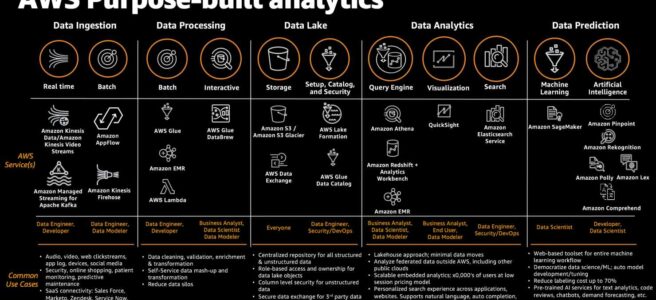
AWS Glue

AWS Glue

AWS Glue

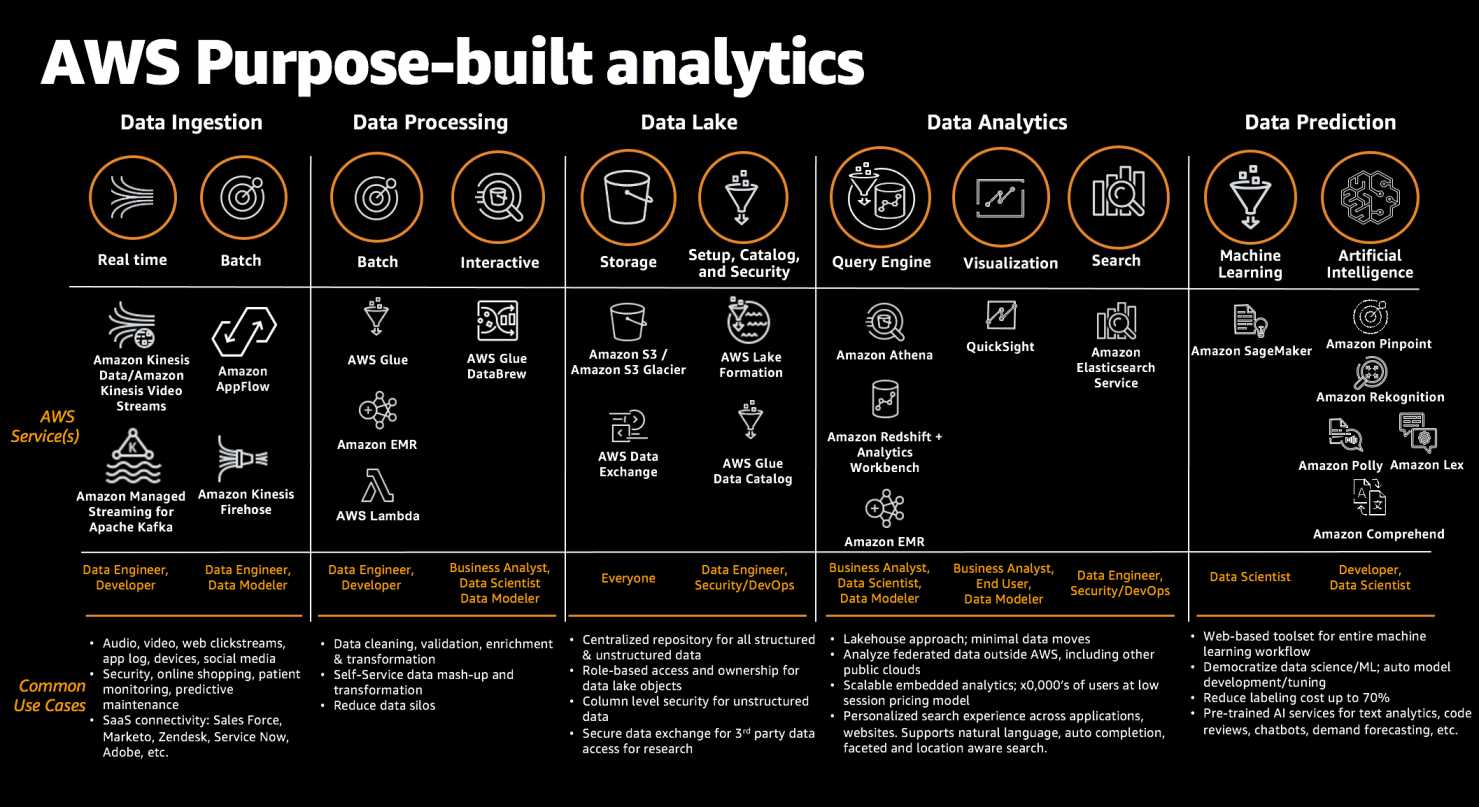
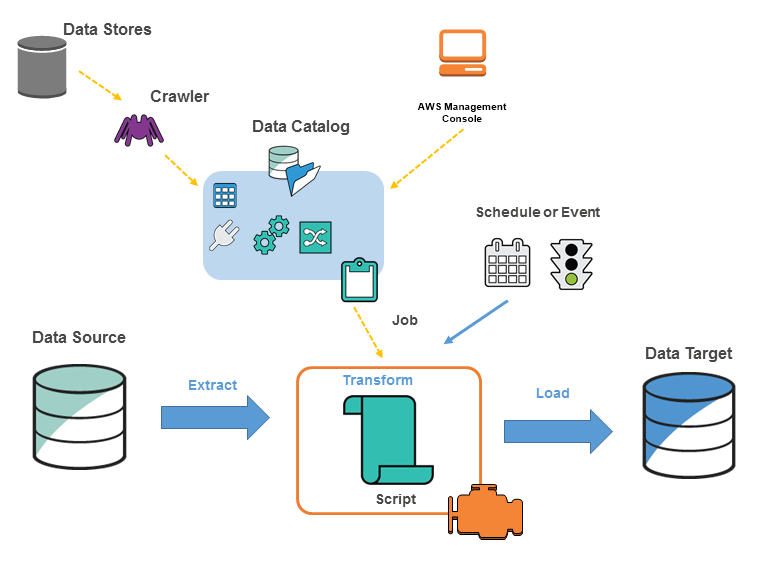
  • AWS Glue is a fully-managed, serverless data integration service that makes it easier to discover, prepare, move, and integrate data from multiple sources for analytics, machine learning (ML), and application development.
  • is serverless and supports pay-as-you-go model. There is no infrastructure to provision or manage.
  • handles provisioning, configuration, and scaling of the resources required to run ETL jobs on a fully managed, scale-out Apache Spark environment.
  • makes it simple and cost-effective to categorize the data, clean it, enrich it, and move it reliably between various data stores and streams.
  • consolidates major data integration capabilities into a single service including data discovery, modern ETL, cleansing, transforming, and centralized cataloging.
  • supports custom Scala or Python code and import custom libraries and Jar files into the AWS Glue ETL jobs to access data sources not natively supported by AWS Glue.
  • supports server side encryption for data at rest and SSL for data in motion.
  • AWS Glue natively supports data stored in
    • RDS (Aurora, MySQL, Oracle, PostgreSQL, SQL Server)
    • Redshift
    • DynamoDB
    • S3 (including S3 Tables)
    • MySQL, Oracle, Microsoft SQL Server, and PostgreSQL databases in the Virtual Private Cloud (VPC) running on EC2.
    • Data streams from MSK, Kinesis Data Streams, and Apache Kafka.
  • Glue ETL engine to Extract, Transform, and Load data that can automatically generate Scala or Python code.
  • Glue Data Catalog is a central repository and persistent metadata store to store structural and operational metadata for all the data assets.
  • Glue crawlers scan various data stores to automatically infer schemas and partition structures to populate the Data Catalog with corresponding table definitions and statistics.
  • AWS Glue Streaming ETL enables performing ETL operations on streaming data using continuously-running jobs.
  • Glue Flexible scheduler that handles dependency resolution, job monitoring, and retries.
  • Glue Studio offers a graphical interface for authoring AWS Glue jobs to process data allowing you to define the flow of the data sources, transformations, and targets in the visual interface and generating Apache Spark code on your behalf.
  • Glue Data Quality helps reduce manual data quality efforts by automatically measuring and monitoring the quality of data in data lakes and pipelines.
  • Glue DataBrew is a visual data preparation tool that makes it easy for data analysts and data scientists to prepare data with an interactive, point-and-click visual interface without writing code.

AWS Glue

AWS Glue Versions

  • AWS Glue versions define the underlying Spark, Python, and library versions used in ETL jobs.
  • AWS Glue 5.0 (released Dec 2024) — Apache Spark 3.5.4, Python 3.11
    • Spark-native fine-grained access control with AWS Lake Formation (table, column, row, and cell-level permissions on S3 data lakes)
    • Support for Amazon SageMaker Lakehouse to unify data across S3 data lakes and Redshift data warehouses
    • Updated Open Table Formats: Apache Iceberg, Apache Hudi, and Delta Lake
    • Performance-optimized runtime for batch and stream processing
  • AWS Glue 5.1 (GA Nov 2025, default version) — Apache Spark 3.5.6, Python 3.11
    • Support for Apache Iceberg Materialized Views
    • Apache Iceberg format version 3.0 with deletion vectors, default column values, multi-argument transforms, and row lineage tracking
    • Data writes into Iceberg and Hive tables with Spark-native fine-grained access control via Lake Formation
    • Updated OTF: Hudi 1.0.2, Iceberg 1.10.0, Delta Lake 3.3
  • Generative AI Upgrades for Apache Spark — enables automated migration of Glue ETL jobs from older versions (≥ 2.0) to the latest Glue version using AI-generated upgrade plans and code modifications.

Version End of Support / End of Life

  • Glue 0.9 (Spark 2.2) — EOS June 2022, EOL April 1, 2026
  • Glue 1.0 (Spark 2.4) — EOS June/Sep 2022, EOL April 1, 2026
  • Glue 2.0 (Spark 2.4, Python 3) — EOS Jan 2024, EOL April 1, 2026
  • After EOL, jobs cannot be created or started on these versions. AWS strongly recommends migrating to Glue 5.1.

AWS Glue Data Catalog

  • AWS Glue Data Catalog is a central repository and persistent metadata store to store structural and operational metadata for all the data assets.
  • AWS Glue Data Catalog provides a uniform repository where disparate systems can store and find metadata to keep track of data in data silos, and use that metadata to query and transform the data.
  • For a given data set, Data Catalog can store its table definition, physical location, add business-relevant attributes, as well as track how this data has changed over time.
  • Data Catalog is Apache Hive Metastore compatible and is a drop-in replacement for the Hive Metastore for Big Data applications running on EMR.
  • Data Catalog also provides out-of-box integration with Athena, EMR, and Redshift Spectrum.
  • Table definitions once added to the Glue Data Catalog, are available for ETL and also readily available for querying in Athena, EMR, and Redshift Spectrum to provide a common view of the data between these services.
  • Data Catalog provides comprehensive audit and governance capabilities, with schema change tracking and data access controls, which helps ensure that data is not inappropriately modified or inadvertently shared.
  • Each AWS account has one AWS Glue Data Catalog per region.

Iceberg REST Catalog Endpoint

  • AWS Glue Data Catalog now provides an Iceberg REST Catalog endpoint fully aligned with the Apache Iceberg REST Catalog Open API specification.
  • Enables interoperability with third-party engines (Databricks, Snowflake, open-source Apache Spark) through a unified standard set of REST APIs.
  • Allows querying Iceberg tables in S3 and S3 Tables using any Iceberg REST-compatible client, secured by AWS Lake Formation permissions.

Catalog Federation

  • AWS Glue Data Catalog supports catalog federation for remote Iceberg catalogs (GA November 2025).
  • Provides direct and secure access to Iceberg tables stored in S3 and cataloged in remote catalogs (e.g., Databricks Unity Catalog, Snowflake Horizon Catalog) without moving or duplicating tables.
  • Synchronizes metadata in real-time across AWS Glue Data Catalog and remote catalogs.
  • Supported by Amazon Redshift, Amazon EMR, Amazon Athena, AWS Glue, and third-party engines.

Business Context and Semantic Search (Preview – June 2026)

  • AWS Glue Data Catalog now supports business context and semantic search to discover and understand data by semantic meaning.
  • Enrich Data Catalog tables (including S3 Tables) with glossary terms and custom metadata fields.
  • Enables data discovery through natural language semantic queries rather than exact keyword matching.

AWS Glue Crawlers

  • AWS Glue crawler connects to a data store, progresses through a prioritized list of classifiers to extract the schema of the data and other statistics, and then populates the Data Catalog with this metadata.
  • Glue crawlers scan various data stores to automatically infer schemas and partition structures to populate the Data Catalog with corresponding table definitions and statistics.
  • Glue crawlers can be scheduled to run periodically so that the metadata is always up-to-date and in-sync with the underlying data.
  • Crawlers automatically add new tables, new partitions to existing tables, and new versions of table definitions.

Dynamic Frames

  • AWS Glue is designed to work with semi-structured data and introduces a dynamic frame component, which can be used in the ETL scripts.
  • Dynamic frame is a distributed table that supports nested data such as structures and arrays.
  • Each record is self-describing, designed for schema flexibility with semi-structured data. Each record contains both data and the schema that describes that data.
  • A Dynamic Frame is similar to an Apache Spark dataframe, which is a data abstraction used to organize data into rows and columns, except that each record is self-describing so no schema is required initially.
  • Dynamic frames provide schema flexibility and a set of advanced transformations specifically designed for dynamic frames.
  • Conversion can be done between Dynamic frames and Spark dataframes, to take advantage of both AWS Glue and Spark transformations to do the kinds of analysis needed.

AWS Glue Streaming ETL

  • AWS Glue enables performing ETL operations on streaming data using continuously-running jobs.
  • AWS Glue streaming ETL is built on the Apache Spark Structured Streaming engine, and can ingest streams from Kinesis Data Streams and Apache Kafka using Amazon Managed Streaming for Apache Kafka.
  • Streaming ETL can clean and transform streaming data and load it into S3 or JDBC data stores.
  • Use Streaming ETL in AWS Glue to process event data like IoT streams, clickstreams, and network logs.
  • Supports streaming auto-scaling — AWS Glue monitors each stage of the streaming job and automatically adds or removes workers based on the rate of incoming data.

Glue Job Bookmark

  • Glue Job Bookmark tracks data that has already been processed during a previous run of an ETL job by persisting state information from the job run.
  • Job bookmarks help Glue maintain state information and prevent the reprocessing of old data.
  • Job bookmarks help process new data when rerunning on a scheduled interval.
  • Job bookmark is composed of the states for various elements of jobs, such as sources, transformations, and targets. for e.g, an ETL job might read new partitions in an S3 file. Glue tracks which partition the job has processed successfully to prevent duplicate processing and duplicate data in the job’s target data store.

AWS Glue Auto Scaling

  • AWS Glue Auto Scaling automatically adds and removes workers from the cluster depending on the parallelism at each stage or microbatch of the job run.
  • Eliminates the need to plan Spark cluster capacity in advance — just set the maximum number of workers.
  • Available for both batch and streaming jobs (Glue 3.0 and later).
  • Auto Scaling for Interactive Sessions is now GA (Oct 2024), monitoring each stage and scaling workers for cost optimization.

AWS Glue Worker Types

  • Standard — 1 DPU (4 vCPUs, 16 GB memory)
  • G.1X — 1 DPU (4 vCPUs, 16 GB memory, 94 GB disk). Recommended for data transforms, joins, and queries.
  • G.2X — 2 DPU (8 vCPUs, 32 GB memory, 138 GB disk). For memory-intensive jobs.
  • G.4X — 4 DPU (16 vCPUs, 64 GB memory). For demanding workloads.
  • G.8X — 8 DPU (32 vCPUs, 128 GB memory). For large-scale workloads.
  • G.12X (New 2025) — 12 DPU (48 vCPUs, 192 GB memory, 768 GB disk). For very large resource-intensive workloads.
  • G.16X (New 2025) — 16 DPU (64 vCPUs, 256 GB memory). For the most intensive data integration jobs.
  • R type workers (New 2025) — Memory-Optimized DPUs (M-DPUs) providing double the memory allocation (32 GB per M-DPU). Ideal for memory-intensive Spark applications like large aggregations and ML transforms.
  • G.025X — 0.25 DPU (2 vCPUs, 4 GB memory). For low-volume streaming jobs.

AWS Glue Interactive Sessions

  • AWS Glue Interactive Sessions provide a programmatic and visual interface for building and testing ETL scripts.
  • Provides on-demand access to a remote Spark runtime environment with a 1-minute billing minimum.
  • Spark Connect support (June 2026) — enables development from preferred environments including Amazon SageMaker Unified Studio, Jupyter, Visual Studio Code, and other IDEs.
  • Spark Connect simplifies upgrades and improves stability by isolating client dependencies from the server-side Spark runtime.
  • Each Spark Connect session has its own AWS resource with a unique ARN for per-session IAM permissions and CloudTrail audit.

Glue Data Quality

  • AWS Glue Data Quality automatically measures and monitors the quality of data in data lakes and pipelines.
  • Computes statistics for datasets and recommends quality rules that check for freshness, accuracy, integrity, and hard-to-find issues.
  • Uses the Data Quality Definition Language (DQDL) for authoring validation rules.
  • Integrates with Amazon DataZone to display data quality scores for Glue Data Catalog assets.
  • Rule labeling (GA Nov 2025) — apply custom key-value pair labels to data quality rules for improved organization, filtering, and targeted reporting.
  • Pre-processing queries (Nov 2025) — create derived metrics, limit columns for recommendations, or filter datasets to focus quality checks on specific subsets.
  • Pay-as-you-go pricing with no annual licenses required.

Glue DataBrew

  • Glue DataBrew is a visual data preparation tool that enables users to clean and normalize data without writing any code.
  • is serverless, and can help explore and transform terabytes of raw data without needing to create clusters or manage any infrastructure.
  • helps reduce the time it takes to prepare data for analytics and machine learning (ML).
  • provides 250+ ready-made transformations to automate data preparation tasks, such as filtering anomalies, converting data to standard formats, and correcting invalid values.
  • DataBrew is integrated with AWS Glue Studio for orchestrating DataBrew recipes within Glue ETL jobs and workflows.
  • Supports multiple file formats including CSV, JSON, Parquet, and Apache ORC.

AWS Glue for Ray

⚠️ Note: AWS Glue for Ray is no longer open to new customers as of April 30, 2026. Existing customers can continue to use the service. For similar capabilities, AWS recommends exploring Amazon EKS.
  • AWS Glue for Ray allowed running distributed Python workloads using the Ray open-source framework on a serverless infrastructure.
  • Supported Python-based data processing workloads that don’t require Apache Spark.

Open Table Format Support

  • AWS Glue (3.0 and later) supports open table formats for data lakes:
    • Apache Iceberg — high-performance table format with ACID transactions, time travel, and schema evolution. Glue 5.1 supports Iceberg 1.10.0 and format version 3.0.
    • Apache Hudi — supports record-level inserts, updates, and deletes. Glue 5.1 supports Hudi 1.0.2.
    • Delta Lake — open-source storage layer with ACID transactions. Glue 5.1 supports Delta Lake 3.3.
  • Integrated with Amazon SageMaker Lakehouse for unified access across S3 data lakes and Redshift data warehouses.

AWS Certification Exam Practice Questions

  • Questions are collected from Internet and the answers are marked as per my knowledge and understanding (which might differ with yours).
  • AWS services are updated everyday and both the answers and questions might be outdated soon, so research accordingly.
  • AWS exam questions are not updated to keep up the pace with AWS updates, so even if the underlying feature has changed the question might not be updated
  • Open to further feedback, discussion and correction.
  1. An organization is setting up a data catalog and metadata management environment for their numerous data stores currently running on AWS. The data catalog will be used to determine the structure and other attributes of data in the data stores. The data stores are composed of Amazon RDS databases, Amazon Redshift, and CSV files residing on Amazon S3. The catalog should be populated on a scheduled basis, and minimal administration is required to manage the catalog. How can this be accomplished?
    1. Set up Amazon DynamoDB as the data catalog and run a scheduled AWS Lambda function that connects to data sources to populate the database.
    2. Use an Amazon database as the data catalog and run a scheduled AWS Lambda function that connects to data sources to populate the database.
    3. Use AWS Glue Data Catalog as the data catalog and schedule crawlers that connect to data sources to populate the database.
    4. Set up Apache Hive metastore on an Amazon EC2 instance and run a scheduled bash script that connects to data sources to populate the metastore.
  2. A data engineering team needs to ensure their ETL jobs process only new data on each scheduled run and avoid reprocessing data from previous runs. Which AWS Glue feature should they use?
    1. AWS Glue Data Catalog versioning
    2. AWS Glue crawlers with recrawl policy
    3. AWS Glue Job Bookmarks
    4. AWS Glue workflow triggers
  3. A company wants to allow their Databricks and Snowflake environments to query Apache Iceberg tables managed in the AWS Glue Data Catalog without duplicating data. Which AWS Glue feature enables this?
    1. AWS Glue crawlers
    2. AWS Glue ETL jobs with cross-account access
    3. AWS Glue Iceberg REST Catalog endpoint
    4. AWS Glue Data Catalog resource policies
  4. An organization needs to query Iceberg tables that are cataloged in a Databricks Unity Catalog using AWS analytics services like Athena and Redshift, without copying table metadata. Which feature should they use?
    1. AWS Glue crawlers to import external metadata
    2. AWS Lake Formation cross-account sharing
    3. AWS Glue ETL with JDBC connections
    4. AWS Glue Data Catalog catalog federation
  5. A company is running AWS Glue Spark ETL jobs on version 2.0 and wants to modernize to the latest version. Which approach reduces migration effort using AI-generated plans? (Select TWO)
    1. Use Generative AI Upgrades for Apache Spark to scan jobs and generate upgrade plans
    2. Manually rewrite all PySpark scripts for Spark 3.5 compatibility
    3. Use Generative AI Upgrades to execute plans and validate outputs automatically
    4. Create new jobs from scratch in Glue 5.1
    5. Use AWS Glue crawlers to detect code changes
  6. A data team needs to run memory-intensive Spark workloads including large aggregations and ML transforms. Which AWS Glue worker type is most appropriate?
    1. G.1X workers
    2. G.2X workers
    3. G.4X workers
    4. R type (memory-optimized) workers

References

AWS Certified SysOps Administrator – Associate (SOA-C02) Exam Learning Path

AWS SysOps Administor - Associate SOA-C02 Certification

AWS Certified CloudOps Engineer – Associate (SOA-C03) Exam Learning Path

⚠️ EXAM UPDATED – SOA-C02 RETIRED

The AWS Certified SysOps Administrator – Associate (SOA-C02) was retired on September 29, 2025.

It has been replaced by the AWS Certified CloudOps Engineer – Associate (SOA-C03), which launched on September 30, 2025.

This is not just a rename — SOA-C03 adds containers (ECS, EKS), multi-account architectures, new question types, and updated domain weightings.

Key Changes:

  • Exam duration increased to 180 minutes with 50-65 questions
  • New question types: ordering, matching, and case study questions
  • Containers (ECS, EKS, ECR) are now in-scope
  • Greater emphasis on automation, multi-account, and multi-Region architectures
  • Five domains (previously six) with updated weightings

This learning path has been updated for SOA-C03. If you hold the old SysOps certification, it remains valid until its expiration date.

  • The AWS Certified CloudOps Engineer – Associate (SOA-C03) validates skills for cloud operations professionals who deploy, manage, and operate workloads on AWS.
  • SOA-C03 replaced the SOA-C02 (SysOps Administrator) exam in September 2025, reflecting the industry shift toward modern cloud operations practices.

AWS Certified CloudOps Engineer – Associate (SOA-C03) Exam Content

  • AWS CloudOps Engineer – Associate SOA-C03 is intended for CloudOps engineers responsible for managing production AWS environments.
  • SOA-C03 validates a candidate’s ability to:
    • Deploy, manage, and operate workloads on AWS
    • Support and maintain AWS workloads according to the AWS Well-Architected Framework
    • Perform operations by using the AWS Management Console and the AWS CLI
    • Implement security controls to meet compliance requirements
    • Monitor, log, and troubleshoot systems
    • Apply networking concepts (for example, DNS, TCP/IP, firewalls)
    • Implement architectural requirements (for example, high availability, performance, capacity)
    • Perform business continuity and disaster recovery procedures
    • Identify, classify, and remediate incidents
    • [NEW] Deploy and manage containerized workloads (ECS, EKS)
    • [NEW] Implement multi-account governance and automation

Refer AWS Certified CloudOps Engineer – Associate (SOA-C03) Exam Guide

AWS Certified CloudOps Engineer – Associate (SOA-C03) Exam Domains

Domain Weight Focus Areas
Domain 1: Monitoring, Logging, Analysis, Remediation & Performance Optimization 22% CloudWatch, X-Ray, troubleshooting, cost optimization
Domain 2: Reliability and Business Continuity 22% High availability, Auto Scaling, backup, disaster recovery
Domain 3: Deployment, Provisioning, and Automation 22% CloudFormation, Systems Manager, IaC, CI/CD basics
Domain 4: Networking and Content Delivery 18% VPC, Route 53, CloudFront, load balancing
Domain 5: Security and Compliance 16% IAM, encryption, compliance, Organizations, SCPs

AWS Certified CloudOps Engineer – Associate (SOA-C03) Exam Summary

  • SOA-C03 exam details:
    • Duration: 180 minutes
    • Questions: 50-65 questions
    • Question types: Multiple-choice, multiple-response, ordering, matching, and case study
    • Passing score: Scaled scoring (720 out of 1000)
    • Cost: $150 USD + tax
    • Delivery: Pearson VUE test center or online proctoring
  • SOA-C03 exam does NOT include hands-on exam labs (the labs from SOA-C02 were not brought back).
  • You can get an additional 30 minutes if English is your second language by requesting Exam Accommodations.
  • AWS exams can be taken either at a test center or online. Just make sure you have a proper place to take the exam with no disturbance and nothing around you.
  • If you are taking the AWS Online exam, try to join at least 30 minutes before the actual time as there can be issues with both PSI and Pearson with long wait times.

AWS Certified CloudOps Engineer – Associate (SOA-C03) Exam Resources

AWS Certified CloudOps Engineer – Associate (SOA-C03) Exam Topics

SOA-C03 focuses on cloud operations including monitoring, automation, security, reliability, and networking — with the ability to deploy, manage, operate, and automate workloads on AWS.

Monitoring, Logging, Analysis, Remediation & Performance (Domain 1 – 22%)

  • CloudWatch
    • collects monitoring and operational data in the form of logs, metrics, and events, and visualizes it.
      • EC2 metrics can track (disk, network, CPU, status checks) but do not capture metrics like memory, disk swap, disk storage, etc.
      • CloudWatch unified agent can be used to gather custom metrics like memory, disk swap, disk storage, etc.
      • CloudWatch Alarm actions can be configured to perform actions based on various metrics for e.g. CPU below 5%
      • CloudWatch alarm can monitor StatusCheckFailed_System status on an EC2 instance and automatically recover the instance if it becomes impaired.
      • [NEW] CloudWatch Composite Alarms combine multiple alarms using AND/OR logic to reduce alarm noise.
      • [NEW] CloudWatch Anomaly Detection uses machine learning to detect unusual metric patterns.
      • [NEW] CloudWatch Container Insights provides automatic dashboards for ECS and EKS metrics (CPU, memory, network, storage).
      • [NEW] CloudWatch Cross-account observability enables searching log groups across multiple accounts and running cross-account Logs Insights queries.
      • [NEW] CloudWatch Application Signals provides APM capabilities for distributed applications.
      • Know ELB monitoring
        • Load Balancer metrics SurgeQueueLength and SpilloverCount
        • HealthyHostCount, UnHealthyHostCount determines the number of healthy and unhealthy instances.
        • Reasons for 4XX and 5XX errors
    • CloudWatch logs can be used to monitor, store, and access log files from EC2 instances, CloudTrail, Route 53, and other sources. You can create metric filters over the logs.
    • [NEW] CloudWatch Logs Insights enables interactive searching and analyzing of log data with a purpose-built query language.
    • CloudWatch Subscription Filters can be used to send logs to Kinesis Data Streams, Lambda, or Kinesis Data Firehose.
    • EventBridge is a serverless event bus service that connects applications with data from a variety of sources.
    • EventBridge can be used as a trigger for periodically scheduled events and automated remediation.
    • CloudWatch unified agent helps collect metrics and logs from EC2 instances and on-premises servers.
  • [NEW] AWS X-Ray provides distributed tracing for applications, helping analyze and debug production issues across microservices.
  • CloudTrail for audit and governance
    • With Organizations, the trail can be configured to log CloudTrail from all accounts to a central account.
    • CloudTrail log file integrity validation can be used to check whether a log file was modified or deleted.
  • [NEW] AWS Compute Optimizer provides EC2, Lambda, and EBS right-sizing recommendations based on utilization data.
  • Trusted Advisor provides recommendations covering security, performance, cost, fault tolerance & service limits.
  • [NEW] AWS Budgets with budget actions can automatically enforce cost controls (e.g., stop EC2 instances when budget exceeded).
  • Cost allocation tags can be used to differentiate resource costs and analyzed using Cost Explorer.
  • Understand how to setup Billing Alerts using CloudWatch.

Reliability and Business Continuity (Domain 2 – 22%)

  • Understand Auto Scaling
    • Auto Scaling can be configured with multiple AZs for high availability
    • Auto Scaling attempts to distribute instances evenly between the AZs
    • Auto Scaling supports
      • Dynamic scaling (target tracking, step scaling) in response to changing demand
      • Predictive scaling uses machine learning to forecast demand
      • Schedule scaling for predictable load changes
      • Manual scaling by changing the desired capacity
    • Auto Scaling life cycle hooks can be used to perform activities before instance termination.
    • [NEW] Warm pools help reduce latency by maintaining pre-initialized instances.
  • Understand ELB, ALB, and NLB
    • Understand key differences ELB vs ALB vs NLB
    • ALB provides content and path routing
    • NLB provides the ability to give static IPs to the load balancer
    • LB access logs provide the source IP address
    • Supports Sticky sessions to bind a user’s session to a specific target
    • [NEW] ALB supports weighted target groups for blue/green deployments
  • RDS provides managed relational database
    • Understand RDS Multi-AZ vs Read Replicas
    • Multi-AZ deployment provides high availability and failover support
    • Read replicas enable increased scalability and database availability
    • Automated backups enable point-in-time recovery up to the last five minutes
    • [NEW] RDS Multi-AZ DB Cluster provides two readable standby instances in different AZs with faster failover.
  • Aurora is a fully managed MySQL- and PostgreSQL-compatible database
    • Backtracking “rewinds” the DB cluster to the specified time (in-place restore)
    • Automated Backups that help restore the DB as a new instance
    • [NEW] Aurora Serverless v2 scales instantly to match demand without capacity planning.
  • AWS Backup can be used to automate backup for EC2 instances, EBS, RDS, EFS, and DynamoDB
    • [NEW] AWS Backup Vault Lock prevents backup deletion (compliance mode for immutable backups).
    • [NEW] Cross-Region and cross-account backup copying for disaster recovery.
  • [NEW] AWS Elastic Disaster Recovery (DRS) provides affordable and scalable disaster recovery with continuous block-level replication, fast recovery (minutes), and non-disruptive testing.
  • Data Lifecycle Manager to automate the creation, retention, and deletion of EBS snapshots and EBS-backed AMIs.

Deployment, Provisioning, and Automation (Domain 3 – 22%)

  • CloudFormation
    • provides an easy way to create and manage a collection of related AWS resources.
    • CloudFormation Concepts cover
      • Templates act as a blueprint for provisioning of AWS resources
      • Stacks are collection of resources as a single unit
      • Change Sets present a summary/preview of proposed changes when a stack is updated
      • Nested stacks are stacks created as part of other stacks
    • CloudFormation template anatomy consists of resources, parameters, outputs, and mappings.
    • CloudFormation supports multiple features
      • Drift detection to detect whether a stack’s actual configuration differs from its expected configuration
      • Termination protection prevents accidental stack deletion
      • Stack policy prevents unintentional updates or deletes during a stack update
      • StackSets create, update, or delete stacks across multiple accounts and Regions
      • Helper scripts (cfn-init, cfn-signal, cfn-hup) with creation policies
      • DependsOn attribute controls resource creation order
      • Update policy supports rolling and replacing updates with AutoScaling
      • Deletion policies to retain or backup resources during stack deletion
      • Custom resources for use cases not natively supported
    • Understand CloudFormation Best Practices esp. Nested Stacks and logical grouping
  • Elastic Beanstalk helps quickly deploy and manage applications without worrying about infrastructure.
  • ⚠️ AWS OpsWorks Stacks reached End of Life on May 26, 2024 and has been disabled for both new and existing customers. Migration options include AWS Systems Manager, CloudFormation, or third-party tools like Ansible/Terraform.
  • Systems Manager is the operations hub for AWS
    • Parameter Store provides secure, hierarchical storage for configuration data and secrets. Does not support rotation – use Secrets Manager for rotation.
    • Session Manager provides secure instance management without SSH keys or bastion hosts.
    • Patch Manager automates patching managed instances with security and other updates.
    • [NEW] Systems Manager Automation documents (runbooks) for automated remediation workflows.
    • [NEW] Just-in-time node access removes long-standing permissions while maintaining operational efficiency (launched April 2025).
    • [NEW] Default Host Management Configuration (DHMC) simplifies EC2 instance onboarding to Systems Manager without IAM instance profiles.
  • AWS Config provides resource inventory, configuration history, and change notifications for compliance.
    • supports managed and custom rules evaluated periodically or on events, with automatic remediation
    • Conformance pack is a collection of Config rules and remediation actions deployable across an organization.
  • Understand CloudFormation vs Elastic Beanstalk (note: OpsWorks is now deprecated)

Networking & Content Delivery (Domain 4 – 18%)

  • VPC – Virtual Private Cloud is a virtual network in AWS
  • Route 53 provides a scalable DNS system
    • supports ALIAS record type to map zone apex records to ELB, CloudFront, and S3
    • Understand Routing Policies and their use cases
      • Failover – active-passive failover
      • Geolocation – route based on user location
      • Geoproximity – route based on resource location with traffic shifting
      • Latency – route to the Region with best latency
      • Weighted – route traffic in specified proportions
      • Multivalue answer – DNS-level load balancing with health checks
    • Focus on Weighted, Latency, and Failover routing policies
  • Understand CloudFront and use cases
    • CloudFront can be used with S3 to expose static data and website
    • [NEW] Origin Access Control (OAC) replaces Origin Access Identity (OAI) for S3 origins with better security
  • Know VPN and Direct Connect for AWS to on-premises connectivity.

Security and Compliance (Domain 5 – 16%)

  • IAM provides Identity and Access Management
    • Focus on IAM role and its use case, especially with EC2 instances
    • Understand IAM identity providers and federation
    • Understand cross-account access configuration
    • [NEW] IAM Access Analyzer identifies resources shared externally and validates policies
    • [NEW] Permission boundaries set maximum permissions for IAM entities
  • AWS Organizations
  • Control Tower
    • Setup, govern, and secure a multi-account environment
    • Strongly recommended guardrails cover EBS encryption
    • [NEW] Controls-dedicated experience with 750+ managed controls without full Control Tower deployment (Nov 2025)
    • [NEW] Automatic enrollment of accounts when moved to an OU (Nov 2025)
    • [NEW] Landing Zone v4.0 with modular integrations
  • S3 Encryption supports data at rest and in transit encryption
  • Understand KMS for key management and envelope encryption
    • KMS with imported customer key material does not support automatic rotation
    • [NEW] KMS supports automatic key rotation for customer managed keys (yearly)
  • AWS WAF – Web Application Firewall protects against common web exploits (XSS, SQL Injection, bots)
  • AWS GuardDuty – threat detection service that continuously monitors for malicious activity
    • [NEW] GuardDuty EKS Protection monitors Kubernetes audit logs for threats
  • Secrets Manager securely stores and rotates credentials
    • Integrates with Lambda for credential rotation
  • AWS Shield – managed DDoS protection service
  • Amazon Inspector – automated vulnerability assessment
    • [NEW] Inspector v2 provides continuous scanning of EC2, Lambda, and container images in ECR without manual setup
  • AWS Certificate Manager (ACM) manages SSL/TLS certificates
  • [NEW] AWS Security Hub aggregates security findings across accounts and services with automated compliance checks
  • Service Catalog allows organizations to manage approved IT services with minimal permissions
  • Know AWS Artifact for on-demand access to compliance reports

Compute

  • Understand EC2 in depth
    • Understand EC2 instance types and use cases (including Graviton-based instances for cost optimization).
    • Understand EC2 purchase options esp. spot instances, Savings Plans, and reserved instances.
    • Understand EC2 Metadata & Userdata.
    • Understand EC2 Security
      • Use IAM Role with EC2 instances to access services
      • IAM Role can be attached to stopped and running instances
    • AMIs provide the information required to launch an instance
      • AMIs are regional and can be shared publicly or with other accounts
      • Only AMIs with unencrypted volumes or encrypted with CMK can be shared
      • Use prebaked/golden images to reduce startup time. Leverage EC2 Image Builder.
    • Troubleshooting EC2 issues
      • RequestLimitExceeded
      • InstanceLimitExceeded – request increase in limits
      • InsufficientInstanceCapacity – change AZ or Instance Type
    • Monitoring EC2 instances
      • System status checks failure – Stop and Start
      • Instance status checks failure – Reboot
    • EC2 Instance Recovery – recovered instance is identical (same ID, private IPs, EIPs, metadata)
    • EC2 Image Builder for pre-baked images
  • Understand Placement groups
    • Cluster – low latency, HPC within a Single AZ
    • Spread – each instance on distinct hardware across AZs
    • Partition – group of instances spread across partitions/racks across AZs
  • Understand Lambda and its use cases
    • Lambda can be hosted in VPC with internet access via NAT Gateway
    • RDS Proxy provides connection pooling to reduce database connections

Containers (NEW in SOA-C03)

  • Amazon ECS (Elastic Container Service) – AWS-native container orchestration
    • Understand Task Definitions (blueprint for containers), Services, and Clusters
    • Task Role vs Execution Role – critical distinction:
      • Task Role: IAM permissions for the container application (accessing S3, DynamoDB, etc.)
      • Execution Role: Permissions for ECS agent (pulling images from ECR, writing logs)
    • Launch Types:
      • Fargate: AWS manages infrastructure, less operational overhead
      • EC2: You manage container instances, more control
    • ECS Exec for container troubleshooting (requires SSM agent and IAM permissions)
    • Service Discovery using AWS Cloud Map
    • Container Insights for monitoring (CPU, memory, network metrics)
  • Amazon EKS (Elastic Kubernetes Service) – managed Kubernetes
    • Cluster management: creating, updating, and maintaining clusters
    • Managed and self-managed node groups
    • Fargate profiles for serverless pod execution
    • IAM Roles for Service Accounts (IRSA)
    • Control plane logging to CloudWatch
  • Amazon ECR (Elastic Container Registry) – managed container image registry
    • Image scanning for vulnerabilities
    • Lifecycle policies for image cleanup
    • Cross-region and cross-account replication
  • ECS vs EKS decision:
    • ECS: AWS-native simplicity, tight AWS integration, smaller teams
    • EKS: Kubernetes expertise exists, multi-cloud portability needed, complex scheduling

Storage

  • S3 provides object storage
    • Understand storage classes with lifecycle policies
    • [NEW] S3 Intelligent-Tiering with Archive Access and Deep Archive tiers (no retrieval charges)
    • S3 data protection – encryption at rest (SSE-S3 default since Jan 2023) and in transit
    • Multi-part handling for large file uploads
    • Static website hosting, CORS
    • S3 Versioning for accidental deletes and overwrites recovery
    • Pre-Signed URLs for upload and download
    • S3 Transfer Acceleration for long-distance transfers via CloudFront edge locations
  • Understand Glacier as archival storage (Glacier Instant Retrieval, Flexible Retrieval, Deep Archive)
  • Understand EBS storage
  • Storage Gateway for hybrid cloud storage
    • S3 File Gateway, FSx File Gateway, Volume Gateway, Tape Gateway
  • EFS – serverless, scalable file storage
    • Supports data at rest encryption only during creation
    • General purpose and Max I/O performance modes
    • If hitting PercentIOLimit move to Max I/O performance mode
  • FSx for Windows supports SMB protocol with Multi-AZ high availability
  • AWS DataSync automates moving data between on-premises and S3/EFS

Databases

  • Know ElastiCache for caching performance
    • Understand ElastiCache Redis vs Memcached
    • Redis provides Multi-AZ, persistence, and online resharding
    • ElastiCache can be used as a caching layer for RDS
  • Know DynamoDB basics – not covered in detail

Analytics

  • Amazon Athena for querying S3 data with SQL without data duplication
  • OpenSearch (formerly Elasticsearch) for distributed search and analytics
    • Production setup: 3 AZs, 3 dedicated master nodes, 6 data nodes with two replicas per AZ

Integration Tools

  • Understand SQS as a message queuing service and SNS as pub/sub notification
    • Focus on SQS as a decoupling service
    • Understand SQS FIFO and differences between standard and FIFO
  • Understand CloudWatch integration with SNS for notification

Practice Labs

  • Create IAM users, IAM roles with specific limited policies.
  • Create a private S3 bucket
    • enable versioning
    • enable default encryption
    • enable lifecycle policies to transition and expire the objects
    • enable same region replication
  • Create a public S3 bucket with static website hosting
  • Set up a VPC with public and private subnets with Routes, SGs, NACLs.
  • Set up a VPC with public and private subnets and enable communication from private subnets to the Internet using NAT gateway
  • Create EC2 instance, create a Snapshot and restore it as a new instance.
  • Set up Security Groups for ALB and Target Groups, and create ALB, Launch Template, Auto Scaling Group, and target groups with sample applications.
  • Create Multi-AZ RDS instance and force failover.
  • Set up SNS topic. Use CloudWatch Metrics to create a CloudWatch alarm on specific thresholds and send notifications to the SNS topic.
  • Set up SNS topic. Use CloudWatch Logs to create a CloudWatch alarm on log patterns and send notifications.
  • Update a CloudFormation template and re-run the stack and check the impact.
  • Use AWS Data Lifecycle Manager to define snapshot lifecycle.
  • Use AWS Backup to define EFS backup with hourly and daily backup rules.
  • [NEW] Deploy a containerized application on ECS Fargate with appropriate task roles.
  • [NEW] Set up CloudWatch Container Insights for an ECS cluster.
  • [NEW] Create a Systems Manager Automation runbook for automated remediation.
  • [NEW] Configure AWS Config rules with auto-remediation using SSM Automation.
  • [NEW] Set up EventBridge rules to trigger Lambda functions for operational automation.
  • [NEW] Configure VPC endpoints for S3 and DynamoDB (Gateway endpoints) and for other services (Interface endpoints).

AWS Certified CloudOps Engineer – Associate (SOA-C03) Exam Day

  • Make sure you are relaxed and get some good night’s sleep. The exam is not tough if you are well-prepared.
  • If you are taking the AWS Online exam
    • Try to join at least 30 minutes before the actual time.
    • The online verification process does take some time and usually, there are glitches.
    • Remember, you would not be allowed to take the exam if you are late by more than 30 minutes.
    • Make sure you have your desk clear, no hand-watches or external monitors, keep your phones away, and nobody can enter the room.
  • With 180 minutes for 50-65 questions, you have approximately 2.5 minutes per question — more generous than SOA-C02.
  • New question types (ordering, matching, case study) may require more time — pace yourself accordingly.
  • Use the process of elimination and flag uncertain questions for review.

Finally, All the Best 🙂

AWS Certified DevOps Engineer – Professional (DOP-C02) Exam Learning Path

AWS DevOps - Professional DOP-C02 Certificate

AWS Certified DevOps Engineer – Professional (DOP-C02) Exam Learning Path

  • AWS Certified DevOps Engineer – Professional (DOP-C02) exam is the upgraded pattern of the DevOps Engineer – Professional (DOP-C01) exam which was released in March 2023.
  • DOP-C02 is quite similar to DOP-C01 with the inclusion of new services and features. The exam has been updated to include AI-powered DevOps tools like Amazon Q Developer and modern deployment strategies.

AWS Certified DevOps Engineer – Professional (DOP-C02) Exam Content

  • AWS Certified DevOps Engineer – Professional (DOP-C02) exam is intended for individuals who perform a DevOps engineer role and focuses on provisioning, operating, and managing distributed systems and services on AWS.
  • DOP-C02 basically validates
    • Implement and manage continuous delivery systems and methodologies on AWS
    • Implement and automate security controls, governance processes, and compliance validation
    • Define and deploy monitoring, metrics, and logging systems on AWS
    • Implement systems that are highly available, scalable, and self-healing on the AWS platform
    • Design, manage, and maintain tools to automate operational processes

Refer to AWS Certified DevOps Engineer – Professional Exam Guide

AWS DevOps - Professional DOP-C02 Exam Domains

AWS Certified DevOps Engineer – Professional (DOP-C02) Exam Resources

AWS Certified DevOps Engineer – Professional (DOP-C02) Exam Summary

  • Professional exams are tough, lengthy, and tiresome. Most of the questions and answers options have a lot of prose and a lot of reading that needs to be done, so be sure you are prepared and manage your time well.
  • Each solution involves multiple AWS services.
  • DOP-C02 exam has 75 questions to be solved in 170 minutes. Only 65 affect your score, while 10 unscored questions are for evaluation for future use.
  • DOP-C02 exam includes two types of questions, multiple-choice and multiple-response.
  • DOP-C02 has a scaled score between 100 and 1,000. The scaled score needed to pass the exam is 750.
  • Each question mainly touches multiple AWS services.
  • Professional exams currently cost $300 + tax.
  • You can get an additional 30 minutes if English is your second language by requesting Exam Accommodations. It might not be needed for Associate exams but is helpful for Professional and Specialty ones.
  • As always, mark the questions for review and move on and come back to them after you are done with all.
  • As always, having a rough architecture or mental picture of the setup helps focus on the areas that you need to improve. Trust me, you will be able to eliminate 2 answers for sure and then need to focus on only the other two. Read the other 2 answers to check the difference area and that would help you reach the right answer or at least have a 50% chance of getting it right.
  • AWS exams can be taken either remotely or online, I prefer to take them online as it provides a lot of flexibility. Just make sure you have a proper place to take the exam with no disturbance and nothing around you.
  • Also, if you are taking the AWS Online exam for the first time try to join at least 30 minutes before the actual time as I have had issues with both PSI and Pearson with long wait times.

AWS Certified DevOps Engineer – Professional (DOP-C02) Exam Topics

  • AWS Certified DevOps Engineer – Professional exam covers a lot of concepts and services related to Automation, Deployments, Disaster Recovery, HA, Monitoring, Logging, and Troubleshooting. It also covers security and compliance related topics.

Management & Governance tools

  • CloudFormation
    • provides an easy way to create and manage a collection of related AWS resources, provision and update them in an orderly and predictable fashion.
    • Make sure you have gone through and executed a CloudFormation template to provision AWS resources.
    • CloudFormation Concepts cover
      • Templates act as a blueprint for provisioning of AWS resources
      • Stacks are collection of resources as a single unit, that can be created, updated, and deleted by creating, updating, and deleting stacks.
      • Change Sets present a summary or preview of the proposed changes that CloudFormation will make when a stack is updated.
      • Nested stacks are stacks created as part of other stacks.
    • CloudFormation template anatomy consists of resources, parameters, outputs, and mappings.
    • CloudFormation supports multiple features
      • Drift detection enables you to detect whether a stack’s actual configuration differs, or has drifted, from its expected configuration.
      • Termination protection helps prevent a stack from being accidentally deleted.
      • Stack policy can prevent stack resources from being unintentionally updated or deleted during a stack update.
      • StackSets help create, update, or delete stacks across multiple accounts and Regions with a single operation.
      • Helper scripts with creation policies can help wait for the completion of events before provisioning or marking resources complete.
      • Update policy supports rolling and replacing updates with AutoScaling.
      • Deletion policies to help retain or backup resources during stack deletion.
      • Custom resources can be configured for uses cases not supported for e.g. retrieve AMI IDs or interact with external services
      • IaC Generator (Feb 2024) – scans existing AWS resources in your account and generates CloudFormation templates or CDK apps, making it easy to bring unmanaged resources under IaC management. Supports targeted resource scans (March 2025) for more focused template generation.
    • Understand CloudFormation Best Practices esp. Nested Stacks and logical grouping
    • AWS Infrastructure Composer (formerly Application Composer, renamed Oct 2024) provides a visual builder to design application architectures by dragging, grouping, and connecting AWS services on a canvas, synchronized with CloudFormation/SAM templates.
  • Elastic Beanstalk
    • helps to quickly deploy and manage applications in the AWS Cloud without having to worry about the infrastructure that runs those applications.
    • Understand Elastic Beanstalk overall – Applications, Versions, and Environments
    • Deployment strategies with their advantages and disadvantages
    • Elastic Beanstalk now fully supports Amazon Linux 2023 (AL2023) platforms. Ensure migration from Amazon Linux 2 which reaches end of standard support.
  • OpsWorks
    ⚠️ AWS OpsWorks Stacks – END OF LIFE (May 26, 2024)

    AWS OpsWorks Stacks has been disabled for both new and existing customers. The OpsWorks console, API, CLI, and CloudFormation resources have been discontinued in all AWS Regions.

    Migration Options:

    • AWS Systems Manager – for configuration management and patching
    • AWS CloudFormation / CDK – for infrastructure provisioning
    • Chef/Puppet on EC2 – for continued Chef-based workflows
    • was a configuration management service that helped configure and operate applications using Chef.
    • Content maintained for historical reference only. OpsWorks questions are unlikely to appear on the DOP-C02 exam going forward.
  • Understand CloudFormation vs Elastic Beanstalk vs OpsWorks
  • AWS Organizations
  • Systems Manager
    • AWS Systems Manager and its various services like parameter store, patch manager
    • Parameter Store provides secure, scalable, centralized, hierarchical storage for configuration data and secret management. Does not support secrets rotation. Use Secrets Manager instead
    • Session Manager provides secure and auditable instance management without the need to open inbound ports, maintain bastion hosts, or manage SSH keys.
    • Patch Manager helps automate the process of patching managed instances with both security-related and other types of updates.
  • CloudWatch
    • supports monitoring, logging, and alerting.
    • CloudWatch logs can be used to monitor, store, and access log files from EC2 instances, CloudTrail, Route 53, and other sources. You can create metric filters over the logs.
    • CloudWatch Subscription Filters can be used to send logs to Kinesis Data Streams, Lambda, or Kinesis Data Firehose.
    • EventBridge (CloudWatch Events) is a serverless event bus service that makes it easy to connect applications with data from a variety of sources.
    • EventBridge or CloudWatch events can be used as a trigger for periodically scheduled events.
    • CloudWatch unified agent helps collect metrics and logs from EC2 instances and on-premises servers and push them to CloudWatch.
    • CloudWatch Synthetics helps create canaries, configurable scripts that run on a schedule, to monitor your endpoints and APIs
    • CloudWatch Application Signals (GA June 2024) – provides pre-built, standardized APM dashboards showing key metrics (volume, availability, latency, faults, errors) for applications. Supports SLOs with burn rate monitoring, automatic service discovery, and correlation across metrics, traces, and logs. Integrates with EKS and ECS.
  • CloudTrail
    • for audit and governance
    • With Organizations, the trail can be configured to log CloudTrail from all accounts to a central account.
  • Config is a fully managed service that provides AWS resource inventory, configuration history, and configuration change notifications to enable security, compliance, and governance.
    • supports managed as well as custom rules that can be evaluated on periodic basis or as the event occurs for compliance and trigger automatic remediation
    • Conformance pack is a collection of AWS Config rules and remediation actions that can be easily deployed as a single entity in an account and a Region or across an organization in AWS Organizations.
  • Control Tower
    • to setup, govern, and secure a multi-account environment
    • strongly recommended guardrails cover EBS encryption
  • Service Catalog
    • allows organizations to create and manage catalogues of IT services that are approved for use on AWS with minimal permissions.
  • Trusted Advisor
    • helps with cost optimization and service limits in addition to security, performance, and fault tolerance.
  • AWS Health Dashboard is the single place to learn about the availability and operations of AWS services.

Developer Tools

  • Know AWS Developer tools
  • CodeCommit is a secure, scalable, fully-managed source control service that helps to host secure and highly scalable private Git repositories.
    • can help handle deployments of code to different environments using same repository and different branches.
    • Note: CodeCommit was de-emphasized in July 2024 (closed to new customers) but returned to full General Availability on November 24, 2025, with new features including Git Large File Storage (LFS) support planned.
  • CodeBuild is a fully managed build service that compiles source code, runs tests, and produces software packages that are ready to deploy.
  • CodeDeploy helps automate code deployments to any instance, including EC2 instances and instances running on-premises, Lambda, and ECS.
  • CodePipeline is a fully managed continuous delivery service that helps automate the release pipelines for fast and reliable application and infrastructure updates.
    • CodePipeline pipeline structure (Hint : run builds parallelly using runorder)
    • Understand how to configure notifications on events and failures
    • CodePipeline supports Manual Approval
    • CodePipeline V2 features (2024): Enhanced trigger filters (file path filtering, branch patterns), new execution modes (QUEUED, PARALLEL), and support for Azure DevOps connections.
  • CodeArtifact is a fully managed artifact repository service that makes it easy for organizations of any size to securely store, publish, and share software packages used in their software development process.
  • CodeGuru
    ⚠️ Amazon CodeGuru – END OF SUPPORT (November 2025)

    CodeGuru Reviewer stopped accepting new repository associations on November 7, 2025. CodeGuru Security was discontinued on November 20, 2025.

    Replacement: Amazon Q Developer – provides AI-powered code reviews, security scanning, and code suggestions as part of a unified developer assistant.

  • Amazon Q Developer (New – critical for DOP-C02)
    • AI-powered developer assistant that integrates across the software development lifecycle.
    • Provides code generation, code reviews, bug fixes, and security scanning.
    • Agent for Code Transformation can modernize applications (e.g., Java 8/11 to Java 17, .NET upgrades).
    • Integrates with IDEs (VS Code, IntelliJ), GitHub, and the AWS Console.
    • Supports automated deployment workflows and infrastructure generation from natural language.
    • Available in the CLI for CI/CD integration and batch processing of code transformations.
  • EC2 Image Builder helps to automate the creation, management, and deployment of customized, secure, and up-to-date server images that are pre-installed and pre-configured with software and settings to meet specific IT standards.

Disaster Recovery

  • Disaster recovery is mainly covered as a part of Re-silent cloud solutions.
  • Disaster Recovery whitepaper, although outdated, make sure you understand the differences and implementation for each type esp. pilot light, warm standby w.r.t RTO, and RPO.
  • Compute
    • Make components available in an alternate region,
    • Backup and Restore using either snapshots or AMIs that can be restored.
    • Use minimal low-scale capacity running which can be scaled once the failover happens
    • Use fully running compute in active-active confirmation with health checks.
    • CloudFormation to create, and scale infra as needed
  • Storage
    • S3 and EFS support cross-region replication
    • DynamoDB supports Global tables for multi-master, active-active inter-region storage needs.
    • Aurora Global Database provides cross-region read replicas and failover capabilities.
    • RDS supports cross-region read replicas which can be promoted to master in case of a disaster. This can be done using Route 53, CloudWatch, and lambda functions.
  • Network
    • Route 53 failover routing with health checks to failover across regions.
    • CloudFront Origin Groups support primary and secondary endpoints with failover.

Networking & Content Delivery

  • Networking is covered very lightly.
  • VPC – Virtual Private Cloud
    • Security Groups, NACLs
      • NACLs are stateless and need to open ephemeral ports for response traffic.
    • VPC Gateway Endpoints to provide access to S3 and DynamoDB
    • VPC Interface Endpoints or PrivateLink provide access to a variety of services like SQS, Kinesis, or Private APIs exposed through NLB.
    • VPC Peering to enable communication between VPCs within the same or different regions.
    • VPC Peering does not support overlapping CIDRs while PrivateLink does as only the endpoint is exposed.
    • VPC Flow Logs to track network traffic and can be published to CloudWatch Logs, S3, or Kinesis Data Firehose.
    • NAT Gateway provides managed NAT service that provides better availability, higher bandwidth, and requires less administrative effort.
  • Route 53
    • Routing Policies
      • focus on Weighted, Latency, and failover routing policies
      • failover routing provides active-passive configuration for disaster recovery while the others are active-active configurations.
  • CloudFront
    • fully managed, fast CDN service that speeds up the distribution of static, dynamic web or streaming content to end-users.
  • Load Balancer – ELB, ALB and NLB
    • ELB with Auto Scaling to provide scalable and highly available applications
    • Understand ALB vs NLB and their use cases.
    • Access logs needs to be enabled and logs only to S3.
  • Direct Connect & VPN
    • provide on-premises to AWS connectivity
    • Understand Direct Connect vs VPN
    • VPN can provide a cost-effective, quick failover for Direct Connect.
    • VPN over Direct Connect provides a secure dedicated connection and requires a public virtual interface.

Security, Identity & Compliance

  • AWS Identity and Access Management
  • AWS WAF
    • protects from common attack techniques like SQL injection and XSS, Conditions based include IP addresses, HTTP headers, HTTP body, and URI strings.
    • integrates with CloudFront, ALB, and API Gateway.
  • AWS KMS – Key Management Service
    • managed encryption service that allows the creation and control of encryption keys to enable data encryption.
  • Secrets Manager
    • helps protect secrets needed to access applications, services, and IT resources.
  • AWS GuardDuty
    • is a threat detection service that continuously monitors the AWS accounts and workloads for malicious activity and delivers detailed security findings for visibility and remediation.
    • GuardDuty Extended Threat Detection (Nov 2024) – uses AI/ML to identify both known and previously unknown attack sequences, providing a more comprehensive approach to detecting multi-stage cloud attacks.
  • AWS Security Hub is a cloud security posture management service that performs security best practice checks, aggregates alerts and enables automated remediation.
    • Security Hub was re-imagined at re:Invent 2025 – now unifies AWS security services (GuardDuty, Amazon Inspector) into a single experience with near real-time risk analytics, automated correlation of findings, and streamlined pricing.
  • Firewall Manager helps centrally configure and manage firewall rules across the accounts and applications in AWS Organizations which includes a variety of protections, including WAF, Shield Advanced, VPC security groups, Network Firewall, and Route 53 Resolver DNS Firewall.

Storage

Database

Compute

  • EC2
  • Auto Scaling provides the ability to ensure a correct number of EC2 instances are always running to handle the load of the application
    • Auto Scaling Lifecycle events enable performing custom actions by pausing instances as an ASG launches or terminates them.
    • Blue/green deployments with Auto Scaling – With new launch configurations, new auto-scaling groups, or CloudFormation update policies.
  • Lambda
    • offers Serverless computing
    • helps define reserved concurrency limits to reduce the impact
    • Lambda Alias now supports canary deployments
    • Reserved Concurrency guarantees the maximum number of concurrent instances for the function
    • Provisioned Concurrency
      • provides greater control over the performance of serverless applications and helps keep functions initialized and hyper-ready to respond in double-digit milliseconds.
      • supports Application Auto Scaling.
  • Step Functions helps developers use AWS services to build distributed applications, automate processes, orchestrate microservices, and create data and machine learning (ML) pipelines.
    • HTTPS Endpoints (2023) – connect to third-party HTTP targets outside AWS directly from workflows.
    • Variables & JSONata (Nov 2024) – assign data in one state and reference it in any subsequent state, simplifying payload management without passing data through intermediate states. JSONata enables complex data transformations without custom Lambda functions.
    • Distributed Map enhancements (2025) – supports additional data sources (Athena manifests, Parquet files) and improved observability metrics.
  • ECS – Elastic Container Service
    • container management service that supports Docker containers
    • supports two launch types
      • EC2 and
      • Fargate which provides the serverless capability
    • ECS Native Blue/Green, Linear, and Canary Deployments (Oct 2025) – ECS now supports built-in blue/green, linear, and canary deployment strategies natively without requiring AWS CodeDeploy. This is the recommended approach for new ECS deployments, achieving feature parity with CodeDeploy while simplifying the architecture.
  • ECR provides a fully managed, secure, scalable, reliable container image registry service. It supports lifecycle policies for images.

Integration Tools

  • SQS in terms of loose coupling and scaling.
    • Difference between SQS Standard and FIFO esp. with throughput and order
    • SQS supports dead letter queues and redrive policy which specifies the source queue, the dead-letter queue, and the conditions under which SQS moves messages from the former to the latter if the consumer of the source queue fails to process a message a specified number of times.
  • CloudWatch integration with SNS and Lambda for notifications.

Analytics

Whitepapers

AWS Architecture Patterns for DOP-C02

Production architecture patterns with deployment, automation, and observability focus:

DevOps Architecture Patterns

AWS Certified DevOps Engineer – Professional (DOP-C02) Exam Day

  • Make sure you are relaxed and get some good night’s sleep. The exam is not tough if you are well-prepared.
  • If you are taking the AWS Online exam
    • Try to join at least 30 minutes before the actual time as I have had issues with both PSI and Pearson with long wait times.
    • The online verification process does take some time and usually, there are glitches.
    • Remember, you would not be allowed to take the take if you are late by more than 30 minutes.
    • Make sure you have your desk clear, no hand-watches, or external monitors, keep your phones away, and nobody can enter the room.

Finally, All the Best 🙂

S3 Storage Classes Explained – Standard, IA, Glacier & When to Use

S3 Storage Classes Performance

AWS S3 Storage Classes

  • AWS S3 offers a range of S3 Storage Classes to match the use case scenario and performance access requirements.
  • S3 storage classes are designed to sustain the concurrent loss of data in one or two facilities.
  • S3 storage classes allow lifecycle management for automatic transition of objects for cost savings.
  • All S3 storage classes provide the same durability, first-byte latency, and support SSL encryption of data in transit, and data encryption at rest.
  • S3 also regularly verifies the integrity of the data using checksums and provides the auto-healing capability.
  • S3 currently offers the following storage classes: S3 Standard, S3 Express One Zone, S3 Intelligent-Tiering, S3 Standard-IA, S3 One Zone-IA, S3 Glacier Instant Retrieval, S3 Glacier Flexible Retrieval, and S3 Glacier Deep Archive.

S3 Storage Classes Comparison

S3 Storage Classes Performance

S3 Standard

  • STANDARD is the default storage class, if none specified during upload
  • Low latency and high throughput performance
  • Designed for 99.999999999% i.e. 11 9’s Durability of objects across AZs
  • Designed for 99.99% availability over a given year
  • Resilient against events that impact an entire Availability Zone and is designed to sustain the loss of data in two facilities
  • Stores data redundantly across a minimum of 3 Availability Zones
  • Ideal for performance-sensitive use cases and frequently accessed data
  • S3 Standard is appropriate for a wide variety of use cases, including cloud applications, dynamic websites, content distribution, mobile and gaming applications, and big data analytics.
  • No minimum storage duration and no minimum billable object size

S3 Express One Zone

  • S3 Express One Zone is a high-performance, single-Availability Zone storage class purpose-built to deliver consistent single-digit millisecond data access for latency-sensitive applications.
  • Delivers data access speed up to 10x faster and request costs up to 50% lower than S3 Standard.
  • Supports up to 2 million GET transactions per second (TPS) and up to 200,000 PUT TPS per directory bucket.
  • Stores data in a single Availability Zone that you choose, enabling co-location with compute resources (EC2, EKS, ECS) for lowest latency.
  • Uses directory buckets (different from general purpose buckets).
  • Designed for 99.999999999% i.e. 11 9’s Durability within a single AZ
  • Designed for 99.95% availability
  • No minimum storage duration and no minimum billable object size
  • Data is not resilient to the physical loss of the Availability Zone.
  • Ideal for ML training, interactive analytics, media content creation, high-performance computing (HPC), and financial modeling.
  • Supports appending data to existing objects without downloading and re-uploading.
  • Pricing Update (April 2025): AWS reduced storage prices by 31%, PUT request prices by 55%, GET request prices by 85%, and data upload/retrieval per-byte charges by 60%.

S3 Intelligent Tiering (S3 Intelligent-Tiering)

  • S3 Intelligent Tiering storage class is designed to optimize storage costs by automatically moving data to the most cost-effective storage access tier, without performance impact or operational overhead.
  • S3 Intelligent-Tiering is the only cloud storage class that delivers automatic cost savings by moving data on a granular object level between access tiers when access patterns change.
  • S3 Intelligent-Tiering automatically stores objects in three automatic low-latency access tiers:
    • Frequent Access tier (automatic) – Default tier for newly uploaded objects. Provides low latency and high throughput.
    • Infrequent Access tier (automatic) – Objects not accessed for 30 consecutive days are moved here.
    • Archive Instant Access tier (automatic) – Objects not accessed for 90 consecutive days are moved here. Provides millisecond access and high throughput, with up to 68% lower cost vs. Frequent Access.
  • Additionally offers two optional asynchronous archive access tiers (must be activated):
    • Archive Access tier (optional) – For data that can be accessed asynchronously. Objects not accessed for a minimum of 90 consecutive days (configurable up to 730 days). Retrieval: 3-5 hours (standard).
    • Deep Archive Access tier (optional) – Objects not accessed for a minimum of 180 consecutive days (configurable up to 730 days). Retrieval: within 12 hours.
  • No retrieval fees when using the S3 Intelligent-Tiering storage class.
  • If an object in the Infrequent Access tier or Archive Instant Access tier is accessed, it is automatically moved back to the Frequent Access tier.
  • No additional fees apply when objects are moved between access tiers.
  • For a small monthly monitoring and automation fee per object, S3 monitors access patterns and moves objects automatically.
  • No minimum storage duration charge.
  • Objects smaller than 128 KB are not monitored and not eligible for auto-tiering; they are always stored in the Frequent Access tier. No monitoring and automation charge applies to objects smaller than 128 KB.
  • Designed for 99.999999999% i.e. 11 9’s Durability of objects across AZs
  • Designed for 99.9% availability over a given year
  • Ideal when you want to optimize storage costs for data with unknown or changing access patterns.

S3 Standard-Infrequent Access (S3 Standard-IA)

  • S3 Standard-Infrequent Access storage class is optimized for long-lived and less frequently accessed data. for e.g. for backups and older data where access is limited, but the use case still demands high performance
  • Ideal for use for the primary or only copy of data that can’t be recreated.
  • Data stored redundantly across multiple geographically separated AZs and are resilient to the loss of an Availability Zone.
  • Offers greater availability and resiliency than the ONEZONE_IA class.
  • Objects are available for real-time access.
  • Suitable for objects larger than 128 KB (smaller objects are charged for 128 KB only) kept for at least 30 days (charged for minimum 30 days)
  • Same low latency and high throughput performance of Standard
  • Designed for 99.999999999% i.e. 11 9’s Durability of objects across AZs
  • Designed for 99.9% availability over a given year
  • S3 charges a per-GB retrieval fee for these objects, so they are most suitable for infrequently accessed data.

S3 One Zone-Infrequent Access (S3 One Zone-IA)

  • S3 One Zone-Infrequent Access storage class is designed for long-lived and infrequently accessed data, but available for millisecond access (similar to the STANDARD and STANDARD_IA storage class).
  • Ideal when the data can be recreated if the AZ fails, and for object replicas when setting cross-region replication (CRR).
  • Objects are available for real-time access.
  • Suitable for objects greater than 128 KB (smaller objects are charged for 128 KB only) kept for at least 30 days (charged for a minimum of 30 days)
  • Stores the object data in only one AZ, which makes it less expensive than Standard-Infrequent Access
  • Data is not resilient to the physical loss of the AZ resulting from disasters, such as earthquakes and floods.
  • One Zone-Infrequent Access storage class is as durable as Standard-Infrequent Access, but it is less available and less resilient.
  • Designed for 99.999999999% i.e. 11 9’s Durability of objects in a single AZ
  • Designed for 99.5% availability over a given year
  • S3 charges a retrieval fee for these objects, so they are most suitable for infrequently accessed data.
  • Can also be used in directory buckets within AWS Local Zones for data residency and isolation use cases.

Reduced Redundancy Storage – RRS (Not Recommended)

⚠️ NOT RECOMMENDED – EFFECTIVELY DEPRECATED

AWS recommends NOT using Reduced Redundancy Storage (RRS). The S3 Standard storage class is more cost-effective. RRS no longer participates in AWS pricing discounts, making it more expensive than S3 Standard while providing lower durability (99.99% vs 99.999999999%).

Recommendation: Use S3 Standard for all use cases previously served by RRS. For infrequently accessed reproducible data, use S3 One Zone-IA instead.

  • NOTE – AWS recommends not to use this storage class. The STANDARD storage class is more cost-effective. RRS is effectively deprecated – it costs more than S3 Standard and offers lower durability.
  • Reduced Redundancy Storage (RRS) storage class is designed for non-critical, reproducible data stored at lower levels of redundancy than the STANDARD storage class
  • Designed for durability of 99.99% of objects (average annual expected loss of 0.01% of objects)
  • Designed for 99.99% availability over a given year
  • RRS does not replicate objects as many times as S3 standard storage and is designed to sustain the loss of data in a single facility.
  • If an RRS object is lost, S3 returns a 405 error on requests made to that object
  • S3 can send an event notification, configured on the bucket, to alert a user or start a workflow when it detects that an RRS object is lost

S3 Glacier Instant Retrieval

  • Use for archiving data that is rarely accessed (approximately once per quarter) and requires milliseconds retrieval.
  • Delivers the same low latency and high throughput performance as S3 Standard and S3 Standard-IA.
  • Provides up to 68% lower storage cost compared to S3 Standard-IA for data accessed once per quarter.
  • Storage class has a minimum storage duration period of 90 days
  • Minimum billable object size of 128 KB
  • Per-GB retrieval fees apply.
  • Designed for 99.999999999% i.e. 11 9’s Durability of objects across AZs
  • Designed for 99.9% availability
  • Ideal for medical images, news media assets, genomic sequences, satellite images, and user-generated content archives.

S3 Glacier Flexible Retrieval (formerly S3 Glacier)

  • S3 Glacier Flexible Retrieval storage class is suitable for low-cost data archiving where data access is infrequent and retrieval time of minutes to hours is acceptable.
  • Storage class has a minimum storage duration period of 90 days
  • Requires 40 KB of additional metadata per archived object (32 KB at Glacier rate + 8 KB at Standard rate).
  • Provides configurable retrieval times, from minutes to hours
    • Expedited retrieval: 1-5 mins
    • Standard retrieval: 3-5 hours
    • Bulk retrieval: 5-12 hours (free)
  • Objects in this storage class are managed through S3 (not through the separate Glacier service)
  • For accessing Glacier Flexible Retrieval objects,
    • the object must be restored which can take anywhere between minutes to hours
    • objects are only available for the time period (the number of days) specified during the restoration request
    • object’s storage class remains GLACIER
    • charges are levied for both the archive (GLACIER rate) and the copy restored temporarily
  • Vault Lock feature enforces compliance via a lockable policy.
  • Designed for 99.999999999% i.e. 11 9’s Durability of objects across AZs
  • Designed for 99.99% availability (after objects are restored)

S3 Glacier Deep Archive

  • Glacier Deep Archive storage class provides the lowest-cost data archiving where data access is infrequent and retrieval time of hours is acceptable.
  • Has a minimum storage duration period of 180 days.
  • Requires 40 KB of additional metadata per archived object (32 KB at Deep Archive rate + 8 KB at Standard rate).
  • Retrieval options:
    • Standard retrieval: within 12 hours
    • Bulk retrieval: within 48 hours
  • Supports long-term retention and digital preservation for data that may be accessed once or twice a year
  • Designed for 99.999999999% i.e. 11 9’s Durability of objects across AZs
  • Designed for 99.99% availability (after objects are restored)
  • Ideal alternative to magnetic tape libraries
  • Suitable for regulatory compliance archives, healthcare and life sciences data, financial services records, and media asset archiving.

S3 on Outposts

  • S3 on Outposts provides a storage class called S3 Outposts (OUTPOSTS) for on-premises object storage.
  • Allows creating S3 buckets on AWS Outposts resources for local data access, local data processing, and data residency requirements.
  • Uses the same S3 API operations and features as in AWS Regions, including access policies, encryption, and tagging.
  • Objects stored in S3 Outposts are always encrypted using SSE-S3 (can also use SSE-C).
  • Does not support SSE-KMS.
  • Capacity options: 26 TB, 48 TB, 96 TB, 240 TB, or 380 TB per Outpost.

S3 Analytics – S3 Storage Classes Analysis

  • S3 Analytics – Storage Class Analysis helps analyze storage access patterns to decide when to transition the right data to the right storage class.
  • S3 Analytics feature observes data access patterns to help determine when to transition less frequently accessed STANDARD storage to the STANDARD_IA (IA, for infrequent access) storage class.
  • Storage Class Analysis can be configured to analyze all the objects in a bucket or filters to group objects.
  • Results can help inform S3 Lifecycle policies and S3 Intelligent-Tiering configurations.

S3 Storage Classes – Key Differences Summary

Storage Class Designed For Availability AZs Min Duration Retrieval Fee
S3 Standard Frequently accessed data 99.99% ≥ 3 None None
S3 Express One Zone Latency-sensitive (single-digit ms) 99.95% 1 None None
S3 Intelligent-Tiering Unknown/changing access patterns 99.9% ≥ 3 None None
S3 Standard-IA Infrequent access, millisecond retrieval 99.9% ≥ 3 30 days Per-GB
S3 One Zone-IA Recreatable, infrequent access 99.5% 1 30 days Per-GB
S3 Glacier Instant Retrieval Archive, once/quarter, ms retrieval 99.9% ≥ 3 90 days Per-GB
S3 Glacier Flexible Retrieval Archive, once/year, min-to-hour retrieval 99.99%* ≥ 3 90 days Per-GB
S3 Glacier Deep Archive Long-term archive, hours retrieval 99.99%* ≥ 3 180 days Per-GB

* Availability is 99.99% after objects are restored.

All storage classes provide 99.999999999% (11 nines) durability.

📖 Related: AWS S3 vs EBS vs EFS – Complete Storage Comparison Guide

AWS Certification Exam Practice Questions

  • Questions are collected from Internet and the answers are marked as per my knowledge and understanding (which might differ with yours).
  • AWS services are updated everyday and both the answers and questions might be outdated soon, so research accordingly.
  • AWS exam questions are not updated to keep up the pace with AWS updates, so even if the underlying feature has changed the question might not be updated
  • Open to further feedback, discussion and correction.
  1. What does RRS stand for when talking about S3?
    1. Redundancy Removal System
    2. Relational Rights Storage
    3. Regional Rights Standard
    4. Reduced Redundancy Storage
  2. What is the durability of S3 RRS?
    1. 99.99%
    2. 99.95%
    3. 99.995%
    4. 99.999999999%
  3. What is the Reduced Redundancy option in Amazon S3?
    1. Less redundancy for a lower cost
    2. It doesn’t exist in Amazon S3, but in Amazon EBS.
    3. It allows you to destroy any copy of your files outside a specific jurisdiction.
    4. It doesn’t exist at all

    Note: While the answer above was correct historically, RRS is now more expensive than S3 Standard and AWS recommends against using it.

  4. An application is generating a log file every 5 minutes. The log file is not critical but may be required only for verification in case of some major issue. The file should be accessible over the internet whenever required. Which of the below mentioned options is a best possible storage solution for it?
    1. AWS S3
    2. AWS Glacier
    3. AWS RDS
    4. AWS S3 RRS (Reduced Redundancy Storage (RRS) is an Amazon S3 storage option that enables customers to store noncritical, reproducible data at lower levels of redundancy than Amazon S3’s standard storage. RRS is designed to sustain the loss of data in a single facility.)

    Note: This question is outdated. Today the best answer would be S3 Standard or S3 One Zone-IA, as RRS is more expensive than S3 Standard and not recommended.

  5. A user has moved an object to Glacier using the life cycle rules. The user requests to restore the archive after 6 months. When the restore request is completed the user accesses that archive. Which of the below mentioned statements is not true in this condition?
    1. The archive will be available as an object for the duration specified by the user during the restoration request
    2. The restored object’s storage class will be RRS (After the object is restored the storage class still remains GLACIER. Read more)
    3. The user can modify the restoration period only by issuing a new restore request with the updated period
    4. The user needs to pay storage for both RRS (restored) and Glacier (Archive) Rates
  6. Your department creates regular analytics reports from your company’s log files. All log data is collected in Amazon S3 and processed by daily Amazon Elastic Map Reduce (EMR) jobs that generate daily PDF reports and aggregated tables in CSV format for an Amazon Redshift data warehouse. Your CFO requests that you optimize the cost structure for this system. Which of the following alternatives will lower costs without compromising average performance of the system or data integrity for the raw data? [PROFESSIONAL]
    1. Use reduced redundancy storage (RRS) for PDF and CSV data in Amazon S3. Add Spot instances to Amazon EMR jobs. Use Reserved Instances for Amazon Redshift. (Spot instances impacts performance)
    2. Use reduced redundancy storage (RRS) for all data in S3. Use a combination of Spot instances and Reserved Instances for Amazon EMR jobs. Use Reserved instances for Amazon Redshift (Combination of the Spot and reserved with guarantee performance and help reduce cost. Also, RRS would reduce cost and guarantee data integrity, which is different from data durability )
    3. Use reduced redundancy storage (RRS) for all data in Amazon S3. Add Spot Instances to Amazon EMR jobs. Use Reserved Instances for Amazon Redshift (Spot instances impacts performance)
    4. Use reduced redundancy storage (RRS) for PDF and CSV data in S3. Add Spot Instances to EMR jobs. Use Spot Instances for Amazon Redshift. (Spot instances impacts performance)

    Note: This question is outdated. RRS is now more expensive than S3 Standard. Modern approach would use S3 Standard or S3 Intelligent-Tiering.

  7. Which of the below mentioned options can be a good use case for storing content in AWS RRS?
    1. Storing mission critical data Files
    2. Storing infrequently used log files
    3. Storing a video file which is not reproducible
    4. Storing image thumbnails

    Note: RRS is no longer recommended. For reproducible data like thumbnails, use S3 Standard or S3 One Zone-IA.

  8. A newspaper organization has an on-premises application which allows the public to search its back catalogue and retrieve individual newspaper pages via a website written in Java. They have scanned the old newspapers into JPEGs (approx. 17TB) and used Optical Character Recognition (OCR) to populate a commercial search product. The hosting platform and software is now end of life and the organization wants to migrate its archive to AWS and produce a cost efficient architecture and still be designed for availability and durability. Which is the most appropriate? [PROFESSIONAL]
    1. Use S3 with reduced redundancy to store and serve the scanned files, install the commercial search application on EC2 Instances and configure with auto-scaling and an Elastic Load Balancer. (RRS impacts durability and commercial search would add to cost)
    2. Model the environment using CloudFormation. Use an EC2 instance running Apache webserver and an open source search application, stripe multiple standard EBS volumes together to store the JPEGs and search index. (Using EBS is not cost effective for storing files)
    3. Use S3 with standard redundancy to store and serve the scanned files, use CloudSearch for query processing, and use Elastic Beanstalk to host the website across multiple availability zones. (Standard S3 and Elastic Beanstalk provides availability and durability, Standard S3 and CloudSearch provides cost effective storage and search)
    4. Use a single-AZ RDS MySQL instance to store the search index and the JPEG images use an EC2 instance to serve the website and translate user queries into SQL. (RDS is not ideal and cost effective to store files, Single AZ impacts availability)
    5. Use a CloudFront download distribution to serve the JPEGs to the end users and Install the current commercial search product, along with a Java Container for the website on EC2 instances and use Route53 with DNS round-robin. (CloudFront needs a source and using commercial search product is not cost effective)
  9. A research scientist is planning for the one-time launch of an Elastic MapReduce cluster and is encouraged by her manager to minimize the costs. The cluster is designed to ingest 200TB of genomics data with a total of 100 Amazon EC2 instances and is expected to run for around four hours. The resulting data set must be stored temporarily until archived into an Amazon RDS Oracle instance. Which option will help save the most money while meeting requirements? [PROFESSIONAL]
    1. Store ingest and output files in Amazon S3. Deploy on-demand for the master and core nodes and spot for the task nodes.
    2. Optimize by deploying a combination of on-demand, RI and spot-pricing models for the master, core and task nodes. Store ingest and output files in Amazon S3 with a lifecycle policy that archives them to Amazon Glacier. (Master and Core must be RI or On Demand. Cannot be Spot)
    3. Store the ingest files in Amazon S3 RRS and store the output files in S3. Deploy Reserved Instances for the master and core nodes and on-demand for the task nodes. (Need better durability for ingest file. Spot instances can be used for task nodes for cost saving.)
    4. Deploy on-demand master, core and task nodes and store ingest and output files in Amazon S3 RRS (Input must be in S3 standard)
  10. A company stores rarely accessed medical images in S3. The images are accessed approximately once per quarter but must be available with millisecond latency when needed. Which storage class is most cost-effective?
    1. S3 Standard
    2. S3 Standard-IA
    3. S3 Glacier Instant Retrieval (S3 Glacier Instant Retrieval is designed for rarely accessed data (once per quarter) requiring millisecond access, with up to 68% lower cost than S3 Standard-IA.)
    4. S3 Glacier Flexible Retrieval
  11. A data lake has objects with unpredictable access patterns. Some objects are accessed frequently for a few weeks, then not again for months. Which storage class provides the best automatic cost optimization without operational overhead?
    1. S3 Standard with lifecycle policies to S3 Standard-IA
    2. S3 Intelligent-Tiering (S3 Intelligent-Tiering automatically moves objects between Frequent Access, Infrequent Access, and Archive Instant Access tiers based on access patterns, with no retrieval fees and no operational overhead.)
    3. S3 One Zone-IA
    4. S3 Glacier Flexible Retrieval
  12. An AI/ML team needs to store training datasets that are accessed thousands of times per second during model training. The datasets are in the same Availability Zone as their compute cluster. Which storage class provides the best performance?
    1. S3 Standard
    2. S3 One Zone-IA
    3. S3 Express One Zone (S3 Express One Zone provides single-digit millisecond data access, up to 10x faster than S3 Standard, and can be co-located in the same AZ as compute resources. It supports up to 2M GET TPS per directory bucket.)
    4. S3 Standard with Transfer Acceleration
  13. How many automatic access tiers does S3 Intelligent-Tiering provide? (Select TWO correct statements)
    1. Two automatic tiers: Frequent Access and Infrequent Access
    2. Three automatic tiers: Frequent Access, Infrequent Access, and Archive Instant Access
    3. Two optional archive tiers must be activated: Archive Access and Deep Archive Access
    4. Objects smaller than 128 KB are automatically tiered between all tiers
    5. Archive Instant Access tier requires manual activation
  14. A company needs to archive compliance data that must be retained for 7 years and is almost never accessed. When accessed, a retrieval time of 12 hours is acceptable. Which is the most cost-effective storage class?
    1. S3 Glacier Instant Retrieval
    2. S3 Glacier Flexible Retrieval
    3. S3 Glacier Deep Archive (S3 Glacier Deep Archive provides the lowest-cost storage for data that is rarely accessed and where a retrieval time of 12 hours (standard) or 48 hours (bulk) is acceptable. It has a 180-day minimum storage duration.)
    4. S3 Standard-IA

AWS Compute Optimizer

AWS Compute Optimizer

  • AWS Compute Optimizer helps analyze the configuration and utilization metrics of the AWS resources.
  • reports whether the resources are optimal, and generates optimization recommendations to reduce the cost and improve the performance of the workloads.
  • delivers intuitive and easily actionable resource recommendations to help quickly identify optimal AWS resources for the workloads without requiring specialized expertise or investing substantial time and money.
  • provides a global, cross-account view of all resources
  • uses machine learning to analyze historical utilization metrics from CloudWatch for the last 14 days (default) or up to 93 days with enhanced infrastructure metrics.
  • provides graphs showing recent utilization metric history data, as well as projected utilization for recommendations, which can be used to evaluate which recommendation provides the best price-performance trade-off.
  • Analysis and visualization of the usage patterns can help decide when to move or resize the running resources, and still meet your performance and capacity requirements.
  • generates rightsizing recommendations for the following resources:
  • generates idle resource recommendations to identify unused resources that can be deleted or stopped:
    • EC2 instances and EC2 Auto Scaling groups
    • EBS volumes
    • ECS services on Fargate
    • RDS instances
    • NAT Gateways
    • DynamoDB provisioned tables
    • ElastiCache (Redis and Valkey) clusters
    • MemoryDB clusters
    • DocumentDB clusters (provisioned and serverless)
    • WorkSpaces desktops
    • SageMaker endpoints

Compute Optimizer Key Features

Enhanced Infrastructure Metrics

  • Paid feature that extends the metrics analysis lookback period from the default 14 days to up to 93 days (3 months).
  • Provides improved recommendation quality for EC2 instances, EC2 Auto Scaling groups, and RDS DB instances by analyzing a longer history of utilization data.
  • Costs approximately $0.25 per resource per month (~$0.0003360215 per resource per hour).

Extended Lookback Period

  • For EBS volumes and ECS services, the lookback period can be extended from the default 14 days to 32 days at no additional cost.

External Metrics Ingestion

  • Integrates with observability partners — Datadog, Dynatrace, Instana, and New Relic — to ingest external memory utilization metrics for EC2 rightsizing.
  • Requires at least 30 consecutive hours of memory utilization metrics from the observability product.
  • When enabled, Compute Optimizer prioritizes external memory metrics over CloudWatch memory data.
  • Does not support EC2 instances that are part of Auto Scaling groups.

Graviton-based Instance Recommendations

  • Provides recommendations to migrate from x86-based instances to AWS Graviton-based instances for improved price-performance.
  • Helps identify workloads that can benefit from up to 40% better price-performance with Graviton processors.

Aurora I/O-Optimized Recommendations

  • Analyzes the instance, storage, and I/O costs for Aurora Standard clusters and recommends whether switching to Aurora I/O-Optimized would be more cost-effective.

Commercial Software License Recommendations

  • Generates recommendations for Microsoft SQL Server licenses on EC2 instances.
  • Helps identify opportunities to downgrade SQL Server editions, saving up to 74% on license costs.

Compute Optimizer Pricing

  • The base service is free — analyzes the default 14-day or 32-day lookback period at no charge.
  • Enhanced infrastructure metrics is a paid feature at $0.0003360215 per resource per hour (~$0.25/resource/month).
  • You only pay for the underlying AWS resources (EC2, EBS, Lambda, etc.) and CloudWatch monitoring.

Compute Optimizer Requirements

  • EC2 instances and Auto Scaling groups require at least 30 hours of CloudWatch metric data in the past 14 days.
  • Compute Optimizer does not generate EC2 rightsizing recommendations for Spot Instances (but does generate idle recommendations for Spot).
  • Must opt in to the service — supports standalone accounts, member accounts of an organization, or organization-level opt-in by the management account.
  • Auto Scaling group rightsizing requires a single instance type or mixed types within C, M, or R families (no mixing AMD/Intel, x86/Graviton).

AWS Certification Exam Practice Questions

  • Questions are collected from Internet and the answers are marked as per my knowledge and understanding (which might differ with yours).
  • AWS services are updated everyday and both the answers and questions might be outdated soon, so research accordingly.
  • AWS exam questions are not updated to keep up the pace with AWS updates, so even if the underlying feature has changed the question might not be updated
  • Open to further feedback, discussion and correction.
  1. A company must assess the business’s EC2 instances and Elastic Block Store (EBS) volumes to determine how effectively the business is using resources. The company has not detected a pattern in how these EC2 instances are used by the apps that access the databases. Which option best fits these criteria in terms of cost-effectiveness?
    1. Use AWS Systems Manager OpsCenter.
    2. Use Amazon CloudWatch for detailed monitoring.
    3. Use AWS Compute Optimizer.
    4. Sign up for the AWS Enterprise Support plan. Turn on AWS Trusted Advisor.
  2. A company wants to improve the cost efficiency and performance of their Amazon EC2 instances. The team does not have specialized expertise in rightsizing. They need an automated solution that analyzes usage patterns over a longer period to provide more accurate recommendations. Which combination of steps should they take? (Select TWO)
    1. Opt in to AWS Compute Optimizer for the account.
    2. Enable AWS Cost Explorer rightsizing recommendations only.
    3. Enable enhanced infrastructure metrics to extend the lookback period to 93 days.
    4. Configure Amazon CloudWatch detailed monitoring with 1-second resolution.
    5. Use AWS Trusted Advisor performance checks exclusively.
  3. A solutions architect needs to identify idle resources across multiple AWS services to reduce costs. The company uses EC2, EBS, RDS, and ECS on Fargate. Which AWS service can identify idle resources across all of these resource types?
    1. AWS Trusted Advisor
    2. AWS Cost Explorer
    3. AWS Compute Optimizer
    4. Amazon CloudWatch Anomaly Detection
  4. A company runs Microsoft SQL Server on Amazon EC2 instances and wants to optimize licensing costs. Which AWS service provides recommendations for SQL Server license edition downgrades?
    1. AWS License Manager
    2. AWS Cost Explorer
    3. AWS Compute Optimizer
    4. AWS Trusted Advisor
  5. A company uses a third-party monitoring tool (Datadog) and wants to improve EC2 rightsizing recommendations by including memory utilization data. What should they enable in AWS Compute Optimizer?
    1. Enhanced infrastructure metrics
    2. External metrics ingestion
    3. CloudWatch agent with custom metrics
    4. AWS X-Ray tracing

References

Launch Template vs Launch Configuration – Key Differences [2026]

Auto Scaling Launch Template vs Launch Configuration

Auto Scaling Launch Template vs Launch Configuration

Auto Scaling Launch Template vs Launch Configuration

⚠️ LAUNCH CONFIGURATION – DEPRECATED

AWS has deprecated Launch Configurations. As of October 1, 2024, new AWS accounts cannot create launch configurations using any method (Console, API, CLI, or CloudFormation).

Key deprecation milestones:

  • January 1, 2023 – No new EC2 instance types supported in launch configurations
  • June 1, 2023 – New accounts cannot create launch configurations via console
  • October 1, 2024 – New accounts cannot create launch configurations via any method

Existing Auto Scaling groups with launch configurations continue to function, but AWS strongly recommends migrating to Launch Templates.

For migration guidance, refer to: Migrate Auto Scaling Groups to Launch Templates

Launch Configuration

  • Launch configuration is an instance configuration template that an Auto Scaling Group uses to launch EC2 instances.
  • Launch configuration is similar to EC2 configuration and involves the selection of the Amazon Machine Image (AMI), block devices, key pair, instance type, security groups, user data, EC2 instance monitoring, instance profile, kernel, ramdisk, the instance tenancy, whether the instance has a public IP address, and is EBS-optimized.
  • Launch configuration can be associated with multiple ASGs.
  • Launch configuration can’t be modified after creation and needs to be created new if any modification is required.
  • Basic or detailed monitoring for the instances in the ASG can be enabled when a launch configuration is created.
  • By default, basic monitoring is enabled when you create the launch configuration using the AWS Management Console, and detailed monitoring is enabled when you create the launch configuration using the AWS CLI or an API.
  • Launch configurations are deprecated. AWS recommends migrating to Launch Templates.
  • Launch configurations do not support new EC2 instance types released after January 1, 2023.
  • Accounts created on or after October 1, 2024 cannot create new launch configurations using any method.

Launch Template

  • A Launch Template is similar to a launch configuration, with additional features, and is the only recommended and supported option for new Auto Scaling groups.
  • Launch Template allows multiple versions of a template to be defined.
  • With versioning, a subset of the full set of parameters can be created and then reused to create other templates or template versions. For e.g., a default template that defines common configuration parameters can be created and allow the other parameters to be specified as part of another version of the same template.
  • Launch Template allows the selection of both Spot and On-Demand Instances or multiple instance types in a single Auto Scaling group (Mixed Instances Policy).
  • Launch templates support EC2 Dedicated Hosts. Dedicated Hosts are physical servers with EC2 instance capacity that are dedicated to your use.
  • Launch templates provide the following features:
    • Support for multiple instance types and purchase options in a single ASG (Mixed Instances Policy).
    • Launching Spot Instances with the capacity-optimized allocation strategy.
    • Support for launching instances into existing Capacity Reservations through an ASG.
    • Support for Capacity Blocks for machine learning workloads (targeted capacity reservations for GPU instances).
    • Support for unlimited mode for burstable performance instances (T2/T3/T4g Unlimited).
    • Support for Dedicated Hosts.
    • Combining CPU architectures such as Intel, AMD, and ARM (Graviton2, Graviton3, Graviton4).
    • Improved governance through IAM controls and versioning.
    • Automating instance deployment with Instance Refresh for rolling updates.
    • Attribute-Based Instance Type Selection (ABS) – specify instance requirements (vCPUs, memory, storage) and let AWS choose matching instance types automatically.
    • Support for Warm Pools to decrease latency for applications with long boot times.
    • Instance Maintenance Policy to control instance replacement behavior (launch before terminating or terminate and launch).
    • Support for AWS Systems Manager parameters instead of AMI IDs, enabling automatic AMI updates.
    • Support for current generation EBS Provisioned IOPS volumes (io2 and io2 Block Express).
    • Support for EBS volume tagging at launch time.
    • Support for Network Interfaces configuration with multiple network cards.

Launch Template vs Launch Configuration – Key Differences

Feature Launch Template Launch Configuration
Status Active & Recommended Deprecated
Versioning ✅ Supported ❌ Not Supported (Immutable)
Multiple Instance Types ✅ Supported ❌ Single instance type only
Mixed Instances Policy (Spot + On-Demand) ✅ Supported ❌ Not Supported
Attribute-Based Instance Type Selection ✅ Supported ❌ Not Supported
Dedicated Hosts ✅ Supported ❌ Not Supported
Capacity Reservations ✅ Supported ❌ Not Supported
Capacity Blocks (ML) ✅ Supported ❌ Not Supported
Instance Refresh ✅ Supported ❌ Not Supported
Warm Pools ✅ Supported ❌ Not Supported
Instance Maintenance Policy ✅ Supported ❌ Not Supported
SSM Parameters for AMI IDs ✅ Supported ❌ Not Supported
New Instance Types (post-2023) ✅ Supported ❌ Not Supported
T2/T3/T4g Unlimited ✅ Supported ❌ Not Supported
io2 EBS Volumes ✅ Supported ❌ Not Supported
EBS Volume Tagging ✅ Supported ❌ Not Supported

Migrating from Launch Configuration to Launch Template

  • AWS provides a migration path to convert existing launch configurations to launch templates.
  • The migration can be done through the AWS Console, CLI, or CloudFormation.
  • When migrating, a new launch template is created with equivalent settings from the launch configuration.
  • The Auto Scaling group is then updated to reference the new launch template instead of the launch configuration.
  • Existing instances in the ASG are not affected during migration; they continue running with their current configuration.
  • New instances launched after migration use the launch template configuration.

AWS Certification Exam Practice Questions

  • Questions are collected from Internet and the answers are marked as per my knowledge and understanding (which might differ with yours).
  • AWS services are updated everyday and both the answers and questions might be outdated soon, so research accordingly.
  • AWS exam questions are not updated to keep up the pace with AWS updates, so even if the underlying feature has changed the question might not be updated
  • Open to further feedback, discussion and correction.
  1. A company is launching a new workload. The workload will run on Amazon EC2 instances in an Amazon EC2 Auto Scaling group. The company needs to maintain different versions of the EC2 configurations. The company also needs the Auto Scaling group to automatically scale to maintain CPU utilization of 60%. How can a SysOps administrator meet these requirements?
    1. Configure the Auto Scaling group to use a launch configuration with a target tracking scaling policy.
    2. Configure the Auto Scaling group to use a launch configuration with a simple scaling policy.
    3. Configure the Auto Scaling group to use a launch template with a target tracking scaling policy.
    4. Configure the Auto Scaling group to use a launch template with a simple scaling policy.
  2. A DevOps engineer needs to configure an Auto Scaling group that uses both Spot and On-Demand instances across multiple instance types for cost optimization. Which configuration is required?
    1. Create a launch configuration with Spot instance pricing specified.
    2. Create multiple launch configurations, one for each instance type.
    3. Create a launch template with a Mixed Instances Policy specifying multiple instance types and purchase options.
    4. Create a launch template with a single instance type and enable Spot requests separately.
  3. A solutions architect needs to ensure an Auto Scaling group automatically selects the most appropriate instance types based on workload requirements (vCPUs, memory) without manually specifying each instance type. Which approach should be used?
    1. Use a launch configuration with the largest instance type that meets requirements.
    2. Create separate Auto Scaling groups for each instance type.
    3. Use a launch template with manually listed instance type overrides.
    4. Use a launch template with Attribute-Based Instance Type Selection (ABS) specifying required vCPUs and memory.
  4. A company wants to perform rolling updates to their Auto Scaling group with minimal downtime when deploying new AMIs. Which feature should they use?
    1. Delete the Auto Scaling group and recreate it with the new AMI.
    2. Manually terminate instances one at a time.
    3. Use Instance Refresh with the launch template to perform a rolling replacement of instances.
    4. Create a new launch configuration with the new AMI and double the desired capacity.
  5. An application has a very long boot time of 10 minutes. The operations team needs to ensure rapid scale-out without waiting for full initialization. Which Auto Scaling feature helps reduce scale-out latency?
    1. Predictive Scaling
    2. Warm Pools with pre-initialized instances in a Stopped or Running state
    3. Step Scaling with shorter cooldown periods
    4. Launch configurations with faster instance types

References

AWS Certified Developer – Associate DVA-C02 Exam Learning Path

AWS Certified Developer - Associate Certification

AWS Certified Developer – Associate DVA-C02 Exam Learning Path

  • AWS Certified Developer – Associate DVA-C02 exam is the latest AWS exam released on 27th February 2023 and has replaced the previous AWS Developer – Associate DVA-C01 certification exam.
  • I passed the AWS Developer – Associate DVA-C02 exam with a score of 835/1000.

AWS Certified Developer – Associate DVA-C02 Exam Content

  • DVA-C02 validates a candidate’s ability to demonstrate proficiency in developing, testing, deploying, and debugging AWS cloud-based applications.
  • DVA-C02 also validates a candidate’s ability to complete the following tasks:
    • Develop and optimize applications on AWS
    • Package and deploy by using continuous integration and continuous delivery (CI/CD) workflows
    • Secure application code and data
    • Identify and resolve application issues

Refer AWS Certified Developer – Associate Exam Blue Print

AWS Certified Developer - Associate Domains

DVA-C02 Exam Guide Version 2.1 Update (December 2024)

  • AWS revised the DVA-C02 exam guide to Version 2.1 on December 12, 2024, adding 18 new skills and updating in-scope services.
  • Key new skills added:
    • Use Amazon Q Developer for development assistance
    • Implement event-driven patterns using Amazon EventBridge
    • Implement resilient application code (retry logic, circuit breakers, error handling patterns)
    • Implement Lambda functions for real-time data processing and transformation
    • Use specialized data stores based on access patterns (e.g., Amazon OpenSearch Service)
    • Implement application-level authorization for fine-grained access control
    • Handle cross-service authentication in microservices architectures
    • Implement application-level data masking and sanitization
    • Implement data access patterns for multi-tenant applications
    • Prepare application configurations for different environments (e.g., AWS AppConfig)
    • Test event-driven applications
    • Use Amazon Q Developer to generate automated tests
    • Debug service integration issues in applications
    • Create application health checks and readiness probes
    • Implement application-level caching for improved performance
    • Implement structured logging for application events and user actions
    • Configure deployment strategies (blue/green, canary, rolling) for application releases
  • Services added to in-scope: Amazon Q Developer
  • Services removed from in-scope: AWS Copilot (EOL June 2026), Amazon CodeGuru (EOL November 2025)
  • Refer DVA-C02 Exam Guide Revisions

AWS Certified Developer – Associate DVA-C02 Summary

  • DVA-C02 exam consists of 65 questions in 130 minutes, and the time is more than sufficient if you are well-prepared.
  • DVA-C02 exam includes two types of questions, multiple-choice and multiple-response.
  • DVA-C02 has a scaled score between 100 and 1,000. The scaled score needed to pass the exam is 720.
  • Associate exams currently cost $ 150 + tax.
  • You can get an additional 30 minutes if English is your second language by requesting Exam Accommodations. It might not be needed for Associate exams but is helpful for Professional and Specialty ones.
  • AWS exams can be taken either remotely or online, I prefer to take them online as it provides a lot of flexibility. Just make sure you have a proper place to take the exam with no disturbance and nothing around you.
  • Also, if you are taking the AWS Online exam for the first time try to join at least 30 minutes before the actual time as I have had issues with both PSI and Pearson with long wait times.

AWS Certified Developer – Associate DVA-C02 Exam Resources

AWS Certified Developer – Associate DVA-C02 Exam Topics

  • AWS DVA-C02 exam concepts cover solutions that fall within AWS Well-Architected framework to cover scalable, highly available, cost-effective, performant, and resilient pillars.
  • AWS Certified Developer – Associate DVA-C02 exam covers a lot of the latest AWS services like Amplify, X-Ray, Amazon Q Developer while focusing majorly on other services like Lambda, DynamoDB, Elastic Beanstalk, S3, EC2
  • The December 2024 exam revision (Version 2.1) added focus on event-driven architectures, resilient coding patterns, multi-tenant data access, and AI-assisted development using Amazon Q Developer.
  • AWS Certified Developer – Associate DVA-C02 exam is similar to DVA-C01 with more focus on the hands-on development and deployment concepts rather than just the architectural concepts.

Compute

  • Elastic Cloud Compute – EC2
  • Auto Scaling and ELB
    • Auto Scaling provides the ability to ensure a correct number of EC2 instances are always running to handle the load of the application
    • Elastic Load Balancer allows the incoming traffic to be distributed automatically across multiple healthy EC2 instances
  • Autoscaling & ELB
    • work together to provide High Availability and Scalability.
    • Span both ELB and Auto Scaling across Multi-AZs to provide High Availability
    • Do not span across regions. Use Route 53 or Global Accelerator to route traffic across regions.
  • Lambda and serverless architecture, its features, and use cases.
    • Lambda integrated with API Gateway to provide a serverless, highly scalable, cost-effective architecture.
    • Lambda execution role needs the required permissions to integrate with other AWS services.
    • Environment variables to keep functions configurable.
    • Lambda Layers provide a convenient way to package libraries and other dependencies that you can use with your Lambda functions.
    • Function versions can be used to manage the deployment of the functions.
    • Function Alias supports creating aliases, which are mutable, for each function version.
    • provides /tmp ephemeral scratch storage.
    • Integrates with X-Ray for distributed tracing.
    • Use RDS proxy for connection pooling.
    • Lambda SnapStart – reduces cold start latency to sub-second for Java (GA 2022), and now also supports Python and .NET functions (GA November 2024). Works by caching and reusing snapshotted memory and disk state.
    • Recursive loop detection – automatically detects and stops recursive invocations between Lambda and supported services (SQS, SNS, S3) after 16 invocations. Function-level configuration APIs added (August 2024) to customize behavior.
    • Advanced logging controls – supports structured JSON logging format, configurable log levels, and choice of log destination. Tiered pricing for CloudWatch Logs introduced (May 2025).
  • Elastic Container Service – ECS with its ability to deploy containers and microservices architecture.
    • ECS role for tasks can be provided through taskRoleArn
    • ALB provides dynamic port mapping to allow multiple same tasks on the same node.
  • Elastic Kubernetes Service – EKS
    • managed Kubernetes service to run Kubernetes in the AWS cloud and on-premises data centers
    • ideal for migration of an existing workload on Kubernetes
  • Elastic Beanstalk
    • at a high level, what it provides, and its ability to get an application running quickly.
    • Deployment types with their advantages and disadvantages

Databases

  • Understand relational and NoSQL data storage options which include RDS, DynamoDB, and Aurora with their use cases
  • Relational Database Service – RDS
    • Read Replicas vs Multi-AZ
      • Read Replicas for scalability, Multi-AZ for High Availability
      • Multi-AZ is regional only
      • Read Replicas can span across regions and can be used for disaster recovery
  • RDS Proxy
    • fully managed, highly available database proxy for RDS that makes applications more secure, scalable, more resilient to database failures.
    • allows apps to pool and share DB connections established with the database
  • DynamoDB
    • provides low latency performance, a key-value store
    • is not a relational database
    • Secondary indexes on a table allow efficient access to data with attributes other than the primary key.
    • Know Local Secondary Indexes vs Global Secondary Indexes
    • DynamoDB DAX provides caching for DynamoDB
    • DynamoDB TTL helps expire data in DynamoDB without any cost or consuming any write throughput.
    • DynamoDB Streams provides a time-ordered sequence of item-level changes made to data in a table and integrates with Lambda.
    • DynamoDB Best Practices around designing partition keys and secondary indexes.
    • DynamoDB Zero-ETL integration with Amazon Redshift (GA October 2024) – enables running analytics on DynamoDB data without managing ETL pipelines.
    • Price reductions (November 2024) – 50% reduction for on-demand throughput and up to 67% for global tables.
    • Global tables cross-account replication (2025) – supports replication across AWS accounts for multi-account architectures.
  • ElastiCache use cases, mainly for caching performance

Storage

  • Simple Storage Service – S3
    • S3 storage classes with lifecycle policies
      • Understand the difference between SA Standard vs SA IA vs SA IA One Zone in terms of cost and durability
    • S3 Data Protection
      • S3 Client-side encryption encrypts data before storing it in S3
      • S3 encryption in transit can be enforced with S3 bucket policies using secureTransport attributes.
      • S3 encryption at rest can be enforced with S3 bucket policies using x-amz-server-side-encryption attribute.
    • S3 features including
      • S3 provides cost-effective static website hosting. However, it does not support HTTPS endpoint. Can be integrated with CloudFront for HTTPS, caching, performance, and low-latency access.
      • S3 versioning provides protection against accidental overwrites and deletions. Used with MFA Delete feature.
      • S3 Pre-Signed URLs for both upload and download provide access without needing AWS credentials.
      • S3 CORS allows cross-domain calls
      • S3 Transfer Acceleration enables fast, easy, and secure transfers of files over long distances between your client and an S3 bucket.
      • S3 Event Notifications to trigger events on various S3 events like objects added or deleted. Supports SQS, SNS, Lambda functions, and Amazon EventBridge.
      • Integrates with Amazon Macie to detect PII data
      • Replication that supports the same and cross-region replication required versioning to be enabled.
      • Integrates with Athena to analyze data in S3 using standard SQL.
  • Instance Store
    • is physically attached to the EC2 instance and provides the lowest latency and highest IOPS
  • Elastic Block Storage – EBS
    • EBS volume types and their use cases in terms of IOPS and throughput. SSD for IOPS and HDD for throughput
  • Elastic File System – EFS
    • simple, fully managed, scalable, serverless, and cost-optimized file storage for use with AWS Cloud and on-premises resources.
    • provides shared volume across multiple EC2 instances, while EBS can be attached to a single instance within the same AZ or EBS Multi-Attach can be attached to multiple instances within the same AZ
    • can be mounted with Lambda functions
    • supports the NFS protocol, and is compatible with Linux-based AMIs
    • supports cross-region replication and storage classes for cost management.
  • Difference between EBS vs S3 vs EFS
  • Difference between EBS vs Instance Store
  • Would recommend referring Storage Options whitepaper, although a bit dated 90% still holds right

Security & Identity

  • Identity Access Management – IAM
    • IAM role
      • provides permissions that are not associated with a particular user, group, or service and are intended to be assumable by anyone who needs it.
      • can be used for EC2 application access and Cross-account access
    • IAM Best Practices
  • Cognito
    • provides authentication, authorization, and user management for the web and mobile apps.
    • User pools are user directories that provide sign-up and sign-in options for the app users.
    • Identity pools enable you to grant the users access to other AWS services.
  • Key Management Services – KMS encryption service
    • for key management and envelope encryption
    • provides encryption at rest and does not handle encryption in transit.
  • Amazon Certificate Manager – ACM
    • helps easily provision, manage, and deploy public and private SSL/TLS certificates for use with AWS services and internally connected resources.
  • AWS Secrets Manager
    • helps protect secrets needed to access applications, services, and IT resources.
    • supports automatic rotations of secrets
  • Secrets Manager vs Systems Manager Parameter Store for secrets management
    • Secrets Manager supports automatic credentials rotation and is integrated with Lambda and other services like RDS, and DynamoDB.
    • Systems Manager Parameter Store provides free standard parameters and is cost-effective as compared to Secrets Manager.

Front-end Web and Mobile

  • API Gateway
    • is a fully managed service that makes it easy for developers to publish, maintain, monitor, and secure APIs at any scale.
    • Powerful, flexible authentication mechanisms, such as AWS IAM policies, Lambda authorizer functions, and Amazon Cognito user pools.
    • supports Canary release deployments for safely rolling out changes.
    • define usage plans to meter, restrict third-party developer access, configure throttling, and quota limits on a per API key basis
    • integrates with AWS X-Ray for understanding and triaging performance latencies.
    • API Gateway CORS allows cross-domain calls
  • Amplify
    • is a complete solution that lets frontend web and mobile developers easily build, ship, and host full-stack applications on AWS, with the flexibility to leverage the breadth of AWS services as use cases evolve.

Management Tools

  • CloudWatch
    • monitoring to provide operational transparency
    • is extendable with custom metrics
    • does not capture memory metrics, by default, and can be done using the CloudWatch agent.
  • EventBridge
    • is a serverless event bus service that makes it easy to connect applications with data from a variety of sources.
    • enables building loosely coupled and distributed event-driven architectures.
    • (New in V2.1) Understand implementing event-driven patterns using EventBridge for decoupled, scalable architectures.
  • CloudTrail
    • helps enable governance, compliance, and operational and risk auditing of the AWS account.
    • helps to get a history of AWS API calls and related events for the AWS account.
  • CloudFormation
    • easy way to create and manage a collection of related AWS resources, and provision and update them in an orderly and predictable fashion.
    • Supports Serverless Application Model – SAM for the deployment of serverless applications including Lambda.
    • CloudFormation StackSets extends the functionality of stacks by enabling you to create, update, or delete stacks across multiple accounts and Regions with a single operation.
  • AWS AppConfig (capability of AWS Systems Manager)
    • (New in V2.1) Used to prepare application configurations for different environments.
    • Helps create, manage, and deploy application configurations including feature flags.
    • Integrates with Lambda via the AppConfig Agent Lambda extension for dynamic configuration without redeployment.
    • Supports gradual deployment with rollback on errors.

Integration Tools

  • Simple Queue Service
    • as message queuing service and SNS as pub/sub notification service
    • as a decoupling service and provide resiliency
    • SQS features like visibility, and long poll vs short poll
    • provide scaling for the Auto Scaling group based on the SQS size.
    • SQS Standard vs SQS FIFO difference
      • FIFO provides exactly-once delivery but with low throughput
  • Simple Notification Service – SNS
    • is a web service that coordinates and manages the delivery or sending of messages to subscribing endpoints or clients
    • Fanout pattern can be used to push messages to multiple subscribers.
  • Understand SQS as a message queuing service and SNS as a pub/sub notification service.
  • Know AWS Developer tools
    • CodeCommit is a secure, scalable, fully-managed source control service that hosts private Git repositories. Note: CodeCommit was briefly deprecated in July 2024 but returned to General Availability in November 2025. However, it remains in feature freeze with no new features planned.
    • CodeBuild is a fully managed build service that compiles source code, runs tests, and produces software packages that are ready to deploy.
    • CodeDeploy helps automate code deployments to any instance, including EC2 instances and instances running on-premises.
    • CodePipeline is a fully managed continuous delivery service that helps automate the release pipelines for fast and reliable application and infrastructure updates.
    • CodeArtifact is a fully managed artifact repository service that makes it easy for organizations of any size to securely store, publish, and share software packages used in their software development process.
  • X-Ray
    • helps developers analyze and debug production, distributed applications for e.g. built using a microservices lambda architecture

AI-Assisted Development (New in V2.1)

  • Amazon Q Developer
    • AI-powered development assistant added to DVA-C02 in-scope services (December 2024 revision).
    • Provides code generation, debugging assistance, code transformation, and security scanning.
    • Can generate automated tests for application code.
    • Supports code optimization and refactoring recommendations.
    • Note: AWS announced end-of-support for Amazon Q Developer IDE plugins (April 30, 2027) with successor being Kiro IDE. The exam currently tests Q Developer concepts.

Resilient Application Patterns (New in V2.1)

  • Implement resilient application code for third-party service integrations:
    • Retry logic – exponential backoff with jitter for transient failures
    • Circuit breakers – prevent cascading failures by stopping requests to failing services
    • Error handling patterns – graceful degradation, fallback responses
    • Health checks and readiness probes – application-level health monitoring
  • Cross-service authentication in microservices architectures
  • Data access patterns for multi-tenant applications
  • Application-level data masking and sanitization

Analytics

  • Redshift as a business intelligence tool
  • Kinesis
    • for real-time data capture and analytics.
    • Integrates with Lambda functions to perform transformations
  • AWS Glue
    • fully-managed, ETL service that automates the time-consuming steps of data preparation for analytics
  • Amazon OpenSearch Service
    • (New in V2.1) Use specialized data stores based on access patterns.
    • Provides search, log analytics, and real-time application monitoring.

Networking

  • Does not cover much networking or designing networks, but be sure you understand VPC, Subnets, Routes, Security Groups, etc.

AWS Cloud Computing Whitepapers

Deprecated/Removed Services (No Longer in DVA-C02 Scope)

  • AWS Copilot CLI – Reached end-of-support on June 12, 2026. Use ECS Express Mode or AWS CDK for containerized deployments instead. Removed from exam scope in December 2024 revision.
  • Amazon CodeGuru – End of support November 20, 2025. Functionality replaced by Amazon Q Developer for code reviews and security scanning. Removed from exam scope in December 2024 revision.

On the Exam Day

  • Make sure you are relaxed and get some good night’s sleep. The exam is not tough if you are well-prepared.
  • If you are taking the AWS Online exam
    • Try to join at least 30 minutes before the actual time as I have had issues with both PSI and Pearson with long wait times.
    • The online verification process does take some time and usually, there are glitches.
    • Remember, you would not be allowed to take the take if you are late by more than 30 minutes.
    • Make sure you have your desk clear, no hand-watches, or external monitors, keep your phones away, and nobody can enter the room.

Finally, All the Best 🙂

AWS Auto Scaling Policies – Target, Step & Simple

AWS Auto Scaling Policies

Maintain a Steady Count of Instances

  • Auto Scaling ensures a steady minimum (or desired if specified) count of Instances will always be running.
  • If an instance is found unhealthy, Auto Scaling will terminate the Instance and launch a new one.
  • ASG determines the health state of each instance by periodically checking the results of EC2 instance status checks.
  • ASG can be associated with an Elastic load balancer enabled to use the Elastic Load Balancing health check, Auto Scaling determines the health status of the instances by checking the results of both EC2 instance status and Elastic Load Balancing instance health.
  • Auto Scaling marks an instance unhealthy and launches a replacement if
    • the instance is in a state other than running,
    • the system status is impaired, or
    • Elastic Load Balancing reports the instance state as OutOfService.
  • After an instance has been marked unhealthy as a result of an EC2 or ELB health check, it is almost immediately scheduled for replacement. It never automatically recovers its health.
  • For an unhealthy instance, the instance’s health check can be changed back to healthy manually but you will encounter an error if the instance is already terminating.
  • Because the interval between marking an instance unhealthy and its actual termination is so small, attempting to set an instance’s health status back to healthy is probably useful only for a suspended group.
  • When the instance is terminated, any associated Elastic IP addresses are disassociated and are not automatically associated with the new instance.
  • Elastic IP addresses must be associated with the new instance manually.
  • Similarly, when the instance is terminated, its attached EBS volumes are detached and must be attached to the new instance manually.

Manual Scaling

  • Manual scaling can be performed by
    • Changing the desired capacity limit of the ASG
    • Attaching/Detaching instances to the ASG
  • Attaching/Detaching an EC2 instance can be done only if
    • Instance is in the running state.
    • AMI used to launch the instance must still exist.
    • Instance is not a member of another ASG.
    • Instance is in the same Availability Zone as the ASG.
    • If the ASG is associated with a load balancer, the instance and the load balancer must both be in the same VPC.
  • Auto Scaling increases the desired capacity of the group by the number of instances being attached. But if the number of instances being attached plus the desired capacity exceeds the maximum size, the request fails.
  • When Detaching instances, an option to decrement the desired capacity for the ASG by the number of instances being detached is provided. If chosen not to decrement the capacity, Auto Scaling launches new instances to replace the ones that you detached.
  • If an instance is detached from an ASG that is also registered with a load balancer, the instance is deregistered from the load balancer. If connection draining is enabled for the load balancer, Auto Scaling waits for the in-flight requests to complete.

Synchronous Instance Launch API (New – Dec 2025)

  • EC2 Auto Scaling now offers a LaunchInstances API that allows synchronous launching of instances inside an Auto Scaling group.
  • The API provides immediate feedback on capacity availability, returning instance IDs on success or error details on failure.
  • Allows precise control over where instances are launched by specifying an override for any Availability Zone and/or subnet in the ASG.
  • Unlike the traditional asynchronous scaling approach (where you must monitor scaling activities), this API immediately returns results.
  • Use cases include workloads that need deterministic instance placement or immediate confirmation of capacity provisioning.
  • Refer: Launching instances with synchronous provisioning

Scheduled Scaling

  • Scaling based on a schedule allows you to scale the application in response to predictable load changes for e.g. last day of the month, the last day of a financial year.
  • Scheduled scaling requires the configuration of Scheduled actions, which tells Auto Scaling to perform a scaling action at a certain time in the future, with the start time at which the scaling action should take effect, and the new minimum, maximum, and desired size of group should have.
  • Auto Scaling guarantees the order of execution for scheduled actions within the same group, but not for scheduled actions across groups.
  • Multiple Scheduled Actions can be specified but should have unique time values and they cannot have overlapping times scheduled which will lead to their rejection.
  • Cooldown periods are not supported.

Dynamic Scaling

  • Allows automatic scaling in response to the changing demand for e.g. scale-out in case CPU utilization of the instance goes above 70% and scale in when the CPU utilization goes below 30%
  • ASG uses a combination of alarms & policies to determine when the conditions for scaling are met.
    • An alarm is an object that watches over a single metric over a specified time period. When the value of the metric breaches the defined threshold, for the number of specified time periods the alarm performs one or more actions (such as sending messages to Auto Scaling).
    • A policy is a set of instructions that tells Auto Scaling how to respond to alarm messages.
  • Dynamic scaling process works as below
    1. CloudWatch monitors the specified metrics for all the instances in the Auto Scaling Group.
    2. Changes are reflected in the metrics as the demand grows or shrinks
    3. When the change in the metrics breaches the threshold of the CloudWatch alarm, the CloudWatch alarm performs an action. Depending on the breach, the action is a message sent to either the scale-in policy or the scale-out policy
    4. After the Auto Scaling policy receives the message, Auto Scaling performs the scaling activity for the ASG.
    5. This process continues until you delete either the scaling policies or the ASG.
  • When a scaling policy is executed, if the capacity calculation produces a number outside of the minimum and maximum size range of the group, EC2 Auto Scaling ensures that the new capacity never goes outside of the minimum and maximum size limits.
  • When the desired capacity reaches the maximum size limit, scaling out stops. If demand drops and capacity decreases, Auto Scaling can scale out again.

Dynamic Scaling Policy Types

Target tracking scaling

  • Increase or decrease the current capacity of the group based on a target value for a specific metric.
  • (Updated Nov 2024) Target Tracking policies now feature highly responsive scaling:
    • Self-tuning responsiveness – Target Tracking automatically adapts to the unique usage patterns of individual applications using historical usage data, determining the optimal balance between cost and performance without manual intervention.
    • Sub-minute metric support – Can be configured to monitor high-resolution CloudWatch metrics (as low as 10-second intervals) to make more timely scaling decisions.
    • Ideal for applications with volatile demand patterns such as client-serving APIs, live streaming services, ecommerce websites, or on-demand data processing.

Auto Scaling Target Tracking Scaling

Step scaling

  • Increase or decrease the current capacity of the group based on a set of scaling adjustments, known as step adjustments, that vary based on the size of the alarm breach.

Simple scaling

  • Increase or decrease the current capacity of the group based on a single scaling adjustment.
  • Note: AWS recommends not using simple scaling policies and scaling cooldowns as a best practice. Use target tracking or step scaling instead for more responsive and efficient scaling behavior.

Multiple Policies

  • ASG can have more than one scaling policy attached at any given time.
  • Each ASG would have at least two policies: one to scale the architecture out and another to scale the architecture in.
  • If an ASG has multiple policies, there is always a chance that both policies can instruct the Auto Scaling to Scale Out or Scale In at the same time.
  • When these situations occur, Auto Scaling chooses the policy that has the greatest impact i.e. provides the largest capacity for both scale out and scale in on the ASG for e.g. if two policies are triggered at the same time and Policy 1 instructs to scale out the instance by 1 while Policy 2 instructs to scale out the instances by 2, Auto Scaling will use the Policy 2 and scale out the instances by 2 as it has a greater impact.

Predictive Scaling

  • Predictive scaling can be used to increase the number of EC2 instances in the ASG in advance of daily and weekly patterns in traffic flows.
  • Predictive scaling is well suited for situations where you have:
    • Cyclical traffic, such as high use of resources during regular business hours and low use of resources during evenings and weekends
    • Recurring on-and-off workload patterns, such as batch processing, testing, or periodic data analysis
    • Applications that take a long time to initialize, causing a noticeable latency impact on application performance during scale-out events
  • Predictive scaling provides proactive scaling that can help scale faster by launching capacity in advance of forecasted load, compared to using only dynamic scaling, which is reactive in nature.
  • Predictive scaling uses machine learning to predict capacity requirements based on historical data from CloudWatch. The machine learning algorithm consumes the available historical data and calculates the capacity that best fits the historical load pattern, and then continuously learns based on new data to make future forecasts more accurate.
  • Predictive scaling supports forecast only mode so that you can evaluate the forecast before you allow predictive scaling to actively scale capacity
  • When you are ready to start scaling with predictive scaling, switch the policy from forecast only mode to forecast and scale mode.
  • (Updated Oct 2025) Predictive scaling is now available in additional AWS Regions, expanding its availability to more customers globally.

Warm Pools

  • A warm pool is a pool of pre-initialized EC2 instances that sits alongside the Auto Scaling group, ready to be quickly placed into service when needed.
  • Warm pools help decrease latency for applications that have exceptionally long boot times (e.g., instances that need to write large amounts of data to disk or perform lengthy initialization).
  • Instances in a warm pool can be in one of the following states: Stopped, Running, or Hibernated.
  • When a scale-out event occurs, instances from the warm pool are moved into the ASG, reducing launch latency significantly.
  • Lifecycle hooks can be used with warm pools to perform custom actions while instances transition between states.
  • (Updated Nov 2025) Warm pools now support Auto Scaling groups with mixed instances policies, allowing customers using multiple instance types and purchase options to benefit from pre-initialized instance pools.
  • (Updated Apr 2026) Amazon EKS managed node groups now support EC2 Auto Scaling warm pools, enabling Kubernetes workloads to benefit from faster instance readiness.
  • Refer: Warm pools for Amazon EC2 Auto Scaling

Zonal Shift and Zonal Autoshift

  • (New – Nov 2024) EC2 Auto Scaling now supports Amazon Application Recovery Controller (ARC) zonal shift and zonal autoshift.
  • Zonal shift allows you to rapidly recover from application impairments in a single Availability Zone by shifting traffic and instances away from the affected AZ.
  • Zonal autoshift enables AWS to automatically detect AZ impairments and shift traffic away from the affected zone on your behalf.
  • Can be initiated from the EC2 Auto Scaling console, Application Recovery Controller console, or via the AWS SDK.
  • When a zonal shift is active, Auto Scaling will not launch new instances in the shifted-away AZ and will launch replacement capacity in healthy AZs.
  • Refer: Auto Scaling group zonal shift

ASG Deletion Protection

  • (New – Jan 2026) EC2 Auto Scaling now provides deletion protection at the group level to safeguard against accidental ASG deletions.
  • Multiple protection levels are available:
    • No protection – Default behavior, ASG can be deleted normally.
    • Prevent force deletion – Blocks force-delete operations (ASG cannot be deleted while it still has running instances).
    • Prevent all deletion – Blocks all delete operations on the ASG.
  • A new IAM policy condition key autoscaling:ForceDelete can be used with the DeleteAutoScalingGroup action to control whether the ForceDelete parameter can be used during deletion.
  • Deletion protection can be set when creating or updating an ASG.
  • Combining the condition key with group-level protection provides layered defense against unwanted ASG termination.
  • Available in all AWS Regions and AWS GovCloud (US) Regions.
  • Refer: Configure deletion protection

Instance Lifecycle Policy

  • (New – Nov 2025) EC2 Auto Scaling introduces instance lifecycle policy to control instance retention when termination lifecycle hooks fail or timeout.
  • Customers can configure the ASG to retain instances (instead of terminating them) when lifecycle hook actions are abandoned, providing greater confidence in graceful shutdown processes.
  • Useful for workloads that require guaranteed completion of cleanup tasks before instance termination.
  • Refer: Control instance retention with instance lifecycle policies

Lambda as Lifecycle Hook Target

  • (New – Jul 2025) AWS Lambda functions can now be used as direct notification targets for EC2 Auto Scaling lifecycle hooks.
  • Previously, lifecycle hooks required EventBridge or SNS/SQS intermediaries to invoke Lambda functions.
  • This simplifies the architecture for custom actions when instances enter a wait state (during both launch and termination).
  • Common use cases include downloading logs, running configuration scripts, draining connections, or performing data backups before termination.
  • Refer: Prepare for lifecycle notifications

Instance Maintenance Policy

  • (Introduced Nov 2023) Instance maintenance policy allows you to control how Amazon EC2 Auto Scaling handles instance replacement during events such as instance refresh, health check replacements, and AZ rebalancing.
  • Available options:
    • Launch before terminating – A new instance must be provisioned first before an existing instance can be terminated (ensures availability but temporarily increases capacity).
    • Terminate and launch – An existing instance is terminated first, then a new instance is launched (reduces cost but temporarily decreases capacity).
    • Custom – Set min/max healthy percentage to control the capacity range during replacement.
  • Helps maintain application availability and performance during routine maintenance operations.
  • Refer: Instance maintenance policies

AWS Certification Exam Practice Questions

  • Questions are collected from Internet and the answers are marked as per my knowledge and understanding (which might differ with yours).
  • AWS services are updated everyday and both the answers and questions might be outdated soon, so research accordingly.
  • AWS exam questions are not updated to keep up the pace with AWS updates, so even if the underlying feature has changed the question might not be updated
  • Open to further feedback, discussion and correction.
  1. A user has created a web application with Auto Scaling. The user is regularly monitoring the application and he observed that the traffic is highest on Thursday and Friday between 8 AM to 6 PM. What is the best solution to handle scaling in this case?
    1. Add a new instance manually by 8 AM Thursday and terminate the same by 6 PM Friday
    2. Schedule Auto Scaling to scale up by 8 AM Thursday and scale down after 6 PM on Friday
    3. Schedule a policy which may scale up every day at 8 AM and scales down by 6 PM
    4. Configure a batch process to add a instance by 8 AM and remove it by Friday 6 PM
  2. A customer has a website which shows all the deals available across the market. The site experiences a load of 5 large EC2 instances generally. However, a week before Thanksgiving vacation they encounter a load of almost 20 large instances. The load during that period varies over the day based on the office timings. Which of the below mentioned solutions is cost effective as well as help the website achieve better performance?
    1. Keep only 10 instances running and manually launch 10 instances every day during office hours.
    2. Setup to run 10 instances during the pre-vacation period and only scale up during the office time by launching 10 more instances using the AutoScaling schedule.
    3. During the pre-vacation period setup a scenario where the organization has 15 instances running and 5 instances to scale up and down using Auto Scaling based on the network I/O policy.
    4. During the pre-vacation period setup 20 instances to run continuously.
  3. A user has setup Auto Scaling with ELB on the EC2 instances. The user wants to configure that whenever the CPU utilization is below 10%, Auto Scaling should remove one instance. How can the user configure this?
    1. The user can get an email using SNS when the CPU utilization is less than 10%. The user can use the desired capacity of Auto Scaling to remove the instance
    2. Use CloudWatch to monitor the data and Auto Scaling to remove the instances using scheduled actions
    3. Configure CloudWatch to send a notification to Auto Scaling Launch configuration when the CPU utilization is less than 10% and configure the Auto Scaling policy to remove the instance
    4. Configure CloudWatch to send a notification to the Auto Scaling group when the CPU Utilization is less than 10% and configure the Auto Scaling policy to remove the instance
  4. A company has an application with unpredictable traffic that spikes rapidly. They are using target tracking scaling with a 60-second CloudWatch metric period. Despite scaling policies, users experience latency during sudden traffic bursts. What should they do to improve scaling responsiveness?
    1. Switch to simple scaling with a lower cooldown period
    2. Add more instances to the minimum capacity of the ASG
    3. Configure the target tracking policy to use high-resolution CloudWatch metrics with sub-minute (10-second) evaluation periods
    4. Replace target tracking with step scaling policies
  5. A company wants to protect their production Auto Scaling group from accidental deletion. The ASG runs critical workloads and must remain available at all times. What combination of features provides the strongest protection? (Select TWO)
    1. Enable instance scale-in protection on all instances
    2. Enable ASG deletion protection with “Prevent all deletion” level
    3. Set the minimum capacity to match the desired capacity
    4. Use the autoscaling:ForceDelete IAM condition key to restrict force-delete permissions
    5. Enable termination protection on individual EC2 instances
  6. An application running on an Auto Scaling group takes 10 minutes to fully initialize. The application experiences predictable daily traffic spikes at 9 AM. Which approach would minimize user-facing latency during the morning traffic increase?
    1. Use dynamic target tracking scaling with aggressive scale-out settings
    2. Use scheduled scaling to add instances at 8:50 AM daily
    3. Use predictive scaling combined with a warm pool of pre-initialized instances
    4. Increase the minimum capacity of the ASG to handle peak load
  7. A company detects degraded performance in one Availability Zone affecting their Auto Scaling group. They need to quickly shift traffic and instances away from the impaired AZ without manual intervention in the future. What should they configure?
    1. Remove the affected subnet from the ASG configuration
    2. Use a scheduled action to reduce capacity in the affected AZ
    3. Enable cross-zone load balancing on the load balancer
    4. Enable zonal autoshift with Amazon Application Recovery Controller for the ASG

📖 Related: AWS Auto Scaling with ELB – Integration Guide

References