Auto Scaling Launch Template vs Launch Configuration
Launch Configuration vs Launch Template — quick answer: Use Launch Templates for all new work — they support versioning, multiple instance types, mixed On-Demand/Spot, T2/T3 Unlimited, Elastic Inference, and the newest EC2 features. Launch Configurations are deprecated (no new features; AWS blocks new ones for accounts that never used them) and support only a single instance type with no versioning. AWS recommends migrating existing Launch Configurations to Launch Templates.
⚠️ LAUNCH CONFIGURATION – DEPRECATED
AWS has deprecated Launch Configurations. As of October 1, 2024, new AWS accounts cannot create launch configurations using any method (Console, API, CLI, or CloudFormation).
Key deprecation milestones:
- January 1, 2023 – No new EC2 instance types supported in launch configurations
- June 1, 2023 – New accounts cannot create launch configurations via console
- October 1, 2024 – New accounts cannot create launch configurations via any method
Existing Auto Scaling groups with launch configurations continue to function, but AWS strongly recommends migrating to Launch Templates.
For migration guidance, refer to: Migrate Auto Scaling Groups to Launch Templates
Launch Configuration
- Launch configuration is an instance configuration template that an Auto Scaling Group uses to launch EC2 instances.
- Launch configuration is similar to EC2 configuration and involves the selection of the Amazon Machine Image (AMI), block devices, key pair, instance type, security groups, user data, EC2 instance monitoring, instance profile, kernel, ramdisk, the instance tenancy, whether the instance has a public IP address, and is EBS-optimized.
- Launch configuration can be associated with multiple ASGs.
- Launch configuration can’t be modified after creation and needs to be created new if any modification is required.
- Basic or detailed monitoring for the instances in the ASG can be enabled when a launch configuration is created.
- By default, basic monitoring is enabled when you create the launch configuration using the AWS Management Console, and detailed monitoring is enabled when you create the launch configuration using the AWS CLI or an API.
- Launch configurations are deprecated. AWS recommends migrating to Launch Templates.
- Launch configurations do not support new EC2 instance types released after January 1, 2023.
- Accounts created on or after October 1, 2024 cannot create new launch configurations using any method.
Launch Template
- A Launch Template is similar to a launch configuration, with additional features, and is the only recommended and supported option for new Auto Scaling groups.
- Launch Template allows multiple versions of a template to be defined.
- With versioning, a subset of the full set of parameters can be created and then reused to create other templates or template versions. For e.g., a default template that defines common configuration parameters can be created and allow the other parameters to be specified as part of another version of the same template.
- Launch Template allows the selection of both Spot and On-Demand Instances or multiple instance types in a single Auto Scaling group (Mixed Instances Policy).
- Launch templates support EC2 Dedicated Hosts. Dedicated Hosts are physical servers with EC2 instance capacity that are dedicated to your use.
- Launch templates provide the following features:
- Support for multiple instance types and purchase options in a single ASG (Mixed Instances Policy).
- Launching Spot Instances with the capacity-optimized allocation strategy.
- Support for launching instances into existing Capacity Reservations through an ASG.
- Support for Capacity Blocks for machine learning workloads (targeted capacity reservations for GPU instances).
- Support for unlimited mode for burstable performance instances (T2/T3/T4g Unlimited).
- Support for Dedicated Hosts.
- Combining CPU architectures such as Intel, AMD, and ARM (Graviton2, Graviton3, Graviton4).
- Improved governance through IAM controls and versioning.
- Automating instance deployment with Instance Refresh for rolling updates.
- Attribute-Based Instance Type Selection (ABS) – specify instance requirements (vCPUs, memory, storage) and let AWS choose matching instance types automatically.
- Support for Warm Pools to decrease latency for applications with long boot times.
- Instance Maintenance Policy to control instance replacement behavior (launch before terminating or terminate and launch).
- Support for AWS Systems Manager parameters instead of AMI IDs, enabling automatic AMI updates.
- Support for current generation EBS Provisioned IOPS volumes (io2 and io2 Block Express).
- Support for EBS volume tagging at launch time.
- Support for Network Interfaces configuration with multiple network cards.
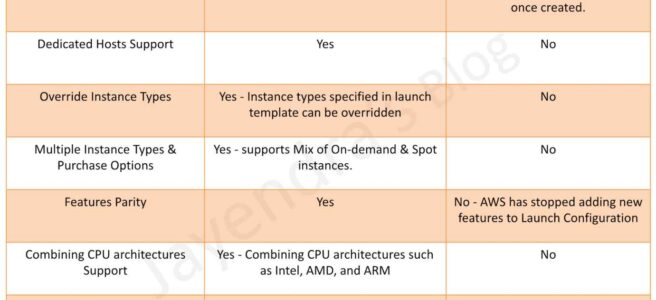
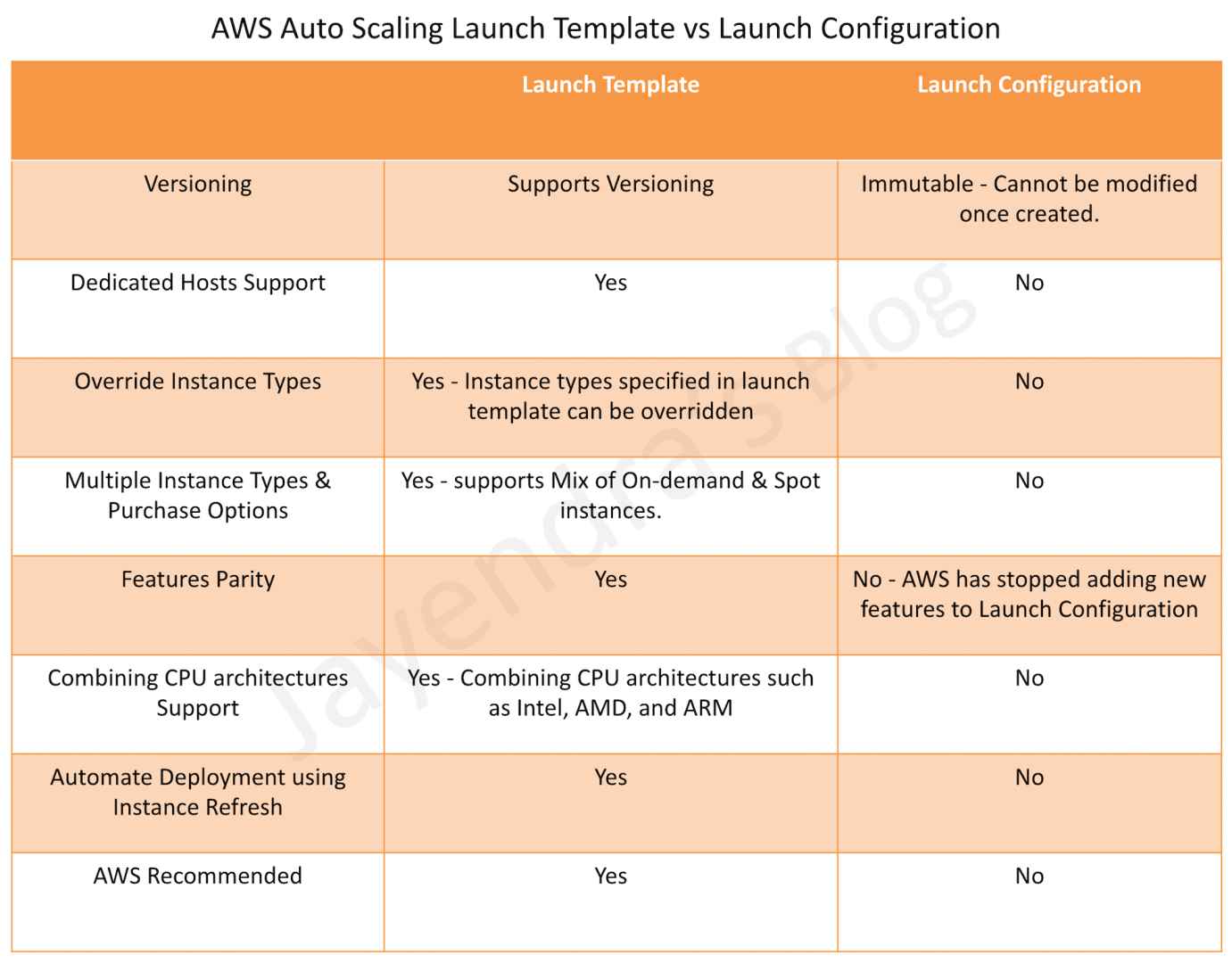
Launch Template vs Launch Configuration – Key Differences
| Feature | Launch Template | Launch Configuration |
|---|---|---|
| Status | Active & Recommended | Deprecated |
| Versioning | ✅ Supported | ❌ Not Supported (Immutable) |
| Multiple Instance Types | ✅ Supported | ❌ Single instance type only |
| Mixed Instances Policy (Spot + On-Demand) | ✅ Supported | ❌ Not Supported |
| Attribute-Based Instance Type Selection | ✅ Supported | ❌ Not Supported |
| Dedicated Hosts | ✅ Supported | ❌ Not Supported |
| Capacity Reservations | ✅ Supported | ❌ Not Supported |
| Capacity Blocks (ML) | ✅ Supported | ❌ Not Supported |
| Instance Refresh | ✅ Supported | ❌ Not Supported |
| Warm Pools | ✅ Supported | ❌ Not Supported |
| Instance Maintenance Policy | ✅ Supported | ❌ Not Supported |
| SSM Parameters for AMI IDs | ✅ Supported | ❌ Not Supported |
| New Instance Types (post-2023) | ✅ Supported | ❌ Not Supported |
| T2/T3/T4g Unlimited | ✅ Supported | ❌ Not Supported |
| io2 EBS Volumes | ✅ Supported | ❌ Not Supported |
| EBS Volume Tagging | ✅ Supported | ❌ Not Supported |
Migrating from Launch Configuration to Launch Template
- AWS provides a migration path to convert existing launch configurations to launch templates.
- The migration can be done through the AWS Console, CLI, or CloudFormation.
- When migrating, a new launch template is created with equivalent settings from the launch configuration.
- The Auto Scaling group is then updated to reference the new launch template instead of the launch configuration.
- Existing instances in the ASG are not affected during migration; they continue running with their current configuration.
- New instances launched after migration use the launch template configuration.
AWS Certification Exam Practice Questions
- Questions are collected from Internet and the answers are marked as per my knowledge and understanding (which might differ with yours).
- AWS services are updated everyday and both the answers and questions might be outdated soon, so research accordingly.
- AWS exam questions are not updated to keep up the pace with AWS updates, so even if the underlying feature has changed the question might not be updated
- Open to further feedback, discussion and correction.
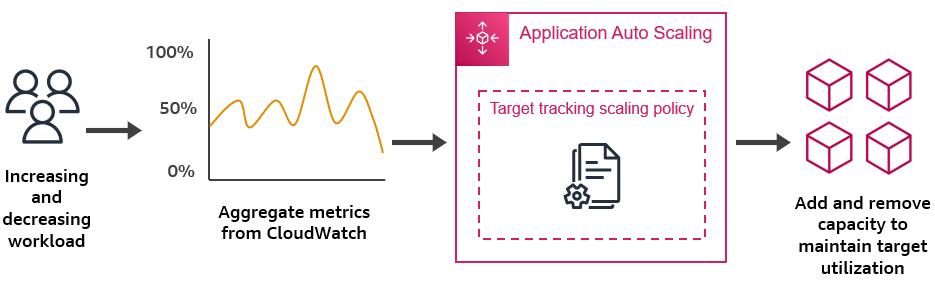
- A company is launching a new workload. The workload will run on Amazon EC2 instances in an Amazon EC2 Auto Scaling group. The company needs to maintain different versions of the EC2 configurations. The company also needs the Auto Scaling group to automatically scale to maintain CPU utilization of 60%. How can a SysOps administrator meet these requirements?
- Configure the Auto Scaling group to use a launch configuration with a target tracking scaling policy.
- Configure the Auto Scaling group to use a launch configuration with a simple scaling policy.
- Configure the Auto Scaling group to use a launch template with a target tracking scaling policy.
- Configure the Auto Scaling group to use a launch template with a simple scaling policy.
- A DevOps engineer needs to configure an Auto Scaling group that uses both Spot and On-Demand instances across multiple instance types for cost optimization. Which configuration is required?
- Create a launch configuration with Spot instance pricing specified.
- Create multiple launch configurations, one for each instance type.
- Create a launch template with a Mixed Instances Policy specifying multiple instance types and purchase options.
- Create a launch template with a single instance type and enable Spot requests separately.
- A solutions architect needs to ensure an Auto Scaling group automatically selects the most appropriate instance types based on workload requirements (vCPUs, memory) without manually specifying each instance type. Which approach should be used?
- Use a launch configuration with the largest instance type that meets requirements.
- Create separate Auto Scaling groups for each instance type.
- Use a launch template with manually listed instance type overrides.
- Use a launch template with Attribute-Based Instance Type Selection (ABS) specifying required vCPUs and memory.
- A company wants to perform rolling updates to their Auto Scaling group with minimal downtime when deploying new AMIs. Which feature should they use?
- Delete the Auto Scaling group and recreate it with the new AMI.
- Manually terminate instances one at a time.
- Use Instance Refresh with the launch template to perform a rolling replacement of instances.
- Create a new launch configuration with the new AMI and double the desired capacity.
- An application has a very long boot time of 10 minutes. The operations team needs to ensure rapid scale-out without waiting for full initialization. Which Auto Scaling feature helps reduce scale-out latency?
- Predictive Scaling
- Warm Pools with pre-initialized instances in a Stopped or Running state
- Step Scaling with shorter cooldown periods
- Launch configurations with faster instance types