AWS Certified Solutions Architect – Associate SAA-C03 Exam Learning Path

AWS Solutions Architect - Associate Certificate

AWS Certified Solutions Architect – Associate SAA-C03 Exam Learning Path

  • I just cleared the AWS Solutions Architect – Associate SAA-C03 exam with a score of 914/1000.
  • AWS Solutions Architect – Associate SAA-C03 exam is the latest AWS exam released on 30th August 2022 and has replaced the previous AWS Solutions Architect – SAA-C02 certification exam.
  • The SAA-C03 exam continues to be the current version with enhanced focus on modern AWS services, sustainability considerations, and advanced networking capabilities.

AWS Solutions Architect – Associate SAA-C03 Exam Content

  • It basically validates the ability to effectively demonstrate knowledge of how to design, architect, and deploy secure, cost-effective, and robust applications on AWS technologies
  • The exam also validates a candidate’s ability to complete the following tasks:
    • Design solutions that incorporate AWS services to meet current business requirements and future projected needs
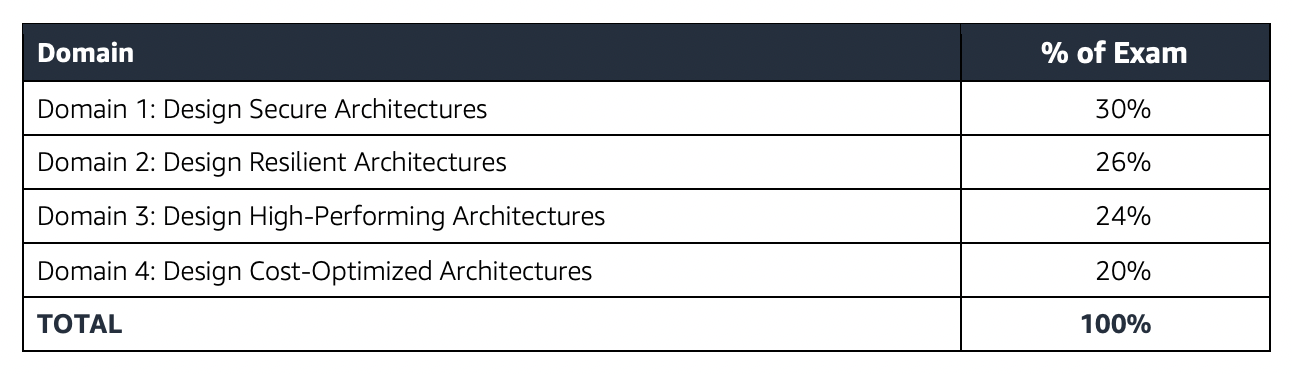
    • Design architectures that are secure, resilient, high-performing, and cost-optimized
    • Review existing solutions and determine improvements

Refer AWS Solutions Architect – Associate SAA-C03 Exam Guide
AWS Solutions Architect – Associate SAA-C03 Exam Summary

  • SAA-C03 exam consists of 65 questions in 130 minutes, and the time is more than sufficient if you are well-prepared.
  • SAA-C03 exam includes two types of questions, multiple-choice and multiple-response.
  • SAA-C03 has a scaled score between 100 and 1,000. The scaled score needed to pass the exam is 720.
  • Associate exams currently cost $ 150 + tax.
  • The exam includes 50 scored questions and 15 unscored questions (total 65 questions). The unscored questions are used by AWS to evaluate future exam content.
  • You can get an additional 30 minutes if English is your second language by requesting Exam Accommodations. It might not be needed for Associate exams but is helpful for Professional and Specialty ones.
  • AWS exams can be taken either remotely or online, I prefer to take them online as it provides a lot of flexibility. Just make sure you have a proper place to take the exam with no disturbance and nothing around you.
  • Also, if you are taking the AWS Online exam for the first time try to join at least 30 minutes before the actual time as I have had issues with both PSI and Pearson with long wait times.

AWS Solutions Architect – Associate SAA-C03 Exam Resources

AWS Solutions Architect – Associate SAA-C03 Exam Topics

  • SAA-C03 Exam covers the design and architecture aspects in deep, so you must be able to visualize the architecture, even draw them out or prepare a mental picture just to understand how it would work and how different services relate.
  • SAA-C03 exam concepts cover solutions that fall within AWS Well-Architected framework to cover scalable, highly available, cost-effective, performant, and resilient pillars.
  • If you had been preparing for the SAA-C02, SAA-C03 is pretty much similar to SAA-C02 except for the addition of some new services Aurora Serverless, AWS Global Accelerator, FSx for Windows, and FSx for Lustre.
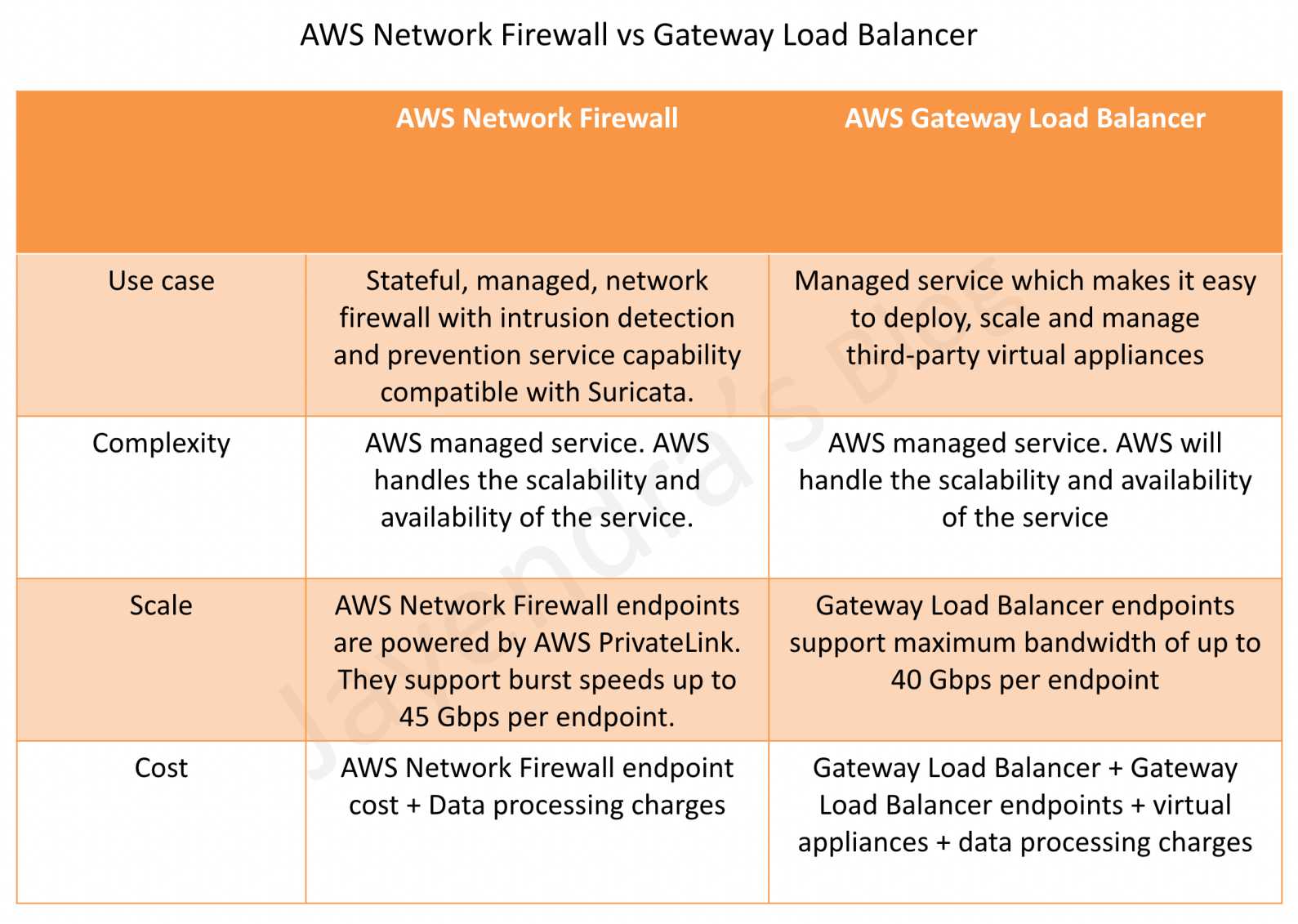
  • New services and features added to exam scope include VPC Lattice, VPC IP Address Manager (IPAM), AWS Network Firewall, Amazon Verified Permissions, and enhanced focus on sustainability and cost optimization.

Networking

  • Virtual Private Network – VPC
    • Create a VPC from scratch with public, private, and dedicated subnets with proper route tables, security groups, and NACLs.
    • Understand what a CIDR is and address patterns.
    • Subnets are public or private depending on whether they can route traffic directly through an Internet gateway
    • Understand how communication happens between the Internet, Public subnets, Private subnets, NAT, Bastion, etc.
    • Bastion (also referred to as a Jump server) can be used to securely access instances in the private subnets.
    • Create two-tier architecture with application in public and database in private subnets
    • Create three-tier architecture with web servers in public, application, and database servers in private. (hint: focus on security group configuration with least privilege)
  • VPC IP Address Manager (IPAM)
    • Centrally manage and monitor IP addresses across AWS accounts and regions
    • Automate IP address assignments and prevent IP address conflicts
    • Provides visibility into IP address utilization and helps with compliance
    • Essential for large-scale, multi-account AWS deployments
  • Amazon VPC Lattice
    • Application networking service that connects, secures, and monitors service-to-service communications
    • Simplifies microservices connectivity across VPCs, accounts, and compute types
    • Provides Layer 7 load balancing, service discovery, and traffic management
    • Replaces complex service mesh configurations with managed service
    • Ideal migration path from deprecated AWS App Mesh
  • AWS Network Firewall
    • Managed, stateful firewall service for VPC protection
    • Provides deep packet inspection (DPI) and intrusion prevention
    • Supports custom rules and AWS managed threat intelligence
    • Integrates with AWS Firewall Manager for centralized management
    • Essential for compliance and advanced threat protection
  • Security Groups and NACLs
    • Security Groups are Stateful vs NACLs are stateless.
    • Also, only NACLs provide the ability to deny or block IPs
  • NAT Gateway or Instances
    • help enables instances in a private subnet to connect to the Internet.
    • Understand the difference between NAT Gateway & NAT Instance.
    • NAT Gateway is AWS-managed and is scalable and highly available.
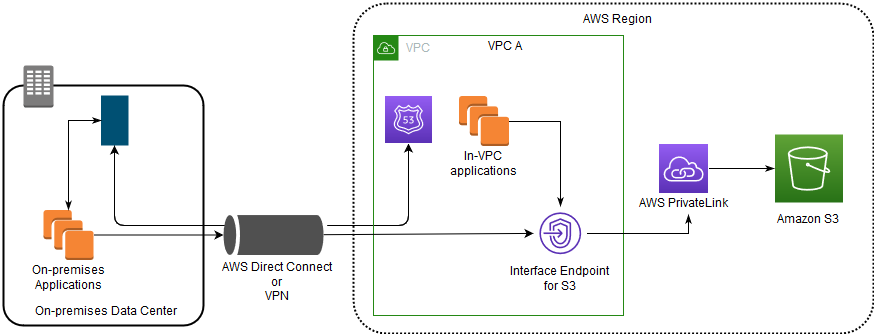
  • VPC endpoints
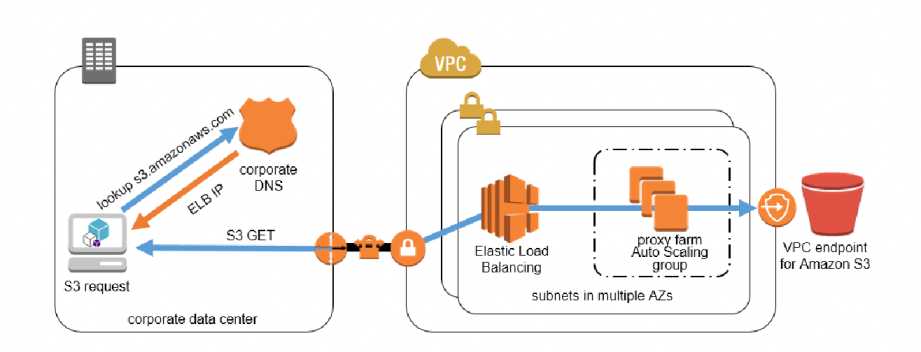
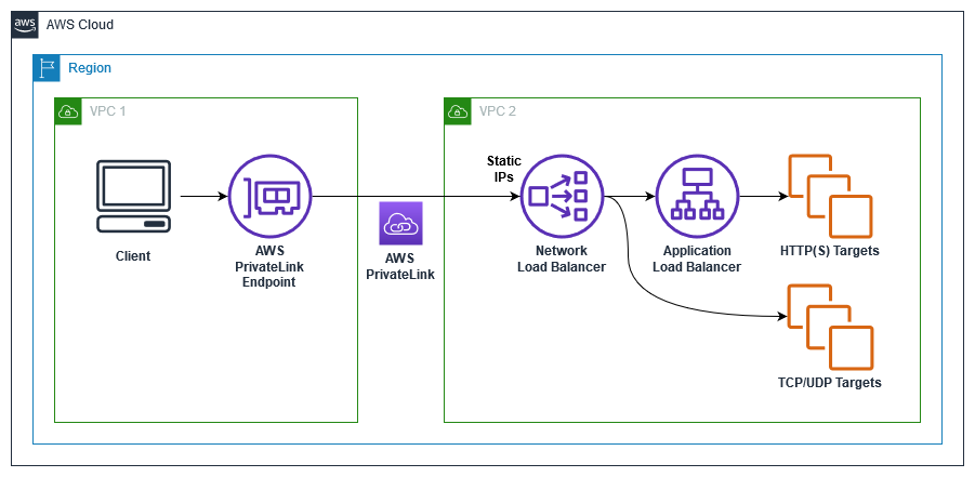
    • enable the creation of a private connection between VPC to supported AWS services and VPC endpoint services powered by PrivateLink using its private IP address without needing an Internet or NAT Gateway.
    • VPC Gateway Endpoints supports S3 and DynamoDB.
    • VPC Interface Endpoints OR Private Links supports others
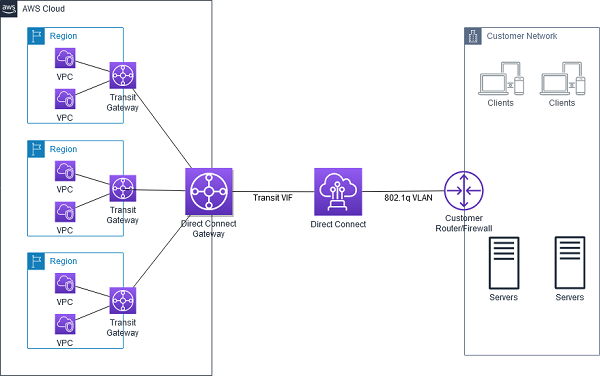
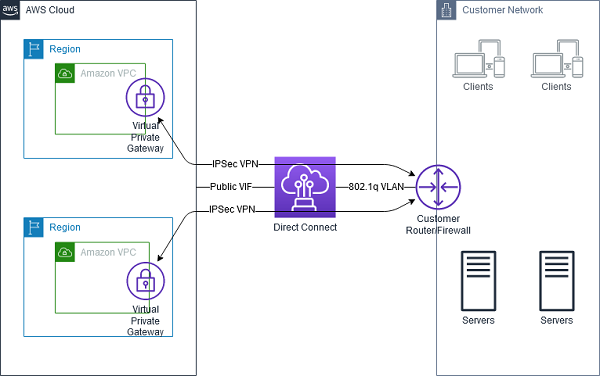
  • VPN and Direct Connect for on-premises to AWS connectivity
    • VPN provides a quick, cost-effective, secure channel, however, routes through the internet and does not provide consistent throughput
    • Direct Connect provides consistent, dedicated throughput without Internet, however, requires time to set up and is not cost-effective.
  • Understand Data Migration techniques at a high level
    • VPN and Direct Connect for continuous, frequent data transfers.
    • Snow Family is ideal for one-time, cost-effective huge data transfer.
    • Choose a technique depending on the available bandwidth, data transfer needed, time available, encryption, one-time or continuous.
  • CloudFront
    • fully managed, fast CDN service that speeds up the distribution of static, dynamic web, or streaming content to end-users
    • S3 frontend by CloudFront provides low latency, performant experience for global users.
    • provides static and dynamic caching for both AWS and on-premises origin.
  • Global Accelerator
    • optimizes the path to applications to keep packet loss, jitter, and latency consistently low.
    • helps improve the performance by lowering first-byte latency
    • provides 2 static IP address
  • Know CloudFront vs Global Accelerator
  • Route 53
    • highly available and scalable DNS web service.
    • Health checks and failover routing helps provide resilient and active-passive solutions
    • Route 53 Routing Policies and their use cases (hint: focus on weighted, latency, geolocation, failover routing)
  • Elastic Load Balancer
    • Focus on ALB and NLB
    • Differences between ALB vs NLB
      • ALB is layer 7 vs NLB is layer 4
      • ALB provides content-based, host-based, path-based routing
      • ALB provides dynamic port mapping which allows the same tasks to be hosted on the ECS node
      • NLB provides low latency, the ability to scale rapidly, and a static IP address
      • ALB works with WAF while NLB does not.
    • Gateway Load Balancer – GWLB
      • helps deploy, scale, and manage virtual appliances like firewalls, IDS/IPS, and deep packet inspection systems.

Security

  • Identity Access Management – IAM
    • IAM role
      • provides permissions that are not associated with a particular user, group, or service and are intended to be assumable by anyone who needs it.
      • can be used for EC2 application access and Cross-account access
    • IAM identity providers and federation and use cases – Although did not see much in SAA-C03
  • NEW 2025: Amazon Verified Permissions
    • Centrally manage fine-grained permissions and authorization for applications
    • Uses Cedar policy language for defining access control policies
    • Provides scalable, consistent authorization across microservices
    • Integrates with existing identity providers and AWS services
    • Essential for zero-trust architecture implementations
  • Key Management Services – KMS encryption service
  • AWS WAF
    • integrates with CloudFront, and ALB to provide protection against Cross-site scripting (XSS), and SQL injection attacks.
    • provides IP blocking and geo-protection, rate limiting, etc.
  • AWS Shield
    • managed DDoS protection service
    • integrates with CloudFront, ALB, and Route 53
    • Advanced provides additional detection and mitigation against large and sophisticated DDoS attacks, near real-time visibility into attacks
  • AWS GuardDuty
    • managed threat detection service and provides Malware protection
    • Enhanced with machine learning-based threat detection and integration with Security Hub
  • AWS Inspector
    • is a vulnerability management service that continuously scans the AWS workloads for vulnerabilities
    • Now includes container image scanning and enhanced software vulnerability detection
  • AWS Secrets Manager
    • helps protect secrets needed to access applications, services, and IT resources.
    • supports rotations of secrets, which Systems Manager Parameter Stores does not support.
  • Disaster Recovery whitepaper
    • Be sure you know the different recovery types with impact on RTO/RPO.
    • Enhanced focus on cross-region disaster recovery and automated failover strategies

Storage

  • Understand various storage options S3, EBS, Instance store, EFS, Glacier, FSx, and what are the use cases and anti-patterns for each
  • Instance Store
    • is physically attached to the EC2 instance and provides the lowest latency and highest IOPS
  • Elastic Block Storage – EBS
    • EBS volume types and their use cases in terms of IOPS and throughput. SSD for IOPS and HDD for throughput
    • EBS Snapshots
      • Backups are automated, snapshots are manual
      • Can be used to encrypt an unencrypted EBS volume
    • Multi-Attach EBS feature allows attaching an EBS volume to multiple instances within the same AZ only.
    • EBS fast snapshot restore feature helps ensure that the EBS volumes created from a snapshot are fully-initialized at creation and instantly deliver all of their provisioned performance.
  • Simple Storage Service – S3
    • S3 storage classes with lifecycle policies
      • Understand the difference between SA Standard vs SA IA vs SA IA One Zone in terms of cost and durability
      • New S3 Express One Zone storage class for high-performance workloads
    • S3 Data Protection
      • S3 Client-side encryption encrypts data before storing it in S3
    • S3 features including
      • S3 provides cost-effective static website hosting. However, it does not support HTTPS endpoint. Can be integrated with CloudFront for HTTPS, caching, performance, and low-latency access.
      • S3 versioning provides protection against accidental overwrites and deletions. Used with MFA Delete feature.
      • S3 Pre-Signed URLs for both upload and download provide access without needing AWS credentials.
      • S3 CORS allows cross-domain calls
      • S3 Transfer Acceleration enables fast, easy, and secure transfers of files over long distances between your client and an S3 bucket.
      • S3 Event Notifications to trigger events on various S3 events like objects added or deleted. Supports SQS, SNS, and Lambda functions.
      • Integrates with Amazon Macie to detect PII data
      • Replication that supports the same and cross-region replication required versioning to be enabled.
      • Integrates with Athena to analyze data in S3 using standard SQL.
  • Storage gateway and its different types.
    • Cached Volume Gateway provides access to frequently accessed data while using AWS as the actual storage
    • Stored Volume gateway uses AWS as a backup, while the data is being stored on-premises as well
    • File Gateway supports SMB protocol
  • FSx is easy and cost-effective to launch and run popular file systems.
    • FSx provides two file systems to choose from:
    • Amazon FSx for Windows File Server
      • works with both Linux and Windows
      • provides Windows File System features including integration with Active Directory.
    • Amazon FSx for Lustre
      • for high-performance workloads
      • works with only Linux
    • FSx for NetApp ONTAP and FSx for OpenZFS now available for additional file system options
  • Elastic File System – EFS
    • simple, fully managed, scalable, serverless, and cost-optimized file storage for use with AWS Cloud and on-premises resources.
    • provides shared volume across multiple EC2 instances, while EBS can be attached to a single instance within the same AZ or EBS Multi-Attach can be attached to multiple instances within the same AZ
    • supports the NFS protocol, and is compatible with Linux-based AMIs
    • supports cross-region replication, storage classes for cost.
  • AWS Transfer Family
    • secure transfer service that helps transfer files into and out of AWS storage services using FTP, SFTP and FTPS protocol.
  • Difference between EBS vs S3 vs EFS
  • Difference between EBS vs Instance Store
  • Would recommend referring Storage Options whitepaper, although a bit dated 90% still holds right

Compute

  • Elastic Cloud Compute – EC2
  • Auto Scaling and ELB
    • Auto Scaling provides the ability to ensure a correct number of EC2 instances are always running to handle the load of the application
    • Elastic Load Balancer allows the incoming traffic to be distributed automatically across multiple healthy EC2 instances
  • Autoscaling & ELB
    • work together to provide High Availability and Scalability.
    • Span both ELB and Auto Scaling across Multi-AZs to provide High Availability
    • Do not span across regions. Use Route 53 or Global Accelerator to route traffic across regions.
  • EC2 Instance Purchase Types – Reserved, Scheduled Reserved, On-demand, and Spot and their use cases
    • Reserved instances provide cost benefits for long terms requirements over On-demand instances for continuous persistent load
    • Scheduled Reserved Instances for load with fixed scheduled and time interval
    • Spot instances provide cost benefits for temporary, fault-tolerant, spiky load
    • Savings Plans now preferred over Reserved Instances for flexibility across instance families
  • EC2 Placement Groups
    • Cluster placement groups provide low latency and high throughput communication
    • Spread placement group provides high availability
    • Partition placement groups for distributed workloads like Hadoop and Cassandra
  • Lambda and serverless architecture, its features, and use cases.
    • Lambda integrated with API Gateway to provide a serverless, highly scalable, cost-effective architecture
    • Enhanced with container image support and improved cold start performance
  • Elastic Container Service – ECS with its ability to deploy containers and microservices architecture.
    • ECS role for tasks can be provided through taskRoleArn
    • ALB provides dynamic port mapping to allow multiple same tasks on the same node.
    • ECS Anywhere allows running containers on-premises
  • Elastic Kubernetes Service – EKS
    • managed Kubernetes service to run Kubernetes in the AWS cloud and on-premises data centers
    • ideal for migration of an existing workload on Kubernetes
    • EKS Anywhere and EKS Distro for hybrid deployments
  • Elastic Beanstalk at a high level, what it provides, and its ability to get an application running quickly.

Databases

  • Understand relational and NoSQL data storage options which include RDS, DynamoDB, and Aurora with their use cases
  • Relational Database Service – RDS
    • Read Replicas vs Multi-AZ
      • Read Replicas for scalability, Multi-AZ for High Availability
      • Multi-AZ are regional only
      • Read Replicas can span across regions and can be used for disaster recovery
    • Understand Automated Backups, underlying volume types (which are the same as EBS volume types)
    • RDS Custom for Oracle and SQL Server with OS-level access
  • Aurora
    • provides multiple read replicas and replicates 6 copies of data across AZs
    • Aurora Serverless
      • provides a highly scalable cost-effective database solution
      • automatically starts up, shuts down, and scales capacity up or down based on the application’s needs.
      • supports only MySQL and PostgreSQL
      • Aurora Serverless v2 with instant scaling and better cost optimization
    • Aurora Global Database for cross-region disaster recovery
  • DynamoDB
    • provides low latency performance, a key-value store
    • is not a relational database
    • DynamoDB DAX provides caching for DynamoDB
    • DynamoDB TTL helps expire data in DynamoDB without any cost or consuming any write throughput.
    • DynamoDB Standard-IA storage class for cost optimization
  • ElastiCache use cases, mainly for caching performance

Integration Tools

  • Simple Queue Service
    • as message queuing service and SNS as pub/sub notification service
    • as a decoupling service and provide resiliency
    • SQS features like visibility, and long poll vs short poll
    • provide scaling for the Auto Scaling group based on the SQS size.
    • SQS Standard vs SQS FIFO difference
      • FIFO provides exactly-once delivery but with low throughput
  • Simple Notification Service – SNS
    • is a web service that coordinates and manages the delivery or sending of messages to subscribing endpoints or clients
    • Fanout pattern can be used to push messages to multiple subscribers
  • Amazon EventBridge for event-driven architectures and cross-service integration

Analytics

  • Redshift as a business intelligence tool
    • Redshift Serverless for automatic scaling and cost optimization
  • Kinesis
    • for real-time data capture and analytics.
    • Integrates with Lambda functions to perform transformations
  • AWS Glue
    • fully-managed, ETL service that automates the time-consuming steps of data preparation for analytics
    • AWS Glue for Ray for distributed data processing
  • Amazon OpenSearch Service (successor to Elasticsearch Service) for search and analytics

Management Tools

  • CloudWatch
    • monitoring to provide operational transparency
    • is extendable with custom metrics
    • CloudWatch -> (Subscription filter) -> Kinesis Data Firehose -> S3
    • CloudWatch Application Insights for automated application monitoring
  • CloudTrail
    • helps enable governance, compliance, and operational and risk auditing of the AWS account.
    • helps to get a history of AWS API calls and related events for the AWS account.
  • CloudFormation
    • easy way to create and manage a collection of related AWS resources, and provision and update them in an orderly and predictable fashion.
  • AWS Config
    • fully managed service that provides AWS resource inventory, configuration history, and configuration change notifications to enable security, compliance, and governance.
  • AWS Systems Manager enhanced with better patch management and automation capabilities

NEW 2025: Sustainability and Cost Optimization

  • AWS Sustainability: Understanding the AWS commitment to net-zero carbon by 2040
    • Carbon footprint tracking and optimization
    • Sustainable architecture patterns
    • Right-sizing resources for environmental impact
  • Enhanced Cost Optimization:
    • AWS Cost Explorer and Cost Anomaly Detection
    • Savings Plans vs Reserved Instances comparison
    • Spot Instance best practices and interruption handling
    • Resource tagging strategies for cost allocation

NEW 2025: Practice Questions for Updated Services

  • VPC Lattice Questions:
    • Q: A company needs to connect microservices across multiple VPCs and AWS accounts with centralized security policies. Which service should they use?
      • A) VPC Peering
      • B) Transit Gateway
      • C) Amazon VPC Lattice ✓
      • D) AWS PrivateLink
  • Network Firewall Questions:
    • Q: Which AWS service provides stateful firewall capabilities with deep packet inspection for VPC traffic?
      • A) Security Groups
      • B) Network ACLs
      • C) AWS WAF
      • D) AWS Network Firewall ✓
  • IPAM Questions:
    • Q: A large enterprise needs to manage IP address allocation across 50+ AWS accounts. Which service provides centralized IP address management?
      • A) VPC DHCP Options
      • B) Amazon VPC IP Address Manager (IPAM) ✓
      • C) Route 53 Resolver
      • D) AWS Config
  • Verified Permissions Questions:
    • Q: Which service provides fine-grained authorization using Cedar policy language?
      • A) AWS IAM
      • B) Amazon Cognito
      • C) Amazon Verified Permissions ✓
      • D) AWS Directory Service
  • Deprecated Services Questions:
    • Q: AWS App Mesh reached end-of-life in September 2026. What is the recommended migration path?
      • A) AWS Service Mesh
      • B) Amazon VPC Lattice ✓
      • C) Application Load Balancer
      • D) AWS Transit Gateway

AWS Whitepapers & Cheatsheets

Important Migration Notes for Deprecated Services

On the Exam Day

  • Make sure you are relaxed and get some good night’s sleep. The exam is not tough if you are well-prepared.
  • If you are taking the AWS Online exam
    • Try to join at least 30 minutes before the actual time as I have had issues with both PSI and Pearson with long wait times.
    • The online verification process does take some time and usually, there are glitches.
    • Remember, you would not be allowed to take the take if you are late by more than 30 minutes.
    • Make sure you have your desk clear, no hand-watches, or external monitors, keep your phones away, and nobody can enter the room.
  • Be prepared for scenario-based questions focusing on cost optimization, sustainability considerations, and modern networking architectures.
  • Key Focus Areas for 2025:
    • Service-to-service connectivity patterns (VPC Lattice)
    • Advanced security implementations (Verified Permissions, Network Firewall)
    • Cost optimization strategies (Savings Plans, right-sizing)
    • Sustainability considerations in architecture decisions
    • Migration strategies for deprecated services

Finally, All the Best 🙂
Related Posts

AWS EC2 Monitoring

EC2 Monitoring

Status Checks

  • Status monitoring helps quickly determine whether EC2 has detected any problems that might prevent instances from running applications.
  • EC2 performs automated checks on every running EC2 instance to identify hardware and software issues.
  • Status checks are performed every minute and each returns a pass or a fail status.
  • If all checks pass, the overall status of the instance is OK.
  • If one or more checks fail, the overall status is Impaired.
  • Status checks are built into EC2, so they cannot be disabled or deleted.
  • There are three types of status checks:
    • System status checks
    • Instance status checks
    • Attached EBS status checks
  • Status checks data augments the information that EC2 already provides about the intended state of each instance (such as pending, running, and stopping) as well as the utilization metrics that CloudWatch monitors (CPU utilization, network traffic, and disk activity).
  • Alarms can be created or deleted, that are triggered based on the result of the status checks. for e.g., an alarm can be created to warn if status checks fail on a specific instance.

System Status Checks

  • monitor the AWS systems, required to use the instance, to ensure they are working properly.
  • detect problems with the instance that require AWS involvement to repair.
  • System status checks failure might due to
    • Loss of network connectivity
    • Loss of system power
    • Software issues on the physical host
    • Hardware issues on the physical host
  • When a system status check fails, one can either
    • check AWS Health Dashboard for any scheduled critical maintenance by AWS to the instance’s host.
    • wait for AWS to fix the issue
    • or resolve it by stopping and restarting or terminating and replacing an instance

Instance Status Checks

  • monitor the software and network configuration of the individual instance
  • checks to detect problems that require involvement to repair.
  • Instance status checks failure might be due to
    • Failed system status checks
    • Misconfigured networking or startup configuration
    • Exhausted memory
    • Corrupted file system
    • Incompatible kernel
  • When an instance status check fails, it can be resolved by either rebooting the instance or by making modifications to the operating system

Attached EBS Status Checks

  • monitor whether the EBS volumes attached to an instance are reachable and able to complete I/O operations.
  • available for Nitro-based instances only.
  • helps detect issues where the instance cannot communicate with one or more attached EBS volumes.
  • Attached EBS status check failure might be due to
    • Hardware or software issues on the storage subsystem underlying the EBS volume
    • Hardware issues on the physical host impacting reachability to EBS
  • The metric StatusCheckFailed_AttachedEBS is available at a 1-minute frequency at no additional charge.
  • Can be used with CloudWatch alarms and Auto Scaling health checks to replace instances with impaired EBS volumes.

EC2 Instance Recovery

  • Simplified Automatic Recovery
    • enabled by default during instance launch on supported instances.
    • automatically moves the instance from the impaired host to a different host when a system status check failure is detected.
    • recovered instance is identical to the original (instance ID, private IP, Elastic IP, metadata, placement group).
    • does not require a CloudWatch alarm to be configured.
    • works only for system status check failures, not for instance status check failures.
    • available for over 90% of deployed EC2 instances.
  • CloudWatch Action Based Recovery
    • can be configured optionally after instance launch using CloudWatch alarms.
    • provides the ability to set a recovery action on a CloudWatch alarm monitoring the StatusCheckFailed_System metric.
    • provides more granular control over recovery conditions and notification.

CloudWatch Monitoring

  • CloudWatch helps monitor EC2 instances, which collects and processes
    raw data from EC2 into readable, near real-time metrics.
  • Statistics are recorded for a period of two weeks so that historical information can be accessed and used to gain a better perspective on how
    the application or service is performing.
  • By default, Basic monitoring is enabled and EC2 metric data is sent to CloudWatch in 5-minute periods automatically
  • Detailed monitoring can be enabled on the EC2 instance, which sends data to CloudWatch in 1-minute periods.
  • Organization-wide Detailed Monitoring Enablement (2026)
    • CloudWatch Ingestion enablement rules can automatically enable detailed monitoring for both existing and newly launched EC2 instances matching the rule scope.
    • Ensures consistent 1-minute metrics collection across EC2 instances at the organization or account level.
  • Aggregating Statistics Across Instances/ASG/AMI ID
    • Aggregate statistics are available for the instances that have detailed monitoring (at an additional charge) enabled, which provides data in 1-minute periods
    • Instances that use basic monitoring are not included in the aggregates.
    • CloudWatch does not aggregate data across Regions. Therefore, metrics are completely separate between regions.
    • CloudWatch returns statistics for all dimensions in the AWS/EC2 namespace if no dimension is specified
    • The technique for retrieving all dimensions across an AWS namespace does not work for custom namespaces published to CloudWatch.
    • Statistics include Sum, Average, Minimum, Maximum, Data Samples
    • With custom namespaces, the complete set of dimensions that are associated with any given data point to retrieve statistics that include the data point must be specified
  • CloudWatch alarms
    • can be created to monitor any one of the EC2 instance’s metrics.
    • can be configured to automatically send you a notification when the metric reaches a specified threshold.
    • can automatically stop, terminate, reboot, or recover EC2 instances
    • can automatically recover an EC2 instance when the instance becomes impaired due to an underlying hardware failure or a problem that requires AWS involvement to repair
    • can automatically stop or terminate the instances to save costs (EC2 instances that use an EBS volume as the root device can be stopped
      or terminated, whereas instances that use the instance store as the root device can only be terminated)
    • can use EC2ActionsAccess IAM role, which enables AWS to perform stop, terminate, or reboot actions on EC2 instances
    • If you have read/write permissions for CloudWatch but not for EC2, alarms can still be created but the stop or terminate actions won’t be performed on the EC2 instance
    • Composite Alarms can combine multiple metric alarms into a single alarm for aggregated health, but cannot perform EC2 actions directly.

CloudWatch Agent

  • The unified CloudWatch agent collects system-level metrics and logs from EC2 instances that are not available through the default hypervisor-level metrics.
  • Key OS-level metrics collected by the agent include:
    • Memory utilization (mem_used_percent)
    • Disk usage (disk_used_percent)
    • Swap usage
    • Process-level metrics (procstat)
  • EC2 does NOT provide memory or disk usage metrics by default — these require the CloudWatch agent.
  • Can be installed and managed via AWS Systems Manager (SSM).
  • Configuration is stored in a JSON file or as an SSM Parameter Store parameter.
  • Metrics collected by the CloudWatch agent are billed as custom metrics.
  • In-Console Agent Management (2025/2026)
    • CloudWatch provides visibility into agent status across the EC2 fleet directly in the console.
    • Automatic detection of supported workloads and recommended monitoring configurations.
    • Visual configuration editor for the agent eliminates the need to hand-edit JSON (April 2026).

EC2 Monitoring Metrics

Instance Metrics

  • CPUUtilization
    • % of physical CPU time that EC2 uses to run the instance, including time spent running both user code and EC2 code.
    • At a very high level, CPUUtilization is the sum of guest CPUUtilization and hypervisor CPUUtilization.
  • DiskReadOps
    • Completed read operations from all instance store volumes available to the instance in a specified period of time.
    • If there are no instance store volumes, the value is 0 or the metric is not reported.
  • DiskWriteOps
    • Completed write operations to all instance store volumes available to the instance in a specified period of time.
    • If there are no instance store volumes, the value is 0 or the metric is not reported.
  • DiskReadBytes
    • Bytes read from all instance store volumes available to the instance.
    • This metric is used to determine the volume of the data the application reads from the hard disk of the instance.
  • DiskWriteBytes
    • Bytes written to all instance store volumes available to the instance.
    • This metric is used to determine the volume of the data the application writes onto the hard disk of the instance.
  • MetadataNoToken
    • The number of times the Instance Metadata Service (IMDS) was successfully accessed using a method that does not use a token (IMDSv1).
    • Used to determine if there are any processes accessing instance metadata using IMDSv1, which is less secure than IMDSv2.
    • If all requests use token-backed sessions (IMDSv2), the value is 0.
  • MetadataNoTokenRejected
    • The number of times an IMDSv1 call was attempted after IMDSv1 was disabled on the instance.
    • Indicates that software on the instance still attempts IMDSv1 calls and needs updating.
  • NetworkIn
    • The number of bytes received on all network interfaces by the instance. This metric identifies the volume of incoming network traffic to an application on a single instance.
  • NetworkOut
    • The number of bytes sent out on all network interfaces by the instance. This metric identifies the volume of outgoing network traffic from a single instance.
  • NetworkPacketsIn
    • The number of packets received on all network interfaces by the instance.
    • This metric is available for basic monitoring only (5-minute periods).
  • NetworkPacketsOut
    • The number of packets sent out on all network interfaces by the instance.
    • This metric is available for basic monitoring only (5-minute periods).

CPU Credit Metrics (Burstable Performance Instances)

  • Applicable to all burstable performance instances (T2, T3, T3a, T4g) — not just T2.
  • CPU Credit metrics are available at a 5-minute frequency only.
  • CPUCreditUsage
    • The number of CPU credits spent by the instance for CPU utilization.
    • One CPU credit equals one vCPU running at 100% utilization for one minute.
  • CPUCreditBalance
    • The number of earned CPU credits that an instance has accrued since it was launched or started.
    • For T2 Standard, also includes the number of launch credits accrued.
    • When a T3/T3a instance stops, the CPUCreditBalance persists for seven days. When a T2 instance stops, credits are lost.
    • Used to determine how long an instance can burst beyond its baseline performance level.
  • CPUSurplusCreditBalance (Unlimited mode only)
    • The number of surplus credits spent when the CPUCreditBalance is zero.
    • Surplus credits are paid down by earned CPU credits.
    • If surplus credits exceed the maximum earnable in a 24-hour period, additional charges apply.
  • CPUSurplusCreditsCharged (Unlimited mode only)
    • The number of surplus credits that are not paid down and incur an additional charge.
    • Charged when surplus credits exceed 24-hour maximum, instance is stopped/terminated, or switched from unlimited to standard mode.

Amazon EBS Metrics for Nitro-based Instances

  • Available for EBS volumes attached to Nitro-based instances (non-bare-metal).
  • EBSReadOps / EBSWriteOps – Completed read/write operations from all attached EBS volumes.
  • EBSReadBytes / EBSWriteBytes – Bytes read from/written to all attached EBS volumes.
  • EBSIOBalance%
    • Percentage of I/O credits remaining in the burst bucket.
    • Available for basic monitoring only.
    • Available for some *.4xlarge and smaller instance sizes that burst to maximum performance for 30 minutes every 24 hours.
  • EBSByteBalance%
    • Percentage of throughput credits remaining in the burst bucket.
    • Available for basic monitoring only.
    • Available for some *.4xlarge and smaller instance sizes that burst to maximum performance for 30 minutes every 24 hours.
  • InstanceEBSIOPSExceededCheck
    • Reports whether the application attempted to drive IOPS exceeding the maximum EBS IOPS limits for the instance.
    • Values: 0 (not exceeded) or 1 (exceeded).
  • InstanceEBSThroughputExceededCheck
    • Reports whether the application attempted to drive throughput exceeding the maximum EBS throughput limits for the instance.
    • Values: 0 (not exceeded) or 1 (exceeded).

Status Check Metrics

  • Available at a 1-minute frequency at no charge by default.
  • StatusCheckFailed
    • Reports if either of the status checks has failed.
    • Values: 0 (passed) or 1 (failed).
  • StatusCheckFailed_Instance
    • Reports whether the instance has passed the EC2 instance status check in the last minute.
    • Values: 0 (passed) or 1 (failed).
  • StatusCheckFailed_System
    • Reports whether the instance has passed the EC2 system status check in the last minute.
    • Values: 0 (passed) or 1 (failed).
  • StatusCheckFailed_AttachedEBS
    • Reports whether the instance has passed the attached EBS status check in the last minute.
    • Values: 0 (passed) or 1 (failed).
    • Available for Nitro-based instances only.

Accelerator Metrics

  • GPUPowerUtilization
    • Active power usage as a percentage of maximum active power.
    • Available for supported accelerated computing instances only.

CloudWatch Network Flow Monitor

  • Launched at re:Invent 2024 as part of CloudWatch Network Monitoring.
  • Provides near real-time visibility into network performance (packet loss and latency) for traffic between EC2 instances, EKS workloads, and AWS services (S3, DynamoDB).
  • Uses fully-managed agents installed on EC2 instances to collect TCP-based performance metrics.
  • Agents send aggregated metrics to the backend approximately every 30 seconds.
  • Top contributors feature identifies network flows with the highest retransmissions or latency to help pinpoint impairments.
  • Supports multi-account monitoring via AWS Organizations integration.

EC2 Metric Dimensions

  • InstanceId – Filters data for a specific instance.
  • InstanceType – Filters data for all instances of a specific type (requires Detailed Monitoring).
  • ImageId (AMI ID) – Filters data for all instances running a specific AMI (requires Detailed Monitoring).
  • AutoScalingGroupName – Filters data for all instances in a specified Auto Scaling group.

AWS Certification Exam Practice Questions

  • Questions are collected from Internet and the answers are marked as per my knowledge and understanding (which might differ with yours).
  • AWS services are updated everyday and both the answers and questions might be outdated soon, so research accordingly.
  • AWS exam questions are not updated to keep up the pace with AWS updates, so even if the underlying feature has changed the question might not be updated
  • Open to further feedback, discussion and correction.
  1. In the basic monitoring package for EC2, Amazon CloudWatch provides the following metrics:
    1. Web server visible metrics such as number failed transaction requests
    2. Operating system visible metrics such as memory utilization
    3. Database visible metrics such as number of connections
    4. Hypervisor visible metrics such as CPU utilization
  2. Which of the following requires a custom CloudWatch metric to monitor?
    1. Memory Utilization of an EC2 instance
    2. CPU Utilization of an EC2 instance
    3. Disk usage activity of an EC2 instance
    4. Data transfer of an EC2 instance
  3. A user has configured CloudWatch monitoring on an EBS backed EC2 instance. If the user has not attached any additional device, which of the below mentioned metrics will always show a 0 value?
    1. DiskReadBytes
    2. NetworkIn
    3. NetworkOut
    4. CPUUtilization
  4. A user is running a batch process on EBS backed EC2 instances. The batch process starts a few instances to process Hadoop Map reduce jobs, which can run between 50 – 600 minutes or sometimes for more time. The user wants to configure that the instance gets terminated only when the process is completed. How can the user configure this with CloudWatch?
    1. Setup the CloudWatch action to terminate the instance when the CPU utilization is less than 5%
    2. Setup the CloudWatch with Auto Scaling to terminate all the instances
    3. Setup a job which terminates all instances after 600 minutes
    4. It is not possible to terminate instances automatically
  5. An AWS account owner has setup multiple IAM users. One IAM user only has CloudWatch access. He has setup the alarm action, which stops the EC2 instances when the CPU utilization is below the threshold limit. What will happen in this case?
    1. It is not possible to stop the instance using the CloudWatch alarm
    2. CloudWatch will stop the instance when the action is executed
    3. The user cannot set an alarm on EC2 since he does not have the permission
    4. The user can setup the action but it will not be executed if the user does not have EC2 rights
  6. A user has launched 10 instances from the same AMI ID using Auto Scaling. The user is trying to see the average CPU utilization across all instances of the last 2 weeks under the CloudWatch console. How can the user achieve this?
    1. View the Auto Scaling CPU metrics (Refer AS Instance Monitoring)
    2. Aggregate the data over the instance AMI ID (Works but needs detailed monitoring enabled)
    3. The user has to use the CloudWatch analyser to find the average data across instances
    4. It is not possible to see the average CPU utilization of the same AMI ID since the instance ID is different
  7. Which EC2 status check type monitors whether the EBS volumes attached to a Nitro-based instance are reachable?
    1. System status check
    2. Instance status check
    3. Attached EBS status check
    4. Volume status check
  8. An organization wants to monitor memory utilization of their EC2 instances. Which approach should they use?
    1. Enable detailed monitoring on the instances
    2. Install the unified CloudWatch agent and configure memory metrics
    3. Use the default CloudWatch EC2 metrics
    4. Enable enhanced monitoring on the instances
  9. Which CloudWatch metric can help identify if an EC2 instance is still using the less secure IMDSv1 to access instance metadata?
    1. StatusCheckFailed_Instance
    2. MetadataNoToken
    3. CPUCreditBalance
    4. NetworkPacketsIn
  10. A company wants to ensure all EC2 instances across their AWS Organization have detailed monitoring enabled. What is the most efficient approach? [Select 2]
    1. Manually enable detailed monitoring on each instance
    2. Create CloudWatch Ingestion enablement rules scoped to the organization
    3. Use enablement rules to automatically enable detailed monitoring for existing and new instances
    4. Use AWS Config rules to detect and auto-remediate

References

AWS Simple Email Service – SES

AWS Simple Email Service – SES

  • SES is a fully managed service that provides an email platform with an easy, cost-effective way to send and receive email using your own email addresses and domains.
  • can be used to send both transactional and promotional emails securely, and globally at scale.
  • acts as an outbound email server and eliminates the need to support its own software or applications to do the heavy lifting of email transport.
  • acts as an inbound email server to receive emails that can help develop software solutions such as email autoresponders, email unsubscribe systems, and applications that generate customer support tickets from incoming emails.
  • existing email server can also be configured to send outgoing emails through SES with no change in any settings in the email clients
  • Maximum message size including attachments is 10 MB per message (after base64 encoding).
  • integrated with CloudWatch and CloudTrail

SES Characteristics

  • Compatible with SMTP
  • Applications can send email using a single API call in many supported languages Java, .Net, PHP, Perl, Ruby, HTTPS, etc
  • Optimized for the highest levels of uptime, availability, and scales as per the demand
  • Provides sandbox environment for testing
  • provides Reputation dashboard, performance insights, anti-spam feedback
  • provides statistics on email deliveries, bounces, feedback loop results, emails opened, etc.
  • supports DomainKeys Identified Mail (DKIM) and Sender Policy Framework (SPF)
  • supports flexible deployment: shared, dedicated, and customer-owned IPs
  • supports attachments with many popular content formats, including documents, images, audio, and video, and scans every attachment for viruses and malware.
  • integrates with KMS to provide the ability to encrypt the mail that it writes to the S3 bucket.
  • uses client-side encryption to encrypt the mail before it sends the email to  S3.

Sending Limits

  • Production SES has a set of sending limits which include
    • Sending Quota – max number of emails in a 24-hour period
    • Maximum Send Rate – max number of emails per second
  • SES automatically adjusts the limits upward as long as emails are of high quality and they are sent in a controlled manner, as any spike in the email sent might be considered to be spam.
  • Limits can also be raised by submitting a Quota increase request

SES Best Practices

  • Send high-quality and real production content that the recipients want
  • Only send to those who have signed up for the mail
  • Unsubscribe recipients who have not interacted with the business recently
  • Have low bounce and compliant rates and remove bounced or complained addresses, using SNS to monitor bounces and complaints, treating them as an opt-out
  • Monitor the sending activity

AWS Certification Exam Practice Questions

  • Questions are collected from Internet and the answers are marked as per my knowledge and understanding (which might differ with yours).
  • AWS services are updated everyday and both the answers and questions might be outdated soon, so research accordingly.
  • AWS exam questions are not updated to keep up the pace with AWS updates, so even if the underlying feature has changed the question might not be updated
  • Open to further feedback, discussion and correction.
  1. What does Amazon SES stand for?
    1. Simple Elastic Server
    2. Simple Email Service
    3. Software Email Solution
    4. Software Enabled Server
  2. Your startup wants to implement an order fulfillment process for selling a personalized gadget that needs an average of 3-4 days to produce with some orders taking up to 6 months you expect 10 orders per day on your first day. 1000 orders per day after 6 months and 10,000 orders after 12 months. Orders coming in are checked for consistency men dispatched to your manufacturing plant for production quality control packaging shipment and payment processing If the product does not meet the quality standards at any stage of the process employees may force the process to repeat a step Customers are notified via email about order status and any critical issues with their orders such as payment failure. Your case architecture includes AWS Elastic Beanstalk for your website with an RDS MySQL instance for customer data and orders. How can you implement the order fulfillment process while making sure that the emails are delivered reliably? [PROFESSIONAL]
    1. Add a business process management application to your Elastic Beanstalk app servers and re-use the ROS database for tracking order status use one of the Elastic Beanstalk instances to send emails to customers.
    2. Use SWF with an Auto Scaling group of activity workers and a decider instance in another Auto Scaling group with min/max=1 Use the decider instance to send emails to customers.
    3. Use SWF with an Auto Scaling group of activity workers and a decider instance in another Auto Scaling group with min/max=1 use SES to send emails to customers.
    4. Use an SQS queue to manage all process tasks Use an Auto Scaling group of EC2 Instances that poll the tasks and execute them. Use SES to send emails to customers.

References

AWS Aurora Global Database vs. DynamoDB Global Tables

AWS Aurora Global Database vs DynamoDB Global Tables

AWS Aurora Global Database vs. DynamoDB Global Tables

Aurora Global Database

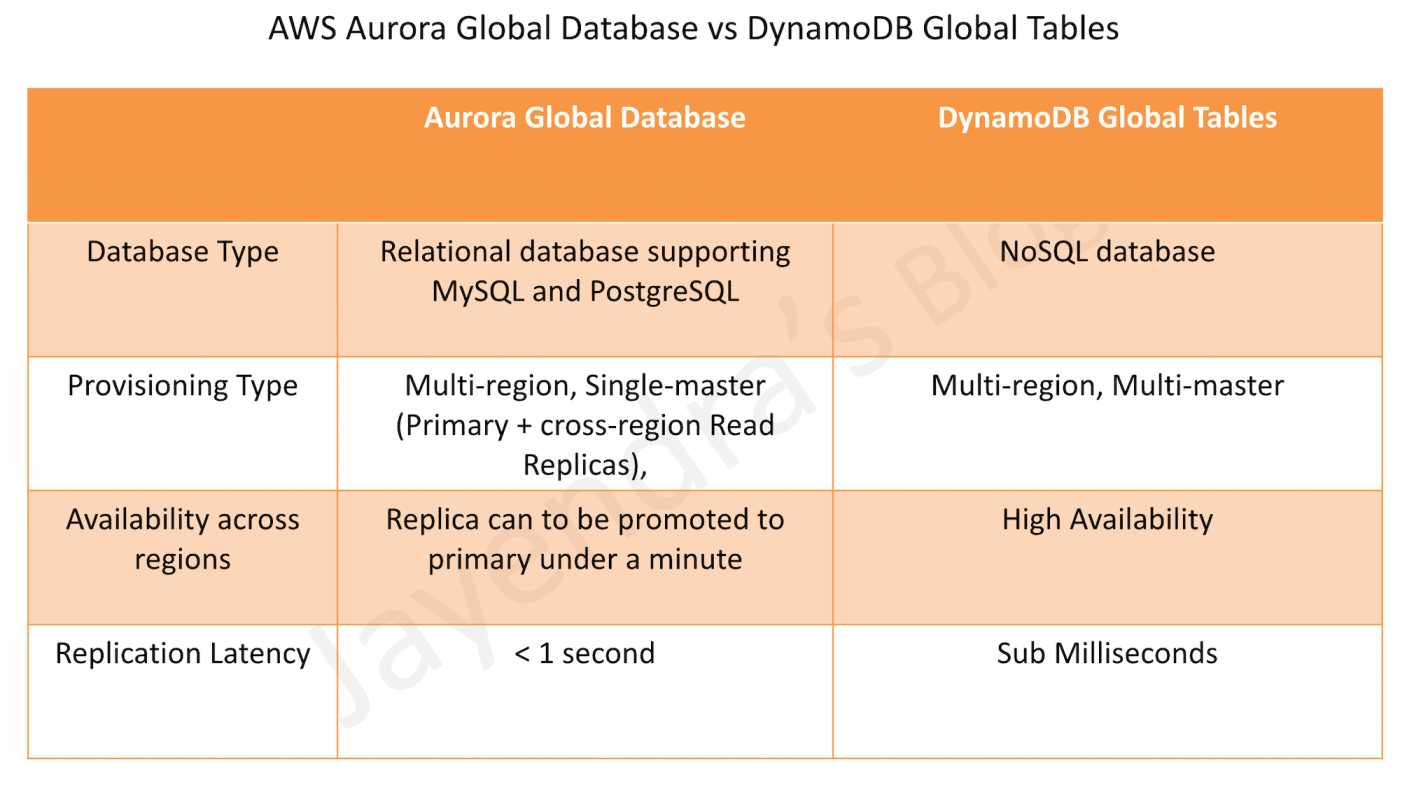
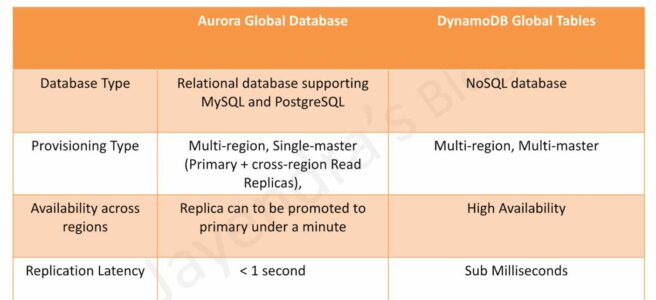
  • Aurora Global Database provides a relational database supporting MySQL and PostgreSQL.
  • Aurora Global Database consists of one primary AWS Region where the data is mastered, and up to five read-only, secondary AWS Regions.
  • Aurora cluster in the primary AWS Region performs both read and write operations. The clusters in the secondary Regions enable low-latency reads.
  • Aurora replicates data to the secondary AWS Regions with a typical latency of under a second.
  • Secondary clusters can be scaled independently by adding one or more DB instances (Aurora Replicas) to serve read-only workloads.
  • Aurora Global Database uses dedicated infrastructure to replicate the data, leaving database resources available entirely to serve applications.
  • Applications with a worldwide footprint can use reader instances in the secondary AWS Regions for low-latency reads.
  • Typical cross-region replication takes less than 1 second.
  • In case of a disaster or an outage, one of the clusters in a secondary AWS Region can be promoted to take full read/write workloads in under a minute.
  • However, the process is not automatic. If the primary region becomes unavailable, you must manually remove a secondary region from an Aurora Global Database and promote it to take full reads and writes. You will also need to point the application to the newly promoted region.
  • Architecture: Single-master, multi-reader (one primary region for writes, multiple secondary regions for reads).
  • Consistency: Eventual consistency for cross-region reads.

DynamoDB Global Tables

  • DynamoDB Global tables provide NoSQL database.
  • DynamoDB Global tables provide a fully managed, multi-Region, and multi-active database that delivers fast, local, read and write performance for massively scaled, global applications.
  • Global tables replicate the DynamoDB tables automatically across the choice of AWS Regions and enable reads and writes on all instances.
  • DynamoDB global table consists of multiple replica tables (one per AWS Region). Every replica has the same table name and the same primary key schema. When an application writes data to a replica table in one Region, DynamoDB propagates the write to the other replica tables in the other AWS Regions automatically.
  • Global tables enable the read and write of data locally providing single-digit-millisecond latency for the globally distributed application at any scale.
  • DynamoDB Global tables are designed for 99.999% availability.
  • DynamoDB Global tables enable the applications to stay highly available even in the unlikely event of isolation or degradation of an entire Region. Applications can redirect to a different Region and perform reads and writes against a different replica table.

DynamoDB Global Tables Consistency Modes

  • DynamoDB Global Tables support two consistency modes:

Multi-Region Eventual Consistency (MREC) – Default

  • Provides asynchronous replication with approximately 1-second replication latency for tables between two or more Regions.
  • Multi-active: All replicas accept reads and writes.
  • Conflict Resolution: Last Write Wins based on internal timestamp.
  • RPO: Approximately 1 second (replication delay).
  • Best for applications that can tolerate eventual consistency.

Multi-Region Strong Consistency (MRSC) – January 2025

  • Announced at AWS re:Invent 2024 and generally available in January 2025.
  • Provides synchronous replication across Regions.
  • Strongly consistent reads always return the latest version of an item, irrespective of the Region.
  • Zero RPO: Enables Recovery Point Objective of zero.
  • Item changes are synchronously replicated to at least one other Region before write returns success.
  • Deployment: Must be deployed in exactly three Regions (3 replicas OR 2 replicas + 1 witness).
  • Regional Availability: Three Region sets (US, EU, AP) – cannot span Region sets.
  • Trade-off: Higher write latency compared to MREC due to synchronous replication.
  • Best for applications requiring global strong consistency and zero data loss.

Comparison Table

Feature Aurora Global Database DynamoDB Global Tables (MREC) DynamoDB Global Tables (MRSC)
Database Type Relational (MySQL, PostgreSQL) NoSQL (Key-Value, Document) NoSQL (Key-Value, Document)
Architecture Single-master, multi-reader Multi-active (all replicas read/write) Multi-active (all replicas read/write)
Max Regions 1 primary + 5 secondary (6 total) Unlimited (any Region with DynamoDB) Exactly 3 Regions
Replication Type Asynchronous Asynchronous Synchronous
Replication Latency < 1 second ~1 second Synchronous (no delay)
Cross-Region Writes No (primary region only) Yes (all replicas) Yes (all replicas)
Consistency Eventual (cross-region reads) Eventual (cross-region reads) Strong (all reads)
RPO ~1 second ~1 second Zero (0)
RTO < 1 minute (manual failover) Seconds (automatic) Seconds (automatic)
Failover Manual promotion required Automatic (redirect to another replica) Automatic (redirect to another replica)
Availability SLA 99.99% 99.999% 99.999%
Use Cases Complex queries, joins, transactions, relational data High-scale, low-latency, eventual consistency acceptable Global strong consistency, zero data loss, financial apps

When to Choose Aurora Global Database

  • Relational Data Model: Need SQL, complex queries, joins, and transactions.
  • MySQL/PostgreSQL Compatibility: Existing applications using these databases.
  • Single-Master Writes: Write operations centralized in one region is acceptable.
  • Read-Heavy Workloads: Global read replicas for low-latency reads worldwide.
  • Complex Analytics: Need advanced SQL features and reporting.
  • Disaster Recovery: Can tolerate manual failover process (under 1 minute).

When to Choose DynamoDB Global Tables (MREC)

  • NoSQL Data Model: Key-value or document data structure.
  • Multi-Active Writes: Need to write to multiple regions simultaneously.
  • Massive Scale: Require unlimited scalability with single-digit millisecond latency.
  • High Availability: Need 99.999% availability with automatic failover.
  • Eventual Consistency Acceptable: Can tolerate ~1 second replication delay.
  • Serverless: Fully managed with no infrastructure management.

When to Choose DynamoDB Global Tables (MRSC)

  • Zero RPO Required: Cannot tolerate any data loss.
  • Global Strong Consistency: Need latest data across all regions immediately.
  • Financial Applications: Banking, payments, trading systems.
  • Inventory Management: Global inventory with strict consistency.
  • Compliance Requirements: Regulations requiring zero data loss.
  • Three-Region Deployment: Can deploy in exactly three regions within same region set (US, EU, or AP).

AWS Aurora Global Database vs DynamoDB Global Tables

AWS Certification Exam Practice Questions

  • Questions are collected from Internet and the answers are marked as per my knowledge and understanding (which might differ with yours).
  • AWS services are updated everyday and both the answers and questions might be outdated soon, so research accordingly.
  • AWS exam questions are not updated to keep up the pace with AWS updates, so even if the underlying feature has changed the question might not be updated
  • Open to further feedback, discussion and correction.
  1. A company needs to implement a relational database with a multi-region disaster recovery Recovery Point Objective (RPO) of 1 second and a Recovery Time Objective (RTO) of 1 minute. Which AWS solution can achieve this?
    1. Amazon Aurora Global Database
    2. Amazon DynamoDB global tables
    3. Amazon RDS for MySQL with Multi-AZ enabled
    4. Amazon RDS for MySQL with a cross-Region snapshot copy
  2. A financial services company requires a globally distributed database with zero data loss (RPO = 0) and strong consistency across all regions. Which solution should they choose?
    1. Amazon Aurora Global Database
    2. Amazon DynamoDB Global Tables with MREC
    3. Amazon DynamoDB Global Tables with MRSC
    4. Amazon RDS with cross-region read replicas
  3. A company needs a multi-region database that supports writes in all regions simultaneously with automatic failover. Which solution provides this capability?
    1. Amazon Aurora Global Database
    2. Amazon DynamoDB Global Tables
    3. Amazon RDS Multi-AZ
    4. Amazon Aurora with read replicas
  4. What is the primary difference between Aurora Global Database and DynamoDB Global Tables in terms of write operations?
    1. Aurora supports writes in all regions, DynamoDB only in primary region
    2. Aurora supports writes only in primary region, DynamoDB supports writes in all regions
    3. Both support writes in all regions
    4. Both support writes only in primary region
  5. A company needs to deploy a DynamoDB Global Table with MRSC. How many regions must they deploy in?
    1. Minimum 2 regions
    2. Exactly 3 regions
    3. Up to 5 regions
    4. Unlimited regions
  6. Which of the following statements about Aurora Global Database and DynamoDB Global Tables are correct? (Select TWO)
    1. Aurora Global Database requires manual failover, DynamoDB Global Tables support automatic failover
    2. Aurora Global Database supports NoSQL, DynamoDB supports SQL
    3. DynamoDB Global Tables offer 99.999% availability, Aurora offers 99.99%
    4. Aurora Global Database supports multi-active writes
    5. DynamoDB MRSC has higher replication latency than Aurora

References

AWS RDS Aurora

AWS Aurora Architecture

AWS RDS Aurora

  • AWS RDS Aurora is a relational database engine that combines the speed and reliability of high-end commercial databases with the simplicity and cost-effectiveness of open-source databases.
  • is a fully managed, MySQL- and PostgreSQL-compatible, relational database engine i.e. applications developed with MySQL can switch to Aurora with little or no changes.
  • delivers up to 6x the throughput of PostgreSQL and MySQL without requiring any changes to most applications
  • is fully managed as RDS manages the databases, handling time-consuming tasks such as provisioning, patching, backup, recovery, failure detection, and repair.
  • can scale storage automatically, based on the database usage, from 10GB to 128TiB (up to 256 TiB for Aurora MySQL and Aurora PostgreSQL as of July 2025) in 10GB increments with no impact on database performance
  • supports Aurora MySQL version 3 (MySQL 8.0 compatible), Aurora MySQL version 4 (MySQL 8.4 compatible, GA May 2026), and Aurora PostgreSQL (up to PostgreSQL 18 as of June 2026)
  • Aurora MySQL version 1 (MySQL 5.6 compatible) reached End of Life on Feb 28, 2023, and version 2 (MySQL 5.7 compatible) reached end of standard support on Oct 31, 2024 (Extended Support available)

Aurora DB Clusters

AWS Aurora Architecture

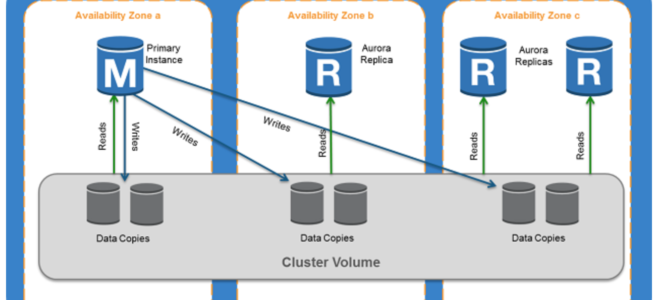
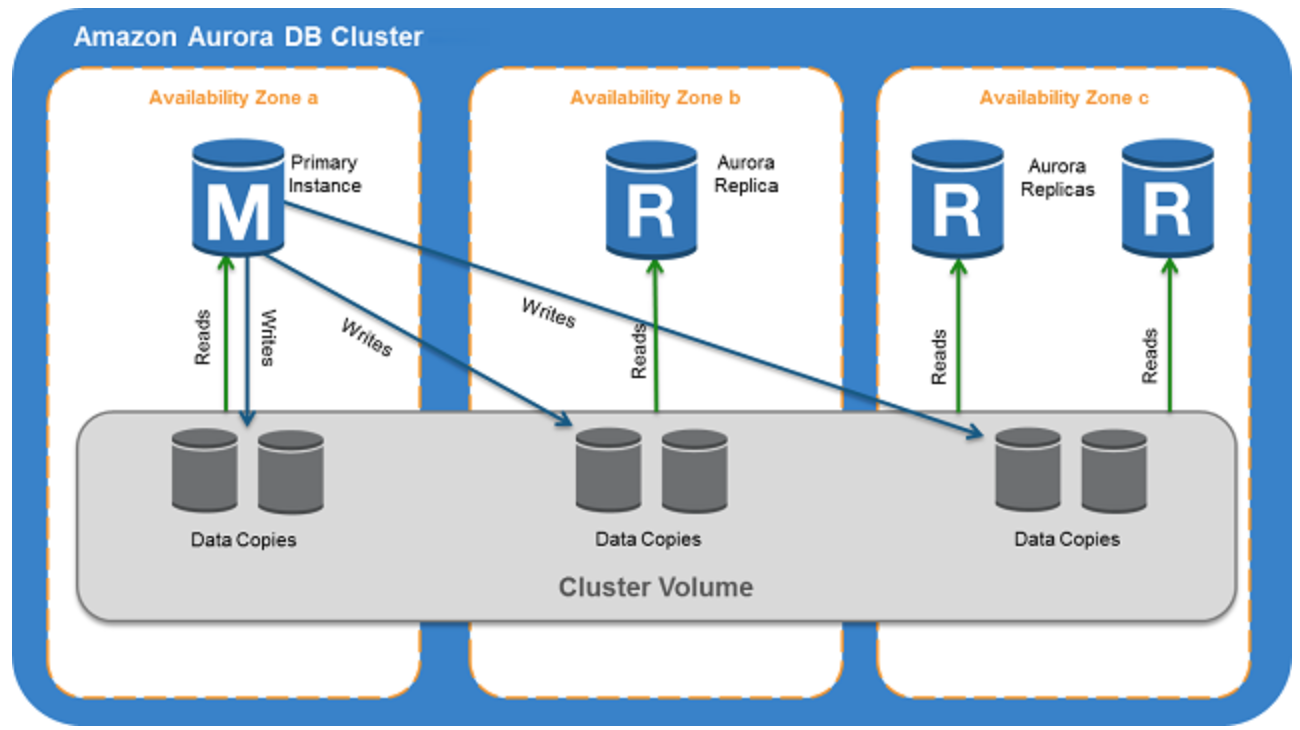
  • Aurora DB cluster consists of one or more DB instances and a cluster volume that manages the data for those DB instances.
  • A cluster volume is a virtual database storage volume that spans multiple AZs, with each AZ having a copy of the DB cluster data
  • Two types of DB instances make up an Aurora DB cluster:
    • Primary DB instance
      • Supports read and write operations, and performs all data modifications to the cluster volume.
      • Each DB cluster has one primary DB instance.
    • Aurora Replica
      • Connects to the same storage volume as the primary DB instance and supports only read operations.
      • Each DB cluster can have up to 15 Aurora Replicas in addition to the primary DB instance.
      • Provides high availability by locating Replicas in separate AZs
      • Aurora automatically fails over to a Replica in case the primary DB instance becomes unavailable.
      • Failover priority for Replicas can be specified.
      • Replicas can also offload read workloads from the primary DB instance
  • Aurora Multi-Master is no longer available. It was only supported on Aurora MySQL 5.6, which reached End of Life. For multi-writer use cases, consider Aurora Global Database with write forwarding or Amazon Aurora DSQL.

Aurora Connection Endpoints

  • Aurora involves a cluster of DB instances instead of a single instance
  • Endpoint refers to an intermediate handler with the hostname and port specified to connect to the cluster
  • Aurora uses the endpoint mechanism to abstract these connections

Cluster endpoint

  • Cluster endpoint (or writer endpoint) for a DB cluster connects to the current primary DB instance for that DB cluster.
  • Cluster endpoint is the only one that can perform write operations such as DDL statements as well as read operations
  • Each DB cluster has one cluster endpoint and one primary DB instance
  • Cluster endpoint provides failover support for read/write connections to the DB cluster. If a DB cluster’s current primary DB instance fails, Aurora automatically fails over to a new primary DB instance.
  • During a failover, the DB cluster continues to serve connection requests to the cluster endpoint from the new primary DB instance, with minimal interruption of service.

Reader endpoint

  • Reader endpoint for a DB cluster provides load-balancing support for read-only connections to the DB cluster.
  • Use the reader endpoint for read operations, such as queries.
  • Reader endpoint reduces the overhead on the primary instance by processing the statements on the read-only Replicas.
  • Each DB cluster has one reader endpoint.
  • If the cluster contains one or more Replicas, the reader endpoint load balances each connection request among the Replicas.

Custom endpoint

  • Custom endpoint for a DB cluster represents a set of DB instances that you choose.
  • Aurora performs load balancing and chooses one of the instances in the group to handle the connection.
  • An Aurora DB cluster has no custom endpoints until one is created and up to five custom endpoints can be created for each provisioned cluster.
  • Custom endpoints are supported on both provisioned and Aurora Serverless v2 clusters.

Instance endpoint

  • An instance endpoint connects to a specific DB instance within a cluster and provides direct control over connections to the DB cluster.
  • Each DB instance in a DB cluster has its own unique instance endpoint. So there is one instance endpoint for the current primary DB instance of the DB cluster, and there is one instance endpoint for each of the Replicas in the DB cluster.

High Availability and Replication

  • Aurora is designed to offer greater than 99.99% availability
  • provides data durability and reliability
    • by replicating the database volume six ways across three Availability Zones in a single region
    • backing up the data continuously to S3.
  • transparently recovers from physical storage failures; instance failover typically takes less than 30 seconds.
  • automatically fails over to a new primary DB instance, if the primary DB instance fails, by either promoting an existing Replica to a new primary DB instance or creating a new primary DB instance
  • automatically divides the database volume into 10GB segments spread across many disks. Each 10GB chunk of the database volume is replicated six ways, across three Availability Zones
  • is designed to transparently handle
    • the loss of up to two copies of data without affecting database write availability and
    • up to three copies without affecting read availability.
  • provides self-healing storage. Data blocks and disks are continuously scanned for errors and repaired automatically.
  • Replicas share the same underlying volume as the primary instance. Updates made by the primary are visible to all Replicas.
  • As Replicas share the same data volume as the primary instance, there is virtually no replication lag.
  • Any Replica can be promoted to become primary without any data loss and therefore can be used for enhancing fault tolerance in the event of a primary DB Instance failure.
  • To increase database availability, 1 to 15 replicas can be created in any of 3 AZs, and RDS will automatically include them in failover primary selection in the event of a database outage.

Aurora Failovers

  • Aurora automatically fails over, if the primary instance in a DB cluster fails, in the following order:
    • If Aurora Read Replicas are available, promote an existing Read Replica to the new primary instance.
    • If no Read Replicas are available, then create a new primary instance.
  • If there are multiple Aurora Read Replicas, the criteria for promotion is based on the priority that is defined for the Read Replicas.
    • Priority numbers can vary from 0 to 15 and can be modified at any time.
    • Aurora promotes the Replica with the highest priority (lowest tier number) to the new primary instance.
    • For Read Replicas with the same priority, Aurora promotes the replica that is largest in size or in an arbitrary manner.
  • During the failover, AWS modifies the cluster endpoint to point to the newly created/promoted DB instance.
  • Applications experience a minimal interruption of service if they connect using the cluster endpoint and implement connection retry logic.

Security

  • Aurora uses SSL/TLS (AES-256) to secure the connection between the database instance and the application
  • allows database encryption using keys managed through AWS Key Management Service (KMS).
  • Starting February 2026, all new Aurora clusters are encrypted at rest by default using AWS-owned keys, with no cost or performance impact.
  • Encryption and decryption are handled seamlessly.
  • With encryption, data stored at rest in the underlying storage is encrypted, as are its automated backups, snapshots, and replicas in the same cluster.
  • Encryption of existing unencrypted Aurora instances is not supported. Create a new encrypted Aurora instance and migrate the data
  • Aurora supports IAM database authentication, allowing token-based authentication without passwords.

Backup and Restore

  • Automated backups are always enabled on Aurora DB Instances.
  • Backups do not impact database performance.
  • Aurora also allows the creation of manual snapshots.
  • Aurora automatically maintains 6 copies of the data across 3 AZs and will automatically attempt to recover the database in a healthy AZ with no data loss.
  • If in any case, the data is unavailable within Aurora storage,
    • DB Snapshot can be restored or
    • the point-in-time restore operation can be performed to a new instance. The latest restorable time for a point-in-time restore operation can be up to 5 minutes in the past.
  • Restoring a snapshot creates a new Aurora DB instance
  • Deleting the database deletes all the automated backups (with an option to create a final snapshot), but would not remove the manual snapshots.
  • Snapshots (including encrypted ones) can be shared with other AWS accounts

Aurora Parallel Query

  • Aurora Parallel Query refers to the ability to push down and distribute the computational load of a single query across thousands of CPUs in Aurora’s storage layer.
  • Without Parallel Query, a query issued against an Aurora database would be executed wholly within one instance of the database cluster; this would be similar to how most databases operate.
  • Parallel Query is a good fit for analytical workloads requiring fresh data and good query performance, even on large tables.
  • Parallel Query provides the following benefits
    • Faster performance: Parallel Query can speed up analytical queries by up to 2 orders of magnitude.
    • Operational simplicity and data freshness: you can issue a query directly over the current transactional data in your Aurora cluster.
    • Transactional and analytical workloads on the same database: Parallel Query allows Aurora to maintain high transaction throughput alongside concurrent analytical queries.
  • Parallel Query can be enabled and disabled dynamically at both the global and session level using the aurora_parallel_query parameter.
  • Parallel Query is available for all current Aurora MySQL versions (MySQL 8.0 and 8.4 compatible).

Aurora Scaling

  • Aurora storage scaling is built-in and will automatically grow, up to 128 TiB (up to 256 TiB for Aurora MySQL and PostgreSQL as of July 2025), in 10GB increments with no impact on database performance.
  • There is no need to provision storage in advance
  • Compute Scaling
    • Instance scaling
      • Vertical scaling of the master instance. Memory and CPU resources are modified by changing the DB Instance class.
      • scaling the read replica and promoting it to master using forced failover which provides a minimal downtime
    • Read scaling
      • provides horizontal scaling with up to 15 read replicas
  • Auto Scaling
    • Scaling policies to add read replicas with min and max replica count based on scaling CloudWatch CPU or connections metrics condition
  • Aurora Serverless v2
    • Provides automatic scaling from 0 to 256 ACUs (512 GiB memory)
    • Supports scale-to-zero for cost optimization during periods of inactivity (Nov 2024)

Aurora Backtrack

  • Backtracking “rewinds” the DB cluster to the specified time
  • Backtracking performs in-place restore and does not create a new instance. There is minimal downtime associated with it.
  • Backtracking is available for Aurora with MySQL compatibility
  • Backtracking is not a replacement for backing up the DB cluster so that you can restore it to a point in time.
  • With backtracking, there is a target backtrack window and an actual backtrack window:
    • Target backtrack window is the amount of time you WANT the DB cluster can be backtracked for e.g 24 hours. The limit for a backtrack window is 72 hours.
    • Actual backtrack window is the actual amount of time you CAN backtrack the DB cluster, which can be smaller than the target backtrack window. The actual backtrack window is based on the workload and the storage available for storing information about database changes, called change records
  • DB cluster with backtracking enabled generates change records.
  • Aurora retains change records for the target backtrack window and charges an hourly rate for storing them.
  • Both the target backtrack window and the workload on the DB cluster determine the number of change records stored.
  • Workload is the number of changes made to the DB cluster in a given amount of time. If the workload is heavy, you store more change records in the backtrack window than you do if your workload is light.
  • Backtracking affects the entire DB cluster and can’t selectively backtrack a single table or a single data update.
  • Backtracking provides the following advantages over traditional backup and restore:
    • Undo mistakes – revert destructive action, such as a DELETE without a WHERE clause
    • Backtrack DB cluster quickly – Restoring a DB cluster to a point in time launches a new DB cluster and restores it from backup data or a DB cluster snapshot, which can take hours. Backtracking a DB cluster doesn’t require a new DB cluster and rewinds the DB cluster in minutes.
    • Explore earlier data changes – repeatedly backtrack a DB cluster back and forth in time to help determine when a particular data change occurred

Aurora Serverless

⚠️ Aurora Serverless v1 reached End of Life on March 31, 2025. All v1 clusters have been automatically migrated to Aurora Serverless v2. The information below applies to Aurora Serverless v2.

  • Amazon Aurora Serverless v2 is an on-demand, autoscaling configuration for the MySQL-compatible and PostgreSQL-compatible editions of Aurora.
  • An Aurora Serverless v2 DB cluster automatically scales capacity up or down based on the application’s needs, measured in Aurora Capacity Units (ACUs).
  • enables running database in the cloud without managing any database instances.
  • provides a cost-effective option for variable, intermittent, or unpredictable workloads.
  • Key features of Aurora Serverless v2:
    • Scale to zero – supports scaling down to 0 ACUs, automatically pausing after a period of inactivity and resuming when a connection is requested (Nov 2024)
    • Maximum capacity – scales up to 256 ACUs (512 GiB memory)
    • Fine-grained scaling – adjusts capacity in 0.5 ACU increments
    • Instant scaling – scales instantly to hundreds of thousands of transactions in a fraction of a second
    • Mixed configurations – can be used alongside provisioned instances in the same cluster
    • 30% better performance – latest platform version (v3, 2026) offers up to 30% performance improvement with enhanced workload-aware scaling
  • use cases include
    • Infrequently-Used Applications
    • New Applications – where the needs and instance size are yet to be determined.
    • Variable and Unpredictable Workloads – scale as per the needs
    • Development and Test Databases
    • Multi-tenant Applications
    • AI/ML and Agentic Workloads
  • Supports custom endpoints (unlike Serverless v1)
  • Supports Aurora Global Database
  • DB cluster can be accessed from within a VPC. Public access can be configured.

Aurora Global Database

  • Aurora Global Database consists of one primary AWS Region where the data is mastered, and up to ten read-only, secondary AWS Regions (increased from five in May 2025).
  • Aurora cluster in the primary AWS Region where your data is mastered performs both read and write operations. The clusters in the secondary Regions enable low-latency reads.
  • Aurora replicates data to the secondary AWS Regions with a typical latency of under a second.
  • Secondary clusters can be scaled independently by adding one or more DB instances (Aurora Replicas) to serve read-only workloads.
  • Aurora Global Database uses dedicated infrastructure to replicate the data, leaving database resources available entirely to serve applications.
  • Applications with a worldwide footprint can use reader instances in the secondary AWS Regions for low-latency reads.
  • In case of a disaster or an outage, one of the clusters in a secondary AWS Region can be promoted to take full read/write workloads in under a minute.
  • Write Forwarding – secondary region clusters can accept writes that are transparently forwarded to the primary region, simplifying global application architecture. Supported for both Aurora MySQL and Aurora PostgreSQL (version 16+).
  • Global Database Writer Endpoint (Oct 2024) – a fully managed endpoint that automatically routes writes to the current primary region, eliminating application code changes after switchover or failover.
  • Managed Switchover and Failover – supports planned cross-region switchover (typically under 30 seconds as of May 2025) and unplanned failover for disaster recovery.

Aurora I/O-Optimized

  • Aurora I/O-Optimized is a cluster configuration that provides improved price performance for I/O-intensive workloads (launched May 2023).
  • Provides up to 40% cost savings when I/O spend exceeds 25% of current Aurora database spend.
  • Eliminates charges for read and write I/O operations – you pay only for instance and storage usage.
  • Supported on both Aurora Serverless v2 and provisioned instances.
  • Can switch existing clusters to I/O-Optimized once every 30 days; can switch back to Aurora Standard at any time.
  • Available for both Aurora MySQL and Aurora PostgreSQL.

Aurora Optimized Reads

  • Aurora Optimized Reads uses local NVMe-based SSD storage available on specific instance types (r6gd, r6id, r8gd, m8gd) to improve query performance.
  • Provides two features:
    • Tiered Cache – extends DB instance caching capacity by up to 5x the instance memory by caching pages evicted from the buffer pool on local NVMe storage, providing up to 8x better latency for data previously fetched from Aurora storage.
    • Temporary Objects – stores temporary tables and sort data on local NVMe, reducing I/O to network-based storage.
  • Especially beneficial for workloads with datasets exceeding instance memory, including vector search (pgvector) workloads.
  • Available for Aurora PostgreSQL and Aurora MySQL.

Aurora Zero-ETL Integrations

  • Aurora zero-ETL integration replicates data from an Aurora DB cluster to supported analytics destinations in near real time, eliminating the need for custom ETL pipelines.
  • Supported targets include:
    • Amazon Redshift – for analytics and BI workloads (GA for both Aurora MySQL and Aurora PostgreSQL, 2024)
    • Amazon SageMaker Lakehouse – for ML and data lake workloads
  • Within seconds of transactional data being written to Aurora, it is seamlessly available in the target data warehouse.
  • Fully managed – no infrastructure to manage, no pipelines to build or maintain.
  • Enables running analytics and ML on transactional data without impacting the production database.

Aurora PostgreSQL Limitless Database

  • Aurora PostgreSQL Limitless Database provides automated horizontal scaling beyond the limits of a single Aurora instance (GA October 2024).
  • Scales to handle millions of write transactions per second and petabytes of data within a single database.
  • Automatically distributes workload across multiple Aurora writer instances using sharding, while maintaining the simplicity of a single database interface.
  • Uses a router-shard architecture:
    • Transaction routers – accept connections, route queries to appropriate shards
    • Data access shards – store subsets of sharded tables, full copies of reference tables, and standard tables
  • Maintains distributed ACID transactions across shards.
  • No application changes required beyond specifying which tables to shard.
  • Serverless – automatically scales based on workload demand.

Amazon Aurora DSQL

  • Amazon Aurora DSQL is a serverless distributed SQL database designed for always-available applications (GA May 2025).
  • PostgreSQL-compatible with an active-active distributed architecture.
  • Designed for 99.99% availability in single-Region and 99.999% availability in multi-Region configurations.
  • Key features:
    • Offers the fastest distributed SQL reads and writes
    • Zero infrastructure management and zero downtime maintenance
    • Supports strong consistency for all reads and writes to any Regional endpoint
    • Scales to meet any workload demand without database sharding or instance upgrades
    • Supports up to 256 TiB of storage
  • Ideal for globally distributed applications requiring strong consistency, such as financial transactions, gaming, and multi-region SaaS.
  • Differs from Aurora Global Database: DSQL provides active-active multi-region writes with strong consistency, while Global Database uses asynchronous replication with a single primary writer region.

Aurora Clone

  • Aurora cloning feature helps create Aurora cluster duplicates quickly and cost-effectively
  • Creating a clone is faster and more space-efficient than physically copying the data using a different technique such as restoring a snapshot.
  • Aurora cloning uses a copy-on-write protocol.
  • Aurora clone requires only minimal additional space when first created. In the beginning, Aurora maintains a single copy of the data, which is used by both the original and new DB clusters.
  • Aurora allocates new storage only when data changes, either on the source cluster or the cloned cluster.

RDS Extended Support

  • Amazon RDS Extended Support allows running Aurora MySQL version 2 (MySQL 5.7 compatible) and Aurora PostgreSQL older versions beyond their standard support end dates.
  • Provides critical security patches after community end of life.
  • Charged at an additional hourly rate per vCPU.
  • Databases are automatically enrolled into Extended Support after their standard support end date.
  • Intended as a bridge during migration to newer major versions (Aurora MySQL 8.0/8.4, Aurora PostgreSQL 16/17/18).

AWS Certification Exam Practice Questions

  • Questions are collected from Internet and the answers are marked as per my knowledge and understanding (which might differ with yours).
  • AWS services are updated everyday and both the answers and questions might be outdated soon, so research accordingly.
  • AWS exam questions are not updated to keep up the pace with AWS updates, so even if the underlying feature has changed the question might not be updated
  • Open to further feedback, discussion and correction.
  1. Company wants to use MySQL compatible relational database with greater performance. Which AWS service can be used?
    1. Aurora
    2. RDS
    3. SimpleDB
    4. DynamoDB
  2. An application requires a highly available relational database with an initial storage capacity of 8 TB. The database will grow by 8 GB every day. To support expected traffic, at least eight read replicas will be required to handle database reads. Which option will meet these requirements?
    1. DynamoDB
    2. Amazon S3
    3. Amazon Aurora
    4. Amazon Redshift
  3. A company is migrating their on-premise 10TB MySQL database to AWS. As a compliance requirement, the company wants to have the data replicated across three availability zones. Which Amazon RDS engine meets the above business requirement?
    1. Use Multi-AZ RDS
    2. Use RDS
    3. Use Aurora
    4. Use DynamoDB
  4. A company has an application that requires a globally distributed database with multi-region read access and sub-second replication latency. The application must continue operating if an entire AWS Region becomes unavailable. Which solution meets these requirements?
    1. Deploy Aurora with Multi-AZ enabled
    2. Deploy RDS MySQL with cross-region read replicas
    3. Deploy Aurora Global Database with secondary clusters in multiple regions
    4. Deploy DynamoDB global tables
  5. A startup is building a new application and needs a cost-effective database solution that can automatically scale compute capacity based on demand, including scaling to zero during periods of inactivity. The application uses PostgreSQL. Which is the MOST cost-effective solution?
    1. Aurora provisioned with a db.t3.small instance
    2. Aurora Serverless v2 with minimum capacity set to 0 ACUs
    3. RDS PostgreSQL with a Reserved Instance
    4. Aurora provisioned with Auto Scaling read replicas
  6. A company runs an I/O-intensive OLTP workload on Aurora PostgreSQL. The database I/O costs account for 40% of the total Aurora spend. Which Aurora configuration would provide the best cost optimization? [Select TWO]
    1. Switch to Aurora I/O-Optimized cluster configuration
    2. Enable Aurora Parallel Query
    3. Use Aurora Optimized Reads with r6gd instances for read-heavy replicas
    4. Migrate to Aurora Serverless v1
    5. Use Aurora Standard with provisioned IOPS
  7. A company needs to run near real-time analytics on their Aurora MySQL transactional data in Amazon Redshift without building custom ETL pipelines. Which feature should they use?
    1. Aurora Parallel Query
    2. AWS Glue ETL jobs
    3. Aurora zero-ETL integration with Amazon Redshift
    4. Amazon Kinesis Data Firehose
  8. A company needs a PostgreSQL-compatible database that can automatically scale write throughput horizontally to handle millions of transactions per second without manual sharding. Which solution should they use?
    1. Aurora Global Database with write forwarding
    2. Aurora provisioned with multiple read replicas
    3. Aurora PostgreSQL Limitless Database
    4. Amazon RDS PostgreSQL Multi-AZ

References

AWS Network Firewall vs Gateway Load Balancer

AWS Network Firewall vs Gateway Load Balancer

AWS Network Firewall vs Gateway Load Balancer

AWS Network Firewall vs Gateway Load Balancer

AWS Network Firewall

  • AWS Network Firewall is a stateful, fully managed, network firewall and intrusion detection and prevention service (IDS/IPS) for VPCs.
  • Network Firewall scales automatically with the network traffic, without the need for deploying and managing any infrastructure.
  • Network Firewall supports up to 100 Gbps of network traffic per firewall endpoint.
  • Network Firewall provides Layer 3-7 filtering with deep packet inspection (DPI), domain name filtering, and intrusion prevention capabilities compatible with Suricata rules.
  • Network Firewall supports native attachment to AWS Transit Gateway, eliminating the need for a separate inspection VPC and enabling capabilities such as flexible cost allocation through Transit Gateway metering policies.
  • AWS Network Firewall cost covers
    • an hourly rate for each firewall endpoint,
    • the amount of traffic and data processing charges, billed by the gigabyte, processed by the firewall endpoint,
    • an additional hourly rate per region and Availability Zone for Advanced Inspection (TLS inspection) with no additional data processing charges for Advanced Inspection traffic beyond standard processing charges,
    • standard AWS data transfer charges for all data transferred via the AWS Network Firewall,
    • hourly and data processing discounts on NAT Gateways that are service-chained with Network Firewall secondary endpoints.
  • Key features include:
    • TLS Inspection – decrypts and inspects encrypted outbound HTTPS traffic with SNI session holding for deeper visibility.
    • Flow Management – Flow Capture provides point-in-time snapshots of active flows for monitoring, and Flow Flush enables selective termination of specific connections.
    • Session State Replication – replicates flow state across firewall endpoints for high availability, ensuring seamless failover without session loss.
    • Transit Gateway Native Attachment – attaches directly to Transit Gateway, eliminating the inspection VPC and simplifying centralized architecture.
    • Managed Rules from AWS Marketplace – supports expanded managed rule groups from partners with up to 10 million domain name indicators and up to 1 million IP addresses per rule group.
    • Enhanced Console & Monitoring – includes PrivateLink Endpoint analysis, improved filtering for IP addresses and protocols, simplified policy management with point-and-click rule priority adjustment, and pre-configured fields for rule creation.

AWS Gateway Load Balancer

  • Gateway Load Balancer helps deploy, scale, and manage virtual appliances, such as firewalls, intrusion detection and prevention systems (IDS/IPS), and deep packet inspection systems.
  • is architected to handle millions of requests/second, volatile traffic patterns, and introduces extremely low latency.
  • Gateway Load Balancer operates at Layer 3 (Network Layer) of the OSI model and acts as a transparent network gateway (single entry and exit point for all traffic).
  • GWLB uses either a 2-tuple, 3-tuple, or 5-tuple hash to define a flow and routes all packets of a flow to one of its backend targets (flow stickiness).
  • Gateway Load Balancer endpoints (GWLBE) support maximum bandwidth of up to 100 Gbps per endpoint.
  • AWS Gateway Load Balancer cost covers
    • charges for each hour or partial hour that a GWLB is running,
    • the number of Gateway Load Balancer Capacity Units (GLCU) used by Gateway Load Balancer per hour.
    • GWLB uses Gateway Load Balancer Endpoint (GWLBE) to simplify how applications can securely exchange traffic with GWLB across VPC boundaries. GWLBE is priced and billed separately.
    • cost of running the third-party virtual appliances (EC2 instances) behind GWLB.
  • Key features include:
    • Configurable TCP Idle Timeout – allows configuring TCP idle timeout from 60 seconds to 6000 seconds (default 350 seconds), preventing interruption of long-lived traffic flows.
    • Target Failover – supports rebalancing existing flows to healthy targets when a target fails or deregisters, reducing failover time and enabling graceful appliance patching.
    • LCU Reservation – allows proactively setting a minimum bandwidth capacity for the load balancer, complementing auto-scaling for predictable traffic patterns.
    • Cross-Zone Load Balancing – by default, each GWLB in an AZ distributes traffic within the same AZ only. Enabling cross-zone distributes traffic across all registered healthy targets in all enabled AZs.
    • Health Check Improvements – configurable health check intervals, HTTP response codes for target health determination, and consecutive response thresholds.

AWS Network Firewall vs. Gateway Load Balancer – Key Differences

Criteria AWS Network Firewall Gateway Load Balancer
Use Case Stateful, managed, network firewall with IDS/IPS compatible with Suricata Managed service for deploying, scaling and managing third-party virtual appliances
Complexity Fully AWS managed – handles scalability, availability, and patching AWS manages GWLB scalability and availability; customer manages virtual appliance scaling and availability
Scale Supports up to 100 Gbps per firewall endpoint (powered by AWS PrivateLink) Supports up to 100 Gbps per endpoint
Cost Firewall endpoint hourly rate + data processing charges GWLB hourly rate + GLCU charges + GWLBE charges + virtual appliance costs
Appliance Choice AWS-managed only (Suricata-based rules engine) Any third-party appliance (Palo Alto, Fortinet, Check Point, etc.)
Rules/Policies Suricata-compatible rules, domain lists, IP sets, managed rule groups Depends on chosen third-party appliance capabilities
TLS Inspection Native TLS inspection with SNI session holding (built-in) Depends on third-party appliance capabilities
Transit Gateway Integration Native Transit Gateway attachment (no inspection VPC needed) Requires inspection VPC with GWLBE and TGW attachment with appliance mode enabled
High Availability Built-in session state replication across endpoints Customer configures target failover and appliance HA

When to Choose AWS Network Firewall

  • Want a fully managed solution without managing virtual appliances
  • Suricata-compatible rules meet security requirements
  • Need native TLS inspection for outbound HTTPS traffic
  • Want simplified centralized inspection with native Transit Gateway attachment
  • Prefer lower operational complexity and no EC2 instance management
  • Need built-in managed threat intelligence rules from AWS and Marketplace partners

When to Choose Gateway Load Balancer

  • Need specific third-party firewall capabilities (e.g., Palo Alto NGFW, Fortinet, Check Point)
  • Have existing investment in third-party security appliance policies and expertise
  • Require advanced features beyond what Suricata rules provide
  • Need to integrate multiple types of virtual appliances (IDS/IPS + DPI + custom inspection)
  • Want consistent security policies across cloud and on-premises using the same vendor

Key Architectural Considerations

  • Appliance mode should be enabled on Transit Gateway when doing east-west (VPC-to-VPC) inspection with either solution.
  • For multi-Region deployment, set up separate inspection in respective local Regions to avoid inter-Region dependencies and reduce data transfer costs.
  • Both solutions can be combined – use Network Firewall for standard north-south traffic and GWLB with third-party appliances for specialized deep inspection.
  • If GWLB cross-zone load balancing is enabled and all targets across all AZs are unhealthy, GWLB fails open (passes traffic without inspection).
  • Network Firewall with Transit Gateway native attachment eliminates the need for a separate inspection VPC, reducing cost and complexity.

AWS Certification Exam Practice Questions

  • Questions are collected from Internet and the answers are marked as per my knowledge and understanding (which might differ with yours).
  • AWS services are updated everyday and both the answers and questions might be outdated soon, so research accordingly.
  • AWS exam questions are not updated to keep up the pace with AWS updates, so even if the underlying feature has changed the question might not be updated
  • Open to further feedback, discussion and correction.
  1. A company needs to inspect all east-west traffic between VPCs in a multi-VPC architecture. They want a fully managed solution with minimal operational overhead and no need to manage EC2 instances. Which solution should they use?
    1. Deploy third-party firewalls on EC2 instances in each VPC
    2. Use AWS Network Firewall with native Transit Gateway attachment
    3. Deploy Gateway Load Balancer with third-party appliances in an inspection VPC
    4. Use VPC security groups and NACLs for all traffic filtering

    Answer: b – AWS Network Firewall with native Transit Gateway attachment provides fully managed east-west inspection without requiring a separate inspection VPC or managing virtual appliance instances.

  2. A company has an existing Palo Alto Networks firewall deployment on-premises and wants to maintain consistent security policies across their hybrid environment in AWS. Which solution is most appropriate?
    1. AWS Network Firewall with Suricata rules
    2. AWS WAF with custom rules
    3. Gateway Load Balancer with Palo Alto VM-Series instances
    4. VPC Network Access Analyzer

    Answer: c – GWLB enables deployment of the same third-party appliances used on-premises, maintaining consistent security policies across hybrid environments.

  3. A security team needs to inspect encrypted outbound HTTPS traffic from their VPCs to detect data exfiltration attempts. They want a managed service approach. Which feature should they use?
    1. Gateway Load Balancer with SSL termination
    2. AWS Network Firewall TLS Inspection with SNI session holding
    3. AWS WAF with HTTPS rules
    4. VPC Flow Logs with CloudWatch analysis

    Answer: b – AWS Network Firewall provides native TLS inspection that decrypts and re-encrypts outbound HTTPS traffic, with SNI session holding for deeper visibility into encrypted connections.

  4. A company uses Gateway Load Balancer with third-party firewall appliances. During maintenance, they need to patch the appliances without dropping existing connections. Which GWLB feature helps?
    1. Cross-zone load balancing
    2. Target Failover with Rebalance mode
    3. Configurable TCP idle timeout
    4. LCU Reservation

    Answer: b – Target Failover with Rebalance mode rehashes existing flows and sends them to healthy targets when a target is deregistered, enabling graceful appliance patching during maintenance.

  5. A network engineer needs to troubleshoot a suspected malicious connection that may be traversing their AWS Network Firewall. They want to view active flows without disrupting traffic. Which feature should they use?
    1. VPC Flow Logs
    2. AWS Network Firewall Flow Capture
    3. AWS Network Firewall Flow Flush
    4. CloudWatch Network Monitor

    Answer: b – Flow Capture provides point-in-time snapshots of active flows in the firewall’s state table for monitoring and troubleshooting without affecting traffic.

  6. An organization is evaluating the total cost of running network security inspection in AWS. They need both IDS/IPS and domain filtering capabilities. They don’t require third-party appliances. Which option is most cost-effective? (Select TWO considerations)
    1. AWS Network Firewall has lower total cost since it doesn’t require managing EC2 instances
    2. Gateway Load Balancer is cheaper because it only charges for GLCU usage
    3. AWS Network Firewall removed additional data processing charges for TLS inspection in 2026
    4. Gateway Load Balancer cost includes the virtual appliance EC2 instances and licensing
    5. Network Firewall charges for cross-zone data transfer

    Answer: a, c – Network Firewall avoids EC2 and third-party licensing costs. The 2026 pricing update removed additional data processing charges for Advanced Inspection (TLS), making it more cost-effective for inspection workloads.

References

AWS Certified Advanced Networking – Specialty ANS-C01 Exam Learning Path

AWS Certified Advanced Networking - Specialty Certificate

AWS Certified Advanced Networking – Specialty ANS-C01 Exam Learning Path

I recently certified/recertified for the AWS Certified Advanced Networking – Specialty (ANS-C01). Frankly, Networking is something that I am still diving deep into and I just about managed to get through. So a word of caution, this exam is inline or tougher than the professional exams, especially for the reason that some of the Networking concepts covered are not something you can get your hands dirty with easily.

AWS Certified Advanced Networking – Specialty ANS-C01 Exam Content

  • AWS Certified Advanced Networking – Specialty (ANS-C01) exam focuses on the AWS Networking concepts. It basically validates
    • Design and develop hybrid and cloud-based networking solutions by using AWS
    • Implement core AWS networking services according to AWS best practices
    • Operate and maintain hybrid and cloud-based network architecture for all AWS services
    • Use tools to deploy and automate hybrid and cloud-based AWS networking tasks
    • Implement secure AWS networks using AWS native networking constructs and services

Refer to AWS Certified Advanced Networking – Specialty Exam Guide AWS Certified Advanced Networking - Specialty ANS-C01 Exam Domains

AWS Certified Advanced Networking – Specialty (ANS-C01) Exam Resources

AWS Certified Advanced Networking – Specialty (ANS-C01) Exam Summary

  • Specialty exams are tough, lengthy, and tiresome. Most of the questions and answers options have a lot of prose and a lot of reading that needs to be done, so be sure you are prepared and manage your time well.
  • ANS-C01 exam has 65 questions to be solved in 170 minutes which gives you roughly 2 1/2 minutes to attempt each question. 65 questions consists of 50 scored and 15 unscored questions.
  • ANS-C01 exam includes two types of questions, multiple-choice and multiple-response.
  • ANS-C01 has a scaled score between 100 and 1,000. The scaled score needed to pass the exam is 750.
  • Each question mainly touches multiple AWS services.
  • Specialty exams currently cost $ 300 + tax.
  • You can get an additional 30 minutes if English is your second language by requesting Exam Accommodations. It might not be needed for Associate exams but is helpful for Professional and Specialty ones.
  • As always, mark the questions for review and move on and come back to them after you are done with all.
  • As always, having a rough architecture or mental picture of the setup helps focus on the areas that you need to improve. Trust me, you will be able to eliminate 2 answers for sure and then need to focus on only the other two. Read the other 2 answers to check the difference area and that would help you reach the right answer or at least have a 50% chance of getting it right.
  • AWS exams can be taken either remotely or online, I prefer to take them online as it provides a lot of flexibility. Just make sure you have a proper place to take the exam with no disturbance and nothing around you.
  • Also, if you are taking the AWS Online exam for the first time try to join at least 30 minutes before the actual time as I have had issues with both PSI and Pearson with long wait times.

AWS Certified Advanced Networking – Specialty (ANS-C01) Exam Topics

  • AWS Certified Networking – Specialty (ANS-C01) exam focuses a lot on Networking concepts involving Hybrid Connectivity with Direct Connect, VPN, Transit Gateway, Direct Connect Gateway, and a bit of VPC, Route 53, ALB, NLB & CloudFront.

Networking & Content Delivery

  • Virtual Private Cloud – VPC
    • Understand VPC, Subnets
    • AWS allows extending the VPC by adding a secondary VPC
    • Understand Security Groups, NACLs
    • VPC Flow Logs
      • help capture information about the IP traffic going to and from network interfaces in the VPC and can help in monitoring the traffic or troubleshooting any connectivity issues
      • NACLs are stateless and how it is reflected in VPC Flow Logs
        • If ACCEPT followed by REJECT, inbound was accepted by Security Groups and ACLs. However, rejected by NACLs outbound
        • If REJECT, inbound was either rejected by Security Groups OR NACLs.
      • Use pkt-dstaddr instead of dstaddr to track the destination address as dstaddr refers to the primary ENI address always and not the secondary addresses.
      • Pattern: VPC Flow Logs -> CloudWatch Logs -> (Subscription) -> Kinesis Data Firehose -> S3/Open Search.
    • DHCP Option Sets esp. how to resolve DNS from both on-premises data center and AWS.
    • VPC Peering
      • helps point-to-point connectivity between 2 VPCs which can be in the same or different regions and accounts.
      • know VPC Peering Limitations esp. it does not allow overlapping CIDRs and transitive routing.
    • Placement Groups determine how the instances are placed on the underlying hardware
    • VRF – Virtual Routing & Forwarding can be used to route traffic to the same customer gateway from multiple VPCs, that can be overlapping.
  • VPC Endpoints
    • VPC Gateway Endpoints for connectivity with S3 & DynamoDB i.e. VPC -> VPC Gateway Endpoints -> S3/DynamoDB.
    • VPC Interface Endpoints or Private Links for other AWS services and custom hosted services i.e. VPC -> VPC Interface Endpoint OR Private Link -> S3/Kinesis/SQS/CloudWatch/Any custom endpoint.
    • S3 gateway endpoints cannot be accessed through VPC Peering, VPN, or Direct Connect. Need HTTP proxy to route traffic.
    • S3 Private Link can be accessed through VPC Peering, VPN, or Direct Connect. Need to use an endpoint-specific DNS name.
    • VPC endpoint policy can be configured to control which S3 buckets can be accessed and the S3 Bucket policy can be used to control which VPC (includes all VPC Endpoints) or VPC Endpoint can access it.
    • Private Link Patterns
  • VPC Network Access Analyzer
    • helps identify unintended network access to the resources on AWS.
  • Transit Gateway
    • helps consolidate the AWS VPC routing configuration for a region with a hub-and-spoke architecture.
    • Appliance Mode ensures that network flows are symmetrically routed to the same AZ and network appliance
    • Transit Gateway Connect attachment can be used to connect SD-WAN to AWS Cloud. This supports GRE.
    • Transit Gateways are regional and Peering can connect Transit Gateways across regions.
    • Transit Gateway Network Manager includes events and metrics to monitor the quality of the global network, both in AWS and on-premises.
  • VPC Routing Priority
  • NAT Gateways
    • for HA, Scalable, Outgoing traffic. Does not support Security Groups or ICMP pings.
    • times out the connection if it is idle for 350 seconds or more. To prevent the connection from being dropped, initiate more traffic over the connection or enable TCP keepalive on the instance with a value of less than 350 seconds.
    • supports Private NAT Gateways for internal communication.
  • Virtual Private Network
    • to establish connectivity between the on-premises data center and AWS VPC
  • Direct Connect
    • to establish connectivity between the on-premises data center and AWS VPC and Public Services
    • Direct Connect connections – Dedicated and Hosted connections
    • Understand how to create a Direct Connect connection
      • LOA-CFA provides the details for partners to connect to the AWS Direct Connect location
    • Virtual interfaces options – Private Virtual Interface for VPC resources and Public Virtual Interface for Public Resources
      • Private VIF is for resources within a VPC
      • Public VIF is for AWS public resources
      • Private VIF has a limit of 100 routes and Public VIF of 1000 routes. Summarize the routes if you need to configure more.
    • Understand setup Private and Public VIF
    • Understand High Availability options based on cost and time i.e. Second Direct Connect connection OR VPN connection
    • Direct Connect Gateway
      • it provides a way to connect to multiple VPCs from an on-premises data center using the same Direct Connect connection.
      • can connect to VGW or TGW.
    • Understand Active/Passive Direct Connect 
    • supports MACsec which delivers native, near line-rate, point-to-point encryption ensuring that data communications between AWS and the data center, office, or colocation facility remain protected.
    • Understand Route Propagation, propagation priority, BGP connectivity
      • BGP prefers the shortest AS PATH to get to the destination. Traffic from the VPC to on-premises uses the primary router. This is because the secondary router advertises a longer AS-PATH.
      • AS PATH prepending doesn’t work when the Direct Connect connections are in different AWS Regions than the VPC.
      • AS PATH works from AWS to on-premises and Local Pref from on-premises to AWS
      • Use Local Preference BGP community tags to configure Active/Passive when the connections are from different regions. The higher tag has a higher preference for 7224:7300 > 7224:7100
      • NO_EXPORT works only for Public VIFs
      • 7224:9100, 7224:9200, and 7224:9300 apply only to public prefixes. Usually used to restrict traffic to regions. Can help control if routes should propagate to the local Region only, all Regions within a continent, or all public Regions.
        • 7224:9100 — Local AWS Region
        • 7224:9200 — All AWS Regions for a continent, North America–wide, Asia Pacific, Europe, the Middle East and Africa
        • 7224:9300 — Global (all public AWS Regions)
      • 7224:8100 — Routes that originate from the same AWS Region in which the AWS Direct Connect point of presence is associated.
      • 7224:8200 — Routes that originate from the same continent with which the AWS Direct Connect point of presence is associated.
      • No-tag — Global (all public AWS Regions).
  • Route 53
    • provides a highly available and scalable DNS web service.
    • Routing Policies and their use cases Focus on Weighted,  Latency, and Failover routing policies.
    • supports Alias resource record sets, which enables routing of queries to a CloudFront distribution, Elastic Beanstalk, ELB, an S3 bucket configured as a static website, or another Route 53 resource record set.
    • CNAME does not support zone apex or root records. 
    • Route 53 DNSSEC
      • secures DNS traffic, and helps protect a domain from DNS spoofing man-in-the-middle attacks. 
      • Requirements
        • Asymmetric Customer Managed Keys
        • us-east-1 with ECC_NIST_P256 spec
    • Route 53 Resolver DNS Firewall
      • protection for outbound DNS requests from the VPCs and can monitor and control the domains that the applications can query.
      • allows you to define allow and deny list.
      • can be used for DNS exfiltration.
      • supports FirewallFailOpen configuration which determines how Route 53 Resolver handles queries during failures.
        • disabled, favors security over availability and blocks queries that it is unable to evaluate properly.
        • enabled, favors availability over security and allows queries to proceed if it is unable to properly evaluate them.
    • Route 53 Resolver (Hybrid DNS)
      • Inbound Endpoint for On-premises -> AWS
      • Outbound Endpoint for AWS -> On-premises
    • Route 53 DNS Query Logging
      • Can be logged to CloudWatch logs, S3, and Kinesis Data Firehose
    • Route 53 Resolver rules take precedence over privately hosted zones.
    • Route 53 Split View DNS helps to have the same DNS to access a site externally and internally
    • Know the Domain Migration process
  • CloudFront
    • provides a fully managed, fast CDN service that speeds up the distribution of static, dynamic web, or streaming content to end-users.
    • supports geo-restriction, WAF & AWS Shield for protection.
    • provides Cloud Functions (Edge location) & Lambda@Edge (Regional location) to execute scripts closer to the user.
    • supports encryption at rest and end-to-end encryption
    • CloudFront Origin Shield
      • helps improve the cache hit ratio and reduce the load on the origin.
      • requests from other regional caches would hit the Origin shield rather than the Origin.
      • should be placed at the regional cache and not in the edge cache
      • should be deployed to the region closer to the origin server
  • Global Accelerator
    • provides 2 static IPs
    • does not support client IP address preservation for NLB and Elastic IP address endpoints.
    • does not support IPv6 address
    • know CloudFront vs Global Accelerator
  • Understand ELB, ALB and NLB
    • Differences between ALB and NLB
    • ALB provides Content, Host, and Path-based Routing while NLB provides the ability to have a static IP address
    • Maintain original Client IP to the backend instances using X-Forwarded-for and Proxy Protocol
    • ALB/NLB do not support TLS renegotiation or mutual TLS authentication (mTLS). For implementing mTLS, use NLB with TCP listener on port 443 and terminate on the instances.
    • NLB
      • also provides local zonal endpoints to keep the traffic within AZ
      • can front Private Link endpoints and provide static IPs.
    • ALB supports Forward Secrecy, through Security Policies, that provide additional safeguards against the eavesdropping of encrypted data, through the use of a unique random session key.
    • Supports sticky session feature (session affinity) to enable the LB to bind a user’s session to a specific target. This ensures that all requests from the user during the session are sent to the same target. Sticky Sessions is configured on the target groups.
  • Gateway Load Balancer – GWLB
    • helps deploy, scale, and manage virtual appliances, such as firewalls, IDS/IPS systems, and deep packet inspection systems.
  • Athena integrates with S3 only and not with CloudWatch logs.
  • Transit VPC
    • helps connect multiple, geographically disperse VPCs and remote networks in order to create a global network transit center.
    • Use Transit Gateway instead now.
  • Know CloudHub and its use case

Security

  • AWS GuardDuty
    • managed threat detection service
    • provides Malware protection
  • AWS Shield
    • managed DDoS protection service
    • AWS Shield Advanced provides 24×7 access to the AWS Shield Response Team (SRT), protection against DDoS-related spike, and DDoS cost protection to safeguard against scaling charges.
  • WAF as Web Traffic Firewall
    • helps protect web applications from attacks by allowing rules configuration that allow, block, or monitor (count) web requests based on defined conditions.
    • integrates with CloudFront, ALB, API Gateway to dynamically detect and prevent attacks
  • Network Firewall
  • AWS Inspector
    • is a vulnerability management service that continuously scans the AWS workloads for vulnerabilities

Monitoring & Management Tools

  • Understand AWS CloudFormation esp. in terms of Network creation.
    • Custom resources can be used to handle activities not supported by AWS
    • While configuring VPN connections use depends_on on route tables to define a dependency on other resources as the VPN gateway route propagation depends on a VPC-gateway attachment when you have a VPN gateway.
  • AWS Config
    • fully managed service that provides AWS resource inventory, configuration history, and configuration change notifications to enable security, compliance, and governance.
    • can be used to monitor resource changes e.g. Security Groups and invoke Systems Manager Automation scripts for remediation.
  • CloudTrail for audit and governance

Integration Tools

Networking Architecture Patterns

AWS Certified Advanced Networking – Specialty (ANS-C01) Exam Day

  • Make sure you are relaxed and get some good night’s sleep. The exam is not tough if you are well-prepared.
  • If you are taking the AWS Online exam
    • Try to join at least 30 minutes before the actual time as I have had issues with both PSI and Pearson with long wait times.
    • The online verification process does take some time and usually, there are glitches.
    • Remember, you would not be allowed to take the take if you are late by more than 30 minutes.
    • Make sure you have your desk clear, no hand-watches, or external monitors, keep your phones away, and nobody can enter the room.

Finally, All the Best 🙂
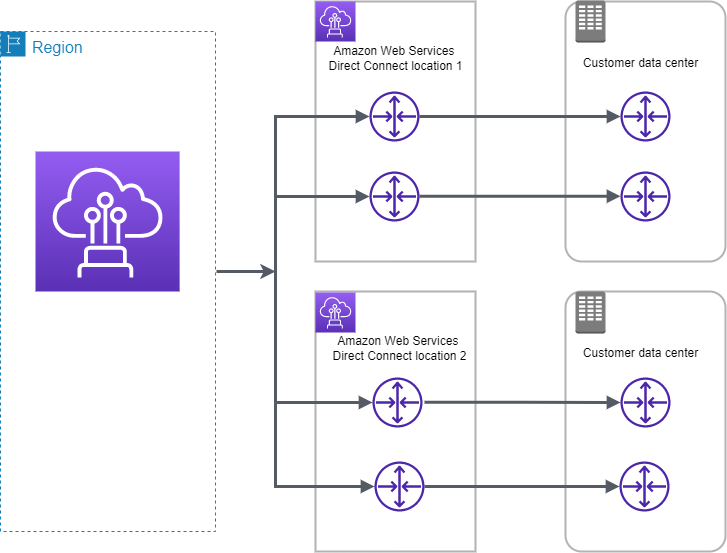
AWS Network Architecture Patterns

AWS Network Architecture Patterns

📋 Last Updated: June 2026. Includes Cross-Region PrivateLink (Nov 2025), NAT Gateway Regional Availability Mode (Nov 2025), Direct Connect VIF Rate Limiters (June 2026), Transit Gateway Flow Logs & Flexible Cost Allocation, AWS Cloud WAN Direct Connect integration, and VPC Lattice Resource Gateway updates.

On-premises -> S3 Private Link -> S3 (Without Internet Gateway or S3 Gateway Endpoint)

 Data flow diagram shows access from on-premises and in-VPC apps to S3 using an interface endpoint and AWS PrivateLink.
  • Interface endpoints in the VPC can route both in-VPC applications and on-premises applications to S3 over the Amazon network.
  • On-premises network uses Direct Connect or AWS VPN to connect to VPC.
  • On-premises applications in VPC A use endpoint-specific DNS names to access S3 through the S3 interface endpoint.
  • On-premises applications send data to the interface endpoint in the VPC through AWS Direct Connect (or AWS VPN). AWS PrivateLink moves the data from the interface endpoint to S3 over the AWS network.
  • VPC applications can also send traffic to the interface endpoint. AWS PrivateLink moves the data from the interface endpoint to S3 over the AWS network.
  • (New – Nov 2025) With Cross-Region PrivateLink, interface VPC endpoints can now connect to S3 (and other AWS services) in other AWS Regions within the same partition, removing the previous “VPC endpoints are regional” limitation.
  • (New – Nov 2025) S3 gateway and interface VPC endpoints now support IPv6, enabling dual-stack connectivity at no additional cost.

On-premises -> Proxy -> Gateway Endpoint -> S3

On-premises + VPC Endpoint + S3

  • VPC endpoints are only accessible from EC2 instances inside a VPC, a local instance must proxy all remote requests before they can
    utilize a VPC endpoint connection.
  • Proxy farm proxies S3 traffic to the VPC endpoint. Configure an Auto Scaling group to manage the proxy servers and automatically grow or shrink the number of required instances based on proxy server load.
  • Note: With the availability of AWS PrivateLink for S3 (interface endpoints), this proxy-based pattern is largely superseded. Interface endpoints are directly accessible from on-premises over Direct Connect or VPN without requiring a proxy.

Direct Connect Gateway + Transit Gateway

AWS Direct Connect Gateway + Transit Gateway

  • AWS Direct Connect Gateway does not support transitive routing and has limits on the number of VGWs that can be connected.
  • AWS Direct Connect Gateway can be combined with AWS Transit Gateway using transit VIF attachment which enables your network to connect up to three regional centralized routers over a private dedicated connection.
  • DX Gateway + TGW simplifies the management of connections between a VPC and the on-premises networks over a private connection that can reduce network costs, increase bandwidth throughput, and provide a more consistent network experience than internet-based connections.
  • With AWS Transit Gateway connected to VPCs, full or partial mesh connectivity can be achieved between the VPCs.
  • (New – Nov 2024) AWS Cloud WAN now supports direct integration with Direct Connect Gateway, eliminating the need for an intermediary Transit Gateway for global hybrid connectivity.
  • (New – Nov 2024) Transit Gateway and Cloud WAN now support Path MTU Discovery (PMTUD) for both IPv4 and IPv6, improving performance for large packet workloads.

AWS Direct Connect with VPN as Backup

  • Be sure that you use the same virtual private gateway for both Direct Connect and the VPN connection to the VPC.
  • If you are configuring a Border Gateway Protocol (BGP) VPN, advertise the same prefix for Direct Connect and the VPN.
  • If you are configuring a static VPN, add the same static prefixes to the VPN connection that you are announcing with the Direct Connect virtual interface.
  • If you are advertising the same routes toward the AWS VPC, the Direct Connect path is always preferred, regardless of AS path prepending.

AWS Direct Connect + VPN

AWS Direct Connect + VPN

  • AWS Direct Connect + VPN combines the benefits of the end-to-end secure IPSec connection with low latency and increased bandwidth of the AWS Direct Connect to provide a more consistent network experience than internet-based VPN connections.
  • AWS Direct Connect public VIF establishes a dedicated network connection between the on-premises network to public AWS resources, such as an Amazon virtual private gateway IPsec endpoint.
  • A BGP connection is established between the AWS Direct Connect and your router on the public VIF.
  • Another BGP session or a static router will be established between the virtual private gateway and your router on the IPSec VPN tunnel.

AWS Direct Connect VIF Rate Limiters

  • (New – June 2026) AWS Direct Connect now supports Virtual Interface (VIF) Rate Limiters on dedicated connections to help prevent network congestion caused by unexpected traffic spikes.
  • VIF Rate Limiters allow you to set a maximum bandwidth allocation for up to 10 VIFs on a dedicated connection.
  • Capacity increments range from 50 Mbps to 1.6 Tbps when using a Link Aggregation Group (LAG).
  • Rate limiting applies to traffic both ingressing and egressing the AWS network.
  • If traffic exceeds the configured capacity, excess packets are dropped, protecting other VIFs sharing the same connection.
  • Prevents a single VIF from consuming all available bandwidth, impacting workloads on other VIFs on the same connection.

AWS Direct Connect SiteLink

  • AWS Direct Connect SiteLink enables direct data transfer between Direct Connect locations, bypassing AWS Regions.
  • SiteLink interconnects locations worldwide and offers built-in redundancy and resiliency.
  • Ensures uninterrupted connectivity even during public internet outages or high-traffic periods.
  • Useful for site-to-site traffic that doesn’t need to traverse an AWS Region (e.g., on-premises to on-premises via AWS backbone).
  • SiteLink is enabled on a per-VIF basis and charges apply for data transferred between SiteLink-enabled VIFs.

AWS Private Link -> NLB -> ALB

AWS Private Link + NLB + ALB

  • AWS PrivateLink for ALB allows customers to utilize PrivateLink on NLB and route this traffic to a target ALB to utilize the layer 7 benefits.
  • Static NLB IP Addresses for ALB – with one static IP per AZ on NLB allows full control over the IP addresses and enables various use cases as follows:
    • Allow listing of IP addresses for firewall rules.
    • Pointing a DNS Zone apex to an application fronted by an ALB. Utilizing ALB as a target of NLB, a DNS A-record type can be used to resolve your zone apex to the NLB static IP addresses.
    • When legacy clients cannot utilize DNS resulting in a need for hard-coded IP addresses.
  • (New – Oct 2024) AWS PrivateLink now supports UDP protocol on NLB over IPv4 and IPv6, and dual-stack NLB UDP support for real-time gaming, VoIP, and media streaming workloads.
  • (New – Nov 2025) NLB now supports weighted target groups, allowing users to configure static weights among multiple target groups for canary and blue/green deployments.

Alternative: API Gateway Direct ALB Integration (Nov 2025)

  • Amazon API Gateway REST APIs now support direct private integration with ALB without requiring an intermediate NLB.
  • This removes the NLB hop for API Gateway use cases, reducing latency and simplifying architecture.
  • Enables inter-VPC connectivity to internal ALBs using VPC Link V2.
  • For PrivateLink endpoint services, NLB (or Gateway Load Balancer) is still required as the front end.

Alternative: VPC Lattice Resource Gateway (Dec 2024)

  • Amazon VPC Lattice Resource Configurations and Resource Gateways (GA at re:Invent 2024) enable access to resources like RDS instances, domain names, or IP targets across VPCs and accounts without needing an NLB.
  • VPC Lattice provides application-layer routing, service discovery, authentication, and observability without complex network configurations.
  • Supports TCP, TLS, HTTP, and HTTPS protocols.
  • Resource owners can share resources directly using AWS RAM without deploying Network Load Balancers.
  • Learn More: VPC Lattice Resource Gateway Documentation

Cross-Region PrivateLink (XRPL)

  • (New – Nov 2024/2025) AWS PrivateLink now supports native cross-region connectivity, breaking the previous limitation that VPC endpoints are regional.
  • Enables private access to VPC endpoint services hosted in other AWS Regions within the same partition.
  • Cross-region connectivity extends to AWS services (GA Nov 2025), allowing interface VPC endpoints to reach select AWS services in other Regions.
  • Eliminates the need for Transit Gateway peering, VPN tunnels, or proxy architectures for cross-region private access.
  • Service providers can offer SaaS solutions privately to a global audience from a single Region.
  • Supports multi-Region failover for PrivateLink-backed services without customer coordination.
  • Learn More: Cross-Region PrivateLink Announcement

Centralized Egress: Transit Gateway + NAT Gateway

Centralized Egress with Transit Gateway & NAT Gateway

  • A separate egress VPC in the network services account can be created to route all egress traffic from the spoke VPCs via a NAT gateway sitting in this VPC using Transit Gateway.
  • As the NAT gateway has an hourly charge, deploying a NAT gateway in every spoke VPC can become cost prohibitive and centralizing NAT can provide cost benefits.
  • In some edge cases when huge amounts of data is sent through the NAT gateway from a VPC, keeping the NAT local in the VPC to avoid the Transit Gateway data processing charge might be a more cost-effective option.
  • Two NAT gateways (one in each AZ) provide High Availability.

NAT Gateway Regional Availability Mode (Nov 2025)

  • (New – Nov 2025) AWS NAT Gateway now supports regional availability mode that automatically expands and contracts across availability zones following your workload footprint.
  • A single regional NAT Gateway replaces the need for one NAT Gateway per AZ, simplifying setup and management.
  • Automatically maintains high availability without manual multi-AZ deployment.
  • Supports both Amazon-provided IP addresses and BYOIP (Bring Your Own IP).
  • Simplifies centralized egress architectures by reducing the number of NAT Gateways needed.
  • Can be combined with Amazon VPC IPAM policies for centralized public IPv4 address allocation across organizations.
  • Learn More: Regional NAT Gateway Documentation

AWS Cloud WAN + Direct Connect (Alternative to TGW)

  • (New – Nov 2024) AWS Cloud WAN now supports built-in Direct Connect gateway attachments without requiring intermediary Transit Gateways.
  • Cloud WAN is a fully managed WAN service that simplifies building, managing, and monitoring global networks connecting resources across AWS Regions and on-premises environments.
  • Think of Cloud WAN as a managed collection of Transit Gateways working behind the scenes with policy-based network management.
  • Provides greater flexibility in configuring global hybrid networks with simplified operations.
  • Supports traffic segmentation across multiple Regions using network segments (similar to TGW route tables).
  • Ideal for multi-Region environments where managing multiple Transit Gateways and peering becomes complex.
  • Learn More: AWS Cloud WAN Documentation

VPC Block Public Access (BPA)

  • (New – Nov 2024) Amazon VPC Block Public Access (BPA) is a single declarative control that authoritatively blocks internet traffic to and from VPCs.
  • BPA supersedes any existing VPC settings (including routing tables, security groups, NACLs) to block traffic through Internet Gateways and Egress-only Internet Gateways.
  • Modes: Bidirectional (blocks all ingress and egress) or Ingress-only (blocks only inbound from internet).
  • Supports exclusions for specific VPCs or subnets that require internet access.
  • Available in all commercial AWS Regions including GovCloud and China Regions.
  • Enables compliance enforcement across multiple accounts and VPCs with AWS Organizations integration.
  • Useful in centralized egress architectures where only the egress VPC should have internet access.
  • Learn More: VPC Block Public Access Documentation

Transit Gateway Monitoring and Cost Management

Transit Gateway Flow Logs

  • Transit Gateway Flow Logs enable visibility and insights into network traffic traversing Transit Gateways.
  • Captures detailed information including source/destination IPs, ports, protocol, traffic counters, timestamps, and metadata.
  • Supports publishing to Amazon S3 and CloudWatch Logs.
  • Enables proactive detection of unroutable traffic and network connectivity issues.
  • Available in all commercial Regions.

Flexible Cost Allocation (Nov 2025)

  • (New – Nov 2025) Transit Gateway Flexible Cost Allocation (FCA) provides granular control over how data processing costs are allocated across AWS accounts.
  • Previously, Transit Gateway only used a sender-pay model where the source attachment account owner paid all data usage costs.
  • FCA enables centralized metering policy with more versatile cost allocation options.
  • Works with AWS Organizations for cross-account cost distribution.

Direct Connect with High Resiliency – 99.9%

Direct Connect High Availability

  • For critical production workloads that require high resiliency, it is recommended to have one connection at multiple locations.
  • Ensures resilience to connectivity failure due to a fiber cut or a device failure as well as a complete location failure. You can use AWS Direct Connect gateway to access any AWS Region (except AWS Regions in China) from any AWS Direct Connect location.

Direct Connect with Maximum Resiliency – 99.99%

Direct Connect Maximum Availability

  • Maximum resilience is achieved by separate connections terminating on separate devices in more than one location.
  • Ensures resilience to device failure, connectivity failure, and complete location failure.
  • Use VIF Rate Limiters (June 2026) on each connection to prevent bandwidth contention across VIFs sharing the same dedicated connection.

Key Network Architecture Decision Points

Use Case Recommended Pattern When to Use
Private access to S3 from on-premises PrivateLink (Interface Endpoint) Direct Connect/VPN connectivity available
Cross-region private service access Cross-Region PrivateLink Service consumers in different Region from provider
Multi-VPC hub-and-spoke (single Region) Transit Gateway Regional connectivity with route isolation
Global multi-Region WAN AWS Cloud WAN Multi-Region with policy-based management
Service-to-service (Layer 7) VPC Lattice Application-level routing, auth, and observability
Centralized egress (simplified) Regional NAT Gateway + TGW Cost optimization with automatic multi-AZ HA
Block internet access VPC Block Public Access Compliance enforcement across organization
Site-to-site via AWS backbone Direct Connect SiteLink On-premises to on-premises without traversing a Region

AWS EC2 Spot Instances

Spot Instances

  • EC2 Spot instances allow access to spare EC2 computing capacity at up to 90% off the On-Demand price.
  • Spot Instance prices are set by Amazon EC2 and adjust gradually based on long-term trends in supply and demand for Spot Instance capacity, but never exceed On-Demand prices.
  • Spot Instances can be interrupted by EC2 when EC2 needs the capacity back with a two-minute notification.
  • Spot instances are a cost-effective choice and can bring the EC2 costs down significantly.
  • Spot instances can be used for applications flexible in the timing when they can run and also able to handle interruption by storing the state externally for e.g. they are well-suited for data analysis, batch jobs, background processing, and optional tasks
  • The only difference between an On-Demand Instance and a Spot Instance is that a Spot Instance can be interrupted by Amazon EC2, with two minutes of notice, when EC2 needs the capacity back.
  • Usual strategy involves using Spot instances with On-Demand or Reserved Instances, which provide a minimum level of guaranteed compute resources, while spot instances provide an additional computation boost.
  • Spot instances can also be launched with a required duration (also known as Spot blocks), which are not interrupted due to changes in the Spot price.
  • Spot Blocks (Defined Duration) have been discontinued. Spot Blocks were not available to new customers from July 1, 2021, and support ended entirely on December 31, 2022.
  • EC2 provides a data feed, sent to an S3 bucket specified during subscription, that describes the Spot instance usage and pricing.
  • Spot Instances are not suitable for workloads that are inflexible, stateful, fault-intolerant, or tightly coupled between instance nodes.
  • Well Suited for
    • Ideal for various stateless, fault-tolerant, or flexible applications such as big data, containerized workloads, CI/CD, high-performance computing (HPC), stateless web servers, image and media rendering, machine learning, and other test & development workloads
    • Applications that have flexible start and end times
    • Applications that are only feasible at very low compute prices
    • Users with urgent computing needs for large amounts of additional capacity

Spot Concepts

  • Spot capacity pool – A set of unused EC2 instances with the same instance type (for example, m5.large), operating system, Availability Zone, and network platform.
  • Spot price – Current price of a Spot Instance per hour, set by Amazon EC2 and adjusting gradually based on long-term trends in supply and demand. Spot prices never exceed On-Demand prices.
  • Spot Instance request
    • Provides the maximum price per hour that you are willing to pay for a Spot Instance. If unspecified, it defaults to the On-Demand price.
    • EC2 fulfils the request when the maximum price per hour for the request exceeds the Spot price and if capacity is available.
    • A Spot Instance request is either one-time or persistent.
    • EC2 automatically resubmits a persistent Spot request after the Spot Instance associated with the request is terminated.
  • Spot Instance interruption – EC2 terminates, stops, or hibernates the Spot Instance when capacity is no longer available. EC2 provides a Spot Instance interruption notice, which gives the instance a two-minute warning before it is interrupted.
  • EC2 Instance Rebalance Recommendation is a signal that notifies when a Spot Instance is at elevated risk of interruption. The signal provides an opportunity to proactively manage the Spot Instance in advance of the two-minute Spot Instance interruption notice.
  • Spot placement score – indicates how likely it is that a Spot request will succeed in a Region or Availability Zone, scored on a scale from 1 to 10.

Spot Pricing Model

ℹ️ Important: Since 2017, AWS uses a simplified Spot pricing model. Spot prices adjust gradually based on long-term supply and demand trends, not on a real-time bidding/auction system. You no longer need to analyze historical prices or determine bidding strategies. Typical savings are 70-90% over On-Demand prices.

  • Spot Instance prices are set by Amazon EC2 and adjust gradually based on long-term trends in supply and demand for Spot Instance capacity.
  • Spot prices never exceed On-Demand prices.
  • You can specify a maximum price when requesting Spot Instances. If unspecified, it defaults to the On-Demand price.
  • EC2 fulfils the request when the maximum price per hour exceeds the Spot price and capacity is available.
  • Everyone pays the same Spot price for the period irrespective of the maximum price specified, given the maximum price is more than the Spot price.
  • EC2 can interrupt the Spot Instance when the demand for Spot instances rises or when the supply of Spot instances decreases.
  • When EC2 interrupts a Spot Instance, it provides a two-minute warning before interruption.
  • Termination notice warning is made available via:
    • Instance metadata: http://169.254.169.254/latest/meta-data/spot/termination-time
    • Amazon EventBridge event: EC2 Spot Instance Interruption Warning
  • Applications on Spot Instances should poll for the termination notice at 5-second intervals or use EventBridge for event-driven handling.
  • EBS-backed Spot Instance can be stopped, started, rebooted, or terminated.

Spot Instance Billing

  • Spot Instances use per-second billing (with a minimum of 60 seconds) for Linux and Windows instances.
  • If Amazon EC2 interrupts the Spot Instance in the first hour, you are not charged for the usage.
  • If Amazon EC2 interrupts the Spot Instance after the first hour, you are charged for the seconds used.
  • If you stop or terminate the Spot Instance, you are charged for the seconds used (even in the first hour).
  • While an interrupted Spot Instance is stopped, you are charged only for the EBS volumes, which are preserved.

Spot Instances Requests

  • A Spot Instance request is either
    • One-time
      • A one-time request remains active until EC2 launches the Spot Instance, the request expires, or you cancel the request.
    • Persistent
      • EC2 automatically resubmits a persistent Spot request after the Spot Instance associated with the request is terminated.
      • A persistent Spot Instance request remains active until it expires or you cancel it, even if the request is fulfilled.
      • Cancelling spot instance requests does not terminate the instances.
      • Be sure to cancel the spot request before you terminate the instances, else they would be launched again.

EC2 Spot Instance Requests

Spot Fleet and EC2 Fleet

⚠️ Spot Fleet is Legacy: AWS strongly discourages using Spot Fleet because it uses a legacy API with no planned investment. Use EC2 Fleet or EC2 Auto Scaling groups instead.

  • EC2 Fleet (Recommended)
    • Creates a fleet of both On-Demand Instances and Spot Instances in a single request.
    • Supports multiple launch specifications that vary by instance type, AMI, Availability Zone, or subnet.
    • EC2 Fleet types:
      • instant – Places a synchronous one-time request. Returns launched instances immediately. Recommended when you don’t need auto scaling.
      • request – Places an asynchronous one-time request. Does not attempt to replenish interrupted capacity.
      • maintain – Places an asynchronous request and maintains capacity by automatically replenishing interrupted Spot Instances.
  • Spot Fleet (Legacy – Not Recommended)
    • Collection of Spot Instances and optionally On-Demand Instances.
    • Attempts to launch the number of instances to meet the specified target capacity.
    • Uses a legacy API with no planned investment.

Allocation Strategies

  • priceCapacityOptimized (Recommended)
    • Requests Spot Instances from the pools that have the lowest chance of interruption AND the lowest possible price.
    • Best choice for most Spot workloads: containerized applications, microservices, web applications, data analytics, batch processing.
    • AWS recommended default strategy.
  • capacityOptimized
    • From the pools with optimal capacity for the number of instances launching.
    • Lowest risk of interruption.
  • capacityOptimizedPrioritized
    • Optimizes for capacity first, but honors instance type priorities on a best-effort basis.
    • Set priority for each instance type using the Priority parameter.
  • diversified
    • Distributed across all specified pools.
    • Good for high availability, long workloads.
  • lowestPrice (Not Recommended)
    • From the pool with the lowest price.
    • AWS does not recommend this strategy because it has the highest risk of interruption for Spot Instances.

Spot Instances Interruption

  • EC2 Instance Rebalance Recommendations and Spot Instance interruption notices can be used to gracefully handle Spot Instance interruptions.
  • EC2 Instance Rebalance Recommendation
    • Signal that notifies when a Spot Instance is at elevated risk of interruption.
    • Provides an opportunity to proactively manage the Spot Instance in advance of the two-minute interruption notice.
    • Can be monitored via Amazon EventBridge events.
    • Capacity Rebalancing feature in Auto Scaling groups and EC2 Fleet automatically acts on these signals.
  • Spot Instance Interruption Notice
    • Warning issued two minutes before EC2 interrupts a Spot Instance (except for hibernation, which begins immediately).
    • Available as an EventBridge event and in instance metadata.
  • Interruption Behavior – You can specify what happens when a Spot Instance is interrupted:
    • Terminate (default) – Instance is terminated.
    • Stop – Instance is stopped and can be restarted when capacity is available. You are charged only for EBS volumes while stopped.
    • Hibernate – Instance memory (RAM) is saved to EBS root volume. Instance resumes from where it left off when capacity is available. Hibernation begins immediately (no two-minute warning period).
  • Initiate a Spot Instance Interruption
    • You can test your application’s fault tolerance by initiating Spot Instance interruptions using AWS Fault Injection Service (AWS FIS).
    • Available directly from the Amazon EC2 console: Spot Request → Actions → Initiate interruption.
    • FIS-injected interruptions behave identically to real interruptions (including notifications and configured behaviors).

Spot Placement Score

  • Indicates how likely it is that a Spot request will succeed in a Region or Availability Zone.
  • Scored on a scale from 1 to 10 (10 = highly likely to succeed, 1 = not likely to succeed).
  • Recommends optimal Regions or Availability Zones based on capacity requirements and instance type specifications.
  • A point-in-time recommendation — capacity can vary over time. It does not guarantee available capacity or predict interruption risk.
  • Best for workloads that are flexible about instance types and Region/AZ.
  • Available via Amazon EC2 console, AWS CLI, or SDKs.

Attribute-Based Instance Type Selection

  • Specify instance attributes (vCPUs, memory, storage, network throughput) rather than specific instance types.
  • EC2 Auto Scaling or EC2 Fleet automatically identifies and launches matching instances.
  • Automatically uses newly released instance types as they become available.
  • Removes the effort of manually selecting specific instance types.
  • Provides access to an increasingly broad range of Spot Instance capacity, reducing interruption risk.
  • Ideal for workloads that can be flexible about instance types: HPC, big data, containerized workloads.

Which is the Best Spot Request Method?

  • CreateAutoScalingGroup (Recommended)
    • Use when you need multiple instances and want automated lifecycle management.
    • Supports horizontal scaling between specified minimum and maximum limits.
    • Best for most workloads that need Spot Instances.
  • CreateFleet (EC2 Fleet) (Recommended)
    • Use when you need multiple instances but want to self-manage instance lifecycle.
    • Creates both On-Demand and Spot Instances in a single request.
    • Use instant mode if you don’t need auto scaling.
  • RunInstances
    • Use if already using RunInstances for On-Demand and want to switch to Spot.
    • Does not allow mixed instance types in a single request.
  • RequestSpotFleetLegacy. DO NOT USE. No planned investment.
  • RequestSpotInstancesLegacy. DO NOT USE. No planned investment.

Spot Instances vs On-Demand Instances

Spot Instances vs On-Demand Instances

Spot Instances Best Practices

  • Be flexible about instance types and Availability Zones
    • Be flexible across at least 10 instance types for each workload.
    • Include larger instance types (for vertical scaling) and older generation types (less demand from On-Demand customers).
    • Ensure all Availability Zones are configured for use in your VPC.
  • Use attribute-based instance type selection
    • Specify attributes (vCPUs, memory) instead of specific instance types.
    • Automatically uses new instance types as they become available.
  • Use Spot placement scores
    • Identify optimal Regions and Availability Zones before launching.
  • Use EC2 Auto Scaling groups or EC2 Fleet to manage aggregate capacity
    • Think in terms of aggregate capacity (vCPUs, memory, throughput) rather than individual instances.
    • These services automatically request resources to replace interrupted instances.
  • Use the price-capacity-optimized allocation strategy
    • Automatically provisions instances from pools that are least likely to be interrupted AND have the lowest price.
    • Recommended strategy for most Spot workloads.
  • Prepare individual instances for interruptions
    • Make applications fault-tolerant. Store important data externally (S3, EBS, DynamoDB).
    • Use EventBridge rules to capture rebalance recommendations and interruption notices.
    • Configure Spot Instances to stop or hibernate instead of terminate if workload is time-flexible.
  • Use Proactive Capacity Rebalancing
    • Proactively augments fleet with new Spot Instances before a running instance receives the two-minute interruption notice.
    • Auto Scaling or EC2 Fleet replaces instances that have received a rebalance recommendation.
    • Complements the capacity-optimized allocation strategy and mixed instances policy.
  • Test interruption handling with AWS FIS
    • Use AWS Fault Injection Service to simulate Spot interruptions.
    • Verify application handles unexpected termination gracefully.
  • Use integrated AWS services
    • Amazon EMR, Amazon ECS, AWS Batch, Amazon EKS, Amazon SageMaker, AWS Elastic Beanstalk, Amazon GameLift Servers all integrate with Spot.

AWS Certification Exam Practice Questions

  • Questions are collected from Internet and the answers are marked as per my knowledge and understanding (which might differ with yours).
  • AWS services are updated everyday and both the answers and questions might be outdated soon, so research accordingly.
  • AWS exam questions are not updated to keep up the pace with AWS updates, so even if the underlying feature has changed the question might not be updated
  • Open to further feedback, discussion and correction.
  1. You have a video transcoding application running on Amazon EC2. Each instance polls a queue to find out which video should be transcoded, and then runs a transcoding process. If this process is interrupted, the video will be transcoded by another instance based on the queuing system. You have a large backlog of videos, which need to be transcoded, and would like to reduce this backlog by adding more instances. You will need these instances only until the backlog is reduced. Which type of Amazon EC2 instances should you use to reduce the backlog in the most cost efficient way?
    1. Reserved instances
    2. Spot instances
    3. Dedicated instances
    4. On-demand instances
  2. You have a distributed application that periodically processes large volumes of data across multiple Amazon EC2 Instances. The application is designed to recover gracefully from Amazon EC2 instance failures. You are required to accomplish this task in the most cost-effective way. Which of the following will meet your requirements?
    1. Spot Instances
    2. Reserved instances
    3. Dedicated instances
    4. On-Demand instances
  3. A company runs a fault-tolerant batch processing workload on EC2 instances. The workload can be interrupted and resumed. Which allocation strategy should be used with EC2 Fleet to minimize cost while reducing interruptions?
    1. lowestPrice
    2. capacityOptimized
    3. priceCapacityOptimized
    4. diversified
  4. A company wants to run Spot Instances for a containerized workload. They need to identify which AWS Region is most likely to have available Spot capacity for their required instance types. Which feature should they use?
    1. Spot Instance Advisor
    2. Spot placement score
    3. EC2 Fleet instant mode
    4. Capacity Reservations
  5. A company uses Spot Instances for a stateless web application. They want to be notified before interruption so they can gracefully drain connections. Which TWO signals can they use? (Choose 2)
    1. EC2 Instance Rebalance Recommendation
    2. Spot Instance interruption notice (two-minute warning)
    3. CloudWatch CPU alarm
    4. Auto Scaling lifecycle hook
  6. Which of the following is the AWS recommended method for launching and managing Spot Instances for workloads that require auto scaling?
    1. RequestSpotInstances API
    2. Spot Fleet (RequestSpotFleet API)
    3. EC2 Auto Scaling group (CreateAutoScalingGroup API)
    4. RunInstances API with Spot market options
  7. A Spot Instance is interrupted by Amazon EC2 within the first hour of launch. How is the customer billed for Linux instances?
    1. Charged for the full hour
    2. Charged for seconds used
    3. No charge
    4. Charged at 50% of the Spot price
  8. A company wants to test how their application handles Spot Instance interruptions. Which AWS service allows them to simulate Spot interruptions?
    1. AWS CloudWatch
    2. AWS Config
    3. AWS Fault Injection Service (AWS FIS)
    4. AWS Systems Manager

References

VPC Network Access Analyzer

VPC Network Access Analyzer

  • VPC Network Access Analyzer helps identify unintended network access to the resources on AWS.
  • Network Access Analyzer can be used to
    • Understand, verify, and improve the network security posture
      • helps identify unintended network access relative to the security and compliance requirements that enable improving network security.
    • Demonstrate compliance
      • can help demonstrate that the network on AWS meets certain compliance requirements.
  • Network Access Analyzer can help verify the following example requirements:
    • Network segmentation
      • verify that the production environment VPCs and development environment VPCs are isolated from one another or systems that process credit card information are isolated from the rest of the environment.
    • Internet accessibility
      • can help identify resources that can be accessed from internet gateways, and verify that they are limited to only those resources that have a legitimate need to be accessible from the internet.
    • Trusted network paths
      • can help verify that appropriate network controls such as network firewalls and NAT gateways are configured on all network paths between the resources and internet gateways.
    • Trusted network access
      • can help verify that the resources have network access only from a trusted IP address range, over specific ports and protocols.
      • network access requirements can be specified in terms of:
        • Individual resource IDs, such as vpc-01234567
        • All resources of a given type, such as AWS::EC2::InternetGateway
        • All resources with a given tag, using AWS Resource Groups
        • IP address ranges, port ranges, and traffic protocols

Network Access Analyzer Concepts

  • Network Access Scopes
    • Network Access Scopes specifies the network access requirements, which determine the types of findings that the analysis produces.
    • MatchPaths field help to specify the types of network paths to identify.
    • ExcludePaths field help to specify the types of network paths to exclude
  • Findings
    • Findings are potential paths in the network that match any of the MatchPaths entries in the Network Access Scope, but that do not match any of the ExcludePaths entries in the Network Access Scope.

How Network Access Analyzer Works

  • Network Access Analyzer uses automated reasoning algorithms to analyze the network paths that a packet can take between resources in an AWS network.
  • performs a static analysis of a network configuration, meaning that no packets are transmitted in the network as part of this analysis.
  • produces findings for paths that match a customer-defined Network Access Scope.
  • only considers the state of the network as described in the network configuration, packet loss that’s due to transient network interruptions or service failures is not considered in this analysis.

Key Features

  • Automated Reasoning – Uses mathematical logic to analyze all possible network paths without sending actual packets
  • Compliance Verification – Helps demonstrate compliance with security standards and regulations
  • Continuous Monitoring – Can be run regularly to detect configuration drift and unintended access
  • Multi-Account Support – Works across AWS Organizations to analyze network access across multiple accounts
  • Integration – Integrates with AWS Security Hub for centralized security findings

Regional Availability

  • VPC Network Access Analyzer is available in most AWS commercial regions
  • Expanded to additional regions in 2025:
    • August 2025: Asia Pacific (Jakarta), Asia Pacific (Malaysia), Asia Pacific (Thailand), Europe (Zurich), Middle East (UAE)
    • September 2025: Asia Pacific (New Zealand), Asia Pacific (Hyderabad), Asia Pacific (Melbourne), Asia Pacific (Taipei), Canada West (Calgary), Israel (Tel Aviv), Mexico (Central)
    • October 2025: AWS GovCloud (US-West) and AWS GovCloud (US-East)
  • Check the AWS Regional Services List for the most current availability

AWS Certification Exam Practice Questions

  • Questions are collected from Internet and the answers are marked as per my knowledge and understanding (which might differ with yours).
  • AWS services are updated everyday and both the answers and questions might be outdated soon, so research accordingly.
  • AWS exam questions are not updated to keep up the pace with AWS updates, so even if the underlying feature has changed the question might not be updated
  • Open to further feedback, discussion and correction.
  1. A security team needs to verify that production VPCs are completely isolated from development VPCs and identify any unintended network paths between them. Which AWS service should they use?
    1. VPC Flow Logs
    2. AWS Config
    3. VPC Network Access Analyzer
    4. Amazon GuardDuty
  2. A company wants to ensure that all traffic from their web applications to the internet passes through their AWS Network Firewall. Which tool can help them identify any paths that bypass the firewall?
    1. VPC Reachability Analyzer
    2. VPC Network Access Analyzer
    3. AWS Security Hub
    4. Amazon Inspector
  3. What type of analysis does VPC Network Access Analyzer perform?
    1. Dynamic analysis by sending test packets through the network
    2. Static analysis of network configuration without transmitting packets
    3. Real-time monitoring of network traffic
    4. Historical analysis of VPC Flow Logs
  4. A compliance officer needs to demonstrate that resources processing credit card information are isolated from other systems. Which VPC Network Access Analyzer feature should they use?
    1. VPC Flow Logs integration
    2. Security group analysis
    3. Network Access Scopes with MatchPaths and ExcludePaths
    4. Route table analysis

References