AWS VPC NAT – NAT Gateway

NAT Gateway High Availability

AWS NAT

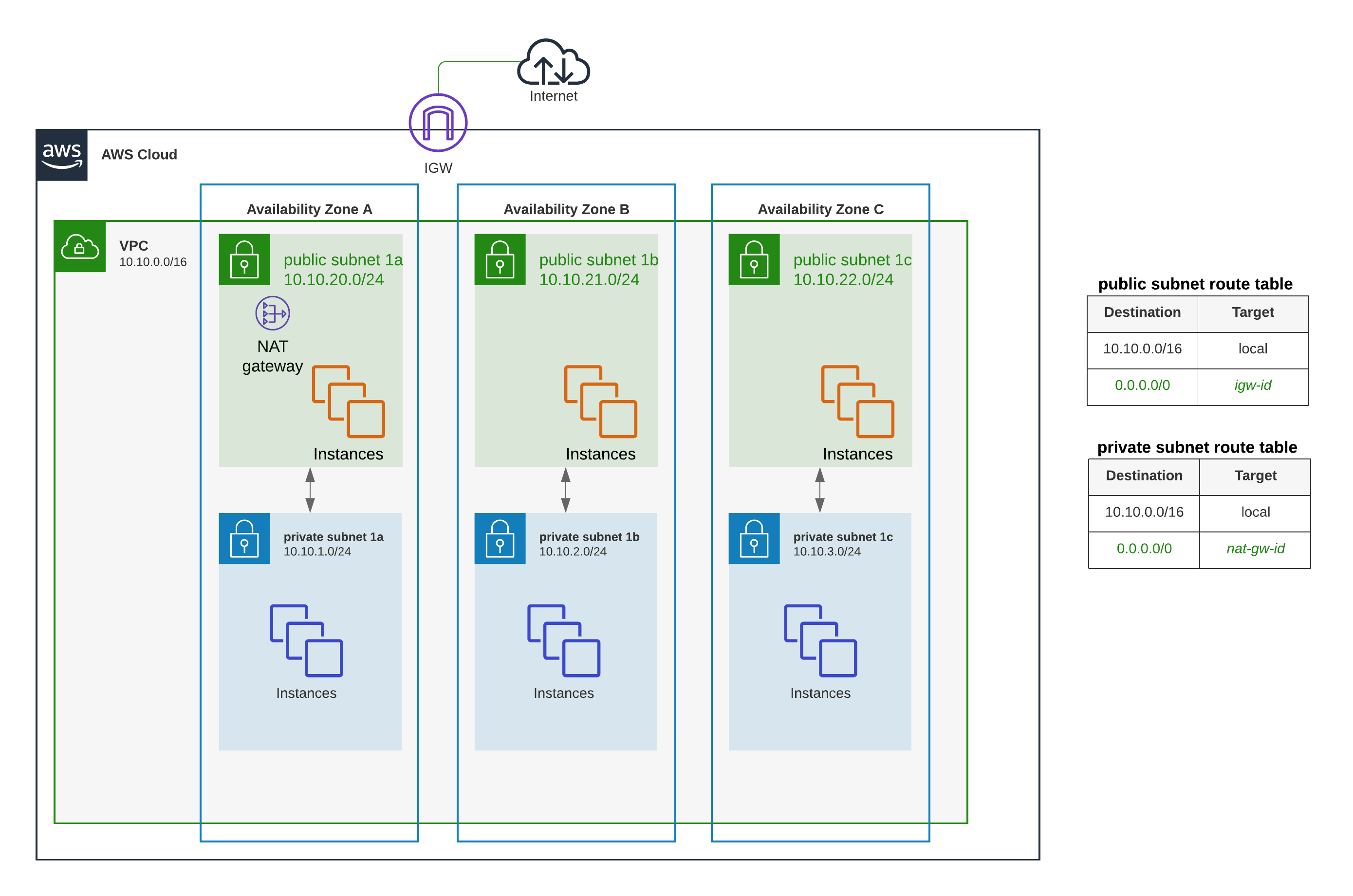
  • AWS NAT – Network Address Translation devices, launched in the public subnet, enables instances in a private subnet to connect to the Internet but prevents the Internet from initiating connections with the instances.
  • Instances in private subnets would need an internet connection for performing software updates or trying to access external services.
  • NAT device performs the function of both address translation and port address translation (PAT)
  • NAT instance prevents instances to be directly exposed to the Internet and having to be launched in a Public subnet and assigning of the Elastic IP address to all, which are limited.
  • NAT device routes the traffic, from the private subnet to the Internet, by replacing the source IP address with its address and it translates the address back to the instances’ private IP addresses for the response traffic.
  • AWS allows NAT configuration in 2 ways
    • NAT Gateway, managed service by AWS (recommended)
    • NAT Instance (legacy, not recommended)

NAT Gateway

  • NAT gateway is an AWS managed NAT service that provides better availability, higher bandwidth, and requires less administrative effort.
  • A NAT gateway supports 5 Gbps of bandwidth and automatically scales up to 100 Gbps. For higher bursts requirements, the workload can be distributed by splitting the resources into multiple subnets and creating a NAT gateway in each subnet.
  • A NAT gateway can process one million packets per second and automatically scales up to ten million packets per second. Beyond this limit, a NAT gateway will drop packets.
  • Each NAT gateway is created in a specific Availability Zone and implemented with redundancy in that zone (for zonal NAT gateways).
  • A NAT gateway supports the TCP, UDP, and ICMP protocols.
  • NAT gateways are supported for IPv4 or IPv6 traffic. For IPv6 traffic, NAT gateway performs NAT64. By using this in conjunction with DNS64 (available on Route 53 Resolver), IPv6 workloads in a subnet can communicate with IPv4 resources.
  • NAT gateway cannot be associated with a security group. Security can be configured for the instances in the private subnets to control the traffic.
  • Network ACL can be used to control the traffic to and from the subnet. NACL applies to the NAT gateway’s traffic, which uses ports 1024-65535
  • NAT gateway when created receives an elastic network interface that’s automatically assigned a private IP address from the IP address range of the subnet. Attributes of this network interface cannot be modified.
  • NAT gateway cannot send traffic over VPC endpoints, VPN connections, AWS Direct Connect, or VPC peering connections. The private subnet’s route table should be modified to route the traffic directly to these devices.
  • NAT gateway can route traffic to Transit Gateways and virtual private gateways (for private NAT gateways) or through Transit Gateway for Site-to-Site VPN/Direct Connect traffic.
  • NAT gateway times out the connection if it is idle for 350 seconds or more. To prevent the connection from being dropped, initiate more traffic over the connection or enable TCP keepalive on the instance with a value of less than 350 seconds.
  • NAT gateways currently do not support the IPsec protocol.
  • NAT gateways support traffic with a maximum transmission unit (MTU) of 8500 bytes.
  • Each IPv4 address can support up to 55,000 simultaneous connections to each unique destination. You can increase this limit by associating up to 8 IPv4 addresses to your NAT gateways (1 primary IPv4 address and 7 secondary IPv4 addresses). By default, you can associate up to 2 Elastic IP addresses per public NAT gateway (quota increase available).

NAT Gateway Types

  • Public NAT Gateway
    • Enables instances in private subnets to connect to the internet
    • Requires an Elastic IP address
    • Must be created in a public subnet (for zonal mode)
    • Supports up to 8 IPv4 addresses (1 primary + 7 secondary)
  • Private NAT Gateway
    • Enables instances in private subnets to connect to other VPCs or on-premises networks via Transit Gateway or virtual private gateway
    • Does not require an Elastic IP address
    • Uses private IP address for source NAT
    • Cannot be used for internet connectivity
    • Useful for communication between VPCs with overlapping CIDR ranges

Regional NAT Gateway (Announced November 2025)

  • A regional NAT gateway automatically expands across Availability Zones based on workload presence, unlike standard zonal NAT gateways which operate in a single AZ.
  • Does not require a public subnet – creates its own route table with a pre-configured route to the internet gateway.
  • Provides automatic high availability without manual multi-AZ configuration.
  • Simplifies setup – no need to create/delete NAT Gateways or edit route tables when workloads expand to new AZs.
  • Supports up to 32 IP addresses per Availability Zone (compared to 8 for zonal NAT gateways).
  • May take up to 60 minutes to expand to a new AZ after a resource is launched there.
  • Supports two modes:
    • Automatic mode – AWS manages IP addresses and AZ expansion (recommended)
    • Manual mode – You manually manage IP addresses and control AZ expansion/contraction
  • Supports AWS Transit Gateway as a valid route in the regional NAT gateway route table.
  • Does not support private NAT connectivity (use zonal NAT gateways for private NAT use cases).
  • Available in all commercial AWS Regions (except AWS GovCloud and China Regions).

Regional NAT Gateway vs Zonal NAT Gateway

  • Zonal NAT Gateway (Traditional)
    • Created in a specific Availability Zone
    • Requires a public subnet in each AZ for high availability
    • Requires manual creation of NAT Gateway in each AZ
    • Requires route table updates for each AZ
    • Supports up to 8 IP addresses
    • Supports both public and private connectivity types
    • Best for: Predictable, static workloads; private NAT use cases
  • Regional NAT Gateway
    • Automatically spans all AZs based on workload presence
    • No public subnet required
    • Single NAT Gateway resource to manage
    • Automatic routing across AZs
    • Supports up to 32 IP addresses per AZ
    • Public connectivity only (no private NAT support)
    • Best for: Dynamic workloads that scale across AZs, simplified management, new deployments
NAT Gateway High Availability

NAT Instance

⚠️ NAT Instance – Legacy (Not Recommended)

The NAT AMI is built on the last version of Amazon Linux AMI, 2018.03, which reached end of standard support on December 31, 2020 and end of maintenance support on December 31, 2023.

AWS recommends migrating to a NAT Gateway for better availability, higher bandwidth, and less administrative effort.

If NAT instances are required for your use case (e.g., cost optimization for non-production environments), you can create your own NAT AMI from a current version of Amazon Linux.

NAT Gateway vs NAT Instance
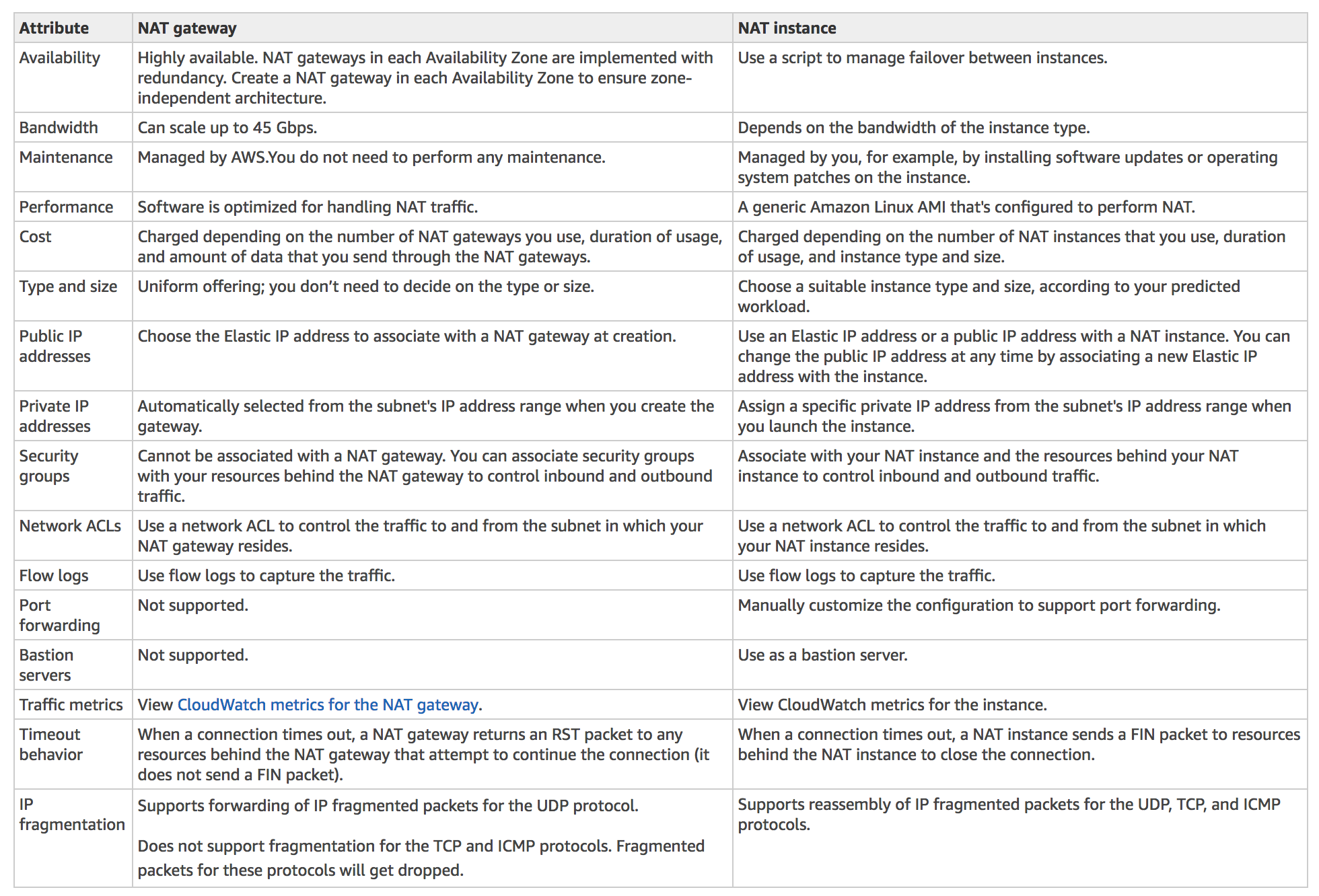
NAT Gateway vs NAT Instance

AWS Certification Exam Practice Questions

  • Questions are collected from Internet and the answers are marked as per my knowledge and understanding (which might differ with yours).
  • AWS services are updated everyday and both the answers and questions might be outdated soon, so research accordingly.
  • AWS exam questions are not updated to keep up the pace with AWS updates, so even if the underlying feature has changed the question might not be updated
  • Open to further feedback, discussion and correction.
  1. After launching an instance that you intend to serve as a NAT (Network Address Translation) device in a public subnet you modify your route tables to have the NAT device be the target of internet bound traffic of your private subnet. When you try and make an outbound connection to the Internet from an instance in the private subnet, you are not successful. Which of the following steps could resolve the issue?
    1. Attaching a second Elastic Network interface (ENI) to the NAT instance, and placing it in the private subnet
    2. Attaching an Elastic IP address to the instance in the private subnet
    3. Attaching a second Elastic Network Interface (ENI) to the instance in the private subnet, and placing it in the public subnet
    4. Disabling the Source/Destination Check attribute on the NAT instance
  2. You manually launch a NAT AMI in a public subnet. The network is properly configured. Security groups and network access control lists are property configured. Instances in a private subnet can access the NAT. The NAT can access the Internet. However, private instances cannot access the Internet. What additional step is required to allow access from the private instances?
    1. Enable Source/Destination Check on the private Instances.
    2. Enable Source/Destination Check on the NAT instance.
    3. Disable Source/Destination Check on the private instances
    4. Disable Source/Destination Check on the NAT instance
  3. A user has created a VPC with public and private subnets. The VPC has CIDR 20.0.0.0/16. The private subnet uses CIDR 20.0.1.0/24 and the public subnet uses CIDR 20.0.0.0/24. The user is planning to host a web server in the public subnet (port 80. and a DB server in the private subnet (port 3306.. The user is configuring a security group of the NAT instance. Which of the below mentioned entries is not required for the NAT security group?
    1. For Inbound allow Source: 20.0.1.0/24 on port 80
    2. For Outbound allow Destination: 0.0.0.0/0 on port 80
    3. For Inbound allow Source: 20.0.0.0/24 on port 80 (Refer NAT Instance Documentation)
    4. For Outbound allow Destination: 0.0.0.0/0 on port 443
  4. A web company is looking to implement an external payment service into their highly available application deployed in a VPC. Their application EC2 instances are behind a public facing ELB. Auto scaling is used to add additional instances as traffic increases. Under normal load the application runs 2 instances in the Auto Scaling group but at peak it can scale 3x in size. The application instances need to communicate with the payment service over the Internet, which requires whitelisting of all public IP addresses used to communicate with it. A maximum of 4 whitelisting IP addresses are allowed at a time and can be added through an API. How should they architect their solution?
    1. Route payment requests through two NAT instances setup for High Availability and whitelist the Elastic IP addresses attached to the NAT instances
    2. Whitelist the VPC Internet Gateway Public IP and route payment requests through the Internet Gateway. (Internet gateway is only to route traffic)
    3. Whitelist the ELB IP addresses and route payment requests from the Application servers through the ELB. (ELB does not have a fixed IP address)
    4. Automatically assign public IP addresses to the application instances in the Auto Scaling group and run a script on boot that adds each instances public IP address to the payment validation whitelist API. (would exceed the allowed 4 IP addresses)
  5. A company needs to provide internet access to instances in private subnets across multiple Availability Zones with automatic high availability and simplified management. Which NAT Gateway option should they use?
    1. Create a public NAT Gateway in each Availability Zone
    2. Create a Regional NAT Gateway that automatically spans all Availability Zones
    3. Create a private NAT Gateway in each Availability Zone
    4. Use NAT instances with Auto Scaling
  6. An organization has two VPCs with overlapping CIDR ranges that need to communicate with each other through a Transit Gateway. Which NAT Gateway type should be used to enable this communication?
    1. Public NAT Gateway with Elastic IP addresses
    2. Regional NAT Gateway in automatic mode
    3. Private NAT Gateway connected to a Transit Gateway
    4. NAT Instance with Source/Destination Check disabled
  7. A company’s NAT Gateway is experiencing port exhaustion when communicating with a popular third-party API endpoint. What is the most effective solution to increase the number of simultaneous connections?
    1. Create multiple NAT Gateways in the same subnet
    2. Associate secondary IPv4 addresses with the NAT Gateway to increase the connection limit
    3. Increase the NAT Gateway bandwidth allocation
    4. Replace the NAT Gateway with a NAT Instance using a larger instance type
References

AWS Transit Gateway – TGW

Transit Gateway

AWS Transit Gateway – TGW

  • AWS Transit Gateway – TGW is a highly available and scalable service to consolidate the AWS VPC routing configuration for a region with a hub-and-spoke architecture.
  • acts as a Regional virtual router and is a network transit hub that can be used to interconnect VPCs and on-premises networks.
  • traffic always stays on the global AWS backbone, data is automatically encrypted, and never traverses the public internet, thereby reducing threat vectors, such as common exploits and DDoS attacks.
  • is a Regional resource and can connect thousands of VPCs within the same AWS Region.
  • TGWs across different regions can peer with each other to enable VPC communications across regions.
  • Each spoke VPC only needs to connect to the TGW to gain access to other connected VPCs.
  • provides simpler VPC-to-VPC communication management over VPC Peering with a large number of VPCs.
  • scales elastically based on the volume of network traffic.
  • TGW routing operates at layer 3, where the packets are sent to a specific next-hop attachment, based on their destination IP addresses.
  • AWS Resource Access Manager – RAM can be used to share the TGW with other accounts.
  • supports Path Maximum Transmission Unit Discovery (PMTUD) for both IPv4 and IPv6, allowing effective mitigation against MTU mismatch issues. (Added Nov 2024)

Transit Gateway

Transit Gateway Attachments

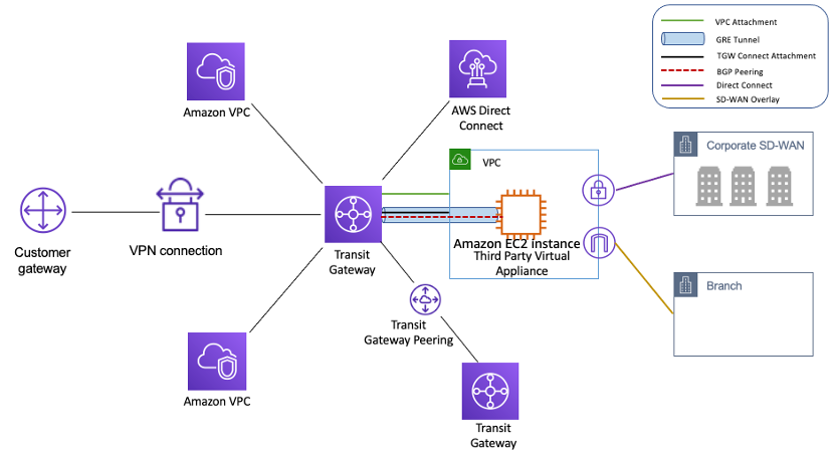
  • Transit Gateway attachment is the connection between resources like VPC, VPN, Direct Connect, and the TGW.
  • TGW attachment is both a source and a destination of packets.
  • TGW supports the following attachments
    • One or more VPCs
    • One or more VPN connections
    • One or more AWS Direct Connect Gateways
    • One or more Transit Gateway Connect attachments
    • One or more Transit Gateway peering connections
    • One or more Connect SD-WAN/third-party network appliance
    • One or more VPN Concentrator attachments (Added Nov 2025)
    • AWS Client VPN native attachment (Added Apr 2026)
    • AWS Network Firewall native attachment (Added Jul 2025)

Transit Gateway Routing

  • Transit Gateway routes IPv4 and IPv6 packets between attachments using transit gateway route tables.
  • Route tables can be configured to propagate routes from the route tables for the attached VPCs, VPN connections, and Direct Connect gateways.
  • When a packet comes from one attachment, it is routed to another attachment using the route that matches the destination IP address.
  • VPC attached to a TGW must be added a route to the subnet route table in order for traffic to route through the TGW.

Transit Gateway Security Group Referencing

  • Transit Gateway supports Security Group Referencing across VPCs connected to the same TGW within the same Region. (GA Sep 2024)
  • allows creating inbound security group rules that reference security groups defined in other VPCs attached to the transit gateway.
  • simplifies security group management by eliminating the need to hard-code IPv4/IPv6 address ranges for cross-VPC communication.
  • improves security posture for TGW-based networks by providing more granular, identity-based access control.
  • must be enabled on the VPC attachment by setting the SecurityGroupReferencingSupport option.

Transit Gateway Peering

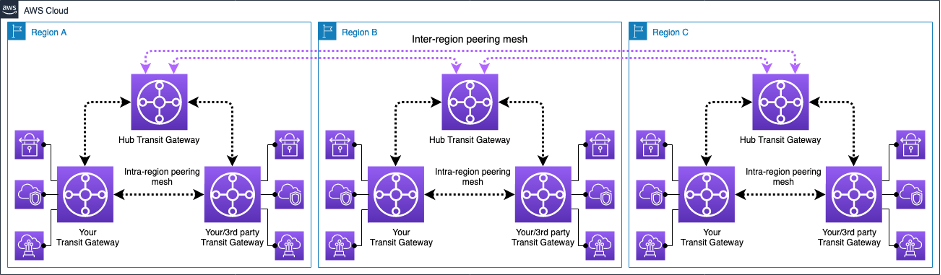
  • Transit Gateway supports the ability to establish peering connections between TGWs in the same and different AWS Regions.
  • Inter-region Transit Gateway peering
    • enables customers to extend this connectivity and build global networks spanning multiple AWS Regions.
    • simplifies routing and inter-connectivity between VPCs and on-premises networks that are serviced and managed via separate TGWs
    • encrypts inter-region traffic with no single point of failure.
    • ensures the traffic always stays on the AWS global network and never traverses the public internet, thereby reducing threat vectors, such as common exploits and DDoS attacks.
  • Intra-region Transit Gateway peering
    • allows multiple TGWs within the same Region to peer with each other.
    • provides flexibility to deploy multiple TGWs with separate administrative domains while enabling easy interconnection.

Transit Gateway Intra and Inter Region Peering

Transit Gateway High Availability

  • Transit Gateway must be enabled with multiple AZs to ensure availability and to route traffic to the resources in the VPC subnets.
  • AZ can be enabled by specifying exactly one subnet within the AZ
  • TGW places a network interface in that subnet using one IP address from the subnet.
  • TGW can route traffic to all the subnets and not just the specified subnet within the enabled AZ.
  • Resources that reside in AZs where there is no TGW attachment cannot reach the TGW.

Transit Gateway Appliance Mode

  • For stateful network appliances in the VPC, appliance mode support for the VPC attachment can be enabled in which the appliance is located.
  • Appliance Mode ensures that network flows are symmetrically routed to the same AZ and network appliance
  • Appliance Mode ensures that the same AZ for that VPC attachment is used for the lifetime of a flow of traffic between source and destination.
  • Appliance Mode also allows the TGW to send traffic to any AZ in the VPC, as long as there is a subnet association in that zone.

Transit Gateway Connect Attachment

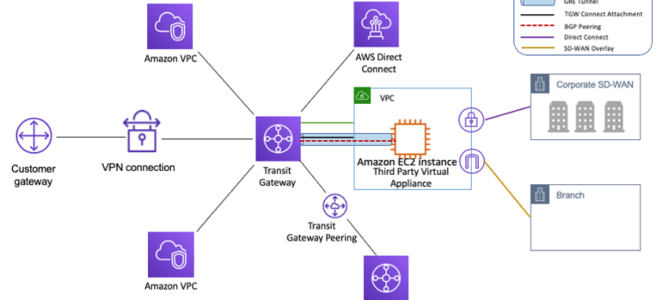
  • Transit Gateway Connect attachment can help establish a connection between a TGW and third-party virtual appliances (such as SD-WAN appliances) running in a VPC.
  • A Connect attachment supports the Generic Routing Encapsulation (GRE) tunnel protocol for high performance and Border Gateway Protocol (BGP) for dynamic routing.

Transit Gateway VPN Concentrator

  • AWS Site-to-Site VPN Concentrator is a Transit Gateway attachment type that simplifies multi-site connectivity for distributed enterprises. (Launched Nov 2025)
  • allows multiple remote sites (25+) to connect through a single VPN attachment to Transit Gateway.
  • suitable for customers with many low-bandwidth sites (under 100 Mbps per site).
  • supports up to 100 remote sites per VPN Concentrator with 5 Gbps aggregate bandwidth.
  • eliminates the need to provision individual VPN connections for each remote site.

Transit Gateway Native Attachments

  • AWS Network Firewall Native Attachment (Jul 2025)
    • Network Firewall can attach directly to Transit Gateway, eliminating the need for a dedicated inspection VPC.
    • simplifies network architecture by removing the need to manage dedicated VPC subnets and route tables for firewall connectivity.
    • enables flexible cost allocation through Transit Gateway metering policies.
  • AWS Client VPN Native Attachment (Apr 2026)
    • AWS Client VPN can attach directly to Transit Gateway without needing an intermediate VPC.
    • provides centralized remote access to multiple VPCs and on-premises networks directly from the Client VPN endpoint.
    • preserves source IP addresses end-to-end without SNAT.

Transit Gateway Flow Logs

  • Transit Gateway Flow Logs enables capturing detailed information about IP traffic going to and from transit gateways.
  • captures source/destination IPs, ports, protocol, traffic counters, timestamps, and other metadata for all network flows traversing the TGW.
  • can publish logs to Amazon S3 or Amazon CloudWatch Logs.
  • provides centralized flow-level visibility from a single point in the network using a single AWS account.
  • useful for network troubleshooting, security analysis, compliance auditing, and cost chargeback.

Transit Gateway Flexible Cost Allocation

  • Flexible Cost Allocation (FCA) provides granular control over how Transit Gateway data processing costs are allocated across AWS accounts. (Launched Nov 2025)
  • Previously, Transit Gateway used only a sender-pay model where the source attachment account owner was responsible for all data usage costs.
  • FCA enables automatic allocation of all TGW charges including data processing, Site-to-Site VPN Data Transfer Out, Direct Connect Data Transfer Out, and peering charges.
  • Supports allocation to the source attachment account, destination attachment account, or the central Transit Gateway account.
  • Metering policies can be configured at attachment-level or individual flow-level granularity.
  • Available in all commercial AWS Regions with no additional charge for using FCA.

Transit Gateway Per-AZ CloudWatch Metrics

  • Transit Gateway supports per availability zone (AZ) metrics delivered to CloudWatch. (Added Nov 2024)
  • provides more granular visibility into traffic distribution across AZs.
  • helps identify AZ-level traffic imbalances and troubleshoot connectivity issues.
  • includes metrics such as BytesIn, BytesOut, PacketsIn, PacketsOut, BytesDropCountBlackhole, and BytesDropCountNoRoute.

Transit Gateway Network Manager

  • AWS Transit Gateway Network Manager (now part of AWS Global Networks for Transit Gateways) provides a single global view of the private network.
  • includes events and metrics to monitor the quality of the global network, both in AWS and on-premises.
  • Event alerts specify changes in the topology, routing, and connection status. Usage metrics provide information on up/down connection, bytes in/out, packets in/out, and packets dropped.
  • seamlessly integrates with SD-WAN solutions.
  • now supports AWS PrivateLink and IPv6-based connectivity to the management endpoint. (Mar 2025)
  • Note: For global multi-Region WAN management with policy-based automation, consider AWS Cloud WAN, which provides a managed wide area networking service with built-in Transit Gateway orchestration.

Transit Gateway and AWS Cloud WAN

  • AWS Cloud WAN is a managed wide area networking (WAN) service that can orchestrate Transit Gateways across multiple Regions.
  • Cloud WAN provides centralized dashboard, global dynamic routing using BGP, and policy-based network management.
  • Transit Gateway can be federated with Cloud WAN, allowing gradual migration from TGW-only architectures.
  • Cloud WAN can replace statically created Transit Gateway peering connections, simplifying inter-region connectivity.
  • For greenfield deployments requiring multi-Region connectivity, Cloud WAN is recommended over manually peering multiple Transit Gateways.
  • Transit Gateway remains the optimal choice for single-Region hub-and-spoke architectures.

Transit Gateway Best Practices

  • Use a separate subnet for each transit gateway VPC attachment.
  • Create one network ACL and associate it with all of the subnets that are associated with the TGW. Keep the network ACL open in both the inbound and outbound directions.
  • Associate the same VPC route table with all of the subnets that are associated with the TGW, unless your network design requires multiple VPC route tables (for example, a middle-box VPC that routes traffic through multiple NAT gateways).
  • Use BGP Site-to-Site VPN connections, if the customer gateway device or firewall for the connection supports multipath, enable the feature.
  • Enable route propagation for AWS Direct Connect gateway attachments and BGP Site-to-Site VPN attachments.
  • TGWs are highly available by design and do not need additional TGWs for high availability.
  • Limit the number of TGW route tables unless the design requires multiple TGW route tables.
  • For redundancy, use a single TGW in each Region for disaster recovery.
  • For deployments with multiple TGWs, it is recommended to use a unique ASN for each of them.
  • Enable Security Group Referencing on VPC attachments to simplify cross-VPC security management.
  • Use Transit Gateway Flow Logs for centralized network visibility and troubleshooting.
  • Consider Flexible Cost Allocation for multi-account environments to accurately allocate network costs.
  • For 5 Gbps VPN throughput, use Large Bandwidth Tunnels (available only with TGW or Cloud WAN attachments). (Nov 2025)

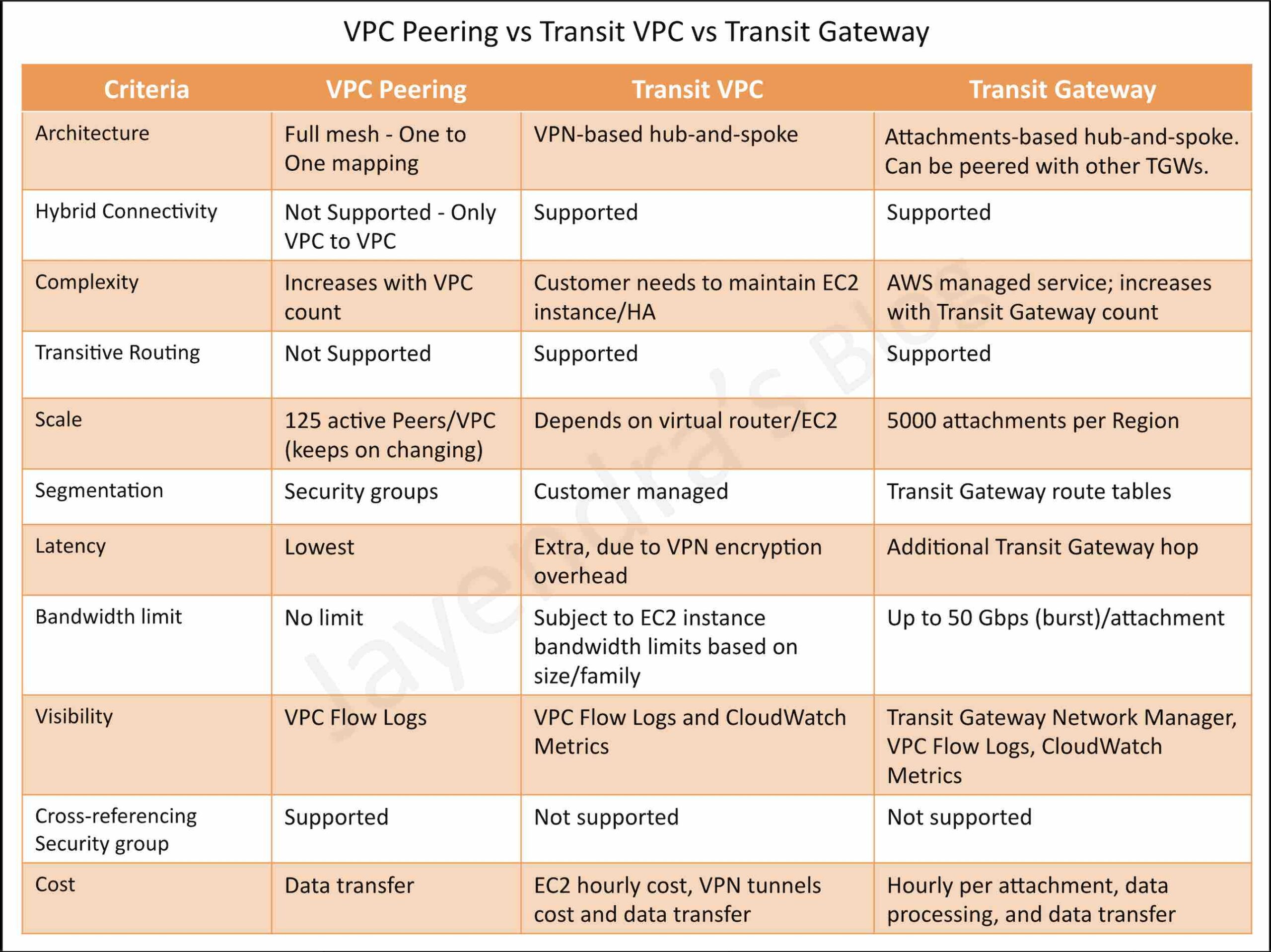
Transit Gateway vs Transit VPC vs VPC Peering

VPC Peering vs Transit VPC vs Transit Gateway

AWS Certification Exam Practice Questions

  • Questions are collected from Internet and the answers are marked as per my knowledge and understanding (which might differ with yours).
  • AWS services are updated everyday and both the answers and questions might be outdated soon, so research accordingly.
  • AWS exam questions are not updated to keep up the pace with AWS updates, so even if the underlying feature has changed the question might not be updated
  • Open to further feedback, discussion and correction.
  1. A company is using a VPC peering strategy to connect its VPCs in a single Region to allow for cross-communication. A recent increase in account creations and VPCs has made it difficult to maintain the VPC peering strategy, and the company expects to grow to hundreds of VPCs. There are also new requests to create site-to-site VPNs with some of the VPCs.
    A solutions architect has been tasked with creating a centrally managed networking setup for multiple accounts, VPCs, and VPNs.Which networking solution meets these requirements?

    1. Configure shared VPCs and VPNs and share with each other.
    2. Configure a hub-and-spoke VPC and route all traffic through VPC peering.
    3. Configure an AWS Direct Connect connection between all VPCs and VPNs.
    4. Configure a transit gateway with AWS Transit Gateway and connect all VPCs and VPNs
  2. A company hosts its core network services, including directory services and DNS, in its on-premises data center. The data center is connected to the AWS Cloud using AWS Direct Connect (DX). Additional AWS accounts are planned that will require quick, cost-effective, and consistent access to these network services. What should a solutions architect implement to meet these requirements with the LEAST amount of operational overhead?
    1. Create a DX connection in each new account. Route the network traffic to the on-premises servers.
    2. Configure VPC endpoints in the DX VPC for all required services. Route the network traffic to the on-premises servers.
    3. Create a VPN connection between each new account and the DX VPC. Route the network traffic to the on-premises servers.
    4. Configure AWS Transit Gateway between the accounts. Assign DX to the transit gateway and route network traffic to the on-premises servers.
  3. A company has 50 VPCs connected to a Transit Gateway. Multiple application teams in different accounts need to communicate with each other, but the security team requires that cross-VPC security group rules reference specific security groups rather than IP ranges. Which Transit Gateway feature should the solutions architect enable?
    1. Enable Transit Gateway Flow Logs on all attachments.
    2. Configure Transit Gateway route table propagation.
    3. Enable Security Group Referencing on the VPC attachments to the Transit Gateway.
    4. Create a peering connection between the VPCs.
  4. A large enterprise with 200+ branch offices needs to connect all locations to AWS. Each site requires less than 50 Mbps of bandwidth. The network team wants to minimize the number of VPN connections they need to manage. What is the MOST operationally efficient solution?
    1. Create individual Site-to-Site VPN connections for each branch office to a Transit Gateway.
    2. Use AWS Direct Connect with a Transit Gateway for all branch offices.
    3. Use AWS Site-to-Site VPN Concentrator attachments on Transit Gateway to aggregate multiple sites per attachment.
    4. Deploy software VPN appliances in a shared services VPC.
  5. A company uses a centralized Transit Gateway shared across 20 AWS accounts using AWS RAM. The finance team needs to allocate Transit Gateway data processing costs to the accounts consuming network resources rather than the account that sends the traffic. How should the solutions architect configure this?
    1. Use cost allocation tags on Transit Gateway attachments.
    2. Enable Transit Gateway Flow Logs and build custom billing reports.
    3. Configure Transit Gateway Flexible Cost Allocation (FCA) metering policies to bill the destination attachment account.
    4. Create separate Transit Gateways for each account to track costs independently.
  6. A company wants to centralize traffic inspection for all VPCs without managing a dedicated inspection VPC with firewall endpoints. Which solution provides the simplest architecture? (Select TWO)
    1. Use AWS Network Firewall with native Transit Gateway attachment.
    2. Deploy third-party firewall appliances in each VPC.
    3. Route traffic through Transit Gateway to the Network Firewall attachment for inspection.
    4. Create VPC peering between all VPCs and the inspection VPC.
    5. Use AWS WAF on all VPC endpoints.

References

Amazon Inspector

Amazon Inspector

Amazon Inspector

⚠️ Amazon Inspector Classic – End of Support

Amazon Inspector Classic reached End of Life (EOL) on May 20, 2026. The Inspector Classic console and all Classic resources are no longer accessible.

Migration: Use Amazon Inspector (v2) which provides automated, continuous scanning with significantly expanded capabilities including Lambda scanning, agentless EC2 scanning, CI/CD integration, and code security scanning.

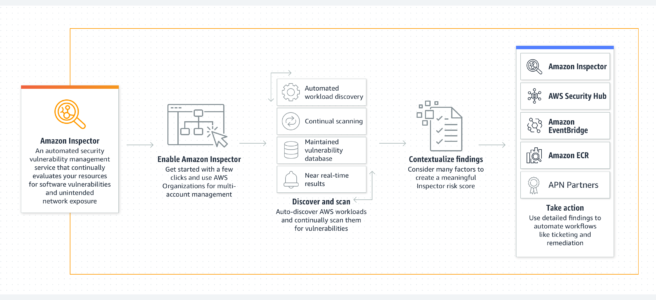
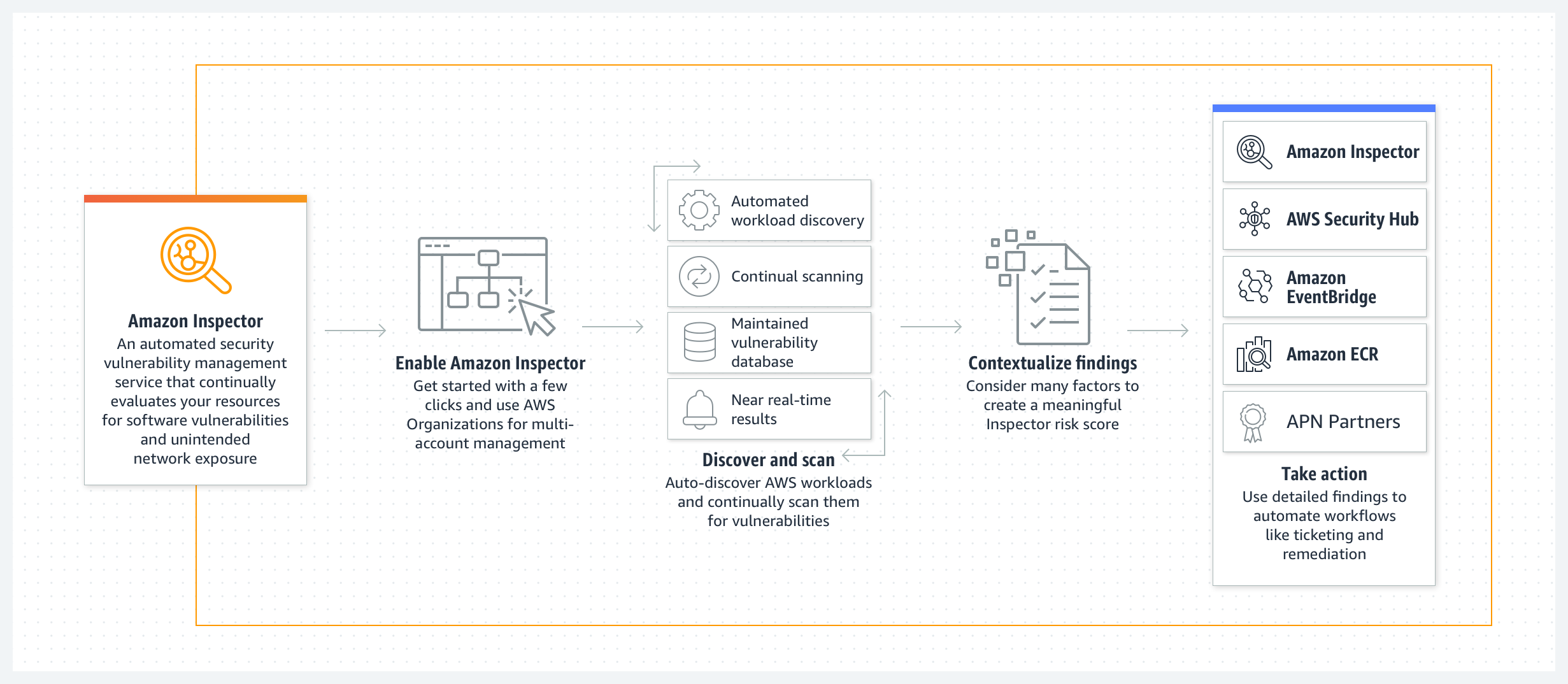
  • Amazon Inspector is an automated vulnerability management service that continuously scans AWS workloads for software vulnerabilities and unintended network exposure.
  • automatically discovers and scans EC2 instances, container images in Amazon ECR and within CI/CD tools, AWS Lambda functions, and code repositories for software vulnerabilities and unintended network exposure.
  • creates a finding when a software vulnerability or network issue is discovered, that describes the vulnerability, rates its severity, identifies the affected resource, and provides remediation guidance.
  • calculates a highly contextualized Inspector risk score for each finding by correlating CVE information with factors such as network access and exploitability to prioritize the most critical vulnerabilities.
  • is a Regional service and configurations need to be repeated across each region.
  • supports both agent-based and agentless scanning for EC2 instances.
  • uses the Systems Manager (SSM) agent for agent-based scanning to collect software inventory and configurations.
  • offers agentless scanning using EBS volume snapshots for instances without SSM Agent installed or configured.
  • SSM agents can be set up as VPC Interface endpoints to avoid sending any information over the internet.
  • uses an IAM AWSServiceRoleForAmazonInspector2 service-linked-role linked directly to Inspector with all the permissions required to call other AWS services on your behalf.
  • has multi-account management through AWS Organizations integration, which allows delegating an administrator account for the organization.
  • supports organization-wide management through AWS Organizations policies to centrally configure and manage scan types across all accounts, selected OUs, or individual accounts.
  • integrates with AWS Security Hub which collects and centralizes the security data from across the AWS accounts, services, and other supported products.
  • is available both as a standalone service and as a core capability within AWS Security Hub.

Amazon Inspector

AWS Inspector Features

  • Continuously scan environments for vulnerabilities and network exposure
    • automatically discovers and begins scanning eligible resources without the need to manually schedule or configure assessment scans.
    • all resources are continually rescanned when new CVEs are published or when changes occur, including new software installation on an EC2 instance or updates to code repositories.
  • Assess vulnerabilities accurately with the Inspector Risk score
    • Inspector calculates a highly contextualized risk score by correlating CVE information with environmental factors such as network reachability and exploitability data.
    • helps prioritize the most critical findings and vulnerable resources.
  • Identify high-impact findings with the Inspector dashboard
    • offers a high-level view of findings from across your environment.
  • Manage findings using customizable views
    • Inspector console offers a Findings view.
    • users can use filters and suppression rules to generate customized finding reports.
    • suppression rules allow suppression of findings based on criteria defined by the organization for acceptable risks.
  • Automatic closure of remediated findings
    • automatically detects if a vulnerability has been patched or remediated and changes the state of the finding to “Closed” without manual intervention.
  • Monitor and process findings with other services and systems
    • publishes findings to
      • Amazon EventBridge, which can then be monitored and processed in near-real time as part of the existing security and compliance workflows or routed to SNS, Lambda, etc.
      • AWS Security Hub.
      • Amazon ECR for container image vulnerabilities, enabling resource owners to view and remediate.
  • Detailed coverage monitoring
    • provides a comprehensive, near real-time overview of organization-wide environment coverage.
    • highlights resources not being actively monitored and provides guidance on how to include them.

Inspector Scanning Types

Amazon EC2 Scanning

  • scans EC2 instances for common vulnerabilities and exposures (CVEs), network exposure issues, and operating system and programming language package vulnerabilities.
  • performs network reachability scans once every 12 hours and package vulnerability scans on a variable cadence depending on the scan method.
  • supports two scanning methods:
    • Agent-based scanning – uses the SSM Agent to collect software inventory from running instances.
    • Agentless scanning – takes snapshots of EBS volumes to extract data without installing an agent. GA since April 2024.
  • Enhanced EC2 Scanning (VM Scanner) – uses the Amazon Inspector VM Scanner (replacing the older SSM plugin) for more granular package collection with fewer compute resources. Installed and updated via SSM associations.
  • supports expanded agentless scanning including Windows OS vulnerability scanning without requiring an agent (March 2026).
  • Deep inspection for Linux-based instances automatically scans for programming language package vulnerabilities (Python, Java, Node.js, Go, etc.) beyond OS-level packages.

Amazon ECR Container Image Scanning

  • scans container images in Amazon ECR for software vulnerabilities.
  • supports scratch, distroless, and Chainguard images for minimal and security-focused container base images.
  • maps ECR images to their deployment footprint across Amazon ECS tasks and Amazon EKS pods.
  • provides insights on deployment scope – when images were last used, how many tasks or pods are using them, and which clusters are running the image.
  • helps prioritize remediation based on actual image usage and deployment status.

AWS Lambda Function Scanning

  • scans Lambda functions for software vulnerabilities in their application packages and dependencies.
  • Lambda code scanning scans custom proprietary application code for code security vulnerabilities such as injection flaws, data leaks, weak cryptography, or missing encryption based on AWS security best practices.
  • upon detecting code vulnerabilities, generates actionable security findings with detector name, impacted code snippets, and remediation suggestions.
  • uses generative AI and automated reasoning to provide in-context code patches for multiple classes of vulnerabilities.
  • can scan both Lambda functions and layers; by addressing vulnerabilities at foundational layers, it improves security of all downstream Lambda functions.
  • does not support scanning Lambda functions encrypted with customer managed keys.

CI/CD Pipeline Scanning

  • integrates with developer tools like Jenkins and TeamCity for container image assessments within CI/CD pipelines.
  • pushes security earlier in the software development lifecycle (shift-left).
  • findings are available in the CI/CD tool’s dashboard, allowing automated actions like blocking builds or image pushes to registries.
  • CI/CD tools can be hosted anywhere – in AWS, on-premises, or hybrid clouds.
  • uses the Amazon Inspector SBOM Generator (Sbomgen) to produce a Software Bill of Materials and the Inspector Scan API to scan for vulnerabilities.
  • supports custom CI/CD integrations via the SBOM Generator and Scan API combination.

Code Security Scanning (June 2025)

  • expands vulnerability management to application source code through native integration with GitHub and GitLab (SCM tools).
  • delivers three core capabilities:
    • Static Application Security Testing (SAST) – analyzes application source code for security vulnerabilities.
    • Software Composition Analysis (SCA) – evaluates third-party dependencies for known vulnerabilities.
    • Infrastructure as Code (IaC) scanning – validates infrastructure definitions for misconfigurations.
  • findings are surfaced both in the Inspector console for an aggregated view across the organization and within the SCM platform as fast feedback for developers.
  • enables consistent vulnerability management from code to compute resources running on AWS.

CIS Benchmark Assessments

  • supports the Center for Internet Security (CIS) Benchmarks for on-demand and targeted assessments against OS-level CIS configuration benchmarks for EC2 instances.
  • supports both Level 1 and Level 2 configuration benchmark checks.
  • supported operating systems include Amazon Linux 2, Windows Server 2019, and Windows Server 2022.
  • CIS scans can be run across AWS Organization accounts.
  • launched January 2024.

Inspector Finding Types

  • Package Vulnerability
    • identifies software packages exposed to common vulnerabilities and exposures (CVEs).
    • generated for EC2 instances, ECR container images, and Lambda functions.
    • supports Java Gradle inventory and scanning (January 2026), plus MySQL, MariaDB, PHP, Jenkins-core, 7zip (Windows), Elasticsearch, and Curl/LibCurl.
  • Network Reachability
    • indicates allowed network paths to EC2 instances in the environment.
    • generated only for EC2 resources.
  • Code Vulnerability
    • identifies code security vulnerabilities in Lambda functions and code repositories.
    • includes missing encryption, data leaks, injection flaws, and weak cryptography.
    • provides code snippets and AI-powered remediation suggestions.

SBOM (Software Bill of Materials)

  • offers automated and centralized management of SBOM exports.
  • enables easy export of a consolidated SBOM for all monitored resources to a pre-configured S3 bucket.
  • supports industry standard formats (CycloneDX).
  • SBOM artifacts can be used with Amazon Athena queries or Amazon QuickSight dashboards for insights and trend visualization.
  • Amazon Inspector SBOM Generator (Sbomgen) is used behind the scenes for ECR scanning, Lambda scanning, and agentless EC2 scanning.

Multi-Account Management

  • supports simplified one-click onboarding and integration with AWS Organizations.
  • allows assigning an Inspector Delegated Administrator (DA) account that can start and configure all member accounts and consolidate findings.
  • supports organization-wide management through AWS Organizations policies (November 2025) to centrally configure scan types – EC2 scanning, ECR scanning, Lambda Standard and Code Scanning, and Code Security – across all accounts, selected OUs, or individual accounts.
  • new accounts are automatically onboarded when Inspector policies are configured.

AWS Certification Exam Practice Questions

  • Questions are collected from Internet and the answers are marked as per my knowledge and understanding (which might differ with yours).
  • AWS services are updated everyday and both the answers and questions might be outdated soon, so research accordingly.
  • AWS exam questions are not updated to keep up the pace with AWS updates, so even if the underlying feature has changed the question might not be updated
  • Open to further feedback, discussion and correction.
  1. Which of the following services allows you to analyze EC2 Instances against pre-defined security templates to check for vulnerabilities?
    1. AWS Trusted Advisor
    2. AWS Inspector
    3. AWS WAF
    4. AWS Shield
  2. Your company has a set of AWS resources which consists of EC2 Instances. The Security departments need to run vulnerability analysis on these machines to ensure that the Instances comply with the latest security standards. Which of the following would you implement for this requirement?
    1. AWS WAF
    2. AWS Snowball
    3. AWS CloudFront
    4. AWS Inspector
  3. A company wants to scan its EC2 instances for software vulnerabilities without installing any additional software or agents on the instances. Which Amazon Inspector feature should they use?
    1. Agent-based scanning with SSM Agent
    2. Agentless scanning
    3. CIS Benchmark assessments
    4. Network reachability analysis
  4. A development team wants to detect vulnerabilities in their container images before deploying to production. They use Jenkins as their CI/CD tool. Which Amazon Inspector capability should they use?
    1. Amazon ECR Enhanced Scanning
    2. Amazon Inspector CI/CD pipeline integration with Jenkins plugin
    3. Amazon Inspector Lambda code scanning
    4. Amazon Inspector network reachability scan
  5. Which Amazon Inspector finding type identifies code security issues such as injection flaws, data leaks, and missing encryption in Lambda functions?
    1. Package Vulnerability
    2. Network Reachability
    3. Code Vulnerability
    4. Configuration Vulnerability
  6. A security team wants to centrally manage Amazon Inspector scan types across all accounts in their AWS Organization without manual configuration for each account. Which feature should they use?
    1. Inspector Delegated Administrator
    2. AWS Config rules
    3. Amazon Inspector policies through AWS Organizations
    4. AWS Security Hub standards
  7. Which of the following scan types does Amazon Inspector Code Security provide? (Choose THREE)
    1. Static Application Security Testing (SAST)
    2. Dynamic Application Security Testing (DAST)
    3. Software Composition Analysis (SCA)
    4. Infrastructure as Code (IaC) scanning
    5. Penetration testing

References

CloudFront Functions vs Lambda@Edge

CloudFront Functions vs Lambda@Edge

CloudFront Functions vs Lambda@Edge

CloudFront Functions vs Lambda@Edge

CloudFront Functions

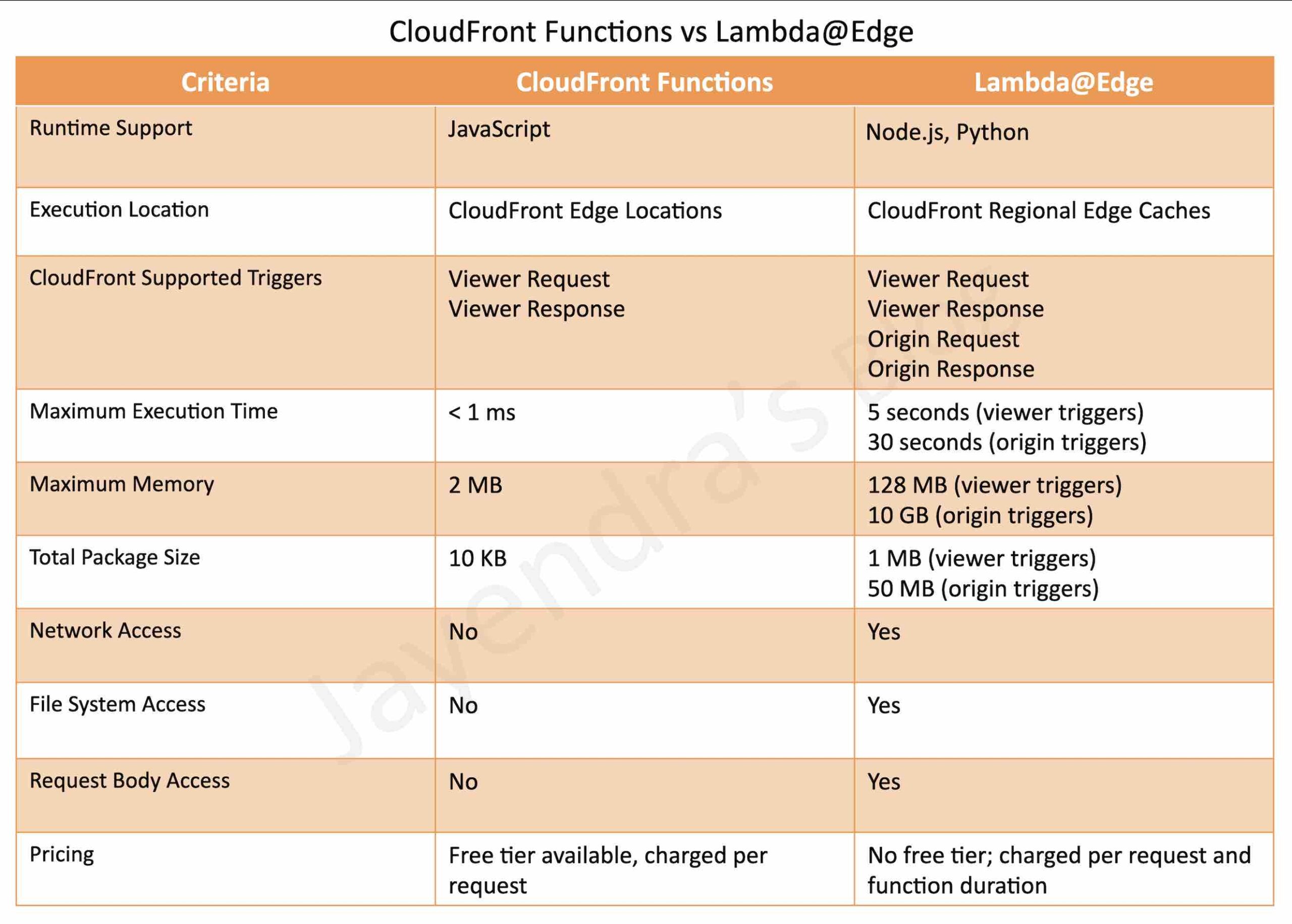
  • is a CloudFront native feature (code is managed entirely within CloudFront) and visible only on the CloudFront dashboard.
  • supports lightweight functions written only in JavaScript language
  • runs in Edge Locations
  • has process-based isolation
  • supports Viewer Request, Viewer Response trigger events only
    • Viewer Request: after CloudFront receives the request from the Viewer
    • Viewer Response: before CloudFront forwards the response to the Viewer
  • supports sub-millisecond execution time
  • scales to millions of requests/second
  • as they are built to be more scalable, performant, and cost-effective, they have the following limitations
    • no network access
    • no file system access
  • cannot access the request body

Lambda@Edge

  • are Lambda functions and visible on the Lambda dashboard.
  • supports Node.js and Python languages, currently
  • runs in Regional Edge Caches
  • has VM-based isolation
  • supports Viewer Request, Viewer Response, Origin Request, and Origin Response trigger events.
    • Viewer Request: after CloudFront receives the request from the Viewer
    • Viewer Response: before CloudFront forwards the response to the Viewer
    • Origin Request: before CloudFront forwards the request to the Origin
    • Origin Response: after CloudFront receives the response from the Origin
  • supports longer execution time, 5 seconds for viewer triggers and 30 seconds for origin triggers
  • scales to 1000s of requests/second
  • has network and file system access
  • can access the request body

AWS Certification Exam Practice Questions

  • Questions are collected from Internet and the answers are marked as per my knowledge and understanding (which might differ with yours).
  • AWS services are updated everyday and both the answers and questions might be outdated soon, so research accordingly.
  • AWS exam questions are not updated to keep up the pace with AWS updates, so even if the underlying feature has changed the question might not be updated
  • Open to further feedback, discussion and correction.
  1. You’ve been given the requirement to customize the content which is distributed to users via a CloudFront Distribution. The content origin is an S3 bucket and the customization attribute exists in the request body. How could you achieve this?
    1. Add an event to the S3 bucket. Make the event invoke a Lambda function to customize the content before rendering
    2. Use CloudFront Functions
    3. Use Lambda@Edge
    4. Use a separate application on an EC2 Instance for this purpose.

References

AWS_CloudFront_Functions_Lambda@Edge_Comparison

AWS Direct Connect Gateway

AWS Direct Connect Gateway

📌 2024-2026 Updates

  • VGW limit increased from 10 to 20 per Direct Connect Gateway
  • Transit VIF limit increased from 1 to 4 per Dedicated Connection
  • Transit Gateway limit: Up to 6 Transit Gateways per Direct Connect Gateway
  • Prefix limit increased to 200 for Transit Gateway associations
  • AWS Cloud WAN Direct Connect attachment (Nov 2024): Attach DX Gateway directly to Cloud WAN core network
  • VIF Rate Limiters (June 2026): Set maximum bandwidth allocation per VIF on dedicated connections
  • 400 Gbps Dedicated Connections with MACsec encryption support
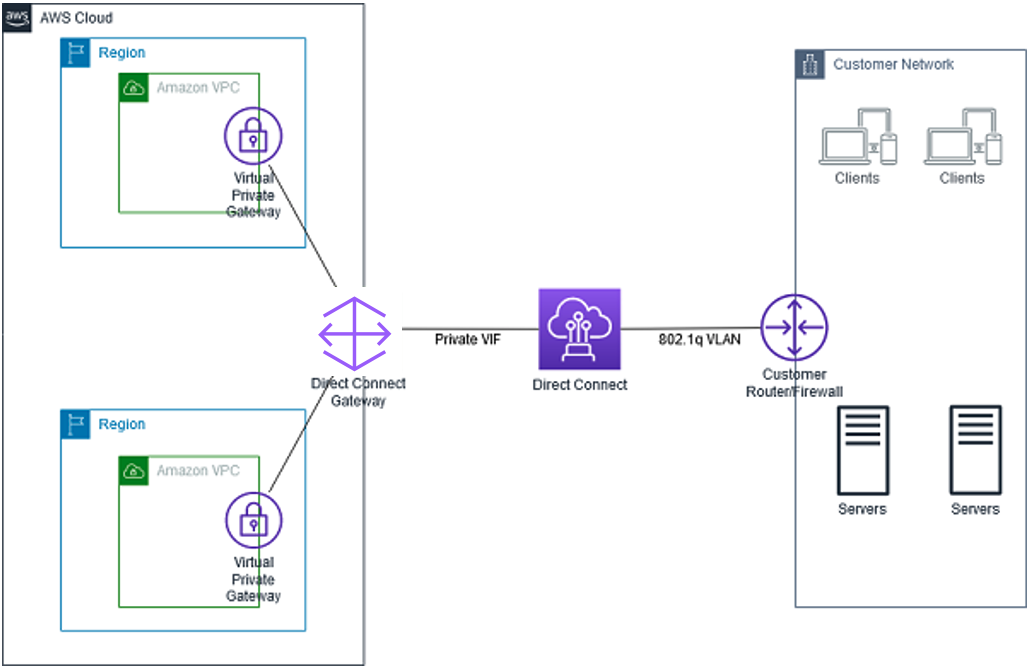
  • Direct Connect Gateway is a global network device that helps establish connectivity that spans multiple VPCs spread across multiple AWS Regions.
  • is a globally available resource that can be created in any Region and accessed from all other Regions.
  • is a virtual component of Direct Connect designed to act as a distributed set of BGP route reflectors. Because it operates outside the data traffic path, it avoids creating a single point of failure or introducing dependencies on specific AWS Regions.
  • supports Private VIF and Transit VIF. Does not support Public VIF.
  • DX Gateway and Private VIF should be in the same AWS account, whereas the connected VPCs can be in different AWS accounts and regions.
  • can be associated with
  • allows scaling a Direct Connection to 1000 VPCs as
    • a single Direct Connection supports 50 VIFs
    • a single private VIF can connect to a single Direct Connect Gateway
    • a single Direct Connect Gateway can connect to 20 VGWs
  • High availability is inherently built into its design, eliminating the need for multiple Direct Connect gateways.

AWS Direct Connect Gateway

Direct Connect Gateway Limitations

  • supports 20 VGWs (VPC) connections per Direct Connect Gateway. (increased from 10)
  • supports up to 6 Transit Gateways per Direct Connect Gateway.
  • supports up to 4 Transit VIFs per Direct Connect Dedicated Connection. (increased from 1)
  • supports a maximum of 30 virtual interfaces (private or transit) per Direct Connect Gateway.
  • does not support overlapping CIDRs.
  • does not support transitive routing i.e. does not allow gateway associations to send traffic to each other (for example, a VGW to another VGW or VPC to VPC)
  • allows a maximum of 200 prefixes (combined IPv4 and IPv6) per Transit Gateway association. (increased from 100)
  • Only one core network can be associated with a Direct Connect Gateway (for Cloud WAN).

Direct Connect Gateway + Transit Gateway

AWS Direct Connect Gateway + Transit Gateway

  • AWS Direct Connect Gateway does not support transitive routing and has limits on the number of VGWs that can be connected.
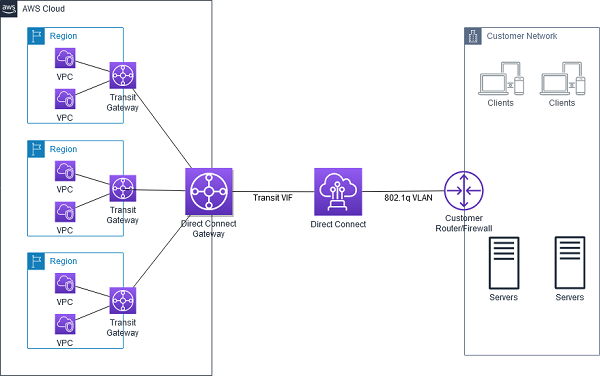
  • AWS DX Gateway can be combined with AWS Transit Gateway using transit VIF attachment which enables your network to connect up to six regional centralized routers over a private dedicated connection. (increased from 3 to 6 Transit Gateways)
  • Each AWS Transit Gateway is a regional resource and acts as a network transit hub to interconnect VPCs in the same region, consolidating VPC routing configuration in one place.
  • This solution simplifies the management of connections between a VPC and the on-premises networks over a private connection that can reduce network costs, increase bandwidth throughput, and provide a more consistent network experience than internet-based connections.
  • With AWS Transit Gateway connected to VPCs, full or partial mesh connectivity can be achieved between the VPCs.
  • Cross-VPC and Cross-Region VPC communication facilitated by AWS Transit Gateway peering.

Direct Connect Gateway + AWS Cloud WAN

  • As of November 2024, AWS Direct Connect Gateway can be directly attached to an AWS Cloud WAN core network without requiring a Transit Gateway as an intermediary.
  • The Cloud WAN Direct Connect attachment supports:
    • Automatic route propagation between AWS and on-premises networks using BGP
    • Central policy-based management through Cloud WAN
    • Segmentation for advanced security configurations
    • Region-specific and segment-specific routing behaviors
    • Tag-based attachment automation
  • The maximum number of advertised route prefixes from a Cloud WAN core network DX Gateway attachment to on-premises is 5,000.
  • Only one core network can be associated with a Direct Connect Gateway.
  • The association is created, deleted, and managed from the Cloud WAN Console in Network Manager.

Direct Connect SiteLink

  • AWS Direct Connect SiteLink enables sending data from one Direct Connect location to another, bypassing AWS Regions.
  • Data travels over the shortest path between Direct Connect locations using the AWS global network backbone.
  • SiteLink is enabled per VIF and creates private, end-to-end network connections between offices, data centers, and colocation facilities.
  • SiteLink is off by default and can be turned on or off at any time.
  • All VIFs with SiteLink enabled must be attached to the same Direct Connect Gateway.
  • SiteLink prefix limit: 100 (can be increased by contacting AWS support).
  • Provides built-in redundancy and resiliency, ensuring uninterrupted connectivity even during public internet outages.

VIF Rate Limiters (New – June 2026)

  • VIF Rate Limiters help prevent network congestion caused by unexpected traffic spikes on a VIF which can consume all available bandwidth, impacting workloads on other VIFs on the same connection.
  • Allows setting a maximum bandwidth allocation for up to 10 VIFs per dedicated connection.
  • Available capacity increments from 50 Mbps to 1.6 Tbps when using a Link Aggregation Group (LAG).
  • Rate limiting applies to traffic both ingressing and egressing the AWS network.
  • Quota: 10 Rate Limiters per Dedicated connection.

AWS Certification Exam Practice Questions

  • Questions are collected from Internet and the answers are marked as per my knowledge and understanding (which might differ with yours).
  • AWS services are updated everyday and both the answers and questions might be outdated soon, so research accordingly.
  • AWS exam questions are not updated to keep up the pace with AWS updates, so even if the underlying feature has changed the question might not be updated
  • Open to further feedback, discussion and correction.
  1. Your company currently has set up an AWS Direct Connect connection between their on-premise data center and a VPC in the us-east-1 region. They now want to connect their data center to a VPC in the us-west-1 region. They need to ensure latency is low and maximum bandwidth for the connection. How could they accomplish this in a cost-effective manner?
    1. Create an AWS Direct Connect connection between the VPC in the us-west-1 region and the on-premise data center
    2. Setup an AWS Direct Connect Gateway
    3. Create an AWS VPN managed connection between the VPC in the us-west-1 region and the on-premise data center
    4. Use VPC peering
  2. A company needs to connect its on-premises data center to VPCs across 15 different AWS accounts in multiple regions using Direct Connect. They want to minimize the number of connections while maintaining dedicated bandwidth. What architecture should they use?
    1. Create 15 separate Direct Connect connections, one for each account
    2. Use a single Direct Connect with 15 private VIFs
    3. Use a Direct Connect Gateway with Virtual Private Gateways in each VPC
    4. Use AWS VPN connections for each VPC
  3. A company wants to connect their on-premises network to multiple VPCs in the same region and enable inter-VPC communication. Which combination of services should they use with Direct Connect?
    1. Direct Connect Gateway with Virtual Private Gateways
    2. Direct Connect Gateway with Transit Gateway
    3. Multiple Direct Connect connections with private VIFs
    4. Direct Connect with VPC peering
  4. An organization needs to route traffic directly between two on-premises data centers connected to AWS Direct Connect in different locations, using the shortest network path without passing through an AWS Region. Which feature should they enable?
    1. Transit Gateway peering
    2. Direct Connect Gateway with Transit VIF
    3. AWS Direct Connect SiteLink
    4. AWS Cloud WAN
  5. A company wants to simplify their hybrid network architecture by connecting their on-premises locations to VPCs across multiple regions with centralized routing policy management. They also need segment-based isolation. Which architecture should they choose? (Select TWO)
    1. AWS Cloud WAN with Direct Connect Gateway attachment
    2. Direct Connect Gateway with multiple Transit Gateways
    3. Direct Connect with VPC peering
    4. Cloud WAN core network with segment-based routing policies
    5. Multiple Direct Connect Gateways with SiteLink

References

AWS Direct Connect vs VPN

AWS Direct Connect vs VPN

AWS Direct Connect vs VPN

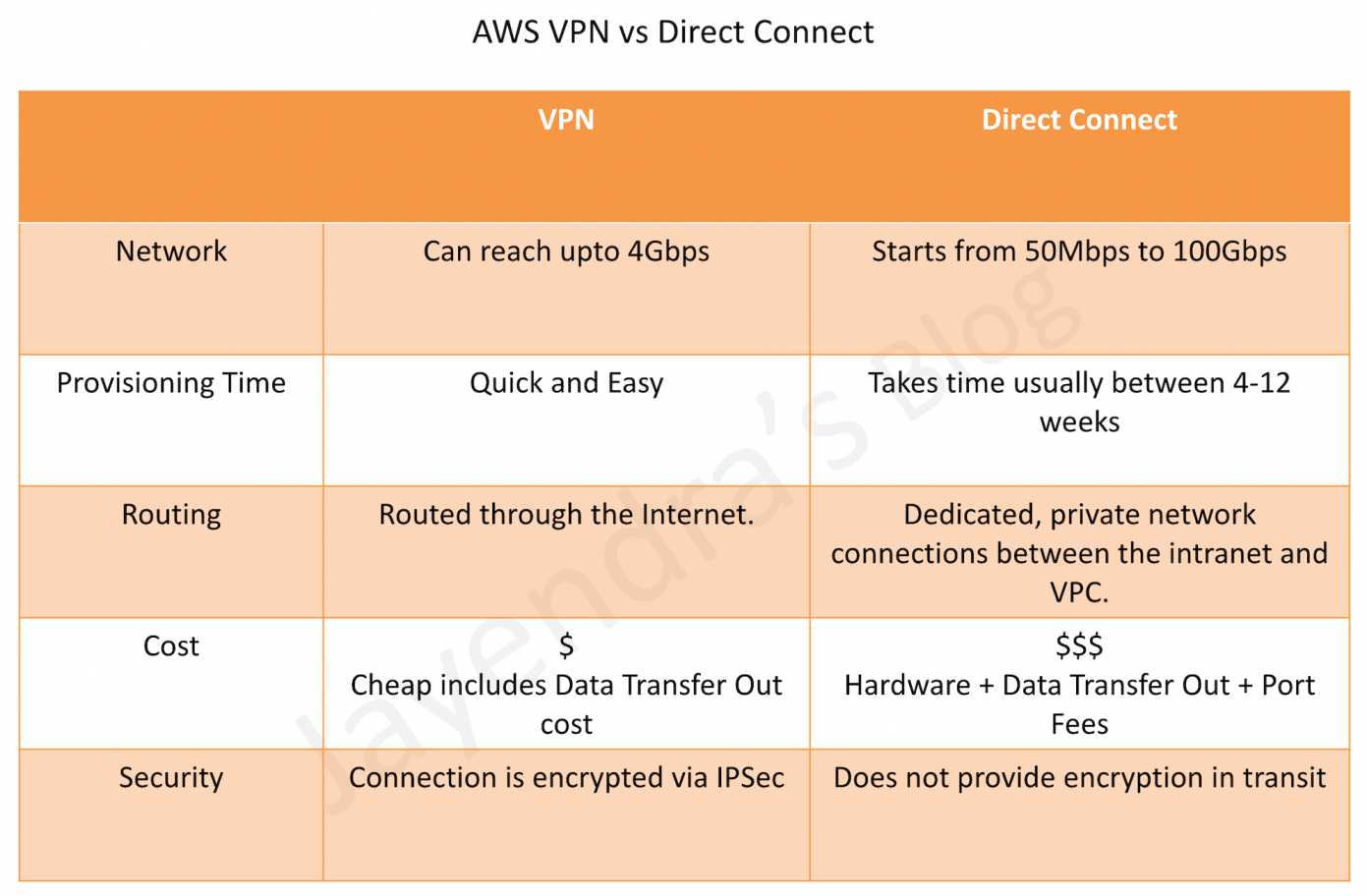
  • AWS VPN Connection utilizes IPSec to establish encrypted network connectivity between the intranet and VPC over the Internet.
  • AWS Direct Connect provides dedicated, private network connections between the intranet and VPC.
  • Setup time
    • VPN Connections can be configured in minutes and are a good solution for immediate needs, have low to modest bandwidth requirements, and can tolerate the inherent variability in Internet-based connectivity.
    • Direct Connect can take anywhere from 4 to 12 weeks
  • Routing
    • VPN traffic is still routed through the Internet.
    • Direct Connect does not involve the Internet; instead, it uses dedicated, private network connections between the intranet and VPC. The network traffic remains on the AWS global network and never touches the public internet. This reduces the chance of hitting bottlenecks or unexpected increases in latency
  • Cost
    • VPN connections are very cheap ($37.20/month as of now)
    • Direct Connect connection as it requires actual hardware and infrastructure and might go in thousands.
  • Encryption in Transit
    • VPN connections encrypt the data in transit.
    • Direct Connect data transfer can now be encrypted using MACsec, however, comes with limitations in terms of supported speed and locations.

Direct Connect vs VPN Comparison

AWS Direct Connect vs VPN

AWS Direct Connect + VPN

AWS Direct Connect + VPN

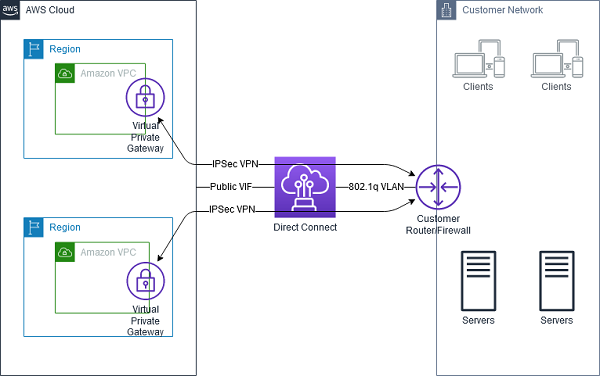
  • AWS Direct Connect + VPN combines the benefits of the end-to-end secure IPSec connection with low latency and increased bandwidth of the AWS Direct Connect to provide a more consistent network experience than internet-based VPN connections.
  • AWS Direct Connect public VIF establishes a dedicated network connection between the on-premises network to public AWS resources, such as an Amazon virtual private gateway IPsec endpoint.
  • A BGP connection is established between the AWS Direct Connect and your router on the public VIF.
  • Another BGP session or a static router will be established between the virtual private gateway and your router on the IPSec VPN tunnel.

Direct Connect + VPN as Backup

Direct Connect with VPN as Backup

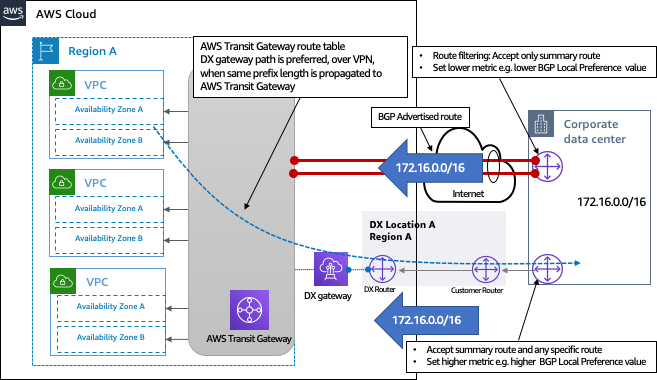
  • VPN can be selected to provide a quick and cost-effective, backup hybrid network connection to an AWS Direct Connect. However, it provides a lower level of reliability and indeterministic performance over the internet
  • Be sure that you use the same virtual private gateway for both Direct Connect and the VPN connection to the VPC.
  • If you are configuring a Border Gateway Protocol (BGP) VPN, advertise the same prefix for Direct Connect and the VPN.
  • If you are configuring a static VPN, add the same static prefixes to the VPN connection that you are announcing with the Direct Connect virtual interface.
  • If you are advertising the same routes toward the AWS VPC, the Direct Connect path is always preferred, regardless of AS path prepending.

AWS Certification Exam Practice Questions

  • Questions are collected from Internet and the answers are marked as per my knowledge and understanding (which might differ with yours).
  • AWS services are updated everyday and both the answers and questions might be outdated soon, so research accordingly.
  • AWS exam questions are not updated to keep up the pace with AWS updates, so even if the underlying feature has changed the question might not be updated
  • Open to further feedback, discussion and correction.
  1. You work as an AWS Architect for a company that has an on-premise data center. They want to connect their on-premise infra to the AWS Cloud.  Note that this connection must have the maximum throughput and be dedicated to the company. How can this be achieved?
    1. Use AWS Express Route
    2. Use AWS Direct Connect
    3. Use AWS VPC Peering
    4. Use AWS VPN
  2. A company wants to set up a hybrid connection between their AWS VPC and their on-premise network. They need to have high bandwidth and less latency because they need to transfer their current database workloads to AWS. Which of the following would you use for this purpose?
    1. AWS Managed software VPN
    2. AWS Managed hardware VPN
    3. AWS Direct Connect
    4. AWS VPC Peering
  3. An organization has established an Internet-based VPN connection between their on-premises data center and AWS. They are considering migrating from VPN to AWS Direct Connect. Which operational concern should drive an organization to consider switching from an Internet-based VPN connection to AWS Direct Connect?
    1. AWS Direct Connect provides greater redundancy than an Internet-based VPN connection.
    2. AWS Direct Connect provides greater resiliency than an Internet-based VPN connection.
    3. AWS Direct Connect provides greater bandwidth than an Internet-based VPN connection.
    4. AWS Direct Connect provides greater control of network provider selection than an Internet-based VPN connection.

AWS Network Firewall vs WAF vs Security Groups vs NACLs

AWS Network Firewall vs WAF vs Security Groups vs NACLs

📅 Updated June 2026: Added AWS WAF Classic EOL notice, Network Firewall Transit Gateway attachment, Web Category-based filtering, WAF AI Bot Control dashboard, Security Group VPC Associations, and AWS Shield Network Security Director.

⚠️ AWS WAF Classic Deprecated

AWS WAF Classic reached End of Life (EOL) on September 30, 2025.

All references to WAF in this post refer to the current AWS WAF (formerly “AWS WAFv2”). If you are still using WAF Classic, you must migrate immediately.

Migration: Use the AWS WAF Classic migration guide and the CreateWebACLMigrationStack API to migrate your web ACLs.

Overview

  • AWS Network Firewall is a stateful, fully managed network firewall and intrusion detection and prevention service (IDS/IPS) for VPCs.
  • AWS WAF is a web application firewall that helps protect web applications from attacks by allowing rules configuration that allow, block, or monitor (count) web requests based on defined conditions.
  • Security groups act as a virtual firewall for associated instances, controlling both inbound and outbound traffic at the instance level.
  • Network access control lists (NACLs) act as a firewall for associated subnets, controlling both inbound and outbound traffic at the subnet level.

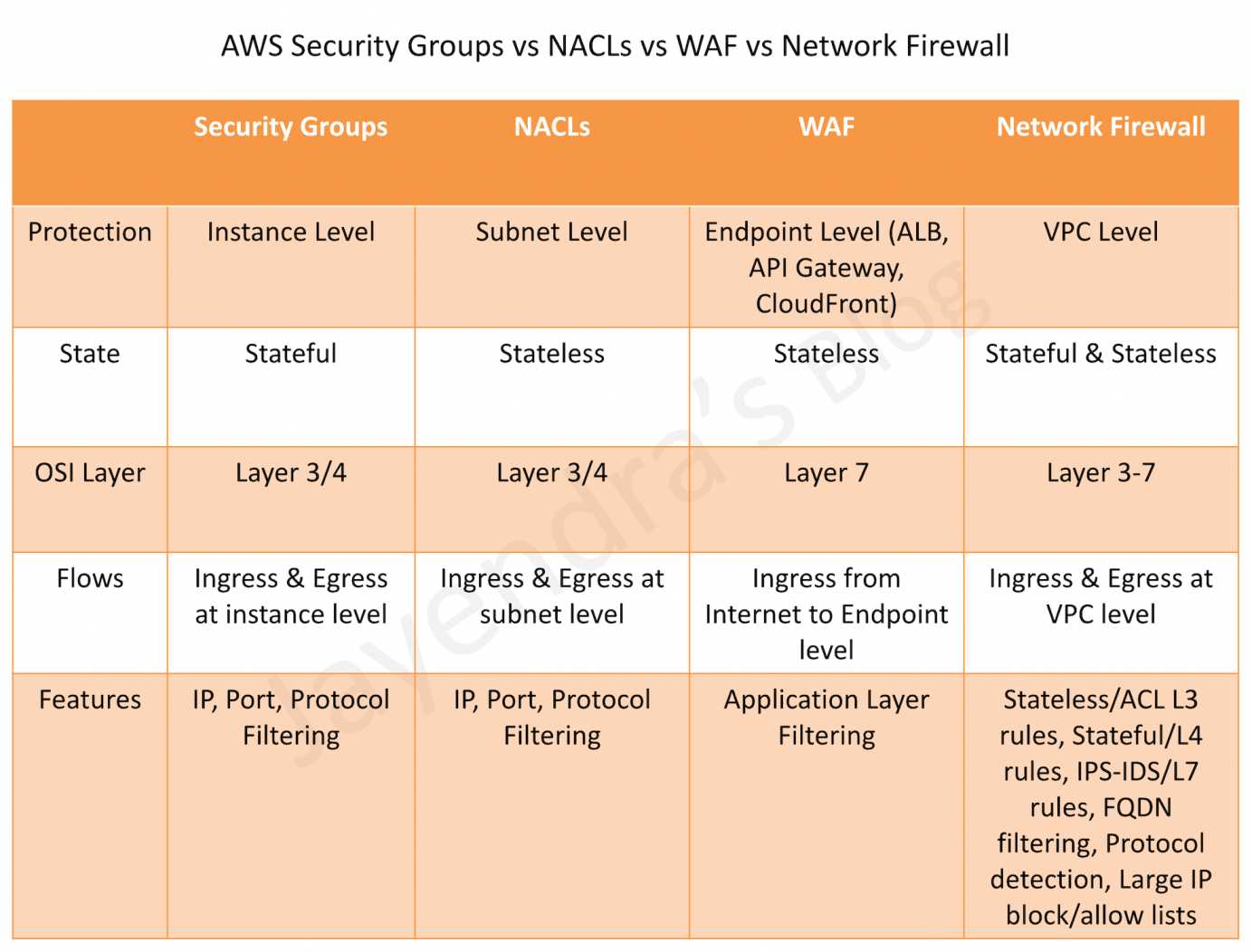
AWS Security Groups vs NACLs vs WAF vs Network Firewall

Comparison Table

Feature Security Groups NACLs AWS WAF AWS Network Firewall
Scope Instance/ENI level Subnet level Application level (Layer 7) VPC level (Layers 3-7)
State Stateful Stateless Stateful Stateful & Stateless
Rules Allow rules only Allow and Deny rules Allow, Block, Count, CAPTCHA, Challenge Allow, Drop, Reject, Alert
Rule Processing All rules evaluated Rules processed in order (lowest number first) Rules processed by priority Rules processed by priority with strict/action order
Traffic Inspection IP, Port, Protocol IP, Port, Protocol HTTP/HTTPS headers, body, URI, query strings IP, Port, Protocol, Domain, HTTP/TLS, IDS/IPS signatures
IDS/IPS No No No (application-level only) Yes (Suricata-compatible)
TLS Inspection No No No (inspects after decryption at ALB/CloudFront) Yes (decrypts and re-encrypts HTTPS traffic)
Domain Filtering No No No Yes (FQDN, SNI, URL categories)
Bot Control No No Yes (650+ bots including AI crawlers) No (use WAF for bot control)
Cost Free Free Pay per web ACL, rule, and requests Pay per endpoint hour and data processed

Security Groups

  • Act as a virtual firewall at the instance/ENI level
  • Stateful – return traffic is automatically allowed regardless of rules
  • Support allow rules only – cannot create deny rules
  • All rules are evaluated before deciding whether to allow traffic
  • Can reference other security groups as sources/destinations (including cross-account)
  • Applied to ENIs – an instance can have multiple security groups
  • Default security group allows all outbound and denies all inbound (except from same group)

Security Group Updates (2024-2026)

  • Security Group VPC Associations (Oct 2024) – Associate a security group with multiple VPCs in the same account and Region, eliminating the need to duplicate security groups across VPCs
  • Shared Security Groups – In shared VPCs, security groups can now be shared with participant accounts using AWS RAM
  • Cross-VPC Security Group Referencing (AWS Cloud WAN) – Create inbound rules referencing security groups in other VPCs attached to AWS Cloud WAN within the same Region

Network Access Control Lists (NACLs)

  • Act as a firewall at the subnet level
  • Stateless – return traffic must be explicitly allowed by rules
  • Support both allow and deny rules
  • Rules are processed in number order (lowest first); processing stops at first match
  • Default NACL allows all inbound and outbound traffic
  • Custom NACLs deny all traffic by default until rules are added
  • Applied automatically to all instances in the associated subnet
  • Provide broad subnet-level protection as a first line of defense

AWS WAF (Web Application Firewall)

  • Operates at Layer 7 (Application Layer) – inspects HTTP/HTTPS requests
  • Protects against common web exploits: SQL injection, XSS, CSRF
  • Deployed on CloudFront, ALB, API Gateway, AppSync, Cognito, App Runner, and Verified Access
  • Rules based on IP addresses, HTTP headers, HTTP body, URI strings, query strings, and geo-location
  • Supports rate-based rules for DDoS mitigation at application layer
  • Managed rule groups from AWS and AWS Marketplace partners
  • Centrally managed using AWS Firewall Manager across accounts

AWS WAF Updates (2024-2026)

  • New Console Experience (June 2025) – Pre-configured protection packs for specific workloads (e-commerce, APIs, transaction processing), automated security recommendations, and a unified dashboard
  • AI Activity Dashboard (Feb 2026) – Bot Control detection catalog covers 650+ unique bots including AI search engine crawlers, AI data collectors, AI assistants, and LLM training crawlers
  • Dynamic Label Interpolation (May 2026) – Forward WAF classification signals to origin and embed context in responses with a single rule
  • Protection Packs – Pre-configured Web ACLs tailored to specific workload types with expert-curated rules that are continuously updated

AWS Network Firewall

  • Operates at Layers 3-7 – provides network-level and application-level filtering
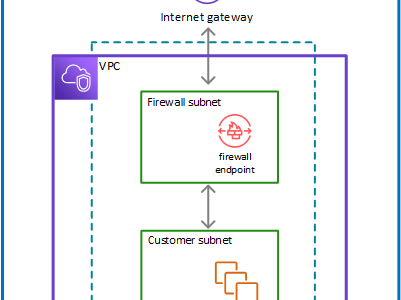
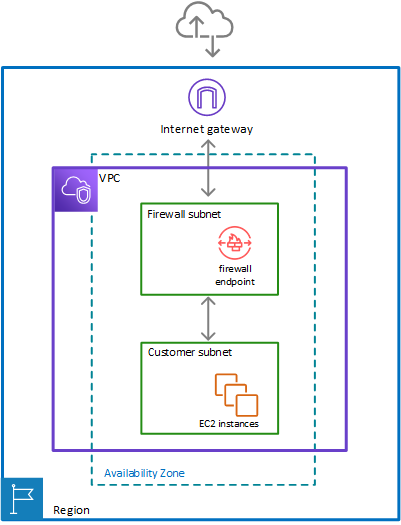
  • Deployed within a VPC using firewall endpoints in dedicated firewall subnets
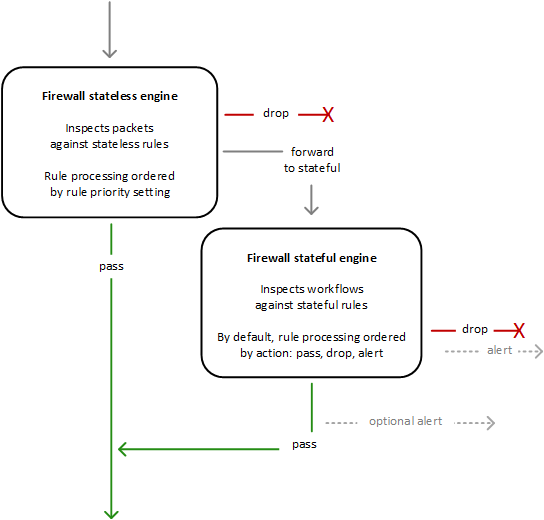
  • Supports both stateful and stateless rule groups
  • Intrusion Detection and Prevention (IDS/IPS) using Suricata-compatible rules
  • Domain name filtering – Allow/deny based on FQDN or SNI for encrypted traffic
  • TLS Inspection – Decrypts and re-encrypts HTTPS traffic for deep packet inspection
  • Supports AWS Managed Rule Groups for active threat defense (malware, botnets, C2 channels)
  • Auto-scales based on traffic load
  • Centrally managed using AWS Firewall Manager
  • Can be shared across accounts using AWS RAM

AWS Network Firewall Updates (2024-2026)

  • Transit Gateway Native Attachment (2026) – Attach Network Firewall directly to Transit Gateway, eliminating the need for a dedicated inspection VPC. Simplifies architecture and enables flexible cost allocation across accounts.
  • Web Category-based Filtering (Jan 2026) – Pre-defined URL categories to control access to GenAI services, social media, streaming sites, and other web categories directly in firewall rules
  • Enhanced Managed Rules from Marketplace Partners (Apr 2026) – Support for up to 10 million domain name indicators and 1 million IP addresses in managed rule groups
  • Price Reductions (Feb 2026) – Hourly and data processing discounts on NAT Gateways service-chained with Network Firewall secondary endpoints
  • Enhanced Console & Monitoring (Sep 2025) – Expanded monitoring insights, advanced TLS inspection features, PrivateLink endpoint analysis, and improved filtering
  • Application Layer Traffic Controls (Sep 2025) – Enhanced default rules for handling TLS client hellos and HTTP requests split across multiple packets

When to Use Each Service

Use Case Recommended Service
Control traffic to/from specific instances Security Groups
Block specific IPs at the subnet level NACLs
Protect web apps from SQL injection, XSS AWS WAF
Block/manage bot traffic and AI crawlers AWS WAF (Bot Control)
Rate limiting at application layer AWS WAF
IDS/IPS for VPC traffic AWS Network Firewall
Domain/FQDN-based egress filtering AWS Network Firewall
TLS traffic inspection (decrypt/re-encrypt) AWS Network Firewall
Block access to GenAI/social media categories AWS Network Firewall (Web Category Filtering)
Centralized inspection across multiple VPCs AWS Network Firewall + Transit Gateway
Centralized policy management across accounts AWS Firewall Manager
Identify misconfigured network security AWS Shield Network Security Director

AWS Shield Network Security Director (Preview)

  • Launched June 2025 as a capability of AWS Shield
  • Discovers compute, networking, and network security resources across your AWS accounts
  • Identifies missing or misconfigured network security services (WAF, Security Groups, NACLs)
  • Provides actionable remediation recommendations based on AWS best practices and threat intelligence
  • Supports multi-account analysis with AWS Organizations integration (Dec 2025)
  • Findings available in AWS Security Hub (Mar 2026)
  • Visualizes network topology and security configuration issues

AWS Firewall Manager

  • Centrally configure and manage firewall rules across multiple accounts and resources in an AWS Organization
  • Manages policies for AWS WAF, AWS Network Firewall, Security Groups, NACLs, and Shield Advanced
  • Automatically applies protections to new accounts and resources as they are added
  • Supports retrofitting – application teams can customize rules in Firewall Manager-managed Web ACLs using console or IaC tools
  • Requires AWS Organizations and a designated Firewall Manager administrator account

Defense in Depth Architecture

AWS recommends a layered security approach combining all four services:

  1. NACLs – First line of defense at subnet boundary; block known malicious IPs
  2. Security Groups – Instance-level access control; allow only required ports/protocols
  3. AWS Network Firewall – VPC-level IDS/IPS, domain filtering, and deep packet inspection
  4. AWS WAF – Application-level protection against web exploits and bot traffic

Use AWS Firewall Manager for centralized policy management and AWS Shield Network Security Director to identify gaps in your security posture.

AWS Certification Exam Practice Questions

Question 1:

A company needs to inspect all egress traffic from their VPC and block access to known malicious domains. They also need IDS/IPS capabilities. Which service should they use?

  1. AWS WAF
  2. Network ACLs
  3. AWS Network Firewall
  4. Security Groups

Answer: C – AWS Network Firewall provides domain-based filtering, IDS/IPS with Suricata-compatible rules, and can inspect all VPC egress traffic. WAF only inspects HTTP/HTTPS at the application layer and requires a load balancer or CloudFront.

Question 2:

A solutions architect needs to protect a web application from SQL injection and cross-site scripting attacks. The application is behind an Application Load Balancer. Which is the MOST appropriate service?

  1. AWS Network Firewall
  2. AWS WAF
  3. Network ACLs
  4. Security Groups

Answer: B – AWS WAF is specifically designed to protect web applications from common exploits like SQL injection and XSS. It integrates directly with ALB to inspect HTTP/HTTPS requests.

Question 3:

A company wants to block a specific IP address from accessing any resources in a subnet. Which service provides the ability to explicitly DENY traffic?

  1. Security Groups
  2. AWS WAF
  3. Network ACLs
  4. AWS Network Firewall

Answer: C – NACLs support both allow and deny rules at the subnet level. Security Groups only support allow rules. While WAF and Network Firewall can also block traffic, NACLs are the most appropriate for simple IP-based subnet-level blocking.

Question 4:

An organization needs to control access to generative AI services from their corporate VPC. They want to block employees from accessing specific AI platforms while allowing approved ones. Which feature should they use?

  1. AWS WAF Bot Control
  2. Security Group rules
  3. AWS Network Firewall with Web Category-based filtering
  4. NACLs with deny rules

Answer: C – AWS Network Firewall’s Web Category-based filtering (launched Jan 2026) enables controlling access to GenAI services using pre-defined URL categories without maintaining individual domain lists.

Question 5:

A company wants to detect and manage AI crawlers and LLM training bots accessing their web application. Which AWS service provides this capability?

  1. AWS Network Firewall
  2. AWS WAF with Bot Control
  3. Security Groups
  4. AWS Shield Advanced

Answer: B – AWS WAF Bot Control’s detection catalog covers 650+ unique bots including AI search engine crawlers, AI data collectors, AI assistants, and LLM training crawlers. The AI Activity Dashboard provides visibility into AI bot traffic patterns.

Question 6:

A company operates multiple VPCs connected via Transit Gateway and wants to centrally inspect all inter-VPC traffic. What is the SIMPLEST architecture using AWS Network Firewall?

  1. Deploy Network Firewall in each VPC
  2. Create a dedicated inspection VPC with firewall endpoints
  3. Attach Network Firewall directly to Transit Gateway
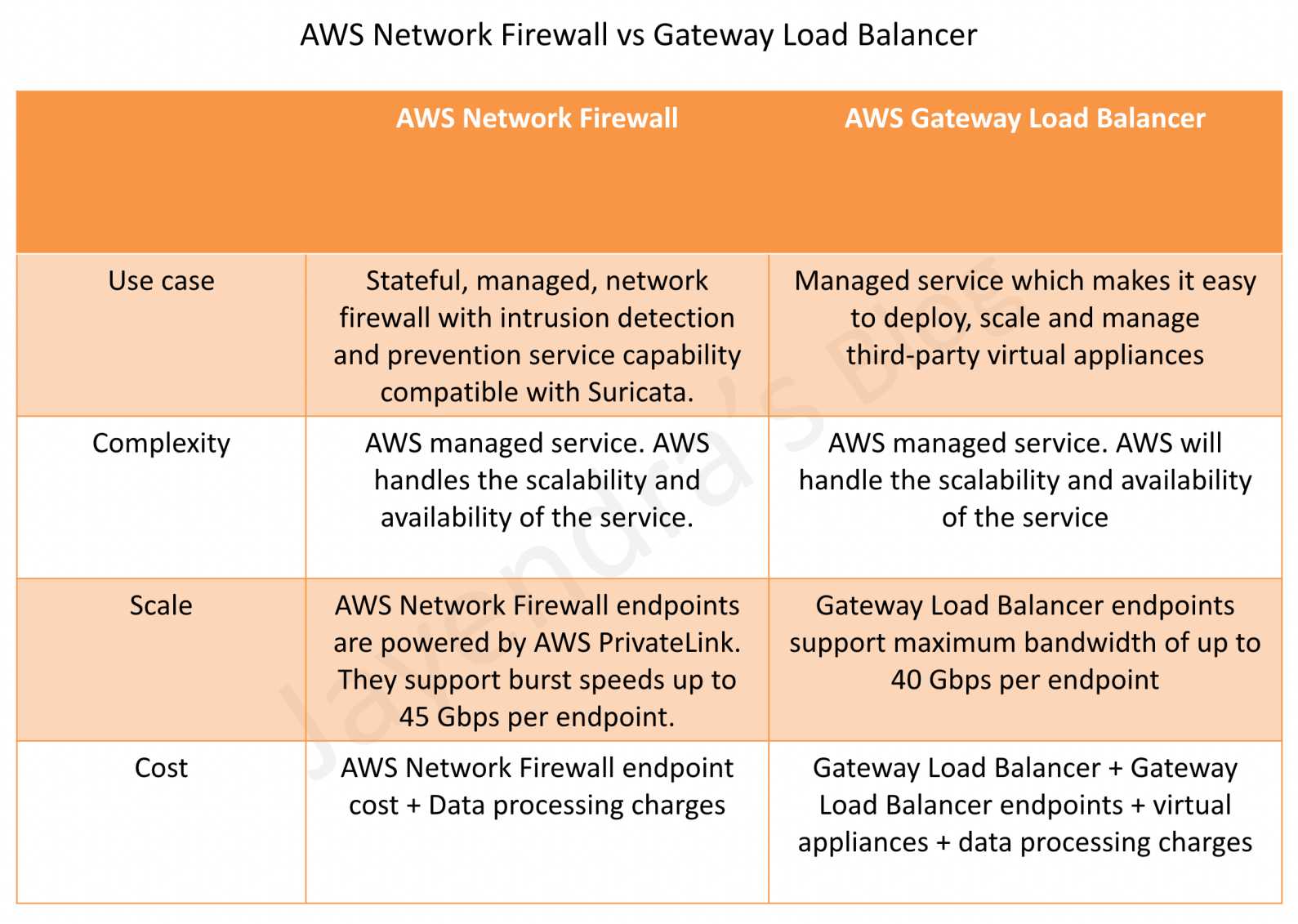
  4. Use Gateway Load Balancer with third-party appliances

Answer: C – AWS Network Firewall now supports native Transit Gateway attachment, eliminating the need for a dedicated inspection VPC. This simplifies architecture by directly attaching the firewall to the Transit Gateway.

Question 7:

Which statement correctly describes the difference between Security Groups and NACLs? (Select TWO)

  1. Security Groups are stateless; NACLs are stateful
  2. Security Groups operate at instance level; NACLs operate at subnet level
  3. Security Groups evaluate all rules; NACLs process rules in order
  4. NACLs support allow rules only; Security Groups support allow and deny
  5. Both Security Groups and NACLs can reference other security groups

Answer: B, C – Security Groups operate at the instance/ENI level and evaluate all rules before making a decision. NACLs operate at the subnet level and process rules in numerical order, stopping at the first match. Security Groups are stateful (not stateless), and NACLs support both allow and deny rules.

Question 8:

A security team needs to identify which AWS resources have misconfigured network security services across their multi-account environment. Which service should they use?

  1. AWS Config
  2. AWS Shield Network Security Director
  3. Amazon Inspector
  4. AWS Firewall Manager

Answer: B – AWS Shield Network Security Director discovers resources across accounts, identifies missing or misconfigured network security services (WAF, Security Groups, NACLs), and provides remediation recommendations. It integrates with AWS Organizations for multi-account analysis.

References

AWS Network Firewall

AWS Network Firewall

AWS Network Firewall

  • AWS Network Firewall is stateful, fully managed, network firewall and intrusion detection and prevention service (IDS/IPS) for VPCs.
  • Network Firewall scales automatically with the network traffic, without the need for deploying and managing any infrastructure.
  • AWS Network Firewall
    • can filter traffic at the perimeter of the VPC. This includes filtering traffic going to and coming from an internet gateway, NAT gateway, or over VPN or AWS Direct Connect.
    • protects the subnets within the VPC by filtering traffic going between the subnets and locations outside of the VPC
    • flexible rules engine allows defining firewall rules that give fine-grained control over network traffic, such as blocking outbound Server Message Block (SMB) requests to prevent the spread of malicious activity.
    • supports importing rules already written in common open source rule formats as well as enables integrations with managed intelligence feeds sourced by AWS partners.
    • works together with AWS Firewall Manager to build policies based on AWS Network Firewall rules and then centrally apply those policies across the VPCs and accounts.
    • helps provide protection from common network threats.
    • can incorporate context from traffic flows, like tracking connections and protocol identification, to enforce policies such as preventing the VPCs from accessing domains using an unauthorized protocol.
    • supports intrusion prevention system (IPS) to provide active traffic flow inspection to help identify and block vulnerability exploits using signature-based detection.
    • uses the open source intrusion prevention system (IPS), Suricata, for stateful inspection and supports Suricata compatible rules.
    • supports web filtering that can stop traffic to known bad URLs and monitor fully qualified domain names.

AWS Network Firewall

AWS Network Firewall Latest Features (2024-2026)

TLS Inspection (Advanced Inspection)

  • AWS Network Firewall now supports TLS inspection capabilities through Advanced Inspection feature.
  • Enables decryption and re-encryption of HTTPS traffic for deep packet inspection of encrypted data.
  • Helps mitigate filter bypass attempts and identify security risks in encrypted traffic.
  • Supports both inbound and outbound TLS inspection configurations.
  • Requires ACM certificates for inbound traffic and ACM Private CA for outbound traffic.
  • Pricing Update (February 2026): AWS removed additional data processing charges for Advanced Inspection, making TLS inspection more cost-effective.

Web Category-Based Filtering (January 2026)

  • New capability for URL and Domain Category filtering using predefined content categories.
  • Enables identification and control of access to:
    • Generative AI (GenAI) services
    • Social media platforms
    • Streaming sites
    • Other web categories
  • Simplifies governance and compliance by allowing category-based rules instead of maintaining extensive URL lists.
  • Works with Suricata compatible rule strings and standard Network Firewall stateful rule groups.
  • When combined with TLS inspection, provides granular control over full URL path inspection.

Enhanced Integration with VPC Lattice

  • AWS Network Firewall now works in combination with Amazon VPC Lattice for comprehensive security architecture.
  • VPC Lattice provides identity-based access controls for HTTP/HTTPS service-to-service communication.
  • Combined approach allows:
    • Deep packet inspection via Network Firewall for traffic requiring malware detection and IPS/IDS
    • Identity-based routing via VPC Lattice for HTTP/HTTPS communications
    • Cost optimization by reducing Network Firewall processing for non-critical traffic

Pricing Improvements (February 2026)

  • NAT Gateway Discounts Extended: Hourly and data processing discounts now apply to both primary and secondary Network Firewall endpoints when service-chained with NAT Gateways.
  • Advanced Inspection Cost Reduction: Removed additional data processing charges ($0.001/GB to $0.009/GB) for TLS inspection in 13 AWS regions.
  • Multiple VPC Endpoint Support: Connect up to 50 VPCs per Availability Zone to a single Network Firewall, reducing operational complexity and costs.

AWS Network Firewall Components

  • Rule Group
    • Holds a reusable collection of criteria for inspecting traffic and for handling packets and traffic flows that match the inspection criteria.
    • Rule groups are either stateless or stateful.
    • Rules configuration includes 5-tuple and domain name filtering.
    • Enhanced with URL Category Filtering: Now supports predefined web categories for simplified governance.
  • Firewall policy
    • Defines a reusable set of stateless and stateful rule groups, along with some policy-level behaviour settings.
    • Firewall policy provides the network traffic filtering behaviour for a firewall.
    • A single firewall policy can be used in multiple firewalls.
    • TLS Inspection Configuration: Can include Advanced Inspection settings for encrypted traffic analysis.
  • Firewall
    • Connects the inspection rules in the firewall policy to the VPC that the rules protect.
    • Each firewall requires one firewall policy.
    • The firewall additionally defines settings like how to log information about the network traffic and the firewall’s stateful traffic filtering.
    • Multiple VPC Endpoints: Supports connecting multiple VPCs (up to 50 per AZ) to a single firewall instance.

Stateless and Stateful Rules Engines

AWS Network Firewall Stateless & Stateful Rules Engine

  • AWS Network Firewall uses two rules engines to inspect packets according to the rules that you provide in your firewall policy.
  • Stateless Rules Engine
    • First, the Stateless engine inspects the packet against the configured stateless rules.
    • Each packet inspection happens in isolation, without regard to factors such as the direction of traffic, or whether the packet is part of an existing, approved connection.
    • This engine prioritizes the speed of evaluation and it takes rules with standard 5-tuple connection criteria.
    • The engine processes the rules in the defined priority order and stops processing when it finds a match.
    • Network Firewall stateless rules are similar in behaviour and use to VPC network access control lists (ACLs).
    • Depending on the packet settings, the stateless inspection criteria, and the firewall policy settings, the stateless engine might
      • drop a packet,
      • pass it through to its destination, or
      • forward it to the stateful rules engine.
  • Stateful Rules Engine
    • Stateful engine inspects packets in the context of their traffic flow, using the configured stateful rules.
    • Packets are inspected in the context of their traffic flow.
    • Stateful rules consider traffic direction. The stateful rules engine might delay packet delivery in order to group packets for inspection.
    • By default, the stateful rules engine processes the rules in the order of their action setting, with pass rules processed first, then drop, and then alert. The engine stops processing when it finds a match.
    • The stateful engine either
      • drops packets or
      • passes them to their destination.
    • Stateful engine activities send flow and alert logs to the firewall’s logs if logging is configured.
    • Stateful engine sends alerts for dropped packets and can optionally send them for passed packets.
    • Stateful rules are similar in behaviour and use to VPC security groups.
    • By default, the stateful rules engine allows traffic to pass, while the security groups default is to deny traffic.
    • Enhanced with TLS Inspection: Can now decrypt and inspect encrypted traffic when Advanced Inspection is enabled.
    • URL Category Support: Supports filtering based on predefined web categories for improved governance.

AWS Network Firewall Use Cases and Best Practices

Modern Deployment Patterns

  • Hybrid Security Architecture: Combine Network Firewall with VPC Lattice for optimal security and cost efficiency.
  • Centralized Inspection: Use for traffic requiring deep packet inspection, malware detection, and IPS/IDS capabilities.
  • GenAI Governance: Implement category-based filtering to control access to AI services and ensure compliance.
  • Educational Institutions: Web filtering with TLS inspection for comprehensive content control.
  • Multi-VPC Architectures: Leverage multiple VPC endpoint capability to protect up to 50 VPCs per AZ cost-effectively.

Integration with AWS Services

  • AWS Transit Gateway: Simplified integration for centralized inspection architectures.
  • AWS Cloud WAN: Service insertion capabilities for global security inspection.
  • AWS Firewall Manager: Centralized policy management across multiple accounts and VPCs.
  • Amazon VPC Lattice: Combined approach for service-to-service communication security.

AWS Network Firewall vs WAF vs Security Groups vs NACLs

AWS Security Groups vs NACLs vs WAF vs Network Firewall

AWS Network Firewall vs Gateway Load Balancer

AWS Network Firewall vs Gateway Load Balancer

AWS Certification Exam Practice Questions

  • Questions are collected from Internet and the answers are marked as per my knowledge and understanding (which might differ with yours).
  • AWS services are updated everyday and both the answers and questions might be outdated soon, so research accordingly.
  • AWS exam questions are not updated to keep up the pace with AWS updates, so even if the underlying feature has changed the question might not be updated
  • Open to further feedback, discussion and correction.
  1. A company needs to inspect encrypted HTTPS traffic for malware detection in their VPC. Which AWS Network Firewall feature should they implement?
    • A. Stateful rule groups with domain filtering
    • B. Advanced Inspection with TLS inspection
    • C. Stateless rules with 5-tuple matching
    • D. URL category filtering

    Answer: B
    Advanced Inspection with TLS inspection enables decryption and re-encryption of HTTPS traffic for deep packet inspection of encrypted data, allowing malware detection in encrypted traffic.

  2. An organization wants to block access to social media and streaming platforms across their AWS environment. Which Network Firewall feature provides the most efficient solution?
    • A. Creating individual domain-based stateful rules for each platform
    • B. Using URL category-based filtering with predefined categories
    • C. Implementing custom Suricata rules for each service
    • D. Configuring stateless rules with IP address ranges

    Answer: B
    URL category-based filtering allows blocking entire categories like social media and streaming platforms using predefined categories, which is more efficient than maintaining individual rules.

  3. A company has 40 VPCs that need firewall protection. What is the most cost-effective approach using AWS Network Firewall?
    • A. Deploy a separate Network Firewall in each VPC
    • B. Use a single Network Firewall with multiple VPC endpoints (up to 50 per AZ)
    • C. Implement AWS WAF for all VPCs
    • D. Use VPC security groups only

    Answer: B
    Network Firewall supports connecting up to 50 VPCs per Availability Zone to a single firewall instance, reducing operational complexity and costs compared to individual firewalls.

  4. Which combination provides the most comprehensive and cost-effective security architecture for service-to-service communication?
    • A. AWS Network Firewall only for all traffic
    • B. Amazon VPC Lattice only for all communications
    • C. AWS Network Firewall for deep packet inspection and VPC Lattice for HTTP/HTTPS identity-based controls
    • D. AWS WAF and Application Load Balancer

    Answer: C
    The combined approach uses Network Firewall for traffic requiring deep packet inspection and VPC Lattice for HTTP/HTTPS service communications with identity-based controls, optimizing both security and cost.

  5. A financial institution needs to control access to GenAI services while maintaining compliance. Which AWS Network Firewall feature is most appropriate?
    • A. Stateless rules with port-based filtering
    • B. Traditional domain-based stateful rules
    • C. URL category filtering with GenAI category controls
    • D. IPS/IDS signature-based detection only

    Answer: C
    URL category filtering includes predefined GenAI categories, allowing institutions to easily control access to AI services while meeting compliance requirements.

References

AWS Certified Solutions Architect – Professional (SAP-C01) Exam Learning Path

AWS Certified Solutions Architect - Professional certificate

AWS Certified Solutions Architect – Professional (SAP-C01) Exam Learning Path

NOTE – Refer to SAP-C02 Learning Path

  • AWS Certified Solutions Architect – Professional (SAP-C01) exam is the upgraded pattern of the previous Solution Architect – Professional exam which was released in the year (2018) and would be upgraded this year (Nov. 2022).
  • I recently recertified the existing pattern and the difference is quite a lot between the previous pattern and the latest pattern. The amount of overlap between the associates and professional exams and even the Solutions Architect and DevOps has drastically reduced.

AWS Certified Solutions Architect – Professional (SAP-C01) exam basically validates

  • Design and deploy dynamically scalable, highly available, fault-tolerant, and reliable applications on AWS
  • Select appropriate AWS services to design and deploy an application based on given requirements
  • Migrate complex, multi-tier applications on AWS
  • Design and deploy enterprise-wide scalable operations on AWS
  • Implement cost-control strategies

Refer to AWS Certified Solutions Architect – Professional Exam Guide

AWS Certified Solutions Architect - Professional Exam Domains

AWS Certified Solutions Architect – Professional (SAP-C01) Exam Resources

AWS Certified Solutions Architect – Professional (SAP-C01) Exam Summary

  • AWS Certified Solutions Architect – Professional (SAP-C01) exam was for a total of 170 minutes and it had 75 questions.
  • AWS Certified Solutions Architect – Professional (SAP-C01) focuses a lot on concepts and services related to Architecture & Design, Scalability, High Availability, Disaster Recovery, Migration, Security and Cost Control.
  • Each question mainly touches multiple AWS services.
  • Questions and answers options have a lot of prose and a lot of reading that needs to be done, so be sure you are prepared and manage your time well.
  • As always, mark the questions for review and move on and come back to them after you are done with all.
  • As always, having a rough architecture or mental picture of the setup helps focus on the areas that you need to improve. Trust me, you will be able to eliminate 2 answers for sure and then need to focus on only the other two. Read the other 2 answers to check the difference area and that would help you reach the right answer or at least have a 50% chance of getting it right.

AWS Certified Solutions Architect – Professional (SAP-C01) Exam Topics

Storage

  • S3
    • S3 Permissions & S3 Data Protection
      • S3 bucket policies to control access to VPC Endpoints
    • S3 Storage Classes & Lifecycle policies
      • covers S3 Standard, Infrequent access, intelligent tier and Glacier for archival and object transitions & deletions for cost management.
    • S3 Transfer Acceleration can be used for fast, easy, and secure transfers of files over long distances between the client and an S3 bucket.
    • supports the same and cross-region replication for disaster recovery.
    • integrates with CloudFront for caching to improve performance
    • S3 supports Object Lock and Glacier supports Vault lock to prevent the deletion of objects, especially required for compliance requirements.
    • supports S3 Select feature to query selective data from a single object.
  • Elastic Block Store
    • EBS Backup using snapshots for HA and Disaster recovery
    • Data Lifecycle Manager can be used to automate the creation, retention, and deletion of snapshots taken to back up the EBS volumes.
  • Storage Gateway
  • Elastic File System
    • provides a fully managed, scalable, serverless, shared and cost-optimized file storage for use with AWS and on-premises resources.
    • supports cross-region replication for disaster recovery
    • supports storage classes like S3
  • AWS Transfer Family
    • provides a secure transfer service (FTP, SFTP, FTPs) that helps transfer files into and out of AWS storage services.
    • supports transferring data from or to S3 and EFS.
  • FSx for Lustre
    • managed, cost-effective service to launch and run the HPC high-performance Lustre file system.

Database

  • DynamoDB
    • DynamoDB Auto Scaling
    • DynamoDB Streams for tracking changes
    • TTL to expire objects automatically and cost-effectively.
    • Global tables for multi-master, active-active inter-region storage needs.
    • Global tables do not support strong global consistency
    • DynamoDB Accelerator – DAX for seamlessly caching to reduce the load on DynamoDB for read-heavy requirements.
  • RDS
    • supports cross-region read replicas ideal for disaster recovery with low RTO and RPO.
    • provides RDS proxy for effective database connection polling
    • RDS Multi-AZ vs Read Replicas
  • Aurora
    • fully managed, MySQL- and PostgreSQL-compatible, relational database engine
    • supports Aurora Serverless to on-demand, autoscaling configuration
    • Aurora Global Database consists of one primary AWS Region where the data is mastered, and up to five read-only, secondary AWS Regions. It is a multi-master setup but can be used for disaster recovery.
  • DocumentDB as a replacement for MongoDB

Data Migration & Transfer

  • Cloud Migration Services
    • Cloud Migration (hint: make sure you understand the difference between rehost, replatform, and rearchitect
    • Server Migration Service helps to migrate servers and applications.
    • Database Migration Service
      • enables quick and secure data migration with minimal to zero downtime
      • supports Full and Change Data Capture – CDC migration to support continuous replication for zero downtime migration.
      • homogeneous migrations such as Oracle to Oracle, as well as heterogeneous migrations (using SCT) between different database platforms, such as Oracle or Microsoft SQL Server to Aurora.
      • Hint: Elasticsearch is not supported as a target by DMS
    • Snow Family
      • Ideal for one-time big data transfers usually for use cases with limited bandwidth from on-premises to AWS.
  • Application Discovery Service
    • Agent ones can be used for hyper-v and physical services
    • Agentless can be used for VMware but does not track processes.
  • Disaster Recovery
    • Disaster Recovery whitepaper, although outdated, make sure you understand the difference between each type esp. pilot light, warm standby w.r.t RTO and RPO.
    • Compute
      • Make components available in an alternate region,
      • either as AMIs that can be restored
      • CloudFormation to create infra as needed
      • partial which can be scaled once the failover happens
      • or fully running compute in active-active confirmation with health checks.
    • Storage
      • S3 and EFS support cross-region replication
      • DynamoDB supports Global tables for multi-master, active-active inter-region storage needs.
      • Aurora Global Database provides a multi-master setup but can be used for disaster recovery.
      • RDS supports cross-region read replicas which can be promoted to master in case of a disaster. This can be done using Route 53, CloudWatch and lambda functions.
    • Network
      • Route 53 failover routing with health checks to failover across regions.

Networking & Content Delivery

  • VPC – Virtual Private Cloud
    • Understand Security Groups, NACLs (Hint: know NACLs are stateless and need to open ephemeral ports for response traffic )
    • Understand VPC Gateway Endpoints to provide access to S3 and DynamoDB (hint: know how to restrict access on S3 to specific VPC Endpoint)
    • Understand VPC Interface Endpoints or PrivateLink to provide access to a variety of services like SQS, Kinesis or Private APIs exposed through NLB.
    • Understand VPC Flow Logs
    • Understand VPC Peering to enable communication between VPCs within the same or different regions. (hint: VPC peering does not support transitive routing)
  • Route 53
    • Routing Policies
      • focus on Weighted, Latency and failover routing policies
      • failover routing provides active-passive configuration for disaster recovery while the others are active-active configuration.
    • Route 53 Resolver
      • Outbound endpoint for AWS -> On-premises DNS query resolution
      • Inbound endpoint for On-premises DNS query resolution
  • CloudFront
    • fully managed, fast CDN service that speeds up the distribution of static, dynamic web or streaming content to end-users.
    • supports multiple origins including S3, ALB etc.
    • does not support Auto Scaling as an origin
    • supports Geo-restriction
    • supports Lambda@Edge and Cloud Functions to execute code closer to the user.
    • Lambda@Edge can be used for quick auth checks, and redirect users based on request data.
    • Security can be enhanced by whitlisting CloudFront IPs or adding custom header in CloudFront and verifiing it in ALB.
  • API Gateway
    • supports throttling, caching and helps define usage plans with API keys to identify clients
    • provides regional and edge-optimized endpoint types
    • supports authentication mechanisms, such as AWS IAM policies, Lambda authorizer functions, and Amazon Cognito user pools.
  • Load Balancer – ELB, ALB and NLB 
  • Global Accelerator
    • optimizes the path to applications to keep packet loss, jitter, and latency consistently low.
    • helps improve the performance of the applications by lowering first-byte latency
    • provides 2 static IP address
    • does not preserve the client’s IP address with NLB
  • Transit Gateway or Transit VPC
    • is a network transit hub that can be used to interconnect VPCs and on-premises networks via Direct Connect or VPN.
    • Transit Gateway is regional and Transit Gateway Peering needs to be configured to peer regional Transit gateways.
  • Placement Groups
    • Cluster placement group with Enhanced Networking for HPC
    • Spread placement group for fault tolerance and high availability.
  • Direct Connect & VPN
    • provide on-premises to AWS connectivity
    • know Direct Connect vs VPN
    • VPN can provide a cost-effective, quick failover for Direct Connect.
    • VPN over Direct Connect provides a secure dedicated connection and requires a public virtual interface.
    • Direct Connect Gateway is a global network device that helps establish connectivity that spans VPCs spread across multiple AWS Regions with a single Direct Connect connection.

Security, Identity & Compliance

  • AWS Identity and Access Management
  • AWS Shield & Shield Advanced
    • for DDoS protection and integrates with Route 53, CloudFront, ALB and Global Accelerator.
  • AWS WAF
    • protects from common attack techniques like SQL injection and Cross-Site Scripting (XSS), Conditions based include IP addresses, HTTP headers, HTTP body, and URI strings.
    • integrates with CloudFront, ALB, and API Gateway.
    • supports Web ACLs and can block traffic based on IPs, Rate limits, and specific countries as well.
  • ACM – AWS Certificate Manager
    • helps easily provision, manage, and deploy public and private SSL/TLS certificates
    • is regional and you need to request certificates in all regions and associate individually in all regions.
    • does not provide certificates for EC2 instances.
  • AWS KMS – Key Management Service
    • managed encryption service that allows the creation and control of encryption keys to enable data encryption.
    • KMS Multi-region keys
      • are AWS KMS keys in different AWS Regions that can be used interchangeably – as though having the same key in multiple Regions.
      • are not global and each multi-region key needs to be replicated and managed independently.
  • Secrets Manager
    • helps protect secrets needed to access applications, services, and IT resources.
    • Secrets Manager vs SSM Parameter Store.
      • Supports automatic rotation of secrets, which is not provided by SSM Parameter Store.
      • Costs more than SSM Parameter Store.

Compute

  • EC2
  • Auto Scaling
  • Elastic Beanstalk supports Blue/Green deployment using swap URLs.
  • Lambda
    • Lambda running in VPC requires NAT Gateway to communicate with external public services
    • Lambda CPU can be increased by increasing memory only.
    • helps define reserved concurrency limit to reduce the impact
    • Lambda Alias now supports canary deployments
  • ECS – Elastic Container Service
    • container management service that supports Docker containers
    • supports two launch types – EC2 and Fargate which provides the serverless capability
    • For least privilege, the role should be assigned to the Task.
    • awsvpc network mode gives ECS tasks the same networking properties as EC2 instances.

Management & Governance tools

  • AWS Organizations
  • Systems Manager
    • AWS Systems Manager and its various services like parameter store, patch manager
    • Parameter Store provides secure, scalable, centralized, hierarchical storage for configuration data and secret management. Does not support secrets rotation. Use Secrets Manager.
    • Session Manager helps manage EC2 instances through an interactive one-click browser-based shell or through the AWS CLI without opening ports or creating bastion hosts.
    • Patch Manager helps automate the process of patching managed instances with both security-related and other types of updates.
  • CloudWatch
  • CloudTrail
    • for audit and governance
    • With Organizations, the trail can be configured to log CloudTrail from all accounts to a central account.
  • CloudFormation
    • Handle disaster Recovery by automating the infra to replicate the environment across regions.
    • Deletion Policy to prevent, retain or backup RDS, EBS Volumes
    • Stack policy can prevent stack resources from being unintentionally updated or deleted during a stack update. Stack Policy only applies for Stack updates and not stack deletion.
    • StackSets helps to create, update, or delete stacks across multiple accounts and Regions with a single operation.
  • Control Tower
    • to setup, govern, and secure a multi-account environment
    • strongly recommended guardrails cover EBS encryption
  • Service Catalog
    • allows organizations to create and manage catalogues of IT services that are approved for use on AWS with minimal permissions.
  • Trusted Advisor
    • helps with cost optimization and service limits in addition to security, performance and fault tolerance.
  • Compute Optimizer recommends optimal AWS resources for the workloads to reduce costs and improve performance by using machine learning to analyze historical utilization metrics.
  • AWS Budgets to see usage-to-date and current estimated charges from AWS, set limits and provide alerts or notifications.
  • Cost Allocation Tags can be used to organize AWS resources, and cost allocation tags to track the AWS costs on a detailed level.
  • Cost Explorer helps visualize, understand, manage and forecast the AWS costs and usage over time.

Analytics

Integration Tools

  • SQS in terms of loose coupling and scaling.
    • Difference between SQS Standard and FIFO esp. with throughput and order
    • SQS supports dead letter queues
  • CloudWatch integration with SNS and Lambda for notifications.

Architecture & Design Flows

AWS Application Load Balancer – ALB

AWS Application Load Balancer – ALB

📌 Last Updated: June 2026

This post has been updated to include the latest ALB features including Mutual TLS (mTLS) support, gRPC protocol support, HTTP/2 end-to-end, Built-in Authentication (OIDC/Cognito), JWT Verification, Automatic Target Weights (ATW), Target Optimizer, URL/Host Header Rewrite, HTTP Header Modification, LCU Capacity Reservation, and VPC IPAM integration.

  • Application Load Balancer operates at layer 7 (application layer) and allows defining routing rules based on content across multiple services or containers running on one or more EC2 instances.
  • scales the load balancer as traffic to the application changes over time.
  • can scale to the vast majority of workloads automatically.
  • supports health checks, used to monitor the health of registered targets so that the load balancer can send requests only to the healthy targets.
  • supports HTTP, HTTPS, and gRPC protocols for listeners.

Application Load Balancer Components

  • A load balancer
    • serves as the single point of contact for clients.
    • distributes incoming application traffic across multiple targets, such as EC2 instances, in multiple AZs, which increases the availability of the application.
    • one or more listeners can be added to the load balancer.
  • A listener
    • checks for connection requests from clients, using the configured protocol and port
    • rules defined determine, how the load balancer routes request to its registered targets.
    • each rule consists of a priority, one or more actions, and one or more conditions.
    • supported actions are
      • forward,
      • redirect,
      • fixed-response,
      • authenticate-oidc,
      • authenticate-cognito,
      • jwt-validation
    • supported rule conditions are
      • host-header
      • http-request-method
      • path-pattern
      • source-ip
      • http-header
      • query-string
    • when the conditions for a rule are met, its actions are performed.
    • a default rule for each listener must be defined, and optionally additional rules can be defined
  • Target group
    • routes requests to one or more registered targets, such as EC2 instances, using the specified protocol and port number
    • a target can be registered with multiple target groups.
    • health checks can be configured on a per target group basis.
    • health checks are performed on all targets registered to a target group that is specified in a listener rule for the load balancer.
    • target group supports the following target types:
      • EC2 instances (can be managed as a part of the ASG)
      • ECS tasks
      • Lambda functions
      • Private IP Addresses on AWS or On-premises over VPN or DX.
    • supports weighted target group routing
      • enables routing of the traffic forwarded by a rule to multiple target groups.
      • enables use cases like blue-green, canary and hybrid deployments without the need for multiple load balancers.
      • also enables zero-downtime migration between on-premises and cloud or between different compute types like EC2 and Lambda.
    • supports Slow Start Mode
      • allows newly registered targets to warm up before receiving their full share of traffic.
      • ALB linearly ramps up traffic over a configurable duration (30-900 seconds).
      • useful for applications that need time for caching, JIT compilation, or resource initialization.
  • When a load balancer receives a request, it evaluates the listener rules in priority order to determine which rule to apply and then selects a target from the target group for the rule action.
  • Listener rules can be configured to route requests to different target groups based on the content of the application traffic.
  • Routing is performed independently for each target group, even when a target is registered with multiple target groups.
  • Routing algorithm used can be configured at the target group level.
  • Supported routing algorithms:
    • Round Robin (default) – distributes requests evenly across targets
    • Least Outstanding Requests (LOR) – routes to the target with fewest pending requests
    • Weighted Random – used by Automatic Target Weights (ATW) for anomaly mitigation

Application Load Balancer Features

  • supports load balancing of applications using HTTP, HTTPS (Secure HTTP), and gRPC protocols
  • supports HTTP/2, which is enabled natively. Clients that support HTTP/2 can connect over TLS
  • supports end-to-end HTTP/2, enabling gRPC workloads between microservices or between gRPC-enabled clients and services (launched Oct 2020)
  • supports gRPC protocol natively
    • provides health checks that examine gRPC status codes
    • provides metrics for gRPC request count and access logs that differentiate gRPC requests
    • supports gRPC-specific response headers
    • requires HTTPS listener and gRPC protocol version for the target group
  • supports WebSockets and Secure WebSockets natively
  • supports Request tracing, by default.
    • request tracing can be used to track HTTP requests from clients to targets or other services.
    • Load balancer upon receiving a request from a client, adds or updates the X-Amzn-Trace-Id header before sending the request to the target
    • Any services or applications between the load balancer and the target can also add or update this header.
  • supports Sticky Sessions (Session Affinity) using load balancer generated cookies or application-based cookies, to route requests from the same client to the same target
  • supports SSL/TLS termination, to decrypt the request on ALB before sending it to the underlying targets.
    • an SSL certificate can be installed on the load balancer.
    • the load balancer uses this certificate to terminate the connection and then decrypt requests from clients before sending them to targets.
  • supports Mutual TLS (mTLS) authentication (launched Nov 2023)
    • enables mutual authentication between clients and the load balancer
    • ALB authenticates client X.509 certificates and performs revocation checks
    • supports certificates issued by third-party CAs or AWS Private Certificate Authority (ACM PCA)
    • simplifies authentication management and reduces the load on backend applications
    • available in all commercial AWS Regions and GovCloud (US) Regions
  • supports Built-in Authentication (OIDC and Cognito)
    • ALB can authenticate users before routing requests to backend targets
    • supports Amazon Cognito user pools for user management
    • supports any OpenID Connect (OIDC) compliant identity provider (Okta, Google, etc.)
    • handles the OAuth 2.0 flow, validates tokens, and forwards authenticated requests with user claims in HTTP headers
    • eliminates the need for authentication code in backend applications
  • supports JWT Verification (launched Nov 2025)
    • validates JSON Web Tokens (JWTs) included in request headers
    • validates token signatures, expiration times (‘exp’), issuer (‘iss’), and optional claims (‘nbf’, ‘iat’)
    • enables client credential flow without requiring application code modifications
    • configured as a listener rule action type (jwt-validation)
  • supports layer 7 specific features like X-Forwarded-For headers to help determine the actual client IP, port and protocol
  • automatically scales its request handling capacity in response to incoming application traffic.
  • supports hybrid load balancing,
    • If an application runs on targets distributed between a VPC and an on-premises location, they can be added to the same target group using their IP addresses
  • provides High Availability, by allowing you to specify more than one AZ and distribution of incoming traffic across multiple AZs.
  • integrates with ACM to provision and bind an SSL/TLS certificate to the load balancer thereby making the entire SSL offload process very easy
  • supports multiple certificates using Server Name Indication (SNI)
    • host multiple TLS secured applications behind a single ALB
    • ALB automatically selects the optimal TLS certificate for each client using a smart selection algorithm
  • supports IPv6 addressing, for an Internet-facing load balancer
  • supports Cross-zone load balancing, by default
  • supports Security Groups to control the traffic allowed to and from the load balancer.
  • provides Access Logs, to record all requests sent to the load balancer, and store the logs in S3 for later analysis in compressed format
  • provides Delete Protection, to prevent the ALB from accidental deletion
  • supports Connection Idle Timeout – ALB maintains two connections for each request one with the Client (front end) and one with the target instance (back end). If no data has been sent or received by the time that the idle timeout period elapses, ALB closes the front-end connection
  • integrates with CloudWatch to provide metrics, such as request counts, error counts, error types, and request latency
  • integrates with AWS WAF, a web application firewall that helps protect web applications from attacks by allowing rules configuration based on IP addresses, HTTP headers, and custom URI strings
  • integrates with CloudTrail to receive a history of ALB API calls made on the AWS account
  • supports Desync Mitigation Mode to protect applications from HTTP desync attacks
    • classifies requests based on threat level using the HTTP Desync Guardian library
    • modes: Defensive (default), Strictest, and Monitor
  • supports Outpost deployment for on-premises workloads
  • supports Local Zones for low-latency applications

Automatic Target Weights (ATW)

  • Launched November 2023 to detect and mitigate gray failures for targets behind ALB
  • A gray failure occurs when a target passes health checks but still returns errors to clients
  • ATW analyzes HTTP status codes and TCP/TLS error rates to identify anomalous targets
  • When underperforming targets are identified, ATW iteratively reduces traffic to the affected target
  • If the target recovers, ALB gradually increases traffic back to its original level
  • Uses the Weighted Random routing algorithm for anomaly mitigation
  • Configured at the target group level as a target group attribute
  • Complements active health checks by addressing partial failures that health checks cannot detect

Target Optimizer

  • Launched November 2025 to deliver optimal concurrency to each target
  • Allows you to enforce a maximum number of concurrent requests on a target
  • Ensures targets receive only the number of requests they can process
  • Achieves higher request success rate, better target utilization, and lower latency
  • Particularly useful for compute-intensive workloads (AI/ML inference, media processing)
  • Returns 503 errors when targets are at capacity rather than overloading them
  • Configured at the target group level

HTTP Header Modification

  • Launched November 2024 for enhanced traffic control and security
  • Provides three key capabilities:
    • Header Rename – rename ALB-generated TLS headers (mTLS and TLS headers) for seamless backend integration
    • Header Insertion – insert custom response headers including CORS and security headers like HSTS
    • Server Header Suppression – disable the ALB-generated “Server” header to reduce server-specific information exposure
  • Must be enabled on each listener individually

URL and Host Header Rewrite

  • Launched October 2025 for advanced request transformation
  • Enables modification of request URLs and Host Headers using regex-based pattern matching before routing to targets
  • Supports regex matches based on request parameters
  • Can rewrite both host headers and URL paths in a single rule
  • Eliminates the need for custom proxy layers or Lambda@Edge for URL transformations

VPC IPAM Integration

  • Launched March 2025 for predictable IP address management
  • Allows internet-facing ALBs to use IP addresses from Amazon VPC IPAM pools
  • Enables Bring Your Own IP (BYOIP) use cases for ALBs
  • ALB automatically switches to AWS-managed IP addresses when IPAM pool is depleted
  • Useful for organizations that need allowlisted or predictable IP addresses

LCU Capacity Reservation

  • Launched January 2025 to prepare for planned traffic spikes
  • Allows you to reserve a minimum capacity for your ALB proactively
  • Eliminates the need to open AWS support cases for pre-warming
  • Useful for planned events such as product launches, sales, or traffic migrations
  • Capacity is reserved at the regional level and distributed across AZs
  • Reserved capacity can be increased anytime; decreased up to two times per day
  • Charged per reserved LCU per minute, plus additional LCUs used beyond reservation

Resource Map

  • Launched March 2024 in the AWS Management Console
  • Displays all ALB resources and their relationships in a visual format on a single page
  • Provides clear understanding of ALB architecture (listeners, rules, target groups, targets)
  • Includes an Unhealthy Target Map view to display only unhealthy targets and associated resources
  • Useful for troubleshooting and architecture visualization

Classic Load Balancer vs Application Load Balancer vs Network Load Balancer

Refer Blog Post @ Classic Load Balancer vs Application Load Balancer vs Network Load Balancer

Application Load Balancer Benefits

  • Support for Path-based routing, where listener rules can be configured to forward requests based on the URL in the request. This enables structuring applications as smaller services (microservices), and route requests to the correct service based on the content of the URL.
  • Support for routing requests to multiple services on a single EC2 instance by registering the instance using multiple ports using Dynamic Port mapping.
  • Support for containerized applications. EC2 Container Service (ECS) can select an unused port when scheduling a task and register the task with a target group using this port, enabling efficient use of the clusters.
  • Support for monitoring the health of each service independently, as health checks are defined at the target group level and many CloudWatch metrics are reported at the target group level.
  • Attaching a target group to an Auto Scaling group enables scaling each service dynamically based on demand.
  • Support for built-in user authentication using OIDC or Amazon Cognito, eliminating custom authentication code.
  • Support for gRPC and end-to-end HTTP/2 workloads for modern microservice architectures.
  • Support for Mutual TLS (mTLS) for enhanced zero-trust security.

Application Load Balancer Listeners

  • A listener is a process that checks for connection requests, using the configured protocol and port
  • Listener supports HTTP & HTTPS protocol with Ports from 1-65535
  • ALB supports SSL Termination for HTTPS listeners, which helps to offload the work of encryption and decryption so that the targets can focus on their main work.
  • HTTPS listener must have at least one SSL server certificate on the listener
  • supports multiple TLS certificates using SNI (Server Name Indication) on a single HTTPS listener
  • WebSockets with both HTTP and HTTPS listeners (Secure WebSockets)
  • Supports HTTP/2 with HTTPS listeners
    • 128 requests can be sent in parallel using one HTTP/2 connection.
    • ALB can forward HTTP/2 end-to-end to targets (for gRPC) or convert to individual HTTP/1.1 requests
    • HTTP/2 uses front-end connections more efficiently resulting in fewer connections between clients and the load balancer.
    • Server-push feature of HTTP/2 is not supported
  • Each listener has a default rule, and can optionally define additional rules.
  • Each rule consists of a priority, one or more actions, one or more conditions, and optional transforms.
    • Priority – Rules are evaluated in priority order, from the lowest value to the highest value. The default rule has the lowest priority
    • Action – Supported action types: forward, redirect, fixed-response, authenticate-oidc, authenticate-cognito, jwt-validation
    • Condition – Supported conditions: host-header, path-pattern, http-request-method, source-ip, http-header, query-string
    • Transform – Supports URL rewrite and host header rewrite using regex patterns (launched Oct 2025)
  • Host Condition or Host-based routing
    • Host conditions can be used to define rules that forward requests to different target groups based on the hostname in the host header
    • This enables support for multiple domains using a single ALB for e.g. orders.example.com, images.example.com, registration.example.com
    • Each host condition has one hostname. If the hostname in
  • Path Condition or path-based routing
    • Path conditions can be used to define rules that forward requests to different target groups based on the URL in the request
    • Each path condition has one path pattern for e.g. example.com/orders, example.com/images, example.com/registration
    • If the URL in a request matches the path pattern in a listener rule exactly, the request is routed using that rule.

Advantages over Classic Load Balancer

  • Support for path-based routing, where rules can be configured for the listener to forward requests based on the content of the URL
  • Support for host-based routing, where rules can be configured for the listener to forward requests based on the host field in the HTTP header.
  • Support for routing based on fields in the request, such as standard and custom HTTP headers and methods, query parameters, and source IP address
  • Support for routing requests to multiple applications on a single EC2 instance. Each instance or IP address can be registered with the same target group using multiple ports
  • Support for registering targets by IP address, including targets outside the VPC for the load balancer.
  • Support for redirecting requests from one URL to another.
  • Support for returning a custom HTTP response.
  • Support for registering Lambda functions as targets.
  • Support for the load balancer to authenticate users of the applications through their corporate or social identities before routing requests.
  • Support containerized applications with ECS using Dynamic port mapping
  • Support monitoring the health of each service independently, as health checks and many CloudWatch metrics are defined at the target group level
  • Attaching the target group to an Auto Scaling group enables scaling of each service dynamically based on demand
  • Access logs contain additional information & stored in compressed format
  • Improved load balancer performance.
  • Support for SNI (multiple TLS certificates on a single listener)
  • Support for gRPC and end-to-end HTTP/2
  • Support for Mutual TLS (mTLS) authentication
  • Support for JWT verification at the load balancer
  • Support for URL and Host Header rewrite using regex

Application Load Balancer Pricing

  • charged for each hour or partial hour that an ALB is running and the number of Load Balancer Capacity Units (LCU) used per hour.
  • An LCU is a metric for determining ALB pricing
  • An LCU defines the maximum resource consumed in any one of the dimensions (new connections, active connections, bandwidth and rule evaluations) the Application Load Balancer processes the traffic.
  • With LCU Capacity Reservation, you are charged per reserved LCU per minute, plus additional LCUs used per minute beyond the reserved amount.

AWS Certification Exam Practice Questions

  • Questions are collected from Internet and the answers are marked as per my knowledge and understanding (which might differ with yours).
  • AWS services are updated everyday and both the answers and questions might be outdated soon, so research accordingly.
  • AWS exam questions are not updated to keep up the pace with AWS updates, so even if the underlying feature has changed the question might not be updated
  • Open to further feedback, discussion and correction.
  1. You are designing an application which requires websockets support, to exchange real-time messages with end-users without the end users having to request (or poll) the server for an update? Which ELB option should you choose?
    1. Use Application Load Balancer and enable comet support
    2. Use Classic Load Balancer which supports WebSockets
    3. Use Application Load Balancer which supports WebSockets
    4. Use Classic Load Balancer and enable comet support
  2. Which of the following Internet protocols does an AWS Application Load Balancer Support? Choose 2 answers
    A. ICMP
    B. UDP
    C. HTTP
    D. SNTP
    E. Websocket
  3. Your organization has configured an application behind ALB. However, Clients are complaining that they cannot connect to an Internet-facing load balancer. What cannot be the issue?
    1. Internet-facing load balancer is attached to a private subnet
    2. ALB Security Groups does not allow the traffic
    3. Subnet NACLs do not allow the traffic
    4. ALB was not assigned an EIP
  4. To protect your ALB from accidental deletion, you should
    1. enable Multi-Factor Authentication (MFA) protected access
    2. enable Delete Protection on the ALB
    3. enabled Termination Protection on the ALB
    4. ALB does not provide any feature to prevent accidental deletion
  5. Your organization is using ALB for servicing requests. One of the API request is facing consistent performance issues. Upon checking the flow, you find that the request flows through multiple services. How can you track the performance or timing issues in the application stack at the granularity of an individual request?
    1. Track the request using “X-Amzn-Trace-Id” HTTP header
    2. Track the request using “X-Amzn-Track-Id” HTTP header
    3. Track the request using “X-Aws-Track-Id” HTTP header
    4. Track the request using “X-Aws-Trace-Id” HTTP header
  6. A company wants to offload user authentication from their backend services. They want the ALB to handle authentication using their corporate identity provider which supports OpenID Connect. Which ALB action type should they configure?
    1. forward with custom headers
    2. authenticate-oidc
    3. redirect to identity provider
    4. fixed-response with authentication challenge
  7. An application team notices that one of their targets behind an ALB passes health checks but returns HTTP 500 errors for approximately 10% of requests. Which ALB feature helps mitigate this issue automatically?
    1. Weighted target group routing
    2. Least Outstanding Requests algorithm
    3. Automatic Target Weights (ATW)
    4. Slow Start Mode
  8. A company needs to ensure that only clients presenting valid X.509 certificates can access their application behind an ALB. Which ALB feature should they use?
    1. AWS WAF with custom rules
    2. Security group inbound rules
    3. Mutual TLS (mTLS) authentication
    4. OIDC authentication action
  9. A microservices team wants to route gRPC traffic between their services using ALB. What are the requirements? (Choose 2)
    1. Configure the listener protocol as HTTPS
    2. Configure the listener protocol as HTTP
    3. Set the target group protocol version to gRPC
    4. Enable WebSocket support on the listener
    5. Use an HTTP/1.1 target group
  10. Your application experiences sudden traffic spikes during planned product launches. You want to ensure ALB has sufficient capacity before the event. What should you do?
    1. Manually scale the backend targets
    2. Open an AWS support case for pre-warming
    3. Configure LCU Capacity Reservation for the ALB
    4. Deploy multiple ALBs behind Route 53

References