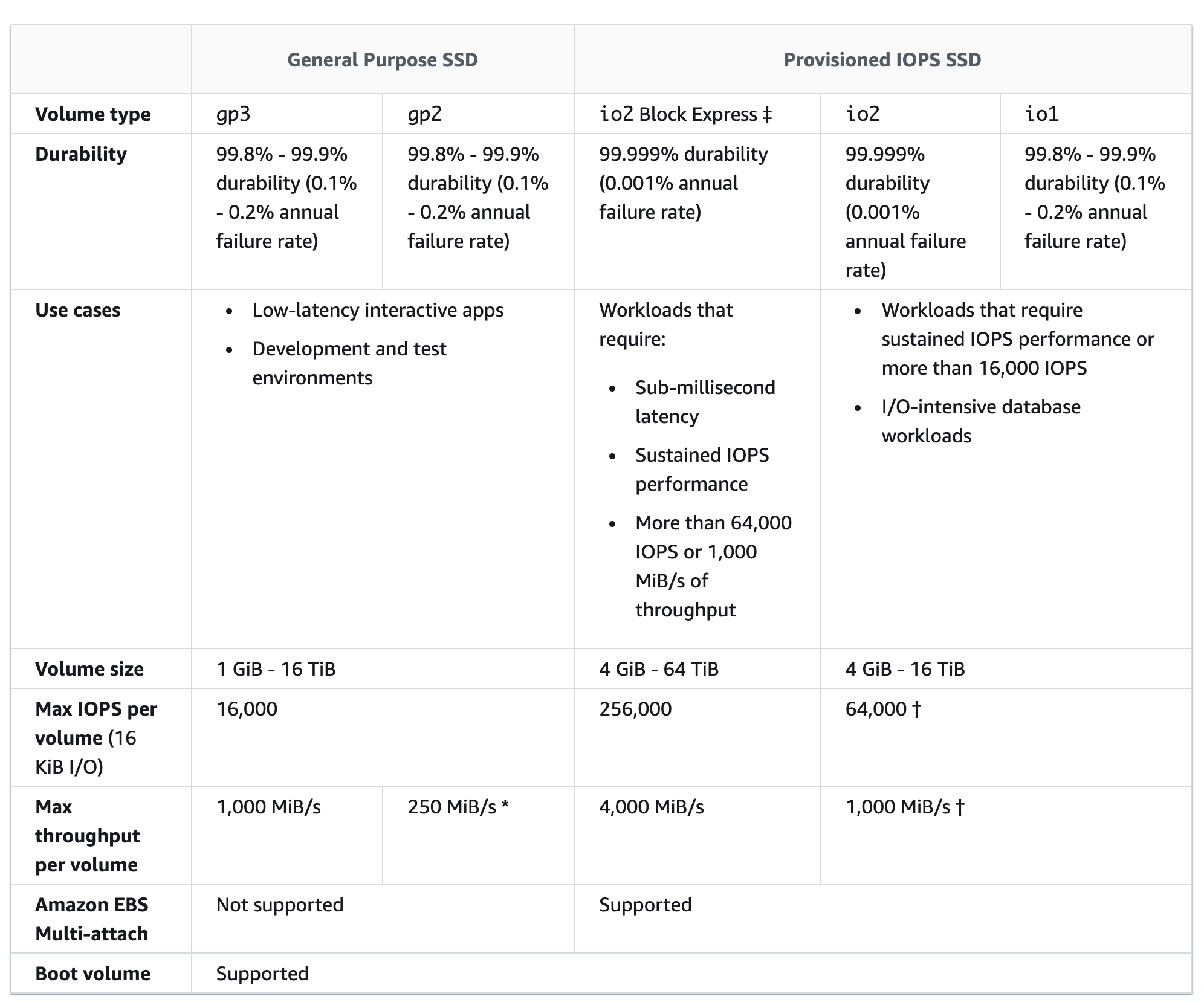
EBS Multi-Attach enables attaching a single Provisioned IOPS SSD (io1 or io2) volume to multiple instances that are in the same AZ.
Multiple Multi-Attach enabled volumes can be attached to an instance or set of instances.
Each instance to which the volume is attached has full read and write permission to the shared volume.
Multi-Attach helps achieve higher application availability in clustered Linux applications that manage concurrent write operations.
EBS Multi-Attach Considerations & Limitations
Multi-Attach is supported exclusively on Provisioned IOPS SSD volumes.
Multi-Attach enabled volumes can be attached
to up to 16 Linux instances built on the Nitro System that are in the same AZ.
to Windows instances, but the operating system does not recognize the data on the volume that is shared between the instances, which can result in data inconsistency.
Multi-Attach enabled volumes can be attached to one block device mapping per instance.
Multi-Attach enabled volumes are deleted on instance termination if the last attached instance is terminated and if that instance is configured to delete the volume on termination.
Multi-Attach enabled volumes can’t be created as boot volumes.
Multi-Attach can’t be enabled during instance launch using either the EC2 console or RunInstances API.
Multi-Attach enabled volumes do not support I/O fencing. I/O fencing protocols control write access in a shared storage environment to maintain data consistency
Multi-Attach can’t be enabled or disabled while the volume is attached to an instance.
Multi-Attach option is disabled by default.
AWS Certification Exam Practice Questions
Questions are collected from Internet and the answers are marked as per my knowledge and understanding (which might differ with yours).
AWS services are updated everyday and both the answers and questions might be outdated soon, so research accordingly.
AWS exam questions are not updated to keep up the pace with AWS updates, so even if the underlying feature has changed the question might not be updated
Open to further feedback, discussion and correction.
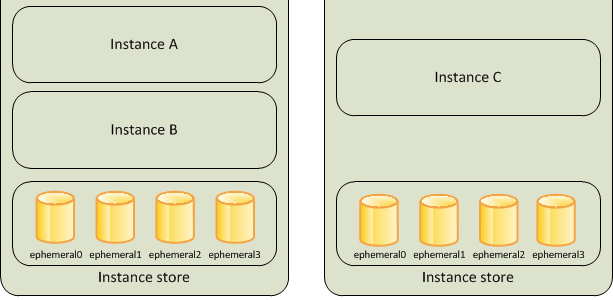
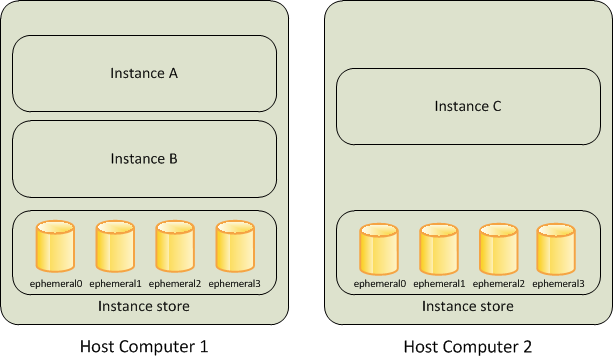
An instance store provides temporary or Ephemeral block-level storage for an Elastic Cloud Compute – EC2 instance.
is located on the disks that are physically attached to the host computer.
consists of one or more instance store volumes exposed as block devices.
The size of an instance store varies by instance type.
Virtual devices for instance store volumes are named ephemeral[0-23], starting the first one as ephemeral0 and so on.
While an instance store is dedicated to a particular instance, the disk subsystem is shared among instances on a host computer.
is ideal for temporary storage of information that changes frequently, such as buffers, caches, scratch data, and other temporary content, or for data that is replicated across a fleet of instances, such as a load-balanced pool of web servers.
delivers very high random I/O performance and is a good option for storage with very low latency requirements, but you don’t need the data to persist when the instance terminates or you can take advantage of fault-tolerant architectures.
Instance store volumes are included as part of the usage cost of the instance. There is no additional charge.
Instance Store Volume Types
Instance store volumes use either NVMe-based solid state drives (SSD), SATA-based SSDs, or SATA-based hard disk drives (HDD).
NVMe SSD – Used by most current-generation instances (e.g., C8gd, M8gd, R8gd, C8id, M8id, R8id, I7i, I8g, I8ge, M9gd). Provides the highest performance.
Non-NVMe SSD – Used by older instance types such as C3, I2, M3, R3, and X1.
HDD – Used by dense storage instances such as D2 and H1.
For instance types with NVMe instance store volumes, all supported instance store volumes are automatically attached at launch.
For instance types with non-NVMe instance store volumes (C1, C3, M1, M2, M3, R3, D2, H1, I2, X1, X1e), block device mappings must be manually specified at launch.
Instance Store Lifecycle
Instance store data lifetime is dependent on the lifecycle of the Instance to which it is attached.
Data on the Instance store persists when an instance is rebooted.
However, the data on the instance store does not persist if the
underlying disk drive fails
instance terminates
instance hibernates
instance stops i.e. if the EBS-backed instance with instance store volumes attached is stopped
Stopping, hibernating, or terminating an instance causes every block of storage in the instance store to be reset.
You can’t stop or hibernate instance store-backed instances.
If an AMI is created from an Instance with an Instance store volume, the data on its instance store volume isn’t preserved.
Do not rely on instance store volumes for valuable, long-term data.
Instance Store Volumes
Instance type of an instance determines the size of the instance store available for the instance and the type of hardware used for the instance store volumes.
Instance store volumes are included as part of the instance’s usage cost.
Some instance types use solid-state drives (SSD) to deliver very high random I/O performance, which is a good option when storage with very low latency is needed, but the data does not need to be persisted when the instance terminates or architecture is fault tolerant.
Instance store volume capacity varies widely by instance type:
General purpose (M8gd, M9gd): up to 11.4 TB NVMe SSD
Compute optimized (C8gd, C8id): up to 11.4–22.8 TB NVMe SSD
Memory optimized (R8gd, R8id): up to 11.4–22.8 TB NVMe SSD
Storage optimized (I7i): up to 45 TB NVMe SSD
Storage optimized (I8g): up to 45 TB NVMe SSD (3rd gen Nitro SSDs)
Storage optimized (I8ge): up to 120 TB NVMe SSD (3rd gen Nitro SSDs)
Instance Store Volumes with EC2 instances
EBS volumes and instance store volumes for an instance are specified using a block device mapping.
Instance store volume
can only be attached to an EC2 instance when the instance is launched.
cannot be detached and reattached to a different instance.
After an instance is launched, the instance store volumes for the instance should be formatted and mounted before it can be used.
Root volume of an instance store-backed instance is mounted automatically.
For NVMe-based instance store volumes, all volumes are automatically attached at launch — no block device mapping specification is needed.
Instance Store Encryption
Data on NVMe instance store volumes is encrypted at rest using an XTS-AES-256 block cipher implemented in a hardware module on the instance.
Encryption keys are generated using the hardware module and are unique to each NVMe instance storage device.
All encryption keys are destroyed when the instance is stopped or terminated and cannot be recovered.
You cannot disable this encryption and you cannot provide your own encryption key.
Some HDD instance store volumes also support encryption at rest.
AWS Nitro SSDs (used in I4i, I7i, I8g, I8ge, and other storage-optimized instances) provide always-on encryption as part of the hardware design.
Instance Store TRIM Support
Some instance types support SSD volumes with TRIM.
Instance store volumes that support TRIM are fully trimmed before they are allocated to the instance.
These volumes are not formatted with a file system when an instance launches, so you must format them before they can be mounted and used.
For faster access, skip the TRIM operation when initially formatting the volumes.
Use the TRIM command to notify the SSD controller when data is no longer needed, which provides more free space, reduces write amplification, and increases performance.
On Linux, use the fstrim command to enable periodic TRIM.
On Windows, use fsutil behavior set DisableDeleteNotify 0 to ensure TRIM support is enabled.
Instance Store Optimizing Writes
Because of the way that EC2 virtualizes disks, the first write to any location on an instance store volume performs more slowly than subsequent writes.
Amortizing (gradually writing off) this cost over the lifetime of the instance might be acceptable.
However, if high disk performance is required, AWS recommends initializing the drives by writing once to every drive location before production use.
To reduce write amplification on SSD-based instance store volumes, leave 10 percent of the volume unpartitioned for over-provisioning. This decreases usable storage but increases performance even when the disk is close to full capacity.
Detailed NVMe Performance Statistics
EC2 provides real-time, high-resolution performance statistics for NVMe instance store volumes attached to Nitro-based instances (launched September 2025).
Statistics include 11 comprehensive metrics at 1-second granularity:
Read/Write I/O latency histograms (broken down by I/O size)
Statistics are available at no additional cost.
Can be accessed via nvme-cli tool directly on the instance or via Amazon CloudWatch agent for monitoring and alarms.
Counters are not persistent across instance stops and restarts.
Helps identify performance bottlenecks and optimize latency-sensitive workloads.
Latest Instance Types with Instance Store (2025-2026)
Graviton5 (M9gd) – General purpose instances with local NVMe SSD storage, powered by AWS Graviton5 processors (June 2026). Ideal for data logging, media processing, and batch/log processing.
Graviton4 (C8gd, M8gd, R8gd) – Compute, general purpose, and memory optimized instances with up to 11.4 TB NVMe SSD storage, powered by AWS Graviton4 (April 2025). 30% better performance vs. Graviton3-based predecessors.
Intel Xeon 6 (C8id, M8id, R8id) – Up to 22.8 TB NVMe SSD storage with up to 384 vCPUs (February 2026). 43% higher performance and 3x more local storage vs. 6th generation.
Storage Optimized I7i – Up to 45 TB NVMe storage with PCIe Gen5-based Nitro SSDs. 50% better real-time storage performance and 50% lower I/O latency vs. I4i.
Storage Optimized I7ie – Up to 120 TB NVMe storage (highest density in the cloud). Up to 2x vCPUs and memory vs. prior generation.
Storage Optimized I8g – Graviton4-powered with 3rd generation Nitro SSDs, up to 45 TB. 65% better performance per TB and 60% lower latency variability vs. I4g (December 2024).
Storage Optimized I8ge – Up to 120 TB NVMe with 3rd gen Nitro SSDs. 55% better performance per TB and 75% lower I/O latency variability vs. Im4gn (August 2025).
AWS Nitro SSDs
AWS Nitro SSDs are custom-built by AWS specifically for cloud-scale storage workloads.
Provide high I/O performance, low latency, minimal latency variability, and security with always-on encryption.
Currently in 3rd generation, used in I8g and I8ge instance types.
PCIe Gen5-based Nitro SSDs are used in I7i and I7ie instances.
Combined with the AWS Nitro System (6th generation Nitro Cards), these offload CPU virtualization, storage, and networking functions to dedicated hardware.
Questions are collected from Internet and the answers are marked as per my knowledge and understanding (which might differ with yours).
AWS services are updated everyday and both the answers and questions might be outdated soon, so research accordingly.
AWS exam questions are not updated to keep up the pace with AWS updates, so even if the underlying feature has changed the question might not be updated
Open to further feedback, discussion and correction.
Please select the most correct answer regarding the persistence of the Amazon Instance Store
The data on an instance store volume persists only during the life of the associated Amazon EC2 instance
The data on an instance store volume is lost when the security group rule of the associated instance is changed.
The data on an instance store volume persists even after associated Amazon EC2 instance is deleted
A user has launched an EC2 instance from an instance store backed AMI. The user has attached an additional instance store volume to the instance. The user wants to create an AMI from the running instance. Will the AMI have the additional instance store volume data?
Yes, the block device mapping will have information about the additional instance store volume
No, since the instance store backed AMI can have only the root volume bundled
It is not possible to attach an additional instance store volume to the existing instance store backed AMI instance
No, since this is ephemeral storage it will not be a part of the AMI
When an EC2 instance that is backed by an S3-based AMI Is terminated, what happens to the data on the root volume?
Data is automatically saved as an EBS volume.
Data is automatically saved as an EBS snapshot.
Data is automatically deleted
Data is unavailable until the instance is restarted.
A user has launched an EC2 instance from an instance store backed AMI. If the user restarts the instance, what will happen to the ephemeral storage data?
All the data will be erased but the ephemeral storage will stay connected
All data will be erased and the ephemeral storage is released
It is not possible to restart an instance launched from an instance store backed AMI
The data is preserved
When an EC2 EBS-backed instance is stopped, what happens to the data on any ephemeral store volumes?
Data will be deleted and will no longer be accessible
Data is automatically saved in an EBS volume.
Data is automatically saved as an EBS snapshot
Data is unavailable until the instance is restarted
A user has launched an EC2 Windows instance from an instance store backed AMI. The user has also set the Instance initiated shutdown behavior to stop. What will happen when the user shuts down the OS?
It will not allow the user to shutdown the OS when the shutdown behavior is set to Stop
It is not possible to set the termination behavior to Stop for an Instance store backed AMI instance
The instance will stay running but the OS will be shutdown
The instance will be terminated
Which of the following will occur when an EC2 instance in a VPC (Virtual Private Cloud) with an associated Elastic IP is stopped and started? (Choose 2 answers)
The Elastic IP will be dissociated from the instance
All data on instance-store devices will be lost
All data on EBS (Elastic Block Store) devices will be lost
The ENI (Elastic Network Interface) is detached
The underlying host for the instance is changed
Which of the following statements about EC2 instance store NVMe encryption is correct? (Choose 2 answers)
You can provide your own encryption key for instance store NVMe volumes
Data on NVMe instance store volumes is encrypted using XTS-AES-256 cipher in hardware
Encryption keys persist after the instance is terminated for data recovery
Encryption keys are unique per device and destroyed when the instance stops or terminates
Instance store encryption must be enabled manually via the AWS Console
A company needs temporary high-performance storage with up to 120 TB capacity and the lowest possible I/O latency for a real-time analytics workload on AWS. Which EC2 instance family should they choose?
R8gd instances with up to 11.4 TB NVMe storage
I7i instances with up to 45 TB NVMe storage
I8ge instances with up to 120 TB NVMe storage and 3rd gen Nitro SSDs
C8id instances with up to 22.8 TB NVMe storage
Which feature allows you to monitor NVMe instance store volume performance at 1-second granularity on Nitro-based EC2 instances?
EBS provides the ability to create snapshots (backups) of any EBS volume and write a copy of the data in the volume to S3, where it is stored redundantly in multiple Availability Zones
Snapshots are incremental backups and store only the data that was changed from the time the last snapshot was taken.
Snapshots can be used to create new volumes, increase the size of the volumes or replicate data across Availability Zones.
Snapshot size can probably be smaller than the volume size as the data is compressed before being saved to S3.
Even though snapshots are saved incrementally, the snapshot deletion process is designed so that you need to retain only the most recent snapshot in order to restore the volume.
EBS Snapshots can be used to migrate or create EBS volumes in different AZs or regions.
Snapshot data is automatically replicated across all Availability Zones in the Region.
Multi-Volume Snapshots
Snapshots can be used to create a backup of critical workloads, such as a large database or a file system that spans across multiple EBS volumes.
Multi-volume snapshots help take exact point-in-time, data-coordinated, and crash-consistent snapshots across multiple EBS volumes attached to an EC2 instance.
It is no longer required to stop the instance or to coordinate between volumes to ensure crash consistency because snapshots are automatically taken across multiple EBS volumes.
EBS Snapshot creation
Snapshots can be created from EBS volumes periodically and are point-in-time snapshots.
Snapshots are incremental and only store the blocks on the device that changed since the last snapshot was taken
Snapshots occur asynchronously; the point-in-time snapshot is created immediately while it takes time to upload the modified blocks to S3. While it is completing, an in-progress snapshot is not affected by ongoing reads and writes to the volume.
Snapshots can be taken from in-use volumes. However, snapshots will only capture the data that was written to the EBS volumes at the time the snapshot command is issued excluding the data which is cached by any applications of OS.
Recommended ways to create a Snapshot from an EBS volume are
Pause all file writes to the volume
Unmount the Volume -> Take Snapshot -> Remount the Volume
Stop the instance – Take Snapshot (for root EBS volumes)
EBS volume created based on a snapshot
begins as an exact replica of the original volume that was used to create the snapshot.
replicated volume loads data in the background so that it can be used immediately.
If data that hasn’t been loaded yet is accessed, the volume immediately downloads the requested data from S3 and then continues loading the rest of the volume’s data in the background.
EBS Snapshot Deletion
When a snapshot is deleted only the data exclusive to that snapshot is removed.
Deleting previous snapshots of a volume does not affect the ability to restore volumes from later snapshots of that volume.
Active snapshots contain all of the information needed to restore your data (from the time the snapshot was taken) to a new EBS volume.
Even though snapshots are saved incrementally, the snapshot deletion process is designed so that you need to retain only the most recent snapshot in order to restore the volume.
Snapshot of the root device of an EBS volume used by a registered AMI can’t be deleted. AMI needs to be deregistered to be able to delete the snapshot.
EBS Snapshot Copy
Snapshots are constrained to the region in which they are created and can be used to launch EBS volumes within the same region only
Snapshots can be copied across regions to make it easier to leverage multiple regions for geographical expansion, data center migration, and disaster recovery
Snapshots are copied with S3 server-side encryption (256-bit Advanced Encryption Standard) to encrypt the data and the snapshot copy receives a snapshot ID that’s different from the original snapshot’s ID.
User-defined tags are not copied from the source to the new snapshot.
First Snapshot copy to another region is always a full copy, while the rest are always incremental.
When a snapshot is copied,
it can be encrypted if currently unencrypted or
can be encrypted using a different encryption key. Changing the encryption status of a snapshot or using a non-default EBS KMS key during a copy operation always results in a full copy (not incremental)
Time-based Snapshot Copy
Time-based Copy (launched Nov 2024) allows specifying a desired completion duration (15 minutes to 48 hours) when copying a snapshot within or between AWS Regions and/or accounts.
Helps meet time-based compliance and business requirements such as Recovery Point Objectives (RPOs) for disaster recovery.
Duration can range from 15 minutes to 48 hours in 15-minute increments, specified on a per-copy basis.
Maximum per-snapshot throughput is 500 MiB/second; default per-account limit is 2000 MiB/second between each source and destination pair.
If the copy cannot be completed within the specified duration, an EventBridge copyMissedCompletionDuration event is sent.
Available in all AWS Regions.
EBS Snapshot Sharing
Snapshots can be shared by making them public or with specific AWS accounts by modifying the access permissions of the snapshots
Encrypted snapshots cannot be made available publicly.
Encrypted snapshots can be shared with specific AWS accounts by sharing the customer managed KMS key used to encrypt it.
Cross-account permissions may be applied to a KMS key either when it is created or at a later time.
Users, with access to snapshots, can copy the snapshot and create their own EBS volumes based on the snapshot while the original snapshot remains unaffected
AWS prevents you from sharing snapshots that were encrypted with the default AWS managed key (aws/ebs). Only snapshots encrypted with customer managed KMS keys can be shared.
To share an encrypted snapshot cross-region, copy the snapshot to the destination region first and then share the copy.
EBS Snapshot Encryption
EBS snapshots fully support EBS encryption.
Snapshots of encrypted volumes are automatically encrypted
Volumes created from encrypted snapshots are automatically encrypted
All data in flight between the instance and the volume is encrypted
Volumes created from an unencrypted snapshot owned or have access to can be encrypted on the fly.
Unencrypted snapshots can be encrypted during the copy process.
Encrypted snapshots that you own or have access to, can be encrypted with a different key during the copy process.
First snapshot of an encrypted volume that has been created from an unencrypted snapshot is always a full snapshot.
First snapshot of a re-encrypted volume, which has a different KMS key compared to the source snapshot, is always a full snapshot.
EBS Fast Snapshot Restore (FSR)
Fast Snapshot Restore (FSR) eliminates the need for the traditional initialization process when creating a volume from a snapshot.
Volumes created from FSR-enabled snapshots instantly deliver all of their provisioned performance without the latency penalty of lazy loading blocks from S3.
FSR is enabled on selected snapshots in specific Availability Zones.
FSR is disabled for a snapshot by default. When enabled or disabled, the changes apply to your account only.
FSR is useful for workloads requiring rapid provisioning such as VDI (Virtual Desktop Infrastructure), backup & restore, test/dev volume copies, and booting from custom AMIs.
FSR supports io2 Block Express volumes.
FSR is not supported with AWS Outposts, Local Zones, and Wavelength Zones.
FSR-enabled snapshots shared with your account can be used with FSR enabled in your account independently.
Additional charges apply for each minute that FSR is enabled on a snapshot in a particular AZ.
EBS Snapshot Archive
EBS Snapshots Archive is a low-cost storage tier for rarely accessed snapshots that provides up to 75% lower storage costs.
Designed for snapshots retained for 90 days or longer that do not require frequent or fast retrieval.
When a snapshot is archived, the incremental snapshot is converted to a full snapshot and moved to the archive tier.
Archived snapshots have a minimum retention period of 90 days.
To use an archived snapshot, it must first be restored to the standard tier, after which it can be used like any other snapshot.
Restoring from archive takes 24-72 hours depending on the snapshot size.
EBS Direct APIs cannot be used with archived snapshots.
Snapshot locks can be applied to snapshots that have already been archived.
Amazon Data Lifecycle Manager can automatically archive snapshots based on policies.
AWS Backup supports EBS Snapshots Archive in backup policies.
EBS Snapshot Lock
EBS Snapshot Lock (launched Nov 2023) protects snapshots from inadvertent or malicious deletions, including ransomware attacks.
Locked snapshots cannot be deleted until the lock expires or is released.
Lock duration can range from one day to approximately 100 years.
Two lock modes are available:
Governance mode – Protects from deletion by all users. With proper IAM permissions, the lock duration can be extended/shortened, the lock deleted, or mode changed to Compliance.
Compliance mode – Protects from deletion by all users including the root user. After a cooling-off period (up to 72 hours), neither the snapshot nor the lock can be deleted until the lock expires. Lock duration can only be extended, not shortened.
Snapshots in either mode can still be shared, copied, or archived.
Supports WORM (Write Once Read Many) compliance requirements.
No additional charges for using Snapshot Lock; standard snapshot storage rates apply.
Available in all commercial AWS Regions.
If using customer managed KMS keys for encryption, ensure the key remains valid for the lifetime of the locked snapshot.
Recycle Bin for EBS Snapshots
Recycle Bin enables recovery of accidentally deleted EBS snapshots and EBS-backed AMIs.
Retention rules specify a retention period (1 day to 1 year) during which deleted snapshots are retained before permanent deletion.
A recovered snapshot retains all its attributes including tags, permissions, and encryption status.
Recovered snapshots can be used immediately for creating volumes.
Rule Lock can be applied to Recycle Bin retention rules to prevent them from being modified or deleted, providing additional protection.
Recycle Bin also supports EBS-backed AMIs and EBS Volumes (added 2025).
EBS Direct APIs
EBS Direct APIs allow creating EBS snapshots, writing data directly to snapshots, reading snapshot data, and identifying differences between two snapshots.
Key operations include:
ListSnapshotBlocks – Returns block indexes and block tokens of blocks in a snapshot.
ListChangedBlocks – Returns blocks that are different between two snapshots of the same volume.
GetSnapshotBlock – Returns data in a block for a given snapshot.
StartSnapshot – Creates a new snapshot (can be used to create snapshots from on-premises data).
PutSnapshotBlock – Adds data to a started snapshot in the form of individual blocks.
CompleteSnapshot – Completes a snapshot after all blocks have been written.
Enables backup of on-premises data directly into EBS snapshots without needing an EC2 instance.
Useful for incremental backup solutions and disaster recovery from on-premises to AWS.
Does not support public snapshots or archived snapshots.
Local Snapshots
Local Snapshots allow creating and storing snapshots in AWS Local Zones and Dedicated Local Zones.
By default, snapshots of EBS volumes in a Local Zone are stored in S3 in the parent Region.
With Local Snapshots, backups can be stored within the same geographical boundary as the EBS volumes, helping meet data residency and data isolation requirements.
Snapshot copy is supported for Local Zones, allowing copies to be sent to the Region or another Local Zone.
EBS Direct APIs do not support local snapshots on Outposts.
EBS Snapshot Lifecycle Automation
Amazon Data Lifecycle Manager (DLM) can be used to automate the creation, retention, and deletion of snapshots taken to back up the EBS volumes.
Automating snapshot management helps you to:
Protect valuable data by enforcing a regular backup schedule.
Retain backups as required by auditors or internal compliance.
Reduce storage costs by deleting outdated backups.
Automatically archive snapshots to the Archive tier based on policies.
AWS Backup provides a centralized, policy-based approach to manage EBS snapshot backups across AWS accounts and regions.
AWS Backup supports EBS Snapshots Archive in backup policies for cost-optimized long-term retention.
EBS Snapshot Resource-Level Permissions
Enhanced resource-level permissions (2025) allow specifying additional resource-level authorization in IAM policies for source snapshots when creating volumes (CreateVolume) or copying snapshots (CopySnapshot).
Enables fine-grained access control over which snapshots can be used as sources for volume creation or copy operations.
AWS Certification Exam Practice Questions
Questions are collected from Internet and the answers are marked as per my knowledge and understanding (which might differ with yours).
AWS services are updated everyday and both the answers and questions might be outdated soon, so research accordingly.
AWS exam questions are not updated to keep up the pace with AWS updates, so even if the underlying feature has changed the question might not be updated
Open to further feedback, discussion and correction.
An existing application stores sensitive information on a non-boot Amazon EBS data volume attached to an Amazon Elastic Compute Cloud instance. Which of the following approaches would protect the sensitive data on an Amazon EBS volume?
Upload your customer keys to AWS CloudHSM. Associate the Amazon EBS volume with AWS CloudHSM. Remount the Amazon EBS volume.
Create and mount a new, encrypted Amazon EBS volume. Move the data to the new volume. Delete the old Amazon EBS volume.
Unmount the EBS volume. Toggle the encryption attribute to True. Re-mount the Amazon EBS volume.
Snapshot the current Amazon EBS volume. Restore the snapshot to a new, encrypted Amazon EBS volume. Mount the Amazon EBS volume (Need to create a snapshot, create an encrypted copy of snapshot and then create an EBS volume and mount it)
Is it possible to access your EBS snapshots?
Yes, through the Amazon S3 APIs.
Yes, through the Amazon EC2 APIs
No, EBS snapshots cannot be accessed; they can only be used to create a new EBS volume.
EBS doesn’t provide snapshots.
Which of the following approaches provides the lowest cost for Amazon Elastic Block Store snapshots while giving you the ability to fully restore data?
Maintain two snapshots: the original snapshot and the latest incremental snapshot
Maintain a volume snapshot; subsequent snapshots will overwrite one another
Maintain a single snapshot the latest snapshot is both Incremental and complete
Maintain the most current snapshot, archive the original and incremental to Amazon Glacier.
Which procedure for backing up a relational database on EC2 that is using a set of RAIDed EBS volumes for storage minimizes the time during which the database cannot be written to and results in a consistent backup?
Stop the EC2 Instance. 2. Snapshot the EBS volumes
Suspend disk I/O, 2. Create an image of the EC2 Instance, 3. Resume disk I/O
Suspend disk I/O, 2. Start EBS snapshot of volumes, 3. Resume disk I/O
Suspend disk I/O, 2. Start EBS snapshot of volumes, 3. Wait for snapshots to complete, 4. Resume disk I/O
How can an EBS volume that is currently attached to an EC2 instance be migrated from one Availability Zone to another?
Detach the volume and attach it to another EC2 instance in the other AZ.
Simply create a new volume in the other AZ and specify the original volume as the source.
Create a snapshot of the volume, and create a new volume from the snapshot in the other AZ
Detach the volume, then use the ec2-migrate-volume command to move it to another AZ.
How are the EBS snapshots saved on Amazon S3?
Exponentially
Incrementally
EBS snapshots are not stored in the Amazon S3
Decrementally
EBS Snapshots occur _____
Asynchronously
Synchronously
Weekly
What will be the status of the snapshot until the snapshot is complete?
Running
Working
Progressing
Pending
Before I delete an EBS volume, what can I do if I want to recreate the volume later?
Create a copy of the EBS volume (not a snapshot)
Create and Store a snapshot of the volume
Download the content to an EC2 instance
Back up the data in to a physical disk
Which of the following are true regarding encrypted Amazon Elastic Block Store (EBS) volumes? Choose 2 answers
Supported on all Amazon EBS volume types
Snapshots are automatically encrypted
Available to all instance types
Existing volumes can be encrypted
Shared volumes can be encrypted
Amazon EBS snapshots have which of the following two characteristics? (Choose 2.) Choose 2 answers
EBS snapshots only save incremental changes from snapshot to snapshot
EBS snapshots can be created in real-time without stopping an EC2 instance (the snapshot can be taken real time however it will not be consistent and the recommended way is to stop or freeze the IO)
EBS snapshots can only be restored to an EBS volume of the same size or smaller (EBS volume restored from snapshots need to be of the same size of larger size)
EBS snapshots can only be restored and mounted to an instance in the same Availability Zone as the original EBS volume (Snapshots are specific to Region and can be used to create a volume in any AZ and does not depend on the original EBS volume AZ)
A user is planning to schedule a backup for an EBS volume. The user wants security of the snapshot data. How can the user achieve data encryption with a snapshot?
Use encrypted EBS volumes so that the snapshot will be encrypted by AWS (Refer link)
While creating a snapshot select the snapshot with encryption
By default the snapshot is encrypted by AWS
Enable server side encryption for the snapshot using S3
A sys admin is trying to understand EBS snapshots. Which of the below mentioned statements will not be useful to the admin to understand the concepts about a snapshot?
Snapshot is synchronous
It is recommended to stop the instance before taking a snapshot for consistent data
Snapshot is incremental
Snapshot captures the data that has been written to the hard disk when the snapshot command was executed
When creation of an EBS snapshot is initiated but not completed, the EBS volume
Cannot be detached or attached to an EC2 instance until me snapshot completes
Can be used in read-only mode while me snapshot is in progress
Can be used while the snapshot is in progress
Cannot be used until the snapshot completes
You have a server with a 5O0GB Amazon EBS data volume. The volume is 80% full. You need to back up the volume at regular intervals and be able to re-create the volume in a new Availability Zone in the shortest time possible. All applications using the volume can be paused for a period of a few minutes with no discernible user impact. Which of the following backup methods will best fulfill your requirements?
Take periodic snapshots of the EBS volume
Use a third-party Incremental backup application to back up to Amazon Glacier
Periodically back up all data to a single compressed archive and archive to Amazon S3 using a parallelized multi-part upload
Create another EBS volume in the second Availability Zone attach it to the Amazon EC2 instance, and use a disk manager to mirror me two disks
A user is creating a snapshot of an EBS volume. Which of the below statements is incorrect in relation to the creation of an EBS snapshot?
Its incremental
It can be used to launch a new instance
It is stored in the same AZ as the volume (stored in the same region)
It is a point in time backup of the EBS volume
A user has created a snapshot of an EBS volume. Which of the below mentioned usage cases is not possible with respect to a snapshot?
Mirroring the volume from one AZ to another AZ
Launch an instance
Decrease the volume size
Increase the size of the volume
What is true of the way that encryption works with EBS?
Snapshotting an encrypted volume makes an encrypted snapshot; restoring an encrypted snapshot creates an encrypted volume when specified / requested.
Snapshotting an encrypted volume makes an encrypted snapshot when specified / requested; restoring an encrypted snapshot creates an encrypted volume when specified / requested.
Snapshotting an encrypted volume makes an encrypted snapshot; restoring an encrypted snapshot always creates an encrypted volume.
Snapshotting an encrypted volume makes an encrypted snapshot when specified / requested; restoring an encrypted snapshot always creates an encrypted volume.
Why are more frequent snapshots of EBS Volumes faster?
Blocks in EBS Volumes are allocated lazily, since while logically separated from other EBS Volumes, Volumes often share the same physical hardware. Snapshotting the first time forces full block range allocation, so the second snapshot doesn’t need to perform the allocation phase and is faster.
The snapshots are incremental so that only the blocks on the device that have changed after your last snapshot are saved in the new snapshot.
AWS provisions more disk throughput for burst capacity during snapshots if the drive has been pre-warmed by snapshotting and reading all blocks.
The drive is pre-warmed, so block access is more rapid for volumes when every block on the device has already been read at least one time.
Which is not a restriction on AWS EBS Snapshots?
Snapshots which are shared cannot be used as a basis for other snapshots (Snapshots shared with other users are usable in full by the recipient, including but limited to the ability to base modified volumes and snapshots)
You cannot share a snapshot containing an AWS Access Key ID or AWS Secret Access Key
You cannot share snapshots encrypted with the default AWS managed key (NOTE: Encrypted snapshots CAN be shared with specific accounts if encrypted with a customer managed KMS key. Only snapshots encrypted with the default aws/ebs key cannot be shared.)
Snapshot restorations are restricted to the region in which the snapshots are created
There is a very serious outage at AWS. EC2 is not affected, but your EC2 instance deployment scripts stopped working in the region with the outage. What might be the issue?
The AWS Console is down, so your CLI commands do not work.
S3 is unavailable, so you can’t create EBS volumes from a snapshot you use to deploy new volumes. (EBS volume snapshots are stored in S3. If S3 is unavailable, snapshots are unavailable)
AWS turns off the DeployCode API call when there are major outages, to protect from system floods.
None of the other answers make sense. If EC2 is not affected, it must be some other issue.
New Practice Questions – EBS Snapshot Features (2021-2025)
A company needs to ensure that critical EBS snapshots cannot be deleted by any user, including the root user, for a period of 5 years to meet regulatory compliance. Which feature should be used?
AWS Backup Vault Lock
Recycle Bin with 5-year retention
EBS Snapshot Lock in Compliance mode
EBS Snapshot Lock in Governance mode
A company wants to reduce storage costs for EBS snapshots that are retained for compliance but rarely accessed. The snapshots need to be kept for at least 2 years. Which approach provides the lowest cost?
Keep snapshots in standard tier and use lifecycle policies to delete after 2 years
Move snapshots to EBS Snapshots Archive tier
Copy snapshots to S3 Glacier
Use Recycle Bin with a 2-year retention period
An organization accidentally deleted an EBS snapshot that was needed for disaster recovery. Which AWS feature could have prevented permanent data loss?
EBS Snapshot Lock
Multi-volume snapshots
Recycle Bin for EBS Snapshots
Fast Snapshot Restore
A company needs to copy an EBS snapshot to another region and must ensure the copy completes within 2 hours to meet their RPO requirements. Which feature should they use?
Fast Snapshot Restore
Time-based Snapshot Copy with a 2-hour completion duration
EBS Direct APIs
Standard cross-region copy with CloudWatch monitoring
A company runs a VDI environment and needs volumes created from snapshots to deliver full provisioned performance immediately without any initialization penalty. Which feature should be enabled?
EBS Snapshot Archive
Time-based Snapshot Copy
EBS Direct APIs
Fast Snapshot Restore (FSR)
A backup solution needs to create EBS snapshots directly from on-premises block storage data without using an EC2 instance as an intermediary. Which approach enables this?
AWS Storage Gateway
AWS DataSync
EBS Direct APIs (StartSnapshot, PutSnapshotBlock, CompleteSnapshot)
S3 Transfer Acceleration with snapshot import
What happens when an EBS snapshot is archived? (Choose 2)
The incremental snapshot is converted to a full snapshot
The snapshot remains incremental in the archive tier
The snapshot is moved from the standard tier to the archive tier
The snapshot is automatically deleted after 90 days
The snapshot can still be used directly to create volumes without restoration
EBS Performance depends on several factors including I/O characteristics, instances and volumes configuration and can be improved using Provisioned IOPS (io2 Block Express), EBS-Optimized instances, proper volume type selection, and RAID configuration.
📢 Key Updates (2025-2026)
gp3 volumes enhanced (Sept 2025) – Now support up to 64 TiB size (4x increase), 80,000 IOPS (5x increase), and 2,000 MiB/s throughput (2x increase).
io2 Block Express – Delivers up to 256,000 IOPS, 4,000 MB/s throughput, 64 TiB capacity with sub-millisecond latency and 99.999% durability.
Instance Bandwidth Weighting – New feature allows shifting up to 25% of network bandwidth to EBS for I/O-intensive workloads.
io1 → io2 migration recommended – AWS recommends upgrading io1 to io2 for better performance and durability at the same cost.
Sub-millisecond latency (avg. under 500 microseconds)
99.999% durability (vs 99.8-99.9% for gp3)
Up to 1,000 IOPS per GiB ratio
Multi-Attach support (up to 16 instances simultaneously)
Available on all Nitro-based EC2 instances
gp2 (Previous Generation General Purpose SSD) – Still available but migration to gp3 is recommended.
Max: 16,000 IOPS, 250 MB/s throughput, 16 TiB
IOPS scales with volume size at 3 IOPS/GiB
Burst credit model for volumes under 1 TiB
io1 (Previous Generation Provisioned IOPS SSD) – Migration to io2 Block Express is recommended.
Max: 64,000 IOPS, 1,000 MB/s throughput, 16 TiB
50 IOPS per GiB ratio
99.8-99.9% durability
EBS-Optimized or 10 Gigabit Network Instances
An EBS-Optimized instance uses an optimized configuration stack and provides additional, dedicated capacity for EBS I/O.
Optimization provides the best performance for the EBS volumes by minimizing contention between EBS I/O and other traffic from an instance.
EBS-Optimized instances deliver dedicated throughput to EBS depending on the instance type used.
All current-generation EC2 instance types are EBS-optimized by default at no additional cost.
Some previous-generation instance types support EBS-optimization as an optional feature with an additional hourly fee.
When attached to an EBS–optimized instance,
General Purpose (gp3) volumes are designed to deliver within 10% of their provisioned performance 99% of the time in a given year.
Provisioned IOPS (io2 Block Express) volumes are designed to deliver within 10% of their provisioned performance 99.9% of the time in a given year.
The maximum EBS throughput varies by instance type – for example, latest generation instances like C8gd/M8gd/R8gd provide up to 40 Gbps of EBS bandwidth.
Instance Bandwidth Weighting
EC2 instances on select Nitro-based instance types support configurable bandwidth weighting between EBS and VPC networking.
Using the ebs-1 bandwidth weighting option increases EBS bandwidth by up to 25%, which reduces VPC network bandwidth by the same amount.
This is beneficial for I/O-intensive workloads that require higher EBS throughput but have lower network requirements.
The total available baseline bandwidth for the instance remains the same; it only shifts the allocation.
Network PPS and EBS IOPS specifications are unaffected by bandwidth weighting changes.
Can be configured at launch time using launch templates or modified on running instances.
EBS Volume Initialization – Pre-warming
Empty EBS volumes receive their maximum performance the moment that they are available and DO NOT require initialization (pre-warming).
EBS volumes needed a pre-warming, previously, before being used to get maximum performance to start with. Pre-warming of the volume was possible by writing to the entire volume with 0 for new volumes or reading the entire volume for volumes from snapshots.
Storage blocks on volumes that were restored from snapshots must be initialized (pulled down from S3 and written to the volume) before the block can be accessed.
This preliminary action takes time and can cause a significant increase in the latency of an I/O operation the first time each block is accessed.
To avoid this initial performance hit in a production environment, the following options can be used:
Force the immediate initialization of the entire volume by using the dd or fio utilities to read from all of the blocks on a volume.
Enable Fast Snapshot Restore (FSR) on a snapshot to ensure that the EBS volumes created from it are fully-initialized at creation and instantly deliver all of their provisioned performance.
Fast Snapshot Restore (FSR) considerations:
FSR eliminates the latency of I/O operations on first access of snapshot-restored volumes.
Available in all commercial AWS regions (expanded to 6 additional regions in August 2024).
Not supported with AWS Outposts, Local Zones, and Wavelength Zones.
FSR is charged per AZ per hour per snapshot enabled, so cost should be considered.
Elastic Volumes
Elastic Volumes allows modifying EBS volume size, type, IOPS, and throughput without detaching the volume or stopping the instance.
Supported on all current-generation instances and several previous-generation instances (C1, C3, C4, G2, I2, M1, M3, M4, R3, R4).
Modifications include:
Increasing volume size (cannot decrease)
Changing volume type (e.g., gp2 → gp3, io1 → io2)
Adjusting provisioned IOPS and throughput (gp3, io1, io2)
Size increases take effect once the modification reaches the “optimizing” state (usually seconds).
The file system must be extended within the OS after a size increase.
A volume can only be modified once every 6 hours.
RAID Configuration
EBS volumes can be striped, if a single EBS volume does not meet the performance requirements.
Note: With gp3 volumes now supporting up to 80,000 IOPS and 2,000 MiB/s per volume, many workloads that previously required RAID 0 can now use a single volume, improving resiliency.
Striping volumes allows pushing tens of thousands of IOPS beyond single-volume limits.
EBS volumes are already replicated across multiple servers in an AZ for availability and durability, so AWS generally recommends striping for performance rather than durability.
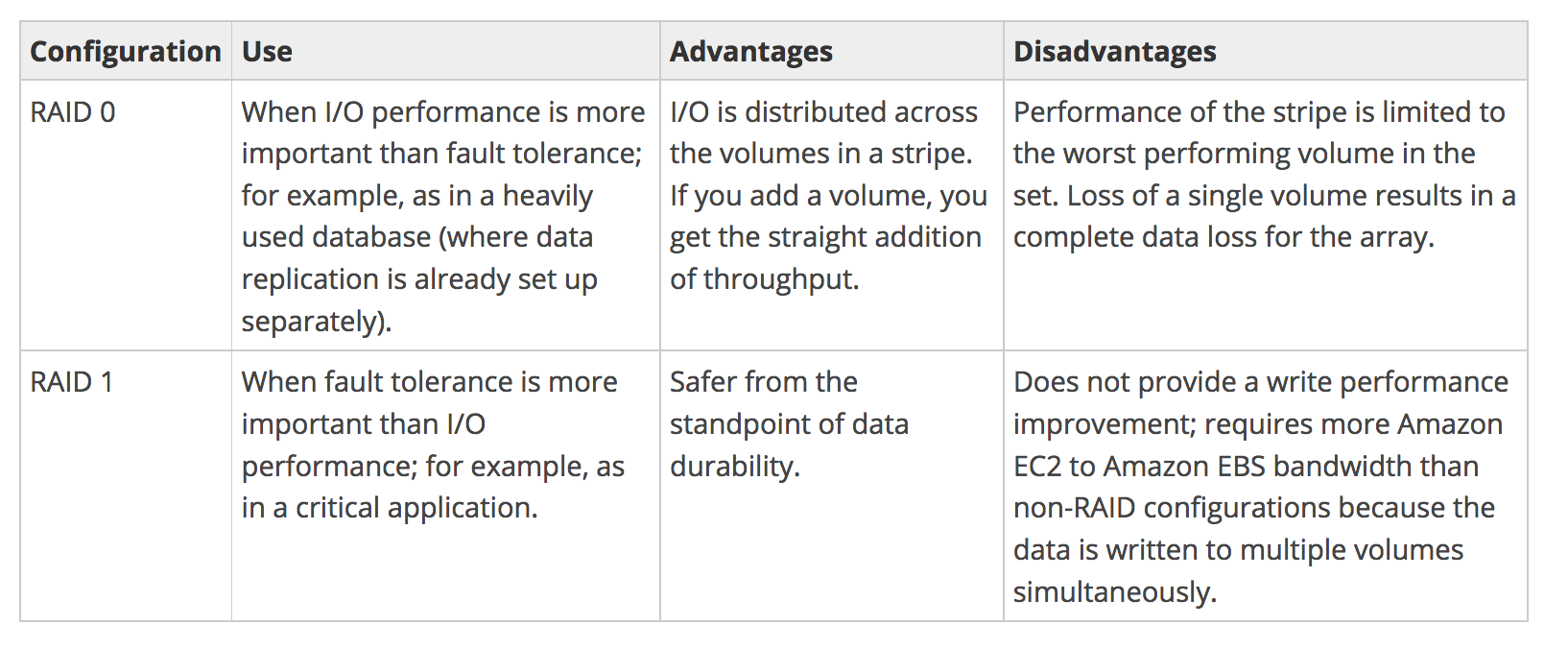
For greater I/O performance than can be achieved with a single volume, RAID 0 can stripe multiple volumes together; for on-instance redundancy, RAID 1 can mirror two volumes together.
RAID 0 allows I/O distribution across all volumes in a stripe, allowing straight gains with each addition.
RAID 1 can be used for durability to mirror volumes, but in this case, it requires more EC2 to EBS bandwidth as the data is written to multiple volumes simultaneously and should be used with EBS–optimization.
EBS volume data is replicated across multiple servers in an AZ to prevent the loss of data from the failure of any single component.
AWS doesn’t recommend RAID 5 and 6 because the parity write operations of these modes consume the IOPS available for the volumes and can result in 20-30% fewer usable IOPS than RAID 0.
A 2-volume RAID 0 config can outperform a 4-volume RAID 6 that costs twice as much.
Durability consideration: Each additional volume in a RAID 0 stripe reduces effective durability (e.g., 4 gp3 volumes in RAID 0 = ~99.6% effective durability vs. 99.9% for a single volume). With increased gp3 limits, fewer volumes are needed for the same performance.
EBS Performance Best Practices Summary
Use gp3 as the default volume type – provides better baseline performance than gp2 at 20% lower cost.
Use io2 Block Express for critical databases – sub-millisecond latency, 99.999% durability, up to 256K IOPS.
Right-size your instance – ensure the instance’s EBS bandwidth limit is not the bottleneck (use CloudWatch EBSIOBalance% and EBSByteBalance% metrics).
Use EBS bandwidth weighting for I/O-intensive workloads with lower network needs.
Prefer single larger volumes over RAID 0 when gp3 limits (80,000 IOPS, 2,000 MiB/s) are sufficient – simpler and more durable.
Enable Fast Snapshot Restore for production volumes restored from snapshots to avoid first-access latency.
Monitor with CloudWatch – track VolumeReadOps, VolumeWriteOps, VolumeQueueLength, and BurstBalance (gp2) metrics.
Migrate legacy volumes – upgrade gp2 → gp3 and io1 → io2 using Elastic Volumes (no downtime required).
AWS Certification Exam Practice Questions
Questions are collected from Internet and the answers are marked as per my knowledge and understanding (which might differ with yours).
AWS services are updated everyday and both the answers and questions might be outdated soon, so research accordingly.
AWS exam questions are not updated to keep up the pace with AWS updates, so even if the underlying feature has changed the question might not be updated
Open to further feedback, discussion and correction.
A user is trying to pre-warm a blank EBS volume attached to a Linux instance. Which of the below mentioned steps should be performed by the user?
There is no need to pre-warm an EBS volume (with latest update no pre-warming is needed)
Contact AWS support to pre-warm (This used to be the case before, but pre warming is not necessary now)
Unmount the volume before pre-warming
Format the device
A user has created an EBS volume of 10 GB and attached it to a running instance. The user is trying to access EBS for first time. Which of the below mentioned options is the correct statement with respect to a first time EBS access?
The volume will show a size of 8 GB
The volume will show a loss of the IOPS performance the first time (the volume needed to be wiped cleaned before for new volumes, however pre warming is not needed any more)
The volume will be blank
If the EBS is mounted it will ask the user to create a file system
You are running a database on an EC2 instance, with the data stored on Elastic Block Store (EBS) for persistence At times throughout the day, you are seeing large variance in the response times of the database queries Looking into the instance with the isolate command you see a lot of wait time on the disk volume that the database’s data is stored on. What two ways can you improve the performance of the database’s storage while maintaining the current persistence of the data? Choose 2 answers
Move to an SSD backed instance
Move the database to an EBS-Optimized Instance
Use Provisioned IOPs EBS
Use the ephemeral storage on an m2.4xLarge Instance Instead
You have launched an EC2 instance with four (4) 500 GB EBS Provisioned IOPS volumes attached. The EC2 Instance is EBS-Optimized and supports 500 Mbps throughput between EC2 and EBS. The two EBS volumes are configured as a single RAID 0 device, and each Provisioned IOPS volume is provisioned with 4,000 IOPS (4000 16KB reads or writes) for a total of 16,000 random IOPS on the instance. The EC2 Instance initially delivers the expected 16,000 IOPS random read and write performance. Sometime later in order to increase the total random I/O performance of the instance, you add an additional two 500 GB EBS Provisioned IOPS volumes to the RAID. Each volume is provisioned to 4,000 IOPS like the original four for a total of 24,000 IOPS on the EC2 instance Monitoring shows that the EC2 instance CPU utilization increased from 50% to 70%, but the total random IOPS measured at the instance level does not increase at all. What is the problem and a valid solution?
Larger storage volumes support higher Provisioned IOPS rates: increase the provisioned volume storage of each of the 6 EBS volumes to 1TB.
EBS-Optimized throughput limits the total IOPS that can be utilized use an EBS-Optimized instance that provides larger throughput. (EC2 Instance types have limit on max throughput and would require larger instance types to provide 24000 IOPS)
Small block sizes cause performance degradation, limiting the I’O throughput, configure the instance device driver and file system to use 64KB blocks to increase throughput.
RAID 0 only scales linearly to about 4 devices, use RAID 0 with 4 EBS Provisioned IOPS volumes but increase each Provisioned IOPS EBS volume to 6.000 IOPS.
The standard EBS instance root volume limits the total IOPS rate, change the instant root volume to also be a 500GB 4,000 Provisioned IOPS volume
A user has deployed an application on an EBS backed EC2 instance. For a better performance of application, it requires dedicated EC2 to EBS traffic. How can the user achieve this?
Launch the EC2 instance as EBS provisioned with PIOPS EBS
Launch the EC2 instance as EBS enhanced with PIOPS EBS
Launch the EC2 instance as EBS dedicated with PIOPS EBS
Launch the EC2 instance as EBS optimized with PIOPS EBS
A company is running an I/O-intensive database on a gp2 EBS volume and experiencing inconsistent performance. The DBA wants to achieve consistent 50,000 IOPS with the lowest cost. Which approach should they use?
Use multiple gp2 volumes in RAID 0 configuration
Migrate to a single gp3 volume and provision 50,000 IOPS
Use an io2 Block Express volume with 50,000 provisioned IOPS
Use multiple gp3 volumes in RAID 0 to aggregate IOPS
(gp3 now supports up to 80,000 IOPS per volume at a lower cost than io2. For 50,000 IOPS without needing 99.999% durability, gp3 is the most cost-effective choice.)
An application requires 256,000 IOPS with sub-millisecond latency for a critical Oracle database. Which EBS configuration provides the required performance?
Four gp3 volumes with 64,000 IOPS each in RAID 0
Multiple io1 volumes in RAID 0 configuration
A single io2 Block Express volume with 256,000 provisioned IOPS on a Nitro-based instance
Eight gp3 volumes with 32,000 IOPS each in RAID 0
(io2 Block Express supports up to 256,000 IOPS per volume with sub-millisecond latency. A single volume approach is simpler and provides higher durability (99.999%) than RAID configurations.)
A team has restored an EBS volume from a snapshot and needs to serve production traffic immediately with full provisioned IOPS. What should they do?
Pre-warm the volume by reading all blocks using the dd utility
Wait for 24 hours for background initialization to complete
Enable Fast Snapshot Restore (FSR) on the snapshot before creating the volume
Attach the volume to an EBS-optimized instance to speed up initialization
(Fast Snapshot Restore ensures volumes created from the snapshot are fully initialized at creation, eliminating first-access latency. This must be enabled before creating the volume.)
An EC2 instance is running an I/O-heavy analytics workload with low network traffic requirements. The team wants to maximize EBS throughput without changing the instance type. What feature can help?
Enable Enhanced Networking on the instance
Configure the instance with ebs-1 bandwidth weighting to increase EBS bandwidth by 25%
Enable placement groups for the instance
Attach additional network interfaces to the instance
(Instance bandwidth weighting allows reallocating up to 25% of VPC network bandwidth to EBS, beneficial for workloads with high I/O but low networking needs.)
A company wants to migrate their existing io1 volumes to a newer volume type with better durability and performance without application downtime. Which approach is recommended? (Select TWO)
Create new io2 volumes from snapshots and switch
Use Elastic Volumes to modify the volume type from io1 to io2 without detaching
The migration provides 99.999% durability (up from 99.8-99.9%) at the same cost
io1 to io2 migration requires stopping the instance
io2 volumes cost 50% more than io1 for the same IOPS
(Elastic Volumes supports online type change from io1 to io2. io2 provides higher durability and performance (1,000 IOPS/GiB vs 50 IOPS/GiB) at the same storage and IOPS pricing.)
Amazon EBS gp3 volumes now support up to 64 TiB size, 80,000 IOPS, and 2,000 MiB/s throughput — a 4X, 5X, and 2X increase respectively over previous limits. Additionally, as of January 2026, Elastic Volumes now supports up to 4 modifications per 24-hour rolling window (previously limited by a 6-hour cooldown between modifications).
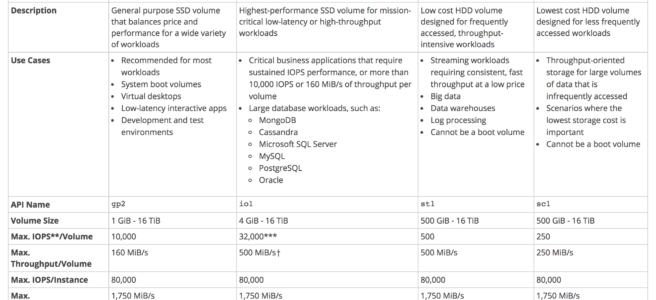
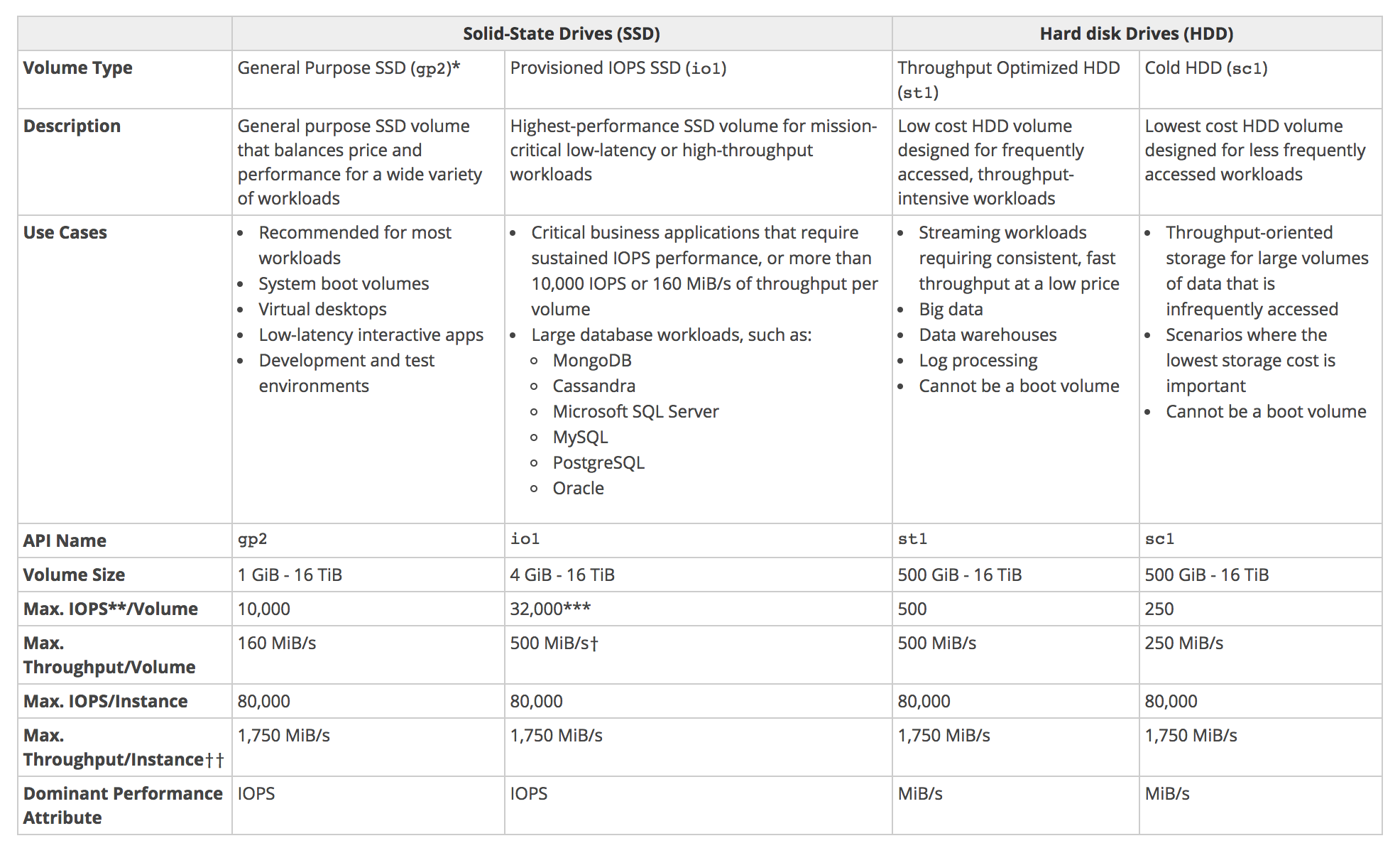
AWS provides the following EBS volume types, which differ in performance characteristics and price and can be tailored for storage performance and cost to the needs of the applications.
Solid state drives (SSD-backed) volumes optimized for transactional workloads involving frequent read/write operations with small I/O size, where the dominant performance attribute is IOPS
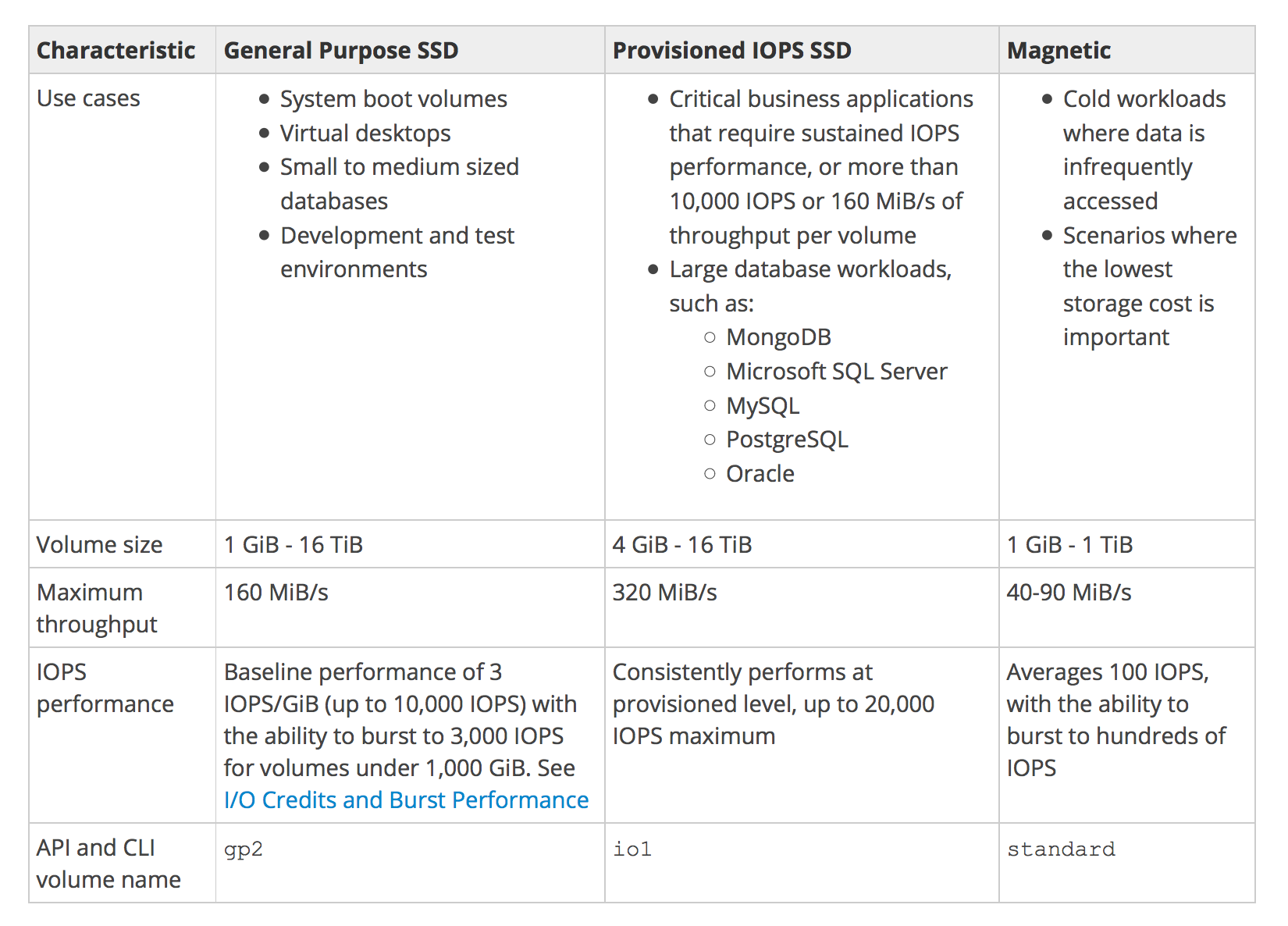
General Purpose SSD (gp3/gp2)
Provisioned IOPS SSD (io2 Block Express/io1)
Hard disk drives (HDD-backed) volumes optimized for large streaming workloads where throughput (measured in MiB/s) is a better performance measure than IOPS
Throughput Optimized HDD (st1)
Cold HDD (sc1)
Magnetic Volumes (standard) (Previous Generation)
EBS Volume Types Summary
Solid state drives (SSD-backed) volumes
General Purpose SSD Volumes (gp3/gp2)
General Purpose SSD volumes offer cost-effective storage that is ideal for a broad range of workloads.
General Purpose SSD volumes deliver single-digit millisecond latencies.
General Purpose SSD (gp3) volumes (Recommended)
can range in size from 1 GiB to 64 TiB (increased from 16 TiB in September 2025).
deliver a consistent baseline rate of 3,000 IOPS and 125 MiB/s, included with the price of storage.
additional IOPS (up to 80,000) and throughput (up to 2,000 MiB/s) can be provisioned for an additional cost.
the maximum ratio of provisioned IOPS to provisioned volume size is 500 IOPS per GiB.
the maximum ratio of provisioned throughput to provisioned IOPS is .25 MiB/s per IOPS.
performance is provisioned independently from storage capacity, allowing even small volumes to achieve high performance.
provides up to 20% lower price per GB compared to gp2 volumes.
Note: On Outposts, gp3 volumes support sizes up to 16 TiB, IOPS up to 16,000, and throughput up to 1,000 MiB/s.
General Purpose SSD (gp2) volumes
can range in size from 1 GiB to 16 TiB.
has a maximum throughput of 250 MiB/s (depending on volume size).
provides a baseline performance of 3 IOPS/GiB.
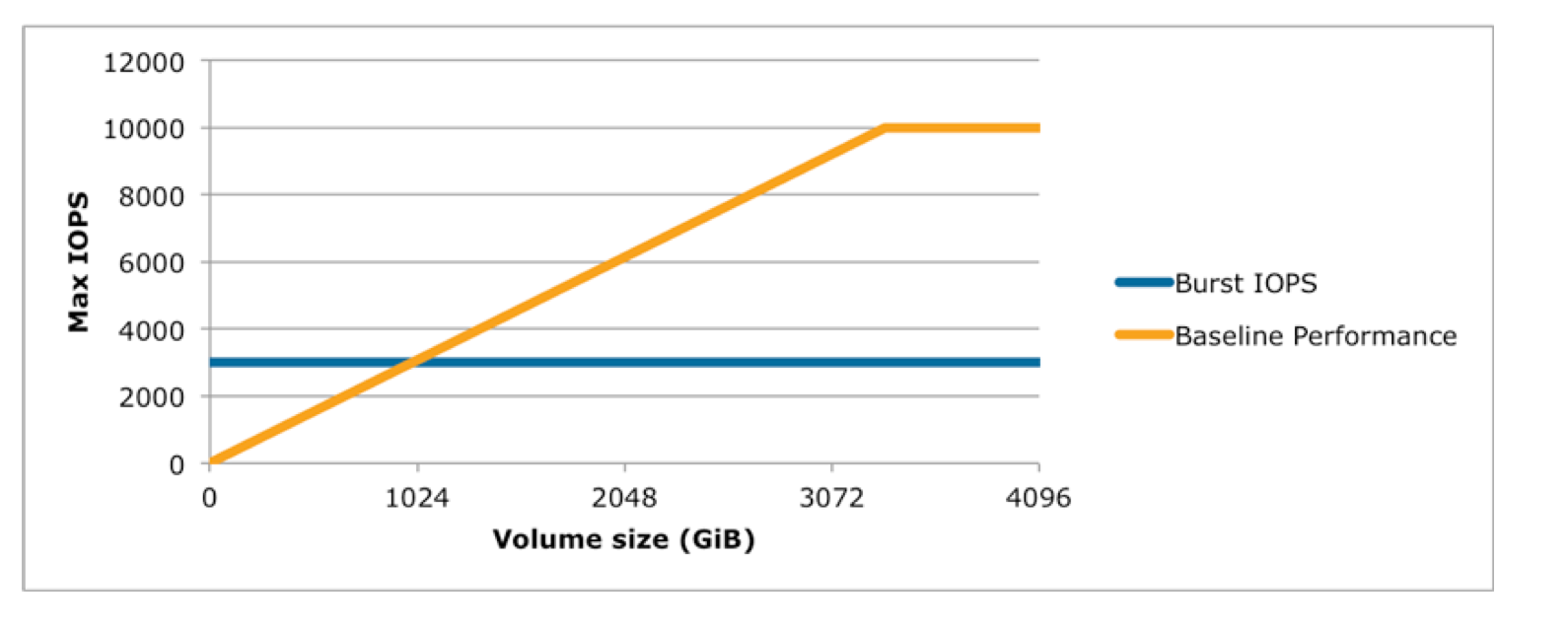
provides the ability to burst to 3,000 IOPS for extended periods of time for volume size less than 1 TiB and up to a maximum of 16,000 IOPS (at 5,334 GiB).
If the volume performance is frequently limited to the baseline level (due to an empty I/O credit balance),
consider using a larger General Purpose SSD volume (with a higher baseline performance level) or
switching to a gp3 volume for independent IOPS/throughput provisioning or
switching to a Provisioned IOPS SSD volume for workloads that require sustained IOPS performance greater than 80,000 IOPS.
AWS recommends migrating gp2 volumes to gp3 for better performance and lower cost.
I/O Credits and Burst Performance (gp2 only)
I/O credits represent the available bandwidth that the General Purpose SSD (gp2) volume can use to burst large amounts of I/O when more than the baseline performance is needed.
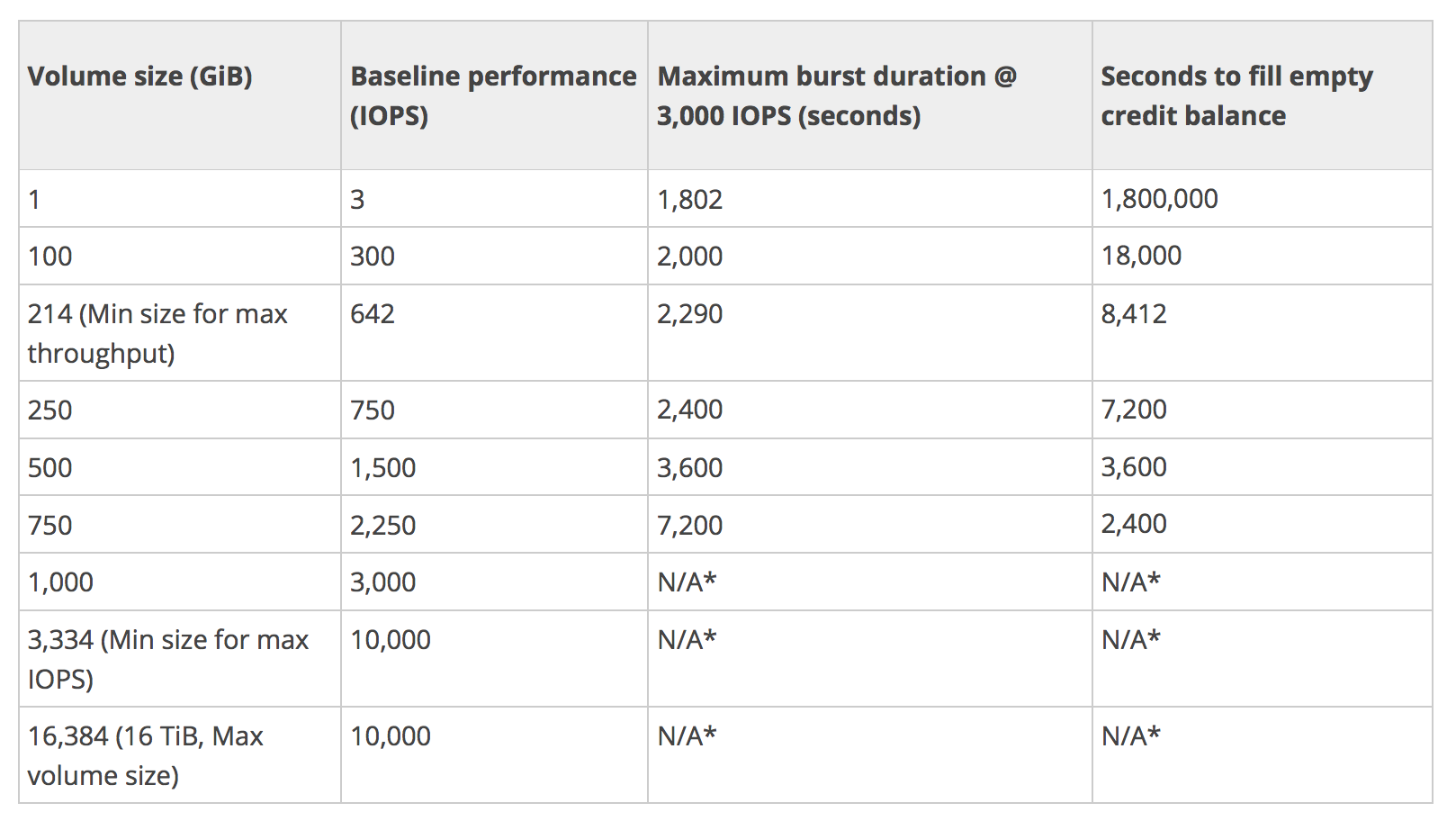
General Purpose SSD (gp2) volume performance is governed by volume size, which dictates the baseline performance level of the volume for e.g. 100 GiB volume has a 300 IOPS @ 3 IOPS/GiB
General Purpose SSD (gp2) volume size also determines how quickly it accumulates I/O credits for e.g. 100 GiB with a performance of 300 IOPS can accumulate 180K IOPS/10 mins (300 * 60 * 10).
Larger volumes have higher baseline performance levels and accumulate I/O credits faster for e.g. 1 TiB has a baseline performance of 3000 IOPS
More credits the volume has for I/O, the more time it can burst beyond its baseline performance level and the better it performs when more performance is needed for e.g. 300 GiB volume with 180K I/O credit can burst @ 3000 IOPS for 1 minute (180K/3000)
Each volume receives an initial I/O credit balance of 5,400,000 I/O credits, which is enough to sustain the maximum burst performance of 3,000 IOPS for 30 minutes.
Initial credit balance is designed to provide a fast initial boot cycle for boot volumes and a good bootstrapping experience for other applications.
Each volume can accumulate I/O credits over a period of time which can be to burst to the required performance level, up to a max of 3,000 IOPS
Unused I/O credit cannot go beyond 54,00,000 I/O credits.
Note: gp3 volumes do NOT use the I/O credit/burst model — they provide consistent baseline performance of 3,000 IOPS regardless of volume size.
Volumes till 1 TiB can burst up to 3000 IOPS over and above its baseline performance
Volumes larger than 1 TiB have a baseline performance that is already equal to or greater than the maximum burst performance, and their I/O credit balance never depletes.
Baseline performance cannot be beyond 16,000 IOPS for gp2 volumes and this limit is reached @ 5,334 GiB
Baseline Performance (gp2)
Formula – 3 IOPS i.e. GiB * 3
Calculation example
1 GiB volume size = 3 IOPS (1 * 3 IOPS)
250 GiB volume size = 750 IOPS (250* 3 IOPS)
Maximum burst duration @ 3000 IOPS (gp2)
How much time can 5400000 IO credit be sustained @ the burst performance of 3000 IOPS. Subtract the baseline performance from 3000 IOPS which would be contributed by the volume size
Formula – 5400000/(3000 – Baseline performance)
Calculation example
1 GiB volume size @ 3000 IOPS with 5400000 the burst performance can be maintained for 5400000/(3000-3) = 1802 secs
250 GiB volume size @ 3000 IOPS with 5400000 the burst performance can be maintained for 5400000/(3000-3*250) = 2400 secs
are designed to meet the needs of I/O intensive workloads, particularly database workloads, that are sensitive to storage performance and consistency in random access I/O throughput.
IOPS rate can be specified when the volume is created, and EBS delivers within 10% of the provisioned IOPS performance 99.9% of the time over a given year.
io2 Block Express (Recommended)
offers the highest performance block storage among EBS volumes with an average latency of under 500 microseconds for 16KiB I/O operations.
can range in size from 4 GiB to 64 TiB.
supports up to 256,000 IOPS per volume (16 KiB I/O) — requires Nitro-based instances.
can be striped together in a RAID configuration for larger size and greater performance.
Note: AWS recommends migrating to io2 Block Express for better durability, performance, and IOPS/GiB ratio at the same price.
Hard disk drives (HDD-backed) volumes
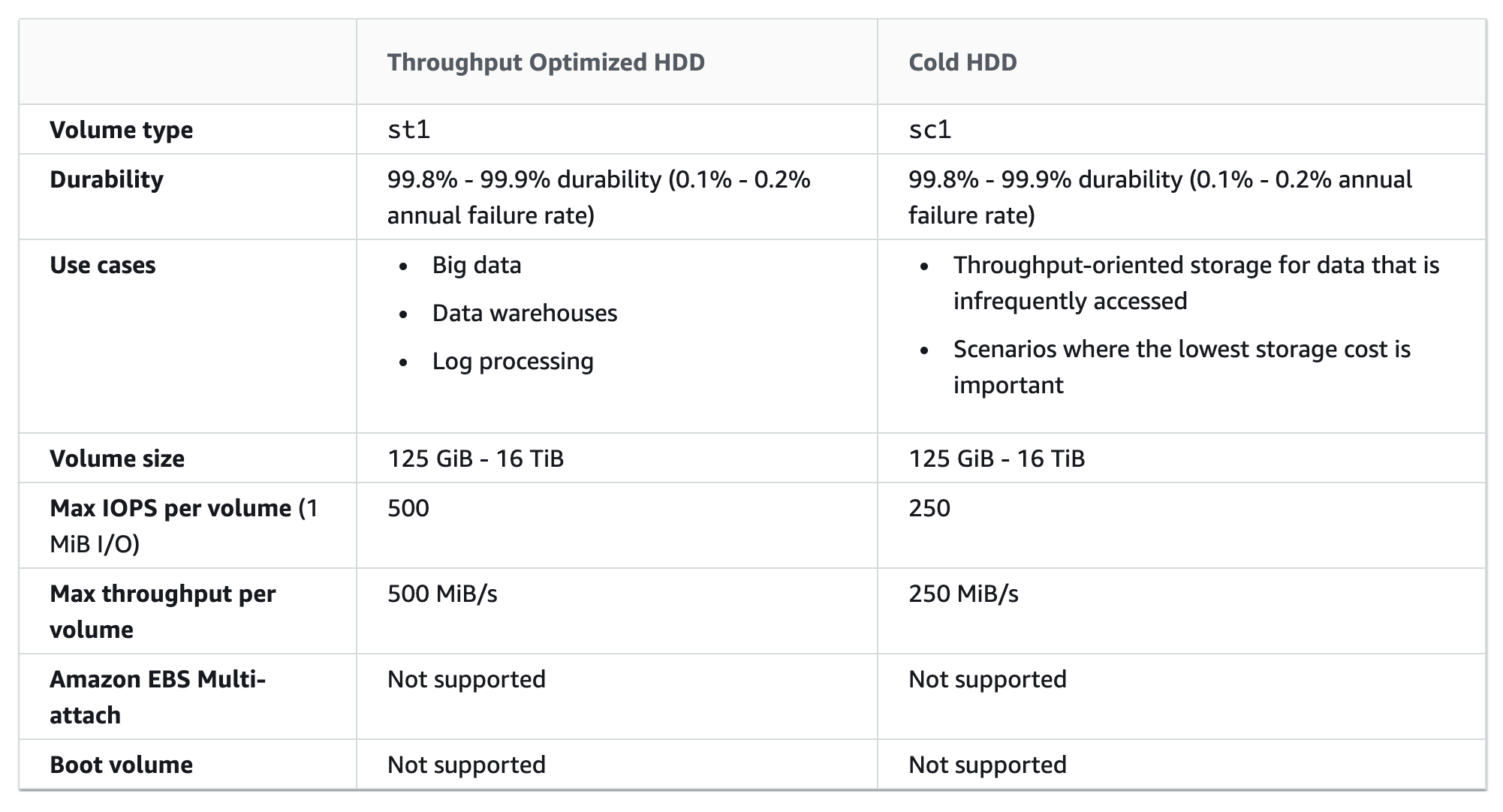
Throughput Optimized HDD (st1) Volumes
provide low-cost magnetic storage that defines performance in terms of throughput rather than IOPS.
is a good fit for large, sequential workloads such as EMR, ETL, data warehouses, and log processing.
do not support boot volumes.
can range in size from 125 GiB to 16 TiB.
are designed to support frequently accessed data.
maximum throughput of 500 MiB/s per volume.
maximum IOPS of 500 (1 MiB I/O).
uses a burst-bucket model for performance similar to gp2. Volume size determines the baseline throughput of the volume, which is the rate at which the volume accumulates throughput credits. Volume size also determines the burst throughput of your volume, which is the rate at which you can spend credits when they are available.
Cold HDD (sc1) Volumes
provide low-cost magnetic storage that defines performance in terms of throughput rather than IOPS.
With a lower throughput limit than st1, sc1 is a good fit ideal for large, sequential cold-data workloads.
ideal for infrequent access to data and are looking to save costs, sc1 provides inexpensive block storage.
do not support boot volumes.
can range in size from 125 GiB to 16 TiB.
maximum throughput of 250 MiB/s per volume.
maximum IOPS of 250 (1 MiB I/O).
though are similar to Throughput Optimized HDD (st1) volumes, are designed to support infrequently accessed data.
uses a burst-bucket model for performance similar to gp2. Volume size determines the baseline throughput of the volume, which is the rate at which the volume accumulates throughput credits. Volume size also determines the burst throughput of your volume, which is the rate at which you can spend credits when they are available.
Magnetic Volumes (standard) – Previous Generation
Magnetic volumes provide the lowest cost per gigabyte of all EBS volume types. Magnetic volumes are backed by magnetic drives and are ideal for workloads performing sequential reads, workloads where data is accessed infrequently, and scenarios where the lowest storage cost is important.
Magnetic volumes can range in size from 1 GiB to 1 TiB
These volumes deliver approximately 100 IOPS on average, with burst capability of up to hundreds of IOPS
Magnetic volumes can be striped together in a RAID configuration for larger size and greater performance.
Note: Magnetic (standard) is a previous generation volume type. AWS recommends using current generation volume types (gp3, io2, st1, sc1) for better performance and cost-effectiveness. For infrequent access cold data, consider sc1 instead.
Elastic Volumes allows you to dynamically increase capacity, tune performance, and change the type of live volumes with no downtime or performance impact.
(January 2026 Update) You can now modify a volume up to 4 times within a rolling 24-hour window — the previous 6-hour cooldown between modifications has been eliminated.
A new modification can be initiated as soon as the previous one completes.
Note: Volume size can only be increased, not decreased. To reduce size, create a new smaller volume and migrate data.
AWS Certification Exam Practice Questions
Questions are collected from Internet and the answers are marked as per my knowledge and understanding (which might differ with yours).
AWS services are updated everyday and both the answers and questions might be outdated soon, so research accordingly.
AWS exam questions are not updated to keep up the pace with AWS updates, so even if the underlying feature has changed the question might not be updated
Open to further feedback, discussion and correction.
You are designing an enterprise data storage system. Your data management software system requires mountable disks and a real filesystem, so you cannot use S3 for storage. You need persistence, so you will be using AWS EBS Volumes for your system. The system needs as low-cost storage as possible, and access is not frequent or high throughput, and is mostly sequential reads. Which is the most appropriate EBS Volume Type for this scenario?
gp1
io1
sc1 (Cold HDD sc1 volumes are designed for infrequently accessed data with lowest storage cost. Note: The original answer was “standard/Magnetic” but for modern deployments, sc1 is the recommended low-cost option for infrequent sequential access. Magnetic (standard) is previous generation.)
gp2
Which EBS volume type is best for high performance NoSQL cluster deployments?
io1/io2 Block Express (Provisioned IOPS SSD volumes are best for: Critical business applications that require sustained IOPS performance, or more than 80,000 IOPS or 2,000 MiB/s of throughput per volume, like large database workloads such as MongoDB. io2 Block Express is now recommended over io1 for up to 256,000 IOPS.)
gp1
standard
gp2
Provisioned IOPS Costs: you are charged for the IOPS and storage whether or not you use them in a given month.
FALSE
TRUE
A user is trying to create a PIOPS EBS volume with 8 GB size and 450 IOPS. Will AWS create the volume?
Yes, since the ratio between EBS and IOPS is less than 50 for io1 (or less than 1000 for io2 Block Express)
No, since the PIOPS and EBS size ratio is less than 50
No, the EBS size is less than 10 GB
Yes, since PIOPS is higher than 100
A user has provisioned 2000 IOPS to the EBS volume. The application hosted on that EBS is experiencing fewer IOPS than provisioned. Which of the below mentioned options does not affect the IOPS of the volume?
The application does not have enough IO for the volume
Instance is EBS optimized
The EC2 instance has 10 Gigabit Network connectivity
Volume size is too large
A user is trying to create a PIOPS EBS volume with 6000 IOPS and 100 GB size. AWS does not allow the user to create this volume. What is the possible root cause for this?
The ratio between IOPS and the EBS volume is higher than 50 (For io1 volumes, maximum ratio is 50 IOPS per GiB. 6000/100 = 60, which exceeds 50. Note: For io2 Block Express, this would be allowed as the ratio limit is 1000 IOPS per GiB.)
The maximum IOPS supported by EBS is 3000
The ratio between IOPS and the EBS volume is lower than 100
PIOPS is supported for EBS higher than 500 GB size
A company needs a database storage solution that provides consistent sub-millisecond latency, 99.999% durability, and supports up to 256,000 IOPS. Which EBS volume type should they choose?
gp3
io1
io2 Block Express (io2 Block Express delivers sub-millisecond latency, 99.999% durability, and supports up to 256,000 IOPS with 4,000 MiB/s throughput per volume.)
st1
A solutions architect needs to consolidate multiple striped gp3 volumes into a single volume for a containerized workload that requires 50,000 IOPS and 30 TiB of storage. Which volume type supports this requirement with a single volume?
gp2
gp3 (Since September 2025, gp3 supports up to 64 TiB size and 80,000 IOPS, allowing consolidation of previously striped volumes into a single gp3 volume.)
io1
st1
What is the maximum IOPS-to-storage ratio for io2 Block Express volumes?
50 IOPS per GiB
500 IOPS per GiB
1,000 IOPS per GiB (io2 Block Express supports up to 1,000 IOPS per GiB, which is 20X higher than io1’s 50 IOPS per GiB ratio.)
100 IOPS per GiB
Which of the following are advantages of io2 Block Express over io1? (Select THREE)
100X higher durability (99.999% vs 99.8-99.9%)
20X higher IOPS-to-storage ratio (1000 vs 50 IOPS/GiB)
All current-generation instances built on the AWS Nitro System use ENA for enhanced networking by default.
Amazon Linux AMIs, Ubuntu HVM AMIs, and Windows Server AMIs already have the ENA module installed with the attributes set and do not require any additional configurations.
It can be enabled for other OS distributions by installing the module with the correct attributes configured
Enhanced Networking is supported using
Elastic Network Adapter (ENA)
The Elastic Network Adapter (ENA) supports network speeds of up to 200 Gbps for supported instance types (e.g., C6in, R6in, M6in instances). Some accelerated instances like P4d support up to 400 Gbps.
The following Xen-based instances also use ENA: H1, I3, G3, m4.16xlarge, P3, P3dn, and R4.
ENA is the recommended and standard adapter for all current-generation workloads.
Intel 82599 Virtual Function (VF) interface
The Intel 82599 Virtual Function interface supports network speeds of up to 10 Gbps for supported instance types.
Supported only on previous-generation instance types: C3, C4, D2, I2, M4 (excl. m4.16xlarge), and R3.
These are all previous-generation instances. AWS recommends migrating to current-generation Nitro-based instances with ENA for better performance.
ENA Express
ENA Express is powered by AWS Scalable Reliable Datagram (SRD) technology, a high-performance network transport protocol.
ENA Express increases the maximum single flow bandwidth from 5 Gbps up to 25 Gbps within the same Region, up to the aggregate instance limit.
Reduces tail latency: up to 50% reduction in P99 latency and up to 85% reduction in P99.9 latency compared to TCP.
Works transparently with existing TCP and UDP applications — no code changes required.
SRD distributes packets across different network paths and dynamically adjusts when congestion is detected.
Handles packet reordering on the receiving end and most retransmits in the network layer.
Cross-AZ support (May 2026): ENA Express now supports traffic between instances in different Availability Zones within the same Region, delivering up to 25 Gbps single-flow bandwidth.
Requirements:
Both sending and receiving instances must be supported instance types.
Both instances must have ENA Express enabled on their network interface attachment.
The network path must not include middleware boxes.
Linux instances require ENA driver version 2.2.9 or higher for full bandwidth; version 2.8+ for metrics.
ENA Express is available on supported 6th generation and later instance types (e.g., m6i, m6a, c6i, r6i, and newer).
If ENA Express is not supported on both ends, communication falls back to standard ENA transmission.
Note: For workloads requiring high packets-per-second with lowest latency during uncongested periods, standard enhanced networking (without ENA Express) may be more appropriate.
Elastic Fabric Adapter (EFA)
An Elastic Fabric Adapter (EFA) is a network device for Amazon EC2 instances to accelerate AI/ML, and High Performance Computing (HPC) applications.
EFA provides lower and more consistent latency and higher throughput than TCP transport for inter-instance communication.
Supports Message Passing Interface (MPI) for HPC and NVIDIA Collective Communications Library (NCCL) for ML workloads, scaling to thousands of cores or GPUs.
Available as an optional EC2 networking feature at no additional cost on supported instance types.
EFA uses OS-bypass capabilities to provide low-latency, high-bandwidth RDMA-like networking.
EFA decoupled from ENA (October 2024): AWS introduced a new interface type that decouples EFA from ENA, enabling dedicated high-bandwidth, low-latency networking crucial for scaling AI/ML workloads.
EFA-only interfaces (June 2026): Amazon SageMaker HyperPod supports EFA-only network interfaces without ENA for IP networking, enabling dedicated accelerator networking.
Supported on instances like P4d (400 Gbps), P5, Trn1, Trn2, Hpc6a, Hpc7a, Hpc7g (200 Gbps), and others.
EFA is ideal for tightly coupled workloads requiring high internode communication bandwidth.
ENA Enhanced Networking Requirements
Instance must be in a VPC (EC2-Classic was fully retired in August 2023)
An HVM virtualization type AMI
Instance must be based on the Nitro System (for current-generation instances)
For Xen-based instances (H1, I3, G3, m4.16xlarge, P3, R4): must have ENA module installed and enaSupport attribute enabled
Note: AWS recommends migrating to current-generation Nitro-based instances with ENA for significantly better networking performance (up to 200 Gbps vs. 10 Gbps).
Enhanced Networking vs. ENA Express vs. EFA
Enhanced Networking (ENA/VF): Higher PPS, lower latency, lower jitter using SR-IOV. Available on all Nitro instances. Best for general workloads requiring consistent network performance.
ENA Express: Uses SRD protocol on top of ENA. Increases single-flow bandwidth to 25 Gbps and significantly reduces tail latency. Best for workloads with large data transfers or latency-sensitive applications. Available on 6th gen+ instances.
Elastic Fabric Adapter (EFA): Network device providing OS-bypass RDMA-like capabilities. Best for HPC (MPI) and AI/ML (NCCL) workloads requiring ultra-low latency inter-node communication. Available on specific compute/GPU instances.
AWS Certification Exam Practice Questions
Questions are collected from Internet and the answers are marked as per my knowledge and understanding (which might differ with yours).
AWS services are updated everyday and both the answers and questions might be outdated soon, so research accordingly.
AWS exam questions are not updated to keep up the pace with AWS updates, so even if the underlying feature has changed the question might not be updated
Open to further feedback, discussion and correction.
You have multiple Amazon EC2 instances running in a cluster across multiple Availability Zones within the same region. What combination of the following should be used to ensure the highest network performance (packets per second), lowest latency, and lowest jitter? Choose 3 answers
Amazon EC2 placement groups (Cluster placement groups are within a single AZ, would not work for multiple AZs)
Amazon VPC (works only in VPC; EC2-Classic was retired August 2023)
A group of researchers is studying the migration pattern of a beetle that eats and destroys grain. The researchers must process massive amounts of data and run statistics. Which one of the following options provides the high performance computing for this purpose.
Configure an Autoscaling Scaling group to launch dozens of spot instances to run the statistical analysis simultaneously
Launch AMI instances that support SR-IOV in a single Availability Zone
Launch compute optimized (C4) instances in at least two Availability Zones
Launch enhanced network type instances in a placement group
A company is running a latency-sensitive financial trading application on EC2 instances. They need to maximize single-flow bandwidth between two instances in the same Availability Zone. Which feature should they enable?
Enhanced networking with Intel 82599 VF
Elastic Fabric Adapter (EFA)
ENA Express (ENA Express uses SRD to increase single-flow bandwidth from 5 Gbps to 25 Gbps and reduces tail latency)
Placement group with standard ENA
A machine learning team needs to scale their distributed training workload across hundreds of GPU instances with the lowest possible inter-node latency. Which networking feature is most appropriate?
ENA Express with SRD protocol
Enhanced networking with cluster placement groups
Elastic Fabric Adapter (EFA) (EFA provides OS-bypass, RDMA-like capabilities optimized for MPI and NCCL workloads at scale)
Multiple Elastic Network Interfaces
Which of the following statements about ENA Express are correct? (Choose 2)
ENA Express uses AWS Scalable Reliable Datagram (SRD) protocol to improve network performance (Correct – SRD is the underlying protocol)
ENA Express requires application code changes to work
ENA Express only works with TCP traffic
ENA Express can increase single-flow bandwidth from 5 Gbps up to 25 Gbps (Correct – major benefit of ENA Express)
A company wants to migrate from C3 instances to improve network performance. Which statement is correct regarding the migration?
C3 instances support ENA with speeds up to 100 Gbps
C3 instances use Intel 82599 VF (up to 10 Gbps) and should be migrated to current-generation Nitro instances with ENA for up to 200 Gbps (C3 is previous gen with VF; current gen instances offer significantly better networking)
⚠️ AWS WAF Classic End of Life: AWS WAF Classic support ended on September 30, 2025. All customers must use AWS WAF (v2). This post covers the current AWS WAF (v2) service. If you are still on WAF Classic, use the automated migration tool in the AWS WAF console.
AWS WAF – Web Application Firewall protects web applications from attacks by allowing rules configuration that allow, block, or monitor (count) web requests based on defined conditions.
helps protect from common attack techniques like SQL injection and Cross-Site Scripting (XSS). Conditions can be based on IP addresses, HTTP headers, HTTP body, URI strings, geographic location, and rate of requests.
tightly integrates with the following AWS services:
Amazon CloudFront distribution
AWS WAF rules run in all AWS Edge Locations, located around the world close to the end users.
Blocked requests are stopped before they reach the web servers.
Protects user authentication and registration endpoints.
AWS App Runner service
Protects containerized web applications deployed on App Runner.
Note: AWS App Runner is closed to new customers starting April 30, 2026.
AWS Verified Access instance
Adds web application firewall capabilities to zero-trust access.
AWS Amplify application
Protects Amplify-hosted web applications directly.
helps protect applications and can inspect web requests transmitted over HTTP or HTTPS.
provides Managed Rules which are pre-configured rules to protect applications from common threats like application vulnerabilities like OWASP, bots, or Common Vulnerabilities and Exposures (CVE).
supports body inspection up to 64 KB for regional resources (API Gateway, Cognito, App Runner, Verified Access), with a default of 16 KB. CloudFront supports up to 64 KB with an 8 KB default.
WAF Benefits
Additional protection against web attacks using specified conditions
Conditions can be defined by using characteristics of web requests such as the following:
IP addresses that the requests originate from
Values in request headers
Strings that appear in the requests
Length of requests
Presence of SQL code that is likely to be malicious (SQL injection)
Presence of a script that is likely to be malicious (cross-site scripting)
Geographic location (country) of the request origin
Rate of requests from a single IP or other aggregation key
Managed Rules to get started quickly with pre-configured protection packs
Rules that can be reused for multiple web applications
Real-time metrics, sampled web requests, and dashboards
Automated administration using the WAF API
CloudFront Security Dashboard for unified CDN and security experience
Simplified console with up to 80% reduction in configuration steps (launched June 2025)
How WAF Works
WAF allows controlling the behaviour of web requests by creating conditions, rules, and web access control lists (web ACLs), now also called protection packs in the new console experience.
Conditions
Conditions define basic characteristics to watch for in a web request
Malicious script – XSS (Cross Site Scripting) – Attackers embed scripts that can exploit vulnerabilities in web applications
IP addresses or address ranges that requests originate from.
Size – Length of specified parts of the request, such as the query string.
Malicious SQL – SQL injection – Attackers try to extract data from the database by embedding malicious SQL code in a web request
Geographic match – Allow or block requests based on the country from which the requests originate.
Strings that appear in the request, for e.g., values that appear in the User-Agent header or text strings that appear in the query string.
Regex match – Match request components against regular expressions.
Label match – Match against labels added by prior rules in the web ACL evaluation.
Actions
Allow – allows the request to be forwarded to the protected resource.
Block – blocks the request. By default returns HTTP 403 (Forbidden), but can be configured with custom responses.
Count – counts the requests that match the rule without allowing or blocking. Useful for testing rules before enforcing them.
CAPTCHA – runs a CAPTCHA puzzle challenge against the request to verify a human is sending it. If solved, the request is allowed with a valid token.
Challenge – runs a silent browser challenge (JavaScript) to verify the client is a legitimate browser without user interaction. Useful for detecting bots without impacting user experience.
Rules
AWS WAF rule defines how to inspect HTTP(S) web requests and the action to take on a request when it matches the inspection criteria.
Each rule requires one top-level rule statement, which might contain nested statements at any depth, depending on the rule and statement type.
AWS WAF supports logical statements for AND, OR, and NOT that can be used to combine statements in a rule. for e.g.,
based on recent requests from an attacker, a rule might include the following conditions with logical AND:
The requests come from 192.0.2.44.
They contain the value BadBot in the User-Agent header.
They appear to include malicious SQL code in the query string.
All 3 conditions should be satisfied for the Rule to be passed and the associated action to be taken.
Rules can also add labels to matching requests. Labels are metadata that can be used by subsequent rules in the same web ACL for more complex logic.
Rate-Based Rules
Rate-based rules track and limit the rate of requests from individual sources.
Aggregation can be by IP address, forwarded IP, custom keys (headers, query parameters), or combinations.
Minimum rate limit is 10 requests per 5-minute window (reduced from 100 in 2025).
Scope-down statements can narrow which requests are counted, for e.g., only count requests to /login path.
Automatically blocks source IPs (or other aggregation keys) when the rate exceeds the threshold.
Useful for protecting against HTTP flood DDoS attacks and brute-force login attempts.
Rule Groups
A Rule Group is a reusable set of rules that can be added to a Web ACL.
Rule groups fall into the following main categories:
AWS Managed rule groups – maintained by AWS, includes:
Core rule set (CRS) – common web vulnerabilities
Known bad inputs – patterns associated with exploitation
SQL injection and XSS rules
IP reputation list
Anonymous IP list (VPNs, proxies, Tor)
Bot Control rule group
Account Takeover Prevention (ATP) rule group
Account Creation Fraud Prevention (ACFP) rule group
Anti-DDoS rule group (AWSManagedRulesAntiDDoSRuleSet) – launched June 2025
AWS Marketplace rule groups – third-party managed rules
Your own rule groups – custom rules you create and maintain
Service-owned rule groups – managed by AWS Firewall Manager and Shield Advanced
Web ACLs – Access Control Lists (Protection Packs)
A Web Access Control List (Web ACL), also called a protection pack in the new console, provides fine-grained control over all HTTP(S) web requests that the protected resource responds to.
Web ACLs provide:
Rule Groups OR Combination of Rules
Action – allow, block, count, CAPTCHA, or Challenge for each rule
WAF compares a request with the rules in a web ACL in the order listed and takes the action associated with the first rule that matches.
When a web request matches all conditions in a rule, WAF immediately takes the action (allow or block) and doesn’t evaluate the remaining rules.
Default action
Determines whether WAF allows or blocks a request that does not match any of the rules.
Supports criteria like the following to allow or block requests:
IP address origin of the request
Country of origin of the request
String match or regular expression (regex) match in a part of the request
Size of a particular part of the request
Detection of malicious SQL code or scripting
Rate-based rules
Label match from prior rules
AWS WAF Bot Control
Bot Control provides visibility and control over common and pervasive bot traffic.
Bot Control detection catalog covers more than 650 unique bots and agents (as of 2026), including:
AI search engine crawlers
AI data collectors and scrapers
AI assistants and agents
Large language model (LLM) training crawlers
Traditional scrapers, scanners, crawlers, and status monitors
Two levels of protection:
Common – identifies self-identifying bots through request headers verification
Targeted – advanced detection using behavioral analysis, browser fingerprinting, and ML-based detection for sophisticated bots that don’t self-identify
Actions available: Block, Allow, Count, CAPTCHA, Challenge, or custom response.
Uses AWS WAF token management for client session tracking.
AI Activity Dashboard (Feb 2026)
Provides centralized visibility into AI bot and agent traffic reaching applications.
Visualize AI traffic trends over time.
Identify most active bots and frequently accessed paths.
Analyze request volumes by bot category and verification status.
Take action directly: allow verified AI search crawlers while rate-limiting or blocking unverified agents.
Classifies AI bots into three types:
AI scrapers – systematically collect data to train AI models
AI tools – surface data from applications in AI applications using function calling
AI agents – autonomously navigate and interact dynamically with applications
Available at no additional cost for all WAF customers.
AI Traffic Monetization (June 2026)
Gives digital content owners and publishers a way to charge AI bots and agents for access to protected web content at the network edge.
Configure pricing through the AWS WAF console.
Define AI bot or agent policies based on verification status.
Supports Web Bot Auth signatures for bot identity verification.
Available at no additional WAF charge.
AWS WAF Fraud Control
Provides intelligent threat mitigation for fraud prevention.
Two managed rule groups:
Account Takeover Prevention (ATP)
Detects and blocks credential stuffing and brute-force login attempts.
Analyzes login requests for compromised credentials.
Uses stolen credential databases to identify credential stuffing.
Account Creation Fraud Prevention (ACFP)
Monitors sign-up and registration pages for anomalous activity.
Detects automated account creation using bots.
Blocks suspicious requests based on request identifiers and behavioral analysis.
Blocks fraud at the network edge when used with CloudFront, minimizing impact on application performance.
Uses client-side interrogation with JavaScript challenges and behavioral analysis.
AWS WAF Anti-DDoS Protection
The Anti-DDoS Managed Rule Group (AWSManagedRulesAntiDDoSRuleSet) launched in June 2025 provides automatic application-layer (Layer 7) DDoS protection.
Automatically detects and mitigates DDoS events of any duration in single-digit seconds.
Establishes a traffic baseline and uses it to detect anomalies.
When an attack is detected, labels requests:
event-detected – added to all incoming requests during an event
ddos-request – added to requests suspected of contributing to the attack
Supersedes the Shield Advanced Layer 7 Auto Mitigation (L7AM) feature as of March 2026.
Works with CloudFront, ALB, and other AWS WAF-supported services.
Customizable behavior using labels and additional WAF rules.
Managed by AWS Firewall Manager for centralized deployment.
AWS WAF Data Protection
Data Protection settings (Feb 2025) allow granular protection of sensitive information in WAF outputs.
Protects passwords, API keys, authentication tokens, and other confidential data in specific fields (headers, parameters, body content).
Applies to full logs, sampled requests, and Security Lake outputs.
Two transformation options:
Substitution – replaces sensitive data with static strings
Cryptographic hashing – replaces with hashed values for correlation without exposure
Configured per web ACL in the Logging and Metrics section.
AWS WAF Labels and Dynamic Label Interpolation
Labels are metadata added to web requests by matching rules, available for subsequent rules in the same web ACL.
Enable complex multi-rule logic without duplicating conditions.
Managed rule groups add labels to indicate match details (e.g., bot category, attack type).
Use ${namespace:} syntax in custom request headers, response headers, and response bodies.
Forward entire label namespaces at once.
Eliminates need for multiple rules to pass different classification signals.
New Console Experience (June 2025)
Simplified console reduces web application security configuration steps by up to 80%.
Protection Packs – pre-configured rule packs for specific workloads:
Recommended – enables recommended protections for selected application categories
Essentials – enables essential protections
You build it – select and customize from available options
Automated security recommendations based on AWS Threat Intelligence analysis of allowed traffic patterns.
Unified dashboard with Sankey visualization of protection activity to WAF actions.
Integrated log explorer with pre-built filters.
Direct AWS Marketplace integration for partner security solutions.
Available at no additional cost.
AWS WAF Architecture
AWS WAF integration with CloudFront and Lambda to dynamically update WAF rules
CloudFront receives requests on behalf of the web application, it sends access logs to an S3 bucket that contains detailed information about the requests.
For every new access log stored in the S3 bucket, a Lambda function is triggered. The Lambda function parses the log files and looks for requests that resulted in error codes 400, 403, 404, and 405.
Lambda function then counts the number of bad requests and temporarily stores results in the S3 bucket
Lambda function updates AWS WAF rules to block the IP addresses for a period of time that you specify.
After this blocking period has expired, AWS WAF allows those IP addresses to access your application again, but continues to monitor the requests from those IP addresses.
Lambda function publishes execution metrics in CloudWatch, such as the number of requests analyzed and IP addresses blocked.
CloudWatch metrics can be integrated with SNS for notification
Web Application Firewall Sandwich Architecture (Historical)
NOTE: This is from the older DDoS Resiliency Whitepaper. It uses third-party WAF software on EC2 instances, NOT AWS WAF. With the introduction of AWS WAF Anti-DDoS Managed Rule Group (June 2025), this pattern is largely superseded by native AWS WAF protections.
DDoS attacks at the application layer commonly target web applications with lower volumes of traffic compared to infrastructure attacks.
WAF can be included as part of the infrastructure to mitigate these types of attacks.
WAFs act as filters that apply a set of rules to web traffic, which cover exploits like XSS and SQL injection but can also help build resiliency against DDoS by mitigating HTTP GET or POST floods.
In the “WAF sandwich,” the EC2 instance running third-party WAF software (not the AWS WAF service) is included in an Auto Scaling group and placed between two ELB load balancers.
With WAF sandwich pattern, the instances can scale and add additional WAF EC2 instances should the traffic spike to elevated levels.
Once the traffic has been inspected and filtered, the WAF EC2 instance forwards traffic to the internal, backend load balancer which then distributes traffic across the application EC2 instances.
Modern Alternative: Use AWS WAF with the Anti-DDoS managed rule group attached to CloudFront or ALB for native Layer 7 DDoS protection without managing EC2-based WAF instances.
AWS Certification Exam Practice Questions
Questions are collected from Internet and the answers are marked as per my knowledge and understanding (which might differ with yours).
AWS services are updated everyday and both the answers and questions might be outdated soon, so research accordingly.
AWS exam questions are not updated to keep up the pace with AWS updates, so even if the underlying feature has changed the question might not be updated
Open to further feedback, discussion and correction.
The Web Application Development team is worried about malicious activity from 200 random IP addresses. Which action will ensure security and scalability from this type of threat?
Use inbound security group rules to block the IP addresses.
Use inbound network ACL rules to block the IP addresses.
Use AWS WAF to block the IP addresses.
Write iptables rules on the instance to block the IP addresses.
You’ve been hired to enhance the overall security posture for a very large e-commerce site. They have a well architected multi-tier application running in a VPC that uses ELBs in front of both the web and the app tier with static assets served directly from S3. They are using a combination of RDS and DynamoDB for their dynamic data and then archiving nightly into S3 for further processing with EMR. They are concerned because they found questionable log entries and suspect someone is attempting to gain unauthorized access. Which approach provides a cost effective scalable mitigation to this kind of attack? [Old Exam Question]
Recommend that they lease space at a DirectConnect partner location and establish a 1G DirectConnect connection to their VPC they would then establish Internet connectivity into their space, filter the traffic in hardware Web Application Firewall (WAF). And then pass the traffic through the DirectConnect connection into their application running in their VPC. (Not cost effective)
Add previously identified hostile source IPs as an explicit INBOUND DENY NACL to the web tier subnet. (does not protect against new sources)
Add a WAF tier by creating a new ELB and an AutoScaling group of EC2 Instances running a host-based WAF. They would redirect Route 53 to resolve to the new WAF tier ELB. The WAF tier would then pass the traffic to the current web tier. Web tier Security Groups would be updated to only allow traffic from the WAF tier Security Group
Remove all but TLS 1.2 from the web tier ELB and enable Advanced Protocol Filtering. This will enable the ELB itself to perform WAF functionality. (No advanced protocol filtering in ELB)
NOTE: This is an older exam question. In modern architectures, AWS WAF can be directly attached to CloudFront or ALB without needing EC2-based WAF instances.
A company’s web application is experiencing a high volume of automated bot traffic that is consuming resources and scraping proprietary content. The security team needs to implement bot management that can differentiate between legitimate users, verified search engine crawlers, and malicious bots. Which AWS WAF feature should they implement?
Rate-based rules with IP-based aggregation
AWS WAF Bot Control with Targeted protection level
Geographic match rules to block countries with high bot traffic
Custom regex rules to match bot User-Agent strings
A media company wants to allow verified AI search crawlers to access their content while blocking unverified AI data scrapers. Which combination of AWS WAF features provides this capability? (Select TWO)
AWS WAF Bot Control with AI bot category detection
Network ACL rules with IP deny lists
AI Activity Dashboard to identify and categorize AI bot traffic
AWS Shield Advanced automatic DDoS protection
AWS Firewall Manager centralized policy
An organization is experiencing a Layer 7 DDoS attack against their web application hosted behind an Application Load Balancer. They need automatic detection and mitigation without manual intervention. Which is the MOST effective solution?
Create a rate-based rule with a threshold of 100 requests per 5 minutes
Enable AWS Shield Advanced with automatic application layer mitigation
Add the AWS WAF Anti-DDoS Managed Rule Group (AWSManagedRulesAntiDDoSRuleSet) to the web ACL
Deploy EC2 instances running third-party WAF software in a WAF sandwich architecture
A security engineer needs to protect login pages from credential stuffing attacks and detect compromised credentials. Which AWS WAF feature should they enable?
AWS WAF Bot Control Common level
Rate-based rules with URI path scope-down
AWS WAF Fraud Control Account Takeover Prevention (ATP)
SQL injection rule group from AWS Managed Rules
A company needs to ensure sensitive data like API keys and passwords in web requests are not exposed in WAF logs while still maintaining full logging for security analysis. Which AWS WAF feature addresses this requirement?
CloudWatch Logs field-level encryption
S3 bucket encryption for WAF log storage
AWS WAF Data Protection with substitution or cryptographic hashing
helps grants and delegate access to users and services without the need of creating permanent credentials
IAM users or AWS services can assume a role to obtain temporary security credentials that can be used to make AWS API calls
needs Trust policy to define who and Permission policy to define what the user or service can access
used with Security Token Service (STS), a lightweight web service that provides temporary, limited privilege credentials for IAM users or for authenticated federated users
IAM role scenarios
Service access for e.g. EC2 to access S3 or DynamoDB
Cross Account access for users
with user within the same account
with user within an AWS account owned the same owner
with user from a Third Party AWS account with External ID for enhanced security
Identity Providers & Federation
AssumeRoleWithWebIdentity – Web Identity Federation, where the user can be authenticated using external authentication Identity providers like Amazon, Google or any OpenId IdP
AssumeRoleWithSAML – Identity Provider using SAML 2.0, where the user can be authenticated using on premises Active Directory, Open Ldap or any SAML 2.0 compliant IdP
AssumeRole (recommended) or GetFederationToken – For other Identity Providers, use Identity Broker to authenticate and provide temporary Credentials
is an account management service that enables consolidating multiple AWS accounts into an organization that can be centrally managed.
include consolidated billing and account management capabilities that enable one to better meet the budgetary, security, and compliance needs of your business.
As an administrator of an organization, new accounts can be created in an organization and invite existing accounts to join the organization.
enables you to
Automate AWS account creation and management, and provision resources with AWS CloudFormation Stacksets.
Maintain a secure environment with policies and management of AWS security services
Govern access to AWS services, resources, and regions
Centrally manage policies across multiple AWS accounts
offer central control over the maximum available permissions for all of the accounts in your organization, ensuring member accounts stay within the organization’s access control guidelines.
are one type of policy that help manage the organization.
are available only in an organization that has all features enabled, and aren’t available if the organization has enabled only the consolidated billing features.
are NOT sufficient for granting access to the accounts in the organization.
defines a guardrail for what actions accounts within the organization root or OU can do, but IAM policies need to be attached to the users and roles in the organization’s accounts to grant permissions to them.
Effective permissions are the logical intersection between what is allowed by the SCP and what is allowed by the IAM and resource-based policies.
with an SCP attached to member accounts, identity-based and resource-based policies grant permissions to entities only if those policies and the SCP allow the action
don’t affect users or roles in the management account. They affect only the member accounts in your organization.
gives applications in AWS access to Active Directory services
different from SAML + AD, where the access is granted to AWS services through Temporary Credentials
Simple AD
least expensive but does not support Microsoft AD advanced features
provides a Samba 4 Microsoft Active Directory compatible standalone directory service on AWS
No single point of Authentication or Authorization, as a separate copy is maintained
trust relationships cannot be setup between Simple AD and other Active Directory domains
Don’t use it, if the requirement is to leverage access and control through centralized authentication service
AD Connector
acts just as an hosted proxy service for instances in AWS to connect to on-premises Active Directory
enables consistent enforcement of existing security policies, such as password expiration, password history, and account lockouts, whether users are accessing resources on-premises or in the AWS cloud
needs VPN connectivity (or Direct Connect)
integrates with existing RADIUS-based MFA solutions to enabled multi-factor authentication
does not cache data which might lead to latency
Read-only Domain Controllers (RODCs)
works out as a Read-only Active Directory
holds a copy of the Active Directory Domain Service (AD DS) database and respond to authentication requests
they cannot be written to and are typically deployed in locations where physical security cannot be guaranteed
helps maintain a single point to authentication & authorization controls, however needs to be synced
Writable Domain Controllers
are expensive to setup
operate in a multi-master model; changes can be made on any writable server in the forest, and those changes are replicated to servers throughout the entire forest
is a cloud-based single sign-on (SSO) service that makes it easy to centrally manage SSO access to all of the AWS accounts and cloud applications.
helps manage access and permissions to commonly used third-party software as a service (SaaS) applications, AWS SSO-integrated applications as well as custom applications that support SAML 2.0.
includes a user portal where the end-users can find and access all their assigned AWS accounts, cloud applications, and custom applications in one place.
Amazon Cognito provides authentication, authorization, and user management for the web and mobile apps.
Users can sign in directly with a username and password, or through a third party such as Facebook, Amazon, Google, or Apple.
Cognito has two main components.
User pools are user directories that provide sign-up and sign-in options for the app users.
Identity pools enable you to grant the users access to other AWS services.
Cognito Sync helps synchronize data across a user’s devices so that their app experience remains consistent when they switch between devices or upgrade to a new device.
is a managed encryption service that allows the creation and control of encryption keys to enable data encryption.
provides a highly available key storage, management, and auditing solution to encrypt the data across AWS services & within applications.
uses hardware security modules (HSMs) that are FIPS 140-3 Security Level 3 certified (upgraded from FIPS 140-2 in May 2023).
seamlessly integrates with several AWS services to make encrypting data in those services easy.
supports multi-region keys, which are AWS KMS keys in different AWS Regions. Multi-Region keys are not global and each multi-region key needs to be replicated and managed independently.
supports External Key Store (XKS) capability (November 2022) allowing customers to store and control encryption keys on-premises or outside AWS cloud while using AWS KMS.
provides three key store options: Default KMS key store, CloudHSM custom key store, and External key store (XKS).
supports cryptographic operations like PIN generation, validation, and credit/debit card security code processing.
manages underlying physical HSM infrastructure and key management automatically.
integrates with AWS IAM for authorization and AWS CloudTrail for auditing.
enables payment processing workloads to move to the cloud securely.
provides elastic scaling for payment cryptography operations.
AWS Private Certificate Authority (Private CA)
is a managed private certificate authority service for issuing and managing private SSL/TLS certificates.
removes upfront investment and ongoing maintenance costs of operating your own private CA.
supports two operating modes: General-purpose mode (certificates with any validity period) and Short-lived certificate mode (certificates valid up to 7 days, launched February 2023).
integrates with AWS Certificate Manager (ACM) for automated certificate provisioning and renewal.
supports Private CA Connector for Active Directory (September 2023) enabling AWS Private CA as drop-in replacement for self-managed enterprise CAs without local agents.
provides audit and compliance support through AWS CloudTrail integration.
enables certificate-based authentication for services like Amazon WorkSpaces.
is a web application firewall that helps monitor the HTTP/HTTPS traffic and allows controlling access to the content.
helps protect web applications from attacks by allowing rules configuration that allow, block, or monitor (count) web requests based on defined conditions. These conditions include IP addresses, HTTP headers, HTTP body, URI strings, SQL injection and cross-site scripting.
helps define Web ACLs, which is a combination of Rules that is a combinations of Conditions and Action to block or allow
integrated with CloudFront, Application Load Balancer (ALB), API Gateway services commonly used to deliver content and applications
supports custom origins outside of AWS, when integrated with CloudFront
provides AWS WAF Fraud Control with three capabilities:
Account Takeover Prevention (ATP) – Launched February 2022, protects login pages against credential stuffing attacks
Account Creation Fraud Prevention (ACFP) – Launched June 2023, detects and blocks automated bot-based account creation
Bot Control – Detects and controls common bots and targeted bots that use advanced evasion techniques
supports Challenge and CAPTCHA actions for bot mitigation at no additional cost with Fraud Control.
offers usage-based tiered pricing for Fraud Control (introduced June 2023).
AWS Verified Access
provides VPN-less, secure access to corporate applications (GA April 2023).
implements Zero Trust security model for application access without traditional VPN.
validates each application request against identity and device security requirements before granting access.
integrates with identity providers (IdPs) and device management systems for authentication and authorization.
uses Cedar policy language for fine-grained access control policies.
supports AWS WAF integration for additional web application protection.
provides signed identity context to end applications for additional security.
simplifies remote access management and improves user experience compared to VPN.
helps protect secrets needed to access applications, services, and IT resources.
enables you to easily rotate, manage, and retrieve database credentials, API keys, and other secrets throughout their lifecycle.
secure secrets by encrypting them with encryption keys managed using AWS KMS.
offers native secret rotation with built-in integration for RDS, Redshift, and DocumentDB.
supports Lambda functions to extend secret rotation to other types of secrets, including API keys and OAuth tokens.
supports IAM and resource-based policies for fine-grained access control to secrets and centralized secret rotation audit for resources in the AWS Cloud, third-party services, and on-premises.
enables secret replication in multiple AWS regions (launched March 2021) to support multi-region applications and disaster recovery scenarios.
automatically keeps replica secrets in sync with primary secret including rotation.
is a managed service that provides protection against Distributed Denial of Service (DDoS) attacks for applications running on AWS
provides protection for all AWS customers against common and most frequently occurring infrastructure (layer 3 and 4) attacks like SYN/UDP floods, reflection attacks, and others to support high availability of applications on AWS.
provides AWS Shield Advanced with additional protections against more sophisticated and larger attacks for applications running on EC2, ELB, CloudFront, AWS Global Accelerator, and Route 53.
offers threat detection that enables continuous monitoring and protects the AWS accounts and workloads.
is a Regional service
analyzes continuous streams of meta-data generated from AWS accounts and network activity found in AWS CloudTrail Events, EKS audit logs, VPC Flow Logs, and DNS Logs.
integrated threat intelligence
combines machine learning, anomaly detection, network monitoring, and malicious file discovery, utilizing both AWS-developed and industry-leading third-party sources to help protect workloads and data on AWS
supports suppression rules, trusted IP lists, and thread lists.
provides Malware Protection to detect malicious files on EBS volumes
provides EKS Runtime Monitoring (March 2023) using fully managed EKS add-on for visibility into container runtime activities (file access, process execution, network connections).
provides RDS Protection (March 2023) for profiling and monitoring access activity to Amazon Aurora databases.
provides Lambda Protection for monitoring AWS Lambda function invocations and runtime behavior.
can identify specific containers within EKS clusters that are potentially compromised and detect privilege escalation attempts.
operates completely independently from the resources so there is no risk of performance or availability impacts on the workloads.
is a vulnerability management service that continuously scans the AWS workloads for vulnerabilities
automatically discovers and scans EC2 instances and container images residing in Elastic Container Registry (ECR) for software vulnerabilities and unintended network exposure.
supports AWS Lambda function scanning for vulnerabilities in application code and dependencies.
provides CI/CD integration (November 2023) with open-source plugins for Jenkins, TeamCity, and other CI/CD tools to scan container images at build time.
enables vulnerability scanning directly from CI/CD pipelines wherever they are running without activating Inspector service.
scans Lambda functions on each deployment or update of application code or dependencies.
creates a finding, when a software vulnerability or network issue is discovered, that describes the vulnerability, rates its severity, identifies the affected resource, and provides remediation guidance.
is a Regional service.
requires Systems Manager (SSM) agent to be installed and enabled for EC2 scanning.
Amazon Security Lake
is a fully managed security data lake service (GA November 2023).
automatically centralizes security data from AWS environments, SaaS providers, on-premises, and cloud sources into a purpose-built data lake.
normalizes security data into the Open Cybersecurity Schema Framework (OCSF) standard format.
aggregates data from AWS services like CloudTrail, VPC Flow Logs, Route 53 logs, and third-party sources.
enables comprehensive security data analysis across entire organization.
automatically collects data for existing and new accounts with multi-account support.
stores security data in customer’s own AWS account for data ownership and control.
integrates with analytics tools like Amazon Athena, Amazon OpenSearch, and third-party SIEM solutions.
supports cross-region data aggregation for centralized security monitoring.
pricing based on data ingestion volume and normalization (no charge for third-party or custom data).
helps analyze, investigate, and quickly identify the root cause of potential security issues or suspicious activities.
automatically collects log data from the AWS resources and uses machine learning, statistical analysis, and graph theory to build a linked set of data to easily conduct faster and more efficient security investigations.
enables customers to view summaries and analytical data associated with CloudTrail logs, EKS audit logs, VPC Flow Logs.
provides detailed summaries, analysis, and visualizations of the behaviors and interactions amongst your AWS accounts, EC2 instances, AWS users, roles, and IP addresses.
maintains up to a year of aggregated data
is a Regional service and needs to be enabled on a region-by-region basis.
is a multi-account service that aggregates data from monitored member accounts under a single administrative account within the same region.
has no impact on the performance or availability of the AWS infrastructure since it retrieves the log data and findings directly from the AWS services.
a cloud security posture management service that performs security best practice checks, aggregates alerts, and enables automated remediation.
collects security data from across AWS accounts, services, and supported third-party partner products and helps you analyze your security trends and identify the highest priority security issues.
is Regional abut supports cross-region aggregation of findings.
automatically runs continuous, account-level configuration and security checks based on AWS best practices and industry standards which include CIS Foundations, PCI DSS.
consolidates the security findings across accounts and provider products and displays results on the Security Hub console.
supports integration with Amazon EventBridge. Custom actions can be defined when a finding is received.
has multi-account management through AWS Organizations integration, which allows delegating an administrator account for the organization.
works with AWS Config to perform most of its security checks for controls
Macie is a data security service that discovers sensitive data by using machine learning and pattern matching, provides visibility into data security risks, and enables automated protection against those risks.
provides an inventory of the S3 buckets and automatically evaluates and monitors the buckets for security and access control.
automates the discovery, classification, and reporting of sensitive data.
generates a finding for you to review and remediate as necessary if it detects a potential issue with the security or privacy of the data, such as a bucket that becomes publicly accessible.
provides multi-account support using AWS Organizations to enable Macie across all of the accounts.
is a regional service and must be enabled on a region-by-region basis and helps view findings across all the accounts within each Region.
is a self-service audit artifact retrieval portal that provides customers with on-demand access to AWS’ compliance documentation and agreements
can use AWS Artifact Reports to download AWS security and compliance documents, such as AWS ISO certifications, Payment Card Industry (PCI), and System and Organization Control (SOC) reports.
AWS Security Services – Practice Questions
A company needs to manage encryption keys with FIPS 140-3 Level 3 compliance and wants AWS to handle the infrastructure. Which service should they use?
A. AWS CloudHSM
B. AWS KMS ✓
C. AWS Secrets Manager
D. AWS Certificate Manager
A financial institution needs to process payment card transactions in the cloud while meeting PCI compliance requirements. Which service should they use?
A. AWS CloudHSM
B. AWS KMS
C. AWS Payment Cryptography ✓
D. AWS Private CA
A company wants to provide secure access to corporate applications without using VPN. Which service implements Zero Trust access?
A. AWS Client VPN
B. AWS Verified Access ✓
C. AWS Direct Connect
D. AWS PrivateLink
A development team needs to externalize authorization logic from their application and use fine-grained permissions. Which service should they use?
A. AWS IAM
B. Amazon Cognito
C. Amazon Verified Permissions ✓
D. AWS IAM Identity Center
A company needs to centralize security data from multiple AWS accounts and third-party sources for analysis. Which service should they use?
A. AWS Security Hub
B. Amazon Security Lake ✓
C. Amazon Detective
D. AWS CloudTrail
Which AWS service can detect runtime threats in EKS containers including file access and process execution?
A. Amazon Inspector
B. AWS Security Hub
C. Amazon GuardDuty ✓
D. Amazon Detective
A company wants to scan container images for vulnerabilities in their CI/CD pipeline before deployment. Which service supports this?
A. AWS Config
B. Amazon Inspector ✓
C. AWS Security Hub
D. Amazon GuardDuty
Which service can protect login pages from credential stuffing attacks and account takeover attempts?
A. AWS Shield
B. AWS WAF Fraud Control ✓
C. Amazon GuardDuty
D. AWS Firewall Manager
A company needs to replicate secrets across multiple regions for disaster recovery. Which service supports this?
A. AWS Systems Manager Parameter Store
B. AWS Secrets Manager ✓
C. AWS KMS
D. AWS Certificate Manager
Which service was renamed from AWS Single Sign-On (SSO) in July 2022?
Amazon Detective makes it easy to analyze, investigate, and quickly identify the root cause of potential security issues or suspicious activities.
automatically collects log data from the AWS resources and uses machine learning, statistical analysis, and graph theory to build a linked set of data to easily conduct faster and more efficient security investigations.
provides detailed summaries, analysis, and visualizations of the behaviors and interactions amongst your AWS accounts, EC2 instances, AWS users, roles, and IP addresses.
maintains up to a year of aggregated data and makes it easily available through a set of visualizations that shows changes in the type and volume of activity over a selected time window, and links those changes to security findings.
is a Regional service and needs to be enabled on a region-by-region basis. This ensures all data analyzed is regionally based and doesn’t cross AWS regional boundaries.
does not require Amazon GuardDuty to be enabled. As of Feb 2024, the requirement to have GuardDuty enabled for 48 hours before enabling Detective has been removed.
is a multi-account service that aggregates data from monitored member accounts under a single administrative account within the same region.
Multi-account monitoring deployments can be configured in the same way it is configured for administrative and member accounts in Amazon GuardDuty and AWS Security Hub.
is integrated with AWS Organizations. The organization management account designates a Detective administrator account for the organization.
has no impact on the performance or availability of the AWS infrastructure since it retrieves the log data and findings directly from the AWS services.
supports VPC endpoints via AWS PrivateLink, enabling secure API calls to Detective from within a VPC without requiring internet traversal.
Amazon Detective Data Sources
AWS CloudTrail logs – management events capturing API activity across your AWS accounts.
Amazon VPC Flow Logs – network traffic data for IP traffic going to and from network interfaces.
Amazon EKS Audit Logs – Kubernetes audit logs from EKS clusters for container security investigations.
Amazon GuardDuty findings – threat detection findings including runtime monitoring, malware protection, and extended threat detection.
AWS Security Hub findings – security posture findings from Security Hub and integrated services.
Other integrated AWS security services – including Amazon Inspector vulnerability findings.
Amazon Detective Finding Groups
Finding Groups automatically consolidate multiple related security findings into a single security event.
Detective detects patterns or relationships among multiple findings that suggest they are related to the same potential security incident.
Grouping helps in managing and investigating related findings more efficiently by reducing noise and prioritizing findings that present true risk.
Includes findings from GuardDuty, Security Hub, and Amazon Inspector vulnerability findings.
Provides interactive visualizations including radial layout and timeline layout views.
Supports severity-based filtering for findings to help prioritize critical issues.
Timeline layout includes play button functionality to understand event progression.
Finding Group Summaries (Generative AI)
Detective automatically generates finding group summaries powered by generative AI.
Analyzes relationships between findings and affected resources, and summarizes potential threats in natural language.
Provides a plain language title based on the analysis of the finding group with relevant summarized insights.
Describes the activity that initiated the event and its impact.
Accelerates security investigations by providing instant context without manual correlation.
Amazon Detective Investigations
Detective Investigations is a one-click investigation feature that automatically investigates IAM users and IAM roles for indicators of compromise (IoC).
Uses machine learning models and threat intelligence to analyze resources for potential security incidents.
Determines if IAM principals have potentially been compromised or involved in known tactics, techniques, and procedures (TTPs) from the MITRE ATT&CK framework.
Investigates attack tactics, impossible travel, flagged IP addresses, and finding groups.
Generates an investigation report highlighting anomalous behavior that indicates potential compromise.
Can generate up to 500 investigations per month in each AWS Region.
Detective recommends resources to investigate based on activity in findings and finding groups.
Amazon Detective and Security Lake Integration
Detective integrates with Amazon Security Lake to query and retrieve raw log data stored in Security Lake.
Enables deeper analysis with access to more detailed parameters as original evidence.
Supports log collection from CloudTrail management events, Amazon VPC Flow Logs, and Amazon EKS Audit Logs.
Supports both OCSF source version 1 (1.0.0-rc.2) and source version 2 (OCSF 1.1.0).
Allows querying log sources without having to craft queries or leave the Detective console.
Amazon Detective vs GuardDuty
Amazon GuardDuty is a threat detection service that continuously monitors malicious activity and unauthorized behavior to protect AWS accounts and workloads.
Amazon Detective simplifies the process of investigating security findings and identifying the root cause. It automatically creates a graph model and provides a unified, interactive view of your resources, users, and the interactions between them over time.
GuardDuty detects threats; Detective investigates those threats to determine root cause and scope.
Detective supports GuardDuty findings including Runtime Monitoring (ECS, EKS, EC2), Malware Protection for S3, Lambda Protection, RDS Protection, and Extended Threat Detection (attack sequences).
Amazon Detective Key Features
Graph Model – constructs a behavior graph using ML, statistical analysis, and graph theory to link security-related data for investigations.
Interactive Visualizations – provides geolocation-based login attempt views, API call volume analysis, and VPC flow volume tracking.
Seamless Integration – integrated with GuardDuty, Security Hub, Amazon Inspector, Amazon Security Lake, and AWS Partner security products.
AWS PrivateLink – supports VPC endpoints for private API access without internet traversal (added Sept 2025).
Simple Deployment – no software to deploy, agents to install, or data sources to enable manually.
Entity Profiles – provides profiles for AWS accounts, IAM users, IAM roles, EC2 instances, S3 buckets, EKS clusters, IP addresses, container images, and Kubernetes pods.
CSV Export – supports exporting data from Summary page and search results in CSV format.
Source: Amazon
AWS Certification Exam Practice Questions
Questions are collected from Internet and the answers are marked as per my knowledge and understanding (which might differ with yours).
AWS services are updated everyday and both the answers and questions might be outdated soon, so research accordingly.
AWS exam questions are not updated to keep up the pace with AWS updates, so even if the underlying feature has changed the question might not be updated
Open to further feedback, discussion and correction.
A security team needs to investigate a potential security incident across multiple AWS accounts. They want a service that automatically correlates security findings and provides visualizations of related entities. Which AWS service should they use?
Amazon GuardDuty
AWS Security Hub
Amazon Detective
AWS CloudTrail
Answer: 3. Amazon Detective automatically creates a graph model that correlates findings across accounts and provides interactive visualizations for security investigations.
Which data sources does Amazon Detective automatically ingest? (Select THREE)
AWS CloudTrail logs
Amazon VPC Flow Logs
Amazon S3 access logs
Amazon EKS audit logs
AWS Config rules evaluations
Answer: 1, 2, 4. Amazon Detective automatically ingests CloudTrail logs, VPC Flow Logs, and EKS audit logs, along with GuardDuty and Security Hub findings.
A company uses Amazon Detective and wants to investigate whether an IAM role has been compromised. Which Detective feature provides automated investigation of IAM entities for indicators of compromise?
Finding Groups
Detective Investigations
Behavior Graph
Security Lake Integration
Answer: 2. Detective Investigations is a one-click feature that automatically investigates IAM users and roles for indicators of compromise (IoC) using the MITRE ATT&CK framework.
What is the purpose of Amazon Detective Finding Groups?
To group AWS accounts for multi-account monitoring
To consolidate related security findings that may belong to the same security incident
To organize VPC Flow Logs by security groups
To categorize CloudTrail events by service
Answer: 2. Finding Groups automatically consolidate multiple related security findings into a single security event, reducing noise and helping prioritize findings that present true risk.
Which statement about Amazon Detective is correct? (Select TWO)
It requires Amazon GuardDuty to be enabled for at least 48 hours before activation
It is a Regional service that does not cross AWS regional boundaries
It can maintain up to 5 years of aggregated data
It provides finding group summaries powered by generative AI
It requires manual configuration of data sources
Answer: 2, 4. Detective is regional and provides GenAI-powered finding group summaries. As of Feb 2024, GuardDuty is no longer required. Detective maintains up to 1 year (not 5) of data. No manual data source configuration is needed.
A security analyst wants to access raw log data during an investigation without leaving the Amazon Detective console. Which integration enables this capability?
AWS CloudTrail Lake
Amazon Security Lake
Amazon S3 Select
Amazon Athena
Answer: 2. Detective integrates with Amazon Security Lake, enabling analysts to query and retrieve raw log data stored in Security Lake directly from the Detective console.