AWS Lambda Event Source

AWS Lambda Event Source

  • Lambda Event Source is an AWS service or developer-created application that produces events that trigger an AWS Lambda function to run.
  • Event sources can be either AWS Services or Custom applications.
  • Event sources can be both push and pull sources
    • Services like S3, and SNS publish events to Lambda by invoking the cloud function directly.
    • Lambda can also poll resources in services like Kafka, and Kinesis streams that do not publish events to Lambda.
  • Events are passed to a Lambda function as an event input parameter. For batch event sources, such as Kinesis Streams, the event parameter may contain multiple events in a single call, based on the requested batch size

Lambda Event Source Mapping

  • Lambda Event source mapping refers to the configuration which maps an event source to a Lambda function.
  • Event source mapping
    • enables automatic invocation of the Lambda function when events occur.
    • identifies the type of events to publish and the Lambda function to invoke when events occur.
  • Event source mappings support the following services:
    • Amazon DynamoDB Streams
    • Amazon Kinesis
    • Amazon SQS
    • Amazon MSK (Managed Streaming for Apache Kafka)
    • Self-managed Apache Kafka
    • Amazon MQ
    • Amazon DocumentDB (with MongoDB compatibility)

Event Source Mapping – Event Filtering

  • Lambda supports event filtering for event source mappings, allowing you to control which events are sent to your function.
  • Event filtering reduces unnecessary function invocations and can lower costs.
  • Filtering is supported for Amazon SQS, Amazon Kinesis, Amazon DynamoDB Streams, Amazon MSK, Self-managed Apache Kafka, and Amazon MQ.
  • Lambda does not support event filtering for Amazon DocumentDB.
  • Filter criteria can be encrypted with AWS KMS Customer Managed Keys (CMK) for enhanced security (announced August 2024).

Event Source Mapping – Provisioned Mode

  • Provisioned Mode allows you to optimize the throughput of your event source mapping by provisioning event polling resources that remain ready to handle sudden spikes in traffic.
  • In provisioned mode, you define minimum and maximum limits for event pollers dedicated to your ESM.
  • Initially launched for Apache Kafka ESMs (November 2024), and extended to Amazon SQS ESMs (November 2025).
  • For Kafka, each event poller can handle up to 5 MB/sec of throughput.
  • SQS Provisioned Mode provides 3x faster scaling (up to 1,000 concurrent executions per minute) and 16x higher capacity (up to 20,000 concurrency).
  • Kafka ESMs with Provisioned Mode support grouping to optimize costs up to 90% (November 2025).
  • Lambda natively supports Avro and Protobuf formatted Kafka events with Provisioned Mode, with integration to schema registries (June 2025).

Event Source Mapping – CloudWatch Metrics

  • New opt-in CloudWatch metrics for ESMs were introduced in November 2024 for SQS, Kinesis, and DynamoDB event sources.
  • Metrics include: PolledEventCount, InvokedEventCount, FilteredOutEventCount, FailedInvokeEventCount, DeletedEventCount, DroppedEventCount, and OnFailureDestinationDeliveredEventCount.
  • These metrics help diagnose processing issues by tracking events through their processing states.

Event Source Mapping – Failed-Event Destinations

  • Lambda supports on-failure destinations for event source mappings to retain records of failed invocations.
  • Supported destinations include Amazon SQS, Amazon SNS, Kafka topics, and Amazon S3 (added November 2024).
  • S3 destinations include the full invocation record along with metadata, enabling further processing via S3 Event Notifications.
  • For Kafka ESMs, you can configure a Kafka topic as an on-failure destination.

Lambda Event Sources Type
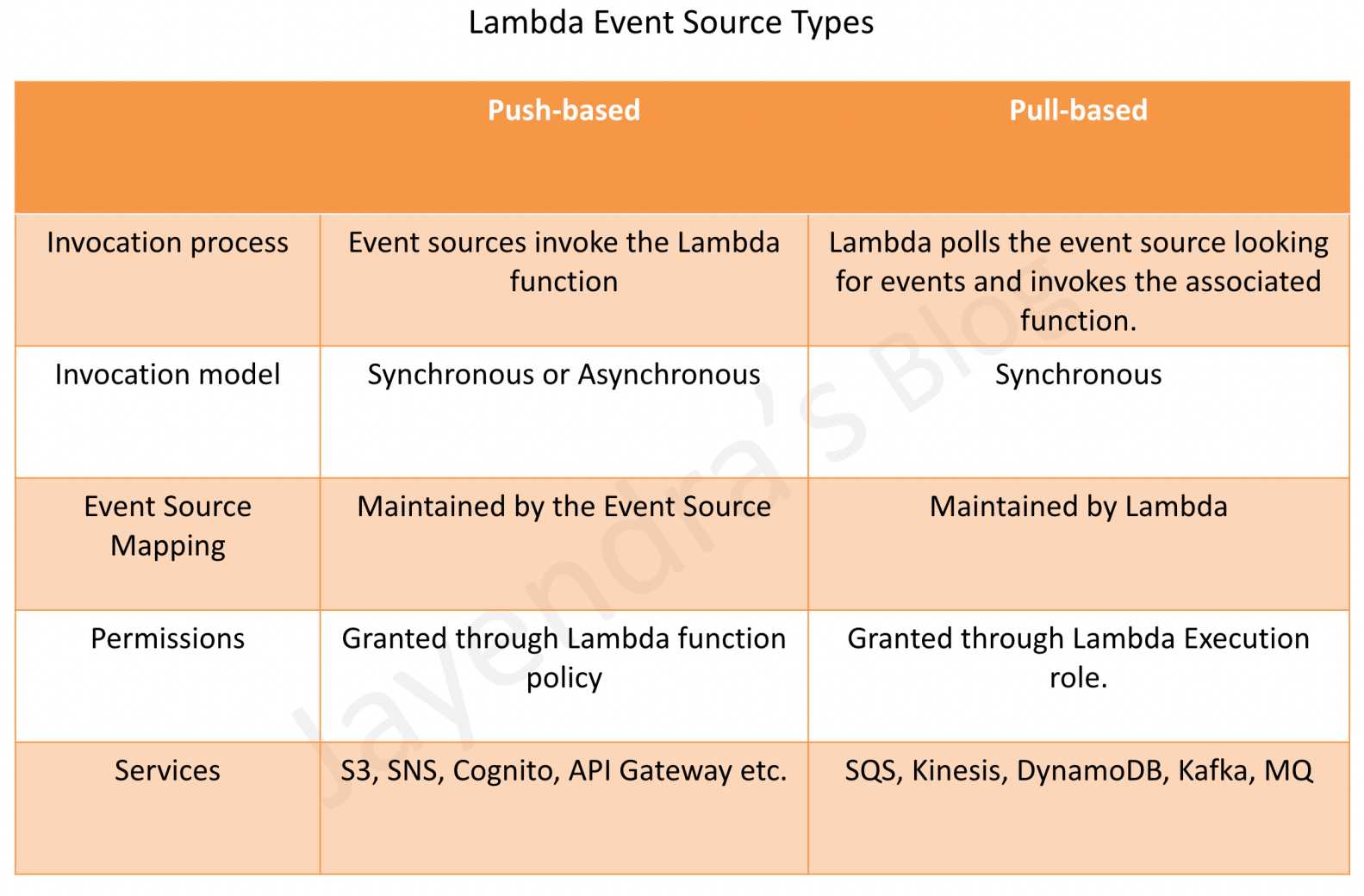
AWS Lambda Event Source Types

Push-based (Triggers)

  • also referred to as the Push model
  • includes services like S3, SNS, SES, API Gateway, EventBridge, etc.
  • Event source mapping maintained on the event source side
  • as the event sources invoke the Lambda function, a resource-based policy should be used to grant the event source the necessary permissions.

Pull-based (Event Source Mappings)

  • also referred to as the Pull model
  • covers stream and queue-based event sources like DynamoDB Streams, Kinesis, MQ, SQS, Kafka (MSK and self-managed), and Amazon DocumentDB
  • Event source mapping maintained on the Lambda side
  • Lambda polls the event source and invokes the function synchronously with a batch of records.

Lambda Event Sources Invocation Model

Synchronously

  • You wait for the function to process the event and return a response.
  • Error handling and retries need to be handled by the Client.
  • Invocation includes API Gateway, ALB, Lambda Function URLs, Cognito, Lex, and SDK calls.

Asynchronously

  • queues the event for processing and returns a response immediately.
  • handles retries and can send invocation records to a destination for successful and failed events.
  • Supported destinations for failed events include SQS, SNS, EventBridge, another Lambda function, or Amazon S3 (added November 2024).
  • Invocation includes S3, SNS, EventBridge, CloudWatch Logs, CloudFormation, SES, IoT, CodeCommit, CodePipeline, and Config.

Lambda Supported Event Sources

AWS Lambda can be configured as an event source for multiple AWS services.

📋 Note (June 2025): The table below has been updated to reflect the current official AWS documentation. Key changes include:

  • Amazon Kinesis Data Firehose renamed to Amazon Data Firehose (Feb 2024)
  • Amazon DocumentDB, AWS Step Functions, and Amazon VPC Lattice added as supported event sources
  • AWS IoT Events deprecated (EOL May 20, 2026)
  • EventBridge now supports both synchronous and asynchronous invocation (via Pipes)
Service Method of invocation
Amazon MSK – Managed Streaming for Apache Kafka Event source mapping
Self-managed Apache Kafka Event source mapping
Amazon API Gateway Event-driven; synchronous invocation
AWS CloudFormation Event-driven; asynchronous invocation
Amazon CloudFront (Lambda@Edge) Event-driven; synchronous invocation
Amazon EventBridge (formerly CloudWatch Events) Event-driven; asynchronous invocation (event buses and schedules), synchronous or asynchronous invocation (Pipes)
Amazon CloudWatch Logs Event-driven; asynchronous invocation
AWS CodeCommit Event-driven; asynchronous invocation
AWS CodePipeline Event-driven; asynchronous invocation
Amazon Cognito Event-driven; synchronous invocation
AWS Config Event-driven; asynchronous invocation
Amazon Connect Event-driven; synchronous invocation
Amazon DocumentDB Event source mapping
Amazon DynamoDB Event source mapping
Elastic Load Balancing (Application Load Balancer) Event-driven; synchronous invocation
AWS IoT Event-driven; asynchronous invocation
Amazon Kinesis Event source mapping
Amazon Data Firehose (formerly Kinesis Data Firehose) Event-driven; synchronous invocation
Amazon Lex Event-driven; synchronous invocation
Amazon MQ Event source mapping
Amazon Simple Email Service Event-driven; asynchronous invocation
Amazon Simple Notification Service Event-driven; asynchronous invocation
Amazon Simple Queue Service Event source mapping
Amazon S3 Event-driven; asynchronous invocation
Amazon Simple Storage Service Batch Event-driven; synchronous invocation
Secrets Manager Secret rotation
AWS Step Functions Event-driven; synchronous or asynchronous invocation
Amazon VPC Lattice Event-driven; synchronous invocation

⚠️ AWS IoT Events – DEPRECATED

AWS IoT Events reached End of Life (EOL) on May 20, 2026. The service no longer accepts new customers (since May 20, 2025) and the console and resources are no longer accessible.

Migration: Use Amazon EventBridge with AWS IoT Core rules to achieve similar event-driven functionality.

Amazon S3

  • S3 bucket events, such as the object-created or object-deleted events can be processed using Lambda functions for e.g., the Lambda function can be invoked when a user uploads a photo to a bucket to read the image and create a thumbnail.
  • S3 bucket notification configuration feature can be configured for the event source mapping, to identify the S3 bucket events and the Lambda function to invoke.
  • S3 events can also be routed through Amazon EventBridge for more advanced filtering and routing capabilities.
  • Error handling for an event source depends on how Lambda is invoked
  • S3 invokes your Lambda function asynchronously.

DynamoDB

  • Lambda functions can be used as triggers for the DynamoDB table to take custom actions in response to updates made to the DynamoDB table.
  • Trigger can be created by
    • Enabling DynamoDB Streams for the table.
    • Lambda polls the stream and processes any updates published to the stream
  • DynamoDB is a stream-based event source and with stream-based service, the event source mapping is created in Lambda, identifying the stream to poll and which Lambda function to invoke.
  • Supports event filtering to only process relevant changes.
  • Supports on-failure destinations (SQS, SNS, S3) for failed event processing.
  • Error handling for an event source depends on how Lambda is invoked

Kinesis Streams

  • AWS Lambda can be configured to automatically poll the Kinesis stream periodically (once per second) for new records.
  • Lambda can process any new records such as social media feeds, IT logs, website click streams, financial transactions, and location-tracking events
  • Kinesis Streams is a stream-based event source and with stream-based service, the event source mapping is created in Lambda, identifying the stream to poll and which Lambda function to invoke.
  • Supports event filtering to only invoke the function for relevant records.
  • Supports on-failure destinations (SQS, SNS, S3) for failed event processing.
  • Error handling for an event source depends on how Lambda is invoked

Simple Notification Service – SNS

  • SNS notifications can be processed using Lambda
  • When a message is published to an SNS topic, the service can invoke Lambda function by passing the message payload as parameter, which can then process the event
  • Lambda function can be triggered in response to CloudWatch alarms and other AWS services that use SNS.
  • SNS via topic subscription configuration feature can be used for the event source mapping, to identify the SNS topic and the Lambda function to invoke
  • Error handling for an event source depends on how Lambda is invoked
  • SNS invokes your Lambda function asynchronously.

Simple Email Service – SES

  • SES can be used to receive messages and can be configured to invoke Lambda function when messages arrive, by passing in the incoming email event as parameter
  • SES using the rule configuration feature can be used for the event source mapping
  • Error handling for an event source depends on how Lambda is invoked
  • SES invokes your Lambda function asynchronously.

Amazon Cognito

  • Cognito Events feature enables Lambda function to run in response to events in Cognito for e.g. Lambda function can be invoked for the Sync Trigger events, that is published each time a dataset is synchronized.
  • Cognito User Pool triggers can invoke Lambda at various points in the authentication flow (pre sign-up, pre authentication, post confirmation, etc.).
  • Cognito event subscription configuration feature can be used for the event source mapping
  • Error handling for an event source depends on how Lambda is invoked
  • Cognito is configured to invoke a Lambda function synchronously

CloudFormation

  • Lambda function can be specified as a custom resource to execute any custom commands as a part of deploying CloudFormation stacks and can be invoked whenever the stacks are created, updated, or deleted.
  • CloudFormation using stack definition can be used for the event source mapping
  • Error handling for an event source depends on how Lambda is invoked
  • CloudFormation invokes the Lambda function asynchronously

CloudWatch Logs

  • Lambda functions can be used to perform custom analysis on CloudWatch Logs using CloudWatch Logs subscriptions.
  • CloudWatch Logs subscriptions provide access to a real-time feed of log events from CloudWatch Logs and deliver it to the AWS Lambda function for custom processing, analysis, or loading to other systems.
  • CloudWatch Logs using the log subscription configuration can be used for the event source mapping
  • Error handling for an event source depends on how Lambda is invoked
  • CloudWatch Logs invokes the Lambda function asynchronously

Amazon EventBridge (formerly CloudWatch Events)

  • Amazon EventBridge (formerly CloudWatch Events) helps respond to state changes in AWS resources and receives events from AWS services, SaaS applications, and custom sources.
  • Rules that match selected events can be created to route them to the Lambda function to take action for e.g., the Lambda function can be invoked to log the state of an EC2 instance or AutoScaling Group.
  • EventBridge by using a rule target definition can be used for the event source mapping
  • EventBridge Pipes can invoke Lambda either synchronously or asynchronously, providing point-to-point integrations between event sources and targets with optional filtering, enrichment, and transformation.
  • EventBridge Scheduler invokes Lambda functions asynchronously on a schedule (replacing the older CloudWatch Events scheduled rules).
  • Error handling for an event source depends on how Lambda is invoked
  • EventBridge event buses invoke Lambda asynchronously; Pipes can invoke synchronously (REQUEST_RESPONSE) or asynchronously (FIRE_AND_FORGET).

CodeCommit

  • Trigger can be created for a CodeCommit repository so that events in the repository will invoke a Lambda function for e.g., Lambda function can be invoked when a branch or tag is created or when a push is made to an existing branch.
  • CodeCommit by using a repository trigger can be used for the event source mapping
  • Error handling for an event source depends on how Lambda is invoked
  • CodeCommit Events invokes the Lambda function asynchronously
ℹ️ Note: CodeCommit was briefly deprecated in July 2024 but returned to General Availability in November 2025. However, the service is in a feature freeze state with no new features planned.

Scheduled Events (powered by Amazon EventBridge)

  • AWS Lambda can be invoked regularly on a scheduled basis using Amazon EventBridge Scheduler or EventBridge rules with schedule expressions.
  • EventBridge Scheduler supports rate and cron expressions for flexible scheduling.
  • EventBridge by using a rule target definition or Scheduler can be used for the event source mapping
  • Error handling for an event source depends on how Lambda is invoked
  • EventBridge Scheduler invokes the Lambda function asynchronously

AWS Config

  • Lambda functions can be used to evaluate whether the AWS resource configurations comply with custom Config rules.
  • As resources are created, deleted, or changed, AWS Config records these changes and sends the information to the Lambda functions, which can then evaluate the changes and report results to AWS Config. AWS Config can be used to assess overall resource compliance
  • AWS Config by using a rule target definition can be used for the event source mapping
  • Error handling for an event source depends on how Lambda is invoked
  • AWS Config invokes the Lambda function asynchronously

Amazon API Gateway

  • Lambda function can be invoked over HTTPS by defining a custom REST API and endpoint using Amazon API Gateway.
  • Individual API operations, such as GET and PUT, can be mapped to specific Lambda functions.
  • When an HTTPS request to the API endpoint is received, the API Gateway service invokes the corresponding Lambda function.
  • Error handling for an event source depends on how Lambda is invoked.
  • API Gateway is configured to invoke a Lambda function synchronously.

Amazon DocumentDB

  • Lambda can process events from Amazon DocumentDB (with MongoDB compatibility) change streams.
  • Lambda polls the DocumentDB change stream and invokes the function with batches of documents.
  • Requires an AWS Secrets Manager secret to store database credentials for the event source mapping.
  • Supports DocumentDB versions 4.0 and 5.0 only (version 3.6 is not supported).
  • Event filtering is not supported for DocumentDB event source mappings.
  • DocumentDB uses the event source mapping model (pull-based).

Amazon VPC Lattice

  • Amazon VPC Lattice can invoke Lambda functions as targets for service network traffic.
  • Enables Lambda functions to be registered as targets in VPC Lattice target groups.
  • Provides service-to-service communication with built-in authentication and authorization.
  • VPC Lattice invokes Lambda functions synchronously.

AWS Step Functions

  • AWS Step Functions can invoke Lambda functions as part of state machine workflows.
  • Supports both synchronous (RequestResponse) and asynchronous (Event) invocation types.
  • Provides orchestration capabilities for complex multi-step workflows involving Lambda functions.

Other Event Sources: Invoking a Lambda Function On Demand

  • Lambda functions can be invoked on-demand without the need to preconfigure any event source mapping in this case.
  • Lambda Function URLs provide a dedicated HTTPS endpoint for your function, enabling direct HTTP invocation without API Gateway.

Lambda Durable Functions (re:Invent 2025)

  • Lambda durable functions enable building reliable, fault-tolerant, multi-step applications that can execute for up to one year.
  • Durable functions automatically checkpoint progress, suspend execution during long-running tasks, and recover from failures without requiring custom state management code.
  • Extends the Lambda programming model with primitives like “steps” and “waits” in your event handler.
  • Durable functions can be used with event source mappings for processing streams or queues with complex multi-step workflows.
  • Compute charges are not incurred during suspension for on-demand functions.
  • Useful for human-in-the-loop processes, AI workflows, and long-running multi-step applications.

Lambda Tenant Isolation Mode (re:Invent 2025)

  • Lambda tenant isolation mode provides per-tenant compute boundaries within a single Lambda function.
  • Reduces operational complexity of managing separate functions per tenant while maintaining strict isolation.
  • Can be integrated with event source mappings to process events with tenant-level isolation.
  • Tenant identifier is available in the function context object for tenant-specific logic.
  • Must be enabled on new functions (cannot be enabled on existing functions).

AWS Certification Exam Practice Questions

  • Questions are collected from Internet and the answers are marked as per my knowledge and understanding (which might differ with yours).
  • AWS services are updated everyday and both the answers and questions might be outdated soon, so research accordingly.
  • AWS exam questions are not updated to keep up the pace with AWS updates, so even if the underlying feature has changed the question might not be updated
  • Open to further feedback, discussion and correction.
  1. A company needs to process DynamoDB table changes and only invoke Lambda for items where the “status” field equals “COMPLETED”. What is the most efficient approach?
    1. Use a Lambda function to check the status field and return early if not “COMPLETED”
    2. Use DynamoDB Streams with Lambda event source mapping event filtering
    3. Use EventBridge Pipes with DynamoDB as source and Lambda as target
    4. Use a Step Functions workflow to check conditions before invoking Lambda

    Answer: b – Event source mapping event filtering allows you to define filter criteria so Lambda is only invoked for matching records, reducing costs and unnecessary invocations.

  2. A company has a Kafka-based event pipeline using Amazon MSK that experiences significant traffic spikes. They need to ensure near-real-time processing with minimal lag during spikes. What should they configure?
    1. Increase Lambda concurrency limits
    2. Use Lambda Provisioned Concurrency
    3. Enable Provisioned Mode for the Kafka event source mapping
    4. Add more partitions to the Kafka topic

    Answer: c – Provisioned Mode for Kafka ESMs provisions event polling resources that remain ready to handle sudden spikes in traffic, providing optimized throughput for the event source mapping.

  3. An application processes events from an SQS queue through Lambda. The team needs visibility into how many events are being filtered out and how many are failing. What should they use?
    1. CloudWatch Lambda function metrics (Invocations, Errors)
    2. SQS queue metrics (ApproximateNumberOfMessagesVisible)
    3. Event Source Mapping CloudWatch metrics (FilteredOutEventCount, FailedInvokeEventCount)
    4. AWS X-Ray tracing

    Answer: c – The ESM CloudWatch metrics launched in November 2024 provide detailed visibility into event processing states including filtered, failed, and delivered counts.

  4. A company’s Lambda function processes Kinesis stream records. Failed batches need to be preserved for later analysis without blocking stream processing. What is the recommended approach?
    1. Configure a dead-letter queue on the Lambda function
    2. Configure an S3 bucket as an on-failure destination on the event source mapping
    3. Write failed records to DynamoDB from within the function code
    4. Use Kinesis Data Firehose to capture all records

    Answer: b – S3 as an on-failure destination for stream event source mappings (added Nov 2024) captures the full invocation record with metadata for failed batches.

  5. Which of the following event sources use Lambda’s event source mapping (pull-based) model? (Choose 3)
    1. Amazon S3
    2. Amazon DocumentDB
    3. Amazon SNS
    4. Amazon DynamoDB Streams
    5. Amazon SQS
    6. Amazon EventBridge

    Answer: b, d, e – DocumentDB, DynamoDB Streams, and SQS all use event source mappings where Lambda polls the source. S3, SNS, and EventBridge use the push model.
References

AWS Elastic Beanstalk Deployment Strategies

Elastic Beanstalk Deployment Methods

AWS Elastic Beanstalk Deployment Strategies

  • Elastic Beanstalk supports environments such as
    • Single Instance environments, with a single instance and Auto Scaling to maintain the minimum/maximum 1 instance
    • Load Balanced environments, with load balancing and Auto Scaling
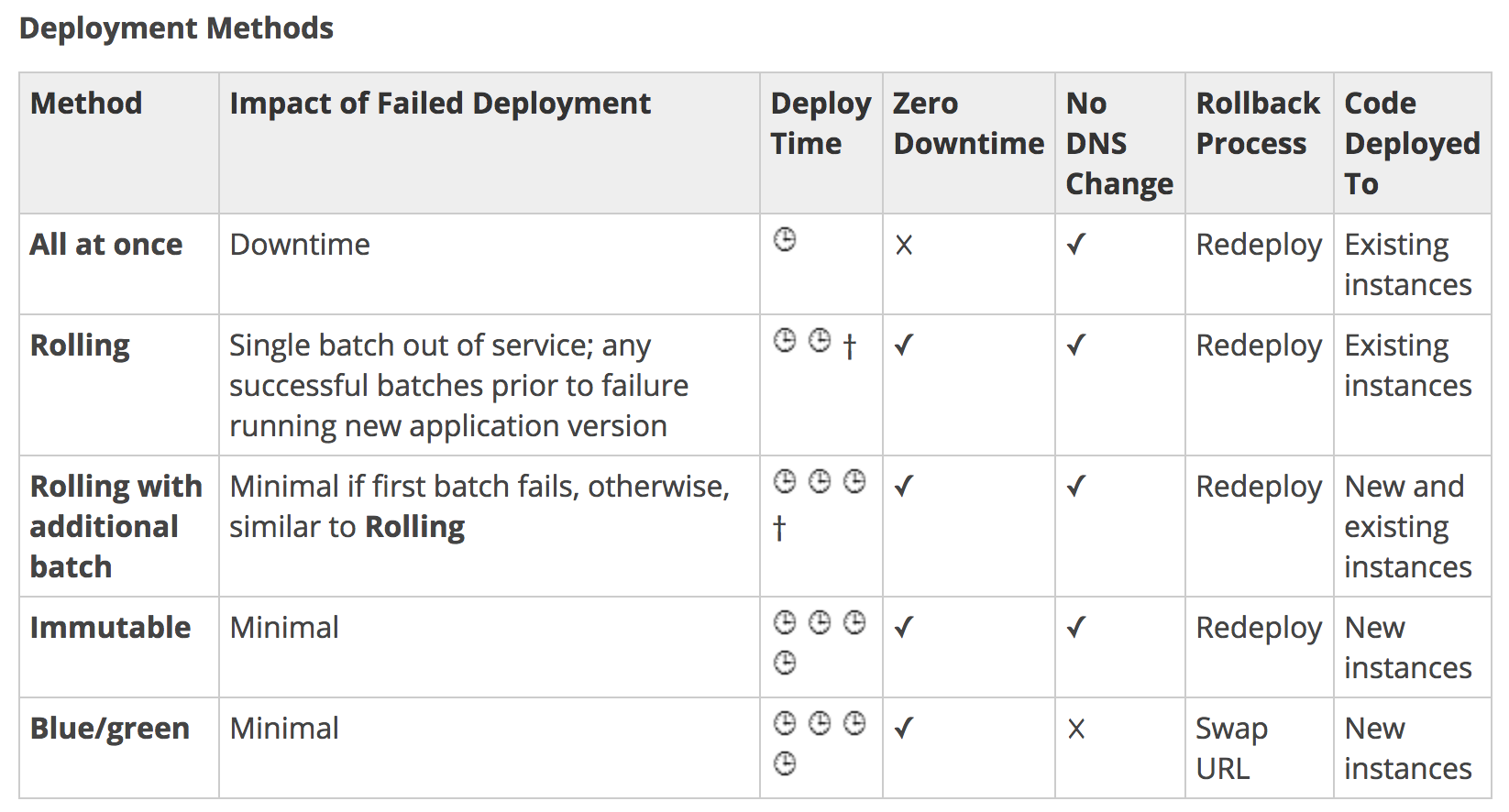
  • Elastic Beanstalk allows multiple deployment options or strategies that can be selected depending upon the requirements for deployment time, downtime, DNS change, and rollback process.

Elastic Beanstalk Deployment Methods

Elastic Beanstalk Deployment Methods

All at Once Deployments

  • Elastic Beanstalk environment uses all-at-once deployments if it is created with a different client (API, SDK, or AWS CLI).
  • All at Once deployments perform an in-place deployment on all instances at the same time.
  • All at Once deployments are simple and fast, however, it would lead to downtime and the rollback would take time in case of any issues.

Rolling Deployments

  • Elastic Beanstalk environment uses rolling deployments if it is created with console or EB CLI.
  • Elastic Beanstalk splits the environment’s EC2 instances into batches and deploys the new version of the application on the existing instance one batch at a time, leaving the rest of the instances in the environment running the old version.
  • During a rolling deployment, part of the instances serves requests with the old version of the application, while instances in completed batches serve other requests with the new version.
  • Elastic Beanstalk performs the rolling deployments as
    • When processing a batch, detaches all instances in the batch from the load balancer, deploys the new application version, and then reattaches the instances.
    • To avoid any connection issues when the instances are detached, connection draining can be enabled on the load balancer
    • After reattaching the instances in a batch to the load balancer, ELB waits until they pass a minimum number of health checks (the Healthy check count threshold value), and then starts routing traffic to them.
    • Elastic Beanstalk waits until all instances in a batch are healthy before moving on to the next batch.
    • When all instances in the batch pass enough health checks to be considered healthy by ELB, the batch is complete.
    • If a batch of instances does not become healthy within the command timeout, the deployment fails.
    • If a deployment fails after one or more batches are completed successfully, the completed batches run the new version of the application while any pending batches continue to run the old version.
    • If the instances are terminated from the failed deployment, Elastic Beanstalk replaces them with instances running the application version from the most recent successful deployment.

Rolling with Additional Batch Deployments

  • Rolling with Additional Batch deployments is helpful when you need to maintain full capacity during deployments.
  • This deployment is similar to Rolling deployments, except they do not do an in-place deployment but a disposable one, launching a new batch of instances prior to taking any instances out of service
  • When the deployment completes, Elastic Beanstalk terminates the additional batch of instances.
  • Rolling with additional batch deployment does not impact the capacity and ensures full capacity during the deployment process.

Immutable Deployments

  • All at Once and Rolling deployment method updates existing instances.
  • If you need to ensure the application source is always deployed to new instances, instead of updating existing instances, the environment can be configured to use immutable updates for deployments.
  • Immutable updates are performed by launching a second Auto Scaling group is launched in the environment and the new version serves traffic alongside the old version until the new instances pass health checks.
  • Immutable deployments can prevent issues caused by partially completed rolling deployments. If the new instances don’t pass health checks, Elastic Beanstalk terminates them, leaving the original instances untouched.

Blue Green Deployments

  • Elastic Beanstalk performs an in-place update when application versions are updated, which may result in the application becoming unavailable to users for a short period of time.
  • Blue Green approach is suitable for deployments that depend on incompatible resource configuration changes or a new version that can’t run alongside the old version.
  • Elastic Beanstalk enables the Blue Green deployment through the Swap Environment URLs feature.
  • Blue Green deployment provides an almost zero downtime solution, where a new version is deployed to a separate environment, and then CNAMEs of the two environments are swapped to redirect traffic to the new version.
  • Blue/green deployments require that the environment runs independently of the production database i.e. not maintained by Elastic Beanstalk if your application uses one. Because if the environment has an RDS DB instance attached to it, the data will not transfer over to the second environment and will be lost if the original environment is terminated
  • Blue Green deployment entails a DNS change; hence, do not terminate the old environment until the DNS changes have been propagated and the old DNS records expire.
  • DNS servers do not necessarily clear old records from their cache based on the time to live (TTL) you set on the DNS records.

AWS Certification Exam Practice Questions

  • Questions are collected from Internet and the answers are marked as per my knowledge and understanding (which might differ with yours).
  • AWS services are updated everyday and both the answers and questions might be outdated soon, so research accordingly.
  • AWS exam questions are not updated to keep up the pace with AWS updates, so even if the underlying feature has changed the question might not be updated
  • Open to further feedback, discussion and correction.
  1. When thinking of AWS Elastic Beanstalk, the ‘Swap Environment URLs’ feature most directly aids in what? [CDOP]
    1. Immutable Rolling Deployments
    2. Mutable Rolling Deployments
    3. Canary Deployments
    4. Blue-Green Deployments (Simply upload the new version of your application and let your deployment service (AWS Elastic Beanstalk, AWS CloudFormation, or AWS OpsWorks) deploy a new version (green). To cut over to the new version, you simply replace the ELB URLs in your DNS records. Elastic Beanstalk has a Swap Environment URLs feature to facilitate a simpler cutover process.)
  2. You need to deploy a new version of your application. You’d prefer to use all new instances if possible, but you cannot have any downtime. You also don’t want to swap any environment URLs. You’re running t2.large instances and you normally need 15 instances to meet capacity. Which deployment method should you use? Choose the correct answer:
    1. Rolling Updates
    2. Blue/Green
    3. Immutable
    4. All at Once
  3. Your team is responsible for an AWS Elastic Beanstalk application. The business requires that you move to a continuous deployment model, releasing updates to the application multiple times per day with zero downtime. What should you do to enable this and still be able to roll back almost immediately in an emergency to the previous version? [CDOP]
    1. Enable rolling updates in the Elastic Beanstalk environment, setting an appropriate pause time for application startup.
    2. Create a second Elastic Beanstalk environment running the new application version, and swap the environment CNAMEs.
    3. Develop the application to poll for a new application version in your code repository; download and install to each running Elastic Beanstalk instance.
    4. Create a second Elastic Beanstalk environment with the new application version, and configure the old environment to redirect clients, using the HTTP 301 response code, to the new environment.

References

AWS Elastic Beanstalk Deployment Options

AWS Elastic Beanstalk

Elastic Beanstalk Environment Tiers

AWS Elastic Beanstalk

⚠️ Important Platform Update: Amazon Linux 2 End of Life – June 30, 2026

All Elastic Beanstalk platform branches based on Amazon Linux 2 (AL2) will be retired by June 30, 2026, when AL2 reaches End of Life. After this date, AWS will not release security updates, patches, or new packages for AL2-based platforms.

Action Required: Migrate to Amazon Linux 2023 (AL2023) platform branches before the retirement date. AL2023 is supported until June 2029. Migration requires a blue/green deployment as AL2 and AL2023 platform versions are incompatible.

Refer to Migration from Amazon Linux 2 to Amazon Linux 2023 for detailed guidance.

  • AWS Elastic Beanstalk helps to quickly deploy and manage applications in the AWS Cloud without having to worry about the infrastructure that runs those applications.
  • reduces management complexity without restricting choice or control.
  • enables automated infrastructure management and code deployment, by simply uploading, for applications and includes
    • Application platform management
    • Capacity provisioning
    • Load Balancing
    • Auto Scaling
    • Code deployment
    • Health Monitoring
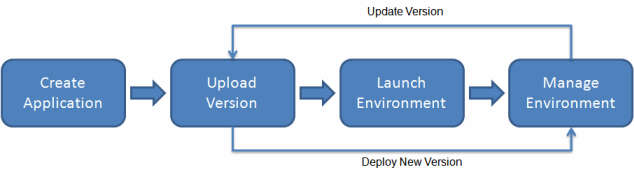
  • Elastic Beanstalk automatically launches an environment once an application is uploaded, and creates and configures the AWS resources needed to run the code. After the environment is launched, it can be managed and used to deploy new application versions.
  • AWS resources launched by Elastic Beanstalk are fully accessible i.e. EC2 instances can be SSHed into.
  • provides developers and systems administrators with an easy, fast way to deploy and manage the applications without having to worry about AWS infrastructure.
  • supports applications developed in Go, Java, .NET, Node.js, PHP, Python, and Ruby, as well as Docker containers.
  • CloudFormation, using templates, is a better option than Elastic Beanstalk if the internal AWS resources to be used are known and fine-grained control is needed.

Elastic Beanstalk Supported Platforms

  • Elastic Beanstalk supports the following platforms on Amazon Linux 2023 (recommended) and Amazon Linux 2:
    • Docker
    • Go
    • Java SE
    • Tomcat
    • .NET Core on Linux
    • .NET on Windows Server
    • Node.js
    • PHP
    • Python
    • Ruby
  • Elastic Beanstalk supports AWS Graviton (arm64) instance types on Amazon Linux 2 and AL2023 platforms, providing up to 40% better price-performance over x86-based instances.
  • Amazon Linux 2023 is the recommended platform, offering enhanced security features including FIPS certification, modern package versions, and support until June 2029.

Elastic Beanstalk Components

Elastic Beanstalk Components

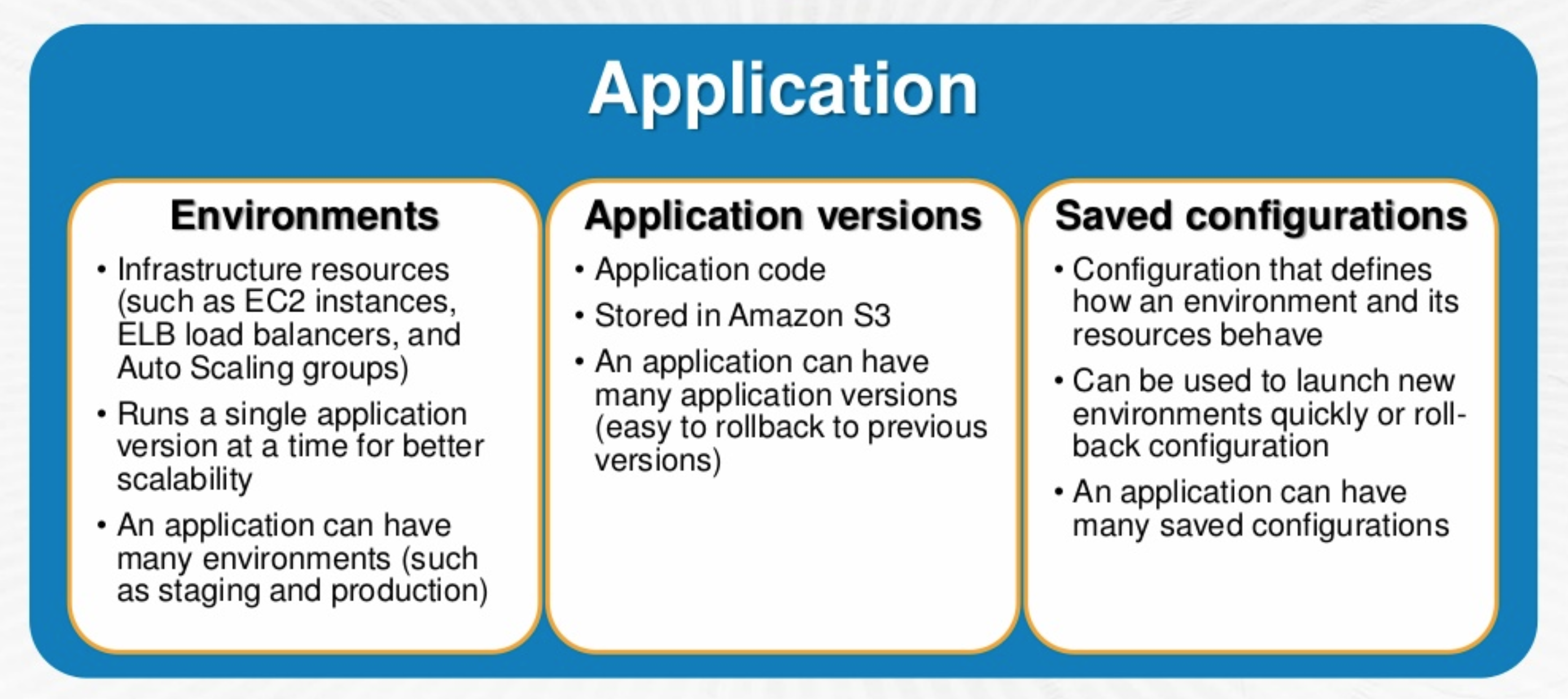
  • Application
    • An Application is a logical collection of components, including environments, versions, and environment configurations.
  • Application Version
    • An application version refers to a specific, labeled iteration of deployable code for a web application.
    • Applications can have many versions and each application version is unique and points to an S3 object.
    • Multiple versions of an Application can be deployed for testing differences and helps to roll back to any version in case of issues.
    • Elastic Beanstalk supports application version lifecycle policies to automatically delete old versions based on age or total count (up to 100 versions deleted per policy application).
  • Environment
    • An environment is a version that is deployed onto AWS resources.
    • An environment runs a single application version at a time, but same application version can be deployed across multiple environments.
    • When an environment is created, EB provisions the resources needed to run the specified application version.
  • Environment Configuration
    • An environment configuration identifies a collection of parameters and settings that define how an environment and its associated resources behave
    • When an environment’s configuration settings are updated, EB automatically applies the changes to existing resources or deletes and deploys new resources, depending upon the change
  • Configuration Template
    • A configuration template is a starting point for creating unique environment configurations

Elastic Beanstalk Architecture

Elastic Beanstalk Environment Tiers

  • Elastic Beanstalk environment requires an environment tier, platform, and
    environment type.
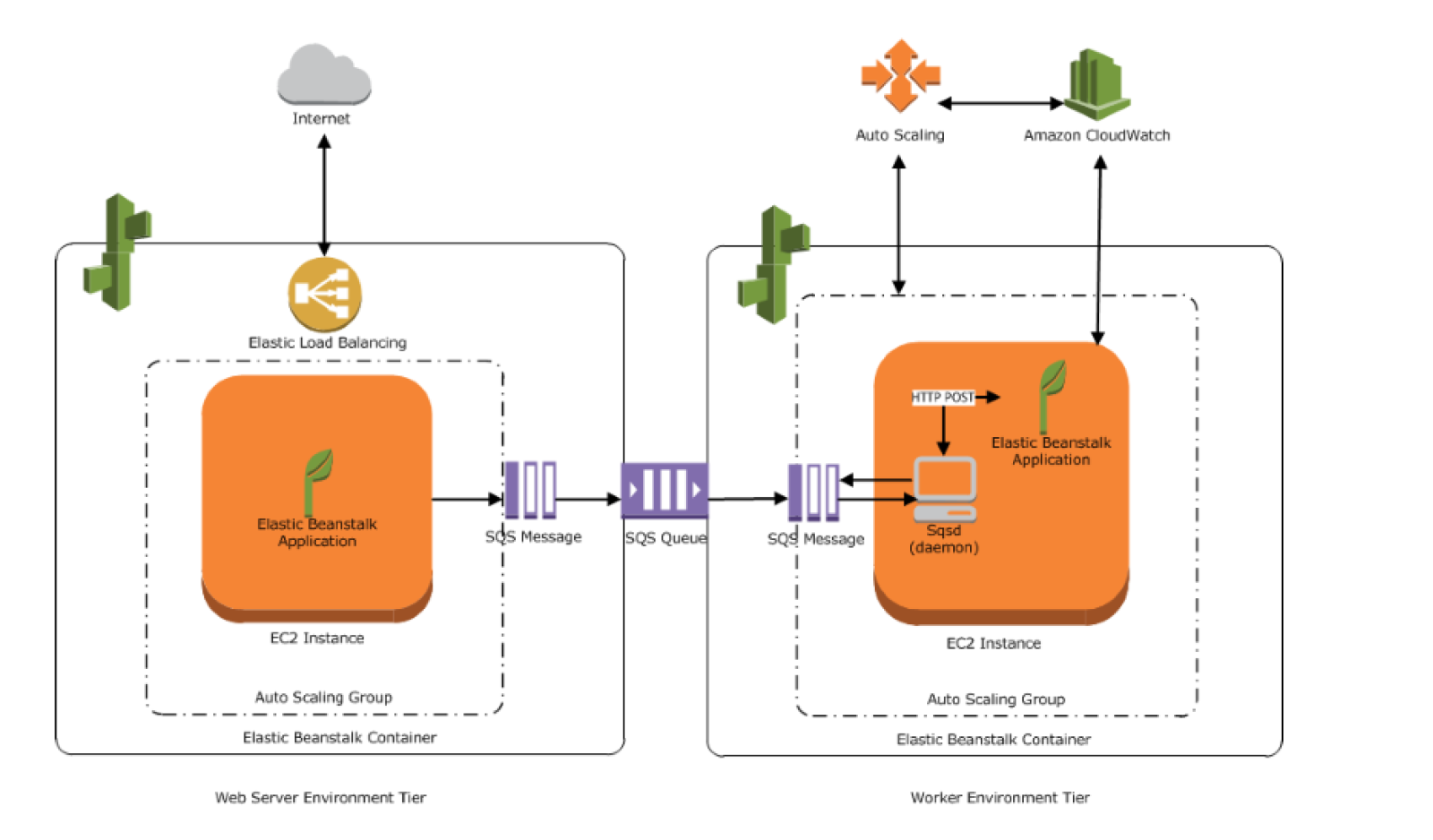
  • Environment tier determines whether EB provisions resources to support
    • Web tier – a web application that handles HTTP(S) requests
    • Worker tier – an application that handles background-processing tasks.
  • One environment cannot support two different environment tiers because each requires its own set of resources; a worker environment tier and a web server environment tier each require an Auto Scaling group, but Elastic Beanstalk supports only one Auto Scaling group per environment.

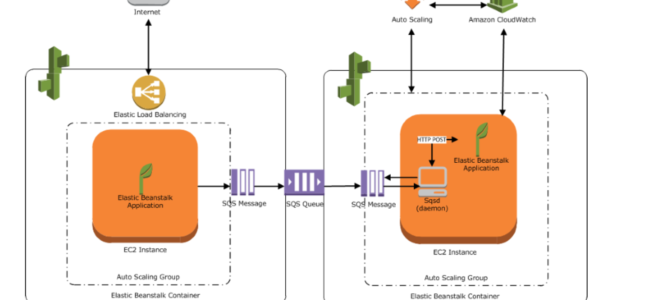
Web Environment Tier

  • An environment tier whose web application processes web requests is known as a web server tier.
  • AWS resources created for a web environment tier include an Elastic Load Balancer, an Auto Scaling group, one or more EC2 instances
  • Every Environment has a CNAME URL pointing to the ELB, aliased in Route 53 to ELB URL.
  • Elastic Beanstalk supports dual-stack (IPv4 and IPv6) configuration for Application Load Balancers and Network Load Balancers (not Classic Load Balancers or single-instance environments).
  • Each EC2 server instance that runs the application uses a container type, which defines the infrastructure topology and software stack.
  • A software component called the host manager (HM) runs on each EC2 server instance and is responsible for
    • Deploying the application
    • Aggregating events and metrics for retrieval via the console, the API, or the command line
    • Generating instance-level events
    • Monitoring the application log files for critical errors
    • Monitoring the application server
    • Patching instance components
    • Rotating your application’s log files and publishing them to S3

Worker Environment Tier

  • An environment tier whose web application runs background jobs is known as a worker tier.
  • AWS resources created for a worker environment tier include an Auto Scaling group, one or more EC2 instances, and an IAM role.
  • For the worker environment tier, Elastic Beanstalk also creates and provisions an SQS queue, if one doesn’t exist.
  • When a worker environment tier is launched, EB installs the necessary support files for the programming language of choice and a daemon on each EC2 instance in the Auto Scaling group reading from the same SQS queue.
  • Daemon is responsible for pulling requests from an SQS queue and then sending the data to the web application running in the worker environment tier that will process those messages.
  • Worker environments support SQS dead letter queues which can be used to store messages that could not be successfully processed. Dead letter queue provides the ability to sideline, isolate and analyze the unsuccessfully processed messages

Elastic Beanstalk Monitoring and Troubleshooting

Enhanced Health Reporting

  • Enhanced health reporting provides detailed health information about EC2 instances via a health agent installed in supported AMIs.
  • Reports environment and instance health every 10 seconds with color-coded status: Green (OK), Yellow (Warning), Red (Degraded/Severe).
  • Combines standard load balancer health checks with instance monitoring to ensure proper functioning.
  • Required for Managed Platform Updates and Traffic Splitting deployments.

AI-Powered Environment Analysis (New – 2026)

  • Elastic Beanstalk provides AI-powered analysis to identify root causes and recommend solutions for environment health issues.
  • Available when environment health status is Warning, Degraded, or Severe.
  • Collects environment events, health data, and instance logs (up to 170,000 tokens), sends them to Amazon Bedrock for analysis, and returns AI-generated insights and recommended solutions.
  • Available on AL2 and AL2023 platform versions released on or after February 26, 2026, and Windows Server platforms released on or after April 22, 2026.
  • Uses Amazon Nova as a fallback model for improved reliability.
  • Can be triggered via the console (AI Analysis button), AWS CLI (RequestEnvironmentInfo with analyze info type), or EB CLI (eb logs --analyze).
  • Requires instance profile permissions for Amazon Bedrock (bedrock:InvokeModel, bedrock:ListFoundationModels) and Elastic Beanstalk (elasticbeanstalk:DescribeEvents, elasticbeanstalk:DescribeEnvironmentHealth).
  • Standard Amazon Bedrock pricing applies for model invocations.

Deployment Logs (New – 2026)

  • Elastic Beanstalk now provides a Deployments tab in the environment dashboard with consolidated view of deployment history and real-time deployment progress with step-by-step logs.
  • Helps debug deployment failures without needing to manually request and download log bundles.
  • Available on AL2 and AL2023 platforms released on or after March 11, 2026, and Windows platforms released on or after April 22, 2026.

CloudWatch Logs Console Integration (New – 2026)

  • Elastic Beanstalk console now integrates CloudWatch Logs directly in the Logs tab, eliminating the need to navigate to the CloudWatch console separately.
  • Provides direct access to relevant log groups and log streams for the environment.

Managed Platform Updates

  • Elastic Beanstalk can be configured to automatically apply patch and minor updates to the platform during a scheduled maintenance window.
  • Managed updates require enhanced health reporting to be enabled.
  • Updates are applied using immutable deployments to ensure no impact to the running environment during the update process.
  • Helps maintain the shared responsibility model by keeping platform components up to date with security patches.
  • Supports tag propagation to launch templates for consistent resource tagging during managed updates.

Elastic Beanstalk with Other AWS Services

  • Elastic Beanstalk supports VPC and launches AWS resources, such as instances, into the VPC
  • Elastic Beanstalk supports IAM and helps you securely control access to your AWS resources.
  • CloudFront can be used to distribute the content in S3 after an Elastic Beanstalk is created and deployed
  • CloudTrail
    • Elastic Beanstalk is integrated with CloudTrail, a service that captures all of the Elastic Beanstalk API calls and delivers the log files to a specified S3 bucket.
    • CloudTrail captures API calls from the Elastic Beanstalk console or from your code to the Elastic Beanstalk APIs and helps to determine the request made to Elastic Beanstalk, the source IP address from which the request was made, who made the request, when it was made, etc.
  • RDS
    • EB provides support for running RDS instances in the environment which is ideal for development and testing but not for production.
    • For a production environment, it is not recommended because it ties the lifecycle of the database instance to the lifecycle of the application’s environment. So if the environment is deleted, the RDS instance is deleted as well
    • It is recommended to launch a database instance outside of the environment and configure the application to connect to it outside of the functionality provided by Elastic Beanstalk.
    • Using a database instance external to the environment requires additional security group and connection string configuration, but it also lets the application connect to the database from multiple environments, use database types not supported with integrated databases, perform blue/green deployments, and tear down the environment without affecting the database instance.
  • S3
    • EB creates an S3 bucket named elasticbeanstalk-region-account-id for each region in which environments are created.
    • EB uses the bucket to store application versions, logs, and other supporting files.
    • It applies a bucket policy to buckets it creates to allow environments to write to the bucket and prevent accidental deletion

Elastic Beanstalk Deployment Strategies

Elastic Beanstalk Deployment Methods

  • All at Once
    • performs an in-place deployment on all instances at the same time.
    • is performed on existing instances and would lead to downtime as well as time to roll back changes.
  • Rolling
    • splits the environment instances into batches and deploys the application’s new version on the existing instance one batch at a time, leaving the rest of the environment instances running the old version.
    • waits until all instances in a batch are healthy before moving on to the next batch.
    • reduces downtime as all instances are not updated and if the health checks fail the deployment can be rollback.
  • Rolling with an Additional batch
    • similar to Rolling however it starts the deployment of the application’s new version on a new batch.
    • does not impact the capacity and ensures full capacity during the deployment process.
  • Immutable
    • ensures the application source is always deployed to new instances.
    • prevent issues caused by partially completed rolling deployments.
    • provides minimal downtime and quick rollback.
  • Traffic Splitting
    • performs a canary testing as part of the application deployment.
    • launches a full set of new instances (like immutable deployment) and forwards a configurable percentage of client traffic to the new version for a specified evaluation period.
    • monitors the health of the new instances during the evaluation period.
    • if the new instances remain healthy, shifts all traffic to them and terminates the old ones.
    • if issues are detected, triggers an automatic rollback by shifting traffic back to the original instances.
    • ideal for production deployments where you want to validate with real traffic before full cutover.
  • Blue Green
    • suitable for deployments that depend on incompatible resource configuration changes or a new version that can’t run alongside the old version.
    • implemented using the Swap Environment URLs feature that entails a DNS switchover.

AWS Certification Exam Practice Questions

  • Questions are collected from Internet and the answers are marked as per my knowledge and understanding (which might differ with yours).
  • AWS services are updated everyday and both the answers and questions might be outdated soon, so research accordingly.
  • AWS exam questions are not updated to keep up the pace with AWS updates, so even if the underlying feature has changed the question might not be updated
  • Open to further feedback, discussion and correction.
  1. An organization is planning to use AWS for their production roll out. The organization wants to implement automation for deployment such that it will automatically create a LAMP stack, download the latest PHP installable from S3 and setup the ELB. Which of the below mentioned AWS services meets the requirement for making an orderly deployment of the software?
    1. AWS Elastic Beanstalk
    2. AWS CloudFront
    3. AWS CloudFormation
    4. AWS DevOps
  2. What does Amazon Elastic Beanstalk provide?
    1. A scalable storage appliance on top of Amazon Web Services.
    2. An application container on top of Amazon Web Services
    3. A service by this name doesn’t exist.
    4. A scalable cluster of EC2 instances
  3. You want to have multiple versions of your application running at the same time, with all versions launched via AWS Elastic Beanstalk. Is this possible?
    1. However if you have 2 AWS accounts this can be done
    2. AWS Elastic Beanstalk is not designed to support multiple running environments
    3. AWS Elastic Beanstalk is designed to support a number of multiple running environments
    4. However AWS Elastic Beanstalk is designed to support only 2 multiple running environments
  4. A .NET application that you manage is running in Elastic Beanstalk. Your developers tell you they will need access to application log files to debug issues that arise. The infrastructure will scale up and down. How can you ensure the developers will be able to access only the log files?
    1. Access the log files directly from Elastic Beanstalk
    2. Enable log file rotation to S3 within the Elastic Beanstalk configuration
    3. Ask your developers to enable log file rotation in the applications web.config file
    4. Connect to each Instance launched by Elastic Beanstalk and create a Windows Scheduled task to rotate the log files to S3
  5. Your team has a tomcat-based Java application you need to deploy into development, test and production environments. After some research, you opt to use Elastic Beanstalk due to its tight integration with your developer tools and RDS due to its ease of management. Your QA team lead points out that you need to roll a sanitized set of production data into your environment on a nightly basis. Similarly, other software teams in your org want access to that same restored data via their EC2 instances in your VPC .The optimal setup for persistence and security that meets the above requirements would be the following. [PROFESSIONAL]
    1. Create your RDS instance as part of your Elastic Beanstalk definition and alter its security group to allow access to it from hosts in your application subnets. (Not optimal for persistence as the RDS is associated with the Elastic Beanstalk lifecycle and would not live independently)
    2. Create your RDS instance separately and add its IP address to your application’s DB connection strings in your code. Alter its security group to allow access to it from hosts within your VPC’s IP address block. (RDS is connected using DNS endpoint only)
    3. Create your RDS instance separately and pass its DNS name to your app’s DB connection string as an environment variable. Create a security group for client machines and add it as a valid source for DB traffic to the security group of the RDS instance itself. (Security group allows instances to access the RDS with new instances launched without any changes)
    4. Create your RDS instance separately and pass its DNS name to your DB connection string as an environment variable. Alter its security group to allow access to it from hosts in your application subnets. (Not optimal for security adding individual hosts)
  6. Your must architect the migration of a web application to AWS. The application consists of Linux web servers running a custom web server. You are required to save the logs generated from the application to a durable location. What options could you select to migrate the application to AWS? (Choose 2) [PROFESSIONAL]
    1. Create an AWS Elastic Beanstalk application using the custom web server platform. Specify the web server executable and the application project and source files. Enable log file rotation to Amazon Simple Storage Service (S3). (EB does not work with Custom server executable)
    2. Create Dockerfile for the application. Create an AWS OpsWorks stack consisting of a custom layer. Create custom recipes to install Docker and to deploy your Docker container using the Dockerfile. Create custom recipes to install and configure the application to publish the logs to Amazon CloudWatch Logs (⚠️ Note: AWS OpsWorks Stacks reached End of Life on May 26, 2024 and is no longer available. This option is no longer valid for new implementations.)
    3. Create Dockerfile for the application. Create an AWS OpsWorks stack consisting of a Docker layer that uses the Dockerfile. Create custom recipes to install and configure Amazon Kinesis to publish the logs into Amazon CloudWatch. (Kinesis not needed. ⚠️ Note: AWS OpsWorks Stacks reached End of Life on May 26, 2024.)
    4. Create a Dockerfile for the application. Create an AWS Elastic Beanstalk application using the Docker platform and the Dockerfile. Enable logging the Docker configuration to automatically publish the application logs. Enable log file rotation to Amazon S3. (Use Docker configuration with awslogs and EB with Docker)
    5. Use VM import/Export to import a virtual machine image of the server into AWS as an AMI. Create an Amazon Elastic Compute Cloud (EC2) instance from AMI, and install and configure the Amazon CloudWatch Logs agent. Create a new AMI from the instance. Create an AWS Elastic Beanstalk application using the AMI platform and the new AMI. (Use VM Import/Export to create AMI and CloudWatch logs agent to log)
  7. Which of the following groups is AWS Elastic Beanstalk best suited for?
    1. Those who want to deploy and manage their applications within minutes in the AWS cloud.
    2. Those who want to privately store and manage Git repositories in the AWS cloud.
    3. Those who want to automate the deployment of applications to instances and to update the applications as required.
    4. Those who want to model, visualize, and automate the steps required to release software.
  8. When thinking of AWS Elastic Beanstalk’s model, which is true?
    1. Applications have many deployments, deployments have many environments.
    2. Environments have many applications, applications have many deployments.
    3. Applications have many environments, environments have many deployments. (Applications group logical services. Environments belong to Applications, and typically represent different deployment levels (dev, stage, prod, forth). Deployments belong to environments, and are pushes of bundles of code for the environments to run.)
    4. Deployments have many environments, environments have many applications.
  9. If you’re trying to configure an AWS Elastic Beanstalk worker tier for easy debugging if there are problems finishing queue jobs, what should you configure?
    1. Configure Rolling Deployments.
    2. Configure Enhanced Health Reporting
    3. Configure Blue-Green Deployments.
    4. Configure a Dead Letter Queue (Elastic Beanstalk worker environments support SQS dead letter queues, where worker can send messages that for some reason could not be successfully processed. Dead letter queue provides the ability to sideline, isolate and analyze the unsuccessfully processed messages. Refer link)
  10. When thinking of AWS Elastic Beanstalk, which statement is true?
    1. Worker tiers pull jobs from SNS.
    2. Worker tiers pull jobs from HTTP.
    3. Worker tiers pull jobs from JSON.
    4. Worker tiers pull jobs from SQS. (Elastic Beanstalk installs a daemon on each EC2 instance in the Auto Scaling group to process SQS messages in the worker environment. Refer link)
  11. You are building a Ruby on Rails application for internal, non-production use, which uses MySQL as a database. You want developers without very much AWS experience to be able to deploy new code with a single command line push. You also want to set this up as simply as possible. Which tool is ideal for this setup?
    1. AWS CloudFormation
    2. AWS OpsWorks (⚠️ OpsWorks Stacks reached EOL May 26, 2024)
    3. AWS ELB + EC2 with CLI Push
    4. AWS Elastic Beanstalk
  12. What AWS products and features can be deployed by Elastic Beanstalk? Choose 3 answers.
    1. Auto scaling groups
    2. Route 53 hosted zones
    3. Elastic Load Balancers
    4. RDS Instances
    5. Elastic IP addresses
    6. SQS Queues
  13. AWS Elastic Beanstalk stores your application files and optionally server log files in ____.
    1. Amazon Storage Gateway
    2. Amazon Glacier
    3. Amazon EC2
    4. Amazon S3
  14. When you use the AWS Elastic Beanstalk console to deploy a new application ____.
    1. Need to upload each file separately
    2. Need to create each file and path
    3. Need to upload a source bundle
    4. Need to create each file
  15. A company wants to deploy a new application version to production using Elastic Beanstalk. They need to validate the new version with a small percentage of real production traffic before completing the full deployment. Which deployment policy should they use?
    1. Immutable
    2. Rolling with additional batch
    3. Traffic splitting (Traffic splitting performs canary testing by forwarding a configurable percentage of traffic to new instances for an evaluation period, with automatic rollback on failure)
    4. Blue/Green
  16. An application running on Elastic Beanstalk is experiencing health issues. The team needs to quickly identify the root cause and get recommended solutions without manually analyzing logs. Which Elastic Beanstalk feature should they use?
    1. Enhanced Health Reporting
    2. CloudWatch Alarms
    3. AI-powered environment analysis (AI-powered analysis uses Amazon Bedrock to analyze environment events, health data, and logs, then provides AI-generated root cause analysis and recommended solutions)
    4. X-Ray tracing
  17. Which Elastic Beanstalk feature automatically applies patch and minor platform updates during a maintenance window?
    1. Rolling updates
    2. Immutable deployments
    3. Managed platform updates (Managed platform updates automatically apply patch and minor updates using immutable deployments during a scheduled maintenance window. Requires enhanced health reporting to be enabled.)
    4. Blue/Green deployments

References

AWS EFS vs EBS Multi-Attach

AWS EFS vs EBS Multi-Attach

AWS EFS vs EBS Multi-Attach

📝 Post Updated – June 2026

This post has been updated to reflect the latest EFS and EBS enhancements including EFS Archive storage class, Elastic Throughput performance improvements (up to 20 GiB/s read), EBS io2 Block Express with NVMe Reservations for Multi-Attach, and cross-account replication support.

EFS vs EBS Multi-Attach features

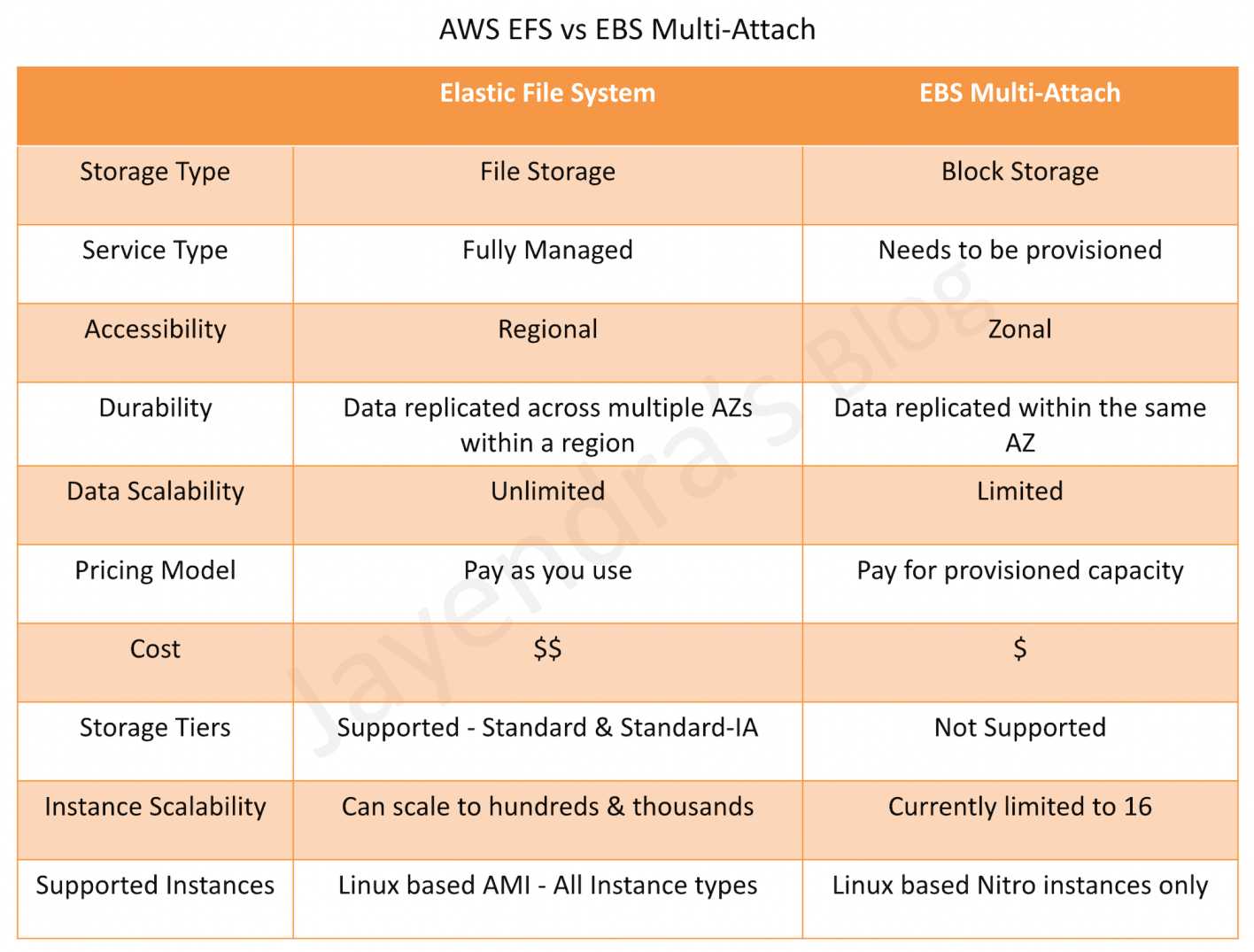
  • Elastic File System – EFS is a fully managed, serverless file storage service for use with Amazon compute (EC2, containers, serverless) and on-premises servers. EFS provides a file system interface, file system access semantics (such as strong consistency and file locking), and concurrently accessible storage for up to thousands of EC2 instances.
  • Elastic Block Store – EBS is a block-level storage service for use with EC2. EBS can deliver performance for workloads that require the lowest-latency access to data from a single EC2 instance. EBS Multi-Attach is supported on Provisioned IOPS SSD volumes (io1 and io2) for concurrent access from multiple instances.
  • Service type
    • Elastic File System is fully managed and serverless — automatically scales storage capacity up or down.
    • EBS needs to be managed by the user — requires provisioning capacity upfront.
  • Accessibility
    • EFS can be accessed concurrently from all AZs in the Region via mount targets. Also supports cross-Region and cross-account replication (Nov 2024).
    • EBS Multi-Attach can be accessed concurrently from instances within the same AZ only.
  • Data Scalability
    • EFS provides virtually unlimited data storage — scales automatically to petabytes.
    • EBS Multi-Attach has limits on the storage it can provide (io2 Block Express supports up to 64 TiB per volume).
  • Instance Scalability
    • EFS can be attached to tens, hundreds, or even thousands of compute instances concurrently.
    • EBS Multi-Attach enabled volumes can be attached to up to 16 Linux instances built on the Nitro System.
  • Supported Instances
    • EFS is compatible with all Linux-based AMIs for EC2, uses NFS v4.1 protocol (POSIX-compliant). EFS is not supported on Windows instances.
    • Multi-Attach enabled volumes can be attached to up to 16 instances built on the Nitro System that are in the same AZ. With NVMe Reservations (io2 volumes, Sept 2023), Multi-Attach now supports Windows Server Failover Clusters with I/O fencing for safe write access coordination.
  • Storage Classes
    • EFS offers four storage classes: Standard, Standard-IA (Infrequent Access), One Zone, and One Zone-IA. Additionally, EFS Archive (launched Nov 2023) provides up to 72% lower cost than EFS IA for rarely accessed data with automatic intelligent tiering.
    • EBS Multi-Attach is supported on Provisioned IOPS SSD volumes — io1 and io2 (including io2 Block Express).
  • Performance
    • EFS with Elastic Throughput supports up to 20 GiB/s read throughput and 5 GiB/s write throughput (March 2024 update), with up to 1.5 GiB/s per client (May 2024 update). Supports sub-millisecond latency for Standard storage class.
    • EBS io2 Block Express delivers sub-millisecond latency with up to 256,000 IOPS, 4,000 MB/s throughput per volume.
  • I/O Fencing & Coordination
    • EFS handles file locking and consistency natively via NFS protocol semantics.
    • EBS Multi-Attach with io2 volumes supports NVMe Reservations (Sept 2023), enabling I/O fencing for safe write access coordination across cluster nodes — critical for Windows Server Failover Clusters and clustered databases.
  • Data Protection
    • EFS supports replication (cross-Region and cross-account), AWS Backup integration, and lifecycle management with automatic tiering.
    • EBS supports snapshots, Amazon Data Lifecycle Manager for automated snapshot management, and volume-level encryption.
  • Pricing
    • EFS is priced as per the pay-as-you-use model — only pay for storage consumed.
    • EBS is priced as per the provisioned capacity — pay for allocated storage even if unused.

Recent Updates (2023-2025)

Amazon EFS Updates

  • EFS Archive Storage Class (Nov 2023) – New lowest-cost storage class offering up to 72% lower cost than EFS Infrequent Access for rarely accessed data. Supports automatic intelligent tiering from Standard → IA → Archive.
  • Elastic Throughput – 20 GiB/s (March 2024) – Maximum throughput doubled to 20 GiB/s read (from 10 GiB/s) and 5 GiB/s write (from 3 GiB/s).
  • Per-client Throughput – 1.5 GiB/s (May 2024) – Maximum per-client throughput tripled to 1.5 GiB/s (from 500 MiB/s).
  • Cross-account Replication (Nov 2024) – EFS now supports replicating file systems between AWS accounts for enhanced disaster recovery.
  • 10,000 Access Points per File System (Feb 2025) – Limit increased 10x from 1,000 to 10,000 access points per file system for container and serverless workloads.

Amazon EBS Multi-Attach Updates

  • NVMe Reservations for io2 (Sept 2023) – Enables I/O fencing for Multi-Attach volumes, providing safe write access coordination across cluster nodes. Enabled by default for all Multi-Attach io2 volumes created after September 18, 2023.
  • Windows Server Failover Cluster Support – With NVMe Reservations, EBS Multi-Attach io2 volumes now support Windows Server Failover Clusters (WSFC) with proper I/O fencing, enabling SQL Server Failover Cluster Instances.
  • io2 Block Express Performance – Delivers up to 256,000 IOPS, 4,000 MB/s throughput, 64 TiB capacity per volume with 99.999% durability and sub-millisecond latency.
  • Expanded Instance Type Support (2025) – Multi-Attach support expanded to additional Nitro-based instance types.

AWS Certification Exam Practice Questions

  • Questions are collected from Internet and the answers are marked as per my knowledge and understanding (which might differ with yours).
  • AWS services are updated everyday and both the answers and questions might be outdated soon, so research accordingly.
  • AWS exam questions are not updated to keep up the pace with AWS updates, so even if the underlying feature has changed the question might not be updated
  • Open to further feedback, discussion and correction.
  1. A company wants to organize the contents of multiple websites in managed file storage. The company must be able to scale the storage based on demand without needing to provision storage. Multiple servers across multiple Availability Zones within a region should be able to access this storage concurrently. Which services should the Solutions Architect recommend?
    1. Amazon S3
    2. Amazon EBS Multi-Attach
    3. Amazon EFS
    4. AWS Storage Gateway – Volume gateway
  2. A company requires shared block storage for a clustered database running on multiple EC2 instances within the same Availability Zone. The solution must support I/O fencing to prevent data corruption during failover scenarios. Which solution meets these requirements?
    1. Amazon EFS with General Purpose performance mode
    2. Amazon EBS io2 Multi-Attach with NVMe Reservations
    3. Amazon EBS gp3 with Multi-Attach enabled
    4. Amazon FSx for Windows File Server
  3. A company needs to store large amounts of rarely accessed files that still need to be part of the same file system namespace as their frequently accessed data. The solution must minimize costs while maintaining immediate access when needed. Which storage configuration is MOST cost-effective?
    1. Amazon S3 Glacier Instant Retrieval
    2. Amazon EFS with Standard storage class only
    3. Amazon EFS with lifecycle management using Standard, Infrequent Access, and Archive storage classes
    4. Amazon EBS with Cold HDD (sc1) volumes
  4. A company wants to deploy a Windows Server Failover Cluster on AWS for a SQL Server Always On Failover Cluster Instance. The shared storage must support concurrent access from multiple instances with proper write coordination. Which solution meets these requirements?
    1. Amazon EFS mounted on Windows instances
    2. Amazon EBS gp3 with Multi-Attach
    3. Amazon EBS io2 Multi-Attach with NVMe Reservations
    4. Amazon S3 with S3 File Gateway
  5. A media company runs a video processing workload across hundreds of EC2 instances that need to read and write to a shared file system. The workload requires up to 15 GiB/s of read throughput during peak hours. Which storage solution meets these requirements? (Select TWO)
    1. Amazon EFS with Elastic Throughput mode
    2. Amazon EBS io2 with Multi-Attach
    3. Amazon S3 with S3 Transfer Acceleration
    4. Amazon EFS Regional file system with General Purpose performance mode
    5. Amazon FSx for Lustre

References

AWS S3 Security

AWS S3 Security

  • AWS S3 Security is a shared responsibility between AWS and the Customer
  • S3 is a fully managed service that is protected by the AWS global network security procedures
  • AWS handles basic security tasks like guest operating system (OS) and database patching, firewall configuration, and disaster recovery.
  • Security and compliance of S3 are assessed by third-party auditors as part of multiple AWS compliance programs including SOC, PCI DSS, HIPAA, etc.
  • S3 provides several other features to handle security, which are the customers’ responsibility.
  • S3 Encryption supports both data at rest and data in transit encryption.
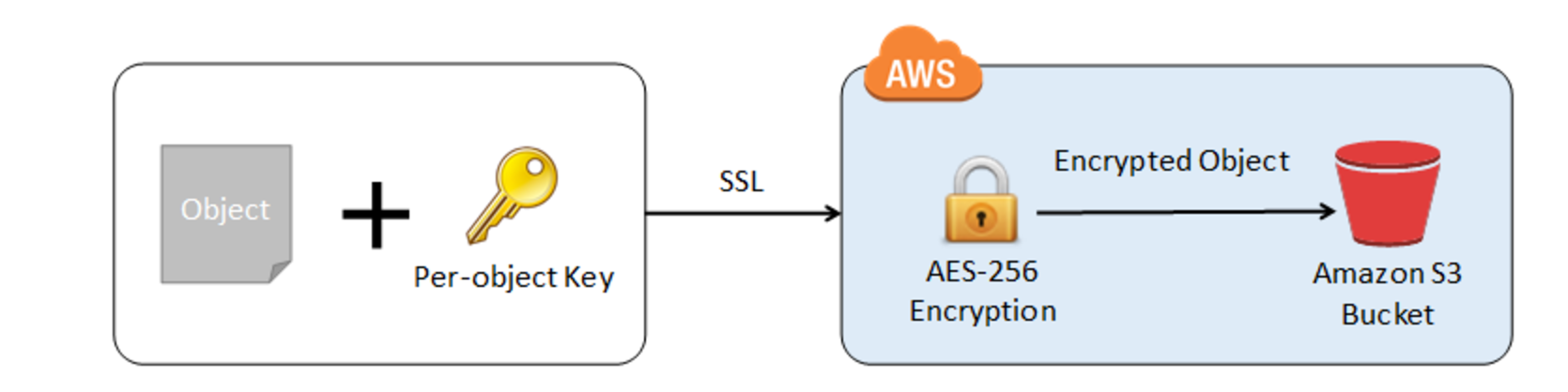
    • Data in transit encryption can be provided by enabling communication via SSL or using client-side encryption
    • Data at rest encryption can be provided using Server Side or Client Side encryption
  • S3 permissions can be handled using
  • S3 Object Lock helps to store objects using a WORM model and can help prevent objects from being deleted or overwritten for a fixed amount of time or indefinitely.
  • S3 Access Points simplify data access for any AWS service or customer application that stores data in S3.
  • S3 Versioning with MFA Delete can be enabled on a bucket to ensure that data in the bucket cannot be accidentally overwritten or deleted.
  • S3 Block Public Access provides controls across an entire AWS Account or at the individual S3 bucket level to ensure that objects never have public access, now and in the future.
  • S3 Access Analyzer monitors the access policies, ensuring that the policies provide only the intended access to your S3 resources.

S3 Encryption

  • S3 allows the protection of data in transit by enabling communication via SSL or using client-side encryption
  • S3 provides data-at-rest encryption using
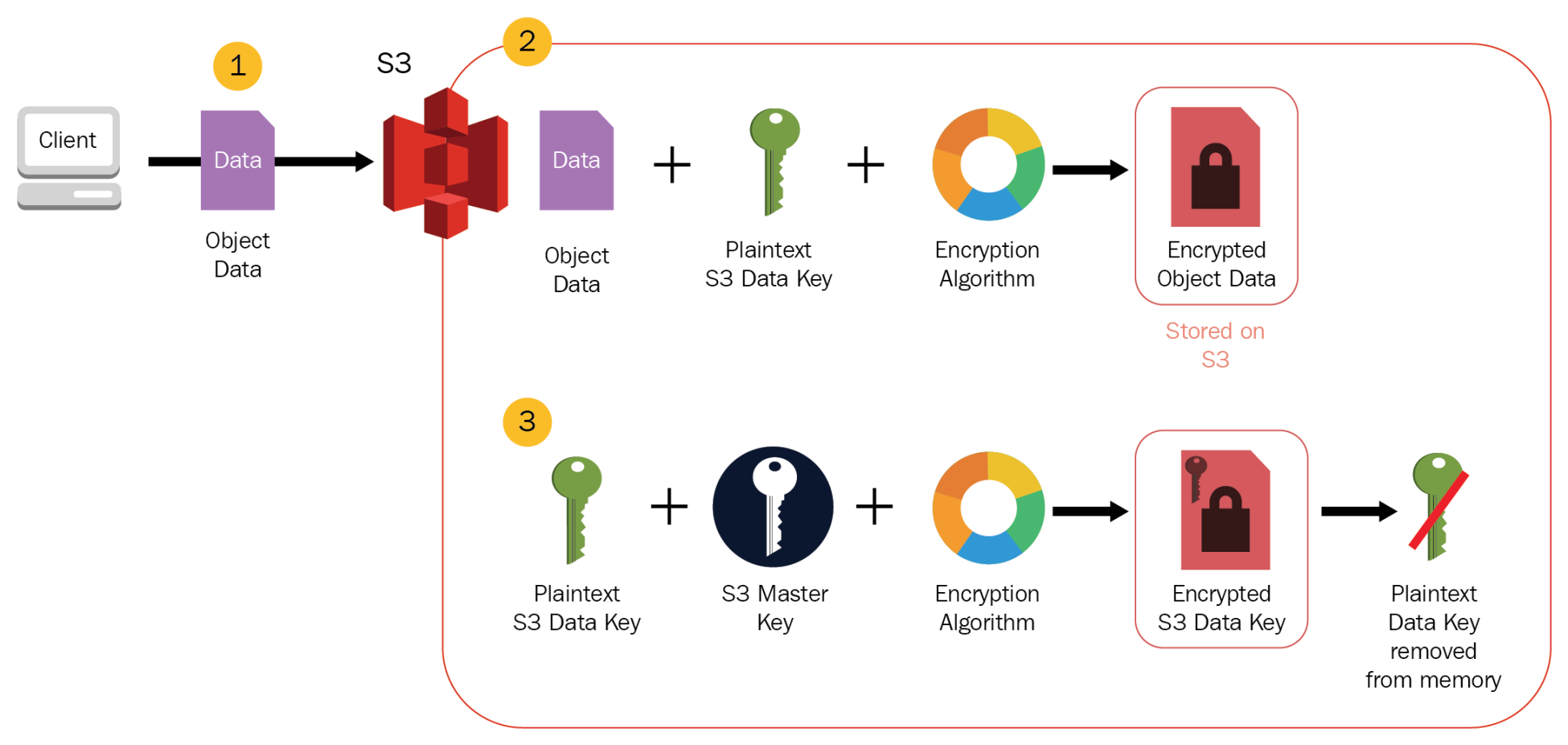
    • Server-Side Encryption: S3 handles the encryption
      • SSE-S3
        • S3 handles the encryption and decryption using S3 managed keys
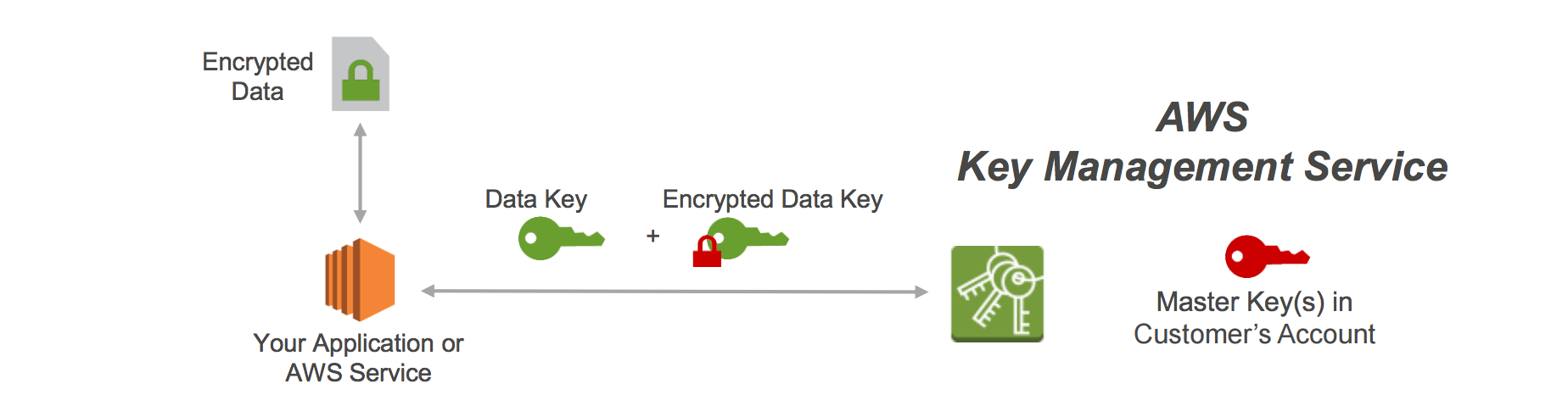
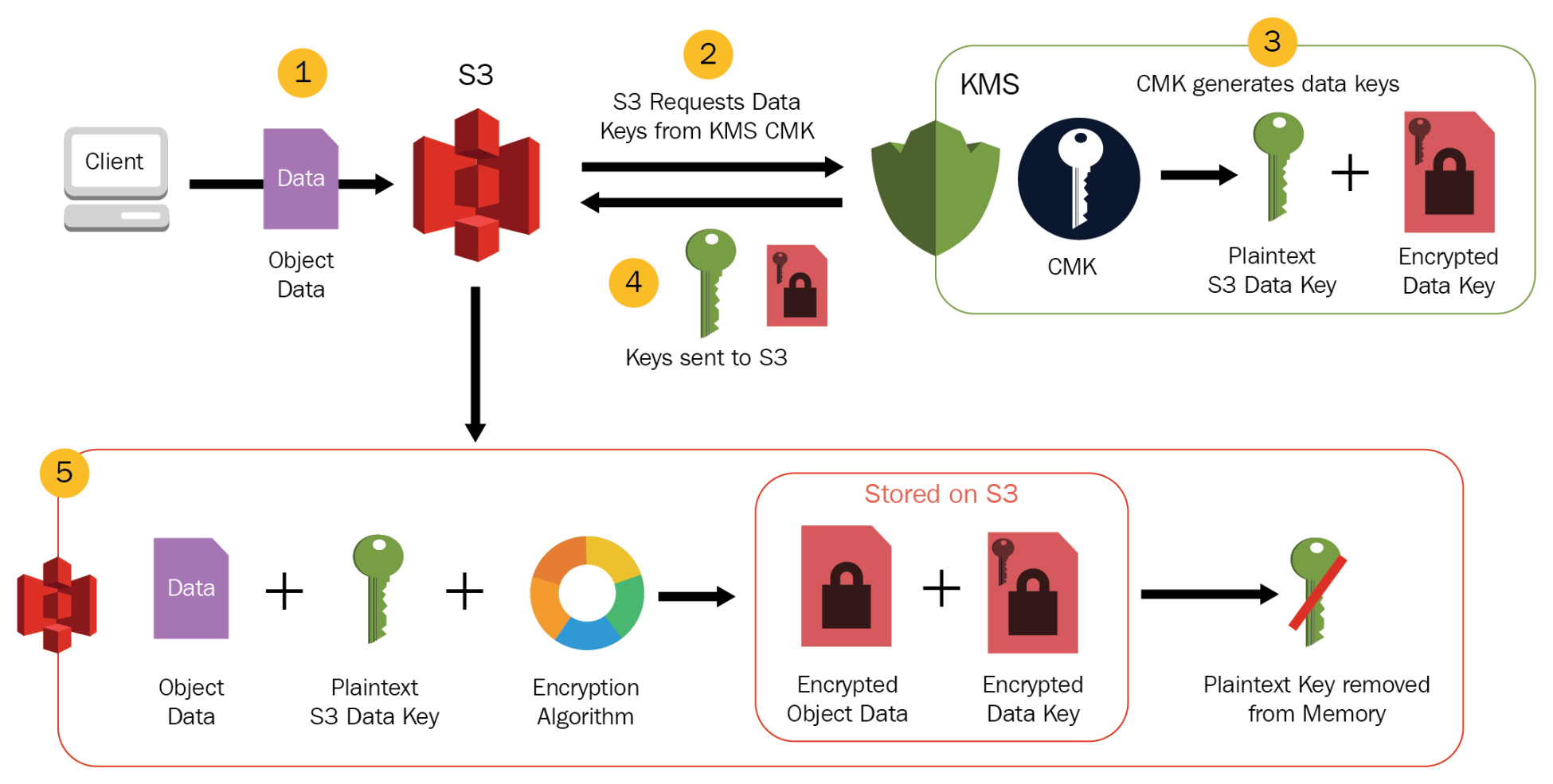
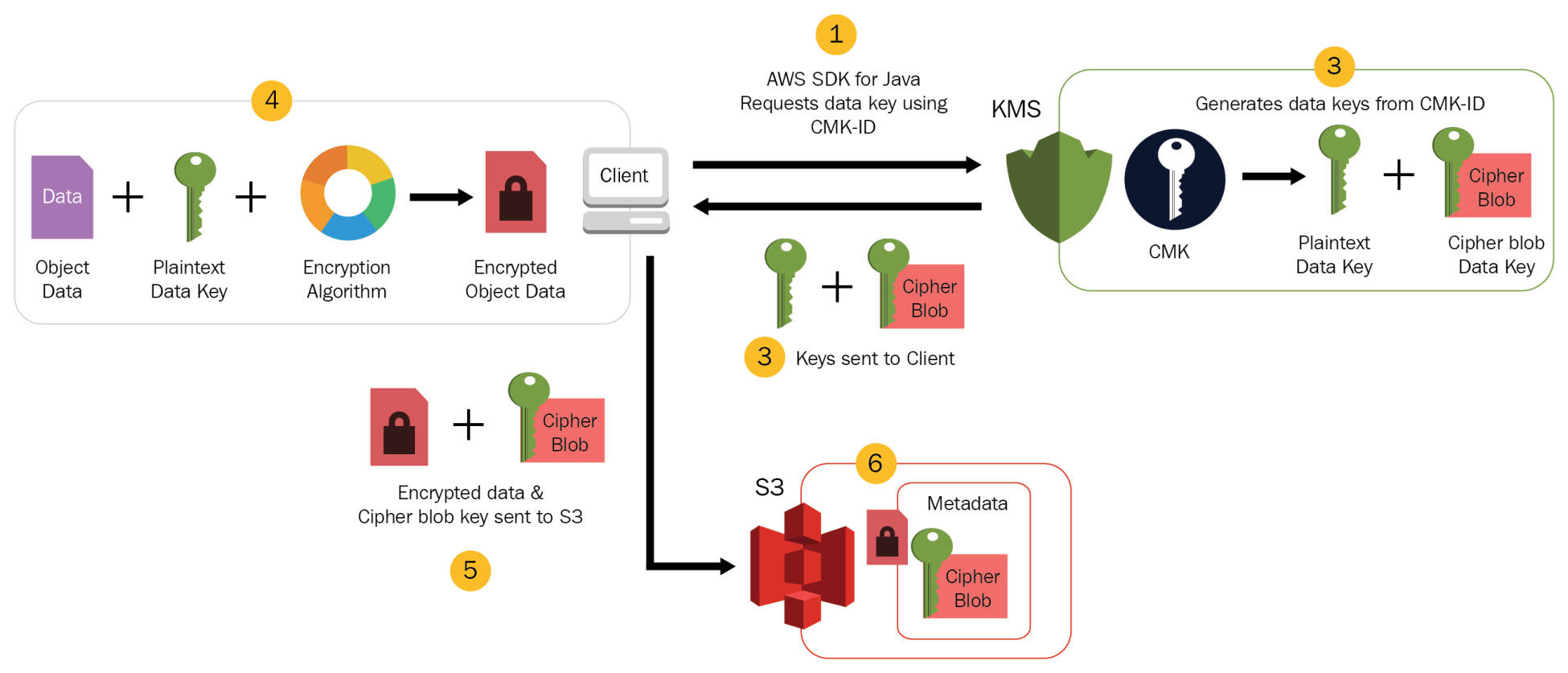
      • SSE-KMS
        • S3 handles the encryption and decryption using keys managed through AWS KMS.
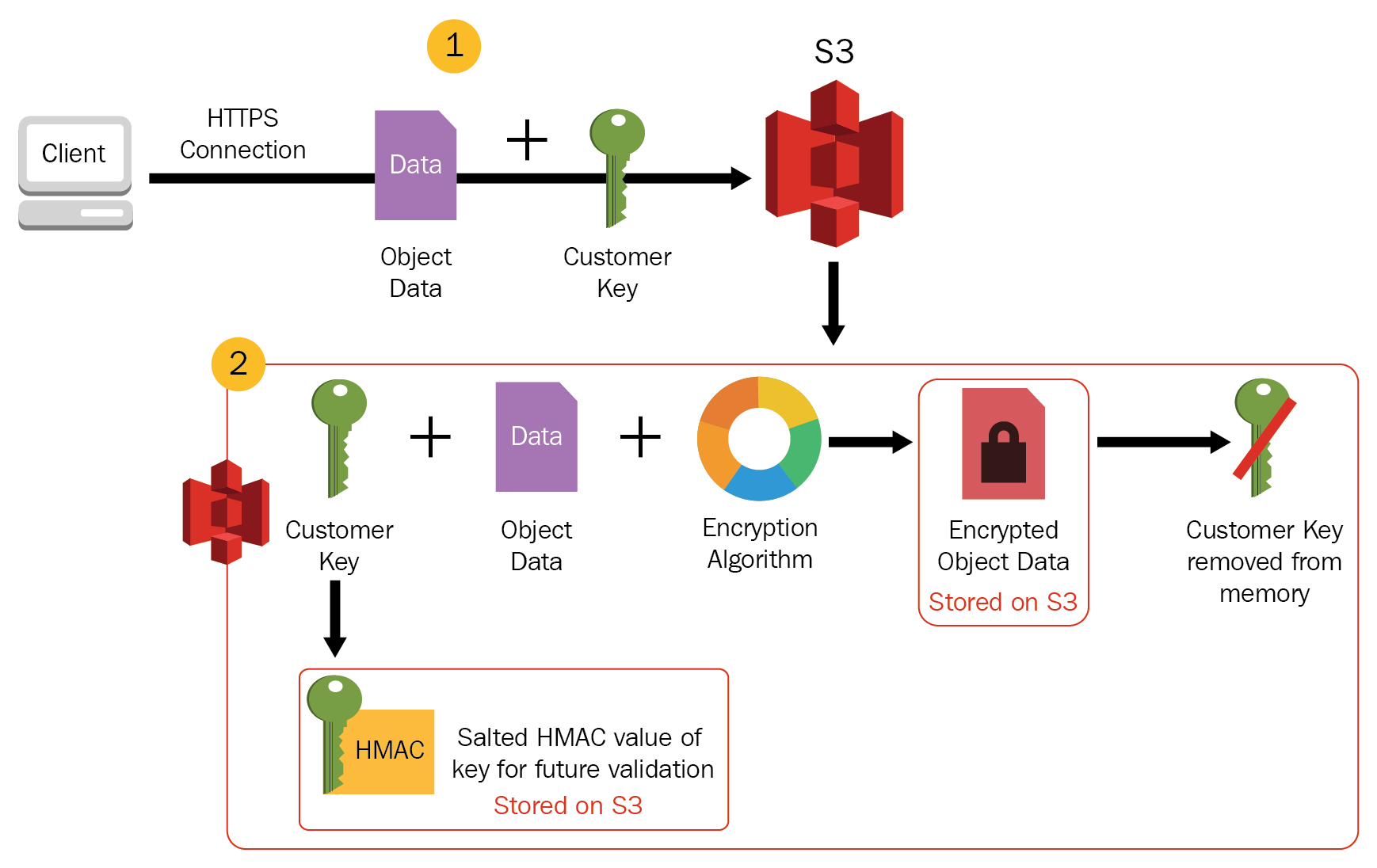
      • SSE-C
        • S3 handles the encryption and decryption using keys managed and provided by the Customer.
    • Client Side Encryption: Customer handles the encryption
      • CSE-CMK
        • Customer handles the encryption and decryption using keys managed through AWS KMS.
      • Client-side Master Key
        • Customer handles the encryption and decryption using keys managed by them.

S3 Permissions

Refer blog post @ S3 Permissions

S3 Object Lock

  • S3 Object Lock helps to store objects using a write-once-read-many (WORM) model.
  • can help prevent objects from being deleted or overwritten for a fixed amount of time or indefinitely.
  • can help meet regulatory requirements that require WORM storage or add an extra layer of protection against object changes and deletion.
  • can be enabled only for new buckets and works only in versioned buckets.
  • provides two retention modes that apply different levels of protection to the objects
    • Governance mode
      • Users can’t overwrite or delete an object version or alter its lock settings unless they have special permissions.
      • Objects can be protected from being deleted by most users, but some users can be granted permission to alter the retention settings or delete the object if necessary.
      • Can be used to test retention-period settings before creating a compliance-mode retention period.
    • Compliance mode
      • A protected object version can’t be overwritten or deleted by any user, including the root user in the AWS account.
      • Object retention mode can’t be changed, and its retention period can’t be shortened.
      • Object versions can’t be overwritten or deleted for the duration of the retention period.

S3 Access Points

  • S3 access points simplify data access for any AWS service or customer application that stores data in S3.
  • Access points are named network endpoints that are attached to buckets and can be used to perform S3 object operations, such as GetObject and PutObject.
  • Each access point has distinct permissions and network controls that S3 applies for any request that is made through that access point.
  • Each access point enforces a customized access point policy that works in conjunction with the bucket policy, attached to the underlying bucket.
  • An access point can be configured to accept requests only from a VPC to restrict S3 data access to a private network.
  • Custom block public access settings can be configured for each access point.

S3 VPC Gateway Endpoint

  • A VPC endpoint enables connections between a VPC and supported services, without requiring that you use an internet gateway, NAT device, VPN connection, or AWS Direct Connect connection.
  • VPC is not exposed to the public internet.
  • Gateway Endpoint is a gateway that is a target for a route in your route table used for traffic destined to either S3.

S3 Block Public Access

  • S3 Block Public Access provides controls across an entire AWS Account or at the individual S3 bucket level to ensure that objects never have public access, now and in the future.
  • S3 Block Public Access provides settings for access points, buckets, and accounts to help manage public access to S3 resources.
  • By default, new buckets, access points, and objects don’t allow public access. However, users can modify bucket policies, access point policies, or object permissions to allow public access.
  • S3 Block Public Access settings override these policies and permissions so that public access to these resources can be limited.
  • S3 Block Public Access allows account administrators and bucket owners to easily set up centralized controls to limit public access to their S3 resources that are enforced regardless of how the resources are created.
  • S3 doesn’t support block public access settings on a per-object basis.
  • S3 Block Public Access settings when applied to an account apply to all AWS Regions globally.

S3 Access Analyzer

  • S3 Access Analyzer monitors the access policies, ensuring that the policies provide only the intended access to your S3 resources.
  • S3 Access Analyzer evaluates the bucket access policies and enables you to discover and swiftly remediate buckets with potentially unintended access.

S3 Security Best Practices

S3 Preventative Security Best Practices

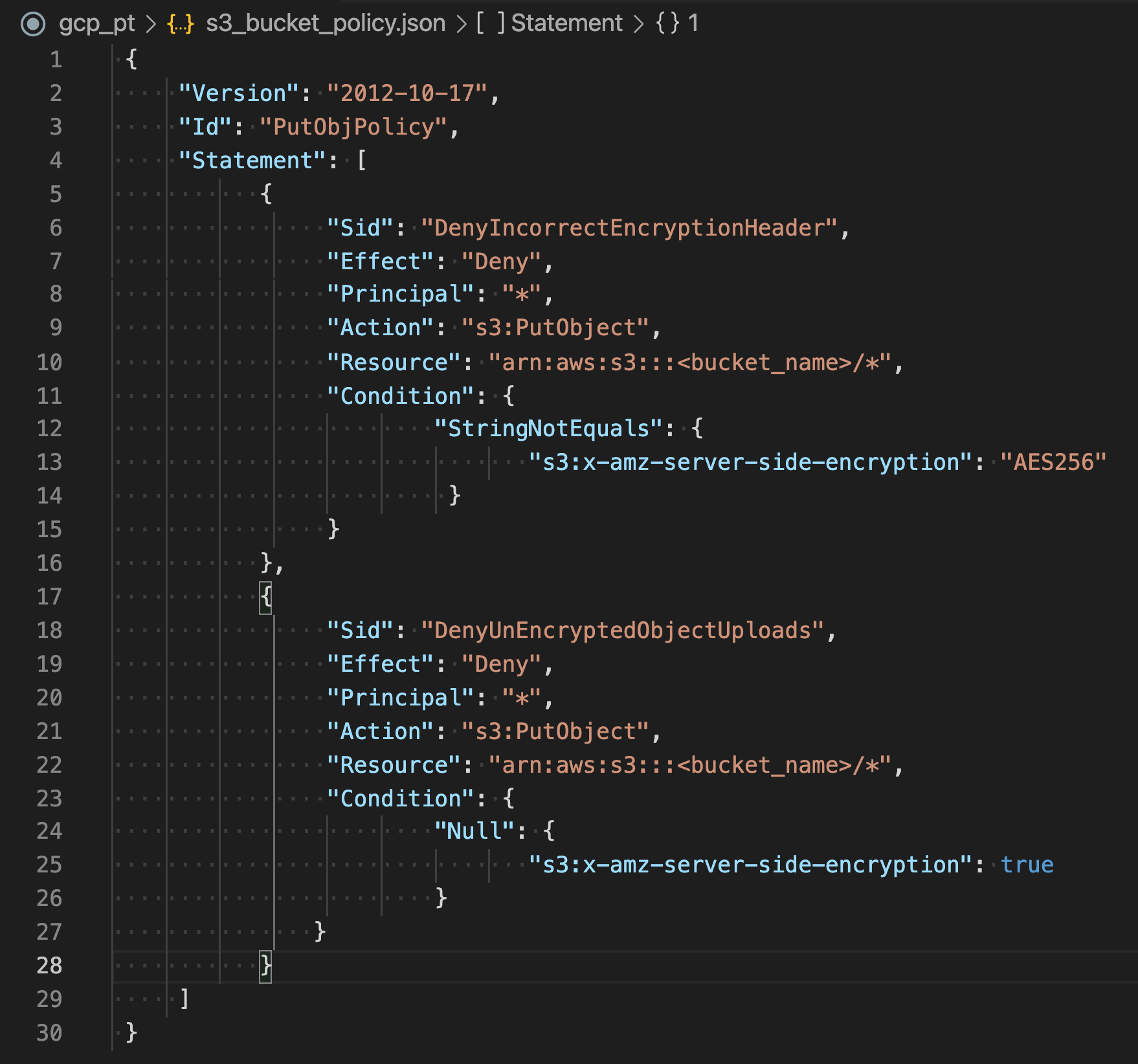
  • Ensure S3 buckets use the correct policies and are not publicly accessible
    • Use S3 block public access
    • Identify Bucket policies and ACLs that allow public access
    • Use AWS Trusted Advisor to inspect the S3 implementation.
  • Implement least privilege access
  • Use IAM roles for applications and AWS services that require S3 access
  • Enable Multi-factor authentication (MFA) Delete to help prevent accidental bucket deletions
  • Consider Data at Rest Encryption
  • Enforce Data in Transit Encryption
  • Consider S3 Object Lock to store objects using a “Write Once Read Many” (WORM) model.
  • Enable versioning to easily recover from both unintended user actions and application failures.
  • Consider S3 Cross-Region replication
  • Consider VPC endpoints for S3 access to provide private S3 connectivity and help prevent traffic from potentially traversing the open internet.

S3 Monitoring and Auditing Best Practices

  • Identify and Audit all S3 buckets to have visibility of all the S3 resources to assess their security posture and take action on potential areas of weakness.
  • Implement monitoring using AWS monitoring tools
  • Enable S3 server access logging, which provides detailed records of the requests that are made to a bucket useful for security and access audits
  • Use AWS CloudTrail, which provides a record of actions taken by a user, a role, or an AWS service in S3.
  • Enable AWS Config, which enables you to assess, audit, and evaluate the configurations of the AWS resources
  • Consider using Amazon Macie with S3 to automatically discover, classify, and protect sensitive data in AWS.
  • Monitor AWS security advisories to regularly check security advisories posted in Trusted Advisor for the AWS account.

AWS Certification Exam Practice Questions

  • Questions are collected from Internet and the answers are marked as per my knowledge and understanding (which might differ with yours).
  • AWS services are updated everyday and both the answers and questions might be outdated soon, so research accordingly.
  • AWS exam questions are not updated to keep up the pace with AWS updates, so even if the underlying feature has changed the question might not be updated
  • Open to further feedback, discussion and correction.

References

AWS_S3_Security

AWS Backup

AWS Backup

  • AWS Backup is a fully-managed service that helps centralize and automate data protection across AWS services, in the cloud, and on premises.
  • helps configure backup policies and monitor activity for the AWS resources in one place.
  • helps automate and consolidate backup tasks previously performed service-by-service and removes the need to create custom scripts and manual processes.
  • helps create backup policies called backup plans that help define the backup requirements like frequency, window, retention period, etc.
  • automatically backs up the AWS resources according to the defined backup plan.
  • can apply backup plans to the AWS resources by simply tagging them.
  • stores the periodic backups incrementally which provides benefit from the data protection of frequent backups while minimizing storage costs.
  • provides ransomware detection and recovery capabilities, and compliance insights and analytics for data protection policies and operations.
  • integrates with AWS Organizations to centrally deploy data protection policies across multiple accounts.

AWS Backup Features

  • Centralized Backup Management
    • provides a centralized backup console, APIs, and CLI to manage backups across all supported AWS services.
    • offers a consolidated view of backups and backup activity logs for auditing and compliance.
  • Policy-based Backup (Backup Plans)
    • Backup plans define backup requirements including schedule, window, retention, and lifecycle.
    • supports predefined backup schedules based on common best practices or custom schedules.
    • provides schedule preview that shows the next ten scheduled backup runs to validate schedules.
  • Tag-based Resource Assignment
    • can apply backup plans to AWS resources using tags for consistent and scalable protection.
    • supports assignment by resource ID, tags, or all resources of a specific type.
  • Lifecycle Management
    • supports automatic transition of backups from warm storage to cold storage to minimize costs.
    • supports a low-cost warm storage tier for Amazon S3 backup data (up to 30% cost reduction).
    • supports Amazon FSx Intelligent-Tiering for automatic cost optimization.
    • lifecycle policies automatically expire backups based on defined retention periods.
  • Cross-Region Backup
    • allows copying backups to multiple AWS Regions on demand or as part of a scheduled backup plan.
    • supports cross-Region and cross-account snapshot copy in a single operation for RDS, Aurora, DocumentDB, and Neptune.
  • Cross-Account Management and Backup
    • uses AWS Organizations to manage backups across all AWS accounts centrally.
    • supports delegated administrator for backup management without accessing management accounts.
    • can “fan in” backups to a single repository account or “fan out” for greater resilience.
  • Incremental Backups
    • stores periodic backups incrementally for supported resource types.
    • first backup is a full copy; subsequent backups capture only changes.
  • Full AWS Backup Management
    • provides independent encryption using the KMS key of the AWS Backup vault.
    • uses awsbackup ARNs for backup-specific access policies.
    • offers centralized backup billing and Cost Explorer cost allocation tags.
  • Backup Activity Monitoring
    • integrates with Amazon CloudWatch for metrics and alarms on backup/restore jobs.
    • integrates with AWS CloudTrail for audit logs of backup activity.
    • integrates with Amazon EventBridge for event-driven backup monitoring.
    • integrates with Amazon SNS for backup activity notifications.

AWS Backup Vault Lock

  • AWS Backup Vault Lock enables a write-once-read-many (WORM) model for backups.
  • prevents anyone (including root user) from deleting backups or altering their retention periods.
  • provides immutability to protect backups from inadvertent or malicious deletion.
  • has been assessed by Cohasset Associates for use in environments subject to SEC 17a-4, CFTC, and FINRA regulations.
  • supports both Governance mode (allows authorized users to modify) and Compliance mode (prevents all changes including by root user).
  • can be configured via the AWS Console, CLI, API, or SDK.

AWS Backup Logically Air-Gapped Vault

  • Logically air-gapped vaults store immutable backup copies that are locked by default in Compliance mode.
  • backups are isolated in a separate AWS Backup service-owned account for additional security.
  • supports encryption using AWS-owned keys (AOKs) or AWS KMS customer-managed keys (CMKs).
  • supports secure sharing of backup access across accounts and organizations using AWS Resource Access Manager (RAM).
  • supports direct restore from the vault to reduce recovery time.
  • supports primary backups directly to logically air-gapped vaults, eliminating the need for secondary copy operations.
  • supports Multi-party approval to authorize access to backups even when the owning account is compromised.
  • supports Amazon EBS, Amazon S3, Amazon EC2, Amazon RDS, Amazon Aurora, Amazon EFS, Amazon FSx (Lustre, Windows, OpenZFS), Amazon DynamoDB, and Amazon EKS.
  • provides robust protection against ransomware, insider threats, and account compromise.

AWS Backup Restore Testing

  • Restore testing enables automated, periodic evaluation of restore viability and recovery readiness.
  • allows scheduling automated restore operations in isolated environments to validate backups.
  • monitors restore job duration times to help meet Recovery Time Objectives (RTOs).
  • supports event-driven validation that runs when a restore testing job completes.
  • integrates with 3rd party malware scanning services to verify backup integrity.
  • helps demonstrate compliance with regulatory requirements for data recovery validation.

AWS Backup Audit Manager

  • AWS Backup Audit Manager helps simplify data governance and compliance management of backups.
  • provides built-in, customizable compliance controls aligned with organizational requirements.
  • automatically tracks backup activities and resources and detects violations.
  • generates daily reports on the compliance status of data protection frameworks.
  • reports include vault type, lock status, encryption details, archive settings, and retention periods.
  • findings can be imported into AWS Audit Manager for overall compliance posture.
  • supports legal hold to prevent backups from being deleted for preservation, auditing, or e-Discovery.

AWS Backup Search and Item-Level Recovery

  • allows searching the metadata of backups at a granular level for specific files or objects.
  • supports item-level search and recovery for Amazon EBS snapshots and Amazon S3 backups.
  • can be extended to Amazon EC2 instances for granular file-level recovery.
  • enables recovery of up to 5 items at a time without restoring the entire backup.
  • significantly reduces recovery time objectives (RTOs) for granular recovery scenarios.
  • supports creating backup indexes within backup policies for organization-wide search.

Amazon GuardDuty Malware Protection for AWS Backup

  • enables automated malware scanning of AWS Backup recovery points.
  • can be automated through backup plans or run as on-demand scans of existing backups.
  • detects malicious content before restoration to prevent reintroduction of compromised data.
  • uses multiple AWS and third-party malware scanning engines for comprehensive detection.
  • addresses a critical gap in ransomware recovery strategies.

AWS Backup Supported Services

AWS Certification Exam Practice Questions

  • Questions are collected from Internet and the answers are marked as per my knowledge and understanding (which might differ with yours).
  • AWS services are updated everyday and both the answers and questions might be outdated soon, so research accordingly.
  • AWS exam questions are not updated to keep up the pace with AWS updates, so even if the underlying feature has changed the question might not be updated
  • Open to further feedback, discussion and correction.
  1. For the production account, a SysOps administrator must ensure that all data is backed up daily for all current and future Amazon EC2 instances and Amazon Elastic File System (Amazon EFS) file systems. Backups must be retained for 30 days. Which solution will meet these requirements with the LEAST amount of effort?
    1. Create a backup plan in AWS Backup. Assign resources by resource ID, selecting all existing EC2 and EFS resources that are running in the account. Edit the backup plan daily to include any new resources. Schedule the backup plan to run every day with a lifecycle policy to expire backups after 30 days.
    2. Create a backup plan in AWS Backup. Assign resources by tags. Ensure that all existing EC2 and EFS resources are tagged correctly. Schedule the backup plan to run every day with a lifecycle policy to expire backups after 30 days.
    3. Create a lifecycle policy in Amazon Data Lifecycle Manager (Amazon DLM). Assign all resources by resource ID, selecting all existing EC2 and EFS resources that are running in the account. Edit the lifecycle policy daily to include any new resources. Schedule the lifecycle policy to create snapshots every day with a retention period of 30 days.
    4. Create a lifecycle policy in Amazon Data Lifecycle Manager (Amazon DLM). Assign all resources by tags. Ensure that all existing EC2 and EFS resources are tagged correctly. Schedule the lifecycle policy to create snapshots every day with a retention period of 30 days.
  2. A company needs to protect its AWS backups from ransomware attacks and ensure that even if an attacker compromises an administrator account, the backups cannot be deleted. Which AWS Backup feature should the company implement?
    1. Cross-Region backup copy
    2. AWS Backup Audit Manager
    3. AWS Backup Vault Lock in Compliance mode
    4. Tag-based backup policies
  3. A security team wants to ensure backup copies are stored in an isolated environment that is separate from the production account and protected from account compromise. The solution must also support direct restore capabilities. Which solution meets these requirements?
    1. Enable cross-Region backup with AWS Backup Vault Lock
    2. Copy backups to a separate AWS account using cross-account backup
    3. Store backups in AWS Backup logically air-gapped vaults
    4. Enable S3 Object Lock on the backup storage bucket
  4. A company wants to centrally manage backup policies across 50 AWS accounts and ensure compliance with data protection regulations. They need daily reports showing backup compliance status. Which combination of AWS services should be used? (Choose TWO)
    1. AWS Backup with AWS Organizations for cross-account backup management
    2. Amazon Data Lifecycle Manager with AWS Config
    3. AWS Backup Audit Manager for compliance reporting
    4. AWS Systems Manager with custom automation documents
    5. Amazon EventBridge with custom compliance rules
  5. A DevOps team needs to verify that their backup recovery process meets the organization’s Recovery Time Objective (RTO) of 4 hours. They want automated validation without manual intervention. Which AWS Backup feature should they use?
    1. AWS Backup Audit Manager compliance controls
    2. Amazon CloudWatch alarms on restore job duration
    3. AWS Backup restore testing with scheduled validation
    4. Cross-Region backup copy with monitoring
  6. A data engineer needs to quickly locate and restore a specific file from an Amazon EBS snapshot without restoring the entire volume. Which AWS Backup capability allows this?
    1. Point-in-time recovery
    2. AWS Backup search and item-level recovery
    3. Cross-Region restore
    4. Full volume restore with custom configuration
  7. A company wants to scan their AWS Backup recovery points for malware before restoring them to production to prevent reintroduction of compromised data. Which solution should they implement?
    1. AWS Config rules to check backup integrity
    2. AWS Backup restore testing with custom validation scripts
    3. Amazon GuardDuty Malware Protection for AWS Backup
    4. AWS Security Hub integrated with backup monitoring

References

AWS S3 Object Lock

AWS S3 Object Lock

  • S3 Object Lock helps to store objects using a write-once-read-many (WORM) model.
  • can help prevent objects from being deleted or overwritten for a fixed amount of time or indefinitely.
  • can help meet regulatory requirements that require WORM storage or add an extra layer of protection against object changes and deletion.
  • can be enabled only for new buckets. For an existing bucket, you need to contact AWS Support.
  • works only in versioned buckets.
  • Once Object Lock is enabled
    • Object Lock can’t be disabled
    • automatically enables versioning for the bucket
    • versioning can’t be suspended for the bucket.
  • provides two ways to manage object retention.
    • Retention period
      • protects an object version for a fixed amount of time, during which an object remains locked.
      • During this period, the object is WORM-protected and can’t be overwritten or deleted.
      • can be applied on an object version either explicitly or through a bucket default setting.
      • S3 stores a timestamp in the object version’s metadata to indicate when the retention period expires. After the retention period expires, the object version can be overwritten or deleted unless you also placed a legal hold on the object version.
    • Legal hold
      • protects an object version, as a retention period, but it has no expiration date.
      • remains in place until you explicitly remove it.
      • can be freely placed and removed by any user who has the s3:PutObjectLegalHold permission.
      • are independent of retention periods.
    • Retention periods and legal holds apply to individual object versions.
    • Placing a retention period or legal hold on an object protects only the version specified in the request. It doesn’t prevent new versions of the object from being created.
    • An object version can have both a retention period and a legal hold, one but not the other, or neither.
  • provides two retention modes that apply different levels of protection to the objects
    • Governance mode
    • Compliance mode
  • S3 buckets with S3 Object Lock can’t be used as destination buckets for server access logs.
  •  has been assessed by Cohasset Associates for use in environments that are subject to SEC 17a-4, CFTC, and FINRA regulations.

S3 Object Lock – Retention Modes

Governance mode

  • Users can’t overwrite or delete an object version or alter its lock settings unless they have special permissions.
  • Objects can be protected from being deleted by most users, but some users can be granted permission to alter the retention settings or delete the object if necessary.
  • Can be used to test retention-period settings before creating a compliance-mode retention period.
  • To override or remove governance-mode retention settings, a user must have the s3:BypassGovernanceRetention permission and must explicitly include x-amz-bypass-governance-retention:true as a request header.

Compliance mode

  • A protected object version can’t be overwritten or deleted by any user, including the root user in the AWS account.
  • Object retention mode can’t be changed, and its retention period can’t be shortened.
  • Object versions can’t be overwritten or deleted for the duration of the retention period.

AWS Certification Exam Practice Questions

  • Questions are collected from Internet and the answers are marked as per my knowledge and understanding (which might differ with yours).
  • AWS services are updated everyday and both the answers and questions might be outdated soon, so research accordingly.
  • AWS exam questions are not updated to keep up the pace with AWS updates, so even if the underlying feature has changed the question might not be updated
  • Open to further feedback, discussion and correction.
  1. A company needs to store its accounting records in Amazon S3. No one at the company; including administrative users and root users, should be able to delete the records for an entire 10-year period. The records must be stored with maximum resiliency. Which solution will meet these requirements?
    1. Use an access control policy to deny deletion of the records for a period of 10 years.
    2. Use an IAM policy to deny deletion of the records. After 10 years, change the IAM policy to allow deletion.
    3. Use S3 Object Lock in compliance mode for a period of 10 years.
    4. Use S3 Object Lock in governance mode for a period of 10 years.

References

Amazon_S3_Object_Lock

AWS S3 Encryption

AWS S3 Encryption

📌 Key Updates (2023-2026)

  • January 2023: All new S3 object uploads are automatically encrypted with SSE-S3 by default at no additional cost.
  • Terminology Change: AWS KMS replaced “Customer Master Key (CMK)” with “KMS key.” The concept is unchanged.
  • June 2023: Dual-Layer Server-Side Encryption (DSSE-KMS) introduced for compliance workloads.
  • November 2025: New bucket-level setting to standardize encryption types (block SSE-C per bucket).
  • January 2026: UpdateObjectEncryption API allows changing encryption type without data movement.
  • April 2026: SSE-C is now disabled by default on all new general purpose buckets.
  • Client-Side Encryption: AmazonS3EncryptionClient is deprecated; use the standalone Amazon S3 Encryption Client (v4) with key commitment.
  • AWS S3 Encryption supports both data at rest and data in transit encryption.
  • Starting January 5, 2023, all new object uploads to Amazon S3 are automatically encrypted with SSE-S3 at no additional cost and with no impact on performance.
  • Data in-transit
    • S3 allows protection of data in transit by enabling communication via SSL/TLS or using client-side encryption.
  • Data at Rest
    • Server-Side Encryption
      • S3 encrypts the object before saving it on disks in its data centers and decrypts it when the objects are downloaded.
      • SSE-S3 is automatically applied as the base level of encryption for every bucket.
    • Client-Side Encryption
      • Data is encrypted at the client-side and uploaded to S3.
      • The encryption process, the encryption keys, and related tools are managed by the user.

S3 Server-Side Encryption

  • Server-side encryption is about data encryption at rest.
  • Server-side encryption encrypts only the object data.
  • Any object metadata is not encrypted.
  • S3 handles the encryption (as it writes to disks) and decryption (when objects are accessed) of the data objects.
  • There is no difference in the access mechanism for both encrypted and unencrypted objects and is handled transparently by S3.
  • Starting January 5, 2023, SSE-S3 is applied as the base level of encryption for every bucket in Amazon S3. All new object uploads are automatically encrypted.
  • S3 supports the following server-side encryption options:
    • SSE-S3 – Server-Side Encryption with S3-Managed Keys (default)
    • SSE-KMS – Server-Side Encryption with AWS KMS Keys
    • DSSE-KMS – Dual-Layer Server-Side Encryption with AWS KMS Keys
    • SSE-C – Server-Side Encryption with Customer-Provided Keys

Server-Side Encryption with S3-Managed Keys – SSE-S3

  • Encryption keys are handled and managed by AWS.
  • SSE-S3 is the default encryption for all S3 buckets. Since January 5, 2023, all new objects are automatically encrypted with SSE-S3 unless a different encryption option is specified.
  • Each object is encrypted with a unique data key employing strong multi-factor encryption.
  • SSE-S3 encrypts the data key with a root key that is regularly rotated.
  • S3 server-side encryption uses one of the strongest block ciphers available, 256-bit Advanced Encryption Standard (AES-256), to encrypt the data.
  • Whether or not objects are encrypted with SSE-S3 can’t be enforced when they are uploaded using pre-signed URLs, because the only way server-side encryption can be specified is through the AWS Management Console or through an HTTP request header.
  • Request must set header x-amz-server-side-encryption to AES256
  • For enforcing server-side encryption for all of the objects that are stored in a bucket, use a bucket policy that denies permissions to upload an object unless the request includes x-amz-server-side-encryption header to request server-side encryption.
  • Since all objects are now encrypted by default, bucket policies to enforce encryption are no longer strictly required but can still be used to enforce a specific encryption type (e.g., SSE-KMS over SSE-S3).
SSE-S3 : Server Side Encryption using S3 Managed Keys
Source: Oreilly

Server-Side Encryption with AWS KMS Keys – SSE-KMS

Server-Side Encryption with AWS KMS Keys (SSE-KMS)

  • SSE-KMS is similar to SSE-S3, but it uses AWS Key Management Service (KMS) which provides additional benefits along with additional charges.
    • KMS is a service that combines secure, highly available hardware and software to provide a key management system scaled for the cloud.
    • KMS uses KMS keys (previously called customer master keys or CMKs) to encrypt the S3 objects.
    • The KMS key material is never made available in plaintext.
    • KMS enables you to centrally create encryption keys, and define the policies that control how keys can be used.
    • Allows audit of key usage to prove they are being used correctly, by inspecting logs in AWS CloudTrail.
    • Allows keys to be temporarily disabled and re-enabled.
    • Allows keys to be rotated regularly (automatic annual rotation or on-demand rotation).
    • Security controls in AWS KMS can help meet encryption-related compliance requirements.
  • SSE-KMS enables separate permissions for the use of an envelope key (that is, a key that protects the data’s encryption key) that provides added protection against unauthorized access to the objects in S3.
  • SSE-KMS provides the option to create and manage encryption keys yourself (customer managed keys), or use an AWS managed key that is unique to you, the service you’re using, and the region you’re working in.
  • Creating and managing customer managed keys gives more flexibility, including the ability to create, rotate, disable, and define access controls, and audit the encryption keys used to protect the data.
  • Data keys used to encrypt the data are also encrypted and stored alongside the data they protect and are unique to each object.
  • Process flow
    • An application or AWS service client requests an encryption key to encrypt data and passes a reference to a KMS key under the account.
    • Client requests are authenticated based on whether they have access to use the KMS key.
    • A new data encryption key is created, and a copy of it is encrypted under the KMS key.
    • Both the data key and encrypted data key are returned to the client.
    • Data key is used to encrypt customer data and then deleted as soon as is practical.
    • Encrypted data key is stored for later use and sent back to AWS KMS when the source data needs to be decrypted.
  • S3 only supports symmetric KMS keys and not asymmetric keys.
  • Must set header x-amz-server-side-encryption to aws:kms

S3 Bucket Keys

  • S3 Bucket Keys reduce the cost of SSE-KMS by decreasing the request traffic from Amazon S3 to AWS KMS by up to 99%.
  • When enabled, S3 generates a bucket-level key from KMS and uses it to create data keys for objects in the bucket, reducing the number of KMS API calls.
  • S3 Bucket Keys are recommended for all SSE-KMS workloads to optimize both performance and cost.
  • S3 Bucket Keys are always enabled when using SSE-KMS with S3 Express One Zone.
  • Bucket Keys can be enabled at the bucket level or specified per object in PUT requests.
SSE-KMS : Server Side Encryption using AWS KMS managed keys
Source: Oreilly

Dual-Layer Server-Side Encryption with AWS KMS Keys – DSSE-KMS

  • Launched June 2023 for compliance workloads requiring two layers of encryption.
  • DSSE-KMS applies two independent layers of encryption to objects when they are uploaded to Amazon S3.
  • Each layer uses a different implementation of the 256-bit AES-GCM algorithm.
  • Designed to meet CNSSP 15 and other compliance standards requiring multi-layer encryption.
  • Can be specified in PUT/COPY requests or configured as the bucket’s default encryption.
  • Can be enforced using IAM and bucket policies.
  • Must set header x-amz-server-side-encryption to aws:kms:dsse
  • Higher cost than SSE-KMS due to additional processing overhead and KMS API calls.
  • Use cases: Government workloads, financial services, and any regulated industry requiring dual-layer encryption at rest.

Server-Side Encryption with Customer-Provided Keys – SSE-C

AWS S3 Server Side Encryption using Customer Provided Keys SSE-C

⚠️ Important Change (April 2026)

SSE-C is now disabled by default on all new general purpose buckets and existing buckets in accounts with no SSE-C encrypted objects. To use SSE-C, you must explicitly enable it by setting BlockedEncryptionTypes to NONE in the bucket’s default encryption configuration via the PutBucketEncryption API.

  • Encryption keys can be managed and provided by the Customer and S3 manages the encryption, as it writes to disks, and decryption, when you access the objects.
  • When you upload an object, the encryption key is provided as a part of the request and S3 uses that encryption key to apply AES-256 encryption to the data and removes the encryption key from memory.
  • When you download an object, the same encryption key should be provided as a part of the request. S3 first verifies the encryption key and if it matches, the object is decrypted before returning back to you.
  • As each object and each object’s version can be encrypted with a different key, you are responsible for maintaining the mapping between the object and the encryption key used.
  • SSE-C requests must be done through HTTPS and S3 will reject any requests made over HTTP when using SSE-C.
  • For security considerations, AWS recommends considering any key sent erroneously using HTTP to be compromised and it should be discarded or rotated.
  • S3 does not store the encryption key provided. Instead, a randomly salted HMAC value of the encryption key is stored which can be used to validate future requests. The salted HMAC value cannot be used to decrypt the contents of the encrypted object or to derive the value of the encryption key. That means, if you lose the encryption key, you lose the object.
  • Starting April 2026: SSE-C is disabled by default for all new general purpose buckets. You must explicitly enable SSE-C on a bucket before using it. This change was introduced to prevent ransomware attacks that exploited SSE-C with attacker-controlled keys.
SSE-C : Server-Side Encryption with Customer-Provided Keys
Source: Oreilly

Client-Side Encryption

Client-side encryption refers to encrypting data before sending it to S3 and decrypting the data after downloading it.

⚠️ SDK Update Notice

The original AmazonS3EncryptionClient class is deprecated. AWS now provides a standalone Amazon S3 Encryption Client library (currently at v4) that supports key commitment (AES-GCM with Key Commitment) for enhanced security. The AWS SDK for Java v1 reached end-of-support on December 31, 2025. Migrate to the standalone S3 Encryption Client or AWS SDK v2/v4 equivalents.

AWS KMS-managed Key (Client-Side Encryption with KMS – CSE-KMS)

  • Customer can maintain the encryption KMS key with AWS KMS and can provide the KMS key ID to the client to encrypt the data.
  • Uploading Object
    • The S3 Encryption Client first sends a request to AWS KMS for the key to encrypt the object data.
    • AWS KMS returns a randomly generated data encryption key with 2 versions: a plaintext version for encrypting the data and a cipher blob to be uploaded with the object as object metadata.
    • The client obtains a unique data encryption key for each object it uploads.
    • The S3 Encryption Client uploads the encrypted data and the cipher blob with object metadata.
  • Download Object
    • The client first downloads the encrypted object along with the cipher blob version of the data encryption key stored as object metadata.
    • The client then sends the cipher blob to AWS KMS to get the plaintext version of the same, so that it can decrypt the object data.
Client Side Encryption - KMS Key CSE-KMS
Source: Oreilly

Client-Side Master Key (CSE-C)

  • Encryption master keys are completely maintained at the Client-side.
  • Uploading Object
    • The S3 Encryption Client locally generates a random one-time-use symmetric key (data encryption key or data key).
    • Client encrypts the data encryption key using the customer-provided master key.
    • Client uses this data encryption key to encrypt the data of a single S3 object (for each object, the client generates a separate data key).
    • Client then uploads the encrypted data to S3 and also saves the encrypted data key and its material description as object metadata (x-amz-meta-x-amz-key) in S3 by default.
  • Downloading Object
    • Client first downloads the encrypted object from S3 along with the object metadata.
    • Using the material description in the metadata, the client first determines which master key to use to decrypt the encrypted data key.
    • Using that master key, the client decrypts the data key and uses it to decrypt the object.
  • Client-side master keys and your unencrypted data are never sent to AWS.
  • If the master key is lost the data cannot be decrypted.

UpdateObjectEncryption API (January 2026)

  • Launched January 29, 2026 – allows changing the server-side encryption type of existing S3 objects without any data movement.
  • Atomically updates the encryption key of objects regardless of size or storage class.
  • Uses envelope encryption to re-encrypt the data key with the newly specified encryption type.
  • Supported transitions: SSE-S3 → SSE-KMS, and applying S3 Bucket Keys to existing objects.
  • Can be used with S3 Batch Operations to change encryption type at scale while preserving object properties and S3 Lifecycle eligibility.
  • Eliminates the need to copy objects to change their encryption (previously required COPY operations).

Enforcing S3 Encryption

  • S3 Encryption in Transit
    • S3 Bucket Policy can be used to enforce SSL/TLS communication with S3 using the effect deny with condition aws:SecureTransport set to false.
  • S3 Default Encryption
    • Helps set the default encryption behavior for an S3 bucket so that all new objects are encrypted when they are stored in the bucket.
    • Objects are encrypted using SSE with either S3-managed keys (SSE-S3) or AWS KMS keys (SSE-KMS).
    • Since January 2023, SSE-S3 is automatically applied as the base level of encryption for all buckets. You can override this to SSE-KMS or DSSE-KMS.
  • S3 Bucket Policy
    • Can be applied to deny permissions to upload an object unless the request includes x-amz-server-side-encryption header to request server-side encryption.
    • Since all objects are now encrypted by default (SSE-S3), bucket policies are primarily useful to enforce a specific encryption type (e.g., SSE-KMS).
    • Bucket policies are evaluated before the default encryption.
  • Bucket-Level Encryption Standardization (November 2025)
    • New BlockedEncryptionTypes setting via the PutBucketEncryption API.
    • Allows disabling specific encryption types (e.g., SSE-C) at the bucket level.
    • Helps standardize the server-side encryption types used with your buckets.
    • Configurable via AWS Management Console, API, CLI, and CloudFormation.

S3 Bucket Policy Enforce Encryption

AWS Certification Exam Practice Questions

  • Questions are collected from Internet and the answers are marked as per my knowledge and understanding (which might differ with yours).
  • AWS services are updated everyday and both the answers and questions might be outdated soon, so research accordingly.
  • AWS exam questions are not updated to keep up the pace with AWS updates, so even if the underlying feature has changed the question might not be updated
  • Open to further feedback, discussion and correction.
  1. A company is storing data on Amazon Simple Storage Service (S3). The company’s security policy mandates that data is encrypted at rest. Which of the following methods can achieve this? Choose 3 answers
    1. Use Amazon S3 server-side encryption with AWS Key Management Service managed keys
    2. Use Amazon S3 server-side encryption with customer-provided keys
    3. Use Amazon S3 server-side encryption with EC2 key pair.
    4. Use Amazon S3 bucket policies to restrict access to the data at rest.
    5. Encrypt the data on the client-side before ingesting to Amazon S3 using their own master key
    6. Use SSL to encrypt the data while in transit to Amazon S3.
  2. A user has enabled versioning on an S3 bucket. The user is using server side encryption for data at Rest. If the user is supplying his own keys for encryption (SSE-C) which of the below mentioned statements is true?
    1. The user should use the same encryption key for all versions of the same object
    2. It is possible to have different encryption keys for different versions of the same object
    3. AWS S3 does not allow the user to upload his own keys for server side encryption
    4. The SSE-C does not work when versioning is enabled
  3. A storage admin wants to encrypt all the objects stored in S3 using server side encryption. The user does not want to use the AES 256 encryption key provided by S3. How can the user achieve this?
    1. The admin should upload his secret key to the AWS console and let S3 decrypt the objects
    2. The admin should use CLI or API to upload the encryption key to the S3 bucket. When making a call to the S3 API mention the encryption key URL in each request
    3. S3 does not support client supplied encryption keys for server side encryption
    4. The admin should send the keys and encryption algorithm with each API call
  4. A user has enabled versioning on an S3 bucket. The user is using server side encryption for data at rest. If the user is supplying his own keys for encryption (SSE-C), what is recommended to the user for the purpose of security?
    1. User should not use his own security key as it is not secure
    2. Configure S3 to rotate the user’s encryption key at regular intervals
    3. Configure S3 to store the user’s keys securely with SSL
    4. Keep rotating the encryption key manually at the client side
  5. A system admin is planning to encrypt all objects being uploaded to S3 from an application. The system admin does not want to implement his own encryption algorithm; instead he is planning to use server side encryption by supplying his own key (SSE-C). Which parameter is not required while making a call for SSE-C?
    1. x-amz-server-side-encryption-customer-key-AES-256
    2. x-amz-server-side-encryption-customer-key
    3. x-amz-server-side-encryption-customer-algorithm
    4. x-amz-server-side-encryption-customer-key-MD5
  6. You are designing a personal document-archiving solution for your global enterprise with thousands of employee. Each employee has potentially gigabytes of data to be backed up in this archiving solution. The solution will be exposed to the employees as an application, where they can just drag and drop their files to the archiving system. Employees can retrieve their archives through a web interface. The corporate network has high bandwidth AWS DirectConnect connectivity to AWS. You have regulatory requirements that all data needs to be encrypted before being uploaded to the cloud. How do you implement this in a highly available and cost efficient way?
    1. Manage encryption keys on-premise in an encrypted relational database. Set up an on-premises server with sufficient storage to temporarily store files and then upload them to Amazon S3, providing a client-side master key. (Storing temporary increases cost and not a high availability option)
    2. Manage encryption keys in a Hardware Security Module(HSM) appliance on-premise server with sufficient storage to temporarily store, encrypt, and upload files directly into Amazon Glacier. (Not cost effective)
    3. Manage encryption keys in Amazon Key Management Service (KMS), upload to Amazon Simple Storage Service (S3) with client-side encryption using a KMS key ID and configure Amazon S3 lifecycle policies to store each object using the Amazon S3 Glacier storage class. (with CSE-KMS the encryption happens at client side before the object is uploaded to S3 and KMS is cost effective as well)
    4. Manage encryption keys in an AWS CloudHSM appliance. Encrypt files prior to uploading on the employee desktop and then upload directly into Amazon Glacier (Not cost effective)
  7. A user has enabled server side encryption with S3. The user downloads the encrypted object from S3. How can the user decrypt it?
    1. S3 does not support server side encryption
    2. S3 provides a server side key to decrypt the object
    3. The user needs to decrypt the object using their own private key
    4. S3 manages encryption and decryption automatically
  8. When uploading an object, what request header can be explicitly specified in a request to Amazon S3 to encrypt object data when saved on the server side?
    1. x-amz-storage-class
    2. Content-MD5
    3. x-amz-security-token
    4. x-amz-server-side-encryption
  9. A company must ensure that any objects uploaded to an S3 bucket are encrypted. Which of the following actions should the SysOps Administrator take to meet this requirement? (Select TWO.)
    1. Implement AWS Shield to protect against unencrypted objects stored in S3 buckets.
    2. Implement Object access control list (ACL) to deny unencrypted objects from being uploaded to the S3 bucket.
    3. Implement Amazon S3 default encryption to make sure that any object being uploaded is encrypted before it is stored.
    4. Implement Amazon Inspector to inspect objects uploaded to the S3 bucket to make sure that they are encrypted.
    5. Implement S3 bucket policies to deny unencrypted objects from being uploaded to the buckets.
  10. A company wants to ensure all objects in their S3 bucket are encrypted with SSE-KMS using a specific customer managed key. They also want to reduce AWS KMS costs. What combination of steps should be taken? (Select TWO.)
    1. Configure the bucket’s default encryption to use SSE-KMS with the specific customer managed KMS key.
    2. Configure a bucket policy to deny all s3:PutObject requests that don’t include the x-amz-server-side-encryption header set to AES256.
    3. Enable S3 Transfer Acceleration to reduce KMS API calls.
    4. Enable S3 Bucket Keys to reduce request traffic from S3 to KMS and lower costs by up to 99%.
    5. Use DSSE-KMS to apply dual-layer encryption for cost savings.
  11. An organization needs to change the encryption type of millions of existing S3 objects from SSE-S3 to SSE-KMS without impacting object metadata or lifecycle policies. What is the most efficient approach?
    1. Download all objects and re-upload them with SSE-KMS specified in the PUT request.
    2. Use S3 Batch Operations with a COPY operation to copy objects in-place with SSE-KMS encryption.
    3. Use S3 Batch Operations with the UpdateObjectEncryption operation to atomically change the encryption type without data movement.
    4. Change the bucket default encryption to SSE-KMS; existing objects will be automatically re-encrypted.

References

AWS S3 Versioning

S3 Versioning

  • S3 Versioning helps to keep multiple variants of an object in the same bucket and can be used to preserve, retrieve, and restore every version of every object stored in the S3 bucket.
  • S3 Object Versioning can be used to protect from unintended overwrites and accidental deletions
  • As Versioning maintains multiple copies of the same objects as a whole and charges accrue for multiple versions for e.g. for a 1GB file with 5 copies with minor differences would consume 5GB of S3 storage space and you would be charged for the same.
  • Buckets can be in one of the three states
    • Unversioned (the default)
    • Versioning-enabled
    • Versioning-suspended
  • S3 Object Versioning is not enabled by default and has to be explicitly enabled for each bucket.
  • Versioning once enabled, cannot be disabled and can only be suspended
  • Versioning enabled on a bucket applies to all the objects within the bucket
  • Permissions are set at the version level. Each version has its own object owner; an AWS account that creates the object version is the owner. So, you can set different permissions for different versions of the same object.
  • Irrespective of the Versioning, each object in the bucket has a version.
    • For Non Versioned bucket, the version ID for each object is null
    • For Versioned buckets, a unique version ID is assigned to each object
  • With Versioning, version ID forms a key element to define the uniqueness of an object within a bucket along with the bucket name and object key

Object Retrieval

  • For Non Versioned bucket
    • An Object retrieval always returns the only object available.
  • For Versioned bucket
    • An object retrieval returns the Current latest object.
    • Non-Current objects can be retrieved by specifying the version ID.

Object Addition

  • For Non Versioned bucket
    • If an object with the same key is uploaded again it overwrites the object
  • For Versioned bucket
    • If an object with the same key is uploaded, the newly uploaded object becomes the current version and the previous object becomes the non-current version.
    • A non-current versioned object can be retrieved and restored hence protecting against accidental overwrites

Object Deletion

  • For Non Versioned bucket
    • An object is permanently deleted and cannot be recovered
  • For the Versioned bucket,
    • All versions remain in the bucket and Amazon inserts a delete marker which becomes the Current version
    • A non-current versioned object can be retrieved and restored hence protecting against accidental overwrites
    • If an Object with a specific version ID is deleted, a permanent deletion happens and the object cannot be recovered

Delete marker

  • Delete Marker object does not have any data or ACL associated with it, just the key and the version ID
  • An object retrieval on a bucket with a delete marker as the Current version would return a 404
  • Only a DELETE operation is allowed on the Delete Marker object
  • If the Delete marker object is deleted by specifying its version ID, the previous non-current version object becomes the current version object
  • If a DELETE request is fired on an object with Delete Marker as the current version, the Delete marker object is not deleted but a Delete Marker is added again

S3 Versioning - Delete Operation

Restoring Previous Versions

  • Copy a previous version of the object into the same bucket. The copied object becomes the current version of that object and all object versions are preserved – Recommended as it keeps all the versions.
  • Permanently delete the current version of the object. When you delete the current object version, you, in effect, turn the previous version into the current version of that object.

Versioning Suspended Bucket

  • Versioning can be suspended to stop accruing new versions of the same object in a bucket.
  • Existing objects in the bucket do not change and only future requests behavior changes.
  • An object with version ID null is added for each new object addition.
  • For each object addition with the same key name, the object with the version ID null is overwritten.
  • An object retrieval request will always return the current version of the object.
  • A DELETE request on the bucket would permanently delete the version ID null object and inserts a Delete Marker
  • A DELETE request does not delete anything if the bucket does not have an object with version ID null
  • A DELETE request can still be fired with a specific version ID for any previous object with version IDs stored

MFA Delete

  • Additional security can be enabled by configuring a bucket to enable MFA (Multi-Factor Authentication) for the deletion of objects.
  • MFA Delete enabled, requires additional authentication for operations
    • Changing the versioning state of the bucket
    • Permanently deleting an object version
  • MFA Delete can be enabled on a bucket to ensure that data in the bucket cannot be accidentally deleted
  • While the bucket owner, the AWS account that created the bucket (root account), and all authorized IAM users can enable versioning, but only the bucket owner (root account) can enable MFA Delete.
  • MFA Delete however does not prevent deletion or allow restoration.
  • MFA Delete cannot be enabled using the AWS Management Console. You must use the AWS Command Line Interface (AWS CLI) or the API.

AWS Certification Exam Practice Questions

  • Questions are collected from Internet and the answers are marked as per my knowledge and understanding (which might differ with yours).
  • AWS services are updated everyday and both the answers and questions might be outdated soon, so research accordingly.
  • AWS exam questions are not updated to keep up the pace with AWS updates, so even if the underlying feature has changed the question might not be updated
  • Open to further feedback, discussion and correction.
  1. Which set of Amazon S3 features helps to prevent and recover from accidental data loss?
    1. Object lifecycle and service access logging
    2. Object versioning and Multi-factor authentication
    3. Access controls and server-side encryption
    4. Website hosting and Amazon S3 policies
  2. You use S3 to store critical data for your company Several users within your group currently have full permissions to your S3 buckets. You need to come up with a solution that does not impact your users and also protect against the accidental deletion of objects. Which two options will address this issue? Choose 2 answers
    1. Enable versioning on your S3 Buckets
    2. Configure your S3 Buckets with MFA delete
    3. Create a Bucket policy and only allow read only permissions to all users at the bucket level
    4. Enable object life cycle policies and configure the data older than 3 months to be archived in Glacier
  3. To protect S3 data from both accidental deletion and accidental overwriting, you should
    1. enable S3 versioning on the bucket
    2. access S3 data using only signed URLs
    3. disable S3 delete using an IAM bucket policy
    4. enable S3 Reduced Redundancy Storage
    5. enable Multi-Factor Authentication (MFA) protected access
  4. A user has not enabled versioning on an S3 bucket. What will be the version ID of the object inside that bucket?
    1. 0
    2. There will be no version attached
    3. Null
    4. Blank
  5. A user is trying to find the state of an S3 bucket with respect to versioning. Which of the below mentioned states AWS will not return when queried?
    1. versioning-enabled
    2. versioning-suspended
    3. unversioned
    4. versioned

References

AWS S3 Versioning

AWS Storage Gateway

AWS Storage Gateway

  • AWS Storage Gateway connects on-premises software appliances with cloud-based storage to provide seamless integration with data security features between on-premises and the AWS storage infrastructure.
  • AWS Storage Gateway is a hybrid cloud storage service that gives you on-premises access to virtually unlimited cloud storage.
  • Storage Gateway allows storage of data in the AWS cloud for scalable and cost-effective storage while maintaining data security.
  • Storage Gateway can run either on-premises, as a VM appliance (on VMware ESXi, Microsoft Hyper-V, or Linux KVM), or in AWS, as an EC2 instance. So if the on-premises data center goes offline and there is no available host, the gateway can be deployed on an EC2 instance.
  • Gateways hosted on EC2 instances can be used for disaster recovery, data mirroring, and providing storage for applications hosted on EC2.
  • Storage Gateway, by default, uploads data using SSL and provides data encryption at rest when stored in S3 or Glacier using AES-256.
  • Storage Gateway performs encryption of data-in-transit and at-rest.
  • Storage Gateway supports four key hybrid cloud use cases:
    • Move backups and archives to the cloud
    • Reduce on-premises storage with cloud-backed file shares
    • Provide on-premises applications low-latency access to data stored in AWS
    • Data lake access for pre and post processing workflows
  • Storage Gateway offers multiple types:
    • Amazon S3 File Gateway
    • Amazon FSx File Gateway (no longer available to new customers as of October 28, 2024)
    • Volume Gateway
    • Tape Gateway
  • Storage Gateway integrates with AWS Backup for centralized backup management of Volume Gateway volumes.
  • Storage Gateway supports public, Amazon VPC, and FIPS service endpoints.
  • Storage Gateway supports IPv6 via dual-stack endpoints (announced September 2025).
  • Storage Gateway supports VPC endpoint policies for granular access control (announced September 2025).

⚠️ Important Notices

  • Hardware Appliance End of Availability: As of May 12, 2025, the AWS Storage Gateway Hardware Appliance is no longer available for new purchases. Existing customers can continue to use and receive support until May 2028.
  • Amazon FSx File Gateway: No longer available to new customers as of October 28, 2024. Existing customers can continue to use the service. AWS recommends using Amazon FSx for Windows File Server directly with multi-AZ support.
  • AL2 to AL2023 Migration: All AL2-based Storage Gateway appliances must be migrated to Amazon Linux 2023 (AL2023) before June 30, 2026, after which they will no longer receive software updates, security patches, or bug fixes.

Storage Gateway Deployment Options

  • Storage Gateway can be deployed in several ways:
    • Virtual Machine (VM) – on VMware ESXi, Microsoft Hyper-V, or Linux KVM on-premises
    • Hardware Appliance – dedicated on-premises hardware (end of availability May 12, 2025)
    • VM in VMware Cloud on AWS – for VMware-based cloud environments
    • Amazon EC2 instance – deployed within Amazon VPC
  • Storage Gateway provides high availability on VMware through VMware vSphere High Availability (VMware HA), automatically recovering from most service interruptions in under 60 seconds.
  • Storage Gateway supports local cache of up to 64 TB for all gateway types.

Amazon S3 File Gateway

S3 File Gateway Architecture

  • Amazon S3 File Gateway supports a file interface into S3 and combines the service with a virtual software appliance.
  • Allows storing and retrieving of objects in S3 using industry-standard file protocols such as NFS and SMB.
  • Software appliance, or gateway, is deployed into the on-premises environment as a VM running on VMware ESXi, Microsoft Hyper-V, or Linux KVM hypervisor.
  • Provides access to objects in S3 as files or file share mount points. It can be considered as a file system mount on S3.
  • Durably stores POSIX-style metadata, including ownership, permissions, and timestamps in S3 as object user metadata associated with the file.
  • Provides a cost-effective alternative to on-premises storage.
  • Provides low-latency access to data through transparent local caching (up to 64 TiB).
  • Manages data transfer to and from AWS, buffers applications from network congestion, optimizes and streams data in parallel, and manages bandwidth consumption.
  • Easily integrates with services like IAM, KMS, CloudWatch, CloudTrail, etc.
  • S3 File Gateway publishes audit logs for SMB file share user operations to Amazon CloudWatch.
  • S3 File Gateway supports the following Amazon S3 storage classes:
    • S3 Standard
    • S3 Standard-Infrequent Access (S3 Standard-IA)
    • S3 One Zone-Infrequent Access (S3 One Zone-IA)
    • S3 Intelligent-Tiering
    • S3 Glacier Flexible Retrieval (via lifecycle policies)
    • S3 Glacier Deep Archive (via lifecycle policies)
  • S3 File Gateway does NOT support S3 Glacier Instant Retrieval storage class directly.
  • S3 File Gateway allows you to:
    • Store and retrieve files directly using the NFS version 3 or 4.1 protocol.
    • Store and retrieve files directly using the SMB file system version 2 and 3 protocol.
    • Access the data directly in S3 from any AWS Cloud application or service.
    • Manage S3 data using lifecycle policies, cross-region replication, and versioning.
  • Use cases include backing up on-premises file data to S3, hybrid cloud workflows, machine learning, and big data analytics.

Volume Gateways

  • Volume gateways provide cloud-backed storage volumes that can be mounted as Internet Small Computer System Interface (iSCSI) devices from the on-premises application servers.
  • All data is securely stored in AWS; the approach differs in how much data is stored on-premises.
  • Exposes a compatible iSCSI interface on the front end to easily integrate with existing backup applications and represents another disk drive.
  • Backs up the data incrementally by taking snapshots which are stored as EBS snapshots in S3. These snapshots can be restored as gateway storage volumes or used to create EBS volumes to be attached to an EC2 instance.
  • Volume Gateway integrates with AWS Backup for centralized backup management, supporting both cached and stored volumes.
  • Data written to volumes can be backed up using either the Storage Gateway native snapshot scheduler or AWS Backup service.

Gateway Cached Volumes

Storage Gateway Cached Volume
  • Gateway Cached Volumes store data in S3, which acts as primary data storage, and retains a copy of recently read data locally for low latency access to the frequently accessed data.
  • Gateway-cached volumes offer substantial cost savings on primary storage and minimize the need to scale the storage on-premises.
  • All gateway-cached volume data and snapshot data are stored in S3 encrypted at rest using server-side encryption (SSE) and it cannot be accessed with S3 API or any other tools.
  • Each gateway configured for gateway-cached volumes can support up to 32 volumes, with each volume ranging from 1 GiB to 32 TiB, for a total maximum storage volume of 1,024 TiB (1 PiB).
  • If you create a snapshot from a cached volume that is more than 16 TiB in size, you can restore it to a Storage Gateway volume but not to an Amazon EBS volume.
  • Gateway VM can be allocated disks:
    • Cache storage
      • Cache storage acts as the on-premises durable storage, stores the data before uploading it to S3.
      • Cache storage also stores recently read data for low-latency access.
      • Maximum cache size: 64 TiB.
    • Upload buffer
      • Upload buffer acts as a staging area before the data is uploaded to S3.
      • Gateway uploads data over an encrypted SSL connection to AWS, where it is stored encrypted in S3.

Gateway Stored Volumes

Storage Gateway Stored Volume
  • Gateway stored volumes maintain the entire data set locally to provide low-latency access.
  • Gateway asynchronously backs up point-in-time snapshots (in the form of EBS snapshots) of the data to S3 which provides durable off-site backups.
  • Gateway stored volume configuration provides durable and inexpensive off-site backups that you can recover to your local data center or EC2 for e.g., if you need replacement capacity for disaster recovery, you can recover the backups to EC2.
  • Each gateway configured for gateway-stored volumes can support up to 32 volumes, ranging from 1 GiB to 16 TiB, and total volume storage of 512 TiB.
  • Gateway VM can be allocated disks:
    • Volume Storage
      • For storing the actual data.
      • Can be mapped to on-premises direct-attached storage (DAS) or storage area network (SAN) disks.
    • Upload buffer
      • Upload buffer acts as a staging area before the data is uploaded to S3.
      • Gateway uploads data over an encrypted SSL connection to AWS, where it is stored encrypted in Amazon S3.

Tape Gateway – Gateway-Virtual Tape Library (VTL)

Storage Gateway VTL
  • Tape Gateway offers a durable, cost-effective data archival solution.
  • VTL interface can help leverage existing tape-based backup application infrastructure to store data on virtual tape cartridges created on the tape gateway.
  • Each Tape Gateway is preconfigured with a media changer and tape drives, which are available to the existing client backup applications as iSCSI devices. Tape cartridges can be added as needed to archive the data.
  • Tape Gateway provides a virtual tape infrastructure that scales seamlessly with business needs and eliminates the operational burden of provisioning, scaling, and maintaining a physical tape infrastructure.
  • Tape Gateway compresses data and transitions virtual tapes between Amazon S3 and Amazon S3 Glacier Flexible Retrieval (formerly S3 Glacier) or Amazon S3 Glacier Deep Archive to minimize storage costs.
  • Tape Gateway on AWS Snowball Edge enables offline migration of petabytes of physical tape data to AWS without network bandwidth constraints.
  • Tape Gateway has the following components:
    • Virtual Tape
      • Virtual tape is similar to the physical tape cartridge, except that the data is stored in the AWS storage solution.
      • Each gateway can contain 1500 tapes or up to 1 PiB of total tape data, with each tape ranging from 100 GiB to 15 TiB (increased from 5 TiB in 2022).
    • Virtual Tape Library (VTL)
      • Virtual tape library is similar to the physical tape library with tape drives (replaced with VTL tape drive) and robotic arms (replaced with Media changer).
      • Tapes in the Virtual tape library are backed up in Amazon S3.
      • Backup software writes data to the gateway, the gateway stores data locally, and then asynchronously uploads it to virtual tapes in S3.
    • Archive (Virtual Tape Shelf – VTS)
      • Virtual tape shelf is similar to the offsite tape holding facility.
      • Archived tapes are stored in Amazon S3 Glacier Flexible Retrieval (formerly S3 Glacier) or Amazon S3 Glacier Deep Archive for extremely low-cost storage for data archiving.
      • VTS is located in the same region where the gateway was created and every region would have a single VTS irrespective of the number of gateways.
      • Archiving tapes:
        • When the backup software ejects a tape, the gateway moves the tape to the VTS (S3 Glacier Flexible Retrieval or S3 Glacier Deep Archive based on the tape pool).
      • Retrieving tapes:
        • Tapes archived in S3 Glacier Flexible Retrieval are typically available within 3-5 hours.
        • Tapes archived in S3 Glacier Deep Archive are typically available within 12 hours.
      • Tapes can be moved from S3 Glacier Flexible Retrieval to S3 Glacier Deep Archive to further reduce costs, but cannot be moved back.
  • Gateway VM can be allocated disks for:
    • Cache storage
      • Cache storage acts as the on-premises durable storage, stores the data before uploading it to S3.
      • Cache storage also stores recently read data for low-latency access.
      • Maximum cache size: 64 TiB.
    • Upload buffer
      • Upload buffer acts as a staging area before the data is uploaded to the Virtual tape.
      • Gateway uploads data over an encrypted SSL connection to AWS, where it is stored encrypted in S3.
      • Maximum upload buffer: 2 TiB.

Tape Gateway on AWS Snowball Edge

  • Tape Gateway on Snowball Edge enables offline migration of petabytes of physical tape data to AWS without changing existing tape-based backup workflows.
  • A standard Tape Gateway uses the network connection to transfer data asynchronously; Tape Gateway on Snowball Edge stores data on the device itself until returned to AWS.
  • After receiving the device, unlock it, set up a Tape Gateway on it, copy tape data to it, and ship it back to AWS.
  • AWS stores tape data in S3 Glacier Flexible Retrieval or S3 Glacier Deep Archive.
  • Each Snowball Edge device can migrate up to 80 TB of tape data.
  • Ideal for environments with network-connectivity limitations, bandwidth constraints, or high connection costs.

Amazon FSx File Gateway (No Longer Available to New Customers)

⚠️ Notice: Amazon FSx File Gateway is no longer available to new customers as of October 28, 2024. Existing customers can continue to use the service normally. AWS recommends using Amazon FSx for Windows File Server directly with multi-AZ support for similar capabilities.

  • Amazon FSx File Gateway provided low-latency, on-premises access to fully managed file shares in Amazon FSx for Windows File Server.
  • Used SMB protocol for user or team file shares and file-based application migrations.
  • Maintained a local cache for low-latency access to frequently accessed data.
  • For new deployments, use Amazon FSx for Windows File Server directly.

AWS Certification Exam Practice Questions

  • Questions are collected from Internet and the answers are marked as per my knowledge and understanding (which might differ with yours).
  • AWS services are updated everyday and both the answers and questions might be outdated soon, so research accordingly.
  • AWS exam questions are not updated to keep up the pace with AWS updates, so even if the underlying feature has changed the question might not be updated
  • Open to further feedback, discussion and correction.
  1. Which of the following services natively encrypts data at rest within an AWS region? Choose 2 answers
    1. AWS Storage Gateway
    2. Amazon DynamoDB
    3. Amazon CloudFront
    4. Amazon Glacier
    5. Amazon Simple Queue Service
  2. What does the AWS Storage Gateway provide?
    1. It allows to integrate on-premises IT environments with Cloud Storage
    2. A direct encrypted connection to Amazon S3.
    3. It’s a backup solution that provides an on-premises Cloud storage.
    4. It provides an encrypted SSL endpoint for backups in the Cloud.
  3. You’re running an application on-premises due to its dependency on non-x86 hardware and want to use AWS for data backup. Your backup application is only able to write to POSIX-compatible block-based storage. You have 140TB of data and would like to mount it as a single folder on your file server. Users must be able to access portions of this data while the backups are taking place. What backup solution would be most appropriate for this use case?
    1. Use Storage Gateway and configure it to use Gateway Cached volumes.
    2. Configure your backup software to use S3 as the target for your data backups.
    3. Configure your backup software to use Glacier as the target for your data backups
    4. Use Storage Gateway and configure it to use Gateway Stored volumes (Data is hosted on the On-premise server as well. The requirement for 140TB is for file server On-Premise more to confuse and not in AWS. Just need a backup solution hence stored instead of cached volumes)
  4. A customer has a single 3-TB volume on-premises that is used to hold a large repository of images and print layout files. This repository is growing at 500 GB a year and must be presented as a single logical volume. The customer is becoming increasingly constrained with their local storage capacity and wants an off-site backup of this data, while maintaining low-latency access to their frequently accessed data. Which AWS Storage Gateway configuration meets the customer requirements?
    1. Gateway-Cached volumes with snapshots scheduled to Amazon S3
    2. Gateway-Stored volumes with snapshots scheduled to Amazon S3
    3. Gateway-Virtual Tape Library with snapshots to Amazon S3
    4. Gateway-Virtual Tape Library with snapshots to Amazon Glacier
  5. You have a proprietary data store on-premises that must be backed up daily by dumping the data store contents to a single compressed 50GB file and sending the file to AWS. Your SLAs state that any dump file backed up within the past 7 days can be retrieved within 2 hours. Your compliance department has stated that all data must be held indefinitely. The time required to restore the data store from a backup is approximately 1 hour. Your on-premise network connection is capable of sustaining 1gbps to AWS. Which backup methods to AWS would be most cost-effective while still meeting all of your requirements?
    1. Send the daily backup files to Glacier immediately after being generated (will not meet the RTO)
    2. Transfer the daily backup files to an EBS volume in AWS and take daily snapshots of the volume (Not cost effective)
    3. Transfer the daily backup files to S3 and use appropriate bucket lifecycle policies to send to Glacier (Store in S3 for seven days and then archive to Glacier)
    4. Host the backup files on a Storage Gateway with Gateway-Cached Volumes and take daily snapshots (Not Cost effective as local storage as well as S3 storage)
  6. A customer implemented AWS Storage Gateway with a gateway-cached volume at their main office. An event takes the link between the main and branch office offline. Which methods will enable the branch office to access their data? Choose 3 answers
    1. Use a HTTPS GET to the Amazon S3 bucket where the files are located (gateway volumes are only accessible from the AWS Storage Gateway and cannot be directly accessed using Amazon S3 APIs)
    2. Restore by implementing a lifecycle policy on the Amazon S3 bucket.
    3. Make an Amazon Glacier Restore API call to load the files into another Amazon S3 bucket within four to six hours.
    4. Launch a new AWS Storage Gateway instance AMI in Amazon EC2, and restore from a gateway snapshot
    5. Create an Amazon EBS volume from a gateway snapshot, and mount it to an Amazon EC2 instance.
    6. Launch an AWS Storage Gateway virtual iSCSI device at the branch office, and restore from a gateway snapshot
  7. A company uses on-premises servers to host its applications. The company is running out of storage capacity. The applications use both block storage and NFS storage. The company needs a high-performing solution that supports local caching without rearchitecting its existing applications. Which combination of actions should a solutions architect take to meet these requirements? (Choose two.)
    1. Mount Amazon S3 as a file system to the on-premises servers.
    2. Deploy an AWS Storage Gateway file gateway to replace NFS storage.
    3. Deploy AWS Snowball Edge to provision NFS mounts to on-premises servers.
    4. Deploy an AWS Storage Gateway volume gateway to replace the block storage.
    5. Deploy Amazon Elastic File System (Amazon EFS) volumes and mount them to on-premises servers.
  8. A company has petabytes of data stored on physical tapes in an offsite tape library. The company wants to migrate this tape data to AWS but has limited network bandwidth. Which solution meets these requirements with MINIMAL network usage?
    1. Set up a Tape Gateway and transfer tapes over the internet connection.
    2. Use AWS Snowball Edge with Tape Gateway to migrate tape data offline.
    3. Use AWS Direct Connect to transfer tape data to S3 Glacier.
    4. Set up an S3 File Gateway and copy tape contents as files.
  9. A company wants to archive virtual tapes at the lowest possible cost for long-term retention. The data is accessed less than once a year and can tolerate a 12-hour retrieval time. Which Tape Gateway archive storage class should they use?
    1. Amazon S3 Standard
    2. Amazon S3 Glacier Instant Retrieval
    3. Amazon S3 Glacier Flexible Retrieval
    4. Amazon S3 Glacier Deep Archive (Lowest cost, 12-hour retrieval time acceptable for once-a-year access)
  10. A solutions architect needs to provide on-premises applications with low-latency access to data stored in AWS while ensuring all data is backed up using a centralized backup service. Which combination of services should be used? (Choose two.)
    1. AWS Storage Gateway Volume Gateway
    2. Amazon S3 with cross-region replication
    3. Amazon EFS with AWS DataSync
    4. AWS Backup
    5. Amazon S3 Glacier

References

  1. AWS Storage Gateway – Volume Gateway User Guide
  2. Amazon S3 File Gateway User Guide
  3. Tape Gateway User Guide
  4. AWS Storage Gateway Features
  5. AWS Storage Gateway FAQs