IAM Access Management
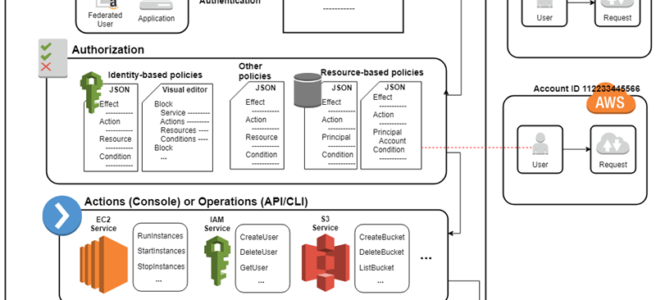
- IAM Access Management is all about Permissions and Policies.
- Permission help define who has access & what actions can they perform.
- IAM Policy helps to fine-tune the permissions granted to the policy owner
- IAM Policy is a document that formally states one or more permissions.
- Most restrictive Policy always wins
- IAM Policy is defined in the JSON (JavaScript Object Notation) format
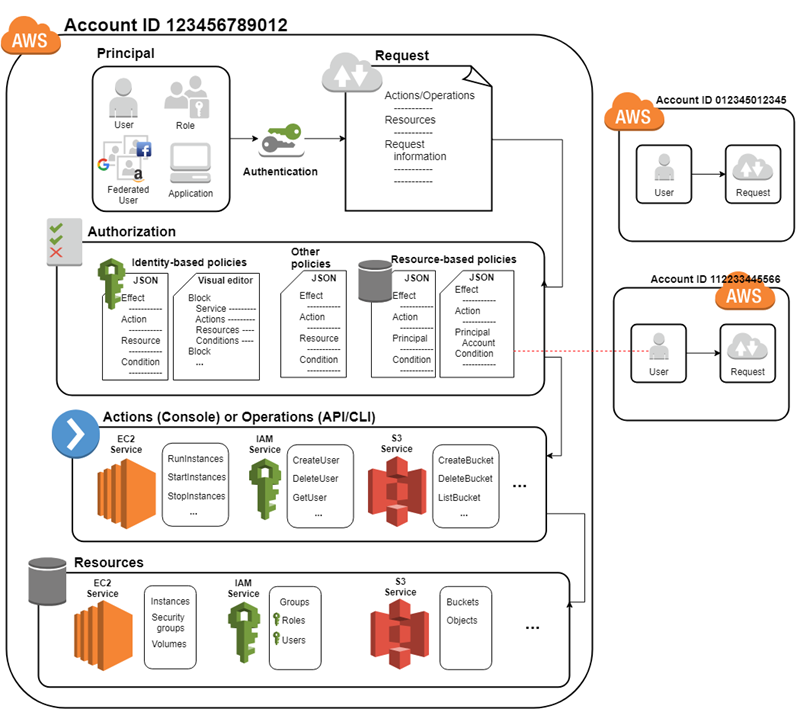
IAM policy basically states “Principal A is allowed or denied (Effect) to perform Action B on Resource C given Conditions D are satisfied”
|
|
{ "Version": "2012-10-17", "Statement": { "Principal": {"AWS": ["arn:aws:iam::ACCOUNT-ID-WITHOUT-HYPHENS:root"]}, "Action": "s3:ListBucket", "Effect": "Allow", "Resource": "arn:aws:s3:::example_bucket", "Condition": {"StringLike": { "s3:prefix": [ "home/${aws:username}/" ] } } } } |
- An Entity can be associated with Multiple Policies and a Policy can have multiple statements where each statement in a policy refers to a single permission.
- If the policy includes multiple statements, a logical OR is applied across the statements at evaluation time. Similarly, if multiple policies are applicable to a request, a logical OR is applied across the policies at evaluation time.
- Principal can either be specified within the Policy for Resource based policies while for Identity based policies the principal is the user, group, or role to which the policy is attached.
IAM Policy Types
- AWS supports nine types of policies: identity-based policies, resource-based policies, VPC endpoint policies, permissions boundaries, AWS Organizations service control policies (SCPs), AWS Organizations resource control policies (RCPs), access control lists (ACLs), AWS RAM resource shares, and session policies.
- IAM policies define permissions for an action regardless of the method used to perform the operation (Console, CLI, or API).
Identity-Based vs Resource-Based Permissions
Identity-based, or IAM permissions
- Identity-based or IAM permissions are attached to an IAM user, group, or role and specify what the user, group, or role can do.
- User, group, or the role itself acts as a Principal.
- IAM permissions can be applied to almost all the AWS services.
- IAM Policies can either be inline or managed (AWS or Customer).
- IAM Policy’s current version is 2012-10-17.
Resource-based permissions
- Resource-based permissions are attached to a resource for e.g. S3, SNS
- Resource-based permissions specify both who has access to the resource (Principal) and what actions they can perform on it (Actions)
- Resource-based policies are inline only, not managed.
- Resource-based permissions are supported only by some AWS services
- Resource-based policies can be defined with version 2012-10-17 or 2008-10-17
- Within the same account, if either the identity-based policy or the resource-based policy allows the request and the other doesn’t, the request is still allowed (union of permissions).
VPC Endpoint Policies
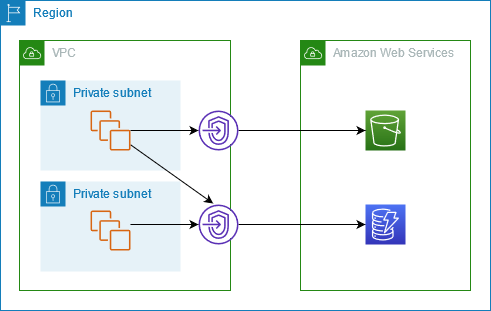
- VPC endpoint policies are resource-based policies attached to a VPC endpoint to control which principals can use the endpoint and which resources can be accessed through it.
- VPC endpoint policies act as an additional access boundary scoped to traffic that traverses the endpoint.
- VPC endpoint policies do not override or replace identity-based policies or resource-based policies.
- If no custom endpoint policy is attached, AWS attaches a default policy that allows full access.
Session Policies
- Session policies are advanced inline policies passed as a parameter when programmatically creating a temporary session for a role or federated user.
- Session policies limit the permissions that the role or user’s identity-based policies grant to the session.
- The resulting session’s permissions are the intersection of the identity-based policies and the session policies.
- Session policies do not grant permissions on their own; they can only restrict.
- Can be passed using
AssumeRole, AssumeRoleWithSAML, AssumeRoleWithWebIdentity, or GetFederationToken API operations.
- You can pass up to 10 managed session policies using the
PolicyArns parameter.
Access Control Lists (ACLs)
- ACLs control which principals in other accounts can access the resource to which the ACL is attached.
- ACLs cannot be used to control access for a principal within the same account.
- ACLs are the only policy type that does not use the JSON policy document format.
- Amazon S3, AWS WAF, and Amazon VPC are examples of services that support ACLs.
Managed Policies and Inline Policies
- Managed policies
- Managed policies are Standalone policies that can be attached to multiple users, groups, and roles in an AWS account.
- Managed policies apply only to identities (users, groups, and roles) but not to resources.
- Managed policies allow reusability
- Managed policy changes are implemented as versions (limited to 5), a new change to the existing policy creates a new version which is useful to compare the changes and revert back, if needed
- Managed policies have their own ARN
- Two types of managed policies:
- AWS managed policies
- Managed policies that are created and managed by AWS.
- AWS maintains and can upgrade these policies for e.g. if a new service is introduced, the changes automatically effect all the existing principals attached to the policy
- AWS takes care of not breaking the policies for e.g. adding a restriction or removal of permission
- AWS managed policies cannot be modified
- Customer managed policies
- Managed policies are standalone and custom policies created and administered by you.
- Customer managed policies allow more precise control over the policies than when using AWS managed policies.
- Inline policies
- Inline policies are created and managed by you, and are embedded directly into a single user, group, or role.
- Deletion of the Entity (User, Group or Role) or Resource deletes the In-Line policy as well
ABAC – Attribute-Based Access Control
- ABAC – Attribute-based access control is an authorization strategy that defines permissions based on attributes called tags.
- ABAC policies can be designed to allow operations when the principal’s tag matches the resource tag.
- ABAC is helpful in environments that are growing rapidly and help with situations where policy management becomes cumbersome.
- ABAC policies are easier to manage as different policies for different job functions need not be created.
- Complements RBAC for granular permissions, with RBAC allowing access to only specific resources and ABAC can allow actions on all resources, but only if the resource tag matches the principal’s tag.
- ABAC can help use employee attributes from the corporate directory with federation where attributes are applied to their resulting principal.
- Amazon S3 now supports ABAC for general purpose buckets (launched Nov 2025), allowing tag-based access control on S3 resources directly.
- ABAC support continues to expand across AWS services including OpenSearch Serverless, SageMaker Lakehouse, RDS, and Aurora.
IAM Permissions Boundaries
- Permissions boundary allows using a managed policy to set the maximum permissions that an identity-based policy can grant to an IAM entity.
- Permissions boundary allows it to perform only the actions that are allowed by both its identity-based policies and its permissions boundaries.
- Permissions boundary supports both the AWS-managed policy and the customer-managed policy to set the boundary for an IAM entity.
- Permissions boundary can be applied to an IAM entity (user or role) but is not supported for IAM Group.
- Permissions boundary does not grant permissions on its own.
- If a resource-based policy specifies a role session or user in the principal element, an explicit allow in the permission boundary is not required. However, if the resource-based policy specifies the role ARN, a permission boundary allow is required.
- An explicit deny in the permissions boundary always takes effect regardless of other policies.
Service Control Policies (SCPs)
- Service Control Policies (SCPs) are AWS Organizations policies that define the maximum permissions for IAM users and IAM roles within accounts in an organization or organizational unit (OU).
- SCPs limit permissions that identity-based policies or resource-based policies grant to entities within the account.
- SCPs do not grant permissions on their own; they only restrict.
- SCPs affect all IAM users and roles in the member accounts, including the account root user.
- SCPs do not affect the management account.
- SCPs now support full IAM policy language (announced Sep 2025), including conditions, individual resource ARNs, and the NotAction element with Allow statements.
- An explicit deny in an SCP overrides any allow in identity-based or resource-based policies.
Resource Control Policies (RCPs)
- Resource Control Policies (RCPs) are a new authorization policy type in AWS Organizations launched at re:Invent 2024 (November 2024).
- RCPs provide centralized preventative controls on AWS resources across the organization.
- RCPs set the maximum available permissions for resources in member accounts, complementing SCPs which control permissions for principals.
- RCPs help restrict external access to resources at scale and implement data perimeters.
- RCPs do not grant permissions on their own.
- RCPs affect resources in member accounts only, not the management account.
- RCPs apply regardless of whether the principals belong to the organization.
- At launch, RCPs support: Amazon S3, AWS STS, AWS KMS, Amazon SQS, and AWS Secrets Manager.
- RCPs work alongside SCPs to provide comprehensive permission guardrails: SCPs control what principals can do, RCPs control what can be done to resources.
- An explicit deny in an RCP overrides allows in other policies.
Declarative Policies
- Declarative policies are a new AWS Organizations capability launched at re:Invent 2024 (December 2024).
- Declarative policies allow centrally declaring and enforcing desired configuration for a given AWS service at scale across an organization.
- Once attached, the configuration is always maintained even when services add new APIs or features.
- Declarative policies are designed to prevent actions that are non-compliant with the policy.
- Unlike SCPs which require predicting and denying specific API calls, declarative policies express the desired end state.
- Can be attached to organization root, OUs, or individual accounts.
- Supported for EC2, VPC, and other services at launch.
- Example: A declarative policy can disallow public sharing of AMIs organization-wide.
IAM Access Analyzer
- IAM Access Analyzer helps identify resources that are shared with external entities and validates policies for best practices.
- IAM Access Analyzer provides multiple types of analysis:
- External Access Analysis – Identifies resources shared with external principals outside the zone of trust (organization or account).
- Internal Access Analysis (launched June 2025) – Identifies who within the organization has access to critical resources, providing 360-degree visibility.
- Unused Access Analysis (launched re:Invent 2023) – Identifies unused roles, unused access keys, unused console passwords, and unused service/action-level permissions.
- IAM Access Analyzer supports Custom Policy Checks using automated reasoning:
- Check Access Not Granted – Verifies policies don’t grant access to specific critical actions.
- Check No Public Access (July 2024) – Determines if a resource policy grants public access to a specified resource type.
- Check No New Access – Compares updated policy against reference to ensure no new access is granted.
- Custom policy checks can be integrated into CI/CD pipelines for proactive policy validation.
- Guided Revocation (June 2024) – Provides actionable recommendations to revoke unused permissions, including refined policy suggestions tailored to actual access activity.
- Policy Generation – Reviews CloudTrail logs and generates IAM policies based on actual access activity for a specified time frame.
- Policy Validation – Provides over 100 policy checks including security warnings, errors, general warnings, and best practice suggestions.
- Unused access analysis is a paid feature, charged per IAM role or user per month.
- Unused access analysis scope can be customized (Jan 2025) to exclude specific accounts, roles, or users using account IDs or tags.
IAM Policy Simulator
- IAM Policy Simulator helps test and troubleshoot IAM and resource-based policies
- IAM Policy Simulator can help test the following ways:-
- Test IAM based policies. If multiple policies are attached, you can test all the policies or select individual policies to test. You can test which actions are allowed or denied by the selected policies for specific resources.
- Test Resource based policies. However, Resource-based policies cannot be tested standalone and have to be attached to the Resource
- Test new IAM policies that are not yet attached to a user, group, or role by typing or copying them into the simulator. These are used only in the simulation and are not saved.
- Test the policies with selected services, actions, and resources
- Simulate real-world scenarios by providing context keys, such as an IP address or date, that are included in Condition elements in the policies being tested.
- Identify which specific statement in a policy results in allowing or denying access to a particular resource or action.
- IAM Policy Simulator does not make an actual AWS service request and hence does not make unwanted changes to the AWS live environment
- IAM Policy Simulator just reports the result Allowed or Denied
- IAM Policy Simulator allows you to modify the policy and test. These changes are not propagated to the actual policies attached to the entities
- Policy Simulator results can differ from the live AWS environment; always verify against the live environment.
- Policy Simulator can also be accessed programmatically using
SimulateCustomPolicy and SimulatePrincipalPolicy API operations.
IAM Policy Evaluation
When determining if permission is allowed, AWS evaluates all applicable policy types in the following order:
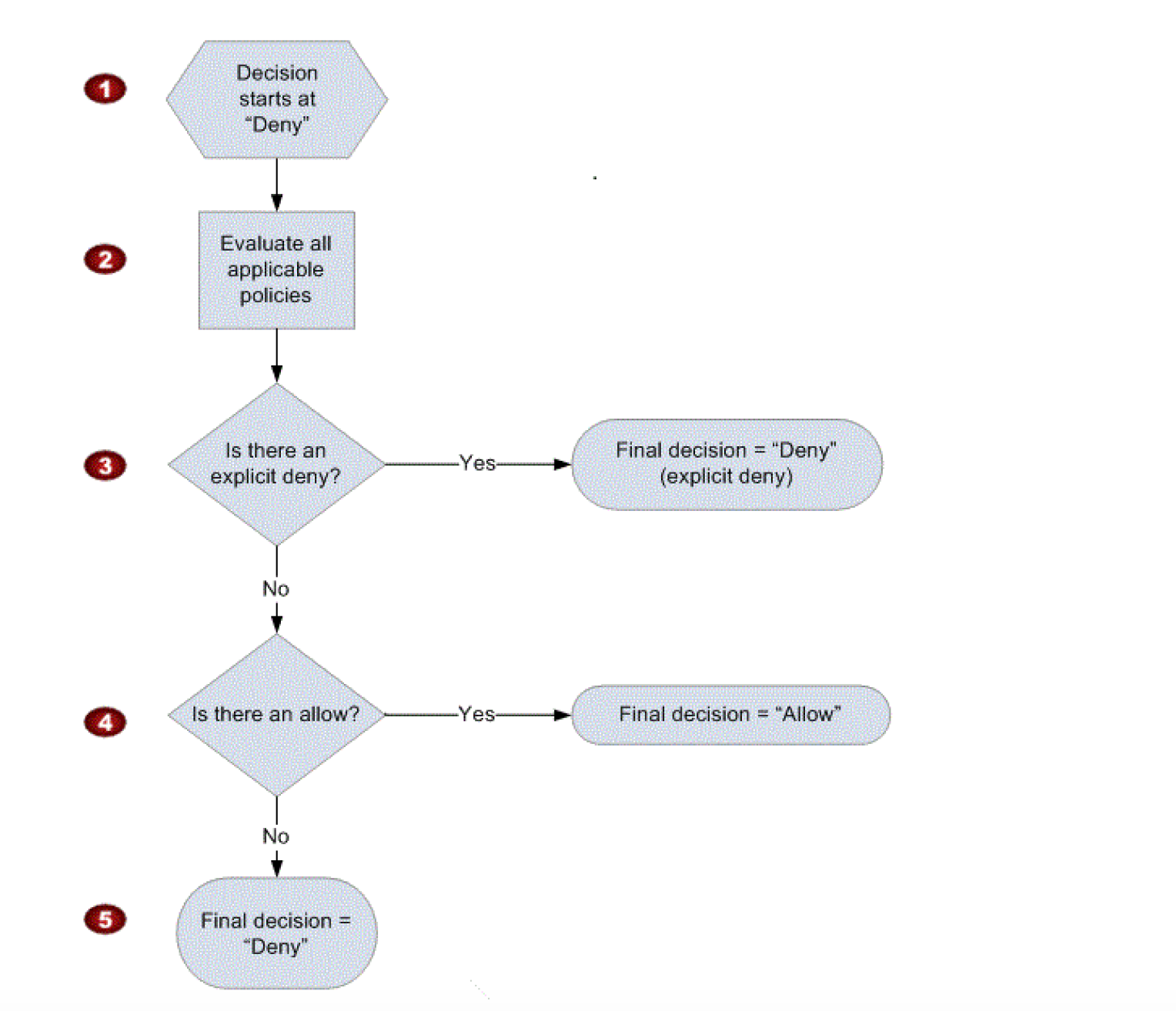
Updated Policy Evaluation Logic (Single Account)
- Default Deny – Decision starts with Deny. All permissions are implicitly denied by default.
- Explicit Deny Check – IAM checks all applicable policies for an explicit deny. An explicit deny in ANY policy overrides everything and access is denied.
- SCPs – If the account is in an AWS Organization with SCPs enabled, the action must be allowed (not denied) by the SCP. If the SCP doesn’t allow it, access is denied.
- RCPs – If Resource Control Policies are enabled, they are evaluated. If the RCP denies access to the resource, access is denied.
- Resource-Based Policies – If the resource has a resource-based policy that allows the principal, this can grant access (within the same account, union of identity-based and resource-based).
- Identity-Based Policies – The identity-based policies attached to the principal are evaluated for an explicit allow.
- Permissions Boundaries – If a permissions boundary is set, the action must be allowed by both the identity-based policy AND the permissions boundary.
- Session Policies – For federated users or assumed roles with session policies, the session policy further restricts permissions.
Key Evaluation Rules
- Explicit Deny – An explicit deny in any policy always wins. It overrides any allow.
- Explicit Allow – Permission must be explicitly allowed. For granting the User any permission, the permission must be explicitly allowed by applicable policy types.
- Implicit Deny – If neither an explicit deny nor explicit allow policy exists, it reverts to the default: implicit deny.
- Same Account Union – Within the same account, identity-based and resource-based policies form a union. Either one allowing is sufficient (unless explicitly denied).
- Cross-Account Intersection – For cross-account access, both the identity-based policy in the source account AND the resource-based policy on the target resource must allow the action.
IAM Policy Variables
- Policy variables provide a feature to specify placeholders in a policy.
- When the policy is evaluated, the policy variables are replaced with values that come from the request itself
- Policy variables allow a single policy to be applied to a group of users to control access for e.g. all user having access to S3 bucket folder with their name only
- Policy variable is marked using a $ prefix followed by a pair of curly braces ({ }). Inside the ${ } characters, with the name of the value from the request that you want to use in the policy
- Policy variables work only with policies defined with Version 2012-10-17
- Policy variables can only be used in the Resource element and in string comparisons in the Condition element
- Policy variables include variables like aws:username, aws:userid, aws:SourceIp, aws:CurrentTime etc.
- Context key names are NOT case-sensitive. For example, including
aws:SourceIP context key is equivalent to testing for AWS:SourceIp. However, context key values may be case-sensitive depending on the condition operator used.
AWS Certification Exam Practice Questions
- Questions are collected from Internet and the answers are marked as per my knowledge and understanding (which might differ with yours).
- AWS services are updated everyday and both the answers and questions might be outdated soon, so research accordingly.
- AWS exam questions are not updated to keep up the pace with AWS updates, so even if the underlying feature has changed the question might not be updated
- Open to further feedback, discussion and correction.
- IAM’s Policy Evaluation Logic always starts with a default ____________ for every request, except for those that use the AWS account’s root security credentials b
- Permit
- Deny
- Cancel
- An organization has created 10 IAM users. The organization wants each of the IAM users to have access to a separate DynamoDB table. All the users are added to the same group and the organization wants to setup a group level policy for this. How can the organization achieve this?
- Define the group policy and add a condition which allows the access based on the IAM name
- Create a DynamoDB table with the same name as the IAM user name and define the policy rule which grants access based on the DynamoDB ARN using a variable
- Create a separate DynamoDB database for each user and configure a policy in the group based on the DB variable
- It is not possible to have a group level policy which allows different IAM users to different DynamoDB Tables
- An organization has setup multiple IAM users. The organization wants that each IAM user accesses the IAM console only within the organization and not from outside. How can it achieve this?
- Create an IAM policy with the security group and use that security group for AWS console login
- Create an IAM policy with a condition which denies access when the IP address range is not from the organization
- Configure the EC2 instance security group which allows traffic only from the organization’s IP range
- Create an IAM policy with VPC and allow a secure gateway between the organization and AWS Console
- Can I attach more than one policy to a particular entity?
- Yes always
- Only if within GovCloud
- No
- Only if within VPC
- A __________ is a document that provides a formal statement of one or more permissions.
- policy
- permission
- Role
- resource
- A __________ is the concept of allowing (or disallowing) an entity such as a user, group, or role some type of access to one or more resources.
- user
- AWS Account
- resource
- permission
- True or False: When using IAM to control access to your RDS resources, the key names that can be used are case sensitive. For example, aws:CurrentTime is NOT equivalent to AWS:currenttime.
- TRUE
- FALSE (Context key names are NOT case-sensitive.
aws:CurrentTime IS equivalent to AWS:currenttime. However, context key values may be case-sensitive depending on the condition operator. Refer IAM Condition documentation)
- A user has set an IAM policy where it allows all requests if a request from IP 10.10.10.1/32. Another policy allows all the requests between 5 PM to 7 PM. What will happen when a user is requesting access from IP 10.10.10.1/32 at 6 PM?
- IAM will throw an error for policy conflict
- It is not possible to set a policy based on the time or IP
- It will deny access
- It will allow access
- Which of the following are correct statements with policy evaluation logic in AWS Identity and Access Management? Choose 2 answers.
- By default, all requests are denied
- An explicit allow overrides an explicit deny
- An explicit allow overrides default deny
- An explicit deny does not override an explicit allow
- By default, all request are allowed
- A web design company currently runs several FTP servers that their 250 customers use to upload and download large graphic files. They wish to move this system to AWS to make it more scalable, but they wish to maintain customer privacy and keep costs to a minimum. What AWS architecture would you recommend? [PROFESSIONAL]
- Ask their customers to use an S3 client instead of an FTP client. Create a single S3 bucket. Create an IAM user for each customer. Put the IAM Users in a Group that has an IAM policy that permits access to subdirectories within the bucket via use of the ‘username’ Policy variable.
- Create a single S3 bucket with Reduced Redundancy Storage turned on and ask their customers to use an S3 client instead of an FTP client. Create a bucket for each customer with a Bucket Policy that permits access only to that one customer. (Creating bucket for each user is not a scalable model, also 100 buckets are a limit earlier without extending which has since changed link)
- Create an auto-scaling group of FTP servers with a scaling policy to automatically scale-in when minimum network traffic on the auto-scaling group is below a given threshold. Load a central list of ftp users from S3 as part of the user Data startup script on each Instance (Expensive)
- Create a single S3 bucket with Requester Pays turned on and ask their customers to use an S3 client instead of an FTP client. Create a bucket tor each customer with a Bucket Policy that permits access only to that one customer. (Creating bucket for each user is not a scalable model, also 100 buckets are a limit earlier without extending which has since changed link)
New Practice Questions – Updated 2025
- Which AWS Organizations policy type is used to centrally restrict external access to AWS resources across an organization?
- Service Control Policy (SCP)
- Resource Control Policy (RCP)
- Permissions Boundary
- Declarative Policy
RCPs provide centralized preventative controls on AWS resources, restricting external access at scale. SCPs control what principals can do, while RCPs control what can be done to resources.
- A security team wants to ensure that no AMIs can be publicly shared across their entire AWS Organization, even when new APIs are added. Which policy type should they use?
- Service Control Policy (SCP)
- Resource Control Policy (RCP)
- Declarative Policy
- Identity-based Policy
Declarative policies express desired end state and are maintained even when services add new APIs or features, making them ideal for enforcing configurations like disallowing public AMI sharing.
- Which IAM Access Analyzer feature uses automated reasoning to detect policies that grant public access to a resource before deployment?
- External Access Analysis
- Unused Access Analysis
- Custom Policy Checks – Check No Public Access
- Policy Generation
Custom Policy Checks (including Check No Public Access, launched July 2024) use automated reasoning and can be integrated into CI/CD pipelines for proactive policy validation.
- In the IAM policy evaluation logic, what is the relationship between identity-based policies and resource-based policies within the same account?
- Both must allow the action (intersection)
- Either one allowing is sufficient (union)
- Resource-based policy always takes precedence
- Identity-based policy always takes precedence
Within the same account, identity-based and resource-based policies form a union. If either one allows the request, access is granted (unless explicitly denied by any policy).
- How many policy types does AWS currently support? (Select the correct answer)
- 5
- 6
- 7
- 9 (identity-based, resource-based, VPC endpoint policies, permissions boundaries, SCPs, RCPs, ACLs, RAM resource shares, and session policies)
- What is the key difference between SCPs and RCPs in AWS Organizations?
- SCPs apply to resources while RCPs apply to principals
- SCPs control maximum permissions for principals while RCPs control maximum permissions for resources
- RCPs can grant permissions while SCPs cannot
- SCPs apply only to the management account while RCPs apply to member accounts
SCPs define maximum permissions for IAM users and roles (principals), while RCPs define maximum permissions for resources. Neither grants permissions. Both apply to member accounts only.
- A security administrator wants to identify IAM roles that have permissions to access S3 but haven’t used those permissions in 90 days. Which feature should they use?
- IAM Access Analyzer – External Access Analysis
- IAM Access Analyzer – Unused Access Analysis
- IAM Access Analyzer – Custom Policy Checks
- IAM Policy Simulator
Unused Access Analysis identifies unused roles, unused access keys, unused passwords, and unused service/action-level permissions by analyzing CloudTrail activity.
 Master components