AWS VPN

AWS VPC VPN

  • AWS VPN connections are used to extend on-premises data centers to AWS.
  • VPN connections provide secure IPSec connections between the data center or branch office and the AWS resources.
  • AWS Site-to-Site VPN or AWS Hardware VPN or AWS Managed VPN
    • Connectivity can be established by creating an IPSec, hardware VPN connection between the VPC and the remote network.
    • On the AWS side of the VPN connection, a Virtual Private Gateway (VGW) or Transit Gateway provides two VPN endpoints for automatic failover.
    • On the customer side, a customer gateway (CGW) needs to be configured, which is the physical device or software application on the remote side of the VPN connection
  • AWS Client VPN
    • AWS Client VPN is a managed client-based VPN service that enables secure access to AWS resources and resources in the on-premises network.
  • AWS VPN CloudHub
    • For more than one remote network e.g. multiple branch offices, multiple AWS hardware VPN connections can be created via the VPC to enable communication between these networks
  • AWS Software VPN
    • A VPN connection can be created to the remote network by using an EC2 instance in the VPC that’s running a third-party software VPN appliance.
    • AWS does not provide or maintain third-party software VPN appliances; however, there is a range of products provided by partners and open source communities.
  • AWS Direct Connect provides a dedicated private connection from a remote network to the VPC. Direct Connect can be combined with an AWS hardware VPN connection to create an IPsec-encrypted connection

AWS Site-to-Site VPN Options (2025)

  • As of November 2025, AWS Site-to-Site VPN includes five distinct options:
    • Standard VPN with VGW – Up to 1.25 Gbps per tunnel; terminates on a Virtual Private Gateway.
    • Standard VPN with TGW or Cloud WAN – Up to 1.25 Gbps per tunnel; terminates on a Transit Gateway or AWS Cloud WAN. Supports ECMP for higher aggregate bandwidth.
    • Large Bandwidth Tunnel with TGW – Up to 5 Gbps per tunnel (launched November 2025); a 4x improvement over the standard 1.25 Gbps limit. Ideal for bandwidth-intensive hybrid applications, big data migrations, and disaster recovery.
    • VPN Concentrator – Simplifies multi-site connectivity for distributed enterprises (launched November 2025). Supports up to 100 low-bandwidth remote sites (under 100 Mbps each) through a single Transit Gateway attachment with 5 Gbps aggregate bandwidth.
    • Accelerated VPN – Uses AWS Global Accelerator to route traffic through the nearest AWS edge location, reducing internet distance and improving performance. Supported on Transit Gateway.
  • Private IP VPN – Enables Site-to-Site VPN connections over AWS Direct Connect using private IP addresses. Encrypts DX traffic between on-premises networks and AWS without traversing the public internet. Requires Transit Gateway.

VPN Components
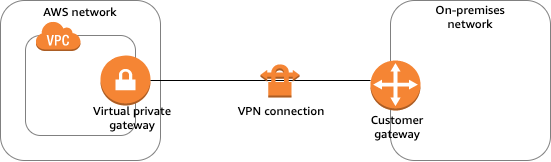
AWS VPN Components

  • Virtual Private Gateway – VGW
    • A virtual private gateway is the VPN concentrator on the AWS side of the VPN connection
    • Supports standard bandwidth (up to 1.25 Gbps per tunnel)
    • Does not support IPv6 for Site-to-Site VPN connections
    • Does not support ECMP
  • Customer Gateway – CGW
    • A customer gateway is a physical device or software application on the customer side of the VPN connection.
    • When a VPN connection is created, the VPN tunnel comes up when traffic is generated from the remote side of the VPN connection.
    • By default, VGW is not the initiator; CGW must bring up the tunnels for the Site-to-Site VPN connection by generating traffic and initiating the Internet Key Exchange (IKE) negotiation process.
    • If the VPN connection experiences a period of idle time, usually 10 seconds, depending on the configuration, the tunnel may go down. To prevent this, a network monitoring tool to generate keepalive pings; for e.g. by using IP SLA.
  • Transit Gateway
    • A transit gateway is a transit hub that can be used to interconnect VPCs and on-premises networks.
    • A Site-to-Site VPN connection on a transit gateway can support either IPv4 traffic or IPv6 traffic inside the VPN tunnels.
    • Supports ECMP (Equal Cost Multi-Path) routing for aggregating bandwidth across multiple VPN tunnels (up to 50 Gbps).
    • Supports large bandwidth tunnels (up to 5 Gbps per tunnel).
    • Supports IPv6 addresses for outer tunnel IPs (announced July 2025), enabling full IPv6 migration (IPv6-in-IPv6) and IPv4-in-IPv6 configurations.
    • Supports VPN Concentrator attachments for multi-site connectivity.
    • Supports Private IP VPN connections over Direct Connect.
  • AWS Cloud WAN
    • AWS Cloud WAN is a managed wide area networking service for building and managing global networks.
    • Site-to-Site VPN connections can be attached to Cloud WAN core networks for global hybrid connectivity.
    • Supports IPv6 outer tunnel IPs (same as Transit Gateway).
  • A Site-to-Site VPN connection offers two VPN tunnels between a VGW or a transit gateway on the AWS side, and a CGW (which represents a VPN device) on the remote (on-premises) side.

VPN Routing Options

  • For a VPN connection, the route table for the subnets should be updated with the type of routing (static or dynamic) that you plan to use.
  • Route tables determine where network traffic is directed. Traffic destined for the VPN connections must be routed to the virtual private gateway.
  • The type of routing can depend on the make and model of the CGW device
    • Static Routing
      • If your device does not support BGP, specify static routing.
      • Using static routing, the routes (IP prefixes) can be specified that should be communicated to the virtual private gateway.
      • Devices that don’t support BGP may also perform health checks to assist failover to the second tunnel when needed.
    • BGP Dynamic Routing
      • If the VPN device supports Border Gateway Protocol (BGP), specify dynamic routing with the VPN connection.
      • When using a BGP device, static routes need not be specified to the VPN connection because the device uses BGP for auto-discovery and to advertise its routes to the virtual private gateway.
      • BGP-capable devices are recommended as the BGP protocol offers robust liveness detection checks that can assist failover to the second VPN tunnel if the first tunnel goes down.
  • Only IP prefixes known to the virtual private gateway, either through BGP advertisement or static route entry, can receive traffic from the VPC.
  • Virtual private gateway does not route any other traffic destined outside of the advertised BGP, static route entries, or its attached VPC CIDR.

VPN Route Priority

  • Longest prefix match applies.
  • If the prefixes are the same, then the VGW prioritizes routes as follows, from most preferred to least preferred:
    • BGP propagated routes from an AWS Direct Connect connection
    • Manually added static routes for a Site-to-Site VPN connection
    • BGP propagated routes from a Site-to-Site VPN connection
    • Prefix with the shortest AS PATH is preferred for matching prefixes where each Site-to-Site VPN connection uses BGP
    • Path with the lowest multi-exit discriminators (MEDs) value is preferred when the AS PATHs are the same length and if the first AS in the AS_SEQUENCE is the same across multiple paths.

VPN Bandwidth and Throughput

  • Standard VPN Tunnel: Up to 1.25 Gbps per tunnel (default)
  • Large Bandwidth VPN Tunnel: Up to 5 Gbps per tunnel (available on Transit Gateway, launched November 2025)
    • Supports modifying tunnel bandwidth on existing VPN connections (announced May 2026) without changing IP addresses, CIDR blocks, or pre-shared keys
  • VPN Concentrator Tunnel: Up to 100 Mbps per tunnel, 5 Gbps aggregate per concentrator
  • ECMP (Transit Gateway): Up to 50 Gbps aggregate bandwidth using multiple VPN tunnels with ECMP configured (each flow limited to max bandwidth per tunnel)
  • Many factors affect realized bandwidth including packet size, traffic mix (TCP/UDP), shaping or throttling policies on intermediate networks, internet weather, and specific application requirements.

VPN Limitations

  • supports only IPSec tunnel mode. Transport mode is currently not supported.
  • supports only one VGW can be attached to a VPC at a time.
  • does not support IPv6 traffic on a virtual private gateway. (IPv6 is supported on Transit Gateway and Cloud WAN.)
  • does not support Path MTU Discovery.
  • does not support overlapping CIDR blocks for the networks. It is recommended to use non-overlapping CIDR blocks.
  • does not support transitive routing. So for traffic from on-premises to AWS via a virtual private gateway, it
    • does not support Internet connectivity through Internet Gateway
    • does not support Internet connectivity through NAT Gateway
    • does not support VPC Peered resources access through VPC Peering
    • does not support S3, DynamoDB access through VPC Gateway Endpoint
    • However, Internet connectivity through NAT instance and VPC Interface Endpoint or PrivateLink services are accessible.
  • provides a bandwidth of 1.25 Gbps per tunnel for standard VPN connections. Large bandwidth tunnels support up to 5 Gbps per tunnel on Transit Gateway.
  • MTU is 1446 bytes and MSS is 1406 bytes. Jumbo frames are not supported.

VPN Tunnel Endpoint Lifecycle Control

  • The VPN Tunnel Endpoint Lifecycle Control feature enables scheduling endpoint replacements at a time that aligns with business and operational needs, prior to the service-mandated deadline.
  • Provides advanced notice of upcoming maintenance updates to help plan and minimize service disruptions.
  • When enabled, AWS notifies before performing tunnel endpoint replacements.
  • Users can accept the maintenance update at a convenient time or let it apply automatically by the deadline.
  • During a tunnel endpoint update, AWS applies replacement to one tunnel at a time to ensure continuous connectivity.
  • Available in most AWS commercial and GovCloud regions.

VPN Monitoring

  • AWS Site-to-Site VPN automatically sends notifications to the AWS Health Dashboard
  • AWS Site-to-Site VPN is integrated with CloudWatch with the following metrics available
    • TunnelState
      • The state of the tunnels.
      • For static VPNs, 0 indicates DOWN and 1 indicates UP.
      • For BGP VPNs, 1 indicates ESTABLISHED and 0 is used for all other states.
      • For both types of VPNs, values between 0 and 1 indicate at least one tunnel is not UP.
    • TunnelDataIn
      • The bytes received on the AWS side of the connection through the VPN tunnel from a customer gateway.
      • This metric counts the data after decryption.
    • TunnelDataOut
      • The bytes sent from the AWS side of the connection through the VPN tunnel to the customer gateway.
      • This metric counts the data before encryption.
    • ConcentratorBandwidthUsage
      • The bandwidth usage for a Site-to-Site VPN Concentrator connection.
      • Available only for VPN connections using a VPN Concentrator.
      • Units: Bits per second
  • Site-to-Site VPN Logs
    • VPN logs can be published to Amazon CloudWatch Logs for detailed analysis of VPN connection activity.
    • Provides tunnel activity logs for troubleshooting connectivity issues.
  • Amazon CloudWatch Network Synthetic Monitor
    • Supports hybrid monitors for networking built with AWS Direct Connect and AWS Site-to-Site VPN.
    • Provides proactive monitoring of hybrid connectivity health.

IPv6 Support for Site-to-Site VPN

  • Inner Tunnel IPv6: Supported on Transit Gateway and Cloud WAN. Allows IPv4 or IPv6 traffic inside VPN tunnels.
  • Outer Tunnel IPv6 (July 2025): Site-to-Site VPN now supports IPv6 addresses for outer tunnel IPs on Transit Gateway and Cloud WAN connections.
  • Enables full IPv6 migration with IPv6 addresses for both outer tunnel IPs and inner packet IPs (IPv6-in-IPv6).
  • Supports IPv6 outer tunnel IPs with IPv4 inner packet IPs (IPv4-in-IPv6).
  • Helps customers with IPv6-only network mandates meet regulatory and compliance needs.
  • IPv6 VPNs support the same throughput (Gbps and PPS), MTU, and route limits as IPv4 VPNs.
  • Note: Virtual private gateways do NOT support IPv6 for Site-to-Site VPN connections. IPv6 requires Transit Gateway or Cloud WAN.

VPN Concentrator (November 2025)

  • AWS Site-to-Site VPN Concentrator simplifies multi-site connectivity for distributed enterprises with many low-bandwidth remote sites.
  • Suitable for customers needing to connect 25+ remote sites to AWS, with each site needing low bandwidth (under 100 Mbps).
  • Allows up to 100 remote sites to connect through a single VPN Concentrator attachment to AWS Transit Gateway.
  • Provides 5 Gbps aggregate bandwidth shared across all connected sites.
  • Eliminates the need to deploy and manage multiple virtual appliances for HA and connectivity.
  • AWS manages high availability across multiple Availability Zones.
  • Can be used with eero integration for simplified remote site connectivity without manual tunnel configuration.
  • Quotas:
    • Up to 50 VPN Concentrators per Region
    • Up to 5 VPN Concentrators per Transit Gateway or Cloud WAN
    • Up to 100 remote sites per VPN Concentrator

VPN Connection Redundancy
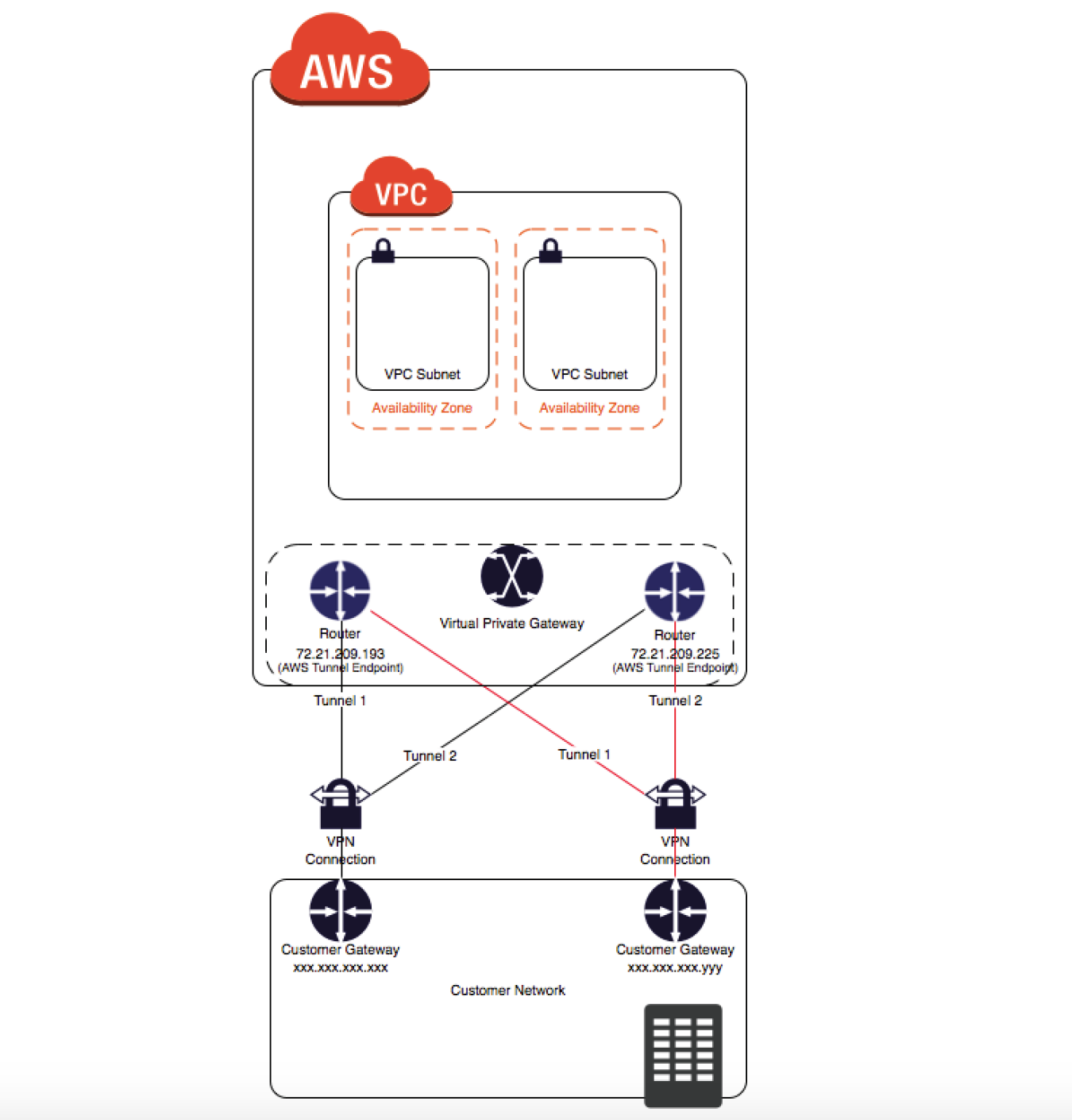
VPN Connection Redundancy

  • A VPN connection is used to connect the customer network to a VPC.
  • Each VPN connection has two tunnels to help ensure connectivity in case one of the VPN connections becomes unavailable, with each tunnel using a unique virtual private gateway public IP address.
  • Both tunnels should be configured for redundancy.
  • When one tunnel becomes unavailable, for e.g. down for maintenance, network traffic is automatically routed to the available tunnel for that specific VPN connection.
  • To protect against a loss of connectivity in case the customer gateway becomes unavailable, a second VPN connection can be set up to the VPC and virtual private gateway by using a second customer gateway.
  • Customer gateway IP address for the second VPN connection must be publicly accessible.
  • By using redundant VPN connections and CGWs, maintenance on one of the customer gateways can be performed while traffic continues to flow over the second customer gateway’s VPN connection.
  • Dynamically routed VPN connections using the Border Gateway Protocol (BGP) are recommended, if available, to exchange routing information between the customer gateways and the virtual private gateways.
  • Statically routed VPN connections require static routes for the network to be entered on the customer gateway side.
  • BGP-advertised and statically entered route information allows gateways on both sides to determine which tunnels are available and reroute traffic if a failure occurs.

Multiple Site-to-Site VPN Connections
VPN Connection

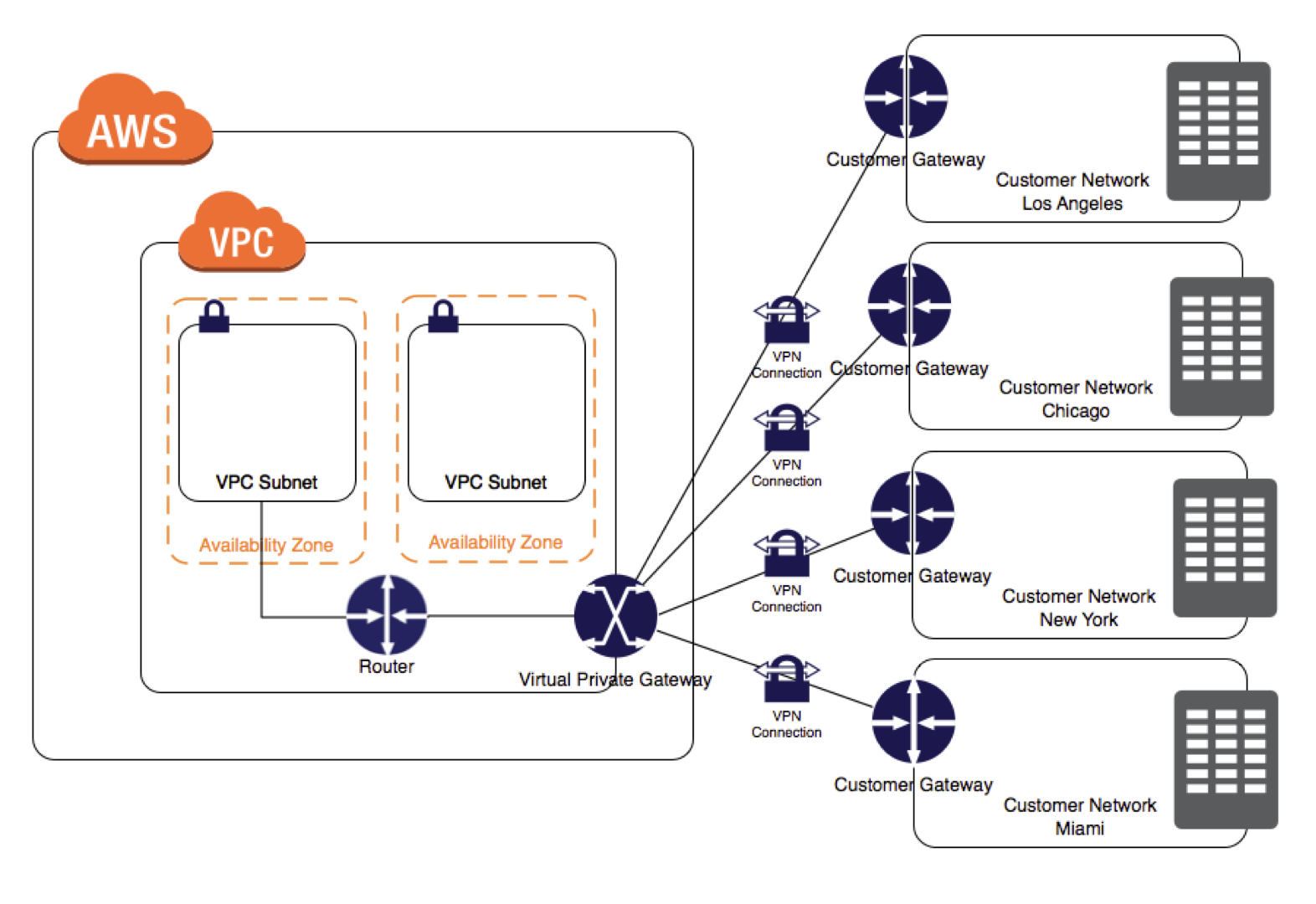
  • VPC has an attached virtual private gateway, and the remote network includes a customer gateway, which must be configured to enable the
    VPN connection.
  • Routing must be set up so that any traffic from the VPC bound for the remote network is routed to the virtual private gateway.
  • Each VPN has two tunnels associated with it that can be configured on the customer router, as is not a single point of failure
  • Multiple VPN connections to a single VPC can be created, and a second CGW can be configured to create a redundant connection to the same external location or to create VPN connections to multiple geographic locations.

VPN CloudHub

  • VPN CloudHub can be used to provide secure communication between multiple on-premises sites if you have multiple VPN connections
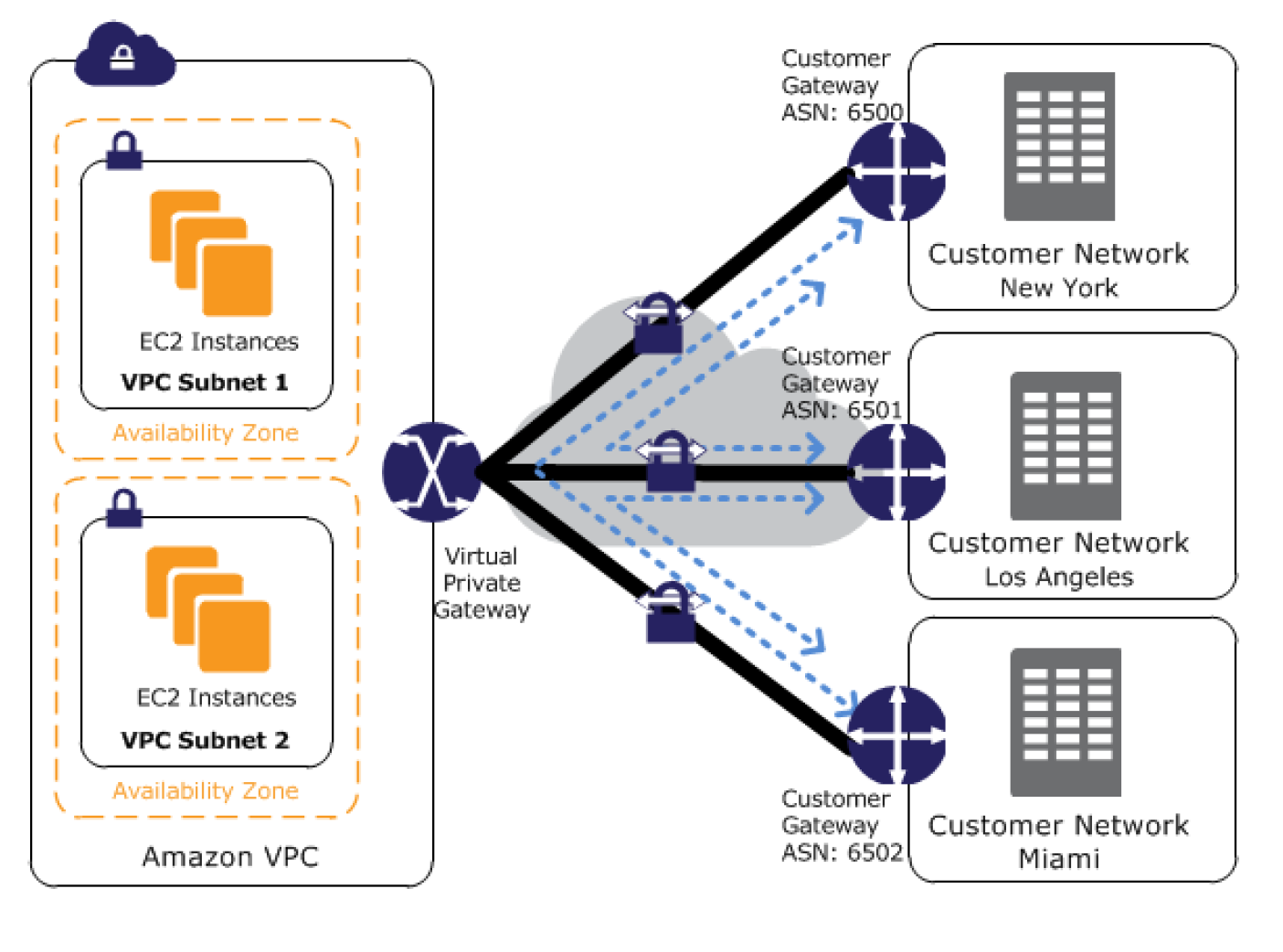
  • VPN CloudHub operates on a simple hub-and-spoke model using a Virtual Private gateway in a detached mode that can be used without a VPC.
  • Design is suitable for customers with multiple branch offices and existing
    Internet connections who’d like to implement a convenient, potentially low-cost hub-and-spoke model for primary or backup connectivity between these remote offices
  • Note: For large-scale multi-site connectivity (25+ sites), consider using the newer VPN Concentrator feature with Transit Gateway, which provides a managed, scalable alternative.
VPN CloudHub Architecture

  • VPN CloudHub architecture with blue dashed lines indicates network
    traffic between remote sites being routed over their VPN connections.
  • AWS VPN CloudHub requires a virtual private gateway with multiple customer gateways.
  • Each customer gateway must use a unique Border Gateway Protocol (BGP) Autonomous System Number (ASN)
  • Customer gateways advertise the appropriate routes (BGP prefixes) over their VPN connections.
  • Routing advertisements are received and re-advertised to each BGP peer, enabling each site to send data to and receive data from the other sites.
  • Routes for each spoke must have unique ASNs and the sites must not have overlapping IP ranges.
  • Each site can also send and receive data from the VPC as if they were using a standard VPN connection.
  • Sites that use AWS Direct Connect connections to the virtual private gateway can also be part of the AWS VPN CloudHub.
  • To configure the AWS VPN CloudHub,
    • multiple customer gateways can be created, each with the unique public IP address of the gateway and the ASN.
    • a VPN connection can be created from each customer gateway to a common virtual private gateway.
    • each VPN connection must advertise its specific BGP routes. This is done using the network statements in the VPN configuration files for the VPN connection.

Private IP VPN over Direct Connect

  • AWS Site-to-Site VPN Private IP VPN enables deploying VPN connections over Direct Connect using private IP addresses.
  • Direct Connect provides a private, dedicated connection but is not encrypted. Private IP VPN adds IPSec encryption to DX traffic.
  • Requires a Transit Gateway with a Direct Connect Gateway attachment.
  • Traffic stays on the AWS private network and never traverses the public internet.
  • Satisfies security and compliance regulations requiring encryption at layer 3 for dedicated connections.
  • Configuration:
    • Create or use an existing Transit Gateway with a private IP CIDR block.
    • Establish a Direct Connect connection and Transit VIF to a Direct Connect Gateway.
    • Create a Private IP VPN connection specifying private outside IP address type.

Accelerated Site-to-Site VPN

  • An accelerated VPN connection uses AWS Global Accelerator to route traffic from the on-premises network to the nearest AWS edge location.
  • Reduces the distance over which data is shared on the internet by leveraging the AWS global fiber network.
  • Improves performance for VPN connections where the customer gateway is geographically distant from the AWS Region.
  • Requires a Transit Gateway (not supported on VGW).
  • Each accelerated VPN connection uses two Global Accelerator resources (one per tunnel).
  • Default quota: 10 accelerated Site-to-Site VPN connections per Region (adjustable).

VPN vs Direct Connect
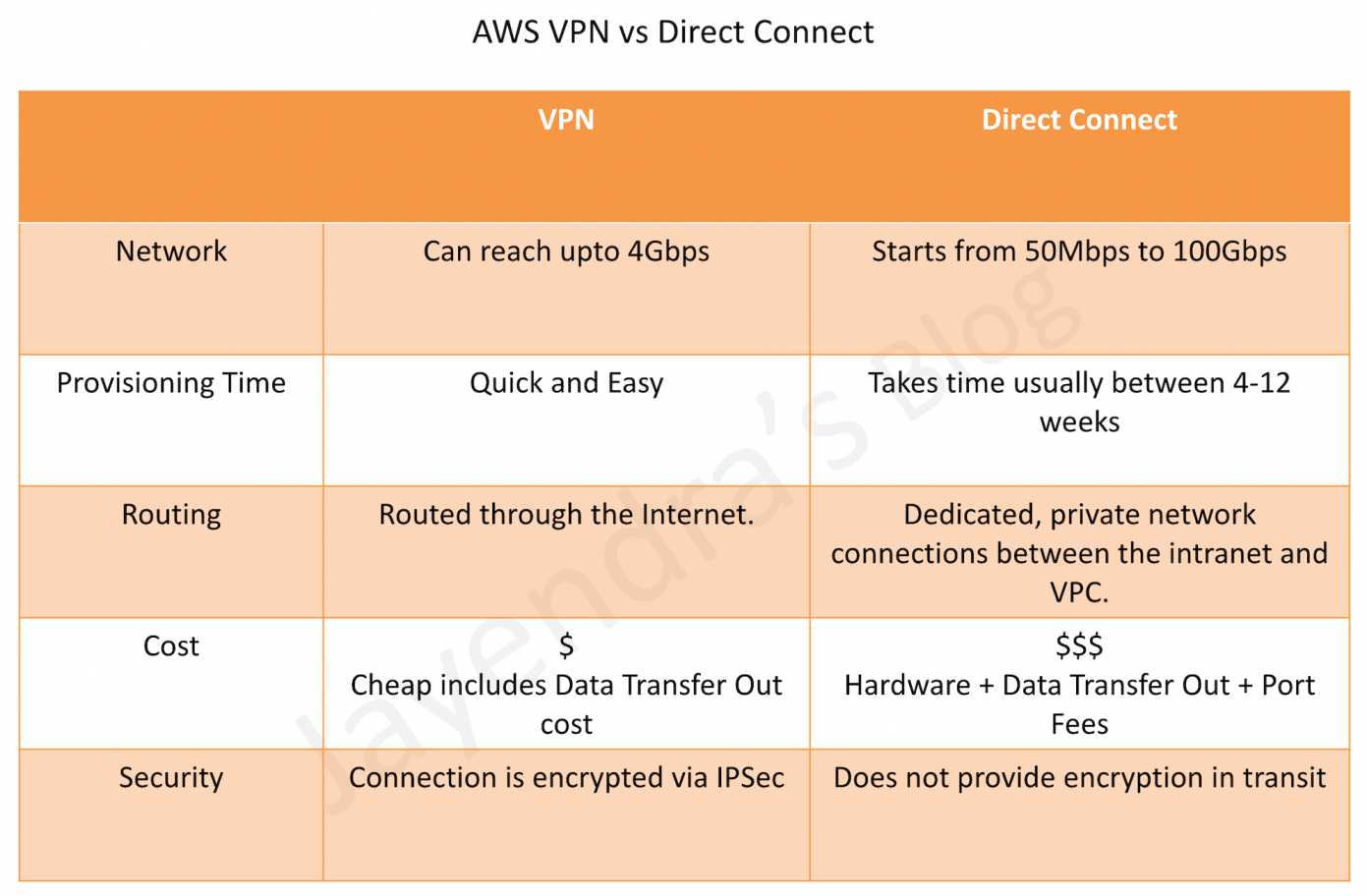
AWS Direct Connect vs VPN

VPN Quotas

  • Customer gateways per Region: 50 (adjustable)
  • Virtual private gateways per Region: 5 (adjustable)
  • Site-to-Site VPN connections per Region: 50 (adjustable)
  • Site-to-Site VPN connections per virtual private gateway: 10 (adjustable)
  • Accelerated VPN connections per Region: 10 (adjustable)
  • Large Bandwidth Tunnel connections per Region: 50 (adjustable)
  • VPN Concentrators per Region: 50 (adjustable)
  • VPN Concentrators per Transit Gateway or Cloud WAN: 5 (adjustable)
  • Remote sites per VPN Concentrator: 100 (adjustable)
  • Dynamic routes advertised from CGW to VPN on VGW: 100 (not adjustable)
  • Routes advertised from VPN on VGW to CGW: 1,000 (not adjustable)
  • Dynamic routes advertised from CGW to VPN on Transit Gateway: 1,000 (not adjustable)
  • Routes advertised from VPN on Transit Gateway to CGW: 5,000 (not adjustable)

AWS Certification Exam Practice Questions

  • Questions are collected from Internet and the answers are marked as per my knowledge and understanding (which might differ with yours).
  • AWS services are updated everyday and both the answers and questions might be outdated soon, so research accordingly.
  • AWS exam questions are not updated to keep up the pace with AWS updates, so even if the underlying feature has changed the question might not be updated
  • Open to further feedback, discussion and correction.
  1. You have in total 5 offices, and the entire employee-related information is stored under AWS VPC instances. Now all the offices want to connect the instances in VPC using VPN. Which of the below help you to implement this?
    1. you can have redundant customer gateways between your data center and your VPC
    2. you can have multiple locations connected to the AWS VPN CloudHub
    3. You have to define 5 different static IP addresses in route table.
    4. 1 and 2
    5. 1,2 and 3
  2. You have in total of 15 offices, and the entire employee-related information is stored under AWS VPC instances. Now all the offices want to connect the instances in VPC using VPN. What problem do you see in this scenario?
    1. You can not create more than 1 VPN connections with single VPC (Can be created)
    2. You can not create more than 10 VPN connections with single VPC (soft limit can be extended)
    3. When you create multiple VPN connections, the virtual private gateway can not sends network traffic to the appropriate VPN connection using statically assigned routes. (Can route the traffic to correct connection)
    4. Statically assigned routes cannot be configured in case of more than 1 VPN with the virtual private gateway. (can be configured)
    5. None of above
  3. You have been asked to virtually extend two existing data centers into AWS to support a highly available application that depends on existing, on-premises resources located in multiple data centers and static content that is served from an Amazon Simple Storage Service (S3) bucket. Your design currently includes a dual-tunnel VPN connection between your CGW and VGW. Which component of your architecture represents a potential single point of failure that you should consider changing to make the solution more highly available?
    1. Add another VGW in a different Availability Zone and create another dual-tunnel VPN connection.
    2. Add another CGW in a different data center and create another dual-tunnel VPN connection. (Refer link)
    3. Add a second VGW in a different Availability Zone, and a CGW in a different data center, and create another dual-tunnel.
    4. No changes are necessary: the network architecture is currently highly available.
  4. You are designing network connectivity for your fat client application. The application is designed for business travelers who must be able to connect to it from their hotel rooms, cafes, public Wi-Fi hotspots, and elsewhere on the Internet. You do not want to publish the application on the Internet. Which network design meets the above requirements while minimizing deployment and operational costs? [PROFESSIONAL]
    1. Implement AWS Direct Connect, and create a private interface to your VPC. Create a public subnet and place your application servers in it. (High Cost and does not minimize deployment)
    2. Implement Elastic Load Balancing with an SSL listener that terminates the back-end connection to the application. (Needs to be published to internet)
    3. Configure an IPsec VPN connection, and provide the users with the configuration details. Create a public subnet in your VPC, and place your application servers in it. (Instances still in public subnet are internet accessible)
    4. Configure an SSL VPN solution in a public subnet of your VPC, then install and configure SSL VPN client software on all user computers. Create a private subnet in your VPC and place your application servers in it. (Cost effective and can be in private subnet as well. Note: AWS Client VPN is the managed alternative for this use case.)
  5. You are designing a connectivity solution between on-premises infrastructure and Amazon VPC Your server’s on-premises will De communicating with your VPC instances You will De establishing IPSec tunnels over the internet You will be using VPN gateways and terminating the IPsec tunnels on AWS-supported customer gateways. Which of the following objectives would you achieve by implementing an IPSec tunnel as outlined above? (Choose 4 answers) [PROFESSIONAL]
    1. End-to-end protection of data in transit
    2. End-to-end Identity authentication
    3. Data encryption across the Internet
    4. Protection of data in transit over the Internet
    5. Peer identity authentication between VPN gateway and customer gateway
    6. Data integrity protection across the Internet
  6. A development team that is currently doing a nightly six-hour build which is lengthening over time on-premises with a large and mostly under utilized server would like to transition to a continuous integration model of development on AWS with multiple builds triggered within the same day. However, they are concerned about cost, security and how to integrate with existing on-premises applications such as their LDAP and email servers, which cannot move off-premises. The development environment needs a source code repository; a project management system with a MySQL database resources for performing the builds and a storage location for QA to pick up builds from. What AWS services combination would you recommend to meet the development team’s requirements? [PROFESSIONAL]
    1. A Bastion host Amazon EC2 instance running a VPN server for access from on-premises, Amazon EC2 for the source code repository with attached Amazon EBS volumes, Amazon EC2 and Amazon RDS MySQL for the project management system, EIP for the source code repository and project management system, Amazon SQL for a build queue, An Amazon Auto Scaling group of Amazon EC2 instances for performing builds and Amazon Simple Email Service for sending the build output. (Bastion is not for VPN connectivity also SES should not be used)
    2. An AWS Storage Gateway for connecting on-premises software applications with cloud-based storage securely, Amazon EC2 for the resource code repository with attached Amazon EBS volumes, Amazon EC2 and Amazon RDS MySQL for the project management system, EIPs for the source code repository and project management system, Amazon Simple Notification Service for a notification initiated build, An Auto Scaling group of Amazon EC2 instances for performing builds and Amazon S3 for the build output. (Storage Gateway does provide secure connectivity but still needs VPN. SNS alone cannot handle builds)
    3. An AWS Storage Gateway for connecting on-premises software applications with cloud-based storage securely, Amazon EC2 for the resource code repository with attached Amazon EBS volumes, Amazon EC2 and Amazon RDS MySQL for the project management system, EIPs for the source code repository and project management system, Amazon SQS for a build queue, An Amazon Elastic Map Reduce (EMR) cluster of Amazon EC2 instances for performing builds and Amazon CloudFront for the build output. (Storage Gateway does not provide secure connectivity, still needs VPN. EMR is not ideal for performing builds as it needs normal EC2 instances)
    4. A VPC with a VPN Gateway back to their on-premises servers, Amazon EC2 for the source-code repository with attached Amazon EBS volumes, Amazon EC2 and Amazon RDS MySQL for the project management system, EIPs for the source code repository and project management system, SQS for a build queue, An Auto Scaling group of EC2 instances for performing builds and S3 for the build output. (VPN gateway is required for secure connectivity. SQS for build queue and EC2 for builds)
  7. A company has 50 branch offices and wants to connect all of them to AWS. Each branch has bandwidth requirements under 50 Mbps. Which AWS VPN solution is most cost-effective and operationally simple?
    1. Create 50 individual Site-to-Site VPN connections to a Transit Gateway (Works but higher cost and operational overhead with 50 separate VPN connections)
    2. Use a VPN Concentrator on Transit Gateway to connect all branches through a single attachment (VPN Concentrator supports up to 100 sites with under 100 Mbps each, single TGW attachment simplifies management)
    3. Use VPN CloudHub with a Virtual Private Gateway (VPN CloudHub works but limited to VGW capabilities and doesn’t scale as easily)
    4. Deploy EC2-based VPN appliances in multiple AZs (Self-managed, higher operational overhead)
  8. A company requires encrypted connectivity between their on-premises data center and AWS over their existing Direct Connect connection. The traffic must not traverse the public internet. Which solution meets these requirements?
    1. Configure a standard Site-to-Site VPN over the internet as backup to Direct Connect (Traffic traverses the public internet)
    2. Configure a Private IP VPN connection over Direct Connect using Transit Gateway (Private IP VPN encrypts DX traffic using private IP addresses without internet traversal)
    3. Enable MACsec on Direct Connect and use VGW for VPN termination (MACsec provides L2 encryption but VGW doesn’t support Private IP VPN)
    4. Use AWS Client VPN over Direct Connect (Client VPN is for remote user access, not site-to-site connectivity)
  9. A company needs to migrate large datasets to AWS and requires more than 1.25 Gbps of VPN bandwidth per tunnel. What should they configure?
    1. Create multiple standard VPN connections and enable ECMP on a VGW (VGW does not support ECMP)
    2. Use Accelerated VPN with Global Accelerator to increase per-tunnel bandwidth (Accelerated VPN improves latency but does not increase per-tunnel bandwidth beyond standard limits)
    3. Configure a Large Bandwidth Tunnel VPN connection on Transit Gateway for up to 5 Gbps per tunnel (Large Bandwidth Tunnels support up to 5 Gbps per tunnel on TGW)
    4. Configure Direct Connect with 10 Gbps dedicated connection (Meets bandwidth needs but is not a VPN solution and takes longer to provision)
  10. An organization has VPN connections from multiple branch offices to AWS. The VPN performance is poor because the branches are far from the AWS Region. What can improve VPN performance without changing the on-premises equipment? (Choose 2)
    1. Enable Accelerated VPN using AWS Global Accelerator on Transit Gateway (Routes traffic to the nearest AWS edge location to reduce internet distance)
    2. Enable VPN CloudHub on a Virtual Private Gateway (VPN CloudHub is for inter-site communication, not for improving performance)
    3. Use Large Bandwidth Tunnels (5 Gbps) on Transit Gateway (Higher per-tunnel bandwidth can improve throughput for bandwidth-constrained connections)
    4. Configure Private IP VPN over Direct Connect (Requires Direct Connect infrastructure, changes the connectivity model)
    5. Add more VPN tunnels with ECMP on VGW (VGW does not support ECMP)

References

AWS VPC Interface Endpoints – PrivateLink

AWS Interface Endpoints - PrivateLinks

VPC Interface Endpoints – PrivateLink

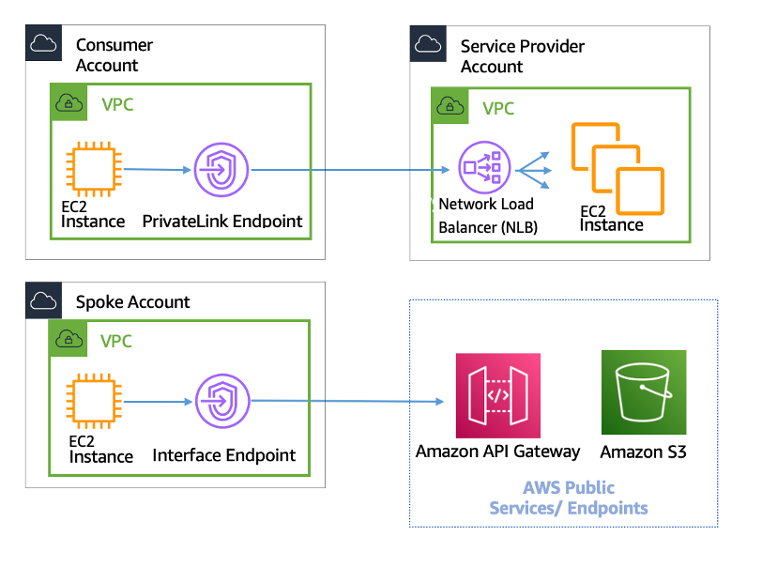
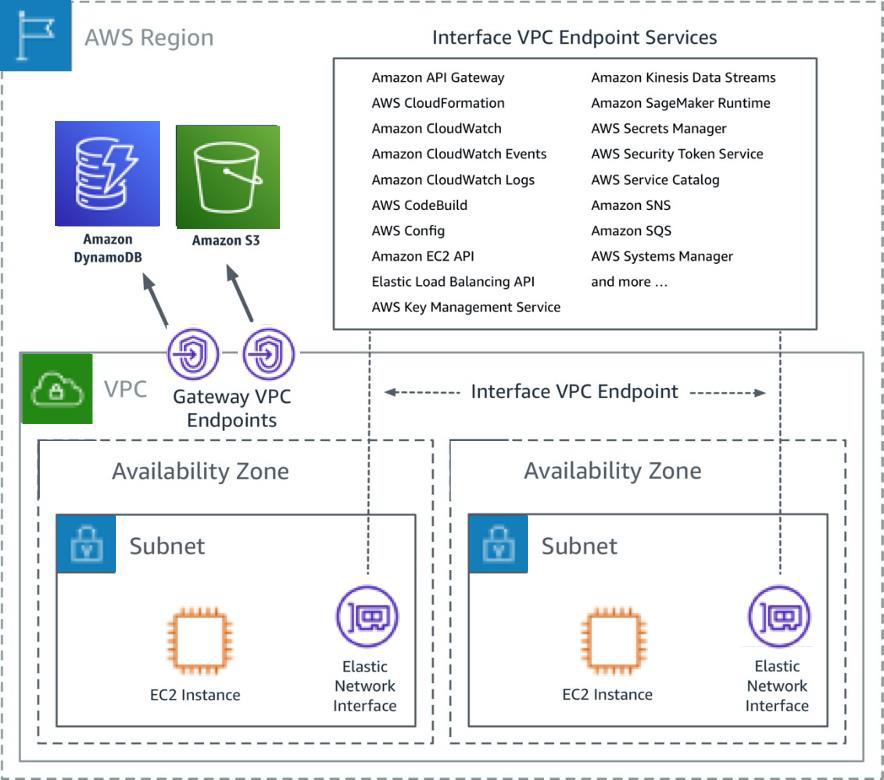
  • VPC Interface endpoints enable connectivity to services powered by AWS PrivateLink.
  • Services include AWS services like CloudTrail, CloudWatch, etc., services hosted by other AWS customers and partners in their own VPCs (referred to as endpoint services), and supported AWS Marketplace partner services.
  • VPC Interface Endpoints only allow traffic from VPC resources to the endpoints and not vice versa
  • PrivateLink endpoints can be accessed across both intra- and inter-region VPC peering connections, Direct Connect, and VPN connections.
  • VPC Interface Endpoints, by default, have an address like vpce-svc-01234567890abcdef.us-east-1.vpce.amazonaws.com which needs application changes to point to the service.
  • Private DNS name feature allows consumers to use AWS service public default DNS names which would point to the private VPC endpoint service.
  • Interface Endpoints can be used to create custom applications in VPC and configure them as an AWS PrivateLink-powered service (referred to as an endpoint service) exposed through a Network Load Balancer or Gateway Load Balancer.
  • Custom applications can be hosted within AWS or on-premises (via Direct Connect or VPN)

AWS Interface Endpoints - PrivateLinks


Interface Endpoints Configuration

  • Create an interface endpoint, and provide the name of the AWS service, endpoint service, or AWS Marketplace service
  • Choose the subnet to use the interface endpoint by creating an endpoint network interface.
  • An endpoint network interface is assigned a private IP address from the IP address range of the subnet and keeps this IP address until the interface endpoint is deleted
  • A private IP address also ensures the traffic remains private without any changes to the route table.

Cross-Region PrivateLink (Announced November 2025)

  • AWS PrivateLink now supports native cross-region connectivity through Interface VPC endpoints.
  • Previously, Interface VPC endpoints only supported connectivity to services in the same Region.
  • You can now connect to:
    • AWS services hosted in other Regions (e.g., S3, Route53, ECR, and other supported services)
    • VPC endpoint services (custom applications) hosted in other Regions
  • Enables simpler and more secure inter-region connectivity without the need for cross-region peering or exposing data over the public internet.
  • Helps build globally distributed private networks that comply with data residency requirements.
  • Traffic remains on the AWS backbone and does not traverse the public internet.
  • Available within the same AWS partition (e.g., commercial regions, GovCloud, China).
  • Service providers can offer SaaS solutions privately to a global audience from a single Region.

VPC Endpoint policy

  • VPC Endpoint policy is an IAM resource policy attached to an endpoint for controlling access from the endpoint to the specified service.
  • Endpoint policy, by default, allows full access to any user or service within the VPC, using credentials from any AWS account to any S3 resource; including S3 resources for an AWS account other than the account with which the VPC is associated
  • Endpoint policy does not override or replace IAM user policies or service-specific policies (such as S3 bucket policies).
  • Endpoint policy can be used to restrict which specific resources can be accessed using the VPC Endpoint.

Interface Endpoint Limitations

  • For each interface endpoint, only one subnet per AZ can be selected.
  • Interface Endpoint supports TCP traffic only.
  • Endpoints support IPv4 traffic only.
  • Each interface endpoint can support a bandwidth of up to 10 Gbps per AZ, by default, and automatically scales up to 100 Gbps. Additional capacity may be added by reaching out to AWS support.
  • NACLs for the subnet can restrict traffic, and needs to be configured properly
  • Endpoints cannot be transferred from one VPC to another, or from one service to another.
  • Cross-region PrivateLink is available within the same AWS partition only (cannot connect across partitions like Commercial to GovCloud).

AWS Certification Exam Practice Questions

  • Questions are collected from Internet and the answers are marked as per my knowledge and understanding (which might differ with yours).
  • AWS services are updated everyday and both the answers and questions might be outdated soon, so research accordingly.
  • AWS exam questions are not updated to keep up the pace with AWS updates, so even if the underlying feature has changed the question might not be updated
  • Open to further feedback, discussion and correction.
  1. An application server needs to be in a private subnet without access to the internet. The solution must retrieve and upload data to an Amazon Kinesis. How should a Solutions Architect design a solution to meet these requirements?
    1. Use Amazon VPC Gateway endpoints
    2. Use a NAT Gateway
    3. Use Amazon VPC Interface endpoints
    4. Use a private Amazon Kinesis Data Stream
  2. A company needs to access Amazon S3 buckets in a different AWS Region privately without exposing traffic to the public internet. Which solution should they use? (Assume November 2025 or later)
    1. Use Gateway VPC Endpoints for cross-region S3 access
    2. Use Interface VPC Endpoints with cross-region PrivateLink for S3
    3. Set up VPC peering between regions and use Gateway Endpoints
    4. Use AWS Direct Connect with public VIF
  3. A SaaS provider wants to offer their service hosted in us-east-1 to customers in multiple AWS regions privately. Which solution enables this? (Assume November 2025 or later)
    1. Deploy the service in every region
    2. Use VPC peering between all regions
    3. Use cross-region PrivateLink to expose the service from us-east-1
    4. Use Transit Gateway with inter-region peering
  4. What is the maximum bandwidth that an Interface VPC Endpoint can automatically scale to per Availability Zone?
    1. 10 Gbps
    2. 40 Gbps
    3. 100 Gbps
    4. 1 Tbps

References

AWS VPC Gateway Endpoints

AWS VPC Gateway Endpoints

AWS VPC Gateway Endpoints

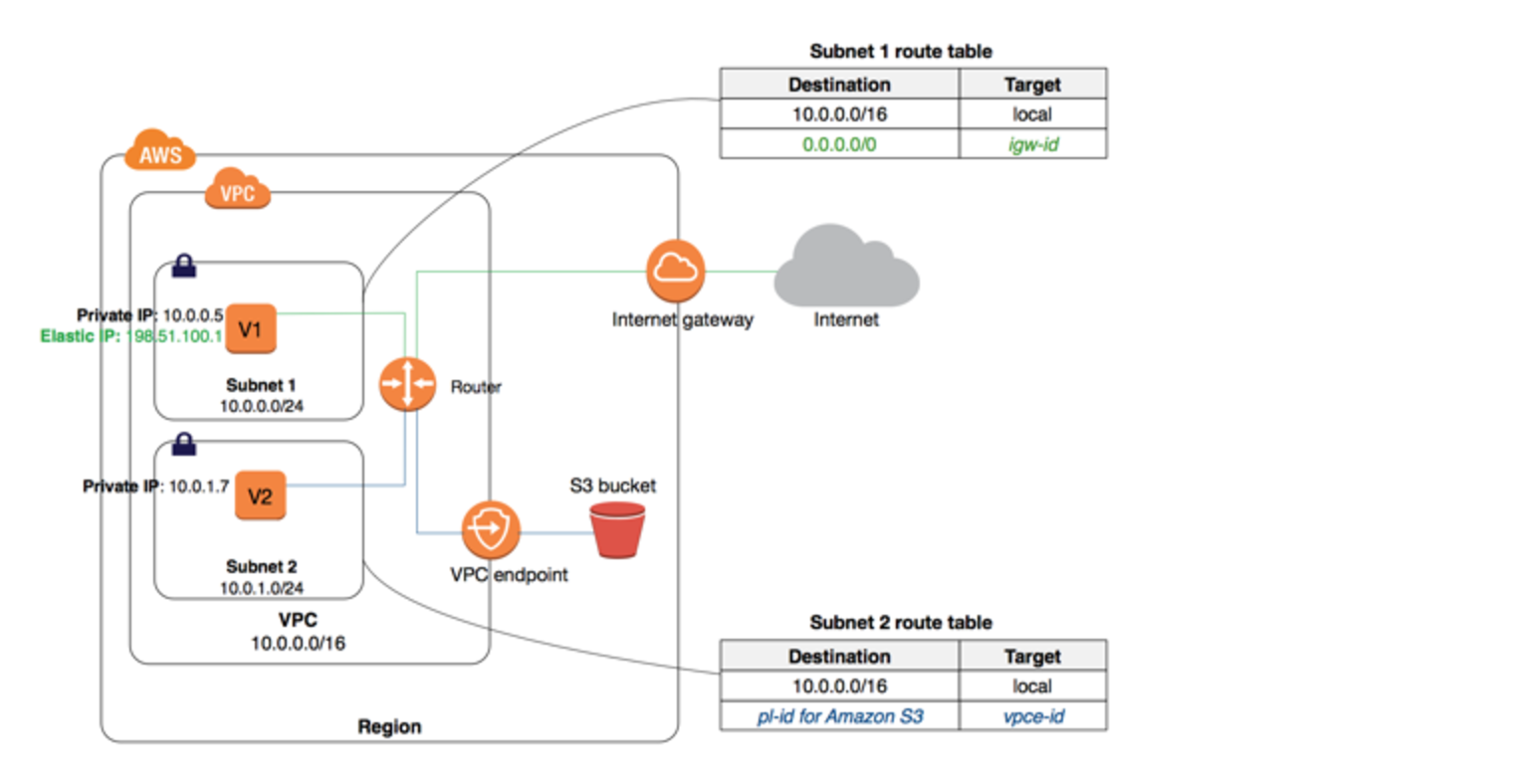
  • A VPC Gateway Endpoint is a gateway that is a target for a specified route in the route table, used for traffic destined for a supported AWS service.
  • VPC Gateway Endpoints currently supports S3 and DynamoDB services
  • VPC Gateway Endpoints do not require an Internet gateway or a NAT device for the VPC.
  • Gateway endpoints do not enable AWS PrivateLink.
  • VPC Endpoint policy and Resource-based policies can be used for fine-grained access control.
  • There is no additional charge for using gateway endpoints.
  • Gateway endpoints are recommended for workloads contained within a single AWS account and Region. For access from on-premises networks, peered VPCs in other Regions, or through a transit gateway, use Interface Endpoints instead.
  • Both S3 and DynamoDB support both Gateway endpoints and Interface endpoints. Gateway endpoints are free while Interface endpoints incur hourly and data processing charges.
AWS VPC Gateway Endpoints


VPC Endpoint Types Comparison

  • AWS now supports three types of VPC endpoints:
    • Gateway Endpoints – Target for a route in a route table, supporting S3 and DynamoDB only. Free of charge. Do not use AWS PrivateLink.
    • Interface Endpoints – Elastic network interfaces with a private IP address powered by AWS PrivateLink. Support 130+ AWS services. Charged hourly and per GB processed.
    • Resource Endpoints (GA December 2024) – Provide private access to a specific resource (e.g., an RDS instance, IP address, or domain) in another VPC or on-premises without requiring a Network Load Balancer. Powered by AWS PrivateLink.
  • For S3 and DynamoDB, Gateway Endpoints are recommended for simple same-Region, same-account access due to zero cost. Interface Endpoints should be used when cross-region, on-premises, or transit gateway access is needed.

Gateway Endpoint Configuration

  • Endpoint requires the VPC and the service to be accessed via the endpoint.
  • The endpoint needs to be associated with the Route table and the route table cannot be modified to remove the route entry. It can only be deleted by removing the Endpoint association with the Route table
  • A route is automatically added to the Route table with a destination that specifies the prefix list of service and the target with the endpoint id for e.g. A rule with destination pl-68a54001 (com.amazonaws.us-west-2.s3) and a target with this endpoints’ ID (e.g. vpce-12345678) will be added to the route tables
  • Access to the resources in other services can be controlled by endpoint policies
  • Security groups need to be modified to allow outbound traffic from the VPC to the service that is specified in the endpoint. Use the service prefix list ID for e.g. com.amazonaws.us-east-1.s3 as the destination in the outbound rule
  • Multiple endpoints can be created in a single VPC, for e.g., to multiple services.
  • Multiple endpoints can be created for the same service but in different route tables.
  • Multiple endpoints to the same service CAN NOT be specified in a single route table
  • A route table can have both an endpoint route to Amazon S3 and an endpoint route to DynamoDB.
  • The most specific route (longest prefix match) takes precedence – an endpoint route takes priority over a 0.0.0.0/0 route to an internet gateway for traffic destined to S3 or DynamoDB in the same Region.

Gateway Endpoint IPv6 Support

  • Update (November 2025): Gateway endpoints for Amazon S3 now support IPv6, available in all AWS Commercial Regions and GovCloud (US) Regions at no additional cost.
  • Update (October 2025): Amazon DynamoDB now supports IPv6 for gateway and interface VPC endpoints.
  • The IP address type of a gateway endpoint must be compatible with the subnets:
    • IPv4 – Adds the service’s IPv4 prefix list to the route table.
    • IPv6 – Adds the service’s IPv6 prefix list to the route table. Supported only if all selected subnets are IPv6-only subnets.
    • Dualstack – Adds both IPv4 and IPv6 prefix lists to the route table. Supported only if all selected subnets have both IPv4 and IPv6 address ranges.
  • DNS record IP type can be configured as IPv4, IPv6, Dualstack, or service-defined (default).
  • Note: DynamoDB gateway endpoints currently only support the DNS record IP type of service-defined.
  • To use DNS record IP types other than service-defined, you must enable enableDnsSupport and enableDnsHostnames attributes in VPC settings.

Gateway Endpoint Limitations

  • are regional and supported within the same Region only.
  • cannot be created between a VPC and an AWS service in a different region.
  • support IPv4 traffic only. (Updated 2025) – Now support IPv4, IPv6, and Dualstack depending on subnet configuration. S3 supports all three modes; DynamoDB supports IPv6 with service-defined DNS record IP type.
  • cannot be transferred from one VPC to another, or from one service to another service.
  • connections cannot be extended out of a VPC i.e. resources across the VPN, VPC peering, Direct Connect connection cannot use the endpoint. Use Interface Endpoints for these scenarios.
  • do not allow access through a Transit Gateway. Use Interface Endpoints if Transit Gateway access is required.
  • have a default quota of 20 gateway endpoints per Region (adjustable) and a limit of 255 gateway endpoints per VPC.
  • do not support AWS PrivateLink and cannot use PrivateLink features such as cross-region connectivity.

VPC Endpoint policy

  • VPC Endpoint policy is an IAM resource policy attached to an endpoint for controlling access from the endpoint to the specified service.
  • Endpoint policy, by default, allows full access to any user or service within the VPC, using credentials from any AWS account to any S3 resource; including S3 resources for an AWS account other than the account with which the VPC is associated
  • Endpoint policy does not override or replace IAM user policies or service-specific policies (such as S3 bucket policies).
  • Endpoint policy can be used to restrict which specific resources can be accessed using the VPC Endpoint.
  • (New 2025) New IAM condition keys for VPC endpoint policies enable scalable organization-wide network perimeter controls:
    • aws:VpceAccount – Restricts access to VPC endpoints owned by a specific account.
    • aws:VpceOrgID – Restricts access to VPC endpoints within a specific AWS Organization.
    • aws:VpceOrgPaths – Restricts access to VPC endpoints within specific organizational unit paths.
    These keys enable you to write SCPs and IAM policies that ensure requests are made through your organization’s VPC endpoints without hard-coding individual VPC endpoint IDs.

S3 Bucket Policies

  • IAM policy or bucket policy can’t be used to allow access from a VPC IPv4 CIDR range as the VPC CIDR blocks can be overlapping or identical, which might lead to unexpected results.
  • aws:SourceIp condition can’t be used in the IAM policies for requests to S3 through a VPC endpoint.
  • S3 Bucket Policies can be used to restrict access through the VPC endpoint only.

Gateway Endpoints vs Interface Endpoints for S3 and DynamoDB

  • Both S3 and DynamoDB now support Gateway and Interface endpoints. Key differences:
Feature Gateway Endpoint Interface Endpoint
Cost Free Hourly + data processing charges
Access from on-premises Not supported Supported (via VPN/Direct Connect)
Cross-Region access Not supported Supported (via Cross-Region PrivateLink, Nov 2025)
Transit Gateway access Not supported Supported
VPC Peering access Not supported Supported
AWS PrivateLink Not used Powered by PrivateLink
Routing Route table entry (prefix list) DNS-based (private DNS names)
IPv6 Supported (2025) Supported

VPC Gateway Endpoint Troubleshooting

  • Verify the services are within the same region.
  • DNS resolution must be enabled in the VPC (both enableDnsSupport and enableDnsHostnames must be set to true).
  • Route table should have a route to S3 using the gateway VPC endpoint.
  • Security groups should have outbound traffic allowed to the service prefix list.
  • NACLs should allow inbound and outbound traffic to/from the service CIDR blocks.
  • Gateway Endpoint Policy should define access to the resource.
  • Resource-based policies like the S3 bucket policy should allow access from the VPC endpoint or the VPC.
  • If using IPv6, ensure the endpoint IP address type matches the subnet configuration and verify the DNS record IP type is compatible.
  • Source IPv4 addresses from instances in affected subnets change from public to private IPv4 addresses when an endpoint is created – existing TCP connections may be dropped.

AWS Certification Exam Practice Questions

  • Questions are collected from Internet and the answers are marked as per my knowledge and understanding (which might differ with yours).
  • AWS services are updated everyday and both the answers and questions might be outdated soon, so research accordingly.
  • AWS exam questions are not updated to keep up the pace with AWS updates, so even if the underlying feature has changed the question might not be updated
  • Open to further feedback, discussion and correction.
  1. You have an application running on an Amazon EC2 instance that uploads 10 GB video objects to amazon S3. Video uploads are taking longer than expected inspite of using multipart upload cause of internet bandwidth, resulting in poor application performance. Which action can help improve the upload performance?
    1. Apply an Amazon S3 bucket policy
    2. Use Amazon EBS provisioned IOPS
    3. Use VPC endpoints for S3
    4. Request a service limit increase
  2. What are the services supported by VPC endpoints, using Gateway endpoint type? Choose 2 answers
    1. Amazon S3
    2. Amazon EFS
    3. Amazon DynamoDB
    4. Amazon Glacier
    5. Amazon SQS
  3. An application running on EC2 instances processes sensitive information stored on Amazon S3. The information is accessed over the Internet. The security team is concerned that the Internet connectivity to Amazon S3 is a security risk. Which solution will resolve the security concern?
    1. Access the data through an Internet Gateway.
    2. Access the data through a VPN connection.
    3. Access the data through a NAT Gateway.
    4. Access the data through a VPC endpoint for Amazon S3.
  4. A company has a private subnet with EC2 instances that need to access DynamoDB. The instances also require access to S3 from on-premises via Direct Connect. Which combination of endpoints should be used?
    1. Gateway endpoint for both S3 and DynamoDB
    2. Interface endpoint for both S3 and DynamoDB
    3. Gateway endpoint for DynamoDB and Interface endpoint for S3 (for on-premises access)
    4. NAT Gateway for both services
  5. Which of the following is TRUE about VPC Gateway Endpoints? (Choose 2)
    1. They are powered by AWS PrivateLink
    2. They are free of charge
    3. They support access from on-premises networks
    4. They add a route to the route table with the prefix list as destination
    5. They create an elastic network interface in the subnet
  6. A company wants to restrict S3 access to only requests coming through their VPC endpoint at an organizational level without hard-coding endpoint IDs. Which IAM condition key should they use?
    1. aws:sourceVpce
    2. aws:SourceVpc
    3. aws:VpceOrgID
    4. aws:PrincipalOrgID
  7. A solutions architect needs to provide private IPv6-only access from EC2 instances in IPv6-only subnets to Amazon S3. Which endpoint configuration supports this?
    1. Gateway endpoint with IPv4 IP address type
    2. Interface endpoint only – gateway endpoints don’t support IPv6
    3. Gateway endpoint with IPv6 IP address type
    4. Gateway endpoint with Dualstack IP address type

References

AWS VPC Endpoints

VPC Endpoints

AWS VPC Endpoints

  • VPC Endpoints enable the creation of a private connection between VPC to supported AWS services and VPC endpoint services powered by PrivateLink using its private IP address
  • Endpoints do not require a public IP address, access over the Internet, NAT device, a VPN connection, or AWS Direct Connect.
  • Traffic between VPC and AWS service does not leave the Amazon network
  • Endpoints are virtual devices, that are horizontally scaled, redundant, and highly available VPC components that allow communication between instances in the VPC and AWS services without imposing availability risks or bandwidth constraints on your network traffic.
  • AWS currently supports the following types of Endpoints

VPC Endpoints

VPC Gateway Endpoints

  • A VPC Gateway Endpoint is a gateway that is a target for a specified route in the route table, used for traffic destined for a supported AWS service.
  • Gateway Endpoints currently supports S3 and DynamoDB services
  • Gateway Endpoints do not require an Internet gateway or a NAT device for the VPC.
  • Gateway endpoints do not enable AWS PrivateLink.
  • Gateway Endpoints do not support cross-region requests.
  • VPC Endpoint policy and Resource-based policies can be used for fine-grained access control.
"AWS

VPC Interface Endpoints – PrivateLink

AWS Private Links

  • VPC Interface endpoints enable connectivity to services powered by AWS PrivateLink.
  • Services include AWS services like CloudTrail, CloudWatch, etc., services hosted by other AWS customers and partners in their own VPCs (referred to as endpoint services), and supported AWS Marketplace partner services.
  • Interface Endpoints only allow traffic from VPC resources to the endpoints and not vice versa
  • PrivateLink endpoints can be accessed across both intra- and inter-region VPC peering connections, Direct Connect, and VPN connections.
  • VPC Interface Endpoints, by default, have an address like vpce-svc-01234567890abcdef.us-east-1.vpce.amazonaws.com which needs application changes to point to the service.
  • Private DNS name feature allows consumers to use AWS service public default DNS names which would point to the private VPC endpoint service.
  • Interface Endpoints can be used to create custom applications in VPC and configure them as an AWS PrivateLink-powered service (referred to as an endpoint service) exposed through a Network Load Balancer.
  • Custom applications can be hosted within AWS or on-premises (via Direct Connect or VPN)

Cross-Region PrivateLink (Announced November 2025)

  • AWS PrivateLink now supports native cross-region connectivity to AWS services through Interface VPC endpoints.
  • Previously, Interface VPC endpoints only supported connectivity to AWS services in the same Region.
  • You can now connect to select AWS services hosted in other Regions of the same AWS partition over Interface endpoints.
  • Supported services include Amazon S3, Route53, Elastic Container Registry (ECR), and other AWS services.
  • Enables simpler and more secure inter-region connectivity without the need for cross-region peering or exposing data over the public internet.
  • Helps build globally distributed private networks that comply with data residency requirements.
  • Traffic remains on the AWS backbone and does not traverse the public internet.
  • Available within the same AWS partition (e.g., commercial regions, GovCloud, China).

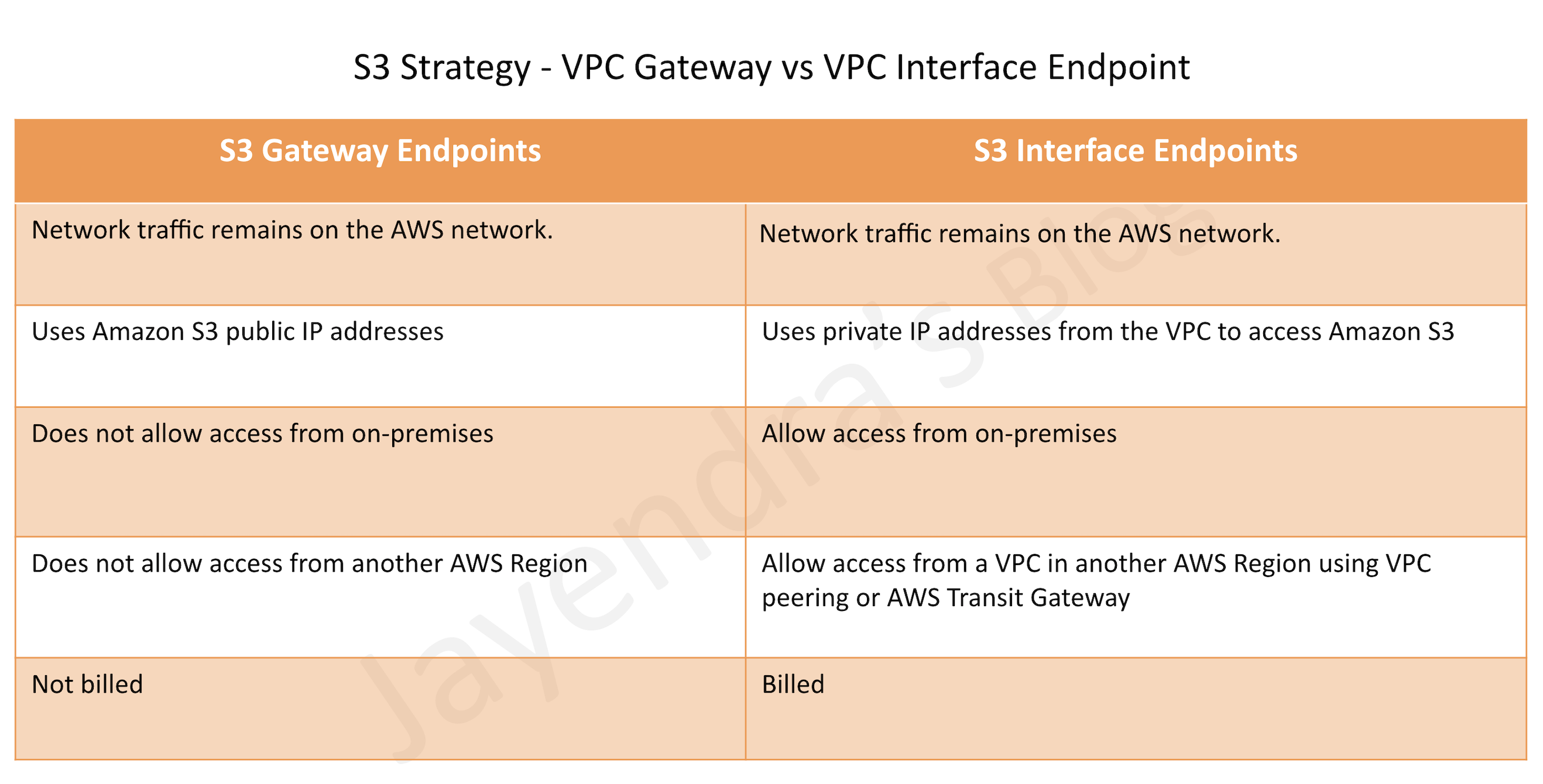
S3 VPC Endpoints Strategy

S3 is now accessible with both Gateway Endpoints and Interface Endpoints.

S3 Strategy - VPC Gateway Endpoints vs VPC Interface Endpoints

AWS Certification Exam Practice Questions

  • Questions are collected from Internet and the answers are marked as per my knowledge and understanding (which might differ with yours).
  • AWS services are updated everyday and both the answers and questions might be outdated soon, so research accordingly.
  • AWS exam questions are not updated to keep up the pace with AWS updates, so even if the underlying feature has changed the question might not be updated
  • Open to further feedback, discussion and correction.
  1. You have an application running on an Amazon EC2 instance that uploads 10 GB video objects to amazon S3. Video uploads are taking longer than expected inspite of using multipart upload cause of internet bandwidth, resulting in poor application performance. Which action can help improve the upload performance?
    1. Apply an Amazon S3 bucket policy
    2. Use Amazon EBS provisioned IOPS
    3. Use VPC endpoints for S3
    4. Request a service limit increase
  2. What are the services supported by VPC endpoints, using Gateway endpoint type? Choose 2 answers
    1. Amazon S3
    2. Amazon EFS
    3. Amazon DynamoDB
    4. Amazon Glacier
    5. Amazon SQS
  3. What are the different types of endpoint types supported by VPC endpoints? Choose 2 Answers
    1. Gateway
    2. Classic
    3. Interface
    4. Virtual
    5. Network
  4. An application running on EC2 instances processes sensitive information stored on Amazon S3. The information is accessed over the Internet. The security team is concerned that the Internet connectivity to Amazon S3 is a security risk. Which solution will resolve the security concern?
    1. Access the data through an Internet Gateway.
    2. Access the data through a VPN connection.
    3. Access the data through a NAT Gateway.
    4. Access the data through a VPC endpoint for Amazon S3.
  5. You need to design a VPC for a three-tier architecture, a web application consisting of an Elastic Load Balancer (ELB), a fleet of web/application servers, and a backend consisting of an RDS database. The entire Infrastructure must be distributed over 2 availability zones. Which VPC configuration works while assuring the least components are exposed to Internet?
    1. Two public subnets for ELB, two private subnets for the web-servers, two private subnets for RDS and DynamoDB
    2. Two public subnets for ELB and web-servers, two private subnets for RDS and DynamoDB
    3. Two public subnets for ELB, two private subnets for the web-servers, two private subnets for RDS and VPC Endpoints for DynamoDB
    4. Two public subnets for ELB and web-servers, two private subnets for RDS and VPC Endpoints for DynamoDB
  6. A company needs to access Amazon S3 buckets in a different AWS Region privately without exposing traffic to the public internet. Which solution should they use? (Assume November 2025 or later)
    1. Use Gateway VPC Endpoints for cross-region S3 access
    2. Use Interface VPC Endpoints with cross-region PrivateLink for S3
    3. Set up VPC peering between regions and use Gateway Endpoints
    4. Use AWS Direct Connect with public VIF

References

AWS VPC Peering

AWS VPC Peering

VPC Peering

🆕 Recent Updates (2025)

  • March 2025: Inter-region VPC peering now supports jumbo frames (up to 8500 bytes MTU) and full instance bandwidth.
  • April 2025: VPC Peering billing simplified with dedicated usage type for better cost visibility.
  • November 2025: VPC Encryption Controls launched to audit and enforce encryption on VPC peering traffic.
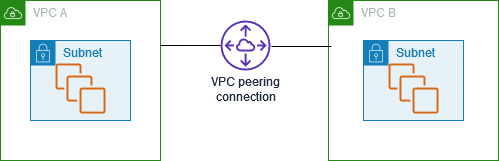
  • A VPC peering connection is a networking connection between two VPCs that enables routing of traffic between them using private IPv4 addresses or IPv6 addresses.
  • VPC peering connection
    • can be established between your own VPCs, or with a VPC in another AWS account in the same or different region.
    • is a one-to-one relationship between two VPCs.
    • supports intra and inter-region peering connections.
  • With VPC peering,
    • Instances in either VPC can communicate with each other as if they are within the same network
    • AWS uses the existing infrastructure of a VPC to create a peering connection; it is neither a gateway nor a VPN connection and does not rely on a separate piece of physical hardware.
    • There is no single point of failure for communication or a bandwidth bottleneck
    • All inter-region traffic is encrypted with no single point of failure, or bandwidth bottleneck. Traffic always stays on the global AWS backbone, and never traverses the public internet, which reduces threats, such as common exploits, and DDoS attacks.
    • EC2 instances can use full instance bandwidth for inter-region VPC peering traffic (previously limited to 50% for instances with 32+ vCPUs, or 5 Gbps for smaller instances).
  • VPC peering pricing
    • There is no charge to create a VPC peering connection.
    • All data transfer over a VPC peering connection that stays within an Availability Zone (AZ) is free, even if it’s between different accounts.
    • Charges apply for data transfer over VPC peering connections that cross Availability Zones and Regions.
    • Since April 2025, VPC Peering billing uses a dedicated usage type (Region-Name-VpcPeering-In/Out-Bytes) for easier cost tracking in Cost Explorer and Cost and Usage Reports.

AWS VPC Peering

VPC Peering Connectivity

  • To create a VPC peering connection, the owner of the requester VPC sends a request to the owner of the accepted VPC.
  • Accepter VPC can be owned by the same account or a different AWS account.
  • Once the Accepter VPC accepts the peering connection request, the peering connection is activated.
  • Route tables on both the VPCs should be manually updated to allow traffic
  • Security groups on the instances should allow traffic to and from the peered VPCs.

VPC Peering Limitations & Rules

  1. Does not support Overlapping or matching IPv4 or IPv6 CIDR blocks.
  2. Does not support transitive peering relationships i.e. the VPC does not have access to any other VPCs that the peer VPC may be peered with even if established entirely within your own AWS account
  3. Does not support Edge to Edge Routing Through a Gateway or Private Connection
  4. In a VPC peering connection, the VPC does not have access to any other connection that the peer VPC may have and vice versa. Connections that the peer VPC can include
    1. A VPN connection or an AWS Direct Connect connection to a corporate network
    2. An Internet connection through an Internet gateway
    3. An Internet connection in a private subnet through a NAT device
    4. A VPC endpoint to an AWS service; for example, an endpoint to S3.
  5. VPC peering connections quotas
    • Default limit of 50 active VPC peering connections per VPC, which can be increased up to a maximum of 125.
    • Default limit of 25 outstanding VPC peering connection requests.
    • Unaccepted VPC peering connection requests expire after 1 week (168 hours).
  6. Only one peering connection can be established between the same two VPCs at the same time.
  7. Jumbo frames (MTU up to 8500 bytes) are supported for peering connections both within the same region and across regions.
  8. A placement group can span peered VPCs that are in the same region; however, you do not get full-bisection bandwidth between instances in peered VPCs
  9. Inter-region VPC peering connections
    1. Updated March 2025: The Maximum Transmission Unit (MTU) across an inter-region peering connection is now 8500 bytes (jumbo frames supported). Previously limited to 1500 bytes.
    2. Security group rule that references a peer VPC security group cannot be created for cross-region peering.
    3. EC2 instances can use full instance bandwidth for inter-region peering (no longer limited to 50% or 5 Gbps).
  10. Any tags created for the peering connection are only applied in the account or region in which they were created
  11. Unicast reverse path forwarding in peering connections is not supported
  12. Instance’s Public DNS can be resolved to its private IP address across peered VPCs when DNS resolution is enabled for the VPC peering connection.

⚠️ DEPRECATED FEATURE

EC2-Classic and ClassicLink were retired on August 15, 2023.

The original content mentioned ClassicLink connections to EC2-Classic instances. This feature is no longer available.

Migration: All resources must be migrated to VPC. EC2-Classic is no longer supported.

VPC Peering Encryption

  • All inter-region VPC peering traffic is encrypted with AES-256 before leaving AWS data centers.
  • Intra-region traffic between Nitro-based EC2 instances is also encrypted transparently.
  • VPC Encryption Controls (November 2025):
    • Provides ability to monitor, audit, and enforce encryption in transit within and across VPCs.
    • Automatically applies hardware-based AES-256 encryption on traffic between VPC resources including Fargate, NLB, and ALB.
    • Helps demonstrate compliance with encryption standards (HIPAA, PCI DSS).
    • Can identify VPC resources unintentionally allowing plaintext traffic.
    • Generates audit logs for compliance and reporting.

VPC Peering Troubleshooting

  • Verify that the VPC peering connection is in the Active state.
  • Be sure to update the route tables for the peering connection. Verify that the correct routes exist for connections to the IP address range of the peered VPCs through the appropriate gateway.
  • Verify that an ALLOW rule exists in the network access control (NACL) table for the required traffic.
  • Verify that the security group rules allow network traffic between the peered VPCs.
  • Verify using VPC flow logs that the required traffic isn’t rejected at the source or destination. This rejection might occur due to the permissions associated with security groups or network ACLs.
  • Be sure that no firewall rules block network traffic between the peered VPCs. Use network utilities such as traceroute (Linux) or tracert (Windows) to check rules for firewalls such as iptables (Linux) or Windows Firewall (Windows).
  • For DNS resolution issues, ensure that DNS resolution is enabled for the VPC peering connection to resolve public DNS hostnames to private IP addresses.

VPC Peering Architecture

AWS VPC Architecture

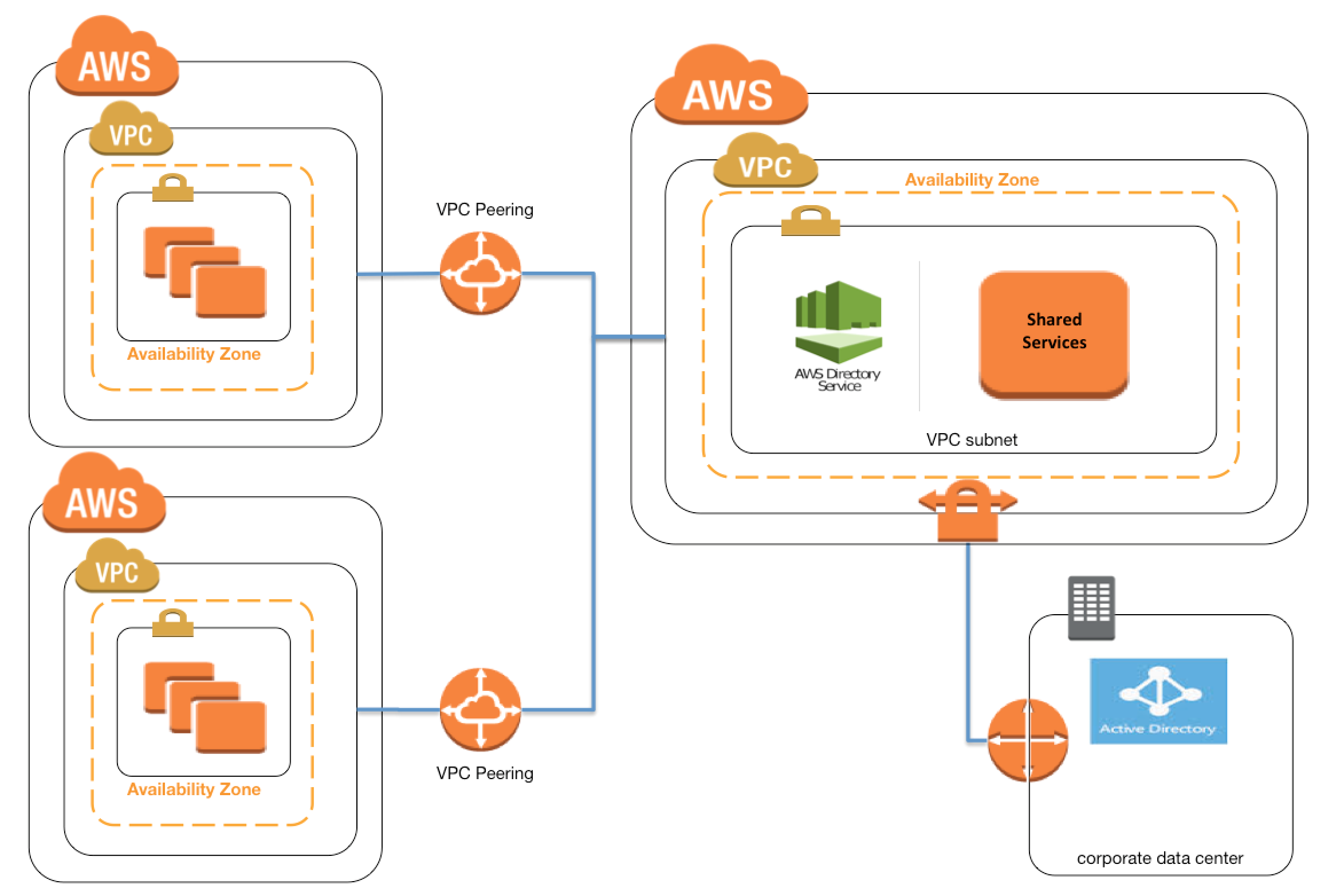
  • VPC Peering can be applied to create shared services or perform authentication with an on-premises instance
  • This would help create a single point of contact, as well limiting the VPN connections to a single account or VPC

VPC Peering vs Transit Gateway vs PrivateLink vs VPC Lattice

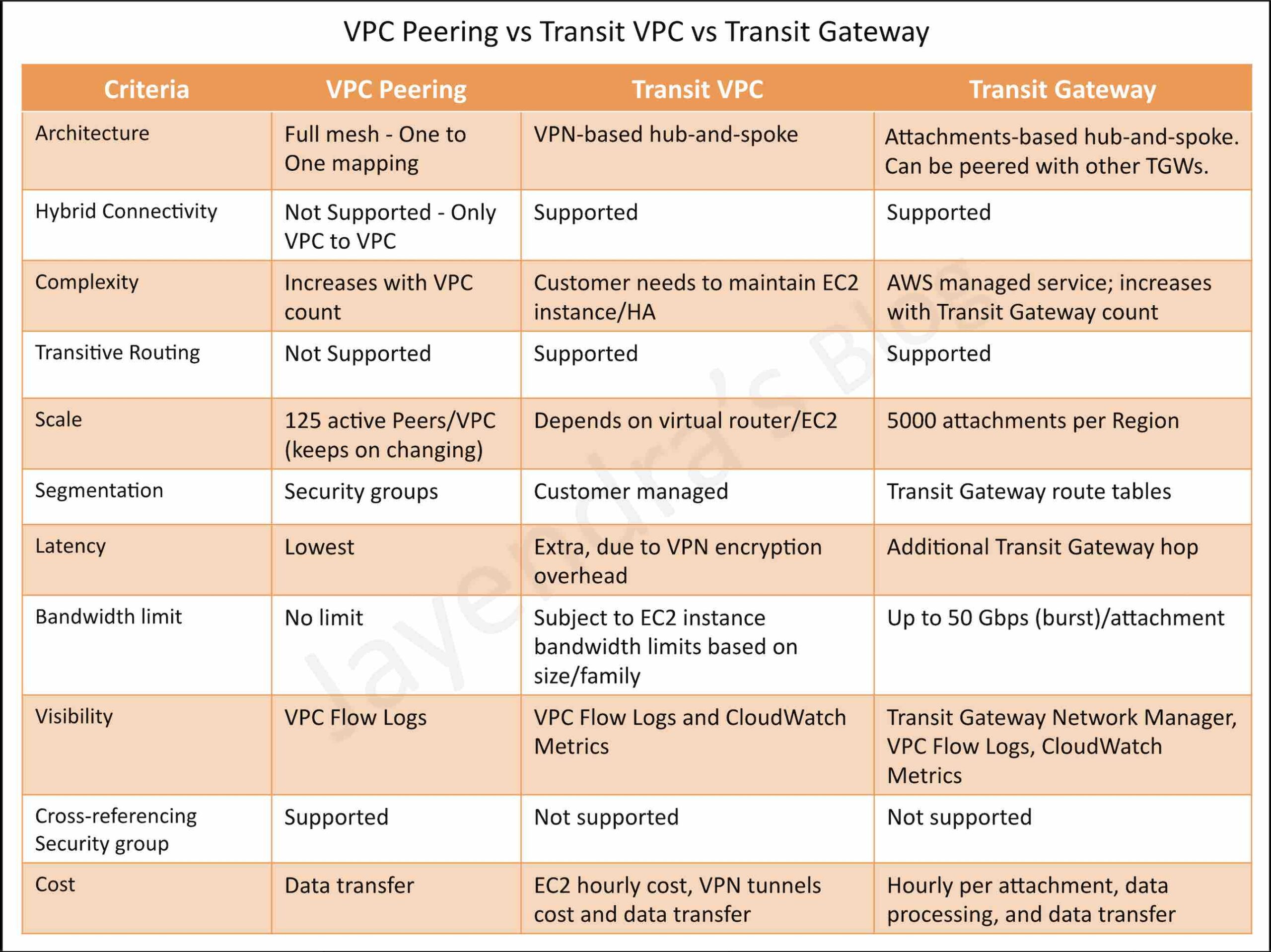
VPC Peering vs Transit VPC vs Transit Gateway

When to Use Each Solution

  • VPC Peering
    • Best for: Simple, direct connections between a small number of VPCs (typically less than 10)
    • Advantages: No additional cost for the connection itself, low latency, simple setup, full instance bandwidth inter-region
    • Limitations: Does not support transitive routing, becomes complex at scale (mesh topology), limited to 125 peering connections per VPC
  • AWS Transit Gateway
    • Best for: Hub-and-spoke architecture with many VPCs (10+), centralized routing, hybrid connectivity
    • Advantages: Supports transitive routing, centralized management, scales to thousands of VPCs, integrates with Direct Connect and VPN
    • Limitations: Additional cost per attachment and data processing, slightly higher latency than direct peering
  • AWS PrivateLink
    • Best for: Service-to-service connectivity, exposing services to multiple consumers, SaaS applications
    • Advantages: Unidirectional access, no VPC CIDR overlap issues, enhanced security, supports cross-account and cross-region access
    • Limitations: Requires Network Load Balancer or Gateway Load Balancer, additional cost, one-way communication by default
  • Amazon VPC Lattice
    • Best for: Application-layer service-to-service networking across VPCs and accounts
    • Advantages: No NLB required (unlike PrivateLink), built-in service discovery, IAM-based authorization, cross-VPC/cross-account without CIDR coordination, TLS termination at data plane
    • Limitations: Application-layer (L7) only, newer service with evolving feature set
    • Note: AWS App Mesh is being discontinued (EOL September 30, 2026); VPC Lattice is the recommended migration path

AWS Certification Exam Practice Questions

  • Questions are collected from Internet and the answers are marked as per my knowledge and understanding (which might differ with yours).
  • AWS services are updated everyday and both the answers and questions might be outdated soon, so research accordingly.
  • AWS exam questions are not updated to keep up the pace with AWS updates, so even if the underlying feature has changed the question might not be updated
  • Open to further feedback, discussion and correction.
  1. You currently have 2 development environments hosted in 2 different VPCs in an AWS account in the same region. There is now a need for resources from one VPC to access another. How can this be accomplished?
    1. Establish a Direct Connect connection.
    2. Establish a VPN connection.
    3. Establish VPC Peering.
    4. Establish Subnet Peering.
  2. A company has an AWS account that contains three VPCs (Dev, Test, and Prod) in the same region. Test is peered to both Prod and Dev. All VPCs have non-overlapping CIDR blocks. The company wants to push minor code releases from Dev to Prod to speed up the time to market. Which of the following options helps the company accomplish this?
    1. Create a new peering connection Between Prod and Dev along with appropriate routes.
    2. Create a new entry to Prod in the Dev route table using the peering connection as the target.
    3. Attach a second gateway to Dev. Add a new entry in the Prod route table identifying the gateway as the target.
    4. The VPCs have non-overlapping CIDR blocks in the same account. The route tables contain local routes for all VPCs.
  3. A company has 2 AWS accounts that have individual VPCs. The VPCs are in different AWS regions and need to communicate with each other. The VPCs have non-overlapping CIDR blocks. Which of the following would be a cost-effective connectivity option?
    1. Use VPN connections
    2. Use VPC peering between the 2 VPC’s
    3. Use AWS Direct Connect
    4. Use a NAT gateway
  4. A company needs to connect 15 VPCs across multiple AWS accounts and regions with centralized routing and management. Which solution is most appropriate?
    1. Create VPC peering connections between all VPCs
    2. Use AWS Transit Gateway with a hub-and-spoke architecture
    3. Use AWS PrivateLink for all connections
    4. Use multiple VPN connections
  5. A SaaS provider wants to expose their application running in their VPC to multiple customer VPCs without requiring VPC peering or overlapping CIDR concerns. Which solution should they use?
    1. VPC Peering with each customer VPC
    2. AWS Transit Gateway
    3. AWS PrivateLink with VPC endpoint service
    4. Internet Gateway with security groups
  6. A company needs to transfer large amounts of data between VPCs in different AWS regions with maximum throughput. Which statement about inter-region VPC peering is correct? (Updated 2025)
    1. Inter-region VPC peering is limited to 1500 bytes MTU and 5 Gbps bandwidth
    2. Inter-region VPC peering does not support encryption
    3. Inter-region VPC peering supports jumbo frames (8500 bytes MTU) and full EC2 instance bandwidth
    4. Inter-region VPC peering requires a Transit Gateway attachment
  7. A company wants to audit and enforce encryption on all traffic flowing through their VPC peering connections to meet PCI DSS compliance. Which AWS feature should they use?
    1. AWS CloudTrail encryption logging
    2. VPC Flow Logs with encryption filter
    3. VPC Encryption Controls
    4. AWS Network Firewall with TLS inspection

References

AWS VPC Peering

VPC Peering Connection Quotas

EC2 Bandwidth and Jumbo Frames for Inter-Region Peering (March 2025)

VPC Peering Billing Simplification (April 2025)

VPC Encryption Controls (November 2025)

AWS Certified Solutions Architect – Professional (SAP-C02) Exam Learning Path

AWS Certified Solutions Architect - Professional Exam Certificate

AWS Certified Solutions Architect – Professional (SAP-C02) Exam Learning Path

  • AWS Certified Solutions Architect – Professional (SAP-C02) exam is the upgraded pattern of the previous Solution Architect – Professional SAP-C01 exam and was released in Nov. 2022.
  • SAP-C02 is quite similar to SAP-C01 but has included some new services.

AWS Certified Solutions Architect – Professional (SAP-C02) Exam Content

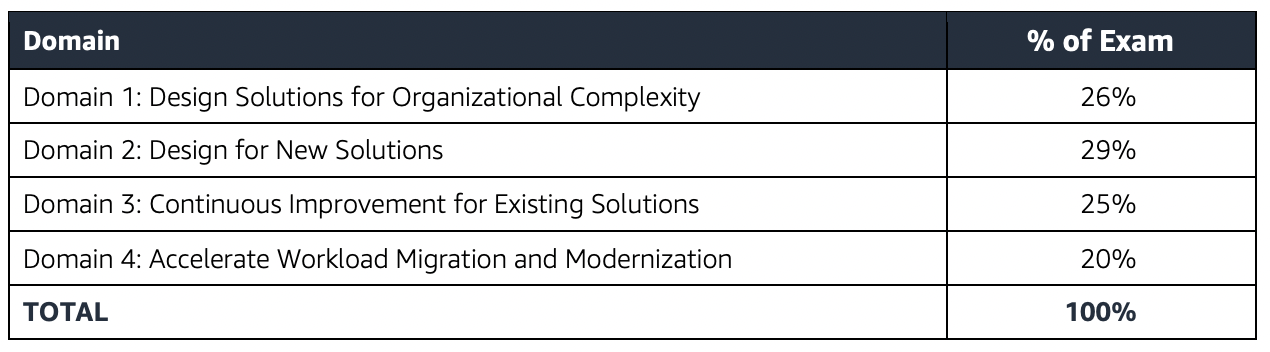
  • AWS Certified Solutions Architect – Professional (SAP-C02) exam validates the ability to complete tasks within the scope of the AWS Well-Architected Framework
    • Design for organizational complexity
    • Design for new solutions
    • Continuously improve existing solutions
    • Accelerate workload migration and modernization

Refer to AWS Certified Solutions Architect – Professional Exam Guide

AWS Certified Solutions Architect - Professional Exam Domains

AWS Certified Solutions Architect – Professional (SAP-C02) Exam Resources

AWS Certified Solutions Architect – Professional (SAP-C02) Exam Summary

  • Professional exams are tough, lengthy, and tiresome. Most of the questions and answers options have a lot of prose and a lot of reading that needs to be done, so be sure you are prepared and manage your time well.
  • Each solution involves multiple AWS services.
  • AWS Certified Solutions Architect – Professional (SAP-C02) exam has 65 questions to be solved in 170 minutes.
  • SAP-C02 exam includes two types of questions, multiple-choice and multiple-response.
  • SAP-C02 has a scaled score between 100 and 1,000. The scaled score needed to pass the exam is 750.
  • Each question mainly touches multiple AWS services.
  • Associate exams currently cost $ 300 + tax.
  • You can get an additional 30 minutes if English is your second language by requesting Exam Accommodations. It might not be needed for Associate exams but is helpful for Professional and Specialty ones.
  • As always, mark the questions for review and move on and come back to them after you are done with all.
  • As always, having a rough architecture or mental picture of the setup helps focus on the areas that you need to improve. Trust me, you will be able to eliminate 2 answers for sure and then need to focus on only the other two. Read the other 2 answers to check the difference area and that would help you reach the right answer or at least have a 50% chance of getting it right.
  • AWS exams can be taken either remotely or online, I prefer to take them online as it provides a lot of flexibility. Just make sure you have a proper place to take the exam with no disturbance and nothing around you.
  • Also, if you are taking the AWS Online exam for the first time try to join at least 30 minutes before the actual time as I have had issues with both PSI and Pearson with long wait times.

AWS Certified Solutions Architect – Professional (SAP-C02) Exam Topics

AWS Certified Solutions Architect – Professional (SAP-C02) focuses a lot on concepts and services related to Architecture & Design, Scalability, High Availability, Disaster Recovery, Migration, Security, and Cost Control.

Storage

  • Simple Storage Service – S3
    • S3 Permissions & S3 Data Protection
      • S3 bucket policies to control access to VPC Endpoints and provide cross-account access.
    • S3 Storage Classes & Lifecycle policies
      • covers S3 Standard, Infrequent access, intelligent tier, and Glacier for archival and object transitions & deletions for cost management.
    • S3 Performance
    • S3 Security
      • S3 supports encryption using KMS
      • S3 supports Object Lock and Glacier supports Vault lock to prevent the deletion of objects, especially required for compliance requirements.
      • CORS allows client web applications loaded in one domain access to the restricted resources to be requested from another domain.
    • S3 supports the same and cross-region replication for disaster recovery.
    • S3 Access Logs enable tracking access requests to an S3 bucket.
    • supports S3 Select feature to query selective data from a single object.
    • S3 Event Notification enables notifications to be triggered when certain events happen in the bucket and support SNS, SQS, and Lambda as the destination.
  • Elastic Block Store
    • EBS Backup using snapshots for HA and Disaster recovery
    • Data Lifecycle Manager can be used to automate the creation, retention, and deletion of snapshots taken to back up the EBS volumes.
  • Storage Gateway
    • supports File Gateways and Volume Gateways
    • File Gateways provides a file interface into S3 and allows storing and retrieving of objects in S3 using industry-standard file protocols such as NFS and SMB.
  • Elastic File System – EFS
    • provides fully managed, scalable, serverless, shared, and cost-optimized file storage for use with AWS and on-premises resources.
    • supports cross-region replication for disaster recovery
    • supports storage classes like S3
    • supports only Linux-based AMIs
  • AWS Transfer Family
    • provides a secure transfer service (FTP, SFTP, FTPs) that helps transfer files into and out of AWS storage services.
    • supports transferring data from or to S3 and EFS.
  • FSx for Lustre
    • managed, cost-effective service to launch and run the HPC high-performance Lustre file system.
  • Understand different use cases for S3 vs EBS vs EFS

Database

  • DynamoDB
    • provides a fully managed NoSQL database service with fast and predictable performance with seamless scalability.
    • supports following capacity modes
      • Provisioned – the maximum amount of capacity in terms of reads/writes per second that an application can consume from a table or index
      • On-demand – serves thousands of requests per second without capacity planning.
    • DynamoDB Auto Scaling can be used to handle peaks or bursts.
    • DynamoDB Streams for tracking changes
    • TTL to expire objects automatically and cost-effectively.
    • Global tables for multi-master, active-active inter-region storage needs.
    • Global tables do not support strong global consistency
    • DynamoDB Accelerator – DAX for seamless caching to reduce the load on DynamoDB for read-heavy requirements.
  • RDS
    • supports cross-region read replicas ideal for disaster recovery with low RTO and RPO.
    • provides RDS proxy for effective database connection polling
    • RDS Multi-AZ vs Read Replicas
  • Aurora
    • fully managed, MySQL- and PostgreSQL-compatible, relational database engine
    • Aurora Serverless provides on-demand, autoscaling configuration.
    • Aurora Global Database consists of one primary AWS Region where the data is mastered, and up to five read-only, secondary AWS Regions.
  • Understand DynamoDB Global Tables vs Aurora Global Databases
  • DocumentDB as a replacement for MongoDB
  • Keyspaces as a replacement for Cassandra

Data Migration & Transfer

  • Cloud Migration Services
    • Cloud Migration (hint: make sure you understand the difference between rehost, replatform, and rearchitect)
    • Server Migration Service helps to migrate servers and applications.
    • Database Migration Service
      • enables quick and secure data migration with minimal to zero downtime
      • supports Full and Change Data Capture – CDC migration to support continuous replication for zero downtime migration.
      • homogeneous migrations such as Oracle to Oracle, as well as heterogeneous migrations (using SCT) between different database platforms, such as Oracle or Microsoft SQL Server to Aurora.
    • Snow Family
      • Ideal for one-time huge data transfers usually for use cases with limited bandwidth from on-premises to AWS.
    • Understand use cases for data transfer using VPN (quick, slow, uses the Internet), Direct Connect (time to set up, private, recurring transfers), Snow Family (moderate time, private, one-time huge data transfers)
  • Application Discovery Service
    • Agent ones can be used for hyper-v and physical services
    • Agentless can be used for VMware but does not track processes
  • AWS Migration Hub provides a central location to collect server and application inventory data for the assessment, planning, and tracking of migrations to AWS and also helps accelerate application modernization following migration.

Networking & Content Delivery

  • VPC – Virtual Private Cloud
    • Security Groups, NACLs
      • NACLs are stateless and need to open ephemeral ports for response traffic.
    • VPC Gateway Endpoints to provide access to S3 and DynamoDB
    • VPC Interface Endpoints or PrivateLink provide access to a variety of services like SQS, Kinesis, or Private APIs exposed through NLB.
    • VPC Peering to enable communication between VPCs within the same or different regions.
    • VPC Peering does not support overlapping CIDRs while PrivateLink does as only the endpoint is exposed.
    • VPC Flow Logs to track network traffic
    • NAT Gateway provides managed NAT service that provides better availability, higher bandwidth, and requires less administrative effort.
  • Route 53
    • Routing Policies
      • focus on Weighted, Latency, and failover routing policies
      • failover routing provides active-passive configuration for disaster recovery while the others are active-active configurations.
    • Route 53 Resolver
      • Outbound endpoint for AWS -> On-premises DNS query resolution
      • Inbound endpoint for On-premises DNS query resolution
  • CloudFront
    • fully managed, fast CDN service that speeds up the distribution of static, dynamic web or streaming content to end-users.
    • supports Origin Groups for multiple origins providing failover capability with primary and secondary origins.
    • does not support Auto Scaling as an origin
    • supports Geo-restriction
    • supports Lambda@Edge and Cloud Functions to execute code closer to the user.
    • Lambda@Edge can be used for quick auth checks, and redirect users based on request data.
    • Security can be enhanced by whitelisting CloudFront IPs or adding a custom header in CloudFront and verifying it in ALB.
  • API Gateway
    • supports throttling, caching and helps define usage plans with API keys to identify clients
    • provides regional and edge-optimized endpoint types
    • supports CORS for cross-domain calls.
    • supports authentication mechanisms, such as AWS IAM policies, Lambda authorizer functions, and Amazon Cognito user pools.
    • provide serverless architecture with Lambda.
  • Load Balancer – ELB, ALB and NLB
  • Global Accelerator
    • optimizes the path to applications to keep packet loss, jitter, and latency consistently low.
    • helps improve the performance of the applications by lowering first-byte latency
    • provides 2 static IP addresses
    • does not preserve the client’s IP address with NLB
  • Transit Gateway or Transit VPC
    • is a network transit hub that can be used to interconnect VPCs and on-premises networks via Direct Connect or VPN.
    • Transit Gateway is regional and Transit Gateway Peering needs to be configured to peer regional Transit gateways.
  • Placement Groups
    • Cluster placement group with Enhanced Networking for HPC
    • Spread placement group for fault tolerance and high availability.
  • Direct Connect & VPN
    • provide on-premises to AWS connectivity
    • Understand Direct Connect vs VPN
    • VPN can provide a cost-effective, quick failover for Direct Connect.
    • VPN over Direct Connect provides a secure dedicated connection and requires a public virtual interface.
    • Direct Connect Gateway is a global network device that helps establish connectivity that spans VPCs spread across multiple AWS Regions with a single Direct Connect connection.

Security, Identity & Compliance

  • AWS Identity and Access Management
  • AWS Shield & Shield Advanced
    • for DDoS protection and integrates with Route 53, CloudFront, ALB, and Global Accelerator.
  • AWS WAF
    • protects from common attack techniques like SQL injection and XSS, Conditions based include IP addresses, HTTP headers, HTTP body, and URI strings.
    • integrates with CloudFront, ALB, and API Gateway.
    • supports Web ACLs and can block traffic based on IPs, Rate limits, and specific countries as well.
  • ACM – AWS Certificate Manager
    • helps easily provision, manage, and deploy public and private SSL/TLS certificates
    • is regional and you need to request certificates in all regions and associate individually in all regions.
    • does not provide certificates for EC2 instances.
  • AWS KMS – Key Management Service
    • managed encryption service that allows the creation and control of encryption keys to enable data encryption.
    • KMS Multi-region keys
      • are AWS KMS keys in different AWS Regions that can be used interchangeably – as though having the same key in multiple Regions.
      • are not global and each multi-region key needs to be replicated and managed independently.
  • Secrets Manager
    • helps protect secrets needed to access applications, services, and IT resources.
    • Secrets Manager vs SSM Parameter Store.
      • Secrets Manager supports random generation and automatic rotation of secrets, which is not provided by SSM Parameter Store.
      • Costs more than SSM Parameter Store.
  • Amazon Macie is a data security and data privacy service that uses ML and pattern matching to discover and protect sensitive data in S3.
  • AWS Security Hub is a cloud security posture management service that performs security best practice checks, aggregates alerts, and enables automated remediation.

Compute

  • EC2
  • Auto Scaling provides the ability to ensure a correct number of EC2 instances are always running to handle the load of the application
  • Lambda
    • offers Serverless computing 
    • Lambda running in VPC requires NAT Gateway to communicate with external public services
    • Lambda CPU can be increased by increasing memory only.
    • helps define reserved concurrency limits to reduce the impact
    • Lambda Alias now supports canary deployments
    • Lambda supports docker containers
    • Reserved Concurrency guarantees the maximum number of concurrent instances for the function
    • Provisioned Concurrency provides greater control over the performance of serverless applications and helps keep functions initialized and hyper-ready to respond in double-digit milliseconds.
    • Lambda Best Practices esp. handling the database connection code.
  • Step Functions helps developers use AWS services to build distributed applications, automate processes, orchestrate microservices, and create data and machine learning (ML) pipelines.
  • ECS – Elastic Container Service
    • container management service that supports Docker containers
    • supports two launch types
      • EC2 and
      • Fargate which provides the serverless capability
    • For least privilege, the role should be assigned to the Task.
    • awsvpc network mode gives ECS tasks the same networking properties as EC2 instances.

Disaster Recovery

  • Disaster Recovery whitepaper, although outdated, make sure you understand the differences and implementation for each type esp. pilot light, warm standby w.r.t RTO, and RPO.
  • Compute
    • Make components available in an alternate region,
    • Backup and Restore using either snapshots or AMIs that can be restored.
    • Use minimal low-scale capacity running which can be scaled once the failover happens
    • Use fully running compute in active-active confirmation with health checks.
    • CloudFormation to create, and scale infra as needed
  • Storage
    • S3 and EFS support cross-region replication
    • DynamoDB supports Global tables for multi-master, active-active inter-region storage needs.
    • Aurora Global Database provides cross-region read replicas and failover capabilities.
    • RDS supports cross-region read replicas which can be promoted to master in case of a disaster. This can be done using Route 53, CloudWatch, and lambda functions.
  • Network
    • Route 53 failover routing with health checks to failover across regions.
    • CloudFront Origin Groups support primary and secondary endpoints with failover.

Management & Governance tools

  • AWS Organizations
  • Systems Manager
    • AWS Systems Manager and its various services like parameter store, patch manager
    • Parameter Store provides secure, scalable, centralized, hierarchical storage for configuration data and secret management. Does not support secrets rotation. Use Secrets Manager instead
    • Session Manager provides secure and auditable instance management without the need to open inbound ports, maintain bastion hosts, or manage SSH keys.
    • Patch Manager helps automate the process of patching managed instances with both security-related and other types of updates.
  • CloudWatch
  • CloudTrail
    • for audit and governance
    • With Organizations, the trail can be configured to log CloudTrail from all accounts to a central account.
  • CloudFormation
    • Handle disaster Recovery by automating the infra to replicate the environment across regions.
    • Deletion Policy to prevent, retain, or backup RDS, EBS Volumes
    • Stack policy can prevent stack resources from being unintentionally updated or deleted during a stack update. Stack Policy only applies for Stack updates and not stack deletion.
    • StackSets helps to create, update, or delete stacks across multiple accounts and Regions with a single operation.
  • Control Tower
    • to setup, govern, and secure a multi-account environment
    • strongly recommended guardrails cover EBS encryption
  • Service Catalog
    • allows organizations to create and manage catalogues of IT services that are approved for use on AWS with minimal permissions.
  • Trusted Advisor
    • helps with cost optimization and service limits in addition to security, performance and fault tolerance.
  • Compute Optimizer recommends optimal AWS resources for the workloads to reduce costs and improve performance by using machine learning to analyze historical utilization metrics.
  • AWS Budgets to see usage-to-date and current estimated charges from AWS, set limits and provide alerts or notifications.
  • Cost Allocation Tags can be used to organize AWS resources, and cost allocation tags to track the AWS costs on a detailed level.
  • Cost Explorer helps visualize, understand, manage and forecast the AWS costs and usage over time.
  • Amazon WorkSpaces provides a virtual workspace for varied worker types, especially hybrid and remote workers.

Integration Tools

  • SQS in terms of loose coupling and scaling.
    • Difference between SQS Standard and FIFO esp. with throughput and order
    • SQS supports dead letter queues
  • CloudWatch integration with SNS and Lambda for notifications.

Analytics

  • Kinesis
  • OpenSearch (Elasticsearch) provides a managed search solution.
  • Amazon Timestream is a fast, scalable, and serverless time-series database service that makes it easier to store and analyze trillions of events per day.
  • Amazon Connect is an omnichannel cloud contact center.
  • Amazon Pinpoint is a flexible, scalable marketing communications service that helps connects customers over email, SMS, push notifications or voice
  • Amazon Rekognition offers pre-trained and customizable computer vision capabilities to extract information and insights from images and videos
  • Amazon Transcribe to Voice to Text conversion

Architecture & Design Flows

On the Exam Day

  • Make sure you are relaxed and get some good night’s sleep. The exam is not tough if you are well-prepared.
  • If you are taking the AWS Online exam
    • Try to join at least 30 minutes before the actual time as I have had issues with both PSI and Pearson with long wait times.
    • The online verification process does take some time and usually, there are glitches.
    • Remember, you would not be allowed to take the take if you are late by more than 30 minutes.
    • Make sure you have your desk clear, no hand-watches, or external monitors, keep your phones away, and nobody can enter the room.

Finally, All the Best 🙂

Related Posts

AWS Secrets Manager vs Systems Manager Parameter Store

AWS Secrets Manager vs Systems Parameter Store

AWS Secrets Manager vs Systems Manager Parameter Store

🆕 Major Updates (2024-2026)

  • Parameter Store Cross-Account Sharing (Feb 2024): Parameter Store now supports cross-account sharing via AWS Resource Access Manager (RAM) for advanced parameters.
  • Secrets Manager – Managed External Secrets (Nov 2025): New secret type enabling automatic rotation for third-party SaaS credentials (Salesforce, MongoDB Atlas, Confluent Cloud, Datadog, Snowflake).
  • Secrets Manager Agent (Jul 2024): Open-source agent providing localhost-based secret caching to reduce API calls and improve availability.
  • Secrets Manager Limit Increase: Maximum secrets per account increased from 40,000 to 500,000 per Region.
  • Secrets Manager – BatchGetSecretValue API (Nov 2023): Retrieve up to 20 secrets in a single API call.
  • Secrets Manager – Cost Allocation Tags (May 2025): Tag secrets and track costs by department, team, or application in AWS Cost Explorer.
  • AWS Workload Credentials Provider (Jun 2026): Unified provider for caching secrets and deploying certificates across AWS and non-AWS workloads.

  • AWS Secrets Manager helps protect secrets needed to access applications, services, and IT resources and can easily rotate, manage, and retrieve database credentials, API keys, and other secrets throughout their lifecycle.
  • AWS Systems Manager Parameter Store provides secure, scalable, centralized, hierarchical storage for configuration data and secret management and can store data such as passwords, database strings, etc.

AWS Secrets Manager vs Systems Parameter Store

Key Differences

  • Storage (Limits keep on upgrading)
    • AWS Systems Manager Parameter Store allows us to store up to
      • Standard tier – 10,000 parameters per Region, each of which can be up to 4KB
      • Advanced tier – 100,000 parameters per Region, each of which can be up to 8KB
    • AWS Secrets Manager supports up to 500,000 secrets per account per Region, each of which can be up to 64KB.
  • Encryption
    • Encryption is optional for Systems Manager Parameter Store (use SecureString parameter type for encryption)
    • Encryption is mandatory for Secrets Manager and you cannot opt out. Secrets are always encrypted at rest using AWS KMS keys.
  • Automated Secret Rotation
    • Systems Manager Parameter Store does not support out-of-the-box secrets rotation.
    • AWS Secrets Manager enables automatic secret rotation on a schedule, supporting native rotation for RDS, Redshift, DocumentDB, and other AWS databases.
    • NEW: Secrets Manager now supports Managed External Secrets for automatic rotation of third-party SaaS credentials (Salesforce, MongoDB Atlas, Confluent Cloud, Datadog, Snowflake) without requiring custom Lambda rotation functions.
  • Cross-account Access
    • UPDATE (Feb 2024): Systems Manager Parameter Store now supports cross-account sharing of advanced parameters via AWS Resource Access Manager (RAM). Shared parameters provide read-only access to consumers. SecureString parameters require sharing the KMS key separately.
    • AWS Secrets Manager supports cross-account access through resource-based IAM policies attached directly to the secret.
  • Multi-Region Replication
    • Systems Manager Parameter Store does not support automatic cross-region replication.
    • AWS Secrets Manager supports automatic multi-region replication, keeping replicas in sync with the primary secret for disaster recovery and low-latency access.
  • Batch Retrieval
    • Systems Manager Parameter Store supports GetParameters to retrieve up to 10 parameters in a single call.
    • AWS Secrets Manager supports BatchGetSecretValue API to retrieve up to 20 secrets in a single call, reducing latency and API call costs.
  • Cost (keeps on changing)
    • Secrets Manager is comparatively costlier than the Systems Manager Parameter Store.
    • AWS Systems Manager Parameter Store:
      • Standard tier: No additional charge (standard throughput)
      • Advanced tier: $0.05 per advanced parameter per month
      • API interactions (advanced or higher throughput): $0.05 per 10,000 API interactions
    • AWS Secrets Manager: $0.40 per secret per month, and $0.05 per 10,000 API calls.
  • Infrastructure (CloudFormation)
    • Parameter Store: SecureString parameters cannot be created via AWS CloudFormation (only String and StringList types are supported).
    • Secrets Manager secrets can be fully managed via CloudFormation including rotation configuration.

New Features (2024-2026)

AWS Secrets Manager – Managed External Secrets

  • Launched November 2025, Managed External Secrets is a new secret type that extends automatic rotation to third-party SaaS credentials.
  • Provides first-class integration with supported partners including Salesforce, MongoDB Atlas, Confluent Cloud, Datadog, and Snowflake.
  • Eliminates the need to write and maintain custom Lambda rotation functions for supported third-party services.
  • Handles the complete secret lifecycle including creation, rotation, and revocation.
  • Reference: AWS Documentation – Managed External Secrets

AWS Secrets Manager Agent

  • Open-source agent (released July 2024) that provides localhost-based secret retrieval and in-memory caching.
  • Runs as a sidecar or daemon, opening a local HTTP endpoint (localhost:2773) for secret retrieval.
  • Reduces API calls to Secrets Manager and improves application availability.
  • Includes SSRF protection, configurable TTL, cache size, and connection limits.
  • NEW (May 2026): Supports pre-fetching secrets at startup and IAM role assumption for cross-account secret retrieval.
  • Reference: AWS Documentation – Secrets Manager Agent

Parameter Store Cross-Account Sharing

  • Announced February 2024, advanced parameters can now be shared across AWS accounts using AWS RAM.
  • Supports sharing with specific accounts, organizational units, or entire AWS Organizations.
  • Consumer accounts receive read-only access (GetParameter, GetParameters, DescribeParameters).
  • SecureString parameters require the KMS key to be shared separately.
  • Cross-account sharing is only available for advanced tier parameters ($0.05/parameter/month).
  • Reference: AWS Documentation – Shared Parameters

AWS Workload Credentials Provider (June 2026)

  • Unified lightweight client-side provider that automates deployment of ACM certificates and caching of Secrets Manager secrets.
  • Works across both AWS and non-AWS workloads.
  • Maintains backwards compatibility with the Secrets Manager Agent.
  • Reference: AWS Announcement

AWS Certification Exam Practice Questions

  • Questions are collected from Internet and the answers are marked as per my knowledge and understanding (which might differ with yours).
  • AWS services are updated everyday and both the answers and questions might be outdated soon, so research accordingly.
  • AWS exam questions are not updated to keep up the pace with AWS updates, so even if the underlying feature has changed the question might not be updated
  • Open to further feedback, discussion and correction.
  1. A company uses Amazon RDS for PostgreSQL databases for its data tier. The company must implement password rotation for the databases. Which solution meets this requirement with the LEAST operational overhead?
    1. Store the password in AWS Secrets Manager. Enable automatic rotation on the secret.
    2. Store the password in AWS Systems Manager Parameter Store. Enable automatic rotation on the parameter.
    3. Store the password in AWS Systems Manager Parameter Store. Write an AWS Lambda function that rotates the password.
    4. Store the password in AWS Key Management Service (AWS KMS). Enable automatic rotation on the customer master key (CMK).
  2. A company needs to share configuration parameters across multiple AWS accounts in an organization. The parameters are non-sensitive and change infrequently. Which solution is the MOST cost-effective?
    1. Store the parameters in AWS Secrets Manager with a resource-based policy for cross-account access.
    2. Store the parameters in AWS Systems Manager Parameter Store as advanced parameters and share them using AWS Resource Access Manager (RAM).
    3. Store the parameters in an Amazon S3 bucket with cross-account access policies.
    4. Store the parameters in AWS Systems Manager Parameter Store as standard parameters and use IAM cross-account roles.
  3. A company uses third-party SaaS applications and needs to manage API credentials for these services. The credentials must be automatically rotated without custom code. Which AWS service and feature should the company use?
    1. AWS Systems Manager Parameter Store with a scheduled Lambda function
    2. AWS Secrets Manager with a custom Lambda rotation function
    3. AWS Secrets Manager with Managed External Secrets
    4. AWS KMS with automatic key rotation
  4. A development team wants to reduce API calls to AWS Secrets Manager from their containerized application while maintaining access to up-to-date secrets. Which approach provides the LEAST operational overhead?
    1. Implement a custom caching layer using Redis
    2. Deploy the AWS Secrets Manager Agent as a sidecar container
    3. Store secrets in environment variables at container startup
    4. Use the AWS Parameters and Secrets Lambda Extension
  5. A solutions architect needs to provide cross-account access to encrypted configuration data stored in AWS Systems Manager Parameter Store. Which combination of steps is required? (Select TWO)
    1. Create the parameter as an advanced parameter and share it using AWS RAM
    2. Create a resource-based policy on the parameter
    3. Share the KMS key used to encrypt the SecureString parameter with the consuming account
    4. Create an IAM role in the consuming account with ssm:GetParameter permission
    5. Store the parameter as a standard parameter and enable cross-account access

References

AWS EC2 Image Builder

AWS EC2 Image Builder

  • EC2 Image Builder is a fully managed AWS service that automates the creation, management, and deployment of customized, secure, and up-to-date server images that are pre-installed and pre-configured with software and settings to meet specific IT standards.
  • EC2 Image Builder simplifies the building, testing, and deployment of Virtual Machine and container images for use on AWS or on-premises.
  • Image Builder significantly reduces the effort of keeping images up-to-date and secure by providing a simple graphical interface, built-in automation, and AWS-provided security settings.
  • Image Builder removes any manual steps for updating an image without the need to build your own automation pipeline.
  • Image Builder provides a one-stop-shop to build, secure, and test up-to-date Virtual Machine and container images using common workflows.
  • Image Builder allows image validation for functionality, compatibility, and security compliance with AWS-provided tests and your own tests before using them in production.
  • Image Builder is offered at no cost, other than the cost of the underlying AWS resources used to create, store, and share the images.
  • Image Builder supports creating both AMI images and Docker container images (stored in Amazon ECR).
  • Image Builder supports Windows, Linux (Amazon Linux 2, Amazon Linux 2023, RHEL, Ubuntu, CentOS, SUSE), and macOS platforms.

EC2 Image Builder

EC2 Image Builder Key Concepts

  • Image Pipeline – defines the end-to-end process of building, testing, and distributing images. Pipelines can be run manually or on a schedule using cron expressions.
  • Image Recipe – defines the base image (source AMI) and the components applied to produce the output AMI image. Container recipes are used for Docker container image outputs.
  • Components – building blocks consumed by recipes that define build, validate, and test actions. Components use YAML-based documents and run via AWSTOE (AWS Task Orchestrator and Executor).
  • Base Image – the starting OS image. Image Builder supports automatic versioning to always use the latest available OS version.
  • Infrastructure Configuration – specifies EC2 instance details (instance type, VPC, subnet, security groups, IAM role, SNS topic) for the build and test instances launched during image creation.
  • Distribution Configuration – defines how and where the output image is distributed (AWS Regions, target accounts, Organizations/OUs, launch permissions, launch templates).
  • Image Workflows – define the sequence of steps during build, test, and distribution stages, providing flexibility, visibility, and control over image creation.

AWSTOE (AWS Task Orchestrator and Executor)

  • AWSTOE is a standalone component management application used by Image Builder to orchestrate complex workflows, modify system configurations, and test images.
  • Components use YAML-based documents with phases (build, validate, test) and steps to group related tasks.
  • AWSTOE supports looping constructs, conditional constructs (if statements), logical operators, and comparison operators for complex component logic.
  • Components can be parameterized for reuse with different configurations across recipes.
  • Component sources include AWS-managed components, AWS Marketplace components (from ISVs, added December 2024), and custom components you create.
  • AWSTOE can run on any cloud infrastructure and on-premises for local component development and testing.

Image Lifecycle Management

  • Image lifecycle management allows defining policies and rules to manage outdated images and their associated resources through a process of deprecation, disabling, and deletion.
  • Deprecate Rule – sets image status to Deprecated; pipelines still run, but the AMI is ignored by general searches (e.g., EC2 describe-images).
  • Disable Rule – sets image status to Disabled; prevents pipelines from running and makes AMI private (no new instance launches).
  • Delete Rule – removes image resources by age or count threshold.
  • Lifecycle policies now support wildcard semantic version patterns (1.0.x, 1.x.x, x.x.x) to target multiple recipe versions with a single policy (February 2026).
  • Tag-based resource collection and exclusion rules are available for lifecycle policies.
  • Simplified IAM role management with console-based role creation using service defaults.

Image Distribution

  • Image Builder can distribute AMIs or container images to any AWS Region after the build is complete and tests pass.
  • Supports cross-account AMI distribution to specific accounts, AWS Organizations, and OUs.
  • AMI launch permissions can be configured as private, public, or shared with specific accounts.
  • Supports encrypted AMI distribution using AWS KMS.
  • Supports VM disk export to Amazon S3.
  • Integration with EC2 Launch Templates for AMI distribution settings.
  • Enhanced Distribution (November 2025) – enables distributing existing AMIs to multiple regions and accounts without running a full pipeline build. Supports retry distribution from point of failure.

Image Scanning and Security

  • Amazon Inspector Integration – when Amazon Inspector is enabled, Image Builder captures CVE findings during the test stage of the build process for both AMI and container images.
  • Security findings are accessible via Console, CLI, API, CloudFormation, and CDK.
  • Image Builder creates a snapshot of findings to support detailed analysis, with filtering by account, pipeline, or image.
  • STIG Hardening Components – AWS-managed components that scan for misconfigurations and run remediation scripts for STIG compliance. No additional charges.
  • Supports STIG compliance for Windows Server 2016/2019/2022/2025, Amazon Linux 2, Amazon Linux 2023, RHEL, Ubuntu, CentOS, and SUSE (SLES).
  • CIS Hardening – CIS Benchmark components from the Center for Internet Security available through AWS Marketplace integration for CIS Level 1 and Level 2 hardening.

Auto-Versioning and IaC Enhancements (November 2025)

  • Automatic version incrementing for recipes, components, and workflows eliminates manual version management.
  • Wildcard version referencing allows dynamically referencing the latest compatible versions in pipelines without manual updates.
  • Component dry-run testing capability for testing components before pipeline execution.
  • Enhanced component authoring experience in the console.

Lambda and Step Functions Integration (November 2025)

  • Image workflows now support invoking AWS Lambda functions and executing AWS Step Functions state machines.
  • Enables complex, multi-step workflows and custom validation logic during image creation.
  • Provides greater flexibility and control over how images are built and validated.

Windows ISO to AMI Conversion (January 2025)

  • EC2 Image Builder supports direct conversion of Microsoft Windows ISO files to AMIs.
  • Simplifies the process of using your own Windows AMIs and leveraging existing Windows licenses (BYOL).
  • Supports Windows 11 and later client operating systems.
  • AMIs can be used to launch EC2 instances or imported to Amazon WorkSpaces.

Pipeline Enhancements (September 2025)

  • Pipeline execution logs provide better visibility into build processes.
  • Configurable CloudWatch Logs groups for pipeline logging.
  • Automatic disabling of scheduled pipelines that fail repeatedly.
  • Expanded pipeline schedule information in console.

AWS Marketplace Components (December 2024)

  • EC2 Image Builder now supports software components from independent software vendors (ISVs) via AWS Marketplace.
  • Expands the catalog of available components beyond AWS-managed and custom components.
  • ISV components can be included in recipes for building and testing images.

macOS Support (October 2024)

  • EC2 Image Builder added support for building macOS images.
  • Enables automated creation and management of macOS AMIs for Apple development workloads on EC2 Mac instances.

Additional Features

  • SSM Parameter Store Integration (April 2025) – supports using SSM Parameters in recipes and during image distribution.
  • AWS PrivateLink – private connectivity to Image Builder APIs via VPC interface endpoints without internet access.
  • Amazon EventBridge Integration – connect Image Builder events with other AWS services and initiate actions based on rules.
  • CloudTrail Integration – all API calls are logged for auditing.
  • AWS RAM Sharing – share components, recipes, and images with other accounts or within AWS Organizations.
  • SNS Notifications – receive notifications when builds complete.
  • Faster Launching for Windows AMIs – distribution settings that enable pre-provisioned snapshots for faster Windows instance launches.

AWS Certification Exam Practice Questions

  • Questions are collected from Internet and the answers are marked as per my knowledge and understanding (which might differ with yours).
  • AWS services are updated everyday and both the answers and questions might be outdated soon, so research accordingly.
  • AWS exam questions are not updated to keep up the pace with AWS updates, so even if the underlying feature has changed the question might not be updated
  • Open to further feedback, discussion and correction.
  1. A company is running a website on Amazon EC2 instances that are in an Auto Scaling group. When the website traffic increases, additional instances take several minutes to become available because of a long-running user data script that installs software. An AWS engineer must decrease the time that is required for new instances to become available. Which action should the engineer take to meet this requirement?
    1. Reduce the scaling thresholds so that instances are added before traffic increases.
    2. Purchase Reserved Instances to cover 100% of the maximum capacity of the Auto Scaling group.
    3. Update the Auto Scaling group to launch instances that have a storage optimized instance type.
    4. Use EC2 Image Builder to prepare an Amazon Machine Image (AMI) that has pre-installed software.
  2. A security team requires all AMIs used in production to be hardened according to CIS benchmarks and scanned for vulnerabilities before deployment. The team wants an automated, repeatable process. Which combination of AWS services provides this capability?
    1. AWS Systems Manager Patch Manager with custom baselines and manual AMI creation.
    2. EC2 Image Builder with CIS hardening components and Amazon Inspector integration for vulnerability scanning.
    3. AWS Config rules to detect non-compliant AMIs after instance launch.
    4. Amazon GuardDuty with automated AMI scanning enabled.
  3. A company needs to distribute a custom AMI to multiple AWS accounts across an AWS Organization after every weekly build. The company wants to automate this process without manual intervention. Which Image Builder feature should they use?
    1. Create a separate pipeline in each target account.
    2. Use AWS RAM to share the AMI after manual build.
    3. Configure distribution settings with target accounts and Organizations/OUs in the image pipeline, and set a weekly schedule.
    4. Use AWS Lambda to copy the AMI to each account after build completion.
  4. A DevOps engineer manages dozens of Image Builder recipes and components with Infrastructure as Code. Version management has become a significant overhead. Which recent Image Builder feature addresses this challenge?
    1. Use AWS CloudFormation stack sets for multi-region deployment.
    2. Implement a custom Lambda function to increment versions.
    3. Use Image Builder auto-versioning with wildcard version referencing to automatically increment versions and dynamically reference the latest compatible versions.
    4. Store all versions in AWS CodeCommit with automated tagging.
  5. A company wants to incorporate complex, custom validation logic including calling external APIs and running multi-step approval workflows during their image creation process. Which Image Builder capability enables this?
    1. Add custom AWSTOE test components with shell scripts.
    2. Use Amazon EventBridge to trigger post-build validations.
    3. Use Image Builder’s Lambda and Step Functions integration in image workflows to invoke custom validation logic.
    4. Configure SNS notifications and manual approval steps.
  6. An organization needs to manage the lifecycle of hundreds of AMIs created by Image Builder, automatically deprecating images older than 90 days across multiple recipe versions. What is the most efficient approach?
    1. Create individual lifecycle policies for each recipe version.
    2. Use AWS Lambda scheduled functions to deprecate old AMIs.
    3. Create a lifecycle policy with wildcard semantic version patterns (e.g., 1.x.x) to target multiple recipe versions with a single policy.
    4. Manually deprecate AMIs using the AWS CLI on a schedule.

References

AWS RDS Aurora Serverless

Aurora Serverless

⚠️ AURORA SERVERLESS v1 – END OF LIFE

Amazon Aurora Serverless v1 reached End of Life (EOL) on March 31, 2025.

Aurora Serverless v1 is no longer supported. All remaining v1 clusters were automatically upgraded to Aurora Serverless v2 (now renamed “Aurora serverless”) during scheduled maintenance windows.

Key Changes:

  • Aurora Serverless v2 was renamed to Aurora serverless in April 2026
  • Aurora serverless now supports scaling to 0 ACUs (scale to zero), addressing the v1 feature gap
  • Scaling is near-instant (sub-second) vs. v1’s cold-start delays
  • Supports Multi-AZ, Global Database, Read Replicas, and Data API

For migration guidance, refer to: Aurora Serverless v1 to v2 Migration Guide

  • Amazon Aurora Serverless is an on-demand, autoscaling configuration for the MySQL-compatible and PostgreSQL-compatible editions of Aurora.
  • An Aurora Serverless DB cluster automatically starts up, shuts down, and scales capacity up or down based on the application’s needs.
  • enables running database in the cloud without managing any database instances.
  • provides a relatively simple, cost-effective option for infrequent, intermittent, or unpredictable workloads.
  • Aurora serverless is especially well-suited for agentic AI applications, which have bursts of activity, long idle windows, and unpredictable patterns.
  • use Cases include
    • Infrequently-Used Applications
    • New Applications – where the needs and instance size is yet to be determined.
    • Variable and Unpredictable Workloads – scale as per the needs
    • Development and Test Databases
    • Multi-tenant Applications
    • Agentic AI Applications – databases that scale with AI agent activity
    • SaaS Applications – multi-tenant workloads with variable per-tenant demand
  • can be accessed from within a VPC based on the VPC service, and also supports public accessibility.

Aurora Serverless Architecture

  • Aurora Serverless separates Storage and Compute, so it can scale down to zero processing and you pay only for storage.
  • A database endpoint is created without specifying the DB instance class size.
  • Minimum and maximum capacity is set in terms of Aurora Capacity Units (ACUs). Each ACU is a combination of approximately 2 GiB of memory with corresponding CPU and networking.
  • Database storage automatically scales from 10 GiB to 128 TiB, the same as storage in a standard Aurora DB cluster.
  • ACU scaling range is from 0 ACU (pause) to 256 ACUs (512 GiB memory).
    • Minimum ACU of 0 enables automatic pause and resume (scale to zero).
    • Minimum ACU of 0.5 or greater disables automatic pause.
    • Maximum ACU increased from 128 ACUs (256 GiB) to 256 ACUs (512 GiB) in October 2024.
  • Aurora Serverless scales capacity in fine-grained increments of 0.5 ACU, near-instantly (sub-second), closely following the workload.
  • Scaling is rapid because Aurora serverless is architected from the ground up for instant scalability, with no cold-start penalty.
  • Aurora Serverless manages connections automatically and supports Amazon RDS Proxy for connection pooling.
  • Per-second billing for ACUs consumed, with a minimum of 1 minute of usage.

Automatic Pause and Resume (Scale to Zero)

  • Available when minimum capacity is set to 0 ACUs (launched November 2024).
  • Aurora pauses an instance if it doesn’t have connections initiated by user activity within the specified time period.
  • Configurable inactivity timeout between 300 seconds (5 minutes) and 86,400 seconds (24 hours).
  • When paused, compute charges drop to zero; only storage is billed.
  • Automatic resume takes less than 15 seconds when a new connection is requested.
  • After resuming, the instance scales up based on workload demand (does not resume at previous ACU level).
  • Reader instances with failover priority 0 and 1 follow the pause/resume behavior of the writer instance.
  • An instance does NOT automatically pause if:
    • User-initiated connections are open
    • Logical replication (PostgreSQL) or binlog replication (MySQL) is enabled on the writer
    • An associated RDS Proxy maintains open connections
    • The cluster is the primary in an Aurora Global Database (writer instance)
    • The cluster is the secondary in a Global Database (reader instances)
    • Instances are part of a zero-ETL integration to Amazon Redshift

Aurora Serverless Key Features

  • Multi-AZ Deployments – supports Multi-AZ for high availability with automatic failover.
  • Aurora Read Replicas – supports up to 15 read replicas for read scalability.
  • Aurora Global Database – supports cross-region replication with low-latency global reads.
  • RDS Proxy – supports Amazon RDS Proxy for connection pooling and improved application resilience.
  • Data API – supports the RDS Data API for HTTPS-based SQL access without managing persistent connections.
  • IAM Database Authentication – supports IAM-based authentication for database access.
  • Performance Insights – supports Amazon RDS Performance Insights for monitoring and troubleshooting.
  • Logical Replication – supports logical replication for both MySQL and PostgreSQL.
  • Mixed-Configuration Clusters – Aurora Serverless instances can coexist with provisioned instances in the same cluster.

Aurora Serverless and Failover

  • Aurora Serverless supports Multi-AZ deployments with both writer and reader instances across Availability Zones.
  • Storage volume for the cluster is spread across three AZs. The data remains available even if outages affect the DB instance or the associated AZ.
  • supports automatic multi-AZ failover where if the writer DB instance becomes unavailable, Aurora automatically fails over to a reader instance.
  • Failover time is significantly improved compared to Aurora Serverless v1 due to the always-warm architecture.
  • Reader instances with failover priority 0 or 1 follow the capacity of the writer, ensuring they are ready for failover.
  • Provisioned instances can be used for failover priority 0 or 1 to ensure the instance is never paused and always available for failover.

Aurora Serverless Auto Scaling

  • Aurora Serverless automatically scales based on CPU, memory, and connection utilization in fine-grained 0.5 ACU increments.
  • Scaling happens in under a second (sub-second), far faster than v1’s scaling which required finding a scaling point.
  • Does not require finding a “scaling point” like v1 – scales without disrupting active connections or transactions.
  • No cooldown period for scaling – scales up and down continuously based on demand.

Platform Versions and Performance

  • Aurora serverless uses platform versions to indicate performance and scaling baselines.
  • Platform Version 4 (April 2026) – delivers up to 30% better performance compared to platform version 3, with enhanced scaling algorithms.
  • Platform Version 3 (August 2025) – introduced initial performance improvements.
  • Platform version 4 scales up to 45% faster (0.5 ACU to 256 ACU in 22 minutes vs 40 minutes previously).
  • Enhanced scaling algorithm takes additional metrics as signals, intelligently responding to resource competition among concurrent tasks.
  • All new clusters launch on the latest platform version. Existing clusters can upgrade via pending maintenance, stop/start, or blue/green deployments.

Aurora Serverless v1 vs Aurora Serverless (formerly v2)

Feature v1 (Deprecated) Aurora Serverless (Current)
Scaling Speed Seconds to minutes (needs scaling point) Sub-second, instant
ACU Granularity Doubles (1, 2, 4, 8…) 0.5 ACU increments
Max ACUs 256 ACUs 256 ACUs (512 GiB)
Scale to Zero Yes (5 min default) Yes (configurable 5 min – 24 hours)
Resume Time 25-30+ seconds Less than 15 seconds
Multi-AZ No (single AZ compute) Yes
Read Replicas No Up to 15
Global Database No Yes
Data API Yes Yes
Mixed with Provisioned No Yes
RDS Proxy No Yes

Amazon Aurora DSQL

  • Amazon Aurora DSQL is a serverless distributed SQL database launched in May 2025 (GA) for applications requiring multi-region strong consistency.
  • Offers the fastest distributed SQL reads and writes with active-active high availability.
  • PostgreSQL-compatible with a subset of PostgreSQL features.
  • Designed for 99.99% availability in a single Region and 99.999% availability across multiple Regions.
  • True active-active: all Regional endpoints handle both reads and writes with strong consistency.
  • Fully serverless with zero infrastructure management and zero downtime maintenance.
  • Ideal for global-scale financial transactions, gaming, and applications requiring the highest availability.
  • Unlike Aurora Serverless (which is a configuration of Aurora), Aurora DSQL is a separate distributed database engine.
  • Learn More: Amazon Aurora DSQL

AWS Certification Exam Practice Questions

  • Questions are collected from Internet and the answers are marked as per my knowledge and understanding (which might differ with yours).
  • AWS services are updated everyday and both the answers and questions might be outdated soon, so research accordingly.
  • AWS exam questions are not updated to keep up the pace with AWS updates, so even if the underlying feature has changed the question might not be updated
  • Open to further feedback, discussion and correction.
  1. A company runs a development and testing environment with Aurora Serverless. The database is idle most of the day but has unpredictable bursts during testing cycles. What configuration minimizes costs while allowing instant availability?
    1. Set minimum ACU to 0.5 and maximum to 128 ACUs
    2. Set minimum ACU to 0 and maximum to 64 ACUs with a 5-minute inactivity timeout
    3. Use a provisioned Aurora cluster with Auto Scaling
    4. Set minimum ACU to 2 and maximum to 256 ACUs

    Answer: b – Setting minimum to 0 ACU enables automatic pause (scale to zero) so costs are zero during idle periods. The 5-minute timeout is the minimum allowed.

  2. A company needs to run Aurora Serverless for a production application that requires high availability and cannot tolerate a 15-second resume delay. Which deployment pattern should they use?
    1. Single-AZ Aurora Serverless with minimum 0 ACU
    2. Multi-AZ Aurora Serverless with minimum 0.5 ACU
    3. Multi-AZ Aurora Serverless with minimum 0 ACU and a provisioned reader at failover priority 0
    4. Aurora Global Database with Aurora Serverless instances

    Answer: b – Setting minimum to 0.5 ACU disables automatic pause, ensuring the database is always active. Multi-AZ provides high availability. Setting to 0 ACU with provisioned reader (c) is also valid but option b is simpler and addresses the requirement directly.

  3. Which of the following features are supported by Aurora Serverless (current version) but were NOT available in Aurora Serverless v1? (Select THREE)
    1. Aurora Read Replicas
    2. Data API
    3. Aurora Global Database
    4. Multi-AZ deployments
    5. Automatic pause and resume
    6. MySQL compatibility

    Answer: a, c, d – Aurora Serverless v2/current supports Read Replicas, Global Database, and Multi-AZ which were not available in v1. Data API, pause/resume, and MySQL compatibility were available in v1.

  4. An Aurora Serverless cluster has minimum ACU set to 0 and the writer instance is paused. A connection is made to the reader endpoint. What happens?
    1. Only the reader instance resumes
    2. The writer instance and all reader instances resume
    3. The writer instance, the connected reader instance, and readers with failover tier 0 and 1 resume
    4. The connection fails because the cluster is paused

    Answer: c – When connecting to a paused reader, the writer, the connected reader, and other readers with failover tier 0 and 1 are also resumed.

  5. A company wants to use Aurora Serverless for a variable workload that requires more than 256 GiB of memory during peak hours. What maximum ACU configuration should they set?
    1. 128 ACUs
    2. 192 ACUs
    3. 256 ACUs
    4. 512 ACUs

    Answer: c – The maximum capacity for Aurora Serverless is 256 ACUs, which provides 512 GiB of memory. 128 ACUs only provides 256 GiB.

  6. Which statement about Aurora DSQL is correct?
    1. Aurora DSQL is a configuration option of Aurora Serverless
    2. Aurora DSQL supports active-active writes across multiple Regions with strong consistency
    3. Aurora DSQL is MySQL-compatible
    4. Aurora DSQL requires provisioned instances

    Answer: b – Aurora DSQL is a separate distributed SQL database (not a configuration of Aurora) that supports active-active writes with strong consistency across Regions. It is PostgreSQL-compatible (not MySQL) and is fully serverless.

References

AWS RDS Monitoring & Notification

AWS RDS Monitoring & Notification

  • RDS integrates with CloudWatch and provides metrics for monitoring
  • CloudWatch alarms can be created over a single metric that sends an SNS message when the alarm changes state
  • RDS also provides SNS notification whenever any RDS event occurs
  • RDS events are also delivered natively to Amazon EventBridge, enabling advanced event-driven automation and routing to multiple targets beyond SNS.
  • RDS Performance Insights is a database performance tuning and monitoring feature that helps illustrate the database’s performance and help analyze any issues that affect it
  • CloudWatch Database Insights is the successor to Performance Insights, providing comprehensive database observability with fleet-wide monitoring, on-demand analysis, and advanced diagnostics.
  • RDS Recommendations provides automated recommendations for database resources.
  • Amazon DevOps Guru for RDS uses machine learning to detect anomalous database behaviors and provide proactive insights.
  • AWS Compute Optimizer for RDS provides rightsizing recommendations for RDS DB instances.

RDS CloudWatch Monitoring

  • RDS DB instance can be monitored using CloudWatch, which collects and processes raw data from RDS into readable, near real-time metrics.
  • Statistics are recorded so that you can access historical information and gain a better perspective on how the service is performing.
  • By default, RDS metric data is automatically sent to CloudWatch in 1-minute periods
  • CloudWatch RDS Metrics
    • BinLogDiskUsage – Amount of disk space occupied by binary logs on the master. Applies to MySQL read replicas.
    • CPUUtilization – Percentage of CPU utilization.
    • CPUCreditBalance – Number of CPU credits available (for burstable instance types like db.t3, db.t4g).
    • CPUCreditUsage – Number of CPU credits consumed (for burstable instance types).
    • DatabaseConnections – Number of database connections in use.
    • DiskQueueDepth – The number of outstanding IOs (read/write requests) waiting to access the disk.
    • EBSIOBalance% – Percentage of I/O credits remaining in the burst bucket (for instances with burst I/O capability).
    • EBSByteBalance% – Percentage of throughput credits remaining in the burst bucket.
    • FreeableMemory – Amount of available random access memory.
    • FreeStorageSpace – Amount of available storage space.
    • ReplicaLag – Amount of time a Read Replica DB instance lags behind the source DB instance.
    • SwapUsage – Amount of swap space used on the DB instance.
    • ReadIOPS – Average number of disk I/O operations per second.
    • WriteIOPS – Average number of disk I/O operations per second.
    • ReadLatency – Average amount of time taken per disk I/O operation.
    • WriteLatency – Average amount of time taken per disk I/O operation.
    • ReadThroughput – Average number of bytes read from disk per second.
    • WriteThroughput – Average number of bytes written to disk per second.
    • NetworkReceiveThroughput – Incoming (Receive) network traffic on the DB instance, including both customer database traffic and Amazon RDS traffic used for monitoring and replication.
    • NetworkTransmitThroughput – Outgoing (Transmit) network traffic on the DB instance, including both customer database traffic and Amazon RDS traffic used for monitoring and replication.

RDS Enhanced Monitoring

  • RDS provides metrics in real-time for the operating system (OS) that the DB instance runs on.
  • Enhanced Monitoring uses an agent on the instance to collect OS-level metrics with granularity as fine as 1 second (options: 1, 5, 10, 15, 30, or 60 seconds).
  • By default, Enhanced Monitoring metrics are stored for 30 days in the CloudWatch Logs, which are different from typical CloudWatch metrics.
  • Enhanced Monitoring metrics can be consumed from CloudWatch Logs and imported into CloudWatch as custom metrics for alarming and dashboarding.
  • Enhanced Monitoring is disabled by default; it can be enabled when creating or modifying a DB instance.
  • Enhanced Monitoring requires an IAM role to publish metrics to CloudWatch Logs.

CloudWatch vs Enhanced Monitoring Metrics

  • CloudWatch gathers metrics about CPU utilization from the hypervisor for a DB instance, and Enhanced Monitoring gathers its metrics from an agent on the instance.
  • Enhanced Monitoring metrics are useful to understand how different processes or threads on a DB instance use the CPU.
  • There might be differences between the measurements because the hypervisor layer performs a small amount of work. The differences can be greater if the DB instances use smaller instance classes because then there are likely more virtual machines (VMs) that are managed by the hypervisor layer on a single physical instance.

RDS Performance Insights

⚠️ End-of-Life Notice: AWS has announced Performance Insights will reach End of Life on July 31, 2026. After this date, the Performance Insights console experience, flexible retention periods (1-24 months), and their associated pricing will no longer be available. The Performance Insights API will continue to exist with no pricing changes.

Migration: Users should transition to CloudWatch Database Insights. If you don’t upgrade, DB instances using Performance Insights will default to the Standard mode of Database Insights.

  • Performance Insights is a database performance tuning and monitoring feature that helps check the database’s performance and helps analyze any issues that affect it.
  • Database load is measured using a metric called Average Active Sessions or AAS which is calculated by sampling memory to determine the state of each active database connection.
  • AAS is the total number of sessions divided by the total number of samples for a specific time period.
  • Performance Insights help visualize the database load and filter the load by waits, SQL statements, hosts, or users.
  • Supported on Amazon Aurora (MySQL and PostgreSQL), RDS for MySQL, RDS for PostgreSQL, RDS for Oracle, RDS for SQL Server, and RDS for MariaDB.

CloudWatch Database Insights

  • CloudWatch Database Insights is the next-generation database monitoring service that replaces and extends Performance Insights capabilities.
  • Provides comprehensive database observability for Amazon Aurora and Amazon RDS databases at scale.
  • Database Insights has two modes:
    • Standard Mode (default) – Analyze top contributors to DB load by dimension, query/graph/set alarms on metrics with up to 7 days retention, and define fine-grained access control policies.
    • Advanced Mode – Adds fleet-wide monitoring dashboards, SQL lock analysis (15 months retention), execution plan analysis, per-query statistics, slow SQL query analysis, on-demand performance analysis with ML-powered insights, viewing RDS events in CloudWatch, and cross-account cross-region monitoring.
  • Advanced mode retains 15 months of all metrics collected by Database Insights automatically.
  • On-demand analysis uses machine learning to compare a selected time period against normal baseline performance, identify anomalies, and provide specific remediation advice.
  • Fleet Health Dashboard enables monitoring databases simultaneously across hundreds of instances.
  • Supports cross-account and cross-region monitoring for centralized observability.
  • Integrates with CloudWatch Application Signals to view calling services.

RDS CloudTrail Logs

  • CloudTrail provides a record of actions taken by a user, role, or an AWS service in RDS.
  • CloudTrail captures all API calls for RDS as events, including calls from the console and from code calls to RDS API operations.
  • CloudTrail can help determine the request that was made to RDS, the IP address from which the request was made, who made the request, when it was made, and additional details.

RDS Database Activity Streams

  • Database Activity Streams provide a near real-time stream of database activity for monitoring and auditing purposes.
  • Activity data is collected and transmitted to Amazon Kinesis Data Streams.
  • From Kinesis, you can configure services such as Amazon Data Firehose and AWS Lambda to consume the stream and store the data.
  • Provides a protection mechanism for compliance and auditing, independent of the database itself (DBA cannot tamper with the audit logs).
  • Supports two modes:
    • Asynchronous mode – prioritizes database performance; activity stream events may be lost if the Kinesis stream becomes unavailable.
    • Synchronous mode – prioritizes accuracy of activity stream; database session may block until the event is written to the stream.
  • Uses AWS KMS for encryption of the activity stream.
  • Supported for RDS for Oracle, RDS for SQL Server (Multi-AZ), and Amazon Aurora.
  • Integrates with third-party database activity monitoring (DAM) tools for compliance.

RDS Recommendations

  • RDS provides automated recommendations for database resources.
  • The recommendations provide best practice guidance by analyzing DB instance configuration, usage, and performance data.
  • Recommendations cover areas such as:
    • DB instance class rightsizing
    • DB parameter group settings
    • Security best practices
    • Engine version upgrades
    • Backup and recovery configuration
    • Multi-AZ deployment enablement
  • Recommendations can be automated with notifications using EventBridge and Lambda.

Amazon DevOps Guru for RDS

  • Amazon DevOps Guru for RDS is an ML-powered capability that detects, diagnoses, and remediates database performance issues.
  • Uses data collected by Performance Insights to detect anomalous behaviors.
  • Provides both Reactive Insights (when issues are occurring) and Proactive Insights (before issues impact performance).
  • Proactive Insights detect potential issues that can lead to degraded database health in the future, such as:
    • Connections approaching configured limits
    • Memory nearing exhaustion
    • Idle transactions consuming resources
  • Provides detailed analysis of wait events and recommendations for remediation.
  • Requires Performance Insights to be enabled with a paid tier retention period.
  • Supported for Amazon Aurora (PostgreSQL and MySQL) and RDS for PostgreSQL.

AWS Compute Optimizer for RDS

  • AWS Compute Optimizer analyzes RDS database instance utilization metrics and provides rightsizing recommendations.
  • Helps identify idle RDS instances and choose the optimal DB instance class and provisioned IOPS settings.
  • Recommendations help reduce costs for over-provisioned workloads and increase performance for under-provisioned workloads.
  • Supports Amazon Aurora, RDS for MySQL, RDS for PostgreSQL, RDS for Oracle, RDS for SQL Server, and RDS for MariaDB.
  • Evaluates Graviton-based instance classes for improved price-performance ratios.
  • Analyzes the last 14 days of CloudWatch metrics to generate recommendations.

RDS Event Notification

  • RDS uses the SNS to provide notification when an RDS event occurs
  • RDS groups the events into categories, which can be subscribed so that a notification is sent when an event in that category occurs.
  • Event category for a DB instance, DB cluster, DB snapshot, DB cluster snapshot, DB security group, or for a DB parameter group can be subscribed
  • Event notifications are sent to the email addresses provided during subscription creation
  • Subscriptions can be easily turned off without deleting a subscription by setting the Enabled radio button to No in the RDS console or by setting the Enabled parameter to false using the CLI or RDS API.

RDS Events with Amazon EventBridge

  • Amazon RDS sends service events directly to Amazon EventBridge in near real time.
  • EventBridge provides more flexible event routing compared to traditional SNS-based event subscriptions.
  • EventBridge rules can be used to react to RDS events and trigger automated workflows, such as:
    • Lambda functions for custom notification formatting
    • Step Functions for complex remediation workflows
    • SNS topics for multi-channel alerting
    • SQS queues for event buffering and processing
  • Supports event patterns for filtering specific RDS event types (e.g., failovers, reboots, maintenance).
  • Can be combined with RDS native event notifications for comprehensive event management.

RDS Trusted Advisor

  • Trusted Advisor inspects the AWS environment and then makes recommendations when opportunities exist to save money, improve system availability and performance, or help close security gaps.
  • Trusted Advisor now evaluates across six categories: cost optimization, performance, resilience, security, operational excellence, and service limits.
  • Trusted Advisor has the following RDS-related checks:
    • RDS Idle DB Instances
    • RDS Security Group Access Risk
    • RDS Backups
    • RDS Multi-AZ
    • RDS Idle DB Connections
    • RDS Overutilized DB Instances
    • RDS Continuous Backup Not Enabled

AWS Certification Exam Practice Questions

  • Questions are collected from Internet and the answers are marked as per my knowledge and understanding (which might differ with yours).
  • AWS services are updated everyday and both the answers and questions might be outdated soon, so research accordingly.
  • AWS exam questions are not updated to keep up the pace with AWS updates, so even if the underlying feature has changed the question might not be updated
  • Open to further feedback, discussion and correction.
  1. You run a web application with the following components Elastic Load Balancer (ELB), 3 Web/Application servers, 1 MySQL RDS database with read replicas, and Amazon Simple Storage Service (Amazon S3) for static content. Average response time for users is increasing slowly. What three CloudWatch RDS metrics will allow you to identify if the database is the bottleneck? Choose 3 answers
    1. The number of outstanding IOs waiting to access the disk
    2. The amount of write latency
    3. The amount of disk space occupied by binary logs on the master.
    4. The amount of time a Read Replica DB Instance lags behind the source DB Instance
    5. The average number of disk I/O operations per second.
  2. Typically, you want your application to check whether a request generated an error before you spend any time processing results. The easiest way to find out if an error occurred is to look for an __________ node in the response from the Amazon RDS API.
    1. Incorrect
    2. Error
    3. FALSE
  3. In the Amazon CloudWatch, which metric should I be checking to ensure that your DB Instance has enough free storage space?
    1. FreeStorage
    2. FreeStorageSpace
    3. FreeStorageVolume
    4. FreeDBStorageSpace
  4. A user is receiving a notification from the RDS DB whenever there is a change in the DB security group. The user does not want to receive these notifications for only a month. Thus, he does not want to delete the notification. How can the user configure this?
    1. Change the Disable button for notification to “Yes” in the RDS console
    2. Set the send mail flag to false in the DB event notification console
    3. The only option is to delete the notification from the console
    4. Change the Enable button for notification to “No” in the RDS console
  5. A sys admin is planning to subscribe to the RDS event notifications. For which of the below mentioned source categories the subscription cannot be configured?
    1. DB security group
    2. DB snapshot
    3. DB options group
    4. DB parameter group
  6. A user is planning to setup notifications on the RDS DB for a snapshot. Which of the below mentioned event categories is not supported by RDS for this snapshot source type?
    1. Backup (Refer link)
    2. Creation
    3. Deletion
    4. Restoration
  7. A system admin is planning to setup event notifications on RDS. Which of the below mentioned services will help the admin setup notifications?
    1. AWS SES
    2. AWS Cloudtrail
    3. AWS CloudWatch
    4. AWS SNS
  8. A user has setup an RDS DB with Oracle. The user wants to get notifications when someone modifies the security group of that DB. How can the user configure that?
    1. It is not possible to get the notifications on a change in the security group
    2. Configure SNS to monitor security group changes
    3. Configure event notification on the DB security group
    4. Configure the CloudWatch alarm on the DB for a change in the security group
  9. It is advised that you watch the Amazon CloudWatch “_____” metric (available via the AWS Management Console or Amazon Cloud Watch APIs) carefully and recreate the Read Replica should it fall behind due to replication errors.
    1. Write Lag
    2. Read Replica
    3. Replica Lag
    4. Single Replica
  10. A company wants to monitor its RDS database for performance anomalies using machine learning without setting up complex monitoring rules. Which AWS service provides ML-powered anomaly detection specifically for RDS databases?
    1. Amazon CloudWatch Anomaly Detection
    2. AWS Trusted Advisor
    3. Amazon DevOps Guru for RDS
    4. Amazon Inspector
  11. A database administrator needs to audit all SQL activities on an Amazon RDS for Oracle database for compliance requirements. The audit logs must be tamper-proof and cannot be modified by database administrators. Which feature should be used?
    1. Enhanced Monitoring
    2. CloudTrail Logs
    3. Performance Insights
    4. Database Activity Streams
  12. An organization is transitioning from RDS Performance Insights to the new monitoring solution. Which AWS service is the designated successor providing fleet-wide monitoring, on-demand ML-powered analysis, and lock diagnostics for RDS databases?
    1. Amazon DevOps Guru for RDS
    2. AWS Compute Optimizer
    3. Amazon CloudWatch Database Insights
    4. Amazon Managed Grafana
  13. A company needs to receive RDS events and trigger automated remediation workflows using Step Functions when a failover occurs. Which service should be used to capture RDS events and route them to the Step Function?
    1. Amazon SNS
    2. Amazon CloudWatch Alarms
    3. Amazon EventBridge
    4. AWS CloudTrail
  14. Which of the following is true about the difference between CloudWatch metrics and Enhanced Monitoring for RDS? (Choose 2)
    1. CloudWatch collects metrics from the hypervisor while Enhanced Monitoring collects from an agent on the instance
    2. Enhanced Monitoring provides metrics at 5-minute intervals only
    3. Enhanced Monitoring is useful for understanding how different processes or threads use the CPU
    4. CloudWatch provides more granular OS-level metrics than Enhanced Monitoring