Table of Contents
hide
AWS WorkSpaces
- Amazon WorkSpaces is a fully managed, secure cloud-based virtual desktop infrastructure (VDI) service running on AWS.
- WorkSpaces provides persistent (WorkSpaces Personal) and non-persistent (WorkSpaces Pools) desktop options to replace traditional desktops.
- WorkSpaces eliminates the need to procure and deploy hardware or install complex software and the complexity of managing inventory, OS versions and patches, and VDI, which helps simplify the desktop delivery strategy.
- A WorkSpace is available as a bundle of compute resources, storage space, and software applications that allow a user to perform day-to-day tasks just like using a traditional desktop.
- WorkSpaces allows users to easily provision cloud-based virtual desktops and provide users access to the documents, applications, and resources they need from any supported device, including computers, Chromebooks, iPads, Fire tablets, and Android tablets.
- Each WorkSpace runs on an individual instance for the assigned user and applications and users’ documents and settings are persistent.
- WorkSpaces supports two streaming protocols: DCV (formerly WSP, renamed October 2024) and PCoIP.
- WorkSpaces client application needs a supported client device (PC, Mac, iPad, Kindle Fire, or Android tablet), and an Internet connection with TCP ports 443 & 4172, and UDP port 4172 open (for PCoIP) or TCP/UDP 4195 (for DCV, with fallback to 443).
WorkSpaces Family
- WorkSpaces Personal – Persistent virtual desktops assigned to individual users. Ideal for knowledge workers, developers, and engineers who need their settings and data preserved between sessions.
- WorkSpaces Pools – (Launched June 2024) Non-persistent virtual desktops shared across a pool of users. Users get a fresh desktop each session. Ideal for task workers, contact centers, and training labs. Supports auto-scaling via AWS Application Auto Scaling and pay-as-you-go hourly pricing.
- WorkSpaces Core – VDI infrastructure for third-party management solutions (Citrix, Omnissa, Workspot, Leostream). Enables customers to use familiar VDI management software on AWS infrastructure at 20% lower cost than all-inclusive WorkSpaces. Supports both pre-configured bundles and Managed Instances (launched June 2025).
- WorkSpaces Secure Browser – Cloud-native secure browser providing access to internal websites and SaaS apps without a full virtual desktop. Streams encrypted pixels from a remote browser session. Starts at $7/month.
WorkSpaces Streaming Protocols
- DCV (formerly WSP) – AWS’s proprietary streaming protocol, renamed from WorkSpaces Streaming Protocol (WSP) to DCV in October 2024. Supports Windows 11, Windows Server 2025, certificate-based authentication, WebAuthn, and enhanced streaming performance. Recommended for all new deployments.
- PCoIP – Legacy protocol from Teradici. PCoIP Web Access closed to new customers as of November 7, 2025. AWS provides enhanced PCoIP to DCV migration tools (April 2026). Customers should plan migration to DCV.
WorkSpaces Supported Operating Systems
- Windows – Windows 10, Windows 11 (via DCV), Windows Server 2016/2019/2022/2025
- Linux – Rocky Linux 8/9, Red Hat Enterprise Linux 8/9, Ubuntu 22.04/24.04 (added June 2026)
- ⚠️ Amazon Linux 2 reaches End of Life on June 30, 2026. Customers should migrate to Rocky 9, RHEL 9, or Ubuntu 24.04.
- WorkSpaces supports Bring Your Own License (BYOL) for Windows 10/11.
- Microsoft Office LTSC 2024, Visio 2024, and Project 2024 applications are available (January 2026).
⚠️ WorkSpaces Application Manager (WAM) – DEPRECATED
Amazon WAM reached End of Life (EOL) on September 1, 2023 and is no longer available.
This section is maintained for historical reference only.
Migration Options:
- AWS Systems Manager – For application deployment and patch management
- Microsoft SCCM/Intune – For Windows application management
- Custom Images/Bundles – Package applications into custom WorkSpaces bundles
WorkSpaces Application Manager – WAM (Deprecated)
WAM offered a fast, flexible, and secure way to deploy and manage applications for WorkSpaces.WAM accelerated software deployment, upgrades, patching, and retirement by packaging Microsoft Windows desktop applications into virtualized application containers.Applications could be packaged using the WAM Studio, validated using the WAM Player, and uploaded to WAM for use.- WAM was retired on September 1, 2023. AWS recommends using custom images/bundles or third-party application management tools.
WorkSpaces Security
- Users can be quickly added or removed.
- Users can log in to the WorkSpace using their own credentials set when the instance is provisioned.
- Integrates with the existing Active Directory domain, users can sign in with their regular Active Directory credentials.
- Integrates with the existing RADIUS server to enable multi-factor authentication (MFA).
- Supports certificate-based authentication (with DCV protocol) for passwordless authentication.
- Supports WebAuthn for FIDO2 security keys (with DCV protocol).
- Supports access restriction based on the client OS type and using digital certificates.
- VPC Security groups to limit access to resources in the network or the Internet from the WorkSpaces.
- IP Access Control Group enables the configuration of trusted IP addresses that are permitted to access the WorkSpaces.
- Integrates with AWS Verified Access for Zero Trust network access without VPN.
- Is PCI compliant and conforms to the Payment Card Industry Data Security Standard (PCI DSS).
WorkSpaces Maintenance & Backup
- WorkSpaces enables maintenance windows for both AlwaysOn and AutoStop WorkSpaces by default.
- AlwaysOn WorkSpaces has a default maintenance window from 00h00 to 04h00 on Sunday morning.
- AutoStop WorkSpaces automatically start once a month to install updates.
- User volume is backed up every 12 hours and if the WorkSpace fails, AWS can restore the volume from the backup.
WorkSpaces Encryption
- Supports root volume and user volume encryption.
- Uses EBS volumes that can be encrypted on WorkSpace creation, providing encryption for data stored at rest, disk I/O to the volume, and snapshots created from the volume.
- Integrates with AWS KMS to specify the keys used to encrypt the volumes.
WorkSpaces Multi-Region Resilience
- Multi-Region Resilience (MRR) enables deploying Standby WorkSpaces in a secondary AWS Region for business continuity and disaster recovery (launched January 2025).
- Built upon cross-Region redirection using DNS health check and failover capabilities.
- Users log in with registration codes that include FQDNs. If primary Region is unavailable, users are automatically redirected to standby WorkSpaces in the secondary Region.
- Supports cross-Region data replication to keep standby WorkSpaces synchronized with primary.
- Cost-optimized: standby WorkSpaces remain on standby until failover is triggered.
WorkSpaces Architecture
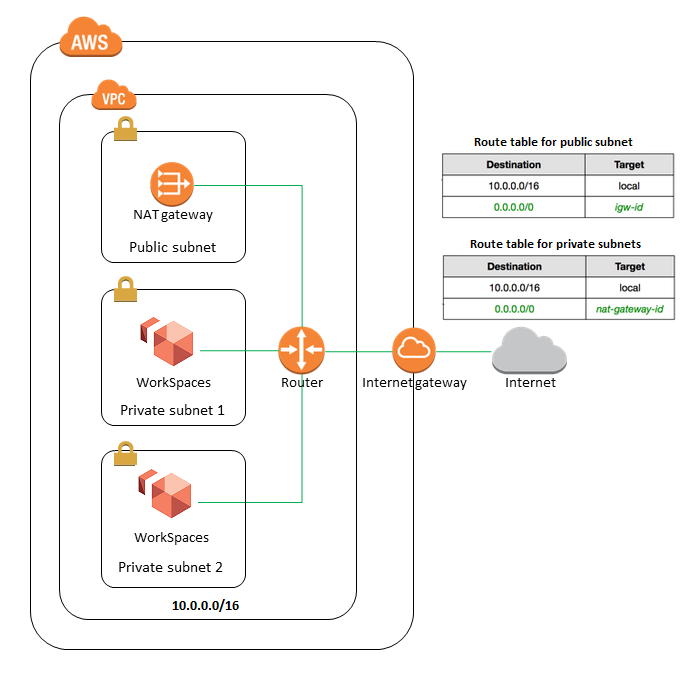
- WorkSpaces launches the WorkSpaces in a VPC.
- If using AWS Directory Service to create an AWS Managed Microsoft AD or a Simple AD, it is recommended to configure the VPC with one public subnet and two private subnets.
- To provide internet access to WorkSpaces in a private subnet, configure a NAT gateway in the public subnet. Configure the directory to launch the WorkSpaces in the private subnets.
- WorkSpaces Personal and Core are available in 30+ AWS Regions globally (expanded to 2 additional regions in April 2026).
WorkSpaces for AI Agents (Preview)
- Announced May 2026 (Preview) – WorkSpaces now enables AI agents to securely operate desktop applications without requiring application modernization.
- AI agents authenticate through IAM and connect via WorkSpaces with complete audit trails through CloudTrail and CloudWatch.
- Supports Model Context Protocol (MCP) for agent connectivity — no APIs to build, no application migrations to plan.
- Agents can point, click, and navigate desktop applications using computer vision, just like human users.
- Ideal for automating workflows on legacy desktop applications (mainframes, ERP systems, proprietary tools) that lack modern APIs.
- Operates within existing WorkSpaces security environment with enterprise-grade isolation.
WorkSpaces Thin Client (End of Support March 2027)
- Amazon WorkSpaces Thin Client is a low-cost hardware device for accessing virtual desktops.
- Ships directly from Amazon fulfillment centers to end users or company locations.
- Provides centralized device management console for monitoring and maintaining devices.
- ⚠️ End of Support: March 31, 2027. After this date, devices will no longer be usable and the Thin Client console will be unavailable.
WorkSpaces Pricing
- AlwaysOn – Fixed monthly rate for users who use their WorkSpaces full-time.
- AutoStop – Hourly rate for users who use WorkSpaces part-time. WorkSpaces stop after a configurable idle period.
- WorkSpaces Pools – Pay-as-you-go hourly pricing with auto-scaling.
- WorkSpaces Core – 20% lower cost than all-inclusive WorkSpaces (does not include VDI management software).
AWS Certification Exam Practice Questions
- Questions are collected from Internet and the answers are marked as per my knowledge and understanding (which might differ with yours).
- AWS services are updated everyday and both the answers and questions might be outdated soon, so research accordingly.
- AWS exam questions are not updated to keep up the pace with AWS updates, so even if the underlying feature has changed the question might not be updated
- Open to further feedback, discussion and correction.
- A company needs to deploy virtual desktops to its customers in a virtual private cloud, leveraging existing security controls. Which set of AWS services and features will meet the company’s requirements?
- Virtual Private Network connection. AWS Directory Services, and ClassicLink (ClassicLink allows you to link an EC2-Classic instance to a VPC in your account, within the same region)
- Virtual Private Network connection. AWS Directory Services, and Amazon WorkSpaces (WorkSpaces for Virtual desktops, and AWS Directory Services to authenticate to an existing on-premises AD through VPN)
- AWS Directory Service, Amazon WorkSpaces, and AWS Identity and Access Management (AD service needs a VPN connection to interact with an On-premise AD directory)
- Amazon Elastic Compute Cloud, and AWS Identity and Access Management (Need WorkSpaces for virtual desktops)
- Your company is planning on testing out Amazon WorkSpaces for their account. They are going to allocate a set of workstations with static IP addresses for this purpose. They need to ensure that only these IP addresses have access to Amazon WorkSpaces. How can you achieve this?
- Create an IP Access Control Group
- Place a WAF in front of Amazon WorkSpaces
- Specify the IP addresses in the NACL
- Specify the IP addresses in the Security Group
- A company wants to provide persistent virtual desktops to individual knowledge workers and also needs to set up shared non-persistent desktops for a training lab with 50 temporary users. Which WorkSpaces configuration meets both requirements?
- Use WorkSpaces Personal for all users with AutoStop mode for training
- Use WorkSpaces Personal for knowledge workers and WorkSpaces Pools for the training lab (WorkSpaces Personal provides persistent desktops; WorkSpaces Pools provides non-persistent desktops that are cost-effective for shared use cases like training labs)
- Use WorkSpaces Core for all users with different management policies
- Use WorkSpaces Secure Browser for training and WorkSpaces Personal for knowledge workers
- An organization is migrating from an on-premises Citrix VDI environment to AWS. They want to continue using their Citrix management console but run the infrastructure on AWS. Which WorkSpaces option is most appropriate?
- Amazon WorkSpaces Personal with DCV protocol
- Amazon WorkSpaces Pools with auto-scaling
- Amazon WorkSpaces Core with Citrix integration (WorkSpaces Core provides VDI infrastructure that integrates with third-party management solutions like Citrix, Omnissa, Workspot, and Leostream)
- Amazon WorkSpaces Secure Browser with Citrix plugins
- A company requires business continuity for their WorkSpaces deployment. If the primary Region becomes unavailable, users should be automatically redirected to desktops in a secondary Region. Which feature should they implement?
- WorkSpaces Auto-Recovery in same Region
- Cross-AZ replication with Route 53
- WorkSpaces Multi-Region Resilience (MRR) (MRR enables standby WorkSpaces in a secondary Region with automatic redirection via DNS health checks when the primary Region is unavailable)
- AWS Backup with cross-Region replication
- Which streaming protocol should be used for new Amazon WorkSpaces deployments to support Windows 11, certificate-based authentication, and WebAuthn?
- PCoIP
- DCV (formerly WSP) (DCV is the recommended protocol for new deployments and supports Windows 11, Windows Server 2025, certificate-based authentication, and WebAuthn. PCoIP Web Access is closed to new customers since November 2025)
- RDP
- NICE DCV standalone
References
WorkSpaces Administration Guide
WorkSpaces Pools Announcement (June 2024)
While classiclink is not the right answer, it does exists 🙂
http://docs.aws.amazon.com/AWSEC2/latest/UserGuide/vpc-classiclink.html
Thanks Kranthi 🙂 never used EC2 Classic hence did not come across the option. Will update the answer with the correct reason.
Hi Jp,
Is Virtual Private Network connection is not a native AWS service , the question talked about set of AWS services and features , how could we justify the answer being option C over B ?
i am sure we need a VPN connection but the question is a combination of AWS services right ? , may be is the question needs to modified ?
Even though VPN is not a AWS Native service. The configurations for VPN surely are. You need a VPN and Customer gateways to be created and configured to enable AWS services interact with an On Premise solution.