Table of Contents
hide
EC2 VM Import/Export
- EC2 VM Import/Export enables importing virtual machine (VM) images from existing virtualization environment to EC2, and then export them back to the on-premises environment.
- EC2 VM Import/Export enables
- migration of applications and workloads to EC2,
- copying VM image catalog to EC2, or
- creating a repository of VM images for backup and disaster recovery,
- leveraging previous investments in building VMs by migrating the VMs to EC2.
- VM Import/Export is available at no additional charge beyond standard usage charges for Amazon EC2 and Amazon S3.
- For large-scale lift-and-shift migrations, AWS Transform MGN (formerly AWS Application Migration Service) is the recommended service as it provides continuous block-level replication, automated testing, and minimal-downtime cutover.
Supported Image Formats
- OVA – Open Virtual Appliance image format, supports importing images with multiple hard disks
- VMDK – Stream-optimized ESX Virtual Machine Disk, compatible with VMware ESX and VMware vSphere
- VHD/VHDX – Fixed and Dynamic Virtual Hard Disk formats, compatible with Microsoft Hyper-V, Microsoft Azure, and Citrix Xen
- RAW – Raw format for importing disks and VMs
⚠️ Important (April 2026): Starting April 1, 2026, VM Import/Export no longer supports i386 (32-bit) architecture. Import and Export tasks will not work for 32-bit OS versions including Windows Server 2003/2008 (32-bit), Windows 7/8 (32-bit), CentOS 5/6 (32-bit), Debian 6-12 (32-bit), and Ubuntu 12.04-17.04 (32-bit).
Supported Operating Systems
- Linux:
- Amazon Linux 2023 (kernel 6.1)
- Ubuntu 24.04, 25.10, 26.04
- Red Hat Enterprise Linux (RHEL) 8.9, 9.3–9.6
- Rocky Linux 9.1–9.6
- Oracle Linux 8.9, 9.3–9.6
- CentOS 5.1–8.x (64-bit only for older versions)
- Debian 7–12
- SUSE Linux Enterprise Server 12, 15
- Windows:
- Windows Server 2008 R2 through Windows Server 2025
- Windows 7 through Windows 11
- Windows 11 requires UEFI boot mode
- Not Supported: ARM64 architecture VMs, VMs from physical-to-virtual (P2V) conversions
Boot Modes
- VM Import/Export supports two boot modes: UEFI (Unified Extensible Firmware Interface) and Legacy BIOS
- The optional
--boot-modeparameter can be specified aslegacy-biosoruefiduring import - Windows 11 requires UEFI boot mode
- If no boot mode is specified and the VM is compatible with both, GPT volumes are converted to MBR partitioned volumes (Legacy BIOS is selected by default)
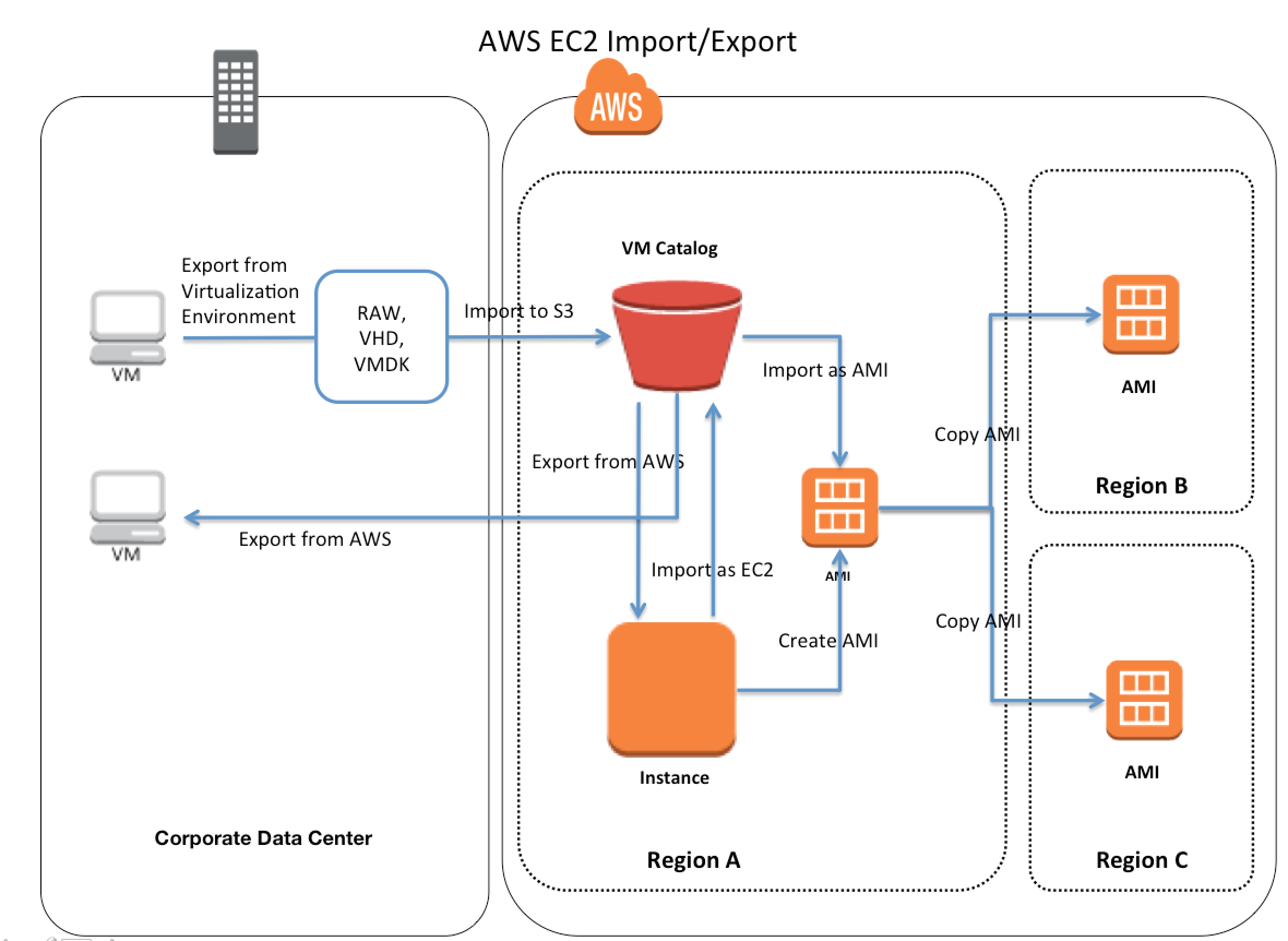
EC2 VM Import/Export Features
- Import a VM from a virtualization environment to EC2 as an Amazon Machine Image (AMI), which can be used to launch EC2 instances. (Recommended approach)
- Import a VM as an EC2 instance (initially in a stopped state). Note: Importing as an instance is deprecated — the AWS CLI only supports importing as an image via
aws ec2 import-image. - Export a VM that was previously imported from the virtualization environment.
- Import disks as EBS snapshots.
Export Limitations
- Cannot export instances/images containing third-party software provided by AWS (e.g., Windows or SQL Server images, or any image from AWS Marketplace)
- Only supports exporting to an S3 bucket in the same AWS account
- Export operations do not support hybrid boot configurations (GRUB2 must be enabled for either BIOS or UEFI, not both)
Import Limitations
- Does not support importing disks separated into multiple files
- Does not support VMs that use Raw Device Mapping (RDM)
- Does not support VMs created by physical-to-virtual (P2V) conversion
- ARM64 architecture VMs are not supported
- Maximum 24 volumes can be attached to an import task
Integration with EC2 Image Builder
- EC2 Image Builder works in conjunction with VM Import/Export to create and maintain golden images for both Amazon EC2 (AMI) and on-premises VM formats (VHDX, VMDK, OVF).
- The
import-vm-imagecommand in Image Builder CLI references the VM Import task ID to pull in the created AMI as a base image for Image Builder recipes. - This enables building automated image pipelines that span both cloud and on-premises environments.
Related Migration Services
- AWS Transform MGN (formerly AWS Application Migration Service / AWS MGN) – Recommended for lift-and-shift migrations. Provides continuous block-level replication with agent-based or agentless (VMware only) options. Automates server conversion to native EC2 instances with near-zero data loss and minimal downtime cutover.
- Replaces deprecated AWS Server Migration Service (SMS) and CloudEndure Migration
- Supports physical, virtual, and cloud-to-cloud migrations
- Amazon Elastic VMware Service (Amazon EVS) – GA since August 2025. Run VMware Cloud Foundation (VCF) directly within your Amazon VPC without re-architecting applications. Ideal for organizations wanting to maintain VMware tools and investments while leveraging AWS infrastructure.
- AWS Transform – Agentic AI service (GA May 2025) that accelerates full-stack migration and modernization including Windows, mainframe, and VMware workloads.
When to Use VM Import/Export vs. AWS Transform MGN
| Criteria | VM Import/Export | AWS Transform MGN |
|---|---|---|
| Best for | One-off imports, image catalog migration, DR repository | Large-scale migrations, continuous replication |
| Downtime | Higher (full image upload required) | Minimal (continuous replication + cutover) |
| Automation | CLI-based, manual process | Fully automated with testing and cutover workflows |
| Replication | Point-in-time snapshot | Continuous block-level replication |
| Scale | Individual VMs | Multiple servers concurrently |
AWS Certification Exam Practice Questions
- Questions are collected from Internet and the answers are marked as per my knowledge and understanding (which might differ with yours).
- AWS services are updated everyday and both the answers and questions might be outdated soon, so research accordingly.
- AWS exam questions are not updated to keep up the pace with AWS updates, so even if the underlying feature has changed the question might not be updated
- Open to further feedback, discussion and correction.
- You are responsible for a legacy web application whose server environment is approaching end of life. You would like to migrate this application to AWS as quickly as possible, since the application environment currently has the following limitations: The VM’s single 10GB VMDK is almost full. The virtual network interface still uses the 10Mbps driver, which leaves your 100Mbps WAN connection completely underutilized. It is currently running on a highly customized Windows VM within a VMware environment: You do not have the installation media. This is a mission critical application with an RTO (Recovery Time Objective) of 8 hours. RPO (Recovery Point Objective) of 1 hour. How could you best migrate this application to AWS while meeting your business continuity requirements?
- Use the EC2 VM Import Connector for vCenter to import the VM into EC2
- Use Import/Export to import the VM as an EBS snapshot and attach to EC2. (Import/Export is used to transfer large amount of data)
- Use S3 to create a backup of the VM and restore the data into EC2.
- Use the ec2-bundle-instance API to Import an Image of the VM into EC2 (only bundles a Windows instance store instance)
- You are tasked with moving a legacy application from a virtual machine running inside your datacenter to an Amazon VPC. Unfortunately this app requires access to a number of on-premises services and no one who configured the app still works for your company. Even worse there’s no documentation for it. What will allow the application running inside the VPC to reach back and access its internal dependencies without being reconfigured? (Choose 3 answers)
- An AWS Direct Connect link between the VPC and the network housing the internal services (VPN or a DX for communication)
- An Internet Gateway to allow a VPN connection. (Virtual and Customer gateway is needed)
- An Elastic IP address on the VPC instance (Don’t need a EIP as private subnets can also interact with on-premises network)
- An IP address space that does not conflict with the one on-premises (IP address cannot conflict)
- Entries in Amazon Route 53 that allow the Instance to resolve its dependencies’ IP addresses (Route 53 is not required)
- A VM Import of the current virtual machine (VM Import to copy the VM to AWS as there is no documentation it can’t be configured from scratch)
- A company wants to migrate 200 VMs from on-premises VMware to AWS with minimal downtime. The VMs run various Linux and Windows workloads. Which service should they use?
- VM Import/Export (VM Import/Export is for individual VM image imports, not large-scale migrations)
- AWS Transform MGN (Application Migration Service) (MGN provides continuous block-level replication with automated cutover for large-scale migrations with minimal downtime)
- AWS Server Migration Service (SMS was discontinued in March 2022, replaced by MGN)
- Amazon S3 with manual AMI creation
- An organization needs to maintain a golden image pipeline that produces AMIs for EC2 and VMDK/VHD images for on-premises deployment. Which combination of services should they use?
- EC2 Image Builder with VM Import/Export (Image Builder uses VM Import/Export to create and maintain images for both EC2 (AMI) and on-premises VM formats (VHDX, VMDK, OVF))
- AWS Transform MGN with manual exports
- AWS Backup with cross-region replication
- CloudFormation with custom AMI resources
- A company running VMware vSphere on-premises wants to extend their environment to AWS without re-architecting their applications or changing their operational tools. Which AWS service is most appropriate?
- VM Import/Export (VM Import/Export converts VMs to EC2 instances, doesn’t maintain VMware environment)
- AWS Transform MGN (MGN converts to native EC2, doesn’t maintain VMware tooling)
- Amazon Elastic VMware Service (Amazon EVS) (Amazon EVS runs VMware Cloud Foundation directly within your VPC, maintaining VMware tools and operational runbooks)
- Amazon EC2 with VMware Cloud on AWS (VMware Cloud on AWS is a Broadcom-managed service, different from Amazon EVS)
Q) Your website is serving on-demand training videos to your workforce. Videos are uploaded monthly in high resolution MP4 format. Your workforce is distributed globally often on the move and using company-provided tablets that require the HTTP Live Streaming (HLS) protocol to watch a video. Your company has no video transcoding expertise and it required you may need to pay for a consultant.
How do you implement the most cost-efficient architecture without compromising high availability and quality of video delivery’?
A. A video transcoding pipeline running on EC2 using SQS to distribute tasks and Auto Scaling to adjust the number of nodes depending on the length of the queue. EBS volumes to host videos and EBS snapshots to incrementally backup original files after a few days. CloudFront to serve HLS transcoded videos from EC2.
B. Elastic Transcoder to transcode original high-resolution MP4 videos to HLS. EBS volumes to host videos and EBS snapshots to incrementally backup original files after a few days. CloudFront to serve HLS transcoded videos from EC2
C. Elastic Transcoder to transcode original high-resolution MP4 videos to HLS. S3 to host videos with Lifecycle Management to archive original files to Glacier after a few days. CloudFront to serve HLS transcoded videos from S3.
D. A video transcoding pipeline running on EC2 using SQS to distribute tasks and Auto Scaling to adjust the number of nodes depending on the length of the queue. S3 to host videos with Lifecycle Management to archive all files to Glacier after a few days. CloudFront to serve HLS transcoded videos from Glacier.
Could you please let me know what would be the answer & appropriate justification.
Question targets 3 aspects Cost effective architecture, High availability, High quality with HLS support.
CloudFront is needed for HLS and for High availability which all answers have.
Video transcoding might not guarantee high quality and would need video transcoding expertise increasing cost hence eliminating A and D
Elastic transcoder would provide video transcoding quality and save on cost as wont need much expertise hence B and C are valid.
EBS volumes would be costly as well as snapshots span only region hence eliminating A and B
CloudFront over S3 would be the perfect combination. Eliminating D as it is over Glacier.
#1 is incorrect, as video transcoding might not guarantee high quality and would need video transcoding expertise increasing cost. Also EBS volumes would be costly.
Would select C for the following reasons
#2. . However,
C is right answer
Hi,
What’s the difference between Vmware Import/Export and Server migration service?
VM Import/Export was an old service for VM migration and has since being replaced with SMS.