EC2 Placement Groups – Cluster, Spread & Partition

EC2 Placement Groups

  • EC2 Placement groups determine how the instances are placed on the underlying hardware.
  • AWS provides three types of placement groups
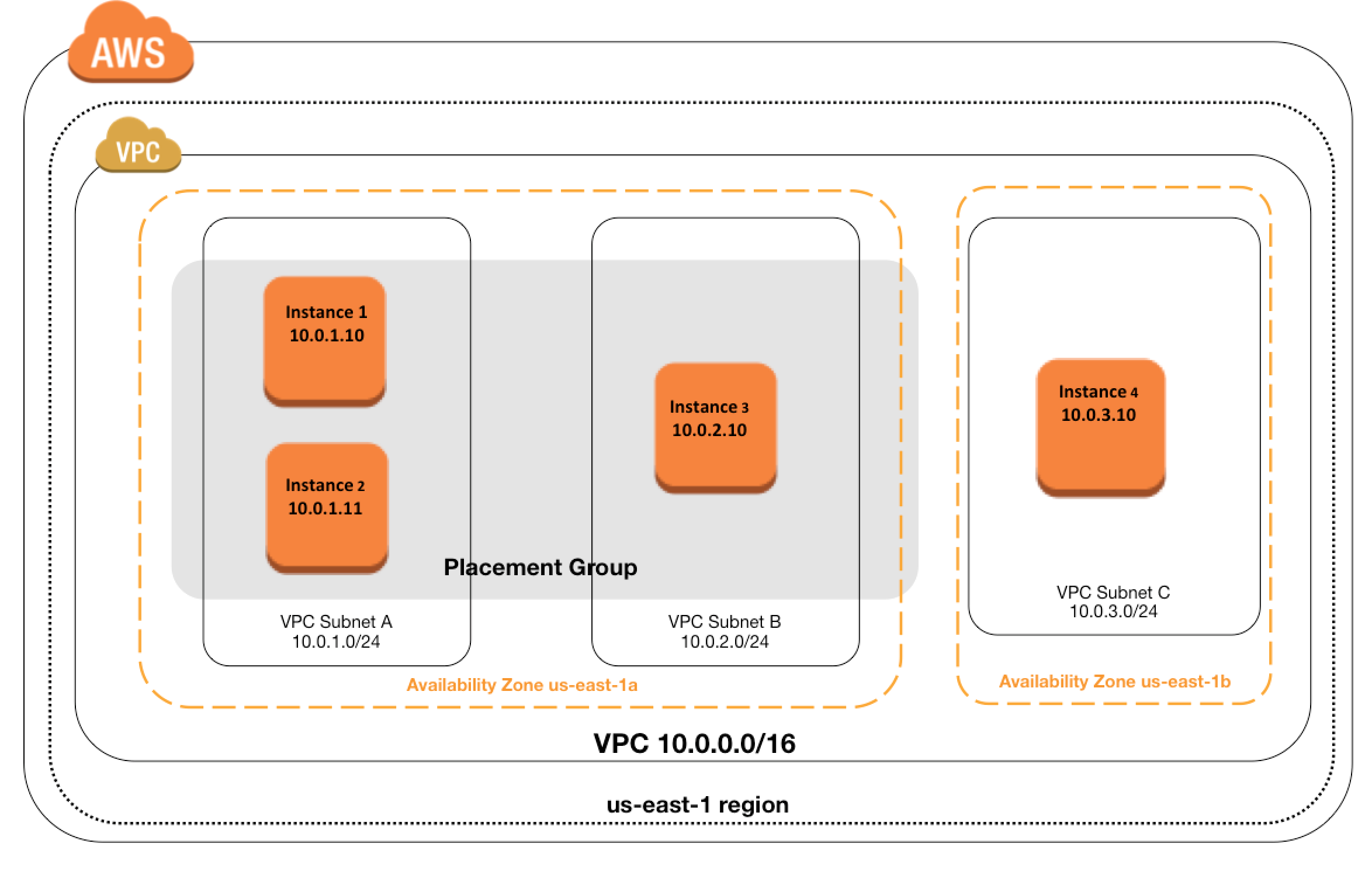
    • Cluster – clusters instances into a low-latency group in a single AZ
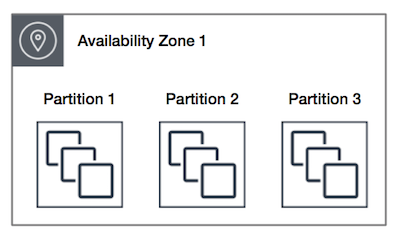
    • Partition – spreads instances across logical partitions, ensuring that instances in one partition do not share underlying hardware with instances in other partitions
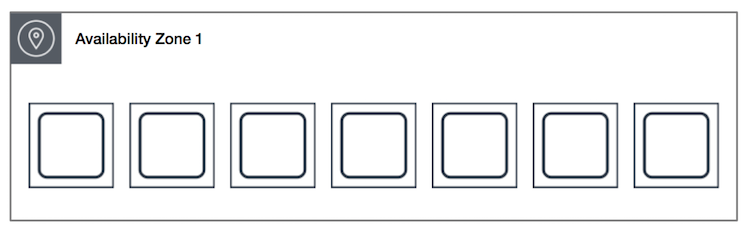
    • Spread – strictly places a small group of instances across distinct underlying hardware to reduce correlated failures
  • There is no charge for creating a placement group.
  • A maximum of 500 placement groups can be created per account in each Region.
  • Placement groups support tagging at creation time.
  • Placement groups can be shared across multiple AWS accounts using AWS Resource Access Manager (RAM).

Cluster Placement Groups

  • is a logical grouping of instances within a single Availability Zone
  • don’t span across Availability Zones
  • can span peered VPCs in the same Region
  • Instances are not isolated to a single rack.
  • impacts High Availability as susceptible to hardware failures for the application
  • recommended for
    • applications that benefit from low network latency, high network throughput, or both.
    • when the majority of the network traffic is between the instances in the group.
  • To provide the lowest latency, and the highest packet-per-second network performance for the placement group, choose an instance type that supports enhanced networking
  • recommended to launch all group instances with the same instance type at the same time to ensure enough capacity
  • instances can be added later, but there are chances of encountering an insufficient capacity error
  • for moving an instance into or between placement groups,
    • the instance must be in the stopped state
    • use the Modify Instance Placement option (Console) or modify-instance-placement CLI command
    • can also remove an instance from a placement group by specifying an empty string for the group name
  • an instance still runs in the same placement group if stopped and started within the placement group.
  • in case of a capacity error, stop and start all of the instances in the placement group, and try the launch again. Starting the instances may migrate them to hardware that has capacity for all requested instances
  • is only available within a single AZ either in the same VPC or peered VPCs
  • Instances in the same cluster placement group enjoy a higher per-flow throughput limit for TCP/IP traffic and are placed in the same high-bisection bandwidth segment of the network.
  • Supports On-Demand Capacity Reservations (ODCRs) to reserve capacity explicitly within the cluster placement group.

Capacity Reservations in Cluster Placement Groups (CPG-ODCRs)

  • On-Demand Capacity Reservations can be created within Cluster Placement Groups for assured capacity with low latency and high throughput.
  • CPG-ODCRs can be added to Resource Groups for managing reservations across multiple placement groups.
  • CPG-ODCRs can be shared across multiple AWS accounts through AWS Resource Access Manager (RAM) to create central pools of capacity. (August 2025)
  • Zonal Reserved Instances cannot reserve capacity explicitly in a placement group; use On-Demand Capacity Reservations instead.
  • Capacity Reservations do not reserve capacity in partition or spread placement groups.

AWS EC2 Placement Group

Partition Placement Groups

  • is a group of instances spread across partitions i.e. group of instances spread across racks.
  • Partitions are logical groupings of instances, where contained instances do not share the same underlying hardware across different partitions.
  • EC2 divides each group into logical segments called partitions.
  • EC2 ensures that each partition within a placement group has its own set of racks. Each rack has its own network and power source.
  • No two partitions within a placement group share the same racks, allowing isolating the impact of a hardware failure within the application.
  • reduces the likelihood of correlated hardware failures for the application.
  • can have partitions in multiple Availability Zones in the same region
  • can have a maximum of seven partitions per Availability Zone
  • number of instances that can be launched into a partition placement group is limited only by the limits of the account.
  • When instances are launched into a partition placement group, EC2 tries to evenly distribute the instances across all partitions. EC2 does not guarantee an even distribution.
  • can be used to spread deployment of large distributed and replicated workloads, such as HDFS, HBase, and Cassandra, across distinct hardware.
  • offer visibility into the partitions and the instances to partitions mapping can be seen. This information can be shared with topology-aware applications, such as HDFS, HBase, and Cassandra. These applications use this information to make intelligent data replication decisions for increasing data availability and durability.
  • Capacity Reservations do not reserve capacity in a partition placement group.

Spread Placement Groups

  • is a group of instances that are each placed on distinct underlying hardware i.e. each instance on a distinct rack with each rack having its own network and power source.
  • recommended for applications that have a small number of critical instances that should be kept separate from each other.
  • reduces the risk of simultaneous failures that might occur when instances share the same underlying hardware.
  • provide access to distinct hardware, and are therefore suitable for mixing instance types or launching instances over time.
  • can span multiple Availability Zones in the same region.
  • can have a maximum of seven running instances per AZ per group
  • maximum number of instances = 1 instance per rack * 7 racks * No. of AZs for e.g. in a Region with three AZs, a total of 21 instances in the group (seven per zone) can be launched
  • If the start or launch of an instance in a spread placement group fails cause of insufficient unique hardware to fulfil the request, the request can be tried later as EC2 makes more distinct hardware available over time
  • Capacity Reservations do not reserve capacity in a spread placement group.

Spread Placement Group Levels

  • Placement groups can spread instances across racks or hosts.
  • Rack level spread (default) – each instance is placed on a distinct rack. Available in AWS Regions and on AWS Outposts.
  • Host level spread – each instance is placed on a distinct host. Available only with AWS Outposts.
  • On Outposts, a rack level spread placement group can hold as many instances as you have racks in your Outpost deployment.
  • On Outposts, a host level spread placement group can hold as many instances as you have hosts in your Outpost deployment.

Placement Group Sharing (Cross-Account)

  • Placement groups can be shared across multiple AWS accounts using AWS Resource Access Manager (RAM).
  • To share a placement group, create a resource share through AWS RAM, add the placement group as a resource, and specify the target accounts.
  • Instances from different AWS accounts can be launched into the same shared placement group for low-latency communication.
  • A shared partition placement group supports a maximum of seven partitions per Availability Zone.
  • A shared spread placement group supports a maximum of seven running instances per Availability Zone.
  • You can’t view or modify instances and capacity reservations associated with a shared placement group but not owned by you.
  • Use case: Enables scenarios like HFT (High-Frequency Trading) where multiple accounts need low-latency communication within the same placement group.

Placement Group Rules and Limitations

  • Ensure unique Placement group name within AWS account for the region.
  • A maximum of 500 placement groups can be created per account in each Region.
  • Placement groups cannot be merged.
  • An instance can be placed in one placement group at a time; you can’t place an instance in multiple placement groups.
  • You can’t launch Dedicated Hosts in placement groups.
  • Instances can be moved to or removed from placement groups using the Modify Instance Placement action (instance must be in stopped state).
  • Cluster Placement groups
    • can’t span multiple Availability Zones.
    • supported by current generation instance types, except for burstable performance instances (e.g., T2, T3), Mac1 instances, and M7i-flex instances.
    • also supports previous generation instances: A1, C3, C4, I2, M4, R3, and R4.
    • maximum network throughput speed of traffic between two instances in a cluster placement group is limited by the slower of the two instances, so choose the instance type properly.
    • can use up to 10 Gbps for single-flow traffic. Instances not within a cluster placement group can use up to 5 Gbps for single-flow traffic.
    • Traffic to and from S3 buckets within the same region over the public IP address space or through a VPC endpoint can use all available instance aggregate bandwidth.
    • recommended using the same instance type i.e. homogenous instance types. Although multiple instance types can be launched into a cluster placement group. However, this reduces the likelihood that the required capacity will be available for your launch to succeed.
    • Network traffic to the internet and over an AWS Direct Connect connection to on-premises resources is limited to 5 Gbps.
    • Supports On-Demand Capacity Reservations to explicitly reserve capacity. Zonal Reserved Instances cannot reserve capacity in a placement group.
  • Partition placement groups
    • supports a maximum of seven partitions per Availability Zone
    • Dedicated Instances can have a maximum of two partitions
    • are not supported for Dedicated Hosts
    • Capacity Reservations do not reserve capacity in a partition placement group
  • Spread placement groups
    • supports a maximum of seven running instances per Availability Zone for e.g., in a region that has three AZs, then a total of 21 running instances in the group (seven per zone).
    • are not supported for Dedicated Instances.
    • Host level spread placement groups are only supported on AWS Outposts.
    • Capacity Reservations do not reserve capacity in a spread placement group.

ENA Express and Placement Groups

  • ENA Express uses the Scalable Reliable Datagram (SRD) protocol to increase the maximum single-flow bandwidth up to 25 Gbps between EC2 instances without requiring a cluster placement group.
  • ENA Express also provides up to 85% improvement in P99.9 latency for high throughput workloads.
  • Works transparently with TCP and UDP protocols.
  • For the absolute highest performance (lowest latency + highest PPS), a cluster placement group combined with enhanced networking and Jumbo Frames (9001 MTU) remains the best option.

AWS Certification Exam Practice Questions

  • Questions are collected from Internet and the answers are marked as per my knowledge and understanding (which might differ with yours).
  • AWS services are updated everyday and both the answers and questions might be outdated soon, so research accordingly.
  • AWS exam questions are not updated to keep up the pace with AWS updates, so even if the underlying feature has changed the question might not be updated
  • Open to further feedback, discussion and correction.
  1. What is a cluster placement group?
    • A collection of Auto Scaling groups in the same Region
    • Feature that enables EC2 instances to interact with each other via high bandwidth, low latency connections
    • A collection of Elastic Load Balancers in the same Region or Availability Zone
    • A collection of authorized Cloud Front edge locations for a distribution
  2. In order to optimize performance for a compute cluster that requires low inter-node latency, which feature in the following list should you use?
    • AWS Direct Connect
    • Cluster Placement Groups
    • VPC private subnets
    • EC2 Dedicated Instances
    • Multiple Availability Zones
  3. What is required to achieve gigabit network throughput on EC2? You already selected cluster-compute, 10GB instances with enhanced networking, and your workload is already network-bound, but you are not seeing 10 gigabit speeds.
    1. Enable biplex networking on your servers, so packets are non-blocking in both directions and there’s no switching overhead.
    2. Ensure the instances are in different VPCs so you don’t saturate the Internet Gateway on any one VPC.
    3. Select PIOPS for your drives and mount several, so you can provision sufficient disk throughput
    4. Use a Cluster placement group for your instances so the instances are physically near each other in the same Availability Zone. (You are not guaranteed 10 gigabit performance, except within a placement group. Using placement groups enables applications to participate in a low-latency, 10 Gbps network)
  4. You need the absolute highest possible network performance for a cluster computing application. You already selected homogeneous instance types supporting 10 gigabit enhanced networking, made sure that your workload was network bound, and put the instances in a placement group. What is the last optimization you can make?
    1. Use 9001 MTU instead of 1500 for Jumbo Frames, to raise packet body to packet overhead ratios. (For instances that are collocated inside a placement group, jumbo frames help to achieve the maximum network throughput possible, and they are recommended in this case)
    2. Segregate the instances into different peered VPCs while keeping them all in a placement group, so each one has its own Internet Gateway.
    3. Bake an AMI for the instances and relaunch, so the instances are fresh in the placement group and do not have noisy neighbors
    4. Turn off SYN/ACK on your TCP stack or begin using UDP for higher throughput.
  5. A company needs to deploy a distributed database across multiple racks for fault isolation while maintaining rack-level visibility for data replication decisions. Which placement group strategy should they use?
    1. Cluster placement group
    2. Partition placement group
    3. Spread placement group
    4. Default placement (no placement group)
  6. An organization has multiple AWS accounts that need instances in the same placement group for low-latency communication. How can they achieve this?
    1. Create identical placement groups with the same name in each account
    2. Use VPC peering between the accounts
    3. Share the placement group across accounts using AWS Resource Access Manager (RAM)
    4. Launch all instances from a single account and use IAM cross-account roles
  7. Which of the following statements about spread placement groups are correct? (Choose 2)
    1. A rack level spread placement group supports a maximum of seven running instances per Availability Zone
    2. Host level spread placement groups are available in all AWS Regions
    3. Spread placement groups support Dedicated Instances
    4. Spread placement groups can span multiple Availability Zones in the same Region
  8. A team wants to move an existing running instance into a cluster placement group. What is the correct procedure?
    1. Use the modify-instance-placement command while the instance is running
    2. Create an AMI and launch a new instance into the placement group
    3. Stop the instance, use modify-instance-placement to assign it to the placement group, then start it
    4. Terminate the instance and launch a new one in the placement group

References

Related Posts

AWS EC2 Storage

EC2 Storage Overview

EC2 Storage Options - EBS, S3 & Instance Store

Storage Types

Elastic Block Store – EBS

  • Elastic Block Store – EBS provides highly available, reliable, durable, block-level storage volumes that can be attached to an EC2 instance.
  • persists independently from the running life of an instance.
  • behaves like a raw, unformatted, external block device that can be attached to a single EC2 instance at a time (except Multi-Attach enabled io1/io2 volumes that can attach to up to 16 Nitro-based instances).
  • is recommended for data that requires frequent and granular updates e.g. running a database or filesystem.
  • is Zonal and can be attached to any instance within the same Availability Zone and can be used like any other physical hard drive.
  • is particularly well-suited for use as the primary storage for file systems, databases, or any applications that require fine granular updates and access to raw, unformatted, block-level storage.
  • provides six volume types: Provisioned IOPS SSD (io2 Block Express and io1), General Purpose SSD (gp3 and gp2), Throughput Optimized HDD (st1) and Cold HDD (sc1).
  • General Purpose SSD (gp3) volumes support up to 64 TiB, 80,000 IOPS, and 2,000 MiB/s throughput (enhanced in September 2025 from 16 TiB, 16,000 IOPS, 1,000 MiB/s).
  • Provisioned IOPS SSD (io2 Block Express) volumes support up to 64 TiB, 256,000 IOPS, and 4,000 MB/s throughput with sub-millisecond latency and 99.999% durability.
  • supports data protection features including Snapshots, EBS Snapshot Archive, Recycle Bin (accidental deletion protection), and Snapshot Lock (WORM protection).

Instance Store Storage

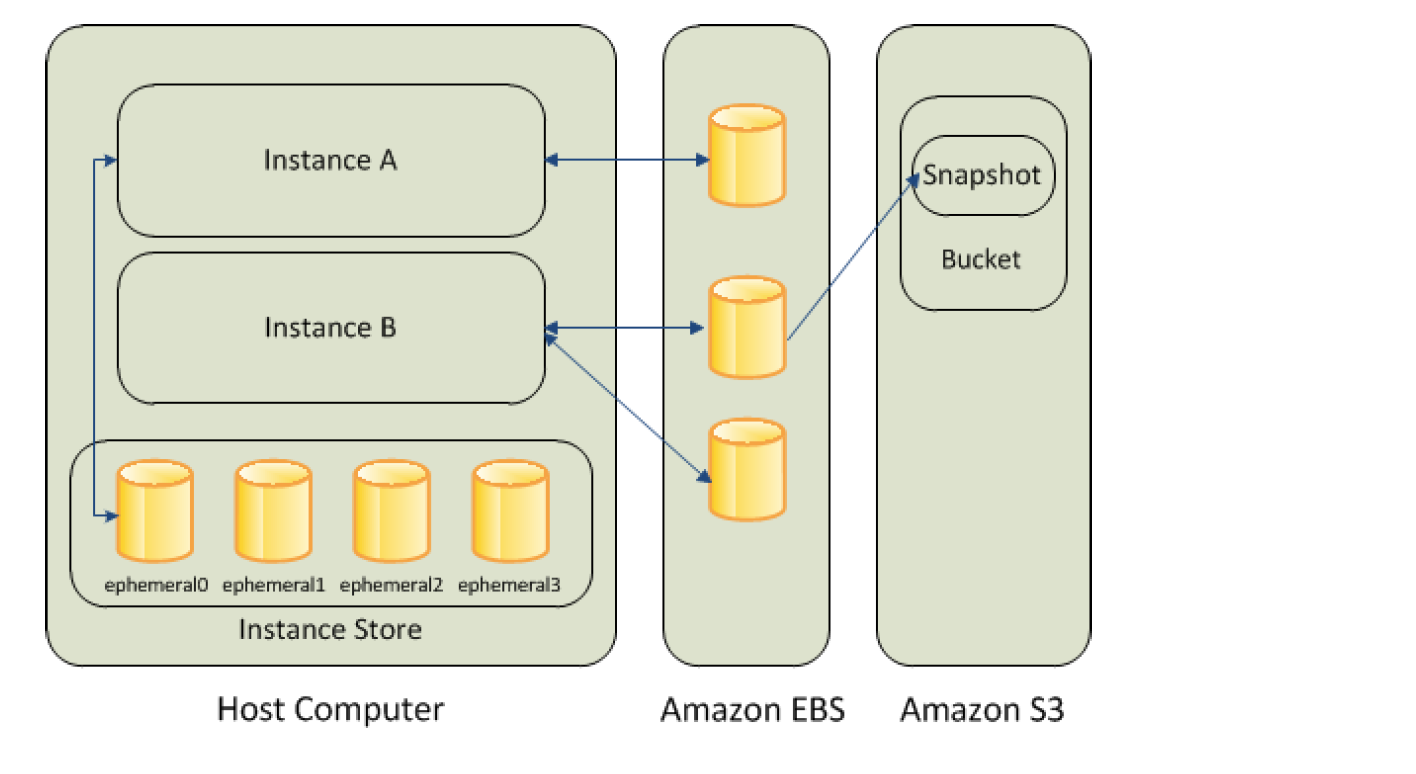
  • Instance store provides temporary or Ephemeral block-level storage.
  • is located on the disks that are physically attached to the host computer.
  • consists of one or more instance store volumes exposed as block devices.
  • The size of an instance store varies by instance type.
  • Virtual devices for instance store volumes are ephemeral[0-23], starting the first one as ephemeral0 and so on.
  • While an instance store is dedicated to a particular instance, the disk subsystem is shared among instances on a host computer.
  • is ideal for temporary storage of information that changes frequently, such as buffers, caches, scratch data, and other temporary content, or for data that is replicated across a fleet of instances, such as a load-balanced pool of web servers.
  • delivers very high random I/O performance and is a good option for storage with very low latency requirements, but you don’t need the data to persist when the instance terminates or you can take advantage of fault-tolerant architectures.
  • Data is lost when the instance is stopped, terminated, or the underlying host fails. Data persists during an instance reboot.
  • Instance store volumes are included as part of the usage cost of the instance.

Amazon EBS vs Instance Store

More detailed @ Comparison of EBS vs Instance Store

Simple Storage Service – S3

More details @ AWS S3

Elastic File System – EFS

  • Elastic File System – EFS provides a simple, fully managed, easy-to-set-up, scalable, serverless, and cost-optimized file storage.
  • can automatically scale from gigabytes to petabytes of data without needing to provision storage.
  • provides managed NFS (network file system) that can be mounted on and accessed by multiple EC2 instances in multiple AZs simultaneously.
  • offers highly durable, highly scalable, and highly available storage.
    • EFS Regional file systems (recommended) store data redundantly across multiple AZs in the same region.
    • EFS One Zone file systems provide lower-cost option storing data in a single AZ.
    • grows and shrinks automatically as files are added and removed, so there is no need to manage storage procurement or provisioning.
  • supports the Network File System version 4 (NFSv4.1 and NFSv4.0) protocol.
  • provides file system access semantics, such as strong data consistency and file locking.
  • is compatible with all Linux-based AMIs for EC2, POSIX file system (~Linux) that has a standard file API.
  • is a shared POSIX system for Linux systems and does not work for Windows (use FSx for Windows File Server instead).
  • offers the ability to encrypt data at rest using KMS and in transit.
  • can be accessed from on-premises using an AWS Direct Connect or AWS VPN connection between the on-premises datacenter and VPC.
  • can be accessed concurrently from servers in the on-premises data center as well as EC2 instances in the VPC.
  • supports up to 2.5 million read IOPS and 500,000 write IOPS per file system (10x increase announced Nov 2024).
  • supports Elastic Throughput of up to 60 GiB/s read and 5 GiB/s write throughput per file system.
  • supports up to 10,000 access points per file system for application-specific access management (increased Feb 2025).
  • supports IPv6 for both EFS APIs and mount targets (added Jun 2025).

Amazon FSx

  • Amazon FSx provides fully managed file storage built on four widely-used file systems: Lustre, NetApp ONTAP, OpenZFS, and Windows File Server.
  • FSx for Windows File Server – provides fully managed Windows-native shared file storage using SMB protocol. Supports Windows features like Active Directory, DFS, and shadow copies.
  • FSx for Lustre – provides high-performance file storage optimized for fast processing of workloads such as ML, HPC, video processing, and financial modeling. Delivers up to terabytes/second of throughput and millions of IOPS.
  • FSx for NetApp ONTAP – provides fully managed shared storage with NetApp ONTAP features including snapshots, clones, FlexClone, SnapMirror replication. Supports NFS, SMB, and iSCSI protocols.
  • FSx for OpenZFS – provides fully managed shared storage powered by OpenZFS file system. Delivers up to 21 GB/s throughput and over 1 million IOPS for cached data. Supports NFS protocol with data compression, snapshots, and cloning.
  • Use FSx for Windows File Server for Windows-based applications that need SMB protocol.
  • Use FSx for Lustre for compute-intensive workloads requiring the fastest storage performance.

Block Device Mapping

  • A block device is a storage device that moves data in sequences of bytes or bits (blocks) and supports random access and generally use buffered I/O for e.g. hard disks, CD-ROM etc
  • Block devices can be physically attached to a computer (like an instance store volume) or can be accessed remotely as if it was attached (like an EBS volume)
  • Block device mapping defines the block devices to be attached to an instance, which can either be done while creation of an AMI or when an instance is launched
  • Block device must be mounted on the instance, after being attached to the instance, to be able to be accessed
  • When a block device is detached from an instance, it is unmounted by the operating system and you can no longer access the storage device.
  • Additional Instance store volumes can be attached only when the instance is launched while EBS volumes can be attached to a running instance.
  • Viewing the block device mapping for an instance only shows the EBS volumes and not the instance store volumes. Instance metadata can be used to query the complete block device mapping.

AWS Open Data (Registry of Open Data on AWS)

  • AWS provides the Registry of Open Data on AWS that makes high-value, cloud-optimized datasets publicly available for analysis on AWS.
  • The registry has surpassed 1,000+ datasets and over 100 petabytes of data available for public use.
  • Datasets are also discoverable on AWS Data Exchange alongside 3,000+ existing data products.
  • There is no charge for accessing the public data sets. You pay only for the compute and storage you use for your own applications.
  • Previously referred to as “AWS Public Data Sets,” this is now the AWS Open Data Sponsorship Program.

EC2 Storage Comparison

Feature EBS Instance Store EFS S3
Storage Type Block Block File (NFS) Object
Persistence Persistent Ephemeral Persistent Persistent
Scope Single AZ Single Instance Regional (Multi-AZ) Regional (Multi-AZ)
Access Single instance (or Multi-Attach for io1/io2) Single instance Multiple instances concurrently Multiple instances/services
Performance Up to 256K IOPS (io2 BE) Very high random I/O Up to 2.5M read IOPS Virtually unlimited
Use Case Databases, boot volumes Buffers, caches, temp data Shared file systems, CMS Backups, data lakes, static content
OS Support Linux/Windows Linux/Windows Linux only Any (via API)

AWS Certification Exam Practice Questions

  • Questions are collected from Internet and the answers are marked as per my knowledge and understanding (which might differ with yours).
  • AWS services are updated everyday and both the answers and questions might be outdated soon, so research accordingly.
  • AWS exam questions are not updated to keep up the pace with AWS updates, so even if the underlying feature has changed the question might not be updated
  • Open to further feedback, discussion and correction.
  1. When you view the block device mapping for your instance, you can see only the EBS volumes, not the instance store volumes.
    1. Depends on the instance type
    2. FALSE
    3. Depends on whether you use API call
    4. TRUE
  1. Amazon provides the Registry of Open Data on AWS that makes high-value datasets publicly available. What is the monthly charge for using the public data sets?
    1. A 1 time charge of 10$ for all the datasets.
    2. 1$ per dataset per month
    3. 10$ per month for all the datasets
    4. There is no charge for using the public data sets
  1. How many types of block devices does Amazon EC2 support?
    1. 2 (EBS volumes and Instance Store volumes)
    2. 4
    3. 3
    4. 1
  1. A company needs shared file storage for Linux-based EC2 instances across multiple Availability Zones. Which AWS storage service should they use?
    1. Amazon EBS with Multi-Attach
    2. Amazon S3
    3. Amazon EFS
    4. Amazon FSx for Windows File Server
  1. Which EC2 storage option provides the highest random I/O performance but does NOT persist data when the instance is stopped or terminated?
    1. Amazon EBS gp3
    2. Amazon EBS io2 Block Express
    3. EC2 Instance Store
    4. Amazon EFS
  1. A company requires Windows-based shared file storage with SMB protocol support. Which AWS service is the most appropriate?
    1. Amazon EFS
    2. Amazon EBS
    3. Amazon FSx for Windows File Server
    4. Amazon S3
  1. Which statement about EBS Multi-Attach is correct?
    1. Multi-Attach is supported on all EBS volume types
    2. Multi-Attach allows io1/io2 volumes to be attached to up to 16 Nitro-based instances in the same AZ
    3. Multi-Attach allows volumes to be attached to instances across multiple AZs
    4. Multi-Attach is only supported on gp3 volumes
  1. What is the maximum IOPS supported by Amazon EBS General Purpose SSD (gp3) volumes? [Updated Sept 2025]
    1. 16,000 IOPS
    2. 64,000 IOPS
    3. 80,000 IOPS
    4. 256,000 IOPS

References

AWS EC2 EBS Monitoring

EBS Monitoring

AWS supports EBS monitoring by automatically providing data, such as CloudWatch metrics and volume status checks to help monitor EBS volumes.

CloudWatch Monitoring

  • CloudWatch metrics are statistical data that you can use to view, analyze, and set alarms on the operational behavior of the EBS volumes.
  • All Amazon EBS volume types automatically send 1-minute metrics to CloudWatch at no additional charge, but only when the volume is attached to an instance.
  • Some metrics have differences on Nitro-based instances vs. Xen-based instances.
  • EBS Metrics (AWS/EBS namespace)
    • VolumeReadBytes & VolumeWriteBytes
      • Provides information on the I/O operations in a specified period of time, in bytes.
    • VolumeReadOps & VolumeWriteOps
      • Total number (count) of I/O operations in a specified period of time.
    • VolumeTotalReadTime & VolumeTotalWriteTime
      • Total number of seconds spent by all operations that were completed in a specified period of time.
      • For Xen instances, data is reported only when there is read/write activity on the volume.
    • VolumeIdleTime
      • Total number of seconds, in a specific period, when the volume was idle (no read and write operations).
    • VolumeQueueLength
      • Number of read and write operations, in a specific period, waiting to be completed.
    • VolumeThroughputPercentage (Provisioned IOPS SSD volumes only)
      • Percentage of I/O operations per second (IOPS) delivered of the total IOPS provisioned.
    • VolumeConsumedReadWriteOps (Provisioned IOPS SSD volumes only)
      • Total amount of read and write operations (normalized to 256K capacity units) consumed in a specified period of time.
    • BurstBalance (gp2, st1, and sc1 volumes only)
      • Percentage of I/O credits (for gp2) or throughput credits (for st1 and sc1) remaining in the burst bucket.
      • Data is reported only when the volume is active. If the baseline performance exceeds the maximum burst performance, credits are never spent and burst balance remains at 100%.

I/O Latency Metrics (Nitro Instances Only – Added Oct 2024)

  • VolumeReadLatency
    • The per-minute average read I/O latency for the EBS volume, in milliseconds.
  • VolumeWriteLatency
    • The per-minute average write I/O latency for the EBS volume, in milliseconds.
  • Available at 1-minute granularity at no additional charge for all EBS volumes attached to EC2 Nitro instances.
  • Helps identify if latency is a result of under-provisioned EBS volumes.

Performance Exceeded Check Metrics (Nitro Instances Only – Added Oct 2024)

  • VolumeIOPSExceededCheck
    • Reports whether an application consistently attempted to drive IOPS that exceeds the volume’s provisioned IOPS performance within the last minute.
    • Returns 0 (not exceeded) or 1 (exceeded).
  • VolumeThroughputExceededCheck
    • Reports whether an application consistently attempted to drive throughput that exceeds the volume’s provisioned throughput performance within the last minute.
    • Returns 0 (not exceeded) or 1 (exceeded).
  • Supported for all volume types except magnetic (standard) attached to Nitro instances.
  • Not supported with Multi-Attach enabled volumes.

Average Performance Metrics (Nitro Instances Only – Added Oct 2025)

  • VolumeAvgIOPS
    • The average read and write IOPS driven to the volume in a minute.
    • Returns zero if no operations were driven to the volume within the last minute.
  • VolumeAvgThroughput
    • The average read and write throughput (KiB/s) driven to the volume in a minute.
    • Returns zero if no operations were driven to the volume within the last minute.
  • Useful for tracking performance trends, detecting bottlenecks, and right-sizing provisioned performance.

Instance-Level EBS Metrics (AWS/EC2 Namespace – Nitro Instances)

  • InstanceEBSIOPSExceededCheck (Added Oct 2025)
    • Reports whether driven IOPS is exceeding the maximum EBS IOPS that the instance can support within the last minute.
    • Returns 0 (not exceeded) or 1 (exceeded).
  • InstanceEBSThroughputExceededCheck (Added Oct 2025)
    • Reports whether driven throughput is exceeding the maximum EBS throughput limits for the instance within the last minute.
    • Returns 0 (not exceeded) or 1 (exceeded).
  • EBSReadOps & EBSWriteOps
    • Completed read/write operations from all EBS volumes attached to the instance.
  • EBSIOBalance% & EBSByteBalance%
    • Percentage of I/O credits and throughput credits remaining for burst-capable instances.
    • Available for instances that burst to their maximum performance for 30 minutes at least once every 24 hours.

CloudWatch Agent – EBS Detailed Performance Statistics (Added Jun 2025)

  • The CloudWatch agent can collect NVMe-based detailed performance statistics from EBS volumes attached to Nitro instances.
  • Metrics include queue depth, number of operations, bytes sent and received, and time spent on read and write I/O operations.
  • Available at sub-minute granularity as custom metrics in CloudWatch.
  • Provides deeper visibility beyond standard CloudWatch metrics for performance-sensitive workloads.

Volume Status Checks Monitoring

EC2 EBS Volume Status Check Monitoring

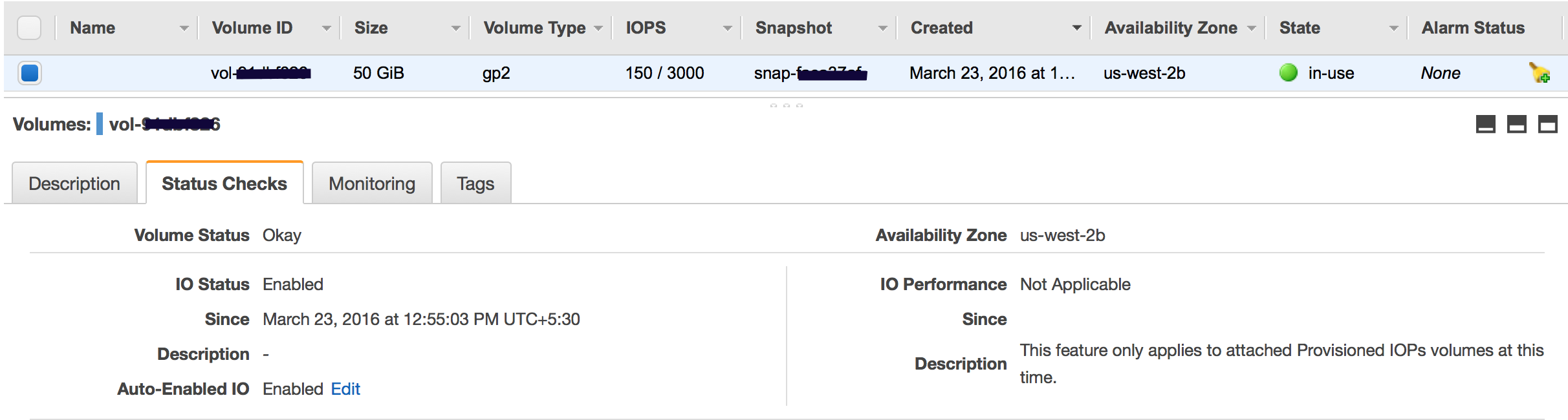
  • Volume status checks are automated tests that run every 5 minutes and return a pass or fail status.
  • Volume check status
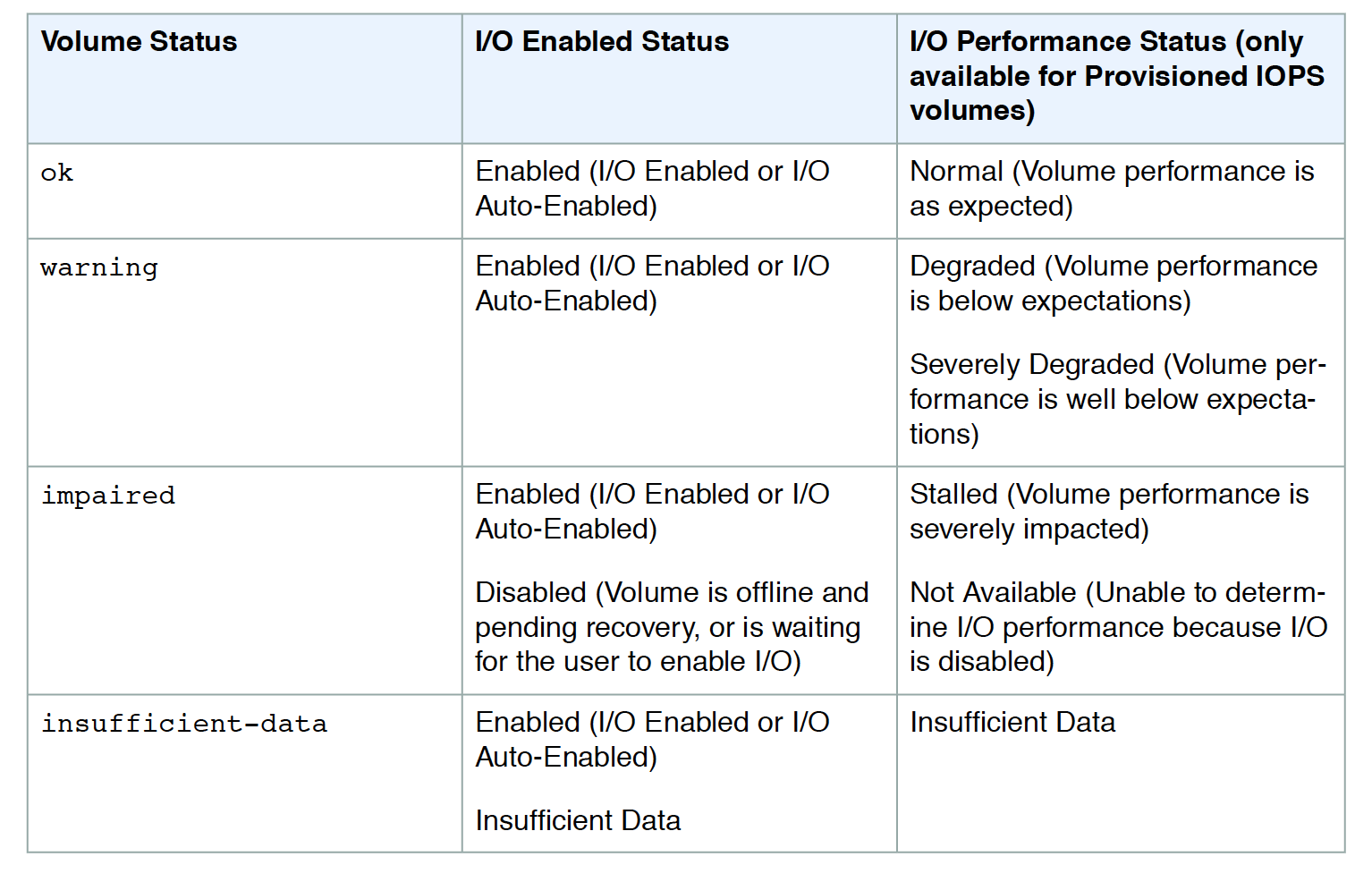
    • Ok – all the status checks passed
    • Impaired – if the status checks failed
    • Insufficient-Data – checks are still in progress
    • Warning – the I/O performance of the volume is below expectations
  • When EBS determines the volume’s data is potentially inconsistent, it disables the I/O to the EBS volume from the attached EC2 instance to prevent any data corruption. This leads to the status check to fail and the volume status being impaired. Amazon waits for the I/O to be enabled, giving you an opportunity to perform consistency checks.
  • If the auto disabling of I/O is not needed, it can be overridden by enabling the Auto-Enabled IO flag, which would make the EBS volume auto-available immediately after the impaired status.
  • Events would be fired for notification whenever the I/O for an EBS volume is disabled.
  • I/O performance status checks compare actual volume performance with the expected volume performance and alert if performing below expectations. Applicable to io1, io2, and gp3 volumes.
  • While initializing Provisioned IOPS (SSD) volumes that were restored from snapshots, the performance of the volume may drop below 50 percent of its expected level, which causes the volume to display a warning state in the I/O Performance status check. This is expected and can be ignored.

EC2 EBS Volume Status

Attached EBS Status Checks (Added Aug 2024)

  • Amazon EC2 now includes a third type of status check — Attached EBS Status Check — that monitors whether the EBS volumes attached to an instance are reachable and can complete I/O operations.
  • The CloudWatch metric StatusCheckFailed_AttachedEBS reports a binary value:
    • 0 – All attached EBS volumes are reachable and can complete I/O.
    • 1 – One or more attached EBS volumes are impaired and unable to complete I/O operations.
  • Available for Nitro-based EC2 instances.
  • Enables creating CloudWatch alarms to automatically detect and respond to EBS volume reachability issues at the instance level.
  • Three types of EC2 status checks now exist:
    • System status checks – monitor the AWS systems the instance runs on.
    • Instance status checks – monitor the instance’s software and network configuration.
    • Attached EBS status checks – monitor reachability of attached EBS volumes.

Volume Initialization Status Monitoring (Added Jul 2025)

  • EBS now provides visibility into volume initialization status for volumes created from snapshots.
  • Allows you to validate when all blocks have been downloaded and written to the volume, enabling fully provisioned performance.
  • Can be used to time application launches to align with volume initialization completion.
  • EBS also supports Provisioned Rate for Volume Initialization (Added May 2025) that allows specifying a volume initialization rate between 100-300 MiB/s for faster initialization of snapshot-restored volumes.
  • EventBridge events are published for volume initialization state changes.

Volume Events Monitoring

  • EBS sends events to Amazon EventBridge for volume status changes and actions performed on volumes and snapshots.
  • Each event includes a start time that indicates the time at which the event occurred and a duration that indicates how long I/O for the volume was disabled.
  • Events description can be:
    • Awaiting Action: Enable IO – Volume data is potentially inconsistent, I/O is disabled.
    • IO Enabled – I/O operations were explicitly enabled for this volume.
    • IO Auto-Enabled – I/O operations were automatically enabled on this volume after an event.
    • Normal – For io1, io2, and gp3 volumes only. Volume performance is as expected.
    • Degraded – For io1, io2, and gp3 volumes only. Volume performance is below expectations.
    • Severely Degraded or Stalled – Volume performance significantly impacted.
  • EventBridge rules can trigger programmatic actions in response to these events (e.g., send notifications, invoke Lambda functions).

AWS Certification Exam Practice Questions

  • Questions are collected from Internet and the answers are marked as per my knowledge and understanding (which might differ with yours).
  • AWS services are updated everyday and both the answers and questions might be outdated soon, so research accordingly.
  • AWS exam questions are not updated to keep up the pace with AWS updates, so even if the underlying feature has changed the question might not be updated
  • Open to further feedback, discussion and correction.
  1. A user has configured CloudWatch monitoring on an EBS backed EC2 instance. If the user has not attached any additional device, which of the below mentioned metrics will always show a 0 value?
    1. DiskReadBytes
    2. NetworkIn
    3. NetworkOut
    4. CPUUtilization
  2. What does it mean if you have zero IOPS and a non-empty I/O queue for all EBS volumes attached to a running EC2 instance?
    1. The I/O queue is buffer flushing.
    2. Your EBS disk head(s) is/are seeking magnetic stripes.
    3. The EBS volume is unavailable. (EBS volumes are unavailable when all of the attached volumes perform zero read write IO, with pending IO in the queue. Refer link)
    4. You need to re-mount the EBS volume in the OS.
  3. While performing the volume status checks, if the status is insufficient-data, what does it mean?
    1. checks may still be in progress on the volume
    2. check has passed
    3. check has failed
  4. An application running on an EC2 instance with an io2 EBS volume is experiencing intermittent latency spikes. Which NEW CloudWatch metrics should be used to identify if the volume is under-provisioned? (Choose 2)
    1. VolumeReadLatency and VolumeWriteLatency
    2. VolumeQueueLength
    3. VolumeIOPSExceededCheck
    4. VolumeIdleTime
    5. VolumeTotalReadTime
  5. A company wants to monitor whether EBS volume performance bottlenecks are caused by the volume limits or the EC2 instance limits. Which combination of metrics should be used?
    1. VolumeReadOps and VolumeWriteOps
    2. BurstBalance and VolumeQueueLength
    3. VolumeIOPSExceededCheck (volume-level) and InstanceEBSIOPSExceededCheck (instance-level)
    4. EBSIOBalance% and VolumeThroughputPercentage
  6. After the August 2024 update, how many types of EC2 status checks are available?
    1. One – System status check
    2. Two – System and Instance status checks
    3. Three – System, Instance, and Attached EBS status checks
    4. Four – System, Instance, EBS Volume, and Network status checks

References

AWS EBS Volume Types – gp3, io2, st1, sc1 Performance Comparison

EBS Volume Types

AWS EBS Volume Types

🆕 Major Update – September 2025

Amazon EBS gp3 volumes now support up to 64 TiB size, 80,000 IOPS, and 2,000 MiB/s throughput — a 4X, 5X, and 2X increase respectively over previous limits. Additionally, as of January 2026, Elastic Volumes now supports up to 4 modifications per 24-hour rolling window (previously limited by a 6-hour cooldown between modifications).

  • AWS provides the following EBS volume types, which differ in performance characteristics and price and can be tailored for storage performance and cost to the needs of the applications.
  • Solid state drives (SSD-backed) volumes optimized for transactional workloads involving frequent read/write operations with small I/O size, where the dominant performance attribute is IOPS
    • General Purpose SSD (gp3/gp2)
    • Provisioned IOPS SSD (io2 Block Express/io1)
  • Hard disk drives (HDD-backed) volumes optimized for large streaming workloads where throughput (measured in MiB/s) is a better performance measure than IOPS
    • Throughput Optimized HDD (st1)
    • Cold HDD (sc1)
    • Magnetic Volumes (standard) (Previous Generation)

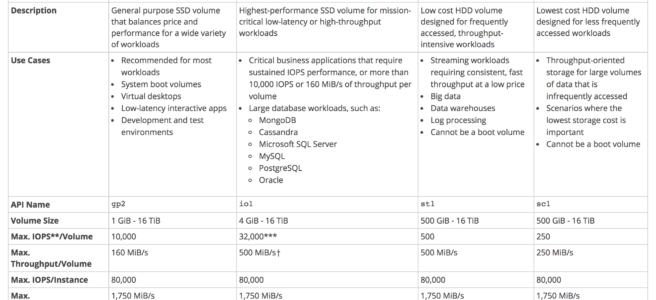
EBS Volume Types Summary
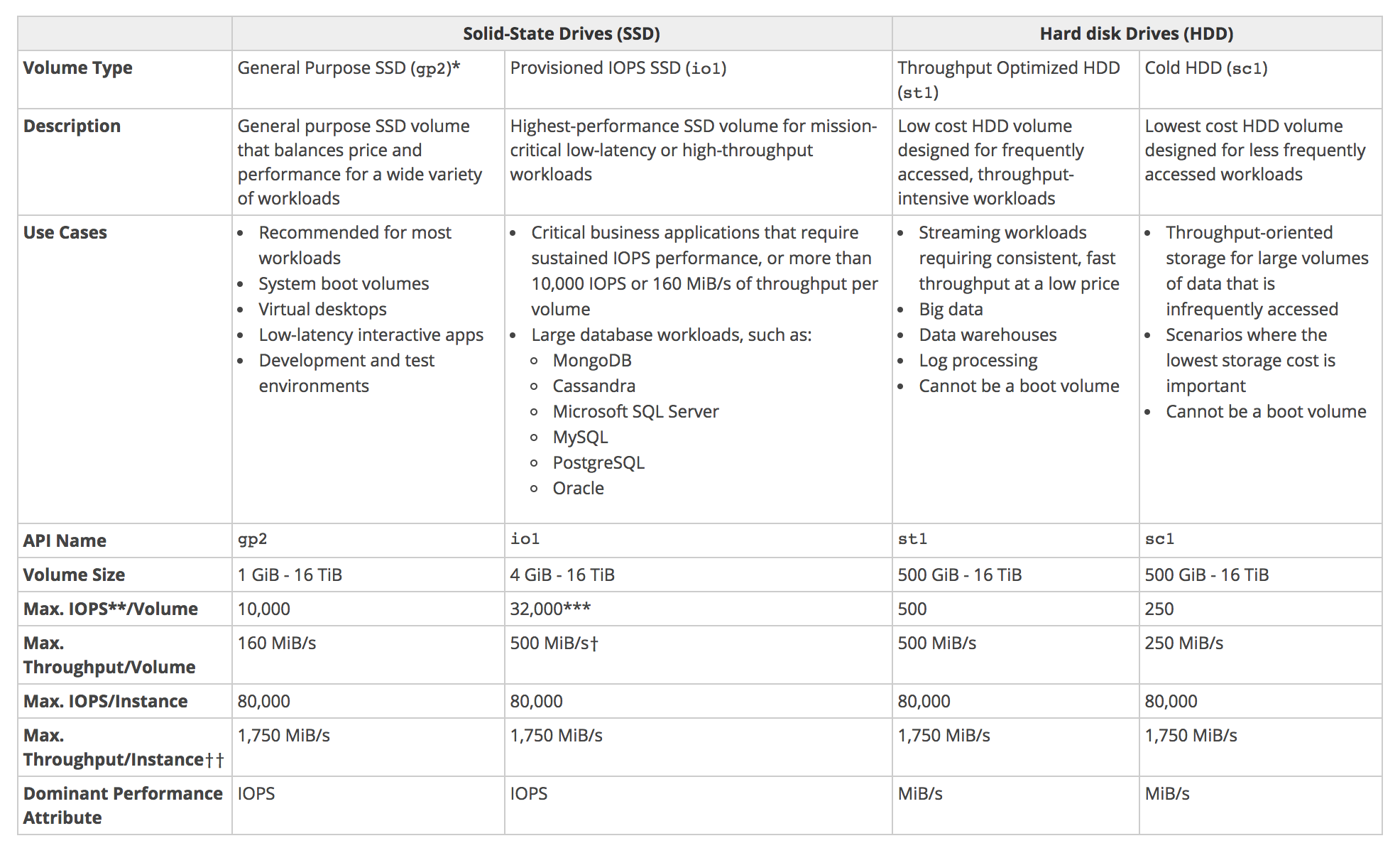
EBS Volume Types

Solid state drives (SSD-backed) volumes
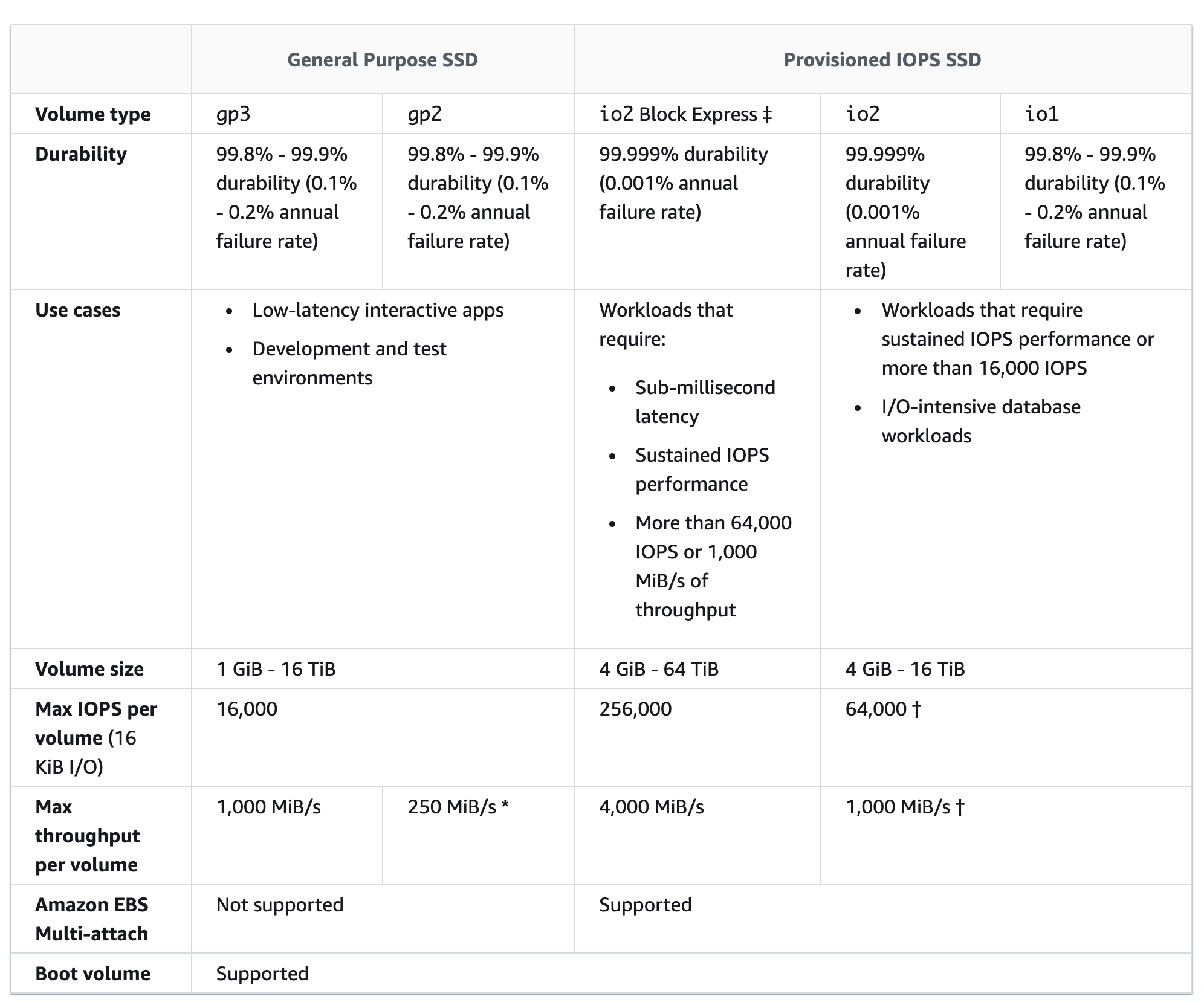
Solid state drives (SSD-backed) volumes

General Purpose SSD Volumes (gp3/gp2)

  • General Purpose SSD volumes offer cost-effective storage that is ideal for a broad range of workloads.
  • General Purpose SSD volumes deliver single-digit millisecond latencies.
  • General Purpose SSD (gp3) volumes (Recommended)
    • can range in size from 1 GiB to 64 TiB (increased from 16 TiB in September 2025).
    • deliver a consistent baseline rate of 3,000 IOPS and 125 MiB/s, included with the price of storage.
    • additional IOPS (up to 80,000) and throughput (up to 2,000 MiB/s) can be provisioned for an additional cost.
    • the maximum ratio of provisioned IOPS to provisioned volume size is 500 IOPS per GiB.
    • the maximum ratio of provisioned throughput to provisioned IOPS is .25 MiB/s per IOPS.
    • performance is provisioned independently from storage capacity, allowing even small volumes to achieve high performance.
    • provides up to 20% lower price per GB compared to gp2 volumes.
    • Note: On Outposts, gp3 volumes support sizes up to 16 TiB, IOPS up to 16,000, and throughput up to 1,000 MiB/s.
  • General Purpose SSD (gp2) volumes
    • can range in size from 1 GiB to 16 TiB.
    • has a maximum throughput of 250 MiB/s (depending on volume size).
    • provides a baseline performance of 3 IOPS/GiB.
    • provides the ability to burst to 3,000 IOPS for extended periods of time for volume size less than 1 TiB and up to a maximum of 16,000 IOPS (at 5,334 GiB).
    • If the volume performance is frequently limited to the baseline level (due to an empty I/O credit balance),
      • consider using a larger General Purpose SSD volume (with a higher baseline performance level) or
      • switching to a gp3 volume for independent IOPS/throughput provisioning or
      • switching to a Provisioned IOPS SSD volume for workloads that require sustained IOPS performance greater than 80,000 IOPS.
    • AWS recommends migrating gp2 volumes to gp3 for better performance and lower cost.

I/O Credits and Burst Performance (gp2 only)

  • I/O credits represent the available bandwidth that the General Purpose SSD (gp2) volume can use to burst large amounts of I/O when more than the baseline performance is needed.
  • General Purpose SSD (gp2) volume performance is governed by volume size, which dictates the baseline performance level of the volume for e.g. 100 GiB volume has a 300 IOPS @ 3 IOPS/GiB
  • General Purpose SSD (gp2) volume size also determines how quickly it accumulates I/O credits for e.g. 100 GiB with a performance of 300 IOPS can accumulate 180K IOPS/10 mins (300 * 60 * 10).
  • Larger volumes have higher baseline performance levels and accumulate I/O credits faster for e.g. 1 TiB has a baseline performance of 3000 IOPS
  • More credits the volume has for I/O, the more time it can burst beyond its baseline performance level and the better it performs when more performance is needed for e.g. 300 GiB volume with 180K I/O credit can burst @ 3000 IOPS for 1 minute (180K/3000)
  • Each volume receives an initial I/O credit balance of 5,400,000 I/O credits, which is enough to sustain the maximum burst performance of 3,000 IOPS for 30 minutes.
  • Initial credit balance is designed to provide a fast initial boot cycle for boot volumes and a good bootstrapping experience for other applications.
  • Each volume can accumulate I/O credits over a period of time which can be to burst to the required performance level, up to a max of 3,000 IOPS
  • Unused I/O credit cannot go beyond 54,00,000 I/O credits.
  • Note: gp3 volumes do NOT use the I/O credit/burst model — they provide consistent baseline performance of 3,000 IOPS regardless of volume size.
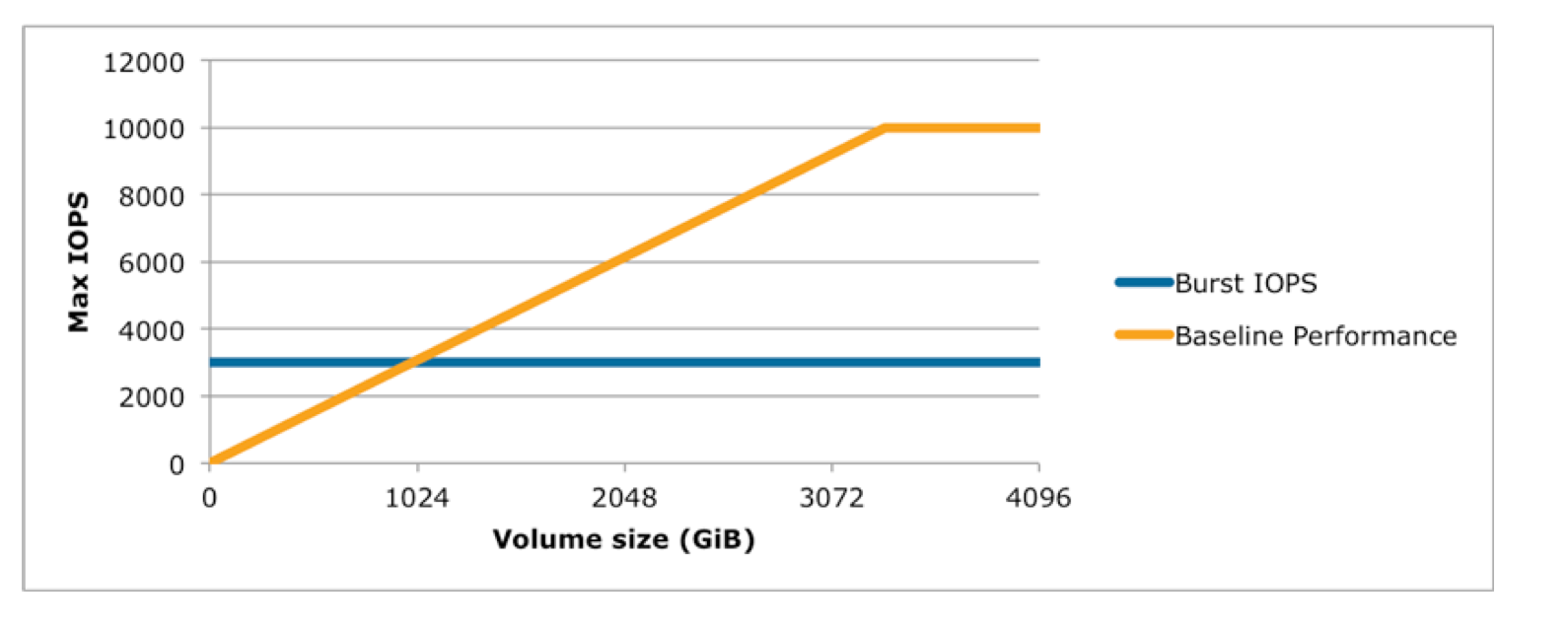
IOPS vs Volume size

  • Volumes till 1 TiB can burst up to 3000 IOPS over and above its baseline performance
  • Volumes larger than 1 TiB have a baseline performance that is already equal to or greater than the maximum burst performance, and their I/O credit balance never depletes.
  • Baseline performance cannot be beyond 16,000 IOPS for gp2 volumes and this limit is reached @ 5,334 GiB
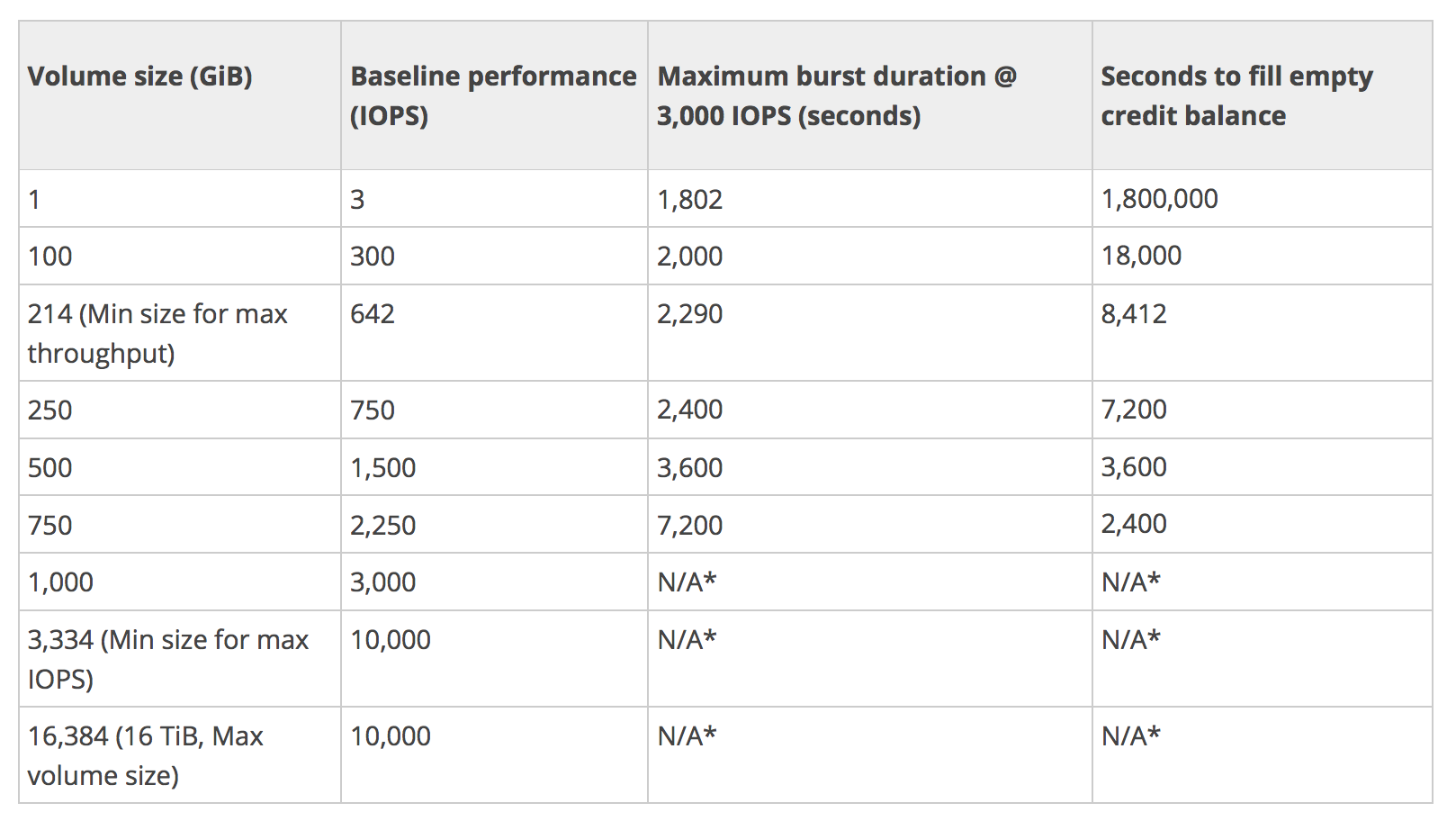
IOPS vs Volume Size

Baseline Performance (gp2)

  • Formula – 3 IOPS i.e. GiB * 3
  • Calculation example
    • 1 GiB volume size = 3 IOPS (1 * 3 IOPS)
    • 250 GiB volume size = 750 IOPS (250* 3 IOPS)

Maximum burst duration @ 3000 IOPS (gp2)

  • How much time can 5400000 IO credit be sustained @ the burst performance of 3000 IOPS. Subtract the baseline performance from 3000 IOPS which would be contributed by the volume size
  • Formula – 5400000/(3000 – Baseline performance)
  • Calculation example
    • 1 GiB volume size @ 3000 IOPS with 5400000 the burst performance can be maintained for 5400000/(3000-3) = 1802 secs
    • 250 GiB volume size @ 3000 IOPS with 5400000 the burst performance can be maintained for 5400000/(3000-3*250) = 2400 secs

Time to fill the 5400000 I/O credit balance (gp2)

  • Formula – 5400000/Baseline performance
  • Calculation
    • 1 GiB volume size @ 3 IOPS would require 5400000/3 = 1800000 secs
    • 250 GiB volume size @ 750 IOPS would require 5400000/750 = 7200 secs

Provisioned IOPS SSD (io2 Block Express / io1) Volumes

  • are designed to meet the needs of I/O intensive workloads, particularly database workloads, that are sensitive to storage performance and consistency in random access I/O throughput.
  • IOPS rate can be specified when the volume is created, and EBS delivers within 10% of the provisioned IOPS performance 99.9% of the time over a given year.

io2 Block Express (Recommended)

  • offers the highest performance block storage among EBS volumes with an average latency of under 500 microseconds for 16KiB I/O operations.
  • can range in size from 4 GiB to 64 TiB.
  • supports up to 256,000 IOPS per volume (16 KiB I/O) — requires Nitro-based instances.
  • supports up to 4,000 MiB/s throughput per volume.
  • provides 99.999% durability (0.001% annual failure rate) — 100X higher durability than io1/gp2/gp3.
  • Ratio of IOPS provisioned to volume size is up to 1,000 IOPS per GiB — 20X higher than io1.
  • Available at the same price as io1.
  • Supports Multi-Attach — allows a single volume to be attached to up to 16 Nitro-based instances simultaneously.
  • Supports NVMe reservations for shared storage cluster coordination.
  • delivers better outlier latency compared to General Purpose volumes, reducing the frequency of IOs exceeding 800 microseconds by over 10X.
  • AWS recommends migrating io1 volumes to io2 Block Express for higher performance, durability, and IOPS/GiB ratio at no additional cost.

io1 (Previous Generation Provisioned IOPS)

  • can range in size from 4 GiB to 16 TiB.
  • have a throughput limit of up to 1,000 MiB/s (at 64,000 IOPS on Nitro instances).
  • can provision up to 64,000 IOPS per volume.
  • Ratio of IOPS provisioned to the volume size requested can be a maximum of 50 IOPS per GiB; e.g., a volume with 5,000 IOPS must be at least 100 GiB.
  • 99.8% – 99.9% durability (0.1% – 0.2% annual failure rate).
  • can be striped together in a RAID configuration for larger size and greater performance.
  • Note: AWS recommends migrating to io2 Block Express for better durability, performance, and IOPS/GiB ratio at the same price.

Hard disk drives (HDD-backed) volumes
Hard disk drives (HDD-backed) volumes

Throughput Optimized HDD (st1) Volumes

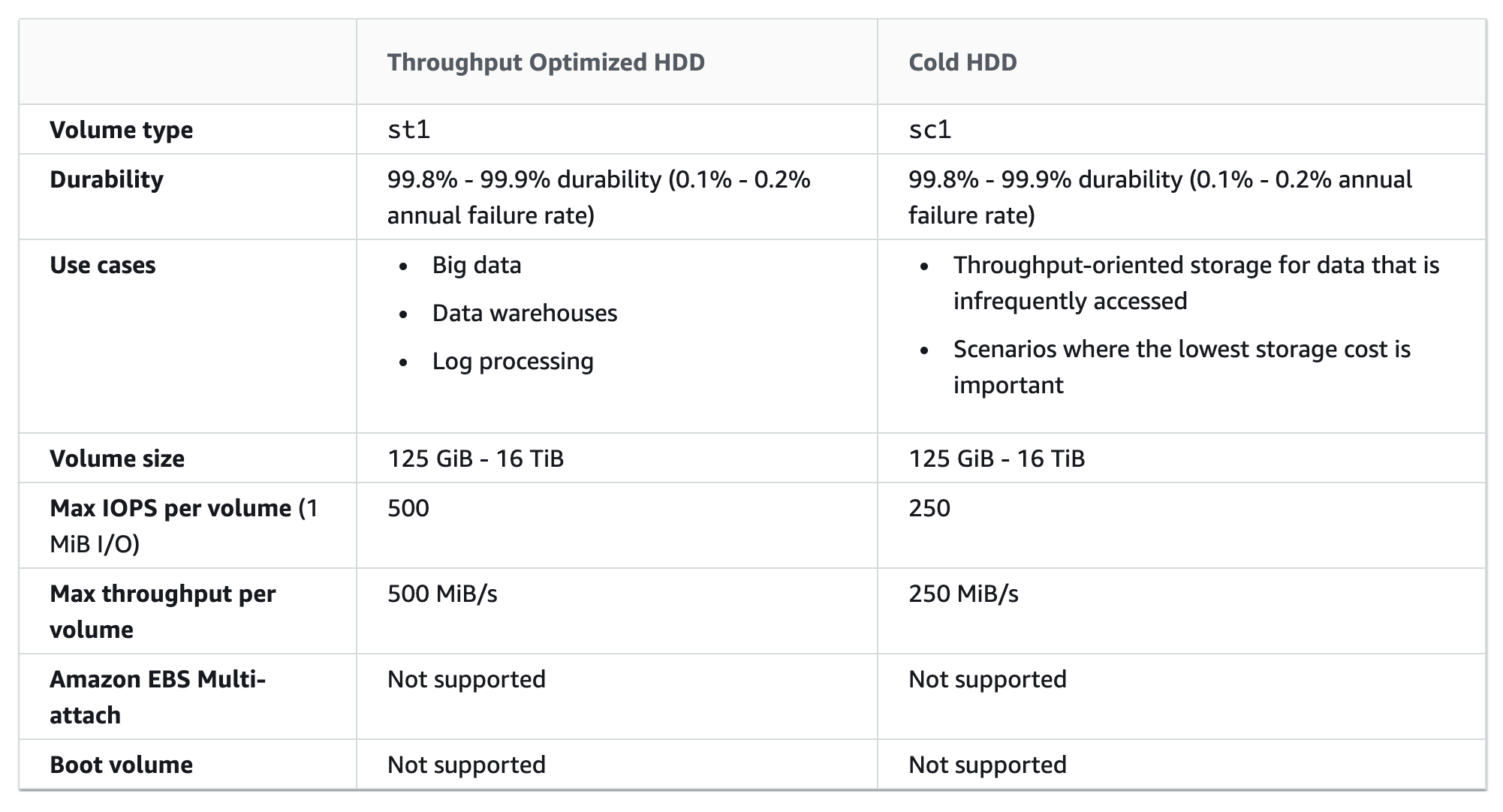
  • provide low-cost magnetic storage that defines performance in terms of throughput rather than IOPS.
  • is a good fit for large, sequential workloads such as EMR, ETL, data warehouses, and log processing.
  • do not support boot volumes.
  • can range in size from 125 GiB to 16 TiB.
  • are designed to support frequently accessed data.
  • maximum throughput of 500 MiB/s per volume.
  • maximum IOPS of 500 (1 MiB I/O).
  • uses a burst-bucket model for performance similar to gp2. Volume size determines the baseline throughput of the volume, which is the rate at which the volume accumulates throughput credits. Volume size also determines the burst throughput of your volume, which is the rate at which you can spend credits when they are available.

Cold HDD (sc1) Volumes

  • provide low-cost magnetic storage that defines performance in terms of throughput rather than IOPS.
  • With a lower throughput limit than st1, sc1 is a good fit ideal for large, sequential cold-data workloads.
  • ideal for infrequent access to data and are looking to save costs, sc1 provides inexpensive block storage.
  • do not support boot volumes.
  • can range in size from 125 GiB to 16 TiB.
  • maximum throughput of 250 MiB/s per volume.
  • maximum IOPS of 250 (1 MiB I/O).
  • though are similar to Throughput Optimized HDD (st1) volumes, are designed to support infrequently accessed data.
  • uses a burst-bucket model for performance similar to gp2. Volume size determines the baseline throughput of the volume, which is the rate at which the volume accumulates throughput credits. Volume size also determines the burst throughput of your volume, which is the rate at which you can spend credits when they are available.

Magnetic Volumes (standard) – Previous Generation

Magnetic volumes provide the lowest cost per gigabyte of all EBS volume types. Magnetic volumes are backed by magnetic drives and are ideal for workloads performing sequential reads, workloads where data is accessed infrequently, and scenarios where the lowest storage cost is important.

  • Magnetic volumes can range in size from 1 GiB to 1 TiB
  • These volumes deliver approximately 100 IOPS on average, with burst capability of up to hundreds of IOPS
  • Magnetic volumes can be striped together in a RAID configuration for larger size and greater performance.
  • Note: Magnetic (standard) is a previous generation volume type. AWS recommends using current generation volume types (gp3, io2, st1, sc1) for better performance and cost-effectiveness. For infrequent access cold data, consider sc1 instead.

EBS Volume Types (Previous Generation – Reference Only)
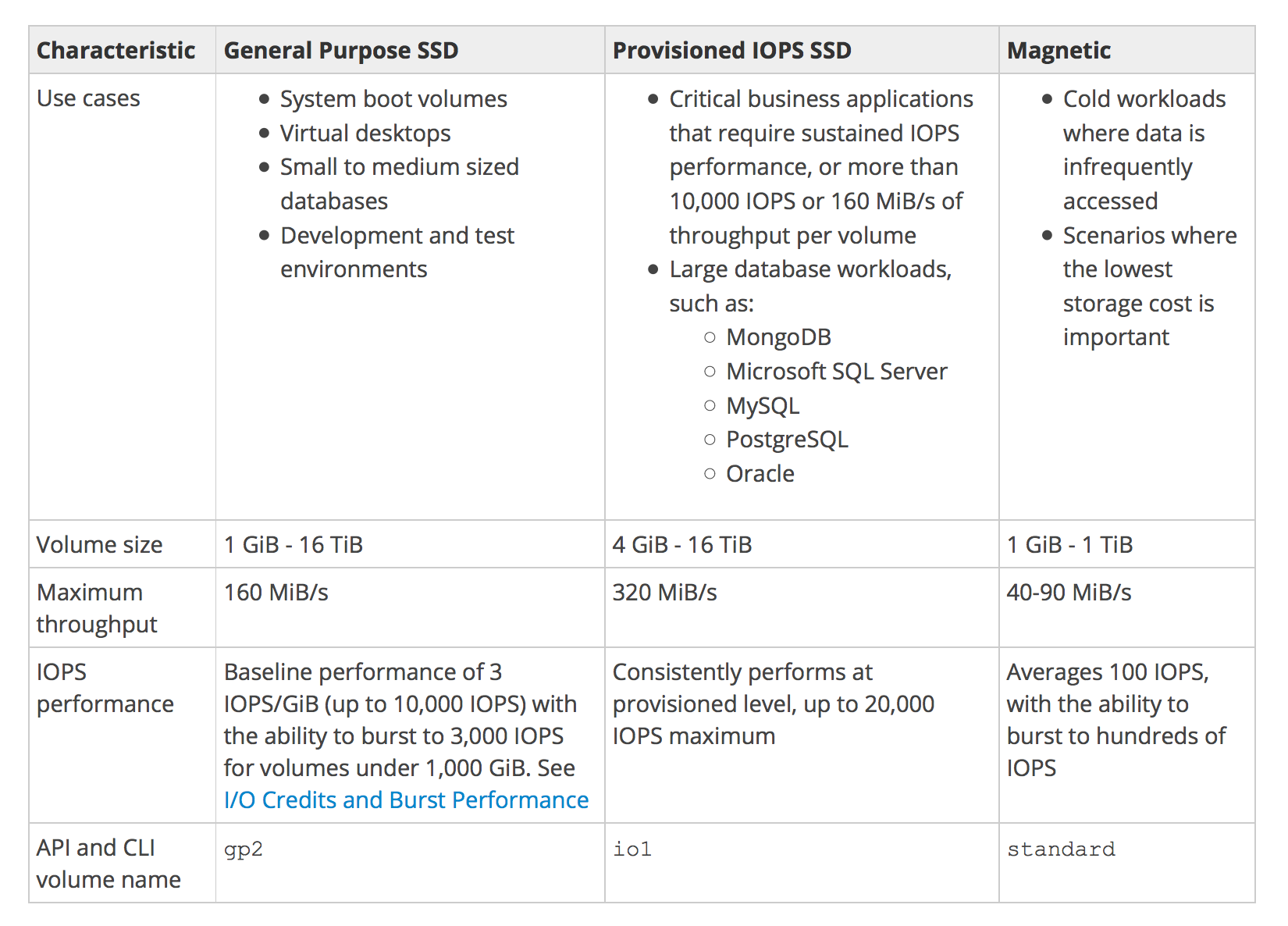
EBS Volume Types Comparison

EBS Elastic Volumes

  • Elastic Volumes allows you to dynamically increase capacity, tune performance, and change the type of live volumes with no downtime or performance impact.
  • (January 2026 Update) You can now modify a volume up to 4 times within a rolling 24-hour window — the previous 6-hour cooldown between modifications has been eliminated.
  • A new modification can be initiated as soon as the previous one completes.
  • Supported modifications include: increasing size, changing volume type, and adjusting provisioned performance (IOPS/throughput).
  • Note: Volume size can only be increased, not decreased. To reduce size, create a new smaller volume and migrate data.

AWS Certification Exam Practice Questions

  • Questions are collected from Internet and the answers are marked as per my knowledge and understanding (which might differ with yours).
  • AWS services are updated everyday and both the answers and questions might be outdated soon, so research accordingly.
  • AWS exam questions are not updated to keep up the pace with AWS updates, so even if the underlying feature has changed the question might not be updated
  • Open to further feedback, discussion and correction.
  1. You are designing an enterprise data storage system. Your data management software system requires mountable disks and a real filesystem, so you cannot use S3 for storage. You need persistence, so you will be using AWS EBS Volumes for your system. The system needs as low-cost storage as possible, and access is not frequent or high throughput, and is mostly sequential reads. Which is the most appropriate EBS Volume Type for this scenario?
    1. gp1
    2. io1
    3. sc1 (Cold HDD sc1 volumes are designed for infrequently accessed data with lowest storage cost. Note: The original answer was “standard/Magnetic” but for modern deployments, sc1 is the recommended low-cost option for infrequent sequential access. Magnetic (standard) is previous generation.)
    4. gp2
  2. Which EBS volume type is best for high performance NoSQL cluster deployments?
    1. io1/io2 Block Express (Provisioned IOPS SSD volumes are best for: Critical business applications that require sustained IOPS performance, or more than 80,000 IOPS or 2,000 MiB/s of throughput per volume, like large database workloads such as MongoDB. io2 Block Express is now recommended over io1 for up to 256,000 IOPS.)
    2. gp1
    3. standard
    4. gp2
  3. Provisioned IOPS Costs: you are charged for the IOPS and storage whether or not you use them in a given month.
    1. FALSE
    2. TRUE
  4. A user is trying to create a PIOPS EBS volume with 8 GB size and 450 IOPS. Will AWS create the volume?
    1. Yes, since the ratio between EBS and IOPS is less than 50 for io1 (or less than 1000 for io2 Block Express)
    2. No, since the PIOPS and EBS size ratio is less than 50
    3. No, the EBS size is less than 10 GB
    4. Yes, since PIOPS is higher than 100
  5. A user has provisioned 2000 IOPS to the EBS volume. The application hosted on that EBS is experiencing fewer IOPS than provisioned. Which of the below mentioned options does not affect the IOPS of the volume?
    1. The application does not have enough IO for the volume
    2. Instance is EBS optimized
    3. The EC2 instance has 10 Gigabit Network connectivity
    4. Volume size is too large
  6. A user is trying to create a PIOPS EBS volume with 6000 IOPS and 100 GB size. AWS does not allow the user to create this volume. What is the possible root cause for this?
    1. The ratio between IOPS and the EBS volume is higher than 50 (For io1 volumes, maximum ratio is 50 IOPS per GiB. 6000/100 = 60, which exceeds 50. Note: For io2 Block Express, this would be allowed as the ratio limit is 1000 IOPS per GiB.)
    2. The maximum IOPS supported by EBS is 3000
    3. The ratio between IOPS and the EBS volume is lower than 100
    4. PIOPS is supported for EBS higher than 500 GB size
  7. A company needs a database storage solution that provides consistent sub-millisecond latency, 99.999% durability, and supports up to 256,000 IOPS. Which EBS volume type should they choose?
    1. gp3
    2. io1
    3. io2 Block Express (io2 Block Express delivers sub-millisecond latency, 99.999% durability, and supports up to 256,000 IOPS with 4,000 MiB/s throughput per volume.)
    4. st1
  8. A solutions architect needs to consolidate multiple striped gp3 volumes into a single volume for a containerized workload that requires 50,000 IOPS and 30 TiB of storage. Which volume type supports this requirement with a single volume?
    1. gp2
    2. gp3 (Since September 2025, gp3 supports up to 64 TiB size and 80,000 IOPS, allowing consolidation of previously striped volumes into a single gp3 volume.)
    3. io1
    4. st1
  9. What is the maximum IOPS-to-storage ratio for io2 Block Express volumes?
    1. 50 IOPS per GiB
    2. 500 IOPS per GiB
    3. 1,000 IOPS per GiB (io2 Block Express supports up to 1,000 IOPS per GiB, which is 20X higher than io1’s 50 IOPS per GiB ratio.)
    4. 100 IOPS per GiB
  10. Which of the following are advantages of io2 Block Express over io1? (Select THREE)
    1. 100X higher durability (99.999% vs 99.8-99.9%)
    2. 20X higher IOPS-to-storage ratio (1000 vs 50 IOPS/GiB)
    3. 4X higher maximum IOPS (256,000 vs 64,000)
    4. Lower cost per provisioned IOPS
    5. Support for HDD-backed storage

References

AWS EC2 VM Import/Export

EC2 VM Import/Export

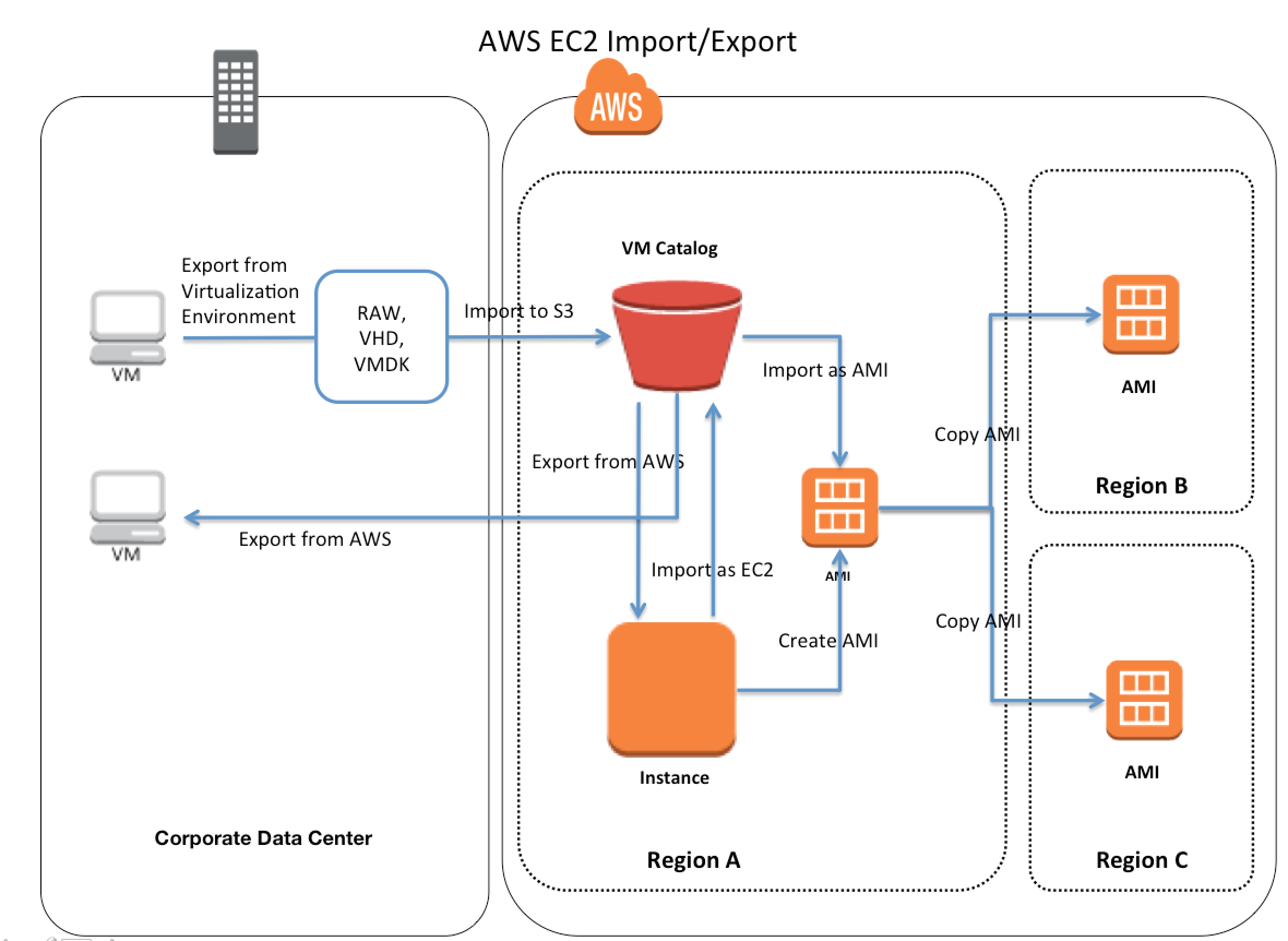
  • EC2 VM Import/Export enables importing virtual machine (VM) images from existing virtualization environment to EC2, and then export them back to the on-premises environment.
  • EC2 VM Import/Export enables
    • migration of applications and workloads to EC2,
    • copying VM image catalog to EC2, or
    • creating a repository of VM images for backup and disaster recovery,
    • leveraging previous investments in building VMs by migrating the VMs to EC2.
  • VM Import/Export is available at no additional charge beyond standard usage charges for Amazon EC2 and Amazon S3.
  • For large-scale lift-and-shift migrations, AWS Transform MGN (formerly AWS Application Migration Service) is the recommended service as it provides continuous block-level replication, automated testing, and minimal-downtime cutover.

Supported Image Formats

  • OVA – Open Virtual Appliance image format, supports importing images with multiple hard disks
  • VMDK – Stream-optimized ESX Virtual Machine Disk, compatible with VMware ESX and VMware vSphere
  • VHD/VHDX – Fixed and Dynamic Virtual Hard Disk formats, compatible with Microsoft Hyper-V, Microsoft Azure, and Citrix Xen
  • RAW – Raw format for importing disks and VMs
⚠️ Important (April 2026): Starting April 1, 2026, VM Import/Export no longer supports i386 (32-bit) architecture. Import and Export tasks will not work for 32-bit OS versions including Windows Server 2003/2008 (32-bit), Windows 7/8 (32-bit), CentOS 5/6 (32-bit), Debian 6-12 (32-bit), and Ubuntu 12.04-17.04 (32-bit).

Supported Operating Systems

  • Linux:
    • Amazon Linux 2023 (kernel 6.1)
    • Ubuntu 24.04, 25.10, 26.04
    • Red Hat Enterprise Linux (RHEL) 8.9, 9.3–9.6
    • Rocky Linux 9.1–9.6
    • Oracle Linux 8.9, 9.3–9.6
    • CentOS 5.1–8.x (64-bit only for older versions)
    • Debian 7–12
    • SUSE Linux Enterprise Server 12, 15
  • Windows:
    • Windows Server 2008 R2 through Windows Server 2025
    • Windows 7 through Windows 11
    • Windows 11 requires UEFI boot mode
  • Not Supported: ARM64 architecture VMs, VMs from physical-to-virtual (P2V) conversions

Boot Modes

  • VM Import/Export supports two boot modes: UEFI (Unified Extensible Firmware Interface) and Legacy BIOS
  • The optional --boot-mode parameter can be specified as legacy-bios or uefi during import
  • Windows 11 requires UEFI boot mode
  • If no boot mode is specified and the VM is compatible with both, GPT volumes are converted to MBR partitioned volumes (Legacy BIOS is selected by default)

AWS EC2 VM Import/Export

EC2 VM Import/Export Features

  • Import a VM from a virtualization environment to EC2 as an Amazon Machine Image (AMI), which can be used to launch EC2 instances. (Recommended approach)
  • Import a VM as an EC2 instance (initially in a stopped state). Note: Importing as an instance is deprecated — the AWS CLI only supports importing as an image via aws ec2 import-image.
  • Export a VM that was previously imported from the virtualization environment.
  • Import disks as EBS snapshots.

Export Limitations

  • Cannot export instances/images containing third-party software provided by AWS (e.g., Windows or SQL Server images, or any image from AWS Marketplace)
  • Only supports exporting to an S3 bucket in the same AWS account
  • Export operations do not support hybrid boot configurations (GRUB2 must be enabled for either BIOS or UEFI, not both)

Import Limitations

  • Does not support importing disks separated into multiple files
  • Does not support VMs that use Raw Device Mapping (RDM)
  • Does not support VMs created by physical-to-virtual (P2V) conversion
  • ARM64 architecture VMs are not supported
  • Maximum 24 volumes can be attached to an import task

Integration with EC2 Image Builder

  • EC2 Image Builder works in conjunction with VM Import/Export to create and maintain golden images for both Amazon EC2 (AMI) and on-premises VM formats (VHDX, VMDK, OVF).
  • The import-vm-image command in Image Builder CLI references the VM Import task ID to pull in the created AMI as a base image for Image Builder recipes.
  • This enables building automated image pipelines that span both cloud and on-premises environments.

Related Migration Services

  • AWS Transform MGN (formerly AWS Application Migration Service / AWS MGN) – Recommended for lift-and-shift migrations. Provides continuous block-level replication with agent-based or agentless (VMware only) options. Automates server conversion to native EC2 instances with near-zero data loss and minimal downtime cutover.
    • Replaces deprecated AWS Server Migration Service (SMS) and CloudEndure Migration
    • Supports physical, virtual, and cloud-to-cloud migrations
  • Amazon Elastic VMware Service (Amazon EVS) – GA since August 2025. Run VMware Cloud Foundation (VCF) directly within your Amazon VPC without re-architecting applications. Ideal for organizations wanting to maintain VMware tools and investments while leveraging AWS infrastructure.
  • AWS Transform – Agentic AI service (GA May 2025) that accelerates full-stack migration and modernization including Windows, mainframe, and VMware workloads.

When to Use VM Import/Export vs. AWS Transform MGN

Criteria VM Import/Export AWS Transform MGN
Best for One-off imports, image catalog migration, DR repository Large-scale migrations, continuous replication
Downtime Higher (full image upload required) Minimal (continuous replication + cutover)
Automation CLI-based, manual process Fully automated with testing and cutover workflows
Replication Point-in-time snapshot Continuous block-level replication
Scale Individual VMs Multiple servers concurrently

AWS Certification Exam Practice Questions

  • Questions are collected from Internet and the answers are marked as per my knowledge and understanding (which might differ with yours).
  • AWS services are updated everyday and both the answers and questions might be outdated soon, so research accordingly.
  • AWS exam questions are not updated to keep up the pace with AWS updates, so even if the underlying feature has changed the question might not be updated
  • Open to further feedback, discussion and correction.
  1. You are responsible for a legacy web application whose server environment is approaching end of life. You would like to migrate this application to AWS as quickly as possible, since the application environment currently has the following limitations: The VM’s single 10GB VMDK is almost full. The virtual network interface still uses the 10Mbps driver, which leaves your 100Mbps WAN connection completely underutilized. It is currently running on a highly customized Windows VM within a VMware environment: You do not have the installation media. This is a mission critical application with an RTO (Recovery Time Objective) of 8 hours. RPO (Recovery Point Objective) of 1 hour. How could you best migrate this application to AWS while meeting your business continuity requirements?
    1. Use the EC2 VM Import Connector for vCenter to import the VM into EC2
    2. Use Import/Export to import the VM as an EBS snapshot and attach to EC2. (Import/Export is used to transfer large amount of data)
    3. Use S3 to create a backup of the VM and restore the data into EC2.
    4. Use the ec2-bundle-instance API to Import an Image of the VM into EC2 (only bundles a Windows instance store instance)
  2. You are tasked with moving a legacy application from a virtual machine running inside your datacenter to an Amazon VPC. Unfortunately this app requires access to a number of on-premises services and no one who configured the app still works for your company. Even worse there’s no documentation for it. What will allow the application running inside the VPC to reach back and access its internal dependencies without being reconfigured? (Choose 3 answers)
    1. An AWS Direct Connect link between the VPC and the network housing the internal services (VPN or a DX for communication)
    2. An Internet Gateway to allow a VPN connection. (Virtual and Customer gateway is needed)
    3. An Elastic IP address on the VPC instance (Don’t need a EIP as private subnets can also interact with on-premises network)
    4. An IP address space that does not conflict with the one on-premises (IP address cannot conflict)
    5. Entries in Amazon Route 53 that allow the Instance to resolve its dependencies’ IP addresses (Route 53 is not required)
    6. A VM Import of the current virtual machine (VM Import to copy the VM to AWS as there is no documentation it can’t be configured from scratch)
  3. A company wants to migrate 200 VMs from on-premises VMware to AWS with minimal downtime. The VMs run various Linux and Windows workloads. Which service should they use?
    1. VM Import/Export (VM Import/Export is for individual VM image imports, not large-scale migrations)
    2. AWS Transform MGN (Application Migration Service) (MGN provides continuous block-level replication with automated cutover for large-scale migrations with minimal downtime)
    3. AWS Server Migration Service (SMS was discontinued in March 2022, replaced by MGN)
    4. Amazon S3 with manual AMI creation
  4. An organization needs to maintain a golden image pipeline that produces AMIs for EC2 and VMDK/VHD images for on-premises deployment. Which combination of services should they use?
    1. EC2 Image Builder with VM Import/Export (Image Builder uses VM Import/Export to create and maintain images for both EC2 (AMI) and on-premises VM formats (VHDX, VMDK, OVF))
    2. AWS Transform MGN with manual exports
    3. AWS Backup with cross-region replication
    4. CloudFormation with custom AMI resources
  5. A company running VMware vSphere on-premises wants to extend their environment to AWS without re-architecting their applications or changing their operational tools. Which AWS service is most appropriate?
    1. VM Import/Export (VM Import/Export converts VMs to EC2 instances, doesn’t maintain VMware environment)
    2. AWS Transform MGN (MGN converts to native EC2, doesn’t maintain VMware tooling)
    3. Amazon Elastic VMware Service (Amazon EVS) (Amazon EVS runs VMware Cloud Foundation directly within your VPC, maintaining VMware tools and operational runbooks)
    4. Amazon EC2 with VMware Cloud on AWS (VMware Cloud on AWS is a Broadcom-managed service, different from Amazon EVS)

References

AWS EC2 – Elastic Cloud Compute

Elastic Cloud Compute – EC2

  • Elastic Compute Cloud – EC2 provides scalable computing capacity in AWS.
  • EC2 offers the broadest and deepest compute platform, with over 1,000 instance types and choice of the latest processor, storage, networking, operating system, and purchase model.
  • Elastic Compute Cloud – EC2
    • eliminates the need to invest in hardware upfront, so applications can be developed and deployed faster.
    • can be used to launch as many or as few virtual servers as you need, configure security and networking, and manage storage.
    • enables you to scale up or down to handle changes in requirements or spikes in popularity, reducing the need to forecast traffic.
    • launches instances in minutes, scales capacity in seconds, and you pay only for what you use with no capital expenditure.

EC2 features

  • EC2 instances – Virtual computing environments running on the AWS Nitro System, a purpose-built hypervisor that offloads virtualization functions to dedicated hardware.
  • Amazon Machine Images (AMIs) – Preconfigured templates for the instances that package the bits needed for a server (including the operating system and additional software). Supported OS includes Amazon Linux 2023, Windows Server 2025, Ubuntu, Red Hat, SUSE, and macOS.
  • Instance types – Various configurations of CPU, memory, storage, and networking capacity for the instances, organized into families: General Purpose, Compute Optimized, Memory Optimized, Storage Optimized, Accelerated Computing, and High-Performance Computing (HPC).
  • Processor Options – Choice of processors including AWS Graviton (Arm-based), Intel Xeon, and AMD EPYC. AWS Graviton processors are custom-built by AWS for the best price-performance.
  • Key Pairs – Secure login information for the instances (AWS stores the public key, and you store the private key in a secure place). Supports ED25519 and RSA key types.
  • Instance Store VolumesStorage volumes for temporary data that are deleted when you stop or terminate your instance (ephemeral storage)
  • EBS Volumes – Persistent storage volumes for the data using Elastic Block Store (EBS)
  • Regions and Availability ZonesMultiple physical locations for the resources, such as instances and EBS volumes
  • Security GroupsA virtual firewall that enables you to specify the protocols, ports, and source IP ranges that can reach the instances
  • Elastic IP addresses – Static IPv4 addresses for dynamic cloud computing
  • Tags – Metadata can be created and assigned to EC2 resources
  • Placement Groups – Logical grouping of instances (Cluster, Spread, or Partition) to influence instance placement for performance or fault tolerance

AWS Nitro System

  • The AWS Nitro System is the underlying platform for all modern EC2 instances.
  • Nitro System offloads virtualization functions (networking, storage, security) to dedicated hardware and software, delivering practically all of the compute resources of the host hardware to the instances.
  • Components include:
    • Nitro Cards – Dedicated cards that handle I/O for VPC networking, EBS storage, and instance storage. Latest is 6th generation Nitro Cards (2026).
    • Nitro Security Chip – Provides hardware root of trust, continuously monitors and protects instance hardware and firmware.
    • Nitro Hypervisor – Lightweight hypervisor that manages memory and CPU allocation. Features the Nitro Isolation Engine (GA 2026) – a formally verified component that provides mathematical proof of VM isolation.
    • Nitro Enclaves – Isolated compute environments within an EC2 instance for processing highly sensitive data (PII, healthcare, financial). No persistent storage, no admin access, no external networking.
    • NitroTPM – Virtual Trusted Platform Module (TPM 2.0) for securely storing passwords, certificates, and encryption keys used to authenticate the instance.
  • Security model is locked down and prohibits administrative access, eliminating the possibility of human error and tampering. No AWS operator has access to the system.

AWS Graviton Processors

  • AWS Graviton processors are custom Arm-based processors designed by AWS to deliver the best price-performance for cloud workloads.
  • Graviton2 – 64 Arm Neoverse N1 cores, supports always-on 256-bit DRAM encryption. Powers 6th gen instances (M6g, C6g, R6g, T4g).
  • Graviton3 – 25% better compute performance, 2x floating-point and crypto performance, 50% faster memory access, 60% lower energy consumption vs. Graviton2. Powers 7th gen instances (M7g, C7g, R7g).
  • Graviton4 (2024) – Up to 30% better compute performance vs. Graviton3, up to 3x more vCPUs (up to 48xlarge) and memory. Uses DDR5 memory. Powers 8th gen instances (M8g, C8g, R8g).
  • Graviton5 (2026) – Up to 25% better compute performance vs. Graviton4, 192 cores, 33% lower inter-core latency. Most powerful and energy-efficient AWS processor. Powers 9th gen instances (M9g). Apps run 35% faster, ML inference 35% faster, databases 30% faster.
  • Graviton instances offer up to 40% better price-performance compared to equivalent x86 instances.
  • Support Arm features including Scalable Vector Extension (SVE), SVE2, Pointer Authentication, and Branch Target Identification (generation dependent).

EC2 Instance Types (Current Generation)

  • General Purpose (M-series, T-series, Mac) – Balance of compute, memory, and networking. Includes M8g, M8gd, M8a, M8in, M9g (Graviton5), T3, T4g. Mac instances (M4, M4 Pro, M4 Max) support Apple Silicon for iOS/macOS development.
  • Compute Optimized (C-series) – High-performance processors for batch processing, gaming, ML inference. Includes C8g, C8gd, C8gn (600 Gbps networking), C8ine.
  • Memory Optimized (R-series, X-series, U-series) – Fast performance for workloads processing large data sets in memory. Includes R8g, R8gd, R8gn (600 Gbps), R8in, X2idn, U-series High Memory (up to 24 TB).
  • Storage Optimized (I-series, D-series, H-series) – High sequential read/write access to large data sets on local storage. Includes I4g, Im4gn, Is4gen, D3, H1.
  • Accelerated Computing (P-series, G-series, Trn-series, Inf-series) – Hardware accelerators for ML, graphics, HPC. Includes P5e (NVIDIA H200), G7e (NVIDIA RTX PRO 6000 Blackwell), Trn1/Trn2 (AWS Trainium for ML training), Inf2 (AWS Inferentia2 for ML inference).
  • High-Performance Computing (HPC-series) – Purpose-built for tightly coupled HPC workloads. Includes Hpc7g (Graviton), Hpc7a (AMD), Hpc8a (5th Gen AMD EPYC, 192 cores, 300 Gbps EFA).

EC2 Instance Naming Convention

  • Instance types follow the convention: [Family][Generation][Attributes].[Size]
  • Example: m8g.xlarge = General Purpose (m), 8th generation (8), Graviton (g), extra-large size
  • Common attributes:
    • g – AWS Graviton (Arm-based)
    • a – AMD processor
    • i – Intel processor
    • n – Network optimized
    • d – NVMe local storage (instance store)
    • b – EBS optimized
    • e – Extra storage or memory

EC2 Networking

  • Elastic Network Adapter (ENA) – High-performance network interface supporting up to 200 Gbps bandwidth on supported instances.
  • ENA Express – Uses AWS Scalable Reliable Datagram (SRD) protocol to deliver up to 25 Gbps single-flow bandwidth and lower tail latency. Now supports cross-AZ traffic (2026) and 120+ instance types.
  • Elastic Fabric Adapter (EFA) – Network interface for HPC and ML workloads, supports OS-bypass for low-latency inter-node communication. Up to 300 Gbps on Hpc8a instances.
  • Enhanced Networking – Uses SR-IOV to provide high-performance networking capabilities. Enabled by default on Nitro-based instances.
  • EC2 instances support IPv4 and IPv6 addressing.
  • Network bandwidth scales with instance size, up to 200 Gbps for largest instances.

EC2 Security

  • Instance Metadata Service v2 (IMDSv2) – Session-oriented metadata access that adds defense-in-depth against unauthorized metadata access. IMDSv2 is now the default for all new instance launches and mandatory for new instance type families (since mid-2024).
  • Security Groups – Stateful virtual firewall at the instance level.
  • Key Pairs – SSH key-based access (Linux) or password decryption (Windows). Supports ED25519 and RSA.
  • IAM Roles – Attach IAM roles to EC2 instances for secure access to AWS services without storing credentials.
  • Nitro Enclaves – Isolated environments for confidential computing.
  • NitroTPM – Hardware-based root of trust for measured boot and platform integrity.
  • Nitro Isolation Engine (2026) – Formally verified hypervisor component providing mathematical guarantees of VM isolation.

Accessing EC2

  • Amazon EC2 console
    • Amazon EC2 console is the web-based user interface that can be accessed from the AWS management console
  • AWS Command Line Interface (CLI)
    • Provides commands for a broad set of AWS products, supported on Windows, Mac, and Linux.
  • AWS Tools for Windows PowerShell
    • Provides commands for a broad set of AWS products for those who script in the PowerShell environment
  • AWS SDKs
    • AWS provides SDKs in various languages (Python/Boto3, Java, Go, .NET, JavaScript, etc.) which provide API abstractions and handle authentication, retries, and error handling
  • AWS CloudFormation / Infrastructure as Code
    • EC2 instances can be provisioned and managed using CloudFormation, CDK, or Terraform
  • EC2 Instance Connect
    • Browser-based SSH connection to EC2 instances without needing to manage SSH keys
  • AWS Systems Manager Session Manager
    • Secure shell access without opening inbound ports, managing SSH keys, or using bastion hosts

EC2 Key Changes and Deprecations

  • EC2-Classic Retired (August 2023) – All instances now run in VPC only. EC2-Classic networking is no longer available.
  • Amazon Linux 1 EOL (December 31, 2023) – No security updates or bug fixes since January 1, 2024. Migrate to Amazon Linux 2023.
  • Amazon Linux 2 Extended Support Ending – AWS recommends migration to Amazon Linux 2023. ECS AL2 AMIs end support June 30, 2026.
  • IMDSv2 Default (2024) – New instance types only support IMDSv2. Account-level default can enforce IMDSv2 for all launches.
  • Windows Server 2025 Support (November 2024) – Available with License Included AMIs, supports Nitro instance types only.
  • Previous Generation Instances – Older instance families (M1, M3, C1, C3, etc.) are classified as “previous generation” and still supported but not recommended for new deployments.

Additional Reading

AWS Certification Exam Practice Questions

  • Questions are collected from Internet and the answers are marked as per my knowledge and understanding (which might differ with yours).
  • AWS services are updated everyday and both the answers and questions might be outdated soon, so research accordingly.
  • AWS exam questions are not updated to keep up the pace with AWS updates, so even if the underlying feature has changed the question might not be updated
  • Open to further feedback, discussion and correction.
  1. What are the Amazon EC2 API tools?
    1. They don’t exist. The Amazon EC2 AMI tools, instead, are used to manage permissions.
    2. Command-line tools to the Amazon EC2 web service
    3. They are a set of graphical tools to manage EC2 instances.
    4. They don’t exist. The Amazon API tools are a client interface to Amazon Web Services.
  2. When a user is launching an instance with EC2, which of the below mentioned options is not available during the instance launch console for a key pair?
    1. Proceed without the key pair
    2. Upload a new key pair
    3. Select an existing key pair
    4. Create a new key pair
  3. Which of the following is the underlying platform for all modern EC2 instances that offloads virtualization functions to dedicated hardware?
    1. Xen Hypervisor
    2. KVM Hypervisor
    3. AWS Nitro System
    4. VMware ESXi
  4. Which AWS processor family is custom-designed by AWS using Arm architecture to deliver the best price-performance for cloud workloads?
    1. Intel Xeon
    2. AMD EPYC
    3. AWS Graviton
    4. Apple Silicon
  5. Which version of the EC2 Instance Metadata Service is now required by default for all new instance type launches since mid-2024?
    1. IMDSv1
    2. IMDSv2
    3. IMDSv3
    4. IMDS is optional and not required
  6. A company needs isolated compute environments within their EC2 instances to securely process PII data. Which AWS feature should they use?
    1. Security Groups
    2. VPC Private Subnets
    3. AWS Nitro Enclaves
    4. AWS KMS
  7. Which EC2 networking feature uses the AWS Scalable Reliable Datagram (SRD) protocol to deliver up to 25 Gbps single-flow bandwidth?
    1. Enhanced Networking
    2. Elastic Fabric Adapter
    3. ENA Express
    4. AWS Direct Connect
  8. Which of the following is NOT a valid EC2 instance type family category?
    1. High-Performance Computing (HPC)
    2. Storage Optimized
    3. Network Optimized
    4. Accelerated Computing
  9. A developer needs to build and test iOS applications on AWS. Which EC2 instance type family should they choose?
    1. G-series (GPU instances)
    2. C-series (Compute Optimized)
    3. Mac instances (Apple Silicon)
    4. T-series (Burstable Performance)
  10. Which AWS Graviton processor generation was released in 2026 featuring 192 cores and up to 25% better compute performance than the previous generation?
    1. Graviton3
    2. Graviton4
    3. Graviton5
    4. Graviton6

References

AWS EC2 Security

AWS EC2 Security

  • IAM helps control whether users in the organization can perform a task using specific EC2 API actions and whether they can use specific AWS resources.
  • Use IAM roles to prevent the need to share as well as manage, and rotate the security credentials that the applications use.
  • Security groups act as a virtual firewall that controls the traffic to the EC2 instances. They can help specify rules that control the inbound traffic that’s allowed to reach the instances and the outbound traffic that’s allowed to leave the instance.
  • Use AWS Systems Manager Session Manager to connect to the instance as it provides secure and auditable instance management without the need to open inbound ports, maintain bastion hosts, or manage SSH keys.
  • Use EC2 Instance Connect to connect to your instances using Secure Shell (SSH) without the need to share and manage SSH keys.
  • Use EC2 Instance Connect Endpoint to connect securely to instances in private subnets without requiring a public IP address, Internet Gateway, or bastion host.
  • Use AWS Systems Manager Run Command to automate common administrative tasks instead of opening inbound SSH ports and managing SSH keys.
  • Use Systems Manager Patch Manager to automate the process of patching, installing security-related updates for both the operating system and applications.
  • Use AWS Verified Access to provide secure, VPN-less, zero-trust access to EC2 instances over SSH, RDP, and other protocols.
  • Enforce IMDSv2 (Instance Metadata Service Version 2) to add defense-in-depth against unauthorized metadata access using session-oriented token-based requests.

EC2 Key Pairs

  • EC2 uses public-key cryptography to encrypt & decrypt login information
  • Public-key cryptography uses a public key to encrypt a piece of data, such as a password, then the recipient uses the private key to decrypt the data.
  • Public and private keys are known as a key pair.
  • To log in to an EC2 instance, a key pair needs to be created and specified when the instance is launched, and the private key can be used to connect to the instance.
  • Linux instances have no password, and the key pair is used for ssh log in
  • For Windows instances, the key pair can be used to obtain the administrator password and then log in using RDP
  • EC2 stores the public key only, and the private key resides with the user. EC2 doesn’t keep a copy of your private key
  • Public key content (on Linux instances) is placed in an entry within ~/.ssh/authorized_keys at boot time and enables the user to securely access the instance without passwords
  • Public key specified for an instance when launched is also available through its instance metadata http://169.254.169.254/latest/meta-data/public-keys/0/openssh-key
  • EC2 Security Best Practice: Store the private keys in a secure place as anyone who possesses the private key can decrypt the login information
  • Also, if the private key is lost, there is no way to recover the same.
    • For instance store, you cannot access the instance
    • For EBS-backed Linux instances, access can be regained.
      • EBS-backed instance can be stopped, its root volume detached and attached to another instance as a data volume
      • Modify the authorized_keys file, move the volume back to the original instance, and restart the instance
  • Key pair associated with the instances can either be
    • Generated by EC2
      • EC2 supports RSA (2048-bit SSH-2) and ED25519 key pair types.
      • ED25519 keys are not supported for Windows instances.
      • Key pairs can be generated in PEM or PPK format.
    • Created separately (using third-party tools) and Imported into EC2
      • EC2 accepts RSA and ED25519 keys for import (does not accept DSA keys)
      • RSA supported lengths: 1024, 2048, and 4096
  • Supports five thousand key pairs per region
  • Key pair management features include viewing creation date and public key material for existing and new key pairs.
  • Deleting a key pair only deletes the public key and does not impact the servers already launched with the key.
  • Use AWS Systems Manager Session Manager to connect to the instance as it provides secure and auditable instance management without the need to open inbound ports, maintain bastion hosts, or manage SSH keys.

EC2 Instance Connect

  • EC2 Instance Connect provides a simple and secure way to connect to instances using SSH without the need to share and manage SSH keys.
  • Generates a one-time-use SSH public key and pushes it to the instance metadata, where it remains available for 60 seconds.
  • IAM policies control which users can access and connect to specific instances.
  • All connection requests using EC2 Instance Connect are logged to AWS CloudTrail for auditing.
  • Supports IPv6 connectivity (added Sep 2024), allowing connections to instances with IPv6 addresses.
  • Available at no additional cost.

EC2 Instance Connect Endpoint

  • EC2 Instance Connect Endpoint (EIC Endpoint), launched in June 2023, allows secure connectivity from the Internet to instances in private subnets.
  • Eliminates the need for an Internet Gateway (IGW) in the VPC, a public IP address on the resource, a bastion host, or any agent to connect to instances.
  • Supports SSH (Linux) and RDP (Windows) connectivity without public IP addresses.
  • Uses IAM-based authentication to establish secure connections.
  • Supports IPv6 connectivity (added Oct 2025) — EIC Endpoints can be configured as dual-stack or IPv6-only.
  • IAM policies can restrict which instances users can connect to through the endpoint.
  • Available at no additional cost.
  • Replaces traditional bastion host architecture for many use cases, reducing operational overhead and attack surface.

EC2 Security Groups

  • An EC2 instance, when launched, can be associated with one or more security groups, which acts as a virtual firewall that controls the traffic to that instance
  • Security groups help specify rules that control the inbound traffic that’s allowed to reach the instances and the outbound traffic that’s allowed to leave the instance
  • Security groups are associated with network interfaces. Changing an instance’s security groups changes the security groups associated with the primary network interface (eth0)
  • An ENI can be associated with 5 security groups and with 60 inbound and 60 outbound rules per security group (120 total rules per security group)
  • A single network interface cannot have more than 1000 combined rules from all attached Security Groups.
  • Rules for a security group can be modified at any time; the new rules are automatically applied to all instances associated with the security group.
  • All the rules from all associated security groups are evaluated to decide where to allow traffic to an instance
  • Security Group features
    • For the VPC default security group, it allows all inbound traffic from other instances associated with the default security group
    • By default, VPC default security groups or newly created security groups allow all outbound traffic
    • Security group rules are always permissive; deny rules can’t be created
    • Rules can be added and removed any time.
    • Any modification to the rules are automatically applied to the instances associated with the security group after a short period, depending on the connection tracking for the traffic
    • Security groups are stateful — if you send a request from your instance, the response traffic for that request is allowed to flow in regardless of inbound security group rules. For VPC security groups, this also means that responses to allowed inbound traffic are allowed to flow out, regardless of outbound rules
    • If multiple rules are defined for the same protocol and port, the Most permissive rule is applied for e.g. for multiple rules for tcp and port 22 for specific IP and Everyone, everyone is granted access being the most permissive rule

Security Group VPC Associations (Oct 2024)

  • Security groups can now be associated with multiple VPCs in the same account and AWS Region using Security Group VPC Associations.
  • Enables enforcing consistent traffic filtering rules for workloads regardless of the VPC.
  • Security groups can be shared with participant accounts using AWS Resource Access Manager (RAM) in shared VPC environments.
  • Cannot share security groups that are in a default VPC.
  • Eliminates the need to duplicate security group rules across multiple VPCs.

Security Group Referencing across Transit Gateway (Sep 2024)

  • Security group referencing is now supported across VPCs connected by AWS Transit Gateway.
  • Allows creating inbound security rules that reference security groups defined in other VPCs attached to a Transit Gateway within the same Region.
  • Simplifies management and provides better security posture for TGW-based networks.
  • Also supported across AWS Cloud WAN (Jun 2025) for cross-VPC connectivity.

Related Resources View (Feb 2026)

  • The EC2 and VPC consoles now display a “Related resources” tab for security groups.
  • Provides a consolidated view of all resources that depend on a specific security group.
  • Eliminates the need to manually check multiple services before making security group configuration changes.

Connection Tracking

  • Security groups are Stateful and they use Connection tracking to track information about traffic to and from the instance.
  • This allows responses to inbound traffic to flow out of the instance regardless of outbound security group rules, and vice versa.
  • Connection Tracking is maintained only if there is no explicit Outbound rule for an Inbound request (and vice versa)
  • However, if there is an explicit Outbound rule for an Inbound request, the response traffic is allowed on the basis of the Outbound rule and not on the Tracking information
  • Any existing flow of traffic, that is tracked, is not interrupted even if the rules for the security groups are changed. To ensure traffic is immediately interrupted, use NACL as they are stateless and therefore do not allow automatic response traffic.
  • Also, If the instance (host A) initiates traffic to host B and uses a protocol other than TCP, UDP, or ICMP, the instance’s firewall only tracks the IP address and protocol number for the purpose of allowing response traffic from host B. If host B initiates traffic to your instance in a separate request within 600 seconds of the original request or response, your instance accepts it regardless of inbound security group rules, because it’s regarded as response traffic.
  • Can be controlled by modifying the security group’s outbound rules to permit only certain types of outbound traffic or using NACL

Configurable Idle Timeouts (Nov 2023)

  • Idle timeouts for connection tracking are now configurable on a per Elastic Network Interface (ENI) basis.
  • Configurable timeout settings:
    • TCP Established: Min 60 seconds, Max 432,000 seconds (5 days). Default: 432,000 seconds (pre-Nitro v6) or 350 seconds (Nitro v6 instances).
    • UDP Stream: Min 60 seconds, Max 180 seconds. Default: 180 seconds.
    • UDP Unidirectional: Min 30 seconds, Max 60 seconds. Default: 30 seconds.
  • Important (Jun 2025): Sixth-generation Nitro (Nitro v6) instances (c8, r8, etc.) changed the default TCP connection tracking idle timeout from 432,000 seconds (5 days) to 350 seconds. If a TCP connection remains idle for more than 350 seconds, the ENI evicts the session from its tracking table.
  • Applications with long-lived idle connections on Nitro v6 instances should either configure keep-alive mechanisms or adjust the idle timeout setting.

Instance Metadata Service v2 (IMDSv2)

  • IMDSv2 is an enhancement to the Instance Metadata Service that uses session-oriented token-based requests to add defense-in-depth against unauthorized metadata access.
  • IMDSv2 requires a session token obtained via a PUT request before metadata can be retrieved, protecting against SSRF attacks and unauthorized access.
  • Sessions can last up to six hours and tokens can only be used from the EC2 instance where the session began.
  • Session token PUT requests are blocked if they contain an X-forwarded-for header (mitigates reverse proxy exploitation).
  • IMDSv2 enforcement timeline:
    • Mar 2024: Account-level setting available to set IMDSv2 as default for all new instance launches.
    • Mid-2024: All newly released EC2 instance types require IMDSv2 only (IMDSv1 disabled).
    • AWS Console Quick Starts and other launch pathways default to IMDSv2.
  • Methods to enforce IMDSv2:
    • Set account-level default using ModifyInstanceMetadataDefaults API
    • Set AMI-level property to require IMDSv2
    • Set instance metadata options during launch
    • Use declarative policies via AWS Organizations for multi-account, multi-region enforcement
  • When IMDSv2 is required, IMDSv1 is disabled — applications relying on IMDSv1 will break.
  • Default hop limit is set to 2 when IMDSv2 is required (supports containerized workloads).
  • Best Practice: Enforce IMDSv2 across all instances to prevent credential theft via SSRF attacks

IAM with EC2

  • IAM policy can be defined to allow or deny a user access to the EC2 resources and actions
  • EC2 partially supports resource-level permissions. For some EC2 API actions, you cannot specify which resource a user is allowed to work with for that action; instead, you have to allow users to work with all resources for that action
  • IAM allows to control only what actions a user can perform on the EC2 resources but cannot be used to grant access for users to be able to access or login to the instances

EC2 with IAM Role

  • EC2 instances can be launched with IAM roles so that the applications can securely make API requests from your instances.
  • IAM roles prevent the need to share as well as manage, rotate the security credentials that the applications use.
  • IAM role can be added to an existing running EC2 instance.
  • EC2 uses an instance profile as a container for an IAM role.
    • Creation of an IAM role using the console, creates an instance profile automatically and gives it the same name as the role it corresponds to.
    • When using the AWS CLI, API, or an AWS SDK to create a role, the role and instance profile needs to be created as separate actions, and they can be given different names.
    • One role per instance profile (this limit cannot be increased).
  • To launch an instance with an IAM role, the name of its instance profile needs to be specified.
  • An application on the instance can retrieve the security credentials provided by the role from the instance metadata item http://169.254.169.254/latest/meta-data/iam/security-credentials/role-name.
  • Security credentials are temporary and are rotated automatically and new credentials are made available at least five minutes prior to the expiration of the old credentials.
  • EC2 IAM role credentials are not subject to maximum session durations configured in the role.
  • Best Practice: Always launch EC2 instance with IAM role instead of hardcoded credentials

EC2 IAM Role S3 Access

AWS Verified Access

  • AWS Verified Access provides secure, VPN-less access to corporate applications and resources using zero-trust principles (“never trust, always verify”).
  • Evaluates each access request based on user identity and device health rather than network location.
  • Supports fine-grained access policies using the Cedar policy language.
  • Originally supported HTTP(S) applications only (GA April 2023).
  • Non-HTTP(S) protocol support (GA Feb 2025): Extends zero-trust access to SSH, RDP, JDBC, ODBC, and other TCP protocols.
    • Eliminates the need for VPNs or bastion hosts for SSH/RDP access to EC2 instances.
    • Simplifies security operations by using a single solution for all application types.
  • Integrates with third-party identity providers (IdPs) and device management solutions.
  • All access requests are logged for auditing and compliance.
  • Achieved FedRAMP High and Moderate authorization (Mar 2025).
  • Can be combined with AWS Network Firewall for deep packet inspection.

EC2 Resiliency

  • EC2 offers the following features to support your data resiliency:
    • Copying AMIs across Regions
    • Copying EBS snapshots across Regions
    • Automating EBS-backed AMIs using Data Lifecycle Manager
    • Automating EBS snapshots using Data Lifecycle Manager
    • Maintaining the health and availability of the fleet using EC2 Auto Scaling
    • Distributing incoming traffic across multiple instances in a single AZ or multiple AZs using Elastic Load Balancing
    • Using Recycle Bin to protect EBS snapshots, EBS-backed AMIs, and EBS Volumes from accidental deletion with configurable retention periods
    • Automatically deleting underlying EBS snapshots when deregistering AMIs (Jun 2025) to simplify cleanup

AWS Certification Exam Practice Questions

  • Questions are collected from Internet and the answers are marked as per my knowledge and understanding (which might differ with yours).
  • AWS services are updated everyday and both the answers and questions might be outdated soon, so research accordingly.
  • AWS exam questions are not updated to keep up the pace with AWS updates, so even if the underlying feature has changed the question might not be updated
  • Open to further feedback, discussion and correction.
  1. You launch an Amazon EC2 instance without an assigned AWS identity and Access Management (IAM) role. Later, you decide that the instance should be running with an IAM role. Which action must you take in order to have a running Amazon EC2 instance with an IAM role assigned to it?
    1. Create an image of the instance, and register the image with an IAM role assigned and an Amazon EBS volume mapping.
    2. Create a new IAM role with the same permissions as an existing IAM role, and assign it to the running instance. (As per AWS latest enhancement, this is possible now)
    3. Create an image of the instance, add a new IAM role with the same permissions as the desired IAM role, and deregister the image with the new role assigned.
    4. Create an image of the instance, and use this image to launch a new instance with the desired IAM role assigned (This was correct before, as it was not possible to add an IAM role to an existing instance)
  2. What does the following command do with respect to the Amazon EC2 security groups? ec2-revoke RevokeSecurityGroupIngress
    1. Removes one or more security groups from a rule.
    2. Removes one or more security groups from an Amazon EC2 instance.
    3. Removes one or more rules from a security group
    4. Removes a security group from our account.
  3. Which of the following cannot be used in Amazon EC2 to control who has access to specific Amazon EC2 instances?
    1. Security Groups
    2. IAM System
    3. SSH keys
    4. Windows passwords
  4. You must assign each server to at least _____ security group
    1. 3
    2. 2
    3. 4
    4. 1
  5. A company is building software on AWS that requires access to various AWS services. Which configuration should be used to ensure that AWS credentials (i.e., Access Key ID/Secret Access Key combination) are not compromised?
    1. Enable Multi-Factor Authentication for your AWS root account.
    2. Assign an IAM role to the Amazon EC2 instance
    3. Store the AWS Access Key ID/Secret Access Key combination in software comments.
    4. Assign an IAM user to the Amazon EC2 Instance.
  6. Which of the following items are required to allow an application deployed on an EC2 instance to write data to a DynamoDB table? Assume that no security keys are allowed to be stored on the EC2 instance. (Choose 2 answers)
    1. Create an IAM Role that allows write access to the DynamoDB table
    2. Add an IAM Role to a running EC2 instance. (As per AWS latest enhancement, this is possible now)
    3. Create an IAM User that allows write access to the DynamoDB table.
    4. Add an IAM User to a running EC2 instance.
    5. Launch an EC2 Instance with the IAM Role included in the launch configuration (This was correct before, as it was not possible to add an IAM role to an existing instance)
  7. You have an application running on an EC2 Instance, which will allow users to download files from a private S3 bucket using a pre-assigned URL. Before generating the URL the application should verify the existence of the file in S3. How should the application use AWS credentials to access the S3 bucket securely?
    1. Use the AWS account access Keys the application retrieves the credentials from the source code of the application.
    2. Create a IAM user for the application with permissions that allow list access to the S3 bucket launch the instance as the IAM user and retrieve the IAM user’s credentials from the EC2 instance user data.
    3. Create an IAM role for EC2 that allows list access to objects in the S3 bucket. Launch the instance with the role, and retrieve the role’s credentials from the EC2 Instance metadata
    4. Create an IAM user for the application with permissions that allow list access to the S3 bucket. The application retrieves the IAM user credentials from a temporary directory with permissions that allow read access only to the application user.
  8. A user has created an application, which will be hosted on EC2. The application makes calls to DynamoDB to fetch certain data. The application is using the DynamoDB SDK to connect with from the EC2 instance. Which of the below mentioned statements is true with respect to the best practice for security in this scenario?
    1. The user should attach an IAM role with DynamoDB access to the EC2 instance
    2. The user should create an IAM user with DynamoDB access and use its credentials within the application to connect with DynamoDB
    3. The user should create an IAM role, which has EC2 access so that it will allow deploying the application
    4. The user should create an IAM user with DynamoDB and EC2 access. Attach the user with the application so that it does not use the root account credentials
  9. Your application is leveraging IAM Roles for EC2 for accessing object stored in S3. Which two of the following IAM policies control access to you S3 objects.
    1. An IAM trust policy allows the EC2 instance to assume an EC2 instance role.
    2. An IAM access policy allows the EC2 role to access S3 objects
    3. An IAM bucket policy allows the EC2 role to access S3 objects. (Bucket policy is defined with S3 and not with IAM)
    4. An IAM trust policy allows applications running on the EC2 instance to assume as EC2 role (Trust policy allows EC2 instance to assume the role)
    5. An IAM trust policy allows applications running on the EC2 instance to access S3 objects. (Applications can access S3 through EC2 assuming the role)
  10. You have an application running on an EC2 Instance, which will allow users to download files from a private S3 bucket using a pre-assigned URL. Before generating the URL the application should verify the existence of the file in S3. How should the application use AWS credentials to access the S3 bucket securely?
    1. Use the AWS account access Keys the application retrieves the credentials from the source code of the application.
    2. Create a IAM user for the application with permissions that allow list access to the S3 bucket launch the instance as the IAM user and retrieve the IAM user’s credentials from the EC2 instance user data.
    3. Create an IAM role for EC2 that allows list access to objects in the S3 bucket. Launch the instance with the role, and retrieve the role’s credentials from the EC2 Instance metadata
    4. Create an IAM user for the application with permissions that allow list access to the S3 bucket. The application retrieves the IAM user credentials from a temporary directory with permissions that allow read access only to the application user.

New Practice Questions

  1. A company wants to provide secure SSH access to EC2 instances in private subnets without using bastion hosts, VPNs, or public IP addresses. Which AWS service should they use?
    1. AWS Direct Connect
    2. AWS Site-to-Site VPN
    3. EC2 Instance Connect Endpoint
    4. AWS PrivateLink
  2. A security team wants to protect EC2 instances from credential theft through SSRF (Server-Side Request Forgery) attacks targeting the instance metadata service. Which approach should they implement?
    1. Disable the instance metadata service entirely
    2. Use security groups to block metadata access
    3. Enforce IMDSv2 which requires session tokens for metadata access
    4. Encrypt the metadata service endpoint
  3. An organization uses multiple VPCs within the same account and region and wants to maintain consistent security group rules across all VPCs without duplication. Which feature should they use?
    1. VPC Peering with security group referencing
    2. Security Group VPC Associations
    3. AWS Network Firewall
    4. AWS Config rules
  4. A company is migrating to sixth-generation Nitro (Nitro v6) EC2 instances and experiencing dropped TCP connections for long-running idle workloads. What is the most likely cause?
    1. Security group rules are being modified
    2. Network ACLs are timing out
    3. The default TCP connection tracking idle timeout changed from 432,000 seconds to 350 seconds on Nitro v6 instances
    4. The instance is being stopped by Auto Scaling
  5. A company wants to implement zero-trust access for SSH and RDP connections to EC2 instances, evaluating user identity and device security posture for each request without requiring a VPN. Which AWS service provides this capability?
    1. EC2 Instance Connect Endpoint
    2. AWS Systems Manager Session Manager
    3. AWS Verified Access
    4. AWS Client VPN
  6. Which of the following key pair types are supported for EC2 Linux instances? (Choose 2)
    1. DSA
    2. RSA
    3. ED25519
    4. ECDSA

AWS Elastic Block Store Storage – EBS

EC2 Elastic Block Store – EBS

  • Elastic Block Store – EBS provides highly available, reliable, durable, block-level storage volumes that can be attached to an EC2 instance.
  • EBS as a primary storage device is recommended for data that requires frequent and granular updates e.g. running a database or filesystem.
  • An EBS volume
    • behaves like a raw, unformatted, external block device that can be attached to a single EC2 instance at a time (except with Multi-Attach enabled io1/io2 volumes).
    • persists independently from the running life of an instance.
    • is Zonal and can be attached to any instance within the same Availability Zone and can be used like any other physical hard drive.
    • is particularly well-suited for use as the primary storage for file systems, databases, or any applications that require fine granular updates and access to raw, unformatted, block-level storage.
    • is designed for 99.999% availability and offers 99.999% durability for io2 Block Express volumes (0.001% annual failure rate).

Elastic Block Storage Features

  • EBS Volumes are created in a specific Availability Zone and can be attached to any instance in that same AZ.
  • Volumes can be backed up by creating a snapshot of the volume, which is stored in S3.
  • Volumes can be created from a snapshot that can be attached to another instance within the same region.
  • Volumes can be made available outside of the AZ by creating and restoring the snapshot to a new volume anywhere in that region.
  • Snapshots can also be copied to other regions and then restored to new volumes, making it easier to leverage multiple AWS regions for geographical expansion, data center migration, and disaster recovery.
  • Volumes allow encryption using the EBS encryption feature. All data stored at rest, disk I/O, and snapshots created from the volume are encrypted.
  • Encryption occurs on the EC2 instance, providing encryption of data-in-transit from EC2 to the EBS volume.
  • Elastic Volumes help easily adapt the volumes as the needs of the applications change. Elastic Volumes allow you to dynamically increase capacity, tune performance, and change the type of any new or existing current generation volume with no downtime or performance impact.
  • You can dynamically increase size, modify the provisioned IOPS capacity, and change volume type on live production volumes.
  • EBS now supports up to four Elastic Volumes modifications per volume within a rolling 24-hour window (previously required a 6-hour cooldown between modifications). A new modification can be initiated as soon as the previous one completes.
  • General Purpose SSD (gp3) volumes support up to 80,000 IOPS and 2,000 MiB/s of throughput with up to 64 TiB capacity (increased from 16,000 IOPS, 1,000 MiB/s, and 16 TiB in September 2025).
  • Provisioned IOPS SSD (io2 Block Express) volumes support up to 256,000 IOPS and 4,000 MB/s of throughput with up to 64 TiB capacity and sub-millisecond latency.

EBS Benefits

  • Data Availability
    • Data is automatically replicated in an Availability Zone to prevent data loss due to the failure of any single hardware component.
    • io2 Block Express volumes are designed for 99.999% durability (0.001% annual failure rate), while other volume types provide 99.8%-99.9% durability.
  • Data Persistence
    • persists independently of the running life of an EC2 instance
    • persists when an instance is stopped, started, or rebooted
    • Root volume is deleted, by default, on Instance termination but the behaviour can be changed using the DeleteOnTermination flag
    • All attached volumes persist, by default, on instance termination
  • Data Encryption
    • can be encrypted by the EBS encryption feature
    • uses 256-bit AES-256 and an Amazon-managed key infrastructure.
    • Encryption occurs on the server that hosts the EC2 instance, providing encryption of data-in-transit from the EC2 instance to EBS storage
    • Snapshots of encrypted EBS volumes are automatically encrypted.
    • EBS encryption by default can be enabled at the account level per region, so all new volumes created are automatically encrypted.
  • Snapshots
    • provides the ability to create snapshots (backups) of any EBS volume and write a copy of the data in the volume to S3, where it is stored redundantly in multiple Availability Zones.
    • can be used to create new volumes, increase the size of the volumes or replicate data across Availability Zones or Regions.
    • are incremental backups and store only the data that was changed from the time the last snapshot was taken.
    • Snapshot size can probably be smaller than the volume size as the data is compressed before being saved to S3.
    • Even though snapshots are saved incrementally, the snapshot deletion process is designed so that you need to retain only the most recent snapshot in order to restore the volume.

EBS Volume Types

Refer blog post @ EBS Volume Types

EBS Volume

EBS Volume Creation

  • Creating New volumes
    • Completely new from console or command line tools and can then be attached to an EC2 instance in the same Availability Zone.
  • Restore volume from Snapshots
    • Volumes can also be restored from previously created snapshots
    • New volumes created from existing snapshots are loaded lazily in the background.
    • There is no need to wait for all of the data to transfer from S3 to the volume before the attached instance can start accessing the volume and all its data.
    • If the instance accesses the data that hasn’t yet been loaded, the volume immediately downloads the requested data from S3, and continues loading the rest of the data in the background.
    • Volumes restored from encrypted snapshots are always encrypted, by default.
    • Provisioned Rate for Volume Initialization (May 2025) allows specifying an initialization rate (up to 300 MiB/s) to accelerate the transfer of snapshot data to new volumes, ensuring fully performant volumes within a predictable time frame.
  • Volumes can be created and attached to a running EC2 instance by specifying a block device mapping

EBS Volume Clones (Oct 2025)

  • EBS Volume Clones allow creating instant point-in-time copies of EBS volumes within the same Availability Zone with a single API call.
  • Cloned volumes are available within seconds and provide immediate access to data with single-digit millisecond latency.
  • Data is copied lazily in the background without impacting the performance of the source volume.
  • Eliminates the previous multi-step process of taking snapshots and creating volumes from them for same-AZ copies.
  • Useful for quickly setting up test/development environments with production data.

EBS Volume Detachment

  • EBS volumes can be detached from an instance explicitly or by terminating the instance.
  • EBS root volumes can be detached by stopping the instance.
  • EBS data volumes, attached to a running instance, can be detached by unmounting the volume from the instance first.
  • If the volume is detached without being unmounted, it might result in the volume being stuck in a busy state and could possibly damage the file system or the data it contains.
  • EBS volume can be force detached from an instance, using the Force Detach option, but it might lead to data loss or a corrupted file system as the instance does not get an opportunity to flush file system caches or file system metadata.
  • Charges are still incurred for the volume after its detachment

EBS Volume Deletion

  • EBS volume deletion would wipe out its data and the volume can’t be attached to any instance. However, it can be backed up before deletion using EBS snapshots
  • Recycle Bin for EBS Volumes (Nov 2025) allows setting retention periods for deleted volumes. Deleted volumes can be recovered within the retention period with all attributes (tags, permissions, encryption status) preserved.

EBS Volume Resize

  • EBS Elastic Volumes can be modified to increase the volume size, change the volume type, or adjust the performance of your EBS volumes.
  • If the instance supports Elastic Volumes, changes can be performed without detaching the volume or restarting the instance.
  • Volumes can be modified up to four times within a rolling 24-hour window (enhanced Jan 2026, previously limited to one modification with a 6-hour cooldown).

EBS Volume Snapshots

Refer blog post @ EBS Snapshot

EBS Snapshot Lock

  • EBS Snapshot Lock (Nov 2023) enables locking snapshots to protect them from inadvertent or malicious deletions for compliance and data retention requirements.
  • Snapshots can be locked for a duration ranging from 1 day to approximately 100 years.
  • Supports WORM (Write Once Read Many) compliance requirements.
  • Locked snapshots cannot be deleted until the lock duration expires.
  • No additional cost for locking snapshots.

EBS Snapshots Archive

  • EBS Snapshots Archive provides a low-cost storage tier for long-term retention of rarely-accessed snapshots.
  • Up to 75% lower cost compared to standard snapshot storage.
  • Archived snapshots can be restored when needed (restoration takes 24-72 hours).
  • Amazon Data Lifecycle Manager can automate archival and retention policies.

Recycle Bin for Snapshots

  • Recycle Bin enables restoration of accidentally deleted EBS Snapshots and EBS-backed AMIs.
  • Supports customized delete protection with exclusion tags (Nov 2024) to exclude non-critical resources.
  • Supports CloudFormation for managing Recycle Bin rules (Nov 2024).
  • Supports IPv6 endpoints (Dec 2024).
  • Now also supports EBS Volumes (Nov 2025) in addition to snapshots and AMIs.

EBS Encryption

  • EBS volumes can be created and attached to a supported instance type and support the following types of data
    • Data at rest
    • All disk I/O i.e All data moving between the volume and the instance
    • All snapshots created from the volume
    • All volumes created from those snapshots
  • Encryption occurs on the servers that host EC2 instances, providing encryption of data-in-transit from EC2 instances to EBS storage.
  • EBS encryption is supported with all EBS volume types (gp3, gp2, io2, io1, st1, and sc1), and has the same IOPS performance on encrypted volumes as with unencrypted volumes, with a minimal effect on latency
  • EBS encryption is available on all current generation instance types and select previous generation types.
  • Volumes created from encrypted snapshots and snapshots of encrypted volumes are automatically encrypted using the same encryption key.
  • EBS encryption uses AWS KMS keys (formerly called customer master keys/CMK) when creating encrypted volumes and any snapshots created from the encrypted volumes.
  • EBS volumes can be encrypted using either
    • the AWS managed key (aws/ebs) created for you automatically in each region.
    • a customer managed key that you created separately using AWS KMS, giving you more flexibility, including the ability to create, rotate, disable, define access controls, and audit the encryption keys used to protect your data.
  • Encryption by default can be enabled at the account level per region. When enabled, all new EBS volumes and snapshot copies are automatically encrypted.
  • Public or shared snapshots of encrypted volumes are not supported, because other accounts would be able to decrypt your data and needs to be migrated to an unencrypted status before sharing.
  • Existing unencrypted volumes cannot be encrypted directly, but can be migrated by
    • Option 1
      • create an unencrypted snapshot from the volume
      • create an encrypted copy of an unencrypted snapshot
      • create an encrypted volume from the encrypted snapshot
    • Option 2
      • create an unencrypted snapshot from the volume
      • create an encrypted volume from an unencrypted snapshot (selecting encryption during volume creation)
  • An encrypted snapshot can be created from an unencrypted snapshot by creating an encrypted copy of the unencrypted snapshot.
  • Unencrypted volume cannot be created from an encrypted volume directly but needs to be migrated

EBS Multi-Attach

  • EBS Multi-Attach allows attaching a single Provisioned IOPS SSD (io1 or io2) volume to up to 16 Nitro System-based EC2 instances within the same Availability Zone.
  • All attached instances have full read and write access to the shared volume.
  • io2 Block Express volumes support NVMe reservations for I/O fencing, enabling shared storage with proper coordination between instances (enabled by default for io2 volumes created after Sept 18, 2023).
  • Multi-Attach can be enabled for io2 volumes after creation (if not attached to any instances). For io1, it must be enabled at creation time.
  • Requires a cluster-aware file system (not standard XFS or EXT4) for data resiliency in production.

Refer blog Post @ EBS Multi-Attach

EBS Performance

Refer blog Post @ EBS Performance

EBS vs Instance Store

Refer blog post @ EBS vs Instance Store

AWS Certification Exam Practice Questions

  • Questions are collected from Internet and the answers are marked as per my knowledge and understanding (which might differ with yours).
  • AWS services are updated everyday and both the answers and questions might be outdated soon, so research accordingly.
  • AWS exam questions are not updated to keep up the pace with AWS updates, so even if the underlying feature has changed the question might not be updated
  • Open to further feedback, discussion and correction.
  1. _____ is a durable, block-level storage volume that you can attach to a single, running Amazon EC2 instance.
    1. Amazon S3
    2. Amazon EBS
    3. None of these
    4. All of these
  2. Which Amazon storage do you think is the best for my database-style applications that frequently encounter many random reads and writes across the dataset?
    1. None of these.
    2. Amazon Instance Storage
    3. Any of these
    4. Amazon EBS
  3. What does Amazon EBS stand for?
    1. Elastic Block Storage
    2. Elastic Business Server
    3. Elastic Blade Server
    4. Elastic Block Store
  4. Which Amazon Storage behaves like raw, unformatted, external block devices that you can attach to your instances?
    1. None of these.
    2. Amazon Instance Storage
    3. Amazon EBS
    4. All of these
  5. A user has created numerous EBS volumes. What is the general limit for each AWS account for the maximum number of EBS volumes that can be created?
    1. 10000
    2. 5000
    3. 100
    4. 1000
  6. Select the correct set of steps for exposing the snapshot only to specific AWS accounts
    1. Select Public for all the accounts and check mark those accounts with whom you want to expose the snapshots and click save.
    2. Select Private and enter the IDs of those AWS accounts, and click Save.
    3. Select Public, enter the IDs of those AWS accounts, and click Save.
    4. Select Public, mark the IDs of those AWS accounts as private, and click Save.
  7. If an Amazon EBS volume is the root device of an instance, can I detach it without stopping the instance?
    1. Yes but only if Windows instance
    2. No
    3. Yes
    4. Yes but only if a Linux instance
  8. Can we attach an EBS volume to more than one EC2 instance at the same time?
    1. Yes, with Multi-Attach enabled io1/io2 volumes to up to 16 Nitro-based instances in the same AZ
    2. No
    3. Only EC2-optimized EBS volumes.
    4. Only in read mode.

    Note: This answer has been updated. EBS Multi-Attach (available since 2020) allows io1/io2 volumes to be attached to up to 16 Nitro-based instances simultaneously within the same AZ.

  9. Do the Amazon EBS volumes persist independently from the running life of an Amazon EC2 instance?
    1. Only if instructed to when created
    2. Yes
    3. No
  10. Can I delete a snapshot of the root device of an EBS volume used by a registered AMI?
    1. Only via API
    2. Only via Console
    3. Yes
    4. No
  11. By default, EBS volumes that are created and attached to an instance at launch are deleted when that instance is terminated. You can modify this behavior by changing the value of the flag_____ to false when you launch the instance
    1. DeleteOnTermination
    2. RemoveOnDeletion
    3. RemoveOnTermination
    4. TerminateOnDeletion
  12. Your company policies require encryption of sensitive data at rest. You are considering the possible options for protecting data while storing it at rest on an EBS data volume, attached to an EC2 instance. Which of these options would allow you to encrypt your data at rest? (Choose 3 answers)
    1. Implement third party volume encryption tools
    2. Do nothing as EBS volumes are encrypted by default
    3. Encrypt data inside your applications before storing it on EBS
    4. Encrypt data using native data encryption drivers at the file system level
    5. Implement SSL/TLS for all services running on the server
  13. Which of the following are true regarding encrypted Amazon Elastic Block Store (EBS) volumes? Choose 2 answers
    1. Supported on all Amazon EBS volume types
    2. Snapshots are automatically encrypted
    3. Available to all instance types
    4. Existing volumes can be encrypted
    5. Shared volumes can be encrypted
  14. How can you secure data at rest on an EBS volume?
    1. Encrypt the volume using the S3 server-side encryption service
    2. Attach the volume to an instance using EC2’s SSL interface.
    3. Create an IAM policy that restricts read and write access to the volume.
    4. Write the data randomly instead of sequentially.
    5. Use an encrypted file system on top of the EBS volume
  15. A user has deployed an application on an EBS backed EC2 instance. For a better performance of application, it requires dedicated EC2 to EBS traffic. How can the user achieve this?
    1. Launch the EC2 instance as EBS dedicated with PIOPS EBS
    2. Launch the EC2 instance as EBS enhanced with PIOPS EBS
    3. Launch the EC2 instance as EBS dedicated with PIOPS EBS
    4. Launch the EC2 instance as EBS optimized with PIOPS EBS
  16. A user is trying to launch an EBS backed EC2 instance under free usage. The user wants to achieve encryption of the EBS volume. How can the user encrypt the data at rest?
    1. Use AWS EBS encryption to encrypt the data at rest (EBS encryption is supported on all current generation instance types including t2/t3 micro)
    2. User cannot use EBS encryption and has to encrypt the data manually or using a third party tool
    3. The user has to select the encryption enabled flag while launching the EC2 instance
    4. Encryption of volume is not available as a part of the free usage tier
  17. A user is planning to schedule a backup for an EBS volume. The user wants security of the snapshot data. How can the user achieve data encryption with a snapshot?
    1. Use encrypted EBS volumes so that the snapshot will be encrypted by AWS
    2. While creating a snapshot select the snapshot with encryption
    3. By default the snapshot is encrypted by AWS
    4. Enable server side encryption for the snapshot using S3
  18. A user has launched an EBS backed EC2 instance. The user has rebooted the instance. Which of the below mentioned statements is not true with respect to the reboot action?
    1. The private and public address remains the same
    2. The Elastic IP remains associated with the instance
    3. The volume is preserved
    4. The instance runs on a new host computer
  19. A user has launched an EBS backed EC2 instance. What will be the difference while performing the restart or stop/start options on that instance?
    1. For restart it does not charge for an extra hour, while every stop/start it will be charged as a separate hour
    2. Every restart is charged by AWS as a separate hour, while multiple start/stop actions during a single hour will be counted as a single hour
    3. For every restart or start/stop it will be charged as a separate hour
    4. For restart it charges extra only once, while for every stop/start it will be charged as a separate hour
  20. A user has launched an EBS backed instance. The user started the instance at 9 AM in the morning. Between 9 AM to 10 AM, the user is testing some script. Thus, he stopped the instance twice and restarted it. In the same hour the user rebooted the instance once. For how many instance hours will AWS charge the user?
    1. 3 hours
    2. 4 hours
    3. 2 hours
    4. 1 hour
  21. You are running a database on an EC2 instance, with the data stored on Elastic Block Store (EBS) for persistence At times throughout the day, you are seeing large variance in the response times of the database queries Looking into the instance with the isolate command you see a lot of wait time on the disk volume that the database’s data is stored on. What two ways can you improve the performance of the database’s storage while maintaining the current persistence of the data? Choose 2 answers
    1. Move to an SSD backed instance
    2. Move the database to an EBS-Optimized Instance
    3. Use Provisioned IOPs EBS
    4. Use the ephemeral storage on an m2.4xLarge Instance Instead
  22. An organization wants to move to Cloud. They are looking for a secure encrypted database storage option. Which of the below mentioned AWS functionalities helps them to achieve this?
    1. AWS MFA with EBS
    2. AWS EBS encryption
    3. Multi-tier encryption with Redshift
    4. AWS S3 server-side storage
  23. A user has stored data on an encrypted EBS volume. The user wants to share the data with his friend’s AWS account. How can user achieve this?
    1. Create an AMI from the volume and share the AMI
    2. Copy the data to an unencrypted volume and then share
    3. Take a snapshot and share the snapshot with a friend
    4. If both the accounts are using the same encryption key then the user can share the volume directly
  24. A user is using an EBS backed instance. Which of the below mentioned statements is true?
    1. The user will be charged for volume and instance only when the instance is running
    2. The user will be charged for the volume even if the instance is stopped
    3. The user will be charged only for the instance running cost
    4. The user will not be charged for the volume if the instance is stopped
  25. A user is planning to use EBS for his DB requirement. The user already has an EC2 instance running in the VPC private subnet. How can the user attach the EBS volume to a running instance?
    1. The user must create EBS within the same VPC and then attach it to a running instance.
    2. The user can create EBS in the same zone as the subnet of instance and attach that EBS to instance. (Should be in the same AZ)
    3. It is not possible to attach an EBS to an instance running in VPC until the instance is stopped.
    4. The user can specify the same subnet while creating EBS and then attach it to a running instance.
  26. A user is creating an EBS volume. He asks for your advice. Which advice mentioned below should you not give to the user for creating an EBS volume?
    1. Take the snapshot of the volume when the instance is stopped
    2. Stripe multiple volumes attached to the same instance
    3. Create an AMI from the attached volume (AMI is created from the snapshot)
    4. Attach multiple volumes to the same instance
  27. An EC2 instance has one additional EBS volume attached to it. How can a user attach the same volume to another running instance in the same AZ?
    1. Terminate the first instance and only then attach to the new instance
    2. Attach the volume as read only to the second instance
    3. Detach the volume first and attach to new instance
    4. No need to detach. Just select the volume and attach it to the new instance, it will take care of mapping internally
  28. What is the scope of an EBS volume?
    1. VPC
    2. Region
    3. Placement Group
    4. Availability Zone

Additional Practice Questions (Updated 2025-2026)

  1. A company wants to create instant copies of their EBS volumes for testing purposes within the same Availability Zone without using snapshots. Which feature should they use?
    1. EBS Fast Snapshot Restore
    2. EBS Snapshot Copy
    3. EBS Volume Clones
    4. EBS Multi-Attach
  2. Which EBS volume type provides sub-millisecond latency, up to 256,000 IOPS, and 99.999% durability?
    1. gp3
    2. io1
    3. io2 Block Express
    4. gp2
  3. A company needs to protect their EBS snapshots from accidental or malicious deletion to meet regulatory compliance requirements. Which feature should they use?
    1. EBS Encryption
    2. Recycle Bin
    3. AWS Backup
    4. EBS Snapshot Lock
  4. What is the maximum size, IOPS, and throughput for a gp3 volume as of September 2025?
    1. 16 TiB, 16,000 IOPS, 1,000 MiB/s
    2. 64 TiB, 64,000 IOPS, 4,000 MiB/s
    3. 64 TiB, 80,000 IOPS, 2,000 MiB/s
    4. 32 TiB, 32,000 IOPS, 2,000 MiB/s
  5. A team needs to accelerate the initialization of hundreds of EBS volumes from snapshots for a large-scale deployment. Which feature ensures predictable initialization times?
    1. EBS Fast Snapshot Restore
    2. Provisioned Rate for Volume Initialization
    3. EBS Volume Clones
    4. EBS Elastic Volumes
  6. How many times can you modify an EBS volume within a rolling 24-hour window? (as of Jan 2026)
    1. 1 time with 6-hour cooldown
    2. 2 times
    3. 4 times
    4. Unlimited
  7. Which of the following statements about EBS Multi-Attach is correct? (Choose 2)
    1. Multi-Attach is supported on io1 and io2 Provisioned IOPS volumes
    2. Multi-Attach allows attachment to instances across multiple Availability Zones
    3. Multi-Attach enabled volumes can be attached to up to 16 Nitro-based instances
    4. Multi-Attach is supported on gp3 volumes

Reference

Amazon EBS User Guide

AWS EC2 Instance Types – Families & Use Cases

EC2 Instance Types

📌 2026 Update Summary

  • EC2-Classic retired (August 2023) – All instances now run in VPC only.
  • T2, C4, G2, I2, D2 are now Previous Generation instances. Current generation alternatives include T3/T4g, C7i/C8i/C7g/C8g, G5/G6, I4i/I7i/I8g, and D3/D3en.
  • All current generation instances are built on the AWS Nitro System, are HVM-only, and EBS-optimized by default.
  • AWS Graviton processors (Graviton4/Graviton5) power Arm-based instance families (suffix “g”) with up to 40% better price-performance.
  • Flex instances (M7i-flex, C7i-flex, M8i-flex, C8i-flex) offer cost-effective burst performance for most workloads.
  • Paravirtual (PV) virtualization is effectively deprecated – all current instances use HVM exclusively.
  • EC2 Instance types determine the hardware of the host computer used for the instance.
  • EC2 Instance types offer different compute, memory & storage capabilities and are grouped in instance families based on these capabilities.
  • EC2 provides each instance with a consistent and predictable amount of CPU capacity, regardless of its underlying hardware.
  • EC2 dedicates some resources of the host computer, such as CPU, memory, and instance storage, to a particular instance.
  • EC2 shares other resources of the host computer, such as the network and the disk subsystem, among instances. If each instance on a host computer tries to use as much of one of these shared resources as possible, each receives an equal share of that resource. However, when a resource is under-utilized, an instance can consume a higher share of that resource while it’s available.
  • All current generation instances are built on the AWS Nitro System, a combination of dedicated hardware and a lightweight hypervisor that delivers isolated multi-tenancy, private networking, and fast local storage.

EC2 Instance Naming Convention

  • Instance types follow a naming convention: [Family][Generation][Additional capabilities].[Size]
  • Example: m7i.xlarge = General Purpose (m), 7th generation, Intel processor, Extra Large size
  • Common suffixes:
    • g – AWS Graviton (Arm-based) processor
    • i – Intel processor
    • a – AMD processor
    • d – Local NVMe instance storage
    • n – Network optimized
    • e – Extra storage or memory
    • flex – Flex variant (baseline + burst)

EC2 Instance Types Selection Criteria

  • All current generation instances use HVM virtualization exclusively. Paravirtual (PV) is only available on legacy previous-generation instances and is not recommended.
  • All EC2 instances run in a VPC. EC2-Classic was fully retired in August 2023.
  • Some instances support only EBS volumes, while others support both EBS and Instance store volumes (indicated by “d” suffix, e.g., m7gd, c7gd). Instance store volumes on current generations use NVMe-based SSDs.
  • All current generation instances are EBS-optimized by default with dedicated capacity for EBS I/O.
  • Some EC2 Instance types can be launched in placement groups to optimize instances for High-Performance Computing (HPC).
  • All current generation instances support Enhanced Networking using Elastic Network Adapter (ENA) for significantly higher packet per second (PPS) performance, lower network jitter, and lower latencies.
  • All EBS volumes support encryption on current generation instances.
  • Processor options: Intel Xeon (6th Gen), AMD EPYC, or AWS Graviton (Arm-based) processors depending on the instance family.

EBS-Optimized

  • EBS-optimized instance uses an optimized configuration stack and provides additional, dedicated capacity for EBS I/O.
  • EBS-optimized instances enable you to get consistently high performance for the EBS volumes by eliminating contention between EBS I/O and other network traffic from the instance.
  • EBS-optimized instances deliver dedicated throughput between Amazon EC2 and EBS, with options between 500 and 400,000 Megabits per second (Mbps) depending on the instance type used.
  • When attached to an EBS-optimized instance, General Purpose (SSD) volumes are designed to deliver within 10 percent of their baseline and burst performance 99.9 percent of the time in a given year, and Provisioned IOPS (SSD) volumes are designed to deliver within 10 percent of their provisioned performance 99.9 percent of the time in a given year.
  • All current generation instances (5th gen and later) are EBS-optimized by default at no additional cost.

Placement Groups

  • EC2 Placement groups determine how the instances are placed on the underlying hardware.
  • AWS provides three types of placement groups:
    • Cluster – clusters instances into a low-latency group in a single AZ
    • Partition – spreads instances across logical partitions, ensuring that instances in one partition do not share underlying hardware with instances in other partitions
    • Spread – strictly places a small group of instances across distinct underlying hardware to reduce correlated failures

NOTE – AWS continuously releases new instance types. Refer to the AWS EC2 Instance Types documentation for the latest information.

EC2 Instance Families – Current Generation (2024-2026)

Family Category Current Generations Use Cases
M General Purpose M7i, M7g, M7a, M8i, M8g, M9g Web servers, app servers, gaming, mid-size databases
T General Purpose (Burstable) T3, T3a, T4g Micro-services, dev/test, small databases
C Compute Optimized C7i, C7g, C7a, C8i, C8g, C8a HPC, batch processing, gaming, ML inference
R Memory Optimized R7i, R7g, R7a, R8i, R8g In-memory databases, real-time analytics
X Memory Intensive X2gd, X2idn, X8g SAP HANA, large in-memory databases
I Storage Optimized (SSD) I4i, I4g, I7i, I8g NoSQL databases, OLTP, data warehousing
D Storage Optimized (HDD) D3, D3en Hadoop, data lakes, distributed file systems
G Accelerated Computing (Graphics) G5, G6, G6e ML inference, graphics rendering, game streaming
P Accelerated Computing (GPU) P4d, P5, P5e, P5en, P6 Deep learning training, HPC, scientific computing
Hpc High Performance Computing Hpc7g, Hpc7a, Hpc6a Tightly-coupled HPC workloads

AWS Graviton-Based Instances

  • AWS Graviton processors are custom-designed by AWS to deliver the best price-performance for cloud workloads.
  • Graviton-based instances (suffix “g”) deliver up to 40% better price-performance over comparable x86-based instances.
  • Graviton4 (current, 2024) – Powers M8g, C8g, R8g, X8g instances with up to 30% better performance over Graviton3.
  • Graviton5 (GA June 2026) – Powers M9g instances with 25% better performance over Graviton4, purpose-built for agentic AI workloads.
  • Graviton instances support Linux-based operating systems (Amazon Linux 2/2023, Ubuntu, RHEL, SUSE) and containers.
  • Ideal for applications that can run on Arm architecture: web servers, containers, microservices, open-source databases, caching layers, and ML inference.

Flex Instances

  • EC2 Flex instances (M7i-flex, C7i-flex, M8i-flex, C8i-flex) are lower-priced variants of their standard counterparts.
  • They deliver a baseline of 40% CPU performance and can scale up to full CPU performance 95% of the time.
  • Offer up to 19% better price-performance compared to previous generation instances.
  • Available in sizes from large to 16xlarge.
  • Well suited for: web/application servers, virtual desktops, batch processing, microservices, databases, and enterprise applications.
  • Unlike T-series burstable instances, Flex instances do not use a CPU credit system — they simply deliver baseline performance with automatic scaling.

Burstable Performance Instances (T-Series)

  • T-series instances (current: T3, T3a, T4g) are designed to provide moderate baseline performance with the capability to burst to significantly higher performance as required.
  • Mainly intended for workloads that don’t use the full CPU often or consistently, but occasionally need to burst.
  • Well suited for:
    • General-purpose workloads such as web servers, developer environments, remote desktops, and small databases
  • Current T-series Instances:
    • T4g – Powered by AWS Graviton2 (Arm-based), up to 40% better price-performance than T3
    • T3 – Intel Xeon processors, Nitro-based
    • T3a – AMD EPYC processors, lower cost alternative to T3
  • Features:
    • Launch with HVM AMI only
    • VPC only (EC2-Classic retired)
    • EBS-backed only
    • Available as On-Demand, Reserved, Dedicated Instances (T3/T3a), and Spot Instances
    • Built on AWS Nitro System
    • Support Enhanced Networking with ENA
    • Support Unlimited mode by default (T3/T3a/T4g)
  • Unlimited Mode (Default for T3/T3a/T4g)
    • Can sustain high CPU performance for as long as a workload needs it.
    • For most general-purpose workloads, provides ample performance without additional charges.
    • If the instance runs at higher CPU utilization for a prolonged period beyond earned credits, additional charges apply at a flat rate per vCPU-hour.

CPU Credits

  • CPU Credits provide the performance of a full CPU core for one minute.
  • T-series instances provide a baseline level of CPU performance, while CPU credits govern the ability to burst above the baseline level.
  • One CPU credit is equal to one vCPU running at 100% utilization for one minute. For e.g., One vCPU running at 100% for One min OR One vCPU running @ 50% for 2 mins OR Two vCPU running @ 25% for 2 mins.
  • Each instance continuously receives a set rate of CPU credits per hour, depending on instance size.
  • Each instance accumulates CPU credits when it uses fewer CPU resources than its allowed baseline performance levels.
  • Maximum earned credit balance for an instance is equal to the number of CPU credits received per hour times 24 hours.
  • CPU credit balance is available for a period of 24 hours; it expires 24 hours after they were earned.
  • CPU credits cease to persist between an instance stop-start. However, after the start, the instance receives initial CPU credits again.
  • In Standard mode, when the credit balance is completely exhausted, the instance will perform at its baseline performance.
  • In Unlimited mode (default for T3/T3a/T4g), the instance can burst beyond earned credits and surplus credits are charged.

⚠️ Previous Generation: T2 Instances

T2 instances are now classified as Previous Generation. They are still fully supported but AWS recommends migrating to:

  • T3 – Intel-based, Nitro system, better performance
  • T3a – AMD-based, lower cost than T3
  • T4g – Graviton2-based, up to 40% better price-performance than T3

Key differences: T3/T3a/T4g are Nitro-based, support Unlimited mode by default, and provide better baseline performance and networking.

C7i/C8i Instances (Compute Optimized – Current Generation)

  • Compute-optimized instances are ideal for compute-bound applications that benefit from high-performance processors.
  • Current generation compute-optimized:
    • C8i / C8i-flex (2025) – Custom Intel Xeon 6 processors, up to 20% better performance than C7i
    • C8g / C8gn (2025) – Graviton4, up to 30% better performance than C7g; C8gn offers up to 600 Gbps network bandwidth
    • C8a (2025) – AMD EPYC, up to 57% faster for Java workloads than C7a
    • C7i / C7i-flex – 4th Gen Intel Xeon Scalable (Sapphire Rapids)
    • C7g / C7gn – Graviton3 processors
    • C7a – AMD EPYC (Genoa) processors
  • Well suited for:
    • Batch processing workloads
    • Media transcoding
    • High-performance web servers
    • High-performance computing (HPC)
    • Scientific modeling and machine learning inference
    • Dedicated gaming servers and ad serving engines
  • Features:
    • EBS-optimized by default
    • Enhanced Networking with ENA (up to 600 Gbps for C8gn)
    • Can be launched in placement groups
    • Built on AWS Nitro System
    • Requires 64-bit HVM AMI

⚠️ Previous Generation: C4 Instances

C4 instances are now classified as Previous Generation. Upgrade to:

  • C7i / C8i – Intel-based, significantly better performance
  • C7g / C8g – Graviton-based, best price-performance
  • C7a / C8a – AMD-based alternative

G5/G6 Instances (Accelerated Computing – Graphics)

  • GPU instances provide high parallel processing capability for graphics and ML inference workloads.
  • Current generation:
    • G6 / G6e (2024) – NVIDIA L4 GPUs (up to 8), ideal for ML inference and graphics workloads
    • G5 – NVIDIA A10G GPUs (up to 8), for graphics-intensive applications and ML inference
  • Well suited for:
    • Machine learning inference
    • Graphics rendering and game streaming
    • Video transcoding with hardware acceleration
    • Remote visualization workstations
  • For deep learning training, use P-series instances:
    • P5 / P5en – NVIDIA H100/H200 Tensor Core GPUs for large-scale training
    • P4d / P4de – NVIDIA A100 GPUs
  • Features:
    • Built on AWS Nitro System
    • Requires HVM AMI with NVIDIA drivers installed
    • Support Enhanced Networking with ENA
    • Support Elastic Fabric Adapter (EFA) for GPU-to-GPU communication

⚠️ Previous Generation: G2 Instances

G2 instances are now classified as Previous Generation. Upgrade to:

  • G6 / G6e – NVIDIA L4 GPUs, latest generation for inference and graphics
  • G5 – NVIDIA A10G GPUs, widely available

I4i/I7i/I8g Instances (Storage Optimized – SSD)

  • Storage-optimized I-series instances are designed to deliver high random I/O operations per second (IOPS) to applications.
  • Current generation:
    • I8g (2024) – Graviton4 + 3rd Gen Nitro SSDs, up to 65% better storage performance per TB vs I4g
    • I7i (2025) – Intel Xeon + 3rd Gen Nitro SSDs, up to 50% better storage performance vs I4i, up to 45TB NVMe
    • I4i – Intel Xeon (Ice Lake) + Nitro SSDs, up to 30TB NVMe storage
    • I4g / Im4gn / Is4gen – Graviton2-based storage optimized
  • Well suited for:
    • NoSQL databases (Cassandra, MongoDB, DynamoDB-compatible)
    • In-memory databases
    • Online transaction processing (OLTP) systems
    • Real-time analytics and data warehousing
  • Features:
    • NVMe-based SSD instance storage with always-on encryption
    • Built on AWS Nitro System
    • Enhanced Networking with ENA
    • Can be launched in placement groups
    • EBS-optimized by default

⚠️ Previous Generation: I2 Instances

I2 instances are now classified as Previous Generation. Upgrade path:

  • I2 → I3 → I4i → I7i (Intel-based progression)
  • I4g / I8g (Graviton-based alternative for best price-performance)

I3 provides 4x higher I/O performance, 2x higher disk throughput, and NVMe SSDs compared to I2.

D3/D3en Instances (Storage Optimized – HDD)

  • D3/D3en instances are designed for workloads with very high storage density and that require high sequential read/write access to very large data sets on local storage.
  • Current generation:
    • D3 – 30% higher processor performance, 2.5x higher networking, 45% higher disk throughput compared to D2
    • D3en – Up to 336TB of HDD storage, optimized for lowest cost per TB of storage
  • Well suited for:
    • Massive parallel processing (MPP) data warehouse
    • Hadoop/Spark distributed computing and data lakes
    • Log or data processing applications
    • Distributed file systems
  • Features:
    • Primary data storage is HDD-based instance storage
    • EBS-optimized by default
    • Enhanced Networking with ENA
    • Can be clustered in a placement group
    • Built on AWS Nitro System

⚠️ Previous Generation: D2 Instances

D2 instances are now classified as Previous Generation. Upgrade to:

  • D3 – 30% more compute power, 2.5x networking, 45% higher disk throughput
  • D3en – Up to 336TB storage, lowest cost per TB

AWS Nitro System

  • The AWS Nitro System is the underlying platform for all current generation EC2 instances.
  • It offloads virtualization, storage, and networking functions to dedicated hardware and software.
  • Benefits:
    • Nearly all CPU resources devoted to customer workloads
    • Enhanced security with hardware-based isolation
    • Higher network performance (up to 600 Gbps)
    • Higher EBS performance (up to 400 Gbps)
    • Bare metal instances (no hypervisor overhead)
  • Nitro components: Nitro Cards (VPC, EBS, local storage), Nitro Security Chip, Nitro Hypervisor.
  • 6th generation Nitro Cards (2026) power the latest C8, M8, R8 instances.

AWS Certification Exam Practice Questions

  • Questions are collected from Internet and the answers are marked as per my knowledge and understanding (which might differ with yours).
  • AWS services are updated everyday and both the answers and questions might be outdated soon, so research accordingly.
  • AWS exam questions are not updated to keep up the pace with AWS updates, so even if the underlying feature has changed the question might not be updated
  • Open to further feedback, discussion and correction.
  1. Which of the following instance types are available as Amazon EBS-backed only? Choose 2 answers
    1. General purpose T2
    2. General purpose M3
    3. Compute-optimized C4
    4. Compute-optimized C3
    5. Storage-optimized I2
  2. A t2.medium EC2 instance type must be launched with what type of Amazon Machine Image (AMI)?
    1. An Instance store Hardware Virtual Machine AMI
    2. An Instance store Paravirtual AMI
    3. An Amazon EBS-backed Hardware Virtual Machine AMI
    4. An Amazon EBS-backed Paravirtual AMI
  3. You have identified network throughput as a bottleneck on your m1.small EC2 instance when uploading data into Amazon S3 in the same region. How do you remedy this situation?
    1. Add an additional ENI
    2. Change to a larger instance
    3. Use DirectConnect between EC2 and S3
    4. Use EBS PIOPS on the local volume

    [Note: m1.small is a previous generation instance. Current recommendation would be to migrate to a current-gen instance like M7i or T3 for better network performance.]

  4. You are using an m1.small EC2 Instance with one 300 GB EBS volume to host a relational database. You determined that write throughput to the database needs to be increased. Which of the following approaches can help achieve this? Choose 2 answers
    1. Use an array of EBS volumes (Striping to increase throughput)
    2. Enable Multi-AZ mode
    3. Place the instance in an Auto Scaling Groups
    4. Add an EBS volume and place into RAID 5 (RAID 5 is not recommended as it provides parity and EBS volumes are already replicated across multiple servers in an Availability Zone for availability and durability, so AWS recommends striping for performance rather than durability)
    5. Increase the size of the EC2 Instance
    6. Put the database behind an Elastic Load Balancer
  5. You are tasked with setting up a cluster of EC2 Instances for a NoSQL database. The database requires random read IO disk performance up to a 100,000 IOPS at 4KB block size per node. Which of the following EC2 instances will perform the best for this workload?
    1. A High-Memory Quadruple Extra Large (m2.4xlarge) with EBS-Optimized set to true and a PIOPs EBS volume
    2. A Cluster Compute Eight Extra Large (cc2.8xlarge) using instance storage
    3. High I/O Quadruple Extra Large (hi1.4xlarge) using instance storage
    4. A Cluster GPU Quadruple Extra Large (cg1.4xlarge) using four separate 4000 PIOPS EBS volumes in a RAID 0 configuration

    [Note: This is a legacy question. For current generation, I4i or I7i instances would be the optimal choice for high IOPS NoSQL workloads, offering hundreds of thousands of IOPS with NVMe SSDs.]

  6. A t2.medium EC2 instance type must be launched with what type of Amazon Machine Image (AMI)?
    1. An Instance store Hardware Virtual Machine AMI
    2. An Instance store Paravirtual AMI
    3. An Amazon EBS-backed Hardware Virtual Machine AMI
    4. An Amazon EBS-backed Paravirtual AMI
  7. You are implementing a URL whitelisting system for a company that wants to restrict outbound HTTPS connections to specific domains from their EC2-hosted applications. You deploy a single EC2 instance running proxy software and configure it to accept traffic from all subnets and EC2 instances in the VPC. After a few days you notice that some machines are failing to successfully download some updates. What might be happening? (Choose 2 answers) [PROFESSIONAL]
    1. You are running the proxy on an undersized EC2 instance type so network throughput is not sufficient for all instances to download their updates in time.
    2. You have not allocated enough storage to the EC2 instance running the proxy so the network buffer is filling up causing some requests to fail
    3. You are running the proxy in a public subnet but have not allocated enough EIPs to support the needed network throughput through the Internet Gateway (IGW)
    4. You are running the proxy on a sufficiently-sized EC2 instance in a private subnet and its network throughput is being throttled by a NAT running on an undersized EC2 instance
    5. The route table for the subnets containing the affected EC2 instances is not configured to direct network traffic for the software update locations to the proxy
  8. You have been asked to design the storage layer for an application. The application requires disk performance of at least 100,000 IOPS. The storage layer must be able to survive the loss of an individual disk, EC2 instance, or Availability Zone without any data loss. The volume must have a capacity of at least 3TB. Which design will meet these objectives? [PROFESSIONAL]
    1. Instantiate an i2.8xlarge instance in us-east-1a. Create a RAID 0 volume using the four 800GB SSD ephemeral disks provided with the instance. Provision 3×1 TB EBS volumes, attach them and configure them as a second RAID 0 volume. Configure synchronous, block-level replication from the ephemeral backed volume to the EBS-backed volume. (Same AZ will not survive the AZ loss)
    2. Instantiate an i2.8xlarge instance in us-east-1a. Create a RAID 0 volume using the four 800GB SSD ephemeral disks provided with the instance. Configure synchronous block-level replication to an identically configured instance in us-east-1b.
    3. Instantiate a c3.8xlarge instance in us-east-1. Provision an AWS Storage Gateway and configure it for 3 TB of storage and 100,000 IOPS. Attach the volume to the instance. (Need synchronous replication to prevent any data loss)
    4. Instantiate a c3.8xlarge instance in us-east-1. Provision 4x1TB EBS volumes, attach them and configure them as a single RAID 5 volume. Ensure that EBS snapshots are performed every 15 minutes. (RAID 5 not recommended by AWS and Need synchronous replication to prevent any data loss)
    5. Instantiate a c3.8xlarge instance in us-east-1. Provision 3x1TB EBS volumes, attach them and configure them as a single RAID 0 volume. Ensure that EBS snapshots are performed every 15 minutes. (Need synchronous replication to prevent any data loss)

    [Note: This is a legacy question using previous-gen instances (i2, c3). For current architecture, I7i instances with cross-AZ replication or io2 Block Express volumes with Multi-Attach would be considered.]

  9. [NEW] A company wants to deploy a general-purpose web application with unpredictable traffic patterns. They want the best price-performance and the application runs on Linux with open-source software. Which instance type provides the best option?
    1. M7i.large
    2. T4g.large
    3. C7i.large
    4. T3.large

    [T4g offers the best price-performance for burstable workloads with open-source Linux applications due to Graviton2 Arm-based processors.]

  10. [NEW] A company needs to run a high-performance NoSQL database that requires consistent sub-millisecond latency and at least 100,000 random read IOPS from local storage. Which current-generation instance family is MOST suitable?
    1. D3en
    2. M7i
    3. I4i
    4. R7g

    [I4i instances use AWS Nitro NVMe SSDs optimized for high random IOPS with consistent low latency, ideal for NoSQL databases.]

  11. [NEW] Which of the following are benefits of AWS Graviton-based instances? (Choose 3 answers)
    1. Up to 40% better price-performance over comparable x86 instances
    2. Support for Windows Server operating system
    3. Lower energy consumption and better sustainability
    4. Support for Linux-based operating systems and containers
    5. Support for PV (paravirtual) AMIs
  12. [NEW] Which statement about EC2 Flex instances (e.g., M7i-flex, C7i-flex) is correct?
    1. They use a CPU credit system similar to T2 instances
    2. They are only available for Graviton-based instances
    3. They deliver a baseline of 40% CPU performance and can scale up to full performance 95% of the time
    4. They are limited to small and medium instance sizes only
  13. [NEW] All current generation EC2 instances share which of the following characteristics? (Choose 3 answers)
    1. Built on the AWS Nitro System
    2. Support both HVM and PV virtualization
    3. EBS-optimized by default
    4. Support Enhanced Networking with ENA
    5. Include local instance storage

References