AWS EC2 Best Practices
AWS recommends the following best practices to get maximum benefit and satisfaction from EC2.
Security & Network
- Manage access to AWS resources and APIs using identity federation with an identity provider and IAM roles whenever possible.
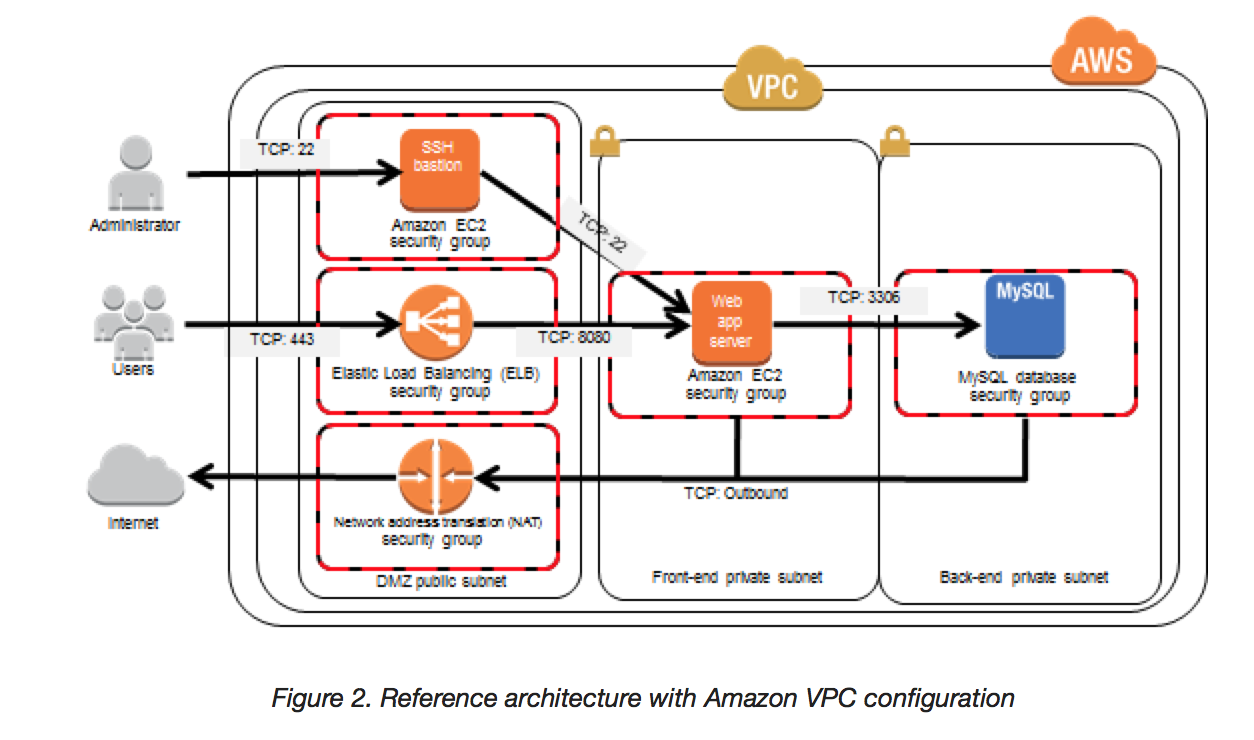
- Implement the least permissive rules for the security group.
- Regularly patch, update, and secure the operating system and applications on the instance. Use AWS Systems Manager Patch Manager to automate OS and application patching across EC2 fleets.
- Use AWS Systems Manager Session Manager for secure shell access instead of opening SSH/RDP ports. Session Manager provides IAM-based access control, full audit logging via CloudTrail, and eliminates the need for bastion hosts or managing SSH keys.
- Establish credential management policies and procedures for creating, distributing, rotating, and revoking AWS access credentials.
- Use Amazon Inspector to automatically discover and scan EC2 instances for software vulnerabilities and unintended network exposure.
- Use AWS Security Hub controls to monitor EC2 resources against security best practices and standards (e.g., EBS encryption enabled, IMDSv2 required, no public IPv4 addresses).
- Enforce IMDSv2 (Instance Metadata Service Version 2) on all instances. IMDSv2 uses session-oriented requests with tokens, protecting against SSRF attacks. As of mid-2024, all newly released EC2 instance types use IMDSv2 only by default.
- Encrypt EBS volumes and snapshots. Enable EBS encryption by default at the account level to ensure all newly created volumes are automatically encrypted using AWS KMS.
- Set the time-to-live (TTL) value for applications to 255 for both IPv4 and IPv6. Using a smaller value risks TTL expiring while traffic is in transit, causing reachability issues.
- Use the AWS Nitro System based instances which provide enhanced security through hardware-based isolation, encrypted memory (starting with Graviton2, AMD EPYC Milan, and Intel Ice Lake processors), and a minimized attack surface with no administrative access.
📝 Note: EC2-Classic was fully retired on August 15, 2023. All instances now launch into a VPC by default. Any references to EC2-Classic are historical only.
Storage
- EC2 supports Instance store and EBS volumes. Understand the implications of the root device type for data persistence, backup, and recovery.
- Use separate Amazon EBS volumes for the operating system (root device) versus the data.
- Ensure that the data volume persists after instance termination by configuring the
DeleteOnTerminationattribute appropriately. - Use the instance store available for the instance to store only temporary data. Data stored in instance store is deleted when an instance is stopped, hibernated, or terminated.
- If instance store is used for database storage, ensure a cluster with a replication factor that ensures fault tolerance.
- Enable EBS encryption by default at the account/region level so all new volumes and snapshots are encrypted automatically.
- Use appropriate EBS volume types based on workload requirements:
- gp3 – General purpose SSD (baseline 3,000 IOPS, up to 16,000 IOPS)
- io2 Block Express – High-performance SSD (up to 256,000 IOPS) for mission-critical workloads
- st1/sc1 – HDD volumes for throughput-intensive or cold storage workloads
Resource Management
- Use instance metadata and custom resource tags to track and identify AWS resources.
- View current limits for Amazon EC2 using Service Quotas. Plan to request any limit increases in advance of the time needed.
- Use AWS Trusted Advisor to inspect the AWS environment and get recommendations for saving money, improving system availability and performance, and closing security gaps.
- Use AWS Compute Optimizer for right-sizing recommendations based on actual utilization metrics. It analyzes CPU, memory, network, and storage to recommend optimal instance types.
- Consider AWS Graviton instances (Arm-based processors) for up to 40% better price-performance compared to x86 instances for compatible workloads.
- Use Savings Plans or Reserved Instances for predictable workloads (up to 72% discount), and Spot Instances for fault-tolerant workloads (up to 90% discount).
Backup & Recovery
- Regularly back up EBS volumes using Amazon EBS snapshots and create an Amazon Machine Image (AMI) from the instance to save the configuration as a template for launching future instances.
- Use Amazon Data Lifecycle Manager (DLM) to automate the creation, retention, and deletion of EBS snapshots and EBS-backed AMIs on a schedule.
- Use AWS Backup for centralized, policy-based backup management across EC2, EBS, and other AWS services with cross-account and cross-region capabilities.
- Deploy critical components of the application across multiple Availability Zones, and replicate data appropriately.
- Design applications to handle dynamic IP addressing when the instance restarts.
- Monitor and respond to events using Amazon EventBridge and CloudWatch Alarms.
- Implement failover:
- For a basic solution, manually attach a network interface or Elastic IP address to a replacement instance.
- For an automated solution, use Amazon EC2 Auto Scaling with health checks to automatically replace unhealthy instances.
- For predictable traffic patterns, use Predictive Scaling to proactively scale capacity ahead of demand spikes.
- Regularly test the process of recovering instances and EBS volumes to ensure data and services are restored successfully.
- Use EC2 instance recovery with CloudWatch alarms to automatically recover instances when underlying hardware fails.
Networking
- Set the time-to-live (TTL) value for applications to 255, for IPv4 and IPv6, to prevent TTL expiry during transit.
- Be aware of connection tracking behavior on Nitro-based instances. Sixth-generation Nitro (Nitro V6) instances launched in June 2025 changed the default TCP connection tracking idle timeout from 432,000 seconds (5 days) to 350 seconds.
- Use configurable idle timeouts for connection tracking to optimize conntrack allowance usage and reduce leaked connections.
- Use Capacity Reservations for business-critical workloads to ensure EC2 capacity is available when needed, especially in multi-AZ deployments.