AWS Associate Certification Exams – Preparation – Sample Questions

AWS Associate Certification Exams – Preparation & Study Guide

📋 2026 Certification Update

AWS certifications have undergone significant changes since this post was originally written. Key updates include:

  • AWS Certified SysOps Administrator – Associate (SOA-C02) was retired on September 29, 2025 and replaced by the AWS Certified CloudOps Engineer – Associate (SOA-C03)
  • AWS Certified Solutions Architect – Associate is now on exam version SAA-C03 (updated August 2022)
  • AWS now offers 12+ active certifications including new AI/ML certifications
  • AWS Skill Builder is now the primary official training platform with 900+ free courses

This guide has been updated to reflect current exam versions, resources, and preparation strategies.


AWS Certification Landscape (2026)

AWS currently offers certifications across four levels:

Foundational (No prerequisite experience)

  • AWS Certified Cloud Practitioner (CLF-C02) – Cloud concepts, billing, security – $100, 90 mins, 65 questions
  • AWS Certified AI Practitioner (AIF-C01) – AI/ML/GenAI concepts and use cases – $100, 90 mins, 65 questions

Associate (1+ year hands-on experience recommended)

  • AWS Certified Solutions Architect – Associate (SAA-C03) – Architecture design – $150, 130 mins, 65 questions
  • AWS Certified Developer – Associate (DVA-C02) – Application development – $150, 130 mins, 65 questions
  • AWS Certified CloudOps Engineer – Associate (SOA-C03) – Cloud operations (formerly SysOps Administrator) – $150, 130 mins, 65 questions
  • AWS Certified Data Engineer – Associate (DEA-C01) – Data pipelines and analytics – $150, 130 mins, 65 questions
  • AWS Certified Machine Learning Engineer – Associate (MLA-C01) – ML solutions and pipelines – $150, 130 mins, 65 questions

Professional (2+ years experience recommended)

  • AWS Certified Solutions Architect – Professional (SAP-C02) – $300, 180 mins, 75 questions
  • AWS Certified DevOps Engineer – Professional (DOP-C02) – $300, 180 mins, 75 questions
  • AWS Certified Generative AI Developer – Professional – Foundation models, RAG, responsible AI – $300

Specialty

  • AWS Certified Security – Specialty (SCS-C02) – $300, 170 mins, 65 questions
  • AWS Certified Advanced Networking – Specialty (ANS-C01) – $300, 170 mins, 65 questions

Note: AWS Certified Machine Learning – Specialty was retired March 31, 2026, replaced by the ML Engineer Associate certification.

AWS Associate Certification Exam Preparation (2026 Guide)

AWS Associate certifications remain the most popular entry point for cloud professionals. Here is a comprehensive preparation strategy based on the current exam formats:

Recommended Preparation Resources

    • Official AWS Resources:
      • AWS Certification Preparation page – Start here for official exam guides, sample questions, and prep plans
      • AWS Skill Builder – 900+ free self-paced courses, plus paid subscription for enhanced exam prep, labs, and practice exams
      • AWS Certification Exam Guides – Official exam domains, objectives, and recommended knowledge
      • AWS Free Tier account – Hands-on practice remains essential; the Free Tier provides 12 months of limited free usage for key services
    • Top Online Courses (2026):
    • Practice Exams:
      • AWS Official Practice Exams – Available free on AWS Skill Builder (Practice Question Sets) and paid full-length practice exams
      • Tutorials Dojo – Industry-leading practice tests with comprehensive explanations
      • Whizlabs AWS Solutions Architect Associate – Practice exams with hands-on labs
    • Important Whitepapers & FAQs:
    • Note: Qwiklabs (previously an AWS training resource) was acquired by Google in 2016 and rebranded as Google Cloud Skills Boost (now Google Skills). It no longer provides AWS labs. Use AWS Skill Builder for official hands-on labs.

Exam Preparation Tips

  • AWS Associate certifications cover a broad range of services but focus heavily on architectural decision-making rather than memorization
  • The SAA-C03 exam emphasizes the Well-Architected Framework pillars: Operational Excellence, Security, Reliability, Performance Efficiency, Cost Optimization, and Sustainability
  • Hands-on experience is highly recommended – use the AWS Free Tier to practice with core services
  • AWS services are updated continuously; the exam tests current best practices and service capabilities
  • Focus on understanding when to use which service rather than deep implementation details for Associate-level exams
  • All Associate exams are 65 questions in 130 minutes (approximately 2 minutes per question)
  • A scaled score of 720 out of 1000 is required to pass
  • Exam Time Tip: Only mark questions you genuinely doubt as “Mark for Review.” Marking too many wastes valuable review time
  • After passing, you receive a 50% discount voucher for your next AWS certification exam and a free official practice exam

AWS Solutions Architect Associate (SAA-C03) – Exam Domains

The SAA-C03 exam (current version since August 2022) covers four domains:

  • Domain 1: Design Secure Architectures (30%)
    • Secure access to AWS resources
    • Secure workloads and applications
    • Determine appropriate data security controls
  • Domain 2: Design Resilient Architectures (26%)
    • Scalable and loosely coupled architectures
    • Highly available and fault-tolerant architectures
  • Domain 3: Design High-Performing Architectures (24%)
    • Storage, compute, database, and networking solutions for performance
  • Domain 4: Design Cost-Optimized Architectures (20%)
    • Cost-effective storage, compute, and database solutions
    • Cost-effective network architectures

AWS CloudOps Engineer Associate (SOA-C03) – Formerly SysOps Administrator

⚠️ Important: The AWS Certified SysOps Administrator – Associate (SOA-C02) was retired on September 29, 2025. It has been replaced by the AWS Certified CloudOps Engineer – Associate (SOA-C03). The new exam reflects modern cloud operations practices including automation, observability, and infrastructure as code.

The CloudOps Engineer exam focuses on:

  • Monitoring, logging, and observability
  • Automation and infrastructure as code
  • Security and compliance operations
  • Reliability and business continuity
  • Cost and performance optimization
  • Networking and content delivery operations

AWS Associate Certification – Important Topics

💡 Note: AWS SWF (Simple Workflow Service) is a legacy service rarely tested in current exams. AWS Step Functions is the modern replacement and is heavily tested in SAA-C03 and DVA-C02.

Preparation Strategy – Week-by-Week Plan

For candidates with some AWS hands-on experience, a 4-8 week study plan works well:

  • Weeks 1-2: Complete a video course (Stéphane Maarek or Adrian Cantrill) covering all domains
  • Weeks 3-4: Read AWS documentation for key services, practice with the Free Tier, review FAQs
  • Weeks 5-6: Take practice exams (Tutorials Dojo, Whizlabs, or AWS official), review incorrect answers thoroughly
  • Weeks 7-8: Focus on weak areas, retake practice exams targeting 80%+, review whitepapers

Target Score: Aim for consistently scoring 80%+ on practice exams before scheduling your real exam.

Related Posts

References

AWS SWF – Simple Workflow Overview – Certification

⚠️ AWS Recommends Step Functions for New Applications

AWS SWF remains available and supported, but AWS officially recommends AWS Step Functions for most new workflow and orchestration use cases.

SWF is still used in legacy and specialized systems requiring the SWF programming model (deciders/workers, long-lived workflows, and explicit control over scheduling and retries).

Modern Alternatives:

AWS SWF – Simple Workflow

  • AWS SWF makes it easy to build applications that coordinate work across distributed components
  • SWF makes it easier to develop asynchronous and distributed applications by providing a programming model and infrastructure for coordinating distributed components, tracking and maintaining their execution state in a reliable way
  • SWF does the following
    • stores metadata about a workflow and its component parts.
    • stores task for workers and queues them until a Worker needs them.
    • assigns task to workers, which can run either on cloud or on-premises
    • routes information between executions of a workflow and the associated Workers.
    • tracks the progress of workers on Tasks, with configurable timeouts.
    • maintains workflow state in a durable fashion
  • SWF helps coordinating tasks across the application which involves managing intertask dependencies, scheduling, and concurrency in accordance with the logical flow of the application.
  • SWF gives full control over implementing tasks and coordinating them without worrying about underlying complexities such as tracking their progress and maintaining their state.
  • SWF tracks and maintains the workflow state in a durable fashion, so that the application is resilient to failures in individual components, which can be implemented, deployed, scaled, and modified independently
  • SWF offers capabilities to support a variety of application requirements and is suitable for a range of use cases that require coordination of tasks, including media processing, web application back-ends, business process workflows, and analytics pipelines.

Simple Workflow Concepts

AWS SWF Components

  • Workflow
    • Fundamental concept in SWF is the Workflow, which is the automation of a business process
    • A workflow is a set of activities that carry out some objective, together with logic that coordinates the activities.
  • Workflow Execution
    • A workflow execution is a running instance of a workflow
  • Workflow History
    • SWF maintains the state and progress of each workflow execution in its Workflow History, which saves the application from having to store the state in a durable way.
    • It enables applications to be stateless as all information about a workflow execution is stored in its workflow history.
    • For each workflow execution, the history provides a record of which activities were scheduled, their current status, and their results. The workflow execution uses this information to determine next steps.
    • History provides a detailed audit trail that can be used to monitor running workflow executions and verify completed workflow executions.
    • Operations that do not change the state of the workflow for e.g. polling execution do not typically appear in the workflow history
    • Markers can be used to record information in the workflow history of a workflow execution that is specific to the use case
  • Domain
    • Each workflow runs in an AWS resource called a Domain, which controls the workflow’s scope
    • An AWS account can have multiple domains, with each containing multiple workflows
    • Workflows in different domains cannot interact with each other
  • Activities
    • Designing an SWF workflow, Activities need to be precisely defined and then registered with SWF as an activity type with information such as name, version and timeout
  • Activity Task & Activity Worker
    • An Activity Worker is a program that receives activity tasks, performs them, and provides results back. An activity worker can be a program or even a person who performs the task using an activity worker software
    • Activity tasks—and the activity workers that perform them can
      • run synchronously or asynchronously, can be distributed across multiple computers, potentially in different geographic regions, or run on the same computer,
      • be written in different programming languages and run on different operating systems
      • be created that are long-running, or that may fail, time out require restarts or that may complete with varying throughput & latency
  • Decider
    • A Decider implements a Workflow’s coordination logic.
    • Decider schedules activity tasks, provides input data to the activity workers, processes events that arrive while the workflow is in progress, and ends (or closes) the workflow when the objective has been completed.
    • Decider directs the workflow by receiving decision tasks from SWF and responding back to SWF with decisions. A decision represents an action or set of actions which are the next steps in the workflow which can either be to schedule an activity task, set timers to delay the execution of an activity task, to request cancellation of activity tasks already in progress, and to complete or close the workflow.
  • Workers and Deciders are both stateless, and can respond to increased traffic by simply adding additional Workers and Deciders as needed
  • Role of SWF service is to function as a reliable central hub through which data is exchanged between the decider, the activity workers, and other relevant entities such as the person administering the workflow.
  • Mechanism by which both the activity workers and the decider receive their tasks (activity tasks and decision tasks resp.) is by polling the SWF
  • SWF allows “long polling”, requests will be held open for up to 60 seconds if necessary, to reduce network traffic and unnecessary processing
  • SWF informs the decider of the state of the workflow by including with each decision task, a copy of the current workflow execution history. The workflow execution history is composed of events, where an event represents a significant change in the state of the workflow execution for e.g events would be the completion of a task, notification that a task has timed out, or the expiration of a timer that was set earlier in the workflow execution. The history is a complete, consistent, and authoritative record of the workflow’s progress

Workflow Implementation & Execution

  1. Implement Activity workers with the processing steps in the Workflow.
  2. Implement Decider with the coordination logic of the Workflow.
  3. Register the Activities and workflow with SWF.
  4. Start the Activity workers and Decider. Once started, the decider and activity workers should start polling Amazon SWF for tasks.
  5. Start one or more executions of the Workflow. Each execution runs independently and can be provided with its own set of input data.
  6. When an execution is started, SWF schedules the initial decision task. In response, the decider begins generating decisions which initiate activity tasks. Execution continues until your decider makes a decision to close the execution.
  7. View and Track workflow executions

SWF vs. Step Functions

Feature AWS SWF AWS Step Functions
Orchestration Model Decider + Activity Workers (code-driven) State machines defined in JSON/YAML (Amazon States Language)
Infrastructure Must manage worker/decider infrastructure Fully serverless
Max Execution Duration Up to 1 year Standard: up to 1 year; Express: up to 5 minutes
Service Integrations None (custom code only) 200+ native AWS service integrations + HTTPS endpoints
Visual Workflow No Yes – visual designer and execution visualization
Human Tasks Built-in support via manual activity workers Supported via callback patterns and task tokens
Error Handling Custom logic in decider Built-in Retry and Catch per state + Redrive from failure
External Signals Signal events Callback patterns, EventBridge integration
AI/ML Integration None native Native Bedrock, SageMaker, AgentCore integration
Pricing Per workflow execution Per state transition (Standard) or per execution (Express)
Use Case Legacy/specialized workflows needing full control Recommended for all new workflow applications

AWS Step Functions – Modern Workflow Orchestration

  • AWS Step Functions is a fully managed, serverless workflow service that coordinates multiple AWS services using visual state machines.
  • Step Functions uses Amazon States Language (ASL) – a JSON-based language for defining state machines with states like Task, Choice, Parallel, Map, Wait, Pass, Succeed, and Fail.
  • Offers two workflow types:
    • Standard Workflows – long-running (up to 1 year), exactly-once execution, durable and auditable
    • Express Workflows – high-volume, short-duration (up to 5 minutes), at-least-once execution
  • Provides 200+ native service integrations including Lambda, DynamoDB, ECS, Bedrock, SQS, SNS, and third-party HTTPS APIs
  • Built-in error handling with Retry (automatic retry with exponential backoff) and Catch (fallback states)

Key Step Functions Features (2024-2025)

  • Variables and JSONata (Nov 2024) – Assign data in one state and reference it in any subsequent step; JSONata provides powerful query and transformation capabilities replacing complex JSONPath expressions
  • Redrive (2023-2024) – Restart failed Standard Workflow executions from the point of failure rather than restarting the entire workflow; available for failed executions within 14 days
  • HTTPS Endpoints / HTTP Task – Call third-party APIs directly from workflows without Lambda; supports EventBridge connections for authentication
  • Private API Integration (Dec 2024) – Integrate with private APIs using AWS PrivateLink and VPC Lattice for secure cross-network communication
  • Amazon Bedrock Integration – Native integration for invoking foundation models, creating fine-tuning jobs, and orchestrating AI/ML pipelines
  • Distributed Map – Process large-scale datasets in parallel with support for S3 data sources, Athena manifests, and Parquet files
  • AgentCore Integration (2026) – Add AI agent reasoning steps directly in workflows through Amazon Bedrock AgentCore

AWS Lambda Durable Functions (Dec 2025)

  • Lambda Durable Functions is a newer alternative for building multi-step, long-running workflows directly within Lambda code
  • Extends the Lambda programming model with new primitives:
    • Steps – checkpoint progress automatically; recover from failures without losing completed work
    • Waits – suspend execution (up to 1 year) for human approvals, external callbacks, or long-running tasks without incurring compute charges
  • Key benefits:
    • Write workflow logic as regular code in familiar programming languages
    • No need to learn a separate DSL (like Amazon States Language)
    • Automatic checkpointing and failure recovery
    • Ideal for developers who prefer code-first approach over visual state machines
  • Best suited for AI agent workflows, human-in-the-loop processes, and multi-step applications

When to Use SWF vs. Step Functions vs. Lambda Durable Functions

  • Use AWS SWF when:
    • You have existing SWF workflows and migration isn’t justified
    • You need explicit control over scheduling, retries, and task routing
    • Your workflow requires the specific decider/worker programming model
  • Use AWS Step Functions when:
    • Building new workflow applications (AWS recommended)
    • You need visual workflow design and monitoring
    • You require native AWS service integrations
    • You need built-in error handling, parallel execution, and branching logic
    • Orchestrating AI/ML pipelines with Bedrock
  • Use Lambda Durable Functions when:
    • You prefer writing workflow logic as code rather than declarative state machines
    • Building AI agent workflows with complex decision logic
    • You want automatic checkpointing without managing external state
    • Your team is familiar with Lambda but not ASL

AWS Certification Exam Practice Questions

  • Questions are collected from Internet and the answers are marked as per my knowledge and understanding (which might differ with yours).
  • AWS services are updated everyday and both the answers and questions might be outdated soon, so research accordingly.
  • AWS exam questions are not updated to keep up the pace with AWS updates, so even if the underlying feature has changed the question might not be updated
  • Open to further feedback, discussion and correction.
  1. What does Amazon SWF stand for?
    1. Simple Web Flow
    2. Simple Work Flow
    3. Simple Wireless Forms
    4. Simple Web Form
  2. Regarding Amazon SWF, the coordination logic in a workflow is contained in a software program called a ____.
    1. Handler
    2. Decider
    3. Coordinator
    4. Worker
  3. For which of the following use cases are Simple Workflow Service (SWF) and Amazon EC2 an appropriate solution? Choose 2 answers
    1. Using as an endpoint to collect thousands of data points per hour from a distributed fleet of sensors
    2. Managing a multi-step and multi-decision checkout process of an e-commerce website
    3. Orchestrating the execution of distributed and auditable business processes
    4. Using as an SNS (Simple Notification Service) endpoint to trigger execution of video transcoding jobs
    5. Using as a distributed session store for your web application
  4. Amazon SWF is designed to help users…
    1. … Design graphical user interface interactions
    2. … Manage user identification and authorization
    3. … Store Web content
    4. … Coordinate synchronous and asynchronous tasks which are distributed and fault tolerant.
  5. What does a “Domain” refer to in Amazon SWF?
    1. A security group in which only tasks inside can communicate with each other
    2. A special type of worker
    3. A collection of related Workflows
    4. The DNS record for the Amazon SWF service
  6. Your company produces customer commissioned one-of-a-kind skiing helmets combining nigh fashion with custom technical enhancements Customers can show oft their Individuality on the ski slopes and have access to head-up-displays. GPS rear-view cams and any other technical innovation they wish to embed in the helmet. The current manufacturing process is data rich and complex including assessments to ensure that the custom electronics and materials used to assemble the helmets are to the highest standards Assessments are a mixture of human and automated assessments you need to add a new set of assessment to model the failure modes of the custom electronics using GPUs with CUD across a cluster of servers with low latency networking. What architecture would allow you to automate the existing process using a hybrid approach and ensure that the architecture can support the evolution of processes over time? [PROFESSIONAL]
    1. Use AWS Data Pipeline to manage movement of data & meta-data and assessments. Use an auto-scaling group of G2 instances in a placement group. (Involves mixture of human assessments)
    2. Use Amazon Simple Workflow (SWF) to manage assessments, movement of data & meta-data. Use an autoscaling group of G2 instances in a placement group. (Human and automated assessments with GPU and low latency networking)
    3. Use Amazon Simple Workflow (SWF) to manage assessments movement of data & meta-data. Use an autoscaling group of C3 instances with SR-IOV (Single Root I/O Virtualization). (C3 and SR-IOV won’t provide GPU as well as Enhanced networking needs to be enabled)
    4. Use AWS data Pipeline to manage movement of data & meta-data and assessments use auto-scaling group of C3 with SR-IOV (Single Root I/O virtualization). (Involves mixture of human assessments)
  7. Your startup wants to implement an order fulfillment process for selling a personalized gadget that needs an average of 3-4 days to produce with some orders taking up to 6 months you expect 10 orders per day on your first day. 1000 orders per day after 6 months and 10,000 orders after 12 months. Orders coming in are checked for consistency men dispatched to your manufacturing plant for production quality control packaging shipment and payment processing. If the product does not meet the quality standards at any stage of the process employees may force the process to repeat a step Customers are notified via email about order status and any critical issues with their orders such as payment failure. Your case architecture includes AWS Elastic Beanstalk for your website with an RDS MySQL instance for customer data and orders. How can you implement the order fulfillment process while making sure that the emails are delivered reliably? [PROFESSIONAL]
    1. Add a business process management application to your Elastic Beanstalk app servers and re-use the ROS database for tracking order status use one of the Elastic Beanstalk instances to send emails to customers. (Would use a SWF instead of BPM)
    2. Use SWF with an Auto Scaling group of activity workers and a decider instance in another Auto Scaling group with min/max=1. Use the decider instance to send emails to customers. (Decider sending emails might not be reliable)
    3. Use SWF with an Auto Scaling group of activity workers and a decider instance in another Auto Scaling group with min/max=1. Use SES to send emails to customers.
    4. Use an SQS queue to manage all process tasks. Use an Auto Scaling group of EC2 Instances that poll the tasks and execute them. Use SES to send emails to customers. (Does not provide an ability to repeat a step)
  8. Select appropriate use cases for SWF with Amazon EC2? (Choose 2)
    1. Video encoding using Amazon S3 and Amazon EC2. In this use case, large videos are uploaded to Amazon S3 in chunks. Application is built as a workflow where each video file is handled as one workflow execution.
    2. Processing large product catalogs using Amazon Mechanical Turk. While validating data in large catalogs, the products in the catalog are processed in batches. Different batches can be processed concurrently.
    3. Order processing system with Amazon EC2, SQS, and SimpleDB. Use SWF notifications to orchestrate an order processing system running on EC2, where notifications sent over HTTP can trigger real-time processing in related components such as an inventory system or a shipping service.
    4. Using as an SQS (Simple Queue Service) endpoint to trigger execution of video transcoding jobs.
  9. When you register an activity in Amazon SWF, you provide the following information, except:
    1. a name
    2. timeout values
    3. a domain
    4. version
  10. Regarding Amazon SWF, at times you might want to record information in the workflow history of a workflow execution that is specific to your use case. ____ enable you to record information in the workflow execution history that you can use for any custom or scenario-specific purpose.
    1. Markers
    2. Tags
    3. Hash keys
    4. Events
  11. Which of the following statements about SWF are true? Choose 3 answers.
    1. SWF tasks are assigned once and never duplicated
    2. SWF requires an S3 bucket for workflow storage
    3. SWF workflow executions can last up to a year
    4. SWF triggers SNS notifications on task assignment
    5. SWF uses deciders and workers to complete tasks
    6. SWF requires at least 1 EC2 instance per domain
  12. A company needs to orchestrate a multi-step order processing workflow. The workflow involves Lambda functions, requires visual monitoring, and must handle errors with automatic retries. Which AWS service should they use?
    1. Amazon SWF with deciders and activity workers
    2. Amazon SQS with dead-letter queues
    3. AWS Step Functions with Standard Workflows
    4. Amazon EventBridge with rules and targets
  13. A development team is building an AI-powered document processing pipeline that invokes Amazon Bedrock models, stores results in DynamoDB, and notifies users via SNS. The workflow needs to handle failures gracefully and restart from the point of failure. Which combination provides the MOST operationally efficient solution?
    1. AWS SWF with custom decider logic for error handling
    2. Lambda functions orchestrated with SQS queues and DLQ
    3. AWS Step Functions with native service integrations, Retry/Catch blocks, and Redrive
    4. Amazon MWAA (Managed Airflow) with custom operators
  14. A developer needs to build a workflow that coordinates multiple steps, includes human approval, and can pause execution for days while waiting. The developer wants to write the workflow logic as regular code without learning a separate workflow language. Which service is MOST appropriate?
    1. AWS SWF with activity workers
    2. AWS Step Functions with callback patterns
    3. AWS Lambda Durable Functions with waits
    4. Amazon SQS with visibility timeout

References

AWS Resource Tags – Tagging Strategy & Cost Allocation

AWS Tags – Resource Groups – Tag Editor

  • Tags are key/value pairs that can be attached to AWS resources
  • Tags are metadata: that means that they don’t actually do anything, they’re purely for labeling purposes and helps to organize AWS resources
  • Tagging allows the user to assign her own (words/phrases/labels) metadata to each resource in the form of tags.
  • Tags don’t have any semantic meaning to the resources it is assigned and are interpreted strictly as a string of characters
  • Tags can
    • help to manage AWS resources & services for e.g. instances, images, security groups, etc.
    • help categorize AWS resources in different ways, for e.g., by purpose, owner (Developer, Finance, etc), or environment (DEV, TEST, PROD, etc).
    • help search and filter the resources
    • be used as a mechanism to organize resource costs on the cost allocation report.
    • enable Attribute-Based Access Control (ABAC) for fine-grained permissions management
    • support automation and operational workflows for e.g., automated patching, backup schedules, instance scheduling
  • Tags are not automatically assigned to the resources, however, are (sometimes) inherited for e.g. services such as Auto Scaling, Elastic Beanstalk, and CloudFormation can create other resources, such as RDS or EC2 instances, and usually tag that resource with a reference to itself. These tags do count toward the total tag limit for a resource
  • Tags can be defined using the
    • AWS Management Console,
    • AWS CLI
    • Amazon API.
  • Most AWS resources now support tagging on creation (tag-on-create), allowing tags to be applied when a resource is first created via console, CLI, or API.
  • Each tag consists of a key and value
    • key and an optional value, both of which are user-controlled
    • defining a new tag that has the same key as an existing tag on that resource, the new value overwrites the old value.
    • keys and values can be edited, removed from a resource at any time.
    • value can be defined as an empty string, but can’t be set to null.
  • IAM allows you the ability to control which users in the AWS account have permission to create, edit, or delete tags.
  • Common examples of tags are Environment, Application, Owner, Cost Center, Purpose, Stack, etc.
  • AWS also applies system-generated tags (prefixed with aws:) automatically to resources for internal tracking.

Tags Restriction

  • Maximum number of tags per resource – 50 (user-created tags; aws: prefixed tags do not count against this limit)
  • Maximum key length – 128 Unicode characters in UTF-8
  • Maximum value length – 256 Unicode characters in UTF-8
  • Tag keys and values are case-sensitive.
  • Do not use the aws: prefix in the tag names or values because it is reserved for AWS use. Tags with this prefix can’t be edited or deleted and they do not count against the tags per resource limit.
  • Tags allowed characters are: letters, spaces, and numbers representable in UTF-8, plus the following special characters: + – = . _ : / @.
  • Each tag key must be unique for each resource; it can have only one value per key.

Tagging Strategy

  • AWS recommends defining a comprehensive tagging strategy early when establishing your cloud foundation
  • Common tagging categories include:
    • Technical tags – Name, Application, Environment, Version, Cluster
    • Business tags – Owner, CostCenter, Project, Department
    • Automation tags – Schedule (start/stop), Backup, Patch Group
    • Security tags – Confidentiality, Compliance, DataClassification
  • Mandatory tags are the minimum set of tags every resource should have, regardless of purpose (e.g., Owner, Environment, CostCenter)
  • Use consistent naming conventions – decide on camelCase, PascalCase, or kebab-case and apply uniformly
  • As the number of tags allowed per resource are limited, Complex Tagging can be used for e.g. keyName = value1|value2|value3 or keyName = key1|value1;key2|value2

EC2 Resources Tags

  • For tags on EC2 instances, instances can’t terminate, stop, or delete a resource based solely on its tags; the resource identifier must be specified
  • Public or shared resources can be tagged, but the tags assigned are available only to the AWS account and not to the other accounts sharing the resource.
  • Almost all EC2 resources can be tagged, including instances, AMIs, volumes, snapshots, security groups, and network interfaces.
  • EC2 supports tag-on-create – tags can be specified during resource creation (e.g., RunInstances, CreateVolume) using the TagSpecification parameter.

Cost Allocation Tags

  • Tags can be used as a mechanism to organize the resource costs on the cost allocation report.
  • Cost allocation tags can be used to categorize and track AWS costs.
  • There are two types of cost allocation tags:
    • AWS-generated tags – automatically created by AWS (e.g., aws:createdBy), must be activated by the management account owner in the Billing console
    • User-defined tags – created by users and must be activated in the Billing console to appear in cost reports
  • When tags are applied to AWS resources such as EC2 instances or S3 buckets and activated in the billing console, AWS generates a cost allocation report as a (CSV file) with the usage and costs aggregated by active tags.
  • Tags can be applied so that they represent business categories (such as cost centers, application names, or owners) to organize costs across multiple services.
  • Cost allocation report includes all of the AWS costs for each billing period and includes both tagged and untagged resources
  • Tags can also be used to filter views in Cost Explorer
  • AWS Cost Categories – allows grouping costs into meaningful categories based on rules (including tag-based rules) for advanced cost allocation
  • Split Cost Allocation Data – provides granular container-level cost visibility for Amazon ECS tasks and EKS pods, using Kubernetes labels and ECS task tags as cost allocation tags. Supports CPU, memory, and accelerator (GPU, Trainium, Inferentia) cost tracking.
  • When an account moves to another organization, previously activated cost allocation tags lose their “active” status and need to be re-activated by the new management account.

Attribute-Based Access Control (ABAC)

  • ABAC is an authorization strategy that defines permissions based on attributes (tags) attached to IAM principals and AWS resources.
  • Tags can be attached to IAM users, roles, and AWS resources to implement fine-grained access control.
  • Key IAM condition keys for ABAC:
    • aws:ResourceTag/tag-key – matches the tag on the target resource
    • aws:RequestTag/tag-key – matches the tag in the API request
    • aws:PrincipalTag/tag-key – matches the tag on the calling IAM principal
    • aws:TagKeys – controls which tag keys can be used in a request
  • ABAC scales permissions automatically – new resources with matching tags are automatically accessible without policy updates
  • Requires fewer policies compared to traditional RBAC (Role-Based Access Control) as environments grow
  • Supported by most AWS services including EC2, S3, RDS, Lambda, DynamoDB, and SageMaker
  • Amazon S3 ABAC support (launched Nov 2025) – enables tag-based access control for S3 general purpose buckets, eliminating frequent IAM or bucket policy updates as the organization grows

Tag Policies (AWS Organizations)

  • Tag Policies allow standardization of tags attached to AWS resources across an organization’s accounts
  • Help maintain consistent tagging with proactive compliance, governance, and control
  • Two key capabilities:
    • Basic compliance rules – define acceptable tag key case treatment and tag values for specific resource types
    • Required tag keys – specify mandatory tag keys that must be present on resources
  • Two enforcement modes:
    • Reporting mode – evaluates compliance and reports violations without blocking operations
    • Enforcement mode – prevents resource creation/modification with non-compliant tag values
  • Wildcard support (July 2025) – Tag Policies now support ALL_SUPPORTED in the Resource element, simplifying policy authoring and reducing policy size
  • IaC enforcement (Nov 2025) – Tag Policies can now validate and enforce required tags in CloudFormation, Terraform, and Pulumi deployments, preventing non-compliant deployments proactively
  • Tag policy enforcement has no effect on resources that are created without tags; use SCPs or AWS Config for mandatory tag-on-create enforcement

Tag Compliance and Governance

  • AWS Config required-tags rule – managed rule that checks if resources have specified tags; supports up to 6 tags with optional values in a single rule
  • Service Control Policies (SCPs) – can be used to deny resource creation without required tags using aws:RequestTag and aws:TagKeys condition keys
  • Combining Tag Policies + SCPs + AWS Config provides comprehensive tag governance:
    • Tag Policies – define allowed values and enforce consistency
    • SCPs – prevent untagged resource creation
    • AWS Config – detect and report non-compliant existing resources
  • Use AWS Config conformance packs to deploy tag compliance rules across multiple accounts

Resource Groups

  • A Resource Group is a collection of resources that share one or more tags or are based on an AWS CloudFormation stack
  • Resource groups help combine information for multiple resources and services on a single screen for e.g. for a Dev tag there might be multiple resources for ELB, EC2, and RDS. Using Resource Groups all the resources and their status can be viewed on a single page
  • Two types of resource groups:
    • Tag-based groups – resources matching specified tag key/value pairs
    • AWS CloudFormation stack-based groups – resources belonging to a CloudFormation stack
  • Resource Groups can be used with AWS Systems Manager to automate operational tasks on grouped resources (e.g., patching, run commands)
  • Expanded resource type support (2024-2025) – AWS Resource Groups added support for 490+ new resource types across 2024-2025, covering services like AWS Entity Resolution, Amazon Personalize, Amazon Q Apps, AWS Backup, AWS Network Manager, and many more
  • AWS PrivateLink support (June 2025) – Resource Groups APIs can now be invoked from within a VPC without traversing the public internet via interface VPC endpoints

AWS Resource Explorer

  • AWS Resource Explorer (launched 2022) enables searching and discovering AWS resources across Regions and accounts from a single interface
  • Supports search using tags, resource types, service names, and other metadata
  • Key features:
    • Unified Search – integrated into the AWS Management Console search bar
    • Multi-region search – find resources across all enabled regions
    • Tag-based filtering – search for resources by tag keys and values
    • tag:none filter – find all resources missing user-generated tags
  • Tagged resource discovery (Sept 2024) – can now discover all tagged resources regardless of whether the resource type is fully supported
  • Tag support filtering (May 2024) – filter for resources that support tags to evaluate tagging coverage
  • Resource Explorer complements Tag Editor by providing a broader search-and-discovery capability across the entire AWS account/organization
  • Automatic resource search – no longer requires explicit setup; Resource Explorer enables resource search functionality automatically with appropriate permissions

Tag Editor

  • Tag Editor allows the addition of tags to multiple resources at once (up to 400 resources in a single operation)
  • Tag Editor allows searching of resources using tags and then add, edit, remove tags for these resources
  • Supports multi-region tag management – search for and manage tags of resources across multiple AWS Regions
  • Tag Editor is part of the AWS Resource Groups console and works with the Resource Groups Tagging API
  • Supports hundreds of AWS resource types for tagging operations

AWS Certification Exam Practice Questions

  • Questions are collected from Internet and the answers are marked as per my knowledge and understanding (which might differ with yours).
  • AWS services are updated everyday and both the answers and questions might be outdated soon, so research accordingly.
  • AWS exam questions are not updated to keep up the pace with AWS updates, so even if the underlying feature has changed the question might not be updated
  • Open to further feedback, discussion and correction.
  1. Fill in the blanks: _________ let you categorize your EC2 resources in different ways, for example, by purpose, owner, or environment.
    1. Wildcards
    2. Pointers
    3. Tags
    4. Special filters
  2. Please select the Amazon EC2 resource, which can be tagged.
    1. Key pairs
    2. Elastic IP addresses
    3. Placement groups
    4. Amazon EBS snapshots
  3. Can the string value of ‘Key’ be prefixed with aws:?
    1. No
    2. Only for EC2 not S3
    3. Yes
    4. Only for S3 not EC
  4. What is the maximum key length of a tag?
    1. 512 Unicode characters
    2. 64 Unicode characters
    3. 256 Unicode characters
    4. 128 Unicode characters
  5. An organization has launched 5 instances: 2 for production and 3 for testing. The organization wants that one particular group of IAM users should only access the test instances and not the production ones. How can the organization set that as a part of the policy?
    1. Launch the test and production instances in separate regions and allow region wise access to the group (possible using location constraint condition but not flexible)
    2. Define the IAM policy which allows access based on the instance ID (not flexible as it would change)
    3. Create an IAM policy with a condition which allows access to only small instances (not flexible as it would change)
    4. Define the tags on the test and production servers and add a condition to the IAM policy which allows access to specific tags (possible using aws:ResourceTag condition – this is ABAC)
  6. A user has launched multiple EC2 instances for the purpose of development and testing in the same region. The user wants to find the separate cost for the production and development instances. How can the user find the cost distribution?
    1. The user should download the activity report of the EC2 services as it has the instance ID wise data
    2. It is not possible to get the AWS cost usage data of single region instances separately
    3. User should use Cost Distribution Metadata and AWS detailed billing
    4. User should use Cost Allocation Tags and AWS billing reports
  7. An organization is using cost allocation tags to find the cost distribution of different departments and projects. One of the instances has two separate tags with the key/value as “InstanceName/HR”, “CostCenter/HR”. What will AWS do in this case?
    1. InstanceName is a reserved tag for AWS. Thus, AWS will not allow this tag
    2. AWS will not allow the tags as the value is the same for different keys
    3. AWS will allow tags but will not show correctly in the cost allocation report due to the same value of the two separate keys
    4. AWS will allow both the tags and show properly in the cost distribution report
  8. A user is launching an instance. He is on the “Tag the instance” screen. Which of the below mentioned information will not help the user understand the functionality of an AWS tag?
    1. Each tag will have a key and value
    2. The user can apply tags to the S3 bucket
    3. The maximum value of the tag key length is 64 unicode characters
    4. AWS tags are used to find the cost distribution of various resources
  9. Your system recently experienced down time during the troubleshooting process. You found that a new administrator mistakenly terminated several production EC2 instances. Which of the following strategies will help prevent a similar situation in the future? The administrator still must be able to:- launch, start stop, and terminate development resources. – launch and start production instances.
    1. Create an IAM user, which is not allowed to terminate instances by leveraging production EC2 termination protection. (EC2 termination protection is enabled on EC2 instance)
    2. Leverage resource based tagging along with an IAM user, which can prevent specific users from terminating production EC2 resources. (Identify production resources using tags and add explicit deny – ABAC pattern)
    3. Leverage EC2 termination protection and multi-factor authentication, which together require users to authenticate before terminating EC2 instances. (Does not still prevent user from terminating instance)
    4. Create an IAM user and apply an IAM role, which prevents users from terminating production EC2 instances. (Role is not applied to User but assumed by the User also need a way to identify production EC2 instances)
  10. Your manager has requested you to tag EC2 instances to organize and manage a load balancer. Which of the following statements about tag restrictions is incorrect?
    1. The maximum key length is 127 Unicode characters.
    2. The maximum value length is 255 Unicode characters.
    3. Tag keys and values are case sensitive.
    4. The maximum number of tags per load balancer is 20. (50 is the limit)
  11. What is the maximum number of tags that a user can assign to an EC2 instance?
    1. 50
    2. 10
    3. 5
    4. 25
  12. A company wants to ensure all EC2 instances launched in their AWS accounts have mandatory “Environment” and “CostCenter” tags. Which combination of AWS services can enforce this requirement? (Choose 2)
    1. AWS Organizations Tag Policies with required tag keys and IaC enforcement
    2. Amazon CloudWatch Events with tag monitoring
    3. Service Control Policies (SCPs) with aws:RequestTag and aws:TagKeys conditions
    4. AWS CloudTrail with tag logging enabled
    5. Amazon Inspector with tag assessment templates
  13. An organization uses ABAC (Attribute-Based Access Control) to manage permissions. A developer tagged with “team=backend” needs access to Lambda functions tagged with “team=backend”. Which IAM condition key should be used in the policy?
    1. aws:RequestTag/team
    2. aws:TagKeys
    3. aws:ResourceTag/team with aws:PrincipalTag/team
    4. aws:userid
  14. A company needs to find all AWS resources across multiple regions that are missing required tags. Which AWS service provides this capability most efficiently?
    1. AWS Config with required-tags rule
    2. AWS CloudTrail with tag event filtering
    3. AWS Resource Explorer with the tag:none filter
    4. AWS Tag Editor with cross-region search


CloudWatch Monitoring Supported AWS Services

CloudWatch Monitoring Supported AWS Services

  • CloudWatch offers either basic or detailed monitoring for supported AWS services.
  • Basic monitoring means that a service sends data points to CloudWatch every five minutes.
  • Detailed monitoring means that a service sends data points to CloudWatch every minute.
  • If the AWS service supports both basic and detailed monitoring, the basic would be enabled by default and the detailed monitoring needs to be enabled for detailed metrics.
  • High-Resolution Custom Metrics allow publishing data at 1-second resolution using the PutMetricData API with a StorageResolution of 1.

Monitoring Categories

  • Basic Monitoring – Free, default set of metrics published at 5-minute intervals for most services.
  • Detailed Monitoring – Paid, more frequent metrics (typically 1-minute intervals). Must be explicitly enabled.
  • High-Resolution Custom Metrics – Custom metrics published at up to 1-second intervals using PutMetricData API or Embedded Metric Format (EMF).

Services Offering Detailed Monitoring

The following services officially offer detailed monitoring (paid, more fine-grained metrics):

  • Amazon API Gateway – Additional dimensions for detailed metrics
  • AWS AppSync – Detailed CloudWatch metrics
  • Amazon CloudFront – Additional distribution metrics
  • Amazon EC2 – 1-minute metrics (vs. 5-minute basic)
  • AWS Elastic Beanstalk – Enhanced health reporting and monitoring
  • Amazon Kinesis Data Streams – Enhanced shard-level metrics
  • AWS Lambda – Event source mapping metrics
  • Amazon Managed Streaming for Apache Kafka (MSK) – Per-broker, per-topic metrics
  • Amazon S3 – Request metrics at 1-minute intervals
  • Amazon SES – Detailed monitoring via event publishing

AWS Services with Monitoring Support

  • Auto Scaling
    • By default, basic monitoring is enabled when the launch configuration is created using the AWS Management Console, and detailed monitoring is enabled when the launch configuration is created using the AWS CLI or an API.
    • Auto Scaling sends data to CloudWatch every 5 minutes by default when created from Console.
    • For an additional charge, you can enable detailed monitoring for Auto Scaling, which sends data to CloudWatch every minute.
  • Amazon CloudFront
    • Amazon CloudFront sends data to CloudWatch every minute by default.
    • Additional distribution metrics (detailed monitoring) can be enabled for more fine-grained visibility.
  • Amazon CloudSearch
    • Amazon CloudSearch sends data to CloudWatch every minute by default.
  • Amazon EventBridge (formerly Amazon CloudWatch Events)
    • Amazon EventBridge sends data to CloudWatch every minute by default.
  • Amazon CloudWatch Logs
    • Amazon CloudWatch Logs sends data to CloudWatch every minute by default.
  • Amazon DynamoDB
    • Amazon DynamoDB sends data to CloudWatch every minute for some metrics and every 5 minutes for other metrics.
    • DynamoDB Contributor Insights provides additional metrics for table and global secondary index access patterns.
  • Amazon Elastic Container Service (Amazon ECS)
    • Amazon ECS sends data to CloudWatch every minute.
    • Container Insights provides additional detailed metrics at the cluster, service, task, and container level including CPU, memory, network, and storage metrics.
  • Amazon ElastiCache
    • Amazon ElastiCache sends data to CloudWatch every minute.
  • Amazon Elastic Block Store (EBS)
    • Amazon EBS sends data to CloudWatch every 5 minutes for gp2, st1, and sc1 volumes.
    • Provisioned IOPS SSD (io1 and io2) volumes automatically send one-minute metrics to CloudWatch.
    • gp3 volumes also send metrics at 1-minute intervals.
  • Amazon Elastic Compute Cloud (EC2)
    • Amazon EC2 sends data to CloudWatch every 5 minutes by default. For an additional charge, you can enable detailed monitoring for Amazon EC2, which sends data to CloudWatch every minute.
  • Elastic Load Balancing
    • Elastic Load Balancing sends data to CloudWatch every minute (applies to ALB, NLB, GLB, and Classic Load Balancer).
  • Amazon EMR (formerly Amazon Elastic MapReduce)
    • Amazon EMR sends basic data to CloudWatch every 5 minutes by default at no additional cost.
    • Starting with Amazon EMR Release 7.0+, the CloudWatch Agent can publish 34 enhanced metrics every minute (additional charges apply).
    • EMR Serverless sends metrics to CloudWatch every minute.
  • Amazon OpenSearch Service (formerly Amazon Elasticsearch Service)
    • Amazon OpenSearch Service sends data to CloudWatch every minute.
  • Amazon Kinesis Data Streams (formerly Amazon Kinesis Streams)
    • Amazon Kinesis Data Streams sends stream-level data to CloudWatch every minute.
    • Enhanced shard-level metrics (detailed monitoring) provide additional per-shard metrics.
  • Amazon Data Firehose (formerly Amazon Kinesis Data Firehose)
    • Amazon Data Firehose sends data to CloudWatch every minute.
  • AWS Lambda
    • AWS Lambda sends data to CloudWatch every minute.
    • Lambda Insights provides enhanced monitoring with system-level metrics (CPU, memory, network) at 1-minute intervals.
  • Amazon SageMaker AI
    • Amazon SageMaker AI (which replaced the legacy Amazon Machine Learning service) sends training, endpoint, and transform job metrics to CloudWatch every minute.
  • ⚠️ Note: The original Amazon Machine Learning service is no longer accepting new users. AWS recommends using Amazon SageMaker AI for machine learning workloads.
  • Amazon Redshift
    • Amazon Redshift sends data to CloudWatch every minute.
  • Amazon Relational Database Service (RDS)
    • Amazon RDS sends data to CloudWatch every minute.
    • CloudWatch Database Insights (launched Dec 2024) provides comprehensive database observability with fleet-level and instance-level dashboards.
  • Amazon Route 53
    • Amazon Route 53 sends data to CloudWatch every minute.
  • Amazon Simple Notification Service (SNS)
    • Amazon SNS sends data to CloudWatch every 5 minutes.
    • SNS does not support detailed (1-minute) monitoring.
  • Amazon Simple Queue Service (SQS)
    • Amazon SQS sends data to CloudWatch every 5 minutes.
  • Amazon Simple Storage Service (S3)
    • Amazon S3 sends storage metrics (bucket size, object count) to CloudWatch once a day (basic monitoring, free).
    • Request metrics (detailed monitoring) are available at 1-minute intervals and are billed as CloudWatch custom metrics.
    • 1-minute metrics are available at the bucket-level by default when request metrics are enabled.
  • Amazon Simple Workflow Service (SWF)
    • Amazon SWF sends data to CloudWatch every 5 minutes.
    • Note: AWS Step Functions is the recommended alternative for new workflow orchestration workloads.
  • AWS Storage Gateway
    • AWS Storage Gateway sends data to CloudWatch every 5 minutes.
  • AWS WAF
    • AWS WAF sends data to CloudWatch every minute.
  • Amazon WorkSpaces
    • Amazon WorkSpaces sends data to CloudWatch every 5 minutes.

⚠️ AWS OpsWorks – End of Life

AWS OpsWorks reached End of Life (EOL) on May 26, 2024. The service has been disabled for both new and existing customers. The OpsWorks console, API, CLI, and CloudFormation resources are no longer available.

Alternatives: AWS Systems Manager, AWS CodeDeploy, AWS CloudFormation

Additional Services Publishing CloudWatch Metrics (2024-2026)

The following additional AWS services publish metrics to CloudWatch (not in the original list):

  • Amazon API Gateway – Sends metrics every minute
  • AWS AppSync – Sends metrics every minute
  • Amazon EKS – Control plane metrics and Container Insights
  • Amazon Bedrock – Model invocation and throughput metrics
  • AWS Step Functions – Execution metrics every minute
  • Amazon Aurora – Database metrics every minute (with Database Insights)
  • AWS Fargate – Container-level metrics via Container Insights
  • Amazon MSK – Streaming metrics with per-broker/topic detail
  • AWS Network Firewall – Firewall metrics every minute
  • Amazon MemoryDB – Database metrics every minute

CloudWatch Enhanced Observability Features

  • Container Insights – Collects and aggregates metrics and logs from containerized applications on Amazon ECS, Amazon EKS, and Kubernetes. Provides cluster, node, pod, task, and service level metrics.
  • Lambda Insights – Enhanced monitoring for Lambda functions with system-level metrics (CPU, memory, network, disk).
  • Database Insights (Dec 2024) – Comprehensive database observability for Amazon RDS and Aurora with fleet-level health monitoring and instance-level SQL query analysis.
  • Application Signals (June 2024) – Application performance monitoring (APM) with pre-built dashboards showing volume, availability, latency, faults, and errors.
  • Internet Monitor – Near-continuous internet measurements for availability and performance, tailored to your workload footprint on AWS.
  • CloudWatch Investigations – AI-powered investigation of operational issues across services.

AWS Certification Exam Practice Questions

  • Questions are collected from Internet and the answers are marked as per my knowledge and understanding (which might differ with yours).
  • AWS services are updated everyday and both the answers and questions might be outdated soon, so research accordingly.
  • AWS exam questions are not updated to keep up the pace with AWS updates, so even if the underlying feature has changed the question might not be updated
  • Open to further feedback, discussion and correction.
  1. What is the minimum time interval for the data that Amazon CloudWatch receives and aggregates?
    1. One second (High-resolution custom metrics support 1-second resolution)
    2. Five seconds
    3. One minute
    4. Three minutes
    5. Five minutes

    Note: The original answer was “One minute” which was correct for standard metrics. With high-resolution custom metrics (introduced 2017), CloudWatch supports 1-second resolution. Exam questions may still reference 1 minute as the minimum for AWS service metrics.

  2. In the ‘Detailed’ monitoring data available for your Amazon EBS volumes, Provisioned IOPS volumes automatically send _____ minute metrics to Amazon CloudWatch.
    1. 3
    2. 1
    3. 5
    4. 2
  3. Using Amazon CloudWatch’s Free Tier, what is the frequency of metric updates, which you receive?
    1. 5 minutes
    2. 500 milliseconds.
    3. 30 seconds
    4. 1 minute
  4. What is the type of monitoring data (for Amazon EBS volumes) which is available automatically in 5-minute periods at no charge called?
    1. Basic
    2. Primary
    3. Detailed
    4. Local
  5. A user has created an Auto Scaling group using CLI. The user wants to enable CloudWatch detailed monitoring for that group. How can the user configure this?
    1. When the user sets an alarm on the Auto Scaling group, it automatically enables detail monitoring
    2. By default detailed monitoring is enabled for Auto Scaling (Detailed monitoring is enabled when you create the launch configuration using the AWS CLI or an API)
    3. Auto Scaling does not support detailed monitoring
    4. Enable detail monitoring from the AWS console
  6. A user is trying to understand the detailed CloudWatch monitoring concept. Which of the below mentioned services provides detailed monitoring with CloudWatch without charging the user extra?
    1. AWS Auto Scaling
    2. AWS Route 53
    3. AWS EMR
    4. AWS SNS
  7. A user is trying to understand the detailed CloudWatch monitoring concept. Which of the below mentioned services does not provide detailed monitoring with CloudWatch?
    1. AWS EMR (EMR sends basic metrics every 5 minutes by default; enhanced monitoring at 1-minute intervals is available starting with EMR 7.0+ via CloudWatch Agent)
    2. AWS RDS
    3. AWS ELB
    4. AWS Route53
  8. A user has enabled detailed CloudWatch monitoring with the AWS Simple Notification Service. Which of the below mentioned statements helps the user understand detailed monitoring better?
    1. SNS will send data every minute after configuration
    2. There is no need to enable since SNS provides data every minute
    3. AWS CloudWatch does not support monitoring for SNS
    4. SNS cannot provide data every minute
  9. A user has configured an Auto Scaling group with ELB. The user has enabled detailed CloudWatch monitoring on Auto Scaling. Which of the below mentioned statements will help the user understand the functionality better?
    1. It is not possible to setup detailed monitoring for Auto Scaling
    2. In this case, Auto Scaling will send data every minute and will charge the user extra
    3. Detailed monitoring will send data every minute without additional charges
    4. Auto Scaling sends data every minute only and does not charge the user
  10. Which of the following CloudWatch monitoring features provides near real-time visibility into application performance with pre-built dashboards?
    1. CloudWatch Logs Insights
    2. CloudWatch Alarms
    3. CloudWatch Application Signals
    4. CloudWatch Contributor Insights
  11. What is the minimum resolution supported by CloudWatch high-resolution custom metrics?
    1. 5 seconds
    2. 10 seconds
    3. 30 seconds
    4. 1 second
  12. Which CloudWatch feature provides comprehensive database observability with fleet-level health monitoring for Amazon RDS and Aurora?
    1. CloudWatch Logs Insights
    2. Enhanced Monitoring
    3. Performance Insights
    4. CloudWatch Database Insights

References

AWS Storage Options – Whitepaper – Certification

AWS Storage Options – Whitepaper – Certification

📋 Whitepaper Archived

The original AWS Storage Options whitepaper has been archived by AWS. AWS now recommends referring to the Storage section in the AWS Overview whitepaper or the AWS Cloud Storage page for current storage guidance.

This content is maintained and updated for certification exam preparation as the core storage concepts and service selection patterns remain highly relevant.

AWS Storage Options is one of the most important topics for AWS Solution Architect Professional Certification exam and covers a brief summary of each AWS storage option, their ideal usage patterns, anti-patterns, performance, durability and availability, scalability etc.

Overview

  • AWS offers multiple cloud-based storage options. Each has a unique combination of performance, durability, availability, cost, and interface, as well as other characteristics such as scalability and elasticity
  • All storage options are ideally suited for some use cases and there are certain Anti-Patterns which should be taken into account while making a storage choice
  • AWS storage services now span object storage, block storage, file storage, archival storage, hybrid storage, data transfer, and backup services
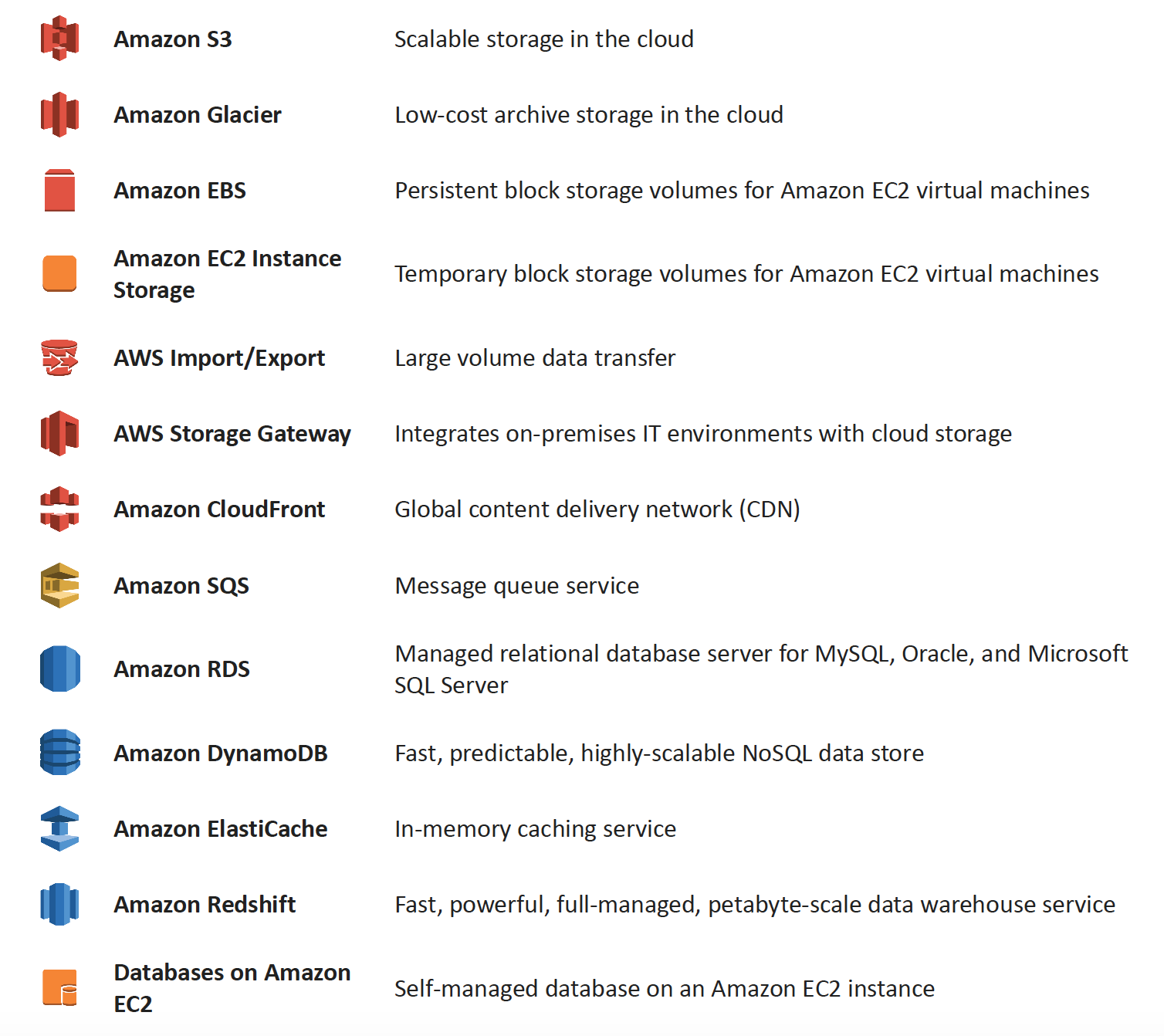
AWS Various Storage Options

AWS Storage Services

Amazon S3 & S3 Glacier Storage Classes

More Details @ AWS Storage Options – S3 & Glacier

Key Updates (2024-2026):

  • S3 Glacier is now three separate storage classes:
    • S3 Glacier Instant Retrieval – millisecond retrieval for rarely accessed data
    • S3 Glacier Flexible Retrieval (formerly S3 Glacier) – minutes to hours retrieval
    • S3 Glacier Deep Archive – lowest cost, 12-48 hour retrieval
  • S3 Express One Zone (launched 2023) – up to 10x faster performance than S3 Standard, single-digit millisecond latency, designed for most frequently accessed data. Received up to 85% price reduction in 2025.
  • S3 Tables (launched Dec 2024) – fully managed Apache Iceberg tables optimized for analytics workloads with up to 3x faster query throughput
  • S3 Intelligent-Tiering – now includes Archive Instant Access, Archive Access, and Deep Archive Access tiers

Amazon Elastic Block Store (EBS) & Instance Store Volumes

More details @ AWS Storage Options – EBS & Instance Store

Amazon EFS (Elastic File System)

  • Fully managed, elastic NFS file system for Linux workloads
  • Supports machine learning, big data analytics, web serving, and content management
  • Scales automatically without provisioning or managing capacity
  • Offers Standard and Infrequent Access storage classes with lifecycle management

Amazon FSx Family

  • FSx for Windows File Server – fully managed Windows-native file system
  • FSx for Lustre – high-performance file system for compute-intensive workloads (new Elastic storage class launched 2025)
  • FSx for NetApp ONTAP – fully managed shared storage with NetApp ONTAP (2nd gen file systems in 2024)
  • FSx for OpenZFS – fully managed OpenZFS file system (Intelligent-Tiering storage class launched Dec 2024, saves up to 85%)

Amazon RDS, DynamoDB & Database on EC2

More details @ AWS Storage Options – RDS, DynamoDB & Database on EC2

Amazon SQS & Redshift

More details @ AWS Storage Options – SQS & Redshift

Amazon CloudFront & ElastiCache

More details @ AWS Storage Options – CloudFront & ElastiCache

AWS Storage Gateway

More details @ AWS Storage Options – Storage Gateway & Import/Export

Key Updates:

  • Storage Gateway continues to provide S3 File Gateway, Tape Gateway, and Volume Gateway
  • FSx File Gateway is no longer available to new customers (effective October 28, 2024). Existing customers should migrate to direct Amazon FSx for Windows File Server access.
  • All Storage Gateway appliances must migrate from Amazon Linux 2 to AL2023 for continued updates

AWS Data Transfer & Migration Services

⚠️ AWS Import/Export & Snow Family Updates:

  • AWS Import/Export (original disk-shipping service) – deprecated long ago, replaced by Snow Family
  • AWS Snowmobile – Retired in March 2024. Service is no longer available.
  • AWS Snowcone – Discontinued effective November 12, 2024. Support ended November 12, 2025.
  • AWS Snowball Edge – Only available to existing customers as of November 7, 2025. Not available to new customers.

Recommended Replacements:

  • AWS DataSync – for online data transfers (now supports cross-cloud transfers to Google Cloud, Azure, Oracle Cloud as of 2025)
  • AWS Data Transfer Terminal (launched Dec 2024) – secure physical locations where you bring your storage devices and connect directly to the AWS network for high-speed uploads to S3, EFS, and other services
  • AWS Outposts – for edge computing use cases previously served by Snow devices
  • AWS Partner solutions – for specialized migration needs

AWS Backup

  • Fully managed, centralized backup service that automates data protection across AWS services and hybrid workloads
  • Supports EC2, EBS, RDS, DynamoDB, EFS, FSx, S3, Storage Gateway, and Amazon EKS (added 2025)
  • Provides ransomware detection and recovery capabilities
  • Supports cross-Region and cross-account backup with AWS Organizations integration
  • Logically air-gapped vaults for additional protection
  • Policy-based backup plans with configurable frequency and retention

Deprecated Services Referenced in Exam Questions

⚠️ Amazon Elastic Transcoder – EOL November 13, 2025

Amazon Elastic Transcoder has been discontinued. AWS Elemental MediaConvert is the recommended replacement, offering better performance, more features, and lower pricing. Questions referencing Elastic Transcoder still appear on older exam versions but the correct architectural pattern (S3 + transcoding + CloudFront) remains valid using MediaConvert.

⚠️ Amazon SWF (Simple Workflow Service) – Superseded by Step Functions

While SWF remains available, AWS recommends Step Functions for all new applications. SWF still appears in exam questions but new designs should use Step Functions for workflow orchestration.

AWS Certification Exam Practice Questions

  • Questions are collected from Internet and the answers are marked as per my knowledge and understanding (which might differ with yours).
  • AWS services are updated everyday and both the answers and questions might be outdated soon, so research accordingly.
  • AWS exam questions are not updated to keep up the pace with AWS updates, so even if the underlying feature has changed the question might not be updated
  • Open to further feedback, discussion and correction.
  1. You are developing a highly available web application using stateless web servers. Which services are suitable for storing session state data? Choose 3 answers.
    1. Elastic Load Balancing
    2. Amazon Relational Database Service (RDS)
    3. Amazon CloudWatch
    4. Amazon ElastiCache
    5. Amazon DynamoDB
    6. AWS Storage Gateway
  2. Your firm has uploaded a large amount of aerial image data to S3. In the past, in your on-premises environment, you used a dedicated group of servers to oaten process this data and used Rabbit MQ, an open source messaging system, to get job information to the servers. Once processed the data would go to tape and be shipped offsite. Your manager told you to stay with the current design, and leverage AWS archival storage and messaging services to minimize cost. Which is correct? [PROFESSIONAL]
    1. Use SQS for passing job messages, use Cloud Watch alarms to terminate EC2 worker instances when they become idle. Once data is processed, change the storage class of the S3 objects to Reduced Redundancy Storage.
    2. Setup Auto-Scaled workers triggered by queue depth that use spot instances to process messages in SQS. Once data is processed, change the storage class of the S3 objects to Reduced Redundancy Storage.
    3. Setup Auto-Scaled workers triggered by queue depth that use spot instances to process messages in SQS. Once data is processed, change the storage class of the S3 objects to Glacier. (Now S3 Glacier Flexible Retrieval or S3 Glacier Deep Archive)
    4. Use SNS to pass job messages use Cloud Watch alarms to terminate spot worker instances when they become idle. Once data is processed, change the storage class of the S3 object to Glacier.
  3. You are developing a new mobile application and are considering storing user preferences in AWS, which would provide a more uniform cross-device experience to users using multiple mobile devices to access the application. The preference data for each user is estimated to be 50KB in size. Additionally 5 million customers are expected to use the application on a regular basis. The solution needs to be cost-effective, highly available, scalable and secure, how would you design a solution to meet the above requirements? [PROFESSIONAL]
    1. Setup an RDS MySQL instance in 2 availability zones to store the user preference data. Deploy a public facing application on a server in front of the database to manage security and access credentials
    2. Setup a DynamoDB table with an item for each user having the necessary attributes to hold the user preferences. The mobile application will query the user preferences directly from the DynamoDB table. Utilize STS. Web Identity Federation, and DynamoDB Fine Grained Access Control to authenticate and authorize access
    3. Setup an RDS MySQL instance with multiple read replicas in 2 availability zones to store the user preference data .The mobile application will query the user preferences from the read replicas. Leverage the MySQL user management and access privilege system to manage security and access credentials.
    4. Store the user preference data in S3 Setup a DynamoDB table with an item for each user and an item attribute pointing to the user’ S3 object. The mobile application will retrieve the S3 URL from DynamoDB and then access the S3 object directly utilize STS, Web identity Federation, and S3 ACLs to authenticate and authorize access.
  4. A company is building a voting system for a popular TV show, viewers would watch the performances then visit the show’s website to vote for their favorite performer. It is expected that in a short period of time after the show has finished the site will receive millions of visitors. The visitors will first login to the site using their Amazon.com credentials and then submit their vote. After the voting is completed the page will display the vote totals. The company needs to build the site such that can handle the rapid influx of traffic while maintaining good performance but also wants to keep costs to a minimum. Which of the design patterns below should they use? [PROFESSIONAL]
    1. Use CloudFront and an Elastic Load balancer in front of an auto-scaled set of web servers, the web servers will first can the Login With Amazon service to authenticate the user then process the users vote and store the result into a multi-AZ Relational Database Service instance.
    2. Use CloudFront and the static website hosting feature of S3 with the Javascript SDK to call the Login With Amazon service to authenticate the user, use IAM Roles to gain permissions to a DynamoDB table to store the users vote.
    3. Use CloudFront and an Elastic Load Balancer in front of an auto-scaled set of web servers, the web servers will first call the Login with Amazon service to authenticate the user, the web servers will process the users vote and store the result into a DynamoDB table using IAM Roles for EC2 instances to gain permissions to the DynamoDB table.
    4. Use CloudFront and an Elastic Load Balancer in front of an auto-scaled set of web servers, the web servers will first call the Login With Amazon service to authenticate the user, the web servers would process the users vote and store the result into an SQS queue using IAM Roles for EC2 Instances to gain permissions to the SQS queue. A set of application servers will then retrieve the items from the queue and store the result into a DynamoDB table
  5. A large real-estate brokerage is exploring the option to adding a cost-effective location-based alert to their existing mobile application. The application backend infrastructure currently runs on AWS. Users who opt in to this service will receive alerts on their mobile device regarding real-estate offers in proximity to their location. For the alerts to be relevant delivery time needs to be in the low minute count. The existing mobile app has 5 million users across the US. Which one of the following architectural suggestions would you make to the customer? [PROFESSIONAL]
    1. Mobile application will submit its location to a web service endpoint utilizing Elastic Load Balancing and EC2 instances. DynamoDB will be used to store and retrieve relevant offers. EC2 instances will communicate with mobile carriers/device providers to push alerts back to mobile application.
    2. Use AWS Direct Connect or VPN to establish connectivity with mobile carriers EC2 instances will receive the mobile applications location through carrier connection: RDS will be used to store and relevant offers. EC2 instances will communicate with mobile carriers to push alerts back to the mobile application
    3. Mobile application will send device location using SQS. EC2 instances will retrieve the relevant offers from DynamoDB. AWS Mobile Push will be used to send offers to the mobile application (Note: Amazon SNS Mobile Push is now the terminology for mobile push notifications)
    4. Mobile application will send device location using AWS Mobile Push. EC2 instances will retrieve the relevant offers from DynamoDB. EC2 instances will communicate with mobile carriers/device providers to push alerts back to the mobile application.
  6. You are running a news website in the eu-west-1 region that updates every 15 minutes. The website has a worldwide audience and it uses an Auto Scaling group behind an Elastic Load Balancer and an Amazon RDS database. Static content resides on Amazon S3, and is distributed through Amazon CloudFront. Your Auto Scaling group is set to trigger a scale up event at 60% CPU utilization; you use an Amazon RDS extra-large DB instance with 10.000 Provisioned IOPS its CPU utilization is around 80%. While freeable memory is in the 2 GB range. Web analytics reports show that the average load time of your web pages is around 1.5 to 2 seconds, but your SEO consultant wants to bring down the average load time to under 0.5 seconds. How would you improve page load times for your users? (Choose 3 answers) [PROFESSIONAL]
    1. Lower the scale up trigger of your Auto Scaling group to 30% so it scales more aggressively.
    2. Add an Amazon ElastiCache caching layer to your application for storing sessions and frequent DB queries
    3. Configure Amazon CloudFront dynamic content support to enable caching of re-usable content from your site
    4. Switch Amazon RDS database to the high memory extra-large Instance type
    5. Set up a second installation in another region, and use the Amazon Route 53 latency-based routing feature to select the right region.
  7. A read only news reporting site with a combined web and application tier and a database tier that receives large and unpredictable traffic demands must be able to respond to these traffic fluctuations automatically. What AWS services should be used meet these requirements? [PROFESSIONAL]
    1. Stateless instances for the web and application tier synchronized using ElastiCache Memcached in an autoscaling group monitored with CloudWatch. And RDS with read replicas.
    2. Stateful instances for the web and application tier in an autoscaling group monitored with CloudWatch and RDS with read replicas
    3. Stateful instances for the web and application tier in an autoscaling group monitored with CloudWatch. And multi-AZ RDS
    4. Stateless instances for the web and application tier synchronized using ElastiCache Memcached in an autoscaling group monitored with CloudWatch and multi-AZ RDS
  8. You have a periodic Image analysis application that gets some files as input, analyzes them and for each file writes some data in output to a ten file. The number of files in input per day is high and concentrated in a few hours of the day. Currently you have a server on EC2 with a large EBS volume that hosts the input data and the results it takes almost 20 hours per day to complete the process. What services could be used to reduce the elaboration time and improve the availability of the solution? [PROFESSIONAL]
    1. S3 to store I/O files. SQS to distribute elaboration commands to a group of hosts working in parallel. Auto scaling to dynamically size the group of hosts depending on the length of the SQS queue
    2. EBS with Provisioned IOPS (PIOPS) to store I/O files. SNS to distribute elaboration commands to a group of hosts working in parallel Auto Scaling to dynamically size the group of hosts depending on the number of SNS notifications
    3. S3 to store I/O files, SNS to distribute evaporation commands to a group of hosts working in parallel. Auto scaling to dynamically size the group of hosts depending on the number of SNS notifications
    4. EBS with Provisioned IOPS (PIOPS) to store I/O files SQS to distribute elaboration commands to a group of hosts working in parallel Auto Scaling to dynamically size the group to hosts depending on the length of the SQS queue.
  9. A 3-tier e-commerce web application is current deployed on-premises and will be migrated to AWS for greater scalability and elasticity. The web server currently shares read-only data using a network distributed file system The app server tier uses a clustering mechanism for discovery and shared session state that depends on IP multicast The database tier uses shared-storage clustering to provide database fail over capability, and uses several read slaves for scaling. Data on all servers and the distributed file system directory is backed up weekly to off-site tapes. Which AWS storage and database architecture meets the requirements of the application? [PROFESSIONAL]
    1. Web servers store read-only data in S3, and copy from S3 to root volume at boot time. App servers share state using a combination of DynamoDB and IP unicast. Database use RDS with multi-AZ deployment and one or more Read Replicas. Backup web and app servers backed up weekly via AMIs, database backed up via DB snapshots.
    2. Web servers store read-only data in S3, and copy from S3 to root volume at boot time. App servers share state using a combination of DynamoDB and IP unicast. Database use RDS with multi-AZ deployment and one or more Read replicas. Backup web servers app servers, and database backed up weekly to Glacier using snapshots (Snapshots to Glacier don’t work directly with EBS snapshots)
    3. Web servers store read-only data in S3 and copy from S3 to root volume at boot time. App servers share state using a combination of DynamoDB and IP unicast. Database use RDS with multi-AZ deployment. Backup web and app servers backed up weekly via AMIs. Database backed up via DB snapshots (Need Read replicas for scalability and elasticity)
    4. Web servers, store read-only data in an EC2 NFS server, mount to each web server at boot time App servers share state using a combination of DynamoDB and IP multicast Database use RDS with multi-AZ deployment and one or more Read Replicas Backup web and app servers backed up weekly via AMIs database backed up via DB snapshots (IP multicast not available in AWS)
  10. Our company is getting ready to do a major public announcement of a social media site on AWS. The website is running on EC2 instances deployed across multiple Availability Zones with a Multi-AZ RDS MySQL Extra Large DB Instance. The site performs a high number of small reads and writes per second and relies on an eventual consistency model. After comprehensive tests you discover that there is read contention on RDS MySQL. Which are the best approaches to meet these requirements? (Choose 2 answers) [PROFESSIONAL]
    1. Deploy ElastiCache in-memory cache running in each availability zone
    2. Implement sharding to distribute load to multiple RDS MySQL instances (Would distribute read write both, focus is on read contention)
    3. Increase the RDS MySQL Instance size and Implement provisioned IOPS (Would distribute read write both, focus is on read contention)
    4. Add an RDS MySQL read replica in each availability zone
  11. Run 2-tier app with the following: an ELB, three web app server on EC2, and 1 MySQL RDS db. With grown load, db queries take longer and longer and slow down the overall response time for user request. What Options could speed up performance? (Choose 3) [PROFESSIONAL]
    1. Create an RDS read-replica and redirect half of the database read request to it
    2. Cache database queries in Amazon ElastiCache
    3. Setup RDS in multi-availability zone mode.
    4. Shard the database and distribute loads between shards.
    5. Use Amazon CloudFront to cache database queries.
  12. You have a web application leveraging an Elastic Load Balancer (ELB) In front of the web servers deployed using an Auto Scaling Group Your database is running on Relational Database Service (RDS) The application serves out technical articles and responses to them in general there are more views of an article than there are responses to the article. On occasion, an article on the site becomes extremely popular resulting in significant traffic Increases that causes the site to go down. What could you do to help alleviate the pressure on the infrastructure while maintaining availability during these events? Choose 3 answers [PROFESSIONAL]
    1. Leverage CloudFront for the delivery of the articles.
    2. Add RDS read-replicas for the read traffic going to your relational database
    3. Leverage ElastiCache for caching the most frequently used data.
    4. Use SQS to queue up the requests for the technical posts and deliver them out of the queue (does not process and would not be real time)
    5. Use Route53 health checks to fail over to an S3 bucket for an error page (more of an error handling then availability)
  1. Your website is serving on-demand training videos to your workforce. Videos are uploaded monthly in high resolution MP4 format. Your workforce is distributed globally often on the move and using company-provided tablets that require the HTTP Live Streaming (HLS) protocol to watch a video. Your company has no video transcoding expertise and it required you might need to pay for a consultant. How do you implement the most cost-efficient architecture without compromising high availability and quality of video delivery? [PROFESSIONAL]
    1. AWS Elemental MediaConvert to transcode original high-resolution MP4 videos to HLS. S3 to host videos with Lifecycle Management to archive original files to S3 Glacier Flexible Retrieval after a few days. CloudFront to serve HLS transcoded videos from S3. (MediaConvert replaces Elastic Transcoder (EOL Nov 2025) for high quality transcoding. S3 to host videos cheaply, Glacier for archives and CloudFront for high availability)
    2. A video transcoding pipeline running on EC2 using SQS to distribute tasks and Auto Scaling to adjust the number of nodes depending on the length of the queue S3 to host videos with Lifecycle Management to archive all files to Glacier after a few days CloudFront to serve HLS transcoding videos from Glacier
    3. AWS Elemental MediaConvert to transcode original high-resolution MP4 videos to HLS EBS volumes to host videos and EBS snapshots to incrementally backup original files after a few days. CloudFront to serve HLS transcoded videos from EC2.
    4. A video transcoding pipeline running on EC2 using SQS to distribute tasks and Auto Scaling to adjust the number of nodes depending on the length of the queue. EBS volumes to host videos and EBS snapshots to incrementally backup original files after a few days. CloudFront to serve HLS transcoded videos from EC2

    Note: Original question referenced Elastic Transcoder which reached End of Life on November 13, 2025. AWS Elemental MediaConvert is the replacement service. The architectural pattern remains the same.

  2. To meet regulatory requirements, a pharmaceuticals company needs to archive data after a drug trial test is concluded. Each drug trial test may generate up to several thousands of files, with compressed file sizes ranging from 1 byte to 100MB. Once archived, data rarely needs to be restored, and on the rare occasion when restoration is needed, the company has 24 hours to restore specific files that match certain metadata. Searches must be possible by numeric file ID, drug name, participant names, date ranges, and other metadata. Which is the most cost-effective architectural approach that can meet the requirements? [PROFESSIONAL]
    1. Store individual files in Amazon S3 Glacier, using the file ID as the archive name. When restoring data, query the Amazon Glacier vault for files matching the search criteria. (Individual files are expensive and does not allow searching by participant names etc)
    2. Store individual files in Amazon S3, and store search metadata in an Amazon Relational Database Service (RDS) multi-AZ database. Create a lifecycle rule to move the data to Amazon S3 Glacier after a certain number of days. When restoring data, query the Amazon RDS database for files matching the search criteria, and move the files matching the search criteria back to S3 Standard class. (As the data is not needed can be stored to Glacier directly and the data need not be moved back to S3 standard)
    3. Store individual files in Amazon S3 Glacier, and store the search metadata in an Amazon RDS multi-AZ database. When restoring data, query the Amazon RDS database for files matching the search criteria, and retrieve the archive name that matches the file ID returned from the database query. (Individual files and Multi-AZ is expensive)
    4. First, compress and then concatenate all files for a completed drug trial test into a single Amazon S3 Glacier archive. Store the associated byte ranges for the compressed files along with other search metadata in an Amazon RDS database with regular snapshotting. When restoring data, query the database for files that match the search criteria, and create restored files from the retrieved byte ranges.
    5. Store individual compressed files and search metadata in Amazon Simple Storage Service (S3). Create a lifecycle rule to move the data to Amazon S3 Glacier, after a certain number of days. When restoring data, query the Amazon S3 bucket for files matching the search criteria, and retrieve the file to S3 reduced redundancy in order to move it back to S3 Standard class. (Once the data is moved from S3 to Glacier the metadata is lost, as Glacier does not have metadata and must be maintained externally. Also S3 Reduced Redundancy Storage is no longer recommended.)
  3. A document storage company is deploying their application to AWS and changing their business model to support both free tier and premium tier users. The premium tier users will be allowed to store up to 200GB of data and free tier customers will be allowed to store only 5GB. The customer expects that billions of files will be stored. All users need to be alerted when approaching 75 percent quota utilization and again at 90 percent quota use. To support the free tier and premium tier users, how should they architect their application? [PROFESSIONAL]
    1. The company should utilize an Amazon Simple Workflow Service activity worker that updates the users data counter in Amazon DynamoDB. The activity worker will use Simple Email Service to send an email if the counter increases above the appropriate thresholds. (Note: For new implementations, AWS Step Functions with DynamoDB and SES would be the modern approach)
    2. The company should deploy an Amazon Relational Database Service relational database with a store objects table that has a row for each stored object along with size of each object. The upload server will query the aggregate consumption of the user in question by first determining the files stored by the user, and then querying the stored objects table for respective file sizes and send an email via Amazon Simple Email Service if the thresholds are breached.
    3. The company should write both the content length and the username of the files owner as S3 metadata for the object. They should then create a file watcher to iterate over each object and aggregate the size for each user and send a notification via Amazon Simple Queue Service to an emailing service if the storage threshold is exceeded.
    4. The company should create two separated Amazon Simple Storage Service buckets one for data storage for free tier users and another for data storage for premium tier users. An Amazon Simple Workflow Service activity worker will query all objects for a given user based on the bucket the data is stored
  4. Your company has been contracted to develop and operate a website that tracks NBA basketball statistics. Statistical data to derive reports like “best game-winning shots from the regular season” and more frequently built reports like “top shots of the game” need to be stored durably for repeated lookup. Leveraging social media techniques, NBA fans submit and vote on new report types from the existing data set so the system needs to accommodate variability in data queries and new static reports must be generated and posted daily. Initial research in the design phase indicates that there will be over 3 million report queries on game day by end users and other applications that use this application as a data source. It is expected that this system will gain in popularity over time and reach peaks of 10-15 million report queries of the system on game days. Select the answer that will allow your application to best meet these requirements while minimizing costs. [PROFESSIONAL]
    1. Launch a multi-AZ MySQL Amazon Relational Database Service (RDS) Read Replica connected to your multi AZ master database and generate reports by querying the Read Replica. Perform a daily table cleanup.
    2. Implement a multi-AZ MySQL RDS deployment and have the application generate reports from Amazon ElastiCache for in-memory performance results. Utilize the default expire parameter for items in the cache.
    3. Generate reports from a multi-AZ MySQL Amazon RDS deployment and have an offline task put reports in Amazon Simple Storage Service (S3) and use CloudFront to cache the content. Use a TTL to expire objects daily. (Offline task with S3 storage and CloudFront cache)
    4. Query a multi-AZ MySQL RDS instance and store the results in a DynamoDB table. Generate reports from the DynamoDB table. Remove stale tables daily.

References
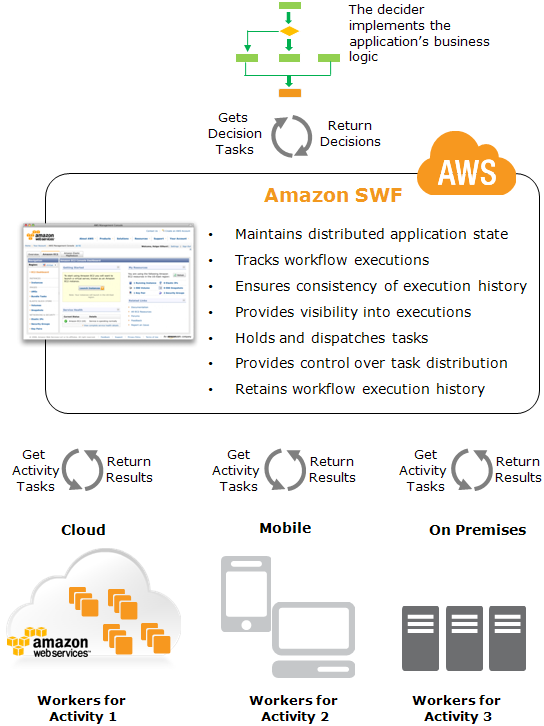
AWS Storage Options – SQS & Redshift

SQS

  • is a fully managed message queuing service that provides a reliable, highly scalable, hosted queue for temporary storage and delivery of messages up to 1 MiB in size (increased from 256 KB in August 2025).
  • supports a virtually unlimited number of queues and supports two queue types:
    • Standard queues – unordered, at-least-once delivery with nearly unlimited throughput.
    • FIFO queues – exactly-once processing with strict message ordering, supporting up to 70,000 messages per second with high throughput mode.

Ideal Usage Patterns

  • is ideally suited to any scenario where multiple application components must communicate and coordinate their work in a loosely coupled manner particularly producer consumer scenarios.
  • can be used to coordinate a multi-step processing pipeline, where each message is associated with a task that must be processed.
  • enables the number of worker instances to scale up or down, and also enable the processing power of each single worker instance to scale up or down, to suit the total workload, without any application changes.
  • ideal for multi-tenant workloads using fair queues (launched July 2025) to mitigate noisy neighbor impact and ensure consistent processing across tenants.
  • supports event-driven architectures with AWS Lambda event source mapping, including provisioned mode for 3x faster scaling and 16x higher concurrency.

Anti-Patterns

  • Binary or Large Messages
    • SQS supports messages up to 1 MiB. If the application requires binary or messages exceeding this limit, it is best to use the Amazon SQS Extended Client Library with Amazon S3 to store the payload and SQS to store the pointer.
  • Long Term storage
    • SQS stores messages for max 14 days and if application requires storage period longer than 14 days, Amazon S3 or other storage options should be preferred.
  • High-speed message queuing or very short tasks
    • If the application requires a very high-speed message send and receive response from a single producer or consumer, use of Amazon DynamoDB or a message-queuing system hosted on Amazon EC2 may be more appropriate.

Performance

  • is a distributed queuing system that is optimized for horizontal scalability, not for single-threaded sending or receiving speeds.
  • Standard queues support nearly unlimited throughput (thousands of transactions per second per API action).
  • FIFO queues support up to 3,000 messages per second with batching by default, or up to 70,000 messages per second (700,000 with batching) in high throughput mode in select regions.
  • FIFO queues support up to 120,000 in-flight messages (increased from 20,000 in November 2024).
  • Higher receive performance can be achieved by requesting multiple messages (up to 10) in a single call.
  • Fair queues (July 2025) automatically reorder messages to maintain consistent dwell time across tenants, preventing noisy neighbors from impacting processing latency.

Durability & Availability

  • are highly durable but temporary.
  • stores all messages redundantly across multiple servers and data centers.
  • Message retention time is configurable on a per-queue basis, from a minimum of one minute to a maximum of 14 days.
  • Messages are retained in a queue until they are explicitly deleted, or until they are automatically deleted upon expiration of the retention time.
  • supports dead-letter queues (DLQ) for isolating messages that fail processing, with DLQ redrive capability to move messages back to the source queue or a custom destination for reprocessing.

Cost Model

  • pricing is based on
    • number of requests (per million requests)
    • the amount of data transferred out (priced per GB per month)
    • First 1 million requests per month are free (Free Tier)

Scalability & Elasticity

  • is both highly elastic and massively scalable.
  • is designed to enable a virtually unlimited number of computers to read and write a virtually unlimited number of messages at any time.
  • supports virtually unlimited numbers of queues and messages per queue for any user.
  • supports dual-stack (IPv4 and IPv6) endpoints for flexible network access.

Key Features (Recent Updates)

  • Message payload size increased to 1 MiB (August 2025) – supports larger messages for both standard and FIFO queues without needing the Extended Client Library.
  • Fair queues (July 2025) – automatically mitigates noisy neighbor impact in multi-tenant standard queues by reordering messages to maintain consistent dwell time across tenants.
  • FIFO high throughput mode – up to 70,000 TPS per API action (November 2023), enabling 700,000 messages per second with batching.
  • FIFO in-flight limit increase (November 2024) – increased from 20,000 to 120,000 in-flight messages per FIFO queue.
  • Lambda provisioned mode for SQS (January 2025) – dedicated polling resources providing 3x faster scaling and 16x higher concurrency for event source mapping.
  • Dead-letter queue redrive – move failed messages from DLQ back to source queue or a custom destination for both standard and FIFO queues.
  • Simplified KMS permissions – SendMessage no longer requires kms:Decrypt permission; only kms:GenerateDataKey is needed.
  • Temporary queues – application-managed virtual queues for request-response patterns that reduce cost and development time.

Amazon Redshift

  • is a fast, fully-managed, petabyte-scale data warehouse service that makes it simple and cost-effective to efficiently analyze all data using existing business intelligence tools.
  • is optimized for datasets that range from a few hundred gigabytes to a petabyte or more.
  • manages the work needed to set up, operate, and scale a data warehouse, from provisioning the infrastructure capacity to automating ongoing administrative tasks such as backups and patching.
  • offers two deployment models: Provisioned clusters (RA3 and new RG instances) and Redshift Serverless (pay-per-use with automatic scaling).
⚠️ Important: Amazon Redshift DC2 instances reached End of Life on April 24, 2026. New DC2 clusters cannot be created since May 15, 2025. Migrate to RA3 instances, RG instances (Graviton-powered, GA May 2026), or Redshift Serverless. DS2 instances were previously deprecated in favor of RA3.

Ideal Usage Pattern

  • is ideal for analyzing large datasets using existing business intelligence tools.
  • Common use cases include
    • Analyze global sales data for multiple products
    • Store historical stock trade data
    • Analyze ad impressions and clicks
    • Aggregate gaming data
    • Analyze social trends
    • Measure clinical quality, operation efficiency, and financial performance in the health care space
    • Near real-time analytics using zero-ETL integrations from Aurora, DynamoDB, RDS, and SaaS applications
    • Data lakehouse analytics querying data in S3 data lakes using Redshift Spectrum
    • Generative AI applications using Amazon Bedrock integration for sentiment analysis, text generation, and summarization directly on warehouse data

Anti-Pattern

  • OLTP workloads
    • Redshift is a column-oriented database and more suited for data warehousing and analytics. If application involves online transaction processing, Amazon RDS or Aurora would be a better choice.
  • Blob data
    • For Blob storage, Amazon S3 would be a better choice with metadata in other storage as RDS or DynamoDB.

Performance

  • Amazon Redshift allows very high query performance on datasets ranging in size from hundreds of gigabytes to a petabyte or more.
  • It uses columnar storage, data compression, and zone maps to reduce the amount of I/O needed to perform queries.
  • It has a massively parallel processing (MPP) architecture that parallelizes and distributes SQL operations to take advantage of all available resources.
  • Underlying hardware is designed for high performance data processing that uses local attached storage to maximize throughput.
  • New RG instances (GA May 2026) powered by AWS Graviton deliver up to 2.4x faster performance than RA3 at 30% lower price per vCPU.
  • AI-driven scaling and optimization in Redshift Serverless automatically provisions and scales capacity for demanding workloads.
  • Query performance improvements (March 2026) speed up new queries in BI dashboards and ETL workloads by up to 7x.
  • Concurrency scaling automatically adds additional cluster capacity to handle burst read and write workloads, with support for data ingestion (COPY queries in Parquet/ORC from S3).

Durability & Availability

  • Amazon Redshift stores three copies of your data—all data written to a node in your cluster is automatically replicated to other nodes within the cluster, and all data is continuously backed up to Amazon S3.
  • Snapshots are automated, incremental, and continuous and stored for a user-defined period (1-35 days).
  • Manual snapshots can be created and are retained until explicitly deleted.
  • Amazon Redshift continuously monitors the health of the cluster and automatically re-replicates data from failed drives and replaces nodes as necessary.
  • Multi-AZ deployments (GA for RA3 clusters) run your data warehouse across two Availability Zones simultaneously, providing continued operation during AZ failure scenarios.

Cost Model

  • Provisioned clusters pricing:
    • Compute node hours – total hours run across all compute nodes (RA3 or RG instances)
    • Redshift Managed Storage (RMS) – billed per GB/month, separate from compute (RA3/RG only)
    • Backup storage – for automated and manual snapshots beyond the free tier
    • Data transfer – standard AWS data transfer charges apply
    • Concurrency scaling – free for 1 hour per day per cluster, then per-second billing
    • Spectrum – per TB of data scanned in S3
  • Redshift Serverless pricing:
    • Compute – per RPU-hour (Redshift Processing Unit), billed per second with no charge when idle
    • Storage – per GB/month for managed storage
  • Reserved Instance pricing available for provisioned clusters (1-year or 3-year terms) for significant discounts.

Scalability & Elasticity

  • Provisioned clusters – Elastic resize allows adding or removing nodes within minutes. Classic resize available for node type changes.
  • Redshift Serverless – automatically scales compute capacity up and down based on workload demands with no cluster management required.
  • Data sharing allows securely sharing live, transactionally consistent data across Redshift clusters (cross-account, cross-region) without copying data.
  • Multi-warehouse writes through data sharing (GA November 2024) enable using different warehouses of different types and sizes for ETL workloads.

Key Features (Recent Updates)

  • RG Instances (GA May 2026) – New Graviton-powered instance family delivering 2.4x faster performance than RA3 at 30% lower price per vCPU.
  • DC2 End of Life (April 24, 2026) – Migrate to RA3, RG, or Serverless. New DC2 cluster creation blocked since May 15, 2025.
  • Redshift Serverless – Pay-per-use model with automatic scaling, AI-driven optimization, and per-second billing with no charge when idle.
  • Zero-ETL integrations – Near real-time data replication from Aurora, DynamoDB, RDS, and self-managed databases to Redshift without building ETL pipelines. Also supports SaaS sources (Salesforce, SAP, Zendesk).
  • Multi-AZ deployments – Run RA3 provisioned clusters across two Availability Zones for high availability.
  • Amazon Bedrock integration (October 2024) – Run generative AI tasks (text generation, sentiment analysis, summarization, classification) directly on Redshift data using foundation models via SQL.
  • Amazon Q generative SQL – Generate SQL from natural language prompts in the Redshift Query Editor.
  • Data sharing – Share live data across clusters, accounts, and regions without data movement. Supports multi-warehouse writes for ETL.
  • Redshift Spectrum – Query exabytes of data in S3 without loading it into Redshift, enabling data lakehouse architectures.
  • Concurrency scaling for ingestion (2026) – Automatically scales for COPY queries in Parquet/ORC formats from S3 during traffic spikes.
  • 7x query performance improvement (March 2026) – Faster response for BI dashboards, ETL pipelines, and near real-time analytics.

AWS Storage Options – CloudFront & ElastiCache

Amazon CloudFront

  • is a webservice for content delivery
  • provides low latency by caching and delivering content from a global network of 750+ Points of Presence (PoPs) across 100+ cities in 50+ countries
  • supports HTTP/HTTPS for static and dynamic content delivery
  • optimized to work with Amazon services like S3, ELB, MediaConvert etc. as well as works seamlessly with any non-AWS origin server
⚠️ Note: CloudFront RTMP distributions were discontinued on December 31, 2020. For streaming, use HTTP-based streaming protocols (HLS, DASH) with CloudFront web distributions and AWS Elemental MediaConvert.

Ideal Usage Patterns

  • is ideal for distribution of frequently accessed static content, or dynamic content or for streaming audio or video that benefits from edge delivery
  • API acceleration and real-time content personalization at the edge
  • security at the edge with integrated WAF, DDoS protection, and bot management

Anti-Pattern

  • Infrequently accessed data
    • If the data is infrequently accessed, it would be better to serve the data from the Origin server
  • Programmatic cache invalidation
    • CloudFront supports cache invalidation, however AWS recommends using object versioning rather than programmatic cache invalidation.

Performance

  • is designed for low latency and high bandwidth delivery of content by redirecting the user to the nearest edge location in terms of latency and caching the content preventing the round trip to the origin server
  • supports HTTP/2 and HTTP/3 (QUIC) for improved connection performance

Durability & Availability

  • provides high Availability by delivering content from a distributed global network of edge locations. Amazon also constantly monitors the network paths connecting Origin servers to CloudFront
  • does not provide durable storage, which is more of the responsibility of the underlying Origin server providing the content for e.g. S3

Cost Model

  • has pay-as-you-go pricing with two main components:
    • regional data transfer out (per GB) and
    • requests (per 10,000)
  • Flat-Rate Pricing Plans (launched Nov 2025) — combine CloudFront CDN, AWS WAF, DDoS protection, bot management, Route 53 DNS, CloudWatch Logs, edge compute, and S3 storage credits into one monthly price with no overage charges

Scalability & Elasticity

  • provides seamless scalability & elasticity by automatically responding to the increase or the decrease in the demand

Edge Compute

  • CloudFront Functions — lightweight functions for high-scale, latency-sensitive request/response transformations (URL rewrites, header manipulation, redirects) executed at 750+ PoPs
  • Lambda@Edge — more powerful compute triggered at regional edge caches for complex logic (authentication, dynamic origin selection, content generation)
  • CloudFront KeyValueStore (launched 2023) — globally distributed, low-latency data store for CloudFront Functions enabling dynamic configuration (A/B testing, feature flags, geo-routing) without code redeployment

Security

  • Origin Access Control (OAC) — recommended method to restrict S3 origin access to CloudFront only, replacing the legacy Origin Access Identity (OAI). OAI creation was deprecated in 2024; new distributions since March 2026 can only use OAC.
  • AWS Shield Standard — included automatically with every CloudFront distribution for DDoS protection at no extra cost
  • AWS WAF integration — protect against web exploits and bots at the edge
  • Field-Level Encryption — encrypt sensitive data fields at the edge before forwarding to origin

ElastiCache

  • is a fully managed, serverless caching service that makes it easy to deploy, operate, and scale distributed in-memory caches in the cloud
  • helps improves performance of the applications by allowing retrieval of data from fast, managed, in-memory caching system with microsecond latency and up to 99.99% availability SLA
  • supports three open-source caching engines:
    • Valkey (recommended for new workloads) — open-source fork of Redis OSS 7.2, stewarded by the Linux Foundation (BSD-3 licensed)
    • Memcached — simple object caching engine
    • Redis OSS — key-value store (note: Redis OSS 7.2 is the last fully open-source Redis version)
🆕 Valkey Engine (Oct 2024): AWS recommends Valkey for new workloads. It provides 33% lower Serverless pricing and 20% lower node-based pricing compared to Redis OSS, with better performance and active open-source development. Valkey is a drop-in replacement for Redis OSS 7.2 and can be upgraded in-place.

Deployment Modes

  • ElastiCache Serverless (launched Nov 2023)
    • zero infrastructure management with instant auto-scaling
    • pay-per-use pricing based on data stored (GB-hour) and ElastiCache Processing Units (ECPUs)
    • creates a cache in under a minute; starts as low as $6/month with Valkey
    • zero downtime maintenance
  • Node-based (self-designed clusters)
    • fine-grained control over node type, count, and placement
    • supports Reserved Nodes for cost savings
    • Graviton3-based nodes available for better price-performance

Ideal Usage Patterns

  • improving application performance by storing critical data in-memory for low latency access
  • use cases involve usage as a database front end for read heavy applications, improving performance and reducing load on databases, or managing user session data, cache dynamically generated pages, or compute intensive calculations etc.
  • Real-time search (2026) — full-text, exact-match, numeric range, and hybrid search with microsecond latency
  • Vector similarity search — AI-driven semantic retrieval for RAG and recommendation systems

Anti-Patterns

  • Persistent Data
    • If the application needs fast access to data coupled with strong data durability, Amazon DynamoDB would be a better option
    • Note: ElastiCache for Valkey now supports durability with Multi-AZ transactional log (June 2026), enabling fast failover and data recovery without data loss

Performance

  • provides microsecond read latency and single-digit millisecond write latency with throughput up to millions of requests per second
  • Valkey 9.0 (May 2026) introduces enhanced search capabilities with full-text, hybrid, and aggregation queries directly in the cache

Durability & Availability

  • provides up to 99.99% availability SLA with Multi-AZ deployments
  • With the Memcached engine
    • all ElastiCache nodes in a single cache cluster are provisioned in a single Availability Zone.
    • ElastiCache automatically monitors the health of your cache nodes and replaces them in the event of network partitioning, host hardware, or software failure.
    • In the event of cache node failure, the cluster remains available, but performance may be reduced due to time needed to repopulate the cache in the new “cold” cache nodes.
    • To provide enhanced fault-tolerance for Availability Zone failures or cold-cache effects, you can run redundant cache clusters in different Availability Zones.
  • With the Valkey/Redis OSS engine,
    • ElastiCache supports replication to up to five read replicas for scaling. To improve availability, you can place read replicas in other Availability Zones.
    • ElastiCache monitors the primary node, and if the node becomes unavailable, ElastiCache will repair or replace the primary node if possible, using the same DNS name.
    • If the primary cache node recovery fails or its Availability Zone is unavailable, primary node can be failed over to one of the read replicas with an API call.
    • Durability support (June 2026): Multi-AZ transactional log enables data persistence across AZs, preventing data loss during failover, recovery, and node restarts.

Cost Model

  • offers two pricing models:
    • Serverless: pay-per-use based on data stored (GB-hour) and ECPUs consumed. Valkey Serverless is 33% cheaper than Redis OSS Serverless.
    • Node-based: pricing per cache node-hour consumed. Supports Reserved Nodes for up to 55% savings.

Scalability & Elasticity

  • ElastiCache is highly scalable and elastic.
  • Serverless: instantly auto-scales to match application demand with no capacity planning
  • Node-based: Cache nodes can be added or deleted from the cache cluster. Auto Discovery enables automatic discovery of Memcached cache nodes by ElastiCache Clients when the nodes are added to or removed from an ElastiCache cluster.


Storage Options Whitepaper – Storage Gateway – Import/Export – AWS Certification

AWS Storage Options – Storage Gateway & Import/Export (Snow Family)

Provides a brief summary for the Ideal Use cases and Anti-Patterns for AWS Storage Gateway and AWS Snow Family (formerly Import/Export) storage options.

📌 2025/2026 Update: This post has been significantly updated to reflect current AWS service terminology and availability:

  • Storage Gateway now offers four gateway types: S3 File Gateway, FSx File Gateway (no longer available to new customers), Volume Gateway, and Tape Gateway.
  • AWS Import/Export was replaced by AWS Snowball (2015), and the Snow Family is being significantly reduced — Snowmobile retired (March 2024), Snowcone discontinued (Nov 2024), and Snowball Edge restricted to existing customers only (Nov 2025).
  • AWS Data Transfer Terminal is the new physical data transfer alternative for new customers.

AWS Storage Gateway

  • AWS Storage Gateway is a hybrid cloud storage service that provides on-premises access to virtually unlimited cloud storage.
  • Storage Gateway provides a standard set of storage protocols such as iSCSI, SMB, and NFS, which allow you to use AWS storage without rewriting existing applications.
  • It provides low-latency performance by maintaining frequently accessed data on-premises while securely storing all data encrypted in AWS.
  • For disaster recovery scenarios, it can serve as a cloud-hosted solution, together with EC2, that mirrors the entire production environment.
  • Storage Gateway can be deployed as a virtual machine (VM) within VMware, Hyper-V, or Linux KVM virtual environments, or as an Amazon EC2 instance within a VPC, or on a dedicated hardware appliance.
  • Storage Gateway offers four gateway types:
    • Amazon S3 File Gateway
      • Presents Amazon S3 objects as files accessible via NFS or SMB protocols.
      • On-premises applications read and write files to the gateway, which stores them as objects in S3 buckets.
      • Maintains a local cache of recently accessed files for low-latency retrieval.
      • Supports S3 Standard, S3 Intelligent-Tiering, S3 Standard-IA, and S3 One Zone-IA storage classes.
    • Amazon FSx File Gateway
      • Provides low-latency, on-premises access to fully managed Windows file shares in Amazon FSx for Windows File Server.
      • ⚠️ No longer available to new customers as of October 28, 2024. Existing customers can continue using the service. AWS recommends connecting directly to Amazon FSx for Windows File Server as an alternative.
    • Volume Gateway
      • Presents cloud-backed iSCSI block storage volumes to on-premises applications.
      • Operates in two modes:
        • Cached volumes (formerly Gateway-cached volumes) – Primary data stored in S3, with frequently accessed data retained locally in a cache. Minimizes the need to scale on-premises storage while providing low-latency access to frequently accessed data.
        • Stored volumes (formerly Gateway-stored volumes) – Complete primary data stored locally, while asynchronously backing up data to AWS as EBS snapshots. Provides low-latency access to entire datasets with durable, off-site backups.
      • Cached volumes can be up to 32 TiB; stored volumes can be up to 16 TiB.
    • Tape Gateway
      • Presents a virtual tape library (VTL) interface to existing backup applications using iSCSI.
      • Virtual tapes are stored in S3, and archived tapes are stored in S3 Glacier or S3 Glacier Deep Archive.
      • Compatible with leading backup software (Veeam, Veritas NetBackup, Commvault, etc.).

Ideal Usage Patterns

  • AWS Storage Gateway use cases include
    • Corporate file sharing and collaboration (S3 File Gateway)
    • Enabling on-premises backup applications to store primary backups in S3 (Volume Gateway, Tape Gateway)
    • Disaster recovery with cloud-backed storage
    • Data mirroring to cloud-based compute resources
    • Tiering on-premises data to cloud storage

Anti-Patterns

  • Database storage
    • For Database backup or storage, EC2 instances using EBS volumes or managed database services (RDS, Aurora) are better choices.

Performance

  • Performance depends on the speed and configuration of underlying local disks, network bandwidth between the iSCSI initiator and gateway VM, amount of local storage allocated to the gateway VM, and bandwidth between the gateway VM and AWS.
  • For cached volumes, providing enough local cache storage for recently accessed data is important for low-latency read access.
  • Storage Gateway efficiently uses Internet bandwidth by only uploading incremental changes (data that has changed), minimizing data sent over the Internet.
  • AWS Direct Connect can be used to increase throughput and reduce network costs by establishing a dedicated network connection between the on-premises gateway and AWS.
  • Storage Gateway supports bandwidth throttling to control the amount of network bandwidth used for data transfer.

Durability and Availability

  • AWS Storage Gateway durably stores on-premises application data by uploading it to S3.
  • S3 stores data across multiple facilities and on multiple devices within each facility, providing 99.999999999% (11 9s) durability.
  • S3 performs regular, systematic data integrity checks and is built to be automatically self-healing.

Cost Model

  • AWS Storage Gateway pricing components vary by gateway type:
    • S3 File Gateway: Storage (S3 pricing), requests, and data transfer
    • Volume Gateway: Volume storage usage (per GB per month), snapshot storage, and data transfer
    • Tape Gateway: Virtual tape storage, virtual tape shelf (archive) storage, and data retrieval
    • All types: No charge for the gateway software; charges apply for AWS storage used

Scalability and Elasticity

  • Storage Gateway stores data in Amazon S3, which provides virtually unlimited scalability and elasticity.
  • A single gateway supports up to 32 cached volumes (max 1,024 TiB total) or 32 stored volumes (max 512 TiB total).

Interfaces

  • AWS Management Console, AWS CLI, and AWS SDKs can be used to manage Storage Gateway.
  • Gateway VM images are available for VMware ESXi, Microsoft Hyper-V, and Linux KVM.
  • Hardware appliance option is available for environments without virtualization infrastructure.
  • Volumes are attached as iSCSI devices; file shares are accessible via NFS or SMB protocols.

AL2 to AL2023 Migration (2025-2026)

  • AWS is transitioning Storage Gateway appliance OS from Amazon Linux 2 to AL2023.
  • This migration enables new hybrid cloud storage features and maintains optimal performance and security.
  • Gateway versions 1.x.x cannot be updated to 2.x.x — a new gateway deployment is required.

AWS Import/Export (Replaced by AWS Snow Family)

⚠️ SERVICE DEPRECATED & SIGNIFICANTLY REDUCED

AWS Import/Export (the original ship-your-own-disk service) was fully replaced by AWS Snowball in 2015.

AWS Snow Family Current Status (2025):

  • AWS Snowmobile — Retired (March 2024). Service is no longer available.
  • AWS Snowcone (HDD & SSD) — Discontinued November 12, 2024. Support for existing customers ended November 12, 2025.
  • Previous generation Snowball devices (80TB Storage Optimized, 52 vCPU Compute Optimized, Compute Optimized with GPU) — Discontinued November 12, 2024.
  • AWS Snowball Edge (latest generation) — Only available to existing customers as of November 7, 2025. New customers cannot order Snowball Edge devices.

Alternatives for New Customers:

  • AWS DataSync — For online data transfers when network bandwidth is available
  • AWS Data Transfer Terminal — For secure physical data transfers at AWS-managed locations
  • AWS Partner solutions — Third-party data migration services

AWS Snow Family (Current Service)

  • AWS Snow Family provides secure, rugged devices for edge computing and offline data transfer.
  • AWS Snowball Edge is the primary device, available in two options:
    • Snowball Edge Storage Optimized (210 TB) — Primary device for large data transfers with high storage capacity and faster transfer speeds.
    • Snowball Edge Compute Optimized — For edge computing workloads requiring local processing power.
  • Data encryption is performed on the device itself, enabling higher data throughput and shorter transfer times.
  • Supports Amazon S3 compatible storage on the device for edge workloads.

AWS Data Transfer Terminal (New Alternative)

  • AWS Data Transfer Terminal is a secure, physical location where customers bring their storage devices to transfer data using a high-throughput connection directly to AWS.
  • Provides direct network connectivity to AWS services including Amazon S3, Amazon EFS, and others.
  • Available in multiple locations globally (New York, Los Angeles, San Francisco Bay Area, Munich, and more being added).
  • Customers reserve a date and time, visit the location, connect their storage devices, and transfer data.
  • No device shipping required — eliminates wait times associated with Snowball device logistics.
  • Ideal for customers who need frequent, high-volume physical data transfers.

Original AWS Import/Export (Historical Reference)

  • AWS Import/Export (now fully replaced) accelerated moving large amounts of data into and out of AWS using portable storage devices for transport.
  • AWS transferred data directly onto and off of storage devices using Amazon’s high-speed internal network, bypassing the Internet.
  • Supported importing into EBS snapshots, S3 buckets, and Glacier vaults, and exporting data from S3.

Ideal Usage Patterns (Snow Family / Data Transfer Terminal)

  • Ideal for transferring large amounts of data in and out of the AWS cloud, especially in cases where transferring the data over the Internet would be too slow (a week or more) or too costly.
  • Common use cases include:
    • Initial data migration to AWS (large-scale lift-and-shift)
    • Content distribution or regular data interchange with customers/business associates
    • Transfer to Amazon S3 for off-site backup and archival storage
    • Edge computing in disconnected environments (Snowball Edge only)
    • Disaster recovery with rapid data retrieval

Anti-Patterns

  • Data that is more easily transferred over the Internet in less than one week — use AWS DataSync or AWS Transfer Family instead.
  • For new customers needing physical data transfer (post Nov 2025) — use AWS Data Transfer Terminal or AWS Partner solutions.

Performance

  • Snowball Edge Storage Optimized 210TB devices provide up to 100 Gbps network connectivity.
  • Data transfer rate is bounded by the read/write speed of the storage device and network connectivity.
  • AWS Data Transfer Terminal provides high-throughput direct connections for fast transfers.

Durability and Availability

  • Durability and availability characteristics of the target storage (S3, EBS, EFS) apply after data has been imported.
  • Snowball Edge devices use 256-bit encryption and tamper-resistant enclosures for data security during transit.

Cost Model

  • AWS Snowball Edge pricing includes: service fee per job, shipping costs, and per-day charges for device use beyond included days.
  • Standard Amazon S3, EBS, and other storage pricing applies for the destination storage.
  • AWS Data Transfer Terminal pricing is based on reservation time and data transferred.

Scalability and Elasticity

  • Multiple Snowball Edge devices can be used in parallel for petabyte-scale transfers.
  • Large Data Migration Manager available in the AWS Console for managing multi-device migration projects.
  • For Amazon S3, individual objects may range up to 5 terabytes in size.
  • Aggregate total amount of data that can be imported is virtually unlimited.

Interfaces

  • AWS Snowball is managed through the AWS Management Console (OpsHub), AWS CLI, and SDKs.
  • AWS OpsHub provides a graphical interface for managing Snow devices.
  • AWS Data Transfer Terminal is managed through the AWS Management Console for reservations.

AWS Certification Exam Practice Questions

  • Questions are collected from Internet and the answers are marked as per my knowledge and understanding (which might differ with yours).
  • AWS services are updated everyday and both the answers and questions might be outdated soon, so research accordingly.
  • AWS exam questions are not updated to keep up the pace with AWS updates, so even if the underlying feature has changed the question might not be updated
  • Open to further feedback, discussion and correction.
  1. You are working with a customer who has 10 TB of archival data that they want to migrate to Amazon Glacier. The customer has a 1-Mbps connection to the Internet. Which service or feature provides the fastest method of getting the data into Amazon Glacier?
    1. Amazon Glacier multipart upload
    2. AWS Storage Gateway
    3. VM Import/Export
    4. AWS Import/Export (Now: AWS Snowball)

    Note: This question uses legacy service names. AWS Import/Export has been replaced by AWS Snowball Edge. As of Nov 2025, Snowball Edge is only available to existing customers — new customers should use AWS Data Transfer Terminal.

  2. A company needs to provide on-premises applications with low-latency access to frequently used data while storing the complete dataset in AWS for disaster recovery. Which Storage Gateway configuration is most appropriate?
    1. S3 File Gateway with local cache
    2. Volume Gateway in cached mode
    3. Volume Gateway in stored mode
    4. Tape Gateway

    Answer: C. Volume Gateway in stored mode keeps the complete primary data locally for low-latency access to the entire dataset, while asynchronously backing up data to AWS as EBS snapshots for disaster recovery.

  3. A company wants to minimize on-premises storage costs while maintaining low-latency access to frequently accessed data. The full dataset is several hundred terabytes. Which Storage Gateway solution is most suitable?
    1. S3 File Gateway
    2. Volume Gateway in cached mode
    3. Volume Gateway in stored mode
    4. Tape Gateway

    Answer: B. Volume Gateway in cached mode stores primary data in S3 while retaining frequently accessed data locally in a cache, minimizing on-premises storage requirements.

  4. A new customer needs to physically transfer 50 TB of data to AWS but cannot use AWS Snowball Edge (no longer available to new customers as of November 2025). What is the recommended alternative?
    1. AWS Snowcone
    2. AWS Snowmobile
    3. AWS Data Transfer Terminal
    4. AWS Import/Export with customer-owned devices

    Answer: C. AWS Data Transfer Terminal provides secure, physical locations where customers can bring their storage devices and transfer data using high-throughput connections to AWS. Snowcone and Snowmobile are discontinued, and Import/Export was replaced by Snowball in 2015.

  5. Which AWS Storage Gateway type would you recommend for a company that wants to replace their physical tape backup infrastructure with cloud-based backup while keeping existing backup software?
    1. S3 File Gateway
    2. Volume Gateway
    3. Tape Gateway
    4. FSx File Gateway

    Answer: C. Tape Gateway presents a virtual tape library (VTL) interface compatible with existing backup applications, allowing companies to replace physical tape infrastructure while maintaining their current backup workflows.

AWS Storage Options – RDS, DynamoDB & Database on EC2

AWS Storage Options Whitepaper with RDS, DynamoDB & Database on EC2 Cont.

Provides a brief summary for the Ideal Use cases, Anti-Patterns and other factors for Amazon RDS, DynamoDB & Databases on EC2 storage options

📝 Note: The original AWS Storage Services Overview whitepaper has been archived by AWS. This content is maintained and updated with current service capabilities for certification study reference. See the AWS Overview – Storage Services for the latest official guidance.

Amazon RDS

  • RDS is a fully managed relational database service supporting Amazon Aurora, MySQL, PostgreSQL, MariaDB, Oracle, and Microsoft SQL Server database engines
  • RDS eliminates much of the administrative overhead associated with launching, managing, and scaling your own relational database on Amazon EC2 or in another computing environment.
  • RDS provides automated patching, backups, Multi-AZ high availability, read replicas, and monitoring out of the box.

Key Features (Updated 2024-2026)

  • Multi-AZ DB Cluster Deployments – deploys a primary and two readable standby instances across three AZs, providing faster failover (~35 seconds), improved commit latency via semisynchronous replication, and readable standbys (MySQL/PostgreSQL)
  • Blue/Green Deployments – creates a fully managed staging (green) environment that mirrors production (blue), allowing safe testing of major version upgrades and schema changes with minimal downtime switchover
  • RDS Proxy – a fully managed database proxy that pools and shares connections, improving application scalability, resilience to database failovers, and security via IAM/Secrets Manager authentication
  • RDS Data API – available for Aurora (Serverless v2 and provisioned), enables secure HTTP-based SQL execution without managing database drivers or connections
  • Aurora Serverless v2 – auto-scales database capacity in fine-grained increments based on application demand, scaling to hundreds of thousands of transactions per second
  • Aurora DSQL (launched Dec 2024) – a serverless, distributed SQL database with active-active multi-Region high availability, PostgreSQL-compatible, with strong consistency across all Regional endpoints
  • RDS Custom – provides OS and database access for Oracle and SQL Server when full administrative control is needed (Note: RDS Custom for Oracle reaches end of support March 31, 2027)
  • Graviton (ARM) Instances – M7g, R7g, M7i, R7i instance types offering better price-performance
  • gp3 Storage – baseline of 3,000 IOPS and 125 MiB/s, scalable up to 80,000 IOPS and 2,000 MiB/s per volume (up to 64 TiB per volume)
  • Extended Support – up to 3 additional years of critical security and bug fixes beyond community end-of-life for major engine versions

Ideal Usage Patterns

  • RDS is a great solution for cloud-based fully-managed relational database
  • RDS is also optimal for new applications with structured data that requires more sophisticated querying and joining capabilities than that provided by Amazon’s NoSQL database offering, DynamoDB.
  • RDS provides full compatibility with the databases supported and direct access to native database engines, code and libraries and is ideal for existing applications that rely on these databases
  • Applications requiring zero-downtime upgrades can leverage Blue/Green Deployments for safe major version changes
  • Serverless and event-driven applications benefit from RDS Proxy and Aurora Serverless v2 for connection management and auto-scaling

Anti-Patterns

  • Index and query-focused data
    • If the applications don’t require advanced features such as joins and complex transactions and is more oriented toward indexing and querying data, DynamoDB would be more appropriate for this needs
  • Numerous BLOBs
    • If the application makes heavy use of files (audio files, videos, images, etc), it is a better choice to use S3 to store the objects instead of database engines Blob feature and use RDS or DynamoDB only to save the metadata
  • Automated scalability
    • RDS provides vertical scaling (scale up) and limited horizontal scale-out via read replicas. For fully-automated serverless scaling, consider Aurora Serverless v2 or DynamoDB.
  • Complete control
    • RDS does not provide full OS-level admin access.
    • If the application requires complete OS-level control, consider RDS Custom (for Oracle/SQL Server) or a self-managed database on EC2.
  • Other database platforms
    • RDS supports Aurora, MySQL, PostgreSQL, MariaDB, Oracle, and SQL Server.
    • If any other database platform (such as IBM DB2, Informix, or Sybase) is needed, it should be deployed on a self-managed database on an EC2 instance.

Performance

  • RDS offers multiple storage types optimized for different workloads:
    • gp3 (General Purpose SSD) – baseline 3,000 IOPS, scalable up to 80,000 IOPS and 2,000 MiB/s throughput, up to 64 TiB per volume
    • io1/io2 (Provisioned IOPS SSD) – designed for I/O-intensive transactional workloads, up to 256,000 IOPS
  • Multi-AZ DB Cluster deployments provide improved write commit latency through optimized semisynchronous replication
  • Performance Insights provides a dashboard to monitor database load and identify bottlenecks
  • RDS Optimized Reads/Writes (Aurora) provide up to 2x faster query processing and 6x higher write throughput

Durability and Availability

  • RDS leverages Amazon EBS volumes as its data store
  • RDS provides database backups, for enhanced durability, which are replicated across multiple AZ’s
    • Automated backups
      • RDS automatically performs a full daily backup during the specified backup window, and captures DB transaction logs (up to 35-day retention)
    • User initiated backups (DB Snapshots)
      • User can initiate manual snapshots at any time; they are retained until explicitly deleted
  • Multi-AZ DB Instance – synchronously replicates data to a standby in another AZ with automatic failover (typically 60-120 seconds)
  • Multi-AZ DB Cluster – maintains a primary and two readable standbys across three AZs with faster failover (~35 seconds) and transaction log-based replication
  • RDS provides a DNS endpoint; in case of failure on the primary, it automatically fails over to the standby instance
  • RDS Read Replicas provide asynchronous replication for read scaling and can be promoted for disaster recovery (including cross-Region replicas)

Cost Model

  • RDS offers a tiered pricing structure based on instance size, deployment type (Single-AZ/Multi-AZ Instance/Multi-AZ Cluster), and AWS Region
  • Pricing components: DB instance hours, provisioned storage (per GB-month), I/O requests (for io1/io2), additional backup storage, and data transfer
  • Reserved Instances provide significant discounts (up to 69%) for 1-year or 3-year commitments
  • Aurora Serverless v2 charges per Aurora Capacity Unit (ACU) consumed per second

Scalability and Elasticity

  • RDS resources can be scaled in several dimensions: storage size, IOPS, instance compute capacity, and number of read replicas
  • Storage Auto Scaling automatically increases storage when approaching capacity limits
  • Aurora Auto Scaling automatically adjusts the number of Aurora Replicas based on demand
  • Aurora Serverless v2 scales compute capacity automatically in fine-grained increments (0.5 ACU) from minimum to maximum configured capacity
  • Read Replicas (up to 15 for Aurora, 5 for other engines) enable read scaling across AZs and Regions
  • Aurora Limitless Database provides horizontal write scaling by automatically sharding data across multiple writer instances

Interfaces

  • RDS APIs, AWS CLI, and the AWS Management Console provide management interfaces for creating, modifying, and managing DB instances
  • RDS Data API (Aurora) provides a secure HTTP endpoint for running SQL statements without managing database connections or drivers
  • Once a database is created, RDS provides a DNS endpoint for the database which can be used to connect using standard database drivers
  • Endpoint does not change over the lifetime of the instance, even during failover in Multi-AZ configurations
  • RDS Proxy endpoints provide connection pooling and improved failover handling for applications

Amazon DynamoDB

  • Amazon DynamoDB is a fully managed, serverless NoSQL database service that delivers single-digit millisecond performance at any scale.
  • DynamoDB offers zero infrastructure management, zero downtime maintenance, and automatic scaling to accommodate any workload demand.
  • DynamoDB provides both eventually-consistent reads (by default) and strongly-consistent reads (optional), as well as ACID transactions (TransactWriteItems, TransactGetItems) for coordinated operations across multiple items and tables.
  • Amazon DynamoDB handles data as follows:
    • DynamoDB stores structured data in tables, indexed by primary key, and allows low-latency read and write access to items.
    • DynamoDB supports rich data types: Scalar (String, Number, Binary, Boolean, Null), Document (List, Map), and Set (String Set, Number Set, Binary Set)
    • Tables do not have a fixed schema, so each data item can have a different number of attributes.
    • Primary key can either be a single-attribute partition key (hash key) or a composite partition key + sort key (hash-range key).
    • Local Secondary Indexes (LSI) – alternate sort key on the same partition key (defined at table creation)
    • Global Secondary Indexes (GSI) – alternate partition key and optional sort key, can be added/modified anytime

Key Features (Updated 2024-2026)

  • On-Demand Capacity Mode – pay-per-request pricing with no capacity planning; automatically scales to accommodate workload demand. 50% price reduction effective November 2024.
  • Global Tables – fully managed, multi-Region, multi-active replication with two consistency modes:
    • Multi-Region Eventual Consistency (MREC) – default mode, typically sub-second replication
    • Multi-Region Strong Consistency (MRSC) – GA 2025, provides zero RPO with strongly consistent reads/writes across all Regions
  • DynamoDB Accelerator (DAX) – fully managed, in-memory cache providing microsecond read latency for read-heavy workloads
  • Standard-IA Table Class – lower storage cost option (up to 60% cheaper storage) for infrequently accessed data
  • PartiQL – SQL-compatible query language for DynamoDB, enabling familiar SELECT, INSERT, UPDATE, DELETE syntax
  • Zero-ETL Integrations – seamless data replication to Amazon Redshift, OpenSearch Service, and SageMaker Lakehouse without building ETL pipelines
  • S3 Import/Export – bulk import data from S3 and export table data to S3 in DynamoDB JSON or Amazon Ion format
  • Point-in-Time Recovery (PITR) – continuous backups with per-second granularity, restorable to any point within a configurable 1-35 day window
  • Encryption at Rest – enabled by default using AWS owned keys, with options for AWS managed key or customer managed KMS key
  • DynamoDB Streams / Kinesis Data Streams – capture item-level changes for event-driven architectures, real-time analytics, and cross-Region replication

Ideal Usage Patterns

  • DynamoDB is ideal for applications that need a flexible NoSQL database with low read and write latencies, and the ability to scale storage and throughput up or down as needed without code changes or downtime.
  • Use cases requiring a highly available and scalable database e.g., mobile apps, gaming, digital ad serving, live voting, sensor networks, log ingestion, access control, metadata storage for S3 objects, e-commerce shopping carts, web session management, and serverless applications
  • Event-driven architectures leveraging DynamoDB Streams to trigger Lambda functions or downstream processing
  • Global applications requiring multi-Region active-active deployments with Global Tables

Anti-Patterns

  • Structured data with Join and/or Complex Transactions
    • If the application uses structured data and requires complex joins, multi-table transactions, or relationship infrastructure provided by traditional relational databases, RDS or Aurora would be a better choice. (Note: DynamoDB does support ACID transactions within and across tables, but not SQL-style joins.)
  • Large Blob data
    • DynamoDB has a maximum item size of 400 KB. For large media files, videos, etc., use S3 for storage and DynamoDB for metadata.
  • Large Objects with Low I/O rate
    • DynamoDB uses SSD drives and is optimized for high I/O workloads. If the application stores very large amounts of infrequently accessed data, S3 or the Standard-IA table class might be more cost-effective.
  • Complex ad-hoc analytics
    • For complex analytical queries across large datasets, use DynamoDB zero-ETL integration with Amazon Redshift or export to S3 for Athena queries.

Performance

  • SSDs and limited indexing on attributes provides single-digit millisecond latency at any scale.
  • Provisioned capacity mode – define exact read/write capacity units for predictable workloads with optional auto-scaling
  • On-demand capacity mode – automatically accommodates up to double previous peak traffic instantly, with further scaling within minutes
  • DAX (DynamoDB Accelerator) – in-memory cache providing microsecond response times for eventually consistent reads
  • DynamoDB automatically partitions data to maintain consistent performance as tables grow.

Durability and Availability

  • DynamoDB automatically and synchronously replicates data across three AZs in a Region for high availability and data protection against facility failures.
  • Global Tables provide multi-Region replication with 99.999% availability SLA (multi-Region)
  • PITR provides continuous backups for point-in-time restore capability
  • On-demand backups allow full table backups at any time without performance impact

Cost Model

  • DynamoDB offers two capacity modes:
    • On-Demand – pay per read/write request (no capacity planning). 50% price reduction since November 2024.
    • Provisioned – pay per hour for provisioned Read/Write Capacity Units (with optional auto-scaling and Reserved Capacity discounts)
  • Additional pricing components: data storage (per GB-month), Global Tables replication (per replicated write unit), backups, data export/import, DynamoDB Streams reads, and data transfer
  • Standard-IA table class reduces storage costs by up to 60% with higher per-request costs (ideal when storage dominates)
  • Global Tables pricing reduced by up to 67% (November 2024)

Scalability and Elasticity

  • DynamoDB is both highly-scalable and elastic with virtually unlimited storage and throughput capacity.
  • Data is automatically partitioned and re-partitioned as needed, while SSD storage provides predictable low-latency at any scale.
  • On-Demand mode provides truly serverless scaling with no capacity planning required
  • Provisioned mode with Auto Scaling automatically adjusts capacity based on utilization targets
  • DynamoDB can handle more than 10 trillion requests per day and support peaks of more than 100 million requests per second.

Interfaces

  • DynamoDB provides a low-level REST API, AWS SDKs in multiple languages, and the AWS CLI
  • PartiQL – SQL-compatible query language supported via Console, CLI, SDKs, and NoSQL Workbench
  • APIs provide both management and data interfaces: table management (create, list, delete, describe) and item operations (Get, Put, Update, Delete, Query, Scan, BatchWrite, BatchGet, TransactWrite, TransactGet)
  • DynamoDB Streams API – captures ordered sequence of item-level changes
  • NoSQL Workbench – visual tool for data modeling, visualization, and query development

Databases on EC2

  • EC2 with EBS volumes allows hosting a self-managed relational database with full OS and database administrative control
  • Ready-to-use, prebuilt AMIs are available from leading database vendors in AWS Marketplace
  • Note: With the introduction of RDS Custom (for Oracle and SQL Server), the need for self-managed databases on EC2 has decreased for these specific engines

Ideal Usage Patterns

  • Self-managed database on EC2 is ideal for applications that require a specific database platform not supported by Amazon RDS e.g., IBM DB2, Informix, Sybase, or specialized configurations
  • Applications requiring maximum level of administrative control and configurability including custom storage engines, specialized replication, or kernel-level tuning not available in RDS or RDS Custom
  • Database versions or configurations not yet supported by RDS

Anti-Patterns

  • Index and query-focused data
    • If the applications don’t require advanced features such as joins and complex transactions and is more oriented toward indexing and querying data, DynamoDB would be more appropriate
  • Numerous BLOBs
    • If the application makes heavy use of files (audio files, videos, images), use S3 for object storage and RDS or DynamoDB for metadata
  • Managed service available
    • If RDS supports the database engine and provides the needed features, RDS is preferred for reduced operational overhead. For Oracle/SQL Server requiring OS access, consider RDS Custom before self-managing on EC2.
  • Automated scalability
    • Self-managed databases require manual or scripted scaling operations. If fully-automated scaling is needed, DynamoDB, Aurora Serverless, or RDS with Auto Scaling may be better choices.

Performance

  • Performance depends on the EC2 instance type, number/configuration of EBS volumes, and database tuning
  • Scale up by choosing larger instance types (compute-optimized, memory-optimized) or Graviton-based instances for better price-performance
  • For storage: use gp3 or io2 Block Express EBS volumes. Use software RAID 0 (disk striping) across multiple EBS volumes for aggregated IOPS and bandwidth
  • Instance store (NVMe SSDs) can provide very high IOPS for temporary/cache workloads

Durability & Availability

  • Uses EBS for storage with same durability guarantees (99.999% availability for io2 Block Express)
  • Enhanced durability via EBS snapshots, cross-Region replication, or third-party backup tools (e.g., Oracle RMAN) to S3
  • High availability requires manual configuration: Multi-AZ replication, clustering solutions, or automated failover scripts

Cost Model

  • Cost determined by: EC2 instance size/type, EBS volume size and IOPS, data transfer, and any third-party database licensing costs
  • Savings Plans and Reserved Instances reduce EC2 compute costs for steady-state workloads
  • BYOL (Bring Your Own License) options available for Oracle, SQL Server, and other commercial databases

Scalability & Elasticity

  • Leverage EC2 scalability by creating AMIs for horizontal scaling, though database-specific clustering/sharding is required
  • Vertical scaling requires instance stop/start (brief downtime without clustering)
  • Auto Scaling groups can manage read replica fleets for read-heavy workloads

Comparison: RDS vs DynamoDB vs Database on EC2

Factor Amazon RDS DynamoDB Database on EC2
Type Managed Relational (SQL) Managed NoSQL (Key-Value/Document) Self-Managed Relational
Scaling Vertical + Read Replicas; Aurora Serverless for auto-scaling Fully automatic (on-demand) or provisioned with auto-scaling Manual vertical/horizontal
Availability Multi-AZ (2 or 3 AZs), automated failover Automatic across 3 AZs; Global Tables for multi-Region Manual HA configuration required
Admin Overhead Low (managed patching, backups) None (serverless) High (full responsibility)
Use Case Complex queries, joins, ACID transactions High-speed key-value access, flexible schema, massive scale Unsupported engines, full OS control

AWS Certification Exam Practice Questions

  • Questions are collected from Internet and the answers are marked as per my knowledge and understanding (which might differ with yours).
  • AWS services are updated everyday and both the answers and questions might be outdated soon, so research accordingly.
  • AWS exam questions are not updated to keep up the pace with AWS updates, so even if the underlying feature has changed the question might not be updated
  • Open to further feedback, discussion and correction.
  1. Which of the following are use cases for Amazon DynamoDB? Choose 3 answers
    1. Storing BLOB data.
    2. Managing web sessions
    3. Storing JSON documents
    4. Storing metadata for Amazon S3 objects
    5. Running relational joins and complex updates.
    6. Storing large amounts of infrequently accessed data.
  2. A client application requires operating system privileges on a relational database server. What is an appropriate configuration for highly available database architecture?
    1. A standalone Amazon EC2 instance
    2. Amazon RDS in a Multi-AZ configuration
    3. Amazon EC2 instances in a replication configuration utilizing a single Availability Zone
    4. Amazon EC2 instances in a replication configuration utilizing two different Availability Zones

    Note: With the introduction of RDS Custom, this question’s context has evolved. RDS Custom for SQL Server now supports Multi-AZ. However, for full OS-level control beyond what RDS Custom offers, EC2 remains the answer.

  3. You are developing a new mobile application and are considering storing user preferences in AWS, which would provide a more uniform cross-device experience to users using multiple mobile devices to access the application. The preference data for each user is estimated to be 50KB in size. Additionally 5 million customers are expected to use the application on a regular basis. The solution needs to be cost-effective, highly available, scalable and secure, how would you design a solution to meet the above requirements?
    1. Setup an RDS MySQL instance in 2 availability zones to store the user preference data. Deploy a public facing application on a server in front of the database to manage security and access credentials
    2. Setup a DynamoDB table with an item for each user having the necessary attributes to hold the user preferences. The mobile application will query the user preferences directly from the DynamoDB table. Utilize STS. Web Identity Federation, and DynamoDB Fine Grained Access Control to authenticate and authorize access (DynamoDB provides high availability as it synchronously replicates data across three facilities within an AWS Region and scalability as it is designed to scale its provisioned throughput up or down while still remaining available. Also suitable for storing user preference data)
    3. Setup an RDS MySQL instance with multiple read replicas in 2 availability zones to store the user preference data. The mobile application will query the user preferences from the read replicas. Leverage the MySQL user management and access privilege system to manage security and access credentials.
    4. Store the user preference data in S3 Setup a DynamoDB table with an item for each user and an item attribute pointing to the user’ S3 object. The mobile application will retrieve the S3 URL from DynamoDB and then access the S3 object directly utilize STS, Web identity Federation, and S3 ACLs to authenticate and authorize access.
  4. A customer is running an application in US-West (Northern California) region and wants to setup disaster recovery failover to the Asian Pacific (Singapore) region. The customer is interested in achieving a low Recovery Point Objective (RPO) for an Amazon RDS multi-AZ MySQL database instance. Which approach is best suited to this need?
    1. Synchronous replication
    2. Asynchronous replication (Cross-Region Read Replicas use asynchronous replication. Note: DynamoDB Global Tables with MRSC now offers zero RPO across Regions for NoSQL workloads.)
    3. Route53 health checks
    4. Copying of RDS incremental snapshots
  5. You are designing a file-sharing service. This service will have millions of files in it. Revenue for the service will come from fees based on how much storage a user is using. You also want to store metadata on each file, such as title, description and whether the object is public or private. How do you achieve all of these goals in a way that is economical and can scale to millions of users?
    1. Store all files in Amazon Simple Storage Service (S3). Create a bucket for each user. Store metadata in the filename of each object, and access it with LIST commands against the S3 API.
    2. Store all files in Amazon S3. Create Amazon DynamoDB tables for the corresponding key-value pairs on the associated metadata, when objects are uploaded.
    3. Create a striped set of 4000 IOPS Elastic Load Balancing volumes to store the data. Use a database running in Amazon Relational Database Service (RDS) to store the metadata.
    4. Create a striped set of 4000 IOPS Elastic Load Balancing volumes to store the data. Create Amazon DynamoDB tables for the corresponding key-value pairs on the associated metadata, when objects are uploaded.
  6. Company ABCD has recently launched an online commerce site for bicycles on AWS. They have a “Product” DynamoDB table that stores details for each bicycle, such as, manufacturer, color, price, quantity and size to display in the online store. Due to customer demand, they want to include an image for each bicycle along with the existing details. Which approach below provides the least impact to provisioned throughput on the “Product” table?
    1. Serialize the image and store it in multiple DynamoDB tables
    2. Create an “Images” DynamoDB table to store the Image with a foreign key constraint to the “Product” table
    3. Add an image data type to the “Product” table to store the images in binary format
    4. Store the images in Amazon S3 and add an S3 URL pointer to the “Product” table item for each image
  7. A company needs to store IoT sensor data from thousands of devices. The data is small (under 1KB per reading), arrives at unpredictable rates, and must be queryable by device ID and timestamp with single-digit millisecond latency. Which database solution is most appropriate?
    1. Amazon RDS MySQL with Multi-AZ
    2. Self-managed Cassandra on EC2
    3. Amazon DynamoDB with on-demand capacity mode (DynamoDB with on-demand mode is ideal: handles unpredictable workloads without capacity planning, supports composite key (device ID as partition key, timestamp as sort key), and provides single-digit millisecond latency)
    4. Amazon Aurora Serverless
  8. A company wants to perform real-time analytics on data stored in their DynamoDB table without impacting production read/write performance. Which approach is the most operationally efficient?
    1. Create a read replica of the DynamoDB table
    2. Export data to S3 on a scheduled basis and query with Athena
    3. Use DynamoDB zero-ETL integration with Amazon Redshift (Zero-ETL integration provides near real-time data replication to Redshift without building custom pipelines or impacting DynamoDB performance)
    4. Use DynamoDB Streams with a Lambda function to copy data to RDS

AWS EC2 – Elastic Cloud Compute

Elastic Cloud Compute – EC2

  • Elastic Compute Cloud – EC2 provides scalable computing capacity in AWS.
  • EC2 offers the broadest and deepest compute platform, with over 1,000 instance types and choice of the latest processor, storage, networking, operating system, and purchase model.
  • Elastic Compute Cloud – EC2
    • eliminates the need to invest in hardware upfront, so applications can be developed and deployed faster.
    • can be used to launch as many or as few virtual servers as you need, configure security and networking, and manage storage.
    • enables you to scale up or down to handle changes in requirements or spikes in popularity, reducing the need to forecast traffic.
    • launches instances in minutes, scales capacity in seconds, and you pay only for what you use with no capital expenditure.

EC2 features

  • EC2 instances – Virtual computing environments running on the AWS Nitro System, a purpose-built hypervisor that offloads virtualization functions to dedicated hardware.
  • Amazon Machine Images (AMIs) – Preconfigured templates for the instances that package the bits needed for a server (including the operating system and additional software). Supported OS includes Amazon Linux 2023, Windows Server 2025, Ubuntu, Red Hat, SUSE, and macOS.
  • Instance types – Various configurations of CPU, memory, storage, and networking capacity for the instances, organized into families: General Purpose, Compute Optimized, Memory Optimized, Storage Optimized, Accelerated Computing, and High-Performance Computing (HPC).
  • Processor Options – Choice of processors including AWS Graviton (Arm-based), Intel Xeon, and AMD EPYC. AWS Graviton processors are custom-built by AWS for the best price-performance.
  • Key Pairs – Secure login information for the instances (AWS stores the public key, and you store the private key in a secure place). Supports ED25519 and RSA key types.
  • Instance Store VolumesStorage volumes for temporary data that are deleted when you stop or terminate your instance (ephemeral storage)
  • EBS Volumes – Persistent storage volumes for the data using Elastic Block Store (EBS)
  • Regions and Availability ZonesMultiple physical locations for the resources, such as instances and EBS volumes
  • Security GroupsA virtual firewall that enables you to specify the protocols, ports, and source IP ranges that can reach the instances
  • Elastic IP addresses – Static IPv4 addresses for dynamic cloud computing
  • Tags – Metadata can be created and assigned to EC2 resources
  • Placement Groups – Logical grouping of instances (Cluster, Spread, or Partition) to influence instance placement for performance or fault tolerance

AWS Nitro System

  • The AWS Nitro System is the underlying platform for all modern EC2 instances.
  • Nitro System offloads virtualization functions (networking, storage, security) to dedicated hardware and software, delivering practically all of the compute resources of the host hardware to the instances.
  • Components include:
    • Nitro Cards – Dedicated cards that handle I/O for VPC networking, EBS storage, and instance storage. Latest is 6th generation Nitro Cards (2026).
    • Nitro Security Chip – Provides hardware root of trust, continuously monitors and protects instance hardware and firmware.
    • Nitro Hypervisor – Lightweight hypervisor that manages memory and CPU allocation. Features the Nitro Isolation Engine (GA 2026) – a formally verified component that provides mathematical proof of VM isolation.
    • Nitro Enclaves – Isolated compute environments within an EC2 instance for processing highly sensitive data (PII, healthcare, financial). No persistent storage, no admin access, no external networking.
    • NitroTPM – Virtual Trusted Platform Module (TPM 2.0) for securely storing passwords, certificates, and encryption keys used to authenticate the instance.
  • Security model is locked down and prohibits administrative access, eliminating the possibility of human error and tampering. No AWS operator has access to the system.

AWS Graviton Processors

  • AWS Graviton processors are custom Arm-based processors designed by AWS to deliver the best price-performance for cloud workloads.
  • Graviton2 – 64 Arm Neoverse N1 cores, supports always-on 256-bit DRAM encryption. Powers 6th gen instances (M6g, C6g, R6g, T4g).
  • Graviton3 – 25% better compute performance, 2x floating-point and crypto performance, 50% faster memory access, 60% lower energy consumption vs. Graviton2. Powers 7th gen instances (M7g, C7g, R7g).
  • Graviton4 (2024) – Up to 30% better compute performance vs. Graviton3, up to 3x more vCPUs (up to 48xlarge) and memory. Uses DDR5 memory. Powers 8th gen instances (M8g, C8g, R8g).
  • Graviton5 (2026) – Up to 25% better compute performance vs. Graviton4, 192 cores, 33% lower inter-core latency. Most powerful and energy-efficient AWS processor. Powers 9th gen instances (M9g). Apps run 35% faster, ML inference 35% faster, databases 30% faster.
  • Graviton instances offer up to 40% better price-performance compared to equivalent x86 instances.
  • Support Arm features including Scalable Vector Extension (SVE), SVE2, Pointer Authentication, and Branch Target Identification (generation dependent).

EC2 Instance Types (Current Generation)

  • General Purpose (M-series, T-series, Mac) – Balance of compute, memory, and networking. Includes M8g, M8gd, M8a, M8in, M9g (Graviton5), T3, T4g. Mac instances (M4, M4 Pro, M4 Max) support Apple Silicon for iOS/macOS development.
  • Compute Optimized (C-series) – High-performance processors for batch processing, gaming, ML inference. Includes C8g, C8gd, C8gn (600 Gbps networking), C8ine.
  • Memory Optimized (R-series, X-series, U-series) – Fast performance for workloads processing large data sets in memory. Includes R8g, R8gd, R8gn (600 Gbps), R8in, X2idn, U-series High Memory (up to 24 TB).
  • Storage Optimized (I-series, D-series, H-series) – High sequential read/write access to large data sets on local storage. Includes I4g, Im4gn, Is4gen, D3, H1.
  • Accelerated Computing (P-series, G-series, Trn-series, Inf-series) – Hardware accelerators for ML, graphics, HPC. Includes P5e (NVIDIA H200), G7e (NVIDIA RTX PRO 6000 Blackwell), Trn1/Trn2 (AWS Trainium for ML training), Inf2 (AWS Inferentia2 for ML inference).
  • High-Performance Computing (HPC-series) – Purpose-built for tightly coupled HPC workloads. Includes Hpc7g (Graviton), Hpc7a (AMD), Hpc8a (5th Gen AMD EPYC, 192 cores, 300 Gbps EFA).

EC2 Instance Naming Convention

  • Instance types follow the convention: [Family][Generation][Attributes].[Size]
  • Example: m8g.xlarge = General Purpose (m), 8th generation (8), Graviton (g), extra-large size
  • Common attributes:
    • g – AWS Graviton (Arm-based)
    • a – AMD processor
    • i – Intel processor
    • n – Network optimized
    • d – NVMe local storage (instance store)
    • b – EBS optimized
    • e – Extra storage or memory

EC2 Networking

  • Elastic Network Adapter (ENA) – High-performance network interface supporting up to 200 Gbps bandwidth on supported instances.
  • ENA Express – Uses AWS Scalable Reliable Datagram (SRD) protocol to deliver up to 25 Gbps single-flow bandwidth and lower tail latency. Now supports cross-AZ traffic (2026) and 120+ instance types.
  • Elastic Fabric Adapter (EFA) – Network interface for HPC and ML workloads, supports OS-bypass for low-latency inter-node communication. Up to 300 Gbps on Hpc8a instances.
  • Enhanced Networking – Uses SR-IOV to provide high-performance networking capabilities. Enabled by default on Nitro-based instances.
  • EC2 instances support IPv4 and IPv6 addressing.
  • Network bandwidth scales with instance size, up to 200 Gbps for largest instances.

EC2 Security

  • Instance Metadata Service v2 (IMDSv2) – Session-oriented metadata access that adds defense-in-depth against unauthorized metadata access. IMDSv2 is now the default for all new instance launches and mandatory for new instance type families (since mid-2024).
  • Security Groups – Stateful virtual firewall at the instance level.
  • Key Pairs – SSH key-based access (Linux) or password decryption (Windows). Supports ED25519 and RSA.
  • IAM Roles – Attach IAM roles to EC2 instances for secure access to AWS services without storing credentials.
  • Nitro Enclaves – Isolated environments for confidential computing.
  • NitroTPM – Hardware-based root of trust for measured boot and platform integrity.
  • Nitro Isolation Engine (2026) – Formally verified hypervisor component providing mathematical guarantees of VM isolation.

Accessing EC2

  • Amazon EC2 console
    • Amazon EC2 console is the web-based user interface that can be accessed from the AWS management console
  • AWS Command Line Interface (CLI)
    • Provides commands for a broad set of AWS products, supported on Windows, Mac, and Linux.
  • AWS Tools for Windows PowerShell
    • Provides commands for a broad set of AWS products for those who script in the PowerShell environment
  • AWS SDKs
    • AWS provides SDKs in various languages (Python/Boto3, Java, Go, .NET, JavaScript, etc.) which provide API abstractions and handle authentication, retries, and error handling
  • AWS CloudFormation / Infrastructure as Code
    • EC2 instances can be provisioned and managed using CloudFormation, CDK, or Terraform
  • EC2 Instance Connect
    • Browser-based SSH connection to EC2 instances without needing to manage SSH keys
  • AWS Systems Manager Session Manager
    • Secure shell access without opening inbound ports, managing SSH keys, or using bastion hosts

EC2 Key Changes and Deprecations

  • EC2-Classic Retired (August 2023) – All instances now run in VPC only. EC2-Classic networking is no longer available.
  • Amazon Linux 1 EOL (December 31, 2023) – No security updates or bug fixes since January 1, 2024. Migrate to Amazon Linux 2023.
  • Amazon Linux 2 Extended Support Ending – AWS recommends migration to Amazon Linux 2023. ECS AL2 AMIs end support June 30, 2026.
  • IMDSv2 Default (2024) – New instance types only support IMDSv2. Account-level default can enforce IMDSv2 for all launches.
  • Windows Server 2025 Support (November 2024) – Available with License Included AMIs, supports Nitro instance types only.
  • Previous Generation Instances – Older instance families (M1, M3, C1, C3, etc.) are classified as “previous generation” and still supported but not recommended for new deployments.

Additional Reading

AWS Certification Exam Practice Questions

  • Questions are collected from Internet and the answers are marked as per my knowledge and understanding (which might differ with yours).
  • AWS services are updated everyday and both the answers and questions might be outdated soon, so research accordingly.
  • AWS exam questions are not updated to keep up the pace with AWS updates, so even if the underlying feature has changed the question might not be updated
  • Open to further feedback, discussion and correction.
  1. What are the Amazon EC2 API tools?
    1. They don’t exist. The Amazon EC2 AMI tools, instead, are used to manage permissions.
    2. Command-line tools to the Amazon EC2 web service
    3. They are a set of graphical tools to manage EC2 instances.
    4. They don’t exist. The Amazon API tools are a client interface to Amazon Web Services.
  2. When a user is launching an instance with EC2, which of the below mentioned options is not available during the instance launch console for a key pair?
    1. Proceed without the key pair
    2. Upload a new key pair
    3. Select an existing key pair
    4. Create a new key pair
  3. Which of the following is the underlying platform for all modern EC2 instances that offloads virtualization functions to dedicated hardware?
    1. Xen Hypervisor
    2. KVM Hypervisor
    3. AWS Nitro System
    4. VMware ESXi
  4. Which AWS processor family is custom-designed by AWS using Arm architecture to deliver the best price-performance for cloud workloads?
    1. Intel Xeon
    2. AMD EPYC
    3. AWS Graviton
    4. Apple Silicon
  5. Which version of the EC2 Instance Metadata Service is now required by default for all new instance type launches since mid-2024?
    1. IMDSv1
    2. IMDSv2
    3. IMDSv3
    4. IMDS is optional and not required
  6. A company needs isolated compute environments within their EC2 instances to securely process PII data. Which AWS feature should they use?
    1. Security Groups
    2. VPC Private Subnets
    3. AWS Nitro Enclaves
    4. AWS KMS
  7. Which EC2 networking feature uses the AWS Scalable Reliable Datagram (SRD) protocol to deliver up to 25 Gbps single-flow bandwidth?
    1. Enhanced Networking
    2. Elastic Fabric Adapter
    3. ENA Express
    4. AWS Direct Connect
  8. Which of the following is NOT a valid EC2 instance type family category?
    1. High-Performance Computing (HPC)
    2. Storage Optimized
    3. Network Optimized
    4. Accelerated Computing
  9. A developer needs to build and test iOS applications on AWS. Which EC2 instance type family should they choose?
    1. G-series (GPU instances)
    2. C-series (Compute Optimized)
    3. Mac instances (Apple Silicon)
    4. T-series (Burstable Performance)
  10. Which AWS Graviton processor generation was released in 2026 featuring 192 cores and up to 25% better compute performance than the previous generation?
    1. Graviton3
    2. Graviton4
    3. Graviton5
    4. Graviton6

References