RDS vs Aurora vs DynamoDB – AWS Database Selection Guide
Choosing the right AWS database service is one of the most impactful architectural decisions you’ll make. Amazon RDS, Amazon Aurora, and Amazon DynamoDB serve fundamentally different needs, and selecting the wrong one leads to performance bottlenecks, cost overruns, or painful migrations. This guide provides a structured decision framework — not just feature comparisons — to help you choose correctly the first time.
This post is designed as a selection/decision guide with clear criteria, decision flowcharts, and tradeoff analysis for each service.
- Need SQL, complex joins, existing relational schema? → RDS or Aurora
- Need SQL + high availability + auto-scaling + performance? → Aurora
- Need unlimited scale, single-digit ms latency, simple access patterns? → DynamoDB
Decision Framework: When to Choose Each
Choose Amazon RDS When:
- You need a specific database engine not supported by Aurora (Oracle, SQL Server, MariaDB)
- Your workload is predictable and steady with well-understood capacity needs
- You want the lowest cost for a managed relational database with moderate performance needs
- You’re doing a lift-and-shift migration from on-premises with minimal changes
- Your application requires engine-specific features (e.g., Oracle RAC alternatives, SQL Server Always On)
- Storage needs are under 64 TB and you want direct control over IOPS provisioning
Choose Amazon Aurora When:
- You need MySQL or PostgreSQL compatibility with significantly better performance
- Your workload requires high availability with fast automated failover (<30 seconds)
- You need auto-scaling storage up to 128 TB without manual provisioning
- Your traffic is variable or unpredictable (Aurora Serverless v2 scales to zero)
- You need cross-region disaster recovery with <1 second replication lag (Global Database)
- You need horizontal write scaling for relational data (Aurora Limitless Database)
- Performance requirements exceed what standard RDS can deliver (5x MySQL, 3x PostgreSQL throughput)
Choose Amazon DynamoDB When:
- Your access patterns are well-defined and predictable (key-value lookups, simple queries)
- You need single-digit millisecond latency at any scale (or microseconds with DAX)
- Your application must scale to millions of requests per second without capacity planning
- You want zero infrastructure management — no instances, no patching, no maintenance windows
- You need active-active multi-region writes with Global Tables
- Your data model is denormalized or fits key-value/document patterns
- You need event-driven architectures with DynamoDB Streams triggering Lambda
Architecture Differences
Amazon RDS – Traditional Managed Architecture
- Compute + Storage coupled — EC2 instance with attached EBS volumes (gp3 or io2)
- Storage limited to 64 TB (gp3) with manual IOPS provisioning
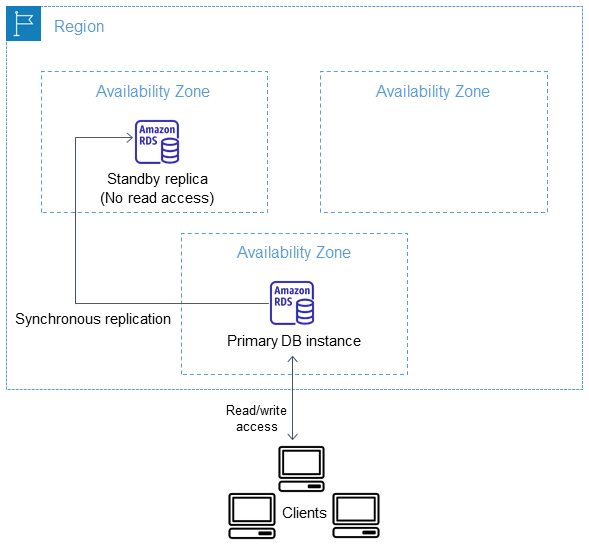
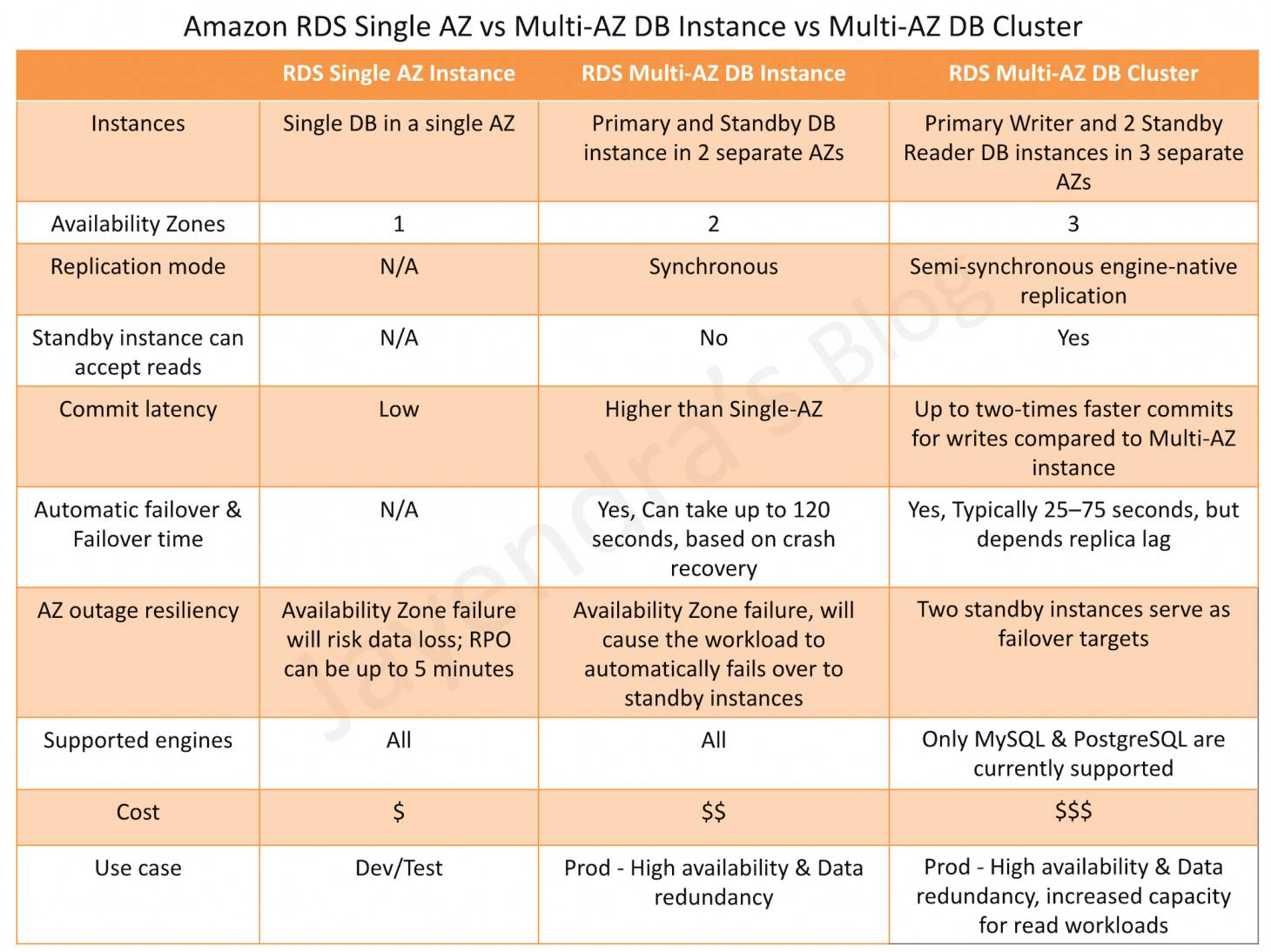
- Multi-AZ: synchronous standby replica for failover (30-60 second failover)
- Multi-AZ DB Clusters: 1 writer + 2 readable standbys, ~35 second failover
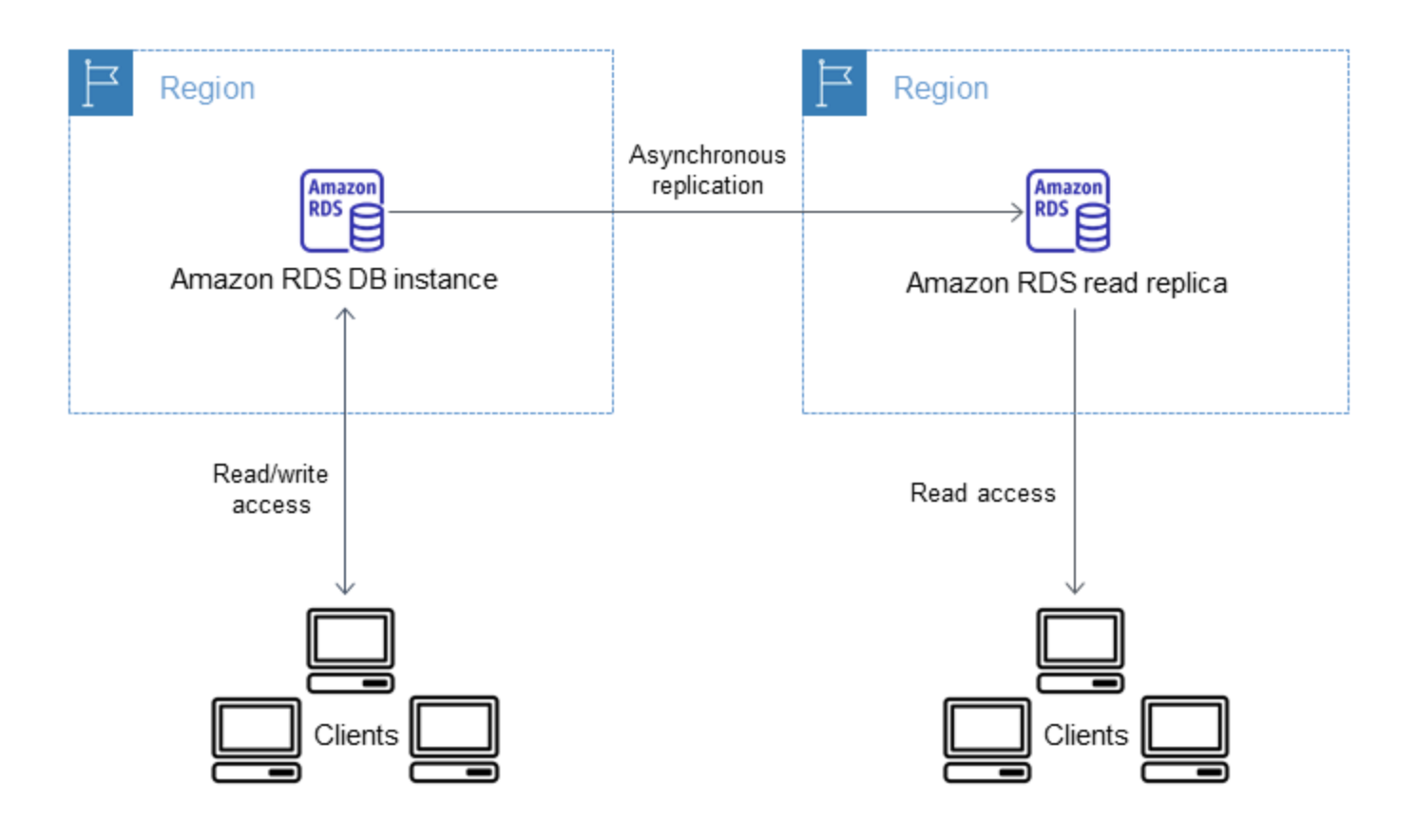
- Read Replicas: asynchronous, up to 15 (MySQL/MariaDB) or 5 (PostgreSQL/Oracle/SQL Server)
- Supports 6 engines: MySQL, PostgreSQL, MariaDB, Oracle, SQL Server, Db2
- RDS Custom: Full OS/database access for Oracle and SQL Server customization
- RDS Proxy: Connection pooling for serverless/Lambda workloads
Amazon Aurora – Cloud-Native Relational Architecture
- Compute and storage decoupled — storage is a shared distributed volume across 3 AZs
- 6 copies of data across 3 AZs; writes acknowledged with 4/6 quorum
- Tolerates loss of 2 copies for writes, 3 copies for reads — without interruption
- Storage auto-scales from 10 GB to 128 TB, no provisioning needed
- Up to 15 read replicas sharing the same storage (near-zero replication lag)
- Failover to replica in <30 seconds (no data copy required — shared storage)
- Aurora Serverless v2: scales in ACUs, scales to zero, up to 30% better performance (2026 platform v4)
- Aurora Global Database: cross-region with <1 second replication, RPO <1 second
- Aurora Limitless Database (GA Oct 2024): automated horizontal write scaling via sharding, millions of writes/sec
- Aurora DSQL (GA May 2025): distributed SQL, active-active multi-region, 99.999% availability
- Supports: MySQL and PostgreSQL only
Amazon DynamoDB – Serverless Distributed NoSQL
- Fully serverless — no instances, no storage provisioning, no maintenance windows
- Data automatically replicated across 3 AZs
- Horizontally partitioned by partition key — unlimited scaling
- Supports key-value and document data models
- Global Tables: active-active multi-region with multi-region strong consistency (MRSC, 2025)
- DynamoDB Streams: ordered change data capture for event-driven patterns
- DAX: in-memory cache providing microsecond read latency
- Zero-ETL with Redshift: real-time analytics without data movement
- Standard and Standard-IA table classes for cost optimization
Comprehensive Comparison Table
| Criteria | Amazon RDS | Amazon Aurora | Amazon DynamoDB |
|---|---|---|---|
| Database Type | Relational (SQL) | Relational (SQL) – cloud-native | NoSQL (Key-Value / Document) |
| Engines | MySQL, PostgreSQL, MariaDB, Oracle, SQL Server, Db2 | MySQL-compatible, PostgreSQL-compatible | Proprietary (API + PartiQL) |
| Max Storage | 64 TB (gp3) | 128 TB (auto-scaling) | Unlimited (per table) |
| Performance | Standard engine performance; dependent on instance + EBS IOPS | 5x MySQL, 3x PostgreSQL throughput; optimized I/O paths | Single-digit ms latency; microseconds with DAX; consistent at any scale |
| Scaling – Vertical | Instance resize (downtime); up to 128 vCPUs | Instance resize or Serverless v2 auto-scaling (0.5–256 ACUs) | N/A – fully managed, scales automatically |
| Scaling – Horizontal (Reads) | Up to 15 read replicas (async) | Up to 15 replicas (shared storage, near-zero lag) | Automatic partitioning; unlimited read throughput |
| Scaling – Horizontal (Writes) | Single writer only (manual sharding needed) | Single writer; Limitless Database for automated sharding (PG) | Automatic partitioning; unlimited write throughput |
| Availability SLA | 99.95% (Multi-AZ) | 99.99%; 99.999% (DSQL multi-region) | 99.99% (standard); 99.999% (Global Tables) |
| Failover Time | 30-60 sec (Multi-AZ); ~35 sec (DB Clusters) | <30 sec (replica promotion); instant (Serverless) | N/A – multi-AZ by default, no failover concept |
| Multi-Region | Cross-region read replicas (manual promotion) | Global Database (<1s lag); DSQL (active-active) | Global Tables (active-active, MRSC for strong consistency) |
| Serverless Option | No (always provisioned instances) | Yes – Serverless v2 (scales to zero) | Yes – fully serverless by default |
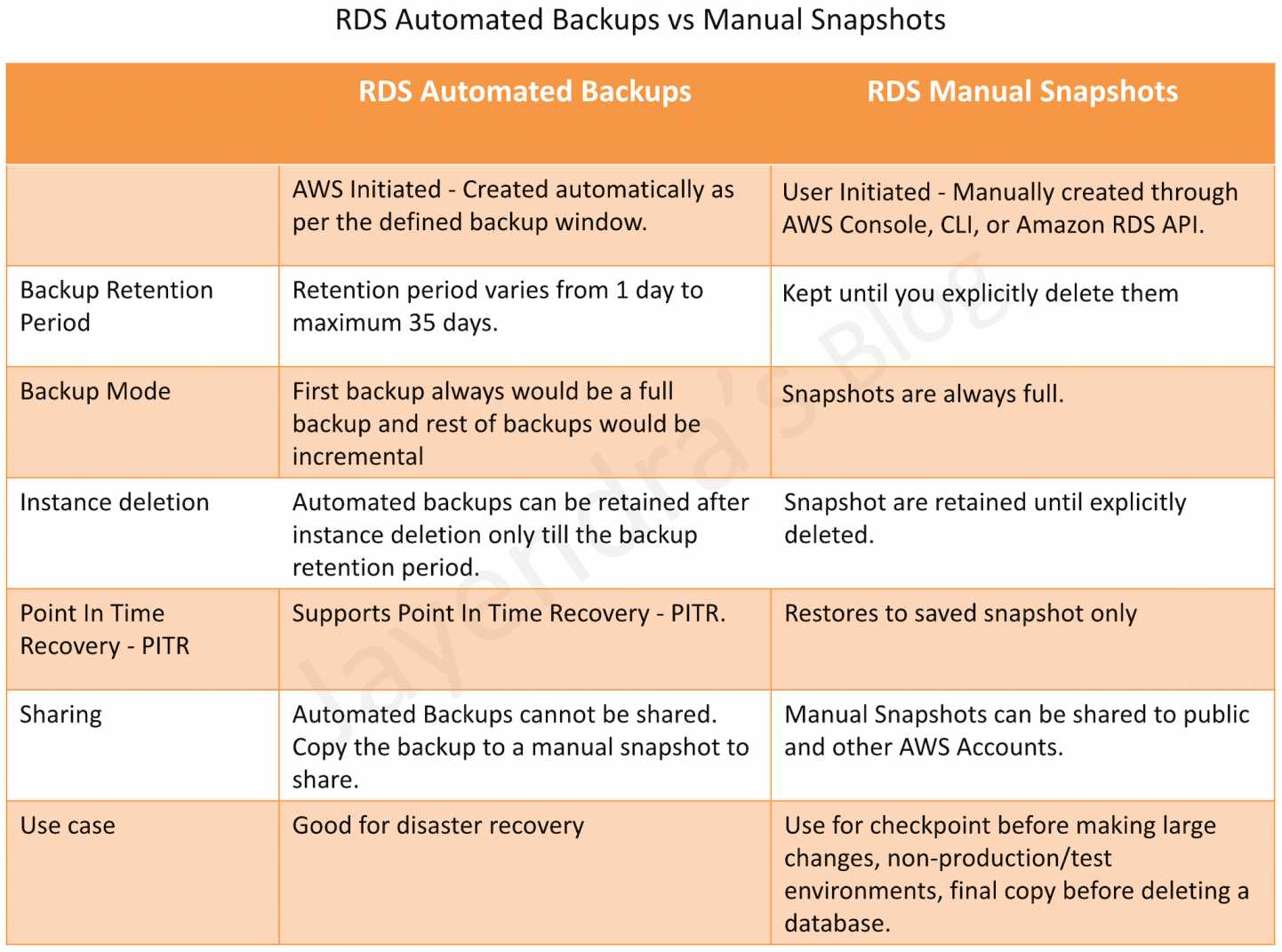
| Backup/Recovery | Automated backups (35 days); manual snapshots; PITR | Continuous backup to S3; PITR; Backtrack (MySQL, in-place rewind) | Continuous backup; PITR (35 days); on-demand backup |
| Encryption | At-rest (KMS) + in-transit (SSL/TLS) | At-rest (KMS) + in-transit (SSL/TLS) | At-rest (KMS, default) + in-transit (TLS) |
| Authentication | DB native + IAM DB Auth + Kerberos/AD | DB native + IAM DB Auth + Kerberos/AD | IAM policies + fine-grained access control |
| Pricing Model | Instance hours + EBS storage + IOPS (if io2) + data transfer | Instance/ACU hours + storage ($0.10/GB) + I/O or I/O-Optimized | On-demand (per request) or Provisioned (WCU/RCU) + storage ($0.25/GB) |
| Cost Optimization | Reserved Instances (1yr/3yr) | Reserved Instances; I/O-Optimized tier; Serverless | Reserved Capacity; Standard-IA class; on-demand vs provisioned |
| Maintenance | Maintenance windows required for patching | Maintenance windows (less frequent); zero-downtime patching available | Zero maintenance — no windows, no patching, no downtime |
| Best For | Lift-and-shift; Oracle/SQL Server workloads; steady predictable loads | High-performance MySQL/PostgreSQL; variable traffic; mission-critical apps | Massive scale; gaming/IoT/mobile; simple access patterns; event-driven |
Scaling Approaches Compared
RDS Scaling
- Vertical: Change instance class (requires brief downtime for single-AZ; rolling for Multi-AZ DB Clusters)
- Storage: Increase EBS volume size (online, but cannot decrease); up to 80,000 IOPS with gp3 (2026)
- Read scale-out: Add read replicas (async replication means eventual consistency for reads)
- Write scale-out: Not supported natively — requires application-level sharding
- Limitation: Write throughput bound by single instance capacity
Aurora Scaling
- Vertical: Instance resize or Serverless v2 auto-scaling (0.5 to 256 ACUs, increments of 0.5)
- Storage: Automatic — grows in 10 GB increments, up to 128 TB, never shrinks below high-water mark
- Read scale-out: Up to 15 replicas with shared storage (no replication lag penalty)
- Write scale-out: Aurora Limitless Database (PostgreSQL) — automated sharding across multiple writer instances, petabyte scale
- Serverless: Scales to zero when idle; responds in milliseconds; ideal for dev/test and variable traffic
- Advantage: Scaling doesn’t require data copying — shared storage architecture
DynamoDB Scaling
- Fully automatic: No instance sizing or storage provisioning — scales horizontally by adding partitions
- On-demand mode: Instantly accommodates up to 2x previous peak; no throttling for gradual increases
- Provisioned mode: Set WCU/RCU with auto-scaling policies (target utilization-based)
- No practical limits: Handles millions of requests/second, unlimited storage per table
- Consideration: Requires good partition key design — hot partitions can cause throttling
- 2025 update: More frequent mode switches between provisioned and on-demand now allowed
Pricing Comparison
Amazon RDS Pricing
- Instance hours: Pay per hour for chosen instance type (e.g., db.r6g.large ~$0.26/hr in us-east-1)
- Storage: gp3 at $0.115/GB/month (includes 3,000 IOPS baseline); io2 for high-performance
- Additional IOPS: gp3 provisioned IOPS $0.08/IOPS/month above baseline
- Backup: Free up to 100% of DB size; additional at $0.095/GB/month
- Data transfer: Standard AWS rates
- Savings: Reserved Instances (up to 60% discount for 3-year all-upfront)
- Lowest entry cost among the three for relational workloads
Amazon Aurora Pricing
- Instance hours: ~20% premium over equivalent RDS instances
- Storage: $0.10/GB/month (auto-provisioned, slightly cheaper per-GB than RDS gp3)
- I/O (Standard tier): $0.20 per million I/O requests — can be significant for write-heavy workloads
- I/O-Optimized tier: 30-40% higher instance + storage cost, but zero I/O charges — breaks even at ~500K I/Os per instance hour
- Serverless v2: $0.12 per ACU-hour (billed per second); scales to zero = $0 when idle
- Savings: Reserved Instances; choose I/O-Optimized for high-throughput; Serverless for variable loads
- Cost trap: I/O charges in Standard tier can double the bill for read-heavy/high-throughput workloads
Amazon DynamoDB Pricing
- On-demand: $1.25 per million write request units (WRU); $0.25 per million read request units (RRU)
- Provisioned: $0.00065 per WCU/hour; $0.00013 per RCU/hour (~$0.47/WCU/month)
- Storage: $0.25/GB/month (Standard); $0.10/GB/month (Standard-IA for infrequent access)
- Global Tables: Replicated writes cost 1.5x (rWRU/rWCU) + cross-region transfer
- Transactions: 2x cost (each transactional operation counts double)
- Savings: Reserved Capacity (up to 77% for 3-year); provisioned mode for steady workloads
- Cost insight: On-demand is ~7x more expensive than provisioned for sustained throughput — switch to provisioned once patterns stabilize
- Lowest cost, steady relational workload: RDS with Reserved Instances
- Variable traffic, pay-for-what-you-use: Aurora Serverless v2 or DynamoDB on-demand
- High-throughput relational: Aurora I/O-Optimized with Reserved Instances
- Massive scale NoSQL, steady traffic: DynamoDB Provisioned + Reserved Capacity
- Unpredictable/spiky NoSQL: DynamoDB on-demand
Availability and Disaster Recovery
| Feature | RDS | Aurora | DynamoDB |
|---|---|---|---|
| Data Replication | Synchronous to 1 standby (Multi-AZ) | 6 copies across 3 AZs (automatic) | 3 copies across 3 AZs (automatic) |
| RPO (Data Loss) | 0 (Multi-AZ sync); seconds (read replicas) | 0 (same region); <1 sec (Global Database) | 0 (same region); 0 with MRSC (Global Tables) |
| RTO (Recovery Time) | 30-60 sec (Multi-AZ); minutes (replica promotion) | <30 sec (replica); <1 min (Global failover) | Instant (multi-AZ built-in); seconds (Global Tables failover) |
| Cross-Region DR | Cross-region read replicas (manual failover) | Global Database (managed failover); DSQL (automatic) | Global Tables (automatic active-active) |
| Point-in-Time Recovery | Yes (up to 35 days) | Yes (up to 35 days) + Backtrack (MySQL, no new cluster) | Yes (up to 35 days) |
| Maintenance Downtime | Required (maintenance windows) | Minimal (zero-downtime patching for many updates) | Zero (no maintenance windows ever) |
Security Features
| Security Feature | RDS | Aurora | DynamoDB |
|---|---|---|---|
| Network Isolation | VPC, Security Groups, private subnets | VPC, Security Groups, private subnets | VPC Endpoints (Gateway); no VPC placement needed |
| Encryption at Rest | AES-256 via KMS (must enable at creation) | AES-256 via KMS (must enable at creation) | AES-256 via KMS (enabled by default) |
| Encryption in Transit | SSL/TLS (configurable, can enforce) | SSL/TLS (configurable, can enforce) | TLS (HTTPS endpoints, always encrypted) |
| Authentication | Database native; IAM DB Auth; Kerberos/AD; Secrets Manager rotation | Database native; IAM DB Auth; Kerberos/AD; Secrets Manager rotation | IAM policies only (no DB-level users) |
| Fine-Grained Access | Database GRANT/REVOKE (table/column level) | Database GRANT/REVOKE (table/column level) | IAM conditions on partition keys, attributes |
| Audit Logging | Engine-native audit logs + CloudTrail (API) | Engine-native audit logs + CloudTrail (API) | CloudTrail (API); no query-level audit natively |
| Connection Management | RDS Proxy for pooling | RDS Proxy for pooling | N/A — HTTP/HTTPS API (no persistent connections) |
Decision Flowchart: Selecting Your Database
Step 1: What’s Your Data Model?
- ✅ Relational (tables, joins, foreign keys, complex queries) → Go to Step 2
- ✅ Key-value, document, or denormalized → Go to Step 5
Step 2: Which Database Engine Do You Need?
- ✅ Oracle, SQL Server, MariaDB, or Db2 → Choose RDS
- ✅ MySQL or PostgreSQL → Go to Step 3
Step 3: What Are Your Performance/Scale Requirements?
- ✅ Standard performance is sufficient; cost is primary concern → Choose RDS
- ✅ Need high throughput (5x MySQL/3x PG), auto-scaling storage, fast failover → Go to Step 4
- ✅ Need horizontal write scaling (millions of writes/sec) → Choose Aurora Limitless Database
- ✅ Need active-active multi-region SQL with 99.999% availability → Choose Aurora DSQL
Step 4: What’s Your Traffic Pattern?
- ✅ Steady, predictable traffic → Choose Aurora Provisioned
- ✅ Variable/spiky traffic or dev/test environments → Choose Aurora Serverless v2
- ✅ Infrequent use with cost sensitivity → Choose Aurora Serverless v2 (scales to zero)
Step 5: DynamoDB Fit Assessment
- ✅ Access patterns are known and can be modeled with partition/sort keys → Choose DynamoDB
- ✅ Need ad-hoc queries, complex joins, or flexible querying → Go back to Step 2 (use relational)
- ✅ Need <1ms reads with caching → Choose DynamoDB + DAX
- ✅ Need active-active multi-region with zero RPO → Choose DynamoDB Global Tables (MRSC)
Common Use Case Mapping
| Use Case | Recommended Service | Why |
|---|---|---|
| E-commerce product catalog + orders | Aurora (orders) + DynamoDB (catalog/cart) | ACID for transactions; low-latency reads for catalog |
| Gaming leaderboard / session store | DynamoDB | Unlimited scale, single-digit ms, simple access patterns |
| SaaS multi-tenant application | Aurora (Limitless for large scale) or DynamoDB | SQL for complex queries; DynamoDB for per-tenant isolation |
| Legacy Oracle migration to AWS | RDS for Oracle or RDS Custom | Full Oracle compatibility; minimal code changes |
| IoT sensor data ingestion | DynamoDB | Massive write throughput; time-series via sort key; TTL for expiry |
| Financial transaction processing | Aurora or Aurora DSQL (global) | Strong ACID; high throughput; cross-region consistency |
| Content management system (WordPress-style) | RDS MySQL/PostgreSQL | Standard performance sufficient; lowest cost; proven compatibility |
| Real-time mobile app backend | DynamoDB + DynamoDB Streams | Serverless; event-driven; scales with users |
| Enterprise reporting with complex joins | Aurora PostgreSQL | Complex SQL; parallel query; high read throughput |
| Globally distributed app (multi-region writes) | DynamoDB Global Tables or Aurora DSQL | Active-active; conflict resolution; low-latency global access |
Key Tradeoffs to Consider
| Tradeoff | Winner | Explanation |
|---|---|---|
| Lowest cost (small relational workload) | RDS | ~20% cheaper instances than Aurora; no I/O charges with gp3 |
| Best price-performance (relational) | Aurora | 5x MySQL throughput offsets 20% cost premium; I/O-Optimized eliminates surprise bills |
| Zero operational overhead | DynamoDB | No instances, no patching, no maintenance windows, no version upgrades |
| Query flexibility | RDS / Aurora | Full SQL — ad-hoc queries, joins, aggregations; DynamoDB requires pre-planned access patterns |
| Unlimited horizontal scale | DynamoDB | Automatic partitioning; no upper bound on throughput or storage |
| Multi-region active-active (NoSQL) | DynamoDB | Global Tables with MRSC for zero-RPO multi-region strong consistency |
| Multi-region active-active (SQL) | Aurora DSQL | Only AWS relational option with true active-active multi-region writes |
| Engine diversity (Oracle, SQL Server) | RDS | Aurora only supports MySQL/PostgreSQL; RDS supports 6 engines |
AWS Certification Exam Tips
- If the question mentions “millisecond latency at any scale” or “millions of requests/second” → DynamoDB
- If the question mentions “complex queries,” “joins,” or “ACID transactions” with high performance → Aurora
- If the question mentions “Oracle,” “SQL Server,” or “lift-and-shift” → RDS
- If the question mentions “serverless” + “relational” → Aurora Serverless v2
- If the question mentions “globally distributed” + “active-active” → DynamoDB Global Tables or Aurora DSQL
- If the question mentions “no maintenance windows” → DynamoDB
- Aurora’s 6 copies across 3 AZs and shared storage architecture are frequent exam topics
- DynamoDB partition key design and hot partition issues are common scenario questions
Practice Questions
Question 1:
A company is building a new e-commerce platform that requires complex SQL queries for inventory management, order processing with ACID transactions, and must handle Black Friday traffic spikes that are 10x normal load. The team uses PostgreSQL. Which database solution provides the best combination of SQL support, performance, and automatic scaling?
- Amazon RDS for PostgreSQL with Multi-AZ
- Amazon Aurora PostgreSQL with Serverless v2
- Amazon DynamoDB with on-demand capacity
- Amazon RDS for PostgreSQL with read replicas
Show Answer
Answer: B –
Explanation: Aurora PostgreSQL Serverless v2 provides full PostgreSQL SQL compatibility (complex queries, ACID transactions), delivers 3x PostgreSQL throughput, and automatically scales compute capacity to handle traffic spikes without manual intervention. It scales to zero during low-traffic periods and scales up instantly during Black Friday peaks. RDS would require manual instance resizing or over-provisioning. DynamoDB doesn’t support complex SQL queries or joins needed for inventory management.
Question 2:
A gaming company needs a database for their global leaderboard that must handle 5 million writes per second during peak hours, provide single-digit millisecond read latency, and be available in 4 AWS regions simultaneously with active-active writes. Which solution meets these requirements?
- Amazon Aurora Global Database with write forwarding
- Amazon DynamoDB with Global Tables
- Amazon RDS Multi-AZ with cross-region read replicas
- Amazon Aurora DSQL in multi-region configuration
Show Answer
Answer: B –
Explanation: DynamoDB Global Tables provide active-active multi-region replication with single-digit millisecond latency and can handle millions of requests per second with automatic scaling. Gaming leaderboards are a classic DynamoDB use case — simple access patterns (get/put by player ID, query by score) with massive scale requirements. Aurora Global Database doesn’t support active-active writes (only forwarding). Aurora DSQL supports active-active but is optimized for OLTP transactions, not the extreme write throughput needed here. RDS doesn’t support active-active multi-region.
Question 3:
A financial services company is migrating their Oracle-based core banking application to AWS. The application uses PL/SQL stored procedures extensively, requires full ACID compliance, and the team wants minimal code changes. Which is the most appropriate migration path?
- Amazon Aurora PostgreSQL with Babelfish
- Amazon RDS for Oracle
- Amazon DynamoDB with transactions
- Amazon Aurora MySQL
Show Answer
Answer: B –
Explanation: RDS for Oracle provides full Oracle engine compatibility including PL/SQL stored procedures, requiring minimal or zero code changes. The requirement explicitly states “minimal code changes” with heavy PL/SQL usage, which rules out Aurora (only MySQL/PostgreSQL compatible). DynamoDB doesn’t support SQL or stored procedures. Babelfish is for SQL Server T-SQL compatibility, not Oracle PL/SQL. For lift-and-shift of Oracle workloads, RDS for Oracle (or RDS Custom for Oracle with OS access) is the correct choice.
Question 4:
A startup is building an IoT platform that ingests sensor data from 100,000 devices. Each device sends readings every 5 seconds. The data must be stored for 30 days, after which it should be automatically deleted. The team needs to query recent data by device ID and time range. Which database solution is most cost-effective and operationally efficient?
- Amazon Aurora PostgreSQL with table partitioning
- Amazon RDS for MySQL with scheduled deletion jobs
- Amazon DynamoDB with TTL enabled
- Amazon Aurora Serverless v2 with scheduled scaling
Show Answer
Answer: C –
Explanation: DynamoDB with TTL (Time to Live) is ideal for this scenario. The access pattern is simple (device_id as partition key, timestamp as sort key), enabling efficient range queries. TTL automatically deletes expired items at no cost — no scheduled jobs needed. The write volume (~20,000 writes/second from 100K devices at 5-sec intervals) is easily handled by DynamoDB’s automatic scaling. DynamoDB’s serverless model means zero operational overhead for the startup. Aurora or RDS would require instance management, manual partition pruning or deletion jobs, and would be more expensive for this write-heavy, simple-query workload.
Question 5:
A company runs a MySQL-based application on Amazon RDS. They are experiencing performance issues during peak hours and their DBA reports that read replica lag is causing stale data problems. They need to improve read performance with minimal replication lag while keeping MySQL compatibility. The budget allows for a 20% cost increase. What should they do?
- Upgrade to a larger RDS instance class
- Migrate to Amazon Aurora MySQL
- Add more RDS read replicas
- Migrate to Amazon DynamoDB
Show Answer
Answer: B –
Explanation: Aurora MySQL provides 5x throughput improvement over standard MySQL, and its shared storage architecture means read replicas have near-zero replication lag (typically <10ms vs seconds/minutes for RDS async replicas). This directly addresses both problems: performance issues and stale read data. Aurora instances cost ~20% more than RDS (within budget). Adding more RDS replicas doesn’t fix the lag issue. A larger instance helps writes but doesn’t fix replica lag. DynamoDB would require a complete application rewrite and doesn’t maintain MySQL compatibility.
Summary
- Amazon RDS is the right choice for traditional relational workloads requiring specific engines (Oracle, SQL Server, MariaDB, Db2), lift-and-shift migrations, or when cost is the primary concern for steady, predictable workloads.
- Amazon Aurora excels for MySQL/PostgreSQL workloads needing superior performance, high availability, automatic storage scaling, and modern features like Serverless v2, Limitless Database, and DSQL for distributed SQL.
- Amazon DynamoDB is the answer for applications requiring unlimited scale, single-digit millisecond latency, zero operational overhead, and well-defined access patterns that fit a key-value or document model.
- Many real-world architectures use multiple services together — e.g., Aurora for transactional data and DynamoDB for session stores or high-velocity data streams.
- The selection decision should be driven by access patterns, scale requirements, and data model — not team familiarity or historical precedent.
Frequently Asked Questions
How do I choose between RDS, Aurora, and DynamoDB?
Start with your data model: if you need key-value/document access patterns, choose DynamoDB. For relational data, choose Aurora for high performance and scaling needs, or standard RDS for simple workloads where cost is the priority.
Is Aurora worth the extra cost over RDS?
Aurora costs ~20% more than standard RDS but delivers up to 5x MySQL / 3x PostgreSQL throughput, 6-way storage replication, faster failover (30s vs 60-120s), and auto-scaling storage up to 128TB. Worth it for production workloads needing high availability.
Can DynamoDB replace a relational database?
DynamoDB can replace relational databases for access-pattern-driven workloads, but not for complex ad-hoc queries, multi-table joins, or analytics. It excels at single-digit millisecond key-value lookups at any scale but requires careful data modeling upfront.