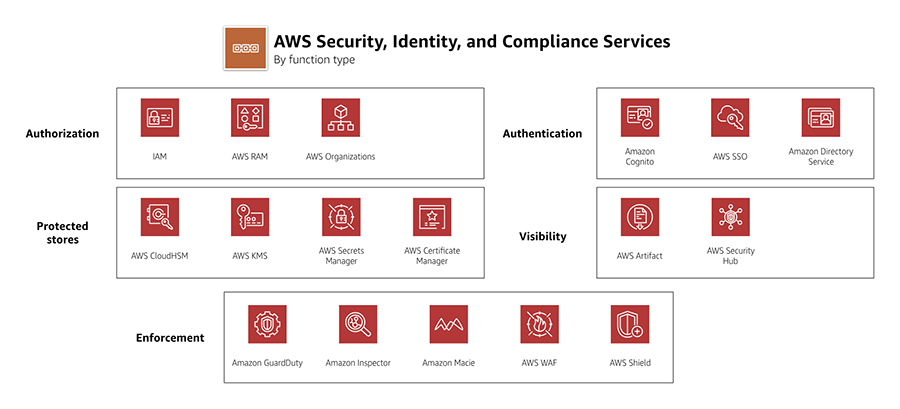
AWS Security Services Cheat Sheet

AWS Identity and Security Services

AWS Security Services Cheat Sheet

AWS Identity and Security Services

AWS IAM Identity Center (Successor to AWS SSO)

  • is a centralized workforce identity management service that provides single sign-on (SSO) access to multiple AWS accounts and business applications.
  • was renamed from AWS Single Sign-On (AWS SSO) in July 2022.
  • enables administrators to define, customize, and assign fine-grained access across AWS accounts and applications.
  • provides workforce users a portal to access AWS accounts and cloud applications assigned to them.
  • supports integration with external identity providers (IdPs) like Microsoft Active Directory, Okta, and Azure AD.
  • simplifies multi-account access management through AWS Organizations integration.
  • provides temporary credentials instead of long-term IAM user credentials.
  • supports attribute-based access control (ABAC) for fine-grained permissions.

Key Management Service – KMS

  • is a managed encryption service that allows the creation and control of encryption keys to enable data encryption.
  • provides a highly available key storage, management, and auditing solution to encrypt the data across AWS services & within applications.
  • uses hardware security modules (HSMs) that are FIPS 140-3 Security Level 3 certified (upgraded from FIPS 140-2 in May 2023).
  • seamlessly integrates with several AWS services to make encrypting data in those services easy.
  • supports multi-region keys, which are AWS KMS keys in different AWS Regions. Multi-Region keys are not global and each multi-region key needs to be replicated and managed independently.
  • supports External Key Store (XKS) capability (November 2022) allowing customers to store and control encryption keys on-premises or outside AWS cloud while using AWS KMS.
  • provides three key store options: Default KMS key store, CloudHSM custom key store, and External key store (XKS).
  • supports on-demand key rotation (April 2024) allowing immediate rotation of symmetric encryption keys without waiting for automatic rotation schedules, with a maximum of 10 on-demand rotations per key.
  • offers flexible automatic rotation periods (90 days to 2560 days) instead of the previous fixed annual rotation.
  • supports post-quantum cryptography:
    • ML-KEM hybrid post-quantum key exchange for TLS connections to KMS endpoints, protecting against “harvest now, decrypt later” attacks.
    • ML-DSA (FIPS 204) post-quantum digital signatures (June 2025) for quantum-resistant signing operations within FIPS 140-3 Level 3 certified HSMs.

CloudHSM

  • provides secure cryptographic key storage to customers by making hardware security modules (HSMs) available in the AWS cloud
  • helps manage your own encryption keys using FIPS 140-3 Level 3 validated HSMs (upgraded from FIPS 140-2).
  • single tenant, dedicated physical device to securely generate, store, and manage cryptographic keys used for data encryption
  • are inside the VPC (not EC2-classic) & isolated from the rest of the network
  • can use VPC peering to connect to CloudHSM from multiple VPCs
  • integrated with Amazon Redshift and Amazon RDS for Oracle
  • EBS volume encryption, S3 object encryption and key management can be done with CloudHSM but requires custom application scripting
  • is NOT fault-tolerant and would need to build a cluster as if one fails all the keys are lost
  • enables quick scaling by adding and removing HSM capacity on-demand, with no up-front costs.
  • automatically load balance requests and securely duplicates keys stored in any HSM to all of the other HSMs in the cluster.
  • launched hsm2m.medium instance type (August 2024) with FIPS 140-3 Level 3 certification, increased key storage (16,666 keys), higher elliptic curve performance, mTLS support, and non-FIPS cluster mode option.
  • deprecated hsm1.medium instance type — no new hsm1 clusters can be created as of April 2025; customers must migrate to hsm2m.medium.
  • expensive, prefer AWS Key Management Service (KMS) if cost is a criteria.

AWS Payment Cryptography

  • is a managed service for payment processing cryptographic operations (launched June 2023).
  • provides payment-specific HSMs that replace on-premises payment hardware security modules.
  • helps meet PCI (Payment Card Industry) security requirements and compliance needs.
  • supports cryptographic operations like PIN generation, validation, and credit/debit card security code processing.
  • manages underlying physical HSM infrastructure and key management automatically.
  • integrates with AWS IAM for authorization and AWS CloudTrail for auditing.
  • enables payment processing workloads to move to the cloud securely.
  • provides elastic scaling for payment cryptography operations.

AWS Private Certificate Authority (Private CA)

  • is a managed private certificate authority service for issuing and managing private SSL/TLS certificates.
  • removes upfront investment and ongoing maintenance costs of operating your own private CA.
  • supports two operating modes: General-purpose mode (certificates with any validity period) and Short-lived certificate mode (certificates valid up to 7 days, launched February 2023).
  • integrates with AWS Certificate Manager (ACM) for automated certificate provisioning and renewal.
  • supports Private CA Connector for Active Directory (September 2023) enabling AWS Private CA as drop-in replacement for self-managed enterprise CAs without local agents.
  • supports post-quantum ML-DSA digital certificates (November 2025) for transitioning PKI toward post-quantum cryptography.
  • provides audit and compliance support through AWS CloudTrail integration.
  • enables certificate-based authentication for services like Amazon WorkSpaces.

AWS WAF

  • is a web application firewall that helps monitor the HTTP/HTTPS traffic and allows controlling access to the content.
  • helps protect web applications from attacks by allowing rules configuration that allow, block, or monitor (count) web requests based on defined conditions. These conditions include IP addresses, HTTP headers, HTTP body, URI strings, SQL injection and cross-site scripting.
  • helps define Web ACLs, which is a combination of Rules that is a combinations of Conditions and Action to block or allow
  • integrated with CloudFront, Application Load Balancer (ALB), API Gateway, Amazon Cognito, AWS App Runner, and AWS Verified Access.
  • supports custom origins outside of AWS, when integrated with CloudFront
  • provides AWS WAF Fraud Control with three capabilities:
    • Account Takeover Prevention (ATP) – Protects login pages against credential stuffing attacks
    • Account Creation Fraud Prevention (ACFP) – Detects and blocks automated bot-based account creation
    • Bot Control – Detects and controls common bots and targeted bots with a catalog of 650+ unique bots including AI crawlers, AI data collectors, AI assistants, and LLM training crawlers
  • supports Challenge and CAPTCHA actions for bot mitigation.
  • provides AI Activity Dashboard (February 2026) for visibility into AI bot and agent traffic patterns.
  • launched AI Traffic Monetization (June 2026), a Bot Control capability that lets content providers price, meter, and collect payment from AI bots and agents accessing their content and APIs via HTTP 402 Payment Required responses.
  • AWS WAF Classic reached end of support on September 30, 2025. All customers must use AWS WAF (v2).

AWS Verified Access

  • provides VPN-less, secure access to corporate applications (GA April 2023).
  • implements Zero Trust security model for application access without traditional VPN.
  • validates each application request against identity and device security requirements before granting access.
  • integrates with identity providers (IdPs) and device management systems for authentication and authorization.
  • uses Cedar policy language for fine-grained access control policies.
  • supports AWS WAF integration for additional web application protection.
  • provides signed identity context to end applications for additional security.
  • simplifies remote access management and improves user experience compared to VPN.
  • eliminates VPN infrastructure management overhead.

Amazon Verified Permissions

  • is a fully managed fine-grained authorization service for custom applications (GA June 2023).
  • uses Cedar, an open-source policy language released May 2023, for defining authorization policies.
  • enables developers to externalize authorization logic from application code.
  • provides centralized policy management and administration.
  • offers millisecond-latency authorization decisions with provably correct results.
  • supports policy validation using automated reasoning to prevent misconfigurations.
  • integrates with identity providers for user and group information.
  • enables fine-grained permissions based on user attributes, resource attributes, and context.
  • provides policy versioning and audit capabilities.
  • follows “explicit permit” and “forbid overrides permit” principles.

AWS Secrets Manager

  • helps protect secrets needed to access applications, services, and IT resources.
  • enables you to easily rotate, manage, and retrieve database credentials, API keys, and other secrets throughout their lifecycle.
  • secure secrets by encrypting them with encryption keys managed using AWS KMS.
  • offers native secret rotation with built-in integration for RDS, Redshift, and DocumentDB.
  • supports Lambda functions to extend secret rotation to other types of secrets, including API keys and OAuth tokens.
  • supports IAM and resource-based policies for fine-grained access control to secrets and centralized secret rotation audit for resources in the AWS Cloud, third-party services, and on-premises.
  • enables secret replication in multiple AWS regions to support multi-region applications and disaster recovery scenarios, automatically keeping replicas in sync including rotation.
  • launched Managed External Secrets (November 2025) — a new secret type enabling automatic rotation for third-party SaaS credentials (Salesforce, MongoDB Atlas, Confluent Cloud, Datadog, Snowflake) without custom Lambda rotation functions.
  • supports hybrid post-quantum TLS (ML-KEM) for protecting secrets against future quantum computing threats (April 2026).
  • supports private access using VPC Interface endpoints

AWS Shield

  • is a managed service that provides protection against Distributed Denial of Service (DDoS) attacks for applications running on AWS
  • provides protection for all AWS customers against common and most frequently occurring infrastructure (layer 3 and 4) attacks like SYN/UDP floods, reflection attacks, and others to support high availability of applications on AWS.
  • provides AWS Shield Advanced with additional protections against more sophisticated and larger attacks for applications running on EC2, ELB, CloudFront, AWS Global Accelerator, and Route 53.
  • Shield Advanced provides 24/7 access to AWS Shield Response Team (SRT) and cost protection against DDoS-related spikes.
  • AWS Shield Network Security Director (preview) performs analysis of resources to visualize network topology, identify configuration issues, and provide actionable remediation recommendations.

AWS GuardDuty

  • offers threat detection that enables continuous monitoring and protects the AWS accounts and workloads.
  • is a Regional service
  • analyzes continuous streams of meta-data generated from AWS accounts and network activity found in AWS CloudTrail Events, EKS audit logs, VPC Flow Logs, and DNS Logs.
  • integrated threat intelligence
  • combines machine learning, anomaly detection, network monitoring, and malicious file discovery, utilizing both AWS-developed and industry-leading third-party sources to help protect workloads and data on AWS
  • supports suppression rules, trusted IP lists, and threat lists. Now supports custom entity lists (September 2025) with domain-based threat intelligence in addition to IP-based lists.
  • provides Malware Protection to detect malicious files on EBS volumes and S3 objects (on-demand scanning API).
  • provides EKS Runtime Monitoring using fully managed EKS add-on for visibility into container runtime activities (file access, process execution, network connections).
  • provides RDS Protection for profiling and monitoring access activity to Amazon Aurora databases.
  • provides Lambda Protection for monitoring AWS Lambda function invocations and runtime behavior.
  • can identify specific containers within EKS clusters that are potentially compromised and detect privilege escalation attempts.
  • launched Extended Threat Detection (December 2024) — AI/ML-powered attack sequence identification that detects multi-stage attacks spanning multiple AWS data sources and resources, including EC2 instances and ECS clusters on Fargate.
  • offers flexible protection plan configuration — new accounts can inherit protection plans automatically, and plans can be enabled/disabled independently.
  • operates completely independently from the resources so there is no risk of performance or availability impacts on the workloads.

Amazon Inspector

  • is a vulnerability management service that continuously scans the AWS workloads for vulnerabilities
  • automatically discovers and scans EC2 instances and container images residing in Elastic Container Registry (ECR) for software vulnerabilities and unintended network exposure.
  • supports AWS Lambda function scanning for vulnerabilities in application code and dependencies.
  • provides CI/CD integration with open-source plugins for Jenkins, TeamCity, and other CI/CD tools to scan container images at build time.
  • provides code security capabilities including static application security testing (SAST), software composition analysis (SCA), and infrastructure as code (IaC) scanning via SCM tool connections.
  • supports agentless EC2 scanning (March 2026) with expanded detection coverage including Windows OS vulnerability scanning without requiring an agent.
  • launched Inspector VM Scanner (May 2026) for improved agent-based scanning with more granular package collection and reduced CPU utilization on EC2 instances.
  • creates a finding, when a software vulnerability or network issue is discovered, that describes the vulnerability, rates its severity, identifies the affected resource, and provides remediation guidance.
  • is a Regional service.
  • Amazon Inspector Classic reached end of support on May 20, 2026. All customers must use Amazon Inspector (v2).

Amazon Security Lake

  • is a fully managed security data lake service (GA November 2023).
  • automatically centralizes security data from AWS environments, SaaS providers, on-premises, and cloud sources into a purpose-built data lake.
  • normalizes security data into the Open Cybersecurity Schema Framework (OCSF) standard format.
  • aggregates data from AWS services like CloudTrail, VPC Flow Logs, Route 53 logs, and third-party sources.
  • enables comprehensive security data analysis across entire organization.
  • automatically collects data for existing and new accounts with multi-account support.
  • stores security data in customer’s own AWS account for data ownership and control.
  • integrates with analytics tools like Amazon Athena, Amazon OpenSearch, and third-party SIEM solutions.
  • supports cross-region data aggregation for centralized security monitoring.
  • pricing based on data ingestion volume and normalization (no charge for third-party or custom data).

Amazon Detective

  • helps analyze, investigate, and quickly identify the root cause of potential security issues or suspicious activities.
  • automatically collects log data from the AWS resources and uses machine learning, statistical analysis, and graph theory to build a linked set of data to easily conduct faster and more efficient security investigations.
  • enables customers to view summaries and analytical data associated with CloudTrail logs, EKS audit logs, VPC Flow Logs.
  • provides finding groups that let you examine multiple activities related to a potential security event, analyze root cause for high severity GuardDuty findings, and visualize entity connections.
  • provides detailed summaries, analysis, and visualizations of the behaviors and interactions amongst your AWS accounts, EC2 instances, AWS users, roles, and IP addresses.
  • supports automated investigation of IAM users and roles for indicators of compromise (IoC).
  • maintains up to a year of aggregated data
  • is a Regional service and needs to be enabled on a region-by-region basis.
  • is a multi-account service that aggregates data from monitored member accounts under a single administrative account within the same region.
  • integrates with Amazon Security Lake for lateral movement investigations.
  • has no impact on the performance or availability of the AWS infrastructure since it retrieves the log data and findings directly from the AWS services.

AWS Security Hub

  • is a unified cloud security solution that prioritizes critical security issues and helps respond at scale to protect cloud environments.
  • was completely re-imagined at re:Invent 2025 — now unifies AWS security services including Amazon GuardDuty, Amazon Inspector, and Amazon Macie into a single experience.
  • provides near real-time risk analytics (GA December 2025) with automated correlation, enrichment, and prioritization of security signals from multiple sources.
  • collects security data from across AWS accounts, services, and supported third-party partner products.
  • is Regional but supports cross-region aggregation of findings.
  • automatically runs continuous, account-level configuration and security checks based on AWS best practices and industry standards including CIS Foundations, PCI DSS, and NIST frameworks.
  • detects unused IAM permissions, roles, and credentials (May 2026) across the AWS organization for identity risk reduction.
  • offers Security Hub Extended plan (2026) providing full-stack enterprise security with 21+ curated partner solutions across 9 security categories (endpoint, identity, email, network, data, browser, cloud, AI, security operations).
  • supports integration with Amazon EventBridge for custom actions and automated remediation.
  • has multi-account management through AWS Organizations integration, which allows delegating an administrator account for the organization.
  • works with AWS Config to perform most of its security checks for controls.

AWS Macie

  • Macie is a data security service that discovers sensitive data by using machine learning and pattern matching, provides visibility into data security risks, and enables automated protection against those risks.
  • provides an inventory of the S3 buckets and automatically evaluates and monitors the buckets for security and access control.
  • automates the discovery, classification, and reporting of sensitive data.
  • supports automated sensitive data discovery that continuously samples and analyzes S3 objects, builds an interactive data map, and provides a sensitivity score for each bucket.
  • generates a finding for you to review and remediate as necessary if it detects a potential issue with the security or privacy of the data, such as a bucket that becomes publicly accessible.
  • can analyze objects encrypted with dual-layer server-side encryption (DSSE-KMS).
  • provides multi-account support using AWS Organizations to enable Macie across all of the accounts.
  • is a regional service and must be enabled on a region-by-region basis and helps view findings across all the accounts within each Region.
  • supports VPC Interface Endpoints to access Macie privately from a VPC without an internet gateway, NAT device, VPN connection, or AWS Direct Connect connection.

AWS Artifact

  • is a self-service audit artifact retrieval portal that provides customers with on-demand access to AWS’ compliance documentation and agreements.
  • can use AWS Artifact Reports to download AWS security and compliance documents, such as AWS ISO certifications, Payment Card Industry (PCI), and System and Organization Control (SOC) reports.
  • supports listCustomerAgreements API (November 2024) for programmatic tracking of active agreements across accounts.
  • provides SOC reports in machine-readable OSCAL format in addition to PDF.

AWS Security Services – Practice Questions

  1. A company needs to manage encryption keys with FIPS 140-3 Level 3 compliance and wants AWS to handle the infrastructure. Which service should they use?
    • A. AWS CloudHSM
    • B. AWS KMS ✓
    • C. AWS Secrets Manager
    • D. AWS Certificate Manager
  2. A financial institution needs to process payment card transactions in the cloud while meeting PCI compliance requirements. Which service should they use?
    • A. AWS CloudHSM
    • B. AWS KMS
    • C. AWS Payment Cryptography ✓
    • D. AWS Private CA
  3. A company wants to provide secure access to corporate applications without using VPN. Which service implements Zero Trust access?
    • A. AWS Client VPN
    • B. AWS Verified Access ✓
    • C. AWS Direct Connect
    • D. AWS PrivateLink
  4. A development team needs to externalize authorization logic from their application and use fine-grained permissions. Which service should they use?
    • A. AWS IAM
    • B. Amazon Cognito
    • C. Amazon Verified Permissions ✓
    • D. AWS IAM Identity Center
  5. A company needs to centralize security data from multiple AWS accounts and third-party sources for analysis. Which service should they use?
    • A. AWS Security Hub
    • B. Amazon Security Lake ✓
    • C. Amazon Detective
    • D. AWS CloudTrail
  6. Which AWS service uses AI/ML to detect multi-stage attack sequences spanning multiple data sources and resources?
    • A. Amazon Inspector
    • B. AWS Security Hub
    • C. Amazon GuardDuty Extended Threat Detection ✓
    • D. Amazon Detective
  7. A company wants to scan EC2 instances for vulnerabilities without installing any agent. Which capability supports this?
    • A. AWS Config Rules
    • B. Amazon Inspector agentless scanning ✓
    • C. AWS Security Hub
    • D. Amazon GuardDuty
  8. Which AWS WAF capability allows content providers to charge AI bots for accessing their content?
    • A. AWS WAF Fraud Control
    • B. AWS WAF Bot Control
    • C. AWS WAF AI Traffic Monetization ✓
    • D. AWS Shield Advanced
  9. A company needs to automatically rotate third-party SaaS credentials without writing custom Lambda functions. Which feature supports this?
    • A. AWS Secrets Manager Managed External Secrets ✓
    • B. AWS Systems Manager Parameter Store
    • C. AWS KMS automatic rotation
    • D. AWS Config
  10. A security team wants a unified view that correlates findings from GuardDuty, Inspector, and Macie with near real-time risk analytics. Which service provides this?
    • A. Amazon Detective
    • B. Amazon Security Lake
    • C. AWS Security Hub ✓
    • D. AWS CloudTrail Lake
  11. An organization needs to protect their KMS encryption keys against future quantum computing threats. Which KMS feature should they use?
    • A. External Key Store (XKS)
    • B. Multi-Region keys
    • C. ML-KEM hybrid post-quantum TLS ✓
    • D. On-demand key rotation
  12. Which service was renamed from AWS Single Sign-On (SSO) in July 2022?
    • A. AWS IAM
    • B. Amazon Cognito
    • C. AWS IAM Identity Center ✓
    • D. AWS Directory Service

References

AWS Simple Email Service – SES

AWS Simple Email Service – SES

  • SES is a fully managed, cloud-based email service that provides an easy, cost-effective way to send and receive email using your own email addresses and domains.
  • can be used to send both transactional and marketing emails securely, and globally at scale.
  • processes over a trillion emails each year for customers worldwide across various industries.
  • acts as an outbound email server and eliminates the need to support its own software or applications to do the heavy lifting of email transport.
  • acts as an inbound email server to receive emails that can help develop software solutions such as email autoresponders, email unsubscribe systems, and applications that generate customer support tickets from incoming emails.
  • existing email server can also be configured to send outgoing emails through SES with no change in any settings in the email clients.
  • Maximum message size including attachments is 40 MB per message (after base64 encoding) when using the SESv2 API or SMTP.
  • integrated with CloudWatch, CloudTrail, Amazon EventBridge, and Amazon SNS for monitoring and notifications.
  • available in 24 AWS Regions, including AWS GovCloud (US) Regions.

SES Key Features

  • Compatible with SMTP
  • Applications can send email using the SES API (v2 recommended), AWS SDKs in many supported languages (Java, .NET, PHP, Python, Ruby, Go, JavaScript), or the AWS CLI.
  • Optimized for the highest levels of uptime, availability, and scales as per the demand.
  • Provides sandbox environment for testing.
  • provides Reputation dashboard, performance insights, anti-spam feedback.
  • provides statistics on email deliveries, bounces, feedback loop results, emails opened, clicks, etc.
  • supports DomainKeys Identified Mail (DKIM), Sender Policy Framework (SPF), and Domain-based Message Authentication, Reporting and Conformance (DMARC).
  • supports flexible deployment: shared, dedicated, and managed dedicated IPs (M-DIPs).
  • supports attachments with many popular content formats, including documents, images, audio, and video, and scans every attachment for viruses and malware.
  • integrates with KMS to provide the ability to encrypt the mail that it writes to the S3 bucket.
  • uses client-side encryption to encrypt the mail before it sends the email to S3.
  • supports inline email templates directly within API requests, eliminating the need to manage template resources separately.
  • supports HTTPS custom tracking domains for open and click tracking.
  • supports configurable maximum delivery time for time-sensitive messages.
  • enables customers to connect an SES SMTP endpoint to a VPC through a VPC endpoint powered by AWS PrivateLink.

SES v2 API

  • AWS recommends using the SESv2 API for all new implementations.
  • While SESv1 API continues to be supported, all new features and capabilities are only available through the SESv2 API.
  • SESv2 API supports email size of up to 40 MB for both inbound and outbound emails by default.
  • Migrating to SESv2 API provides access to features like Virtual Deliverability Manager, Mail Manager, Tenants, and Global Endpoints.

Virtual Deliverability Manager (VDM)

  • VDM is an SES feature that helps enhance email deliverability by providing insights into sending and delivery data.
  • provides three core components:
    • Deliverability Insights – view at-a-glance reports on sending and delivery data (bounce rates, opens, clicks) broken down by ISP, sender identity, and configuration set.
    • Recommendations – notifies senders of deliverability issues and provides actionable recommendations (e.g., DKIM, DMARC configuration issues, BIMI gap detection).
    • Automatic Implementation – option to allow SES to automatically implement email deliverability improvements like optimizing delivery patterns.
  • includes automated complaint rate insights as an early warning system to protect sender reputation.
  • tracks every email’s journey, uncovering opportunities to improve delivery and engagement rates.

Mail Manager

  • Mail Manager (launched May 2024) provides comprehensive tools to simplify managing large volumes of email communications.
  • acts as a centralized email gateway for routing, filtering, archiving, and compliance across inbound, outbound, and internal email.
  • Key capabilities include:
    • Ingress Endpoints – dedicated email ingress points with IP filtering, TLS, and mutual TLS (mTLS) authentication support.
    • Rules Engine – powerful rule-based email processing with conditions and actions for routing, archiving, and security enforcement.
    • Traffic Policies – enforce sophisticated email traffic filtering policies.
    • SMTP Relay – relay emails to Google Workspace, Microsoft 365, or other email destinations.
    • Email Archiving – flexible archiving features to meet compliance and record-keeping requirements.
    • Full Lifecycle Logging – end-to-end logging to CloudWatch, S3, and Firehose.
  • integrates with Amazon Q Business for email indexing and queries.
  • supports email journaling and echo spoofing prevention.
  • available in 17+ AWS Regions including AWS GovCloud (US).
  • supports Lambda function invocation and Bounce actions directly in rules (added April 2026).

Global Endpoints

  • Global Endpoints (launched December 2024) provides multi-region resilience for email sending.
  • allows customers to add a secondary Region, dividing workloads equally in a load-balanced state.
  • if either Region suffers an outage, traffic automatically shifts to the healthy Region with no customer intervention.
  • both Regions develop warmed-up IPs in parallel, ensuring both are ready to support 100% of workload at any time.
  • synchronizes critical parameters between chosen Regions automatically.
  • compatible with Virtual Deliverability Manager (VDM) and Dedicated IPs (DIPs/M-DIPs).

Tenant Management

  • SES Tenant Management (launched August 2025) enables isolation and reputation management at the individual tenant level.
  • allows creation of up to 10,000 isolated tenants within a single AWS account (increasable to 300,000 on request).
  • each tenant can have its own email identities, configuration sets, templates, and independent reputation metrics.
  • addresses the challenge where one tenant’s poor email practices could previously pause an entire SES account.
  • includes automated pause mechanism to limit damage from problematic senders.
  • enables organizations to manage multiple email streams independently while maintaining centralized oversight.

Dedicated IPs

  • SES supports three types of IP deployment:
    • Shared IPs – default, cost-effective option; reputation determined by all emails sent from the shared pool.
    • Dedicated IPs (Standard) – customer leases dedicated IPs for sole sending reputation control; requires manual warm-up.
    • Dedicated IPs (Managed / M-DIPs) – AWS automates provisioning, warming up, and scaling of dedicated IPs; pool automatically scales based on usage and ISP policies.
  • Managed Dedicated IPs eliminate manual support cases and handle IP warmup per ISP individually.

Email Authentication & Bulk Sender Requirements

  • Gmail and Yahoo implemented new requirements for bulk senders (5,000+ messages/day) effective February 2024, with Microsoft following in May 2025.
  • Requirements include:
    • Domain Authentication – SPF, DKIM passing; DMARC record with at least p=none.
    • One-Click Unsubscribe – RFC 8058 List-Unsubscribe and List-Unsubscribe-Post headers required for bulk/marketing mail.
    • Low Complaint Rates – spam complaint rates must stay under 0.3% threshold.
  • SES supports one-click unsubscribe through the subscription management feature and List-Unsubscribe headers.
  • SES supports BIMI (Brand Indicators for Message Identification) with VDM gap detection.

Event Publishing & Monitoring

  • SES can publish email sending events to multiple destinations:
    • Amazon CloudWatch
    • Amazon Data Firehose
    • Amazon SNS
    • Amazon EventBridge (added June 2024) – enables routing events to any EventBridge-supported service.
  • Supported event types include: Send, Delivery, Bounce, Complaint, Open, Click, Rendering Failure, Delivery Delay, Subscription.
  • VDM Advisor recommendations are also published to EventBridge.
  • supports custom values in feedback headers for better tracking transparency.
  • TLS version auto-tagging for outgoing messages provides visibility into connection security.

Sending Limits

  • Production SES has a set of sending limits which include:
    • Sending Quota – max number of emails in a 24-hour period.
    • Maximum Send Rate – max number of emails per second.
  • SES automatically adjusts the limits upward as long as emails are of high quality and they are sent in a controlled manner, as any spike in the email sent might be considered to be spam.
  • Limits can also be raised by submitting a Quota increase request.

Email Receiving

  • SES provides complete control over which emails are accepted and what to do with them.
  • Accept or reject mail based on email address, IP address, or domain of the sender.
  • After accepting email, actions include:
    • Store in an Amazon S3 bucket
    • Execute custom code using AWS Lambda
    • Publish notifications to Amazon SNS
    • Route through Mail Manager rules for advanced processing
  • Mail Manager extends receiving capabilities with SMTP relay to Google Workspace, Microsoft 365, or Amazon Connect.

SES Best Practices

  • Send high-quality and real production content that the recipients want.
  • Only send to those who have signed up for the mail.
  • Implement one-click unsubscribe (RFC 8058) for bulk/marketing emails to comply with Gmail/Yahoo/Microsoft requirements.
  • Unsubscribe recipients who have not interacted with the business recently.
  • Have low bounce and complaint rates and remove bounced or complained addresses, using SNS or EventBridge to monitor bounces and complaints, treating them as an opt-out.
  • Implement SPF, DKIM, and DMARC authentication for all sending domains.
  • Monitor the sending activity using VDM dashboards and reputation metrics.
  • Keep spam complaint rates below 0.3%.
  • Use Global Endpoints for multi-region resilience for critical email workloads.
  • Use Tenant Management to isolate reputation for multi-tenant email platforms.

Amazon Pinpoint Migration Note

  • Amazon Pinpoint will reach end of support on October 30, 2026 (no new customers accepted since May 20, 2025).
  • For email capabilities, customers should migrate to Amazon SES with:
    • SES for transactional and bulk email sending
    • SES Tenant Management for multi-tenant isolation
    • SES Mail Manager for routing and compliance
    • AWS End User Messaging for SMS/push notification channels

AWS Certification Exam Practice Questions

  • Questions are collected from Internet and the answers are marked as per my knowledge and understanding (which might differ with yours).
  • AWS services are updated everyday and both the answers and questions might be outdated soon, so research accordingly.
  • AWS exam questions are not updated to keep up the pace with AWS updates, so even if the underlying feature has changed the question might not be updated
  • Open to further feedback, discussion and correction.
  1. What does Amazon SES stand for?
    1. Simple Elastic Server
    2. Simple Email Service
    3. Software Email Solution
    4. Software Enabled Server
  2. Your startup wants to implement an order fulfillment process for selling a personalized gadget that needs an average of 3-4 days to produce with some orders taking up to 6 months you expect 10 orders per day on your first day. 1000 orders per day after 6 months and 10,000 orders after 12 months. Orders coming in are checked for consistency then dispatched to your manufacturing plant for production quality control packaging shipment and payment processing. If the product does not meet the quality standards at any stage of the process employees may force the process to repeat a step. Customers are notified via email about order status and any critical issues with their orders such as payment failure. Your case architecture includes AWS Elastic Beanstalk for your website with an RDS MySQL instance for customer data and orders. How can you implement the order fulfillment process while making sure that the emails are delivered reliably? [PROFESSIONAL]
    1. Add a business process management application to your Elastic Beanstalk app servers and re-use the RDS database for tracking order status use one of the Elastic Beanstalk instances to send emails to customers.
    2. Use SWF with an Auto Scaling group of activity workers and a decider instance in another Auto Scaling group with min/max=1 Use the decider instance to send emails to customers.
    3. Use SWF with an Auto Scaling group of activity workers and a decider instance in another Auto Scaling group with min/max=1 use SES to send emails to customers.
    4. Use an SQS queue to manage all process tasks Use an Auto Scaling group of EC2 Instances that poll the tasks and execute them. Use SES to send emails to customers.
  3. A company sends millions of marketing emails daily using Amazon SES. They need to ensure emails continue to be delivered even if one AWS Region experiences an outage. What SES feature should they use?
    1. Virtual Deliverability Manager with automatic recommendations
    2. Dedicated IPs (Managed) with automatic warmup
    3. Global Endpoints with a primary and secondary Region configuration
    4. Mail Manager with SMTP relay to multiple regions
  4. A SaaS company uses Amazon SES to send emails on behalf of hundreds of customers. They want to ensure that one customer’s poor email practices do not affect the sending reputation of other customers. What is the MOST appropriate solution?
    1. Create separate AWS accounts for each customer
    2. Use separate configuration sets for each customer
    3. Use dedicated IPs for each customer
    4. Use SES Tenant Management to create isolated tenants with independent reputation metrics
  5. A company needs to process incoming emails, archive them for compliance, apply security filtering, and route them to different internal systems based on recipient addresses. Which Amazon SES feature provides this capability?
    1. SES receipt rules with S3 actions
    2. Virtual Deliverability Manager
    3. SES Mail Manager with ingress endpoints, traffic policies, and rules engine
    4. SES event publishing with EventBridge
  6. A company sending bulk marketing emails through Amazon SES notices that their inbox placement rate has dropped. They want SES to automatically optimize email delivery patterns without manual intervention. Which feature should they enable?
    1. Dedicated IPs (Managed)
    2. Mail Manager traffic policies
    3. Virtual Deliverability Manager with automatic implementation enabled
    4. Global Endpoints with load balancing
  7. Which of the following are requirements that Gmail and Yahoo enforce for bulk email senders since February 2024? (Select THREE)
    1. SPF and DKIM authentication with a DMARC record
    2. Use of dedicated IP addresses
    3. One-click unsubscribe support (RFC 8058)
    4. Use of the SESv2 API
    5. Spam complaint rate below 0.3%
    6. Mandatory use of VPC endpoints

References

AWS Certified Big Data -Speciality (BDS-C00) Exam Learning Path

⚠️ CERTIFICATION RETIRED

AWS Certified Big Data – Specialty (BDS-C00) was retired on July 1, 2020.

It was replaced by AWS Certified Data Analytics – Specialty (DAS-C01), which was itself retired on April 9, 2024.

The current replacement certification is:

This content is maintained for historical reference only. For current exam preparation, see the AWS Certified Data Engineer – Associate Exam Learning Path.

Clearing the AWS Certified Big Data – Speciality (BDS-C00) was a great feeling. This was my third Speciality certification and in terms of the difficulty level (compared to Network and Security Speciality exams), I would rate it between Network (being the toughest) Security (being the simpler one).

Big Data in itself is a very vast topic and with AWS services, there is lots to cover and know for the exam. If you have worked on Big Data technologies including a bit of Visualization and Machine learning, it would be a great asset to pass this exam.

AWS Certified Big Data – Speciality (BDS-C00) exam basically validates

  • Implement core AWS Big Data services according to basic architectural best practices
  • Design and maintain Big Data
  • Leverage tools to automate Data Analysis

Refer AWS Certified Big Data – Speciality Exam Guide for details

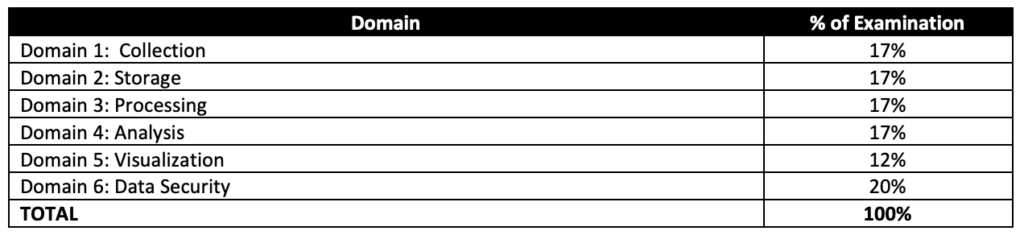
AWS Certified Big Data – Speciality Domains

AWS Certified Big Data – Speciality (BDS-C00) Exam Summary

  • AWS Certified Big Data – Speciality exam, as its name suggests, covers a lot of Big Data concepts right from data transfer and collection techniques, storage, pre and post processing, analytics, visualization with the added concepts for data security at each layer.
  • One of the key tactic I followed when solving any AWS Certification exam is to read the question and use paper and pencil to draw a rough architecture and focus on the areas that you need to improve. Trust me, you will be able to eliminate 2 answers for sure and then need to focus on only the other two. Read the other 2 answers to check the difference area and that would help you reach to the right answer or atleast have a 50% chance of getting it right.
  • Be sure to cover the following topics
    • Whitepapers and articles
    • Analytics
      • Make sure you know and cover all the services in depth, as 80% of the exam is focused on these topics
      • Elastic Map Reduce
        • Understand EMR in depth
        • Understand EMRFS (Note: EMRFS Consistent View reached end of support on June 1, 2023. Since December 2020, Amazon S3 provides strong read-after-write consistency natively, making Consistent View unnecessary.)
        • Know EMR Best Practices (hint: start with many small nodes instead on few large nodes)
        • Know Hive can be externally hosted using RDS, Aurora and AWS Glue Data Catalog
        • Know also different technologies
          • Presto is a fast SQL query engine designed for interactive analytic queries over large datasets from multiple sources
          • D3.js is a JavaScript library for manipulating documents based on data. D3 helps you bring data to life using HTML, SVG, and CSS
          • Spark is a distributed processing framework and programming model that helps do machine learning, stream processing, or graph analytics using Amazon EMR clusters
          • Zeppelin/Jupyter as a notebook for interactive data exploration and provides open-source web application that can be used to create and share documents that contain live code, equations, visualizations, and narrative text
          • Phoenix is used for OLTP and operational analytics, allowing you to use standard SQL queries and JDBC APIs to work with an Apache HBase backing store
      • Kinesis
        • Understand Kinesis Data Streams and Kinesis Data Firehose in depth
        • Know Kinesis Data Streams vs Kinesis Firehose
          • Know Kinesis Data Streams is open ended on both producer and consumer. It supports KCL and works with Spark.
          • Know Kineses Firehose is open ended for producer only. Data is stored in S3, Redshift and OpenSearch Service (formerly Elasticsearch).
          • Kinesis Firehose works in batches with minimum 60secs interval.
        • Understand Kinesis Encryption (hint: use server side encryption or encrypt in producer for data streams)
        • Know difference between KPL vs SDK (hint: PutRecords are synchronously, while KPL supports batching)
        • Kinesis Best Practices (hint: increase performance increasing the shards)
      • Know Amazon OpenSearch Service (formerly Elasticsearch Service) is a search and analytics service which supports indexing, full text search, faceting, vector search, and log analytics.
      • Redshift
        • Understand Redshift in depth
        • Understand Redshift Advance topics like Workload Management, Distribution Style, Sort key
        • Know Redshift Best Practices w.r.t selection of Distribution style, Sort key, COPY command which allows parallelism
        • Know Redshift views to control access to data.
      • Amazon Machine Learning
      • Know Data Pipeline for data transfer (Note: AWS Data Pipeline is in maintenance mode and closed to new customers as of July 25, 2024. Alternatives include AWS Glue, AWS Step Functions, and Amazon MWAA (Managed Workflows for Apache Airflow).)
      • QuickSight
      • Know Glue as the ETL tool (AWS Glue is now at version 5.1 with Apache Spark 3.5.4, Python 3.11, and native integration with Apache Iceberg, Hudi, and Delta Lake.)
    • Security, Identity & Compliance
    • Management & Governance Tools
      • Understand AWS CloudWatch for Logs and Metrics. Also, CloudWatch Events more real time alerts as compared to CloudTrail
    • Storage
    • Compute
      • Know EC2 access to services using IAM Role and Lambda using Execution role.
      • Lambda esp. how to improve performance batching, breaking functions etc.

AWS Certified Big Data – Speciality (BDS-C00) Exam Resources

⚠️ Note: The resources below were relevant for the retired BDS-C00 exam. For current Data Engineer certification preparation, see:

Current Replacement: AWS Certified Data Engineer – Associate (DEA-C01)

The AWS Certified Data Engineer – Associate (DEA-C01) is the current certification that covers data and analytics topics on AWS. It validates skills across four domains:

  • Domain 1: Data Ingestion and Transformation (34%) – Kinesis, MSK, DMS, Glue, EMR, Step Functions
  • Domain 2: Data Store Management (26%) – S3, Redshift, DynamoDB, RDS, Lake Formation, Data Catalog
  • Domain 3: Data Operations and Support (22%) – Pipeline orchestration, monitoring, troubleshooting, MWAA
  • Domain 4: Data Security and Governance (18%) – Encryption, access control, data privacy, Lake Formation permissions

Key differences from BDS-C00:

  • Associate-level (not Specialty) – requires 1-2 years hands-on AWS experience
  • Stronger focus on modern services: AWS Glue, Lake Formation, Step Functions, Amazon MWAA
  • Includes Apache Iceberg, Hudi, and Delta Lake open table formats
  • No longer covers deprecated services (Data Pipeline, Amazon ML classic)
  • Includes Amazon OpenSearch Service (replaced Elasticsearch Service)
  • Covers Amazon SageMaker AI for ML integration in data pipelines

For the full learning path, see AWS Certified Data Engineer – Associate (DEA-C01) Exam Learning Path.

AWS Cloud Migration

AWS Cloud Migration

📋 Updated June 2025: This post has been updated to reflect the current AWS migration framework including the 7 Rs migration strategies (added Relocate), the 3-phase migration process (Assess, Mobilize, Migrate & Modernize), deprecation of AWS Server Migration Service (replaced by AWS Transform MGN), and the launch of AWS Transform – an AI-driven migration and modernization service.

Some of the key drivers to moving to cloud are:

  • Operational Costs – Key components of operational costs are unit price of infrastructure, the ability to match supply and demand, finding a pathway to optionality, employing an elastic cost base, and transparency
  • Workforce Productivity – Getting up and ready in seconds and various service availability
  • Cost Avoidance – Eliminating the need for hardware refresh programs and constant maintenance programs
  • Operational Resilience – Increases resilience and thereby reduces organization’s risk profile
  • Business Agility – React to market conditions more quickly
  • Sustainability – Leverage shared infrastructure and optimized resource utilization to reduce carbon footprint

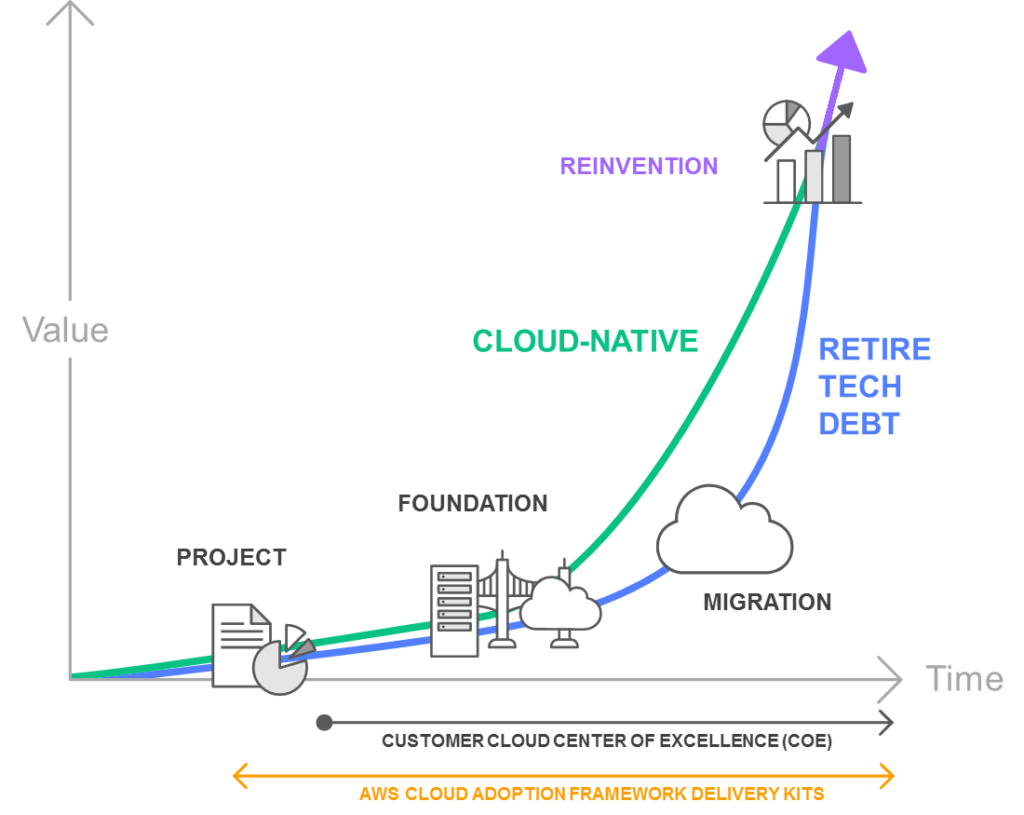
Cloud Stages of Adoption

Cloud Stages of Adoption

PROJECT

  • In the project phase, execute projects to get familiar with and experience benefits from the cloud.

FOUNDATION

  • After experiencing the benefits of cloud, build the foundation to scale the cloud adoption.
  • This includes creating a landing zone (a pre-configured, secure, multi-account AWS environment), Cloud Center of Excellence (CCoE), operations model, as well as assuring security and compliance readiness.
  • AWS Control Tower helps set up and govern a secure, multi-account AWS environment (landing zone) based on best practices.

MIGRATION

  • Migrate existing applications including mission-critical applications or entire data centers to the cloud as you scale your adoption across a growing portion of the IT portfolio.

REINVENTION

  • Now that the operations are in the cloud, focus on reinvention by taking advantage of the flexibility and capabilities of AWS to transform business by speeding time to market and increasing the attention on innovation.

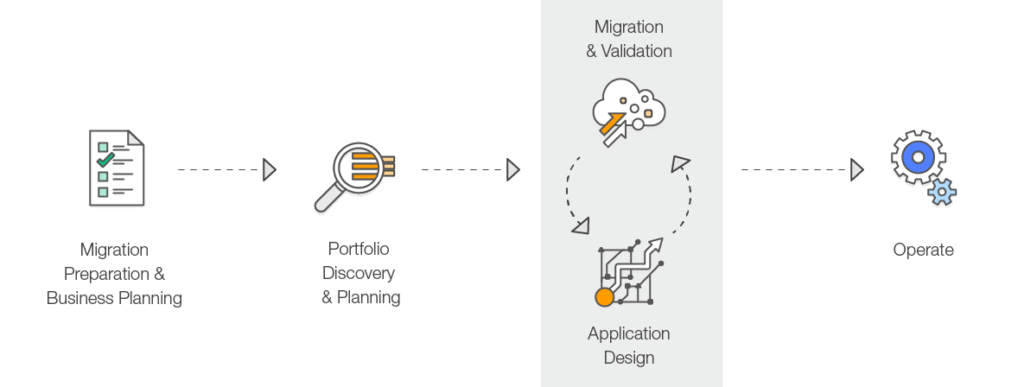
Migration Process

AWS recommends performing the migration process in three phases: Assess, Mobilize, and Migrate & Modernize.

Migration Process

Phase 1: Assess

  • Determine the right objectives and develop a preliminary business case for a migration.
  • Understand the current environment, application portfolio, interdependencies, and identify what is suitable for migration.
  • Use discovery tools like AWS Transform for automated application discovery, dependency mapping, and migration planning.
  • Build a directional business case by taking objectives into account along with the age and architecture of the existing applications, and their constraints.

Phase 2: Mobilize

  • Create a migration plan and refine the business case built in the Assess phase.
  • Address gaps in organizational readiness identified in the Assess phase.
  • Build the foundational landing zone, establish security guardrails, and set up operational tooling.
  • Perform pilot migrations to test processes, tools, and build team expertise.
  • Define the migration patterns, processes, and tools that will be used at scale.

Phase 3: Migrate & Modernize

  • Execute the migration using the patterns and tools validated during the Mobilize phase.
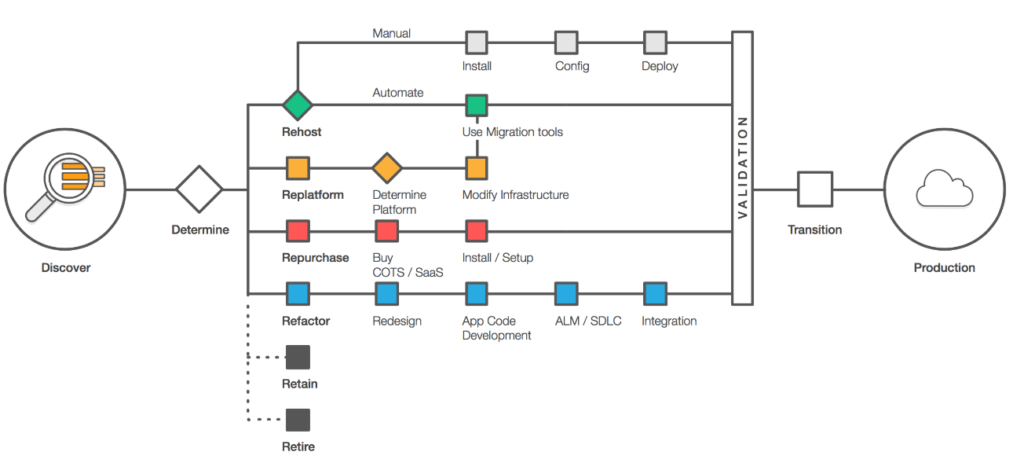
  • Each application is designed, migrated, and validated according to one of the seven common application strategies (“The 7 R’s”).
  • Focus on speed and scale – implement a migration factory approach for high-volume migrations.
  • Iterate on the foundation, turn off old systems, and modernize applications post-migration.
  • AWS provides migration services including:

⚠️ Deprecated Service Notice

AWS Server Migration Service (SMS) was discontinued on March 31, 2022. AWS recommends AWS Transform MGN (formerly AWS Application Migration Service) as the replacement for lift-and-shift migrations.

AWS Migration Hub is no longer open to new customers as of November 7, 2025. For similar capabilities, use AWS Transform.

Application Migration Strategies – The 7 R’s

Migration strategies depend upon what is in your environment and what is suitable for the portfolio, taking into account the business and technical requirements.

Below are the seven common migration strategies (expanded from the original “5 R’s” that Gartner outlined in 2011 to the current “7 R’s”).

Application Migration Strategies

1. Rehost (“lift and shift”)

  • Moving your application as is to the Cloud without making any changes.
  • Helps to quickly implement the migration and scale to meet a business case.
  • Provides better opportunity to re-architect the applications once they are already running in cloud, with the organization having already developed cloud skills.
  • Rehosting can be automated with tools such as AWS Transform MGN (formerly AWS Application Migration Service), or can be done manually.
  • AWS Transform MGN continuously replicates source servers to AWS, enabling non-disruptive testing and cutover.

2. Replatform (“lift, tinker and shift”)

  • Moving your application to the Cloud with optimizations, without any major changes.
  • Replatform helps achieve some tangible benefit without changing the core architecture of the application. For e.g., using RDS for database, Elastic Beanstalk for applications, or using AWS Graviton processors for cost optimization.
  • Can involve moving to managed services, upgrading OS versions, or migrating to containers without code changes.

3. Repurchase (“drop and shop”)

  • Dropping the application and moving to a completely new solution.
  • More of a Buy in a Build vs Buy model; might be expensive in short term but faster time to market.
  • Move to a different product, typically from a traditional license to a SaaS model (e.g., migrating CRM to Salesforce, or HR system to Workday).

4. Refactor / Re-architect

  • Moving the application to Cloud, with major changes to take advantage of cloud-native features.
  • More of a Build in a Build vs Buy model, and would take time.
  • Driven by a strong business need to add features, scale, or performance with agility and improvement in business continuity that would otherwise be difficult to achieve in the application’s existing environment.
  • May involve moving to microservices, serverless architecture, or event-driven design.

5. Retire

  • Decommission the applications that are no longer needed.
  • Identifying IT assets that are no longer useful and can be turned off will help boost your business case and direct your attention towards maintaining the resources that are widely used.
  • Includes decommissioning zombie applications (avg CPU/memory below 5%) and idle applications (5-20% usage over 90 days).

6. Retain

  • Keep the applications as is in the current environment.
  • Retain portions of the IT portfolio that have tight dependencies, are difficult or not in priority, or are not ready for migration.
  • May include applications with unresolved compliance requirements, recent upgrades, or dependencies on specialized hardware.

7. Relocate (hypervisor-level lift and shift)

  • Transfer infrastructure to the cloud without purchasing new hardware, rewriting applications, or modifying existing operations.
  • Enables moving a large number of servers at a given time from on-premises to a cloud version of the platform.
  • During relocation, the application continues to serve users, minimizing disruption and downtime.
  • Relocate is the quickest way to migrate and operate workloads in the cloud because it does not impact the overall architecture.
  • Example: Moving VMware workloads to AWS using AWS Transform for VMware.

AWS Migration Services and Tools

AWS Transform (Launched May 2025)

  • AI-driven service that uses agentic AI to accelerate and simplify migration and modernization of infrastructure, applications, and code.
  • Automates the full migration lifecycle: discovery, dependency mapping, migration planning, network conversion, and EC2 instance optimization.
  • Brings together 20 years of migration experience with specialized AI agents, human teams, and partner workflows.
  • Capabilities include:
    • AWS Transform for VMware – Automated VMware workload migration
    • AWS Transform for Mainframe – Mainframe modernization with AI agents
    • AWS Transform for .NET – Automated .NET framework modernization
    • AWS Transform for Windows – Full-stack Windows modernization
    • AWS Transform MGN – Rehosting (lift-and-shift) with continuous replication
  • Learn more: AWS Transform

AWS Transform MGN (formerly Application Migration Service)

  • Dedicated rehosting capability that automates the conversion of source servers (physical, virtual, or cloud) into native Amazon EC2 instances.
  • Continuously replicates block-level volumes from source servers to AWS.
  • Enables non-disruptive testing prior to cutover.
  • Supports a wide range of applications without changes to architecture or migrated servers.
  • Learn more: AWS Transform MGN

AWS Database Migration Service (DMS)

  • Supports homogeneous (e.g., Oracle to Oracle) and heterogeneous (e.g., Oracle to Aurora) database migrations.
  • DMS Serverless provides automatic scaling and storage management.
  • DMS Schema Conversion with GenAI accelerates heterogeneous database migrations using AI.
  • Supports continuous data replication for minimal downtime migrations.
  • Learn more: AWS DMS

AWS Migration Acceleration Program (MAP)

  • Comprehensive program based on thousands of enterprise customer migrations.
  • Uses a three-phased framework: Assess, Mobilize, and Migrate & Modernize.
  • Provides migration credits, technical guidance, and best-practice methodologies.
  • Includes support for VMware migrations, AI workloads, and mainframe modernization.
  • Learn more: AWS MAP

AWS Certification Exam Practice Questions

  • Questions are collected from Internet and the answers are marked as per my knowledge and understanding (which might differ with yours).
  • AWS services are updated everyday and both the answers and questions might be outdated soon, so research accordingly.
  • AWS exam questions are not updated to keep up the pace with AWS updates, so even if the underlying feature has changed the question might not be updated
  • Open to further feedback, discussion and correction.
  1. A company is planning the migration of several lab environments used for software testing. An assortment of custom tooling is used to manage the test runs for each lab. The labs use immutable infrastructure for the software test runs, and the results are stored in a highly available SQL database cluster. Although completely rewriting the custom tooling is out of scope for the migration project, the company would like to optimize workloads during the migration. Which application migration strategy meets this requirement?
    1. Re-host
    2. Re-platform
    3. Re-factor/re-architect
    4. Retire
  2. A company wants to migrate its on-premises VMware infrastructure to AWS with minimal changes to the applications. The company wants the fastest migration path that does not require purchasing new hardware or modifying existing operations. Which migration strategy should the company use?
    1. Rehost
    2. Replatform
    3. Relocate
    4. Refactor
  3. A company is migrating its data center to AWS. It needs to automatically replicate source servers to AWS and perform non-disruptive testing before cutover. Which AWS service should the company use?
    1. AWS Server Migration Service
    2. AWS Transform MGN
    3. AWS DataSync
    4. AWS Snowball
  4. An organization wants to use AI-powered tools to automate application discovery, dependency mapping, and migration planning for its large-scale migration to AWS. Which service provides these capabilities?
    1. AWS Migration Hub
    2. AWS Application Discovery Service
    3. AWS Transform
    4. AWS Server Migration Service
  5. A company is evaluating its application portfolio for migration to AWS. Several applications have average CPU and memory usage below 5%. What migration strategy is most appropriate for these applications?
    1. Rehost
    2. Retain
    3. Retire
    4. Replatform
  6. A company wants to migrate its Oracle database to Amazon Aurora PostgreSQL to reduce licensing costs and take advantage of cloud-native features. Which migration strategy does this represent?
    1. Rehost
    2. Replatform
    3. Refactor/Re-architect
    4. Repurchase

References

Amazon EMR Best Practices

Best Practices for Using Amazon EMR

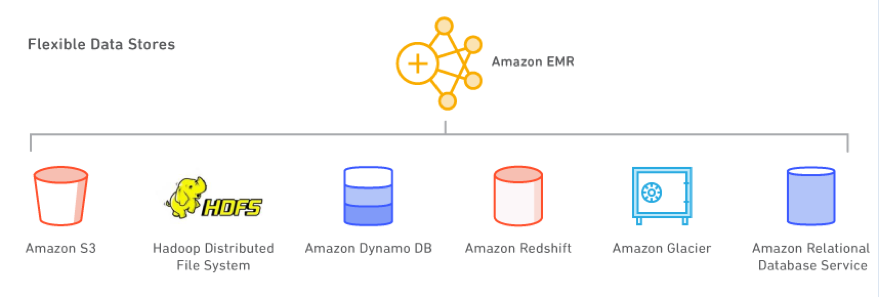
Amazon has made working with big data a lot easier. You can launch an EMR cluster in minutes for big data processing, machine learning, and real-time stream processing with the Apache Hadoop ecosystem. You can use the Management Console, the command line, or infrastructure-as-code tools like CloudFormation and Terraform to start several nodes with ease.

EMR pricing uses pay-per-second billing, which results in lower costs and you no longer have to worry about the hourly boundary.

EMR makes a whole bunch of the latest versions of open source software available to you. Currently, EMR supports over 20 open source projects including Apache Spark, Hive, HBase, Flink, Presto, Trino, Hudi, Iceberg, and Delta Lake, with new releases made every 4 to 6 weeks. This is very useful, especially for rapidly evolving open source projects such as Apache Spark where each release contains critical bug fixes and features. However, you are not forced to upgrade; a new release is made available if you choose to use it. Each EMR release now gets 24 months of standard support. With EMR, you can spin up a bunch of instances and process massive volumes of data residing on S3 at a reasonable cost.

EMR Deployment Options

Amazon EMR provides multiple deployment options to match your operational requirements:

  • EMR on EC2 – Traditional cluster-based deployment with full control over cluster configuration, including instance types and custom AMIs. Best for workloads requiring advanced configurations and persistent clusters.
  • EMR Serverless – Run applications without managing clusters. Resources automatically scale up and down based on your workload. Best for data analysts and engineers who want to focus on application logic without cluster management overhead.
  • EMR on EKS – Run EMR workloads on Amazon Elastic Kubernetes Service. Compute resources can be shared between Spark applications and other Kubernetes applications. Resources are allocated and removed on demand. Best for organizations already using Kubernetes for container orchestration.

Supported Applications and Frameworks

A variety of cluster management options are supported, including YARN. You can run the following:

  • HBase
  • Trino (formerly PrestoSQL – high-performance distributed SQL engine)
  • Presto (legacy; AWS recommends Trino going forward)
  • Spark (including Spark 4.0 with VARIANT data type, Spark Connect, and ANSI SQL compliance)
  • Apache Flink (stream processing)
  • Apache Hive
  • Tez
  • Apache Hudi, Apache Iceberg, Delta Lake (open table formats with ACID transactions)
  • Zeppelin
  • JupyterHub
  • Notebooks (EMR Studio Workspaces)
  • SQL editors

Apache Spark 4.0 on EMR (GA 2026)

Apache Spark 4.0 is now generally available on Amazon EMR across all deployment options (EMR Serverless, EMR on EC2, and EMR on EKS). Key features include:

  • VARIANT data type – Native semi-structured data handling for JSON without the need for complex parsing logic
  • Spark Connect – Bridges interactive development and production-scale execution, enabling thin client connectivity
  • ANSI SQL compliance – Build data pipelines using standard SQL without learning Spark-specific syntax
  • Enhanced streaming (transformWithState API) – Build stateful streaming applications with improved state management
  • Apache Iceberg v3 support – Default column values, deletion vectors, multi-argument transforms, and row lineage tracking
  • EMR Optimized Runtime – Runs Spark workloads up to 4.5× faster than open-source Apache Spark

AWS Connectors

Additionally, connectors to different AWS services are available; for example, you can use Spark to load Redshift (using the Redshift connector, which uses Redshift commands under the hood to get good throughput). You can access DynamoDB for analytics applications, use connectors for relational data, and integrate with Amazon S3 Tables and SageMaker Lakehouse.

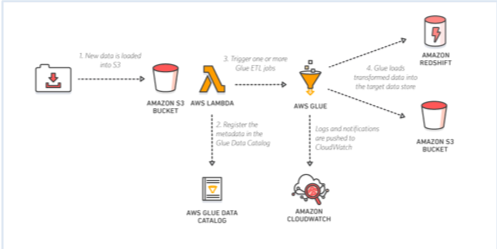
AWS Glue

One particularly important integration is AWS Glue. AWS Glue (now at version 5.1) comprises several main components:
AWS Glue

  • AWS Glue ETL: Serverless ETL service supporting Apache Spark, with native fine-grained access control via AWS Lake Formation (table, column, row, and cell-level permissions). Glue 5.0+ adds support for SageMaker Lakehouse to unify data across S3 data lakes and Amazon Redshift data warehouses.
  • AWS Glue Data Catalog: A fully managed Hive metastore-compliant service. You have an intelligent metastore—you don’t have to write DDL to create a table; you can just make Glue crawl your data, infer what the schema is, and create those tables for you. It supports Apache Iceberg, Apache Hudi, and Delta Lake table formats, and automatically handles partition management. It also supports a variety of complex data types.
  • Crawlers: The crawlers crawl your data to infer the schema and automatically add partitions.
  • AWS Glue Data Quality: Provides rule-based data quality validation with rule labeling for organizing and analyzing data quality results.

AWS Glue is a managed service, so you spend less time monitoring. As a fully managed service, it is also responsible for infrastructure management and auto-scaling. Enabling security options in AWS Glue is straightforward, supporting IAM policies and AWS Lake Formation for fine-grained access control.

Open Table Formats

EMR now has first-class support for open table formats that enable ACID transactions, schema evolution, and time travel on data lakes:

  • Apache Iceberg – Supports v3 format with deletion vectors, materialized views, and merge-on-read. Recommended for most new data lake implementations.
  • Apache Hudi – Supports incremental data processing with upserts and deletes.
  • Delta Lake – Supports UniForm for cross-format compatibility with Iceberg clients.

All three formats are supported with AWS Lake Formation fine-grained access control (table, row, column, and cell-level filtering) across EMR on EC2, EMR Serverless, and EMR on EKS.

Common EMR Use Cases
EMR

HBase at massive scale: Using HBase with S3 for HFiles storage can save 50% or higher on storage costs compared to HDFS. Instead of sizing the cluster for HDFS, you size it for the processing power required for the HBase Region Servers. The S3 option also supports Read Replica HBase clusters in another AZ for load balancing and disaster recovery.

Real-time and batch processing: Use Amazon Kinesis Data Streams for pushing data to Spark. Use Spark Streaming or Apache Flink for real-time analytics or processing data on-the-fly and then dump that data into S3. If you don’t have real-time processing use cases, then Amazon Data Firehose (formerly Kinesis Data Firehose) is a great alternative. The data can be cataloged in the Glue Data Catalog and then accessed via a variety of analytical engines. EMR supports several analytical engines including Hive, Tez, Spark, and Trino. Once the data is in the Data Catalog on S3, you can use Athena (serverless SQL queries), Glue ETL (serverless ETL), and Redshift Spectrum.

Data exploration: Use Spark with EMR Studio (Jupyter-based notebooks), Zeppelin, or JupyterHub to arm data scientists with a way to explore large amounts of data. EMR Studio supports real-time collaboration and Git-based version control. Amazon SageMaker Unified Studio Notebooks also support EMR Serverless with Spark Connect for interactive analytics.

Ad hoc SQL queries: There is a big rise in the use of Trino (formerly PrestoSQL) for ad hoc SQL queries (in combination with Athena). Trino gives you advanced configurations and a way to build exactly what you need for your use case but requires cluster management, versus Athena where you just write SQL without infrastructure. Many BI tools support Trino for low latency dashboards. EMR 6.15+ runs Trino queries 2.7× faster than previous versions.

Deep learning with GPU instances: You can launch GPU hardware for EMR. TensorFlow is fully supported. Note that Apache MXNet has reached end-of-life and the project is archived—use PyTorch or TensorFlow instead for deep learning workloads on EMR.

Machine learning pipelines: Typical ML projects implement a multi-step process including ETL, feature engineering, model training, model evaluation, model deployment, and model scoring. Using Apache Spark for implementing ML pipelines is popular as it supports each step, scales for small and large jobs, has good ML libraries (MLlib), and has an active user base. Amazon SageMaker integrates with EMR for data preparation at scale.

EMR Deployment Best Practices

There are several options for deploying Spark on AWS:

  • EMR Serverless – No infrastructure to manage. Applications function as cluster templates that instantiate when jobs are submitted and can process multiple jobs. Automatic capacity management. Best for intermittent or variable workloads.
  • EMR on EC2 – Full control over instance types, cluster configurations, and custom AMIs. Supports batch and streaming, integrates with tooling. Best for persistent clusters with specific configuration requirements.
  • EMR on EKS – Run Spark on existing Kubernetes clusters. Share compute resources between Spark and other applications. Best for organizations standardized on Kubernetes.
  • EC2 (self-managed) – Maximum flexibility but places a huge management burden. Not recommended unless you have very specific requirements not met by managed options.

Lowering EMR Costs

If you are paying for Hadoop nodes that are not doing anything, then you are just burning money. Key cost optimization strategies:

  • Use EMR Serverless – Pay only for resources consumed during job execution. No idle cluster costs.
  • Use Graviton instances – AWS Graviton-based instances provide up to 40% better price-performance compared to equivalent x86 instances. EMR fully supports Graviton2 and Graviton3 instance types.
  • Use Spot Instances for task nodes – Achieve up to 60-90% cost savings on compute. Use Instance Fleets with diversified instance types across multiple Availability Zones for better Spot capacity.
  • Use Instance Fleets with allocation strategies – EMR supports prioritized and capacity-optimized-prioritized allocation strategies for better instance provisioning reliability and cost optimization.
  • Enable Managed Scaling – EMR evaluates cluster metrics every 5-10 seconds and makes optimized scaling decisions. Supports Advanced Scaling with configurable optimization index (cost vs. performance).
  • Batch workloads and shut down clusters – Take an inventory of jobs, batch them, and shut down clusters in-between. Use transient clusters for batch processing.
  • Separate clusters by workload – Instead of one large always-on cluster, use auto-scaling separate clusters optimized for each workload type.
  • Use Amazon Linux AMI with preinstalled customizations – Faster cluster creation with custom AMIs.
  • Use On-Demand Capacity Reservations (ODCRs) – For predictable, steady-state workloads to ensure capacity availability.
  • Right-size instances – Use AWS Compute Optimizer recommendations to match instance types to actual resource demands.

EMR Security Best Practices

  • Use v2 managed IAM policies – AWS is deprecating v1 managed policies (AmazonElasticMapReduceFullAccess). Migrate to the new v2 policies with least-privilege access.
  • Enable encryption – Use at-rest and in-transit encryption for data processed by EMR clusters.
  • Use Lake Formation – Apply fine-grained access control (table, row, column, cell-level) on open table formats across all EMR deployment options.
  • Use security groups – Restrict network access to EMR clusters and manage port access.

EMR Studio

Amazon EMR Studio is a managed IDE environment for developing, visualizing, and debugging applications written in R, Python, Scala, and PySpark using Jupyter notebooks. Key features:

  • Built-in real-time collaboration with peers
  • Git repository integration for version control
  • Workspaces that connect to EMR on EC2 clusters or EMR Serverless applications
  • Integration with SageMaker Unified Studio for AI/ML workflows
  • Support for Spark Connect (Spark 4.0) for interactive workloads

Amazon SageMaker Lakehouse Integration

Amazon SageMaker Lakehouse unifies all your data across Amazon S3 data lakes, Amazon S3 Tables, and Amazon Redshift data warehouses. With this integration:

  • Access and query unified data from EMR using Spark
  • Apply consistent governance through Lake Formation permissions
  • Capture data lineage of EMR Spark jobs into SageMaker Unified Studio
  • Use SageMaker Unified Studio for end-to-end analytics and AI/ML on a single platform
AWS Services Overview – Whitepaper – Certification

AWS Services Overview

AWS consists of many cloud services that can be used in combinations tailored to meet business or organizational needs. This section introduces the major AWS services by category.


NOTE – This post provides a brief overview of AWS services. It is a good introduction to start all certifications. However, it is most relevant and important for the AWS Cloud Practitioner Certification Exam.

Last updated: June 2026. Reflects current AWS service names, deprecations, and new services launched through 2024-2026.


Common Features

  • Almost all features can be access-controlled through AWS Identity and Access Management (IAM)
  • Services managed by AWS are all made Scalable and Highly Available, without any changes needed from the user
  • Most services support encryption at rest and in transit by default

AWS Access

AWS allows accessing its services through unified tools using

  • AWS Management Console – a simple and intuitive user interface
  • AWS Command Line Interface (CLI) – programmatic access through scripts
  • AWS Software Development Kits (SDKs) – programmatic access through Application Program Interface (API) tailored for programming languages (Java, .NET, Node.js, PHP, Python, Ruby, Go, C++, Rust, Kotlin, Swift) or platforms (Android, Browser, iOS)
  • AWS CloudShell – a browser-based shell environment pre-authenticated with console credentials
  • Infrastructure as Code (IaC) – AWS CloudFormation, AWS CDK, or Terraform for declarative resource provisioning

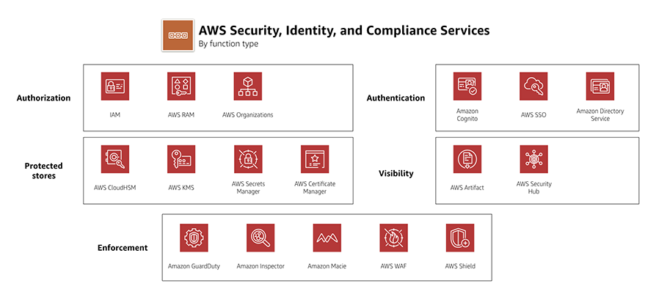
Security, Identity, and Compliance

AWS Identity and Access Management (IAM)

  • enables you to securely control access to AWS services and resources for the users.
  • allows creation of AWS users, groups and roles, and use permissions to allow and deny their access to AWS resources
  • helps manage IAM users and their access with individual security credentials like access keys, passwords, and multi-factor authentication devices, or request temporary security credentials
  • helps role creation & manage permissions to control which operations can be performed by which entity, or AWS service, that assumes the role
  • enables identity federation to allow existing identities in the enterprise to access AWS without the need to create an IAM user for each identity.
  • IAM Identity Center (formerly AWS SSO) provides centralized workforce identity management and single sign-on access to multiple AWS accounts and applications.

Amazon Inspector

  • is an automated vulnerability management service that continually scans workloads for software vulnerabilities and unintended network exposure.
  • automatically discovers and scans EC2 instances, container images in Amazon ECR, and AWS Lambda functions.
  • supports both agent-based and agentless scanning for EC2 instances.
  • produces a detailed list of security findings prioritized by a contextualized risk score that correlates CVE information with network access and exploitability factors.
  • integrates with AWS Security Hub for centralized findings management.

AWS Certificate Manager

  • helps provision, manage, and deploy Secure Sockets Layer/Transport Layer Security (SSL/TLS) certificates for use with AWS services like ELB, CloudFront, and API Gateway
  • removes the time-consuming manual process of purchasing, uploading, and renewing SSL/TLS certificates.

AWS CloudHSM

  • helps meet corporate, contractual, and regulatory compliance requirements for data security by using dedicated Hardware Security Module (HSM) appliances within the AWS Cloud.
  • allows protection of encryption keys within HSMs, designed and validated to government standards for secure key management.
  • helps comply with strict key management requirements without sacrificing application performance.

AWS Directory Service

  • provides Microsoft Active Directory (Enterprise Edition), also known as AWS Managed Microsoft AD, that enables directory-aware workloads and AWS resources to use managed Active Directory in the AWS Cloud.

AWS Key Management Service (KMS)

  • is a managed service that makes it easy to create and control the encryption keys used to encrypt your data.
  • uses HSMs to protect the security of your keys.
  • integrates with most AWS services for seamless encryption of data at rest.

AWS Organizations

  • allows creation of AWS account groups, to more easily manage security and automation settings collectively
  • helps centrally manage multiple accounts to help scale.
  • helps control which AWS services are available to individual accounts using Service Control Policies (SCPs), automate new account creation, and simplify billing.

AWS Shield

  • is a managed Distributed Denial of Service (DDoS) protection service that safeguards web applications running on AWS.
  • provides always-on detection and automatic inline mitigations that minimize application downtime and latency.
  • provides two tiers: Shield Standard (free, automatic) and Shield Advanced (paid, enhanced protection with 24/7 DDoS Response Team access).

AWS WAF

  • is a web application firewall that helps protect web applications from common web exploits that could affect application availability, compromise security, or consume excessive resources.
  • gives complete control over which traffic to allow or block to web application by defining customizable web security rules.
  • integrates with CloudFront, Application Load Balancer, API Gateway, and AWS AppSync.

Amazon GuardDuty

  • is a threat detection service that continuously monitors AWS accounts, workloads, and data for malicious activity and anomalous behavior.
  • analyzes events from AWS CloudTrail, VPC Flow Logs, DNS logs, and other sources using machine learning and threat intelligence.
  • provides actionable security findings with severity levels for prioritized response.

Amazon Macie

  • is a data security service that discovers sensitive data using machine learning and pattern matching.
  • automatically discovers and protects sensitive data stored in Amazon S3, such as personally identifiable information (PII) and financial data.
  • provides visibility into data security risks and enables automated protection.

AWS Security Hub

  • provides a comprehensive view of your security posture across AWS accounts.
  • aggregates, organizes, and prioritizes security findings from multiple AWS services (GuardDuty, Inspector, Macie) and AWS Partner solutions.
  • automates security checks against best practices and industry standards.

Amazon Security Lake

  • automatically centralizes security data from AWS environments, SaaS providers, and on-premises sources into a purpose-built data lake.
  • normalizes data using the Open Cybersecurity Schema Framework (OCSF) for easier analysis.
  • stores data in your account using S3, giving you full control and ownership.

AWS Compute Services

Amazon Elastic Compute Cloud (EC2)

  • provides secure, resizable compute capacity
  • provides complete control of the computing resources (root access, ability to start, stop, terminate instances etc.)
  • reduces the time required to obtain and boot new instances to minutes
  • allows quick scaling of capacity, both up and down, as computing requirements change
  • provides developers and sysadmins tools to build failure-resilient applications and isolate themselves from common failure scenarios.
  • Benefits
    • Elastic Web-Scale Computing – enables scaling to increase or decrease capacity within minutes.
    • Flexible Cloud Hosting Services – flexibility to choose from multiple instance types (including AWS Graviton-based ARM instances for better price-performance), operating systems, and software packages.
    • Reliable – offers a highly reliable environment where replacement instances can be rapidly commissioned. EC2 SLA commitment is 99.99% availability for each Region.
    • Secure – works in conjunction with VPC to provide security and robust networking functionality. Allows control of IP address, exposure to Internet (using subnets), inbound and outbound access (using Security groups and NACLs).
    • Inexpensive – pay only for the capacity actually used
  • EC2 Purchasing Options
    • On-Demand Instances – pay for compute capacity by the hour or second with no long-term commitments.
    • Savings Plans – flexible pricing model offering up to 72% savings in exchange for a commitment to a consistent amount of usage (measured in $/hour) for a 1 or 3-year term. Available as Compute Savings Plans or EC2 Instance Savings Plans.
    • Reserved Instances – provides significant discount (up to 72%) compared to On-Demand pricing for a 1 or 3-year commitment to a specific instance type.
    • Spot Instances – allows use of spare EC2 computing capacity at up to 90% discount compared to On-Demand pricing. Instances can be interrupted by AWS with a 2-minute warning.
    • Dedicated Instances – run on hardware dedicated to a single customer for additional isolation.
    • Dedicated Hosts – physical servers with EC2 instance capacity fully dedicated to your use, allowing use of existing server-bound software licenses.

Amazon Elastic Container Service (ECS)

  • is a fully managed container orchestration service that supports Docker containers.
  • allows running applications on a managed cluster of EC2 instances or serverlessly with AWS Fargate.
  • eliminates the need to install, operate, and scale cluster management infrastructure.
  • can schedule the placement of containers across the cluster based on resource needs and availability requirements.
  • integrates with Elastic Load Balancing, VPC, IAM, CloudWatch, and other AWS services.

Amazon Elastic Kubernetes Service (EKS)

  • is a managed Kubernetes service that makes it easy to run Kubernetes on AWS without needing to install and operate your own Kubernetes control plane.
  • runs upstream Kubernetes, ensuring compatibility with existing Kubernetes applications and tools.
  • automatically manages the availability and scalability of the Kubernetes control plane nodes.
  • supports running pods on EC2 instances, AWS Fargate (serverless), or on-premises with EKS Anywhere.
  • EKS Auto Mode automatically provisions and manages compute, networking, and storage for Kubernetes clusters.

Amazon Elastic Container Registry (ECR)

  • is a fully managed Docker container registry that makes it easy to store, manage, and deploy Docker container images.
  • is integrated with Amazon ECS and EKS, simplifying development to production workflow.
  • eliminates the need to operate container repositories or worry about scaling the underlying infrastructure.
  • supports OCI images and artifacts, private and public repositories.

AWS Fargate

  • is a serverless compute engine for containers that works with both Amazon ECS and Amazon EKS.
  • removes the need to provision, configure, or scale clusters of virtual machines to run containers.
  • allocates the right amount of compute resources, eliminating the need to choose instance types or manage scaling.
  • each task or pod runs in its own isolated environment for workload isolation by design.

Amazon Lightsail

  • is designed to be the easiest way to launch and manage a virtual private server with AWS.
  • plans include everything needed to jumpstart a project – a virtual machine, SSD-based storage, data transfer, DNS management, and a static IP address – for a low, predictable price.

AWS Batch

  • enables developers, scientists, and engineers to easily and efficiently run hundreds of thousands of batch computing jobs on AWS.
  • dynamically provisions the optimal quantity and type of compute resources based on the volume and specific resource requirements of the batch jobs submitted.
  • plans, schedules, and executes the batch computing workloads across the full range of AWS compute services and features.

AWS Elastic Beanstalk

  • is an easy-to-use service for deploying and scaling web applications and services developed with Java, .NET, PHP, Node.js, Python, Ruby, Go, and Docker on familiar servers such as Apache, Nginx, Passenger, and IIS.
  • automatically handles the deployment, from capacity provisioning, load balancing, and auto scaling to application health monitoring.
  • provides full control over the AWS resources with access to the underlying resources at any time.

AWS Lambda

  • enables running code without provisioning or managing servers, with automatic scaling for high availability.
  • pay only for the compute time consumed – there is no charge when the code is not running.
  • can be triggered from other AWS services or called directly from any web or mobile app.
  • supports container images up to 10 GB, up to 10 GB of memory, and execution durations up to 15 minutes.
  • supports multiple runtimes including Node.js, Python, Java, .NET, Go, Ruby, and custom runtimes.

AWS App Runner

  • is a fully managed service for building, deploying, and running containerized web applications and APIs at scale.
  • automatically builds and deploys from source code or container images with no infrastructure management required.
  • handles load balancing, scaling, and TLS certificate management automatically.

Auto Scaling

  • helps maintain application availability
  • allows scaling EC2 capacity up or down automatically according to defined conditions or demand spikes to reduce cost
  • helps ensure desired number of EC2 instances are running always
  • AWS Auto Scaling provides unified scaling for multiple resources (EC2, ECS, DynamoDB, Aurora) through scaling plans.
  • supports target tracking, step scaling, and predictive scaling policies.

Storage

Amazon Simple Storage Service (S3)

  • is object storage with a simple web service interface to store and retrieve any amount of data from anywhere on the web.
  • S3 Features
    • Durable – designed for durability of 99.999999999% (11 nines) of objects. Data is redundantly stored across multiple facilities and multiple devices in each facility.
    • Available – designed for up to 99.99% availability (Standard) of objects over a given year.
    • Scalable – can store virtually unlimited data
    • Secure – supports data in transit over SSL and data at rest encryption. Bucket policies, ACLs, and IAM can manage object permissions. S3 Block Public Access provides account-level settings to prevent unintended public access.
    • Storage Classes – multiple classes for different use cases:
      • S3 Standard – frequently accessed data
      • S3 Intelligent-Tiering – automatically moves data between access tiers based on usage patterns
      • S3 Standard-IA – infrequently accessed data
      • S3 One Zone-IA – infrequently accessed, single-AZ
      • S3 Glacier Instant Retrieval – archive with millisecond retrieval
      • S3 Glacier Flexible Retrieval (formerly Glacier) – archive with minutes to hours retrieval
      • S3 Glacier Deep Archive – lowest-cost archive with 12-48 hour retrieval
    • Lifecycle Policies – automatically transition data between storage classes

Amazon Elastic Block Store (EBS)

  • provides persistent block storage volumes for use with EC2 instances
  • offers the consistent and low-latency performance needed to run workloads.
  • allows scaling up or down within minutes
  • EBS Features
    • High Performance Volumes – Choose between SSD-backed (gp3, io2 Block Express) or HDD-backed (st1, sc1) volumes for performance needs.
    • Availability – designed for 99.999% availability, automatically replicates within its Availability Zone.
    • Encryption – provides seamless support for data-at-rest and data-in-transit between EC2 instances and EBS volumes.
    • Snapshots – create point-in-time snapshots backed up to S3 for long-term durability. Supports EBS Snapshots Archive for low-cost long-term retention.

Amazon Elastic File System (EFS)

  • provides simple, scalable, elastic file storage for use with AWS compute services and on-premises resources.
  • storage capacity is elastic, growing and shrinking automatically as files are added and removed.
  • works in shared mode, where multiple compute instances can access an EFS file system at the same time (NFS protocol).
  • can be mounted on on-premises servers via AWS Direct Connect or VPN.
  • is designed for high availability and durability across multiple AZs.
  • offers Standard and One Zone storage classes, each with Infrequent Access tiers.

Amazon FSx

  • provides fully managed third-party file systems with native compatibility for various workloads.
  • FSx for Windows File Server – fully managed Windows native file system with SMB protocol support, Active Directory integration.
  • FSx for Lustre – high-performance file system for compute-intensive workloads (ML, HPC, media processing).
  • FSx for NetApp ONTAP – fully managed NetApp ONTAP file system with multi-protocol access.
  • FSx for OpenZFS – fully managed OpenZFS file system for Linux workloads.

AWS Storage Gateway

  • seamlessly enables hybrid storage between on-premises storage environments and the AWS Cloud
  • combines a multi-protocol storage appliance with highly efficient network connectivity to AWS cloud storage services.
  • provides three gateway types: S3 File Gateway, FSx File Gateway, Volume Gateway, and Tape Gateway.

AWS Backup

  • is a fully managed backup service that centralizes and automates the backup of data across AWS services.
  • supports EC2, EBS, RDS, DynamoDB, EFS, FSx, Storage Gateway, and more.
  • provides a central backup console, backup policies, and cross-Region/cross-account backup capabilities.

Databases

Amazon Aurora

  • is a MySQL and PostgreSQL compatible relational database engine
  • provides the speed and availability of high-end commercial databases with the simplicity and cost-effectiveness of open source databases.
  • Benefits
    • Highly Secure – provides network isolation using VPC, encryption at rest using KMS, and encryption of data in transit using SSL.
    • Highly Scalable – automatically grows storage as needed, up to 128 TB.
    • High Availability and Durability – designed for greater than 99.99% availability. Six copies of data replicated across three AZs. Instance failover typically requires less than 30 seconds.
    • Fully Managed – database management tasks like provisioning, patching, backup, recovery, and failover are automated.
    • Aurora Serverless v2 – automatically scales capacity up and down based on application demand, ideal for variable or unpredictable workloads.

Amazon Relational Database Service (RDS)

  • makes it easy to set up, operate, and scale a relational database
  • provides cost-efficient and resizable capacity while managing time-consuming database administration tasks
  • supports Amazon Aurora, PostgreSQL, MySQL, MariaDB, Oracle, and Microsoft SQL Server
  • Benefits
    • Fast and Easy to Administer – no need for infrastructure provisioning or database software installation and maintenance.
    • Highly Scalable – allows quick scaling of compute and storage resources. Read Replicas available to offload read traffic.
    • Available and Durable – Multi-AZ deployments synchronously replicate data to a standby instance in a different AZ. Automated backups, snapshots, and automatic host replacement.
    • Secure – network isolation using VPC, encryption at rest with KMS, encryption in transit with SSL.
    • Inexpensive – pay low rates with On-Demand or Reserved Instance pricing.
    • RDS Proxy – a fully managed database proxy that makes applications more scalable and resilient to database failures.

Amazon DynamoDB

  • is a fully managed, serverless, key-value and document NoSQL database designed for single-digit millisecond performance at any scale.
  • supports both document and key-value data models.
  • Benefits
    • Fast, Consistent Performance – designed to deliver consistent, fast performance at any scale using SSD storage and automatic partitioning.
    • Highly Scalable – manages all scaling to achieve specified throughput capacity. Supports on-demand and provisioned capacity modes.
    • Event-Driven Programming – DynamoDB Streams and integration with Lambda enable applications that automatically react to data changes.
    • Global Tables – provides fully managed multi-Region, multi-active replication for globally distributed applications.
    • DAX (DynamoDB Accelerator) – in-memory caching for DynamoDB delivering microsecond read latency.

Amazon ElastiCache

  • is a web service that makes it easy to deploy, operate, and scale an in-memory cache in the cloud.
  • helps improve the performance of web applications by allowing retrieval from fast, managed, in-memory caches instead of slower disk-based databases.
  • supports two open-source in-memory caching engines: Redis (now Valkey-compatible) and Memcached.

Amazon MemoryDB

  • is a durable, Redis/Valkey-compatible, in-memory database service for ultra-fast performance.
  • delivers microsecond reads and single-digit millisecond writes with Multi-AZ durability.
  • can be used as a primary database for applications requiring both high performance and data durability.

Amazon DocumentDB

  • is a fully managed document database service that supports MongoDB workloads.
  • designed for JSON data management at scale with automatic scaling storage.

Amazon Neptune

  • is a fully managed graph database service for building applications that work with highly connected datasets.
  • supports Property Graph and RDF models with Apache TinkerPop Gremlin and SPARQL query languages.

Amazon Keyspaces

  • is a scalable, highly available, and fully managed Apache Cassandra-compatible database service.
  • serverless – pay only for the resources you use and the table automatically scales up and down.

Migration

AWS Application Discovery Service

  • helps plan application migration projects by automatically identifying applications running in on-premises data centers, their associated dependencies, and performance profiles.
  • automatically collects configuration and usage data from servers, storage, and networking equipment.
  • information is retained in encrypted format and can be exported for use with visualization tools or cloud migration solutions.

AWS Database Migration Service (DMS)

  • helps migrate databases to AWS easily and securely
  • source database remains fully operational during the migration, minimizing downtime.
  • supports homogeneous migrations (e.g., Oracle to Oracle) and heterogeneous migrations (e.g., Oracle to Aurora, SQL Server to MySQL).
  • allows streaming data to Redshift, S3, and other targets from supported sources.
  • can also be used for continuous data replication with high availability.
  • AWS Schema Conversion Tool (SCT) helps convert database schemas between different database engines.

AWS Application Migration Service (AWS MGN / AWS Transform MGN)

  • is the recommended service for lift-and-shift (rehost) migrations to AWS, replacing the deprecated AWS Server Migration Service.
  • automates the conversion of source servers (physical, virtual, or cloud) into native Amazon EC2 instances.
  • provides continuous block-level replication, short cutover windows, and automated testing.
  • Note: Previously called AWS Application Migration Service (MGN), now rebranded as AWS Transform MGN (June 2026).

AWS Snow Family

⚠️ Note: The AWS Snow Family is being wound down. As of November 2025, Snowball Edge devices are only available to existing customers. New customers should use AWS DataSync, AWS Data Transfer Terminal, or AWS Partner solutions.

  • AWS Snowball Edge (existing customers only) – a data transfer and edge computing device with on-board storage and compute capabilities. Can move large amounts of data and support local workloads.
  • AWS SnowmobileRetired (March 2024). No longer available.
  • Migration Alternatives:
    • AWS DataSync – online data transfer service for automated transfer between on-premises and AWS storage.
    • AWS Data Transfer Terminal – secure physical location for transferring data to AWS.
    • AWS Transfer Family – fully managed SFTP, FTPS, FTP, and AS2 service for file transfers to S3 or EFS.

Networking and Content Delivery

Amazon Virtual Private Cloud (VPC)

  • helps provision a logically isolated section of the AWS Cloud where AWS resources can be launched in a virtual network that you define.
  • provides complete control over the virtual networking environment, including selection of IP address range, creation of subnets (public and private), and configuration of route tables and network gateways.
  • allows use of both IPv4 and IPv6 for secure and easy access to resources.
  • allows multiple layers of security, including security groups and network access control lists (NACLs).
  • allows creation of VPN connections between corporate data center and VPC.
  • VPC Peering enables private connectivity between VPCs. Transit Gateway provides a hub for connecting multiple VPCs and on-premises networks.

Amazon CloudFront

  • is a global content delivery network (CDN) service that accelerates delivery of websites, APIs, video content, or other web assets.
  • can deliver entire website, including dynamic, static, streaming, and interactive content using a global network of edge locations.
  • requests for content are automatically routed to the nearest edge location for best possible performance.
  • is optimized to work with S3, EC2, ELB, Route 53, and API Gateway as well as non-AWS origin servers.
  • supports edge functions via CloudFront Functions and Lambda@Edge for customizing content at the edge.

Amazon Route 53

  • is a highly available and scalable Domain Name System (DNS) web service.
  • connects user requests to infrastructure running in AWS or outside of AWS.
  • helps configure DNS health checks to route traffic to healthy endpoints.
  • allows traffic management globally through latency-based routing, Geo DNS, geoproximity, weighted round robin, multivalue answer, and IP-based routing – all combinable with DNS Failover.
  • is fully compliant with IPv6 and offers Domain Name Registration service.

AWS Direct Connect

  • makes it easy to establish a dedicated network connection from on-premises to AWS.
  • helps establish private connectivity between AWS and data center, office, or co-location environment.
  • helps increase bandwidth throughput, reduce network costs, and provide a more consistent network experience than Internet-based connections.

Elastic Load Balancing (ELB)

  • automatically distributes incoming application traffic across multiple targets (EC2 instances, containers, IP addresses, Lambda functions).
  • enables greater levels of fault tolerance by seamlessly providing the required amount of load balancing capacity.
  • offers four types of load balancers:
    • Application Load Balancer (ALB) – operates at Layer 7 (HTTP/HTTPS). Routes traffic based on content of the request. Ideal for microservices, container-based architectures, and advanced routing needs.
    • Network Load Balancer (NLB) – operates at Layer 4 (TCP/UDP/TLS). Handles millions of requests per second with ultra-low latency. Ideal for TCP/UDP traffic and extreme performance requirements.
    • Gateway Load Balancer (GWLB) – operates at Layer 3 (IP). Makes it easy to deploy, scale, and manage third-party virtual appliances (firewalls, IDS/IPS). Combines transparent network gateway with load balancing.
    • Classic Load Balancer (CLB) – previous generation, operates at both Layer 4 and Layer 7. Recommended to migrate to ALB or NLB.

AWS Global Accelerator

  • is a networking service that improves the availability and performance of applications by using the AWS global network.
  • provides two static anycast IP addresses that serve as a fixed entry point to applications hosted in one or more AWS Regions.
  • continuously monitors endpoints and instantly routes traffic to the closest healthy endpoint.

AWS PrivateLink

  • provides private connectivity between VPCs, AWS services, and on-premises applications without exposing traffic to the public internet.
  • simplifies security of data shared between cloud-based applications and on-premises services.

Management and Governance

Amazon CloudWatch

  • is a monitoring and observability service for AWS Cloud resources and the applications running on AWS.
  • can collect and track metrics, collect and monitor log files, set alarms, and automatically react to changes in AWS resources.
  • provides CloudWatch Logs, Metrics, Alarms, Dashboards, and Events (now EventBridge) for comprehensive monitoring.
  • supports custom metrics, anomaly detection, and cross-account observability.

AWS CloudFormation

  • allows developers and systems administrators to implement “Infrastructure as Code”
  • provides an easy way to create and manage a collection of related AWS resources, provisioning and updating them in an orderly and predictable fashion.
  • handles the order for provisioning AWS services and the subtleties of making those dependencies work.
  • allows applying version control to AWS infrastructure the same way it’s done with software.
  • AWS CDK (Cloud Development Kit) allows defining infrastructure using familiar programming languages (TypeScript, Python, Java, etc.) that synthesize to CloudFormation templates.

AWS CloudTrail

  • records AWS API calls for the account and delivers log files.
  • includes API calls made via the Console, CLI, SDKs, and higher-level AWS services.
  • recorded information includes the identity of the API caller, time, source IP address, request parameters, and response elements.
  • enables security analysis, resource change tracking, compliance auditing, and operational troubleshooting.
  • supports CloudTrail Lake for SQL-based querying and long-term retention of events.

AWS Config

  • provides an AWS resource inventory, configuration history, and configuration change notifications to enable security and governance.
  • provides Config Rules feature that enables creation of rules to automatically check the configuration of AWS resources.
  • helps discover existing and deleted AWS resources, determine overall compliance against rules, and dive into configuration details at any point in time.
  • supports Conformance Packs for packaging multiple Config Rules and remediation actions together.

AWS Systems Manager

  • provides a unified user interface to view operational data from multiple AWS services and automate operational tasks across AWS resources.
  • includes capabilities for patch management, configuration management, session management, parameter store, and run command.
  • helps maintain security and compliance by scanning managed instances for patch compliance and configuration inconsistencies.

AWS Service Catalog

  • allows organizations to create and manage catalogs of IT services approved for use on AWS.
  • helps centrally manage commonly deployed IT services and helps achieve consistent governance and compliance requirements.

AWS Trusted Advisor

  • is an online resource that inspects your AWS environment and provides recommendations across five categories: cost optimization, performance, security, fault tolerance, and service limits.
  • provides real-time guidance to help provision resources following AWS best practices.

AWS Health Dashboard

  • provides alerts and remediation guidance when AWS is experiencing events that might affect you (formerly Personal Health Dashboard).
  • displays relevant information to help manage events in progress and provides proactive notification for scheduled activities.
  • provides a personalized view into the performance and availability of AWS services underlying your resources.

AWS Control Tower

  • provides the easiest way to set up and govern a secure, multi-account AWS environment (landing zone).
  • establishes a well-architected multi-account baseline with guardrails (preventive and detective) for governance.
  • automates account provisioning and applies best practices for identity management, federated access, and logging.

Developer Tools

AWS CodeCommit

  • is a fully managed source control service that hosts secure and highly scalable private Git repositories.
  • ⚠️ Note: CodeCommit is no longer available to new customers (July 2024). Existing customers can continue using it. Consider GitHub, GitLab, or Bitbucket as alternatives.

AWS CodeBuild

  • is a fully managed build service that compiles source code, runs tests, and produces software packages that are ready to deploy.
  • scales continuously and processes multiple builds concurrently.

AWS CodeDeploy

  • is a service that automates code deployments to any instance, including EC2 instances, Lambda functions, ECS services, and on-premises servers.
  • helps rapidly release new features, avoid downtime during deployment, and handles the complexity of updating applications.

AWS CodePipeline

  • is a continuous integration and continuous delivery (CI/CD) service for fast and reliable application and infrastructure updates.
  • builds, tests, and deploys code every time there is a code change, based on defined release process models.

AWS X-Ray

  • helps developers analyze and debug distributed applications in production, such as those built using microservices architectures.
  • provides an end-to-end view of requests as they travel through the application, and shows a map of its underlying components.
  • helps identify and troubleshoot the root cause of performance issues and errors.

Amazon Q Developer

  • is a generative AI-powered assistant for software development (formerly Amazon CodeWhisperer).
  • provides AI-powered code suggestions, security scanning, code transformation, and natural language chat for development tasks.
  • supports multiple IDEs and programming languages.

Messaging and Application Integration

Amazon SQS

  • is a fast, reliable, scalable, fully managed message queuing service.
  • makes it simple and cost-effective to decouple the components of a cloud application.
  • includes Standard queues with high throughput and at-least-once processing, and FIFO queues with exactly-once processing and ordered delivery.

Amazon SNS

  • is a fast, flexible, fully managed pub/sub messaging and mobile notification service.
  • can send notifications to Apple, Google, Windows, and other mobile platforms, email, SMS, HTTP endpoints, SQS queues, and Lambda functions.
  • supports message filtering, FIFO topics, and message archiving.

Amazon SES

  • is a cost-effective, scalable email service for sending transactional email, marketing messages, or any other type of high-quality content.
  • can also receive messages and deliver them to S3, trigger Lambda functions, or publish to SNS.

Amazon EventBridge

  • is a serverless event bus that makes it easy to connect applications using data from your own apps, SaaS apps, and AWS services.
  • delivers a stream of real-time data from event sources and routes that data to targets like Lambda, Step Functions, SQS, and more.
  • replaces CloudWatch Events with additional capabilities including schema registry and third-party integrations.

AWS Step Functions

  • makes it easy to coordinate the components of distributed applications and microservices using visual workflows.
  • automatically triggers and tracks each step, and retries when there are errors.
  • supports Standard Workflows (long-running) and Express Workflows (high-volume, short-duration).

Amazon API Gateway

  • is a fully managed service for creating, publishing, maintaining, monitoring, and securing APIs at any scale.
  • handles traffic management, authorization, access control, monitoring, and API version management.
  • supports REST APIs, HTTP APIs, and WebSocket APIs.

Analytics

Amazon Athena

  • is an interactive query service that helps analyze data in S3 using standard SQL.
  • is serverless – no infrastructure to manage, pay only for queries run.
  • supports querying data in multiple formats including CSV, JSON, ORC, Avro, and Parquet.
  • integrates with AWS Glue Data Catalog for schema management.

Amazon EMR

  • provides a managed big data platform that makes it easy, fast, and cost-effective to process vast amounts of data.
  • supports Apache Spark, Hive, HBase, Presto, Flink, and other popular frameworks.
  • can run on EC2, EKS, or serverlessly with EMR Serverless.
  • handles big data use cases including log analysis, ETL, machine learning, and scientific simulation.

Amazon OpenSearch Service

  • makes it easy to deploy, operate, and scale OpenSearch (and legacy Elasticsearch) for log analytics, full-text search, application monitoring, and more.
  • Note: Renamed from Amazon Elasticsearch Service in September 2021.
  • is a fully managed service delivering real-time search and analytics capabilities along with availability, scalability, and security for production workloads.
  • supports OpenSearch Dashboards (successor to Kibana) for data visualization.

Amazon Kinesis

  • is a platform for streaming data on AWS, offering services to collect, process, and analyze real-time streaming data.
  • offers:
    • Amazon Kinesis Data Streams – enables building custom applications that process or analyze streaming data for specialized needs.
    • Amazon Data Firehose (formerly Kinesis Data Firehose) – easiest way to capture, transform, and load streaming data into S3, Redshift, OpenSearch, and third-party services like Splunk and Snowflake.
    • Amazon Managed Service for Apache Flink (formerly Kinesis Data Analytics) – process and analyze streaming data in real time using Apache Flink.
    • Amazon Kinesis Video Streams – capture, process, and store video streams for analytics and machine learning.

Amazon Redshift

  • provides a fast, fully managed, petabyte-scale cloud data warehouse.
  • uses massively parallel processing (MPP) architecture, parallelizing and distributing SQL operations across nodes.
  • supports Redshift Serverless for running analytics without managing infrastructure.
  • provides Redshift Spectrum to query data directly in S3 without loading it.

Amazon QuickSight

  • is a fast, cloud-powered business intelligence (BI) service for building visualizations, performing ad-hoc analysis, and getting business insights from data.
  • supports ML-powered insights with Amazon Q in QuickSight for natural language querying.

AWS Glue

  • is a serverless data integration service that makes it easy to discover, prepare, move, and integrate data from multiple sources.
  • provides the Glue Data Catalog as a central metadata repository.
  • simplifies and automates data discovery, ETL job authoring, and job scheduling.
  • scales automatically and provisions resources as needed.

AWS Lake Formation

  • makes it easy to set up a secure data lake in days instead of months.
  • provides centralized governance and security for data lake access using fine-grained permissions.

Machine Learning and Artificial Intelligence

Amazon Bedrock

  • is a fully managed service offering access to leading foundation models (FMs) from AI companies (Anthropic, Meta, Mistral, Amazon, and others) through a single API.
  • provides capabilities to build generative AI applications with security, privacy, and responsible AI features.
  • supports use cases like text generation, summarization, image generation, chatbots, and AI agents.
  • offers Bedrock Agents for building autonomous AI agents and Bedrock Knowledge Bases for RAG (Retrieval Augmented Generation).

Amazon SageMaker

  • is a fully managed machine learning service to build, train, and deploy ML models at scale.
  • provides SageMaker Studio as a unified IDE for ML development.
  • supports the entire ML workflow: data preparation, model building, training, tuning, and deployment.
  • includes built-in algorithms, pre-built ML frameworks, and AutoML capabilities.

Amazon Rekognition

  • makes it easy to add image and video analysis to applications using deep learning technology.
  • can identify objects, people, text, scenes, and activities, and detect inappropriate content.

Amazon Comprehend

  • is a natural language processing (NLP) service that uses machine learning to find insights and relationships in text.
  • can identify the language, extract key phrases, sentiment, entities, and topics.

Amazon Lex

  • is a service for building conversational interfaces using voice and text (same technology that powers Alexa).
  • provides automatic speech recognition (ASR) and natural language understanding (NLU).

Amazon Polly

  • is a text-to-speech service that turns text into lifelike speech using deep learning.
  • supports multiple languages and provides a variety of natural-sounding voices.

Amazon Transcribe

  • is an automatic speech recognition (ASR) service that converts speech to text.
  • supports real-time transcription and batch transcription of audio files.

Amazon Translate

  • is a neural machine translation service for fast, high-quality language translation.
  • supports translation between supported languages for applications and content.

Cloud Financial Management

AWS Cost Explorer

  • provides an easy-to-use interface to visualize, understand, and manage AWS costs and usage over time.
  • offers forecasting, savings recommendations, and detailed filtering/grouping of cost data.

AWS Budgets

  • allows setting custom budgets that alert when costs or usage exceed (or are forecasted to exceed) the budgeted amount.
  • supports cost, usage, reservation, and savings plans budgets.

AWS Pricing Calculator

  • helps estimate the cost of using AWS services before deployment.
  • allows creating cost estimates for various architectures and configurations.

Deprecated Services (Historical Reference)

The following services mentioned in the original AWS Overview Whitepaper have been deprecated or discontinued. They are listed here for reference and certification context.

  • Amazon Cloud Directory – No longer open to new customers (November 2025). Alternatives: DynamoDB, Neptune.
  • AWS OpsWorks – Reached End of Life on May 26, 2024. Disabled for all customers. Alternatives: AWS Systems Manager, CloudFormation, CodeDeploy.
  • Amazon Elastic Transcoder – Discontinued November 13, 2025. Replaced by AWS Elemental MediaConvert.
  • AWS Server Migration Service (SMS) – Deprecated. Replaced by AWS Application Migration Service (MGN / Transform MGN).
  • AWS Data Pipeline – No longer available to new customers (July 2024). Alternatives: AWS Glue, Step Functions, Amazon MWAA (Managed Workflows for Apache Airflow).
  • Amazon SWF (Simple Workflow Service) – Still operational but superseded by AWS Step Functions for new workloads.
  • AWS Snowmobile – Retired March 2024. No longer available.
  • Amazon CodeCatalyst – No longer open to new customers (November 2025).

AWS Certification Exam Practice Questions

  • Questions are collected from Internet and the answers are marked as per my knowledge and understanding (which might differ with yours).
  • AWS services are updated everyday and both the answers and questions might be outdated soon, so research accordingly.
  • AWS exam questions are not updated to keep up the pace with AWS updates, so even if the underlying feature has changed the question might not be updated
  • Open to further feedback, discussion and correction.
  1. Which AWS services belong to the Compute services? Choose 2 answers
    1. Lambda
    2. EC2
    3. S3
    4. EMR
    5. CloudFront
  2. Which AWS service provides low cost storage option for archival and long-term backup?
    1. S3 Glacier
    2. S3 Standard
    3. EBS
    4. CloudFront
  3. Which AWS services belong to the Storage services? Choose 2 answers
    1. EFS
    2. IAM
    3. EMR
    4. S3
    5. CloudFront
  4. A Company allows users to upload videos on its platform. They want to convert the videos to multiple formats supported on multiple devices and platforms. Which AWS service can they leverage for the requirement?
    1. AWS SWF
    2. AWS Video Converter
    3. AWS Elemental MediaConvert
    4. AWS Data Pipeline
  5. Which analytic service helps analyze data in S3 using standard SQL?
    1. Athena
    2. EMR
    3. OpenSearch
    4. Kinesis
  6. What features does AWS’s Route 53 service provide? Choose the 2 correct answers:
    1. Content Caching
    2. Domain Name System (DNS) service
    3. Database Management
    4. Domain Registration
  7. You are trying to organize and import (to AWS) gigabytes of data that are currently structured in JSON-like, name-value documents. What AWS service would best fit your needs?
    1. Lambda
    2. DynamoDB
    3. RDS
    4. Aurora
  8. What AWS database is primarily used to analyze data using standard SQL formatting with compatibility for your existing business intelligence tools? Choose the correct answer:
    1. Redshift
    2. RDS
    3. DynamoDB
    4. ElastiCache
  9. A company wants their application to use pre-configured machine image with software installed and configured. Which AWS feature can help for the same?
    1. Amazon Machine Image (AMI)
    2. AWS CloudFormation
    3. AWS Lambda
    4. AWS Lightsail
  10. What AWS service can be used to track API event calls for security analysis and resource change tracking?
    1. AWS CloudWatch
    2. AWS CloudFormation
    3. AWS CloudTrail
    4. AWS Systems Manager
  11. Which AWS service can help offload the read traffic from your database in order to reduce latency caused by read-heavy workload?
    1. ElastiCache
    2. DynamoDB
    3. S3
    4. EFS
  12. What service allows system administrators to run “Infrastructure as Code”?
    1. CloudFormation
    2. CloudWatch
    3. CloudTrail
    4. CodeDeploy
  13. Which AWS service is a fully managed container orchestration service?
    1. EC2
    2. Amazon ECS
    3. AWS Lambda
    4. Amazon S3
  14. A company wants to run containers without managing servers or clusters. Which AWS service should they use?
    1. Amazon EC2
    2. Amazon EKS on EC2
    3. AWS Fargate
    4. AWS Batch
  15. Which AWS service provides a fully managed generative AI service with access to foundation models?
    1. Amazon SageMaker
    2. Amazon Bedrock
    3. Amazon Comprehend
    4. Amazon Rekognition
  16. Which Elastic Load Balancer type operates at Layer 4 and is best suited for ultra-low latency TCP/UDP traffic?
    1. Application Load Balancer
    2. Network Load Balancer
    3. Gateway Load Balancer
    4. Classic Load Balancer
  17. Which AWS service provides centralized threat detection by continuously monitoring AWS accounts and workloads for malicious activity?
    1. AWS WAF
    2. Amazon Inspector
    3. Amazon GuardDuty
    4. AWS Shield
  18. A company wants to save costs on EC2 by committing to a consistent usage amount ($/hour) for 1-3 years with flexibility across instance families, regions, and services. What should they use?
    1. Reserved Instances
    2. Spot Instances
    3. Compute Savings Plans
    4. Dedicated Hosts

References

AWS Support Plans

AWS Support Plans

⚠️ Major Update: AWS Support Plans Transformation (Dec 2025)

At AWS re:Invent 2025, AWS announced a fundamental restructuring of Support Plans. The legacy Developer, Business, and Enterprise On-Ramp plans will be discontinued on January 1, 2027.

New plan structure (effective 2026):

  • Basic (Free) — included for all AWS customers
  • Business Support+ — replaces Developer and Business (starts at $29/month)
  • Enterprise Support — enhanced with AI capabilities (starts at $5,000/month)
  • Unified Operations — new highest tier (starts at $50,000/month)

Legacy plan customers can transition anytime before Jan 1, 2027. Enterprise On-Ramp customers are being automatically upgraded to Enterprise Support throughout 2026.

NOTE – This post is relevant for AWS Cloud Practitioner Certification and AWS Solutions Architect Associate Certification

Current AWS Support Plans (2026+)

AWS now offers three paid support plans plus the free Basic tier. Each plan combines AI-powered capabilities with AWS expert guidance, representing a shift from reactive problem-solving to proactive issue prevention.

Basic (Free)

  • Included for all AWS customers at no cost
  • 24×7 access to customer service, documentation, whitepapers, and re:Post community forums
  • Access to AWS Health Dashboard (formerly Personal Health Dashboard) for service health notifications
  • Access to limited AWS Trusted Advisor checks (core security checks)
  • Access to AWS Support Automation Workflows for self-service troubleshooting

Business Support+

Replaces the legacy Developer and Business Support plans. Starts at $29/month per account.

  • 24×7 access to AWS Cloud Support Engineers via email, chat & phone
  • AI-powered contextual troubleshooting that understands your specific AWS environment
  • Allows Unlimited contacts/Unlimited cases (IAM supported)
  • Access to full set of AWS Trusted Advisor checks
  • Access to AWS Health Dashboard & Health API
  • Access to AWS DevOps Agent for automated incident investigation and prevention
  • Access to AWS Support App in Slack
  • Proactive health checks with actionable recommendations across security, performance, cost, and reliability
  • Case Severity/Response times SLA:
    • General guidance < 24 hours
    • System impaired < 12 hours
    • Production system impaired < 4 hours
    • Business-critical system down < 30 minutes
  • Pricing: Greater of $29/month per account OR tiered % of monthly AWS charges (9% up to $10K, 7% $10K-$80K, 5% $80K-$250K, 3% over $250K)

Enterprise Support

Enhanced with AI capabilities. Starts at $5,000/month (reduced from previous $15,000 minimum).

  • 24×7 access to Sr. Cloud Support Engineers via email, chat & phone
  • Designated Technical Account Manager (TAM) for strategic guidance and proactive engagement
  • AI-powered intelligent troubleshooting with personalized context delivery to support engineers
  • AWS Security Incident Response — automated security monitoring, triage, and 24/7 access to security engineers (included at no additional cost)
  • Access to AWS DevOps Agent with 75% credits of monthly support charge
  • TAM-led Well-Architected Reviews and architectural assessments
  • Access to AWS Trusted Advisor Priority with 465+ best practice checks across 56+ services
  • Account assistance by Support Concierge
  • Access to online self-paced labs and TAM-led workshops
  • AWS Countdown Premium available as add-on ($10K/project/month) for critical launches, migrations, and peak events
  • Case Severity/Response times SLA:
    • General guidance < 24 hours
    • System impaired < 12 hours
    • Production system impaired < 4 hours
    • Production system down < 1 hour
    • Business-critical system down < 15 minutes
  • Pricing: Greater of $5,000/month OR tiered % of monthly AWS charges (10% up to $150K, 7% $150K-$500K, 5% $500K-$1M, 3% over $1M)

Unified Operations

New highest-tier plan for mission-critical enterprise operations. Starts at $50,000/month.

  • Designated core team: Technical Account Manager (TAM), Domain Specialist Engineers (DSE), and Senior Billing & Account Specialist
  • On-demand experts for migrations, incident management, and security
  • 24/7 proactive security and performance monitoring with early incident detection
  • AWS Security Incident Response with AI-powered investigation included
  • AWS DevOps Agent with 100% credits of monthly support charge
  • AWS Countdown Premium included at no additional cost
  • AWS Incident Detection and Response included at no additional cost
  • Expert-led resilience reviews, GameDay exercises, and chaos engineering
  • Critical Workload Reviews and comprehensive architecture assessments
  • Support via preferred collaboration channels (follow-the-sun model)
  • Case Severity/Response times SLA:
    • General guidance < 24 hours
    • System impaired < 12 hours
    • Production system impaired < 4 hours
    • Production system down < 1 hour
    • Business-critical system down < 5 minutes
  • Pricing: Greater of $50,000/month OR tiered % of monthly AWS charges (10% up to $1M, 6% $1M-$5M, 5% over $5M). Minimum 90-day commitment.

Legacy Plans (Discontinued January 1, 2027)

⚠️ The following plans are being discontinued on January 1, 2027. Existing customers can continue using them until that date or transition to new plans anytime.

Developer (Legacy)

Migrates to → Business Support+

  • Business hours access to Cloud Support Associates via email
  • One primary contact can open Unlimited cases
  • Case Severity/Response times SLA (in business hours):
    • General guidance < 24 business hours
    • System impaired < 12 business hours
  • General Guidance on Architecture support

Business (Legacy)

Migrates to → Business Support+

  • 24×7 access to Cloud Support Engineers via email, chat & phone
  • Unlimited contacts/Unlimited cases (IAM supported)
  • Full set of Trusted Advisor checks
  • Case Severity/Response times:
    • General guidance < 24 hours
    • System impaired < 12 hours
    • Production system impaired < 4 hours
    • Production system down < 1 hour

Enterprise On-Ramp (Legacy)

Automatically upgrading to → Enterprise Support throughout 2026

  • Access to a pool of Technical Account Managers (not designated)
  • Consultative architectural guidance
  • Case Severity/Response times:
    • Business-critical system down < 30 minutes

Key Features Comparison

Feature Basic Business Support+ Enterprise Unified Operations
Critical response time 30 min 15 min 5 min
24×7 expert access
Technical Account Manager Designated Designated + DSE team
AI-powered troubleshooting
AWS Security Incident Response Included Included
AWS DevOps Agent 30% credits 75% credits 100% credits
Trusted Advisor Core checks Full checks Priority (465+ checks) Priority (465+ checks)
Well-Architected Reviews TAM-led Expert-led (comprehensive)
Minimum monthly cost Free $29/account $5,000 $50,000

AWS Support Plan Key Services

AWS Health Dashboard

  • Previously known as Personal Health Dashboard (PHD) and Service Health Dashboard (SHD)
  • Unified dashboard combining service health and account-specific health events
  • Provides personalized notifications about AWS service events affecting your resources
  • Available to all AWS customers (Basic and above)
  • Programmatic access via AWS Health API available with Business Support+ and above

AWS Trusted Advisor

  • Provides real-time recommendations across cost optimization, performance, security, fault tolerance, service limits, and operational excellence
  • Basic/Free: Core security checks only
  • Business Support+: Full set of Trusted Advisor checks
  • Enterprise/Unified Operations: Trusted Advisor Priority with 465+ checks across 56+ services, curated by TAM

AWS DevOps Agent

  • AI-powered operations teammate that autonomously investigates incidents 24/7
  • Provides proactive recommendations to prevent future outages
  • One-click case creation with full investigation context for AWS Support Engineers
  • Available to Business Support+ (30% credits), Enterprise (75% credits), Unified Operations (100% credits)

AWS Security Incident Response

  • Automated security finding monitoring and triage across GuardDuty and Security Hub
  • AI-powered investigation and containment capabilities
  • 24/7 access to AWS Security Incident Response engineers
  • Included with Enterprise and Unified Operations at no additional cost

AWS Certification Exam Practice Questions

  • Questions are collected from Internet and the answers are marked as per my knowledge and understanding (which might differ with yours).
  • AWS services are updated everyday and both the answers and questions might be outdated soon, so research accordingly.
  • AWS exam questions are not updated to keep up the pace with AWS updates, so even if the underlying feature has changed the question might not be updated
  • Open to further feedback, discussion and correction.
  1. Which AWS support plan has a designated technical account manager assigned for proactive guidance?
    1. AWS Basic support plan
    2. AWS Business Support+ plan
    3. AWS Enterprise Support plan
    4. AWS Unified Operations plan

    Note: Both Enterprise and Unified Operations have a designated TAM, but Enterprise is the first tier to include one.

  2. Which feature is available for all the AWS support plans?
    1. Technical Account Manager
    2. AWS DevOps Agent
    3. 24×7 access to customer service and AWS Health Dashboard
    4. AI-powered troubleshooting
  3. A company needs 24/7 access to AWS Support Engineers and AI-powered contextual troubleshooting at the lowest cost. Which AWS Support plan should they choose?
    1. Basic
    2. Business Support+
    3. Enterprise Support
    4. Unified Operations
  4. Which AWS Support plan provides a 5-minute response time for business-critical system failures?
    1. Business Support+
    2. Enterprise Support
    3. Unified Operations
    4. Basic
  5. What happens to customers on the legacy AWS Developer Support plan after January 1, 2027?
    1. They are automatically upgraded to Enterprise Support
    2. They lose all support access
    3. The plan is discontinued; they should upgrade to Business Support+ before that date
    4. They are moved to Basic support
  6. Which AWS Support plan includes AWS Security Incident Response at no additional cost?
    1. Basic
    2. Business Support+
    3. Enterprise Support
    4. Developer (Legacy)
  7. A startup needs AWS Support with expert access and the lowest minimum monthly cost. Which plan should they choose?
    1. Enterprise Support ($5,000/month minimum)
    2. Business Support+ ($29/month per account minimum)
    3. Unified Operations ($50,000/month minimum)
    4. Basic (free, no expert access)
  8. Which team members are included as part of the designated core team in the AWS Unified Operations plan? (Select TWO)
    1. Technical Account Manager (TAM)
    2. Solutions Architect
    3. Domain Specialist Engineers (DSE)
    4. AWS Account Executive

References

Architecting for the Cloud – AWS Best Practices – Whitepaper – Certification

Architecting for the Cloud – AWS Best Practices

📋 Important Note: Whitepaper Superseded

The original “Architecting for the Cloud: AWS Best Practices” whitepaper (last updated October 2018) has been superseded by the AWS Well-Architected Framework.

The Well-Architected Framework is now organized into six pillars: Operational Excellence, Security, Reliability, Performance Efficiency, Cost Optimization, and Sustainability (added in 2021). It receives continuous updates — most recently in November 2024 and April 2025.

This post is maintained for certification study purposes as the core architectural principles remain relevant.

Architecting for the Cloud – AWS Best Practices whitepaper provides architectural patterns and advice on how to design systems that are secure, reliable, high performing, and cost efficient

AWS Design Principles

Scalability

  • While AWS provides virtually unlimited on-demand capacity, the architecture should be designed to take advantage of those resources
  • There are two ways to scale an IT architecture
    • Vertical Scaling
      • takes place through increasing specifications of an individual resource for e.g. updating EC2 instance type with increasing RAM, CPU, IOPS, or networking capabilities
      • will eventually hit a limit, and is not always a cost effective or highly available approach
      • AWS Graviton-based instances (Graviton4 as of 2024) offer up to 40% better price-performance, making vertical scaling more cost-effective
    • Horizontal Scaling
      • takes place through increasing number of resources for e.g. adding more EC2 instances or EBS volumes
      • can help leverage the elasticity of cloud computing
      • not all the architectures can be designed to distribute their workload to multiple resources
      • applications designed should be stateless,
        • that needs no knowledge of previous interactions and stores no session information
        • capacity can be increased and decreased, after running tasks have been drained
      • State, if needed, can be implemented using
        • Low latency external store, for e.g. DynamoDB, ElastiCache (Redis or Memcached), to maintain state information
        • Session affinity, for e.g. ELB sticky sessions, to bind all the transactions of a session to a specific compute resource. However, it cannot be guaranteed or take advantage of newly added resources for existing sessions
      • Load can be distributed across multiple resources using
        • Push model, for e.g. through ELB where it distributes the load across multiple EC2 instances
        • Pull model, for e.g. through SQS or Kinesis where multiple consumers subscribe and consume
      • Distributed processing, for e.g. using EMR or Kinesis, helps process large amounts of data by dividing task and its data into many small fragments of works

Disposable Resources Instead of Fixed Servers

  • Resources need to be treated as temporary disposable resources rather than fixed permanent on-premises resources before
  • AWS focuses on the concept of Immutable infrastructure
    • servers once launched, is never updated throughout its lifetime.
    • updates can be performed on a new server with latest configurations,
    • this ensures resources are always in a consistent (and tested) state and easier rollbacks
  • AWS provides multiple ways to instantiate compute resources in an automated and repeatable way
    • Bootstrapping
      • scripts to configure and setup for e.g. using EC2 user data scripts and cloud-init to install software or copy resources and code
    • Golden Images
      • a snapshot of a particular state of that resource,
      • faster start times and removes dependencies to configuration services or third-party repositories
      • EC2 Image Builder can automate creation, testing, and distribution of golden AMIs
    • Containers
      • AWS supports container workloads through Amazon ECS, Amazon EKS, and AWS Fargate (serverless containers)
      • Docker allows packaging a piece of software in a Docker Image, which is a standardized unit for software development, containing everything the software needs to run: code, runtime, system tools, system libraries, etc
      • AWS Fargate provides serverless compute for containers, eliminating the need to manage underlying EC2 instances
  • Infrastructure as Code
    • AWS assets are programmable, techniques, practices, and tools from software development can be applied to make the whole infrastructure reusable, maintainable, extensible, and testable.
    • AWS provides services for IaC deployment:
      • AWS CloudFormation – declarative JSON/YAML templates for provisioning AWS resources
      • AWS CDK (Cloud Development Kit) – define infrastructure using familiar programming languages (TypeScript, Python, Java, Go, C#) that synthesize to CloudFormation
      • AWS SAM (Serverless Application Model) – simplified CloudFormation for serverless applications
    • Note: AWS OpsWorks reached End of Life on May 26, 2024 and is no longer available. Use AWS Systems Manager, CloudFormation, or CDK as alternatives.

Automation

  • AWS provides various automation tools and services which help improve system’s stability, efficiency and time to market.
    • Elastic Beanstalk
      • a PaaS that allows quick application deployment while handling resource provisioning, load balancing, auto scaling, monitoring etc
    • EC2 Auto Recovery
      • creates CloudWatch alarm that monitors an EC2 instance and automatically recovers it if it becomes impaired.
      • A recovered instance is identical to the original instance, including the instance ID, private & Elastic IP addresses, and all instance metadata.
      • Instance is migrated through reboot, in memory contents are lost.
    • Auto Scaling
      • allows maintain application availability and scale the capacity up or down automatically as per defined conditions
      • supports predictive scaling that uses machine learning to forecast traffic and proactively scale capacity
    • CloudWatch Alarms
      • allows SNS triggers to be configured when a particular metric goes beyond a specified threshold for a specified number of periods
    • Amazon EventBridge (formerly CloudWatch Events)
      • allows real-time stream of system events that describe changes in AWS resources
      • extends capabilities with partner event sources, Schema Registry, and EventBridge Pipes for point-to-point integrations
      • EventBridge Scheduler supports one-time and recurring schedules with built-in retry policies
    • AWS Systems Manager
      • provides operational management for AWS resources including patch management, configuration compliance, and automated runbooks
      • replaces the need for OpsWorks with features like State Manager, Automation, and Run Command
    • Lambda Scheduled Events
      • allows Lambda function creation and direct AWS Lambda to execute it on a regular schedule via EventBridge Scheduler.

Loose Coupling

  • AWS helps loose coupled architecture that reduces interdependencies, a change or failure in a component does not cascade to other components
    • Asynchronous Integration
      • does not involve direct point-to-point interaction but usually through an intermediate durable storage layer for e.g. SQS, Kinesis, EventBridge
      • decouples the components and introduces additional resiliency
      • suitable for any interaction that doesn’t need an immediate response and an ack that a request has been registered will suffice
    • Service Discovery
      • allows new resources to be launched or terminated at any point in time and discovered as well for e.g. using ELB as a single point of contact with hiding the underlying instance details or Route 53 zones to abstract load balancer’s endpoint
      • AWS Cloud Map provides service discovery for cloud resources, allowing applications to discover services via API calls, DNS queries, or directly through the SDK
    • Well-Defined Interfaces
      • allows various components to interact with each other through specific, technology agnostic interfaces for e.g. RESTful APIs with API Gateway
      • Amazon API Gateway supports REST APIs, HTTP APIs, and WebSocket APIs for real-time communication

Services, Not Servers

  • AWS encourages leveraging managed services and serverless architectures to reduce operational overhead
    • Serverless compute – AWS Lambda for event-driven functions, AWS Fargate for serverless containers
    • Managed databases – Amazon RDS, DynamoDB, Aurora Serverless for auto-scaling relational databases
    • Application integration – SQS, SNS, EventBridge, Step Functions for workflow orchestration
    • API management – API Gateway for creating, publishing, and managing APIs at scale

Databases

  • AWS provides different categories of database technologies
    • Relational Databases (RDS)
      • normalizes data into well-defined tabular structures known as tables, which consist of rows and columns
      • provide a powerful query language, flexible indexing capabilities, strong integrity controls, and the ability to combine data from multiple tables in a fast and efficient manner
      • allows vertical scalability by increasing resources and horizontal scalability using Read Replicas for read capacity and sharding or data partitioning for write capacity
      • provides High Availability using Multi-AZ deployment, where data is synchronously replicated
      • Amazon Aurora provides MySQL and PostgreSQL-compatible databases with up to 5x and 3x better throughput respectively, with automatic storage scaling up to 128 TB
      • Aurora Serverless v2 scales capacity automatically based on application demand, ideal for variable workloads
    • NoSQL Databases (DynamoDB)
      • provides databases that trade some of the query and transaction capabilities of relational databases for a more flexible data model that seamlessly scales horizontally
      • perform data partitioning and replication to scale both the reads and writes in a horizontal fashion
      • DynamoDB service synchronously replicates data across three facilities in an AWS region to provide fault tolerance in the event of a server failure or Availability Zone disruption
      • DynamoDB Global Tables provide multi-region, active-active replication for globally distributed applications
      • DynamoDB On-Demand mode eliminates capacity planning by automatically scaling to accommodate workloads
    • Data Warehouse (Redshift)
      • Specialized type of relational database, optimized for analysis and reporting of large amounts of data
      • Redshift achieves efficient storage and optimum query performance through a combination of massively parallel processing (MPP), columnar data storage, and targeted data compression encoding schemes
      • Redshift MPP architecture enables increasing performance by increasing the number of nodes in the data warehouse cluster
      • Redshift Serverless automatically provisions and scales capacity, allowing analytics without cluster management
    • Purpose-Built Databases
      • Amazon ElastiCache – in-memory caching (Redis, Memcached) for sub-millisecond latency
      • Amazon Neptune – graph database for highly connected datasets
      • Amazon Timestream – time series database for IoT and operational applications
      • Amazon MemoryDB for Redis – Redis-compatible, durable, in-memory database
  • For more details refer to AWS Storage Options Whitepaper

Removing Single Points of Failure

  • AWS provides ways to implement redundancy, automate recovery and reduce disruption at every layer of the architecture
  • AWS supports redundancy in the following ways
    • Standby Redundancy
      • When a resource fails, functionality is recovered on a secondary resource using a process called failover.
      • Failover will typically require some time before it completes, and during that period the resource remains unavailable.
      • Secondary resource can either be launched automatically only when needed (to reduce cost), or it can be already running idle (to accelerate failover and minimize disruption).
      • Standby redundancy is often used for stateful components such as relational databases.
    • Active Redundancy
      • requests are distributed to multiple redundant compute resources, if one fails, the rest can simply absorb a larger share of the workload.
      • Compared to standby redundancy, it can achieve better utilization and affect a smaller population when there is a failure.
  • AWS supports replication
    • Synchronous replication
      • acknowledges a transaction after it has been durably stored in both the primary location and its replicas.
      • protects data integrity from the event of a primary node failure
      • used to scale read capacity for queries that require the most up-to-date data (strong consistency).
      • compromises performance and availability
    • Asynchronous replication
      • decouples the primary node from its replicas at the expense of introducing replication lag
      • used to horizontally scale the system’s read capacity for queries that can tolerate that replication lag.
    • Quorum-based replication
      • combines synchronous and asynchronous replication to overcome the challenges of large-scale distributed database systems
      • Replication to multiple nodes can be managed by defining a minimum number of nodes that must participate in a successful write operation
  • AWS provide services to reduce or remove single point of failure
    • Regions, Availability Zones with multiple data centers
    • ELB or Route 53 to configure health checks and mask failure by routing traffic to healthy endpoints
    • Auto Scaling to automatically replace unhealthy nodes
    • EC2 auto-recovery to recover unhealthy impaired nodes
    • S3, DynamoDB with data redundantly stored across multiple facilities
    • Multi-AZ RDS, Aurora (6 copies across 3 AZs), and Read Replicas
    • ElastiCache Redis engine supports replication with automatic failover
    • AWS Elastic Disaster Recovery (DRS) for continuous replication and automated recovery of on-premises and cloud-based applications
  • For more details refer to AWS Disaster Recovery Whitepaper

Optimize for Cost

  • AWS can help organizations reduce capital expenses and drive savings as a result of the AWS economies of scale
  • AWS provides different options which should be utilized as per use case –
    • EC2 pricing models:
      • On-Demand – pay per second/hour with no commitment
      • Savings Plans – commit to a consistent amount of usage (measured in $/hr) for 1 or 3 years; Compute Savings Plans (up to 66% savings) and EC2 Instance Savings Plans (up to 72% savings)
      • Reserved Instances – capacity reservation with up to 72% discount for 1 or 3 year terms
      • Spot Instances – up to 90% discount for fault-tolerant, flexible workloads using spare capacity
      • Dedicated Hosts – single-tenant hardware for compliance and BYOL licensing
    • AWS Graviton instances for up to 40% better price-performance over comparable x86 instances
    • AWS Cost Optimization Hub, Trusted Advisor, and AWS Compute Optimizer to identify cost savings opportunities
    • S3 storage classes:
      • S3 Standard – frequently accessed data
      • S3 Intelligent-Tiering – automatic cost optimization for data with unknown or changing access patterns
      • S3 Standard-Infrequent Access (S3 Standard-IA) – infrequently accessed data
      • S3 One Zone-IA – infrequently accessed data not requiring multi-AZ resilience
      • S3 Glacier Instant Retrieval, Flexible Retrieval, and Deep Archive – long-term archive storage
      • S3 Express One Zone – single-digit millisecond latency for most frequently accessed data (up to 10x faster than S3 Standard)
    • EBS volumes – General Purpose SSD (gp3), Provisioned IOPS SSD (io2 Block Express), Throughput Optimized HDD (st1), Cold HDD (sc1). Note: Magnetic (standard) is a previous-generation volume type; gp3 is recommended as default.
    • Cost Allocation tags to identify costs based on tags
    • Auto Scaling to horizontally scale the capacity up or down based on demand
    • Lambda and Fargate based serverless architectures to never pay for idle or redundant resources
    • Utilize managed services where scaling is handled by AWS for e.g. ELB, CloudFront, Kinesis, SQS, Amazon OpenSearch Service etc.

Caching

  • Caching improves application performance and increases the cost efficiency of an implementation
    • Application Data Caching
      • provides services that help store and retrieve information from fast, managed, in-memory caches
      • Amazon ElastiCache is a web service that makes it easy to deploy, operate, and scale an in-memory cache in the cloud and supports two open-source in-memory caching engines: Memcached and Redis
      • Amazon DynamoDB Accelerator (DAX) provides a fully managed, in-memory cache for DynamoDB with microsecond response times
    • Edge Caching
      • allows content to be served by infrastructure that is closer to viewers, lowering latency and giving high, sustained data transfer rates needed to deliver large popular objects to end users at scale.
      • Amazon CloudFront is Content Delivery Network (CDN) consisting of 600+ Points of Presence (edge locations and regional caches), that allows copies of static and dynamic content to be cached
      • CloudFront Functions and Lambda@Edge enable running code at edge locations for request/response manipulation

Security

  • AWS works on shared security responsibility model
    • AWS is responsible for the security of the underlying cloud infrastructure
    • you are responsible for securing the workloads you deploy in AWS
  • AWS also provides ample security features
    • IAM to define a granular set of policies and assign them to users, groups, and AWS resources
    • IAM roles to assign short term credentials to resources, which are automatically distributed and rotated
    • AWS IAM Identity Center (formerly AWS SSO) for centralized workforce identity management and single sign-on across AWS accounts and applications
    • Amazon Cognito, for mobile and web applications, which allows client devices to get controlled access to AWS resources via temporary tokens
    • VPC to isolate parts of infrastructure through the use of subnets, security groups, and routing controls
    • AWS WAF to help protect web applications from SQL injection, cross-site scripting, and other common exploits with managed rule groups
    • CloudWatch logs to collect logs centrally as the servers are temporary
    • CloudTrail for auditing AWS API calls, which delivers a log file to S3 bucket. Logs can then be stored in an immutable manner and automatically processed to either notify or even take action on your behalf, protecting your organization from non-compliance
    • AWS Security Hub – unified security posture management that aggregates findings from GuardDuty, Inspector, Macie, and partner tools with automated compliance checks
    • Amazon GuardDuty – intelligent threat detection using machine learning, anomaly detection, and integrated threat intelligence to identify malicious activity
    • Amazon Inspector – automated vulnerability management that continuously scans EC2 instances, container images (ECR), Lambda functions, and code repositories for software vulnerabilities
    • AWS Config for continuous compliance monitoring, and AWS Trusted Advisor for best practice recommendations across cost, performance, security, fault tolerance, and service limits
  • For more details refer to AWS Security Whitepaper

AWS Well-Architected Framework

  • The AWS Well-Architected Framework is the successor to this whitepaper and provides comprehensive guidance for building secure, high-performing, resilient, and efficient infrastructure
  • The Framework is built on six pillars:
    • Operational Excellence – running and monitoring systems to deliver business value and continually improve processes and procedures
    • Security – protecting information and systems through risk assessments, mitigation strategies, and security best practices
    • Reliability – ensuring workloads perform correctly and consistently, with ability to recover from failures and meet demand
    • Performance Efficiency – using computing resources efficiently to meet requirements and maintain efficiency as demand changes
    • Cost Optimization – avoiding unnecessary costs through understanding spending, selecting the right resources, and scaling to meet needs without overspending
    • Sustainability (added 2021) – minimizing environmental impacts by reducing energy consumption and increasing efficiency of cloud workloads
  • The AWS Well-Architected Tool in the AWS Management Console allows workload reviews against framework best practices
  • AWS also provides Well-Architected Lenses for specific workload types (Serverless, SaaS, Machine Learning, Data Analytics, IoT, etc.)

References


AWS Pricing – Whitepaper – Certification

AWS Pricing Overview

📌 Note: This post has been updated to reflect current AWS pricing models, tools, and features as of 2025. The original AWS Pricing Whitepaper (2016) has been superseded by the How AWS Pricing Works whitepaper (last revised December 2024).

AWS pricing features include

  • Pay as you go
    • No minimum contracts/commitments or long-term contracts required
    • Pay only for services you use that can be stopped when not needed
    • Each service is charged independently, providing flexibility to choose services as needed
  • Pay less when you reserve
    • Services like EC2 and RDS provide Reserved Instances, which offer significantly discounted rates (up to 72% off On-Demand)
    • Savings Plans offer flexible commitment-based pricing with up to 72% savings on compute (EC2, Lambda, Fargate) and database usage
  • Pay even less by using more
    • Services like storage and data transfer offer tiered pricing — the more the usage, the less you pay per gigabyte
    • Consolidated billing to consolidate multiple accounts and get tiering benefits across the organization
  • Pay even less as AWS grows
    • AWS works continuously to reduce costs by reducing data center hardware costs, improving operational efficiencies, lowering power consumption, and generally lowering the cost of doing business
    • AWS has announced over 130 price reductions since launch
  • Free services
    • AWS offers many services free of charge including VPC, Elastic Beanstalk, CloudFormation, IAM, Auto Scaling, OpsWorks, and Organizations (Consolidated Billing)
    • Note: While these services are free, resources provisioned by them (e.g., EC2 instances launched via Elastic Beanstalk) are charged at standard rates
  • AWS Free Tier
    • AWS Free Tier for customers to explore AWS services at no cost
    • ⚠️ Updated July 2025: For new accounts created after July 15, 2025, AWS replaced the traditional 12-month Free Tier with a credit-based model offering up to $200 in credits ($100 at sign-up + $100 earned through activities). Customers choose between a Free plan (6 months) and a Paid plan.
    • Existing accounts (created before July 15, 2025) retain the original 12-month Free Tier structure
    • Always Free offerings remain available (e.g., Lambda 1M requests/month, DynamoDB 25GB, CloudWatch 10 metrics)

AWS Pricing & Cost Management Tools

  • AWS Pricing Calculator — the current tool to estimate costs for AWS services. Provides per-service cost breakdown and aggregate monthly/annual estimates. Supports authenticated in-console mode (GA 2025) that incorporates your discounts and commitments.
    • Note: The AWS Simple Monthly Calculator was retired on March 31, 2023. The AWS TCO Calculator has also been retired. Use the AWS Pricing Calculator for all new estimates.
  • AWS Cost Explorer — visualize, understand, and manage AWS costs and usage over time with custom reports, forecasting, and Savings Plans/RI recommendations.
  • AWS Budgets — set custom budgets and receive alerts when costs or usage exceed thresholds.
  • AWS Cost and Usage Reports (CUR) — comprehensive and customizable reporting on AWS costs with granular line-item data.
  • AWS Billing and Cost Management Console — view current charges, account activity, itemized by service and usage type. Previous months’ billing statements are available.

AWS Pricing Fundamental Characteristics

  • AWS basically charges for
    • Compute
    • Storage
    • Data Transfer Out — aggregated across services (EC2, S3, RDS, DynamoDB, etc.) and charged at the outbound data transfer rate
  • AWS does not charge for
    • Inbound data transfer across all AWS services in all regions
    • Outbound data transfer between AWS services within the same region (in most cases)
  • ⚠️ Public IPv4 Address Charges (Effective Feb 1, 2024):
    • All public IPv4 addresses are charged at $0.005 per IP per hour (~$3.65/month), whether attached to a service or not
    • Applies to EC2, RDS, EKS, NAT Gateway, Load Balancers, VPN, and all services with public IPv4
    • Free Tier includes 750 hours of public IPv4 usage per month for the first 12 months
    • BYOIP (Bring Your Own IP) addresses are not charged
    • AWS recommends adopting IPv6 to reduce costs

AWS Savings Plans

Savings Plans are a flexible pricing model offering savings of up to 72% on AWS compute and database usage in exchange for a commitment to a consistent amount of usage (measured in $/hour) for a 1 or 3-year term.

  • Compute Savings Plans
    • Most flexible — automatically applies to EC2, Lambda, and Fargate usage
    • Up to 66% savings regardless of instance family, size, AZ, Region, OS, or tenancy
  • EC2 Instance Savings Plans
    • Up to 72% savings, applies to a specific instance family in a Region
    • Flexible across size, OS, and tenancy within the committed family
  • SageMaker Savings Plans
    • Up to 64% savings on SageMaker usage
  • Database Savings Plans (launched 2024)
    • Applies to RDS, Aurora, Redshift, Neptune, and other database services
    • 1-year term commitment with flexible coverage across database engines and instance types
  • Payment Options: All Upfront (best discount), Partial Upfront, or No Upfront

AWS Elastic Cloud Compute – EC2

EC2 provides resizable compute capacity in the cloud and the cost depends on –

  • Clock Hours of Server Time
    • Resources are charged for the time they are running
    • EC2 uses per-second billing (minimum 60 seconds) for Linux, Windows, and Ubuntu instances. Some commercial OS instances still use hourly billing.
  • Machine Configuration
    • Depends on the physical capacity — pricing varies with the AWS Region, OS, number of cores, memory, and processor architecture
    • AWS Graviton (Arm-based) instances offer up to 40% better price-performance compared to x86 instances
  • Machine Purchase Type
    • On-Demand Instances — pay for compute capacity per second/hour with no commitments
    • Reserved Instances — 1 or 3-year commitment for up to 72% discount (Standard and Convertible types)
    • Savings Plans — flexible commitment-based pricing (Compute or EC2 Instance plans) for up to 72% savings
    • Spot Instances — use spare EC2 capacity at up to 90% discount compared to On-Demand. Instances can be interrupted with 2-minute notice when capacity is needed back.
    • Dedicated Hosts — physical servers dedicated to your use, useful for licensing compliance
    • Capacity Reservations — reserve capacity in a specific AZ without commitment discount
  • Auto Scaling & Number of Instances
    • Auto Scaling automatically adjusts the number of EC2 instances based on demand
    • No additional charge for Auto Scaling — you pay only for the EC2 instances launched
  • Load Balancing
    • Elastic Load Balancing (ELB) distributes traffic among EC2 instances
    • Charged per Load Balancer Capacity Unit (LCU) per hour for ALB/NLB/GWLB, or per hour + data processed for CLB
  • CloudWatch Monitoring
    • Basic monitoring (5-minute intervals) is available at no additional cost
    • Detailed monitoring (1-minute intervals) is charged per metric per month
  • Elastic IP Addresses
    • ⚠️ Updated Feb 2024: All public IPv4 addresses (including Elastic IPs) are now charged at $0.005/hour whether in-use or idle
    • Previously, only unattached Elastic IPs were charged — this is no longer the case
    • Additional Elastic IPs on a running instance continue to be charged at $0.005/hour
  • Operating Systems and Software Packages
    • OS prices are included in the instance prices for Amazon Linux, Ubuntu, Windows, RHEL, SUSE, and other commercial OS options
    • Commercial software from AWS Marketplace incurs additional licensing costs

AWS Lambda

AWS Lambda lets you run code without provisioning or managing servers and the cost depends on

  • Number of Requests
    • Lambda registers a request each time it starts executing in response to an event notification or invoke call
    • Charges are for the total number of requests across all functions
    • Free Tier: 1 million requests per month (always free)
  • Duration
    • Calculated from the time code begins executing until it returns or terminates, rounded up to the nearest 1 millisecond (updated from 100ms in Dec 2020)
    • Price depends on the amount of memory allocated to the function (128 MB to 10,240 MB)
    • Free Tier: 400,000 GB-seconds per month (always free)
  • Processor Architecture
    • Functions running on ARM/Graviton2 architecture get 20% lower duration charges compared to x86, delivering up to 34% better price-performance
  • Tiered Pricing (introduced 2022)
    • Duration charges are tiered — higher usage tiers get lower per-GB-second rates
    • Applied separately for x86 and Arm architectures
  • Provisioned Concurrency
    • Optional feature to keep functions initialized — charged for provisioned concurrency amount plus duration and requests
  • INIT Phase Billing (effective August 1, 2025)
    • AWS standardized billing for the initialization (INIT) phase across all Lambda configurations
    • Previously, INIT phase for ZIP-packaged functions with managed runtimes was unbilled

AWS Simple Storage Service – S3

S3 provides object storage and the cost depends on

  • Storage Class
    • S3 Standard — frequently accessed data; 99.999999999% durability and 99.99% availability
    • S3 Intelligent-Tiering — automatically moves data between access tiers based on usage patterns; no retrieval charges; small monthly monitoring fee per object
    • S3 Express One Zone (launched Nov 2023) — single-digit millisecond latency, up to 10x faster than S3 Standard, 80% lower request costs; single AZ
    • S3 Standard-IA (Infrequent Access) — lower storage cost, retrieval fee applies; 99.9% availability
    • S3 One Zone-IA — lower cost than Standard-IA, stored in a single AZ; 99.5% availability
    • S3 Glacier Instant Retrieval — archive storage with millisecond retrieval
    • S3 Glacier Flexible Retrieval (formerly S3 Glacier) — minutes to hours retrieval
    • S3 Glacier Deep Archive — lowest cost storage with 12-48 hour retrieval
  • Storage
    • Number and size of objects stored and the storage class selected
  • Requests & Data Retrievals
    • Number and type of requests (GET, PUT, COPY, LIST, etc.) — rates vary by request type and storage class
    • Retrieval fees apply for IA and Glacier classes
  • Data Transfer Out
    • Amount of data transferred out of S3 to the internet (tiered pricing)
    • Data transfer from S3 to CloudFront within the same Region is free (since 2024)
  • Management & Analytics
    • S3 Inventory, S3 Analytics, S3 Storage Lens, and Object Tagging have separate charges

AWS Elastic Block Store – EBS

EBS provides block level storage volumes and the cost depends on

  • Volumes
    • EBS provides multiple volume types:
      • General Purpose SSD (gp3, gp2) — gp3 is the latest generation, 20% lower cost per GB than gp2, with independently configurable IOPS and throughput
      • Provisioned IOPS SSD (io2 Block Express, io2, io1) — for I/O-intensive workloads; io2 Block Express supports up to 256,000 IOPS
      • Throughput Optimized HDD (st1) — for frequently accessed, throughput-intensive workloads
      • Cold HDD (sc1) — lowest cost for infrequently accessed data
    • Charged by the amount provisioned in GB per month until released
  • IOPS
    • gp3: 3,000 IOPS and 125 MiB/s included free; additional IOPS/throughput provisioned separately
    • gp2: IOPS scales with volume size (3 IOPS per GB)
    • io1/io2: Charged per provisioned IOPS per month
    • st1/sc1: No IOPS charges
  • Snapshots
    • Snapshots are stored incrementally in S3, charged per GB-month of data stored
    • EBS Snapshots Archive offers up to 75% lower snapshot storage cost for long-term retention
  • Data Transfer Out
    • Outbound data transfer charges are tiered

AWS Relational Database Service – RDS

RDS provides an easy-to-set-up, operate, and scale relational database in the cloud and the cost depends on

  • Clock Hours of Server Time
    • Resources are charged for the time they are running, from DB instance launch until termination
    • Stopped DB instances still incur storage costs (and are automatically restarted after 7 days)
  • Database Characteristics
    • Pricing varies with the database engine (MySQL, PostgreSQL, MariaDB, Oracle, SQL Server, or Aurora), instance size, memory class, and processor (x86 vs. Graviton)
    • Graviton-based instances (r6g, r7g, r8g families) offer better price-performance than x86 equivalents
  • Database Purchase Type
    • On-Demand — pay per hour/second with no commitment
    • Reserved Instances — 1 or 3-year term for significant discounts
    • Database Savings Plans (launched 2024) — flexible commitment-based pricing across RDS, Aurora, Redshift, and Neptune
    • Aurora Serverless — pay per Aurora Capacity Unit (ACU) per second; scales to zero when idle
  • Provisioned Storage
    • Backup storage of up to 100% of provisioned database storage for an active DB Instance is not charged
    • After termination, backup storage is billed per GB per month
  • Additional Storage
    • Backup storage exceeding the free allocation is billed per GB per month
  • Requests (I/O)
    • Number of input and output requests to the database
    • Aurora I/O-Optimized configuration eliminates I/O charges in exchange for ~30% higher compute/storage cost
  • Deployment Type
    • Multi-AZ deployments cost approximately 2x Single-AZ for high availability
    • Multi-AZ with readable standbys (2 replicas) available for Aurora and RDS
  • Data Transfer Out
    • Outbound data transfer costs are tiered
    • Inbound data transfer is free
    • Data transfer between RDS and EC2 in the same AZ is free

AWS CloudFront

CloudFront is a web service for content delivery, distributing content to end users with low latency and high data transfer speeds with no minimum commitments.

  • Traffic Distribution
    • Data transfer and request pricing vary across geographic regions, based on the edge location through which content is served
  • Requests
    • Number and type of requests (HTTP or HTTPS) and the geographic region
  • Data Transfer Out
    • Amount of data transferred out of CloudFront edge locations to the internet
    • Data transfer from S3 origin to CloudFront is free (within the same Region)
  • Flat-Rate Pricing Plans (launched Nov 2025)
    • Fixed monthly fee bundling data transfer, requests, AWS WAF, Shield, DNS (Route 53), logging, and serverless edge compute
    • Includes monthly S3 storage credits
    • No overage charges — predictable pricing for website delivery and security
  • CloudFront Security Savings Bundle
    • Up to 30% savings on CloudFront charges in exchange for a monthly commit (1-year term)
    • Includes AWS WAF charges covered within the commitment

AWS Certification Exam Practice Questions

  • Questions are collected from Internet and the answers are marked as per my knowledge and understanding (which might differ with yours).
  • AWS services are updated everyday and both the answers and questions might be outdated soon, so research accordingly.
  • AWS exam questions are not updated to keep up the pace with AWS updates, so even if the underlying feature has changed the question might not be updated
  • Open to further feedback, discussion and correction.
  1. How does AWS charge for AWS Lambda?
    1. Users bid on the maximum price they are willing to pay per hour.
    2. Users choose a 1-, 3- or 5-year upfront payment term.
    3. Users pay for the required permanent storage on a file system or in a database.
    4. Users pay based on the number of requests and consumed compute resources.
  2. Which AWS pricing model provides the MOST flexibility without long-term commitment?
    1. Reserved Instances
    2. Savings Plans
    3. On-Demand
    4. Spot Instances
  3. Which tool should be used to estimate costs for a new AWS architecture?
    1. AWS Simple Monthly Calculator
    2. AWS Pricing Calculator
    3. AWS Cost Explorer
    4. AWS Budgets

    Note: The Simple Monthly Calculator was retired in March 2023. AWS Pricing Calculator is the current tool.

  4. Starting February 2024, which statement about AWS public IPv4 addresses is correct?
    1. Only idle Elastic IP addresses are charged
    2. All public IPv4 addresses are charged at $0.005/hour whether in-use or idle
    3. Public IPv4 addresses are free for the first 12 months only
    4. Only addresses not associated with EC2 instances are charged
  5. Which AWS Savings Plan type offers the MOST flexibility?
    1. EC2 Instance Savings Plans
    2. Compute Savings Plans
    3. SageMaker Savings Plans
    4. Database Savings Plans

    Explanation: Compute Savings Plans automatically apply across EC2, Lambda, and Fargate regardless of instance family, size, Region, or OS.

  6. A company wants to reduce EC2 costs by up to 90% but can tolerate interruptions. Which purchase option should they use?
    1. Reserved Instances
    2. On-Demand Instances
    3. Spot Instances
    4. Savings Plans
  7. Which S3 storage class automatically moves objects between access tiers to optimize costs?
    1. S3 Standard
    2. S3 Standard-IA
    3. S3 Intelligent-Tiering
    4. S3 Glacier Flexible Retrieval

References

AWS Certified DevOps – Professional Exam Learning Path

⚠️ OUTDATED EXAM VERSION

This post covers the original AWS Certified DevOps – Professional exam blueprint (pre-2019). This exam version has been retired.

The current exam version is DOP-C02, launched in 2023 with significantly updated domains and services.

Please use the updated guides:

This content is maintained for historical reference only.

AWS Certified DevOps – Professional Exam Learning Path (Legacy)

📋 Current Exam: DOP-C02 | 75 Questions | 180 Minutes | $300 USD

DOP-C02 Domains:

  • Domain 1: SDLC Automation (22%)
  • Domain 2: Configuration Management and IaC (17%)
  • Domain 3: Resilient Cloud Solutions (15%)
  • Domain 4: Monitoring and Logging (15%)
  • Domain 5: Incident and Event Response (14%)
  • Domain 6: Security and Compliance (17%)

➡️ View the DOP-C02 Exam Learning Path

Legacy Exam Content (Original Blueprint – Retired)

The original AWS Certified DevOps – Professional exam validated the following:

  • Implement and manage continuous delivery systems and methodologies on AWS
  • Understand, implement, and automate security controls, governance processes, and compliance validation
  • Define and deploy monitoring, metrics, and logging systems on AWS
  • Implement systems that are highly available, scalable, and self-healing on the AWS platform
  • Design, manage, and maintain tools to automate operational processes

AWS Cloud Computing Whitepapers

AWS Certified DevOps – Professional Exam Contents (Legacy)

Domain 1: Continuous Delivery and Process Automation

  • 1.1 Demonstrate an understanding of application lifecycle management:
    • Application deployment management strategies such as rolling deployments and A/B.
    • Version control, testing, build tools and bootstrapping.
      • includes CloudFormation Best Practices esp. Nested Templates for better control, using parameters for reusability
      • includes bootstrapping using userdata
      • includes CloudFormation helper scripts, WaitCondition and Creation Policy
      • includes CloudFormation Custom Resource
      • Using Pre-Baked AMIs
      • Using Docker with Elastic Beanstalk
  • 1.2 Demonstrate an understanding of infrastructure configuration and automation.
  • 1.3 Implement and manage continuous delivery processes using AWS services.
    • includes CodeDeploy
    • OpsWorks reached EOL May 26, 2024 – replaced by AWS Systems Manager in current exam
  • 1.4 Develop and manage scripts and tools to automate operational tasks using the AWS SDKs, CLI, and APIs.
    • includes using CloudFormation helper scripts
    • includes using Elastic Beanstalk container commands

Domain 2: Monitoring, Metrics, and Logging

  • 2.1 Monitor availability and performance.
  • 2.2 Monitor and manage billing and cost optimization processes.
  • 2.3 Aggregate and analyze infrastructure, OS and application log files.
    • includes using CloudWatch logs
    • includes using ELB access logs, CloudTrail logs which can be integrated with CloudWatch logs
  • 2.4 Use metrics to drive the scalability and health of infrastructure and applications.
    • includes using CloudWatch alarms, SNS and AutoScaling
  • 2.5 Analyze data collected from monitoring systems to discern utilization patterns.
    • includes CloudWatch and analysis using CloudWatch metrics
    • includes using Kinesis for real time log analysis
  • 2.6 Manage the lifecycle of application and infrastructure logs
  • 2.7 Leverage the AWS SDKs, CLIs and APIs for metrics and logging.
    • includes CloudWatch logs using CloudWatch agent with logs group, events and metrics

Domain 3: Security, Governance, and Validation

Domain 4: High Availability and Elasticity

  • 4.1 Determine appropriate use of multi-Availability Zone versus multi-region architectures.
  • 4.2 Implement self-healing application architectures.
  • 4.3 Implement the most appropriate front-end scaling architecture.
  • 4.4 Implement the most appropriate middle-tier scaling architecture.
    • includes building scalable architecture using ELB with Auto Scaling
    • includes building loosely coupled scalable architecture using SQS, CloudWatch and AutoScaling and SWF
  • 4.5 Implement the most appropriate data storage scaling architecture.
  • 4.6 Demonstrate an understanding of when to appropriately apply vertical and horizontal scaling concepts.
    • includes basic understanding of horizontal scaling is scale in/out and vertical scaling is scale up/down

AWS Certified DevOps – Professional Exam Resources

⚠️ Note: Many of the original resources listed for this exam version are no longer available:

  • A Cloud Guru — Platform shut down November 2025, migrated to Pluralsight Cloud+
  • Linux Academy — Merged into A Cloud Guru (now Pluralsight)
  • Braincert — Original practice exam links may no longer be active

Recommended Current Resources (DOP-C02)

Key Changes from Legacy Exam to DOP-C02

  • AWS OpsWorks Stacks — Reached End of Life on May 26, 2024. No longer tested. Replaced by AWS Systems Manager for configuration management.
  • AWS CodeCommit — No longer accepting new customers (July 2024). Existing functionality maintained but no new features.
  • New services heavily tested: AWS CDK, AWS SAM, Amazon EventBridge, AWS Step Functions, Amazon ECS/EKS deployments, AWS Security Hub, Amazon GuardDuty, AWS Control Tower
  • Container and serverless focus: DOP-C02 significantly increased coverage of ECS, EKS, Lambda, and Fargate deployment patterns
  • Six domains (expanded from 4) with dedicated domains for Incident Response and Security/Compliance

Related Posts